Skip to content · ⁨ข้ามไปยังเนื้อหา⁩
Subjects · ⁨รายวิชา⁩

A-Level Computer Science · ⁨Computer Science A-Level⁩

Tips · ⁨เคล็ดลับ⁩

คอมพิวเตอร์ศาสตร์ A-Level (9618) คือ สองส่วนที่ดูเหมือนคนละวิชา ส่วน ทฤษฎี ครอบคลุมการแทนข้อมูลและการสื่อสาร, ฮาร์ดแวร์, โปรเซสเซอร์, ระบบปฏิบัติการ, ความปลอดภัย, ฐานข้อมูล และจริยธรรม ส่วน ปฏิบัติ คืออัลกอริทึม, โครงสร้างข้อมูล, การเขียนโปรแกรม และการพัฒนาซอฟต์แวร์ โดย A2 จะเพิ่มเรื่อง การเรียกซ้ำ (recursion) และ การเขียนโปรแกรมเชิงวัตถุ (object-oriented programming)

ข้อสอบทฤษฎีจะถูกตรวจ ตามคำศัพท์เฉพาะเจาะจงมากกว่าที่นักเรียนคาดไว้ มีคำศัพท์ที่ถูกต้อง เช่น ชื่อ寄存器, โหมดการเข้าถึง, รูปแบบปกติ, และความแตกต่างที่แท้จริงระหว่าง การตรวจสอบ (validation) และ การยืนยัน (verification) และการแปลความหมายมักไม่ได้คะแนน ควรจดจำนิยาม ตามถ้อยคำในหลักสูตร

ข้อสอบการเขียนโปรแกรมให้คะแนนคนที่ เขียนโค้ดด้วยมือ จนสามารถคอมไพล์ในใจได้

  • 1

    Information representation · ⁨การแสดงข้อมูล⁩

    Watch lesson · ⁨ดูบทเรียน⁩
    1.1

    Number systems · ⁨ระบบตัวเลข⁩

    Syllabus · ⁨หลักสูตร⁩
    English
    Candidates should be able to: Notes and guidance
    Show understanding of binary magnitudes and the difference between binary prefixes and decimal prefixes Understand the difference between and use: • kibi and kilo • mebi and mega • gibi and giga • tebi and tera
    Show understanding of different number systems Use the binary, denary, hexadecimal number bases and Binary Coded Decimal (BCD) and one’s complement and two’s complement representation for binary numbers
    Convert an integer value from one number base/ representation to another
    Perform binary addition and subtraction Using positive and negative binary integers
    Show understanding of how overflow can occur
    Describe practical applications where Binary Coded Decimal (BCD) and Hexadecimal are used
    Show understanding of and be able to represent character data in its internal binary form, depending on the character set used Students are expected to be familiar with ASCII (American Standard Code for Information Interchange), extended ASCII and Unicode. Students will not be expected to memorise any particular character codes
    ไทย
    ผู้เข้าสอบควรสามารถ: หมายเหตุและคำแนะนำ
    แสดงความเข้าใจในขนาดสองฐานและการแตกต่างระหว่างพรีфикซ์สองฐานกับพรีфикซ์สิบ进制 ใช้ความแตกต่างและใช้คำเหล่านี้: • kibi และ kilo • mebi และ mega • gibi และ giga • tebi และ tera
    แสดงความเข้าใจในระบบเลขต่างๆ ใช้ฐานเลข binary, denary, hexadecimal และ Binary Coded Decimal (BCD)以及 one’s complement และ two’s complement สำหรับการแทนค่าเลขฐานสอง
    แปลงค่าจำนวนเต็มจากฐานเลขหรือรูปแบบหนึ่งไปยังอีกฐานหรือรูปแบบหนึ่ง
    ทำการบวกและลบเลขฐานสอง โดยใช้จำนวนเต็มสองฐานที่มีค่าบวกและลบ
    แสดงความเข้าใจว่า overflow สามารถเกิดขึ้นได้อย่างไร
    อธิบายการใช้งานจริงที่ใช้ Binary Coded Decimal (BCD) และ Hexadecimal
    แสดงความเข้าใจและสามารถแสดงข้อมูลตัวอักษรในรูปแบบ nhịภายในตามชุดตัวอักษรที่ใช้ นักเรียนควรรู้จัก ASCII (American Standard Code for Information Interchange), extended ASCII และ Unicode นักเรียนจะไม่ถูกคาดหวังให้ท่องจำรหัสตัวอักษรใดๆ โดยเฉพาะ

    Source: Cambridge International syllabus · ⁨แหล่งที่มา: หลักสูตร Cambridge International⁩

    English
    Counting in binary: 0 to 15

    The three number systems 数制 you must use:

    • denary 十进制 (decimal, base 10) — uses digits 0–9. Place values are powers of ten.
    • binary 二进制 (base 2) — uses 0 and 1. Place values are powers of two. Every byte 字节 is 8 bits 位.
    • hexadecimal 十六进制 (base 16) — uses 0–9 then A–F for 10–15. Each hex digit 数位 stands for exactly 4 bits.

    Conversions

    Denary → binary: keep dividing by 2 and record the remainders, read bottom-up. Or subtract the largest place value 位值 (power of 2) that fits.

    Example: $558_{10}$: $558 = 512 + 32 + 8 + 4 + 2 = 2^{9} + 2^{5} + 2^{3} + 2^{2} + 2^{1}$. In 12 bits: 0010 0010 1110.

    Binary → hex: group the bits into nibbles 半字节 (4 bits) from the right and convert each. 0010 0010 1110 → 2 2 E → 22E.

    Hex → binary: replace each hex digit with its 4-bit pattern. Hex → denary: multiply each digit by its place value. 22E $= 2 \times 256 + 2 \times 16 + 14 = 558$.

    Worked example. Convert denary 200 to 8-bit binary, then to hexadecimal.

    $200 = 128 + 64 + 8$, so the binary is 11001000. In nibbles, 1100 1000 $= 12$ and $8$, i.e. $\text{C}$ and $8$, so the hexadecimal is C8.

    How many bits?

    Exam questions fix the register width 寄存器宽度 (8, 12 or 16 bits). Pad with leading zeros to that width: $558$ in 12 bits is 0010 0010 1110, never 10 0010 1110.

    To find the minimum number of bits that can store a value, ask which place values you need:

    • an unsigned integer from $0$ to $2^{n} - 1$ needs $n$ bits: $200$ needs 8 bits (the top is $255$), $1000$ needs 10 bits (the top is $1023$), $16$ needs 5 bits (4 bits stop at $15$).
    • a signed two's-complement integer from $-2^{n-1}$ to $2^{n-1} - 1$ needs $n$ bits: $-200$ needs 9 bits, because 8 bits stop at $-128$.
    • one hexadecimal digit needs 4 bits, one BCD digit needs 4 bits, and one ASCII character needs 7 bits (8 for extended ASCII).

    Binary vs decimal prefixes

    Two prefix families look similar but differ — decimal (powers of 10) and binary (powers of 2):

    Decimal (SI) Binary (memory)
    kilo $= 10^{3}$ kibi (Ki) $= 2^{10} = 1024$
    mega $= 10^{6}$ mebi (Mi) $= 2^{20}$
    giga $= 10^{9}$ gibi (Gi) $= 2^{30}$
    tera $= 10^{12}$ tebi (Ti) $= 2^{40}$

    So a tebibyte (TiB) is slightly more than a terabyte (TB). A "1 TB" drive holds $10^{12}$ bytes, but an operating system that reports in TiB shows a smaller number.

    ไทย
    การนับเลขฐานสอง: 0 ถึง 15

    ระบบตัวเลขสามระบบที่คุณต้องรู้:

    • เดนารี่ (ทศนิยม, base 10) — ใช้เลข 0–9 ค่าหลักคือกำลังของสิบ
    • ไบนารี (base 2) — ใช้ 0 และ 1 ค่าหลักคือกำลังของสอง Every byte มี 8 bits
    • เฮกซาเดซิมาล (base 16) — ใช้ 0–9 ตามด้วย A–F สำหรับ 10–15 แต่ละ digit แทน 4 bits พอดี
    ลูกปัดบนเครื่องคิดเลขแบบดั้งเดิม
    เครื่องคิดเลขแสดงตัวเลขด้วยค่าหลัก — หลักการเดียวกันกับทศนิยม, ไบนารี และเฮกซาเดซิมาล

    การแปลงหน่วย

    เดนารี่ → ไบนารี: ค่อยๆ หารด้วย 2 และจดเศษมาอ่านจากล่างขึ้นบน หรือลบด้วย ค่าหลัก (กำลังของ 2) ที่ใหญ่ที่สุดที่ยังเหลืออยู่

    ตัวอย่าง: $558_{10}$: $558 = 512 + 32 + 8 + 4 + 2 = 2^{9} + 2^{5} + 2^{3} + 2^{2} + 2^{1}$. ใน 12 bits: 0010 0010 1110

    ไบนารี → เฮก: กลุ่ม bits เป็น nibbles (4 bits) จากขวาไปซ้ายแล้วแปลงแต่ละกลุ่ม 0010 0010 1110 → 2 2 E → 22E

    เฮก → ไบนารี: เปลี่ยนแต่ละ hex digit เป็นรูปแบบ 4-bit เฮก → เดนารี่: คูณแต่ละ digit ด้วยค่าหลัก 22E $= 2 \times 256 + 2 \times 16 + 14 = 558$

    ตัวอย่างวิธีทำ. แปลง_denary_ 200 เป็น 8-bit binary แล้วแปลงเป็นเฮกซาเดซิมาล

    $200 = 128 + 64 + 8$, ดังนั้นไบนารีคือ 11001000. ใน nibbles, 1100 1000 $= 12$ และ $8$, นั่นคือ $\text{C}$ และ $8$, ดังนั้นเฮกซาเดซิมาลคือ C8

    ตารางตำแหน่งเลขฐานสองสำหรับ 200: คอลัมน์ 128, 64, 32, 16, 8, 4, 2, 1 เก็บ bits 1,1,0,0,1,0,0,0; nibble 2-bit ทั้งสอง 4-bit 1100 และ 1000 เปลี่ยนเป็นเลขหลัก hex C และ 8, ดังนั้น 200 = 11001000 = C8 *อ่านค่า 200 จากค่าหลักของมัน แล้วกลุ่ม bits เป็น nibbles เพื่อได้เฮก C8
    มีกี่ bit?

    ข้อสอบกำหนด ความกว้างของเรจิสเตอร์ (8, 12 หรือ 16 บิต) เติมด้วยเลขศูนย์นำหน้าให้ถึงความ;width นั้น: $558$ ใน 12 บิตคือ 0010 0010 1110, ไม่เคยเป็น 10 0010 1110

    เพื่อหา จำนวน minimum ของ bits ที่สามารถเก็บค่าได้ ให้ถามว่าต้องใช้ค่าหลักอะไรบ้าง:

    • จำนวนเต็มไม่มีเครื่องหมายตั้งแต่ $0$ ถึง $2^{n} - 1$ ต้องใช้ $n$ บิต: $200$ ต้องใช้ 8 บิต (ตำแหน่งสูงสุดคือ $255$), $1000$ ต้องใช้ 10 บิต (ตำแหน่งสูงสุดคือ $1023$), $16$ ต้องใช้ 5 บิต (4 บิตจบที่ $15$)
    • signed two's-complement integer จาก $-2^{n-1}$ ถึง $2^{n-1} - 1$ ต้องใช้ $n$ bits: $-200$ ต้องใช้ 9 bits เพราะ 8 bitsStop ที่ $-128$
    • One hexadecimal digit ต้องใช้ 4 bits, one BCD digit ต้องใช้ 4 bits, และ one ASCII character ต้องใช้ 7 bits (8 สำหรับ extended ASCII)

    Prefix ไบนารีเทียบกับทศนิยม

    สองครอบครัว prefix ดูคล้ายกันแต่ต่างกัน — ทศนิยม (กำลังของ 10) และไบนารี (กำลังของ 2):

    ทศนิยม (SI) ไบนารี (หน่วยความจำ)
    kilo $= 10^{3}$ kibi (Ki) $= 2^{10} = 1024$
    mega $= 10^{6}$ mebi (Mi) $= 2^{20}$
    giga $= 10^{9}$ gibi (Gi) $= 2^{30}$
    tera $= 10^{12}$ tebi (Ti) $= 2^{40}$

    ดังนั้น Tebibyte (TiB) มากกว่า Terabyte (TB) เล็กน้อย. แ-drive "1 TB" มี $10^{12}$ bytes, แต่ OS ที่รายงานเป็น TiB จะแสดงตัวเลขที่น้อยกว่า

    Explore · ⁨สำรวจ⁩

    Binary, denary and hex · ⁨二进制、十进制和十六进制⁩

    Type a number and see it in binary, denary and hexadecimal at once — and how the place values add up. · ⁨输入一个数字并同时以 binary, denary and hexadecimal 形式查看——以及位值如何相加。⁩

    Vocabulary · ⁨คำศัพท์⁩ Train · ⁨ฝึกฝน⁩
    English ไทย
    number system/ˈnʌmbə ˈsɪstəm/ ระบบตัวเลข
    binary/ˈbaɪnəri/ แบบไบนารี
    denary/ˈdiːnəri/ ฐานสิบ
    digit/ˈdɪdʒɪt/ หลักเลข
    place value/pleɪs ˈvæljuː/ ตำแหน่งที่มีค่า
    byte/baɪt/ ไบต์
    bit/bɪt/ บิต (bit)
    hexadecimal/ˌheksəˈdesɪml/ ฐานสิบหก
    nibble/ˈnɪbl/ นิبل
    register width/ˈredʒɪstə wɪtθ/ ความกว้างของรีจิสเตอร์
    BCD/ˌbiː siː ˈdiː/ BCD
    two's complement/tuːz ˈkɒmplɪmənt/ สองคอมพลีเมนต์
    1.1

    Binary arithmetic · ⁨การคำนวณไบนารี⁩

    English

    Binary addition

    Add column by column from the right, carrying as in denary:

    Bit A Bit B Carry in Sum bit Carry out
    0 0 0 0 0
    0 0 1 1 0
    0 1 0 1 0
    0 1 1 0 1
    1 1 0 0 1
    1 1 1 1 1

    Overflow 溢出 happens when the result needs more bits than the register 寄存器 can hold — the carry-out of the leftmost column is the overflow bit.

    Worked example. Add the 8-bit unsigned integers $10110101$ and $01101100$, and comment on the result.

    $10110101 + 01101100 = 1\,00100001$. The answer needs 9 bits, so it does not fit in an 8-bit register: overflow has occurred. A full answer names the error and says why, using the word size the question gave: "Overflow: the true result ($289$) is larger than the largest value an 8-bit register can hold ($255$), so the carry out of the most significant bit is lost and the stored result ($00100001 = 33$) is wrong."

    Binary subtraction

    The usual way is two's complement 补码 addition: to do $A - B$, form the two's complement of $B$ (invert every bit and add 1), then add, and discard any final carry-out.

    To subtract $00011110$ from $01100100$ (unsigned 8-bit):

    • two's complement of $00011110$: invert → $11100001$, add 1 → $11100010$.
    • add to $01100100$: result $1\,01000110$ (9 bits) — discard the leading 1 → $01000110 = 70_{10}$. Check: $100 - 30 = 70$. ✓

    Two's complement signed integers

    In an $n$-bit two's-complement number:

    • the most significant bit 最高有效位 (MSB) is the sign bit 符号位: 0 = positive, 1 = negative.
    • to read a negative number: invert every bit, add 1, then negate.

    So $11100010$ is negative; invert → $00011101$, add 1 → $00011110 = 30$, so it is $-30$. This is a signed integer 有符号整数 (unlike an unsigned 无符号 one). The range for $n$ bits is $-2^{n-1}$ to $+2^{n-1} - 1$; for 8 bits, $-128$ ($10000000$) to $+127$ ($01111111$).

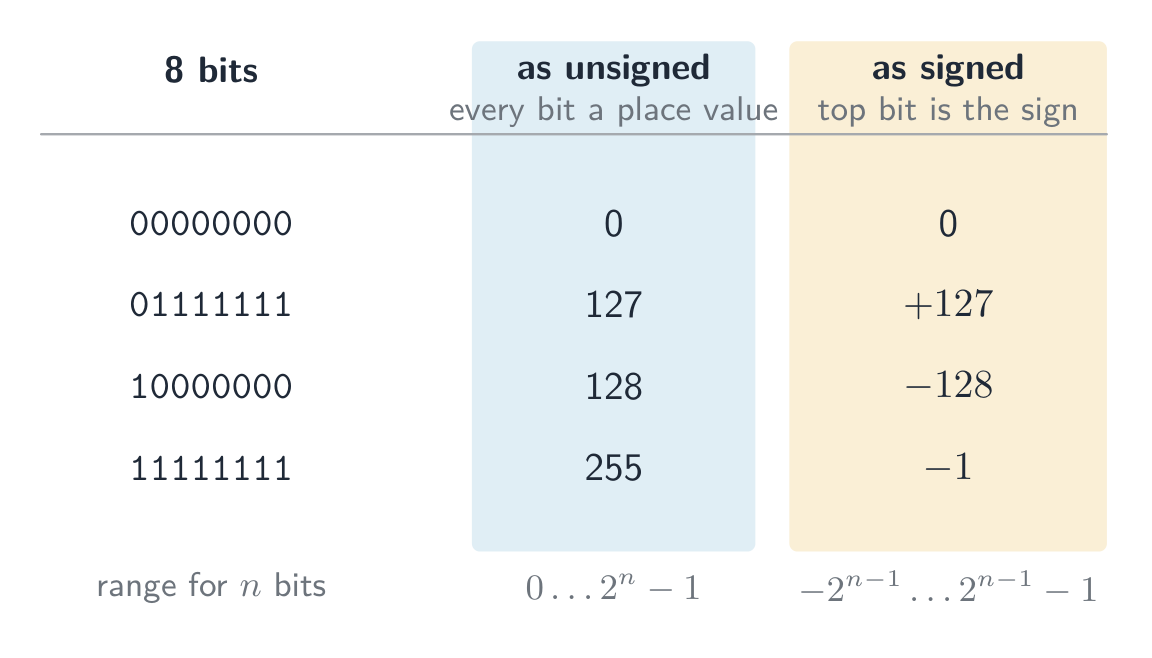
    The same bits mean different numbers depending on the agreed reading. As an unsigned integer every bit is a place value, so 8 bits run from $0$ to $255$; as a signed two's-complement integer the top bit is the sign, so the same 8 bits run from $-128$ to $+127$. The pattern $11111111$ is $255$ read one way and $-1$ read the other — nothing in the bits themselves says which.

    The same byte read as unsigned and as signed: only the agreed interpretation tells them apart 8-bit two's complement: the sign bit splits the range into negative ($-128$ to $-1$) and positive ($0$ to $127$)

    Worked example. What denary value does the 8-bit two's-complement number $10110100$ represent?

    The MSB is 1, so it is negative. Invert → $01001011$, add 1 → $01001100 = 76$, so the value is $-76$. Check with place values: $-128 + 32 + 16 + 4 = -76$.

    Worked example. Write $-108$ as a 12-bit two's-complement integer.

    Start from $+108$ in 12 bits: $108 = 64 + 32 + 8 + 4$, so 0000 0110 1100. Invert every bit: 1111 1001 0011. Add 1: 1111 1001 0100. Check with place values, where the top bit is worth $-2^{11} = -2048$: $-2048 + 1024 + 512 + 256 + 128 + 16 + 4 = -108$. ✓

    For 12 bits the range is $-2048$ (1000 0000 0000) to $+2047$ (0111 1111 1111). Questions that ask for the smallest and largest values want these two patterns, so learn the rule: the most negative number is a 1 followed by zeros; the most positive is a 0 followed by ones.

    An arithmetic shift 算术移位 moves every bit left or right but keeps the sign: a shift right by one place halves the value and copies the sign bit into the empty space on the left, so a negative number stays negative (1111 1001 0100 shifted right three places is 1111 1111 0010, which is $-14$: $-108 / 8 = -13.5$, and a shift right rounds down). A shift left doubles the value. Shifts belong to the assembly instruction set in topic 4, but this question is asked with the number work here.

    Overflow in signed arithmetic happens when the true result falls outside this range — spotted when the sign bit flips wrongly (two positives giving a negative, or two negatives giving a positive).

    One's complement

    Before two's complement, an older scheme called one's complement 反码 represented a negative number by simply inverting every bit of the positive — there is no "add 1" step.

    • $+30 = 00011110$, so in one's complement $-30 = 11100001$ (just the inverse).
    • Drawback: it has two zeros — $00000000$ ($+0$) and $11111111$ ($-0$) — which wastes a bit pattern and makes arithmetic awkward.

    Two's complement (invert and add 1) removes the negative zero: it has a single zero and lets addition and subtraction use the same circuit. That is why modern computers store signed integers in two's complement, not one's complement.

    ไทย

    การบวกไบนารี

    บวกคอลัมน์ต่อคอลัมน์จากขวาไปซ้าย ทำ Carry เหมือนทศนิยม:

    Bit A Bit B Carry in Sum bit Carry out
    0 0 0 0 0
    0 0 1 1 0
    0 1 0 1 0
    0 1 1 0 1
    1 1 0 0 1
    1 1 1 1 1

    Overflow เกิดขึ้นเมื่อผลลัพธ์ต้องการ Bits มากกว่าที่ register จะเก็บได้ — Carry-out ของคอลัมน์ซ้ายสุดคือ Overflow bit

    ตัวอย่างวิธีทำ. บวก unsigned integers 8-bit $10110101$ และ $01101100$ และอธิบายผลลัพธ์

    $10110101 + 01101100 = 1\,00100001$. คำตอบต้องใช้ 9 บิต ดังนั้นจึงไม่พอดีกับรีจิสเตอร์ขนาด 8 บิต: เกิดการล้น (overflow) คำตอบที่สมบูรณ์ต้องระบุชื่อข้อผิดพลาดและอธิบายเหตุผล โดยใช้ขนาดบิตที่โจทย์กำหนดไว้: "ล้น: ผลลัพธ์ที่แท้จริง ($289$) มีค่ามากกว่าค่าสูงสุดที่รีจิสเตอร์ขนาด 8 บิตสามารถเก็บได้ ($255$) ทำให้ carry ที่ออกจากบิตที่มีค่านัยสำคัญสูงสุด (MSB) หายไป และผลลัพธ์ที่บันทึกไว้ ($00100001 = 33$) จึงผิดเพี้ยนไป"

    การลบเลขฐานสอง

    วิธีทั่วไปคือ การบวกด้วยสองส่วนเสริม (two's complement): เพื่อทำ $A - B$ ให้สร้างสองส่วนเสริมของ $B$ (กลับทุกบิตแล้วบวก 1) จากนั้นทำการบวก และทิ้ง carry ที่เกิดขึ้นในขั้นสุดท้าย

    ในการลบ $00011110$ ออกจาก $01100100$ (unsigned 8-bit):

    • สองส่วนเสริมของ $00011110$: กลับ → $11100001$, บวก 1 → $11100010$.
    • บวกเข้ากับ $01100100$: ได้ผลลัพธ์ $1\,01000110$ (9 บิต) — ทิ้งเลข 1 ตัวแรกออก → $01000110 = 70_{10}$. ตรวจสอบ: $100 - 30 = 70$. ✓

    จำนวนเต็มมีเครื่องหมายแบบสองส่วนเสริม (Two's complement signed integers)

    ในจำนวนสองส่วนเสริมขนาด $n$-บิต:

    • บิตที่มีค่านัยสำคัญสูงสุด (MSB) คือ บิตบอกเครื่องหมาย: 0 = บวก, 1 = ลบ.
    • ในการอ่านค่าลบ: กลับทุกบิต, บวก 1, แล้วเปลี่ยนเครื่องหมายเป็นลบ

    ดังนั้น $11100010$ จึงเป็นค่าลบ; กลับ → $00011101$, บวก 1 → $00011110 = 30$, ดังนั้นค่านี้คือ $-30$. นี่คือ จำนวนเต็มมีเครื่องหมาย (ต่างจาก unsigned) ช่วงของค่าสำหรับ $n$ บิต คือ $-2^{n-1}$ ถึง $+2^{n-1} - 1$; สำหรับ 8 บิต คือ $-128$ ($10000000$) ถึง $+127$ ($01111111$).

    บิตชุดเดียวกันหมายถึงตัวเลขต่างกันขึ้นอยู่กับวิธีการอ่าน agreed together. ในฐานะ จำนวนเต็มไม่มีเครื่องหมาย ทุกบิตเป็นตำแหน่งค่า, ดังนั้น 8 บิตจึงครอบคลุมตั้งแต่ $0$ ถึง $255$; ในฐานะ จำนวนเต็ม signed แบบ two's complement บิตบนสุดคือเครื่องหมาย, ดังนั้น 8 บิตเดียวกันจึงครอบคลุมตั้งแต่ $-128$ ถึง $+127$. ลวดลาย $11111111$ คือ $255$ เมื่ออ่านทางหนึ่งและ $-1$ เมื่ออ่านอีกทาง — ไม่มีอะไรในบิตเองบอกได้ว่าอันไหน

    ตารางแสดงรูปแบบ 8 บิต 4 แบบที่อ่านได้สองแบบ: 00000000 คือ 0 ทั้งสองแบบ, 01111111 คือ 127 แบบ unsigned และ +127 แบบ signed, 10000000 คือ 128 แบบ unsigned แต่ -128 แบบ signed, และ 11111111 คือ 255 แบบ(unsigned แต่ -1 แบบ signed byte เดียวกันที่อ่านเป็น unsigned และ signed: การตีความที่ตกลงกันเท่านั้นที่จะแยกแยะได้ เส้นจำนวนสองส่วนเสริม 8 บิตตั้งแต่ -128 (10000000) ถึง +127 (01111111);ตัวเลขที่มีบิตบอกเครื่องหมายเป็น 1 เป็นลบ และที่มีบิตบอกเครื่องหมายเป็น 0 เป็นบวก โดย -1 = 11111111 อยู่ถัดจาก 0 = 00000000 สองส่วนเสริม 8 บิต: บิตบอกเครื่องหมายแบ่งช่วงค่าให้เป็นลบ ($-128$ ถึง $-1$) และบวก ($0$ ถึง $127$)

    ตัวอย่างวิธีทำ. ค่าฐานสิบใดที่จำนวนสองส่วนเสริม 8 บิต $10110100$ แทนอยู่?

    MSB เป็น 1 ดังนั้นจึงเป็นลบ. กลับ → $01001011$, บวก 1 → $01001100 = 76$, ดังนั้นค่าคือ $-76$. ตรวจสอบด้วยตำแหน่งของค่า: $-128 + 32 + 16 + 4 = -76$.

    ตัวอย่างวิธีทำ. เขียน $-108$ เป็นจำนวนเต็มสองส่วนเสริมขนาด 12 บิต

    เริ่มต้นจาก $+108$ ใน 12 บิต: $108 = 64 + 32 + 8 + 4$, ดังนั้น 0000 0110 1100. กลับทุกบิต: 1111 1001 0011. บวก 1: 1111 1001 0100. ตรวจสอบด้วยตำแหน่งของค่า ซึ่งบิตบนสุดมีค่าเท่ากับ $-2^{11} = -2048$: $-2048 + 1024 + 512 + 256 + 128 + 16 + 4 = -108$. ✓

    สำหรับ 12 บิต ช่วงค่าคือ $-2048$ (1000 0000 0000) ถึง $+2047$ (0111 1111 1111). คำถามที่ถามหาค่าที่น้อยที่สุดและมากที่สุดต้องการรูปแบบเหล่านี้สองรูปแบบ ดังนั้นให้จดจำกฎ: เลขที่น้อยที่สุดคือ 1 ตามด้วยศูนย์; เลขที่สูงที่สุดคือ 0 ตามด้วยหนึ่ง

    การเลื่อนเลขคณิต (arithmetic shift) จะเลื่อนทุกบิตไปทางซ้ายหรือขวาแต่คงเครื่องหมายไว้: การเลื่อนไปทางขวาหนึ่งตำแหน่งจะทำให้ค่าลดลงครึ่งหนึ่งและคัดลอกบิตบอกเครื่องหมายเข้าไปในช่องว่างด้านซ้าย ทำให้เลขลบยังคงเป็นลบ (1111 1001 0100 เลื่อนไปทางขวาสามตำแหน่งจะได้ 1111 1111 0010 ซึ่งเป็น $-14$: $-108 / 8 = -13.5$, และการเลื่อนไปทางขวาเป็นการปัดเศษลง) การเลื่อนไปทางซ้ายจะทำให้ค่าเพิ่มขึ้นเป็นสองเท่า การเลื่อนบิตเป็นคำสั่งในภาษาอัสเซมเบิล러ในหัวข้อ 4 แต่คำถามนี้ถูกตั้งขึ้นเพื่อทดสอบความรู้เรื่องการคำนวณตัวเลข

    การล้นในการคำนวณเลขคณิตแบบมีเครื่องหมายเกิดขึ้นเมื่อผลลัพธ์จริงตกนอกช่วงนี้ — ตรวจพบได้เมื่อบิตบอกเครื่องหมายเปลี่ยนไปอย่างผิดปกติ (บวกสองตัวให้ผลลบ หรือลบสองตัวให้ผลบวก)

    ส่วนเสริมหนึ่ง (One's complement)

    ก่อนหน้าสองส่วนเสริม จะมีระบบเก่าที่เรียกว่า ส่วนเสริมหนึ่ง ซึ่งใช้แทนเลขลบด้วยการ กลับทุกบิต ของเลขบวกโดยตรง — ไม่มีขั้นตอน "บวก 1"

    • $+30 = 00011110$, ดังนั้นในส่วนเสริมหนึ่ง $-30 = 11100001$ (แค่กลับค่า)
    • ข้อเสีย: มันมี ศูนย์สองตัว — $00000000$ ($+0$) และ $11111111$ ($-0$) — ซึ่งเปลืองรูปแบบบิตและทำให้การคำนวณยุ่งยาก

    สองส่วนเสริม (กลับ และ บวก 1) ช่วยกำจัดศูนย์ลบ: มีเพียงศูนย์เดียวและช่วยให้การบวกและการลบใช้วงจรเดียวกัน นั่นคือเหตุผลว่าทำไมคอมพิวเตอร์สมัยใหม่จึงเก็บจำนวนเต็มมีเครื่องหมายในรูปแบบสองส่วนเสริม ไม่ใช่ส่วนเสริมหนึ่ง

    Explore · ⁨สำรวจ⁩

    Binary & signed integers · ⁨เลขฐานสอง & จำนวนเต็มที่มีเครื่องหมาย⁩

    byte = Σ place values · ⁨byte = ผลรวมของค่าตำแหน่ง⁩

    See how an 8-bit pattern maps to a number (and how it would overflow past 255). · ⁨ดูว่ารูปแบบ 8 บิตจับคู่กับตัวเลขอย่างไร (และ会发生溢出เกิน 255 อย่างไร)⁩

    Explore · ⁨สำรวจ⁩

    Two's complement signed bits · ⁨บิตที่มีเครื่องหมายแบบสองส่วนเสริม (Two's complement)⁩

    The leftmost bit carries a negative place value. Flip any bit — or hit Negate (invert every bit, then add 1) — and watch the signed value change. · ⁨บิตทางซ้ายสุดมีตำแหน่งที่มีค่า ลบ พลิกบิตใดๆ — หรือกด Negate (พลิกทุกบิต แล้วบวก 1) — เพื่อดูว่าค่าที่มีเครื่องหมายเปลี่ยนไปอย่างไร⁩

    Vocabulary · ⁨คำศัพท์⁩ Train · ⁨ฝึกฝน⁩
    English ไทย
    register/ˈredʒɪstə/ รีจิสเตอร์ (register)
    unsigned/ʌnˈsaɪnd/ ไม่มีเครื่องหมาย
    overflow/ˌəʊvəˈfləʊ/ overflow
    most significant bit/məʊst sɪɡˈnɪfɪkənt bɪt/ บิตที่มีนัยสำคัญสูงสุด
    signed integer/saɪnd ˈɪntɪdʒə/ จำนวนเต็มที่มีเครื่องหมาย
    sign bit/saɪn bɪt/ บิตเครื่องหมาย
    arithmetic shift/ˌærɪθˈmetɪk ʃɪft/ การเลื่อนเลขคณิต
    one's complement/wʌnz ˈkɒmplɪmənt/ หนึ่งคอมพลีเมนต์
    7-segment display/ˈsevən ˈseɡmənt dɪˈspleɪ/ จอแสดงผล 7 ส่วน
    memory address/ˈmeməri əˈdres/ ที่อยู่หน่วยความจำ
    1.1

    Binary Coded Decimal (BCD) · ⁨BCD (Binary Coded Decimal)⁩

    English

    In BCD 二进码十进数, each denary digit is written as its own 4-bit pattern. The number $93$ is 1001 0011 in BCD — not binary 93 ($01011101$). Each nibble uses only 0–9; patterns $1010$–$1111$ are invalid.

    BCD reading: 0010 0111 0101 → 2, 7, 5 → 275.

    Use: calculators, digital clocks, and devices that show denary digits — each digit drives a 7-segment display 七段显示器. Currency code often uses BCD to avoid the rounding errors of converting fractions like 0.1 to binary.

    A "justify" answer must link the use to a property of BCD: each denary digit has its own 4 bits, so a digit can be sent straight to its display, or added digit by digit, with no conversion of the whole number; and a decimal fraction such as $0.10$ is stored exactly, which a binary fraction cannot do.

    ไทย

    ใน BCD แต่ละหลักฐานสิบจะถูกเขียนเป็นรูปแบบ 4 บิตของตัวเอง. เลข $93$ จะ写成 1001 0011 ใน BCD — ไม่ใช่เลข 93 แบบฐานสอง ($01011101$). แต่ละ nibble ใช้ได้เฉพาะ 0–9; รูปแบบ $1010$–$1111$ ไม่ถูกต้อง

    การอ่านค่า BCD: 0010 0111 0101 → 2, 7, 5 → 275.

    การใช้งาน: เครื่องคิดเลข, นาฬิกาดิจิทัล, และอุปกรณ์ที่แสดงผลหลักฐานสิบ — แต่ละหลักจะขับเคลื่อน จอแสดงผล 7 สegment. รหัสสกุลเงินมักใช้ BCD เพื่อหลีกเลี่ยงข้อผิดพลาดจากการปัดเศษของการแปลงทศนิยมเช่น 0.1 เป็นฐานสอง

    คำตอบเรื่อง "justify" ต้องเชื่อมโยงการใช้งานกับคุณสมบัติของ BCD: แต่ละหลักฐานสิบมี 4 บิตของตัวเอง ดังนั้นหลักนั้นสามารถส่งตรงไปยังจอแสดงผลได้ หรือบวกทีละหลักได้โดยไม่ต้องแปลงทั้งจำนวน; และทศนิยมเช่น $0.10$ จะถูกเก็บรักษาไว้อย่างแม่นยำ ซึ่งทศนิยมแบบฐานสองไม่สามารถทำได้

    องค์ประกอบจอแสดงผล LED 7 segment แบบหลักเดียว แสดงแท่งแยก 7 แท่ง
    จอแสดงผล 7 segment แสดงหลักฐานสิบหนึ่งหลัก มักถูกขับเคลื่อนด้วย BCD
    1.1

    Hexadecimal — practical uses · ⁨เฮกซาเดซิมัล - การใช้งานจริง⁩

    English

    Hex is a compact way to write binary (1 hex digit = 4 bits):

    • memory addresses 内存地址 in low-level programming — 0x7FFE.
    • colour values in HTML/CSS — #FF8800.
    • MAC addresses — AC:DE:48:00:11:22.

    Hex does not change the stored data — it just makes binary easier for humans.

    ไทย

    Hex เป็นวิธีที่กระชับในการเขียนเลขฐานสอง (1 หลัก hex = 4 บิต):

    byte ถูกแบ่งเป็นสอง nibbles; แต่ละ nibble คือหนึ่งหลัก hexadecimal
    byte เป็นสอง nibbles; แต่ละ nibble คือหนึ่งหลัก hex
    • ที่อยู่หน่วยความจำ ในการเขียนโปรแกรมระดับต่ำ — 0x7FFE.
    • ค่าสี ใน HTML/CSS — #FF8800.
    • ที่อยู่ MAC — AC:DE:48:00:11:22.

    ระบบเลขหกซิกซ์ไม่ได้เปลี่ยนข้อมูลที่เก็บไว้ — มันเพียงทำให้ข้อมูลแบบไบนารีเข้าใจง่ายสำหรับมนุษย์มากขึ้นเท่านั้น

    1.1

    Character codes · ⁨รหัสตัวอักษร⁩

    English

    Computers store text as numbers; each character has a numeric code point 码点 set by a character set 字符集.

    ASCII

    • ASCII uses 7 bits — 128 code points. Basic Latin letters, digits, punctuation, and control codes.
    • Extended ASCII uses 8 bits — 256 code points; the lower 128 match ASCII, the upper 128 vary by region.

    Unicode

    • Unicode is a universal character set covering almost every script, plus symbols and emoji.
    • common encodings 编码: UTF-8 (1–4 bytes, ASCII-compatible), UTF-16 (2 or 4 bytes), UTF-32 (fixed 4 bytes).

    Why Unicode beats ASCII

    • it represents far more characters (every script, emoji); ASCII covers only basic English.
    • files are portable with no code-page confusion, and allow multilingual text in one document.
    • trade-off: Unicode files are usually larger for English-only text.

    When a question asks for differences, give them in pairs with numbers: ASCII uses 7 bits (extended ASCII 8), so 128 (256) characters; Unicode uses up to 32 bits (UTF-8 uses 1 to 4 bytes), so more than a million code points. ASCII covers basic English only; Unicode covers every script, and its first 128 code points are the ASCII ones. In UTF-8 an English letter still takes 1 byte, so a 40-letter English file name is 40 bytes in ASCII and in UTF-8 alike, while a Chinese character takes 3 bytes.

    ไทย

    คอมพิวเตอร์จัดเก็บข้อความในรูปแบบตัวเลข โดยแต่ละตัวอักษรมี จุดรหัส (code point) ซึ่งเป็นตัวเลขที่กำหนดโดย ชุดตัวอักษร (character set)

    ASCII

    • ASCII ใช้ 7 บิต — มี 128 จุดรหัส ครอบคลุมตัวอักษรลาตินพื้นฐาน的数字เครื่องหมายวรรคตอน และรหัสควบคุม
    • Extended ASCII ใช้ 8 บิต — มี 256 จุดรหัส โดย 128 จุดแรกตรงกับ ASCII ส่วนอีก 128 จุดหลังแตกต่างกันไปตามภูมิภาค
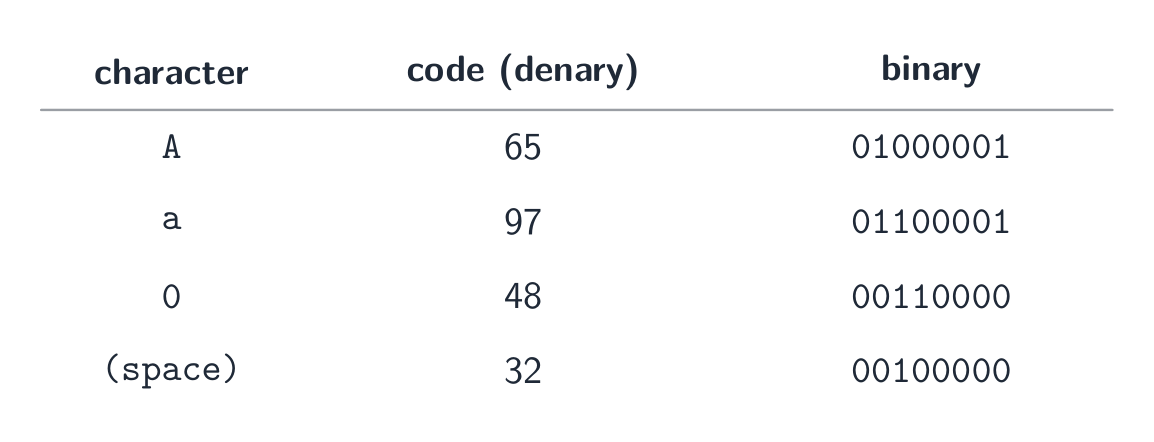
    ตาราง ASCII เล็ก: ตัวอักษร A มีรหัส 65 = 01000001, a มีรหัส 97 = 01100001, เลข 0 มีรหัส 48 = 00110000 และช่องว่างมีรหัส 32 = 00100000
    แต่ละตัวอักษรถูกจัดเก็บเป็นตัวเลข — ตัวอย่างจุดรหัส ASCII บางส่วนในระบบเลขสิบและไบนารี

    Unicode

    • Unicode เป็นชุดตัวอักษรสากลที่ครอบคลุมเกือบทุกสคริปต์ รวมถึงสัญลักษณ์และอีโมจิ
    • การเข้ารหัสทั่วไป: UTF-8 (1–4 ไบต์ เข้ากันได้กับ ASCII), UTF-16 (2 หรือ 4 ไบต์), UTF-32 (คงที่ 4 ไบต์)

    ทำไม Unicode จึงดีกว่า ASCII

    • สามารถแสดง ตัวอักษรมากขึ้นมาก (ทุกสคริปต์ อีโมจิ) ในขณะที่ ASCII ครอบคลุมเฉพาะภาษาอังกฤษพื้นฐานเท่านั้น
    • ไฟล์มีความ พกพาได้ โดยไม่เกิดปัญหาความสับสนของหน้าจอรหัส (code-page) และสามารถรองรับข้อความหลายภาษาในเอกสารเดียวได้
    • ข้อเสีย: ไฟล์ Unicode มักจะมี ขนาดใหญ่กว่า สำหรับข้อความภาษาอังกฤษล้วน

    เมื่อโจทย์ถามหา ความแตกต่าง ให้ตอบเป็นคู่พร้อมระบุตัวเลข: ASCII ใช้ 7 บิต (Extended ASCII ใช้ 8 บิต) ดังนั้นจึงมี 128 (256) ตัวอักษร; Unicode ใช้สูงสุดถึง 32 บิต (UTF-8 ใช้ 1 ถึง 4 ไบต์) จึงมีจุดรหัสมากกว่าล้านจุด ASCII ครอบคลุมเฉพาะภาษาอังกฤษพื้นฐาน; Unicode ครอบคลุมทุกสคริปต์ และ 128 จุดรหัสแรกของมันคือ ASCII เช่นกัน ใน UTF-8 ตัวอักษรภาษาอังกฤษยังคงใช้ 1 ไบต์ ดังนั้นไฟล์ชื่อภาษาอังกฤษยาว 40 ตัวอักษรจึงมีขนาด 40 ไบต์ ทั้งใน ASCII และ UTF-8都是一样的 แต่ตัวอักษรจีนจะใช้ 3 ไบต์

    Explore · ⁨สำรวจ⁩

    A character is stored as a number · ⁨ตัวอักษรถูกจัดเก็บในฐานะตัวเลข⁩

    Each character has a code number — 'A' is 65. Flip the bits to see that code in binary and hex, exactly how the computer holds it. · ⁨แต่ละตัวอักษรมีรหัสเลข — 'A' คือ 65 พลิกบิตเพื่อดูรหัสนี้ในรูปแบบเลขฐานสองและหกสิบหนึ่ง ตามที่คอมพิวเตอร์จัดเก็บจริง⁩

    Vocabulary · ⁨คำศัพท์⁩ Train · ⁨ฝึกฝน⁩
    English ไทย
    code point/kəʊd pɔɪnt/ จุดโค้ด
    character set/ˈkærɪktə set/ ชุดอักขระ
    1.2

    Bitmap images · ⁨ภาพ Bitmap⁩

    Syllabus · ⁨หลักสูตร⁩
    English
    Candidates should be able to: Notes and guidance
    Show understanding of how data for a bitmapped image are encoded Use and understand the terms: pixel, file header, image resolution, screen resolution, colour depth / bit depth
    Perform calculations to estimate the file size for a bitmap image
    Show understanding of the effects of changing elements of a bitmap image on the image quality and file size Use the terms: image resolution, colour depth / bit depth
    Show understanding of how data for a vector graphic are encoded Use the terms: drawing object, property, drawing list
    Justify the use of a bitmap image or a vector graphic for a given task
    Show understanding of how sound is represented and encoded Use the terms: sampling, sampling rate, sampling resolution, analogue and digital data
    Show understanding of the impact of changing the sampling rate and resolution Including the impact on file size and accuracy
    ไทย
    ผู้เข้าสอบควรสามารถ: หมายเหตุและคำแนะนำ
    แสดงความเข้าใจในการเข้ารหัสข้อมูลสำหรับ bitmapped image ใช้และทำความเข้าใจคำศัพท์: pixel, file header, image resolution, screen resolution, colour depth / bit depth
    ทำการคำนวณเพื่อประมาณขนาดไฟล์สำหรับ bitmap image
    แสดงความเข้าใจถึงผลกระทบของการเปลี่ยนแปลงองค์ประกอบของ bitmap image ต่อคุณภาพภาพและขนาดไฟล์ ใช้คำศัพท์: image resolution, colour depth / bit depth
    แสดงความเข้าใจในการเข้ารหัสข้อมูลสำหรับ vector graphic ใช้คำศัพท์: drawing object, property, drawing list
    ให้เหตุผลในการเลือกใช้ bitmap image หรือ vector graphic สำหรับงานที่กำหนด
    แสดงความเข้าใจในการแสดงผลและการเข้ารหัสเสียง ใช้คำศัพท์: sampling, sampling rate, sampling resolution, analogue และ digital data
    แสดงความเข้าใจถึงผลกระทบจากการเปลี่ยนแปลง sampling rate และ resolution รวมถึงผลกระทบต่อขนาดไฟล์และความแม่นยำ

    Source: Cambridge International syllabus · ⁨แหล่งที่มา: หลักสูตร Cambridge International⁩

    English

    A bitmap 位图 image (also called a bitmapped image) stores the colour of every pixel 像素 in a grid. At the start of the file a file header 文件头 records the image's metadata — its width, height and colour depth — so software knows how to read the pixel data that follows.

    • image resolution 图像分辨率: the bitmap's own size, width × height in pixels (e.g. 1920 × 1080).
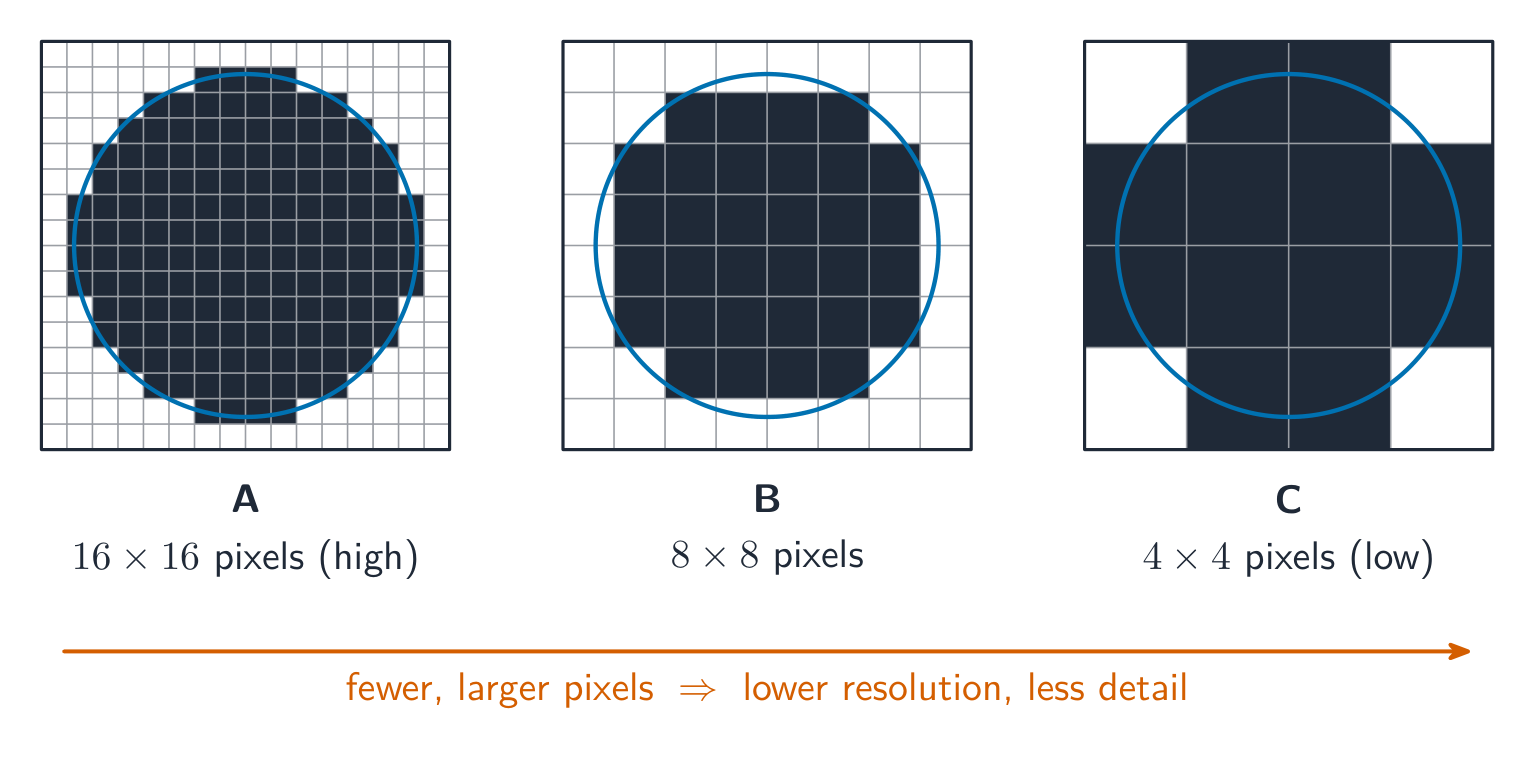
    • screen resolution 屏幕分辨率: the width × height the display can show. If an image's resolution is larger than the screen it is scaled down to fit; a low-resolution image looks blocky when stretched onto a higher-resolution screen.
    • colour depth 颜色深度 (bit depth 位深度): bits per pixel. 1 bit → black/white; 8 bits → 256 colours; 24 bits → 16.7 million ("true colour").

    File size

    $$\text{size in bits} = \text{width} \times \text{height} \times \text{bit depth}.$$

    Divide by 8 for bytes, by 1024 for KiB, etc. Example: a $3000 \times 2000$ image at 24 bpp is $3000 \times 2000 \times 24 = 1.44 \times 10^{8}$ bits $\approx 17.2\ \text{MiB}$.

    State the units you used. The mark scheme accepts $1\ \text{MB} = 10^{6}$ bytes (the SI prefix) or $1\ \text{MiB} = 1024 \times 1024$ bytes (the binary prefix), as long as your working shows which one; the same image is $18.0\ \text{MB}$ or $17.2\ \text{MiB}$. Add the size of the file header if the question gives one.

    A video is a sequence of bitmap images, each one a frame 帧. Before compression its size is the size of one frame $\times$ the frame rate 帧率 (frames per second) $\times$ the duration in seconds: 30 frames per second of $1920 \times 1080$ pixels at 24 bits is $30 \times 1920 \times 1080 \times 24 \approx 1.5 \times 10^{9}$ bits, about $187\ \text{MB}$, for every second. That is why video is always compressed.

    Changing settings

    • lower resolution → smaller file, less detail (looks blocky when enlarged).
    • lower colour depth → smaller file, but smooth shades show banding.
    • higher of either → larger file, better quality.
    ไทย

    ภาพ Bitmap (หรือเรียกว่า ภาพ Bitmapped) จัดเก็บสีของแต่ละ พิกเซล (pixel) ในตาราง เมื่อเริ่มไฟล์จะมีย่านหัวไฟล์ (file header) ที่บันทึกข้อมูลเมตาดาตาของภาพ — ความกว้าง ความสูง และความลึกของสี — เพื่อให้ซอฟต์แวร์ทราบวิธีอ่านข้อมูลพิกเซลที่จะตามมา

    • ความละเอียดของภาพ: ขนาดของภาพเอง ความกว้าง × ความสูง เป็นพิกเซล (เช่น 1920 × 1080)
    • ความละเอียดของหน้าจอ: ความกว้าง × ความสูงที่ จอแสดงผล สามารถแสดงได้ หากความละเอียดของภาพสูงกว่าหน้าจอ ภาพจะถูกย่อให้พอดี; ภาพความละเอียดต่ำจะดูเป็นบล็อกเมื่อขยายไปบนหน้าจอที่มีความละเอียดสูงกว่า
    • ความลึกของสี (bit depth): บิตต่อพิกเซล 1 บิต → ดำ/ขาว; 8 บิต → 256 สี; 24 บิต → 16.7 ล้านสี ("true colour")
    ดิสก์เดียวกันถูกจัดเก็บในตารางพิกเซลสามแบบ A ถึง C ซึ่งดูเป็นบล็อกมากขึ้นเมื่อพิกเซลใหญ่ขึ้นและมีจำนวนน้อยลง
    ภาพเดียวกันถูกจัดเก็บด้วยความละเอียดสามระดับ จากสูง (A) ไปยังต่ำ (C): พิกเซลที่น้อยลงและใหญ่ขึ้นส่งผลให้รายละเอียดลดลง

    ขนาดไฟล์

    $$\text{size in bits} = \text{width} \times \text{height} \times \text{bit depth}.$$

    หารด้วย 8 เพื่อแปลงเป็นไบต์ หารด้วย 1024 เพื่อแปลงเป็น KiB เป็นต้น ตัวอย่าง: ภาพ $3000 \times 2000$ ที่มีความลึก 24 bpp จะมีขนาด $3000 \times 2000 \times 24 = 1.44 \times 10^{8}$ บิต $\approx 17.2\ \text{MiB}$

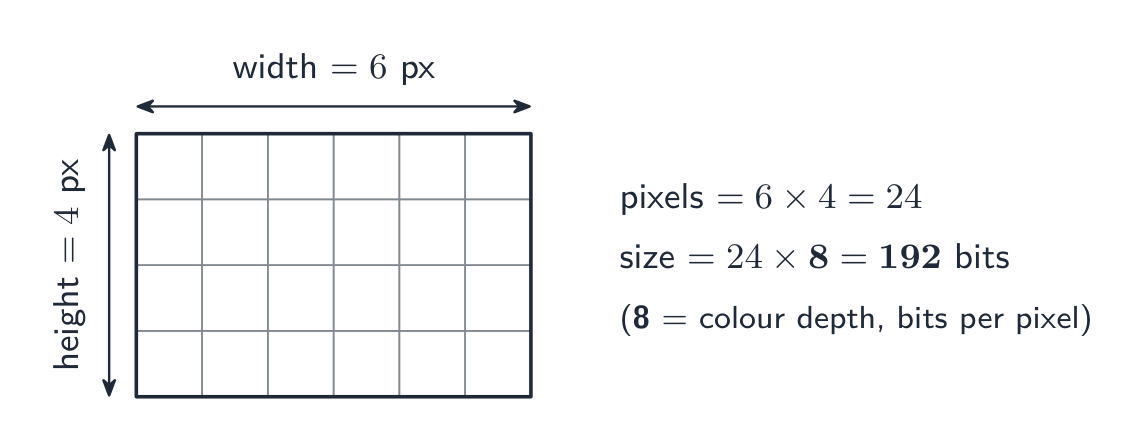
    ตารางพิกเซลขนาด 6×4 พร้อมระบุความกว้างและความสูง; พิกเซล = 6 × 4 = 24 และที่ความลึก 8 บิตต่อพิกเซล ขนาด = 24 × 8 = 192 บิต
    สูตรเดียวกันกับตัวเลขเล็กๆ: นับจำนวนพิกเซล แล้วคูณกับความลึกของสี

    ระบุหน่วยที่คุณใช้ แผนการให้คะแนนยอมรับ $1\ \text{MB} = 10^{6}$ ไบต์ (พรีфикซ์ SI) หรือ $1\ \text{MiB} = 1024 \times 1024$ ไบต์ (พรีфикซ์ไบนารี) ตราบใดที่ขั้นตอนการทำงานของคุณแสดงว่าใช้หน่วยใด ภาพเดียวกันนี้มีขนาด $18.0\ \text{MB}$ หรือ $17.2\ \text{MiB}$ เพิ่มขนาดของ headers ถ้าโจทย์กำหนดมาให้

    วิดีโอคือลำดับของภาพ bitmap แต่ละภาพเรียกว่า เฟรม (frame) ก่อนการบีบอัด ขนาดของมันคือขนาดของเฟรมหนึ่ง $\times$ อัตราเฟรม (frame rate – เฟรมต่อวินาที) $\times$ ระยะเวลาเป็นวินาที: 30 เฟรมต่อวินาทีของภาพ $1920 \times 1080$ พิกเซล ที่ความลึก 24 บิต จะมีขนาด $30 \times 1920 \times 1080 \times 24 \approx 1.5 \times 10^{9}$ บิต ประมาณ $187\ \text{MB}$ ต่อวินาที นั่นคือเหตุผลที่วิดีโอต้องถูกบีบอัดเสมอ

    การเปลี่ยนการตั้งค่า

    • ลดความละเอียด → ไฟล์เล็กลง รายละเอียดน้อยลง (ดูเป็นบล็อกเมื่อขยาย)
    • ลดความลึกของสี → ไฟล์เล็กลง แต่เฉดสีที่เรียบเนียนจะปรากฏเป็นแถบ (banding)
    • เพิ่ม อย่างใดอย่างหนึ่ง → ไฟล์ใหญ่ขึ้น คุณภาพดีขึ้น
    Vocabulary · ⁨คำศัพท์⁩ Train · ⁨ฝึกฝน⁩
    English ไทย
    bitmap/ˈbɪtmæp/ bitmap
    pixel/ˈpɪksl/ พิกเซล
    file header/faɪl ˈhedə/ หัวไฟล์
    bit depth/bɪt depθ/ ความลึกของบิต
    frame/freɪm/ กรอบ
    frame rate/freɪm reɪt/ อัตราเฟรม
    1.2

    Vector graphics · ⁨กราฟิกเวกเตอร์⁩

    English

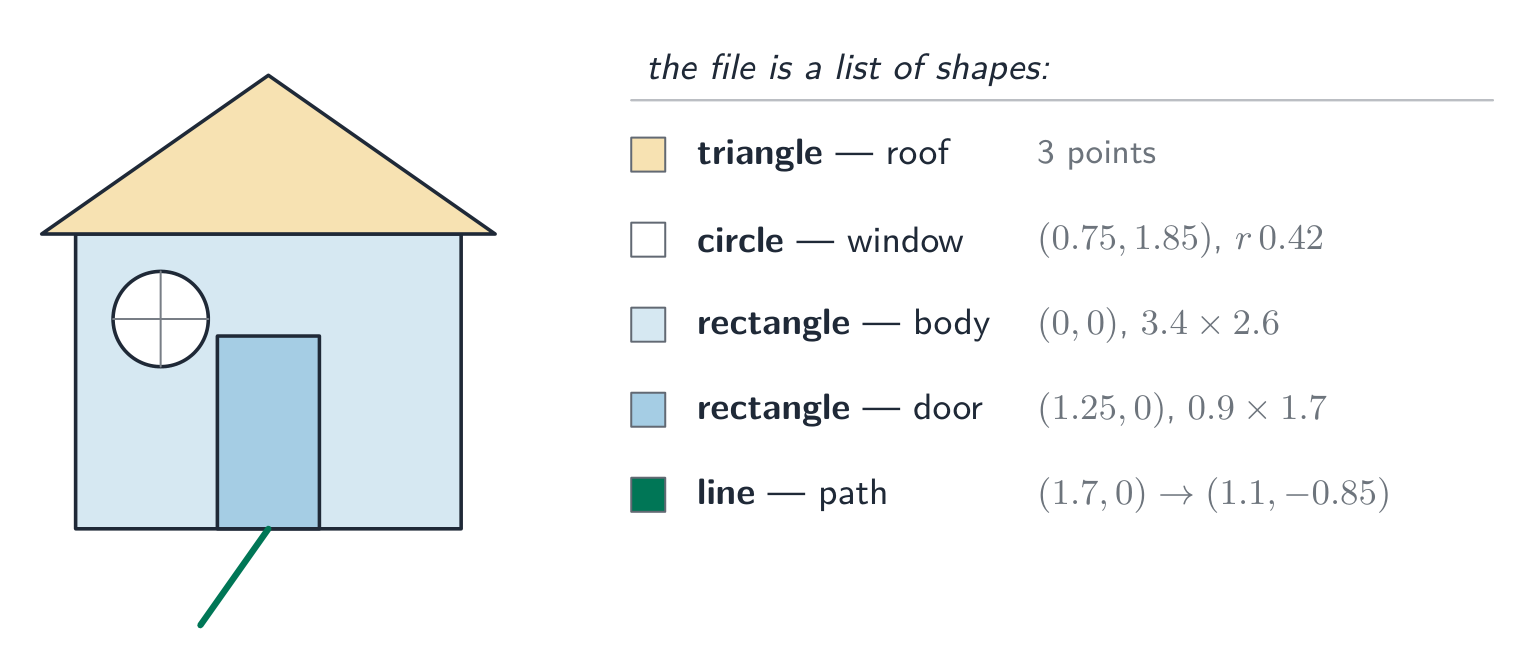
    A vector graphic 矢量图形 stores the instructions to draw the image as a drawing list 绘图列表 — an ordered list of drawing objects 绘图对象 (geometric primitives 图元: lines, curves, polygons, circles). Each drawing object has properties 属性 such as colour, fill, line width and position (coordinates). To show it, the program renders 渲染 the drawing list at any resolution needed.

    Bitmap vs vector

    Task Better choice Why
    Photograph Bitmap Complex pixel-level detail can't be described as shapes.
    Logo, icon, sign Vector Sharp edges; scales to any size without blur.
    Engineering drawing Vector Precise geometry and scaling.
    Painting, texture Bitmap Smooth tonal detail per area.

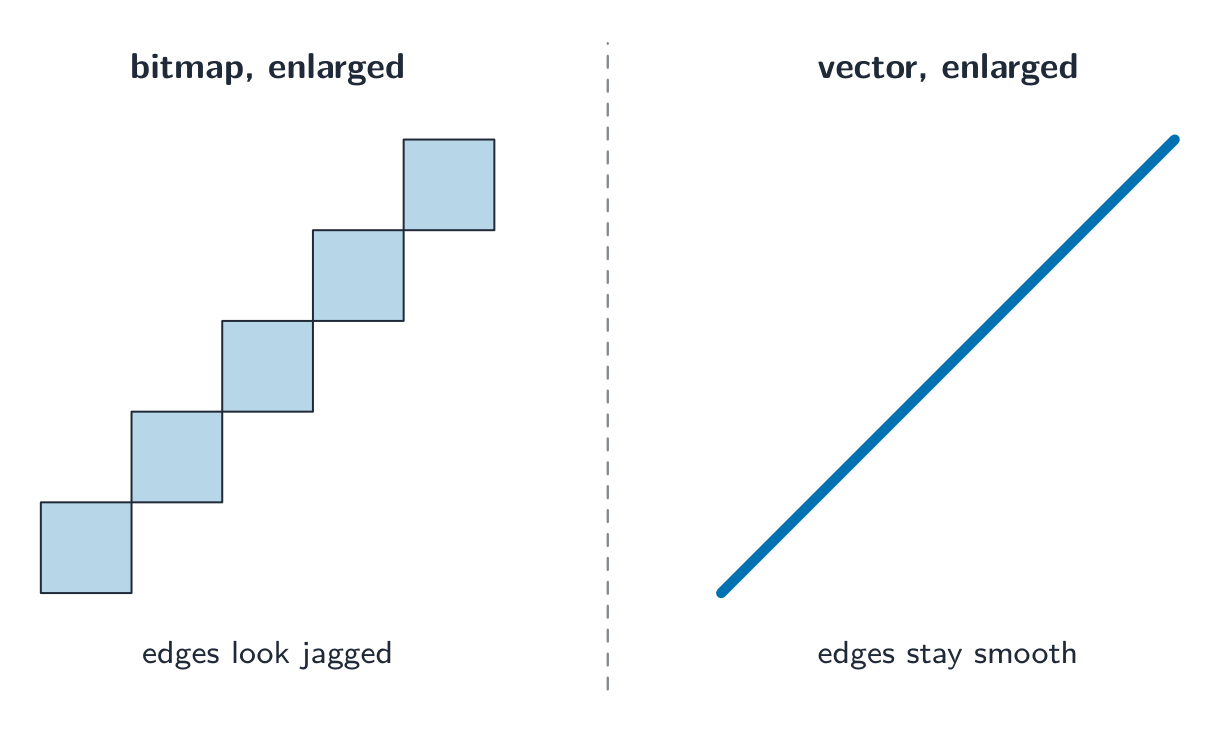
    Vector advantage: it scales without losing quality — a vector logo stays sharp at any size, while a bitmap blurs when enlarged. Vector disadvantage: it cannot describe arbitrary pixel detail (photographs).

    A "justify" answer links the choice to the task. "The logo must appear on a business card and on a billboard, so it should be a vector graphic: it is stored as drawing objects and is re-rendered sharply at any size, whereas a bitmap would show its pixels when enlarged." For a photograph the argument runs the other way: there are no shapes to describe, so every pixel's colour must be stored.

    ไทย

    กราฟิกเวกเตอร์ จัดเก็บ คำสั่ง ในการวาดภาพในรูปแบบ รายการวาด (drawing list) — ซึ่งเป็นรายการที่มีลำดับของ วัตถุวาด (drawing objects) (รูปทรงเรขาคณิต เบื้องต้น: เส้นโค้ง โพลี่gone วงกลม) วัตถุวาดแต่ละชนิดมี คุณสมบัติ เช่น สี การเติม ความหนาของเส้น และตำแหน่ง (พิกัด) เมื่อต้องการแสดงผล โปรแกรมจะ เรนเดอร์ (render) รายการวาดนั้นด้วยความละเอียดที่ต้องการ

    ภาพบ้านง่ายๆ ที่สร้างจากสี่เหลี่ยมผืนผ้า (ตัวบ้าน), สามเหลี่ยม (หลังคา), วงกลม (หน้าต่าง), สี่เหลี่ยมผืนผ้า (ประตู) และเส้นตรง โดยแต่ละส่วนมีป้ายระบุประเภทรูปร่างและคุณสมบัติ
    ภาพเวกเตอร์ประกอบด้วยรูปร่างเรขาคณิตที่มีป้ายกำกับ แต่ละรูปร่างมีคุณสมบัติ各自的

    Bitmap เทียบกับเวกเตอร์

    งาน ทางเลือกที่ดีกว่า เหตุผล
    ภาพถ่าย Bitmap รายละเอียดระดับพิกเซลที่ซับซ้อนไม่สามารถอธิบายเป็นรูปทรงได้
    โลโก้ ไอคอน ป้าย Vector ขอบคมชัด ขยายได้ทุกรูปแบบโดยไม่เบลอ
    แบบแปลนวิศวกรรม Vector เรขาคณิตแม่นยำและการปรับขนาด
    จิตรกรรม เนื้อสัมผัส Bitmap รายละเอียดโทนสีที่ลื่นไหลในแต่ละพื้นที่

    ข้อดีของเวกเตอร์:它能够 ขยายได้โดยไม่สูญเสียคุณภาพ — โลโก้เวกเตอร์ยังคงคมชัดในทุกขนาด ในขณะที่ Bitmap จะเบลอเมื่อขยาย ข้อเสียของเวกเตอร์: ไม่สามารถอธิบายรายละเอียดพิกเซลแบบสุ่ม (เช่น photographs) ได้

    คำตอบแบบ "justify" (ให้เหตุผล) จะเชื่อมโยงตัวเลือกเข้ากับโจทย์: "โลโก้ต้องปรากฏทั้งบนนามบัตรและป้ายโฆษณา ดังนั้นควรเป็นกราฟิกเวกเตอร์: เก็บข้อมูลในรูปแบบวัตถุวาดภาพ และสามารถเรนเดอร์ใหม่ได้อย่างคมชัดทุกขนาด ในขณะที่กราฟิกบิตแมพจะแสดงพิกเซลเมื่อขยายใหญ่ขึ้น" สำหรับภาพถ่าย Arguments จะกลับด้าน: ไม่มีรูปทรงใดให้บรรยาย ดังนั้นสีของแต่ละพิกเซลจึงต้องถูกบันทึกไว้ทั้งหมด

    วางข้างกัน ทั้งสองขยายใหญ่: เส้นทแยงมุมของบิตแมพเป็นขั้นบันไดที่ขรุขระของพิกเซล ในขณะที่เส้นทแยงมุมของเวกเตอร์ยังคงเป็นเส้นตรงที่เรียบเนียน
    เมื่อขยายใหญ่ขึ้น พิกเซลของบิตแมพจะดูขรุขระ ส่วนเวกเตอร์ยังคงความเรียบเนียนไม่ว่าจะขยาย多大
    Explore · ⁨สำรวจ⁩

    Computing concept lab · ⁨ห้องปฏิบัติการแนวคิดการคำนวณ⁩

    Classify concrete examples by the computing idea they demonstrate. · ⁨จัดกลุ่มตัวอย่างที่เป็นรูปธรรมตาม idea การคำนวณที่แสดงออก⁩

    Vocabulary · ⁨คำศัพท์⁩ Train · ⁨ฝึกฝน⁩
    English ไทย
    vector graphic/ˈvektə ˈɡræfɪk/ กราฟิกเวกเตอร์
    drawing list/ˈdrɔːɪŋ lɪst/ drawing list
    drawing objects/ˈdrɔːɪŋ ˈɒbdʒekts/ วัตถุการวาด
    primitive/ˈprɪmɪtɪv/ พื้นฐาน
    properties/ˈprɒpətiz/ คุณสมบัติ
    render/ˈrendə/ เรนเดอร์
    analogue data/ˈænəlɒɡ ˈdeɪtə/ ข้อมูลอนาล็อก
    digital data/ˈdɪdʒɪtl ˈdeɪtə/ ข้อมูลดิจิทัล
    1.2

    Sound · ⁨เสียง⁩

    English

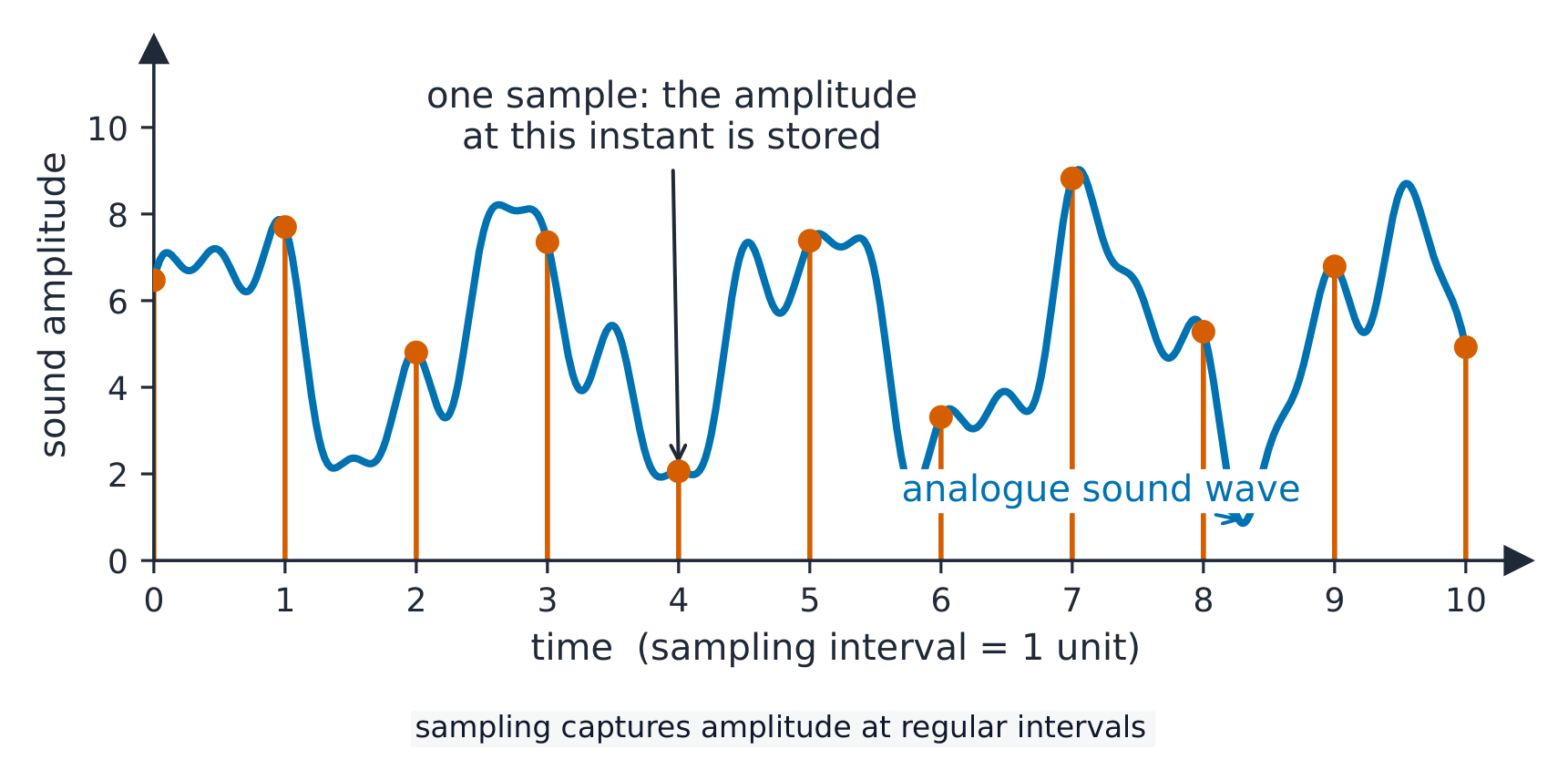
    A continuous wave of analogue data 模拟数据 (the sound) is converted into digital data 数字数据 by sampling 采样:

    • sampling rate 采样率 — samples per second (Hz). CD quality is $44.1\ \text{kHz}$.
    • sampling resolution 采样分辨率 (bit depth) — bits per sample's amplitude 振幅. CD quality is 16 bits.

    File size

    $$\text{size in bits} = \text{sampling rate} \times \text{resolution} \times \text{duration} \times \text{channels}.$$

    A 10-second stereo CD clip: $44100 \times 16 \times 10 \times 2 = 14\,112\,000$ bits $\approx 1.68\ \text{MiB}$.

    Changing settings

    • higher sampling rate → captures higher pitches, larger file.
    • higher sample resolution → finer amplitude steps, less quantisation 量化 noise, larger file.
    • lower of either → smaller file, clear quality loss.

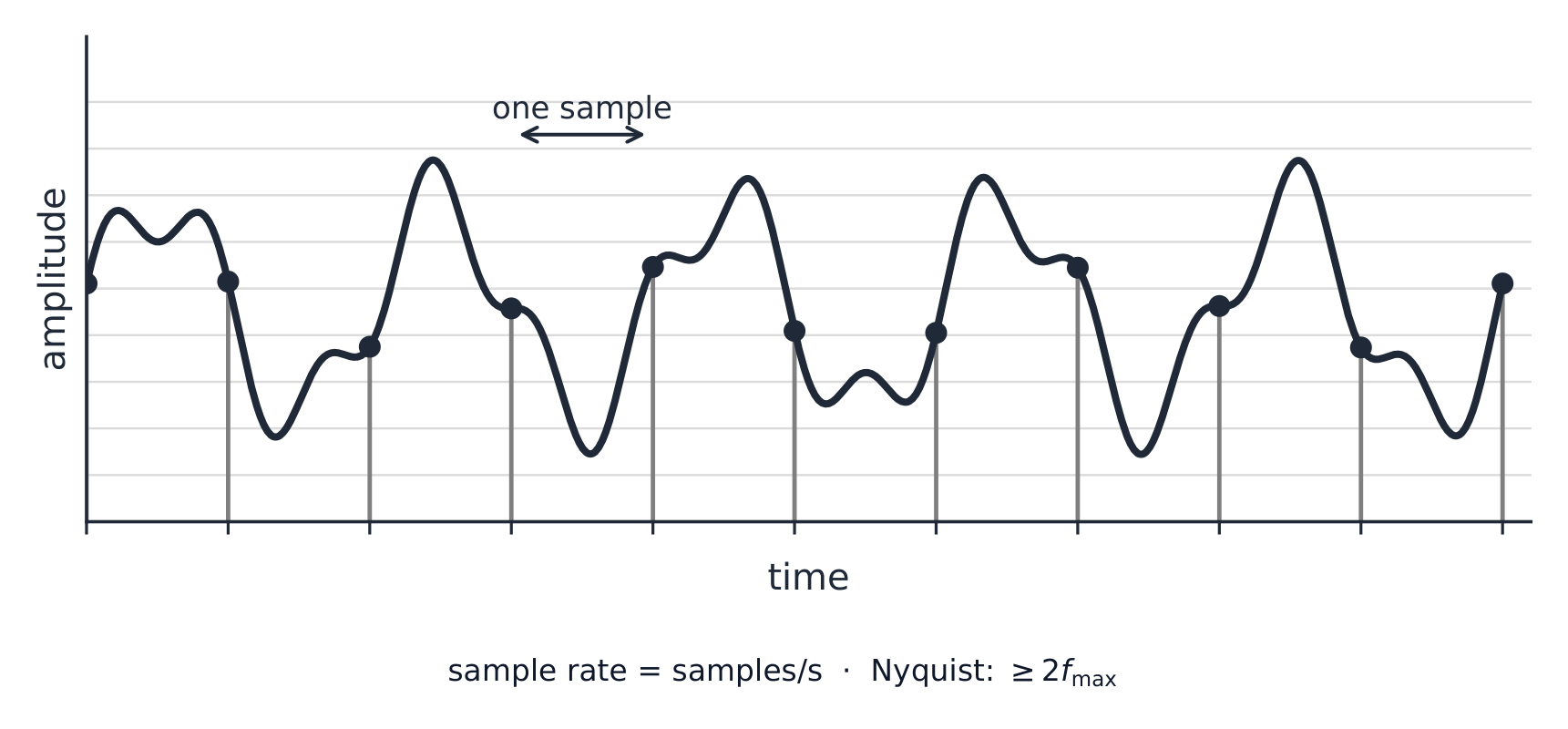
    (The sampling rate must be at least twice the highest frequency you want to keep.)

    ไทย

    คลื่นต่อเนื่องของ ข้อมูลอนาล็อก (เสียง) ถูกแปลงเป็น ข้อมูลดิจิทัล ผ่านกระบวนการ การสุ่มตัวอย่าง (sampling):

    • อัตราการสุ่มตัวอย่าง (sampling rate) — จำนวนตัวอย่างต่อวินาที (Hz). คุณภาพระดับซีดีอยู่ที่ $44.1\ \text{kHz}$.
    • ความละเอียดของการสุ่มตัวอย่าง (sampling resolution หรือ bit depth) — บิตต่อค่า แอมพลิจูด ของแต่ละตัวอย่าง. คุณภาพระดับซีดีคือ 16 บิต.
    คลื่นเสียงอนาล็อกที่เรียบเนียนพร้อมแท่งแนวตั้งแสดงจุดสุ่มตัวอย่างตามช่วงเวลาอย่างสม่ำเสมอ โดยแต่ละแท่งอ่านค่าแอมพลิจูดของคลื่น
    การสุ่มตัวอย่างคลื่นเสียง: อ่านค่าแอมพลิจูดในช่วงเวลาต่างๆ

    ขนาดไฟล์

    $$\text{size in bits} = \text{sampling rate} \times \text{resolution} \times \text{duration} \times \text{channels}.$$

    คลิปเสียงสเตอริโอซีดีความยาว 10 วินาที: $44100 \times 16 \times 10 \times 2 = 14\,112\,000$ บิต $\approx 1.68\ \text{MiB}$.

    การเปลี่ยนการตั้งค่า

    • อัตราการสุ่มตัวอย่างสูงขึ้น → บันทึกเสียงสูงได้มากขึ้น ไฟล์มีขนาดใหญ่ขึ้น.
    • ความละเอียดการสุ่มตัวอย่างสูงขึ้น → ขั้นตอนการวัดแอมพลิจูดละเอียดขึ้น ลด สัญญาณรบกวนจากการตัดทอน (quantisation noise) ไฟล์มีขนาดใหญ่ขึ้น.
    • ค่าต่ำกว่า ของทั้งสองอย่าง → ไฟล์เล็กลง แต่คุณภาพลดลงอย่างชัดเจน.

    (อัตราการสุ่มตัวอย่างต้องมีอย่างน้อยเท่ากับการสองเท่าของความถี่สูงสุดที่คุณต้องการเก็บรักษา.)

    คลื่นเสียงที่มีเส้นแบ่งจุดสุ่มตัวอย่างเว้นระยะเท่ากัน จุดหนึ่งต่อหนึ่งตัวอย่าง并注明采样率 = samples per second และ Nyquist อย่างน้อยสองเท่าของความถี่สูงสุด
    อัตราการสุ่มตัวอย่างคือจำนวนตัวอย่างต่อวินาที; กฎของ Nyquist อธิบายว่าทำไมมันต้องเป็นสองเท่าของความถี่สูงสุดที่ต้องการเก็บรักษา
    Explore · ⁨สำรวจ⁩

    Sound sampling

    y = a sin(bt + c)

    Sampling measures a sound wave at regular intervals — a higher rate copies it more truly. · ⁨การสุ่มตัวอย่างวัด คลื่นเสียง ในช่วงเวลาที่เป็นระยะ — อัตราที่สูงขึ้นจะจำลองได้แม่นยำยิ่งขึ้น⁩

    Vocabulary · ⁨คำศัพท์⁩ Train · ⁨ฝึกฝน⁩
    English ไทย
    sampling/ˈsæmplɪŋ/ การสุ่มตัวอย่าง (sampling)
    sampling rate/ˈsæmplɪŋ reɪt/ อัตราการสุ่มตัวอย่าง
    sampling resolution/ˈsæmplɪŋ ˌrezəˈluːʃn/ ความละเอียดของการสุ่มตัวอย่าง
    quantisation/ˌkwɒntaɪˈzeɪʃn/ การ量化
    1.3

    Compression · ⁨การบีบอัด⁩

    Syllabus · ⁨หลักสูตร⁩
    English
    Candidates should be able to: Notes and guidance
    Show understanding of the need for and examples of the use of compression
    Show understanding of lossy and lossless compression and justify the use of a method in a given situation
    Show understanding of how a text file, bitmap image, vector graphic and sound file can be compressed Including the use of run-length encoding (RLE)
    ไทย
    ผู้เข้าสอบควรสามารถ: หมายเหตุและคำแนะนำ
    แสดงความเข้าใจถึงความจำเป็นและตัวอย่างการใช้ compression
    แสดงความเข้าใจ关于 lossy และ lossless compression และให้เหตุผลในการใช้วิธีการหนึ่งในสถานการณ์ที่กำหนด
    แสดงความเข้าใจถึงการบีบอัดไฟล์ข้อความ, bitmap image, vector graphic และไฟล์เสียง รวมถึงการใช้ run-length encoding (RLE)

    Source: Cambridge International syllabus · ⁨แหล่งที่มา: หลักสูตร Cambridge International⁩

    English

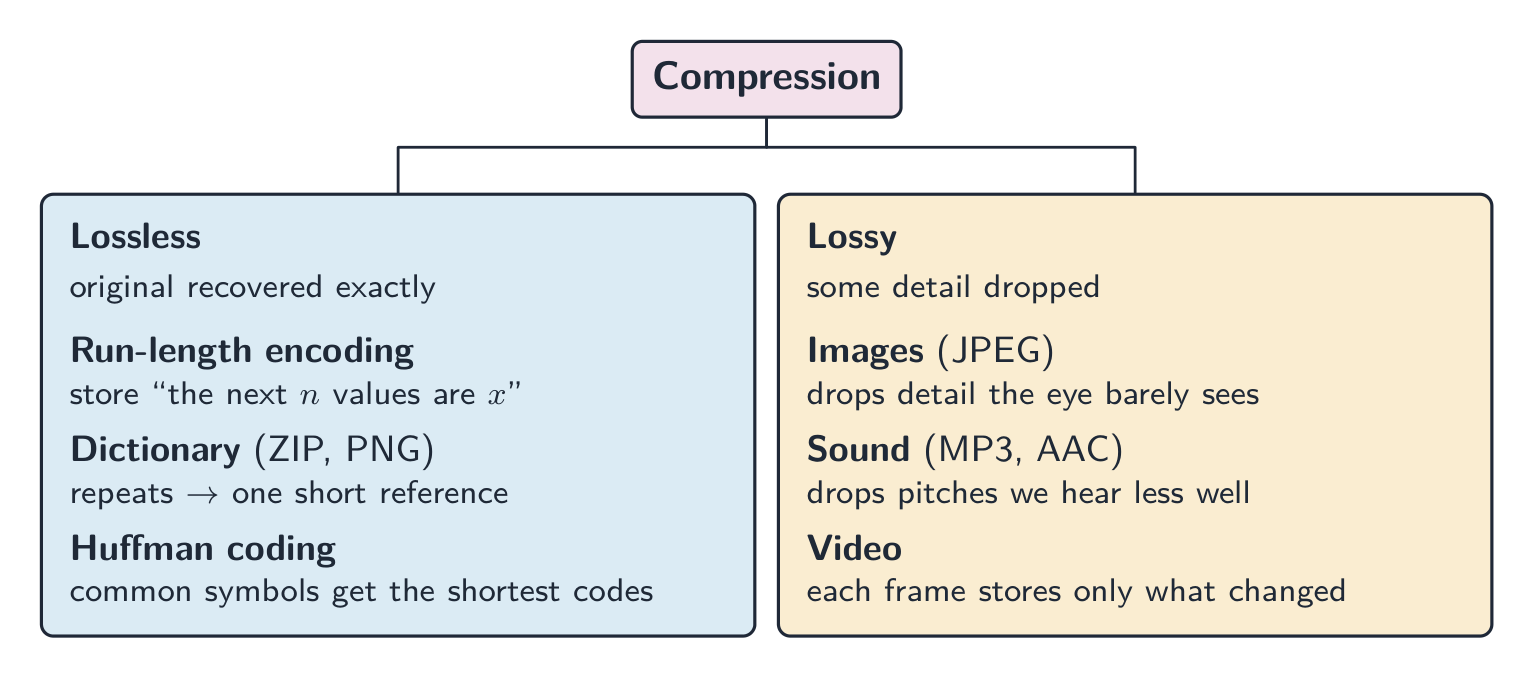
    Compression 压缩 reduces file size, saving storage and transmission bandwidth 带宽. Two kinds:

    • lossless 无损 — the original data is recovered exactly (text, programs, ZIP/PNG).
    • lossy 有损 — some detail is dropped for much smaller files (JPEG, MP3, video).

    When to use which

    • lossless for documents, source code, medical images — anything needing exact data.
    • lossy for streaming media. Real-time video streaming uses lossy compression because it must send huge amounts of data in real time over limited bandwidth; lossless would not shrink it enough. Raw HD video is gigabytes per minute, so without compression the picture would keep freezing.

    A "justify" answer names the method, then the reason from the situation: "Lossless, because the spreadsheet must be restored exactly; a single changed value would make the accounts wrong." Or: "Lossy, because the photographs are viewed on a phone screen where the dropped detail is not visible, and the smaller files upload faster and use less storage."

    Lossless methods

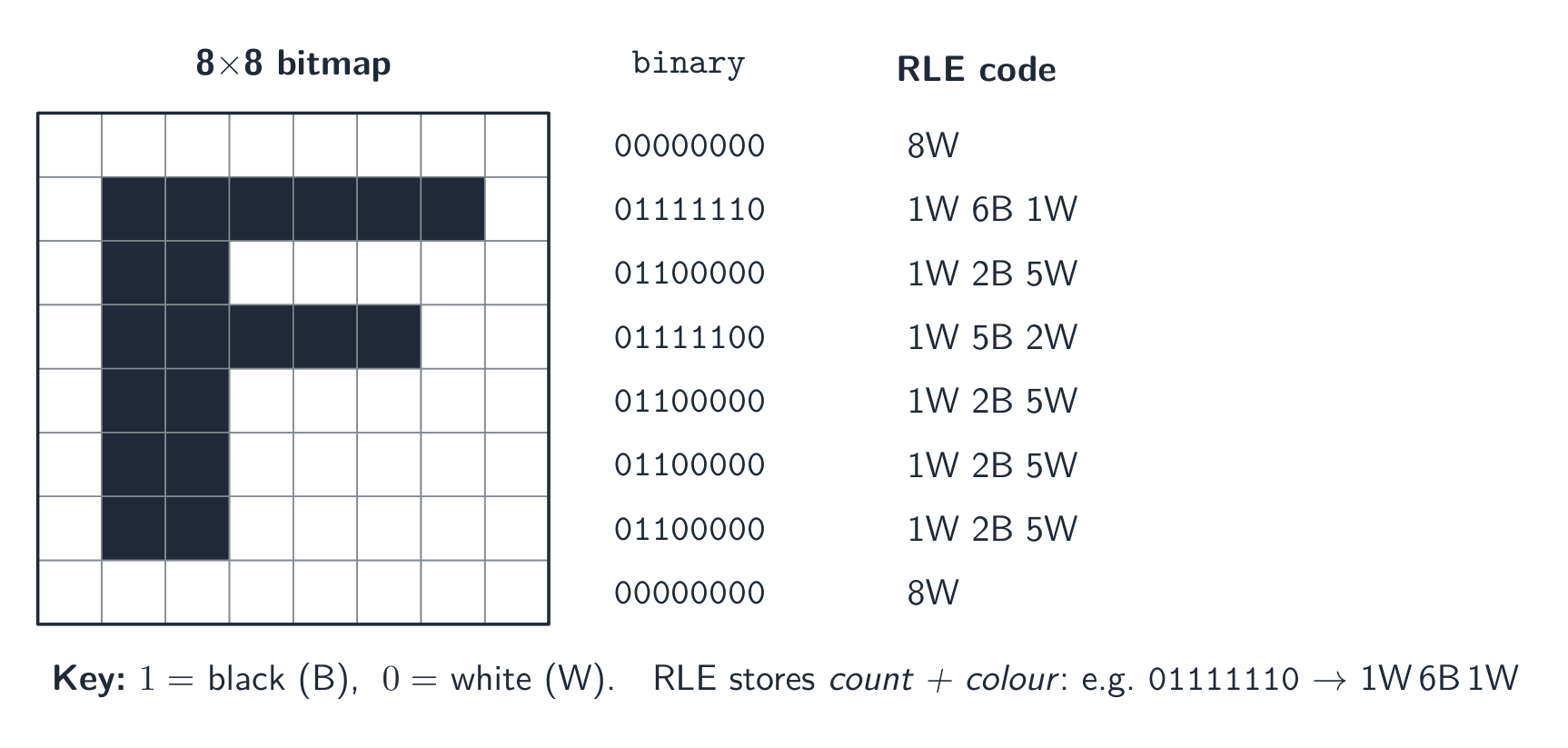
    • run-length encoding 行程编码 (RLE): store "the next $n$ values are $x$" instead of repeating $x$. Great for flat areas; useless for noisy data.
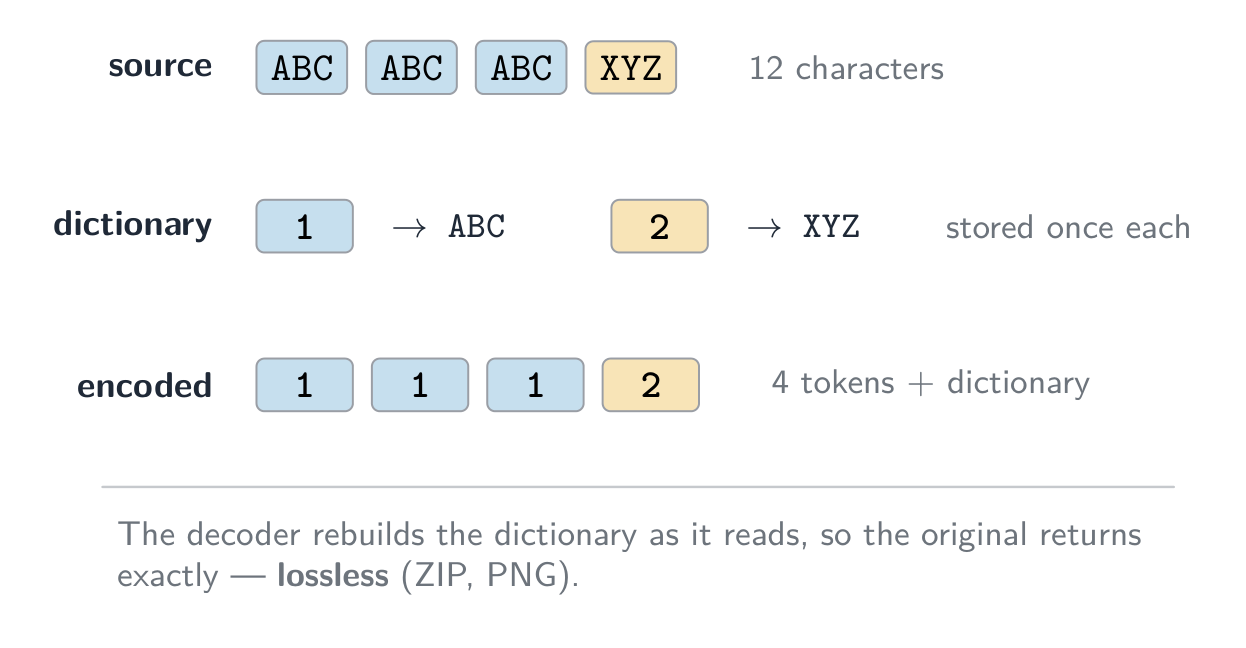
    • dictionary methods 字典编码 (ZIP, PNG): replace repeated byte sequences with a short reference. Good for text and code.
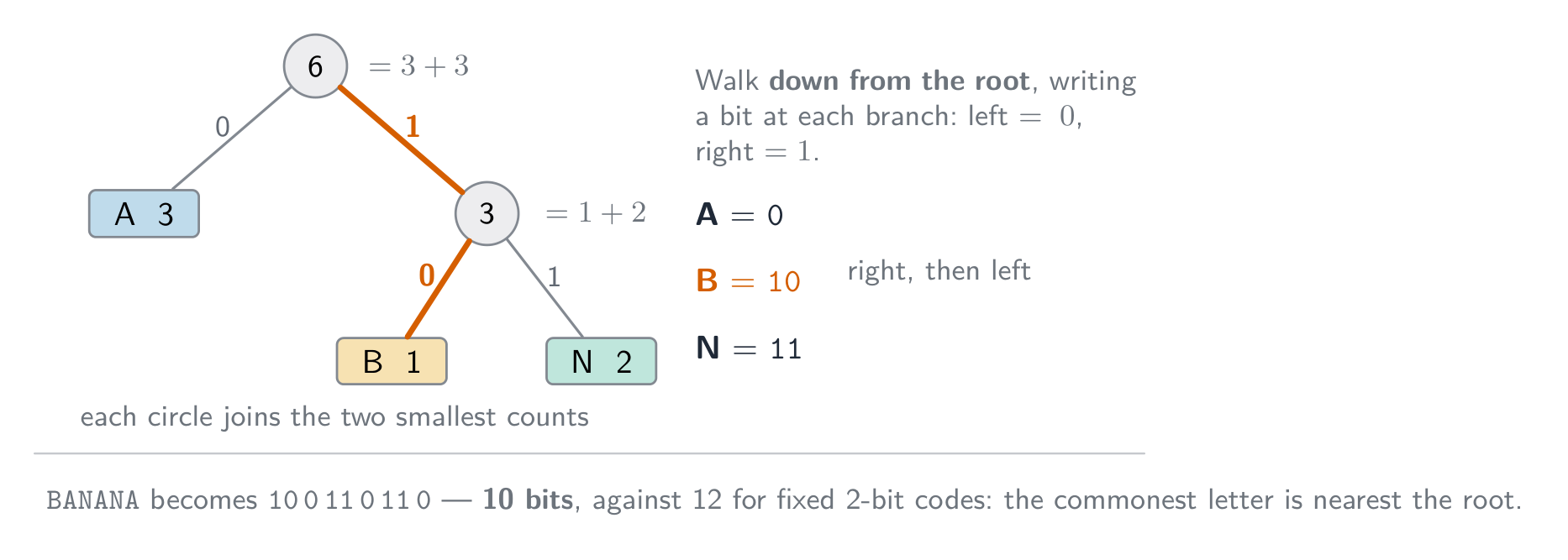
    • Huffman coding 霍夫曼编码: give short codes to common symbols and long codes to rare ones, bringing the average code length near the data's entropy 熵.

    How each kind of file is compressed:

    • text file: dictionary methods and Huffman coding turn repeated words and common characters into short codes. Text must stay lossless, because one changed character changes the meaning.
    • bitmap image: RLE for runs of identical pixels (icons, diagrams, black-and-white scans); lossy JPEG for photographs, or a lower colour depth or resolution.
    • vector graphic: the drawing list is already small; remove drawing objects that are not needed, store coordinates to fewer decimal places, or apply a lossless method such as ZIP to the file.
    • sound file: lossy MP3 or AAC removes what the ear cannot hear; a lower sampling rate or resolution is also lossy; lossless formats keep every sample and shrink the file much less.

    Lossy methods

    • images (JPEG): drop fine detail and colour differences the eye barely sees.
    • sound (MP3, AAC): drop pitches we hear less well, and quiet sounds hidden by louder ones.
    • video combines spatial 空间 compression (within each frame, like JPEG) with temporal 时间 compression (most frames store only the differences from the previous frame).
    ไทย

    การบีบอัด (Compression) ลดขนาดไฟล์ ช่วยประหยัดพื้นที่จัดเก็บและ แบนด์วิดท์ (bandwidth) ในการส่งข้อมูล มีสองประเภทหลัก:

    • แบบไม่สูญเสียข้อมูล (lossless) — สามารถกู้คืนข้อมูลต้นฉบับกลับมาได้สมบูรณ์ (เช่น ข้อความ, โปรแกรม, ZIP/PNG).
    • แบบสูญเสียข้อมูล (lossy) — ทิ้งรายละเอียดบางส่วนเพื่อลดขนาดไฟล์อย่างมาก (เช่น JPEG, MP3, วิดีโอ).

    การใช้ในกรณีใด

    • แบบไม่สูญเสียข้อมูล เหมาะสำหรับเอกสาร, โค้ดโปรแกรม, ภาพถ่ายทางการแพทย์ — ทุกสิ่งที่ต้องการข้อมูลที่แม่นยำ.
    • แบบสูญเสียข้อมูล เหมาะสำหรับสื่อสตรีมมิ่ง. วิดีโอสตรีมมิ่งแบบเรียลไทม์ ใช้การบีบอัดแบบสูญเสียข้อมูลเพราะจำเป็นต้องส่งปริมาณข้อมูลมหาศาลในเวลาจริงผ่านแบนด์วิดท์จำกัด; แบบไม่สูญเสียข้อมูลจะไม่ลดขนาดได้เพียงพอ วิดีโอ HD ดิบมีขนาดเป็นกิกะไบต์ต่อนาที หากไม่มีการบีบอัด ภาพจะติดขัดหรือหยุดนิ่งตลอดเวลา

    คำตอบแบบ "justify" ต้องระบุวิธีการก่อน แล้วตามด้วยเหตุผลจากสถานการณ์: "แบบไม่สูญเสียข้อมูล เพราะสเปรดชีตต้องกู้คืนกลับมาได้พอดี; ค่าที่เปลี่ยนไปเพียงค่าเดียวจะทำให้บัญชีผิดเพี้ยน" หรือ: "แบบสูญเสียข้อมูล เพราะภาพถ่ายถูกดูบนหน้าจอโทรศัพท์ รายละเอียดที่ถูกทิ้งไปไม่มองเห็นได้ และไฟล์ขนาดเล็กอัปโหลดเร็วขึ้นและใช้พื้นที่จัดเก็บน้อยกว่า"

    วิธีการแบบไม่สูญเสียข้อมูล

    • การเข้ารหัสความยาวของลำดับ (Run-length encoding - RLE): บันทึกว่า "$n$ ค่าถัดไปคือ $x$" แทนที่จะซ้ำ $x$. เหมาะกับพื้นผิวเรียบ; ไม่有用กับข้อมูลที่มีสัญญาณรบกวน.
    • วิธีการแบบคำศัพท์ (Dictionary methods เช่น ZIP, PNG): เปลี่ยนลำดับไบต์ที่ซ้ำกันด้วยตัวอ้างอิงสั้นๆ. ดีสำหรับข้อความและโค้ด.
    • การเข้ารหัส Huffman: asignate รหัสสั้นให้กับสัญลักษณ์ที่พบบ่อย และรหัสยาวให้กับสัญลักษณ์ที่พบน้อยลง เพื่อทำให้ความยาวรหัสเฉลี่ยเข้าใกล้ เอนโทรปี (entropy) ของข้อมูล.

    วิธีการบีบอัดไฟล์แต่ละชนิด:

    • ไฟล์ข้อความ: วิธีการแบบคำศัพท์และการเข้ารหัส Huffman แปลงคำที่ซ้ำและตัวอักษรที่พบบ่อยให้เป็นรหัสสั้น. ข้อความต้องเป็นแบบไม่สูญเสียข้อมูลเสมอ เพราะการเปลี่ยนตัวอักษรเพียงตัวเดียวก็เปลี่ยนความหมายได้.
    • ภาพบิตแมพ: ใช้ RLE สำหรับแถวพิกเซลที่เหมือนกัน (ไอคอน, แผนภูมิ, สแกนขาวดำ); ใช้ JPEG แบบสูญเสียข้อมูลสำหรับภาพถ่าย, หรือลดความลึกของสีหรือความละเอียดลง.
    • กราฟิกเวกเตอร์: รายการวาดภาพมีขนาดเล็กอยู่แล้ว; ลบวัตถุวาดภาพที่ไม่จำเป็นออก, บันทึกพิกัดด้วยทศนิยมตำแหน่งน้อยลง, หรือใช้วิธีไม่สูญเสียข้อมูลเช่น ZIP กับไฟล์.
    • ไฟล์เสียง: MP3 หรือ AAC แบบสูญเสียข้อมูลตัดส่วนที่หูมนุษย์ไม่ได้ยินออก; การลดอัตราการสุ่มตัวอย่างหรือความละเอียดก็เป็นการสูญเสียข้อมูลเช่นกัน; Formats แบบไม่สูญเสียข้อมูลจะเก็บทุกตัวอย่างไว้แต่ลดขนาดไฟล์ได้น้อยกว่ามาก.
    แถวพิกเซล 16 ช่อง consisting of 6 ขาว, 4 ดำ และ 6 ขาว; กลุ่ม 3 กลุ่มถูกวงเล็บและติดฉลาก 6W, 4B, 6W ดังนั้น 16 พิกเซลจึงถูกเก็บเป็นกลุ่ม 3 กลุ่ม 6W 4B 6W
    การเข้ารหัสความยาวของลำดับในแถวเดียว: 16 พิกเซลกลายเป็น 3 กลุ่ม
    ตารางขาวดำขนาด 8×8 แสดงตัวอักษร F พร้อมรูปแบบบิตของแต่ละแถวและรหัสความยาวของลำดับที่สั้นกว่าที่เรียงอยู่ข้างๆ
    การเข้ารหัสความยาวของลำดับของตัวอักษร F ในตารางขาวดำขนาด $8\times8$
    ตัวอย่างการทำงานของ Dictionary coding: แหล่งข้อมูล ABC ABC ABC XYZ, คำศัพท์ที่ 1 แทน ABC และ 2 แทน XYZ, และสตรีมข้อมูลที่เข้ารหัสแล้วคือ 1 1 1 2
    การเข้ารหัสแบบคำศัพท์: แต่ละลำดับที่ซ้ำกันจะถูกบันทึกเพียงครั้งเดียว และทุกครั้งที่ปรากฏจะเป็นดัชนีสั้นๆ
    ตัวอย่างการทำงานของ Huffman coding บนคำว่า BANANA:นับจำนวนตัวอักษร A 3, N 2 และ B 1, สร้างต้นไม้รหัสจากจำนวนเหล่านั้น, และรหัสที่ได้คือ A = 0, B = 10, N = 11
    การเข้ารหัส Huffman: สัญลักษณ์ที่พบบ่อยที่สุดได้รับรหัสสั้นที่สุด ดังนั้นคำว่า BANANA จึงใช้ 10 บิตแทนที่จะเป็น 12 บิต

    วิธีการแบบสูญเสียข้อมูล

    • ภาพ (JPEG): ทิ้งรายละเอียดละเอียดและความแตกต่างของสีที่ตาคนมองแทบไม่เห็น.
    • เสียง (MP3, AAC): ทิ้งเสียงสูงที่เราได้ยินได้ไม่ดี และเสียงเบาที่ถูกกลบด้วยเสียงดัง.
    • วิดีโอ ผสมผสานการบีบอัด เชิงพื้นที่ (spatial compression) (ภายในแต่ละเฟรม เหมือน JPEG) เข้ากับการบีบอัด เชิงเวลา (temporal compression) (เฟรมส่วนใหญ่บันทึกเฉพาะความต่างจากเฟรมก่อนหน้า).
    แผนภูมิต้นไม้จัดกลุ่มการบีบอัดเป็นแบบไม่สูญเสียข้อมูล (RLE, dictionary/ZIP/PNG, Huffman) และแบบสูญเสียข้อมูล (JPEG ภาพ, MP3/AAC เสียง, วิดีโอ) พร้อมตัวอย่างภายใต้แต่ละสาขา
    วิธีการบีบอัด: แบบไม่สูญเสียข้อมูลเทียบกับแบบสูญเสียข้อมูล พร้อมตัวอย่างทั่วไป
    Explore · ⁨สำรวจ⁩

    Run-length encoding

    Watch a run of repeated symbols get squashed into a count — simple lossless compression. · ⁨观察一串重复符号被压缩成计数——简单的 lossless compression。⁩

    Vocabulary · ⁨คำศัพท์⁩ Train · ⁨ฝึกฝน⁩
    English ไทย
    encoding/enˈkəʊdɪŋ/ การเข้ารหัส
    compression/kəmˈpreʃn/ การอัดตัว
    bandwidth/ˈbændwɪdθ/ แบนด์วิดธ์
    lossless/ˈlɒsləs/ แบบไม่มีการสูญเสียข้อมูล
    lossy/ˈlɒsi/ แบบมีการสูญเสียข้อมูล
    run-length encoding/rʌn leŋθ enˈkəʊdɪŋ/ การเข้ารหัสแบบ run-length
    dictionary methods/ˈdɪkʃənəri ˈmeθədz/ วิธีตารางคำศัพท์
    Huffman coding/ˈhʌfmən ˈkəʊdɪŋ/ การเข้ารหัสฮัฟแมน (Huffman coding)
    entropy/ˈentrəpi/ entropy
    spatial/ˈspeɪʃl/ เชิงพื้นที่
    temporal/ˈtempərəl/ เชิงเวลา
    Watch lesson · ⁨ดูบทเรียน⁩
    1.3

    Definitions the examiner accepts · ⁨คำนิยามที่ผู้สอบยอมรับ⁩

    English

    A definition question is marked against fixed wording. Learn these exactly, and give one answer only.

    Term Definition
    bit a single binary digit, 0 or 1
    byte a group of 8 bits
    binary prefix a multiplier that is a power of 2 (kibi = 1024) rather than a power of 10 (kilo = 1000)
    two's complement a way of representing signed integers in which the most significant bit has a negative place value
    overflow the result of a calculation is too large to be represented in the number of bits available
    Binary Coded Decimal each denary digit is stored as its own 4-bit binary pattern
    character set the set of characters a computer can represent, each with its own binary code
    pixel the smallest element of a bitmap image, storing one colour value
    image resolution the number of pixels in an image, given as width by height
    screen resolution the number of pixels a display can show, given as width by height
    colour depth the number of bits used to store the colour of one pixel
    sampling rate the number of samples of the sound taken per second
    sampling resolution the number of bits used to store the amplitude of one sample
    lossless compression compression from which the original data can be recovered exactly
    lossy compression compression that permanently removes some data, so the original cannot be recovered
    run-length encoding replacing a run of repeated values with one value and a count
    ไทย

    คำถามคำนิยามจะให้คะแนนตามข้อความที่กำหนดไว้你必须 exact. เรียนรู้ให้ถูกต้องและตอบเพียงคำตอบเดียวเท่านั้น

    พจน์ นิยาม
    bit ตัวเลขฐานสองเดียว คือ 0 หรือ 1
    byte กลุ่มของบิตจำนวน 8 บิต
    Binary prefix ตัวคูณที่เป็นกำลังของ 2 (kibi = 1024) แทนที่จะเป็นกำลังของ 10 (kilo = 1000)
    two's complement วิธีแสดงเลขจำนวนเต็มที่มีเครื่องหมาย โดยที่บิตที่มีความสำคัญสูงสุด (MSB) มีค่าตำแหน่งเป็นลบ
    overflow ผลลัพธ์ของการคำนวณมีค่าใหญ่เกินกว่าที่จะแสดงได้ด้วยจำนวนบิตที่มีอยู่
    Binary Coded Decimal แต่ละหลักฐานสิบจะถูกเก็บเป็นรูปแบบตัวเลขฐานสองขนาด 4 บิตของตัวเอง
    character set ชุดตัวอักษรที่คอมพิวเตอร์สามารถแสดงผลได้ แต่ละตัวมีรหัสฐานสองของตัวเอง
    pixel ส่วนประกอบเล็กๆ น้อยที่สุดของภาพ bitmap เก็บค่าสีหนึ่งค่า
    image resolution จำนวนพิกเซลในภาพ แสดงเป็น ความกว้าง x ความสูง
    screen resolution จำนวนพิกเซลที่หน้าจอแสดงผลได้ แสดงเป็น ความกว้าง x ความสูง
    colour depth จำนวนบิตที่ใช้เก็บสีของพิกเซลหนึ่งจุด
    sampling rate จำนวนตัวอย่างของเสียงที่เก็บต่อวินาที
    sampling resolution จำนวนบิตที่ใช้เก็บความแรงของสัญญาณ (amplitude) ของตัวอย่างหนึ่งจุด
    lossless compression การบีบอัดที่สามารถกู้คืนข้อมูลต้นฉบับออกมาได้ครบถ้วน
    lossy compression การบีบอัดที่กำจัดข้อมูลบางส่วนไปอย่างถาวร ทำให้ไม่สามารถกู้คืนข้อมูลต้นฉบับได้
    run-length encoding การแทนที่ชุดค่าซ้ำซ้อนด้วยค่าเดียวและจำนวนครั้ง
    Vocabulary · ⁨คำศัพท์⁩ Train · ⁨ฝึกฝน⁩
    English ไทย
    colour depth/ˈkʌlə depθ/ ความลึกของสี
    image resolution/ˈɪmɪdʒ ˌrezəˈluːʃn/ ความละเอียดของภาพ
    screen resolution/skriːn ˌrezəˈluːʃn/ ความละเอียดหน้าจอ
    amplitude/ˈæmplɪtjuːd/ แอมพลิจูด
    sample resolution/ˈsæmpl ˌrezəˈluːʃn/ ความละเอียดของการสุ่มตัวอย่าง
    1.3

    Exam tips · ⁨ข้อแนะนำสำหรับการสอบ⁩

    English
    • Show working for base conversions: denary → binary by place values, binary → hexadecimal in nibbles (groups of 4 bits).
    • For two's complement the MSB is negative; to negate, invert and add 1; watch for overflow when the sign bit flips wrongly.
    • Distinguish bitmap (pixels; file size $=$ width $\times$ height $\times$ colour depth) from vector (drawing commands; scales without loss).
    • Sound file size depends on sample rate $\times$ bit depth $\times$ time — more of each means better quality but a bigger file.
    • Compare lossless vs lossy compression and give a use for each.

    Common mistakes

    • Explaining an overflow with "the answer was greater than 255" or "it has 9 bits". State the word size the question gave, then say the result cannot be represented in it.
    • Making a negative number by setting the top bit to 1 and leaving the rest (sign and magnitude). Two's complement means invert every bit of the positive value, then add 1.
    • Forgetting to pad a converted number to the register width the question asks for.
    • Mixing bits and bytes in a file-size calculation. Work in bits, divide by 8 once, and say whether you used 1000 or 1024.
    • Answering "describe" in everyday words ("the picture gets worse"). Use the syllabus terms: fewer colours, banding, lower image resolution, larger pixels.
    ไทย
    • แสดงวิธีทำสำหรับการแปลงฐาน: ฐานสิบ → ฐานสอง โดยใช้ค่าตำแหน่ง, ฐานสอง → ฐานหก عشر ใน nibbles (กลุ่มของ 4 บิต).
    • สำหรับ two's complementuting MSB เป็นลบ; เพื่อกลับเครื่องหมาย ให้ สลับทุกบิตแล้วบวก 1; ระวัง overflow เมื่อบิตเครื่องหมายเปลี่ยนผิดทาง.
    • แยกแยะระหว่าง bitmap (พิกเซล; ขนาดไฟล์ $=$ ความกว้าง $\times$ ความสูง $\times$ Colour depth) กับ vector (คำสั่งวาดภาพ; ขยายขนาดได้โดยไม่สูญเสียคุณภาพ).
    • ขนาดไฟล์เสียงขึ้นอยู่กับ sample rate $\times$ bit depth $\times$ เวลา — ยิ่งมากยิ่งดีแต่ไฟล์ก็ใหญ่ขึ้น
    • เปรียบเทียบ lossless vs lossy compression และยกตัวอย่างการใช้งานของแต่ละแบบ

    ข้อผิดพลาดที่พบบ่อย

    • อธิบาย overflow ว่า "คำตอบมากกว่า 255" หรือ "มันมี 9 บิต" ต้องระบุขนาดบิต (word size) ที่โจทย์กำหนด แล้วบอกว่าผลลัพธ์ไม่สามารถแสดงได้ในขนาดนั้น
    • สร้างเลขติดลบโดยการตั้งบิตบนสุดเป็น 1 และปล่อยส่วนที่เหลือไว้ (sign and magnitude) Two's complement คือการสลับทุกบิตของค่าบวก แล้วบวก 1
    • ลืมเติมศูนย์นำหน้า (pad) จำนวนที่แปลงให้ตรงกับขนาด register ที่โจทย์ต้องการ
    • ผสมบิตกับไบต์ในการคำนวณขนาดไฟล์ ทำงานด้วยบิต หารด้วย 8 เพียงครั้งเดียว และระบุว่าใช้ 1000 หรือ 1024
    • ตอบคำถาม "describe" ด้วยภาษาทั่วไป (เช่น "ภาพแย่ลง") ใช้ศัพท์หลักสูตร: สีน้อยลง, banding, image resolution ต่ำลง, พิกเซลใหญ่ขึ้น
  • 2

    Communication · ⁨การสื่อสาร⁩

    Watch lesson · ⁨ดูบทเรียน⁩
    2.1

    Networks: purpose and benefits · ⁨เครือข่าย: วัตถุประสงค์และประโยชน์⁩

    Syllabus · ⁨หลักสูตร⁩
    English
    Candidates should be able to: Notes and guidance
    Show understanding of the purpose and benefits of networking devices
    Show understanding of the characteristics of a LAN (local area network) and a WAN (wide area network)
    Explain the client-server and peer-to-peer models of networked computers Roles of the different computers within the network and subnetwork models Benefits and drawbacks of each model Justify the use of a model for a given situation
    Show understanding of thin-client and thick-client and the differences between them
    Show understanding of the bus, star, mesh and hybrid topologies Understand how packets are transmitted between two hosts for a given topology Justify the use of a topology for a given situation
    Show understanding of cloud computing Including the use of public and private clouds Benefits and drawbacks of cloud computing
    Show understanding of the differences between and implications of the use of wireless and wired networks Describe the characteristics of copper cable, fibre-optic cable, radio waves (including WiFi), microwaves, satellites
    Describe the hardware that is used to support a LAN Including switch, server, Network Interface Card (NIC), Wireless Network Interface Card (WNIC), Wireless Access Points (WAP), cables, bridge, repeater
    Describe the role and function of a router in a network
    Show understanding of Ethernet and how collisions are detected and avoided Including Carrier Sense Multiple Access/Collision Detection (CSMA/CD)
    Show understanding of bit streaming Methods of bit streaming, i.e. real-time and on-demand Importance of bit rates broadband speed on bit streaming
    Show understanding of the differences between the World Wide Web (WWW) and the internet
    Describe the hardware that is used to support the internet Including modems, PSTN (Public Switched Telephone Network), dedicated lines, cell phone network
    Explain the use of IP addresses in the transmission of data over the internet Including: • format of an IP address including IPv4 and IPv6 • use of subnetting in a network • how an IP address is associated with a device on a network • difference between a public IP address and a private IP address and the implications for security • difference between a static IP address and a dynamic IP address
    Explain how a Uniform Resource Locator (URL) is used to locate a resource on the World Wide Web (WWW) and the role of the Domain Name Service (DNS)
    ไทย
    ผู้เข้าสอบควรสามารถ: หมายเหตุและคำแนะนำ
    แสดงความเข้าใจเกี่ยวกับวัตถุประสงค์และประโยชน์ของอุปกรณ์เครือข่าย
    แสดงความเข้าใจลักษณะของ LAN (local area network) และ WAN (wide area network)
    อธิบายโมเดล client-server และ peer-to-peer ของคอมพิวเตอร์ในเครือข่าย บทบาทของคอมพิวเตอร์แต่ละเครื่องภายในเครือข่ายและโมเดล subnet ความดีและข้อเสียของแต่ละโมเดล อธิบายเหตุผลในการเลือกโมเดลสำหรับสถานการณ์ที่กำหนด
    แสดงความเข้าใจเกี่ยวกับ thin-client และ thick-client และความแตกต่างระหว่างกัน
    แสดงความเข้าใจเกี่ยวกับโทโพโลยี bus, star, mesh และ hybrid เข้าใจวิธีการส่งแพ็กเก็ตระหว่างโฮสต์สองเครื่องสำหรับโทโพโลยีที่กำหนด อธิบายเหตุผลในการใช้โทโพโลยีสำหรับสถานการณ์ที่กำหนด
    แสดงความเข้าใจเกี่ยวกับ cloud computing รวมถึงการใช้ cloud แบบสาธารณะและแบบส่วนตัว ความดีและข้อเสียของ cloud computing
    แสดงความเข้าใจถึงความแตกต่างและผลกระทบของการใช้เครือข่ายไร้สายและแบบมีสาย อธิบายลักษณะของสายทองแดง สายไฟเบอร์ออปต์ คลื่นวิทยุ (รวม WiFi) คลื่นไมโครเวฟ และดาวเทียม
    อธิบายฮาร์ดแวร์ที่ใช้สนับสนุน LAN รวม switch, server, Network Interface Card (NIC), Wireless Network Interface Card (WNIC), Wireless Access Points (WAP), สายเคเบิล, bridge, repeater
    อธิบายบทบาทและหน้าที่ของ router ในเครือข่าย
    แสดงความเข้าใจเกี่ยวกับ Ethernet以及如何ตรวจจับและหลีกเลี่ยงการชนกันของข้อมูล รวมถึง Carrier Sense Multiple Access/Collision Detection (CSMA/CD)
    แสดงความเข้าใจ关于ความแตกต่างของ bit streaming วิธีการ bit streaming เช่น real-time และ on-demand ความสำคัญของ bit rates และความเร็ว broadband ต่อ bit streaming
    อธิบายความแตกต่างระหว่าง World Wide Web (WWW) และ internet
    อธิบายฮาร์ดแวร์ที่ใช้สนับสนุน internet รวม modems, PSTN (Public Switched Telephone Network), dedicated lines, cell phone network
    อธิบายการใช้งาน IP addresses ในการส่งข้อมูลผ่าน internet รวมถึง: • รูปแบบของ IP address بماรวมถึง IPv4 และ IPv6 • การใช้ subnetting ในเครือข่าย • วิธีที่ IP address ถูกผูกกับอุปกรณ์ในเครือข่าย • ความแตกต่างระหว่าง public IP address กับ private IP address และผลต่อความปลอดภัย • ความแตกต่างระหว่าง static IP address กับ dynamic IP address
    อธิบายการใช้ Uniform Resource Locator (URL) ในการหาทรัพยากรบน World Wide Web (WWW) และบทบาทของ Domain Name Service (DNS)

    Source: Cambridge International syllabus · ⁨แหล่งที่มา: หลักสูตร Cambridge International⁩

    English

    A network 网络 is a set of computing devices connected so they can communicate and share resources. Benefits:

    • sharing resources (printers, file servers, internet) — cheaper than equipping each computer.
    • sharing data — many users access the same files.
    • central management — install software, manage users and back up once on a server.
    • communication — email, video calls, messaging.
    • remote access — work from anywhere.
    ไทย

    เครือข่าย (network) คือชุดอุปกรณ์คอมพิวเตอร์ที่เชื่อมต่อกันเพื่อให้สื่อสารและแบ่งปันทรัพยากรได้ ประโยชน์:

    • แบ่งปันทรัพยากร (เครื่องพิมพ์, ไฟล์เซิร์ฟเวอร์, อินเทอร์เน็ต) — ถูกกว่าการเตรียมอุปกรณ์ให้แต่ละเครื่อง
    • แบ่งปันข้อมูล — ผู้ใช้หลายคนเข้าถึงไฟล์เดียวกันได้
    • จัดการแบบรวมศูนย์ — ติดตั้งซอฟต์แวร์ จัดการผู้ใช้ และสำรองข้อมูลได้ครั้งเดียวบนเซิร์ฟเวอร์
    • การสื่อสาร — อีเมล, วิดีโอคอล, แชท
    • เข้าถึงจากระยะไกล — ทำงานจากที่ใดก็ได้
    Explore · ⁨สำรวจ⁩

    Network route lab · ⁨ห้องปฏิบัติการเส้นทางเครือข่าย⁩

    Follow data from a device through network hardware and protocols. · ⁨ติดตามข้อมูลจากอุปกรณ์ผ่านฮาร์ดแวร์และโปรโตคอลเครือข่าย⁩

    Vocabulary · ⁨คำศัพท์⁩ Train · ⁨ฝึกฝน⁩
    English ไทย
    network/ˈnetwɜːk/ network
    2.1

    LAN vs WAN

    English

    A local area network 局域网 (LAN) covers a small area — a home, office or school, usually owned by the organisation, with high data rates and low latency 延迟.

    A wide area network 广域网 (WAN) covers a large area — a city, country, or the world (the internet is the largest WAN). It uses telecom-company infrastructure — often the Public Switched Telephone Network 公共交换电话网 (PSTN), leased lines or fibre — with lower data rates and higher latency. A WAN connects LANs together.

    For "give two characteristics of a LAN": it covers a small geographical area (one site or building); the hardware is owned by the organisation, not leased from a telecom company; it connects through its own switches, cables and access points. For "two ways a WAN is different": it covers a large geographical area; it uses third-party (leased or public) infrastructure; data rates are lower and latency higher; it usually joins several LANs. A school on one site is a LAN; a company with offices in two cities needs a WAN, with a leased line or the internet between the sites. Justify the choice with the area covered and who owns the links.

    ไทย

    เครือข่ายพื้นที่เฉพาะที่ (LAN) ครอบคลุม พื้นที่เล็ก — บ้าน สำนักงาน หรือโรงเรียน มักเป็นเจ้าของโดยองค์กร มีความเร็วข้อมูลสูงและ latency ต่ำ

    เครือข่ายพื้นที่กว้าง (WAN) ครอบคลุม พื้นที่ใหญ่ — เมือง ประเทศ หรือทั่วโลก (อินเทอร์เน็ตคือ WAN ที่ใหญ่ที่สุด) ใช้โครงสร้างพื้นฐานของบริษัทโทรคมนาคม — มักเป็น Public Switched Telephone Network (PSTN), สายเช่าหรือไฟเบอร์ — มีความเร็วข้อมูลต่ำกว่าและ latency สูงกว่า WAN เชื่อม LAN เข้าด้วยกัน

    สำหรับ "บอกลักษณะเด่น 2 อย่างของ LAN": ครอบคลุมพื้นที่ทางภูมิศาสตร์เล็ก (สถานที่หรืออาคารเดียว); ฮาร์ดแวร์เป็นขององค์กร ไม่ใช่เช่าจากบริษัทโทรคมนาคม; เชื่อมต่อกันผ่านสวิตช์ สาย และจุดเชื่อมต่อของตนเอง สำหรับ "2 วิธีที่ WAN ต่างกัน": ครอบคลุมพื้นที่ทางภูมิศาสตร์ใหญ่; ใช้โครงสร้างพื้นฐานของบุคคลที่สาม (เช่าหรือสาธารณะ); ความเร็วข้อมูลต่ำกว่าและ latency สูงกว่า; มักเชื่อม LAN หลายแห่งเข้าด้วยกัน โรงเรียน在一个地点คือ LAN; บริษัทที่มีสำนักงานในสองเมืองต้องใช้ WAN โดยมีสายเช่าหรืออินเทอร์เน็ตเชื่อมระหว่างสถานที่ Justify the choice with the area covered and who owns the links.

    หลายไซต์ LAN กระจายอยู่ในพื้นที่กว้าง แต่ละไซต์เชื่อมต่อกันผ่านเมฆ WAN ของผู้ให้บริการกลาง โดยมีสายเช่าตรงระหว่างสองไซต์ที่อยู่ห่างกัน
    เครือข่ายพื้นที่กว้างเชื่อมโยงระบบต่างๆ Across a large area
    Vocabulary · ⁨คำศัพท์⁩ Train · ⁨ฝึกฝน⁩
    English ไทย
    latency/ˈleɪtənsi/ ความหน่วง
    wide area network/waɪd ˈeərɪə ˈnetwɜːk/ เครือข่ายพื้นที่กว้าง
    Public Switched Telephone Network/ˈpʌblɪk swɪtʃt ˈtelɪfəʊn ˈnetwɜːk/ เครือข่ายโทรศัพท์สวิตช์สาธารณะ
    switch/swɪtʃ/ สวิตช์
    2.1

    Client-server and peer-to-peer · ⁨Client-server และ peer-to-peer⁩

    English

    Client-server

    • powerful machines act as servers 服务器, providing services (files, web pages, email).
    • other machines are clients 客户端 that request services.
    • central and easy to manage, but the server is a single point of failure unless backed up.

    Peer-to-peer (P2P)

    • all machines are equal peers; each can be both client and server (peer-to-peer 对等网络).
    • resources are spread across the peers — no central server. Robust to one failure, but harder to keep secure and consistent.

    Choosing a model. Client-server suits a school or a business: files are stored and backed up centrally, a user logs in with one account from any machine, software and security are managed once, and the server can be a powerful machine. The drawbacks are the cost of the server and of a technician, and that the server is a single point of failure. Peer-to-peer suits a few friends sharing files or a game: no server to buy, easy to set up, and each user keeps control of their own machine. The drawbacks the scheme lists: files are spread across many machines, so they are hard to back up and a file is unavailable when its owner's machine is off; each machine must be secured separately; and a peer that serves the others slows down. An online game played through a web browser with other users is the client-server model: the browser is the client, and the game and its shared virtual world run on the company's server, which keeps every player's view consistent.

    ไทย

    Client-server

    • เครื่องจักรทรงพลังทำหน้าที่เป็น เซิร์ฟเวอร์ ให้บริการ (ไฟล์, หน้าเว็บ, อีเมล)
    • เครื่องอื่นๆ เป็น ไคลเอนต์ ที่ขอใช้บริการ
    • จัดการง่ายและเป็นศูนย์กลาง แต่เซิร์ฟเวอร์เป็นจุดล้มเหลวเดียวหากไม่มีการสำรองข้อมูล
    เดสก์ท็อป แล็ปท็อป และแท็บเล็ต作为clientส่งคำขอผ่านอินเทอร์เน็ตไปยังเซิร์ฟเวอร์กลางซึ่งส่งคำตอบกลับ
    ในเครือข่าย client-server ไคลเอนต์ขอบริการจากเซิร์ฟเวอร์กลาง

    Peer-to-peer (P2P)

    • เครื่องคอมพิวเตอร์ทุกเครื่องเป็น เพื่อน (peers) เท่ากัน; แต่ละเครื่องสามารถทำหน้าที่ได้ทั้ง CLIENT และ SERVER (peer-to-peer) 。
    • ทรัพยากรถูกกระจายอยู่ระหว่างเพื่อน — ไม่มีเซิร์ฟเวอร์กลาง มีความทนทานต่อการล้มเหลวของเครื่องหนึ่ง แต่ยากกว่าที่จะรักษาความปลอดภัยและความสม่ำเสมอของข้อมูล

    การเลือกโมเดล Client-server เหมาะกับโรงเรียนหรือธุรกิจ: ไฟล์ถูกจัดเก็บและสำรองไว้ที่จุดศูนย์กลาง ผู้ใช้เข้าสู่ระบบด้วยบัญชีเดียวจากเครื่องใดก็ได้ ซอฟต์แวร์และความปลอดภัยถูกจัดการเพียงครั้งเดียว และเซิร์ฟเวอร์อาจเป็นเครื่องที่มีประสิทธิภาพสูง ข้อเสียคือต้นทุนของเซิร์ฟเวอร์และช่างเทคนิค และการที่เซิร์ฟเวอร์เป็นจุดล้มเหลวเดียว Peer-to-peer เหมาะกับกลุ่มเพื่อนจำนวนน้อยที่แชร์ไฟล์หรือเกม: ไม่ต้องซื้อเซิร์ฟเวอร์ ตั้งค่าง่าย และแต่ละผู้ใช้ควบคุมเครื่องของตนเองได้ ข้อเสียตามรายการนี้: ไฟล์กระจายอยู่บนหลายเครื่อง ทำให้สำรองข้อมูลยาก และไฟล์จะไม่สามารถเข้าถึงได้เมื่อเครื่องเจ้าของปิด; แต่ละเครื่องต้องได้รับการป้องกันแยกต่างหาก; และ peer ที่ให้บริการแก่ผู้อื่นจะทำให้เครื่องช้าลง เกมออนไลน์ที่เล่นผ่านเว็บเบราว์เซอร์ร่วมกับผู้ใช้รายอื่นคือโมเดล client-server: เบราว์เซอร์คือ client, และเกมพร้อมโลกเสมือนที่แชร์กันทำงานบนเซิร์ฟเวอร์ของบริษัท ซึ่งรักษาความสอดคล้องของมุมมองผู้เล่นทุกคนไว้

    Six peer computers in a ring, each linked directly to every other peer, with no central server; every peer is both client and server
    ในเครือข่าย peer-to-peer ทุกโหนดทำหน้าที่既是 CLIENT และ SERVER
    Vocabulary · ⁨คำศัพท์⁩ Train · ⁨ฝึกฝน⁩
    English ไทย
    server/ˈsɜːvə/ เซิร์ฟเวอร์
    client/ˈklaɪənt/ klien
    peer-to-peer/pɪə tə pɪə/ เพียร์-ทู-เพียร์
    2.1

    Thin and thick clients · ⁨Thin และ thick clients⁩

    English

    A thin client 瘦客户端 does little processing locally and relies on a powerful server (web terminals, remote desktops). A thick client 胖客户端 has strong local processing and storage and runs full applications itself (a normal desktop PC).

    Feature Thin client Thick client
    Local processing minimal substantial
    Local storage minimal substantial
    Reliance on network high lower
    Server load high lower

    The roles: in a thin-client model the server does the processing and stores the data, and the client only sends input and shows the output. A cheap terminal is enough, and everything is backed up and updated on the server, but nothing works if the network or the server fails. In a thick-client model the client runs the software and stores files itself, so it can work with no network connection and puts less load on the server, at the cost of more powerful (and more expensive) clients that must each be updated and secured. A school computer room can run thin clients (cheap, centrally managed); a video editor needs a thick client.

    ไทย

    Thin client ทำ การประมวลผลในพื้นที่น้อยมาก และพึ่งพาเซิร์ฟเวอร์ที่มีประสิทธิภาพสูง (เทอร์มินัลเว็บ, Desktop จากระยะไกล) Thick client มี การประมวลผลและพื้นที่จัดเก็บในพื้นที่ที่แข็งแกร่ง และรันแอปพลิเคชันเต็มรูปแบบเอง (PCDesktop ปกติ)

    คุณสมบัติ Thin client Thick client
    การประมวลผลในพื้นที่ น้อยมาก มาก
    พื้นที่จัดเก็บในพื้นที่ น้อยมาก มาก
    การพึ่งพาสายข่าย สูง ต่ำกว่า
    โหลดเซิร์ฟเวอร์ สูง ต่ำกว่า

    บทบาท: ในโมเดล thin-client เซิร์ฟเวอร์ทำการประมวลผลและจัดเก็บข้อมูล และ CLIENT เพียงส่งอินพุตและแสดงเอาต์พุต เทอร์มินัลราคาถูกก็เพียงพอ และทุกอย่างถูกสำรองและอัปเดตที่เซิร์ฟเวอร์ แต่หากสายข่ายหรือเซิร์ฟเวอร์ล้มเหลวจะใช้งานไม่ได้เลย ในโมเดล thick-client CLIENT รันซอฟต์แวร์และจัดเก็บไฟล์เอง จึงสามารถทำงานโดยไม่มีสายข่ายได้ และลดโหลดต่อเซิร์ฟเวอร์ แต่มีต้นทุนคือ CLIENT ที่มีประสิทธิภาพ выше (และแพงกว่า) ที่ต้องได้รับการอัปเดตและป้องกันแยกกัน โรงเรียนคอมพิวเตอร์สามารถรัน thin clients ( murah, จัดการส่วนกลาง); โปรแกรมตัดต่อวิดีโอจำเป็นต้องใช้ thick client

    Vocabulary · ⁨คำศัพท์⁩ Train · ⁨ฝึกฝน⁩
    English ไทย
    thick client/θɪk ˈklaɪənt/ เคียนหนา
    thin client/θɪn ˈklaɪənt/ เคียนบาง
    2.1

    Network topologies

    English

    The topology 拓扑 is how the nodes and links are arranged.

    • bus 总线 — all devices on one shared cable. Cheap; the whole LAN fails if the bus fails; performance drops as more devices share the bandwidth 带宽.
    • star 星形 — every device connects to a central switch. One device failing does not affect others; the switch failing brings all down. Most common today.
    • mesh 网状 — every device links directly to others, with many paths. Very fault-tolerant 容错 (traffic reroutes) but needs lots of cabling.
    • hybrid — a mix (a star in each office, mesh links between offices).

    How packets travel in each topology

    Bus: the sending device puts the packet on the shared cable; every device sees it, and only the one whose address matches accepts it. Only one device can transmit at a time, so collisions happen (CSMA/CD, below). Star: the sender passes the packet to the central switch, which reads the destination address and forwards it only down the cable to that device; two other devices can talk at the same time. Mesh: the packet is passed from node to node along one of several possible routes until it reaches the destination; if a link fails, another route is used.

    To justify a topology: a star for a classroom or an office (a failed cable affects one device; a device is easy to add; with a switch there are no collisions); a mesh where reliability matters most (a hospital, the internet's backbone); a bus only where cost matters and few devices share it. "Draw the star topology" means: the switch in the middle, one line from the switch to each computer, and the server (and the router, if there is one) on their own lines to the switch.

    ไทย

    Topology คือการจัดวางโหนดและลิงก์

    • bus — อุปกรณ์ทั้งหมดอยู่ในสายเคเบิลร่วมกันเครื่องเดียว ราคาถูก; หาก bus ล้มเหลว LAN ทั้งหมดจะพัง; ประสิทธิภาพลดลงเมื่อมีอุปกรณ์มากขึ้นมาแชร์ bandwidth
    • star —每台设备连接到中央交换机。一台设备故障不影响其他设备;交换机故障则全部瘫痪。目前最常见。
    • mesh —每台设备直接连接至其他设备,拥有多条路径。非常 fault-tolerant(流量可重路由)但需要大量线缆。
    • hybrid — 混合架构(每个办公室为星型,办公室间以网状连接)。

    Six computers each connected by a drop cable to one shared backbone cable, with a terminator block at each end *Bus topology: All devices share one cable with a terminator at each end

    Five computers each connected by its own dedicated cable to a central hub or switch *Star topology: Every device connects to a central hub or switch

    Six computers in a ring with a direct cable between every pair of devices *Mesh topology: Every device links directly to the others

    Three star clusters, each a switch with its own computers, all joined by one shared bus backbone with a terminator at each end *Hybrid topology: Star clusters joined by a central bus

    How packets travel in each topology

    Bus: The sending device places the packet on the shared cable; every device sees it, and only the one whose address matches accepts it. Only one device can transmit at a time, so collisions happen (CSMA/CD, below). Star: The sender passes the packet to the central switch, which reads the destination address and forwards it only down the cable to that device; two other devices can talk at the same time. Mesh: The packet is passed from node to node along one of several possible routes until it reaches the destination; if a link fails, another route is used.

    To justify a topology: A star for a classroom or an office (a failed cable affects one device; a device is easy to add; with a switch there are no collisions); a mesh where reliability matters most (a hospital, the internet's backbone); a bus only where cost matters and few devices share it. "Draw the star topology" means: the switch in the middle, one line from the switch to each computer, and the server (and the router, if there is one) on their own lines to the switch.

    Explore · ⁨สำรวจ⁩

    Compare the network topologies · ⁨เปรียบเทียบโทโพโลยีเครือข่าย⁩

    Tap through the four topologies. Each trades off cost, speed and how well it survives a failure — notice what breaks the whole network in each one. · ⁨คลิกเลือกโทโพโลยีทั้งสี่แบบ แต่ละแบบมีการแลกเปลี่ยนระหว่างต้นทุน ความเร็ว และความสามารถในการทนต่อความล้มเหลว — ระวังจุดที่ทำให้เครือข่ายล่มทั้งหมดในแต่ละแบบ⁩

    Vocabulary · ⁨คำศัพท์⁩ Train · ⁨ฝึกฝน⁩
    English ไทย
    topology/təˈpɒlədʒi/ โทโพโลยี
    bus/bʌs/ บัส
    bandwidth/ˈbændwɪdθ/ แบนด์วิดธ์
    star/stɑː/ ดาว
    mesh/meʃ/ เมช
    fault-tolerant/fɒlt ˈtɒlərənt/ ทนต่อข้อผิดพลาด
    hub/hʌb/ ฮับ
    packet/ˈpækɪt/ packet
    collision/kəˈlɪʒn/ การชนกัน
    CSMA/CD/ˌsiː es em ˈeɪ ˌsiː ˈdiː/ ซีเอสเอ็มเอ/ซีดี
    2.1

    Cloud computing

    English

    Cloud computing 云计算 delivers computing services (servers, storage, software) over the internet, hosted by a third party. Benefits: scalability 可扩展性 (pay for what you need), lower cost, access from anywhere, and reliable redundant data centres. Drawbacks: needs internet, your data is held by a third party, and possible vendor lock-in.

    For the one-mark definition: cloud computing is on-demand computing services (storage, processing, software) provided over the internet by a third party. A public cloud 公有云 is owned by a provider and shared by many customers over the internet; a private cloud 私有云 is dedicated to one organisation, on its own hardware or hosted for it alone. Benefits the scheme accepts: files are accessible from any device with an internet connection; storage scales up and down as needed; the provider handles the hardware, backups and security updates; there is no local server to buy or maintain. Drawbacks: no access without an internet connection; the data is on a third party's hardware, so security and privacy depend on the provider; an ongoing subscription cost; the provider could fail or be attacked; large files may be slow to transfer. A "why does the company use a public cloud" answer says that they need no hardware of their own, pay only for what they use, and their users can reach it from anywhere.

    ไทย

    Cloud computing delivers computing services (servers, storage, software) over the internet, hosted by a third party. Benefits: scalability (pay for what you need), lower cost, access from anywhere, and reliable redundant data centres. Drawbacks: needs internet, your data is held by a third party, and possible vendor lock-in.

    สำหรับนิยามแบบ 1 คะแนน: คอมพิวเตอร์คลาวด์คือ บริการคอมพิวเตอร์ตามต้องการ (พื้นที่จัดเก็บ การประมวลผล ซอฟต์แวร์) ที่ผู้ให้บริการภายนอกจัดผ่านอินเทอร์เน็ต คลาวด์สาธารณะ เป็นของผู้ให้บริการและใช้ร่วมกันโดยลูกค้าจำนวนมากผ่านอินเทอร์เน็ต; คลาวด์ส่วนตัว มุ่งเน้นให้องค์การเดียว ใช้ฮาร์ดแวร์ของตนเองหรือจัดวางให้เฉพาะองค์กรนั้นเท่านั้น ประโยชน์ที่ระบบนี้มอบให้: ไฟล์เข้าถึงได้จากอุปกรณ์ใดก็ตามที่มีอินเทอร์เน็ต; พื้นที่จัดเก็บปรับขนาดได้ตามความต้องการ; ผู้ดูแลระบบจัดการฮาร์ดแวร์ การสำรองข้อมูล และการอัปเดตความปลอดภัย; ไม่ต้องซื้อหรือดูแลเซิร์ฟเวอร์ในท้องถิ่น ความเสียเปรียบ: เข้าถึงไม่ได้หากไม่มีอินเทอร์เน็ต; ข้อมูลอยู่บนฮาร์ดแวร์ของบุคคลที่สาม ดังนั้นความปลอดภัยและความเป็นส่วนตัวจึงขึ้นอยู่กับผู้ให้บริการ; ค่าสมาชิกประจำเดือนต่อเนื่อง; ผู้ให้บริการอาจล้มเหลวหรือถูกโจมตี; ไฟล์ขนาดใหญ่อาจถ่ายโอนได้ช้า คำตอบสำหรับคำถาม "ทำไมบริษัทถึงใช้คลาวด์สาธารณะ" คือ他们需要ไม่ต้องมีฮาร์ดแวร์ของตัวเอง จ่ายเฉพาะสิ่งที่ใช้ และผู้ใช้สามารถเข้าถึงได้จากทุกที่。

    Vocabulary · ⁨คำศัพท์⁩ Train · ⁨ฝึกฝน⁩
    English ไทย
    cloud computing/klaʊd kəmˈpjuːtɪŋ/ คลาวด์คอมพิวติ้ง
    scalability/ˌskeɪləˈbɪlɪti/ การขยายขนาด
    public cloud/ˈpʌblɪk klaʊd/ คลาวด์สาธารณะ
    private cloud/ˈpraɪvət klaʊd/ คลาวด์ส่วนตัว
    2.1

    Wired vs wireless · ⁨สาย vs ไร้สาย⁩

    English
    • wired (Ethernet 以太网 over twisted-pair 双绞线 or fibre-optic 光纤): higher speed, lower latency, fewer errors, more secure.
    • wireless (Wi-Fi, Bluetooth, cellular): no cables, devices can move, but slower, prone to interference and eavesdropping.

    For the same generation, wired wins on speed and reliability; wireless wins on convenience.

    Transmission media

    Medium Characteristics
    copper cable (twisted pair, coaxial) cheap and easy to install; carries an electrical signal; affected by electromagnetic interference; the signal weakens with distance, so repeaters are needed; lower bandwidth than fibre
    fibre-optic cable light pulses in a glass core; very high bandwidth; long distances without repeaters; immune to interference; hard to tap, so secure; expensive and needs skilled installation
    radio waves (including WiFi) no cable, so devices can move; a range of tens of metres, weakened by walls; a shared frequency, so interference and lower speed; can be intercepted, so needs encryption
    microwaves higher-frequency radio for point-to-point links; needs a line of sight; affected by rain and buildings; high bandwidth
    satellites reach remote areas and the whole globe; a long delay (latency), because the signal travels to orbit and back; affected by weather; expensive

    The exam asks for the comparison in both directions. Wired beats wireless on speed, reliability (no interference), security (a cable must be physically tapped) and consistency; wireless beats wired on mobility, the cost of installation, and adding a device without cabling. Allowing both lets students move around with laptops and phones while the fixed desktops keep the faster, more secure connection, and a device with no network port can still connect. Satellite instead of copper reaches places no cable can, but with more delay, weather interference and higher cost.

    ไทย
    • แบบมีสาย (Ethernet ผ่าน คู่บิดเกลียว หรือ ไฟเบอร์ออปติก): ความเร็วสูงกว่า หน่วงต่ำกว่า มีข้อผิดพลาดน้อย และปลอดภัยกว่า
    • แบบไร้สาย (Wi-Fi, Bluetooth, ระบบเซลล์): ไม่มีสาย, อุปกรณ์เคลื่อนที่ได้ แต่速度慢กว่า,易受干扰和窃听。

    สำหรับรุ่นเดียวกัน แบบมีสายชนะในด้านความเร็วและความน่าเชื่อถือ; แบบไร้สายชนะด้านความสะดวกสบาย

    สื่อส่งสัญญาณ

    สื่อ ลักษณะ
    สายทองแดง (คู่บิดเกลียว,是同轴电缆) ราคาถูกและติดตั้งง่าย; ส่งสัญญาณไฟฟ้า;受电磁干扰影响;信号随距离减弱,因此需要中继器;带宽低于光纤
    สายไฟเบอร์ออปติก พัลส์แสงภายในแกนแก้ว; bandwidth สูงมาก; ระยะไกลโดยไม่ต้องใช้รีพีตเตอร์; ไม่ได้รับผลกระทบจากการรบกวน; ดักฟังยาก ปลอดภัย; ราคาแพงและต้องติดตั้งโดยผู้เชี่ยวชาญ
    คลื่นวิทยุ(รวมถึงWiFi) ไม่มีสาย,所以设备可以移动;ระยะหลายสิบเมตร,受墙壁削弱;共享频率,因此有干扰和较低速度;可能被截获,所以需要加密
    ไมโครเวฟ คลื่นวิทยุความถี่สูงสำหรับการเชื่อมต่อแบบจุดต่อจุด; ต้องมีเส้นทางการมองเห็นตรงกัน;受雨水和建筑物影响;高带宽
    ดาวเทียม เข้าถึงพื้นที่ห่างไกลและทั่วโลก; หน่วงสูง (latency), เพราะสัญญาณเดินทางขึ้นวงโคจรและกลับมา;受天气影响;昂贵

    ข้อสอบถามถึงการเปรียบเทียบทั้งสองทิศทาง แบบมีสายชนะแบบไร้สายในด้านความเร็ว, ความน่าเชื่อถือ (ไม่มีการรบกวน), ความปลอดภัย (สายต้องถูกดักฟังทางกายภาพ) และความสม่ำเสมอ; แบบไร้สายชนะแบบมีสายด้านการเคลื่อนย้าย, ต้นทุนการติดตั้ง, และการเพิ่มอุปกรณ์โดยไม่ใช้สาย การอนุญาตให้ใช้ทั้งสองอย่างช่วยให้ผู้เรียนเคลื่อนที่ด้วยแล็ปท็อปและโทรศัพท์ได้ในขณะที่เดสก์ท็อปคงการเชื่อมต่อที่เร็วและปลอดภัยไว้ และอุปกรณ์ที่ไม่มีพอร์ตเครือข่ายก็ยังเชื่อมต่อกันได้ ดาวเทียมแทนทองแดงเข้าถึงสถานที่ที่สายไม่สามารถไปถึงได้ แต่มีความหน่วงมากขึ้น, การรบกวนจากสภาพอากาศ และต้นทุนที่สูงขึ้น

    Vocabulary · ⁨คำศัพท์⁩ Train · ⁨ฝึกฝน⁩
    English ไทย
    ethernet/ˈiːθənet/ อีเธอร์เน็ต
    2.1

    LAN hardware · ⁨ฮาร์ดแวร์ LAN⁩

    English
    • network interface card 网络接口卡 (NIC) — lets a device send and receive on the network; has a unique MAC address MAC地址 (a 48-bit hardware address). A wireless device uses a wireless network interface card 无线网络接口卡 (WNIC).
    • switch 交换机 — forwards Ethernet frames only to the port for the destination MAC address.
    • hub 集线器 — a simpler device that copies traffic to all ports (now obsolete).
    • wireless access point 无线接入点 (WAP) — lets wireless clients join a wired LAN.
    • cabling — twisted-pair for short runs; fibre-optic for longer, faster runs.
    • server — a computer that provides a service to the other devices: files, printing, web pages, email storage.
    • bridge 网桥 — joins two LAN segments into one network, passing traffic between them.
    • repeater 中继器 — receives a weakened signal and retransmits it at full strength, to extend a cable's reach.

    A WNIC's functions, for a four-mark describe: it converts the data into radio signals and back; it carries the device's unique MAC address; it connects the device to a wireless access point and follows the wireless protocol (which channel and frequency to use); and it decodes the incoming signals for the device. Two devices that can physically connect thirty computers with NICs: a switch, or a hub.

    ไทย
    • การ์ดอินเตอร์เฟซเครือข่าย (NIC) — ทำให้อุปกรณ์ส่งและรับข้อมูลบนเครือข่าย; มี MAC address MAC (ที่อยู่ฮาร์ดแวร์ 48 บิต) อุปกรณ์ไร้สายใช้ การ์ดอินเตอร์เฟซเครือข่ายไร้สาย (WNIC)
    • สวิตช์ — ส่งเฟรม Ethernet ไปยังพอร์ตเฉพาะสำหรับ MAC address ของปลายทางเท่านั้น
    • ฮับ — อุปกรณ์ที่ง่ายกว่าซึ่งคัดลอกการจราจรไปยังทุกพอร์ต (ปัจจุบันล้าสมัยแล้ว)
    • จุดเข้าถึงไร้สาย (WAP) — ให้ klien ไร้สายเข้าร่วม LAN แบบมีสาย
    • สายเคเบิล — คู่บิดเกลียวสำหรับการเดินระยะสั้น; ไฟเบอร์ออปติกสำหรับการเดินระยะไกลและรวดเร็วขึ้น
    • เซิร์ฟเวอร์ — คอมพิวเตอร์ที่ให้บริการแก่อุปกรณ์อื่นๆ: ไฟล์, การพิมพ์, หน้าเว็บ, พื้นที่จัดเก็บอีเมล
    • บริดจ์ — เชื่อมสองส่วนย่อยของ LAN เข้าเป็นเครือข่ายเดียว โดยส่งการจราจรระหว่างมัน
    • รีพีตเตอร์ — รับสัญญาณที่อ่อนลงและส่งกลับด้วยความแรงเต็มเพื่อขยายระยะของสาย

    ฟังก์ชันของ WNIC, สำหรับคำถาม 4 คะแนน อธิบาย:它将数据转换为无线信号并还原;它携带设备的唯一MAC地址;它将设备连接到无线接入点并遵循无线协议(使用哪个信道和频率);并且解码接收到的信号供设备使用。两台可以物理连接的计算机与带有 NIC 的三十台计算机:交换机或集线器。

    A 5-port gigabit Ethernet switch on a white background, with five numbered RJ-45 ports along the front and a power light
    A network switch: each device's cable plugs into one of its ports
    A black Ethernet patch cable on a white background, with an RJ-45 plug at each end showing the gold metal contacts and the locking clip
    An RJ-45 plug on a twisted-pair Ethernet cable
    A frame addressed to computer C arrives at a switch, which forwards it out only the port for C, leaving the cables to A, B and D unused
    A switch sends each frame only to the port for its destination
    Vocabulary · ⁨คำศัพท์⁩ Train · ⁨ฝึกฝน⁩
    English ไทย
    twisted-pair/ˈtwɪstɪd peə/ คู่บิด
    fibre-optic/ˈfaɪbə ˈɒptɪk/ ไฟเบอร์ออปติก
    repeater/rɪˈpiːtə/ รีพีตเตอร์
    network interface card/ˈnetwɜːk ˈɪntəfeɪs kɑːd/ การ์ดอินเทอร์เฟซเครือข่าย
    MAC address/mæk əˈdres/ MAC address
    wireless network interface card/ˈwaɪələs ˈnetwɜːk ˈɪntəfeɪs kɑːd/ การ์ดอินเทอร์เฟซเครือข่ายไร้สาย
    wireless access point/ˈwaɪələs ˈækses pɔɪnt/ ไวร์เลสแอกเซสพอยท์
    bridge/brɪdʒ/ บริดจ์
    2.1

    Routers · ⁨Router⁩

    English

    A router 路由器 connects different networks and forwards data between them — usually at the boundary of a LAN and the internet. It does:

    • forwarding — reads each packet 数据包's destination IP address IP地址 and sends it out the right port, using a routing table 路由表.
    • network address translation 网络地址转换 (NAT) — lets many private LAN addresses share one public IP.
    • DHCP 动态主机配置协议 — hands out private IP addresses to LAN devices.
    • firewall 防火墙 — blocks unwanted incoming traffic.

    In packet switching 分组交换 a message is split into packets that are sent independently. Each router reads a packet's destination IP address, looks up the next hop in its routing table and forwards it, so the packets of one message may take different routes and are reassembled in order at the destination. A router does receive packets, forward them between networks and hand out IP addresses; it does not find the IP address for a URL (DNS does that) and it does not store web pages. A home router also contains the modem and the wireless access point, so one box connects the LAN to the internet.

    ไทย

    Routerrouter เชื่อมต่อเครือข่ายที่แตกต่างกันและส่งข้อมูลระหว่าง把它们 — 通常在LAN和internet边界。它做:

    • 转发转发 — 读取每个数据包的目的IP地址 IP,并使用路由表从正确的端口发送它。
    • 网络地址转换 (NAT) — 允许许多私有LAN地址共享一个公共IP。
    • DHCP — 向LAN设备分配私有IP地址。
    • 防火墙 — 阻止不需要的传入流量。

    ใน packet switching ข้อความจะถูกแบ่งเป็นแพ็กเก็ตที่ส่งไปอย่างอิสระ Each router อ่านที่อยู่ IP ปลายทางของแพ็กเก็ต ตรวจสอบ Next hop ในตารางการกำหนดเส้นทาง (routing table) แล้วส่งต่อ ดังนั้นแพ็กเก็ตของข้อความหนึ่งอาจใช้เส้นทางที่แตกต่างกันและจะถูกรวมกลับเข้าด้วยกันตามลำดับที่จุดปลายทาง Router จะรับและส่งแพ็กเก็ตระหว่างเครือข่ายและจ่ายที่อยู่ IP แต่ ไม่ ค้นหาที่อยู่ IP สำหรับ URL (DNS ทำหน้าที่นี้) และไม่ได้จัดเก็บหน้าเว็บ Router在家中ยังรวมโมเด็มและจุดเข้าถึงไร้สายไว้ด้วย ทำให้เพียงกล่องเดียวเชื่อม LAN เข้าอินเทอร์เน็ต

    LAN ของคอมพิวเตอร์สามเครื่องและเซิร์ฟเวอร์ที่เชื่อมต่อกับสวิตช์ ซึ่งเชื่อมต่อกับเราเตอร์ไปยังอินเทอร์เน็ตและ LAN หรือ WAN อื่นๆ
    เราเตอร์เชื่อม LAN เข้ากับอินเทอร์เน็ตหรือเครือข่ายอื่น
    Vocabulary · ⁨คำศัพท์⁩ Train · ⁨ฝึกฝน⁩
    English ไทย
    internet/ˈɪntənet/ อินเทอร์เน็ต
    local area network/ˈləʊkl ˈeərɪə ˈnetwɜːk/ เครือข่ายท้องถิ่น
    router/ˈruːtə/ เราเตอร์
    routing table/ˈraʊtɪŋ ˈteɪbl/ ตารางการส่งต่อ
    network address translation/ˈnetwɜːk əˈdres trænˈsleɪʃn/ การแปลงที่อยู่เครือข่าย
    DHCP/ˌdiː eɪtʃ siː ˈpiː/ DHCP
    firewall/ˈfaɪəwɔːl/ ไฟวอลล์
    packet switching/ˈpækɪt ˈswɪtʃɪŋ/ การสลับแพ็กเก็ต
    URL/ˌjuː ɑː ˈel/ URL
    2.1

    Ethernet and CSMA/CD · ⁨เอเธอร์เน็ตและ CSMA/CD⁩

    English

    Ethernet is the standard (protocol) for wired LANs: devices are joined by twisted-pair or fibre cable, data is sent in frames that carry the source and destination MAC addresses, and a shared medium uses CSMA/CD to deal with collisions. On shared media a collision 冲突 can happen when two devices send at once. The protocol is CSMA/CD 载波侦听多路访问/冲突检测 (Carrier Sense Multiple Access with Collision Detection):

    1. carrier sense — listen before sending; wait if the cable is busy.
    2. multiple access — many devices share the medium.
    3. collision detection — keep listening while sending; a clash is a collision.
    4. on a collision, both stop, send a brief "jam" signal, then wait a random backoff time before retrying.

    The three tasks, in the scheme's words: the device listens (senses the carrier) before transmitting; it keeps checking for a collision while it transmits; on a collision it stops, sends a jam signal, waits a random time and retransmits.

    Modern switched Ethernet uses full-duplex 全双工 point-to-point links, so collisions no longer happen.

    ไทย

    Ethernet เป็นมาตรฐาน (โปรโตคอล) สำหรับ LAN แบบมีสาย: อุปกรณ์เชื่อมต่อด้วยสายคู่บิดเกลียวหรือไฟเบอร์ออปติก ข้อมูลถูกส่งในรูปแบบเฟรมที่มี MAC Address ของต้นทางและปลายทาง และสื่อร่วมกันใช้ CSMA/CD เพื่อจัดการกับการชนกัน On shared media collision สามารถเกิดขึ้นได้เมื่อสองอุปกรณ์ส่งข้อมูลพร้อมกัน โปรโตคอลคือ CSMA/CD / (Carrier Sense Multiple Access with Collision Detection):

    1. carrier sense — ฟังก่อนส่ง; รอหากสายกำลังใช้งานอยู่
    2. multiple access — อุปกรณ์จำนวนมากแชร์สื่อเดียวกัน
    3. collision detection — ฟังต่อไปขณะส่ง; การชนกันคือการเกิด collision
    4. เมื่อเกิด collision ทั้งสองจะหยุด ส่งสัญญาณ "jam" สั้นๆ แล้วรอเวลา random backoff ก่อนลองใหม่

    งานทั้งสามตามคำอธิบายของระบบ: อุปกรณ์ฟัง (ตรวจจับ carrier) ก่อนส่ง; ตรวจสอบการชนขณะส่ง; เมื่อเกิดการชนจะหยุด ส่งสัญญาณ jam รอเวลาสุ่มแล้วส่งซ้ำ

    Modern switched Ethernet ใช้ full-duplex link แบบ point-to-point ดังนั้นการชนกันจึงไม่เกิดขึ้นอีกต่อไป

    แผนภูมิกระบวนการ CSMA/CD: สร้างเฟรม, ตรวจสอบว่าสายว่าง, ส่ง, ตรวจจับการชน, ส่งสัญญาณ jam, Back off และลองใหม่สูงสุดตามจำนวนที่กำหนด
    กระบวนการ CSMA/CD สำหรับการจัดการการชนบนสื่อร่วมกัน
    Vocabulary · ⁨คำศัพท์⁩ Train · ⁨ฝึกฝน⁩
    English ไทย
    full-duplex/fʊl ˈdjuːpleks/ full-duplex
    2.1

    Bit streaming · ⁨การสตรีมบิต⁩

    English

    Bit streaming 流式传输 sends multimedia as a continuous stream that the receiver plays as it arrives, instead of downloading the whole file first.

    • real-time (live): captured and streamed as it happens (live sport, video calls). You cannot rewind; low latency is vital.
    • on-demand: pre-recorded on a server (YouTube, Netflix). You can pause and rewind; the server can buffer 缓冲 ahead.

    Real-time streaming works as a short pipeline:

    1. capture and sample the source (a camera or microphone).
    2. encode it, using compression 压缩 to shrink the data.
    3. send it across the network as packets.
    4. the receiver buffers a little, then plays it live — dropping any packet that arrives late, because a live stream cannot wait for it.

    Lossy 有损 compression is used here: moving pictures hide small losses, and the stream must be small enough to fit the bandwidth.

    Why a video is compressed before real-time streaming: the uncompressed stream would need more bandwidth than the connection has, so frames would arrive late and the playback would stall. Compression cuts the number of bits, so the bit rate 比特率 stays below the broadband speed, the delay stays small, and less storage and cost are needed at both ends. The bit rate must be lower than the connection's speed: a higher bit rate gives better quality but needs a faster connection, and if the data arrives more slowly than it is played, the buffer empties and the video freezes. On-demand streaming can buffer more of the file ahead, so it copes with a slower connection; real-time streaming cannot.

    ไทย

    Bit streaming ส่งมัลติมีเดียเป็นสตรีมต่อเนื่องที่ผู้รับเล่นทันทีเมื่อได้รับ แทนที่จะดาวน์โหลดไฟล์ทั้งหมดก่อน

    • real-time (สด): บันทึกและส่ง streamed ทันที (กีฬาสด, วิดีโอคอล) ไม่สามารถย้อนกลับได้; ความหน่วงต่ำเป็นเรื่องสำคัญ
    • on-demand: บันทึกไว้ล่วงหน้าบนเซิร์ฟเวอร์ (YouTube, Netflix) สามารถหยุดและย้อนกลับได้; เซิร์ฟเวอร์สามารถ bufferAhead ได้

    Real-time streaming ทำงานผ่านท่อระยะสั้น:

    1. capture and sample แหล่งกำเนิด (กล้องหรือไมโครโฟน)
    2. encode โดยใช้ compression เพื่อลดขนาดข้อมูล
    3. send ผ่านเครือข่ายในฐานะแพ็กเก็ต
    4. ผู้รับ buffer เล็กน้อยแล้วเล่นสด — ทิ้งแพ็กเก็ตที่ถึงช้า เพราะสตรีมสดไม่สามารถรอนั้นได้

    ใช้ Lossy compression于此: ภาพเคลื่อนไหวซ่อนการสูญเสียเล็กน้อย และสตรีมต้องมีขนาดเล็กพอที่จะใส่ใน Bandwidth ได้

    ทำไมวิดีโอต้องถูก compress ก่อน real-time streaming: สตรีมที่ไม่ compressed ต้องการ Bandwidth มากกว่าที่การเชื่อมต่อมี ทำให้เฟรมถึงช้าและการเล่นหยุดนิ่ง Compression ลดจำนวน Bits เพื่อให้ bit rate อยู่ต่ำกว่าความเร็ว Broadband ความหน่วงคงน้อยลง และประหยัดพื้นที่จัดเก็บและค่าใช้จ่ายทั้งสองฝั่ง Bit rate ต้องต่ำกว่าความเร็วการเชื่อมต่อ: Bit rate สูงขึ้นให้คุณภาพดีขึ้นแต่ต้องการการเชื่อมต่อที่เร็วขึ้น และหากข้อมูลมาถึงช้ากว่าที่เล่น Buffer หมดและวิดีโอหยุดนิ่ง On-demand streaming สามารถ Buffer ไฟล์ahead ได้มากกว่า จึงรองรับการเชื่อมต่อที่ช้ากว่าได้; Real-time streaming ทำไม่ได้

    ข้อมูลไหลจากเซิร์ฟเวอร์แหล่งกำเนิดเข้าสู่ Buffer ที่เติมเต็มระหว่างเครื่องหมายต่ำและสูง และ Media player อ่านจาก Buffer
    ข้อมูลสตรีมจากเซิร์ฟเวอร์เข้าสู่ Buffer ก่อนที่ Media player จะอ่าน
    Vocabulary · ⁨คำศัพท์⁩ Train · ⁨ฝึกฝน⁩
    English ไทย
    bit streaming/bɪt ˈstriːmɪŋ/ การสตรีมบิต
    buffer/ˈbʌfə/ buffer
    compression/kəmˈpreʃn/ การอัดตัว
    lossy/ˈlɒsi/ แบบมีการสูญเสียข้อมูล
    bit rate/bɪt reɪt/ อัตราบิต
    2.1

    The internet and the World Wide Web · ⁨อินเทอร์เน็ตและเวิลด์ไวด์เว็บ⁩

    English

    The internet 互联网 is a global network of networks using a common protocol 协议 suite (TCP/IP). The World Wide Web 万维网 (WWW) is a service that runs over it: hyperlinked documents identified by URLs, viewed in browsers via HTTP/HTTPS. Email and file transfer are other internet services that are not part of the WWW.

    Webmail uses both: the WWW, because the mailbox is a web page reached through a URL in a browser over HTTP; and the internet, because the email itself travels across the network of networks (email is a separate internet service from the web).

    Hardware that supports the internet

    • modem 调制解调器 — converts the computer's digital signal into an analogue signal for a telephone line, and back again at the other end (modulation and demodulation).
    • PSTN — the public telephone network of exchanges and lines; a dial-up or DSL connection carries internet data over it.
    • dedicated line 专线 — a leased line between an organisation and its ISP: always on, with a fixed bandwidth that is not shared, so faster and more reliable, but expensive.
    • cell phone network 蜂窝网络 — the phone sends data by radio to the nearest cell tower (base station); the towers are linked to the phone company's network, which routes the data to the internet; as the phone moves, it is handed over from one cell to the next.
    ไทย

    Internet คือ เครือข่ายของเครือข่าย ทั่วโลกที่ใช้ชุด protocol ร่วมกัน (TCP/IP) World Wide Web (WWW) คือ บริการ ที่ทำงานอยู่บนมัน: เอกสาร Hyperlink ที่ระบุด้วย URLs ดูผ่าน Browser ผ่าน HTTP/HTTPS อีเมลและการถ่ายโอนไฟล์คือบริการอินเทอร์เน็ตอื่นที่ไม่ใช่ส่วนหนึ่งของ WWW

    Webmail ใช้ ทั้งสอง: WWW เนื่องจากกล่องจดหมายเป็นหน้าเว็บที่เข้าถึงได้ผ่าน URL ใน Browser ผ่าน HTTP; และ Internet เนื่องจากอีเมลเดินทางข้ามเครือข่ายของเครือข่าย (อีเมลเป็นบริการอินเทอร์เน็ตแยกต่างหากจากเว็บ)

    World Wide Web เป็นบริการหนึ่งที่ทำอยู่บน Internet
    Web เป็นบริการหนึ่งที่ทำอยู่บน Internet

    ฮาร์ดแวร์ที่รองรับอินเทอร์เน็ต

    • modem — แปลงสัญญาณดิจิทัลของคอมพิวเตอร์เป็นสัญญาณอะนาล็อกสำหรับสายโทรศัพท์ และแปลงกลับที่อีกฝั่ง (Modulation และ Demodulation)
    • PSTN — เครือข่ายโทรศัพท์สาธารณะของศูนย์แลกเปลี่ยนและสาย; การเชื่อมต่อ Dial-up หรือ DSL ส่งข้อมูลอินเทอร์เน็ตผ่านมัน
    • dedicated line — สายเช่าระหว่างองค์กรและ ISP: เปิดตลอดเวลา มี Bandwidth คงที่ที่ไม่ถูกแชร์ เร็วและเสถียรกว่า แต่แพง
    • cell phone network — โทรศัพท์ส่งข้อมูลทางวิทยุไปยังหอคอยเซลล์ใกล้สุด (Base station); หอคอยเชื่อมต่อกับเครือข่ายบริษัทโทรศัพท์ซึ่งกำหนดเส้นทางข้อมูลไปยังอินเทอร์เน็ต; เมื่อโทรศัพท์เคลื่อนที่它将ถูก Transfer จากเซลล์หนึ่งไปยังอีกเซลล์หนึ่ง
    สามช่องทาง, อย่างละหนึ่งสำหรับแต่ละวิธีการเข้าถึงอินเทอร์เน็ต: คอมพิวเตอร์ในบ้านผ่านโมเด็มและเครือข่ายโทรศัพท์สาธารณะสวิตช์;serialize LAN ในสำนักงานผ่านสายเช่าเฉพาะ;สมาร์ทโฟนผ่านวิทยุไปยังหอคอยโทรคมนาคมและต่อเข้าสู่เครือข่ายโทรศัพท์มือถือ;ทั้งหมดสิ้นสุดที่ผู้ให้บริการอินเทอร์เน็ต
    สามวิธีในการเข้าถึงอินเทอร์เน็ต: โมเด็มและ PSTN, สายเช่าเฉพาะ, และเครือข่ายโทรศัพท์มือถือ
    Vocabulary · ⁨คำศัพท์⁩ Train · ⁨ฝึกฝน⁩
    English ไทย
    protocol/ˈprəʊtəkɒl/ โปรโตคอล
    modem/ˈməʊdem/ โมเด็ม
    World Wide Web/wɜːld waɪd web/ เวิลด์ไวด์ไวน์
    dedicated line/ˈdedɪkeɪtɪd laɪn/ เส้นทางการสื่อสารเฉพาะ
    ISP/ˌaɪ es ˈpiː/ ผู้ให้บริการอินเทอร์เน็ต
    cell phone network/sel fəʊn ˈnetwɜːk/ เครือข่ายโทรศัพท์มือถือ
    subnets/ˈsʌbnets/ subnets
    2.1

    IP addresses · ⁨ที่อยู่ IP⁩

    English

    An IP address uniquely identifies a device.

    • IPv4 — 32-bit, four denary numbers 0–255 (192.168.1.10); about $4.3 \times 10^{9}$ addresses (now exhausted).
    • IPv6 — 128-bit, eight groups of four hex digits; about $3.4 \times 10^{38}$ addresses.

    IPv4 is written as four groups of denary numbers separated by dots; each group is an 8-bit number, so it runs from 0 to 255. IPv6 is written as eight groups of four hexadecimal digits separated by colons, 2001:0db8:0000:0000:0000:ff00:0042:8329, and a run of zero groups can be shortened to ::. So 192.168.3.2 is not IPv6: it has four groups, not eight, separated by dots rather than colons, and its groups are denary, not hexadecimal. 256.0.0.A is not a valid address of either kind: an IPv4 group cannot exceed 255 and cannot be a letter, and IPv6 would need colons and eight groups.

    Subnetting

    A network can be split into subnets 子网. The IP address splits into a network part and a host part, given by a subnet mask 子网掩码 (e.g. 255.255.255.0 = first 24 bits are network). Subnetting improves management, cuts broadcast traffic, and improves security.

    The two parts of an address in a subnetwork: the network ID (the first bits, the same for every device in that subnet, given by the ones in the mask) and the host ID (the remaining bits, unique to each device). Benefits of subnetting, for "describe two benefits": less traffic on each part, because broadcasts stay inside their subnet; better security, because one department's traffic is kept from the others; easier management and fault-finding; more efficient use of the addresses. Two devices with the mask 255.255.255.0 are in different subnets when their first three groups differ.

    Public vs private addresses

    • private addresses are used within a LAN and are not routable on the internet (e.g. 192.168.0.0/16).
    • a public IP address is globally unique and routable, assigned by an ISP 互联网服务提供商.

    Devices behind NAT with private addresses are not directly reachable from the internet, giving some protection.

    The descriptions the tables want: a public address is visible on the internet and unique across it, allocated by the ISP; a private address is visible only inside the LAN, is reused by many LANs, and needs NAT to reach the internet. A static address never changes (set by hand or reserved, as a server needs); a dynamic address is allocated by DHCP each time the device connects and may change.

    Static vs dynamic

    • a static IP address is fixed; used for servers that must be found at a known address.
    • a dynamic IP address is assigned by DHCP and may change; easier for client devices and uses a limited address pool efficiently.

    Worked example. A host has IP address 192.168.10.130 with subnet mask 255.255.255.192. Which network is it on, and is 192.168.10.200 on the same one? The mask's last octet, 192, is 11000000 in binary, so the first 26 bits are the network part and the last 6 bits address the host. That makes the subnets step in blocks of $256 - 192 = 64$: .0, .64, .128, .192. The address 130 falls in the block starting at .128, so the host is on network 192.168.10.128/26, whose usable hosts run .129 to .190 (.191 is the broadcast address). 200 falls in the next block (.192), so it is on a different subnet and traffic between the two must pass through a router. Get the block size from the mask first ($256$ minus the mask octet) - guessing from the first three octets is what makes these go wrong.

    ไทย

    ที่อยู่ IP ใช้ระบุอุปกรณ์อย่างชัดเจน

    • IPv4 — 32 บิต, สี่ตัวเลขฐานสิบ 0–255 (192.168.1.10); ประมาณ $4.3 \times 10^{9}$ ที่อยู่ (ปัจจุบันใช้หมดแล้ว).
    • IPv6 — 128 บิต, แปดกลุ่มของสี่หลักเลขฐานสิบหก; ประมาณ $3.4 \times 10^{38}$ ที่อยู่.

    IPv4 เขียนเป็น สี่ กลุ่มของตัวเลขฐานสิบคั่นด้วย จุด; แต่ละกลุ่มเป็นจำนวน 8 บิต ดังนั้นจึงมีช่วงตั้งแต่ 0 ถึง 255. IPv6 เขียนเป็น แปด กลุ่มของ สี่หลักเลขฐานสิบหก คั่นด้วย เครื่องหมายสองจุด, 2001:0db8:0000:0000:0000:ff00:0042:8329, และกลุ่มที่เป็นศูนย์สามารถย่อเหลือ ::. ดังนั้น 192.168.3.2 จึงไม่ใช่ IPv6: มีเพียงสี่กลุ่ม ไม่ใช่แปด, คั่นด้วยจุดแทนที่จะเป็นเครื่องหมายสองจุด, และกลุ่มของมันเป็นตัวเลขฐานสิบ ไม่ใช่เลขฐานสิบหก. 256.0.0.A ไม่ใช่ที่อยู่ที่ถูกต้อง任何一种: กลุ่มของ IPv4 ไม่สามารถเกิน 255 และไม่อาจเป็นตัวอักษร, และ IPv6 จำเป็นต้องมีเครื่องหมายสองจุดและแปดกลุ่ม.

    การแบ่ง subnet

    เครือข่ายสามารถแบ่งออกเป็น subnet ได้. ที่อยู่ IP จะแบ่งเป็นส่วนของเครือข่ายและส่วนของโฮสต์ โดยกำหนดโดย ** subnet mask** (เช่น 255.255.255.0 = 24 บิตแรกคือส่วนของเครือข่าย). การแบ่ง subnet ช่วยในการจัดการที่ดีขึ้น ลดการจราจรแบบ broadcast และเพิ่มความปลอดภัย

    สองส่วนของที่อยู่ภายใน subnet: network ID (บิตแรก, เหมือนกันสำหรับทุกอุปกรณ์ใน subnet นั้น, กำหนดโดยเลข 1 ใน mask) และ host ID (บิตที่เหลือ, เฉพาะเจาะจงสำหรับแต่ละอุปกรณ์). ประโยชน์ของการแบ่ง subnet สำหรับ "อธิบายประโยชน์สองประการ": การจราจรบนแต่ละส่วนน้อยลง เพราะการ broadcast อยู่ภายใน subnet ของมันเอง; ความปลอดภัยดีขึ้น เพราะการจราจรของแผนกหนึ่งถูกแยกจากแผนกอื่น; จัดการและหาข้อผิดพลาดได้ง่ายขึ้น; ใช้ที่อยู่ได้อย่างมีประสิทธิภาพมากขึ้น. อุปกรณ์สองเครื่องที่มี mask 255.255.255.0 จะอยู่ใน subnet ที่แตกต่างกันเมื่อสามกลุ่มแรกต่างกัน.

     subnet ของ six departments, แต่ละแห่งมี netID /24 ของตัวเอง, เชื่อมต่อกันผ่านเร้าเตอร์กลางเดียวที่เข้าถึงอินเทอร์เน็ตได้ด้วย
    การแบ่งเครือข่ายออกเป็น subnet, มี netID ต่อแผนก

    ที่อยู่สาธารณะ vs ที่อยู่ส่วนตัว

    • private addresses ใช้ภายใน LAN และไม่มีการจัดเส้นทางบนอินเทอร์เน็ต (เช่น 192.168.0.0/16).
    • public IP address เป็นเอกลักษณ์ในระดับโลกและจัดเส้นทางได้, ถูกกำหนดโดย ISP

    อุปกรณ์ที่อยู่หลัง NAT ด้วยที่อยู่ส่วนตัวไม่สามารถเข้าถึงโดยตรงจากอินเทอร์เน็ต ซึ่งให้ความคุ้มครองบางส่วน

    คำอธิบายที่ตารางต้องการ: public address ปรากฏบนอินเทอร์เน็ตและเป็นเอกลักษณ์ทั่วทั้งนั้น,分配的โดย ISP; private address ปรากฏเฉพาะภายใน LAN, ถูกใช้ซ้ำโดยหลาย LAN, และจำเป็นต้องใช้ NAT เพื่อเข้าถึงอินเทอร์เน็ต. static address ไม่เคยเปลี่ยนแปลง (ตั้งค่าด้วยตนเองหรือสงวนไว้, เช่น เซิร์ฟเวอร์ที่ต้องการ); dynamic address ถูก分配โดย DHCP ทุกครั้งที่อุปกรณ์เชื่อมต่อและอาจเปลี่ยนแปลง

    Static เทียบกับ Dynamic

    • static IP address คือค่าคงที่; ใช้สำหรับเซิร์ฟเวอร์ที่ต้องค้นหาได้ที่อยู่ที่รู้จัก
    • dynamic IP address ถูก分配โดย DHCP และอาจเปลี่ยนแปลง; ง่ายสำหรับอุปกรณ์ client และใช้ชุดที่อยู่จำกัดได้อย่างมีประสิทธิภาพ

    ตัวอย่างที่คำนวณแล้ว. Host มีที่อยู่ IP 192.168.10.130 กับ subnet mask 255.255.255.192. มันอยู่บนเครือข่ายใด, และ 192.168.10.200 อยู่在同一 networks? ออคเตทสุดท้ายของ mask, 192, คือ 11000000 ในระบบไบนารี, ดังนั้น 26 บิตแรกคือส่วนของเครือข่ายและ 6 บิตสุดท้ายใช้สำหรับ host. นั่นทำให้ subnet ก้าวไปทีละ block ขนาด $256 - 192 = 64$: .0, .64, .128, .192. ที่อยู่ 130落入ใน block ที่เริ่มต้นที่ .128, ดังนั้น host อยู่บนเครือข่าย 192.168.10.128/26, ซึ่งมี host ที่ใช้งานได้ตั้งแต่ .129 ถึง .190 (.191 adalah addresses broadcast). 200落入ใน block ถัดไป (.192), ดังนั้นมันอยู่บน subnet ที่แตกต่าง และการสื่อสารระหว่างทั้งสองต้องผ่าน router. หาขนาด block จาก mask ก่อน ($256$ ลบออกเตทของ mask) - การเดาจากสามออคเตทแรกคือสิ่งที่ทำให้ข้อเหล่านี้ผิด

    Vocabulary · ⁨คำศัพท์⁩ Train · ⁨ฝึกฝน⁩
    English ไทย
    IP address/ˌaɪ ˈpiː əˈdres/ ที่อยู่ไอพี
    subnet mask/ˈsʌbnet mæsk/ มาสก์subnet
    2.1

    URL and DNS · ⁨URL และ DNS⁩

    English

    A URL 统一资源定位符 (Uniform Resource Locator) locates a resource on the WWW:

    • protocol: http, https, etc.
    • domain name 域名: a readable server address.
    • path: the resource on that server.

    The Domain Name System 域名系统 (DNS, also called the Domain Name Service) is a distributed set of servers that turns domain names into IP addresses. When you type a URL, the browser asks a DNS resolver for the IP, which queries DNS servers (root → top-level → authoritative) until it finds it; the browser then connects to that IP and requests the path. DNS saves humans from memorising IP addresses and lets a site change server without changing its name.

    For "explain how the browser uses the URL": the browser splits the URL into the protocol, the domain name and the path; it sends the domain name to a DNS server, which returns the matching IP address (a cache on the computer or at the ISP may answer first); it opens a connection to that IP address using the protocol (HTTPS on port 443); it sends a request for the path; and the web server returns the page, which the browser renders. If the DNS lookup fails, the browser reports that the server cannot be found.

    ไทย

    URL (Uniform Resource Locator) ใช้ระบุตำแหน่งทรัพยากรบน WWW:

    https://www.example.com/about/contact.html
    protocol     domain name        path
    
    • protocol: http, https, เป็นต้น
    • domain name: ที่อยู่เซิร์ฟเวอร์ที่อ่านได้
    • path: ทรัพยากรบนเซิร์ฟเวอร์นั้น

    Domain Name System (DNS, หรือเรียกว่า Domain Name Service) คือเซิร์ฟเวอร์แบบกระจายที่แปลง ชื่อโดเมนเป็นที่อยู่ IP. เมื่อคุณพิมพ์ URL, เบราว์เซอร์จะขอที่อยู่ IP จาก DNS resolver, ซึ่งจะสอบถามเซิร์ฟเวอร์ DNS (root → top-level → authoritative) จนกว่าจะพบ; แล้วเบราว์เซอร์จะเชื่อมต่อกับที่อยู่ IP นั้นและขอ path. DNS ช่วยคนจากการจำที่อยู่ IP และทำให้เว็บไซต์เปลี่ยนเซิร์ฟเวอร์ได้โดยไม่ต้องเปลี่ยนชื่อ

    สำหรับ "อธิบายว่าเบราว์เซอร์ใช้ URL อย่างไร": เบราว์เซอร์แยก URL ออกเป็น protocol, ชื่อโดเมน และ path; ส่งชื่อโดเมนไปยังเซิร์ฟเวอร์ DNS, ซึ่งกลับคืนที่อยู่ IP ที่ตรงกัน (cache บนคอมพิวเตอร์หรือที่ ISP อาจตอบก่อน); เปิดการเชื่อมต่อกับที่อยู่ IP นั้นโดยใช้ protocol (HTTPS บนพอร์ต 443); ส่งคำขอสำหรับ path; และเว็บเซิร์ฟเวอร์ส่งหน้าเว็บกลับมา, ซึ่งเบราว์เซอร์แสดงผล. หากการค้นหา DNS ล้มเหลว, เบราว์เซอร์จะรายงานว่าไม่พบเซิร์ฟเวอร์

     numbering จาก 1 ถึง 5: คอมพิวเตอร์ขอที่อยู่ IP จาก DNS resolver, resolver สอบถามเซิร์ฟเวอร์ DNS อื่น, ที่อยู่ IP ถูกส่งกลับไปยัง resolver และ затем computer, และ browser เชื่อมต่อกับเซิร์ฟเวอร์เว็บไซต์ *วิธีที่ DNS ค้นหาที่อยู่ IP ของเว็บไซต์ก่อนที่เบราว์เซอร์จะเชื่อมต่อ

    Explore · ⁨สำรวจ⁩

    How DNS finds a website · ⁨DNS ค้นหาเว็บไซต์อย่างไร⁩

    Step through a DNS lookup. The network routes by IP, not by name — so before anything loads, DNS must turn the domain name into an IP address. · ⁨ขั้นตอนการ Lookup DNSerior โดยเครือข่าย ROUTE ตาม IP ไม่ใช่ตามชื่อ — ดังนั้นก่อนโหลดอะไรเลย DNS ต้องแปลงชื่อโดเมนให้เป็นที่อยู่ IP ก่อน⁩

    Vocabulary · ⁨คำศัพท์⁩ Train · ⁨ฝึกฝน⁩
    English ไทย
    domain name/dəˈmeɪn neɪm/ ชื่อโดเมน
    Domain Name System/dəˈmeɪn neɪm ˈsɪstəm/ ระบบชื่อโดเมน
    2.1

    Definitions the examiner accepts · ⁨คำนิยามที่ผู้สอบยอมรับ⁩

    English

    A definition question is marked against fixed wording. Learn these exactly.

    Term Definition
    LAN a network covering a small geographical area, usually one site, whose hardware is owned by the organisation
    WAN a network covering a large geographical area, joining LANs through third-party (leased or public) links
    client-server a model in which client computers request services from a central, more powerful server that provides them
    peer-to-peer a model in which every computer is equal and can act as both client and server, with no central server
    thin client a client that does little processing or storage itself and depends on the server for both
    thick client a client that does its own processing and storage and can work without the server
    mesh topology a topology in which each device is connected directly to many others, giving more than one route between two devices
    cloud computing on-demand computing services (storage, processing, software) provided over the internet by a third party
    Ethernet the standard protocol for wired LANs, sending data in frames and using CSMA/CD on a shared medium
    switch a device that forwards each frame only to the port of its destination MAC address, within a LAN
    router a device that connects networks and forwards packets between them by their destination IP address
    bit streaming sending a continuous stream of bits so that the receiver plays the media as it arrives, without downloading the whole file first
    internet the global network of networks that uses the TCP/IP protocols
    World Wide Web the collection of hyperlinked web pages, identified by URLs and accessed over the internet through a browser
    URL the address that locates a resource on the web: protocol, domain name and path
    DNS the service that translates a domain name into the IP address of the server that holds the resource
    ไทย

    คำถามนิยามจะถูกตรวจตามข้อความที่กำหนดตายตัว. เรียนรู้สิ่งเหล่านี้ให้เป๊ะ

    พจน์ นิยาม
    LAN เครือข่ายที่ครอบคลุมพื้นที่ทางภูมิศาสตร์ขนาดเล็ก โดยทั่วไปเป็นสถานที่เดียว ซึ่งฮาร์ดแวร์เป็นกรรมสิทธิ์ขององค์กร
    WAN เครือข่ายที่ครอบคลุมพื้นที่ทางภูมิศาสตร์ขนาดใหญ่ เชื่อมต่อ LAN ผ่านช่องทางของบุคคลที่สาม (เช่าหรือสาธารณะ)
    client-server โมเดลที่คอมพิวเตอร์ klien ขอรับบริการจากเซิร์ฟเวอร์กลางที่มีกำลังสูงกว่าและให้บริการนั้น
    peer-to-peer โมเดลที่ทุกเครื่องมีสถานะเท่ากันและสามารถทำหน้าที่ได้ทั้ง klien และเซิร์ฟเวอร์ โดยไม่มีเซิร์ฟเวอร์กลาง
    thin client Klien ที่ไม่ทำการประมวลผลหรือจัดเก็บข้อมูลด้วยตนเองมากนัก และพึ่งพาเซิร์ฟเวอร์ในการทั้งสองอย่างนี้
    thick client Klien ที่ทำการประมวลผลและจัดเก็บข้อมูลด้วยตนเอง และสามารถทำงานได้โดยไม่ต้องใช้เซิร์ฟเวอร์
    mesh topology โทโพโลยีที่อุปกรณ์แต่ละตัวเชื่อมต่อกับอีกหลายอุปกรณ์โดยตรง ทำให้มีเส้นทางระหว่างอุปกรณ์สองเครื่องมากกว่าหนึ่งเส้นทาง
    cloud computing บริการคอมพิวเตอร์ตามความต้องการ (พื้นที่จัดเก็บ, การประมวลผล, ซอฟต์แวร์) ที่จัดจำหน่ายผ่านอินเทอร์เน็ตโดยบุคคลที่สาม
    Ethernet โปรโตคอลมาตรฐานสำหรับ LAN แบบมีสาย ส่งข้อมูลในรูปแบบเฟรม และใช้ CSMA/CD บนสื่อร่วม
    switch อุปกรณ์ที่จะส่งต่อเฟรมไปยังพอร์ต MAC address ของปลายทางเท่านั้น ภายใน LAN
    router อุปกรณ์ที่จะเชื่อมต่อเครือข่ายและส่งต่อแพ็กเก็ตระหว่างเครือข่ายโดยใช้ IP Address ปลายทาง
    bit streaming การส่งบิตต่อเนื่องเพื่อให้ผู้รับเล่นสื่อกันไปพร้อมกับการมาถึง โดยไม่ต้องดาวน์โหลดไฟล์ทั้งหมดก่อน
    internet เครือข่ายของเครือข่ายทั่วโลกที่ใช้โปรโตคอล TCP/IP
    World Wide Web ชุดหน้าเว็บที่มีลิงก์ข้ามกัน ระบุด้วย URL และเข้าถึงผ่านอินเทอร์เน็ตด้วยเบราว์เซอร์
    URL ที่อยู่ที่จะระบุตำแหน่งทรัพยากรบนเว็บ: โปรโตคอล, ชื่อโดเมน และเส้นทาง
    DNS บริการที่จะแปลงชื่อโดเมนให้เป็น IP Address ของเซิร์ฟเวอร์ที่ถือทรัพยากรนั้น
    2.1

    Exam tips · ⁨ข้อแนะนำสำหรับการสอบ⁩

    English
    • Distinguish LAN vs WAN and client-server vs peer-to-peer by who stores and controls the resources.
    • Match each topology (bus, star, mesh) to its advantages and drawbacks (cost, reliability, collisions).
    • Know the job of each device: a switch directs within a LAN by MAC address, a router routes between networks by IP.
    • Explain bit streaming and why buffering is needed (data arrives at a different rate from playback).
    • Distinguish IPv4 vs IPv6 and public vs private addresses; DNS turns a URL into an IP address.

    Common mistakes

    • Saying a switch works by IP address. A switch forwards by MAC address inside the LAN; the router forwards by IP address between networks.
    • Treating the internet and the World Wide Web as the same thing. The web is one service that runs over the internet; email and file transfer are others.
    • Giving "faster" as the whole comparison of wired and wireless. Say faster and more reliable and more secure, and give the wireless side (mobility, no cabling) when the question asks for a comparison.
    • Writing that a router finds the IP address for a URL. DNS does that; the router forwards packets to it.
    • Describing IPv6 with dots and denary groups. Eight groups of four hexadecimal digits, separated by colons.
    • Drawing a star topology as a ring or a chain. Every device has its own line to the switch in the middle.
    ไทย
    • แยกแยะ LAN vs WAN และ client-server vs peer-to-peer โดยดูว่าใครเป็นผู้จัดเก็บและควบคุมทรัพยากร
    • จับคู่ โทโพโลยี แต่ละชนิด (bus, star, mesh) กับข้อดีและข้อเสีย (ต้นทุน, ความน่าเชื่อถือ, การชนกันของสัญญาณ)
    • รู้หน้าที่ของอุปกรณ์แต่ละชนิด: switch จะนำทางภายใน LAN ตาม MAC address, router จะจัดเส้นทางระหว่างเครือข่ายตาม IP
    • อธิบาย bit streaming และเหตุผลที่ต้องใช้การแคช (data มาถึงด้วยความเร็วต่างจากการเล่นกลับ)
    • แยกแยะ IPv4 vs IPv6 และที่อยู่แบบสาธารณะกับส่วนตัว; DNS จะแปลง URL ให้เป็น IP Address

    ข้อผิดพลาดที่พบบ่อย

    • การบอกว่า switch ทำงานด้วย IP Address Switch ส่งต่อตาม MAC Address ภายใน LAN; Router ส่งต่อตาม IP Address ระหว่างเครือข่าย
    • การ treating Internet และ World Wide Web เหมือนกัน The web เป็นบริการหนึ่งที่ทำงานอยู่บน internet; Email และการถ่ายโอนไฟล์คือบริการอื่น ๆ
    • การให้คำตอบ "faster" เพียงอย่างเดียวในการเปรียบเทียบ wired และ wireless ต้องบอกว่าเร็ว และ เชื่อถือได้มากกว่าและปลอดภัยกว่า รวมถึงด้านของ wireless ( mobility, ไม่มีสาย) เมื่อคำถามขอการเปรียบเทียบ
    • การเขียนว่า router ค้นหา IP Address สำหรับ URL ทำสิ่งนี้ได้คือ DNS; router จะส่งต่อแพ็กเก็ตไปที่ DNS
    • การอธิบาย IPv6 ด้วยจุดและกลุ่มเลขฐานสิบ.แปดกลุ่มของสี่หลักเลขหกเทนซารี่, แยกด้วยเครื่องหมาย colon.
    • การวาด star topology เป็นวงกลมหรือเส้นสาย Every device จะมีสายของตัวเองไปยัง switch ตรงกลาง
  • 3

    Hardware

    Watch lesson · ⁨ดูบทเรียน⁩
    3.1

    Computers and their components · ⁨คอมพิวเตอร์และส่วนประกอบ⁩

    Syllabus · ⁨หลักสูตร⁩
    English
    Candidates should be able to: Notes and guidance
    Show understanding of the need for input, output, primary memory and secondary (including removable) storage
    Show understanding of embedded systems Including: benefits and drawbacks of embedded systems
    Describe the principal operations of hardware devices Including: Laser printer, 3D printer, microphone, speakers, magnetic hard disk, solid state (flash) memory, optical disc reader/writer, touchscreen, virtual reality headset
    Show understanding of the use of buffers
    Explain the differences between Random Access Memory (RAM) and Read Only Memory (ROM) Including their use in a range of devices and systems
    Explain the differences between Static RAM (SRAM) and Dynamic RAM (DRAM) Including the use of SRAM and DRAM in a range of devices and systems and the reasons for using one instead of the other depending on the device and its use
    Explain the difference between Programmable ROM (PROM), Erasable Programmable ROM (EPROM) and Electrically Erasable Programmable ROM (EEPROM)
    Show an understanding of monitoring and control systems Including: • difference between monitoring and control • use of sensors (including temperature, pressure, infra-red, sound) and actuators • importance of feedback
    ไทย
    ผู้เข้าสอบควรสามารถ: หมายเหตุและคำแนะนำ
    แสดงความเข้าใจในความจำเป็นของ อินพุต, เอาต์พุต, หน่วยความจำหลัก และ พื้นที่จัดเก็บข้อมูลรอง (รวมถึงแบบถอดได้)
    แสดงความเข้าใจใน ระบบฝังตัว (embedded systems) รวมถึง: ประโยชน์และข้อเสียของระบบฝังตัว
    อธิบายการทำงานหลักของอุปกรณ์ฮาร์ดแวร์ รวมถึง: เครื่องพิมพ์เลเซอร์, เครื่องพิมพ์ 3 มิติ, ไมโครโฟน, ลำโพง, ฮาร์ดดิสก์แม่เหล็ก, หน่วยความจำstyled state (flash), เครื่องอ่าน/เขียนดิสก์ออปติคอล, หน้าจอสัมผัส, แว่นตาความเป็นจริงเสมือน
    แสดงความเข้าใจในการใช้ บัฟเฟอร์ (buffers)
    อธิบายความแตกต่างระหว่าง Random Access Memory (RAM) และ Read Only Memory (ROM) รวมถึงการใช้งาน它们在 various devices and systems
    อธิบายความแตกต่างระหว่าง Static RAM (SRAM) และ Dynamic RAM (DRAM) รวมถึงการใช้งาน SRAM และ DRAM ในอุปกรณ์และระบบต่างๆ และเหตุผลในการเลือกใช้ชนิดใดชนิดหนึ่งแทนอีกชนิดหนึ่งตามลักษณะของอุปกรณ์และการใช้งาน
    อธิบายความแตกต่างระหว่าง Programmable ROM (PROM), Erasable Programmable ROM (EPROM) และ Electrically Erasable Programmable ROM (EEPROM)
    แสดงความเข้าใจใน ระบบตรวจสอบและควบคุม รวมถึง: • ความแตกต่างระหว่างการตรวจสอบและการควบคุม • การใช้ เซนเซอร์ (รวมถึงอุณหภูมิ, ความดัน, อินฟราเรด, เสียง) และ แอค추เอเตอร์ (actuators) • ความสำคัญของ Feedback

    Source: Cambridge International syllabus · ⁨แหล่งที่มา: หลักสูตร Cambridge International⁩

    English

    A general-purpose computer has four building blocks:

    • input devices 输入设备 — get data in (keyboard, mouse, microphone, scanner, sensors).
    • output devices 输出设备 — give results out (monitor, speakers, printer, actuators).
    • primary memory 主存储器 — fast memory the processor 处理器 (CPU) reaches directly (RAM and ROM). Holds the running program and its data.
    • secondary storage 辅助存储器 — slower, larger, keeps programs and data when not in use (hard disk, SSD, optical disc, USB stick).

    The syllabus asks why each is needed. Input devices are needed because the computer can only work on data and instructions that have been entered. Output devices are needed to present the results in a form people can use. Primary memory is needed because the processor can only execute instructions and use data that are held in memory it can address directly, and it must reach them fast. Secondary storage is needed because primary memory is volatile and small: programs and data must survive the power being switched off, in a larger and cheaper store, and removable storage lets data be moved between computers or kept as a backup.

    ไทย

    คอมพิวเตอร์อเนกประสงค์มีสี่โครงสร้างพื้นฐาน:

    • input devices — รับข้อมูลเข้า (คีย์บอร์ด, เมาส์, ไมโครโฟน, สแกนเนอร์, เซนเซอร์).
    • output devices — แสดงผลลัพธ์ออก (จอภาพ, ลำโพง, เครื่องพิมพ์, Actuators).
    • primary memory — หน่วยความจำความเร็วสูงที่ processor (CPU) เข้าถึงได้โดยตรง (RAM และ ROM) เก็บโปรแกรมที่กำลังทำงานและข้อมูลของมัน
    • secondary storage — ช้ากว่า แต่มีความจุใหญ่กว่า เก็บโปรแกรมและข้อมูลเมื่อไม่ได้ใช้งาน (ฮาร์ดไดรฟ์, SSD, ไดร์ฟ光盘, แฟลชไดรฟ์ USB).

    หลักสูตรต้องการทราบเหตุผลว่าทำไมจึง จำเป็น ต่ออุปกรณ์แต่ละชนิด Input devices จำเป็นเพราะคอมพิวเตอร์จะทำงานกับข้อมูลและคำสั่งที่ป้อนเข้ามาเท่านั้น Output devices จำเป็นเพื่อแสดงผลลัพธ์ในรูปที่มนุษย์สามารถใช้ Primary memory จำเป็นเพราะ processor สามารถดำเนินการตามคำสั่งและใช้ข้อมูลที่อยู่ในหน่วยความจำที่มันเข้าถึงได้โดยตรง และต้องเข้าถึง它以 quickly Secondary storage จำเป็นเพราะ primary memory เป็นแบบ volatile และมีขนาดเล็ก: โปรแกรมและข้อมูลต้องคงอยู่ได้แม้ปิดเครื่อง需在更大的和更便宜的存储介质中,并且 removable storage ช่วยให้ง่ายต่อการย้ายข้อมูลระหว่างคอมพิวเตอร์หรือสำรองข้อมูล

    คีย์บอร์ดคอมพิวเตอร์ไร้สาย QWERTY ขนาดเต็ม สีขาวบนพื้นหลังสีขาว
    Kีย์บอร์ด: input device ที่พบบ่อยสำหรับการพิมพ์ข้อความและคำสั่ง
    เมาส์คอมพิวเตอร์ไร้สายสมัยใหม่บนพื้นหลังสีขาว, มีปุ่มสองปุ่มและล้อเลื่อน
    เมาส์: pointing input device
    สแกนเนอร์แบบแบนบนพื้นหลังสีขาว, ที่มีภาพถ่ายออกมาจากด้านหน้าหลังจากการสแกน
    Flatbed scanner: input device ที่แปลงหน้ากระดาษให้เป็นดิจิทัลภาพ
    จอภาพคอมพิวเตอร์แบบแบนหน้าจอสีเงินบนฐานทรงกลม, ที่มีหน้าจอสีเข้ม
    จอภาพ: output device ที่พบบ่อยที่แสดงภาพหน้าจอ
    Explore · ⁨สำรวจ⁩

    Tap the blocks of a computer system · ⁨แตะบล็อกของระบบคอมพิวเตอร์⁩

    Explore the four blocks plus the CPU. Data flows input → processing → output, while primary memory holds the running program and secondary storage keeps it for later. · ⁨สำรวจสี่บล็อกพร้อม CPU ข้อมูลไหลจากอินพุต → ประมวลผล → เอาต์พุต ในขณะที่หน่วยความจำหลัก程序中โปรแกรมที่運行และการจัดเก็บรองเก็บไว้สำหรับภายหลัง⁩

    Explore · ⁨สำรวจ⁩

    Network route lab · ⁨ห้องปฏิบัติการเส้นทางเครือข่าย⁩

    Follow data from a device through network hardware and protocols. · ⁨ติดตามข้อมูลจากอุปกรณ์ผ่านฮาร์ดแวร์และโปรโตคอลเครือข่าย⁩

    Vocabulary · ⁨คำศัพท์⁩ Train · ⁨ฝึกฝน⁩
    English ไทย
    input devices/ˈɪnpʊt dɪˈvaɪsɪz/ อุปกรณ์อินพุต
    output devices/ˈaʊtpʊt dɪˈvaɪsɪz/ อุปกรณ์เอาต์พุต
    actuator/ˈæktʃuːeɪtə/ actuator
    primary memory/ˈpraɪməri ˈmeməri/ หน่วยความจำหลัก
    processor/ˈprəʊsesə/ หน่วยประมวลผล
    RAM/ræm/ RAM
    ROM/rɒm/ ROM
    secondary storage/ˈsekəndəri ˈstɔːrɪdʒ/ การจัดเก็บรอง
    hard disk/hɑːd dɪsk/ ฮาร์ดดิสก์
    volatile/ˈvɒlətaɪl/ ไม่ถาวร ( volatile )
    3.1

    Embedded systems · ⁨ระบบฝังตัว⁩

    English

    An embedded system 嵌入式系统 is a computer built into another device to do one fixed job (washing machine, microwave, car engine unit, thermostat).

    • benefits: optimised for one task, so it is small, uses little power and is cheap to make in volume; reliable, because it runs one fixed program with few chances to go wrong; starts quickly and needs no user set-up; easy to use through a simple interface.
    • drawbacks: limited to its one task, so it cannot be upgraded to do more; hard to update (its firmware 固件 may need special tools or cannot be changed at all); difficult to troubleshoot, and usually the whole device must be replaced when it fails; if it is connected to a network it can be a security weakness, because its software is rarely patched.

    A "describe the drawbacks" question wants each drawback as a full point: what the limitation is and what it means for the user, for example "the firmware cannot be updated, so a security fault found later cannot be fixed".

    ไทย

    Embedded system คือคอมพิวเตอร์ที่ถูกสร้าง เข้าไปในอุปกรณ์อื่น เพื่อทำงานเฉพาะอย่างใดอย่างหนึ่ง (เครื่องซักผ้า, เตาไมโครเวฟ, หน่วยควบคุมเครื่องยนต์รถยนต์, เทอร์โมสตัท).

    • benefits: ถูกปรับให้เหมาะสำหรับงานเดียว จึงมีขนาดเล็ก ใช้พลังงานน้อย และผลิตจำนวนมากได้ในราคาถูก; เชื่อถือได้ เพราะรันโปรแกรมที่ตายตัวเพียงหนึ่งแบบและมีโอกาสเกิดข้อผิดพลาดน้อย; เริ่มทำงานได้รวดเร็วและไม่จำเป็นต้องตั้งค่าผู้ใช้; ใช้งานง่ายผ่านอินเทอร์เฟซที่เรียบง่าย
    • ข้อเสีย: ทำได้เพียงงานเดียวเท่านั้น จึงไม่สามารถอัปเกรดให้ทำงานอื่นเพิ่มได้; อัปเดตยาก (อาจต้องใช้เครื่องมือเฉพาะสำหรับ เฟิร์มแวร์ หรือไม่สามารถเปลี่ยนได้เลย); การหาและแก้ไขปัญหาทำได้ยาก และโดยทั่วไปหากอุปกรณ์ล้มเหลวจะต้องเปลี่ยนทั้งเครื่อง; หากเชื่อมต่อกับเครือข่าย อาจเป็นช่องโหว่ด้านความปลอดภัย เนื่องจากซอฟต์แวร์ jarangได้รับการแก้ไข

    คำถามที่ระบุว่า "อธิบายข้อเสีย" ต้องการให้ระบุข้อเสียแต่ละข้อเป็นประเด็นเต็ม: คือข้อจำกัดคืออะไร และมีผลต่อผู้ใช้อย่างไร เช่น "เฟิร์มแวร์ไม่สามารถอัปเดตได้ ดังนั้นเมื่อพบความผิดพลาดด้านความปลอดภัยในภายหลังก็ไม่สามารถแก้ไขได้"

    Vocabulary · ⁨คำศัพท์⁩ Train · ⁨ฝึกฝน⁩
    English ไทย
    embedded system/emˈbedɪd ˈsɪstəm/ ระบบฝังตัว
    firmware/ˈfɜːmweə/ เฟิร์มแวร์
    3.1

    Principal hardware devices · ⁨อุปกรณ์ฮาร์ดแวร์หลัก⁩

    English

    Laser printer

    A laser printer 激光打印机 scans the page image onto a charged photosensitive drum 感光鼓. Toner 墨粉 sticks to the charged areas, transfers to the paper, and is melted on by a fuser. Fast, sharp, high-volume.

    How it works, in the steps the mark scheme lists:

    1. The data for the page is sent to the printer's buffer.
    2. The drum is given a uniform electrostatic charge.
    3. A laser, reflected off a rotating mirror, scans the page image onto the drum, removing the charge where it strikes, so the charge left on the drum matches the image.
    4. Toner, a charged powder, is attracted to the charged parts of the drum only.
    5. The paper is given the opposite charge and rolled against the drum, so the toner transfers onto it.
    6. The fuser 定影器, a pair of heated rollers, melts the toner into the paper. The drum is then discharged and cleaned for the next page.

    3D printer

    A 3D printer 3D打印机 builds an object layer by layer: FDM melts plastic filament through a nozzle; stereolithography cures liquid resin with a UV laser. Used for prototypes and custom medical parts.

    How it works:

    1. A model of the object is designed in CAD software (or scanned).
    2. Slicing software divides the model into thin horizontal layers and produces the instructions for each one.
    3. The printer builds the object one layer at a time: an FDM printer melts plastic filament 塑料丝 and lays it down through a moving nozzle; a resin printer cures liquid resin with a laser or UV light; a powder printer fuses powder with a laser.
    4. Each layer bonds to the layer below, and the platform (or nozzle) moves by one layer's thickness.
    5. When the last layer is done, any support material is removed. Uses include prototypes, custom medical parts such as prosthetics, and spare parts printed on demand.

    Microphone and speakers

    A microphone 麦克风 turns sound into an electrical signal (a diaphragm vibrates, changing capacitor 电容器 charge or coil position); the signal is digitised by an analogue-to-digital converter 模数转换器 (ADC). A speaker does the reverse — a varying signal drives a coil in a magnetic field, moving a cone to make sound.

    How a microphone works: sound waves make a diaphragm 膜片 vibrate; in a dynamic microphone a coil attached to the diaphragm moves in a magnetic field, so a varying current is induced in it, and in a condenser microphone the diaphragm is one plate of a capacitor whose capacitance changes as it moves; the varying analogue signal is then sampled by an ADC and stored as digital data. A speaker runs the chain backwards: a digital-to-analogue converter 数模转换器 (DAC) produces a varying current, the current in the coil creates a changing magnetic field that pushes against the permanent magnet, the coil and cone move in and out, and the cone's movement makes pressure waves in the air.

    Magnetic hard disk (HDD)

    A hard disk 硬盘 stores data on spinning platters coated with magnetic material. Each platter has tracks 磁道 divided into sectors 扇区. A read/write head 读写头 floats just above and magnetises tiny regions (write) or senses them (read). Cheap per gigabyte, but slower than SSDs and has moving parts.

    How it works: the platters spin at high speed (thousands of revolutions per minute); each surface is divided into concentric tracks and each track into sectors; read/write heads on actuator arms 磁头臂 move across the platters to the right track; to write, the head magnetises a tiny region with one of two polarities, representing 0 or 1; to read, it detects the polarity as the region passes beneath it. The delays, waiting for the arm to reach the track and for the sector to spin round, are why a hard disk is slower than an SSD.

    Solid-state (flash) memory

    A solid-state drive 固态硬盘 stores data as charge in transistors 晶体管, with no moving parts. Faster random access than HDDs, tougher, lower power, but dearer per gigabyte; each cell wears out after many writes.

    How it works: each cell is a floating-gate transistor 浮栅晶体管; a charge trapped on the floating gate represents a bit and stays there when the power is off; a controller chip maps each address to a cell and spreads writes across the cells, because a cell survives only a limited number of writes.

    Magnetic hard disk Solid-state drive
    Moving parts platters and heads none
    Speed slower: seek and rotation delays much faster random access
    Cost per gigabyte lower higher
    Robustness damaged by knocks; noisy; more power shock-resistant; silent; less power
    Lifetime many rewrites; wears mechanically limited write cycles per cell

    A "why a server uses hard disks rather than SSDs" question wants the left column: cheaper per gigabyte for very large capacities, a long life under constant rewriting, and easier data recovery.

    Optical disc

    A laser detects reflections from tiny pits on an optical disc 光盘 (CD, DVD, Blu-ray). The drive is an optical disc reader/writer: writing uses a stronger laser to change the surface's reflectivity.

    How it works: the disc carries one long spiral track of pits 凹坑 and lands 平台 (the flat areas between them); the disc spins and a laser is focused on the track; light reflected from a land differs from light reflected at the edge of a pit, and a light sensor reads each change as a 1 and no change as a 0. Writing uses a stronger laser to change the reflectivity of a dye or alloy layer. A Blu-ray uses a blue laser with a shorter wavelength, so its pits are smaller and closer together, which is why it holds more data than a DVD.

    Touchscreen

    A touchscreen 触摸屏 senses contact. Resistive 电阻式: two conductive layers pressed together; works with anything but is less accurate. Capacitive 电容式: a finger disturbs a charge field; accurate, multi-touch, used in phones.

    How it works: a resistive screen has two thin conductive layers separated by spacers; pressing pushes the top layer onto the bottom one, closing a circuit at that point, and the controller reads the voltage to find the coordinates. A capacitive screen has a glass layer coated with a transparent conductor that holds a charge; a finger touching it draws a tiny current, the current is measured at each corner, and the controller works out the touch position from the differences. Capacitive screens respond to a light touch and to several fingers at once, but not to a gloved finger or an ordinary stylus.

    Virtual reality headset

    A virtual reality 虚拟现实 (VR) headset has two small displays (one per eye) and motion sensors (accelerometer 加速度计, gyroscope 陀螺仪) that track head movement so the scene shifts as you look around.

    How it works: each eye sees its own display through a lens, and the two images differ slightly, so the brain sees depth; sensors (accelerometer, gyroscope, sometimes cameras) report where the head is and which way it points; the computer re-renders the scene from that viewpoint many times a second, so turning the head turns the view; headphones give sound that matches the direction. Used for games, for training such as flight or surgery simulators, and for viewing designs before they are built.

    ไทย

    เครื่องพิมพ์เลเซอร์

    เครื่องพิมพ์เลเซอร์scan ภาพหน้ากระดาษ onto ที่ ดรัม ที่มีคุณสมบัติไวต่อแสงและถูกชาร์จไฟฟ้าแล้ว โทเนอร์ จะติดกับพื้นที่ที่ถูกชาร์จ ส่งไปยังกระดาษ และหลอมด้วย ฟิวเซอร์ ความเร็วสูง คุณภาพคมชัด ปริมาณการพิมพ์มาก

    เครื่องพิมพ์เลเซอร์เดสก์ท็อปสีดำบนพื้นหลังสีขาว มีหน้ากระดาษกำลังออกทางด้านบน
    เครื่องพิมพ์เลเซอร์: การพิมพ์ที่รวดเร็วและคมชัด โดยใช้ดรัมที่มีประจุไฟฟ้าและโทเนอร์

    การทำงานตามขั้นตอนที่เกณฑ์การให้คะแนนระบุ:

    1. ข้อมูลของหน้ากระดาษจะถูกส่งไปยังบัฟเฟอร์ของเครื่องพิมพ์
    2. ดรัม ถูกกำหนดให้ได้รับประจุไฟฟ้าสถิตสม่ำเสมอ
    3. เลเซอร์ซึ่งสะท้อนจากกระจกหมุน_scan_ ภาพหน้ากระดาษ onto ดรัม โดยลบประจุในพื้นที่ที่เลเซอร์กระทบ ทำให้ประจุที่เหลืออยู่บนดรัมสอดคล้องกับภาพ
    4. โทเนอร์ ซึ่งเป็นผงที่มีประจุไฟฟ้า จะถูกดึงดูดเข้าหาส่วนที่มีประจุไฟฟ้าบนดรัมเท่านั้น
    5. กระดาษจะได้รับประจุตรงข้ามและกลิ้งทับกับดรัม เพื่อให้โทเนอร์ถ่ายโอน onto กระดาษ
    6. ฟิวเซอร์ ซึ่งประกอบด้วยลูกกลิ้งร้อนสองตัว จะหลอมโทเนอร์ onto กระดาษ จากนั้นดรัมจะถูกปลดประจุและทำความสะอาดเพื่อเตรียมพร้อมสำหรับหน้าถัดไป

    เครื่องพิมพ์ 3 มิติ

    เครื่องพิมพ์ 3 มิติ สร้างวัตถุแบบ 3D ทีละชั้น: FDM หลอมเส้นใยพลาสติกผ่านหัวฉีด; Stereolithography ทำให้เรซิ่นเหลวแข็งตัวด้วยเลเซอร์ UV ใช้สร้างต้นแบบและชิ้นส่วนทางการแพทย์ที่กำหนดเอง

    เครื่องพิมพ์ 3 มิติ FDM เดสก์ท็อปสีดำที่มีกรอบปิด หน้าต่างกระจกด้านหน้า มีชิ้นส่วนกำลังถูกพิมพ์อยู่ภายใน บนพื้นหลังสีขาว
    เครื่องพิมพ์ 3 มิติ FDM สร้างวัตถุทีละชั้นโดยการหลอมเส้นใยพลาสติก

    วิธีการทำงาน:

    1. โมเดลของวัตถุถูกออกแบบในซอฟต์แวร์ CAD (หรือสแกน)
    2. ซอฟต์แวร์ Slicing แบ่งโมเดลออกเป็นชั้นบางๆ ตามแนวนอนและสร้างคำสั่งสำหรับแต่ละชั้น
    3. เครื่องพิมพ์สร้างวัตถุทีละชั้น: เครื่องพิมพ์ FDM หลอม เส้นใย พลาสติกและวางลงผ่านหัวฉีดเคลื่อนที่; เครื่องพิมพ์เรซิ่นทำให้เรซิ่นเหลวแข็งตัวด้วยเลเซอร์หรือแสง UV; เครื่องพิมพ์ผงรวมผงด้วยเลเซอร์
    4. แต่ละชั้นจะยึดติดกับชั้นด้านล่าง และแท่น (หรือหัวฉีด) เคลื่อนย้ายไปหนึ่งชั้นความหนา
    5. เมื่อชั้นสุดท้ายเสร็จสิ้น วัสดุรองรับจะถูกกำจัดออก ใช้สำหรับต้นแบบ ชิ้นส่วนทางการแพทย์ที่กำหนดเองเช่นอวัยวะเทียม และอะไหล่ที่พิมพ์ตามต้องการ

    ไมโครโฟนและลำโพง

    ไมโครโฟน เปลี่ยน เสียงเป็นสัญญาณไฟฟ้า (ไดอะแฟรมสั่น เปลี่ยนประจุของ คาปาซิเตอร์ หรือตำแหน่งคอยล์); สัญญาณจะถูกแปลงเป็นดิจิทัลโดย ตัวแปลงสัญญาณแอนะล็อกเป็นดิจิทัล (ADC) ลำโพงทำหน้าที่ตรงกันข้าม — สัญญาณแปรผันขับเคลื่อนคอยล์ในสนามแม่เหล็ก ทำให้กรวยเคลื่อนที่เพื่อสร้างเสียง

    ไมโครโฟนเดสก์ท็อป USB สีดำตั้งอยู่บนฐาน บนพื้นหลังสีขาว
    ไมโครโฟนเปลี่ยนเสียงเป็นสัญญาณไฟฟ้า
    ภาพตัดขวางของไมโครโฟน: คลื่นเสียงชนไดอะแฟรมที่เชื่อมต่อกับคอยล์รอบแม่เหล็กถาวร ให้กระแสไฟเอาต์พุต
    ภายในไมโครโฟน: เสียงทำให้ไดอะแฟรมและคอยล์สั่นเพื่อสร้างกระแสไฟ
    ภาพตัดขวางของลำโพง: กระแสไฟในคอยล์รอบแกนเหล็กใกล้แม่เหล็กถาวร ทำให้กรวยกระดาษเคลื่อนที่เพื่อสร้างคลื่นเสียง
    ภายในลำโพง: กระแสไฟแปรผันในคอยล์ทำให้กรวยเคลื่อนที่เพื่อสร้างเสียง

    การทำงานของไมโครโฟน: คลื่นเสียงทำให้ ไดอะแฟรม สั่น; ในไมโครโฟนแบบไดนามิก คอยล์ที่ติดกับไดอะแฟรมเคลื่อนที่ในสนามแม่เหล็ก ทำให้เกิดกระแสแปรผันเหนี่ยวนำขึ้น และในไมโครโฟนแบบคอนเดนเซอร์ ไดอะแฟรมเป็นแผ่นหนึ่งของคาปาซิเตอร์ whose capacitance เปลี่ยนแปลงเมื่อมันเคลื่อนที่; สัญญาณแอนะล็อกแปรผันจะถูกสุ่มตัวอย่างโดย ADC และจัดเก็บเป็นข้อมูลดิจิทัล ลำโพงทำงานย้อนกลับ: ตัวแปลงสัญญาณดิจิทัลเป็นแอนะล็อก (DAC) สร้างกระแสแปรผัน กระแสในคอยล์สร้างสนามแม่เหล็กแปรผันที่ผลักกับแม่เหล็กถาวร คอยล์และกรวยเคลื่อนที่เข้า-ออก และการเคลื่อนที่ของกรวยสร้างคลื่นความดันในอากาศ

    ฮาร์ดดิสก์แบบแม่เหล็ก (HDD)

    ฮาร์ดดิสก์ เก็บข้อมูลบนจานหมุนที่เคลือบด้วยวัสดุแม่เหล็ก แต่ละจานมี เทร็ก แบ่งเป็น เซกเตอร์ หัวอ่าน/เขียน ลอยอยู่เหนือเล็กน้อยและทำให้บริเวณเล็กๆ เป็นแม่เหล็ก (เขียน) หรือตรวจจับ (อ่าน) ราคาถูกต่อ吉字节 แต่ช้ากว่า SSD และมีชิ้นส่วนเคลื่อนที่

    ฮาร์ดดิสก์ 3.5 นิ้วที่เปิดออก: จานวงกลมเงางามที่มีแขนแอค추เอเตอร์และหัวอ่าน/เขียน resting อยู่เหนือมัน
    ฮาร์ดดิสก์เปิด: แขนแอคชูเอเตอร์นำหัวอ่าน/เขียนผ่านจาน
    จานฮาร์ดดิสก์วาดเป็นวงกลมเทร็กแบบร่วมศูนย์กลาง เทร็กหนึ่งถูกเน้น แสดงการแบ่งเป็นเซกเตอร์
    เทร็กและเซกเตอร์บนจานฮาร์ดดิสก์

    การทำงาน: จานหมุนด้วยความเร็วสูง (หลายพันรอบต่อนาที); แต่ละพื้นผิวแบ่งเป็นเทร็กแบบร่วมศูนย์กลางและแต่ละเทร็กแบ่งเป็นเซกเตอร์; หัวอ่าน/เขียนบน แขนแอคชูเอเตอร์ เคลื่อนที่ผ่านจานไปยังเทร็กที่ต้องการ; เพื่อเขียน หัวจะทำให้บริเวณเล็กๆ เป็นแม่เหล็กด้วยขั้วใดขั้วหนึ่ง代表 0 หรือ 1; เพื่ออ่าน它ตรวจจับขั้วเมื่อบริเวณนั้นเคลื่อนที่ผ่านใต้หัว ความล่าช้าในการรอให้แขนไปถึงเทร็กและการรอให้เซกเตอร์หมุนผ่านเป็นเหตุผลที่ทำให้ฮาร์ดดิสก์ช้ากว่า SSD

    หน่วยความจำแบบโซลิดสเตต (แฟลชเมมโมรี่)

    ไดรฟ์สภาวะแข็ง (Solid-state drive) เก็บข้อมูลในรูปของประจุไฟฟ้าภายใน ทรานซิสเตอร์ โดยไม่มีชิ้นส่วนเคลื่อนที่ เข้าถึงข้อมูลแบบสุ่มได้เร็วกว่าฮาร์ดดิสก์ ดุ่ดยิ่งกว่า ใช้พลังงานน้อยกว่า แต่มีราคาต่อเกกะไบต์สูงกว่า; แต่ละเซลล์จะเสื่อมสภาพหลังจากมีการเขียนข้อมูลเป็นจำนวนมาก

    วงจรเปิดของฮาร์ดไดรฟ์แบบโซลิดสเตตบนพื้นหลังสีขาว: ชิปแฟลชเมมโมรี่สีดำขนาดใหญ่ทางซ้าย, ชิปคอนโทรลเลอร์ขนาดเล็กกว่า, ส่วนประกอบเล็กๆ จำนวนมาก และตัวเชื่อมต่อ SATA แบบแบนตามขอบด้านล่าง — ไม่มีจานดิสก์หรือชิ้นส่วนที่เคลื่อนที่
    ภายใน SSD: ข้อมูลถูกจัดเก็บในชิปแฟลชเมมโมรี่ โดยไม่มีชิ้นส่วนเคลื่อนที่ (เปรียบเทียบกับฮาร์ดดิสก์ด้านบน)

    หลักการทำงาน: แต่ละเซลล์คือ ทรานซิสเตอร์แบบเกตลอย; ประจุไฟฟ้าที่ถูกกักไว้บนเกตลอยแทนค่าบิตและคงอยู่ตรงนั้นแม้จะปิดเครื่อง; ชิปคอนโทรลเลอร์จะจับคู่ที่อยู่ของแต่ละตำแหน่งเข้ากับเซลล์ และกระจายการเขียนข้อมูลข้ามเซลล์ เนื่องจากเซลล์สามารถทนต่อการเขียนได้เพียงจำนวนจำกัดเท่านั้น

    ฮาร์ดดิสก์แม่เหล็ก ไดรฟ์สภาวะแข็ง
    ชิ้นส่วนเคลื่อนที่ จานและหัวอ่าน ไม่มี
    ความเร็ว ช้ากว่า: มีเวลาหน่วงในการค้นหาและการหมุน เข้าถึงข้อมูลแบบสุ่มได้เร็วกว่ามาก
    ราคาต่อเกกะไบต์ ต่ำกว่า สูงกว่า
    ความทนทาน เสียหายจากการกระแทก; เสียงดัง; ใช้พลังงานมากกว่า ทนแรงสั่นสะเทือน; เงียบ; ใช้พลังงานน้อยกว่า
    อายุการใช้งาน เขียนซ้ำได้很多次; เสื่อมสภาพเชิงกล จำนวนรอบการเขียนจำกัดต่อเซลล์

    คำถาม "ทำไมเซิร์ฟเวอร์จึงใช้ฮาร์ดดิสก์แทน SSD" ต้องการคำตอบในคอลัมน์ซ้าย: ราคาต่อเกกะไบต์ต่ำกว่าสำหรับความจุขนาดใหญ่มาก, ใช้งานได้นานภายใต้การเขียนซ้ำต่อเนื่อง, และกู้คืนข้อมูลได้ง่ายกว่า

    แผ่นดิสก์ออปติคัล

    เลเซอร์ตรวจจับการสะท้อนจากหลุมเล็กๆ บน แผ่นดิสก์ออปติคัล (CD, DVD, Blu-ray) เครื่องอ่าน/เขียนเป็น เครื่องอ่าน/เขียนแผ่นดิสก์ออปติคัล: การเขียนใช้เลเซอร์กำลังสูงเพื่อเปลี่ยนคุณสมบัติการสะท้อนของพื้นผิว

    เครื่องอ่าน/เขียนแผ่นดิสก์ออปติคัลภายนอกบนพื้นหลังสีขาว, ถาดเปิดออกพร้อมใส่แผ่นดิสก์สีรุ้ง
    เครื่องอ่าน/เขียนแผ่นดิสก์ออปติคัล: เลเซอร์อ่านหลุมเล็กๆ บนแผ่น CD, DVD หรือ Blu-ray

    หลักการทำงาน: แผ่นดิสก์มีเส้นทางวงเกลียวยาวหนึ่งเส้นที่มี หลุม (pits) และ พื้นที่ราบ (lands) (ส่วนที่เรียบระหว่างหลุม); แผ่นดิสก์หมุนและเลเซอร์โฟกัสลงบนเส้นทาง; แสงที่สะท้อนจากพื้นที่ราบแตกต่างจากแสงที่สะท้อนที่ขอบของหลุม, และเซ็นเซอร์แสงจะอ่านการเปลี่ยนแปลงแต่ละครั้งว่าเป็น 1 และการไม่มีการเปลี่ยนแปลงว่าเป็น 0. การเขียนใช้เลเซอร์กำลังสูงเพื่อเปลี่ยนคุณสมบัติการสะท้อนของชั้นสีย้อมหรือโลหะผสม. Blu-ray ใช้เลเซอร์สีน้ำเงินที่มีความยาวคลื่นสั้นกว่า ทำให้หลุมมีขนาดเล็กและอยู่ใกล้กันมากขึ้น จึงเก็บข้อมูลได้มากกว่า DVD

    หน้าจอสัมผัส

    หน้าจอสัมผัส ตรวจจับการสัมผัส. แบบต้านทาน: ชั้นนำไฟฟ้าสองชั้นกดเข้าด้วยกัน; ใช้งานได้กับทุกสิ่งแต่มีความแม่นยำน้อยกว่า. แบบความจุไฟฟ้า: นิ้วมือรบกวนสนามประจุ; มีความแม่นยำ, สัมผัสหลายจุด, ใช้ในโทรศัพท์มือถือ

    ผู้คนใช้หน้าจอสัมผัสบนแท็บเล็ตและแล็ปท็อป
    หน้าจอสัมผัส ตรวจจับตำแหน่งที่นิ้วสัมผัสกระจก

    หลักการทำงาน: หน้าจอแบบต้านทานมีชั้นนำไฟฟ้าบางสองชั้นคั่นด้วยตัวเว้นระยะ; การกดจะดันชั้นบนให้ติดกับชั้นล่าง ทำให้วงจรปิด ณ จุดนั้น และคอนโทรลเลอร์จะอ่านแรงดันไฟฟ้าเพื่อหาพิกัด. หน้าจอแบบความจุไฟฟ้ามีชั้นกระจกเคลือบด้วยตัวนำโปร่งแสงที่เก็บประจุ; นิ้วมือที่สัมผัสจะดึงกระแสไฟเล็กน้อย, กระแสไฟจะถูกวัดที่มุมแต่ละมุม และคอนโทรลเลอร์จะคำนวณตำแหน่งการสัมผัสจากความแตกต่าง. หน้าจอแบบความจุไฟฟ้าตอบสนองต่อการสัมผัสเบาๆ และนิ้วหลายนิ้วพร้อมกัน แต่ไม่ตอบสนองต่อนิ้วที่สวมถุงมือหรือปากกาพิเศษทั่วไป

    หูฟังเสมือนจริง

    หูฟังเสมือนจริง (VR headset) มีจอภาพเล็กสองจอ (ตาละหนึ่งจอ) และเซ็นเซอร์การเคลื่อนไหว (เอคเซลีโอมิเตอร์, ไจโรสโคป) ที่ติดตามการเคลื่อนไหวของศีรษะเพื่อให้ฉากเปลี่ยนไปตามการมองไปรอบๆ ของคุณ

    หูฟังเสมือนจริงสีขาวพร้อมสายรัดศีรษะและกล้องด้านหน้า, บนพื้นหลังสีขาว
    หูฟังเสมือนจริง: จอภาพเล็กสองจอและเซ็นเซอร์การเคลื่อนไหวติดตามศีรษะ

    หลักการทำงาน: แต่ละตาเห็นจอภาพของตัวเองผ่านเลนส์, และภาพทั้งสองแตกต่างกันเล็กน้อยทำให้สมองมองเห็นความลึก; เซ็นเซอร์ (เอคเซลีโอมิเตอร์, ไจโรสโคป, บางครั้งกล้อง) รายงานตำแหน่งและทิศทางของศีรษะ; คอมพิวเตอร์จะเรนเดอร์ฉากใหม่จากมุมมองนี้หลายครั้งต่อวินาที, ดังนั้นการหันศีรษะจะทำให้มุมมองเปลี่ยน; หูฟังให้เสียงที่สอดคล้องกับทิศทาง. ใช้สำหรับเกม, การฝึกฝนเช่นจำลองการบินหรือการผ่าตัด, และการดูแบบออกแบบก่อนสร้างจริง

    Vocabulary · ⁨คำศัพท์⁩ Train · ⁨ฝึกฝน⁩
    English ไทย
    microphone/ˈmaɪkrəfəʊn/ ไมโครโฟน
    optical disc/ˈɒptɪkl dɪsk/ แผ่นบันทึกแสง
    laser printer/ˈleɪzə ˈprɪntə/ เครื่องพิมพ์เลเซอร์
    drum/drʌm/ กลอง
    toner/ˈtəʊnə/ โทนเนอร์
    fuser/ˈfjuːsə/ ตัวหลอมรวม
    buffer/ˈbʌfə/ buffer
    3D printer/ˌθriː ˈdiː ˈprɪntə/ เครื่องพิมพ์ 3
    filament/ˈfɪləmənt/ เส้นใย
    diaphragm/ˈdaɪəfræm/ เยื่อหุ้ม隔膜 (ไดอะแฟรม)
    capacitor/kəˈpæsɪtə/ ตัวเก็บประจุ
    analogue-to-digital converter/ˈænəlɒɡ tə ˈdɪdʒɪtl kənˈvɜːtə/ ตัวแปลงสัญญาณแอนาล็อก-ดิจิทัล
    digital-to-analogue converter/ˈdɪdʒɪtl tʊ ˈænəlɒɡ kənˈvɜːtə/ ตัวแปลงสัญญาณดิจิทัล-แอนาล็อก
    tracks/træks/ ร่อง
    sectors/ˈsektəz/ ส่วนวงกลม
    read/write head/riːd raɪt hed/ หัวอ่าน/เขียน
    actuator arms/ˈæktʃuːeɪtə ɑːmz/ แขนแอค추เอเตอร์
    solid-state drive/ˈsɒlɪd steɪt draɪv/ ไดรฟ์สถานะstyled
    transistors/trænˈzɪstəz/ ทรานซิสเตอร์
    floating-gate transistor/ˈfləʊtɪŋ ɡeɪt trænˈzɪstə/ ทรานซิสเตอร์เกทลอย
    pits/pɪts/ หลุม
    lands/lændz/ พื้นที่ราบ
    touchscreen/ˈtʌtʃskriːn/ จอสัมผัส
    resistive/rɪˈzɪstɪv/ แบบต้านทาน
    capacitive/kəˈpæsɪtɪv/ แบบจุลไฟฟ้า
    virtual reality/ˈvɜːtʃuːəl rɪˈælɪti/ เสมือนจริง
    accelerometer/əkˌseləˈrɒmɪtə/ akselerometer
    gyroscope/ˈdʒaɪrəskəʊp/ ไจروسโคป
    3.1

    Buffers · ⁨บัฟเฟอร์⁩

    English

    A buffer 缓冲 is memory that holds data temporarily while it moves between devices of different speeds. Example: the CPU writes a document to a printer buffer quickly, then is free to do other work while the printer prints from the buffer at its own pace. Buffers stop the fast device waiting for the slow one (also used in streaming, the keyboard, and disk access).

    "State why a 3D printer needs a buffer": the computer sends the print data much faster than the printer can build the layers, so the data is held in the buffer until the printer is ready for it, and the processor is freed to do other work. When the buffer runs low the printer sends an interrupt 中断 to ask for more (topic 4). A video stream works the same way: the buffer fills ahead of playback so a short drop in the network speed does not stop the picture.

    ไทย

    บัฟเฟอร์ คือหน่วยความจำที่ เก็บข้อมูลชั่วคราว ขณะข้อมูลเคลื่อนย้ายระหว่างอุปกรณ์ที่มีความเร็วต่างกัน ตัวอย่าง: CPU เขียนเอกสารลงในบัฟเฟอร์เครื่องพิมพ์อย่างรวดเร็ว แล้วอิสระที่จะทำงานอื่นขณะที่เครื่องพิมพ์พิมพ์จากบัฟเฟอร์ด้วยความเร็วของตัวเอง บัฟเฟอร์ช่วยป้องกันอุปกรณ์ที่ทำงานเร็วต้องรออุปกรณ์ที่ช้า (ยังใช้ในสตรีมมิ่ง, คีย์บอร์ด และการเข้าถึงดิสก์)

    "อธิบายเหตุผลที่เครื่องพิมพ์ 3 มิติต้องใช้บัฟเฟอร์": คอมพิวเตอร์ส่งข้อมูลการพิมพ์เร็วกว่าที่เครื่องพิมพ์สร้างชั้นได้มาก ดังนั้นข้อมูลจึงถูกเก็บในบัฟเฟอร์จนกว่าเครื่องพิมพ์จะพร้อมรับ, และโปรเซสเซอร์จะได้รับการปลดปล่อยให้ทำงานอื่น เมื่อบัฟเฟอร์ใกล้หมดเครื่องพิมพ์จะส่ง สัญญาณรบกวน (interrupt) เพื่อขอข้อมูลเพิ่มเติม (หัวข้อ 4) การสตรีมวิดีโอทำงานแบบเดียวกัน: บัฟเฟอร์เติมข้อมูลล่วงหน้าก่อนการเล่น เพื่อให้การลดความเร็วของเครือข่ายชั่วคราวไม่ทำให้ภาพหยุดชะงัก

    Vocabulary · ⁨คำศัพท์⁩ Train · ⁨ฝึกฝน⁩
    English ไทย
    interrupt/ˈɪntərʌpt/ interrupt
    3.1

    RAM and ROM · ⁨RAM และ ROM⁩

    English
    • RAM 随机存取存储器 (Random Access Memory) — volatile 易失性 (loses data without power). Holds the OS, running programs and their data; read and written constantly.
    • ROM 只读存储器 (Read-Only Memory) — non-volatile 非易失性 (keeps data without power). Usually written once; holds firmware needed at start-up (the BIOS / boot loader).

    ROM starts the system; RAM then holds the active work.

    RAM ROM
    Volatile? yes: contents lost when the power is off no: contents kept without power
    Read/write? read and written constantly read only in normal use
    Holds the operating system, running programs and their data the firmware and bootstrap program that start the computer
    Size large, and can usually be increased small and fixed
    Typical use the main memory of a computer or phone the start-up code of a PC; the whole program of an embedded system such as a washing machine

    More RAM lets a computer hold more programs and data at once, so it swaps less between memory and disk and runs faster; that is the answer to "explain why the computer with more RAM performs better".

    The same memory split matters in a wearable device: its fixed program must remain available after power off, while its live readings change during use.

    ไทย
    • RAM (Random Access Memory) — สูญเสียข้อมูลเมื่อไม่มีพลังงาน (volatile). เก็บระบบปฏิบัติการ, โปรแกรมที่กำลังรันและข้อมูลของโปรแกรม; อ่านและเขียนตลอดเวลา
    • ROM (Read-Only Memory) — เก็บข้อมูลได้แม้ไม่มีพลังงาน (non-volatile). มักเขียนครั้งเดียว; เก็บเฟิร์มแวร์ที่ต้องการในการสตาร์ท (BIOS / บู้ทโหลดเดอร์)
    RAM เป็น volatile และอ่าน/เขียน; ROM เป็น non-volatile และอ่านเท่านั้น
    RAM เป็น volatile และอ่าน/เขียน; ROM เป็น non-volatile และอ่านเท่านั้น

    ROM เริ่มการทำงานของระบบ; จากนั้น RAM จะเก็บงานที่กำลังดำเนินการ

    RAM ROM
    Loss of data when power off? ใช่: เนื้อหาหายไปเมื่อปิดเครื่อง ไม่ใช่: เนื้อหาถูกเก็บรักษาไว้แม้ไม่มีพลังงาน
    อ่าน/เขียน? อ่านและเขียนตลอดเวลา อ่านได้เท่านั้นในการใช้งานปกติ
    เก็บ ระบบปฏิบัติการ, โปรแกรมที่กำลังทำงาน และข้อมูลของโปรแกรมเหล่านั้น ฟirmware และโปรแกรม bootstrap ที่ใช้เริ่มต้นการทำงานของคอมพิวเตอร์
    ขนาด ใหญ่ และโดยทั่วไปสามารถขยายขนาดได้ เล็กและคงที่
    การใช้งานทั่วไป หน่วยความจำหลักของคอมพิวเตอร์หรือโทรศัพท์ โค้ดการสตาร์ทของ PC; โปรแกรมทั้งหมดของระบบฝังตัว เช่น ในเครื่องซักผ้า

    RAM ที่มากกว่าช่วยให้คอมพิวเตอร์เก็บโปรแกรมและข้อมูลได้มากขึ้นพร้อมกัน จึงมีการสลับระหว่างหน่วยความจำและดิสก์น้อยลงและทำงานได้เร็วขึ้น นั่นคือคำตอบสำหรับ "อธิบายว่าทำไมคอมพิวเตอร์ที่มี RAM มากกว่าจึงทำงานได้ดีกว่า".

    โมดูล RAM (DIMM): แผงวงจรแบบแท่งสีดำพร้อมแผ่นกระจายความร้อนบนชิปหน่วยความจำและขั้วต่อสีทองที่เสียบเข้าช่องบนเมนบอร์ด
    โมดูล RAM (DIMM) เสียบเข้ากับเมนบอร์ดเพื่อทำหน้าที่เป็นหน่วยความจำหลักที่มีความเร็วสูงของคอมพิวเตอร์

    การแบ่งแยกหน่วยความจำเดียวกันนี้มีความสำคัญในอุปกรณ์สวมใส่: โปรแกรมที่ตายตัวต้องยังคงมีอยู่หลังปิดเครื่อง ในขณะที่ค่าอ่านค่าที่เปลี่ยนแปลงอยู่ระหว่างการใช้งาน

    เครื่องวัดอัตราการเต้นของหัวใจที่สวมอยู่ที่ข้อมือของผู้วิ่ง
    เครื่องวัดอัตราการเต้นของหัวใจที่สวมที่ข้อมือ
    Explore · ⁨สำรวจ⁩

    Device and storage lab · ⁨ห้องปฏิบัติการอุปกรณ์และจัดเก็บข้อมูล⁩

    Classify computing examples by what job they do in a system. · ⁨จำแนกตัวอย่างงานคอมพิวเตอร์ตามหน้าที่它们在ระบบ⁩

    Vocabulary · ⁨คำศัพท์⁩ Train · ⁨ฝึกฝน⁩
    English ไทย
    non-volatile/nɒn ˈvɒlətaɪl/ ไม่หาย ( non-volatile )
    3.1

    SRAM vs DRAM

    English
    • SRAM 静态RAM (Static RAM) stores each bit in a flip-flop 触发器 of several transistors. Fast, but expensive and not dense. Used for CPU cache 高速缓存.
    • DRAM 动态RAM (Dynamic RAM) stores each bit as charge on a tiny capacitor. Cheaper and denser but slower, and must be refreshed 刷新 (rewritten) thousands of times a second. Used for main memory.

    Use SRAM for small fast memory (cache); DRAM for large main memory.

    SRAM DRAM
    Each bit stored in a flip-flop of several transistors one capacitor and one transistor
    Needs refreshing? no yes, thousands of times a second
    Speed faster slower
    Density and cost fewer bits per chip, more expensive more bits per chip, cheaper
    Power uses less power when idle uses more, because of the refresh
    Used for processor cache main memory, including in embedded systems

    "Explain why the embedded system uses DRAM": it needs a large amount of memory at low cost in a small space, and its speed requirement is modest, so the cheaper, denser DRAM is the right choice; SRAM is kept for the small cache where speed matters most.

    ไทย
    • SRAMRAM (Static RAM) เก็บแต่ละบิตใน flip-flop ของทรานซิสเตอร์หลายตัว เร็วแต่มีราคาแพงและไม่หนาแน่น ใช้สำหรับ cache ของ CPU
    • DRAMRAM (Dynamic RAM) เก็บแต่ละบิตเป็นประจุบนตัวเก็บประจุขนาดเล็ก ราคาถูกและหนาแน่นกว่าแต่ช้ากว่า และต้องทำ refresh (เขียนใหม่)数พันครั้งต่อวินาที ใช้สำหรับหน่วยความจำหลัก

    ใช้ SRAM สำหรับหน่วยความจำเล็กและความเร็วสูง (cache); DRAM สำหรับหน่วยความจำหลักขนาดใหญ่

    SRAM DRAM
    เก็บแต่ละบิตใน flip-flop ของทรานซิสเตอร์หลายตัว ตัวเก็บประจุหนึ่งตัวและทรานซิสเตอร์หนึ่งตัว
    ต้องทำ refresh หรือไม่ ไม่ ใช่, จำนวนนับพันครั้งต่อวินาที
    ความเร็ว เร็วกว่า ช้ากว่า
    ความหนาแน่นและต้นทุน บิตต่อชิปน้อยกว่า, ราคาแพงกว่า บิตต่อชิปมากกว่า, ราคาถูกกว่า
    การใช้พลังงาน ใช้พลังงานน้อยกว่าเมื่อไม่ทำงาน ใช้มากกว่า เนื่องจากต้องทำการ refresh
    ใช้สำหรับ cache ของโปรเซสเซอร์ หน่วยความจำหลัก รวมถึงในระบบฝังตัว

    "อธิบายว่าทำไมระบบฝังตัวจึงใช้ DRAM": ระบบต้องการหน่วยความจำปริมาณมากด้วยต้นทุนต่ำในพื้นที่จำกัด และความไวต่อความเร็วไม่สูงมาก ดังนั้น DRAM ที่มีราคาถูกและหนาแน่นจึงเป็นตัวเลือกที่เหมาะสม; ส่วน SRAM จะถูก RESERVED ไว้สำหรับ cache ขนาดเล็กที่ต้องการความเร็วสูงสุดเท่านั้น

    Vocabulary · ⁨คำศัพท์⁩ Train · ⁨ฝึกฝน⁩
    English ไทย
    SRAM/ˈesræm/ SRAM
    DRAM/ˈdiːræm/ DRAM
    flip-flop/flɪp flɒp/ ฟลิป-ฟลอป
    cache/kæʃ/ cache
    refreshed/rɪˈfreʃt/ รีเฟรช
    3.1

    PROM, EPROM and EEPROM · ⁨PROM, EPROM และ EEPROM⁩

    English

    ROM variants you can program after manufacture:

    • PROM (Programmable ROM) — written once (fuses burned by a programmer); cannot be changed.
    • EPROM (Erasable Programmable ROM) — erased by strong UV light through a window, then rewritten (whole chip at once).
    • EEPROM (Electrically Erasable Programmable ROM) — erased and rewritten electrically, a byte at a time, in circuit. Flash memory is a derivative optimised for block erase.
    PROM EPROM EEPROM
    Written once, by the user with a programmer many times many times
    Erased by cannot be erased ultraviolet light through a quartz window an electrical signal
    Erases nothing the whole chip at once a byte or block at a time
    Must be removed from the circuit to reprogram? not applicable yes no

    "Give two differences between EPROM and EEPROM" wants two rows of this table, each stated for both types.

    ไทย

    ประเภท ROM ที่สามารถโปรแกรมได้หลังจากการผลิต:

    • PROM (Programmable ROM) — เขียนได้เพียง ครั้งเดียว (ฟิวส์ถูกเผาโดยโปรแกรมเมอร์); แก้ไขไม่ได้
    • EPROM (Erasable Programmable ROM) — ลบข้อมูล bằng แสง UV ความเข้มสูง ผ่านหน้าต่างแล้วเขียนใหม่ (ทั้งชิปพร้อมกัน)
    • EEPROM (Electrically Erasable Programmable ROM) — ลบและเขียนใหม่ bằng ไฟฟ้า, ทีละไบต์ ภายในวงจร Flash memory เป็นผลผลิตที่ปรับปรุงมาสำหรับการลบแบบบล็อก
    ชิป EPROM สีดำพร้อมหน้าต่างควอตซ์วงกลมที่เปิดให้เห็นดีซิลิกอน
    ชิป EPROM ที่มีหน้าต่างสำหรับการลบด้วยแสงยูวี
    PROM EPROM EEPROM
    เขียน ครั้งเดียว โดยผู้ใช้ใช้โปรแกรมเมอร์ หลายครั้ง หลายครั้ง
    ลบข้อมูล bằng ไม่สามารถลบได้ แสงยูวีผ่านหน้าต่างควอตซ์ สัญญาณไฟฟ้า
    การลบ ไม่มีอะไร ทั้งชิปพร้อมกัน ไบต์หรือบล็อกทีละส่วน
    ต้องถอดออกจากวงจรเพื่อเขียนใหม่หรือไม่ ไม่เกี่ยวข้อง ใช่ ไม่ใช่

    "ให้ข้อแตกต่างสองอย่างระหว่าง EPROM และ EEPROM" ต้องการตารางสองแถวจากตารางนี้ โดยระบุทั้งสองชนิดในแต่ละแถว

    3.1

    Monitoring and control systems · ⁨ระบบตรวจสอบและการควบคุม⁩

    English

    Both read sensors; the difference is what they do next.

    • monitoring 监控 — collects and reports data but takes no action (a weather station logging readings).
    • control system 控制系统 — uses sensor data to decide and act through actuators, usually in a feedback loop (a thermostat turning a boiler on/off).

    The three-mark "describe the differences" answer: a monitoring system only measures, records or displays the readings, and at most raises a warning; a control system compares each reading with a preset value 预设值 and, if it is outside the range, sends signals to actuators that change the physical process; the change is then measured again, so a control system contains feedback and a monitoring system does not. Whether a given system is one or the other is decided by that test: a bridge system that measures a vehicle's height and switches on a warning sign is monitoring, because nothing it does changes the vehicle; a system that lowers a barrier is control.

    Worked example. Describe how an automated system opens a door when a person is within 2 metres and closes it when nobody is.

    An infra-red or ultrasonic sensor measures the distance to anything in front of the door; the analogue reading is converted to digital by an ADC and sent to the processor; the processor compares the distance with the preset 2 metres; if it is less, the processor sends a signal to the actuator (a motor) to open the door; the sensor keeps measuring, and when no reading below 2 metres is received the processor signals the motor to close the door. The repeated measuring after each action is the feedback that stops the door opening and closing at the wrong times.

    Sensors and actuators

    A sensor 传感器 turns a physical quantity into a signal: temperature (a thermistor 热敏电阻 or thermocouple), pressure (strain gauge), infra-red, sound. Analogue signals need an ADC first. An actuator 执行器 does the reverse — turns a signal into an action (a motor, valve, heater, buzzer).

    Feedback

    In a control system the actuator changes the environment, which the sensors then re-measure — a feedback 反馈 loop. Without feedback the system cannot correct itself or know when to stop (a thermostat with no temperature feedback would heat forever).

    ไทย

    ทั้งสองประเภทอ่านค่าจาก เซ็นเซอร์; ความแตกต่างอยู่ที่สิ่งที่พวกมันจะกระทำต่อไป

    • monitoring — รวบรวมและรายงานข้อมูลแต่ ไม่ดำเนินการใดๆ (สถานีตรวจอากาศที่บันทึกค่าอ่านค่า)
    • control system — ใช้ข้อมูลจากเซ็นเซอร์เพื่อ ตัดสินใจและดำเนินการ ผ่านแอค추เอเตอร์ มักอยู่ในวงจร Feedback (เทอร์โมสตัทเปิด/ปิดหม้อน้ำ)

    คำตอบคำถาม 3 คะแนน "อธิบายความแตกต่าง": ระบบตรวจสอบเพียงวัด บันทึก หรือแสดงผลค่าอ่านค่า และสูงสุดก็ส่งสัญญาณเตือนเท่านั้น; ระบบควบคุมจะเปรียบเทียบค่าอ่านค่าแต่ละค่ากับ ค่าที่กำหนดไว้ล่วงหน้า และหากอยู่นอกช่วงจะส่งสัญญาณไปยังแอคชูเอเตอร์เพื่อเปลี่ยนกระบวนการทางกายภาพ; การเปลี่ยนแปลงนั้นจะถูกวัดอีกครั้ง ดังนั้นระบบควบคุมจึงมี Feedback แต่ระบบตรวจสอบไม่มี การที่จะบอกว่าระบบใดเป็นประเภทหนึ่งหรืออีกประเภทหนึ่งนั้นตัดสินด้วยการทดสอบนี้: ระบบสะพานที่วัดความสูงของยานพาหนะและเปิดป้ายเตือนคือระบบตรวจสอบ เพราะสิ่งที่ทำไปไม่เปลี่ยนแปลงยานพาหนะ; ระบบที่ลดระดับรั้วคือระบบควบคุม

    ตัวอย่างวิธีทำ. อธิบายว่าระบบอัตโนมัติเปิดประตูเมื่อมีคนอยู่ใกล้ภายในระยะ 2 เมตร และปิดเมื่อไม่มีใครอยู่

    เซ็นเซอร์อินฟราเรดหรืออัลตราโซนิควัดระยะไปยังวัตถุใดๆ หน้าประตู; ค่าอ่านค่าแบบอะนาล็อกถูกแปลงเป็นดิจิทัลโดย ADC และส่งไปยังโปรเซสเซอร์; โปรเซสเซอร์เปรียบเทียบระยะกับค่าที่กำหนดไว้ 2 เมตร; หากน้อยกว่าโปรเซสเซอร์ส่งสัญญาณไปยังแอคชูเอเตอร์ (มอเตอร์) เพื่อเปิดประตู; เซ็นเซอร์วัดอย่างต่อเนื่อง และเมื่อไม่ได้รับค่าอ่านค่าต่ำกว่า 2 เมตร โปรเซสเซอร์สั่งให้มอเตอร์ปิดประตู การวัดซ้ำหลังจากแต่ละการกระทำคือ Feedback ที่ป้องกันไม่ให้ประตูเปิด-ปิดผิดเวลา

    แผนภูมิไหล: เซนเซอร์ส่งสัญญาณผ่าน ADC ไปยังโปรเซสเซอร์ ซึ่ง либо แจ้งเตือนสำหรับการตรวจสอบ либо ส่งสัญญาณไปยังแอกทูเอเตอร์ในวงจอบกกลับสำหรับการควบคุม
    การตรวจสอบรายงานข้อมูล; ระบบควบคุมดำเนินการผ่านวงจร Feedback

    เซ็นเซอร์และแอคชูเอเตอร์

    Sensor เปลี่ยนปริมาณทางกายภาพให้เป็นสัญญาณ: อุณหภูมิ (thermistor หรือ热电偶), ความดัน (strain gauge), อินฟราเรด, เสียง สัญญาณอะนาล็อกจำเป็นต้องผ่าน ADC ก่อน Actuator ทำตรงกันข้าม — เปลี่ยนสัญญาณเป็นการกระทำ (มอเตอร์, วาล์ว, ตู้ทำความร้อน, ลำโพงบี๊บ)

    เทอร์มิสเตอร์ทรงลูกปัดขนาดเล็กพร้อมขาสายไฟสองเส้น บนพื้นหลังสีขาว
    เทอร์มิสเตอร์: เซ็นเซอร์วัดอุณหภูมิwhose ความต้านทานเปลี่ยนตามความร้อน
    มอเตอร์สเต็ปขนาดเล็กทำจากโลหะพร้อมเพลาตรงกลางและสายไฟสีต่างๆ บนพื้นหลังสตูดิโอสีเข้ม
    มอเตอร์ไฟฟ้าขนาดเล็ก: ตัวขับเคลื่อนที่แปลงสัญญาณให้เป็น-motion

    ระบบป้อนกลับ

    ในระบบควบคุม ตัวขับเคลื่อนจะเปลี่ยนแปลงสภาพแวดล้อม ซึ่งเซ็นเซอร์จะทำการวัดค่าใหม่ — ซึ่งเป็นวงจร ระบบป้อนกลับ หากไม่มีระบบป้อนกลับ ระบบจะไม่สามารถปรับแก้ตัวเองได้หรือรู้เมื่อใดควรหยุด (เทอร์โมสตัทที่ไม่มีข้อมูลอุณหภูมิป้อนกลับจะทำความร้อนไปเรื่อยๆ)

    Explore · ⁨สำรวจ⁩

    The control feedback loop · ⁨วงจรป้อนกลับของการควบคุม⁩

    Tap round the loop a thermostat or autopilot repeats. A control system doesn't just read the world — it acts, then re-measures, correcting itself again and again. · ⁨วนรอบวงจรร vezesstat หรือระบบอัตโนมัติทำซ้ำ ระบบควบคุมไม่ได้แค่อ่านสภาพแวดล้อม — มันกระทำ แล้ววัดผลอีกครั้ง แก้ไขตัวเองซ้ำแล้วซ้ำเล่า⁩

    Vocabulary · ⁨คำศัพท์⁩ Train · ⁨ฝึกฝน⁩
    English ไทย
    sensor/ˈsensə/ sensor
    monitoring/ˈmɒnɪtərɪŋ/ การตรวจสอบ (monitoring)
    control system/kənˈtrəʊl ˈsɪstəm/ ระบบควบคุม
    feedback/ˈfiːdbæk/ ผลตอบรับ
    preset value/ˈpriːset ˈvæljuː/ ค่าที่ตั้งไว้ล่วงหน้า
    thermistor/ˈθɜːmɪstə/ เทอร์มิสเตอร์
    3.2

    Logic gates · ⁨ประตูตรรกะ⁩

    Syllabus · ⁨หลักสูตร⁩
    English
    Candidates should be able to: Notes and guidance
    Use the following logic gate symbols: [NOT, AND, OR, NAND, NOR, XOR]
    Understand and define the functions of: NOT, AND, OR, NAND, NOR and XOR (EOR) gates All gates except the NOT gate will have two inputs only.
    Construct the truth table for each of the logic gates above
    Construct a logic circuit From: • a problem statement • a logic expression • a truth table
    Construct a truth table From: • a problem statement • a logic circuit • a logic expression
    Construct a logic expression From: • a problem statement • a logic circuit • a truth table
    ไทย
    ผู้เข้าสอบควรสามารถ: หมายเหตุและคำแนะนำ
    ใช้สัญลักษณ์ประตูลอจิกต่อไปนี้: [NOT, AND, OR, NAND, NOR, XOR]
    เข้าใจและนิยามการทำงานของ: NOT, AND, OR, NAND, NOR และ XOR (EOR) gates ประตูทั้งหมดยกเว้น NOT จะมีอินพุตเพียงสองเท่านั้น
    สร้าง ตารางความจริง (truth table) สำหรับประตูลอจิกแต่ละตัวข้างต้น
    สร้าง วงจรลอจิก จาก: • ข้อความปัญหา •-expression ลอจิก • ตารางความจริง
    สร้าง ตารางความจริง จาก: • ข้อความปัญหา • วงจรลอจิก •-expression ลอจิก
    สร้าง นิพจน์ทางตรรกะ จาก: • คำอธิบายปัญหา • วงจรตรรกะ • ตารางความจริง

    Source: Cambridge International syllabus · ⁨แหล่งที่มา: หลักสูตร Cambridge International⁩

    English
    The half adder: XOR + AND add two bits

    A logic gate 逻辑门 is a small circuit that does one Boolean 布尔 operation. Inputs and outputs are 0 (false, low) or 1 (true, high). Know the symbol, function and truth table 真值表 for each gate.

    NOT (inverter)

    A NOT A
    0 1
    1 0

    AND — output 1 only if all inputs are 1

    A B A AND B
    0 0 0
    0 1 0
    1 0 0
    1 1 1

    OR — output 1 if at least one input is 1

    A B A OR B
    0 0 0
    0 1 1
    1 0 1
    1 1 1

    NAND (NOT AND) — output 0 only when all inputs are 1

    A B A NAND B
    0 0 1
    0 1 1
    1 0 1
    1 1 0

    NOR (NOT OR) — output 1 only when all inputs are 0

    A B A NOR B
    0 0 1
    0 1 0
    1 0 0
    1 1 0

    XOR (Exclusive OR, also called EOR) — output 1 if the inputs are different

    A B A XOR B
    0 0 0
    0 1 1
    1 0 1
    1 1 0
    ไทย
    Half Adder: XOR + ADD บวกบิตสองตัว

    ประตูตรรกะคือวงจรเล็กๆ ที่ดำเนินการทาง บูลีน หนึ่งอย่าง เข้า-ออกมีค่าเป็น 0 (เท็จ, ต่ำ) หรือ 1 (จริง, สูง) ต้องจำสัญลักษณ์ ฟังก์ชัน และ ตารางความจริง ของแต่ละประตูได้

    สัญลักษณ์วงจรสำหรับเกต NOT, AND, OR, NAND, NOR และ XOR ในตารางสองแถวสามหลัก
    สัญลักษณ์ของประตูตรรกะทั้งหกชนิด

    NOT (อินเวอร์เตอร์)

    A NOT A
    0 1
    1 0

    AND — เอาต์พุตเป็น 1 ก็ต่อเมื่อ ทุก อินพุตเป็น 1

    A B A AND B
    0 0 0
    0 1 0
    1 0 0
    1 1 1

    OR — เอาต์พุตเป็น 1 เมื่อ อย่างน้อยหนึ่ง อินพุตเป็น 1

    A B A OR B
    0 0 0
    0 1 1
    1 0 1
    1 1 1

    NAND (NOT AND) — เอาต์พุตเป็น 0 ก็ต่อเมื่อทุกอินพุตเป็น 1

    A B A NAND B
    0 0 1
    0 1 1
    1 0 1
    1 1 0

    NOR (NOT OR) — เอาต์พุตเป็น 1 ก็ต่อเมื่อทุกอินพุตเป็น 0

    A B A NOR B
    0 0 1
    0 1 0
    1 0 0
    1 1 0

    XOR (Exclusive OR, เรียกอีกชื่อ EOR) — เอาต์พุตเป็น 1 เมื่ออินพุต แตกต่างกัน

    A B A XOR B
    0 0 0
    0 1 1
    1 0 1
    1 1 0
    Explore · ⁨สำรวจ⁩

    Logic gates · ⁨เกตลอจิก⁩

    Switch the inputs and pick a gate. Each gate has its own rule — the building blocks of every digital circuit. · ⁨切换输入并选择一个门。每个门都有自己的规则——每个数字电路的构建块。⁩

    Vocabulary · ⁨คำศัพท์⁩ Train · ⁨ฝึกฝน⁩
    English ไทย
    logic gate/ˈlɒdʒɪk ɡeɪt/ เกตลอจิก
    3.2

    Logic circuits · ⁨วงจรตรรกะ⁩

    English

    A logic circuit 逻辑电路 is a network of gates that carries out a Boolean expression. You should be able to move between a problem statement, a logic expression, a truth table, and a circuit diagram.

    The paper writes expressions in words, X = (A AND NOT B) OR (B AND C), and accepts the algebraic form $X = A\overline{B} + BC$ where a dot (or nothing) is AND, a plus is OR, and a bar is NOT. Use whichever the question uses.

    From expression to circuit

    Draw one gate per operator and wire them up. For $X = (A \text{ AND } B) \text{ OR } (\text{NOT } C)$: a NOT gate on $C$, an AND gate on $A$ and $B$, then an OR gate on the two results.

    From circuit to expression

    Work forwards from the inputs, labelling each gate's output, until you reach the final output.

    Worked example. Write the expression for the circuit below, then complete its truth table.

    Label the gate outputs: $P = A \text{ AND NOT } B$, $Q = B \text{ AND } C$, so $X = P \text{ OR } Q = (A \text{ AND NOT } B) \text{ OR } (B \text{ AND } C)$. Then give the truth table a column for each intermediate output, so every row can be checked one gate at a time:

    A B C NOT B P Q X
    0 0 0 1 0 0 0
    0 0 1 1 0 0 0
    0 1 0 0 0 0 0
    0 1 1 0 0 1 1
    1 0 0 1 1 0 1
    1 0 1 1 1 0 1
    1 1 0 0 0 0 0
    1 1 1 0 0 1 1

    Drawing a circuit from an expression is the same walk in reverse: start from the innermost brackets, draw one gate per operator, draw a NOT gate on the wire of any input that appears with NOT, keep the inputs on the left and the single output on the right, and label the output with its letter. Every line must end at a gate input or the output; a line that goes nowhere loses the mark.

    From circuit to truth table

    For $n$ inputs there are $2^{n}$ rows. List every input combination; for each, work out the internal gates then the output.

    From truth table to expression (sum of products)

    For each row that outputs 1, write an AND of the inputs (with NOT on any input that is 0 in that row); OR these together. Example: a table that is 1 only on $(A=0,B=1)$ and $(A=1,B=0)$ gives $\overline{A}B + A\overline{B}$, which is $A \text{ XOR } B$.

    From a problem statement

    Turn the English into a Boolean expression first: "A and B" → A AND B; "A or B or both" → A OR B; "exactly one of A and B" → A XOR B; "neither A nor B" → A NOR B; "not both" → A NAND B.

    Worked example. A machine's alarm $X$ sounds when the guard is open ($A=1$) and either the motor is running ($B=1$) or the temperature is high ($C=1$). Write the Boolean expression, and give the rows where $X=1$. Turn the English into logic one clause at a time: "either B or C" is $B + C$, and "A and that" is $X = A\cdot(B + C)$. For the rows, $X=1$ needs $A=1$ and at least one of $B$, $C$ equal to 1 - so $(A,B,C) = (1,0,1)$, $(1,1,0)$ and $(1,1,1)$, three rows out of eight. Notice $A=0$ can never sound the alarm, whatever $B$ and $C$ do. Bracket the OR before ANDing it: $X = A\cdot B + C$ is a different circuit altogether, one that would sound the alarm on a high temperature even with the guard closed.

    ไทย

    วงจรตรรกะคือเครือข่ายของประตูที่ทำตามนิพจน์บูลีน คุณควรสามารถเปลี่ยนระหว่างโจทย์ปัญหา นิพจน์ตรรกะ ตารางความจริง และแผนภาพวงจรได้

    ข้อสอบเขียนนิพจน์ด้วยคำ X = (A AND NOT B) OR (B AND C) และยอมรับรูปแบบพีชคณิต $X = A\overline{B} + BC$ โดยจุด (หรือไม่มีอะไร) แทน AND, บวกแทน OR, และเส้นบนแทน NOT ใช้รูปแบบที่โจทย์กำหนดมา

    จากนิพจน์สู่วงจร

    วาดประตูหนึ่งประตูต่อหนึ่งโอเปอเรเตอร์แล้วต่อกัน สำหรับ $X = (A \text{ AND } B) \text{ OR } (\text{NOT } C)$: วาดประตู NOT ที่ $C$, ประตู AND ที่ $A$ และ $B$, จากนั้นวาดประตู OR ที่ผลลัพธ์ทั้งสอง

    วงจรตรรกะ: เกต AND ทางเข้า A และ B, เกต NOT ทางเข้า C, ทั้งคู่_generator เกต OR ที่ให้เอาท์พุต X
    ประตูที่ต่อกันเพื่อทำตามนิพจน์บูลีน

    จากวงจรสู่นิพจน์

    ทำงานจากอินพุตไปข้างหน้า โดยติดป้ายชื่อเอาต์พุตของแต่ละประตู จนกว่าจะถึงเอาต์พุตสุดท้าย

    ตัวอย่างวิธีทำ. เขียนนิพจน์สำหรับวงจรถัดไป แล้วเติมตารางความจริงให้สมบูรณ์

    วงจรตรรกะที่มีอินพุต A, B และ C. B ผ่านประตู NOT; A และ NOT B เข้าประตู AND ซึ่งมีเอาต์พุตติดป้าย P; B และ C เข้าประตู AND อื่นซึ่งมีเอาต์พุตติดป้าย Q; P และ Q เข้าประตู OR ซึ่งมีเอาต์พุต X
    ติดป้ายเอาต์พุต nickname ทุกจุด: ที่นี่ P คือ A AND NOT B และ Q คือ B AND C ดังนั้น X คือ P OR Q

    ติดป้ายเอาต์พุตประตู: $P = A \text{ AND NOT } B$, $Q = B \text{ AND } C$, ดังนั้น $X = P \text{ OR } Q = (A \text{ AND NOT } B) \text{ OR } (B \text{ AND } C)$. จากนั้นเพิ่มคอลัมน์สำหรับเอาต์พุต nickname ในตารางความจริง เพื่อให้ตรวจสอบได้ทีละประตูในแต่ล่ะแถว:

    A B C NOT B P Q X
    0 0 0 1 0 0 0
    0 0 1 1 0 0 0
    0 1 0 0 0 0 0
    0 1 1 0 0 1 1
    1 0 0 1 1 0 1
    1 0 1 1 1 0 1
    1 1 0 0 0 0 0
    1 1 1 0 0 1 1

    การวาดวงจรจากนิพจน์คือการเดินย้อนกลับ: เริ่มจากวงเล็บภายในสุด วาดประตูหนึ่งประตูต่อหนึ่งโอเปอเรเตอร์ วาดประตู NOT บนสายของอินพุตที่ปรากฏคู่กับ NOT เก็บอินพุตไว้ทางซ้ายและเอาต์พุตเดียวไว้ทางขวา และติดป้ายเอาต์พุตด้วยตัวอักษร เส้นทุกเส้นต้องจบที่อินพุตประตูหรือเอาต์พุต; เส้นที่ไม่ไปไหนจะเสียคะแนน

    จากวงจรสู่ตารางความจริง

    สำหรับ $n$ อินพุต จะมี $2^{n}$ แถว列出ทุกการผสมผสานของอินพุต; สำหรับแต่ละแบบ คำนวณประตูภายในก่อนแล้วค่อยหาเอาต์พุต

    จากตารางความจริงสู่นิพจน์ (ผลรวมของผลิตภัณฑ์)

    สำหรับแต่ละแถวที่เอาต์พุตเป็น 1, เขียน AND ของอินพุต (โดยใส่ NOT กับอินพุตที่เป็น 0 ในแถวนั้น); OR ผลลัพธ์เหล่านี้เข้าด้วยกัน ตัวอย่าง: ตารางที่ 1 เฉพาะที่ $(A=0,B=1)$ และ $(A=1,B=0)$ ให้ $\overline{A}B + A\overline{B}$, ซึ่งคือ $A \text{ XOR } B$

    จากโจทย์ปัญหา

    แปลงภาษาอังกฤษเป็นนิพจน์บูลีนก่อน: "A และ B" → A AND B; "A หรือ B หรือทั้งสอง" → A OR B; "อย่างใดอย่างหนึ่งจาก A และ B อย่างชัดเจน" → A XOR B; " neither A nor B" → A NOR B; "ไม่ทั้งคู่" → A NAND B.

    ตัวอย่างวิธีทำ. ระบบเตือนภัยของเครื่องจักร $X$ จะดังเมื่อประตูป้องกันเปิด ($A=1$) และ EITHER มอเตอร์กำลังหมุน ($B=1$) OR อุณหภูมิสูง ($C=1$). เขียนนิพจน์บูลีน และระบุแถวที่ $X=1$. แปลงภาษาอังกฤษเป็นตรรกะทีละส่วน: "either B or C" คือ $B + C$, และ "A and นั้น" คือ $X = A\cdot(B + C)$. สำหรับแถว, $X=1$ ต้องการ $A=1$ และ อย่างน้อยหนึ่งจาก $B$, $C$ เท่ากับ 1 - ดังนั้น $(A,B,C) = (1,0,1)$, $(1,1,0)$ และ $(1,1,1)$,สามแถวจากแปด. ระวัง $A=0$ ไม่สามารถส่งสัญญาณเตือนได้ไม่ว่า $B$ และ $C$ จะเป็นอย่างไร. ใส่วงเล็บหน้า OR ก่อนที่จะทำ AND与之: $X = A\cdot B + C$ เป็นวงจรที่ต่างออกไปสิ้นเชิง, ซึ่งจะทำให้ส่งสัญญาณเตือนเมื่ออุณหภูมิสูงแม้ว่าประตูป้องกันจะ ปิด อยู่ก็ตาม.

    Explore · ⁨สำรวจ⁩

    Half adder

    Wire XOR and AND to the same two inputs: XOR gives the sum bit, AND gives the carry. Click A and B. · ⁨เชื่อม XOR และ AND เข้ากับอินพุต 2 ตัวเดียวกัน: XOR ให้บิตผลบวก AND ให้ carry คลิก A และ B⁩

    Explore · ⁨สำรวจ⁩

    Logic circuits · ⁨วงจรลอจิก⁩

    gates combine into circuits · ⁨เกตรวมกันเป็นวงจร⁩

    Each gate has a fixed rule; chaining them builds every circuit — start with one gate. · ⁨แต่ละเกตมีกฎตายตัว; การเชื่อมต่อกันสร้างวงจรได้ทุกชนิด — เริ่มต้นจากเกตเดียว⁩

    Vocabulary · ⁨คำศัพท์⁩ Train · ⁨ฝึกฝน⁩
    English ไทย
    logic circuit/ˈlɒdʒɪk ˈsɜːkɪt/ วงจรลอจิก
    3.2

    Definitions the examiner accepts · ⁨คำนิยามที่ผู้สอบยอมรับ⁩

    English

    A definition question is marked against fixed wording. Learn these exactly, and give one answer only.

    Term Definition
    embedded system a computer system with a dedicated function built into a larger device
    buffer an area of memory that temporarily stores data while it is transferred between devices working at different speeds
    RAM volatile memory that can be read from and written to, holding the programs and data in use
    ROM non-volatile memory whose contents cannot be changed in normal use, holding the start-up instructions
    SRAM static RAM that stores each bit in a flip-flop and needs no refreshing
    DRAM dynamic RAM that stores each bit as a charge on a capacitor and must be refreshed continually
    monitoring system a system that uses sensors to measure and report on a physical process without changing it
    control system a system that uses sensor readings to decide on and carry out actions, through actuators, that change a physical process
    sensor a device that measures a physical quantity and converts it into a signal for the computer
    actuator a device that converts a signal from the computer into a physical action
    feedback the output of a control system being measured and fed back as input so that the system can correct itself
    logic gate an electronic circuit that performs a Boolean operation on one or more binary inputs to give one binary output
    truth table a table listing every combination of inputs to a logic circuit with the output for each
    ไทย

    คำถามคำนิยามจะให้คะแนนตามข้อความที่กำหนดไว้你必须 exact. เรียนรู้ให้ถูกต้องและตอบเพียงคำตอบเดียวเท่านั้น

    พจน์ นิยาม
    ระบบฝังตัว ระบบคอมพิวเตอร์ที่มีหน้าที่เฉพาะเจาะจงในตัวอุปกรณ์ที่ใหญ่กว่า
    บัฟเฟอร์ พื้นที่หน่วยความจำที่เก็บข้อมูลชั่วคราวขณะถ่ายโอนระหว่างอุปกรณ์ที่มีความเร็วต่างกัน
    RAM หน่วยความจำที่เปลี่ยนแปลงได้ สามารถอ่านและเขียนได้ เก็บโปรแกรมและข้อมูลที่ใช้งานอยู่
    ROM หน่วยความจำถาวร เนื้อหาไม่สามารถแก้ไขได้ในการใช้งานปกติ เก็บคำสั่งเริ่มต้น
    SRAM RAM แบบคงที่ เก็บบิตแต่ละตัวใน flip-flop และไม่ต้องการการรีเฟรช
    DRAM RAM แบบไดนามิก เก็บบิตแต่ละตัวเป็นประจุบนตัวเก็บประจุและต้องมีการรีเฟรชอย่างต่อเนื่อง
    ระบบตรวจสอบ ระบบที่ใช้เซ็นเซอร์วัดและรายงานเกี่ยวกับกระบวนการทางกายภาพโดยไม่เปลี่ยนแปลงมัน
    ระบบควบคุม ระบบที่ใช้ค่าเซ็นเซอร์ตัดสินใจและดำเนินการผ่านตัวขับเคลื่อน เพื่อเปลี่ยนแปลงกระบวนการทางกายภาพ
    เซ็นเซอร์ อุปกรณ์ที่วัดปริมาณทางกายภาพและแปลงเป็นสัญญาณให้คอมพิวเตอร์
    ตัวขับเคลื่อน อุปกรณ์ที่แปลงสัญญาณจากคอมพิวเตอร์เป็นการกระทำทางกายภาพ
    ฟีดแบ็ก ผลลัพธ์ของระบบควบคุมที่วัดค่าและส่งกลับเป็นอินพุตเพื่อให้ระบบสามารถปรับตัวเองได้
    เกทตรรกะ วงจรอิเล็กทรอนิกส์ที่ทำ操作 Boolean บนอินพุตแบบไบนารีหนึ่งหรือมากกว่าเพื่อสร้างเอาต์พุตแบบไบนารีหนึ่ง
    ตารางความจริง ตารางที่แสดงทุกชุดการรวมกันของอินพุตต่อวงจรตรรกะพร้อมผลลัพธ์ของแต่ละชุด
    Vocabulary · ⁨คำศัพท์⁩ Train · ⁨ฝึกฝน⁩
    English ไทย
    Boolean/ˈbuːlɪən/ Boolean
    truth table/truːθ ˈteɪbl/ ตารางความจริง
    3.2

    Exam tips · ⁨ข้อแนะนำสำหรับการสอบ⁩

    English
    • Distinguish RAM (volatile, read/write) from ROM (non-volatile, holds the bootstrap); SRAM (cache, faster) from DRAM (main memory, needs refreshing).
    • For a logic circuit, build the Boolean expression gate by gate, then a truth table covering every input combination.
    • Learn the symbol, expression and truth table for each gate (AND, OR, NOT, NAND, NOR, XOR).
    • Explain a buffer (a temporary store bridging two different speeds) and the role of an interrupt.

    Common mistakes

    • Naming the device instead of describing its operation. "It uses a laser" earns nothing; the steps (charge the drum, laser removes charge, toner attracted, transferred, fused) earn the marks.
    • Saying a monitoring system "controls" something. If nothing changes the physical process, it is monitoring; add the actuator and the feedback and it becomes control.
    • Writing that RAM "stores files permanently" or that ROM "stores the user's data". RAM is volatile working memory; ROM holds the fixed start-up instructions.
    • A truth table with fewer than $2^{n}$ rows, or rows in a random order. Count in binary from 000 to 111 so no combination is missed.
    • Drawing two lines from one output of a gate to be safe, or leaving a wire that ends nowhere. Draw exactly the connections the expression needs.
    ไทย
    • แยกแยะ RAM (ความจำชั่วคราว, อ่าน/เขียน) จาก ROM (ความจำถาวร, เก็บโค้ดเริ่มต้น); SRAM (แคช, เร็ว) จาก DRAM (หน่วยความจำหลัก, ต้องรีเฟรช).
    • สำหรับ วงจรตรรกะ สร้างนิพจน์ Boolean เกทต่อเกท แล้วทำตารางความจริงครอบคลุม ทุก ชุดการรวมกันของอินพุต.
    • เรียนรู้สัญลักษณ์ นิพจน์ และตารางจริงสำหรับแต่ละเกต (AND, OR, NOT, NAND, NOR, XOR).
    • อธิบาย บัฟเฟอร์ (ที่เก็บข้อมูลชั่วคราวเชื่อมต่อระหว่างสองความเร็วที่ต่างกัน) และบทบาทของอินเทอร์รัปต์ (interrupt).

    ข้อผิดพลาดที่พบบ่อย

    • การตั้งชื่ออุปกรณ์แทนการอธิบายการทำงาน "ใช้เลเซอร์" ไม่ได้รับคะแนน; ขั้นตอน (ชาร์จดรัม, เลเซอร์ลบประจุ, โทเนอร์ถูกดูด, ส่งผ่าน, ยึดติด) จึงจะรับคะแนน.
    • การกล่าวว่าการตรวจสอบระบบ "ควบคุม" บางสิ่ง หากไม่มีการเปลี่ยนแปลงกระบวนการทางกายภาพ มันคือการตรวจสอบ; เพิ่มแอค추เอเตอร์และฟีดแบ็กแล้วจึงกลายเป็นการควบคุม.
    • เขียนว่า RAM "เก็บไฟล์อย่างถาวร" หรือ ROM "เก็บข้อมูลผู้ใช้" RAM เป็นหน่วยความจำทำงานชั่วคราว; ROM เก็บคำสั่งสตาร์ทอัพคงที่.
    • ตารางความจริงที่มี fewer than $2^{n}$ แถว, หรือแถวเรียงลำดับสุ่ม นับในเลขฐานสองจาก 000 ถึง 111 เพื่อให้แน่ใจว่าไม่พลาดชุดใด.
    • การวาดเส้นสองเส้นจากเอาต์พุตเดียวของเกตเพื่อความปลอดภัย, หรือวางสายไฟที่จบลงโดยไม่เชื่อมต่อดูเหมือนว่าต้องการ connections ที่นิพจน์ต้องการเท่านั้น.
  • 4

    Processor Fundamentals · ⁨พื้นฐานของโปรเซสเซอร์⁩

    Watch lesson · ⁨ดูบทเรียน⁩
    4.1

    Von Neumann architecture · ⁨สถาปัตยกรรม Von Neumann⁩

    Syllabus · ⁨หลักสูตร⁩
    English
    Candidates should be able to: Notes and guidance
    Show understanding of the basic Von Neumann model for a computer system and the stored program concept
    Show understanding of the purpose and role of registers, including the difference between general purpose and special purpose registers Special purpose registers including: • Program Counter (PC) • Memory Data Register (MDR) • Memory Address Register (MAR) • The Accumulator (ACC) • Index Register (IX) • Current Instruction Register (CIR) • Status Register
    Show understanding of the purpose and roles of the Arithmetic and Logic Unit (ALU), Control Unit (CU) and system clock, Immediate Access Store (IAS)
    Show understanding of how data are transferred between various components of the computer system using the address bus, data bus and control bus
    Show understanding of how factors contribute to the performance of the computer system Including: • processor type and number of cores • the bus width • clock speed • cache memory
    Understand how different ports provide connection to peripheral devices Including connection to: • Universal Serial Bus (USB) • High Definition Multimedia Interface (HDMI) • Video Graphics Array (VGA)
    Describe the stages of the Fetch-Execute (F-E) cycle Describe and use 'register transfer' notation to describe the F-E cycle
    Show understanding of the purpose of interrupts Including: • possible causes of interrupts • applications of interrupts • use of an Interrupt Service Routine (ISR) • when interrupts are detected during the fetch-execute cycle • how interrupts are handled
    ไทย
    ผู้เข้าสอบควรสามารถ: หมายเหตุและคำแนะนำ
    แสดงความเข้าใจในโมเดลพื้นฐานของ Von Neumann สำหรับระบบคอมพิวเตอร์และแนวคิด โปรแกรมที่เก็บไว้
    แสดงความเข้าใจถึงวัตถุประสงค์และบทบาทของ รีจิสเตอร์ (registers) รวมถึงความแตกต่างระหว่าง รีจิสเตอร์ทั่วไป และ รีจิสเตอร์เฉพาะทาง รีจิสเตอร์เฉพาะทาง ได้แก่: • Program Counter (PC) • Memory Data Register (MDR) • Memory Address Register (MAR) • Accumulator (ACC) • Index Register (IX) • Current Instruction Register (CIR) • Status Register
    แสดงความเข้าใจถึงวัตถุประสงค์และบทบาทของ Arithmetic and Logic Unit (ALU), Control Unit (CU) และ system clock, Immediate Access Store (IAS)
    แสดงความเข้าใจ نحوه ILoggerข้อมูลระหว่างส่วนประกอบต่างๆ ของระบบคอมพิวเตอร์โดยใช้ address bus, data bus และ control bus
    แสดงความเข้าใจว่าปัจจัยใดมีผลต่อประสิทธิภาพของระบบคอมพิวเตอร์ รวมถึง: • ประเภทและจำนวน cores ของโปรเซสเซอร์ • bus width • clock speed • cache memory
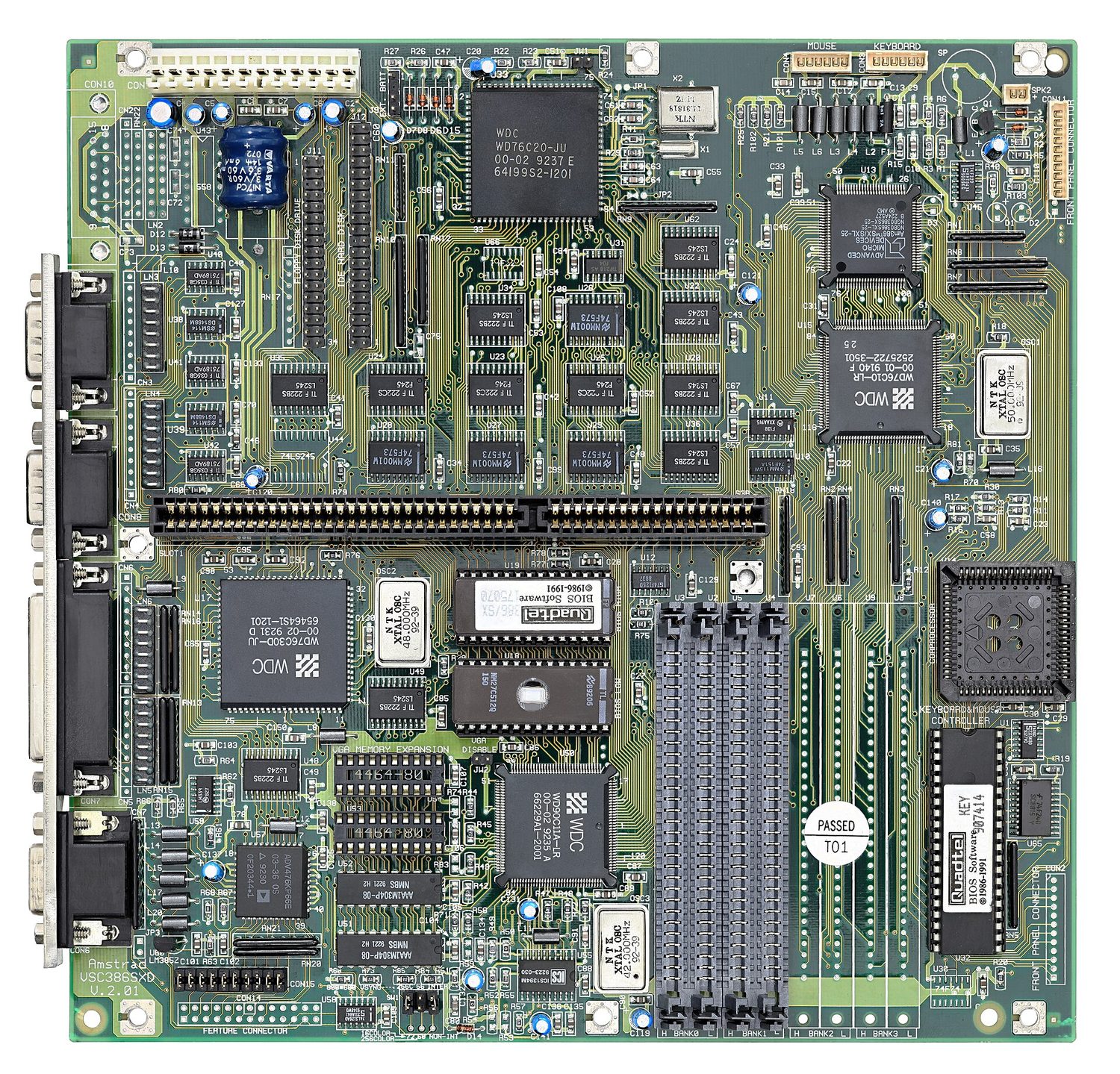
    เข้าใจว่าพอร์ตต่างๆ ให้การเชื่อมต่ออุปกรณ์ต่อพ่วงอย่างไร รวมถึงการเชื่อมต่อกับ: • Universal Serial Bus (USB) • High Definition Multimedia Interface (HDMI) • Video Graphics Array (VGA)
    อธิบายขั้นตอนของรอบ Fetch-Execute (F-E) อธิบายและใช้ notation 'register transfer' เพื่ออธิบายรอบ F-E
    แสดงความเข้าใจถึงวัตถุประสงค์ของ Interrupts รวมถึง: • สาเหตุที่เป็นไปได้ของ Interrupts • การประยุกต์ใช้ Interrupts • การใช้ Interrupt Service Routine (ISR) • เวลาที่ Detect Interrupts ระหว่างรอบ fetch-execute • วิธีการจัดการ Interrupts

    Source: Cambridge International syllabus · ⁨แหล่งที่มา: หลักสูตร Cambridge International⁩

    English
    The fetch-decode-execute cycle

    The Von Neumann architecture 冯·诺依曼体系结构 underlies almost every general-purpose computer:

    • a single memory — the Immediate Access Store 立即存取存储器 (IAS) — holds both program instructions and data (the stored program 存储程序 concept).
    • a processor 处理器 (CPU) fetches instructions from memory and runs them one at a time.
    • instructions run in order unless a branch changes the flow.

    The stored-program idea is what makes a computer flexible: change the program and you change what it does, with no rewiring.

    ไทย
    วัฏจักร fetching-decoding-executing

    สถาปัตยกรรม Von Neumann· รองรับคอมพิวเตอร์ทั่วไปเกือบทุกเครื่อง:

    • หน่วยความจำเดียว — ** Immediate Access Store** (IAS) — เก็บทั้ง คำสั่งโปรแกรม และ ข้อมูล (แนวคิด program ที่จัดเก็บไว้).
    • โปรเซสเซอร์ (CPU) ดึงคำสั่งจากหน่วยความจำและรันทีละตัว.
    • คำสั่งรัน ตามลำดับ เว้นแต่ branch จะเปลี่ยนการไหล.

    แนวคิด stored-program คือสิ่งที่ทำให้คอมพิวเตอร์มีความยืดหยุ่น: เปลี่ยนโปรแกรมก็เปลี่ยนสิ่งที่มันทำได้ โดยไม่ต้องเดินสายใหม่.

    Explore · ⁨สำรวจ⁩

    Tap the parts of a Von Neumann computer · ⁨แตะส่วนประกอบของคอมพิวเตอร์ Von Neumann⁩

    Explore each block. The CPU (control unit, ALU, registers) talks to a single main memory over the buses — and that one shared memory for instructions AND data is the Von Neumann idea. · ⁨สำรวจแต่ละบล็อก CPU (หน่วยควบคุม, ALU, รีจิสเตอร์) สื่อสารกับหน่วยความจำหลักเพียงแห่งเดียวผ่านบัส — และหน่วยความจำร่วมกันนี้สำหรับคำสั่ง AND ข้อมูลคือแนวคิดของ Von Neumann⁩

    Vocabulary · ⁨คำศัพท์⁩ Train · ⁨ฝึกฝน⁩
    English ไทย
    Immediate Access Store/ɪˈmiːdɪət ˈækses stɔː/ หน่วยเก็บเข้าถึงทันที
    stored program/stɔːd ˈprəʊɡræm/ โปรแกรมจัดเก็บ
    RAM/ræm/ RAM
    4.1

    The CPU's main parts · ⁨ส่วนประกอบหลักของ CPU⁩

    English

    All of these parts sit inside one small chip. The diagram later in this section shows how they connect; the photo below shows the real thing.

    Arithmetic and Logic Unit (ALU)

    The ALU 算术逻辑单元 does the arithmetic (add, subtract, …) and logic (AND, OR, comparisons). It takes operands from registers 寄存器 and puts results back in a register.

    Control Unit (CU)

    The control unit 控制单元 decodes each instruction and sends the control signals to carry it out — opening data paths, telling the ALU what to do, and controlling memory reads and writes.

    System clock

    The clock sends a steady stream of pulses that keep the CPU in step. Each instruction takes a fixed number of cycles, and the clock speed 时钟频率 (e.g. 3.8 GHz) is one factor in performance.

    "Explain how the CU and the system clock work together": the clock emits pulses at a fixed frequency; the control unit uses each pulse to move the fetch-execute cycle on by one step, sending its control signals in time with the pulses, so every part of the processor changes state together. A faster clock means more steps per second, up to the point where the circuits cannot settle between pulses.

    Registers

    Registers are tiny, very fast stores inside the CPU. The special purpose registers 专用寄存器 each have a fixed job in the cycle:

    • Program Counter 程序计数器 (PC) — the address of the next instruction.
    • Memory Address Register 内存地址寄存器 (MAR) — the address being read or written.
    • Memory Data Register 内存数据寄存器 (MDR) — the data going to or from memory.
    • Current Instruction Register 当前指令寄存器 (CIR) — the instruction being decoded.
    • Accumulator 累加器 (ACC) — the value the ALU is working on.
    • Status Register 状态寄存器 — holds flags 标志 (carry, zero, negative, overflow) used by branches. Each flag is one bit, set or cleared by the ALU after an operation: the zero flag after a comparison that matched, the carry flag when an addition overflowed the register, the negative flag when a result is negative. A conditional jump reads the flags to decide whether to branch, and an overflow flag can raise an interrupt.
    • Index Register 变址寄存器 — an offset added to an address in indexed addressing; incrementing it steps through an array one element at a time.

    The "complete the table describing the role of each register" question wants one precise sentence per register in these terms: the PC holds the address of the next instruction to be fetched; the MAR holds the address of the location being read from or written to; the MDR holds the data or instruction just read from, or about to be written to, that location; the CIR holds the instruction currently being decoded and executed; the ACC holds the result of the last arithmetic or logic operation.

    General-purpose registers 通用寄存器 are used by the programmer for temporary values during a calculation. Movements of data between registers and memory are written in register transfer 寄存器传送 notation — e.g. MAR ← [PC] ("copy the contents of PC into MAR").

    ไทย

    ส่วนทั้งหมดนี้อยู่ในชิปเล็กชิ้นเดียวกัน แผนภาพถัดไปในส่วนนี้จะแสดงการเชื่อมต่อ; ภาพถ่ายด้านล่างแสดงของจริง

    ด้านใต้ของชิปซีพียู Intel บนพื้นหลังสีขาว, สี่เหลี่ยมแบนปกคลุมด้วยตารางของแผ่นสัมผัสสีทองขนาดเล็กนับร้อยที่กดลงบนซ็อกเก็ตบนเมนบอร์ด
    CPU สมัยใหม่: โปรเซสเซอร์ทั้งหมดคือชิปเล็กชิ้นหนึ่ง (เห็นจากด้านล่าง แสดงจุดสัมผัส)
    ซ็อกเก็ตซีพียูสี่เหลี่ยมบนเมนบอร์ด, มีตารางหมุดเล็กๆ จำนวนมากและคันโยกล็อคโลหะ, ล้อมรอบด้วยเส้นวงจรไฟฟ้า
    ซ็อกเก็ต CPU ที่ตรงกับบนเมนบอร์ด: จุดสัมผัสของชิกดันลงบนหมุดเหล่านี้

    หน่วยคำนวณและตรรกะ (ALU)

    ALU ทำ arithmetic (บวก, ลบ, …) และ logic (AND, OR, เปรียบเทียบ) รับ operands จาก registers และใส่ผลลัพธ์กลับเข้าไปใน register.

    Control Unit (CU)

    control unit decode แต่ละคำสั่งและส่ง control signals เพื่อดำเนินการ — เปิด data paths, บอก ALU ว่าต้องทำอะไร, และควบคุมการอ่าน/เขียนหน่วยความจำ.

    ระบบนาฬิกา

    นาฬิกาส่ง脈 steady ของ pulses ที่ทำให้ CPU ทำงานประสานกัน คำสั่งแต่ละตัวใช้เวลา cycles จำนวนคงที่ และ clock speed (เช่น 3.8 GHz) เป็นปัจจัยหนึ่งในประสิทธิภาพ.

    "อธิบายวิธี CU และระบบนาฬิกาทำงานร่วมกัน": นาฬิกาปล่อย pulses ที่ความถี่คงที่; control unit ใช้แต่ละ pulse để推进 fetch-execute cycle ไปข้างหน้าหนึ่งขั้นตอน, ส่ง control signals ตามจังหวะกับ pulses, ทำให้ทุกส่วนของโปรเซสเซอร์เปลี่ยนสถานะพร้อมกัน นาฬิกาที่เร็วขึ้นหมายถึงขั้นตอนมากขึ้นต่อวินาที จนถึงจุดที่วงจรไม่สามารถ settle ระหว่าง pulses ได้

    Registers

    Registers เป็นที่เก็บขนาดเล็กมากและเร็วภายใน CPU special purpose registers แต่ละตัวมีหน้าที่ตายตัวในวัฏจักร:

    • Program Counter (PC) — ที่อยู่ของ คำสั่งถัดไป.
    • Memory Address Register (MAR) — ที่อยู่ที่กำลังอ่านหรือเขียน.
    • Memory Data Register (MDR) — ข้อมูลที่กำลังส่งเข้าหรือออกจากหน่วยความจำ.
    • Current Instruction Register (CIR) — คำสั่งที่กำลัง decode.
    • Accumulator (ACC) — ค่าที่ ALU กำลังประมวลผล.
    • สตาตัสเรจิสเตอร์ — เก็บ เฟล็ก (carry, zero, negative, overflow) ที่ใช้สำหรับการเบี่ยงเบนเส้นทาง Each flag เป็น 1 บิต ตั้งค่าหรือลบโดย ALU หลังการดำเนินการ: เฟล็ก zero หลังการเปรียบเทียบที่ตรงกัน, เฟล็ก carry เมื่อผลบวกเกินความจุของเรจิสเตอร์, เฟล็ก negative เมื่อผลลัพธ์เป็นลบ การกระโดดตามเงื่อนไขอ่านค่าเฟล็กเพื่อตัดสินใจว่าจะเบี่ยงเบนหรือไม่, และเฟล็ก overflow สามารถส่งสัญญาณขัดจังหวะได้
    • Index Register — offset บวกเข้ากับที่อยู่ในการ addressing แบบ index; การ increment ทำให้วนผ่าน array ตัวละหนึ่ง.

    คำถาม "เติมตารางที่อธิบายบทบาทของแต่ละ register" ต้องการประโยคที่แม่นยำหนึ่งประโยคต่อregister ใน Terms เหล่านี้: PC เก็บที่อยู่ของคำสั่งถัดไปที่จะดึง; MAR เก็บที่อยู่ของตำแหน่งที่กำลังอ่านหรือเขียน; MDR เก็บข้อมูลหรือคำสั่งที่เพิ่งอ่านจากหรือกำลังจะเขียนไปยังตำแหน่งนั้น; CIR เก็บคำสั่งที่กำลัง decode และ run อยู่; ACC เก็บผลลัพธ์ของการดำเนินการ arithmetic หรือ logic ครั้งล่าสุด.

    รีจิสเตอร์อเนกประสงค์ ใช้โดยโปรแกรมเมอร์สำหรับค่าชั่วคราวระหว่างการคำนวณ การถ่ายโอนข้อมูลระหว่างรีจิสเตอร์และหน่วยความจำเขียนในรูปสัญลักษณ์ register transfer — เช่น MAR ← [PC] ("คัดลอกเนื้อหาของ PC ลงใน MAR").

    แผนภาพบล็อกของ CPU Von Neumann แสดง PC, MAR, MDR, CIR, ACC, รีจิสเตอร์สถานะ, หน่วยควบคุม, ALU และนาฬิการะบบ เชื่อมต่อกับหน่วยความจำหลักและอินพุต/เอาต์พุตผ่านบัสที่อยู่ ข้อมูล และควบคุม
    CPUVon Neumann: รีจิสเตอร์, หน่วยควบคุม และ ALU เชื่อมต่อกันด้วยบัส
    Vocabulary · ⁨คำศัพท์⁩ Train · ⁨ฝึกฝน⁩
    English ไทย
    Von Neumann architecture/vɒn ˈnɔɪmən ˈɑːkɪtektʃə/ สถาปัตยกรรม Von Neumann
    ALU/ˌeɪ el ˈjuː/ ALU
    operand/ˈɒpərænd/ operand
    register/ˈredʒɪstə/ รีจิสเตอร์ (register)
    control unit/kənˈtrəʊl ˈjuːnɪt/ หน่วยควบคุม
    clock speed/klɒk spiːd/ ความเร็ว clock
    fetch-execute cycle/fetʃ ˈeksɪkjuːt ˈsaɪkl/ fetch-execute cycle
    special purpose registers/ˈspeʃl ˈpɜːpəs ˈredʒɪstəz/ รีจิสเตอร์เฉพาะ
    Program Counter/ˈprəʊɡræm ˈkaʊntə/ Program Counter
    Memory Address Register/ˈmeməri əˈdres ˈredʒɪstə/ Memory Address Register
    Memory Data Register/ˈmeməri ˈdeɪtə ˈredʒɪstə/ Memory Data Register
    Current Instruction Register/ˈkʌrənt ɪnˈstrʌkʃn ˈredʒɪstə/ Current Instruction Register
    accumulator/əˈkjuːmjʊleɪtə/ _accumulator
    Status Register/ˈsteɪtəs ˈredʒɪstə/ Status Register
    Index Register/ˈɪndeks ˈredʒɪstə/ Index Register
    register transfer/ˈredʒɪstə ˈtrænsfɜː/ register transfer
    control bus/kənˈtrəʊl bʌs/ control bus
    4.1

    Buses · ⁨บัส⁩

    English

    Three internal buses 总线 (sets of parallel wires) connect the parts:

    • address bus 地址总线 — carries the memory address. One-way (CPU → memory).
    • data bus 数据总线 — carries the data. Two-way.
    • control bus 控制总线 — carries control signals (read, write, interrupt). Two-way.

    An $n$-bit address bus can reach $2^{n}$ memory locations. The data-bus width sets how many bits move per access (often the word size).

    ไทย

    บัสภายในสามชนิด (ชุดสายขนาน) เชื่อมต่อส่วนต่างๆ เข้าด้วยกัน:

    • บัสที่อยู่ — ส่งที่อยู่หน่วยความจำ เป็นทางเดียว (CPU → หน่วยความจำ).
    • บัสข้อมูล — ส่งข้อมูล เป็นสองทาง.
    • บัสควบคุม — ส่งสัญญาณควบคุม (อ่าน, เขียน, Interrupt) เป็นสองทาง.

    บัสที่อยู่ขนาด $n$ บิต สามารถเข้าถึงตำแหน่งหน่วยความจำได้ $2^{n}$ ตำแหน่ง ความกว้างของบัสข้อมูลกำหนดจำนวนบิตที่ถ่ายโอนต่อการเข้าถึงหนึ่งครั้ง (มักเท่ากับขนาดคำ)

    CPU, หน่วยความจำ และอินพุต/เอาต์พุต แต่ละส่วนเชื่อมต่อกับบัสที่อยู่ (ทางเดียว), บัสข้อมูล และบัสควบคุม ภายในระบบบัส
    ระบบบัสสามชนิดเชื่อมต่อ CPU, หน่วยความจำ และอินพุต/เอาต์พุตเข้าด้วยกัน
    เมนบอร์ดมองจากด้านบน: ซ็อกเก็ต CPU, ช่องใส่หน่วยความจำ และช่องขยาย เชื่อมต่อกันด้วยเส้นทางพิมพ์ที่หนาแน่น
    เมนบอร์ด: CPU, หน่วยความจำ และ I/O ทั้งหมดอยู่บนชุดบัสเดียวกัน — คือเส้นทางการพิมพ์ที่วิ่งระหว่างองค์ประกอบเหล่านั้น
    Vocabulary · ⁨คำศัพท์⁩ Train · ⁨ฝึกฝน⁩
    English ไทย
    interrupt/ˈɪntərʌpt/ interrupt
    buses/ˈbʌsɪz/ บัส
    address bus/əˈdres bʌs/ address bus
    4.1

    What affects performance · ⁨ปัจจัยที่มีผลต่อประสิทธิภาพการทำงาน⁩

    English
    • clock speed — more cycles per second.
    • number of cores 核心 — a multi-core CPU runs several threads at once.
    • word size 字长 — a 64-bit CPU handles 64-bit chunks per cycle and can address far more memory than a 32-bit one.
    • amount of RAM 随机存取存储器 — more RAM holds more of the working set; too little forces the OS to page 页 to disk.
    • cache memory 高速缓存 size — more cache cuts average memory access time.
    • secondary storage 辅助存储器 type — an SSD loads programs far faster than an HDD.
    • bus width and speed — wider/faster buses move data more quickly.

    Match the specs to the workload: a quad-core beats a dual-core on parallel work, but higher per-core speed wins on single-threaded work.

    Each factor is a two-mark answer with a reason attached:

    • More cores: each core can fetch and execute its own instruction at the same time, so several programs, or the threads of one program, run in parallel. But a program must be written to use more than one core, so doubling the cores does not double the speed.
    • Higher clock speed: more fetch-execute cycles per second, so more instructions per second; the limit is the heat produced.
    • Wider bus: a wider data bus moves more bits in each transfer, so fewer transfers are needed for the same data; a wider address bus can address more memory locations.
    • Cache memory: a small, fast memory inside or next to the processor that keeps the instructions and data used most recently or most often. Reading them from cache is much faster than from RAM, so the processor spends less time waiting.

    "Explain why the new computer performs better" is answered by comparing the two specifications line by line: a higher clock speed executes more instructions per second, more cores run more tasks at once, more cache means fewer slow accesses to RAM, and more RAM means fewer transfers to disk.

    ไทย
    • ความเร็วรอบ (clock speed) — จำนวนรอบต่อวินาทีมากขึ้น
    • จำนวนคอร์ — CPU แบบมัลติคอร์สามารถรันหลายเธรดพร้อมกันได้
    • ขนาดคำ (word size) — CPU 64-บิต จัดการข้อมูลเป็นก้อนขนาด 64 บิตต่อรอบ และเข้าถึงหน่วยความจำได้มากกว่า CPU 32-บิตอย่างมาก
    • ปริมาณ RAM — RAM มากขึ้นเก็บชุดงาน working set ได้มากขึ้น; หากน้อยเกินไปจะทำให้ OS ต้องทำ page ไปยังดิสก์
    • ขนาดหน่วยความจำแคช — แคชมากลดเวลาเข้าถึงหน่วยความจำเฉลี่ยลง
    • ประเภทการจัดเก็บข้อมูลรอง — SSD โหลดโปรแกรมได้เร็วกว่า HDD มาก
    • ความกว้างและความเร็วของบัส — บัสที่กว้างหรือเร็วขึ้นช่วยส่งข้อมูลได้รวดเร็วขึ้น

    จับคู่สเปกกับภาระงาน: Quad-core ดีกว่า Dual-core ในงานแบบขนาน แต่ความเร็วต่อคอร์ที่สูงกว่าชนะในงาน single-threaded

    แต่ละปัจจัยเป็นคำตอบคะแนน 2 คะแนน พร้อมเหตุผลประกอบ:

    • คอร์มากขึ้น: แต่ละคอร์สามารถดึงและดำเนินการคำสั่งของตัวเองได้พร้อมกัน ทำให้หลายโปรแกรม หรือเธรดของโปรแกรมหนึ่ง ทำงานแบบขนานได้ แต่ต้องเขียนโปรแกรมให้รองรับการใช้หลายคอร์ ดังนั้นการเพิ่มคอร์เป็นสองเท่าไม่ทำให้ความเร็วเพิ่มขึ้นสองเท่าเสมอไป
    • ความเร็วรอบสูงขึ้น: มีรอบ fetch-execute ต่อวินาทีมากขึ้น จึงประมวลผลคำสั่งได้มากขึ้นต่อวินาที; ข้อจำกัดคือความร้อนที่เกิดขึ้น
    • บัสกว้างขึ้น: บัสข้อมูลที่กว้างขึ้นส่งข้อมูลได้มากกว่าต่อ一次การถ่ายโอน จึงใช้จำนวนการถ่ายโอนน้อยกว่าเพื่อส่งข้อมูลเท่าเดิม; บัสที่อยู่ที่กว้างขึ้นเข้าถึงตำแหน่งหน่วยความจำได้มากขึ้น
    • หน่วยความจำแคช: เป็นหน่วยความจำขนาดเล็กแต่เร็ว ที่อยู่ในหรือ毗邻 processor เก็บคำสั่งและข้อมูลที่ใช้งานล่าสุดหรือบ่อยที่สุด การอ่านจากแคชเร็วกว่า RAM มาก ทำให้โปรเซสเซอร์ใช้เวลารอให้น้อยลง

    "อธิบายว่าทำไมคอมพิวเตอร์รุ่นใหม่จึงทำงานได้ดีขึ้น" ตอบด้วยการเปรียบเทียบสเปกทั้งสองแบบบรรทัดต่อบรรทัด: ความเร็วรอบสูงกว่าประมวลผลคำสั่งได้มากขึ้นต่อวินาที, คอร์越多รันงานได้พร้อมกันมากขึ้น, แคชมากขึ้นหมายถึงการเข้าถึง RAM ช้าลงน้อยลง, และ RAM มากขึ้นหมายถึงการถ่ายโอนไปยังดิสก์น้อยลง

    Vocabulary · ⁨คำศัพท์⁩ Train · ⁨ฝึกฝน⁩
    English ไทย
    processor/ˈprəʊsesə/ หน่วยประมวลผล
    arithmetic and logic unit/ˌærɪθˈmetɪk ənd ˈlɒdʒɪk ˈjuːnɪt/ หน่วยคำนวณและตรรกะ
    word size/wɜːd saɪz/ ขนาดคำ
    number of cores/ˈnʌmbə ɒv kɔːz/ จำนวน cores
    cores/kɔːz/ คอร์
    amount of RAM/əˈmaʊnt ɒv ræm/ ปริมาณ RAM
    page/peɪdʒ/ หน้า
    cache memory/kæʃ ˈmeməri/ แคชเมมโมรี่
    cache/kæʃ/ cache
    secondary storage/ˈsekəndəri ˈstɔːrɪdʒ/ การจัดเก็บรอง
    port/pɔːt/ พอร์ต
    peripheral/pəˈrɪfərəl/ อุปกรณ์ต่อพ่วง
    4.1

    Ports · ⁨พอร์ต⁩

    English

    A port 端口 is a physical socket for connecting a peripheral 外围设备:

    • USB (Universal Serial Bus) — general-purpose (keyboards, drives, phones).
    • HDMI (High Definition Multimedia Interface) — digital video and audio to a screen.
    • VGA (Video Graphics Array) — older analogue video output to a monitor.
    • Ethernet (RJ-45) — wired LAN. Audio jacks — headphones/microphone.

    Different ports use different signals, so an HDMI cable will not fit a USB socket. USB-C is unusual in carrying video, data and power.

    "Explain how the computer connects to the monitor through HDMI": the HDMI port sends the video and the audio as one digital signal down a single cable, so no conversion to analogue is needed and the picture is not degraded; the cable carries high-definition resolutions and the monitor's own port decodes the signal. A USB device is plug-and-play: when it is connected the computer detects it, identifies it, loads or installs the driver it needs, and can supply it with power, all without a restart.

    ไทย

    พอร์ต คือซ็อกเก็ตทางกายภาพสำหรับการเชื่อมต่อ อุปกรณ์ต่อพ่วง:

    • USB (Universal Serial Bus) — อเนกประสงค์ (คีย์บอร์ด, ไดร์ฟ, โทรศัพท์)
    • HDMI (High Definition Multimedia Interface) — วิดีโอและเสียงดิจิทัลไปยังหน้าจอ
    • VGA (Video Graphics Array) — สัญญาณวิดีโอแอนะล็อกเก่าไปยังจอภาพ
    • Ethernet (RJ-45) — LAN แบบมีสาย. จacks เสียง — หูฟัง/ไมโครโฟน

    พอร์ตต่างชนิดใช้สัญญาณต่างกัน ดังนั้นสาย HDMI จะเสียบไม่ได้กับซ็อกเก็ต USB USB-C มีความพิเศษในการรองรับวิดีโอ ข้อมูล และพลังงานในสายเดียว

    "อธิบายว่าคอมพิวเตอร์เชื่อมต่อกับจอภาพผ่าน HDMIได้อย่างไร": พอร์ต HDMI ส่งวิดีโอและเสียงเป็นสัญญาณดิจิทัลรวมกันผ่านสายเดียว ไม่ต้องแปลงเป็นแอนะล็อก ภาพจึงไม่เสื่อมคุณภาพ สายรองรับความละเอียดสูง และพอร์ตบนจอภาพจะถอดรหัสสัญญาณเอง อุปกรณ์ USB เป็นแบบ plug-and-play: เมื่อเสียบเข้าแล้ว คอมพิวเตอร์จะตรวจจับ ระบุชื่อ โหลดไดรเวอร์ที่ต้องการ และอาจจ่ายไฟให้โดยอัตโนมัติโดยไม่ต้องรีสตาร์ท

    4.1

    Fetch-Execute cycle · ⁨รอบ fetch-execute⁩

    English

    The CPU repeats the fetch-execute cycle 取指-执行周期, one run per machine instruction.

    Fetch

    1. the PC's address is copied to the MAR.
    2. the PC is incremented to point to the next instruction.
    3. a read signal goes over the control bus.
    4. memory puts the instruction on the data bus.
    5. it is copied into the MDR, then into the CIR.

    The exam asks for these steps in register transfer notation 寄存器传送记法, where [X] means the contents of register X and [[MAR]] means the contents of the memory location whose address is in the MAR:

    The order matters: the PC is incremented straight after its address has been copied, so that a jump executed later can still overwrite it. During execution the same notation describes each instruction; for LDD 200, for example, MAR ← 200, MDR ← [[MAR]], ACC ← [MDR].

    Decode

    The CU decodes the instruction in the CIR — what operation, and which operands or addresses.

    Execute

    The CU carries it out: arithmetic/logic goes to the ALU (result to the ACC); a load/store moves data between memory and a register; a branch changes the PC. Then the cycle repeats.

    ไทย

    CPU ทำซ้ำ รอบ fetch-execute — รันหนึ่งครั้งต่อคำสั่งเครื่องหนึ่ง

    Fetch

    1. ที่อยู่ของ PC ถูกคัดลอกไปยัง MAR
    2. PC ถูก increment เพื่อชี้ไปที่คำสั่งถัดไป
    3. สัญญาณ read ส่งผ่านบัสควบคุม
    4. หน่วยความจำวางคำสั่งลงบนบัสข้อมูล
    5. คัดลอกเข้าไปใน MDR จากนั้นเข้าสู่ CIR

    ข้อสอบถามขั้นตอนเหล่านี้ในรูปแบบ register transfer notation โดยที่ [X] หมายถึงเนื้อหาของรีจิสเตอร์ X และ [[MAR]] หมายถึงเนื้อหาของตำแหน่งหน่วยความจำwhose address อยู่ใน MAR:

    MAR ← [PC]          the address of the next instruction goes to the MAR
    PC  ← [PC] + 1      the PC now points to the following instruction
    MDR ← [[MAR]]       the instruction at that address is read into the MDR
    CIR ← [MDR]         the instruction is copied into the CIR for decoding
    

    ลำดับมีความสำคัญ: PC จะถูก increment ทันทีหลังจากที่อยู่ของมันถูกคัดลอก เพื่อให้การ jump ที่เกิดขึ้นในภายหลังสามารถแทนที่ค่า PC นั้นได้ ระหว่างการ execute สัญลักษณ์เดียวกันนี้จะใช้อธิบายแต่ละคำสั่ง; สำหรับ LDD 200 ตัวอย่างเช่น MAR ← 200, MDR ← [[MAR]], ACC ← [MDR]

    การถ่ายโอนรีจิสเตอร์ในรอบ fetch ตามลำดับ: 1 ที่อยู่ของ PC ไปยัง MAR; 2 MAR ส่งที่อยู่ไปยังหน่วยความจำ; 3 คำสั่งกลับมายัง MDR; 4 MDR คัดลอกไปยัง CIR; ขณะเดียวกันนั้น PC ถูก increment
    การถ่ายโอนรีจิสเตอร์ในรอบ fetch: PC → MAR → หน่วยความจำ → MDR → CIR โดยมีการ increment PC

    Decode

    CU ตีความคำสั่งใน CIR — ว่าเป็นการดำเนินการใด และใช้ operand หรือที่อยู่ข้อมูลใด

    การดำเนินการ (Execute)

    CU ดำเนินการตามนั้น: การคำนวณทางคณิตศาสตร์/ตรรกะจะถูกส่งไปยัง ALU (ผลลัพธ์ไป ACC); การโหลด/จัดเก็บจะย้ายข้อมูลระหว่างหน่วยความจำและรีจิสเตอร์; การกระโดดจะเปลี่ยนค่า PC จากนั้นรอบการทำงานจะวนซ้ำอีกครั้ง

    แผนภาพวงจร fetching-execution จาก START: ขั้นตอน fetch (PC ไป MAR, เพิ่มค่า PC, สัญญาณอ่าน, หน่วยความจำไปยัง data bus ไป MDR ไป CIR), ขั้นตอน decode, ขั้นตอน execute, จากนั้นตรวจสอบ interrupt แล้ววนกลับไปที่ START
    วงจร fetching-execute พร้อมการตรวจสอบ interrupt ทุกครั้ง
    Explore · ⁨สำรวจ⁩

    The fetch-execute cycle · ⁨รอบ fetch-execute⁩

    Tap round the loop the CPU repeats billions of times a second. Watch how fetch uses the PC/MAR/MDR/CIR registers, then decode and execute act on what was fetched. · ⁨แตะวนรอบที่ CPU ทำซ้ำหลายพันล้านครั้งต่อวินาที ดูว่า fetch ใช้รีจิสเตอร์ PC/MAR/MDR/CIR อย่างไร แล้ว decode และ execute ทำงานกับสิ่งที่ถูกดึงมา⁩

    Explore · ⁨สำรวจ⁩

    The fetch–execute cycle · ⁨取指-执行周期⁩

    Step through how the CPU runs one instruction — fetch it from memory, decode it, then execute it, over and over. · ⁨逐步演示CPU如何运行一条指令——从内存中 fetch,decode,然后 execute,周而复始。⁩

    Vocabulary · ⁨คำศัพท์⁩ Train · ⁨ฝึกฝน⁩
    English ไทย
    data bus/ˈdeɪtə bʌs/ data bus
    register transfer notation/ˈredʒɪstə ˈtrænsfɜː nəʊˈteɪʃn/ Programming Transfer Notation
    interrupt service routine/ˈɪntərʌpt ˈsɜːvɪs ruːˈtiːn/ Interrupt Service Routine
    4.1

    Interrupts

    English

    An interrupt 中断 is a signal that pauses the normal cycle so the CPU can handle an urgent event (a key press, a packet arriving, a hardware fault, division by zero, the OS timer).

    Handling one:

    1. finish the current instruction.
    2. save the state (PC and registers).
    3. load the address of the interrupt service routine 中断服务程序 (ISR) into the PC and run it.
    4. the ISR handles the event.
    5. restore the saved state and carry on.

    Interrupts let the system respond promptly without the CPU constantly checking devices, and are how the OS multitasks.

    "Explain how an interrupt from an input device is detected and handled in the F-E cycle" is a four-mark answer with these points: the device sends an interrupt signal that sets the interrupt flag in the interrupt register 中断寄存器; the processor checks that register at the end of every fetch-execute cycle, after the current instruction has finished executing; if a flag is set and the interrupt has a higher priority than the current task, the contents of the PC and the other registers are saved onto the stack 栈; the address of the interrupt service routine is loaded into the PC and the routine runs; when it finishes, the saved values are restored from the stack and the interrupted program continues from where it stopped.

    Causes worth naming: a hardware interrupt from a device (a key pressed, a printer buffer empty, a network packet arriving), a software interrupt from a fault (division by zero, an illegal instruction, arithmetic overflow), a timer interrupt from the operating system marking the end of a time slice, and a power failure warning.

    ไทย

    Interrupt คือสัญญาณที่ หยุด วงจรปกติชั่วคราว เพื่อให้ CPU สามารถจัดการกับเหตุการณ์เร่งด่วนได้ (เช่น การกดคีย์,数据包 arrives, ความผิดปกติของฮาร์ดแวร์, การหารด้วยศูนย์, ตัวจับเวลาของ OS)

    การจัดการหนึ่งครั้ง:

    1. เสร็จสิ้นคำสั่งปัจจุบันให้เรียบร้อย
    2. บันทึกสถานะ (PC และรีจิสเตอร์)
    3. โหลดที่อยู่ของ โปรแกรมบริการ interrupt (ISR) ลงใน PC และรันมัน
    4. ISR จัดการเหตุการณ์นั้น
    5. คืนค่า สถานะที่บันทึกไว้แล้วดำเนินต่อ

    Interrupt ทำให้ระบบตอบสนองได้อย่างรวดเร็วโดยไม่ต้องให้ CPU ตรวจสอบอุปกรณ์ตลอดเวลา และเป็นกลไกที่ OS ใช้สำหรับ multitasking

    "อธิบายว่า interrupt จากอุปกรณ์อินพุตถูกตรวจจับและจัดการอย่างไรในวงจร F-E" เป็นคำตอบแบบ 4 คะแนน โดยมีจุดสำคัญดังนี้: อุปกรณ์ส่งสัญญาณ interrupt ที่ทำให้ interrupt flag ใน interrupt register ถูกตั้งขึ้น; โปรเซสเซอร์ตรวจสอบรีจิสเตอร์นี้ที่ ปลายของแต่ละ fetch-execute cycle, หลังจากคำสั่งปัจจุบัน被执行เสร็จ; หากมี flag ถูกตั้งขึ้น且有 interrupt มี priority สูงกว่างานปัจจุบัน, เนื้อหาของ PC และรีจิสเตอร์อื่นๆ จะถูกบันทึกลงบน stack; ที่อยู่ของโปรแกรมบริการ interrupt จะถูกโหลดลงใน PC และโปรแกรมจะทำงาน; เมื่อเสร็จสิ้น ค่าที่บันทึกไว้จะถูกกู้คืนจาก stack และโปรแกรมที่ถูก interrupt จะดำเนินต่อจากจุดที่หยุดอยู่

    สาเหตุ worthy of naming: hardware interrupt จากอุปกรณ์ (เช่น กดคีย์, buffer ของ printer ว่าง,数据包 arrives), software interrupt จากความผิดพลาด (เช่น การหารด้วยศูนย์, คำสั่งที่ไม่ถูกต้อง, Arithmetic overflow), timer interrupt จาก OS ที่บ่งชี้ถึงสิ้นสุดของ time slice, และการเตือนเมื่อไฟดับ

    แผนภาพขั้นตอนการจัดการสัญญาณขัดจังหวะ: โปรแกรมที่กำลังทำงานถูกขัดจังหวะ, ซีพียูเสร็จสิ้นคำสั่งปัจจุบัน, บันทึกสถานะ (PC และเรจิสเตอร์) ลงบนสตैก, ทำงานฟังก์ชันบริการสัญญาณขัดจังหวะ, ฟื้นฟูสถานะและดำเนินต่อ
    วิธีการที่ interrupt เข้ามาเกี่ยวข้องกับวงจร fetching-execute
    Vocabulary · ⁨คำศัพท์⁩ Train · ⁨ฝึกฝน⁩
    English ไทย
    interrupt register/ˈɪntərʌpt ˈredʒɪstə/ Interrupt Register
    stack/stæk/ stack
    4.2

    Assembly language and machine code

    Syllabus · ⁨หลักสูตร⁩
    English
    Candidates should be able to: Notes and guidance
    Show understanding of the relationship between assembly language and machine code
    Describe the different stages of the assembly process for a two-pass assembler Apply the two-pass assembler process to a given simple assembly language program
    Trace a given simple assembly language program
    Show understanding that a set of instructions are grouped Including the following groups: • Data movement • Input and output of data • Arithmetic operations • Unconditional and conditional instructions • Compare instructions
    Show understanding of and be able to use different modes of addressing Including immediate, direct, indirect, indexed, relative
    ไทย
    ผู้เข้าสอบควรสามารถ: หมายเหตุและคำแนะนำ
    แสดงความเข้าใจถึงความสัมพันธ์ระหว่าง ภาษาแอสsemblี และ machine code
    อธิบายขั้นตอนต่างๆ ของกระบวนการประกอบโปรแกรมสำหรับ ตัวประกอบแบบสองผ่าน (two-pass assembler) นำใช้กระบวนการของ ตัวประกอบแบบสองผ่าน กับโปรแกรมภาษาแอสsemblyที่กำหนดให้
    ติดตามการทำงานของโปรแกรมภาษาแอสsemblyที่ง่ายและกำหนดให้
    แสดงความเข้าใจว่าชุดคำสั่งถูกจัดกลุ่มเข้าด้วยกัน รวมถึงกลุ่มต่อไปนี้: • การเคลื่อนย้ายข้อมูล • การรับและการส่งข้อมูล • การดำเนินการทางคณิตศาสตร์ • คำสั่งแบบไม่มีเงื่อนไขและคำสั่งที่มีเงื่อนไข • คำสั่งเปรียบเทียบ
    แสดงความเข้าใจและสามารถใช้ โหมดการเข้าถึงหน่วยความจำ (modes of addressing) ที่แตกต่างกันได้ รวมถึง แบบทันที (immediate), แบบตรง (direct), แบบอ้อม (indirect), แบบดักจิก (indexed), แบบสัมพัทธ์ (relative)

    Source: Cambridge International syllabus · ⁨แหล่งที่มา: หลักสูตร Cambridge International⁩

    English

    The CPU actually runs machine code 机器码 — bit patterns, specific to one architecture. Assembly language 汇编语言 is a readable form, with one instruction per machine instruction, written using mnemonics 助记符 like LDD, ADD, JMP. An assembler 汇编器 translates it to machine code.

    Two-pass assembler

    A two-pass assembler reads the source twice:

    • pass 1 builds a symbol table 符号表: each time a label 标签 (like LOOP:) appears, record its address; no code yet.
    • pass 2 generates code: translate each instruction, and when one refers to a label (like JMP LOOP), look up its address in the symbol table.

    Two passes handle forward references 前向引用 (a jump to a label defined later).

    Worked example. Apply the two-pass process to this program, whose first instruction is stored at address 100.

    Pass 1 reads each line, counts the address it will occupy, and records every label in the symbol table: LOOP = 101 (the DEC line) and COUNT = 105 (the data line). No code is produced. Pass 2 reads the program again and translates each line into machine code, replacing each mnemonic by its opcode 操作码 and each symbolic address by the number from the symbol table: LDD COUNT becomes the opcode for LDD with operand 操作数 105, and JPN LOOP becomes the opcode for JPN with operand 101. The jump back to LOOP could have been resolved in one pass, but a jump forward to a label not yet seen could not, which is why the assembler makes two.

    Example instruction set

    Cambridge uses a small generic set, printed in the paper's reference table, with one general-purpose register, the accumulator (ACC), and an index register (IX). An operand written #n is a denary number, Bn a binary number and &n a hexadecimal number; <address> is a location number or a label.

    Group Instruction What it does
    Data movement LDM #n load the number n into ACC (immediate)
    LDD <address> load the contents of the address into ACC (direct)
    LDI <address> the address holds another address; load the contents of that one into ACC (indirect)
    LDX <address> add IX to the address and load the contents of the result into ACC (indexed)
    LDR #n load the number n into IX
    MOV <register> copy ACC into the named register (IX)
    STO <address> store the contents of ACC at the address
    Input and output IN read a key press and put its ASCII code in ACC
    OUT output the character whose ASCII code is in ACC
    Arithmetic ADD <address> / ADD #n add the contents of the address, or the number, to ACC
    SUB <address> / SUB #n subtract from ACC
    INC <register> / DEC <register> add 1 to, or subtract 1 from, ACC or IX
    Compare CMP <address> / CMP #n compare ACC with the contents of the address, or with n, and set the flag
    CMI <address> compare ACC with the contents of the address held at the address (indirect)
    Jump JMP <address> jump to the address unconditionally
    JPE <address> / JPN <address> jump if the last compare was equal / not equal
    Bit manipulation AND, OR, XOR with #n, Bn, &n or <address> bitwise operation on ACC
    LSL #n / LSR #n shift ACC logically n places left or right
    END end the program

    The "assembly language instructions are grouped" question wants the group names, and an instruction from each: data movement, input and output, arithmetic, unconditional and conditional jumps, compare, and bit manipulation.

    ไทย

    CPU ทำงานจริงด้วย machine code — รูปแบบบิตที่เป็นเฉพาะสำหรับ architecture หนึ่ง Assembly language เป็นรูปแบบที่อ่านเข้าใจได้ ซึ่งมีการใช้ 1 คำสั่งต่อ 1 คำสั่งใน machine code เขียนโดยใช้ mnemonics เช่น LDD, ADD, JMP. Assembler ทำหน้าที่แปลมันเป็น machine code

    Assembler แปล mnemonics ของแอสsemblีให้เป็นรูปแบบบิตของ machine code
    Assembler แปล mnemonics ให้เป็นรูปแบบบิตของ machine code

    Two-pass assembler

    Two-pass assembler อ่าน source code สองครั้ง:

    • pass 1 สร้าง symbol table: ทุกครั้งที่ปรากฏ label (เช่น LOOP:), บันทึกที่อยู่ของมัน; ยังไม่มีการสร้างโค้ด
    • pass 2 สร้างโค้ด: แปลแต่ละคำสั่ง, และเมื่อคำสั่งใดอ้างอิงถึง label (เช่น JMP LOOP), ดูหาที่อยู่ของมันใน symbol table

    สองรอบช่วยจัดการกับ forward references (การ jump ไปยัง label ที่นิยามไว้ทีหลัง)

    ตัวอย่างวิธีทำ. นำกระบวนการสองรอบไปใช้กับโปรแกรมนี้ โดยคำสั่งแรกถูกเก็บอยู่ที่ที่อยู่ 100

            LDD  COUNT
    LOOP:   DEC  ACC
            CMP  #0
            JPN  LOOP
            END
    COUNT:  5
    

    Pass 1 อ่านแต่ละบรรทัด นับจำนวนที่อยู่ที่จะใช้ และบันทึก label ทั้งหมดลงใน symbol table: LOOP = 101 (บรรทัด DEC) และ COUNT = 105 (บรรทัดข้อมูล). ไม่มีการสร้างโค้ด Pass 2 อ่านโปรแกรมอีกครั้งและแปลแต่ละบรรทัดเป็น machine code โดยแทนที่แต่ละ mnemonic ด้วย opcode และแทนที่ symbolic address ด้วยตัวเลขจาก symbol table: LDD COUNT กลายเป็น opcode สำหรับ LDD ที่มี operand เป็น 105, และ JPN LOOP กลายเป็น opcode สำหรับ JPN ที่มี operand เป็น 101. การ jump กลับไปที่ LOOP อาจแก้ได้ในรอบเดียว แต่การ jump ไปข้างหน้า ไปยัง label ที่ยังไม่เคยเห็นมาก่อนไม่สามารถทำได้ นี่คือเหตุผลที่ assembler ต้องใช้สองรอบ

    ตัวอย่างชุดคำสั่ง

    Cambridge ใช้เซตทั่วไปขนาดเล็กพิมพ์ในตารางอ้างอิงของข้อสอบ, ซึ่งประกอบด้วยเรจิสเตอร์ใช้งานทั่วไปหนึ่งตัวคือแอคคัมมิเลเตอร์ (ACC), และเรจิสเตอร์อินเด็กซ์ (IX). ตัว operand ที่เขียน #n คือจำนวนฐานสิบ, Bn เป็นจำนวนฐานสอง และ &n เป็นจำนวนฐานสิบหก; <address> คือหมายเลขตำแหน่งหรือฉลาก

    กลุ่ม คำสั่ง สิ่งที่ทำ
    การเคลื่อนย้ายข้อมูล LDM #n โหลดเลข n ลงใน ACC (immediate)
    LDD <address> โหลดเนื้อหาจากที่อยู่ ลงใน ACC (direct)
    LDI <address> ที่อยู่ถือที่อยู่อื่น; โหลดเนื้อหาจากที่นั่นลงใน ACC (indirect)
    LDX <address> เพิ่ม IX กับที่อยู่แล้วโหลดเนื้อหาจากผลลัพธ์ลงใน ACC (indexed)
    LDR #n โหลดเลข n ลงใน IX
    MOV <register> คัดลอก ACC ลงในรีจิสเตอร์ที่ระบุชื่อ (IX)
    STO <address> เก็บเนื้อหาของ ACC ไว้ที่ที่อยู่
    อินพุตและเอาต์พุต IN อ่านการกดคีย์และใส่ ASCII code ลงใน ACC
    OUT แสดงออก character ซึ่งมี ASCII code อยู่ใน ACC
    การคำนวณ ADD <address> / ADD #n เพิ่มเนื้อหาจากที่อยู่, หรือเลข, ลงใน ACC
    SUB <address> / SUB #n ลบออกจาก ACC
    INC <register> / DEC <register> เพิ่ม 1 หรือลบ 1 ออกจาก ACC หรือ IX
    เปรียบเทียบ CMP <address> / CMP #n เปรียบเทียบ ACC กับเนื้อหาจากที่อยู่, หรือกับ n, และตั้งค่า flag
    CMI <address> เปรียบเทียบ ACC กับเนื้อหาจากที่อยู่ที่地址位于 (indirect)
    กระโดด JMP <address> กระโดดไปยังที่อยู่โดยไม่เงื่อนไข
    JPE <address> / JPN <address> กระโดดหากการเปรียบเทียบล่าสุดเป็นสมการ/ไม่สมการ
    การจัดการบิต AND, OR, XOR กับ #n, Bn, &n หรือ <address> การดำเนินการระดับบิตบน ACC
    LSL #n / LSR #n เลื่อน ACC แบบลอจิก n ตำแหน่งไปทางซ้ายหรือขวา
    END สิ้นสุดโปรแกรม

    คำถาม "คำสั่งภาษาอัสsembly ถูกจัดกลุ่ม" ต้องการชื่อกลุ่ม และคำสั่งจากแต่ละกลุ่ม: การเคลื่อนย้ายข้อมูล, อินพุตและเอาต์พุต, คณิตศาสตร์, การกระโดดแบบไม่มีเงื่อนไขและแบบมีเงื่อนไข, การเปรียบเทียบ และการจัดการบิต.

    Explore · ⁨สำรวจ⁩

    How a two-pass assembler works · ⁨วิธีการทำงานของแอสsembl์แบบสองรอบ⁩

    Step through it. The assembler reads your code twice: pass 1 just finds where every label lives, so pass 2 can fill in the addresses — that is how a jump to a label defined later still works. · ⁨ลองเดินตามกระบวนการดู แอสsembl์จะอ่านโค้ดของคุณสองครั้ง: รอบ 1 จะหาตำแหน่งของแต่ละฉลาก (label) เพื่อให้อรอบ 2 สามารถกรอกที่อยู่ได้ — นั่นคือเหตุผลว่าทำไมการกระโดดไปยังฉลากที่นิยาม ภายหลัง จึงยังทำงานได้⁩

    Vocabulary · ⁨คำศัพท์⁩ Train · ⁨ฝึกฝน⁩
    English ไทย
    assembly language/əˈsemblɪ ˈlæŋɡwɪdʒ/ Assembly Language
    machine code/məˈʃiːn kəʊd/ เครื่องมิกซ์โค้ด (machine code)
    mnemonics/nɪˈmɒnɪks/ คำย่อโปรแกรม
    assembler/əˈsemblə/ assembler
    symbol table/ˈsɪmbl ˈteɪbl/ symbol table
    label/ˈleɪbl/ ฉลาก
    forward references/ˈfɔːwəd ˈrefrənsɪz/ forward references
    opcode/ˈɒpkəʊd/ opcode
    4.2

    Addressing modes · ⁨โหมดการเข้าถึง (Addressing modes)⁩

    English

    The addressing mode 寻址方式 (the modes of addressing) says how the CPU finds the operand:

    • immediate addressing 立即寻址 — the operand is the value in the instruction. LDM #10 loads 10.
    • direct addressing 直接寻址 — the instruction holds an address; the operand is the value there. LDD 200.
    • indirect addressing 间接寻址 — the instruction holds an address that holds another address, which is the data. LDI 200.
    • indexed addressing 变址寻址 — effective address is address + index register; used for arrays. LDX 100 with IR = 5 reads address 105.

    (Relative addressing 相对寻址 gives the address as an offset from the PC — used for jumps.)

    Worked example. Memory holds: location 200 = 250, location 250 = 99, location 105 = 7. The index register holds 5. What is in the accumulator after each of LDM #200, LDD 200, LDI 200 and LDX 100? Follow how far each mode has to look. LDM #200 is immediate - the operand is the number written in the instruction, so the accumulator holds 200. LDD 200 is direct - go to location 200 and take what is there: 250. LDI 200 is indirect - location 200 holds 250, which is another address, so go on to location 250: 99. LDX 100 is indexed - add the index register to the address, $100 + 5 = 105$, and read location 105: 7. Count the hops to keep them apart: immediate 0, direct 1, indirect 2, indexed 1 (once the index has been added).

    ไทย

    โหมดการเข้าถึง (หรือ modes of addressing) บอกวิธีการที่ CPU หา operands:

    • การเข้าถึงแบบทันที (immediate addressing) — operand คือค่าที่มีอยู่ในคำสั่ง. LDM #10 โหลด 10.
    • การเข้าถึงโดยตรง (direct addressing) — คำสั่งมีที่อยู่; operand คือค่าที่นั่น. LDD 200.
    • การเข้าถึงแบบอ้อม (indirect addressing) — คำสั่งมีที่อยู่ซึ่งมี ที่อยู่อื่น เป็นข้อมูล. LDI 200.
    • การเข้าถึงแบบดรรชนี (indexed addressing) — ที่อยู่ที่มีผลคือ address + index register; ใช้สำหรับอาร์เรย์. LDX 100 พร้อม IR = 5 อ่านที่อยู่ 105.

    (การเข้าถึงแบบสัมพัทธ์ (Relative addressing) ให้ที่อยู่เป็น offset จาก PC — ใช้สำหรับการกระโดด.)

    สี่โหมดการเข้าถึงที่เข้าถึง operand ของตน. แบบทันที: LDM #10 ให้ 10 โดยตรง. แบบโดยตรง: LDD 200 อ่านตำแหน่งหน่วยความจำ 200 (=42). แบบอ้อม: LDI 200 อ่านตำแหน่ง 200 (=250) จากนั้นอ่านตำแหน่ง 250 (=99). แบบดรรชนี: LDX 100 พร้อม registers ดัชนี 5 อ่านตำแหน่ง 105 (=7)
    วิธีที่แต่ละโหมดการเข้าถึงเข้าถึง operand — แบบทันที, แบบโดยตรง, แบบอ้อม และแบบดรรชนี

    ตัวอย่างวิธีทำ. เมมโมรี่มี: ตำแหน่ง 200 = 250, ตำแหน่ง 250 = 99, ตำแหน่ง 105 = 7. เรจิสเตอร์อิน덱ซ์มี 5. ค่าอะไรอยู่ในแอคคัมมิเลเตอร์หลังจาก LDM #200, LDD 200, LDI 200 และ LDX 100? ตรวจสอบว่าแต่ละโหมดต้องมองหาไกลแค่ไหน. LDM #200 คือ immediate - ตัว operand คือตัวเลขที่เขียนไว้ในคำสั่ง ดังนั้นแอคคัมมิเลเตอร์จะเก็บ 200. LDD 200 คือ direct - ไปยังตำแหน่ง 200 และดึงสิ่งที่อยู่ตรงนั้น: 250. LDI 200 คือ indirect - ตำแหน่ง 200 มี 250, ซึ่งเป็น ที่อยู่อื่น, ดังนั้นให้ไปต่อยังตำแหน่ง 250: 99. LDX 100 คือ indexed - เพิ่มค่าเรจิสเตอร์อิน덩์เข้ากับความอยู่, $100 + 5 = 105$, และอ่านตำแหน่ง 105: 7. นับจำนวนครั้งที่ต้องเข้าถึงเพื่อแยกแยะ: immediate 0, direct 1, indirect 2, indexed 1 (เมื่อเพิ่มค่า ин덩์แล้ว)

    Vocabulary · ⁨คำศัพท์⁩ Train · ⁨ฝึกฝน⁩
    English ไทย
    indexed addressing/ˈɪndekst əˈdresɪŋ/ indexed addressing
    general-purpose registers/ˈdʒenərəl ˈpɜːpəs ˈredʒɪstəz/ รีจิสเตอร์อเนกประสงค์
    addressing mode/əˈdresɪŋ məʊd/ addressing mode
    immediate addressing/ɪˈmiːdɪət əˈdresɪŋ/ immediate addressing
    direct addressing/daɪˈrekt əˈdresɪŋ/ direct addressing
    indirect addressing/ɪndaɪˈrekt əˈdresɪŋ/ indirect addressing
    relative addressing/ˈrelətɪv əˈdresɪŋ/ relative addressing
    4.2

    Tracing an assembly program · ⁨การติดตามโปรแกรมอัสsembly⁩

    English

    To trace it: make a table with columns for the PC, ACC, index register, each variable and any flags. Step through the instructions, updating the table after each; follow branches when they change the PC; stop at END. A common pattern is a loop over an array using indexed addressing.

    Worked example. Trace this program. Address 200 holds 5 and address 201 holds 0.

    Write one row for each instruction executed, filling in only the columns that change:

    Instruction ACC 200 201 Output
    start 5 0
    LDD 200 5
    CMP #0
    JPE 108 not taken
    OUT character with code 5
    DEC ACC 4
    STO 200 4
    LDD 201 0
    JMP 100
    LDD 200 4

    and so on, until LDD 200 loads 0, the compare sets the equal flag, JPE 108 is taken and the program ends. Three things the examiner checks: a CMP changes no register, only a flag; a jump not taken still counts as executed; and OUT outputs a character, so it goes in the output column, not the ACC column. "State the effect of changing LDD 10 to LDM #10": the ACC would hold the number 10 instead of the contents of address 10.

    ไทย

    เพื่อให้ ติดตาม มัน: สร้างตารางที่มีคอลัมน์สำหรับ PC, ACC, register ดัชนี, ตัวแปรแต่ละตัว และ任何其他标志 (flags). ก้าวผ่านคำสั่ง, อัปเดตตารางหลังจากแต่ละคำสั่ง; ตามเส้นทางเมื่อมีการเปลี่ยน PC; หยุดที่ END. รูปแบบทั่วไปคือการวนลูปผ่านอาร์เรย์โดยใช้การเข้าถึงแบบดรรชนี.

    ตัวอย่างที่แสดงวิธีทำ. ติดตามโปรแกรมนี้. ที่ที่อยู่ 200 มี 5 และที่ 201 มี 0.

    100   LDD  200
    101   CMP  #0
    102   JPE  108
    103   OUT
    104   DEC  ACC
    105   STO  200
    106   LDD  201
    107   JMP  100
    108   END
    

    เขียนหนึ่งแถวสำหรับแต่ละคำสั่งที่ถูกดำเนินการ, เติมเฉพาะคอลัมน์ที่เปลี่ยนแปลง:

    คำสั่ง ACC 200 201 เอาต์พุต
    เริ่มต้น 5 0
    LDD 200 5
    CMP #0
    JPE 108 ไม่ถูกนำไปใช้
    OUT ตัวอักษรที่มีรหัส 5
    DEC ACC 4
    STO 200 4
    LDD 201 0
    JMP 100
    LDD 200 4

    และ seterusnya จนกว่า LDD 200 จะโหลด 0, การเปรียบเทียบตั้งค่า equal flag, JPE 108 ถูกนำไปใช้ และโปรแกรมสิ้นสุด. สามสิ่งที่ผู้ตรวจสอบดู:一个 CMP ไม่เปลี่ยน register ใด ๆ เพียงแต่เปลี่ยน flag; การกระโดดที่ไม่ถูกนำไปใช้ยังคงนับว่าเป็นการดำเนินการ; และ OUT ออกมาตัวอักษร, ดังนั้นมันจึงอยู่ในคอลัมน์เอาต์พุต ไม่ใช่คอลัมน์ ACC. "ระบุผลกระทบของการเปลี่ยน LDD 10 เป็น LDM #10": ACC จะเก็บตัวเลข 10 แทนที่จะเก็บเนื้อหาของที่อยู่ 10.

    Vocabulary · ⁨คำศัพท์⁩ Train · ⁨ฝึกฝน⁩
    English ไทย
    flags/flæɡz/ ธง
    4.3

    Binary shifts · ⁨การเลื่อนแบบไบนารี⁩

    Syllabus · ⁨หลักสูตร⁩
    English
    Candidates should be able to: Notes and guidance
    Show understanding of and perform binary shifts Logical, arithmetic and cyclic Left shift, right shift
    Show understanding of how bit manipulation can be used to monitor/control a device Carry out bit manipulation operations Test and set a bit (using bit masking)
    Instruction Label | Opcode | Operand Explanation
    AND #n / Bn / &n Bitwise AND operation of the contents of ACC with the operand
    AND
    Bitwise AND operation of the contents of ACC with the contents of
    XOR #n / Bn / &n Bitwise XOR operation of the contents of ACC with the operand
    XOR
    Bitwise XOR operation of the contents of ACC with the contents of
    OR #n / Bn / &n Bitwise OR operation of the contents of ACC with the operand
    OR
    Bitwise OR operation of the contents of ACC with the contents of
    LSL #n Bits in ACC are shifted logically n places to the left. Zeros are introduced on the right hand end
    LSR #n Bits in ACC are shifted logically n places to the right. Zeros are introduced on the left hand end
    Labels an instruction
    Gives a symbolic address
    All questions will assume there is only one general purpose register available (Accumulator) ACC denotes Accumulator IX denotes Index Register
    can be an absolute or symbolic address # denotes a denary number, e.g. #123 B denotes a binary number, e.g. B01001010 & denotes a hexadecimal number, e.g. &4A
    ไทย
    ผู้เข้าสอบควรสามารถ: หมายเหตุและคำแนะนำ
    แสดงความเข้าใจและทำ การเลื่อนบิต (binary shifts) ได้ แบบตรรกะ, แบบเลขคณิต และ แบบหมุนวน เลื่อนซ้าย, เลื่อนขวา
    แสดงความเข้าใจว่า การจัดการบิต สามารถนำไปใช้ในการตรวจสอบ/ควบคุมอุปกรณ์ได้อย่างไร ดำเนินการ การจัดการบิต ตรวจสอบและตั้งค่าบิต (โดยใช้ การ masks บิต)
    ชื่อตำแหน่งคำสั่ง | Opcode | Operand คำอธิบาย
    AND #n / Bn / &n การดำเนินการ AND แบบบิตต่อบิตของเนื้อหาใน ACC กับ operand
    AND
    การดำเนินการ AND แบบบิตต่อบิตของเนื้อหาใน ACC กับเนื้อหาใน
    XOR #n / Bn / &n การดำเนินการ XOR แบบบิตต่อบิตของเนื้อหาใน ACC กับ operand
    XOR
    การดำเนินการ XOR แบบบิตต่อบิตของเนื้อหาใน ACC กับเนื้อหาใน
    OR #n / Bn / &n การดำเนินการ OR แบบบิตต่อบิตของเนื้อหาใน ACC กับ operand
    OR
    การดำเนินการ OR แบบบิตต่อบิตของเนื้อหาใน ACC กับเนื้อหาใน
    LSL #n บิตใน ACC会被เลื่อนไปทางซ้าย n ตำแหน่งตามหลักตรรกะ จะเพิ่มค่าศูนย์เข้าไปที่ด้านขวา
    LSR #n บิตใน ACC会被เลื่อนไปทางขวา n ตำแหน่งตามหลักตรรกะ จะเพิ่มค่าศูนย์เข้าไปที่ด้านซ้าย
    ทำเครื่องหมายชื่อตำแหน่งกับคำสั่ง
    ให้ที่อยู่เชิงสัญลักษณ์
    ข้อคำถามทั้งหมดจะสมมติว่ามีรีจิสเตอร์ใช้งานทั่วไปเพียงหนึ่งตัว (Accumulator) ACC หมายถึง Accumulator IX หมายถึง Index Register
    อาจเป็นที่อยู่แบบabsoluteหรือเชิงสัญลักษณ์ # หมายถึงตัวเลขฐานสิบ เช่น #123 B หมายถึงตัวเลขฐานสอง เช่น B01001010 & หมายถึงตัวเลขฐานหก عشر เช่น &4A

    Source: Cambridge International syllabus · ⁨แหล่งที่มา: หลักสูตร Cambridge International⁩

    English

    A logical shift 逻辑移位 moves all the bits left or right by some places, filling new positions with 0.

    • left shift by 1 (LSL #1) — bits move left, a 0 enters on the right; for an unsigned number this is × 2.
    • right shift by 1 (LSR #1) — bits move right, a 0 enters on the left; for an unsigned number this is integer ÷ 2.

    Shifting by $n$ places multiplies or divides by $2^{n}$. Example: 00001011 (11) LSL #1 → 00010110 (22).

    Bits shifted off the end are lost, so the multiplication is only correct while they were zeros. LSL #2 on the two's-complement integer 11001010 gives 00101000: the two 1s that fell off the left are gone, the sign bit has changed, and the result is no longer four times the original.

    An arithmetic right shift keeps the sign bit so a negative signed number stays negative. A cyclic shift 循环移位 (rotate) feeds the bit that drops off one end back in at the other end, so no bits are lost.

    "Show the result of an arithmetic right shift of 3 places on 10011110": copy the sign bit into each vacated place, 11110011. The same shift on 01011100 gives 00001011. A cyclic left shift of 1 on 10000110 gives 00001101: the leading 1 reappears on the right.

    The difference between the two right shifts is a single bit. Take 11110000, which is 240 read as unsigned and $-16$ read as signed. LSR #1 brings in a 0 and gives 01111000 $= 120$, which is the correct half of 240. ASR #1 copies the sign bit instead and gives 11111000 $= -8$, which is the correct half of $-16$. Neither is wrong — each halves the value under one reading.

    Bit manipulation for monitoring/control

    Embedded devices often use one bit 位 of a register per signal (e.g. bit $n$ = LED $n$). Using a mask 掩码 — bit masking — you can:

    • set bit $n$: R = R OR a mask with bit $n$ set.
    • clear bit $n$: R = R AND a mask with bit $n$ clear and the rest set.
    • toggle bit $n$: R = R XOR a mask with bit $n$ set.
    • test bit $n$: R AND the mask, then check if the result is non-zero.

    Bit manipulation is fast, uses little memory, and lets one byte hold up to 8 on/off states.

    In the exam's instruction set these are AND, OR and XOR with a mask written as a denary, binary or hexadecimal operand. With the ACC holding 10101100:

    Instruction Mask Result in ACC Effect
    AND B00001111 00001111 00001100 keeps only the low four bits (clears the others)
    OR #1 00000001 10101101 sets the least significant bit, leaving the rest unchanged
    XOR &FF 11111111 01010011 inverts every bit
    AND B00001000 then CMP #0 00001000 00001000 tests bit 3: the compare is not equal, so bit 3 was set
    LSL #2 10110000 shifts left two places, losing the top two bits
    LSR #3 00010101 shifts right three places, zeros entering on the left

    "Write the instruction that sets the least significant bit to 1 and leaves the others unchanged": OR #1, or OR B00000001. To clear a bit use AND with a mask that has a 0 in that place and 1s elsewhere; to test a bit, AND with a mask that has a 1 only in that place, then compare the result with zero. In a monitoring device, one bit of a register per sensor lets a single AND check whether a particular sensor is on, and one OR switches an actuator's control bit on without disturbing the others.

    ไทย

    การเลื่อนแบบลอจิก (logical shift) เคลื่อนย้ายบิตทั้งหมดไปทางซ้ายหรือขวาตามจำนวนตำแหน่ง, เติมตำแหน่งใหม่ด้วย 0.

    • เลื่อนไปทางซ้าย 1 ตำแหน่ง (LSL #1) — บิตเคลื่อนไปทางซ้าย, 0 เข้ามาทางขวา; สำหรับจำนวนที่ไม่เป็นลบนี่คือ × 2.
    • เลื่อนไปทางขวา 1 ตำแหน่ง (LSR #1) — บิตเคลื่อนไปทางขวา, 0 เข้ามาทางซ้าย; สำหรับจำนวนที่ไม่เป็นลบนี่คือ integer ÷ 2.

    การเลื่อน $n$ ตำแหน่ง คูณหรือหารด้วย $2^{n}$. ตัวอย่าง: 00001011 (11) LSL #1 → 00010110 (22).

    บิตที่เลื่อนออกจากปลายจะหายไป ดังนั้นการคูณจึงถูกต้องก็ต่อเมื่อบิตเหล่านั้นเป็นศูนย์. LSL #2 บนจำนวนเต็มสองส่วนเติม (two's-complement integer) 11001010 ให้ 00101000: บิต 1 ทั้งสองตัวที่ตกออกทางซ้ายหายไป, บิตเครื่องหมายเปลี่ยนไป, และผลลัพธ์不再是เดิม的四倍.

    การเลื่อนทางขวาแบบเลขคณิต (arithmetic right shift) เก็บบิตเครื่องหมายไว้เพื่อให้จำนวนเต็มที่มีเครื่องหมายติดลบยังคงติดลบ. การเลื่อนแบบหมุน (cyclic shift/rotate) นำบิตที่หลุดออก的一端กลับเข้ามา另一端, ดังนั้นไม่มีบิตไหนหาย.

    "แสดงผลลัพธ์ของการเลื่อนทางขวาแบบเลขคณิต 3 ตำแหน่งบน 10011110": คัดลอกบิตเครื่องหมายเข้าไปในตำแหน่งที่ถูกว่าง, 11110011. การเลื่อนเดียวกันบน 01011100 ให้ 00001011. การเลื่อนทางซ้ายแบบหมุน 1 บน 10000110 ให้ 00001101: 1 ตัวแรกปรากฏขึ้นทางขวาอีกครั้ง.

    สามการเลื่อน 8-บิต: LSL #1 เปลี่ยน 00001011 เป็น 00010110 (คูณ 2, 0 เข้ามาทางขวา); LSR #1 เปลี่ยนเป็น 00000101 (หารด้วย 2, 0 เข้ามาทางซ้าย); ASR #1 เปลี่ยน 10110100 เป็น 11011010, คัดลอกบิตเครื่องหมาย
    เลื่อนทางซ้ายแบบลอจิก ($\times 2$), เลื่อนทางขวาแบบลอจิก ($\div 2$) และเลื่อนทางขวาแบบเลขคณิต (เก็บบิตเครื่องหมาย)

    ความแตกต่างของการเลื่อนขวาทั้งสองแบบคือ 1 บิต Take 11110000, ซึ่งเป็น 240 อ่านเป็น unsigned และ $-16$ อ่านเป็น signed. LSR #1 นำเข้า 0 และให้ 01111000 $= 120$, ซึ่งเป็นครึ่งที่ถูกต้องของ 240. ASR #1 คัดลอกบิตเครื่องหมายแทนและให้ 11111000 $= -8$, ซึ่งเป็นครึ่งที่ถูกต้องของ $-16$. ไม่มีอย่างใดผิด — แต่ละอย่าง减半ค่าภายใต้การอ่านหนึ่งแบบ

    byte 11110000 เลื่อนไปทางขวาสองครั้ง: LSR นำ 0 เข้ามาทางซ้ายให้ 01111000 ซึ่งคือ 120, ในขณะที่ ASR คัดลอกบิตเครื่องหมายให้ 11111000 ซึ่งคือลบ 8; ผลลัพธ์ทั้งสองต่างกันเพียงบิตที่เข้า进来
    การเลื่อนทางขวาแบบลอจิกและแบบเลขคณิตบน byte เดียวกัน: แตกต่างกันเพียงบิตที่เข้าทางซ้าย

    การจัดการบิตสำหรับการตรวจสอบ/ควบคุม

    อุปกรณ์ฝังตัวมักใช้ บิต ของเรจิสเตอร์หนึ่งบิตต่อสัญญาณ (เช่น บิต $n$ = LED $n$) การใช้ มาส์ก — การมาส์กบิต — คุณจะทำ:

    • ตั้งค่า บิต $n$: R = R OR มาส์กที่มีบิต $n$ ตั้งค่าไว้
    • ลบค่า บิต $n$: R = R AND มาส์กที่มีบิต $n$ ลบค่า และส่วนที่เหลือตั้งค่าไว้
    • สลับสถานะ บิต $n$: R = R XOR มาส์กที่มีบิต $n$ ตั้งค่าไว้
    • ทดสอบ บิต $n$: R AND มาส์ก แล้วตรวจสอบว่าผลลัพธ์มีค่านอนศูนย์หรือไม่
    การมาส์กบิตบนไบต์ 01001000: ตั้งค่าบิต 2 ด้วย OR 00000100 ได้ 01001100; ลบค่าบิต 6 ด้วย AND 10111111 ได้ 00001000; สลับสถานะบิต 3 ด้วย XOR 00001000 ได้ 01000000
    ตั้งค่าบิตด้วย OR, ลบค่าด้วย AND, สลับสถานะด้วย XOR — โดยแต่ละอย่างใช้มาส์ก

    การจัดการบิตมีความเร็วสูง ใช้หน่วยความจำน้อย และทำให้ไบต์หนึ่งสามารถเก็บสถานะเปิด/ปิดได้ถึง 8 สถานะ

    ในชุดคำสั่งของการสอบ นี่คือ AND, OR และ XOR พร้อมมาส์กที่เขียนเป็นเลขฐานสิบ, เลขฐานสองหรือเลขฐานหก عشر operands. เมื่อ ACC เก็บ 10101100:

    คำสั่ง มาส์ก ผลลัพธ์ใน ACC ผลกระทบ
    AND B00001111 00001111 00001100 เก็บเฉพาะสี่บิตล่างสุด (ลบค่าส่วนอื่น)
    OR #1 00000001 10101101 ตั้งค่าบิตที่มีนัยสำคัญต่ำสุด ทิ้งส่วนที่เหลือไว้ไม่เปลี่ยน
    XOR &FF 11111111 01010011 สลับทุกบิต
    AND B00001000 ตามด้วย CMP #0 00001000 00001000 ทดสอบบิต 3: การเปรียบเทียบไม่เท่ากัน ดังนั้นบิต 3 จึงถูกตั้งค่าไว้
    LSL #2 10110000 เลื่อนไปทางซ้ายสองตำแหน่ง, ขาดบิตบนสุดสองบิต
    LSR #3 00010101 เลื่อนขวาสามตำแหน่ง, หลักศูนย์เข้าสู่ทางซ้าย

    "เขียนคำสั่งที่ตั้งค่าบิตที่มีนัยสำคัญต่ำสุดให้เป็น 1 และทิ้งส่วนอื่นไว้ไม่เปลี่ยน": OR #1, หรือ OR B00000001. เพื่อลบค่าบิต ให้ใช้ AND กับมาส์กที่มี 0 ในตำแหน่งนั้นและ 1 ที่อื่นๆ; เพื่อทดสอบบิต, AND กับมาส์กที่มี 1 เพียงตำแหน่งเดียว, แล้วเปรียบเทียบผลลัพธ์กับศูนย์. ในอุปกรณ์ตรวจสอบ, บิตของเรจิสเตอร์หนึ่งบิตต่อเซ็นเซอร์ช่วยให้ AND เดียวสามารถตรวจสอบได้ว่าเซ็นเซอร์ใดเปิดอยู่, และ OR ตัวหนึ่งจะเปิดบิตควบคุมแอค추เอเตอร์โดยไม่รบกวนส่วนอื่น

    Explore · ⁨สำรวจ⁩

    Shift and mask the bits of a byte · ⁨เลื่อนและบดบิตของไบต์⁩

    Pick an operator and watch each result bit. A left shift (<<) moves every bit up one place (×2); a right shift (>>) moves them down (÷2); AND with a mask clears the bits you don't want. · ⁨เลือกตัวดำเนินการและดูผลลัพธ์ของแต่ละบิต การเลื่อนซ้าย (<<) moves every bit up one place (×2); a right shift (>>) จะย้ายลง (÷2); AND กับมาส์กจะลบบิตที่ไม่ต้องการออก⁩

    Vocabulary · ⁨คำศัพท์⁩ Train · ⁨ฝึกฝน⁩
    English ไทย
    bit/bɪt/ บิต (bit)
    logical shift/ˈlɒdʒɪkl ʃɪft/ logical shift
    cyclic shift/ˈsaɪklɪk ʃɪft/ cyclic shift
    mask/mæsk/ mask
    4.3

    Definitions the examiner accepts · ⁨คำนิยามที่ผู้สอบยอมรับ⁩

    English

    A definition question is marked against fixed wording. Learn these exactly, and give one answer only.

    Term Definition
    stored program concept the program instructions and the data are both held in main memory, and instructions are fetched and executed one at a time
    register a small, very fast storage location inside the processor with a specific purpose
    Program Counter the register holding the address of the next instruction to be fetched
    Memory Address Register the register holding the address of the memory location being read from or written to
    Memory Data Register the register holding the data or instruction just read from, or about to be written to, memory
    Current Instruction Register the register holding the instruction currently being decoded and executed
    Accumulator the general-purpose register holding the result of the last arithmetic or logic operation
    cache memory small, fast memory close to the processor holding frequently used instructions and data
    interrupt a signal from a device or program that causes the processor to pause the current task and run an interrupt service routine
    assembly language a low-level language in which each mnemonic instruction corresponds to one machine-code instruction
    immediate addressing the operand is the value written in the instruction
    direct addressing the operand is the contents of the address written in the instruction
    indirect addressing the address in the instruction holds the address of the operand
    indexed addressing the operand's address is the address in the instruction plus the contents of the index register
    relative addressing the operand's address is given as an offset from the address of the current instruction
    logical shift every bit moves the given number of places and zeros fill the vacated places
    ไทย

    คำถามคำนิยามจะให้คะแนนตามข้อความที่กำหนดไว้你必须 exact. เรียนรู้ให้ถูกต้องและตอบเพียงคำตอบเดียวเท่านั้น

    พจน์ นิยาม
    แนวคิดโปรแกรมจัดเก็บ คำสั่งโปรแกรมและข้อมูลถูกเก็บไว้ในหน่วยความจำหลักทั้งคู่, และคำสั่งจะถูกดึงและดำเนินการทีละอัน
    เรจิสเตอร์ ตำแหน่งจัดเก็บขนาดเล็กและรวดเร็วมากภายในโปรเซสเซอร์เพื่อวัตถุประสงค์เฉพาะ
    Program Counter เรจิสเตอร์ที่เก็บที่อยู่ของคำสั่งถัดไปที่จะถูกดึง
    Memory Address Register เรจิสเตอร์ที่เก็บที่อยู่ของตำแหน่งหน่วยความจำที่กำลังอ่านหรือเขียน
    Memory Data Register เรจิสเตอร์ที่เก็บข้อมูลที่หรือคำสั่งที่ถูกอ่านจากหน่วยความเมมเมื่อเร็วๆ นี้, หรือกำลังจะเขียนลงไปยังหน่วยความจำ
    Current Instruction Register เรจิสเตอร์ที่เก็บคำสั่งที่กำลังถูกถอดรหัสและดำเนินการอยู่ในขณะนี้
    Accumulator เรจิสเตอร์อเนกประสงค์ที่เก็บผลลัพธ์ของการดำเนินการทางคณิตศาสตร์หรือตรรกะล่าสุด
    หน่วยความจำแคช หน่วยความจำขนาดเล็กและรวดเร็วใกล้กับโปรเซสเซอร์เก็บคำสั่งและข้อมูลที่ใช้งานบ่อย
    Interrupt สัญญาณจากอุปกรณ์หรือโปรแกรมที่ทำให้โปรเซสเซอร์หยุดงานปัจจุบันชั่วคราวและรันRoutine บริการInterrupt
    ภาษาแอสsemblie ภาษาเลเวลต่ำที่คำนำหน้าคำสั่งแต่ละตัวสอดคล้องกับคำสั่งadow code หนึ่งตัว
    การเข้าถึงแบบทันที operand คือค่าที่เขียนไว้ในคำสั่ง
    การเข้าถึงโดยตรง operand คือเนื้อหา củaที่อยู่ที่เขียนไว้ในคำสั่ง
    การเข้าถึงทางอ้อม ที่อยู่ในคำสั่งเก็บที่อยู่ของ operand
    การเข้าถึงแบบดัชนี ที่อยู่ของ operand คือที่อยู่ในคำสั่งบวกกับเนื้อหา của index register
    การเข้าถึงสัมพัทธ์ ที่อยู่ของ operand ถูกกำหนดเป็นoffset จากที่อยู่ของคำสั่งปัจจุบัน
    การเลื่อนเชิงตรรกะ ทุกบิตเคลื่อนที่จำนวนตำแหน่งที่กำหนดและหลักศูนย์เติมเต็มตำแหน่งที่ว่าง
    4.3

    Exam tips · ⁨ข้อแนะนำสำหรับการสอบ⁩

    English
    • Learn the fetch-execute cycle in register-transfer terms (PC, MAR, MDR, CIR, ACC) and what increments the PC.
    • Name each register's job; the address bus is one-way, the data bus is two-way.
    • Distinguish the addressing modes (immediate, direct, indirect, indexed) — a frequent question.
    • Explain how clock speed, number of cores, cache size and word length affect performance.
    • For a binary shift, state whether it is logical or arithmetic; a left shift multiplies by 2, a right shift divides by 2.

    Common mistakes

    • Saying the PC holds the current instruction, or the MDR holds an address. The PC holds the address of the next instruction; the MDR holds data or an instruction, never an address.
    • Leaving the increment of the PC out of the fetch, or putting it after the execute. It happens as soon as the address has been copied to the MAR.
    • Reading LDD 10 as "load 10". LDD 10 loads the contents of address 10; LDM #10 loads the number 10.
    • Putting a value in the ACC column for CMP or OUT. A compare sets a flag only; an output goes to the output column.
    • Saying an interrupt is handled "immediately". The processor finishes the current instruction and checks for interrupts at the end of the cycle.
    • Using a logical right shift on a negative two's-complement number. Only an arithmetic shift keeps the sign bit.
    ไทย
    • เรียนรู้ รอบดึง-ดำเนินการ ในพจน์การถ่ายโอนเรจิสเตอร์ (PC, MAR, MDR, CIR, ACC) และสิ่งใดเพิ่มค่า PC.
    • ชื่อหน้าที่ของแต่ละเรจิสเตอร์; บัสที่อยู่เป็นทางเดียว, บัสข้อมูลเป็นสองทาง.
    • แยกแยะ โหมดการเข้าถึง (ทันที, โดยตรง, ทางอ้อม, แบบดัชนี) — คำถามที่พบบ่อย.
    • อธิบายความเร็วของนาฬิกา, จำนวนคอร์, ขนาดแคช และความยาวของคำส่งผลต่อ ประสิทธิภาพอย่างไร.
    • สำหรับ การเลื่อนแบบไบนารี, ระบุว่าเป็นตรรกะหรือทางคณิตศาสตร์; การเลื่อนซ้ายคูณด้วย 2, การเลื่อนขวาหารด้วย 2.

    ข้อผิดพลาดที่พบบ่อย

    • การบอกว่า PC เก็บคำสั่งปัจจุบัน, หรือ MDR เก็บที่อยู่. PC เก็บที่อยู่ของ คำสั่งถัดไป; MDR เก็บข้อมูลหรือคำสั่ง, ไม่เคยเก็บที่อยู่.
    • การทิ้งการเพิ่มค่า PC ออกจากรอบดึง, หรือวางไว้หลังการดำเนินการ. มันเกิดขึ้นทันทีที่ที่อยู่ถูกคัดลอกไปยัง MAR.
    • อ่าน LDD 10 ว่า "load 10". LDD 10 โหลดเนื้อหา ของที่อยู่ 10; LDM #10 โหลดตัวเลข 10.
    • การใส่ค่าในคอลัมน์ ACC สำหรับ CMP หรือ OUT. การเปรียบเทียบตั้งค่าflag เท่านั้น; การเอาต์พุตไปที่คอลัมน์เอาต์พุต.
    • การบอกว่าInterrupt ถูกจัดการ "ทันที". โปรเซสเซอร์เสร็จสิ้นคำสั่งปัจจุบันและตรวจสอบInterruptที่สิ้นสุดรอบ.
    • การใช้การเลื่อนทางขวาแบบตรรกะกับเลขtwo's-complement ติดลบ. มีการเลื่อนทางคณิตศาสตร์เท่านั้นที่รักษา sign bit.
  • 5

    System Software · ⁨ซอฟต์แวร์ระบบ⁩

    Watch lesson · ⁨ดูบทเรียน⁩
    5.1

    Operating systems · ⁨ระบบปฏิบัติการ⁩

    Syllabus · ⁨หลักสูตร⁩
    English
    Candidates should be able to: Notes and guidance
    Explain why a computer system requires an Operating System (OS)
    Explain the key management tasks carried out by the Operating System Including memory management, file management, security management, hardware management (input/output/peripherals), process management
    Show understanding of the need for typical utility software provided with an Operating System Including disk formatter, virus checker, defragmentation software, disk contents analysis / disk repair software, file compression, back-up software
    Show understanding of program libraries Including: • software under development is often constructed using existing code from program libraries • the benefits to the developer of software constructed using library files, including Dynamic Link Library (DLL) files
    ไทย
    ผู้เข้าสอบควรสามารถ: หมายเหตุและคำแนะนำ
    อธิบายเหตุผลที่ระบบคอมพิวเตอร์จำเป็นต้องมี ระบบปฏิบัติการ (Operating System - OS)
    อธิบายงานบริหารจัดการหลักที่ทำโดยระบบปฏิบัติการ รวมถึง การจัดการหน่วยความจำ, การจัดการไฟล์, การจัดการความปลอดภัย, การจัดการฮาร์ดแวร์ (อินพุต/เอาต์พุต/อุปกรณ์เสริม), การจัดการโปรเซส (process management)
    แสดงความเข้าใจถึงความจำเป็นของซอฟต์แวร์ utility ทั่วไปที่มาพร้อมกับระบบปฏิบัติการ รวมถึง โปรแกรมฟอร์แมตดิสก์, โปรแกรมตรวจไวรัส, โปรแกรมจัดระเบียบดิสก์ (defragmentation), โปรแกรมวิเคราะห์/ซ่อมแซมดิสก์, การบีบอัดไฟล์, โปรแกรมสำรองข้อมูล
    แสดงความเข้าใจเกี่ยวกับ ไลบรารีโปรแกรม (program libraries) รวมถึง: • ซอฟต์แวร์ที่กำลังพัฒนาอาจสร้างขึ้นจากโค้ดที่มีอยู่แล้วจากไลบรารีโปรแกรม • ประโยชน์ต่อผู้พัฒนาเมื่อสร้างซอฟต์แวร์โดยใช้ไฟล์ไลบรารี รวมถึงไฟล์ Dynamic Link Library (DLL)

    Source: Cambridge International syllabus · ⁨แหล่งที่มา: หลักสูตร Cambridge International⁩

    English

    Why a computer needs an OS

    Hardware on its own can only fetch and run instructions — it knows nothing about files, programs, networks or users. The operating system 操作系统 (OS) is the software layer that:

    • manages the hardware (processor 处理器, memory, I/O, storage) for the running programs.
    • provides services (file system, network, user accounts) through a clear interface, so programs need not talk to the hardware directly.
    • provides a user interface (command line, GUI, touch).
    • lets several programs share the hardware safely — each gets fair CPU time and is kept out of the others' memory.

    Without an OS, every program would need its own drivers, and only one program could safely run at a time.

    "Describe the purpose of an OS" — the five-mark list. The OS (1) provides an interface between the user and the hardware; (2) hides the complexity of the hardware from the user and from application programs; (3) manages the hardware resources — processor time, memory, storage and input/output devices — and shares them between programs; (4) loads application software into memory and runs it, giving every program the same platform to run on; (5) lets several programs run at once (multitasking 多任务处理) while keeping them, and the users' data, secure. Give five different points; "it runs the computer" or "it manages resources" alone earns nothing.

    Key management tasks

    The syllabus names five. Each point below is one thing the OS actually does, which is what a "describe" question wants.

    • memory management 内存管理 — allocates memory to each program when it is loaded, keeps every program's memory separate (memory protection 内存保护) so one cannot overwrite another, frees the memory when a program ends, and swaps pages between RAM 随机存取存储器 and secondary storage 辅助存储器 (the disk) (virtual memory 虚拟内存 / paging 分页) so more programs can be open than physical memory allows.
    • process management 进程管理 — a running program is a process 进程. The OS creates and ends processes, decides which process gets the CPU next (scheduling 调度) and for how long (a time slice 时间片), switches between them, resolves conflicts when two want the same resource, and can kill one that stops responding.
    • hardware management (input/output and peripherals) — talks to each device through its device driver 设备驱动, queues and buffers data going to slow devices such as a printer, responds to interrupts 中断 from devices, and shares one device between several programs.
    • file management — creates, names, copies, moves and deletes files and folders, keeps the directory 目录 structure and a record of where each file is stored on the disk, allocates disk space to files, and enforces access rights 访问权限 (read / write / execute) for each user.
    • security management — user accounts and passwords (authentication 身份验证), access rights, encryption of stored data, a firewall, automatic security updates, and a log of who did what.

    How memory and process management support multitasking (a four-mark favourite). Memory management loads several programs into memory at the same time, each in its own protected area, and keeps track of which addresses belong to which; process management shares the processor between them — each process runs for a time slice, the OS saves its state and switches to the next, and the switching is so fast that all the programs appear to run together. Interrupts let the OS take the processor back from a process whenever a device needs attention.

    Interrupts. A hardware interrupt 硬件中断 comes from a device: a key pressed, a mouse click, a printer out of paper, a disk finishing a transfer, a power failure. A software interrupt 软件中断 comes from a program: division by zero, an invalid instruction, an attempt to use memory it does not own, or a request for an OS service. The OS's interrupt handler 中断处理程序 saves the state of the running process, deals with the interrupt, then restores the process (topic 4 covers the fetch–execute detail).

    Utility software

    Utility programs 实用程序 are system software that maintain, repair or optimise the computer rather than doing a user's task; the examiner accepts "performs a specific maintenance task that improves performance or security". Most OSes bundle these:

    • disk formatter — prepares a new disk (or wipes an old one) for use: sets up its file system and partitions, deleting any existing data.
    • virus checker (antivirus 杀毒软件) — scans files and memory, compares code against a database of known virus signatures 签名 and watches for suspicious behaviour, then quarantines or deletes what it finds; runs on a schedule and on every download, and needs updating as new viruses appear.
    • defragmentation software (disk defragmenter 碎片整理) — a hard disk stores a file in whatever free blocks it finds, so after many saves and deletes a file is scattered (fragmented 碎片化) across the platter and the read/write head must jump between the pieces. The defragmenter moves the pieces of each file next to each other and gathers the free space into one region, so files load faster and new files are not fragmented. Not needed on an SSD, which has no moving head.
    • disk contents analysis / disk repair software — shows what is using the disk space (large, duplicate or temporary files) so they can be removed; finds and repairs bad sectors, lost clusters and file-system errors.
    • file compression (compression 压缩) — shrinks files so they need less storage and transfer faster; archiving bundles many files into one.
    • back-up software (backup 备份) — copies files to another medium (external disk, network, cloud) on a schedule so data can be restored after loss, corruption or a ransomware attack; a full copy is followed by incremental backups 增量备份 of only what changed.
    • a firewall 防火墙 (filters network traffic by rules) and encryption tools, for security; a system monitor and automatic updates.

    Bundling these with the OS saves the user installing each one.

    Which utility does what. Performance: defragmentation (faster file access), disk repair (a disk with errors is slow or fails), disk contents analysis (free space by deleting junk), compression (more fits on the disk). Security: virus checker, firewall, encryption, and backup (the only recovery from ransomware). A "draw one line" question pairs each utility with exactly one purpose — learn the pairs above and use the syllabus names.

    Worked example. Explain how defragmentation can improve the performance of a computer (3 marks).

    Over time a file is stored in blocks scattered across the hard disk, so reading it needs many movements of the read/write head. The defragmenter rearranges the blocks so each file is stored contiguously and the free space is together. Files are then read with fewer head movements, so they load faster, and new files can be written into one continuous space.

    ไทย

    ทำไมคอมพิวเตอร์ถึงต้องการ OS

    ฮาร์ดแวร์เพียงอย่างเดียวสามารถดึงและรันคำสั่งได้เท่านั้น — มันไม่รู้จักไฟล์, โปรแกรม, เครือข่ายหรือผู้ใช้. ระบบปฏิบัติการ (OS) เป็น ชั้นซอฟต์แวร์ ที่:

    • จัดการฮาร์ดแวร์ (โปรเซสเซอร์, หน่วยความจำ, I/O, การจัดเก็บ) สำหรับโปรแกรมที่กำลังทำงาน.
    • ให้บริการ (ระบบไฟล์, เครือข่าย, บัญชีผู้ใช้) ผ่านอินเทอร์เฟซที่ชัดเจน ทำให้โปรแกรมไม่จำเป็นต้องสื่อสารกับฮาร์ดแวร์โดยตรง
    • ให้อินเทอร์เฟซผู้ใช้งาน (บรรทัดคำสั่ง, GUI, หน้าจอสัมผัส)
    • อนุญาตให้หลายโปรแกรมใช้ฮาร์ดแวร์ร่วมกันได้อย่างปลอดภัย — แต่ละโปรแกรมได้รับเวลา CPU ที่เท่าเทียมกัน และถูกป้องกันไม่ให้เข้าถึงหน่วยความจำของโปรแกรมอื่น

    หากไม่มีระบบปฏิบัติการ ทุกโปรแกรมจะต้องมีไดรเวอร์ของตัวเอง และจะมีได้เพียงโปรแกรมเดียวที่ทำงานได้อย่างปลอดภัยในขณะใดหนึ่ง

    "อธิบายวัตถุประสงค์ของระบบปฏิบัติการ" — รายการสำหรับคะแนน 5 ระบบปฏิบัติการ (1) สร้างอินเทอร์เฟซ ระหว่างผู้ใช้กับฮาร์ดแวร์; (2) ซ่อนความซับซ้อน ของฮาร์ดแวร์จากผู้ใช้และโปรแกรมแอปพลิเคชัน; (3) จัดการทรัพยากรฮาร์ดแวร์ — เวลาโปรเซสเซอร์, หน่วยความจำ, พื้นที่จัดเก็บ และอุปกรณ์เข้า/ออก — และแบ่งปันระหว่างโปรแกรม; (4)โหลดซอฟต์แวร์แอปพลิเคชันลงในหน่วยความจำและรันมัน ให้ทุกโปรแกรมมีแพลตฟอร์มเดียวกันในการทำงาน; (5) อนุญาตให้หลายโปรแกรมทำงานพร้อมกันได้ (**multitasking) พร้อมรักษาความปลอดภัยของโปรแกรมเหล่านั้นและข้อมูลของผู้ใช้ ให้ระบุ 5 จุดที่ ต่างกัน หากตอบว่า "มันทำให้คอมพิวเตอร์ทำงาน" หรือ "มันจัดการทรัพยากร" เพียงอย่างเดียวจะไม่ได้รับคะแนน

    ระบบปฏิบัติการเดสก์ท็อปบนหน้าจอ
    ระบบปฏิบัติการเดสก์ท็อปจัดการหน้าจอ ไฟล์ และโปรแกรมสำหรับผู้ใช้งาน
    สมาร์ทโฟนถือด้วยมือหนึ่ง แสดงหน้าหลัก Android ที่มีไอคอนแอปฯ
    โทรศัพท์ก็ต้องการอย่างนี้เช่นกัน: นี่คือระบบปฏิบัติการแบบมือถือ, Android

    งานบริหารหลัก

    หลักสูตรระบุไว้ 5 อย่าง ข้อความด้านล่างแต่ละข้อคือสิ่งที่ระบบปฏิบัติการทำได้จริง ซึ่งเป็นสิ่งที่คำถามประเภท "อธิบาย" ต้องการ

    • การจัดการหน่วยความจำ —分配的หน่วยความจำให้กับแต่ละโปรแกรมเมื่อโหลด, แยกหน่วยความจำของแต่ละโปรแกรมออกจากกัน (การปกป้องหน่วยความจำ) เพื่อให้โปรแกรมหนึ่งไม่สามารถเขียนทับอีกโปรแกรมหนึ่งได้, ปลดปล่อยหน่วยความจำเมื่อโปรแกรมสิ้นสุดการทำงาน, และสลับหน้าระหว่าง RAM กับ พื้นที่จัดเก็บรอง (ดิสก์) (หน่วยความจำเสมือน / การสลับหน้า) เพื่อให้เปิดโปรแกรมได้มากกว่าขนาดหน่วยความจำทางกายภาพที่รองรับ
    • การจัดการกระบวนการ — โปรแกรมที่กำลังทำงานเรียกว่า กระบวนการ. ระบบปฏิบัติการสร้างและจบกระบวนการ, ตัดสินใจว่ากระบวนการไหนจะได้รับการ CPU ต่อไป (การจัดตาราง) และนานเท่าไร (ช่วงเวลา time slice), สลับระหว่างกระบวนการ, แก้ไขความขัดแย้งเมื่อสองกระบวนการต้องการทรัพยากรเดียวกัน, และสามารถปิดกระบวนการที่ไม่ตอบสนองได้
    • การจัดการฮาร์ดแวร์ (เข้า/ออก และอุปกรณ์เสริม) — สื่อสารกับแต่ละอุปกรณ์ผ่าน ไดรเวอร์อุปกรณ์, จัดคิวและบัฟเฟอร์ข้อมูลที่ส่งไปยังอุปกรณ์ช้า เช่น เครื่องพิมพ์, ตอบรับ สัญญาณรบกวน จากอุปกรณ์, และแบ่งปันอุปกรณ์หนึ่งระหว่างหลายโปรแกรม
    • การจัดการไฟล์ — สร้าง ตั้งชื่อ คัดย้าย ลบไฟล์และโฟลเดอร์, รักษาระบบโครงสร้าง ไดเรกทอรี และบันทึกตำแหน่งที่เก็บไฟล์แต่ละไฟล์บนดิสก์,分配พื้นที่ดิสก์ให้กับไฟล์, และบังคับใช้ สิทธิ์การเข้าถึง (อ่าน / เขียน / ทำงาน) สำหรับผู้ใช้แต่ละคน
    • การจัดการความปลอดภัย — บัญชีผู้ใช้และรหัสผ่าน (การยืนยันตัวตน), สิทธิ์การเข้าถึง, การเข้ารหัสข้อมูลที่จัดเก็บ, เพล Firewall, อัปเดตความปลอดภัยอัตโนมัติ, และบันทึกกิจกรรมว่าใครทำอะไรบ้าง
    แผนภาพ Hub ที่มีระบบปฏิบัติการอยู่ตรงกลาง เชื่อมโยงด้วยก้านรัศมีไปยังการจัดการหน่วยความมา, กระบวนการ, ไฟล์, อุปกรณ์ และความปลอดภัย พร้อมอินเทอร์เฟซผู้ใช้งาน
    งานหลักที่ระบบปฏิบัติการดูแล
    แผนที่หน่วยความจำที่มีระบบปฏิบัติการและแอปพลิเคชันสามตัวอยู่ในบล็อค各自的自己的 own各自 separated by boundary addresses; an access inside a block is allowed but an access that strays past a boundary is blocked
    การปกป้องหน่วยความจำแยกแต่ละแอปพลิเคชันให้อยู่ในบล็อคหน่วยความจำของตนเอง

    วิธีการที่การจัดการหน่วยความมาและการจัดการกระบวนการสนับสนุนการทำงานหลายอย่างพร้อมกัน (ข้อสอบชอบถาม 4 คะแนน) การจัดการหน่วยความมาโหลดหลายโปรแกรมลงในหน่วยความมาในเวลาเดียวกัน แต่ละโปรแกรมอยู่ในพื้นที่ที่ป้องกันตัวเอง และมีบันทึกว่าที่อยู่ไหนเป็นของใคร; การจัดการกระบวนการแบ่งปันโปรเซสเซอร์ระหว่างพวกเขา — แต่ละกระบวนการทำงานเป็นเวลา time slice, ระบบปฏิบัติการบันทึกสถานะแล้วสลับไปยังถัดไป, และการสลับนั้นเร็วมากจนดูเหมือนโปรแกรมทั้งหมดทำงานพร้อมกัน สัญญาณรบกวนช่วยให้ระบบปฏิบัติการดึงโปรเซสเซอร์กลับมาจากกระบวนการ.annotations需要一个attention from a device.

    สัญญาณรบกวน. สัญญาณรบกวนฮาร์ดแวร์ มาจากอุปกรณ์: การกดคีย์, คลิกเมาส์, เครื่องพิมพ์หมดกระดาษ, ดิสก์ส่งข้อมูลเสร็จสิ้น, การขาดไฟ สัญญาณรบกวนซอฟต์แวร์ มาจากโปรแกรม: การหารด้วยศูนย์, คำสั่งที่ไม่ถูกต้อง, การพยายามใช้หน่วยความมาที่ไม่ใช่ของตน, หรือคำขอบริการจากระบบปฏิบัติการ ตัวจัดการสัญญาณรบกวน ของระบบปฏิบัติการบันทึกสถานะของกระบวนการที่กำลังทำงาน,和处理 signals, แล้วคืนสถานะกลับให้กระบวนการ (หัวข้อ 4 อธิบายรายละเอียด fetch–execute)

    ซอฟต์แวร์ช่วยงาน

    โปรแกรมช่วยงาน คือซอฟต์แวร์ระบบที่ทำหน้าที่บำรุงรักษา ซ่อมแซม หรือปรับปรุงประสิทธิภาพคอมพิวเตอร์ แทนที่จะทำหน้าที่ตามความต้องการของผู้ใช้; กรรมการข้อสอบยอมรับคำตอบว่า "ทำงานบำรุงรักษาเฉพาะด้านที่เพิ่มประสิทธิภาพหรือความปลอดภัย" ส่วนใหญ่ระบบปฏิบัติการรวมโปรแกรมเหล่านี้ไว้:

    โปรแกรมช่วยงานทั่วไป: แอนติไวรัส,สำรอง,压缩ไฟล์, และ disk defragmenter
    โปรแกรมช่วยงาน: แอนติไวรัส,สำรอง, compression และ defragmenter
    • disk formatter — เตรียมดิสก์ใหม่ (หรือลบข้อมูลเก่า) เพื่อใช้งาน: ตั้งค่า ระบบไฟล์ และ partition ของมัน, ลบข้อมูลที่มีอยู่เดิมออก
    • virus checker (antivirus) — สแกนไฟล์และหน่วยความมา, เปรียบเทียบโค้ดกับฐานข้อมูล ลายเซ็น ของไวรัสที่รู้จัก, และเฝ้าระวังพฤติกรรมน่าสงสัย, จากนั้น quarantine หรือลบสิ่งที่พบ; ทำงานตามกำหนดเวลาและทุกครั้งที่ดาวน์โหลด, และต้องอัปเดตเมื่อมีไวรัสใหม่ปรากฏ
    • ซอฟต์แวร์จัดระเบียบดิสก์ (disk defragmenter) — ฮาร์ดไดรฟ์เก็บไฟล์ในบล็อกฟรีที่พบได้เสมอ, ดังนั้นหลังจากบันทึกและลบหลายครั้ง ไฟล์จะกระจาย (fragmented) ไปทั่วจานดิสก์และหัวอ่าน/เขียนต้องกระโดดระหว่างชิ้นส่วน The defragmenter ย้ายชิ้นส่วนของแต่ละไฟล์ให้อยู่ติดกันและรวมพื้นที่ว่างให้เป็นภูมิภาคเดียว, เพื่อให้ไฟล์โหลดเร็วขึ้นและไฟล์ใหม่ไม่ fragmented. ไม่จำเป็นใน SSD, ซึ่งไม่มีหัวเคลื่อนที่
    • การวิเคราะห์เนื้อหาไดรฟ์ / ซอฟต์แวร์ซ่อมแซมไดรฟ์ — แสดงว่าอะไรใช้พื้นที่ไดรฟ์ (ไฟล์ใหญ่, ไฟล์ซ้ำ หรือไฟล์ชั่วคราว) เพื่อสามารถลบออก; ค้นหาและซ่อมแซม bad sectors, lost clusters และข้อผิดพลาดของระบบไฟล์
    • การบีบอัดไฟล์ (compression) — ลดขนาดไฟล์เพื่อให้ใช้พื้นที่จัดเก็บน้อยลงและถ่ายโอนเร็วขึ้น; การจัดเก็บรวม档案 bundled หลายไฟล์เข้าด้วยกันเป็นหนึ่ง
    • ซอฟต์แวร์สำรองข้อมูล (backup) — คัดลอกไฟล์ไปยังสื่ออื่น (ไดรฟ์ภายนอก, เครือข่าย, คลาวด์) ตามตารางเวลาเพื่อให้สามารถกู้คืนข้อมูลได้หลังจากสูญเสีย, เสียหาย หรือการโจมตี ransomware; สำเนาทั้งหมดจะถูกตามด้วย incremental backups ของสิ่งที่เปลี่ยนแปลงเท่านั้น
    • ไฟร์วอลล์ (กรองการจราจรเครือข่ายตามกฎ) และเครื่องมือเข้ารหัส, เพื่อความปลอดภัย; ระบบตรวจสอบ และ อัปเดตอัตโนมัติ

    การรวมสิ่งเหล่านี้กับ OS ช่วยประหยัดให้ผู้ติดตั้งแต่ละอย่างเอง

    ** utility做什么 What each utility does. ประสิทธิภาพ: defragmentation (เข้าถึงไฟล์เร็วขึ้น), disk repair (ไดรฟ์ที่มีข้อผิดพลาดช้าหรือล้มเหลว), disk contents analysis (พื้นที่ว่างโดยการลบขยะ), compression (ใส่ได้มากขึ้นบนไดรฟ์) ความปลอดภัย: Virus checker, firewall, encryption, และ backup (การกู้คืนเดียวจาก ransomware). คำถาม "draw one line" จับคู่แต่ละ utility กับวัตถุประสงค์ที่เฉพาะเจาะจงหนึ่งอย่าง — เรียนรู้คู่ข้างต้นและใช้ชื่อในหลักสูตร

    ตัวอย่างวิธีทำ. อธิบายวิธีการจัดระเบียบดิสก์ช่วยเพิ่มประสิทธิภาพของคอมพิวเตอร์ (3 คะแนน)

    เมื่อเวลาผ่านไปไฟล์จะถูกจัดเก็บในบล็อกที่กระจายอยู่ทั่วฮาร์ดไดรฟ์, ดังนั้นการอ่านต้องใช้การเคลื่อนย้ายของหัวอ่าน/เขียนหลายครั้ง The defragmenter จัดเรียง ulangบล็อกเพื่อให้แต่ละไฟล์จัดเก็บ ต่อเนื่อง และพื้นที่ว่างอยู่รวมกัน ไฟล์จึงอ่านด้วยการเคลื่อนย้ายหัวน้อยลง, sehingga โหลดเร็วขึ้น, และไฟล์ใหม่สามารถเขียนลงในพื้นที่ต่อเนื่องได้

    Explore · ⁨สำรวจ⁩

    Where the operating system sits · ⁨ตำแหน่งของระบบปฏิบัติการ⁩

    Tap each layer. The OS is the middle layer — it sits between your applications and the hardware, sharing the machine safely so programs never touch the hardware directly. · ⁨แตะแต่ละชั้น OS อยู่ตรงกลาง — nằm ระหว่างแอปพลิเคชันของคุณกับฮาร์ดแวร์ แบ่งปันเครื่องอย่างปลอดภัยเพื่อให้โปรแกรมไม่สัมผัสฮาร์ดแวร์โดยตรง⁩

    Vocabulary · ⁨คำศัพท์⁩ Train · ⁨ฝึกฝน⁩
    English ไทย
    operating system/ˈɒpəreɪtɪŋ ˈsɪstəm/ operating system
    processor/ˈprəʊsesə/ หน่วยประมวลผล
    multitasking/ˈmʌltitæskɪŋ/ การทำงานหลายอย่างพร้อมกัน
    memory management/ˈmeməri ˈmænɪdʒmənt/ memory management
    memory protection/ˈmeməri prəˈtekʃn/ memory protection
    RAM/ræm/ RAM
    secondary storage/ˈsekəndəri ˈstɔːrɪdʒ/ การจัดเก็บรอง
    virtual memory/ˈvɜːtʃuːəl ˈmeməri/ หน่วยความจำเสมือน
    paging/ˈpeɪdʒɪŋ/ Paging
    process management/ˈprəʊses ˈmænɪdʒmənt/ process management
    process/ˈprəʊses/ โปรเซส (process)
    scheduling/ˈʃedjuːlɪŋ/ scheduling
    time slice/taɪm slaɪs/ time slice
    firewall/ˈfaɪəwɔːl/ ไฟวอลล์
    hardware interrupt/ˈhɑːdweə ˈɪntərʌpt/ hardware interrupt
    software interrupt/ˈsɒftweə ˈɪntərʌpt/ software interrupt
    interrupt handler/ˈɪntərʌpt ˈhændlə/ interrupt handler
    utility program/juːˈtɪlɪti ˈprəʊɡræm/ โปรแกรมช่วย
    antivirus/ˌæntɪˈvaɪrəs/ antivirus
    backup/ˈbækʌp/ backup
    compression/kəmˈpreʃn/ การอัดตัว
    disk defragmenter/dɪsk ˌdiːˈfræɡmentə/ โปรแกรมจัดระเบียบดิสก์
    signatures/ˈsɪɡnɪtʃəz/ signatures
    fragmented/fræɡˈmentɪd/ fragmented (ขาด fragmentation / แตกแยก)
    incremental backups/ˌɪŋkrɪˈmentl ˈbækʌps/ incremental backups
    5.1

    Program libraries · ⁨ห้องสมุดโปรแกรม⁩

    English

    A program library 程序库 is pre-written code (subroutines 子程序, classes, modules) that programs reuse instead of writing it themselves — e.g. a maths library, a network library, a graphics library.

    Benefits: saves time (off-the-shelf code), reliable (well-tested, widely used), and standardised (consistent behaviour).

    The examiner's benefit list, for the developer. The library routines 库例程 are already written and tested, so development is faster and cheaper; they are reliable and, being used by many programs, largely error-free; the developer needs no expertise in that area (graphics, compression, encryption, path-finding); the program is easier to maintain because common code lives in one place; and a whole team can use the same routines, giving consistent results. Drawbacks: a routine may not do exactly what you need and you cannot change it; your program depends on the library being available, correct and secure — a bug or a security hole in the library is a bug in your program; and you must learn how to call it.

    • a static library 静态库 is copied into the executable at compile time (stands alone, but larger and needs rebuilding to update).
    • a dynamic library 动态库 (DLL, Dynamic Link Library; .so) is loaded at run time (smaller executables, shared by many programs, updated once for all).

    Dynamic Link Library (DLL) files. A DLL is a library that is loaded into memory only when a program calls it, at run time, and stays as a separate file rather than being copied into the executable. Benefits: the executable is smaller; several running programs share one copy of the DLL in memory; a DLL can be updated (bug fix, new device) without recompiling the programs that use it; and memory is used only while the routine is needed. Drawbacks: the program will not run if the DLL is missing, moved or the wrong version; an updated DLL can break a program that relied on the old behaviour; and a fake DLL put in its place runs with the program's rights.

    Worked example. A team writing the software for a restaurant robot uses a program library that includes a routine to find the shortest path between tables. Explain two benefits and one drawback to the team.

    Benefits: the routine is already written and tested, so the team saves time and can trust the result; the team need not understand path-finding algorithms themselves and can spend the time on the robot's own features. Drawback: the routine may not handle the restaurant's exact needs (moving chairs, one-way aisles) and the team cannot alter it, so they may have to work around its limits.

    ไทย

    ห้องสมุดโปรแกรม คือโค้ดที่เขียนไว้ล่วงหน้า (subroutines, classes, modules) ที่โปรแกรมสามารถนำมาใช้ซ้ำได้โดยไม่ต้องเขียนเอง — ตัวอย่างเช่น ห้องสมุดคณิตศาสตร์, ห้องสมุดเครือข่าย, หรือห้องสมุดกราฟิก

    โปรแกรมใหม่ที่กำลังพัฒนาซึ่งนำdirname ที่พร้อมใช้จากห้องสมุดคณิตศาสตร์, ห้องสมุดกราฟิก และห้องสมุดเครือข่ายมาใช้งานซ้ำ
    โปรแกรมใหม่กำลังนำdirname ที่พร้อมใช้จากห้องสมุดต่างๆ มาใช้ซ้ำ

    ประโยชน์: ประหยัดเวลา (โค้ดสำเร็จรูป), เชื่อถือได้ (ผ่านการทดสอบดีแล้วและมีการใช้งานอย่างกว้างขวาง), และ เป็นมาตรฐาน (มีพฤติกรรมที่สอดคล้องกัน)

    รายการข้อดีสำหรับผู้ตรวจสอบ เพื่อผู้พัฒนาdirname ของห้องสมุดถูกเขียนและทดสอบไว้แล้ว ทำให้การพัฒนาเร็วขึ้นและมีต้นทุนต่ำกว่า; มีความน่าเชื่อถือสูงและเป็นAlmost error-free เนื่องจากถูกใช้งานโดยหลายโปรแกรม; ผู้พัฒนาไม่จำเป็นต้องมีความเชี่ยวชาญในด้านนั้นๆ (เช่น กราฟิก, การบีบอัดข้อมูล, การเข้ารหัส, การหาเส้นทาง); โปรแกรมจะดูแลรักษาง่ายขึ้นเพราะโค้ดส่วนกลางอยู่ในที่เดียว; และทีมทั้งหมดสามารถใช้dirname เดียวกันได้ مماให้ผลลัพธ์ที่สม่ำเสมอ ข้อเสีย: routine อาจไม่ทำงานตามที่ต้องการเป๊ะๆ และไม่อาจแก้ไขได้; โปรแกรมของคุณขึ้นอยู่กับว่าห้องสมุดจะมีอยู่จริง ถูกต้อง และปลอดภัย — หากมีbugหรือช่องโหว่ความปลอดภัยในห้องสมุด ก็视作เป็นbugของโปรแกรมคุณด้วย; และคุณต้องเรียนรู้วิธีการเรียกใช้มัน

    • static library จะถูกคัดลอกเข้าไปในไฟล์ اجر executable ในขณะ compile (แยกต่างหากได้แต่มีขนาดใหญ่กว่าและต้อง build ใหม่เพื่ออัปเดต)
    • dynamic library (DLL, Dynamic Link Library; .so) จะถูกโหลดเข้าหน่วยความจำในช่วง run time (ไฟล์ اجرมีขนาดเล็กกว่า, ใช้ร่วมกันได้โดยหลายโปรแกรม, อัปเดตครั้งเดียวใช้ได้ตลอด)
    Static library จะถูกคัดลอกเข้าไปในไฟล์ اجرในช่วง compile ทำให้เป็นโปรแกรมที่แยกต่างหากได้แต่มีขนาดใหญ่ขึ้น; ไฟล์ dynamic library (.dll หรือ .so) จะแยกออกมา, ถูกโหลดในช่วง run time, และถูกแชร์โดยหลายโปรแกรม
    Static: ห้องสมุดจะถูกคัดลอกเข้าไปในไฟล์ اجر. Dynamic: ไฟล์ห้องสมุดที่แชร์จะถูกโหลดในช่วง run time

    ไฟล์ Dynamic Link Library (DLL). DLL เป็นห้องสมุดที่จะถูกโหลดเข้าหน่วยความจำก็ต่อเมื่อโปรแกรมเรียกใช้งาน它在run timeเท่านั้น และยังคงเป็นไฟล์แยกต่างหากแทนที่จะถูกคัดลอกเข้าไปในไฟล์ اجر ประโยชน์: ไฟล์ اجرมีขนาดเล็กลง; โปรแกรมที่กำลังรันหลายตัวสามารถแชร์สำเนา DLL ตัวเดียวกันในหน่วยความจำได้; สามารถอัปเดต DLL (แก้bug, เพิ่มอุปกรณ์ใหม่) ได้โดยไม่จำเป็นต้อง compile ใหม่โปรแกรมที่ใช้มัน; และหน่วยความจำจะถูกใช้เฉพาะตอนที่dirname ต้องการใช้งาน ข้อเสีย: โปรแกรมจะไม่ทำงานถ้า DLL หายไป, ถูกย้าย, หรือเป็นเวอร์ชันผิด; DLL เวอร์ชันใหม่อาจทำให้โปรแกรมที่พึ่งพาพฤติกรรมเก่าพังได้; และ DLL ปลอมที่ถูกใส่เข้ามาแทนที่ จะทำงานภายใต้สิทธิ์ของโปรแกรมนั้น

    ตัวอย่างวิธีทำ ทีมงานที่เขียนซอฟต์แวร์สำหรับหุ่นยนต์ร้านอาหารใช้ห้องสมุดโปรแกรมที่มีdirname สำหรับหาเส้นทางสั้นที่สุดระหว่างโต๊ะอาหาร อธิบายประโยชน์สองข้อและข้อเสียหนึ่งข้อต่อทีมงานนี้

    *ประโยชน์:*dirname ถูกเขียนและทดสอบไว้แล้ว ทำให้ทีมงานประหยัดเวลาและมั่นใจในผลลัพธ์; ทีมงานไม่จำเป็นต้องเข้าใจอัลกอริทึมการหาเส้นทางเองและใช้เวลาไปกับฟีเจอร์เฉพาะของหุ่นยนต์แทน *ข้อเสีย:*dirname อาจจัดการกับความต้องการที่แม่นยำของร้านไม่ได้ (เช่น การเคลื่อนย้ายเก้าอี้, ทางเดินแบบทางเดียว) และทีมงานไม่สามารถแก้ไขdirname ได้ ดังนั้นอาจต้องหามุม来处理ข้อจำกัดของมัน

    Explore · ⁨สำรวจ⁩

    Computing concept lab · ⁨ห้องปฏิบัติการแนวคิดการคำนวณ⁩

    Classify concrete examples by the computing idea they demonstrate. · ⁨จัดกลุ่มตัวอย่างที่เป็นรูปธรรมตาม idea การคำนวณที่แสดงออก⁩

    Vocabulary · ⁨คำศัพท์⁩ Train · ⁨ฝึกฝน⁩
    English ไทย
    subroutines/ˈsʌbruːtiːnz/ subroutines
    library routines/ˈlaɪbrəri ruːˈtiːnz/ library routines
    static library/ˈstætɪk ˈlaɪbrəri/ static library
    executable/ɪɡˈzekjʊtəbl/ executable
    dynamic library/daɪˈnæmɪk ˈlaɪbrəri/ dynamic library
    translator/trænˈsleɪtə/ translator
    5.2

    Language translators · ⁨เครื่องแปลภาษา⁩

    Syllabus · ⁨หลักสูตร⁩
    English
    Candidates should be able to: Notes and guidance
    Show understanding of the need for: • assembler software for the translation of an assembly language program • a compiler for the translation of a high-level language program • an interpreter for translation and execution of a high-level language program
    Explain the benefits and drawbacks of using either a compiler or interpreter and justify the use of each
    Show awareness that high-level language programs may be partially compiled and partially interpreted, such as Java (console mode)
    Describe features found in a typical Integrated Development Environment (IDE) Including: • for coding, including context-sensitive prompts • for initial error detection, including dynamic syntax checks • for presentation, including prettyprint, expand and collapse code blocks • for debugging, including single stepping, breakpoints, i.e. variables, expressions, report window
    ไทย
    ผู้เข้าสอบควรสามารถ: หมายเหตุและคำแนะนำ
    แสดงความเข้าใจถึงความจำเป็นของ: • ซอฟต์แวร์ assembler เพื่อแปลงโปรแกรมภาษาแอสsembly • compiler เพื่อแปลงโปรแกรมภาษา high-level • interpreter เพื่อแปลงและรันโปรแกรมภาษา high-level
    อธิบายข้อดีและข้อเสียของการใช้ compiler หรือ interpreter และให้เหตุผลในการเลือกใช้แต่ละชนิด
    แสดงความตระหนักว่าโปรแกรมภาษา high-level บางครั้งอาจถูก compile และ interpret ผสมกัน เช่น Java (mode console)
    อธิบายคุณสมบัติที่พบใน Integrated Development Environment (IDE) ทั่วไป รวมถึง: สำหรับเขียนโค้ด ซึ่งมีการแจ้งเตือนตามบริบท; สำหรับการตรวจจับข้อผิดพลาดเบื้องต้น ซึ่งมีการตรวจสอบไวยากรณ์แบบ dynamic;สำหรับการนำเสนอ ซึ่งมีการprettyprint, ขยายและหดบล็อกโค้ด;สำหรับการแก้ไขข้อผิดพลาด (debugging) ซึ่งมีการ single stepping, breakpoints, ตัวแปร,-expression, หน้าต่างรายงาน

    Source: Cambridge International syllabus · ⁨แหล่งที่มา: หลักสูตร Cambridge International⁩

    English

    You write source code; the computer runs machine code 机器码. A translator 翻译器 converts between them.

    Assembler

    An assembler 汇编器 translates assembly language 汇编语言 into machine code: each mnemonic instruction (LDD, ADD, JMP) becomes exactly one machine-code instruction, and symbolic addresses and labels are replaced by real addresses. It is needed because the processor executes only machine code, and assembly is used where the programmer needs direct control of the hardware (embedded systems, device drivers).

    Compiler

    A compiler 编译器 translates a high-level program into machine code once, before it runs.

    • it reports all errors at compile time; once clean, it produces a stand-alone executable 可执行文件 that runs without the compiler installed and can be run many times.
    • generally faster at run time (no translation while running), but tied to one CPU/OS — recompile for each platform.

    The two-mark description: a compiler translates the whole high-level program into machine code (object code 目标代码) before it is run, produces an executable file, and reports all the syntax errors together as a list at the end of translation. It does not run the program.

    Interpreter

    An interpreter 解释器 translates and runs a high-level program one line at a time, producing no executable.

    • it reports an error when it reaches that line, then stops; you can fix it and continue — good for development.
    • the interpreter must be installed to run the program; generally slower (each run re-translates), but easy to port across platforms.

    The two-mark description: an interpreter translates one statement of the high-level program at a time and executes it immediately before moving to the next; no executable file is produced; it stops at the first error it meets and reports it. Both the source code and the interpreter must be present every time the program runs.

    Choosing between them

    Use a compiler when: Use an interpreter when:
    run-time speed matters you want fast edit–run cycles
    distributing to users without dev tools writing cross-platform scripts
    the program runs many times the program is small or run once
    teaching beginners

    Benefits and drawbacks, as the mark scheme lists them.

    compiler interpreter
    execution speed fast — already machine code slower — translated on every run
    what the user needs only the executable; no translator, and the source code stays private the source code and the interpreter
    finding errors all errors listed at once, after the whole program is translated each error reported at the line where it occurs, as you develop
    changing the code recompile the whole program after every change edit and run again immediately
    portability machine code runs on one platform only; recompile for each the same source runs wherever an interpreter exists

    Worked example. A developer uses an interpreter while writing a program and a compiler when it is finished. Explain how each is used (4 marks).

    During development the interpreter runs the partly written program at once, without waiting for a complete translation; when it meets an error it reports the line, so the developer fixes it and runs again immediately — a fast edit–run cycle that is easier for debugging. When the program is finished, the compiler translates the whole program into an executable that runs faster, needs no translator on the user's computer, and does not reveal the source code, so it can be sold to the public.

    Hybrid: Java

    Java is compiled into bytecode 字节码 (a platform-independent intermediate form), which a virtual machine 虚拟机 (the JVM) then interprets — or uses just-in-time compilation 即时编译 to turn hot parts into native code. So errors are caught early, the bytecode runs anywhere with a JVM ("write once, run anywhere"), and long-running programs reach near-native speed. C# and Python use similar designs.

    The syllabus phrase is "partially compiled and partially interpreted": the compiler stage catches syntax errors and produces compact, portable 可移植的 bytecode; the interpreting stage lets that one bytecode file run on any machine that has a virtual machine, at the cost of some speed. Java in console mode (a text program run from the command line) is the syllabus's example.

    Worked example. Java source is compiled to bytecode, which a JVM then interprets. Why use both, instead of compiling straight to machine code? A compiler produces machine code for one processor and operating system, so a program compiled on one machine will not run on another. Java's compiler instead targets a virtual machine, so the bytecode it produces is identical everywhere; each platform then supplies its own JVM to interpret that bytecode into its own native instructions. One compiled file therefore runs anywhere a JVM exists - "write once, run anywhere". The price is speed: interpreting bytecode is slower than running native code, which is why a real JVM also uses JIT compilation to turn frequently-run bytecode into native code while the program runs. Name both sides - the marks are for portability bought at the cost of speed.

    ไทย

    คุณเขียน source code; คอมพิวเตอร์จะรัน machine code เครื่องแปล ทำหน้าที่แปลงระหว่างทั้งสองชนิดนี้

    Assembler

    Assembler แปล assembly language ให้เป็น machine code: คำสั่ง mnemonics แต่ละตัว (LDD, ADD, JMP) จะกลายเป็นคำสั่ง machine code พอดีหนึ่งตัว, และที่อยู่แบบสัญลักษณ์ (symbolic addresses) กับฉลาก (labels) จะถูกแทนที่ด้วยที่อยู่จริง จำเป็นต้องใช้เนื่องจากโปรเซสเซอร์รันได้เฉพาะ machine code เท่านั้น, และ assembly มักใช้ในกรณีที่นักพัฒนาต้องการควบคุมฮาร์ดแวร์โดยตรง (embedded systems, device drivers)

    Compiler

    Compiler แปลโปรแกรม high-level ให้เป็น machine code เพียงครั้งเดียว ก่อนที่มันจะรัน

    • มันรายงาน ทุก ความผิดพลาดที่เวลา compile; เมื่อสะอาดแล้ว มันจะสร้าง executable ที่ทำงานได้เองซึ่งรัน โดยไม่จำเป็นต้องติดตั้งคอมไพเลอร์ และสามารถรันซ้ำได้หลายครั้ง
    • โดยทั่วไป มีความเร็วสูงกว่าในขณะรัน (ไม่มีการแปลขณะทำงาน), แต่ถูกผูกติดกับ CPU/OS เฉพาะตัว — ต้องคอมไพลใหม่สำหรับแต่ละแพลตฟอร์ม

    คำอธิบายคะแนนสองข้อ: คอมไพลเลอร์จะทำการแปล ทั้งโปรแกรมระดับสูงให้เป็นโค้ดเครื่อง (object code) ก่อนจะนำไปรัน, สร้างไฟล์ที่รันได้, และรายงาน ทั้งหมดของข้อผิดพลาดทางไวยากรณ์เป็นรายการรวมกัน ณ จุดสิ้นสุดของการแปล ไม่มีการรันโปรแกรม在此期间

    อินเทอร์พรีเตอร์

    อินเทอร์พรีเตอร์จะทำการแปลและรันโปรแกรมระดับสูง ทีละบรรทัด, โดยไม่สร้างไฟล์ที่รันได้

    • จะรายงานข้อผิดพลาด เมื่อถึงบรรทัดนั้นๆ, แล้วหยุด; คุณสามารถแก้ไขแล้วรันต่อได้ — เหมาะสำหรับการพัฒนา
    • ต้องติดตั้งอินเทอร์พรีเตอร์ จึงจะรันโปรแกรมได้; โดยทั่วไป ช้ากว่า (การรันแต่ละครั้งจะทำการแปลใหม่), แต่ง่ายต่อการ ย้ายไปใช้บนแพลตฟอร์มอื่น

    คำอธิบายคะแนนสองข้อ: อินเทอร์พรีเตอร์จะทำการแปล คำสั่งหนึ่ง ของโปรแกรมระดับสูงทีละส่วนและ ดำเนินการ ทันที ก่อนที่จะไปต่อที่ส่วนถัดไป; ไม่สร้างไฟล์ที่รันได้; จะหยุดที่ ข้อผิดพลาดแรก ที่พบและรายงาน; ทั้งโค้ดต้นฉบับและอินเทอร์พรีเตอร์ต้องมีอยู่ทุกครั้งที่รันโปรแกรม

    คอมไพเลอร์แปลซอร์สโค้ดครั้งเดียวเป็น executable ที่ затем รันซ้ำได้หลายครั้งโดยไม่มีตัวแปลอยู่; อินเทอร์พรีเตอร์แปลและรันซอร์สโค้ดทีบรรทัดต่อครั้งในทุกครั้งที่รัน
    คอมไพลเลอร์จะทำการแปลครั้งเดียวเพื่อสร้างโปรแกรมแยกต่างหาก; อินเทอร์พรีเตอร์จะแปลทีละบรรทัด ทุกครั้งที่รัน

    การเลือกระหว่างทั้งสอง

    ใช้ คอมไพลเลอร์ เมื่อ: ใช้ อินเทอร์พรีเตอร์ เมื่อ:
    ความเร็วในช่วงรันสำคัญ ต้องการรอบการทำงานแบบแก้ไข–รัน เร็ว
    จัดส่งไปยังผู้ใช้ที่ไม่มีเครื่องมือพัฒนา เขียนสคริปต์ข้ามแพลตฟอร์ม
    โปรแกรมรันหลายครั้ง โปรแกรมมีขนาดเล็กหรือรันเพียงครั้งเดียว
    สอนผู้เริ่มต้น

    ข้อดีและข้อเสีย ตามที่แผนการให้คะแนนระบุไว้

    Compiler Interpreter
    ความเร็วในการ اجرا เร็ว — เป็นโค้ดเครื่องอยู่แล้ว ช้ากว่า — ถูกแปลในทุกครั้งที่รัน
    สิ่งที่ผู้ใช้ต้องการ มีเพียงไฟล์ที่รันได้; ไม่ต้องมีตัวแปล, และโค้ดต้นฉบับยังคงเป็นความลับ โค้ดต้นฉบับและอินเทอร์พรีเตอร์
    การค้นหาข้อผิดพลาด รายงานข้อผิดพลาดทั้งหมดพร้อมกัน หลังการแปลจบทั้งโปรแกรม รายงานข้อผิดพลาดทีละจุด ณ บรรทัดที่เกิดwhileกำลังพัฒนา
    การแก้ไขโค้ด คอมไพลทั้งโปรแกรมหลังจากการเปลี่ยนแปลงทุกครั้ง แก้ไขและรันทันที
    ความพกพา โค้ดเครื่องรันได้เฉพาะบนแพลตฟอร์มเดียว; ต้องคอมไพล์ใหม่สำหรับแต่ละแพลตฟอร์ม ซอร์สโค้ดเดียวกันสามารถรันได้ทุกที่ที่มีอินเทอร์พรีเตอร์

    ตัวอย่างวิธีทำ. นักพัฒนาใช้ インเทอร์พรีเตอร์ ขณะเขียนโปรแกรม และใช้ คอมไพเลอร์ เมื่อโปรแกรมเสร็จสิ้น อธิบายวิธีการใช้งานของแต่ละตัว (4 คะแนน)

    ในช่วงการพัฒนา อินเทอร์พรีเตอร์จะรันโปรแกรมที่ยังเขียนไม่เสร็จทันที โดยไม่ต้องรอการแปลทั้งหมดเมื่อเจอข้อผิดพลาดจะระบุบรรทัด ทำให้ผู้พัฒนาแก้ไขและรันใหม่ได้ทันที — เป็นรอบการทำงานแบบแก้ไข-รันที่รวดเร็ว ซึ่งง่ายต่อการดีบัก เมื่อโปรแกรมเสร็จสิ้น คอมไพเลอร์จะแปลโปรแกรมทั้งหมดเป็นไฟล์ที่รันได้ซึ่งทำงานเร็วขึ้น ไม่ต้องมีอินเทอร์พรีเตอร์ในคอมพิวเตอร์ของผู้ใช้ และไม่เปิดเผยซอร์สโค้ด จึงสามารถนำไปขายให้公众ได้

    แบบผสม: Java

    Java ถูกคอมไพล์เป็น bytecode (รูปแบบกลางที่เป็นอิสระจากแพลตฟอร์ม) ซึ่ง virtual machine (JVM) จะทำการอินเทอร์พรีต หรือใช้ just-in-time compilation เพื่อแปลงส่วนที่ใช้งานบ่อยให้เป็นโค้ดnative ดังนั้นข้อผิดพลาดจึงถูกตรวจจับได้ตั้งแต่เนิ่นๆ bytecode รันได้ทุกที่ที่มี JVM (

    ข้อความในหลักสูตรคือ **

    Java source code ถูกคอมไพล์ครั้งเดียวเป็น bytecode ที่เป็นอิสระจากแพลตฟอร์ม (.class) ซึ่ง JVM บน Windows, macOS หรือ Linux จะทำการอินเทอร์พรีตหรือ JIT-compile เป็นโค้ดnative
    Java 컴파일เป็น bytecode ที่พกพาได้ซึ่ง JVM ใดๆ สามารถรันได้ — เขียนครั้งเดียว รันได้ทุกที่

    ตัวอย่างวิธีทำ. ซอร์สโค้ด Java ถูกคอมไพล์เป็น bytecode ซึ่ง JVM จะทำการอินเทอร์พรีต ทำไมต้องใช้ทั้งสองอย่างแทนที่จะคอมไพล์ตรงไปตรงมาสู่โค้ดเครื่อง? คอมไพเลอร์ผลิตโค้ดเครื่องสำหรับ **,

    Explore · ⁨สำรวจ⁩

    The compiler route: source to running program · ⁨เส้นทางของคอมไพล์: จากซอร์สโค้ดไปสู่โปรแกรมที่运行的ได้⁩

    Step through how a compiler works — translating the whole program once, before it runs. Contrast it with an interpreter, which translates and runs one line at a time. · ⁨ติดตามขั้นตอนการทำงานของคอมไพล์ — การแปลทั้งโปรแกรมครั้งเดียว ก่อนที่จะ运行的 เปรียบเทียบกับอินเทอร์พรีเตอร์ซึ่งจะแปลและ运行的บรรทัดละบรรทัด⁩

    Vocabulary · ⁨คำศัพท์⁩ Train · ⁨ฝึกฝน⁩
    English ไทย
    device driver/dɪˈvaɪs ˈdraɪvə/ ไดรเวอร์อุปกรณ์
    interrupts/ˈɪntərʌpts/ การขัดจังหวะ
    directory/daɪˈrektəri/ directory
    access rights/ˈækses raɪts/ access rights
    authentication/ɔːˌθentɪˈkeɪʃn/ authentication
    machine code/məˈʃiːn kəʊd/ เครื่องมิกซ์โค้ด (machine code)
    assembler/əˈsemblə/ assembler
    assembly language/əˈsemblɪ ˈlæŋɡwɪdʒ/ Assembly Language
    compiler/kəmˈpaɪlə/ compiler
    object code/ˈɒbdʒekt kəʊd/ object code
    interpreter/ɪnˈtɜːprɪtə/ interpreter
    bytecode/ˈbaɪtkəʊd/ 字节码
    virtual machine/ˈvɜːtʃuːəl məˈʃiːn/ virtual machine
    just-in-time compilation/dʒʌst ɪn taɪm ˌkɒmpɪˈleɪʃn/ just-in-time compilation
    portable/ˈpɔːtəbl/ portable
    integrated development environment/ˈɪntɪɡreɪtɪd dɪˈveləpmənt enˈvaɪrənmənt/ integrated development environment
    5.2

    Integrated Development Environment (IDE) · ⁨สภาพแวดล้อมการพัฒนาแบบบูรณาการ (IDE)⁩

    English

    An integrated development environment 集成开发环境 (IDE) brings the tools to write, test and debug code into one application:

    The syllabus groups the features into four kinds. Learn which feature belongs to which, because questions ask you to sort them and to describe one from each group.

    • For coding: context-sensitive prompts 上下文相关提示 — as you type, the IDE pops up the identifiers, keywords or parameters that fit at that point in the code; auto-complete 自动补全 finishes the name for you; automatic indentation and bracket matching keep the layout right as you type.
    • For initial error detection: dynamic syntax checks 动态语法检查 — the editor checks the syntax as you type and underlines or highlights a mistake immediately, before the program is translated; after translation, error messages with line numbers.
    • For presentation: prettyprint 代码美化 — keywords, identifiers, strings and comments shown in different colours or fonts (syntax highlighting 语法高亮) with consistent indentation, so the structure is visible at a glance; expand and collapse code blocks — hide the body of a loop, an IF or a subroutine so you see the outline.
    • For debugging: breakpoints 断点 — the program pauses when it reaches a marked line; single stepping 单步执行 — from the pause, run one line at a time; a window that shows the current values of variables and expressions as they change; and a report window 报告窗口 that lists errors, warnings and output.

    Other features: translator integration (compile or run with one key, errors shown inline), a debugger 调试器 that drives the debugging features above, version control 版本控制 integration (git), project management, a help system, refactoring 重构 tools (safe renaming) and unit test 单元测试 integration.

    An IDE speeds development by putting writing → running → debugging → fixing behind one interface. Common IDEs: Visual Studio, PyCharm, Eclipse, VS Code.

    Worked example. A function Calculate() returns an unexpected value when the program runs. Describe how the debugging features of a typical IDE help find the cause (4 marks).

    Set a breakpoint on the first line of Calculate(), so the program pauses there instead of running through. Then single-step through the function one line at a time. After each step read the values of the variables and of any expression you have asked the IDE to watch, and compare them with the values you expected; the first line after which a value is wrong is where the logic error is. The report window shows any run-time error message and the output produced so far.

    Worked example. Put each feature in its syllabus group: prettyprint, context-sensitive prompt, dynamic syntax check, breakpoint, expand/collapse code blocks, report window.

    Coding: context-sensitive prompt. Initial error detection: dynamic syntax check. Presentation: prettyprint, expand/collapse code blocks. Debugging: breakpoint, report window.

    ไทย

    สภาพแวดล้อมการพัฒนาแบบบูรณาการ (IDE) รวบรวมเครื่องมือสำหรับการเขียน ทดสอบ และแก้ไขข้อผิดพลาดของโค้ดไว้ในแอปพลิเคชันเดียว:

    IDE รวบรวมตัวแก้ไขโค้ด ปุ่มรัน และไดบักเกอร์เข้าด้วยกันในโปรแกรมเดียว
    IDE รวมตัวแก้ไขโค้ด ปุ่มรัน และไดบักเกอร์เข้าด้วยกัน

    หลักสูตรจัดกลุ่มคุณสมบัติออกเป็นสี่ประเภท คุณควรเรียนรู้ว่าแต่ละคุณสมบัติอยู่ในกลุ่มใด เนื่องจากคำถามจะขอให้คุณจำแนกประเภทและอธิบายหนึ่งคุณสมบัติจากแต่ละกลุ่ม

    • สำหรับการเขียนโค้ด: คำแนะนำตามบริบท — เมื่อคุณพิมพ์ IDE จะแสดงชื่อตัวแปร คำสำคัญ หรือพารามิเตอร์ที่เหมาะสมปรากฏขึ้นที่จุดนั้นในโค้ด; การเติมอัตโนมัติ จะช่วยเติมชื่อให้เสร็จสมบูรณ์; การจัดรูปแบบด้วยช่องว่างอัตโนมัติและการจับคู่วงเล็บช่วยให้การจัดวางถูกต้องขณะพิมพ์
    • สำหรับการตรวจจับข้อผิดพลาดเบื้องต้น: การตรวจสอบไวยากรณ์แบบพลวัต — ตัวแก้ไขจะตรวจสอบไวยากรณ์ขณะพิมพ์และขีดเส้นใต้หรือเน้นสีความผิดพลาดทันที ก่อนที่โปรแกรมจะถูกแปลภาษา; หลังจากการแปลภาษาแล้ว จะมีข้อความแจ้งข้อพร้อมระบุบรรทัด
    • สำหรับการนำเสนอ: prettyprint — แสดงคำสำคัญ ชื่อตัวแปร สตริง และคอมเมนต์ด้วยสีหรือฟอนต์ที่แตกต่างกัน (การเน้นไวยากรณ์) พร้อมการจัดรูปแบบด้วยช่องว่างที่สม่ำเสมอ เพื่อให้โครงสร้างมองเห็นได้ชัดเจนในพริบตา; ขยายและหดบล็อกโค้ด — ซ่อนส่วนเนื้อหาภายในของลูป,语句 IF หรือ subroutine เพื่อให้เห็นเพียงโครงร่าง
    • การแก้ไขข้อผิดพลาด: จุดหยุด (breakpoints) — โปรแกรมจะหยุดเมื่อถึงบรรทัดที่กำหนดไว้; การก้าวทีละบรรทัด (single stepping) — จากสถานะหยุด ให้รันทีละบรรทัด; หน้าจอแสดงผลค่าปัจจุบันของ ตัวแปรและนิพจน์ เมื่อมีการเปลี่ยนแปลง; และ หน้าต่างรายงาน ที่แสดงรายการข้อผิดพลาด ข้อเตือน และการแสดงผล

    คุณสมบัติอื่นๆ: การรวมระบบแปลภาษา (คอมไพล์หรือรันได้ด้วยปุ่มเดียว ข้อผิดพลาดแสดงในบรรทัด), ไดบักเกอร์ ที่ควบคุมคุณสมบัติการแก้ไขข้อผิดพลาดข้างต้น, การควบคุมเวอร์ชัน (git), การจัดการโปรเจกต์, ระบบช่วยเหลือ, เครื่องมือ refactoring (การเปลี่ยนชื่ออย่างปลอดภัย) และการรวมระบบ unit test

    หน้าต่าง IDE ที่มีป้ายกำกับตัวเลข: คำสำคัญที่มีสี (prettyprint), บล็อกโค้ดที่ถูกหด, คำแนะนำที่เด้งขึ้นมาเพื่อเสนอชื่อ, เส้นคลื่นจากการตรวจสอบไวยากรณ์แบบพลวัต, จุดหยุดในขอบด้านข้าง, ลูกศรบนบรรทัดปัจจุบันระหว่างการใช้ single stepping, แผงตัวแปร และหน้าต่างรายงาน
    คุณสมบัติของ IDE ตามชื่อบอกในหลักสูตร ปรากฏในตำแหน่งที่คุณจะเห็น它们在หน้าจอ

    IDE ช่วยเร่งกระบวนการพัฒนาโดยนำขั้นตอนการเขียน → รัน → แก้ไขข้อผิดพลาด → แก้ไข ไว้ภายใต้อินเทอร์เฟซเดียว IDE ที่นิยมใช้: Visual Studio, PyCharm, Eclipse, VS Code

    กระบวนการทำงานของไดบักเกอร์: ตั้งจุดหยุด, รันโปรแกรม, เมื่อถึงจุดหยุดโปรแกรมจะหยุดเพื่อให้คุณตรวจสอบตัวแปร จากนั้นก้าวทีละบรรทัดหรือดำเนินต่อ
    ไดบักเกอร์: ตั้งจุดหยุด, รัน, แล้วหยุดเพื่อตรวจสอบตัวแปรและก้าวผ่านโค้ดทีละบรรทัด

    ตัวอย่างฝึกปฏิบัติ. ฟังก์ชัน Calculate()/value output ที่ไม่คาดคิดเมื่อโปรแกรมถูกเรียกใช้งาน อธิบายว่าคุณสมบัติการแก้ไขข้อผิดพลาดของ IDE แบบทั่วไปช่วยหาสาเหตุได้อย่างไร (4 คะแนน).

    ตั้ง จุดหยุด บนบรรทัดแรกของ Calculate() เพื่อให้โปรแกรมหยุดที่นั่นแทนที่จะรันต่อเนื่องจากนั้น ก้าวทีละบรรทัด ผ่านฟังก์ชันหนึ่งบรรทัดต่อหนึ่งบรรทัด หลังจากแต่ละขั้น ให้อ่านค่าของตัวแปรและนิพจน์ใดๆ ที่คุณสั่งให้ IDE ติดตามดู แล้วเปรียบเทียบกับค่าที่คุณคาดหวัง บรรทัดแรกหลังจากที่ค่าผิดไปคือตำแหน่งที่มีข้อผิดพลาดทางตรรกะ หน้าต่างรายงาน จะแสดงข้อความข้อผิดพลาดขณะรันและผลลัพธ์ที่ได้สร้างมาจนถึงตอนนี้

    ตัวอย่างฝึกปฏิบัติ. จัดกลุ่มคุณสมบัติแต่ละชนิดลงในหมวดหมู่ของหลักสูตร: prettyprint, คำแนะนำตามบริบท, การตรวจสอบไวยากรณ์แบบพลวัต, จุดหยุด, ขยาย/หดบล็อกโค้ด, หน้าต่างรายงาน

    การเขียนโค้ด: คำแนะนำตามบริบท. การตรวจจับข้อผิดพลาดเบื้องต้น: การตรวจสอบไวยากรณ์แบบพลวัต. การนำเสนอ: prettyprint, ขยาย/หดบล็อกโค้ด. การแก้ไขข้อผิดพลาด: จุดหยุด, หน้าต่างรายงาน.

    Vocabulary · ⁨คำศัพท์⁩ Train · ⁨ฝึกฝน⁩
    English ไทย
    debugger/ˈdiːbʌɡə/ โปรแกรมตรวจสอบ
    context-sensitive prompts/ˈkɒntekst ˈsensɪtɪv prɒmpts/ context-sensitive prompts
    auto-complete/ˈɔːtəʊ kəmˈpliːt/ auto-complete
    dynamic syntax checks/daɪˈnæmɪk ˈsɪntæks tʃeks/ dynamic syntax checks
    prettyprint/ˈpretɪprɪnt/ prettyprint
    syntax highlighting/ˈsɪntæks ˈhaɪlaɪtɪŋ/ การเน้นสีไวยากรณ์
    breakpoints/ˈbreɪkpɔɪnts/ breakpoints
    single stepping/ˈsɪŋɡl ˈstepɪŋ/ single stepping
    report window/rɪˈpɔːt ˈwɪndəʊ/ report window
    version control/ˈvɜːʃn kənˈtrəʊl/ การควบคุมเวอร์ชัน
    refactoring/rɪˈfæktərɪŋ/ การจัดโค้ดใหม่
    unit test/ˈjuːnɪt test/ การทดสอบหน่วย
    5.2

    Definitions the examiner accepts · ⁨คำนิยามที่ผู้สอบยอมรับ⁩

    English

    A definition question is marked against fixed wording. Learn these exactly, and give one answer only.

    Term Definition
    operating system software that manages the computer's hardware and resources and provides an interface between the user, the application programs and the hardware
    utility software system software that performs a specific task to maintain, optimise or protect the computer, such as a virus checker or a defragmenter
    program library a collection of pre-written, tested routines (subroutines, classes, modules) that a program can use instead of writing its own
    Dynamic Link Library (DLL) a program library whose routines are loaded into memory only when the program calls them, at run time, and are shared between programs
    assembler a translator that converts an assembly language program into machine code, one instruction for each instruction
    compiler a translator that converts the whole of a high-level language program into machine code before it is run, producing an executable file
    interpreter a translator that translates and executes a high-level language program one statement at a time
    integrated development environment a single application that provides the tools for writing, translating, running and debugging a program
    context-sensitive prompt a pop-up that suggests identifiers, keywords or parameters that fit at the current point in the code
    dynamic syntax check checking the syntax of the code as it is typed and flagging an error before the program is translated
    prettyprint displaying code with keywords, identifiers and comments in different colours or fonts and with consistent indentation
    breakpoint a marked line at which the running program pauses so that variables can be inspected
    single stepping running a paused program one statement at a time under the programmer's control
    ไทย

    คำถามคำนิยามจะให้คะแนนตามข้อความที่กำหนดไว้你必须 exact. เรียนรู้ให้ถูกต้องและตอบเพียงคำตอบเดียวเท่านั้น

    พจน์ นิยาม
    ระบบปฏิบัติการ ซอฟต์แวร์ที่จัดการฮาร์ดแวร์และทรัพยากรของคอมพิวเตอร์并提供อินเทอร์เฟซระหว่างผู้ใช้ แอปพลิเคชัน และฮาร์ดแวร์
    ซอฟต์แวร์ utility ซอฟต์แวร์ระบบที่ทำหน้าที่เฉพาะเจาะจงเพื่อรักษา ปรับปรุงความปลอดภัย หรือปกป้องคอมพิวเตอร์ เช่น โปรแกรมตรวจไวรัสหรือโปรแกรมจัดเรียงข้อมูล
    คลังโค้ด (program library) ชุดของdirname ที่เขียนไว้ล่วงหน้าและทดสอบแล้ว (subroutines, classes, modules) ที่โปรแกรมสามารถนำไปใช้แทนการเขียนของตัวเอง
    Dynamic Link Library (DLL) คลังโค้ด whose routines ถูกโหลดเข้าสู่หน่วยความจำก็ต่อเมื่อโปรแกรมเรียกใช้它们 during runtime และ被 sharing ระหว่างโปรแกรม
    assembler เครื่องแปล that converts assembly language program into machine code, one instruction for each instruction
    compiler เครื่องแปล that converts the whole of a high-level language program into machine code before it is run, producing an executable file
    interpreter machine that translates and executes a high-level language program one statement at a time
    สภาพแวดล้อมการพัฒนาแบบบูรณาการ แอปพลิเคชันเดียวที่มอบเครื่องมือสำหรับการเขียน แปล รัน และแก้ไขข้อผิดพลาดของโปรแกรม
    คำแนะนำตามบริบท pop-up that suggests identifiers, keywords or parameters that fit at the current point in the code
    การตรวจสอบไวยากรณ์แบบพลวัต การตรวจสอบไวยากรณ์ของโค้ดขณะพิมพ์และระบุข้อผิดพลาดก่อนที่โปรแกรมจะถูกแปล
    prettyprint แสดงโค้ดด้วยคำสำคัญ ชื่อตัวแปร และคอมเมนต์ในสีหรือฟอนต์ที่แตกต่างกัน พร้อมการจัดรูปแบบด้วยช่องว่างที่สม่ำเสมอ
    จุดหยุด บรรทัดที่กำหนดไว้ where running program pauses so that variables can be inspected
    การก้าวทีละบรรทัด running a paused program one statement at a time under the programmer's control
    Vocabulary · ⁨คำศัพท์⁩ Train · ⁨ฝึกฝน⁩
    English ไทย
    program library/ˈprəʊɡræm ˈlaɪbrəri/ program library
    5.2

    Exam tips · ⁨ข้อแนะนำสำหรับการสอบ⁩

    English
    • List the OS's jobs by their syllabus names (memory, process, hardware, file and security management) and say what each does — "manages resources" alone is too vague.
    • Compare compiler vs interpreter vs assembler: what each translates, when it translates it, and how errors are reported.
    • Explain what an IDE provides using the syllabus groups: coding, initial error detection, presentation, debugging.
    • A "benefit to the developer" answer names the developer's saving: time, cost, expertise, reliability or maintenance. A "drawback" names a dependence: availability, version, fit, security.
    • For "describe the operation of" a translator, give three things: what is translated (whole program or one statement), when (before running or while running), and how errors are reported (all at once or at the first error).

    Common mistakes

    • Writing "the OS controls the computer" or "manages resources" with no example task. Each mark is one named task with what it does.
    • Saying an interpreter "compiles line by line". An interpreter translates and executes each statement; it never produces an executable.
    • Saying a compiler runs the program. It only translates; the executable runs later, without the compiler.
    • Putting a DLL "inside" the executable. That is a static library; a DLL stays a separate file loaded at run time.
    • Saying defragmentation "deletes" or "compresses" files, or is needed on an SSD. It only moves blocks so each file is stored contiguously.
    • Filing prettyprint or collapsing blocks under "debugging". They are presentation features; debugging is breakpoints, single stepping, watching variables and the report window.
    ไทย
    • จดรายการงานของระบบปฏิบัติการตามชื่อในหลักสูตร (การจัดการหน่วยความจำ การจัดการกระบวนการ การจัดการฮาร์ดแวร์ การจัดการไฟล์ และการจัดการความปลอดภัย) และอธิบายว่าแต่ละอย่างมีหน้าที่อะไร — คำว่า "จัดการทรัพยากร" เพียงอย่างเดียวนั้นกว้างเกินไป
    • เปรียบเทียบ คอมไพล์เลอร์ vs อินเทอร์พรีเตอร์ vs แอสเซมบเลอร์: สิ่งที่จะถูกแปล, เวลาที่ทำการแปล, และการรายงานข้อผิดพลาด
    • อธิบายว่า IDE ให้บริการอะไรบ้าง โดยใช้กลุ่มหัวข้อในหลักสูตร: การเขียนโค้ด, การตรวจจับข้อผิดพลาดเบื้องต้น, การนำเสนอ, และการดีบัก
    • คำตอบที่ระบุว่า "ประโยชน์ต่อผู้พัฒนา" ต้องระบุการประหยัดของผู้พัฒนา เช่น เวลา ค่าใช้จ่าย ความเชี่ยวชาญ ความน่าเชื่อถือ หรือการบำรุงรักษา ส่วน "ข้อเสีย" ต้องระบุถึงความพึ่งพา เช่น การเข้าถึงได้, เวอร์ชัน, ความเหมาะสม, หรือความปลอดภัย
    • สำหรับคำถาม "อธิบายการทำงานของการแปล", ให้ให้สามสิ่ง: สิ่งที่ถูกรวม (โปรแกรมทั้งหมดหรือบรรทัดเดียว), เวลา (ก่อนรันหรือขณะรัน), และการรายงานข้อผิดพลาด (พร้อมกันทั้งหมดหรือที่ข้อผิดพลาดแรก)

    ข้อผิดพลาดที่พบบ่อย

    • การเขียนว่า "ระบบปฏิบัติการควบคุมคอมพิวเตอร์" หรือ "จัดการทรัพยากร" โดยไม่มีตัวอย่างงาน Each mark คือหนึ่งงานที่มีชื่อและสิ่งที่มันทำ
    • การบอกว่าอินเทอร์พรีเตอร์ "คอมไพล์บรรทัดต่อบรรทัด" อินเทอร์พรีเตอร์จะแปล และดำเนินการ ทุกคำสั่ง; มันไม่ pernahสร้างไฟล์ที่รันได้
    • การบอกว่าคอมไพล์เลอร์รันโปรแกรม มันแค่แปล; ไฟล์ที่รันได้จะถูกรันทีหลังโดยไม่มีการใช้คอมไพล์เลอร์อีกต่อไป
    • การวาง DLL "อยู่ใน" ไฟล์ที่รันได้ นั่นคือไลบรารีแบบสแตติก; DLL จะคงเป็นไฟล์แยกต่างหากที่ถูกโหลดในช่วงรัน
    • การบอกว่า defragmentation "ลบ" หรือ "บีบอัด" ไฟล์, หรือจำเป็นสำหรับ SSD มันแค่ย้ายบล็อกเพื่อให้แต่ละไฟล์จัดเก็บต่อเนื่องกัน
    • การบันทึกprettyprint หรือการยุบบล็อก تحتหมวดหมู่ "debugging" พวกมันเป็นคุณสมบัติการนำเสนอ; debugging คือ breakpoint, single stepping, การดูค่าตัวแปร และหน้าต่างรายงาน
  • 6

    Security, privacy and data integrity · ⁨ความปลอดภัย ความเป็นส่วนตัว และความสมบูรณ์ของข้อมูล⁩

    Watch lesson · ⁨ดูบทเรียน⁩
    6.1

    Security, privacy and integrity — three different ideas · ⁨ความปลอดภัย ความเป็นส่วนตัว และความถูกต้องสมบูรณ์ — สามแนวคิดที่แตกต่างกัน⁩

    Syllabus · ⁨หลักสูตร⁩
    English
    Candidates should be able to: Notes and guidance
    Explain the difference between the terms security, privacy and integrity of data
    Show appreciation of the need for both the security of data and the security of the computer system
    Describe security measures designed to protect computer systems, ranging from the stand-alone PC to a network of computers Including user accounts, passwords, authentication techniques such as digital signatures and biometrics, firewall, anti-virus software, anti-spyware, encryption
    Show understanding of the threats to computer and data security posed by networks and the internet Including malware (virus, spyware), hackers, phishing, pharming
    Describe methods that can be used to restrict the risks posed by threats
    Describe security methods designed to protect the security of data Including encryption, access rights
    ไทย
    ผู้เข้าสอบควรสามารถ: หมายเหตุและคำแนะนำ
    อธิบายความแตกต่างระหว่างคำว่า ความปลอดภัย (security), ความเป็นส่วนตัว (privacy) และ ความถูกต้องสมบูรณ์ของข้อมูล (integrity)
    แสดงความตระหนักถึงความจำเป็นทั้งของ ความปลอดภัยของข้อมูล และ ความปลอดภัยของระบบคอมพิวเตอร์
    อธิบาย มาตรการความปลอดภัย ที่ออกแบบมาเพื่อปกป้องระบบคอมพิวเตอร์ ตั้งแต่ PC แบบ standalone ไปจนถึงเครือข่ายคอมพิวเตอร์ รวมถึง บัญชีผู้ใช้, รหัสผ่าน, เทคนิคการยืนยันตัวตน เช่น ลายเซ็นดิจิทัล และ ชีวภาพ, ไฟร์วอลล์, ซอฟต์แวร์ป้องกันไวรัส, ซอฟต์แวร์ป้องกัน spyware, การเข้ารหัส
    แสดงความเข้าใจถึง ภัยคุกคาม ต่อความปลอดภัยของระบบคอมพิวเตอร์และข้อมูลที่มาจากเครือข่ายและอินเทอร์เน็ต รวมถึง มัลแวร์ (ไวรัส, spyware), แฮกเกอร์, การหลอกลวง qua อีเมล (phishing), การ redirection แบบ phishing (pharming)
    อธิบายวิธีการที่ใช้เพื่อจำกัดความเสี่ยงจากภัยคุกคาม
    อธิบายวิธีการรักษาความปลอดภัยที่ออกแบบมาเพื่อปกป้องความปลอดภัยของข้อมูล รวมถึง การเข้ารหัส, สิทธิ์การเข้าถึง

    Source: Cambridge International syllabus · ⁨แหล่งที่มา: หลักสูตร Cambridge International⁩

    English

    These sound alike but mean different things:

    • security 安全 — protecting data from unauthorised 未授权 access, change or destruction.
    • privacy 隐私 — an individual's right to control who sees their personal data, with consent and a clear purpose.
    • integrity 完整性 — the data being accurate and complete — not corrupted or accidentally changed.

    A file can be secure (only the right people can open it) but lack integrity (a typo corrupted it); or accurate but not private (anyone can read it). All three are needed.

    The differences the scheme wants, one sentence each: security is keeping the data safe from loss and from unauthorised access; privacy is keeping the data confidential, so that only those with the right to see it can; integrity is the data being correct, consistent and complete. So "the difference between security and privacy": security is about protecting the data from being accessed, changed or lost by people who should not; privacy is about the individual's right to decide who may see their personal data. "The difference between security and integrity": security protects the data from unauthorised access; integrity is about the data being accurate and up to date, which validation and verification protect.

    ไทย

    คำเหล่านี้ฟังดูคล้ายกันแต่มีความหมายต่างกัน:

    • ความปลอดภัย — การปกป้องข้อมูลจากการเข้าถึง การเปลี่ยนแปลง หรือการทำลายโดย ผู้ที่ไม่ได้รับอนุญาต
    • ความเป็นส่วนตัว — สิทธิของบุคคลในการ ควบคุมใครสามารถมองเห็นข้อมูลส่วนตัวของตน ด้วยความยินยอมและมีวัตถุประสงค์ที่ชัดเจน
    • ความถูกต้องสมบูรณ์ — ข้อมูลนั้น ถูกต้องและครบถ้วน — ไม่ถูกทำลายหรือแก้ไขโดยไม่ตั้งใจ

    ไฟล์อาจมีความปลอดภัย (เฉพาะคนที่มีสิทธิ์เท่านั้นที่เปิดได้) แต่ขาดความถูกต้องสมบูรณ์ (มีตัวสะกดผิดทำให้เสียหาย); หรือถูกต้องแต่ไม่มีความเป็นส่วนตัว (ทุกคนอ่านได้) ทั้งสามอย่างนี้จำเป็นต้องมี

    ความแตกต่างที่สคีมต้องการ คำตอบละหนึ่งประโยค: **,

    Explore · ⁨สำรวจ⁩

    Risk and responsibility lab · ⁨ห้องปฏิบัติการความเสี่ยงและความรับผิดชอบ⁩

    Sort examples by the rule, risk or protection involved. · ⁨จัดลำดับตัวอย่างตามกฎ ความเสี่ยง หรือการป้องกันที่เกี่ยวข้อง⁩

    6.1

    Why security matters · ⁨ทำไมความปลอดภัยถึงสำคัญ⁩

    English

    Two things to protect: the data itself (keep it confidential, intact and available) and the computer system (a compromised system can attack others, steal credentials, or be held to ransom).

    "Why does the school need to keep both secure?" Data: it is personal and confidential, so it must not be read, changed or deleted by an unauthorised person, and its loss would stop the school working. System: an intruder who reaches the computer system can install malware, use it to attack other systems, damage the hardware or software, or lock it with ransomware; a secure system is the first line of defence for the data on it.

    ไทย

    สองสิ่งที่ต้องปกป้อง: ข้อมูล เอง (รักษาให้เป็นความลับ ถูกต้องและไม่ขาดหาย) และ ระบบคอมพิวเตอร์ (ระบบที่ถูกละเมิดสามารถโจมตีผู้อื่น ลักขโมยข้อมูลประจำตัว หรือถูกเรียกค่าไถ่)

    "ทำไมโรงเรียนจึงต้องรักษาทั้งสองอย่างให้ปลอดภัย?" ข้อมูล: เป็นข้อมูลส่วนตัวและเป็นความลับ ดังนั้นไม่ควรถูกอ่าน เปลี่ยน或删除โดยผู้ที่ไม่ได้รับอนุญาต และการสูญเสียข้อมูลจะทำให้โรงเรียนทำงานไม่ได้ ระบบ: ผู้บุกรุกที่เข้าถึงระบบคอมพิวเตอร์สามารถติดตั้งมัลแวร์ ใช้โจมตีระบบอื่น ทำลายฮาร์ดแวร์หรือซอฟต์แวร์ หรือล็อคด้วย ransomware; ระบบที่ปลอดภัยคือแนวป้องกันแรกสำหรับข้อมูลบนระบบนั้น

    Vocabulary · ⁨คำศัพท์⁩ Train · ⁨ฝึกฝน⁩
    English ไทย
    ransomware/ˈrænsəmweə/ ซอฟต์แวร์เรียกค่าไถ่ (ransomware)
    networks/ˈnetwɜːks/ เครือข่าย
    6.1

    Threats from networks and the internet · ⁨threats จากเครือข่ายและอินเทอร์เน็ต⁩

    English

    Threats fall into three groups.

    1. Malware 恶意软件 (malicious software) — harmful programs:
    • virus 病毒 — self-copying code that attaches to other programs and spreads when they run.
    • worm 蠕虫 — self-copying code that spreads over networks 网络 with no user action.
    • Trojan horse 木马 — looks useful but hides malicious code.
    • spyware 间谍软件 — secretly collects information (keystrokes, passwords).
    • ransomware 勒索软件 — encrypts your files and demands payment.
    • adware 广告软件 — pushes unwanted adverts.

    2. Tricking people (social attacks):

    • phishing 网络钓鱼 — fake emails/sites that trick users into giving credentials.
    • pharming 域名欺骗 — redirects a user to a fake site even when they type the correct address.
    • social engineering 社会工程 — tricking people into giving up information.

    The scheme's descriptions of the four named threats: a virus is malicious software that replicates (copies itself), attaches itself to other files and deletes or corrupts data; spyware is malicious software that records the user's key presses and actions and sends them to a third party, to obtain passwords and personal data; a phishing email pretends to come from a legitimate organisation and contains a link to a fake website where the user is asked for personal or bank details; pharming is malicious code installed on the user's computer or on a web server that redirects the user to a fake website even though they typed the correct address. Similarities of spyware and a virus: both are malware, both are installed without the user's knowledge, both can send data to a third party or damage the system; the difference is that a virus replicates itself while spyware records and transmits information. Phishing and pharming both lead the user to a fake website that collects their data; phishing needs the user to click a link in an email, pharming works through code on the computer or the DNS server and needs no email.

    3. Attacks on the network:

    • hacking 黑客入侵 by hackers 黑客 — unauthorised access, often via weak passwords or software flaws.
    • denial of service 拒绝服务 (DoS/DDoS) — floods a server so real users cannot reach it.
    • eavesdropping 窃听 — capturing data in transit (a risk on open Wi-Fi).
    • man-in-the-middle 中间人攻击 — an attacker secretly relays or alters messages between two parties.

    Worked example. Identify and describe two threats to the data on a school network, and give a different prevention method for each.

    Threat 1, malware: a virus copied onto a computer from an email attachment or a download replicates itself and corrupts or deletes files; prevention: anti-virus software that scans files and is kept up to date. Threat 2, hacking: an unauthorised person gains access to the network, for example by guessing a weak password, and reads or changes the data; prevention: a firewall that blocks unauthorised connections, or strong passwords with two-factor authentication. A third pair, phishing: an email leads a user to a fake site that collects their login; prevention: training users to check the sender and the URL, and filtering email. The measure must match the threat: encryption does not stop a virus, and anti-virus software does not stop phishing.

    ไทย

    ภัยคุกคามแบ่งออกเป็นสามกลุ่ม

    ผู้โจมตีแบบคนกลางนั่งอยู่ระหว่าง Alice และ Bob อ่านหรือแก้ไขข้อความ
    ผู้โจมตีแบบ Man-in-the-middle นั่งอยู่ระหว่างคู่กรณีทั้งสอง
    1. Malware (ซอฟต์แวร์อันตราย) — โปรแกรมที่เป็นอันตราย:
    • ไวรัส — โค้ดที่ทำสำเนาตัวเองและติดอยู่กับโปรแกรมอื่นเพื่อแพร่กระจายเมื่อโปรแกรมเหล่านั้นถูกเปิดใช้งาน
    • เวิร์ม — โค้ดที่ทำสำเนาตัวเองเพื่อแพร่กระจายผ่าน เครือข่าย โดยไม่ต้องมีการกระทำจากผู้ใช้งาน
    • Trojan horse — ดูมีประโยชน์แต่ซ่อนโค้ดอันตรายไว้ข้างใน
    • spyware — เก็บรวบรวมข้อมูลโดยไม่แจ้งให้ทราบ (การกดแป้นพิมพ์, รหัสผ่าน)
    • ransomware —เข้ารหัสไฟล์ของคุณและทวงเงินค่าไถ่
    • adware — ส่งโฆษณาที่ไม่ต้องการ

    2. การหลอกลวงผู้คน (การโจมตีทางสังคม):

    • phishing — อีเมล/เว็บไซต์ปลอมที่หลอกผู้ใช้ให้มอบข้อมูลประจำตัว
    • pharming — redirect ผู้ใช้ไปยังเว็บไซต์ปลอมแม้他们会 typing正确的地址
    • social engineering — การหลอกลวงผู้คนให้เปิดเผยข้อมูล

    คำอธิบายของแผนก concerning ภัยคุกคามทั้งสี่ชนิด: ไวรัส คือซอฟต์แวร์ร้ายที่จำลองตัวเอง (ทำสำเนา), เชื่อมต่อกับไฟล์อื่น และลบหรือทำลายข้อมูล; สไปแวร์ คือซอฟต์แวร์ร้ายที่บันทึกการกดคีย์บอร์ดและการกระทำของผู้ใช้และส่งไปยังบุคคลที่สามเพื่อ窃取รหัสผ่านและข้อมูลส่วนตัว; อีเมล ฟิชชิ่ง Pretends มาจากองค์กรที่ถูกต้องตามกฎหมายและมีลิงก์ไปยังเว็บไซต์ปลอมที่ขอข้อมูลส่วนตัวหรือธนาคาร; ฟาร์มมิ่ง คือโค้ดร้ายที่ติดตั้งบนคอมพิวเตอร์ของผู้ใช้หรือเซิร์ฟเวอร์เว็บที่เปลี่ยนทิศทางผู้ใช้ไปยังเว็บไซต์ปลอมแม้ว่า他们会พิมพ์ที่อยู่ที่ถูกต้อง ความคล้ายคลึงกันระหว่างสไปแวร์และไวรัส: ทั้งสองเป็นมัลแวร์, ติดตั้งโดยไม่ทราบแจ้ง, สามารถส่งข้อมูลไปยังบุคคลที่สามหรือทำลายระบบ; ความแตกต่างคือไวรัสจำลองตัวเองในขณะที่สไปแวร์บันทึกและส่งต่อข้อมูล ฟิชชิ่งและฟาร์มมิ่งทั้งสองนำผู้ใช้ไปยังเว็บไซต์ปลอมที่เก็บรวบรวมข้อมูล; ฟิชชิ่งต้องการให้ผู้ใช้คลิกลิงก์ในอีเมล, ฟาร์มมิ่งทำงานผ่านโค้ดบนคอมพิวเตอร์หรือ DNS เซิร์ฟเวอร์และไม่จำเป็นต้องใช้อีเมล

    3. การโจมตีเครือข่าย:

    • แฮก โดย แฮกเกอร์ — การเข้าถึงโดยไม่ได้รับอนุญาต, มักผ่านรหัสผ่านที่อ่อนแอหรือข้อบกพร่องของซอฟต์แวร์
    • การปฏิเสธการให้บริการ (DoS/DDoS) — ล้นเซิร์ฟเวอร์จนผู้ใช้จริงไม่สามารถเข้าถึงได้
    • การดักฟัง — ดักจับข้อมูลที่ส่งผ่าน (ความเสี่ยงบน Wi-Fi แบบเปิด)
    • คนกลาง — ผู้โจมตีส่งต่อหรือแก้ไขข้อความระหว่างคู่กรณีอย่างลับๆ

    ตัวอย่างวิธีทำ. ระบุและอธิบายภัยคุกคามสองประการต่อข้อมูลบนเครือข่ายโรงเรียน พร้อมวิธีการป้องกันที่แตกต่างกันสำหรับแต่ละประการ

    ภัยคุกคาม 1, มัลแวร์: ไวรัสที่ถูกคัดลอกเข้าคอมพิวเตอร์จากไฟล์แนบหรือการดาวน์โหลดจะจำลองตัวเองและทำลายหรือลบไฟล์; วิธีการป้องกัน: ซอฟต์แวร์ป้องกันไวรัสที่จะสแกนไฟล์และอัปเดตให้ทันสมัย ภัยคุกคาม 2, แฮก: บุคคลที่ไม่ได้รับอนุญาตเข้าถึงเครือข่าย เช่น通过การเดารหัสผ่านที่อ่อนแอ และอ่านหรือแก้ไขข้อมูล; วิธีการป้องกัน: ไฟร์วอลล์ที่ปิดกั้นการเชื่อมต่อที่ไม่ได้รับอนุญาต หรือรหัสผ่านที่แข็งแกร่งพร้อมการยืนยันตัวตนแบบสองขั้นตอน คู่ที่สาม, ฟิชชิ่ง: อีเมลนำผู้ใช้ไปยังไซต์ปลอมที่เก็บรวบรวมข้อมูลการเข้าสู่ระบบ; วิธีการป้องกัน: อบรมผู้ใช้ให้ตรวจสอบผู้ส่งและ URL และกรองอีเมล มาตรการต้องตรงกับภัยคุกคาม: การเข้ารหัสไม่หยุดยั้งไวรัส และซอฟต์แวร์ป้องกันไวรัสไม่หยุดยั้งฟิชชิ่ง

    Malware จัดกลุ่มตามพฤติกรรม: ประเภทที่แพร่กระจายด้วยตนเอง ได้แก่ไวรัส (ติดกับโปรแกรม) และเวิร์ม (แพร่ผ่านเครือข่าย); ประเภทที่ซ่อนเร้นหรือปลอมแปลง ได้แก่ Trojan (ดูเหมือนมีประโยชน์), spyware, ransomware และ adware
    มัลแวร์ตามพฤติกรรม: กระจายตัวเอง (ไวรัส, เวิร์ม) เทียบกับซ่อน/伪装 (Trojan, สไปแวร์, แรสมแวร์, แอดแวร์)
    Vocabulary · ⁨คำศัพท์⁩ Train · ⁨ฝึกฝน⁩
    English ไทย
    malware/ˈmælweə/ มัลแวร์
    man-in-the-middle/mæn ɪnðə ˈmɪdl/ man-in-the-middle
    virus/ˈvaɪrəs/ virus
    worm/wɜːm/ worm
    Trojan horse/ˈtrəʊdʒn hɔːs/ ม้าTrojan horse
    spyware/ˈspaɪweə/ สไปแวร์ (spyware)
    adware/ˈædweə/ adware
    phishing/ˈfɪʃɪŋ/ ฟิชชิ่ง (phishing)
    pharming/ˈfɑːmɪŋ/ โฟร์มมิ่ง (pharming)
    social engineering/ˈsəʊʃl ˌendʒɪˈnɪərɪŋ/ social engineering
    hacking/ˈhækɪŋ/ การแฮก
    hackers/ˈhækəz/ hackers
    denial of service/dɪˈnaɪəl ɒv ˈsɜːvɪs/ การปฏิเสธการให้บริการ (denial of service)
    eavesdropping/ˈiːvzdrɒpɪŋ/ eavesdropping
    6.1

    Security measures · ⁨มาตรการความปลอดภัย⁩

    English

    Measures protect both the security of data (against loss, theft or corruption) and the security of the computer system (its hardware, software and network).

    A standalone PC

    • a strong password; antivirus kept up to date; prompt software updates; backup 备份 to separate media; full-disk encryption 加密; a locked screen.

    A networked PC

    All the above, plus a firewall 防火墙, per-user permissions (admin rights only for admins), central management of user accounts 用户账户, and audit logs 审计日志 (who logged in, what they touched).

    How the measures work, in the wording the scheme awards:

    • firewall: examines every incoming and outgoing transmission and compares it with set criteria (a whitelist or blacklist of addresses, ports and protocols); blocks any that do not meet the criteria; can prevent access to certain sites and warn of unauthorised access attempts.
    • encryption: the data is scrambled (encoded) with a key into ciphertext, so an intercepted copy cannot be understood without the key; the receiver uses a key to decrypt it. It protects data in transmission and in storage, but it does not stop the data being intercepted or deleted.
    • passwords and user accounts: only a user who knows the password can log in; a strong password (long, mixed characters, changed regularly) cannot be guessed; accounts lock after repeated failures; each account carries its own access rights.
    • anti-virus and anti-spyware software: scans files and programs against a database of known malware signatures, checks behaviour, quarantines or deletes what it finds, and must be updated so that new malware is recognised.
    • access rights: each user (or group) is given permissions for each file or table, such as read-only or read and write, so a user cannot see or change data that is not theirs; a database can also present each user with a view containing only the fields they need.
    • biometrics: the device captures an image of the face, fingerprint or iris, converts it to digital data, compares it with the stored data for that user and allows access only on a match; it cannot be forgotten, lent or guessed like a password.
    • backups: a copy of the data on separate media, kept off-site, so that lost or corrupted data can be restored.

    To restrict the risks of malware, in three marks: install anti-malware software and keep it updated; use a firewall; do not open attachments or download files from unknown sources; keep the operating system and applications patched; and train users.

    Across the internet

    • VPN 虚拟专用网 — encrypts traffic between the user and the corporate gateway.
    • HTTPS / TLS — encrypt web traffic.
    • digital signatures 数字签名 — prove who sent a message and that it was not altered in transit.
    • intrusion detection — watches traffic for known attack patterns.

    How a digital signature authenticates a document (five marks): the sender puts the message through a hash function to produce a digest; the sender encrypts the digest with their private key, and that encrypted digest is the digital signature; the message and the signature are sent together; the receiver decrypts the signature with the sender's public key to recover the digest; the receiver hashes the received message and compares the two digests; if they match, the message came from the sender (only they hold the private key) and was not altered in transmission. A signature proves who sent the message and that it is intact; it does not hide the contents, which is what encryption of the message is for.

    ไทย

    มาตรการปกป้องทั้ง ความปลอดภัยของข้อมูล (จากการสูญเสีย, การขโมยหรือการทำลาย) และ ความปลอดภัยของระบบคอมพิวเตอร์ (ฮาร์ดแวร์, ซอฟต์แวร์และเครือข่าย)

    คอมพิวเตอร์ standalone PC

    • รหัสผ่านที่แข็งแรง; โปรแกรมป้องกันไวรัส ที่อัปเดตให้ทันสมัย; การอัปเดตซอฟต์แวร์ ทันที; สำรองข้อมูล ไปยังสื่อแยกต่างหาก; การเข้ารหัส entire disk; หน้าจอล็อค

    คอมพิวเตอร์ที่มีเครือข่าย

    ทุกข้อข้างต้น plus ไฟร์วอลล์, สิทธิ์การใช้งาน ต่อผู้ใช้ (สิทธิ์ admin เฉพาะ admin), การจัดการบัญชีผู้ใช้แบบรวมศูนย์ และ บันทึกการตรวจสอบ (ใครเข้าสู่ระบบ, สัมผัสอะไร)

    วิธีการที่มาตรการทำงาน, ในถ้อยคำที่แผนกให้คะแนน:

    • ไฟร์วอลล์: ตรวจสอบทุกการส่งเข้าและออกและเปรียบเทียบกับเกณฑ์ที่กำหนด (รายการสีขาวหรือรายการดำของที่อยู่, พอร์ตและโปรโตคอล); ปิดกั้นสิ่งที่ไม่ตรงเกณฑ์; สามารถป้องกันการเข้าถึงบางไซต์และเตือนการพยายามเข้าถึงโดยไม่ได้รับอนุญาต
    • การเข้ารหัส: ข้อมูลถูกทำให้ยุ่งเหยิง (เข้ารหัส) ด้วยกุญแจเป็น ciphertext, ดังนั้นสำเนาที่ถูกดักจับไม่สามารถเข้าใจได้โดยไม่ใช้กุญแจ; ผู้รับใช้กุญแจเพื่อถอดรหัส มันปกป้องข้อมูลขณะส่งและขณะจัดเก็บ แต่ไม่ได้หยุดยั้งการดักจับหรือลบบทข้อมูล
    • รหัสผ่านและบัญชีผู้ใช้: มีเฉพาะผู้ใช้ที่รู้รหัสผ่านจึงจะเข้าสู่ระบบได้; รหัสผ่านที่แข็งแรง (ยาว, ผสมผสานตัวอักษร, เปลี่ยนบ่อย) ไม่สามารถเดาได้; บัญชีล็อคหลังจากล้มเหลวหลายครั้ง; แต่ละบัญชีมีสิทธิ์เข้าถึงของตนเอง
    • ซอฟต์แวร์ป้องกันไวรัสและสไปแวร์: สแกนไฟล์และโปรแกรมเทียบกับฐานข้อมูลลายเซ็นมัลแวร์ Known, ตรวจสอบพฤติกรรม, กักขังหรือลบสิ่งที่พบ และต้องอัปเดตเพื่อให้รู้จักมัลแวร์ใหม่
    • สิทธิ์การเข้าถึง: ผู้ใช้แต่ละราย (หรือกลุ่ม) ได้รับสิทธิ์สำหรับไฟล์หรือตารางแต่ละชิ้น, เช่น อ่านเท่านั้นหรืออ่านและเขียน, เพื่อให้ผู้ใช้ไม่สามารถมองเห็นหรือแก้ไขข้อมูลที่ไม่ใช่ของตน; ฐานข้อมูลยังสามารถแสดง视图 каждомуผู้ใช้โดยมีเพียงฟิลด์ที่จำเป็น
    • ชีวมิติ: อุปกรณ์ถ่ายภาพใบหน้า, ลายนิ้วมือหรือตา, แปลงเป็นข้อมูลดิจิทัล, เปรียบเทียบกับข้อมูลที่เก็บไว้为该用户และอนุญาตให้เข้าถึงเฉพาะเมื่อตรง; มันไม่สามารถลืม, ยืมหรือเดาได้เหมือนรหัสผ่าน
    • การสำรองข้อมูล: สำเนาข้อมูลบนสื่อแยกต่างหาก, เก็บไว้นอกสถานที่, เพื่อที่ข้อมูลที่สูญหายหรือเสียหายสามารถกู้คืนได้

    เพื่อจำกัดความเสี่ยงของมัลแวร์, ในสามคะแนน: ติดตั้งซอฟต์แวร์ป้องกันมัลแวร์และอัปเดตให้ทันสมัย; ใช้ไฟร์วอลล์; อย่าเปิดไฟล์แนบหรือดาวน์โหลดไฟล์จากแหล่งที่ไม่รู้จัก; รักษาระบบปฏิบัติการและแอปพลิเคชันให้ patched; และอบรมผู้ใช้

    แผนภาพกล่องที่มีคอมพิวเตอร์ผู้ใช้ด้านเชื่อถือได้, จากนั้นไฟร์วอลล์, จากนั้นอินเทอร์เน็ตด้านไม่เชื่อถือ, เชื่อมต่อกันด้วยลูกศรสองหัว
    ไฟร์วอลล์ตั้งอยู่ระหว่างคอมพิวเตอร์ผู้ใช้และอินเทอร์เน็ต

    ข้ามอินเทอร์เน็ต

    • VPN — เข้ารหัส traffic ระหว่างผู้ใช้และเกตเวย์องค์กร
    • HTTPS / TLS — เข้ารหัส web traffic
    • ลายเซ็นดิจิทัล — ยืนยันตัวตนผู้ส่งข้อความและยืนยันว่าข้อความไม่ถูกแก้ไขระหว่างการจัดส่ง
    • การตรวจจับการบุกรุก (intrusion detection) — ตรวจสอบการจราจรข้อมูลเพื่อหารูปแบบการโจมตีที่รู้จักแล้ว

    วิธีการที่ลายเซ็นดิจิทัลใช้ยืนยันเอกสาร (5 คะแนน): ผู้ส่งนำข้อความผ่านฟังก์ชันแฮชเพื่อสร้างค่าสรุป; ผู้ส่งเข้ารหัสค่าสรุปด้วย กุญแจส่วนตัว ของตนเอง และค่าสรุปที่ถูกเข้ารหัสนี้คือลายเซ็นดิจิทัล; ข้อความและลายเซ็นจะถูกส่งไปพร้อมกัน; ผู้รับถอดรหัสลายเซ็นด้วย กุญแจสาธารณะ ของผู้ส่งเพื่อกู้คืนค่าสรุป; ผู้รับทำแฮชข้อความที่ได้รับและเปรียบเทียบค่าสรุปทั้งสอง; หากตรงกัน แสดงว่าข้อความมาจากผู้ส่ง (ซึ่งมีเพียงผู้ส่งเท่านั้นที่มีกุญแจส่วนตัว) และไม่ถูกแก้ไขระหว่างการจัดส่ง ลายเซ็นพิสูจน์ได้ว่าใครเป็นผู้ส่งและข้อความสมบูรณ์ แต่ไม่ได้ซ่อนเนื้อหา ซึ่งเป็นหน้าที่ของการเข้ารหัสข้อความเอง

    สองช่อง: ผู้ส่งทำแฮชข้อความเป็นค่าสรุปและเข้ารหัสค่าสรุปด้วยกุญแจส่วนตัวเพื่อสร้างลายเซ็น แล้วส่งข้อความและลายเซ็น; ผู้รับถอดรหัสลายเซ็นด้วยกุญแจสาธารณะของผู้ส่งเพื่อได้ค่าสรุป A, ทำแฮชข้อความที่ได้รับเพื่อได้ค่าสรุป B, และเปรียบเทียบกัน
    ลายเซ็นดิจิทัล: ค่าแฮชของข้อความ ที่เข้ารหัสด้วยกุญแจส่วนตัวของผู้ส่ง และผู้รับตรวจสอบโดยเทียบกับค่าแฮชใหม่
    Vocabulary · ⁨คำศัพท์⁩ Train · ⁨ฝึกฝน⁩
    English ไทย
    firewall/ˈfaɪəwɔːl/ ไฟวอลล์
    two-factor authentication/tuː ˈfæktə ɔːˌθentɪˈkeɪʃn/ two-factor authentication
    authentication/ɔːˌθentɪˈkeɪʃn/ authentication
    ciphertext/ˈsaɪfətekst/ ciphertext
    VPN/ˌviː piː ˈen/ VPN
    digital signatures/ˈdɪdʒɪtl ˈsɪɡnɪtʃəz/ ลายเซ็นดิจิทัล
    private key/ˈpraɪvət kiː/ กุญแจส่วนตัว
    public key/ˈpʌblɪk kiː/ public key
    authorisation/ˌɔːθəraɪˈzeɪʃn/ authorisation
    least-privilege/liːst ˈprɪvɪlɪdʒ/ least-privilege
    6.1

    Matching measures to threats · ⁨จับคู่มาตรการกับภัยคุกคาม⁩

    English
    • interception in transit → encrypt the data (HTTPS, VPN). Intercepted ciphertext is useless without the key.
    • unauthorised access → strong authentication 身份验证 (long passwords; two-factor authentication 双因素认证 with a phone code or key); user authorisation 授权; lock-out after failed logins.
    • malware → anti-virus software and anti-spyware 反间谍软件 with real-time scanning; patching; avoid untrusted downloads.
    • phishing → user training; email filtering; check the URL before entering credentials.
    • internal threats → the least-privilege 最小权限 principle (give each user only what they need); auditing.
    • DDoS → rate limiting and traffic filtering.

    For confidential data crossing the internet, the scheme's method is encryption: the data is encoded with a key into ciphertext, so that an unauthorised person who intercepts it cannot read it, and only the intended receiver, who has the key, can decode it. For a program file sent by email for testing, the same answer applies (encrypt the file, or send it over an encrypted connection), together with a password on the file itself.

    ไทย
    • การดักจับระหว่างการจัดส่ง → เข้ารหัส ข้อมูล (HTTPS, VPN) ข้อมูลที่ถูกเข้ารหัสจะไร้ประโยชน์หากไม่มีกุญแจ
    • การเข้าถึงโดยไม่ได้รับอนุญาต → การยืนยันตัวตนที่แข็งแกร่ง (รหัสผ่านยาว; การยืนยันตัวตนแบบสองขั้นตอน ด้วยรหัสจากโทรศัพท์หรือคีย์); การกำหนดสิทธิ์ผู้ใช้; บล็อกหลังจากรหัสผ่านผิดหลายครั้ง
    • มัลแวร์ → ซอฟต์แวร์ป้องกันไวรัส และ ซอฟต์แวร์ต่อต้านสไพล์แวร์ พร้อมการสแกนแบบเรียลไทม์; การอัปเดตแพตช์; หลีกเลี่ยงการดาวน์โหลดที่ไม่เชื่อถือได้
    • ฟิชชิ่ง → การอบรมผู้ใช้; การกรองอีเมล; ตรวจสอบ URL ก่อนกรอกข้อมูลเข้าสู่ระบบ
    • ภัยคุกคามภายใน → หลักการ สิทธิขั้นต่ำสุด (มอบให้แต่ละผู้ใช้เฉพาะสิ่งที่จำเป็น); การตรวจสอบย้อนกลับ
    • DDoS → การจำกัดอัตราและการกรองการจราจรข้อมูล

    สำหรับข้อมูลที่อ่อนไหวที่ส่งข้ามอินเทอร์เน็ต วิธีของแผนงานนี้คือ การเข้ารหัส: ข้อมูลถูกเข้ารหัสด้วยกุญแจให้เป็นข้อมูล cifertext ดังนั้นบุคคลที่ไม่ได้รับอนุญาตที่จะดักจับไม่สามารถอ่านได้ และมีเพียงผู้รับที่ต้องการซึ่งมีกุญแจเท่านั้นที่สามารถถอดรหัสได้ สำหรับไฟล์โปรแกรมที่ส่งทางอีเมลเพื่อทดสอบ คำตอบเดียวกันใช้ได้ (เข้ารหัสไฟล์ หรือส่งผ่านช่องทางที่เข้ารหัส) รวมถึงใส่รหัสผ่านให้กับตัวไฟล์นั้นด้วย

    6.1

    Protecting the data itself · ⁨การปกป้องข้อมูลเอง⁩

    English
    • encryption — turn plaintext 明文 into ciphertext 密文 with a key. Symmetric encryption 对称加密 (AES) uses one shared key; asymmetric encryption 非对称加密 (RSA) uses a public key 公钥 and a private key 私钥. Protects data at rest and in transit.
    • access control 访问控制 — file permissions (read/write/execute) and access rights 访问权限, enforced by the OS.
    • authentication — authentication techniques verify the user: something you know (password), have (token, phone), or are (biometrics 生物识别 — fingerprint, face, iris); strongest combined.
    • backups — keep copies (some off-site) so loss or corruption is recoverable.
    • physical security — locked server rooms, cable locks.

    Access rights in a database, described for three marks: each user is given an account with a username and password; the database administrator assigns each account permissions for each table, such as read-only, read and write, or no access; users see only the tables and fields they are allowed to, so a customer cannot open the staff table and a clerk can read but not change the prices. The DBMS enforces this with its access rights and with views, and it can encrypt the stored data as well.

    ไทย
    • การเข้ารหัส — เปลี่ยน plaintext เป็น ciphertext ด้วยกุญแจ การเข้ารหัสแบบสมมาตร (AES) ใช้กุญแจร่วมเดียว; การเข้ารหัสแบบอสมมาตร (RSA) ใช้ กุญแจสาธารณะ และ กุญแจส่วนตัว ปกป้องข้อมูลทั้งขณะเก็บรักษาและขณะจัดส่ง
    • การควบคุมการเข้าถึง — สิทธิ์ไฟล์ (อ่าน/เขียน/ดำเนินการ) และ สิทธิ์การใช้งาน ซึ่งระบบปฏิบัติการบังคับใช้
    • การยืนยันตัวตน — เทคนิคการยืนยันตัวตน ตรวจสอบผู้ใช้: สิ่งที่รู้ (รหัสผ่าน), มี (token, โทรศัพท์), หรือเป็น (ไบโอเมตริก — รอยนิ้วมือ, ใบหน้า, ม่านตา); การผสมผสานทั้งหมดจะเป็นวิธีที่ปลอดภัยที่สุด
    • การสำรองข้อมูล — เก็บสำเนา (บางส่วนอยู่ นอกสถานที่) เพื่อให้สามารถกู้คืนได้หากสูญเสียหรือเสียหาย
    • ความปลอดภัยทางกายภาพ — ห้องเซิร์ฟเวอร์ล็อค, ล็อคสายเคเบิล

    สิทธิ์ในการเข้าถึงฐานข้อมูล อธิบายสำหรับสามคะแนน: ผู้ใช้แต่ละคนได้รับบัญชีที่มีชื่อผู้ใช้และรหัสผ่าน; administrator ของฐานข้อมูลกำหนดสิทธิ์สำหรับแต่ละตาราง เช่น อ่านเท่านั้น อ่านและเขียน หรือไม่มีการเข้าถึง ผู้ใช้เห็นเพียงตารางและฟิลด์ที่ตนได้รับอนุญาต ดังนั้นลูกค้าไม่สามารถเปิดตารางพนักงานได้ และลูกจ้างสามารถอ่านแต่ไม่เปลี่ยนราคา DBMS enforced this with its access rights และ views รวมถึงสามารถเข้ารหัสข้อมูลที่จัดเก็บไว้ได้ด้วย

    การเข้ารหัสแบบสมมาตรใช้กุญแจร่วมเดียวเพื่อเข้ารหัสและถอดรหัสข้อความ; การเข้ารหัสแบบอสมมาตรใช้กุญแจสาธารณะของผู้รับเพื่อเข้ารหัสและกุญแจส่วนตัวเพื่อถอดรหัส *แบบสมมาตรใช้กุญแจร่วมเดียว; แบบอสมมาตรใช้กุญแจสาธารณะเพื่อเข้ารหัสและกุญแจส่วนตัวเพื่อถอดรหัส

    Token ความปลอดภัย RSA SecurID สีเทาพร้อมหน้าจอ LCD แสดงรหัสหกหลัก *Token ความปลอดภัยแสดงรหัสที่เปลี่ยนแปลงได้สำหรับการยืนยันตัวตนแบบสองขั้นตอน ("สิ่งที่คุณมี")
    เครื่องอ่านรอยนิ้วมือ USB ขนาดเล็กพร้อมแผ่นเซนเซอร์ออปติคอล *เครื่องอ่านรอยนิ้วมือตรวจสอบ "สิ่งที่คุณเป็น" — ลักษณะของบุคคล ไม่ใช่รหัสผ่าน
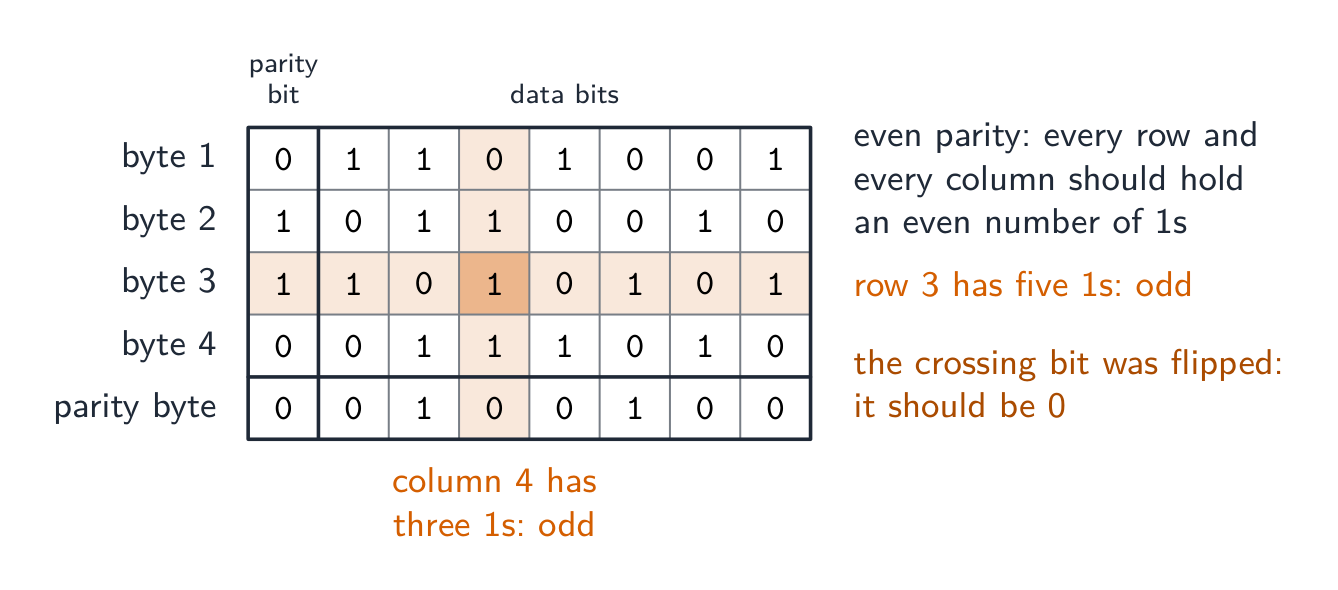
    Explore · ⁨สำรวจ⁩

    Encrypt with a Caesar cipher · ⁨เข้ารหัสด้วยรหัสซีซาร์ (Caesar cipher)⁩

    Change the shift — that is the key. Each letter slides that many places along the alphabet to make the ciphertext, and the same key slides it back. That shared key is symmetric encryption in miniature. · ⁨เปลี่ยนค่าการเลื่อน — นั่นคือคีย์ ตัวอักษรแต่ละตัวเลื่อนจำนวนตำแหน่งตามตัวอักษรเพื่อสร้างข้อความรหัส และใช้คีย์เดียวกันเลื่อนกลับ คีย์ร่วมกันนี้คือFORMATIONแบบสมมาตรในระดับเล็ก⁩

    Vocabulary · ⁨คำศัพท์⁩ Train · ⁨ฝึกฝน⁩
    English ไทย
    security/sɪˈkjʊərɪti/ security
    privacy/ˈprɪvəsi/ ความเป็นส่วนตัว
    integrity/ɪnˈteɡrɪti/ ความถูกต้องสมบูรณ์
    unauthorised/ʌnˈɔːθəraɪzd/ unauthorised
    encryption/enˈkrɪpʃn/ การเข้ารหัส
    backup/ˈbækʌp/ backup
    user accounts/ˈjuːzə əˈkaʊnts/ user accounts
    audit logs/ˈɔːdɪt lɒɡz/ audit logs
    access rights/ˈækses raɪts/ access rights
    anti-spyware/ˈænti ˈspaɪweə/ anti-spyware
    biometrics/ˌbaɪəʊˈmetrɪks/ ชีวภาพ (biometrics)
    plaintext/ˈpleɪntekst/ plaintext
    Symmetric encryption/sɪˈmetrɪk enˈkrɪpʃn/ Symmetric encryption
    asymmetric encryption/ˌeɪsɪˈmetrɪk enˈkrɪpʃn/ asymmetric encryption
    access control/ˈækses kənˈtrəʊl/ การควบคุมการเข้าถึง
    check digit/tʃek ˈdɪdʒɪt/ ตัวเลขตรวจสอบ
    6.2

    Data integrity · ⁨ความถูกต้องสมบูรณ์ของข้อมูล⁩

    Syllabus · ⁨หลักสูตร⁩
    English
    Candidates should be able to: Notes and guidance
    Describe how data validation and data verification help protect the integrity of data
    Describe and use methods of data validation Including range check, format check, length check, presence check, existence check, limit check, check digit
    Describe and use methods of data verification during data entry and data transfer During data entry including visual check, double entry During data transfer including parity check (byte and block), checksum
    ไทย
    ผู้เข้าสอบควรสามารถ: หมายเหตุและคำแนะนำ
    อธิบายว่า การตรวจสอบข้อมูล (data validation) และ การตรวจสอบความถูกต้อง (data verification) ช่วยปกป้อง ความถูกต้องสมบูรณ์ของข้อมูล (integrity) ได้อย่างไร
    อธิบายและใช้วิธีการ การตรวจสอบข้อมูล (data validation) รวมถึง การตรวจสอบช่วง, การตรวจสอบรูปแบบ, การตรวจสอบความยาว, การตรวจสอบการมีอยู่, การตรวจสอบความเป็นจริง, การตรวจสอบค่าสูงสุด/ต่ำสุด, رقประจำตัวตรวจสอบ (check digit)
    อธิบายและใช้วิธีการ การตรวจสอบความถูกต้อง (data verification) ระหว่างการป้อนข้อมูลและการถ่ายโอนข้อมูล ระหว่างการป้อนข้อมูลรวมถึง การตรวจสอบด้วยสายตา, การป้อนข้อมูลซ้ำ ระหว่างการถ่ายโอนข้อมูลรวมถึง การตรวจสอบ parity (byte และ block), ผลรวมตรวจสอบ (checksum)

    Source: Cambridge International syllabus · ⁨แหล่งที่มา: หลักสูตร Cambridge International⁩

    English

    Data has integrity when it is accurate and complete. Two techniques: data validation (catch bad data before storing) and data verification (confirm data was entered or transferred correctly).

    Validation — does the data make sense?

    Validation 验证 checks data against sensible rules, automatically:

    • range check — within limits (a month is 1–12).
    • limit check — on the correct side of a single limit (e.g. age ≥ 18).
    • existence check — the referenced item exists (e.g. a product code is in the table).
    • length check — the right number of characters.
    • type / character check — the right kind of data (a phone field allows only digits).
    • format check — matches a pattern (an email must contain @).
    • presence check — required fields are not empty.
    • check digit 校验位 — an extra digit computed from the others (ISBN, card numbers) that spots transcription errors.

    Worked example. In a simple check-digit scheme the check digit is the remainder when the sum of the digits is divided by $10$, appended to the number. The number $4162$ has digit sum $13$, so it is stored as $41623$. A user types $14623$: the first two digits are swapped, but the sum is still $13$, so the check digit still matches and the error is not caught. A user who types $41523$ is caught, because $4 + 1 + 5 + 2 = 12$ gives check digit $2$. A scheme that catches swapped digits weights each position differently, as the ISBN-13 check does (weights $1, 3, 1, 3, \ldots$, then the digit that makes the total a multiple of $10$). A check digit is validation: it tests the number against a rule at the moment it is entered.

    • lookup check and consistency check (e.g. delivery date ≥ order date).

    Validation catches data that is wrongly formatted, but not data that is the right format yet factually wrong ("Bob" for "Bib").

    Worked example. Identify the validation check each piece of pseudocode performs.

    Pseudocode Check
    IF x < 0 OR x > 10 THEN OUTPUT "Invalid" range check: the value must lie between two limits
    IF x = "" THEN OUTPUT "Invalid" presence check: the field must not be empty
    IF NOT(x = "Red" OR x = "Yellow" OR x = "Blue") THEN OUTPUT "Invalid" lookup (existence) check: the value must be one of a list
    IF LENGTH(x) <> 6 THEN OUTPUT "Invalid" length check: the right number of characters
    IF MID(x, 1, 1) < "A" OR MID(x, 1, 1) > "Z" THEN OUTPUT "Invalid" format check: a particular character must be a letter

    To validate a car registration number that must be one letter, three digits and two letters: a format check tests each position against its pattern, and a length check confirms six characters. To validate a date of birth: a format check (DD/MM/YYYY), a range check (the month is $1$ to $12$, the year is not in the future) and a presence check (it is not left blank). A mark between $0$ and the maximum for the test needs a type check (an integer) and a range check, with the upper limit read from the test's own record: that is how validation protects integrity, by refusing data that could not be correct.

    Verification — was the data entered or transferred correctly?

    Verification 核对 checks the data was not changed in moving from one place to another.

    During entry: double entry (type it twice and compare, as for a new password) or visual check.

    In the scheme's words, double entry is entering the data twice, by the same person or by two people, and having the computer compare the two versions and report any difference; a visual check is the person comparing what is on the screen with the original source document and correcting any difference before saving. Both protect integrity by making sure the stored data matches the source. Even after validation and verification the data can still be wrong: it can be sensible and match the source, yet the source itself was wrong, or the user typed a different but valid value from the one intended.

    During transfer (bits can flip):

    • parity check 奇偶校验 — an extra bit makes the number of 1s even (even parity) or odd. The receiver re-counts. Catches single-bit errors.
    • checksum 校验和 — the sender sends a summary value of the data; the receiver recomputes it and compares.
    • cyclic redundancy check 循环冗余校验 (CRC) — a stronger checksum using polynomial division, catching many more error types.

    A parity block check 奇偶块校验 goes further and locates the error. Arrange the bytes in a grid: give each byte a row parity bit, then compute one extra parity byte whose bits are the column parity of the bytes above. A single flipped bit now fails one row and one column – their intersection pinpoints exactly which bit changed, so it can even be corrected.

    Worked example. Four bytes are sent with even parity, followed by a parity byte. Find the bit that was corrupted.

    Count the 1s in each row and each column. Every row and column should have an even number; byte 3 has five and column 4 has three. The bit where that row and that column cross is the one that changed, so it is reset from 1 to 0. A parity check on its own detects an error in a byte but cannot say which bit; two errors in the same byte cancel and pass unnoticed. A checksum, explained for three marks: the sender puts the block of data through an algorithm that produces a checksum value; the data and the checksum are sent together; the receiver runs the same algorithm on the data it received; if the two checksums match, the data is accepted, and if not, it is rejected and sent again.

    Verification only proves what arrived matches what was sent — not that the data is correct, and not against deliberate tampering. Validation asks "is this sensible?"; verification asks "was this copied correctly?" — use both.

    The table questions sort the methods by when they are used: during data entry, double entry and a visual check; during data transfer, a parity check (byte or block) and a checksum. Transferring video files from a camera to a server uses a checksum: the camera computes it, the server recomputes it, a mismatch means retransmit.

    Worked example. A user types their date of birth as 31/02/2009, and types their email address twice. Which check catches which error, and what is the difference? Validation asks "is this data sensible?" - the computer tests it against a rule, and a format or range check rejects 31/02/2009 because February never has 31 days. Verification asks "was this data entered correctly?" - typing the email twice is double entry, and comparing the two copies catches a typing slip. The limit is what makes this a favourite question: validation can never tell you the data is right, only that it is possible - 01/02/2009 passes every validation rule even if the user was actually born on a different day. Say what each check can and cannot catch.

    ไทย

    ข้อมูลมีความถูกต้องสมบูรณ์เมื่อมีความแม่นยำและครบถ้วน เทคนิคสองอย่าง: การตรวจสอบข้อมูล (จับข้อมูลที่ไม่ถูกต้องก่อนจัดเก็บ) และ การยืนยันข้อมูล (ยืนยันว่าข้อมูลถูกป้อนหรือถ่ายโอนอย่างถูกต้อง)

    การตรวจสอบ — ข้อมูลมีความหมายหรือไม่?

    การตรวจสอบ ตรวจสอบข้อมูลตามกฎเกณฑ์ที่เหมาะสม โดยอัตโนมัติ:

    • การตรวจสอบช่วง — อยู่ในช่วงที่กำหนด (เดือนคือ 1–12)
    • การตรวจสอบขีดจำกัด — อยู่ด้านที่ถูกต้องของขีดจำกัดเดียว (เช่น อายุ ≥ 18)
    • การตรวจสอบการมีอยู่ — รายการที่อ้างอิงมีอยู่จริง (เช่น รหัสสินค้าอยู่ในตาราง)
    • การตรวจสอบความยาว — จำนวนตัวอักษรที่ถูกต้อง
    • การตรวจสอบประเภท / ตัวอักษร — ประเภทข้อมูลที่ถูกต้อง (ฟิลด์โทรศัพท์อนุญาตเฉพาะตัวเลข)
    • การตรวจสอบรูปแบบ — ตรงกับรูปแบบ (อีเมลต้องมี @)
    • การตรวจสอบความมีอยู่ — ฟิลด์ที่ต้องการไม่ว่างเปล่า
    • เลขตรวจสอบ — ตัวเลขเสริมที่คำนวณจากตัวเลขอื่น (ISBN, หมายเลขบัตร) เพื่อตรวจจับข้อผิดพลาดในการคัดลอก

    ตัวอย่างวิธีทำ ในระบบตรวจสอบเลขหมายแบบง่าย เลขหมายตรวจสอบคือผลหารเหลือเมื่อผลรวมของตัวเลขถูกหารด้วย $10$ แล้วนำไปต่อท้ายจำนวน จำนวน $4162$ มีผลรวมตัวเลขเท่ากับ $13$ ดังนั้นจึงจัดเก็บเป็น $41623$ เมื่อผู้ใช้พิมพ์ $14623$: ตัวเลขสองตัวแรกสลับที่กัน แต่ผลรวมยังคงเป็น $13$ ทำให้เลขหมายตรวจสอบยังตรงและข้อผิดพลาดนี้ ไม่ ถูกตรวจจับ ผู้ใช้ที่พิมพ์ $41523$ จะถูกตรวจจับ เพราะ $4 + 1 + 5 + 2 = 12$ ให้เลขหมายตรวจสอบเป็น $2$ ระบบที่ตรวจจับการสลับตำแหน่งตัวเลขจะให้น้ำหนักกับแต่ละตำแหน่งแตกต่างกัน เช่น การตรวจสอบ ISBN-13 ทำโดยใช้น้ำหนัก $1, 3, 1, 3, \ldots$ ตามด้วยตัวเลขที่ทำให้ผลรวมเป็นพหุคูณของ $10$) เลขหมายตรวจสอบเป็นการตรวจสอบความถูกต้อง: เป็นการทดสอบจำนวนตามกฎเกณฑ์ทันทีที่ป้อนข้อมูล

    • การตรวจสอบแบบค้นคว้า (lookup check) และ การตรวจสอบความสอดคล้อง (consistency check) (เช่น วันที่จัดส่ง ≥ วันที่สั่งซื้อ)

    การตรวจสอบความถูกต้องจับข้อมูลที่มีรูปแบบ ผิด ได้ แต่ไม่สามารถจับข้อมูลที่รูปแบบถูกต้องแต่เนื้อหาผิดจริงได้ (เช่น "Bob" แทนที่จะเป็น "Bib")

    ตัวอย่างวิธีทำ ระบุว่าการตรวจสอบความถูกต้องแต่ละชนิดใน伪代码 (pseudocode) ที่ให้มาทำการตรวจสอบอะไร

    Pseudocode Check
    IF x < 0 OR x > 10 THEN OUTPUT "Invalid" การตรวจสอบช่วงค่า (range check): ค่าต้องอยู่ระหว่างขอบเขตสองค่า
    IF x = "" THEN OUTPUT "Invalid" การตรวจสอบการมีอยู่ (presence check): ช่องข้อมูลไม่ควรว่างเปล่า
    IF NOT(x = "Red" OR x = "Yellow" OR x = "Blue") THEN OUTPUT "Invalid" การตรวจสอบแบบค้นคว้า ( existence check): ค่าต้องอยู่ในรายการที่กำหนด
    IF LENGTH(x) <> 6 THEN OUTPUT "Invalid" การตรวจสอบความยาว (length check): ต้องมีจำนวนตัวอักษรที่ถูกต้อง
    IF MID(x, 1, 1) < "A" OR MID(x, 1, 1) > "Z" THEN OUTPUT "Invalid" การตรวจสอบรูปแบบ (format check): ตัวอักษรเฉพาะเจาะจงต้องเป็นตัวอักษร

    ในการตรวจสอบเลขทะเบียนรถที่ต้องประกอบด้วยตัวอักษรหนึ่งตัว ตัวเลขสามตัว และตัวอักษรสองตัว: การตรวจสอบรูปแบบ จะทดสอบแต่ละตำแหน่งตามรูปแบบที่กำหนด และ การตรวจสอบความยาว จะยืนยันว่ามีหกตัวอักษร ในการตรวจสอบวันเกิด: ใช้ การตรวจสอบรูปแบบ (DD/MM/YYYY), การตรวจสอบช่วงค่า (เดือนอยู่ระหว่าง $1$ ถึง $12$, ปีไม่ได้อยู่ในอนาคต) และ การตรวจสอบการมีอยู่ (ไม่ทิ้งไว้ว่างเปล่า) คะแนนระหว่าง $0$ และค่าสูงสุดของการทดสอบจำเป็นต้องใช้ การตรวจสอบประเภท (จำนวนเต็ม) และ การตรวจสอบช่วงค่า, โดยอ่านค่าจำกัดบนจากบันทึกการทดสอบนั้นเอง: นั่นคือวิธีการที่การตรวจสอบความถูกต้องปกป้องความสมบูรณ์ โดยการปฏิเสธข้อมูลที่อาจไม่เป็นไปได้ทางตรรกะ

    การตรวจสอบย้อนกลับ — ข้อมูลถูกป้อนหรือส่งผ่านอย่างถูกต้องหรือไม่?

    การตรวจสอบย้อนกลับ ตรวจสอบว่าข้อมูลไม่มีการเปลี่ยนแปลงระหว่างการย้ายจากแหล่งหนึ่งไปยังอีกแหล่งหนึ่ง

    ระหว่างขั้นตอนการป้อนข้อมูล: การป้อนข้อมูลซ้ำ (double entry) (พิมพ์สองครั้งแล้วเปรียบเทียบ เหมือนกับการตั้งรหัสผ่านใหม่) หรือ การตรวจสอบด้วยสายตา (visual check)

    ตามคำอธิบายของระบบ การป้อนข้อมูลซ้ำ คือการป้อนข้อมูลสองครั้ง โดยบุคคลเดียวกันหรือสองคน และให้คอมพิวเตอร์เปรียบเทียบทั้งสองเวอร์ชันและรายงานความแตกต่างใด ๆ; การตรวจสอบด้วยสายตา คือการที่บุคคลนั้นเปรียบเทียบสิ่งที่ปรากฏบนหน้าจอกับเอกสารต้นฉบับเดิมและแก้ไขความแตกต่างใดๆ ก่อนบันทึก ทั้งสองวิธีช่วยปกป้องความสมบูรณ์โดยการมั่นใจว่าข้อมูลที่จัดเก็บตรงกับต้นฉบับ แม้หลังผ่านการตรวจสอบความถูกต้องและการตรวจสอบย้อนกลับ ข้อมูลก็อาจยังผิดได้: อาจดูสมเหตุสมผลและตรงกับต้นฉบับ แต่ตัวต้นฉบับเองอาจผิดอยู่แล้ว หรือผู้ใช้อาจพิมพ์ค่าอื่นที่ถูกต้องแต่ต่างจากค่าที่ตั้งใจไว้

    ระหว่างการส่งผ่าน (บิตสามารถเปลี่ยนสถานะได้):

    • การตรวจสอบพาริตี้ (parity check) — บิตเพิ่มเติมทำให้จำนวนของ 1 เป็นเลขคู่ (even parity) หรือเลขคี่ The receiver re-counts. จับข้อผิดพลาดแบบบิตเดียวได้
    • checksum — ผู้ส่งส่งค่าสรุปของข้อมูล; ผู้รับคำนวณใหม่และเปรียบเทียบ
    • cyclic redundancy check (CRC) — checksum ที่แข็งแกร่งขึ้นโดยใช้การหารพหุนาม จับข้อผิดพลาดได้หลายประเภทมากขึ้น

    การตรวจสอบพาริตี้บล็อก (parity block check) ไปไกลกว่านั้นและ ระบุตำแหน่ง ของข้อผิดพลาด จัดเรียงไบต์ลงในตาราง: กำหนด bit พาริตี้แถว (row parity bit) ให้กับแต่ละไบต์ จากนั้นคำนวณ ไบต์พาริตี้เพิ่ม (parity byte) หนึ่งไบต์ whose bits are the column parity ของไบต์ด้านบน บิตที่เปลี่ยนไปเพียงบิตเดียวจะทำให้ แถวหนึ่งและคอลัมน์หนึ่ง ล้มเหลว – จุดตัดของทั้งสองจะระบุได้อย่างแม่นยำว่าบิตไหนเปลี่ยนไป จึง甚至可以ถูกแก้ไขได้

    ตัวอย่างวิธีทำ ไบต์สี่ตัวถูกส่งพร้อมพาริตี้คู่ ตามด้วยไบต์พาริตี้ หาบิตที่ถูกทำลาย

    ตารางของไบต์ที่รับมาสี่ตัวและไบต์พาริตี้ใต้พาริตี้คู่ พร้อมบิตพาริตี้ในคอลัมน์แรก; แถวของไบต์ที่สามมี 1 ห้าตัวและคอลัมน์ที่สี่มี 1 สามตัว ซึ่งเป็นเลขคี่ทั้งคู่ และบิตที่จุดตัดถูกทำเครื่องหมายว่าเป็นบิตที่เปลี่ยน
    การตรวจสอบพาริตี้บล็อก: แถวที่ล้มเหลวและคอลัมน์ที่ล้มเหลวตัดกันที่บิตที่เปลี่ยน

    นับจำนวน 1 ในแต่ละแถวและแต่ละคอลัมน์ ทุกแถวและทุกคอลัมน์ควรมีจำนวนเป็นเลขคู่; ไบต์ที่ 3 มีห้าตัวและคอลัมน์ที่ 4 มีสามตัว บิตที่จุดตัดของแถวนั้นและคอลัมน์นั้นคือบิตที่เปลี่ยนไป ดังนั้นจึงรีเซ็ตจาก 1 เป็น 0 การตรวจสอบพาริตี้เพียงอย่างเดียวตรวจจับข้อผิดพลาดในไบต์ได้แต่ไม่สามารถบอกได้ว่าบิตไหน; ข้อผิดพลาดสองจุดในไบต์เดียวกันจะหักล้างกันและผ่านโดยไม่ถูกตรวจจับ checksum, อธิบายสำหรับคะแนนสาม: ผู้ส่งนำบล็อกข้อมูลผ่านอัลกอริทึมที่สร้างค่า checksum; ข้อมูลและค่า checksum ถูกส่งไปพร้อมกัน; ผู้รับรันอัลกอริทึมเดียวกันกับข้อมูลที่รับมา; หากค่า checksum ทั้งสองตรงกัน ข้อมูลจะถูกยอมรับ และหากไม่ตรงกัน จะถูกปฏิเสธและส่งใหม่

    บิตข้อมูลเจ็ดตัวเดิมแสดงสองครั้ง: บิตพาริตี้ 0 ให้ 1 สี่ตัวเพื่อพาริตี้คู่, บิตพาริตี้ 1 ให้ 1 ห้าตัวเพื่อพาริตี้คี่
    บิตพาริตี้ถูกตั้งค่าเพื่อให้จำนวนของ 1 เป็นเลขคู่หรือเลขคี่
    ผู้ส่งคำนวณ checksum และส่งพร้อมกับบล็อกข้อมูล; ผู้รับคำนวณ checksum ใหม่และเปรียบเทียบ รวมถึงตัวอย่างวิธีทำของการคำนวณผลรวมไบต์ mod-256
    การคำนวณ checksum สำหรับบล็อกข้อมูล

    การตรวจสอบย้อนกลับพิสูจน์ได้เพียงว่าสิ่งที่มาถึงตรงกับสิ่งที่ส่ง — ไม่ใช่ว่าข้อมูลถูกต้องหรือไม่ และไม่ป้องกันการดัดแปลงอย่างตั้งใจ การตรวจสอบความถูกต้อง ถามว่า "สิ่งนี้สมเหตุสมผลไหม?"; การตรวจสอบย้อนกลับ ถามว่า "สิ่งนี้คัดลอกถูกต้องหรือไม่?" — ใช้ทั้งสองอย่าง

    ตารางนี้จัดกลุ่มวิธีการตรวจสอบตามช่วงเวลาที่ใช้: ระหว่างการป้อนข้อมูล คือ การป้อนซ้ำและการตรวจสอบด้วยสายตา; ระหว่างการถ่ายโอนข้อมูล คือ การตรวจสอบพาริตี้ (byte หรือ block) และการตรวจสอบผลรวมchecksum. การส่งไฟล์วิดีโอจากกล้องไปยังเซิร์ฟเวอร์ใช้ checksum: กล้องคำนวณค่าไว้ เซิร์ฟเวอร์คำนวณใหม่ หากไม่ตรงกันจะส่งข้อมูลซ้ำ

    ด้านข้าง: การตรวจสอบความถูกต้องถามว่า "ข้อมูลนี้สมเหตุสมผลหรือไม่?" และตรวจสอบกฎเกณฑ์เช่น ช่วงค่า ประเภทและรูปแบบก่อนบันทึก (ดักจับข้อมูลที่ไร้สาระ); การตรวจสอบความถูกต้องถามว่า "คัดลอกมาถูกต้องหรือไม่?" และใช้การป้อนซ้ำ พาริตี้และchecksum (ดักจับข้อผิดพลาดในการคัดลอก)
    การตรวจสอบความถูกต้องตรวจสอบว่าข้อมูลสมเหตุสมผล; การตรวจสอบความถูกต้องตรวจสอบว่าการคัดลอกมาโดยไม่มีการเปลี่ยนแปลง

    ตัวอย่างวิธีทำ. ผู้ใช้พิมพ์วันเกิดเป็น 31/02/2009, และพิมพ์อีเมลสองครั้ง ตรวจสอบใดดักจับข้อผิดพลาดอะไร และความแตกต่างคืออะไร? การตรวจสอบความถูกต้อง ถามว่า "ข้อมูลนี้ สมเหตุสมผล หรือไม่?" - คอมพิวเตอร์ทดสอบกับกฎเกณฑ์ และการตรวจสอบรูปแบบหรือช่วงค่าจะปฏิเสธ 31/02/2009 เพราะเดือนกุมภาพันธ์ไม่มีวันละ 31 วัน การตรวจสอบความถูกต้อง ถามว่า "ข้อมูลนี้ ป้อนถูกต้อง หรือไม่?" - การพิมพ์อีเมลสองครั้งคือ การป้อนซ้ำ, และการเปรียบเทียบสองสำเนาช่วยดักจับการพิมพ์ผิด ขอบเขตนี้คือสิ่งที่ทำให้คำถามนี้เป็นที่นิยม: การตรวจสอบความถูกต้องไม่สามารถบอกได้ว่าข้อมูลนั้น ถูกต้อง ได้ แต่สามารถบอกว่า เป็นไปได้- 01/02/2009 ผ่านทุกกฎการตรวจสอบความถูกต้อง แม้ผู้ใช้เกิดในวันที่ต่างกันจริง ๆ ให้ระบุแต่ละการตรวจสอบว่า สามารถ และ ไม่สามารถ ดักจับสิ่งใดได้

    Explore · ⁨สำรวจ⁩

    Computing concept lab · ⁨ห้องปฏิบัติการแนวคิดการคำนวณ⁩

    Classify concrete examples by the computing idea they demonstrate. · ⁨จัดกลุ่มตัวอย่างที่เป็นรูปธรรมตาม idea การคำนวณที่แสดงออก⁩

    Vocabulary · ⁨คำศัพท์⁩ Train · ⁨ฝึกฝน⁩
    English ไทย
    validation/ˌvælɪˈdeɪʃn/ validation
    verification/ˌverɪfɪˈkeɪʃn/ verification
    parity check/ˈpærɪti tʃek/ parity check
    checksum/ˈtʃeksəm/ ค่าตรวจสอบความถูกต้อง
    cyclic redundancy check/ˈsaɪklɪk rɪˈdʌndənsi tʃek/ การตรวจสอบความซ้ำซ้อนแบบวงรอบ
    parity block check/ˈpærɪti blɒk tʃek/ การตรวจสอบบล็อกพาริตี
    Watch lesson · ⁨ดูบทเรียน⁩
    6.2

    Definitions the examiner accepts · ⁨คำนิยามที่ผู้สอบยอมรับ⁩

    English

    A definition question is marked against fixed wording. Learn these exactly.

    Term Definition
    data security keeping data safe from loss and from unauthorised access, change or deletion
    data privacy keeping data confidential, so that it is seen only by those who have the right to see it
    data integrity the data being accurate, consistent and complete
    malware malicious software that is installed without the user's knowledge to damage a system or steal data
    virus malware that replicates itself, attaches to other files and corrupts or deletes data
    spyware malware that records the user's key presses or actions and sends them to a third party
    phishing an email pretending to be from a legitimate organisation that leads the user to a fake website to collect personal data
    pharming malicious code that redirects the user to a fake website even when the correct address is entered
    firewall hardware or software that examines all traffic entering or leaving a system against set criteria and blocks what does not meet them
    encryption scrambling data with a key into ciphertext, so that it cannot be understood without the key to decrypt it
    digital signature a hash of a message encrypted with the sender's private key, used to prove who sent it and that it was not altered
    data validation an automatic check that entered data is reasonable and follows set rules
    data verification a check that data has been entered or transferred correctly, by comparing it with the source or with a recomputed value
    check digit an extra digit calculated from the other digits of a number and appended to it, so that an error in the number can be detected
    parity check an extra bit added to a byte so that the number of 1s is even (or odd), which the receiver recounts
    checksum a value calculated from a block of data by an algorithm and sent with it, recalculated by the receiver and compared
    ไทย

    คำถามนิยามจะถูกตรวจตามข้อความที่กำหนดตายตัว. เรียนรู้สิ่งเหล่านี้ให้เป๊ะ

    พจน์ นิยาม
    ความปลอดภัยของข้อมูล การรักษาความปลอดภัยของข้อมูลจากการสูญหายและการเข้าถึง เปลี่ยนแปลง หรือลบโดยไม่ได้รับอนุญาต
    ความเป็นส่วนตัวของข้อมูล การรักษาความลับของข้อมูล เพื่อให้มีเพียงผู้ที่ได้รับสิทธิ์เท่านั้นที่มองเห็นได้
    ความสมบูรณ์ของข้อมูล ข้อมูลมีความถูกต้อง สอดคล้องกัน และครบถ้วน
    มัลแวร์ โปรแกรมที่เป็นอันตรายที่ติดตั้งโดยไม่รู้ตัวของผู้ใช้เพื่อทำลายระบบหรือขโมยข้อมูล
    ไวรัส มัลแวร์ที่ทำลายตัวเอง แทรกเข้ากับไฟล์อื่น และทำลายหรือลบข้อมูล
    สปายแวร์ มัลแวร์ที่บันทึกการกดคีย์หรือการกระทำของผู้ใช้และส่งต่อไปยังบุคคลที่สาม
    ฟิชชิ่ง อีเมลปลอมที่อ้างว่าเป็นองค์กรที่ถูกต้องตามกฎหมาย ซึ่งนำผู้ใช้ไปยังเว็บไซต์ปลอมเพื่อเก็บรวบรวมข้อมูลส่วนตัว
    .Pharming โค้ดที่เป็นอันตรายที่ redirect ผู้ใช้ไปยังเว็บไซต์ปลอมแม้ว่าจะกรอกที่อยู่ที่ถูกต้องก็ตาม
    ไฟร์วอลล์ ฮาร์ดแวร์หรือซอฟต์แวร์ที่ตรวจสอบทุกการสื่อสารที่เข้าสู่หรือออกจากระบบตามเกณฑ์ที่กำหนดและบล็อกสิ่งที่ไม่ผ่านเกณฑ์
    การเข้ารหัส การรบกวนข้อมูลด้วยกุญแจให้กลายเป็นข้อความรหัส ทำให้ไม่สามารถอ่านได้หากไม่มีกุญแจสำหรับการถอดรหัส
    ลายเซ็นดิจิทัล Hash ของข้อความที่ถูกเข้ารหัสด้วยกุญแจส่วนตัวของผู้ส่ง ใช้เพื่อยืนยันผู้ส่งและไม่มีการแก้ไข
    การตรวจสอบความถูกต้องของข้อมูล การตรวจสอบอัตโนมัติว่าข้อมูลที่ป้อนเข้ามาสมเหตุสมผลและเป็นไปตามกฎที่กำหนด
    การตรวจสอบความถูกต้องของข้อมูล การตรวจสอบว่าข้อมูลถูกป้อนหรือถ่ายโอนอย่างถูกต้อง โดยเปรียบเทียบกับแหล่งกำเนิดหรือค่าที่คำนวณใหม่
    หลักการตรวจสอบเลข digit เลข digit ที่คำนวณเพิ่มจากเลข digit อื่นๆ ของตัวเลขและต่อท้ายไป เพื่อตรวจจับข้อผิดพลาดในตัวเลข
    การตรวจสอบพาริตี้ บิตเพิ่มเติมเข้าไปใน byte เพื่อให้จำนวนของ 1 เป็นคู่ (หรือคี่) ซึ่งผู้รับจะนับย้อนกลับ
    ผลรวมchecksum ค่าที่คำนวณจากบล็อคข้อมูลด้วยอัลกอริทึมและส่งไปด้วย คำนวณใหม่โดยผู้รับและเปรียบเทียบ
    6.2

    Exam tips · ⁨ข้อแนะนำสำหรับการสอบ⁩

    English
    • Keep the three ideas separate: security (keeping data safe), privacy (who may see it), integrity (keeping it correct).
    • Match each threat (malware, hacking, phishing, interception) to a measure (firewall, encryption, authentication, access rights).
    • Encryption protects confidentiality, not integrity — use a checksum, parity or check digit for integrity.
    • Distinguish a virus, worm and Trojan and how each spreads.

    Common mistakes

    • Giving the same measure for two threats, or a measure that does not fit the threat. Each threat in the table needs a different prevention that actually stops it.
    • Naming a measure without saying how it works. "Firewall" scores when it is followed by "compares traffic with set criteria and blocks what fails".
    • Calling validation a check that the data is correct. Validation checks that data is reasonable; verification checks that it matches the source. Neither proves it is true.
    • Saying a digital signature encrypts the message. It encrypts a hash of the message with the private key; the receiver decrypts it with the public key and compares hashes.
    • Describing a check digit as verification, or a parity check as validation. The check digit is a validation rule on entry; parity and checksums verify a transfer.
    • Writing that a virus "sends data to a third party" and spyware "replicates". The replicating one is the virus; the recording one is spyware.
    ไทย
    • รักษาแนวคิดทั้งสามแยกจากกัน: ความปลอดภัย (การรักษาความปลอดภัยของข้อมูล), ความเป็นส่วนตัว (ใครสามารถมองเห็นได้), ความสมบูรณ์ (การรักษาความถูกต้อง) .
    • จับคู่แต่ละ ภัยคุกคาม (มัลแวร์, แฮกเกอร์, ฟิชชิ่ง, การดักจับ) กับ มาตรการ (ไฟร์วอลล์, การเข้ารหัส, การยืนยันตัวตน, สิทธิ์การเข้าถึง) .
    • การเข้ารหัสปกป้อง ความลับ ไม่ใช่ความสมบูรณ์ - ใช้ checksum, พาริตี้ หรือหลักตรวจสอบเลข digit สำหรับความสมบูรณ์ .
    • แยกแยะ ไวรัส, วอร์ม และTrojan และวิธีแพร่กระจายของแต่ละชนิด .

    ข้อผิดพลาดที่พบบ่อย

    • การให้มาตรการเดียวกันสำหรับภัยคุกคามสองชนิด หรือมาตรการที่ไม่ตรงกับภัยคุกคาม ภัยคุกคามแต่ละชนิดในตารางต้องการการป้องกันที่แตกต่างกันซึ่งสามารถหยุดมันได้อย่างแท้จริง .
    • การตั้งชื่อมาตรการโดยไม่อธิบายการทำงาน "Firewall" จะได้รับคะแนนเมื่อตามด้วย "ตรวจสอบการสื่อสารกับเกณฑ์ที่กำหนดและบล็อกสิ่งที่ล้มเหลว" .
    • การเรียกการตรวจสอบความถูกต้องเป็นการตรวจสอบว่าข้อมูลถูกต้อง การตรวจสอบความถูกต้องตรวจสอบว่าข้อมูลสมเหตุสมผล; การตรวจสอบความถูกต้องตรวจสอบว่าตรงกับแหล่งกำเนิด Neitherพิสูจน์ความจริง .
    • การบอกว่าลายเซ็นดิจิทัลเข้ารหัสข้อความ มันเข้ารหัส hash ของข้อความด้วยกุญแจส่วนตัว; ผู้รับจะถอดรหัสด้วยกุญแจสาธารณะและเปรียบเทียบ hash .
    • การอธิบายหลักการตรวจสอบเลขdigitว่าเป็นการตรวจสอบความถูกต้อง, หรือการตรวจสอบพาริตี้เป็นการตรวจสอบความถูกต้อง หลักการตรวจสอบเลขdigitคือกฎการตรวจสอบความถูกต้องในการป้อน; พาริตี้และchecksumตรวจสอบการถ่ายโอน .
    • การเขียนว่าไวรัส "ส่งข้อมูลไปยังบุคคลที่สาม" และสไปว์แวร์ "ทำลายตัวเอง" สิ่งที่ทำลายตัวเองคือไวรัส; สิ่งที่บันทึกคือสไปว์แวร์ .
  • 7

    Ethics and Ownership · ⁨จริยธรรมและการเป็นเจ้าของ⁩

    Watch lesson · ⁨ดูบทเรียน⁩
    7.1

    Ethics for computing professionals · ⁨จริยธรรมสำหรับผู้เชี่ยวชาญด้านคอมพิวเตอร์⁩

    Syllabus · ⁨หลักสูตร⁩
    English
    Candidates should be able to: Notes and guidance
    Show understanding of the need for and purpose of ethics as a computing professional Understand the importance of joining a professional ethical body including BCS (British Computer Society), IEEE (Institute of Electrical and Electronic Engineers)
    Show understanding of the need to act ethically and the impact of acting ethically or unethically for a given situation
    Show understanding of the need for copyright legislation
    Show understanding of the different types of software licencing and justify the use of a licence for a given situation Licences to include free Software Foundation, the Open Source Initiative, shareware and commercial software
    Show understanding of Artificial Intelligence (AI) Understand the impact of AI including social, economic and environmental issues
    Understand the applications of AI
    ไทย
    ผู้เข้าสอบควรสามารถ: หมายเหตุและคำแนะนำ
    แสดงความเข้าใจในความต้องการและวัตถุประสงค์ของ จริยธรรม ในฐานะมืออาชีพด้านคอมพิวเตอร์ เข้าใจถึงความสำคัญของการเข้าร่วมองค์กรวิชาชีพด้านจริยธรรม รวมถึง BCS (British Computer Society), IEEE (Institute of Electrical and Electronic Engineers)
    แสดงความเข้าใจในความต้องการที่จะปฏิบัติอย่างมีจริยธรรม และผลกระทบจากการปฏิบัติอย่างมีจริยธรรมหรือไม่ มีจริยธรรมในสถานการณ์ที่กำหนด
    แสดงความเข้าใจในความต้องการของกฎหมายว่าด้วย ลิขสิทธิ์
    แสดงความเข้าใจประเภทต่างๆ ของ การอนุญาตใช้ซอฟต์แวร์ (software licencing) และให้เหตุผลในการใช้ใบอนุญาตสำหรับสถานการณ์ที่กำหนด การอนุญาตรวมถึง Free Software Foundation, Open Source Initiative, shareware และ commercial software
    แสดงความเข้าใจเรื่อง ปัญญาประดิษฐ์ (Artificial Intelligence - AI) เข้าใจถึงผลกระทบของ AI รวมถึงประเด็นทางสังคม เศรษฐกิจ และสิ่งแวดล้อม
    เข้าใจถึงการประยุกต์ใช้ AI

    Source: Cambridge International syllabus · ⁨แหล่งที่มา: หลักสูตร Cambridge International⁩

    English

    A computing professional is someone whose work — software, systems, networks, data — affects other people. Because the work is technical, others often cannot judge whether it was done well or honestly. So the profession follows shared ethics 伦理 (principles for good behaviour).

    Why ethics matters

    • trust — users and employers trust professionals to act in their interest. Without that trust, software loses credibility.
    • impact — software runs medical devices, banking, vehicles. Careless or dishonest work can hurt people.

    Professional bodies (BCS, ACM, IEEE) publish codes of ethics for members.

    Typical principles

    • public interest first — protect the safety and welfare of those affected.
    • honesty and competence — be honest about your skills; don't claim expertise you lack.
    • confidentiality 保密性 — protect clients' and employers' private information.
    • avoid conflicts of interest 利益冲突 — don't take work where your interest clashes with the client's.
    • keep your skills current; respect intellectual property 知识产权 and privacy 隐私; treat colleagues fairly.

    Joining a professional body

    The syllabus names two: the BCS (British Computer Society) and the IEEE (Institute of Electrical and Electronics Engineers). Both publish a code of conduct 行为准则 that members agree to follow. The benefits of joining, in the scheme's words: a set of ethical guidelines to follow, so decisions are not left to personal judgement; training, conferences and publications that keep the member up to date; advice and support, including legal help, when a problem arises; and recognised professional status, so employers and clients trust the member's work. The consequences of not joining: no guidance on ethical decisions, so the programmer may act unethically without realising; less credibility with employers and customers, so it is harder to win work; no support in a dispute; and being out of date with developments and law. The purpose of a code of conduct (two marks): to create a safe, respectful and professional working environment, and to make sure every employee understands what is expected and the consequences of their actions.

    Worked example. Explain why a programmer needs to act ethically towards colleagues and towards the public.

    Colleagues: treat them fairly and without discrimination; respect their work, their ideas and their confidential information; be honest about mistakes and give credit where it is due; support their development rather than undermine it. The public: protect their personal data and privacy; produce software that is safe, reliable and properly tested, because faults can cause harm; be honest about what the software can do; take on only work within your competence; obey the law and consider the wider effects on society and the environment. Each side earns marks for a reason and its consequence, not for the word "fair" alone.

    Acting ethically vs unethically

    Acting ethically protects users, strengthens reputation, reduces legal risk, and builds trust. Acting unethically (skipping testing, hiding bugs, misusing data) can harm real users, lead to dismissal or legal action, damage reputation, and erode trust in technology generally.

    When you face a borderline decision: identify whose interests are affected, check the code of ethics and the law, weigh the consequences, ask a trusted senior, and choose the option that protects users above short-term convenience.

    Worked example. Your team's new AI hiring tool sorts CVs ten times faster, but you notice it rejects more older applicants. Shipping it pleases your manager, but it treats one group unfairly. The ethical choice is to hold it back until the bias is fixed — public interest and fairness come before short-term convenience.

    Ethics also applies to users. A student who connects a personal computer to the school network should respect other people's privacy and data, not use social media inappropriately or bully others, not download or share copyrighted material, not introduce malware or try to access systems they are not allowed to, and use the network for the purpose it was provided. A "give three ethical considerations" answer lists three of these.

    ไทย

    ผู้เชี่ยวชาญด้าน คอมพิวเตอร์ คือบุคคล whose work — ซอฟต์แวร์, ระบบ, เครือข่าย, ข้อมูล — ส่งผลต่อผู้อื่น เนื่องจากงานเป็นด้านเทคนิค ผู้อื่นมักไม่สามารถตัดสินได้ว่าทำงานได้ดีหรือซื่อสัตย์หรือไม่ ดังนั้นวิชาชีพจึงปฏิบัติตาม จริยธรรม ร่วมกัน (หลักการสำหรับพฤติกรรมที่ดี) .

    ทำไมจริยธรรมถึงสำคัญ

    • ความเชื่อมั่น — ผู้ใช้และนายจ้างไว้วางใจผู้เชี่ยวชาญในการกระทำเพื่อประโยชน์ของพวกเขา หากขาดความเชื่อมั่น tersebut ซอฟต์แวร์จะสูญเสียความน่าเชื่อถือ .
    • ผลกระทบ — ซอฟต์แวร์运行的อุปกรณ์ทางการแพทย์, การธนาคาร, ยานพาหนะ งานที่ประมาทหรือไม่ซื่อสัตย์สามารถทำให้ผู้คนบาดเจ็บได้ .

    องค์กรวิชาชีพ (BCS, ACM, IEEE) เผยแพร่ кодекส์จริยธรรมสำหรับสมาชิก .

    ผนังจอ CCTV ในห้องควบคุม
    CCTV ก่อให้เกิดข้อกังวลเรื่องความเป็นส่วนตัว - ซึ่งเป็นหนึ่งในประเด็นทางจริยธรรมที่ผู้เชี่ยวชาญด้านคอมพิวเตอร์ต้องพิจารณา
    กองอุปกรณ์อิเล็กทรอนิกส์ทิ้งแล้ว
    อุปกรณ์อิเล็กทรอนิกส์ที่ทิ้งแล้ว (ขยะอิเล็กทรอนิกส์) เป็นต้นทุนทางสิ่งแวดล้อมที่เพิ่มขึ้นจากการใช้คอมพิวเตอร์
    แผนภาพ Hub ที่มีความเป็นอยู่ที่ดีของประชาชนอยู่ที่ศูนย์กลาง เชื่อมต่อกับข้อกังวลด้านสุขภาพและความปลอดภัย ความสนใจของสาธารณะ ผลประโยชน์ต่อสาธารณะ และความกังวลของประชาชน
    การพัฒนาซอฟต์แวร์ส่งผลกระทบต่อความเป็นอยู่ที่ดีของประชาชนในหลายรูปแบบ

    หลักการทั่วไป

    • ความสนใจของสาธารณะมาก่อน — ปกป้องความปลอดภัยและสวัสดิภาพของผู้ที่ได้รับผลกระทบ
    • ความซื่อสัตย์และความเชี่ยวชาญ — ซื่อสัตย์เกี่ยวกับทักษะของคุณ; อย่าอ้างว่ามีความรู้เฉพาะทางที่คุณไม่มี
    • ความลับ — ปกป้องข้อมูลส่วนตัวของลูกค้าและผู้จ้างงาน
    • หลีกเลี่ยง ความขัดแย้งของผลประโยชน์ — อย่ารับงานที่ผลประโยชน์ของคุณขัดแย้งกับลูกค้า
    • รักษาทักษะให้ทันสมัย; เคารพ ทรัพย์สินทางปัญญา และ ความเป็นส่วนตัว; ปฏิบัติต่อเพื่อนร่วมงานอย่างยุติธรรม

    การเข้าเป็นสมาชิกองค์กรวิชาชีพ

    หลักสูตรระบุไว้สองแห่งคือ BCS (British Computer Society) และ IEEE (Institute of Electrical and Electronics Engineers) ทั้งสองเผยแพร่ จริยธรรมวิชาชีพ ที่สมาชิกตกลงปฏิบัติตาม ประโยชน์ของการเข้าร่วม ในคำอธิบายของแบบทดสอบ:ชุดแนวปฏิบัติทางจริยธรรมเพื่อปฏิบัติตาม เพื่อให้การตัดสินใจไม่ขึ้นอยู่กับวิจารณญาณส่วนบุคคล; การฝึกอบรม งานสัมมนา และเอกสารพิมพ์เพื่อให้สมาชิกอัปเดตความรู้; คำแนะนำและการสนับสนุน รวมถึงความช่วยเหลือทางกฎหมายเมื่อเกิดปัญหา; และสถานะวิชาชีพที่ได้รับการยอมรับ เพื่อให้ผู้จ้างและลูกค้าไว้วางใจในผลงานของสมาชิก ผลกระทบของการ ไม่ เข้าร่วม: ไม่มีแนวทางในการตัดสินใจทางจริยธรรม นักพัฒนาอาจกระทำโดยไม่เป็นจริยธรรมโดยไม่รู้ตัว; มีความน่าเชื่อถือน้อยลงกับผู้จ้างและลูกค้า ทำให้ยากที่จะได้รับงาน; ไม่มีการสนับสนุนเมื่อเกิดข้อพิพาท; และไม่ทันต่อการเปลี่ยนแปลงและกฎหมายใหม่ ๆ วัตถุประสงค์ของจริยธรรมวิชาชีพ (2 คะแนน): เพื่อสร้างสภาพแวดล้อมการทำงานที่ปลอดภัย เคารพกัน และเป็นมืออาชีพ性以及เพื่อให้มั่นใจว่าพนักงานทุกคนเข้าใจสิ่งที่คาดหวังและผลของการกระทำของตน

    ตัวอย่างวิธีทำ. อธิบายว่าทำไมนักพัฒนาซอฟต์แวร์จึงจำเป็นต้องประพฤติตนอย่างมีจริยธรรมต่อเพื่อนร่วมงานและต่อสาธารณชน

    เพื่อนร่วมงาน: ปฏิบัติต่อเขาอย่างยุติธรรมและไม่เลือกปฏิบัติ; เคารพผลงาน ความคิด และข้อมูลส่วนตัวของเขา; สincerity เมื่อทำผิดพลาดและยกย่องใคร deserved; สนับสนุนการพัฒนาของเขาแทนที่จะทำลายมัน สาธารณชน: ปกป้องข้อมูลส่วนบุคคลและความเป็นส่วนตัวของเขา; สร้างซอฟต์แวร์ที่ปลอดภัย เชื่อถือได้ และผ่านการทดสอบอย่างดี เพราะข้อผิดพลาดอาจก่อให้เกิดอันตราย; ซื่อสัตย์เกี่ยวกับความสามารถของซอฟต์แวร์; รับเฉพาะงานที่อยู่ในขอบเขตความสามารถของคุณ; ปฏิบัติตามกฎหมายและพิจารณาผลกระทบที่กว้างขึ้นต่อสังคมและสิ่งแวดล้อม แต่ละฝ่ายได้คะแนนจากเหตุผลและผลตามมา ไม่ใช่แค่คำว่า "ยุติธรรม" เพียงอย่างเดียว

    การปฏิบัติอย่างมีจริยธรรม vs ไม่มีจริยธรรม

    การปฏิบัติอย่าง มีจริยธรรม ช่วยปกป้องผู้ใช้ เสริมสร้างความน่าเชื่อถือ ลดความเสี่ยงทางกฎหมาย และสร้างความไว้วางใจ การปฏิบัติอย่าง ไม่มีจริยธรรม (เช่น ทิ้งขั้นตอนการทดสอบซ่อนช่องโหว่ ใช้ข้อมูลผิดวิธี) อาจทำให้ผู้ใช้จริงเสียหาย นำไปสู่การถูกไล่ออกหรือถูกฟ้องร้อง ทำลายชื่อเสียง และบั่นทอนความเชื่อมั่นในเทคโนโลยีโดยรวม

    เมื่อคุณเผชิญกับการตัดสินใจที่_countries: ระบุว่ามีใครได้รับผลกระทบ ตรวจสอบจริยธรรมและกฎหมาย คำนวณถึงผลที่ตามมา Ask ผู้ที่มีอำนาจเหนือกว่าที่ไว้ใจได้ และเลือกทางเลือกที่ปกป้องผู้ใช้เหนือความสะดวกสบายระยะสั้น

    ตัวอย่างวิธีทำ. ทีมของคุณมีเครื่องมือ AI สำหรับสรรหาพนักงานใหม่ที่คัดกรองใบสมัครได้เร็วขึ้นสิบเท่า แต่คุณสังเกตเห็นว่ามันปฏิเสธผู้สมัครวัยมากมากขึ้น การส่งมอบมันทำให้ผู้จัดการพอใจ แต่มันปฏิบัติต่อกลุ่มหนึ่งอย่างไม่ยุติธรรม ทางเลือกที่มีจริยธรรมคือ หยุดไว้ก่อนจนกว่าความลำเอียงจะถูกแก้ไข — ความสนใจของสาธารณะและความยุติธรรมมาก่อนความสะดวกสบายระยะสั้น

    จริยธรรมยังใช้กับผู้ใช้ด้วย นักเรียนที่เชื่อมต่อคอมพิวเตอร์ส่วนตัวเข้ากับเครือข่ายโรงเรียนควรเคารพความเป็นส่วนตัวและข้อมูลของผู้อื่น ไม่ใช้โซเชียลมีเดียอย่างเหมาะสมหรือไม่กลั่นแหย่ผู้อื่น ไม่ดาวน์โหลดหรือแชร์งานที่มีลิขสิทธิ์ ไม่ใส่ไวรัสหรือพยายามเข้าถึงระบบที่ไม่ได้รับอนุญาต และใช้เครือข่ายตามวัตถุประสงค์ที่กำหนดไว้ คำตอบ "ให้สามข้อพิจารณาทางจริยธรรม" จะระบุสามข้อเหล่านี้

    Explore · ⁨สำรวจ⁩

    Risk and responsibility lab · ⁨ห้องปฏิบัติการความเสี่ยงและความรับผิดชอบ⁩

    Sort examples by the rule, risk or protection involved. · ⁨จัดลำดับตัวอย่างตามกฎ ความเสี่ยง หรือการป้องกันที่เกี่ยวข้อง⁩

    7.1

    Copyright · ⁨ลิขสิทธิ์⁩

    English

    Copyright 版权 is the legal right of the creator of an original work to control how it is copied, distributed, modified and performed. It applies automatically (no registration) to source code, software, documents, images, audio and video.

    Without copyright, anyone could copy software freely, the developer would not be paid, and plagiarism would be legal. With copyright, developers can earn from their work (encouraging more software), users know who made it, and re-use happens on the developer's terms through licensing. Copyright lasts a long time (often 70 years after the creator's death). General ideas and algorithms are not covered by copyright but may be covered by a patent 专利.

    Why a programmer should copyright a program, in the scheme's words: to be identified as the owner and author (formal recognition of ownership); so that there are legal consequences if anyone copies or steals it; to restrict competitors from selling the same work; and to be able to earn money by licensing it. Copyright applies to the program as written; a different program that does the same job does not infringe it.

    ไทย

    ลิขสิทธิ์ คือสิทธิทางกฎหมายของผู้สร้างสรรค์งานต้นฉบับในการควบคุมวิธีการ คัดลอก กระจาย แก้ไข และแสดง มันใช้ได้ทันที (ไม่ต้องจดทะเบียน) กับโค้ดต้นฉบับ ซอฟต์แวร์ เอกสาร รูปภาพ เสียง และวิดีโอ

    หากไม่มีลิขสิทธิ์ ใครก็คัดลอกซอฟต์แวร์ได้อิสระ ผู้พัฒนาจะไม่ได้รับเงิน และการละเมิดลิขสิทธิ์จะเป็นเรื่องถูกกฎหมาย ด้วยลิขสิทธิ์ ผู้พัฒนาสามารถสร้างรายได้จากผลงาน (ส่งเสริมการสร้างซอฟต์แวร์มากขึ้น) ผู้ใช้รู้ว่าใครเป็นผู้สร้าง และการนำกลับมาใช้ใหม่เกิดขึ้นภายใต้เงื่อนไขของผู้พัฒนาผ่านใบอนุญาต ลิขสิทธิ์มีอายุยาวนาน (มัก 70 ปีหลังวันเสียชีวิตของผู้สร้างสรรค์) ไอเดียและอัลกอริทึมทั่วไปไม่ครอบคลุมด้วยลิขสิทธิ์แต่อาจครอบคลุมด้วย สิทธิบัตร

    ทำไมนักพัฒนาควรจดลิขสิทธิ์โปรแกรม ตามคำอธิบายของแบบทดสอบ: เพื่อระบุตัวตนเป็นเจ้าของและผู้สร้าง (การรับรองความเป็นเจ้าของอย่างเป็นทางการ); เพื่อให้มีผลทางกฎหมายหากมีคนคัดลอกหรือขโมยมัน; เพื่อจำกัดคู่แข่งไม่ให้ขายงานเดียวกัน; และ为了能สร้างรายได้โดยการออกใบอนุญาตลิขสิทธิ์ ใช้ได้กับโปรแกรมตามที่เขียนไว้; โปรแกรมอื่นที่ทำหน้าที่เดียวกันแต่ต่างกันไม่ละเมิดลิขสิทธิ์

    ลิขสิทธิ์ใช้ได้ทันทีโดยไม่ต้องจดทะเบียนและมีอายุประมาณ 70 ปีหลังวันเสียชีวิตของผู้สร้างสรรค์ ครอบคลุมโค้ด รูปภาพ และเอกสาร; สิทธิบัตรต้องยื่นขอและมีอายุประมาณ 20 ปี ครอบคลุมนวัตกรรมและอัลกอริทึม *ลิขสิทธิ์ใช้ได้ทันทีและมีอายุยาวนาน; สิทธิบัตรต้องยื่นขอและมีอายุประมาณ 20 ปี

    Explore · ⁨สำรวจ⁩

    Risk and responsibility lab · ⁨ห้องปฏิบัติการความเสี่ยงและความรับผิดชอบ⁩

    Sort examples by the rule, risk or protection involved. · ⁨จัดลำดับตัวอย่างตามกฎ ความเสี่ยง หรือการป้องกันที่เกี่ยวข้อง⁩

    Vocabulary · ⁨คำศัพท์⁩ Train · ⁨ฝึกฝน⁩
    English ไทย
    copyright/ˈkɒpɪraɪt/ ลิขสิทธิ์
    patent/ˈpeɪtənt/ สิทธิบัตร
    software licence/ˈsɒftweə ˈlaɪsəns/ ใบอนุญาตซอฟต์แวร์
    7.1

    Software licences · ⁨ใบอนุญาตซอฟต์แวร์⁩

    English

    A software licence 软件许可证 is a contract granting permission to use software on the owner's terms; choosing and applying one is called software licencing.

    Commercial (proprietary)

    • commercial software is sold: you buy a licence; the software is used only within its terms.
    • the source code is not given (a proprietary 专有 product); you cannot modify or redistribute it.
    • examples: Microsoft Office, Adobe Photoshop, most games.

    Used when the developer wants revenue per user and to keep control of the code.

    Open-source

    • the source code is public; users can read, modify and redistribute it (open-source 开源).
    • permissive licences (MIT, BSD) allow almost any use; copyleft 著佐权 licences (GPL) require that modified versions are released under the same licence ("share-alike").
    • the Free Software Foundation (FSF) and the Open Source Initiative (OSI) promote and approve open-source licences.

    The syllabus names both, and they are marked as distinct answers. Free Software (the FSF's term) means free as in freedom, not price: the user may run the program for any purpose, study and change it (so the source code must be available), redistribute copies, and distribute modified versions; a fee may still be charged for a copy. Open Source (the OSI's definition) requires that the source code is available, that the program may be modified and redistributed, and that the licence does not discriminate against any person or field of use. "Identify two licence types that let other people edit and redistribute the program" is answered with these two.

    • examples: Linux, Python, Apache.

    Used when the developer wants the software widely used and improved by the community.

    Freeware and shareware

    • freeware 免费软件 — free of charge, no source code, may be redistributed but not modified (Acrobat Reader, WhatsApp).
    • shareware 共享软件 — free for a trial period, then you pay to keep using it; no source code.

    The scheme's descriptions: shareware is distributed free for a trial (a limited time or limited features) and the user pays to continue using the full version; commercial software is sold for a fee, the source code is not supplied, the licence protects the developer's intellectual property, and the fee usually buys support and updates. Benefits of shareware to the programmer: users can try the program before buying, so they are more likely to purchase; it spreads widely at almost no advertising cost; and those who keep it pay. Benefits of a commercial licence: the developer earns a fee for every copy; the code and its rights stay protected; and the income funds support, updates and further development.

    Type Cost Source Redistribute Modify
    Commercial Paid No No No
    Open-source Free Yes Yes Often, with conditions
    Freeware Free No Yes No
    Shareware Free trial, then paid No Sometimes No

    To justify a licence choice, link it to the developer's goal (revenue, reach, community), the user's needs (cost, customising), and the use case.

    Worked example. A programmer has written a game to sell to the public. Identify the most appropriate licence and justify it.

    A commercial licence: the game is sold for a fee, so the programmer earns money from every copy; the source code is not released, so nobody can copy the game or change it and sell it as their own; the licence protects the intellectual property; and buyers receive updates and support. Open source would not fit, because the source code would be available, so the game could be copied, changed and redistributed without payment.

    Worked example. A program helps shoppers by reading product labels aloud. Explain why an open source licence might not be appropriate.

    The source code would be accessible, so it could be changed; a changed version might output the wrong product information, so shoppers could buy the wrong item; and the programmer would lose control over the quality and safety of what is distributed under the program's name. Going the other way, programs are released as open source so that other developers can improve and extend them, so that they are adopted widely at no cost, and so that users can adapt them to their own needs.

    ไทย

    ใบอนุญาตซอฟต์แวร์ คือสัญญาที่_entropy Permission ให้ใช้ซอฟต์แวร์ตามเงื่อนไขของผู้เจ้าของ; การเลือกและนำไปใช้เรียกว่า การออกใบอนุญาตซอฟต์แวร์

    แบบเชิงพาณิชย์ (Proprietary)

    • ซอฟต์แวร์เชิงพาณิชย์ ถูกขาย: คุณ ซื้อใบอนุญาต; ใช้ซอฟต์แวร์ได้เฉพาะตามเงื่อนไขเท่านั้น
    • โค้ดต้นฉบับไม่ได้ถูกเปิดเผย (เป็นผลิตภัณฑ์ เชิงพาณิชย์; ผู้ใช้ไม่สามารถแก้ไขหรือจัดจำหน่ายต่อได้)
    • ตัวอย่าง: Microsoft Office, Adobe Photoshop, เกมส่วนใหญ่

    ใช้เมื่อผู้พัฒนาต้องการ รายได้ ต่อผู้ใช้และต้องการ ควบคุม โค้ดต้นฉบับ

    ซอฟต์แวร์เปิดซอร์ส (Open-source)

    • โค้ดต้นฉบับมี สาธารณะ; ผู้ใช้สามารถอ่าน แก้ไข และจัดจำหน่ายต่อได้ (ซอฟต์แวร์เปิดซอร์ส)
    • ใบอนุญาตแบบอนุญาตให้ทำwhatever (MIT, BSD) อนุญาตให้ใช้งานได้เกือบทุกแบบ; ใบอนุญาตแบบcopyleft (GPL) กำหนดให้เวอร์ชันที่แก้ไขแล้วต้องReleasedภายใต้ใบอนุญาตเดียวกัน (
    • Free Software Foundation (FSF) และ Open Source Initiative (OSI) ส่งเสริมและรับรองใบอนุญาต open-source

    หลักสูตรตั้งชื่อทั้งสองไว้ และให้คะแนนแยกกัน Free Software (คำศัพท์ของ FSF) หมายถึงฟรีในความหมายแห่งอิสรภาพ ไม่ใช่ราคา: ผู้ใช้สามารถรันโปรแกรมเพื่อวัตถุประสงค์ใดก็ได้ ศึกษาและแก้ไข (ดังนั้นซอร์สโค้ดต้องพร้อมใช้งาน) นำสำเนาไปแจกจ่าย และแจกจ่ายเวอร์ชันที่แก้ไขแล้ว; อาจเรียกค่าใช้จ่ายสำหรับสำเนาได้ Open Source (นิยามของ OSI) กำหนดให้ซอร์สโค้ดพร้อมใช้งาน โปรแกรมสามารถแก้ไขและแจกจ่ายได้ และใบอนุญาตไม่เลือกปฏิบัติต่อบุคคลหรือพื้นที่การใช้งานใดใด

    • ตัวอย่าง: Linux, Python, Apache

    ใช้เมื่อนักพัฒนาต้องการให้ซอฟต์แวร์ ,,

    Freeware และ shareware

    • freeware — ฟรีไม่มีค่าใช้จ่าย ไม่มีซอร์สโค้ด อาจแจกจ่ายได้แต่แก้ไขไม่ได้ (Acrobat Reader, WhatsApp)
    • shareware — ฟรีสำหรับช่วงเวลาทดลอง แล้วคุณต้องชำระเงินเพื่อUsage ต่อ; ไม่มีซอร์สโค้ด

    คำอธิบายของแบบแผน: software แบบแชร์แวร์ จะถูกแจกจ่ายให้ใช้ฟรีเพื่อทดสอบ (เป็นระยะเวลาจำกัดหรือมีฟีเจอร์จำกัด) และผู้ใช้จะชำระเงินเพื่อUsageเวอร์ชันเต็ม; ซอฟต์แวร์เชิงพาณิชย์ ถูกขายด้วยราคา มีโค้ดต้นฉบับไม่ถูกจัดจำหน่าย ใบอนุญาตปกป้องทรัพย์สินทางปัญญาของผู้พัฒนา และค่าซื้อมักครอบคลุมการสนับสนุนและอัปเดต ประโยชน์ของแชร์แวร์ต่อผู้พัฒนา: ผู้ใช้สามารถลองใช้โปรแกรมก่อนซื้อ จึงมีโอกาสซื้อได้มากกว่า; แพร่หลายไปอย่างกว้างขวางโดยแทบไม่มีค่าใช้จ่ายในการโฆษณา; และผู้ที่ใช้งานต่อไปจะชำระเงิน ประโยชน์ของใบอนุญาตเชิงพาณิชย์: ผู้พัฒนาได้รับค่าธรรมเนียมสำหรับทุกสำเนา; โค้ดและสิทธิ์ถูกปกป้อง; และรายได้用於สนับสนุน การอัปเดต และการพัฒนาเพิ่มเติม

    ประเภท ค่าใช้จ่าย โค้ดต้นฉบับ แจกจ่ายใหม่ แก้ไข
    เชิงพาณิชย์ ชำระเงิน ไม่มี ไม่ได้ ไม่ได้
    โค้ดเปิด ฟรี ได้ ได้ มักจะได้ ภายใต้เงื่อนไข
    ฟรีแวร์ ฟรี ไม่มี ได้ ไม่ได้
    แชร์แวร์ ทดสอบฟรี แล้วชำระ ไม่ได้ บางครั้ง ไม่ได้
    ต้นไม้ตัดสินใจสำหรับการเลือกใบอนุญาต: หากคุณต้องการขายหรือควบคุม ให้เลือกเชิงพาณิชย์; มิฉะนั้นหากคุณแบ่งปันโค้ดต้นฉบับ ให้เลือกโค้ดเปิด; มิฉะนั้นหากฟรีตลอดกาล ให้เลือกฟรีแวร์, อื่นๆ ให้เลือกแชร์แวร์ (ทดลองฟรีแล้วชำระ)
    การเลือกใบอนุญาตจากเป้าหมายของผู้พัฒนา

    เพื่อให้การเลือกใบอนุญาตสมเหตุสมผล ให้เชื่อมโยง它与เป้าหมายของผู้พัฒนา (รายได้, ความแพร่หลาย, ชุมชน), ความต้องการของผู้ใช้ (ค่าใช้จ่าย, การปรับแต่ง), และกรณีการใช้งาน

    ตัวอย่างที่คำนวณแล้ว. นักเขียนโปรแกรมสร้างเกมเพื่อขายแก่สาธารณชน ระบุใบอนุญาตที่เหมาะสมที่สุดและให้เหตุผล

    ใบอนุญาตเชิงพาณิชย์: เกมถูกขายด้วยราคา ดังนั้นนักเขียนโปรแกรมจึงได้รับเงินจากทุกสำเนา; โค้ดต้นฉบับไม่ถูกเปิดเผย ดังนั้นไม่มีใครสามารถคัดลอกเกมหรือแก้ไขและขายเป็นของตนเองได้; ใบอนุญาตปกป้องทรัพย์สินทางปัญญา; และผู้ซื้อมีการอัปเดตและการสนับสนุน โค้ดเปิดจะไม่เหมาะสม เพราะโค้ดต้นฉบับจะถูกเปิดเผย sehingga เกมสามารถถูกคัดลอก แก้ไข และแจกจ่ายใหม่โดยไม่เสียเงิน

    ตัวอย่างที่คำนวณแล้ว. โปรแกรมช่วยผู้ซื้อสินค้าโดยการอ่านฉลากสินค้าออกมาเป็นเสียง อธิบายว่าทำไมใบอนุญาตแบบcode open source อาจไม่เหมาะสม

    โค้ดต้นฉบับจะถูกเข้าถึงได้ sehingga สามารถแก้ไขได้; เวอร์ชันที่ถูกแก้ไขอาจแสดงข้อมูลผลิตภัณฑ์ที่ผิดพลาด sehingga ผู้ซื้ออาจซื้อสินค้าผิด; และนักเขียนโปรแกรมจะสูญเสียการควบคุมคุณภาพและความปลอดภัยของสิ่งที่ถูกแจกจ่ายภายใต้ชื่อโปรแกรมนั้น ในอีกทางหนึ่ง โปรแกรมถูกปล่อยเป็นcode open source เพื่อให้ผู้พัฒนาคนอื่นปรับปรุงและขยาย их, เพื่อให้ถูกนำมารับใช้อย่างกว้างขวางโดยไม่ต้องเสียค่าใช้จ่าย, และเพื่อให้ผู้ใช้สามารถปรับให้เข้ากับความต้องการของตนเอง

    Vocabulary · ⁨คำศัพท์⁩ Train · ⁨ฝึกฝน⁩
    English ไทย
    proprietary/prəˈpraɪətəri/ เจ้าของสิทธิ์
    open-source/ˈəʊpən sɔːs/ ซอร์สเปิด
    copyleft/ˈkɒpɪleft/ คอปี้เลฟต์
    freeware/ˈfriːweə/ freeware
    shareware/ˈʃeəweə/ แชร์แวร์
    artificial intelligence/ˌɑːtɪˈfɪʃl ɪnˈtelɪdʒəns/ ปัญญาประดิษฐ์
    machine learning/məˈʃiːn ˈlɜːnɪŋ/ การเรียนรู้ของเครื่อง
    Deep learning/diːp ˈlɜːnɪŋ/ Deep learning
    neural networks/ˈnjuːrəl ˈnetwɜːks/ เครือข่ายประสาทเทียม
    speech recognition/spiːtʃ ˌrekəɡˈnɪʃn/ การจดจำเสียงพูด
    image recognition/ˈɪmɪdʒ ˌrekəɡˈnɪʃn/ การจดจำภาพ
    machine translation/məˈʃiːn trænˈsleɪʃn/ การแปลภาษาด้วยเครื่อง
    recommendation systems/ˌrekəmenˈdeɪʃn ˈsɪstəmz/ ระบบแนะนำ
    autonomous vehicles/ɔːˈtɒnəməs ˈvɪəklz/ ยานยนต์อัตโนมัติ
    optical character recognition/ˈɒptɪkl ˈkærɪktə ˌrekəɡˈnɪʃn/ การจดจำตัวอักษรแบบออปติคอล
    text-to-speech/tekst tə spiːtʃ/ ข้อความสู่เสียง
    7.1

    Artificial Intelligence (AI) · ⁨ปัญญาประดิษฐ์ (AI)⁩

    English

    Artificial intelligence 人工智能 builds systems that do tasks once thought to need human intelligence — recognising speech and images, translating, playing games, driving.

    Most modern AI uses machine learning 机器学习 — algorithms that improve at a task by learning patterns from large amounts of data, instead of being programmed step by step. Deep learning 深度学习, using neural networks 神经网络 with many layers, is the leading approach today.

    Everyday examples

    AI tasks split into two kinds — understanding input, and producing output or decisions.

    Understanding input:

    • speech recognition 语音识别 — spoken words to text (voice assistants).
    • image recognition 图像识别 — finding objects, faces or text in images.

    Producing output or decisions:

    • machine translation 机器翻译 — automatic translation between languages.
    • recommendation systems 推荐系统 — suggesting products, videos or music.
    • autonomous vehicles 自动驾驶汽车 and robots.

    A common exam scenario: a program reads a label with a camera, translates it, and reads it aloud — using optical character recognition 光学字符识别 to find the words, machine translation to convert them, and text-to-speech 文本转语音 for the audio.

    A four-mark "explain how AI is used" answer follows the pipeline step by step: image recognition (OCR) analyses the pixels of the photograph to locate the characters; the patterns of pixels are converted into individual characters and words; machine translation converts the words into the user's language; and text-to-speech produces the spoken output. Each step is a mark.

    Benefits

    • accessibility — speech/image AI helps users with impairments; translation helps non-native speakers.
    • productivity — automating repetitive tasks frees people for creative work.
    • decision support — AI spots patterns in huge datasets (medical diagnosis, fraud detection).
    • always available, and personalised to each user.

    Impacts: social, economic, environmental

    The syllabus asks for the impact of AI under three headings, and a question names one of them. Give the impact and its consequence.

    • Social: benefits — a label-reading program helps people with a visual impairment, people who cannot read the language, and people with reading difficulties; facial recognition at an airport speeds up identity checks and can stop wanted people entering. Harms — facial recognition can misidentify people and tracks everyone without consent, so privacy is lost; students who use AI to do their homework may not develop reasoning and problem-solving skills, may rely on it instead of learning, and may lose the collaboration and face-to-face communication that working together brings.
    • Economic: an AI fault-diagnosis module in a repair garage diagnoses faults faster and more accurately, so more vehicles are repaired per day and costs fall; but fewer skilled mechanics may be needed, so jobs are lost, and the module must be bought and maintained. More generally, AI raises productivity and creates new jobs in some fields while removing routine jobs in others.
    • Environmental: training and running large models uses a great deal of electricity and water for cooling in data centres, and the hardware becomes e-waste; on the other side, AI is used to cut energy use in buildings, optimise transport and monitor the environment.
    • Ethical (the classroom question): an AI that marks work or watches students must be fair to every student, must not leak their data, must be explainable when it makes a decision about them, and must not replace the judgement of a teacher where that matters.

    Concerns

    • bias 偏见 — unfair patterns in the training data become unfair AI decisions (hiring, lending).
    • job displacement — AI may replace some roles.
    • privacy — training often uses large amounts of personal data.
    • transparency — large models are "black boxes", hard to explain.
    • accountability — when AI is wrong, who is responsible: developer, user, or operator?
    • misuse — deepfakes, misinformation, surveillance.

    Professionals must understand the limits of the AI they build, inform users, and reduce harm.

    ไทย

    ปัญญาประดิษฐ์ สร้างระบบที่ทำภารกิจที่เคยเชื่อว่าต้องใช้ สติปัญญาของมนุษย์ — เช่น การจดจำเสียงและภาพ การแปล การเล่นเกม การขับรถ

    ส่วนใหญ่ของ AI สมัยใหม่ใช้ การเรียนรู้ของเครื่อง — อัลกอริทึมที่พัฒนาทักษะด้วยการเรียนรู้รูปแบบจากข้อมูลปริมาณมาก แทนที่จะถูกเขียนโปรแกรมทีละขั้นตอน การเรียนรู้ลึก โดยใช้ เครือข่ายประสาทเทียม ที่มีหลายชั้น เป็นแนวทางชั้นนำในปัจจุบัน

    ตัวอย่างในชีวิตประจำวัน

    ภารกิจของ AI แบ่งออกเป็นสองประเภท — การเข้าใจอินพุต, และ การผลิตเอาต์พุตหรือการตัดสินใจ

    การเข้าใจอินพุต:

    • การจดจำเสียงพูด — คำพูดเป็นข้อความ (ผู้ช่วยเสียง)
    • การจดจำภาพ — การระบุวัตถุ ใบหน้า หรือข้อความในรูปภาพ

    การผลิตผลลัพธ์หรือการตัดสินใจ:

    • การแปลภาษาด้วยเครื่อง — การแปลอัตโนมัติระหว่างภาษาต่างๆ
    • ระบบแนะนำ — การเสนอผลิตภัณฑ์ วิดีโอ หรือเพลง
    • ยานยนต์ไร้คนขับ และหุ่นยนต์

    สถานการณ์สอบทั่วไป: โปรแกรมอ่านฉลากด้วยกล้อง แปลผล และออกเสียง — โดยใช้ การจดจำตัวอักษรแบบออปติคอล (OCR) เพื่อระบุคำ, การแปลภาษาด้วยเครื่อง เพื่อแปลงความหมาย, และ การแปลงข้อความเป็นเสียง เพื่อสร้างเสียงพูด

    การอ่านฉลากภาษาต่างประเทศออกมา: ภาพจากกล้องส่งไปยัง OCR เพื่อระบุคำ จากนั้นส่งไปยังการแปลภาษาด้วยเครื่อง แล้วไปยังการแปลงข้อความเป็นเสียงเพื่อสร้างเสียง
    สถานการณ์ทั่วไป: OCR → การแปลด้วยเครื่อง → โปรแกรมอ่านข้อความออกเสียงป้ายภาษาต่างประเทศ

    คำตอบ 4 คะแนนสำหรับคำถาม "อธิบายวิธีการใช้ AI" จะอธิบายตามขั้นตอนของกระบวนการดังนี้: การจดจำภาพ (OCR) วิเคราะห์พิกเซลของภาพถ่ายเพื่อระบุตำแหน่งตัวอักษร; รูปแบบของพิกเซลถูกแปลงเป็นตัวอักษรและคำที่แยกกัน; การแปลด้วยเครื่องเปลี่ยนคำเหล่านั้นเป็นภาษาของผู้ใช้งาน; และโปรแกรมอ่านข้อความสร้างผลลัพธ์เป็นการพูดออกมา Each step is a mark. ทุกขั้นตอนนับได้คะแนนละข้อ

    ประโยชน์

    • การเข้าถึง — อัจฉริยะประดิษฐ์ด้านเสียง/ภาพช่วยผู้ใช้ที่มีข้อบกพร่องด้านการมองเห็นหรือการได้ยิน; การแปลช่วยให้ผู้ที่ไม่ใช่เจ้าของภาษามีส่วนร่วมได้ง่ายขึ้น
    • ประสิทธิภาพ — การทำซ้ำอัตโนมัติ frees people for creative work.
    • การสนับสนุนการตัดสินใจ — AI ตรวจจับรูปแบบในชุดข้อมูลขนาดใหญ่ (การวินิจฉัยทางการแพทย์, การตรวจจับการฉ้อโกง)
    • พร้อมใช้งานตลอดเวลา และ ปรับแต่งให้เหมาะสมกับผู้ใช้แต่ละคน

    ผลกระทบ: สังคม เศรษฐกิจ สิ่งแวดล้อม

    หลักสูตรต้องการทราบผลกระทบของ AI ภายใต้หัวข้อหลักสามประการ และคำถามจะระบุชื่อหนึ่งในนั้น ให้ระบุผลกระทบ และ ผลที่ตามมา

    • สังคม: ประโยชน์ — โปรแกรมอ่านป้ายช่วยผู้ที่พิการทางสายตา ผู้ที่ไม่สามารถอ่านภาษานั้นได้ และผู้ที่มีปัญหาในการอ่าน; การจดจำใบหน้าในสนามบินเร่งรัดการตรวจสอบตัวตนและอาจป้องกันบุคคลที่ต้องการตัวเข้าได้ ความเสียหาย — การจดจำใบหน้าอาจระบุตัวผิดและติดตามทุกคนโดยไม่ได้รับอนุญาต ทำให้ความเป็นส่วนตัวหายไป; นักเรียนที่ใช้ AI ทำแบบฝึกหัดอาจไม่พัฒนาทักษะการคิดวิเคราะห์และการแก้ปัญหา อาจพึ่งพา AI แทนการเรียนรู้ และอาจสูญเสียการทำงานร่วมกันและการสื่อสารแบบเผชิญหน้าซึ่งเกิดจากการทำงานเป็นทีม
    • ด้านเศรษฐกิจ: โมดูลวินิจฉัยความผิดปกติของ AI ในศูนย์ซ่อมบำรุงสามารถวินิจฉัยปัญหาได้เร็วและแม่นยำขึ้น ทำให้มีรถซ่อมได้มากขึ้นต่อวันและต้นทุนลดลง; แต่อาจต้องการช่างเทคนิคที่มีทักษะน้อยลง ส่งผลให้ตำแหน่งงานหายไป และต้องซื้อและดูแลรักษามอดูลนี้ โดยรวมแล้ว AI เพิ่มประสิทธิภาพการผลิตและสร้างงานใหม่在某些领域的同时ก็ลบงานที่ทำซ้ำๆ ออกในบางสาขา
    • สิ่งแวดล้อม: การฝึกและรันโมเดลขนาดใหญ่ใช้ไฟฟ้าและน้ำจำนวนมากสำหรับการระบายความร้อนในศูนย์ข้อมูล และฮาร์ดแวร์กลายเป็นขยะอิเล็กทรอนิกส์; ในอีกมุมหนึ่ง AI ถูกใช้เพื่อลดการใช้พลังงานในอาคาร จัดการการขนส่งอย่างมีประสิทธิภาพ และตรวจสอบสภาพแวดล้อม
    • จริยธรรม (คำถามในห้องเรียน): AI ที่ให้คะแนนงานหรือเฝ้าระวังนักเรียนต้องเป็นธรรมต่อทุกนักเรียน ไม่ควรรั่วไหลข้อมูลของนักเรียน ต้องอธิบายเหตุผลเมื่อตัดสินใจเกี่ยวกับนักเรียน และไม่ควรแทนที่การตัดสินของครูในสิ่งที่สำคัญ

    ข้อกังวล

    • อคติ — รูปแบบที่ไม่เป็นธรรมในข้อมูลการฝึก会变成 unfair AI decisions (hiring, lending).
    • การแทนที่งาน — AI อาจแทนที่บางบทบาท
    • ความเป็นส่วนตัว — การฝึกมักใช้ข้อมูลส่วนบุคคลจำนวนมาก
    • ความโปร่งใส — โมเดลขนาดใหญ่เป็น "กล่องดำ" ยากที่จะอธิบาย
    • ความรับผิดชอบ — เมื่อ AI ผิดพลาด ใครจะเป็นผู้รับผิดชอบ: นักพัฒนา ผู้ใช้ หรือผู้ดำเนินการ?
    • การใช้งานที่ผิดพลาด — Deepfakes, ข้อมูลเท็จ, การเฝ้าระวัง
    ข้อมูลการฝึกสอนที่มีอคติทำให้โมเดลเรียนรู้ความลำเอียงนั้น ซึ่งนำไปสู่การตัดสินใจที่ไม่ยุติธรรม เช่น ในการจ้างงานหรือการให้กู้ยืม
    วิธีที่อคติเข้าสู่ AI: ข้อมูลที่มีอคติ → โมเดลที่มีอคติ → การตัดสินใจที่ไม่เป็นธรรม

    มืออาชีพต้อง เข้าใจขีดจำกัด ของ AI ที่พวกเขาสร้าง แจ้งให้ผู้ใช้งานทราบ และ ลดความเสียหาย

    Explore · ⁨สำรวจ⁩

    Computing concept lab · ⁨ห้องปฏิบัติการแนวคิดการคำนวณ⁩

    Classify concrete examples by the computing idea they demonstrate. · ⁨จัดกลุ่มตัวอย่างที่เป็นรูปธรรมตาม idea การคำนวณที่แสดงออก⁩

    Vocabulary · ⁨คำศัพท์⁩ Train · ⁨ฝึกฝน⁩
    English ไทย
    bias/ˈbaɪəs/ อคติ
    7.1

    Definitions the examiner accepts · ⁨คำนิยามที่ผู้สอบยอมรับ⁩

    English

    A definition question is marked against fixed wording. Learn these exactly.

    Term Definition
    ethics the moral principles that govern how a person behaves, in a profession the standards set out in its code of conduct
    code of conduct the rules an organisation or professional body sets for how its members must behave
    copyright the legal right of the creator of an original work to control how it is copied, distributed and modified
    software licence the legal agreement that states how a piece of software may be used, copied and distributed
    commercial software software sold for a fee, without source code, under a licence that protects the developer's intellectual property
    free software (FSF) software whose users are free to run, study, change and redistribute it, so its source code is available
    open source (OSI) software whose source code is available and which may be modified and redistributed under its licence
    shareware software distributed free for a trial period or with limited features, after which the user pays to continue
    freeware software that is free of charge to use and copy, but whose source code is not released and may not be modified
    artificial intelligence computer systems that perform tasks which normally need human intelligence, such as recognising images and speech
    machine learning a form of AI in which a system improves at a task by learning patterns from data rather than by explicit programming
    ไทย

    คำถามนิยามจะถูกตรวจตามข้อความที่กำหนดตายตัว. เรียนรู้สิ่งเหล่านี้ให้เป๊ะ

    พจน์ นิยาม
    จริยธรรม หลักจริยธรรมที่กำหนดพฤติกรรมของบุคคล ในสายวิชาชีพคือมาตรฐานที่กำหนดไว้ในจรรยาบรรณวิชาชีพ
    จรรยาบรรณวิชาชีพ กฎระเบียบที่องค์กรหรือสมาคมวิชาชีพกำหนดให้สมาชิกปฏิบัติตาม
    ลิขสิทธิ์ สิทธิทางกฎหมายของผู้สร้างสรรค์ผลงานต้นฉบับในการควบคุมการคัดลอก การกระจาย และการแก้ไขปรับปรุงผลงานนั้น
    ลิセンスซอฟต์แวร์ สัญญาทางกฎหมายที่กำหนดวิธีการใช้ คัดลอก และกระจายซอฟต์แวร์ชิ้นหนึ่ง
    ซอฟต์แวร์เชิงพาณิชย์ ซอฟต์แวร์ที่ขายด้วยราคา พร้อมใต้_license that protects the developer's intellectual property
    ซอฟต์แวร์ฟรี (FSF) ซอฟต์แวร์ที่ผู้ใช้มีอิสระในการใช้งาน ศึกษา เปลี่ยนแปลง และกระจายต่อ ดังนั้นโค้ดต้นฉบับจึงเปิดให้ดูได้
    โอเพนซอร์ส (OSI) ซอฟต์แวร์ที่มีโค้ดต้นฉบับเปิดให้ดูได้并可被 modify and redistribute under its licence
    ซอฟต์แวร์ทดลองใช้ ซอฟต์แวร์ที่แจกฟรีในช่วงทดลองหรือมีฟีเจอร์จำกัด หลังจากนั้นผู้ใช้ต้องจ่ายเพื่อUsage continues
    ซอฟต์แวร์ฟรี (Freeware) ซอฟต์แวร์ที่ใช้งานได้และคัดลอกได้โดยไม่เสียเงิน แต่โค้ดต้นฉบับไม่ถูกเปิดเผยและไม่สามารถแก้ไขได้
    อัจฉริยะประดิษฐ์ ระบบคอมพิวเตอร์ที่ทำหน้าที่通常需要 human intelligence, such as recognising images and speech
    การเรียนรู้ของเครื่อง รูปแบบหนึ่งของ AI ที่ระบบพัฒนาความสามารถในงานโดยการเรียนรู้รูปแบบจากข้อมูลแทนการเขียนโปรแกรมอย่างชัดเจน
    Vocabulary · ⁨คำศัพท์⁩ Train · ⁨ฝึกฝน⁩
    English ไทย
    ethics/ˈeθɪks/ จริยธรรม
    privacy/ˈprɪvəsi/ ความเป็นส่วนตัว
    confidentiality/ˌkɒnfɪˌdenʃiˈæləti/ ความลับ
    conflicts of interest/ˈkɒnflɪkts ɒv ˈɪntrest/ ความขัดแย้งของผลประโยชน์
    intellectual property/ˌɪntəˈlektʃuːəl ˈprɒpəti/ ทรัพย์สินทางปัญญา
    code of conduct/kəʊd ɒv ˈkɒndʌkt/ จรรยาบรรณวิชาชีพ
    7.1

    Exam tips · ⁨ข้อแนะนำสำหรับการสอบ⁩

    English
    • Answer ethics questions against a professional code of conduct (public interest, competence, honesty), not personal opinion.
    • Distinguish copyright (protects the expression) from a patent (protects an invention).
    • Compare software licences: proprietary, open-source, freeware, shareware and FOSS.

    Common mistakes

    • Giving a personal opinion ("it is wrong") instead of a reason with a consequence ("faulty software could harm users, so it must be tested").
    • Treating free software and freeware as the same thing. Free software is about the freedom to study and change the code; freeware is merely free of charge.
    • Saying open source means free of charge. It means the source code is available and may be modified and redistributed; a fee may still be charged.
    • Writing that copyright must be registered. It applies automatically to the work as written.
    • Naming an impact without its consequence. "Job losses" scores when it is tied to why: the AI does the diagnosis, so fewer mechanics are needed.
    • Describing what AI is instead of how it is used. The marks are for the steps: recognise, convert, translate, speak.
    ไทย
    • ตอบคำถามจริยธรรมโดยใช้ จรรยาบรรณวิชาชีพ (ผลประโยชน์สาธารณะ, ความเชี่ยวชาญ, ความซื่อสัตย์) ไม่ใช่ความคิดเห็นส่วนตัว
    • แยกแยะระหว่าง ลิขสิทธิ์ (ปกป้องการแสดงออก) กับ สิทธิบัตร (ปกป้องสิ่งประดิษฐ์)
    • เปรียบเทียบใบอนุญาตซอฟต์แวร์: Proprietary, open-source, freeware, shareware และ FOSS

    ข้อผิดพลาดที่พบบ่อย

    • การให้ความคิดเห็นส่วนตัว ("มันผิด") แทนการใช้เหตุผลพร้อมผลที่ตามมา ("ซอฟต์แวร์ที่ชำรุดอาจทำให้ผู้ใช้ได้รับอันตราย ดังนั้นจึงต้องทดสอบ")
    • การ treating free software และ freeware เป็นสิ่งเดียวกัน Free software คือเรื่องของการมีอิสระในการศึกษาและแก้ไขโค้ด; Freeware คือแค่ไม่ต้องจ่ายค่าใช้จ่ายเท่านั้น
    • การบอกว่าโอเพนซอร์สหมายถึงฟรีค่าใช้จ่าย มันหมายถึงโค้ดต้นฉบับเปิดให้ดูได้และสามารถแก้ไขและกระจายต่อได้; อาจมีการเก็บค่าธรรมเนียมอยู่ดี
    • การเขียนว่าลิขสิทธิ์ต้องจดทะเบียน มันใช้ได้ทันทีกับผลงานที่เขียนไว้
    • การระบุชื่อผลกระทบโดยไม่กล่าวถึงผลที่ตามมา “การสูญเสียงาน” จะได้รับคะแนนเมื่อเชื่อมโยงกับเหตุผล: AI ทำการวินิจฉัย因此 fewer mechanics are needed.
    • การอธิบายว่า AI คืออะไร แทนที่จะอธิบายวิธีการใช้งาน คะแนนให้ตามขั้นตอน: ระบุ, แปลง, แปลภาษา, พูด
  • 8

    Databases · ⁨ฐานข้อมูล⁩

    Watch lesson · ⁨ดูบทเรียน⁩
    8.1

    File-based storage and its limits · ⁨การจัดเก็บแบบไฟล์และข้อจำกัด⁩

    Syllabus · ⁨หลักสูตร⁩
    English
    Candidates should be able to: Notes and guidance
    Show understanding of the limitations of using a file-based approach for the storage and retrieval of data
    Describe the features of a relational database that address the limitations of a file-based approach
    Show understanding of and use the terminology associated with a relational database model Including entity, table, record, field, tuple, attribute, primary key, candidate key, secondary key, foreign key, relationship (one-to-many, one-to-one, many-to-many), referential integrity, indexing
    Use an entity-relationship (E-R) diagram to document a database design
    Show understanding of the normalisation process First Normal Form (1NF), Second Normal Form (2NF) and Third Normal Form (3NF)
    Explain why a given set of database tables are, or are not, in 3NF
    Produce a normalised database design for a description of a database, a given set of data, or a given set of tables
    ไทย
    ผู้เข้าสอบควรสามารถ: หมายเหตุและคำแนะนำ
    แสดงความเข้าใจในข้อจำกัดของการใช้ วิธีการแบบไฟล์ (file-based approach) สำหรับการจัดเก็บและดึงข้อมูล
    อธิบายคุณลักษณะของ ฐานข้อมูลเชิงสัมพันธ์ (relational database) ที่แก้ไขข้อจำกัดของวิธีการแบบไฟล์
    แสดงความเข้าใจและใช้คำศัพท์ที่เกี่ยวข้องกับโมเดลฐานข้อมูลเชิงสัมพันธ์ รวมถึง entity, table, record, field, tuple, attribute, primary key, candidate key, secondary key, foreign key, relationship (one-to-many, one-to-one, many-to-many), referential integrity, indexing
    ใช้แผนภาพ ** entity-relationship (E-R)** เพื่อบันทึกการออกแบบฐานข้อมูล
    แสดงความเข้าใจในกระบวนการ normalisation First Normal Form (1NF), Second Normal Form (2NF) และ Third Normal Form (3NF)
    อธิบายว่าทำไมชุดตารางฐานข้อมูลที่กำหนดมาจึงเป็นหรือไม่เป็น 3NF
    สร้างการออกแบบฐานข้อมูลที่ผ่านการ normalise จากคำอธิบายฐานข้อมูล, ชุดข้อมูลที่กำหนด หรือชุดตารางที่กำหนด

    Source: Cambridge International syllabus · ⁨แหล่งที่มา: หลักสูตร Cambridge International⁩

    English

    Before databases, programs stored data in flat files 平面文件 — usually one file per program. This is fine for small data but breaks down at scale.

    Limitations

    • data redundancy 数据冗余 — the same data (a customer's address) is held in several files, one per program, so storage is wasted and every copy must be updated.
    • data inconsistency 数据不一致 — when one copy is updated and another is not, the files disagree and nobody knows which is right.
    • data dependence — each program is written for the exact layout of its files; change a field's length or add a field and every program that reads the file must be rewritten.
    • no shared access — a file is locked while one program uses it, so users cannot work on the data at the same time.
    • weak integrity 完整性 — no central rules stop an invalid value or a link to a customer who does not exist; weak security — access is per file, not per field; and queries across files need a new program each time.

    A relational database 关系数据库 fixes these by storing data in tables managed by one piece of software (the DBMS) that all programs use.

    Why a relational database is better — the three-mark answer. Each item of data is stored once, in one table, and tables are linked by keys, so there is no redundancy and no inconsistency; the data is independent of the programs, which ask the DBMS for what they need and are unaffected when the structure changes; and the DBMS enforces integrity rules, controls access per user and per field, allows many users at once, and answers any query without a new program being written.

    Worked example. A repair shop stores its customers, devices and repair jobs using a file-based approach, one file per program. Give three problems this causes, and describe how a relational database would remove them.

    The customer's name and phone number are stored in the repairs file and the invoices file (redundancy); when a customer changes number, one file is updated and the other is not (inconsistency); and when the shop wants a new report — repairs per technician — a new program has to be written to read the files (no ad-hoc queries). In a relational database the customer is stored once in a CUSTOMER table and referred to by CustomerID from the REPAIR table, so a change is made once and is seen everywhere; the report is a single SQL query.

    ไทย

    ก่อนมีฐานข้อมูล โปรแกรมจัดเก็บข้อมูลใน ไฟล์แบน (flat files) — โดยปกติเป็นไฟล์เดียวต่อโปรแกรม วิธีนี้ใช้ได้กับข้อมูลขนาดเล็กแต่จะล้มเหลวเมื่อขยายขนาด

    มือกำลังค้นหาตู้เก็บเอกสารแบบบัตร索引
    การจัดเก็บแบบไฟล์เก็บข้อมูลแยกกันเหมือนกระดาษในตู้เก็บเอกสาร — หาได้ยากและง่ายต่อการทำซ้ำ

    ข้อจำกัด

    • ความซ้ำซ้อนของข้อมูล (data redundancy) — ข้อมูลเดียวกัน (เช่น ที่อยู่ลูกค้า) ถูกเก็บไว้ในหลายไฟล์ ไฟล์ละหนึ่งต่อโปรแกรม ทำให้พื้นที่จัดเก็บเสียเปล่าและต้องอัปเดตทุกสำเนา
    • ความไม่สอดคล้องของข้อมูล (data inconsistency) — เมื่ออัปเดตสำเนาหนึ่งแล้วอีกสำเนาไม่อัปเดต ไฟล์จะขัดแย้งกันและไม่มีใครรู้ว่าอันไหนถูกต้อง
    • ความขึ้นอยู่กับข้อมูล (data dependence) — แต่ละโปรแกรมถูกเขียนมาเพื่อรองรับรูปแบบไฟล์เฉพาะ; หากเปลี่ยนความยาวฟิลด์หรือเพิ่มฟิลด์ โปรแกรมทั้งหมดที่อ่านไฟล์นั้นต้องถูกเขียนใหม่
    • ไม่มีการใช้งานร่วมกัน — ไฟล์จะถูกล็อก mientras un programa lo usa ดังนั้นผู้ใช้ไม่สามารถทำงานกับข้อมูลพร้อมกันได้
    • ความสมบูรณ์ (integrity) อ่อน — ไม่มีกฎกลางใดป้องกันค่าที่ไม่ถูกต้องหรือลิงก์ไปยังลูกค้าที่ไม่มีอยู่; ความปลอดภัย (security) อ่อน — การเข้าถึงเป็นระดับไฟล์ ไม่ใช่ระดับฟิลด์; และ การถามคำถาม (queries) ข้ามไฟล์จำเป็นต้องใช้โปรแกรมใหม่ทุกครั้ง
    โปรแกรม Payroll และ Sales เชื่อมต่อกับไฟล์ข้อมูลแยกกันแต่ละตัว sehingga Staff Number field ถูกจัดเก็บสองครั้ง
    แนวทางแบบไฟล์: แต่ละโปรแกรมมีไฟล์ของตัวเอง

    ฐานข้อมูลเชิงสัมพันธ์ (relational database) แก้ไขปัญหานี้โดยจัดเก็บข้อมูลใน ตาราง (tables) ที่จัดการโดยซอฟต์แวร์ชุดเดียว (DBMS) ซึ่งโปรแกรมทั้งหมดใช้ร่วมกัน

    DBMS ชุดเดียวถือตารางออกแบบ กฎการตรวจสอบ สิทธิ์การเข้าถึง และข้อมูล พร้อมฐานข้อมูล.shared เดียว ใช้โดยทั้งแอปพลิเคชัน Payroll และ Sales
    แนวทางฐานข้อมูล: DBMS ชุดเดียวให้บริการทุกโปรแกรม

    ทำไมฐานข้อมูลเชิงสัมพันธ์ถึงดีกว่า — คำตอบ 3 คะแนน ข้อมูลแต่ละชิ้นถูกจัดเก็บ หนึ่งครั้ง ในตารางเดียว และตารางเชื่อมโยงกันด้วยคีย์ จึงไม่มีความซ้ำซ้อนและไม่มีความไม่สอดคล้อง; ข้อมูลเป็น อิสระ (independent) จากโปรแกรม which ask the DBMS for what they need and are unaffected when the structure changes; และ DBMS enforced integrity rules, controls access per user and per field, allows many users at once, และตอบ query ใดๆ ได้โดยไม่ต้องเขียนโปรแกรมใหม่

    ตัวอย่างวิธีทำ ร้านซ่อมเก็บข้อมูลลูกค้า อุปกรณ์ และงานซ่อมโดยใช้แนวทางแบบไฟล์ ไฟล์ละหนึ่งต่อโปรแกรม ให้ระบุปัญหา 3 ประเด็นที่เกิดจากสิ่งนี้ และอธิบายว่าฐานข้อมูลเชิงสัมพันธ์จะขจัดปัญหาเหล่านั้นได้อย่างไร

    ชื่อและเบอร์โทรศัพท์ของลูกค้าถูกจัดเก็บในไฟล์การซ่อม และ ไฟล์ใบแจ้งหนี้ (redundancy); เมื่อลูกค้าเปลี่ยนเบอร์ ไฟล์หนึ่งถูกอัปเดตและอีกไฟล์ไม่ (inconsistency); และเมื่อร้านต้องการรายงานใหม่ — การซ่อมต่อช่างเทคนิค — ต้องเขียนโปรแกรมใหม่เพื่ออ่านไฟล์ (no ad-hoc queries). ในฐานข้อมูลเชิงสัมพันธ์ ลูกค้าถูกจัดเก็บหนึ่งครั้งในตาราง CUSTOMER และอ้างอิงด้วย CustomerID จากตาราง REPAIR sehingga change is made once and is seen everywhere; รายงานเป็น SQL query เดียว

    Vocabulary · ⁨คำศัพท์⁩ Train · ⁨ฝึกฝน⁩
    English ไทย
    flat files/flæt faɪlz/ ไฟล์แบน
    data redundancy/ˈdeɪtə rɪˈdʌndənsi/ ความซ้ำซ้อนของข้อมูล
    data inconsistency/ˈdeɪtə ˌɪnkənˈsɪstənsi/ ความไม่สอดคล้องกันของข้อมูล
    field/fiːld/ ฟิลด์
    integrity/ɪnˈteɡrɪti/ ความถูกต้องสมบูรณ์
    relational database/rɪˈleɪʃənl ˈdeɪtəbeɪs/ ฐานข้อมูลเชิงสัมพันธ์
    table/ˈteɪbl/ ตาราง
    DBMS/ˌdiː biː em ˈes/ ระบบจัดการฐานข้อมูล
    query/ˈkwɪərɪ/ การค้นหาข้อมูล
    SQL/ˌes kjuː ˈel/ SQL
    8.1

    Relational model — terms · ⁨โมเดลเชิงสัมพันธ์ — คำศัพท์⁩

    English
    • table 表 (relation) — a grid of rows and columns; one table per type of entity 实体 (e.g. CUSTOMER).
    • record 记录 (row, also called a tuple 元组) — one row; one instance of the entity.
    • field 字段 (column, also called an attribute 属性) — one column; one piece of information about each record.
    • primary key 主键 — a field (or fields) that uniquely identifies each record; never null or duplicated.
    • foreign key 外键 — a field whose value matches the primary key of another table, linking the two.
    • composite key 复合键 — a primary key made of two or more fields together.
    • candidate key 候选键 — any field(s) that could be the primary key.
    • secondary key 次键 — a non-primary field that is indexed for fast searching.
    • indexing 索引 — building an index on a field so look-ups and joins run faster.
    • referential integrity 参照完整性 — every foreign-key value must match an existing primary key (no orphan records).

    A table is written in shorthand with the primary key underlined and foreign keys noted:

    Worked example. State what is meant by entity, primary key and referential integrity in a relational database, and complete the term ↔ description table for tuple and attribute.

    An entity is something about which data is stored — a person, object or event — which becomes one table. A primary key is the attribute (or combination of attributes) that uniquely identifies each record in a table. Referential integrity means that every foreign-key value must match the value of a primary key in the table it refers to, so a record cannot refer to one that does not exist. A tuple is one row of a table (one record); an attribute is one column (one field). Learn the pairs: table/relation, record/tuple, field/attribute.

    ไทย
    • ตาราง (relation) — กริดของแถวและคอลัมน์; ตารางหนึ่งต่อประเภทของ เอนทิตี (entity) (เช่น CUSTOMER).
    • บันทึก (record / row หรือ tuple) — แถวหนึ่ง;实例ของเอนทิตีหนึ่ง
    • ฟิลด์ (field / column หรือ attribute) — คอลัมน์หนึ่ง; ข้อมูลเกี่ยวกับบันทึกแต่ละชิ้นหนึ่งส่วน
    • คีย์หลัก (primary key) — ฟิลด์ (หรือ一组 fields) ที่ ระบุตัวตนของบันทึกอย่างชัดเจน; ไม่อาจเป็น null หรือซ้ำได้
    • คีย์ภายนอก (foreign key) — ฟิลด์whose value matches the primary key of another table, linking the two
    • คีย์รวม (composite key) — คีย์หลัก consisting of two or more fields together
    • คีย์ทางเลือก (candidate key) — ฟิลด์(们) ใดก็ได้ที่ could be the primary key
    • คีย์รอง (secondary key) — ฟิลด์ที่ไม่ใช่ primary key ที่ถูก index เพื่อการค้นหาอย่างรวดเร็ว
    • การทำดัชนี (indexing) — การสร้าง index บนฟิลด์เพื่อให้ look-ups และ joins เร็วขึ้น
    • ความสมบูรณ์ของการอ้างอิง (referential integrity) — ค่า foreign-key ทุกค่าต้องตรงกับ primary key ที่มีอยู่จริง (ไม่มี orphan records)

    ตารางเขียนแบบย่อโดยขีดเส้นใต้ primary key และหมายเหตุ foreign keys:

    CUSTOMER(CustomerID, Name, Phone)
    ORDER(OrderID, CustomerID, OrderDate)   -- CustomerID is FK → CUSTOMER
    
    สองตารางเชื่อมต่อกันด้วย foreign key: ตาราง CUSTOMER มี primary key เป็น CustomerID; ตาราง ORDER มี primary key ของตัวเองคือ OrderID plus a CustomerID foreign key whose value matches a CustomerID in CUSTOMER
    Foreign key เชื่อมสองตาราง: ORDER.CustomerID ตรงกับ primary key ของ CUSTOMER.CustomerID

    ตัวอย่างวิธีทำ ระบุความหมายของ entity, primary key และ referential integrity ในฐานข้อมูลเชิงสัมพันธ์ และเติมตารางคำศัพท์ ↔ คำอธิบายสำหรับ tuple และ attribute

    เอนทิตี (entity) คือสิ่งที่จัดเก็บข้อมูลเกี่ยวกับมัน — บุคคล วัตถุ หรือเหตุการณ์ — ซึ่งกลายเป็นตารางหนึ่ง คีย์หลัก (primary key) คือ attribute (or combination of attributes) ที่ระบุตัวตนของบันทึกแต่ละตัวในตารางอย่างชัดเจน ความสมบูรณ์ของการอ้างอิง (referential integrity) หมายความว่าค่า foreign-key ทุกค่าต้องตรงกับค่าของ primary key ในตารางที่มันอ้างถึง sehingga record cannot refer to one that does not exist. Tuple คือแถวหนึ่งของตาราง (one record); attribute คือคอลัมน์หนึ่ง (one field). เรียนรู้คู่: table/relation, record/tuple, field/attribute

    Explore · ⁨สำรวจ⁩

    Read a relational table with SELECT · ⁨อ่านตารางเชิงสัมพันธ์ด้วย SELECT⁩

    A relational table is just rows (records) and columns (fields). WHERE keeps the rows that match a condition; SELECT then keeps only the columns you asked for. · ⁨ตารางเชิงสัมพันธ์คือแถว (บันทึก) และคอลัมน์ (ฟิลด์) WHERE กรองแถวที่ตรงกับเงื่อนไข; SELECT จากนั้นเก็บเพียงคอลัมน์ที่คุณขอเท่านั้น⁩

    Vocabulary · ⁨คำศัพท์⁩ Train · ⁨ฝึกฝน⁩
    English ไทย
    entity/ˈentɪti/ เอนทิตี้
    record/ˈrekɔːd/ record
    tuple/ˈtuːpl/ ทูเพิล
    attribute/ˈætrɪbjuːt/ แอททริบิวต์
    primary key/ˈpraɪməri kiː/ คีย์หลัก
    foreign key/ˈfɒrən kiː/ คีย์อ้างอิง
    composite key/ˈkɒmpəzɪt kiː/ คีย์ผสม
    candidate key/ˈkændɪdeɪt kiː/ คีย์ผู้สมัคร
    secondary key/ˈsekəndəri kiː/ คีย์รอง
    indexing/ˈɪndeksɪŋ/ การทำดัชนี
    join/dʒɔɪn/ เชื่อมต่อ
    referential integrity/ˌrefəˈrenʃl ɪnˈteɡrɪti/ ความสมบูรณ์ของการอ้างอิง
    entity-relationship diagram/ˈentɪti rɪˈleɪʃənʃɪp ˈdaɪəɡræm/ แผนภาพความสัมพันธ์ของเอนทิตี้
    8.1

    Entity-relationship (E-R) diagrams · ⁨แผนภาพความสัมพันธ์-เอนทิตี (E-R diagrams)⁩

    English

    An entity-relationship diagram 实体关系图 shows the structure: each entity is a rectangle, each relationship a line, with the cardinality 基数 marked at each end:

    • one-to-one (1:1).
    • one-to-many 一对多 (1:M) — each Customer has many Orders; each Order has one Customer.
    • many-to-many (M:N) — Students take many Courses, and Courses have many Students.

    A many-to-many relationship cannot be stored directly. Break it into two one-to-many relationships through a link table 连接表 holding the two foreign keys:

    Drawing the E-R diagram for a given set of tables. Each table becomes an entity. A relationship exists wherever one table holds a foreign key to another; it runs from the table holding the foreign key (the many end) to the table whose primary key it is (the one end). A table with two foreign keys and no other identity is usually a link table resolving a many-to-many relationship. Label each line with the relationship type.

    Worked example. A repair shop has the tables CUSTOMER(CustomerID, Name, Phone), DEVICE(DeviceID, CustomerID, Type, Model), TECHNICIAN(TechnicianID, Name) and REPAIR(RepairID, DeviceID, TechnicianID, RepairDate, Cost). Identify the relationships and their types.

    DEVICE holds CustomerID, so CUSTOMER–DEVICE is one-to-many (one customer, many devices). REPAIR holds DeviceID, so DEVICE–REPAIR is one-to-many; it also holds TechnicianID, so TECHNICIAN–REPAIR is one-to-many. There is no direct CUSTOMER–REPAIR line: the link runs through DEVICE. Three lines, three crow's feet, all at the REPAIR or DEVICE ends.

    ไทย

    แผนภาพความสัมพันธ์-เอนทิตี แสดงโครงสร้าง: เอนทิตีแต่ละตัวเป็นสี่เหลี่ยมผืนผ้า ความสัมพันธ์แต่ละตัวเป็นเส้น พร้อม cardinality ที่ระบุไว้ที่ปลายทั้งสองข้าง:

    • **หนึ่งต่อหนึ่ง (one-to-one / 1:1)
    • หนึ่งต่อหลาย (1:M) — ลูกค้าแต่ละคนมีคำสั่งซื้อหลายรายการ; คำสั่งซื้อแต่ละรายการมีลูกค้าเพียงคนเดียว
    • หลายต่อหลาย (M:N) — นักเรียนเรียนหลายวิชา และวิชามีนักเรียนหลายคน
    แผนภาพ E-R ที่มีเอนทิตี STUDENT และ CLASS เชื่อมต่อกันด้วยเส้นความสัมพันธ์ มีสัญลักษณ์ "เท้านก" (crow's-foot) ที่ด้านนักเรียนและขีดเดียวที่ด้านคลาส
    แผนภาพ E-R: คลาสหนึ่งมีนักเรียนหลายคน
    สัญลักษณ์ปลายเส้นเท้านกสำหรับจำนวนครั้ง: หนึ่ง, หลาย, หนึ่งเท่านั้น, ศูนย์หรือหนึ่ง, หนึ่งหรือหลาย, และศูนย์หรือหลาย
    สัญลักษณ์เท้านกสำหรับความเข้มแข็งของความสัมพันธ์

    ความสัมพันธ์แบบหลายต่อหลายไม่สามารถจัดเก็บได้โดยตรง ให้แยกออกเป็นความสัมพันธ์แบบหนึ่งต่อหลายสองทางผ่าน ตารางเชื่อมโยง ที่เก็บคีย์ภายนอกทั้งสอง:

    ENROLMENT(StudentID, CourseID, EnrolmentDate)
    
    ความสัมพันธ์หลายต่อหลายระหว่าง STUDENT และ COURSE จัดเก็บเป็นความสัมพันธ์หนึ่งต่อหลายสองทางผ่านตารางเชื่อมโยง ENROLMENT ที่เก็บ StudentID และ CourseID
    ตารางเชื่อมโยงช่วยแก้ปัญหาความสัมพันธ์หลายต่อหลายให้กลายเป็นความสัมพันธ์หนึ่งต่อหลายสองทาง

    การวาดแผนภาพ E-R จากชุดตารางที่กำหนด แต่ละตารางจะกลายเป็นเอนทิตี ความสัมพันธ์เกิดขึ้นทุกครั้งที่ตารางหนึ่งมี คีย์ภายนอก ไปยังอีกตารางหนึ่ง โดยเส้นจะลากจากตารางที่มีคีย์ภายนอก (ด้าน หลาย) ไปยังตารางที่เป็น primary key ของมัน (ด้าน หนึ่ง) ตารางที่มีคีย์ภายนอกสองตัวและไม่มีเอกลักษณ์อื่นมักจะเป็น ตารางเชื่อมโยง ที่ใช้แก้ความสัมพันธ์หลายต่อหลาย ให้ระบุชนิดความสัมพันธ์บนเส้นแต่ละเส้น

    แผนภาพ E-R สำหรับฐานข้อมูลร้านซ่อมที่มีสี่เอนทิตี: CUSTOMER เป็น one-to-many กับ DEVICE, DEVICE เป็น one-to-many กับ REPAIR และ TECHNICIAN เป็น one-to-many กับ REPAIR พร้อมสัญลักษณ์เท้านกและแสดง primary keys กับ foreign keys
    การวาดแผนภาพจากตาราง: c钥匙ภายนอกทั้งหมดคือความสัมพันธ์ one-to-many โดยด้าน "many" จะอยู่ที่ตารางที่เก็บคีย์นั้น

    ตัวอย่างปฏิบัติ ร้านซ่อมมีตาราง CUSTOMER(CustomerID, Name, Phone), DEVICE(DeviceID, CustomerID, Type, Model), TECHNICIAN(TechnicianID, Name) และ REPAIR(RepairID, DeviceID, TechnicianID, RepairDate, Cost) ระบุความสัมพันธ์และชนิดของมัน

    DEVICE เก็บ CustomerID ดังนั้น CUSTOMER–DEVICE จึงเป็น one-to-many (ลูกค้าหนึ่งคน, อุปกรณ์หลายชิ้น) REPAIR เก็บ DeviceID ดังนั้น DEVICE–REPAIR จึงเป็น one-to-many;它还เก็บ TechnicianID ดังนั้น TECHNICIAN–REPAIR จึงเป็น one-to-many ไม่มีเส้นตรงระหว่าง CUSTOMER–REPAIR: เส้นเชื่อมวิ่งผ่าน DEVICE สามเส้นสามเท้านก ทั้งหมดอยู่ปลาย REPAIR หรือ DEVICE

    Vocabulary · ⁨คำศัพท์⁩ Train · ⁨ฝึกฝน⁩
    English ไทย
    cardinality/ˌkɑːdɪˈnælɪti/ cardinality
    one-to-many/wʌn tə ˈmeni/ หนึ่งต่อหลาย (one-to-many)
    link table/lɪŋk ˈteɪbl/ ลิงก์เทเบิล
    8.1

    Normalisation · ⁨การทำให้เป็นมาตรฐาน (Normalisation)⁩

    English

    Normalisation 规范化 organises tables to cut redundancy and inconsistency, going through normal forms 范式 in order.

    • First normal form (1NF) — every field holds a single (atomic 原子) value, with no repeating groups, and a primary key.
    • Second normal form (2NF) — in 1NF, and every non-key field depends on the whole primary key (only matters for a composite key).
    • Third normal form (3NF) — in 2NF, and every non-key field depends only on the primary key, not on another non-key field (no transitive dependency 传递依赖).

    A 3NF design stores each fact once, so insert/update/delete anomalies disappear. The trade-off is more tables and more joins. Aim for 3NF.

    To produce a 3NF design: find the entities and their attributes; choose a primary key for each; split repeating/non-atomic fields (1NF); split fields depending on part of a composite key (2NF); split fields depending transitively on the key (3NF); add foreign keys for the relationships.

    Worked example. The table ORDER(OrderID, CustomerID, CustomerName, ProductID, Quantity) has the composite primary key (OrderID, ProductID). Normalise it to 3NF. Test each non-key field against the key. Quantity depends on both OrderID and ProductID, which is fine. But CustomerID depends on OrderID alone - only part of the composite key. That is a partial dependency, so the table is not in 2NF. Split it into ORDER_LINE(OrderID, ProductID, Quantity) and ORDER(OrderID, CustomerID, CustomerName). Now test 3NF: in that new ORDER table, CustomerName depends on CustomerID, which is not the key - a transitive dependency. Split again: ORDER(OrderID, CustomerID) and CUSTOMER(CustomerID, CustomerName). Name the dependency that breaks each form (partial breaks 2NF, transitive breaks 3NF); "it has repeated data" describes the symptom and earns nothing.

    The three questions to ask of any table. Is every cell a single value, with no repeating group? If not, it is not in 1NF. If the key is composite, does every non-key field depend on the whole key? If some field depends on part of it, there is a partial dependency 部分依赖 and the table is not in 2NF. Does every non-key field depend on the key alone? If a field depends on another non-key field, there is a transitive dependency and the table is not in 3NF. An "explain why the table is not in 3NF" answer names the dependency and the fields involved.

    Worked example. A car-rental shop records each rental as RENTAL(RentalID, RentalDate, CustomerID, CustomerName, CustomerPhone, CarReg, CarModel, DailyRate, Days), where one rental can include several cars. Explain why the table is not normalised and produce a 3NF design.

    Not in 1NF: the car fields CarReg, CarModel, DailyRate, Days form a repeating group — one rental has several cars. Move them to RENTAL_CAR(RentalID, CarReg, CarModel, DailyRate, Days) with the composite key (RentalID, CarReg). Not in 2NF: in RENTAL_CAR, CarModel and DailyRate depend on CarReg alone — a partial dependency. Move them to CAR(CarReg, CarModel, DailyRate), leaving RENTAL_CAR(RentalID, CarReg, Days). Not in 3NF: in RENTAL, CustomerName and CustomerPhone depend on CustomerID, a non-key field — a transitive dependency. Move them to CUSTOMER(CustomerID, CustomerName, CustomerPhone), leaving RENTAL(RentalID, RentalDate, CustomerID). The 3NF design is four tables — CUSTOMER, RENTAL, RENTAL_CAR, CAR — with CustomerID, RentalID and CarReg as foreign keys; underline every primary key.

    ไทย

    การทำให้เป็นมาตรฐาน จัดระเบียบตารางเพื่อ ลดความซ้ำซ้อนและความไม่สอดคล้องกัน ผ่าน รูปแบบมาตรฐาน ตามลำดับ

    • รูปแบบมาตรฐานแรก (1NF) — ทุกฟิลด์มีค่าเดียว (อะตอม) ไม่มีการกลุ่มซ้ำ และมี primary key
    • รูปแบบมาตรฐานที่สอง (2NF) — อยู่ใน 1NF และทุกฟิลด์ที่ไม่ใช่คีย์ขึ้นอยู่กับ primary key ทั้งหมดย่อย (สำคัญเฉพาะเมื่อเป็น composite key)
    • รูปแบบมาตรฐานที่สาม (3NF) — อยู่ใน 2NF และทุกฟิลด์ที่ไม่ใช่คีย์ขึ้นอยู่กับ primary key เพียงอย่างเดียว ไม่ใช่ฟิลด์ที่ไม่ใช่คีย์อื่น (ไม่มี การพึ่งพาลูกโซ่/Transitive dependency)

    การออกแบบ 3NF เก็บข้อเท็จจริงแต่ละอย่างไว้เพียงครั้งเดียว ทำให้เกิดปัญหา insert/update/delete anomaly ลดลง ผลแลกเปลี่ยนคือมีตารางมากขึ้นและการ join มากขึ้น เป้าหมายคือการถึง 3NF

    ในการสร้างการออกแบบ 3NF: หาเอนทิตีและแอททริบิวต์它们的; เลือก primary key สำหรับแต่ละอัน; แยกฟิลด์ซ้ำ/ไม่อะตอม (1NF); แยกฟิลด์ที่ขึ้นอยู่กับส่วนหนึ่งของ composite key (2NF); แยกฟิลด์ที่ขึ้นอยู่กับ key แบบลูกโซ่ (3NF); เพิ่ม foreign keys สำหรับความสัมพันธ์

    การทำให้เป็นมาตรฐาน: ตารางหนึ่งที่มีชื่อลูกค้าและโทรศัพท์ซ้ำในคำสั่งซื้อทุกบรรทัด ถูกแยกเป็นตาราง ORDER และ CUSTOMER แยกต่างหาก เพื่อให้เก็บข้อเท็จจริงไว้เพียงครั้งเดียว
    การทำให้เป็นมาตรฐานลดความซ้ำซ้อนโดยการแยกข้อมูลที่ซ้ำกันไปไว้ในตารางของตัวเอง

    ตัวอย่างปฏิบัติ ตาราง ORDER(OrderID, CustomerID, CustomerName, ProductID, Quantity) มี primary key แบบผสม (OrderID, ProductID) ทำให้เป็นมาตรฐานถึง 3NF ทดสอบฟิลด์ที่ไม่ใช่คีย์แต่ละตัวกับ key Quantity ขึ้นอยู่กับ ทั้ง OrderID และ ProductID ซึ่งได้ผลดี แต่ CustomerID ขึ้นอยู่กับ OrderID เพียงอย่างเดียว - ซึ่งเป็นเพียง ส่วน ของ composite key นั่นคือ partial dependency ดังนั้นตารางนี้จึงไม่ใช่ 2NF แยกออกเป็น ORDER_LINE(OrderID, ProductID, Quantity) และ ORDER(OrderID, CustomerID, CustomerName) ตอนนี้ทดสอบ 3NF: ในตาราง ORDER ใหม่的那 CustomerName ขึ้นอยู่กับ CustomerID ซึ่ง ไม่ใช่ key - เกิด transitive dependency แยกอีกครั้ง: ORDER(OrderID, CustomerID) และ CUSTOMER(CustomerID, CustomerName) ตั้งชื่อ dependency ที่ทำลายรูปแบบมาตรฐานแต่ละระดับ (partial ทำลาย 2NF, transitive ทำลาย 3NF); "มีข้อมูลซ้ำ" อธิบายอาการแต่ไม่ได้คะแนน

    คำถามสามข้อที่ต้องถามกับตารางใดๆ เซลล์ทุกเซลล์เป็นค่าเดียวโดยไม่มีการกลุ่มซ้ำหรือไม่? ถ้าไม่ใช่就不是 1NF ถ้า key เป็นแบบผสม ฟิลด์ที่ไม่ใช่ key ขึ้นอยู่กับ key ทั้งหมดย่อยหรือไม่? ถ้าฟิลด์ใดฟิลด์หนึ่งขึ้นอยู่กับส่วนหนึ่งของ key จะมี partial dependency และตารางไม่ใช่ 2NF ฟิลด์ที่ไม่ใช่ key ขึ้นอยู่กับ key เพียงอย่างเดียวหรือไม่? ถ้าฟิลด์ขึ้นอยู่กับฟิลด์ที่ไม่ใช่ key อีกฟิลด์หนึ่ง จะมี transitive dependency และตารางไม่ใช่ 3NF คำตอบสำหรับ "อธิบายทำไมตารางจึงไม่ใช่ 3NF" ต้องระบุ dependency และฟิลด์ที่เกี่ยวข้อง

    การทำให้เป็นมาตรฐานตารางเช่ารถในสามขั้นตอน: กลุ่มรถซ้ำถูกกำจัดออกเพื่อ 1NF, รายละเอียดรถที่ขึ้นอยู่กับ CarReg เพียงอย่างเดียวย้ายไปยังตาราง CAR เพื่อ 2NF, และรายละเอียดลูกค้าที่ขึ้นอยู่กับ CustomerID ย้ายไปยังตาราง CUSTOMER เพื่อ 3NF
    1NF กำจัดกลุ่มซ้ำ, 2NF กำจัด partial dependency, 3NF กำจัด transitive dependency

    ตัวอย่างปฏิบัติ ร้านเช่ารถบันทึกการเช่าแต่ละครั้งใน RENTAL(RentalID, RentalDate, CustomerID, CustomerName, CustomerPhone, CarReg, CarModel, DailyRate, Days) ซึ่งหนึ่งการเช่าสามารถรวมรถได้หลายคัน อธิบายว่าทำไมตารางนี้ยังไม่ผ่านการทำให้เป็นมาตรฐานและสร้างการออกแบบ 3NF

    ไม่เป็น 1NF:-fields ของรถยนต์ CarReg, CarModel, DailyRate, Days สร้าง กลุ่มซ้ำซ้อน — การเช่าหนึ่งครั้งมีหลายคัน ย้ายไป RENTAL_CAR(RentalID, CarReg, CarModel, DailyRate, Days) พร้อมคีย์ผสม (RentalID, CarReg) ไม่เป็น 2NF: ใน RENTAL_CAR, CarModel และ DailyRate ขึ้นอยู่กับ CarReg เพียงอย่างเดียว — การพึ่งพาบางส่วน ย้ายไป CAR(CarReg, CarModel, DailyRate) ทิ้งไว้ที่ RENTAL_CAR(RentalID, CarReg, Days) ไม่เป็น 3NF: ใน RENTAL, CustomerName และ CustomerPhone ขึ้นอยู่กับ CustomerID ซึ่งเป็นฟิลด์ที่ไม่ใช่คีย์ — การพึ่งพาส่งผ่าน ย้ายไป CUSTOMER(CustomerID, CustomerName, CustomerPhone) ทิ้งไว้ที่ RENTAL(RentalID, RentalDate, CustomerID). การออกแบบ 3NF มีสี่ตาราง — CUSTOMER, RENTAL, RENTAL_CAR, CAR — โดยมี CustomerID, RentalID และ CarReg เป็นคีย์ภายนอก; ขีดเส้นใต้ทุกคีย์หลัก

    Vocabulary · ⁨คำศัพท์⁩ Train · ⁨ฝึกฝน⁩
    English ไทย
    normalisation/ˌnɔːməlaɪˈzeɪʃn/ การปรับมาตรฐาน
    normal forms/ˈnɔːml fɔːmz/ รูปแบบมาตรฐาน
    transitive dependency/ˈtrænsɪtɪv dɪˈpendənsi/ การขึ้นอยู่แบบผ่านกลาง
    partial dependency/ˈpɑːʃl dɪˈpendənsi/ การขึ้นต่อกันบางส่วน
    8.2

    Database Management System (DBMS) · ⁨ระบบจัดการฐานข้อมูล (DBMS)⁩

    Syllabus · ⁨หลักสูตร⁩
    English
    Candidates should be able to: Notes and guidance
    Show understanding of the features provided by a Database Management System (DBMS) that address the issues of a file based approach Including: • data management, including maintaining a data dictionary • data modelling • logical schema • data integrity • data security, including backup procedures and the use of access rights to individuals / groups of users
    Show understanding of how software tools found within a DBMS are used in practice Including the use and purpose of: • developer interface • query processor
    ไทย
    ผู้เข้าสอบควรสามารถ: หมายเหตุและคำแนะนำ
    แสดงความเข้าใจในคุณสมบัติที่ระบบ Database Management System (DBMS) ให้来解决ปัญหาของวิธีการแบบไฟล์ รวมถึง: • data management, بماการรักษา data dictionary • data modelling • logical schema • data integrity • data security, รวมถึงขั้นตอนการสำรองข้อมูลและการใช้สิทธิ์การเข้าถึงของผู้ใช้รายบุคคล/กลุ่มผู้ใช้
    แสดงความเข้าใจว่าการใช้เครื่องมือซอฟต์แวร์ภายใน DBMS เป็นอย่างไรในทางปฏิบัติ รวมถึงการใช้และวัตถุประสงค์ของ: • developer interface • query processor

    Source: Cambridge International syllabus · ⁨แหล่งที่มา: หลักสูตร Cambridge International⁩

    English

    A DBMS 数据库管理系统 manages the database centrally. Features that fix the file-based limits:

    • data dictionary 数据字典 — a description of every table, field, type and key; programs query it instead of hard-coding the structure.
    • redundancy/consistency control — each fact stored once.
    • concurrent access 并发访问 control — locks and transactions let many users work at once.
    • backup 备份 and recovery; security and per-user permissions.
    • integrity rules — keys, unique and range constraints, enforced centrally.
    • transactions 事务 — a group of operations that all succeed or all fail.
    • views 视图 — virtual tables that show each user "their" slice of the data.
    • data management 数据管理 and data modelling 数据建模 — control how data is stored and define its structure as a logical schema 逻辑模式 (the logical design, independent of physical storage).
    • data integrity 数据完整性 and data security 数据安全 — enforce correctness and control access centrally.
    • a query processor 查询处理器 runs queries; a developer interface 开发者接口 gives tools and APIs for building applications.

    Its tools include a data-dictionary editor, a query builder, a forms builder, a report generator, user management, and an SQL editor.

    What the data dictionary holds (a "give three items" question): the names of the tables; the names of the fields in each table; each field's data type and length; the primary and foreign keys and the relationships between tables; validation rules; indexes; and who may access each table. It is metadata — data about the data — and the DBMS uses it to check every query and every change.

    How the DBMS keeps the data secure (a "describe two methods" question): authentication 身份验证 — a username and password, or a biometric, before any access; access rights — each user or group is allowed to read, write or delete only certain tables or fields, often through a view; encryption of the stored data and of data sent to it, so a copied file is unreadable; backups taken regularly, so the data can be restored after loss; and a transaction log that records who changed what.

    The two software tools. The developer interface is what a programmer uses to build the database and the applications on it: create tables and set keys and validation, write queries and SQL, and design forms and reports, without knowing how the data is physically stored. The query processor takes a query (SQL from a program, or a query built in the interface), checks it against the data dictionary, works out the most efficient way to run it, retrieves the data and returns the results.

    Logical schema. The DBMS keeps the logical design (which tables and fields exist and how they relate) separate from the physical storage (files, indexes, disk blocks). Programs work with the logical schema, so the physical storage can be reorganised without changing a single program — this is the data independence the file-based approach lacked.

    ไทย

    DBMS จัดการฐานข้อมูลแบบรวมศูนย์ คุณสมบัติที่แก้ไขข้อจำกัดของไฟล์:

    • คำอธิบายข้อมูล (data dictionary) — คำอธิบายของแต่ละตาราง ฟิลด์ ประเภทและคีย์; โปรแกรมจะเรียกใช้คำอธิบายนี้แทนการกำหนดโครงสร้างอย่างตายตัวในโค้ด
    • การควบคุมความซ้ำซ้อน/ความสอดคล้อง — ข้อมูลจริงแต่ละรายการเก็บไว้เพียงครั้งเดียว
    • การควบคุม การใช้งานพร้อมกัน — ล็อกและการทำธุรกรรมทำให้ผู้ใช้หลายคนทำงานได้พร้อมกัน
    • การสำรองข้อมูล และการกู้คืน; ความปลอดภัยและสิทธิ์ตามผู้ใช้งาน
    • กฎความสมบูรณ์ — คีย์, ข้อจำกัดความไม่ซ้ำซ้อนและช่วงค่า ซึ่งถูกบังคับโดยระบบรวมศูนย์
    • การทำธุรกรรม (transactions) — กลุ่มของการดำเนินการที่ทั้งหมดต้องสำเร็จหรือล้มเหลวทั้งหมด
    • มุมมอง (views) — ตารางเสมือนที่แสดงส่วน "ของเขา" ของข้อมูลให้แต่ละผู้ใช้
    • การจัดการข้อมูล และ การสร้างโมเดลข้อมูล — ควบคุมวิธีการจัดเก็บข้อมูลและกำหนดโครงสร้างเป็น แผนภาพตรรกะ (logical schema) (การออกแบบเชิงตรรกะ ที่แยกจากการจัดเก็บทางกายภาพ)
    • ความสมบูรณ์ของข้อมูล และ ความปลอดภัยของข้อมูล — บังคับความถูกต้องและควบคุมการเข้าถึงแบบรวมศูนย์
    • เครื่องประมวลผลคำสั่ง (query processor) รันคำสั่ง; อินเทอร์เฟซนักพัฒนา ให้เครื่องมือและ API สำหรับสร้างแอปพลิเคชัน

    เครื่องมือของมันประกอบด้วยเครื่องแก้ไขคำอธิบายข้อมูล, เครื่องสร้างคำสั่ง, เครื่องสร้างฟอร์ม, เครื่องสร้างรายงาน, การจัดการผู้ใช้ และเครื่องแก้ไข SQL

    สิ่งที่คำอธิบายข้อมูลเก็บไว้ (คำถาม "ระบุสามอย่าง"): ชื่อตาราง; ชื่อฟิลด์ในแต่ละตาราง; ประเภทข้อมูลและความยาวของแต่ละฟิลด์; คีย์หลักและคีย์ภายนอก sertaความสัมพันธ์ระหว่างตาราง; กฎการตรวจสอบ; ดัชนี; และใครสามารถเข้าถึงแต่ละตารางได้ มันคือเมทาดาตา — ข้อมูล เกี่ยวกับ ข้อมูล — และ DBMS ใช้มันเพื่อตรวจสอบคำสั่งและการเปลี่ยนแปลงทุกครั้ง

    วิธี DBMS รักษาความปลอดภัยของข้อมูล (คำถาม "อธิบายสองวิธี"): การยืนยันตัวตน (authentication) — ชื่อผู้ใช้และรหัสผ่าน หรือชีวภาพ ก่อนการเข้าถึงใดๆ; สิทธิ์การเข้าถึง — ผู้ใช้หรือกลุ่มจะได้รับอนุญาตให้อ่าน เขียน หรือลบเฉพาะบางตารางหรือฟิลด์เท่านั้น มักจะทำผ่าน มุมมอง; การเข้ารหัส ข้อมูลที่จัดเก็บและข้อมูลที่ส่งเข้าไป ทำให้ไฟล์ที่ถูกคัดลอกไม่สามารถอ่านได้; การสำรองข้อมูล ที่ทำเป็นประจำ เพื่อให้สามารถกู้คืนข้อมูลหลังสูญเสีย; และบันทึกการทำธุรกรรมที่บันทึกว่าใครเปลี่ยนแปลงอะไร

    ซอฟต์แวร์สองชนิด อินเทอร์เฟซนักพัฒนา คือสิ่งที่โปรแกรมเมอร์ใช้สร้างฐานข้อมูลและแอปพลิเคชันบนนั้น: สร้างตาราง ตั้งค่าคีย์และการตรวจสอบ เขียนคำสั่งและ SQL และออกแบบฟอร์มและรายงาน โดยไม่ต้องรู้วิธีการจัดเก็บข้อมูลทางกายภาพ เครื่องประมวลผลคำสั่ง รับคำสั่ง (SQL จากโปรแกรม หรือคำสั่งที่สร้างในอินเทอร์เฟซ), ตรวจสอบกับคำอธิบายข้อมูล, หาวิธีที่มีประสิทธิภาพที่สุดในการรัน, ดึงข้อมูลและส่งผลลัพธ์กลับ

    แผนภาพตรรกะ (Logical schema). DBMS แยกการออกแบบ เชิงตรรกะ (มีตารางและฟิลด์อะไรบ้างและเชื่อมโยงกันอย่างไร) ออกจากการจัดเก็บ ทางกายภาพ (ไฟล์, ดัชนี, บล็อกดิสก์) โปรแกรมทำงานกับแผนภาพตรรกะ ดังนั้นการจัดเก็บทางกายภาพจึงสามารถจัดระเบียบใหม่โดยไม่จำเป็นต้องแก้ไขโปรแกรมแม้แต่ตัวเดียว — นี่คือความอิสระของข้อมูลซึ่งรูปแบบที่ใช้ไฟล์ไม่มีอยู่

    ฮาร์ดไดรฟ์ที่มีฝาปิดถอดออก แสดงแผ่นดิสก์สะท้อนแสงซ้อนกันและแขนหัวอ่าน/เขียนวางอยู่เหนือ them
    การจัดเก็บทางกายภาพที่แผนภาพตรรกะซ่อนอยู่: แผ่นดิสกหมุนและหัวอ่าน/เขียนของฮาร์ดไดรฟ์
    Explore · ⁨สำรวจ⁩

    Database service lab · ⁨ห้องปฏิบัติการบริการฐานข้อมูล⁩

    Watch how a DBMS turns a query into safe shared data access. · ⁨ดูวิธีที่ DBMS แปลงคำสั่ง query ให้เป็นการเข้าถึงข้อมูลที่ปลอดภัยและแชร์ร่วมกันได้⁩

    Explore · ⁨สำรวจ⁩

    Database service lab · ⁨ห้องปฏิบัติการบริการฐานข้อมูล⁩

    Watch how a DBMS turns a query into safe shared data access. · ⁨ดูวิธีที่ DBMS แปลงคำสั่ง query ให้เป็นการเข้าถึงข้อมูลที่ปลอดภัยและแชร์ร่วมกันได้⁩

    Vocabulary · ⁨คำศัพท์⁩ Train · ⁨ฝึกฝน⁩
    English ไทย
    data dictionary/ˈdeɪtə ˈdɪkʃənəri/ พจนานุกรมข้อมูล
    transactions/trænˈsækʃnz/ ธุรกรรม
    backup/ˈbækʌp/ backup
    views/vjuːz/ การดู
    data management/ˈdeɪtə ˈmænɪdʒmənt/ การจัดการข้อมูล
    data modelling/ˈdeɪtə ˈmɒdəlɪŋ/ การสร้างแบบจำลองข้อมูล
    logical schema/ˈlɒdʒɪkl ˈskiːmə/ สคีมาเชิงตรรกะ
    data integrity/ˈdeɪtə ɪnˈteɡrɪti/ ความสมบูรณ์ของข้อมูล
    data security/ˈdeɪtə sɪˈkjʊərɪti/ ความปลอดภัยของข้อมูล
    query processor/ˈkwɪərɪ ˈprəʊsesə/ ตัวประมวลผลคำถาม
    authentication/ɔːˌθentɪˈkeɪʃn/ authentication
    8.3

    DDL and DML · ⁨DDL และ DML⁩

    Syllabus · ⁨หลักสูตร⁩
    English
    Candidates should be able to: Notes and guidance
    Show understanding that the DBMS carries out all creation/modification of the database structure using its Data Definition Language (DDL)
    Show understanding that the DBMS carries out all queries and maintenance of data using its DML
    Show understanding that the industry standard for both DDL and DML is Structured Query Language (SQL) Understand a given SQL statement
    Understand given SQL (DDL) statements and be able to write simple SQL (DDL) statements using a sub-set of statements Create a database (CREATE DATABASE) Create a table definition (CREATE TABLE), including the creation of attributes with appropriate data types: • CHARACTER • VARCHAR(n) • BOOLEAN • INTEGER • REAL • DATE • TIME change a table definition (ALTER TABLE) add a primary key to a table (PRIMARY KEY (field)) add a foreign key to a table (FOREIGN KEY (field) REFERENCES Table (Field))
    Write an SQL script to query or modify data (DML) which are stored in (at most two) database tables Queries including SELECT... FROM, WHERE, ORDER BY, GROUP BY, INNER JOIN, SUM, COUNT, AVG
    Data maintenance including INSERT INTO, DELETE FROM, UPDATE
    ไทย
    ผู้เข้าสอบควรสามารถ: หมายเหตุและคำแนะนำ
    แสดงความเข้าใจว่า DBMS จะดำเนินการสร้าง/แก้ไขโครงสร้างฐานข้อมูลทั้งหมดโดยใช้ Data Definition Language (DDL) ของมัน
    แสดงความเข้าใจว่า DBMS จะดำเนินการ queries และการบำรุงรักษาข้อมูลทั้งหมดโดยใช้ DML ของมัน
    แสดงความเข้าใจว่ามาตรฐานอุตสาหกรรมสำหรับทั้ง DDL และ DML คือ Structured Query Language (SQL) เข้าใจคำสั่ง SQL ที่กำหนดให้
    เข้าใจคำสั่ง SQL (DDL) ที่กำหนดให้และสามารถเขียนคำสั่ง SQL (DDL) แบบง่ายโดยใช้ subset ของคำสั่ง สร้างฐานข้อมูล (CREATE DATABASE) สร้างนิยามตาราง (CREATE TABLE), รวมถึงการสร้าง attributes ที่มี数据类型ที่เหมาะสม: • CHARACTER • VARCHAR(n) • BOOLEAN • INTEGER • REAL • DATE • TIME เปลี่ยนนิยามตาราง (ALTER TABLE) เพิ่ม primary key ให้กับตาราง (PRIMARY KEY (field)) เพิ่ม foreign key ให้กับตาราง (FOREIGN KEY (field) REFERENCES Table (Field))
    เขียนสคริปต์ SQL เพื่อ query หรือแก้ไขข้อมูล (DML) ที่จัดเก็บอยู่ในตารางฐานข้อมูล (สูงสุดสองตาราง) Queries รวมถึง SELECT... FROM, WHERE, ORDER BY, GROUP BY, INNER JOIN, SUM, COUNT, AVG
    การบำรุงรักษาข้อมูล รวมถึง INSERT INTO, DELETE FROM, UPDATE

    Source: Cambridge International syllabus · ⁨แหล่งที่มา: หลักสูตร Cambridge International⁩

    English

    SQL 结构化查询语言 (Structured Query Language) has two halves:

    • Data Definition Language 数据定义语言 (DDL) — creates or changes the structure (tables, keys, constraints).
    • Data Manipulation Language 数据操纵语言 (DML) — works with the data (insert, update, delete, query 查询).

    DDL basics

    Add a foreign key:

    Modify and drop:

    Common types: INTEGER, REAL, VARCHAR(n), CHAR(n) (also CHARACTER(n)), DATE, TIME, BOOLEAN, DECIMAL(p, s).

    DML basics

    Query with SELECT:

    SELECT lists fields, FROM names the table, WHERE filters rows, ORDER BY sorts.

    A join 连接 combines two tables using a foreign-key relationship:

    Aggregate functions 聚合函数 (COUNT, SUM, AVG, MIN, MAX) are often used with GROUP BY:

    Insert, update, delete:

    Always put a WHERE clause on UPDATE and DELETE, or the change hits every row.

    Tips for exam SQL

    • use the exact table and field names from the question.
    • quote strings with single quotes ('Smith'); don't quote numbers.
    • comparisons: =, <, >, <=, >=, <>.
    • LIKE 'A%' matches anything starting with A (% = any string, _ = one character); IN (1,2,3); BETWEEN 10 AND 20.
    • combine conditions with AND / OR / NOT, and end each statement with a semicolon.

    The DDL pattern the exam wants. Every CREATE TABLE names each field with its type, marks the primary key, and declares each foreign key with the table it references; a composite key is declared on its own line:

    Worked example. Using CUSTOMER(CustomerID, Name, Phone) and DEVICE(DeviceID, CustomerID, Type, Model), write SQL scripts to: (a) list the name and phone number of every customer who owns a device of type 'tablet', in alphabetical order of name; (b) count the devices of each type; (c) record that customer 17 now has the phone number '0771 234 5678'; (d) add a new device, ID 305, a 'laptop' of model 'X1' belonging to customer 17.

    (a)

    (b)

    (c) UPDATE CUSTOMER SET Phone = '0771 234 5678' WHERE CustomerID = 17; (d) INSERT INTO DEVICE (DeviceID, CustomerID, Type, Model) VALUES (305, 17, 'laptop', 'X1');

    Marks are given per clause — the fields, the tables, the join condition, the WHERE, the ORDER BY — so a script with one wrong clause still scores the rest. Write Table.Field whenever two tables are involved.

    Worked example. Explain what this script does: SELECT T.Name, SUM(R.Cost) AS Total FROM TECHNICIAN T INNER JOIN REPAIR R ON T.TechnicianID = R.TechnicianID GROUP BY T.Name;

    It outputs each technician's name with the total cost of the repairs that technician has carried out, one row per technician: the two tables are joined on TechnicianID, the rows are grouped by name, and the costs in each group are added. When asked what a script does, describe the result, not the syntax.

    ไทย

    SQL (Structured Query Language) แบ่งออกเป็นสองส่วน:

    SQL แบ่งเป็น DDL (สร้างโครงสร้าง) และ DML (ทำงานกับข้อมูล)
    DDL สร้างโครงสร้างฐานข้อมูล; DML ทำงานกับข้อมูล
    • ภาษานิยามข้อมูล (Data Definition Language - DDL) — สร้างหรือเปลี่ยน โครงสร้าง (ตาราง, คีย์, ข้อจำกัด)
    • ภาษาดำเนินการข้อมูล (Data Manipulation Language - DML) — ทำงานกับ ข้อมูล (เพิ่ม, อัปเดต, ลบ, ค้นหา)

    พื้นฐาน DDL

    CREATE TABLE CUSTOMER (
      CustomerID INTEGER PRIMARY KEY,
      Name VARCHAR(50) NOT NULL,
      Phone VARCHAR(20)
    );
    

    เพิ่มคีย์ภายนอก:

    CREATE TABLE ORDER (
      OrderID INTEGER PRIMARY KEY,
      CustomerID INTEGER,
      OrderDate DATE,
      FOREIGN KEY (CustomerID) REFERENCES CUSTOMER(CustomerID)
    );
    

    แก้ไขและลบ:

    ALTER TABLE CUSTOMER ADD Email VARCHAR(100);
    DROP TABLE CUSTOMER;
    

    ประเภททั่วไป: INTEGER, REAL, VARCHAR(n), CHAR(n) (รวมถึง CHARACTER(n)), DATE, TIME, BOOLEAN, DECIMAL(p, s).

    พื้นฐาน DML

    ค้นหาด้วย SELECT:

    คำสั่ง SELECT คืนค่าเฉพาะแถวที่ตรงกับเงื่อนไข
    คำสั่ง SELECT จะคืนค่าเฉพาะแถวที่ตรงกับเงื่อนไข
    SELECT Name, Phone
    FROM CUSTOMER
    WHERE City = 'London'
    ORDER BY Name ASC;
    

    SELECT ระบุฟิลด์, FROM ชื่อบริบทตาราง, WHERE กรองแถว, ORDER BY เรียงลำดับ

    การเชื่อมต่อ (join) รวมสองตารางโดยใช้ความสัมพันธ์คีย์ภายนอก:

    SELECT C.Name, O.OrderDate
    FROM CUSTOMER C INNER JOIN ORDER O
      ON C.CustomerID = O.CustomerID
    WHERE O.OrderDate >= '2024-01-01';
    

    คำสั่ง SQL ที่อธิบายบรรทัดต่อบรรทัด: SELECT ระบุฟิลด์และคอลัมน์ COUNT, FROM ระบุตารางแรกพร้อมชื่อเล่น, INNER JOIN ON เชื่อมโยงตารางที่สองผ่านคีย์ภายนอก, WHERE เก็บเฉพาะแถวที่ตรงกัน, GROUP BY ทำให้มีแถวเดียวต่อลูกค้า, ORDER BY เรียงลำดับผลลัพธ์ *ส่วนประกอบของคำสั่ง ตามลำดับที่ต้องเขียน

    ฟังก์ชันรวม (COUNT, SUM, AVG, MIN, MAX) มักใช้ร่วมกับ GROUP BY:

    SELECT CustomerID, COUNT(*) AS NumOrders
    FROM ORDER
    GROUP BY CustomerID;
    

    เพิ่ม, อัปเดต, ลบ:

    INSERT INTO CUSTOMER (CustomerID, Name, Phone)
    VALUES (101, 'Ada Lovelace', '020-1234-5678');
    
    UPDATE CUSTOMER SET Phone = '020-9999-0000' WHERE CustomerID = 101;
    
    DELETE FROM CUSTOMER WHERE CustomerID = 101;
    

    ใส่ clause WHERE เสมอใน UPDATE และ DELETE มิฉะนั้นการเปลี่ยนแปลงจะกระทบ ทุก แถว

    เคล็ดลับสำหรับข้อสอบ SQL

    • ใช้ชื่อตารางและฟิลด์ที่ถูกต้องตามที่โจทย์กำหนด
    • ลอกข้อความด้วยเครื่องหมายอัญลกขणเดี่ยว ('Smith'); อย่าลอกตัวเลข
    • การเปรียบเทียบ: =, <, >, <=, >=, <>.
    • LIKE 'A%' ตรงกับทุกสิ่งที่ขึ้นต้นด้วย A (% = String ใดๆ, _ = ตัวอักษรหนึ่งตัว); IN (1,2,3); BETWEEN 10 AND 20.
    • รวมเงื่อนไขด้วย AND / OR / NOT และลงท้ายแต่ละคำสั่งด้วยเครื่องหมายกึ่งจุด

    รูปแบบ DDL ที่ข้อสอบต้องการ ทุก CREATE TABLE จะระบุชื่อฟิลด์พร้อมชนิดข้อมูล ระบุ primary key และประกาศ foreign key พร้อมตารางที่อ้างอิง; หากเป็น composite key ให้ประกาศบนบรรทัดใหม่:

    CREATE TABLE RENTAL_CAR (
      RentalID INTEGER,
      CarReg VARCHAR(8),
      Days INTEGER,
      PRIMARY KEY (RentalID, CarReg),
      FOREIGN KEY (RentalID) REFERENCES RENTAL(RentalID),
      FOREIGN KEY (CarReg) REFERENCES CAR(CarReg)
    );
    

    ตัวอย่างวิธีทำ ใช้ CUSTOMER(CustomerID, Name, Phone) และ DEVICE(DeviceID, CustomerID, Type, Model) เขียนสคริปต์ SQL เพื่อ: (a) แสดงชื่อและเบอร์โทรศัพท์ของลูกค้าทุกคนที่มีอุปกรณ์ชนิด 'tablet' เรียงตามชื่อจาก ก-ฮ; (b)นับจำนวนอุปกรณ์แต่ละชนิด; (c) บันทึกว่าลูกค้าหมายเลข 17 มีเบอร์โทรศัพท์ใหม่เป็น '0771 234 5678'; (d) เพิ่มอุปกรณ์ใหม่ ID 305 เป็น 'laptop' รุ่น 'X1' ของลูกค้า 17

    (a)

    SELECT CUSTOMER.Name, CUSTOMER.Phone
    FROM CUSTOMER INNER JOIN DEVICE
      ON CUSTOMER.CustomerID = DEVICE.CustomerID
    WHERE DEVICE.Type = 'tablet'
    ORDER BY CUSTOMER.Name ASC;
    

    (b)

    SELECT Type, COUNT(DeviceID) AS NumberOfDevices
    FROM DEVICE
    GROUP BY Type;
    

    (c) UPDATE CUSTOMER SET Phone = '0771 234 5678' WHERE CustomerID = 17; (d) INSERT INTO DEVICE (DeviceID, CustomerID, Type, Model) VALUES (305, 17, 'laptop', 'X1');

    คะแนนให้ตามแต่ละส่วน — ฟิลด์, ตาราง, เงื่อนไขการเชื่อมต่อ, WHERE, ORDER BY — ดังนั้นสคริปต์ที่มีส่วนใดส่วนหนึ่งผิดก็ยังได้รับคะแนนในส่วนที่เหลือ เขียน Table.Field เมื่อเกี่ยวข้องกับสองตาราง

    ตัวอย่างวิธีทำ อธิบายว่าสคริปต์นี้ทำอะไร: SELECT T.Name, SUM(R.Cost) AS Total FROM TECHNICIAN T INNER JOIN REPAIR R ON T.TechnicianID = R.TechnicianID GROUP BY T.Name;

    ผลลัพธ์คือแสดงชื่อนักเทคนิคพร้อมค่าใช้จ่ายรวมของการซ่อมแซมที่นักเทคนิคคนนั้นทำ โดยแต่ละคนอยู่ในบรรทัดเดียว: ตารางสองตารางถูก join ผ่าน TechnicianID grouping ตามชื่อ และบวกค่าใช้จ่ายในแต่ละกลุ่ม เมื่อถามว่าสคริปต์ทำอะไร ให้อธิบายผลลัพธ์ ไม่ใช่ไวยากรณ์

    Explore · ⁨สำรวจ⁩

    Stitch two tables with INNER JOIN · ⁨เชื่อมสองตารางด้วย INNER JOIN⁩

    A join matches rows where the foreign key equals the primary key — here Orders.CustomerID = Customer.CustomerID — and combines each matching pair into one wider row. · ⁨การ Join จับคู่แถวที่ฟอเรนคีย์เท่ากับคีย์หลัก — ที่นี่ Orders.CustomerID = Customer.CustomerID — และรวมคู่ที่ตรงกันนั้นเป็นแถวที่กว้างขึ้นหนึ่งแถว⁩

    Explore · ⁨สำรวจ⁩

    SELECT … WHERE

    Step through a query: WHERE keeps the rows that match, then SELECT picks the columns you asked for. · ⁨逐步查询:WHERE 保留匹配的行,然后 SELECT 选择你要求的列。⁩

    Vocabulary · ⁨คำศัพท์⁩ Train · ⁨ฝึกฝน⁩
    English ไทย
    Data Definition Language/ˈdeɪtə ˌdefɪˈnɪʃn ˈlæŋɡwɪdʒ/ ภาษานิยามข้อมูล
    Data Manipulation Language/ˈdeɪtə məˌnɪpjʊˈleɪʃn ˈlæŋɡwɪdʒ/ ภาษาจัดการข้อมูล
    aggregate functions/ˈæɡrɪɡeɪt ˈfʌŋkʃnz/ ฟังก์ชันรวมกลุ่ม
    Watch lesson · ⁨ดูบทเรียน⁩
    8.3

    Definitions the examiner accepts · ⁨คำนิยามที่ผู้สอบยอมรับ⁩

    English

    A definition question is marked against fixed wording. Learn these exactly, and give one answer only.

    Term Definition
    entity something about which data is stored — a person, object or event — which becomes a table in a relational database
    attribute one item of data about an entity (a column of the table)
    tuple one row of a table: one instance of the entity
    primary key an attribute, or combination of attributes, that uniquely identifies each record in a table
    foreign key an attribute in one table whose value matches a primary key in another table, used to link the two
    candidate key any attribute (or combination) that could be chosen as the primary key
    secondary key a non-primary attribute that is indexed so the table can be searched or sorted on it quickly
    composite key a primary key made of two or more attributes together
    referential integrity every foreign-key value must match an existing primary-key value in the table it refers to
    first normal form a table in which every attribute is atomic, there are no repeating groups, and there is a primary key
    second normal form in 1NF, and every non-key attribute depends on the whole of the primary key (no partial dependency)
    third normal form in 2NF, and no non-key attribute depends on another non-key attribute (no transitive dependency)
    data dictionary the metadata a DBMS keeps about the structure of the database: tables, fields, types, keys, relationships, validation
    DDL / DML the language used to define or change the structure of a database / the language used to query and maintain the data in it
    ไทย

    คำถามคำนิยามจะให้คะแนนตามข้อความที่กำหนดไว้你必须 exact. เรียนรู้ให้ถูกต้องและตอบเพียงคำตอบเดียวเท่านั้น

    พจน์ นิยาม
    entity สิ่งใดสิ่งหนึ่งที่เก็บข้อมูลเกี่ยวกับมัน — บุคคล วัตถุ หรือเหตุการณ์ — ซึ่งกลายเป็นตารางในฐานข้อมูลเชิงสัมพันธ์
    attribute ข้อมูลหนึ่งรายการเกี่ยวกับ entity (คอลัมน์ของตาราง)
    tuple บรรทัดหนึ่งของตาราง: ตัวอย่างหนึ่ง instance ของ entity
    primary key attribute หรือชุดของ attributes ที่ระบุ record ในตารางได้อย่างไม่ซ้ำกัน
    foreign key attribute ในตารางหนึ่งwhose value ตรงกับ primary key ในอีกตารางหนึ่ง ใช้เพื่อเชื่อมโยงทั้งสอง
    candidate key attribute (หรือชุด) ใดๆ ที่สามารถเลือกใช้เป็น primary key ได้
    secondary key non-primary attribute ที่ถูก index เพื่อให้สามารถค้นหาหรือเรียงลำดับตารางได้อย่างรวดเร็ว
    composite key primary key ที่ประกอบด้วยสองหรือมากกว่า attributes รวมกัน
    referential integrity ค่า foreign key ทุกค่าต้องตรงกับ existing primary-key value ในตารางที่อ้างอิงถึง
    first normal form ตารางที่ทุก attribute เป็น atomic ไม่มี repeating groups และมี primary key
    second normal form อยู่ใน 1NF และทุก non-key attribute ขึ้นอยู่กับ whole ของ primary key (ไม่มี partial dependency)
    third normal form อยู่ใน 2NF และไม่มี non-key attribute ขึ้นอยู่กับ non-key attribute อื่น (ไม่มี transitive dependency)
    data dictionary Metadata ที่ DBMS เก็บไว้เกี่ยวกับโครงสร้างฐานข้อมูล: ตาราง ฟิลด์ ชนิด คีย์ ความสัมพันธ์ การตรวจสอบความถูกต้อง
    DDL / DML ภาษาที่ใช้กำหนดหรือเปลี่ยนแปลงโครงสร้างของฐานข้อมูล / ภาษาที่ใช้ query และจัดการข้อมูลภายใน
    Vocabulary · ⁨คำศัพท์⁩ Train · ⁨ฝึกฝน⁩
    English ไทย
    atomic/əˈtɒmɪk/ อะตอม
    8.3

    Exam tips · ⁨ข้อแนะนำสำหรับการสอบ⁩

    English
    • Define the terms exactly: entity, attribute, primary key, foreign key, and the relationship types (1:1, 1:many, many:many).
    • Give a reason at each normal form: 1NF (no repeating groups), 2NF (no partial dependency), 3NF (no non-key dependency) — and name the fields involved.
    • Explain what a DBMS provides (data independence, security, integrity, concurrent access, a data dictionary, a developer interface, a query processor).
    • Distinguish DDL (define the structure) from DML (query and change the data), and write SQL clause by clause: SELECT, FROM, INNER JOIN … ON, WHERE, GROUP BY, ORDER BY.
    • To draw an E-R diagram from tables, find each foreign key first: every foreign key is one one-to-many relationship, with the "many" at the table that holds it.

    Common mistakes

    • Drawing a many-to-many relationship directly. It must be split into two one-to-many relationships through a link table holding both foreign keys.
    • Explaining "not in 3NF" by "the data is repeated". Name the dependency (partial or transitive) and the fields involved.
    • Double quotes round strings in SQL, or quotes round numbers. Strings take 'single quotes'; numbers take none.
    • Leaving out the ON condition after INNER JOIN. Without it the two tables are not linked.
    • Putting an ordinary field next to COUNT or SUM in a SELECT without a GROUP BY.
    • UPDATE or DELETE without a WHERE. It changes or removes every row in the table.
    ไทย
    • นิยามคำศัพท์ให้ชัดเจน: entity, attribute, primary key, foreign key และประเภทความสัมพันธ์ (1:1, 1:many, many:many)
    • ให้เหตุผลในแต่ละ normal form: 1NF (ไม่มี repeating groups), 2NF (ไม่มี partial dependency), 3NF (ไม่มี non-key dependency) — และระบุชื่อฟิลด์ที่เกี่ยวข้อง
    • อธิบายว่า DBMS ให้บริการอะไร (data independence, security, integrity, concurrent access, data dictionary, developer interface, query processor)
    • แยกแยะ DDL (กำหนดโครงสร้าง) จาก DML (query และเปลี่ยนข้อมูล) และเขียน SQL clause ต่อ clause: SELECT, FROM, INNER JOIN … ON, WHERE, GROUP BY, ORDER BY.
    • การวาด E-R diagram จากตาราง ให้หา foreign key ก่อน: ทุก foreign key คือ one-to-many relationship ที่มี "many" อยู่ที่ตารางที่ถือค่า foreign key นั้น

    ข้อผิดพลาดที่พบบ่อย

    • การวาด many-to-many relationship โดยตรง ต้องแบ่งออกเป็น two one-to-many relationships ผ่าน link table ที่ถือ both foreign keys
    • อธิบายว่า "not in 3NF" ว่า "ข้อมูลซ้ำซ้อน" ระบุ dependency (partial หรือ transitive) และฟิลด์ที่เกี่ยวข้อง
    • ใช้ double quotes ล้อมรอบ strings ใน SQL หรือใช้ quotes ล้อมรอบตัวเลข Strings ใช้ 'single quotes';的数字ใช้ไม่มี
    • การละ ON condition หลัง INNER JOIN โดยไม่มีอย่างนั้นตารางสองตารางจะไม่ถูกเชื่อมโยง
    • การวาง ordinary field ถัดจาก COUNT หรือ SUM ใน SELECT โดยไม่มี GROUP BY
    • UPDATE หรือ DELETE โดยไม่มี WHERE จะเปลี่ยนหรือลบทุกบรรทัดในตาราง
    Vocabulary · ⁨คำศัพท์⁩ Train · ⁨ฝึกฝน⁩
    English ไทย
    concurrent access/kənˈkʌrənt ˈækses/ การเข้าถึงพร้อมกัน
    developer interface/dɪˈveləpə ˈɪntəfeɪs/ อินเทอร์เฟซนักพัฒนา
  • 9

    Algorithm Design and Problem-solving · ⁨การออกแบบอัลกอริทึมและการแก้ปัญหา⁩

    Watch lesson · ⁨ดูบทเรียน⁩
    9.1

    Computational thinking

    Syllabus · ⁨หลักสูตร⁩
    English
    Candidates should be able to: Notes and guidance
    Show an understanding of abstraction Need for and benefits of using abstraction Describe the purpose of abstraction Produce an abstract model of a system by only including essential details
    Describe and use decomposition Break down problems into sub-problems leading to the concept of a program module (procedure / function)
    ไทย
    ผู้เข้าสอบควรสามารถ: หมายเหตุและคำแนะนำ
    แสดงความเข้าใจเรื่อง abstraction ความจำเป็นและประโยชน์ของการใช้ abstraction อธิบายวัตถุประสงค์ของ abstraction สร้างโมเดล抽象ของระบบโดยรวมเฉพาะรายละเอียดที่สำคัญเท่านั้น
    อธิบายและใช้ decomposition แยกปัญหาออกเป็นปัญหาย่อย นำไปสู่แนวคิดของโมดูลโปรแกรม (procedure / function)

    Source: Cambridge International syllabus · ⁨แหล่งที่มา: หลักสูตร Cambridge International⁩

    English

    Computational thinking 计算思维 is the set of mental tools for analysing a problem and designing a solution a computer can run. Two key ones are abstraction and decomposition.

    Abstraction

    Abstraction 抽象 means keeping the essential features of a problem and ignoring the irrelevant detail, giving a simpler model.

    Examples:

    • a train-network map keeps the stations and lines but drops the geography.
    • a class in object-oriented programming keeps only the attributes and methods the system needs.
    • a function hides a piece of work behind a name.

    A full model of any real problem would be too big to reason about, so abstraction is essential.

    The examiner asks for the purpose of abstraction and for its benefits. Purpose: to produce a simpler model of a problem that contains only the details needed to solve it. Benefits: the problem is easier to understand and to program; the program is smaller and faster to write and test; the same model can be reused for similar problems. When you are asked to produce an abstract model of a system, list only the data and actions the task needs. For a school timetable that means the classes, rooms, teachers and periods; it does not mean the colour of the rooms or the age of the teachers.

    Decomposition

    Decomposition 分解 means breaking a large problem into smaller sub-problems, each easier to solve and tackled one at a time.

    1. find the main parts of the task.
    2. break each into smaller sub-tasks.
    3. continue until each is small enough to design directly.
    4. solve the small tasks and combine them.

    For stock control: "manage stock" → "record sales", "record deliveries", "produce reports" → ("record sales") "look up product", "decrease stock count", "save the transaction". Decomposition makes big problems manageable, lets a team divide the work, and gives modular code — each module becomes a procedure 过程 or function.

    "Explain why decomposition is used" is a three-mark question with a fixed shape. Give three separate benefits: each sub-problem 子问题 is small enough to design, code and test on its own; different programmers can work on different modules 模块 at the same time; a module that already exists (or a library routine) can be reused, and a fault is easier to find because it lies inside one module. A structure chart (topic 12) is the diagram of a decomposition: the program at the top, its modules beneath, and the data passed between them.

    ไทย

    Computational thinking คือชุดเครื่องมือทางความคิดสำหรับ วิเคราะห์ปัญหาและออกแบบโซลูชันที่คอมพิวเตอร์สามารถรันได้ สองอย่างที่สำคัญคือ abstraction และ decomposition

    A part-finished jigsaw puzzle
    Computational thinking แตกปัญหาใหญ่ออกเป็นส่วนย่อยๆ ที่ง่ายขึ้น — เหมือนการต่อจิ๊กซอว์

    Abstraction

    Abstraction หมายถึง รักษาคุณสมบัติที่สำคัญ ของปัญหาและ ละเว้นรายละเอียดที่ไม่เกี่ยวข้อง เพื่อสร้างโมเดลที่เรียบง่ายกว่า

    ตัวอย่าง:

    • แผนที่ระบบรถไฟ เก็บสถานีและเส้นทางแต่ทิ้งภูมิศาสตร์
    • class ในการเขียนโปรแกรมแบบ object-oriented เก็บเฉพาะ attributes และ methods ที่ระบบต้องการ
    • function ซ่อนงานบางส่วนไว้หลังชื่อ

    โมเดลเต็มรูปแบบของปัญหาจริงจะใหญ่เกินไปที่จะพิจารณาได้ ดังนั้น abstraction จึงจำเป็น

    ผู้ประเมินถามถึง วัตถุประสงค์ ของการ abstraction และถึง ประโยชน์ ที่ได้รับ วัตถุประสงค์: เพื่อสร้างโมเดลที่เรียบง่ายขึ้นของปัญหา โดยรวมเฉพาะรายละเอียดที่จำเป็นในการแก้ปัญหานั้นเท่านั้น ประโยชน์: ปัญหามีความเข้าใจง่ายและเขียนโปรแกรมได้ง่ายขึ้น; โปรแกรมมีขนาดเล็กกว่าและเขียนหรือทดสอบได้เร็วขึ้น; โมเดลเดียวกันนี้สามารถนำไปใช้ซ้ำกับปัญหาที่มีลักษณะคล้ายกันได้ เมื่อถูกให้ สร้างโมเดลแบบ abstract ของระบบ ให้ระบุเพียงข้อมูลและการกระทำที่งานนั้นต้องการ สำหรับตารางเวลาเรียนของโรงเรียน หมายความว่าชั้นเรียน ห้องเรียน ครู และช่วงเวลา; ไม่รวมถึงสีของห้องหรืออายุของครู

    Abstraction เปลี่ยนภูมิศาสตร์จริงที่รกชักรว (เส้นทางคดเคี้ยวพร้อมอาคารกระจายตัว) ให้เป็นแผนที่รถไฟฟ้าที่สะอาดตา — จุดวงกลมสถานีวางเว้นระยะเท่ากันบนเส้นตรง รักษาตำแหน่งสถานีและเส้นทางไว้แต่ทิ้งภูมิศาสตร์ไป
    Abstraction รักษาสินค้าหลัก (สถานีและเส้นทาง) ทิ้งรายละเอียดที่ไม่เกี่ยวข้อง (ภูมิศาสตร์)

    การแยกส่วน (Decomposition)

    การแยกส่วน (Decomposition) หมายถึง การแบ่งปัญหาใหญ่ออกเป็นปัญหาย่อยๆ ที่มีขนาดเล็กลง ซึ่งแต่ละส่วนจะแก้ได้ง่ายกว่าและดำเนินการทีละส่วน

    1. หาองค์ประกอบหลักของงาน
    2. แบ่งแต่ละส่วนออกเป็นงานย่อยที่มีขนาดเล็กกว่า
    3. ทำต่อไปจนกว่าแต่ละส่วนจะมีขนาดเล็กพอที่จะออกแบบได้โดยตรง
    4. แก้ไขงานย่อยแล้วนำมารวมกัน

    สำหรับการควบคุมสต็อก: "จัดการสต็อก" → "บันทึกการขาย", "รับสินค้าเข้า", "ทำรายงาน" → ("บันทึกการขาย") "ค้นหาผลิตภัณฑ์", "ลดจำนวนสต็อก", "บันทึกธุรกรรม" การแยกส่วนทำให้ปัญหาใหญ่จัดการได้ ทำให้ทีมแบ่งงานออกได้ และให้โค้ดที่เป็นโมดูลาร์ — แต่ละโมดูลกลายเป็น procedure หรือฟังก์ชัน

    "อธิบายเหตุผลของการใช้ Decomposition" เป็นคำถามคะแนน 3 คะแนนที่มีรูปแบบตายตัว ให้ระบุประโยชน์ 3 อย่างแยกจากกัน: แต่ละ ปัญหาย่อย มีขนาดเล็กพอที่จะออกแบบ เขียนโค้ด และทดสอบได้ด้วยตนเอง; นักเขียนโปรแกรม不同的人 สามารถทำงานใน โมดูล ที่แตกต่างกันได้พร้อมกัน; โมดูลที่มีอยู่เดิม (หรือdirname ในไลบรารี) สามารถนำมาใช้ซ้ำได้ และการหาข้อผิดพลาดก็ง่ายขึ้นเพราะมันอยู่ภายในโมดูลเดียว Only Structure chart (topic 12) คือแผนภาพของการแยกส่วน: โปรแกรมอยู่ที่ด้านบน โมดูลอยู่ด้านล่าง และมีข้อมูลที่ถูกส่งผ่านระหว่างกัน

    ต้นไม้ที่มี "จัดการสต็อก" ด้านบน แยกย่อยเป็นโมดูล "บันทึกการขาย", "รับสินค้า", "สร้างรายงาน" และ "บันทึกการขาย" แยกย่อยเป็นงานย่อย "ค้นหาสินค้า", "ลดจำนวนสต็อก" และ "บันทึกธุรกรรม"
    การแยกย่อยโปรแกรมออกเป็นโมดูลและ submodule
    Explore · ⁨สำรวจ⁩

    Solving a problem the computational way · ⁨แก้ปัญหาด้วยวิธีการทางคอมพิวเตอร์⁩

    Step through the four cornerstones in the order you'd use them — break the problem down, spot what repeats, strip it to essentials, then write the steps. · ⁨ผ่านขั้นตอน基石ทั้งสี่ตามลำดับที่คุณจะใช้ — แยกปัญหาออก, หาสิ่งที่ซ้ำกัน, ตัดส่วนที่ไม่จำเป็นออก, แล้วเขียนขั้นตอน⁩

    Vocabulary · ⁨คำศัพท์⁩ Train · ⁨ฝึกฝน⁩
    English ไทย
    computational thinking/ˌkɒmpjuːˈteɪʃənl ˈθɪŋkɪŋ/ การคิดเชิงคำนวณ
    abstraction/əbˈstrækʃn/ การห่อหุ้ม (abstraction)
    decomposition/ˌdiːkɒmpəˈzɪʃn/ การสลายตัว
    sub-problem/sʌb ˈprɒbləm/ ปัญหาย่อย
    procedure/prəˈsiːdʒə/ ขั้นตอนวิธี
    modules/ˈmɒdjuːlz/ โมดูล
    9.2

    Algorithms · ⁨อัลกอริทึม⁩

    Syllabus · ⁨หลักสูตร⁩
    English
    Candidates should be able to: Notes and guidance
    Show understanding that an algorithm is a solution to a problem expressed as a sequence of defined steps
    Use suitable identifier names for the representation of data used by a problem and represent these using an identifier table
    Write pseudocode that contains input, process and output
    Write pseudocode using the three basic constructs of sequence, selection and iteration (repetition)
    Document a simple algorithm using a structured English description, a flowchart or pseudocode
    Write pseudocode from: • a structured English description • a flowchart
    Draw a flowchart from: • a structured English description • pseudocode
    Describe and use the process of stepwise refinement to express an algorithm to a level of detail from which the task may be programmed
    Use logic statements to define parts of an algorithm solution
    ไทย
    ผู้เข้าสอบควรสามารถ: หมายเหตุและคำแนะนำ
    แสดงความเข้าใจว่า algorithm คือวิธีแก้ปัญหาที่แสดงออกในรูปแบบลำดับขั้นตอนที่กำหนดไว้
    ใช้ชื่อตัวแปรที่เหมาะสมสำหรับการแทนค่าข้อมูลที่ใช้ในปัญหาและแสดงผลลัพธ์โดยใช้ identifier table
    เขียน pseudocode ที่มีการป้อนข้อมูล ประมวลผล และแสดงผล
    เขียน pseudocode โดยใช้โครงสร้างพื้นฐานสามอย่างคือ sequence, selection และ iteration (repetition)
    บันทึก algorithm แบบง่าย bằngการบรรยาย structured English, flowchart หรือ pseudocode
    เขียน pseudocode จาก: • การบรรยาย structured English • flowchart
    วาด flowchart จาก: • การบรรยาย structured English • pseudocode
    อธิบายและใช้กระบวนการ stepwise refinement เพื่อแสดงอัลกอริทึมในระดับรายละเอียดเพียงพอสำหรับการเขียนโปรแกรมงานนั้น
    ใช้ประโยคตรรกะเพื่อกำหนดส่วนหนึ่งของวิธีแก้ algorithm

    Source: Cambridge International syllabus · ⁨แหล่งที่มา: หลักสูตร Cambridge International⁩

    English
    Bubble sort, pass by pass

    An algorithm 算法 is a solution expressed as a sequence of defined steps. Each step is unambiguous 无歧义 (one meaning), deterministic 确定性 (same input → same output), finite (the steps end), and effective (each can be done). An algorithm says what to do, independent of the programming language used to implement it.

    ไทย
    Bubble sort, pas-by-pass

    อัลกอริทึม (Algorithm) คือ วิธีแก้ปัญหาที่แสดงออกมาเป็นลำดับขั้นตอนที่กำหนดไว้อย่างชัดเจน ขั้นตอนแต่ละขั้นต้อง ไม่มีความกำกวม (Unambiguous) (มีความหมายเดียว), เป็นแบบกำหนดเอง (Deterministic) (อินพุตเท่าเดิม → เอาต์พุตเท่าเดิม), มีขอบเขตจำกัด (Finite) (ขั้นตอนจบลง), และ มีประสิทธิภาพ (Effective) (แต่ละขั้นทำได้จริง) อัลกอริทึมบอก สิ่งที่ต้องทำ โดยไม่ขึ้นอยู่กับภาษาโปรแกรมมิ่งที่ใช้ในการนำไปปฏิบัติ

    Explore · ⁨สำรวจ⁩

    Selection: follow the IF / ELSE branches · ⁨การเลือก: ตามเส้นทาง IF / ELSE⁩

    Drag the score and watch which branch runs. Selection tests each condition in turn and takes the FIRST one that is true — that is how IF … ELSE IF … ELSE works. · ⁨ลากคะแนนและดูว่าเส้นทางไหนทำงาน การเลือกจะทดสอบเงื่อนไขทีละข้อและเลือกเส้นทางที่ TRUE เป็นข้อแรก — นั่นคือวิธีการทำงานของ IF … ELSE IF … ELSE⁩

    Vocabulary · ⁨คำศัพท์⁩ Train · ⁨ฝึกฝน⁩
    English ไทย
    algorithm/ˈælɡərɪθəm/ อัลกอริทึม
    unambiguous/ʌnæmˈbɪɡjuːəs/ ไม่มีข้อกำกวม
    Watch lesson · ⁨ดูบทเรียน⁩
    9.2

    Identifier table · ⁨ตารางตัวชี้จำ (Identifier table)⁩

    English

    When you start an algorithm, list every piece of data in an identifier table 标识符表 — its identifier 标识符 (the variable 变量 name), data type 数据类型, and description. The exam's table has exactly these three columns:

    Identifier Data type Description
    Category STRING the product category
    SaleDate DATE when the item was sold
    ItemCost REAL cost of the item
    InStock BOOLEAN TRUE if in stock
    Sales ARRAY[1:30] OF REAL the last 30 daily sales totals

    Use descriptive names (ItemCost, not x): an identifier starts with a letter, contains no spaces, and is written the same way every time it appears. Common types are INTEGER, REAL, STRING, CHAR, BOOLEAN, DATE, plus arrays. The table forces you to name every piece of data before writing code, and a "complete the identifier table" question gives one mark for each correct data type or description, so write the type exactly as the pseudocode guide does.

    ไทย

    เมื่อเริ่มอัลกอริทึม ให้ระบุงานข้อมูลทั้งหมดไว้ใน ตารางตัวชี้จำ — ชื่อตัวชี้จำ (variable name), ชนิดของข้อมูล, และคำอธิบาย ตารางสอบจะมีสามคอลัมน์เหล่านี้เท่านั้น:

    ตัวชี้จำ ชนิดของข้อมูล คำอธิบาย
    Category STRING ประเภทสินค้า
    SaleDate DATE เวลาที่สินค้าถูกขาย
    ItemCost REAL ราคาต้นทุนของสินค้า
    InStock BOOLEAN TRUE หากมีสินค้าคงเหลือ
    Sales ARRAY[1:30] OF REAL ยอดรวมยอดขายรายวัน 30 วันล่าสุด

    ใช้ ชื่อที่สื่อความหมาย (ItemCost, ไม่ใช่ x): ตัวชี้จำเริ่มต้นด้วยตัวอักษร, ไม่มีช่องว่าง, และสะกดเหมือนกันทุกครั้งเมื่อปรากฏ Types ที่พบบ่อยคือ INTEGER, REAL, STRING, CHAR, BOOLEAN, DATE,连同 Arrays ตารางนี้บังคับให้คุณตั้งชื่อนำข้อมูลทุกชิ้นก่อนเขียนโค้ด, และคำถาม "เติมตารางตัวชี้จำ" จะให้คะแนน 1 คะแนนสำหรับชนิดของข้อมูลหรือคำอธิบายที่ถูกต้องต่อหนึ่งจุด, ดังนั้นจงเขียนชนิดของข้อมูลให้ตรงกับคู่มือ Pseudocode พอดี

    ตารางระบุชื่อแสดงตัวแปรแต่ละตัวพร้อมชื่อ ประเภทข้อมูล และคำอธิบาย ตัวอย่างเช่น ItemCost เป็น REAL สำหรับราคาสินค้า
    ตารางตัวแปรระบุชื่อข้อมูลทุกชิ้นก่อนเริ่มเขียนโค้ด
    Vocabulary · ⁨คำศัพท์⁩ Train · ⁨ฝึกฝน⁩
    English ไทย
    identifier table/aɪˈdentɪfaɪə ˈteɪbl/ ตารางตัวระบุ
    identifier/aɪˈdentɪfaɪə/ ตัวระบุ
    variable/ˈveərɪəbl/ ตัวแปร
    data type/ˈdeɪtə taɪp/ ชนิดของข้อมูล
    Boolean/ˈbuːlɪən/ Boolean
    pseudocode/ˈsuːdəʊkəʊd/ โค้ดเทียม (pseudocode)
    9.2

    Pseudocode — the three basic constructs · ⁨Pseudocode — โครงสร้างพื้นฐานทั้งสาม⁩

    English

    Pseudocode 伪代码 is a structured, language-neutral way to describe algorithms.

    1. Sequence

    Steps run one after another (sequence 顺序):

    2. Selection

    A choice of which steps run, based on a condition (selection 选择):

    For more options, use CASE OF ... ENDCASE.

    3. Iteration

    Repeating a block (iteration 迭代, a loop 循环):

    A WHILE loop tests the condition before each pass (may run zero times); a REPEAT...UNTIL loop tests after each pass (always runs at least once).

    Choosing the loop is itself a mark: FOR when you know how many times (a count-controlled loop 计数循环); WHILE when the loop might not run at all (a pre-condition loop 前测循环); REPEAT ... UNTIL when it must run at least once, as in validating an input (a post-condition loop 后测循环). A "describe the iteration construct" answer names the construct, says where the condition is tested, and gives the consequence (zero times or at least once).

    Common operations

    • assignment 赋值: x ← 5 (an arrow; = is for comparison).
    • input/output: INPUT variable, OUTPUT expression.
    • comparisons =, <>, <, >, <=, >=; logic AND, OR, NOT.
    • arithmetic + - * /, plus DIV (integer division) and MOD (remainder).
    • strings: LENGTH, LEFT, RIGHT, MID, and & for concatenation 拼接 (joining).

    The pseudocode the exam expects

    Every pseudocode answer is marked against Cambridge's published pseudocode guide. Write these forms exactly:

    Construct Pseudocode
    Variable DECLARE Total : INTEGER
    Array DECLARE Marks : ARRAY[1:30] OF REAL
    Constant CONSTANT MaxTries = 3
    Assignment Total ← Total + Value
    Input / output INPUT Name
    OUTPUT "Hello ", Name
    Selection CASE OF Choice
    1 : OUTPUT "Add"
    OTHERWISE OUTPUT "Error"
    ENDCASE
    FOR loop FOR i ← 1 TO 10 STEP 2 ... NEXT i
    WHILE loop WHILE Total < 100 DO ... ENDWHILE
    REPEAT loop REPEAT ... UNTIL Mark >= 0
    Integer arithmetic 17 DIV 5 = 3
    17 MOD 5 = 2
    Strings LENGTH(S), LEFT(S, 3), RIGHT(S, 2)
    MID(S, 2, 4), UCASE(S), LCASE(S)
    Conversions INT(3.7) = 3, NUM_TO_STR(12)
    STR_TO_NUM("4.5"), ASC('A') = 65, CHR(66) = 'B'
    Random RAND(100)
    INT(RAND(100)) + 1

    RAND(100) gives a real number from 0 up to (but not including) 100. INT(RAND(100)) + 1 gives an integer from 1 to 100.

    Two habits earn marks on every question: declare every variable you use, with the type from your identifier table, and initialise 初始化 every counter 计数器 and total (Count ← 0, Total ← 0) before the loop that changes it.

    Input → Process → Output

    Every program follows this shape:

    Listing the inputs and outputs first makes the algorithm cleaner.

    Worked example. Write pseudocode that inputs 100 integers and outputs how many of them, and the total of those, that lie between 10 and 20 inclusive.

    Identifier table: Count : INTEGER (loop counter), Value : INTEGER (the integer just input), InRange : INTEGER (how many were in range), Total : INTEGER (their sum).

    If the question then asks you to "identify two constructs and state how each is used", answer in the same shape: iteration, the FOR loop, repeats the input 100 times; selection, the IF statement, adds a value only when it is in range.

    Worked example. A program picks a secret integer from 1 to 100. The user guesses until they are right; after each wrong guess the program says "Too low" or "Too high", and at the end it outputs how many guesses were made.

    Identifier table: Secret : INTEGER (the number to guess), Guess : INTEGER (the user's input), Tries : INTEGER (how many guesses so far).

    A REPEAT ... UNTIL loop is the right choice because the user must guess at least once. The marks are for: the random number in the right range, a loop that ends on a correct guess, the counter that starts at zero and increases inside the loop, the two messages under the right conditions, and the final output.

    Worked example. Output two different random integers, each between $-10$ and $10$ inclusive.

    There are 21 possible values, so INT(RAND(21)) gives 0 to 20 and subtracting 10 shifts it to the range $-10$ to $10$. The second number must be generated again until it differs from the first:

    ไทย

    Pseudocode คือวิธีการอธิบายอัลกอริทึมที่มีโครงสร้างและเป็นกลางต่อภาษา

    โครงสร้างพื้นฐานสามแบบในรูปแบบแผนผังขนาดเล็ก: ลำดับขั้นตอนทำงานขั้นตอน A แล้ว B แล้ว C; การเลือกทดสอบเงื่อนไขและทำ X หรือ Y; การวนซ้ำทำซ้ำเนื้อหาเมื่อเงื่อนไขเป็นจริง โดยวนกลับ
    Block สร้างสร้างของอัลกอริทึมทั้งสาม: Sequence, Selection และ Iteration

    1. ลำดับ (Sequence)

    ขั้นตอนทำงานตามลำดับ (sequence):

    INPUT Name
    INPUT Age
    OUTPUT "Hello", Name
    

    2. การเลือก (Selection)

    การตัดสินใจว่าขั้นตอนไหนจะทำงาน โดยอ้างอิงจากเงื่อนไข (selection):

    IF Age >= 18 THEN
        OUTPUT "Adult"
    ELSE
        OUTPUT "Minor"
    ENDIF
    

    สำหรับตัวเลือกเพิ่มเติม ให้ใช้ CASE OF ... ENDCASE.

    3. การวนซ้ำ (Iteration)

    การทำซ้ำบล็อก (iteration, loop):

    FOR i ← 1 TO 10
        OUTPUT i
    NEXT i
    

    ลูป WHILE ตรวจสอบเงื่อนไข ก่อน การวนแต่ละรอบ (อาจไม่ทำงานเลย); ลูป REPEAT...UNTIL ตรวจสอบ หลัง การวนแต่ละรอบ (ทำงานอย่างน้อยครั้งเสมอ)

    WHILE Total < 100 DO
        INPUT Value
        Total ← Total + Value
    ENDWHILE
    
    REPEAT
        INPUT Mark
    UNTIL Mark >= 0 AND Mark <= 100
    
    แผนผังสองแผนวางข้างกัน WHILE ตรวจสอบเงื่อนไขก่อน ดังนั้นเนื้อหาอาจไม่เคยทำงาน:形อยู่เหนือเนื้อหาและสาขา No ออกจากลูป REPEAT UNTIL ทำงานเนื้อหาก่อนแล้วตรวจสอบหลังจากนั้น ดังนั้นเนื้อหาจึงทำงานอย่างน้อยครั้งเสมอ: เนื้อหาอยู่เหนือ形และสาขา No กลับไปที่เนื้อหา
    ลูป WHILE ตรวจสอบก่อนเนื้อหาทำงาน; ลูป REPEAT ... UNTIL ตรวจสอบหลังจากนั้น ดังนั้นเนื้อหาจึงทำงานอย่างน้อยครั้งเสมอ

    การเลือกชนิดลูปก็เป็นคะแนนเอง: FOR เมื่อทราบจำนวนรอบ (ลูปควบคุมโดยนับ); WHILE เมื่อลูปอาจไม่ทำงานเลย (ลูปก่อนเงื่อนไข); REPEAT ... UNTIL เมื่อต้องทำงานอย่างน้อยครั้งเดียว เช่น ในการตรวจสอบอินพุต (ลูปหลังเงื่อนไข) คำตอบ "อธิบายโครงสร้างการวนซ้ำ" ต้องระบุชื่อโครงสร้าง บอกว่าเงื่อนไขถูกทดสอบที่ไหน และบอกผลกระทบ (ศูนย์ครั้งหรืออย่างน้อยครั้งเดียว)

    การดำเนินการทั่วไป

    • การกำหนดค่า: x ← 5 (ลูกศร; = ใช้สำหรับการเปรียบเทียบ)
    • อินพุต/เอาต์พุต: INPUT variable, OUTPUT expression.
    • การเปรียบเทียบ =, <>, <, >, <=, >=; Logic AND, OR, NOT.
    • การคำนวณ + - * /, บวก DIV (การหารจำนวนเต็ม) และ MOD (เศษเหลือ).
    • สตรีง: LENGTH, LEFT, RIGHT, MID, และ & สำหรับ การต่อ (joining).

    ปсевโดโค้ดที่ข้อสอบต้องการ

    คำตอบทุกข้อจะถูกตรวจตามคู่มือปсевโดโค้ดของ Cambridge ที่เผยแพร่ไว้ เขียนรูปแบบเหล่านี้ให้ตรงตามนี้:

    โครงสร้าง ปсевโดโค้ด
    ตัวแปร DECLARE Total : INTEGER
    อาร์เรย์ DECLARE Marks : ARRAY[1:30] OF REAL
    ค่าคงที่ CONSTANT MaxTries = 3
    การกำหนดค่า Total ← Total + Value
    การรับ/ส่งข้อมูล INPUT Name
    OUTPUT "Hello ", Name
    การเลือกเงื่อนไข CASE OF Choice
    1 : OUTPUT "Add"
    OTHERWISE OUTPUT "Error"
    ENDCASE
    ลูป FOR FOR i ← 1 TO 10 STEP 2 ... NEXT i
    ลูป WHILE WHILE Total < 100 DO ... ENDWHILE
    ลูป REPEAT REPEAT ... UNTIL Mark >= 0
    การคำนวณจำนวนเต็ม 17 DIV 5 = 3
    17 MOD 5 = 2
    สตรีง LENGTH(S), LEFT(S, 3), RIGHT(S, 2)
    MID(S, 2, 4), UCASE(S), LCASE(S)
    การแปลงชนิดข้อมูล INT(3.7) = 3, NUM_TO_STR(12)
    STR_TO_NUM("4.5"), ASC('A') = 65, CHR(66) = 'B'
    สุ่ม RAND(100)
    INT(RAND(100)) + 1

    RAND(100) ให้ค่าจริงตั้งแต่ 0 ขึ้นไปจนถึง (แต่ไม่รวม) 100. INT(RAND(100)) + 1 ให้ค่าจำนวนเต็มตั้งแต่ 1 ถึง 100.

    สองนิสัยที่ทำให้ได้คะแนนในทุกข้อคือ: ประกาศตัวแปรทุกตัวที่คุณใช้ พร้อมระบุชนิดจากตารางไถ่ชื่อ, และ เริ่มต้นค่าตัวนับและผลรวมทั้งหมด (Count ← 0, Total ← 0) ก่อนลูปที่จะทำการเปลี่ยนแปลงค่าเหล่านั้น.

    ข้อมูลเข้า → กระบวนการ → ข้อมูลออก

    โปรแกรมทุกตัวมีโครงสร้างดังนี้:

    INPUT Length
    INPUT Width
    Area ← Length * Width
    OUTPUT "Area = ", Area
    

    การระบุข้อมูลเข้าและข้อมูลออกก่อนจะช่วยให้อัลกอริทึมเป็นระเบียบมากขึ้น

    ตัวอย่างวิธีทำ. เขียน伪代码ที่รับ入了 100 จำนวนเต็มและ outputs ว่ามีกี่ตัว และมีผลรวมเท่าใด ที่อยู่ในช่วงระหว่าง 10 ถึง 20 แบบรวมขอบเขต

    ตารางไถ่ชื่อ: Count : INTEGER (ตัวนับรอบลูป), Value : INTEGER (จำนวนเต็มที่เพิ่งรับเข้ามา), InRange : INTEGER (จำนวนที่มีอยู่ในช่วง), Total : INTEGER (ผลรวมของจำนวนเหล่านั้น).

    DECLARE Count, Value, InRange, Total : INTEGER
    InRange ← 0
    Total ← 0
    FOR Count ← 1 TO 100
        INPUT Value
        IF Value >= 10 AND Value <= 20 THEN
            InRange ← InRange + 1
            Total ← Total + Value
        ENDIF
    NEXT Count
    OUTPUT InRange, Total
    

    หากโจทย์ขอให้ "ระบุโครงสร้าง 2 แบบและอธิบายการใช้งานของแต่ละแบบ" ตอบในรูปแบบเดียวกัน: การซ้ำซ้อน, ลูป FOR, ทำการรับข้อมูลซ้ำ 100 ครั้ง; การเลือกเงื่อนไข, คำสั่ง IF, เพิ่มค่าก็ต่อเมื่ออยู่ในช่วงเท่านั้น

    ตัวอย่างคำอธิบาย. โปรแกรมสุ่มเลขลับจำนวนเต็มจาก 1 ถึง 100 ผู้ใช้ทายจนถูก; หลังจากรายแต่ละครั้งโปรแกรมจะแสดง "ต่ำเกินไป" หรือ "สูงเกินไป" และท้ายที่สุดจะแสดงว่าทายไปทั้งหมดกี่ครั้ง

    ตารางไถ่ชื่อ: Secret : INTEGER (เลขที่ต้องทาย), Guess : INTEGER (สิ่งที่ผู้ใช้พิมพ์), Tries : INTEGER (จำนวนครั้งที่ทายมาจนถึงตอนนี้).

    DECLARE Secret, Guess, Tries : INTEGER
    Secret ← INT(RAND(100)) + 1
    Tries ← 0
    REPEAT
        INPUT Guess
        Tries ← Tries + 1
        IF Guess < Secret THEN
            OUTPUT "Too low"
        ELSE
            IF Guess > Secret THEN
                OUTPUT "Too high"
            ENDIF
        ENDIF
    UNTIL Guess = Secret
    OUTPUT "You took ", Tries, " guesses"
    

    การใช้ REPEAT ... UNTIL loop เป็นทางเลือกที่เหมาะสมเพราะผู้ใช้อาจต้องทายอย่างน้อยหนึ่งครั้ง คะแนนจะอยู่ที่: การสุ่มเลขในช่วงที่ถูกต้อง, ลูปที่จบลงเมื่อทายถูก, ตัวนับที่เริ่มที่ศูนย์และเพิ่มขึ้นภายในลูป, ข้อความสองประเภทภายใต้เงื่อนไขที่ถูกต้อง, และการแสดงผลสุดท้าย

    แผนภาพไหลของเกมทายเลข: เริ่มต้น, จากนั้นกำหนด Secret เป็นเลขสุ่มจาก 1 ถึง 100 และ Tries เป็น 0, จากนั้นรับค่าทาย, เพิ่ม 1 เข้ากับ Tries, ตรวจสอบว่าค่าทายเท่ากับ Secret หรือไม่ (Yes นำไปสู่การแสดงผล Tries และหยุด), มิฉะนั้นตรวจสอบว่าค่าทายน้อยกว่า (Yes แสดง Too low, No แสดง Too high), และการแสดงผลทั้งสองวนกลับไปที่การรับค่า
    เกมทายเลขเดิมในรูปแผนภาพไหล: สี่เหลี่ยมขนมเปียกปูนตัดสินใจทั้งสองคือคำสั่ง IF ทั้งสอง, และลูกศรย้อนกลับคือลูป REPEAT ... UNTIL

    ตัวอย่างคำอธิบาย. แสดงตัวเลขสุ่มจำนวนเต็มที่แตกต่างกันสองตัว แต่ละตัวอยู่ระหว่าง $-10$ ถึง $10$ (รวมขอบเขต)

    มีค่าที่เป็นไปได้ 21 ค่า ดังนั้น INT(RAND(21)) จึงให้ค่าตั้งแต่ 0 ถึง 20 และการลบ 10 จะย้ายช่วงให้เป็น $-10$ ถึง $10$. ตัวที่สองต้องถูกสุ่มใหม่จนกว่าจะต่างจากตัวแรก:

    DECLARE First, Second : INTEGER
    First ← INT(RAND(21)) - 10
    REPEAT
        Second ← INT(RAND(21)) - 10
    UNTIL Second <> First
    OUTPUT First, Second
    
    โปรแกรมทุกตัวมีโครงสร้าง ข้อมูลเข้า, กระบวนการ, ข้อมูลออก, แสดงด้วยตัวอย่างพื้นที่: รับความยาวและความกว้าง, ประมวลผลด้วยการคูณ, แสดงพื้นที่
    โปรแกรมทุกตัวมีโครงสร้าง ข้อมูลเข้า, กระบวนการ, ข้อมูลออก
    Explore · ⁨สำรวจ⁩

    IF … ELSE selection · ⁨IF … ELSE 选择⁩

    Change the value and watch which branch runs — how a program makes a decision. · ⁨更改值并观察哪个 branch 运行——程序如何做决定。⁩

    Vocabulary · ⁨คำศัพท์⁩ Train · ⁨ฝึกฝน⁩
    English ไทย
    sequence/ˈsiːkwəns/ ลำดับขั้นตอน (sequence)
    flowchart/ˈfləʊtʃɑːt/ แผนภูมิไหล
    selection/sɪˈlekʃn/ การคัดเลือก
    iteration/ˌɪtəˈreɪʃn/ การวนซ้ำ
    loop/luːp/ ลูป
    count-controlled loop/kaʊnt kənˈtrəʊld luːp/ ลูปควบคุมด้วยการนับ
    pre-condition loop/priː kənˈdɪʃn luːp/ ลูปก่อนเงื่อนไข
    post-condition loop/pəʊst kənˈdɪʃn luːp/ ลูปหลังเงื่อนไข
    assignment/əˈsaɪnmənt/ การกำหนดค่า (assignment)
    concatenation/kənˌkætəˈneɪʃn/ การต่อสตริง (concatenation)
    initialise/ɪˈnɪʃəlaɪz/ เริ่มต้น
    counter/ˈkaʊntə/ ตัวอย่าง反驳
    structured English/ˈstrʌktʃəd ˈɪŋɡlɪʃ/ ภาษาอังกฤษที่มีโครงสร้าง
    stepwise refinement/ˈstepwaɪz rɪˈfaɪnmənt/ การละเอียดแบบขั้นบันได
    logic statement/ˈlɒdʒɪk ˈsteɪtmənt/ ประโยคตรรกะ
    precedence/ˈpresɪdəns/ ลำดับความสำคัญ
    De Morgan's law/də ˈmɔːɡənz lɔː/ กฎของเด摩根
    9.2

    Three notations · ⁨สามรูปแบบการเขียน⁩

    English

    The same algorithm can be written three ways.

    • structured English 结构化英语 — natural language with indentation and fixed keywords; good for a high-level description.
    • flowchart 流程图 — a diagram with standard shapes:
    Shape Meaning
    Rounded rectangle Start / Stop
    Parallelogram Input / Output
    Rectangle Process
    Diamond Decision
    Arrow Flow of control
    • pseudocode — the keyword notation above; closest to code.

    You should be able to convert between any pair: each IF is a decision diamond, each loop is a back-arrow, and a sequence is stacked rectangles.

    IF ... THEN ... ELSE ... ENDIF

    ไทย

    อัลกอริทึมเดียวสามารถเขียนได้ด้วยสามวิธี

    • ภาษาอังกฤษเชิงโครงสร้าง — ภาษาธรรมชาติพร้อมการเยื้องและคำสำคัญที่กำหนด; เหมาะสำหรับการอธิบายระดับสูง
    • แผนภาพไหล — แผนภูมิที่มีรูปร่างมาตรฐาน:
    รูปร่าง ความหมาย
    สี่เหลี่ยมมุมโค้งมน เริ่มต้น / หยุด
    สี่เหลี่ยมขนาน รับ/ส่งข้อมูล
    สี่เหลี่ยมผืนผ้า กระบวนการ
    สี่เหลี่ยมขนมเปียกเปียก การตัดสินใจ
    ลูกศร การไหลของการควบคุม
    • ปсевโดโค้ด — การใช้คำสำคัญตามรูปแบบข้างต้น; ใกล้เคียงกับโค้ดมากที่สุด

    คุณควรสามารถแปลงระหว่างคู่ใดๆ ได้: แต่ละ IF คือสี่เหลี่ยมขนมเปียกเปียกการตัดสินใจ, แต่ละลูปคือลูกศรย้อนกลับ, และลำดับคือการซ้อนสี่เหลี่ยม

    IF ... THEN ... ELSE ... ENDIF

    แผนภาพไหลสำหรับการหาค่าเฉลี่ย: จุดเริ่มต้นและจุดสิ้นสุดสี่เหลี่ยมมุมโค้งมน, สี่เหลี่ยมขนานสำหรับรับ/ส่งข้อมูล, สี่เหลี่ยมผืนผ้าสำหรับกระบวนการ, และสี่เหลี่ยมขนมเปียกเปียก "count < n?" ที่สาขา Yes ย้อนกลับไปอ่านค่าถัดไป
    แผนภาพไหลสำหรับการหาค่าเฉลี่ยของรายการตัวเลข โดยใช้รูปร่างมาตรฐาน
    9.2

    Stepwise refinement · ⁨การปรับปรุงทีละขั้น⁩

    English

    Stepwise refinement 逐步求精 starts with a high-level outline and expands each step until it is small enough to code. For an average of $n$ numbers:

    Level 1:

    Level 2:

    Each refinement keeps the previous structure and adds detail.

    A six-mark "apply stepwise refinement" question gives you a high-level outline and wants each step expanded into the concrete statements a programmer could code. Keep the steps in the same order, name the data each step reads or produces, and stop when every line is a single input, assignment, output, loop or condition. For example, "validate the password" becomes: input the password; check its length is at least 8; check it contains at least one digit; output "accepted" if both checks pass, otherwise output "rejected".

    ไทย

    การปรับปรุงทีละขั้น เริ่มจากโครงร่างระดับสูงแล้ว ขยายแต่ละขั้นตอน จนมีขนาดเล็กพอที่จะเขียนโค้ดได้. สำหรับการหาค่าเฉลี่ยของ $n$ จำนวน:

    ระดับ 1:

    Read in the numbers
    Compute the average
    Output the average
    

    ระดับ 2:

    INPUT n
    total ← 0
    FOR i ← 1 TO n
        INPUT value
        total ← total + value
    NEXT i
    average ← total / n
    OUTPUT average
    

    การปรับปรุงแต่ละขั้นจะรักษาโครงสร้างเดิมไว้และเพิ่มรายละเอียดเข้าไป

    คำถาม "ประยุกต์ใช้การปรับปรุงทีละขั้น" คะแนน 6 คะแนน ให้โครงร่างระดับสูงมาและต้องการให้ขยายแต่ละขั้นเป็นคำสั่งเฉพาะที่นักเขียนโปรแกรมสามารถนำไปเขียนโค้ดได้ รักษาลำดับขั้นตอนไว้ตั้งเดิม ระบุข้อมูลที่แต่ละขั้นอ่านหรือสร้าง และหยุดเมื่อทุกบรรทัดเป็นเพียงการรับข้อมูล, การกำหนดค่า, การแสดงผล, ลูป หรือเงื่อนไข ตัวอย่างเช่น, "ตรวจสอบรหัสผ่าน" กลายเป็น: รับรหัสผ่าน; ตรวจสอบความยาวอย่างน้อย 8 หลัก; ตรวจสอบว่ามีตัวเลขอย่างน้อยหนึ่งหลัก; แสดง "ยอมรับ" หากผ่านการตรวจสอบทั้งสองอย่าง否则 แสดง "ปฏิเสธ"

    การปรับปรุงทีละขั้น: โครงร่างระดับ 1 (อ่านตัวเลข, คำนวณค่าเฉลี่ย, แสดงค่าเฉลี่ย) ถูกขยายเป็นปсевโดโค้ดละเอียดระดับ 2 พร้อมลูปรับข้อมูลและการหาร
    การปรับระดับทีละขั้น: ขยายแต่ละขั้นตอนระดับสูงให้เป็น伪โค้ดที่ละเอียด
    Explore · ⁨สำรวจ⁩

    Stepwise refinement: outline to code · ⁨การปรับปรุงแบบขั้นตอน: จากแผนภาพไปจนถึงโค้ด⁩

    Step down the levels. You start with the whole task in one line and keep expanding each step into smaller ones — until every step is simple enough to code directly. · ⁨ลดระดับลงทีละขั้น คุณเริ่มจากโจทย์ทั้งหมดในบรรทัดเดียว และขยายแต่ละขั้นตอนให้อยู่ในระดับย่อยลงไปเรื่อยๆ — จนกว่าแต่ละขั้นตอนจะเล็กและเรียบง่ายพอที่จะเขียนโค้ดได้โดยตรง⁩

    9.2

    Logic statements · ⁨คำสั่งตรรกะ⁩

    English

    A logic statement 逻辑语句 is a Boolean 布尔 condition that controls branching, built from comparisons (x > 10), connectives (AND, OR, NOT) and brackets. Use it as the condition of IF, WHILE or REPEAT...UNTIL:

    Precedence 优先级 (highest to lowest): NOT, then AND, then OR. Use brackets when unsure. Common mistakes:

    • a = 1 OR 2 is wrong — write a = 1 OR a = 2.
    • NOT a > 5 means NOT (a > 5), i.e. a <= 5.
    • NOT (A AND B) is the same as (NOT A) OR (NOT B) (De Morgan's law 德摩根定律) — handy for simplifying conditions.

    Turning a sentence into a logic statement is a skill the papers test directly. "A ticket is free for anyone under 5 or over 65" becomes Age < 5 OR Age > 65. "A mark is valid if it is a whole number from 0 to 100" becomes Mark >= 0 AND Mark <= 100. "The loop stops when the file is finished or ten records have been read" becomes UNTIL EOF(File) OR Count = 10. Write each comparison in full: Age > 65 and Age < 5, never Age > 65 OR < 5.

    Worked example. Write an identifier table and pseudocode to read 10 numbers and output the largest. The identifier table names each variable with its data type and purpose: Count : INTEGER (loop counter), Num : REAL (the number just read), Max : REAL (largest so far).

    The design decision carrying the marks is initialising Max: it must start lower than any possible input - or, safer still, be set to the first number read. Initialise it to 0 and the algorithm wrongly returns 0 for a list of negative numbers, a bug your trace only exposes if the test data include a negative.

    ไทย

    คำสั่งตรรกะ คือ เงื่อนไข布尔 ที่ควบคุมการแยกทาง สร้างจากการเปรียบเทียบ (x > 10), ตัวเชื่อม (AND, OR, NOT) และวงเล็บ ใช้เป็นเงื่อนไขของ IF, WHILE หรือ REPEAT...UNTIL:

    WHILE attempts < 3 AND NOT loggedIn DO
        INPUT password
        IF password = correctPassword THEN
            loggedIn ← TRUE
        ELSE
            attempts ← attempts + 1
        ENDIF
    ENDWHILE
    

    ลำดับความสำคัญ (จากสูงสุดไปต่ำสุด): NOT, แล้ว AND, แล้ว OR. ใช้วงเล็บเมื่อไม่แน่ใจ ข้อผิดพลาดพบบ่อย:

    • a = 1 OR 2 ผิด — ต้องเขียน a = 1 OR a = 2.
    • NOT a > 5 หมายความว่า NOT (a > 5), นั่นคือ a <= 5.
    • NOT (A AND B) เหมือนกับ (NOT A) OR (NOT B) (กฎเดมอร์แกน) — มีประโยชน์ในการลดทอนเงื่อนไขให้สั้นลง

    การแปลงประโยคเป็นคำสั่งตรรกะเป็นทักษะที่ข้อสอบทดสอบโดยตรง "บัตรเข้าฟรีสำหรับทุกคนที่มีอายุต่ำกว่า 5 ปีหรือมากกว่า 65 ปี" จะกลายเป็น Age < 5 OR Age > 65 "คะแนนมีความถูกต้องหากเป็นจำนวนเต็มตั้งแต่ 0 ถึง 100" จะกลายเป็น Mark >= 0 AND Mark <= 100 "ลูปจะหยุดเมื่อไฟล์读完หรืออ่านข้อมูลครบสิบบรรทัด" จะกลายเป็น UNTIL EOF(File) OR Count = 10. เขียนทุกการเปรียบเทียบให้สมบูรณ์: Age > 65 และ Age < 5, ห้ามใช้ Age > 65 OR < 5.

    ต้นไม้การวิเคราะห์สำหรับ "attempts < 3 AND NOT loggedIn": NOT作用于loggedInก่อน, แล้วANDรวมผลนั้นเข้ากับattempts < 3
    ลำดับความสำคัญ: NOTจับคู่กับloggedInก่อน, แล้วANDรวมทั้งสองฝั่งเข้าด้วยกัน

    ตัวอย่างทำแล้ว. เขียนตารางตัวระบุและ伪โค้ดเพื่ออ่านตัวเลข 10 ตัวและแสดงผลใหญ่ที่สุด ตารางตัวระบุ ชื่อบันไดตัวแปรพร้อมชนิดข้อมูลและวัตถุประสงค์: Count : INTEGER (ตัวนับลูป), Num : REAL (ตัวเลขที่เพิ่งอ่าน), Max : REAL (ค่าที่ใหญ่ที่สุดจนถึงตอนนี้).

    Max ← -999999
    FOR Count ← 1 TO 10
        INPUT Num
        IF Num > Max THEN
            Max ← Num
        ENDIF
    NEXT Count
    OUTPUT Max
    

    การตัดสินใจในการออกแบบที่สำคัญที่สุดคือการ เริ่มต้นค่า Max: ต้องเริ่มต้น ต่ำกว่าค่าอินพุตที่เป็นไปได้ทั้งหมด - หรือปลอดภัยกว่านั้นคือ ตั้งค่าเป็น ค่าแรก ที่อ่านได้ เริ่มต้น它以 0 แล้วอัลกอริทึมจะส่งผลลัพธ์เป็น 0 สำหรับรายการของเลขลบ ซึ่งเป็นบั๊กที่การติดตามจะเปิดเผยก็ต่อเมื่อข้อมูลทดสอบมีเลขลบเท่านั้น

    9.2

    Definitions the examiner accepts · ⁨คำนิยามที่ผู้สอบยอมรับ⁩

    English

    A definition question is marked against fixed wording. Learn these exactly, and give one answer only.

    Term Definition
    abstraction keeping the essential details of a problem and leaving out the details that are not needed
    decomposition breaking a problem down into smaller sub-problems, each of which can be solved separately
    algorithm a solution to a problem expressed as a sequence of defined steps
    identifier table a table listing each identifier used in an algorithm with its data type and a description of its purpose
    pseudocode a structured, language-independent way of writing the steps of an algorithm
    flowchart a diagram that shows the steps and decisions of an algorithm using standard symbols joined by arrows
    sequence statements executed one after another in the order written
    selection choosing which statements to execute according to a condition
    iteration repeating a group of statements while, or until, a condition holds
    stepwise refinement breaking each step of an outline into smaller steps, repeatedly, until each step can be coded directly
    logic statement a condition built from comparisons and the operators AND, OR and NOT that evaluates to TRUE or FALSE
    ไทย

    คำถามคำนิยามจะให้คะแนนตามข้อความที่กำหนดไว้你必须 exact. เรียนรู้ให้ถูกต้องและตอบเพียงคำตอบเดียวเท่านั้น

    พจน์ นิยาม
    การลดทอน การรักษารายละเอียดหลักของปัญหาไว้และตัดรายละเอียดที่ไม่จำเป็นออก
    การแบ่งย่อย การแตกปัญหาออกเป็นปัญหาย่อยเล็กๆ หลายส่วน โดยแต่ละส่วนสามารถแก้แยกกันได้
    อัลกอริทึม วิธีแก้ปัญหาที่แสดงเป็นลำดับขั้นตอนที่กำหนดไว้อย่างชัดเจน
    ตารางตัวระบุ ตารางที่ระบุตัวระบุที่ใช้ในอัลกอริทึมพร้อมชนิดข้อมูลและคำอธิบายวัตถุประสงค์
    伪โค้ด วิธีการเขียนขั้นตอนของอัลกอริทึมแบบมีโครงสร้างและไม่ขึ้นอยู่กับภาษา
    แผนภาพโฟว์ แผนภาพที่แสดงขั้นตอนและการตัดสินใจของอัลกอริทึมโดยใช้สัญลักษณ์มาตรฐานเชื่อมด้วยลูกศร
    ลำดับ คำสั่งที่ถูกดำเนินการตามลำดับจากบนลงล่างตามลำดับที่เขียน
    การเลือก การเลือกที่จะ wykonาคำสั่งใดตามเงื่อนไขที่กำหนด
    การวนซ้ำ การทำซ้ำกลุ่มคำสั่งจนกว่าเงื่อนไขจะเป็นจริงหรือจนกว่าเงื่อนไขจะหมดสภาพ
    การปรับระดับทีละขั้น การแตกแต่ละขั้นตอนของโครงร่างออกเป็นขั้นตอนย่อยๆ ซ้ำๆ จนกว่าแต่ละขั้นตอนจะสามารถเขียนโค้ดได้โดยตรง
    คำสั่งตรรกะ เงื่อนไขที่สร้างจากการเปรียบเทียบและตัวดำเนินการ AND, OR และ NOT ที่ประเมินค่าได้เป็น TRUE หรือ FALSE
    9.2

    Exam tips · ⁨ข้อแนะนำสำหรับการสอบ⁩

    English
    • Define an algorithm as an unambiguous, finite, deterministic sequence of steps, independent of language.
    • Use the three constructs correctly — sequence, selection, iteration — and keep an identifier table with data types.
    • Break a problem down by decomposition and abstraction, then stepwise refinement.
    • Write pseudocode that would actually run: declare variables and follow the exam's pseudocode style.

    Common mistakes

    • Using = to assign a value. Assignment is ←; = is a comparison.
    • Forgetting ENDIF, ENDWHILE, ENDCASE or NEXT. Every construct closes, and the closing word is where the mark for the construct is checked.
    • Not initialising a total or counter before the loop, so the algorithm adds to a value that never existed.
    • Using a FOR loop when the number of repetitions is unknown. Reading until a sentinel value or a correct guess needs WHILE or REPEAT ... UNTIL.
    • Writing Age > 65 OR < 5. Each side of OR and AND must be a complete comparison.
    • Answering "explain why decomposition is used" with one benefit written three ways. Three marks need three different benefits.
    ไทย
    • นิยาม อัลกอริทึม ว่าเป็นการลำดับขั้นตอนที่ชัดเจน有限、 deterministic且不依赖语言。
    • ใช้โครงสร้างสามอย่างให้ถูกต้อง — ลำดับ, การเลือก, การวนซ้ำ — และรักษาตารางตัวระบุพร้อมชนิดข้อมูล
    • แตกปัญหาด้วยการ ลดทอนและการแบ่งย่อย จากนั้นจึงปรับระดับทีละขั้น
    • เขียน伪โค้ดที่รันได้จริง: ประกาศตัวแปรและปฏิบัติตามรูปแบบ伪โค้ดของข้อสอบ

    ข้อผิดพลาดที่พบบ่อย

    • การใช้ = ในการกำหนดค่า การกำหนดค่าคือ ←; = คือการเปรียบเทียบ
    • ลืม ENDIF, ENDWHILE, ENDCASE หรือ NEXT. ทุกโครงสร้างต้องปิด, และคำปิดคือจุดที่ตรวจสอบคะแนนของโครงสร้างนั้น
    • ไม่ได้เริ่มต้นค่ารวมหรือตัวนับก่อนลูป, ทำให้อัลกอริทึมบวกเข้าไปยังค่าที่ไม่มีอยู่จริง
    • ใช้ FOR ลูปเมื่อจำนวนรอบไม่ทราบ การอ่านจนกว่าจะเจอค่า sentinel หรือทายถูกต้องการ WHILE หรือ REPEAT ... UNTIL
    • เขียน Age > 65 OR < 5. แต่ละฝั่งของ OR และ AND ต้องเป็นการเปรียบเทียบที่สมบูรณ์
    • ตอบ "อธิบายว่าทำไมต้องใช้การแบ่งย่อย" ด้วยประโยชน์หนึ่งเขียนสามวิธี. คะแนนสามข้อต้องการประโยชน์ที่แตกต่างกันสามอย่าง
    Vocabulary · ⁨คำศัพท์⁩ Train · ⁨ฝึกฝน⁩
    English ไทย
    deterministic/dɪˌtɜːmɪˈnɪstɪk/ deterministic
  • 10

    Data Types and Structures · ⁨ประเภทและโครงสร้างข้อมูล⁩

    Watch lesson · ⁨ดูบทเรียน⁩
    10.1

    Choosing data types · ⁨การเลือกชนิดข้อมูล⁩

    Syllabus · ⁨หลักสูตร⁩
    English
    Candidates should be able to: Notes and guidance
    Select and use appropriate data types for a problem solution including integer, real, char, string, Boolean, date (pseudocode will use the following data types: INTEGER, REAL, CHAR, STRING, BOOLEAN, DATE, ARRAY, FILE)
    Show understanding of the purpose of a record structure to hold a set of data of different data types under one identifier Write pseudocode to define a record structure
    Write pseudocode to read data from a record structure and save data to a record structure
    ไทย
    ผู้เข้าสอบควรสามารถ: หมายเหตุและคำแนะนำ
    เลือกและใช้ data types ที่เหมาะสมสำหรับการแก้ปัญหา รวมถึง integer, real, char, string, Boolean, date (pseudocode จะใช้ประเภทข้อมูลเหล่านี้: INTEGER, REAL, CHAR, STRING, BOOLEAN, DATE, ARRAY, FILE)
    แสดงความเข้าใจถึงวัตถุประสงค์ของ record structure เพื่อเก็บชุดข้อมูลที่มีประเภทข้อมูลต่างกันภายใต้ชื่อเดียว เขียน pseudocode เพื่อกำหนด record structure
    เขียน pseudocode เพื่ออ่านข้อมูลจาก record structure และบันทึกข้อมูลลงใน record structure

    Source: Cambridge International syllabus · ⁨แหล่งที่มา: หลักสูตร Cambridge International⁩

    English

    Every variable needs a data type 数据类型 — the kind of value it holds and the operations allowed:

    • INTEGER — a whole number (42, -7). For counts, indexes, IDs.
    • REAL — a number with a fractional part (3.14). For money, measurements.
    • STRING — characters in quotes ("Hello"). For text.
    • CHAR — a single character ('A').
    • BOOLEAN — TRUE or FALSE. For flags.
    • DATE — a calendar date.

    Pick the smallest precise type that fits: INTEGER for whole counts, BOOLEAN for flags (not the strings "yes"/"no").

    The "give the appropriate data type" tables are decided by how the value is used: the average mark of a class is REAL (it has a fractional part); an email address is STRING; the number of students is INTEGER; whether a student has paid is BOOLEAN; a date of birth is DATE; an array index is always INTEGER; a single grade letter is CHAR; a phone number is a STRING, because it starts with 0 and is never used in arithmetic. A BOOLEAN is used for a flag with only two states: whether a search has found its target, whether a member has paid, whether a seat is booked. For the identifier table, the variable name must be meaningful too: NumberOfPeople, not n.

    ไทย

    ตัวแปรทุกตัวต้องมี ชนิดข้อมูล — ประเภทของค่าที่มันเก็บและ-operation yang được phép:

    • INTEGER — จำนวนเต็ม (42, -7). สำหรับนับ, ดัชนี, รหัส
    • REAL — จำนวนที่มีทศนิยม (3.14). สำหรับเงิน, การวัด
    • STRING — ตัวอักษรในเครื่องหมายอัญक्ष ("Hello"). สำหรับข้อความ
    • CHAR — ตัวอักษรเดียว ('A').
    • BOOLEAN — TRUE หรือ FALSE. สำหรับflag
    • DATE — วันที่ในปฏิทิน

    เลือกชนิดข้อมูลที่เล็กแต่แม่นยำที่สุดที่พอเหมาะ: INTEGER สำหรับนับจำนวนเต็ม, BOOLEAN สำหรับflag (ไม่ใช่ string "yes"/"no").

    ตาราง "ให้ชนิดข้อมูลที่เหมาะสม" ถูกตัดสินโดยวิธีการใช้ค่า: คะแนนเฉลี่ยของชั้นเรียนคือ REAL (มีทศนิยม); อีเมลคือ STRING; จำนวนนักเรียนคือ INTEGER; นักเรียนจ่ายแล้วหรือไม่คือ BOOLEAN; วันเกิดคือ DATE; ดัชนีอาเรย์คือ INTEGER เสมอ; حرفเกรดเดียวคือ CHAR; เบอร์โทรศัพท์คือ STRING, เพราะขึ้นต้นด้วย 0 และไม่ใช้ในคณิตศาสตร์. BOOLEAN ใช้สำหรับflagที่มีสองสถานะเท่านั้น: การค้นหาพบเป้าหมายหรือไม่, สมาชิกจ่ายแล้วหรือไม่, ที่นั่งจองแล้วหรือไม่. สำหรับตารางตัวระบุ ชื่อตัวแปรก็ต้องมีความหมายเช่นกัน: NumberOfPeople, ไม่ใช่ n.

    10.1

    Records · ⁨บันทึกข้อมูล⁩

    English

    A record 记录 (a record structure 记录结构) holds several fields of different types under one name — useful when several values describe one thing.

    This defines the type TStockItem; declare variables of it:

    Use dot notation to reach each field 字段:

    Use a record when values always belong together (a customer, a stock item); use separate variables for unrelated values.

    Worked example. A club stores, for each student, a student ID (a string), a name, a date of birth and up to three club numbers (integers). Write pseudocode to declare the record type, an array to hold $3000$ students, and a statement that stores a name in the first element.

    The marks: TYPE with the identifier and ENDTYPE; each field declared with a suitable type; the array declared with its bounds and OF Student; the field reached with the index and a dot. A "state the error in the record declaration" question usually points at a missing ENDTYPE, a field with no type, or a field declared as a STRING that must hold arithmetic. Two conventions score marks on their own: an unused element is marked with a value that cannot be real data (an empty string, -1, an ID of 0), and it is good practice to use the same marker everywhere so that every module can recognise an unused slot; an unused club field is 0. The benefits of an array of records, for a "state three benefits": all the data for one entity is held under one identifier; the fields can have different data types; one array replaces several parallel arrays that would have to be kept in step; the whole set can be processed by one loop or passed as one parameter; and adding a field changes the type definition only. For one customer the suitable structure is a record (fields of different types under one name); for all customers it is an array of records.

    ไทย

    บันทึกข้อมูล (โครงสร้างบันทึก) เก็บ หลายฟิลด์ที่มีชนิดต่างกัน ภายใต้ชื่อเดียว — มีประโยชน์เมื่อหลายค่าอธิบายสิ่งเดียวกัน

    TYPE TStockItem
        DECLARE ItemID : INTEGER
        DECLARE Category : STRING
        DECLARE ItemCost : REAL
        DECLARE InStock : BOOLEAN
    ENDTYPE
    

    นี่คือนิยามของ ประเภท TStockItem; ประกาศตัวแปรชนิดนี้:

    DECLARE Item1 : TStockItem
    DECLARE Items : ARRAY[1:100] OF TStockItem
    

    ใช้Programming dot notation เพื่อเข้าถึงแต่ละ ฟิลด์:

    Item1.Category ← "Fruit"
    OUTPUT Item1.Category, " costs ", Item1.ItemCost
    

    ใช้เรคอร์ดเมื่อค่าต่างๆ ต้องอยู่ด้วยกันเสมอ (เช่น ลูกค้า, รายการสต็อก); ใช้ตัวแปรแยกสำหรับค่าที่ไม่เกี่ยวข้องกัน

    ตัวอย่างวิธีทำ Club เก็บข้อมูลของแต่ละนักเรียนไว้: รหัสนักเรียน (สٹرिंग), ชื่อ, วันเกิด และหมายเลขสมาชิกสูงสุด 3 หมายเลข (จำนวนเต็ม) เขียน伪代码เพื่อประกาศชนิดเรคอร์ด, อาร์เรย์เพื่อเก็บ $3000$ นักเรียน, และคำสั่งที่เก็บชื่อไว้ในองค์ประกอบแรก

    TYPE Student
        DECLARE StudentID : STRING
        DECLARE Name : STRING
        DECLARE DateOfBirth : DATE
        DECLARE Club : ARRAY[1:3] OF INTEGER
    ENDTYPE
    
    DECLARE Membership : ARRAY[1:3000] OF Student
    Membership[1].Name ← "Li Wei"
    

    คะแนน: TYPE พร้อมไอดีฟิเออร์และ ENDTYPE; แต่ละฟิลด์ประกาศด้วยชนิดที่เหมาะสม; อาร์เรย์ประกาศพร้อมขอบเขตและ OF Student; การเข้าถึงฟิลด์ใช้ดัชนีและจุด "ระบุข้อผิดพลาดในการประกาศเรคอร์ด" มักชี้ไปที่การขาด ENDTYPE, ฟิลด์ที่ไม่มีชนิด, หรือฟิลด์ที่ประกาศเป็น STRING ซึ่งควรเก็บค่าทางคณิตศาสตร์Two conventions score marks on their own: an unused element is marked with a value that cannot be real data (an empty string, -1, an ID of 0), and it is good practice to use the same marker everywhere so that every module can recognise an unused slot; an unused club field is 0. The benefits of an array of records, for a "state three benefits": all the data for one entity is held under one identifier; the fields can have different data types; one array replaces several parallel arrays that would have to be kept in step; the whole set can be processed by one loop or passed as one parameter; and adding a field changes the type definition only. For one customer the suitable structure is a record (fields of different types under one name); for all customers it is an array of records.

    A TStockItem record drawn as a stack of four fields under one name — ItemID (INTEGER), Category (STRING), ItemCost (REAL), InStock (BOOLEAN) — reached with dot notation like Item1.Category
    เรคอร์ดเก็บฟิลด์หลายชนิดที่มีชนิดต่างกันภายใต้ชื่อเดียว
    Explore · ⁨สำรวจ⁩

    A record groups fields under one name · ⁨เรคอร์ดรวมกลุ่มฟิลด์ภายใต้ชื่อเดียว⁩

    A record bundles related fields together. Each field is a named label you reach with dot notation — Item1.Category — not by a numeric index. · ⁨เรคอร์ดรวมฟิลด์ที่เกี่ยวข้องเข้าด้วยกัน ฟิลด์แต่ละอันเป็นป้ายชื่อที่คุณเข้าถึงได้ด้วยจุดProgramming — Item1.Category — ไม่ใช่ด้วยดัชนีเลข⁩

    Vocabulary · ⁨คำศัพท์⁩ Train · ⁨ฝึกฝน⁩
    English ไทย
    data type/ˈdeɪtə taɪp/ ชนิดของข้อมูล
    array/əˈreɪ/ อาร์เรย์
    record/ˈrekɔːd/ record
    record structure/ˈrekɔːd ˈstrʌktʃə/ โครงสร้างเรคอร์ด
    field/fiːld/ ฟิลด์
    element/ˈelɪmənt/ ธาตุ
    bounds/baʊndz/ ขอบเขต
    stack/stæk/ stack
    dimension/daɪˈmenʃn/ มิติ
    10.2

    Arrays · ⁨อาร์เรย์⁩

    Syllabus · ⁨หลักสูตร⁩
    English
    Candidates should be able to: Notes and guidance
    Use the technical terms associated with arrays Including index, upper bound and lower bound
    Select a suitable data structure (1D or 2D array) to use for a given task
    Write pseudocode for 1D and 2D arrays
    Write pseudocode to process array data Sort using a bubble sort Search using a linear search
    ไทย
    ผู้เข้าสอบควรสามารถ: หมายเหตุและคำแนะนำ
    ใช้คำศัพท์เทคนิคที่เกี่ยวข้องกับ arrays รวมถึง index, upper bound และ lower bound
    เลือกโครงสร้างข้อมูลที่เหมาะสม (1D หรือ 2D array) เพื่อใช้งานในงานที่กำหนด
    เขียน pseudocode สำหรับ 1D และ 2D arrays
    เขียน pseudocode เพื่อประมวลผลข้อมูล array เรียงลำดับโดยใช้ bubble sort ค้นหาโดยใช้ linear search

    Source: Cambridge International syllabus · ⁨แหล่งที่มา: หลักสูตร Cambridge International⁩

    English

    An array 数组 is an ordered collection of items of the same type, under one name, reached by an index 索引.

    • element 元素 — one item in the array.
    • bounds 边界 — the lowest and highest valid indices.
    • dimension 维度 — 1-D (a list), 2-D (a table), etc.
    • lower bound 下界 and upper bound 上界 — the first and last valid index; the number of elements is upper bound minus lower bound plus one, and for a 2-D array the product of the two counts.

    So in ThisArray[n] ← 42 the array has one dimension, the index is the variable n (an INTEGER), and the element at that index receives 42. Before an array can be declared you need its data type as well as its bounds. To declare $120$ values that may include a decimal place: DECLARE Data : ARRAY[1:120] OF REAL; a $150$-row, two-column table of strings: DECLARE Data : ARRAY[1:150, 1:2] OF STRING, which has $300$ elements. The benefits of an array over separate variables, for a two-mark explain: one identifier instead of thirty; the elements can be processed by a loop with the index as the counter; the size is easy to change; and the whole set can be passed to a module as one parameter. An array can also replace a chain of selection statements: DaysInMonth[Month] looks up the answer directly instead of twelve IF clauses, which is shorter, faster to write and easier to maintain.

    1-D arrays

    Process every element with a FOR loop:

    2-D arrays (2D array)

    The first index is the row, the second the column. Use nested loops to visit every cell. Use 1-D for a single sequence, 2-D for two natural dimensions (a grid, rows × columns).

    Common operations

    A linear search 线性查找 checks each element until found:

    To find a sum, count, maximum or minimum, set a running variable then sweep through:

    A bubble sort 冒泡排序 puts an array in order: pass through it comparing each adjacent pair and swapping any that are out of order; repeat the passes until one pass makes no swaps.

    Paper 2 asks for these algorithms both as pseudocode and as steps in words, and sometimes in their "efficient" form:

    • Largest value: set Largest to the first element; for each remaining element, if it is bigger than Largest, store it in Largest; after the loop output Largest. For the position of the largest, keep a second variable that stores the index each time Largest changes.
    • Linear search returning a position: set FoundAt ← -1 before the loop (a value that can never be a valid index, so it means "not found"); loop through the array; when the element matches, store the index and leave the loop; after the loop test FoundAt.
    • Count or output the non-blank elements: compare each element with the marker for an unused element ("" or -1) and count or output only those that differ.
    • Remove an item: find its index by a linear search; move every later element one place towards the start, so the gap closes; mark the last element as unused (or decrease the count).
    • Insert into a sorted array: find the first index whose element is larger; move that element and every later one one place towards the end; store the new value in the gap.
    • Efficient bubble sort: a Swapped flag so that the passes stop as soon as a pass makes no swap, and an upper limit that falls by one each pass because the largest value has already reached the end.

    The marks are for the outer loop that repeats until no swaps, the flag set inside the IF, the three-line swap with a temporary variable, and the shrinking limit. A sort in "steps" (stepwise refinement) is: repeat until sorted; on each pass compare adjacent pairs; swap a pair that is out of order; after each pass the largest unsorted value is at the end. Two 1-D arrays of records or of parallel data are processed with one loop and one index; a 2-D array needs a nested loop, the outer over rows and the inner over columns, and a search in one row fixes the row index and loops over the column.

    ไทย

    อาร์เรย์ คือชุดของไอเท็มที่มี ชนิดเดียวกัน ภายใต้ชื่อเดียว เข้าถึงได้ด้วย ดัชนี

    • องค์ประกอบ — ไอเท็มหนึ่งในอาร์เรย์
    • ขอบเขต — ดัชนีที่ต่ำสุดและสูงสุดที่ยอมรับได้
    • มิติ — 1 มิติ (รายการ), 2 มิติ (ตาราง) เป็นต้น
    • ขอบเขตล่าง และ ขอบเขตบน — ดัชนีแรกและสุดท้ายที่ยอมรับได้; จำนวนองค์ประกอบคือ ขอบเขตบนลบขอบเขตล่างบวกหนึ่ง, และสำหรับอาร์เรย์ 2 มิติคือผลคูณของทั้งสองจำนวน

    ดังนั้นใน ThisArray[n] ← 42 อาร์เรย์มีหนึ่งมิติ, ดัชนีคือตัวแปร n (เป็น INTEGER), และองค์ประกอบที่ดัชนียังรับ 42 ก่อนประกาศอาร์เรย์คุณจำเป็นต้องทราบ ชนิดข้อมูล ของมันพร้อมกับขอบเขต发布公告 $120$ ค่าที่อาจมีทศนิยม: DECLARE Data : ARRAY[1:120] OF REAL; ตารางสٹرิงขนาด $150$ แถว, 2 คอลัมน์: DECLARE Data : ARRAY[1:150, 1:2] OF STRING, ซึ่งมี $300$ องค์ประกอบ ประโยชน์ของอาร์เรย์แทนตัวแปรแยก, สำหรับคำถามอธิบาย 2 คะแนน: ไอดีฟิเออร์เดียวแทนสามสิบ; องค์ประกอบสามารถประมวลผลด้วยลูปโดยใช้ดัชนีเป็นตัวนับ; ขนาดเปลี่ยนได้ง่าย; และชุดทั้งหมดสามารถส่งให้โมดูลเป็นพารามิเตอร์เดียว อาร์เรย์ยังแทนการเลือกแบบต่อเนื่องได้: DaysInMonth[Month] ดูคำตอบโดยตรงแทน 12 ข้อความ IF, ซึ่งสั้นกว่า เขียนเร็วกว่า และบำรุงรักษาง่ายกว่า

    อาร์เรย์ 1 มิติ

    DECLARE Names : ARRAY[1:5] OF STRING
    Names[3] ← "Cara"
    OUTPUT Names[3]
    

    ประมวลผลทุกองค์ประกอบด้วยลูป FOR:

    FOR i ← 1 TO 5
        OUTPUT Names[i]
    NEXT i
    
    A row of indexed cells named myList, with indices 0 to 8 and the lower bound (first index) and upper bound (last index) marked
    อาร์เรย์ 1 มิติ (รายการ) ที่มีดัชนีและขอบเขต

    อาร์เรย์ 2 มิติ (2D array)

    DECLARE Grid : ARRAY[1:3, 1:4] OF INTEGER
    Grid[2, 3] ← 99
    

    ดัชนีแรกคือแถว, ดัชนีที่สองคือคอลัมน์ ใช้ลูปซ้อนเพื่อเยี่ยมชมเซลล์ทุกช่อง ใช้ 1-D สำหรับลำดับเดียว, 2-D สำหรับสองมิติธรรมชาติ (ตาราง, แถว × คอลัมน์)

    A 3 by 4 grid with row indices and column indices; the cell at row 2, column 3 is highlighted
    อาร์เรย์ 2 มิติ (ตาราง) ที่มีดัชนีแถวและคอลัมน์

    การดำเนินการทั่วไป

    การค้นหาเชิงเส้น ตรวจสอบทุกองค์ประกอบจนกว่าจะพบ:

    FOR i ← 1 TO n
        IF A[i] = Target THEN
            OUTPUT "Found at ", i
        ENDIF
    NEXT i
    

    เพื่อหาผลรวม, นับ, สูงสุด หรือ ต่ำสุด ตั้งค่าตัวแปรสะสมแล้ววนผ่าน:

    Max ← A[1]
    FOR i ← 2 TO n
        IF A[i] > Max THEN
            Max ← A[i]
        ENDIF
    NEXT i
    

    การเรียงแบบฟองอากาศ เรียงอาร์เรย์ตามลำดับ: ผ่านมันไปโดยเปรียบเทียบคู่ที่อยู่ติดกันและ สลับ ตัวใดที่ไม่อยู่ในลำดับ; ทำซ้ำการผ่านจนกว่าจะมีการผ่าน一次โดยไม่มีการสลับ

    Paper 2 ต้องการอัลกอริทึมเหล่านี้ทั้งเป็น伪代码และเป็น ขั้นตอนเป็นคำ, และบางครั้งในรูปแบบที่มีประสิทธิภาพ:

    • ค่าสูงสุด: ตั้ง Largest เป็นองค์ประกอบแรก; สำหรับแต่ละองค์ประกอบที่เหลือ, ถ้ามันใหญ่กว่า Largest, เก็บมันใน Largest; หลังลูปออกผลลัพธ์ Largest สำหรับ ตำแหน่ง ของค่าสูงสุด, เก็บตัวแปรที่สองที่เก็บดัชนีทุกครั้งที่ Largest เปลี่ยนแปลง
    • การค้นหาเชิงเส้นที่คืนตำแหน่ง: ตั้ง FoundAt ← -1 ก่อนลูป (ค่าที่ไม่อาจเป็นดัชนีที่ยอมรับได้เลย, ดังนั้นหมายถึง "ไม่พบ"); ลูปผ่านอาร์เรย์; เมื่อองค์ประกอบตรงกัน, เก็บดัชนีและออกจากลูป; หลังลูปทดสอบ FoundAt
    • นับหรือแสดงองค์ประกอบที่ไม่ว่างเปล่า: เปรียบเทียบทุกองค์ประกอบกับเครื่องหมายขององค์ประกอบที่ไม่ใช้งาน ("" หรือ -1) และนับหรือแสดงเฉพาะ那些แตกต่างเท่านั้น
    • ลบไอเท็ม: หาดัชนียังด้วยการค้นหาเชิงเส้น; ย้ายทุกองค์ประกอบถัดไปหนึ่งตำแหน่งเข้าใกล้จุดเริ่มต้น, เพื่อให้ช่องว่างปิดลง;标记最后一个元素为未使用(或减少计数)。
    • แทรกในอาร์เรย์ที่เรียงแล้ว: หาดัชนีแรกขององค์ประกอบที่ใหญ่กว่า; ย้ายองค์ประกอบนั้นและทุกองค์ประกอบถัดไปหนึ่งตำแหน่งเข้าหาปลาย; เก็บค่าใหม่ในช่องว่าง
    • Bubble sort ที่มีประสิทธิภาพ:旗 Swapped เพื่อให้การผ่านหยุดทันทีเมื่อ有一次没有交换,并且上界每次通过减少一,因为最大值已经到达末尾。
    REPEAT
        Swapped ← FALSE
        FOR Index ← 1 TO Limit - 1
            IF Data[Index] > Data[Index + 1] THEN
                Temp ← Data[Index]
                Data[Index] ← Data[Index + 1]
                Data[Index + 1] ← Temp
                Swapped ← TRUE
            ENDIF
        NEXT Index
        Limit ← Limit - 1
    UNTIL Swapped = FALSE
    

    คะแนนให้สำหรับลูปภายนอกที่วนซ้ำจนกว่าจะไม่มีสลับ, ตัวชี้สถานะที่ถูกตั้งค่าภายใน IF, การสลับสามบรรทัดด้วยตัวแปรชั่วคราว, และขอบเขตที่หดลง. การเรียงลำดับใน "ขั้นตอน" (การปรับปรุงแบบขั้นตอน) คือ: ทำซ้ำจนกว่าจะเรียงแล้ว; ในแต่ละรอบเปรียบเทียบคู่ที่อยู่ติดกัน; สลับคู่ที่ไม่เป็นไปตามลำดับ; หลังแต่ละรอบค่าที่ไม่ได้เรียงที่มีขนาดใหญ่สุดจะอยู่ที่ท้ายลิสต์. แอเรย์ 1 มิติสองชุดของเรคอร์ดหรือข้อมูลแบบขนานถูกประมวลผลด้วยลูปเดียวและดัชนีเดียว; แอเรย์ 2 มิติต้องใช้ลูปซ้อน ลูปนอกคือแถวและลูปในคือคอลัมน์, และการค้นหาในแถวใดแถวหนึ่งจะกำหนดดัชนีแถวและวนลูปตามคอลัมน์.

    รอบหนึ่งของบับเบิลซอร์ทบน 5, 2, 8, 1: เปรียบเทียบ 5 และ 2 แล้วสลับเพื่อให้ได้ 2, 5, 8, 1; เปรียบเทียบ 5 และ 8 (เป็นไปตามลำดับอยู่แล้ว); เปรียบเทียบ 8 และ 1 แล้วสลับเพื่อให้ได้ 2, 5, 1, 8 ดังนั้นค่า largest value 8 จึงถึงท้าย
    รอบหนึ่งของบับเบิลซอร์ท: คู่ที่อยู่ติดกันจะถูกเปรียบเทียบและสลับ, พัดค่าสูงสุดไปที่ท้าย
    Explore · ⁨สำรวจ⁩

    A 2-D array · ⁨อาร์เรย์แบบ 2-D⁩

    Pick a row and column to read one element — how a grid of data is stored and indexed. · ⁨选择一行和一列读取一个元素——数据网格如何存储和索引。⁩

    Vocabulary · ⁨คำศัพท์⁩ Train · ⁨ฝึกฝน⁩
    English ไทย
    index/ˈɪndeks/ ดัชนี
    lower bound/ˈləʊə baʊnd/ ขอบเขตล่าง
    upper bound/ˈʌpə baʊnd/ ขอบเขตบน
    linear search/ˈlɪnɪə sɜːtʃ/ linear search
    bubble sort/ˈbʌbl sɔːt/ bubble sort
    10.3

    Files · ⁨ไฟล์⁩

    Syllabus · ⁨หลักสูตร⁩
    English
    Candidates should be able to: Notes and guidance
    Show understanding of why files are needed
    Write pseudocode to handle text files that consist of one or more lines
    ไทย
    ผู้เข้าสอบควรสามารถ: หมายเหตุและคำแนะนำ
    แสดงความเข้าใจว่าทำไมจึงจำเป็นต้องมี files
    เขียน pseudocode เพื่อจัดการ text files ที่ประกอบด้วยบรรทัดเดียวหรือมากกว่า

    Source: Cambridge International syllabus · ⁨แหล่งที่มา: หลักสูตร Cambridge International⁩

    English

    A file 文件 is data stored on secondary storage 辅助存储器, kept between program runs. Variables in RAM disappear when the program ends, so to save data permanently (high scores, records, settings) the program writes to a file. Files also let programs share data and restart from a saved state.

    A text file 文本文件 holds one or more lines of readable characters; programs read and write text files line by line. Open a file before use and close it after:

    EOF tests the end of file 文件结束 before reading. To write:

    Always close every file — otherwise buffered writes may be lost and other programs may be locked out.

    Why files (two marks): the data is kept after the program ends, so it is available the next time the program runs; it can be shared with other programs; and it can hold more than fits in memory. The characteristic of a text file that lets a program work through it is that it is a sequence of lines, read one after another from the start. The three modes: READ to read from the start; WRITE to create a new file, which deletes any existing contents, so it cannot be used to add to a file; APPEND to add lines at the end of an existing file. Test EOF before every read, and open the file only once, even when several modules use it.

    Worked example. Write pseudocode for a procedure LastLines(FileName : STRING) that outputs the last three lines of a text file, in order.

    Each new line pushes the previous three along, so when the file ends the three variables hold its last three lines; a file with fewer lines outputs empty strings. To output the first five lines, count the lines read and stop the loop at five or at EOF, whichever comes first; a file that is empty is detected by EOF being TRUE immediately after opening.

    Fields in a line. A text file holds strings, so a record is written as one line with its fields joined by a separator 分隔符 character, and each number or Boolean converted with NUM_TO_STR (and read back with STR_TO_NUM, or by comparing with "TRUE"). Choose a separator that can never appear in the data: a comma or | for names and numbers, never a space when a name may contain one. If a field may contain any character, the separator can be confused with data; the fix is to put each field on its own line, or to write the field's length before it. One item per line is simple to read back but uses more lines and makes a record harder to see as a unit. Reading a file whose lines are in a known order (ascending by an ID) allows the search to stop as soon as a larger ID is read, instead of reading to the end. A save file that is created each time the game is saved needs a meaningful filename, for instance the player's name and the date and time, so that any earlier save can be restored.

    ไทย

    ไฟล์ คือข้อมูลที่จัดเก็บใน หน่วยความจำรอง, เก็บไว้ระหว่างรอบการทำงานของโปรแกรม ตัวแปรใน RAM จะหายไปเมื่อโปรแกรมจบลง ดังนั้นเพื่อเก็บข้อมูลไว้ถาวร (คะแนนสูงสุด, บันทึก, การตั้งค่า) โปรแกรมจะเขียนไปยังไฟล์ ไฟล์ยังช่วยให้โปรแกรมแชร์ข้อมูลและเริ่มใหม่จากสถานะที่บันทึกไว้ได้

    ตัวแปรใน RAM จะหายไปเมื่อโปรแกรมจบลง แต่ไฟล์บนดิสก์จะถูกเก็บไว้ระหว่างรอบการทำงาน ดังนั้นโปรแกรมจึงบันทึกเข้าไปและโหลดออกมาจากมัน *ตัวแปรใน RAM จะหายไปเมื่อโปรแกรมจบลง; ไฟล์บนดิสก์จะคงอยู่ระหว่างรอบการทำงาน

    ไฟล์ข้อความ เก็บบรรทัดที่อ่านได้หนึ่งบรรทัดขึ้นไป; โปรแกรมอ่านและเขียน ไฟล์ข้อความ บรรทัดต่อนี้ เปิดไฟล์ก่อนใช้งานและ ปิด ไฟล์หลังใช้:

    OPENFILE "data.txt" FOR READ      // or FOR WRITE, FOR APPEND
    WHILE NOT EOF("data.txt") DO
        READFILE "data.txt", LineString
        OUTPUT LineString
    ENDWHILE
    CLOSEFILE "data.txt"
    

    EOF ตรวจสอบ ปลายไฟล์ ก่อนอ่าน เพื่อเขียน:

    OPENFILE "log.txt" FOR WRITE
    FOR i ← 1 TO 100
        WRITEFILE "log.txt", "Event " & i
    NEXT i
    CLOSEFILE "log.txt"
    

    ต้อง ปิด ไฟล์ทุกไฟล์ — หากไม่ทำ การเขียนแบบบัฟเฟอร์อาจสูญหายและโปรแกรมอื่นอาจไม่สามารถเข้าถึงได้

    ทำไมต้องใช้ไฟล์ (2 คะแนน): ข้อมูลถูกเก็บไว้หลังจากโปรแกรมจบลง ทำให้มีพร้อมใช้งานในครั้งที่โปรแกรมทำงานถัดไป; สามารถแชร์กับโปรแกรมอื่นได้; และสามารถเก็บข้อมูลมากกว่าที่ใส่ในเมมโมรี่ได้ ลักษณะของไฟล์ข้อความที่ทำให้โปรแกรมสามารถผ่านไปได้คือเป็นการเรียงลำดับเป็นบรรทัด อ่านทีละบรรทัดตั้งแต่ต้น สาม โหมด: READ เพื่ออ่านจากต้น; WRITE เพื่อสร้างไฟล์ใหม่ ซึ่ง ลบเนื้อหาเดิมทั้งหมดออก ดังนั้นจึงไม่สามารถใช้เพิ่มข้อมูลลงในไฟล์ได้; APPEND เพื่อเพิ่มบรรทัดที่ท้ายไฟล์ที่มีอยู่ ทดสอบ EOF ก่อนอ่านทุกครั้ง และเปิดไฟล์เพียงครั้งเดียว แม้จะมีโมดูลหลายตัวใช้งาน它也

    ตัวอย่างที่คำนวณแล้ว. เขียน伪代码สำหรับกระบวนการ LastLines(FileName : STRING) ที่แสดงบรรทัดสุดท้ายสามบรรทัดของไฟล์ข้อความตามลำดับ

    PROCEDURE LastLines(BYVAL FileName : STRING)
        DECLARE LineX, LineY, LineZ : STRING
        LineX ← ""
        LineY ← ""
        LineZ ← ""
        OPENFILE FileName FOR READ
        WHILE NOT EOF(FileName) DO
            LineX ← LineY
            LineY ← LineZ
            READFILE FileName, LineZ
        ENDWHILE
        CLOSEFILE FileName
        OUTPUT LineX
        OUTPUT LineY
        OUTPUT LineZ
    ENDPROCEDURE
    

    บรรทัดใหม่แต่ละบรรทัดจะดันสามบรรทัดก่อนหน้าออกไป所以当文件结束时这三个变量保存其最后三行;一个行数较少的文件将输出空字符串。要输出前五行,计算已读取的行数并在五或 EOF 时停止循环,以先到达者为准;空文件可通过 EOF 在打开后立即为 TRUE 来检测。

    ฟิลด์ในบรรทัด. ไฟล์ข้อความเก็บสตริง ดังนั้นเรคอร์ดถูกเขียนเป็นบรรทัดเดียวที่มีฟิลด์เชื่อมต่อกันด้วย ตัวคั่น และตัวเลขหรือ Boolean แต่ละตัวถูกแปลงด้วย NUM_TO_STR (และอ่านกลับด้วย STR_TO_NUM หรือโดยการเปรียบเทียบกับ "TRUE"). เลือกตัวคั่นที่ไม่เคยปรากฏในข้อมูล:逗号หรือ | สำหรับชื่อและตัวเลข ห้ามใช้ช่องว่างเมื่อชื่ออาจมีช่องว่าง ถ้าฟิลด์อาจมี的任何字符,分隔符可能会与数据混淆;解决方法是将每个字段放在单独的一行,或在写入字段之前写入其长度。每行一项易于读回但占用更多行并使记录难以视为一个单元。读取按已知顺序排列的文件(按 ID 升序)允许搜索在读取到更大的 ID 时立即停止,而不是读到结尾。每次游戏保存时创建的存档文件需要 有意义的文件名,例如玩家姓名和日期时间,以便可以恢复任何之前的存档。

    บรรทัดหนึ่งของไฟล์ข้อความ, 1023,Ali,12.50,TRUE, แยกที่ตัวคั่นcomma เป็นสี่ฟิลด์ของเรคอร์ดรายการสินค้า พร้อมการแปลงที่แต่ละฟิลด์ต้องการ: STR_TO_NUM สำหรับฟิลด์ตัวเลข, สตริงตามปกติ, และการเปรียบเทียบกับ TRUE สำหรับ Boolean *บรรทัดหนึ่งของไฟล์ข้อความคือหนึ่งเรคอร์ด: ฟิลด์เชื่อมต่อกันด้วยตัวคั่น, ถูกแปลงเป็นประเภทเมื่ออ่านกลับ

    Explore · ⁨สำรวจ⁩

    Handling a file: open → use → close · ⁨การจัดการไฟล์: เปิด → ใช้ → ปิด⁩

    Step through the lifecycle every file follows. The two easy-to-forget parts are testing EOF while reading in a loop, and always closing at the end. · ⁨ผ่านวงจรชีวิตที่ไฟล์ทุกไฟล์ปฏิบัติตาม ส่วนที่ลืมง่ายสองอย่างคือการทดสอบ EOF ขณะอ่านในลูป และการปิดไฟล์เสมอที่ตอนท้าย⁩

    Vocabulary · ⁨คำศัพท์⁩ Train · ⁨ฝึกฝน⁩
    English ไทย
    file/faɪl/ ไฟล์
    secondary storage/ˈsekəndəri ˈstɔːrɪdʒ/ การจัดเก็บรอง
    10.4

    Abstract Data Types (ADTs) · ⁨ประเภทข้อมูลนามธรรม (ADTs)⁩

    Syllabus · ⁨หลักสูตร⁩
    English
    Candidates should be able to: Notes and guidance
    Show understanding that an ADT is a collection of data and a set of operations on those data
    Show understanding that a stack, queue and linked list are examples of ADTs Describe the key features of a stack, queue and linked list and justify their use for a given situation
    Use a stack, queue and linked list to store data Candidates will not be required to write pseudocode for these structures, but they should be able to add, edit and delete data from these structures
    Describe how a queue, stack and linked list can be implemented using arrays
    ไทย
    ผู้เข้าสอบควรสามารถ: หมายเหตุและคำแนะนำ
    แสดงความเข้าใจว่า ADT คือชุดข้อมูลและชุด-operation บนข้อมูลเหล่านั้น
    แสดงความเข้าใจว่า stack, queue และ linked list เป็นตัวอย่างของ ADTs อธิบายคุณลักษณะสำคัญของ stack, queue และ linked list และให้เหตุผลในการใช้งาน它们在สถานการณ์ที่กำหนด
    ใช้ stack, queue และ linked list เพื่อจัดเก็บข้อมูล ผู้เข้าสอบจะไม่ต้องการเขียน pseudocode สำหรับโครงสร้างเหล่านี้ แต่ควรเพิ่ม แก้ไข และลบข้อมูลออกจากโครงสร้างเหล่านี้ได้
    อธิบายวิธีนำ queue, stack และ linked list มาใช้ด้วย arrays

    Source: Cambridge International syllabus · ⁨แหล่งที่มา: หลักสูตร Cambridge International⁩

    English
    Linked list: insert by rewiring pointers
    Stack vs queue: LIFO and FIFO

    An Abstract Data Type 抽象数据类型 (ADT) is a collection of data plus operations on it, defined by what it does, not how it is stored. The user works only through the operations; the implementation is hidden, so it can change without affecting code that uses the ADT. Know three: stack, queue, linked list.

    The one-mark definition: an ADT is a collection of data together with a set of operations on that data. A stack, a queue, a linked list, a binary tree and an array are all ADTs. To justify a choice: a queue when items must be handled in the order they arrived (print jobs, key presses, customers in a shop), because it is first in, first out; a stack when the most recent item must be handled first (undo, going back through web pages, reversing an order, the return addresses of nested calls), because it is last in, first out; a linked list when items are inserted and deleted in the middle of an ordered sequence often, because only pointers change and nothing has to be shifted. To compare a stack and a queue: both are linear structures of items with an order, both are implemented with an array and pointers, and both need a check for full before adding and for empty before removing; a stack has one pointer and adds and removes at the same end, a queue has two pointers and adds at one end and removes at the other.

    Stack

    A stack 栈 works in LIFO 后进先出 order (Last In, First Out). Operations: push 入栈 (add to the top), pop 出栈 (remove from the top), peek (look at the top), and tests for empty/full. Uses: undo history, function-call return addresses, expression parsing, backtracking.

    Worked example. A stack of characters holds, from the bottom, 'P', 'N', 'Z', 'X', 'Y', 'W', with the top-of-stack pointer at 'W' (memory location 202 of 200–207). The operations POP, POP, PUSH 'A', PUSH 'B', POP are performed. What is on the stack, and where does the pointer point?

    The two pops remove 'W' then 'Y'; the pushes add 'A' then 'B' in their places; the last pop removes 'B'. The stack now holds 'P', 'N', 'Z', 'X', 'A' and the pointer is at 'A', location 203. The value that has been on the stack longest is the bottom item, 'P'; at most five further pops are possible before the stack is empty, and a pop on an empty stack is an error, which is why Pop() tests for empty first. A Push() function that returns TRUE on success first tests whether the pointer is at the top of the array (full) and returns FALSE if so. The array elements need no initialising before use, because the pointer alone says which elements are in use.

    Queue

    A queue 队列 works in FIFO 先进先出 order (First In, First Out). Operations: enqueue 入队 (add to the rear), dequeue 出队 (remove from the front), and tests for empty/full. Uses: print spooling, scheduling, breadth-first search, buffering.

    To describe adding an item: check that the queue is not full; store the item at the position given by the end-of-queue pointer; increment the end pointer (and the count). To describe removing: check that the queue is not empty; read the item at the front pointer; increment the front pointer (and decrement the count). State the convention you use: if the end pointer marks the next free space, front and end pointers being equal means the queue is empty; if it marks the last item, equal pointers mean one item. In a linear queue the front pointer only ever moves forward, so cells behind it are wasted; that is what the circular queue below fixes. The two features of a queue to state: items are added at the rear and removed from the front, so the first item added is the first removed.

    Linked list

    A linked list 链表 stores data as a sequence of nodes 节点. Each node holds a value and a pointer 指针 to the next node; a head pointer marks the start, and the last node's pointer is a sentinel (e.g. NULL). Operations: insert, delete, search, and traverse 遍历 (visit each node in order). Its advantage over an array is cheap insertion/deletion (just adjust pointers); its disadvantage is slow random access (you must follow pointers from the head).

    Adding a node in order (four marks): traverse the list from the head, following the pointers, until the node before the position is found (the last node whose value is smaller); take a free node and store the new value in it; set the new node's pointer to the address the previous node pointed to; set the previous node's pointer to the new node. If the new value belongs at the front, the head pointer is changed instead. Deleting a node: find the node before it, and set that node's pointer to the address the deleted node pointed to, so the list bypasses it; the freed node returns to the free list. Compared with a 1-D array, inserting or deleting in a linked list needs no shifting of the other items, and the list can grow until memory runs out; the cost is the extra pointer stored with every item, and that reaching the $n$th item means following $n$ pointers, since there is no direct index.

    ไทย

    *ลิงค์edList: เพิ่มด้วยการต่อปอยเตอร์ใหม่

    *Stack vs queue: LIFO และ FIFO

    ประเภทข้อมูลนามธรรม (ADT) คือ กลุ่มข้อมูลพร้อมกับการดำเนินการ对它,由它做什么定义,而不是如何存储。用户只能通过操作工作;实现是隐藏的,因此它可以更改而不影响使用 ADT 的代码。了解三种:stack、queue、linked list.

    นิยามคะแนนเดียว: ADT คือชุดข้อมูลรวมกับชุดของปฏิบัติการบนข้อมูลนั้นๆ สตา็ก (stack), คิว (queue), ลิสต์เชื่อมโยง (linked list), ต้นไม้แบบสองทาง (binary tree) และอาเรย์ (array) ล้วนเป็น ADT ทั้งหมด การ ให้เหตุผล ในการเลือกใช้: เลือกคิวเมื่อต้องจัดการรายการตามลำดับที่เข้ามา (งานพิมพ์, การกดคีย์, ลูกค้าในร้าน) เพราะเป็นระบบเข้าก่อนออกก่อน; เลือกสตา็กเมื่อต้องจัดการรายการล่าสุดก่อน (การยกเลิกคำสั่ง, การย้อนกลับผ่านหน้าเว็บ, การกลับลำดับ, ที่อยู่กลับของการเรียกใช้แบบซ้อนกัน) เพราะเป็นระบบเข้าหลังออกก่อน; เลือกลิสต์เชื่อมโยงเมื่อมีการแทรกและลบรายการในกลางของลำดับที่จัดเรียงอยู่บ่อยครั้ง เพราะมีเพียงพอยเตอร์ที่เปลี่ยนไปและไม่จำเป็นต้องย้ายข้อมูลอื่นใด การ เปรียบเทียบสตา็กและคิว: ทั้งคู่เป็นโครงสร้างเชิงเส้นที่มีลำดับของรายการ ทั้งคู่ถูกสร้างด้วยอาเรย์และพอยเตอร์ และทั้งคู่ต้องการตรวจสอบว่าเต็มหรือว่างก่อนเพิ่มหรือลบ; สตา็กมีพอยเตอร์หนึ่งตัวและเพิ่ม/ลบที่ปลายเดียวกัน คิวมีพอยเตอร์สองตัวและเพิ่มที่ปลายหนึ่งแล้วลบที่อีกปลาย

    สตา็ก

    สตา็ก ทำงานตามลำดับ LIFO (Last In, First Out - เข้าหลังออกก่อน) การปฏิบัติ: push (เพิ่มที่ด้านบน), pop (ลบจากด้านบน), peek (ดูที่ด้านบน), และการทดสอบว่าว่าง/เต็ม การใช้: ประวัติการยกเลิกคำสั่ง, ที่อยู่กลับของการเรียกใช้ฟังก์ชัน, การ parse นิพจน์, การย้อนกลับ (backtracking)

    สตา็กที่เก็บในอาเรย์แสดงในสามสถานะ; พอยเตอร์ Top จะเคลื่อนขึ้นหลังจาก push และเคลื่อนลงหลังจาก pop ในขณะที่ฐานของสตา็กคงที่
    Push และ pop เปลี่ยนพอยเตอร์ top; พอยเตอร์ base คงที่

    ตัวอย่างวิธีทำ. สตา็กของตัวละครเก็บค่าตั้งแต่ด้านล่างคือ 'P', 'N', 'Z', 'X', 'Y', 'W' โดยมีพอยเตอร์ top-of-stack ที่ 'W' (ตำแหน่งหน่วยความจำ 202 จาก 200–207) ทำการดำเนินการ POP, POP, PUSH 'A', PUSH 'B', POP ตามลำดับ สิ่งที่มีอยู่ในสตา็กคืออะไร และพอยเตอร์ชี้ไปที่ไหน?

    การ pop ทั้งสองครั้งจะดึง 'W' ออกก่อน แล้วตามด้วย 'Y'; การ push จะเพิ่ม 'A' แล้ว 'B' เข้าไปแทนที่; การ pop ครั้งสุดท้ายจะดึง 'B' ออก现在栈中持有 'P', 'N', 'Z', 'X', 'A' และ pointer อยู่ที่ 'A', ตำแหน่ง 203. ค่าที่อยู่บน stack นานที่สุดคือรายการด้านล่างสุด, 'P'; สามารถทำ pop อีกได้สูงสุด 5 ครั้งก่อนที่ stack จะว่างเปล่า และการ pop บน stack ที่ว่างเปล่าถือเป็นข้อผิดพลาด นี่คือเหตุผลที่ Pop() ตรวจสอบความว่างเปล่าก่อน ฟังก์ชัน Push() ที่ส่งกลับค่า TRUE เมื่อสำเร็จ จะต้องตรวจสอบก่อนว่า pointer อยู่ที่ด้านบนของ array (เต็ม) แล้วส่งกลับค่า FALSE หากเป็นเช่นนั้น ส่วนประกอบของ array ไม่จำเป็นต้องตั้งค่าเริ่มต้นก่อนใช้งาน เพราะ pointer เพียงอย่างเดียวบอกว่าส่วนประกอบใดกำลังถูกใช้งานอยู่

    กองหนังสือสูงที่ยัดเยียดกันบนพื้นราบ *กองหนังสือเป็นสตา็กที่คุณมองเห็นได้ คุณสามารถเพิ่มหรือหยิบหนังสือได้เฉพาะจาก ด้านบน เท่านั้น ดังนั้นเล่มสุดท้ายที่คุณวางลงคือเล่มแรกที่คุณหยิบออก—that precisely คือ LIFO

    คิว

    คิว ทำงานตามลำดับ FIFO (First In, First Out - เข้าก่อนออกก่อน) การปฏิบัติ: enqueue (เพิ่มที่ท้าย), dequeue (ลบจากด้านหน้า), และการทดสอบว่าว่าง/เต็ม การใช้: ระบบสPOOL การพิมพ์, การจัดตาราง, การค้นหาแบบกว้าง (breadth-first search), บัฟเฟอร์

    คิวแบบเส้นตรงที่จัดเก็บใน array แสดงในสามสถานะ; enqueue ย้าย Rear pointer ไปข้างหน้า และ dequeue ย้าย Front pointer ไปข้างหน้า ทำให้เซลล์เริ่มต้นว่างเปล่าและเสียประโยชน์
    Enqueue เพิ่มที่ท้าย; dequeue ลบจากด้านหน้า

    เพื่อ อธิบายการเพิ่ม รายการ: ตรวจสอบว่าคิวไม่เต็ม; เก็บรายการที่ตำแหน่งที่กำหนดโดยพอยเตอร์ท้ายคิว; เพิ่มค่าพอยเตอร์ท้าย (และเพิ่มตัวนับ) เพื่อ อธิบายการลบ: ตรวจสอบว่าคิวไม่ว่าง; อ่านรายการที่พอยเตอร์ด้านหน้า; เพิ่มค่าพอยเตอร์ด้านหน้า (และลดตัวนับ) ระบุธรรมเนียมที่คุณใช้: หากพอยเตอร์ท้ายระบุช่องว่างถัดไป พอยเตอร์ front และ end เท่ากันหมายถึงคิว ว่าง; หากระบุรายการสุดท้าย พอยเตอร์เท่ากันหมายถึงมีรายการหนึ่งรายการ ในคิวเชิงเส้น พอยเตอร์ front จะเคลื่อนไปข้างหน้าเท่านั้น ดังนั้นเซลล์ด้านหลังจึงเสียประโยชน์—that làสิ่งที่คิววงกลมด้านล่างแก้ไขมา คุณสมบัติสองประการของคิวที่ต้องระบุ: รายการถูกเพิ่มที่ท้ายและลบจากด้านหน้า ดังนั้นรายการที่เพิ่มก่อนจะเป็นรายการที่ลบก่อน

    สายคนยาวมากที่รอต่อท้ายกันทีละคน ยาวไปตามกำแพงเข้าไปในทางไกล *แถวคนเป็นคิวที่คุณมองเห็นได้ คุณเข้า排隊ที่ ด้านหลัง และได้รับบริการจาก ด้านหน้า ดังนั้นใครรอ最长will được phục vụ trước — that precisely is FIFO

    ลิสต์เชื่อมโยง

    ลิสต์เชื่อมโยง เก็บข้อมูลในรูปแบบของลำดับของ โหนด Each node holds a value and a pointer to the next node; a head pointer marks the start, and the last node's pointer is a sentinel (e.g. NULL). Operations: insert, delete, search, and traverse (visit each node in order). Its advantage over an array is cheap insertion/deletion (just adjust pointers); its disadvantage is slow random access (you must follow pointers from the head).

    สี่โหนดเรียงต่อกัน แต่ละโหนดมีค่าและช่อง next-pointer; head pointer ชี้ไปยังโหนดแรก และ pointer ของโหนดสุดท้ายเป็น NULL
    ลิสต์เชื่อมโยง: แต่ละโหนดชี้ไปยังโหนดถัดไป

    การเพิ่มโหนดตามลำดับ (สี่คะแนน): ท่องผ่านรายการตั้งแต่หัว списка ตามลูกศรไปจนกว่าจะพบโหนดก่อนตำแหน่งที่ต้องการ (โหนดสุดท้ายที่มีค่าน้อยกว่า); นำโหนดว่างมาหนึ่งตัวแล้วเก็บค่าใหม่ไว้ภายใน; ตั้งค่าลูกศรของโหนดใหม่ให้ชี้ไปยังที่อยู่เดิมที่โหนดก่อนหน้าชี้อยู่; ตั้งค่าลูกศรของโหนดก่อนหน้าให้ชี้ไปยังโหนดใหม่ หากค่าใหม่ควรอยู่ในด้านหน้า ลูกศรหัวรายการจะถูกเปลี่ยนแทน การลบ โหนด: หาโหนดก่อนหน้ามัน แล้วตั้งค่าลูกศรของโหนดนั้นให้ชี้ไปยังที่อยู่ที่โหนด将被ลบชี้อยู่ เพื่อให้รายการข้ามโหนดนั้นออก; โหนดที่ถูกปลดปล่อยจะกลับเข้าสู่รายการโหนดว่าง เมื่อเทียบกับอาร์เรย์ 1 มิติ การแทรกหรือลบในลิงค์ลิสต์ไม่จำเป็นต้องย้ายข้อมูลอื่นๆ และรายการสามารถขยายได้จนกว่าหน่วยความจำจะหมด แต่ค่าใช้จ่ายคือลูกศรเพิ่มเติมที่เก็บอยู่กับแต่ละไอเท็ม และการเข้าถึง$n$ไอเท็มต้องไล่ตาม$n$ลูกศร เนื่องจากไม่มีดัชนีเข้าถึงโดยตรง

    Explore · ⁨สำรวจ⁩

    A linked list: nodes joined by pointers · ⁨ลิงก์ลิสต์: โหนดเชื่อมต่อกันด้วยพอยเตอร์⁩

    Each node stores a value and a pointer to the next node. Inserting or deleting just re-links pointers — no items shift along, unlike an array. · ⁨แต่ละโหนดเก็บค่าและพอยเตอร์ไปยังโหนดถัดไป การเพิ่มหรือลบข้อมูลเพียงเชื่อมต่อพอยเตอร์ใหม่ — ไม่มีรายการเลื่อนตำแหน่งเหมือนในอาร์เรย์⁩

    Explore · ⁨สำรวจ⁩

    Stacks and queues · ⁨Stacks และ queues⁩

    Push and pop. A stack is last-in-first-out; a queue is first-in-first-out — two key ADTs. · ⁨push和pop。Stack 是后进先出;queue 是先进先出——两个关键ADT。⁩

    Vocabulary · ⁨คำศัพท์⁩ Train · ⁨ฝึกฝน⁩
    English ไทย
    push/pʊʃ/ ผลักPush
    separator/ˈsepəreɪtə/ ตัวคั่น
    linked list/lɪŋkt lɪst/ Linked List
    pointer/ˈpɔɪntə/ ปอยเตอร์
    queue/kjuː/ queue
    LIFO/ˈlaɪfəʊ/ LIFO
    FIFO/ˈfaɪfəʊ/ FIFO
    pop/pɒp/ pop
    enqueue/enˈkjuː/ enqueue
    dequeue/diːˈkjuː/ dequeue
    node/nəʊd/ โหนด
    traverse/trəˈvɜːs/ การ traverse
    Watch lesson · ⁨ดูบทเรียน⁩
    10.4

    Implementing ADTs using arrays · ⁨การนำ ADT มาใช้ด้วยอาร์เรย์⁩

    English

    Stack using an array

    Hold items in Stack[1:MaxSize] with an integer Top (0 when empty).

    • Push(x): if Top = MaxSize the stack is full (overflow 溢出); else Top ← Top + 1; Stack[Top] ← x.
    • Pop(): if Top = 0 the stack is empty (underflow 下溢); else return Stack[Top] and Top ← Top - 1.

    Queue using a circular array

    A simple queue lets Front and Rear march off the end, wasting the start. The fix is a circular array 循环数组 — when a pointer reaches MaxSize it wraps back to 1:

    • Enqueue(x): check full; else Rear ← (Rear MOD MaxSize) + 1; Queue[Rear] ← x.
    • Dequeue(): check empty; else return Queue[Front] and Front ← (Front MOD MaxSize) + 1.

    Track a separate count to tell empty from full.

    The algorithm for the end pointer, in words: if the count equals the size, report that the queue is full and stop; otherwise add one to the end pointer; if it is now past the last index, set it to the first index; store the item there and add one to the count. The declarations that a five-mark "describe the declaration and initialisation" answer lists: the array with its size and element type; a front pointer and an end pointer, both initialised to the first index (or the front to the first index and the end to the next free space); and a count of items, initialised to $0$.

    For example, with MaxSize = 6: if Rear = 5, then (5 MOD 6) + 1 = 6, so the next item goes in cell 6; if Rear = 6, then (6 MOD 6) + 1 = 1, so the pointer wraps back to cell 1.

    Linked list using an array

    Use an array of records, each with a Next index:

    A free list 空闲列表 chains the unused slots, just as the data list chains its used ones. To insert: take a slot from FreeListHead, set the new node's value and Next, and update the previous node's Next (or Head). To delete: unlink the node and return its slot to the free list. This gives the flexibility of a linked structure with the static allocation of an array.

    Worked example. A linked list is held in a Data array and a Pointer array, with Start pointing to index 1. The list is 1 → 3 → 4 (index 1 holds D40, index 3 holds D32, index 4 holds D11, whose pointer is $\emptyset$); the free list starts at index 2 and continues 2 → 5. Insert D6 between D32 and D11.

    Take the first free node, index 2, and set FreeStart to its pointer, 5; store D6 in Data[2]; set Pointer[2] to the value Pointer[3] held, which is 4; set Pointer[3] to 2. The list reads 1 → 3 → 2 → 4 and the free list is 5 → $\emptyset$. The answer to "how can the linked list be implemented" is exactly these parts: an array (or array of records) for the data, a parallel array for the pointers holding indices, a start pointer, a free-list pointer and a null value such as $-1$ for the end.

    Worked example. A circular queue is held in an array of size 5 (indices 0 to 4) with Front = 3, Rear = 3 and one item stored. Two items are added, then two are removed. Where are the pointers, and why use a circular queue at all? Every move uses (pointer + 1) MOD size, so the pointers wrap. Adding twice moves Rear: $3 \rightarrow 4$, then $4 \rightarrow 0$ (because $(4+1) \bmod 5 = 0$), so Rear = 0 and three items are stored. Removing twice moves Front the same way: $3 \rightarrow 4$, then $4 \rightarrow 0$, leaving Front = 0 and one item. The wrap is the whole point: in a linear array queue the pointers march to the end and the freed space at the front is wasted even when the queue is empty. Remember a queue removes at the Front and adds at the Rear - a stack uses one pointer for both.

    ไทย

    สแตกโดยใช้อาร์เรย์

    เก็บไอเท็มในStack[1:MaxSize] ด้วยจำนวนเต็มTop (เป็น 0 เมื่อว่าง)

    • Push(x): ถ้าTop = MaxSize สแตกเต็ม (overflow; ไม่เหลือที่ว่าง); อื่นๆ Top ← Top + 1; Stack[Top] ← x.
    • Pop(): ถ้าTop = 0 สแตกว่าง (underflow; ไม่มีไอเท็ม); อื่นๆ คืนค่าStack[Top] และTop ← Top - 1.

    คิวโดยใช้ อาร์เรย์แบบวงกลม

    คิวธรรมดาทำให้FrontและRearเคลื่อนออกจากปลาย ทำให้พื้นที่ต้นขาดไป การแก้ไขคือการใช้ อาร์เรย์แบบวงกลม — เมื่อลูกศรถึงMaxSize จะวนกลับไปที่ 1:

    • Enqueue(x): ตรวจสอบว่าเต็มหรือไม่; ถ้าไม่ Rear ← (Rear MOD MaxSize) + 1; Queue[Rear] ← x.
    • Dequeue(): ตรวจสอบความว่างเปล่า; ถ้าไม่ว่างเปล่า ให้ส่งกลับ Queue[Front] และ Front ← (Front MOD MaxSize) + 1.

    ติดตามตัวนับแยกต่างหากเพื่อแยกแยะระหว่างสภาวะว่างกับเต็ม

    อัลกอริทึมสำหรับลูกศรท้าย ในคำพูด: ถ้าตัวนับเท่ากับขนาด ให้รายงานว่าคิวเต็มและหยุด; อื่นๆ เพิ่ม 1 เข้าไปในลูกศรท้าย; ถ้าตอนนี้เกินดัชนีสุดท้ายแล้ว ให้ตั้ง它为 ดัชนีแรก; เก็บไอเท็มไว้ที่นั่นและเพิ่ม 1 เข้าไปในตัวนับ รายการประกาศสำหรับการตอบคำถาม "อธิบายการประกาศและการเริ่มต้น" ที่ให้ 5 คะแนน: อาร์เรย์พร้อมขนาดและประเภทองค์ประกอบ; ลูกศรหน้าและลูกศรท้าย เริ่มต้นที่ดัชนีแรก (หรือหน้าเริ่มต้นที่ดัชนีแรกและท้ายอยู่ที่ช่องว่างถัดไป); และตัวนับไอเท็ม เริ่มต้นที่$0$

    ตัวอย่างเช่น กับMaxSize = 6: ถ้าRear = 5, จากนั้น(5 MOD 6) + 1 = 6, ดังนั้นไอเท็มถัดไปจึงเข้าช่องที่ 6; ถ้าRear = 6, จากนั้น(6 MOD 6) + 1 = 1, ดังนั้นลูกศรจึง วนกลับ ไปยังช่องที่ 1

    คิวแบบวงกลมจัดเก็บในอาร์เรย์; ช่องที่เติมแล้ววนข้ามช่องสุดท้ายกลับไปเริ่มต้น พร้อมลูกศรโค้งแสดงการวนกลับของลูกศรจากดัชนีสุดท้ายไปยังช่องที่ 1
    คิวแบบวงกลมวนลูกศรกลับไปยังจุดเริ่มต้นของอาร์เรย์

    ลิงค์ลิสต์โดยใช้อาร์เรย์

    ใช้อาร์เรย์ของเรคอร์ด แต่ละตัวมีNext ดัชนี:

    TYPE TNode
        DECLARE Value : INTEGER
        DECLARE Next : INTEGER     // index of the next node, or -1 for end
    ENDTYPE
    
    DECLARE Nodes : ARRAY[1:MaxSize] OF TNode
    DECLARE Head : INTEGER         // index of first node, -1 if empty
    DECLARE FreeListHead : INTEGER // first available free node
    

    free list เชื่อมต่อช่องที่ไม่ได้ใช้ไว้ด้วยกัน เหมือนกับที่ data list เชื่อมต่อช่องที่ใช้ไว้เพื่อใช้ การแทรก: ดึงช่องจาก FreeListHead, ตั้งค่าค่าของโหนดใหม่และ Next, และอัปเดต Next ของโหนดก่อนหน้า (หรือ Head). การลบ: ลัดโหนดออกและส่งกลับช่องนั้นคืนให้ free list. สิ่งนี้ให้ความยืดหยุ่นของโครงสร้าง linked พร้อมกับการจัดสรรแบบคงที่ของ array

    อาร์เรย์ค่าและอาร์เรย์ Next แบบขนานที่ดำเนินการลิงค์ลิสต์; ลูกศร Head เชื่อมต่อโหนดที่ใช้และลูกศร FreeListHead เชื่อมต่อช่องว่าง, แต่ละตัวสิ้นสุดที่ Next = -1
    ลิงค์ลิสต์จัดเก็บในอาร์เรย์: อาร์เรย์ข้อมูลและอาร์เรย์ลูกศร

    ตัวอย่างทำโจทย์. Linked list ถูกเก็บใน Data array และ Pointer array, โดยมี Start ชี้ไปยัง index 1. รายการคือ 1 → 3 → 4 (index 1 เก็บ D40, index 3 เก็บ D32, index 4 เก็บ D11, ซึ่งมี pointer เป็น $\emptyset$); รายการว่างเริ่มที่ index 2 และต่อเนื่อง 2 → 5. ใส่ D6 ระหว่าง D32 และ D11

    นำโหนดว่างตัวแรก คือดัชนี 2 มา และตั้ง FreeStart เป็นลูกศรของมัน, 5; เก็บ D6 ไว้ใน Data[2]; ตั้ง Pointer[2] เป็นค่า Pointer[3] ที่เก็บอยู่, ซึ่งคือ 4; ตั้ง Pointer[3] เป็น 2. รายการอ่านได้ว่า 1 → 3 → 2 → 4 และรายการโหนดว่างคือ 5 → $\emptyset$. คำตอบสำหรับ "如何实现ลิงค์ลิสต์" คือส่วนเหล่านี้ทั้งหมด: อาร์เรย์ (หรืออาร์เรย์ของเรคอร์ด) สำหรับข้อมูล, อาร์เรย์ขนานสำหรับลูกศรที่เก็บดัชนี, ลูกศรเริ่มต้น, ลูกศรรายการโหนดว่าง และค่า null เช่น $-1$ สำหรับจุดสิ้นสุด

    ตัวอย่างที่คำนวณแล้ว. คิวแบบวงกลมจัดเก็บในอาร์เรย์ขนาด 5 (ดัชนี 0 ถึง 4) มี Front = 3, Rear = 3 และไอเท็มหนึ่งตัวจัดเก็บอยู่. เพิ่มสองไอเท็มแล้วลบออกสองไอเท็ม. ลูกศรอยู่ที่ไหน, และทำไมต้องใช้ คิวแบบวงกลม? ทุกการเคลื่อนที่ใช้ (pointer + 1) MOD size, ดังนั้นลูกศรจึง วน. การเพิ่มสองครั้งทำให้ Rear: $3 \rightarrow 4$, จากนั้น $4 \rightarrow 0$ (เนื่องจาก $(4+1) \bmod 5 = 0$), ดังนั้น Rear = 0 และสามไอเท็มถูกจัดเก็บ. การลบสองครั้งทำให้ Front เคลื่อนที่แบบเดียวกัน: $3 \rightarrow 4$, จากนั้น $4 \rightarrow 0$, ทิ้ง Front = 0 และไอเท็มหนึ่งตัว. การวนคือจุดประสงค์หลัก: ในคิว linear อาร์เรย์ ลูกศรเคลื่อนที่ไปยังปลายและพื้นที่ที่ปลดปล่อยที่ด้านหน้าถูกทิ้งเปล่าแม้ว่าคิวจะว่าง remembers a queue removes at the Front and adds at the Rear - a stack uses one pointer for both.

    Explore · ⁨สำรวจ⁩

    Implementing ADTs with arrays · ⁨การนำไปใช้ ADT ด้วยอาร์เรย์⁩

    FIFO

    A queue is first-in-first-out — enqueue at the back, dequeue from the front. · ⁨คิว (queue) เป็นแบบเข้าหน้าออกหน้า — enqueue ด้านหลัง, dequeue ด้านหน้า⁩

    Vocabulary · ⁨คำศัพท์⁩ Train · ⁨ฝึกฝน⁩
    English ไทย
    free list/friː lɪst/ ฟรีลิสต์
    overflow/ˌəʊvəˈfləʊ/ overflow
    underflow/ˌʌndəˈfləʊ/ Underflow
    circular array/ˈsɜːkjʊlə əˈreɪ/ อาเรย์วงกลม
    10.4

    Definitions the examiner accepts · ⁨คำนิยามที่ผู้สอบยอมรับ⁩

    English

    A definition question is marked against fixed wording. Learn these exactly.

    Term Definition
    record a data structure that holds a set of data items (fields) of different data types under one identifier
    array a data structure that holds a fixed number of elements of the same data type under one identifier, each accessed by an index
    index the number that identifies one element of an array
    upper bound, lower bound the largest and smallest valid index of an array
    text file a file that stores data as lines of characters, which a program reads and writes one line at a time
    abstract data type a collection of data together with a set of operations on that data
    stack a list in which items are added to and removed from the same end, the top, so the last item added is the first removed (LIFO)
    queue a list in which items are added at the rear and removed from the front, so the first item added is the first removed (FIFO)
    linked list a list in which each node holds a data item and a pointer to the next node, with a start pointer to the first node
    pointer a variable that holds the address (or index) of a node or of a position in a structure
    linear search checking each element in turn from the first until the target is found or the end is reached
    bubble sort repeated passes through the array comparing adjacent pairs and swapping those out of order, until a pass makes no swaps
    ไทย

    คำถามนิยามจะถูกตรวจตามข้อความที่กำหนดตายตัว. เรียนรู้สิ่งเหล่านี้ให้เป๊ะ

    พจน์ นิยาม
    record โครงสร้างข้อมูลที่เก็บชุดของไอเท็มข้อมูล (ฟิลด์) ที่มีประเภทข้อมูลต่างกันภายใต้ชื่อเดียว
    array โครงสร้างข้อมูลที่เก็บองค์数量有限ของประเภทข้อมูลเดียวกันภายใต้ชื่อเดียว เข้าถึงโดย索引
    index จำนวนที่ระบุองค์ประกอบหนึ่งของอาร์เรย์
    upper bound, lower bound ดัชนีที่ถูกต้องสูงสุดและต่ำสุดของอาร์เรย์
    text file ไฟล์ที่จัดเก็บข้อมูลเป็นบรรทัดของอักขระ ซึ่งโปรแกรมอ่านและเขียนทีละบรรทัด
    abstract data type ชุดข้อมูลรวมกับการดำเนินการชุดหนึ่งบนข้อมูลนั้น
    stack รายการที่ไอเท็มถูกเพิ่มและลบจากปลายเดียวกัน ซึ่งคือด้านบน ดังนั้นไอเท็มที่เพิ่มล่าสุดจะถูกลบก่อน (LIFO)
    queue รายการที่ไอเท็มถูกเพิ่มที่ด้านหลังและลบที่ด้านหน้า ดังนั้นไอเท็มที่เพิ่มแรกจะถูกลบก่อน (FIFO)
    ลิสต์แบบลิงก์ ลิสต์ที่แต่ละโหนดมีข้อมูลและตัวชี้ไปยังโหนดถัดไป โดยมีตัวชี้เริ่มต้นไปยังโหนดแรก
    ตัวชี้ ตัวแปรที่เก็บที่อยู่ (หรือดรรชนี) ของโหนดหรือตำแหน่งในโครงสร้าง
    การค้นหาเชิงเส้น ตรวจสอบแต่ละองค์ประกอบทีละตัวจากตัวแรกจนกว่าจะพบเป้าหมายหรือถึงท้ายรายการ
    การจัดเรียงแบบฟองอากาศ ทำซ้ำการผ่านอาร์เรย์โดยเปรียบเทียบคู่ที่อยู่ติดกันและสลับตำแหน่ง那些ที่ผิดลำดับ จนกว่าการผ่านนั้นจะไม่มีการสลับ
    Vocabulary · ⁨คำศัพท์⁩ Train · ⁨ฝึกฝน⁩
    English ไทย
    text file/tekst faɪl/ ไฟล์ข้อความ
    end of file/end ɒv faɪl/ ปลายไฟล์
    Abstract Data Type/ˈæbstrækt ˈdeɪtə taɪp/ ประเภทข้อมูลนามธรรม
    10.4

    Exam tips · ⁨ข้อแนะนำสำหรับการสอบ⁩

    English
    • Choose the right data structure and justify it (a record for mixed fields, a 2-D array for a grid).
    • Know how to implement a stack, queue and linked list with an array and pointers (top; front/rear; next).
    • Distinguish an ADT (its behaviour) from its implementation (array plus pointers).

    Common mistakes

    • A record declaration without ENDTYPE, or fields without types. Every field is a DECLARE line with a type.
    • Reading past the end of a file, or writing with WRITE when the file must keep its contents. Test EOF before each read; use APPEND to add.
    • Writing a number to a text file without converting it. A file holds strings: NUM_TO_STR out, STR_TO_NUM back.
    • Forgetting the checks. Push and enqueue test for full first; Pop and dequeue test for empty first, and the answer says so.
    • Losing the rest of the list when inserting a node. Set the new node's pointer to the old next node before changing the previous node's pointer.
    • A linear search that never says "not found". Initialise the position to $-1$ and test it after the loop.
    ไทย
    • เลือกใช้ โครงสร้างข้อมูล ที่เหมาะสมและอธิบายเหตุผล (เรคอร์ดสำหรับฟิลด์ผสม, อาร์เรย์ 2 มิติสำหรับตาราง Grid).
    • รู้วิธีสร้าง สตacks, คิว และลิสต์แบบลิงก์ ด้วยอาร์เรย์และตัวชี้ (บนสุด; หน้า/หลัง; ถัดไป).
    • แยกแยะระหว่าง ADT (พฤติกรรม) กับวิธีการนำไปใช้จริง (อาร์เรย์บวกตัวชี้).

    ข้อผิดพลาดที่พบบ่อย

    • การประกาศเรคอร์ดโดยไม่ ENDTYPE หรือฟิลด์ที่ไม่ระบุชนิด Every field is a DECLARE line with a type.
    • อ่านข้ามท้ายไฟล์ หรือเขียนด้วย WRITE เมื่อไฟล์ต้องคงเนื้อหาไว้ ทดสอบ EOF ก่อนอ่านทุกครั้ง; ใช้ APPEND เพื่อเพิ่ม.
    • เขียนตัวเลขลงในไฟล์ข้อความโดยไม่แปลงรูป A file holds strings: NUM_TO_STR out, STR_TO_NUM back.
    • ลืมตรวจสอบ. Push และ enqueue ตรวจสอบความเต็มก่อน; Pop และ dequeue ตรวจสอบความว่างก่อน, และคำตอบบอกไว้อย่างนั้น.
    • เสียหายส่วนที่เหลือของลิสต์เมื่อแทรกโหนด ตั้งค่าตัวชี้ของโหนดใหม่ไปยังโหนดถัดไปเก่าก่อนเปลี่ยนตัวชี้ของโหนดก่อนหน้า.
    • การค้นหาเชิงเส้นที่ไม่เคยบอกว่า "ไม่พบ" เริ่มต้นตำแหน่งที่ $-1$ และทดสอบหลังจากวนลูป.
  • 11

    Programming · ⁨การเขียนโปรแกรม⁩

    Watch lesson · ⁨ดูบทเรียน⁩
    11.1

    Programming basics

    Syllabus · ⁨หลักสูตร⁩
    English
    Candidates should be able to: Notes and guidance
    Implement and write pseudocode from a given design presented as either a program flowchart or structured English
    Write pseudocode statements for: • the declaration and initialisation of constants • the declaration of variables • the assignment of values to variables • expressions involving any of the arithmetic or logical operators input from the keyboard and output to the console
    Use built-in functions and library routines Any functions not given in the pseudocode guide will be provided String manipulation functions will always be given
    ไทย
    ผู้เข้าสอบควรสามารถ: หมายเหตุและคำแนะนำ
    นำไปปฏิบัติและเขียน pseudocode จากแบบออกแบบที่กำหนดมาซึ่งอาจนำเสนอในรูปของ program flowchart หรือ structured English
    เขียนคำสั่ง 伪代码 สำหรับ: • การประกาศและกำหนดค่าเริ่มต้นของ ค่าคงที่ • การประกาศ ตัวแปร • การกำหนดค่าให้กับ ตัวแปร • การคำนวณที่เกี่ยวข้องกับตัวดำเนินการทางคณิตศาสตร์หรือตรรกะต่างๆ ที่รับจากคีย์บอร์ดและแสดงผลบนหน้าจอ
    ใช้ฟังก์ชัน builtin และdirname ของไลบรารี ฟังก์ชันที่ไม่ระบุในคู่มือ 伪代码 จะมีการให้มาเสมอ ฟังก์ชันจัดการสตริงจะถูกให้มาเสมอ

    Source: Cambridge International syllabus · ⁨แหล่งที่มา: หลักสูตร Cambridge International⁩

    Lines of source code on a dark screen
    Programming turns a design into instructions written as code
    A programmer working at a computer
    A programmer writes the code and tests it as they go

    From design to code

    You should be able to turn a design — a flowchart 流程图 (program flowchart) or structured English 结构化英语 — into pseudocode 伪代码, and then into a real language:

    1. find the variables 变量 and their data types 数据类型.
    2. turn input/output boxes into INPUT / OUTPUT.
    3. turn decision diamonds into IF...ELSE...ENDIF (or CASE).
    4. turn loop arrows into WHILE, REPEAT...UNTIL, or FOR.
    5. turn process boxes into assignments or calculations.
    6. check by tracing a small input.
    A mapping from flowchart symbols to pseudocode: an input/output parallelogram becomes INPUT or OUTPUT, a decision diamond becomes IF...THEN or CASE, a process box becomes an assignment x = expression, and a loop arrow becomes WHILE, FOR or REPEAT
    Each flowchart symbol becomes a pseudocode keyword

    Constants and variables

    A constant 常量 holds a value that never changes; a variable holds one that may change. Declare them with a type:

    A variable's value can change; a constant stays fixed
    A variable's value can change; a constant stays fixed
    CONSTANT Pi = 3.14159
    DECLARE Radius : REAL
    DECLARE Area : REAL
    
    Radius ← 5
    Area ← Pi * Radius * Radius
    

    Use constants for fixed values that recur (Pi, MaxScore); they make code clearer and easy to change in one place.

    In the exam, a constant is the answer to "identify a more appropriate way of representing" a fixed value, such as a tax rate or a maximum score, that appears at several places in the pseudocode. The benefits the scheme lists: the value is set once and cannot be changed accidentally by the program; a change is made in one place and reaches every statement that uses it; the identifier gives the value a meaning (MaxScore rather than 100), so the code is easier to read and to check; and there is less risk of a typing error in a long value such as 3.14159. A "state a value that could be replaced by a constant" question wants the literal from the pseudocode (0.2, 40), not a new name.

    Every variable is declared once, with an identifier 标识符 (its name) and a data type, before it is used. The six types in the 9618 pseudocode guide:

    Type Holds Written in the code as Typical use
    INTEGER whole numbers 42, -3 a count, an array index, a loop counter
    REAL numbers with a fractional part 3.75 a price, an average
    CHAR one character 'A' (single quotes) a grade letter, a menu key
    STRING a sequence of characters "Hello" (double quotes) a name, a postcode
    BOOLEAN TRUE or FALSE TRUE a flag such as Found
    DATE a calendar date 12/05/2026 a date of birth

    A "give the appropriate data type" question is answered from how the variable is used in the pseudocode: a value with a decimal point is REAL; something set to TRUE or FALSE is BOOLEAN; a value in single quotes is CHAR; a value used as an array index, or with DIV and MOD, is INTEGER. Write the type in capitals, spelled as the guide spells it.

    Worked example. State the appropriate data type for each variable.

    Found ← FALSE
    Initial ← 'K'
    Price ← 12.99
    Count ← Count + 1
    Name ← "Li Wei"
    

    Found is BOOLEAN (it holds FALSE); Initial is CHAR (one character in single quotes); Price is REAL (a decimal value); Count is INTEGER (a counter that goes up by one); Name is STRING (text in double quotes).

    Assignment and expressions

    Use ← for assignment 赋值:

    Total ← Total + 1
    Average ← Sum / Count
    

    Expressions use operators 运算符:

    • arithmetic + - * /, plus DIV (integer division) and MOD (remainder): 7 DIV 2 = 3; 7 MOD 2 = 1.
    • comparisons =, <>, <, >, <=, >=.
    • logic AND, OR, NOT.

    Precedence 优先级 (highest to lowest): NOT → * / DIV MOD → + - → comparisons → AND → OR. Use brackets when unsure.

    Input and output

    OUTPUT "Enter your name:"
    INPUT Name
    OUTPUT "Hello, ", Name
    

    Built-in functions and library routines

    Many tasks have ready-made library routines 库例程, so you need not write them. The Paper 2 insert 附页 lists the ones you may use, with their exact names, parameters and return types; any other function a question needs is given in the question. The names below are the insert's names. VAL and STR are IGCSE names and appear in neither 9618 document, so they earn nothing. UCASE and LCASE are a different case: they are 9618, defined in the Pseudocode Guide, but they take a single CHAR, and the insert does not list them at all — for a whole string on Paper 2 the routine is TO_UPPER.

    A program library 程序库 holds routines that have already been written, compiled and tested; a program calls them instead of writing its own. The benefits the scheme accepts, for a "state three benefits" question: the routines are already tested, so they are less likely to contain errors; they save development time; they may do things the programmer could not write (complex statistics, graphics); they are written by experts and reused across many programs; and a routine with a fixed interface can be called from anywhere in the program.

    Routine Returns Example
    LENGTH(s) the number of characters in s LENGTH("Hello") = 5
    LEFT(s, n) / RIGHT(s, n) the first / last n characters RIGHT("Hello", 2) = "lo"
    MID(s, start, n) n characters from position start (positions count from 1) MID("Hello", 2, 3) = "ell"
    TO_UPPER(s) / TO_LOWER(s) s in capitals / in small letters TO_UPPER("ab1") = "AB1"
    NUM_TO_STR(x) / STR_TO_NUM(s) a number as a string / a string as a number STR_TO_NUM("3.5") = 3.5
    IS_NUM(s) TRUE if s is a valid number IS_NUM("12a") = FALSE
    ASC(c) / CHR(n) the character code of c / the character with code n ASC('A') = 65, CHR(66) = 'B'
    INT(x) the whole-number part of x INT(7.9) = 7
    RAND(n) a random real number from 0 up to, but not including, n INT(RAND(6)) + 1 is a dice roll
    DAY(d), MONTH(d), YEAR(d) the parts of a DATE YEAR(TODAY())
    DAYINDEX(d), SETDATE(d, m, y), TODAY() the day of the week (1 = Sunday); a date built from three integers; today's date
    EOF(f) TRUE when the file f has no more lines to read WHILE NOT EOF("data.txt")

    Strings are joined with & (concatenation 连接): "A" & "BC" is "ABC". Use the exact names from the insert, with the parameters in its order.

    Dates and random numbers come up as one-line statements. SETDATE(17, 11, 2007) builds 17 November 2007; 12 - MONTH(MyDOB) is the number of months from the month of birth to the end of the year; IF DAYINDEX(MyDOB) = 5 THEN tests for a Thursday, because Sunday is day 1. RAND(n) returns a real number from 0 up to, but not including, n, so a random integer from Low to High inclusive is INT(RAND(High - Low + 1)) + Low: INT(RAND(21)) - 10 gives a value from -10 to 10.

    The string COMPUTER shown as eight numbered character boxes (positions 1 to 8), with worked results: LENGTH(s) = 8, LEFT(s, 3) = COM, MID(s, 4, 3) = PUT, RIGHT(s, 2) = ER, and UCASE/LCASE changing the letter case
    The common string routines acting on s = "COMPUTER" (positions 1–8)

    Worked example. Evaluate each expression, given Word ← "Program", Code ← 'Q' and N ← 7.

    Expression Value Why
    LENGTH(Word) 7 seven characters
    MID(Word, 4, 2) "gr" two characters, starting at position 4
    LEFT(Word, 3) & "!" "Pro!" joined with &
    TO_UPPER(RIGHT(Word, 2)) "AM" the inner function runs first
    ASC(Code) - ASC('A') 16 'Q' is 81 and 'A' is 65
    N DIV 2 + N MOD 2 4 3 + 1
    NUM_TO_STR(N) & "th" "7th" the number becomes a string first
    INT(N / 2) 3 3.5 cut to its whole part

    Work from the inside out, and keep the quotes: "7" is a string and 7 is a number.

    Worked example. Each statement may contain an error in its use of a function or operator. Describe the error, or write NO ERROR. (Assume every variable has the correct type.)

    Statement Error
    Result ← 2 & 4 & joins strings; 2 and 4 are integers, so + is needed
    SubString ← MID("pseudocode", 4, 1) NO ERROR: one character from position 4, "u"
    IF x = 3 OR 4 THEN OR needs a Boolean on each side: IF x = 3 OR x = 4 THEN
    Result ← Status AND INT(x / 2) AND needs two Booleans; INT(x / 2) is an integer
    Message ← "Done" + LENGTH(MyString) + cannot add a string to an integer: "Done" & NUM_TO_STR(LENGTH(MyString))

    Every operator works on particular types: & on strings, + - * / DIV MOD on numbers, AND OR NOT on Booleans, and = <> on two values of the same type. An "evaluate each expression, or write ERROR" table is marked the same way: LENGTH(42) and "A" + 1 are ERROR, because the type does not match the function or the operator.

    Worked example. With Points ← 100, Active ← TRUE and Exempt ← FALSE, evaluate each expression.

    Expression Value Why
    (Points > 99) OR Active TRUE both sides are true; one would do
    (Points MOD 2 = 0) OR Exempt TRUE 100 MOD 2 is 0
    (Points <= 75) AND (Active OR Exempt) FALSE the first side is false, and AND needs both
    (Active OR NOT Active) AND NOT Exempt TRUE Active OR NOT Active is always true

    The last expression simplifies: X OR NOT X is TRUE whatever X is, so the whole expression is just NOT Exempt. Evaluate the brackets first, then NOT, then AND, then OR.

    Explore · ⁨สำรวจ⁩

    A variable is a labelled box · ⁨ตัวแปรคือกล่องที่มีป้ายชื่อ⁩

    Each assignment stores one value in a named box; reassigning the same name overwrites it. Step through the program and watch each box take its current value. · ⁨การกำหนดค่าแต่ละครั้งจะเก็บค่าหนึ่งลงในกล่องที่มีชื่อ; การกำหนดค่าซ้ำด้วยชื่อนั้นจะทับค่าเดิม ให้รันผ่านโปรแกรมและดูว่าแต่ละกล่องมีค่าปัจจุบันอย่างไร⁩

    Vocabulary · ⁨คำศัพท์⁩ Train · ⁨ฝึกฝน⁩
    English ไทย
    flowchart/ˈfləʊtʃɑːt/ แผนภูมิไหล
    structured English/ˈstrʌktʃəd ˈɪŋɡlɪʃ/ ภาษาอังกฤษที่มีโครงสร้าง
    pseudocode/ˈsuːdəʊkəʊd/ โค้ดเทียม (pseudocode)
    variables/ˈveərɪəblz/ ตัวแปร
    data types/ˈdeɪtə taɪps/ ชนิดข้อมูล
    assignment/əˈsaɪnmənt/ การกำหนดค่า (assignment)
    constant/ˈkɒnstənt/ คงที่
    identifier/aɪˈdentɪfaɪə/ ตัวระบุ
    operators/ˈɒpəreɪtəz/ ตัวดำเนินการ
    precedence/ˈpresɪdəns/ ลำดับความสำคัญ
    library routines/ˈlaɪbrəri ruːˈtiːnz/ library routines
    insert/ˈɪnsɜːt/ insert
    program library/ˈprəʊɡræm ˈlaɪbrəri/ program library
    concatenation/kənˌkætəˈneɪʃn/ การต่อสตริง (concatenation)
    11.2

    Selection

    Syllabus · ⁨หลักสูตร⁩
    English
    Candidates should be able to: Notes and guidance
    Use pseudocode to write: • an ‘IF’ statement including the ‘ELSE’ clause and nested IF statements • a ‘CASE’ structure • a ‘count-controlled’ loop: • a ‘post-condition’ loop • a ‘pre-condition’ loop
    Justify why one loop structure may be better suited to solve a problem than the others
    ไทย
    ผู้เข้าสอบควรสามารถ: หมายเหตุและคำแนะนำ
    ใช้ 伪代码 ในการเขียน: • คำสั่ง 'IF' รวมถึง clause 'ELSE' และคำสั่ง IF แบบซ้อนกัน • โครงสร้าง 'CASE' • ลูปควบคุมด้วยนับ (count-controlled loop): • ลูปเงื่อนไขหลัง (post-condition loop) • ลูปเงื่อนไขก่อน (pre-condition loop)
    อธิบายเหตุผลว่าทำไมโครงสร้างลูปแบบหนึ่งอาจเหมาะสมกว่าในการแก้ปัญหาเมื่อเทียบกับแบบอื่น

    Source: Cambridge International syllabus · ⁨แหล่งที่มา: หลักสูตร Cambridge International⁩

    Selection 选择 chooses which steps run.

    IF age >= 18 THEN
        OUTPUT "Adult"
    ELSE
        OUTPUT "Minor"
    ENDIF
    
    A flowchart: from start, a decision diamond tests age >= 18; the TRUE branch outputs Adult and the FALSE branch outputs Minor, and both rejoin at end
    An IF...ELSE tests the condition once, then runs exactly one branch

    For more than two cases you can use a nested 嵌套 IF, but deep nesting is hard to read — a CASE is cleaner when testing one value against several options:

    CASE OF Grade
        "A": OUTPUT "Excellent"
        "B": OUTPUT "Good"
        OTHERWISE: OUTPUT "Try again"
    ENDCASE
    

    Cambridge CASE allows single values, value lists (1, 2, 3:), and ranges (1 TO 5:).

    A nested IF is an IF inside a branch of another IF. Each IF needs its own ENDIF, and the examiner checks that every construct is closed:

    IF Mark >= 50 THEN
        IF Mark >= 80 THEN
            OUTPUT "Distinction"
        ELSE
            OUTPUT "Pass"
        ENDIF
    ELSE
        OUTPUT "Fail"
    ENDIF
    

    Boundaries are where marks are lost. "A mark of 50 or more passes" is Mark >= 50, not Mark > 50; the last CASE branch, for "anything else", is written OTHERWISE, not a condition such as > 200. A wrong comparison here is a logic error 逻辑错误: the program runs, but gives the wrong output for some inputs — and a trace table with a boundary value such as 50 is how you find it.

    A flowchart of a CASE OF Grade statement: the value is tested against each guard in turn (a single value, a value list, then a range); the first matching branch runs its statement, otherwise the OTHERWISE branch runs, and all branches rejoin at ENDCASE
    A CASE statement runs the branch that matches the value

    Worked example. Rewrite this with the same functionality, without using a CASE structure.

    CASE OF MySwitch
        1: ThisChar ← 'a'
        2: ThisChar ← 'y'
        3: ThisChar ← '7'
        OTHERWISE: ThisChar ← '*'
    ENDCASE
    

    Each value becomes a branch of a chain of IFs, and OTHERWISE becomes the last ELSE:

    IF MySwitch = 1 THEN
        ThisChar ← 'a'
    ELSE
        IF MySwitch = 2 THEN
            ThisChar ← 'y'
        ELSE
            IF MySwitch = 3 THEN
                ThisChar ← '7'
            ELSE
                ThisChar ← '*'
            ENDIF
        ENDIF
    ENDIF
    

    Two clauses that assign the same value are merged into one clause with a value list: 1, 2: ThisChar ← 'a'. The guards are tested in order: with ranges such as 1 TO 50: followed by 40 TO 60:, a value of 45 takes the first branch that matches, so an assignment in a later branch may never be performed — and when the earlier branches already cover every possible value, the OTHERWISE branch is never reached either.

    Going the other way, nested IFs that test several Booleans are clearer as one condition per outcome: IF A AND B AND C THEN CALL Sub1(), then IF A AND B AND NOT C THEN CALL Sub2(), and so on. Joining tests with AND and OR removes the nesting, and IF A THEN is accepted in place of IF A = TRUE THEN.

    Explore · ⁨สำรวจ⁩

    Selection (IF / ELSE) · ⁨选择 (IF / ELSE)⁩

    Change the input and see which branch runs — the essence of selection. · ⁨更改输入并查看哪个分支运行——选择的本质。⁩

    Vocabulary · ⁨คำศัพท์⁩ Train · ⁨ฝึกฝน⁩
    English ไทย
    selection/sɪˈlekʃn/ การคัดเลือก
    nested/ˈnestɪd/ แบบ lồngกัน
    logic error/ˈlɒdʒɪk ˈerə/ ข้อผิดพลาดด้านตรรกะ
    11.2

    Iteration

    Iteration 迭代 repeats a block. Three loops differ in how many times the body runs.

    Count-controlled (FOR) loop

    A count-controlled loop 计数循环 — use it when you know how many times to repeat:

    FOR i ← 1 TO 10
        OUTPUT i
    NEXT i
    

    A STEP can change the count (e.g. FOR i ← 10 TO 1 STEP -1). Best for a fixed number of repeats or processing each element of an array 数组.

    Pre-condition (WHILE) loop

    A pre-condition loop 前测循环 tests the condition before each pass, so it may run zero times:

    WHILE total < 100 DO
        INPUT n
        total ← total + n
    ENDWHILE
    

    Post-condition (REPEAT...UNTIL) loop

    A post-condition loop 后测循环 tests the condition after each pass, so it always runs at least once:

    REPEAT
        INPUT password
    UNTIL password = correctPassword
    

    Choosing the right loop

    Three flowchart columns. FOR: a count box (i = 1 to N) then a body box, looping back, for a set number of passes. WHILE: a test diamond above a body box, so the condition is checked before the body and the loop may run zero times. REPEAT: a body box above a test diamond, so the condition is checked after the body and the loop runs at least once
    The three loops differ in where the condition is tested — before the body (WHILE), after it (REPEAT), or a set number of times (FOR)
    • count known up front → FOR.
    • may need zero passes → WHILE.
    • always at least one pass → REPEAT...UNTIL.

    Justify your choice by whether the count is known and whether the body must run at least once. A typical question gives a scenario ("ask for a password until correct, but always ask at least once") and asks which loop fits.

    The two marks are for the name of the loop and the reason, in the scheme's words: count-controlled, because the number of iterations is known before the loop starts; post-condition, because the loop body must be executed at least once; pre-condition, because the loop may not need to execute at all. A loop over the four elements of an array that has been written as a WHILE with a counter is "not the most appropriate": the count, four, is known, so a FOR loop fits.

    Worked example. Which loop suits each task? (a) print the 12 times table; (b) keep reading numbers until the user enters 0; (c) ask for a password until it is correct. Choose by asking how many times the body runs and when the test happens. (a) The count is known in advance (12), so use a FOR loop. (b) The count is unknown, and the very first input might already be 0 - so the test must come before the body: a WHILE loop, which runs zero or more times. (c) The count is unknown, but you must always ask at least once before there is anything to test - so the test comes after the body: a REPEAT...UNTIL, which runs one or more times. The deciding question is whether the body must run at least once: WHILE may run zero times, REPEAT always runs once.

    Dry running with a trace table

    A trace table 跟踪表 records the value of each variable as you dry run 手工跟踪 (work through by hand) an algorithm. It is how you test a loop on paper, and a six-mark question on most Paper 2s.

    DECLARE Count, Total : INTEGER
    Count ← 1
    Total ← 0
    WHILE Total < 10
        Total ← Total + Count * 2
        Count ← Count + 1
    ENDWHILE
    OUTPUT Count, Total
    
    Count Total Total < 10 OUTPUT
    1 0 TRUE
    2 2 TRUE
    3 6 TRUE
    4 12 FALSE 4, 12

    Rules that earn the marks: one column per variable, in the order the question gives; write a value only when it changes; start a new row each time the loop repeats; evaluate the condition with the current values, and stop the moment it is FALSE; put the output in its own column, exactly as it would appear. Trace the algorithm as written, not the one you think was intended — if it never stops, say so.

    Worked example. Which constructs does each line use — selection, iteration or a subroutine call?

    Pseudocode Selection Iteration Subroutine
    IF Ready = TRUE THEN
    CALL Start()
    

    ENDIF | FOR I ← 1 TO 20 ... NEXT I | | yes | | | WHILE NOT IsFull() ... ENDWHILE | | yes | yes | | CASE OF Key ... OTHERWISE ... ENDCASE | yes | | |

    IF and CASE are selection; FOR, WHILE and REPEAT are iteration; a name followed by brackets — Start(), IsFull() — is a call to a procedure or a function, wherever it appears, including inside a condition.

    Explore · ⁨สำรวจ⁩

    Trace a loop, pass by pass · ⁨ติดตามการวนซ้ำ ท่องผ่านทีละรอบ⁩

    A trace table records each variable after every pass of the loop. Watch the counter i climb while the running total builds up — exactly what an exam trace question asks you to fill in. · ⁨ตารางติดตามบันทึกตัวแปรแต่ละตัวหลังจากทุกการท่องของลูป ดูตัวนับ i ขึ้นขณะที่ผลรวมสะสมเพิ่มขึ้น — พอดีกับสิ่งที่คำถามติดตามในข้อสอบให้คุณกรอก⁩

    Explore · ⁨สำรวจ⁩

    Tracing a loop · ⁨การติดตาม loop⁩

    Step through the loop and watch the variables change each pass — exactly what a trace table records. · ⁨逐步循环并观察每次迭代变量的变化——这正是 trace table 记录的内容。⁩

    Vocabulary · ⁨คำศัพท์⁩ Train · ⁨ฝึกฝน⁩
    English ไทย
    array/əˈreɪ/ อาร์เรย์
    trace table/treɪs ˈteɪbl/ ตารางติดตาม
    iteration/ˌɪtəˈreɪʃn/ การวนซ้ำ
    count-controlled loop/kaʊnt kənˈtrəʊld luːp/ ลูปควบคุมด้วยการนับ
    pre-condition loop/priː kənˈdɪʃn luːp/ ลูปก่อนเงื่อนไข
    post-condition loop/pəʊst kənˈdɪʃn luːp/ ลูปหลังเงื่อนไข
    dry run/draɪ rʌn/ 试运行 (dry run)
    11.3

    Procedures and functions

    Syllabus · ⁨หลักสูตร⁩
    English
    Candidates should be able to: Notes and guidance
    Define and use a procedure
    Explain where in the construction of an algorithm it would be appropriate to use a procedure
    Use parameters A procedure may have none, one or more parameters A parameter can be passed by reference or by value
    Define and use a function
    Explain where in the construction of an algorithm it is appropriate to use a function A function is used in an expression, e.g. the return value replaces the call
    Use the terminology associated with procedures and functions including procedure/function header, procedure/function interface, parameter, argument, return value
    Write efficient pseudocode
    ไทย
    ผู้เข้าสอบควรสามารถ: หมายเหตุและคำแนะนำ
    นิยามและใช้ procedure
    อธิบายตำแหน่งที่เหมาะสมในการใช้ procedure ในการสร้างอัลกอริทึม
    ใช้ parameters Procedure อาจไม่มี, มีหนึ่ง หรือมีหลาย parameters Parameter สามารถส่งผ่านได้โดย reference หรือโดย value
    นิยามและใช้ function
    อธิบายตำแหน่งที่เหมาะสมในการใช้ function ในการสร้างอัลกอริทึม Function ถูกใช้ใน expression เช่น ค่าที่ return มาแทนที่การเรียกใช้
    ใช้คำศัพท์ที่เกี่ยวข้องกับ procedures และ functions รวมถึง header ของ procedure/function, interface, parameter, argument, return value
    เขียน 伪代码 ให้มีประสิทธิภาพ

    Source: Cambridge International syllabus · ⁨แหล่งที่มา: หลักสูตร Cambridge International⁩

    Structured programming 结构化编程 builds a program from small named subroutines 子程序, each with one job.

    Procedure

    A procedure 过程 is a named block that does an action; it may take parameters 参数 but does not return a value.

    PROCEDURE Greet(name : STRING)
        OUTPUT "Hello, ", name
    ENDPROCEDURE
    
    CALL Greet("Ada")
    

    Function

    A function 函数 is like a procedure but it returns a value that becomes part of an expression.

    FUNCTION Square(x : INTEGER) RETURNS INTEGER
        RETURN x * x
    ENDFUNCTION
    
    result ← Square(5) + 1     // result = 26
    

    Use a procedure when the subroutine performs an action; use a function when it computes a value for the caller.

    The syllabus asks where in the construction of an algorithm each is appropriate. A procedure is appropriate where the same group of steps is needed at several points (validate an input, print a menu, swap two values): the steps are written once and CALLed by name. A function is appropriate where a single value must be calculated and then used in an expression — a total, a TRUE/FALSE result, the larger of two numbers — because the return value 返回值 replaces the call: IF IsValid(Code) THEN.

    Two panels. Procedure: call Greet(Ada) does an action and prints Hello, Ada, returning no value. Function: set y = Square(5) computes 5 times 5 = 25, returns 25, so y then holds 25
    A procedure does an action and returns nothing; a function returns a value you use in an expression

    Parameters

    A parameter is a variable a subroutine declares to receive input; the values the caller supplies are arguments 实参. Two ways to pass them:

    • pass by value 传值 — the routine gets a copy; changes inside it do not affect the caller. Use for inputs it only reads.
    • pass by reference 传引用 — the routine gets a reference to the caller's variable; changes do affect the caller. Use when it must update a parameter.
    Two memory-box diagrams. Pass by value: the caller's variable x = 5 is copied into a separate parameter box a = 5, so changing a leaves x as 5. Pass by reference: the parameter a is an arrow pointing to the caller's own x box, so changing a changes x too
    Pass by value copies the value into a new box; pass by reference lets the routine change the caller's own variable
    PROCEDURE Swap(BYREF a : INTEGER, BYREF b : INTEGER)
        DECLARE temp : INTEGER
        temp ← a
        a ← b
        b ← temp
    ENDPROCEDURE
    

    Cambridge pseudocode writes the mode in the header, BYVAL or BYREF, before each parameter. If neither is written, BYVAL is assumed, so a routine that must change the caller's variable — Swap, or a procedure that updates a running total — needs BYREF in its header.

    Worked example. What is output?

    PROCEDURE Adjust(BYREF X : INTEGER, BYVAL Y : INTEGER)
        X ← X + Y
        Y ← Y * 2
    ENDPROCEDURE
    
    A ← 5
    B ← 3
    CALL Adjust(A, B)
    OUTPUT A, B
    

    X is a reference to A, so A becomes 8. Y is a copy of B, so doubling Y leaves B at 3. The output is 8, 3. Had the header said BYVAL X, A would still be 5.

    Local vs global variables

    A local variable 局部变量 is declared inside a subroutine and exists only while it runs. A global variable 全局变量 is declared outside and is visible everywhere. Prefer locals and parameters — heavy use of globals makes code hard to follow and test. (The region where a name is visible is its scope 作用域.)

    The one-line difference: a global variable can be accessed from anywhere in the program, a local variable only inside the subroutine that declares it. Benefits of local variables the scheme accepts: the same identifier can be used in another subroutine without a clash; the value cannot be changed accidentally by other parts of the program; the memory is released when the subroutine ends; and the subroutine is self-contained, so it can be tested on its own and reused in another program.

    A local variable is created each time the subroutine is called and destroyed when it returns, so it cannot carry a value from one call to the next. A procedure that builds up a string over repeated calls therefore needs that string to be global (or passed BYREF). If MyString is changed from a global to a local declared inside MyOutput(), every call starts with a new, empty MyString, the text added by earlier calls is lost, and the procedure "does not work as expected".

    Three calls of the same procedure on a timeline; each call creates its own local MyString box, new and empty, which is gone when the call returns, while one global MyString box above them keeps its value between the calls
    A local variable is a new, empty box on every call; only a global variable (or a BYREF parameter) keeps a value between calls
    A large outer box labelled global scope holds the global variable Total, visible everywhere, and a smaller inner box labelled PROCEDURE Calc, local scope, holds the local variable temp, which exists only while Calc runs
    A global variable is visible everywhere; a local variable exists only inside its own procedure

    When to use a subroutine

    Use a subroutine when:

    • the same logic appears in more than one place — write it once, call it many times.
    • a block has a clear named purpose — the name documents what it does.
    • the program is complex — break it into parts (decomposition 分解).
    • you want to test a piece in isolation.

    Don't make them so tiny that the call costs more than the work inside.

    Terminology

    • definition — the PROCEDURE ... ENDPROCEDURE (or function) block.
    • call — where it is invoked. argument — a value passed in. parameter — the variable that receives it.
    • return value — what a function passes back.
    • procedure/function header — the first line giving the name and parameters (PROCEDURE Name(params) or FUNCTION Name(params) RETURNS type).
    • procedure/function interface / signature 签名 — name + parameters + return type: what a caller must know to use it.

    Worked example. Describe each term used in the header FUNCTION Pass2(Count : INTEGER) RETURNS BOOLEAN.

    Term Meaning
    FUNCTION a subroutine that returns a value
    Pass2 the identifier used to call it
    Count the parameter: the identifier that receives the argument passed in
    INTEGER the data type of the parameter
    RETURNS BOOLEAN the data type of the value the function returns

    The two identifiers in PROCEDURE MyProc(Count : INTEGER, Message : STRING) are parameters: they receive the values passed in when the procedure is called, and are used inside it like local variables.

    To convert a procedure into a function: change PROCEDURE to FUNCTION and add RETURNS <type>; replace the OUTPUT (or the BYREF parameter that carried the result out) with a RETURN statement; and change every call so that the returned value is used, Result ← Unpack(Text) instead of CALL Unpack(Text, Result). For a "write the header" question, write the whole line: FUNCTION Calculate(Expression : STRING) RETURNS INTEGER. An array parameter is passed by reference, so a procedure that writes into an array changes the caller's array.

    When a program gains a new module, the interface is what is agreed first: the name, the parameters (how many, in what order, of what type) and the return type, plus any global data the module reads or writes. A module that sends a reminder before a due date needs the record (or its index) as a parameter and returns nothing, so it is a procedure; the main program calls it once per record.

    Writing a module for Paper 2

    Half of Paper 2 is "write pseudocode for module X". The scheme awards a mark per feature, so a module that is not finished still scores for every correct part. The parts the examiner looks for:

    An annotated pseudocode function, CountAbove, with a callout on each part that earns a mark: the header with its parameter and return type, the local declarations, the total initialised before the loop, the FOR loop over every element, the IF condition with the right boundary, the update inside the IF, the closed constructs, and the RETURN after the loop
    Each part of a module answer carries its own mark, so write all of them even when one is uncertain
    1. The header, as the question describes it: PROCEDURE Name(Param : TYPE) or FUNCTION Name(Param : TYPE) RETURNS TYPE, with BYREF where the routine must change the argument.
    2. Local declarations: DECLARE every local variable with its type, and initialise counters and totals (Count ← 0).
    3. The loop that visits every element: FOR Index ← 1 TO 50 for an array whose size is given; WHILE NOT EOF(...) for a file.
    4. The condition, with the right comparison and boundary, on the right item: IF Score[Index] > Limit THEN.
    5. The update inside the branch: the count increased, the value stored, or the message output.
    6. The end: RETURN once, after the loop, in a function; ENDFUNCTION or ENDPROCEDURE; and every IF, FOR and WHILE closed.

    Worked example. A global array Score : ARRAY[1:50] OF INTEGER holds test scores. Write a function CountAbove(Limit : INTEGER) that returns how many scores are greater than Limit.

    FUNCTION CountAbove(BYVAL Limit : INTEGER) RETURNS INTEGER
        DECLARE Index, Count : INTEGER
        Count ← 0
        FOR Index ← 1 TO 50
            IF Score[Index] > Limit THEN
                Count ← Count + 1
            ENDIF
        NEXT Index
        RETURN Count
    ENDFUNCTION
    

    Marks: the header with its parameter and RETURNS INTEGER; Count declared and set to 0; a loop over all 50 elements; the comparison > Limit (not >=); the count updated inside the IF; RETURN Count after the loop. The main program uses the return value in an expression or an output: OUTPUT "Above 70: ", CountAbove(70).

    Worked example. Write a function IsValid(Code : STRING) that returns TRUE when Code is two capital letters followed by four digits — the format 格式 AB1234 — and FALSE otherwise.

    FUNCTION IsValid(BYVAL Code : STRING) RETURNS BOOLEAN
        DECLARE Index : INTEGER
        DECLARE Ch : STRING
        IF LENGTH(Code) <> 6 THEN
            RETURN FALSE
        ENDIF
        FOR Index ← 1 TO 6
            Ch ← MID(Code, Index, 1)
            IF Index <= 2 THEN
                IF Ch < "A" OR Ch > "Z" THEN
                    RETURN FALSE
                ENDIF
            ELSE
                IF Ch < "0" OR Ch > "9" THEN
                    RETURN FALSE
                ENDIF
            ENDIF
        NEXT Index
        RETURN TRUE
    ENDFUNCTION
    

    The length check comes first, so MID is never asked for a position that does not exist. Validation 验证 like this returns a BOOLEAN so the caller can write IF IsValid(Entry) THEN ... ELSE OUTPUT "Invalid code" ENDIF: a message to the user is output by the caller, not by the function — a function calculates, a procedure acts.

    Worked example. Write a function IsPalindrome(Word : STRING) that returns TRUE when Word reads the same backwards, such as "RACECAR".

    Compare the characters from the two ends, moving inwards: position Index is paired with position Len - Index + 1, and only the first half needs testing.

    The word RACECAR in seven numbered boxes; arcs pair position 1 with 7, 2 with 6 and 3 with 5, labelled position i and position Len minus i plus 1; the middle character has no pair
    A palindrome check pairs position i with position Len - i + 1 and stops at the middle
    FUNCTION IsPalindrome(BYVAL Word : STRING) RETURNS BOOLEAN
        DECLARE Len, Index : INTEGER
        Len ← LENGTH(Word)
        FOR Index ← 1 TO Len DIV 2
            IF MID(Word, Index, 1) <> MID(Word, Len - Index + 1, 1) THEN
                RETURN FALSE
            ENDIF
        NEXT Index
        RETURN TRUE
    ENDFUNCTION
    

    The same three tools — a FOR over the positions, MID(s, i, 1) to read one character, and & to build a new string — answer most string modules on Paper 2: counting how often a character occurs (IF MID(s, i, 1) = Ch THEN Count ← Count + 1), replacing every instance of a character (add either NewChar or the original character to NewString at each position), hiding all but the last four digits of a card number (add '*' for every position up to Len - 4), or writing your own MID() by joining the characters from Start to Start + Length - 1. Asking MID for a position past the end of the string is a run-time error, so check LENGTH first.

    Files. Values in variables disappear when the program ends, so a module that must keep data for the next run writes it to a file: OPENFILE "scores.txt" FOR WRITE, one WRITEFILE "scores.txt", NUM_TO_STR(Score[Index]) per line inside the loop, and CLOSEFILE "scores.txt" once, after the loop; reading back uses FOR READ, READFILE and WHILE NOT EOF("scores.txt"). Topic 10 has the full file section; here the marks are for opening in the right mode, the read or write inside the loop, and closing once after it.

    Explore · ⁨สำรวจ⁩

    The call stack: push on call, pop on return · ⁨Call stack: push when calling, pop when returning⁩

    Calling a subroutine pushes a new frame on top; returning pops it and hands a value back to the caller. The call that is running is always the frame on top. · ⁨การเรียกใช้ subroutines จะดัน frame ใหม่ขึ้นไปด้านบน; การกลับคืนจะดึง frame นั้นออกและส่งค่ากลับไปยังผู้เรียก การใช้ call ที่กำลังทำงานอยู่จะเป็นเสมอ frame อยู่ด้านบน⁩

    Vocabulary · ⁨คำศัพท์⁩ Train · ⁨ฝึกฝน⁩
    English ไทย
    function/ˈfʌŋkʃn/ function
    parameters/pəˈræmɪtəz/ parameters
    procedure/prəˈsiːdʒə/ ขั้นตอนวิธี
    structured programming/ˈstrʌktʃəd ˈprəʊɡræmɪŋ/ การเขียนโปรแกรมที่มีโครงสร้าง
    subroutines/ˈsʌbruːtiːnz/ subroutines
    return value/rɪˈtɜːn ˈvæljuː/ ค่าที่ส่งกลับ
    arguments/ˈɑːɡjuːmənts/ อาร์กิวเมนต์
    pass by value/pæs baɪ ˈvæljuː/ ส่งตามค่า
    pass by reference/pæs baɪ ˈrefrəns/ ส่งตามการอ้างอิง
    global variable/ˈɡləʊbl ˈveərɪəbl/ ตัวแปร globale
    local variable/ˈləʊkl ˈveərɪəbl/ ตัวแปรท้องถิ่น
    scope/skəʊp/ ขอบเขต
    decomposition/ˌdiːkɒmpəˈzɪʃn/ การสลายตัว
    signature/ˈsɪɡnɪtʃə/ ลายมือชื่อ
    format/ˈfɔːmæt/ รูปแบบ (Format)
    Validation/ˌvælɪˈdeɪʃn/ การตรวจสอบความถูกต้อง
    11.3

    Writing efficient pseudocode

    Three features that make pseudocode easier to understand — the answer to a "state three features" question — are meaningful identifiers (Total, not t), indentation of the statements inside each construct, and comments (// ...) that explain the purpose; keywords in capitals, one statement per line and blank lines between sections are also accepted. Efficient pseudocode goes further:

    • move invariants out of loops — if a value (an invariant 不变量) does not change with the loop counter, compute it once before the loop.
    • exit a loop early when the answer is found (stop a linear search 线性查找 as soon as the target appears).
    • avoid redundant work — store a result and reuse it instead of recomputing.
    • choose the right data structure — an array beats many separate variables when the items belong together.
    • replace deep nested IFs with CASE when testing one value against many.
    • comment the intent, not the mechanics (// validate the postcode, not // loop 6 times).
    • use meaningful names (numberOfPupils, not n) and initialise variables before use.
    Move work that never changes out of the loop, so it runs once instead of every pass
    Move unchanging work out of the loop so it runs once
    Vocabulary · ⁨คำศัพท์⁩ Train · ⁨ฝึกฝน⁩
    English ไทย
    invariant/ɪnˈveərɪənt/ ไม่แปรเปลี่ยน
    linear search/ˈlɪnɪə sɜːtʃ/ linear search
    11.3

    Testing and errors

    Three kinds of error, each found in a different way:

    Error What it is Example Found by
    syntax error 语法错误 a statement that breaks the rules of the language a missing ENDIF; OUTPT "Hi" the translator, before the program runs
    run-time error 运行时错误 the program runs, but a statement cannot be carried out division by zero; an array index of 0 or 51; a function called with an invalid parameter; a loop that never ends, so the program "freezes" while running: the program stops or hangs
    logic error the program runs to the end, but the output is wrong > where >= was needed; a total never set to 0 testing with a trace table and chosen test data

    An IDE 集成开发环境 helps find the last two: a breakpoint 断点 stops the program at a chosen line; single stepping 单步执行 then runs one statement at a time; and the report (or watch) window shows the value of each variable at that moment, so the line where a value goes wrong is seen directly. Test methods and test data are in topic 12.

    Vocabulary · ⁨คำศัพท์⁩ Train · ⁨ฝึกฝน⁩
    English ไทย
    run-time error/rʌn taɪm ˈerə/ ข้อผิดพลาดขณะรันโปรแกรม
    syntax error/ˈsɪntæks ˈerə/ ข้อผิดพลาดด้านไวยากรณ์
    IDE/ˌaɪ diː ˈiː/ สภาพแวดล้อมการเขียนโปรแกรมแบบบูรณาการ
    breakpoint/ˈbreɪkpɔɪnt/ breakpoint
    single stepping/ˈsɪŋɡl ˈstepɪŋ/ single stepping
    11.3

    Definitions the examiner accepts

    A definition question is marked against fixed wording. Learn these exactly.

    Term Definition
    procedure a subroutine that carries out a task (a sequence of steps) and does not return a value; it is called with CALL
    function a subroutine that returns a single value to the point where it was called, so it can be used in an expression
    parameter the identifier in a subroutine header that receives a value or a reference when the subroutine is called
    argument the value (or variable) supplied in the call, matched to a parameter
    passing by value a copy of the argument's value is given to the subroutine, so changes inside it do not affect the original variable
    passing by reference the address of the variable is given to the subroutine, so changes inside it change the original variable
    header the first line of a subroutine definition: its name, its parameters and, for a function, its return type
    interface what a calling program must know to use a subroutine: its name, its parameters (number, order, type) and its return type
    return value the value a function passes back to the expression that called it
    local variable declared inside a subroutine; it exists only while the subroutine runs and can be used only inside it
    global variable declared outside every subroutine; it can be used anywhere in the program
    count-controlled loop repeats a fixed number of times, controlled by a counter (FOR ... NEXT)
    pre-condition loop tests its condition before each iteration, so the body may never run (WHILE ... ENDWHILE)
    post-condition loop tests its condition after each iteration, so the body runs at least once (REPEAT ... UNTIL)
    constant a named value that cannot change while the program runs
    subroutine a self-contained block of code that performs a task and is called by name: a procedure or a function
    library routine a subroutine that has already been written and tested, and is available to be called from a program
    11.3

    Exam tips

    • Distinguish a procedure (no return value) from a function (returns a value); know pass by value vs by reference.
    • Choose the right loop: count-controlled (FOR) when the number of repeats is known, condition-controlled (WHILE/REPEAT) otherwise.
    • Distinguish local vs global variables and scope; prefer local variables in reusable modules.
    • Use the insert's exact routine names and parameter order. VAL and STR are IGCSE names and score nothing; UCASE and LCASE are real 9618 routines from the Pseudocode Guide but act on one character, so on Paper 2 a whole string takes TO_UPPER or TO_LOWER.
    • In a "write pseudocode" answer the header, the declarations, the loop, the condition, the update and the RETURN each carry a mark: write all six parts, even if one is uncertain.

    Common mistakes

    • Calling a function and not using what it returns. Assign the result, or use it in the expression or output: Sorted ← BubbleSort(MyArray, 7).
    • Passing a length one out: 6 for a seven-element array, or the last index where the length was wanted. Decide whether the parameter is a length or an index, and check that the last element is visited.
    • Closing a file inside the loop that reads it. Open once, close once, after the loop.
    • Using the input as a filename directly. Add the extension the question gave: FileName ← Choice & ".txt".
    • Leaving constructs open. Every IF needs its ENDIF, every FOR its NEXT, every WHILE its ENDWHILE, and every function its RETURN; the scheme has a mark for it.
    • Wrong boundaries: > for "at least" (which is >=), or a FOR that starts at 0 for an array declared [1:50].
    • A counter or total that is never set to 0 before the loop.
    • In a trace table, rewriting every variable on every row, or changing a value before the statement that changes it has run.
    • Half a condition: IF x = 3 OR 4 — each side of OR and AND must be a complete comparison. And + does not join strings; & does.
    • Declaring as local a value that must survive between calls. A running total or a string built up over several calls is global or BYREF.
  • 12

    Software Development · ⁨การพัฒนาซอฟต์แวร์⁩

    Watch lesson · ⁨ดูบทเรียน⁩
    12.1

    Program development life cycle · ⁨วัฏจักรการพัฒนาโปรแกรม⁩

    Syllabus · ⁨หลักสูตร⁩
    English
    Candidates should be able to: Notes and guidance
    Show understanding of the purpose of a development life cycle
    Show understanding of the need for different development life cycles depending on the program being developed Including: waterfall, iterative, rapid application development (RAD)
    Describe the principles, benefits and drawbacks of each type of life cycle
    Show understanding of the analysis, design, coding, testing and maintenance stages in the program development life cycle
    ไทย
    ผู้เข้าสอบควรสามารถ: หมายเหตุและคำแนะนำ
    แสดงความเข้าใจในวัตถุประสงค์ของ วงจรชีวิตการพัฒนา
    แสดงความเข้าใจถึงความจำเป็นของ วงจรชีวิตการพัฒนา ที่แตกต่างกันขึ้นอยู่กับโปรแกรมที่กำลังพัฒนา รวมถึง: waterfall, iterative, rapid application development (RAD)
    อธิบายหลักการ ข้อดี และข้อเสียของแต่ละประเภทของ วงจรชีวิต
    แสดงความเข้าใจในขั้นตอน การวิเคราะห์, การออกแบบ, การเขียนโค้ด, การทดสอบ และ การบำรุงรักษา ใน วงจรชีวิตการพัฒนาโปรแกรม

    Source: Cambridge International syllabus · ⁨แหล่งที่มา: หลักสูตร Cambridge International⁩

    English

    A development life cycle 开发生命周期 is the set of stages from idea to finished, maintained software. It exists to plan, manage and control a project — to build the right product, on time, with good quality.

    Why a life cycle is needed

    The examiner's list for "the purpose of a development life cycle": it breaks a large project into stages that can be planned and managed; it makes sure the requirements are found and agreed before design and coding begin; it builds in testing and documentation rather than leaving them to the end; it lets the team track progress against milestones and manage risk; and it gives the customer defined points at which to review the work. Without one, a team codes first and discovers late that it built the wrong thing.

    Why there are different ones

    No single life cycle fits every project, so several development life cycles exist. The choice depends on the size and complexity, how clear the requirements 需求 are at the start, how much change is expected, the risk level, the team, and the deadline.

    Common models

    • Waterfall 瀑布模型 — a linear sequence (Analysis → Design → Coding → Testing → Maintenance), each stage finished before the next. Clear and well-documented; good for stable requirements, but poor at coping with mid-project change, and the customer sees nothing working until the end.
    • Iterative model 迭代模型 — repeated passes, each producing a partial version that is reviewed and refined. Catches problems earlier; good when requirements are discovered over time, but harder to estimate.
    • Rapid Application Development 快速应用开发 (RAD) — heavy use of a prototype 原型 and user feedback. Very fast first delivery; good for changing requirements, but depends on user availability and suits smaller systems.
    • Agile 敏捷 — short iterations ("sprints"), constant collaboration and testing. Flexible and adaptive, but needs a committed customer and a skilled team.

    Principles, benefits and drawbacks — as the mark scheme lists them.

    Model Principle Benefits Drawbacks
    waterfall the stages run in a fixed order, each completed and signed off before the next starts; going back means restarting the sequence simple to manage; every stage is fully documented; requirements are fixed early, so costs and dates can be estimated inflexible once a stage is finished; no working software until late; a mistake in analysis is expensive to fix later; the customer cannot see progress
    iterative a small working version is built first, then repeatedly improved through further versions until complete working software early and often; problems found in early versions; the customer's feedback shapes each version; requirements can change hard to estimate the total time and cost; repeated testing costs effort; needs the customer to be available; can drift if versions are not planned
    RAD prototypes of parts of the system are built quickly and refined with the user until accepted, often in parallel by several teams very fast delivery of a first version; the user is involved throughout, so the product fits their needs; changes are easy to absorb needs skilled developers and committed users; documentation is weak; less suited to large or safety-critical systems

    Worked example. A company must be the first to launch a website for a new games console, and the design will change as the console's features are announced. Name the most suitable life cycle and justify it.

    RAD. A prototype of the site can be built and shown to the users within days, and refined as the requirements change; the site is small enough for a prototype-driven approach, and speed of delivery is the main requirement. Waterfall would fix the requirements before any page was built and deliver nothing until the end.

    The standard stages

    Each stage has a purpose, an output and typical activities — a "describe the … stage" question wants two or three of these.

    • analysis — find out what the program must do. Activities: interviews, questionnaires and observation of the current system; a feasibility study; agreeing the requirements specification, which every later stage is checked against.
    • design — decide how it will do it. Outputs: the structure chart (modules and parameters), flowcharts or pseudocode for each module, identifier tables and data structures, screen and file layouts, and the test plan written now, from the specification, before any code exists.
    • coding (implementation 实现) — write the program in a high-level language, module by module, following the design; each module is tested as it is written.
    • testing — run the program against the test plan (normal, abnormal, extreme and boundary data) and correct the errors found; integration, alpha, beta and acceptance testing follow.
    • maintenance 维护 — after release, correct faults, adapt the program to new hardware, software or law, and improve it (see below).

    Worked example. Complete the waterfall diagram Analysis → ? → ? → ? → Maintenance and describe what happens at the design stage.

    The missing stages are Design, Coding, Testing. At the design stage the requirements are turned into a plan for the program: the problem is decomposed into modules (a structure chart), the algorithm for each module is written as pseudocode or a flowchart, the data structures and identifiers are chosen, the screens and files are laid out, and the test plan is written from the specification.

    ไทย

    วัฏจักรการพัฒนา คือชุดขั้นตอนตั้งแต่ไอเดียไปจนถึงซอฟต์แวร์สำเร็จรูปและได้รับการบำรุงรักษา มีอยู่เพื่อ วางแผน จัดการ และควบคุม โครงการ — เพื่อสร้างผลิตภัณฑ์ที่ถูกต้อง Within เวลาที่กำหนด และมีคุณภาพดี

    ทีมพัฒนาซอฟต์แวร์กำลังร่วมมือกันรอบโต๊ะ
    ซอฟต์แวร์ถูกสร้างโดยทีมที่ปฏิบัติตามวัฏจักรการพัฒนาเพื่อรักษาความสอดคล้อง

    แผนภาพไหลที่มีตัวกำหนดขอบเขต กล่องกระบวนการ และเพชรตัดสินใจ *แผนภาพไหลวางแผนตรรกะของโปรแกรมในช่วงออกแบบของวัฏจักร

    ทำไมถึงต้องใช้วัฏจักร

    รายการของกรรมการสอบสำหรับ "วัตถุประสงค์ของวัฏจักรการพัฒนา":它แบ่งโครงการขนาดใหญ่ออกเป็น ขั้นตอน ที่สามารถวางแผนและจัดการได้; มันมั่นใจว่า ข้อกำหนด ถูกค้นพบและตกลงกันก่อนเริ่มออกแบบและเขียนโค้ด; มันฝัง การทดสอบ และ เอกสารประกอบ เข้าไปในกระบวนการแทนที่จะทิ้งไว้จนท้ายที่สุด; มันทำให้ทีมสามารถติดตามความคืบหน้าตาม จุดสำคัญ (milestones) และจัดการความเสี่ยง; และมันมอบจุดตรวจสอบที่ชัดเจนให้กับลูกค้า หากไม่มีวัฏจักรนี้ ทีมจะเขียนโค้ดก่อนแล้วจึงพบว่าในภายหลังว่าสร้างสิ่งที่ไม่ถูกต้อง

    ทำไมจึงมีหลายรูปแบบ

    ไม่มีวัฏจักรเดียวที่เหมาะสมกับทุกโครงการ ดังนั้นจึงมี วัฏจักรการพัฒนา หลายแบบ การเลือกขึ้นอยู่กับขนาดและความซับซ้อน, ความชัดเจนของ ข้อกำหนด ในช่วงเริ่มต้น, ปริมาณการเปลี่ยนแปลงที่คาดหวัง, ระดับความเสี่ยง, ทีมงาน และกำหนดเวลา

    รูปแบบทั่วไป

    • Waterfall (น้ำตก) — ลำดับเชิงเส้น (วิเคราะห์ → ออกแบบ → เขียนโค้ด → ทดสอบ → บำรุงรักษา) ขั้นตอนแต่ละขั้นเสร็จสิ้นก่อนขั้นถัดไป เริ่มชัดเจนและมีเอกสารครบถ้วน; เหมาะกับ ข้อกำหนดที่คงที่, แต่จัดการกับการเปลี่ยนแปลงกลางโครงการได้ไม่ดี และลูกค้าจะไม่เห็นสิ่งที่ใช้งานได้จนจบ
    • รูปแบบซ้ำ (Iterative model) — การทำซ้ำหลายรอบ โดยแต่ละรอบผลิตเวอร์ชันย่อยที่ถูกทบทวนและปรับปรุง จับปัญหาได้เร็วขึ้น; ดีเมื่อ ข้อกำหนดถูกค้นพบตามเวลา, แต่ยากต่อการประมาณการมากขึ้น
    • Rapid Application Development (RAD) — การใช้ ต้นแบบ (prototype) และการตอบรับของผู้ใช้มาก特别 Fast Delivery of first version; Good for changing requirements but depends on user availability and suits smaller systems.
    • Agile — รอบสั้น ("sprints"), การร่วมมือและการทดสอบอย่างต่อเนื่อง ยืดหยุ่นและปรับตัวได้ดี แต่ต้องการลูกค้าที่มีความมุ่งมั่นและทีมงานที่มีทักษะ
    กล่องห้าอัน (วิเคราะห์, ออกแบบ, เขียนโค้ด, ทดสอบ, บำรุงรักษา) เรียงcascade ลงมา, แต่ละอันนำไปสู่下一步
    รูปแบบ Waterfall: ขั้นตอนที่แต่ละขั้นเสร็จสิ้นก่อนขั้นถัดไปเริ่ม

    วงจรออกแบบ-สร้าง-ทดสอบ-ทบทวน พร้อมวงลูปซ้ำกลับไปที่ออกแบบ, และแถบเวอร์ชันสูงขึ้นเรื่อยๆ直至.stringify *รูปแบบ Iterative: การทำซ้ำหลายรอบช่วยปรับปรุงโปรแกรม

    สามส่วนถูกสร้างพร้อมกันเป็นต้นแบบที่ปรับปรุงด้วยการตอบรับของผู้ใช้, แล้วรวมเข้าด้วยกันเป็นระบบสุดท้าย *Rapid application development: ทีมงานทำงานบนส่วนต่างๆ พร้อมกัน
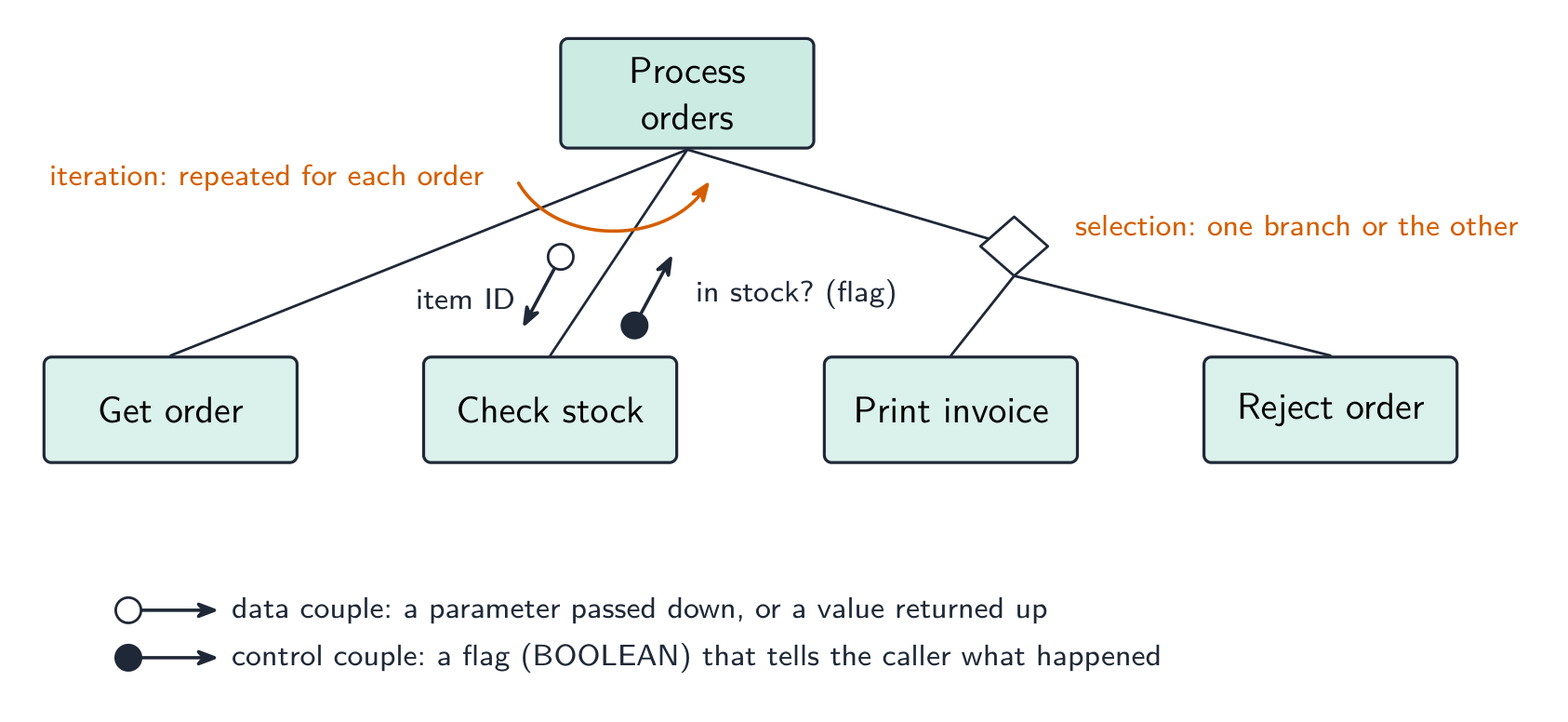
    หลักการ ประโยชน์ และข้อเสีย — ตามที่แผนการให้คะแนนระบุไว้

    รูปแบบ หลักการ ประโยชน์ ข้อเสีย
    waterfall ขั้นตอนดำเนินการตามลำดับที่ตายตัว, เสร็จสิ้นและอนุมัติก่อนขั้นถัดไปเริ่ม; การย้อนกลับหมายถึงการเริ่มลำดับใหม่ ง่ายต่อการจัดการ;每一步都有完整的文档; requirements are fixed early, so costs and dates can be estimated inflexible once a stage is finished; no working software until late; a mistake in analysis is expensive to fix later; the customer cannot see progress
    iterative สร้างเวอร์ชันที่ใช้งานได้ขนาดเล็กก่อน, จากนั้นปรับปรุงซ้ำผ่านเวอร์ชันต่อไปจนสมบูรณ์ software working early and often; problems found in early versions; the customer's feedback shapes each version; requirements can change hard to estimate the total time and cost; repeated testing costs effort; needs the customer to be available; can drift if versions are not planned
    RAD สร้างต้นแบบของส่วนต่างๆ ของระบบอย่างรวดเร็วและปรับปรุงด้วยผู้ใช้จนได้รับ的认可, มักจะทำพร้อมกันโดยหลายทีม very fast delivery of a first version; the user is involved throughout, so the product fits their needs; changes are easy to absorb needs skilled developers and committed users; documentation is weak; less suited to large or safety-critical systems

    ตัวอย่างวิธีทำ. บริษัทต้องเป็นรายแรกที่เปิดตัวเว็บไซต์สำหรับเครื่องเกมคอนโซลใหม่, และการออกแบบจะเปลี่ยนแปลงตามคุณสมบัติของคอนโซลที่ถูกประกาศออก ชื่อวัฏจักรที่เหมาะสมที่สุดและอธิบายเหตุผล

    RAD. สามารถสร้างต้นแบบของเว็บไซต์และแสดงให้ผู้ใช้งานภายในไม่กี่วัน, และปรับปรุงได้ตามการเปลี่ยนแปลงของข้อกำหนด; เว็บไซต์มีขนาดเล็กพอสำหรับการ pendekatan แบบ driven by prototype, และความเร็วในการส่งมอบเป็นความต้องการหลัก. Waterfall จะกำหนด requirements ก่อนสร้างหน้าเว็บแม้แต่หน้าเดียวและไม่ส่งมอบอะไรuntil the end.

    ขั้นตอนมาตรฐาน

    แต่ละขั้นตอนมีวัตถุประสงค์, ผลลัพธ์และกิจกรรมทั่วไป — คำถาม "อธิบาย...ขั้นตอน" ต้องการสองหรือสามอย่างเหล่านี้

    • การวิเคราะห์ — ค้นหาว่า อะไรคือสิ่งที่โปรแกรมต้องทำ กิจกรรม: การสัมภาษณ์ แบบสอบถาม และการสังเกตระบบปัจจุบัน; การศึกษาความเป็นไปได้; การตกลงใน เอกสารกำหนดความต้องการ ซึ่งทุกขั้นตอนถัดไปจะถูกตรวจสอบตามนั้น
    • การออกแบบ — ตัดสินใจว่า อย่างไรจะดำเนินการ Outputs: แผนภูมิโครงสร้าง (โมดูลและพารามิเตอร์), แผนภูมิโฟว์ หรือ 伪代码 สำหรับแต่ละโมดูล, ตารางตัวระบุ และโครงสร้างข้อมูล, เล้าเอาต์หน้าจอและไฟล์, และ แผนทดสอบ ที่เขียน ตอนนี้ จากเอกสารกำหนดความต้องการ ก่อนที่จะมีโค้ดใดๆ
    • การเขียนโค้ด (การนำไปใช้) — เขียนโปรแกรมเป็นภาษาสูง โดยแบ่งเป็นโมดูลๆ ตามการออกแบบ; แต่ละโมดูลจะถูกทดสอบทันทีที่เขียนเสร็จ
    • การทดสอบ — รันโปรแกรมตามแผนทดสอบ (ข้อมูลปกติ ปกติผิดปกติ ขอบเขต และค่าสุดขั้ว) และแก้ไขข้อผิดพลาดที่พบ; การทดสอบแบบบูรณาการ การทดสอบอัลฟา การทดสอบเบต้า และการทดสอบยอมรับ จะตามมา
    • การบำรุงรักษา — หลังการปล่อยใช้งาน แก้ไขข้อบกพร่อง ปรับโปรแกรมให้เข้ากับฮาร์ดแวร์ ซอฟต์แวร์ หรือกฎหมายใหม่ และปรับปรุงประสิทธิภาพ (ดูด้านล่าง)

    ตัวอย่างวิธีทำ เติมแผนภูมิ Waterfall ให้สมบูรณ์ การวิเคราะห์ → ? → ? → ? → การบำรุงรักษา และอธิบายสิ่งที่จะเกิดขึ้นในช่วงการออกแบบ

    ขั้นตอนที่หายไปคือ การออกแบบ, การเขียนโค้ด, การทดสอบ ในช่วงการ设计要求将需求转化为程序计划:问题被分解为模块(结构图),每个模块的算法以伪代码或流程图形式编写,选择数据结构和标识符,规划屏幕和文件布局,并根据规范编写测试计划。

    Explore · ⁨สำรวจ⁩

    The program development life cycle · ⁨วงจรการพัฒนาโปรแกรม⁩

    Step through the stages every project passes through. Getting the requirements right in analysis matters most — a mistake caught in testing is far costlier to fix than one caught early. · ⁨ผ่านขั้นตอนแต่ละขั้นตอนที่โครงการแต่ละแห่งผ่านมา การได้มาซึ่ง requirements ที่ถูกต้องในช่วง analysis สำคัญที่สุด — ความผิดพลาดที่พบในการทดสอบมีค่าใช้จ่ายในการแก้ไขสูงกว่ามากเมื่อเทียบกับข้อผิดพลาดที่พบเร็ว⁩

    Explore · ⁨สำรวจ⁩

    Software process lab · ⁨ห้องปฏิบัติการกระบวนการซอฟต์แวร์⁩

    Classify development examples by the stage or tool they belong to. · ⁨จำแนกตัวอย่างการพัฒนาตามขั้นตอนหรือเครื่องมือที่เกี่ยวข้อง⁩

    Vocabulary · ⁨คำศัพท์⁩ Train · ⁨ฝึกฝน⁩
    English ไทย
    development life cycle/dɪˈveləpmənt laɪf ˈsaɪkl/ วงจรชีวิตการพัฒนา
    requirements/rɪˈkwaɪəmənts/ ข้อกำหนด
    waterfall/ˈwɔːtəfɔːl/ น้ำตก
    iterative model/ˈɪtərətɪv ˈmɒdl/ รุ่นวนซ้ำ
    Rapid Application Development/ˈræpɪd ˌæplɪˈkeɪʃn dɪˈveləpmənt/ การพัฒนาแอปพลิเคชันอย่างรวดเร็ว
    prototype/ˈprəʊtəʊtaɪp/ ต้นแบบ
    Agile/ˈædʒaɪl/ Agile
    12.2

    Program design tools · ⁨เครื่องมือออกแบบโปรแกรม⁩

    Syllabus · ⁨หลักสูตร⁩
    English
    Candidates should be able to: Notes and guidance
    Use a structure chart to decompose a problem into sub-tasks and express the parameters passed between the various modules/procedures/functions which are part of the algorithm design Describe the purpose of a structure chart Construct a structure chart for a given problem Derive equivalent pseudocode from a structure chart
    Show understanding of the purpose of state-transition diagrams to document an algorithm
    ไทย
    ผู้เข้าสอบควรสามารถ: หมายเหตุและคำแนะนำ
    ใช้ structure chart เพื่อแยกปัญหาย่อยๆ ออกเป็นงานย่อย และแสดง parameters ที่ส่งผ่านระหว่างโมดูล/procdures/functions ต่างๆ ซึ่งเป็นส่วนหนึ่งของการออกแบบอัลกอริทึม อธิบายวัตถุประสงค์ของ structure chart สร้าง structure chart จากโจทย์ที่กำหนดให้ ดึง 伪代码 ที่เทียบเท่ามาจาก structure chart
    แสดงความเข้าใจในวัตถุประสงค์ของ state-transition diagrams ในการบันทึกอัลกอริทึม

    Source: Cambridge International syllabus · ⁨แหล่งที่มา: หลักสูตร Cambridge International⁩

    English

    Structure chart

    A structure chart 结构图 shows the hierarchical decomposition 分解 of a program into modules (subroutines 子程序) and the parameters 参数 passed between them. Each module is a rectangle; lines link caller (above) to callee (below); small arrows show data going down and results coming back up. The design can then be turned into equivalent pseudocode 伪代码.

    It is a design-stage tool, and you can read the procedure signatures off it.

    The symbols the examiner asks about. A box is a module; a line links a caller (above) to the modules it calls (below), read left to right in the order they are called. A small arrow with an open circle at its tail is a data couple — a parameter passed down into a module or a value returned up; an arrow with a filled circle is a control couple, a flag (usually BOOLEAN) that tells the caller what happened. A diamond at a branch means selection: only one of the modules below it is called, depending on a condition. A curved arrow sweeping across the links means iteration: the modules under it are called repeatedly in a loop.

    Worked example. Four modules are defined as PROCEDURE Main(), PROCEDURE ReadData(BYREF Count : INTEGER), FUNCTION IsValid(Value : INTEGER) RETURNS BOOLEAN and PROCEDURE Report(Total : INTEGER, Count : INTEGER). Main calls ReadData, then calls IsValid once for each value read, then calls Report. Describe the structure chart.

    Main at the top; ReadData, IsValid and Report in a row beneath it, left to right in calling order. On the ReadData link an upward data couple Count (a BYREF parameter comes back). On the IsValid link a downward data couple Value and an upward control couple (the BOOLEAN result), with a curved iteration arrow across that link because it is called for each value. On the Report link two downward data couples, Total and Count. Reading the other way, a function is any module that returns a value — its header needs RETURNS and the returned type.

    State-transition diagram

    A state-transition diagram 状态转换图 shows the states 状态 a system can be in and the events that move it between them — good for vending machines, traffic lights, user interfaces. State-transition diagrams are used to document the behaviour of an algorithm or system. Each state is a circle; each transition is an arrow labelled with the event.

    It makes missing transitions easy to spot ("what if a second coin is inserted while awaiting selection?").

    Reading and drawing one. Each transition is labelled input | output (or condition | action): what happened, then what the system does as it changes state. A question gives a table of current state, input, output, next state and asks for the diagram, or the reverse — every row of the table is exactly one arrow. Check that every state has an arrow leaving it for every input that can occur, including the ones that leave the state unchanged (an arrow that loops back to the same state).

    Worked example. A pump controller has states pump off and pump on. In pump off, the input low level detected produces the output activate pump and moves to pump on; in pump on, normal level detected produces deactivate pump and moves to pump off. Any other input leaves the state unchanged. Draw the table.

    Current state Input Output Next state
    pump off low level detected activate pump pump on
    pump off normal level detected — pump off
    pump on normal level detected deactivate pump pump off
    pump on low level detected — pump on

    The two "no change" rows become loop arrows on the diagram; leaving them out loses the mark for completeness.

    ไทย

    แผนภูมิโครงสร้าง

    แผนภูมิโครงสร้าง แสดงถึง การแยกย่อยเชิงลำดับชั้น ของโปรแกรมออกเป็นโมดูล (** subroutine**) และ พารามิเตอร์ ที่ส่งผ่านระหว่างกัน โมดูลแต่ละตัวเป็นสี่เหลี่ยมผืนผ้า เส้นเชื่อมผู้เรียก (ด้านบน) กับผู้ถูกเรียก (ด้านล่าง);ลูกศรเล็กๆ แสดงข้อมูลที่ไหลลง และผลลัพธ์ที่ไหลขึ้น การออกแบบสามารถเปลี่ยนเป็น 伪代码 ที่เทียบเท่าได้

                    CalculatePay
                /        |         \
           GetEmployee  CalculateBonus  CalculateTax
           Returns:     Takes: sales    Takes: gross
           employeeID   Returns: bonus  Returns: tax
    

    เป็นเครื่องมือในช่วงการออกแบบ และคุณสามารถอ่านลายเซ็นของกระบวนการได้จากแผนภูมินี้

    แผนภูมิโครงสร้างที่มี Convert temperature อยู่ด้านบน และมี INPUT, Convert to Celsius และ OUTPUT โมดูลอยู่ด้านล่าง พร้อมพารามิเตอร์อุณหภูมิบนเส้นเชื่อม
    แผนภูมิโครงสร้าง: โมดูลพร้อมพารามิเตอร์ที่ถูกส่งผ่านระหว่างกัน

    สัญลักษณ์ที่ผู้สอบถามถึง กล่องคือโมดูล; เส้นเชื่อมผู้เรียก (ด้านบน) กับโมดูลที่มันเรียก (ด้านล่าง) อ่านจากซ้ายไปขวาตามลำดับการเรียก ลูกศรเล็กที่มี วงกลมเปิด ที่หางคือ คู่ข้อมูล — พารามิเตอร์ที่ส่ง ลง ไปในโมดูลหรือค่าที่ส่ง กลับ ขึ้นมา; ลูกศรที่มี วงกลมเต็ม คือ คู่ควบคุม ซึ่งเป็นแฟล็ก (มักจะเป็น BOOLEAN) ที่บอกผู้เรียก发生了什么 A รูปเพชร ที่ทางแยกหมายถึง การเลือก: มีเพียงโมดูลเดียวภายใต้รูปเพชร就会被调用،ขึ้นอยู่กับเงื่อนไข ลูกศรโค้งที่ Sweep Across Links หมายถึง การทำซ้ำ: โมดูลที่อยู่ใต้ลูกศรนี้จะถูกเรียกซ้ำในลูป

    แผนภูมิโครงสร้างแสดงสัญลักษณ์ทั้งหมด: กล่องโมดูล, เส้นเรียก, คู่ข้อมูลวงกลมเปิดที่พก item ID ลงไป, คู่ควบคุมวงกลมเต็มที่ย้อน flag in-stock ขึ้นไป, รูปเพชรที่เลือกระหว่าง Print invoice และ Reject order, และลูกศรโค้งที่เครื่องหมายโมดูลที่ซ้ำสำหรับแต่ละคำสั่งซื้อ
    สัญลักษณ์แผนภูมิโครงสร้าง: คู่ข้อมูลและคู่ควบคุม, รูปเพชรสำหรับการเลือก และลูกศรการทำซ้ำ

    ตัวอย่างวิธีทำ กำหนดโมดูลสี่ตัวเป็น PROCEDURE Main(), PROCEDURE ReadData(BYREF Count : INTEGER), FUNCTION IsValid(Value : INTEGER) RETURNS BOOLEAN และ PROCEDURE Report(Total : INTEGER, Count : INTEGER) Main เรียก ReadData, จากนั้นเรียก IsValid ครั้งละหนึ่งครั้งสำหรับแต่ละค่าที่อ่าน, แล้วเรียก Report อธิบายแผนภูมิโครงสร้าง

    Main อยู่ด้านบน; ReadData, IsValid และ Report อยู่ในแถวเดียวกันด้านล่างจากซ้ายไปขวาตามลำดับการเรียก บนเส้นเชื่อม ReadData มีคู่ข้อมูลขึ้น Count (พารามิเตอร์ BYREF กลับกลับมา) บนเส้นเชื่อมIsValid มีคู่ข้อมูลลง Value และคู่ควบคุมขึ้น (ผลลัพธ์ BOOLEAN) พร้อมลูกศรทำซ้ำโค้ง横跨那个链接เพราะ它为每个值调用。On the Report link two downward data couples, Total and Count. Reading the other way, a function is any module that returns a value — its header needs RETURNS and the returned type.

    แผนภูมิสถานะ-การเปลี่ยนแปลง

    แผนภูมิสถานะ-การเปลี่ยนแปลง แสดงถึง สถานะ ที่ระบบสามารถอยู่ในนั้นและ เหตุการณ์ ที่ทำให้ระบบเปลี่ยนระหว่างสถานะ — เหมาะสำหรับเครื่องขายอัตโนมัติ ไฟสัญญาณจราจร อินเทอร์เฟซผู้ใช้ แผนภูมิสถานะ-การเปลี่ยนแปลง ใช้เพื่อบันทึกพฤติกรรมของอัลกอริทึมหรือระบบ แต่ละสถานะเป็นวงกลม; แต่ละการเปลี่ยนแปลงเป็นลูกศรที่ติดฉลากด้วยเหตุการณ์

       coin inserted               item selected
    [Idle] --------------→ [Awaiting selection] ----------→ [Dispensing]
    

    ช่วยให้เห็นการเปลี่ยนแปลงที่ขาดหายได้ง่าย ("ถ้าใส่เหรียญสองเหรียญขณะรอการเลือก会发生什么?")

    แผนภูมิสถานะ: Locked ไปยัง Waiting for second digit ไปยัง Waiting for third digit ไปยัง Unlocked, พร้อมการเปลี่ยนแปลง correct-digit และ wrong-digit
    แผนภูมิสถานะ-การเปลี่ยนแปลงสำหรับล็อคประตูรหัส 259

    การอ่านและการวาด ทุกการเปลี่ยนแปลงติดฉลาก input | output (หรือ condition | action): เกิดอะไรขึ้น แล้วระบบทำอะไรเมื่อเปลี่ยนสถานะคำถามให้ตาราง current state, input, output, next state และขอแผนภูมิ, หรือในทางกลับ—ทุกบรรทัดของตารางคือลูกศรหนึ่งเส้น ตรวจสอบว่าแต่ละสถานะมีลูกศรออกจากมันสำหรับทุกอินพุตที่อาจเกิดขึ้น รวมถึง那些使状态不变的(一个循环回到同一状态的箭头)。

    ตัวอย่างวิธีทำ ตัวควบคุมปั๊มมีสถานะ pump off และ pump on ใน pump off, อินพุต low level detected ผลิตเอาต์พุต activate pump และเปลี่ยนไปยัง pump on; ใน pump on, normal level detected ผลิต deactivate pump และเปลี่ยนไปยัง pump off อินพุตอื่นๆ ทำให้สถานะไม่เปลี่ยนแปลง วาดตาราง

    สถานะปัจจุบัน อินพุต เอาต์พุต สถานะถัดไป
    pump off low level detected activate pump pump on
    พัดลมปิด ตรวจจับระดับปกติ — พัดลมปิด
    พัดลมเปิด ตรวจจับระดับปกติ ปิดพัดลม พัดลมปิด
    พัดลมเปิด ตรวจจับระดับต่ำ — พัดลมเปิด

    แถว "ไม่มีการเปลี่ยนแปลง" ทั้งสองบรรทัดจะกลายเป็นลูกศรวนซ้ำบนแผนภาพ; หากตัดออกจะเสียคะแนนความครบถ้วน

    Explore · ⁨สำรวจ⁩

    Software process lab · ⁨ห้องปฏิบัติการกระบวนการซอฟต์แวร์⁩

    Classify development examples by the stage or tool they belong to. · ⁨จำแนกตัวอย่างการพัฒนาตามขั้นตอนหรือเครื่องมือที่เกี่ยวข้อง⁩

    Vocabulary · ⁨คำศัพท์⁩ Train · ⁨ฝึกฝน⁩
    English ไทย
    structure chart/ˈstrʌktʃə tʃɑːt/ แผนภูมิโครงสร้าง
    parameters/pəˈræmɪtəz/ parameters
    pseudocode/ˈsuːdəʊkəʊd/ โค้ดเทียม (pseudocode)
    12.3

    Errors · ⁨ข้อผิดพลาด⁩

    Syllabus · ⁨หลักสูตร⁩
    English
    Candidates should be able to: Notes and guidance
    Show understanding of ways of exposing and avoiding faults in programs
    Locate and identify the different types of errors • syntax errors • logic errors • run-time errors
    Correct identified errors
    Show understanding of the methods of testing available and select appropriate data for a given method Including dry run, walkthrough, white-box, black-box, integration, alpha, beta, acceptance, stub
    Show understanding of the need for a test strategy and test plan and their likely contents
    Choose appropriate test data for a test plan Including normal, abnormal and extreme/boundary
    Show understanding of the need for continuing maintenance of a system and the differences between each type of maintenance Including perfective, adaptive, corrective
    Analyse an existing program and make amendments to enhance functionality
    ไทย
    ผู้เข้าสอบควรสามารถ: หมายเหตุและคำแนะนำ
    แสดงความเข้าใจถึงวิธีการตรวจจับและหลีกเลี่ยงข้อผิดพลาดในโปรแกรม
    หาตำแหน่งและระบุประเภทของข้อผิดพลาดต่างๆ • syntax errors • logic errors • run-time errors
    แก้ไขข้อผิดพลาดที่ระบุไว้
    แสดงความเข้าใจถึงวิธีการทดสอบที่มีอยู่และเลือกข้อมูลที่เหมาะสมสำหรับแต่ละวิธี รวมถึง dry run, walkthrough, white-box, black-box, integration, alpha, beta, acceptance, stub
    แสดงความเข้าใจถึงความจำเป็นของกลยุทธ์การทดสอบและแผนการทดสอบรวมถึงเนื้อหาที่เป็นไปได้
    เลือกข้อมูลทดสอบที่เหมาะสมสำหรับแผนการทดสอบ รวมถึง normal, abnormal และ extreme/boundary
    แสดงความเข้าใจถึงความจำเป็นในการบำรุงรักษาระบบอย่างต่อเนื่องและความแตกต่างระหว่างประเภทของการบำรุงรักษาแต่ละชนิด รวมถึง perfective, adaptive, corrective
    วิเคราะห์โปรแกรมที่มีอยู่เดิมและแก้ไขเพื่อเพิ่มประสิทธิภาพการทำงาน

    Source: Cambridge International syllabus · ⁨แหล่งที่มา: หลักสูตร Cambridge International⁩

    English
    • syntax error 语法错误 — breaks the language's grammar (missing bracket, misspelled keyword). Caught at translation time; the program won't run until fixed.
    • run-time error 运行时错误 — happens while running (divide by zero, file not found, array index out of range). The program crashes or raises an exception; fix by adding checks.
    • logic error 逻辑错误 — the program runs but gives wrong results (using + for -, an off-by-one loop, conditions in the wrong order). The hardest to find; the only sign is wrong output, so use careful testing and tracing.

    Exposing and avoiding faults. Faults are exposed by testing against a test plan, by a dry run or trace table, by a walkthrough with colleagues, and by the IDE's debugger (breakpoints, single stepping, watching variables). They are avoided by designing before coding (structure chart, pseudocode), by modular code with meaningful identifiers and comments, by validation of every input, by handling exceptions rather than letting a run-time error crash the program, and by the IDE's dynamic syntax checks as you type.

    Worked example. State the type of error in each case and how it shows itself. (a) Result <- STR_TO_NUM(x) / STR_TO_NUM(y) is run with y = "0". (b) The same line is run with x = "12a". (c) A loop written as FOR i <- 1 TO 9 processes a ten-element array. (d) OUTPUT "Total: " Total is missing a comma.

    (a) Run-time error — division by zero; the program crashes when this line is executed with that data. (b) Run-time error — the string cannot be converted to a number. (c) Logic error — the program runs but the tenth element is never processed, so the output is wrong. (d) Syntax error — the statement breaks the language's rules and is reported by the translator before the program runs.

    Worked example. Correct the errors in this pseudocode, which should output the average of ten marks.

    The division should be by 10, not 9 (a logic error); the output line needs a comma or an & between the string and the value (a syntax error); and Average is never declared as REAL (a syntax or run-time error, depending on the language). Say which line and what the corrected line is: Average <- Total / 10.

    ไทย
    • ข้อผิดพลาดทางไวยากรณ์ (syntax error) — ขาดกฎภาษา (เช่น หายวงเล็บ, พิมพ์คำสำคัญผิด) ตรวจพบในช่วงการแปล; โปรแกรมจะไม่ทำงานจนกว่าจะแก้ไขให้ถูกต้อง
    • ข้อผิดพลาดขณะรัน (run-time error) — เกิดขึ้นระหว่างการทำงาน (เช่น หารด้วยศูนย์, ไม่พบไฟล์, ดัชนีอาเรย์เกินขอบเขต) โปรแกรมจะหยุดทำงานหรือเกิดข้อยกเว้น; แก้ไขได้โดยการเพิ่มการตรวจสอบ
    • ข้อผิดพลาดทางตรรกะ (logic error) — โปรแกรมทำงานได้แต่ให้ ผลลัพธ์ที่ผิด (เช่น ใช้ + แทน -, ลูปที่มีจำนวนรอบคลาดเคลื่อน, เงื่อนไขเรียงลำดับผิด) เป็นข้อที่ยากที่สุดในการหา; สัญญาณเดียวคือผลลัพธ์ที่ผิดปกติ ดังนั้นต้องใช้การทดสอบและติดตามอย่างละเอียด
    กระบวนการตั้งแต่เขียนโค้ด แปลง รัน ไปยังผลลัพธ์: ข้อผิดพลาดทางไวยากรณ์จะหยุดที่ขั้นตอนการแปล, ข้อผิดพลาดขณะรันจะทำให้โปรแกรมล่มระหว่างรัน, และข้อผิดพลาดทางตรรกะจะรันได้แต่ให้ผลลัพธ์ที่ผิด
    ช่วงเวลาที่เกิดของข้อผิดพลาดแต่ละประเภท: ไวยากรณ์ที่การแปล, ขณะรันระหว่างการรัน, ทางตรรกะที่ผลลัพธ์

    การเปิดเผยและหลีกเลี่ยงข้อบกพร่อง ข้อบกพร่องจะถูก เปิดเผย ผ่านการทดสอบตามแผนการทดสอบ, การ试运行 (dry run) หรือตารางติดตาม (trace table), การทบทวนโค้ดร่วมกับเพื่อนร่วมงาน และการใช้ไดบักเกอร์ใน IDE (จุดหยุด, รันทีละบรรทัด, ดูค่าตัวแปร) จะถูก หลีกเลี่ยง ได้ด้วยการออกแบบก่อนเขียนโค้ด (แผนภาพโครงสร้าง, โค้ดลวง), การเขียนโค้ดแบบโมดูลพร้อมชื่อตัวแปรและความหมายที่ชัดเจนพร้อม_heading, การตรวจสอบความถูกต้อง (validation) ของข้อมูลเข้าทุกชนิด, การจัดการกับข้อยกเว้นแทนที่จะปล่อยให้ข้อผิดพลาดขณะรันทำให้โปรแกรมล่ม และการตรวจสอบไวยากรณ์แบบไดนามิกของ IDE ขณะพิมพ์

    ตัวอย่างมีคำตอบ ระบุประเภทของข้อผิดพลาดในแต่ละกรณีและวิธีที่มันแสดงออก (a) Result <- STR_TO_NUM(x) / STR_TO_NUM(y) ถูกรันด้วย y = "0" (b) บรรทัดเดียวกันถูกรันด้วย x = "12a" (c) ลูปที่เขียนเป็น FOR i <- 1 TO 9 ประมวลผลอาเรย์ขนาดสิบ عنصر (d) OUTPUT "Total: " Total หายเครื่องหมายคั่น

    (a) ข้อผิดพลาดขณะรัน — หารด้วยศูนย์; โปรแกรมล่มเมื่อบรรทัดนี้被执行ด้วยข้อมูลนั้น (b) ข้อผิดพลาดขณะรัน — สตรีงไม่สามารถแปลงเป็นตัวเลขได้ (c) ข้อผิดพลาดทางตรรกะ — โปรแกรมรันได้แต่ عنصرที่สิบไม่ถูกประมวลผล ทำให้ผลลัพธ์ผิด (d) ข้อผิดพลาดทางไวยากรณ์ — คำสั่งละเมิดกฎภาษาและถูกรายงานโดยตัวแปลก่อนที่โปรแกรมจะรัน

    ตัวอย่างมีคำตอบ แก้ไขข้อผิดพลาดในโค้ดลวงนี้ซึ่งควรแสดงผลเฉลี่ยของคะแนนสิบรายการ

    Total <- 0
    FOR i <- 1 TO 10
        INPUT Mark
        Total <- Total + Mark
    NEXT i
    Average <- Total / 9
    OUTPUT "Average" Average
    

    การหารควรเป็นด้วย 10 ไม่ใช่ 9 (ข้อผิดพลาดทางตรรกะ); บรรทัดผลลัพธ์ต้องมีเครื่องหมายคั่นหรือ & ระหว่างสत्रीงกับค่า (ข้อผิดพลาดทางไวยากรณ์); และ Average ไม่เคยถูกประกาศเป็น REAL (ข้อผิดพลาดทางไวยากรณ์หรือขณะรัน ขึ้นอยู่กับภาษา) ระบุบรรทัดใดและบรรทัดที่แก้ไขแล้วคือ: Average <- Total / 10

    Vocabulary · ⁨คำศัพท์⁩ Train · ⁨ฝึกฝน⁩
    English ไทย
    syntax error/ˈsɪntæks ˈerə/ ข้อผิดพลาดด้านไวยากรณ์
    run-time error/rʌn taɪm ˈerə/ ข้อผิดพลาดขณะรันโปรแกรม
    logic error/ˈlɒdʒɪk ˈerə/ ข้อผิดพลาดด้านตรรกะ
    dry run/draɪ rʌn/ 试运行 (dry run)
    trace table/treɪs ˈteɪbl/ ตารางติดตาม
    12.3

    Testing methods · ⁨วิธีการทดสอบ⁩

    English
    • dry run 手工跟踪 — trace the code on paper, writing each variable's value in a table.
    • walkthrough 走查 — a team review of the code.
    • white-box testing 白盒测试 — designed from the code's internal structure, covering every statement, branch and loop.
    • black-box testing 黑盒测试 — designed from the specification only: feed inputs, check outputs.
    • integration testing 集成测试 — combine modules and test the interfaces between them.
    • alpha testing α测试 — by the developers/in-house before release; beta testing β测试 — by a limited group of real users in their own environment.
    • acceptance testing 验收测试 — by the customer, to decide if the product is fit for purpose.
    • stub 桩 — a placeholder for a module that does not exist yet, so the structure can be tested top-down.

    Which method, when. A dry run and a walkthrough need no computer — the dry run is you, tracing the algorithm with a trace table 跟踪表; the walkthrough is a meeting in which the author explains the code line by line and colleagues look for faults, so it also spreads knowledge of the code through the team and checks it against the design. White-box tests are written by someone who can see the code and aims to exercise every path; black-box tests are written from the specification and check only inputs against expected outputs, so a user or a separate tester can do them. Integration testing follows module testing: modules that pass alone can still fail when the data passed between them is the wrong type or in the wrong order. Alpha testing is in-house; beta testing gives a release candidate to a sample of real users, who report faults from real use; acceptance testing is the customer checking the finished product against the requirements before paying for it. A stub lets top-down testing start before every module exists.

    Worked example. After the program passed its in-house tests it was given to a group of users to try before release. Name this type of testing, and state what happens next.

    Beta testing — real users in their own environment, reporting faults the developers did not find. The faults are corrected, then the customer carries out acceptance testing against the requirements and the program is released; faults found in live use are then handled by corrective maintenance.

    Worked example. Give three benefits of testing a program by walkthrough.

    Errors are found by people who did not write the code and so read it without assumptions; the logic is checked against the design and specification, not only against test data; several people learn how the code works, which helps later maintenance; and no test data or working computer is needed, so it can be done early.

    ไทย
    • 试运行 (dry run) — ติดตามโค้ดบนกระดาษ โดยเขียนค่าของแต่ละตัวแปรลงในตาราง
    • การทบทวนโค้ด (walkthrough) — การตรวจสอบโค้ดร่วมกันเป็นทีม
    • การทดสอบกล่องขาว (white-box testing) — ออกแบบจากโครงสร้างภายในของโค้ด ครอบคลุมทุกคำสั่ง ทุกสาขา และทุกลูป
    • การทดสอบกล่องดำ (black-box testing) — ออกแบบจากเอกสารสเปกIFICATIONS เท่านั้น: ใส่ข้อมูลเข้า ตรวจสอบผลลัพธ์
    • การทดสอบการบูรณาการ (integration testing) — รวมโมดูลเข้าด้วยกันและทดสอบอินเทอร์เฟซระหว่างกัน
    • การทดสอบอัลฟา (alpha testing) α — ทำโดยนักพัฒนา/ภายในองค์กรก่อนปล่อย; การทดสอบเบตา (beta testing) β — ทำโดยกลุ่มผู้ใช้จริงจำนวนจำกัดในสภาพแวดล้อมของตนเอง
    • การทดสอบยอมรับ (acceptance testing) — ทำโดยลูกค้า เพื่อตัดสินว่าผลิตภัณฑ์เหมาะสมกับวัตถุประสงค์หรือไม่
    • สตับ (stub) — ตัวแทนสำหรับโมดูลที่ยังไม่มีอยู่ เพื่อให้สามารถทดสอบโครงสร้างจากบนลงล่างได้

    การทดสอบกล่องดำทำงานจากสเปกIFICATIONS; การทดสอบกล่องขาวทดสอบเส้นทางภายในของโค้ด *การทดสอบกล่องดำทดสอบสเปกIFICATIONS; การทดสอบกล่องขาวทดสอบเส้นทางของโค้ด

    วิธีการใด เมื่อไหร่ 试运行 (dry run) และ การทบทวนโค้ด (walkthrough) ไม่ต้องใช้คอมพิวเตอร์ — การ试运行คือการที่คุณเองติดตามอัลกอริทึมด้วย ตารางติดตาม; การทบทวนโค้ดคือการประชุมที่ผู้เขียนอธิบายโค้ดบรรทัดต่อบรรทัดและเพื่อนร่วมงานมองหาข้อบกพร่อง ซึ่งยังช่วยกระจายความรู้เกี่ยวกับโค้ดผ่านทีมและตรวจสอบกับแบบแผนด้วย การทดสอบกล่องขาว เขียนโดยคนที่เห็นโค้ดและมุ่งเน้นการใช้ทุกเส้นทาง; การทดสอบกล่องดำ เขียนจากสเปกIFICATIONS และตรวจสอบเฉพาะข้อมูลเข้าเทียบกับผลลัพธ์ที่คาดหวัง ดังนั้นผู้ใช้หรือผู้ทดสอบแยกต่างหากสามารถทำได้ การทดสอบการบูรณาการ ตามหลังการทดสอบโมดูล: โมดูลที่ผ่านการทดสอบเดี่ยวอาจล้มเหลวเมื่อข้อมูลส่งระหว่างกันมีประเภทหรือลำดับไม่ถูกต้อง การทดสอบอัลฟา ทำภายในองค์กร; การทดสอบเบตา ให้เวอร์ชันที่พร้อมปล่อยให้กับกลุ่มตัวอย่างของผู้ใช้จริง ผู้ซึ่งรายงานข้อบกพร่องจากการใช้งานจริง; การทดสอบยอมรับ คือการที่ลูกค้าตรวจสอบผลิตภัณฑ์สำเร็จรูปเทียบกับข้อกำหนดก่อนชำระเงิน สตับ ช่วยให้การทดสอบจากบนลงล่างเริ่มต้นได้แม้โมดูลยังไม่ครบทุกส่วน

    การทดสอบด้วยสตับ: โปรแกรมหลักที่ถูกทดสอบเรียก Module A ที่สมบูรณ์แล้ว และสตับที่ทำหน้าที่แทน Module B ที่ยังไม่ได้เขียน ซึ่งมีหัวไฟล์จริงแต่กลับค่าคงที่เท่านั้น *สตับทำหน้าที่แทนโมดูลที่ยังไม่ได้เขียน เพื่อให้โมดูลที่อยู่ด้านบนสามารถทดสอบได้ทันที

    ตัวอย่างมีคำตอบ หลังจากโปรแกรมผ่านการทดสอบภายในองค์กรแล้ว ถูกมอบให้กลุ่มผู้ใช้ลองใช้ก่อนปล่อย ระบุชื่อประเภทของการทดสอบนี้และสิ่งที่เกิดขึ้นต่อไป

    การทดสอบเบตา — ผู้ใช้จริงในสภาพแวดล้อมของตนเอง รายงานข้อบกพร่องที่นักพัฒนาไม่พบ ข้อบกพร่องเหล่านี้จะถูกแก้ไข จากนั้นลูกค้าจะดำเนินการ การทดสอบยอมรับ เทียบกับข้อกำหนดและโปรแกรมจะถูกปล่อย; ข้อบกพร่องที่พบการใช้งานจริงจะถูกจัดการด้วยการบำรุงรักษาเพื่อแก้ไข

    ตัวอย่างมีคำตอบ ระบุประโยชน์สามประการของการทดสอบโปรแกรมด้วยการทบทวนโค้ด

    ข้อผิดพลาดถูกค้นพบโดยบุคคลที่ไม่ได้เขียนโค้ดเองและอ่านโค้ดโดยไม่ตั้งสมมติฐาน; Logic ถูกตรวจสอบเทียบกับออกแบบและสเปก ไม่ใช่แค่เทียบกับข้อมูลทดสอบ; คนหลายท่านเรียนรู้วิธีการทำงานของโค้ด ซึ่งช่วยในการบำรุงรักษาในอนาคต; และไม่จำเป็นต้องมีข้อมูลทดสอบหรือคอมพิวเตอร์ที่ใช้งานอยู่ สามารถทำได้ตั้งแต่ต้น

    Vocabulary · ⁨คำศัพท์⁩ Train · ⁨ฝึกฝน⁩
    English ไทย
    acceptance testing/əkˈseptəns ˈtestɪŋ/ การทดสอบรับมอบหมาย (acceptance testing)
    hierarchical decomposition/haɪəˈrɑːkɪkl ˌdiːkɒmpəˈzɪʃn/ การแยกส่วนแบบเชิงลำดับชั้น
    decomposition/ˌdiːkɒmpəˈzɪʃn/ การสลายตัว
    subroutines/ˈsʌbruːtiːnz/ subroutines
    state-transition diagram/steɪt trænˈsɪʃn ˈdaɪəɡræm/ แผนภาพเปลี่ยนสถานะ
    states/steɪts/ ระบุว่า
    walkthrough/ˈwɔːkθruː/ การทบทวน
    white-box testing/waɪt bɒks ˈtestɪŋ/ การทดสอบกล่องขาว
    black-box testing/blæk bɒks ˈtestɪŋ/ การทดสอบกล่องดำ
    integration testing/ˌɪntɪˈɡreɪʃn ˈtestɪŋ/ การทดสอบบูรณาการ (integration testing)
    alpha testing/ˈælfə ˈtestɪŋ/ การทดสอบอัลฟา
    beta testing/ˈbiːtə ˈtestɪŋ/ การทดสอบเบตา (beta testing)
    stub/stʌb/ สตับ
    12.3

    Test strategy and test plan · ⁨กลยุทธ์การทดสอบและแผนการทดสอบ⁩

    English

    A test strategy 测试策略 is the high-level approach — which kinds of testing, who does them, when, and the criteria to move on. A test plan 测试计划 is the detailed list of tests — each with input data, expected output, and a column for the actual output.

    What each contains. A test strategy states which testing methods will be used at which stage (module testing by the programmer, then integration, alpha, beta, acceptance), who is responsible for each, what test data is required, and the criteria for passing to the next stage. A test plan lists the individual tests: for each, the module or feature under test, the input data, the reason the data was chosen (normal, abnormal, extreme, boundary), the expected result, a space for the actual result, and what to do if they differ. The plan is written at the design stage, from the specification, so that it tests what the program should do rather than what it happens to do.

    Choosing test data

    For each field or condition, include three kinds:

    • normal data 正常数据 — typical values inside the valid range (for marks 0–100: 50, 75).
    • abnormal data 异常数据 — values that should be rejected (-10, 200, "abc").
    • extreme data 极端数据 — the largest and smallest values still accepted (0 and 100).
    • boundary data 边界数据 — values at the edges, where off-by-one errors hide (each accepted extreme and the rejected value just outside it: 0/-1, 100/101).

    Worked example. A field accepts an exam mark from 0 to 100. Give test data of each kind with its expected result. Normal: 50 - accepted, a typical value inside the range. Abnormal: -10, 200, "abc" - all rejected, being out of range or the wrong data type. Extreme: 0 and 100 - the largest and smallest values that are still accepted. Boundary: the pairs straddling each edge - -1 rejected alongside 0 accepted, and 100 accepted alongside 101 rejected. Every value must carry its expected result, or the test plan proves nothing. Extreme and boundary are the pair most often confused: an extreme value sits inside and is accepted, while a boundary test is always a pair either side of the edge - which is exactly where off-by-one errors hide.

    Worked example. A component passes if its weight, measured to the nearest gram, is within 3 g of the target of 50 g, i.e. from 47 g to 53 g inclusive. Draw up the test-plan rows for the check.

    Test data Type Reason Expected result
    50 normal a typical value well inside the range accepted
    47, 53 extreme (boundary) the smallest and largest values that must still be accepted accepted
    46, 54 boundary the values just outside the range, where an off-by-one error would accept them rejected
    20, 90 abnormal values far outside the range rejected
    "abc", −5 abnormal the wrong type, a negative weight rejected

    Each row must say why the value was chosen and what should happen; a bare list of numbers earns nothing.

    ไทย

    กลยุทธ์การทดสอบ (Test strategy) คือ แนวทางระดับสูง — jenis testing อะไรบ้าง, ใครเป็นผู้ทำ,何时, และเกณฑ์เพื่อผ่านไปยังขั้นตอนถัดไป. แผนการทดสอบ (Test plan) คือ รายการละเอียดของการทดสอบ — แต่ละข้อมีข้อมูลเข้า, ผลลัพธ์ที่คาดหวัง, และคอลัมน์สำหรับผลลัพธ์จริง

    สิ่งที่แต่ละส่วนประกอบด้วย. Test strategy ระบุว่าวิธีการทดสอบอะไรจะถูกใช้ในช่วงไหน (module testing โดยนักพัฒนา, จากนั้น integration, alpha, beta, acceptance), ใครรับผิดชอบแต่ละส่วน, ต้องการข้อมูลทดสอบอะไรบ้าง, และเกณฑ์สำหรับการผ่านไปยังขั้นต่อไป. Test plan รายชื่อการทดสอบรายย่อย: สำหรับแต่ละข้อ, โมดูลหรือฟีเจอร์ที่กำลังทดสอบ, ข้อมูลเข้า, เหตุผลที่เลือกข้อมูลนั้น (ปกติ, ผิดปกติ, ขอบเขตสุด, ขอบเขต), ผลลัพธ์ที่คาดหวัง, ช่องว่างสำหรับ ผลลัพธ์จริง, และสิ่งที่ต้องทำหากทั้งสองต่างกัน. แผนนี้เขียนในช่วง design จาก specification, เพื่อให้ทดสอบสิ่งที่โปรแกรม ควร ทำ แทนที่จะเป็นสิ่งที่มัน กำลัง ทำอยู่

    การเลือกข้อมูลทดสอบ

    สำหรับแต่ละฟิลด์หรือเงื่อนไข, ควรรวมสามประเภท:

    • ข้อมูลปกติ (normal data) — ค่าทั่วไปในช่วงที่ยอมรับได้ (สำหรับคะแนน 0–100: 50, 75).
    • ข้อมูลผิดปกติ — ค่าที่ควรถูกปฏิเสธ (-10, 200, "abc")
    • ค่าสุดขั้ว — ค่าที่ใหญ่ที่สุดและเล็กที่สุดที่ยังคง รับได้ (0 และ 100)
    • ค่าขอบเขต — ค่าที่อยู่ตามขอบเขต ซึ่งซ่อนข้อผิดพลาดในการนับเกินหนึ่ง (แต่ละค่าสุดขั้วที่ยอมรับได้และค่าที่ถูกปฏิเสธที่อยู่นอกขอบเขตนั้น: 0/-1, 100/101)
    เส้นจำนวนสำหรับช่องคะแนน 0 ถึง 100: ค่าปกติ 50 และ 75 อยู่ภายใน, ค่าสุดขั้ว 0 และ 100 อยู่ที่ขอบเขตที่ยอมรับได้, และค่าผิดปกติ -1, 101, -10 และ 200 ถูกปฏิเสธภายนอก
    ข้อมูลทดสอบสำหรับช่อง 0–100: ค่าปกติอยู่ภายใน, ค่าสุดขั้วอยู่ที่ขอบเขต, ค่าผิดปกติอยู่ภายนอก

    ตัวอย่างวิธีทำ. ช่องนี้รับคะแนนการสอบตั้งแต่ 0 ถึง 100 ให้เขียนข้อมูลทดสอบแต่ละประเภทพร้อมผลลัพธ์ที่คาดหวัง ค่าปกติ: 50 - รับได้, เป็นค่าทั่วไปอยู่ในช่วง ค่าผิดปกติ: -10, 200, "abc" - ถูกปฏิเสธทั้งหมด เนื่องจากนอกช่วงหรือเป็นประเภทข้อมูลผิด ค่าสุดขั้ว: 0 และ 100 - ค่าที่ใหญ่ที่สุดและเล็กที่สุดที่ยังคง รับได้ ค่าขอบเขต: คู่ที่พาดผ่านแต่ละขอบเขต - -1 ถูกปฏิเสธคู่กับ 0 ที่รับได้, และ 100 ที่รับได้คู่กับ 101 ที่ถูกปฏิเสธ ทุกค่าต้องมี ผลลัพธ์ที่คาดหวัง, มิฉะนั้นแผนทดสอบจะไร้ความหมาย ค่าสุดขั้วและค่าขอบเขตมักถูกสับสนกันมากที่สุด: ค่าสุดขั้วอยู่ ภายใน并接受, แต่การทดสอบค่าขอบเขตต้องเป็น คู่ ข้างๆ ขอบเขตเสมอ — ซึ่งเป็นจุดที่ข้อผิดพลาด off-by-one ซ่อนตัวอยู่

    ตัวอย่างวิธีทำ. ส่วนประกอบจะผ่านการตรวจสอบหากน้ำหนักที่วัดได้ใกล้กรัมที่สุดอยู่ในช่วง 3 กรัม ของเป้าหมายที่ 50 กรัม, คือตั้งแต่ 47 กรัมถึง 53 กรัม (รวม) จงร่างแถวแผนทดสอบสำหรับการตรวจสอบนี้

    ข้อมูลทดสอบ ประเภท เหตุผล ผลลัพธ์ที่คาดหวัง
    50 ปกติ เป็นค่าทั่วไปซึ่งอยู่ลึกภายในช่วง รับได้
    47, 53 สุดขั้ว (ขอบเขต) ค่าที่เล็กที่สุดและใหญ่ที่สุดที่ยังต้องรับได้ รับได้
    46, 54 ขอบเขต ค่าที่อยู่นอกช่วงเล็กน้อย ซึ่งอาจทำให้ข้อผิดพลาด off-by-one ยอมรับค่าเหล่านี้ไว้ ปฏิเสธ
    20, 90 ปกติ ค่าที่อยู่นอกช่วงอย่างชัดเจน ปฏิเสธ
    "abc", −5 ปกติ ประเภทไม่ถูกต้อง, น้ำหนักติดลบ ปฏิเสธ

    แต่ละแถวต้องระบุ เหตุผล ที่เลือกค่านั้นและ สิ่งที่ควรเกิดขึ้น; การให้เพียงรายการตัวเลขเปล่าจะไม่ได้รับคะแนน

    Vocabulary · ⁨คำศัพท์⁩ Train · ⁨ฝึกฝน⁩
    English ไทย
    test plan/test plæn/ แผนการทดสอบ
    implementation/ˌɪmplɪmənˈteɪʃn/ การนำไปใช้
    boundary data/ˈbaʊndəri ˈdeɪtə/ ข้อมูลขอบเขต
    test strategy/test ˈstrætədʒi/ กลยุทธ์การทดสอบ
    normal data/ˈnɔːml ˈdeɪtə/ ข้อมูลปกติ
    abnormal data/əbˈnɔːml ˈdeɪtə/ ข้อมูลผิดปกติ
    extreme data/ekˈstriːm ˈdeɪtə/ ข้อมูลสุดขั้ว
    perfective maintenance/pəˈfektɪv ˈmeɪntənəns/ การบำรุงรักษาเพื่อประสิทธิภาพ
    adaptive maintenance/əˈdæptɪv ˈmeɪntənəns/ adaptive maintenance
    regression testing/rɪˈɡreʃn ˈtestɪŋ/ การทดสอบการถอยหลัง
    12.3

    Maintenance · ⁨การบำรุงรักษา⁩

    English

    Most of a program's lifetime cost is in maintenance. Three kinds:

    • perfective maintenance 完善性维护 — improving performance or features even though it works (a faster query, a new option).
    • adaptive maintenance 适应性维护 — keeping it working in a changing environment (a new OS, a new API, a legal change).
    • corrective maintenance 纠正性维护 — fixing bugs found in use.

    A program may need all three throughout its life.

    Why each is needed — the reasons the mark scheme lists. Corrective: a fault is reported by a user after release, or an incorrect output is noticed in particular circumstances that testing did not cover. Adaptive: the operating system, hardware or browser is upgraded; a law or company rule changes (tax rates, data-protection requirements); the program must work with a new external system or file format. Perfective: users ask for extra features or a better interface; the program is made faster or made to use less memory; the code is tidied to make future changes easier.

    Worked example. (a) A released program outputs a wrong value under certain circumstances. (b) The hardware that runs a program is replaced. (c) Customers ask for the coffee-shop loyalty program to send a message on a customer's birthday. Name the maintenance type in each case.

    (a) Corrective — a fault in the delivered program is being fixed. (b) Adaptive — the program is changed to run in its new environment. (c) Perfective — a feature is added to a program that already works.

    ไทย

    ค่าใช้จ่ายส่วนใหญ่ของโปรแกรมอยู่ในระยะการบำรุงรักษา มีสามประเภท:

    สามประเภทของการบำรุงรักษา: การปรับปรุงประสิทธิภาพ, การปรับให้เข้ากับสภาพแวดล้อม และการแก้ไขข้อบกพร่อง *สามประเภทของการบำรุงรักษา: การปรับปรุงประสิทธิภาพ, การปรับให้เข้ากับสภาพแวดล้อม และการแก้ไขข้อบกพร่อง

    • การบำรุงรักษาแบบปรับปรุงประสิทธิภาพ — การเพิ่มประสิทธิภาพหรือฟีเจอร์แม้ว่าโปรแกรมจะทำงานอยู่แล้ว (เช่น การค้นหาที่เร็วขึ้น, ตัวเลือกใหม่)
    • การบำรุงรักษาแบบปรับให้เข้ากับสภาพแวดล้อม — การรักษาการทำงานให้อยู่ในสภาพแวดล้อมที่เปลี่ยนแปลงไป (ระบบปฏิบัติการใหม่, API ใหม่, การเปลี่ยนแปลงทางกฎหมาย)
    • การบำรุงรักษาเพื่อแก้ไข (corrective maintenance) — การแก้ไขบั๊กที่พบขณะใช้งานจริง

    โปรแกรมอาจต้องการทั้งสามประเภทตลอดอายุการใช้งาน

    เหตุผลที่ต้องใช้แต่ละประเภท — สิ่งที่เกณฑ์ให้คะแนนระบุไว้ การแก้ไข: มีข้อผิดพลาดรายงานโดยผู้ใช้หลังปล่อยใช้งาน, หรือตรวจพบผลลัพธ์ที่ผิดในสถานการณ์เฉพาะที่การทดสอบไม่ครอบคลุม การปรับ: ระบบปฏิบัติการ ฮาร์ดแวร์ หรือเบราว์เซอร์ถูกอัปเกรด; กฎหมายหรือระเบียบบริษัทเปลี่ยนแปลง (อัตราภาษี, ข้อกำหนดการปกป้องข้อมูล); โปรแกรมต้องทำงานร่วมกับระบบภายนอกหรือรูปแบบไฟล์ใหม่ การพัฒนา: ผู้ใช้ขอฟีเจอร์เพิ่มเติมหรืออินเทอร์เฟซที่ดีขึ้น; ทำให้โปรแกรมเร็วขึ้นหรือใช้หน่วยความจำน้อยลง; จัดระเบียบโค้ดเพื่อให้การแก้ไขในอนาคตง่ายขึ้น

    ตัวอย่างที่มีคำตอบ (a) โปรแกรมที่ถูกปล่อยออกมาแสดงค่าที่ผิดในบางสถานการณ์ (b) ฮาร์ดแวร์ที่ใช้รันโปรแกรมถูกเปลี่ยนแทน (c) ลูกค้าขอให้โปรแกรม_OCC program ของร้านกาแฟส่งข้อความในวันเกิดของลูกค้า จงระบุชนิดของการบำรุงรักษาในแต่ละกรณี

    (a) การแก้ไข — กำลังแก้ไขข้อผิดพลาดในโปรแกรมที่ส่งมอบแล้ว (b) การปรับ — เปลี่ยนแปลงโปรแกรมให้รันได้ในสภาพแวดล้อมใหม่ (c) การพัฒนา — เพิ่มฟีเจอร์ลงในโปรแกรมที่ทำอยู่แล้ว

    Vocabulary · ⁨คำศัพท์⁩ Train · ⁨ฝึกฝน⁩
    English ไทย
    maintenance/ˈmeɪntənəns/ maintenance
    corrective maintenance/kəˈrektɪv ˈmeɪntənəns/ corrective maintenance
    12.3

    Amending an existing program · ⁨การแก้ไขโปรแกรมที่มีอยู่⁩

    English

    When asked to add a feature or fix a bug:

    1. read the existing code until you understand the algorithm and data flow.
    2. find where the change goes — which subroutine, which lines.
    3. make the change as small as possible — don't rewrite working code.
    4. update related parts — every caller of a changed parameter list, every routine using a changed data structure.
    5. test the new behaviour and the old (regression testing 回归测试 — check you broke nothing).
    6. document the change.

    Clear comments, meaningful names, decomposed subroutines and a structure chart make a program much easier to amend — which is why the design tools matter even after the first release.

    Analysing a program you did not write. Start from the identifier table and the module headers: they tell you what each module receives and returns before you read a line of its body. Then trace the algorithm with a trace table for one small input, noting where each output value comes from. Only then decide where the enhancement goes — usually a new module called from the existing one, so the working code is disturbed as little as possible — and write the pseudocode for the change and the test data that proves it.

    ไทย

    เมื่อถูกถามให้เพิ่มฟีเจอร์หรือแก้บั๊ก:

    1. อ่านโค้ดที่มีอยู่ จนเข้าใจอัลกอริทึมและการไหลของข้อมูล
    2. หาจุดที่ต้องการแก้ไข — รูนินใด บรรทัดไหน
    3. ทำให้การเปลี่ยนแปลงมีน้อยที่สุด — อย่าเขียนโค้ดที่ทำงานอยู่แล้วใหม่ทั้งหมด
    4. อัปเดตส่วนที่เกี่ยวข้อง — ทุกตำแหน่งที่เรียกใช้รายการพารามิเตอร์ที่ถูกเปลี่ยน และทุกฟังก์ชันที่ใช้โครงสร้างข้อมูลที่ถูกเปลี่ยน
    5. ทดสอบ พฤติกรรมใหม่ และ พฤติกรรมเก่า (การทดสอบย้อนกลับ — ตรวจสอบว่าไม่ได้ทำลายการทำงานเดิม),
    6. จดบันทึก การเปลี่ยนแปลง

    คอมเมนต์ที่ชัดเจน, ชื่อตัวแปรที่มีความหมาย, ฟังก์ชันย่อยที่แยกย่อยอย่างชัดเจน และแผนภูมิโครงสร้าง ทำให้โปรแกรมแก้ไขได้ยากขึ้นมาก — นี่คือเหตุผลว่าทำไมเครื่องมือออกแบบจึงสำคัญแม้หลังจากเวอร์ชันแรกจะถูกปล่อยออกมาแล้ว

    วิเคราะห์โปรแกรมที่คุณไม่ได้เขียนเอง เริ่มต้นจากตารางชื่อตัวแปร (identifier table) และหัวข้อโมดูล: พวกเขาบอกคุณว่าแต่ละโมดูลรับและส่งอะไรออกมาก่อนที่จะอ่านบรรทัดแรกของบอดี้โมดูล จากนั้นติดตามอัลกอริทึมด้วยตารางติดตามสำหรับอินพุตขนาดเล็กหนึ่งชุด หมายเหตุว่าค่าผลลัพธ์แต่ละค่ามาจากไหน แล้วจึงตัดสินใจว่าควรเพิ่มฟีเจอร์ตรงจุดใด — โดยปกติจะเป็นโมดูลใหม่ที่ถูกเรียกจากโมดูลเดิม เพื่อให้โค้ดที่ทำงานอยู่ถูกรบกวนน้อยที่สุด — และเขียน伪代码สำหรับการเปลี่ยนแปลงและชุดข้อมูลทดสอบที่ยืนยันว่าถูกต้อง

    12.3

    Definitions the examiner accepts · ⁨คำนิยามที่ผู้สอบยอมรับ⁩

    English

    A definition question is marked against fixed wording. Learn these exactly, and give one answer only.

    Term Definition
    development life cycle the sequence of stages, from analysis to maintenance, followed to produce and support a program
    waterfall model a life cycle in which the stages are carried out in a fixed order, each completed before the next begins
    iterative model a life cycle in which a working version is produced and then repeatedly refined until it is complete
    rapid application development a life cycle that builds prototypes quickly, refining them with user feedback until they are accepted
    structure chart a diagram that shows how a program is decomposed into modules, the order in which they are called and the parameters passed between them
    state-transition diagram a diagram that shows the states a system can be in and the inputs that cause it to move between them
    syntax error an error in the way a statement is written, so it breaks the rules of the language and cannot be translated
    logic error an error in the algorithm, so the program runs but produces the wrong result
    run-time error an error that occurs while the program is running, such as division by zero, and stops it
    dry run working through the algorithm by hand, recording the values of the variables in a trace table
    walkthrough a review in which the author steps through the code with colleagues who look for errors
    stub a placeholder module with the correct header that returns a fixed value, used so the modules that call it can be tested
    test plan a list of the tests to be carried out, each with its test data, the reason for the data and the expected result
    boundary data values at each edge of the valid range, both the last value accepted and the first value rejected
    corrective / adaptive / perfective maintenance fixing faults found in use / changing the program to suit a changed environment / improving a program that already works
    ไทย

    คำถามคำนิยามจะให้คะแนนตามข้อความที่กำหนดไว้你必须 exact. เรียนรู้ให้ถูกต้องและตอบเพียงคำตอบเดียวเท่านั้น

    พจน์ นิยาม
    วัฏจักรการพัฒนาซอฟต์แวร์ ลำดับขั้นตอนตั้งแต่การวิเคราะห์ไปจนถึงการบำรุงรักษา ที่ต้องดำเนินการเพื่อสร้างและสนับสนุนโปรแกรม
    โมเดลน้ำตก วัฏจักรที่ขั้นตอนต่างๆ ดำเนินไปตามลำดับที่กำหนดไว้ Each step must be completed before the next begins
    โมเดลแบบวนซ้ำ วัฏจักรที่ผลิตเวอร์ชันที่ใช้งานได้ก่อน แล้วปรับปรุงซ้ำๆ จนกว่าจะสมบูรณ์
    การพัฒนาแอปพลิเคชันรวดเร็ว วัฏจักรที่สร้างต้นแบบอย่างรวดเร็ว ปรับปรุงด้วยคำติชมจากผู้ใช้จนกว่าจะได้รับการยอมรับ
    แผนภูมิโครงสร้าง แผนภูมิที่แสดงว่าโปรแกรมถูกแบ่งย่อยเป็นโมดูลอย่างไร ลำดับการเรียกใช้งาน และพารามิเตอร์ที่ส่งระหว่างโมดูล
    แผนภูมิการเปลี่ยนสถานะ แผนภูมิที่แสดงสถานะที่ระบบสามารถอยู่ในได้ และอินพุตที่ทำให้ระบบเปลี่ยนผ่านระหว่างสถานะเหล่านั้น
    ข้อผิดพลาดทางไวยากรณ์ ข้อผิดพลาดในการเขียนคำสั่ง ทำให้ผิดกฎของภาษาและไม่สามารถแปลได้
    ข้อผิดพลาดทางตรรกะ ข้อผิดพลาดในอัลกอริทึม ทำให้โปรแกรมรันได้แต่ให้ผลลัพธ์ที่ผิด
    ข้อผิดพลาดขณะรัน ข้อผิดพลาดที่เกิดขึ้นขณะที่โปรแกรมกำลังทำงาน เช่น การหารด้วยศูนย์ และทำให้โปรแกรมหยุดทำงาน
    ทดสอบด้วยมือ ทำงานตามอัลกอริทึมด้วยตนเอง บันทึกค่าของตัวแปรลงในตารางติดตาม
    การทบทวนโค้ด การทบทวนที่ผู้เขียน-code walkthrough โค้ดร่วมกับเพื่อนร่วมงานเพื่อค้นหาข้อผิดพลาด
    สตั๊บ โมดูลจำลองที่มีหัวข้อถูกต้องและ/valueคงที่ ใช้เพื่อให้โมดูลที่เรียกมันสามารถทดสอบได้
    แผนทดสอบ รายการของการทดสอบที่จะดำเนินการ แต่ละรายการมีข้อมูลทดสอบ เหตุผลของการใช้ข้อมูลนั้น และผลลัพธ์ที่คาดหวัง
    ข้อมูลขอบเขต ค่าที่อยู่บริเวณขอบเขตของช่วงที่ยอมรับได้ ทั้งค่าสุดท้ายที่ยอมรับได้และค่าแรกที่ถูกปฏิเสธ
    การบำรุงรักษาแบบแก้ไข / แบบปรับตัว / แบบปรับปรุง แก้ไขข้อผิดพลาดที่พบขณะใช้งาน / เปลี่ยนโปรแกรมให้เหมาะกับสภาพแวดล้อมที่เปลี่ยนไป / ปรับปรุงโปรแกรมที่ทำอยู่ได้ดีอยู่แล้ว
    12.3

    Exam tips · ⁨ข้อแนะนำสำหรับการสอบ⁩

    English
    • Compare development models (waterfall, iterative, RAD) by principle, benefit, drawback, and know the five stages of the program development life cycle and what each produces.
    • Distinguish syntax, logic and run-time errors by when each shows itself: at translation, in the output, during the run.
    • Choose test data of every kind — normal, abnormal, extreme and boundary — and give each value with its reason and expected result.
    • Distinguish the types of maintenance (corrective, adaptive, perfective) by why the change is being made.
    • On a structure chart, name every symbol: box, calling line, data couple, control couple, selection diamond, iteration arrow. Reading module headers off a chart, remember a function has RETURNS.

    Common mistakes

    • Describing a life cycle stage by its name only ("in the design stage the program is designed"). Say what is produced: structure chart, pseudocode, test plan.
    • Calling a wrong output a "run-time error". If the program runs to the end, it is a logic error.
    • Giving boundary data as just the extremes. The mark needs the values on both sides of the edge.
    • Treating alpha and beta testing as the same. Alpha is in-house by the developers; beta is by real users outside.
    • Confusing adaptive and perfective maintenance. Adaptive responds to a change outside the program; perfective improves a program nobody had to change.
    • Drawing a structure chart with the modules in any order. They read left to right in the order they are called, and each parameter needs its arrow.
    ไทย
    • เปรียบเทียบโมเดลการพัฒนา (waterfall, iterative, RAD) ตาม หลักการ, ประโยชน์, ข้อเสีย, และรู้จัก 5 ขั้นตอนของ วัฏจักรการพัฒนาโปรแกรม ว่าแต่ละขั้นตอนผลิตอะไรออกมา
    • แยกแยะ ข้อผิดพลาดทางไวยากรณ์, ตรรกะ และขณะรัน โดยใช้ เวลา ที่แต่ละประเภทปรากฏ: ระหว่างการแปล, ในผลลัพธ์, หรือระหว่างการรัน
    • เลือก ข้อมูลทดสอบ ทุกประเภท — ปกติ, ผิดปกติ, ขอบเขตสูง/ต่ำ และขอบเขต — พร้อมระบุเหตุผลและผลลัพธ์ที่คาดหวังของแต่ละค่า
    • แยกแยะประเภทของ การบำรุงรักษา (แก้ไข, ปรับตัว, ปรับปรุง) โดยใช้ เหตุผล ที่มีการเปลี่ยนแปลง
    • บนแผนภูมิโครงสร้าง ระบุชื่อสัญลักษณ์ทุกชนิด: กล่อง, เส้นเรียกใช้, คู่ข้อมูล, คู่ควบคุม, เพดานเลือก, ลูกศรวนซ้ำ การอ่านหัวข้อโมดูลจากแผนภูมิ จำไว้ว่าฟังก์ชันมี RETURNS

    ข้อผิดพลาดที่พบบ่อย

    • อธิบายขั้นตอนวัฏจักรเพียง bằngชื่อเท่านั้น (เช่น "ในช่วงออกแบบ โปรแกรมถูกออกแบบ") ต้องระบุว่าผลิตอะไรออกมา: แผนภูมิโครงสร้าง, pseudo-code, แผนทดสอบ
    • เรียกผลลัพธ์ที่ผิดว่าเป็น "ข้อผิดพลาดขณะรัน" หากโปรแกรมรันจบโดยไม่หยุด นั่นคือข้อผิดพลาดทางตรรกะ
    • ให้ข้อมูลขอบเขตเป็นแค่ค่าสูงสุด/ต่ำสุด เฉพาะจุด จะได้รับคะแนนเมื่อระบุค่าบน ทั้งสอง ด้านของขอบเขต
    • มองว่าการทดสอบ alpha และ beta เหมือนกัน Alpha เป็นภายในองค์กรโดยนักพัฒนา; Beta เป็นโดยผู้ใช้จริงภายนอก
    • สับสนระหว่างการบำรุงรักษาแบบปรับตัวและแบบปรับปรุง แบบปรับตัวตอบสนองต่อการเปลี่ยนแปลง ภายนอก โปรแกรม; แบบปรับปรุงปรับปรุงโปรแกรมที่ไม่มีใครต้องเปลี่ยน
    • วาดแผนภูมิโครงสร้างโดยวางโมดูลเรียงตามใจ They read left to right in the order they are called, and each parameter needs its arrow.
  • 13

    Data Representation · ⁨การจัดรูปแบบข้อมูล⁩

    Watch lesson · ⁨ดูบทเรียน⁩
    13.1

    User-defined data types

    Syllabus · ⁨หลักสูตร⁩
    English
    Candidates should be able to: Notes and guidance
    Show understanding of why user-defined types are necessary
    Define and use non-composite types Including enumerated, pointer
    Define and use composite data types Including set, record and class/object
    Choose and design an appropriate user-defined data type for a given problem
    ไทย
    ผู้เข้าสอบควรสามารถ: หมายเหตุและคำแนะนำ
    แสดงความเข้าใจว่าทำไม user-defined types จึงจำเป็น
    นิยามและใช้ non-composite types รวมถึง enumerated, pointer
    นิยามและใช้ composite data types รวมถึง set, record และ class/object
    เลือกและออกแบบ user-defined data type ที่เหมาะสมสำหรับโจทย์ที่กำหนด

    Source: Cambridge International syllabus · ⁨แหล่งที่มา: หลักสูตร Cambridge International⁩

    The built-in types (INTEGER, REAL, STRING, CHAR, BOOLEAN) cover the simplest cases. For richer problems you can define user-defined types 用户定义类型, making the code clearer and the compiler stricter.

    Why they are needed

    A built-in STRING lets you store nonsense in a field that should hold one of a few legal values; a user-defined type can restrict it. Real entities are usually a collection of values of different types. And DECLARE Taxi : Vehicle is clearer (self-documenting) than DECLARE Taxi : STRING.

    "Describe the purpose of a user-defined data type" (two marks). A data type defined by the programmer, built from existing (built-in) types, so that data specific to the problem can be represented when no built-in type fits. Both halves score: defined by the programmer and based on existing types. The examiner also accepts "to make the program easier to read and maintain" as a supporting point, never on its own.

    "Explain what is meant by non-composite and composite data types" (four marks). A non-composite type is defined without reference to another type: it holds a single value, for example an integer, a real, or an enumerated value. A composite type is a collection of other types (which may themselves be composite): it holds several values under one identifier, for example a record, a set, an array or a class. Give an example with each definition; the exam asks for one.

    Non-composite types

    Enumerated type

    An enumerated type 枚举类型 has values that are a fixed list of named constants:

    TYPE Vehicle = (M100, M230, T101, T102, T120, T150)
    DECLARE MyTaxi : Vehicle
    MyTaxi ← T102
    

    The names are values of the new type (stored internally as small integers); you cannot assign anything outside the list. Uses: days of the week, colours, status codes.

    "State what is meant by an enumerated data type." A non-composite user-defined type defined by listing all its possible values (in order). Because the values are ordered, they can be compared and stepped through: with TYPE Month = (January, February, ..., December), the test IF ThisMonth > June is legal, and the values are stored internally as integers. The pseudocode has three parts and the exam marks each: the keyword TYPE, the identifier with =, and the list in brackets separated by commas.

    Worked example. Write pseudocode to define an enumerated type for the days on which a school is open (Monday to Friday), and declare a variable of that type set to Wednesday.

    TYPE SchoolDay = (Monday, Tuesday, Wednesday, Thursday, Friday)
    DECLARE Today : SchoolDay
    Today ← Wednesday
    

    A variable of an enumerated type cannot be given a value outside the list, which is the whole point: Today ← Saturday is a compile-time error, whereas a STRING would have accepted "Saturdy".

    An enumerated type Vehicle with the fixed named values M100, M230, T101, T102, T120 and T150; a variable of this type may only hold one of them
    An enumerated type is a fixed list of named values

    Pointer type

    A pointer 指针 holds the memory address of another variable (or NULL for "no target"). Pointers build dynamic structures (linked lists, trees) and pass references without copying.

    TYPE PNode = ^TNode    // pointer to a TNode
    DECLARE p : PNode
    p ← NEW TNode
    p^.Value ← 42          // dereference to reach the fields
    

    To dereference 解引用 (p^) means to reach the variable it points to.

    "State what is meant by a pointer data type." A non-composite type whose value is the memory address of (a reference to) a variable of a given type. The pseudocode declares the type with a caret before the type it points to, and the exam asks for exactly that line:

    TYPE SelectParts = ^Parts        // a pointer to a value of type Parts
    DECLARE Chosen : SelectParts
    Chosen ← ^Keyboard               // Chosen now holds the address of Keyboard
    OUTPUT Chosen^                   // dereference: the value stored at that address
    

    Pointers are what a dynamic linked list or binary tree (Topic 19) is built from: each node holds a pointer to the next. Two marks are commonly lost here: writing the pointer type as if it held the value itself, and forgetting the caret when reading through the pointer.

    A pointer p holds an address and points to a TNode holding Value = 42 and a Next field; p^ dereferences to reach the node's fields, such as p^.Value
    A pointer holds an address; p^ dereferences it to reach the node's fields

    Composite types

    A composite type 复合类型 (one of the composite data types) groups several values under one name.

    A set: an unordered collection where every value is unique
    A set is an unordered collection of unique values
    A record Student with fields Name, Age, Grade and Enrolled, each of a different type
    A record groups fields of different types under one name
    • record 记录 (Topic 10) — fields of different types in a TYPE ... ENDTYPE block.
    • set 集合 — an unordered collection of unique values, with operations add, remove, membership test, union, intersection:
    DECLARE Available : SET OF Colour
    Available ← {Red, Blue}
    IF Green IN Available THEN
        ...
    ENDIF
    
    • class 类 / object 对象 — the OOP composite type, combining data fields (attributes 属性) with operations on them (methods 方法). An object is an instance of a class:
    CLASS Taxi
        PRIVATE Capacity : INTEGER
        PUBLIC FUNCTION GetCapacity() RETURNS INTEGER
            RETURN Capacity
        ENDFUNCTION
    ENDCLASS
    

    Choosing a type

    Use enumerated for a value from a fixed list, pointer for indirection, record for a group of fields, set for an unordered unique collection, and class when you need state and behaviour together.

    "Describe the user-defined data type set" (three marks). A composite type that holds a collection of values of the same type, in no particular order and with no duplicates; values can be added and removed, and a value can be tested for membership. Declare the type with SET OF, then define a set constant with its values in brackets:

    TYPE EvenNumbers = SET OF INTEGER
    DEFINE Evens (2, 4, 6, 8, 10, 12) : EvenNumbers
    TYPE SymbolSet = SET OF CHAR
    DEFINE Operators ('+', '-', '*', '/') : SymbolSet
    

    "Describe the user-defined data type record" (three marks). A composite type made up of a fixed number of fields (items), each with its own identifier and its own type, referred to under a single identifier; the fields are accessed with dot notation.

    Worked example. Write pseudocode to declare a record type ClubMember for a club member's first name, last name, membership code (an integer), date of joining and whether fees have been paid; then declare a variable and set two of its fields.

    TYPE ClubMember
        DECLARE FirstName : STRING
        DECLARE LastName : STRING
        DECLARE Code : INTEGER
        DECLARE DateJoined : DATE
        DECLARE FeesPaid : BOOLEAN
    ENDTYPE
    
    DECLARE NewMember : ClubMember
    NewMember.LastName ← "Chen"
    NewMember.FeesPaid ← TRUE
    

    Every field needs its own DECLARE line with an appropriate type, the block ends with ENDTYPE, and a field 字段 is reached as variable.field. Asked to choose a type for each field, match it to the data: a code that is only ever compared is a STRING if it can contain letters, an INTEGER if arithmetic or ordering is needed; a yes/no is BOOLEAN; a date is DATE. A field that can take one of a few named values (a pet's species, a colour) is the one to make an enumerated type.

    An array of four ClubMember records drawn as rows of fields, with the callout Members[3].LastName picking out one field of one element, and an assignment writing one field of another element
    An array of records: each element is a whole record, an index chooses the element, and a dot chooses the field

    Records in arrays and files. A table of many members is DECLARE Members : ARRAY[1:100] OF ClubMember; then Members[3].LastName is one field of one element, and a loop over the index processes every record. A record is also the natural unit written to and read from a file (below), one record per PUTRECORD or WRITEFILE.

    Worked example. A composite type Pet stores each pet's name (string), species (one of dog, cat, rabbit or hamster) and weight in kilograms (real). Define the types and declare a variable.

    TYPE Species = (Dog, Cat, Rabbit, Hamster)
    TYPE Pet
        DECLARE Name : STRING
        DECLARE Kind : Species
        DECLARE Weight : REAL
    ENDTYPE
    DECLARE MyPet : Pet
    MyPet.Kind ← Rabbit
    

    The enumerated type is defined first, because the record uses it: order matters in pseudocode as it does in a compiler.

    Classes in pseudocode. A class is the composite type that also carries behaviour. The exam asks for the declaration with its attributes marked PRIVATE, a constructor 构造函数 named NEW that sets them, and PUBLIC methods to get or change them:

    CLASS Appointment
        PRIVATE PatientName : STRING
        PRIVATE Treatment : STRING
        PRIVATE Medication : STRING
        PUBLIC PROCEDURE NEW(Name : STRING, Treat : STRING, Med : STRING)
            PatientName ← Name
            Treatment ← Treat
            Medication ← Med
        ENDPROCEDURE
        PUBLIC FUNCTION GetTreatment() RETURNS STRING
            RETURN Treatment
        ENDFUNCTION
    ENDCLASS
    
    DECLARE Visit : Appointment
    Visit ← NEW Appointment("A. Chen", "filling", "none")
    OUTPUT Visit.GetTreatment()
    

    Attributes are private so that they can only be changed through methods (encapsulation, Topic 20); the constructor is a procedure called NEW with one parameter per attribute; a getter is a function that returns the attribute. Each of these is a separate mark.

    Explore · ⁨สำรวจ⁩

    Programming concept lab · ⁨ห้องปฏิบัติการแนวคิดการเขียนโปรแกรม⁩

    Connect examples to the programming idea they show. · ⁨เชื่อมโยงตัวอย่างเข้ากับแนวคิดการเขียนโปรแกรมที่แสดงออก⁩

    Vocabulary · ⁨คำศัพท์⁩ Train · ⁨ฝึกฝน⁩
    English ไทย
    user-defined type/ˈjuːzə dɪˈfaɪnd taɪp/ ประเภทที่กำหนดโดยผู้ใช้
    field/fiːld/ ฟิลด์
    record/ˈrekɔːd/ record
    set/set/ set
    class/klæs/ class
    composite type/ˈkɒmpəzɪt taɪp/ ประเภทคอมโพสิต
    enumerated type/ɪˈnjuːməreɪtɪd taɪp/ ชนิดที่ระบุรายการ
    pointer/ˈpɔɪntə/ ปอยเตอร์
    dereference/ˌdiːˈrefrəns/ ดีรีเฟอเรนซ์
    object/ˈɒbdʒekt/ 物体本身
    attributes/ˈætrɪbjuːts/ คุณลักษณะ
    methods/ˈmeθədz/ methods
    constructor/kənˈstrʌktə/ constructor
    13.2

    File organisation and access

    Syllabus · ⁨หลักสูตร⁩
    English
    Candidates should be able to: Notes and guidance
    Show understanding of the methods of file organisation and select an appropriate method of file organisation and file access for a given problem Including serial, sequential (using a key field), random (using a record key)
    Show understanding of methods of file access Including Sequential access for serial and sequential files Direct access for sequential and random files
    Show understanding of hashing algorithms Describe and use different hashing algorithms to read from and write data to a random/sequential file
    ไทย
    ผู้เข้าสอบควรสามารถ: หมายเหตุและคำแนะนำ
    แสดงความเข้าใจถึงวิธีการ การจัดเก็บไฟล์ และเลือกวิธีการจัดเก็บไฟล์และการเข้าถึงไฟล์ที่เหมาะสมสำหรับโจทย์ที่กำหนด รวมถึง serial, sequential (โดยใช้ key field), random (โดยใช้ record key)
    แสดงความเข้าใจถึงวิธีการ เข้าถึงไฟล์ รวมถึง การเข้าถึงแบบ Serial สำหรับไฟล์ serial และ sequential การเข้าถึงโดยตรงสำหรับไฟล์ sequential และ random
    แสดงความเข้าใจเกี่ยวกับ hashing algorithms อธิบายและใช้ hashing algorithms ที่แตกต่างกันเพื่ออ่านและเขียนข้อมูลไปยังไฟล์ random/sequential

    Source: Cambridge International syllabus · ⁨แหล่งที่มา: หลักสูตร Cambridge International⁩

    File organisation 文件组织 is how the data is laid out; file access is how the program reaches a record.

    • serial file 串行文件 — records in the order added, no sorting. Access is sequential only; appending is fast; searching is slow. Used for logs and audit trails.
    • sequential file 顺序文件 — records sorted by a key. Searching is faster (you can stop early or binary-search); inserting is slow (records must shift). Used for master files updated in batch.
    • random file 随机文件 (direct-access file) — records at positions computed from the key (often by a hash). Direct access by key is very fast; reading in key order is harder. Used for large lookup tables and customer accounts.
    A row of record boxes from first to sixth in the order they were added, with an append arrow and a Start of file marker
    Serial file: records are kept in the order they were added
    A row of customer record boxes with ascending key values, showing the records sorted into key order
    Sequential file: records are sorted by a key field
    A record key passing through a hash function to compute a slot number, with the record placed in that slot of the file
    Random file: records sit at positions computed from the key

    The two access methods are sequential access 顺序存取 (read from start to end) and direct access 直接存取 (jump straight to a known position). Match the structure to the dominant operation: single-key lookups favour random; in-order reports favour sequential.

    Describing each organisation (the wording that scores). Serial: records are stored one after another in the order in which they were added, with no ordering by key. Sequential: records are stored in order of a key field (sorted). Random: each record is stored at an address calculated from its key by a hashing algorithm, so the records are not in any order. Comparing serial and sequential: both store records one after another and both are read sequentially, but a sequential file is ordered by key, so a search can stop as soon as a key larger than the target is read, and a new record must be inserted in its correct position (usually by rewriting the file), whereas a serial file is simply appended to.

    Two chains of steps: direct access hashes the key to an address, seeks straight to it and reads or writes the record; sequential access opens the file, reads records one at a time from the start and compares keys until the record is found or the end of the file is reached
    The two access methods as procedures: direct access computes where to look; sequential access looks everywhere in turn

    Describing each access method. Sequential access: start at the beginning of the file and read the records one after another (in the order stored) until the required record is found or the end of the file is reached. Applied to a serial file this means reading every record up to the match, and reading the whole file to establish that a record is absent; applied to a sequential file the search can stop early, as soon as a key greater than the target is read. Direct access: the address of the record is calculated from its key (by a hashing algorithm, or from an index), and the program goes straight to that position without reading the records before it; this is the access method for random files, and for a record referenced by a unique address on a disk.

    Choosing. A payroll or utility-billing master file processed in batch, every record in turn, suits a sequential file; a log of transactions in the order they happened suits a serial file; a stock or customer file where single records are looked up and updated by key while the program runs suits a random file with direct access.

    File handling in pseudocode. The exam expects the standard statements, and Paper 3 sets algorithms that use them:

    Task Statements
    open a text file OPENFILE "Scores.txt" FOR READ (or FOR WRITE, which creates or overwrites, or FOR APPEND)
    read or write a line READFILE "Scores.txt", Line and WRITEFILE "Scores.txt", Line
    test for the end WHILE NOT EOF("Scores.txt")
    close CLOSEFILE "Scores.txt"
    open a random file OPENFILE "Stock.dat" FOR RANDOM
    move to a record position SEEK "Stock.dat", Address
    read or write a whole record GETRECORD "Stock.dat", Item and PUTRECORD "Stock.dat", Item

    Worked example. A random file Stock.dat holds records of type StockItem, stored at the address given by ItemID MOD 100. Write pseudocode that stores a new item at its hashed address if that position is empty, reporting the position if it is already in use.

    DECLARE Item, Existing : StockItem
    DECLARE Address : INTEGER
    INPUT Item.ItemID, Item.Description, Item.Quantity
    Address ← Item.ItemID MOD 100
    OPENFILE "Stock.dat" FOR RANDOM
    SEEK "Stock.dat", Address
    GETRECORD "Stock.dat", Existing
    IF Existing.ItemID = 0 THEN
        // 0 marks an empty position
    ENDIF
        SEEK "Stock.dat", Address
        PUTRECORD "Stock.dat", Item
        OUTPUT "Stored at ", Address
    ELSE
        OUTPUT "Position ", Address, " is in use"
    ENDIF
    CLOSEFILE "Stock.dat"
    

    Two details the mark scheme checks: SEEK before each GETRECORD or PUTRECORD (reading moves the position on, so seek again before writing), and the file opened FOR RANDOM and closed at the end. To copy every record of a random file to another, loop over the addresses with SEEK, GETRECORD from one file and PUTRECORD to the other, skipping empty positions.

    Explore · ⁨สำรวจ⁩

    File access route · ⁨ช่องทางเข้าถึงไฟล์ (File access route)⁩

    Follow a file from storage to program and back safely. · ⁨ติดตามไฟล์จากหน่วยจัดเก็บเข้าสู่โปรแกรมและกลับคืนมาอย่างปลอดภัย⁩

    Vocabulary · ⁨คำศัพท์⁩ Train · ⁨ฝึกฝน⁩
    English ไทย
    File organisation/faɪl ˌɔːɡənaɪˈzeɪʃn/ การจัดระเบียบไฟล์
    serial file/ˈsɪərɪəl faɪl/ ไฟล์อนุกรม
    sequential file/siːˈkwenʃl faɪl/ ไฟล์ลำดับ
    random file/ˈrændəm faɪl/ ไฟล์สุ่ม
    direct access/daɪˈrekt ˈækses/ การเข้าถึงโดยตรง
    sequential access/siːˈkwenʃl ˈækses/ การเข้าถึงแบบลำดับ
    Watch lesson · ⁨ดูบทเรียน⁩
    13.2

    Hashing

    A hash function 散列函数 (a hashing algorithm) takes a record key and produces an address where the record is stored. A good one is fast, deterministic 确定性, and spreads keys evenly.

    Common hashing algorithms for $N$ slots: modulo hash address ← key MOD N; folding (split the key, add the pieces, MOD N); a string hash (sum the character codes, MOD N).

    A collision 冲突 is when two keys hash to the same address. Three ways to resolve it:

    Strategy How it works Trade-off
    linear probing 线性探测 use the next free slot (wrapping around) simple, but keys cluster
    chaining 链接法 each slot points to a linked list 链表 of records no clustering, but uses more memory
    rehashing apply a second hash function spreads keys, but more work
    Resolving a collision where keys A and B both hash to slot 2. Linear probing puts B in the next free slot (3); chaining keeps slot 2 pointing to a linked list of A then B
    Resolving a hash collision: linear probing uses the next free slot; chaining keeps a linked list per slot

    To search: hash the key, read that slot; if the keys match you are done, else follow the resolution strategy until a match or an empty slot. To insert: hash the key, write to that slot or the next free one. Keep the load factor 装填因子 (records ÷ slots) below about 70% for near-O(1) lookups.

    "Explain what is meant by a hashing algorithm in the context of file access" (three marks). A calculation (function) performed on the key field of a record that produces a value, which is used as the address (location) at which the record is stored in the file and from which it is retrieved. The same calculation on the same key always gives the same address, which is why the record can be found again without searching.

    "Outline two methods of overcoming a collision." (1) Linear probing (open addressing): store the record in the next free location after the calculated address, wrapping round to the start if necessary; to retrieve, start at the hashed address and read forward until the key matches. (2) An overflow area 溢出区 or chaining: store the colliding record in a separate overflow area (or a linked list attached to the address), which is searched sequentially after the main address fails to match. Either scores; describe the retrieval as well as the storage.

    Worked example. A random file has 11 record positions, numbered 0 to 10, and the hashing algorithm is Address ← Key MOD 11. Records with keys 1250, 1381, 1452, 1613 and 1470 are stored in that order, using linear probing. Show where each record goes, and describe how key 1470 is retrieved.

    $1250 \bmod 11 = 7$; $1381 \bmod 11 = 6$; $1452 \bmod 11 = 0$; $1613 \bmod 11 = 7$, a collision with 1250, so 1613 takes the next free position, 8; $1470 \bmod 11 = 7$ again, and positions 7 and 8 are full, so 1470 goes to 9. To retrieve 1470: calculate $7$, read position 7 (key 1250, no match), read 8 (1613, no), read 9 (1470, found). If an empty position is reached before a match, the record is not in the file. Collisions are the price of a small file: a good hashing algorithm spreads the keys evenly, and the file is kept well below full so that probes stay short.

    Explore · ⁨สำรวจ⁩

    A hash table · ⁨哈希表⁩

    Watch each key get hashed to a bucket. A good hash spreads keys out so lookups stay fast. · ⁨观察每个键被哈希到 bucket 中。好的哈希将键分散开来,使查找保持快速。⁩

    Vocabulary · ⁨คำศัพท์⁩ Train · ⁨ฝึกฝน⁩
    English ไทย
    linked list/lɪŋkt lɪst/ Linked List
    hash function/hæʃ ˈfʌŋkʃn/ ฟังก์ชันแฮช
    deterministic/dɪˌtɜːmɪˈnɪstɪk/ deterministic
    collision/kəˈlɪʒn/ การชนกัน
    linear probing/ˈlɪnɪə ˈprəʊbɪŋ/ การสำรวจเชิงเส้น
    chaining/ˈtʃeɪnɪŋ/ การเชื่อมโยง
    load factor/ləʊd ˈfæktə/ ปัจจัยการโหลด
    overflow area/ˌəʊvəˈfləʊ ˈeərɪə/ พื้นที่ล้น
    13.3

    Floating-point numbers

    Syllabus · ⁨หลักสูตร⁩
    English
    Candidates should be able to: Notes and guidance
    Describe the format of binary floating-point real numbers Use two's complement form Understand of the effects of changing the allocation of bits to mantissa and exponent in a floating-point representation
    Convert binary floating-point real numbers into denary and vice versa
    Normalise floating-point numbers Understand the reasons for normalisation
    Show understanding of the consequences of a binary representation only being an approximation to the real number it represents (in certain cases) Understand how underflow and overflow can occur
    Show understanding that binary representations can give rise to rounding errors
    ไทย
    ผู้เข้าสอบควรสามารถ: หมายเหตุและคำแนะนำ
    อธิบายรูปแบบของ binary floating-point จำนวนจริง ใช้รูปแบบ two's complement เข้าใจผลกระทบของการเปลี่ยนจำนวนบิตที่จัดสรรให้กับ mantissa และ exponent ใน表现形式 floating-point
    แปลง binary floating-point จำนวนจริงให้เป็น denary และในทางกลับกัน
    作 floating-point numbers เข้าใจเหตุผลของการ normalisation
    แสดงความเข้าใจถึงผลของการแสดงค่าแบบ binary ที่เป็นเพียงค่าประมาณของจำนวนจริง它所แทน (在某些情况下) เข้าใจว่า underflow และ overflow สามารถเกิดขึ้นได้อย่างไร
    แสดงความเข้าใจว่า binary representations สามารถทำให้เกิด rounding errors ได้

    Source: Cambridge International syllabus · ⁨แหล่งที่มา: หลักสูตร Cambridge International⁩

    To store real numbers of very different sizes, computers use a floating-point 浮点 format — a binary form of scientific notation, with two fields:

    • a mantissa 尾数 — the significant digits.
    • an exponent 指数 — the power of 2 to multiply by.

    Both are stored as two's complement 补码 integers. The value is

    $$\text{number} = \text{mantissa} \times 2^{\text{exponent}}.$$

    Read the mantissa as a binary fraction — the first bit after the point is worth $1/2$, the next $1/4$, then $1/8$, and so on. So 0.1010000 is $1/2 + 1/8 = 0.625$; with exponent 00000010 (= 2) the value is $0.625 \times 2^{2} = 2.5$.

    Two bytes of place values: an 8-bit mantissa with a sign bit and fractions from one half to one over 128, and an 8-bit two's-complement exponent from minus 128 to 1
    The place values of an 8-bit mantissa and an 8-bit exponent

    Converting

    • binary → denary: read the mantissa (use two's-complement rules if negative) as a fraction, read the exponent as a signed integer, then multiply mantissa by $2^{\text{exponent}}$.
    • denary → binary: write the number as a binary fraction × a power of 2, then store the mantissa and exponent in the agreed formats.

    Worked example. A number has mantissa 10110000 and exponent 00000011. Find its denary value.

    The exponent 00000011 is $+3$. The mantissa begins with a 1, so it is negative. Read as 1.0110000 in two's complement, the sign bit is worth $-1$ and the fraction bits add $\tfrac{1}{4} + \tfrac{1}{8} = 0.375$, so the mantissa is $-1 + 0.375 = -0.625$. Then

    $$\text{number} = -0.625 \times 2^{3} = -5.0.$$

    Worked example. Store $+2.5$ in this format.

    In binary $2.5 = 10.1$. Written as a normalised fraction, $2.5 = 0.101 \times 2^{2}$. So the mantissa is 01010000 (sign bit 0, then .101) and the exponent is 00000010 ($= 2$).

    The exam's format: two's complement, a mantissa and an exponent

    The exam states a format such as 10 bits for the mantissa and 6 bits for the exponent, both in two's complement. The mantissa's binary point sits after its first (sign) bit, so a positive mantissa is 0.xxxxxxxxx and a negative one 1.xxxxxxxxx; the exponent is an ordinary signed integer. Every conversion uses the same three moves: read the mantissa as a fraction (two's-complement rules if it starts with 1), read the exponent as an integer, multiply by $2^{\text{exponent}}$.

    Worked example (binary to denary). Mantissa 0101100000, exponent 000011.

    Mantissa: $0.101100000_2 = \tfrac{1}{2} + \tfrac{1}{8} + \tfrac{1}{16} = 0.6875$. Exponent: $000011_2 = 3$. Value: $0.6875 \times 2^{3} = 5.5$.

    Worked example (negative mantissa). Mantissa 1011000000, exponent 000010.

    The mantissa starts with 1, so it is negative. Its value is $-1 + 0.011000000_2 = -1 + (\tfrac{1}{4} + \tfrac{1}{8}) = -0.625$; exponent $= 2$; value $-0.625 \times 4 = -2.5$. (Alternatively, take the two's complement of the mantissa, 0101000000 $= 0.625$, and attach the minus sign.) A negative exponent such as 111110 $= -2$ divides instead: a mantissa of $0.5$ with that exponent is $0.5 \times 2^{-2} = 0.125$.

    Worked example (denary to binary). Store $+6.5$ and $-6.5$ in the 10-bit and 6-bit format, normalised.

    $6.5 = 110.1_2 = 0.1101_2 \times 2^{3}$, so the mantissa is 0110100000 and the exponent 000011. For $-6.5$, take the two's complement of the mantissa: 1001100000 (check: $-1 + 0.0011_2 = -1 + 0.1875 = -0.8125$, and $-0.8125 \times 8 = -6.5$), exponent 000011 unchanged. The sign never goes into the exponent; a negative number has a negative mantissa.

    Normalisation

    A number is normalised 规格化 when the first significant bit is immediately after the binary point (no wasted leading zeros). This maximises precision, because every mantissa bit carries information. To normalise, shift the mantissa left and decrease the exponent (or shift right and increase it) until the first significant bit is in place; the value is unchanged. For negative (two's-complement) mantissas, the sign bit (1) is followed immediately by a 0.

    Recognising and producing normalised form. A positive normalised mantissa begins 01; a negative one begins 10. So 0011000000 is not normalised (shift left one place and subtract one from the exponent: 0110000000, exponent one less) and 1100000000 is not either (shift left until the pattern is 10...). Each shift left of the mantissa must be matched by subtracting one from the exponent, or the value changes.

    "Explain why numbers are stored in normalised form" (two marks). (1) It gives the maximum precision (accuracy) for the number of bits available, because no bits are wasted on leading zeros (or leading ones for a negative number); (2) each number then has a unique representation, so numbers can be compared; and (3) it makes the best use of the available range. Any two of these score.

    Normalising 0.0011010 with exponent 4: shift the mantissa left two places and decrease the exponent by 2, giving 0.1101000 with exponent 2 — the same value, with no wasted leading zeros
    Normalising: shift the mantissa left to remove leading zeros, lowering the exponent by the same amount

    Approximation and rounding errors

    Many denary reals cannot be stored exactly in binary — e.g. $0.1_{10}$ is the repeating binary fraction $0.000110011\ldots_{2}$, which must be truncated. Consequences:

    • rounding errors 舍入误差 build up over many operations (0.1 + 0.2 is not exactly 0.3).
    • comparisons fail — never test a real for equality. Test that the difference is smaller than a small tolerance, IF Difference < 0.000001, where the difference is taken the right way round or through a modulus function that the question would define. ABS is not on the 9618 insert or in the Pseudocode Guide, so do not assume it: the guide says any function a question needs will be given.
    • subtracting two nearly-equal values loses precision.
    • overflow 溢出 (a result too large for the exponent's range) and underflow 下溢 (a result too small, rounding to zero) occur when the exponent runs out of range.

    For exact needs (currency), use fixed-point 定点 or BCD 二进码十进数 instead of floating-point.

    Three 16-bit words split differently between mantissa and exponent: twelve and four bits for precision with a small range, eight and eight for balance, four and twelve for a huge range with coarse values
    The same total of bits shared two ways: mantissa bits buy precision, exponent bits buy range, and one can only grow at the other's expense

    "Describe the effect of changing the allocation of bits" (three marks). With a fixed total number of bits, increasing the mantissa and reducing the exponent gives greater precision 精度 (more significant figures, smaller rounding errors) but a smaller range 范围 (the largest and smallest magnitudes that can be stored shrink); increasing the exponent does the opposite: a larger range at the cost of precision. Name both effects and both directions.

    Largest and smallest. In the 10-bit mantissa, 6-bit exponent format the largest positive number has mantissa 0111111111 ($= 1 - 2^{-9}$) and exponent 011111 ($= 31$): about $2^{31}$. The smallest positive normalised number has mantissa 0100000000 ($= 0.5$) and exponent 100000 ($= -32$): $0.5 \times 2^{-32} = 2^{-33}$. The most negative number has mantissa 1000000000 ($= -1$) and exponent $31$: $-2^{31}$.

    "Explain what is meant by overflow and underflow." Overflow occurs when the result of a calculation is larger than the largest number that can be represented, so the exponent would need more bits than it has; underflow occurs when a result is smaller than the smallest (non-zero) number that can be represented, too close to zero for the exponent to express, so it is stored as zero. Both come from the exponent's range, not the mantissa's.

    Why a binary representation is only an approximation. A binary fraction can only represent sums of $\tfrac{1}{2}, \tfrac{1}{4}, \tfrac{1}{8}, \ldots$ exactly; a value such as $0.1$ or $\tfrac{1}{3}$ has an infinite binary expansion, and the mantissa has a fixed number of bits, so the stored value is the nearest one that fits. The difference is a rounding error; it is small for one number but accumulates over repeated calculations (adding $0.1$ ten times may not give exactly $1$), which is why real numbers should never be tested for exact equality.

    Explore · ⁨สำรวจ⁩

    Build a floating-point number · ⁨สร้างจำนวนทศนิยม⁩

    Flip the mantissa and exponent bits to make a value, and check whether it is normalised. · ⁨กลับด้านบิตของmantissaและexponentเพื่อสร้างค่า และตรวจสอบว่ามันเป็นnormalisedหรือไม่⁩

    Explore · ⁨สำรวจ⁩

    Normalising a floating-point number · ⁨การทำnormaliseจำนวนทศนิยม⁩

    Step through normalisation. Shifting the mantissa to remove wasted leading zeros — and adjusting the exponent to match — keeps the value the same but spends every bit on precision. · ⁨ผ่านขั้นตอนnormalisation การเลื่อนmantissaเพื่อกำจัดศูนย์นำหน้าที่ไม่จำเป็น — และการปรับexponentให้สอดคล้อง — รักษาค่าเดิมแต่ใช้ทุกบิตเพื่อความละเอียดสูงสุด⁩

    Vocabulary · ⁨คำศัพท์⁩ Train · ⁨ฝึกฝน⁩
    English ไทย
    overflow/ˌəʊvəˈfləʊ/ overflow
    floating-point/ˈfləʊtɪŋ pɔɪnt/ จุดลอย
    mantissa/mænˈtɪsə/ mantissa
    exponent/ekˈspəʊnənt/ เลขชี้กำลัง
    two's complement/tuːz ˈkɒmplɪmənt/ สองคอมพลีเมนต์
    normalised/ˈnɔːməlaɪzd/ ปรับมาตรฐานแล้ว
    rounding errors/ˈraʊndɪŋ ˈerəz/ ข้อผิดพลาดจากการปัดเศษ
    underflow/ˌʌndəˈfləʊ/ Underflow
    fixed-point/fɪkst pɔɪnt/ จุดคงที่
    BCD/ˌbiː siː ˈdiː/ BCD
    precision/prɪˈsɪʒn/ ความละเอียด
    range/reɪndʒ/ range
    Watch lesson · ⁨ดูบทเรียน⁩
    13.3

    Definitions the examiner accepts

    A definition question is marked against fixed wording. Learn these exactly, and give one answer only.

    Term Definition
    user-defined data type a data type defined by the programmer, based on existing types, to represent data specific to the problem
    non-composite type a type defined without reference to another type; it holds a single value (integer, real, enumerated, pointer)
    composite type a type made up of other types; it holds several values under one identifier (record, set, array, class)
    enumerated type a non-composite type defined by listing all its possible values, in order
    pointer type a non-composite type whose value is the memory address of a variable of a given type
    set a composite type holding a collection of values of one type, unordered and without duplicates
    record a composite type with a fixed number of fields, each with its own identifier and type, accessed by dot notation
    class a composite type combining attributes (data) with the methods (procedures and functions) that act on them; an object is an instance of a class
    serial file records stored one after another in the order in which they were added
    sequential file records stored one after another in order of a key field
    random file records stored at addresses calculated from their keys by a hashing algorithm
    sequential access reading the records in turn from the start of the file until the one required is found
    direct access calculating the address of a record from its key and going straight to that position
    hashing algorithm a calculation on the key of a record that gives the address at which the record is stored and found
    collision two different keys producing the same address
    mantissa the part of a floating-point number that holds its significant bits, as a two's-complement fraction
    exponent the two's-complement integer giving the power of two by which the mantissa is multiplied
    normalised a floating-point number whose mantissa begins 01 (positive) or 10 (negative), so no bits are wasted on leading zeros or ones
    overflow a result too large to be represented in the number of bits available
    underflow a non-zero result too small to be represented, so it is stored as zero
    rounding error the difference between a real number and the nearest value that the binary representation can hold
    13.3

    Exam tips

    • Pseudocode declarations are marked line by line: TYPE ... = (...) for enumerated, TYPE ... = ^... for pointer, TYPE ... = SET OF ... then DEFINE ... (...) : ... for a set, TYPE ... DECLARE ... ENDTYPE for a record, CLASS ... PRIVATE ... PUBLIC PROCEDURE NEW ... ENDCLASS for a class.
    • Match the type to the data: fixed named values, enumerated; a group of different fields, record; a collection of unique values, set; data plus behaviour, class; an address, pointer.
    • File organisation is how records are stored; file access is how they are found. Serial and sequential are read sequentially; random files use direct access via a hash of the key. Sequential search of a sequential file can stop early; of a serial file it cannot.
    • Random-file pseudocode: OPENFILE ... FOR RANDOM, SEEK before every GETRECORD or PUTRECORD, CLOSEFILE at the end. Say how a collision is resolved when you describe hashing.
    • Floating point: mantissa as a two's-complement fraction (point after the sign bit), exponent as an integer, multiply by $2^{\text{exponent}}$; shift left and subtract one from the exponent to normalise; the mantissa buys precision, the exponent buys range.
    • The three "explain" stock answers: why normalise (precision, unique form, range), the effect of re-allocating bits (precision against range), and why $0.1$ cannot be stored exactly (an infinite binary fraction in a finite mantissa).

    Common mistakes

    • Writing DECLARE instead of TYPE for a new type, or leaving out ENDTYPE; declaring a set without SET OF, or an enumerated type with quotation marks round its values.
    • Putting the sign of a floating-point number in the exponent; the sign is the first bit of the mantissa.
    • Reading a negative mantissa as if it were sign-and-magnitude; it is two's complement, so 1011000000 is $-0.625$, not $-0.375$.
    • Shifting the mantissa to normalise without changing the exponent, or changing it the wrong way (shift left, exponent down).
    • Describing a random file as "in random order"; the records are at addresses computed from their keys.
    • Saying sequential access reads "the whole file" for a sequential file; it stops when a larger key is met.
    • Explaining hashing without saying what the calculated value is used for (the address to store and retrieve the record), or without a way of handling collisions.
    • Defining overflow as "too many digits" instead of a result beyond the largest representable value, or blaming the mantissa for it.
  • 14

    Communication and internet technologies · ⁨เทคโนโลยีการสื่อสารและอินเทอร์เน็ต⁩

    Watch lesson · ⁨ดูบทเรียน⁩
    14.1

    Why protocols are needed · ⁨เหตุผลที่ต้องมีโปรโตคอล⁩

    Syllabus · ⁨หลักสูตร⁩
    English
    Candidates should be able to: Notes and guidance
    Show understanding of why a protocol is essential for communication between computers
    Show understanding of how protocol implementation can be viewed as a stack, where each layer has its own functionality
    Show understanding of the TCP/IP protocol suite Four Layers (Application, Transport, Internet, Link) Purpose and function of each layer Application when a message is sent from one host to another on the internet
    Show understanding of protocols (HTTP, FTP, POP3, IMAP, SMTP, BitTorrent) and their purposes BitTorrent protocol provides peer-to-peer file sharing
    ไทย
    ผู้เข้าสอบควรสามารถ: หมายเหตุและคำแนะนำ
    แสดงความเข้าใจว่าทำไม protocol จึงจำเป็นสำหรับการสื่อสารระหว่างคอมพิวเตอร์
    แสดงความเข้าใจว่า โปรโตคอล (protocol) สามารถถูกมองเป็น สแต็ก (stack) โดยที่แต่ละเลเยอร์มีฟังก์ชันของตัวเอง
    แสดงความเข้าใจในชุด โปรโตคอล TCP/IP สี่เลเยอร์ (Application, Transport, Internet, Link) วัตถุประสงค์และหน้าที่ของแต่ละเลเยอร์ การทำงานของแอปพลิเคชันเมื่อส่งข้อความจากโฮสต์หนึ่งไปยังอีกโฮ่งบนอินเทอร์เน็ต
    แสดงความเข้าใจใน โปรโตคอล (HTTP, FTP, POP3, IMAP, SMTP, BitTorrent) และวัตถุประสงค์ของโปรโตคอลเหล่านี้ โปรโตคอล BitTorrent ช่วยในการแชร์ไฟล์แบบ peer-to-peer

    Source: Cambridge International syllabus · ⁨แหล่งที่มา: หลักสูตร Cambridge International⁩

    English

    A protocol 协议 is a set of rules for how devices communicate. Both ends must follow the same rules, or one side's signals are meaningless to the other. Protocols define the format of the data (where addresses and payload sit), the order of messages (who speaks first, when to acknowledge), the meaning of each message, the timing (timeouts, retransmits), and what to do on error. Without an agreed protocol, communication fails — like two people speaking different languages with no translator.

    "Explain why protocols are essential for communication between computers" (three marks). (1) A protocol is a set of rules agreed by both the sender and the receiver; (2) without it the two computers would interpret the data differently (format, order, meaning of each part), so the message could not be understood; (3) it allows computers of different types and manufacturers to communicate, because everyone implements the same standard. Mention what the rules cover: the format of the data, the order of messages, error detection and recovery, and speed or timing.

    ไทย

    โปรโตคอล คือ ชุดกฎเกณฑ์ ที่ใช้สำหรับการสื่อสารระหว่างอุปกรณ์ ทั้งสองฝ่ายต้องปฏิบัติตามกฎเดียวกัน มิฉะนั้นสัญญาณจากฝ่ายหนึ่งจะไร้ความหมายต่ออีกฝ่าย โปรโตคอลกำหนด รูปแบบ ของข้อมูล (ตำแหน่งที่อยู่และข้อมูลPayload), ลำดับ ของข้อความ (ใครพูดก่อน, เมื่อไหร่ให้ยืนยัน), ความหมาย ของแต่ละข้อความ, เวลา (การหมดเวลา, การส่งซ้ำ), และ สิ่งที่ต้องทำเมื่อเกิดข้อผิดพลาด หากไม่มีโปรโตคอลที่ตกลงกันไว้ การสื่อสารจะล้มเหลว — เหมือนคนสองคนพูดภาษาต่างกันโดยไม่มีผู้แปล

    "อธิบายว่าทำไมโปรโตคอลจึงจำเป็นต่อการสื่อสารระหว่างคอมพิวเตอร์" (3 คะแนน) (1) โปรโตคอลคือ ชุดกฎเกณฑ์ ที่ผู้ส่งและผู้รับตกลงร่วมกัน; (2) หากไม่มีโปรโตคอล คอมพิวเตอร์ทั้งสองจะ ตีความข้อมูลแตกต่างกัน (รูปแบบ, ลำดับ, ความหมายของแต่ละส่วน) ทำให้ไม่สามารถเข้าใจข้อความได้; (3) ช่วยให้คอมพิวเตอร์ที่มี ประเภทและยี่ห้อต่างกัน สามารถสื่อสารกันได้ เพราะทุกคนใช้มาตรฐานเดียวกัน ควรกล่าวถึงสิ่งที่กฎครอบคลุม: รูปแบบของข้อมูล, ลำดับข้อความ, การตรวจจับและกู้คืนข้อผิดพลาด, และความเร็วหรือเวลา

    อุปกรณ์สองเครื่องปฏิบัติตามกฎเดียวกัน: รูปแบบ, ลำดับ, เวลา และการจัดการเมื่อเกิดข้อผิดพลาด
    โปรโตคอลคือกฎshared: รูปแบบ, ลำดับ, เวลา และข้อผิดพลาด
    Vocabulary · ⁨คำศัพท์⁩ Train · ⁨ฝึกฝน⁩
    English ไทย
    protocol/ˈprəʊtəkɒl/ โปรโตคอล
    14.1

    Layered protocols · ⁨โปรโตคอลแบบชั้น⁩

    English

    Networking is complex, so it is split into layers 层, each with one focused job, talking only to the layer above and below. Benefits: modularity 模块化 (replace one layer — say Ethernet with Wi-Fi — without touching the others), standardisation (vendors interoperate), and abstraction 抽象 (you ignore details handled elsewhere). The internet uses the TCP/IP protocol suite 协议栈 (4 layers).

    ไทย

    เครือข่ายมีความซับซ้อน จึงถูกแบ่งออกเป็น ชั้น แต่ละชั้นมีหน้าที่เฉพาะเจาะจง สื่อสารกับชั้นถัดไปและชั้นก่อนหน้าเท่านั้น ประโยชน์ที่ได้: ความแยกส่วน (เปลี่ยนชั้นใดชั้นหนึ่ง เช่น เปลี่ยนจาก Ethernet เป็น Wi-Fi โดยไม่ต้องยุ่งกับชั้นอื่น), มาตรฐาน (ผู้ผลิตสามารถทำงานร่วมกันได้), และ การนามธรรม (คุณไม่จำเป็นต้องสนใจรายละเอียดที่ถูกจัดการไว้ในที่อื่น) อินเทอร์เน็ตใช้ชุดโปรโตคอล TCP/IP (4 ชั้น)

    Vocabulary · ⁨คำศัพท์⁩ Train · ⁨ฝึกฝน⁩
    English ไทย
    TCP/ˌtiː siː ˈpiː/ TCP
    connection-oriented/kəˈnekʃn ˈɔːrɪəntɪd/ แบบมีการเชื่อมต่อ
    packets/ˈpækɪts/ แพ็กเก็ต
    14.1

    TCP/IP protocol suite · ⁨ชุดโปรโตคอล TCP/IP⁩

    English
    Layer Purpose Examples
    Application what the user program does HTTP, FTP, SMTP, IMAP
    Transport end-to-end delivery between processes TCP, UDP
    Internet routing packets between networks IP
    Link sending bits over the physical medium Ethernet, Wi-Fi

    The purpose of each layer, as the mark scheme words it. Application layer: provides the protocols that user applications use (HTTP for the web, SMTP for email) and the interface between the application and the network; it produces the data to be sent and passes it to the transport layer. Transport layer: establishes the end-to-end connection, splits the data into packets (segments) and adds port numbers and sequence numbers; on receipt it reassembles the packets in order and requests any that are missing (TCP), or sends without those guarantees (UDP). Internet layer: adds the source and destination IP addresses to form IP packets (datagrams) and routes them across networks via routers; it does not guarantee delivery. Link layer: adds the MAC addresses and error-check bits to form a frame and transmits the bits over the physical local network (Ethernet or Wi-Fi) through the network interface card. "Complete the stack" means these four, in this order, from the top: Application, Transport, Internet, Link.

    "Describe how the TCP/IP suite is applied when a message is sent from one host to another" (five marks). At the sender the message passes down the stack: (1) the application layer produces the data using a protocol such as HTTP or SMTP; (2) the transport layer splits it into packets and adds a header with the port numbers and a sequence number; (3) the internet layer adds a header with the source and destination IP addresses and chooses the route; (4) the link layer adds the MAC addresses of the next device and sends the frame over the physical link. Routers along the way read the internet-layer header and forward each packet. At the receiver the frame passes up the stack: each layer removes and acts on its own header, the transport layer reassembles the packets in sequence-number order and asks for any that are missing, and the application layer presents the message. The same protocol at each layer at both ends is what makes the exchange work.

    Application layer

    The application layer 应用层 gives services to user programs and defines the protocols they speak (HTTP for web, SMTP for email). This is where a programmer most often works.

    Transport layer

    The transport layer 传输层 delivers data end-to-end between processes, identified by port numbers 端口号. Two protocols:

    • TCP 传输控制协议 — connection-oriented 面向连接: sets up a connection, ensures all data arrives in order, retransmits lost packets 数据包, controls flow. Reliable but with overhead. Used by HTTP, HTTPS, SMTP, FTP.
    • UDP 用户数据报协议 — connectionless 无连接: sends and forgets, with no acknowledgements or ordering. Low overhead, no guarantees. Used for streaming, DNS and gaming, where speed beats reliability.

    Internet layer

    The internet layer 网络层 carries packets between hosts using IP. Each packet has a source and destination IP address IP地址, and routers 路由器 forward it onward. It does not guarantee delivery — that is TCP's job.

    A home router does this job for your house: it reads each packet's destination address and sends it on towards the internet, and back to the right device.

    Before the router reaches the wider internet, a modem 调制解调器 connects the home to the internet provider over the provider's cable or phone line. Its lights show the link is up and online.

    Link layer

    The link layer 链路层 sends bits over one physical link (Ethernet, Wi-Fi). It adds a frame header with MAC addresses MAC地址 and handles medium access (e.g. CSMA/CD 载波侦听多路访问/冲突检测 on Ethernet).

    On a wired local network, a switch 交换机 joins many devices together. Each device plugs into a port with an Ethernet cable (an RJ45 plug), and the switch uses the MAC addresses in each frame to send it only to the correct port.

    The physical link can be a copper wire, a radio signal (Wi-Fi), or a fibre-optic cable 光纤. In a fibre-optic cable, the bits travel as flashes of light through very thin strands of glass, which is fast and carries data a long way.

    A radio link can reach much further. A satellite dish 卫星天线 sends and receives radio signals to and from a satellite, carrying data to places that wired links cannot easily reach.

    ไทย
    ชั้น วัตถุประสงค์ ตัวอย่าง
    แอปพลิเคชัน สิ่งที่โปรแกรมผู้ใช้ทำ HTTP, FTP, SMTP, IMAP
    การขนส่ง การส่งจากจุดหนึ่งไปยังอีกจุดหนึ่งระหว่างกระบวนการ TCP, UDP
    อินเทอร์เน็ต การส่งแพ็กเก็ตข้ามเครือข่าย IP
    ลิงก์ การส่งบิตผ่านสื่อทางกายภาพ Ethernet, Wi-Fi
    Stack สี่แถว: แอปพลิเคชัน, การขนส่ง, อินเทอร์เน็ต, ลิงก์ พร้อมการส่งข้อมูลลงทางซ้ายและการรับข้อมูลขึ้นทางขวา และมีตัวอย่างโปรโตคอลในแต่ละชั้น
    สี่ชั้นของชุดโปรโตคอล TCP/IP

    วัตถุประสงค์ของแต่ละชั้น ตามคำในคู่มือประเมินคะแนน ชั้นแอปพลิเคชัน: จัดหา โปรโตคอลที่แอปพลิเคชันผู้ใช้ใช้งาน (HTTP สำหรับเว็บ, SMTP สำหรับอีเมล) และอินเทอร์เฟซระหว่างแอปพลิเคชันกับเครือข่าย; สร้างข้อมูลที่จะส่งและส่งต่อไปยังชั้นการขนส่ง ชั้นการขนส่ง: สร้าง การเชื่อมต่อจากต้นทางถึงปลายทาง, แยก ข้อมูลออกเป็นแพ็กเก็ต (segments) และเพิ่ม หมายเลขพอร์ต และ หมายเลขลำดับ; เมื่อได้รับจะ ประกอบ แพ็กเก็ตตามลำดับและขอแพ็กเก็ตที่ขาดหายไป (TCP) หรือส่งโดยไม่มีการรับประกันเหล่านั้น (UDP) ชั้นอินเทอร์เน็ต: เพิ่ม ที่อยู่ IP แหล่งกำเนิดและปลายทาง เพื่อสร้างแพ็กเก็ต IP (datagrams) และ จัดเส้นทาง ผ่านเครือข่ายโดยใช้เราเตอร์; ไม่รับประกันการส่ง ชั้นลิงก์: เพิ่ม MAC addresses และบิตตรวจสอบข้อผิดพลาดเพื่อสร้าง เฟรม และส่งบิตผ่าน ทางกายภาพ ในเครือข่ายท้องถิ่น (Ethernet หรือ Wi-Fi) ผ่านการ์ดอินเตอร์เฟซเครือข่าย "เติมเต็ม stack" หมายถึงทั้งสี่ชั้นนี้เรียงตามลำดับจากบนลงล่าง: แอปพลิเคชัน, การขนส่ง, อินเทอร์เน็ต, ลิงก์

    การส่งข้อความลงใน stack TCP/IP: ข้อความจากแอปพลิเคชันจะถูกห่อด้วย TCP header ที่พกพาพอร์ตและหมายเลขลำดับ, จากนั้น则由 IP header ที่พกพาที่อยู่ IP แหล่งกำเนิดและปลายทาง, แล้ว则由 frame header ที่พกพา MAC addresses และช่องตรวจสอบ; ผู้รับจะถอดออกตามลำดับย้อนกลับ
    การห่อหุ้ม: แต่ละชั้นเพิ่ม header ของตัวเองลงบนข้อมูลที่รับมาจากชั้นถัดไป ดังนั้นบิตบนสายจึงนำข้อมูลสี่ชุดมาพร้อมกัน; ผู้รับจะถอดออกทีละชั้น

    "อธิบายวิธีการประยุกต์ใช้ชุด TCP/IP เมื่อส่งข้อความจากโฮสต์หนึ่งไปยังอีกโฮสต์หนึ่ง" (5 คะแนน) ที่ ผู้ส่ง ข้อความจะไหล ลง ผ่าน stack: (1) ชั้นแอปพลิเคชันสร้างข้อมูลโดยใช้โปรโตคอลเช่น HTTP หรือ SMTP; (2) ชั้นการขนส่งแยกออกเป็นแพ็กเก็ตและเพิ่ม header ที่มีหมายเลขพอร์ตและหมายเลขลำดับ; (3) ชั้นอินเทอร์เน็ตเพิ่ม header ที่มีที่อยู่ IP แหล่งกำเนิดและปลายทางและเลือกเส้นทาง; (4) ชั้นลิงก์เพิ่ม MAC addresses ของอุปกรณ์ถัดไปและส่งเฟรมผ่านลิงก์ทางกายภาพ เราเตอร์ตามเส้นทางจะอ่าน header ชั้นอินเทอร์เน็ตและส่งต่อแต่ละแพ็กเก็ต ที่ ผู้รับ เฟรมจะไหล ขึ้น ผ่าน stack: แต่ละชั้นจะลบและดำเนินการกับ header ของตัวเอง ชั้นการขนส่งจะประกอบแพ็กเก็ตตามลำดับหมายเลขลำดับและขอแพ็กเก็ตที่ขาดหายไป และชั้นแอปพลิเคชันจะแสดงข้อความ出来 Protocol เดียวกันในแต่ละชั้นที่ทั้งสองฝ่ายคือสิ่งที่ทำให้การแลกเปลี่ยนนี้ทำงานได้

    ชั้นแอปพลิเคชัน

    ชั้นแอปพลิเคชัน ให้บริการแก่โปรแกรมผู้ใช้และกำหนดโปรโตคอลที่พวกเขาสนทนา (HTTP สำหรับเว็บ, SMTP สำหรับอีเมล) นี่คือจุดที่นักพัฒนาซอฟต์แวร์มักทำงานมากที่สุด

    ชั้นการขนส่ง

    ชั้นการขนส่ง ส่งข้อมูล จากต้นทางถึงปลายทาง ระหว่างกระบวนการ ซึ่งระบุด้วย หมายเลขพอร์ต มีสองโปรโตคอล:

    TCP ตั้งการเชื่อมต่อและส่งข้อมูลทั้งหมดตามลำดับ; UDP ส่งแล้วทิ้ง
    TCP เชื่อมต่อและส่งตามลำดับ; UDP ส่งแล้วทิ้ง
    • TCP — เน้นการเชื่อมต่อ: ตั้งการเชื่อมต่อ, รับประกันว่า ข้อมูลทั้งหมดมาถึงตามลำดับ, ส่งซ้ำแพ็กเก็ตที่หาย, ควบคุมการไหลเชื่อถือได้แต่มีค่าใช้จ่ายในการประมวลผล ใช้โดย HTTP, HTTPS, SMTP, FTP
    • UDP — ไม่เน้นการเชื่อมต่อ: ส่งแล้วทิ้ง, ไม่มีการยืนยันหรือการจัดลำดับ ค่าใช้จ่ายต่ำ ไม่มีการรับประกัน ใช้สำหรับสตรีมมิ่ง, DNS และการเล่นเกม ซึ่งความเร็วสำคัญกว่าความน่าเชื่อถือ

    ชั้นอินเทอร์เน็ต

    ชั้นอินเทอร์เน็ต ส่งแพ็กเก็ตระหว่างโฮสต์โดยใช้ IP แต่ละแพ็กเก็ตมี ที่อยู่ IP ของแหล่งกำเนิดและปลายทาง และ เร้าเตอร์ จะส่งต่อไปยังจุดถัดไป ชั้นนี้ไม่รับประกันการรับข้อมูล — นั่นเป็นหน้าที่ของ TCP

    เร้าเตอร์ในบ้านทำงานนี้สำหรับบ้านของคุณ: มันอ่านที่อยู่ปลายทางของแต่ละแพ็กเก็ตและส่งไปยังอินเทอร์เน็ต และกลับไปยังอุปกรณ์ที่ถูกต้อง

    เร้าเตอร์ Wi-Fi ในบ้านสีดำพร้อมเสาอากาศตั้งตรงสี่ตัวและแถวไฟสถานะด้านหน้า
    เร้าเตอร์ Wi-Fi在家中:它将数据包转发到您的设备和互联网之间

    ก่อนที่เร้าเตอร์จะเข้าสู่อินเทอร์เน็ตกว้างขึ้น โมเด็ม จะเชื่อมต่อบ้านเข้ากับผู้ให้บริการอินเทอร์เน็ตผ่านสายเคเบิลหรือสายโทรศัพท์ของผู้ให้บริการ ไฟสถานะจะแสดงว่ามีการเชื่อมต่อและเป็นออนไลน์แล้ว

    สายเคเบิลโมเด็มสีดำสูงตั้งตรงอยู่บนพื้นหลังเรียบ มีแถบไฟสถานะเรียงลงมาด้านหน้า
    โมเด็มสายเคเบิลเชื่อมต่อเครือข่ายในบ้านกับผู้ให้บริการอินเทอร์เน็ต

    ชั้นลิงก์

    ชั้นลิงก์ ส่งบิตผ่านลิงก์ทางกายภาพหนึ่ง (Ethernet, Wi-Fi) โดยเพิ่มหัวเฟรมที่มี MAC address และจัดการการเข้าถึงสื่อ (เช่น CSMA/CD บน Ethernet)

    เฟรม Ethernet ที่แยกออกเป็นส่วนนำ (preamble), จุดเริ่มต้นของเฟรม, ข้อมูล Ethernet และช่องว่างระหว่างแพ็กเก็ต โดยส่วนข้อมูลขยายออกเป็นที่อยู่ MAC ของปลายทางและต้นทาง, ประเภท/ความยาว, ข้อความ payload และลำดับตรวจสอบเฟรม (frame check sequence) พร้อมขนาดเป็นไบต์ของแต่ละส่วน
    ส่วนประกอบของเฟรม Ethernet ทั่วไป

    บนเครือข่ายท้องถิ่นแบบมีสาย สวิตช์ เชื่อมต่ออุปกรณ์จำนวนมากเข้าด้วยกัน อุปกรณ์แต่ละเครื่องเสียบเข้ากับพอร์ตด้วยสาย Ethernet (ปลั๊ก RJ45) และสวิตช์ใช้ MAC address ในแต่ละเฟรมเพื่อส่งเฉพาะไปยังพอร์ตที่ถูกต้องเท่านั้น

    สวิตช์ Gigabit Ethernet สีดำขนาดเล็กรูป 8 พอร์ต บนพื้นหลังเรียบ มีพอร์ต RJ45 ที่มีหมายเลขเรียงเป็นแถวด้านหน้า แต่ละพอร์ตมีไฟแสดงสถานะ
    สวิตช์เครือข่ายเชื่อมต่ออุปกรณ์มีสายหลายเครื่องในเครือข่ายท้องถิ่น

    ลิงก์ทางกายภาพอาจเป็นสายทองแดง สัญญาณวิทยุ (Wi-Fi) หรือ สายไฟเบอร์ออปติก ในสายไฟเบอร์ออปติก บิตเดินทางเป็นแสงผ่านเส้นใยแก้วบางๆ ซึ่งรวดเร็วและส่งข้อมูลได้ไกล

    มัดเส้นใยแก้วนำแสงกระจายออกจากกันบนพื้นหลังสีเข้ม เส้นแก้วบางๆ แต่ละเส้นเรืองแสงด้วยจุดสีฟ้าขาวที่ปลาย
    สายไฟเบอร์ออปติก: ข้อมูลเดินทางเป็นแสงผ่านเส้นใยแก้วบาง

    ลิงก์วิทยุสามารถครอบคลุมระยะทางไกลกว่ามาก จานดาวเทียม ส่งและรับสัญญาณวิทยุไปยัง/from ดาวเทียม นำข้อมูลไปยังสถานที่ที่ลิงก์แบบมีสายไม่สามารถเข้าถึงได้ง่าย

    จานดาวเทียมสำหรับใช้งานในบ้านทรงกลมสีเทา ติดตั้งอยู่บนผนังบ้านข้างหน้าต่าง โดยมีแขนรับสัญญาณยื่นออกไปด้านหน้า
    จานดาวเทียมส่งและรับข้อมูลด้วยคลื่นวิทยุในระยะทางไกล
    Explore · ⁨สำรวจ⁩

    Tap the four layers of the TCP/IP model · ⁨แตะชั้นทั้งสี่ของโมเดล TCP/IP⁩

    Explore each layer. Data travels DOWN the stack as it's sent (each layer adds its header) and back UP as it's received — and any layer can be swapped without touching the others. · ⁨สำรวจแต่ละชั้น ข้อมูลจะไหลลงตามสแต็กเมื่อถูกส่ง (แต่ละชั้นเพิ่มหัวข้อมูล) และไหลกลับขึ้นไปเมื่อได้รับ — และชั้นใดก็สามารถเปลี่ยนได้โดยไม่กระทบชั้นอื่น⁩

    Vocabulary · ⁨คำศัพท์⁩ Train · ⁨ฝึกฝน⁩
    English ไทย
    layers/ˈleɪəz/ เลเยอร์
    modularity/ˌmɒdjʊˈlærɪti/ โมดูลarity
    abstraction/əbˈstrækʃn/ การห่อหุ้ม (abstraction)
    protocol suite/ˈprəʊtəkɒl swiːt/ ชุดโปรโตคอล
    application layer/ˌæplɪˈkeɪʃn ˈleɪə/ ชั้นแอปพลิเคชัน
    transport layer/ˈtrænspɔːt ˈleɪə/ ชั้นการขนส่ง
    port numbers/pɔːt ˈnʌmbəz/ หมายเลขพอร์ต
    UDP/ˌjuː diː ˈpiː/ UDP
    connectionless/kəˈnekʃənləs/ แบบไร้การเชื่อมต่อ
    internet layer/ˈɪntənet ˈleɪə/ ชั้นอินเทอร์เน็ต
    routers/ˈruːtəz/ เราเตอร์
    modem/ˈməʊdem/ โมเด็ม
    link layer/lɪŋk ˈleɪə/ ชั้นลิงก์
    CSMA/CD/ˌsiː es em ˈeɪ ˌsiː ˈdiː/ ซีเอสเอ็มเอ/ซีดี
    switch/swɪtʃ/ สวิตช์
    fibre-optic cable/ˈfaɪbə ˈɒptɪk ˈkeɪbl/ สายไฟเบอร์ออปติก
    satellite dish/ˈsætəlaɪt dɪʃ/ จานรับสัญญาณดาวเทียม
    HTTP/ˌeɪtʃ tiː tiː ˈpiː/ HTTP
    FTP/ˌef tiː ˈpiː/ FTP
    SMTP/ˌes em tiː ˈpiː/ SMTP
    MAC addresses/mæk əˈdresɪz/ ที่อยู่ MAC
    bandwidth/ˈbændwɪdθ/ แบนด์วิดธ์
    latency/ˈleɪtənsi/ ความหน่วง
    header/ˈhedə/ ส่วนหัว
    14.1

    Common application-layer protocols · ⁨โปรโตคอลชั้นแอปพลิเคชันที่พบบ่อย⁩

    English
    • HTTP 超文本传输协议 — browsers fetch web pages from servers (over TCP, port 80). HTTPS is HTTP over TLS — encrypted, port 443.
    • FTP 文件传输协议 — transfer files between client and server.
    • SMTP 简单邮件传输协议 — send email between client and server, and between servers. Receiving uses POP3 or IMAP.
    • POP3 — downloads email and usually deletes it from the server. IMAP — leaves email on the server and syncs across devices, so the same inbox appears everywhere.
    • BitTorrent — a peer-to-peer 对等网络 protocol; a file is split into pieces downloaded from many peers in parallel, so no single server carries all the load.

    The purpose of each protocol, in the words that score.

    Protocol Purpose (state this)
    HTTP transfers web pages (hypertext) between a web server and a browser; HTTPS is the encrypted version
    FTP transfers files between a client and a server (uploading to and downloading from a file server)
    SMTP sends email from a client to a mail server, and between mail servers (a "push" protocol)
    POP3 downloads email from the server to the client, usually deleting it from the server, so it is read on one device
    IMAP lets the client read and manage email that stays on the server, so the same mailbox is seen on every device
    BitTorrent shares files peer-to-peer: pieces of a file are downloaded from, and uploaded to, many other users at once

    Asked for the two email protocols, give SMTP for sending and POP3 or IMAP for receiving; asked to describe IMAP, say that the messages remain on the server and are synchronised across devices, which is the difference from POP3.

    "Describe how files are shared using the BitTorrent protocol" (four marks). (1) The file is split into pieces (typically 256 KB each), and a small torrent file describes them (their hashes) and names a tracker 追踪器. (2) A peer wanting the file contacts the tracker, which keeps a list of the peers in the swarm 群 currently sharing that file. (3) The peer downloads different pieces from many peers at the same time, and as soon as it holds a piece it uploads it to others; a peer with the whole file is a seed 种子, one still downloading a leech. (4) When all pieces are in, they are reassembled and checked against the hashes. "Explain what peer-to-peer file sharing means": there is no central server holding the file; every computer is both a client and a server, downloading from and uploading to the others, so the load and the bandwidth are spread across the swarm and the more peers there are, the faster it gets.

    ไทย
    • HTTP — บราว์เซอร์ดึงหน้าเว็บจากเซิร์ฟเวอร์ (ผ่าน TCP, พอร์ต 80) HTTPS คือ HTTP ผ่าน TLS — เข้ารหัส, พอร์ต 443
    • FTP — ถ่ายโอนไฟล์ระหว่างไคลเอนต์และเซิร์ฟเวอร์
    • SMTP — ส่ง อีเมลระหว่างไคลเอนต์และเซิร์ฟเวอร์ และระหว่างเซิร์ฟเวอร์ การรับใช้ POP3 หรือ IMAP
    • POP3 — ดาวน์โหลดอีเมลและมักลบออกจากเซิร์ฟเวอร์ IMAP — เก็บอีเมลไว้ที่เซิร์ฟเวอร์และซิงค์ข้ามอุปกรณ์ ทำให้กล่องจดหมายเดียวกันปรากฏทุกที่
    • BitTorrent — โปรโตคอล peer-to-peer; ไฟล์ถูกแบ่งเป็นชิ้นDOWNLOAD จากเพียร์จำนวนมากพร้อมกัน ดังนั้นไม่มีเซิร์ฟเวอร์ใดรับภาระทั้งหมด
    ตัวติดตามอยู่ตรงกลางพร้อมเพื่อนร่วมเครือข่ายรอบๆ — Seeds, Leeches และ Peer ใหม่ — กำลังแลกเปลี่ยนชิ้นส่วนไฟล์ พร้อมกุญแจ
    BitTorrent: เทรคเกอร์ช่วยให้เพียร์ค้นหาซึ่งกันและกัน จากนั้นพวกเขาแชร์ชิ้นส่วนไฟล์โดยตรง

    วัตถุประสงค์ของแต่ละโปรโตคอล ตามคำที่_GET_SCORE

    โปรโตคอล วัตถุประสงค์ (ระบุสิ่งนี้)
    HTTP ถ่ายโอนหน้าเว็บ (ไฮเปอร์เท็กซ์) ระหว่างเว็บเซิร์ฟเวอร์และบราว์เซอร์; HTTPS เป็นเวอร์ชันที่เข้ารหัส
    FTP ถ่ายโอนไฟล์ระหว่างไคลเอนต์และเซิร์ฟเวอร์ (อัปโหลดลงและดาวน์โหลดจากไฟล์เซิร์ฟเวอร์)
    SMTP ส่งอีเมลจากไคลเอนต์ไปยังเซิร์ฟเวอร์อีเมล และระหว่างเซิร์ฟเวอร์อีเมล (โปรโตคอล "push")
    POP3 ดาวน์โหลดอีเมลจากเซิร์ฟเวอร์ไปยังไคลเอนต์ มัก ลบออกจากเซิร์ฟเวอร์ เพื่อให้อ่านบนอุปกรณ์เดียว
    IMAP ให้ไคลเอนต์อ่านและจัดการอีเมลที่คงอยู่ที่เซิร์ฟเวอร์ sehingga mailbox เดียวกันมองเห็นได้ทุกอุปกรณ์
    BitTorrent แชร์ไฟล์แบบ peer-to-peer: ชิ้นส่วนไฟล์DOWNLOAD จากและUPLOAD ไปยังผู้ใช้รายอื่นหลายคนพร้อมกัน

    เมื่อถามถึงโปรโตคอลอีเมลสองชนิด ให้ตอบ SMTP สำหรับการส่งและ POP3 หรือ IMAP สำหรับการรับ; เมื่ออธิบาย IMAP ให้ระบุว่าข้อความ คงอยู่ในเซิร์ฟเวอร์ และ ซิงค์ ข้ามอุปกรณ์ ซึ่งเป็นความแตกต่างจาก POP3

    "อธิบายวิธีการแชร์ไฟล์โดยใช้โปรโตคอล BitTorrent" (4 คะแนน) (1) ไฟล์ถูกแบ่งเป็น ชิ้นส่วน (โดยทั่วไป 256 KB ต่อชิ้น) และมีไฟล์ torrent เล็กน้อยที่อธิบายชิ้นส่วนเหล่านี้ (hash ของพวกมัน) และระบุชื่อ เทรคเกอร์ (2) เพียร์ที่ต้องการไฟล์ติดต่อเทรคเกอร์ ซึ่งเก็บรายการเพียร์ใน ** swarm** ที่กำลังแชร์ไฟล์นั้นอยู่ปัจจุบัน (3) เพียร์ DOWNLOAD ชิ้นส่วนต่าง ๆ จากเพียร์หลายตัวในเวลาเดียวกัน และทันทีที่มีชิ้นส่วนหนึ่งแล้วจะ UPLOAD ให้กับคนอื่น; เพียร์ที่มีไฟล์ครบเป็น seed, ส่วนที่ยัง DOWNLOAD อยู่เรียกว่า leech (4) เมื่อชิ้นส่วนทั้งหมดอยู่ในแล้วจะถูกประกอบใหม่และตรวจสอบกับ hash "อธิบายความหมายของการแชร์ไฟล์แบบ peer-to-peer": ไม่มี เซิร์ฟเวอร์กลาง ที่ถือไฟล์; ทุกคอมพิวเตอร์เป็นทั้ง client และ server, DOWNLOAD จากและ UPLOAD ไปยังอีกฝ่าย ดังนั้นภาระและความกว้างแถบจึงกระจายAcross swarm และยิ่งมีเพียร์มากเท่าไรก็ยิ่งเร็วขึ้น

    Explore · ⁨สำรวจ⁩

    Network route lab · ⁨ห้องปฏิบัติการเส้นทางเครือข่าย⁩

    Follow data from a device through network hardware and protocols. · ⁨ติดตามข้อมูลจากอุปกรณ์ผ่านฮาร์ดแวร์และโปรโตคอลเครือข่าย⁩

    Vocabulary · ⁨คำศัพท์⁩ Train · ⁨ฝึกฝน⁩
    English ไทย
    peer-to-peer/pɪə tə pɪə/ เพียร์-ทู-เพียร์
    tracker/ˈtrækə/ ตัวติดตาม
    swarm/swɔːm/ ฝูง
    seed/siːd/ seed
    14.2

    Circuit switching vs packet switching · ⁨การสลับวงจร vs การสลับแพ็กเก็ต⁩

    Syllabus · ⁨หลักสูตร⁩
    English
    Candidates should be able to: Notes and guidance
    Show understanding of circuit switching Benefits, drawbacks and where it is applicable
    Show understanding of packet switching Benefits, drawbacks and where it is applicable Show understanding of the function of a router in packet switching Explain how packet switching is used to pass messages across a network, including the internet
    ไทย
    ผู้เข้าสอบควรสามารถ: หมายเหตุและคำแนะนำ
    แสดงความเข้าใจ关于 การสลับวงจร ข้อดี ข้อเสีย และสถานการณ์ที่เหมาะสมในการใช้งาน
    แสดงความเข้าใจ关于 การสลับแพ็กเก็ต ข้อดี ข้อเสีย และสถานการณ์ที่เหมาะสมในการใช้งาน แสดงความเข้าใจเกี่ยวกับหน้าที่ของ เร้าเตอร์ ในระบบ การสลับแพ็กเก็ต อธิบายวิธีการใช้ การสลับแพ็กเก็ต ในการส่งข้อความข้ามเครือข่าย รวมถึงอินเทอร์เน็ต

    Source: Cambridge International syllabus · ⁨แหล่งที่มา: หลักสูตร Cambridge International⁩

    English

    Circuit switching

    A dedicated path is set up between the two ends before any data is sent (circuit switching 电路交换), reserved for the whole conversation, then released. It gives reserved bandwidth 带宽 and in-order delivery, but is inefficient during silences and slow to set up. Classic example: the traditional telephone network.

    "Describe circuit switching as a method of data transmission" (three marks). (1) A dedicated path (circuit) is set up between the sender and the receiver before any data is sent; (2) the whole message is sent along that path, in order, as one continuous stream; (3) the circuit is reserved for the duration of the communication and released afterwards.

    Benefits and drawbacks. Benefits: the full bandwidth of the circuit is available and guaranteed; data arrives in order with no reassembly and no delay once the circuit is up; the route does not change, so timing is predictable (good for real-time voice and video). Drawbacks: time is spent setting up the circuit before anything is sent; the circuit is reserved even while no data is flowing, so bandwidth is wasted and other users cannot share it; both ends must be free at the same time; a failure anywhere on the path breaks the whole call, and there is no automatic alternative route. Where it is appropriate: a telephone call or a live video link, where a steady, uninterrupted stream matters more than efficiency.

    Packet switching

    The data is split into packets, each sent independently (packet switching 分组交换). Each packet carries the destination address; routers make per-packet decisions, so packets may take different routes and arrive out of order, and the destination reassembles them. It is efficient (one link is multiplexed 多路复用 across many conversations), robust (reroute around a failure), but has variable latency 延迟 and possible loss (TCP handles reliability). Used by the internet.

    "Describe how packet switching is used to pass messages across a network" (four marks). (1) The message is split into packets of a fixed maximum size; (2) each packet is given a header containing the source and destination addresses, a sequence number 序号 and an error check; (3) each packet is sent independently and may take a different route, chosen by the routers it meets; (4) at the destination the packets are reassembled in order using the sequence numbers, and any missing packet is requested again. If the question excludes checking and resending, leave out the last clause.

    "Describe the function of a router in packet switching" (three marks). A router receives a packet, reads the destination IP address in its header, and consults its routing table 路由表 to decide the best next hop towards that destination, taking account of the traffic (congestion) and failed links; it then forwards the packet onto that link. Packets of the same message may leave by different routes; the router holds packets in a queue when a link is busy.

    "Describe two ways packet switching ensures the complete message is received." (1) Each packet carries a sequence number, so the receiver can put the packets in order and can tell that one is missing, and (2) the receiver sends an acknowledgement 确认 for packets that arrive; a packet not acknowledged within a time limit is retransmitted by the sender. A checksum 校验和 in each packet lets the receiver detect a corrupted packet and discard it, which then triggers the resend.

    Benefits and drawbacks. Benefits: no circuit to set up; the network's links are shared by many messages, so bandwidth is used efficiently; packets can be rerouted around a failed or congested link, so transmission is robust; a lost or damaged packet means resending only that packet, not the whole message. Drawbacks: packets may arrive out of order and must be reassembled, and some may be lost or delayed; the headers add overhead; the variable delay makes it less suitable for real-time voice and video without extra measures; a heavily loaded network drops packets. Where it is appropriate: email, web pages, file downloads and any "bursty" traffic, and the internet in general.

    Aspect Circuit switching Packet switching
    Path dedicated, reserved shared, per-packet
    Setup time slow none
    Bandwidth use inefficient efficient
    Order in order may be out of order
    Robustness one failure cuts the circuit reroute around failures
    Suits constant-rate flows (voice) bursty flows (web, email)

    Modern networks use packet switching for its efficiency and resilience.

    Four differences, stated as pairs. (1) Circuit switching sets up a dedicated path before sending; packet switching sends without setting up a path. (2) In circuit switching the whole message follows one route; in packet switching the packets may take different routes. (3) Circuit switching delivers the data in order without reassembly; packet switching needs sequence numbers to reassemble it. (4) Circuit switching reserves bandwidth for one conversation even when idle; packet switching shares the links between many messages. (Also acceptable: a failed link breaks a circuit but packets are rerouted; circuit switching suits real-time streams, packet switching suits bursty data.) Write each difference as both halves; one side alone earns nothing.

    Describing packet switching in a few sentences

    A good exam answer: "The message is broken into small packets. Each packet carries the destination and source addresses and a sequence number. Each packet travels through the network independently, with routers choosing the next hop per packet. Packets may take different paths and arrive out of order. The destination uses the sequence numbers to reassemble the message, and missing packets can be requested again."

    Worked example. A phone call and a large file download share a network. Which switching method suits each, and why? A phone call needs a steady stream with low delay, and it would suffer badly if pieces arrived late or out of order - so circuit switching suits it: a dedicated path is set up for the whole call and its capacity is reserved for the duration. A file download does not care about timing or arrival order, because the receiver reassembles it, and it benefits from using whatever capacity happens to be spare - so packet switching suits it: the file is split into packets that travel independently, each carrying source and destination addresses and a sequence number, with routers choosing a next hop per packet. Name the property of the traffic that decides it: reserved capacity and low delay for the call, efficiency and resilience for the download.

    ไทย

    การสลับวงจร

    เส้นทางเฉพาะ (dedicated path) ถูกสร้างขึ้นระหว่างสองปลายก่อนการส่งข้อมูลใดๆ (circuit switching) โดยจองไว้สำหรับการสนทนาทั้งหมด แล้วจึงปลดปล่อย เส้นทางนี้ให้ แบนด์วิดท์ที่จองไว้ และการส่งข้อมูลตามลำดับ แต่มี ประสิทธิภาพต่ำ ในช่วงเงียบและใช้เวลานานในการตั้งค่า ตัวอย่างคลาสสิก: ระบบโทรศัพท์แบบดั้งเดิม

    ตารางข่ายของเราเตอร์ระหว่างอุปกรณ์ A และ B โดยมีเส้นทางหนึ่งถูกเน้นและจองไว้จากต้นทางถึงปลายทางสำหรับการโทรทั้งหมด
    Circuit switching: เส้นทางเฉพาะเส้นหนึ่งจองไว้จากต้นทางถึงปลายทาง

    "อธิบาย circuit switching ในฐานะวิธีการส่งข้อมูล" (3 คะแนน). (1) มี เส้นทางเฉพาะ (วงจร) ที่ ถูกสร้าง ระหว่างผู้ส่งและผู้รับ ก่อน ส่งข้อมูลใดๆ; (2) ข้อความทั้งหมด ถูกส่งไปตามเส้นทางนั้น ตามลำดับ เป็นสตรีมต่อเนื่อง; (3) วงจรถูกจองไว้สำหรับ ระยะเวลา ของการสื่อสารและจะถูกปลดปล่อย afterwards.

    ข้อดีและข้อเสีย. ข้อดี: แบนด์วิดท์ เต็มของวงจรมีอยู่จริงและรับประกันได้; ข้อมูลมาถึง ตามลำดับ โดยไม่ต้องประกอบใหม่และไม่มีความล่าช้าเมื่อวงจรพร้อมใช้งาน; เส้นทางไม่เปลี่ยนแปลง ดังนั้นเวลาจึงคาดเดาได้ (เหมาะสำหรับเสียงและวิดีโอแบบเรียลไทม์) ข้อเสีย: ใช้เวลา ตั้งค่า วงจรก่อนส่งอะไรเลย; วงจรถูกจองไว้แม้ในขณะ ไม่มีข้อมูล ไหลผ่าน ทำให้แบนด์วิดท์ถูกสิ้นเปลืองและผู้ใช้รายอื่นไม่สามารถแบ่งปันได้; ทั้งสองฝ่ายต้องว่างพร้อมกัน; ความล้มเหลวที่จุดใด บนเส้นทางจะทำให้การโทรทั้งหมดขาดหาย และไม่มีการเส้นทางสำรองอัตโนมัติ จุดที่เหมาะสม: การโทรเข้าหรือลิงก์วิดีโอสด ที่ซึ่งสตรีมที่สม่ำเสมอและไม่ขาดตอนสำคัญกว่าประสิทธิภาพ

    Packet switching

    ข้อมูลถูกแยกเป็น แพ็กเก็ต แต่ละตัวถูกส่ง อย่างอิสระ (packet switching) แต่ละแพ็กเก็ตมีที่อยู่ปลายทาง; เราเตอร์ตัดสินใจต่อแพ็กเก็ต ทำให้แพ็กเก็ตอาจใช้เส้นทางต่างกันและมาถึงไม่ตามลำดับ และปลายทางจะประกอบมันขึ้นมา มันมี ประสิทธิภาพ (ลิงค์หนึ่งถูก multiplexed ผ่านหลายการสนทนา), ทนทาน (เปลี่ยนเส้นทางรอบความล้มเหลว) แต่มีความ ล่าช้าแปรผัน และอาจสูญเสียข้อมูล (TCP จัดการความน่าเชื่อถือ) ใช้โดยอินเทอร์เน็ต

    ตารางข่ายเราเตอร์เดียวกันโดยแสดงแพ็กเก็ตเป็นสี่เหลี่ยมสีที่มีหมายเลข ใช้เส้นทางต่าง ๆ จากคอมพิวเตอร์ A ไปยังคอมพิวเตอร์ B แล้วถูกประกอบตามลำดับที่ B
    Packet switching: แพ็กเก็ตเดินทางอย่างอิสระและอาจใช้เส้นทางต่างกัน
    ส่วนประกอบของแพ็กเก็ต: หัว packet (header) ที่เก็บที่อยู่ต้นทางและปลายทาง หมายเลขลำดับ จำนวนแพ็กเก็ต และค่าตรวจสอบความถูกต้อง (checksum) ตามด้วย payload ที่แบกรับส่วนหนึ่งของข้อมูลสำหรับแพ็กเก็ตนี้
    สิ่งที่ทำให้แพ็กเก็ตเดินทางได้อย่างอิสระ: ที่อยู่บอกตำแหน่ง, หมายเลขลำดับบอกว่า它是ข้อความส่วนไหน, และ checksum แสดงว่ามันมาถึงโดยไม่เสียหายหรือไม่

    "อธิบาย如何使用 packet switching ในการส่งข้อความข้ามเครือข่าย" (4 คะแนน). (1) ข้อความถูก แยกเป็นแพ็กเก็ต ขนาดสูงสุดคงที่; (2) แต่ละแพ็กเก็ตได้รับ หัว packet ที่มี ที่อยู่ต้นทางและปลายทาง, หมายเลขลำดับ และการตรวจสอบข้อผิดพลาด; (3) แต่ละแพ็กเก็ตถูกส่ง อย่างอิสระ และอาจใช้ เส้นทางที่ต่างกัน ที่เลือกโดยเราเตอร์ที่พบเจอ; (4) ที่ปลายทาง แพ็กเก็ตจะถูก ประกอบตามลำดับ โดยใช้หมายเลขลำดับ และหากมีแพ็กเก็ตที่หายไปจะขอส่งใหม่ หากคำถามไม่รวมการตรวจสอบและส่งใหม่ ให้ละเว้นวรรคสุดท้าย

    "อธิบายหน้าที่ของเราเตอร์ใน packet switching" (3 คะแนน). เราเตอร์ รับ แพ็กเก็ต, อ่านที่อยู่ IP ปลายทาง ในหัว packet, และตรวจสอบ ตารางนำทาง เพื่อตัดสินใจ จุดต่อไปที่ดีที่สุด สู่จุดหมาย tersebut โดยพิจารณาจากปริมาณการจราจร (ความแออัด) และลิงค์ที่ล้มเหลว; จากนั้นมัน ส่งต่อ แพ็กเก็ตไปยังลิงค์นั้น แพ็กเก็ตของข้อความเดียวกันอาจออกผ่านเส้นทางที่ต่างกัน; เราเตอร์จะเก็บแพ็กเก็ตไว้ในคิวเมื่อลิงค์ยุ่ง

    "อธิบายสองวิธีที่ packet switching รับประกันว่าข้อความสมบูรณ์จะถูกส่งถึง" (1) แต่ละแพ็กเก็ตมี หมายเลขลำดับ sehingga ผู้รับสามารถเรียงแพ็กเก็ตตามลำดับและรู้ว่ามีอันไหน หายไป, และ (2) ผู้รับส่ง การยืนยัน สำหรับแพ็กเก็ตที่มาถึง; แพ็กเก็ตที่ไม่ได้รับการยืนยันภายในกำหนดเวลาจะถูก ส่งซ้ำ โดยผู้ส่ง. Checksum ในแต่ละแพ็กเก็ตช่วยให้ผู้รับตรวจจับแพ็กเก็ตที่เสียหายและทิ้งไป ซึ่งจะกระตุ้นการส่งซ้ำ

    ข้อดีและข้อเสีย. ข้อดี: ไม่ต้องตั้งค่าวงจร; ลิงค์ของเครือข่ายถูก แบ่งปัน ด้วยข้อความมากมาย ทำให้แบนด์วิดท์ถูกใช้ efficacement; แพ็กเก็ตสามารถ เปลี่ยนเส้นทาง รอบลิงค์ที่ล้มเหลวหรือแออัด ทำให้การส่งข้อมูลทนทาน; แพ็กเก็ตที่หายไปหรือเสียหายหมายถึงการส่งซ้ำเพียง แพ็กเก็ตนั้น ไม่ใช่ข้อความทั้งหมด ข้อเสีย: แพ็กเก็ตอาจมาถึง ไม่ตามลำดับ และต้องประกอบใหม่, และบางตัวอาจ สูญหาย หรือล่าช้า; หัว packet เพิ่มภาระงาน; ความล่าช้าแปรผันทำให้มันไม่เหมาะสำหรับเสียงและวิดีโอแบบเรียลไทม์หากไม่มีการเพิ่มมาตรการ; เครือข่ายที่หนักหน่วงจะทิ้งแพ็กเก็ต จุดที่เหมาะสม: อีเมล, หน้าเว็บ, ดาวน์โหลดไฟล์ และการจราจรแบบ "bursty" อื่นๆ และอินเทอร์เน็ตโดยทั่วไป

    Aspect Circuit switching Packet switching
    เส้นทาง เฉพาะ, จองไว้ แบ่งปัน, ต่อแพ็กเก็ต
    เวลาตั้งค่า ช้า ไม่มี
    การใช้แบนด์วิดท์ ไม่มีประสิทธิภาพ มีประสิทธิภาพ
    ลำดับ ตามลำดับ อาจไม่ตามลำดับ
    ความทนทาน ความล้มเหลวหนึ่งจุดตัดวงจร เปลี่ยนเส้นทางรอบความล้มเหลว
    เหมาะกับ กระแสความเร็วคงที่ (เสียง) กระแส bursty (เว็บ, อีเมล)

    เครือข่ายสมัยใหม่ใช้ packet switching因其效率和韧性。

    ความแตกต่างสี่ข้อที่ระบุเป็นคู่ (1) การสลับวงจร (circuit switching) ตั้ง เส้นทางเฉพาะ ก่อนส่งข้อมูล; การสลับแพ็กเก็ต (packet switching) ส่งข้อมูล โดยไม่มีการตั้งค่าเส้นทาง (2) ในการสลับวงจร ข้อความทั้งหมดจะเดินทางตาม เส้นทางเดียว; ในการสลับแพ็กเก็ต แพ็กเก็ตอาจใช้ เส้นทางที่แตกต่างกัน (3) การสลับวงจรส่งข้อมูล ตามลำดับ โดยไม่ต้องประกอบใหม่; การสลับแพ็กเก็ตต้องใช้ หมายเลขลำดับ เพื่อประกอบข้อมูลกลับ (4) การสลับวงจร จอง แบนด์วิดท์สำหรับการสนทนาหนึ่งครั้งแม้ในช่วงพัก; การสลับแพ็กเก็ต แบ่งปัน เชื่อมต่อระหว่างข้อความหลายรายการ (วิธีอื่นที่ยอมรับได้: เชื่อมต่อที่ล้มเหลวจะทำให้วงจรขาดแต่แพ็กเก็ตจะถูกเปลี่ยนเส้นทาง; การสลับวงจรเหมาะสำหรับสตรีมแบบเรียลไทม์ การสลับแพ็กเก็ตเหมาะสำหรับข้อมูลแบบกระตุก) เขียนความแตกต่างแต่ละข้อให้ครบ ทั้งสอง ส่วน; หากเขียนเพียงด้านเดียวจะไม่ได้รับคะแนน

    อธิบายการสลับแพ็กเก็ตในไม่กี่ประโยค

    คำตอบสอบที่ดี: "ข้อความถูกแยกออกเป็นแพ็กเก็ตขนาดเล็ก แต่ละแพ็กเก็ตมีที่อยู่ปลายทางและแหล่งกำเนิด รวมถึงหมายเลขลำดับ แต่ละแพ็กเก็ตเดินทางผ่านเครือข่ายอย่างอิสระ โดยเร้าเตอร์เลือกจุดถัดไปสำหรับแต่ละแพ็กเก็ต แพ็กเก็ตอาจใช้เส้นทางต่างกันและมาถึงไม่เรียงลำดับ ปลายทางจะใช้หมายเลขลำดับเพื่อประกอบข้อความ และหากมีแพ็กเก็ตหาย สามารถขอรับซ้ำได้"

    ตัวอย่างทำโจทย์ การโทรเข้าและดาวน์โหลดไฟล์ขนาดใหญ่ใช้เครือข่ายร่วมกัน วิธีสลับ哪种哪个适合แต่ละกรณี และทำไม? การโทรเข้า ต้องการกระแสข้อมูลที่ต่อเนื่องและความหน่วงต่ำ และจะเสียหายหนักหากชิ้นส่วนมาถึงช้าหรือไม่เรียงลำดับ - ดังนั้น การสลับวงจร จึงเหมาะ: มีการตั้งเส้นทางเฉพาะสำหรับการโทรทั้งสายและจองความจุไว้ตลอดช่วงเวลา การดาวน์โหลดไฟล์ ไม่ใส่ใจเรื่องเวลาหรือลำดับการมาถึง เพราะผู้รับจะประกอบมันขึ้นใหม่ และได้ประโยชน์จากการใช้ความจุที่มีเหลืออยู่เท่าที่จะเป็นไปได้ - ดังนั้น การสลับแพ็กเก็ต จึงเหมาะ: ไฟล์ถูกแยกเป็นแพ็กเก็ตที่เดินทาง อย่างอิสระ แต่ละแพ็กเก็ตมีที่อยู่แหล่งกำเนิดและปลายทางพร้อม หมายเลขลำดับ โดยเร้าเตอร์เลือกจุดถัดไปสำหรับแต่ละแพ็กเก็ต ชื่อ คุณสมบัติของปริมาณงาน ที่ทำให้เราตัดสินใจได้: ความจุที่จองไว้และความหน่วงต่ำสำหรับการโทร ประสิทธิภาพและความทนทานสำหรับการดาวน์โหลด

    Explore · ⁨สำรวจ⁩

    A packet's journey across the internet · ⁨การเดินทางของแพ็กเก็ตผ่านอินเทอร์เน็ต⁩

    Step through packet switching. The message is split up, each packet finds its own way, and the destination puts them back together — which is why the internet is so efficient and hard to break. · ⁨ขั้นตอนของการสลับแพ็กเก็ต: ข้อความถูกแบ่งออก แต่ละแพ็กเก็ตหาเส้นทางของตัวเอง และปลายทางจะนำกลับมาประกอบใหม่ — นี่คือเหตุผลที่อินเทอร์เน็ตมีประสิทธิภาพและยากต่อการโจมตี⁩

    Vocabulary · ⁨คำศัพท์⁩ Train · ⁨ฝึกฝน⁩
    English ไทย
    circuit switching/ˈsɜːkɪt ˈswɪtʃɪŋ/ การสลับวงจร
    reserved bandwidth/rɪˈzɜːvd ˈbændwɪdθ/ แบนด์วิดท์ที่จองไว้
    packet switching/ˈpækɪt ˈswɪtʃɪŋ/ การสลับแพ็กเก็ต
    multiplexed/ˌmʌltɪˈplekst/ แบบมัลติเพล็กซ์
    variable latency/ˈveərɪəbl ˈleɪtənsi/ เวลาหน่วงแปรผัน
    sequence number/ˈsiːkwəns ˈnʌmbə/ หมายเลขลำดับ
    routing table/ˈraʊtɪŋ ˈteɪbl/ ตารางการส่งต่อ
    acknowledgement/əkˈnɒlɪdʒmənt/ การยืนยัน
    checksum/ˈtʃeksəm/ ค่าตรวจสอบความถูกต้อง
    IP address/ˌaɪ ˈpiː əˈdres/ ที่อยู่ไอพี
    14.2

    Definitions the examiner accepts · ⁨คำนิยามที่ผู้สอบยอมรับ⁩

    English

    A definition question is marked against fixed wording. Learn these exactly, and give one answer only.

    Term Definition
    protocol a set of rules governing how data is transmitted, agreed by sender and receiver so that both interpret it the same way
    protocol stack the layers of protocols, each with its own function, that together carry out communication; each layer communicates only with the layers above and below
    application layer provides the protocols used by applications to exchange data (HTTP, SMTP, FTP, IMAP, POP3)
    transport layer establishes end-to-end communication, splits data into packets with port and sequence numbers, reassembles them and requests missing ones (TCP), or sends without guarantees (UDP)
    internet layer adds IP addresses to form packets and routes them between networks via routers
    link layer adds MAC addresses to form frames and transmits the bits over the physical local network
    router a device that reads a packet's destination address and forwards it along the best available route towards that destination
    circuit switching a dedicated communication path is established between the two ends before data is sent and held for the whole transmission
    packet switching the message is split into packets, each with a header, sent independently over possibly different routes and reassembled at the destination
    packet a unit of data carrying a header (addresses, sequence number, error check) and a payload
    peer-to-peer file sharing without a central server, each computer acting as both client and server
    ไทย

    คำถามคำนิยามจะให้คะแนนตามข้อความที่กำหนดไว้你必须 exact. เรียนรู้ให้ถูกต้องและตอบเพียงคำตอบเดียวเท่านั้น

    พจน์ นิยาม
    โปรโตคอล ชุดกฎเกณฑ์ที่กำหนดวิธีการส่งข้อมูล ซึ่งตกลงกันโดยผู้ส่งและผู้รับเพื่อให้ทั้งสองฝ่ายตีความเหมือนกัน
    สแตกโปรโตคอล ชั้นของโปรโตคอลต่างๆ ที่มีหน้าที่ของตัวเอง ซึ่งทำงานร่วมกันในการสื่อสาร; แต่ละชั้นสื่อสารกับชั้นด้านบนและด้านล่างเท่านั้น
    ชั้นแอปพลิเคชัน ให้โปรโตคอลที่แอปพลิเคชันใช้ในการแลกเปลี่ยนข้อมูล (HTTP, SMTP, FTP, IMAP, POP3)
    ชั้นการขนส่ง สร้างการสื่อสารแบบปลายถึงปลาย แยกข้อมูลเป็นแพ็กเก็ตพร้อมพอร์ตและหมายเลขลำดับ ประกอบกลับและขอแพ็กเก็ตที่หายไป (TCP) หรือส่งโดยไม่มีการรับประกัน (UDP)
    ชั้นอินเทอร์เน็ต เพิ่มที่อยู่ IP เพื่อสร้างแพ็กเก็ตและจัดเส้นทางระหว่างเครือข่ายผ่านเร้าเตอร์
    ชั้นลิงก์ เพิ่ม MAC Address เพื่อสร้างเฟรมและส่งบิตผ่านเครือข่ายท้องถิ่นทางกายภาพ
    เร้าเตอร์ อุปกรณ์ที่อ่านที่อยู่ปลายทางของแพ็กเก็ตและส่งต่อไปตามเส้นทางที่ดีที่สุดที่มีอยู่ menuju ปลายทางนั้น
    การสลับวงจร เส้นทางสื่อสารเฉพาะถูกสร้างขึ้นระหว่างสองฝั่งก่อนส่งข้อมูลและรักษาไว้ตลอดการส่งข้อมูลทั้งหมด
    การสลับแพ็กเก็ต ข้อความถูกแยกเป็นแพ็กเก็ต แต่ละแพ็กเก็ตมีเฮดเดอร์ ส่งข้อมูลอย่างอิสระผ่านเส้นทางที่อาจแตกต่างกัน และประกอบกลับที่ปลายทาง
    แพ็กเก็ต หน่วยข้อมูลที่มีเฮดเดอร์ (ที่อยู่, หมายเลขลำดับ, ตรวจสอบข้อผิดพลาด) และ Payload
    พีเออร์-ทู-พีเออร์ การแชร์ไฟล์โดยไม่ต้องมีเซิร์ฟเวอร์กลาง คอมพิวเตอร์แต่ละเครื่องทำหน้าที่既是 client และ server
    14.2

    Exam tips · ⁨ข้อแนะนำสำหรับการสอบ⁩

    English
    • Why protocols: shared rules, same interpretation, any make of computer. Why layers: each layer has one job and can be changed independently.
    • The four layers in order, top to bottom: Application, Transport, Internet, Link. Give each layer's job in one sentence, and the "message from host to host" answer as a walk down the stack and back up.
    • Protocol purposes are one-liners: HTTP web pages, FTP files, SMTP sending mail, POP3 downloading mail, IMAP mail kept on the server, BitTorrent peer-to-peer pieces from a swarm.
    • Circuit switching: dedicated path first, whole message, held for the duration. Packet switching: split, header with addresses and sequence number, independent routes, reassemble. Benefits and drawbacks come in pairs of opposites.
    • A router reads the destination address, consults its routing table, forwards along the best route; it is the packet-switching question the exam asks most.
    • "Where appropriate": circuit switching for a phone or live video call; packet switching for email, the web and downloads.

    Common mistakes

    • Defining a protocol as "a language" or "software"; it is a set of rules.
    • Putting the layers in the wrong order, or giving the OSI seven layers instead of the four of TCP/IP.
    • Describing the transport layer as "routing" or the internet layer as "splitting into packets"; ports and splitting are transport, IP addresses and routing are internet.
    • Confusing POP3 with IMAP, or saying SMTP receives email.
    • Describing packet switching without the header (addresses and sequence number) or without reassembly.
    • Saying a router "sends the packet everywhere"; it chooses one next hop from its routing table.
    • Giving a benefit of packet switching as a drawback of circuit switching without stating the circuit-switching side; each difference needs both halves.
    • Claiming packet switching guarantees delivery by itself; the transport layer's sequence numbers and acknowledgements do that.
    ไทย
    • ทำไมต้องมีโปรโตคอล: กฎหมายร่วมกัน การตีความเดียวกัน ใช้ได้กับคอมพิวเตอร์ยี่ห้อใดก็ได้ ทำไมต้องมีชั้น: แต่ละชั้นมีหน้าที่เดียวและสามารถเปลี่ยนแปลงได้อย่างอิสระ
    • สี่ชั้นตามลำดับ จากบนลงล่าง: Application, Transport, Internet, Link ระบุหน้าที่ของแต่ละชั้นในหนึ่งประโยค และตอบคำถาม "ข้อความจากโฮสต์สู่โฮสต์" bằng cáchเดินลงผ่านสแตกและกลับมา
    • วัตถุประสงค์ของโปรโตคอลเป็นประโยคสั้นๆ: HTTP หน้าเว็บ, FTP ไฟล์, SMTP ส่งอีเมล, POP3 ดาวน์โหลดอีเมล, IMAP เก็บอีเมลบนเซิร์ฟเวอร์, BitTorrent พีเออร์-ทู-พีเออร์获取 pieces จาก swarm
    • การสลับวงจร: เส้นทางเฉพาะก่อน, ข้อความทั้งหมด, จองไว้ตลอด duration การสลับแพ็กเก็ต: แยก, เฮดเดอร์พร้อมที่อยู่และหมายเลขลำดับ, เส้นทางอิสระ, ประกอบใหม่ Benefits และ drawbacks มาเป็นคู่ตรงข้ามกัน
    • เร้าเตอร์อ่านที่อยู่ปลายทาง ตรวจสอบตารางการจัดเส้นทาง ส่งไปตามเส้นทางที่ดีที่สุด; นี่คือคำถามเกี่ยวกับการสลับแพ็กเก็ตที่สอบถามบ่อยที่สุด
    • "เมื่อเหมาะสม": การสลับวงจรสำหรับการโทรหรือวิดีโอคอลสด; การสลับแพ็กเก็ตสำหรับอีเมล, เวิลด์ไวด์เว็บ และการดาวน์โหลด

    ข้อผิดพลาดที่พบบ่อย

    • การนิยามโปรโตคอลว่าเป็น "ภาษา" หรือ "ซอฟต์แวร์"; มันคือชุดกฎเกณฑ์
    • การวางชั้นผิดลำดับ หรือให้ชั้น OSI เจ็ดชั้นแทนสี่ชั้นของ TCP/IP
    • การอธิบายชั้นการขนส่งว่าเป็น "การจัดเส้นทาง" หรือชั้นอินเทอร์เน็ตว่าเป็น "การแยกเป็นแพ็กเก็ต"; พอร์ตและการแยกเป็น transport, ที่อยู่ IP และการจัด routing เป็น internet
    • สับสนระหว่าง POP3 กับ IMAP หรือบอกว่า SMTP รับอีเมล
    • อธิบายการสลับแพ็กเก็ตโดยไม่提及ヘッダー (ที่อยู่และหมายเลขลำดับ) หรือไม่提及การประกอบใหม่
    • บอกว่าเร้าเตอร์ "ส่งแพ็กเก็ตทุกที่"; มันเลือกจุดถัดไปหนึ่งจุดจากตารางการจัดเส้นทาง
    • ให้ประโยชน์ของการสลับแพ็กเก็ตเป็นข้อเสียของการสลับวงจรโดยไม่提及ด้านของการสลับวงจร; ความแตกต่างแต่ละข้อต้องครบทั้งสองด้าน
    • การอ้างว่า packet switching รับประกันการจัดส่งได้ด้วยตนเองนั้นไม่ถูกต้อง; ตัวเลขลำดับและการยืนยันจากชั้น Transport เป็นสิ่งที่ทำหน้าที่นี้
  • 15

    Hardware and Virtual Machines · ⁨ฮาร์ดแวร์และเครื่องเสมือน (Virtual Machines)⁩

    Watch lesson · ⁨ดูบทเรียน⁩
    15.1

    RISC vs CISC processors · ⁨โปรเซสเซอร์ RISC เทียบกับ CISC⁩

    Syllabus · ⁨หลักสูตร⁩
    English
    Candidates should be able to: Notes and guidance
    Show understanding of Reduced Instruction Set Computers (RISC) and Complex Instruction Set Computers (CISC) processors Differences between RISC and CISC Understand interrupt handling on CISC and RISC processors
    Show understanding of the importance/use of pipelining and registers in RISC processors
    Show understanding of the four basic computer architectures SISD, SIMD, MISD, MIMD
    Show understanding of the characteristics of massively parallel computers
    Show understanding of the concept of a virtual machine Give examples of the role of virtual machines Understand the benefits and limitations of virtual machines
    ไทย
    ผู้เข้าสอบควรสามารถ: หมายเหตุและคำแนะนำ
    แสดงความเข้าใจ关于 คอมพิวเตอร์ RISC (Reduced Instruction Set Computers) และ คอมพิวเตอร์ CISC (Complex Instruction Set Computers) ความแตกต่างระหว่าง RISC และ CISC เข้าใจการจัดการสัญญาณรบกวน (interrupt handling) บนโปรเซสเซอร์ CISC และ RISC
    แสดงความเข้าใจ关于ความสำคัญ/การใช้งานของ pipelining และ รีจิสเตอร์ ในโปรเซสเซอร์ RISC
    แสดงความเข้าใจเกี่ยวกับสถาปัตยกรรมคอมพิวเตอร์พื้นฐานทั้งสี่ SISD, SIMD, MISD, MIMD
    แสดงความเข้าใจเกี่ยวกับลักษณะของ คอมพิวเตอร์แบบขนานระดับสูง
    แสดงความเข้าใจเกี่ยวกับแนวคิดของ เครื่องเสมือน (virtual machine) ให้ตัวอย่างบทบาทของ เครื่องเสมือน เข้าใจข้อดีและข้อจำกัดของ เครื่องเสมือน

    Source: Cambridge International syllabus · ⁨แหล่งที่มา: หลักสูตร Cambridge International⁩

    English

    Two styles of CPU design. The CPU itself plugs into the motherboard 主板, the main board that links the processor, the memory and every other part of the computer together.

    CISC

    A CISC 复杂指令集 (Complex Instruction Set Computers) has many, often complex instructions (one may do several memory accesses and operations), of variable length, so decoding is intricate. It does more per instruction in hardware. Examples: Intel x86.

    RISC

    A RISC 精简指令集 (Reduced Instruction Set Computers) has a small set of simple instructions, each doing one basic operation, all of fixed length (fast to decode). Only load and store touch memory; everything else is register 寄存器 to register. Programs are longer but each instruction is quick and predictable, which suits pipelining. Examples: ARM, RISC-V.

    Feature CISC RISC
    Instruction set many few
    Instruction length variable fixed
    Memory access many instructions only load/store
    Pipeline-friendly harder naturally
    Per-instruction cycles varies usually 1

    The trade-off is doing more per instruction (CISC) vs doing each instruction faster and more predictably (RISC). Modern Intel chips translate CISC instructions into simpler RISC-like micro-ops internally.

    "Identify four features of a RISC processor." Any four of: a small set of simple instructions; instructions of fixed length (one word); most instructions complete in one clock cycle; many general-purpose registers; only load and store instructions access memory (all arithmetic is register to register); hard-wired control (no microcode); designed for pipelining; the compiler does more of the work, so programs contain more instructions and need more memory. "Identify four features of a CISC processor." Any four of: a large set of instructions, many of them complex (one instruction may do several operations); instructions of variable length; instructions that take several clock cycles; fewer registers; instructions that can access memory directly; microprogrammed control; less suited to pipelining; shorter programs, so a simpler compiler and less memory. "Describe what is meant by RISC and CISC" (two marks each): name the expansion and give the defining idea (few simple single-cycle instructions; many complex multi-cycle instructions).

    Interrupt handling on the two designs. On a CISC processor the current instruction, however complex, is completed before the interrupt is serviced; the processor then saves the contents of its registers (including the program counter) on the stack, jumps to the interrupt service routine, and restores the registers afterwards. On a RISC processor with a pipeline, several instructions are part-way through at the moment the interrupt 中断 arrives, so the processor must either let every instruction in the pipeline finish, or discard (flush) the partly executed instructions and restart them after the interrupt; either way the pipeline is emptied, the registers are saved, and the service routine runs. The exam phrasing: "pipelining makes interrupt handling more complex, because the contents of the pipeline must be dealt with before the interrupt can be serviced".

    ไทย

    การออกแบบ CPU สองรูปแบบ CPU ติดตั้งบน เมนบอร์ด ซึ่งเป็นแผงวงจรหลักที่เชื่อมต่อโปรเซสเซอร์ หน่วยความจำ และส่วนประกอบอื่นๆ ของคอมพิวเตอร์เข้าด้วยกัน

    CISC มีคำสั่งซับซ้อนหลายแบบที่มีความยาวไม่คงที่; RISC มีคำสั่งเรียบง่ายไม่กี่แบบที่มีความยาวคงที่
    CISC มีคำสั่งซับซ้อนจำนวนมาก; RISC มีคำสั่งเรียบง่ายเพียงเล็กน้อย

    เมนบอร์ดคอมพิวเตอร์บนพื้นหลังสีขาว แสดงซ็อกเก็ต CPU แบบสี่เหลี่ยมตรงกลาง ช่องเสียบหน่วยความจำที่ยาวหลายช่อง ช่องขยายหลายช่อง และแถวพอร์ต I/O ตามขอบด้านหนึ่ง *เมนบอร์ดเชื่อมต่อกับ CPU หน่วยความจำและส่วนประกอบอื่นๆ เข้าด้วยกัน
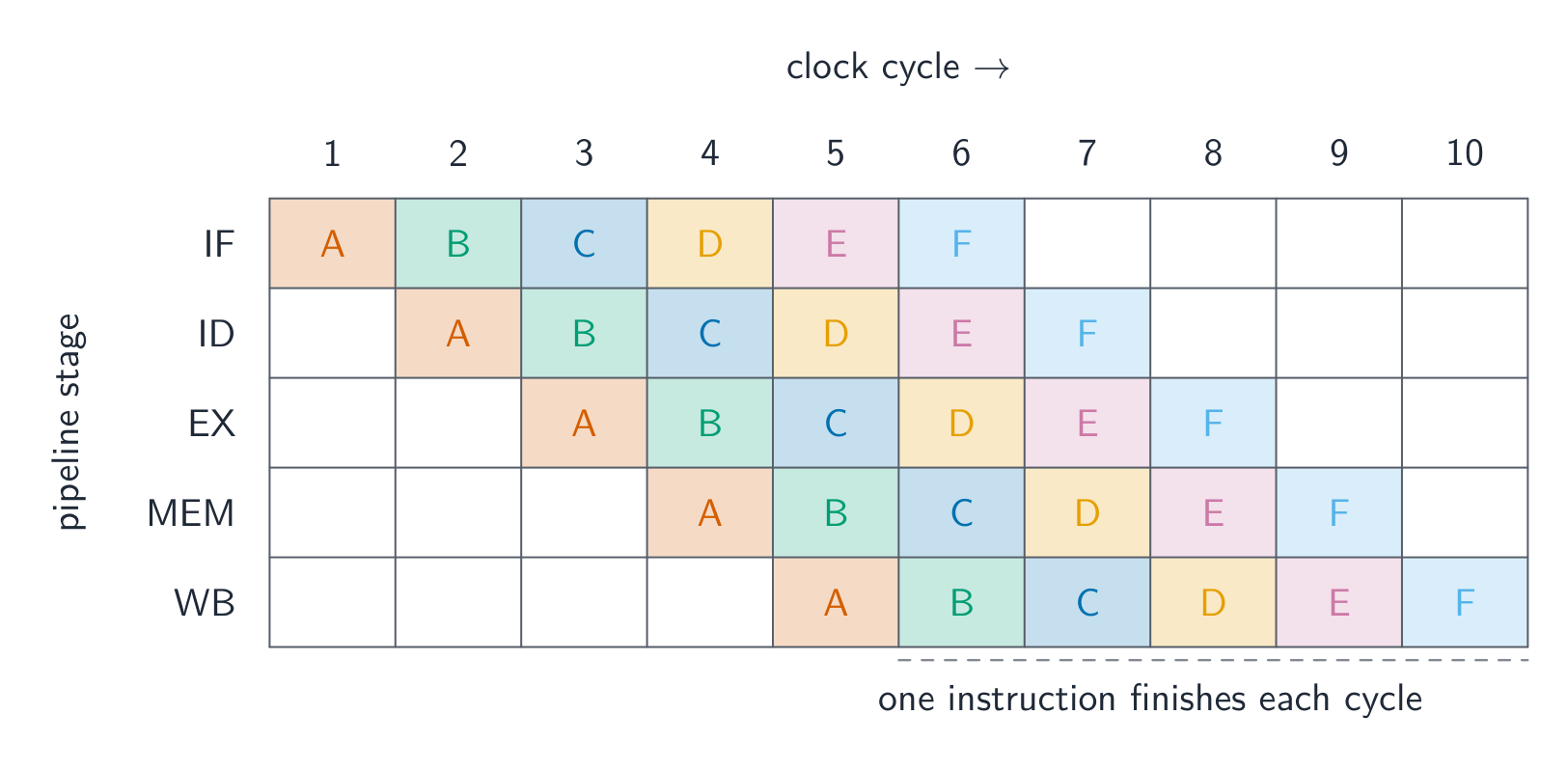
    CISC

    CISC (Complex Instruction Set Computers) มี คำสั่งมากมาย มักจะซับซ้อน (คำสั่งหนึ่งอาจทำการเข้าถึงหน่วยความจำและการดำเนินการได้หลายครั้ง) มีความ ยาวไม่คงที่ ทำให้การถอดรหัสมีความซับซ้อน ทำได้มากกว่าต่อหนึ่งคำสั่งผ่านฮาร์ดแวร์ ตัวอย่าง: Intel x86

    RISC

    RISC (Reduced Instruction Set Computers) มี ชุดคำสั่งน้อยแต่เรียบง่าย แต่ละคำสั่งทำงานพื้นฐานเพียงอย่างหนึ่ง มีความ ยาวคงที่ (ถอดรหัสได้เร็ว) มีเพียงคำสั่ง โหลด และ จัดเก็บ เท่านั้นที่เข้าถึงหน่วยความจำ ส่วนที่เหลือเป็น รีจิสเตอร์ กับ รีจิสเตอร์ โปรแกรมมีขนาดใหญ่ขึ้นแต่แต่ละคำสั่งรวดเร็วและคาดการณ์ได้ เหมาะกับการทำ Pipelining ตัวอย่าง: ARM, RISC-V

    คุณสมบัติ CISC RISC
    ชุดคำสั่ง มาก น้อย
    ความยาวคำสั่ง ไม่คงที่ คงที่
    การเข้าถึงหน่วยความจำ คำสั่งมากมาย เฉพาะโหลด/จัดเก็บ
    เหมาะกับ Pipeline ยาก โดยธรรมชาติ
    วัฏจักรต่อคำสั่ง เปลี่ยนแปลง ปกติ 1

    ข้อแลกเปลี่ยนคือการทำ ได้มากกว่าต่อหนึ่งคำสั่ง (CISC) เทียบกับการทำแต่ละคำสั่ง เร็วและคาดการณ์ได้มากขึ้น (RISC) ชิป Intel รุ่นใหม่แปลคำสั่ง CISC เป็น micro-ops ที่เรียบง่ายคล้าย RISC ภายใน

    "ระบุคุณสมบัติของโปรเซสเซอร์ RISC จำนวนสี่ประการ" สี่ประการใดก็ได้จาก: ชุดคำสั่งน้อย แต่ เรียบง่าย; คำสั่งมีความ ยาวคงที่ (หนึ่งคำ); คำสั่งส่วนใหญ่เสร็จสิ้นใน หนึ่งวัฏจักรนาฬิกา; มี รีจิสเตอร์ ใช้งานทั่วไป จำนวนมาก; มีเพียงคำสั่ง โหลดและจัดเก็บ เท่านั้นที่เข้าถึงหน่วยความจำ (การคำนวณทางคณิตศาสตร์ทั้งหมดระหว่างรีจิสเตอร์กับรีจิสเตอร์); ระบบควบคุมแบบ ฮาร์ดไวร์ด (ไม่มีไมโครโค้ด); ออกแบบมาเพื่อ Pipelining; คอมไพเลอร์ ทำงานมากขึ้น ดังนั้นโปรแกรมจึงมีคำสั่งมากและใช้หน่วยความจำมากขึ้น "ระบุคุณสมบัติของโปรเซสเซอร์ CISC จำนวนสี่ประการ" สี่ประการใดก็ได้จาก: ชุดคำสั่งใหญ่ หลายคำสั่ง ซับซ้อน (คำสั่งหนึ่งอาจทำได้หลายการดำเนินการ); คำสั่งมีความ ยาวไม่คงที่; คำสั่งที่ใช้เวลา หลายวัฏจักร; มี รีจิสเตอร์ น้อยกว่า; คำสั่งสามารถ เข้าถึงหน่วยความจำโดยตรง; ระบบควบคุมแบบ ไมโครโปรแกรม(); ไม่เหมาะเท่าสำหรับ Pipelining; โปรแกรมสั้นลง ดังนั้นคอมไพเลอร์จึงง่ายและใช้หน่วยความจำน้อยลง "อธิบายความหมายของ RISC และ CISC" (คะแนนละสอง): ชื่อคำย่อและแนวคิดกำหนดลักษณะ (คำสั่ง đơnวัฏจักรเรียบง่ายจำนวนน้อย; คำสั่งหลายวัฏจักรซับซ้อนจำนวนมาก)

    การจัดการ Interrupt ในทั้งสองสถาปัตยกรรม บนโปรเซสเซอร์ CISC คำสั่งปัจจุบันไม่ว่าจะซับซ้อนแค่ไหนจะ เสร็จสมบูรณ์ ก่อนที่จะจัดการ Interrupt โปรเซสเซอร์จะบันทึกเนื้อหาในรีจิสเตอร์ (รวม Program Counter) ลงบน Stack แล้ว跳转ไปยัง Service Routine และคืนค่ารีจิสเตอร์หลังจากนั้น บนโปรเซสเซอร์ RISC ที่มี Pipeline คำสั่งหลายตัวกำลังดำเนินการอยู่ครึ่งทางเมื่อ Interrupt arrival มาถึง โปรเซสเซอร์จึงต้องให้ทุกคำสั่งใน Pipeline เสร็จสิ้น หรือ ทิ้ง (flush) คำสั่งที่ดำเนินการไปแล้วบางส่วนแล้วเริ่มใหม่หลังจัดการ Interrupt ไม่ว่ากรณีใด Pipeline จะว่างเปล่า รีจิสเตอร์จะถูกบันทึก และ Service Routine จะทำงาน รูปแบบคำถามสอบ: "Pipelining ทำให้การจัดการ Interrupt ซับซ้อนขึ้น เพราะเนื้อหาใน Pipeline ต้องได้รับการจัดการก่อนที่ Interrupt จะสามารถบริการได้"

    Vocabulary · ⁨คำศัพท์⁩ Train · ⁨ฝึกฝน⁩
    English ไทย
    motherboard/ˈmʌðəbɔːd/ เมนบอร์ด
    CISC/sɪsk/ CISC
    RISC/rɪsk/ RISC
    interrupt/ˈɪntərʌpt/ interrupt
    pipeline/ˈpaɪplaɪn/ พิพไลน์
    15.1

    Pipelining

    English

    A pipeline 流水线 processes instructions in overlapping stages, like an assembly line: Fetch → Decode → Execute (in the ALU 算术逻辑单元) → Memory access → Write back. Each stage works on a different instruction at once, so once the pipeline is full, one instruction completes per cycle. RISC's fixed-length, simple instructions make every stage take the same time. A pipeline can stall on a hazard 冒险 — a data hazard (an instruction needs a result not ready yet) or a control hazard (a branch makes the next address unknown).

    RISC chips keep data in many registers because memory is slow and registers are fast; the compiler allocates values to registers wisely.

    "Describe the use of pipelining in RISC processors" (three marks). (1) The fetch–execute cycle is divided into stages (fetch, decode, execute, memory access, write back); (2) several instructions are in the pipeline at once, each at a different stage, so while one is being executed the next is being decoded and the one after fetched; (3) a new instruction is started, and one completed, in every clock cycle once the pipeline is full, which increases throughput 吞吐量 (the number of instructions completed per second), although each instruction still takes the same time on its own. Fixed-length single-cycle RISC instructions are what make the stages equal and the pipeline possible.

    Worked example. A processor uses five pipeline stages (IF, ID, OF, EX, WB). Four instructions enter the pipeline one after another. In which cycle does the last instruction complete, and how many cycles would the four take without pipelining?

    Instruction 1 occupies IF in cycle 1, ID in 2, OF in 3, EX in 4 and WB in 5; instruction 2 starts one cycle later and finishes in cycle 6; instruction 3 in cycle 7; instruction 4 in cycle 8. In general $n$ instructions through $k$ stages take $n + k - 1$ cycles, here $4 + 5 - 1 = 8$. Without pipelining each instruction takes all five cycles before the next starts: $4 \times 5 = 20$ cycles. The exam's table is filled by writing each instruction's stages diagonally, one column to the right of the previous instruction.

    A processor running this fast gives off a lot of heat, so a heat-sink 散热器 and fan sit on top of it. The metal fins spread the heat and the fan blows it away, keeping the CPU cool enough to work.

    ไทย

    Pipeline ประมวลผลคำสั่งใน ขั้นตอนที่ซ้อนทับกัน เหมือนสายการผลิต: ดึงข้อมูล → ถอดรหัส → ดำเนินการ (ใน ALU) → เข้าถึงหน่วยความจำ → เขียนกลับ แต่ละขั้นตอนทำงานกับคำสั่งที่แตกต่างกันพร้อมกัน ดังนั้นเมื่อ Pipeline เต็ม จะมี คำสั่งหนึ่งเสร็จสิ้นต่อวัฏจักร คำสั่งความยาวคงที่และเรียบง่ายของ RISC ทำให้ทุกขั้นตอนใช้เวลาเท่ากัน Pipeline อาจหยุดชะงักเมื่อเกิด Hazard — Data Hazard (คำสั่งต้องการผลลัพธ์ที่ยังไม่พร้อม) หรือ Control Hazard (Branch ทำให้ที่อยู่ถัดไปไม่ทราบ)

    กราฟ Gantt ของ 5 ขั้นตอน pipeline IF, ID, EX, MEM, WB ตลอด 10 วัฏจักรนาฬิกา พร้อมคำสั่ง A ถึง F จำนวน 6 คำสั่งที่ถูกเลื่อนออกทีละวัฏจักรเพื่อซ้อนทับกันในแนวทแยง *Pipelining ซ้อนทับขั้นตอนของคำสั่งหกคำสั่ง ทำให้มีคำสั่งหนึ่งเสร็จสิ้นต่อวัฏจักร

    ชิป RISC เก็บข้อมูลใน รีจิสเตอร์จำนวนมาก เพราะหน่วยความจำช้าและรีจิสเตอร์เร็ว คอมไพเลอร์จึงจัดสรรค่าให้รีจิสเตอร์อย่างชาญฉลาด

    "อธิบายการใช้ Pipelining ในโปรเซสเซอร์ RISC" (สามคะแนน) (1) วัฏจักรดึง-ดำเนินการถูกแบ่งออกเป็นขั้นตอน (ดึง, ถอดรหัส, ดำเนินการ, เข้าถึงหน่วยความจำ, เขียนกลับ); (2) คำสั่งหลายตัว อยู่ใน Pipeline พร้อมกัน แต่ละตัวอยู่ที่ ขั้นตอนต่างกัน ดังนั้นในขณะที่คำสั่งหนึ่งกำลังดำเนินการ คำสั่งถัดไปกำลังถูกถอดรหัส และคำสั่งถัดไปกำลังถูกดึง; (3) เมื่อ Pipeline เต็ม จะมีคำสั่งใหม่เริ่มต้นและคำสั่งหนึ่งเสร็จสิ้นใน ทุกวัฏจักรนาฬิกา ซึ่งเพิ่ม Throughput (จำนวนคำสั่งที่เสร็จสิ้นต่อวินาที) แม้แต่ละคำสั่งจะใช้เวลาเท่าเดิมเมื่อทำงานแยกต่างหาก คำสั่ง RISC ความยาวคงที่และหนึ่งวัฏจักรคือสิ่งที่ทำให้ขั้นตอนเท่ากันและทำให้ Pipeline เป็นไปได้

    ตัวอย่างฝึกฝน โปรเซสเซอร์ใช้ 5 ขั้นตอน Pipeline (IF, ID, OF, EX, WB) คำสั่งสี่ตัวเข้าสู่ Pipeline ตามลำดับ คำสั่งสุดท้ายจะเสร็จสิ้นในวัฏจักรที่เท่าไหร่ และหากไม่มี Pipeline คำสั่งทั้งสี่จะใช้เวลากี่วัฏจักร?

    คำสั่ง 1 เข้า IF ในรอบ 1, ID ใน 2, OF ใน 3, EX ใน 4 และ WB ใน 5; คำสั่ง 2 เริ่มช้าลงหนึ่งรอบและเสร็จสิ้นในรอบ 6; คำสั่ง 3 ในรอบ 7; คำสั่ง 4 ในรอบ 8. โดยทั่วไป คำสั่ง $n$ ผ่าน $k$ ขั้นตอน ใช้เวลา $n + k - 1$ รอบ ที่นี่คือ $4 + 5 - 1 = 8$. หากไม่มี Pipelining คำสั่งแต่ละตัวต้องใช้ทั้งห้ารอบก่อนคำสั่งถัดไปจะเริ่ม: $4 \times 5 = 20$ รอบ. ตารางในข้อสอบจะเติมได้โดยการเขียนขั้นตอนของแต่ละคำสั่งแบบทแยงมุม คอลัมน์ถัดไปทางขวาของคำสั่งก่อนหน้า

    โปรเซสเซอร์ที่ทำงานด้วยความเร็วสูงนี้จะเกิดความร้อนมาก ดังนั้น ฮีตซิงก์และพัดลมจึงวางอยู่ด้านบน ฟินโลหะช่วยกระจายความร้อนและพัดลมเป่าความร้อนออกไป ทำให้ CPU เย็นพอที่จะทำงานได้

    เครื่องทำความเย็น CPU แบบ Tower มีพัดลมสีดำด้านหน้า, สnown ของฟินโลหะระบายความร้อนสูงเรียงซ้อนกัน, และท่อทองแดงนำความร้อนวิ่งขึ้นมาจากฐานแบนที่สัมผัสกับโปรเซสเซอร์
    ฮีตซิงก์และพัดลมของ CPU ทำหน้าที่พาความร้อนออกจากโปรเซสเซอร์
    Explore · ⁨สำรวจ⁩

    How pipelining fills up · ⁨การ ? เติมเต็ม⁩

    Step through the clock cycles. Once the pipeline is full, a new instruction finishes every cycle — even though each one still takes several stages — because the stages of different instructions overlap. · ⁨ดูขั้นตอนรอบนาฬิกา: เมื่อ ? เต็มแล้ว คำสั่งใหม่จะเสร็จสิ้นทุก ๆ รอบนาฬิกา — แม้ว่าจะใช้เวลาหลายขั้นตอน — เนื่องจากขั้นตอนของคำสั่งที่ต่างกันซ้อนทับกัน⁩

    Vocabulary · ⁨คำศัพท์⁩ Train · ⁨ฝึกฝน⁩
    English ไทย
    ALU/ˌeɪ el ˈjuː/ ALU
    hazard/ˈhæzəd/ อันตราย
    throughput/ˈθruːpʊt/ ปริมาณงานผ่าน
    heat-sink/hiːt sɪŋk/ ฮีตซิงค์
    Flynn's taxonomy/flɪnz tækˈsɒnəmi/ Classification ของ Flynn
    15.1

    Flynn's taxonomy · ⁨ทฤษฎีบทของแฟลนนี่⁩

    English

    Flynn's taxonomy 弗林分类 sorts computers by the number of instruction and data streams:

    • SISD — one instruction, one data stream (a traditional single core).
    • SIMD 单指令多数据 — one instruction works on many data items at once (GPUs, CPU vector extensions). Great for images, video, scientific arrays.
    • MISD — several operations on the same data; rare, mostly theoretical.
    • MIMD 多指令多数据 — many processors run different instructions on different data (multi-core CPUs, clusters). The most general.

    Describing the four architectures (two marks each). SISD: a single processor executes one instruction at a time on one item of data; no parallelism, the traditional von Neumann machine. SIMD: one instruction is applied simultaneously to many data items, by many processing elements acting in step; used for array and graphics processing. MISD: several processors apply different instructions to the same data; rarely used, for example a fault-tolerant system where several processors check one stream. MIMD: many processors, each executing its own instructions on its own data, independently; the multi-core computer and the cluster.

    A graphics card 显卡 (with its GPU) is a real example of SIMD hardware: it has thousands of small cores that run the same instruction on many pixels or numbers at once, which is why GPUs are so fast for images, video and machine learning.

    ไทย

    ทฤษฎีบทของแฟลนนี่ จัดกลุ่มคอมพิวเตอร์ตามจำนวนสตรีมคำสั่งและสตรีมข้อมูล:

    • SISD — สตรีมคำสั่งหนึ่ง สตรีมข้อมูลหนึ่ง (แกนเดียวแบบดั้งเดิม).
    • SIMD — สตรีมคำสั่งหนึ่งทำงานกับ ข้อมูลจำนวนมากพร้อมกัน (GPUs, การต่อขยายเวกเตอร์ของ CPU) เหมาะสำหรับภาพ วิดีโอ และ arreglo ทางวิทยาศาสตร์.
    • MISD — หลายการดำเนินการบนข้อมูลเดียวกัน; นادر, ส่วนใหญ่เป็นทฤษฎี.
    • MIMD —许多 processors ทำงาน คำสั่งที่แตกต่างกันบนข้อมูลที่ต่างกัน (CPU multi-core, clusters). เป็นรูปแบบที่กว้างที่สุด.

    อธิบายสถาปัตยกรรมทั้งสี่ (ข้อละ 2 คะแนน). SISD: โปรเซสเซอร์เดียว รัน คำสั่งหนึ่งต่อครั้ง กับ ข้อมูลหนึ่งรายการ; ไม่มีการประมวลผลแบบขนาน, เครื่อง von Neumann แบบดั้งเดิม. SIMD: คำสั่งหนึ่ง ถูกนำไปใช้กับ ข้อมูลหลายรายการ พร้อมกัน โดยใช้หน่วยประมวลผลหลายหน่วยทำงานร่วมกัน; ใช้สำหรับการประมวลผล array และกราฟิก. MISD: หลายโปรเซสเซอร์ นำ คำสั่งที่แตกต่างกัน ไปใช้กับ ข้อมูลเดียวกัน; นادرใช้ เช่น ระบบทนต่อความผิดพลาดที่หลายโปรเซสเซอร์ตรวจสอบสตรีมเดียว. MIMD: หลายโปรเซสเซอร์, แต่ละตัวรัน คำสั่งของตัวเอง กับ ข้อมูลของตัวเอง อย่างอิสระ; คอมพิวเตอร์ multi-core และ cluster.

    หน่วยควบคุมเดียวส่งสตรีมคำสั่งไปยังหน่วยประมวลผลสี่หน่วย โดยแต่ละหน่วยทำงานกับข้อมูลของตนเอง
    SIMD: หลายโปรเซสเซอร์รันคำสั่งเดียวกันบนข้อมูลต่างกัน

    การ์ดกราฟิก (ที่มี GPU) เป็นตัวอย่างจริงของฮาร์ดแวร์ SIMD: มันมีแกนเล็กๆ จำนวนนับพันที่รันคำสั่งเดียวกันกับพิกเซลหรือตัวเลขจำนวนมากพร้อมกัน นี่คือเหตุผลที่ GPUs เร็วมากสำหรับภาพ วิดีโอ และการเรียนรู้ของเครื่อง

    การ์ดกราฟิกบนพื้นหลังสีขาว แสดงพัดลมระบายความร้อนขนาดใหญ่เหนือ GPU และขั้วต่อทองคำที่เสียบเข้ากับเมนบอร์ด
    การ์ดจอ: GPU ของมันทำงานคำสั่งเดียวกันกับข้อมูลหลายรายการพร้อมกัน (SIMD)
    โปรเซสเซอร์อิสระสี่ตัว แต่ละตัวรับสายการ指令จากด้านบนและข้อมูลแต่ละรายการจากด้านล่างแยกต่างหาก
    MIMD: โปรเซสเซอร์แต่ละตัวทำงานด้วยคำสั่งของตัวเองบนข้อมูลของตัวเอง
    Vocabulary · ⁨คำศัพท์⁩ Train · ⁨ฝึกฝน⁩
    English ไทย
    SIMD/ˈsɪmdiː/ SIMD
    MIMD/ˈmɪmdiː/ MIMD
    graphics card/ˈɡræfɪks kɑːd/ การ์ดกราฟิก
    massively parallel/ˈmæsɪvli ˈpærəlel/ แบบขนานมาก
    distributed memory/ˈdɪstrɪbjuːtɪd ˈmeməri/ หน่วยความจำแบบกระจาย
    15.1

    Massively parallel computers · ⁨คอมพิวเตอร์แบบขนานระดับมหาศาล⁩

    English

    A massively parallel 大规模并行 system uses thousands of processors on a fast network, each with its own memory (distributed memory 分布式内存), exchanging data by messages. It is MIMD, needs specially-written software (MPI, CUDA), and suits climate simulation, large machine learning 机器学习 training, and astrophysics. The largest supercomputers 超级计算机 are massively parallel.

    "Outline the characteristics of massively parallel computers" (three marks). A very large number of processors (thousands), each with its own memory, connected by a network (a high-speed interconnect or bus) so that they can pass messages to one another; they work simultaneously on parts of the same problem, so the problem must be written as a program that can be split into parts that run in parallel and combine their results. It is an MIMD arrangement.

    The processors live in tall server 服务器 racks, often filling a whole room (a data centre 数据中心), wired together so they can work on one big problem at the same time.

    ไทย

    ระบบ แบบขนานระดับมหาศาล ใช้ โปรเซสเซอร์นับพันตัว บนเครือข่ายความเร็วสูง โดยแต่ละตัวมีหน่วยความจำของตนเอง (หน่วยความจำแบบกระจาย), แลกเปลี่ยนข้อมูลผ่านข้อความ มันเป็น MIMD ต้องใช้ซอฟต์แวร์ที่เขียนเฉพาะ (MPI, CUDA) เหมาะสำหรับการจำลองสภาพภูมิอากาศ การฝึกสอน machine learning ขนาดใหญ่ และดาราศาสตร์ ซูเปอร์คอมพิวเตอร์ ที่ใหญ่ที่สุดล้วนเป็นแบบขนานระดับมหาศาล

    "อธิบายลักษณะของคอมพิวเตอร์แบบขนานระดับมหาศาล (สามคะแนน)." มี โปรเซสเซอร์จำนวนมากมาก (นับพันตัว), แต่ละตัวมีหน่วยความจำของตนเอง, เชื่อมต่อกันด้วย เครือข่าย (อินเตอร์คอนเนกต์ความเร็วสูงหรือบัส) เพื่อให้สามารถส่ง ข้อความ ถึงกันได้; ทำงาน พร้อมกัน กับส่วนต่างๆ ของ ปัญหาเดียวกัน ดังนั้นปัญหานั้นต้องถูกเขียนเป็นโปรแกรมที่สามารถแบ่งออกเป็นส่วนๆ ที่รันแบบขนานและรวมผลลัพธ์เข้าด้วยกัน เป็นโครงสร้างแบบ MIMD

    โปรเซสเซอร์อยู่ในตู้ เซิร์ฟเวอร์ สูงๆ มักจะเต็มทั้งห้อง ( ศูนย์ข้อมูล), เชื่อมต่อสายกันเพื่อให้สามารถทำงานกับปัญหาใหญ่หนึ่ง问题时พร้อมกัน

    แถวยาวของตู้เซิร์ฟเวอร์สีดำบนพื้นสีขาวยกสูงในศูนย์ข้อมูล อัดแน่นไปด้วยอุปกรณ์และสายเคเบิล
    แถวเซิร์ฟเวอร์ในศูนย์ข้อมูล เหมือนกับที่ใช้สำหรับคอมพิวเตอร์แบบขนานระดับมหาศาล
    Vocabulary · ⁨คำศัพท์⁩ Train · ⁨ฝึกฝน⁩
    English ไทย
    machine learning/məˈʃiːn ˈlɜːnɪŋ/ การเรียนรู้ของเครื่อง
    supercomputers/ˌsuːpəkəmˈpjuːtəz/ ซูเปอร์คอมพิวเตอร์
    server/ˈsɜːvə/ เซิร์ฟเวอร์
    data centre/ˈdeɪtə ˈsentə/ ศูนย์ข้อมูล
    15.1

    Virtual machines · ⁨เครื่องเสมือน⁩

    English

    A virtual machine 虚拟机 (VM) is a software emulation of a whole computer — the software inside sees a CPU, memory and disks that look real but are managed by host software.

    • a system VM runs a complete OS. A hypervisor 虚拟机监控器 creates and manages VMs, each booting its own guest OS. Uses: run different OSes on one machine; server consolidation; sandboxing 沙箱 (risky software runs isolated); snapshots.
    • a process (language) VM runs one program in portable bytecode 字节码 — the JVM (Java), the CLR (.NET), CPython. Benefits: portability ("write once, run anywhere"), runtime safety checks, and just-in-time compilation 即时编译 for near-native speed. The cost is an extra layer and needing the VM installed.

    "Describe what is meant by a virtual machine" (two marks). A software emulation (implementation) of a computer system that runs on a host computer and behaves, to the programs running inside it, like a separate physical computer with its own processor, memory and storage. The host operating system 宿主操作系统 runs on the actual hardware, manages the real resources and (through the hypervisor) creates and controls the virtual machines; each guest operating system 客户操作系统 runs inside a virtual machine, manages the applications in it, and is unaware that its hardware is virtual.

    Benefits (give two). Several different operating systems can run on one machine at the same time; software can be tested on many systems without buying the hardware; a new computer system can be emulated and tried before it is built; each VM is isolated, so a crash or malware in one does not affect the host or the others; VMs can be copied, moved and backed up as files, and a server can be shared between many users, reducing hardware cost. Limitations (give two). A VM runs more slowly than the real hardware because every instruction passes through the emulation layer; it consumes the host's memory and processing power, so the host must be powerful; some hardware features or devices are not emulated exactly, so the tested software may behave differently on the real machine; licences are needed for each guest OS, and setting the system up needs expertise.

    ไทย

    เครื่องเสมือน (VM) คือ การจำลองคอมพิวเตอร์ทั้งเครื่องด้วยซอฟต์แวร์ — ซอฟต์แวร์ด้านในเห็น CPU หน่วยความจำ และดิสก์ที่ดูเหมือนจริงแต่ถูกจัดการโดยซอฟต์แวร์โฮสต์

    • system VM รัน OS แบบสมบูรณ์ hypervisor สร้างและจัดการ VM แต่ละตัวบูต guest OS ของตัวเอง ใช้: รัน OS ต่างๆ บนเครื่องเดียว; รวมเซิร์ฟเวอร์; sandboxing (ซอฟต์แวร์เสี่ยง風險ทำงานแยก**;)**; สแนปช็อต
    • process (language) VM รันโปรแกรมหนึ่งด้วย bytecode ที่พกพาได้ — JVM (Java), CLR (.NET), CPython ประโยชน์: ความสามารถในการพกพา ("เขียนครั้งเดียว รันได้ทุกที่",) การตรวจสอบความปลอดภัยขณะรัน, และ just-in-time compilation เพื่อความเร็วใกล้เคียง native ค่าใช้จ่ายคือชั้นเพิ่มอีกชั้นหนึ่งและความจำเป็นต้องติดตั้ง VM
    Stack ของเครื่องเสมือน: ฮาร์ดแวร์ทางกายภาพด้านล่าง, ระบบปฏิบัติการโฮสต์อยู่ข้างบน, ตามด้วย hypervisor, และด้านบนนั้นคือเครื่องเสมือนสามเครื่อง แต่ละเครื่องมี guest operating system พร้อมแอปพลิเคชันของตนเอง
    คอมพิวเตอร์จริงหนึ่งเครื่อง, หลายเครื่อง apparent: ระบบปฏิบัติการโฮสต์และ hypervisor แบ่งปันฮาร์ดแวร์, และแต่ละ guest operating system รันราวกับว่ามีเครื่องของตัวเอง

    "อธิบายความหมายของเครื่องเสมือน (virtual machine)" (2 คะแนน). โปรแกรมจำลองระบบคอมพิวเตอร์ที่ทำงานบนคอมพิวเตอร์โฮสต์ และ behaving กับโปรแกรมที่ทำงานอยู่ภายใน เหมือนกับคอมพิวเตอร์กายภาพแยกต่างหากที่มีหน่วยประมวลผล หน่วยความจำ และการจัดเก็บข้อมูลของตัวเอง ระบบปฏิบัติการ โฮสต์ ทำงานบนฮาร์ดแวร์จริง จัดการทรัพยากรจริงและ (ผ่าน hypervisor) สร้างและควบคุมเครื่องเสมือน; แต่ละ ระบบปฏิบัติการผู้ใช้งาน (guest) ทำงานอยู่ในเครื่องเสมือน จัดการแอปพลิเคชันในนั้น และไม่รู้ว่าฮาร์ดแวร์ของตนเป็นแบบเสมือน

    ประโยชน์ (ยกตัวอย่างสองข้อ). ระบบปฏิบัติการหลายชนิดสามารถทำงานบนเครื่องเดียวได้ในเวลาเดียวกัน; ซอฟต์แวร์สามารถ ทดสอบ บนหลายระบบโดยไม่ต้องซื้อฮาร์ดแวร์; ระบบคอมพิวเตอร์ ใหม่ สามารถจำลองและทดลองได้ก่อนสร้าง;每台 VM เป็น แยกกัน (isolated), ดังนั้นความล้มเหลวหรือมัลแวร์ในเครื่องหนึ่งจะไม่กระทบต่อโฮสต์หรือเครื่องอื่น; VM สามารถ คัดลอก ย้าย และสำรองข้อมูล เป็นไฟล์ และเซิร์ฟเวอร์สามารถแชร์ให้ผู้ใช้หลายคนใช้共同, ลดค่าใช้จ่ายด้านฮาร์ดแวร์. ข้อจำกัด (ยกตัวอย่างสองข้อ). VM ทำงาน ช้ากว่า ฮาร์ดแวร์จริงเพราะทุกคำสั่งต้องผ่านชั้นจำลอง; ใช้ หน่วยความจำและกำลังประมวลผล ของโฮสต์, ดังนั้นโฮสต์ต้องมีประสิทธิภาพสูง; บางคุณสมบัติหรืออุปกรณ์ฮาร์ดแวร์ ไม่ถูกจำลอง อย่างแม่นยำ,ดังนั้นซอฟต์แวร์ที่ทดสอบอาจ behave ต่างจากเครื่องจริง; ต้องมี ใบอนุญาต สำหรับแต่ละระบบปฏิบัติการผู้ใช้งาน และการตั้งค่าระบบต้องการความรู้ความเชี่ยวชาญ.

    Explore · ⁨สำรวจ⁩

    Computing concept lab · ⁨ห้องปฏิบัติการแนวคิดการคำนวณ⁩

    Classify concrete examples by the computing idea they demonstrate. · ⁨จัดกลุ่มตัวอย่างที่เป็นรูปธรรมตาม idea การคำนวณที่แสดงออก⁩

    Vocabulary · ⁨คำศัพท์⁩ Train · ⁨ฝึกฝน⁩
    English ไทย
    virtual machine/ˈvɜːtʃuːəl məˈʃiːn/ virtual machine
    hypervisor/ˌhaɪpəˈvaɪzə/ hypervisor
    sandboxing/ˈsændbɒksɪŋ/ การ Sandbox
    bytecode/ˈbaɪtkəʊd/ 字节码
    just-in-time compilation/dʒʌst ɪn taɪm ˌkɒmpɪˈleɪʃn/ just-in-time compilation
    host operating system/həʊst ˈɒpəreɪtɪŋ ˈsɪstəm/ ระบบปฏิบัติการโฮสต์
    guest operating system/ɡest ˈɒpəreɪtɪŋ ˈsɪstəm/ ระบบปฏิบัติการผู้รับ
    15.2

    Boolean algebra · ⁨บูลีนพีชคณิต⁩

    Syllabus · ⁨หลักสูตร⁩
    English
    Candidates should be able to: Notes and guidance
    Produce truth tables for logic circuits including half adders and full adders May include logic gates with more than two inputs
    Show understanding of a flip-flop (SR, JK) Draw a logic circuit and derive a truth table for a flip-flop Understand of the role of flip-flops as data storage elements
    Show understanding of Boolean algebra Understand De Morgan’s laws Perform Boolean algebra using De Morgan’s laws Simplify a logic circuit/expression using Boolean algebra
    Show understanding of Karnaugh maps (K-map) Understand of the benefits of using Karnaugh maps Solve logic problems using Karnaugh maps
    ไทย
    ผู้เข้าสอบควรสามารถ: หมายเหตุและคำแนะนำ
    สร้าง ตารางความจริง สำหรับวงจรตรรกะ ซึ่งรวมถึง ** HALF ADDERS** และ FULL ADDERS อาจรวมประตูตรรกะที่มีอินพุตมากกว่าสองทาง
    แสดงความเข้าใจ关于 ฟลิป-ฟลอป (flip-flop) (SR, JK) วาดวงจรตรรกะและสร้าง ตารางความจริง สำหรับ ฟลิป-ฟลอป เข้าใจบทบาทของ ฟลิป-ฟลอป ในฐานะองค์ประกอบจัดเก็บข้อมูล
    แสดงความเข้าใจ关于 布尔代数 (Boolean algebra) เข้าใจ กฎของเดมอร์گان (De Morgan’s laws) ทำการคำนวณด้วย 布尔代数 โดยใช้ กฎของเดมอร์گان ลดทอนวงจรหรือนิพจน์ตรรกะโดยใช้ 布尔代数
    แสดงความเข้าใจ关于 แผนที่คาร์นัฟ (Karnaugh maps / K-map) เข้าใจข้อดีของการใช้ แผนที่คาร์นัฟ แก้ปัญหาตรรกะโดยใช้ แผนที่คาร์นัฟ

    Source: Cambridge International syllabus · ⁨แหล่งที่มา: หลักสูตร Cambridge International⁩

    English
    The half adder: XOR + AND add two bits

    Boolean algebra 布尔代数 simplifies Boolean 布尔 expressions, which can equally be described by truth tables 真值表. Symbols: + for OR, · for AND (often omitted), an overbar for NOT.

    Key laws include commutative, associative and distributive (as in ordinary algebra), plus:

    • identity $A + 0 = A$, $A \cdot 1 = A$; null $A + 1 = 1$, $A \cdot 0 = 0$.
    • idempotent $A + A = A$; inverse $A + \overline{A} = 1$, $A \cdot \overline{A} = 0$.
    • De Morgan's laws 德摩根定律: $(A + B)' = A' \cdot B'$; $(A \cdot B)' = A' + B'$ — negate the whole, swap AND/OR, negate each operand.
    • absorption 吸收律: $A + AB = A$.

    Simplifying reduces the number of terms, so the resulting logic circuit has fewer gates. Example: $Z = AB + A\overline{B} = A(B + \overline{B}) = A$.

    The laws with their names (quote the name at each step when "show all working" is asked).

    Law OR form AND form
    identity $A + 0 = A$ $A \cdot 1 = A$
    null (annulment) $A + 1 = 1$ $A \cdot 0 = 0$
    idempotent $A + A = A$ $A \cdot A = A$
    complement (inverse) $A + \overline{A} = 1$ $A \cdot \overline{A} = 0$
    commutative $A + B = B + A$ $A \cdot B = B \cdot A$
    associative $A + (B + C) = (A + B) + C$ $A(BC) = (AB)C$
    distributive $A + BC = (A + B)(A + C)$ $A(B + C) = AB + AC$
    absorption $A + AB = A$ $A(A + B) = A$
    De Morgan $\overline{A + B} = \overline{A} \cdot \overline{B}$ $\overline{A \cdot B} = \overline{A} + \overline{B}$
    double negation $\overline{\overline{A}} = A$

    Worked example. Simplify $X = \overline{\overline{(A \cdot B)} \cdot \overline{(A + B)}}$, showing all working.

    $X = \overline{\overline{(A \cdot B)}} + \overline{\overline{(A + B)}}$ (De Morgan on the outer bar) $= A \cdot B + A + B$ (double negation) $= A + B$ (absorption, $A + AB = A$, applied with $A + B$ absorbing $AB$).

    Worked example. Simplify $(\overline{A + B}) \cdot (\overline{A} + B)$.

    $= \overline{A} \cdot \overline{B} \cdot (\overline{A} + B)$ (De Morgan) $= \overline{A}\,\overline{B}\,\overline{A} + \overline{A}\,\overline{B}\,B$ (distributive) $= \overline{A}\,\overline{B} + 0$ (idempotent, complement) $= \overline{A}\,\overline{B}$.

    Worked example. Simplify $Y = \overline{A}\,\overline{B}\,\overline{C} + \overline{A}\,\overline{B}\,C + A\,\overline{B}\,C$.

    $= \overline{A}\,\overline{B}(\overline{C} + C) + A\,\overline{B}\,C$ (distributive) $= \overline{A}\,\overline{B} + A\,\overline{B}\,C$ (complement, identity) $= \overline{B}(\overline{A} + AC)$ (distributive) $= \overline{B}(\overline{A} + C)$, using $\overline{A} + AC = (\overline{A} + A)(\overline{A} + C) = \overline{A} + C$. Applying De Morgan to a three-input term works the same way: $\overline{A + B + C} = \overline{A} \cdot \overline{B} \cdot \overline{C}$.

    Sum-of-products from a truth table. Take every row whose output is 1, write the AND of its inputs (a variable barred where it is 0), and OR the terms: a row with $A = 1, B = 0, C = 1$ gives $A\,\overline{B}\,C$. This is the sum-of-products 积之和 form the exam asks for, and it is the starting point for both algebraic simplification and the Karnaugh map.

    ไทย
    Half Adder: XOR + ADD บวกบิตสองตัว

    布尔พีชคณิต ช่วยทำให้ 布尔 expresión สั้นลง,ซึ่งสามารถอธิบายได้ด้วย ตารางความจริง. สัญลักษณ์: + สำหรับ OR, · สำหรับ AND (มักถูกละไว้), เส้นท่อนบนสำหรับ NOT.

    กฎสำคัญรวมถึงกฎการสลับตำแหน่ง การรวมกลุ่ม และการกระจาย (เหมือนพีชคณิตทั่วไป) plus:

    • identity $A + 0 = A$, $A \cdot 1 = A$; null $A + 1 = 1$, $A \cdot 0 = 0$.
    • idempotent $A + A = A$; inverse $A + \overline{A} = 1$, $A \cdot \overline{A} = 0$.
    • De Morgan's laws: $(A + B)' = A' \cdot B'$; $(A \cdot B)' = A' + B'$ — negate ทั้งส่วน, สลับ AND/OR, negate ตัวประกอบแต่ละตัว.
    • absorption: $A + AB = A$.

    การทำให้สั้นลงลดจำนวนพจน์,ดังนั้นวงจรตรรกะที่ได้จะมี gate น้อยลง. ตัวอย่าง: $Z = AB + A\overline{B} = A(B + \overline{B}) = A$.

    กฎพร้อมชื่อ (ระบุชื่อเมื่อ "แสดงวิธีทำทั้งหมด" ถูกถาม).

    กฎ รูปแบบ OR รูปแบบ AND
    identity $A + 0 = A$ $A \cdot 1 = A$
    null (annulment) $A + 1 = 1$ $A \cdot 0 = 0$
    idempotent $A + A = A$ $A \cdot A = A$
    complement (inverse) $A + \overline{A} = 1$ $A \cdot \overline{A} = 0$
    commutative $A + B = B + A$ $A \cdot B = B \cdot A$
    associative $A + (B + C) = (A + B) + C$ $A(BC) = (AB)C$
    distributive $A + BC = (A + B)(A + C)$ $A(B + C) = AB + AC$
    absorption $A + AB = A$ $A(A + B) = A$
    De Morgan $\overline{A + B} = \overline{A} \cdot \overline{B}$ $\overline{A \cdot B} = \overline{A} + \overline{B}$
    double negation $\overline{\overline{A}} = A$

    ตัวอย่างที่คำนวณแล้ว. ทำให้ $X = \overline{\overline{(A \cdot B)} \cdot \overline{(A + B)}}$ สั้นลง,แสดงวิธีทำทั้งหมด.

    $X = \overline{\overline{(A \cdot B)}} + \overline{\overline{(A + B)}}$ (De Morgan ที่เส้นท่อนนอก) $= A \cdot B + A + B$ (double negation) $= A + B$ (absorption, $A + AB = A$, ใช้กับ $A + B$ ที่ดูด $AB$).

    ตัวอย่างที่คำนวณแล้ว. ทำให้ $(\overline{A + B}) \cdot (\overline{A} + B)$ สั้นลง.

    $= \overline{A} \cdot \overline{B} \cdot (\overline{A} + B)$ (De Morgan) $= \overline{A}\,\overline{B}\,\overline{A} + \overline{A}\,\overline{B}\,B$ (distributive) $= \overline{A}\,\overline{B} + 0$ (idempotent, complement) $= \overline{A}\,\overline{B}$.

    ตัวอย่างที่คำนวณแล้ว. ทำให้ $Y = \overline{A}\,\overline{B}\,\overline{C} + \overline{A}\,\overline{B}\,C + A\,\overline{B}\,C$ สั้นลง.

    $= \overline{A}\,\overline{B}(\overline{C} + C) + A\,\overline{B}\,C$ (distributive) $= \overline{A}\,\overline{B} + A\,\overline{B}\,C$ (complement, identity) $= \overline{B}(\overline{A} + AC)$ (distributive) $= \overline{B}(\overline{A} + C)$, ใช้ $\overline{A} + AC = (\overline{A} + A)(\overline{A} + C) = \overline{A} + C$. การประยุกต์ใช้ De Morgan กับเทอมสามอินพุตทำงานเหมือนกัน: $\overline{A + B + C} = \overline{A} \cdot \overline{B} \cdot \overline{C}$.

    ผลบวกของผลคูณจากตารางความจริง. นำทุกแถวที่ output เป็น 1,เขียน AND ของ input ของแถวนั้น (ตัวแปรมีเส้นท่อนบนเมื่อเป็น 0),และ OR พจน์们: แถวที่มี $A = 1, B = 0, C = 1$ ให้ $A\,\overline{B}\,C$. นี่คือรูปแบบ ผลบวกของผลคูณ ที่ข้อสอบถามถึง,และเป็นจุดเริ่มต้นของการทำให้สั้นด้วยพีชคณิตและ Karnaugh map.

    Explore · ⁨สำรวจ⁩

    Boolean algebra · ⁨พีชคณิตบูลีน⁩

    A·B, A+B, Ā …

    Boolean algebra is just these gates written as expressions — compare the truth tables. · ⁨พีชคณิตบูลีนก็คือเกตเหล่านี้เขียนเป็นนิพจน์ — เปรียบเทียบตารางความจริง⁩

    Explore · ⁨สำรวจ⁩

    Boolean truth tables · ⁨布尔真值表⁩

    Pick an operator and the inputs to build its truth table — the algebra behind logic circuits. · ⁨选择运算符和输入以构建其 truth table——逻辑电路背后的代数。⁩

    Vocabulary · ⁨คำศัพท์⁩ Train · ⁨ฝึกฝน⁩
    English ไทย
    De Morgan's laws/də ˈmɔːɡənz lɔːz/ กฎของเด摩根
    absorption/əbˈsɔːpʃn/ การดูดซับ
    Karnaugh map/ˈkɑːnɔː mæp/ แผนที่คาร์นัฟ
    half adder/hɑːf ˈædə/ HALF ADDER
    Watch lesson · ⁨ดูบทเรียน⁩
    15.2

    Karnaugh maps · ⁨ตารางคาร์โน⁩

    English

    A Karnaugh map 卡诺图 (K-map) simplifies a Boolean expression by grouping adjacent 1s from a truth table. Columns and rows use Gray code 格雷码 order (00, 01, 11, 10) so adjacent cells differ in one variable.

    Place a 1 in each cell where the output is 1. Find rectangular groups of 1s whose sides are powers of 2 (1, 2, 4, 8), wrapping around edges if it makes a bigger group. The larger the group, the simpler the term: a group of 2 drops one variable, a group of 4 drops two, and so on — variables that change within the group disappear. OR the group terms together for the simplified expression. Cover every 1 using as few, as large, groups as possible.

    Worked example. A Karnaugh map for $A$ and $B$ has 1s in the cells $\overline{A}B$ and $AB$. Simplify. The two 1s are adjacent - they share the $B=1$ column - so group them as a rectangle of 2. Inside that group $B$ stays 1 throughout while $A$ changes from 0 to 1, and any variable that changes within a group disappears. So the group leaves simply $X = B$. Compare that with the sum of products read straight off the table, $\overline{A}B + AB$: the same circuit, two gates fewer. Two rules do most of the work - make each group as large as possible (a group of 2 drops one variable, 4 drops two, 8 drops three), and remember the map wraps around its edges, so the leftmost and rightmost columns are adjacent. That wrap is the grouping most candidates miss.

    Building and reading a K-map. Label the columns $AB$ and the rows $C$ (or $CD$) in Gray-code order 00 01 11 10, so that neighbouring cells differ in one variable only. Put a 1 in every cell whose minterm appears in the expression (or whose truth-table row outputs 1). Then draw the fewest, largest loops that cover every 1: each loop must be a rectangle of $1, 2, 4$ or $8$ cells, loops may overlap, may wrap across the left–right and top–bottom edges, and the four corners together make a loop. For each loop write the variables that are constant inside it (barred if 0), and OR the loop terms: that is the optimal sum-of-products. Why use one? It gives the simplest expression without algebra, in a few steps, with less chance of error, and the same map suits three or four variables.

    Worked example. $Z = \overline{A}\,\overline{B}\,\overline{C} + \overline{A}\,\overline{B}\,C + \overline{A}\,B\,\overline{C} + \overline{A}\,B\,C + A\,\overline{B}\,\overline{C} + A\,\overline{B}\,C$.

    On the three-variable map the 1s fill columns 00, 01 and 10 in both rows. The loop of four over columns 00 and 01 has $A = 0$ throughout and $B$, $C$ both varying: term $\overline{A}$. The loop of four over columns 00 and 10 (wrapping round) has $B = 0$ throughout: term $\overline{B}$. So $Z = \overline{A} + \overline{B}$, which Boolean algebra confirms: $\overline{A}(\overline{B} + B) + \ldots = \overline{A} + \overline{B}$. Two loops of two would also be correct but not optimal; a loop is as large as the 1s allow.

    Worked example (four variables). A map has 1s only in its four corners: $\overline{A}\,\overline{B}\,\overline{C}\,\overline{D}$, $A\,\overline{B}\,\overline{C}\,\overline{D}$, $\overline{A}\,\overline{B}\,C\,\overline{D}$ and $A\,\overline{B}\,C\,\overline{D}$. Because the top and bottom rows are adjacent and so are the outer columns, the corners are one loop of four; $B = 0$ and $D = 0$ in all of them while $A$ and $C$ vary, so $Z = \overline{B}\,\overline{D}$.

    ไทย

    ตารางคาร์โน (K-map) ทำให้布尔 expression สั้นลงโดยการ จับกลุ่ม 1s ที่ติดกัน จากตารางจริง. คอลัมน์และแถวใช้ลำดับ Gray code (00, 01, 11, 10) เพื่อให้เซลล์ที่ติดกันต่างกันเพียงตัวแปรเดียว.

    วาง 1 ในแต่ละเซลล์ที่ output เป็น 1. หากลุ่มสี่เหลี่ยมผืนผ้าของ 1s ที่มีด้านเป็นเลขยกกำลังของ 2 (1, 2, 4, 8),พันรอบขอบถ้าจะทำให้กลุ่มใหญ่ขึ้น. ยิ่งกลุ่มใหญ่ยิ่ง简短: กลุ่มขนาด 2 ลบตัวแปรหนึ่ง, กลุ่มขนาด 4 ลบสอง,และอื่นๆ — ตัวแปรที่เปลี่ยนภายในกลุ่มจะหายไป. OR พจน์กลุ่มเข้าด้วยกันเพื่อรับ expression ที่简化. ครอบคลุมทุก 1 โดยใช้กลุ่มให้น้อยที่สุดและใหญ่ที่สุดเท่าที่จะทำได้.

    ตัวอย่างที่คำนวณแล้ว. ตารางคาร์โนสำหรับ $A$ และ $B$ มี 1s ในเซลล์ $\overline{A}B$ และ $AB$. ทำให้简短. 1s ทั้งสอง ติดกัน - они共用 $B=1$ คอลัมน์ - ดังนั้นจับกลุ่มเป็นสี่เหลี่ยมผืนผ้าขนาด 2. ภายในกลุ่มนั้น $B$ เป็น 1 ตลอด mientras $A$ เปลี่ยน จาก 0 เป็น 1,และตัวแปรที่เปลี่ยนภายในกลุ่ม หายไป. ดังนั้นกลุ่มนี้เหลือเพียง $X = B$. เปรียบเทียบกับผลบวกของผลคูณอ่านตรงจากตาราง, $\overline{A}B + AB$: วงจรเดียวกัน,น้อยลง 2 gates. กฎสองข้อทำหน้าที่หลัก - ทำให้กลุ่ม ใหญ่ที่สุดเท่าที่จะทำได้ (กลุ่ม 2 ลบตัวแปรหนึ่ง, 4 ลบสอง, 8 ลบสาม),และจำไว้ว่าตาราง พันรอบ ขอบ,ดังนั้นคอลัมน์ซ้ายสุดและขวาสุดติดกัน. การพันรอบนี้เป็นสิ่งที่ผู้เข้าสอบส่วนใหญ่พลาดในการจับกลุ่ม.

    ตารางคาร์โนสองตาราง: ตารางสามตัวแปรสำหรับ expression หกพจน์ที่มีวงกลมสีแดงสี่วงลงมาสองคอลัมน์แรกให้ not A และวงกลมสีฟ้าสี่วงพันรอบคอลัมน์ภายนอกให้ not B; และตารางสี่ตัวแปรที่ 1s ทั้งสี่มุมสร้างวงกลมพันรอบหนึ่งให้ not B และ not D
    วงกลมของ 1, 2, 4 หรือ 8 ones; term สำหรับวงกลมรักษาเฉพาะตัวแปรที่ไม่เปลี่ยนภายใน. ขอบเชื่อมต่อกัน,ดังนั้นวงกลมอาจพันรอบ,และมุมทั้งสี่นับเป็นติดกัน

    การสร้างและอ่าน K-map. จัดลำดับคอลัมน์ $AB$ และแถว $C$ (หรือ $CD$) ตามลำดับ Gray-code 00 01 11 10 เพื่อให้เซลล์ที่ติดกันแตกต่างกันเพียงตัวแปรเดียวเท่านั้น ใส่เลข 1 ในทุกเซลล์ที่มี minterm ปรากฏในนิพจน์ (หรือแถวของตารางความจริงที่แสดงผลลัพธ์เป็น 1) จากนั้นวาด วงวนน้อยที่สุดและใหญ่ที่สุด ที่ครอบคลุมเลข 1 ทั้งหมด: แต่ละวงวนต้องเป็นสี่เหลี่ยมผืนผ้าขนาด $1, 2, 4$ หรือ $8$ เซลล์ วงวนสามารถ ทับซ้อนกันได้, สามารถ ม้วนรอบ ขอบซ้าย-ขวาและบน-ล่างได้ และมุมทั้งสี่รวมกันก็ถือเป็นวงวนหนึ่ง สำหรับแต่ละวงวน ให้ระบุตัวแปรที่เป็น ค่าคงที่ ภายในวงวนนั้น (ใช้เส้นทอนหากเป็น 0) แล้วนำเทอมของวงวนมา OR กัน: นั่นคือผลบวกของผลคูณที่เหมาะสมที่สุด ทำไมต้องใช้? เพราะให้นิพจน์ที่ง่ายที่สุด โดยไม่ต้องใช้พีชคณิต, ทำได้ในไม่กี่ขั้นตอน มีโอกาสเกิดข้อผิดพลาดน้อยกว่า, และแผนที่เดียวกันนี้สามารถใช้กับสามหรือสี่ตัวแปรก็ได้

    ตัวอย่างที่แสดงวิธีทำ. $Z = \overline{A}\,\overline{B}\,\overline{C} + \overline{A}\,\overline{B}\,C + \overline{A}\,B\,\overline{C} + \overline{A}\,B\,C + A\,\overline{B}\,\overline{C} + A\,\overline{B}\,C$

    บนแผนภูมิสามตัวแปร เลข 1 จะเติมเต็มคอลัมน์ 00, 01 และ 10 ในทั้งสองแถว วงวนสี่เซลล์ที่ครอบคลุมคอลัมน์ 00 และ 01 จะมี $A = 0$ ตลอดทั้งวงวน และมี $B$, $C$ เปลี่ยนแปลงไปพร้อมกัน: เทอมคือ $\overline{A}$ วงวนสี่เซลล์ที่ครอบคลุมคอลัมน์ 00 และ 10 (ม้วนรอบ) จะมี $B = 0$ ตลอดทั้งวงวน: เทอมคือ $\overline{B}$ ดังนั้น $Z = \overline{A} + \overline{B}$, ซึ่งพีชคณิตบูลian ยืนยันว่า: $\overline{A}(\overline{B} + B) + \ldots = \overline{A} + \overline{B}$ การทำวงวนสองวงละสองเซลล์ก็จะถูกต้องแต่ไม่ เหมาะสมที่สุด; ขนาดของวงวนจะเท่ากับจำนวนเลข 1 ที่อนุญาตให้ได้มากที่สุดเท่าที่จะทำได้

    ตัวอย่างวิธีทำ (สี่ตัวแปร). แผนภูมิมีเลข 1 อยู่เฉพาะที่มุมทั้งสี่: $\overline{A}\,\overline{B}\,\overline{C}\,\overline{D}$, $A\,\overline{B}\,\overline{C}\,\overline{D}$, $\overline{A}\,\overline{B}\,C\,\overline{D}$ และ $A\,\overline{B}\,C\,\overline{D}$ เนื่องจากแถบบนและแถบล่างติดกัน และคอลัมน์ด้านนอกก็ติดกัน มุมทั้งสี่จึงเป็นวงวนเดียวสี่เซลล์; $B = 0$ และ $D = 0$ มีค่าคงที่ในทุกจุด ในขณะที่ $A$ และ $C$ เปลี่ยนแปลงไป: ดังนั้น $Z = \overline{B}\,\overline{D}$

    Vocabulary · ⁨คำศัพท์⁩ Train · ⁨ฝึกฝน⁩
    English ไทย
    Gray code/ɡreɪ kəʊd/ โค้ดเกรย์
    15.2

    Half adder and full adder · ⁨Half adder และ full adder⁩

    English

    A half adder 半加器 adds two single bits $A$ and $B$, giving a sum $S$ and a carry 进位 $C$:

    A B S C
    0 0 0 0
    0 1 1 0
    1 0 1 0
    1 1 0 1

    So $S = A \text{ XOR } B$ and $C = A \text{ AND } B$. It ignores any carry-in — hence "half".

    A full adder 全加器 adds three bits ($A$, $B$, carry-in), giving a sum and a carry-out: $S = A \text{ XOR } B \text{ XOR } C_{\text{in}}$. It can be built from two half adders plus an OR gate. Chaining full adders (each carry-out feeding the next carry-in) makes a multi-bit "ripple-carry" adder.

    The full-adder truth table. With inputs $A$, $B$ and the carry-in $C_{\text{in}}$: the sum $S$ is 1 when an odd number of inputs is 1, and the carry-out is 1 when two or more inputs are 1.

    $A$ $B$ $C_{\text{in}}$ $S$ $C_{\text{out}}$
    0 0 0 0 0
    0 0 1 1 0
    0 1 0 1 0
    0 1 1 0 1
    1 0 0 1 0
    1 0 1 0 1
    1 1 0 0 1
    1 1 1 1 1

    The circuit questions the exam sets. Given a circuit of an XOR and an AND gate sharing two inputs, or two half adders and an OR gate, "complete the truth table (show your working)" means adding a column for every intermediate gate output and filling the rows in order; "state the name of the circuit" is half adder or full adder; "state the purpose of each output" is the sum of the bits and the carry to the next column. Sum-of-products for the half adder: $S = \overline{A}B + A\overline{B}$, $C = AB$. A chain of full adders, each passing its carry-out to the next carry-in, adds two multi-bit numbers.

    ไทย

    Half adder เพิ่มบิตเดี่ยวสองตัว $A$ และ $B$, ให้ผลบวกเป็น $S$ และมี carry เป็น $C$:

    A B S C
    0 0 0 0
    0 1 1 0
    1 0 1 0
    1 1 0 1

    ดังนั้น $S = A \text{ XOR } B$ และ $C = A \text{ AND } B$ มันไม่สนใจ carry-in — จึงเรียกว่า "half"

    A half adder block with inputs A and B and outputs sum and carry, beside its circuit where A and B feed an XOR gate giving the sum and an AND gate giving the carry
    A half adder, as a block and as a circuit of an XOR and an AND gate

    Full adder เพิ่มบิตสามตัว ($A$, $B$, carry-in), ให้ผลบวกและ carry-out: $S = A \text{ XOR } B \text{ XOR } C_{\text{in}}$ สามารถสร้างจาก half adder สองตัวบวกกับ OR gate การต่อ chain ของ full adders (โดยที่ carry-out ของแต่ละตัวป้อนเข้า carry-in ของตัวถัดไป) ทำให้เกิด multi-bit "ripple-carry" adder

    Two half adders chained with an OR gate to add A, B and a carry-in: the first half adder takes A and B, the second adds the carry-in, and the OR gate combines the two carries into the carry-out
    A full adder is built from two half adders and an OR gate

    ตารางความจริงของ full-adder. ด้วยอินพุต $A$, $B$ และ carry-in $C_{\text{in}}$: ผลบวก $S$ จะเป็น 1 เมื่อจำนวนอินพุตที่เป็น 1 เป็นจำนวน คี่, และ carry-out จะเป็น 1 เมื่อมีอินพุตเป็น 1 สองตัวขึ้นไป

    $A$ $B$ $C_{\text{in}}$ $S$ $C_{\text{out}}$
    0 0 0 0 0
    0 0 1 1 0
    0 1 0 1 0
    0 1 1 0 1
    1 0 0 1 0
    1 0 1 0 1
    1 1 0 0 1
    1 1 1 1 1

    **คำถามวงจรในการสอบ.**给定 XOR gate และ AND gate ที่แชร์อินพุตสองตัว, หรือ half adder สองตัวและ OR gate, "เติมตารางความจริง (แสดงวิธีทำ)" หมายความว่าเพิ่ม คอลัมน์สำหรับผลลัพธ์ของแต่ละ intermediate gate และเติมข้อมูลตามลำดับบรรทัด; "ระบุชื่อของวงจร" คือ half adder หรือ full adder; "ระบุวัตถุประสงค์ของแต่ละเอาต์พุต" คือ ผลบวก ของบิตและ carry ไปยังคอลัมน์ถัดไป Sum-of-products สำหรับ half adder: $S = \overline{A}B + A\overline{B}$, $C = AB$. Chain ของ full adders ที่ส่ง carry-out ของแต่ละตัวไปยัง carry-in ของตัวถัดไป จะเพิ่มตัวเลข multi-bit ได้สองจำนวน

    Explore · ⁨สำรวจ⁩

    The gates inside an adder · ⁨Gates ภายใน adder⁩

    A half-adder's sum bit is an XOR gate and its carry is an AND gate — toggle A and B and watch the truth-table row light up. · ⁨บิตผลบวกของ half-adder เป็น XOR gate และ carry เป็น AND gate — เปลี่ยนค่า A และ B แล้วดูแถวใน truth table แสงสว่างขึ้น⁩

    Vocabulary · ⁨คำศัพท์⁩ Train · ⁨ฝึกฝน⁩
    English ไทย
    sum-of-products/sʌm ɒv ˈprɒdʌkts/ ผลรวมของผลคูณ
    carry/ˈkæri/ carry
    full adder/fʊl ˈædə/ adders.html full adder.html
    15.2

    Flip-flops

    English

    A flip-flop 触发器 is a bistable 双稳态 circuit — two stable states (0 and 1) — that remembers its state. It stores one bit and is the basic element of registers and SRAM.

    SR flip-flop

    An SR flip-flop SR触发器 has inputs S (set) and R (reset) and outputs Q and $\overline{Q}$. S=1,R=0 sets Q to 1; S=0,R=1 resets it to 0; S=0,R=0 holds; S=1,R=1 is invalid. Built from two cross-coupled NOR gates.

    "Draw a logic circuit for an SR flip-flop and label the inputs." Two NOR gates (or two NAND gates), the output of each connected back to one input of the other; the free input of one gate is S, of the other R; the outputs are $Q$ and $\overline{Q}$. The feedback is what the marks are for: without it there is no memory. "State the purpose of a flip-flop." To store one bit of data; it is the basic memory element from which registers and static RAM are built, and it holds its value until it is deliberately changed. The invalid input $S = R = 1$ makes both outputs 0, so that $\overline{Q}$ is no longer the complement of $Q$, and the state after both inputs return to 0 is unpredictable, which is the SR flip-flop's weakness.

    JK flip-flop

    A JK flip-flop JK触发器 improves on it by using the previously-invalid 1,1 input as a toggle 翻转 (the output flips). This makes it ideal for building counters 计数器 (a chain of toggling flip-flops). It is usually clocked — inputs act only on a clock edge, keeping flip-flops synchronised.

    Flip-flops are the building blocks of registers (n bits = n flip-flops), counters, and SRAM 静态RAM cells.

    JK flip-flop truth table. The clock 时钟 input decides when the J and K inputs are read, so the output changes only on a clock pulse: with $J = K = 0$ the output is held; $J = 1, K = 0$ sets $Q$ to 1; $J = 0, K = 1$ resets it to 0; $J = K = 1$ toggles it (Q becomes $\overline{Q}$). The last row is exactly the SR flip-flop's forbidden input turned into a useful one, which is why the JK is preferred: every input combination is valid, and the clocked operation makes it the building block of counters and shift registers.

    ไทย

    Flip-flop คือวงจร bistable — มีสถานะที่เสถียรสองอย่าง (0 และ 1) — ที่ จำ สถานะของตัวเองไว้ได้ มันเก็บข้อมูลหนึ่งบิต และเป็นองค์ประกอบพื้นฐานของ registers และ SRAM

    SR flip-flop

    SR flip-flop SR มีอินพุตคือ S (set) และ R (reset) และเอาต์พุตคือ Q และ $\overline{Q}$. S=1,R=0 ตั้งค่า Q เป็น 1; S=0,R=1 รีเซ็ตให้เป็น 0; S=0,R=0 เก็บค่าเดิมไว้; S=1,R=1 เป็น ค่าที่ไม่ถูกต้อง สร้างจาก NAND gate สองตัวที่เชื่อมข้ามกัน

    An SR flip-flop built from two cross-coupled NOR gates, with S feeding one gate and R the other, each gate's output fed back to the other's input, and its truth table: hold, set, reset and the invalid state
    The SR flip-flop: two NOR gates feeding each other. With both inputs 0 the outputs hold whatever they were, which is the memory; S sets Q to 1, R resets it, and S = R = 1 is not allowed

    "วาดวงจรตรรกะสำหรับ SR flip-flop และติดฉลากอินพุต." ใช้ NOR gate สองตัว (หรือ NAND gate สองตัว) เอาต์พุตของแต่ละตัวเชื่อมกลับเข้าไปที่อินพุตหนึ่งของอีกตัวหนึ่ง; อินพุตที่เหลือของ_gate_ หนึ่งคือ S, ของอีกตัวคือ R; เอาต์พุตคือ $Q$ และ $\overline{Q}$ การ feedback คือสิ่งที่คะแนนประเมิน: หากไม่มีมันจะไม่มีหน่วยความจำ "ระบุวัตถุประสงค์ของ flip-flop." เพื่อเก็บข้อมูลหนึ่งบิต; มันเป็นองค์ประกอบหน่วยความจำพื้นฐานที่ใช้สร้าง registers และ static RAM, และมันจะรักษาค่าไว้จนกว่าจะถูกเปลี่ยนแปลงอย่างตั้งใจ อินพุตที่ไม่ถูกต้อง $S = R = 1$ ทำให้เอาต์พุตทั้งสองเป็น 0, ดังนั้น $\overline{Q}$就不再是$Q$ complement, และสถานะหลังจากอินพุตทั้งสองกลับสู่ 0 นั้นไม่สามารถคาดเดาได้, ซึ่งเป็นจุดอ่อนของ SR flip-flop

    JK flip-flop

    JK flip-flop JK ปรับปรุงขึ้นโดยใช้อินพุตที่ไม่ถูกต้องก่อนหน้านี้ 1,1 เป็น toggle (เอาต์พุตสลับสถานะ) ทำให้เหมาะสำหรับการสร้าง counters (chain ของ flip-flops ที่ toggle กัน) โดยทั่วไปจะมี clock — อินพุตจะทำงานเฉพาะเมื่อมีสัญญาณ clock edge, ทำให้ flip-flops ทำงานแบบ synchronized

    A JK flip-flop block symbol with J, K and clock inputs and outputs Q and Q-bar, beside its build from four cross-coupled NAND gates with the Q and Q-bar outputs fed back to the input gates
    A JK flip-flop: its symbol and a build from NAND gates

    Flip-flops เป็นส่วนประกอบพื้นฐานของ registers (n บิต = n flip-flops), counters, และเซลล์ SRAMRAM

    ตารางจริงของ JK flip-flop. อินพุต clock กำหนดเมื่อใดที่อินพุต J และ K จะถูกอ่าน ดังนั้นเอาต์พุตจึงเปลี่ยนก็ต่อเมื่อมีสัญญาณ clock: ด้วย $J = K = 0$ เอาต์พุตจะถูก เก็บ; $J = 1, K = 0$ ตั้งค่า $Q$ เป็น 1; $J = 0, K = 1$ รีเซ็ต เป็น 0; $J = K = 1$ สลับ ค่า (Q กลายเป็น $\overline{Q}$). บรรทัดสุดท้ายนี้คืออินพุตต้องห้ามของ SR flip-flop ที่ถูกแปลงให้เป็นประโยชน์ได้ นี่คือเหตุผลที่ JK được prefer: ทุกชุดอินพุตมีความถูกต้อง และการทำงานด้วย clock ทำให้มันเป็นหน่วยพื้นฐานของเคาน์เตอร์และ shift registers.

    Vocabulary · ⁨คำศัพท์⁩ Train · ⁨ฝึกฝน⁩
    English ไทย
    register/ˈredʒɪstə/ รีจิสเตอร์ (register)
    flip-flop/flɪp flɒp/ ฟลิป-ฟลอป
    bistable/baɪˈsteɪbl/ บิสเทเบิ้ล
    toggle/ˈtɒɡl/ ทักเกิล
    counters/ˈkaʊntəz/ เคาน์เตอร์
    SRAM/ˈesræm/ SRAM
    clock/klɒk/ นาฬิกา
    SR flip-flop/ˌes ˈɑː flɪp flɒp/ SR flip-flop
    JK flip-flop/ˌdʒeɪ ˈkeɪ flɪp flɒp/ JK flip-flop
    15.2

    Definitions the examiner accepts · ⁨คำนิยามที่ผู้สอบยอมรับ⁩

    English

    A definition question is marked against fixed wording. Learn these exactly, and give one answer only.

    Term Definition
    RISC a processor with a small set of simple, fixed-length instructions, most executed in one clock cycle, using many registers and pipelining
    CISC a processor with a large set of complex, variable-length instructions, many taking several clock cycles and accessing memory directly
    pipelining dividing the fetch–execute cycle into stages so that several instructions are processed at once, each at a different stage
    SISD / SIMD / MISD / MIMD one instruction on one data item; one instruction on many data items; many instructions on one data item; many instructions on many data items
    massively parallel computer thousands of processors, each with its own memory, connected by a network and working simultaneously on one problem
    virtual machine a software emulation of a computer system running on a host computer and behaving like a separate physical computer
    hypervisor the software that creates virtual machines and shares the host's hardware between them
    truth table a table listing every combination of inputs to a logic circuit with the resulting output(s)
    sum-of-products a Boolean expression written as the OR of AND terms, one term for each input combination giving 1
    Karnaugh map a grid of the truth-table outputs, arranged in Gray-code order, in which loops of adjacent 1s give the simplified expression
    half adder a circuit that adds two bits, producing a sum and a carry
    full adder a circuit that adds two bits and a carry-in, producing a sum and a carry-out
    flip-flop a bistable circuit that stores one bit, holding its output until its inputs change it
    ไทย

    คำถามคำนิยามจะให้คะแนนตามข้อความที่กำหนดไว้你必须 exact. เรียนรู้ให้ถูกต้องและตอบเพียงคำตอบเดียวเท่านั้น

    พจน์ นิยาม
    RISC โปรเซสเซอร์ที่มีชุดคำสั่งง่ายๆ ความยาวคงตัวจำนวนน้อย ส่วนใหญ่ดำเนินการในหนึ่งรอบนาฬิกา ใช้รีจิสเตอร์จำนวนมากและการทำ Pipelining
    CISC โปรเซสเซอร์ที่มีชุดคำสั่งซับซ้อน ความยาวไม่คงตัวจำนวนมาก หลายคำสั่งใช้เวลาหลายรอบนาฬิกาและเข้าถึงหน่วยความจำโดยตรง
    Pipelining การแบ่งรอบ Fetch–Execute ออกเป็นขั้นตอนต่างๆ เพื่อให้สามารถประมวลผลคำสั่งหลายคำสั่งพร้อมกันได้ โดยแต่ละคำสั่งอยู่ในขั้นตอนที่แตกต่างกัน
    SISD / SIMD / MISD / MIMD คำสั่งเดียวต่อข้อมูลหนึ่งรายการ; คำสั่งเดียวต่อข้อมูลหลายรายการ; คำสั่งหลายคำสั่งต่อข้อมูลหนึ่งรายการ; คำสั่งหลายคำสั่งต่อข้อมูลหลายรายการ
    คอมพิวเตอร์แบบขนานระดับมหาศาล มีโปรเซสเซอร์หลักพันตัว แต่ละตัวมีหน่วยความจำของตัวเอง เชื่อมต่อกันด้วยเครือข่ายและทำงานพร้อมกันกับปัญหาเดียวกัน
    Virtual machine การจำลองระบบคอมพิวเตอร์ด้วยซอฟต์แวร์ที่ทำงานบน Host Computer และมีพฤติกรรมเหมือนคอมพิวเตอร์ทางกายภาพเครื่องหนึ่ง
    Hypervisor ซอฟต์แวร์ที่ใช้สร้าง Virtual Machine และแบ่งปันฮาร์ดแวร์ของ Host ระหว่างเครื่องเหล่านั้น
    Truth table ตารางที่ระบุทุกชุดค่าอินพุตที่เป็นไปได้ของวงจรลอจิก besertaเอาต์พุตที่เกิดขึ้นตามนั้น
    Sum-of-products นิพจน์ Boolean ที่เขียนในรูป OR ของ AND terms โดยแต่ละ term แทนชุดอินพุตหนึ่งชุดที่ให้ผลลัพธ์เป็น 1
    Karnaugh map ตารางที่แสดงเอาต์พุตจาก truth table จัดเรียงตามลำดับ Gray-code ซึ่งการวงกลุ่ม 1s ที่อยู่ติดกันจะให้นิพจน์ที่ลดทอนแล้ว
    Half adder วงจรที่ใช้บวกบิตสองตัว เพื่อสร้างผลบวกและค่า carry
    Full adder วงจรที่ใช้บวกบิตสองตัวและรับค่า carry-in เพื่อสร้างผลบวกและค่า carry-out
    Flip-flop วงจร bistable ที่เก็บข้อมูลหนึ่งบิต โดยรักษาสถานะเอาต์พุตไว้จนกว่าอินพุตจะเปลี่ยนสถานะ
    Vocabulary · ⁨คำศัพท์⁩ Train · ⁨ฝึกฝน⁩
    English ไทย
    Boolean/ˈbuːlɪən/ Boolean
    truth tables/truːθ ˈteɪblz/ ตารางความจริง
    15.2

    Exam tips · ⁨ข้อแนะนำสำหรับการสอบ⁩

    English
    • RISC and CISC are answered as lists of features: simple, fixed, one cycle, many registers, load/store, pipelined against complex, variable, multi-cycle, fewer registers, direct memory access, microcode. Four of each.
    • Pipelining: stages, several instructions at once, one completed per cycle, higher throughput; $n + k - 1$ cycles for $n$ instructions through $k$ stages; interrupts must empty the pipeline.
    • Flynn's four categories are "how many instruction streams" by "how many data streams"; say what runs on what. Massively parallel: many processors, own memory, network, same problem.
    • Virtual machine: emulation of a computer on a host; host OS on the hardware, hypervisor sharing it, guest OS inside. Two benefits and two limitations, each a full sentence.
    • Boolean algebra: name each law as you use it; De Morgan swaps the operator and negates each term; check with a truth table if in doubt.
    • K-map: Gray-code order, largest loops of 1/2/4/8, wrapping allowed, one term per loop with the unchanging variables. State why: simplest expression with no algebra.
    • Half adder gives sum and carry; full adder also takes a carry-in; SR flip-flop is two cross-coupled NOR/NAND gates and stores one bit; JK's 1,1 input toggles.

    Common mistakes

    • Swapping the RISC and CISC feature lists, or offering "faster" as a feature; give the design features, not a verdict.
    • Describing pipelining as "running instructions in parallel on several cores"; it is stages of one processor overlapping.
    • Confusing SIMD (one instruction, many data) with MIMD (many of both), or describing MISD as the common case.
    • Defining a virtual machine as "a copy of a computer" without the word emulation or the host and guest.
    • Applying De Morgan to only part of an expression under a long bar, or dropping the bar without swapping AND for OR.
    • Looping a group of three, or a non-rectangular group, in a K-map; ordering the columns 00, 01, 10, 11 instead of Gray code.
    • Writing the carry of a half adder as XOR and the sum as AND.
    • Drawing an SR flip-flop as two gates with no feedback, or leaving out the invalid state from its truth table.
    ไทย
    • RISC และ CISC ตอบเป็นรายการคุณลักษณะ: เรียบง่าย, ความยาวคงตัว, รอบเดียว, รีจิสเตอร์มาก, Load/Store, ทำ Pipelining เปรียบเทียบกับซับซ้อน, ความยาวไม่คงตัว, หลายรอบ, รีจิสเตอร์น้อยกว่า, เข้าถึงหน่วยความจำโดยตรง, Microcode. อย่างละสี่ข้อ
    • Pipelining: ขั้นตอน, คำสั่งหลายคำสั่งพร้อมกัน, เสร็จสมบูรณ์หนึ่งคำสั่งต่อรอบ, Throughput สูงขึ้น; $n + k - 1$ รอบสำหรับ $n$ คำสั่งผ่าน $k$ ขั้นตอน; การเกิด Interrupt ต้องทำให้ Pipeline ว่างเปล่า
    • หมวดหมู่สี่ของ Flynn คือ "จำนวนสายการไหลของคำสั่ง" ต่อ "จำนวนสายการไหลของข้อมูล"; บอกว่าอะไรทำงานบนอะไร แบบขนานระดับมหาศาล: โปรเซสเซอร์จำนวนมาก, มีหน่วยความจำเอง, เครือข่าย, แก้ไขปัญหาเดียวกัน
    • Virtual machine: การจำลองคอมพิวเตอร์บน Host; Host OS อยู่บนฮาร์ดแวร์, Hypervisor แบ่งปันทรัพยากร, Guest OS อยู่ภายใน. ประโยชน์สองข้อและข้อจำกัดสองข้อ, ข้อละประโยคเต็ม
    • Boolean algebra: ตั้งชื่อกฎแต่ละข้อขณะใช้งาน; De Morgan สลับ operator และลบกลับ (negate) แต่ละเทอม; ตรวจสอบด้วย truth table หากไม่แน่ใจ
    • K-map: ลำดับ Gray-code, วงกลมใหญ่ที่สุดของ 1/2/4/8, การห่อหุ้มได้, เทอมหนึ่งต่อวงกลม พร้อมตัวแปรที่ไม่เปลี่ยนแปลง. อธิบายเหตุผล: นิพจน์ที่เรียบง่ายที่สุดโดยไม่ใช้พีชคณิต
    • Half adder ให้ผลบวกและcarry; Full adder รับ carry-in เพิ่มเติม; SR flip-flop ประกอบด้วย NOR/NAND gates สองตัวตัดกันและเก็บหนึ่งบิต; JK ที่อินพุต 1,1 จะสลับสถานะ

    ข้อผิดพลาดที่พบบ่อย

    • การสลับรายการคุณลักษณะของ RISC และ CISC, หรือเสนอ "เร็วขึ้น" เป็นคุณลักษณะ; ให้คุณลักษณะการออกแบบ ไม่ใช่คำตัดสิน
    • การอธิบาย Pipelining ว่า "การทำงานแบบขนานของคำสั่งบนคอร์หลายคอร์"; มันคือการซ้อนทับขั้นตอนของโปรเซสเซอร์เดียว
    • การสับสนระหว่าง SIMD (คำสั่งเดียว ข้อมูลหลายรายการ) กับ MIMD (ทั้งสองอย่างหลายรายการ), หรืออธิบาย MISD sebagai กรณีทั่วไป
    • การนิยาม Virtual machine ว่า "สำเนาของคอมพิวเตอร์" โดยขาดคำว่า emulation หรือ host และ guest
    • การประยุกต์ใช้ De Morgan กับเพียงบางส่วนภายใต้เส้นบาร์ที่ยาว, หรือลบลบกลับโดยไม่ได้สลับ AND เป็น OR
    • การวงกลุ่มสามตัว หรือกลุ่มที่ไม่เป็นรูปสี่เหลี่ยมผืนผ้า ใน K-map; การจัดลำดับคอลัมน์เป็น 00, 01, 10, 11 แทนที่จะเป็น Gray code
    • การเขียน carry ของ half adder เป็น XOR และผลบวกเป็น AND
    • การวาด SR flip-flop เป็นสองเกตโดยไม่มีการป้อนกลับ, หรือข้ามสถานะที่ผิดไปจากตารางความจริง
    Vocabulary · ⁨คำศัพท์⁩ Train · ⁨ฝึกฝน⁩
    English ไทย
    Boolean algebra/ˈbuːlɪən ˈældʒɪbrə/ พีชคณิตบูลีน
  • 16

    System Software · ⁨ซอฟต์แวร์ระบบ⁩

    Watch lesson · ⁨ดูบทเรียน⁩
    16.1

    How an OS maximises use of resources

    Syllabus · ⁨หลักสูตร⁩
    English
    Candidates should be able to: Notes and guidance
    Show understanding of how an OS can maximise the use of resources
    Describe the ways in which the user interface hides the complexities of the hardware from the user
    Show understanding of process management The concept of multi-tasking and a process The process states: running, ready and blocked The need for scheduling and the function and benefits of different scheduling routines (including round robin, shortest job first, first come first served, shortest remaining time) How the kernel of the OS acts as an interrupt handler and how interrupt handling is used to manage low-level scheduling
    Show understanding of virtual memory, paging and segmentation for memory management The concepts of paging, virtual memory and segmentation The difference between paging and segmentation How pages can be replaced How disk thrashing can occur
    ไทย
    ผู้เข้าสอบควรสามารถ: หมายเหตุและคำแนะนำ
    แสดงความเข้าใจเกี่ยวกับวิธีที่ OS สามารถเพิ่มประสิทธิภาพการใช้ทรัพยากร
    อธิบายวิธีที่ user interface ซ่อนความซับซ้อนของฮาร์ดแวร์จากผู้ใช้งาน
    แสดงความเข้าใจ关于 การจัดการกระบวนการ (process management) แนวคิด关于 การมัลติแทสก (multi-tasking) และ กระบวนการ (process) สถานะของกระบวนการ: กำลังทำงาน, พร้อมทำงาน และ _blocked ความจำเป็น关于 การจัดลำดับ (scheduling) และหน้าที่และข้อดีของdirname การจัดลำดับต่างๆ (รวมถึง round robin, shortest job first, first come first served, shortest remaining time) วิธีที่ kernel ของ OS ทำหน้าที่เป็น ผู้จัดการสัญญาณรบกวน (interrupt handler) และการใช้ การจัดการสัญญาณรบกวน เพื่อจัดลำดับระดับต่ำ
    แสดงความเข้าใจ关于 หน่วยความจำเสมือน (virtual memory), 分页 (paging) และ การแบ่งส่วน (segmentation) สำหรับการจัดการหน่วยความจำ แนวคิด关于 分页, หน่วยความจำเสมือน และ การแบ่งส่วน ความแตกต่างระหว่าง 分页 และ การแบ่งส่วน วิธีการแทนที่หน้า (pages) Disk thrashing เกิดขึ้นได้อย่างไร

    Source: Cambridge International syllabus · ⁨แหล่งที่มา: หลักสูตร Cambridge International⁩

    A computer has many resources (CPU time, memory, disk, I/O) and many programs competing for them. The OS shares them fairly and efficiently so each is well used and the system stays responsive:

    The OS shares CPU time, memory, disk and input/output between programs
    The OS shares the CPU, memory, disk and I/O between programs
    • multi-tasking 多任务 — switch the CPU quickly between processes so several seem to run at once.
    • memory management — give each process the memory it needs; use disk paging 分页 when RAM runs out.
    • spooling 假脱机 and buffering — print jobs queue on disk so the CPU never waits for the printer.
    • caching — keep recently-used disk data in cache 高速缓存 / RAM.
    A CPU (central processing unit) chip
    The processor is a key resource the OS shares between competing tasks
    Memory modules (RAM)
    The OS also manages memory (RAM), deciding what to keep in it and what to page out to disk
    Vocabulary · ⁨คำศัพท์⁩ Train · ⁨ฝึกฝน⁩
    English ไทย
    multi-tasking/ˈmʌlti ˈtæskɪŋ/ มัลติทาสกิ้ง
    paging/ˈpeɪdʒɪŋ/ Paging
    spooling/ˈspuːlɪŋ/ Spooling
    cache/kæʃ/ cache
    16.1

    The user interface

    The user interface hides the hardware behind friendly abstractions: the user sees windows, menus and folders, not addresses or sectors. One click on an icon makes the OS find the program on disk, allocate memory, load it and start it. A CLI (command line) is powerful and scriptable for experts; a GUI (graphical) is easier to learn. Most systems offer both.

    "Describe two ways in which the complexities of the hardware are hidden from the user." (1) The user works with files and folders by name, and the OS translates them into the tracks, sectors and blocks of the disk; (2) the user runs a program with a click or a command, and the OS loads it, allocates memory and schedules it without the user knowing any addresses; (3) device drivers let the user print or save without knowing how the printer or disk is controlled; (4) a graphical interface replaces machine-level commands with icons, windows and menus. The benefit to a student, with an example: the OS makes the hardware usable without technical knowledge, for instance saving a document to a USB drive by dragging its icon.

    "Show how an OS maximises the use of resources." It schedules the processor so that it is never idle while a process is ready; it manages memory, allocating it to processes, reclaiming it and extending it with virtual memory; it manages input and output, using buffers and spooling so that fast and slow devices overlap their work; and it manages storage, keeping track of free space and files. Each point names a resource and what the OS does with it.

    16.1

    Process management

    A process 进程 is a program in execution — its code, current state, memory and open files.

    Scheduling

    The scheduler 调度器 chooses which ready process runs next, and for how long:

    • round robin 轮转 — each process gets a fixed time slice 时间片, then goes to the back of the queue.
    • first-come-first-served; shortest job first; shortest remaining time (run the job with the least work left); priority; multilevel feedback queues.

    The trade-off is responsiveness vs throughput vs fairness.

    "Describe what is meant by multi-tasking and how it benefits process management." Several processes are held in memory at the same time and the processor switches between them so quickly that they appear to run simultaneously, each given a share of processor time in turn. The benefit: the processor is never left idle while one process waits for input or output, so throughput is higher and the user can work on several programs at once. "Explain the need for scheduling." There are more processes than processors, so a decision must be made about which process runs next and for how long; scheduling makes sure every process makes progress, that the processor is fully used, that response times are acceptable, and that priorities can be respected.

    Two timelines of the same three jobs: first-come-first-served runs the long job first and the short jobs wait behind it, while shortest-job-first runs the short jobs first and cuts the average waiting time from 6.7 to 2.7 units
    The same work in a different order: shortest-job-first gets the short jobs out of the way, so most jobs wait less, at the risk of a long job waiting for ever

    The scheduling routines, as the exam wants them described.

    Routine Function Benefit Drawback
    first come first served (FCFS) processes run in the order in which they arrive in the ready queue, each to completion simple; every process is dealt with in turn, none is starved a long process holds up all the short ones behind it; poor response
    shortest job first (SJF) the ready process with the shortest estimated run time runs next, to completion minimises the average waiting time; many short jobs finish quickly run times must be known in advance; a long job may never run (starvation)
    shortest remaining time (SRT) pre-emptive 抢占式 version of SJF: if a new process arrives with less time left than the running one, it takes over short processes are served even faster; good throughput more context switches; a long job can be interrupted repeatedly and starve
    round robin (RR) each ready process gets a fixed time slice in turn; when it expires the process goes to the back of the queue fair; every process responds within a bounded time, good for interactive use context-switch overhead; a very short slice wastes time, a long one delays others
    priority the ready process with the highest priority runs first important or time-critical work is done first low-priority processes may starve unless priorities age

    Worked example. Three processes arrive together with CPU times of 8, 4 and 2 ms. Compare the average waiting time under FCFS (in arrival order A, B, C) and under shortest job first.

    FCFS: A waits 0, B waits 8, C waits 12; average $(0 + 8 + 12)/3 = 6.7\ \text{ms}$. SJF runs C, B, A: C waits 0, B waits 2, A waits 6; average $2.7\ \text{ms}$. The total work is the same 14 ms either way; the order decides who waits. Round robin with a 2 ms slice would give A, B and C each a turn in the first 6 ms, so C finishes at 6 ms, B at 12 ms and A at 14 ms: the most responsive, not the fastest on average.

    A Gantt timeline showing P1 then P2, P3, P4 run one after another from time 0 to 39, with a key giving each process's CPU burst time
    First-come-first-served scheduling of four processes
    Round-robin scheduling shown as a timeline: P1, P2, P3 each get a fixed time slice in turn, then the cycle repeats, sharing the CPU between them
    Round-robin: each process gets a fixed time slice in turn, then the next runs (unlike first-come-first-served)

    Process states

    A process is new, ready (waiting for the CPU), running, blocked 阻塞 (waiting for I/O or a lock), or terminated. When its time slice ends it goes running → ready; when it requests I/O it goes running → blocked; when the I/O finishes it goes blocked → ready.

    A state diagram: new to ready (admit), ready to running (dispatch by the scheduler), running to ready (interrupt or time-out), running to blocked (request I/O), blocked back to ready (I/O complete), running to terminated (exit)
    A process moves between the new, ready, running, blocked and terminated states

    The three states and why a process moves. Running: the process has the processor. Ready: it could run but is waiting for the processor. Blocked: it cannot run until something else happens. Reasons for each transition, which the exam asks for one at a time: running to ready when its time slice ends, or when a higher-priority process becomes ready and pre-empts it (an interrupt); running to blocked when it requests input or output or waits for a resource or another process; blocked to ready when the I/O it was waiting for completes (signalled by an interrupt); ready to running when the scheduler dispatches it. A blocked process can never go straight to running: it must become ready first.

    Process control block and context switch

    For each process the OS keeps a process control block 进程控制块 (PCB) — the saved program counter, registers, state and memory info.

    A context switch saves process A's state (its PCB) and loads process B's
    A context switch saves one process's state and loads another's
    • a context switch 上下文切换 suspends one process and starts another: it saves the state into one PCB and restores it from another. This small cost is paid on every switch.
    • the kernel 内核 (the core of the OS) acts as an interrupt handler 中断处理程序. When a device or the timer raises an interrupt, interrupt handling 中断处理 saves the running process and runs the right routine — this is what drives low-level scheduling.

    "Outline how the kernel acts as an interrupt handler" (two marks). When an interrupt is raised, the kernel saves the state of the running process (its registers and program counter, in its process control block), identifies the source and priority of the interrupt, runs the appropriate interrupt service routine, and then restores the interrupted process (or a higher-priority one) so that execution continues. This is how the timer ends a time slice and how a completed I/O operation unblocks a process.

    Inter-process communication

    Processes are isolated, so the OS provides inter-process communication 进程间通信: pipes 管道 (one program's output feeds another's input), shared memory 共享内存 (a region several processes can use), and message passing.

    Explore · ⁨สำรวจ⁩

    The life of a process · ⁨วงจรชีวิตของกระบวนการ⁩

    Tap round the loop a process travels. It only runs when the scheduler picks it; needing I/O sends it to blocked, and finishing its time slice sends it back to ready — round and round until it's done. · ⁨ดูรอบๆ วงจรที่กระบวนการเดินทาง มันจะทำงานก็ต่อเมื่อตัวจัดสรร (Scheduler) เลือกมัน; หากต้องการ I/O จะถูกส่งไป_blocked และหากหมดเวลาที่ใช้ CPU จะกลับไปที่_ready —วนลูปไปเรื่อยๆ จนกว่าจะเสร็จสิ้น⁩

    Vocabulary · ⁨คำศัพท์⁩ Train · ⁨ฝึกฝน⁩
    English ไทย
    process/ˈprəʊses/ โปรเซส (process)
    scheduler/ˈʃedjʊlə/ ตัวจัดตาราง
    round robin/raʊnd ˈrɒbɪn/ โรบินหมุนเวียน
    time slice/taɪm slaɪs/ time slice
    pre-emptive/priː ˈemptɪv/ แบบกีดขวาง
    blocked/blɒkt/ ถูกบล็อก
    process control block/ˈprəʊses kənˈtrəʊl blɒk/ 进程控制块 (process control block)
    context switch/ˈkɒntekst swɪtʃ/ การสลับบริบท
    kernel/ˈkɜːnl/ เควอร์เนิล
    interrupt handler/ˈɪntərʌpt ˈhændlə/ interrupt handler
    interrupt handling/ˈɪntərʌpt ˈhændlɪŋ/ การจัดการสัญญาณรบกวน
    inter-process communication/ˈɪntə ˈprəʊses kəˌmjuːnɪˈkeɪʃn/ การสื่อสารระหว่างกระบวนการ
    pipes/paɪps/ ท่อส่งข้อมูล
    shared memory/ʃeəd ˈmeməri/ หน่วยความจำร่วมกัน
    16.1

    Virtual memory, paging, segmentation

    Each process gets its own virtual address space 虚拟地址空间 — a clean, contiguous range of addresses the OS maps to physical memory. This gives each process a simple space, protects processes from each other, and lets the total memory exceed physical RAM.

    In paging, the virtual space is split into fixed-size pages 页 and physical memory into same-sized frames 页框. A page table maps each page to a frame. If an accessed page is not in RAM — a page fault 缺页 — the OS reads it from the swap file 交换文件 into a frame, evicting another page if RAM is full. Frequent faults cause thrashing 抖动 (disk thrashing), where the OS spends most of its time swapping pages instead of doing useful work.

    Logical-memory pages mapped through a page table to non-contiguous physical-memory frames
    Paging maps each page of logical memory to a frame of physical memory

    In segmentation 分段, memory is split into variable-sized logical segments (code, stack, heap), each with its own permissions. Many systems use paging within segments.

    Variable-sized logical segments (code, heap, stack) mapped through a segment table of sizes and start addresses to physical memory
    Segmentation maps variable-sized segments using a segment map table

    "Explain what is meant by virtual memory" (three marks). Secondary storage (disk) is used to extend the RAM, so that the available memory appears larger than the physical memory; the address space of a process is divided into pages, and only the pages currently needed are held in RAM while the rest wait on disk; pages are swapped between RAM and disk as required, and the OS translates each virtual address into a physical one. Why an OS needs it: the programs running may need more memory than the RAM installed; it lets more (or larger) programs run at once; a program can be larger than the physical memory; memory is used efficiently because only the active parts of programs occupy RAM.

    Paging against segmentation: the difference the exam wants. Paging divides memory into blocks of fixed size (pages and frames) chosen by the hardware, with no regard to the program's structure, and the mapping is invisible to the programmer; segmentation divides a program into variable-sized logical units (a procedure, an array, the stack) whose sizes and boundaries follow the program, so a segment can be protected or shared as a unit. "Describe the process of segmentation": the program is split into segments of different sizes, each given a segment number; a segment table records where each segment starts in memory and how long it is; a logical address is a segment number plus an offset, and the OS adds the offset to the segment's base address to find the physical location.

    "Explain what is meant by disk thrashing" and when it occurs. Disk thrashing 磁盘抖动 is the state in which pages are swapped in and out of RAM so frequently that the processor spends more time moving pages than executing instructions, and the system slows almost to a halt. It occurs when the RAM is too small for the pages the running processes need (their working sets): a page just moved out is needed again almost at once, so it is fetched back, which pushes out another page that is soon needed, and so on. Too many processes, or a program that accesses memory unpredictably, brings it on; more RAM or fewer processes cure it.

    Explore · ⁨สำรวจ⁩

    What happens on a page fault · ⁨发生缺页时发生了什么⁩

    Step through a page fault. When the program touches a page that isn't in RAM, the OS quietly fetches it from disk and updates the page table — so the program sees more memory than physically exists. · ⁨逐步分析缺页过程。当程序访问不在 RAM 中的页面时,OS 会静默地从磁盘获取该页面并更新页表——使程序看起来比实际物理内存更大。⁩

    Vocabulary · ⁨คำศัพท์⁩ Train · ⁨ฝึกฝน⁩
    English ไทย
    virtual address space/ˈvɜːtʃuːəl əˈdres speɪs/ พื้นที่ที่อยู่ ảo
    pages/ˈpeɪdʒɪz/ หน้า
    frames/freɪmz/ กรอบ
    page fault/peɪdʒ fɒlt/ ความผิดพลาดของหน้า
    swap file/swɒp faɪl/ ไฟล์สวอป
    thrashing/ˈθræʃɪŋ/ การกระวนกระวาย
    segmentation/ˌseɡmənˈteɪʃn/ การแบ่งส่วน
    disk thrashing/dɪsk ˈθræʃɪŋ/ การสลับดิสก์เกิน
    16.2

    How an interpreter runs a program

    Syllabus · ⁨หลักสูตร⁩
    English
    Candidates should be able to: Notes and guidance
    Show understanding of how an interpreter can execute programs without producing a translated version
    Show understanding of the various stages in the compilation of a program Including lexical analysis, syntax analysis, code generation and optimisation
    Show understanding of how the grammar of a language can be expressed using syntax diagrams or Backus-Naur Form (BNF) notation
    Show understanding of how Reverse Polish Notation (RPN) can be used to carry out the evaluation of expressions
    ไทย
    ผู้เข้าสอบควรสามารถ: หมายเหตุและคำแนะนำ
    แสดงความเข้าใจ about วิธีที่ interpreter สามารถ执行程序ได้โดยไม่สร้างเวอร์ชันที่ถูกแปล
    แสดงความเข้าใจ about ขั้นตอนต่างๆ ในการ compile โปรแกรม รวมถึง lexical analysis, syntax analysis, code generation และ optimisation
    แสดงความเข้าใจ about การใช้ไวยากรณ์ของภาษาผ่าน แผนภาพไวยากรณ์ หรือProgramming Notation แบบ Backus-Naur Form (BNF)
    แสดงความเข้าใจ about การใช้ Reverse Polish Notation (RPN) ในการประเมินนิพจน์

    Source: Cambridge International syllabus · ⁨แหล่งที่มา: หลักสูตร Cambridge International⁩

    An interpreter 解释器 translates and runs the source at the same time. For each statement it reads the line, does lexical and syntax analysis, checks types, then executes the action, and moves on. Errors are reported immediately and it usually stops; no executable is produced. The translation is redone every run (slower), but it gives fast development feedback and is portable.

    "Explain how an interpreter executes a program without producing a translated version" (three marks). The interpreter takes one statement (line) at a time, translates (analyses) it, and executes it immediately, before moving to the next; no translated version of the whole program is created or stored, so every statement is translated every time it is executed, including each pass through a loop; if a statement contains an error, execution stops there and the error is reported. This is what makes an interpreter good for developing and testing (errors are found as they are reached, and a change can be tried at once) but slower for running finished programs.

    Vocabulary · ⁨คำศัพท์⁩ Train · ⁨ฝึกฝน⁩
    English ไทย
    interpreter/ɪnˈtɜːprɪtə/ interpreter
    16.2

    Stages of compilation

    A compiler 编译器 turns source into machine code 机器码 in phases:

    1. lexical analysis 词法分析 — the lexer groups characters into tokens 词法单元 (keywords, identifiers, operators, literals), discarding whitespace and comments.
    2. syntax analysis (parsing) 语法分析 — check the tokens fit the grammar and build an abstract syntax tree 抽象语法树. A missing bracket gives a syntax error 语法错误.
    3. semantic analysis 语义分析 — check the program makes sense (variables declared, types match).
    4. code generation 代码生成 — walk the tree and emit target code, choosing registers and layouts.
    5. code optimisation 代码优化 — remove redundant work, fold constants, reorder for the pipeline.

    The output is an executable.

    The phases of compilation: source code passes through lexical analysis (tokens), syntax analysis (AST), semantic analysis (checks), code generation and optimisation to produce an executable
    The phases of compilation, from source code to an optimised executable

    The purpose of each stage, in the words that score. Lexical analysis: removes white space and comments; converts the characters of the source code into tokens (keywords, identifiers, operators, constants), checking that each is valid in the language; enters identifiers into the symbol table 符号表. Syntax analysis: checks that the sequence of tokens obeys the grammar (syntax rules) of the language; builds a parse tree (abstract syntax tree); reports syntax errors; type checking and the checking of variable declarations are sometimes counted here as semantic analysis. Code generation: converts the checked tree into object code or machine code (possibly via an intermediate code), allocating memory and registers. Optimisation: makes the code run faster or use less memory, by removing redundant instructions, combining or simplifying calculations, and reorganising loops, without changing what the program does. The matching question pairs each stage with one of these descriptions.

    Explore · ⁨สำรวจ⁩

    The phases of compilation · ⁨ขั้นตอนของการ Compiling⁩

    Step through what a compiler does to your source. Each phase hands its output to the next — characters become tokens, tokens become a tree, the tree becomes optimised machine code. · ⁨ดูว่า Compiler ทำอะไรกับซอร์คของคุณ แต่ละขั้นตอนส่งผลลัพธ์ไปยังขั้นตอนถัดไป — ตัวอักษรกลายเป็น Token, Token กลายเป็นต้นไม้, ต้นไม้กลายเป็นโค้ดเครื่องที่ถูกปรับแต่งแล้ว⁩

    Vocabulary · ⁨คำศัพท์⁩ Train · ⁨ฝึกฝน⁩
    English ไทย
    compiler/kəmˈpaɪlə/ compiler
    machine code/məˈʃiːn kəʊd/ เครื่องมิกซ์โค้ด (machine code)
    lexical analysis/ˈleksɪkl əˈnæləsɪs/ lexical analysis
    tokens/ˈtəʊkənz/ tokens
    syntax analysis (parsing)/ˈsɪntæks əˈnæləsɪs/ การวิเคราะห์ไวยากรณ์ (การ parses)
    abstract syntax tree/ˈæbstrækt ˈsɪntæks triː/ ต้นไม้ไวยากรณ์นามธรรม
    syntax error/ˈsɪntæks ˈerə/ ข้อผิดพลาดด้านไวยากรณ์
    semantic analysis/səˈmæntɪk əˈnæləsɪs/ semantic analysis
    code generation/kəʊd ˌdʒenəˈreɪʃn/ code generation
    code optimisation/kəʊd ˌɒptɪmaɪˈzeɪʃn/ code optimisation
    symbol table/ˈsɪmbl ˈteɪbl/ symbol table
    16.2

    Grammar: BNF and syntax diagrams

    A grammar 文法 says which token sequences are valid programs.

    Backus-Naur Form 巴科斯-诺尔范式 (BNF) is textual. A production rule 产生式 has the form:

    <symbol> ::= alternative1 | alternative2 | ...
    

    Each alternative is a sequence of terminal 终结符 symbols (literal text) and non-terminal 非终结符 symbols (other rule names):

    <digit>      ::= 0 | 1 | 2 | 3 | 4 | 5 | 6 | 7 | 8 | 9
    <identifier> ::= <letter> | <identifier> <letter> | <identifier> <digit>
    

    The recursive third rule expresses "a letter followed by any number of letters or digits". An IF statement:

    <if-statement> ::= IF <condition> THEN <statement> ENDIF
                     | IF <condition> THEN <statement> ELSE <statement> ENDIF
    

    A syntax diagram 语法图 (railroad diagram) shows the same thing graphically: boxes for non-terminals, rounded boxes for terminals, arrows for valid paths, loops for repetition. The two notations are equivalent. The parser uses the grammar to decide whether a program is valid.

    A railroad diagram for an assignment: a rectangular identifier box, a rounded assignment-symbol box, then a rectangular expression box, connected left to right
    A syntax (railroad) diagram for an assignment statement
    Three syntax diagrams, for a letter, a digit and an identifier that starts with a letter and continues with any number of letters or digits, beside the BNF rules that express exactly the same grammar, with valid and invalid examples
    A syntax diagram and a BNF rule say the same thing: a choice becomes alternatives separated by bars, and a loop becomes a rule that refers to itself

    Reading the exam's diagrams. Each diagram defines one non-terminal; follow the arrows from the entry to the exit, and every path you can trace is a valid string. A choice of boxes side by side is a set of alternatives; a loop back is "repeat as many times as you like"; a box for another non-terminal means "insert anything that rule allows". "State why the string is invalid" wants the rule it breaks, in words: 9K is invalid as a variable because the first character must be a letter, not a digit; JJ90 is an invalid passcode if the rule allows only one letter before the digits, or if J is not in the set of letters listed. Always check the string against the set of characters the diagram actually allows, not against what a real language would accept.

    Writing BNF from a diagram. Each diagram becomes one rule <name> ::= ...; alternatives are separated by |; a sequence is written one symbol after another; and repetition is written with recursion, because BNF has no loop symbol: "one or more letters" is <word> ::= <letter> | <letter><word>, and "zero or more digits after a letter" is <variable> ::= <letter> | <letter><digits> with <digits> ::= <digit> | <digit><digits>.

    Worked example. Complete the BNF for a vehicle registration that must begin with two letters (from A B C) followed by one, two or three digits (from 0 1 2).

    <letter>       ::= A | B | C
    <digit>        ::= 0 | 1 | 2
    <digits>       ::= <digit> | <digit><digit> | <digit><digit><digit>
    <registration> ::= <letter><letter><digits>
    

    AB12 is valid; A12 is not (only one letter); AB1234 is not (four digits); AD1 is not (D is not a listed letter). Asked to add a constraint such as "the third character may also be a symbol", add the extra alternative to the rule for that position only, and define <symbol> with its own rule.

    Worked example. Write BNF for an expression that is a variable, followed by an operator, followed by either a variable or a number, where a variable is a single lower-case letter from a b c and an operator is + or -.

    <variable>   ::= a | b | c
    <operator>   ::= + | -
    <number>     ::= <digit> | <digit><number>
    <expression> ::= <variable><operator><variable> | <variable><operator><number>
    

    The recursive <number> rule allows any number of digits; the two alternatives of <expression> cover both cases named in the definition. Keep every non-terminal in angle brackets and every terminal without them.

    Vocabulary · ⁨คำศัพท์⁩ Train · ⁨ฝึกฝน⁩
    English ไทย
    grammar/ˈɡræmə/ ไวยากรณ์
    Backus-Naur Form/ˈbækəs nɔː fɔːm/ Backus-Naur Form
    production rule/prəˈdʌkʃn ruːl/ กฎการผลิต
    terminal/ˈtɜːmɪnl/ terminal
    non-terminal/nɒn ˈtɜːmɪnl/ non-terminal symbol
    syntax diagram/ˈsɪntæks ˈdaɪəɡræm/ แผนภาพไวยากรณ์
    16.2

    Reverse Polish Notation (RPN)

    In infix 中缀 notation the operator sits between its operands (3 + 4 * 2), needing brackets and precedence rules. In Reverse Polish Notation 逆波兰表示法 (RPN, postfix 后缀) the operator follows its operands (3 4 2 * +), needing no brackets.

    Converting infix to RPN

    Use an operator stack 栈. Scan left to right: output an operand; for an operator, first pop any stacked operators of higher or equal precedence 优先级 to the output, then push it; push (; on ) pop to output until the matching (. At the end, pop all operators. Example: (3 + 4) * 2 → 3 4 + 2 *.

    Evaluating RPN

    Use a stack of operands. Scan left to right: push each operand; on an operator, pop the top two, apply it, and push the result. Evaluating 3 4 2 * +:

    Token Stack
    3 3
    4 3, 4
    2 3, 4, 2
    * 3, 8
    + 11

    Result: 11. RPN needs no brackets at evaluation time and suits a stack machine — which is how the JVM and many bytecode 字节码 interpreters work.

    "Explain why RPN is used to evaluate expressions" (two marks). In RPN the operators appear in the order in which they are applied, so an expression can be evaluated in a single left-to-right pass with no brackets and no precedence rules; it is therefore simpler and faster for the compiler or interpreter to process. "Identify, with reasons, a suitable data structure": a stack, because evaluation needs the most recently pushed operands first (last in, first out): each operand is pushed, and each operator pops the top two, applies itself, and pushes the result. Show the stack contents after every token when asked.

    Converting infix to RPN by hand. (1) Fully bracket the expression using the precedence rules; (2) move each operator to just after the closing bracket of its own pair; (3) remove the brackets. So $(a - b) * (a + c) / 7$ becomes $((a - b) * (a + c)) / 7$, then a b - a c + * 7 /. Note that * and / are applied left to right, so the division is the last operator, not the multiplication. More conversions: $((7 + 3) - (2 * 8)) / 6$ is 7 3 + 2 8 * - 6 /; $(7 - 2 + 8) / (9 - 5)$ is 7 2 - 8 + 9 5 - /; $a * b + b - d + 15$ is a b * b + d - 15 +; $(2 - 6) * (13 + 7) / 5$ is 2 6 - 13 7 + * 5 /.

    Converting RPN back to infix. Work through the RPN with a stack of expressions: push each operand; for each operator pop two, write them either side of it in brackets, and push the result. So a b / 4 * a b + - is $((a / b) * 4) - (a + b)$; 5 2 + 9 3 - / 3 * is $((5 + 2) / (9 - 3)) * 3$; b a c - + d b + * c / is $((b + (a - c)) * (d + b)) / c$; a b - c + c a - * d / is $(((a - b) + c) * (c - a)) / d$. Keep the brackets: dropping them can change the meaning.

    Worked example. Evaluate a b - c d + * e / when $a = 17$, $b = 5$, $c = 7$, $d = 3$ and $e = 10$, showing the stack.

    token action stack (top on the right)
    a push 17 17
    b push 5 17, 5
    - pop 5 and 17, push $17 - 5$ 12
    c push 7 12, 7
    d push 3 12, 7, 3
    + pop 3 and 7, push $7 + 3$ 12, 10
    * pop 10 and 12, push $12 \times 10$ 120
    e push 10 120, 10
    / pop 10 and 120, push $120 / 10$ 12

    Result 12. The order of the pops matters for - and /: the value popped second is the left operand, so a b - is $a - b$, not $b - a$. Two more, in the same way: d a b + * c a - / with $a = 6, b = 12, c = 15, d = 5$ gives $5 \times (6 + 12) / (15 - 6) = 90 / 9 = 10$; c a - b d + * b c + / with $a = 4, b = 12, c = 24, d = 6$ gives $(24 - 4) \times (12 + 6) / (12 + 24) = 360 / 36 = 10$.

    Worked example. Convert $(A + B) \times (C - D)$ to RPN, then evaluate $(3 + 4) \times (5 - 2)$. Scan left to right using an operator stack. Push (; output A; push +; output B; on ) pop back to the matching (, giving A B + so far. Push ×, and the second bracket behaves the same way, giving C D -. At the end pop the ×. Result: A B + C D - ×. To evaluate the numbers, use a stack of operands: push 3, push 4; + pops both and pushes 7; push 5, push 2; - pops both and pushes 3; × pops 7 and 3 and pushes 21. Two things make these reliable: the operands keep their original order through the conversion (only the operators move), and every operator acts on the two values immediately below it on the stack.

    Explore · ⁨สำรวจ⁩

    Operator precedence — what RPN removes · ⁨ลำดับความสำคัญของการดำเนินการ — สิ่งที่ RPN กำจัดออก⁩

    In ordinary infix maths × and ÷ bind tighter than + and −, so you must apply rules in the right order. Reverse Polish Notation writes the operands first (3 4 2 × + 1 −), fixing the order so no precedence rules are needed. · ⁨ในการคำนวณ infix ปกติ × และ ÷ มีน้ำหนักมากกว่า + และ − ดังนั้นต้องปฏิบัติตามกฎตามลำดับที่ถูกต้อง สัญชาตญาณ reverse polish เขียนตัวถูกนำหน้า (3 4 2 × + 1 −) ซึ่งกำหนดลำดับให้ชัดเจนโดยไม่ต้องใช้กฎลำดับความสำคัญ⁩

    Vocabulary · ⁨คำศัพท์⁩ Train · ⁨ฝึกฝน⁩
    English ไทย
    infix/ˈɪnfɪks/ infix notation
    Reverse Polish Notation/rɪˈvɜːs ˈpəʊlɪʃ nəʊˈteɪʃn/ Reverse Polish Notation
    postfix/ˈpəʊstfɪks/ postfix notation
    stack/stæk/ stack
    precedence/ˈpresɪdəns/ ลำดับความสำคัญ
    bytecode/ˈbaɪtkəʊd/ 字节码
    16.2

    Definitions the examiner accepts

    A definition question is marked against fixed wording. Learn these exactly, and give one answer only.

    Term Definition
    multi-tasking several processes held in memory at once, the processor switching between them so that they appear to run simultaneously
    process a program that has been loaded into memory and is being executed (or is ready to be)
    running / ready / blocked has the processor / waiting for the processor / cannot continue until an event such as I/O completes
    scheduling deciding which ready process gets the processor next, and for how long
    pre-emptive scheduling the running process can be interrupted and moved to ready so that another process runs
    virtual memory using secondary storage to extend RAM, holding only the pages currently needed in physical memory
    paging dividing memory and programs into fixed-size pages that are moved between disk and RAM as needed
    segmentation dividing a program into variable-sized logical segments, each mapped to memory by a segment table
    disk thrashing pages being swapped between RAM and disk so often that little useful processing is done
    interpreter translates and executes a program one statement at a time, without producing a translated version
    compiler translates a whole high-level program into machine (object) code before it is run
    lexical analysis converts the source code into tokens, removing white space and comments, and builds the symbol table
    syntax analysis checks that the tokens obey the grammar of the language and builds a parse tree
    Backus–Naur Form a notation for the grammar of a language: rules of the form <name> ::= alternatives built from terminals and non-terminals
    Reverse Polish Notation a way of writing expressions with each operator after its operands, so they can be evaluated with a stack and without brackets
    16.2

    Exam tips

    • The OS questions are marked on named mechanisms: scheduling, memory management, I/O buffering and spooling, file management; for the interface, file names not addresses, clicks not commands, drivers, GUI.
    • Process states with their transitions and the reason for each; scheduling routines as function plus benefit plus drawback; the kernel saves state, identifies the interrupt, services it, restores.
    • Virtual memory: disk extends RAM, pages swapped, address translation; paging is fixed-size and invisible, segmentation is variable-size and logical; thrashing is swapping instead of working.
    • Interpreter: one statement at a time, translated then executed, nothing stored. Compiler stages: tokens and symbol table, grammar and parse tree, code, optimisation.
    • BNF: a rule per diagram, | for choice, recursion for repetition, terminals bare and non-terminals in angle brackets. Say which rule a string breaks.
    • RPN: operators after operands, evaluate with a stack, show every step; convert by fully bracketing; when converting back, keep the brackets.

    Common mistakes

    • Describing multi-tasking as "running several programs at the same time" without saying the processor switches between them.
    • Sending a blocked process straight to running, or giving "time slice ended" as the reason for running to blocked.
    • Confusing shortest job first (non-pre-emptive) with shortest remaining time (pre-emptive), or round robin with priority.
    • Defining virtual memory as "using the hard disk as RAM" with no mention of pages being swapped.
    • Saying an interpreter "converts the program to machine code and then runs it"; that is a compiler.
    • Putting syntax checking in lexical analysis, or optimisation before code generation in the matching question.
    • Writing BNF repetition as <letter>* or with an ellipsis; use recursion. Leaving angle brackets off non-terminals.
    • Reversing the operands of - or / when evaluating RPN, or writing the RPN of $a * b + c$ as a b c + *.
  • 17

    Security · ⁨ความปลอดภัย⁩

    Watch lesson · ⁨ดูบทเรียน⁩
    17.1

    How encryption works · ⁨วิธีการเข้ารหัสทำงานอย่างไร⁩

    Syllabus · ⁨หลักสูตร⁩
    English
    Candidates should be able to: Notes and guidance
    Show understanding of how encryption works Including the use of public key, private key, plain text, cipher text, encryption, symmetric key cryptography and asymmetric key cryptography How the keys can be used to send a private message from the public to an individual/organisation How the keys can be used to send a verified message to the public How data is encrypted and decrypted, using symmetric and asymmetric cryptography Purpose, benefits and drawbacks of quantum cryptography
    Show awareness of the Secure Socket Layer (SSL) / Transport Layer Security (TLS) Purpose of SSL/TLS Use of SSL/TLS in client-server communication Situations where the use of SSL/TLS would be appropriate
    Show understanding of digital certification How a digital certificate is acquired How a digital certificate is used to produce digital signatures
    ไทย
    ผู้เข้าสอบควรสามารถ: หมายเหตุและคำแนะนำ
    แสดงความเข้าใจ about วิธีที่ การเข้ารหัส ทำงาน รวมถึงการใช้ public key, private key, plain text, cipher text, encryption, symmetric key cryptography และ asymmetric key cryptography การใช้คีย์เพื่อส่งข้อความส่วนตัวจากสาธารณะไปยังบุคคล/องค์กร如何使用คีย์เพื่อส่งข้อความที่ยืนยันแล้วสู่สาธารณะ วิธีการเข้ารหัสและถอดรหัสข้อมูล โดยใช้ symmetric และ asymmetric cryptography วัตถุประสงค์ ข้อดีและข้อเสียของ quantum cryptography
    แสดงความตระหนักถึง Secure Socket Layer (SSL) / Transport Layer Security (TLS) วัตถุประสงค์ของ SSL/TLS การใช้ SSL/TLS ในการสื่อสาร client-server สถานการณ์ที่เหมาะสมสำหรับการใช้ SSL/TLS
    แสดงความเข้าใจ关于 การรับรองดิจิทัล (digital certification) การได้รับ digital certificate การใช้งาน digital certificate ในการสร้าง digital signatures

    Source: Cambridge International syllabus · ⁨แหล่งที่มา: หลักสูตร Cambridge International⁩

    English

    Encryption 加密 turns readable plaintext 明文 (plain text) into unreadable ciphertext 密文 (cipher text) using a maths operation that depends on a key. Only someone with the right key can reverse it — decryption 解密 — to get the plaintext back. An attacker who intercepts the ciphertext without the key sees only meaningless data, because trying every possible key would take far too long. A newer approach, quantum cryptography 量子密码学, uses quantum physics to share a key in a way that reveals any eavesdropper.

    Symmetric encryption

    Symmetric encryption 对称加密 (symmetric key cryptography) uses the same key for both encryption and decryption, so sender and receiver must both hold the secret key. It is fast and good for bulk data (a whole disk, a video stream). Its problem is key distribution 密钥分发: how do you share the key safely in the first place? Asymmetric encryption solves this.

    "Describe what is meant by symmetric key encryption" (two marks). The same key is used to encrypt the plaintext and to decrypt the ciphertext, so the key must be shared between sender and receiver and kept secret from everyone else. Two drawbacks. The key has to be exchanged before the message can be sent, and if it is intercepted in transit the interceptor can read every message; a separate key is needed for every pair of correspondents; and it gives no proof of who sent the message, because both ends hold the same key. "Give two reasons for using key cryptography": so that data is unreadable by anyone who intercepts it (confidentiality); so that the receiver can be sure the data came from the claimed sender and was not altered (authenticity and integrity 完整性). The two methods are symmetric and asymmetric key cryptography.

    Asymmetric encryption (public-key)

    Asymmetric encryption 非对称加密 (asymmetric key cryptography) gives each user a pair of related keys: a public key 公钥 they publish, and a private key 私钥 they keep secret. Data encrypted with the public key can be decrypted only with the matching private key, and vice versa.

    To send a secret message to Alice: get her published public key, encrypt with it, and send. Only Alice — holding the matching private key — can decrypt. No prior key exchange is needed. The trade-off is that it is much slower than symmetric, so it is not used for large data.

    "State what is meant by a private key." A key known only to its owner (never transmitted), used to decrypt data that was encrypted with the matching public key, and to create digital signatures. "Describe the process of asymmetric encryption" (four marks): (1) the receiver generates a pair of keys, a public key and a private key, mathematically related; (2) the public key is made available to anyone who wants to send to them; (3) the sender encrypts the plaintext with the receiver's public key; (4) the ciphertext can only be decrypted with the receiver's private key, which never leaves the receiver, so nobody who intercepts the message can read it.

    Worked example. Fred wants to send Sheila a confidential document. Explain how asymmetric encryption is used.

    Sheila has a key pair; she sends Fred her public key (or he obtains it from her certificate). Fred encrypts the document with Sheila's public key and sends the ciphertext. Only Sheila's private key can decrypt it, and only Sheila holds that, so nobody else, including Fred once it is encrypted, can read the document. The keys are used the receiver's way round: her public key to lock, her private key to unlock. An organisation that holds a key pair "to receive secure transmissions" does exactly this: it publishes the public key, keeps the private key, and decrypts what arrives.

    Two differences between symmetric and asymmetric encryption. Symmetric uses one key for both directions; asymmetric uses two related keys, one to encrypt and the other to decrypt. In symmetric encryption the key must be kept secret by both parties and exchanged securely; in asymmetric encryption the public key can be published and only the private key is secret. Symmetric encryption is much faster and suits large amounts of data; asymmetric is slower, so it is used for keys and signatures rather than bulk data.

    A private key must stay secret, so it is sometimes kept on a small hardware security key 硬件安全密钥. You plug it in or tap it to prove who you are, and the secret key never leaves the device.

    Hybrid approach (used by almost every real system)

    Use asymmetric encryption to exchange a fresh session key 会话密钥, then use that symmetric key for the data:

    1. the client makes a random session key.
    2. it encrypts the session key with the server's public key.
    3. the server decrypts it with its private key.
    4. both ends now share the session key and use fast symmetric encryption for the rest.

    This is how HTTPS and SSH work.

    The exam's version of the key-exchange problem. "A symmetric key is to be exchanged before the message is sent. Explain how the key can be exchanged securely." The sender encrypts the symmetric key with the receiver's public key and sends it; the receiver decrypts it with their private key; both now hold the symmetric key, which was never exposed in transit, and use it for the messages. Asymmetric encryption solves the distribution problem; symmetric encryption then does the fast work.

    Hashing (related, not encryption)

    A cryptographic hash 密码散列 function takes any input and gives a fixed-size digest 摘要 such that the same input always gives the same digest, it is infeasible to find two inputs with the same digest, and a tiny change in input changes the digest completely. Hashing is one-way — you cannot get the input back. It is used for storing password checks, integrity checks, and digital signatures.

    Quantum cryptography

    Quantum cryptography uses the physics of light to distribute keys: the bits of a key are sent as photons whose quantum states encode the values. "Describe its purpose": to transmit an encryption key securely, in such a way that any attempt to intercept it can be detected, because measuring a photon changes its state; an eavesdropper 窃听者 therefore leaves evidence, and the corrupted key is thrown away and a new one sent. Benefits: interception is always detectable; the key cannot be copied without being altered; it is secure against future advances in computing power (a mathematical key can eventually be cracked, a quantum one cannot be read without disturbing it). Drawbacks: it needs specialised, expensive equipment; it works only over limited distances on dedicated optical fibre (or line of sight), not across the existing internet; it distributes the key only, so ordinary encryption still protects the message; and it is a new technology with few suppliers and little experience.

    ไทย

    การเข้ารหัส เปลี่ยน plain text (ข้อความธรรมดา) ที่อ่านเข้าใจได้ให้เป็น ciphertext (ข้อความรหัส) ที่ไม่สามารถอ่านได้ โดยใช้การดำเนินการทางคณิตศาสตร์ที่ขึ้นอยู่กับ key คนเดียวที่มี key ที่ถูกต้องสามารถย้อนกลับได้ — การถอดรหัส — เพื่อรับ plain text กลับมา ผู้โจมตีที่ Intercept ciphertext โดยไม่มี key จะเห็นเพียงข้อมูลที่ไร้ความหมาย เพราะการลองทุก key ที่เป็นไปได้จะใช้เวลานานเกินกว่าจะทนได้ แนวคิดใหม่, quantum cryptography, ใช้ฟิสิกส์ควอนตัมในการแชร์ key ในวิธีที่เปิดเผยผู้ฟังผิด

    เครื่อง Enigma Cipher ที่มีคีย์บอร์ดและโรเตอร์
    เครื่อง Enigma เข้ารหัสข้อความในช่วงสงครามโลกครั้งที่สอง — อุปกรณ์ cipher แบบกลไกยุคแรก
    Plain text ผ่านอัลกอริทึมการเข้ารหัสด้วย key เพื่อเป็น ciphertext, ผ่านอินเทอร์เน็ต, แล้วอัลกอริทึมการถอดรหัสด้วย key กลับมาเป็น plain text
    การเข้ารหัสผสมplaintext ด้วย key; การถอดรหัสย้อนกลับ

    การเข้ารหัสแบบสมมาตร

    การเข้ารหัสแบบสมมาตร (การเข้ารหัสด้วยกุญแจสมมาตร) ใช้ กุญแจเดียวกัน ทั้งในการเข้ารหัสและการถอดรหัส ดังนั้นผู้ส่งและผู้รับจึงต้องถือกุญแจลับร่วมกัน เป็นวิธีที่ รวดเร็ว และเหมาะสำหรับ ข้อมูลจำนวนมาก (ดิสก์ทั้งอัน, สตรีมวิดีโอ) ปัญหาของวิธีนี้คือ การแจกจ่ายกุญแจ: จะแบ่งปันกุญแจอย่างปลอดภัยได้อย่างไรในเบื้องต้น? การเข้ารหัสแบบอสมมาตรแก้ปัญหานี้ได้

    "อธิบายความหมายของการเข้ารหัสด้วยกุญแจสมมาตร" (2 คะแนน). ใช้กุญแจเดียวกันในการเข้ารหัสข้อความต้นและถอดรหัสข้อความที่เข้ารหัส ดังนั้นกุญแจจึงต้อง ถูกแบ่งปัน ระหว่างผู้ส่งและผู้รับ และรักษาไว้เป็น ความลับ จากผู้อื่นทั้งหมด ข้อเสีย 2 ข้อ กุญแจต้องถูก แลกเปลี่ยน ก่อนที่จะส่งข้อความได้ และหากถูกดักจับระหว่างทาง ผู้ดักจับสามารถอ่านข้อความได้ทุกฉบับ; ต้องใช้กุญแจแยกต่างหากสำหรับ ทุกคู่ ของผู้สื่อสาร; และไม่ให้หลักฐานว่า ใคร เป็นผู้ส่งข้อความ เนื่องจากทั้งสองฝ่ายถือกุญแจเดียวกัน "ให้เหตุผล 2 ประการสำหรับการใช้ระบบกุญแจ": เพื่อให้ข้อมูล ไม่สามารถอ่านได้ โดยผู้ใดที่ดักจับ (ความลับ); เพื่อให้ผู้รับมั่นใจว่าข้อมูลมาจากผู้ส่งที่อ้างถึงและไม่ถูก แก้ไขเปลี่ยนแปลง (ความถูกต้องของตัวตนและความสมบูรณ์) วิธีทั้งสองคือ การเข้ารหัสด้วยกุญแจสมมาตรและการเข้ารหัสด้วยกุญแจอสมมาตร

    การเข้ารหัสแบบสมมาตรใช้กุญแจเดียวกันที่ปลายทั้งสอง ซึ่งต้องถูกแบ่งปันอย่างลับ
    การเข้ารหัสแบบสมมาตรใช้กุญแจลับเดียวกันที่ปลายทั้งสอง

    การเข้ารหัสแบบอสมมาตร (กุญแจสาธารณะ)

    การเข้ารหัสแบบอสมมาตร (การเข้ารหัสด้วยกุญแจอสมมาตร) มอบ คู่ กุญแจที่เกี่ยวข้องให้กับผู้ใช้แต่ละคน: กุญแจสาธารณะ ที่เผยแพร่ และ กุญแจส่วนตัว ที่เก็บเป็นความลับ ข้อมูลที่เข้ารหัสด้วยกุญแจสาธารณะจะถอดรหัสได้ด้วย เฉพาะ กุญแจส่วนตัวที่ตรงกันเท่านั้น และในทางกลับกัน亦然

    ทอมและมีราแต่ละคนมีกุญแจสาธารณะเพื่อแบ่งปันและกุญแจส่วนตัวที่เก็บเป็นความลับ; มีราส่งกุญแจสาธารณะของเธอให้ทอม
    ผู้ใช้แต่ละคนมีกุญแจสาธารณะเพื่อแบ่งปันและกุญแจส่วนตัวเพื่อเก็บเป็นความลับ

    ในการส่งข้อความลับไปหาอลิซ:获取她的公开密钥,用它加密并发送。只有持有匹配私钥的——爱丽丝才能解密。无需预先交换密钥。代价是它比对称加密 慢得多,因此不用于大数据。

    "ระบุว่าความหมายของกุญแจส่วนตัวคืออะไร" กุญแจที่เจ้าของรู้เพียงคนเดียว (ไม่เคยถูกส่งผ่าน), ใช้ถอดรหัสข้อมูลที่เข้ารหัสด้วยกุญแจสาธารณะที่ตรงกัน และสร้างลายเซ็นดิจิทัล "อธิบายกระบวนการเข้ารหัสแบบอสมมาตร" (4 คะแนน): (1) ผู้รับสร้าง คู่ กุญแจ, กุญแจสาธารณะและกุญแจส่วนตัว, ซึ่งสัมพันธ์กันทางคณิตศาสตร์; (2) กุญแจสาธารณะ ถูกทำให้เป็น公开โดยทุกคนที่ต้องการส่งข้อมูลถึงเธอ; (3) ผู้ส่ง เข้ารหัส ข้อความต้นด้วย กุญแจสาธารณะ ของผู้รับ; (4) ข้อความที่เข้ารหัสสามารถ ถอดรหัสได้ด้วยกุญแจส่วนตัวของผู้รับ เท่านั้น ซึ่งไม่ออกจากผู้รับเลย ดังนั้นไม่มีใครที่ดักจับข้อความสามารถอ่านได้

    ตัวอย่างวิธีทำ. เฟรดต้องการส่งเอกสารลับให้ชีลา อธิบายวิธีการใช้การเข้ารหัสแบบอสมมาตร

    ชีลามีคู่กุญแจ; เธอส่ง กุญแจสาธารณะ ให้เฟรด (หรือเขาได้รับจากใบรับรองของเธอ) เฟรดเข้ารหัสเอกสารด้วย กุญแจสาธารณะของชีลา และส่งข้อความที่เข้ารหัสไป Only Sheila's private key can decrypt it, and only Sheila holds that, so nobody else, including Fred once it is encrypted, can read the document. The keys are used the receiver's way round: her public key to lock, her private key to unlock. An organisation that holds a key pair "to receive secure transmissions" does exactly this: it publishes the public key, keeps the private key, and decrypts what arrives.

    ความแตกต่าง 2 ประการระหว่างการเข้ารหัสแบบสมมาตรและอสมมาตร. แบบสมมาตรใช้ หนึ่ง กุญแจสำหรับทั้งสองทิศทาง; แบบอสมมาตรใช้ สอง กุญแจที่เกี่ยวข้อง, หนึ่งสำหรับเข้ารหัสและอีกตัวสำหรับถอดรหัส ในการเข้ารหัสแบบสมมาตรกุญแจต้องถูก เก็บเป็นความลับโดยทั้งสองฝ่าย และแลกเปลี่ยนอย่างปลอดภัย; ในการเข้ารหัสแบบอสมมาตรกุญแจสาธารณะสามารถ เผยแพร่ ได้และเฉพาะกุญแจส่วนตัวที่เป็นความลับ การเข้ารหัสแบบสมมาตร เร็วมาก และเหมาะกับข้อมูลปริมาณมาก; แบบอสมมาตรช้ากว่า ดังนั้นจึงใช้กับกุญแจและลายเซ็นมากกว่าข้อมูลจำนวนมาก

    กุญแจส่วนตัวต้องรักษาความลับไว้ ดังนั้นบางครั้งจึงเก็บไว้ใน ฮาร์ดแวร์เซฟตี้คีย์ ขนาดเล็ก คุณเสียบหรือแตะมันเพื่อยืนยันตัวตน และกุญแจลับจะไม่ออกจากอุปกรณ์

    ฮาร์ดแวร์เซฟตี้คีย์สีดำบนพื้นหลังสีขาว, มีเซ็นเซอร์สัมผัสกลมสีทองตรงกลางและขั้ว USB สีทองที่ปลายหนึ่ง
    ฮาร์ดแวร์เซฟตี้คีย์เก็บกุญแจลับเพื่อยืนยันตัวตนของคุณ

    แนวทางผสม (Used by almost every real system)

    ใช้การเข้ารหัสแบบอสมมาตรเพื่อแลกเปลี่ยน session key ใหม่, แล้วใช้ session key แบบสมมาตรนั้นสำหรับข้อมูล:

    1. Client สร้าง session key แบบสุ่ม
    2. เข้ารหัส session key ด้วยกุญแจสาธารณะของเซิร์ฟเวอร์
    3. เซิร์ฟเวอร์ถอดรหัสด้วยกุญแจส่วนตัวของตัวเอง
    4. ทั้งสองฝ่ายมี session key ร่วมกันและใช้การเข้ารหัสแบบสมมาตรที่รวดเร็วสำหรับส่วนที่เหลือ

    นี่คือวิธีที่ HTTPS และ SSH ทำงาน

    รูปแบบข้อสอบเกี่ยวกับปัญหาการแลกเปลี่ยนกุญแจ. "Gan symmetric key must be exchanged before sending message. อธิบายว่ากุญแจสามารถแลกเปลี่ยนได้อย่างปลอดภัยอย่างไร" ผู้ส่งเข้ารหัส กุญแจสมมาตร ด้วย กุญแจสาธารณะของผู้รับ และส่งไป; ผู้รับถอดรหัสด้วย กุญแจส่วนตัว ของพวกเขา; ทั้งสองตอนนี้มีกุญแจสมมาตร, ซึ่งไม่เคยถูกเปิดเผยระหว่างทาง, และ用它ส่งข้อความ การเข้ารหัสแบบอสมมาตรแก้ปัญหาการแจกจ่าย; การเข้ารหัสแบบสมมาตรทำงานด้านความเร็ว

    Client เข้ารหัส session key ด้วยกุญแจสาธารณะของเซิร์ฟเวอร์และส่งไป; เฉพาะกุญแจส่วนตัวของเซิร์ฟเวอร์จะเปิดได้; จากนั้นทั้งสองฝ่ายใช้การเข้ารหัสแบบสมมาตรที่รวดเร็วด้วย session key ที่แชร์กัน
    แนวทางแบบผสม: asymmetric crypto แบ่งปัน session key ครั้งเดียว, แล้ว symmetric encryption ความเร็วสูงปกป้องข้อมูล

    Hashing (เกี่ยวข้องกับหัวข้อ แต่ไม่ใช่การเข้ารหัส)

    ฟังก์ชัน cryptographic hash รับ input ใดๆ และให้ digest ขนาดคงที่ โดยที่ input เดิมจะให้ digest เดิมเสมอ, หา input สองตัวที่มี digest เหมือนกันไม่ได้ยากมาก, และการเปลี่ยนแปลงเล็กน้อยใน input เปลี่ยน digest ทั้งหมด. Hashing เป็น one-way — คุณไม่สามารถนำ input กลับมาได้. ใช้สำหรับการเก็บ password checks, integrity checks, และ digital signatures.

    A cryptographic hash映射 input hello เป็น digest หนึ่ง และ input hellp, ซึ่งเปลี่ยนตัวอักษรหนึ่งตัว, เป็น完全不同的 digest; hashing ไม่สามารถย้อนกลับได้
    A cryptographic hash ให้ fixed digest; การเปลี่ยนแปลง input เล็กน้อยเปลี่ยนมันทั้งหมด, และไม่สามารถย้อนกลับได้

    Quantum cryptography

    Quantum cryptography ใช้ฟิสิกส์ของแสงในการแจกจ่ายกุญแจ: บิตของกุญแจถูกส่งเป็น photons ที่สถานะควอนตัมของพวกมันเข้ารหัสค่า. "อธิบายวัตถุประสงค์ของมัน": เพื่อส่ง encryption key อย่างปลอดภัย, โดยวิธีการที่任何 attempts intercepted จะถูก ตรวจจับได้, เพราะการวัด photon เปลี่ยนสถานะของมัน; eavesdropper ดังนั้นจึงทิ้งหลักฐานไว้, และกุญแจที่เสียหายจะถูกทิ้งและส่งใหม่. ข้อดี: การ intercept ถูกตรวจจับได้เสมอ; กุญแจไม่สามารถคัดลอกโดยไม่มีการเปลี่ยนแปลง; ปลอดภัยต่อการพัฒนาในอนาคตของกำลังประมวลผล (mathematical key อาจถูก break ได้ในที่สุด, quantum one ไม่สามารถอ่านได้โดยไม่รบกวนมัน). ข้อเสีย: ต้องใช้อุปกรณ์เฉพาะทาง, แพง; ทำงานได้เฉพาะในระยะ จำกัด บน dedicated optical fibre (หรือ line of sight), ไม่ใช่ผ่าน internet ปัจจุบัน; แจกจ่าย key เท่านั้น, ดังนั้น encryption ปกติยังปกป้องข้อความ; และเป็นเทคโนโลยี ใหม่ ที่มีผู้จัดจำหน่ายน้อยและประสบการณ์น้อย.

    Explore · ⁨สำรวจ⁩

    Hashing and the avalanche effect · ⁨Hashing และ avalanche effect⁩

    A hash is one-way: easy to compute, practically impossible to reverse. A tiny change in the input flips a large, unpredictable part of the output — the avalanche effect that makes hashes good for passwords. · ⁨Hash เป็น one-way: คำนวญง่าย,anking impossible to reverse. การเปลี่ยนแปลงเล็กน้อยใน input เปลี่ยนแปลงส่วนใหญ่ที่ไม่คาดคิดของ output — avalanche effect ที่ทำให้ hash ดีสำหรับรหัสผ่าน⁩

    Explore · ⁨สำรวจ⁩

    The Caesar cipher · ⁨凯撒密码⁩

    Shift each letter to encrypt the message. A simple cipher shows the idea of a key — and why a small key is easy to break. · ⁨移动每个字母以加密消息。简单密码展示了 key 的概念——以及为什么小密钥容易被破解。⁩

    Vocabulary · ⁨คำศัพท์⁩ Train · ⁨ฝึกฝน⁩
    English ไทย
    encryption/enˈkrɪpʃn/ การเข้ารหัส
    plaintext/ˈpleɪntekst/ plaintext
    ciphertext/ˈsaɪfətekst/ ciphertext
    decryption/dɪˈkrɪpʃn/ การถอดรหัส
    quantum cryptography/ˈkwɒntəm krɪpˈtɒɡrəfi/ ควอนตัมคริปโตกราฟี
    eavesdropper/ˈiːvzdrɒpə/ ผู้ดักฟัง
    symmetric encryption/sɪˈmetrɪk enˈkrɪpʃn/ symmetric encryption
    key distribution/kiː ˌdɪstrɪˈbjuːʃn/ การแจกจ่ายกุญแจ
    asymmetric encryption/ˌeɪsɪˈmetrɪk enˈkrɪpʃn/ asymmetric encryption
    integrity/ɪnˈteɡrɪti/ ความถูกต้องสมบูรณ์
    public key/ˈpʌblɪk kiː/ public key
    private key/ˈpraɪvət kiː/ กุญแจส่วนตัว
    digital signature/ˈdɪdʒɪtl ˈsɪɡnɪtʃə/ digital signature
    hardware security key/ˈhɑːdweə sɪˈkjʊərɪti kiː/ กุญแจความปลอดภัยฮาร์ดแวร์
    session key/ˈseʃn kiː/ -session key.html
    cryptographic hash/ˌkrɪptəˈɡræfɪk hæʃ/ cryptographic hash function
    digest/ˈdaɪdʒest/ ไดเจสต์
    17.1

    SSL / TLS

    English

    TLS 传输层安全 (Transport Layer Security, the successor to the Secure Socket Layer, SSL) is a protocol that gives encryption and authentication for data sent over a network. It encrypts the data in transit, authenticates the server with a certificate, and provides integrity (detecting tampering).

    Outline of a TLS handshake:

    1. the client connects and proposes cipher options.
    2. the server picks one and sends its digital certificate (with its public key) — issuing and validating these certificates is digital certification.
    3. the client checks the certificate.
    4. the two ends exchange a fresh session key using asymmetric crypto.
    5. all later traffic uses fast symmetric encryption with the session key.

    The result is an encrypted, authenticated, integrity-checked tunnel for higher-level protocols (HTTP, SMTP). It is appropriate wherever sensitive information is sent: HTTPS web browsing, online banking and payments, secure email, and VPNs.

    "Describe the purpose of SSL/TLS" and "state two functions." The purpose is to provide secure communication between a client and a server over a network. Its functions: it encrypts the data sent, so that it cannot be read if intercepted; it authenticates 认证 the server (and optionally the client) by means of a digital certificate, so the client knows it is talking to the genuine site; and it checks the integrity of the data, so that changes in transit are detected. Two examples of where it is appropriate: online banking and online shopping (card payments); also logins, private email, file transfer, VoIP and instant messaging: any transaction in which private data crosses the internet.

    The two protocols that make up TLS. The handshake 握手 protocol sets up the session: it agrees the encryption algorithms (cipher suite), authenticates the server with its certificate, and exchanges the session key. The record protocol then carries the data: it encrypts each message with the session key, adds an integrity check, and passes it to the transport layer.

    "Explain how SSL/TLS is used when client–server communication is initiated" (six marks). (1) The client (browser) sends a request to the server for a secure connection, saying which encryption methods it supports. (2) The server sends back its digital certificate, which contains its public key. (3) The client checks the certificate is valid (issued by a trusted Certificate Authority, not expired, for the right domain). (4) The client generates a session key, encrypts it with the server's public key and sends it. (5) The server decrypts the session key with its private key. (6) Both sides now hold the session key and all further data is sent using symmetric encryption with it. Give the steps in this order; the marks are for the certificate, the public key, the session key and the switch to symmetric encryption.

    ไทย

    TLS (Transport Layer Security, ตัวแทนของ Secure Socket Layer, SSL) เป็น protocol ที่ให้การ encrypt และ authenticate สำหรับข้อมูลที่ส่งผ่านเครือข่าย. มัน encrypt ข้อมูลขณะส่ง, authenticates เซิร์ฟเวอร์ด้วย certificate, และให้ integrity (ตรวจจับการดัดแปลง).

    ร่าง handshake ของ TLS:

    1. client เชื่อมต่อและเสนอตัวเลือก cipher.
    2. server เลือกหนึ่งตัวและส่ง digital certificate ของมัน (พร้อม public key ของมัน) — การออกและตรวจสอบ certificates เหล่านี้คือ digital certification.
    3. client ตรวจสอบ certificate.
    4. ปลายทั้งสองแลกเปลี่ยน session key ใหม่ใช้ asymmetric crypto.
    5. การจราจรทั้งหมดต่อไปใช้ symmetric encryption ความเร็วสูงกับ session key.

    ผลลัพธ์คือ tunnel ที่ encrypted, authenticated, integrity-checked สำหรับโปรโตคอลระดับสูงกว่า (HTTP, SMTP). เหมาะสมทุกที่ที่ ข้อมูลสำคัญ ถูกส่ง: การท่องเว็บ HTTPS, ธนาคารออนไลน์และการชำระเงิน, อีเมลปลอดภัย, และ VPNs.

    "อธิบายวัตถุประสงค์ของ SSL/TLS" และ "ระบุหน้าที่สองอย่าง" วัตถุประสงค์คือเพื่อให้บริการ การสื่อสารที่ปลอดภัย ระหว่าง klien และเซิร์ฟเวอร์ผ่านเครือข่าย หน้าที่ของมันได้แก่: การ เข้ารหัส ข้อมูลที่ถูกส่งไป sehingga ไม่สามารถอ่านได้หากถูกดักจับ; การ ยืนยันตัวตน ของเซิร์ฟเวอร์ (และækจะรวม client) โดยใช้ใบรับรองดิจิทัล เพื่อให้ client รู้ว่ากำลังสื่อสารกับเว็บไซต์ที่แท้จริง; และการ ตรวจสอบความสมบูรณ์ ของข้อมูล เพื่อตรวจจับการเปลี่ยนแปลงระหว่างการเดินทาง ตัวอย่างสองอย่างที่เหมาะสมกับการใช้งานนี้คือ: ธนาคารออนไลน์ และ ช้อปปิ้งออนไลน์ (การชำระเงินด้วยบัตรเครดิต); รวมถึงการเข้าสู่ระบบ, อีเมลส่วนตัว, การถ่ายโอนไฟล์, VoIP และแชททันที: ทุกธุรกรรมที่ข้อมูลส่วนตัวต้องเดินทางผ่านอินเทอร์เน็ต

    โปรโตคอลทั้งสองที่ประกอบขึ้นเป็น TLS โปรโตคอล Handshake ตั้งค่าเซสชัน:它 agreeing on encryption algorithms (cipher suite), authenticates the server with its certificate, and exchanges the session key. The record protocol then carries the data: it encrypts each message with the session key, adds an integrity check, and passes it to the transport layer.

    A sequence diagram between a client and a server: the client asks for a secure connection, the server replies with its digital certificate and public key, the client checks the certificate, creates a session key and sends it encrypted with the server's public key, the server decrypts it with its private key, and both sides then communicate with symmetric encryption
    How a secure session starts: the certificate proves who the server is, the server's public key protects the session key on its way over, and the session key protects everything after that

    "อธิบายวิธีการใช้ SSL/TLS เมื่อมีการเริ่มต้นการสื่อสารระหว่าง client–server" (หกคะแนน) (1) Client (browser) ส่งคำขอไปยัง server สำหรับ การเชื่อมต่อที่ปลอดภัย โดยระบุว่ารองรับวิธีเข้ารหัสใดบ้าง (2) Server ส่งกลับ ใบรับรองดิจิทัล ซึ่งประกอบด้วย public key ของมัน (3) Client ตรวจสอบใบรับรอง ว่าถูกต้อง (ออกโดย Certificate Authority ที่เชื่อถือได้, ไม่หมดอายุ, สำหรับโดเมนที่ถูกต้อง) (4) Client สร้าง session key, เข้ารหัสด้วย public key ของ server แล้วส่งไป (5) Server ถอดรหัส session key ด้วย private key ของมัน (6) ทั้งสองด้านมี session key ในมือแล้ว และข้อมูลทั้งหมดที่จะส่งต่อไปนี้จะใช้ symmetric encryption กับคือนั้น ให้ลำดับขั้นตอนตามนี้; คะแนนจะได้สำหรับ certificate, public key, session key และการเปลี่ยนไปใช้ symmetric encryption

    Explore · ⁨สำรวจ⁩

    The TLS handshake · ⁨การจับมือ TLS⁩

    Step through what happens before a padlock appears. The slow public-key crypto is used only to agree a shared key; the actual page then travels under fast symmetric encryption. · ⁨พิจารณาสิ่งที่เกิดขึ้นก่อนที่ไอคอนลูกกุญแจจะปรากฏ การเข้ารหัสแบบคีย์สาธารณะซึ่งใช้เวลานาน จะถูกใช้เพื่อตกลงกันถึงคีย์ร่วมกันเท่านั้น ส่วนเนื้อหาหน้าเว็บจริงจะถูกส่งผ่านด้วยการเข้ารหัสแบบสมมาตรที่รวดเร็ว⁩

    Vocabulary · ⁨คำศัพท์⁩ Train · ⁨ฝึกฝน⁩
    English ไทย
    TLS/ˌtiː el ˈes/ TLS
    authenticates/ɔːˈθentɪkeɪts/ ยืนยันตัวตน
    handshake/ˈhændʃeɪk/ การจับมือ
    digital certificate/ˈdɪdʒɪtl səˈtɪfɪkət/ ใบรับรองดิจิทัล
    Certificate Authority/səˈtɪfɪkət əˈθɒrɪti/ Authority of Certificate
    17.1

    Digital certificates · ⁨ใบรับรองดิจิทัล⁩

    English

    A digital certificate 数字证书 binds an identity (a domain, an organisation) to a public key, and is signed by a trusted Certificate Authority 证书颁发机构 (CA). It contains the subject (who it identifies), the subject's public key, the issuer (the CA), a validity period, and the CA's signature over all of it.

    To verify one, the client (which holds a list of trusted root CAs):

    1. checks the expiry dates.
    2. checks the subject name matches the URL.
    3. checks it is signed by a trusted CA, using the CA's public key to verify the signature.
    4. follows the certificate chain up to a trusted root.

    If anything fails, the browser shows the "Your connection is not private" warning. When it verifies cleanly, the client knows the identity was vetted by a trusted CA, the public key really belongs to that identity, and the certificate is current.

    "Describe what is meant by a digital certificate" (two marks). An electronic document, issued by a Certificate Authority, that verifies the identity of its owner (a person, organisation or website) and contains the owner's public key. Items found in one: the serial number; the name of the owner (subject) and, for a website, its domain; the owner's public key; the name of the issuing CA; the validity period (dates); the signature algorithm used; and the CA's digital signature of the whole certificate.

    "Explain how an organisation acquires a digital certificate" (four marks). (1) The organisation generates its own key pair, a public key and a private key. (2) It sends a request containing its public key and its identity details to a Certificate Authority. (3) The CA verifies the identity (checks that the applicant really is the organisation or owns the domain). (4) The CA creates the certificate containing the public key and the identity, signs it with the CA's own private key, and returns it. (5) The organisation installs the certificate on its server so that it can be sent to clients. The private key never leaves the organisation.

    "Explain why a digital certificate is required to validate a digital signature." To check a signature the receiver needs the sender's public key, and needs to be sure that the key really belongs to the claimed sender; the certificate supplies the public key together with the identity, and because the certificate is signed by a trusted CA the receiver can trust that binding. Without it an impostor could publish a public key in someone else's name and sign messages as them. The same reasoning answers "what should be included with a program downloaded from the internet to prove it is genuine": a digital signature, checked against the publisher's certificate.

    ไทย

    A digital certificate binds an identity (a domain, an organisation) to a public key, and is signed by a trusted Certificate Authority (CA). It contains the subject (who it identifies), the subject's public key, the issuer (the CA), a validity period, and the CA's signature over all of it.

    ผู้ใช้ส่งคำขอพร้อมตัวตนและคีย์สาธารณะไปยัง Authorities ออกใบรับรอง (Certificate Authority) ซึ่งจะตรวจสอบตัวตนและออกใบรับรองดิจิทัลที่มีลายเซ็นประกอบด้วย คีย์สาธารณะ, ข้อมูลระบุตัว CA,-ID ผู้ใช้, ลายเซ็นดิจิทัล และข้อมูลอื่นๆ
    A Certificate Authority issues a digital certificate binding an identity to a public key

    สำหรับการตรวจสอบหนึ่งรายการ CLIENT (ซึ่งมีรายการ CA รากที่เชื่อถือได้):

    1. ตรวจสอบวันหมดอายุ
    2. ตรวจสอบว่าชื่อผู้รับมอบหมายตรงตาม URL
    3. ตรวจสอบว่าเป็น ลายเซ็นจาก CA ที่เชื่อถือได้ โดยใช้คีย์สาธารณะของ CA เพื่อตรวจสอบลายเซ็น
    4. ติดตามสายโซ่ใบรับรองขึ้นไปยังรากที่เชื่อถือได้

    หากสิ่งใดสิ่งหนึ่งล้มเหลว เบราว์เซอร์จะแสดงคำเตือน "การเชื่อมต่อของคุณไม่ปลอดภัย" เมื่อตรวจสอบผ่านอย่างสมบูรณ์ CLIENT จะทราบว่ามีตัวตนได้รับการตรวจสอบโดย CA ที่เชื่อถือได้ คีย์สาธารณะนั้นเป็นของตัวตนจริง และใบรับรองยังมีผลอยู่

    "อธิบายความหมายของใบรับรองดิจิทัล" (สองคะแนน) เอกสารอิเล็กทรอนิกส์ที่ออกโดย CA เพื่อยืนยันตัวตนของผู้ถือ (บุคคล องค์กร หรือเว็บไซต์) และประกอบด้วยคีย์สาธารณะของผู้ถือ สิ่งที่พบในหนึ่งรายการ: เลขอนุกรม; ชื่อผู้ถือ (ผู้รับมอบหมาย) และ สำหรับเว็บไซต์คือโดเมน; คีย์สาธารณะ ของผู้ถือ; ชื่อของ CAผู้ออก; ระยะเวลาที่มีผล (วันที่); อัลกอริทึม ลายเซ็นที่ใช้; และ ลายเซ็นดิจิทัลของ CA ทั้งฉบับ

    "อธิบายวิธีการที่องค์กรได้รับใบรับรองดิจิทัล" (สี่คะแนน) (1) องค์กรสร้าง คู่คีย์ ของตนเอง คือคีย์สาธารณะและคีย์ส่วนตัว (2) ส่ง คำขอ ที่มีคีย์สาธารณะและ รายละเอียดตัวตน ไปยัง CA (3) CA ตรวจสอบตัวตน (ตรวจสอบว่าผู้สมัครเป็นองค์กรจริงหรือเป็นเจ้าของโดเมน) (4) CA สร้างใบรับรองที่มีคีย์สาธารณะและตัวตน ลายเซ็นด้วยคีย์ส่วนตัวของ CA และส่งกลับ (5) องค์กรติดตั้งใบรับรองบนเซิร์ฟเวอร์เพื่อส่งให้ CLIENT ได้ คีย์ส่วนตัวจะไม่ออกจากองค์กร

    "อธิบายเหตุผลที่ต้องใช้ใบรับรองดิจิทัลเพื่อยืนยันลายเซ็นดิจิทัล" เพื่อตรวจสอบลายเซ็น ผู้รับต้องการ คีย์สาธารณะ ของผู้ส่ง และต้องมั่นใจว่าคีย์นั้นเป็นของ ผู้ส่งที่อ้างถึง จริงๆ; ใบรับรองให้คีย์สาธารณะพร้อมกับตัวตน และเนื่องจากใบรับรองนี้ ลงลายมือชื่อโดย CA ที่เชื่อถือได้ ผู้รับจึงเชื่อถือการจับคู่นี้ได้ หากไม่มีสิ่งนี้ คนปลอมแปลงสามารถเผยแพร่คีย์สาธารณะในชื่อผู้อื่นและลงลายมือชื่อข้อความแทน mereka. เหตุผลเดียวกันนี้ตอบคำถาม "ควรรวมอะไรกับโปรแกรมที่ดาวน์โหลดจากอินเทอร์เน็ตเพื่อยืนยันความถูกต้อง": ลายเซ็นดิจิทัล ที่ตรวจสอบเทียบกับใบรับรองของผู้จัดจำหน่าย

    17.1

    Digital signatures · ⁨ลายเซ็นดิจิทัล⁩

    English

    A digital signature 数字签名 proves who signed a message and that it was not changed. To sign:

    1. compute a cryptographic hash of the message.
    2. encrypt the hash with the sender's private key — that is the signature.
    3. send the message and the signature.

    To verify: compute the hash of the received message; decrypt the signature with the sender's public key to get the sender's hash; compare. If they match, the message was signed by the holder of the private key (authentication 身份验证) and was not changed (integrity). A signature does not hide the message — for confidentiality as well, encrypt and sign.

    "Explain the role of a digital certificate in creating a digital signature" (three marks). The sender's certificate was issued by a CA and contains the sender's public key together with the sender's identity; the sender produces the signature by hashing the message and encrypting the hash with their private key, the partner of the key in the certificate; the receiver uses the public key from the certificate to decrypt the hash and, because the certificate binds that key to the sender, the signature proves who signed.

    "Explain how a digital signature is used to verify a message" (four marks). (1) The receiver decrypts the signature with the sender's public key (taken from the sender's certificate), which yields the hash that the sender computed. (2) The receiver hashes the received message with the same hash algorithm. (3) The two hashes are compared. (4) If they match, the message came from the holder of the private key (authentic) and has not been altered since it was signed (integrity); if they differ, the message is rejected. A banker receiving confidential data with a signature does exactly this before trusting it; the data itself may separately be encrypted with the banker's public key for confidentiality.

    Putting it together

    A secure request to https://www.bank.com: the server sends its certificate; the client verifies it against trusted CAs; the client uses the server's public key to exchange a session key; then data flows encrypted with that key. Encryption stops eavesdroppers, the certificate proves the server's identity, and integrity checks stop a man-in-the-middle 中间人攻击 altering the data.

    Worked example. Alice sends Bob a contract. She wants Bob to be certain it came from her and was not altered, and she wants nobody else to be able to read it. Which keys does she use, and in which direction? These are two different jobs needing two different key pairs. For the signature (authentication and integrity): Alice hashes the contract and encrypts that hash with her own private key; Bob decrypts it with Alice's public key and compares it against his own hash of the message. Only Alice holds her private key, so only she could have produced it. For confidentiality: Alice encrypts the contract itself with Bob's public key, so only Bob's private key can open it. One rule keeps all four straight: you sign with your own private key and encrypt with the recipient's public key. A signature on its own does not hide the message.

    ไทย

    ลายเซ็นดิจิทัลพิสูจน์ว่าใครลงลายมือชื่อข้อความ และ ว่าข้อความไม่ถูกแก้ไข

    1. คำนวณค่าแฮชแบบCODEX ของข้อความ
    2. เข้ารหัสค่าแฮชด้วยคีย์ส่วนตัวของผู้ส่ง — นั่นคือลายเซ็น
    3. ส่งข้อความและลายเซ็น

    เพื่อการตรวจสอบ: คำนวณค่าแฮชของข้อความที่ได้รับ; ถอดรหัสลายเซ็นด้วยคีย์สาธารณะของผู้ส่ง เพื่อให้ได้ค่าแฮชของผู้ส่ง; เปรียบเทียบ หากตรงกัน หมายความว่าข้อความนั้นลงลายมือชื่อโดยผู้ถือคีย์ส่วนตัว (การยืนยันตัวตน) และไม่ถูกแก้ไข (ความสมบูรณ์) ลายเซ็นไม่ได้ ซ่อน ข้อความ — เพื่อความปลอดภัยด้วย ต้อง เข้ารหัสและลงลายมือชื่อ

    ผู้ส่งทำแฮชข้อความให้เป็นไดเจสต์แล้วเข้ารหัสด้วยคีย์ส่วนตัวของตนเพื่อสร้างลายเซ็น; ผู้รับทำแฮชข้อความใหม่และถอดรหัสลายเซ็นด้วยคีย์สาธารณะของผู้ส่ง แล้วเปรียบเทียบไดเจสต์ทั้งสอง *การทำลายเซ็นคือการแฮชข้อความและเข้ารหัสไดเจสต์ด้วยคีย์ส่วนตัว; ผู้รับตรวจสอบด้วยคีย์สาธารณะ

    "อธิบายบทบาทของใบรับรองดิจิทัลในการสร้างลายเซ็นดิจิทัล" (สามคะแนน) ใบรับรองของผู้ส่งออกโดย CA และมี คีย์สาธารณะ ของผู้ส่งพร้อมกับตัวตนของผู้ส่ง; ผู้สร้างลายเซ็นโดยการ แฮช ข้อความและ เข้ารหัสค่าแฮชด้วยคีย์ส่วนตัวของตน ซึ่งเป็นคู่ของคีย์ในใบรับรอง; ผู้รับใช้ คีย์สาธารณะจากใบรับรอง เพื่อถอดรหัสค่าแฮช และเนื่องจากใบรับรองจับคู่อัตลักษณ์คีย์นี้กับผู้ส่ง ลายเซ็นจึงพิสูจน์ได้ว่า ใคร ลงลายมือชื่อ

    "อธิบายการใช้ลายเซ็นดิจิทัลเพื่อยืนยันข้อความ" (สี่คะแนน) (1) ผู้รับ ถอดรหัสลายเซ็น ด้วย คีย์สาธารณะ ของผู้ส่ง (มาจากใบรับรองของผู้ส่ง) ซึ่งจะได้ค่าแฮชที่ผู้ส่งคำนวณมา (2) ผู้รับ แฮชข้อความที่ได้รับ ด้วยอัลกอริทึมแฮชเดียวกัน (3) ค่าแฮชทั้งสอง เปรียบเทียบ (4) หาก ตรงกัน หมายความว่าข้อความมาจากผู้ถือคีย์ส่วนตัว (ถูกต้องตามความเป็นจริง) และ ไม่มีการเปลี่ยนแปลง sejakลงลายมือชื่อ (ความสมบูรณ์); หากไม่ตรงกัน ข้อความจะถูกปฏิเสธ นักธนาคารwhoรับข้อมูลที่เป็นความลับพร้อมลายเซ็นจะดำเนินการเช่นนี้ก่อนเชื่อถือข้อมูลนั้น; ตัวข้อมูลเองอาจถูกรหัสด้วยคีย์สาธารณะของนักธนาคารเพื่อความปลอดภัยแยกต่างหาก

    การประกอบเข้าด้วยกัน

    คำขอที่ปลอดภัยไปยัง https://www.bank.com: เซิร์ฟเวอร์ส่งใบรับรอง; CLIENT ตรวจสอบกับ CA ที่เชื่อถือได้; CLIENT ใช้คีย์สาธารณะของเซิร์ฟเวอร์เพื่อแลกเปลี่ยน session key; จากนั้นข้อมูลไหลด้วยการเข้ารหัสด้วยคีย์นั้น การเข้ารหัสหยุดผู้ดักฟัง ใบรับรองพิสูจน์ตัวตนเซิร์ฟเวอร์ และการตรวจสอบความสมบูรณ์หยุด Man-in-the-middle ที่เปลี่ยนข้อมูล

    ตัวอย่างที่อธิบายวิธีทำ แอลิซส่งสัญญาให้บอบ เธอต้องการให้บอบมั่นใจว่าสัญญานั้นมาจากเธอและไม่ถูกแก้ไข และ เธอต้องการให้ไม่มีใครอื่นอ่านมันได้ เธอนำกุญแจอะไรมาใช้ และในทิศทางใด นี่คือสองงานที่แตกต่างกันที่ต้องใช้คู่กุญแจที่แตกต่างกัน สำหรับ ลายเซ็น (การยืนยันตัวตนและความสมบูรณ์): แอลิซสร้างแฮชของสัญญาแล้วเข้ารหัสแฮชนั้นด้วย กุญแจส่วนตัวของเธอเอง; บอบจะถอดรหัสด้วย กุญแจสาธารณะของแอลิซ แล้วเปรียบเทียบกับแฮช他自己的ของข้อความ Only Alice holds her private key, so only she could have produced it. For ความลับ: แอลิซเข้ารหัสตัวสัญญากันเองด้วย กุญแจสาธารณะของบอบ, เพื่อให้เพียง กุญแจส่วนตัวของบอบ เท่านั้นที่จะเปิดอ่านได้ กฎเดียวที่ทำให้เข้าใจตรงกันทั้งสี่ส่วนคือ: คุณ เซ็นด้วยกุญแจส่วนตัวของคุณเอง และ เข้ารหัสด้วยกุญแจสาธารณะของผู้รับ ลายเซ็นเพียงอย่างเดียวไม่ ทำให้ ข้อความ ซ่อนเร้น

    Vocabulary · ⁨คำศัพท์⁩ Train · ⁨ฝึกฝน⁩
    English ไทย
    man-in-the-middle/mæn ɪnðə ˈmɪdl/ man-in-the-middle
    17.1

    Definitions the examiner accepts · ⁨คำนิยามที่ผู้สอบยอมรับ⁩

    English

    A definition question is marked against fixed wording. Learn these exactly, and give one answer only.

    Term Definition
    encryption converting plaintext into ciphertext using an algorithm and a key so that it cannot be understood if intercepted
    plaintext / ciphertext the original readable data / the encrypted, unreadable form of it
    symmetric key cryptography the same secret key is used to encrypt and to decrypt, so it must be shared securely by both parties
    asymmetric key cryptography a pair of related keys is used: the public key encrypts and only the matching private key decrypts
    public key a key made available to anyone, used to encrypt messages to its owner and to verify the owner's signatures
    private key a key known only to its owner, used to decrypt messages encrypted with the public key and to sign
    SSL/TLS protocols that provide secure (encrypted, authenticated, integrity-checked) communication between a client and a server
    digital certificate an electronic document issued by a Certificate Authority that verifies the owner's identity and contains their public key
    digital signature a hash of a message encrypted with the sender's private key, proving who sent it and that it is unaltered
    Certificate Authority a trusted organisation that verifies identities and issues and signs digital certificates
    quantum cryptography the use of quantum states of photons to distribute keys so that any interception is detected
    ไทย

    คำถามคำนิยามจะให้คะแนนตามข้อความที่กำหนดไว้你必须 exact. เรียนรู้ให้ถูกต้องและตอบเพียงคำตอบเดียวเท่านั้น

    พจน์ นิยาม
    การเข้ารหัส การแปลงข้อความplainwordเป็น ciphertext โดยใช้อัลกอริทึมและกุญแจเพื่อให้ไม่สามารถอ่านได้หากถูกดักจับ
    plaintext / ciphertext ข้อมูลต้นฉบับที่อ่านได้ / รูปแบบที่ถูกเข้ารหัสซึ่งอ่านไม่ได้
    การเข้ารหัสกุญแจสมมาตร ใช้กุญแจลับเดียวกันในการเข้ารหัสและการถอดรหัส ดังนั้นจึงต้องแบ่งปันอย่างปลอดภัยโดยทั้งสองฝ่าย
    การเข้ารหัสกุญแจอสมมาตร ใช้คู่กุญแจที่เกี่ยวข้องกัน: กุญแจสาธารณะใช้เข้ารหัสและเฉพาะกุญแจส่วนตัวที่ตรงกันเท่านั้นที่จะถอดรหัสได้
    กุญแจสาธารณะ กุญแจที่เปิดเผยต่อทุกคน ใช้เพื่อเข้ารหัสข้อความถึงเจ้าของและเพื่อยืนยันลายเซ็นของเจ้าของ
    กุญแจส่วนตัว กุญแจที่只知道โดยเจ้าของเท่านั้น ใช้เพื่อถอดรหัสข้อความที่เข้ารหัสด้วยกุญแจสาธารณะและเพื่อเซ็น
    SSL/TLS โปรโตคอลที่ให้บริการสื่อสารที่ปลอดภัย (เข้ารหัส ยืนยันตัวตน ตรวจสอบความสมบูรณ์) ระหว่าง klien กับเซิร์ฟเวอร์
    ใบรับรองดิจิทัล เอกสารอิเล็กทรอนิกส์ที่ออกโดย Certificate Authority เพื่อยืนยันตัวตนของเจ้าของและประกอบด้วยกุญแจสาธารณะ שלה
    ลายเซ็นดิจิทัล แฮชของข้อความที่เข้ารหัสด้วยกุญแจส่วนตัวของผู้ส่ง ซึ่งพิสูจน์ว่าใครเป็นผู้ส่งและว่าไม่มีการเปลี่ยนแปลง
    Certificate Authority องค์กรที่เชื่อถือได้ที่ยืนยันตัวตนและออกและเซ็นใบรับรองดิจิทัล
    การเข้ารหัสควอนตัม การใช้สถานะควอนตัมของโฟตอนเพื่อแจกจ่ายกุญแจ使得ว่าทุกการดักจับจะถูกตรวจจับ
    17.1

    Exam tips · ⁨ข้อแนะนำสำหรับการสอบ⁩

    English
    • Symmetric: one shared secret key, fast, key exchange is the weakness. Asymmetric: public key to encrypt, private key to decrypt, slow, no exchange problem. Two differences, two drawbacks, two reasons: the exam asks for them in pairs.
    • Confidentiality uses the receiver's keys (public to lock, private to unlock); a signature uses the sender's keys (private to sign, public to check). Say whose key every time.
    • The TLS start-up is six steps: request, certificate with public key, check, session key encrypted with the public key, decrypted with the private key, symmetric encryption from then on.
    • A certificate is identity plus public key, signed by a CA; acquisition is key pair, request, verification, signing, installation. It is needed to validate a signature because it proves whose public key it is.
    • A signature is a hash encrypted with the private key; verification is decrypt, re-hash, compare. Integrity and authenticity are the two things it proves.
    • Quantum cryptography distributes keys and detects eavesdropping; its limits are cost, distance and novelty.

    Common mistakes

    • Saying a message is encrypted with the sender's public key; the receiver's public key encrypts, the receiver's private key decrypts.
    • Describing a signature as "encrypting the message with the private key" instead of encrypting its hash.
    • Claiming a certificate contains the private key; it holds the public key and the identity, signed by the CA.
    • Listing "the server sends its private key" in the TLS handshake; only the public key travels, inside the certificate.
    • Giving "SSL/TLS makes the connection faster" as a function; its functions are encryption, authentication and integrity.
    • Confusing hashing with encryption: a hash cannot be reversed and has no key; encryption is reversible with the key.
    • Answering "why is a certificate needed for a signature" with "to encrypt it"; it is needed to trust the public key.
    ไทย
    • Symmetric: one shared secret key, fast, key exchange is the weakness. Asymmetric: public key to encrypt, private key to decrypt, slow, no exchange problem. Two differences, two drawbacks, two reasons: the exam asks for them in pairs.
    • Confidentiality uses the receiver's keys (public to lock, private to unlock); a signature uses the sender's keys (private to sign, public to check). Say whose key every time.
    • The TLS start-up is six steps: request, certificate with public key, check, session key encrypted with the public key, decrypted with the private key, symmetric encryption from then on.
    • A certificate is identity plus public key, signed by a CA; acquisition is key pair, request, verification, signing, installation. It is needed to validate a signature because it proves whose public key it is.
    • A signature is a hash encrypted with the private key; verification is decrypt, re-hash, compare. Integrity and authenticity are the two things it proves.
    • Quantum cryptography distributes keys and detects eavesdropping; its limits are cost, distance and novelty.

    ข้อผิดพลาดที่พบบ่อย

    • Saying a message is encrypted with the sender's public key; the receiver's public key encrypts, the receiver's private key decrypts.
    • Describing a signature as "encrypting the message with the private key" instead of encrypting its hash.
    • Claiming a certificate contains the private key; it holds the public key and the identity, signed by the CA.
    • Listing "the server sends its private key" in the TLS handshake; only the public key travels, inside the certificate.
    • Giving "SSL/TLS makes the connection faster" as a function; its functions are encryption, authentication and integrity.
    • สับสนระหว่าง hashing กับ encryption: hash ไม่สามารถย้อนกลับได้และไม่มี key; ส่วน encryption สามารถย้อนกลับได้ด้วย key
    • การตอบคำถามว่า "ทำไมจึงต้องมี certificate สำหรับ signature" ว่า "เพื่อเข้ารหัสข้อมูล"; จริงๆ แล้วใช้เพื่อยืนยันความน่าเชื่อถือของ public key
    Vocabulary · ⁨คำศัพท์⁩ Train · ⁨ฝึกฝน⁩
    English ไทย
    authentication/ɔːˌθentɪˈkeɪʃn/ authentication
  • 18

    Artificial Intelligence (AI) · ⁨ปัญญาประดิษฐ์ (AI)⁩

    Watch lesson · ⁨ดูบทเรียน⁩
    18.1

    What AI is · ⁨AI คืออะไร⁩

    Syllabus · ⁨หลักสูตร⁩
    English
    Candidates should be able to: Notes and guidance
    Show understanding of how graphs can be used to aid Artificial Intelligence (AI) Purpose and structure of a graph Use A algorithm* and Dijkstra’s algorithm to perform searches on a graph Candidates will not be required to write algorithms to set up, access, or perform searches on graphs
    Show understanding of how artificial neural networks have helped with machine learning
    Show understanding of Deep Learning, Machine Learning and Reinforcement Learning and the reasons for using these methods. Understand machine learning categories, including supervised learning, unsupervised learning
    Show understanding of back propagation of errors and regression methods in machine learning
    ไทย
    ผู้เข้าสอบควรสามารถ: หมายเหตุและคำแนะนำ
    แสดงความเข้าใจ about การใช้ graphs เพื่อช่วย Artificial Intelligence (AI) วัตถุประสงค์และโครงสร้างของ graph ใช้ A algorithm* และ Dijkstra’s algorithm เพื่อทำการค้นหาบน graph ผู้เข้าสอบไม่จำเป็นต้องเขียนอัลกอริทึมเพื่อตั้งค่า เข้าถึง หรือทำการค้นหาบน graphs
    แสดงความเข้าใจ about artificial neural networks ที่ช่วยให้เกิด machine learning
    แสดงความเข้าใจเกี่ยวกับ Deep Learning, Machine Learning และ Reinforcement Learning รวมถึงเหตุผลในการใช้วิธีการเหล่านี้ เข้าใจประเภทของ machine learning ได้แก่ supervised learning, unsupervised learning
    แสดงความเข้าใจเกี่ยวกับ back propagation of errors และ regression methods ใน machine learning

    Source: Cambridge International syllabus · ⁨แหล่งที่มา: หลักสูตร Cambridge International⁩

    English

    Artificial intelligence 人工智能 (AI) builds systems that do tasks normally needing human intelligence — recognising speech and images, translating, playing games, driving, generating text. Most modern AI uses machine learning 机器学习 — algorithms that learn patterns from data instead of being programmed step by step. Within it, deep learning 深度学习, using neural networks 神经网络 with many layers, has been dominant since the 2010s.

    A humanoid robot 人形机器人 puts many of these abilities into one body: it uses AI to see faces, understand speech and move its face and arms in a lifelike way.

    ไทย

    ปัญญาประดิษฐ์ (AI) สร้างระบบที่ทำงานที่ปกติต้องใช้สติปัญญาของมนุษย์ — การจดจำเสียงและภาพ การแปล การเล่นเกม การขับขี่ การสร้างข้อความ AI ส่วนใหญ่ในปัจจุบันใช้ การเรียนรู้ของเครื่อง — อัลกอริทึมที่เรียนรู้รูปแบบจากข้อมูลแทนที่จะถูกโปรแกรมทีละขั้นตอน Within it, deep learning, using neural networks with many layers, has been dominant since the 2010s.

    หุ่นยนต์ humanoid นำความสามารถเหล่านี้หลายอย่างมารวมไว้ในร่างกายเดียว: ใช้ AI เพื่อมองเห็นใบหน้า เข้าใจเสียง และเคลื่อนไหวใบหน้าและแขนได้อย่างสมจริง

    หุ่นยนต์ humanoid สีเทาที่มีใบหน้าสมจริงกำลังมองขึ้นไป คอ ท้อง และแขนกลที่โผล่ออกมา บนพื้นหลังสีขาว
    หุ่นยนต์ humanoid ใช้ AI เพื่อมองเห็น ฟัง และตอบสนองเหมือนมนุษย์
    กล่องโค้งซ้อนกันสามชั้น: Artificial Intelligencecontains Machine Learning, which contains Deep Learning, แต่ละอันมีหมายเหตุสั้นๆ
    Deep learning เป็นส่วนหนึ่งของ machine learning ซึ่งเป็นส่วนหนึ่งของ AI
    Explore · ⁨สำรวจ⁩

    AI learning type lab · ⁨ห้องปฏิบัติการประเภทการเรียนรู้ของ AI⁩

    Classify AI examples by the type of learning or concern involved. · ⁨จำแนกตัวอย่าง AI ตามประเภทการเรียนรู้หรือประเด็นที่เกี่ยวข้อง⁩

    Vocabulary · ⁨คำศัพท์⁩ Train · ⁨ฝึกฝน⁩
    English ไทย
    artificial intelligence/ˌɑːtɪˈfɪʃl ɪnˈtelɪdʒəns/ ปัญญาประดิษฐ์
    machine learning/məˈʃiːn ˈlɜːnɪŋ/ การเรียนรู้ของเครื่อง
    deep learning/diːp ˈlɜːnɪŋ/ การเรียนรู้ลึก
    neural networks/ˈnjuːrəl ˈnetwɜːks/ เครือข่ายประสาทเทียม
    humanoid robot/ˈhjuːmənɔɪd ˈrəʊbɒt/ หุ่นยนต์รูปร่างมนุษย์
    18.1

    Graphs in AI · ⁨กราฟใน AI⁩

    English

    Many AI problems sit on a graph 图 — nodes 节点 (states, places) joined by edges 边 (moves, relationships).

    • pathfinding: roads form a graph; the shortest route is a graph search (Dijkstra's algorithm, the A* algorithm).
    • game playing: each board position is a node, each move an edge; minimax 极小化极大 with alpha-beta pruning searches the game tree.
    • state-space search: a planning problem is moving between states by applying operators to reach a goal.
    • knowledge representation: a semantic network 语义网络 has concepts as nodes and relationships as edges ("dog IS-A animal"); a knowledge graph 知识图谱 stores facts about the world for search engines and assistants.

    Standard tools for navigating graphs include breadth-first search 广度优先搜索 and depth-first search 深度优先搜索.

    "Describe the purpose and structure of a graph in an AI system." Purpose: to represent a problem as a set of states (or places) and the possible moves between them, so that an algorithm can search it for a solution, such as the shortest or cheapest route, or the best next move. Structure: a set of nodes (vertices), each representing a state, location or item, joined by edges representing the connections between them; each edge may carry a weight (a cost, distance or time), and edges may be directed (one-way) or undirected. "Explain the use of graphs to aid AI": the graph is the model on which the AI's search algorithms run: A* and Dijkstra's algorithm find optimal paths through it (navigation, routing), game positions form a tree searched for the best move, and knowledge stored as a graph lets a system reason about how facts are related.

    The graph used below: the edge numbers are real distances; the red numbers are each node's heuristic 启发式 estimate of how far the goal still is, which only A uses*

    Dijkstra's algorithm. It finds the shortest distance from the start to every node. Keep a table of the best distance found so far to each node (start 0, all others infinity). Repeatedly take the unvisited node with the smallest distance, mark it visited, and for each neighbour check whether going through this node gives a shorter distance; if so, update it and record where it came from. Stop when every node is visited (or the target is).

    Worked example. Find the shortest distances from H to every other node in the graph above.

    step visit H A B C D G
    start 0 ∞ ∞ ∞ ∞ ∞
    1 H (0) 0 4 (H) 3 (H) ∞ ∞ ∞
    2 B (3) 0 4 (H) 3 ∞ 9 (B) ∞
    3 A (4) 0 4 3 9 (A) 8 (A) ∞
    4 D (8) 0 4 3 9 (A) 8 10 (D)
    5 C (9) 0 4 3 9 8 10 (D)
    6 G (10)

    Shortest distances: A 4, B 3, D 8, C 9, G 10, and the path to G is H–A–D–G (read the "came from" labels backwards). At step 3, A offers D a distance of $4 + 4 = 8$, better than the 9 found through B, so D is updated; at step 5, C could reach G at $9 + 3 = 12$, worse than 10, so nothing changes. Showing these comparisons is the "working" the question asks for.

    The A* algorithm. Dijkstra explores in every direction. A* adds a heuristic $h$, an estimate of the distance still to go, and always expands the node with the smallest $f = g + h$, where $g$ is the distance travelled so far. With a sensible heuristic (never over-estimating), it finds the same shortest path while looking at far fewer nodes, which is why satnavs and games use it. The exam gives $h$ for each node and a table to fill in.

    Worked example. Find a path from H to G with A*, showing the working.

    node expanded $g$ so far $h$ $f = g + h$ neighbours added (node: $g$, $h$, $f$)
    H 0 7 7 A: 4, 5, 9; B: 3, 6, 9
    B (tie with A; either) 3 6 9 D via B: 9, 2, 11
    A 4 5 9 C: 9, 3, 12; D via A: 8, 2, 10 (better than 11, keep)
    D 8 2 10 G: 10, 0, 10; C via D: 9 (no better)
    G 10 0 10 goal reached

    Path H–A–D–G, length 10, the same as Dijkstra's, but C was never expanded. Each time a node is reached by a second route, keep the smaller $g$; the search ends when the goal is the node with the smallest $f$. State the $g$, $h$ and $f$ values in every row: those are the marks.

    ไทย

    ปัญหาระบบ AI หลายอย่างอยู่บน กราฟ — โหนด (สถานะ สถานที่) เชื่อมต่อกันด้วย เส้นเชื่อม (การเคลื่อนไหว ความสัมพันธ์)

    • การหาเส้นทาง: ถนนสร้างเป็นกราฟ; เส้นทางสั้นที่สุด Searches as a graph search (Dijkstra's algorithm, the A* algorithm).
    • การเล่นเกม: สถานะบนกระดานแต่ละตำแหน่งเป็นโหนด การเคลื่อนไหวแต่ละครั้งเป็นเส้นเชื่อม; minimax dengan alpha-beta pruning Search the game tree.
    • state-space search: ปัญหาการวางแผนคือการเคลื่อนย้ายระหว่างสถานะโดยการใช้อopération เพื่อไปสู่เป้าหมาย
    • knowledge representation: semantic network มีแนวคิดเป็นโหนดและความสัมพันธ์เป็นเส้นเชื่อม (เช่น "สุนัข IS-A สัตว์"); knowledge graph เก็บข้อเท็จจริงเกี่ยวกับโลกเพื่อใช้กับเครื่องค้นหาและผู้ช่วยดิจิทัล
    กราฟที่มีน้ำหนักของโหนด A ถึง G; เส้นทางที่สั้นที่สุดจาก A ไป G ผ่าน B และ E ถูกเน้นด้วยสีส้ม
    ปัญหา AI มักอยู่บนกราฟ; ในภาพนี้เส้นทางที่สั้นที่สุดถูกเน้น

    เครื่องมือมาตรฐานสำหรับการสำรวจกราฟได้แก่ breadth-first search และ depth-first search

    "อธิบายวัตถุประสงค์และโครงสร้างของกราฟในระบบ AI." วัตถุประสงค์: เพื่อ แสดงปัญหา เป็นชุดของสถานะ (หรือสถานที่) และการเคลื่อนไหวที่เป็นไปได้ระหว่างกัน เพื่อให้ อัลกอริทึมสามารถค้นหา คำตอบได้ เช่น เส้นทางที่สั้นที่สุด或ราคาถูกที่สุด หรือการเคลื่อนไหวที่ดีที่สุดในขั้นตอนถัดไป โครงสร้าง: ชุดของ nodes (vertices) แต่ละตัวแทนสถานะ สถานที่ หรือวัตถุ ซึ่งเชื่อมต่อกันด้วย edges ที่แทนการเชื่อมต่อระหว่างกัน; แต่ละ edge อาจมี weight (ค่าใช้จ่าย ระยะทาง หรือเวลา), และ edges อาจเป็นแบบ directed (ทางเดียว) หรือไม่กำหนดทิศทาง "อธิบายการใช้กราฟเพื่อช่วย AI": กราฟคือโมเดลที่อัลกอริทึมค้นหาของ AI ทำงาน: A* และ Dijkstra's algorithm ค้นหาเส้นทางที่เหมาะสมผ่านกราฟ (การนำทาง การจัดเส้นทาง), ตำแหน่งในเกมสร้างเป็นต้นไม้ที่ค้นหาการเคลื่อนไหวที่ดีที่สุด, และความรู้ที่เก็บในรูปกราฟช่วยให้ระบบให้เหตุผลว่าข้อเท็จจริงต่างๆ มีความสัมพันธ์กันอย่างไร

    กราฟที่มีน้ำหนักของโหนด 6 ตัวตั้งแต่ H ถึง G พร้อมระยะทางบน edges และค่าประมาณ heuristic ต่อเป้าหมายที่เขียนเป็นสีแดงที่แต่ละโหนด ใช้สำหรับตัวอย่างคำนวณ Dijkstra และ A-star กราฟที่ใช้ด้านล่าง: ตัวเลขบน edges คือระยะทางจริง; ตัวเลขสีแดงคือค่าประมาณ heuristic ของแต่ละโหนดว่ายังเหลือระยะทางไปยังเป้าหมายอีกเท่าใด ซึ่งเป็นข้อมูลที่ใช้เฉพาะ A เท่านั้น*

    Dijkstra's algorithm. มันหา ระยะทางที่สั้นที่สุดจากจุดเริ่มต้นไปยังทุกโหนด รักษาตารางของระยะทางที่ดีที่สุดที่ค้นพบจนถึงตอนนี้ของแต่ละโหนด (จุดเริ่มต้น = 0, อื่นๆ = infinity) ทำซ้ำโดยเลือกโหนดที่ยังไม่ได้เยือนที่มี ระยะทางน้อยที่สุด,标记它为已访问, และสำหรับเพื่อนบ้านแต่ละตัวตรวจสอบว่าการเดินทางผ่านโหนดนี้ให้ระยะทางที่สั้นกว่าหรือไม่; หากใช่ ให้อัปเดตและบันทึกที่มา_stop เมื่อทุกโหนด đượcเยือน (หรือเป้าหมายถึง).

    ตัวอย่างคำนวณ. หาระยะทางที่สั้นที่สุดจาก H ไปยังทุกโหนดอื่นในกราฟด้านบน

    ขั้นตอน เยือน H A B C D G
    เริ่มต้น 0 ∞ ∞ ∞ ∞ ∞
    1 H (0) 0 4 (H) 3 (H) ∞ ∞ ∞
    2 B (3) 0 4 (H) 3 ∞ 9 (B) ∞
    3 A (4) 0 4 3 9 (A) 8 (A) ∞
    4 D (8) 0 4 3 9 (A) 8 10 (D)
    5 C (9) 0 4 3 9 8 10 (D)
    6 G (10)

    ระยะทางที่สั้นที่สุด: A 4, B 3, D 8, C 9, G 10, และเส้นทางไป G คือ H–A–D–G (อ่านฉลาก "came from" กลับหลัง) ที่ขั้นตอนที่ 3, A เสนอระยะทางให้ D เท่ากับ $4 + 4 = 8$, ดีกว่า 9 ที่ค้นพบผ่าน B, ดังนั้น D จึงถูกอัปเดต; ที่ขั้นตอนที่ 5, C สามารถเข้าถึง G ได้ที่ $9 + 3 = 12$, แย่กว่า 10, ดังนั้นไม่มีอะไรเปลี่ยน การแสดงการเปรียบเทียบเหล่านี้คือส่วน "working" ที่คำถามต้องการ

    The A* algorithm. Dijkstra สำรวจทุกทิศทาง A* เพิ่ม heuristic $h$, وهوค่าประมาณของระยะทางที่เหลืออยู่, และขยายโหนดที่มีค่า $f = g + h$ น้อยที่สุดเสมอ, โดยที่ $g$ คือระยะทางที่เดินทางมาแล้ว With a sensible heuristic (never over-estimating), it finds the same shortest path while looking at far fewer nodes, which is why satnavs and games use it. The exam gives $h$ for each node and a table to fill in.

    ตัวอย่างคำนวณ. หาเส้นทางจาก H ไป G ด้วย A*, แสดงการคำนวณ

    โหนดที่ถูกขยาย $g$ จนถึงตอนนี้ $h$ $f = g + h$ เพื่อนบ้านที่ถูกเพิ่ม (โหนด: $g$, $h$, $f$)
    H 0 7 7 A: 4, 5, 9; B: 3, 6, 9
    B (tie กับ A; เลือกอย่างใดอย่างหนึ่ง) 3 6 9 D ผ่าน B: 9, 2, 11
    A 4 5 9 C: 9, 3, 12; D ผ่าน A: 8, 2, 10 (ดีกว่า 11, เก็บไว้)
    D 8 2 10 G: 10, 0, 10; C ผ่าน D: 9 (ไม่ดีกว่า)
    G 10 0 10 บรรลุเป้าหมาย

    เส้นทาง H–A–D–G, ความยาว 10, เหมือนกับ Dijkstra's แต่ C ไม่เคยถูกขยาย ทุกครั้งที่โหนดถูกเข้าถึงโดยเส้นทางที่สอง ให้เก็บค่า $g$ ที่เล็กกว่า; การค้นหาจะสิ้นสุดเมื่อ goal เป็นโหนดที่มีค่า $f$ น้อยที่สุด ระบุค่า $g$, $h$ และ $f$ ในทุกแถว: นั่นคือคะแนน

    Vocabulary · ⁨คำศัพท์⁩ Train · ⁨ฝึกฝน⁩
    English ไทย
    graph/ɡræf/ กราฟ
    nodes/nəʊdz/ โหนด
    edges/ˈedʒɪz/ edges
    minimax/ˈmɪnɪmæks/ minimax algorithm
    semantic network/səˈmæntɪk ˈnetwɜːk/ เครือข่ายเชิงความหมาย
    knowledge graph/ˈnɒlɪdʒ ɡræf/ กราฟความรู้
    breadth-first search/bredθ fɜːst sɜːtʃ/ การค้นหาแบบกว้างก่อนลึก
    depth-first search/depθ fɜːst sɜːtʃ/ การค้นหาแบบลึกก่อนกว้าง
    weight/weɪt/ น้ำหนัก
    heuristic/hjuːˈrɪstɪk/ heuristic
    labels/ˈleɪblz/ ฉลาก
    18.1

    Artificial neural networks (ANNs) · ⁨Neural networks แบบเทียม (ANNs)⁩

    English

    An ANN is inspired by the brain's neurons. An artificial neuron 人工神经元:

    • takes several input values, multiplies each by a weight 权重, and adds them up with a bias term 偏置项.
    • applies an activation function 激活函数 (a non-linear function such as ReLU) to the sum.
    • outputs the result, which feeds neurons further on.

    Neurons sit in layers: an input layer, one or more hidden layers 隐藏层 (where useful internal patterns are learned), and an output layer. With many hidden layers it is a deep neural network 深度神经网络, and training it is deep learning.

    ANNs let models learn complex patterns straight from raw data (pixels, audio, text) without hand-designed features — driving breakthroughs in image recognition 图像识别, speech recognition 语音识别, machine translation 机器翻译, and game playing. They do well with large amounts of data, noisy or very complex input, and patterns too hard to capture with explicit rules.

    "Explain what is meant by an artificial neural network." A model of the brain's network of neurons, made of layers of connected nodes: an input layer, one or more hidden layers and an output layer. Each connection has a weight; each node sums its weighted inputs and passes the result through an activation function to the next layer. "Explain how ANNs enable machine learning" (three marks): the network is trained on many examples; for each example the output is compared with the expected result and the error is used to adjust the weights (back propagation) so that the error falls; after enough examples the weights encode the patterns in the data, and the network can then classify or predict for new data it has never seen. "State the reason for multiple hidden layers": each additional layer combines the features found by the layer before it into more complex, more abstract features, so the network can learn more complex relationships (edges, then shapes, then objects); that is what makes a network deep.

    ไทย

    ANN ได้รับแรงบันดาลใจจากเซลล์ประสาทในสมอง artificial neuron:

    • รับ input values หลายค่า คูณแต่ละค่าด้วย weight, แล้วบวกผลรวมเข้ากับ bias term
    • ใช้ activation function (ฟังก์ชันที่ไม่เป็นเชิงเส้น เช่น ReLU) กับผลรวม
    • ส่งผลลัพธ์ออกมา ซึ่งจะถูกส่งต่อไปยังเซลล์ประสาทถัดไป

    เซลล์ประสาทเทียมเดี่ยว: input สามตัวคูณด้วย weight แต่ละตัว บวกกับ bias ผ่าน activation function ให้ output值หนึ่ง *เซลล์ประสาทเดี่ยว: input แต่ละตัวคูณ weight, บวกกับ bias, แล้วผ่าน activation function

    เซลล์ประสาทอยู่ในชั้น: input layer, hidden layers หนึ่งหรือมากกว่า (ที่เรียนรู้รูปแบบภายในที่มีประโยชน์), และ output layer หากมี hidden layers จำนวนมากจะเป็น deep neural network, และการฝึกมันคือ deep learning

    วงกลมสี่คอลัมน์: input layer 3 โหนด, hidden layers สองชั้นชั้นละ 5 โหนด, และ output node 1 โหนด เชื่อมต่อกันทั้งหมด *เครือข่ายประสาทเทียมที่มี input layer, hidden layers สองชั้น และ output layer

    ANNs ช่วยให้โมเดลเรียนรู้รูปแบบซับซ้อนโดยตรงจากข้อมูลดิบ (พิกเซล, เสียง, ข้อความ) โดยไม่ต้องออกแบบ features ด้วยมือ — ขับเคลื่อนนวัตกรรมใน image recognition, speech recognition, machine translation, และการเล่นเกม They excel with large amounts of data, noisy or very complex input, and patterns that are too hard to capture with explicit rules.

    "อธิบายความหมายของเครือข่ายประสาทเทียมสังเคราะห์ (Artificial Neural Network)" โมเดลจำลองโครงสร้างเครือข่ายเซลล์ประสาทในสมอง ประกอบด้วยชั้นของโหนดที่เชื่อมต่อกัน: ชั้นอินพุต, ชั้นซ่อนหนึ่งหรือหลายชั้น และชั้นเอาต์พุต การเชื่อมต่อแต่ละเส้นมีค่า น้ำหนัก; แต่ละโหนดจะรวมผลคูณของอินพุตที่มีน้ำหนัก แล้วส่งผลลัพธ์ผ่านฟังก์ชันการกระตุ้นไปยังชั้นถัดไป "อธิบายว่า ANN ช่วยให้เกิดการเรียนรู้ของเครื่องได้อย่างไร" (3 คะแนน): เครือข่ายถูก ฝึกฝน จากตัวอย่างจำนวนมาก; สำหรับแต่ละตัวอย่าง ผลลัพธ์ที่ได้จะถูกเทียบกับคำตอบที่คาดหวัง และใช้ ความผิดพลาด เพื่อ ปรับค่าน้ำหนัก (Backpropagation) เพื่อให้ความผิดพลาดลดลง; เมื่อได้รับตัวอย่างเพียงพอ ค่าน้ำหนักจะบันทึก รูปแบบ ในข้อมูล และเครือข่ายจะสามารถจำแนกหรือทำนายสำหรับ ข้อมูลใหม่ ที่ไม่เคยเห็นมาก่อนได้ "ระบุเหตุผลของการมีชั้นซ่อนหลายชั้น": ชั้นเพิ่มเติมแต่ละชั้นจะนำคุณลักษณะที่ชั้นก่อนหน้าค้นพบมาผสมผสานกันเพื่อสร้าง คุณลักษณะที่ซับซ้อนและนามธรรมมากขึ้น sehinggaเครือข่ายสามารถเรียนรู้ ความสัมพันธ์ที่ซับซ้อนขึ้น (เช่น เส้นขอบ, รูปร่าง, วัตถุ); นี่คือสิ่งที่ทำให้เครือข่ายเป็น "Deep Network"

    Explore · ⁨สำรวจ⁩

    Tap the parts of a neural network · ⁨แตะส่วนประกอบต่างๆ ของเครือข่ายประสาทเทียม⁩

    Explore the layers. Data flows left to right: the input layer takes the features, the hidden layers learn patterns, and the output layer gives the answer — with every connection carrying a weight that training adjusts. · ⁨สำรวจชั้นต่างๆ: ข้อมูลไหลจากซ้ายไปขวา ชั้นอินพุตรับคุณลักษณะ, ชั้นซ่อนเรียนรู้รูปแบบ, และชั้นเอาต์พุตให้คำตอบ — โดยทุกการเชื่อมต่อมีน้ำหนักที่การฝึกปรับแต่ง⁩

    Vocabulary · ⁨คำศัพท์⁩ Train · ⁨ฝึกฝน⁩
    English ไทย
    artificial neuron/ˌɑːtɪˈfɪʃl ˈnjuːrɒn/ ประสาทเทียมสังเคราะห์
    bias term/ˈbaɪəs tɜːm/ พจน์เบয়াส
    activation function/ˌæktɪˈveɪʃn ˈfʌŋkʃn/ ฟังก์ชันกระตุ้น
    hidden layers/ˈhɪdn ˈleɪəz/ ชั้นซ่อนเร้น
    deep neural network/diːp ˈnjuːrəl ˈnetwɜːk/ เครือข่ายประสาทเทียมลึก
    image recognition/ˈɪmɪdʒ ˌrekəɡˈnɪʃn/ การจดจำภาพ
    speech recognition/spiːtʃ ˌrekəɡˈnɪʃn/ การจดจำเสียงพูด
    machine translation/məˈʃiːn trænˈsleɪʃn/ การแปลภาษาด้วยเครื่อง
    backpropagation/ˌbækprəpəˈɡeɪʃn/ การย้อนกลับการแพร่กระจาย
    18.1

    Machine learning, deep learning, reinforcement learning · ⁨การเรียนรู้ของเครื่อง, การเรียนรู้เชิงลึก, การเรียนรู้แบบเสริมแรง⁩

    English

    Machine learning

    The umbrella term — any algorithm that learns from data. Three paradigms:

    • supervised learning 监督学习 — the data has labels 标签 (images tagged "cat"/"dog"); the algorithm learns input → label. Used for classification 分类 (a category) and regression.
    • unsupervised learning 无监督学习 — no labels; the algorithm finds structure, e.g. a cluster 聚类 of similar customers.
    • reinforcement learning (below).

    Use ML when explicit rules would be impractical (spam filters, recommendations, fraud detection).

    "Describe supervised learning and unsupervised learning" (the marked wordings). Supervised learning: the algorithm is trained on labelled training data 训练数据, each example paired with the correct output (the target); it learns the relationship between inputs and outputs and uses it to classify or predict for new inputs; the answers are known while training, so the error can be measured. Unsupervised learning: the data is unlabelled, with no correct answers given; the algorithm looks for patterns, structure or groupings in the data by itself (clustering similar items, finding associations); the output is a set of categories or relationships that were not defined in advance. How they differ: labelled against unlabelled data; known outputs against discovered structure; supervised is used to predict (classification, regression), unsupervised to explore (clustering, anomaly detection). Both are categories of machine learning; the third is reinforcement learning.

    Deep learning

    A subset of ML using deep neural networks. Lower layers learn simple patterns (edges, phonemes), higher layers combine them into abstract concepts. It needs lots of data and lots of compute (GPUs); for small datasets, simpler ML methods often do better.

    "Explain what is meant by deep learning" (three marks). Machine learning that uses artificial neural networks with many hidden layers (deep networks); the network is trained on very large amounts of data, and each layer extracts features from the output of the layer below, so that the network learns the features it needs by itself rather than having them specified by the programmer. Reasons for using it: it can solve problems too complex for hand-written rules or shallow models (recognising faces, understanding speech, translating text); it improves as more data becomes available; it removes the need for human feature engineering; and it can handle unstructured data such as images, sound and text. How it is made more effective: more (and better-labelled) training data; more layers or nodes, within the limits of overfitting; more processing power (GPUs) and training time; tuning the learning rate and other parameters. Examples: speech recognition in voice assistants, image recognition in medical scans and self-driving cars, machine translation, recommendation systems.

    Reinforcement learning

    In reinforcement learning 强化学习, an agent 智能体 acts in an environment; each action changes the state and returns a reward 奖励. The agent learns a policy 策略 (a strategy) that maximises the total reward over time, by trial and error with no labels up front. Used for sequential-decision problems — games, robot control, autonomous driving.

    "Explain what is meant by reinforcement learning" (three marks). An agent learns by interacting with its environment: it takes an action, the environment moves to a new state and returns a reward (or penalty), and the agent adjusts its behaviour so as to maximise the total reward over time. There is no labelled data: the agent learns by trial and error, discovering which actions are good from the rewards it collects, and gradually forms a policy that says what to do in each state. Used where the right answer is not known in advance but the result of an action can be scored: game playing (chess, Go), robot control, traffic-light timing, resource allocation. A computer playing a board game against a user learns in this way, or searches the game tree with minimax to choose the move whose worst outcome is best.

    A self-driving car 自动驾驶汽车 is a real example. Lidar 激光雷达 and camera sensors (the spinning unit on the roof) build a live picture of the road, and a learned policy decides how to steer, speed up and brake safely.

    ไทย

    การเรียนรู้ของเครื่อง

    คำศัพท์ครอบคลุม — อัลกอริทึมใดก็ตามที่เรียนรู้จากข้อมูล มี 3 รูปแบบ:

    • การเรียนรู้แบบมีผู้กำกับ (Supervised learning) — ข้อมูลมี ฉลาก (ภาพที่มีป้ายกำกับว่า "แมว"/"สุนัข"); อัลกอริทึมเรียนรู้ความสัมพันธ์จากอินพุต → ฉลาก ใช้สำหรับ การจำแนกประเภท (หมวดหมู่) และการถดถอย (Regression)
    • การเรียนรู้แบบไม่มีผู้กำกับ (Unsupervised learning) — ไม่มีฉลาก; อัลกอริทึมจะค้นหาโครงสร้าง เช่น กลุ่ม ของลูกค้าที่มีลักษณะคล้ายกัน
    • การเรียนรู้แบบเสริมแรง (ดูด้านล่าง)

    ใช้ ML เมื่อการใช้กฎที่กำหนดไว้ล่วงหน้าทำไม่ได้จริง (ระบบกรองสแปม, ระบบแนะนำสินค้า, การตรวจจับการฉ้อโกง)

    กราฟกระจายสองแบบ: ในการเรียนรู้แบบมีผู้กำกับ จุดข้อมูลทุกจุดมีฉลากเป็นแมวหรือสุนัข และโมเดลเรียนรู้ขอบเขตแบ่งแยก; ในการเรียนรู้แบบไม่มีผู้กำกับ จุดข้อมูลไม่มีฉลาก และโมเดลจะค้นหากลุ่มเอง
    ข้อมูลชุดเดียวกันที่มองในสองมุม: หากมีฉลาก หน้าที่คือเรียนรู้สิ่งที่จะแยกแยะกลุ่ม;若无ฉลาก หน้าที่คือการค้นพบว่ามีการจัดกลุ่มอยู่

    "อธิบายการเรียนรู้แบบมีผู้กำกับและการเรียนรู้แบบไม่มีผู้กำกับ" (ตามคำที่ระบุ) การเรียนรู้แบบมีผู้กำกับ: อัลกอริทึมถูกฝึกด้วย ข้อมูลฝึกที่มีฉลาก, โดยแต่ละตัวอย่างคู่กับ ผลลัพธ์ที่ถูกต้อง (เป้าหมาย); มันเรียนรู้ ความสัมพันธ์ระหว่างอินพุตและเอาต์พุต และนำไปใช้จำแนกหรือทำนายสำหรับอินพุตใหม่; คำตอบมีอยู่ขณะฝึกสอน ทำให้สามารถวัดความผิดพลาดได้ การเรียนรู้แบบไม่มีผู้กำกับ: ข้อมูล ไม่มีฉลาก และไม่มีการให้คำตอบที่ถูกต้อง; อัลกอริทึมจะค้นหา รูปแบบ โครงสร้าง หรือการจัดกลุ่ม ในข้อมูลโดยอัตโนมัติ (การจับกลุ่มรายการที่คล้ายกัน, การหาความสัมพันธ์); เอาต์พุตคือชุดหมวดหมู่หรือความสัมพันธ์ที่ไม่ได้กำหนดไว้ล่วงหน้า ความแตกต่าง: ข้อมูลมีฉลากเทียบเท่าข้อมูลไม่มีฉลาก; เอาต์พุตที่ทราบเทียบเท่าโครงสร้างที่ค้นพบ; แบบมีผู้กำกับใช้สำหรับ การทำนาย (การจำแนกประเภท, การถดถอย), แบบไม่มีผู้กำกับใช้สำหรับ การสำรวจ (Clustering, การตรวจจับความผิดปกติ) ทั้งสองเป็นประเภทของการเรียนรู้ของเครื่อง; ส่วนที่สามคือการเรียนรู้แบบเสริมแรง

    แผนผังกระบวนการ: ข้อมูลฝึกที่มีฉลากฝึกโมเดล, โมเดลที่ฝึกแล้วจำแนกข้อมูลใหม่ที่ไม่มีฉลาก, และแสดงจำนวนของแต่ละประเภทที่พบ *การเรียนรู้แบบมีผู้กำกับ: โมเดลถูกฝึกด้วยข้อมูลที่มีฉลาก จากนั้นจดจำข้อมูลใหม่ได้

    การเรียนรู้เชิงลึก

    ส่วนย่อยของ ML ที่ใช้เครือข่ายประสาทเทียมเชิงลึก ชั้นล่างเรียนรู้รูปแบบพื้นฐาน (เส้นขอบ, เสียงพยางค์), ชั้นบนจะรวมเข้าด้วยกันเป็นแนวคิดนามธรรม ต้องการ ข้อมูลจำนวนมาก และ ทรัพยากรการคำนวณสูง (GPU); สำหรับชุดข้อมูลขนาดเล็ก วิธี ML ที่ง่ายกว่ามักจะให้ผลดีกว่า

    "อธิบายความหมายของการเรียนรู้เชิงลึก" (3 คะแนน). การเรียนรู้ของเครื่องที่ใช้เครือข่ายประสาทเทียมสังเคราะห์ที่มี ชั้นซ่อนจำนวนมาก (Deep networks); เครือข่ายถูกฝึกด้วย ข้อมูลปริมาณมหาศาล และแต่ละชั้นจะ ดึงคุณลักษณะ ออกจากเอาต์พุตของชั้นด้านล่าง ทำให้เครือข่ายเรียนรู้คุณลักษณะที่ต้องการได้ด้วยตนเองโดยไม่ต้องให้โปรแกรมเมอร์ระบุ. เหตุผลในการใช้งาน: สามารถแก้ปัญหาที่ ซับซ้อน เกินกว่าการใช้กฎเขียนเองหรือโมเดลชั้น淺 (การจดจำใบหน้า, การเข้าใจเสียง, การแปลข้อความ); พัฒนาขึ้นเมื่อมีข้อมูลเพิ่ม; ลดความจำเป็นในการออกแบบคุณลักษณะด้วยมนุษย์; และจัดการกับข้อมูล ไม่มีโครงสร้าง เช่น ภาพ เสียง และข้อความ วิธีเพิ่มประสิทธิภาพ: เพิ่มข้อมูลฝึก (และเพิ่มคุณภาพฉลาก); เพิ่มจำนวนชั้นหรือโหนด (ภายในข้อจำกัดของการ Overfitting); เพิ่มกำลังประมวลผล (GPU) และเวลาฝึก; ปรับอัตราการเรียนรู้และพารามิเตอร์อื่นๆ ตัวอย่าง: การจดจำเสียงในผู้ช่วยเสียง, การจดจำภาพในการตรวจแพทย์และรถยนต์ไร้คนขับ, การแปลภาษา, ระบบแนะนำสินค้า

    การเรียนรู้แบบเสริมแรง

    ในการ เรียนรู้แบบเสริมแรง, เอเจนต์ จะกระทำในสภาพแวดล้อม; ทุกการกระทำจะเปลี่ยนสถานะและคืนค่า รางวัล เอเจนต์เรียนรู้ นโยบาย (กลยุทธ์) ที่ทำให้รางวัลสะสมสูงสุดตามเวลา ผ่านการลองผิดลองถูกโดยไม่มีการกำหนดฉลากตั้งแต่ต้น ใช้สำหรับปัญหาการตัดสินใจที่เป็นลำดับขั้นตอน — เกม, การควบคุมหุ่นยนต์, การขับขี่อัตโนมัติ

    "อธิบายความหมายของการเรียนรู้แบบเสริมแรง" (สามคะแนน). เอเจนต์ learns by interacting with its environment: it takes an action, the environment moves to a new state and returns a reward (or penalty), and the agent adjusts its behaviour so as to maximise the total reward over time.* There is no labelled data: the agent learns by trial and error, discovering which actions are good from the rewards it collects, and gradually forms a policy that says what to do in each state. Used where the right answer is not known in advance but the result of an action can be scored: game playing (chess, Go), robot control, traffic-light timing, resource allocation. A computer playing a board game against a user learns in this way, or searches the game tree with minimax to choose the move whose worst outcome is best.

    A loop between two boxes: the agent sends an action to the environment, which returns a new state and a reward back to the agent
    Reinforcement learning: the agent acts, the environment returns a new state and a reward, and the agent learns from it

    A self-driving car is a real example. Lidar and camera sensors (the spinning unit on the roof) build a live picture of the road, and a learned policy decides how to steer, speed up and brake safely.

    A white Waymo self-driving car on a city street, with a spinning lidar sensor unit on its roof and extra cameras at the front corners
    A self-driving car uses cameras and lidar sensors to see the road around it
    Several orange industrial robot arms welding a car body as it moves along a factory production line
    Industrial robot arms on a production line: reinforcement learning can teach a robot to control its movements
    Vocabulary · ⁨คำศัพท์⁩ Train · ⁨ฝึกฝน⁩
    English ไทย
    reinforcement learning/ˌriːɪnˈfɔːsmənt ˈlɜːnɪŋ/ การเรียนรู้ด้วยการเสริมแรง
    supervised learning/ˈsuːpəvaɪzd ˈlɜːnɪŋ/ การเรียนรู้ภายใต้การควบคุม
    regression/rɪˈɡreʃn/ การถดถอย
    unsupervised learning/ʌnˈsuːpəvaɪzd ˈlɜːnɪŋ/ การเรียนรู้โดยไม่มีการควบคุม
    cluster/ˈklʌstə/ กลุ่ม
    self-driving car/self ˈdraɪvɪŋ kɑː/ รถยนต์ไร้คนขับ
    agent/ˈeɪdʒənt/ เอเจนต์
    reward/rɪˈwɔːd/ รางวัล
    policy/ˈpɒlɪsi/ นโยบาย
    lidar/ˈlaɪdɑː/ ลิดาร์
    18.1

    Training an ANN: backpropagation · ⁨การฝึก ANN: การย้อนกลับของข้อผิดพลาด (backpropagation)⁩

    English

    Training adjusts the weights so outputs match the targets. The standard method is backpropagation 反向传播 (back propagation of errors) with gradient descent 梯度下降. For each training example:

    1. forward pass — feed the input through to the output.
    2. compute the error with a loss function 损失函数 (a single number for how wrong the output is).
    3. backward pass — propagate the error backwards, finding each weight's gradient (how much it contributed to the error) using the chain rule.
    4. update the weights by a small step (set by the learning rate 学习率) that reduces the error.

    Repeat over many examples and many passes (epochs 训练轮次) until the error stops shrinking. The name "back" comes from step 3: the error flows from the output back towards the input, so every weight's gradient is found in one sweep. After training, a new input needs only one forward pass to get a prediction.

    "Describe the back propagation of errors method" (four marks). (1) An input is fed forward through the network and its output is compared with the expected (target) output; (2) the difference is the error; (3) the error is passed backwards through the network, layer by layer from the output to the input, and each weight's share of the error is calculated; (4) the weights are adjusted in proportion to their contribution, in the direction that reduces the error; (5) the process is repeated with many examples until the error is as small as required. The point of the method is that a network with hidden layers has no direct way of knowing which internal weight caused an output error; back propagation apportions the blame.

    ไทย

    การฝึกจะปรับ น้ำหนัก (weights) เพื่อให้ผลลัพธ์ตรงกับเป้าหมาย วิธีมาตรฐานคือ backpropagation (การย้อนกลับของข้อผิดพลาด) พร้อมกับการใช้ gradient descent สำหรับแต่ละตัวอย่างในการฝึก:

    1. forward pass — ส่งข้อมูลผ่านเข้าไปยังผลลัพธ์
    2. คำนวณค่าความผิดพลาด ด้วย loss function (ค่าตัวเลขเดียวที่บอกความคลาดเคลื่อนของผลลัพธ์)
    3. backward pass — ย้อนข้อผิดพลาด ถอยหลัง ไปหา gradient ของน้ำหนักแต่ละตัว (ว่ามีส่วนร่วมต่อข้อผิดพลาดอย่างไร) โดยใช้ chain rule
    4. อัปเดตน้ำหนัก โดยการเปลี่ยนแปลงเล็กน้อย (กำหนดโดย learning rate) เพื่อลดค่าความผิดพลาดลง

    ทำซ้ำกับตัวอย่างจำนวนมากและหลายรอบ (epochs) จนกว่าค่าความผิดพลาดจะไม่ลดลงอีก ชื่อ "back" มาจากขั้นตอนที่ 3: ข้อผิดพลาดไหลจากผลลัพธ์ ถอยหลัง กลับไปยังอินพุต ทำให้สามารถหาค่า gradient ของน้ำหนักทุกตัวได้ในหนึ่งรอบ หลังการฝึกแล้ว ข้อมูลใหม่เพียงอย่างเดียวต้องการแค่ forward pass เดียวเพื่อสร้างการทำนาย

    "อธิบายวิธีการย้อนกลับของข้อผิดพลาด (back propagation of errors)" (สี่คะแนน). (1) อินพุตถูกส่ง forward ผ่านเครือข่าย แล้วเปรียบเทียบกับ ผลลัพธ์เป้าหมาย (expected/target output); (2) ส่วนต่างคือ error; (3) error ถูกส่ง ถอยหลัง ผ่านเครือข่าย ชั้นต่อชั้นจาก output ไปยัง input และคำนวณส่วนแบ่งของ error สำหรับน้ำหนักแต่ละตัว; (4) น้ำหนักจะถูกปรับ ตามสัดส่วนของส่วนร่วม它们在 contributing, ในทิศทางที่ reduces error; (5) กระบวนการนี้จะ repeated กับตัวอย่างมากมายจนกว่า error จะเล็กเท่าที่ต้องการ จุดประสงค์ของวิธีนี้คือเครือข่ายที่มี hidden layers ไม่มีวิธีโดยตรงที่จะรู้ว่ามีน้ำหนักภายในตัวไหน causing an output error; backpropagation จะแบ่งความผิดให้

    A U-shaped curve of squared error against weight, with steps moving downhill towards the minimum error
    Training adjusts the weights to reach the minimum error
    Vocabulary · ⁨คำศัพท์⁩ Train · ⁨ฝึกฝน⁩
    English ไทย
    learning rate/ˈlɜːnɪŋ reɪt/ อัตราการเรียนรู้
    gradient descent/ˈɡreɪdɪənt dɪˈsent/ gradient descent algorithm
    loss function/lɒs ˈfʌŋkʃn/ ฟังก์ชันความสูญเสีย
    epochs/ˈiːpɒks/ รอบฝึกสอน
    18.1

    Regression · ⁨การวิเคราะห์เชิงเส้น (Regression)⁩

    English

    Some tasks predict a number (a house price, tomorrow's temperature) — regression 回归, as opposed to classification (a category).

    Linear regression 线性回归 fits a straight line (or hyperplane):

    $$y = m_{1} x_{1} + m_{2} x_{2} + \ldots + m_{n} x_{n} + c.$$

    Choose the coefficients to minimise the sum of squared errors against the training data. Use it when the relationship looks roughly linear and you want an interpretable model. For curved data, use polynomial, decision-tree, or neural-network regression methods — same idea: define a model, define a loss, and adjust the parameters to minimise it. Regression and classification are both supervised; the choice depends on whether the answer is a number or a category.

    "Describe regression methods in machine learning" (two marks). Statistical methods that find the relationship between input variables and a continuous output, by fitting a function (a line or curve) to the training data with the smallest total error; the fitted function is then used to predict the output for new inputs. Linear regression fits a straight line; other methods fit curves. Regression predicts a value (a price, a temperature, a time); classification predicts a category, which is the distinction the exam asks for.

    ไทย

    บางงานทำนาย number (ราคาบ้าน, อุณหภูมิพรุ่งนี้) — regression, tráiกันกับ classification (category).

    Linear regression ใช้เส้นตรง (หรือ hyperplane):

    $$y = m_{1} x_{1} + m_{2} x_{2} + \ldots + m_{n} x_{n} + c.$$

    เลือก coefficients เพื่อ minimise the sum of squared errors กับข้อมูล training ใช้งานเมื่อความสัมพันธ์ดูเป็นเส้นตรงและต้องการโมเดลที่ตีความได้ สำหรับข้อมูลโค้ง ให้ใช้ polynomial, decision-tree, หรือ neural-network regression methods — หลักการเดียวกัน: กำหนดโมเดล, กำหนด loss, และปรับ parameters เพื่อ minimize它 It Regression และ classification เป็น supervised ทั้งคู่; การเลือกขึ้นอยู่กับว่าคำตอบเป็น number หรือ category

    "อธิบายวิธีการ regression ใน machine learning" (สองคะแนน). Statistical methods ที่หา relationship ระหว่าง input variables กับ continuous output โดย fitting函数 (line หรือ curve) กับ training data ที่มี total error น้อยที่สุด; ฟังก์ชันที่ได้.fitting จะถูกใช้เพื่อ predict output สำหรับ input ใหม่ Linear regression fit เส้นตรง; วิธีอื่น fit curves. Regression ทำนาย value (ราคา, อุณหภูมิ, เวลา); Classification ทำนาย category, ซึ่งเป็นความแตกต่างที่ข้อสอบถามถึง

    A scatter of points with a straight best-fit line through them; dashed vertical lines show the error between each point and the line
    Linear regression fits the line that makes the total squared error (the dashed gaps) as small as possible
    Explore · ⁨สำรวจ⁩

    Fitting a regression line · ⁨การปรับเส้น regression⁩

    Drag the controls. Linear regression draws the straight line that makes the squared distances to the data points as small as possible — then it predicts a number for any new input. · ⁨ลากควบคุม Regressionเชิงเส้นวาดเส้นตรงที่ทำให้ผลรวมระยะห่างกำลังสองต่อจุดข้อมูลน้อยที่สุด — จากนั้นทำนายตัวเลขสำหรับอินพุตใหม่ใดๆ⁩

    Vocabulary · ⁨คำศัพท์⁩ Train · ⁨ฝึกฝน⁩
    English ไทย
    classification/ˌklæsɪfɪˈkeɪʃn/ การจำแนกประเภท
    training data/ˈtreɪnɪŋ ˈdeɪtə/ ข้อมูลสำหรับการฝึก
    linear regression/ˈlɪnɪə rɪˈɡreʃn/ linear regression analysis
    optical character recognition/ˈɒptɪkl ˈkærɪktə ˌrekəɡˈnɪʃn/ การจดจำตัวอักษรแบบออปติคอล
    text-to-speech/tekst tə spiːtʃ/ ข้อความสู่เสียง
    18.1

    How AI is used in a real scenario · ⁨การใช้ AI ในสถานการณ์จริง⁩

    English

    Many exam scenarios use the same pattern — a deep-learning model trained on labelled data, often several combined into a pipeline:

    • customer identification at an automated shop: the system is trained on labelled face images; a camera captures a face; image recognition extracts a representation; it is matched against registered customers; the closest match identifies the person.
    • reading text from images: image recognition finds text regions; optical character recognition 光学字符识别 extracts the characters; machine translation converts them; text-to-speech 文本转语音 reads them aloud.
    • checkout item-detection: object-detection AI, trained on labelled product images, sees which items go into a basket and charges the account.

    By the time a user interacts with the system, the model is fast — it only does forward-pass inference; the intelligence is in the patterns learned during training.

    Model answers for the scenario questions. A car-park camera reads registration numbers: the camera captures an image; an AI trained on many labelled images of number plates locates the plate in the image; character recognition (a deep-learning classifier, again trained on labelled characters) converts the plate into text; the text is stored with the time and matched when the car leaves. A CCTV system detects and tracks a person: image-recognition software trained on labelled images of people identifies a person in each frame; the system compares successive frames to follow their movement; unusual movement can trigger an alert. Speech turned into commands: speech recognition trained on many recorded voices converts the sound into text; the system matches the text to a set of known commands; it improves as it is corrected. A camera that focuses on faces: a face-detection model trained on labelled faces finds the face region, and the lens is adjusted to bring that region into focus. A bank's face-recognition login: the app captures the face, a deep network extracts its features, and they are compared with the stored features for that customer. In every case the pattern is: trained on labelled examples, extracts features, matches or classifies new input.

    Worked example. For each task, say whether it needs regression or classification, and what the output layer of an ANN would look like: (a) predict tomorrow's temperature; (b) decide whether an email is spam. Ask what kind of thing is being predicted. (a) A temperature is a number on a continuous scale, so this is regression, and the output layer is a single neuron holding that value. (b) Spam or not-spam is a category, so this is classification, and the output gives a probability per class. Both are supervised learning: each needs labelled examples to train on, and training adjusts the weights by backpropagation to reduce the error. The deciding question is simply number-or-category - not how difficult the task feels.

    ไทย

    หลายสถานการณ์ในข้อสอบใช้ pattern เดียวกัน — deep-learning model ที่ถูก train บน labelled data, มักจะรวมหลายอย่างเข้าด้วยกันเป็น pipeline:

    • customer identification ในร้านอัตโนมัติ: ระบบถูก train บนภาพหน้าที่มี label; กล้องจับภาพหน้า; image recognition ดึง representation; นำไป match กับลูกค้าที่ลงทะเบียน; ความ match ที่ใกล้เคียงที่สุดจะระบุบุคคล
    • การอ่านข้อความจากภาพ: การจดจำภาพค้นหาพื้นที่ที่มีข้อความ; การจดจำตัวอักษรด้วยแสง (OCR) ดึงตัวอักษรออกมา; การแปลด้วยเครื่องจักรกลแปลงข้อความ; การเปลี่ยนข้อความเป็นเสียง อ่านออกเสียงให้ฟัง
    • การตรวจสอบรายการสินค้าก่อนชำระเงิน: อัจฉริยะประดิษฐ์ตรวจจับวัตถุ ซึ่งฝึกฝนด้วยภาพสินค้าที่มีป้ายกำกับ จะมองเห็นว่าสินค้าใดควรใส่ลงตะกร้าและตัดเงินจากบัญชี

    เมื่อผู้ใช้มีปฏิสัมพันธ์กับระบบ โมเดลจะทำงานได้รวดเร็ว เพราะทำเพียงการอนุมานแบบทางเดียว (forward-pass inference)เท่านั้น ความฉลาดอยู่ที่รูปแบบที่เรียนรู้มาในช่วงการฝึกสอน

    คำตอบสำหรับคำถามสถานการณ์ กล้องในที่จอดรถอ่านเลขทะเบียน: กล้องจับภาพ; อัจฉริยะประดิษฐ์ที่ถูกฝึกฝนด้วย ภาพที่มีป้ายกำกับ จำนวนมากหาตำแหน่งแผ่นป้ายในภาพ; การจดจำตัวอักษร (ตัวจำแนกประเภทแบบ深度学习 ที่ถูกฝึกฝนด้วยตัวอักษรที่มีป้ายกำกับอีกครั้ง) แปลงแผ่นป้ายให้เป็นข้อความ; ข้อความจะถูกบันทึกพร้อมเวลาและใช้จับคู่เมื่อรถออก ระบบ CCTV ตรวจจับและติดตามบุคคล: ซอฟต์แวร์จดจำภาพที่ถูกฝึกฝนด้วยภาพคนที่มีป้ายกำกับ ระบุตัวตน的人在แต่ละเฟรม; ระบบเปรียบเทียบเฟรมต่อเนื่องกันเพื่อติดตามการเคลื่อนไหว; การเคลื่อนไหวผิดปกติอาจกระตุ้นสัญญาณเตือน เสียงถูกแปลงเป็นคำสั่ง: การจดจำเสียงที่ถูกฝึกฝนด้วยเสียงบันทึกหลากหลาย เปลี่ยนเสียงให้เป็นข้อความ; ระบบจับคู่ข้อความกับชุดคำสั่งที่ทราบล่วงหน้า; ระบบจะพัฒนาขึ้นเมื่อได้รับการแก้ไข กล้องโฟกัสที่ใบหน้า: โมเดลตรวจจับใบหน้าที่ถูกฝึกฝนด้วยใบหน้าที่มีป้ายกำกับ หาบริเวณใบหน้า และปรับเลนส์เพื่อให้บริเวณนั้นอยู่ในโฟกัส การเข้าสู่ระบบด้วยการจดจำใบหน้าของธนาคาร: แอปพลิเคชันจับภาพใบหน้า; เครือข่ายประสาทเทียมลึกดึงคุณลักษณะออกมา และนำไปเปรียบเทียบกับข้อมูลที่คุณลักษณะที่จัดเก็บไว้ของลูกค้า ในทุกกรณีรูปแบบคือ: ถูกฝึกฝนด้วยตัวอย่างที่มีป้ายกำกับ, ดึงคุณลักษณะ, จับคู่หรือจำแนกประเภทอินพุตใหม่

    ตัวอย่างวิธีทำ สำหรับแต่ละงาน ให้ระบุว่าต้องใช้ การถดถอย (regression) หรือ การจำแนกประเภท (classification) และชั้นเอาต์พุตของ ANN จะดูอย่างไร: (ก) คาดการณ์อุณหภูมิพรุ่งนี้; (ข) ตัดสินใจว่าอีเมลเป็นสแปมหรือไม่ ถามว่ากำลังคาดการณ์ สิ่งใด (ก) อุณหภูมิคือ ตัวเลข บนสเกลต่อเนื่อง ดังนั้นจึงเป็นการ ถดถอย และชั้นเอาต์พุตคือ นิวรอนเดียว ที่ค่าดังกล่าว (ข) สแปมหรือไม่สแปมคือ หมวดหมู่ ดังนั้นจึงเป็นการ จำแนกประเภท และเอาต์พุตจะให้ความน่าจะเป็นต่อแต่ละหมวดหมู่ ทั้งสองเป็นการเรียนรู้แบบ มีผู้ควบคุม (supervised): แต่ละอย่างต้องการตัวอย่างที่มีป้ายกำกับเพื่อฝึกสอน และการฝึกสอนปรับ น้ำหนัก (weights) ผ่าน การแพร่ย้อนกลับ (backpropagation) เพื่อลดข้อผิดพลาด คำถามชี้ขาดคือตัวเลขหรือหมวดหมู่ - ไม่ใช่ความยากของงาน

    18.1

    Definitions the examiner accepts · ⁨คำนิยามที่ผู้สอบยอมรับ⁩

    English

    A definition question is marked against fixed wording. Learn these exactly, and give one answer only.

    Term Definition
    graph (in AI) a set of nodes representing states or places, joined by edges representing connections, often weighted, that a search algorithm can explore
    Dijkstra's algorithm finds the shortest distance from a start node to every other node by always visiting the unvisited node with the smallest distance so far
    A* algorithm a shortest-path search that expands the node with the smallest total of distance so far plus a heuristic estimate of the distance to the goal
    artificial neural network a model of the brain's neurons: layers of nodes joined by weighted connections, trained by adjusting the weights
    machine learning algorithms that learn from data and improve with experience rather than following fixed rules
    supervised learning learning from labelled training data in which the correct output for each input is known
    unsupervised learning learning from unlabelled data by finding patterns, groupings or structure in it
    reinforcement learning an agent learns by trial and error, choosing actions in an environment to maximise the rewards it receives
    deep learning machine learning using neural networks with many hidden layers, trained on large amounts of data, each layer extracting features from the one below
    back propagation of errors comparing the network's output with the target, passing the error back through the layers and adjusting each weight to reduce it
    regression fitting a function to training data in order to predict a continuous output value from inputs
    ไทย

    คำถามคำนิยามจะให้คะแนนตามข้อความที่กำหนดไว้你必须 exact. เรียนรู้ให้ถูกต้องและตอบเพียงคำตอบเดียวเท่านั้น

    พจน์ นิยาม
    กราฟ (ใน AI) ชุดของโหนดที่แทนสถานะหรือสถานที่ เชื่อมต่อกันด้วยเส้นขอบที่แทนความสัมพันธ์ ซึ่งมักมีน้ำหนัก สามารถสำรวจได้ด้วยอัลกอริทึมการค้นหา
    อัลกอริทึมของไดค.stra หาระยะทางสั้นที่สุดจากโหนดเริ่มต้นไปยังทุกโหนดอื่น โดย Visite โหนดที่ยังไม่ได้ Visit ที่มีระยะทางน้อยที่สุดเสมอ
    อัลกอริทึม A* การค้นหาเส้นทางสั้นที่สุดที่ขยายโหนดที่มีผลรวมของระยะทางปัจจุบันบวกกับการประมาณการระยะทางถึงเป้าหมายด้วยฮิวริสติกน้อยที่สุด
    เครือข่ายประสาทเทียม artificia โมเดลจำลองเซลล์ประสาทสมอง: ชั้นของโหนดเชื่อมต่อกันด้วย connections ที่มีน้ำหนัก ถูกฝึกสอนโดยการปรับน้ำหนัก
    การเรียนรู้ด้วยเครื่องจักร อัลกอริทึมที่เรียนรู้จากข้อมูลและปรับปรุงประสิทธิภาพตามประสบการณ์ แทนที่จะทำตามกฎตายตัว
    การเรียนรู้แบบมีผู้ควบคุม การเรียนรู้จากข้อมูลฝึกสอนที่มีป้ายกำกับ โดยที่ผลลัพธ์ที่ถูกต้องสำหรับอินพุตแต่ละตัวเป็นที่ทราบ
    การเรียนรู้แบบไม่มีผู้ควบคุม การเรียนรู้จากข้อมูลที่ไม่มีป้ายกำกับโดยการค้นหารูปแบบ กลุ่ม หรือโครงสร้างในข้อมูลนั้น
    การเรียนรู้แบบเสริมแรง เอเจนต์เรียนรู้จากการลองผิดลองถูก เลือกการกระทำในสภาพแวดล้อมเพื่อเพิ่มรางวัลที่ได้รับสูงสุด
    การเรียนรู้แบบลึก การใช้เครือข่ายประสาทเทียมหลายชั้นซ่อน ที่ถูกฝึกฝนด้วยข้อมูลจำนวนมาก โดยแต่ละชั้นดึงคุณลักษณะจากชั้นด้านล่าง
    การแพร่ย้อนกลับของข้อผิดพลาด เปรียบเทียบเอาต์พุตของเครือข่ายกับเป้าหมาย ส่งข้อผิดพลาดย้อนกลับผ่านชั้นต่างๆ และปรับน้ำหนักแต่ละตัวเพื่อลดมันลง
    การถดถอย การจับฟังก์ชันเข้ากับข้อมูลฝึกสอนเพื่อทำนายค่าเอาต์พุตต่อเนื่องจากอินพุต
    18.1

    Exam tips · ⁨ข้อแนะนำสำหรับการสอบ⁩

    English
    • Graph answers name nodes, edges and weights, and what they represent; then the algorithm. Dijkstra: table of distances, visit the smallest, update neighbours. A*: $g$, $h$ and $f = g + h$ in every row, expand the smallest $f$.
    • ANN answers name the layers, the weighted connections and training; deep learning adds many hidden layers, large data and automatic feature extraction, with a reason and an example.
    • The three categories in one line each: labelled data and known outputs; unlabelled data and discovered structure; agent, environment, actions and rewards.
    • Back propagation: compare with the target, error backwards through the layers, adjust weights to reduce it, repeat. Regression predicts a value; classification predicts a category.
    • Scenario questions want the pipeline: trained on labelled examples, extracts features, recognises or classifies new input; name the type of AI (image recognition, speech recognition, deep learning).

    Common mistakes

    • Describing a graph as "a chart"; in AI it is nodes and edges.
    • Running Dijkstra by picking the nearest neighbour of the current node rather than the smallest overall distance not yet visited; or forgetting to update a node when a shorter route appears.
    • Adding $h$ into $g$ for the next step in A*; $g$ is only the real distance, $h$ is recomputed from the table.
    • Saying deep learning is "learning a lot"; it is the many hidden layers.
    • Confusing unsupervised learning with reinforcement learning; the first finds structure in data, the second learns from rewards.
    • Describing back propagation without the comparison with the expected output or without saying the weights are adjusted.
    • Calling a prediction of a price "classification"; a continuous value is regression.
    ไทย
    • คำตอบเกี่ยวกับกราฟระบุชื่อโหนด เส้นขอบ และน้ำหนัก รวมถึงสิ่งที่พวกมันแทน และระบุอัลกอริทึม Dijsktra: ตารางระยะทาง Visits โหนดที่มีค่าน้อยที่สุด อัปเดตเพื่อนบ้าน A*: $g$, $h$ และ $f = g + h$ ในทุกแถว ขยายโหนดที่มีค่า $f$ น้อยที่สุด
    • คำตอบเกี่ยวกับ ANN ระบุชื่อชั้น Connections ที่มีน้ำหนักและการฝึกสอน; การเรียนรู้แบบลึกเพิ่มชั้นซ่อนจำนวนมาก ข้อมูลขนาดใหญ่ และการดึงคุณลักษณะอัตโนมัติ พร้อมเหตุผลและตัวอย่าง
    • หมวดหมู่ทั้งสามในบรรทัดละหนึ่งบรรทัด: ข้อมูลที่มีป้ายกำกับและผลลัพธ์ที่ทราบ; ข้อมูลที่ไม่มีป้ายกำกับและโครงสร้างที่ค้นพบ; เอเจนต์ สภาพแวดล้อม การกระทำ และรางวัล
    • การแพร่ย้อนกลับ: เปรียบเทียบกับเป้าหมาย ข้อผิดพลาดย้อนกลับผ่านชั้นต่างๆ ปรับน้ำหนักเพื่อลดมันลง ทำซ้ำ การถดถอยทำนายค่า; การจำแนกประเภททำนายหมวดหมู่
    • คำถามสถานการณ์ต้องการ Pipeline: ถูกฝึกฝนด้วยตัวอย่างที่มีป้ายกำกับ ดึงคุณลักษณะ ระบุหรือจำแนกประเภทอินพุตใหม่; ระบุประเภทของ AI (การจดจำภาพ, การจดจำเสียง, การเรียนรู้แบบลึก)

    ข้อผิดพลาดที่พบบ่อย

    • การอธิบายกราฟว่าเป็น "แผนภูมิ"; ใน AI คือโหนดและเส้นขอบ
    • การรัน Dijsktra โดยการเลือกเพื่อนบ้านที่ใกล้ที่สุดของโหนดปัจจุบันแทนที่จะเป็นระยะทางที่น้อยที่สุดที่ยังไม่ได้ Visits ทั้งหมด; หรือลืมอัปเดตโหนดเมื่อพบเส้นทางที่สั้นกว่า
    • เพิ่ม $h$ เข้ากับ $g$ дляขั้นตอนถัดไปใน A*; $g$ เป็นระยะทางจริงเท่านั้น; $h$ คำนวณใหม่จากตาราง
    • การพูดว่าการเรียนรู้แบบลึกคือ "การเรียนรู้มากมาย"; มันคือการมีชั้นซ่อนจำนวนมาก
    • สับสนระหว่างการเรียนรู้แบบไม่มีผู้ควบคุมกับการเรียนรู้แบบเสริมแรง; อย่างแรกค้นพบโครงสร้างในข้อมูล อย่างที่สองเรียนรู้จากรางวัล
    • การอธิบาย backpropagation โดยไม่มีการเปรียบเทียบกับผลลัพธ์ที่คาดหวังหรือไม่กล่าวถึงการปรับน้ำหนัก
    • การเรียกการคาดการณ์ราคาว่าเป็น "classification"; ค่าต่อเนื่องคือ regression
  • 19

    Computational thinking and Problem-solving · ⁨การคิดเชิงคำนวณและการแก้ปัญหา⁩

    Watch lesson · ⁨ดูบทเรียน⁩
    19.1

    Searching algorithms · ⁨อัลกอริทึมการค้นหา⁩

    Syllabus · ⁨หลักสูตร⁩
    English
    Candidates should be able to: Notes and guidance
    Show understanding of linear search and binary search methods Write an algorithm to implement a linear search Write an algorithm to implement a binary search The conditions necessary for the use of a binary search How the performance of a binary search varies according to the number of data items
    Show understanding of insertion sort and bubble sort methods Write an algorithm to implement an insertion sort Write an algorithm to implement a bubble sort Performance of a sorting routine may depend on the initial order of the data and the number of data items
    Show understanding of and use Abstract Data Types (ADT) Write algorithms to find an item in each of the following: linked list, binary tree Write algorithms to insert an item into each of the following: stack, queue, linked list, binary tree Write algorithms to delete an item from each of the following: stack, queue, linked list Show understanding that a graph is an example of an ADT. Describe the key features of a graph and justify its use for a given situation. Candidates will not be required to write code for a graph structure
    Show how it is possible for ADTs to be implemented from another ADT Describe the following ADTs and demonstrate how they can be implemented from appropriate built-in types or other ADTs: stack, queue, linked list, dictionary, binary tree
    Show understanding that different algorithms which perform the same task can be compared by using criteria (e.g. time taken to complete the task and memory used) Including use of Big O notation to specify time and space complexity
    ไทย
    ผู้เข้าสอบควรสามารถ: หมายเหตุและคำแนะนำ
    แสดงความเข้าใจเกี่ยวกับวิธีการ linear search และ binary search เขียนอัลกอริทึมเพื่อทำ linear search เขียนอัลกอริทึมเพื่อทำ binary search เงื่อนไขที่จำเป็นสำหรับการใช้ binary search ประสิทธิภาพของ binary search เปลี่ยนแปลงไปตามจำนวนข้อมูล
    แสดงความเข้าใจเกี่ยวกับวิธีการ insertion sort และ bubble sort เขียนอัลกอริทึมเพื่อทำ insertion sort เขียนอัลกอริทึมเพื่อทำ bubble sort ประสิทธิภาพของการเรียงลำดับอาจขึ้นอยู่กับลำดับเริ่มต้นของข้อมูลและจำนวนข้อมูล
    แสดงความเข้าใจและใช้งาน Abstract Data Types (ADT) เขียนอัลกอริทึมเพื่อค้นหาไอเท็มใน: linked list, binary tree เขียนอัลกอริทึมเพื่อเพิ่มไอเท็มลงใน: stack, queue, linked list, binary tree เขียนอัลกอริทึมเพื่อลบไอเท็มออกจาก: stack, queue, linked list แสดงความเข้าใจว่า graph เป็นตัวอย่างของ ADT อธิบายคุณสมบัติหลักของ graph และอธิบายเหตุผลในการนำไปใช้ในสถานการณ์ที่กำหนด ผู้เข้าสอบไม่จำเป็นต้องเขียนโค้ดสำหรับโครงสร้าง graph
    แสดงให้เห็นความเป็นไปได้ที่ ADTs จะถูกสร้างจาก ADT อื่น อธิบาย ADT ต่างๆ ดังนี้และแสดงวิธีสร้างจากชนิดข้อมูลในตัวหรือ ADT ที่เหมาะสม: stack, queue, linked list, dictionary, binary tree
    แสดงความเข้าใจว่าอัลกอริทึมที่ทำหน้าที่เดียวกันแต่แตกต่างกันสามารถเปรียบเทียบกันได้โดยใช้เกณฑ์ (เช่น เวลาที่ใช้ในการดำเนินการและความจำที่ใช้) รวมถึงการใช้ Big O notation เพื่อระบุความซับซ้อนด้านเวลาและพื้นที่

    Source: Cambridge International syllabus · ⁨แหล่งที่มา: หลักสูตร Cambridge International⁩

    English
    Big O: how algorithms scale
    Insertion sort: slide each card into place
    Bubble sort, pass by pass
    Binary search: halve and conquer

    A search finds a target value in a collection (often an array 数组) and returns its position, or "not found".

    Linear search

    A linear search 线性查找 walks from start to end, comparing each element with the target:

    No preparation is needed, so it works on any list. Worst case O($n$) (target at the end or absent); best case 1 comparison. Use it on unsorted data or small lists. (The returned -1 is a sentinel value — an impossible position that means "not found"; the caller tests IF result = -1.)

    The exam's version. Paper 3 asks you to complete a linear search written with a flag and a WHILE loop, and Paper 4 to write a function that returns the index or a count. Both look like this:

    To stop at the first match instead, use a WHILE Index <= 100 AND NOT Found loop that sets Found ← TRUE and remembers the index. The marks are for the loop over every element, the comparison, and what is returned when the value is absent.

    Binary search

    A binary search 二分查找 needs the data sorted. Look at the middle element; if it is the target, done; if the target is smaller, search the left half, else the right half — halving the range each time:

    Worst case O($\log_{2} n$) — for a million items, about 20 comparisons. Much faster than linear search on large sorted arrays, but you must sort first (a one-off O($n \log n$) cost), worth it if you search many times.

    "State the condition necessary for a binary search." The data must be in order (sorted, ascending or descending, on the key being searched). "Describe how to perform a binary search" (three marks): (1) find the middle item of the list (or of the current range) and compare it with the target; (2) if it matches, the search ends; if the target is smaller, repeat on the lower half, if larger, on the upper half; (3) keep halving the range until the item is found or the range is empty, which means it is not present.

    The exam's version, with the bounds and a flag, is the one to reproduce when asked to complete the algorithm:

    "Explain how the performance varies with the number of items." Each comparison halves the number of items left, so the maximum number of comparisons is about $\log_{2} n$: doubling the size of the list adds only one more comparison. This is O($\log n$). "Compare linear and binary search": a linear search needs up to $n$ comparisons (O($n$)) and, on average, half that, but works on unsorted data; a binary search needs at most $\log_{2} n$ (O($\log n$)) and is far faster for large lists, but the data must first be sorted and it must allow direct access to the middle item (an array, not a linked list). For $1000$ items: $1000$ against $10$ comparisons.

    ไทย
    Big O: การขยายตัวของอัลกอริทึม
    Insertion sort: เลื่อนการ์ดแต่ละใบเข้าตำแหน่ง
    Bubble sort, pas-by-pass
    Binary search:减半และพิชิต

    A search finds a target value in a collection (often an array) and returns its position, or "not found".

    สมุดโทรศัพท์เปิด
    การค้นหาลิสต์ที่เรียงลำดับแล้ว เช่น สมุดโทรศัพท์ ช้ากว่าการตรวจสอบทุกรายการทีละตัวมาก

    Linear search

    A linear search walks from start to end, comparing each element with the target:

    FOR i ← 1 TO n
        IF A[i] = target THEN
            RETURN i
        ENDIF
    NEXT i
    RETURN -1   // not found
    

    No preparation is needed, so it works on any list. Worst case O($n$) (target at the end or absent); best case 1 comparison. Use it on unsorted data or small lists. (The returned -1 is a sentinel value — an impossible position that means "not found"; the caller tests IF result = -1.)

    The exam's version. Paper 3 asks you to complete a linear search written with a flag and a WHILE loop, and Paper 4 to write a function that returns the index or a count. Both look like this:

    FUNCTION LinearSearch(Data : ARRAY OF INTEGER, Target : INTEGER) RETURNS INTEGER
        DECLARE Index, Count : INTEGER
        Count ← 0
        FOR Index ← 1 TO 100
            IF Data[Index] = Target THEN
                Count ← Count + 1
            ENDIF
        NEXT Index
        RETURN Count          // how many times Target occurs; 0 means not found
    ENDFUNCTION
    

    To stop at the first match instead, use a WHILE Index <= 100 AND NOT Found loop that sets Found ← TRUE and remembers the index. The marks are for the loop over every element, the comparison, and what is returned when the value is absent.

    แถวเซลล์ตัวอักษร A ถึง Z; เซลล์ A ถึง V ถูกทาสีเข้มเป็นการตรวจสอบแล้ว และ W被高亮作为匹配项,W下方有一个指针
    Linear search checks every letter in turn — 23 comparisons to find W

    Binary search

    A binary search needs the data sorted. Look at the middle element; if it is the target, done; if the target is smaller, search the left half, else the right half — halving the range each time:

    low ← 1
    high ← n
    WHILE low <= high DO
        mid ← (low + high) DIV 2
        IF A[mid] = target THEN
            RETURN mid
        ENDIF
        IF A[mid] < target THEN
            low ← mid + 1
        ELSE
            high ← mid - 1
        ENDIF
    ENDWHILE
    RETURN -1
    

    Worst case O($\log_{2} n$) — for a million items, about 20 comparisons. Much faster than linear search on large sorted arrays, but you must sort first (a one-off O($n \log n$) cost), worth it if you search many times.

    "State the condition necessary for a binary search." The data must be in order (sorted, ascending or descending, on the key being searched). "Describe how to perform a binary search" (three marks): (1) find the middle item of the list (or of the current range) and compare it with the target; (2) if it matches, the search ends; if the target is smaller, repeat on the lower half, if larger, on the upper half; (3) keep halving the range until the item is found or the range is empty, which means it is not present.

    The exam's version, with the bounds and a flag, is the one to reproduce when asked to complete the algorithm:

    DECLARE Lower, Upper, Mid : INTEGER
    DECLARE Found : BOOLEAN
    Lower ← 0
    Upper ← 99
    Found ← FALSE
    WHILE Lower <= Upper AND NOT Found
        Mid ← (Lower + Upper) DIV 2
        IF Names[Mid] = Target THEN
            Found ← TRUE
        ELSE
            IF Names[Mid] < Target THEN
                Lower ← Mid + 1
            ELSE
                Upper ← Mid - 1
            ENDIF
        ENDIF
    ENDWHILE
    IF Found THEN
        OUTPUT Mid
    ELSE
        OUTPUT "Not found"
    ENDIF
    

    "อธิบายว่าประสิทธิภาพเปลี่ยนแปลงอย่างไรตามจำนวนรายการ" การเปรียบเทียบแต่ละครั้ง ลดครึ่ง จำนวนรายการที่เหลือไว้ ดังนั้นจำนวนสูงสุดของการเปรียบเทียบคือประมาณ $\log_{2} n$: การเพิ่มขนาดรายการเป็นสองเท่าจะเพิ่มเพียง หนึ่ง ครั้งเปรียบเทียบ additional This is O($\log n$). “เปรียบเทียบการค้นหาแบบเชิงเส้นและการค้นหาแบบทวิภาค”: การค้นหาแบบเชิงเส้นต้องการสูงสุดถึง $n$ ครั้งเปรียบเทียบ (O($n$)) และโดยเฉลี่ย 절반นั้น แต่ทำงานได้กับข้อมูล ที่ไม่เรียงลำดับ; การค้นหาแบบทวิภาคต้องการสูงสุดถึง $\log_{2} n$ (O($\log n$)) และเร็วกว่ามากสำหรับรายการใหญ่ แต่ข้อมูลต้อง เรียงลำดับ ก่อน และต้องอนุญาตให้ เข้าถึงโดยตรง ไปยังองค์ประกอบตรงกลาง (array, ไม่ใช่ linked list) สำหรับ $1000$ รายการ: $1000$ เทียบกับ $10$ ครั้งเปรียบเทียบ

    สามแถวแสดง binary search บนตัวอักษรที่เรียงลำดับแล้ว; ช่วง low-to-high ที่กำลังทำงานจะ减半แต่ละขั้นตอนเมื่อเปรียบเทียบตัวกลาง M, แล้ว T, แล้ว W กับ W
    Binary search halves the range each step (low / mid / high) — just 3 comparisons to find W
    สมุดบัตรข้อมูลห้องสมุด: ผนังของลิ้นชักไม้เล็กๆ หลายอัน, มีหนึ่งลิ้นชักถูกดึงออกเพื่อแสดงบัตรข้อมูลที่จัดเรียงตามลำดับ
    A card catalogue: sorted records are what make a binary search possible — halve, look, halve again
    Explore · ⁨สำรวจ⁩

    Linear vs binary search · ⁨การค้นหาเชิงเส้นเทียบกับ binary search⁩

    Search for a value. Binary search halves the list each step (only on sorted data); linear search checks one by one. · ⁨ค้นหาค่าที่ต้องการ การค้นแบบ二分法 ตัดรายการลงครึ่งหนึ่งในแต่ละขั้นตอน (ใช้ได้กับข้อมูลเรียงลำดับเท่านั้น) ส่วน การค้นแบบเส้นตรง จะตรวจสอบทีละตัว⁩

    Vocabulary · ⁨คำศัพท์⁩ Train · ⁨ฝึกฝน⁩
    English ไทย
    insertion sort/ɪnˈsɜːʃn sɔːt/ insertion sort
    bubble sort/ˈbʌbl sɔːt/ bubble sort
    binary search/ˈbaɪnəri sɜːtʃ/ binary search
    array/əˈreɪ/ อาร์เรย์
    linear search/ˈlɪnɪə sɜːtʃ/ linear search
    linked list/lɪŋkt lɪst/ Linked List
    19.1

    Sorting algorithms · ⁨อัลกอริทึมการจัดเรียง⁩

    English

    Bubble sort

    A bubble sort 冒泡排序 repeatedly walks the array, swapping adjacent pairs that are out of order, so the largest "bubbles" to the end each pass:

    Best case O($n$) (already sorted, with the early exit); average/worst O($n^{2}$). Simple but slow for large $n$.

    Insertion sort

    An insertion sort 插入排序 builds a sorted prefix from the left, inserting each new element into place by shifting larger ones right:

    Best case O($n$) (already sorted); worst O($n^{2}$). Good for small or nearly-sorted arrays. It sorts in place 原地 and is stable 稳定 (keeps the order of equal elements).

    Tracing a sort

    A common task is to show the array after each outer pass. For [D, T, H, R] with insertion sort: pass 1 (key T) no change; pass 2 (key H) → [D, H, T, R]; pass 3 (key R) → [D, H, R, T].

    Writing a sort from scratch. "Write pseudocode to sort DataArray[1:1000] into ascending order" is answered by a complete bubble sort with the early-exit flag, or an insertion sort, declared and indented; either scores full marks if it works for every input:

    For descending order change > to <; to sort records or a 2D array by one field, compare that field but swap the whole record (or every column). Asked to write an insertion sort "that performs the same task" as a given bubble sort, keep the same array name and direction and reproduce the insertion sort above with the comparison reversed if the order is descending.

    "Describe two ways the performance of a sort is affected by the data" (two marks). (1) The number of items: an $O(n^{2})$ sort takes four times as long for twice as many items. (2) How far the data is already in order: a bubble sort with a flag, or an insertion sort, finishes in one pass over already-sorted data ($O(n)$) and does the most work on data in reverse order; the number of swaps depends on how many pairs are out of order. (Also accepted: the range or number of duplicate values, and whether the items are large records that are expensive to move.) Bubble and insertion sort are both O($n^{2}$) in the worst and average cases and O($n$) at best; quicksort and merge sort are O($n \log n$), which is why they are used for large data.

    ไทย

    Bubble sort

    A bubble sort repeatedly walks the array, swapping adjacent pairs that are out of order, so the largest "bubbles" to the end each pass:

    FOR pass ← 1 TO n - 1
        swapped ← FALSE
        FOR i ← 1 TO n - pass
            IF A[i] > A[i + 1] THEN
                temp ← A[i]
                A[i] ← A[i + 1]
                A[i + 1] ← temp
                swapped ← TRUE
            ENDIF
        NEXT i
        IF swapped = FALSE THEN      // already sorted
            EXIT FOR
        ENDIF
    NEXT pass
    

    Best case O($n$) (already sorted, with the early exit); average/worst O($n^{2}$). Simple but slow for large $n$.

    Insertion sort

    An insertion sort builds a sorted prefix from the left, inserting each new element into place by shifting larger ones right:

    FOR i ← 2 TO n
        key ← A[i]
        j ← i - 1
        WHILE j >= 1 AND A[j] > key DO
            A[j + 1] ← A[j]
            j ← j - 1
        ENDWHILE
        A[j + 1] ← key
    NEXT i
    

    Best case O($n$) (already sorted); worst O($n^{2}$). Good for small or nearly-sorted arrays. It sorts in place and is stable (keeps the order of equal elements).

    Tracing a sort

    A common task is to show the array after each outer pass. For [D, T, H, R] with insertion sort: pass 1 (key T) no change; pass 2 (key H) → [D, H, T, R]; pass 3 (key R) → [D, H, R, T].

    Writing a sort from scratch. "Write pseudocode to sort DataArray[1:1000] into ascending order" is answered by a complete bubble sort with the early-exit flag, or an insertion sort, declared and indented; either scores full marks if it works for every input:

    DECLARE Pass, Index, Temp : INTEGER
    DECLARE Swapped : BOOLEAN
    Pass ← 1
    REPEAT
        Swapped ← FALSE
        FOR Index ← 1 TO 1000 - Pass
            IF DataArray[Index] > DataArray[Index + 1] THEN
                Temp ← DataArray[Index]
                DataArray[Index] ← DataArray[Index + 1]
                DataArray[Index + 1] ← Temp
                Swapped ← TRUE
            ENDIF
        NEXT Index
        Pass ← Pass + 1
    UNTIL Swapped = FALSE OR Pass = 1000
    

    For descending order change > to <; to sort records or a 2D array by one field, compare that field but swap the whole record (or every column). Asked to write an insertion sort "that performs the same task" as a given bubble sort, keep the same array name and direction and reproduce the insertion sort above with the comparison reversed if the order is descending.

    "อธิบายสองวิธีที่ประสิทธิภาพของการจัดเรียงได้รับผลกระทบจากข้อมูล" (2 คะแนน). (1) จำนวนรายการ: การจัดเรียง $O(n^{2})$ ใช้เวลานานขึ้นสี่เท่าเมื่อมีรายการเป็นสองเท่า (2) ระดับความเป็นระเบียบของข้อมูลเดิม: การจัดเรียงแบบฟองสบู่ที่มีตัวบ่งชี้ หรือการจัดเรียงแบบแทรก จะเสร็จสิ้นในหนึ่งรอบผ่านข้อมูลที่เป็นระเบียบแล้ว ($O(n)$) และใช้งานมากที่สุดกับข้อมูลที่เรียงกลับด้าน; จำนวนการสลับขึ้นอยู่กับจำนวนคู่ที่ไม่เป็นระเบียบ (ยอมรับได้ additionally: ช่วงหรือจำนวนค่าซ้ำ และการที่รายการเป็นเรคอร์ดขนาดใหญ่ที่ต้องเสียค่าใช้จ่ายในการย้าย) การจัดเรียงแบบฟองสบู่และแบบแทรกมี O($n^{2}$) ในกรณี最差และเฉลี่ย และมี O($n$) ในกรณีที่ดีที่สุด; การจัดเรียงแบบเร็วและแบบรวมมี O($n \log n$) ซึ่งเป็นเหตุผลที่ใช้สำหรับข้อมูลขนาดใหญ่

    แถวติดตามการจัดเรียงแบบแทรกของ D, T, H, R ผ่านสามรอบ; ส่วนหน้าที่ยังไม่ได้จัดเรียงถูกทาสีและลูกศรแสดงการเลื่อนองค์ประกอบที่ใหญ่กว่าไปทางขวาเพื่อให้คีย์ตกลงตำแหน่ง
    การจัดเรียงแบบแทรกของ [D, T, H, R], เลื่อนแต่ละคีย์เข้าสู่ตำแหน่งตามลำดับรอบ
    Explore · ⁨สำรวจ⁩

    Watch a sort run · ⁨ดูการจัดเรียงทำงาน⁩

    Step through a sort and watch the bars settle into order — how a sorting algorithm works pass by pass. · ⁨เดินผ่านกระบวนการเรียงลำดับเพื่อดูแท่งกราฟจัดเรียงเป็นระเบียบ — แสดงการทำงานของอัลกอริทึมการจัดเรียงแบบทีละขั้นตอน⁩

    Vocabulary · ⁨คำศัพท์⁩ Train · ⁨ฝึกฝน⁩
    English ไทย
    in place/ɪn pleɪs/ ในสถานที่
    stable/ˈsteɪbl/ เสถียร
    19.1

    ADTs in algorithms · ⁨ADT ในอัลกอริทึม⁩

    English

    The Abstract Data Types (ADTs) from Topic 10 appear inside many algorithms: a stack 栈 drives depth-first traversal and undo; a queue 队列 drives breadth-first traversal and print ordering; a linked list 链表 lets data grow and shrink.

    ADTs can be built from other ADTs, not just from arrays: a queue from two stacks; a stack from a linked list (push = prepend a head node 节点); a queue from a linked list with head and tail pointers 指针; a binary tree 二叉树 from nodes with two child pointers; a dictionary 字典 stores key→value pairs (often on a hash table). Layering this way separates concerns — the algorithm using the ADT need not know how it is built.

    The ADTs the exam asks you to describe and implement

    Stack (last in, first out): items are added (pushed) and removed (popped) at the same end, the top; a pointer TopOfStack holds the index of the top item. Implemented with an array and that one pointer: push checks the stack is not full, increments the pointer and stores the item; pop checks it is not empty, returns the top item and decrements the pointer.

    Queue (first in, first out): items join at the rear (enqueue) and leave from the front (dequeue); two pointers and a count. In a linear queue the front pointer creeps along the array until the space at the start is wasted; a circular queue 循环队列 wraps both pointers round with MOD, so every cell is reused.

    Linked list: a sequence of nodes, each holding a data item and a pointer to the next node; a start pointer gives the first node and a null pointer (0 or $-1$) ends the list. In an array implementation two parallel arrays hold the data and the pointers, and unused cells are chained into a free list 空闲列表 so that an insertion knows where to put the new node.

    To insert into an ordered list: take the first free cell (NewNode ← FreeList, FreeList ← Pointer[FreeList]), store the item, then walk the list with a Previous and Current pointer until Data[Current] > Item or the end; set Pointer[NewNode] ← Current and Pointer[Previous] ← NewNode (or Start ← NewNode if it goes first). To delete, re-link the previous node past the deleted one and return the cell to the free list.

    Binary tree: a root node, each node holding data, a left pointer to a subtree of smaller values and a right pointer to a subtree of larger values. Implemented as a 2D array (or three 1D arrays) Tree[Index, 0..2] for left pointer, data, right pointer, with a root pointer and a next-free pointer.

    To insert: store the item in the next free node with both pointers $-1$; if the tree is empty make it the root; otherwise walk down from the root, going left or right by comparison, until the pointer you would follow is $-1$, and set that pointer to the new node. An ADT from another ADT: a stack is a linked list where push and pop both work at the start; a queue is a linked list with a start and an end pointer; a queue can be made from two stacks (push onto one, pop from the other, moving everything across when the second is empty); a binary tree's nodes are records or objects linked by pointers, so it is built from a linked structure of nodes. Say which operations of the new ADT map onto which operations of the old one.

    ไทย

    ประเภทข้อมูลนามธรรม (ADTs) จากหัวข้อที่ 10 ปรากฏภายในอัลกอริทึมจำนวนมาก: สตacks ขับเคลื่อนการสำรวจแบบลึกและ undo; คิว ขับเคลื่อนการสำรวจแบบกว้างและลำดับการพิมพ์; ลิงค์ลิสต์ ทำให้ข้อมูลขยายและหดตัวได้

    ADT สามารถสร้างจาก ADT อื่นๆ ไม่ใช่แค่จากอาร์เรย์: คิวจาก สตacks สองอัน; สตacks จากลิงค์ลิสต์ (push = เพิ่มหัว โหนด); คิวจากลิงค์ลิสต์ที่มีหัวและท้าย พอยน์เตอร์; ไบนารีทรี จากโหนดที่มีพอยน์เตอร์ลูกสองตัว; ดิชชันนารี เก็บคู่ key→value (มักอยู่บน hash table) การวางชั้นแบบนี้แยกความรับผิดชอบ — อัลกอริทึมที่ใช้ ADT ไม่จำเป็นต้องรู้วิธีการสร้างมัน

    ADT ที่ข้อสอบต้องการให้คุณอธิบายและนำไปใช้

    Stack (last in, first out): รายการถูกเพิ่ม (pushed) และเอาออก (popped) ที่ปลายเดียวกัน คือ ยอด; พอยน์เตอร์ TopOfStack เก็บดัชนีของรายการยอด Implemented ด้วยอาร์เรย์และพอยน์เตอร์หนึ่งตัว: push ตรวจสอบว่า stack ไม่เต็ม, เพิ่มพอยน์เตอร์และเก็บรายการ; pop ตรวจสอบว่าไม่ว่าง, ย้อนกลับรายการยอดและลดพอยน์เตอร์

    FUNCTION Push(Item : INTEGER) RETURNS BOOLEAN
        IF TopOfStack = 9 THEN      // full (array 0 to 9)
            RETURN FALSE
        ENDIF
        TopOfStack ← TopOfStack + 1
        StackData[TopOfStack] ← Item
        RETURN TRUE
    ENDFUNCTION
    FUNCTION Pop() RETURNS INTEGER
        IF TopOfStack = -1 THEN      // empty
            RETURN -1
        ENDIF
        TopOfStack ← TopOfStack - 1
        RETURN StackData[TopOfStack + 1]
    ENDFUNCTION
    

    Queue (first in, first out): รายการเข้าร่วมที่ ท้าย (enqueue) และออกจาก หน้า (dequeue); พอยน์เตอร์สองตัวและนับจำนวน ใน linear queue หน้าพอยน์เตอร์เคลื่อนไปตามอาร์เรย์จนพื้นที่ที่เริ่มต้นเสียเปล่า; circular queue หวนทั้งสองพอยน์เตอร์ด้วย MOD, ดังนั้นทุกเซลล์จะถูกนำกลับมาใช้ใหม่

    circular queue ของหกเซลล์อาร์เรย์เก็บสามรายการในเซลล์ 3 ถึง 5, กับหน้าพอยน์เตอร์อยู่ที่ 3 และท้ายอยู่ที่ 5, และลูกศรประแสดงว่ารายการถัดไปจะหวนกลับเข้าไปในเซลล์ 0
    circular queue: ท้ายและหน้าพอยน์เตอร์ก้าวไปข้างหน้าด้วย MOD, ดังนั้นเซลล์แรกๆ ของอาร์เรย์จะถูกนำกลับมาใช้ทันทีเมื่อรายการออกจากนั้น
    FUNCTION Enqueue(Item : STRING) RETURNS BOOLEAN
        IF Count = 6 THEN      // full
            RETURN FALSE
        ENDIF
        Rear ← (Rear + 1) MOD 6
        QueueArray[Rear] ← Item
        Count ← Count + 1
        RETURN TRUE
    ENDFUNCTION
    FUNCTION Dequeue() RETURNS STRING
        IF Count = 0 THEN      // empty
            RETURN ""
        ENDIF
        DECLARE Item : STRING
        Item ← QueueArray[Front]
        Front ← (Front + 1) MOD 6
        Count ← Count - 1
        RETURN Item
    ENDFUNCTION
    

    Linked list: ลำดับของ โหนด, แต่ละตัวเก็บรายการข้อมูลและ พอยน์เตอร์ไปยังโหนดถัดไป; start pointer ให้โหนดแรกและ null pointer (0 หรือ $-1$) จบลิสต์ ในการ IMPLEMENTATION แบบ array สอง array ข้างกันเก็บข้อมูลและพอยน์เตอร์, และเซลล์ที่ไม่ได้ใช้งานถูกเชื่อมต่อกันเป็น free list เพื่อให้การ insert รู้ว่าจะวางโหนดใหม่ไว้ที่ไหน

    สอง array ข้างกัน Data และ Pointer implement ลิงค์ลิสต์ของชื่อ Ann, Ben และ Dan: start pointer คือ 1, พอยน์เตอร์เชื่อม 1 ไป 3 ไป 2 ไป 0, และเซลล์ที่ไม่ได้ใช้งาน 4, 5 และ 6 เป็น free list
    ลิงค์ลิสต์ในสอง array: ลำดับของลิสต์อยู่ในพอยน์เตอร์ ไม่ใช่ตำแหน่ง; การใส่ชื่อหมายถึงการดึงเซลล์จาก free list และเชื่อมโยงพอยน์เตอร์สองตัว
    FUNCTION FindInList(Target : STRING) RETURNS INTEGER   // index, or 0 if absent
        DECLARE Current : INTEGER
        Current ← Start
        WHILE Current <> 0
            IF Data[Current] = Target THEN
                RETURN Current
            ENDIF
            Current ← Pointer[Current]
        ENDWHILE
        RETURN 0
    ENDFUNCTION
    

    เพื่อ insert เข้าใน ordered list: ดึงเซลล์ฟรีแรก (NewNode ← FreeList, FreeList ← Pointer[FreeList]), เก็บรายการ, แล้วเดินลิสต์ด้วย Previous และ Current poynter จน Data[Current] > Item หรือจบ; ตั้งค่า Pointer[NewNode] ← Current และ Pointer[Previous] ← NewNode (หรือ Start ← NewNode ถ้ามันเข้าก่อน) เพื่อ delete, เชื่อมต่อโหนดก่อนหน้าข้ามโหนดที่ลบออกและคืนเซลล์ให้ free list

    Binary tree: โหนด ราก, แต่ละโหนดเก็บข้อมูล, left pointerไปยัง subtree ของค่าที่น้อยกว่าและ right pointerไปยัง subtree ของค่าที่มากกว่า Implemented เป็น 2D array (หรือสาม 1D arrays) Tree[Index, 0..2] สำหรับ left pointer, ข้อมูล, right pointer, กับ root pointer และ next-free pointer

    FUNCTION FindInTree(Target : INTEGER) RETURNS INTEGER   // index, or -1
        DECLARE Current : INTEGER
        Current ← Root
        WHILE Current <> -1
            IF Tree[Current, 1] = Target THEN
                RETURN Current
            ENDIF
            IF Target < Tree[Current, 1] THEN
                Current ← Tree[Current, 0]      // go left
            ELSE
                Current ← Tree[Current, 2]      // go right
            ENDIF
        ENDWHILE
        RETURN -1
    ENDFUNCTION
    

    เพื่อ insert: เก็บรายการในโหนดถัดไปฟรีด้วยทั้งสองพอยน์เตอร์ $-1$; หาก tree ว่างทำให้มันเป็น root; มิฉะนั้นเดินลงจากราก, ไปซ้ายหรือขวาด้วยการเปรียบเทียบ, จนพอยน์เตอร์ที่คุณจะติดตามคือ $-1$, และตั้งค่าพอยน์เตอร์นั้นไปยังโหนดใหม่ An ADT from another ADT: a stack is a linked list where push and pop both work at the start; a queue is a linked list with a start and an end pointer; a queue can be made from two stacks (push onto one, pop from the other, moving everything across when the second is empty); a binary tree's nodes are records or objects linked by pointers, so it is built from a linked structure of nodes. บอกว่า operations ของ ADT ใหม่จับคู่กับ operations ของ ADT เก่าอย่างไร

    Binary tree ที่มี root 27, subtree ซ้ายของ 19, 16, 21 และ 17, และ subtree ขวาของ 36, 42, 89 และ 55, กับ root, left และ right pointers, และ leaf node ที่ติดฉลาก *Binary tree: แต่ละโหนดมีโหนดลูกได้สูงสุดสองตัว

    Binary search tree ที่มี root 4 (subtree ซ้าย 2 เหนือ 1 และ 3, subtree ขวา 6 เหนือ 5 และ 7); pre-order เยี่ยม 4 2 1 3 6 5 7, in-order 1 2 3 4 5 6 7 (sorted), post-order 1 3 2 5 7 6 4 *สามการสำรวจแบบลึกของ binary tree: pre-order, in-order (sorted order) และ post-order
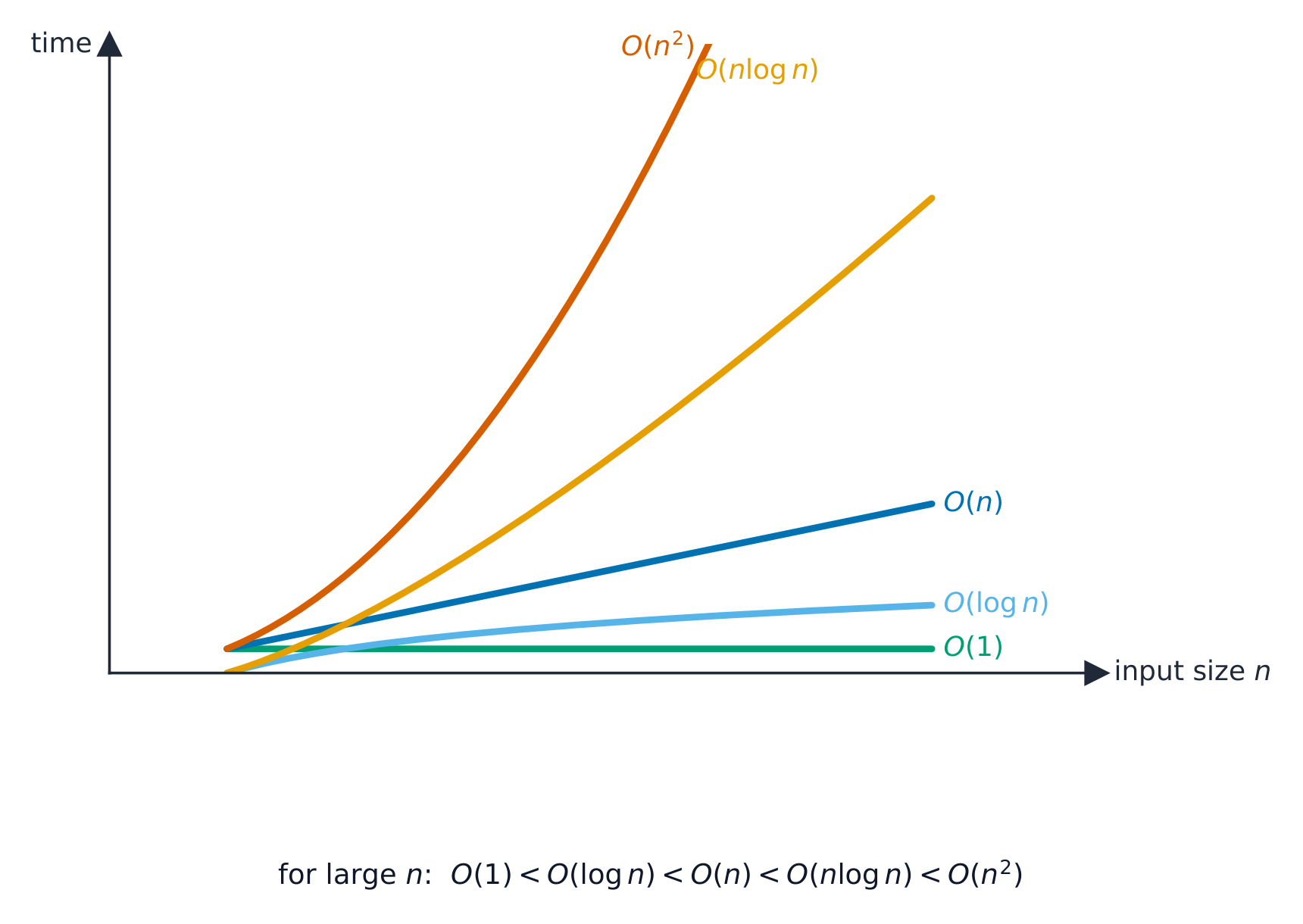
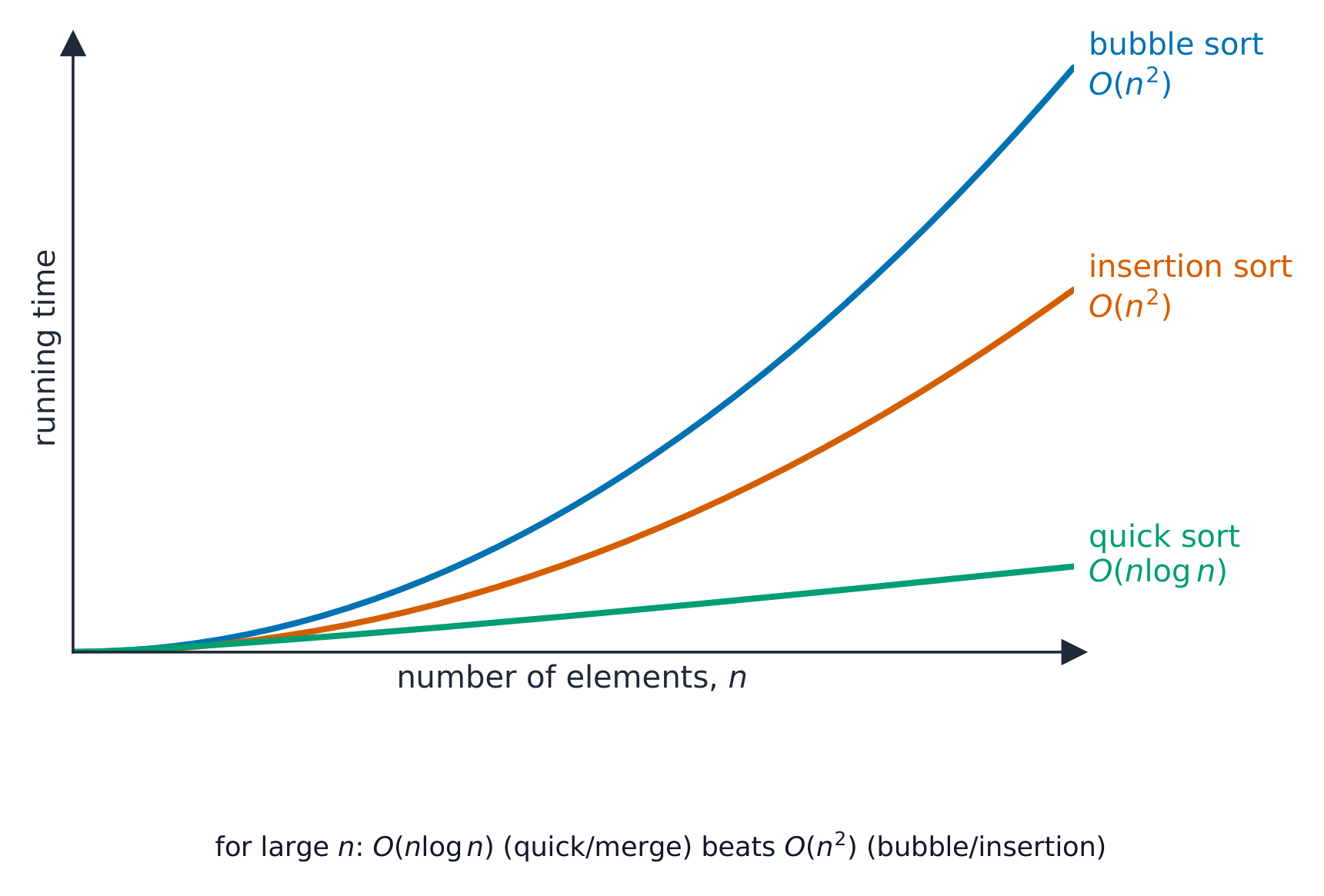
    Vocabulary · ⁨คำศัพท์⁩ Train · ⁨ฝึกฝน⁩
    English ไทย
    stack/stæk/ stack
    queue/kjuː/ queue
    node/nəʊd/ โหนด
    pointers/ˈpɔɪntəz/ พอยเตอร์
    binary tree/ˈbaɪnəri triː/ binary tree structure
    dictionary/ˈdɪkʃənəri/ dictionary
    circular queue/ˈsɜːkjʊlə kjuː/ คิววงกลม
    free list/friː lɪst/ ฟรีลิสต์
    19.1

    Comparing algorithms · ⁨เปรียบเทียบอัลกอริทึม⁩

    English

    Time complexity

    Time complexity 时间复杂度 is how the running time grows with input size $n$, written in Big-O notation 大O表示法 (the dominant term): O(1) constant, O($\log n$) binary search, O($n$) linear search, O($n \log n$) good sorts, O($n^{2}$) bubble/insertion sort. A smaller order is better at scale, even if another algorithm is faster for small $n$.

    To make that concrete: to sort a million items, an $O(n \log n)$ sort finishes in a fraction of a second, while an $O(n^{2})$ sort can take minutes.

    Worked example. A sorted list holds $1000$ items. How many comparisons does each search need in the worst case?

    A linear search checks items one at a time, so it may need up to $1000$ comparisons — this is $O(n)$. A binary search halves the list each step, so it needs at most $\lceil \log_2 1000 \rceil = 10$ comparisons — this is $O(\log n)$. Doubling the list to $2000$ items adds only one comparison to the binary search, but up to another $1000$ to the linear search — which is why the order of growth, not raw speed, decides the winner at scale.

    Describing an order. O(1): the time is constant, independent of the number of items (pushing onto a stack, reading an array element). O($\log n$): the time grows with the logarithm of the number of items, so doubling the data adds only a fixed extra step (binary search). O($n$): the time grows in proportion to the number of items (linear search, one pass through a list). O($n \log n$): a little worse than linear (efficient sorts). O($n^{2}$): the time grows with the square of the number of items, so doubling the data quadruples the time (bubble and insertion sort). "State the Big O of a binary search of Names[0:99]" is answered $O(\log n)$, and "describe its meaning" as above; Big O measures how the time or memory scales, not the actual time.

    Space complexity

    Space complexity 空间复杂度 is the extra memory needed. Bubble and insertion sort use O(1) extra (in place); merge sort uses O($n$); recursion uses stack memory proportional to its depth. There is often a time–memory trade-off.

    Other criteria

    Simplicity (easier to code and maintain), stability, and adaptiveness (faster on nearly-sorted data). The right algorithm depends on the data and the constraints.

    ไทย

    Time complexity

    ความซับซ้อนด้านเวลา คือวิธีการที่เวลาในการทำงานเพิ่มขึ้นตามขนาดของข้อมูลเข้า $n$ เขียนในรูปแบบ Big-O notationO (พจน์หลัก): O(1) ค่าคงที่, O($\log n$) การค้นหาแบบทวิภาค, O($n$) การค้นหาแบบเชิงเส้น, O($n \log n$) การจัดเรียงที่ดี, O($n^{2}$) บับเบิล/อินเซอร์ชันโซตซ์ ความซับซ้อนระดับต่ำกว่าจะดีกว่าเมื่อขยายสเกล แม้ว่ามีอัลกอริทึมอื่นจะเร็วกว่าสำหรับขนาดเล็ก ๆ $n$ ก็ตาม

    เพื่อให้เห็นภาพชัดเจน: ในการจัดเรียงรายการหนึ่งล้านรายการ อัลกอริทึม $O(n \log n)$ จะเสร็จสิ้นในเสี้ยววินาที ในขณะที่อัลกอริทึม $O(n^{2})$ อาจใช้เวลาเป็นนาที

    ตัวอย่างฝึกหัด รายการที่มีลำดับแล้วมี $1000$ รายการ ต้องใช้การเปรียบเทียบกี่ครั้งต่อการค้นหาในแต่ละกรณี worse case?

    การค้นหาแบบเชิงเส้นตรวจสอบรายการทีละรายการ ดังนั้นอาจต้องการการเปรียบเทียบสูงสุดถึง $1000$ — นี่คือ $O(n)$ การค้นหาแบบทวิภาคแบ่งรายการครึ่งหนึ่งทุกขั้นตอน ดังนั้นจึงต้องการการเปรียบเทียบไม่เกิน $\lceil \log_2 1000 \rceil = 10$ — นี่คือ $O(\log n)$ การเพิ่มขนาดรายการเป็นสองเท่าเป็น $2000$ รายการ ทำให้การค้นหาแบบทวิภาคเพิ่มเพียง หนึ่ง การเปรียบเทียบ แต่การค้นหาแบบเชิงเส้นอาจเพิ่มอีกสูงสุดถึง $1000$ — นั่นคือเหตุผลที่ว่าความซับซ้อนของการเติบโต ไม่ใช่ความเร็วสัมบูรณ์ ที่ตัดสินผู้ชนะเมื่อขยายสเกล

    การอธิบายลำดับความซับซ้อน O(1): เวลาเป็น ค่าคงที่ ไม่ขึ้นอยู่กับจำนวนรายการ (การpushลงบนส택, การอ่านองค์ประกอบในอาร์เรย์) O($\log n$): เวลาเพิ่มขึ้นตาม ลอการิทึม ของจำนวนรายการ ดังนั้นการ เพิ่มขนาด ข้อมูลเป็นสองเท่าจะเพิ่มขั้นตอนเพิ่มเติมที่แน่นอนเพียงเล็กน้อย (การค้นหาแบบทวิภาค) O($n$): เวลาเพิ่มขึ้น ตามสัดส่วน กับจำนวนรายการ (การค้นหาแบบเชิงเส้น, การวนผ่านรายการหนึ่งรอบ) O($n \log n$): แย่กว่าเชิงเส้นเล็กน้อย (การจัดเรียงที่มีประสิทธิภาพ) O($n^{2}$): เวลาเพิ่มขึ้นตาม กำลังสอง ของจำนวนรายการ ดังนั้นการเพิ่มขนาดข้อมูลเป็นสองเท่าจะทำให้เวลาเพิ่มขึ้นสี่เท่า (บับเบิลและอินเซอร์ชันโซตซ์) "ระบุ Big O ของการค้นหาแบบทวิภาคสำหรับ Names[0:99]" ตอบด้วย $O(\log n)$ และ "อธิบายความหมาย" ตามข้างต้น; Big O วัดว่าเวลาหรือหน่วยความจำ ขยายตัวอย่างไร ไม่ใช่เวลาจริง

    กราฟแสดงเวลาในการทำงานเทียบกับขนาดข้อมูลเข้า n สำหรับลำดับทั่วไป: O(1) และ O(log n) ค่อนข้างราบเรียบ, O(n) ขึ้นอย่างเบามือ, O(n log n) เหนียวขึ้น, และ O(n²) ขึ้นสูงที่สุด
    การเปรียบเทียบลำดับการเติบโตทั่วไป: ลำดับที่น้อยกว่าชนะเมื่อขยายสเกล
    กราฟเส้นแสดงเวลาในการทำงานเทียบกับจำนวนองค์ประกอบ n: บับเบิลโซตซ์และอินเซอร์ชันโซตซ์พุ่งสูงขึ้นอย่างรวดเร็วในรูป O(n²) ในขณะที่ควิกโซตซ์คงระดับต่ำในรูป O(n log n)
    การเพิ่มขึ้นของเวลาการจัดเรียงตามจำนวนองค์ประกอบ $n$: $O(n^2)$ โซตซ์พุ่งห่างจาก $O(n\log n)$ โซตซ์

    ความซับซ้อนด้านพื้นที่

    ความซับซ้อนด้านพื้นที่ คือหน่วยความจำเสริมที่ต้องการ บับเบิลและอินเซอร์ชันโซตซ์ใช้ O(1) เสริม (ทำใน-place); เมอร์จโซตซ์ใช้ O($n$); การเรียกซ้ำใช้หน่วยความจำสเกตที่แปรผันตามความลึก มีแลกเปลี่ยนระหว่างเวลาและหน่วยความจำเสมอ

    เกณฑ์อื่นๆ

    ความง่าย (เขียนโค้ดและดูแลรักษาง่าย), ความเสถียร, และการปรับตัว (เร็วขึ้นกับข้อมูลที่เรียงเกือบสมบูรณ์) อัลกอริทึมที่เหมาะสมขึ้นอยู่กับข้อมูลและข้อจำกัด

    Explore · ⁨สำรวจ⁩

    How running time grows with n · ⁨ความเร็วในการดำเนินการเพิ่มขึ้นตาม n อย่างไร⁩

    Slide n upward and compare the curves: O(1) and O(log n) stay almost flat, O(n) rises steadily, O(n²) explodes. This is why Big-O — not a stopwatch — is how we compare algorithms on large inputs. · ⁨เลื่อนกราฟ n ขึ้นไปและเปรียบเทียบเส้นโค้ง: O(1) และ O(log n) จะราบเรียบเกือบคงที่, O(n) เพิ่มขึ้นอย่างต่อเนื่อง, O(n²) พุ่งสูงขึ้นอย่างรุนแรง นี่คือเหตุผลที่เราใช้ Big-O — ไม่ใช่ cronometer — ในการเปรียบเทียบอัลกอริทึมเมื่อมีอินพุตขนาดใหญ่⁩

    Explore · ⁨สำรวจ⁩

    Big-O growth · ⁨อัตราการเติบโตแบบ Big-O⁩

    Change the input size n and compare how fast each algorithm's work grows — the idea behind time complexity. · ⁨เปลี่ยนขนาดอินพุต n แล้วเปรียบเทียบว่างานของแต่ละอัลกอริทึมเพิ่มขึ้นเร็วแค่ไหน — นี่คือแนวคิดของ ความซับซ้อนด้านเวลา⁩

    Vocabulary · ⁨คำศัพท์⁩ Train · ⁨ฝึกฝน⁩
    English ไทย
    time complexity/taɪm kəmˈpleksɪti/ ความซับซ้อนด้านเวลา
    Big-O notation/bɪɡ əʊ nəʊˈteɪʃn/ Notation Big-O
    space complexity/speɪs kəmˈpleksɪti/ ความซับซ้อนด้านพื้นที่
    19.2

    Recursion · ⁨การเรียกซ้ำ⁩

    Syllabus · ⁨หลักสูตร⁩
    English
    Candidates should be able to: Notes and guidance
    Show understanding of recursion Essential features of recursion How recursion is expressed in a programming language Write and trace recursive algorithms When the use of recursion is beneficial
    Show awareness of what a compiler has to do to translate recursive programming code Use of stacks and unwinding
    ไทย
    ผู้เข้าสอบควรสามารถ: หมายเหตุและคำแนะนำ
    แสดงความเข้าใจเกี่ยวกับ recursion คุณสมบัติสำคัญของ recursion การแสดง recursion ในภาษาการเขียนโปรแกรม เขียนและติดตาม recursive algorithms เมื่อใด是使用 recursion เป็นประโยชน์
    แสดงความตระหนักถึงสิ่งที่คอมไพเลอร์ต้องทำเพื่อแปลรหัสโปรแกรมแบบ recursive การใช้ stacks และการ unwinding

    Source: Cambridge International syllabus · ⁨แหล่งที่มา: หลักสูตร Cambridge International⁩

    English
    Recursion: the call stack winds up and unwinds

    Recursive algorithms use recursion 递归: the routine calls itself with a smaller version of the same problem, until a base case 基本情形 ends the chain. It has two parts: the base case (small enough to solve directly — without it the recursion never stops) and the recursive case 递归情形 (reduce the input and call itself).

    Factorial 阶乘:

    Recursion is natural for self-similar problems: trees, divide-and-conquer 分治 (binary search, merge sort), and nested data. When it is a poor fit, a loop is usually cleaner.

    "Describe what is meant by recursion" (two marks). A function or procedure that is defined in terms of itself: it calls itself from within its own body, with a smaller version of the problem each time, until a base case is reached. "State three essential features of recursion": (1) a base case (stopping condition) that returns a value without a further call; (2) a general case 一般情形 in which the routine calls itself; (3) each call moves the problem closer to the base case (the parameter is reduced), so that the recursion terminates. Some schemes add: values are returned as the calls unwind.

    "Describe when the use of recursion is beneficial, and give an example." When the problem is naturally defined in terms of smaller versions of itself, so that the recursive solution is shorter, clearer and closer to the mathematical definition than a loop would be: a factorial or Fibonacci number, a binary search, traversing a binary tree, merge sort or quicksort, and processing nested structures such as folders within folders. It is a poor choice when the depth is large (the stack may overflow) or when the same sub-problem is computed many times (naive Fibonacci).

    Tracing a recursive call

    For Factorial(4): the calls go down to Factorial(1)=1, then unwinding multiplies back up: 2*1=2, 3*2=6, 4*6=24. Final result 24. Track each pending call on a stack.

    Worked example. The function below is given without an explanation. Trace Unknown(3, 5) and state its output and return value.

    Call 1: $X = 3, Y = 5$: $3 < 5$, output 8, call Unknown(4, 4). Call 2: $4 < 4$ is false, return 0. Unwinding: call 1 returns $0 + 1 = 1$. Output 8, return value 1. Write the trace as a table with a row per call (parameters, condition, output, what it returns), and do the returns from the deepest call upwards: that is the unwinding the mark scheme looks for.

    Worked example (Fibonacci). Fib(n) returns n when n < 2, otherwise Fib(n - 1) + Fib(n - 2). Find Fib(5).

    Fib(5) = Fib(4) + Fib(3); Fib(4) = Fib(3) + Fib(2); Fib(3) = Fib(2) + Fib(1); Fib(2) = Fib(1) + Fib(0) = 1 + 0 = 1. So Fib(3) = 1 + 1 = 2, Fib(4) = 2 + 1 = 3, Fib(5) = 3 + 2 = 5. The base case is reached many times (Fib(2) is computed three times), which is why this version is slow: it makes 15 calls for $n = 5$ and roughly doubles the calls for every increase in $n$.

    Converting recursion to iteration. Every recursive routine can be rewritten with a loop, which uses less memory and is faster: keep a running result and loop from the base case upwards. Factorial as a loop:

    Asked to change a recursive insertion sort or search into an iterative one, replace the self-call with a loop over the index that the recursion was stepping through, and turn the base case into the loop's exit condition.

    Risks

    • infinite recursion if the base case is missed — crashes with a stack overflow 栈溢出.
    • high memory use for deep recursion.
    • slow if it repeats work (naive Fibonacci is exponential — use a loop or memoisation 记忆化).
    ไทย
    การเรียกซ้ำ: สเกตการเรียก-call stack พับและคลายออก

    อัลกอริทึมแบบเรียกซ้ำ ใช้ การเรียกซ้ำ: ฟังก์ชันเรียกตัวเองด้วยปัญหาเดิมแต่ขนาดเล็กกว่า จนกระทั่ง เคสฐาน จะหยุดลูป มันมีสองส่วน: เคสฐาน (เล็กพอที่จะแก้ได้โดยตรง — หากไม่มีมันการเรียกซ้ำจะไม่เคยหยุด) และ เคสเรียกซ้ำ (ลดอินพุตลงแล้วเรียกตัวเอง)

    แฟกทอเรียล:

    FUNCTION Factorial(n : INTEGER) RETURNS INTEGER
        IF n = 0 OR n = 1 THEN
            RETURN 1
        ELSE
            RETURN n * Factorial(n - 1)
        ENDIF
    ENDFUNCTION
    

    การเรียกซ้ำเป็นธรรมชาติสำหรับปัญหาที่มีลักษณะคล้ายกันเอง: ต้นไม้, Divide-and-conquer (การค้นหาแบบทวิภาค, เมอร์จโซตซ์), และข้อมูลแบบซ้อนกัน เมื่อไม่เหมาะสม การใช้ลูปมักจะสะอาดกว่า

    "อธิบายความหมายของการเรียกซ้ำ (2 คะแนน)." ฟังก์ชันหรือกระบวนการที่นิยามโดยอ้างอิงถึงตัวมันเอง: มัน เรียกตัวเอง จากภายในตัวมันเอง โดยส่งปัญหาที่มีขนาด เล็กลง ในแต่ละครั้ง จนกว่าจะถึงเคสฐาน "ระบุคุณสมบัติสำคัญสามประการของการเรียกซ้ำ": (1) เคสฐาน (เงื่อนไขหยุด) ที่คืนค่าโดยไม่มีการเรียกซ้ำเพิ่มเติม; (2) เคสทั่วไป ที่ฟังก์ชัน เรียกตัวเอง; (3) ทุกการเรียกทำให้ปัญหาลดระยะทาง ใกล้เคสฐานมากขึ้น (พารามิเตอร์ลดลง) เพื่อให้การเรียกซ้ำสิ้นสุด บางรูปแบบเพิ่ม: ค่าจะถูกคืนกลับมาเมื่อการเรียก คลายออก

    "อธิบาย時機ที่ใช้การเรียกซ้ำจะเป็นประโยชน์ และยกตัวอย่าง" เมื่อปัญหามีการ นิยามตามธรรมชาติด้วยเวอร์ชันที่เล็กลงของมัน sehinggaวิธีแก้ด้วยการเรียกซ้ำจะ สั้นกว่า ชัดเจนกว่า และใกล้เคียงกับการนิยามทางคณิตศาสตร์ มากกว่าการใช้ลูป: แฟกทอเรียลหรือเลขฟิบوناชี, การค้นหาแบบทวิภาค, การ traverse ต้นไม้ทวิภาค, เมอร์จโซตซ์หรือควิกโซตซ์, และการประมวลผลโครงสร้างซ้อน เช่นโฟลเดอร์ในโฟลเดอร์ เป็นทางเลือกที่ไม่ดีเมื่อความลึกมีมาก (สเกตอาจล้น) หรือเมื่อปัญหาย่อยเดียวกันถูกคำนวณหลายครั้ง (ฟิบอนาชีแบบเริ่มต้น)

    การติดตามการเรียกซ้ำ

    สำหรับ Factorial(4): การเรียกจะลงไปที่ Factorial(1)=1, จากนั้น การคืนค่า จะคูณกลับขึ้นไป: 2*1=2, 3*2=6, 4*6=24. ผลลัพธ์สุดท้าย 24. ติดตามการเรียกที่ยังค้างอยู่ในสตacks

    ตัวอย่างฝึกหัด ฟังก์ชันด้านล่างให้มาโดยไม่มีการอธิบาย จงติดตาม Unknown(3, 5) และระบุเอาต์พุตและค่าที่คืนกลับมา

    FUNCTION Unknown(BYVAL X, BYVAL Y : INTEGER) RETURNS INTEGER
        IF X < Y THEN
            OUTPUT X + Y
            RETURN Unknown(X + 1, Y - 1) + 1
        ELSE
            RETURN 0
        ENDIF
    ENDFUNCTION
    

    Call 1: $X = 3, Y = 5$: $3 < 5$, เอาต์พุต 8, เรียก Unknown(4, 4). Call 2: $4 < 4$ เป็นเท็จ, คืนค่า 0. คลายออก: call 1 คืนค่า $0 + 1 = 1$. เอาต์พุต 8, ค่าที่คืน回来 1. เขียนการติดตามเป็นตารางโดยมีแถวต่อหนึ่งการเรียก (พารามิเตอร์, เงื่อนไข, เอาต์พุต,返回值ที่คืน回来), และทำการคืนค่าจาก deepest call ขึ้นไป: นั่นคือการคลายออกที่คะแนนมาตรฐานมองหา

    ตัวอย่างฝึกหัด (Fibonacci). Fib(n) คืนค่า n เมื่อ n < 2, มิฉะนั้นคืนค่า Fib(n - 1) + Fib(n - 2). หา Fib(5).

    Fib(5) = Fib(4) + Fib(3); Fib(4) = Fib(3) + Fib(2); Fib(3) = Fib(2) + Fib(1); Fib(2) = Fib(1) + Fib(0) = 1 + 0 = 1. ดังนั้น Fib(3) = 1 + 1 = 2, Fib(4) = 2 + 1 = 3, Fib(5) = 3 + 2 = 5. เคสฐานถูกเข้าถึง หลาย ครั้ง (Fib(2) ถูกคำนวณสามครั้ง) ซึ่งเป็นสาเหตุที่ทำให้เวอร์ชันนี้ช้า: มันทำการเรียก 15 ครั้งสำหรับ $n = 5$ และประมาณการ doubles จำนวนการเรียกสำหรับทุกการเพิ่มขึ้นใน $n$.

    การเปลี่ยนจากเรคอร์ชันเป็นอิตอเรชัน ฟังก์ชันแบบเรคอร์ชันทุกตัวสามารถเขียนใหม่โดยใช้ลูป ซึ่งใช้หน่วยความจำน้อยลงและทำงานได้เร็วขึ้น: เก็บผลลัพธ์ที่สะสมไว้และวนลูปตั้งแต่เคสพื้นฐานขึ้นไปabove Factorial ในรูปของลูป:

    FUNCTION Factorial(N : INTEGER) RETURNS INTEGER
        DECLARE Result, Count : INTEGER
        Result ← 1
        FOR Count ← 2 TO N
            Result ← Result * Count
        NEXT Count
        RETURN Result
    ENDFUNCTION
    

    เมื่อถูกขอให้เปลี่ยนอัลกอริทึมการจัดเรียงแบบแทรกหรือการค้นหาแบบเรคอร์ชันให้เป็นแบบอิตারেทีทีทิก, ให้แทนการเรียกตัวเองด้วยลูปที่วนตามดัชนีที่เรคอร์ชันกำลังก้าวผ่าน และแปลงเคสพื้นฐานให้เป็นเงื่อนไขการออกของลูป

    Stack ของการเรียก Factorial(4): การเรียกแต่ละครั้งจะดันเฟรมลง menuju base case Factorial(1)=1, จากนั้น stack จะคลายออก (unwind) ส่งค่ากลับ 2 = 2 คูณ 1, 6 = 3 คูณ 2 และ 24 = 4 คูณ 6
    Recurion ใช้ call stack: การเรียกจะดัน frames ลงสู่ base case แล้วการส่งค่ากลับจะคลาย Stack ขึ้นไปข้างบน

    ความเสี่ยง

    • infinite recursion หากพลาดเคสพื้นฐาน — ระบบจะหยุดทำงานพร้อมข้อความ stack overflow
    • ใช้หน่วยความจำสูงสำหรับการทำ recursive ลึก
    • ช้าหากมีการทำงานซ้ำซ้อน (Fibonacci แบบ naive เป็น exponential — ควรใช้ loop หรือ memoisation)
    Explore · ⁨สำรวจ⁩

    Recursion unwinds from the leaves up · ⁨Recursion ถอดออกจากใบไม้ขึ้นด้านบน⁩

    Step through fib(4) in the order the calls actually finish: the leaves (base cases) resolve first, then each parent combines its children. Notice fib(2) is computed twice — that repeated work is why naive recursion is slow. · ⁨ผ่าน fib(4) ตามลำดับที่เรียกใช้งานเสร็จจริง: ใบ (base cases) แก้ไขก่อน จากนั้นแต่ละแม่รวมลูกหลานของตน หมายเหตุ fib(2) คำนวณสองครั้ง — งานซ้ำนี้คือเหตุผลว่าทำไม naive recursion จึงช้า⁩

    Vocabulary · ⁨คำศัพท์⁩ Train · ⁨ฝึกฝน⁩
    English ไทย
    recursion/rɪˈkɜːʃn/ การเรียกซ้ำ
    call stack/kɔːl stæk/ call stack memory
    base case/beɪs keɪs/ กรณีฐาน (Base Case)
    recursive case/rɪˈkɜːsɪv keɪs/ กรณีเรียกตัวเอง (Recursive Case)
    factorial/fækˈtɔːrɪəl/ แฟกทอเรียล
    divide-and-conquer/dɪˈvaɪd ænd ˈkɒŋkə/ แบ่งและพิชิต
    stack overflow/stæk ˌəʊvəˈfləʊ/ stack overflow error
    memoisation/ˌmeməʊaɪˈzeɪʃn/ memoization technique
    19.2

    What the compiler does for recursive code · ⁨สิ่งที่คอมไพล์เตอร์ทำต่อโค้ดแบบ recursive⁩

    English

    Recursion needs each call to have its own copy of its parameters 参数 and local variables 局部变量. The compiler keeps these on the call stack 调用栈. For each call it pushes a stack frame 栈帧 holding the parameters, the local variables, and the return address 返回地址 (where to resume in the caller). When the function returns, the return value is handed back, the frame is popped, and control resumes at the return address.

    Because each call has its own frame, recursive calls don't trample each other's variables. The stack can grow large for deep recursion, which is why very deep recursion may overflow it. This is the same call-and-return mechanism used for ordinary (non-recursive) calls — there is no special "recursion mechanism".

    "Explain why a stack is suitable for implementing recursion" (three marks). Each recursive call must save its return address, its parameters and its local variables, and the calls are completed in the reverse order to that in which they were made (the last call made is the first to finish), which is exactly the last in, first out behaviour of a stack: each new call pushes a frame, and each return pops the most recent frame, restoring the caller's state and telling it where to continue. This is the compiler's job when it translates recursive code: it generates the push of a stack frame on every call and the pop on every return, and the frames are unwound as the results come back.

    ไทย

    Recursive ต้องการให้ แต่ละการเรียกมีสำเนาของตัวเอง ของ parameters และ local variables คอมไพล์เตอร์จะเก็บสิ่งเหล่านี้ไว้ใน call stack สำหรับแต่ละการเรียก มันจะดัน stack frame ที่เก็บ parameters, local variables และ return address (ตำแหน่งที่จะกลับไปดำเนินการต่อใน caller) เมื่อฟังก์ชันส่งค่ากลับ ค่าที่ได้จะถูกส่งคืน frame ถูกดึงออก และควบคุมงานจะกลับมาดำเนินต่อที่ return address

    เนื่องจากแต่ละการเรียกมี frame ของตัวเอง การเรียกแบบ recursive จึงไม่รบกวนตัวแปรของกันและกัน Stack สามารถขยายใหญ่ได้สำหรับการทำ递归ลึก ซึ่งเป็นเหตุผลว่าทำไมการทำ递归ลึกมากอาจทำให้ stack overflowing ได้ นี่คือกลไก call-and-return เดียวกับการเรียกทั่วไป (non-recursive) ไม่มี "recursion mechanism" โดยเฉพาะ

    "อธิบายว่าทำไม stack จึงเหมาะสำหรับการ implement递归 (สามคะแนน)**

    Vocabulary · ⁨คำศัพท์⁩ Train · ⁨ฝึกฝน⁩
    English ไทย
    parameters/pəˈræmɪtəz/ parameters
    local variables/ˈləʊkl ˈveərɪəblz/ ตัวแปรท้องถิ่น
    stack frame/stæk freɪm/ stack frame
    return address/rɪˈtɜːn əˈdres/ ที่อยู่กลับคืน
    19.2

    Definitions the examiner accepts · ⁨คำนิยามที่ผู้สอบยอมรับ⁩

    English

    A definition question is marked against fixed wording. Learn these exactly, and give one answer only.

    Term Definition
    linear search checking each item in turn from the start until the target is found or the end is reached
    binary search repeatedly comparing the target with the middle item of a sorted list and discarding the half that cannot contain it
    bubble sort repeatedly passing through the list, swapping adjacent items that are in the wrong order, until a pass makes no swaps
    insertion sort taking each item in turn and inserting it into its correct place among the items already sorted
    abstract data type a collection of data and the operations that can be performed on it, defined independently of how it is stored
    stack a last-in-first-out structure with push and pop at the top
    queue a first-in-first-out structure with items added at the rear and removed from the front
    linked list a sequence of nodes, each holding data and a pointer to the next node, with a start pointer
    binary tree nodes each holding data and pointers to a left subtree of smaller values and a right subtree of larger values
    Big O notation a way of classifying the time (or memory) an algorithm needs by how it grows with the size of the input
    recursion a routine that calls itself with a smaller version of the problem until a base case stops the calls
    base case the condition under which a recursive routine returns without calling itself
    unwinding the returns of a chain of recursive calls, from the deepest call back to the first, as the stack frames are popped
    ไทย

    คำถามคำนิยามจะให้คะแนนตามข้อความที่กำหนดไว้你必须 exact. เรียนรู้ให้ถูกต้องและตอบเพียงคำตอบเดียวเท่านั้น

    พจน์ นิยาม
    linear search ตรวจสอบแต่ละรายการทีละรายการจากต้นจนกว่าจะพบเป้าหมายหรือถึงท้ายรายการ
    binary search เปรียบเทียบเป้าหมายกับรายการตรงกลางของชุดข้อมูลที่เรียงลำดับแล้วซ้ำๆ และทิ้งครึ่งที่ไม่อาจมีเป้าหมายอยู่
    bubble sort ผ่านรายการซ้ำๆ สลับรายการที่อยู่ติดกันที่มีลำดับผิด จนกว่าการผ่านครั้งหนึ่งจะไม่มีการสลับเลย
    insertion sort นำรายการมาทีละรายการแล้วใส่เข้าไปในตำแหน่งที่ถูกต้องในระหว่างรายการที่เรียงลำดับไว้แล้ว
    abstract data type ชุดข้อมูลและการดำเนินการที่สามารถทำได้กับมัน โดยนิยามแยกออกจากวิธีการจัดเก็บ
    stack โครงสร้างแบบ last-in-first-out ที่มี push และ pop ที่ด้านบน
    queue โครงสร้างแบบ first-in-first-out ที่เพิ่มรายการที่ด้านหลังและลบรายการที่ด้านหน้า
    linked list ลำดับของโหนด แต่ละโหนดมีข้อมูลและพอยน์เตอร์ไปยังโหนดถัดไป พร้อมพอยน์เตอร์เริ่มต้น
    binary tree โหนดแต่ละตัวมีข้อมูลและพอยน์เตอร์ไปยัง subtree ซ้ายที่มีค่าน้อยกว่า และ subtree ขวาที่มีค่ามากกว่า
    Big O notation วิธีการจัดหมวดหมู่เวลา (หรือหน่วยความจำ) ที่อัลกอริทึมต้องการโดยดูจากการเติบโตเมื่อขนาดข้อมูลเข้าเพิ่มขึ้น
    recursion Routine ที่เรียกตัวเองด้วยปัญหาที่เล็กลงเรื่อยๆ จนกว่า base case จะหยุดการเรียก
    base case เงื่อนไขที่ routine แบบ recursive ส่งค่ากลับโดยไม่เรียกตัวเอง
    unwinding การส่งค่ากลับของ chain ของ recursive calls จาก call ที่ลึกที่สุดกลับไปยัง call แรก เมื่อ stack frames ถูกดึงออก
    19.2

    Exam tips · ⁨ข้อแนะนำสำหรับการสอบ⁩

    English
    • Searches: linear needs no order and O($n$); binary needs a sorted array, halves each time and is O($\log n$). Know both algorithms by heart, including the bounds and the flag.
    • Sorts: bubble with a swapped flag, insertion with a key that shifts larger items right; both O($n^{2}$) worst, O($n$) on sorted data. Performance depends on the number of items and how ordered they are.
    • ADT implementations are pointer bookkeeping: a top pointer; front, rear and count with MOD; start, pointers and a free list; root with left and right pointers. Always check for full and empty.
    • Big O is about scaling: constant, logarithmic, linear, square. Say "doubling the data adds one comparison" for a binary search.
    • Recursion: base case, general case, progress towards the base case; beneficial when the problem is defined in terms of itself; a stack holds the return addresses and variables because calls return in reverse order. Trace with a table and unwind from the deepest call.

    Common mistakes

    • Using a binary search on unsorted data, or on a linked list; and setting Lower ← Mid instead of Mid + 1, which loops for ever.
    • A bubble sort inner loop that runs to the end of the array every pass, or a swap without a temporary variable.
    • A push or enqueue that does not test for full, or a pop or dequeue that does not test for empty.
    • Moving the queue's front pointer without MOD in a circular queue, or treating front = rear as always meaning empty.
    • Inserting into a linked list by shifting the array contents; only the pointers change.
    • A recursive function with no base case, or one whose recursive call does not make the problem smaller.
    • Tracing a recursive call but forgetting to add the pending work on the way back up.
    • Answering "why a stack" with "because it is fast"; the reason is the last-in-first-out order of the returns.
    ไทย
    • Searches: linear ไม่จำเป็นต้องมีลำดับและ O($n$); binary ต้องใช้ array ที่เรียงลำดับแล้ว减半每次都 и O($\log n$). ต้องจำอัลกอริทึมทั้งสองนี้ให้ขึ้นใจ รวมถึงขอบเขตและ flag
    • Sorts: bubble มี swapped flag, insertion มี key ที่เลื่อนรายการที่ใหญ่กว่าไปทางขวา; ทั้งคู่ O($n^{2}$) ในกรณี worst, O($n$) บนข้อมูลที่เรียงลำดับแล้ว ประสิทธิภาพขึ้นอยู่กับจำนวนรายการและความเรียงลำดับของข้อมูล
    • ADT implementations คือ pointer bookkeeping: top pointer; front, rear และ count กับ MOD; start, pointers และ free list; root พร้อม left และ right pointers ต้องตรวจสอบเสมอว่าเต็มหรือว่าง
    • Big O เกี่ยวกับการ scaling: constant, logarithmic, linear, square บอกว่า "การเพิ่มข้อมูลเป็นสองเท่า会增加 one comparison" สำหรับ binary search
    • Recursion: base case, general case, การก้าวหน้า toward base case; เป็นประโยชน์เมื่อปัญหานิยามด้วยตัวเอง; stack เก็บ return addresses และ variables เพราะ calls ส่งค่ากลับใน reverse order Trace ด้วยตารางและ unwind จาก call ที่ลึกที่สุด

    ข้อผิดพลาดที่พบบ่อย

    • การใช้ binary search บนข้อมูลที่ไม่ได้เรียงลำดับ หรือบน linked list; และการตั้ง Lower ← Mid แทน Mid + 1 ซึ่งจะทำให้ลูปวนตลอดไป
    • Inner loop ของ bubble sort ที่วนไปจนสุด array ทุกครั้ง หรือการ swap โดยไม่มี temporary variable
    • Push หรือ enqueue ที่ไม่ทดสอบว่าเต็ม, หรือ pop หรือ dequeue ที่ไม่ทดสอบว่าว่าง
    • การย้าย front pointer ของ queue โดยไม่มี MOD ใน circular queue, หรือการตีความ front = rear ว่าหมายถึงว่างเสมอ
    • การแทรกใน linked list โดยการเลื่อน contents ของ array; มีการเปลี่ยนเฉพาะ pointers เท่านั้น
    • Recursive function ที่ไม่มี base case, หรือหนึ่ง whose recursive call does not make the problem smaller.
    • การติดตามการเรียกใช้ฟังก์ชันซ้ำ (recursive call) แต่ลืมเพิ่มภาระงานที่ยังค้างอยู่ในการย้อนกลับขึ้น
    • ตอบคำถามว่า "ทำไมต้องใช้ส택" ว่า "เพราะมันเร็ว";เหตุผลที่แท้จริงคือลำดับการคืนค่าแบบ Last-In-First-Out (LIFO)
    Vocabulary · ⁨คำศัพท์⁩ Train · ⁨ฝึกฝน⁩
    English ไทย
    general case/ˈdʒenərəl keɪs/ กรณีทั่วไป
  • 20

    Further Programming · ⁨การเขียนโปรแกรมขั้นสูง⁩

    Watch lesson · ⁨ดูบทเรียน⁩
    20.1

    Programming paradigms · ⁨แนวคิดการเขียนโปรแกรม⁩

    Syllabus · ⁨หลักสูตร⁩
    English
    Candidates should be able to: Notes and guidance
    Understanding what is meant by a programming paradigm
    Show understanding of the characteristics of a number of programming paradigms:
    • Low-level Low-level Programming: • understanding of and ability to write low-level code that uses various addressing modes: immediate, direct, indirect, indexed and relative
    • Imperative (Procedural) Imperative (Procedural) programming: • Assumed knowledge and understanding of Structural Programming (see details in AS content section 11.3) • understanding of and ability to write imperative (procedural) programming code that uses variables, constructs, procedures and functions. See details in AS content
    • Object Oriented Object-Oriented Programming (OOP): • understanding of the terminology associated with OOP (including objects, properties/attributes, methods, classes, inheritance, polymorphism, containment (aggregation), encapsulation, getters, setters, instances) • understanding of how to solve a problem by designing appropriate classes • understanding of and ability to write code that demonstrates the use of OOP
    • Declarative Declarative programming: • understanding of and ability to solve a problem by writing appropriate facts and rules based on supplied information • understanding of and ability to write code that can satisfy a goal using facts and rules
    ไทย
    ผู้เข้าสอบควรสามารถ: หมายเหตุและคำแนะนำ
    เข้าใจความหมายของ programming paradigm
    แสดงความเข้าใจเกี่ยวกับลักษณะของ programming paradigms หลายประเภท:
    • Low-level Low-level Programming: ความเข้าใจและความสามารถในการเขียนโค้ดระดับต่ำที่ใช้ addressing modes ต่างๆ: immediate, direct, indirect, indexed และ relative
    • แบบคำสั่ง (Procedural) การเขียนโปรแกรมแบบคำสั่ง (Procedural): • ความรู้และความเข้าใจใน การเขียนโปรแกรมเชิงโครงสร้าง (ดูรายละเอียดในส่วนเนื้อหา AS 11.3) • ความเข้าใจและทักษะในการเขียนโค้ดโปรแกรมแบบคำสั่ง (procedural) ที่ใช้ตัวแปร โครงสร้าง ฟังก์ชัน และ procedure ดูรายละเอียดในส่วนเนื้อหา AS
    • แบบ面向对象 การเขียนโปรแกรมแบบ面向对象 (OOP): • ความเข้าใจในคำศัพท์ที่เกี่ยวข้องกับ OOP (รวมถึง วัตถุ/objects, คุณสมบัติ/properties, методы/methods, คลาส/classes, การสืบทอด/inheritance, ความหลากหลาย/polymorphism, การรวม/containment (aggregation), การห่อหุ้ม/encapsulation, getters, setters, instances) • ความเข้าใจในการแก้ปัญหาด้วยการออกแบบคลาสที่เหมาะสม • ความเข้าใจและทักษะในการเขียนโค้ดที่แสดงการใช้ OOP
    • แบบประกาศ การเขียนโปรแกรมแบบประกาศ (Declarative): • ความเข้าใจและทักษะในการแก้ปัญหาโดยการเขียน ข้อเท็จจริง (facts) และ กฎ (rules) ที่เหมาะสมจากข้อมูลที่กำหนดให้ • ความเข้าใจและทักษะในการเขียนโค้ดที่สามารถบรรลุ เป้าหมาย (goal) โดยใช้ข้อเท็จจริงและกฎ

    Source: Cambridge International syllabus · ⁨แหล่งที่มา: หลักสูตร Cambridge International⁩

    English

    A programming paradigm 编程范式 is a style of programming — a way of structuring programs, with its own ideas and language features. Four programming paradigms are in this syllabus.

    "Describe what is meant by an imperative (procedural) language" (two marks). A language in which the program is a sequence of instructions that are executed in order and that change the program's state; the programmer says how the task is done, using procedures, sequence, selection and iteration. "Describe what is meant by a declarative language": the program states facts and rules (what is known and what is wanted) and the language's inference engine works out how to find the answer; the programmer does not give the sequence of steps.

    Identify the paradigm from a code sample (a regular Paper 3 question): LDD 200, ADD #5, STO 201 is low-level (mnemonics, registers, memory addresses); FOR Count ← 1 TO 10 … NEXT Count with procedures and assignments is imperative; CLASS Dog … PRIVATE Name : STRING … PUBLIC PROCEDURE NEW(…) is object-oriented; type(lion, wild). and dangerous(X) IF type(X, wild) is declarative (logic). In the matching question: low-level pairs with "mnemonics that correspond directly to machine instructions", imperative with "a sequence of statements that change the state", OOP with "objects that combine attributes and methods", declarative with "facts and rules, with no order of execution given".

    Low-level programming

    Programming close to the hardware in machine code 机器码 or assembly language 汇编语言, where each instruction maps to what the CPU runs. It gives direct access to registers 寄存器 and memory addresses 内存地址, using different addressing modes 寻址方式 (immediate, direct, indirect, indexed and relative). It is very fast and compact, but architecture-specific, tedious, and hard to maintain. This is low-level 低级 programming, used for device drivers, firmware and bootloaders.

    The five addressing modes. The syllabus asks for low-level code that uses each addressing mode (the instruction set is in Topic 4). The operand of a load instruction can be read five ways, and the exam gives you the memory contents and asks what the accumulator holds:

    • immediate (LDM #105): the operand is the value; ACC becomes 105.
    • direct (LDD 105): the operand is the address of the value; ACC becomes the contents of 105, here 27.
    • indirect (LDI 105): the operand is the address of an address; ACC becomes the contents of 27, here 91. Used for pointers and for data whose position is decided at run time.
    • indexed (LDX 105): the address is the operand plus the index register IX; with IX = 2, ACC becomes the contents of 107. Used to step through an array by incrementing IX.
    • relative (JMR +65): the target is an offset from the address of the current instruction, which makes the code relocatable.

    Worked example. Memory: 105 holds 27, 106 holds 64, 200 holds 0. Write code to add the contents of 105 and 106, store the result in 200 and output it. LDD 105 (ACC = 27), ADD 106 (ACC = 91), STO 200, OUT. To double the value in 105 instead: LDD 105, ADD 105, STO 105. State the register contents after each line when asked to trace.

    Imperative (procedural) programming

    In imperative programming 命令式编程 the programmer writes a sequence of commands that change the program's state — assignments, conditionals, loops, function calls. Variables 变量 hold state; statements change it; code is organised into procedures and functions (also called structured or structural programming). This is the style of Topics 9 and 11 (Python, C). Strong when the algorithm has clear sequential steps.

    Object-oriented programming (OOP)

    In object-oriented programming 面向对象编程 programs are built from objects 对象 — units combining data (attributes 属性) and operations (methods 方法). Objects are instances 实例 of classes 类. The four pillars:

    • encapsulation 封装 — an object's data is hidden behind its methods; outside code uses the public methods only, not the data directly. This protects the object and lets its internals change without breaking callers. For example, a BankAccount hides its balance; you change it only through deposit() and withdraw(), which can enforce a rule like "never go below zero".
    • inheritance 继承 — a subclass 子类 specialises a superclass 父类, inheriting its attributes and methods and adding or overriding 重写 them. Models "is-a" ("a Manager is an Employee").
    • polymorphism 多态 — different objects respond to the same method call differently; the caller need not know the exact type. Every Shape has Area(), and a Circle and a Rectangle each implement it their own way.
    • abstraction 抽象 — show a simple interface and hide the implementation.

    Other terms:

    • a constructor 构造函数 is a special method run when an object is created, to set up its attributes.
    • getters and setters read and write an object's attributes (its properties) through methods.
    • aggregation 聚合 and containment 包含 build an object from other objects (a "has-a" relationship).

    OOP is used for large systems, GUIs, simulations and games.

    OOP as the examiner marks it

    Definitions. Class: a template (blueprint) that defines the attributes and methods of the objects of that type. Object: an instance of a class, created from it, with its own values for the attributes ("an occurrence of an object" is the exam's phrase for an instance). Attribute (property): a data item belonging to a class. Method: a procedure or function belonging to a class that acts on its attributes. Encapsulation: combining the attributes and methods in one class and restricting external access to the data: the attributes are private and can only be read or changed through public methods. Inheritance: a subclass acquires the attributes and methods of its parent (super) class and can add its own or override them. Polymorphism: methods with the same name that behave differently in different classes; typically a subclass redefines a method of its parent, and the right version runs for each object. Containment: a class has an object of another class as an attribute (a car has an engine). "Identify the feature that restricts external access to the data" is encapsulation; "the term for an occurrence of an object" is instance.

    "Outline the structure of a class" (three marks): attributes (properties) that hold the object's data, usually declared private; methods (procedures and functions) that act on those attributes, usually public; and a constructor, a method that runs when an object is created to initialise the attributes. "Give three benefits of OOP": code is reused through inheritance; data is protected by encapsulation, so it can only be changed by the class's own methods; a large program is split into classes that are written and tested independently, so it is easier to maintain and extend; classes model real-world entities, so the design is easier to understand; polymorphism lets the same call work for different objects.

    The class in pseudocode, as Paper 3 sets it:

    An object is created with MyCar ← NEW Car("AB12 CDE", 2020) and used with MyCar.AddMileage(150) and OUTPUT MyCar.GetMileage(). A subclass reuses the parent's constructor through SUPER:

    The same class in Python, as Paper 4 expects it: attributes are made private with a double underscore, the constructor is __init__, and a subclass names its parent in brackets and calls super().__init__(…):

    In Java the same ideas are private/public fields, a constructor with the class's name, extends and super(…); in VB.NET Private/Public, Sub New, Inherits and MyBase.New. A polymorphic method is written in the parent and overridden in the child with the same name; a call through a parent-type variable runs the child's version.

    Data structures as objects. Paper 4 builds a stack, linked list or binary tree from a Node class whose attributes are the data and one or two references to other nodes; a Tree (or LinkedList) class holds the root (or start) and the methods.

    A find method walks the same path and returns TRUE when Current.Data = Target, FALSE when it reaches NULL; an in-order output method is recursive: output the left subtree, the node, then the right subtree. For a linked list the node has one reference, Next, and the list class holds Start; for a stack built from a list, push and pop both work at Start.

    Worked example. A game has characters. Each has a name, health (starting at 100) and a position given by X and Y. Write a class Character with a constructor and a method Move(DX, DY); then a subclass Wizard that adds Mana (starting at 50) and a method CastSpell() that takes 10 mana and returns TRUE if there was enough.

    The marks are for private attributes, a constructor that sets every attribute, the inheritance line, the call to the parent's constructor, and a method that uses and changes the object's own data. When the question asks for a class diagram, draw a box in three parts (name; attributes with - for private; methods with + for public) and join a subclass to its parent with an arrow pointing at the parent.

    Declarative programming

    In declarative programming 声明式编程 you say what to compute, not how — the runtime works out the steps. Two kinds:

    • functional programming 函数式编程 — built from pure functions 纯函数 (no side effects 副作用; same input always gives the same output) composed together. Examples: Haskell, Lisp.
    • logic programming 逻辑编程 — state facts and rules; the engine answers a goal (query) by inference. Example: Prolog.

    A familiar declarative example is SQL 结构化查询语言: SELECT * FROM Customer WHERE Country = 'UK' says what you want, not how to walk the records.

    Facts, rules and goals are what the exam tests in the declarative paradigm. Given these facts 事实 (statements that are true) and a rule 规则 (a conclusion that holds when its conditions hold):

    "Write the result of the goal type(X, wild)": X = leopard, X = lion. The engine matches the goal against each fact in turn; every match is a solution, and a capital letter is a variable that the match fills in. "Write a fact to show that a cheetah is wild": type(cheetah, wild). "Explain what line 07 does": it defines a rule with the conclusion dangerous(X), which is true for any X that is both wild and large, so dangerous(A) returns A = leopard, A = lion. "Write a rule: a feature F may be available for a body style B if F is a feature and B is a body style and F is not unavailable for B": may_be_available(F, B) IF feature(F) AND body_style(B) AND NOT unavailable(F, B). Copy the exact predicate names and argument order used in the question's facts; a new fact ends with a full stop, and a rule's conditions are joined with AND.

    Comparing paradigms

    Paradigm Strength Typical languages
    Low-level maximum control, speed assembly
    Imperative direct, intuitive C, Python
    Object-oriented modular, models entities Java, C#, Python
    Functional clear, no side effects Haskell, F#
    Logic inference, rules Prolog
    Database data queries SQL

    Modern languages often mix paradigms — Python supports all of procedural, OOP and functional. The right one depends on the problem.

    ไทย

    แนวคิดการเขียนโปรแกรม คือรูปแบบหรือสไตล์ในการเขียนโปรแกรม — ซึ่งเป็นวิธีการจัดโครงสร้างโปรแกรม โดยมีแนวคิดและคุณสมบัติของภาษาของตนเอง มี แนวคิดการเขียนโปรแกรม สี่แบบในหลักสูตรนี้

    "อธิบายความหมายของภาษาเชิงคำสั่ง (procedural language)" (2 คะแนน). ภาษาที่มีโปรแกรมเป็น ลำดับของคำสั่ง ที่ถูก اجراตามลำดับ และ เปลี่ยนสถานะของโปรแกรม; ผู้เขียนโปรแกรมบอก วิธี ทำงาน โดยใช้กระบวนการ, ลำดับ, การเลือก และการทำซ้ำ. "อธิบายความหมายของภาษาเชิงคำ声明 (declarative language)": โปรแกรมระบุ ข้อเท็จจริงและกฎเกณฑ์ (สิ่งที่ทราบและสิ่งที่ต้องการ) และ เครื่องอนุมาน (inference engine) ของภาษานั้นจะคำนวณหาคำตอบ; ผู้เขียนโปรแกรม ไม่ได้ กำหนดลำดับขั้นตอน.

    ระบุแนวคิดจากตัวอย่างโค้ด (ข้อสอบ Paper 3 ทั่วไป): LDD 200, ADD #5, STO 201 เป็น ระดับต่ำ (low-level) (mnemonics, registers, ที่อยู่หน่วยความจำ); FOR Count ← 1 TO 10 … NEXT Count ที่มี procedures และการกำหนดค่าเป็น เชิงคำสั่ง (imperative); CLASS Dog … PRIVATE Name : STRING … PUBLIC PROCEDURE NEW(…) เป็น เชิงวัตถุ (object-oriented); type(lion, wild). และ dangerous(X) IF type(X, wild) เป็น เชิงคำ声明 (declarative) (ตรรกะ) ในโจทย์จับคู่: ระดับต่ำจับคู่กับ "mnemonics ที่สอดคล้องโดยตรงกับคำสั่งเครื่อง", เชิงคำสั่งจับคู่กับ "ลำดับของคำสั่งที่เปลี่ยนสถานะ", OOP จับคู่กับ "วัตถุที่รวมคุณลักษณะและวิธีการเข้าไว้ด้วยกัน", เชิงคำ声明จับคู่กับ "ข้อเท็จจริงและกฎเกณฑ์ โดยไม่มีการกำหนดลำดับการ اجرا"

    แนวคิดการเขียนโปรแกรมสี่แบบ: ระดับต่ำ, เชิงคำสั่ง, เชิงวัตถุ และเชิงคำ声明
    แนวคิดการเขียนโปรแกรมสี่แบบ: ระดับต่ำ, เชิงคำสั่ง, เชิงวัตถุ และเชิงคำ声明

    การเขียนโปรแกรมระดับต่ำ

    การเขียนโปรแกรมที่ ใกล้กับฮาร์ดแวร์ ในรูปแบบ รหัสเครื่อง (machine code) หรือ ภาษาแอสsembly, โดยแต่ละคำสั่งจะเชื่อมโยงกับสิ่งที่ CPU ทำงาน มันให้เข้าถึงโดยตรง register และ ที่อยู่หน่วยความจำ โดยใช้ โหมดการอ้างอิง (addressing modes) ต่างๆ (immediate, direct, indirect, indexed และ relative) มีความเร็วสูงและขนาดกะทัดรัด แต่เฉพาะเจาะจงต่อสถาปัตยกรรม, ท้อแท้ และบำรุงรักษายาก นี่คือ ระดับต่ำ Programming ใช้สำหรับ device drivers, firmware และ bootloaders

    โหมดการอ้างอิงทั้งห้า. หลักสูตรขอให้เขียนโค้ดระดับต่ำที่ใช้แต่ละ โหมดการอ้างอิง (ชุดคำสั่งอยู่ใน Topic 4) Operand ของคำสั่ง load สามารถอ่านได้ห้าแบบ และข้อสอบจะแสดงเนื้อหาในหน่วยความจำและถามว่า accumulator จะเก็บอะไรไว้:

    ตารางหน่วยความจำที่มีที่อยู่ 105, 106, 107, 27 และ 145 พร้อมเนื้อหาของตน ข้างข้างมีแถวห้าบรรทัดแสดงว่า accumulator รับค่าจาก LDM #105, LDD 105, LDI 105, LDX 105 เมื่อ IX = 2 และการกระโดดแบบ relative
    operand เดียวกันคือ 105 อ่านได้ห้าแบบ: ในฐานะค่า, ในฐานะที่อยู่, ในฐานะที่อยู่ของที่อยู่, ในฐานะที่อยู่บวก register ดัชนี, และในฐานะ offset จากคำสั่งปัจจุบัน
    • immediate (LDM #105): operand คือ value; ACC กลายเป็น 105.
    • direct (LDD 105): operand คือ ที่อยู่ ของค่า; ACC จะเท่ากับเนื้อหาของ 105 ซึ่งในที่นี้คือ 27
    • indirect (LDI 105): operand คือที่อยู่ของที่อยู่; ACC จะเท่ากับเนื้อหาของ 27 ซึ่งในที่นี้คือ 91 ใช้สำหรับ pointers และข้อมูลwhose ตำแหน่งถูกกำหนดเมื่อรันเวลา
    • indexed (LDX 105): ที่อยู่คือ operand บวกกับ register ดัชนี IX; เมื่อ IX = 2, ACC จะเท่ากับเนื้อหาของ 107 ใช้เพื่อวนผ่าน array โดยการเพิ่มค่า IX
    • relative (JMR +65): เป้าหมายคือ offset จากที่อยู่ของคำสั่งปัจจุบัน ซึ่งทำให้โค้ดสามารถ relocatable ได้

    ตัวอย่างคำนวณ. หน่วยความจำ: 105 เก็บ 27, 106 เก็บ 64, 200 เก็บ 0 เขียนโค้ดเพื่อบวกเนื้อหาของ 105 และ 106 เก็บผลลัพธ์ใน 200 และแสดงผล LDD 105 (ACC = 27), ADD 106 (ACC = 91), STO 200, OUT. เพื่อเพิ่มสองเท่าของค่าใน 105 แทน: LDD 105, ADD 105, STO 105. ระบุเนื้อหาของ register หลังแต่ละบรรทัดเมื่อถูกถามให้ trace

    การเขียนโปรแกรมเชิงคำสั่ง (procedural programming)

    ใน การเขียนโปรแกรมเชิงคำสั่ง ผู้เขียนโปรแกรมเขียน ลำดับของคำสั่ง ที่เปลี่ยนสถานะของโปรแกรม — การกำหนดค่า, เงื่อนไข, ลูป, การเรียกฟังก์ชัน ตัวแปร เก็บสถานะ; คำสั่งเปลี่ยนมัน; โค้ดถูกจัดเป็น procedures และ functions (เรียกว่า structured หรือ structural programming) นี่คือสไตล์ของ Topics 9 และ 11 (Python, C) มีประสิทธิภาพเมื่ออัลกอริทึมมีขั้นตอนเรียงลำดับที่ชัดเจน

    การเขียนโปรแกรมเชิงวัตถุ (OOP)

    ใน การเขียนโปรแกรมเชิงวัตถุ โปรแกรมสร้างจาก objects — หน่วยรวม ข้อมูล (attributes) และ การดำเนินการ (methods). Objects เป็น instances ของ classes. สี่เสาหลัก:

    • encapsulation — ข้อมูลของ object ถูกซ่อนอยู่หลัง methods ของมัน; โค้ดภายนอกใช้เฉพาะ public methods ไม่ใช่ข้อมูลโดยตรง สิ่งนี้ปกป้อง object และอนุญาตให้ภายในเปลี่ยนแปลงโดยไม่ทำให้ผู้เรียกพัง ตัวอย่างเช่น一个 BankAccount ซ่อน balance ของมัน; คุณเปลี่ยนได้เพียงผ่าน deposit() และ withdraw() ซึ่งสามารถบังคับกฎเช่น "ห้ามต่ำกว่าศูนย์".
    • inheritance — subclass(specify) superclass, สืบทอด attributes และ methods ของมัน และเพิ่มหรือ override它们 Models "is-a" ("a Manager is an Employee").
    • polymorphism — วัตถุที่ต่างกันตอบสนองต่อ การเรียกใช้เมทโดดเดียวกันattachment differently; ผู้เรียกไม่จำเป็นต้องรู้ประเภทที่แท้จริง Every Shape has Area(), and a Circle and a Rectangle each implement it their own way.
    • abstraction — แสดง interface แบบง่ายและซ่อน implementation

    术语อื่น:

    • a constructor เป็น special methodที่ถูก run เมื่อ object ถูกสร้าง, เพื่อตั้งค่า attributes ของมัน
    • getters และ setters อ่านและเขียน attributes ของ object (properties ของมัน) ผ่าน methods
    • การรวมกลุ่ม (aggregation) และ การครอบครอง (containment) สร้างวัตถุขึ้นจากวัตถุอื่น (ความสัมพันธ์แบบ "มี-ของ")

    OOP ใช้สำหรับระบบขนาดใหญ่, ส่วนติดต่อผู้ใช้แบบกราฟิก (GUI), การจำลองสถานการณ์ และเกม

    รูปร่างของการเรียกใช้เดียวกัน Area() รันโค้ดที่แตกต่างกันสำหรับแต่ละวัตถุ: Circle คำนวณ pi r สี่เหลี่ยม, Rectangle คำนวณ ความกว้าง คูณ ความสูง
    ความหลากหลายทางหลายรูปแบบ (Polymorphism): การเรียกใช้เมทόδเดียวกัน รันโค้ดของแต่ละวัตถุ

    แผนภูมิคลาส UML สำหรับ Shape: กล่องสามส่วนที่มีชื่อคลาส, Attributes แบบส่วนตัว (Name, Area, Perimeter, ทำเครื่องหมายด้วยลบ) และ Methods แบบสาธารณะ (SetShape, calculateArea, calculatePerimeter, ทำเครื่องหมายด้วยบวก) *แผนภูมิคลาสสำหรับ Shape: Attributes แบบส่วนตัวและ Methods แบบสาธารณะ
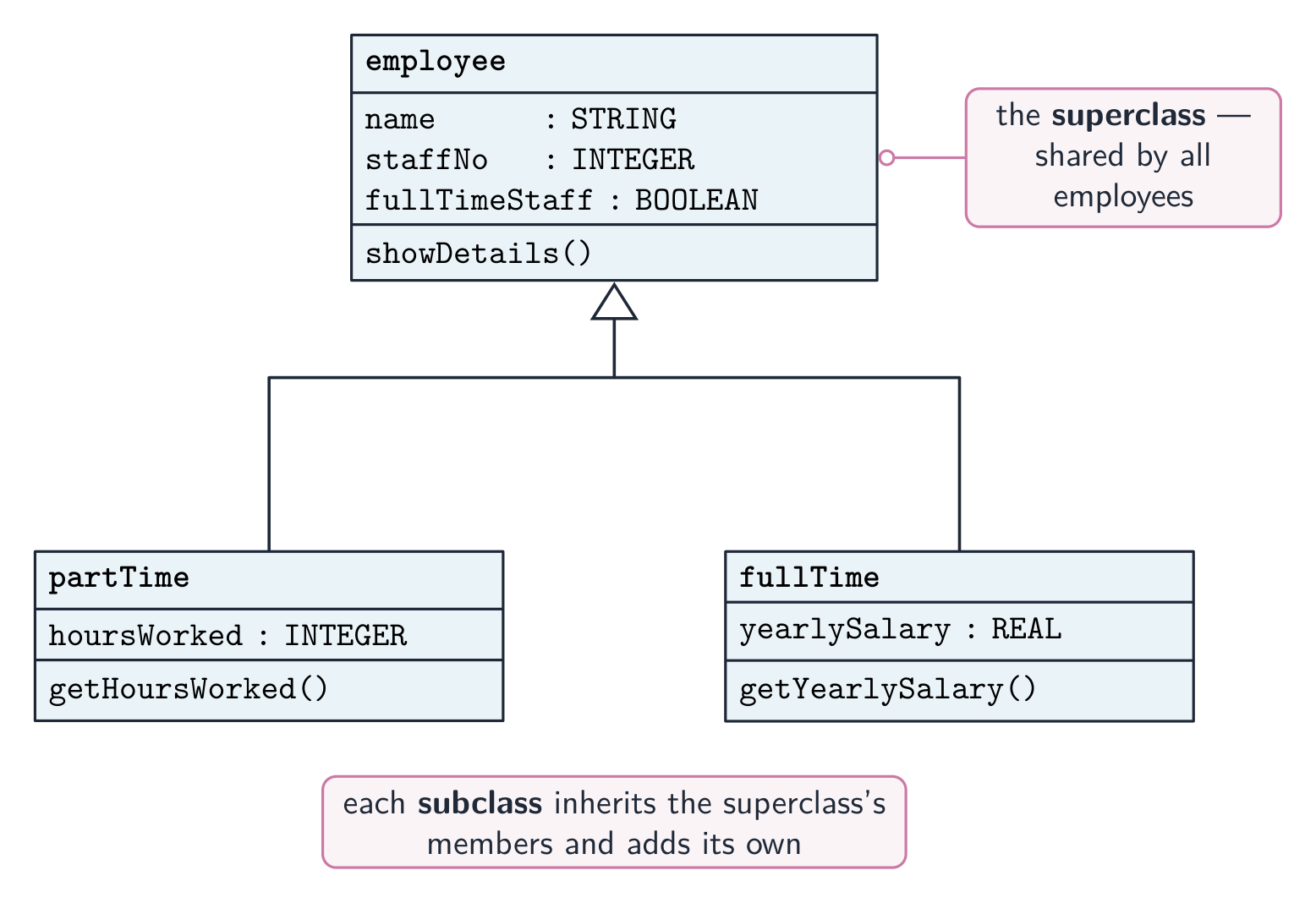
    แผนภูมิสืบทอด UML: Class父 class employee อยู่ด้านบน, กับ subclasses partTime และ fullTime อยู่ด้านล่าง, แต่ละตัวเชื่อมกับ superclass ด้วยลูกศร generalisation รูปสามเหลี่ยมว่างเปล่า และเพิ่ม attributes และ methods ของตัวเอง *การสืบทอด: partTime และ fullTime เป็น subclass ของ employee

    วัตถุ BankAccount ที่มี balance แบบส่วนตัวเข้าถึงได้เฉพาะผ่าน public methods deposit() และ withdraw(); โค้ดภายนอกไม่สามารถเข้าถึงข้อมูลโดยตรง *การห่อหุ้ม (Encapsulation): ข้อมูลของวัตถุเป็นแบบส่วนตัว เข้าถึงได้เฉพาะผ่าน public methods ของมัน
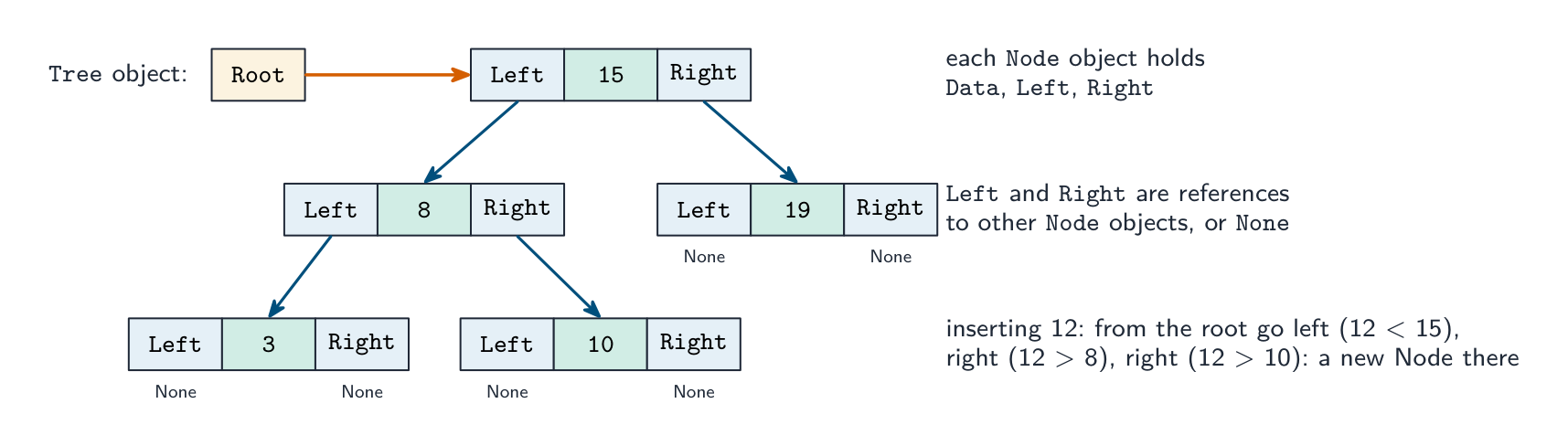
    OOP ตามที่กรรมการสอบให้คะแนน

    นิยาม. Class: แม่แบบ (blueprint) ที่กำหนด attributes และ methods ของ objects ของประเภทนั้น Object: instance ของ class, สร้างมาจากมัน, มีค่าของตัวเองสำหรับ attributes ("an occurrence of an object" คือคำศัพท์ในการสอบสำหรับ instance) Attribute (property): รายการข้อมูลที่ thuộc về class Method: กระบวนการหรือฟังก์ชันที่省属 class作用于它的属性 Encapsulation: การรวม attributes และ methods ไว้ใน class เดียวกันและ จำกัดการเข้าถึงภายนอก ต่อข้อมูล: attributes เป็น private และอ่านหรือแก้ไขได้เฉพาะผ่าน public methods Inheritance: subclass รับ attributes และ methods จาก parent (super) class ของมันและสามารถเพิ่มหรือ override它们的 Polymorphism: methods ที่มี ชื่อเดียวกัน แต่ทำงาน ต่างกัน ใน classes ที่แตกต่างกัน; โดยทั่วไป subclass นิยามใหม่ method ของ parent, และเวอร์ชันที่ถูกต้องจะรันสำหรับแต่ละวัตถุ Containment: class มี object ของอีก class หนึ่งเป็น attribute (รถ มี เครื่องยนต์) "ระบุฟีเจอร์ที่จำกัดการเข้าถึงภายนอกต่อข้อมูล" คือ encapsulation; "คำศัพท์สำหรับ occurrence ของวัตถุ" คือ instance.

    "อธิบายโครงสร้างของ class" (3 คะแนน): attributes (properties) ที่เก็บข้อมูลของวัตถุ, มักจะประกาศเป็น private; methods (procedures และ functions) ที่กระทำต่อ attributes เหล่า, มักจะเป็น public; และ constructor, method ที่รันเมื่อสร้างวัตถุเพื่อเริ่มต้นค่าของ attributes "ยกประโยชน์ 3 ประการของ OOP": โค้ดถูก นำกลับมาใช้ใหม่ ผ่าน inheritance; ข้อมูลถูก ปกป้อง โดย encapsulation, ดังนั้นจึงแก้ไขได้เฉพาะโดย methods ของ class นั้นเอง; โปรแกรมขนาดใหญ่แบ่งออกเป็น classes ที่เขียนและทดสอบ แยกอิสระ, sehinggaทำให้บำรุงรักษาและขยายได้ง่ายขึ้น; classes จำลอง ความเป็นจริง, ดังนั้นการออกแบบจึงเข้าใจง่ายขึ้น; polymorphism ทำให้การเรียกใช้เดียวกันใช้ได้กับวัตถุที่ต่างกัน

    class ในรหัสเทียม (pseudocode), ตามที่กำหนดใน Paper 3:

    CLASS Car
        PRIVATE Registration : STRING
        PRIVATE Year : INTEGER
        PRIVATE Mileage : INTEGER
        PUBLIC PROCEDURE NEW(NewReg : STRING, NewYear : INTEGER)
            Registration ← NewReg
            Year ← NewYear
            Mileage ← 0
        ENDPROCEDURE
        PUBLIC FUNCTION GetMileage() RETURNS INTEGER
            RETURN Mileage
        ENDFUNCTION
        PUBLIC PROCEDURE AddMileage(Extra : INTEGER)
            Mileage ← Mileage + Extra
        ENDPROCEDURE
    ENDCLASS
    

    วัตถุถูกสร้างด้วย MyCar ← NEW Car("AB12 CDE", 2020) และใช้กับ MyCar.AddMileage(150) และ OUTPUT MyCar.GetMileage(). subclass นำ back constructor ของ parent มาใช้ผ่าน SUPER:

    CLASS ElectricCar INHERITS Car
        PRIVATE BatteryCapacity : REAL
        PUBLIC PROCEDURE NEW(NewReg : STRING, NewYear : INTEGER, NewCapacity : REAL)
            SUPER.NEW(NewReg, NewYear)
            BatteryCapacity ← NewCapacity
        ENDPROCEDURE
    ENDCLASS
    

    class เดียวกันใน Python, ตามที่ Paper 4 ต้องการ: attributes ถูกทำให้เป็น private ด้วย double underscore, constructor คือ __init__, และ subclass ตั้งชื่อ parent ในวงเล็บและเรียก super().__init__(…):

    class Car:
        def __init__(self, reg, year):
            self.__registration = reg
            self.__year = year
            self.__mileage = 0
        def get_mileage(self):
            return self.__mileage
        def add_mileage(self, extra):
            self.__mileage = self.__mileage + extra
    
    class ElectricCar(Car):
        def __init__(self, reg, year, capacity):
            super().__init__(reg, year)
            self.__capacity = capacity
    
    cars = []
    cars.append(Car("AB12 CDE", 2020))
    cars.append(ElectricCar("EV21 XYZ", 2023, 75.0))
    cars[1].add_mileage(150)
    print(cars[1].get_mileage())
    

    ใน Java แนวคิดเดียวกันคือ private/public fields, constructor ที่มีชื่อ class, extends และ super(…); ใน VB.NET Private/Public, Sub New, Inherits และ MyBase.New. Polymorphic method เขียนใน parent และ overridden ใน child ด้วยชื่อเดียวกัน; การเรียกผ่านตัวแปร type parent จะรันเวอร์ชันของ child

    โครงสร้างข้อมูลในฐานะวัตถุ. Paper 4 สร้าง stack, linked list หรือ binary tree จาก Node class ที่ attributes ของมันคือข้อมูลและหนึ่งหรือสอง references ไปยัง nodes อื่น;一个 Tree (หรือ LinkedList) class เก็บ root (หรือจุดเริ่มต้น) และ methods

    binary tree ของ Node objects: Tree object's Root ชี้ไปที่ node 15, whose Left และ Right references ชี้ไปที่ nodes 8 และ 19, และอื่นๆ, พร้อม None สำหรับ empty references *binary tree ที่สร้างจาก objects: แต่ละ Node เก็บ Data Plus Left และ Right references, และ Tree เก็บ Root; การ insert เดินตาม references
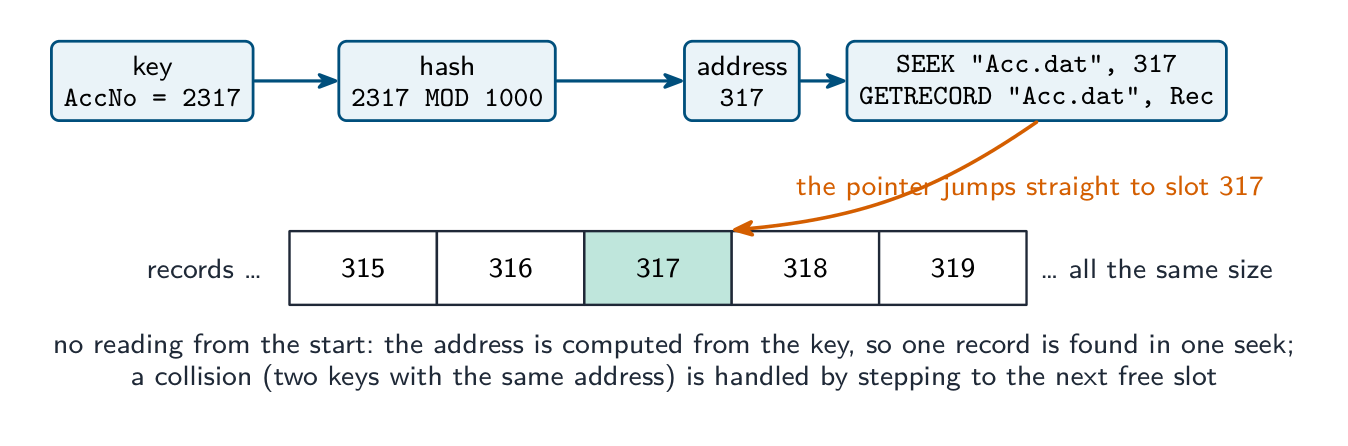
    CLASS Node
        PUBLIC Data : INTEGER
        PUBLIC Left : Node          // NULL when there is no child
        PUBLIC Right : Node
        PUBLIC PROCEDURE NEW(NewData : INTEGER)
            Data ← NewData
            Left ← NULL
            Right ← NULL
        ENDPROCEDURE
    ENDCLASS
    
    CLASS Tree
        PRIVATE Root : Node
        PUBLIC PROCEDURE Insert(NewData : INTEGER)
            DECLARE NewNode, Current : Node
            DECLARE Placed : BOOLEAN
            NewNode ← NEW Node(NewData)
            IF Root = NULL THEN
                Root ← NewNode
            ELSE
                Current ← Root
                Placed ← FALSE
                WHILE NOT Placed
                    IF NewData < Current.Data THEN
                        IF Current.Left = NULL THEN
                            Current.Left ← NewNode
                            Placed ← TRUE
                        ELSE
                            Current ← Current.Left
                        ENDIF
                    ELSE
                        IF Current.Right = NULL THEN
                            Current.Right ← NewNode
                            Placed ← TRUE
                        ELSE
                            Current ← Current.Right
                        ENDIF
                    ENDIF
                ENDWHILE
            ENDIF
        ENDPROCEDURE
    ENDCLASS
    

    A find method เดินเส้นทางเดียวกันและกลับ TRUE เมื่อ Current.Data = Target, FALSE เมื่อมันถึง NULL; A in-order output method เป็น recursive: output subtree ซ้าย, node, แล้ว subtree ขวา. สำหรับ linked list node มี reference หนึ่ง, Next, และ class ของ list เก็บ Start; สำหรับ stack ที่สร้างจาก list, push และ pop ทำงานได้ที่ Start

    ตัวอย่างที่แสดงวิธีทำ. เกมมีตัวละคร แต่ละตัวมีชื่อ, สุขภาพ (เริ่มต้นที่ 100) และตำแหน่งที่กำหนดโดย X และ Y. เขียน class Character dengan constructor และ method Move(DX, DY); จากนั้น subclass Wizard ที่เพิ่ม Mana (เริ่มต้นที่ 50) และ method CastSpell() ที่ใช้ 10 mana และกลับ TRUE หากมีเพียงพอ

    CLASS Character
        PRIVATE Name : STRING
        PRIVATE Health : INTEGER
        PRIVATE X : INTEGER
        PRIVATE Y : INTEGER
        PUBLIC PROCEDURE NEW(NewName : STRING, StartX : INTEGER, StartY : INTEGER)
            Name ← NewName
            Health ← 100
            X ← StartX
            Y ← StartY
        ENDPROCEDURE
        PUBLIC PROCEDURE Move(DX : INTEGER, DY : INTEGER)
            X ← X + DX
            Y ← Y + DY
        ENDPROCEDURE
    ENDCLASS
    
    CLASS Wizard INHERITS Character
        PRIVATE Mana : INTEGER
        PUBLIC PROCEDURE NEW(NewName : STRING, StartX : INTEGER, StartY : INTEGER)
            SUPER.NEW(NewName, StartX, StartY)
            Mana ← 50
        ENDPROCEDURE
        PUBLIC FUNCTION CastSpell() RETURNS BOOLEAN
            IF Mana >= 10 THEN
                Mana ← Mana - 10
                RETURN TRUE
            ELSE
                RETURN FALSE
            ENDIF
        ENDFUNCTION
    ENDCLASS
    

    คะแนนคือสำหรับ private attributes, constructor ที่ตั้งค่าทุก attribute, เส้น inheritance, การเรียก constructor ของ parent, และ method ที่ใช้และเปลี่ยนข้อมูลของวัตถุเอง เมื่อคำถามขอ class diagram, วาดกล่องสามส่วน (ชื่อ; attributes กับ - สำหรับ private; methods กับ + สำหรับ public) และเชื่อม subclass กับ parent ด้วยลูกศรชี้ไปหา parent

    การเขียนโปรแกรมเชิงคำบรรยาย (Declarative programming)

    ในการเขียนโปรแกรมแบบ ** declarative ** คุณบอก ** ว่าอะไร** ที่ต้องคำนวณ ไม่ใช่ ** วิธีทำ**— runtime จะหาขั้นตอนเอง มีสองประเภท:

    • ** การเขียนโปรแกรมแบบฟังก์ชัน ** — สร้างจาก ** ฟังก์ชันบริสุทธิ์ ** (ไม่มี ** ผลข้างเคียง**; อินพุตเดิมให้เอาต์พุตเดิมเสมอ) นำมาประกอบกัน ตัวอย่าง: Haskell, Lisp.
    • ** การเขียนโปรแกรมแบบตรรกะ ** — กำหนดข้อเท็จจริงและกฎ; เอนจิ้นจะตอบ ** เป้าหมาย ** (คำถาม) ผ่านการอนุมาน ตัวอย่าง: Prolog.

    ตัวอย่าง declarative ที่คุ้นเคยคือ ** SQL**: SELECT * FROM Customer WHERE Country = 'UK' บอกว่าต้องการอะไร ไม่ใช่วิธีการเดินผ่านข้อมูล

    ** ข้อเท็จจริง กฎ และเป้าหมาย ** คือสิ่งที่ข้อสอบทดสอบในแนวคิดแบบ declarive ให้ ** ข้อเท็จจริง ** เหล่านี้ (ข้อความที่เป็นจริง) และ ** กฎ ** (ข้อสรุปที่มีผลเมื่อเงื่อนไขเป็นจริง):

    01 type(leopard, wild).
    02 type(lion, wild).
    03 type(tabby, domestic).
    04 size(leopard, large).
    05 size(lion, large).
    06 size(tabby, small).
    07 dangerous(X) IF type(X, wild) AND size(X, large).
    

    "* เขียนผลลัพธ์ของเป้าหมาย type(X, wild)":* X = leopard, X = lion. เอนจิ้นจับคู่เป้าหมายกับแต่ละข้อเท็จจริงทีละตัว; ทุกการจับคู่คือคำตอบ และตัวอักษรพิมพ์ใหญ่คือ ** ตัวแปร ** ที่การจับคู่นั้นเติมค่าให้ "เขียนข้อเท็จจริงเพื่อแสดงว่าเสือดาวเป็นสัตว์ป่า": type(cheetah, wild). "อธิบายบรรทัดที่ 07 ทำอะไร": นิยามกฎที่มีข้อสรุป dangerous(X), ซึ่งเป็นจริงสำหรับทุก X ที่เป็นทั้งสัตว์ป่าและขนาดใหญ่, ดังนั้น dangerous(A) จะคืนค่า A = leopard, A = lion. "เขียนกฎ: คุณสมบัติ F อาจมีสำหรับรูปแบบตัวถัง B หาก F เป็นคุณสมบัติและ B เป็นรูปแบบตัวถังและ F ไม่ถูกปฏิเสธสำหรับ B": may_be_available(F, B) IF feature(F) AND body_style(B) AND NOT unavailable(F, B). คัดลอกชื่อ predicate และลำดับอาร์กิวเมนต์ที่ถูกต้องตามข้อเท็จจริงในคำถาม; ข้อเท็จจริงใหม่ลงท้ายด้วยจุด และเงื่อนไขของกฎเชื่อมกันด้วย AND.

    เปรียบเทียบแนวคิด

    แนวคิด จุดเด่น ภาษาทั่วไป
    ระดับต่ำ ควบคุมสูงสุด, ความเร็ว assembly
    แบบคำสั่งตรง ตรงไปตรงมา, เข้าใจง่าย C, Python
    Object-oriented แยกส่วน, จำลอง实体 Java, C#, Python
    แบบฟังก์ชัน ชัดเจน, ไม่มีผลข้างเคียง Haskell, F#
    แบบตรรกะ การอนุมาน, กฎ Prolog
    ฐานข้อมูล ค้นหาข้อมูล SQL

    ภาษาสมัยใหม่มัก ** ผสมผสานแนวคิด **— Python รองรับทั้ง procedural, OOP และ functional. แบบที่เหมาะสมขึ้นอยู่กับปัญหา

    Explore · ⁨สำรวจ⁩

    Programming concept lab · ⁨ห้องปฏิบัติการแนวคิดการเขียนโปรแกรม⁩

    Connect examples to the programming idea they show. · ⁨เชื่อมโยงตัวอย่างเข้ากับแนวคิดการเขียนโปรแกรมที่แสดงออก⁩

    Vocabulary · ⁨คำศัพท์⁩ Train · ⁨ฝึกฝน⁩
    English ไทย
    low-level/ləʊ ˈlevl/ low-level
    registers/ˈredʒɪstəz/ รีจิสเตอร์
    memory addresses/ˈmeməri əˈdresɪz/ ที่อยู่หน่วยความจำ
    objects/ˈɒbdʒekts/ สิ่งของ
    attributes/ˈætrɪbjuːts/ คุณลักษณะ
    methods/ˈmeθədz/ methods
    machine code/məˈʃiːn kəʊd/ เครื่องมิกซ์โค้ด (machine code)
    assembly language/əˈsemblɪ ˈlæŋɡwɪdʒ/ Assembly Language
    addressing modes/əˈdresɪŋ məʊdz/ โหมดการเข้าถึง
    instances/ˈɪnstənsɪz/ อินสแตนซ์
    classes/ˈklæsɪz/ คลาส
    encapsulation/ɪnˌkæpsjʊˈleɪʃn/ การห่อหุ้มข้อมูล
    inheritance/ɪnˈherɪtəns/ การสืบทอด
    subclass/ˈsʌbklæs/ subclass inheritance
    superclass/ˈsuːpəklæs/ superclass
    overriding/ˌəʊvəˈraɪdɪŋ/ การ Overrides / การยกเลิกผล
    polymorphism/ˈpɒlɪmɔːfɪzəm/ polymorphism concept
    abstraction/əbˈstrækʃn/ การห่อหุ้ม (abstraction)
    constructor/kənˈstrʌktə/ constructor
    aggregation/ˌæɡrɪˈɡeɪʃn/ aggregation
    containment/kənˈteɪnmənt/ การครอบครอง
    declarative programming/dɪˈklærətɪv ˈprəʊɡræmɪŋ/ การเขียนโปรแกรมแบบประกาศ
    functional programming/ˈfʌŋkʃənl ˈprəʊɡræmɪŋ/ การเขียนโปรแกรมเชิงฟังก์ชัน
    pure functions/pjʊə ˈfʌŋkʃnz/ ฟังก์ชันบริสุทธิ์
    side effects/saɪd ɪˈfekts/ side effects
    logic programming/ˈlɒdʒɪk ˈprəʊɡræmɪŋ/ การเขียนโปรแกรมเชิงตรรกะ
    SQL/ˌes kjuː ˈel/ SQL
    20.2

    File processing · ⁨การจัดการไฟล์⁩

    Syllabus · ⁨หลักสูตร⁩
    English
    Candidates should be able to: Notes and guidance
    Write code to perform file-processing operations Open (in read, write, append mode) and close a file Read a record from a file and write a record to a file Perform file-processing operations on serial, sequential, random files
    Show understanding of an exception and the importance of exception handling Know when it is appropriate to use exception handling Write program code to use exception handling
    ไทย
    ผู้เข้าสอบควรสามารถ: หมายเหตุและคำแนะนำ
    เขียนโค้ดเพื่อทำการ จัดการไฟล์ เปิด (ในโหมด อ่าน, เขียน, เพิ่มข้อมูล) และปิดไฟล์ อ่านเรคอร์ดจากไฟล์และเขียนเรคอร์ดลงไฟล์ ทำการจัดการไฟล์บนไฟล์แบบ serial, sequential, random
    แสดงความเข้าใจใน ข้อผิดพลาด (exception) และความสำคัญของการ จัดการข้อผิดพลาด รู้ว่าเมื่อใดควรใช้การจัดการข้อผิดพลาด เขียนโค้ดโปรแกรมเพื่อใช้การจัดการข้อผิดพลาด

    Source: Cambridge International syllabus · ⁨แหล่งที่มา: หลักสูตร Cambridge International⁩

    English

    This extends the file 文件 handling from Topic 10, processing serial, sequential and random (direct-access) files. Pseudocode operations: OPENFILE name FOR READ | WRITE | APPEND (READ opens an existing file, WRITE creates/overwrites, APPEND adds to the end); READFILE name, line; WRITEFILE name, value; CLOSEFILE name; and EOF(name) which is TRUE at the end.

    Read a whole file:

    Search a file (stop when found):

    Updating a file in place

    Most languages can't edit a text file in place. Instead: open the original for READ and a temporary file for WRITE; for each line, write the new version if it should change, else the original; close both; then replace the original with the temp file. The same pattern handles deleting lines (skip them) and inserting lines.

    Records and random-access files

    Opening modes. READ: the file must exist and reading starts at the beginning. WRITE: a new file is created, and an existing file of that name is overwritten. APPEND: writing adds to the end of an existing file. Every file that is opened is closed with CLOSEFILE, and EOF(name) is TRUE when the last item has been read.

    Three file organisations. In a serial file the records are in the order they were added; in a sequential file they are in key order; both are read from the start. A random file 随机文件 (direct-access file) stores each record at an address calculated from its key by a hashing 哈希 function, so one record is found without reading the others. Records are declared as a user-defined type:

    The random-file operations in pseudocode are OPENFILE "Acc.dat" FOR RANDOM, SEEK "Acc.dat", Address (move the file pointer to that record), GETRECORD "Acc.dat", Rec (read the record there) and PUTRECORD "Acc.dat", Rec (write the record there). Finding a customer by account number, as Paper 3 sets it:

    To store a record, hash its key, SEEK to the address and PUTRECORD, stepping on past any slot already occupied. Marks go to the hash, the SEEK before the GET or PUT, the comparison with the target, the handling of a collision, and closing the file.

    Worked example. ActiveFile.dat holds AccountRecord records. Write pseudocode that copies every record whose Active field is FALSE to the end of ArchiveFile.dat.

    Text files in Python (Paper 4): file = open("HighScore.txt", "r"), then for line in file: with line.strip() and line.split(",") to separate the fields, int(…) to convert a score, and file.close(); to write, open(name, "w") (or "a" to append) and file.write(str(score) + "\n"). A high-score table is read into a list of records, the new score inserted at its place, and the whole list written back. The examiner marks the open with the correct mode, a loop that reads every line, the conversion of text to numbers, and the close.

    Pitfalls

    Forgetting to close a file (data may be lost); opening for WRITE when you meant APPEND (overwrites everything); reading past EOF; hard-coded paths — a path like /Users/Admin/data.txt breaks on another machine, so use a relative constant such as DataFile = "./data/scores.txt".

    ไทย

    ส่วนนี้จะขยายการจัดการ ** ไฟล์ ** จากหัวข้อ 10 โดยประมวลผลไฟล์แบบ ** serial **, ** sequential ** และ ** random ** (direct-access). การดำเนินการ Pseudocode: OPENFILE name FOR READ | WRITE | APPEND (READ เปิดไฟล์ที่มีอยู่, WRITE สร้าง/แทนที่, APPEND เพิ่มที่ปลาย); READFILE name, line; WRITEFILE name, value; CLOSEFILE name; และ EOF(name) ซึ่งจะเป็น TRUE ที่สุดท้าย

    อ่านทั้งไฟล์:

    OPENFILE "names.txt" FOR READ
    WHILE NOT EOF("names.txt") DO
        READFILE "names.txt", thisName
        OUTPUT thisName
    ENDWHILE
    CLOSEFILE "names.txt"
    

    ค้นหาในไฟล์ (หยุดเมื่อเจอ):

    found ← FALSE
    OPENFILE "people.txt" FOR READ
    WHILE NOT EOF("people.txt") AND NOT found DO
        READFILE "people.txt", line
        IF line = target THEN
            found ← TRUE
        ENDIF
    ENDWHILE
    CLOSEFILE "people.txt"
    

    อัปเดตไฟล์ในสถานที่

    ส่วนใหญ่ของภาษาไม่สามารถแก้ไขไฟล์ข้อความในสถานที่ได้ แทนที่จะใช้วิธีนั้น: เปิดไฟล์ต้นฉบับสำหรับการ READ และไฟล์ชั่วคราวสำหรับการ WRITE; สำหรับแต่ละบรรทัด, เขียนเวอร์ชันใหม่หากควรเปลี่ยน, ถ้าไม่ก็เขียนต้นฉบับ; ปิดทั้งสอง; จากนั้นแทนที่ไฟล์ต้นฉบับด้วยไฟล์ temp. รูปแบบเดียวกันนี้จัดการการลบบรรทัด (ข้าม) และการแทรกบรรทัด

    อัปเดตไฟล์ในสถานที่: อ่านไฟล์ต้นฉบับ, เขียนบรรทัดที่เปลี่ยนแปลงไปยังไฟล์ temp, แล้วแทนที่ไฟล์ต้นฉบับด้วยไฟล์ temp
    อัปเดตไฟล์ในสถานที่: อ่านต้นฉบับ, เขียนการเปลี่ยนแปลงไปยังไฟล์ temp, แล้วแทนที่ต้นฉบับ

    Records และไฟล์แบบเข้าถึงแบบสุ่ม

    ** โหมดเปิด.** READ: ไฟล์ต้องมีอยู่และการอ่านเริ่มจากต้น WRITE: ไฟล์ ** ใหม่** จะถูกสร้าง, และไฟล์ที่มีชื่อนั้น ** ถูกแทนที่**. APPEND: การเขียนเพิ่มที่ ** ปลาย** ของไฟล์ที่มีอยู่. ไฟล์ที่ถูกเปิดทั้งหมดจะถูกปิดด้วย CLOSEFILE, และ EOF(name) จะเป็น TRUE เมื่อรายการสุดท้ายถูกอ่านแล้ว

    ** 3 การจัดระเบียบไฟล์.** ในไฟล์ ** serial ** records อยู่ตามลำดับที่เพิ่มเข้าไป; ในไฟล์ ** sequential ** อยู่ตามลำดับ ** key**; ทั้งสองอ่านจากต้น ไฟล์ ** random ** (direct-access file) เก็บแต่ละ record ที่ ** ที่อยู่ ** ที่คำนวณจาก key ของมันโดยฟังก์ชัน ** hashing **, ดังนั้นสามารถหาหนึ่ง record ได้โดยไม่อ่านอื่นๆ. Records ถูกประกาศเป็นชนิดที่กำหนดเอง:

    TYPE AccountRecord
        DECLARE AccNo : INTEGER
        DECLARE Name : STRING
        DECLARE Balance : REAL
        DECLARE Active : BOOLEAN
    ENDTYPE
    
    key 2317 hashing ด้วย MOD 1000 เป็นที่อยู่ 317, จากนั้น SEEK และ GETRECORD บนไฟล์ Acc.dat, แสดงเป็นแถวช่องบันทึกขนาดเท่ากันโดยเน้นช่อง 317
    การค้นหา one record ใน random file: key hash ไปยังที่อยู่, ไฟล์ pointerSeek ตรงไปยังช่องนั้นและอ่าน record; ไม่มีการสัมผัส record อื่น

    การดำเนินการ random-file ใน pseudocode คือ OPENFILE "Acc.dat" FOR RANDOM, SEEK "Acc.dat", Address (ย้ายไฟล์ pointer ไปยัง record นั้น), GETRECORD "Acc.dat", Rec (อ่าน record ที่นั่น) และ PUTRECORD "Acc.dat", Rec (เขียน record ที่นั่น). การหาลูกค้าโดยเลขบัญชี, ตามPaper 3 ตั้งไว้:

    DECLARE Rec : AccountRecord
    DECLARE Target, Address : INTEGER
    INPUT Target
    Address ← Target MOD 1000              // the hashing function
    OPENFILE "Acc.dat" FOR RANDOM
    SEEK "Acc.dat", Address
    GETRECORD "Acc.dat", Rec
    WHILE Rec.AccNo <> Target AND Rec.AccNo <> 0    // 0 marks an empty slot
        Address ← Address + 1               // a collision: try the next slot
        SEEK "Acc.dat", Address
        GETRECORD "Acc.dat", Rec
    ENDWHILE
    IF Rec.AccNo = Target THEN
        OUTPUT Rec.Name, Rec.Balance
    ELSE
        OUTPUT "No such account"
    ENDIF
    CLOSEFILE "Acc.dat"
    

    เพื่อ ** เก็บ ** record, hash key ของมัน, SEEK ไปยังที่อยู่และ PUTRECORD, ก้าวข้ามช่องใดก็ตามที่ถูกใช้ไปแล้ว. คะแนนไปที่ hash, SEEK ก่อน GET หรือ PUT, การเปรียบเทียบกับเป้าหมาย, การจัดการการชน, และการปิดไฟล์

    ** ตัวอย่างที่ทำงาน.** ActiveFile.dat เก็บ AccountRecord records. เขียน pseudocode ที่คัดลอกทุก record ที่มีฟิลด์ Active เป็น FALSE ไปยัง末尾ของ ArchiveFile.dat.

    DECLARE Rec : AccountRecord
    OPENFILE "ActiveFile.dat" FOR READ
    OPENFILE "ArchiveFile.dat" FOR APPEND
    WHILE NOT EOF("ActiveFile.dat")
        READFILE "ActiveFile.dat", Rec
        IF Rec.Active = FALSE THEN
            WRITEFILE "ArchiveFile.dat", Rec
        ENDIF
    ENDWHILE
    CLOSEFILE "ActiveFile.dat"
    CLOSEFILE "ArchiveFile.dat"
    

    ** ไฟล์ข้อความใน Python ** (Paper 4): file = open("HighScore.txt", "r"), แล้ว for line in file: พร้อม line.strip() และ line.split(",") เพื่อแยกฟิลด์, int(…) เพื่อแปลงคะแนน, และ file.close(); เพื่อเขียน, open(name, "w") (หรือ "a" เพื่อเพิ่มต่อ) และ file.write(str(score) + "\n"). ตารางคะแนนสูงถูกอ่านเข้าสู่รายการของ records, คะแนนใหม่แทรกในตำแหน่ง, และรายการทั้งหมดเขียนกลับ. ผู้ประเมินให้คะแนนการเปิดด้วยโหมดที่ถูกต้อง, ลูปที่อ่านทุกบรรทัด, การแปลงข้อความเป็นตัวเลข, และการปิด

    กับดัก

    ลืมปิดไฟล์ (ข้อมูลอาจสูญหาย); เปิดเพื่อ WRITE เมื่อตั้งใจ APPEND (แทนที่ทุกอย่าง); อ่านเกิน EOF; เส้นทางที่ Hard-coded — เส้นทางเช่น /Users/Admin/data.txt จะล้มเหลวบนเครื่องอื่น, ดังนั้นใช้ค่าคงที่สัมพัทธ์เช่น DataFile = "./data/scores.txt".

    Explore · ⁨สำรวจ⁩

    File access route · ⁨ช่องทางเข้าถึงไฟล์ (File access route)⁩

    Follow a file from storage to program and back safely. · ⁨ติดตามไฟล์จากหน่วยจัดเก็บเข้าสู่โปรแกรมและกลับคืนมาอย่างปลอดภัย⁩

    Vocabulary · ⁨คำศัพท์⁩ Train · ⁨ฝึกฝน⁩
    English ไทย
    file/faɪl/ ไฟล์
    random file/ˈrændəm faɪl/ ไฟล์สุ่ม
    hashing/ˈhæʃɪŋ/ hashing
    20.2

    Exception handling · ⁨การจัดการข้อยกเว้น⁩

    English

    An exception 异常 is an error or unexpected condition during execution — divide by zero, file not found, network failure, an array 数组 index out of range. Exception handling 异常处理 lets a program detect it and respond gracefully instead of crashing.

    It matters because real programs face errors that cannot be prevented up front (files moved, networks down, bad input); without it, every operation needs its own IF check; and it separates the normal flow from the error handling, so the main path reads cleanly. For example, a file may be deleted by another user between your program checking it exists and actually opening it — you cannot prevent that, only handle the failure when it happens.

    "Describe, with an example, what is meant by an exception" (two marks). An unexpected event or error that occurs during the execution of a program (at run time) and interrupts its normal flow; for example dividing by zero, opening a file that does not exist, converting non-numeric input to an integer, an array index out of range, or running out of memory. "Identify two possible causes of exceptions" is answered from that list, plus "a device or network is not available" and "invalid data type entered".

    "State the reasons for including exception handling" (three marks). To stop the program crashing (terminating unexpectedly); to output a meaningful message to the user rather than a system error; to allow the program to recover and continue, for example by asking for the input again, or to close files safely before it ends; and because some errors cannot be predicted when the program is written. "Describe how program termination due to an exception can be avoided": put the statements that might raise the exception inside a TRY block; write an EXCEPT (catch) block for that exception that handles it, for example by outputting a message, so that execution continues after the block instead of stopping. "Explain what is meant by exception handling": detecting an exception when it occurs and running code (the handler) that deals with it so that the program continues.

    Pattern

    The TRY block holds the code that might fail; the first matching EXCEPT block runs. Real languages also have a catch-all EXCEPT and a FINALLY block that runs whether or not an exception happened — useful for cleanup (closing files).

    Raising an exception

    A subroutine that detects an error can raise 抛出 an exception so the caller handles it:

    Where to handle exceptions

    Handle them close to the error if the response is simple (a message, a retry), or higher up the call stack 调用栈 if only the outer code knows what to do (a top-level GUI loop logs the error and shows a friendly dialog). Don't swallow exceptions silently — at least log them, or debugging becomes impossible.

    Common exceptions: FileNotFound, IOError, DivisionByZero, IndexOutOfRange, InvalidArgument, NullReference, OutOfMemory. Wrapping each failing operation in a TRY with the right EXCEPT handlers gives a program that degrades gracefully instead of crashing.

    Worked example (Paper 4). Write a function that reads whole numbers, one per line, from a file whose name is passed as a parameter and returns them in a list. It must not crash if the file does not exist or a line is not a whole number.

    The try block holds the code that can fail (the open and the conversion); each except names one exception and does something useful; the function still returns a list, so the caller continues. In Java the same shape is try { … } catch (FileNotFoundException e) { … } catch (NumberFormatException e) { … }; in VB.NET Try … Catch ex As FileNotFoundException … End Try. Marks: the risky statements inside the try, the correct exception names, a message for each, and the program continuing afterwards; a catch-all except: gets the crash mark but not the "appropriate exception" mark.

    Worked example. A text file of members needs one member's phone number changed. Why can the program not simply overwrite that line, and what is the pattern? A text file's lines are different lengths, and the file has no gaps to absorb a difference: a longer replacement would run into the next record, and a shorter one would leave part of the old line behind. So the pattern is to open the original for READ and a temporary file for WRITE, read every line in turn, writing the new version for the line that changes and the original line for all the others, close both, then replace the original with the temporary file. The same shape handles deleting (skip the line) and inserting (write the extra line). Note that every line gets written, not only the changed one - writing just the new record and losing the rest of the file is the classic slip.

    ไทย

    ข้อยกเว้น (Exception) คือข้อผิดพลาดหรือสภาวะที่ไม่คาดคิดระหว่างการทำงาน — การหารด้วยศูนย์, ไฟล์ไม่พบ, ความล้มเหลวของเครือข่าย, ดัชนีของ -array超出了ขอบเขต การจัดการข้อยกเว้น (Exception handling) ช่วยให้โปรแกรมสามารถ ตรวจจับ และตอบสนองได้อย่างเหมาะสมแทนที่จะหยุดทำงานอย่างฉับพลัน

    สิ่งนี้มีความสำคัญเพราะโปรแกรมจริงต้องเผชิญกับข้อผิดพลาดที่ ไม่สามารถป้องกันได้ล่วงหน้า (ไฟล์ถูกย้าย, เครือข่ายล่ม, ข้อมูลเข้าผิด); โดยไม่มีมัน การดำเนินการแต่ละครั้งจะต้องมีการตรวจสอบ IF ของตัวเอง; และมัน แยก กระบวนการปกติออกจากการจัดการข้อผิดพลาด ทำให้เส้นทางหลักอ่านได้ง่ายขึ้น ตัวอย่างเช่น ไฟล์อาจถูกลบโดยผู้ใช้คนอื่นระหว่างที่โปรแกรมของคุณตรวจสอบว่าไฟล์มีอยู่และเปิดใช้งานจริง — คุณไม่สามารถป้องกันสิ่งนี้ได้ แต่สามารถจัดการกับความล้มเหลวเมื่อเกิดขึ้นได้

    "อธิบาย พร้อมยกตัวอย่าง ความหมายของข้อยกเว้น" (2 คะแนน) * เหตุการณ์หรือข้อผิดพลาดที่ไม่คาดคิด ที่เกิดขึ้น ระหว่างการทำงาน ของโปรแกรม (ในขณะรันไทม์) และ ขัดขวางการไหลตามปกติ; ตัวอย่างเช่น การหารด้วยศูนย์, การเปิดไฟล์ที่ไม่มีอยู่, การแปลงข้อมูลที่ไม่ใช่ตัวเลขให้เป็นจำนวนเต็ม, ดัชนีของ array超出了ขอบเขต, หรือหน่วยความจำหมด * "ระบุสาเหตุที่เป็นไปได้สองประการของข้อยกเว้น" ตอบจากรายการนั้น plus "อุปกรณ์หรือเครือข่ายไม่สามารถเข้าถึงได้" และ "ชนิดข้อมูลที่ไม่ถูกต้องถูกป้อนเข้า".

    "ระบุเหตุผลในการรวมการจัดการข้อยกเว้น" (3 คะแนน) เพื่อหยุดโปรแกรม หยุดทำงาน (สิ้นสุดอย่างไม่คาดคิด); เพื่อแสดง ข้อความที่มีนัยสำคัญ给用户แทนข้อผิดพลาดของระบบ; เพื่อให้โปรแกรมสามารถ กู้คืน และดำเนินต่อได้ เช่น การขอข้อมูลใหม่ หรือปิดไฟล์อย่างปลอดภัยก่อนจบ; และเนื่องจากข้อผิดพลาดบางอย่าง ไม่สามารถคาดการณ์ได้ เมื่อเขียนโปรแกรม "อธิบายวิธีหลีกเลี่ยงการหยุดทำงานของโปรแกรมเนื่องจากข้อยกเว้น": วางคำสั่งที่อาจก่อให้เกิดข้อยกเว้นภายในบล็อก TRY; เขียนบล็อก EXCEPT (catch) สำหรับข้อยกเว้นนั้นเพื่อจัดการ它与它, ตัวอย่างเช่น การแสดงข้อความ, เพื่อให้การดำเนินงานต่อเนื่องหลังจากบล็อกแทนการหยุดลง * "อธิบายความหมายของการจัดการข้อยกเว้น": การตรวจจับข้อยกเว้นเมื่อเกิดขึ้นและรันโค้ด (ตัวจัดการ / handler) ที่จัดการกับมันเพื่อให้โปรแกรมดำเนินต่อไป

    รูปแบบ

    TRY
        OPENFILE "data.txt" FOR READ
        READFILE "data.txt", line
        OUTPUT line
        CLOSEFILE "data.txt"
    EXCEPT FileNotFound
        OUTPUT "Sorry, the file does not exist."
    EXCEPT ReadError
        OUTPUT "Sorry, error reading the file."
    ENDTRY
    

    บล็อก TRY เก็บโค้ดที่อาจล้มเหลว; บล็อก EXCEPT ที่ตรงกันครั้งแรกจะทำงาน ภาษาจริงยังมี catch-all EXCEPT และบล็อก FINALLY ที่จะทำงานไม่ว่าจะมีข้อยกเว้นเกิดขึ้นหรือไม่ — มีประโยชน์สำหรับการทำความสะอาด (ปิดไฟล์)

    การไหลของข้อยกเว้น: หากบล็อก TRY ก่อให้เกิดข้อยกเว้น การควบคุมจะกระโดดไปยัง EXCEPT ที่ตรงกัน;若无ข้อยกเว้นจะถูกข้าม ในทั้งสองกรณีบล็อก FINALLY จะทำงาน จากนั้นโปรแกรมจะดำเนินต่อไป
    การไหลของ Exception: exception จะกระโดดไปยัง EXCEPT ที่ตรงกัน; FINALLY จะทำงานเสมอก่อนที่โปรแกรมจะดำเนินต่อ

    การยกข้อยกเว้น (Raising an exception)

    Subroutine ที่ตรวจจับข้อผิดพลาดสามารถ ยก ข้อยกเว้นเพื่อให้ผู้เรียกจัดการ与之:

    PROCEDURE Divide(a : INTEGER, b : INTEGER) RETURNS INTEGER
        IF b = 0 THEN
            RAISE DivideByZero
        ENDIF
        RETURN a DIV b
    ENDPROCEDURE
    

    สถานที่จัดการข้อยกเว้น

    จัดการมัน ใกล้กับจุดเกิดข้อผิดพลาด หากการตอบสนองนั้นง่าย (ข้อความ, การทำซ้ำ), หรือสูงขึ้นไปใน call stack หากเพียงโค้ดภายนอกเท่านั้นที่รู้ว่าจะทำอะไร (ลูป GUI ระดับบนบันทึกข้อผิดพลาดและแสดงไดอะล็อกที่เป็นมิตร) อย่ากลืนข้อยกเว้นไปอย่างเงียบๆ — อย่างน้อยก็บันทึกไว้ มิฉะนั้นการแก้ไขข้อผิดพลาดจะเป็นไปไม่ได้

    ข้อยกเว้นทั่วไป: FileNotFound, IOError, DivisionByZero, IndexOutOfRange, InvalidArgument, NullReference, OutOfMemory. การห่อหุ้มแต่ละการดำเนินการที่ล้มเหลวใน TRY ด้วยตัวจัดการ EXCEPT ที่เหมาะสม ให้โปรแกรมที่ ลดผลกระทบอย่างเหมาะสม แทนการหยุดทำงาน

    ตัวอย่างแบบฝึกหัด (Paper 4). เขียนฟังก์ชันที่อ่านจำนวนเต็ม, เส้นหนึ่งต่อเส้น, จากไฟล์whose ชื่อถูกส่งเป็นพารามิเตอร์และกลับ它们在它们在它们在一个列表中。มัน must not crash if the file does not exist or a line is not a whole number.

    def read_scores(filename):
        scores = []
        try:
            file = open(filename, "r")
            for line in file:
                scores.append(int(line))
            file.close()
        except FileNotFoundError:
            print("The file", filename, "does not exist")
        except ValueError:
            print("A line in the file was not a whole number")
        return scores
    

    บล็อก try เก็บโค้ดที่ล้มเหลวได้ (การเปิดและการแปลง); แต่ละ except ชื่อบางอย่างของข้อยกเว้นและทำอะไร有用的; ฟังก์ชันยังคง返回列表, ดังนั้นผู้เรียกจึงดำเนินต่อ ใน Java รูปทรงเดียวกันคือ try { … } catch (FileNotFoundException e) { … } catch (NumberFormatException e) { … }; ใน VB.NET Try … Catch ex As FileNotFoundException … End Try. คะแนน: คำสั่งเสี่ยง ภายใน try, ชื่อข้อยกเว้นที่ถูกต้อง, ข้อความสำหรับแต่ละคน, และโปรแกรม ดำเนินต่อ afterwards; catch-all except: ได้รับคะแนนการหยุดทำงานแต่ไม่ใช่ "ข้อยกเว้นที่เหมาะสม" คะแนน

    ตัวอย่างแบบฝึกหัด. ไฟล์ข้อความของสมาชิกจำเป็นต้องเปลี่ยนเบอร์โทรศัพท์ของสมาชิกคนหนึ่ง ทำไมโปรแกรมจึงไม่สามารถเขียนทับบรรทัดนั้นได้โดยตรง, และรูปแบบคืออะไร? บรรทัดของไฟล์ข้อความมี ความยาวต่างกัน, และไฟล์ไม่มีช่องว่างเพื่อดูดซับความแตกต่าง: การแทนที่ยาวกว่าจะวิ่งเข้าไปในเรคอร์ดถัดไป, และการแทนที่ที่สั้นกว่าจะทิ้งส่วนหนึ่งของบรรทัดเก่าไว้ ดังนั้นรูปแบบคือการเปิดต้นฉบับสำหรับ READ และไฟล์ ชั่วคราว สำหรับ WRITE, อ่านทุกบรรทัดทีละบรรทัด, เขียน ใหม่ สำหรับบรรทัดที่เปลี่ยนแปลงและ ต้นฉบับ บรรทัดสำหรับทั้งหมด其他的, ปิดทั้งสอง, แล้ว แทนที่ ต้นฉบับด้วยไฟล์ชั่วคราว รูปแบบเดียวกันจัดการกับการลบ (ข้ามบรรทัด) และการแทรก (เขียนบรรทัดเพิ่ม) หมายเหตุว่า ทุก บรรทัดได้รับการเขียน, ไม่เพียงแต่ที่เปลี่ยนแปลง - การเขียนเฉพาะเรคอร์ดใหม่และสูญเสียส่วนที่เหลือของไฟล์คือความผิดพลาดคลาสสิก

    Explore · ⁨สำรวจ⁩

    How exception handling flows · ⁨การทำงานของการจัดการข้อยกเว้นเป็นอย่างไร⁩

    Step through what happens when code fails. The exception jumps out of the normal flow to a handler, FINALLY cleans up either way, and the program carries on instead of crashing. · ⁨ผ่านกระบวนการ发生的事情เมื่อโค้ดล้มเหลว ข้อยกเว้นจะกระโดดออกจากปกติ流向到一个 handler, FINALLY จะทำความสะอาดไม่ว่ากรณีใด และโปรแกรมจะดำเนินต่อไปแทนที่จะล่ม⁩

    Vocabulary · ⁨คำศัพท์⁩ Train · ⁨ฝึกฝน⁩
    English ไทย
    array/əˈreɪ/ อาร์เรย์
    imperative programming/ɪmˈperətɪv ˈprəʊɡræmɪŋ/ การเขียนโปรแกรมแบบคำสั่ง
    Variables/ˈveərɪəblz/ ตัวแปร
    object-oriented programming/ˈɒbdʒekt ˈɔːrɪəntɪd ˈprəʊɡræmɪŋ/ การเขียนโปรแกรมเชิงวัตถุ
    exception/ekˈsepʃn/ ข้อยกเว้น
    exception handling/ekˈsepʃn ˈhændlɪŋ/ การจัดการข้อยกเว้น
    raise/reɪz/ เพิ่ม
    call stack/kɔːl stæk/ call stack memory
    20.2

    Definitions the examiner accepts · ⁨คำนิยามที่ผู้สอบยอมรับ⁩

    English

    A definition question is marked against fixed wording. Learn these exactly, and give one answer only.

    Term Definition
    programming paradigm a style or way of programming, with its own way of structuring a program
    imperative language the program is a sequence of statements that change the program's state; the programmer says how the task is done
    declarative language the program states facts and rules and the inference engine works out how to find the answer
    class a template defining the attributes and methods of the objects of that type
    object (instance) an occurrence of a class, with its own values for the attributes
    attribute a data item that belongs to a class
    method a procedure or function that belongs to a class and acts on its attributes
    encapsulation keeping the attributes and methods together in a class and restricting external access to the data, so that it is changed only through public methods
    inheritance a subclass acquires the attributes and methods of its parent class and can add or override them
    polymorphism methods with the same name that behave differently for different classes
    constructor a method that runs when an object is created and initialises its attributes
    containment a class has an object of another class as one of its attributes
    fact a statement in a declarative program that is true
    rule a conclusion that holds when its conditions are true
    serial, sequential, random file records in the order added; records in key order; each record at an address calculated from its key
    exception an unexpected error or event during execution that interrupts the normal flow
    exception handling detecting an exception when it occurs and running code that deals with it so that the program continues
    ไทย

    คำถามคำนิยามจะให้คะแนนตามข้อความที่กำหนดไว้你必须 exact. เรียนรู้ให้ถูกต้องและตอบเพียงคำตอบเดียวเท่านั้น

    พจน์ นิยาม
    แนวทาง Programming สไตล์หรือวิธีการเขียนโปรแกรม, กับวิธีการโครงสร้างโปรแกรมของตัวเอง
    ภาษา Imperative โปรแกรมคือลำดับของคำสั่งที่เปลี่ยนสถานะของโปรแกรม; นักเขียนโปรแกรมบอกวิธีการทำงาน
    ภาษา Declarative โปรแกรมระบุข้อเท็จจริงและกฎ และ inference engine ทำงานหาคำตอบ
    Class Template กำหนดคุณสมบัติและวิธีการของ objects ของ type นั้น
    Object (Instance) Occurrence ของ class, dengan nilaiของตัวเองสำหรับ attributes
    Attribute Data item ที่เกี่ยวข้องกับ class
    method กระบวนการหรือฟังก์ชันที่เป็นของ class และกระทำกับ attributes ของมัน
    การห่อหุ้ม (encapsulation) การรวมคุณลักษณะและวิธีการไว้ในคลาสเดียว และจำกัดการเข้าถึงข้อมูลจากภายนอก เพื่อให้ข้อมูลถูกเปลี่ยนแปลงได้เฉพาะผ่านวิธีสาธารณะเท่านั้น
    การสืบทอด (inheritance) คลาสลูกจะรับคุณลักษณะและวิธีการจากคลาสแม่มาใช้ และสามารถเพิ่มหรือแก้ไขสิ่งเหล่านี้ได้
    ความหลากหลายของพฤติกรรม (polymorphism) วิธีที่มีชื่อเดียวกันแต่มีพฤติกรรมที่แตกต่างกันสำหรับแต่ละคลาส
    ตัวสร้างวัตถุ (constructor) วิธีที่จะทำงานเมื่อมีการสร้างวัตถุขึ้น และทำการเริ่มต้นค่าให้กับคุณลักษณะต่างๆ ของวัตถุนั้น
    การประกอบ (containment) คลาสหนึ่งมีวัตถุของอีกคลาสหนึ่งเป็นคุณสมบัติ之一的ของคุณลักษณะ之一
    ข้อเท็จจริง (fact) ประโยคในโปรแกรมแบบประกาศผลที่เป็นความจริง
    กฎ (rule) บทสรุปที่จะเป็นจริงเมื่อเงื่อนไขของกฎนั้นเป็นจริง
    ไฟล์แบบลำดับ, ไฟล์แบบเรียงตามลำดับ, ไฟล์แบบสุ่ม บันทึกอยู่ในลำดับที่เพิ่มเข้ามา; บันทึกเรียงตามคีย์; แต่ละบันทึกอยู่ที่ตำแหน่งที่คำนวณจากคีย์ของมัน
    ความผิดปกติ (exception) ความผิดพลาดหรือเหตุการณ์ที่ไม่คาดคิดขณะการทำงาน ซึ่งขัดขวางการไหลของโปรแกรมปกติ
    การจัดการความผิดปกติ (exception handling) การตรวจจับความผิดปกติเมื่อเกิดขึ้นและรันโค้ดที่จัดการกับมันเพื่อให้โปรแกรมดำเนินต่อไปได้
    Vocabulary · ⁨คำศัพท์⁩ Train · ⁨ฝึกฝน⁩
    English ไทย
    programming paradigm/ˈprəʊɡræmɪŋ ˈpærədaɪm/ แนวทางการเขียนโปรแกรม
    facts/fækts/ ข้อเท็จจริง
    rule/ruːl/ กฎ
    20.2

    Exam tips · ⁨ข้อแนะนำสำหรับการสอบ⁩

    English
    • Paradigms: know the one-line description of each and be ready to name the paradigm from a code sample; low-level questions want the five addressing modes and what the accumulator receives.
    • OOP definitions come up every session: class, object, attribute, method, encapsulation, inheritance, polymorphism, constructor. Write a class in pseudocode with PRIVATE attributes, a PUBLIC NEW and getters; a subclass with INHERITS and SUPER.NEW.
    • Declarative: a goal with a variable returns every matching fact; a rule is a conclusion IF conditions joined with AND; copy the question's predicate names exactly.
    • Files: the three modes and what each does to an existing file; READFILE in a WHILE NOT EOF loop; random files use a hash, SEEK, GETRECORD and PUTRECORD, with a step-on for collisions.
    • Exceptions: definition with an example, three reasons for handling them, and TRY with a named EXCEPT that lets the program continue.

    Common mistakes

    • Describing a declarative program as "a sequence of steps that gives the answer"; it states what is true and what is wanted, not how.
    • Confusing an object with a class, or an instance with an attribute; the question "an occurrence of an object" wants instance.
    • Declaring the attributes PUBLIC, or reaching them from outside the class instead of through a getter, which loses the encapsulation marks.
    • A subclass constructor that sets the parent's attributes directly instead of calling SUPER.NEW.
    • Explaining polymorphism as "many objects"; it is the same method name behaving differently for different classes.
    • Opening a file FOR WRITE to add a record, which destroys the existing contents; use APPEND.
    • Reading a random file from the start; SEEK to the hashed address first.
    • Putting the exception handler around code that cannot fail, or catching everything with no message, or describing exception handling as "checking the input with IF".
    ไทย
    • Paradigms: ต้องรู้คำอธิบายแบบหนึ่งบรรทัดของแต่ละแบบและพร้อมที่จะระบุชื่อ paradigm จากตัวอย่าง code; คำถามระดับต่ำต้องการ five addressing modes และสิ่งที่ accumulator รับเข้า
    • นิยาม OOP ปรากฏในทุกเซสชัน: class, object, attribute, method, encapsulation, inheritance, polymorphism, constructor. เขียน class ใน pseudocode ด้วย PRIVATE attributes, PUBLIC NEW และ getters; subclass ที่มี INHERITS และ SUPER.NEW.
    • Declarative: เป้าหมายที่มีตัวแปรจะคืนทุกข้อเท็จจริงที่ตรงกัน; rule คือข้อสรุป IF เงื่อนไขที่เชื่อมด้วย AND; คัดลอกชื่อ predicate ของคำถามให้ตรงเป๊ะ
    • Files: สาม mode และแต่ละอย่างทำกับไฟล์ที่มีอยู่อย่างไร; READFILE ใน WHILE NOT EOF loop; ไฟล์ random ใช้ hash, SEEK, GETRECORD และ PUTRECORD, พร้อม step-on สำหรับ collisions
    • Exceptions: นิยามพร้อมตัวอย่าง, สี่เหตุผลในการจัดการ them, และ TRY กับ named EXCEPT ที่ให้โปรแกรมดำเนินต่อได้

    ข้อผิดพลาดที่พบบ่อย

    • การอธิบาย declarative program ว่า "ลำดับขั้นตอนที่ให้คำตอบ"; มันบอกว่าเป็นอะไรที่จริงและเป็นอะไรที่ต้องการ ไม่ใช่วิธีทำ
    • สับสนระหว่าง object กับ class, หรือ instance กับ attribute; คำถาม "an occurrence of an object" ต้องการ instance
    • Declare attributes เป็น PUBLIC, หรือเข้าถึง them จากภายนอก class แทนการใช้ getter, ซึ่งทำให้เสีย encapsulation marks
    • Subclass constructor ที่ set parent's attributes โดยตรงแทนการเรียก SUPER.NEW
    • อธิบาย polymorphism ว่า "many objects"; มันคือชื่อเมทโดดเดียวกันที่แสดงพฤติกรรมต่างสำหรับ classes ต่างกัน
    • เปิดไฟล์ FOR WRITE เพื่อเพิ่ม record, ซึ่งทำลายเนื้อหาเดิม; ใช้ APPEND
    • อ่าน random file จากจุดเริ่มต้น; SEEK ไปยัง hashed address ก่อน
    • วาง exception handler รอบ code ที่ไม่สามารถล้มเหลวได้, หรือ catch everything โดยไม่มี message, หรืออธิบาย exception handling ว่า "ตรวจสอบ input ด้วย IF"

Log in or create account · ⁨เข้าสู่ระบบหรือสร้างบัญชี⁩

IGCSE, A-Level & AP