| Candidates should be able to: | Notes and guidance |
|---|---|
| Explain why a computer system requires an Operating System (OS) | |
| Explain the key management tasks carried out by the Operating System | Including memory management, file management, security management, hardware management (input/output/peripherals), process management |
| Show understanding of the need for typical utility software provided with an Operating System | Including disk formatter, virus checker, defragmentation software, disk contents analysis / disk repair software, file compression, back-up software |
| Show understanding of program libraries | Including: • software under development is often constructed using existing code from program libraries • the benefits to the developer of software constructed using library files, including Dynamic Link Library (DLL) files |
System Software
A-Level Computer Science · Topic 5
 21:02
21:02
Operating Systems
You have never seen it, and you never will — yet it is always there. Behind every app you open, every file you save, every tap on the screen, an invisible…
English narration · English + 中文 subtitles burned in
5.1
Operating systems

Syllabus
Source: Cambridge International syllabus
Why a computer needs an OS
Hardware on its own can only fetch and run instructions — it knows nothing about files, programs, networks or users. The operating system 操作系统 (OS) is the software layer that:
- manages the hardware (processor 处理器, memory, I/O, storage) for the running programs.
- provides services (file system, network, user accounts) through a clear interface, so programs need not talk to the hardware directly.
- provides a user interface (command line, GUI, touch).
- lets several programs share the hardware safely — each gets fair CPU time and is kept out of the others' memory.
Without an OS, every program would need its own drivers, and only one program could safely run at a time.
"Describe the purpose of an OS" — the five-mark list. The OS (1) provides an interface between the user and the hardware; (2) hides the complexity of the hardware from the user and from application programs; (3) manages the hardware resources — processor time, memory, storage and input/output devices — and shares them between programs; (4) loads application software into memory and runs it, giving every program the same platform to run on; (5) lets several programs run at once (multitasking 多任务处理) while keeping them, and the users' data, secure. Give five different points; "it runs the computer" or "it manages resources" alone earns nothing.

Key management tasks
The syllabus names five. Each point below is one thing the OS actually does, which is what a "describe" question wants.
- memory management 内存管理 — allocates memory to each program when it is loaded, keeps every program's memory separate (memory protection 内存保护) so one cannot overwrite another, frees the memory when a program ends, and swaps pages between RAM 随机存取存储器 and secondary storage 辅助存储器 (the disk) (virtual memory 虚拟内存 / paging 分页) so more programs can be open than physical memory allows.
- process management 进程管理 — a running program is a process 进程. The OS creates and ends processes, decides which process gets the CPU next (scheduling 调度) and for how long (a time slice 时间片), switches between them, resolves conflicts when two want the same resource, and can kill one that stops responding.
- hardware management (input/output and peripherals) — talks to each device through its device driver 设备驱动, queues and buffers data going to slow devices such as a printer, responds to interrupts 中断 from devices, and shares one device between several programs.
- file management — creates, names, copies, moves and deletes files and folders, keeps the directory 目录 structure and a record of where each file is stored on the disk, allocates disk space to files, and enforces access rights 访问权限 (read / write / execute) for each user.
- security management — user accounts and passwords (authentication 身份验证), access rights, encryption of stored data, a firewall, automatic security updates, and a log of who did what.


How memory and process management support multitasking (a four-mark favourite). Memory management loads several programs into memory at the same time, each in its own protected area, and keeps track of which addresses belong to which; process management shares the processor between them — each process runs for a time slice, the OS saves its state and switches to the next, and the switching is so fast that all the programs appear to run together. Interrupts let the OS take the processor back from a process whenever a device needs attention.
Interrupts. A hardware interrupt 硬件中断 comes from a device: a key pressed, a mouse click, a printer out of paper, a disk finishing a transfer, a power failure. A software interrupt 软件中断 comes from a program: division by zero, an invalid instruction, an attempt to use memory it does not own, or a request for an OS service. The OS's interrupt handler 中断处理程序 saves the state of the running process, deals with the interrupt, then restores the process (topic 4 covers the fetch–execute detail).
Utility software
Utility programs 实用程序 are system software that maintain, repair or optimise the computer rather than doing a user's task; the examiner accepts "performs a specific maintenance task that improves performance or security". Most OSes bundle these:

- disk formatter — prepares a new disk (or wipes an old one) for use: sets up its file system and partitions, deleting any existing data.
- virus checker (antivirus 杀毒软件) — scans files and memory, compares code against a database of known virus signatures 签名 and watches for suspicious behaviour, then quarantines or deletes what it finds; runs on a schedule and on every download, and needs updating as new viruses appear.
- defragmentation software (disk defragmenter 碎片整理) — a hard disk stores a file in whatever free blocks it finds, so after many saves and deletes a file is scattered (fragmented 碎片化) across the platter and the read/write head must jump between the pieces. The defragmenter moves the pieces of each file next to each other and gathers the free space into one region, so files load faster and new files are not fragmented. Not needed on an SSD, which has no moving head.
- disk contents analysis / disk repair software — shows what is using the disk space (large, duplicate or temporary files) so they can be removed; finds and repairs bad sectors, lost clusters and file-system errors.
- file compression (compression 压缩) — shrinks files so they need less storage and transfer faster; archiving bundles many files into one.
- back-up software (backup 备份) — copies files to another medium (external disk, network, cloud) on a schedule so data can be restored after loss, corruption or a ransomware attack; a full copy is followed by incremental backups 增量备份 of only what changed.
- a firewall 防火墙 (filters network traffic by rules) and encryption tools, for security; a system monitor and automatic updates.
Bundling these with the OS saves the user installing each one.
Which utility does what. Performance: defragmentation (faster file access), disk repair (a disk with errors is slow or fails), disk contents analysis (free space by deleting junk), compression (more fits on the disk). Security: virus checker, firewall, encryption, and backup (the only recovery from ransomware). A "draw one line" question pairs each utility with exactly one purpose — learn the pairs above and use the syllabus names.
Worked example. Explain how defragmentation can improve the performance of a computer (3 marks).
Over time a file is stored in blocks scattered across the hard disk, so reading it needs many movements of the read/write head. The defragmenter rearranges the blocks so each file is stored contiguously and the free space is together. Files are then read with fewer head movements, so they load faster, and new files can be written into one continuous space.
Explore
Where the operating system sits
Tap each layer. The OS is the middle layer — it sits between your applications and the hardware, sharing the machine safely so programs never touch the hardware directly.
Vocabulary
Train
| English |
|---|
| operating system/ˈɒpəreɪtɪŋ ˈsɪstəm/ |
| processor/ˈprəʊsesə/ |
| multitasking/ˈmʌltitæskɪŋ/ |
| memory management/ˈmeməri ˈmænɪdʒmənt/ |
| memory protection/ˈmeməri prəˈtekʃn/ |
| RAM/ræm/ |
| secondary storage/ˈsekəndəri ˈstɔːrɪdʒ/ |
| virtual memory/ˈvɜːtʃuːəl ˈmeməri/ |
| paging/ˈpeɪdʒɪŋ/ |
| process management/ˈprəʊses ˈmænɪdʒmənt/ |
| process/ˈprəʊses/ |
| scheduling/ˈʃedjuːlɪŋ/ |
| time slice/taɪm slaɪs/ |
| device driver/dɪˈvaɪs ˈdraɪvə/ |
| interrupts/ˈɪntərʌpts/ |
| directory/daɪˈrektəri/ |
| access rights/ˈækses raɪts/ |
| authentication/ɔːˌθentɪˈkeɪʃn/ |
| firewall/ˈfaɪəwɔːl/ |
| hardware interrupt/ˈhɑːdweə ˈɪntərʌpt/ |
| software interrupt/ˈsɒftweə ˈɪntərʌpt/ |
| interrupt handler/ˈɪntərʌpt ˈhændlə/ |
| utility program/juːˈtɪlɪti ˈprəʊɡræm/ |
| antivirus/ˌæntɪˈvaɪrəs/ |
| backup/ˈbækʌp/ |
| compression/kəmˈpreʃn/ |
| disk defragmenter/dɪsk ˌdiːˈfræɡmentə/ |
| signatures/ˈsɪɡnɪtʃəz/ |
| fragmented/fræɡˈmentɪd/ |
| incremental backups/ˌɪŋkrɪˈmentl ˈbækʌps/ |
5.1
Program libraries

A program library 程序库 is pre-written code (subroutines 子程序, classes, modules) that programs reuse instead of writing it themselves — e.g. a maths library, a network library, a graphics library.
Benefits: saves time (off-the-shelf code), reliable (well-tested, widely used), and standardised (consistent behaviour).
The examiner's benefit list, for the developer. The library routines 库例程 are already written and tested, so development is faster and cheaper; they are reliable and, being used by many programs, largely error-free; the developer needs no expertise in that area (graphics, compression, encryption, path-finding); the program is easier to maintain because common code lives in one place; and a whole team can use the same routines, giving consistent results. Drawbacks: a routine may not do exactly what you need and you cannot change it; your program depends on the library being available, correct and secure — a bug or a security hole in the library is a bug in your program; and you must learn how to call it.
- a static library 静态库 is copied into the executable at compile time (stands alone, but larger and needs rebuilding to update).
- a dynamic library 动态库 (DLL, Dynamic Link Library;
.so) is loaded at run time (smaller executables, shared by many programs, updated once for all).

Dynamic Link Library (DLL) files. A DLL is a library that is loaded into memory only when a program calls it, at run time, and stays as a separate file rather than being copied into the executable. Benefits: the executable is smaller; several running programs share one copy of the DLL in memory; a DLL can be updated (bug fix, new device) without recompiling the programs that use it; and memory is used only while the routine is needed. Drawbacks: the program will not run if the DLL is missing, moved or the wrong version; an updated DLL can break a program that relied on the old behaviour; and a fake DLL put in its place runs with the program's rights.
Worked example. A team writing the software for a restaurant robot uses a program library that includes a routine to find the shortest path between tables. Explain two benefits and one drawback to the team.
Benefits: the routine is already written and tested, so the team saves time and can trust the result; the team need not understand path-finding algorithms themselves and can spend the time on the robot's own features. Drawback: the routine may not handle the restaurant's exact needs (moving chairs, one-way aisles) and the team cannot alter it, so they may have to work around its limits.
Explore
Computing concept lab
Classify concrete examples by the computing idea they demonstrate.
Vocabulary
Train
| English |
|---|
| program library/ˈprəʊɡræm ˈlaɪbrəri/ |
| subroutines/ˈsʌbruːtiːnz/ |
| library routines/ˈlaɪbrəri ruːˈtiːnz/ |
| static library/ˈstætɪk ˈlaɪbrəri/ |
| dynamic library/daɪˈnæmɪk ˈlaɪbrəri/ |
5.2
Language translators

Syllabus
| Candidates should be able to: | Notes and guidance |
|---|---|
| Show understanding of the need for: • assembler software for the translation of an assembly language program • a compiler for the translation of a high-level language program • an interpreter for translation and execution of a high-level language program | |
| Explain the benefits and drawbacks of using either a compiler or interpreter and justify the use of each | |
| Show awareness that high-level language programs may be partially compiled and partially interpreted, such as Java (console mode) | |
| Describe features found in a typical Integrated Development Environment (IDE) | Including: • for coding, including context-sensitive prompts • for initial error detection, including dynamic syntax checks • for presentation, including prettyprint, expand and collapse code blocks • for debugging, including single stepping, breakpoints, i.e. variables, expressions, report window |
Source: Cambridge International syllabus
You write source code; the computer runs machine code 机器码. A translator 翻译器 converts between them.
Assembler
An assembler 汇编器 translates assembly language 汇编语言 into machine code: each mnemonic instruction (LDD, ADD, JMP) becomes exactly one machine-code instruction, and symbolic addresses and labels are replaced by real addresses. It is needed because the processor executes only machine code, and assembly is used where the programmer needs direct control of the hardware (embedded systems, device drivers).
Compiler
A compiler 编译器 translates a high-level program into machine code once, before it runs.
- it reports all errors at compile time; once clean, it produces a stand-alone executable 可执行文件 that runs without the compiler installed and can be run many times.
- generally faster at run time (no translation while running), but tied to one CPU/OS — recompile for each platform.
The two-mark description: a compiler translates the whole high-level program into machine code (object code 目标代码) before it is run, produces an executable file, and reports all the syntax errors together as a list at the end of translation. It does not run the program.
Interpreter
An interpreter 解释器 translates and runs a high-level program one line at a time, producing no executable.
- it reports an error when it reaches that line, then stops; you can fix it and continue — good for development.
- the interpreter must be installed to run the program; generally slower (each run re-translates), but easy to port across platforms.
The two-mark description: an interpreter translates one statement of the high-level program at a time and executes it immediately before moving to the next; no executable file is produced; it stops at the first error it meets and reports it. Both the source code and the interpreter must be present every time the program runs.
Choosing between them
| Use a compiler when: | Use an interpreter when: |
|---|---|
| run-time speed matters | you want fast edit–run cycles |
| distributing to users without dev tools | writing cross-platform scripts |
| the program runs many times | the program is small or run once |
| teaching beginners |
Benefits and drawbacks, as the mark scheme lists them.
| compiler | interpreter | |
|---|---|---|
| execution speed | fast — already machine code | slower — translated on every run |
| what the user needs | only the executable; no translator, and the source code stays private | the source code and the interpreter |
| finding errors | all errors listed at once, after the whole program is translated | each error reported at the line where it occurs, as you develop |
| changing the code | recompile the whole program after every change | edit and run again immediately |
| portability | machine code runs on one platform only; recompile for each | the same source runs wherever an interpreter exists |
Worked example. A developer uses an interpreter while writing a program and a compiler when it is finished. Explain how each is used (4 marks).
During development the interpreter runs the partly written program at once, without waiting for a complete translation; when it meets an error it reports the line, so the developer fixes it and runs again immediately — a fast edit–run cycle that is easier for debugging. When the program is finished, the compiler translates the whole program into an executable that runs faster, needs no translator on the user's computer, and does not reveal the source code, so it can be sold to the public.
Hybrid: Java
Java is compiled into bytecode 字节码 (a platform-independent intermediate form), which a virtual machine 虚拟机 (the JVM) then interprets — or uses just-in-time compilation 即时编译 to turn hot parts into native code. So errors are caught early, the bytecode runs anywhere with a JVM ("write once, run anywhere"), and long-running programs reach near-native speed. C# and Python use similar designs.
The syllabus phrase is "partially compiled and partially interpreted": the compiler stage catches syntax errors and produces compact, portable 可移植的 bytecode; the interpreting stage lets that one bytecode file run on any machine that has a virtual machine, at the cost of some speed. Java in console mode (a text program run from the command line) is the syllabus's example.

Worked example. Java source is compiled to bytecode, which a JVM then interprets. Why use both, instead of compiling straight to machine code? A compiler produces machine code for one processor and operating system, so a program compiled on one machine will not run on another. Java's compiler instead targets a virtual machine, so the bytecode it produces is identical everywhere; each platform then supplies its own JVM to interpret that bytecode into its own native instructions. One compiled file therefore runs anywhere a JVM exists - "write once, run anywhere". The price is speed: interpreting bytecode is slower than running native code, which is why a real JVM also uses JIT compilation to turn frequently-run bytecode into native code while the program runs. Name both sides - the marks are for portability bought at the cost of speed.
Explore
The compiler route: source to running program
Step through how a compiler works — translating the whole program once, before it runs. Contrast it with an interpreter, which translates and runs one line at a time.
Vocabulary
Train
| English |
|---|
| executable/ɪɡˈzekjʊtəbl/ |
| translator/trænˈsleɪtə/ |
| machine code/məˈʃiːn kəʊd/ |
| assembler/əˈsemblə/ |
| assembly language/əˈsemblɪ ˈlæŋɡwɪdʒ/ |
| compiler/kəmˈpaɪlə/ |
| object code/ˈɒbdʒekt kəʊd/ |
| interpreter/ɪnˈtɜːprɪtə/ |
| bytecode/ˈbaɪtkəʊd/ |
| virtual machine/ˈvɜːtʃuːəl məˈʃiːn/ |
| just-in-time compilation/dʒʌst ɪn taɪm ˌkɒmpɪˈleɪʃn/ |
| portable/ˈpɔːtəbl/ |
5.2
Integrated Development Environment (IDE)

An integrated development environment 集成开发环境 (IDE) brings the tools to write, test and debug code into one application:
The syllabus groups the features into four kinds. Learn which feature belongs to which, because questions ask you to sort them and to describe one from each group.
- For coding: context-sensitive prompts 上下文相关提示 — as you type, the IDE pops up the identifiers, keywords or parameters that fit at that point in the code; auto-complete 自动补全 finishes the name for you; automatic indentation and bracket matching keep the layout right as you type.
- For initial error detection: dynamic syntax checks 动态语法检查 — the editor checks the syntax as you type and underlines or highlights a mistake immediately, before the program is translated; after translation, error messages with line numbers.
- For presentation: prettyprint 代码美化 — keywords, identifiers, strings and comments shown in different colours or fonts (syntax highlighting 语法高亮) with consistent indentation, so the structure is visible at a glance; expand and collapse code blocks — hide the body of a loop, an IF or a subroutine so you see the outline.
- For debugging: breakpoints 断点 — the program pauses when it reaches a marked line; single stepping 单步执行 — from the pause, run one line at a time; a window that shows the current values of variables and expressions as they change; and a report window 报告窗口 that lists errors, warnings and output.
Other features: translator integration (compile or run with one key, errors shown inline), a debugger 调试器 that drives the debugging features above, version control 版本控制 integration (git), project management, a help system, refactoring 重构 tools (safe renaming) and unit test 单元测试 integration.
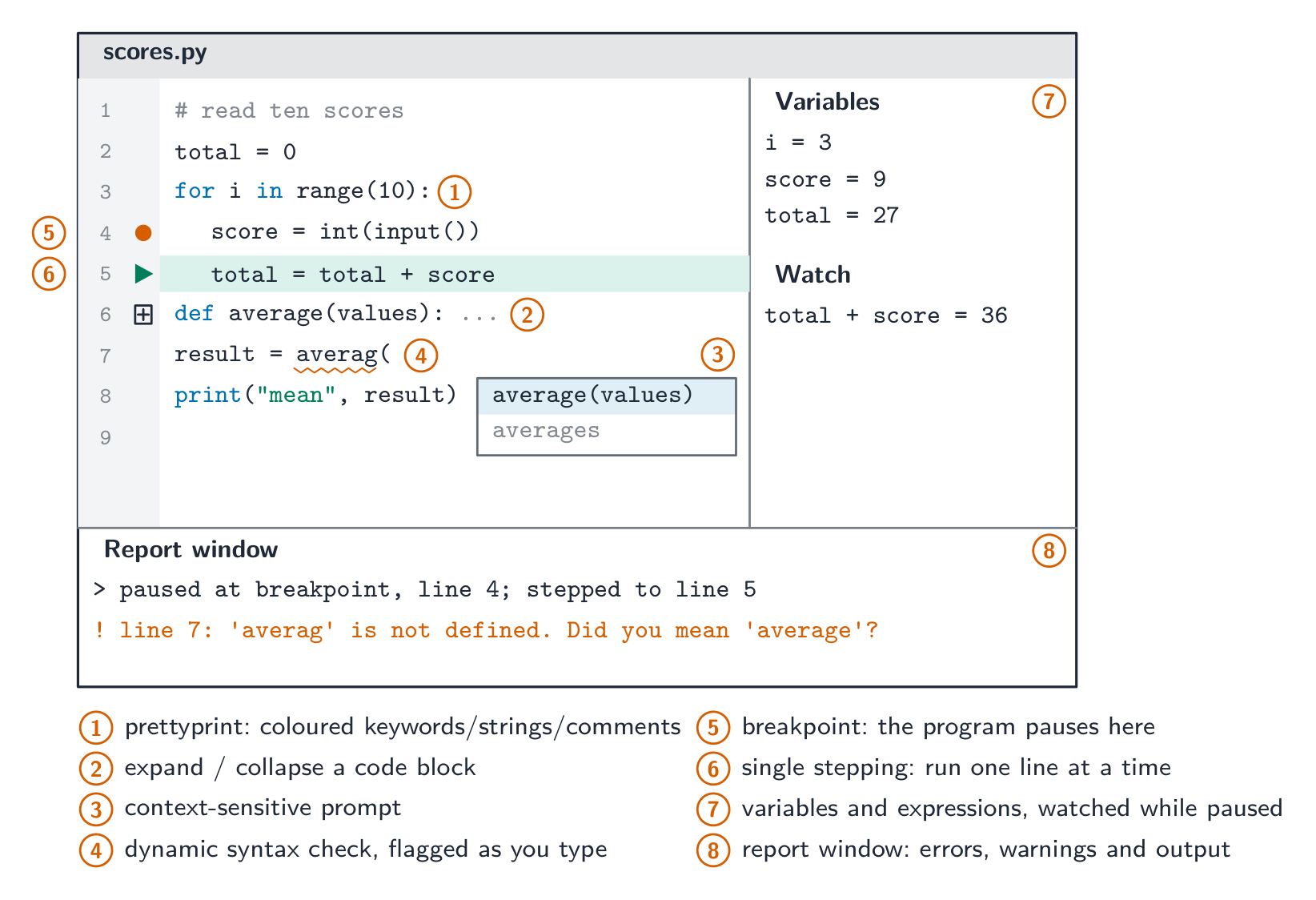
An IDE speeds development by putting writing → running → debugging → fixing behind one interface. Common IDEs: Visual Studio, PyCharm, Eclipse, VS Code.

Worked example. A function Calculate() returns an unexpected value when the program runs. Describe how the debugging features of a typical IDE help find the cause (4 marks).
Set a breakpoint on the first line of Calculate(), so the program pauses there instead of running through. Then single-step through the function one line at a time. After each step read the values of the variables and of any expression you have asked the IDE to watch, and compare them with the values you expected; the first line after which a value is wrong is where the logic error is. The report window shows any run-time error message and the output produced so far.
Worked example. Put each feature in its syllabus group: prettyprint, context-sensitive prompt, dynamic syntax check, breakpoint, expand/collapse code blocks, report window.
Coding: context-sensitive prompt. Initial error detection: dynamic syntax check. Presentation: prettyprint, expand/collapse code blocks. Debugging: breakpoint, report window.
Software licences used when translating or distributing code
A software licence specifies the permitted use, copying, modification and redistribution of a copyright work. Free Software concerns the freedoms to run, study, change and share software; it can be sold. Open-source licences permit access to source and licensed modification/redistribution. Freeware can cost nothing while withholding source and modification rights. For a redistribution question, identify the actual licence's conditions; see topic 7 for comparisons and justified choices.
Vocabulary
Train
| English |
|---|
| integrated development environment/ˈɪntɪɡreɪtɪd dɪˈveləpmənt enˈvaɪrənmənt/ |
| debugger/ˈdiːbʌɡə/ |
| context-sensitive prompts/ˈkɒntekst ˈsensɪtɪv prɒmpts/ |
| auto-complete/ˈɔːtəʊ kəmˈpliːt/ |
| dynamic syntax checks/daɪˈnæmɪk ˈsɪntæks tʃeks/ |
| prettyprint/ˈpretɪprɪnt/ |
| syntax highlighting/ˈsɪntæks ˈhaɪlaɪtɪŋ/ |
| breakpoints/ˈbreɪkpɔɪnts/ |
| single stepping/ˈsɪŋɡl ˈstepɪŋ/ |
| report window/rɪˈpɔːt ˈwɪndəʊ/ |
| version control/ˈvɜːʃn kənˈtrəʊl/ |
| refactoring/rɪˈfæktərɪŋ/ |
| unit test/ˈjuːnɪt test/ |
5.2
Definitions the examiner accepts
A definition question is marked against fixed wording. Learn these exactly, and give one answer only.
| Term | Definition |
|---|---|
| operating system | software that manages the computer's hardware and resources and provides an interface between the user, the application programs and the hardware |
| utility software | system software that performs a specific task to maintain, optimise or protect the computer, such as a virus checker or a defragmenter |
| program library | a collection of pre-written, tested routines (subroutines, classes, modules) that a program can use instead of writing its own |
| Dynamic Link Library (DLL) | a program library whose routines are loaded into memory only when the program calls them, at run time, and are shared between programs |
| assembler | a translator that converts an assembly language program into machine code, one instruction for each instruction |
| compiler | a translator that converts the whole of a high-level language program into machine code before it is run, producing an executable file |
| interpreter | a translator that translates and executes a high-level language program one statement at a time |
| integrated development environment | a single application that provides the tools for writing, translating, running and debugging a program |
| context-sensitive prompt | a pop-up that suggests identifiers, keywords or parameters that fit at the current point in the code |
| dynamic syntax check | checking the syntax of the code as it is typed and flagging an error before the program is translated |
| prettyprint | displaying code with keywords, identifiers and comments in different colours or fonts and with consistent indentation |
| breakpoint | a marked line at which the running program pauses so that variables can be inspected |
| single stepping | running a paused program one statement at a time under the programmer's control |
5.2
Exam tips
- List the OS's jobs by their syllabus names (memory, process, hardware, file and security management) and say what each does — "manages resources" alone is too vague.
- Compare compiler vs interpreter vs assembler: what each translates, when it translates it, and how errors are reported.
- Explain what an IDE provides using the syllabus groups: coding, initial error detection, presentation, debugging.
- A "benefit to the developer" answer names the developer's saving: time, cost, expertise, reliability or maintenance. A "drawback" names a dependence: availability, version, fit, security.
- For "describe the operation of" a translator, give three things: what is translated (whole program or one statement), when (before running or while running), and how errors are reported (all at once or at the first error).
Common mistakes
- Writing "the OS controls the computer" or "manages resources" with no example task. Each mark is one named task with what it does.
- Saying an interpreter "compiles line by line". An interpreter translates and executes each statement; it never produces an executable.
- Saying a compiler runs the program. It only translates; the executable runs later, without the compiler.
- Putting a DLL "inside" the executable. That is a static library; a DLL stays a separate file loaded at run time.
- Saying defragmentation "deletes" or "compresses" files, or is needed on an SSD. It only moves blocks so each file is stored contiguously.
- Filing prettyprint or collapsing blocks under "debugging". They are presentation features; debugging is breakpoints, single stepping, watching variables and the report window.
Interactive lessons on this topic
Work through it step by step, with instant-check exercises.