| Candidates should be able to: | Notes and guidance |
|---|---|
| Explain the difference between the terms security, privacy and integrity of data | |
| Show appreciation of the need for both the security of data and the security of the computer system | |
| Describe security measures designed to protect computer systems, ranging from the stand-alone PC to a network of computers | Including user accounts, passwords, authentication techniques such as digital signatures and biometrics, firewall, anti-virus software, anti-spyware, encryption |
| Show understanding of the threats to computer and data security posed by networks and the internet | Including malware (virus, spyware), hackers, phishing, pharming |
| Describe methods that can be used to restrict the risks posed by threats | |
| Describe security methods designed to protect the security of data | Including encryption, access rights |
Security, privacy and data integrity
A-Level Computer Science · Topic 6
 16:28
16:28
Security, Privacy & Integrity
Right now, this very second, your devices are under attack. Not by a person hunched over a keyboard — by armies of automated bots, endlessly scanning the…
English narration · English + 中文 subtitles burned in
6.1
Security, privacy and integrity — three different ideas
Syllabus
Source: Cambridge International syllabus
These sound alike but mean different things:
- security 安全 — protecting data from unauthorised 未授权 access, change or destruction.
- privacy 隐私 — an individual's right to control who sees their personal data, with consent and a clear purpose.
- integrity 完整性 — the data being accurate and complete — not corrupted or accidentally changed.
A file can be secure (only the right people can open it) but lack integrity (a typo corrupted it); or accurate but not private (anyone can read it). All three are needed.
The differences the scheme wants, one sentence each: security is keeping the data safe from loss and from unauthorised access; privacy is keeping the data confidential, so that only those with the right to see it can; integrity is the data being correct, consistent and complete. So "the difference between security and privacy": security is about protecting the data from being accessed, changed or lost by people who should not; privacy is about the individual's right to decide who may see their personal data. "The difference between security and integrity": security protects the data from unauthorised access; integrity is about the data being accurate and up to date, which validation and verification protect.
Explore
Risk and responsibility lab
Sort examples by the rule, risk or protection involved.
Vocabulary
Train
| English |
|---|
| security/sɪˈkjʊərɪti/ |
| privacy/ˈprɪvəsi/ |
| integrity/ɪnˈteɡrɪti/ |
| unauthorised/ʌnˈɔːθəraɪzd/ |
6.1
Why security matters
Two things to protect: the data itself (keep it confidential, intact and available) and the computer system (a compromised system can attack others, steal credentials, or be held to ransom).
"Why does the school need to keep both secure?" Data: it is personal and confidential, so it must not be read, changed or deleted by an unauthorised person, and its loss would stop the school working. System: an intruder who reaches the computer system can install malware, use it to attack other systems, damage the hardware or software, or lock it with ransomware; a secure system is the first line of defence for the data on it.
6.1
Threats from networks and the internet

Threats fall into three groups.
- Malware 恶意软件 (malicious software) — harmful programs:
- virus 病毒 — self-copying code that attaches to other programs and spreads when they run.
- worm 蠕虫 — self-copying code that spreads over networks 网络 with no user action.
- Trojan horse 木马 — looks useful but hides malicious code.
- spyware 间谍软件 — secretly collects information (keystrokes, passwords).
- ransomware 勒索软件 — encrypts your files and demands payment.
- adware 广告软件 — pushes unwanted adverts.
2. Tricking people (social attacks):
- phishing 网络钓鱼 — fake emails/sites that trick users into giving credentials.
- pharming 域名欺骗 — redirects a user to a fake site even when they type the correct address.
- social engineering 社会工程 — tricking people into giving up information.
The scheme's descriptions of the four named threats: a virus is malicious software that replicates (copies itself), attaches itself to other files and deletes or corrupts data; spyware is malicious software that records the user's key presses and actions and sends them to a third party, to obtain passwords and personal data; a phishing email pretends to come from a legitimate organisation and contains a link to a fake website where the user is asked for personal or bank details; pharming is malicious code installed on the user's computer or on a web server that redirects the user to a fake website even though they typed the correct address. Similarities of spyware and a virus: both are malware, both are installed without the user's knowledge, both can send data to a third party or damage the system; the difference is that a virus replicates itself while spyware records and transmits information. Phishing and pharming both lead the user to a fake website that collects their data; phishing needs the user to click a link in an email, pharming works through code on the computer or the DNS server and needs no email.
3. Attacks on the network:
- hacking 黑客入侵 by hackers 黑客 — unauthorised access, often via weak passwords or software flaws.
- denial of service 拒绝服务 (DoS/DDoS) — floods a server so real users cannot reach it.
- eavesdropping 窃听 — capturing data in transit (a risk on open Wi-Fi).
- man-in-the-middle 中间人攻击 — an attacker secretly relays or alters messages between two parties.
Worked example. Identify and describe two threats to the data on a school network, and give a different prevention method for each.
Threat 1, malware: a virus copied onto a computer from an email attachment or a download replicates itself and corrupts or deletes files; prevention: anti-virus software that scans files and is kept up to date. Threat 2, hacking: an unauthorised person gains access to the network, for example by guessing a weak password, and reads or changes the data; prevention: a firewall that blocks unauthorised connections, or strong passwords with two-factor authentication. A third pair, phishing: an email leads a user to a fake site that collects their login; prevention: training users to check the sender and the URL, and filtering email. The measure must match the threat: encryption does not stop a virus, and anti-virus software does not stop phishing.

Vocabulary
Train
| English |
|---|
| malware/ˈmælweə/ |
| ransomware/ˈrænsəmweə/ |
| networks/ˈnetwɜːks/ |
| man-in-the-middle/mæn ɪnðə ˈmɪdl/ |
| virus/ˈvaɪrəs/ |
| worm/wɜːm/ |
| Trojan horse/ˈtrəʊdʒn hɔːs/ |
| spyware/ˈspaɪweə/ |
| adware/ˈædweə/ |
| phishing/ˈfɪʃɪŋ/ |
| pharming/ˈfɑːmɪŋ/ |
| social engineering/ˈsəʊʃl ˌendʒɪˈnɪərɪŋ/ |
| hacking/ˈhækɪŋ/ |
| hackers/ˈhækəz/ |
| denial of service/dɪˈnaɪəl ɒv ˈsɜːvɪs/ |
| eavesdropping/ˈiːvzdrɒpɪŋ/ |
6.1
Security measures

Measures protect both the security of data (against loss, theft or corruption) and the security of the computer system (its hardware, software and network).
A standalone PC
- a strong password; antivirus kept up to date; prompt software updates; backup 备份 to separate media; full-disk encryption 加密; a locked screen.
A networked PC
All the above, plus a firewall 防火墙, per-user permissions (admin rights only for admins), central management of user accounts 用户账户, and audit logs 审计日志 (who logged in, what they touched).
How the measures work, in the wording the scheme awards:
- firewall: examines every incoming and outgoing transmission and compares it with set criteria (a whitelist or blacklist of addresses, ports and protocols); blocks any that do not meet the criteria; can prevent access to certain sites and warn of unauthorised access attempts.
- encryption: the data is scrambled (encoded) with a key into ciphertext, so an intercepted copy cannot be understood without the key; the receiver uses a key to decrypt it. It protects data in transmission and in storage, but it does not stop the data being intercepted or deleted.
- passwords and user accounts: only a user who knows the password can log in; a strong password (long, mixed characters, changed regularly) cannot be guessed; accounts lock after repeated failures; each account carries its own access rights.
- anti-virus and anti-spyware software: scans files and programs against a database of known malware signatures, checks behaviour, quarantines or deletes what it finds, and must be updated so that new malware is recognised.
- access rights: each user (or group) is given permissions for each file or table, such as read-only or read and write, so a user cannot see or change data that is not theirs; a database can also present each user with a view containing only the fields they need.
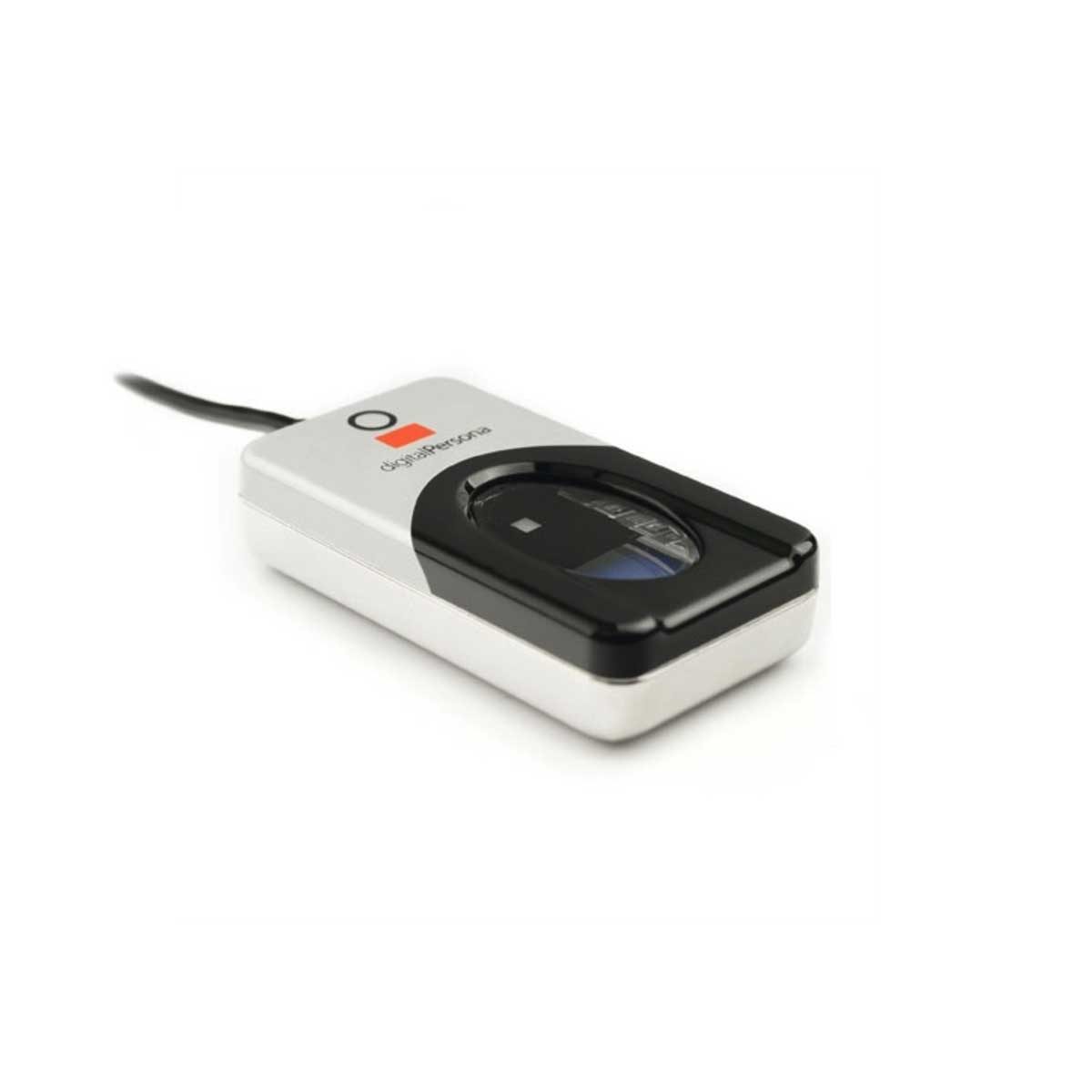
- biometrics: the device captures an image of the face, fingerprint or iris, converts it to digital data, compares it with the stored data for that user and allows access only on a match; it cannot be forgotten, lent or guessed like a password.
- backups: a copy of the data on separate media, kept off-site, so that lost or corrupted data can be restored.
To restrict the risks of malware, in three marks: install anti-malware software and keep it updated; use a firewall; do not open attachments or download files from unknown sources; keep the operating system and applications patched; and train users.
Across the internet
- VPN 虚拟专用网 — encrypts traffic between the user and the corporate gateway.
- HTTPS / TLS — encrypt web traffic.
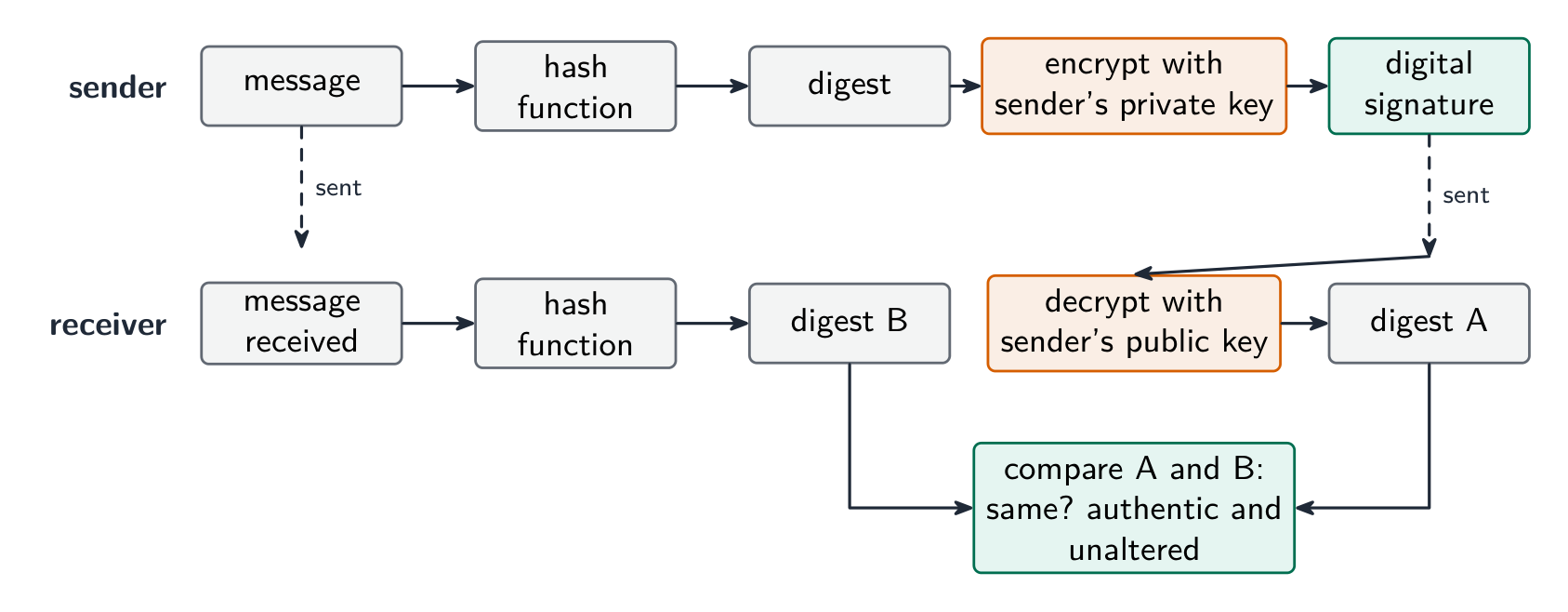
- digital signatures 数字签名 — prove who sent a message and that it was not altered in transit.
- intrusion detection — watches traffic for known attack patterns.
How a digital signature authenticates a document (five marks): the sender puts the message through a hash function to produce a digest; the sender encrypts the digest with their private key, and that encrypted digest is the digital signature; the message and the signature are sent together; the receiver decrypts the signature with the sender's public key to recover the digest; the receiver hashes the received message and compares the two digests; if they match, the message came from the sender (only they hold the private key) and was not altered in transmission. A signature proves who sent the message and that it is intact; it does not hide the contents, which is what encryption of the message is for.
Vocabulary
Train
| English |
|---|
| firewall/ˈfaɪəwɔːl/ |
| encryption/enˈkrɪpʃn/ |
| backup/ˈbækʌp/ |
| user accounts/ˈjuːzə əˈkaʊnts/ |
| audit logs/ˈɔːdɪt lɒɡz/ |
| VPN/ˌviː piː ˈen/ |
| digital signatures/ˈdɪdʒɪtl ˈsɪɡnɪtʃəz/ |
6.1
Matching measures to threats
- interception in transit → encrypt the data (HTTPS, VPN). Intercepted ciphertext is useless without the key.
- unauthorised access → strong authentication 身份验证 (long passwords; two-factor authentication 双因素认证 with a phone code or key); user authorisation 授权; lock-out after failed logins.
- malware → anti-virus software and anti-spyware 反间谍软件 with real-time scanning; patching; avoid untrusted downloads.
- phishing → user training; email filtering; check the URL before entering credentials.
- internal threats → the least-privilege 最小权限 principle (give each user only what they need); auditing.
- DDoS → rate limiting and traffic filtering.
For confidential data crossing the internet, the scheme's method is encryption: the data is encoded with a key into ciphertext, so that an unauthorised person who intercepts it cannot read it, and only the intended receiver, who has the key, can decode it. For a program file sent by email for testing, the same answer applies (encrypt the file, or send it over an encrypted connection), together with a password on the file itself.
Vocabulary
Train
| English |
|---|
| two-factor authentication/tuː ˈfæktə ɔːˌθentɪˈkeɪʃn/ |
| authentication/ɔːˌθentɪˈkeɪʃn/ |
| anti-spyware/ˈænti ˈspaɪweə/ |
| authorisation/ˌɔːθəraɪˈzeɪʃn/ |
| least-privilege/liːst ˈprɪvɪlɪdʒ/ |
6.1
Protecting the data itself

- encryption — turn plaintext 明文 into ciphertext 密文 with a key. Symmetric encryption 对称加密 (AES) uses one shared key; asymmetric encryption 非对称加密 (RSA) uses a public key 公钥 and a private key 私钥. Protects data at rest and in transit.
- access control 访问控制 — file permissions (read/write/execute) and access rights 访问权限, enforced by the OS.
- authentication — authentication techniques verify the user: something you know (password), have (token, phone), or are (biometrics 生物识别 — fingerprint, face, iris); strongest combined.
- backups — keep copies (some off-site) so loss or corruption is recoverable.
- physical security — locked server rooms, cable locks.
Access rights in a database, described for three marks: each user is given an account with a username and password; the database administrator assigns each account permissions for each table, such as read-only, read and write, or no access; users see only the tables and fields they are allowed to, so a customer cannot open the staff table and a clerk can read but not change the prices. The DBMS enforces this with its access rights and with views, and it can encrypt the stored data as well.

Explore
Encrypt with a Caesar cipher
Change the shift — that is the key. Each letter slides that many places along the alphabet to make the ciphertext, and the same key slides it back. That shared key is symmetric encryption in miniature.
Vocabulary
Train
| English |
|---|
| ciphertext/ˈsaɪfətekst/ |
| access rights/ˈækses raɪts/ |
| biometrics/ˌbaɪəʊˈmetrɪks/ |
| private key/ˈpraɪvət kiː/ |
| public key/ˈpʌblɪk kiː/ |
| plaintext/ˈpleɪntekst/ |
| Symmetric encryption/sɪˈmetrɪk enˈkrɪpʃn/ |
| asymmetric encryption/ˌeɪsɪˈmetrɪk enˈkrɪpʃn/ |
| access control/ˈækses kənˈtrəʊl/ |
6.2
Data integrity
Syllabus
| Candidates should be able to: | Notes and guidance |
|---|---|
| Describe how data validation and data verification help protect the integrity of data | |
| Describe and use methods of data validation | Including range check, format check, length check, presence check, existence check, limit check, check digit |
| Describe and use methods of data verification during data entry and data transfer | During data entry including visual check, double entry During data transfer including parity check (byte and block), checksum |
Source: Cambridge International syllabus
Data has integrity when it is accurate and complete. Two techniques: data validation (catch bad data before storing) and data verification (confirm data was entered or transferred correctly).
Validation — does the data make sense?
Validation 验证 checks data against sensible rules, automatically:
- range check — within limits (a month is 1–12).
- limit check — on the correct side of a single limit (e.g. age ≥ 18).
- existence check — the referenced item exists (e.g. a product code is in the table).
- length check — the right number of characters.
- type / character check — the right kind of data (a phone field allows only digits).
- format check — matches a pattern (an email must contain
@). - presence check — required fields are not empty.
- check digit 校验位 — an extra digit computed from the others (ISBN, card numbers) that spots transcription errors.
Worked example. In a simple check-digit scheme the check digit is the remainder when the sum of the digits is divided by $10$, appended to the number. The number $4162$ has digit sum $13$, so it is stored as $41623$. A user types $14623$: the first two digits are swapped, but the sum is still $13$, so the check digit still matches and the error is not caught. A user who types $41523$ is caught, because $4 + 1 + 5 + 2 = 12$ gives check digit $2$. Weighted schemes can detect some transpositions that this unweighted rule misses. Detection depends on the weights, the positions and the modulus: an ISBN-13 rule, for example, does not detect every possible transposition. A check digit is validation: it tests the number against a rule at the moment it is entered.
- lookup check and consistency check (e.g. delivery date ≥ order date).
Validation catches data that is wrongly formatted, but not data that is the right format yet factually wrong ("Bob" for "Bib").
Worked example. Identify the validation check each piece of pseudocode performs.
| Pseudocode | Check |
|---|---|
IF x < 0 OR x > 10 THEN OUTPUT "Invalid" |
range check: the value must lie between two limits |
IF x = "" THEN OUTPUT "Invalid" |
presence check: the field must not be empty |
IF NOT(x = "Red" OR x = "Yellow" OR x = "Blue") THEN OUTPUT "Invalid" |
lookup (existence) check: the value must be one of a list |
IF LENGTH(x) <> 6 THEN OUTPUT "Invalid" |
length check: the right number of characters |
IF MID(x, 1, 1) < "A" OR MID(x, 1, 1) > "Z" THEN OUTPUT "Invalid" |
format check: a particular character must be a letter |
To validate a car registration number that must be one letter, three digits and two letters: a format check tests each position against its pattern, and a length check confirms six characters. To validate a date of birth: a format check (DD/MM/YYYY), a range check (the month is $1$ to $12$, the year is not in the future) and a presence check (it is not left blank). A mark between $0$ and the maximum for the test needs a type check (an integer) and a range check, with the upper limit read from the test's own record: that is how validation protects integrity, by refusing data that could not be correct.
Verification — was the data entered or transferred correctly?
Verification 核对 checks the data was not changed in moving from one place to another.
During entry: double entry (type it twice and compare, as for a new password) or visual check.
In the scheme's words, double entry is entering the data twice, by the same person or by two people, and having the computer compare the two versions and report any difference; a visual check is the person comparing what is on the screen with the original source document and correcting any difference before saving. Both protect integrity by making sure the stored data matches the source. Even after validation and verification the data can still be wrong: it can be sensible and match the source, yet the source itself was wrong, or the user typed a different but valid value from the one intended.
During transfer (bits can flip):
- parity check 奇偶校验 — an extra bit makes the number of 1s even (even parity) or odd. The receiver re-counts. Catches single-bit errors.
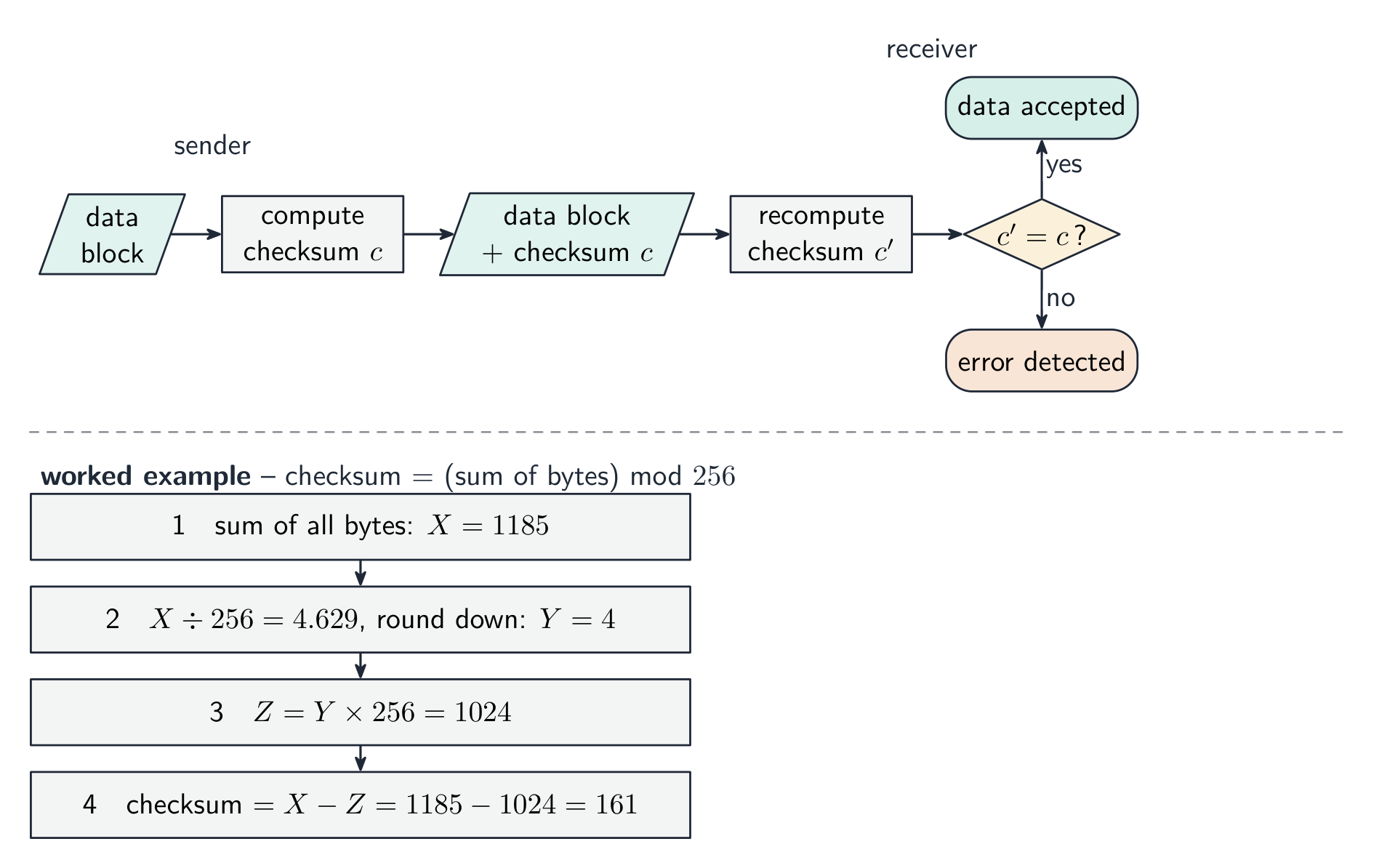
- checksum 校验和 — the sender sends a summary value of the data; the receiver recomputes it and compares.
- cyclic redundancy check 循环冗余校验 (CRC) — a stronger checksum using polynomial division, catching many more error types.
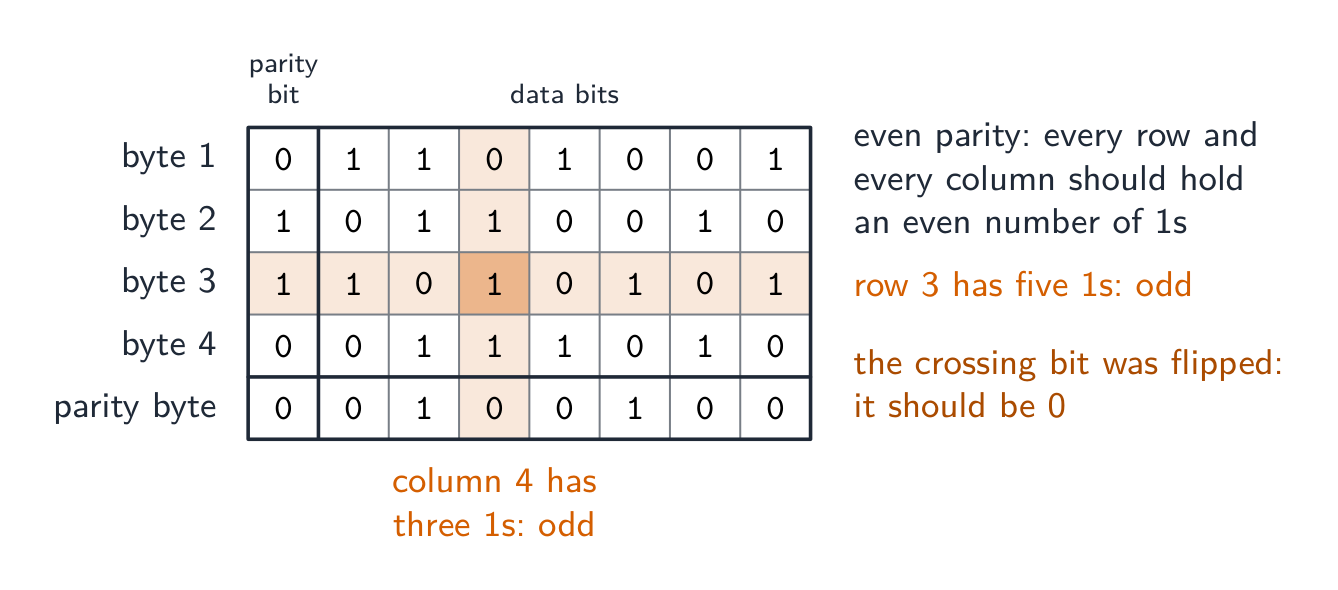
A parity block check 奇偶块校验 goes further and locates the error. Arrange the bytes in a grid: give each byte a row parity bit, then compute one extra parity byte whose bits are the column parity of the bytes above. A single flipped bit now fails one row and one column – their intersection pinpoints exactly which bit changed, so it can even be corrected.
Worked example. Four bytes are sent with even parity, followed by a parity byte. Find the bit that was corrupted.
Count the 1s in each row and each column. Every row and column should have an even number; byte 3 has five and column 4 has three. The bit where that row and that column cross is the one that changed, so it is reset from 1 to 0. A parity check on its own detects an error in a byte but cannot say which bit; two errors in the same byte cancel and pass unnoticed. A checksum, explained for three marks: the sender puts the block of data through an algorithm that produces a checksum value; the data and the checksum are sent together; the receiver runs the same algorithm on the data it received; if the two checksums match, the data is accepted, and if not, it is rejected and sent again.

Verification only proves what arrived matches what was sent — not that the data is correct, and not against deliberate tampering. Validation asks "is this sensible?"; verification asks "was this copied correctly?" — use both.
The table questions sort the methods by when they are used: during data entry, double entry and a visual check; during data transfer, a parity check (byte or block) and a checksum. Transferring video files from a camera to a server uses a checksum: the camera computes it, the server recomputes it, a mismatch means retransmit.

Worked example. A user types their date of birth as 31/02/2009, and types their email address twice. Which check catches which error, and what is the difference? Validation asks "is this data sensible?" - the computer tests it against a rule, and a format or range check rejects 31/02/2009 because February never has 31 days. Verification asks "was this data entered correctly?" - typing the email twice is double entry, and comparing the two copies catches a typing slip. The limit is what makes this a favourite question: validation can never tell you the data is right, only that it is possible - 01/02/2009 passes every validation rule even if the user was actually born on a different day. Say what each check can and cannot catch.
A proxy server in a security answer
A proxy server handles requests on a client's behalf. An organisation may configure it to filter access to websites, log requests or cache responses. Explain the configured protection: merely naming a proxy does not show how it prevents the stated threat. A router forwards packets between networks; these roles are different.
Explore
Computing concept lab
Classify concrete examples by the computing idea they demonstrate.
Vocabulary
Train
| English |
|---|
| validation/ˌvælɪˈdeɪʃn/ |
| verification/ˌverɪfɪˈkeɪʃn/ |
| check digit/tʃek ˈdɪdʒɪt/ |
| parity check/ˈpærɪti tʃek/ |
| checksum/ˈtʃeksəm/ |
| cyclic redundancy check/ˈsaɪklɪk rɪˈdʌndənsi tʃek/ |
| parity block check/ˈpærɪti blɒk tʃek/ |
6.2
Definitions the examiner accepts
A definition question is marked against fixed wording. Learn these exactly.
| Term | Definition |
|---|---|
| data security | keeping data safe from loss and from unauthorised access, change or deletion |
| data privacy | keeping data confidential, so that it is seen only by those who have the right to see it |
| data integrity | the data being accurate, consistent and complete |
| malware | malicious software that is installed without the user's knowledge to damage a system or steal data |
| virus | malware that replicates itself, attaches to other files and corrupts or deletes data |
| spyware | malware that records the user's key presses or actions and sends them to a third party |
| phishing | an email pretending to be from a legitimate organisation that leads the user to a fake website to collect personal data |
| pharming | malicious code that redirects the user to a fake website even when the correct address is entered |
| firewall | hardware or software that examines all traffic entering or leaving a system against set criteria and blocks what does not meet them |
| encryption | scrambling data with a key into ciphertext, so that it cannot be understood without the key to decrypt it |
| digital signature | a hash of a message encrypted with the sender's private key, used to prove who sent it and that it was not altered |
| data validation | an automatic check that entered data is reasonable and follows set rules |
| data verification | a check that data has been entered or transferred correctly, by comparing it with the source or with a recomputed value |
| check digit | an extra digit calculated from the other digits of a number and appended to it, so that an error in the number can be detected |
| parity check | an extra bit added to a byte so that the number of 1s is even (or odd), which the receiver recounts |
| checksum | a value calculated from a block of data by an algorithm and sent with it, recalculated by the receiver and compared |
6.2
Exam tips
- Keep the three ideas separate: security (keeping data safe), privacy (who may see it), integrity (keeping it correct).
- Match each threat (malware, hacking, phishing, interception) to a measure (firewall, encryption, authentication, access rights).
- Encryption protects confidentiality, not integrity — use a checksum, parity or check digit for integrity.
- Distinguish a virus, worm and Trojan and how each spreads.
Common mistakes
- Giving the same measure for two threats, or a measure that does not fit the threat. Each threat in the table needs a different prevention that actually stops it.
- Naming a measure without saying how it works. "Firewall" scores when it is followed by "compares traffic with set criteria and blocks what fails".
- Calling validation a check that the data is correct. Validation checks that data is reasonable; verification checks that it matches the source. Neither proves it is true.
- Saying a digital signature encrypts the message. It encrypts a hash of the message with the private key; the receiver decrypts it with the public key and compares hashes.
- Describing a check digit as verification, or a parity check as validation. The check digit is a validation rule on entry; parity and checksums verify a transfer.
- Writing that a virus "sends data to a third party" and spyware "replicates". The replicating one is the virus; the recording one is spyware.
Interactive lessons on this topic
Work through it step by step, with instant-check exercises.