| Candidates should be able to: | Notes and guidance |
|---|---|
| Show understanding of the limitations of using a file-based approach for the storage and retrieval of data | |
| Describe the features of a relational database that address the limitations of a file-based approach | |
| Show understanding of and use the terminology associated with a relational database model | Including entity, table, record, field, tuple, attribute, primary key, candidate key, secondary key, foreign key, relationship (one-to-many, one-to-one, many-to-many), referential integrity, indexing |
| Use an entity-relationship (E-R) diagram to document a database design | |
| Show understanding of the normalisation process | First Normal Form (1NF), Second Normal Form (2NF) and Third Normal Form (3NF) |
| Explain why a given set of database tables are, or are not, in 3NF | |
| Produce a normalised database design for a description of a database, a given set of data, or a given set of tables |
Databases
A-Level Computer Science · Topic 8
 17:18
17:18
Databases & the Relational Model
Before databases, each program kept its own flat files — one file per program. Picture a shop. The sales program, the billing program, and the shipping program…
English narration · English + 中文 subtitles burned in
8.1
File-based storage and its limits

Syllabus
Source: Cambridge International syllabus
Before databases, programs stored data in flat files 平面文件 — usually one file per program. This is fine for small data but breaks down at scale.
Limitations
- data redundancy 数据冗余 — the same data (a customer's address) is held in several files, one per program, so storage is wasted and every copy must be updated.
- data inconsistency 数据不一致 — when one copy is updated and another is not, the files disagree and nobody knows which is right.
- data dependence — each program is written for the exact layout of its files; change a field's length or add a field and every program that reads the file must be rewritten.
- no shared access — a file is locked while one program uses it, so users cannot work on the data at the same time.
- weak integrity 完整性 — no central rules stop an invalid value or a link to a customer who does not exist; weak security — access is per file, not per field; and queries across files need a new program each time.

A relational database 关系数据库 fixes these by storing data in tables managed by one piece of software (the DBMS) that all programs use.

Why a relational database is better — the three-mark answer. Each item of data is stored once, in one table, and tables are linked by keys, so there is no redundancy and no inconsistency; the data is independent of the programs, which ask the DBMS for what they need and are unaffected when the structure changes; and the DBMS enforces integrity rules, controls access per user and per field, allows many users at once, and answers any query without a new program being written.
Worked example. A repair shop stores its customers, devices and repair jobs using a file-based approach, one file per program. Give three problems this causes, and describe how a relational database would remove them.
The customer's name and phone number are stored in the repairs file and the invoices file (redundancy); when a customer changes number, one file is updated and the other is not (inconsistency); and when the shop wants a new report — repairs per technician — a new program has to be written to read the files (no ad-hoc queries). In a relational database the customer is stored once in a CUSTOMER table and referred to by CustomerID from the REPAIR table, so a change is made once and is seen everywhere; the report is a single SQL query.
Vocabulary
Train
| English |
|---|
| flat files/flæt faɪlz/ |
| data redundancy/ˈdeɪtə rɪˈdʌndənsi/ |
| data inconsistency/ˈdeɪtə ˌɪnkənˈsɪstənsi/ |
| integrity/ɪnˈteɡrɪti/ |
| relational database/rɪˈleɪʃənl ˈdeɪtəbeɪs/ |
8.1
Relational model — terms
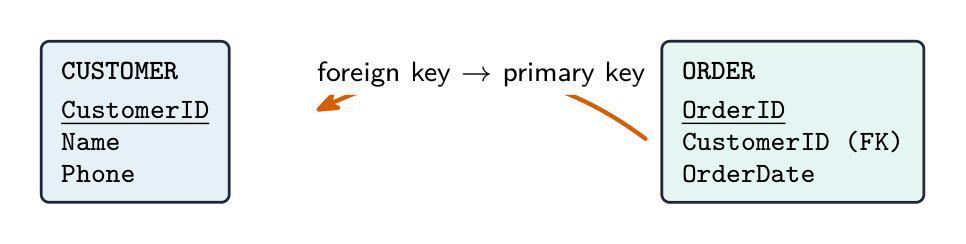
- table 表 (relation) — a grid of rows and columns; one table per type of entity 实体 (e.g.
CUSTOMER). - record 记录 (row, also called a tuple 元组) — one row; one instance of the entity.
- field 字段 (column, also called an attribute 属性) — one column; one piece of information about each record.
- primary key 主键 — a field (or fields) that uniquely identifies each record; never null or duplicated.
- foreign key 外键 — a field whose value matches the primary key of another table, linking the two.
- composite key 复合键 — a primary key made of two or more fields together.
- candidate key 候选键 — any field(s) that could be the primary key.
- secondary key 次键 — a non-primary field that is indexed for fast searching.
- indexing 索引 — building an index on a field so look-ups and joins run faster.
- referential integrity 参照完整性 — every foreign-key value must match an existing primary key (no orphan records).
A table is written in shorthand with the primary key underlined and foreign keys noted:
CUSTOMER(CustomerID, Name, Phone)
ORDER(OrderID, CustomerID, OrderDate)   -- CustomerID is FK → CUSTOMER
Worked example. State what is meant by entity, primary key and referential integrity in a relational database, and complete the term ↔ description table for tuple and attribute.
An entity is something about which data is stored — a person, object or event — which becomes one table. A primary key is the attribute (or combination of attributes) that uniquely identifies each record in a table. Referential integrity means that every foreign-key value must match the value of a primary key in the table it refers to, so a record cannot refer to one that does not exist. A tuple is one row of a table (one record); an attribute is one column (one field). Learn the pairs: table/relation, record/tuple, field/attribute.
Explore
Read a relational table with SELECT
A relational table is just rows (records) and columns (fields). WHERE keeps the rows that match a condition; SELECT then keeps only the columns you asked for.
Vocabulary
Train
| English |
|---|
| field/fiːld/ |
| table/ˈteɪbl/ |
| entity/ˈentɪti/ |
| record/ˈrekɔːd/ |
| tuple/ˈtuːpl/ |
| attribute/ˈætrɪbjuːt/ |
| primary key/ˈpraɪməri kiː/ |
| foreign key/ˈfɒrən kiː/ |
| composite key/ˈkɒmpəzɪt kiː/ |
| candidate key/ˈkændɪdeɪt kiː/ |
| secondary key/ˈsekəndəri kiː/ |
| indexing/ˈɪndeksɪŋ/ |
| referential integrity/ˌrefəˈrenʃl ɪnˈteɡrɪti/ |
8.1
Entity-relationship (E-R) diagrams

An entity-relationship diagram 实体关系图 shows the structure: each entity is a rectangle, each relationship a line, with the cardinality 基数 marked at each end:
- one-to-one (1:1).
- one-to-many 一对多 (1:M) — each Customer has many Orders; each Order has one Customer.
- many-to-many (M:N) — Students take many Courses, and Courses have many Students.

A many-to-many relationship cannot be stored directly. Break it into two one-to-many relationships through a link table 连接表 holding the two foreign keys:
ENROLMENT(StudentID, CourseID, EnrolmentDate)

Drawing the E-R diagram for a given set of tables. Each table becomes an entity. A relationship exists wherever one table holds a foreign key to another; it runs from the table holding the foreign key (the many end) to the table whose primary key it is (the one end). A table with two foreign keys and no other identity is usually a link table resolving a many-to-many relationship. Label each line with the relationship type.
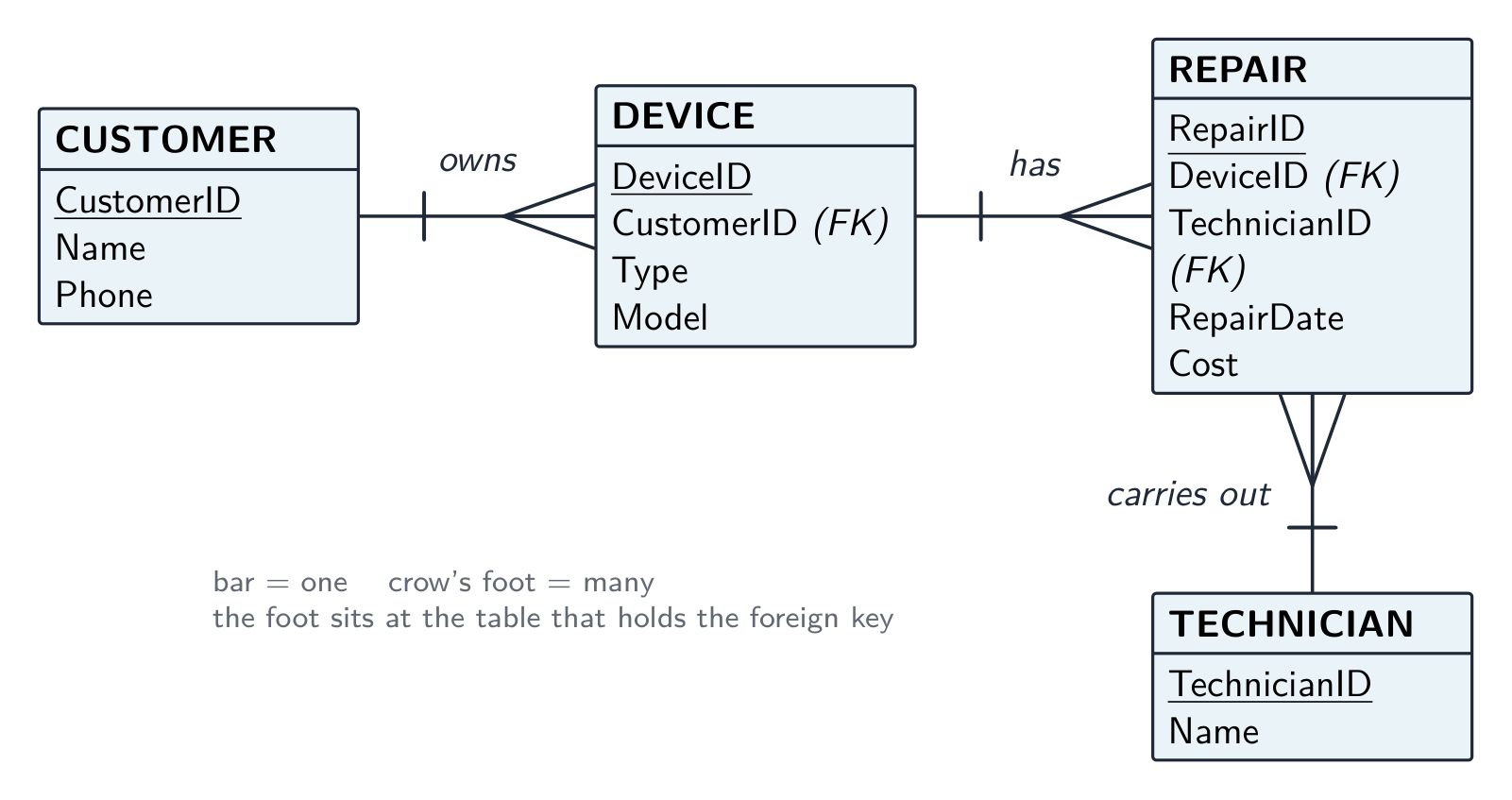
Worked example. A repair shop has the tables CUSTOMER(CustomerID, Name, Phone), DEVICE(DeviceID, CustomerID, Type, Model), TECHNICIAN(TechnicianID, Name) and REPAIR(RepairID, DeviceID, TechnicianID, RepairDate, Cost). Identify the relationships and their types.
DEVICE holds CustomerID, so CUSTOMER–DEVICE is one-to-many (one customer, many devices). REPAIR holds DeviceID, so DEVICE–REPAIR is one-to-many; it also holds TechnicianID, so TECHNICIAN–REPAIR is one-to-many. There is no direct CUSTOMER–REPAIR line: the link runs through DEVICE. Three lines, three crow's feet, all at the REPAIR or DEVICE ends.
Vocabulary
Train
| English |
|---|
| entity-relationship diagram/ˈentɪti rɪˈleɪʃənʃɪp ˈdaɪəɡræm/ |
| cardinality/ˌkɑːdɪˈnælɪti/ |
| one-to-many/wʌn tə ˈmeni/ |
| link table/lɪŋk ˈteɪbl/ |
8.1
Normalisation

Normalisation 规范化 organises tables to cut redundancy and inconsistency, going through normal forms 范式 in order.
- First normal form (1NF) — every field holds a single (atomic 原子) value, with no repeating groups, and a primary key.
- Second normal form (2NF) — in 1NF, and every non-key field depends on the whole primary key (only matters for a composite key).
- Third normal form (3NF) — in 2NF, and every non-key field depends only on the primary key, not on another non-key field (no transitive dependency 传递依赖).
A 3NF design stores each fact once, so insert/update/delete anomalies disappear. The trade-off is more tables and more joins. Aim for 3NF.
To produce a 3NF design: find the entities and their attributes; choose a primary key for each; split repeating/non-atomic fields (1NF); split fields depending on part of a composite key (2NF); split fields depending transitively on the key (3NF); add foreign keys for the relationships.
Worked example. The table ORDER(OrderID, CustomerID, CustomerName, ProductID, Quantity) has the composite primary key (OrderID, ProductID). Normalise it to 3NF. Test each non-key field against the key. Quantity depends on both OrderID and ProductID, which is fine. But CustomerID depends on OrderID alone - only part of the composite key. That is a partial dependency, so the table is not in 2NF. Split it into ORDER_LINE(OrderID, ProductID, Quantity) and ORDER(OrderID, CustomerID, CustomerName). Now test 3NF: in that new ORDER table, CustomerName depends on CustomerID, which is not the key - a transitive dependency. Split again: ORDER(OrderID, CustomerID) and CUSTOMER(CustomerID, CustomerName). Name the dependency that breaks each form (partial breaks 2NF, transitive breaks 3NF); "it has repeated data" describes the symptom and earns nothing.
The three questions to ask of any table. Is every cell a single value, with no repeating group? If not, it is not in 1NF. If the key is composite, does every non-key field depend on the whole key? If some field depends on part of it, there is a partial dependency 部分依赖 and the table is not in 2NF. Does every non-key field depend on the key alone? If a field depends on another non-key field, there is a transitive dependency and the table is not in 3NF. An "explain why the table is not in 3NF" answer names the dependency and the fields involved.
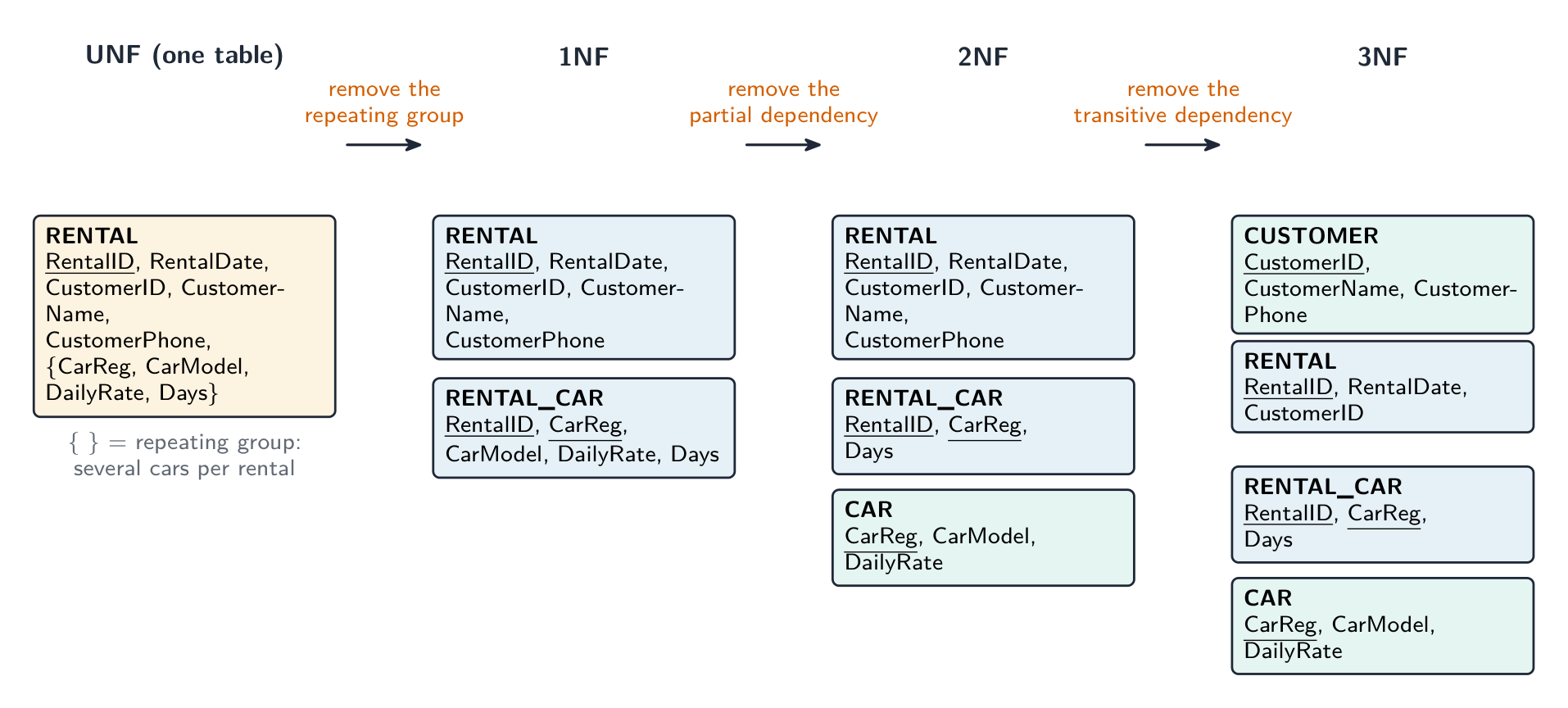
Worked example. A car-rental shop records each rental as RENTAL(RentalID, RentalDate, CustomerID, CustomerName, CustomerPhone, CarReg, CarModel, DailyRate, Days), where one rental can include several cars. Explain why the table is not normalised and produce a 3NF design.
Not in 1NF: the car fields CarReg, CarModel, DailyRate, Days form a repeating group — one rental has several cars. Move them to RENTAL_CAR(RentalID, CarReg, CarModel, DailyRate, Days) with the composite key (RentalID, CarReg). Not in 2NF: in RENTAL_CAR, CarModel and DailyRate depend on CarReg alone — a partial dependency. Move them to CAR(CarReg, CarModel, DailyRate), leaving RENTAL_CAR(RentalID, CarReg, Days). Not in 3NF: in RENTAL, CustomerName and CustomerPhone depend on CustomerID, a non-key field — a transitive dependency. Move them to CUSTOMER(CustomerID, CustomerName, CustomerPhone), leaving RENTAL(RentalID, RentalDate, CustomerID). The 3NF design is four tables — CUSTOMER, RENTAL, RENTAL_CAR, CAR — with CustomerID, RentalID and CarReg as foreign keys; underline every primary key.
Vocabulary
Train
| English |
|---|
| normalisation/ˌnɔːməlaɪˈzeɪʃn/ |
| normal forms/ˈnɔːml fɔːmz/ |
| atomic/əˈtɒmɪk/ |
| transitive dependency/ˈtrænsɪtɪv dɪˈpendənsi/ |
| partial dependency/ˈpɑːʃl dɪˈpendənsi/ |
8.2
Database Management System (DBMS)

Syllabus
| Candidates should be able to: | Notes and guidance |
|---|---|
| Show understanding of the features provided by a Database Management System (DBMS) that address the issues of a file based approach | Including: • data management, including maintaining a data dictionary • data modelling • logical schema • data integrity • data security, including backup procedures and the use of access rights to individuals / groups of users |
| Show understanding of how software tools found within a DBMS are used in practice | Including the use and purpose of: • developer interface • query processor |
Source: Cambridge International syllabus
A DBMS 数据库管理系统 manages the database centrally. Features that fix the file-based limits:
- data dictionary 数据字典 — a description of every table, field, type and key; programs query it instead of hard-coding the structure.
- redundancy/consistency control — each fact stored once.
- concurrent access 并发访问 control — locks and transactions let many users work at once.
- backup 备份 and recovery; security and per-user permissions.
- integrity rules — keys, unique and range constraints, enforced centrally.
- transactions 事务 — a group of operations that all succeed or all fail.
- views 视图 — virtual tables that show each user "their" slice of the data.
- data management 数据管理 and data modelling 数据建模 — control how data is stored and define its structure as a logical schema 逻辑模式 (the logical design, independent of physical storage).
- data integrity 数据完整性 and data security 数据安全 — enforce correctness and control access centrally.
- a query processor 查询处理器 runs queries; a developer interface 开发者接口 gives tools and APIs for building applications.
Its tools include a data-dictionary editor, a query builder, a forms builder, a report generator, user management, and an SQL editor.
What the data dictionary holds (a "give three items" question): the names of the tables; the names of the fields in each table; each field's data type and length; the primary and foreign keys and the relationships between tables; validation rules; indexes; and who may access each table. It is metadata — data about the data — and the DBMS uses it to check every query and every change.
How the DBMS keeps the data secure (a "describe two methods" question): authentication 身份验证 — a username and password, or a biometric, before any access; access rights — each user or group is allowed to read, write or delete only certain tables or fields, often through a view; encryption of the stored data and of data sent to it, so a copied file is unreadable; backups taken regularly, so the data can be restored after loss; and a transaction log that records who changed what.
The two software tools. The developer interface is what a programmer uses to build the database and the applications on it: create tables and set keys and validation, write queries and SQL, and design forms and reports, without knowing how the data is physically stored. The query processor takes a query (SQL from a program, or a query built in the interface), checks it against the data dictionary, works out the most efficient way to run it, retrieves the data and returns the results.
Logical schema. The DBMS keeps the logical design (which tables and fields exist and how they relate) separate from the physical storage (files, indexes, disk blocks). Programs work with the logical schema, so the physical storage can be reorganised without changing a single program — this is the data independence the file-based approach lacked.
Explore
Database service lab
Watch how a DBMS turns a query into safe shared data access.
Explore
Database service lab
Watch how a DBMS turns a query into safe shared data access.
Vocabulary
Train
| English |
|---|
| DBMS/ˌdiː biː em ˈes/ |
| data dictionary/ˈdeɪtə ˈdɪkʃənəri/ |
| concurrent access/kənˈkʌrənt ˈækses/ |
| transactions/trænˈsækʃnz/ |
| backup/ˈbækʌp/ |
| views/vjuːz/ |
| data management/ˈdeɪtə ˈmænɪdʒmənt/ |
| data modelling/ˈdeɪtə ˈmɒdəlɪŋ/ |
| logical schema/ˈlɒdʒɪkl ˈskiːmə/ |
| data integrity/ˈdeɪtə ɪnˈteɡrɪti/ |
| data security/ˈdeɪtə sɪˈkjʊərɪti/ |
| query processor/ˈkwɪərɪ ˈprəʊsesə/ |
| developer interface/dɪˈveləpə ˈɪntəfeɪs/ |
| authentication/ɔːˌθentɪˈkeɪʃn/ |
8.3
DDL and DML
Syllabus
| Candidates should be able to: | Notes and guidance |
|---|---|
| Show understanding that the DBMS carries out all creation/modification of the database structure using its Data Definition Language (DDL) | |
| Show understanding that the DBMS carries out all queries and maintenance of data using its DML | |
| Show understanding that the industry standard for both DDL and DML is Structured Query Language (SQL) | Understand a given SQL statement |
| Understand given SQL (DDL) statements and be able to write simple SQL (DDL) statements using a sub-set of statements | Create a database (CREATE DATABASE) Create a table definition (CREATE TABLE), including the creation of attributes with appropriate data types: • CHARACTER • VARCHAR(n) • BOOLEAN • INTEGER • REAL • DATE • TIME change a table definition (ALTER TABLE) add a primary key to a table (PRIMARY KEY (field)) add a foreign key to a table (FOREIGN KEY (field) REFERENCES Table (Field)) |
| Write an SQL script to query or modify data (DML) which are stored in (at most two) database tables | Queries including SELECT... FROM, WHERE, ORDER BY, GROUP BY, INNER JOIN, SUM, COUNT, AVG |
| Data maintenance including INSERT INTO, DELETE FROM, UPDATE |
Source: Cambridge International syllabus
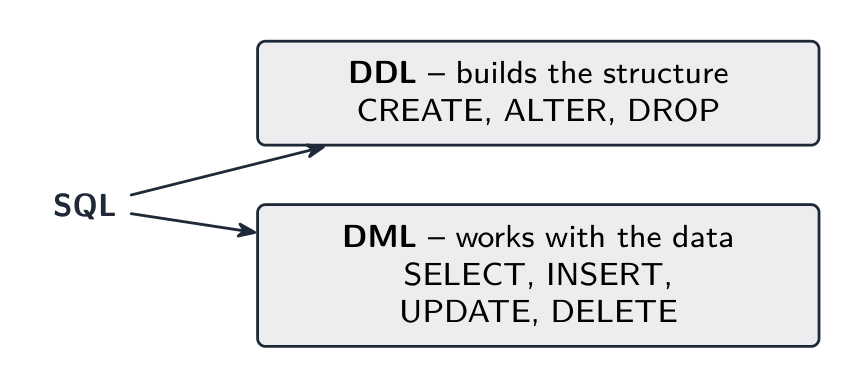
SQL 结构化查询语言 (Structured Query Language) has two halves:
- Data Definition Language 数据定义语言 (DDL) — creates or changes the structure (tables, keys, constraints).
- Data Manipulation Language 数据操纵语言 (DML) — works with the data (insert, update, delete, query 查询).
DDL basics
CREATE TABLE CUSTOMER (
  CustomerID INTEGER PRIMARY KEY,
  Name VARCHAR(50) NOT NULL,
  Phone VARCHAR(20)
);
Add a foreign key:
CREATE TABLE ORDER (
  OrderID INTEGER PRIMARY KEY,
  CustomerID INTEGER,
  OrderDate DATE,
  FOREIGN KEY (CustomerID) REFERENCES CUSTOMER(CustomerID)
);
Modify and drop:
ALTER TABLE CUSTOMER ADD Email VARCHAR(100);
DROP TABLE CUSTOMER;
Common types: INTEGER, REAL, VARCHAR(n), CHAR(n) (also CHARACTER(n)), DATE, TIME, BOOLEAN, DECIMAL(p, s).
DML basics
Query with SELECT:

SELECT Name, Phone
FROM CUSTOMER
WHERE City = 'London'
ORDER BY Name ASC;
SELECT lists fields, FROM names the table, WHERE filters rows, ORDER BY sorts.
A join 连接 combines two tables using a foreign-key relationship:
SELECT C.Name, O.OrderDate
FROM CUSTOMER C INNER JOIN ORDER O
  ON C.CustomerID = O.CustomerID
WHERE O.OrderDate >= '2024-01-01';
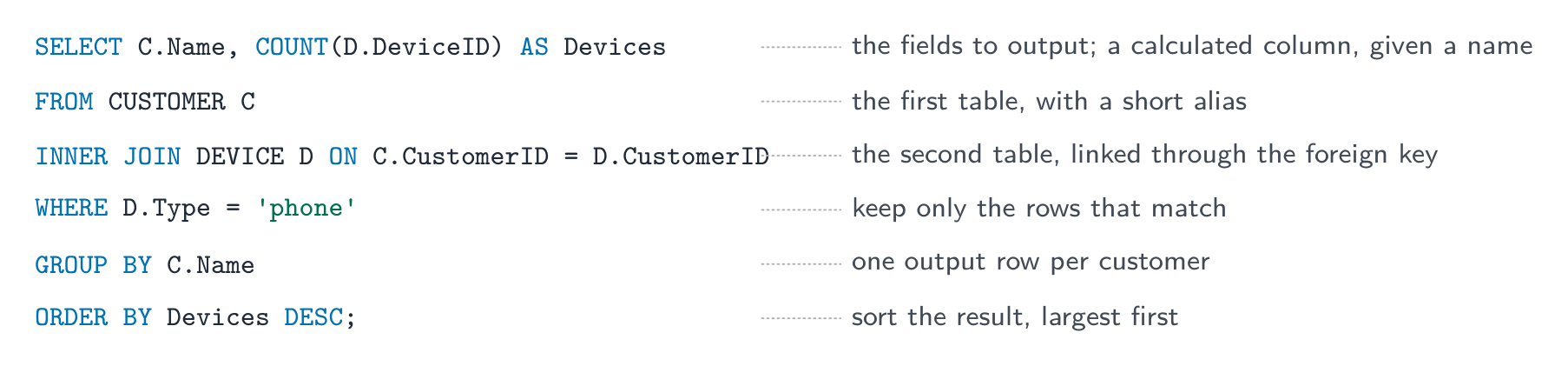
Aggregate functions 聚合函数 (COUNT, SUM, AVG, MIN, MAX) are often used with GROUP BY:
SELECT CustomerID, COUNT(*) AS NumOrders
FROM ORDER
GROUP BY CustomerID;
Insert, update, delete:
INSERT INTO CUSTOMER (CustomerID, Name, Phone)
VALUES (101, 'Ada Lovelace', '020-1234-5678');

UPDATE CUSTOMER SET Phone = '020-9999-0000' WHERE CustomerID = 101;

DELETE FROM CUSTOMER WHERE CustomerID = 101;
Always put a WHERE clause on UPDATE and DELETE, or the change hits every row.
Tips for exam SQL
- use the exact table and field names from the question.
- quote strings with single quotes (
'Smith'); don't quote numbers. - comparisons:
=,<,>,<=,>=,<>. LIKE 'A%'matches anything starting with A (%= any string,_= one character);IN (1,2,3);BETWEEN 10 AND 20.- combine conditions with
AND/OR/NOT, and end each statement with a semicolon.
The DDL pattern the exam wants. Every CREATE TABLE names each field with its type, marks the primary key, and declares each foreign key with the table it references; a composite key is declared on its own line:
CREATE TABLE RENTAL_CAR (
  RentalID INTEGER,
  CarReg VARCHAR(8),
  Days INTEGER,
  PRIMARY KEY (RentalID, CarReg),
  FOREIGN KEY (RentalID) REFERENCES RENTAL(RentalID),
  FOREIGN KEY (CarReg) REFERENCES CAR(CarReg)
);
Worked example. Using CUSTOMER(CustomerID, Name, Phone) and DEVICE(DeviceID, CustomerID, Type, Model), write SQL scripts to: (a) list the name and phone number of every customer who owns a device of type 'tablet', in alphabetical order of name; (b) count the devices of each type; (c) record that customer 17 now has the phone number '0771 234 5678'; (d) add a new device, ID 305, a 'laptop' of model 'X1' belonging to customer 17.
(a)
SELECT CUSTOMER.Name, CUSTOMER.Phone
FROM CUSTOMER INNER JOIN DEVICE
  ON CUSTOMER.CustomerID = DEVICE.CustomerID
WHERE DEVICE.Type = 'tablet'
ORDER BY CUSTOMER.Name ASC;
(b)
SELECT Type, COUNT(DeviceID) AS NumberOfDevices
FROM DEVICE
GROUP BY Type;
(c) UPDATE CUSTOMER SET Phone = '0771 234 5678' WHERE CustomerID = 17;
(d) INSERT INTO DEVICE (DeviceID, CustomerID, Type, Model) VALUES (305, 17, 'laptop', 'X1');
Marks are given per clause — the fields, the tables, the join condition, the WHERE, the ORDER BY — so a script with one wrong clause still scores the rest. Write Table.Field whenever two tables are involved.
Worked example. Explain what this script does: SELECT T.Name, SUM(R.Cost) AS Total FROM TECHNICIAN T INNER JOIN REPAIR R ON T.TechnicianID = R.TechnicianID GROUP BY T.Name;
It outputs each technician's name with the total cost of the repairs that technician has carried out, one row per technician: the two tables are joined on TechnicianID, the rows are grouped by name, and the costs in each group are added. When asked what a script does, describe the result, not the syntax.
SQL conditions and keys
LIKE 'Li%' matches text starting with Li; % represents any number of characters and _ exactly one. AND requires both conditions; OR requires at least one. Use brackets when combining them.
CREATE DATABASE Club;
CREATE TABLE Booking (
  MemberID INTEGER,
  EventID INTEGER,
  PRIMARY KEY (MemberID, EventID)
);
ALTER TABLE Booking ADD FOREIGN KEY (MemberID)
  REFERENCES Member(MemberID);
SELECT Name FROM Member
WHERE Name LIKE 'Li%' AND (Year = 12 OR Year = 13)
ORDER BY Name DESC;
The composite primary key makes the pair unique, not each column separately. A foreign key prevents a non-null reference to a missing parent record. ON UPDATE CASCADE carries a parent-key change to referencing rows; ON DELETE CASCADE deletes those rows when the parent is deleted.
Explore
Stitch two tables with INNER JOIN
A join matches rows where the foreign key equals the primary key — here Orders.CustomerID = Customer.CustomerID — and combines each matching pair into one wider row.
Explore
SELECT … WHERE
Step through a query: WHERE keeps the rows that match, then SELECT picks the columns you asked for.
Vocabulary
Train
| English |
|---|
| query/ˈkwɪərɪ/ |
| SQL/ˌes kjuː ˈel/ |
| join/dʒɔɪn/ |
| Data Definition Language/ˈdeɪtə ˌdefɪˈnɪʃn ˈlæŋɡwɪdʒ/ |
| Data Manipulation Language/ˈdeɪtə məˌnɪpjʊˈleɪʃn ˈlæŋɡwɪdʒ/ |
| aggregate functions/ˈæɡrɪɡeɪt ˈfʌŋkʃnz/ |
8.3
Definitions the examiner accepts
A definition question is marked against fixed wording. Learn these exactly, and give one answer only.
| Term | Definition |
|---|---|
| entity | something about which data is stored — a person, object or event — which becomes a table in a relational database |
| attribute | one item of data about an entity (a column of the table) |
| tuple | one row of a table: one instance of the entity |
| primary key | an attribute, or combination of attributes, that uniquely identifies each record in a table |
| foreign key | an attribute in one table whose value matches a primary key in another table, used to link the two |
| candidate key | any attribute (or combination) that could be chosen as the primary key |
| secondary key | a non-primary attribute that is indexed so the table can be searched or sorted on it quickly |
| composite key | a primary key made of two or more attributes together |
| referential integrity | every foreign-key value must match an existing primary-key value in the table it refers to |
| first normal form | a table in which every attribute is atomic, there are no repeating groups, and there is a primary key |
| second normal form | in 1NF, and every non-key attribute depends on the whole of the primary key (no partial dependency) |
| third normal form | in 2NF, and no non-key attribute depends on another non-key attribute (no transitive dependency) |
| data dictionary | the metadata a DBMS keeps about the structure of the database: tables, fields, types, keys, relationships, validation |
| DDL / DML | the language used to define or change the structure of a database / the language used to query and maintain the data in it |
8.3
Exam tips
- Define the terms exactly: entity, attribute, primary key, foreign key, and the relationship types (1:1, 1:many, many:many).
- Give a reason at each normal form: 1NF (no repeating groups), 2NF (no partial dependency), 3NF (no non-key dependency) — and name the fields involved.
- Explain what a DBMS provides (data independence, security, integrity, concurrent access, a data dictionary, a developer interface, a query processor).
- Distinguish DDL (define the structure) from DML (query and change the data), and write SQL clause by clause:
SELECT,FROM,INNER JOIN … ON,WHERE,GROUP BY,ORDER BY. - To draw an E-R diagram from tables, find each foreign key first: every foreign key is one one-to-many relationship, with the "many" at the table that holds it.
Common mistakes
- Drawing a many-to-many relationship directly. It must be split into two one-to-many relationships through a link table holding both foreign keys.
- Explaining "not in 3NF" by "the data is repeated". Name the dependency (partial or transitive) and the fields involved.
- Double quotes round strings in SQL, or quotes round numbers. Strings take
'single quotes'; numbers take none. - Leaving out the
ONcondition afterINNER JOIN. Without it the two tables are not linked. - Putting an ordinary field next to
COUNTorSUMin aSELECTwithout aGROUP BY. UPDATEorDELETEwithout aWHERE. It changes or removes every row in the table.
Interactive lessons on this topic
Work through it step by step, with instant-check exercises.