| Candidates should be able to: | Notes and guidance |
|---|---|
| Show understanding of the purpose of a development life cycle | |
| Show understanding of the need for different development life cycles depending on the program being developed | Including: waterfall, iterative, rapid application development (RAD) |
| Describe the principles, benefits and drawbacks of each type of life cycle | |
| Show understanding of the analysis, design, coding, testing and maintenance stages in the program development life cycle |
Software Development
A-Level Computer Science · Topic 12
 19:27
19:27
The Program Development Life Cycle
A tiny bug, if it slips through to release, can cost a fortune to fix — far more than catching it early. That is why we don't just start typing code. We follow…
English narration · English + 中文 subtitles burned in
12.1
Program development life cycle

Syllabus
Source: Cambridge International syllabus
A development life cycle 开发生命周期 is the set of stages from idea to finished, maintained software. It exists to plan, manage and control a project — to build the right product, on time, with good quality.

Why a life cycle is needed
The examiner's list for "the purpose of a development life cycle": it breaks a large project into stages that can be planned and managed; it makes sure the requirements are found and agreed before design and coding begin; it builds in testing and documentation rather than leaving them to the end; it lets the team track progress against milestones and manage risk; and it gives the customer defined points at which to review the work. Without one, a team codes first and discovers late that it built the wrong thing.
Why there are different ones
No single life cycle fits every project, so several development life cycles exist. The choice depends on the size and complexity, how clear the requirements 需求 are at the start, how much change is expected, the risk level, the team, and the deadline.
Common models
- Waterfall 瀑布模型 — a linear sequence (Analysis → Design → Coding → Testing → Maintenance), each stage finished before the next. Clear and well-documented; good for stable requirements, but poor at coping with mid-project change, and the customer sees nothing working until the end.
- Iterative model 迭代模型 — repeated passes, each producing a partial version that is reviewed and refined. Catches problems earlier; good when requirements are discovered over time, but harder to estimate.
- Rapid Application Development 快速应用开发 (RAD) — heavy use of a prototype 原型 and user feedback. Very fast first delivery; good for changing requirements, but depends on user availability and suits smaller systems.
- Agile 敏捷 — short iterations ("sprints"), constant collaboration and testing. Flexible and adaptive, but needs a committed customer and a skilled team.


Principles, benefits and drawbacks — as the mark scheme lists them.
| Model | Principle | Benefits | Drawbacks |
|---|---|---|---|
| waterfall | the stages run in a fixed order, each completed and signed off before the next starts; going back means restarting the sequence | simple to manage; every stage is fully documented; requirements are fixed early, so costs and dates can be estimated | inflexible once a stage is finished; no working software until late; a mistake in analysis is expensive to fix later; the customer cannot see progress |
| iterative | a small working version is built first, then repeatedly improved through further versions until complete | working software early and often; problems found in early versions; the customer's feedback shapes each version; requirements can change | hard to estimate the total time and cost; repeated testing costs effort; needs the customer to be available; can drift if versions are not planned |
| RAD | prototypes of parts of the system are built quickly and refined with the user until accepted, often in parallel by several teams | very fast delivery of a first version; the user is involved throughout, so the product fits their needs; changes are easy to absorb | needs skilled developers and committed users; documentation is weak; less suited to large or safety-critical systems |
Worked example. A company must be the first to launch a website for a new games console, and the design will change as the console's features are announced. Name the most suitable life cycle and justify it.
RAD. A prototype of the site can be built and shown to the users within days, and refined as the requirements change; the site is small enough for a prototype-driven approach, and speed of delivery is the main requirement. Waterfall would fix the requirements before any page was built and deliver nothing until the end.
The standard stages
Each stage has a purpose, an output and typical activities — a "describe the … stage" question wants two or three of these.
- analysis — find out what the program must do. Activities: interviews, questionnaires and observation of the current system; a feasibility study; agreeing the requirements specification, which every later stage is checked against.
- design — decide how it will do it. Outputs: the structure chart (modules and parameters), flowcharts or pseudocode for each module, identifier tables and data structures, screen and file layouts, and the test plan written now, from the specification, before any code exists.
- coding (implementation 实现) — write the program in a high-level language, module by module, following the design; each module is tested as it is written.
- testing — run the program against the test plan (normal, abnormal, extreme and boundary data) and correct the errors found; integration, alpha, beta and acceptance testing follow.
- maintenance 维护 — after release, correct faults, adapt the program to new hardware, software or law, and improve it (see below).
Worked example. Complete the waterfall diagram Analysis → ? → ? → ? → Maintenance and describe what happens at the design stage.
The missing stages are Design, Coding, Testing. At the design stage the requirements are turned into a plan for the program: the problem is decomposed into modules (a structure chart), the algorithm for each module is written as pseudocode or a flowchart, the data structures and identifiers are chosen, the screens and files are laid out, and the test plan is written from the specification.
Explore
The program development life cycle
Step through the stages every project passes through. Getting the requirements right in analysis matters most — a mistake caught in testing is far costlier to fix than one caught early.
Explore
Software process lab
Classify development examples by the stage or tool they belong to.
Vocabulary
Train
| English |
|---|
| development life cycle/dɪˈveləpmənt laɪf ˈsaɪkl/ |
| requirements/rɪˈkwaɪəmənts/ |
| waterfall/ˈwɔːtəfɔːl/ |
| maintenance/ˈmeɪntənəns/ |
| iterative model/ˈɪtərətɪv ˈmɒdl/ |
| Rapid Application Development/ˈræpɪd ˌæplɪˈkeɪʃn dɪˈveləpmənt/ |
| prototype/ˈprəʊtəʊtaɪp/ |
| Agile/ˈædʒaɪl/ |
| implementation/ˌɪmplɪmənˈteɪʃn/ |
12.2
Program design tools

Syllabus
| Candidates should be able to: | Notes and guidance |
|---|---|
| Use a structure chart to decompose a problem into sub-tasks and express the parameters passed between the various modules/procedures/functions which are part of the algorithm design | Describe the purpose of a structure chart Construct a structure chart for a given problem Derive equivalent pseudocode from a structure chart |
| Show understanding of the purpose of state-transition diagrams to document an algorithm |
Source: Cambridge International syllabus
Structure chart
A structure chart 结构图 shows the hierarchical decomposition 分解 of a program into modules (subroutines 子程序) and the parameters 参数 passed between them. Each module is a rectangle; lines link caller (above) to callee (below); small arrows show data going down and results coming back up. The design can then be turned into equivalent pseudocode 伪代码.
                CalculatePay
            /        |         \
       GetEmployee  CalculateBonus  CalculateTax
       Returns:     Takes: sales    Takes: gross
       employeeID   Returns: bonus  Returns: tax
It is a design-stage tool, and you can read the procedure signatures off it.
The symbols the examiner asks about. A box is a module; a line links a caller (above) to the modules it calls (below), read left to right in the order they are called. A small arrow with an open circle at its tail is a data couple — a parameter passed down into a module or a value returned up; an arrow with a filled circle is a control couple, a flag (usually BOOLEAN) that tells the caller what happened. A diamond at a branch means selection: only one of the modules below it is called, depending on a condition. A curved arrow sweeping across the links means iteration: the modules under it are called repeatedly in a loop.
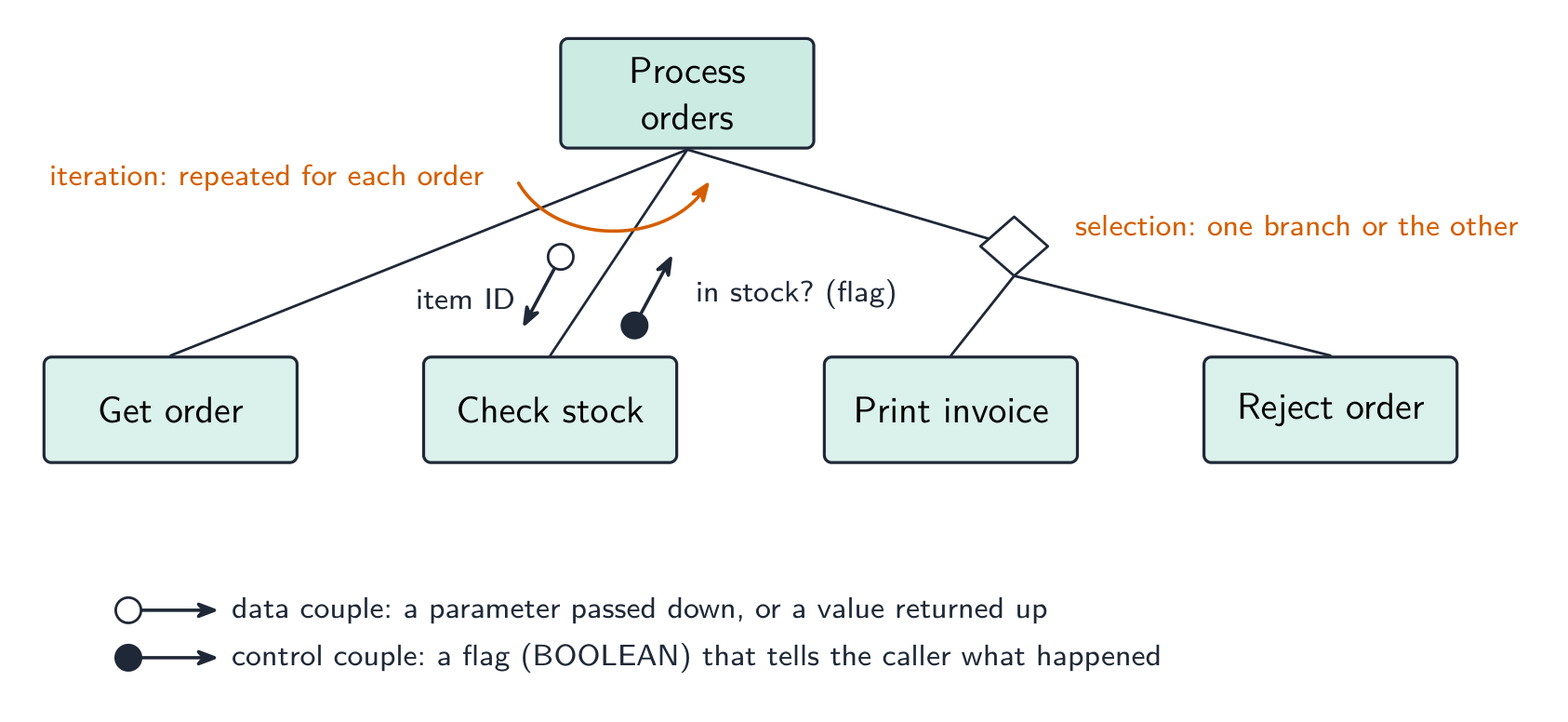
Worked example. Four modules are defined as PROCEDURE Main(), PROCEDURE ReadData(BYREF Count : INTEGER), FUNCTION IsValid(Value : INTEGER) RETURNS BOOLEAN and PROCEDURE Report(Total : INTEGER, Count : INTEGER). Main calls ReadData, then calls IsValid once for each value read, then calls Report. Describe the structure chart.
Main at the top; ReadData, IsValid and Report in a row beneath it, left to right in calling order. On the ReadData link an upward data couple Count (a BYREF parameter comes back). On the IsValid link a downward data couple Value and an upward control couple (the BOOLEAN result), with a curved iteration arrow across that link because it is called for each value. On the Report link two downward data couples, Total and Count. Reading the other way, a function is any module that returns a value — its header needs RETURNS and the returned type.
State-transition diagram
A state-transition diagram 状态转换图 shows the states 状态 a system can be in and the events that move it between them — good for vending machines, traffic lights, user interfaces. State-transition diagrams are used to document the behaviour of an algorithm or system. Each state is a circle; each transition is an arrow labelled with the event.
   coin inserted               item selected
[Idle] --------------→ [Awaiting selection] ----------→ [Dispensing]
It makes missing transitions easy to spot ("what if a second coin is inserted while awaiting selection?").

Reading and drawing one. Each transition is labelled input | output (or condition | action): what happened, then what the system does as it changes state. A question gives a table of current state, input, output, next state and asks for the diagram, or the reverse — every row of the table is exactly one arrow. Check that every state has an arrow leaving it for every input that can occur, including the ones that leave the state unchanged (an arrow that loops back to the same state).
Worked example. A pump controller has states pump off and pump on. In pump off, the input low level detected produces the output activate pump and moves to pump on; in pump on, normal level detected produces deactivate pump and moves to pump off. Any other input leaves the state unchanged. Draw the table.
| Current state | Input | Output | Next state |
|---|---|---|---|
| pump off | low level detected | activate pump | pump on |
| pump off | normal level detected | — | pump off |
| pump on | normal level detected | deactivate pump | pump off |
| pump on | low level detected | — | pump on |
The two "no change" rows become loop arrows on the diagram; leaving them out loses the mark for completeness.
Explore
Software process lab
Classify development examples by the stage or tool they belong to.
Vocabulary
Train
| English |
|---|
| structure chart/ˈstrʌktʃə tʃɑːt/ |
| parameters/pəˈræmɪtəz/ |
| pseudocode/ˈsuːdəʊkəʊd/ |
| hierarchical decomposition/haɪəˈrɑːkɪkl ˌdiːkɒmpəˈzɪʃn/ |
| decomposition/ˌdiːkɒmpəˈzɪʃn/ |
| subroutines/ˈsʌbruːtiːnz/ |
| state-transition diagram/steɪt trænˈsɪʃn ˈdaɪəɡræm/ |
| states/steɪts/ |
12.3
Errors

Syllabus
| Candidates should be able to: | Notes and guidance |
|---|---|
| Show understanding of ways of exposing and avoiding faults in programs | |
| Locate and identify the different types of errors | • syntax errors • logic errors • run-time errors |
| Correct identified errors | |
| Show understanding of the methods of testing available and select appropriate data for a given method | Including dry run, walkthrough, white-box, black-box, integration, alpha, beta, acceptance, stub |
| Show understanding of the need for a test strategy and test plan and their likely contents | |
| Choose appropriate test data for a test plan | Including normal, abnormal and extreme/boundary |
| Show understanding of the need for continuing maintenance of a system and the differences between each type of maintenance | Including perfective, adaptive, corrective |
| Analyse an existing program and make amendments to enhance functionality |
Source: Cambridge International syllabus
- syntax error 语法错误 — breaks the language's grammar (missing bracket, misspelled keyword). Caught at translation time; the program won't run until fixed.
- run-time error 运行时错误 — happens while running (divide by zero, file not found, array index out of range). The program crashes or raises an exception; fix by adding checks.
- logic error 逻辑错误 — the program runs but gives wrong results (using
+for-, an off-by-one loop, conditions in the wrong order). The hardest to find; the only sign is wrong output, so use careful testing and tracing.
Exposing and avoiding faults. Faults are exposed by testing against a test plan, by a dry run or trace table, by a walkthrough with colleagues, and by the IDE's debugger (breakpoints, single stepping, watching variables). They are avoided by designing before coding (structure chart, pseudocode), by modular code with meaningful identifiers and comments, by validation of every input, by handling exceptions rather than letting a run-time error crash the program, and by the IDE's dynamic syntax checks as you type.
Worked example. State the type of error in each case and how it shows itself. (a) Result <- STR_TO_NUM(x) / STR_TO_NUM(y) is run with y = "0". (b) The same line is run with x = "12a". (c) A loop written as FOR i <- 1 TO 9 processes a ten-element array. (d) OUTPUT "Total: " Total is missing a comma.
(a) Run-time error — division by zero; the program crashes when this line is executed with that data. (b) Run-time error — the string cannot be converted to a number. (c) Logic error — the program runs but the tenth element is never processed, so the output is wrong. (d) Syntax error — the statement breaks the language's rules and is reported by the translator before the program runs.
Worked example. Correct the errors in this pseudocode, which should output the average of ten marks.
Total <- 0
FOR i <- 1 TO 10
    INPUT Mark
    Total <- Total + Mark
NEXT i
Average <- Total / 9
OUTPUT "Average" Average
The division should be by 10, not 9 (a logic error); the output line needs a comma or an & between the string and the value (a syntax error); and Average is never declared as REAL (a syntax or run-time error, depending on the language). Say which line and what the corrected line is: Average <- Total / 10.
Vocabulary
Train
| English |
|---|
| syntax error/ˈsɪntæks ˈerə/ |
| run-time error/rʌn taɪm ˈerə/ |
| logic error/ˈlɒdʒɪk ˈerə/ |
12.3
Testing methods

- dry run 手工跟踪 — trace the code on paper, writing each variable's value in a table.
- walkthrough 走查 — a team review of the code.
- white-box testing 白盒测试 — designed from the code's internal structure, covering every statement, branch and loop.
- black-box testing 黑盒测试 — designed from the specification only: feed inputs, check outputs.
- integration testing 集成测试 — combine modules and test the interfaces between them.
- alpha testing α测试 — by the developers/in-house before release; beta testing β测试 — by a limited group of real users in their own environment.
- acceptance testing 验收测试 — by the customer, to decide if the product is fit for purpose.
- stub 桩 — a placeholder for a module that does not exist yet, so the structure can be tested top-down.
Which method, when. A dry run and a walkthrough need no computer — the dry run is you, tracing the algorithm with a trace table 跟踪表; the walkthrough is a meeting in which the author explains the code line by line and colleagues look for faults, so it also spreads knowledge of the code through the team and checks it against the design. White-box tests are written by someone who can see the code and aims to exercise every path; black-box tests are written from the specification and check only inputs against expected outputs, so a user or a separate tester can do them. Integration testing follows module testing: modules that pass alone can still fail when the data passed between them is the wrong type or in the wrong order. Alpha testing is in-house; beta testing gives a release candidate to a sample of real users, who report faults from real use; acceptance testing is the customer checking the finished product against the requirements before paying for it. A stub lets top-down testing start before every module exists.
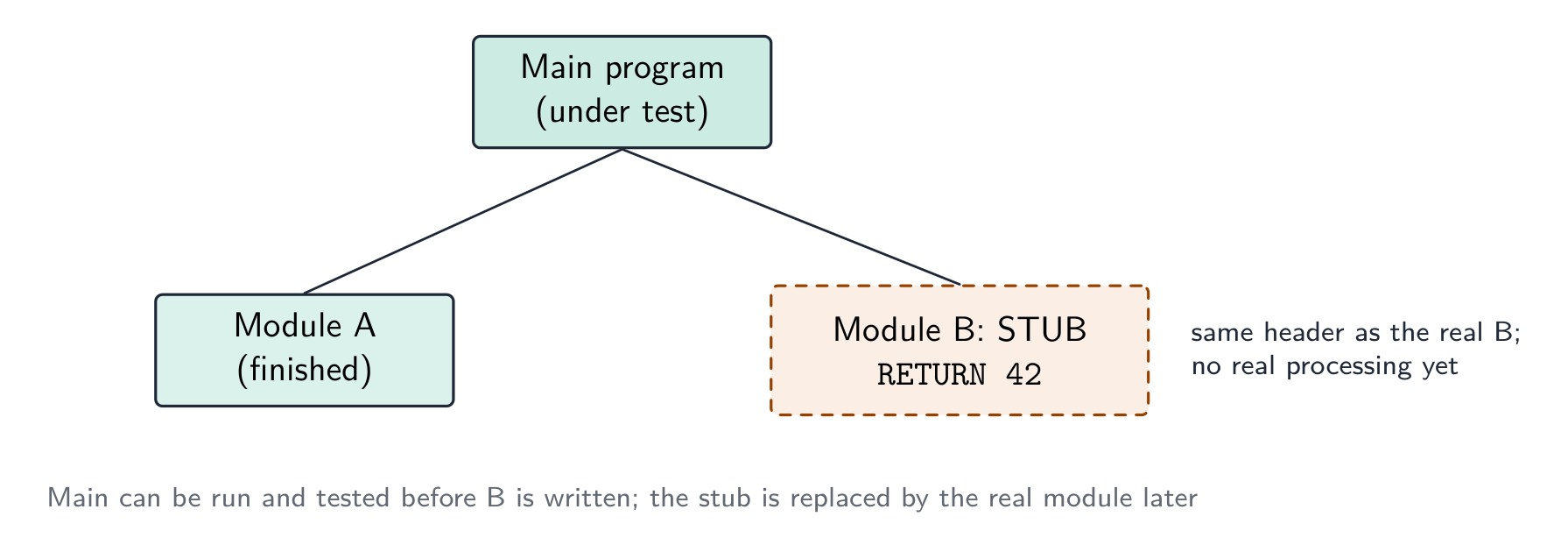
Worked example. After the program passed its in-house tests it was given to a group of users to try before release. Name this type of testing, and state what happens next.
Beta testing — real users in their own environment, reporting faults the developers did not find. The faults are corrected, then the customer carries out acceptance testing against the requirements and the program is released; faults found in live use are then handled by corrective maintenance.
Worked example. Give three benefits of testing a program by walkthrough.
Errors are found by people who did not write the code and so read it without assumptions; the logic is checked against the design and specification, not only against test data; several people learn how the code works, which helps later maintenance; and no test data or working computer is needed, so it can be done early.
Vocabulary
Train
| English |
|---|
| acceptance testing/əkˈseptəns ˈtestɪŋ/ |
| dry run/draɪ rʌn/ |
| trace table/treɪs ˈteɪbl/ |
| walkthrough/ˈwɔːkθruː/ |
| white-box testing/waɪt bɒks ˈtestɪŋ/ |
| black-box testing/blæk bɒks ˈtestɪŋ/ |
| integration testing/ˌɪntɪˈɡreɪʃn ˈtestɪŋ/ |
| alpha testing/ˈælfə ˈtestɪŋ/ |
| beta testing/ˈbiːtə ˈtestɪŋ/ |
| stub/stʌb/ |
12.3
Test strategy and test plan

A test strategy 测试策略 is the high-level approach — which kinds of testing, who does them, when, and the criteria to move on. A test plan 测试计划 is the detailed list of tests — each with input data, expected output, and a column for the actual output.
What each contains. A test strategy states which testing methods will be used at which stage (module testing by the programmer, then integration, alpha, beta, acceptance), who is responsible for each, what test data is required, and the criteria for passing to the next stage. A test plan lists the individual tests: for each, the module or feature under test, the input data, the reason the data was chosen (normal, abnormal, extreme, boundary), the expected result, a space for the actual result, and what to do if they differ. The plan is written at the design stage, from the specification, so that it tests what the program should do rather than what it happens to do.
Choosing test data
For each field or condition, include three kinds:
- normal data 正常数据 — typical values inside the valid range (for marks 0–100:
50,75). - abnormal data 异常数据 — values that should be rejected (
-10,200,"abc"). - extreme data 极端数据 — the largest and smallest values still accepted (
0and100). - boundary data 边界数据 — values at the edges, where off-by-one errors hide (each accepted extreme and the rejected value just outside it:
0/-1,100/101).
Worked example. A field accepts an exam mark from 0 to 100. Give test data of each kind with its expected result. Normal: 50 - accepted, a typical value inside the range. Abnormal: -10, 200, "abc" - all rejected, being out of range or the wrong data type. Extreme: 0 and 100 - the largest and smallest values that are still accepted. Boundary: the pairs straddling each edge - -1 rejected alongside 0 accepted, and 100 accepted alongside 101 rejected. Every value must carry its expected result, or the test plan proves nothing. Extreme and boundary are the pair most often confused: an extreme value sits inside and is accepted, while a boundary test is always a pair either side of the edge - which is exactly where off-by-one errors hide.
Worked example. A component passes if its weight, measured to the nearest gram, is within 3 g of the target of 50 g, i.e. from 47 g to 53 g inclusive. Draw up the test-plan rows for the check.
| Test data | Type | Reason | Expected result |
|---|---|---|---|
| 50 | normal | a typical value well inside the range | accepted |
| 47, 53 | extreme (boundary) | the smallest and largest values that must still be accepted | accepted |
| 46, 54 | boundary | the values just outside the range, where an off-by-one error would accept them | rejected |
| 20, 90 | abnormal | values far outside the range | rejected |
| "abc", −5 | abnormal | the wrong type, a negative weight | rejected |
Each row must say why the value was chosen and what should happen; a bare list of numbers earns nothing.
Vocabulary
Train
| English |
|---|
| test plan/test plæn/ |
| boundary data/ˈbaʊndəri ˈdeɪtə/ |
| test strategy/test ˈstrætədʒi/ |
| normal data/ˈnɔːml ˈdeɪtə/ |
| abnormal data/əbˈnɔːml ˈdeɪtə/ |
| extreme data/ekˈstriːm ˈdeɪtə/ |
12.3
Maintenance

Most of a program's lifetime cost is in maintenance. Three kinds:
- perfective maintenance 完善性维护 — improving performance or features even though it works (a faster query, a new option).
- adaptive maintenance 适应性维护 — keeping it working in a changing environment (a new OS, a new API, a legal change).
- corrective maintenance 纠正性维护 — fixing bugs found in use.
A program may need all three throughout its life.
Why each is needed — the reasons the mark scheme lists. Corrective: a fault is reported by a user after release, or an incorrect output is noticed in particular circumstances that testing did not cover. Adaptive: the operating system, hardware or browser is upgraded; a law or company rule changes (tax rates, data-protection requirements); the program must work with a new external system or file format. Perfective: users ask for extra features or a better interface; the program is made faster or made to use less memory; the code is tidied to make future changes easier.
Worked example. (a) A released program outputs a wrong value under certain circumstances. (b) The hardware that runs a program is replaced. (c) Customers ask for the coffee-shop loyalty program to send a message on a customer's birthday. Name the maintenance type in each case.
(a) Corrective — a fault in the delivered program is being fixed. (b) Adaptive — the program is changed to run in its new environment. (c) Perfective — a feature is added to a program that already works.
Vocabulary
Train
| English |
|---|
| corrective maintenance/kəˈrektɪv ˈmeɪntənəns/ |
| perfective maintenance/pəˈfektɪv ˈmeɪntənəns/ |
| adaptive maintenance/əˈdæptɪv ˈmeɪntənəns/ |
12.3
Amending an existing program
When asked to add a feature or fix a bug:
- read the existing code until you understand the algorithm and data flow.
- find where the change goes — which subroutine, which lines.
- make the change as small as possible — don't rewrite working code.
- update related parts — every caller of a changed parameter list, every routine using a changed data structure.
- test the new behaviour and the old (regression testing 回归测试 — check you broke nothing).
- document the change.
Clear comments, meaningful names, decomposed subroutines and a structure chart make a program much easier to amend — which is why the design tools matter even after the first release.
Analysing a program you did not write. Start from the identifier table and the module headers: they tell you what each module receives and returns before you read a line of its body. Then trace the algorithm with a trace table for one small input, noting where each output value comes from. Only then decide where the enhancement goes — usually a new module called from the existing one, so the working code is disturbed as little as possible — and write the pseudocode for the change and the test data that proves it.
Vocabulary
Train
| English |
|---|
| regression testing/rɪˈɡreʃn ˈtestɪŋ/ |
12.3
Definitions the examiner accepts
A definition question is marked against fixed wording. Learn these exactly, and give one answer only.
| Term | Definition |
|---|---|
| development life cycle | the sequence of stages, from analysis to maintenance, followed to produce and support a program |
| waterfall model | a life cycle in which the stages are carried out in a fixed order, each completed before the next begins |
| iterative model | a life cycle in which a working version is produced and then repeatedly refined until it is complete |
| rapid application development | a life cycle that builds prototypes quickly, refining them with user feedback until they are accepted |
| structure chart | a diagram that shows how a program is decomposed into modules, the order in which they are called and the parameters passed between them |
| state-transition diagram | a diagram that shows the states a system can be in and the inputs that cause it to move between them |
| syntax error | an error in the way a statement is written, so it breaks the rules of the language and cannot be translated |
| logic error | an error in the algorithm, so the program runs but produces the wrong result |
| run-time error | an error that occurs while the program is running, such as division by zero, and stops it |
| dry run | working through the algorithm by hand, recording the values of the variables in a trace table |
| walkthrough | a review in which the author steps through the code with colleagues who look for errors |
| stub | a placeholder module with the correct header that returns a fixed value, used so the modules that call it can be tested |
| test plan | a list of the tests to be carried out, each with its test data, the reason for the data and the expected result |
| boundary data | values at each edge of the valid range, both the last value accepted and the first value rejected |
| corrective / adaptive / perfective maintenance | fixing faults found in use / changing the program to suit a changed environment / improving a program that already works |
12.3
Exam tips
- Compare development models (waterfall, iterative, RAD) by principle, benefit, drawback, and know the five stages of the program development life cycle and what each produces.
- Distinguish syntax, logic and run-time errors by when each shows itself: at translation, in the output, during the run.
- Choose test data of every kind — normal, abnormal, extreme and boundary — and give each value with its reason and expected result.
- Distinguish the types of maintenance (corrective, adaptive, perfective) by why the change is being made.
- On a structure chart, name every symbol: box, calling line, data couple, control couple, selection diamond, iteration arrow. Reading module headers off a chart, remember a function has
RETURNS.
Common mistakes
- Describing a life cycle stage by its name only ("in the design stage the program is designed"). Say what is produced: structure chart, pseudocode, test plan.
- Calling a wrong output a "run-time error". If the program runs to the end, it is a logic error.
- Giving boundary data as just the extremes. The mark needs the values on both sides of the edge.
- Treating alpha and beta testing as the same. Alpha is in-house by the developers; beta is by real users outside.
- Confusing adaptive and perfective maintenance. Adaptive responds to a change outside the program; perfective improves a program nobody had to change.
- Drawing a structure chart with the modules in any order. They read left to right in the order they are called, and each parameter needs its arrow.
Interactive lessons on this topic
Work through it step by step, with instant-check exercises.