| Candidates should be able to: | Notes and guidance |
|---|---|
| Show understanding of why user-defined types are necessary | |
| Define and use non-composite types | Including enumerated, pointer |
| Define and use composite data types | Including set, record and class/object |
| Choose and design an appropriate user-defined data type for a given problem |
Data Representation
A-Level Computer Science · Topic 13
 15:16
15:16
User-Defined Data Types
A plain string field will happily store nonsense. Ask for a vehicle type, and someone types Bananas — the program accepts it without a murmur. But if you…
English narration · English + 中文 subtitles burned in
13.1
User-defined data types

Syllabus
Source: Cambridge International syllabus
The built-in types (INTEGER, REAL, STRING, CHAR, BOOLEAN) cover the simplest cases. For richer problems you can define user-defined types 用户定义类型, making the code clearer and the compiler stricter.
Why they are needed
A built-in STRING lets you store nonsense in a field that should hold one of a few legal values; a user-defined type can restrict it. Real entities are usually a collection of values of different types. And DECLARE Taxi : Vehicle is clearer (self-documenting) than DECLARE Taxi : STRING.
"Describe the purpose of a user-defined data type" (two marks). A data type defined by the programmer, built from existing (built-in) types, so that data specific to the problem can be represented when no built-in type fits. Both halves score: defined by the programmer and based on existing types. The examiner also accepts "to make the program easier to read and maintain" as a supporting point, never on its own.
"Explain what is meant by non-composite and composite data types" (four marks). A non-composite type is defined without reference to another type: it holds a single value, for example an integer, a real, or an enumerated value. A composite type is a collection of other types (which may themselves be composite): it holds several values under one identifier, for example a record, a set, an array or a class. Give an example with each definition; the exam asks for one.
Non-composite types
Enumerated type
An enumerated type 枚举类型 has values that are a fixed list of named constants:
TYPE Vehicle = (M100, M230, T101, T102, T120, T150)
DECLARE MyTaxi : Vehicle
MyTaxi ← T102
The names are values of the new type (stored internally as small integers); you cannot assign anything outside the list. Uses: days of the week, colours, status codes.
"State what is meant by an enumerated data type." A non-composite user-defined type defined by listing all its possible values (in order). Because the values are ordered, they can be compared and stepped through: with TYPE Month = (January, February, ..., December), the test IF ThisMonth > June is legal, and the values are stored internally as integers. The pseudocode has three parts and the exam marks each: the keyword TYPE, the identifier with =, and the list in brackets separated by commas.
Worked example. Write pseudocode to define an enumerated type for the days on which a school is open (Monday to Friday), and declare a variable of that type set to Wednesday.
TYPE SchoolDay = (Monday, Tuesday, Wednesday, Thursday, Friday)
DECLARE Today : SchoolDay
Today ← Wednesday
A variable of an enumerated type cannot be given a value outside the list, which is the whole point: Today ← Saturday is a compile-time error, whereas a STRING would have accepted "Saturdy".
Pointer type
A pointer 指针 holds the memory address of another variable (or NULL for "no target"). Pointers build dynamic structures (linked lists, trees) and pass references without copying.
TYPE PNode = ^TNode    // pointer to a TNode
DECLARE p : PNode
p ← NEW TNode
p^.Value ← 42          // dereference to reach the fields
To dereference 解引用 (p^) means to reach the variable it points to.
"State what is meant by a pointer data type." A non-composite type whose value is the memory address of (a reference to) a variable of a given type. The pseudocode declares the type with a caret before the type it points to, and the exam asks for exactly that line:
TYPE SelectParts = ^Parts        // a pointer to a value of type Parts
DECLARE Chosen : SelectParts
Chosen ← ^Keyboard               // Chosen now holds the address of Keyboard
OUTPUT Chosen^                   // dereference: the value stored at that address
Pointers are what a dynamic linked list or binary tree (Topic 19) is built from: each node holds a pointer to the next. Two marks are commonly lost here: writing the pointer type as if it held the value itself, and forgetting the caret when reading through the pointer.

p^ dereferences it to reach the node's fieldsComposite types
A composite type 复合类型 (one of the composite data types) groups several values under one name.


- record 记录 (Topic 10) — fields of different types in a
TYPE ... ENDTYPEblock. - set 集合 — an unordered collection of unique values, with operations add, remove, membership test, union, intersection:
DECLARE Available : SET OF Colour
Available ← {Red, Blue}
IF Green IN Available THEN
    ...
ENDIF
- class 类 / object 对象 — the OOP composite type, combining data fields (attributes 属性) with operations on them (methods 方法). An object is an instance of a class:
CLASS Taxi
    PRIVATE Capacity : INTEGER
    PUBLIC FUNCTION GetCapacity() RETURNS INTEGER
        RETURN Capacity
    ENDFUNCTION
ENDCLASS
Choosing a type
Use enumerated for a value from a fixed list, pointer for indirection, record for a group of fields, set for an unordered unique collection, and class when you need state and behaviour together.
"Describe the user-defined data type set" (three marks). A composite type that holds a collection of values of the same type, in no particular order and with no duplicates; values can be added and removed, and a value can be tested for membership. Declare the type with SET OF, then define a set constant with its values in brackets:
TYPE EvenNumbers = SET OF INTEGER
DEFINE Evens (2, 4, 6, 8, 10, 12) : EvenNumbers
TYPE SymbolSet = SET OF CHAR
DEFINE Operators ('+', '-', '*', '/') : SymbolSet
"Describe the user-defined data type record" (three marks). A composite type made up of a fixed number of fields (items), each with its own identifier and its own type, referred to under a single identifier; the fields are accessed with dot notation.
Worked example. Write pseudocode to declare a record type ClubMember for a club member's first name, last name, membership code (an integer), date of joining and whether fees have been paid; then declare a variable and set two of its fields.
TYPE ClubMember
    DECLARE FirstName : STRING
    DECLARE LastName : STRING
    DECLARE Code : INTEGER
    DECLARE DateJoined : DATE
    DECLARE FeesPaid : BOOLEAN
ENDTYPE

DECLARE NewMember : ClubMember
NewMember.LastName ← "Chen"
NewMember.FeesPaid ← TRUE
Every field needs its own DECLARE line with an appropriate type, the block ends with ENDTYPE, and a field 字段 is reached as variable.field. Asked to choose a type for each field, match it to the data: a code that is only ever compared is a STRING if it can contain letters, an INTEGER if arithmetic or ordering is needed; a yes/no is BOOLEAN; a date is DATE. A field that can take one of a few named values (a pet's species, a colour) is the one to make an enumerated type.
![An array of four ClubMember records drawn as rows of fields, with the callout Members[3].LastName picking out one field of one element, and an assignment writing one field of another element](/handout-media/a_level_computer_science/assets/13-array-of-records.png?v=1788672854)
Records in arrays and files. A table of many members is DECLARE Members : ARRAY[1:100] OF ClubMember; then Members[3].LastName is one field of one element, and a loop over the index processes every record. A record is also the natural unit written to and read from a file (below), one record per PUTRECORD or WRITEFILE.
Worked example. A composite type Pet stores each pet's name (string), species (one of dog, cat, rabbit or hamster) and weight in kilograms (real). Define the types and declare a variable.
TYPE Species = (Dog, Cat, Rabbit, Hamster)
TYPE Pet
    DECLARE Name : STRING
    DECLARE Kind : Species
    DECLARE Weight : REAL
ENDTYPE
DECLARE MyPet : Pet
MyPet.Kind ← Rabbit
The enumerated type is defined first, because the record uses it: order matters in pseudocode as it does in a compiler.
Classes in pseudocode. A class is the composite type that also carries behaviour. The exam asks for the declaration with its attributes marked PRIVATE, a constructor 构造函数 named NEW that sets them, and PUBLIC methods to get or change them:
CLASS Appointment
    PRIVATE PatientName : STRING
    PRIVATE Treatment : STRING
    PRIVATE Medication : STRING
    PUBLIC PROCEDURE NEW(Name : STRING, Treat : STRING, Med : STRING)
        PatientName ← Name
        Treatment ← Treat
        Medication ← Med
    ENDPROCEDURE
    PUBLIC FUNCTION GetTreatment() RETURNS STRING
        RETURN Treatment
    ENDFUNCTION
ENDCLASS

DECLARE Visit : Appointment
Visit ← NEW Appointment("A. Chen", "filling", "none")
OUTPUT Visit.GetTreatment()
Attributes are private so that they can only be changed through methods (encapsulation, Topic 20); the constructor is a procedure called NEW with one parameter per attribute; a getter is a function that returns the attribute. Each of these is a separate mark.
Explore
Programming concept lab
Connect examples to the programming idea they show.
Vocabulary
Train
| English |
|---|
| user-defined type/ˈjuːzə dɪˈfaɪnd taɪp/ |
| field/fiːld/ |
| record/ˈrekɔːd/ |
| set/set/ |
| class/klæs/ |
| composite type/ˈkɒmpəzɪt taɪp/ |
| enumerated type/ɪˈnjuːməreɪtɪd taɪp/ |
| pointer/ˈpɔɪntə/ |
| dereference/ˌdiːˈrefrəns/ |
| object/ˈɒbdʒekt/ |
| attributes/ˈætrɪbjuːts/ |
| methods/ˈmeθədz/ |
| constructor/kənˈstrʌktə/ |
13.2
File organisation and access

Syllabus
| Candidates should be able to: | Notes and guidance |
|---|---|
| Show understanding of the methods of file organisation and select an appropriate method of file organisation and file access for a given problem | Including serial, sequential (using a key field), random (using a record key) |
| Show understanding of methods of file access | Including Sequential access for serial and sequential files Direct access for sequential and random files |
| Show understanding of hashing algorithms | Describe and use different hashing algorithms to read from and write data to a random/sequential file |
Source: Cambridge International syllabus
File organisation 文件组织 is how the data is laid out; file access is how the program reaches a record.
- serial file 串行文件 — records in the order added, no sorting. Access is sequential only; appending is fast; searching is slow. Used for logs and audit trails.
- sequential file 顺序文件 — records sorted by a key. Searching is faster (you can stop early or binary-search); inserting is slow (records must shift). Used for master files updated in batch.
- random file 随机文件 (direct-access file) — records at positions computed from the key (often by a hash). Direct access by key is very fast; reading in key order is harder. Used for large lookup tables and customer accounts.


The two access methods are sequential access 顺序存取 (read from start to end) and direct access 直接存取 (jump straight to a known position). Match the structure to the dominant operation: single-key lookups favour random; in-order reports favour sequential.
Describing each organisation (the wording that scores). Serial: records are stored one after another in the order in which they were added, with no ordering by key. Sequential: records are stored in order of a key field (sorted). Random: each record is stored at an address calculated from its key by a hashing algorithm, so the records are not in any order. Comparing serial and sequential: both store records one after another and both are read sequentially, but a sequential file is ordered by key, so a search can stop as soon as a key larger than the target is read, and a new record must be inserted in its correct position (usually by rewriting the file), whereas a serial file is simply appended to.
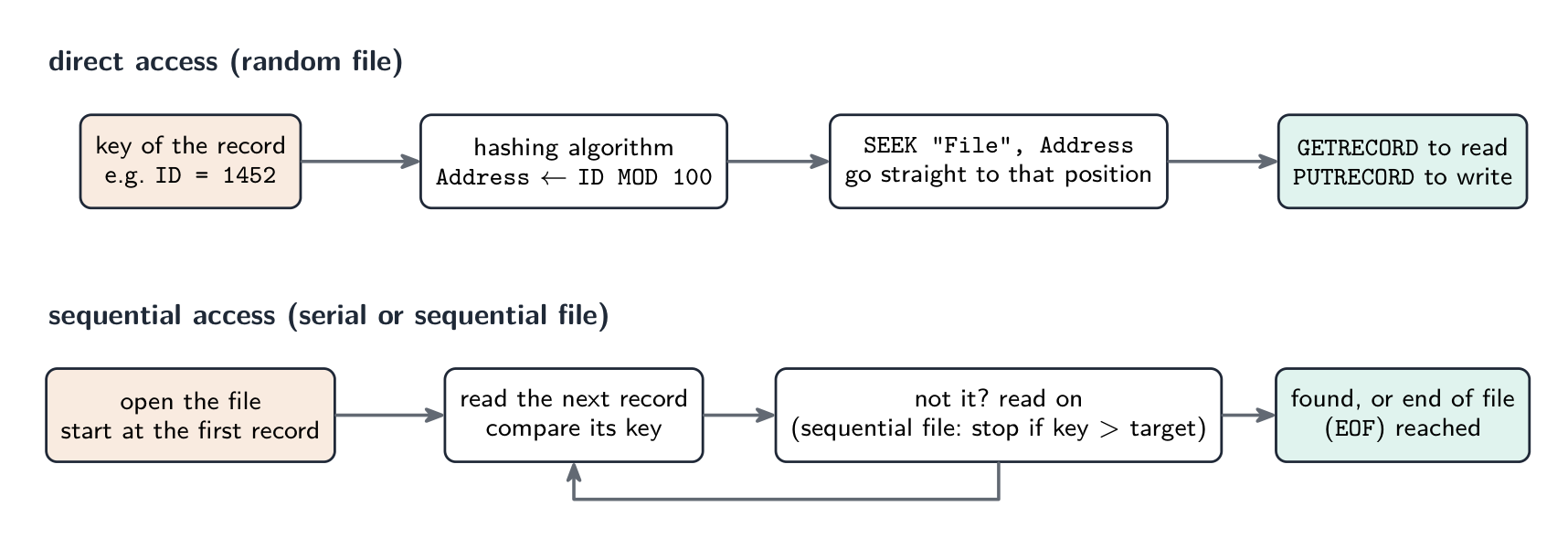
Describing each access method. Sequential access: start at the beginning of the file and read the records one after another (in the order stored) until the required record is found or the end of the file is reached. Applied to a serial file this means reading every record up to the match, and reading the whole file to establish that a record is absent; applied to a sequential file the search can stop early, as soon as a key greater than the target is read. Direct access: the address of the record is calculated from its key (by a hashing algorithm, or from an index), and the program goes straight to that position without reading the records before it; this is the access method for random files, and for a record referenced by a unique address on a disk.
Choosing. A payroll or utility-billing master file processed in batch, every record in turn, suits a sequential file; a log of transactions in the order they happened suits a serial file; a stock or customer file where single records are looked up and updated by key while the program runs suits a random file with direct access.
File handling in pseudocode. The exam expects the standard statements, and Paper 3 sets algorithms that use them:
| Task | Statements |
|---|---|
| open a text file | OPENFILE "Scores.txt" FOR READ (or FOR WRITE, which creates or overwrites, or FOR APPEND) |
| read or write a line | READFILE "Scores.txt", Line and WRITEFILE "Scores.txt", Line |
| test for the end | WHILE NOT EOF("Scores.txt") |
| close | CLOSEFILE "Scores.txt" |
| open a random file | OPENFILE "Stock.dat" FOR RANDOM |
| move to a record position | SEEK "Stock.dat", Address |
| read or write a whole record | GETRECORD "Stock.dat", Item and PUTRECORD "Stock.dat", Item |
Worked example. A random file Stock.dat holds records of type StockItem, stored at the address given by ItemID MOD 100. Write pseudocode that stores a new item at its hashed address if that position is empty, reporting the position if it is already in use.
DECLARE Item, Existing : StockItem
DECLARE Address : INTEGER
INPUT Item.ItemID, Item.Description, Item.Quantity
Address ← Item.ItemID MOD 100
OPENFILE "Stock.dat" FOR RANDOM
SEEK "Stock.dat", Address
GETRECORD "Stock.dat", Existing
IF Existing.ItemID = 0 THEN
    // 0 marks an empty position
ENDIF
    SEEK "Stock.dat", Address
    PUTRECORD "Stock.dat", Item
    OUTPUT "Stored at ", Address
ELSE
    OUTPUT "Position ", Address, " is in use"
ENDIF
CLOSEFILE "Stock.dat"
Two details the mark scheme checks: SEEK before each GETRECORD or PUTRECORD (reading moves the position on, so seek again before writing), and the file opened FOR RANDOM and closed at the end. To copy every record of a random file to another, loop over the addresses with SEEK, GETRECORD from one file and PUTRECORD to the other, skipping empty positions.
Explore
File access route
Follow a file from storage to program and back safely.
Vocabulary
Train
| English |
|---|
| File organisation/faɪl ˌɔːɡənaɪˈzeɪʃn/ |
| serial file/ˈsɪərɪəl faɪl/ |
| sequential file/siːˈkwenʃl faɪl/ |
| random file/ˈrændəm faɪl/ |
| direct access/daɪˈrekt ˈækses/ |
| sequential access/siːˈkwenʃl ˈækses/ |
13.2
Hashing

A hash function 散列函数 (a hashing algorithm) takes a record key and produces an address where the record is stored. A good one is fast, deterministic 确定性, and spreads keys evenly.
Common hashing algorithms for $N$ slots: modulo hash address ← key MOD N; folding (split the key, add the pieces, MOD N); a string hash (sum the character codes, MOD N).
A collision 冲突 is when two keys hash to the same address. Three ways to resolve it:
| Strategy | How it works | Trade-off |
|---|---|---|
| linear probing 线性探测 | use the next free slot (wrapping around) | simple, but keys cluster |
| chaining 链接法 | each slot points to a linked list 链表 of records | no clustering, but uses more memory |
| rehashing | apply a second hash function | spreads keys, but more work |
To search: hash the key, read that slot; if the keys match you are done, else follow the resolution strategy until a match or an empty slot. To insert: hash the key, write to that slot or the next free one. Keep the load factor 装填因子 (records ÷ slots) below about 70% for near-O(1) lookups.
"Explain what is meant by a hashing algorithm in the context of file access" (three marks). A calculation (function) performed on the key field of a record that produces a value, which is used as the address (location) at which the record is stored in the file and from which it is retrieved. The same calculation on the same key always gives the same address, which is why the record can be found again without searching.
"Outline two methods of overcoming a collision." (1) Linear probing (open addressing): store the record in the next free location after the calculated address, wrapping round to the start if necessary; to retrieve, start at the hashed address and read forward until the key matches. (2) An overflow area 溢出区 or chaining: store the colliding record in a separate overflow area (or a linked list attached to the address), which is searched sequentially after the main address fails to match. Either scores; describe the retrieval as well as the storage.
Worked example. A random file has 11 record positions, numbered 0 to 10, and the hashing algorithm is Address ← Key MOD 11. Records with keys 1250, 1381, 1452, 1613 and 1470 are stored in that order, using linear probing. Show where each record goes, and describe how key 1470 is retrieved.
$1250 \bmod 11 = 7$; $1381 \bmod 11 = 6$; $1452 \bmod 11 = 0$; $1613 \bmod 11 = 7$, a collision with 1250, so 1613 takes the next free position, 8; $1470 \bmod 11 = 7$ again, and positions 7 and 8 are full, so 1470 goes to 9. To retrieve 1470: calculate $7$, read position 7 (key 1250, no match), read 8 (1613, no), read 9 (1470, found). If an empty position is reached before a match, the record is not in the file. Collisions are the price of a small file: a good hashing algorithm spreads the keys evenly, and the file is kept well below full so that probes stay short.
Explore
A hash table
Watch each key get hashed to a bucket. A good hash spreads keys out so lookups stay fast.
Vocabulary
Train
| English |
|---|
| linked list/lɪŋkt lɪst/ |
| hash function/hæʃ ˈfʌŋkʃn/ |
| deterministic/dɪˌtɜːmɪˈnɪstɪk/ |
| collision/kəˈlɪʒn/ |
| linear probing/ˈlɪnɪə ˈprəʊbɪŋ/ |
| chaining/ˈtʃeɪnɪŋ/ |
| load factor/ləʊd ˈfæktə/ |
| overflow area/ˌəʊvəˈfləʊ ˈeərɪə/ |
13.3
Floating-point numbers

Syllabus
| Candidates should be able to: | Notes and guidance |
|---|---|
| Describe the format of binary floating-point real numbers | Use two's complement form Understand of the effects of changing the allocation of bits to mantissa and exponent in a floating-point representation |
| Convert binary floating-point real numbers into denary and vice versa | |
| Normalise floating-point numbers | Understand the reasons for normalisation |
| Show understanding of the consequences of a binary representation only being an approximation to the real number it represents (in certain cases) | Understand how underflow and overflow can occur |
| Show understanding that binary representations can give rise to rounding errors |
Source: Cambridge International syllabus
To store real numbers of very different sizes, computers use a floating-point 浮点 format — a binary form of scientific notation, with two fields:
- a mantissa 尾数 — the significant digits.
- an exponent 指数 — the power of 2 to multiply by.
Both are stored as two's complement 补码 integers. The value is
$$\text{number} = \text{mantissa} \times 2^{\text{exponent}}.$$
Read the mantissa as a binary fraction — the first bit after the point is worth $1/2$, the next $1/4$, then $1/8$, and so on. So 0.1010000 is $1/2 + 1/8 = 0.625$; with exponent 00000010 (= 2) the value is $0.625 \times 2^{2} = 2.5$.
Converting
- binary → denary: read the mantissa (use two's-complement rules if negative) as a fraction, read the exponent as a signed integer, then multiply mantissa by $2^{\text{exponent}}$.
- denary → binary: write the number as a binary fraction × a power of 2, then store the mantissa and exponent in the agreed formats.
Worked example. A number has mantissa 10110000 and exponent 00000011. Find its denary value.
The exponent 00000011 is $+3$. The mantissa begins with a 1, so it is negative. Read as 1.0110000 in two's complement, the sign bit is worth $-1$ and the fraction bits add $\tfrac{1}{4} + \tfrac{1}{8} = 0.375$, so the mantissa is $-1 + 0.375 = -0.625$. Then
$$\text{number} = -0.625 \times 2^{3} = -5.0.$$
Worked example. Store $+2.5$ in this format.
In binary $2.5 = 10.1$. Written as a normalised fraction, $2.5 = 0.101 \times 2^{2}$. So the mantissa is 01010000 (sign bit 0, then .101) and the exponent is 00000010 ($= 2$).
The exam's format: two's complement, a mantissa and an exponent
The exam states a format such as 10 bits for the mantissa and 6 bits for the exponent, both in two's complement. The mantissa's binary point sits after its first (sign) bit, so a positive mantissa is 0.xxxxxxxxx and a negative one 1.xxxxxxxxx; the exponent is an ordinary signed integer. Every conversion uses the same three moves: read the mantissa as a fraction (two's-complement rules if it starts with 1), read the exponent as an integer, multiply by $2^{\text{exponent}}$.
Worked example (binary to denary). Mantissa 0101100000, exponent 000011.
Mantissa: $0.101100000_2 = \tfrac{1}{2} + \tfrac{1}{8} + \tfrac{1}{16} = 0.6875$. Exponent: $000011_2 = 3$. Value: $0.6875 \times 2^{3} = 5.5$.
Worked example (negative mantissa). Mantissa 1011000000, exponent 000010.
The mantissa starts with 1, so it is negative. Its value is $-1 + 0.011000000_2 = -1 + (\tfrac{1}{4} + \tfrac{1}{8}) = -0.625$; exponent $= 2$; value $-0.625 \times 4 = -2.5$. (Alternatively, take the two's complement of the mantissa, 0101000000 $= 0.625$, and attach the minus sign.) A negative exponent such as 111110 $= -2$ divides instead: a mantissa of $0.5$ with that exponent is $0.5 \times 2^{-2} = 0.125$.
Worked example (denary to binary). Store $+6.5$ and $-6.5$ in the 10-bit and 6-bit format, normalised.
$6.5 = 110.1_2 = 0.1101_2 \times 2^{3}$, so the mantissa is 0110100000 and the exponent 000011. For $-6.5$, take the two's complement of the mantissa: 1001100000 (check: $-1 + 0.0011_2 = -1 + 0.1875 = -0.8125$, and $-0.8125 \times 8 = -6.5$), exponent 000011 unchanged. The sign never goes into the exponent; a negative number has a negative mantissa.
Normalisation
A number is normalised 规格化 when the first significant bit is immediately after the binary point (no wasted leading zeros). This maximises precision, because every mantissa bit carries information. To normalise, shift the mantissa left and decrease the exponent (or shift right and increase it) until the first significant bit is in place; the value is unchanged. For negative (two's-complement) mantissas, the sign bit (1) is followed immediately by a 0.
Recognising and producing normalised form. A positive normalised mantissa begins 01; a negative one begins 10. So 0011000000 is not normalised (shift left one place and subtract one from the exponent: 0110000000, exponent one less) and 1100000000 is not either (shift left until the pattern is 10...). Each shift left of the mantissa must be matched by subtracting one from the exponent, or the value changes.
"Explain why numbers are stored in normalised form" (two marks). (1) It gives the maximum precision (accuracy) for the number of bits available, because no bits are wasted on leading zeros (or leading ones for a negative number); (2) each number then has a unique representation, so numbers can be compared; and (3) it makes the best use of the available range. Any two of these score.

Approximation and rounding errors
Many denary reals cannot be stored exactly in binary — e.g. $0.1_{10}$ is the repeating binary fraction $0.000110011\ldots_{2}$, which must be truncated. Consequences:
- rounding errors 舍入误差 build up over many operations (
0.1 + 0.2is not exactly0.3). - comparisons fail — never test a real for equality. Test that the difference is smaller than a small tolerance,
IF Difference < 0.000001, where the difference is taken the right way round or through a modulus function that the question would define.ABSis not on the 9618 insert or in the Pseudocode Guide, so do not assume it: the guide says any function a question needs will be given. - subtracting two nearly-equal values loses precision.
- overflow 溢出 (a result too large for the exponent's range) and underflow 下溢 (a result too small, rounding to zero) occur when the exponent runs out of range.
For exact needs (currency), use fixed-point 定点 or BCD 二进码十进数 instead of floating-point.
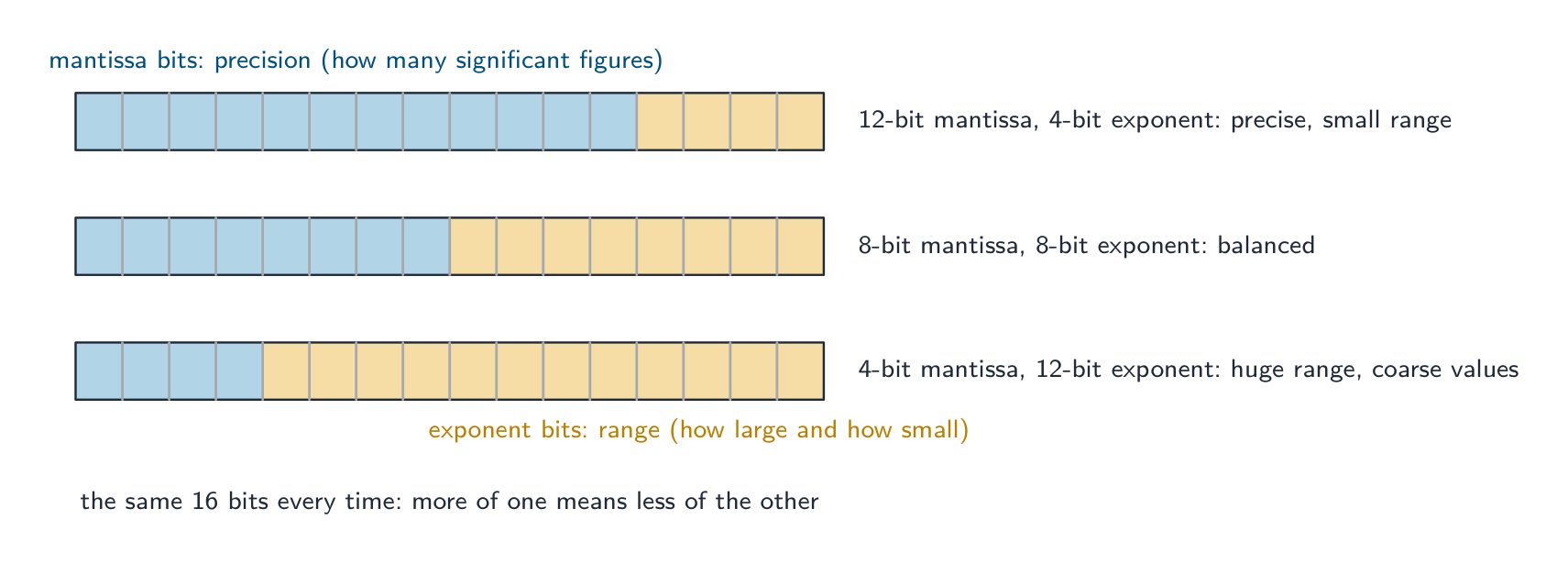
"Describe the effect of changing the allocation of bits" (three marks). With a fixed total number of bits, increasing the mantissa and reducing the exponent gives greater precision 精度 (more significant figures, smaller rounding errors) but a smaller range 范围 (the largest and smallest magnitudes that can be stored shrink); increasing the exponent does the opposite: a larger range at the cost of precision. Name both effects and both directions.
Largest and smallest. In the 10-bit mantissa, 6-bit exponent format the largest positive number has mantissa 0111111111 ($= 1 - 2^{-9}$) and exponent 011111 ($= 31$): about $2^{31}$. The smallest positive normalised number has mantissa 0100000000 ($= 0.5$) and exponent 100000 ($= -32$): $0.5 \times 2^{-32} = 2^{-33}$. The most negative number has mantissa 1000000000 ($= -1$) and exponent $31$: $-2^{31}$.
"Explain what is meant by overflow and underflow." Overflow occurs when the result of a calculation is larger than the largest number that can be represented, so the exponent would need more bits than it has; underflow occurs when a result is smaller than the smallest (non-zero) number that can be represented, too close to zero for the exponent to express, so it is stored as zero. Both come from the exponent's range, not the mantissa's.
Why a binary representation is only an approximation. A binary fraction can only represent sums of $\tfrac{1}{2}, \tfrac{1}{4}, \tfrac{1}{8}, \ldots$ exactly; a value such as $0.1$ or $\tfrac{1}{3}$ has an infinite binary expansion, and the mantissa has a fixed number of bits, so the stored value is the nearest one that fits. The difference is a rounding error; it is small for one number but accumulates over repeated calculations (adding $0.1$ ten times may not give exactly $1$), which is why real numbers should never be tested for exact equality.
Explore
Build a floating-point number
Flip the mantissa and exponent bits to make a value, and check whether it is normalised.
Explore
Normalising a floating-point number
Step through normalisation. Shifting the mantissa to remove wasted leading zeros — and adjusting the exponent to match — keeps the value the same but spends every bit on precision.
Vocabulary
Train
| English |
|---|
| overflow/ˌəʊvəˈfləʊ/ |
| floating-point/ˈfləʊtɪŋ pɔɪnt/ |
| mantissa/mænˈtɪsə/ |
| exponent/ekˈspəʊnənt/ |
| two's complement/tuːz ˈkɒmplɪmənt/ |
| normalised/ˈnɔːməlaɪzd/ |
| rounding errors/ˈraʊndɪŋ ˈerəz/ |
| underflow/ˌʌndəˈfləʊ/ |
| fixed-point/fɪkst pɔɪnt/ |
| BCD/ˌbiː siː ˈdiː/ |
| precision/prɪˈsɪʒn/ |
| range/reɪndʒ/ |
13.3
Definitions the examiner accepts
A definition question is marked against fixed wording. Learn these exactly, and give one answer only.
| Term | Definition |
|---|---|
| user-defined data type | a data type defined by the programmer, based on existing types, to represent data specific to the problem |
| non-composite type | a type defined without reference to another type; it holds a single value (integer, real, enumerated, pointer) |
| composite type | a type made up of other types; it holds several values under one identifier (record, set, array, class) |
| enumerated type | a non-composite type defined by listing all its possible values, in order |
| pointer type | a non-composite type whose value is the memory address of a variable of a given type |
| set | a composite type holding a collection of values of one type, unordered and without duplicates |
| record | a composite type with a fixed number of fields, each with its own identifier and type, accessed by dot notation |
| class | a composite type combining attributes (data) with the methods (procedures and functions) that act on them; an object is an instance of a class |
| serial file | records stored one after another in the order in which they were added |
| sequential file | records stored one after another in order of a key field |
| random file | records stored at addresses calculated from their keys by a hashing algorithm |
| sequential access | reading the records in turn from the start of the file until the one required is found |
| direct access | calculating the address of a record from its key and going straight to that position |
| hashing algorithm | a calculation on the key of a record that gives the address at which the record is stored and found |
| collision | two different keys producing the same address |
| mantissa | the part of a floating-point number that holds its significant bits, as a two's-complement fraction |
| exponent | the two's-complement integer giving the power of two by which the mantissa is multiplied |
| normalised | a floating-point number whose mantissa begins 01 (positive) or 10 (negative), so no bits are wasted on leading zeros or ones |
| overflow | a result too large to be represented in the number of bits available |
| underflow | a non-zero result too small to be represented, so it is stored as zero |
| rounding error | the difference between a real number and the nearest value that the binary representation can hold |
13.3
Exam tips
- Pseudocode declarations are marked line by line:
TYPE ... = (...)for enumerated,TYPE ... = ^...for pointer,TYPE ... = SET OF ...thenDEFINE ... (...) : ...for a set,TYPE ... DECLARE ... ENDTYPEfor a record,CLASS ... PRIVATE ... PUBLIC PROCEDURE NEW ... ENDCLASSfor a class. - Match the type to the data: fixed named values, enumerated; a group of different fields, record; a collection of unique values, set; data plus behaviour, class; an address, pointer.
- File organisation is how records are stored; file access is how they are found. Serial and sequential are read sequentially; random files use direct access via a hash of the key. Sequential search of a sequential file can stop early; of a serial file it cannot.
- Random-file pseudocode:
OPENFILE ... FOR RANDOM,SEEKbefore everyGETRECORDorPUTRECORD,CLOSEFILEat the end. Say how a collision is resolved when you describe hashing. - Floating point: mantissa as a two's-complement fraction (point after the sign bit), exponent as an integer, multiply by $2^{\text{exponent}}$; shift left and subtract one from the exponent to normalise; the mantissa buys precision, the exponent buys range.
- The three "explain" stock answers: why normalise (precision, unique form, range), the effect of re-allocating bits (precision against range), and why $0.1$ cannot be stored exactly (an infinite binary fraction in a finite mantissa).
Common mistakes
- Writing
DECLAREinstead ofTYPEfor a new type, or leaving outENDTYPE; declaring a set withoutSET OF, or an enumerated type with quotation marks round its values. - Putting the sign of a floating-point number in the exponent; the sign is the first bit of the mantissa.
- Reading a negative mantissa as if it were sign-and-magnitude; it is two's complement, so
1011000000is $-0.625$, not $-0.375$. - Shifting the mantissa to normalise without changing the exponent, or changing it the wrong way (shift left, exponent down).
- Describing a random file as "in random order"; the records are at addresses computed from their keys.
- Saying sequential access reads "the whole file" for a sequential file; it stops when a larger key is met.
- Explaining hashing without saying what the calculated value is used for (the address to store and retrieve the record), or without a way of handling collisions.
- Defining overflow as "too many digits" instead of a result beyond the largest representable value, or blaming the mantissa for it.
Interactive lessons on this topic
Work through it step by step, with instant-check exercises.