| Candidates should be able to: | Notes and guidance |
|---|---|
| Show understanding of how an OS can maximise the use of resources | |
| Describe the ways in which the user interface hides the complexities of the hardware from the user | |
| Show understanding of process management | The concept of multi-tasking and a process The process states: running, ready and blocked The need for scheduling and the function and benefits of different scheduling routines (including round robin, shortest job first, first come first served, shortest remaining time) How the kernel of the OS acts as an interrupt handler and how interrupt handling is used to manage low-level scheduling |
| Show understanding of virtual memory, paging and segmentation for memory management | The concepts of paging, virtual memory and segmentation The difference between paging and segmentation How pages can be replaced How disk thrashing can occur |
System Software
A-Level Computer Science · Topic 16
 14:07
14:07
Resources, Compilers & RPN
Open a browser, a music player, and a game. You have one processor — maybe a few cores — yet all of them seem to run at once. And together they want more…
English narration · English + 中文 subtitles burned in
16.1
How an OS maximises use of resources

Syllabus
Source: Cambridge International syllabus
A computer has many resources (CPU time, memory, disk, I/O) and many programs competing for them. The OS shares them fairly and efficiently so each is well used and the system stays responsive:
- multi-tasking 多任务 — switch the CPU quickly between processes so several seem to run at once.
- memory management — give each process the memory it needs; use disk paging 分页 when RAM runs out.
- spooling 假脱机 and buffering — print jobs queue on disk so the CPU never waits for the printer.
- caching — keep recently-used disk data in cache 高速缓存 / RAM.


Vocabulary
Train
| English |
|---|
| multi-tasking/ˈmʌlti ˈtæskɪŋ/ |
| paging/ˈpeɪdʒɪŋ/ |
| spooling/ˈspuːlɪŋ/ |
| cache/kæʃ/ |
16.1
The user interface
The user interface hides the hardware behind friendly abstractions: the user sees windows, menus and folders, not addresses or sectors. One click on an icon makes the OS find the program on disk, allocate memory, load it and start it. A CLI (command line) is powerful and scriptable for experts; a GUI (graphical) is easier to learn. Most systems offer both.
"Describe two ways in which the complexities of the hardware are hidden from the user." (1) The user works with files and folders by name, and the OS translates them into the tracks, sectors and blocks of the disk; (2) the user runs a program with a click or a command, and the OS loads it, allocates memory and schedules it without the user knowing any addresses; (3) device drivers let the user print or save without knowing how the printer or disk is controlled; (4) a graphical interface replaces machine-level commands with icons, windows and menus. The benefit to a student, with an example: the OS makes the hardware usable without technical knowledge, for instance saving a document to a USB drive by dragging its icon.
"Show how an OS maximises the use of resources." It schedules the processor so that it is never idle while a process is ready; it manages memory, allocating it to processes, reclaiming it and extending it with virtual memory; it manages input and output, using buffers and spooling so that fast and slow devices overlap their work; and it manages storage, keeping track of free space and files. Each point names a resource and what the OS does with it.
16.1
Process management
A process 进程 is a program in execution — its code, current state, memory and open files.
Scheduling
The scheduler 调度器 chooses which ready process runs next, and for how long:
- round robin 轮转 — each process gets a fixed time slice 时间片, then goes to the back of the queue.
- first-come-first-served; shortest job first; shortest remaining time (run the job with the least work left); priority; multilevel feedback queues.
The trade-off is responsiveness vs throughput vs fairness.
"Describe what is meant by multi-tasking and how it benefits process management." Several processes are held in memory at the same time and the processor switches between them so quickly that they appear to run simultaneously, each given a share of processor time in turn. The benefit: the processor is never left idle while one process waits for input or output, so throughput is higher and the user can work on several programs at once. "Explain the need for scheduling." There are more processes than processors, so a decision must be made about which process runs next and for how long; scheduling makes sure every process makes progress, that the processor is fully used, that response times are acceptable, and that priorities can be respected.
The scheduling routines, as the exam wants them described.
| Routine | Function | Benefit | Drawback |
|---|---|---|---|
| first come first served (FCFS) | processes run in the order in which they arrive in the ready queue, each to completion | simple; every process is dealt with in turn, none is starved | a long process holds up all the short ones behind it; poor response |
| shortest job first (SJF) | the ready process with the shortest estimated run time runs next, to completion | minimises the average waiting time; many short jobs finish quickly | run times must be known in advance; a long job may never run (starvation) |
| shortest remaining time (SRT) | pre-emptive 抢占式 version of SJF: if a new process arrives with less time left than the running one, it takes over | short processes are served even faster; good throughput | more context switches; a long job can be interrupted repeatedly and starve |
| round robin (RR) | each ready process gets a fixed time slice in turn; when it expires the process goes to the back of the queue | fair; every process responds within a bounded time, good for interactive use | context-switch overhead; a very short slice wastes time, a long one delays others |
| priority | the ready process with the highest priority runs first | important or time-critical work is done first | low-priority processes may starve unless priorities age |
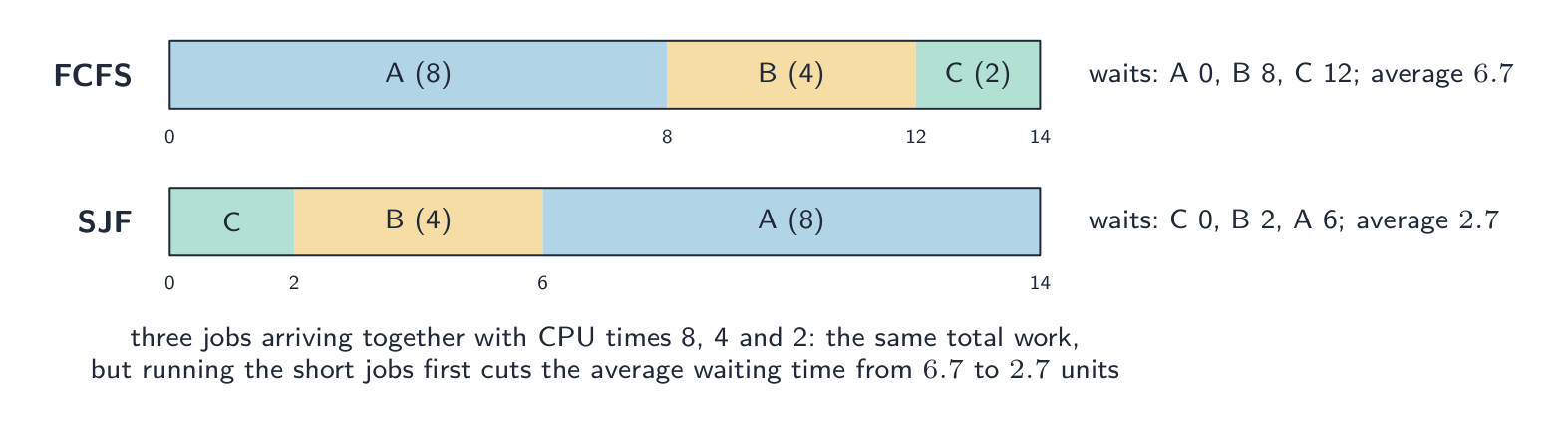
Worked example. Three processes arrive together with CPU times of 8, 4 and 2 ms. Compare the average waiting time under FCFS (in arrival order A, B, C) and under shortest job first.
FCFS: A waits 0, B waits 8, C waits 12; average $(0 + 8 + 12)/3 = 6.7\ \text{ms}$. SJF runs C, B, A: C waits 0, B waits 2, A waits 6; average $2.7\ \text{ms}$. The total work is the same 14 ms either way; the order decides who waits. Round robin with a 2 ms slice would give A, B and C each a turn in the first 6 ms, so C finishes at 6 ms, B at 12 ms and A at 14 ms: the most responsive, not the fastest on average.


Process states
A process is new, ready (waiting for the CPU), running, blocked 阻塞 (waiting for I/O or a lock), or terminated. When its time slice ends it goes running → ready; when it requests I/O it goes running → blocked; when the I/O finishes it goes blocked → ready.

The three states and why a process moves. Running: the process has the processor. Ready: it could run but is waiting for the processor. Blocked: it cannot run until something else happens. Reasons for each transition, which the exam asks for one at a time: running to ready when its time slice ends, or when a higher-priority process becomes ready and pre-empts it (an interrupt); running to blocked when it requests input or output or waits for a resource or another process; blocked to ready when the I/O it was waiting for completes (signalled by an interrupt); ready to running when the scheduler dispatches it. A blocked process can never go straight to running: it must become ready first.
Process control block and context switch
For each process the OS keeps a process control block 进程控制块 (PCB) — the saved program counter, registers, state and memory info.

- a context switch 上下文切换 suspends one process and starts another: it saves the state into one PCB and restores it from another. This small cost is paid on every switch.
- the kernel 内核 (the core of the OS) acts as an interrupt handler 中断处理程序. When a device or the timer raises an interrupt, interrupt handling 中断处理 saves the running process and runs the right routine — this is what drives low-level scheduling.
"Outline how the kernel acts as an interrupt handler" (two marks). When an interrupt is raised, the kernel saves the state of the running process (its registers and program counter, in its process control block), identifies the source and priority of the interrupt, runs the appropriate interrupt service routine, and then restores the interrupted process (or a higher-priority one) so that execution continues. This is how the timer ends a time slice and how a completed I/O operation unblocks a process.
Inter-process communication
Processes are isolated, so the OS provides inter-process communication 进程间通信: pipes 管道 (one program's output feeds another's input), shared memory 共享内存 (a region several processes can use), and message passing.
Explore
The life of a process
Tap round the loop a process travels. It only runs when the scheduler picks it; needing I/O sends it to blocked, and finishing its time slice sends it back to ready — round and round until it's done.
Vocabulary
Train
| English |
|---|
| process/ˈprəʊses/ |
| scheduler/ˈʃedjʊlə/ |
| round robin/raʊnd ˈrɒbɪn/ |
| time slice/taɪm slaɪs/ |
| pre-emptive/priː ˈemptɪv/ |
| blocked/blɒkt/ |
| process control block/ˈprəʊses kənˈtrəʊl blɒk/ |
| context switch/ˈkɒntekst swɪtʃ/ |
| kernel/ˈkɜːnl/ |
| interrupt handler/ˈɪntərʌpt ˈhændlə/ |
| interrupt handling/ˈɪntərʌpt ˈhændlɪŋ/ |
| inter-process communication/ˈɪntə ˈprəʊses kəˌmjuːnɪˈkeɪʃn/ |
| pipes/paɪps/ |
| shared memory/ʃeəd ˈmeməri/ |
16.1
Virtual memory, paging, segmentation

Each process gets its own virtual address space 虚拟地址空间 — a clean, contiguous range of addresses the OS maps to physical memory. This gives each process a simple space, protects processes from each other, and lets the total memory exceed physical RAM.
In paging, the virtual space is split into fixed-size pages 页 and physical memory into same-sized frames 页框. A page table maps each page to a frame. If an accessed page is not in RAM — a page fault 缺页 — the OS reads it from the swap file 交换文件 into a frame, evicting another page if RAM is full. Frequent faults cause thrashing 抖动 (disk thrashing), where the OS spends most of its time swapping pages instead of doing useful work.
In segmentation 分段, memory is split into variable-sized logical segments (code, stack, heap), each with its own permissions. Many systems use paging within segments.

"Explain what is meant by virtual memory" (three marks). Secondary storage (disk) is used to extend the RAM, so that the available memory appears larger than the physical memory; the address space of a process is divided into pages, and only the pages currently needed are held in RAM while the rest wait on disk; pages are swapped between RAM and disk as required, and the OS translates each virtual address into a physical one. Why an OS needs it: the programs running may need more memory than the RAM installed; it lets more (or larger) programs run at once; a program can be larger than the physical memory; memory is used efficiently because only the active parts of programs occupy RAM.
Paging against segmentation: the difference the exam wants. Paging divides memory into blocks of fixed size (pages and frames) chosen by the hardware, with no regard to the program's structure, and the mapping is invisible to the programmer; segmentation divides a program into variable-sized logical units (a procedure, an array, the stack) whose sizes and boundaries follow the program, so a segment can be protected or shared as a unit. "Describe the process of segmentation": the program is split into segments of different sizes, each given a segment number; a segment table records where each segment starts in memory and how long it is; a logical address is a segment number plus an offset, and the OS adds the offset to the segment's base address to find the physical location.
"Explain what is meant by disk thrashing" and when it occurs. Disk thrashing 磁盘抖动 is the state in which pages are swapped in and out of RAM so frequently that the processor spends more time moving pages than executing instructions, and the system slows almost to a halt. It occurs when the RAM is too small for the pages the running processes need (their working sets): a page just moved out is needed again almost at once, so it is fetched back, which pushes out another page that is soon needed, and so on. Too many processes, or a program that accesses memory unpredictably, brings it on; more RAM or fewer processes cure it.
Explore
What happens on a page fault
Step through a page fault. When the program touches a page that isn't in RAM, the OS quietly fetches it from disk and updates the page table — so the program sees more memory than physically exists.
Vocabulary
Train
| English |
|---|
| virtual address space/ˈvɜːtʃuːəl əˈdres speɪs/ |
| pages/ˈpeɪdʒɪz/ |
| frames/freɪmz/ |
| page fault/peɪdʒ fɒlt/ |
| swap file/swɒp faɪl/ |
| thrashing/ˈθræʃɪŋ/ |
| segmentation/ˌseɡmənˈteɪʃn/ |
| disk thrashing/dɪsk ˈθræʃɪŋ/ |
16.2
How an interpreter runs a program
Syllabus
| Candidates should be able to: | Notes and guidance |
|---|---|
| Show understanding of how an interpreter can execute programs without producing a translated version | |
| Show understanding of the various stages in the compilation of a program | Including lexical analysis, syntax analysis, code generation and optimisation |
| Show understanding of how the grammar of a language can be expressed using syntax diagrams or Backus-Naur Form (BNF) notation | |
| Show understanding of how Reverse Polish Notation (RPN) can be used to carry out the evaluation of expressions |
Source: Cambridge International syllabus
An interpreter 解释器 translates and runs the source at the same time. For each statement it reads the line, does lexical and syntax analysis, checks types, then executes the action, and moves on. Errors are reported immediately and it usually stops; no executable is produced. The translation is redone every run (slower), but it gives fast development feedback and is portable.
"Explain how an interpreter executes a program without producing a translated version" (three marks). The interpreter takes one statement (line) at a time, translates (analyses) it, and executes it immediately, before moving to the next; no translated version of the whole program is created or stored, so every statement is translated every time it is executed, including each pass through a loop; if a statement contains an error, execution stops there and the error is reported. This is what makes an interpreter good for developing and testing (errors are found as they are reached, and a change can be tried at once) but slower for running finished programs.
Vocabulary
Train
| English |
|---|
| interpreter/ɪnˈtɜːprɪtə/ |
16.2
Stages of compilation

A compiler 编译器 turns source into machine code 机器码 in phases:
- lexical analysis 词法分析 — the lexer groups characters into tokens 词法单元 (keywords, identifiers, operators, literals), discarding whitespace and comments.
- syntax analysis (parsing) 语法分析 — check the tokens fit the grammar and build an abstract syntax tree 抽象语法树. A missing bracket gives a syntax error 语法错误.
- semantic analysis 语义分析 — check the program makes sense (variables declared, types match).
- code generation 代码生成 — walk the tree and emit target code, choosing registers and layouts.
- code optimisation 代码优化 — remove redundant work, fold constants, reorder for the pipeline.
The output is an executable.
The purpose of each stage, in the words that score. Lexical analysis: removes white space and comments; converts the characters of the source code into tokens (keywords, identifiers, operators, constants), checking that each is valid in the language; enters identifiers into the symbol table 符号表. Syntax analysis: checks that the sequence of tokens obeys the grammar (syntax rules) of the language; builds a parse tree (abstract syntax tree); reports syntax errors; type checking and the checking of variable declarations are sometimes counted here as semantic analysis. Code generation: converts the checked tree into object code or machine code (possibly via an intermediate code), allocating memory and registers. Optimisation: makes the code run faster or use less memory, by removing redundant instructions, combining or simplifying calculations, and reorganising loops, without changing what the program does. The matching question pairs each stage with one of these descriptions.
Explore
The phases of compilation
Step through what a compiler does to your source. Each phase hands its output to the next — characters become tokens, tokens become a tree, the tree becomes optimised machine code.
Vocabulary
Train
| English |
|---|
| compiler/kəmˈpaɪlə/ |
| machine code/məˈʃiːn kəʊd/ |
| lexical analysis/ˈleksɪkl əˈnæləsɪs/ |
| tokens/ˈtəʊkənz/ |
| syntax analysis (parsing)/ˈsɪntæks əˈnæləsɪs/ |
| abstract syntax tree/ˈæbstrækt ˈsɪntæks triː/ |
| syntax error/ˈsɪntæks ˈerə/ |
| semantic analysis/səˈmæntɪk əˈnæləsɪs/ |
| code generation/kəʊd ˌdʒenəˈreɪʃn/ |
| code optimisation/kəʊd ˌɒptɪmaɪˈzeɪʃn/ |
| symbol table/ˈsɪmbl ˈteɪbl/ |
16.2
Grammar: BNF and syntax diagrams

A grammar 文法 says which token sequences are valid programs.
Backus-Naur Form 巴科斯-诺尔范式 (BNF) is textual. A production rule 产生式 has the form:
<symbol> ::= alternative1 | alternative2 | ...
Each alternative is a sequence of terminal 终结符 symbols (literal text) and non-terminal 非终结符 symbols (other rule names):
<digit>      ::= 0 | 1 | 2 | 3 | 4 | 5 | 6 | 7 | 8 | 9
<identifier> ::= <letter> | <identifier> <letter> | <identifier> <digit>
The recursive third rule expresses "a letter followed by any number of letters or digits". An IF statement:
<if-statement> ::= IF <condition> THEN <statement> ENDIF
                 | IF <condition> THEN <statement> ELSE <statement> ENDIF
A syntax diagram 语法图 (railroad diagram) shows the same thing graphically: boxes for non-terminals, rounded boxes for terminals, arrows for valid paths, loops for repetition. The two notations are equivalent. The parser uses the grammar to decide whether a program is valid.
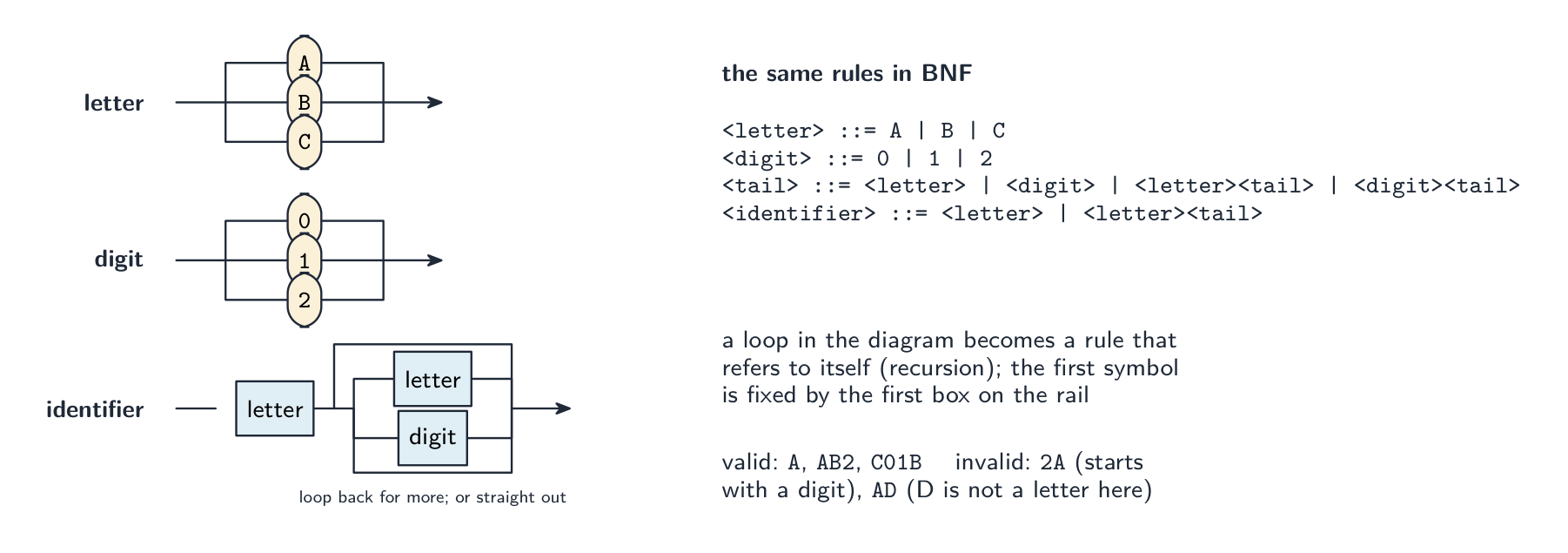
Reading the exam's diagrams. Each diagram defines one non-terminal; follow the arrows from the entry to the exit, and every path you can trace is a valid string. A choice of boxes side by side is a set of alternatives; a loop back is "repeat as many times as you like"; a box for another non-terminal means "insert anything that rule allows". "State why the string is invalid" wants the rule it breaks, in words: 9K is invalid as a variable because the first character must be a letter, not a digit; JJ90 is an invalid passcode if the rule allows only one letter before the digits, or if J is not in the set of letters listed. Always check the string against the set of characters the diagram actually allows, not against what a real language would accept.
Writing BNF from a diagram. Each diagram becomes one rule <name> ::= ...; alternatives are separated by |; a sequence is written one symbol after another; and repetition is written with recursion, because BNF has no loop symbol: "one or more letters" is <word> ::= <letter> | <letter><word>, and "zero or more digits after a letter" is <variable> ::= <letter> | <letter><digits> with <digits> ::= <digit> | <digit><digits>.
Worked example. Complete the BNF for a vehicle registration that must begin with two letters (from A B C) followed by one, two or three digits (from 0 1 2).
<letter>       ::= A | B | C
<digit>        ::= 0 | 1 | 2
<digits>       ::= <digit> | <digit><digit> | <digit><digit><digit>
<registration> ::= <letter><letter><digits>
AB12 is valid; A12 is not (only one letter); AB1234 is not (four digits); AD1 is not (D is not a listed letter). Asked to add a constraint such as "the third character may also be a symbol", add the extra alternative to the rule for that position only, and define <symbol> with its own rule.
Worked example. Write BNF for an expression that is a variable, followed by an operator, followed by either a variable or a number, where a variable is a single lower-case letter from a b c and an operator is + or -.
<variable>   ::= a | b | c
<operator>   ::= + | -
<number>     ::= <digit> | <digit><number>
<expression> ::= <variable><operator><variable> | <variable><operator><number>
The recursive <number> rule allows any number of digits; the two alternatives of <expression> cover both cases named in the definition. Keep every non-terminal in angle brackets and every terminal without them.
Vocabulary
Train
| English |
|---|
| grammar/ˈɡræmə/ |
| Backus-Naur Form/ˈbækəs nɔː fɔːm/ |
| production rule/prəˈdʌkʃn ruːl/ |
| terminal/ˈtɜːmɪnl/ |
| non-terminal/nɒn ˈtɜːmɪnl/ |
| syntax diagram/ˈsɪntæks ˈdaɪəɡræm/ |
16.2
Reverse Polish Notation (RPN)
In infix 中缀 notation the operator sits between its operands (3 + 4 * 2), needing brackets and precedence rules. In Reverse Polish Notation 逆波兰表示法 (RPN, postfix 后缀) the operator follows its operands (3 4 2 * +), needing no brackets.
Converting infix to RPN
Use an operator stack 栈. Scan left to right: output an operand; for an operator, first pop any stacked operators of higher or equal precedence 优先级 to the output, then push it; push (; on ) pop to output until the matching (. At the end, pop all operators. Example: (3 + 4) * 2 → 3 4 + 2 *.
Evaluating RPN
Use a stack of operands. Scan left to right: push each operand; on an operator, pop the top two, apply it, and push the result. Evaluating 3 4 2 * +:
| Token | Stack |
|---|---|
3 |
3 |
4 |
3, 4 |
2 |
3, 4, 2 |
* |
3, 8 |
+ |
11 |
Result: 11. RPN needs no brackets at evaluation time and suits a stack machine — which is how the JVM and many bytecode 字节码 interpreters work.
"Explain why RPN is used to evaluate expressions" (two marks). In RPN the operators appear in the order in which they are applied, so an expression can be evaluated in a single left-to-right pass with no brackets and no precedence rules; it is therefore simpler and faster for the compiler or interpreter to process. "Identify, with reasons, a suitable data structure": a stack, because evaluation needs the most recently pushed operands first (last in, first out): each operand is pushed, and each operator pops the top two, applies itself, and pushes the result. Show the stack contents after every token when asked.
Converting infix to RPN by hand. (1) Fully bracket the expression using the precedence rules; (2) move each operator to just after the closing bracket of its own pair; (3) remove the brackets. So $(a - b) * (a + c) / 7$ becomes $((a - b) * (a + c)) / 7$, then a b - a c + * 7 /. Note that * and / are applied left to right, so the division is the last operator, not the multiplication. More conversions: $((7 + 3) - (2 * 8)) / 6$ is 7 3 + 2 8 * - 6 /; $(7 - 2 + 8) / (9 - 5)$ is 7 2 - 8 + 9 5 - /; $a * b + b - d + 15$ is a b * b + d - 15 +; $(2 - 6) * (13 + 7) / 5$ is 2 6 - 13 7 + * 5 /.
Converting RPN back to infix. Work through the RPN with a stack of expressions: push each operand; for each operator pop two, write them either side of it in brackets, and push the result. So a b / 4 * a b + - is $((a / b) * 4) - (a + b)$; 5 2 + 9 3 - / 3 * is $((5 + 2) / (9 - 3)) * 3$; b a c - + d b + * c / is $((b + (a - c)) * (d + b)) / c$; a b - c + c a - * d / is $(((a - b) + c) * (c - a)) / d$. Keep the brackets: dropping them can change the meaning.
Worked example. Evaluate a b - c d + * e / when $a = 17$, $b = 5$, $c = 7$, $d = 3$ and $e = 10$, showing the stack.
| token | action | stack (top on the right) |
|---|---|---|
a |
push 17 | 17 |
b |
push 5 | 17, 5 |
- |
pop 5 and 17, push $17 - 5$ | 12 |
c |
push 7 | 12, 7 |
d |
push 3 | 12, 7, 3 |
+ |
pop 3 and 7, push $7 + 3$ | 12, 10 |
* |
pop 10 and 12, push $12 \times 10$ | 120 |
e |
push 10 | 120, 10 |
/ |
pop 10 and 120, push $120 / 10$ | 12 |
Result 12. The order of the pops matters for - and /: the value popped second is the left operand, so a b - is $a - b$, not $b - a$. Two more, in the same way: d a b + * c a - / with $a = 6, b = 12, c = 15, d = 5$ gives $5 \times (6 + 12) / (15 - 6) = 90 / 9 = 10$; c a - b d + * b c + / with $a = 4, b = 12, c = 24, d = 6$ gives $(24 - 4) \times (12 + 6) / (12 + 24) = 360 / 36 = 10$.
Worked example. Convert $(A + B) \times (C - D)$ to RPN, then evaluate $(3 + 4) \times (5 - 2)$. Scan left to right using an operator stack. Push (; output A; push +; output B; on ) pop back to the matching (, giving A B + so far. Push ×, and the second bracket behaves the same way, giving C D -. At the end pop the ×. Result: A B + C D - ×. To evaluate the numbers, use a stack of operands: push 3, push 4; + pops both and pushes 7; push 5, push 2; - pops both and pushes 3; × pops 7 and 3 and pushes 21. Two things make these reliable: the operands keep their original order through the conversion (only the operators move), and every operator acts on the two values immediately below it on the stack.
Explore
Operator precedence — what RPN removes
In ordinary infix maths × and ÷ bind tighter than + and −, so you must apply rules in the right order. Reverse Polish Notation writes the operands first (3 4 2 × + 1 −), fixing the order so no precedence rules are needed.
Vocabulary
Train
| English |
|---|
| infix/ˈɪnfɪks/ |
| Reverse Polish Notation/rɪˈvɜːs ˈpəʊlɪʃ nəʊˈteɪʃn/ |
| postfix/ˈpəʊstfɪks/ |
| stack/stæk/ |
| precedence/ˈpresɪdəns/ |
| bytecode/ˈbaɪtkəʊd/ |
16.2
Definitions the examiner accepts
A definition question is marked against fixed wording. Learn these exactly, and give one answer only.
| Term | Definition |
|---|---|
| multi-tasking | several processes held in memory at once, the processor switching between them so that they appear to run simultaneously |
| process | a program that has been loaded into memory and is being executed (or is ready to be) |
| running / ready / blocked | has the processor / waiting for the processor / cannot continue until an event such as I/O completes |
| scheduling | deciding which ready process gets the processor next, and for how long |
| pre-emptive scheduling | the running process can be interrupted and moved to ready so that another process runs |
| virtual memory | using secondary storage to extend RAM, holding only the pages currently needed in physical memory |
| paging | dividing memory and programs into fixed-size pages that are moved between disk and RAM as needed |
| segmentation | dividing a program into variable-sized logical segments, each mapped to memory by a segment table |
| disk thrashing | pages being swapped between RAM and disk so often that little useful processing is done |
| interpreter | translates and executes a program one statement at a time, without producing a translated version |
| compiler | translates a whole high-level program into machine (object) code before it is run |
| lexical analysis | converts the source code into tokens, removing white space and comments, and builds the symbol table |
| syntax analysis | checks that the tokens obey the grammar of the language and builds a parse tree |
| Backus–Naur Form | a notation for the grammar of a language: rules of the form <name> ::= alternatives built from terminals and non-terminals |
| Reverse Polish Notation | a way of writing expressions with each operator after its operands, so they can be evaluated with a stack and without brackets |
16.2
Exam tips
- The OS questions are marked on named mechanisms: scheduling, memory management, I/O buffering and spooling, file management; for the interface, file names not addresses, clicks not commands, drivers, GUI.
- Process states with their transitions and the reason for each; scheduling routines as function plus benefit plus drawback; the kernel saves state, identifies the interrupt, services it, restores.
- Virtual memory: disk extends RAM, pages swapped, address translation; paging is fixed-size and invisible, segmentation is variable-size and logical; thrashing is swapping instead of working.
- Interpreter: one statement at a time, translated then executed, nothing stored. Compiler stages: tokens and symbol table, grammar and parse tree, code, optimisation.
- BNF: a rule per diagram,
|for choice, recursion for repetition, terminals bare and non-terminals in angle brackets. Say which rule a string breaks. - RPN: operators after operands, evaluate with a stack, show every step; convert by fully bracketing; when converting back, keep the brackets.
Common mistakes
- Describing multi-tasking as "running several programs at the same time" without saying the processor switches between them.
- Sending a blocked process straight to running, or giving "time slice ended" as the reason for running to blocked.
- Confusing shortest job first (non-pre-emptive) with shortest remaining time (pre-emptive), or round robin with priority.
- Defining virtual memory as "using the hard disk as RAM" with no mention of pages being swapped.
- Saying an interpreter "converts the program to machine code and then runs it"; that is a compiler.
- Putting syntax checking in lexical analysis, or optimisation before code generation in the matching question.
- Writing BNF repetition as
<letter>*or with an ellipsis; use recursion. Leaving angle brackets off non-terminals. - Reversing the operands of
-or/when evaluating RPN, or writing the RPN of $a * b + c$ asa b c + *.
Interactive lessons on this topic
Work through it step by step, with instant-check exercises.