| Candidates should be able to: | Notes and guidance |
|---|---|
| Understanding what is meant by a programming paradigm | |
| Show understanding of the characteristics of a number of programming paradigms: | |
| • Low-level | Low-level Programming: • understanding of and ability to write low-level code that uses various addressing modes: immediate, direct, indirect, indexed and relative |
| • Imperative (Procedural) | Imperative (Procedural) programming: • Assumed knowledge and understanding of Structural Programming (see details in AS content section 11.3) • understanding of and ability to write imperative (procedural) programming code that uses variables, constructs, procedures and functions. See details in AS content |
| • Object Oriented | Object-Oriented Programming (OOP): • understanding of the terminology associated with OOP (including objects, properties/attributes, methods, classes, inheritance, polymorphism, containment (aggregation), encapsulation, getters, setters, instances) • understanding of how to solve a problem by designing appropriate classes • understanding of and ability to write code that demonstrates the use of OOP |
| • Declarative | Declarative programming: • understanding of and ability to solve a problem by writing appropriate facts and rules based on supplied information • understanding of and ability to write code that can satisfy a goal using facts and rules |
Further Programming
A-Level Computer Science · Topic 20
 13:52
13:52
Programming Paradigms
Here is one job: list every student with an A grade. One programmer writes a loop — start at the first record, check the grade, add the name to a list, move…
English narration · English + 中文 subtitles burned in
20.1
Programming paradigms

Syllabus
Source: Cambridge International syllabus
A programming paradigm 编程范式 is a style of programming — a way of structuring programs, with its own ideas and language features. Four programming paradigms are in this syllabus.
"Describe what is meant by an imperative (procedural) language" (two marks). A language in which the program is a sequence of instructions that are executed in order and that change the program's state; the programmer says how the task is done, using procedures, sequence, selection and iteration. "Describe what is meant by a declarative language": the program states facts and rules (what is known and what is wanted) and the language's inference engine works out how to find the answer; the programmer does not give the sequence of steps.
Identify the paradigm from a code sample (a regular Paper 3 question): LDD 200, ADD #5, STO 201 is low-level (mnemonics, registers, memory addresses); FOR Count ← 1 TO 10 … NEXT Count with procedures and assignments is imperative; CLASS Dog … PRIVATE Name : STRING … PUBLIC PROCEDURE NEW(…) is object-oriented; type(lion, wild). and dangerous(X) IF type(X, wild) is declarative (logic). In the matching question: low-level pairs with "mnemonics that correspond directly to machine instructions", imperative with "a sequence of statements that change the state", OOP with "objects that combine attributes and methods", declarative with "facts and rules, with no order of execution given".
Low-level programming
Programming close to the hardware in machine code 机器码 or assembly language 汇编语言, where each instruction maps to what the CPU runs. It gives direct access to registers 寄存器 and memory addresses 内存地址, using different addressing modes 寻址方式 (immediate, direct, indirect, indexed and relative). It is very fast and compact, but architecture-specific, tedious, and hard to maintain. This is low-level 低级 programming, used for device drivers, firmware and bootloaders.
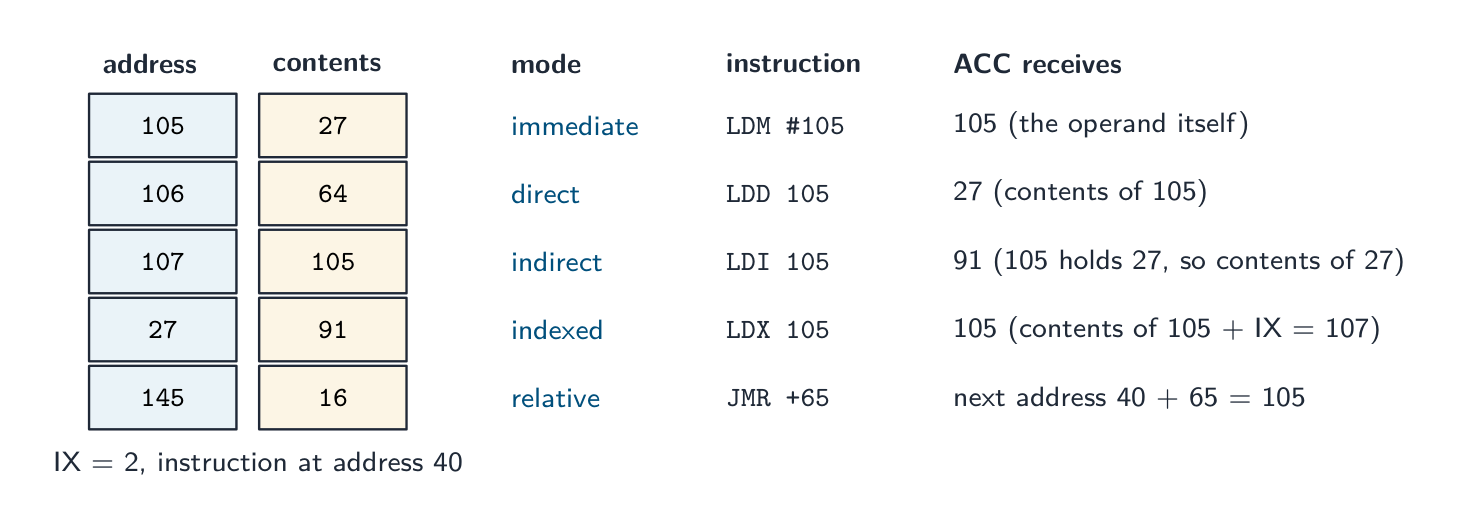
The five addressing modes. The syllabus asks for low-level code that uses each addressing mode (the instruction set is in Topic 4). The operand of a load instruction can be read five ways, and the exam gives you the memory contents and asks what the accumulator holds:
- immediate (
LDM #105): the operand is the value; ACC becomes 105. - direct (
LDD 105): the operand is the address of the value; ACC becomes the contents of 105, here 27. - indirect (
LDI 105): the operand is the address of an address; ACC becomes the contents of 27, here 91. Used for pointers and for data whose position is decided at run time. - indexed (
LDX 105): the address is the operand plus the index register IX; with IX = 2, ACC becomes the contents of 107. Used to step through an array by incrementing IX. - relative (
JMR +65): the target is an offset from the address of the current instruction, which makes the code relocatable.
Worked example. Memory: 105 holds 27, 106 holds 64, 200 holds 0. Write code to add the contents of 105 and 106, store the result in 200 and output it. LDD 105 (ACC = 27), ADD 106 (ACC = 91), STO 200, OUT. To double the value in 105 instead: LDD 105, ADD 105, STO 105. State the register contents after each line when asked to trace.
Imperative (procedural) programming
In imperative programming 命令式编程 the programmer writes a sequence of commands that change the program's state — assignments, conditionals, loops, function calls. Variables 变量 hold state; statements change it; code is organised into procedures and functions (also called structured or structural programming). This is the style of Topics 9 and 11 (Python, C). Strong when the algorithm has clear sequential steps.
Object-oriented programming (OOP)
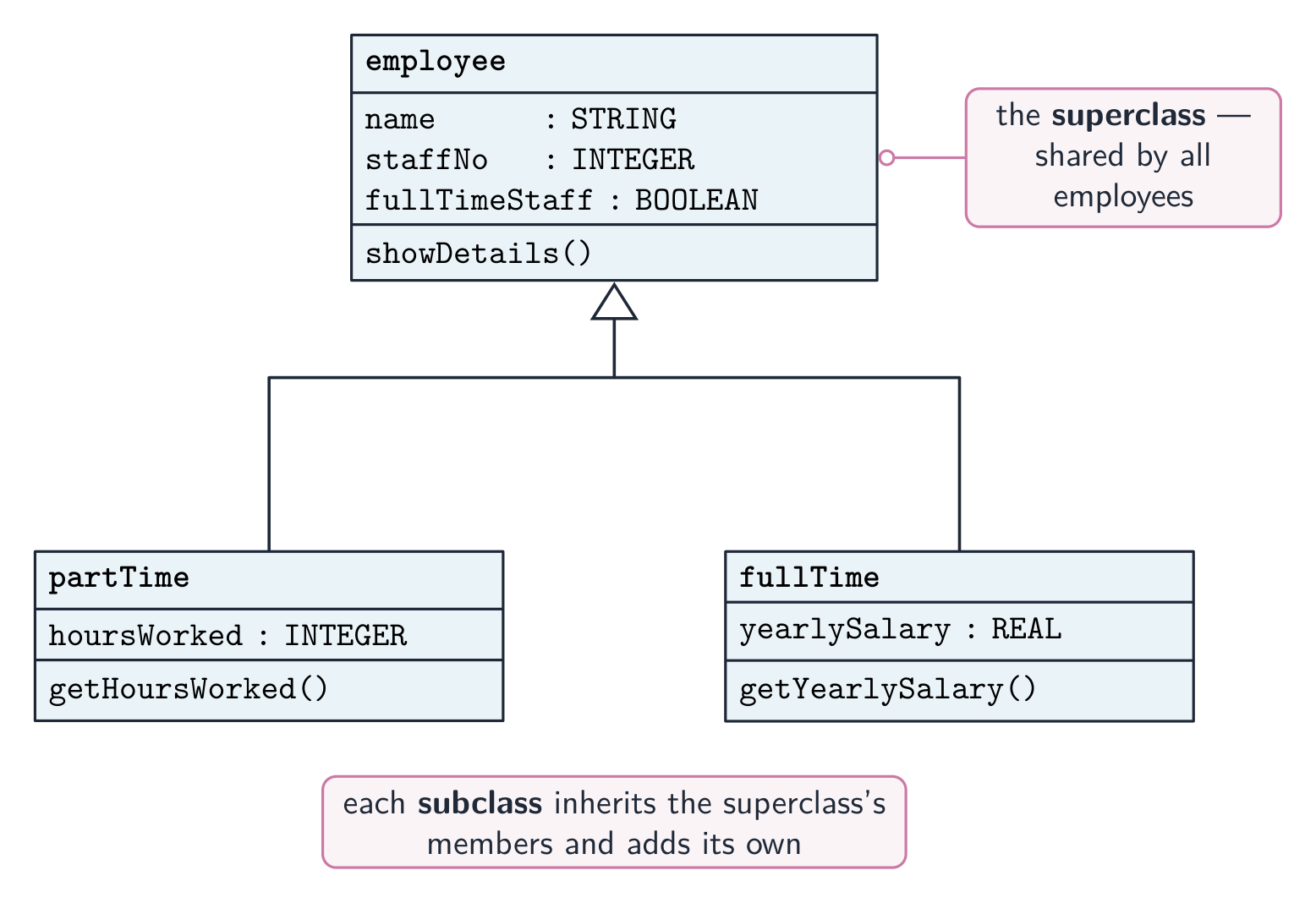
In object-oriented programming 面向对象编程 programs are built from objects 对象 — units combining data (attributes 属性) and operations (methods 方法). Objects are instances 实例 of classes 类. The four pillars:
- encapsulation 封装 — an object's data is hidden behind its methods; outside code uses the public methods only, not the data directly. This protects the object and lets its internals change without breaking callers. For example, a
BankAccounthides itsbalance; you change it only throughdeposit()andwithdraw(), which can enforce a rule like "never go below zero". - inheritance 继承 — a subclass 子类 specialises a superclass 父类, inheriting its attributes and methods and adding or overriding 重写 them. Models "is-a" ("a Manager is an Employee").
- polymorphism 多态 — different objects respond to the same method call differently; the caller need not know the exact type. Every
ShapehasArea(), and aCircleand aRectangleeach implement it their own way. - abstraction 抽象 — show a simple interface and hide the implementation.
Other terms:
- a constructor 构造函数 is a special method run when an object is created, to set up its attributes.
- getters and setters read and write an object's attributes (its properties) through methods.
- aggregation 聚合 and containment 包含 build an object from other objects (a "has-a" relationship).
OOP is used for large systems, GUIs, simulations and games.



OOP as the examiner marks it
Definitions. Class: a template (blueprint) that defines the attributes and methods of the objects of that type. Object: an instance of a class, created from it, with its own values for the attributes ("an occurrence of an object" is the exam's phrase for an instance). Attribute (property): a data item belonging to a class. Method: a procedure or function belonging to a class that acts on its attributes. Encapsulation: combining the attributes and methods in one class and restricting external access to the data: the attributes are private and can only be read or changed through public methods. Inheritance: a subclass acquires the attributes and methods of its parent (super) class and can add its own or override them. Polymorphism: methods with the same name that behave differently in different classes; typically a subclass redefines a method of its parent, and the right version runs for each object. Containment: a class has an object of another class as an attribute (a car has an engine). "Identify the feature that restricts external access to the data" is encapsulation; "the term for an occurrence of an object" is instance.
"Outline the structure of a class" (three marks): attributes (properties) that hold the object's data, usually declared private; methods (procedures and functions) that act on those attributes, usually public; and a constructor, a method that runs when an object is created to initialise the attributes. "Give three benefits of OOP": code is reused through inheritance; data is protected by encapsulation, so it can only be changed by the class's own methods; a large program is split into classes that are written and tested independently, so it is easier to maintain and extend; classes model real-world entities, so the design is easier to understand; polymorphism lets the same call work for different objects.
The class in pseudocode, as Paper 3 sets it:
CLASS Car
    PRIVATE Registration : STRING
    PRIVATE Year : INTEGER
    PRIVATE Mileage : INTEGER
    PUBLIC PROCEDURE NEW(NewReg : STRING, NewYear : INTEGER)
        Registration ← NewReg
        Year ← NewYear
        Mileage ← 0
    ENDPROCEDURE
    PUBLIC FUNCTION GetMileage() RETURNS INTEGER
        RETURN Mileage
    ENDFUNCTION
    PUBLIC PROCEDURE AddMileage(Extra : INTEGER)
        Mileage ← Mileage + Extra
    ENDPROCEDURE
ENDCLASS
An object is created with MyCar ← NEW Car("AB12 CDE", 2020) and used with MyCar.AddMileage(150) and OUTPUT MyCar.GetMileage(). A subclass reuses the parent's constructor through SUPER:
CLASS ElectricCar INHERITS Car
    PRIVATE BatteryCapacity : REAL
    PUBLIC PROCEDURE NEW(NewReg : STRING, NewYear : INTEGER, NewCapacity : REAL)
        SUPER.NEW(NewReg, NewYear)
        BatteryCapacity ← NewCapacity
    ENDPROCEDURE
ENDCLASS
The same class in Python, as Paper 4 expects it: attributes are made private with a double underscore, the constructor is __init__, and a subclass names its parent in brackets and calls super().__init__(…):
class Car:
    def __init__(self, reg, year):
        self.__registration = reg
        self.__year = year
        self.__mileage = 0
    def get_mileage(self):
        return self.__mileage
    def add_mileage(self, extra):
        self.__mileage = self.__mileage + extra

class ElectricCar(Car):
    def __init__(self, reg, year, capacity):
        super().__init__(reg, year)
        self.__capacity = capacity

cars = []
cars.append(Car("AB12 CDE", 2020))
cars.append(ElectricCar("EV21 XYZ", 2023, 75.0))
cars[1].add_mileage(150)
print(cars[1].get_mileage())
In Java the same ideas are private/public fields, a constructor with the class's name, extends and super(…); in VB.NET Private/Public, Sub New, Inherits and MyBase.New. A polymorphic method is written in the parent and overridden in the child with the same name; a call through a parent-type variable runs the child's version.
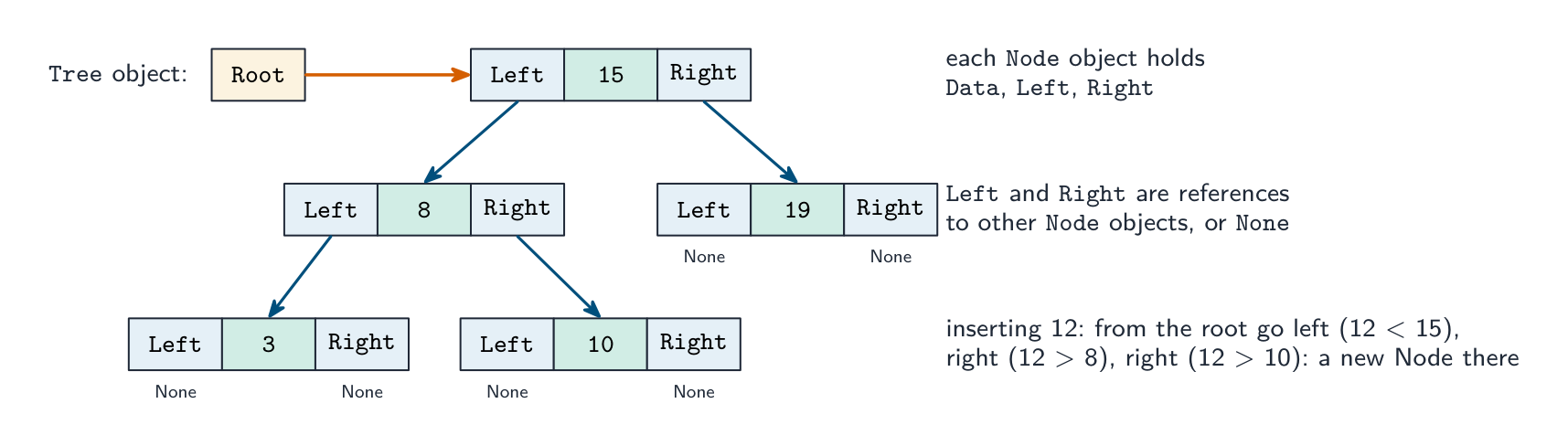
Data structures as objects. Paper 4 builds a stack, linked list or binary tree from a Node class whose attributes are the data and one or two references to other nodes; a Tree (or LinkedList) class holds the root (or start) and the methods.
CLASS Node
    PUBLIC Data : INTEGER
    PUBLIC Left : Node          // NULL when there is no child
    PUBLIC Right : Node
    PUBLIC PROCEDURE NEW(NewData : INTEGER)
        Data ← NewData
        Left ← NULL
        Right ← NULL
    ENDPROCEDURE
ENDCLASS

CLASS Tree
    PRIVATE Root : Node
    PUBLIC PROCEDURE Insert(NewData : INTEGER)
        DECLARE NewNode, Current : Node
        DECLARE Placed : BOOLEAN
        NewNode ← NEW Node(NewData)
        IF Root = NULL THEN
            Root ← NewNode
        ELSE
            Current ← Root
            Placed ← FALSE
            WHILE NOT Placed
                IF NewData < Current.Data THEN
                    IF Current.Left = NULL THEN
                        Current.Left ← NewNode
                        Placed ← TRUE
                    ELSE
                        Current ← Current.Left
                    ENDIF
                ELSE
                    IF Current.Right = NULL THEN
                        Current.Right ← NewNode
                        Placed ← TRUE
                    ELSE
                        Current ← Current.Right
                    ENDIF
                ENDIF
            ENDWHILE
        ENDIF
    ENDPROCEDURE
ENDCLASS
A find method walks the same path and returns TRUE when Current.Data = Target, FALSE when it reaches NULL; an in-order output method is recursive: output the left subtree, the node, then the right subtree. For a linked list the node has one reference, Next, and the list class holds Start; for a stack built from a list, push and pop both work at Start.
Worked example. A game has characters. Each has a name, health (starting at 100) and a position given by X and Y. Write a class Character with a constructor and a method Move(DX, DY); then a subclass Wizard that adds Mana (starting at 50) and a method CastSpell() that takes 10 mana and returns TRUE if there was enough.
CLASS Character
    PRIVATE Name : STRING
    PRIVATE Health : INTEGER
    PRIVATE X : INTEGER
    PRIVATE Y : INTEGER
    PUBLIC PROCEDURE NEW(NewName : STRING, StartX : INTEGER, StartY : INTEGER)
        Name ← NewName
        Health ← 100
        X ← StartX
        Y ← StartY
    ENDPROCEDURE
    PUBLIC PROCEDURE Move(DX : INTEGER, DY : INTEGER)
        X ← X + DX
        Y ← Y + DY
    ENDPROCEDURE
ENDCLASS

CLASS Wizard INHERITS Character
    PRIVATE Mana : INTEGER
    PUBLIC PROCEDURE NEW(NewName : STRING, StartX : INTEGER, StartY : INTEGER)
        SUPER.NEW(NewName, StartX, StartY)
        Mana ← 50
    ENDPROCEDURE
    PUBLIC FUNCTION CastSpell() RETURNS BOOLEAN
        IF Mana >= 10 THEN
            Mana ← Mana - 10
            RETURN TRUE
        ELSE
            RETURN FALSE
        ENDIF
    ENDFUNCTION
ENDCLASS
The marks are for private attributes, a constructor that sets every attribute, the inheritance line, the call to the parent's constructor, and a method that uses and changes the object's own data. When the question asks for a class diagram, draw a box in three parts (name; attributes with - for private; methods with + for public) and join a subclass to its parent with an arrow pointing at the parent.
Declarative programming
In declarative programming 声明式编程 you say what to compute, not how — the runtime works out the steps. Two kinds:
- functional programming 函数式编程 — built from pure functions 纯函数 (no side effects 副作用; same input always gives the same output) composed together. Examples: Haskell, Lisp.
- logic programming 逻辑编程 — state facts and rules; the engine answers a goal (query) by inference. Example: Prolog.
A familiar declarative example is SQL 结构化查询语言: SELECT * FROM Customer WHERE Country = 'UK' says what you want, not how to walk the records.
Facts, rules and goals are what the exam tests in the declarative paradigm. Given these facts 事实 (statements that are true) and a rule 规则 (a conclusion that holds when its conditions hold):
01 type(leopard, wild).
02 type(lion, wild).
03 type(tabby, domestic).
04 size(leopard, large).
05 size(lion, large).
06 size(tabby, small).
07 dangerous(X) IF type(X, wild) AND size(X, large).
"Write the result of the goal type(X, wild)": X = leopard, X = lion. The engine matches the goal against each fact in turn; every match is a solution, and a capital letter is a variable that the match fills in. "Write a fact to show that a cheetah is wild": type(cheetah, wild). "Explain what line 07 does": it defines a rule with the conclusion dangerous(X), which is true for any X that is both wild and large, so dangerous(A) returns A = leopard, A = lion. "Write a rule: a feature F may be available for a body style B if F is a feature and B is a body style and F is not unavailable for B": may_be_available(F, B) IF feature(F) AND body_style(B) AND NOT unavailable(F, B). Copy the exact predicate names and argument order used in the question's facts; a new fact ends with a full stop, and a rule's conditions are joined with AND.
Comparing paradigms
| Paradigm | Strength | Typical languages |
|---|---|---|
| Low-level | maximum control, speed | assembly |
| Imperative | direct, intuitive | C, Python |
| Object-oriented | modular, models entities | Java, C#, Python |
| Functional | clear, no side effects | Haskell, F# |
| Logic | inference, rules | Prolog |
| Database | data queries | SQL |
Modern languages often mix paradigms — Python supports all of procedural, OOP and functional. The right one depends on the problem.
Explore
Programming concept lab
Connect examples to the programming idea they show.
Vocabulary
Train
| English |
|---|
| programming paradigm/ˈprəʊɡræmɪŋ ˈpærədaɪm/ |
| facts/fækts/ |
| rule/ruːl/ |
| low-level/ləʊ ˈlevl/ |
| registers/ˈredʒɪstəz/ |
| memory addresses/ˈmeməri əˈdresɪz/ |
| objects/ˈɒbdʒekts/ |
| attributes/ˈætrɪbjuːts/ |
| methods/ˈmeθədz/ |
| machine code/məˈʃiːn kəʊd/ |
| assembly language/əˈsemblɪ ˈlæŋɡwɪdʒ/ |
| addressing modes/əˈdresɪŋ məʊdz/ |
| imperative programming/ɪmˈperətɪv ˈprəʊɡræmɪŋ/ |
| Variables/ˈveərɪəblz/ |
| object-oriented programming/ˈɒbdʒekt ˈɔːrɪəntɪd ˈprəʊɡræmɪŋ/ |
| instances/ˈɪnstənsɪz/ |
| classes/ˈklæsɪz/ |
| encapsulation/ɪnˌkæpsjʊˈleɪʃn/ |
| inheritance/ɪnˈherɪtəns/ |
| subclass/ˈsʌbklæs/ |
| superclass/ˈsuːpəklæs/ |
| overriding/ˌəʊvəˈraɪdɪŋ/ |
| polymorphism/ˈpɒlɪmɔːfɪzəm/ |
| abstraction/əbˈstrækʃn/ |
| constructor/kənˈstrʌktə/ |
| aggregation/ˌæɡrɪˈɡeɪʃn/ |
| containment/kənˈteɪnmənt/ |
| declarative programming/dɪˈklærətɪv ˈprəʊɡræmɪŋ/ |
| functional programming/ˈfʌŋkʃənl ˈprəʊɡræmɪŋ/ |
| pure functions/pjʊə ˈfʌŋkʃnz/ |
| side effects/saɪd ɪˈfekts/ |
| logic programming/ˈlɒdʒɪk ˈprəʊɡræmɪŋ/ |
| SQL/ˌes kjuː ˈel/ |
20.2
File processing

Syllabus
| Candidates should be able to: | Notes and guidance |
|---|---|
| Write code to perform file-processing operations | Open (in read, write, append mode) and close a file Read a record from a file and write a record to a file Perform file-processing operations on serial, sequential, random files |
| Show understanding of an exception and the importance of exception handling | Know when it is appropriate to use exception handling Write program code to use exception handling |
Source: Cambridge International syllabus
This extends the file 文件 handling from Topic 10, processing serial, sequential and random (direct-access) files. Pseudocode operations: OPENFILE name FOR READ | WRITE | APPEND (READ opens an existing file, WRITE creates/overwrites, APPEND adds to the end); READFILE name, line; WRITEFILE name, value; CLOSEFILE name; and EOF(name) which is TRUE at the end.
Read a whole file:
OPENFILE "names.txt" FOR READ
WHILE NOT EOF("names.txt") DO
    READFILE "names.txt", thisName
    OUTPUT thisName
ENDWHILE
CLOSEFILE "names.txt"
Search a file (stop when found):
found ← FALSE
OPENFILE "people.txt" FOR READ
WHILE NOT EOF("people.txt") AND NOT found DO
    READFILE "people.txt", line
    IF line = target THEN
        found ← TRUE
    ENDIF
ENDWHILE
CLOSEFILE "people.txt"
Updating a file in place
Most languages can't edit a text file in place. Instead: open the original for READ and a temporary file for WRITE; for each line, write the new version if it should change, else the original; close both; then replace the original with the temp file. The same pattern handles deleting lines (skip them) and inserting lines.
Records and random-access files
Opening modes. READ: the file must exist and reading starts at the beginning. WRITE: a new file is created, and an existing file of that name is overwritten. APPEND: writing adds to the end of an existing file. Every file that is opened is closed with CLOSEFILE, and EOF(name) is TRUE when the last item has been read.
Three file organisations. In a serial file the records are in the order they were added; in a sequential file they are in key order; both are read from the start. A random file 随机文件 (direct-access file) stores each record at an address calculated from its key by a hashing 哈希 function, so one record is found without reading the others. Records are declared as a user-defined type:
TYPE AccountRecord
    DECLARE AccNo : INTEGER
    DECLARE Name : STRING
    DECLARE Balance : REAL
    DECLARE Active : BOOLEAN
ENDTYPE
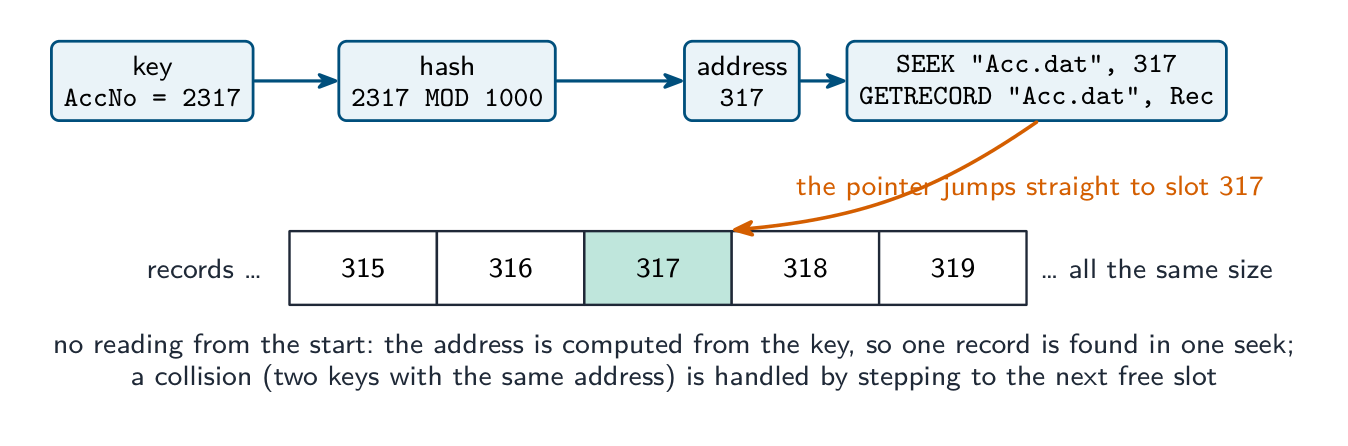
The random-file operations in pseudocode are OPENFILE "Acc.dat" FOR RANDOM, SEEK "Acc.dat", Address (move the file pointer to that record), GETRECORD "Acc.dat", Rec (read the record there) and PUTRECORD "Acc.dat", Rec (write the record there). Finding a customer by account number, as Paper 3 sets it:
DECLARE Rec : AccountRecord
DECLARE Target, Address : INTEGER
INPUT Target
Address ← Target MOD 1000              // the hashing function
OPENFILE "Acc.dat" FOR RANDOM
SEEK "Acc.dat", Address
GETRECORD "Acc.dat", Rec
WHILE Rec.AccNo <> Target AND Rec.AccNo <> 0    // 0 marks an empty slot
    Address ← Address + 1               // a collision: try the next slot
    SEEK "Acc.dat", Address
    GETRECORD "Acc.dat", Rec
ENDWHILE
IF Rec.AccNo = Target THEN
    OUTPUT Rec.Name, Rec.Balance
ELSE
    OUTPUT "No such account"
ENDIF
CLOSEFILE "Acc.dat"
To store a record, hash its key, SEEK to the address and PUTRECORD, stepping on past any slot already occupied. Marks go to the hash, the SEEK before the GET or PUT, the comparison with the target, the handling of a collision, and closing the file.
Worked example. ActiveFile.dat holds AccountRecord records. Write pseudocode that copies every record whose Active field is FALSE to the end of ArchiveFile.dat.
DECLARE Rec : AccountRecord
OPENFILE "ActiveFile.dat" FOR READ
OPENFILE "ArchiveFile.dat" FOR APPEND
WHILE NOT EOF("ActiveFile.dat")
    READFILE "ActiveFile.dat", Rec
    IF Rec.Active = FALSE THEN
        WRITEFILE "ArchiveFile.dat", Rec
    ENDIF
ENDWHILE
CLOSEFILE "ActiveFile.dat"
CLOSEFILE "ArchiveFile.dat"
Text files in Python (Paper 4): file = open("HighScore.txt", "r"), then for line in file: with line.strip() and line.split(",") to separate the fields, int(…) to convert a score, and file.close(); to write, open(name, "w") (or "a" to append) and file.write(str(score) + "\n"). A high-score table is read into a list of records, the new score inserted at its place, and the whole list written back. The examiner marks the open with the correct mode, a loop that reads every line, the conversion of text to numbers, and the close.
Pitfalls
Forgetting to close a file (data may be lost); opening for WRITE when you meant APPEND (overwrites everything); reading past EOF; hard-coded paths — a path like /Users/Admin/data.txt breaks on another machine, so use a relative constant such as DataFile = "./data/scores.txt".
Explore
File access route
Follow a file from storage to program and back safely.
Vocabulary
Train
| English |
|---|
| file/faɪl/ |
| random file/ˈrændəm faɪl/ |
| hashing/ˈhæʃɪŋ/ |
20.2
Exception handling

An exception 异常 is an error or unexpected condition during execution — divide by zero, file not found, network failure, an array 数组 index out of range. Exception handling 异常处理 lets a program detect it and respond gracefully instead of crashing.
It matters because real programs face errors that cannot be prevented up front (files moved, networks down, bad input); without it, every operation needs its own IF check; and it separates the normal flow from the error handling, so the main path reads cleanly. For example, a file may be deleted by another user between your program checking it exists and actually opening it — you cannot prevent that, only handle the failure when it happens.
"Describe, with an example, what is meant by an exception" (two marks). An unexpected event or error that occurs during the execution of a program (at run time) and interrupts its normal flow; for example dividing by zero, opening a file that does not exist, converting non-numeric input to an integer, an array index out of range, or running out of memory. "Identify two possible causes of exceptions" is answered from that list, plus "a device or network is not available" and "invalid data type entered".
"State the reasons for including exception handling" (three marks). To stop the program crashing (terminating unexpectedly); to output a meaningful message to the user rather than a system error; to allow the program to recover and continue, for example by asking for the input again, or to close files safely before it ends; and because some errors cannot be predicted when the program is written. "Describe how program termination due to an exception can be avoided": put the statements that might raise the exception inside a TRY block; write an EXCEPT (catch) block for that exception that handles it, for example by outputting a message, so that execution continues after the block instead of stopping. "Explain what is meant by exception handling": detecting an exception when it occurs and running code (the handler) that deals with it so that the program continues.
Pattern
TRY
    OPENFILE "data.txt" FOR READ
    READFILE "data.txt", line
    OUTPUT line
    CLOSEFILE "data.txt"
EXCEPT FileNotFound
    OUTPUT "Sorry, the file does not exist."
EXCEPT ReadError
    OUTPUT "Sorry, error reading the file."
ENDTRY
The TRY block holds the code that might fail; the first matching EXCEPT block runs. Real languages also have a catch-all EXCEPT and a FINALLY block that runs whether or not an exception happened — useful for cleanup (closing files).
Raising an exception
A subroutine that detects an error can raise 抛出 an exception so the caller handles it:
PROCEDURE Divide(a : INTEGER, b : INTEGER) RETURNS INTEGER
    IF b = 0 THEN
        RAISE DivideByZero
    ENDIF
    RETURN a DIV b
ENDPROCEDURE
Where to handle exceptions
Handle them close to the error if the response is simple (a message, a retry), or higher up the call stack 调用栈 if only the outer code knows what to do (a top-level GUI loop logs the error and shows a friendly dialog). Don't swallow exceptions silently — at least log them, or debugging becomes impossible.
Common exceptions: FileNotFound, IOError, DivisionByZero, IndexOutOfRange, InvalidArgument, NullReference, OutOfMemory. Wrapping each failing operation in a TRY with the right EXCEPT handlers gives a program that degrades gracefully instead of crashing.
Worked example (Paper 4). Write a function that reads whole numbers, one per line, from a file whose name is passed as a parameter and returns them in a list. It must not crash if the file does not exist or a line is not a whole number.
def read_scores(filename):
    scores = []
    try:
        file = open(filename, "r")
        for line in file:
            scores.append(int(line))
        file.close()
    except FileNotFoundError:
        print("The file", filename, "does not exist")
    except ValueError:
        print("A line in the file was not a whole number")
    return scores
The try block holds the code that can fail (the open and the conversion); each except names one exception and does something useful; the function still returns a list, so the caller continues. In Java the same shape is try { … } catch (FileNotFoundException e) { … } catch (NumberFormatException e) { … }; in VB.NET Try … Catch ex As FileNotFoundException … End Try. Marks: the risky statements inside the try, the correct exception names, a message for each, and the program continuing afterwards; a catch-all except: gets the crash mark but not the "appropriate exception" mark.
Worked example. A text file of members needs one member's phone number changed. Why can the program not simply overwrite that line, and what is the pattern? A text file's lines are different lengths, and the file has no gaps to absorb a difference: a longer replacement would run into the next record, and a shorter one would leave part of the old line behind. So the pattern is to open the original for READ and a temporary file for WRITE, read every line in turn, writing the new version for the line that changes and the original line for all the others, close both, then replace the original with the temporary file. The same shape handles deleting (skip the line) and inserting (write the extra line). Note that every line gets written, not only the changed one - writing just the new record and losing the rest of the file is the classic slip.
Explore
How exception handling flows
Step through what happens when code fails. The exception jumps out of the normal flow to a handler, FINALLY cleans up either way, and the program carries on instead of crashing.
Vocabulary
Train
| English |
|---|
| array/əˈreɪ/ |
| exception/ekˈsepʃn/ |
| exception handling/ekˈsepʃn ˈhændlɪŋ/ |
| raise/reɪz/ |
| call stack/kɔːl stæk/ |
20.2
Definitions the examiner accepts
A definition question is marked against fixed wording. Learn these exactly, and give one answer only.
| Term | Definition |
|---|---|
| programming paradigm | a style or way of programming, with its own way of structuring a program |
| imperative language | the program is a sequence of statements that change the program's state; the programmer says how the task is done |
| declarative language | the program states facts and rules and the inference engine works out how to find the answer |
| class | a template defining the attributes and methods of the objects of that type |
| object (instance) | an occurrence of a class, with its own values for the attributes |
| attribute | a data item that belongs to a class |
| method | a procedure or function that belongs to a class and acts on its attributes |
| encapsulation | keeping the attributes and methods together in a class and restricting external access to the data, so that it is changed only through public methods |
| inheritance | a subclass acquires the attributes and methods of its parent class and can add or override them |
| polymorphism | methods with the same name that behave differently for different classes |
| constructor | a method that runs when an object is created and initialises its attributes |
| containment | a class has an object of another class as one of its attributes |
| fact | a statement in a declarative program that is true |
| rule | a conclusion that holds when its conditions are true |
| serial, sequential, random file | records in the order added; records in key order; each record at an address calculated from its key |
| exception | an unexpected error or event during execution that interrupts the normal flow |
| exception handling | detecting an exception when it occurs and running code that deals with it so that the program continues |
20.2
Exam tips
- Paradigms: know the one-line description of each and be ready to name the paradigm from a code sample; low-level questions want the five addressing modes and what the accumulator receives.
- OOP definitions come up every session: class, object, attribute, method, encapsulation, inheritance, polymorphism, constructor. Write a class in pseudocode with PRIVATE attributes, a PUBLIC NEW and getters; a subclass with INHERITS and SUPER.NEW.
- Declarative: a goal with a variable returns every matching fact; a rule is a conclusion IF conditions joined with AND; copy the question's predicate names exactly.
- Files: the three modes and what each does to an existing file; READFILE in a WHILE NOT EOF loop; random files use a hash, SEEK, GETRECORD and PUTRECORD, with a step-on for collisions.
- Exceptions: definition with an example, three reasons for handling them, and TRY with a named EXCEPT that lets the program continue.
Common mistakes
- Describing a declarative program as "a sequence of steps that gives the answer"; it states what is true and what is wanted, not how.
- Confusing an object with a class, or an instance with an attribute; the question "an occurrence of an object" wants instance.
- Declaring the attributes PUBLIC, or reaching them from outside the class instead of through a getter, which loses the encapsulation marks.
- A subclass constructor that sets the parent's attributes directly instead of calling SUPER.NEW.
- Explaining polymorphism as "many objects"; it is the same method name behaving differently for different classes.
- Opening a file FOR WRITE to add a record, which destroys the existing contents; use APPEND.
- Reading a random file from the start; SEEK to the hashed address first.
- Putting the exception handler around code that cannot fail, or catching everything with no message, or describing exception handling as "checking the input with IF".
Interactive lessons on this topic
Work through it step by step, with instant-check exercises.