English narration · English + 中文 subtitles burned in · การบรรยายภาษาอังกฤษ · คำบรรยายภาษาอังกฤษ + 中文 ลอยตัวบนภาพ
3.1
Computers and their components · คอมพิวเตอร์และส่วนประกอบ
Syllabus · หลักสูตร
English
Candidates should be able to:
Notes and guidance
Show understanding of the need for input, output, primary memory and secondary (including removable) storage
Show understanding of embedded systems
Including: benefits and drawbacks of embedded systems
Describe the principal operations of hardware devices
Including: Laser printer, 3D printer, microphone, speakers, magnetic hard disk, solid state (flash) memory, optical disc reader/writer, touchscreen, virtual reality headset
Show understanding of the use of buffers
Explain the differences between Random Access Memory (RAM) and Read Only Memory (ROM)
Including their use in a range of devices and systems
Explain the differences between Static RAM (SRAM) and Dynamic RAM (DRAM)
Including the use of SRAM and DRAM in a range of devices and systems and the reasons for using one instead of the other depending on the device and its use
Explain the difference between Programmable ROM (PROM), Erasable Programmable ROM (EPROM) and Electrically Erasable Programmable ROM (EEPROM)
Show an understanding of monitoring and control systems
Including: • difference between monitoring and control • use of sensors (including temperature, pressure, infra-red, sound) and actuators • importance of feedback
Source: Cambridge International syllabus · แหล่งที่มา: หลักสูตร Cambridge International
English
A general-purpose computer has four building blocks:
input devices 输入设备 — get data in (keyboard, mouse, microphone, scanner, sensors).
output devices 输出设备 — give results out (monitor, speakers, printer, actuators).
primary memory 主存储器 — fast memory the processor 处理器 (CPU) reaches directly (RAM and ROM). Holds the running program and its data.
secondary storage 辅助存储器 — slower, larger, keeps programs and data when not in use (hard disk, SSD, optical disc, USB stick).
The syllabus asks why each is needed. Input devices are needed because the computer can only work on data and instructions that have been entered. Output devices are needed to present the results in a form people can use. Primary memory is needed because the processor can only execute instructions and use data that are held in memory it can address directly, and it must reach them fast. Secondary storage is needed because primary memory is volatile and small: programs and data must survive the power being switched off, in a larger and cheaper store, and removable storage lets data be moved between computers or kept as a backup.
Tap the blocks of a computer system · แตะบล็อกของระบบคอมพิวเตอร์
Explore the four blocks plus the CPU. Data flows input → processing → output, while primary memory holds the running program and secondary storage keeps it for later. · สำรวจสี่บล็อกพร้อม CPU ข้อมูลไหลจากอินพุต → ประมวลผล → เอาต์พุต ในขณะที่หน่วยความจำหลัก程序中โปรแกรมที่運行และการจัดเก็บรองเก็บไว้สำหรับภายหลัง
An embedded system 嵌入式系统 is a computer built into another device to do one fixed job (washing machine, microwave, car engine unit, thermostat).
benefits: optimised for one task, so it is small, uses little power and is cheap to make in volume; reliable, because it runs one fixed program with few chances to go wrong; starts quickly and needs no user set-up; easy to use through a simple interface.
drawbacks: limited to its one task, so it cannot be upgraded to do more; hard to update (its firmware 固件 may need special tools or cannot be changed at all); difficult to troubleshoot, and usually the whole device must be replaced when it fails; if it is connected to a network it can be a security weakness, because its software is rarely patched.
A "describe the drawbacks" question wants each drawback as a full point: what the limitation is and what it means for the user, for example "the firmware cannot be updated, so a security fault found later cannot be fixed".
ไทย
Embedded system คือคอมพิวเตอร์ที่ถูกสร้าง เข้าไปในอุปกรณ์อื่น เพื่อทำงานเฉพาะอย่างใดอย่างหนึ่ง (เครื่องซักผ้า, เตาไมโครเวฟ, หน่วยควบคุมเครื่องยนต์รถยนต์, เทอร์โมสตัท).
Principal hardware devices · อุปกรณ์ฮาร์ดแวร์หลัก
English
Laser printer
A laser printer 激光打印机 scans the page image onto a charged photosensitive drum 感光鼓. Toner 墨粉 sticks to the charged areas, transfers to the paper, and is melted on by a fuser. Fast, sharp, high-volume.
How it works, in the steps the mark scheme lists:
The data for the page is sent to the printer's buffer.
The drum is given a uniform electrostatic charge.
A laser, reflected off a rotating mirror, scans the page image onto the drum, removing the charge where it strikes, so the charge left on the drum matches the image.
Toner, a charged powder, is attracted to the charged parts of the drum only.
The paper is given the opposite charge and rolled against the drum, so the toner transfers onto it.
The fuser 定影器, a pair of heated rollers, melts the toner into the paper. The drum is then discharged and cleaned for the next page.
3D printer
A 3D printer 3D打印机 builds an object layer by layer: FDM melts plastic filament through a nozzle; stereolithography cures liquid resin with a UV laser. Used for prototypes and custom medical parts.
How it works:
A model of the object is designed in CAD software (or scanned).
Slicing software divides the model into thin horizontal layers and produces the instructions for each one.
The printer builds the object one layer at a time: an FDM printer melts plastic filament 塑料丝 and lays it down through a moving nozzle; a resin printer cures liquid resin with a laser or UV light; a powder printer fuses powder with a laser.
Each layer bonds to the layer below, and the platform (or nozzle) moves by one layer's thickness.
When the last layer is done, any support material is removed. Uses include prototypes, custom medical parts such as prosthetics, and spare parts printed on demand.
Microphone and speakers
A microphone 麦克风 turns sound into an electrical signal (a diaphragm vibrates, changing capacitor 电容器 charge or coil position); the signal is digitised by an analogue-to-digital converter 模数转换器 (ADC). A speaker does the reverse — a varying signal drives a coil in a magnetic field, moving a cone to make sound.
How a microphone works: sound waves make a diaphragm 膜片 vibrate; in a dynamic microphone a coil attached to the diaphragm moves in a magnetic field, so a varying current is induced in it, and in a condenser microphone the diaphragm is one plate of a capacitor whose capacitance changes as it moves; the varying analogue signal is then sampled by an ADC and stored as digital data. A speaker runs the chain backwards: a digital-to-analogue converter 数模转换器 (DAC) produces a varying current, the current in the coil creates a changing magnetic field that pushes against the permanent magnet, the coil and cone move in and out, and the cone's movement makes pressure waves in the air.
Magnetic hard disk (HDD)
A hard disk 硬盘 stores data on spinning platters coated with magnetic material. Each platter has tracks 磁道 divided into sectors 扇区. A read/write head 读写头 floats just above and magnetises tiny regions (write) or senses them (read). Cheap per gigabyte, but slower than SSDs and has moving parts.
How it works: the platters spin at high speed (thousands of revolutions per minute); each surface is divided into concentric tracks and each track into sectors; read/write heads on actuator arms 磁头臂 move across the platters to the right track; to write, the head magnetises a tiny region with one of two polarities, representing 0 or 1; to read, it detects the polarity as the region passes beneath it. The delays, waiting for the arm to reach the track and for the sector to spin round, are why a hard disk is slower than an SSD.
Solid-state (flash) memory
A solid-state drive 固态硬盘 stores data as charge in transistors 晶体管, with no moving parts. Faster random access than HDDs, tougher, lower power, but dearer per gigabyte; each cell wears out after many writes.
How it works: each cell is a floating-gate transistor 浮栅晶体管; a charge trapped on the floating gate represents a bit and stays there when the power is off; a controller chip maps each address to a cell and spreads writes across the cells, because a cell survives only a limited number of writes.
Magnetic hard disk
Solid-state drive
Moving parts
platters and heads
none
Speed
slower: seek and rotation delays
much faster random access
Cost per gigabyte
lower
higher
Robustness
damaged by knocks; noisy; more power
shock-resistant; silent; less power
Lifetime
many rewrites; wears mechanically
limited write cycles per cell
A "why a server uses hard disks rather than SSDs" question wants the left column: cheaper per gigabyte for very large capacities, a long life under constant rewriting, and easier data recovery.
Optical disc
A laser detects reflections from tiny pits on an optical disc 光盘 (CD, DVD, Blu-ray). The drive is an optical disc reader/writer: writing uses a stronger laser to change the surface's reflectivity.
How it works: the disc carries one long spiral track of pits 凹坑 and lands 平台 (the flat areas between them); the disc spins and a laser is focused on the track; light reflected from a land differs from light reflected at the edge of a pit, and a light sensor reads each change as a 1 and no change as a 0. Writing uses a stronger laser to change the reflectivity of a dye or alloy layer. A Blu-ray uses a blue laser with a shorter wavelength, so its pits are smaller and closer together, which is why it holds more data than a DVD.
Touchscreen
A touchscreen 触摸屏 senses contact. Resistive 电阻式: two conductive layers pressed together; works with anything but is less accurate. Capacitive 电容式: a finger disturbs a charge field; accurate, multi-touch, used in phones.
How it works: a resistive screen has two thin conductive layers separated by spacers; pressing pushes the top layer onto the bottom one, closing a circuit at that point, and the controller reads the voltage to find the coordinates. A capacitive screen has a glass layer coated with a transparent conductor that holds a charge; a finger touching it draws a tiny current, the current is measured at each corner, and the controller works out the touch position from the differences. Capacitive screens respond to a light touch and to several fingers at once, but not to a gloved finger or an ordinary stylus.
Virtual reality headset
A virtual reality 虚拟现实 (VR) headset has two small displays (one per eye) and motion sensors (accelerometer 加速度计, gyroscope 陀螺仪) that track head movement so the scene shifts as you look around.
How it works: each eye sees its own display through a lens, and the two images differ slightly, so the brain sees depth; sensors (accelerometer, gyroscope, sometimes cameras) report where the head is and which way it points; the computer re-renders the scene from that viewpoint many times a second, so turning the head turns the view; headphones give sound that matches the direction. Used for games, for training such as flight or surgery simulators, and for viewing designs before they are built.
A buffer 缓冲 is memory that holds data temporarily while it moves between devices of different speeds. Example: the CPU writes a document to a printer buffer quickly, then is free to do other work while the printer prints from the buffer at its own pace. Buffers stop the fast device waiting for the slow one (also used in streaming, the keyboard, and disk access).
"State why a 3D printer needs a buffer": the computer sends the print data much faster than the printer can build the layers, so the data is held in the buffer until the printer is ready for it, and the processor is freed to do other work. When the buffer runs low the printer sends an interrupt 中断 to ask for more (topic 4). A video stream works the same way: the buffer fills ahead of playback so a short drop in the network speed does not stop the picture.
RAM 随机存取存储器 (Random Access Memory) — volatile 易失性 (loses data without power). Holds the OS, running programs and their data; read and written constantly.
ROM 只读存储器 (Read-Only Memory) — non-volatile 非易失性 (keeps data without power). Usually written once; holds firmware needed at start-up (the BIOS / boot loader).
ROM starts the system; RAM then holds the active work.
RAM
ROM
Volatile?
yes: contents lost when the power is off
no: contents kept without power
Read/write?
read and written constantly
read only in normal use
Holds
the operating system, running programs and their data
the firmware and bootstrap program that start the computer
Size
large, and can usually be increased
small and fixed
Typical use
the main memory of a computer or phone
the start-up code of a PC; the whole program of an embedded system such as a washing machine
More RAM lets a computer hold more programs and data at once, so it swaps less between memory and disk and runs faster; that is the answer to "explain why the computer with more RAM performs better".
The same memory split matters in a wearable device: its fixed program must remain available after power off, while its live readings change during use.
SRAM 静态RAM (Static RAM) stores each bit in a flip-flop 触发器 of several transistors. Fast, but expensive and not dense. Used for CPU cache 高速缓存.
DRAM 动态RAM (Dynamic RAM) stores each bit as charge on a tiny capacitor. Cheaper and denser but slower, and must be refreshed 刷新 (rewritten) thousands of times a second. Used for main memory.
Use SRAM for small fast memory (cache); DRAM for large main memory.
SRAM
DRAM
Each bit stored in
a flip-flop of several transistors
one capacitor and one transistor
Needs refreshing?
no
yes, thousands of times a second
Speed
faster
slower
Density and cost
fewer bits per chip, more expensive
more bits per chip, cheaper
Power
uses less power when idle
uses more, because of the refresh
Used for
processor cache
main memory, including in embedded systems
"Explain why the embedded system uses DRAM": it needs a large amount of memory at low cost in a small space, and its speed requirement is modest, so the cheaper, denser DRAM is the right choice; SRAM is kept for the small cache where speed matters most.
PROM (Programmable ROM) — written once (fuses burned by a programmer); cannot be changed.
EPROM (Erasable Programmable ROM) — erased by strong UV light through a window, then rewritten (whole chip at once).
EEPROM (Electrically Erasable Programmable ROM) — erased and rewritten electrically, a byte at a time, in circuit. Flash memory is a derivative optimised for block erase.
PROM
EPROM
EEPROM
Written
once, by the user with a programmer
many times
many times
Erased by
cannot be erased
ultraviolet light through a quartz window
an electrical signal
Erases
nothing
the whole chip at once
a byte or block at a time
Must be removed from the circuit to reprogram?
not applicable
yes
no
"Give two differences between EPROM and EEPROM" wants two rows of this table, each stated for both types.
Monitoring and control systems · ระบบตรวจสอบและการควบคุม
English
Both read sensors; the difference is what they do next.
monitoring 监控 — collects and reports data but takes no action (a weather station logging readings).
control system 控制系统 — uses sensor data to decide and act through actuators, usually in a feedback loop (a thermostat turning a boiler on/off).
The three-mark "describe the differences" answer: a monitoring system only measures, records or displays the readings, and at most raises a warning; a control system compares each reading with a preset value 预设值 and, if it is outside the range, sends signals to actuators that change the physical process; the change is then measured again, so a control system contains feedback and a monitoring system does not. Whether a given system is one or the other is decided by that test: a bridge system that measures a vehicle's height and switches on a warning sign is monitoring, because nothing it does changes the vehicle; a system that lowers a barrier is control.
Worked example. Describe how an automated system opens a door when a person is within 2 metres and closes it when nobody is.
An infra-red or ultrasonic sensor measures the distance to anything in front of the door; the analogue reading is converted to digital by an ADC and sent to the processor; the processor compares the distance with the preset 2 metres; if it is less, the processor sends a signal to the actuator (a motor) to open the door; the sensor keeps measuring, and when no reading below 2 metres is received the processor signals the motor to close the door. The repeated measuring after each action is the feedback that stops the door opening and closing at the wrong times.
Sensors and actuators
A sensor 传感器 turns a physical quantity into a signal: temperature (a thermistor 热敏电阻 or thermocouple), pressure (strain gauge), infra-red, sound. Analogue signals need an ADC first. An actuator 执行器 does the reverse — turns a signal into an action (a motor, valve, heater, buzzer).
Feedback
In a control system the actuator changes the environment, which the sensors then re-measure — a feedback 反馈 loop. Without feedback the system cannot correct itself or know when to stop (a thermostat with no temperature feedback would heat forever).
The control feedback loop · วงจรป้อนกลับของการควบคุม
Tap round the loop a thermostat or autopilot repeats. A control system doesn't just read the world — it acts, then re-measures, correcting itself again and again. · วนรอบวงจรร vezesstat หรือระบบอัตโนมัติทำซ้ำ ระบบควบคุมไม่ได้แค่อ่านสภาพแวดล้อม — มันกระทำ แล้ววัดผลอีกครั้ง แก้ไขตัวเองซ้ำแล้วซ้ำเล่า
Source: Cambridge International syllabus · แหล่งที่มา: หลักสูตร Cambridge International
English
The half adder: XOR + AND add two bits
A logic gate 逻辑门 is a small circuit that does one Boolean 布尔 operation. Inputs and outputs are 0 (false, low) or 1 (true, high). Know the symbol, function and truth table 真值表 for each gate.
NOT (inverter)
A
NOT A
0
1
1
0
AND — output 1 only if all inputs are 1
A
B
A AND B
0
0
0
0
1
0
1
0
0
1
1
1
OR — output 1 if at least one input is 1
A
B
A OR B
0
0
0
0
1
1
1
0
1
1
1
1
NAND (NOT AND) — output 0 only when all inputs are 1
A
B
A NAND B
0
0
1
0
1
1
1
0
1
1
1
0
NOR (NOT OR) — output 1 only when all inputs are 0
A
B
A NOR B
0
0
1
0
1
0
1
0
0
1
1
0
XOR (Exclusive OR, also called EOR) — output 1 if the inputs are different
A logic circuit 逻辑电路 is a network of gates that carries out a Boolean expression. You should be able to move between a problem statement, a logic expression, a truth table, and a circuit diagram.
The paper writes expressions in words, X = (A AND NOT B) OR (B AND C), and accepts the algebraic form $X = A\overline{B} + BC$ where a dot (or nothing) is AND, a plus is OR, and a bar is NOT. Use whichever the question uses.
From expression to circuit
Draw one gate per operator and wire them up. For $X = (A \text{ AND } B) \text{ OR } (\text{NOT } C)$: a NOT gate on $C$, an AND gate on $A$ and $B$, then an OR gate on the two results.
From circuit to expression
Work forwards from the inputs, labelling each gate's output, until you reach the final output.
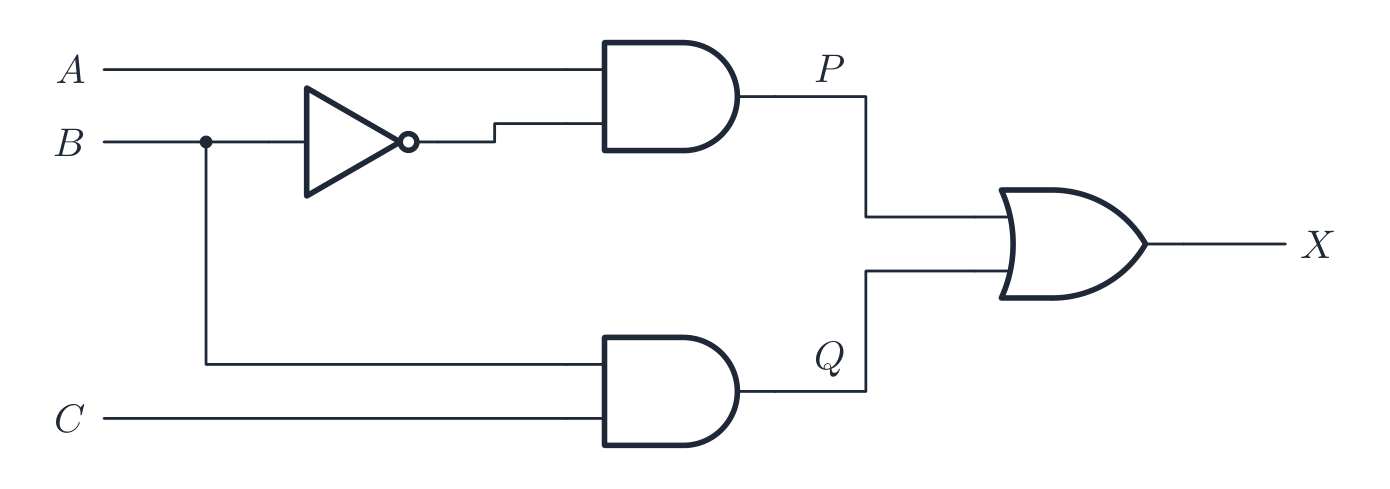
Worked example. Write the expression for the circuit below, then complete its truth table.
Label the gate outputs: $P = A \text{ AND NOT } B$, $Q = B \text{ AND } C$, so $X = P \text{ OR } Q = (A \text{ AND NOT } B) \text{ OR } (B \text{ AND } C)$. Then give the truth table a column for each intermediate output, so every row can be checked one gate at a time:
A
B
C
NOT B
P
Q
X
0
0
0
1
0
0
0
0
0
1
1
0
0
0
0
1
0
0
0
0
0
0
1
1
0
0
1
1
1
0
0
1
1
0
1
1
0
1
1
1
0
1
1
1
0
0
0
0
0
1
1
1
0
0
1
1
Drawing a circuit from an expression is the same walk in reverse: start from the innermost brackets, draw one gate per operator, draw a NOT gate on the wire of any input that appears with NOT, keep the inputs on the left and the single output on the right, and label the output with its letter. Every line must end at a gate input or the output; a line that goes nowhere loses the mark.
From circuit to truth table
For $n$ inputs there are $2^{n}$ rows. List every input combination; for each, work out the internal gates then the output.
From truth table to expression (sum of products)
For each row that outputs 1, write an AND of the inputs (with NOT on any input that is 0 in that row); OR these together. Example: a table that is 1 only on $(A=0,B=1)$ and $(A=1,B=0)$ gives $\overline{A}B + A\overline{B}$, which is $A \text{ XOR } B$.
From a problem statement
Turn the English into a Boolean expression first: "A and B" → A AND B; "A or B or both" → A OR B; "exactly one of A and B" → A XOR B; "neither A nor B" → A NOR B; "not both" → A NAND B.
Worked example. A machine's alarm $X$ sounds when the guard is open ($A=1$) and either the motor is running ($B=1$) or the temperature is high ($C=1$). Write the Boolean expression, and give the rows where $X=1$. Turn the English into logic one clause at a time: "either B or C" is $B + C$, and "A and that" is $X = A\cdot(B + C)$. For the rows, $X=1$ needs $A=1$and at least one of $B$, $C$ equal to 1 - so $(A,B,C) = (1,0,1)$, $(1,1,0)$ and $(1,1,1)$, three rows out of eight. Notice $A=0$ can never sound the alarm, whatever $B$ and $C$ do. Bracket the OR before ANDing it: $X = A\cdot B + C$ is a different circuit altogether, one that would sound the alarm on a high temperature even with the guard closed.
ข้อสอบเขียนนิพจน์ด้วยคำ X = (A AND NOT B) OR (B AND C) และยอมรับรูปแบบพีชคณิต $X = A\overline{B} + BC$ โดยจุด (หรือไม่มีอะไร) แทน AND, บวกแทน OR, และเส้นบนแทน NOT ใช้รูปแบบที่โจทย์กำหนดมา
จากนิพจน์สู่วงจร
วาดประตูหนึ่งประตูต่อหนึ่งโอเปอเรเตอร์แล้วต่อกัน สำหรับ $X = (A \text{ AND } B) \text{ OR } (\text{NOT } C)$: วาดประตู NOT ที่ $C$, ประตู AND ที่ $A$ และ $B$, จากนั้นวาดประตู OR ที่ผลลัพธ์ทั้งสอง
ติดป้ายเอาต์พุต nickname ทุกจุด: ที่นี่ P คือ A AND NOT B และ Q คือ B AND C ดังนั้น X คือ P OR Q
ติดป้ายเอาต์พุตประตู: $P = A \text{ AND NOT } B$, $Q = B \text{ AND } C$, ดังนั้น $X = P \text{ OR } Q = (A \text{ AND NOT } B) \text{ OR } (B \text{ AND } C)$. จากนั้นเพิ่มคอลัมน์สำหรับเอาต์พุต nickname ในตารางความจริง เพื่อให้ตรวจสอบได้ทีละประตูในแต่ล่ะแถว:
A
B
C
NOT B
P
Q
X
0
0
0
1
0
0
0
0
0
1
1
0
0
0
0
1
0
0
0
0
0
0
1
1
0
0
1
1
1
0
0
1
1
0
1
1
0
1
1
1
0
1
1
1
0
0
0
0
0
1
1
1
0
0
1
1
การวาดวงจรจากนิพจน์คือการเดินย้อนกลับ: เริ่มจากวงเล็บภายในสุด วาดประตูหนึ่งประตูต่อหนึ่งโอเปอเรเตอร์ วาดประตู NOT บนสายของอินพุตที่ปรากฏคู่กับ NOT เก็บอินพุตไว้ทางซ้ายและเอาต์พุตเดียวไว้ทางขวา และติดป้ายเอาต์พุตด้วยตัวอักษร เส้นทุกเส้นต้องจบที่อินพุตประตูหรือเอาต์พุต; เส้นที่ไม่ไปไหนจะเสียคะแนน
สำหรับแต่ละแถวที่เอาต์พุตเป็น 1, เขียน AND ของอินพุต (โดยใส่ NOT กับอินพุตที่เป็น 0 ในแถวนั้น); OR ผลลัพธ์เหล่านี้เข้าด้วยกัน ตัวอย่าง: ตารางที่ 1 เฉพาะที่ $(A=0,B=1)$ และ $(A=1,B=0)$ ให้ $\overline{A}B + A\overline{B}$, ซึ่งคือ $A \text{ XOR } B$
จากโจทย์ปัญหา
แปลงภาษาอังกฤษเป็นนิพจน์บูลีนก่อน: "A และ B" → A AND B; "A หรือ B หรือทั้งสอง" → A OR B; "อย่างใดอย่างหนึ่งจาก A และ B อย่างชัดเจน" → A XOR B; " neither A nor B" → A NOR B; "ไม่ทั้งคู่" → A NAND B.
ตัวอย่างวิธีทำ. ระบบเตือนภัยของเครื่องจักร $X$ จะดังเมื่อประตูป้องกันเปิด ($A=1$) และ EITHER มอเตอร์กำลังหมุน ($B=1$) OR อุณหภูมิสูง ($C=1$). เขียนนิพจน์บูลีน และระบุแถวที่ $X=1$. แปลงภาษาอังกฤษเป็นตรรกะทีละส่วน: "either B or C" คือ $B + C$, และ "A and นั้น" คือ $X = A\cdot(B + C)$. สำหรับแถว, $X=1$ ต้องการ $A=1$และ อย่างน้อยหนึ่งจาก $B$, $C$ เท่ากับ 1 - ดังนั้น $(A,B,C) = (1,0,1)$, $(1,1,0)$ และ $(1,1,1)$,สามแถวจากแปด. ระวัง $A=0$ ไม่สามารถส่งสัญญาณเตือนได้ไม่ว่า $B$ และ $C$ จะเป็นอย่างไร. ใส่วงเล็บหน้า OR ก่อนที่จะทำ AND与之: $X = A\cdot B + C$ เป็นวงจรที่ต่างออกไปสิ้นเชิง, ซึ่งจะทำให้ส่งสัญญาณเตือนเมื่ออุณหภูมิสูงแม้ว่าประตูป้องกันจะ ปิด อยู่ก็ตาม.
Explore · สำรวจ
Half adder
Wire XOR and AND to the same two inputs: XOR gives the sum bit, AND gives the carry. Click A and B. · เชื่อม XOR และ AND เข้ากับอินพุต 2 ตัวเดียวกัน: XOR ให้บิตผลบวก AND ให้ carry คลิก A และ B
Explore · สำรวจ
Logic circuits · วงจรลอจิก
gates combine into circuits · เกตรวมกันเป็นวงจร
Each gate has a fixed rule; chaining them builds every circuit — start with one gate. · แต่ละเกตมีกฎตายตัว; การเชื่อมต่อกันสร้างวงจรได้ทุกชนิด — เริ่มต้นจากเกตเดียว
Distinguish RAM (volatile, read/write) from ROM (non-volatile, holds the bootstrap); SRAM (cache, faster) from DRAM (main memory, needs refreshing).
For a logic circuit, build the Boolean expression gate by gate, then a truth table covering every input combination.
Learn the symbol, expression and truth table for each gate (AND, OR, NOT, NAND, NOR, XOR).
Explain a buffer (a temporary store bridging two different speeds) and the role of an interrupt.
Common mistakes
Naming the device instead of describing its operation. "It uses a laser" earns nothing; the steps (charge the drum, laser removes charge, toner attracted, transferred, fused) earn the marks.
Saying a monitoring system "controls" something. If nothing changes the physical process, it is monitoring; add the actuator and the feedback and it becomes control.
Writing that RAM "stores files permanently" or that ROM "stores the user's data". RAM is volatile working memory; ROM holds the fixed start-up instructions.
A truth table with fewer than $2^{n}$ rows, or rows in a random order. Count in binary from 000 to 111 so no combination is missed.
Drawing two lines from one output of a gate to be safe, or leaving a wire that ends nowhere. Draw exactly the connections the expression needs.
ไทย
แยกแยะ RAM (ความจำชั่วคราว, อ่าน/เขียน) จาก ROM (ความจำถาวร, เก็บโค้ดเริ่มต้น); SRAM (แคช, เร็ว) จาก DRAM (หน่วยความจำหลัก, ต้องรีเฟรช).
Pick one and the site follows you — notes, papers, videos and practice all open on it. · เลือกหนึ่งตัว และเว็บจะติดตามคุณ — หมายเหตุ, ใบงาน, วิดีโอ และการฝึกฝนจะเปิดอยู่ที่นั้น
Type to search notes, lessons, code, vocabulary and past-paper questions across every subject. · พิมพ์เพื่อค้นหาบันทึก, บทเรียน, โค้ด, คำศัพท์ และคำถามข้อสอบเก่าในทุกวิชา