Skip to content · ⁨ข้ามไปยังเนื้อหา⁩

Security, privacy and data integrity · ⁨ความปลอดภัย ความเป็นส่วนตัว และความสมบูรณ์ของข้อมูล⁩

A-Level Computer Science · ⁨Computer Science A-Level⁩ · Topic 6 · ⁨หัวข้อ 6⁩

Video lesson for this topic · ⁨บทเรียนวิดีโอสำหรับหัวข้อนี้⁩ Open the video page · ⁨เปิดหน้าวิดีโอ⁩
16:28

ความปลอดภัย ความเป็นส่วนตัว และความถูกต้อง

ตอนนี้วินาทีนี้ อุปกรณ์ของคุณกำลังถูกโจมตี ไม่ใช่โดยบุคคลที่ก้มตัวลง над keyboard — แต่โดยกองทัพของบอทอัตโนมัติ正在 scanning…

English narration · English + 中文 subtitles burned in · ⁨การบรรยายภาษาอังกฤษ · คำบรรยายภาษาอังกฤษ + 中文 ลอยตัวบนภาพ⁩

6.1

Security, privacy and integrity — three different ideas · ⁨ความปลอดภัย ความเป็นส่วนตัว และความถูกต้องสมบูรณ์ — สามแนวคิดที่แตกต่างกัน⁩

Syllabus · ⁨หลักสูตร⁩
English
Candidates should be able to: Notes and guidance
Explain the difference between the terms security, privacy and integrity of data
Show appreciation of the need for both the security of data and the security of the computer system
Describe security measures designed to protect computer systems, ranging from the stand-alone PC to a network of computers Including user accounts, passwords, authentication techniques such as digital signatures and biometrics, firewall, anti-virus software, anti-spyware, encryption
Show understanding of the threats to computer and data security posed by networks and the internet Including malware (virus, spyware), hackers, phishing, pharming
Describe methods that can be used to restrict the risks posed by threats
Describe security methods designed to protect the security of data Including encryption, access rights
ไทย
ผู้เข้าสอบควรสามารถ: หมายเหตุและคำแนะนำ
อธิบายความแตกต่างระหว่างคำว่า ความปลอดภัย (security), ความเป็นส่วนตัว (privacy) และ ความถูกต้องสมบูรณ์ของข้อมูล (integrity)
แสดงความตระหนักถึงความจำเป็นทั้งของ ความปลอดภัยของข้อมูล และ ความปลอดภัยของระบบคอมพิวเตอร์
อธิบาย มาตรการความปลอดภัย ที่ออกแบบมาเพื่อปกป้องระบบคอมพิวเตอร์ ตั้งแต่ PC แบบ standalone ไปจนถึงเครือข่ายคอมพิวเตอร์ รวมถึง บัญชีผู้ใช้, รหัสผ่าน, เทคนิคการยืนยันตัวตน เช่น ลายเซ็นดิจิทัล และ ชีวภาพ, ไฟร์วอลล์, ซอฟต์แวร์ป้องกันไวรัส, ซอฟต์แวร์ป้องกัน spyware, การเข้ารหัส
แสดงความเข้าใจถึง ภัยคุกคาม ต่อความปลอดภัยของระบบคอมพิวเตอร์และข้อมูลที่มาจากเครือข่ายและอินเทอร์เน็ต รวมถึง มัลแวร์ (ไวรัส, spyware), แฮกเกอร์, การหลอกลวง qua อีเมล (phishing), การ redirection แบบ phishing (pharming)
อธิบายวิธีการที่ใช้เพื่อจำกัดความเสี่ยงจากภัยคุกคาม
อธิบายวิธีการรักษาความปลอดภัยที่ออกแบบมาเพื่อปกป้องความปลอดภัยของข้อมูล รวมถึง การเข้ารหัส, สิทธิ์การเข้าถึง

Source: Cambridge International syllabus · ⁨แหล่งที่มา: หลักสูตร Cambridge International⁩

English

These sound alike but mean different things:

  • security 安全 — protecting data from unauthorised 未授权 access, change or destruction.
  • privacy 隐私 — an individual's right to control who sees their personal data, with consent and a clear purpose.
  • integrity 完整性 — the data being accurate and complete — not corrupted or accidentally changed.

A file can be secure (only the right people can open it) but lack integrity (a typo corrupted it); or accurate but not private (anyone can read it). All three are needed.

The differences the scheme wants, one sentence each: security is keeping the data safe from loss and from unauthorised access; privacy is keeping the data confidential, so that only those with the right to see it can; integrity is the data being correct, consistent and complete. So "the difference between security and privacy": security is about protecting the data from being accessed, changed or lost by people who should not; privacy is about the individual's right to decide who may see their personal data. "The difference between security and integrity": security protects the data from unauthorised access; integrity is about the data being accurate and up to date, which validation and verification protect.

ไทย

คำเหล่านี้ฟังดูคล้ายกันแต่มีความหมายต่างกัน:

  • ความปลอดภัย — การปกป้องข้อมูลจากการเข้าถึง การเปลี่ยนแปลง หรือการทำลายโดย ผู้ที่ไม่ได้รับอนุญาต
  • ความเป็นส่วนตัว — สิทธิของบุคคลในการ ควบคุมใครสามารถมองเห็นข้อมูลส่วนตัวของตน ด้วยความยินยอมและมีวัตถุประสงค์ที่ชัดเจน
  • ความถูกต้องสมบูรณ์ — ข้อมูลนั้น ถูกต้องและครบถ้วน — ไม่ถูกทำลายหรือแก้ไขโดยไม่ตั้งใจ

ไฟล์อาจมีความปลอดภัย (เฉพาะคนที่มีสิทธิ์เท่านั้นที่เปิดได้) แต่ขาดความถูกต้องสมบูรณ์ (มีตัวสะกดผิดทำให้เสียหาย); หรือถูกต้องแต่ไม่มีความเป็นส่วนตัว (ทุกคนอ่านได้) ทั้งสามอย่างนี้จำเป็นต้องมี

ความแตกต่างที่สคีมต้องการ คำตอบละหนึ่งประโยค: **,

Explore · ⁨สำรวจ⁩

Risk and responsibility lab · ⁨ห้องปฏิบัติการความเสี่ยงและความรับผิดชอบ⁩

Sort examples by the rule, risk or protection involved. · ⁨จัดลำดับตัวอย่างตามกฎ ความเสี่ยง หรือการป้องกันที่เกี่ยวข้อง⁩

6.1

Why security matters · ⁨ทำไมความปลอดภัยถึงสำคัญ⁩

English

Two things to protect: the data itself (keep it confidential, intact and available) and the computer system (a compromised system can attack others, steal credentials, or be held to ransom).

"Why does the school need to keep both secure?" Data: it is personal and confidential, so it must not be read, changed or deleted by an unauthorised person, and its loss would stop the school working. System: an intruder who reaches the computer system can install malware, use it to attack other systems, damage the hardware or software, or lock it with ransomware; a secure system is the first line of defence for the data on it.

ไทย

สองสิ่งที่ต้องปกป้อง: ข้อมูล เอง (รักษาให้เป็นความลับ ถูกต้องและไม่ขาดหาย) และ ระบบคอมพิวเตอร์ (ระบบที่ถูกละเมิดสามารถโจมตีผู้อื่น ลักขโมยข้อมูลประจำตัว หรือถูกเรียกค่าไถ่)

"ทำไมโรงเรียนจึงต้องรักษาทั้งสองอย่างให้ปลอดภัย?" ข้อมูล: เป็นข้อมูลส่วนตัวและเป็นความลับ ดังนั้นไม่ควรถูกอ่าน เปลี่ยน或删除โดยผู้ที่ไม่ได้รับอนุญาต และการสูญเสียข้อมูลจะทำให้โรงเรียนทำงานไม่ได้ ระบบ: ผู้บุกรุกที่เข้าถึงระบบคอมพิวเตอร์สามารถติดตั้งมัลแวร์ ใช้โจมตีระบบอื่น ทำลายฮาร์ดแวร์หรือซอฟต์แวร์ หรือล็อคด้วย ransomware; ระบบที่ปลอดภัยคือแนวป้องกันแรกสำหรับข้อมูลบนระบบนั้น

Vocabulary · ⁨คำศัพท์⁩ Train · ⁨ฝึกฝน⁩
English ไทย
ransomware/ˈrænsəmweə/ ซอฟต์แวร์เรียกค่าไถ่ (ransomware)
networks/ˈnetwɜːks/ เครือข่าย
6.1

Threats from networks and the internet · ⁨threats จากเครือข่ายและอินเทอร์เน็ต⁩

English

Threats fall into three groups.

  1. Malware 恶意软件 (malicious software) — harmful programs:
  • virus 病毒 — self-copying code that attaches to other programs and spreads when they run.
  • worm 蠕虫 — self-copying code that spreads over networks 网络 with no user action.
  • Trojan horse 木马 — looks useful but hides malicious code.
  • spyware 间谍软件 — secretly collects information (keystrokes, passwords).
  • ransomware 勒索软件 — encrypts your files and demands payment.
  • adware 广告软件 — pushes unwanted adverts.

2. Tricking people (social attacks):

  • phishing 网络钓鱼 — fake emails/sites that trick users into giving credentials.
  • pharming 域名欺骗 — redirects a user to a fake site even when they type the correct address.
  • social engineering 社会工程 — tricking people into giving up information.

The scheme's descriptions of the four named threats: a virus is malicious software that replicates (copies itself), attaches itself to other files and deletes or corrupts data; spyware is malicious software that records the user's key presses and actions and sends them to a third party, to obtain passwords and personal data; a phishing email pretends to come from a legitimate organisation and contains a link to a fake website where the user is asked for personal or bank details; pharming is malicious code installed on the user's computer or on a web server that redirects the user to a fake website even though they typed the correct address. Similarities of spyware and a virus: both are malware, both are installed without the user's knowledge, both can send data to a third party or damage the system; the difference is that a virus replicates itself while spyware records and transmits information. Phishing and pharming both lead the user to a fake website that collects their data; phishing needs the user to click a link in an email, pharming works through code on the computer or the DNS server and needs no email.

3. Attacks on the network:

  • hacking 黑客入侵 by hackers 黑客 — unauthorised access, often via weak passwords or software flaws.
  • denial of service 拒绝服务 (DoS/DDoS) — floods a server so real users cannot reach it.
  • eavesdropping 窃听 — capturing data in transit (a risk on open Wi-Fi).
  • man-in-the-middle 中间人攻击 — an attacker secretly relays or alters messages between two parties.

Worked example. Identify and describe two threats to the data on a school network, and give a different prevention method for each.

Threat 1, malware: a virus copied onto a computer from an email attachment or a download replicates itself and corrupts or deletes files; prevention: anti-virus software that scans files and is kept up to date. Threat 2, hacking: an unauthorised person gains access to the network, for example by guessing a weak password, and reads or changes the data; prevention: a firewall that blocks unauthorised connections, or strong passwords with two-factor authentication. A third pair, phishing: an email leads a user to a fake site that collects their login; prevention: training users to check the sender and the URL, and filtering email. The measure must match the threat: encryption does not stop a virus, and anti-virus software does not stop phishing.

ไทย

ภัยคุกคามแบ่งออกเป็นสามกลุ่ม

ผู้โจมตีแบบคนกลางนั่งอยู่ระหว่าง Alice และ Bob อ่านหรือแก้ไขข้อความ
ผู้โจมตีแบบ Man-in-the-middle นั่งอยู่ระหว่างคู่กรณีทั้งสอง
  1. Malware (ซอฟต์แวร์อันตราย) — โปรแกรมที่เป็นอันตราย:
  • ไวรัส — โค้ดที่ทำสำเนาตัวเองและติดอยู่กับโปรแกรมอื่นเพื่อแพร่กระจายเมื่อโปรแกรมเหล่านั้นถูกเปิดใช้งาน
  • เวิร์ม — โค้ดที่ทำสำเนาตัวเองเพื่อแพร่กระจายผ่าน เครือข่าย โดยไม่ต้องมีการกระทำจากผู้ใช้งาน
  • Trojan horse — ดูมีประโยชน์แต่ซ่อนโค้ดอันตรายไว้ข้างใน
  • spyware — เก็บรวบรวมข้อมูลโดยไม่แจ้งให้ทราบ (การกดแป้นพิมพ์, รหัสผ่าน)
  • ransomware —เข้ารหัสไฟล์ของคุณและทวงเงินค่าไถ่
  • adware — ส่งโฆษณาที่ไม่ต้องการ

2. การหลอกลวงผู้คน (การโจมตีทางสังคม):

  • phishing — อีเมล/เว็บไซต์ปลอมที่หลอกผู้ใช้ให้มอบข้อมูลประจำตัว
  • pharming — redirect ผู้ใช้ไปยังเว็บไซต์ปลอมแม้他们会 typing正确的地址
  • social engineering — การหลอกลวงผู้คนให้เปิดเผยข้อมูล

คำอธิบายของแผนก concerning ภัยคุกคามทั้งสี่ชนิด: ไวรัส คือซอฟต์แวร์ร้ายที่จำลองตัวเอง (ทำสำเนา), เชื่อมต่อกับไฟล์อื่น และลบหรือทำลายข้อมูล; สไปแวร์ คือซอฟต์แวร์ร้ายที่บันทึกการกดคีย์บอร์ดและการกระทำของผู้ใช้และส่งไปยังบุคคลที่สามเพื่อ窃取รหัสผ่านและข้อมูลส่วนตัว; อีเมล ฟิชชิ่ง Pretends มาจากองค์กรที่ถูกต้องตามกฎหมายและมีลิงก์ไปยังเว็บไซต์ปลอมที่ขอข้อมูลส่วนตัวหรือธนาคาร; ฟาร์มมิ่ง คือโค้ดร้ายที่ติดตั้งบนคอมพิวเตอร์ของผู้ใช้หรือเซิร์ฟเวอร์เว็บที่เปลี่ยนทิศทางผู้ใช้ไปยังเว็บไซต์ปลอมแม้ว่า他们会พิมพ์ที่อยู่ที่ถูกต้อง ความคล้ายคลึงกันระหว่างสไปแวร์และไวรัส: ทั้งสองเป็นมัลแวร์, ติดตั้งโดยไม่ทราบแจ้ง, สามารถส่งข้อมูลไปยังบุคคลที่สามหรือทำลายระบบ; ความแตกต่างคือไวรัสจำลองตัวเองในขณะที่สไปแวร์บันทึกและส่งต่อข้อมูล ฟิชชิ่งและฟาร์มมิ่งทั้งสองนำผู้ใช้ไปยังเว็บไซต์ปลอมที่เก็บรวบรวมข้อมูล; ฟิชชิ่งต้องการให้ผู้ใช้คลิกลิงก์ในอีเมล, ฟาร์มมิ่งทำงานผ่านโค้ดบนคอมพิวเตอร์หรือ DNS เซิร์ฟเวอร์และไม่จำเป็นต้องใช้อีเมล

3. การโจมตีเครือข่าย:

  • แฮก โดย แฮกเกอร์ — การเข้าถึงโดยไม่ได้รับอนุญาต, มักผ่านรหัสผ่านที่อ่อนแอหรือข้อบกพร่องของซอฟต์แวร์
  • การปฏิเสธการให้บริการ (DoS/DDoS) — ล้นเซิร์ฟเวอร์จนผู้ใช้จริงไม่สามารถเข้าถึงได้
  • การดักฟัง — ดักจับข้อมูลที่ส่งผ่าน (ความเสี่ยงบน Wi-Fi แบบเปิด)
  • คนกลาง — ผู้โจมตีส่งต่อหรือแก้ไขข้อความระหว่างคู่กรณีอย่างลับๆ

ตัวอย่างวิธีทำ. ระบุและอธิบายภัยคุกคามสองประการต่อข้อมูลบนเครือข่ายโรงเรียน พร้อมวิธีการป้องกันที่แตกต่างกันสำหรับแต่ละประการ

ภัยคุกคาม 1, มัลแวร์: ไวรัสที่ถูกคัดลอกเข้าคอมพิวเตอร์จากไฟล์แนบหรือการดาวน์โหลดจะจำลองตัวเองและทำลายหรือลบไฟล์; วิธีการป้องกัน: ซอฟต์แวร์ป้องกันไวรัสที่จะสแกนไฟล์และอัปเดตให้ทันสมัย ภัยคุกคาม 2, แฮก: บุคคลที่ไม่ได้รับอนุญาตเข้าถึงเครือข่าย เช่น通过การเดารหัสผ่านที่อ่อนแอ และอ่านหรือแก้ไขข้อมูล; วิธีการป้องกัน: ไฟร์วอลล์ที่ปิดกั้นการเชื่อมต่อที่ไม่ได้รับอนุญาต หรือรหัสผ่านที่แข็งแกร่งพร้อมการยืนยันตัวตนแบบสองขั้นตอน คู่ที่สาม, ฟิชชิ่ง: อีเมลนำผู้ใช้ไปยังไซต์ปลอมที่เก็บรวบรวมข้อมูลการเข้าสู่ระบบ; วิธีการป้องกัน: อบรมผู้ใช้ให้ตรวจสอบผู้ส่งและ URL และกรองอีเมล มาตรการต้องตรงกับภัยคุกคาม: การเข้ารหัสไม่หยุดยั้งไวรัส และซอฟต์แวร์ป้องกันไวรัสไม่หยุดยั้งฟิชชิ่ง

Malware จัดกลุ่มตามพฤติกรรม: ประเภทที่แพร่กระจายด้วยตนเอง ได้แก่ไวรัส (ติดกับโปรแกรม) และเวิร์ม (แพร่ผ่านเครือข่าย); ประเภทที่ซ่อนเร้นหรือปลอมแปลง ได้แก่ Trojan (ดูเหมือนมีประโยชน์), spyware, ransomware และ adware
มัลแวร์ตามพฤติกรรม: กระจายตัวเอง (ไวรัส, เวิร์ม) เทียบกับซ่อน/伪装 (Trojan, สไปแวร์, แรสมแวร์, แอดแวร์)
Vocabulary · ⁨คำศัพท์⁩ Train · ⁨ฝึกฝน⁩
English ไทย
malware/ˈmælweə/ มัลแวร์
man-in-the-middle/mæn ɪnðə ˈmɪdl/ man-in-the-middle
virus/ˈvaɪrəs/ virus
worm/wɜːm/ worm
Trojan horse/ˈtrəʊdʒn hɔːs/ ม้าTrojan horse
spyware/ˈspaɪweə/ สไปแวร์ (spyware)
adware/ˈædweə/ adware
phishing/ˈfɪʃɪŋ/ ฟิชชิ่ง (phishing)
pharming/ˈfɑːmɪŋ/ โฟร์มมิ่ง (pharming)
social engineering/ˈsəʊʃl ˌendʒɪˈnɪərɪŋ/ social engineering
hacking/ˈhækɪŋ/ การแฮก
hackers/ˈhækəz/ hackers
denial of service/dɪˈnaɪəl ɒv ˈsɜːvɪs/ การปฏิเสธการให้บริการ (denial of service)
eavesdropping/ˈiːvzdrɒpɪŋ/ eavesdropping
6.1

Security measures · ⁨มาตรการความปลอดภัย⁩

English

Measures protect both the security of data (against loss, theft or corruption) and the security of the computer system (its hardware, software and network).

A standalone PC

  • a strong password; antivirus kept up to date; prompt software updates; backup 备份 to separate media; full-disk encryption 加密; a locked screen.

A networked PC

All the above, plus a firewall 防火墙, per-user permissions (admin rights only for admins), central management of user accounts 用户账户, and audit logs 审计日志 (who logged in, what they touched).

How the measures work, in the wording the scheme awards:

  • firewall: examines every incoming and outgoing transmission and compares it with set criteria (a whitelist or blacklist of addresses, ports and protocols); blocks any that do not meet the criteria; can prevent access to certain sites and warn of unauthorised access attempts.
  • encryption: the data is scrambled (encoded) with a key into ciphertext, so an intercepted copy cannot be understood without the key; the receiver uses a key to decrypt it. It protects data in transmission and in storage, but it does not stop the data being intercepted or deleted.
  • passwords and user accounts: only a user who knows the password can log in; a strong password (long, mixed characters, changed regularly) cannot be guessed; accounts lock after repeated failures; each account carries its own access rights.
  • anti-virus and anti-spyware software: scans files and programs against a database of known malware signatures, checks behaviour, quarantines or deletes what it finds, and must be updated so that new malware is recognised.
  • access rights: each user (or group) is given permissions for each file or table, such as read-only or read and write, so a user cannot see or change data that is not theirs; a database can also present each user with a view containing only the fields they need.
  • biometrics: the device captures an image of the face, fingerprint or iris, converts it to digital data, compares it with the stored data for that user and allows access only on a match; it cannot be forgotten, lent or guessed like a password.
  • backups: a copy of the data on separate media, kept off-site, so that lost or corrupted data can be restored.

To restrict the risks of malware, in three marks: install anti-malware software and keep it updated; use a firewall; do not open attachments or download files from unknown sources; keep the operating system and applications patched; and train users.

Across the internet

  • VPN 虚拟专用网 — encrypts traffic between the user and the corporate gateway.
  • HTTPS / TLS — encrypt web traffic.
  • digital signatures 数字签名 — prove who sent a message and that it was not altered in transit.
  • intrusion detection — watches traffic for known attack patterns.

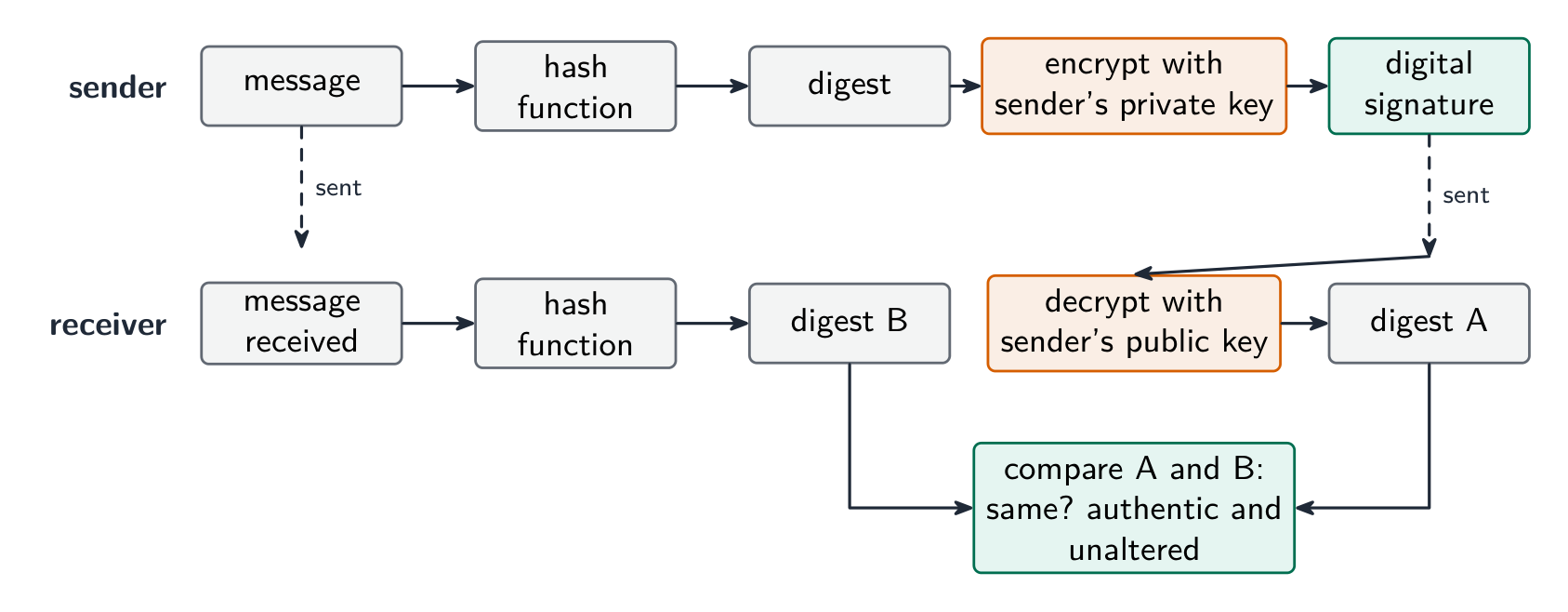
How a digital signature authenticates a document (five marks): the sender puts the message through a hash function to produce a digest; the sender encrypts the digest with their private key, and that encrypted digest is the digital signature; the message and the signature are sent together; the receiver decrypts the signature with the sender's public key to recover the digest; the receiver hashes the received message and compares the two digests; if they match, the message came from the sender (only they hold the private key) and was not altered in transmission. A signature proves who sent the message and that it is intact; it does not hide the contents, which is what encryption of the message is for.

ไทย

มาตรการปกป้องทั้ง ความปลอดภัยของข้อมูล (จากการสูญเสีย, การขโมยหรือการทำลาย) และ ความปลอดภัยของระบบคอมพิวเตอร์ (ฮาร์ดแวร์, ซอฟต์แวร์และเครือข่าย)

คอมพิวเตอร์ standalone PC

  • รหัสผ่านที่แข็งแรง; โปรแกรมป้องกันไวรัส ที่อัปเดตให้ทันสมัย; การอัปเดตซอฟต์แวร์ ทันที; สำรองข้อมูล ไปยังสื่อแยกต่างหาก; การเข้ารหัส entire disk; หน้าจอล็อค

คอมพิวเตอร์ที่มีเครือข่าย

ทุกข้อข้างต้น plus ไฟร์วอลล์, สิทธิ์การใช้งาน ต่อผู้ใช้ (สิทธิ์ admin เฉพาะ admin), การจัดการบัญชีผู้ใช้แบบรวมศูนย์ และ บันทึกการตรวจสอบ (ใครเข้าสู่ระบบ, สัมผัสอะไร)

วิธีการที่มาตรการทำงาน, ในถ้อยคำที่แผนกให้คะแนน:

  • ไฟร์วอลล์: ตรวจสอบทุกการส่งเข้าและออกและเปรียบเทียบกับเกณฑ์ที่กำหนด (รายการสีขาวหรือรายการดำของที่อยู่, พอร์ตและโปรโตคอล); ปิดกั้นสิ่งที่ไม่ตรงเกณฑ์; สามารถป้องกันการเข้าถึงบางไซต์และเตือนการพยายามเข้าถึงโดยไม่ได้รับอนุญาต
  • การเข้ารหัส: ข้อมูลถูกทำให้ยุ่งเหยิง (เข้ารหัส) ด้วยกุญแจเป็น ciphertext, ดังนั้นสำเนาที่ถูกดักจับไม่สามารถเข้าใจได้โดยไม่ใช้กุญแจ; ผู้รับใช้กุญแจเพื่อถอดรหัส มันปกป้องข้อมูลขณะส่งและขณะจัดเก็บ แต่ไม่ได้หยุดยั้งการดักจับหรือลบบทข้อมูล
  • รหัสผ่านและบัญชีผู้ใช้: มีเฉพาะผู้ใช้ที่รู้รหัสผ่านจึงจะเข้าสู่ระบบได้; รหัสผ่านที่แข็งแรง (ยาว, ผสมผสานตัวอักษร, เปลี่ยนบ่อย) ไม่สามารถเดาได้; บัญชีล็อคหลังจากล้มเหลวหลายครั้ง; แต่ละบัญชีมีสิทธิ์เข้าถึงของตนเอง
  • ซอฟต์แวร์ป้องกันไวรัสและสไปแวร์: สแกนไฟล์และโปรแกรมเทียบกับฐานข้อมูลลายเซ็นมัลแวร์ Known, ตรวจสอบพฤติกรรม, กักขังหรือลบสิ่งที่พบ และต้องอัปเดตเพื่อให้รู้จักมัลแวร์ใหม่
  • สิทธิ์การเข้าถึง: ผู้ใช้แต่ละราย (หรือกลุ่ม) ได้รับสิทธิ์สำหรับไฟล์หรือตารางแต่ละชิ้น, เช่น อ่านเท่านั้นหรืออ่านและเขียน, เพื่อให้ผู้ใช้ไม่สามารถมองเห็นหรือแก้ไขข้อมูลที่ไม่ใช่ของตน; ฐานข้อมูลยังสามารถแสดง视图 каждомуผู้ใช้โดยมีเพียงฟิลด์ที่จำเป็น
  • ชีวมิติ: อุปกรณ์ถ่ายภาพใบหน้า, ลายนิ้วมือหรือตา, แปลงเป็นข้อมูลดิจิทัล, เปรียบเทียบกับข้อมูลที่เก็บไว้为该用户และอนุญาตให้เข้าถึงเฉพาะเมื่อตรง; มันไม่สามารถลืม, ยืมหรือเดาได้เหมือนรหัสผ่าน
  • การสำรองข้อมูล: สำเนาข้อมูลบนสื่อแยกต่างหาก, เก็บไว้นอกสถานที่, เพื่อที่ข้อมูลที่สูญหายหรือเสียหายสามารถกู้คืนได้

เพื่อจำกัดความเสี่ยงของมัลแวร์, ในสามคะแนน: ติดตั้งซอฟต์แวร์ป้องกันมัลแวร์และอัปเดตให้ทันสมัย; ใช้ไฟร์วอลล์; อย่าเปิดไฟล์แนบหรือดาวน์โหลดไฟล์จากแหล่งที่ไม่รู้จัก; รักษาระบบปฏิบัติการและแอปพลิเคชันให้ patched; และอบรมผู้ใช้

แผนภาพกล่องที่มีคอมพิวเตอร์ผู้ใช้ด้านเชื่อถือได้, จากนั้นไฟร์วอลล์, จากนั้นอินเทอร์เน็ตด้านไม่เชื่อถือ, เชื่อมต่อกันด้วยลูกศรสองหัว
ไฟร์วอลล์ตั้งอยู่ระหว่างคอมพิวเตอร์ผู้ใช้และอินเทอร์เน็ต

ข้ามอินเทอร์เน็ต

  • VPN — เข้ารหัส traffic ระหว่างผู้ใช้และเกตเวย์องค์กร
  • HTTPS / TLS — เข้ารหัส web traffic
  • ลายเซ็นดิจิทัล — ยืนยันตัวตนผู้ส่งข้อความและยืนยันว่าข้อความไม่ถูกแก้ไขระหว่างการจัดส่ง
  • การตรวจจับการบุกรุก (intrusion detection) — ตรวจสอบการจราจรข้อมูลเพื่อหารูปแบบการโจมตีที่รู้จักแล้ว

วิธีการที่ลายเซ็นดิจิทัลใช้ยืนยันเอกสาร (5 คะแนน): ผู้ส่งนำข้อความผ่านฟังก์ชันแฮชเพื่อสร้างค่าสรุป; ผู้ส่งเข้ารหัสค่าสรุปด้วย กุญแจส่วนตัว ของตนเอง และค่าสรุปที่ถูกเข้ารหัสนี้คือลายเซ็นดิจิทัล; ข้อความและลายเซ็นจะถูกส่งไปพร้อมกัน; ผู้รับถอดรหัสลายเซ็นด้วย กุญแจสาธารณะ ของผู้ส่งเพื่อกู้คืนค่าสรุป; ผู้รับทำแฮชข้อความที่ได้รับและเปรียบเทียบค่าสรุปทั้งสอง; หากตรงกัน แสดงว่าข้อความมาจากผู้ส่ง (ซึ่งมีเพียงผู้ส่งเท่านั้นที่มีกุญแจส่วนตัว) และไม่ถูกแก้ไขระหว่างการจัดส่ง ลายเซ็นพิสูจน์ได้ว่าใครเป็นผู้ส่งและข้อความสมบูรณ์ แต่ไม่ได้ซ่อนเนื้อหา ซึ่งเป็นหน้าที่ของการเข้ารหัสข้อความเอง

สองช่อง: ผู้ส่งทำแฮชข้อความเป็นค่าสรุปและเข้ารหัสค่าสรุปด้วยกุญแจส่วนตัวเพื่อสร้างลายเซ็น แล้วส่งข้อความและลายเซ็น; ผู้รับถอดรหัสลายเซ็นด้วยกุญแจสาธารณะของผู้ส่งเพื่อได้ค่าสรุป A, ทำแฮชข้อความที่ได้รับเพื่อได้ค่าสรุป B, และเปรียบเทียบกัน
ลายเซ็นดิจิทัล: ค่าแฮชของข้อความ ที่เข้ารหัสด้วยกุญแจส่วนตัวของผู้ส่ง และผู้รับตรวจสอบโดยเทียบกับค่าแฮชใหม่
Vocabulary · ⁨คำศัพท์⁩ Train · ⁨ฝึกฝน⁩
English ไทย
firewall/ˈfaɪəwɔːl/ ไฟวอลล์
two-factor authentication/tuː ˈfæktə ɔːˌθentɪˈkeɪʃn/ two-factor authentication
authentication/ɔːˌθentɪˈkeɪʃn/ authentication
ciphertext/ˈsaɪfətekst/ ciphertext
VPN/ˌviː piː ˈen/ VPN
digital signatures/ˈdɪdʒɪtl ˈsɪɡnɪtʃəz/ ลายเซ็นดิจิทัล
private key/ˈpraɪvət kiː/ กุญแจส่วนตัว
public key/ˈpʌblɪk kiː/ public key
authorisation/ˌɔːθəraɪˈzeɪʃn/ authorisation
least-privilege/liːst ˈprɪvɪlɪdʒ/ least-privilege
6.1

Matching measures to threats · ⁨จับคู่มาตรการกับภัยคุกคาม⁩

English
  • interception in transit → encrypt the data (HTTPS, VPN). Intercepted ciphertext is useless without the key.
  • unauthorised access → strong authentication 身份验证 (long passwords; two-factor authentication 双因素认证 with a phone code or key); user authorisation 授权; lock-out after failed logins.
  • malware → anti-virus software and anti-spyware 反间谍软件 with real-time scanning; patching; avoid untrusted downloads.
  • phishing → user training; email filtering; check the URL before entering credentials.
  • internal threats → the least-privilege 最小权限 principle (give each user only what they need); auditing.
  • DDoS → rate limiting and traffic filtering.

For confidential data crossing the internet, the scheme's method is encryption: the data is encoded with a key into ciphertext, so that an unauthorised person who intercepts it cannot read it, and only the intended receiver, who has the key, can decode it. For a program file sent by email for testing, the same answer applies (encrypt the file, or send it over an encrypted connection), together with a password on the file itself.

ไทย
  • การดักจับระหว่างการจัดส่ง → เข้ารหัส ข้อมูล (HTTPS, VPN) ข้อมูลที่ถูกเข้ารหัสจะไร้ประโยชน์หากไม่มีกุญแจ
  • การเข้าถึงโดยไม่ได้รับอนุญาต → การยืนยันตัวตนที่แข็งแกร่ง (รหัสผ่านยาว; การยืนยันตัวตนแบบสองขั้นตอน ด้วยรหัสจากโทรศัพท์หรือคีย์); การกำหนดสิทธิ์ผู้ใช้; บล็อกหลังจากรหัสผ่านผิดหลายครั้ง
  • มัลแวร์ → ซอฟต์แวร์ป้องกันไวรัส และ ซอฟต์แวร์ต่อต้านสไพล์แวร์ พร้อมการสแกนแบบเรียลไทม์; การอัปเดตแพตช์; หลีกเลี่ยงการดาวน์โหลดที่ไม่เชื่อถือได้
  • ฟิชชิ่ง → การอบรมผู้ใช้; การกรองอีเมล; ตรวจสอบ URL ก่อนกรอกข้อมูลเข้าสู่ระบบ
  • ภัยคุกคามภายใน → หลักการ สิทธิขั้นต่ำสุด (มอบให้แต่ละผู้ใช้เฉพาะสิ่งที่จำเป็น); การตรวจสอบย้อนกลับ
  • DDoS → การจำกัดอัตราและการกรองการจราจรข้อมูล

สำหรับข้อมูลที่อ่อนไหวที่ส่งข้ามอินเทอร์เน็ต วิธีของแผนงานนี้คือ การเข้ารหัส: ข้อมูลถูกเข้ารหัสด้วยกุญแจให้เป็นข้อมูล cifertext ดังนั้นบุคคลที่ไม่ได้รับอนุญาตที่จะดักจับไม่สามารถอ่านได้ และมีเพียงผู้รับที่ต้องการซึ่งมีกุญแจเท่านั้นที่สามารถถอดรหัสได้ สำหรับไฟล์โปรแกรมที่ส่งทางอีเมลเพื่อทดสอบ คำตอบเดียวกันใช้ได้ (เข้ารหัสไฟล์ หรือส่งผ่านช่องทางที่เข้ารหัส) รวมถึงใส่รหัสผ่านให้กับตัวไฟล์นั้นด้วย

6.1

Protecting the data itself · ⁨การปกป้องข้อมูลเอง⁩

English
  • encryption — turn plaintext 明文 into ciphertext 密文 with a key. Symmetric encryption 对称加密 (AES) uses one shared key; asymmetric encryption 非对称加密 (RSA) uses a public key 公钥 and a private key 私钥. Protects data at rest and in transit.
  • access control 访问控制 — file permissions (read/write/execute) and access rights 访问权限, enforced by the OS.
  • authentication — authentication techniques verify the user: something you know (password), have (token, phone), or are (biometrics 生物识别 — fingerprint, face, iris); strongest combined.
  • backups — keep copies (some off-site) so loss or corruption is recoverable.
  • physical security — locked server rooms, cable locks.

Access rights in a database, described for three marks: each user is given an account with a username and password; the database administrator assigns each account permissions for each table, such as read-only, read and write, or no access; users see only the tables and fields they are allowed to, so a customer cannot open the staff table and a clerk can read but not change the prices. The DBMS enforces this with its access rights and with views, and it can encrypt the stored data as well.

ไทย
  • การเข้ารหัส — เปลี่ยน plaintext เป็น ciphertext ด้วยกุญแจ การเข้ารหัสแบบสมมาตร (AES) ใช้กุญแจร่วมเดียว; การเข้ารหัสแบบอสมมาตร (RSA) ใช้ กุญแจสาธารณะ และ กุญแจส่วนตัว ปกป้องข้อมูลทั้งขณะเก็บรักษาและขณะจัดส่ง
  • การควบคุมการเข้าถึง — สิทธิ์ไฟล์ (อ่าน/เขียน/ดำเนินการ) และ สิทธิ์การใช้งาน ซึ่งระบบปฏิบัติการบังคับใช้
  • การยืนยันตัวตน — เทคนิคการยืนยันตัวตน ตรวจสอบผู้ใช้: สิ่งที่รู้ (รหัสผ่าน), มี (token, โทรศัพท์), หรือเป็น (ไบโอเมตริก — รอยนิ้วมือ, ใบหน้า, ม่านตา); การผสมผสานทั้งหมดจะเป็นวิธีที่ปลอดภัยที่สุด
  • การสำรองข้อมูล — เก็บสำเนา (บางส่วนอยู่ นอกสถานที่) เพื่อให้สามารถกู้คืนได้หากสูญเสียหรือเสียหาย
  • ความปลอดภัยทางกายภาพ — ห้องเซิร์ฟเวอร์ล็อค, ล็อคสายเคเบิล

สิทธิ์ในการเข้าถึงฐานข้อมูล อธิบายสำหรับสามคะแนน: ผู้ใช้แต่ละคนได้รับบัญชีที่มีชื่อผู้ใช้และรหัสผ่าน; administrator ของฐานข้อมูลกำหนดสิทธิ์สำหรับแต่ละตาราง เช่น อ่านเท่านั้น อ่านและเขียน หรือไม่มีการเข้าถึง ผู้ใช้เห็นเพียงตารางและฟิลด์ที่ตนได้รับอนุญาต ดังนั้นลูกค้าไม่สามารถเปิดตารางพนักงานได้ และลูกจ้างสามารถอ่านแต่ไม่เปลี่ยนราคา DBMS enforced this with its access rights และ views รวมถึงสามารถเข้ารหัสข้อมูลที่จัดเก็บไว้ได้ด้วย

การเข้ารหัสแบบสมมาตรใช้กุญแจร่วมเดียวเพื่อเข้ารหัสและถอดรหัสข้อความ; การเข้ารหัสแบบอสมมาตรใช้กุญแจสาธารณะของผู้รับเพื่อเข้ารหัสและกุญแจส่วนตัวเพื่อถอดรหัส *แบบสมมาตรใช้กุญแจร่วมเดียว; แบบอสมมาตรใช้กุญแจสาธารณะเพื่อเข้ารหัสและกุญแจส่วนตัวเพื่อถอดรหัส

Token ความปลอดภัย RSA SecurID สีเทาพร้อมหน้าจอ LCD แสดงรหัสหกหลัก *Token ความปลอดภัยแสดงรหัสที่เปลี่ยนแปลงได้สำหรับการยืนยันตัวตนแบบสองขั้นตอน ("สิ่งที่คุณมี")
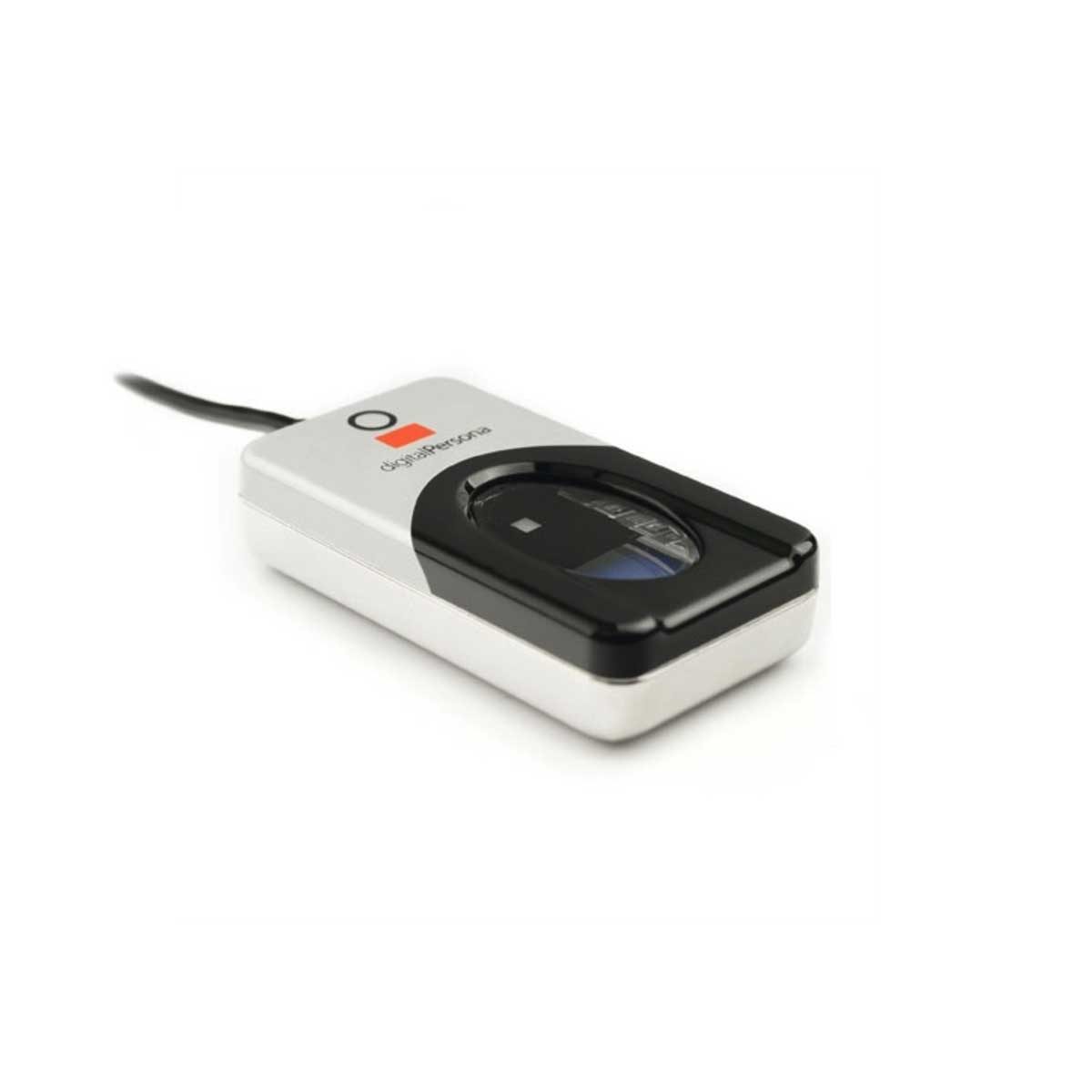
เครื่องอ่านรอยนิ้วมือ USB ขนาดเล็กพร้อมแผ่นเซนเซอร์ออปติคอล *เครื่องอ่านรอยนิ้วมือตรวจสอบ "สิ่งที่คุณเป็น" — ลักษณะของบุคคล ไม่ใช่รหัสผ่าน
Explore · ⁨สำรวจ⁩

Encrypt with a Caesar cipher · ⁨เข้ารหัสด้วยรหัสซีซาร์ (Caesar cipher)⁩

Change the shift — that is the key. Each letter slides that many places along the alphabet to make the ciphertext, and the same key slides it back. That shared key is symmetric encryption in miniature. · ⁨เปลี่ยนค่าการเลื่อน — นั่นคือคีย์ ตัวอักษรแต่ละตัวเลื่อนจำนวนตำแหน่งตามตัวอักษรเพื่อสร้างข้อความรหัส และใช้คีย์เดียวกันเลื่อนกลับ คีย์ร่วมกันนี้คือFORMATIONแบบสมมาตรในระดับเล็ก⁩

Vocabulary · ⁨คำศัพท์⁩ Train · ⁨ฝึกฝน⁩
English ไทย
security/sɪˈkjʊərɪti/ security
privacy/ˈprɪvəsi/ ความเป็นส่วนตัว
integrity/ɪnˈteɡrɪti/ ความถูกต้องสมบูรณ์
unauthorised/ʌnˈɔːθəraɪzd/ unauthorised
encryption/enˈkrɪpʃn/ การเข้ารหัส
backup/ˈbækʌp/ backup
user accounts/ˈjuːzə əˈkaʊnts/ user accounts
audit logs/ˈɔːdɪt lɒɡz/ audit logs
access rights/ˈækses raɪts/ access rights
anti-spyware/ˈænti ˈspaɪweə/ anti-spyware
biometrics/ˌbaɪəʊˈmetrɪks/ ชีวภาพ (biometrics)
plaintext/ˈpleɪntekst/ plaintext
Symmetric encryption/sɪˈmetrɪk enˈkrɪpʃn/ Symmetric encryption
asymmetric encryption/ˌeɪsɪˈmetrɪk enˈkrɪpʃn/ asymmetric encryption
access control/ˈækses kənˈtrəʊl/ การควบคุมการเข้าถึง
check digit/tʃek ˈdɪdʒɪt/ ตัวเลขตรวจสอบ
6.2

Data integrity · ⁨ความถูกต้องสมบูรณ์ของข้อมูล⁩

Syllabus · ⁨หลักสูตร⁩
English
Candidates should be able to: Notes and guidance
Describe how data validation and data verification help protect the integrity of data
Describe and use methods of data validation Including range check, format check, length check, presence check, existence check, limit check, check digit
Describe and use methods of data verification during data entry and data transfer During data entry including visual check, double entry During data transfer including parity check (byte and block), checksum
ไทย
ผู้เข้าสอบควรสามารถ: หมายเหตุและคำแนะนำ
อธิบายว่า การตรวจสอบข้อมูล (data validation) และ การตรวจสอบความถูกต้อง (data verification) ช่วยปกป้อง ความถูกต้องสมบูรณ์ของข้อมูล (integrity) ได้อย่างไร
อธิบายและใช้วิธีการ การตรวจสอบข้อมูล (data validation) รวมถึง การตรวจสอบช่วง, การตรวจสอบรูปแบบ, การตรวจสอบความยาว, การตรวจสอบการมีอยู่, การตรวจสอบความเป็นจริง, การตรวจสอบค่าสูงสุด/ต่ำสุด, رقประจำตัวตรวจสอบ (check digit)
อธิบายและใช้วิธีการ การตรวจสอบความถูกต้อง (data verification) ระหว่างการป้อนข้อมูลและการถ่ายโอนข้อมูล ระหว่างการป้อนข้อมูลรวมถึง การตรวจสอบด้วยสายตา, การป้อนข้อมูลซ้ำ ระหว่างการถ่ายโอนข้อมูลรวมถึง การตรวจสอบ parity (byte และ block), ผลรวมตรวจสอบ (checksum)

Source: Cambridge International syllabus · ⁨แหล่งที่มา: หลักสูตร Cambridge International⁩

English

Data has integrity when it is accurate and complete. Two techniques: data validation (catch bad data before storing) and data verification (confirm data was entered or transferred correctly).

Validation — does the data make sense?

Validation 验证 checks data against sensible rules, automatically:

  • range check — within limits (a month is 1–12).
  • limit check — on the correct side of a single limit (e.g. age ≥ 18).
  • existence check — the referenced item exists (e.g. a product code is in the table).
  • length check — the right number of characters.
  • type / character check — the right kind of data (a phone field allows only digits).
  • format check — matches a pattern (an email must contain @).
  • presence check — required fields are not empty.
  • check digit 校验位 — an extra digit computed from the others (ISBN, card numbers) that spots transcription errors.

Worked example. In a simple check-digit scheme the check digit is the remainder when the sum of the digits is divided by $10$, appended to the number. The number $4162$ has digit sum $13$, so it is stored as $41623$. A user types $14623$: the first two digits are swapped, but the sum is still $13$, so the check digit still matches and the error is not caught. A user who types $41523$ is caught, because $4 + 1 + 5 + 2 = 12$ gives check digit $2$. A scheme that catches swapped digits weights each position differently, as the ISBN-13 check does (weights $1, 3, 1, 3, \ldots$, then the digit that makes the total a multiple of $10$). A check digit is validation: it tests the number against a rule at the moment it is entered.

  • lookup check and consistency check (e.g. delivery date ≥ order date).

Validation catches data that is wrongly formatted, but not data that is the right format yet factually wrong ("Bob" for "Bib").

Worked example. Identify the validation check each piece of pseudocode performs.

Pseudocode Check
IF x < 0 OR x > 10 THEN OUTPUT "Invalid" range check: the value must lie between two limits
IF x = "" THEN OUTPUT "Invalid" presence check: the field must not be empty
IF NOT(x = "Red" OR x = "Yellow" OR x = "Blue") THEN OUTPUT "Invalid" lookup (existence) check: the value must be one of a list
IF LENGTH(x) <> 6 THEN OUTPUT "Invalid" length check: the right number of characters
IF MID(x, 1, 1) < "A" OR MID(x, 1, 1) > "Z" THEN OUTPUT "Invalid" format check: a particular character must be a letter

To validate a car registration number that must be one letter, three digits and two letters: a format check tests each position against its pattern, and a length check confirms six characters. To validate a date of birth: a format check (DD/MM/YYYY), a range check (the month is $1$ to $12$, the year is not in the future) and a presence check (it is not left blank). A mark between $0$ and the maximum for the test needs a type check (an integer) and a range check, with the upper limit read from the test's own record: that is how validation protects integrity, by refusing data that could not be correct.

Verification — was the data entered or transferred correctly?

Verification 核对 checks the data was not changed in moving from one place to another.

During entry: double entry (type it twice and compare, as for a new password) or visual check.

In the scheme's words, double entry is entering the data twice, by the same person or by two people, and having the computer compare the two versions and report any difference; a visual check is the person comparing what is on the screen with the original source document and correcting any difference before saving. Both protect integrity by making sure the stored data matches the source. Even after validation and verification the data can still be wrong: it can be sensible and match the source, yet the source itself was wrong, or the user typed a different but valid value from the one intended.

During transfer (bits can flip):

  • parity check 奇偶校验 — an extra bit makes the number of 1s even (even parity) or odd. The receiver re-counts. Catches single-bit errors.
  • checksum 校验和 — the sender sends a summary value of the data; the receiver recomputes it and compares.
  • cyclic redundancy check 循环冗余校验 (CRC) — a stronger checksum using polynomial division, catching many more error types.

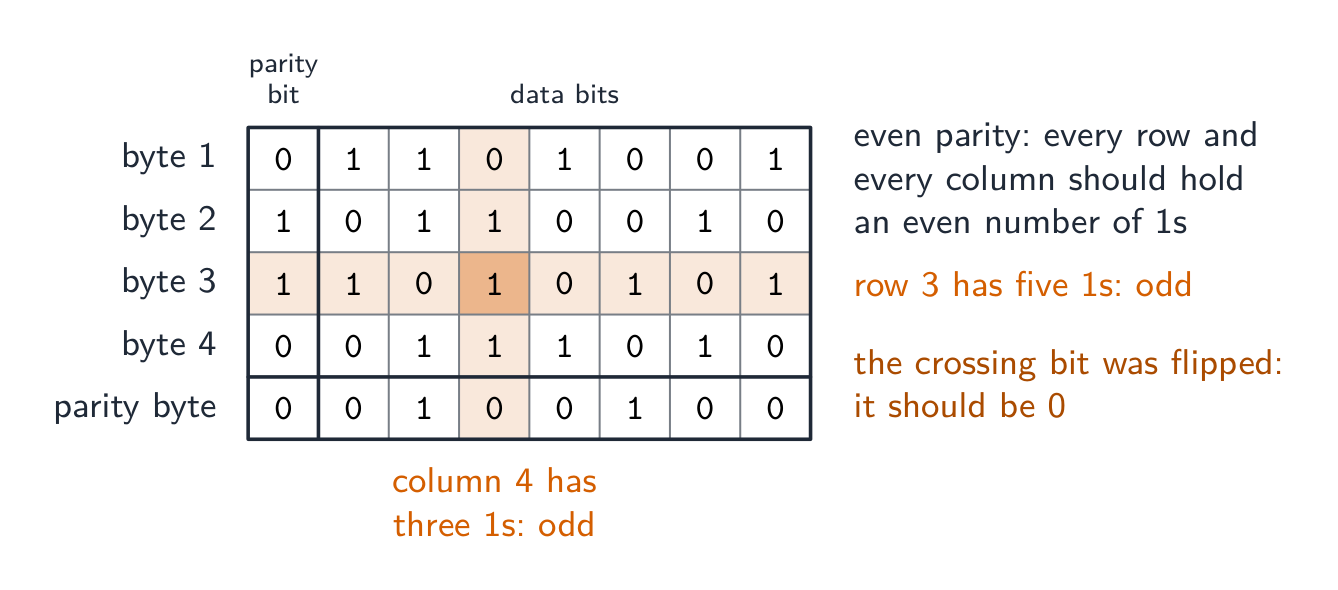
A parity block check 奇偶块校验 goes further and locates the error. Arrange the bytes in a grid: give each byte a row parity bit, then compute one extra parity byte whose bits are the column parity of the bytes above. A single flipped bit now fails one row and one column – their intersection pinpoints exactly which bit changed, so it can even be corrected.

Worked example. Four bytes are sent with even parity, followed by a parity byte. Find the bit that was corrupted.

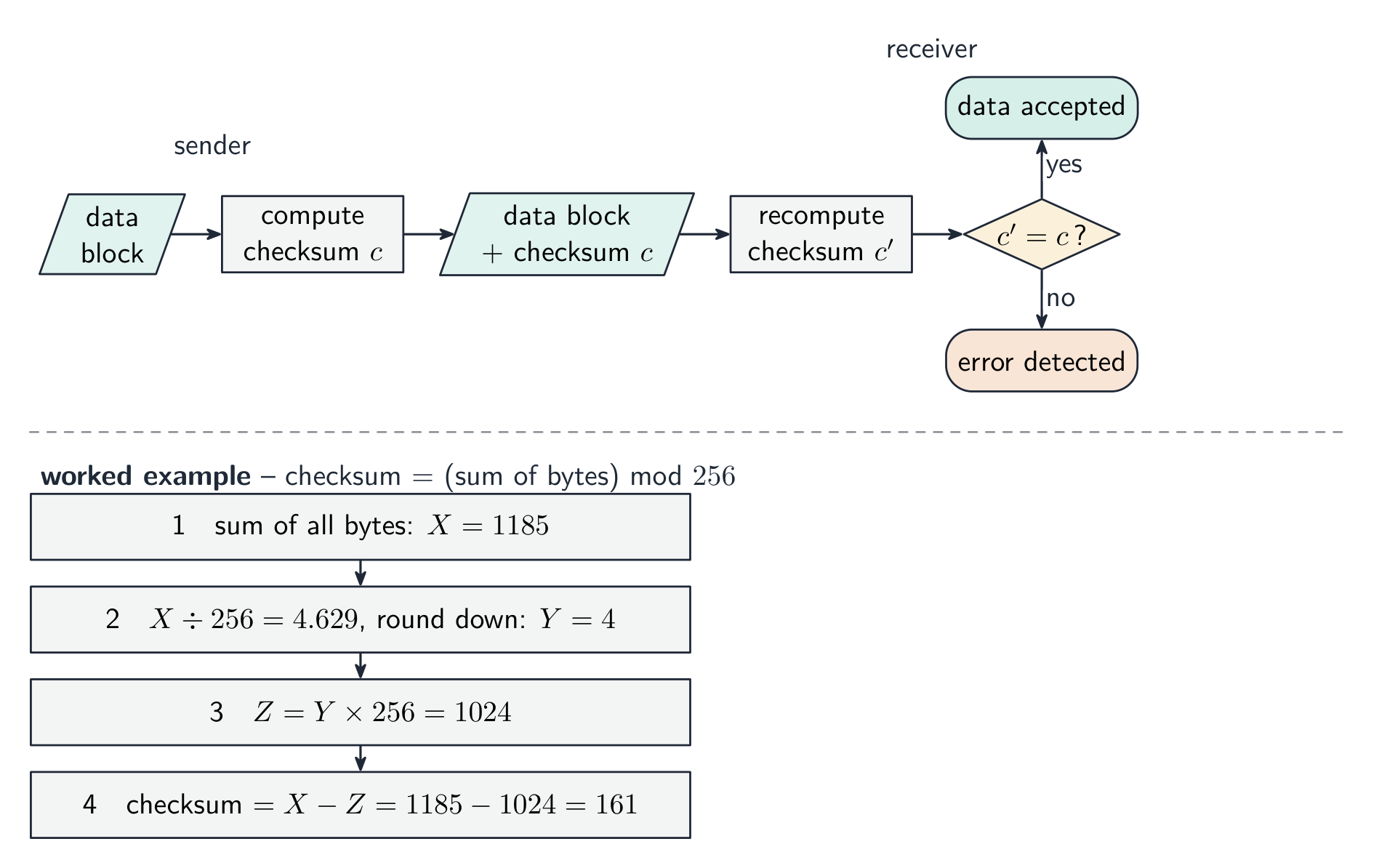
Count the 1s in each row and each column. Every row and column should have an even number; byte 3 has five and column 4 has three. The bit where that row and that column cross is the one that changed, so it is reset from 1 to 0. A parity check on its own detects an error in a byte but cannot say which bit; two errors in the same byte cancel and pass unnoticed. A checksum, explained for three marks: the sender puts the block of data through an algorithm that produces a checksum value; the data and the checksum are sent together; the receiver runs the same algorithm on the data it received; if the two checksums match, the data is accepted, and if not, it is rejected and sent again.

Verification only proves what arrived matches what was sent — not that the data is correct, and not against deliberate tampering. Validation asks "is this sensible?"; verification asks "was this copied correctly?" — use both.

The table questions sort the methods by when they are used: during data entry, double entry and a visual check; during data transfer, a parity check (byte or block) and a checksum. Transferring video files from a camera to a server uses a checksum: the camera computes it, the server recomputes it, a mismatch means retransmit.

Worked example. A user types their date of birth as 31/02/2009, and types their email address twice. Which check catches which error, and what is the difference? Validation asks "is this data sensible?" - the computer tests it against a rule, and a format or range check rejects 31/02/2009 because February never has 31 days. Verification asks "was this data entered correctly?" - typing the email twice is double entry, and comparing the two copies catches a typing slip. The limit is what makes this a favourite question: validation can never tell you the data is right, only that it is possible - 01/02/2009 passes every validation rule even if the user was actually born on a different day. Say what each check can and cannot catch.

ไทย

ข้อมูลมีความถูกต้องสมบูรณ์เมื่อมีความแม่นยำและครบถ้วน เทคนิคสองอย่าง: การตรวจสอบข้อมูล (จับข้อมูลที่ไม่ถูกต้องก่อนจัดเก็บ) และ การยืนยันข้อมูล (ยืนยันว่าข้อมูลถูกป้อนหรือถ่ายโอนอย่างถูกต้อง)

การตรวจสอบ — ข้อมูลมีความหมายหรือไม่?

การตรวจสอบ ตรวจสอบข้อมูลตามกฎเกณฑ์ที่เหมาะสม โดยอัตโนมัติ:

  • การตรวจสอบช่วง — อยู่ในช่วงที่กำหนด (เดือนคือ 1–12)
  • การตรวจสอบขีดจำกัด — อยู่ด้านที่ถูกต้องของขีดจำกัดเดียว (เช่น อายุ ≥ 18)
  • การตรวจสอบการมีอยู่ — รายการที่อ้างอิงมีอยู่จริง (เช่น รหัสสินค้าอยู่ในตาราง)
  • การตรวจสอบความยาว — จำนวนตัวอักษรที่ถูกต้อง
  • การตรวจสอบประเภท / ตัวอักษร — ประเภทข้อมูลที่ถูกต้อง (ฟิลด์โทรศัพท์อนุญาตเฉพาะตัวเลข)
  • การตรวจสอบรูปแบบ — ตรงกับรูปแบบ (อีเมลต้องมี @)
  • การตรวจสอบความมีอยู่ — ฟิลด์ที่ต้องการไม่ว่างเปล่า
  • เลขตรวจสอบ — ตัวเลขเสริมที่คำนวณจากตัวเลขอื่น (ISBN, หมายเลขบัตร) เพื่อตรวจจับข้อผิดพลาดในการคัดลอก

ตัวอย่างวิธีทำ ในระบบตรวจสอบเลขหมายแบบง่าย เลขหมายตรวจสอบคือผลหารเหลือเมื่อผลรวมของตัวเลขถูกหารด้วย $10$ แล้วนำไปต่อท้ายจำนวน จำนวน $4162$ มีผลรวมตัวเลขเท่ากับ $13$ ดังนั้นจึงจัดเก็บเป็น $41623$ เมื่อผู้ใช้พิมพ์ $14623$: ตัวเลขสองตัวแรกสลับที่กัน แต่ผลรวมยังคงเป็น $13$ ทำให้เลขหมายตรวจสอบยังตรงและข้อผิดพลาดนี้ ไม่ ถูกตรวจจับ ผู้ใช้ที่พิมพ์ $41523$ จะถูกตรวจจับ เพราะ $4 + 1 + 5 + 2 = 12$ ให้เลขหมายตรวจสอบเป็น $2$ ระบบที่ตรวจจับการสลับตำแหน่งตัวเลขจะให้น้ำหนักกับแต่ละตำแหน่งแตกต่างกัน เช่น การตรวจสอบ ISBN-13 ทำโดยใช้น้ำหนัก $1, 3, 1, 3, \ldots$ ตามด้วยตัวเลขที่ทำให้ผลรวมเป็นพหุคูณของ $10$) เลขหมายตรวจสอบเป็นการตรวจสอบความถูกต้อง: เป็นการทดสอบจำนวนตามกฎเกณฑ์ทันทีที่ป้อนข้อมูล

  • การตรวจสอบแบบค้นคว้า (lookup check) และ การตรวจสอบความสอดคล้อง (consistency check) (เช่น วันที่จัดส่ง ≥ วันที่สั่งซื้อ)

การตรวจสอบความถูกต้องจับข้อมูลที่มีรูปแบบ ผิด ได้ แต่ไม่สามารถจับข้อมูลที่รูปแบบถูกต้องแต่เนื้อหาผิดจริงได้ (เช่น "Bob" แทนที่จะเป็น "Bib")

ตัวอย่างวิธีทำ ระบุว่าการตรวจสอบความถูกต้องแต่ละชนิดใน伪代码 (pseudocode) ที่ให้มาทำการตรวจสอบอะไร

Pseudocode Check
IF x < 0 OR x > 10 THEN OUTPUT "Invalid" การตรวจสอบช่วงค่า (range check): ค่าต้องอยู่ระหว่างขอบเขตสองค่า
IF x = "" THEN OUTPUT "Invalid" การตรวจสอบการมีอยู่ (presence check): ช่องข้อมูลไม่ควรว่างเปล่า
IF NOT(x = "Red" OR x = "Yellow" OR x = "Blue") THEN OUTPUT "Invalid" การตรวจสอบแบบค้นคว้า ( existence check): ค่าต้องอยู่ในรายการที่กำหนด
IF LENGTH(x) <> 6 THEN OUTPUT "Invalid" การตรวจสอบความยาว (length check): ต้องมีจำนวนตัวอักษรที่ถูกต้อง
IF MID(x, 1, 1) < "A" OR MID(x, 1, 1) > "Z" THEN OUTPUT "Invalid" การตรวจสอบรูปแบบ (format check): ตัวอักษรเฉพาะเจาะจงต้องเป็นตัวอักษร

ในการตรวจสอบเลขทะเบียนรถที่ต้องประกอบด้วยตัวอักษรหนึ่งตัว ตัวเลขสามตัว และตัวอักษรสองตัว: การตรวจสอบรูปแบบ จะทดสอบแต่ละตำแหน่งตามรูปแบบที่กำหนด และ การตรวจสอบความยาว จะยืนยันว่ามีหกตัวอักษร ในการตรวจสอบวันเกิด: ใช้ การตรวจสอบรูปแบบ (DD/MM/YYYY), การตรวจสอบช่วงค่า (เดือนอยู่ระหว่าง $1$ ถึง $12$, ปีไม่ได้อยู่ในอนาคต) และ การตรวจสอบการมีอยู่ (ไม่ทิ้งไว้ว่างเปล่า) คะแนนระหว่าง $0$ และค่าสูงสุดของการทดสอบจำเป็นต้องใช้ การตรวจสอบประเภท (จำนวนเต็ม) และ การตรวจสอบช่วงค่า, โดยอ่านค่าจำกัดบนจากบันทึกการทดสอบนั้นเอง: นั่นคือวิธีการที่การตรวจสอบความถูกต้องปกป้องความสมบูรณ์ โดยการปฏิเสธข้อมูลที่อาจไม่เป็นไปได้ทางตรรกะ

การตรวจสอบย้อนกลับ — ข้อมูลถูกป้อนหรือส่งผ่านอย่างถูกต้องหรือไม่?

การตรวจสอบย้อนกลับ ตรวจสอบว่าข้อมูลไม่มีการเปลี่ยนแปลงระหว่างการย้ายจากแหล่งหนึ่งไปยังอีกแหล่งหนึ่ง

ระหว่างขั้นตอนการป้อนข้อมูล: การป้อนข้อมูลซ้ำ (double entry) (พิมพ์สองครั้งแล้วเปรียบเทียบ เหมือนกับการตั้งรหัสผ่านใหม่) หรือ การตรวจสอบด้วยสายตา (visual check)

ตามคำอธิบายของระบบ การป้อนข้อมูลซ้ำ คือการป้อนข้อมูลสองครั้ง โดยบุคคลเดียวกันหรือสองคน และให้คอมพิวเตอร์เปรียบเทียบทั้งสองเวอร์ชันและรายงานความแตกต่างใด ๆ; การตรวจสอบด้วยสายตา คือการที่บุคคลนั้นเปรียบเทียบสิ่งที่ปรากฏบนหน้าจอกับเอกสารต้นฉบับเดิมและแก้ไขความแตกต่างใดๆ ก่อนบันทึก ทั้งสองวิธีช่วยปกป้องความสมบูรณ์โดยการมั่นใจว่าข้อมูลที่จัดเก็บตรงกับต้นฉบับ แม้หลังผ่านการตรวจสอบความถูกต้องและการตรวจสอบย้อนกลับ ข้อมูลก็อาจยังผิดได้: อาจดูสมเหตุสมผลและตรงกับต้นฉบับ แต่ตัวต้นฉบับเองอาจผิดอยู่แล้ว หรือผู้ใช้อาจพิมพ์ค่าอื่นที่ถูกต้องแต่ต่างจากค่าที่ตั้งใจไว้

ระหว่างการส่งผ่าน (บิตสามารถเปลี่ยนสถานะได้):

  • การตรวจสอบพาริตี้ (parity check) — บิตเพิ่มเติมทำให้จำนวนของ 1 เป็นเลขคู่ (even parity) หรือเลขคี่ The receiver re-counts. จับข้อผิดพลาดแบบบิตเดียวได้
  • checksum — ผู้ส่งส่งค่าสรุปของข้อมูล; ผู้รับคำนวณใหม่และเปรียบเทียบ
  • cyclic redundancy check (CRC) — checksum ที่แข็งแกร่งขึ้นโดยใช้การหารพหุนาม จับข้อผิดพลาดได้หลายประเภทมากขึ้น

การตรวจสอบพาริตี้บล็อก (parity block check) ไปไกลกว่านั้นและ ระบุตำแหน่ง ของข้อผิดพลาด จัดเรียงไบต์ลงในตาราง: กำหนด bit พาริตี้แถว (row parity bit) ให้กับแต่ละไบต์ จากนั้นคำนวณ ไบต์พาริตี้เพิ่ม (parity byte) หนึ่งไบต์ whose bits are the column parity ของไบต์ด้านบน บิตที่เปลี่ยนไปเพียงบิตเดียวจะทำให้ แถวหนึ่งและคอลัมน์หนึ่ง ล้มเหลว – จุดตัดของทั้งสองจะระบุได้อย่างแม่นยำว่าบิตไหนเปลี่ยนไป จึง甚至可以ถูกแก้ไขได้

ตัวอย่างวิธีทำ ไบต์สี่ตัวถูกส่งพร้อมพาริตี้คู่ ตามด้วยไบต์พาริตี้ หาบิตที่ถูกทำลาย

ตารางของไบต์ที่รับมาสี่ตัวและไบต์พาริตี้ใต้พาริตี้คู่ พร้อมบิตพาริตี้ในคอลัมน์แรก; แถวของไบต์ที่สามมี 1 ห้าตัวและคอลัมน์ที่สี่มี 1 สามตัว ซึ่งเป็นเลขคี่ทั้งคู่ และบิตที่จุดตัดถูกทำเครื่องหมายว่าเป็นบิตที่เปลี่ยน
การตรวจสอบพาริตี้บล็อก: แถวที่ล้มเหลวและคอลัมน์ที่ล้มเหลวตัดกันที่บิตที่เปลี่ยน

นับจำนวน 1 ในแต่ละแถวและแต่ละคอลัมน์ ทุกแถวและทุกคอลัมน์ควรมีจำนวนเป็นเลขคู่; ไบต์ที่ 3 มีห้าตัวและคอลัมน์ที่ 4 มีสามตัว บิตที่จุดตัดของแถวนั้นและคอลัมน์นั้นคือบิตที่เปลี่ยนไป ดังนั้นจึงรีเซ็ตจาก 1 เป็น 0 การตรวจสอบพาริตี้เพียงอย่างเดียวตรวจจับข้อผิดพลาดในไบต์ได้แต่ไม่สามารถบอกได้ว่าบิตไหน; ข้อผิดพลาดสองจุดในไบต์เดียวกันจะหักล้างกันและผ่านโดยไม่ถูกตรวจจับ checksum, อธิบายสำหรับคะแนนสาม: ผู้ส่งนำบล็อกข้อมูลผ่านอัลกอริทึมที่สร้างค่า checksum; ข้อมูลและค่า checksum ถูกส่งไปพร้อมกัน; ผู้รับรันอัลกอริทึมเดียวกันกับข้อมูลที่รับมา; หากค่า checksum ทั้งสองตรงกัน ข้อมูลจะถูกยอมรับ และหากไม่ตรงกัน จะถูกปฏิเสธและส่งใหม่

บิตข้อมูลเจ็ดตัวเดิมแสดงสองครั้ง: บิตพาริตี้ 0 ให้ 1 สี่ตัวเพื่อพาริตี้คู่, บิตพาริตี้ 1 ให้ 1 ห้าตัวเพื่อพาริตี้คี่
บิตพาริตี้ถูกตั้งค่าเพื่อให้จำนวนของ 1 เป็นเลขคู่หรือเลขคี่
ผู้ส่งคำนวณ checksum และส่งพร้อมกับบล็อกข้อมูล; ผู้รับคำนวณ checksum ใหม่และเปรียบเทียบ รวมถึงตัวอย่างวิธีทำของการคำนวณผลรวมไบต์ mod-256
การคำนวณ checksum สำหรับบล็อกข้อมูล

การตรวจสอบย้อนกลับพิสูจน์ได้เพียงว่าสิ่งที่มาถึงตรงกับสิ่งที่ส่ง — ไม่ใช่ว่าข้อมูลถูกต้องหรือไม่ และไม่ป้องกันการดัดแปลงอย่างตั้งใจ การตรวจสอบความถูกต้อง ถามว่า "สิ่งนี้สมเหตุสมผลไหม?"; การตรวจสอบย้อนกลับ ถามว่า "สิ่งนี้คัดลอกถูกต้องหรือไม่?" — ใช้ทั้งสองอย่าง

ตารางนี้จัดกลุ่มวิธีการตรวจสอบตามช่วงเวลาที่ใช้: ระหว่างการป้อนข้อมูล คือ การป้อนซ้ำและการตรวจสอบด้วยสายตา; ระหว่างการถ่ายโอนข้อมูล คือ การตรวจสอบพาริตี้ (byte หรือ block) และการตรวจสอบผลรวมchecksum. การส่งไฟล์วิดีโอจากกล้องไปยังเซิร์ฟเวอร์ใช้ checksum: กล้องคำนวณค่าไว้ เซิร์ฟเวอร์คำนวณใหม่ หากไม่ตรงกันจะส่งข้อมูลซ้ำ

ด้านข้าง: การตรวจสอบความถูกต้องถามว่า "ข้อมูลนี้สมเหตุสมผลหรือไม่?" และตรวจสอบกฎเกณฑ์เช่น ช่วงค่า ประเภทและรูปแบบก่อนบันทึก (ดักจับข้อมูลที่ไร้สาระ); การตรวจสอบความถูกต้องถามว่า "คัดลอกมาถูกต้องหรือไม่?" และใช้การป้อนซ้ำ พาริตี้และchecksum (ดักจับข้อผิดพลาดในการคัดลอก)
การตรวจสอบความถูกต้องตรวจสอบว่าข้อมูลสมเหตุสมผล; การตรวจสอบความถูกต้องตรวจสอบว่าการคัดลอกมาโดยไม่มีการเปลี่ยนแปลง

ตัวอย่างวิธีทำ. ผู้ใช้พิมพ์วันเกิดเป็น 31/02/2009, และพิมพ์อีเมลสองครั้ง ตรวจสอบใดดักจับข้อผิดพลาดอะไร และความแตกต่างคืออะไร? การตรวจสอบความถูกต้อง ถามว่า "ข้อมูลนี้ สมเหตุสมผล หรือไม่?" - คอมพิวเตอร์ทดสอบกับกฎเกณฑ์ และการตรวจสอบรูปแบบหรือช่วงค่าจะปฏิเสธ 31/02/2009 เพราะเดือนกุมภาพันธ์ไม่มีวันละ 31 วัน การตรวจสอบความถูกต้อง ถามว่า "ข้อมูลนี้ ป้อนถูกต้อง หรือไม่?" - การพิมพ์อีเมลสองครั้งคือ การป้อนซ้ำ, และการเปรียบเทียบสองสำเนาช่วยดักจับการพิมพ์ผิด ขอบเขตนี้คือสิ่งที่ทำให้คำถามนี้เป็นที่นิยม: การตรวจสอบความถูกต้องไม่สามารถบอกได้ว่าข้อมูลนั้น ถูกต้อง ได้ แต่สามารถบอกว่า เป็นไปได้- 01/02/2009 ผ่านทุกกฎการตรวจสอบความถูกต้อง แม้ผู้ใช้เกิดในวันที่ต่างกันจริง ๆ ให้ระบุแต่ละการตรวจสอบว่า สามารถ และ ไม่สามารถ ดักจับสิ่งใดได้

Explore · ⁨สำรวจ⁩

Computing concept lab · ⁨ห้องปฏิบัติการแนวคิดการคำนวณ⁩

Classify concrete examples by the computing idea they demonstrate. · ⁨จัดกลุ่มตัวอย่างที่เป็นรูปธรรมตาม idea การคำนวณที่แสดงออก⁩

Vocabulary · ⁨คำศัพท์⁩ Train · ⁨ฝึกฝน⁩
English ไทย
validation/ˌvælɪˈdeɪʃn/ validation
verification/ˌverɪfɪˈkeɪʃn/ verification
parity check/ˈpærɪti tʃek/ parity check
checksum/ˈtʃeksəm/ ค่าตรวจสอบความถูกต้อง
cyclic redundancy check/ˈsaɪklɪk rɪˈdʌndənsi tʃek/ การตรวจสอบความซ้ำซ้อนแบบวงรอบ
parity block check/ˈpærɪti blɒk tʃek/ การตรวจสอบบล็อกพาริตี
Watch lesson · ⁨ดูบทเรียน⁩
6.2

Definitions the examiner accepts · ⁨คำนิยามที่ผู้สอบยอมรับ⁩

English

A definition question is marked against fixed wording. Learn these exactly.

Term Definition
data security keeping data safe from loss and from unauthorised access, change or deletion
data privacy keeping data confidential, so that it is seen only by those who have the right to see it
data integrity the data being accurate, consistent and complete
malware malicious software that is installed without the user's knowledge to damage a system or steal data
virus malware that replicates itself, attaches to other files and corrupts or deletes data
spyware malware that records the user's key presses or actions and sends them to a third party
phishing an email pretending to be from a legitimate organisation that leads the user to a fake website to collect personal data
pharming malicious code that redirects the user to a fake website even when the correct address is entered
firewall hardware or software that examines all traffic entering or leaving a system against set criteria and blocks what does not meet them
encryption scrambling data with a key into ciphertext, so that it cannot be understood without the key to decrypt it
digital signature a hash of a message encrypted with the sender's private key, used to prove who sent it and that it was not altered
data validation an automatic check that entered data is reasonable and follows set rules
data verification a check that data has been entered or transferred correctly, by comparing it with the source or with a recomputed value
check digit an extra digit calculated from the other digits of a number and appended to it, so that an error in the number can be detected
parity check an extra bit added to a byte so that the number of 1s is even (or odd), which the receiver recounts
checksum a value calculated from a block of data by an algorithm and sent with it, recalculated by the receiver and compared
ไทย

คำถามนิยามจะถูกตรวจตามข้อความที่กำหนดตายตัว. เรียนรู้สิ่งเหล่านี้ให้เป๊ะ

พจน์ นิยาม
ความปลอดภัยของข้อมูล การรักษาความปลอดภัยของข้อมูลจากการสูญหายและการเข้าถึง เปลี่ยนแปลง หรือลบโดยไม่ได้รับอนุญาต
ความเป็นส่วนตัวของข้อมูล การรักษาความลับของข้อมูล เพื่อให้มีเพียงผู้ที่ได้รับสิทธิ์เท่านั้นที่มองเห็นได้
ความสมบูรณ์ของข้อมูล ข้อมูลมีความถูกต้อง สอดคล้องกัน และครบถ้วน
มัลแวร์ โปรแกรมที่เป็นอันตรายที่ติดตั้งโดยไม่รู้ตัวของผู้ใช้เพื่อทำลายระบบหรือขโมยข้อมูล
ไวรัส มัลแวร์ที่ทำลายตัวเอง แทรกเข้ากับไฟล์อื่น และทำลายหรือลบข้อมูล
สปายแวร์ มัลแวร์ที่บันทึกการกดคีย์หรือการกระทำของผู้ใช้และส่งต่อไปยังบุคคลที่สาม
ฟิชชิ่ง อีเมลปลอมที่อ้างว่าเป็นองค์กรที่ถูกต้องตามกฎหมาย ซึ่งนำผู้ใช้ไปยังเว็บไซต์ปลอมเพื่อเก็บรวบรวมข้อมูลส่วนตัว
.Pharming โค้ดที่เป็นอันตรายที่ redirect ผู้ใช้ไปยังเว็บไซต์ปลอมแม้ว่าจะกรอกที่อยู่ที่ถูกต้องก็ตาม
ไฟร์วอลล์ ฮาร์ดแวร์หรือซอฟต์แวร์ที่ตรวจสอบทุกการสื่อสารที่เข้าสู่หรือออกจากระบบตามเกณฑ์ที่กำหนดและบล็อกสิ่งที่ไม่ผ่านเกณฑ์
การเข้ารหัส การรบกวนข้อมูลด้วยกุญแจให้กลายเป็นข้อความรหัส ทำให้ไม่สามารถอ่านได้หากไม่มีกุญแจสำหรับการถอดรหัส
ลายเซ็นดิจิทัล Hash ของข้อความที่ถูกเข้ารหัสด้วยกุญแจส่วนตัวของผู้ส่ง ใช้เพื่อยืนยันผู้ส่งและไม่มีการแก้ไข
การตรวจสอบความถูกต้องของข้อมูล การตรวจสอบอัตโนมัติว่าข้อมูลที่ป้อนเข้ามาสมเหตุสมผลและเป็นไปตามกฎที่กำหนด
การตรวจสอบความถูกต้องของข้อมูล การตรวจสอบว่าข้อมูลถูกป้อนหรือถ่ายโอนอย่างถูกต้อง โดยเปรียบเทียบกับแหล่งกำเนิดหรือค่าที่คำนวณใหม่
หลักการตรวจสอบเลข digit เลข digit ที่คำนวณเพิ่มจากเลข digit อื่นๆ ของตัวเลขและต่อท้ายไป เพื่อตรวจจับข้อผิดพลาดในตัวเลข
การตรวจสอบพาริตี้ บิตเพิ่มเติมเข้าไปใน byte เพื่อให้จำนวนของ 1 เป็นคู่ (หรือคี่) ซึ่งผู้รับจะนับย้อนกลับ
ผลรวมchecksum ค่าที่คำนวณจากบล็อคข้อมูลด้วยอัลกอริทึมและส่งไปด้วย คำนวณใหม่โดยผู้รับและเปรียบเทียบ
6.2

Exam tips · ⁨ข้อแนะนำสำหรับการสอบ⁩

English
  • Keep the three ideas separate: security (keeping data safe), privacy (who may see it), integrity (keeping it correct).
  • Match each threat (malware, hacking, phishing, interception) to a measure (firewall, encryption, authentication, access rights).
  • Encryption protects confidentiality, not integrity — use a checksum, parity or check digit for integrity.
  • Distinguish a virus, worm and Trojan and how each spreads.

Common mistakes

  • Giving the same measure for two threats, or a measure that does not fit the threat. Each threat in the table needs a different prevention that actually stops it.
  • Naming a measure without saying how it works. "Firewall" scores when it is followed by "compares traffic with set criteria and blocks what fails".
  • Calling validation a check that the data is correct. Validation checks that data is reasonable; verification checks that it matches the source. Neither proves it is true.
  • Saying a digital signature encrypts the message. It encrypts a hash of the message with the private key; the receiver decrypts it with the public key and compares hashes.
  • Describing a check digit as verification, or a parity check as validation. The check digit is a validation rule on entry; parity and checksums verify a transfer.
  • Writing that a virus "sends data to a third party" and spyware "replicates". The replicating one is the virus; the recording one is spyware.
ไทย
  • รักษาแนวคิดทั้งสามแยกจากกัน: ความปลอดภัย (การรักษาความปลอดภัยของข้อมูล), ความเป็นส่วนตัว (ใครสามารถมองเห็นได้), ความสมบูรณ์ (การรักษาความถูกต้อง) .
  • จับคู่แต่ละ ภัยคุกคาม (มัลแวร์, แฮกเกอร์, ฟิชชิ่ง, การดักจับ) กับ มาตรการ (ไฟร์วอลล์, การเข้ารหัส, การยืนยันตัวตน, สิทธิ์การเข้าถึง) .
  • การเข้ารหัสปกป้อง ความลับ ไม่ใช่ความสมบูรณ์ - ใช้ checksum, พาริตี้ หรือหลักตรวจสอบเลข digit สำหรับความสมบูรณ์ .
  • แยกแยะ ไวรัส, วอร์ม และTrojan และวิธีแพร่กระจายของแต่ละชนิด .

ข้อผิดพลาดที่พบบ่อย

  • การให้มาตรการเดียวกันสำหรับภัยคุกคามสองชนิด หรือมาตรการที่ไม่ตรงกับภัยคุกคาม ภัยคุกคามแต่ละชนิดในตารางต้องการการป้องกันที่แตกต่างกันซึ่งสามารถหยุดมันได้อย่างแท้จริง .
  • การตั้งชื่อมาตรการโดยไม่อธิบายการทำงาน "Firewall" จะได้รับคะแนนเมื่อตามด้วย "ตรวจสอบการสื่อสารกับเกณฑ์ที่กำหนดและบล็อกสิ่งที่ล้มเหลว" .
  • การเรียกการตรวจสอบความถูกต้องเป็นการตรวจสอบว่าข้อมูลถูกต้อง การตรวจสอบความถูกต้องตรวจสอบว่าข้อมูลสมเหตุสมผล; การตรวจสอบความถูกต้องตรวจสอบว่าตรงกับแหล่งกำเนิด Neitherพิสูจน์ความจริง .
  • การบอกว่าลายเซ็นดิจิทัลเข้ารหัสข้อความ มันเข้ารหัส hash ของข้อความด้วยกุญแจส่วนตัว; ผู้รับจะถอดรหัสด้วยกุญแจสาธารณะและเปรียบเทียบ hash .
  • การอธิบายหลักการตรวจสอบเลขdigitว่าเป็นการตรวจสอบความถูกต้อง, หรือการตรวจสอบพาริตี้เป็นการตรวจสอบความถูกต้อง หลักการตรวจสอบเลขdigitคือกฎการตรวจสอบความถูกต้องในการป้อน; พาริตี้และchecksumตรวจสอบการถ่ายโอน .
  • การเขียนว่าไวรัส "ส่งข้อมูลไปยังบุคคลที่สาม" และสไปว์แวร์ "ทำลายตัวเอง" สิ่งที่ทำลายตัวเองคือไวรัส; สิ่งที่บันทึกคือสไปว์แวร์ .

Interactive lessons on this topic · ⁨บทเรียนเชิงโต้ตอบสำหรับหัวข้อนี้⁩

Work through it step by step, with instant-check exercises. · ⁨ทำทีละขั้นตอน พร้อมแบบฝึกหัดตรวจสอบผลทันที⁩

Past Papers · ⁨ข้อสอบย้อนหลัง⁩

More topics in A-Level Computer Science · ⁨Computer Science A-Level⁩ · ⁨หัวข้อเพิ่มเติมใน A-Level Computer Science · ⁨Computer Science A-Level⁩⁩

Log in or create account · ⁨เข้าสู่ระบบหรือสร้างบัญชี⁩

IGCSE, A-Level & AP