Security measures and protecting data
Introduced| English | Meaning |
|---|---|
| public key/ˈpʌblɪk kiː/ | The shareable key in an asymmetric cryptographic pair, used for encryption or signature verification depending on the scheme. |
| private key/ˈpraɪvət kiː/ | The secret key in an asymmetric cryptographic pair, used for decryption or digital signing depending on the scheme. |
| antivirus/ˌæntɪˈvaɪrəs/ | Software that detects, blocks or removes malicious software using signatures, behaviour checks or other methods. |
| backup/ˈbækʌp/ | An additional copy of data kept so it can be recovered after loss or damage. |
| encryption/enˈkrɪpʃn/ | Transforming information using an algorithm and key so that unauthorised readers cannot readily understand it. |
| firewall/ˈfaɪəwɔːl/ | A security system that filters network traffic according to rules. |
| user accounts/ˈjuːzə əˈkaʊnts/ | Records identifying users and associating them with access settings, permissions and other system information. |
| audit logs/ˈɔːdɪt lɒɡz/ | Records of system events and actions used to trace what happened, when, and by which account or process. |
| anti-spyware/ˈænti ˈspaɪweə/ | Software that detects, blocks or removes programs that secretly collect information about a user. |
| access rights/ˈækses raɪts/ | The actions a user or process is permitted to perform on a resource. |
| authentication/ɔːˌθentɪˈkeɪʃn/ | Checking that a claimed identity is valid. |
| biometrics/ˌbaɪəʊˈmetrɪks/ | Measurement of physical or behavioural characteristics used to help recognise or authenticate people. |
| two-factor authentication/tuː ˈfæktə ɔːˌθentɪˈkeɪʃn/ | Authentication requiring evidence from two different categories, such as something known and something possessed. |
| authorisation/ˌɔːθəraɪˈzeɪʃn/ | The granting or checking of permission to access a resource or perform an action. |
| VPN/ˌviː piː ˈen/ | VPN |
| ciphertext/ˈsaɪfətekst/ | Information transformed by encryption into a form intended to be unreadable without the appropriate key. |
| least-privilege/liːst ˈprɪvɪlɪdʒ/ | The principle of giving a user or process only the permissions needed for its task. |
| plaintext/ˈpleɪntekst/ | Readable, unencrypted information before encryption or after decryption. |
| symmetric encryption/sɪˈmetrɪk enˈkrɪpʃn/ | Encryption in which the same secret key is used to encrypt and decrypt data. |
| asymmetric encryption/ˌeɪsɪˈmetrɪk enˈkrɪpʃn/ | Encryption using a pair of related keys, one public and one private, for complementary operations. |
| digital signature/ˈdɪdʒɪtl ˈsɪɡnɪtʃə/ | A cryptographic value created with a signing key and checked with a corresponding public key to verify data integrity and signing origin. |
A lock anyone can close and only one person can open
- Every time you pay online, your card number crosses dozens of routers owned by strangers. Any of them could copy the bytes.
- What makes it safe is an idea from 1977: a lock that anyone can snap shut but only the holder of one particular key can open. You lock your card number with the shop's public key; only the shop's private key opens it.
- That is one measure among many. This lesson is the defences, from a single PC to the open internet, how each one works in the words the examiner awards, and which one fits which threat.
A standalone PC
- A strong password: long, mixed characters, changed regularly, never shared.
- Antivirus 杀毒软件 kept up to date, prompt software updates, and a locked screen when you step away.
- A backup 备份 to separate media, kept off-site, so lost or corrupted data can be restored; full-disk encryption 加密 so a stolen laptop gives up nothing.
Which measures protect a standalone PC that is never networked? Select all that apply.
Difficulty 2/5 · 140 coins + a small bonus on first completion today
Malware still arrives on USB sticks and downloads, and disks still fail, so password, antivirus and backups apply. Network log-in auditing is a networked-PC measure.
A networked PC
- Everything above, plus a firewall 防火墙: it examines every incoming and outgoing transmission, compares it with set criteria such as a whitelist or blacklist of addresses, ports and protocols, blocks any that do not meet the criteria, and can warn of unauthorised access attempts.
- Central user accounts 用户账户 with per-user permissions: admin rights only for admins.
- Audit logs 审计日志 record who logged in and what they touched.

Traffic that fails the criteria never reaches the computer
A firewall mainly:
Difficulty 1/5 · 100 coins + a small bonus on first completion today
A firewall controls which network traffic is allowed in or out, by a set of rules.
How the measures work, in the examiner's words
- Anti-virus and anti-spyware 反间谍软件 software scans files and programs against a database of known malware signatures, checks behaviour, quarantines or deletes what it finds, and must be updated so new malware is recognised.
- Passwords and user accounts: only a user who knows the password can log in; accounts lock after repeated failures; each account carries its own access rights.
- Access rights 访问权限: each user or group gets permissions for each file or table, such as read-only or read and write, so nobody sees or changes data that is not theirs.
- Backups: a copy on separate media, off-site, from which lost data is restored.
Authentication
- Authentication 身份验证 verifies who the user is: something they know (a password), something they have (a token or phone), or something they are (biometrics 生物识别).
- Biometrics: the device captures the face, fingerprint or iris, converts it to digital data, compares it with the stored data for that user and allows access only on a match. It cannot be forgotten, lent or guessed.
- Two-factor authentication 双因素认证 combines two factors, so a stolen password alone is not enough. Authorisation 授权 then decides what the verified user may do.

Something you have
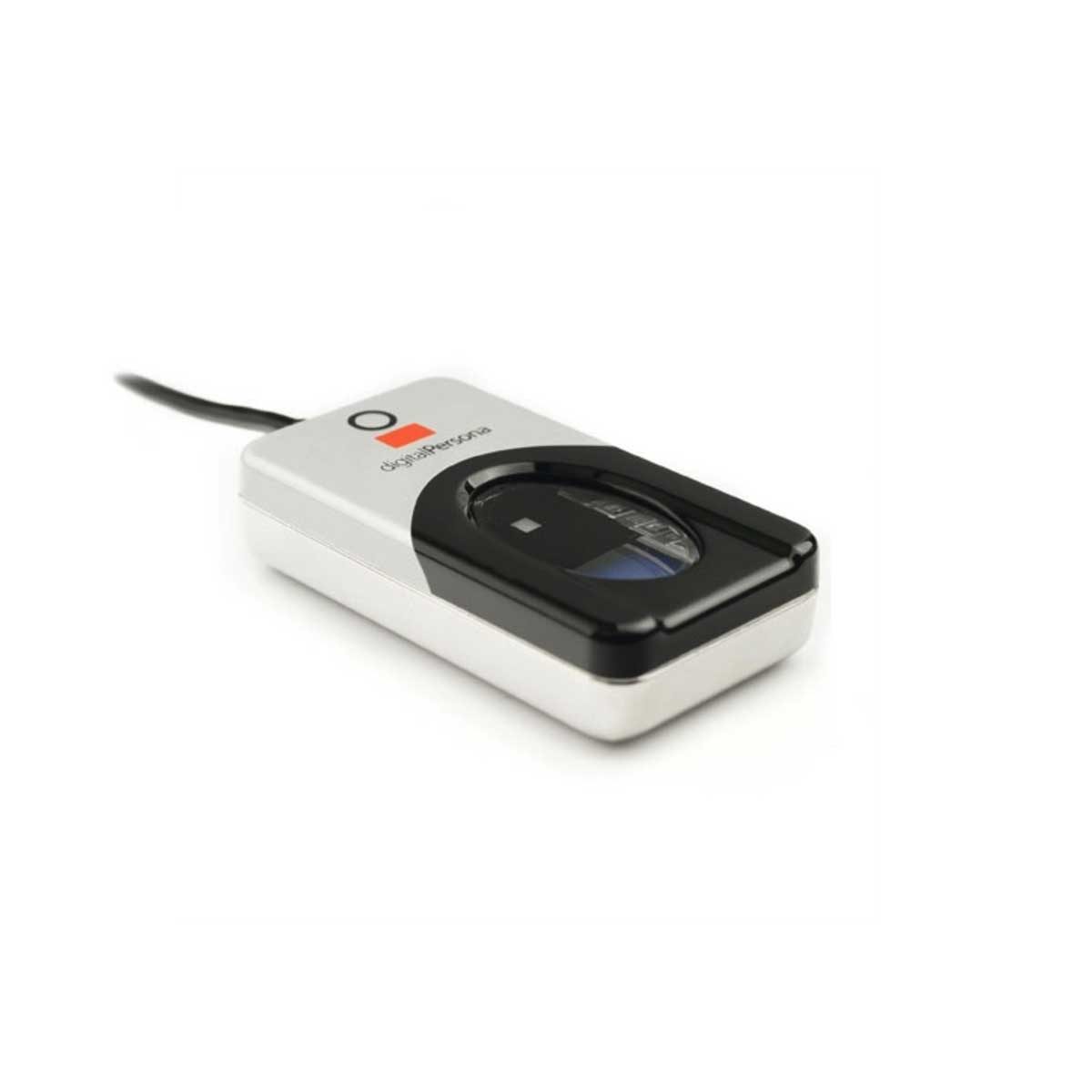
Something you are
A code from a phone app is an example of which authentication factor?
Difficulty 1/5 · 100 coins + a small bonus on first completion today
A token/phone code is "something you have". Two-factor combines it with a password ("know") or biometric ("are").
A fingerprint reader authenticates a user by something they ____.
Difficulty 1/5 · 100 coins + a small bonus on first completion today
Know (password), have (token), are (biometric feature). A biometric cannot be forgotten, lent or guessed.
Matching the measure to the threat
- Interception in transit: encrypt the data (HTTPS, a VPN 虚拟专用网). Intercepted ciphertext is useless without the key.
- Unauthorised access: strong authentication and two-factor, lock-out after failed logins. Internal misuse: the least-privilege 最小权限 principle, each user gets only what they need, plus auditing.
- Malware: anti-virus and anti-spyware with real-time scanning, and patching. Phishing: user training, email filtering, check the URL. DDoS: rate limiting and traffic filtering.
Match each threat to the security measure that best counters it.
Difficulty 2/5 · 140 coins + a small bonus on first completion today
Each threat has a best-fit defence — encrypt against interception, authenticate against intruders, patch against malware, limit privilege against insiders.
The best defence against data being intercepted in transit is to:
Difficulty 1/5 · 100 coins + a small bonus on first completion today
Encrypted data intercepted in transit is useless without the key. Authentication and antivirus address different threats.
Encryption
- Encryption scrambles plaintext 明文 with a key into ciphertext 密文, so an intercepted copy cannot be understood without the key; the receiver uses a key to decrypt it. It protects data in transmission and in storage.
- Symmetric encryption 对称加密 (AES) uses one shared key to encrypt and decrypt: fast, but the key itself must reach the receiver safely.
- Asymmetric encryption 非对称加密 (RSA) uses a public key 公钥 to encrypt and the matching private key 私钥 to decrypt. The public key can be given to anyone, which solves the key-sharing problem.

One shared key, or a public key to lock and a private key to unlock
Encrypt with a Caesar cipher
Change the shift — that is the key. Each letter slides that many places along the alphabet to make the ciphertext, and the same key slides it back. That shared key is symmetric encryption in miniature.
Asymmetric encryption (e.g. RSA) differs from symmetric (e.g. AES) because it:
Difficulty 1/5 · 100 coins + a small bonus on first completion today
Asymmetric uses a public/private key pair (solving key sharing); symmetric uses one shared key (fast).
Put symmetric encryption in order, from sender to receiver.
Difficulty 3/5 · 200 coins + a small bonus on first completion today
Symmetric encryption uses one shared key both to lock (encrypt) and unlock (decrypt) — anyone intercepting the ciphertext can't read it without that key.
Symmetric encryption uses one shared key, while asymmetric encryption uses a public key to encrypt and a private key to decrypt.
Difficulty 1/5 · 100 coins + a small bonus on first completion today
That public/private split is what lets asymmetric encryption solve the problem of sharing a key safely.
Worked example: how a digital signature authenticates a document
- Explain how a digital signature is used to authenticate a document. [5]
- The sender puts the message through a hash function to produce a digest. The sender encrypts the digest with their private key; that encrypted digest is the digital signature 数字签名.
- The message and the signature are sent together. The receiver decrypts the signature with the sender's public key to recover the digest.
- The receiver hashes the received message and compares the two digests. A match proves who sent it (only the private key could have made the signature) and that it was not altered (any change would alter the hash).
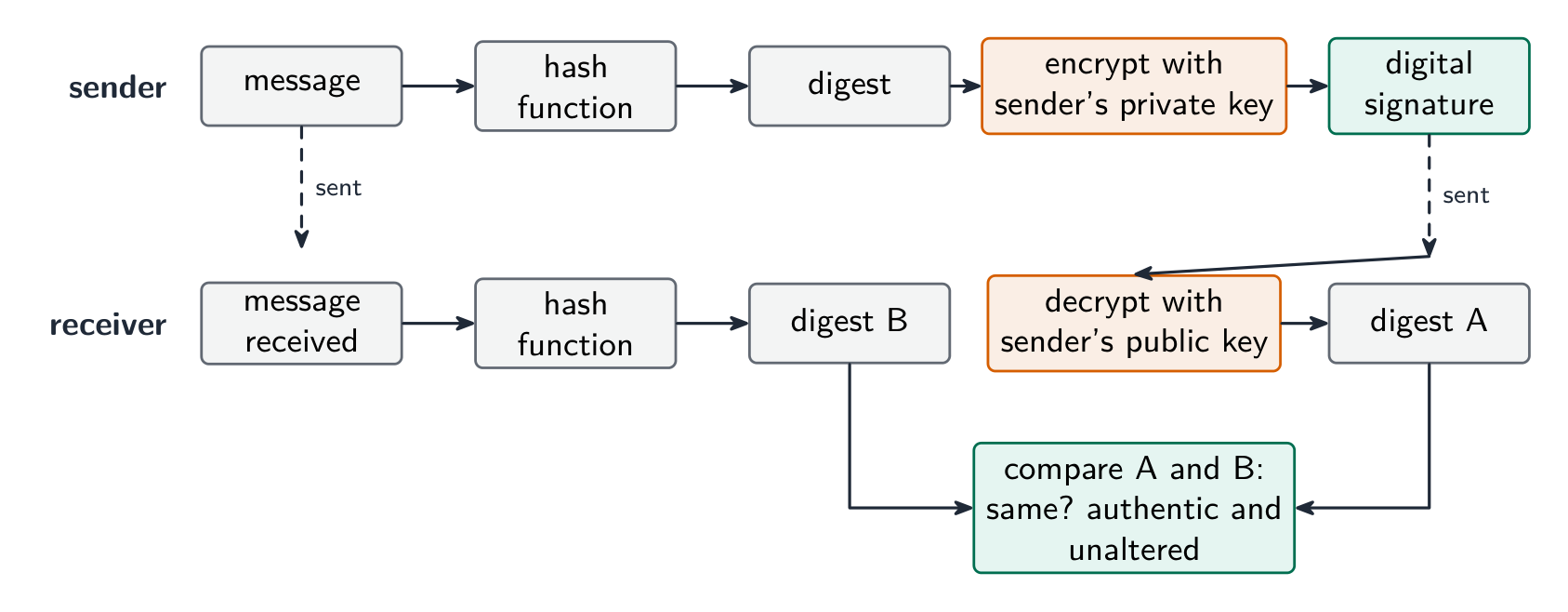
Sign the hash, not the message
Put the steps of sending and checking a digital signature in order.
Difficulty 3/5 · 200 coins + a small bonus on first completion today
Hash, sign with the private key, send, unlock with the public key, compare. A match proves the sender and that nothing changed.
Worked example: confidential data crossing the internet
- A company sends confidential data to a branch over the internet. Describe a method to keep it secure. [3]
- Encryption: the data is encoded with a key into ciphertext, so an unauthorised person who intercepts it cannot read it, and only the intended receiver, who has the key, can decode it.
- The same answer covers a program file emailed to a tester: encrypt the file or send it over an encrypted connection, with a password sent separately.
- Say what encryption does and does not do: it stops the data being read, not being intercepted or deleted.
Worked example: access rights in a database
- Describe how access rights protect the data in a database. [3]
- Each user is given an account with a username and password. The database administrator assigns each account permissions for each table: read-only, read and write, or no access.
- Users see only the tables and fields they are allowed to, so a customer cannot open the staff table and a clerk can read but not change the prices. The DBMS enforces this on every query.
With access rights, a clerk can be given permission to read the prices table but not to change it.
Difficulty 1/5 · 100 coins + a small bonus on first completion today
Permissions are set per account and per table: read-only, read and write, or no access. The DBMS enforces them on every query.
Marks that slip away
- Encryption protects confidentiality, not integrity. Use a checksum, parity or a check digit for integrity.
- Encryption does not stop interception or deletion; it stops the intercepted copy being read.
- A digital signature encrypts the hash of the message with the private key, not the message itself.
- Name the measure and how it works. "Firewall" alone earns nothing; "compares traffic with set criteria and blocks what fails" does.
You've got it
- layer the defences: password, antivirus, updates, backup, encryption → plus firewall, user accounts, access rights, audit logs → plus VPN, HTTPS, digital signatures
- authentication is something you know / have / are; 2FA combines two; biometrics compares a captured feature with stored data
- match measure to threat: interception → encryption; unauthorised access → authentication; internal → least privilege; malware → anti-virus and patching
- symmetric = one shared key; asymmetric = public key encrypts, private key decrypts; a digital signature is the hash encrypted with the private key