Skip to content · ⁨ข้ามไปยังเนื้อหา⁩

Databases · ⁨ฐานข้อมูล⁩

A-Level Computer Science · ⁨Computer Science A-Level⁩ · Topic 8 · ⁨หัวข้อ 8⁩

Video lesson for this topic · ⁨บทเรียนวิดีโอสำหรับหัวข้อนี้⁩ Open the video page · ⁨เปิดหน้าวิดีโอ⁩
17:18

ฐานข้อมูล & โมเดลเชิงสัมพันธ์

ก่อนมีฐานข้อมูล แต่ละโปรแกรมจะเก็บไฟล์แบนของตัวเอง — ไฟล์ละหนึ่งต่อโปรแกรม สมมติว่าเป็นร้านขายของ โปรแกรมขายของ โปรแกรมออกบิล และโปรแกรมจัดส่ง…

English narration · English + 中文 subtitles burned in · ⁨การบรรยายภาษาอังกฤษ · คำบรรยายภาษาอังกฤษ + 中文 ลอยตัวบนภาพ⁩

8.1

File-based storage and its limits · ⁨การจัดเก็บแบบไฟล์และข้อจำกัด⁩

Syllabus · ⁨หลักสูตร⁩
English
Candidates should be able to: Notes and guidance
Show understanding of the limitations of using a file-based approach for the storage and retrieval of data
Describe the features of a relational database that address the limitations of a file-based approach
Show understanding of and use the terminology associated with a relational database model Including entity, table, record, field, tuple, attribute, primary key, candidate key, secondary key, foreign key, relationship (one-to-many, one-to-one, many-to-many), referential integrity, indexing
Use an entity-relationship (E-R) diagram to document a database design
Show understanding of the normalisation process First Normal Form (1NF), Second Normal Form (2NF) and Third Normal Form (3NF)
Explain why a given set of database tables are, or are not, in 3NF
Produce a normalised database design for a description of a database, a given set of data, or a given set of tables
ไทย
ผู้เข้าสอบควรสามารถ: หมายเหตุและคำแนะนำ
แสดงความเข้าใจในข้อจำกัดของการใช้ วิธีการแบบไฟล์ (file-based approach) สำหรับการจัดเก็บและดึงข้อมูล
อธิบายคุณลักษณะของ ฐานข้อมูลเชิงสัมพันธ์ (relational database) ที่แก้ไขข้อจำกัดของวิธีการแบบไฟล์
แสดงความเข้าใจและใช้คำศัพท์ที่เกี่ยวข้องกับโมเดลฐานข้อมูลเชิงสัมพันธ์ รวมถึง entity, table, record, field, tuple, attribute, primary key, candidate key, secondary key, foreign key, relationship (one-to-many, one-to-one, many-to-many), referential integrity, indexing
ใช้แผนภาพ ** entity-relationship (E-R)** เพื่อบันทึกการออกแบบฐานข้อมูล
แสดงความเข้าใจในกระบวนการ normalisation First Normal Form (1NF), Second Normal Form (2NF) และ Third Normal Form (3NF)
อธิบายว่าทำไมชุดตารางฐานข้อมูลที่กำหนดมาจึงเป็นหรือไม่เป็น 3NF
สร้างการออกแบบฐานข้อมูลที่ผ่านการ normalise จากคำอธิบายฐานข้อมูล, ชุดข้อมูลที่กำหนด หรือชุดตารางที่กำหนด

Source: Cambridge International syllabus · ⁨แหล่งที่มา: หลักสูตร Cambridge International⁩

English

Before databases, programs stored data in flat files 平面文件 — usually one file per program. This is fine for small data but breaks down at scale.

Limitations

  • data redundancy 数据冗余 — the same data (a customer's address) is held in several files, one per program, so storage is wasted and every copy must be updated.
  • data inconsistency 数据不一致 — when one copy is updated and another is not, the files disagree and nobody knows which is right.
  • data dependence — each program is written for the exact layout of its files; change a field's length or add a field and every program that reads the file must be rewritten.
  • no shared access — a file is locked while one program uses it, so users cannot work on the data at the same time.
  • weak integrity 完整性 — no central rules stop an invalid value or a link to a customer who does not exist; weak security — access is per file, not per field; and queries across files need a new program each time.

A relational database 关系数据库 fixes these by storing data in tables managed by one piece of software (the DBMS) that all programs use.

Why a relational database is better — the three-mark answer. Each item of data is stored once, in one table, and tables are linked by keys, so there is no redundancy and no inconsistency; the data is independent of the programs, which ask the DBMS for what they need and are unaffected when the structure changes; and the DBMS enforces integrity rules, controls access per user and per field, allows many users at once, and answers any query without a new program being written.

Worked example. A repair shop stores its customers, devices and repair jobs using a file-based approach, one file per program. Give three problems this causes, and describe how a relational database would remove them.

The customer's name and phone number are stored in the repairs file and the invoices file (redundancy); when a customer changes number, one file is updated and the other is not (inconsistency); and when the shop wants a new report — repairs per technician — a new program has to be written to read the files (no ad-hoc queries). In a relational database the customer is stored once in a CUSTOMER table and referred to by CustomerID from the REPAIR table, so a change is made once and is seen everywhere; the report is a single SQL query.

ไทย

ก่อนมีฐานข้อมูล โปรแกรมจัดเก็บข้อมูลใน ไฟล์แบน (flat files) — โดยปกติเป็นไฟล์เดียวต่อโปรแกรม วิธีนี้ใช้ได้กับข้อมูลขนาดเล็กแต่จะล้มเหลวเมื่อขยายขนาด

มือกำลังค้นหาตู้เก็บเอกสารแบบบัตร索引
การจัดเก็บแบบไฟล์เก็บข้อมูลแยกกันเหมือนกระดาษในตู้เก็บเอกสาร — หาได้ยากและง่ายต่อการทำซ้ำ

ข้อจำกัด

  • ความซ้ำซ้อนของข้อมูล (data redundancy) — ข้อมูลเดียวกัน (เช่น ที่อยู่ลูกค้า) ถูกเก็บไว้ในหลายไฟล์ ไฟล์ละหนึ่งต่อโปรแกรม ทำให้พื้นที่จัดเก็บเสียเปล่าและต้องอัปเดตทุกสำเนา
  • ความไม่สอดคล้องของข้อมูล (data inconsistency) — เมื่ออัปเดตสำเนาหนึ่งแล้วอีกสำเนาไม่อัปเดต ไฟล์จะขัดแย้งกันและไม่มีใครรู้ว่าอันไหนถูกต้อง
  • ความขึ้นอยู่กับข้อมูล (data dependence) — แต่ละโปรแกรมถูกเขียนมาเพื่อรองรับรูปแบบไฟล์เฉพาะ; หากเปลี่ยนความยาวฟิลด์หรือเพิ่มฟิลด์ โปรแกรมทั้งหมดที่อ่านไฟล์นั้นต้องถูกเขียนใหม่
  • ไม่มีการใช้งานร่วมกัน — ไฟล์จะถูกล็อก mientras un programa lo usa ดังนั้นผู้ใช้ไม่สามารถทำงานกับข้อมูลพร้อมกันได้
  • ความสมบูรณ์ (integrity) อ่อน — ไม่มีกฎกลางใดป้องกันค่าที่ไม่ถูกต้องหรือลิงก์ไปยังลูกค้าที่ไม่มีอยู่; ความปลอดภัย (security) อ่อน — การเข้าถึงเป็นระดับไฟล์ ไม่ใช่ระดับฟิลด์; และ การถามคำถาม (queries) ข้ามไฟล์จำเป็นต้องใช้โปรแกรมใหม่ทุกครั้ง
โปรแกรม Payroll และ Sales เชื่อมต่อกับไฟล์ข้อมูลแยกกันแต่ละตัว sehingga Staff Number field ถูกจัดเก็บสองครั้ง
แนวทางแบบไฟล์: แต่ละโปรแกรมมีไฟล์ของตัวเอง

ฐานข้อมูลเชิงสัมพันธ์ (relational database) แก้ไขปัญหานี้โดยจัดเก็บข้อมูลใน ตาราง (tables) ที่จัดการโดยซอฟต์แวร์ชุดเดียว (DBMS) ซึ่งโปรแกรมทั้งหมดใช้ร่วมกัน

DBMS ชุดเดียวถือตารางออกแบบ กฎการตรวจสอบ สิทธิ์การเข้าถึง และข้อมูล พร้อมฐานข้อมูล.shared เดียว ใช้โดยทั้งแอปพลิเคชัน Payroll และ Sales
แนวทางฐานข้อมูล: DBMS ชุดเดียวให้บริการทุกโปรแกรม

ทำไมฐานข้อมูลเชิงสัมพันธ์ถึงดีกว่า — คำตอบ 3 คะแนน ข้อมูลแต่ละชิ้นถูกจัดเก็บ หนึ่งครั้ง ในตารางเดียว และตารางเชื่อมโยงกันด้วยคีย์ จึงไม่มีความซ้ำซ้อนและไม่มีความไม่สอดคล้อง; ข้อมูลเป็น อิสระ (independent) จากโปรแกรม which ask the DBMS for what they need and are unaffected when the structure changes; และ DBMS enforced integrity rules, controls access per user and per field, allows many users at once, และตอบ query ใดๆ ได้โดยไม่ต้องเขียนโปรแกรมใหม่

ตัวอย่างวิธีทำ ร้านซ่อมเก็บข้อมูลลูกค้า อุปกรณ์ และงานซ่อมโดยใช้แนวทางแบบไฟล์ ไฟล์ละหนึ่งต่อโปรแกรม ให้ระบุปัญหา 3 ประเด็นที่เกิดจากสิ่งนี้ และอธิบายว่าฐานข้อมูลเชิงสัมพันธ์จะขจัดปัญหาเหล่านั้นได้อย่างไร

ชื่อและเบอร์โทรศัพท์ของลูกค้าถูกจัดเก็บในไฟล์การซ่อม และ ไฟล์ใบแจ้งหนี้ (redundancy); เมื่อลูกค้าเปลี่ยนเบอร์ ไฟล์หนึ่งถูกอัปเดตและอีกไฟล์ไม่ (inconsistency); และเมื่อร้านต้องการรายงานใหม่ — การซ่อมต่อช่างเทคนิค — ต้องเขียนโปรแกรมใหม่เพื่ออ่านไฟล์ (no ad-hoc queries). ในฐานข้อมูลเชิงสัมพันธ์ ลูกค้าถูกจัดเก็บหนึ่งครั้งในตาราง CUSTOMER และอ้างอิงด้วย CustomerID จากตาราง REPAIR sehingga change is made once and is seen everywhere; รายงานเป็น SQL query เดียว

Vocabulary · ⁨คำศัพท์⁩ Train · ⁨ฝึกฝน⁩
English ไทย
flat files/flæt faɪlz/ ไฟล์แบน
data redundancy/ˈdeɪtə rɪˈdʌndənsi/ ความซ้ำซ้อนของข้อมูล
data inconsistency/ˈdeɪtə ˌɪnkənˈsɪstənsi/ ความไม่สอดคล้องกันของข้อมูล
field/fiːld/ ฟิลด์
integrity/ɪnˈteɡrɪti/ ความถูกต้องสมบูรณ์
relational database/rɪˈleɪʃənl ˈdeɪtəbeɪs/ ฐานข้อมูลเชิงสัมพันธ์
table/ˈteɪbl/ ตาราง
DBMS/ˌdiː biː em ˈes/ ระบบจัดการฐานข้อมูล
query/ˈkwɪərɪ/ การค้นหาข้อมูล
SQL/ˌes kjuː ˈel/ SQL
8.1

Relational model — terms · ⁨โมเดลเชิงสัมพันธ์ — คำศัพท์⁩

English
  • table 表 (relation) — a grid of rows and columns; one table per type of entity 实体 (e.g. CUSTOMER).
  • record 记录 (row, also called a tuple 元组) — one row; one instance of the entity.
  • field 字段 (column, also called an attribute 属性) — one column; one piece of information about each record.
  • primary key 主键 — a field (or fields) that uniquely identifies each record; never null or duplicated.
  • foreign key 外键 — a field whose value matches the primary key of another table, linking the two.
  • composite key 复合键 — a primary key made of two or more fields together.
  • candidate key 候选键 — any field(s) that could be the primary key.
  • secondary key 次键 — a non-primary field that is indexed for fast searching.
  • indexing 索引 — building an index on a field so look-ups and joins run faster.
  • referential integrity 参照完整性 — every foreign-key value must match an existing primary key (no orphan records).

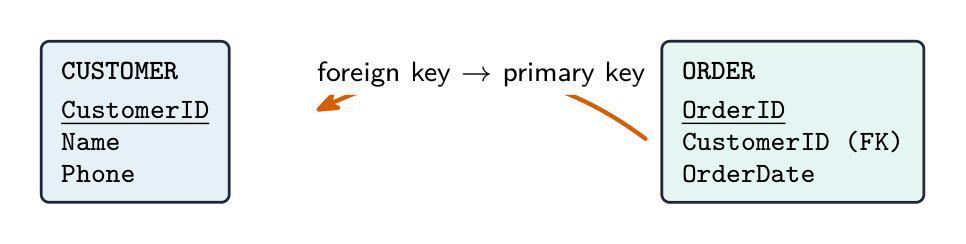
A table is written in shorthand with the primary key underlined and foreign keys noted:

Worked example. State what is meant by entity, primary key and referential integrity in a relational database, and complete the term ↔ description table for tuple and attribute.

An entity is something about which data is stored — a person, object or event — which becomes one table. A primary key is the attribute (or combination of attributes) that uniquely identifies each record in a table. Referential integrity means that every foreign-key value must match the value of a primary key in the table it refers to, so a record cannot refer to one that does not exist. A tuple is one row of a table (one record); an attribute is one column (one field). Learn the pairs: table/relation, record/tuple, field/attribute.

ไทย
  • ตาราง (relation) — กริดของแถวและคอลัมน์; ตารางหนึ่งต่อประเภทของ เอนทิตี (entity) (เช่น CUSTOMER).
  • บันทึก (record / row หรือ tuple) — แถวหนึ่ง;实例ของเอนทิตีหนึ่ง
  • ฟิลด์ (field / column หรือ attribute) — คอลัมน์หนึ่ง; ข้อมูลเกี่ยวกับบันทึกแต่ละชิ้นหนึ่งส่วน
  • คีย์หลัก (primary key) — ฟิลด์ (หรือ一组 fields) ที่ ระบุตัวตนของบันทึกอย่างชัดเจน; ไม่อาจเป็น null หรือซ้ำได้
  • คีย์ภายนอก (foreign key) — ฟิลด์whose value matches the primary key of another table, linking the two
  • คีย์รวม (composite key) — คีย์หลัก consisting of two or more fields together
  • คีย์ทางเลือก (candidate key) — ฟิลด์(们) ใดก็ได้ที่ could be the primary key
  • คีย์รอง (secondary key) — ฟิลด์ที่ไม่ใช่ primary key ที่ถูก index เพื่อการค้นหาอย่างรวดเร็ว
  • การทำดัชนี (indexing) — การสร้าง index บนฟิลด์เพื่อให้ look-ups และ joins เร็วขึ้น
  • ความสมบูรณ์ของการอ้างอิง (referential integrity) — ค่า foreign-key ทุกค่าต้องตรงกับ primary key ที่มีอยู่จริง (ไม่มี orphan records)

ตารางเขียนแบบย่อโดยขีดเส้นใต้ primary key และหมายเหตุ foreign keys:

CUSTOMER(CustomerID, Name, Phone)
ORDER(OrderID, CustomerID, OrderDate)   -- CustomerID is FK → CUSTOMER
สองตารางเชื่อมต่อกันด้วย foreign key: ตาราง CUSTOMER มี primary key เป็น CustomerID; ตาราง ORDER มี primary key ของตัวเองคือ OrderID plus a CustomerID foreign key whose value matches a CustomerID in CUSTOMER
Foreign key เชื่อมสองตาราง: ORDER.CustomerID ตรงกับ primary key ของ CUSTOMER.CustomerID

ตัวอย่างวิธีทำ ระบุความหมายของ entity, primary key และ referential integrity ในฐานข้อมูลเชิงสัมพันธ์ และเติมตารางคำศัพท์ ↔ คำอธิบายสำหรับ tuple และ attribute

เอนทิตี (entity) คือสิ่งที่จัดเก็บข้อมูลเกี่ยวกับมัน — บุคคล วัตถุ หรือเหตุการณ์ — ซึ่งกลายเป็นตารางหนึ่ง คีย์หลัก (primary key) คือ attribute (or combination of attributes) ที่ระบุตัวตนของบันทึกแต่ละตัวในตารางอย่างชัดเจน ความสมบูรณ์ของการอ้างอิง (referential integrity) หมายความว่าค่า foreign-key ทุกค่าต้องตรงกับค่าของ primary key ในตารางที่มันอ้างถึง sehingga record cannot refer to one that does not exist. Tuple คือแถวหนึ่งของตาราง (one record); attribute คือคอลัมน์หนึ่ง (one field). เรียนรู้คู่: table/relation, record/tuple, field/attribute

Explore · ⁨สำรวจ⁩

Read a relational table with SELECT · ⁨อ่านตารางเชิงสัมพันธ์ด้วย SELECT⁩

A relational table is just rows (records) and columns (fields). WHERE keeps the rows that match a condition; SELECT then keeps only the columns you asked for. · ⁨ตารางเชิงสัมพันธ์คือแถว (บันทึก) และคอลัมน์ (ฟิลด์) WHERE กรองแถวที่ตรงกับเงื่อนไข; SELECT จากนั้นเก็บเพียงคอลัมน์ที่คุณขอเท่านั้น⁩

Vocabulary · ⁨คำศัพท์⁩ Train · ⁨ฝึกฝน⁩
English ไทย
entity/ˈentɪti/ เอนทิตี้
record/ˈrekɔːd/ record
tuple/ˈtuːpl/ ทูเพิล
attribute/ˈætrɪbjuːt/ แอททริบิวต์
primary key/ˈpraɪməri kiː/ คีย์หลัก
foreign key/ˈfɒrən kiː/ คีย์อ้างอิง
composite key/ˈkɒmpəzɪt kiː/ คีย์ผสม
candidate key/ˈkændɪdeɪt kiː/ คีย์ผู้สมัคร
secondary key/ˈsekəndəri kiː/ คีย์รอง
indexing/ˈɪndeksɪŋ/ การทำดัชนี
join/dʒɔɪn/ เชื่อมต่อ
referential integrity/ˌrefəˈrenʃl ɪnˈteɡrɪti/ ความสมบูรณ์ของการอ้างอิง
entity-relationship diagram/ˈentɪti rɪˈleɪʃənʃɪp ˈdaɪəɡræm/ แผนภาพความสัมพันธ์ของเอนทิตี้
8.1

Entity-relationship (E-R) diagrams · ⁨แผนภาพความสัมพันธ์-เอนทิตี (E-R diagrams)⁩

English

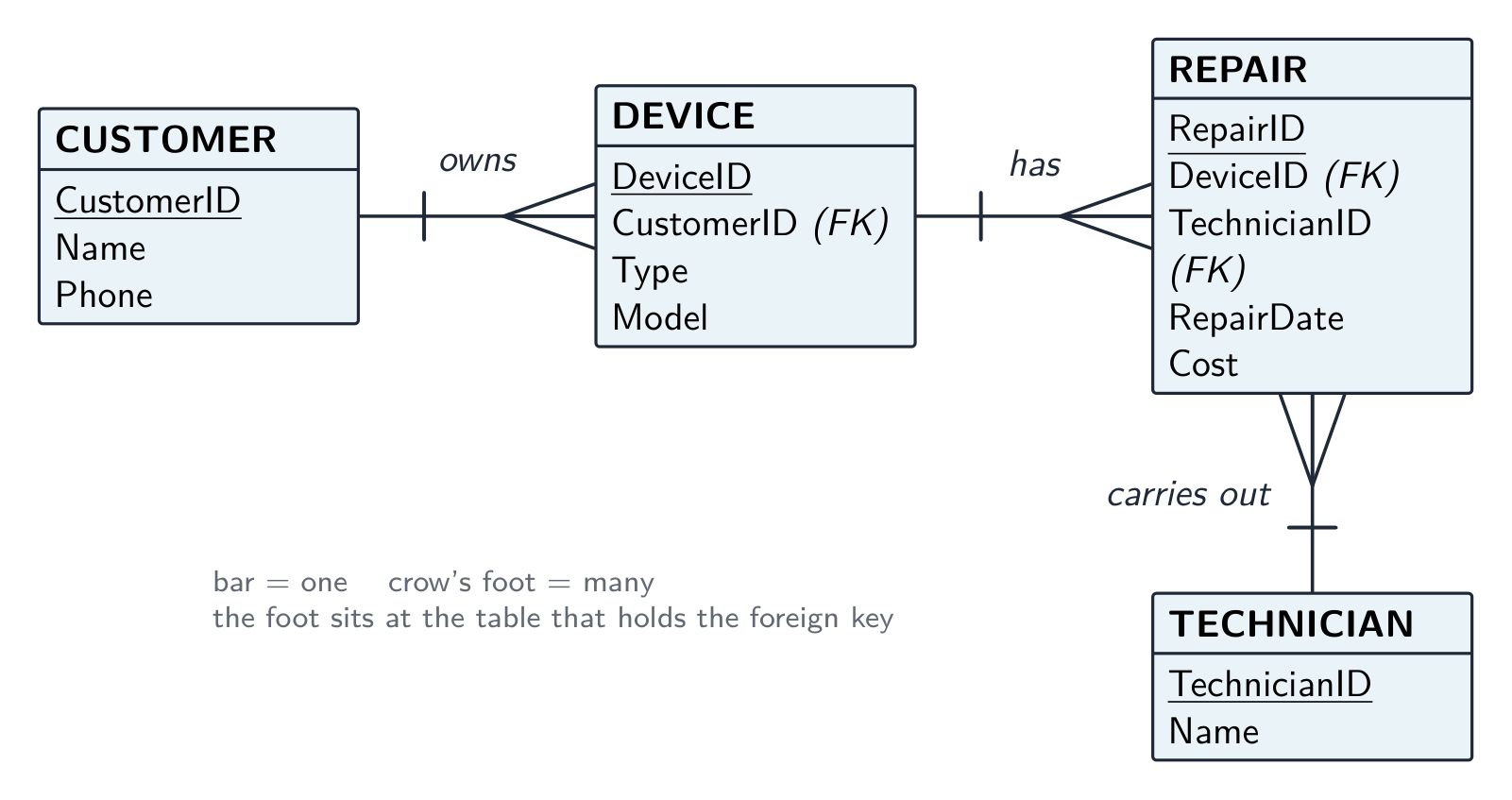
An entity-relationship diagram 实体关系图 shows the structure: each entity is a rectangle, each relationship a line, with the cardinality 基数 marked at each end:

  • one-to-one (1:1).
  • one-to-many 一对多 (1:M) — each Customer has many Orders; each Order has one Customer.
  • many-to-many (M:N) — Students take many Courses, and Courses have many Students.

A many-to-many relationship cannot be stored directly. Break it into two one-to-many relationships through a link table 连接表 holding the two foreign keys:

Drawing the E-R diagram for a given set of tables. Each table becomes an entity. A relationship exists wherever one table holds a foreign key to another; it runs from the table holding the foreign key (the many end) to the table whose primary key it is (the one end). A table with two foreign keys and no other identity is usually a link table resolving a many-to-many relationship. Label each line with the relationship type.

Worked example. A repair shop has the tables CUSTOMER(CustomerID, Name, Phone), DEVICE(DeviceID, CustomerID, Type, Model), TECHNICIAN(TechnicianID, Name) and REPAIR(RepairID, DeviceID, TechnicianID, RepairDate, Cost). Identify the relationships and their types.

DEVICE holds CustomerID, so CUSTOMER–DEVICE is one-to-many (one customer, many devices). REPAIR holds DeviceID, so DEVICE–REPAIR is one-to-many; it also holds TechnicianID, so TECHNICIAN–REPAIR is one-to-many. There is no direct CUSTOMER–REPAIR line: the link runs through DEVICE. Three lines, three crow's feet, all at the REPAIR or DEVICE ends.

ไทย

แผนภาพความสัมพันธ์-เอนทิตี แสดงโครงสร้าง: เอนทิตีแต่ละตัวเป็นสี่เหลี่ยมผืนผ้า ความสัมพันธ์แต่ละตัวเป็นเส้น พร้อม cardinality ที่ระบุไว้ที่ปลายทั้งสองข้าง:

  • **หนึ่งต่อหนึ่ง (one-to-one / 1:1)
  • หนึ่งต่อหลาย (1:M) — ลูกค้าแต่ละคนมีคำสั่งซื้อหลายรายการ; คำสั่งซื้อแต่ละรายการมีลูกค้าเพียงคนเดียว
  • หลายต่อหลาย (M:N) — นักเรียนเรียนหลายวิชา และวิชามีนักเรียนหลายคน
แผนภาพ E-R ที่มีเอนทิตี STUDENT และ CLASS เชื่อมต่อกันด้วยเส้นความสัมพันธ์ มีสัญลักษณ์ "เท้านก" (crow's-foot) ที่ด้านนักเรียนและขีดเดียวที่ด้านคลาส
แผนภาพ E-R: คลาสหนึ่งมีนักเรียนหลายคน
สัญลักษณ์ปลายเส้นเท้านกสำหรับจำนวนครั้ง: หนึ่ง, หลาย, หนึ่งเท่านั้น, ศูนย์หรือหนึ่ง, หนึ่งหรือหลาย, และศูนย์หรือหลาย
สัญลักษณ์เท้านกสำหรับความเข้มแข็งของความสัมพันธ์

ความสัมพันธ์แบบหลายต่อหลายไม่สามารถจัดเก็บได้โดยตรง ให้แยกออกเป็นความสัมพันธ์แบบหนึ่งต่อหลายสองทางผ่าน ตารางเชื่อมโยง ที่เก็บคีย์ภายนอกทั้งสอง:

ENROLMENT(StudentID, CourseID, EnrolmentDate)
ความสัมพันธ์หลายต่อหลายระหว่าง STUDENT และ COURSE จัดเก็บเป็นความสัมพันธ์หนึ่งต่อหลายสองทางผ่านตารางเชื่อมโยง ENROLMENT ที่เก็บ StudentID และ CourseID
ตารางเชื่อมโยงช่วยแก้ปัญหาความสัมพันธ์หลายต่อหลายให้กลายเป็นความสัมพันธ์หนึ่งต่อหลายสองทาง

การวาดแผนภาพ E-R จากชุดตารางที่กำหนด แต่ละตารางจะกลายเป็นเอนทิตี ความสัมพันธ์เกิดขึ้นทุกครั้งที่ตารางหนึ่งมี คีย์ภายนอก ไปยังอีกตารางหนึ่ง โดยเส้นจะลากจากตารางที่มีคีย์ภายนอก (ด้าน หลาย) ไปยังตารางที่เป็น primary key ของมัน (ด้าน หนึ่ง) ตารางที่มีคีย์ภายนอกสองตัวและไม่มีเอกลักษณ์อื่นมักจะเป็น ตารางเชื่อมโยง ที่ใช้แก้ความสัมพันธ์หลายต่อหลาย ให้ระบุชนิดความสัมพันธ์บนเส้นแต่ละเส้น

แผนภาพ E-R สำหรับฐานข้อมูลร้านซ่อมที่มีสี่เอนทิตี: CUSTOMER เป็น one-to-many กับ DEVICE, DEVICE เป็น one-to-many กับ REPAIR และ TECHNICIAN เป็น one-to-many กับ REPAIR พร้อมสัญลักษณ์เท้านกและแสดง primary keys กับ foreign keys
การวาดแผนภาพจากตาราง: c钥匙ภายนอกทั้งหมดคือความสัมพันธ์ one-to-many โดยด้าน "many" จะอยู่ที่ตารางที่เก็บคีย์นั้น

ตัวอย่างปฏิบัติ ร้านซ่อมมีตาราง CUSTOMER(CustomerID, Name, Phone), DEVICE(DeviceID, CustomerID, Type, Model), TECHNICIAN(TechnicianID, Name) และ REPAIR(RepairID, DeviceID, TechnicianID, RepairDate, Cost) ระบุความสัมพันธ์และชนิดของมัน

DEVICE เก็บ CustomerID ดังนั้น CUSTOMER–DEVICE จึงเป็น one-to-many (ลูกค้าหนึ่งคน, อุปกรณ์หลายชิ้น) REPAIR เก็บ DeviceID ดังนั้น DEVICE–REPAIR จึงเป็น one-to-many;它还เก็บ TechnicianID ดังนั้น TECHNICIAN–REPAIR จึงเป็น one-to-many ไม่มีเส้นตรงระหว่าง CUSTOMER–REPAIR: เส้นเชื่อมวิ่งผ่าน DEVICE สามเส้นสามเท้านก ทั้งหมดอยู่ปลาย REPAIR หรือ DEVICE

Vocabulary · ⁨คำศัพท์⁩ Train · ⁨ฝึกฝน⁩
English ไทย
cardinality/ˌkɑːdɪˈnælɪti/ cardinality
one-to-many/wʌn tə ˈmeni/ หนึ่งต่อหลาย (one-to-many)
link table/lɪŋk ˈteɪbl/ ลิงก์เทเบิล
8.1

Normalisation · ⁨การทำให้เป็นมาตรฐาน (Normalisation)⁩

English

Normalisation 规范化 organises tables to cut redundancy and inconsistency, going through normal forms 范式 in order.

  • First normal form (1NF) — every field holds a single (atomic 原子) value, with no repeating groups, and a primary key.
  • Second normal form (2NF) — in 1NF, and every non-key field depends on the whole primary key (only matters for a composite key).
  • Third normal form (3NF) — in 2NF, and every non-key field depends only on the primary key, not on another non-key field (no transitive dependency 传递依赖).

A 3NF design stores each fact once, so insert/update/delete anomalies disappear. The trade-off is more tables and more joins. Aim for 3NF.

To produce a 3NF design: find the entities and their attributes; choose a primary key for each; split repeating/non-atomic fields (1NF); split fields depending on part of a composite key (2NF); split fields depending transitively on the key (3NF); add foreign keys for the relationships.

Worked example. The table ORDER(OrderID, CustomerID, CustomerName, ProductID, Quantity) has the composite primary key (OrderID, ProductID). Normalise it to 3NF. Test each non-key field against the key. Quantity depends on both OrderID and ProductID, which is fine. But CustomerID depends on OrderID alone - only part of the composite key. That is a partial dependency, so the table is not in 2NF. Split it into ORDER_LINE(OrderID, ProductID, Quantity) and ORDER(OrderID, CustomerID, CustomerName). Now test 3NF: in that new ORDER table, CustomerName depends on CustomerID, which is not the key - a transitive dependency. Split again: ORDER(OrderID, CustomerID) and CUSTOMER(CustomerID, CustomerName). Name the dependency that breaks each form (partial breaks 2NF, transitive breaks 3NF); "it has repeated data" describes the symptom and earns nothing.

The three questions to ask of any table. Is every cell a single value, with no repeating group? If not, it is not in 1NF. If the key is composite, does every non-key field depend on the whole key? If some field depends on part of it, there is a partial dependency 部分依赖 and the table is not in 2NF. Does every non-key field depend on the key alone? If a field depends on another non-key field, there is a transitive dependency and the table is not in 3NF. An "explain why the table is not in 3NF" answer names the dependency and the fields involved.

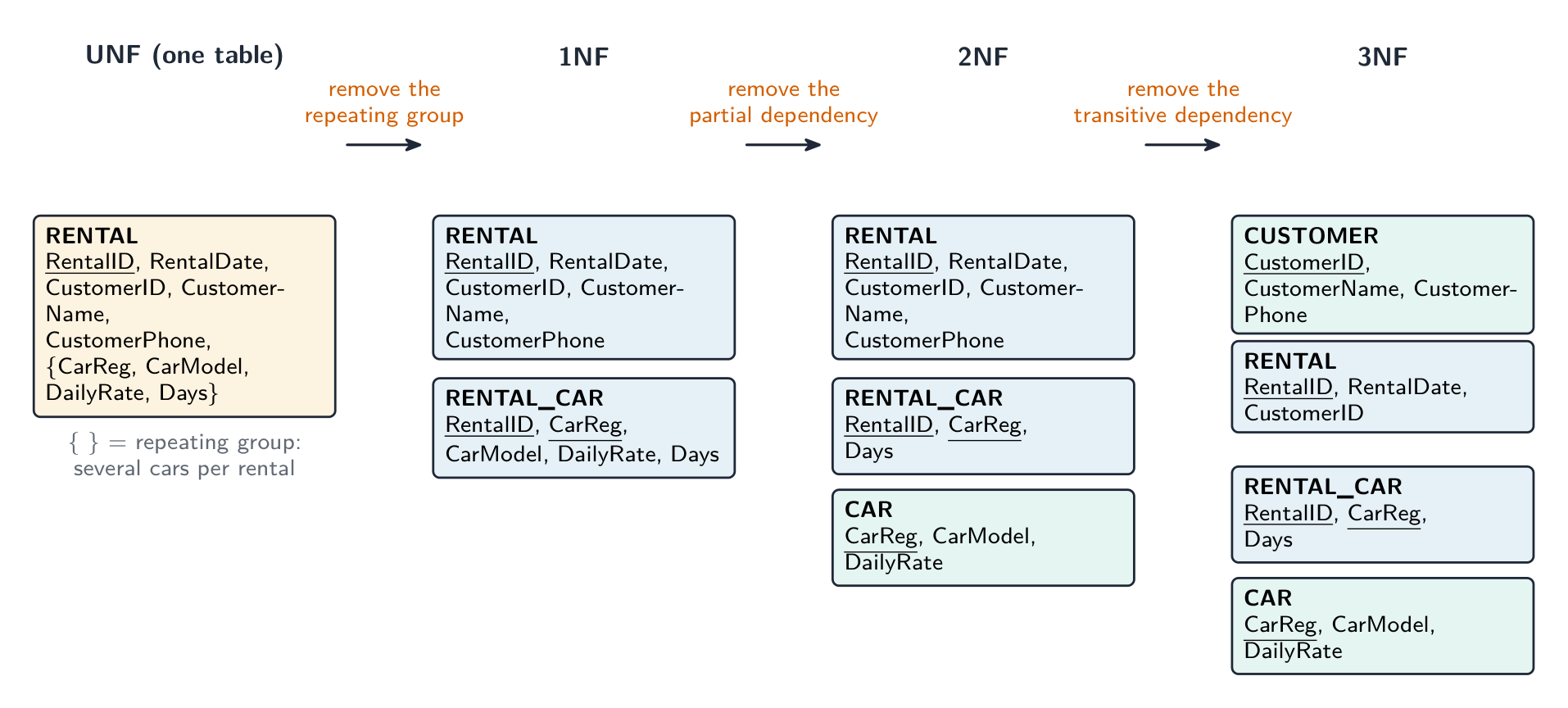
Worked example. A car-rental shop records each rental as RENTAL(RentalID, RentalDate, CustomerID, CustomerName, CustomerPhone, CarReg, CarModel, DailyRate, Days), where one rental can include several cars. Explain why the table is not normalised and produce a 3NF design.

Not in 1NF: the car fields CarReg, CarModel, DailyRate, Days form a repeating group — one rental has several cars. Move them to RENTAL_CAR(RentalID, CarReg, CarModel, DailyRate, Days) with the composite key (RentalID, CarReg). Not in 2NF: in RENTAL_CAR, CarModel and DailyRate depend on CarReg alone — a partial dependency. Move them to CAR(CarReg, CarModel, DailyRate), leaving RENTAL_CAR(RentalID, CarReg, Days). Not in 3NF: in RENTAL, CustomerName and CustomerPhone depend on CustomerID, a non-key field — a transitive dependency. Move them to CUSTOMER(CustomerID, CustomerName, CustomerPhone), leaving RENTAL(RentalID, RentalDate, CustomerID). The 3NF design is four tables — CUSTOMER, RENTAL, RENTAL_CAR, CAR — with CustomerID, RentalID and CarReg as foreign keys; underline every primary key.

ไทย

การทำให้เป็นมาตรฐาน จัดระเบียบตารางเพื่อ ลดความซ้ำซ้อนและความไม่สอดคล้องกัน ผ่าน รูปแบบมาตรฐาน ตามลำดับ

  • รูปแบบมาตรฐานแรก (1NF) — ทุกฟิลด์มีค่าเดียว (อะตอม) ไม่มีการกลุ่มซ้ำ และมี primary key
  • รูปแบบมาตรฐานที่สอง (2NF) — อยู่ใน 1NF และทุกฟิลด์ที่ไม่ใช่คีย์ขึ้นอยู่กับ primary key ทั้งหมดย่อย (สำคัญเฉพาะเมื่อเป็น composite key)
  • รูปแบบมาตรฐานที่สาม (3NF) — อยู่ใน 2NF และทุกฟิลด์ที่ไม่ใช่คีย์ขึ้นอยู่กับ primary key เพียงอย่างเดียว ไม่ใช่ฟิลด์ที่ไม่ใช่คีย์อื่น (ไม่มี การพึ่งพาลูกโซ่/Transitive dependency)

การออกแบบ 3NF เก็บข้อเท็จจริงแต่ละอย่างไว้เพียงครั้งเดียว ทำให้เกิดปัญหา insert/update/delete anomaly ลดลง ผลแลกเปลี่ยนคือมีตารางมากขึ้นและการ join มากขึ้น เป้าหมายคือการถึง 3NF

ในการสร้างการออกแบบ 3NF: หาเอนทิตีและแอททริบิวต์它们的; เลือก primary key สำหรับแต่ละอัน; แยกฟิลด์ซ้ำ/ไม่อะตอม (1NF); แยกฟิลด์ที่ขึ้นอยู่กับส่วนหนึ่งของ composite key (2NF); แยกฟิลด์ที่ขึ้นอยู่กับ key แบบลูกโซ่ (3NF); เพิ่ม foreign keys สำหรับความสัมพันธ์

การทำให้เป็นมาตรฐาน: ตารางหนึ่งที่มีชื่อลูกค้าและโทรศัพท์ซ้ำในคำสั่งซื้อทุกบรรทัด ถูกแยกเป็นตาราง ORDER และ CUSTOMER แยกต่างหาก เพื่อให้เก็บข้อเท็จจริงไว้เพียงครั้งเดียว
การทำให้เป็นมาตรฐานลดความซ้ำซ้อนโดยการแยกข้อมูลที่ซ้ำกันไปไว้ในตารางของตัวเอง

ตัวอย่างปฏิบัติ ตาราง ORDER(OrderID, CustomerID, CustomerName, ProductID, Quantity) มี primary key แบบผสม (OrderID, ProductID) ทำให้เป็นมาตรฐานถึง 3NF ทดสอบฟิลด์ที่ไม่ใช่คีย์แต่ละตัวกับ key Quantity ขึ้นอยู่กับ ทั้ง OrderID และ ProductID ซึ่งได้ผลดี แต่ CustomerID ขึ้นอยู่กับ OrderID เพียงอย่างเดียว - ซึ่งเป็นเพียง ส่วน ของ composite key นั่นคือ partial dependency ดังนั้นตารางนี้จึงไม่ใช่ 2NF แยกออกเป็น ORDER_LINE(OrderID, ProductID, Quantity) และ ORDER(OrderID, CustomerID, CustomerName) ตอนนี้ทดสอบ 3NF: ในตาราง ORDER ใหม่的那 CustomerName ขึ้นอยู่กับ CustomerID ซึ่ง ไม่ใช่ key - เกิด transitive dependency แยกอีกครั้ง: ORDER(OrderID, CustomerID) และ CUSTOMER(CustomerID, CustomerName) ตั้งชื่อ dependency ที่ทำลายรูปแบบมาตรฐานแต่ละระดับ (partial ทำลาย 2NF, transitive ทำลาย 3NF); "มีข้อมูลซ้ำ" อธิบายอาการแต่ไม่ได้คะแนน

คำถามสามข้อที่ต้องถามกับตารางใดๆ เซลล์ทุกเซลล์เป็นค่าเดียวโดยไม่มีการกลุ่มซ้ำหรือไม่? ถ้าไม่ใช่就不是 1NF ถ้า key เป็นแบบผสม ฟิลด์ที่ไม่ใช่ key ขึ้นอยู่กับ key ทั้งหมดย่อยหรือไม่? ถ้าฟิลด์ใดฟิลด์หนึ่งขึ้นอยู่กับส่วนหนึ่งของ key จะมี partial dependency และตารางไม่ใช่ 2NF ฟิลด์ที่ไม่ใช่ key ขึ้นอยู่กับ key เพียงอย่างเดียวหรือไม่? ถ้าฟิลด์ขึ้นอยู่กับฟิลด์ที่ไม่ใช่ key อีกฟิลด์หนึ่ง จะมี transitive dependency และตารางไม่ใช่ 3NF คำตอบสำหรับ "อธิบายทำไมตารางจึงไม่ใช่ 3NF" ต้องระบุ dependency และฟิลด์ที่เกี่ยวข้อง

การทำให้เป็นมาตรฐานตารางเช่ารถในสามขั้นตอน: กลุ่มรถซ้ำถูกกำจัดออกเพื่อ 1NF, รายละเอียดรถที่ขึ้นอยู่กับ CarReg เพียงอย่างเดียวย้ายไปยังตาราง CAR เพื่อ 2NF, และรายละเอียดลูกค้าที่ขึ้นอยู่กับ CustomerID ย้ายไปยังตาราง CUSTOMER เพื่อ 3NF
1NF กำจัดกลุ่มซ้ำ, 2NF กำจัด partial dependency, 3NF กำจัด transitive dependency

ตัวอย่างปฏิบัติ ร้านเช่ารถบันทึกการเช่าแต่ละครั้งใน RENTAL(RentalID, RentalDate, CustomerID, CustomerName, CustomerPhone, CarReg, CarModel, DailyRate, Days) ซึ่งหนึ่งการเช่าสามารถรวมรถได้หลายคัน อธิบายว่าทำไมตารางนี้ยังไม่ผ่านการทำให้เป็นมาตรฐานและสร้างการออกแบบ 3NF

ไม่เป็น 1NF:-fields ของรถยนต์ CarReg, CarModel, DailyRate, Days สร้าง กลุ่มซ้ำซ้อน — การเช่าหนึ่งครั้งมีหลายคัน ย้ายไป RENTAL_CAR(RentalID, CarReg, CarModel, DailyRate, Days) พร้อมคีย์ผสม (RentalID, CarReg) ไม่เป็น 2NF: ใน RENTAL_CAR, CarModel และ DailyRate ขึ้นอยู่กับ CarReg เพียงอย่างเดียว — การพึ่งพาบางส่วน ย้ายไป CAR(CarReg, CarModel, DailyRate) ทิ้งไว้ที่ RENTAL_CAR(RentalID, CarReg, Days) ไม่เป็น 3NF: ใน RENTAL, CustomerName และ CustomerPhone ขึ้นอยู่กับ CustomerID ซึ่งเป็นฟิลด์ที่ไม่ใช่คีย์ — การพึ่งพาส่งผ่าน ย้ายไป CUSTOMER(CustomerID, CustomerName, CustomerPhone) ทิ้งไว้ที่ RENTAL(RentalID, RentalDate, CustomerID). การออกแบบ 3NF มีสี่ตาราง — CUSTOMER, RENTAL, RENTAL_CAR, CAR — โดยมี CustomerID, RentalID และ CarReg เป็นคีย์ภายนอก; ขีดเส้นใต้ทุกคีย์หลัก

Vocabulary · ⁨คำศัพท์⁩ Train · ⁨ฝึกฝน⁩
English ไทย
normalisation/ˌnɔːməlaɪˈzeɪʃn/ การปรับมาตรฐาน
normal forms/ˈnɔːml fɔːmz/ รูปแบบมาตรฐาน
transitive dependency/ˈtrænsɪtɪv dɪˈpendənsi/ การขึ้นอยู่แบบผ่านกลาง
partial dependency/ˈpɑːʃl dɪˈpendənsi/ การขึ้นต่อกันบางส่วน
8.2

Database Management System (DBMS) · ⁨ระบบจัดการฐานข้อมูล (DBMS)⁩

Syllabus · ⁨หลักสูตร⁩
English
Candidates should be able to: Notes and guidance
Show understanding of the features provided by a Database Management System (DBMS) that address the issues of a file based approach Including: • data management, including maintaining a data dictionary • data modelling • logical schema • data integrity • data security, including backup procedures and the use of access rights to individuals / groups of users
Show understanding of how software tools found within a DBMS are used in practice Including the use and purpose of: • developer interface • query processor
ไทย
ผู้เข้าสอบควรสามารถ: หมายเหตุและคำแนะนำ
แสดงความเข้าใจในคุณสมบัติที่ระบบ Database Management System (DBMS) ให้来解决ปัญหาของวิธีการแบบไฟล์ รวมถึง: • data management, بماการรักษา data dictionary • data modelling • logical schema • data integrity • data security, รวมถึงขั้นตอนการสำรองข้อมูลและการใช้สิทธิ์การเข้าถึงของผู้ใช้รายบุคคล/กลุ่มผู้ใช้
แสดงความเข้าใจว่าการใช้เครื่องมือซอฟต์แวร์ภายใน DBMS เป็นอย่างไรในทางปฏิบัติ รวมถึงการใช้และวัตถุประสงค์ของ: • developer interface • query processor

Source: Cambridge International syllabus · ⁨แหล่งที่มา: หลักสูตร Cambridge International⁩

English

A DBMS 数据库管理系统 manages the database centrally. Features that fix the file-based limits:

  • data dictionary 数据字典 — a description of every table, field, type and key; programs query it instead of hard-coding the structure.
  • redundancy/consistency control — each fact stored once.
  • concurrent access 并发访问 control — locks and transactions let many users work at once.
  • backup 备份 and recovery; security and per-user permissions.
  • integrity rules — keys, unique and range constraints, enforced centrally.
  • transactions 事务 — a group of operations that all succeed or all fail.
  • views 视图 — virtual tables that show each user "their" slice of the data.
  • data management 数据管理 and data modelling 数据建模 — control how data is stored and define its structure as a logical schema 逻辑模式 (the logical design, independent of physical storage).
  • data integrity 数据完整性 and data security 数据安全 — enforce correctness and control access centrally.
  • a query processor 查询处理器 runs queries; a developer interface 开发者接口 gives tools and APIs for building applications.

Its tools include a data-dictionary editor, a query builder, a forms builder, a report generator, user management, and an SQL editor.

What the data dictionary holds (a "give three items" question): the names of the tables; the names of the fields in each table; each field's data type and length; the primary and foreign keys and the relationships between tables; validation rules; indexes; and who may access each table. It is metadata — data about the data — and the DBMS uses it to check every query and every change.

How the DBMS keeps the data secure (a "describe two methods" question): authentication 身份验证 — a username and password, or a biometric, before any access; access rights — each user or group is allowed to read, write or delete only certain tables or fields, often through a view; encryption of the stored data and of data sent to it, so a copied file is unreadable; backups taken regularly, so the data can be restored after loss; and a transaction log that records who changed what.

The two software tools. The developer interface is what a programmer uses to build the database and the applications on it: create tables and set keys and validation, write queries and SQL, and design forms and reports, without knowing how the data is physically stored. The query processor takes a query (SQL from a program, or a query built in the interface), checks it against the data dictionary, works out the most efficient way to run it, retrieves the data and returns the results.

Logical schema. The DBMS keeps the logical design (which tables and fields exist and how they relate) separate from the physical storage (files, indexes, disk blocks). Programs work with the logical schema, so the physical storage can be reorganised without changing a single program — this is the data independence the file-based approach lacked.

ไทย

DBMS จัดการฐานข้อมูลแบบรวมศูนย์ คุณสมบัติที่แก้ไขข้อจำกัดของไฟล์:

  • คำอธิบายข้อมูล (data dictionary) — คำอธิบายของแต่ละตาราง ฟิลด์ ประเภทและคีย์; โปรแกรมจะเรียกใช้คำอธิบายนี้แทนการกำหนดโครงสร้างอย่างตายตัวในโค้ด
  • การควบคุมความซ้ำซ้อน/ความสอดคล้อง — ข้อมูลจริงแต่ละรายการเก็บไว้เพียงครั้งเดียว
  • การควบคุม การใช้งานพร้อมกัน — ล็อกและการทำธุรกรรมทำให้ผู้ใช้หลายคนทำงานได้พร้อมกัน
  • การสำรองข้อมูล และการกู้คืน; ความปลอดภัยและสิทธิ์ตามผู้ใช้งาน
  • กฎความสมบูรณ์ — คีย์, ข้อจำกัดความไม่ซ้ำซ้อนและช่วงค่า ซึ่งถูกบังคับโดยระบบรวมศูนย์
  • การทำธุรกรรม (transactions) — กลุ่มของการดำเนินการที่ทั้งหมดต้องสำเร็จหรือล้มเหลวทั้งหมด
  • มุมมอง (views) — ตารางเสมือนที่แสดงส่วน "ของเขา" ของข้อมูลให้แต่ละผู้ใช้
  • การจัดการข้อมูล และ การสร้างโมเดลข้อมูล — ควบคุมวิธีการจัดเก็บข้อมูลและกำหนดโครงสร้างเป็น แผนภาพตรรกะ (logical schema) (การออกแบบเชิงตรรกะ ที่แยกจากการจัดเก็บทางกายภาพ)
  • ความสมบูรณ์ของข้อมูล และ ความปลอดภัยของข้อมูล — บังคับความถูกต้องและควบคุมการเข้าถึงแบบรวมศูนย์
  • เครื่องประมวลผลคำสั่ง (query processor) รันคำสั่ง; อินเทอร์เฟซนักพัฒนา ให้เครื่องมือและ API สำหรับสร้างแอปพลิเคชัน

เครื่องมือของมันประกอบด้วยเครื่องแก้ไขคำอธิบายข้อมูล, เครื่องสร้างคำสั่ง, เครื่องสร้างฟอร์ม, เครื่องสร้างรายงาน, การจัดการผู้ใช้ และเครื่องแก้ไข SQL

สิ่งที่คำอธิบายข้อมูลเก็บไว้ (คำถาม "ระบุสามอย่าง"): ชื่อตาราง; ชื่อฟิลด์ในแต่ละตาราง; ประเภทข้อมูลและความยาวของแต่ละฟิลด์; คีย์หลักและคีย์ภายนอก sertaความสัมพันธ์ระหว่างตาราง; กฎการตรวจสอบ; ดัชนี; และใครสามารถเข้าถึงแต่ละตารางได้ มันคือเมทาดาตา — ข้อมูล เกี่ยวกับ ข้อมูล — และ DBMS ใช้มันเพื่อตรวจสอบคำสั่งและการเปลี่ยนแปลงทุกครั้ง

วิธี DBMS รักษาความปลอดภัยของข้อมูล (คำถาม "อธิบายสองวิธี"): การยืนยันตัวตน (authentication) — ชื่อผู้ใช้และรหัสผ่าน หรือชีวภาพ ก่อนการเข้าถึงใดๆ; สิทธิ์การเข้าถึง — ผู้ใช้หรือกลุ่มจะได้รับอนุญาตให้อ่าน เขียน หรือลบเฉพาะบางตารางหรือฟิลด์เท่านั้น มักจะทำผ่าน มุมมอง; การเข้ารหัส ข้อมูลที่จัดเก็บและข้อมูลที่ส่งเข้าไป ทำให้ไฟล์ที่ถูกคัดลอกไม่สามารถอ่านได้; การสำรองข้อมูล ที่ทำเป็นประจำ เพื่อให้สามารถกู้คืนข้อมูลหลังสูญเสีย; และบันทึกการทำธุรกรรมที่บันทึกว่าใครเปลี่ยนแปลงอะไร

ซอฟต์แวร์สองชนิด อินเทอร์เฟซนักพัฒนา คือสิ่งที่โปรแกรมเมอร์ใช้สร้างฐานข้อมูลและแอปพลิเคชันบนนั้น: สร้างตาราง ตั้งค่าคีย์และการตรวจสอบ เขียนคำสั่งและ SQL และออกแบบฟอร์มและรายงาน โดยไม่ต้องรู้วิธีการจัดเก็บข้อมูลทางกายภาพ เครื่องประมวลผลคำสั่ง รับคำสั่ง (SQL จากโปรแกรม หรือคำสั่งที่สร้างในอินเทอร์เฟซ), ตรวจสอบกับคำอธิบายข้อมูล, หาวิธีที่มีประสิทธิภาพที่สุดในการรัน, ดึงข้อมูลและส่งผลลัพธ์กลับ

แผนภาพตรรกะ (Logical schema). DBMS แยกการออกแบบ เชิงตรรกะ (มีตารางและฟิลด์อะไรบ้างและเชื่อมโยงกันอย่างไร) ออกจากการจัดเก็บ ทางกายภาพ (ไฟล์, ดัชนี, บล็อกดิสก์) โปรแกรมทำงานกับแผนภาพตรรกะ ดังนั้นการจัดเก็บทางกายภาพจึงสามารถจัดระเบียบใหม่โดยไม่จำเป็นต้องแก้ไขโปรแกรมแม้แต่ตัวเดียว — นี่คือความอิสระของข้อมูลซึ่งรูปแบบที่ใช้ไฟล์ไม่มีอยู่

ฮาร์ดไดรฟ์ที่มีฝาปิดถอดออก แสดงแผ่นดิสก์สะท้อนแสงซ้อนกันและแขนหัวอ่าน/เขียนวางอยู่เหนือ them
การจัดเก็บทางกายภาพที่แผนภาพตรรกะซ่อนอยู่: แผ่นดิสกหมุนและหัวอ่าน/เขียนของฮาร์ดไดรฟ์
Explore · ⁨สำรวจ⁩

Database service lab · ⁨ห้องปฏิบัติการบริการฐานข้อมูล⁩

Watch how a DBMS turns a query into safe shared data access. · ⁨ดูวิธีที่ DBMS แปลงคำสั่ง query ให้เป็นการเข้าถึงข้อมูลที่ปลอดภัยและแชร์ร่วมกันได้⁩

Explore · ⁨สำรวจ⁩

Database service lab · ⁨ห้องปฏิบัติการบริการฐานข้อมูล⁩

Watch how a DBMS turns a query into safe shared data access. · ⁨ดูวิธีที่ DBMS แปลงคำสั่ง query ให้เป็นการเข้าถึงข้อมูลที่ปลอดภัยและแชร์ร่วมกันได้⁩

Vocabulary · ⁨คำศัพท์⁩ Train · ⁨ฝึกฝน⁩
English ไทย
data dictionary/ˈdeɪtə ˈdɪkʃənəri/ พจนานุกรมข้อมูล
transactions/trænˈsækʃnz/ ธุรกรรม
backup/ˈbækʌp/ backup
views/vjuːz/ การดู
data management/ˈdeɪtə ˈmænɪdʒmənt/ การจัดการข้อมูล
data modelling/ˈdeɪtə ˈmɒdəlɪŋ/ การสร้างแบบจำลองข้อมูล
logical schema/ˈlɒdʒɪkl ˈskiːmə/ สคีมาเชิงตรรกะ
data integrity/ˈdeɪtə ɪnˈteɡrɪti/ ความสมบูรณ์ของข้อมูล
data security/ˈdeɪtə sɪˈkjʊərɪti/ ความปลอดภัยของข้อมูล
query processor/ˈkwɪərɪ ˈprəʊsesə/ ตัวประมวลผลคำถาม
authentication/ɔːˌθentɪˈkeɪʃn/ authentication
8.3

DDL and DML · ⁨DDL และ DML⁩

Syllabus · ⁨หลักสูตร⁩
English
Candidates should be able to: Notes and guidance
Show understanding that the DBMS carries out all creation/modification of the database structure using its Data Definition Language (DDL)
Show understanding that the DBMS carries out all queries and maintenance of data using its DML
Show understanding that the industry standard for both DDL and DML is Structured Query Language (SQL) Understand a given SQL statement
Understand given SQL (DDL) statements and be able to write simple SQL (DDL) statements using a sub-set of statements Create a database (CREATE DATABASE) Create a table definition (CREATE TABLE), including the creation of attributes with appropriate data types: • CHARACTER • VARCHAR(n) • BOOLEAN • INTEGER • REAL • DATE • TIME change a table definition (ALTER TABLE) add a primary key to a table (PRIMARY KEY (field)) add a foreign key to a table (FOREIGN KEY (field) REFERENCES Table (Field))
Write an SQL script to query or modify data (DML) which are stored in (at most two) database tables Queries including SELECT... FROM, WHERE, ORDER BY, GROUP BY, INNER JOIN, SUM, COUNT, AVG
Data maintenance including INSERT INTO, DELETE FROM, UPDATE
ไทย
ผู้เข้าสอบควรสามารถ: หมายเหตุและคำแนะนำ
แสดงความเข้าใจว่า DBMS จะดำเนินการสร้าง/แก้ไขโครงสร้างฐานข้อมูลทั้งหมดโดยใช้ Data Definition Language (DDL) ของมัน
แสดงความเข้าใจว่า DBMS จะดำเนินการ queries และการบำรุงรักษาข้อมูลทั้งหมดโดยใช้ DML ของมัน
แสดงความเข้าใจว่ามาตรฐานอุตสาหกรรมสำหรับทั้ง DDL และ DML คือ Structured Query Language (SQL) เข้าใจคำสั่ง SQL ที่กำหนดให้
เข้าใจคำสั่ง SQL (DDL) ที่กำหนดให้และสามารถเขียนคำสั่ง SQL (DDL) แบบง่ายโดยใช้ subset ของคำสั่ง สร้างฐานข้อมูล (CREATE DATABASE) สร้างนิยามตาราง (CREATE TABLE), รวมถึงการสร้าง attributes ที่มี数据类型ที่เหมาะสม: • CHARACTER • VARCHAR(n) • BOOLEAN • INTEGER • REAL • DATE • TIME เปลี่ยนนิยามตาราง (ALTER TABLE) เพิ่ม primary key ให้กับตาราง (PRIMARY KEY (field)) เพิ่ม foreign key ให้กับตาราง (FOREIGN KEY (field) REFERENCES Table (Field))
เขียนสคริปต์ SQL เพื่อ query หรือแก้ไขข้อมูล (DML) ที่จัดเก็บอยู่ในตารางฐานข้อมูล (สูงสุดสองตาราง) Queries รวมถึง SELECT... FROM, WHERE, ORDER BY, GROUP BY, INNER JOIN, SUM, COUNT, AVG
การบำรุงรักษาข้อมูล รวมถึง INSERT INTO, DELETE FROM, UPDATE

Source: Cambridge International syllabus · ⁨แหล่งที่มา: หลักสูตร Cambridge International⁩

English

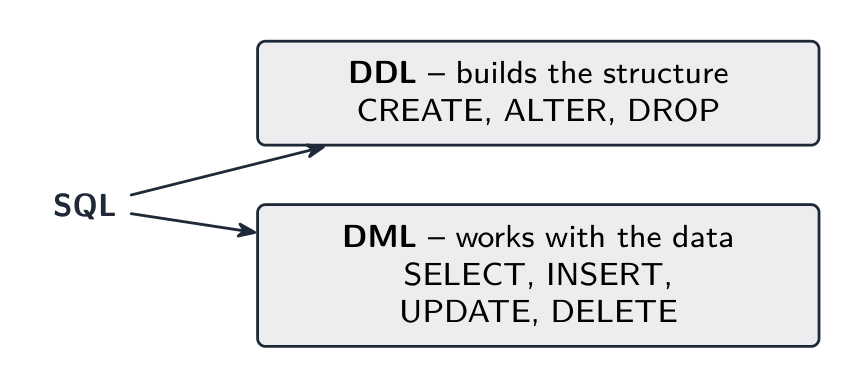
SQL 结构化查询语言 (Structured Query Language) has two halves:

  • Data Definition Language 数据定义语言 (DDL) — creates or changes the structure (tables, keys, constraints).
  • Data Manipulation Language 数据操纵语言 (DML) — works with the data (insert, update, delete, query 查询).

DDL basics

Add a foreign key:

Modify and drop:

Common types: INTEGER, REAL, VARCHAR(n), CHAR(n) (also CHARACTER(n)), DATE, TIME, BOOLEAN, DECIMAL(p, s).

DML basics

Query with SELECT:

SELECT lists fields, FROM names the table, WHERE filters rows, ORDER BY sorts.

A join 连接 combines two tables using a foreign-key relationship:

Aggregate functions 聚合函数 (COUNT, SUM, AVG, MIN, MAX) are often used with GROUP BY:

Insert, update, delete:

Always put a WHERE clause on UPDATE and DELETE, or the change hits every row.

Tips for exam SQL

  • use the exact table and field names from the question.
  • quote strings with single quotes ('Smith'); don't quote numbers.
  • comparisons: =, <, >, <=, >=, <>.
  • LIKE 'A%' matches anything starting with A (% = any string, _ = one character); IN (1,2,3); BETWEEN 10 AND 20.
  • combine conditions with AND / OR / NOT, and end each statement with a semicolon.

The DDL pattern the exam wants. Every CREATE TABLE names each field with its type, marks the primary key, and declares each foreign key with the table it references; a composite key is declared on its own line:

Worked example. Using CUSTOMER(CustomerID, Name, Phone) and DEVICE(DeviceID, CustomerID, Type, Model), write SQL scripts to: (a) list the name and phone number of every customer who owns a device of type 'tablet', in alphabetical order of name; (b) count the devices of each type; (c) record that customer 17 now has the phone number '0771 234 5678'; (d) add a new device, ID 305, a 'laptop' of model 'X1' belonging to customer 17.

(a)

(b)

(c) UPDATE CUSTOMER SET Phone = '0771 234 5678' WHERE CustomerID = 17; (d) INSERT INTO DEVICE (DeviceID, CustomerID, Type, Model) VALUES (305, 17, 'laptop', 'X1');

Marks are given per clause — the fields, the tables, the join condition, the WHERE, the ORDER BY — so a script with one wrong clause still scores the rest. Write Table.Field whenever two tables are involved.

Worked example. Explain what this script does: SELECT T.Name, SUM(R.Cost) AS Total FROM TECHNICIAN T INNER JOIN REPAIR R ON T.TechnicianID = R.TechnicianID GROUP BY T.Name;

It outputs each technician's name with the total cost of the repairs that technician has carried out, one row per technician: the two tables are joined on TechnicianID, the rows are grouped by name, and the costs in each group are added. When asked what a script does, describe the result, not the syntax.

ไทย

SQL (Structured Query Language) แบ่งออกเป็นสองส่วน:

SQL แบ่งเป็น DDL (สร้างโครงสร้าง) และ DML (ทำงานกับข้อมูล)
DDL สร้างโครงสร้างฐานข้อมูล; DML ทำงานกับข้อมูล
  • ภาษานิยามข้อมูล (Data Definition Language - DDL) — สร้างหรือเปลี่ยน โครงสร้าง (ตาราง, คีย์, ข้อจำกัด)
  • ภาษาดำเนินการข้อมูล (Data Manipulation Language - DML) — ทำงานกับ ข้อมูล (เพิ่ม, อัปเดต, ลบ, ค้นหา)

พื้นฐาน DDL

CREATE TABLE CUSTOMER (
  CustomerID INTEGER PRIMARY KEY,
  Name VARCHAR(50) NOT NULL,
  Phone VARCHAR(20)
);

เพิ่มคีย์ภายนอก:

CREATE TABLE ORDER (
  OrderID INTEGER PRIMARY KEY,
  CustomerID INTEGER,
  OrderDate DATE,
  FOREIGN KEY (CustomerID) REFERENCES CUSTOMER(CustomerID)
);

แก้ไขและลบ:

ALTER TABLE CUSTOMER ADD Email VARCHAR(100);
DROP TABLE CUSTOMER;

ประเภททั่วไป: INTEGER, REAL, VARCHAR(n), CHAR(n) (รวมถึง CHARACTER(n)), DATE, TIME, BOOLEAN, DECIMAL(p, s).

พื้นฐาน DML

ค้นหาด้วย SELECT:

คำสั่ง SELECT คืนค่าเฉพาะแถวที่ตรงกับเงื่อนไข
คำสั่ง SELECT จะคืนค่าเฉพาะแถวที่ตรงกับเงื่อนไข
SELECT Name, Phone
FROM CUSTOMER
WHERE City = 'London'
ORDER BY Name ASC;

SELECT ระบุฟิลด์, FROM ชื่อบริบทตาราง, WHERE กรองแถว, ORDER BY เรียงลำดับ

การเชื่อมต่อ (join) รวมสองตารางโดยใช้ความสัมพันธ์คีย์ภายนอก:

SELECT C.Name, O.OrderDate
FROM CUSTOMER C INNER JOIN ORDER O
  ON C.CustomerID = O.CustomerID
WHERE O.OrderDate >= '2024-01-01';

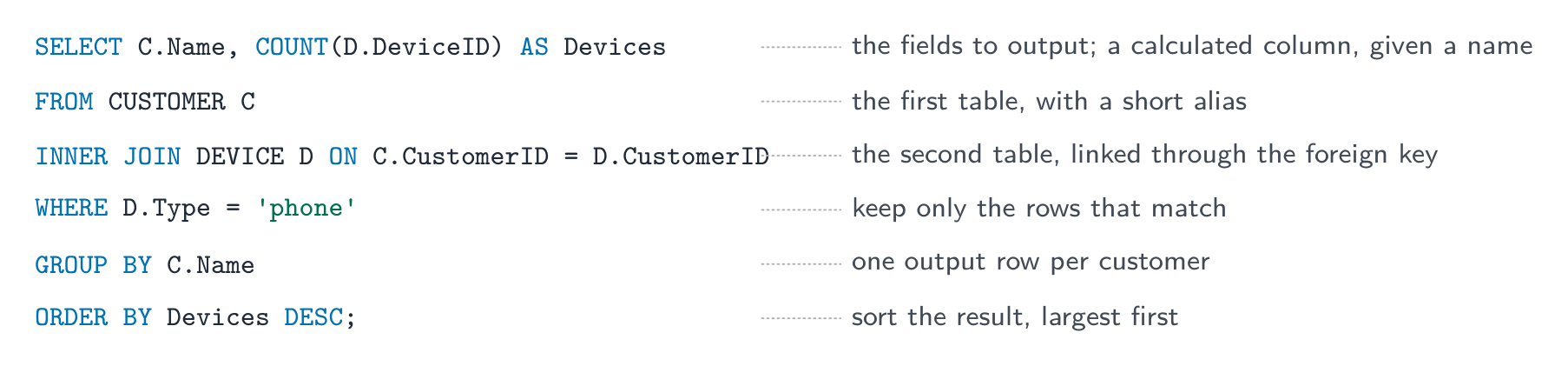
คำสั่ง SQL ที่อธิบายบรรทัดต่อบรรทัด: SELECT ระบุฟิลด์และคอลัมน์ COUNT, FROM ระบุตารางแรกพร้อมชื่อเล่น, INNER JOIN ON เชื่อมโยงตารางที่สองผ่านคีย์ภายนอก, WHERE เก็บเฉพาะแถวที่ตรงกัน, GROUP BY ทำให้มีแถวเดียวต่อลูกค้า, ORDER BY เรียงลำดับผลลัพธ์ *ส่วนประกอบของคำสั่ง ตามลำดับที่ต้องเขียน

ฟังก์ชันรวม (COUNT, SUM, AVG, MIN, MAX) มักใช้ร่วมกับ GROUP BY:

SELECT CustomerID, COUNT(*) AS NumOrders
FROM ORDER
GROUP BY CustomerID;

เพิ่ม, อัปเดต, ลบ:

INSERT INTO CUSTOMER (CustomerID, Name, Phone)
VALUES (101, 'Ada Lovelace', '020-1234-5678');

UPDATE CUSTOMER SET Phone = '020-9999-0000' WHERE CustomerID = 101;

DELETE FROM CUSTOMER WHERE CustomerID = 101;

ใส่ clause WHERE เสมอใน UPDATE และ DELETE มิฉะนั้นการเปลี่ยนแปลงจะกระทบ ทุก แถว

เคล็ดลับสำหรับข้อสอบ SQL

  • ใช้ชื่อตารางและฟิลด์ที่ถูกต้องตามที่โจทย์กำหนด
  • ลอกข้อความด้วยเครื่องหมายอัญลกขणเดี่ยว ('Smith'); อย่าลอกตัวเลข
  • การเปรียบเทียบ: =, <, >, <=, >=, <>.
  • LIKE 'A%' ตรงกับทุกสิ่งที่ขึ้นต้นด้วย A (% = String ใดๆ, _ = ตัวอักษรหนึ่งตัว); IN (1,2,3); BETWEEN 10 AND 20.
  • รวมเงื่อนไขด้วย AND / OR / NOT และลงท้ายแต่ละคำสั่งด้วยเครื่องหมายกึ่งจุด

รูปแบบ DDL ที่ข้อสอบต้องการ ทุก CREATE TABLE จะระบุชื่อฟิลด์พร้อมชนิดข้อมูล ระบุ primary key และประกาศ foreign key พร้อมตารางที่อ้างอิง; หากเป็น composite key ให้ประกาศบนบรรทัดใหม่:

CREATE TABLE RENTAL_CAR (
  RentalID INTEGER,
  CarReg VARCHAR(8),
  Days INTEGER,
  PRIMARY KEY (RentalID, CarReg),
  FOREIGN KEY (RentalID) REFERENCES RENTAL(RentalID),
  FOREIGN KEY (CarReg) REFERENCES CAR(CarReg)
);

ตัวอย่างวิธีทำ ใช้ CUSTOMER(CustomerID, Name, Phone) และ DEVICE(DeviceID, CustomerID, Type, Model) เขียนสคริปต์ SQL เพื่อ: (a) แสดงชื่อและเบอร์โทรศัพท์ของลูกค้าทุกคนที่มีอุปกรณ์ชนิด 'tablet' เรียงตามชื่อจาก ก-ฮ; (b)นับจำนวนอุปกรณ์แต่ละชนิด; (c) บันทึกว่าลูกค้าหมายเลข 17 มีเบอร์โทรศัพท์ใหม่เป็น '0771 234 5678'; (d) เพิ่มอุปกรณ์ใหม่ ID 305 เป็น 'laptop' รุ่น 'X1' ของลูกค้า 17

(a)

SELECT CUSTOMER.Name, CUSTOMER.Phone
FROM CUSTOMER INNER JOIN DEVICE
  ON CUSTOMER.CustomerID = DEVICE.CustomerID
WHERE DEVICE.Type = 'tablet'
ORDER BY CUSTOMER.Name ASC;

(b)

SELECT Type, COUNT(DeviceID) AS NumberOfDevices
FROM DEVICE
GROUP BY Type;

(c) UPDATE CUSTOMER SET Phone = '0771 234 5678' WHERE CustomerID = 17; (d) INSERT INTO DEVICE (DeviceID, CustomerID, Type, Model) VALUES (305, 17, 'laptop', 'X1');

คะแนนให้ตามแต่ละส่วน — ฟิลด์, ตาราง, เงื่อนไขการเชื่อมต่อ, WHERE, ORDER BY — ดังนั้นสคริปต์ที่มีส่วนใดส่วนหนึ่งผิดก็ยังได้รับคะแนนในส่วนที่เหลือ เขียน Table.Field เมื่อเกี่ยวข้องกับสองตาราง

ตัวอย่างวิธีทำ อธิบายว่าสคริปต์นี้ทำอะไร: SELECT T.Name, SUM(R.Cost) AS Total FROM TECHNICIAN T INNER JOIN REPAIR R ON T.TechnicianID = R.TechnicianID GROUP BY T.Name;

ผลลัพธ์คือแสดงชื่อนักเทคนิคพร้อมค่าใช้จ่ายรวมของการซ่อมแซมที่นักเทคนิคคนนั้นทำ โดยแต่ละคนอยู่ในบรรทัดเดียว: ตารางสองตารางถูก join ผ่าน TechnicianID grouping ตามชื่อ และบวกค่าใช้จ่ายในแต่ละกลุ่ม เมื่อถามว่าสคริปต์ทำอะไร ให้อธิบายผลลัพธ์ ไม่ใช่ไวยากรณ์

Explore · ⁨สำรวจ⁩

Stitch two tables with INNER JOIN · ⁨เชื่อมสองตารางด้วย INNER JOIN⁩

A join matches rows where the foreign key equals the primary key — here Orders.CustomerID = Customer.CustomerID — and combines each matching pair into one wider row. · ⁨การ Join จับคู่แถวที่ฟอเรนคีย์เท่ากับคีย์หลัก — ที่นี่ Orders.CustomerID = Customer.CustomerID — และรวมคู่ที่ตรงกันนั้นเป็นแถวที่กว้างขึ้นหนึ่งแถว⁩

Explore · ⁨สำรวจ⁩

SELECT … WHERE

Step through a query: WHERE keeps the rows that match, then SELECT picks the columns you asked for. · ⁨逐步查询:WHERE 保留匹配的行,然后 SELECT 选择你要求的列。⁩

Vocabulary · ⁨คำศัพท์⁩ Train · ⁨ฝึกฝน⁩
English ไทย
Data Definition Language/ˈdeɪtə ˌdefɪˈnɪʃn ˈlæŋɡwɪdʒ/ ภาษานิยามข้อมูล
Data Manipulation Language/ˈdeɪtə məˌnɪpjʊˈleɪʃn ˈlæŋɡwɪdʒ/ ภาษาจัดการข้อมูล
aggregate functions/ˈæɡrɪɡeɪt ˈfʌŋkʃnz/ ฟังก์ชันรวมกลุ่ม
Watch lesson · ⁨ดูบทเรียน⁩
8.3

Definitions the examiner accepts · ⁨คำนิยามที่ผู้สอบยอมรับ⁩

English

A definition question is marked against fixed wording. Learn these exactly, and give one answer only.

Term Definition
entity something about which data is stored — a person, object or event — which becomes a table in a relational database
attribute one item of data about an entity (a column of the table)
tuple one row of a table: one instance of the entity
primary key an attribute, or combination of attributes, that uniquely identifies each record in a table
foreign key an attribute in one table whose value matches a primary key in another table, used to link the two
candidate key any attribute (or combination) that could be chosen as the primary key
secondary key a non-primary attribute that is indexed so the table can be searched or sorted on it quickly
composite key a primary key made of two or more attributes together
referential integrity every foreign-key value must match an existing primary-key value in the table it refers to
first normal form a table in which every attribute is atomic, there are no repeating groups, and there is a primary key
second normal form in 1NF, and every non-key attribute depends on the whole of the primary key (no partial dependency)
third normal form in 2NF, and no non-key attribute depends on another non-key attribute (no transitive dependency)
data dictionary the metadata a DBMS keeps about the structure of the database: tables, fields, types, keys, relationships, validation
DDL / DML the language used to define or change the structure of a database / the language used to query and maintain the data in it
ไทย

คำถามคำนิยามจะให้คะแนนตามข้อความที่กำหนดไว้你必须 exact. เรียนรู้ให้ถูกต้องและตอบเพียงคำตอบเดียวเท่านั้น

พจน์ นิยาม
entity สิ่งใดสิ่งหนึ่งที่เก็บข้อมูลเกี่ยวกับมัน — บุคคล วัตถุ หรือเหตุการณ์ — ซึ่งกลายเป็นตารางในฐานข้อมูลเชิงสัมพันธ์
attribute ข้อมูลหนึ่งรายการเกี่ยวกับ entity (คอลัมน์ของตาราง)
tuple บรรทัดหนึ่งของตาราง: ตัวอย่างหนึ่ง instance ของ entity
primary key attribute หรือชุดของ attributes ที่ระบุ record ในตารางได้อย่างไม่ซ้ำกัน
foreign key attribute ในตารางหนึ่งwhose value ตรงกับ primary key ในอีกตารางหนึ่ง ใช้เพื่อเชื่อมโยงทั้งสอง
candidate key attribute (หรือชุด) ใดๆ ที่สามารถเลือกใช้เป็น primary key ได้
secondary key non-primary attribute ที่ถูก index เพื่อให้สามารถค้นหาหรือเรียงลำดับตารางได้อย่างรวดเร็ว
composite key primary key ที่ประกอบด้วยสองหรือมากกว่า attributes รวมกัน
referential integrity ค่า foreign key ทุกค่าต้องตรงกับ existing primary-key value ในตารางที่อ้างอิงถึง
first normal form ตารางที่ทุก attribute เป็น atomic ไม่มี repeating groups และมี primary key
second normal form อยู่ใน 1NF และทุก non-key attribute ขึ้นอยู่กับ whole ของ primary key (ไม่มี partial dependency)
third normal form อยู่ใน 2NF และไม่มี non-key attribute ขึ้นอยู่กับ non-key attribute อื่น (ไม่มี transitive dependency)
data dictionary Metadata ที่ DBMS เก็บไว้เกี่ยวกับโครงสร้างฐานข้อมูล: ตาราง ฟิลด์ ชนิด คีย์ ความสัมพันธ์ การตรวจสอบความถูกต้อง
DDL / DML ภาษาที่ใช้กำหนดหรือเปลี่ยนแปลงโครงสร้างของฐานข้อมูล / ภาษาที่ใช้ query และจัดการข้อมูลภายใน
Vocabulary · ⁨คำศัพท์⁩ Train · ⁨ฝึกฝน⁩
English ไทย
atomic/əˈtɒmɪk/ อะตอม
8.3

Exam tips · ⁨ข้อแนะนำสำหรับการสอบ⁩

English
  • Define the terms exactly: entity, attribute, primary key, foreign key, and the relationship types (1:1, 1:many, many:many).
  • Give a reason at each normal form: 1NF (no repeating groups), 2NF (no partial dependency), 3NF (no non-key dependency) — and name the fields involved.
  • Explain what a DBMS provides (data independence, security, integrity, concurrent access, a data dictionary, a developer interface, a query processor).
  • Distinguish DDL (define the structure) from DML (query and change the data), and write SQL clause by clause: SELECT, FROM, INNER JOIN … ON, WHERE, GROUP BY, ORDER BY.
  • To draw an E-R diagram from tables, find each foreign key first: every foreign key is one one-to-many relationship, with the "many" at the table that holds it.

Common mistakes

  • Drawing a many-to-many relationship directly. It must be split into two one-to-many relationships through a link table holding both foreign keys.
  • Explaining "not in 3NF" by "the data is repeated". Name the dependency (partial or transitive) and the fields involved.
  • Double quotes round strings in SQL, or quotes round numbers. Strings take 'single quotes'; numbers take none.
  • Leaving out the ON condition after INNER JOIN. Without it the two tables are not linked.
  • Putting an ordinary field next to COUNT or SUM in a SELECT without a GROUP BY.
  • UPDATE or DELETE without a WHERE. It changes or removes every row in the table.
ไทย
  • นิยามคำศัพท์ให้ชัดเจน: entity, attribute, primary key, foreign key และประเภทความสัมพันธ์ (1:1, 1:many, many:many)
  • ให้เหตุผลในแต่ละ normal form: 1NF (ไม่มี repeating groups), 2NF (ไม่มี partial dependency), 3NF (ไม่มี non-key dependency) — และระบุชื่อฟิลด์ที่เกี่ยวข้อง
  • อธิบายว่า DBMS ให้บริการอะไร (data independence, security, integrity, concurrent access, data dictionary, developer interface, query processor)
  • แยกแยะ DDL (กำหนดโครงสร้าง) จาก DML (query และเปลี่ยนข้อมูล) และเขียน SQL clause ต่อ clause: SELECT, FROM, INNER JOIN … ON, WHERE, GROUP BY, ORDER BY.
  • การวาด E-R diagram จากตาราง ให้หา foreign key ก่อน: ทุก foreign key คือ one-to-many relationship ที่มี "many" อยู่ที่ตารางที่ถือค่า foreign key นั้น

ข้อผิดพลาดที่พบบ่อย

  • การวาด many-to-many relationship โดยตรง ต้องแบ่งออกเป็น two one-to-many relationships ผ่าน link table ที่ถือ both foreign keys
  • อธิบายว่า "not in 3NF" ว่า "ข้อมูลซ้ำซ้อน" ระบุ dependency (partial หรือ transitive) และฟิลด์ที่เกี่ยวข้อง
  • ใช้ double quotes ล้อมรอบ strings ใน SQL หรือใช้ quotes ล้อมรอบตัวเลข Strings ใช้ 'single quotes';的数字ใช้ไม่มี
  • การละ ON condition หลัง INNER JOIN โดยไม่มีอย่างนั้นตารางสองตารางจะไม่ถูกเชื่อมโยง
  • การวาง ordinary field ถัดจาก COUNT หรือ SUM ใน SELECT โดยไม่มี GROUP BY
  • UPDATE หรือ DELETE โดยไม่มี WHERE จะเปลี่ยนหรือลบทุกบรรทัดในตาราง
Vocabulary · ⁨คำศัพท์⁩ Train · ⁨ฝึกฝน⁩
English ไทย
concurrent access/kənˈkʌrənt ˈækses/ การเข้าถึงพร้อมกัน
developer interface/dɪˈveləpə ˈɪntəfeɪs/ อินเทอร์เฟซนักพัฒนา

Interactive lessons on this topic · ⁨บทเรียนเชิงโต้ตอบสำหรับหัวข้อนี้⁩

Work through it step by step, with instant-check exercises. · ⁨ทำทีละขั้นตอน พร้อมแบบฝึกหัดตรวจสอบผลทันที⁩

Past Papers · ⁨ข้อสอบย้อนหลัง⁩

More topics in A-Level Computer Science · ⁨Computer Science A-Level⁩ · ⁨หัวข้อเพิ่มเติมใน A-Level Computer Science · ⁨Computer Science A-Level⁩⁩

Log in or create account · ⁨เข้าสู่ระบบหรือสร้างบัญชี⁩

IGCSE, A-Level & AP