Skip to content · ⁨ข้ามไปยังเนื้อหา⁩

Communication · ⁨การสื่อสาร⁩

A-Level Computer Science · ⁨Computer Science A-Level⁩ · Topic 2 · ⁨หัวข้อ 2⁩

Video lesson for this topic · ⁨บทเรียนวิดีโอสำหรับหัวข้อนี้⁩ Open the video page · ⁨เปิดหน้าวิดีโอ⁩
23:48

เครือข่าย

คุณกดส่ง ภายในไม่ถึงวินาที ข้อความของคุณก็กระโดดออกจากโทรศัพท์ วิ่งผ่านเมืองของคุณ ลมลงใต้มหาสมุทรผ่านสายเคเบิล และโผล่ขึ้นบน…

English narration · English + 中文 subtitles burned in · ⁨การบรรยายภาษาอังกฤษ · คำบรรยายภาษาอังกฤษ + 中文 ลอยตัวบนภาพ⁩

2.1

Networks: purpose and benefits · ⁨เครือข่าย: วัตถุประสงค์และประโยชน์⁩

Syllabus · ⁨หลักสูตร⁩
English
Candidates should be able to: Notes and guidance
Show understanding of the purpose and benefits of networking devices
Show understanding of the characteristics of a LAN (local area network) and a WAN (wide area network)
Explain the client-server and peer-to-peer models of networked computers Roles of the different computers within the network and subnetwork models Benefits and drawbacks of each model Justify the use of a model for a given situation
Show understanding of thin-client and thick-client and the differences between them
Show understanding of the bus, star, mesh and hybrid topologies Understand how packets are transmitted between two hosts for a given topology Justify the use of a topology for a given situation
Show understanding of cloud computing Including the use of public and private clouds Benefits and drawbacks of cloud computing
Show understanding of the differences between and implications of the use of wireless and wired networks Describe the characteristics of copper cable, fibre-optic cable, radio waves (including WiFi), microwaves, satellites
Describe the hardware that is used to support a LAN Including switch, server, Network Interface Card (NIC), Wireless Network Interface Card (WNIC), Wireless Access Points (WAP), cables, bridge, repeater
Describe the role and function of a router in a network
Show understanding of Ethernet and how collisions are detected and avoided Including Carrier Sense Multiple Access/Collision Detection (CSMA/CD)
Show understanding of bit streaming Methods of bit streaming, i.e. real-time and on-demand Importance of bit rates broadband speed on bit streaming
Show understanding of the differences between the World Wide Web (WWW) and the internet
Describe the hardware that is used to support the internet Including modems, PSTN (Public Switched Telephone Network), dedicated lines, cell phone network
Explain the use of IP addresses in the transmission of data over the internet Including: • format of an IP address including IPv4 and IPv6 • use of subnetting in a network • how an IP address is associated with a device on a network • difference between a public IP address and a private IP address and the implications for security • difference between a static IP address and a dynamic IP address
Explain how a Uniform Resource Locator (URL) is used to locate a resource on the World Wide Web (WWW) and the role of the Domain Name Service (DNS)
ไทย
ผู้เข้าสอบควรสามารถ: หมายเหตุและคำแนะนำ
แสดงความเข้าใจเกี่ยวกับวัตถุประสงค์และประโยชน์ของอุปกรณ์เครือข่าย
แสดงความเข้าใจลักษณะของ LAN (local area network) และ WAN (wide area network)
อธิบายโมเดล client-server และ peer-to-peer ของคอมพิวเตอร์ในเครือข่าย บทบาทของคอมพิวเตอร์แต่ละเครื่องภายในเครือข่ายและโมเดล subnet ความดีและข้อเสียของแต่ละโมเดล อธิบายเหตุผลในการเลือกโมเดลสำหรับสถานการณ์ที่กำหนด
แสดงความเข้าใจเกี่ยวกับ thin-client และ thick-client และความแตกต่างระหว่างกัน
แสดงความเข้าใจเกี่ยวกับโทโพโลยี bus, star, mesh และ hybrid เข้าใจวิธีการส่งแพ็กเก็ตระหว่างโฮสต์สองเครื่องสำหรับโทโพโลยีที่กำหนด อธิบายเหตุผลในการใช้โทโพโลยีสำหรับสถานการณ์ที่กำหนด
แสดงความเข้าใจเกี่ยวกับ cloud computing รวมถึงการใช้ cloud แบบสาธารณะและแบบส่วนตัว ความดีและข้อเสียของ cloud computing
แสดงความเข้าใจถึงความแตกต่างและผลกระทบของการใช้เครือข่ายไร้สายและแบบมีสาย อธิบายลักษณะของสายทองแดง สายไฟเบอร์ออปต์ คลื่นวิทยุ (รวม WiFi) คลื่นไมโครเวฟ และดาวเทียม
อธิบายฮาร์ดแวร์ที่ใช้สนับสนุน LAN รวม switch, server, Network Interface Card (NIC), Wireless Network Interface Card (WNIC), Wireless Access Points (WAP), สายเคเบิล, bridge, repeater
อธิบายบทบาทและหน้าที่ของ router ในเครือข่าย
แสดงความเข้าใจเกี่ยวกับ Ethernet以及如何ตรวจจับและหลีกเลี่ยงการชนกันของข้อมูล รวมถึง Carrier Sense Multiple Access/Collision Detection (CSMA/CD)
แสดงความเข้าใจ关于ความแตกต่างของ bit streaming วิธีการ bit streaming เช่น real-time และ on-demand ความสำคัญของ bit rates และความเร็ว broadband ต่อ bit streaming
อธิบายความแตกต่างระหว่าง World Wide Web (WWW) และ internet
อธิบายฮาร์ดแวร์ที่ใช้สนับสนุน internet รวม modems, PSTN (Public Switched Telephone Network), dedicated lines, cell phone network
อธิบายการใช้งาน IP addresses ในการส่งข้อมูลผ่าน internet รวมถึง: • รูปแบบของ IP address بماรวมถึง IPv4 และ IPv6 • การใช้ subnetting ในเครือข่าย • วิธีที่ IP address ถูกผูกกับอุปกรณ์ในเครือข่าย • ความแตกต่างระหว่าง public IP address กับ private IP address และผลต่อความปลอดภัย • ความแตกต่างระหว่าง static IP address กับ dynamic IP address
อธิบายการใช้ Uniform Resource Locator (URL) ในการหาทรัพยากรบน World Wide Web (WWW) และบทบาทของ Domain Name Service (DNS)

Source: Cambridge International syllabus · ⁨แหล่งที่มา: หลักสูตร Cambridge International⁩

English

A network 网络 is a set of computing devices connected so they can communicate and share resources. Benefits:

  • sharing resources (printers, file servers, internet) — cheaper than equipping each computer.
  • sharing data — many users access the same files.
  • central management — install software, manage users and back up once on a server.
  • communication — email, video calls, messaging.
  • remote access — work from anywhere.
ไทย

เครือข่าย (network) คือชุดอุปกรณ์คอมพิวเตอร์ที่เชื่อมต่อกันเพื่อให้สื่อสารและแบ่งปันทรัพยากรได้ ประโยชน์:

  • แบ่งปันทรัพยากร (เครื่องพิมพ์, ไฟล์เซิร์ฟเวอร์, อินเทอร์เน็ต) — ถูกกว่าการเตรียมอุปกรณ์ให้แต่ละเครื่อง
  • แบ่งปันข้อมูล — ผู้ใช้หลายคนเข้าถึงไฟล์เดียวกันได้
  • จัดการแบบรวมศูนย์ — ติดตั้งซอฟต์แวร์ จัดการผู้ใช้ และสำรองข้อมูลได้ครั้งเดียวบนเซิร์ฟเวอร์
  • การสื่อสาร — อีเมล, วิดีโอคอล, แชท
  • เข้าถึงจากระยะไกล — ทำงานจากที่ใดก็ได้
Explore · ⁨สำรวจ⁩

Network route lab · ⁨ห้องปฏิบัติการเส้นทางเครือข่าย⁩

Follow data from a device through network hardware and protocols. · ⁨ติดตามข้อมูลจากอุปกรณ์ผ่านฮาร์ดแวร์และโปรโตคอลเครือข่าย⁩

Vocabulary · ⁨คำศัพท์⁩ Train · ⁨ฝึกฝน⁩
English ไทย
network/ˈnetwɜːk/ network
2.1

LAN vs WAN

English

A local area network 局域网 (LAN) covers a small area — a home, office or school, usually owned by the organisation, with high data rates and low latency 延迟.

A wide area network 广域网 (WAN) covers a large area — a city, country, or the world (the internet is the largest WAN). It uses telecom-company infrastructure — often the Public Switched Telephone Network 公共交换电话网 (PSTN), leased lines or fibre — with lower data rates and higher latency. A WAN connects LANs together.

For "give two characteristics of a LAN": it covers a small geographical area (one site or building); the hardware is owned by the organisation, not leased from a telecom company; it connects through its own switches, cables and access points. For "two ways a WAN is different": it covers a large geographical area; it uses third-party (leased or public) infrastructure; data rates are lower and latency higher; it usually joins several LANs. A school on one site is a LAN; a company with offices in two cities needs a WAN, with a leased line or the internet between the sites. Justify the choice with the area covered and who owns the links.

ไทย

เครือข่ายพื้นที่เฉพาะที่ (LAN) ครอบคลุม พื้นที่เล็ก — บ้าน สำนักงาน หรือโรงเรียน มักเป็นเจ้าของโดยองค์กร มีความเร็วข้อมูลสูงและ latency ต่ำ

เครือข่ายพื้นที่กว้าง (WAN) ครอบคลุม พื้นที่ใหญ่ — เมือง ประเทศ หรือทั่วโลก (อินเทอร์เน็ตคือ WAN ที่ใหญ่ที่สุด) ใช้โครงสร้างพื้นฐานของบริษัทโทรคมนาคม — มักเป็น Public Switched Telephone Network (PSTN), สายเช่าหรือไฟเบอร์ — มีความเร็วข้อมูลต่ำกว่าและ latency สูงกว่า WAN เชื่อม LAN เข้าด้วยกัน

สำหรับ "บอกลักษณะเด่น 2 อย่างของ LAN": ครอบคลุมพื้นที่ทางภูมิศาสตร์เล็ก (สถานที่หรืออาคารเดียว); ฮาร์ดแวร์เป็นขององค์กร ไม่ใช่เช่าจากบริษัทโทรคมนาคม; เชื่อมต่อกันผ่านสวิตช์ สาย และจุดเชื่อมต่อของตนเอง สำหรับ "2 วิธีที่ WAN ต่างกัน": ครอบคลุมพื้นที่ทางภูมิศาสตร์ใหญ่; ใช้โครงสร้างพื้นฐานของบุคคลที่สาม (เช่าหรือสาธารณะ); ความเร็วข้อมูลต่ำกว่าและ latency สูงกว่า; มักเชื่อม LAN หลายแห่งเข้าด้วยกัน โรงเรียน在一个地点คือ LAN; บริษัทที่มีสำนักงานในสองเมืองต้องใช้ WAN โดยมีสายเช่าหรืออินเทอร์เน็ตเชื่อมระหว่างสถานที่ Justify the choice with the area covered and who owns the links.

หลายไซต์ LAN กระจายอยู่ในพื้นที่กว้าง แต่ละไซต์เชื่อมต่อกันผ่านเมฆ WAN ของผู้ให้บริการกลาง โดยมีสายเช่าตรงระหว่างสองไซต์ที่อยู่ห่างกัน
เครือข่ายพื้นที่กว้างเชื่อมโยงระบบต่างๆ Across a large area
Vocabulary · ⁨คำศัพท์⁩ Train · ⁨ฝึกฝน⁩
English ไทย
latency/ˈleɪtənsi/ ความหน่วง
wide area network/waɪd ˈeərɪə ˈnetwɜːk/ เครือข่ายพื้นที่กว้าง
Public Switched Telephone Network/ˈpʌblɪk swɪtʃt ˈtelɪfəʊn ˈnetwɜːk/ เครือข่ายโทรศัพท์สวิตช์สาธารณะ
switch/swɪtʃ/ สวิตช์
2.1

Client-server and peer-to-peer · ⁨Client-server และ peer-to-peer⁩

English

Client-server

  • powerful machines act as servers 服务器, providing services (files, web pages, email).
  • other machines are clients 客户端 that request services.
  • central and easy to manage, but the server is a single point of failure unless backed up.

Peer-to-peer (P2P)

  • all machines are equal peers; each can be both client and server (peer-to-peer 对等网络).
  • resources are spread across the peers — no central server. Robust to one failure, but harder to keep secure and consistent.

Choosing a model. Client-server suits a school or a business: files are stored and backed up centrally, a user logs in with one account from any machine, software and security are managed once, and the server can be a powerful machine. The drawbacks are the cost of the server and of a technician, and that the server is a single point of failure. Peer-to-peer suits a few friends sharing files or a game: no server to buy, easy to set up, and each user keeps control of their own machine. The drawbacks the scheme lists: files are spread across many machines, so they are hard to back up and a file is unavailable when its owner's machine is off; each machine must be secured separately; and a peer that serves the others slows down. An online game played through a web browser with other users is the client-server model: the browser is the client, and the game and its shared virtual world run on the company's server, which keeps every player's view consistent.

ไทย

Client-server

  • เครื่องจักรทรงพลังทำหน้าที่เป็น เซิร์ฟเวอร์ ให้บริการ (ไฟล์, หน้าเว็บ, อีเมล)
  • เครื่องอื่นๆ เป็น ไคลเอนต์ ที่ขอใช้บริการ
  • จัดการง่ายและเป็นศูนย์กลาง แต่เซิร์ฟเวอร์เป็นจุดล้มเหลวเดียวหากไม่มีการสำรองข้อมูล
เดสก์ท็อป แล็ปท็อป และแท็บเล็ต作为clientส่งคำขอผ่านอินเทอร์เน็ตไปยังเซิร์ฟเวอร์กลางซึ่งส่งคำตอบกลับ
ในเครือข่าย client-server ไคลเอนต์ขอบริการจากเซิร์ฟเวอร์กลาง

Peer-to-peer (P2P)

  • เครื่องคอมพิวเตอร์ทุกเครื่องเป็น เพื่อน (peers) เท่ากัน; แต่ละเครื่องสามารถทำหน้าที่ได้ทั้ง CLIENT และ SERVER (peer-to-peer) 。
  • ทรัพยากรถูกกระจายอยู่ระหว่างเพื่อน — ไม่มีเซิร์ฟเวอร์กลาง มีความทนทานต่อการล้มเหลวของเครื่องหนึ่ง แต่ยากกว่าที่จะรักษาความปลอดภัยและความสม่ำเสมอของข้อมูล

การเลือกโมเดล Client-server เหมาะกับโรงเรียนหรือธุรกิจ: ไฟล์ถูกจัดเก็บและสำรองไว้ที่จุดศูนย์กลาง ผู้ใช้เข้าสู่ระบบด้วยบัญชีเดียวจากเครื่องใดก็ได้ ซอฟต์แวร์และความปลอดภัยถูกจัดการเพียงครั้งเดียว และเซิร์ฟเวอร์อาจเป็นเครื่องที่มีประสิทธิภาพสูง ข้อเสียคือต้นทุนของเซิร์ฟเวอร์และช่างเทคนิค และการที่เซิร์ฟเวอร์เป็นจุดล้มเหลวเดียว Peer-to-peer เหมาะกับกลุ่มเพื่อนจำนวนน้อยที่แชร์ไฟล์หรือเกม: ไม่ต้องซื้อเซิร์ฟเวอร์ ตั้งค่าง่าย และแต่ละผู้ใช้ควบคุมเครื่องของตนเองได้ ข้อเสียตามรายการนี้: ไฟล์กระจายอยู่บนหลายเครื่อง ทำให้สำรองข้อมูลยาก และไฟล์จะไม่สามารถเข้าถึงได้เมื่อเครื่องเจ้าของปิด; แต่ละเครื่องต้องได้รับการป้องกันแยกต่างหาก; และ peer ที่ให้บริการแก่ผู้อื่นจะทำให้เครื่องช้าลง เกมออนไลน์ที่เล่นผ่านเว็บเบราว์เซอร์ร่วมกับผู้ใช้รายอื่นคือโมเดล client-server: เบราว์เซอร์คือ client, และเกมพร้อมโลกเสมือนที่แชร์กันทำงานบนเซิร์ฟเวอร์ของบริษัท ซึ่งรักษาความสอดคล้องของมุมมองผู้เล่นทุกคนไว้

Six peer computers in a ring, each linked directly to every other peer, with no central server; every peer is both client and server
ในเครือข่าย peer-to-peer ทุกโหนดทำหน้าที่既是 CLIENT และ SERVER
Vocabulary · ⁨คำศัพท์⁩ Train · ⁨ฝึกฝน⁩
English ไทย
server/ˈsɜːvə/ เซิร์ฟเวอร์
client/ˈklaɪənt/ klien
peer-to-peer/pɪə tə pɪə/ เพียร์-ทู-เพียร์
2.1

Thin and thick clients · ⁨Thin และ thick clients⁩

English

A thin client 瘦客户端 does little processing locally and relies on a powerful server (web terminals, remote desktops). A thick client 胖客户端 has strong local processing and storage and runs full applications itself (a normal desktop PC).

Feature Thin client Thick client
Local processing minimal substantial
Local storage minimal substantial
Reliance on network high lower
Server load high lower

The roles: in a thin-client model the server does the processing and stores the data, and the client only sends input and shows the output. A cheap terminal is enough, and everything is backed up and updated on the server, but nothing works if the network or the server fails. In a thick-client model the client runs the software and stores files itself, so it can work with no network connection and puts less load on the server, at the cost of more powerful (and more expensive) clients that must each be updated and secured. A school computer room can run thin clients (cheap, centrally managed); a video editor needs a thick client.

ไทย

Thin client ทำ การประมวลผลในพื้นที่น้อยมาก และพึ่งพาเซิร์ฟเวอร์ที่มีประสิทธิภาพสูง (เทอร์มินัลเว็บ, Desktop จากระยะไกล) Thick client มี การประมวลผลและพื้นที่จัดเก็บในพื้นที่ที่แข็งแกร่ง และรันแอปพลิเคชันเต็มรูปแบบเอง (PCDesktop ปกติ)

คุณสมบัติ Thin client Thick client
การประมวลผลในพื้นที่ น้อยมาก มาก
พื้นที่จัดเก็บในพื้นที่ น้อยมาก มาก
การพึ่งพาสายข่าย สูง ต่ำกว่า
โหลดเซิร์ฟเวอร์ สูง ต่ำกว่า

บทบาท: ในโมเดล thin-client เซิร์ฟเวอร์ทำการประมวลผลและจัดเก็บข้อมูล และ CLIENT เพียงส่งอินพุตและแสดงเอาต์พุต เทอร์มินัลราคาถูกก็เพียงพอ และทุกอย่างถูกสำรองและอัปเดตที่เซิร์ฟเวอร์ แต่หากสายข่ายหรือเซิร์ฟเวอร์ล้มเหลวจะใช้งานไม่ได้เลย ในโมเดล thick-client CLIENT รันซอฟต์แวร์และจัดเก็บไฟล์เอง จึงสามารถทำงานโดยไม่มีสายข่ายได้ และลดโหลดต่อเซิร์ฟเวอร์ แต่มีต้นทุนคือ CLIENT ที่มีประสิทธิภาพ выше (และแพงกว่า) ที่ต้องได้รับการอัปเดตและป้องกันแยกกัน โรงเรียนคอมพิวเตอร์สามารถรัน thin clients ( murah, จัดการส่วนกลาง); โปรแกรมตัดต่อวิดีโอจำเป็นต้องใช้ thick client

Vocabulary · ⁨คำศัพท์⁩ Train · ⁨ฝึกฝน⁩
English ไทย
thick client/θɪk ˈklaɪənt/ เคียนหนา
thin client/θɪn ˈklaɪənt/ เคียนบาง
2.1

Network topologies

English

The topology 拓扑 is how the nodes and links are arranged.

  • bus 总线 — all devices on one shared cable. Cheap; the whole LAN fails if the bus fails; performance drops as more devices share the bandwidth 带宽.
  • star 星形 — every device connects to a central switch. One device failing does not affect others; the switch failing brings all down. Most common today.
  • mesh 网状 — every device links directly to others, with many paths. Very fault-tolerant 容错 (traffic reroutes) but needs lots of cabling.
  • hybrid — a mix (a star in each office, mesh links between offices).

How packets travel in each topology

Bus: the sending device puts the packet on the shared cable; every device sees it, and only the one whose address matches accepts it. Only one device can transmit at a time, so collisions happen (CSMA/CD, below). Star: the sender passes the packet to the central switch, which reads the destination address and forwards it only down the cable to that device; two other devices can talk at the same time. Mesh: the packet is passed from node to node along one of several possible routes until it reaches the destination; if a link fails, another route is used.

To justify a topology: a star for a classroom or an office (a failed cable affects one device; a device is easy to add; with a switch there are no collisions); a mesh where reliability matters most (a hospital, the internet's backbone); a bus only where cost matters and few devices share it. "Draw the star topology" means: the switch in the middle, one line from the switch to each computer, and the server (and the router, if there is one) on their own lines to the switch.

ไทย

Topology คือการจัดวางโหนดและลิงก์

  • bus — อุปกรณ์ทั้งหมดอยู่ในสายเคเบิลร่วมกันเครื่องเดียว ราคาถูก; หาก bus ล้มเหลว LAN ทั้งหมดจะพัง; ประสิทธิภาพลดลงเมื่อมีอุปกรณ์มากขึ้นมาแชร์ bandwidth
  • star —每台设备连接到中央交换机。一台设备故障不影响其他设备;交换机故障则全部瘫痪。目前最常见。
  • mesh —每台设备直接连接至其他设备,拥有多条路径。非常 fault-tolerant(流量可重路由)但需要大量线缆。
  • hybrid — 混合架构(每个办公室为星型,办公室间以网状连接)。

Six computers each connected by a drop cable to one shared backbone cable, with a terminator block at each end *Bus topology: All devices share one cable with a terminator at each end

Five computers each connected by its own dedicated cable to a central hub or switch *Star topology: Every device connects to a central hub or switch

Six computers in a ring with a direct cable between every pair of devices *Mesh topology: Every device links directly to the others

Three star clusters, each a switch with its own computers, all joined by one shared bus backbone with a terminator at each end *Hybrid topology: Star clusters joined by a central bus

How packets travel in each topology

Bus: The sending device places the packet on the shared cable; every device sees it, and only the one whose address matches accepts it. Only one device can transmit at a time, so collisions happen (CSMA/CD, below). Star: The sender passes the packet to the central switch, which reads the destination address and forwards it only down the cable to that device; two other devices can talk at the same time. Mesh: The packet is passed from node to node along one of several possible routes until it reaches the destination; if a link fails, another route is used.

To justify a topology: A star for a classroom or an office (a failed cable affects one device; a device is easy to add; with a switch there are no collisions); a mesh where reliability matters most (a hospital, the internet's backbone); a bus only where cost matters and few devices share it. "Draw the star topology" means: the switch in the middle, one line from the switch to each computer, and the server (and the router, if there is one) on their own lines to the switch.

Explore · ⁨สำรวจ⁩

Compare the network topologies · ⁨เปรียบเทียบโทโพโลยีเครือข่าย⁩

Tap through the four topologies. Each trades off cost, speed and how well it survives a failure — notice what breaks the whole network in each one. · ⁨คลิกเลือกโทโพโลยีทั้งสี่แบบ แต่ละแบบมีการแลกเปลี่ยนระหว่างต้นทุน ความเร็ว และความสามารถในการทนต่อความล้มเหลว — ระวังจุดที่ทำให้เครือข่ายล่มทั้งหมดในแต่ละแบบ⁩

Vocabulary · ⁨คำศัพท์⁩ Train · ⁨ฝึกฝน⁩
English ไทย
topology/təˈpɒlədʒi/ โทโพโลยี
bus/bʌs/ บัส
bandwidth/ˈbændwɪdθ/ แบนด์วิดธ์
star/stɑː/ ดาว
mesh/meʃ/ เมช
fault-tolerant/fɒlt ˈtɒlərənt/ ทนต่อข้อผิดพลาด
hub/hʌb/ ฮับ
packet/ˈpækɪt/ packet
collision/kəˈlɪʒn/ การชนกัน
CSMA/CD/ˌsiː es em ˈeɪ ˌsiː ˈdiː/ ซีเอสเอ็มเอ/ซีดี
2.1

Cloud computing

English

Cloud computing 云计算 delivers computing services (servers, storage, software) over the internet, hosted by a third party. Benefits: scalability 可扩展性 (pay for what you need), lower cost, access from anywhere, and reliable redundant data centres. Drawbacks: needs internet, your data is held by a third party, and possible vendor lock-in.

For the one-mark definition: cloud computing is on-demand computing services (storage, processing, software) provided over the internet by a third party. A public cloud 公有云 is owned by a provider and shared by many customers over the internet; a private cloud 私有云 is dedicated to one organisation, on its own hardware or hosted for it alone. Benefits the scheme accepts: files are accessible from any device with an internet connection; storage scales up and down as needed; the provider handles the hardware, backups and security updates; there is no local server to buy or maintain. Drawbacks: no access without an internet connection; the data is on a third party's hardware, so security and privacy depend on the provider; an ongoing subscription cost; the provider could fail or be attacked; large files may be slow to transfer. A "why does the company use a public cloud" answer says that they need no hardware of their own, pay only for what they use, and their users can reach it from anywhere.

ไทย

Cloud computing delivers computing services (servers, storage, software) over the internet, hosted by a third party. Benefits: scalability (pay for what you need), lower cost, access from anywhere, and reliable redundant data centres. Drawbacks: needs internet, your data is held by a third party, and possible vendor lock-in.

สำหรับนิยามแบบ 1 คะแนน: คอมพิวเตอร์คลาวด์คือ บริการคอมพิวเตอร์ตามต้องการ (พื้นที่จัดเก็บ การประมวลผล ซอฟต์แวร์) ที่ผู้ให้บริการภายนอกจัดผ่านอินเทอร์เน็ต คลาวด์สาธารณะ เป็นของผู้ให้บริการและใช้ร่วมกันโดยลูกค้าจำนวนมากผ่านอินเทอร์เน็ต; คลาวด์ส่วนตัว มุ่งเน้นให้องค์การเดียว ใช้ฮาร์ดแวร์ของตนเองหรือจัดวางให้เฉพาะองค์กรนั้นเท่านั้น ประโยชน์ที่ระบบนี้มอบให้: ไฟล์เข้าถึงได้จากอุปกรณ์ใดก็ตามที่มีอินเทอร์เน็ต; พื้นที่จัดเก็บปรับขนาดได้ตามความต้องการ; ผู้ดูแลระบบจัดการฮาร์ดแวร์ การสำรองข้อมูล และการอัปเดตความปลอดภัย; ไม่ต้องซื้อหรือดูแลเซิร์ฟเวอร์ในท้องถิ่น ความเสียเปรียบ: เข้าถึงไม่ได้หากไม่มีอินเทอร์เน็ต; ข้อมูลอยู่บนฮาร์ดแวร์ของบุคคลที่สาม ดังนั้นความปลอดภัยและความเป็นส่วนตัวจึงขึ้นอยู่กับผู้ให้บริการ; ค่าสมาชิกประจำเดือนต่อเนื่อง; ผู้ให้บริการอาจล้มเหลวหรือถูกโจมตี; ไฟล์ขนาดใหญ่อาจถ่ายโอนได้ช้า คำตอบสำหรับคำถาม "ทำไมบริษัทถึงใช้คลาวด์สาธารณะ" คือ他们需要ไม่ต้องมีฮาร์ดแวร์ของตัวเอง จ่ายเฉพาะสิ่งที่ใช้ และผู้ใช้สามารถเข้าถึงได้จากทุกที่。

Vocabulary · ⁨คำศัพท์⁩ Train · ⁨ฝึกฝน⁩
English ไทย
cloud computing/klaʊd kəmˈpjuːtɪŋ/ คลาวด์คอมพิวติ้ง
scalability/ˌskeɪləˈbɪlɪti/ การขยายขนาด
public cloud/ˈpʌblɪk klaʊd/ คลาวด์สาธารณะ
private cloud/ˈpraɪvət klaʊd/ คลาวด์ส่วนตัว
2.1

Wired vs wireless · ⁨สาย vs ไร้สาย⁩

English
  • wired (Ethernet 以太网 over twisted-pair 双绞线 or fibre-optic 光纤): higher speed, lower latency, fewer errors, more secure.
  • wireless (Wi-Fi, Bluetooth, cellular): no cables, devices can move, but slower, prone to interference and eavesdropping.

For the same generation, wired wins on speed and reliability; wireless wins on convenience.

Transmission media

Medium Characteristics
copper cable (twisted pair, coaxial) cheap and easy to install; carries an electrical signal; affected by electromagnetic interference; the signal weakens with distance, so repeaters are needed; lower bandwidth than fibre
fibre-optic cable light pulses in a glass core; very high bandwidth; long distances without repeaters; immune to interference; hard to tap, so secure; expensive and needs skilled installation
radio waves (including WiFi) no cable, so devices can move; a range of tens of metres, weakened by walls; a shared frequency, so interference and lower speed; can be intercepted, so needs encryption
microwaves higher-frequency radio for point-to-point links; needs a line of sight; affected by rain and buildings; high bandwidth
satellites reach remote areas and the whole globe; a long delay (latency), because the signal travels to orbit and back; affected by weather; expensive

The exam asks for the comparison in both directions. Wired beats wireless on speed, reliability (no interference), security (a cable must be physically tapped) and consistency; wireless beats wired on mobility, the cost of installation, and adding a device without cabling. Allowing both lets students move around with laptops and phones while the fixed desktops keep the faster, more secure connection, and a device with no network port can still connect. Satellite instead of copper reaches places no cable can, but with more delay, weather interference and higher cost.

ไทย
  • แบบมีสาย (Ethernet ผ่าน คู่บิดเกลียว หรือ ไฟเบอร์ออปติก): ความเร็วสูงกว่า หน่วงต่ำกว่า มีข้อผิดพลาดน้อย และปลอดภัยกว่า
  • แบบไร้สาย (Wi-Fi, Bluetooth, ระบบเซลล์): ไม่มีสาย, อุปกรณ์เคลื่อนที่ได้ แต่速度慢กว่า,易受干扰和窃听。

สำหรับรุ่นเดียวกัน แบบมีสายชนะในด้านความเร็วและความน่าเชื่อถือ; แบบไร้สายชนะด้านความสะดวกสบาย

สื่อส่งสัญญาณ

สื่อ ลักษณะ
สายทองแดง (คู่บิดเกลียว,是同轴电缆) ราคาถูกและติดตั้งง่าย; ส่งสัญญาณไฟฟ้า;受电磁干扰影响;信号随距离减弱,因此需要中继器;带宽低于光纤
สายไฟเบอร์ออปติก พัลส์แสงภายในแกนแก้ว; bandwidth สูงมาก; ระยะไกลโดยไม่ต้องใช้รีพีตเตอร์; ไม่ได้รับผลกระทบจากการรบกวน; ดักฟังยาก ปลอดภัย; ราคาแพงและต้องติดตั้งโดยผู้เชี่ยวชาญ
คลื่นวิทยุ(รวมถึงWiFi) ไม่มีสาย,所以设备可以移动;ระยะหลายสิบเมตร,受墙壁削弱;共享频率,因此有干扰和较低速度;可能被截获,所以需要加密
ไมโครเวฟ คลื่นวิทยุความถี่สูงสำหรับการเชื่อมต่อแบบจุดต่อจุด; ต้องมีเส้นทางการมองเห็นตรงกัน;受雨水和建筑物影响;高带宽
ดาวเทียม เข้าถึงพื้นที่ห่างไกลและทั่วโลก; หน่วงสูง (latency), เพราะสัญญาณเดินทางขึ้นวงโคจรและกลับมา;受天气影响;昂贵

ข้อสอบถามถึงการเปรียบเทียบทั้งสองทิศทาง แบบมีสายชนะแบบไร้สายในด้านความเร็ว, ความน่าเชื่อถือ (ไม่มีการรบกวน), ความปลอดภัย (สายต้องถูกดักฟังทางกายภาพ) และความสม่ำเสมอ; แบบไร้สายชนะแบบมีสายด้านการเคลื่อนย้าย, ต้นทุนการติดตั้ง, และการเพิ่มอุปกรณ์โดยไม่ใช้สาย การอนุญาตให้ใช้ทั้งสองอย่างช่วยให้ผู้เรียนเคลื่อนที่ด้วยแล็ปท็อปและโทรศัพท์ได้ในขณะที่เดสก์ท็อปคงการเชื่อมต่อที่เร็วและปลอดภัยไว้ และอุปกรณ์ที่ไม่มีพอร์ตเครือข่ายก็ยังเชื่อมต่อกันได้ ดาวเทียมแทนทองแดงเข้าถึงสถานที่ที่สายไม่สามารถไปถึงได้ แต่มีความหน่วงมากขึ้น, การรบกวนจากสภาพอากาศ และต้นทุนที่สูงขึ้น

Vocabulary · ⁨คำศัพท์⁩ Train · ⁨ฝึกฝน⁩
English ไทย
ethernet/ˈiːθənet/ อีเธอร์เน็ต
2.1

LAN hardware · ⁨ฮาร์ดแวร์ LAN⁩

English
  • network interface card 网络接口卡 (NIC) — lets a device send and receive on the network; has a unique MAC address MAC地址 (a 48-bit hardware address). A wireless device uses a wireless network interface card 无线网络接口卡 (WNIC).
  • switch 交换机 — forwards Ethernet frames only to the port for the destination MAC address.
  • hub 集线器 — a simpler device that copies traffic to all ports (now obsolete).
  • wireless access point 无线接入点 (WAP) — lets wireless clients join a wired LAN.
  • cabling — twisted-pair for short runs; fibre-optic for longer, faster runs.
  • server — a computer that provides a service to the other devices: files, printing, web pages, email storage.
  • bridge 网桥 — joins two LAN segments into one network, passing traffic between them.
  • repeater 中继器 — receives a weakened signal and retransmits it at full strength, to extend a cable's reach.

A WNIC's functions, for a four-mark describe: it converts the data into radio signals and back; it carries the device's unique MAC address; it connects the device to a wireless access point and follows the wireless protocol (which channel and frequency to use); and it decodes the incoming signals for the device. Two devices that can physically connect thirty computers with NICs: a switch, or a hub.

ไทย
  • การ์ดอินเตอร์เฟซเครือข่าย (NIC) — ทำให้อุปกรณ์ส่งและรับข้อมูลบนเครือข่าย; มี MAC address MAC (ที่อยู่ฮาร์ดแวร์ 48 บิต) อุปกรณ์ไร้สายใช้ การ์ดอินเตอร์เฟซเครือข่ายไร้สาย (WNIC)
  • สวิตช์ — ส่งเฟรม Ethernet ไปยังพอร์ตเฉพาะสำหรับ MAC address ของปลายทางเท่านั้น
  • ฮับ — อุปกรณ์ที่ง่ายกว่าซึ่งคัดลอกการจราจรไปยังทุกพอร์ต (ปัจจุบันล้าสมัยแล้ว)
  • จุดเข้าถึงไร้สาย (WAP) — ให้ klien ไร้สายเข้าร่วม LAN แบบมีสาย
  • สายเคเบิล — คู่บิดเกลียวสำหรับการเดินระยะสั้น; ไฟเบอร์ออปติกสำหรับการเดินระยะไกลและรวดเร็วขึ้น
  • เซิร์ฟเวอร์ — คอมพิวเตอร์ที่ให้บริการแก่อุปกรณ์อื่นๆ: ไฟล์, การพิมพ์, หน้าเว็บ, พื้นที่จัดเก็บอีเมล
  • บริดจ์ — เชื่อมสองส่วนย่อยของ LAN เข้าเป็นเครือข่ายเดียว โดยส่งการจราจรระหว่างมัน
  • รีพีตเตอร์ — รับสัญญาณที่อ่อนลงและส่งกลับด้วยความแรงเต็มเพื่อขยายระยะของสาย

ฟังก์ชันของ WNIC, สำหรับคำถาม 4 คะแนน อธิบาย:它将数据转换为无线信号并还原;它携带设备的唯一MAC地址;它将设备连接到无线接入点并遵循无线协议(使用哪个信道和频率);并且解码接收到的信号供设备使用。两台可以物理连接的计算机与带有 NIC 的三十台计算机:交换机或集线器。

A 5-port gigabit Ethernet switch on a white background, with five numbered RJ-45 ports along the front and a power light
A network switch: each device's cable plugs into one of its ports
A black Ethernet patch cable on a white background, with an RJ-45 plug at each end showing the gold metal contacts and the locking clip
An RJ-45 plug on a twisted-pair Ethernet cable
A frame addressed to computer C arrives at a switch, which forwards it out only the port for C, leaving the cables to A, B and D unused
A switch sends each frame only to the port for its destination
Vocabulary · ⁨คำศัพท์⁩ Train · ⁨ฝึกฝน⁩
English ไทย
twisted-pair/ˈtwɪstɪd peə/ คู่บิด
fibre-optic/ˈfaɪbə ˈɒptɪk/ ไฟเบอร์ออปติก
repeater/rɪˈpiːtə/ รีพีตเตอร์
network interface card/ˈnetwɜːk ˈɪntəfeɪs kɑːd/ การ์ดอินเทอร์เฟซเครือข่าย
MAC address/mæk əˈdres/ MAC address
wireless network interface card/ˈwaɪələs ˈnetwɜːk ˈɪntəfeɪs kɑːd/ การ์ดอินเทอร์เฟซเครือข่ายไร้สาย
wireless access point/ˈwaɪələs ˈækses pɔɪnt/ ไวร์เลสแอกเซสพอยท์
bridge/brɪdʒ/ บริดจ์
2.1

Routers · ⁨Router⁩

English

A router 路由器 connects different networks and forwards data between them — usually at the boundary of a LAN and the internet. It does:

  • forwarding — reads each packet 数据包's destination IP address IP地址 and sends it out the right port, using a routing table 路由表.
  • network address translation 网络地址转换 (NAT) — lets many private LAN addresses share one public IP.
  • DHCP 动态主机配置协议 — hands out private IP addresses to LAN devices.
  • firewall 防火墙 — blocks unwanted incoming traffic.

In packet switching 分组交换 a message is split into packets that are sent independently. Each router reads a packet's destination IP address, looks up the next hop in its routing table and forwards it, so the packets of one message may take different routes and are reassembled in order at the destination. A router does receive packets, forward them between networks and hand out IP addresses; it does not find the IP address for a URL (DNS does that) and it does not store web pages. A home router also contains the modem and the wireless access point, so one box connects the LAN to the internet.

ไทย

Routerrouter เชื่อมต่อเครือข่ายที่แตกต่างกันและส่งข้อมูลระหว่าง把它们 — 通常在LAN和internet边界。它做:

  • 转发转发 — 读取每个数据包的目的IP地址 IP,并使用路由表从正确的端口发送它。
  • 网络地址转换 (NAT) — 允许许多私有LAN地址共享一个公共IP。
  • DHCP — 向LAN设备分配私有IP地址。
  • 防火墙 — 阻止不需要的传入流量。

ใน packet switching ข้อความจะถูกแบ่งเป็นแพ็กเก็ตที่ส่งไปอย่างอิสระ Each router อ่านที่อยู่ IP ปลายทางของแพ็กเก็ต ตรวจสอบ Next hop ในตารางการกำหนดเส้นทาง (routing table) แล้วส่งต่อ ดังนั้นแพ็กเก็ตของข้อความหนึ่งอาจใช้เส้นทางที่แตกต่างกันและจะถูกรวมกลับเข้าด้วยกันตามลำดับที่จุดปลายทาง Router จะรับและส่งแพ็กเก็ตระหว่างเครือข่ายและจ่ายที่อยู่ IP แต่ ไม่ ค้นหาที่อยู่ IP สำหรับ URL (DNS ทำหน้าที่นี้) และไม่ได้จัดเก็บหน้าเว็บ Router在家中ยังรวมโมเด็มและจุดเข้าถึงไร้สายไว้ด้วย ทำให้เพียงกล่องเดียวเชื่อม LAN เข้าอินเทอร์เน็ต

LAN ของคอมพิวเตอร์สามเครื่องและเซิร์ฟเวอร์ที่เชื่อมต่อกับสวิตช์ ซึ่งเชื่อมต่อกับเราเตอร์ไปยังอินเทอร์เน็ตและ LAN หรือ WAN อื่นๆ
เราเตอร์เชื่อม LAN เข้ากับอินเทอร์เน็ตหรือเครือข่ายอื่น
Vocabulary · ⁨คำศัพท์⁩ Train · ⁨ฝึกฝน⁩
English ไทย
internet/ˈɪntənet/ อินเทอร์เน็ต
local area network/ˈləʊkl ˈeərɪə ˈnetwɜːk/ เครือข่ายท้องถิ่น
router/ˈruːtə/ เราเตอร์
routing table/ˈraʊtɪŋ ˈteɪbl/ ตารางการส่งต่อ
network address translation/ˈnetwɜːk əˈdres trænˈsleɪʃn/ การแปลงที่อยู่เครือข่าย
DHCP/ˌdiː eɪtʃ siː ˈpiː/ DHCP
firewall/ˈfaɪəwɔːl/ ไฟวอลล์
packet switching/ˈpækɪt ˈswɪtʃɪŋ/ การสลับแพ็กเก็ต
URL/ˌjuː ɑː ˈel/ URL
2.1

Ethernet and CSMA/CD · ⁨เอเธอร์เน็ตและ CSMA/CD⁩

English

Ethernet is the standard (protocol) for wired LANs: devices are joined by twisted-pair or fibre cable, data is sent in frames that carry the source and destination MAC addresses, and a shared medium uses CSMA/CD to deal with collisions. On shared media a collision 冲突 can happen when two devices send at once. The protocol is CSMA/CD 载波侦听多路访问/冲突检测 (Carrier Sense Multiple Access with Collision Detection):

  1. carrier sense — listen before sending; wait if the cable is busy.
  2. multiple access — many devices share the medium.
  3. collision detection — keep listening while sending; a clash is a collision.
  4. on a collision, both stop, send a brief "jam" signal, then wait a random backoff time before retrying.

The three tasks, in the scheme's words: the device listens (senses the carrier) before transmitting; it keeps checking for a collision while it transmits; on a collision it stops, sends a jam signal, waits a random time and retransmits.

Modern switched Ethernet uses full-duplex 全双工 point-to-point links, so collisions no longer happen.

ไทย

Ethernet เป็นมาตรฐาน (โปรโตคอล) สำหรับ LAN แบบมีสาย: อุปกรณ์เชื่อมต่อด้วยสายคู่บิดเกลียวหรือไฟเบอร์ออปติก ข้อมูลถูกส่งในรูปแบบเฟรมที่มี MAC Address ของต้นทางและปลายทาง และสื่อร่วมกันใช้ CSMA/CD เพื่อจัดการกับการชนกัน On shared media collision สามารถเกิดขึ้นได้เมื่อสองอุปกรณ์ส่งข้อมูลพร้อมกัน โปรโตคอลคือ CSMA/CD / (Carrier Sense Multiple Access with Collision Detection):

  1. carrier sense — ฟังก่อนส่ง; รอหากสายกำลังใช้งานอยู่
  2. multiple access — อุปกรณ์จำนวนมากแชร์สื่อเดียวกัน
  3. collision detection — ฟังต่อไปขณะส่ง; การชนกันคือการเกิด collision
  4. เมื่อเกิด collision ทั้งสองจะหยุด ส่งสัญญาณ "jam" สั้นๆ แล้วรอเวลา random backoff ก่อนลองใหม่

งานทั้งสามตามคำอธิบายของระบบ: อุปกรณ์ฟัง (ตรวจจับ carrier) ก่อนส่ง; ตรวจสอบการชนขณะส่ง; เมื่อเกิดการชนจะหยุด ส่งสัญญาณ jam รอเวลาสุ่มแล้วส่งซ้ำ

Modern switched Ethernet ใช้ full-duplex link แบบ point-to-point ดังนั้นการชนกันจึงไม่เกิดขึ้นอีกต่อไป

แผนภูมิกระบวนการ CSMA/CD: สร้างเฟรม, ตรวจสอบว่าสายว่าง, ส่ง, ตรวจจับการชน, ส่งสัญญาณ jam, Back off และลองใหม่สูงสุดตามจำนวนที่กำหนด
กระบวนการ CSMA/CD สำหรับการจัดการการชนบนสื่อร่วมกัน
Vocabulary · ⁨คำศัพท์⁩ Train · ⁨ฝึกฝน⁩
English ไทย
full-duplex/fʊl ˈdjuːpleks/ full-duplex
2.1

Bit streaming · ⁨การสตรีมบิต⁩

English

Bit streaming 流式传输 sends multimedia as a continuous stream that the receiver plays as it arrives, instead of downloading the whole file first.

  • real-time (live): captured and streamed as it happens (live sport, video calls). You cannot rewind; low latency is vital.
  • on-demand: pre-recorded on a server (YouTube, Netflix). You can pause and rewind; the server can buffer 缓冲 ahead.

Real-time streaming works as a short pipeline:

  1. capture and sample the source (a camera or microphone).
  2. encode it, using compression 压缩 to shrink the data.
  3. send it across the network as packets.
  4. the receiver buffers a little, then plays it live — dropping any packet that arrives late, because a live stream cannot wait for it.

Lossy 有损 compression is used here: moving pictures hide small losses, and the stream must be small enough to fit the bandwidth.

Why a video is compressed before real-time streaming: the uncompressed stream would need more bandwidth than the connection has, so frames would arrive late and the playback would stall. Compression cuts the number of bits, so the bit rate 比特率 stays below the broadband speed, the delay stays small, and less storage and cost are needed at both ends. The bit rate must be lower than the connection's speed: a higher bit rate gives better quality but needs a faster connection, and if the data arrives more slowly than it is played, the buffer empties and the video freezes. On-demand streaming can buffer more of the file ahead, so it copes with a slower connection; real-time streaming cannot.

ไทย

Bit streaming ส่งมัลติมีเดียเป็นสตรีมต่อเนื่องที่ผู้รับเล่นทันทีเมื่อได้รับ แทนที่จะดาวน์โหลดไฟล์ทั้งหมดก่อน

  • real-time (สด): บันทึกและส่ง streamed ทันที (กีฬาสด, วิดีโอคอล) ไม่สามารถย้อนกลับได้; ความหน่วงต่ำเป็นเรื่องสำคัญ
  • on-demand: บันทึกไว้ล่วงหน้าบนเซิร์ฟเวอร์ (YouTube, Netflix) สามารถหยุดและย้อนกลับได้; เซิร์ฟเวอร์สามารถ bufferAhead ได้

Real-time streaming ทำงานผ่านท่อระยะสั้น:

  1. capture and sample แหล่งกำเนิด (กล้องหรือไมโครโฟน)
  2. encode โดยใช้ compression เพื่อลดขนาดข้อมูล
  3. send ผ่านเครือข่ายในฐานะแพ็กเก็ต
  4. ผู้รับ buffer เล็กน้อยแล้วเล่นสด — ทิ้งแพ็กเก็ตที่ถึงช้า เพราะสตรีมสดไม่สามารถรอนั้นได้

ใช้ Lossy compression于此: ภาพเคลื่อนไหวซ่อนการสูญเสียเล็กน้อย และสตรีมต้องมีขนาดเล็กพอที่จะใส่ใน Bandwidth ได้

ทำไมวิดีโอต้องถูก compress ก่อน real-time streaming: สตรีมที่ไม่ compressed ต้องการ Bandwidth มากกว่าที่การเชื่อมต่อมี ทำให้เฟรมถึงช้าและการเล่นหยุดนิ่ง Compression ลดจำนวน Bits เพื่อให้ bit rate อยู่ต่ำกว่าความเร็ว Broadband ความหน่วงคงน้อยลง และประหยัดพื้นที่จัดเก็บและค่าใช้จ่ายทั้งสองฝั่ง Bit rate ต้องต่ำกว่าความเร็วการเชื่อมต่อ: Bit rate สูงขึ้นให้คุณภาพดีขึ้นแต่ต้องการการเชื่อมต่อที่เร็วขึ้น และหากข้อมูลมาถึงช้ากว่าที่เล่น Buffer หมดและวิดีโอหยุดนิ่ง On-demand streaming สามารถ Buffer ไฟล์ahead ได้มากกว่า จึงรองรับการเชื่อมต่อที่ช้ากว่าได้; Real-time streaming ทำไม่ได้

ข้อมูลไหลจากเซิร์ฟเวอร์แหล่งกำเนิดเข้าสู่ Buffer ที่เติมเต็มระหว่างเครื่องหมายต่ำและสูง และ Media player อ่านจาก Buffer
ข้อมูลสตรีมจากเซิร์ฟเวอร์เข้าสู่ Buffer ก่อนที่ Media player จะอ่าน
Vocabulary · ⁨คำศัพท์⁩ Train · ⁨ฝึกฝน⁩
English ไทย
bit streaming/bɪt ˈstriːmɪŋ/ การสตรีมบิต
buffer/ˈbʌfə/ buffer
compression/kəmˈpreʃn/ การอัดตัว
lossy/ˈlɒsi/ แบบมีการสูญเสียข้อมูล
bit rate/bɪt reɪt/ อัตราบิต
2.1

The internet and the World Wide Web · ⁨อินเทอร์เน็ตและเวิลด์ไวด์เว็บ⁩

English

The internet 互联网 is a global network of networks using a common protocol 协议 suite (TCP/IP). The World Wide Web 万维网 (WWW) is a service that runs over it: hyperlinked documents identified by URLs, viewed in browsers via HTTP/HTTPS. Email and file transfer are other internet services that are not part of the WWW.

Webmail uses both: the WWW, because the mailbox is a web page reached through a URL in a browser over HTTP; and the internet, because the email itself travels across the network of networks (email is a separate internet service from the web).

Hardware that supports the internet

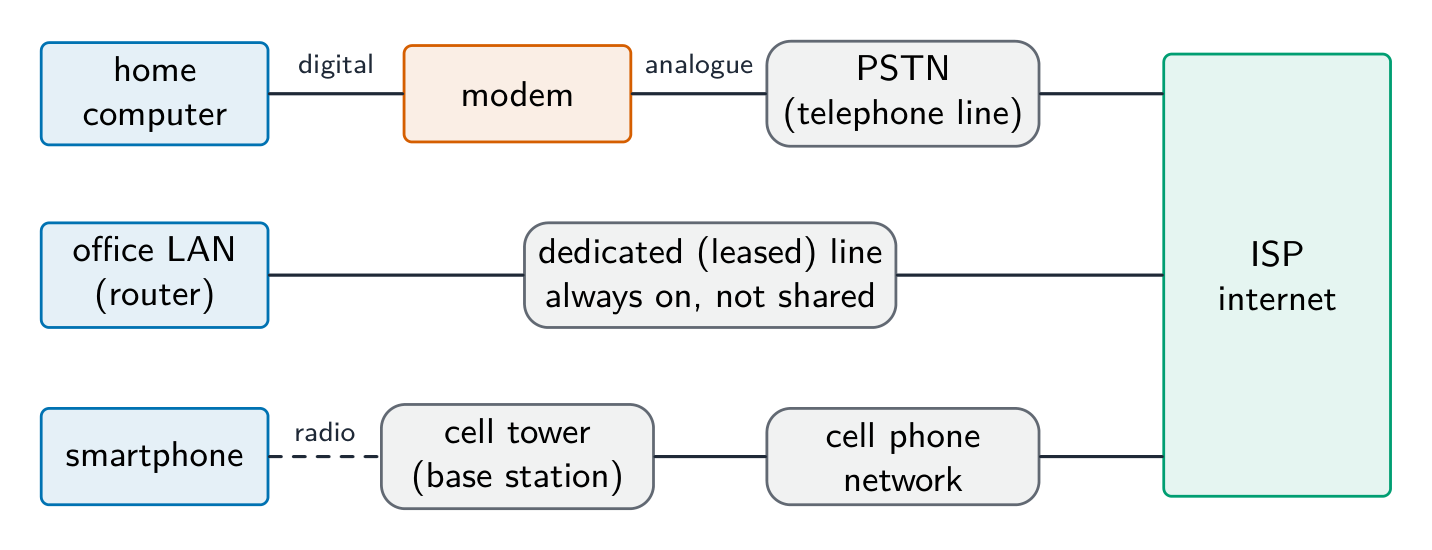
  • modem 调制解调器 — converts the computer's digital signal into an analogue signal for a telephone line, and back again at the other end (modulation and demodulation).
  • PSTN — the public telephone network of exchanges and lines; a dial-up or DSL connection carries internet data over it.
  • dedicated line 专线 — a leased line between an organisation and its ISP: always on, with a fixed bandwidth that is not shared, so faster and more reliable, but expensive.
  • cell phone network 蜂窝网络 — the phone sends data by radio to the nearest cell tower (base station); the towers are linked to the phone company's network, which routes the data to the internet; as the phone moves, it is handed over from one cell to the next.
ไทย

Internet คือ เครือข่ายของเครือข่าย ทั่วโลกที่ใช้ชุด protocol ร่วมกัน (TCP/IP) World Wide Web (WWW) คือ บริการ ที่ทำงานอยู่บนมัน: เอกสาร Hyperlink ที่ระบุด้วย URLs ดูผ่าน Browser ผ่าน HTTP/HTTPS อีเมลและการถ่ายโอนไฟล์คือบริการอินเทอร์เน็ตอื่นที่ไม่ใช่ส่วนหนึ่งของ WWW

Webmail ใช้ ทั้งสอง: WWW เนื่องจากกล่องจดหมายเป็นหน้าเว็บที่เข้าถึงได้ผ่าน URL ใน Browser ผ่าน HTTP; และ Internet เนื่องจากอีเมลเดินทางข้ามเครือข่ายของเครือข่าย (อีเมลเป็นบริการอินเทอร์เน็ตแยกต่างหากจากเว็บ)

World Wide Web เป็นบริการหนึ่งที่ทำอยู่บน Internet
Web เป็นบริการหนึ่งที่ทำอยู่บน Internet

ฮาร์ดแวร์ที่รองรับอินเทอร์เน็ต

  • modem — แปลงสัญญาณดิจิทัลของคอมพิวเตอร์เป็นสัญญาณอะนาล็อกสำหรับสายโทรศัพท์ และแปลงกลับที่อีกฝั่ง (Modulation และ Demodulation)
  • PSTN — เครือข่ายโทรศัพท์สาธารณะของศูนย์แลกเปลี่ยนและสาย; การเชื่อมต่อ Dial-up หรือ DSL ส่งข้อมูลอินเทอร์เน็ตผ่านมัน
  • dedicated line — สายเช่าระหว่างองค์กรและ ISP: เปิดตลอดเวลา มี Bandwidth คงที่ที่ไม่ถูกแชร์ เร็วและเสถียรกว่า แต่แพง
  • cell phone network — โทรศัพท์ส่งข้อมูลทางวิทยุไปยังหอคอยเซลล์ใกล้สุด (Base station); หอคอยเชื่อมต่อกับเครือข่ายบริษัทโทรศัพท์ซึ่งกำหนดเส้นทางข้อมูลไปยังอินเทอร์เน็ต; เมื่อโทรศัพท์เคลื่อนที่它将ถูก Transfer จากเซลล์หนึ่งไปยังอีกเซลล์หนึ่ง
สามช่องทาง, อย่างละหนึ่งสำหรับแต่ละวิธีการเข้าถึงอินเทอร์เน็ต: คอมพิวเตอร์ในบ้านผ่านโมเด็มและเครือข่ายโทรศัพท์สาธารณะสวิตช์;serialize LAN ในสำนักงานผ่านสายเช่าเฉพาะ;สมาร์ทโฟนผ่านวิทยุไปยังหอคอยโทรคมนาคมและต่อเข้าสู่เครือข่ายโทรศัพท์มือถือ;ทั้งหมดสิ้นสุดที่ผู้ให้บริการอินเทอร์เน็ต
สามวิธีในการเข้าถึงอินเทอร์เน็ต: โมเด็มและ PSTN, สายเช่าเฉพาะ, และเครือข่ายโทรศัพท์มือถือ
Vocabulary · ⁨คำศัพท์⁩ Train · ⁨ฝึกฝน⁩
English ไทย
protocol/ˈprəʊtəkɒl/ โปรโตคอล
modem/ˈməʊdem/ โมเด็ม
World Wide Web/wɜːld waɪd web/ เวิลด์ไวด์ไวน์
dedicated line/ˈdedɪkeɪtɪd laɪn/ เส้นทางการสื่อสารเฉพาะ
ISP/ˌaɪ es ˈpiː/ ผู้ให้บริการอินเทอร์เน็ต
cell phone network/sel fəʊn ˈnetwɜːk/ เครือข่ายโทรศัพท์มือถือ
subnets/ˈsʌbnets/ subnets
2.1

IP addresses · ⁨ที่อยู่ IP⁩

English

An IP address uniquely identifies a device.

  • IPv4 — 32-bit, four denary numbers 0–255 (192.168.1.10); about $4.3 \times 10^{9}$ addresses (now exhausted).
  • IPv6 — 128-bit, eight groups of four hex digits; about $3.4 \times 10^{38}$ addresses.

IPv4 is written as four groups of denary numbers separated by dots; each group is an 8-bit number, so it runs from 0 to 255. IPv6 is written as eight groups of four hexadecimal digits separated by colons, 2001:0db8:0000:0000:0000:ff00:0042:8329, and a run of zero groups can be shortened to ::. So 192.168.3.2 is not IPv6: it has four groups, not eight, separated by dots rather than colons, and its groups are denary, not hexadecimal. 256.0.0.A is not a valid address of either kind: an IPv4 group cannot exceed 255 and cannot be a letter, and IPv6 would need colons and eight groups.

Subnetting

A network can be split into subnets 子网. The IP address splits into a network part and a host part, given by a subnet mask 子网掩码 (e.g. 255.255.255.0 = first 24 bits are network). Subnetting improves management, cuts broadcast traffic, and improves security.

The two parts of an address in a subnetwork: the network ID (the first bits, the same for every device in that subnet, given by the ones in the mask) and the host ID (the remaining bits, unique to each device). Benefits of subnetting, for "describe two benefits": less traffic on each part, because broadcasts stay inside their subnet; better security, because one department's traffic is kept from the others; easier management and fault-finding; more efficient use of the addresses. Two devices with the mask 255.255.255.0 are in different subnets when their first three groups differ.

Public vs private addresses

  • private addresses are used within a LAN and are not routable on the internet (e.g. 192.168.0.0/16).
  • a public IP address is globally unique and routable, assigned by an ISP 互联网服务提供商.

Devices behind NAT with private addresses are not directly reachable from the internet, giving some protection.

The descriptions the tables want: a public address is visible on the internet and unique across it, allocated by the ISP; a private address is visible only inside the LAN, is reused by many LANs, and needs NAT to reach the internet. A static address never changes (set by hand or reserved, as a server needs); a dynamic address is allocated by DHCP each time the device connects and may change.

Static vs dynamic

  • a static IP address is fixed; used for servers that must be found at a known address.
  • a dynamic IP address is assigned by DHCP and may change; easier for client devices and uses a limited address pool efficiently.

Worked example. A host has IP address 192.168.10.130 with subnet mask 255.255.255.192. Which network is it on, and is 192.168.10.200 on the same one? The mask's last octet, 192, is 11000000 in binary, so the first 26 bits are the network part and the last 6 bits address the host. That makes the subnets step in blocks of $256 - 192 = 64$: .0, .64, .128, .192. The address 130 falls in the block starting at .128, so the host is on network 192.168.10.128/26, whose usable hosts run .129 to .190 (.191 is the broadcast address). 200 falls in the next block (.192), so it is on a different subnet and traffic between the two must pass through a router. Get the block size from the mask first ($256$ minus the mask octet) - guessing from the first three octets is what makes these go wrong.

ไทย

ที่อยู่ IP ใช้ระบุอุปกรณ์อย่างชัดเจน

  • IPv4 — 32 บิต, สี่ตัวเลขฐานสิบ 0–255 (192.168.1.10); ประมาณ $4.3 \times 10^{9}$ ที่อยู่ (ปัจจุบันใช้หมดแล้ว).
  • IPv6 — 128 บิต, แปดกลุ่มของสี่หลักเลขฐานสิบหก; ประมาณ $3.4 \times 10^{38}$ ที่อยู่.

IPv4 เขียนเป็น สี่ กลุ่มของตัวเลขฐานสิบคั่นด้วย จุด; แต่ละกลุ่มเป็นจำนวน 8 บิต ดังนั้นจึงมีช่วงตั้งแต่ 0 ถึง 255. IPv6 เขียนเป็น แปด กลุ่มของ สี่หลักเลขฐานสิบหก คั่นด้วย เครื่องหมายสองจุด, 2001:0db8:0000:0000:0000:ff00:0042:8329, และกลุ่มที่เป็นศูนย์สามารถย่อเหลือ ::. ดังนั้น 192.168.3.2 จึงไม่ใช่ IPv6: มีเพียงสี่กลุ่ม ไม่ใช่แปด, คั่นด้วยจุดแทนที่จะเป็นเครื่องหมายสองจุด, และกลุ่มของมันเป็นตัวเลขฐานสิบ ไม่ใช่เลขฐานสิบหก. 256.0.0.A ไม่ใช่ที่อยู่ที่ถูกต้อง任何一种: กลุ่มของ IPv4 ไม่สามารถเกิน 255 และไม่อาจเป็นตัวอักษร, และ IPv6 จำเป็นต้องมีเครื่องหมายสองจุดและแปดกลุ่ม.

การแบ่ง subnet

เครือข่ายสามารถแบ่งออกเป็น subnet ได้. ที่อยู่ IP จะแบ่งเป็นส่วนของเครือข่ายและส่วนของโฮสต์ โดยกำหนดโดย ** subnet mask** (เช่น 255.255.255.0 = 24 บิตแรกคือส่วนของเครือข่าย). การแบ่ง subnet ช่วยในการจัดการที่ดีขึ้น ลดการจราจรแบบ broadcast และเพิ่มความปลอดภัย

สองส่วนของที่อยู่ภายใน subnet: network ID (บิตแรก, เหมือนกันสำหรับทุกอุปกรณ์ใน subnet นั้น, กำหนดโดยเลข 1 ใน mask) และ host ID (บิตที่เหลือ, เฉพาะเจาะจงสำหรับแต่ละอุปกรณ์). ประโยชน์ของการแบ่ง subnet สำหรับ "อธิบายประโยชน์สองประการ": การจราจรบนแต่ละส่วนน้อยลง เพราะการ broadcast อยู่ภายใน subnet ของมันเอง; ความปลอดภัยดีขึ้น เพราะการจราจรของแผนกหนึ่งถูกแยกจากแผนกอื่น; จัดการและหาข้อผิดพลาดได้ง่ายขึ้น; ใช้ที่อยู่ได้อย่างมีประสิทธิภาพมากขึ้น. อุปกรณ์สองเครื่องที่มี mask 255.255.255.0 จะอยู่ใน subnet ที่แตกต่างกันเมื่อสามกลุ่มแรกต่างกัน.

 subnet ของ six departments, แต่ละแห่งมี netID /24 ของตัวเอง, เชื่อมต่อกันผ่านเร้าเตอร์กลางเดียวที่เข้าถึงอินเทอร์เน็ตได้ด้วย
การแบ่งเครือข่ายออกเป็น subnet, มี netID ต่อแผนก

ที่อยู่สาธารณะ vs ที่อยู่ส่วนตัว

  • private addresses ใช้ภายใน LAN และไม่มีการจัดเส้นทางบนอินเทอร์เน็ต (เช่น 192.168.0.0/16).
  • public IP address เป็นเอกลักษณ์ในระดับโลกและจัดเส้นทางได้, ถูกกำหนดโดย ISP

อุปกรณ์ที่อยู่หลัง NAT ด้วยที่อยู่ส่วนตัวไม่สามารถเข้าถึงโดยตรงจากอินเทอร์เน็ต ซึ่งให้ความคุ้มครองบางส่วน

คำอธิบายที่ตารางต้องการ: public address ปรากฏบนอินเทอร์เน็ตและเป็นเอกลักษณ์ทั่วทั้งนั้น,分配的โดย ISP; private address ปรากฏเฉพาะภายใน LAN, ถูกใช้ซ้ำโดยหลาย LAN, และจำเป็นต้องใช้ NAT เพื่อเข้าถึงอินเทอร์เน็ต. static address ไม่เคยเปลี่ยนแปลง (ตั้งค่าด้วยตนเองหรือสงวนไว้, เช่น เซิร์ฟเวอร์ที่ต้องการ); dynamic address ถูก分配โดย DHCP ทุกครั้งที่อุปกรณ์เชื่อมต่อและอาจเปลี่ยนแปลง

Static เทียบกับ Dynamic

  • static IP address คือค่าคงที่; ใช้สำหรับเซิร์ฟเวอร์ที่ต้องค้นหาได้ที่อยู่ที่รู้จัก
  • dynamic IP address ถูก分配โดย DHCP และอาจเปลี่ยนแปลง; ง่ายสำหรับอุปกรณ์ client และใช้ชุดที่อยู่จำกัดได้อย่างมีประสิทธิภาพ

ตัวอย่างที่คำนวณแล้ว. Host มีที่อยู่ IP 192.168.10.130 กับ subnet mask 255.255.255.192. มันอยู่บนเครือข่ายใด, และ 192.168.10.200 อยู่在同一 networks? ออคเตทสุดท้ายของ mask, 192, คือ 11000000 ในระบบไบนารี, ดังนั้น 26 บิตแรกคือส่วนของเครือข่ายและ 6 บิตสุดท้ายใช้สำหรับ host. นั่นทำให้ subnet ก้าวไปทีละ block ขนาด $256 - 192 = 64$: .0, .64, .128, .192. ที่อยู่ 130落入ใน block ที่เริ่มต้นที่ .128, ดังนั้น host อยู่บนเครือข่าย 192.168.10.128/26, ซึ่งมี host ที่ใช้งานได้ตั้งแต่ .129 ถึง .190 (.191 adalah addresses broadcast). 200落入ใน block ถัดไป (.192), ดังนั้นมันอยู่บน subnet ที่แตกต่าง และการสื่อสารระหว่างทั้งสองต้องผ่าน router. หาขนาด block จาก mask ก่อน ($256$ ลบออกเตทของ mask) - การเดาจากสามออคเตทแรกคือสิ่งที่ทำให้ข้อเหล่านี้ผิด

Vocabulary · ⁨คำศัพท์⁩ Train · ⁨ฝึกฝน⁩
English ไทย
IP address/ˌaɪ ˈpiː əˈdres/ ที่อยู่ไอพี
subnet mask/ˈsʌbnet mæsk/ มาสก์subnet
2.1

URL and DNS · ⁨URL และ DNS⁩

English

A URL 统一资源定位符 (Uniform Resource Locator) locates a resource on the WWW:

  • protocol: http, https, etc.
  • domain name 域名: a readable server address.
  • path: the resource on that server.

The Domain Name System 域名系统 (DNS, also called the Domain Name Service) is a distributed set of servers that turns domain names into IP addresses. When you type a URL, the browser asks a DNS resolver for the IP, which queries DNS servers (root → top-level → authoritative) until it finds it; the browser then connects to that IP and requests the path. DNS saves humans from memorising IP addresses and lets a site change server without changing its name.

For "explain how the browser uses the URL": the browser splits the URL into the protocol, the domain name and the path; it sends the domain name to a DNS server, which returns the matching IP address (a cache on the computer or at the ISP may answer first); it opens a connection to that IP address using the protocol (HTTPS on port 443); it sends a request for the path; and the web server returns the page, which the browser renders. If the DNS lookup fails, the browser reports that the server cannot be found.

ไทย

URL (Uniform Resource Locator) ใช้ระบุตำแหน่งทรัพยากรบน WWW:

https://www.example.com/about/contact.html
protocol     domain name        path
  • protocol: http, https, เป็นต้น
  • domain name: ที่อยู่เซิร์ฟเวอร์ที่อ่านได้
  • path: ทรัพยากรบนเซิร์ฟเวอร์นั้น

Domain Name System (DNS, หรือเรียกว่า Domain Name Service) คือเซิร์ฟเวอร์แบบกระจายที่แปลง ชื่อโดเมนเป็นที่อยู่ IP. เมื่อคุณพิมพ์ URL, เบราว์เซอร์จะขอที่อยู่ IP จาก DNS resolver, ซึ่งจะสอบถามเซิร์ฟเวอร์ DNS (root → top-level → authoritative) จนกว่าจะพบ; แล้วเบราว์เซอร์จะเชื่อมต่อกับที่อยู่ IP นั้นและขอ path. DNS ช่วยคนจากการจำที่อยู่ IP และทำให้เว็บไซต์เปลี่ยนเซิร์ฟเวอร์ได้โดยไม่ต้องเปลี่ยนชื่อ

สำหรับ "อธิบายว่าเบราว์เซอร์ใช้ URL อย่างไร": เบราว์เซอร์แยก URL ออกเป็น protocol, ชื่อโดเมน และ path; ส่งชื่อโดเมนไปยังเซิร์ฟเวอร์ DNS, ซึ่งกลับคืนที่อยู่ IP ที่ตรงกัน (cache บนคอมพิวเตอร์หรือที่ ISP อาจตอบก่อน); เปิดการเชื่อมต่อกับที่อยู่ IP นั้นโดยใช้ protocol (HTTPS บนพอร์ต 443); ส่งคำขอสำหรับ path; และเว็บเซิร์ฟเวอร์ส่งหน้าเว็บกลับมา, ซึ่งเบราว์เซอร์แสดงผล. หากการค้นหา DNS ล้มเหลว, เบราว์เซอร์จะรายงานว่าไม่พบเซิร์ฟเวอร์

 numbering จาก 1 ถึง 5: คอมพิวเตอร์ขอที่อยู่ IP จาก DNS resolver, resolver สอบถามเซิร์ฟเวอร์ DNS อื่น, ที่อยู่ IP ถูกส่งกลับไปยัง resolver และ затем computer, และ browser เชื่อมต่อกับเซิร์ฟเวอร์เว็บไซต์ *วิธีที่ DNS ค้นหาที่อยู่ IP ของเว็บไซต์ก่อนที่เบราว์เซอร์จะเชื่อมต่อ

Explore · ⁨สำรวจ⁩

How DNS finds a website · ⁨DNS ค้นหาเว็บไซต์อย่างไร⁩

Step through a DNS lookup. The network routes by IP, not by name — so before anything loads, DNS must turn the domain name into an IP address. · ⁨ขั้นตอนการ Lookup DNSerior โดยเครือข่าย ROUTE ตาม IP ไม่ใช่ตามชื่อ — ดังนั้นก่อนโหลดอะไรเลย DNS ต้องแปลงชื่อโดเมนให้เป็นที่อยู่ IP ก่อน⁩

Vocabulary · ⁨คำศัพท์⁩ Train · ⁨ฝึกฝน⁩
English ไทย
domain name/dəˈmeɪn neɪm/ ชื่อโดเมน
Domain Name System/dəˈmeɪn neɪm ˈsɪstəm/ ระบบชื่อโดเมน
2.1

Definitions the examiner accepts · ⁨คำนิยามที่ผู้สอบยอมรับ⁩

English

A definition question is marked against fixed wording. Learn these exactly.

Term Definition
LAN a network covering a small geographical area, usually one site, whose hardware is owned by the organisation
WAN a network covering a large geographical area, joining LANs through third-party (leased or public) links
client-server a model in which client computers request services from a central, more powerful server that provides them
peer-to-peer a model in which every computer is equal and can act as both client and server, with no central server
thin client a client that does little processing or storage itself and depends on the server for both
thick client a client that does its own processing and storage and can work without the server
mesh topology a topology in which each device is connected directly to many others, giving more than one route between two devices
cloud computing on-demand computing services (storage, processing, software) provided over the internet by a third party
Ethernet the standard protocol for wired LANs, sending data in frames and using CSMA/CD on a shared medium
switch a device that forwards each frame only to the port of its destination MAC address, within a LAN
router a device that connects networks and forwards packets between them by their destination IP address
bit streaming sending a continuous stream of bits so that the receiver plays the media as it arrives, without downloading the whole file first
internet the global network of networks that uses the TCP/IP protocols
World Wide Web the collection of hyperlinked web pages, identified by URLs and accessed over the internet through a browser
URL the address that locates a resource on the web: protocol, domain name and path
DNS the service that translates a domain name into the IP address of the server that holds the resource
ไทย

คำถามนิยามจะถูกตรวจตามข้อความที่กำหนดตายตัว. เรียนรู้สิ่งเหล่านี้ให้เป๊ะ

พจน์ นิยาม
LAN เครือข่ายที่ครอบคลุมพื้นที่ทางภูมิศาสตร์ขนาดเล็ก โดยทั่วไปเป็นสถานที่เดียว ซึ่งฮาร์ดแวร์เป็นกรรมสิทธิ์ขององค์กร
WAN เครือข่ายที่ครอบคลุมพื้นที่ทางภูมิศาสตร์ขนาดใหญ่ เชื่อมต่อ LAN ผ่านช่องทางของบุคคลที่สาม (เช่าหรือสาธารณะ)
client-server โมเดลที่คอมพิวเตอร์ klien ขอรับบริการจากเซิร์ฟเวอร์กลางที่มีกำลังสูงกว่าและให้บริการนั้น
peer-to-peer โมเดลที่ทุกเครื่องมีสถานะเท่ากันและสามารถทำหน้าที่ได้ทั้ง klien และเซิร์ฟเวอร์ โดยไม่มีเซิร์ฟเวอร์กลาง
thin client Klien ที่ไม่ทำการประมวลผลหรือจัดเก็บข้อมูลด้วยตนเองมากนัก และพึ่งพาเซิร์ฟเวอร์ในการทั้งสองอย่างนี้
thick client Klien ที่ทำการประมวลผลและจัดเก็บข้อมูลด้วยตนเอง และสามารถทำงานได้โดยไม่ต้องใช้เซิร์ฟเวอร์
mesh topology โทโพโลยีที่อุปกรณ์แต่ละตัวเชื่อมต่อกับอีกหลายอุปกรณ์โดยตรง ทำให้มีเส้นทางระหว่างอุปกรณ์สองเครื่องมากกว่าหนึ่งเส้นทาง
cloud computing บริการคอมพิวเตอร์ตามความต้องการ (พื้นที่จัดเก็บ, การประมวลผล, ซอฟต์แวร์) ที่จัดจำหน่ายผ่านอินเทอร์เน็ตโดยบุคคลที่สาม
Ethernet โปรโตคอลมาตรฐานสำหรับ LAN แบบมีสาย ส่งข้อมูลในรูปแบบเฟรม และใช้ CSMA/CD บนสื่อร่วม
switch อุปกรณ์ที่จะส่งต่อเฟรมไปยังพอร์ต MAC address ของปลายทางเท่านั้น ภายใน LAN
router อุปกรณ์ที่จะเชื่อมต่อเครือข่ายและส่งต่อแพ็กเก็ตระหว่างเครือข่ายโดยใช้ IP Address ปลายทาง
bit streaming การส่งบิตต่อเนื่องเพื่อให้ผู้รับเล่นสื่อกันไปพร้อมกับการมาถึง โดยไม่ต้องดาวน์โหลดไฟล์ทั้งหมดก่อน
internet เครือข่ายของเครือข่ายทั่วโลกที่ใช้โปรโตคอล TCP/IP
World Wide Web ชุดหน้าเว็บที่มีลิงก์ข้ามกัน ระบุด้วย URL และเข้าถึงผ่านอินเทอร์เน็ตด้วยเบราว์เซอร์
URL ที่อยู่ที่จะระบุตำแหน่งทรัพยากรบนเว็บ: โปรโตคอล, ชื่อโดเมน และเส้นทาง
DNS บริการที่จะแปลงชื่อโดเมนให้เป็น IP Address ของเซิร์ฟเวอร์ที่ถือทรัพยากรนั้น
2.1

Exam tips · ⁨ข้อแนะนำสำหรับการสอบ⁩

English
  • Distinguish LAN vs WAN and client-server vs peer-to-peer by who stores and controls the resources.
  • Match each topology (bus, star, mesh) to its advantages and drawbacks (cost, reliability, collisions).
  • Know the job of each device: a switch directs within a LAN by MAC address, a router routes between networks by IP.
  • Explain bit streaming and why buffering is needed (data arrives at a different rate from playback).
  • Distinguish IPv4 vs IPv6 and public vs private addresses; DNS turns a URL into an IP address.

Common mistakes

  • Saying a switch works by IP address. A switch forwards by MAC address inside the LAN; the router forwards by IP address between networks.
  • Treating the internet and the World Wide Web as the same thing. The web is one service that runs over the internet; email and file transfer are others.
  • Giving "faster" as the whole comparison of wired and wireless. Say faster and more reliable and more secure, and give the wireless side (mobility, no cabling) when the question asks for a comparison.
  • Writing that a router finds the IP address for a URL. DNS does that; the router forwards packets to it.
  • Describing IPv6 with dots and denary groups. Eight groups of four hexadecimal digits, separated by colons.
  • Drawing a star topology as a ring or a chain. Every device has its own line to the switch in the middle.
ไทย
  • แยกแยะ LAN vs WAN และ client-server vs peer-to-peer โดยดูว่าใครเป็นผู้จัดเก็บและควบคุมทรัพยากร
  • จับคู่ โทโพโลยี แต่ละชนิด (bus, star, mesh) กับข้อดีและข้อเสีย (ต้นทุน, ความน่าเชื่อถือ, การชนกันของสัญญาณ)
  • รู้หน้าที่ของอุปกรณ์แต่ละชนิด: switch จะนำทางภายใน LAN ตาม MAC address, router จะจัดเส้นทางระหว่างเครือข่ายตาม IP
  • อธิบาย bit streaming และเหตุผลที่ต้องใช้การแคช (data มาถึงด้วยความเร็วต่างจากการเล่นกลับ)
  • แยกแยะ IPv4 vs IPv6 และที่อยู่แบบสาธารณะกับส่วนตัว; DNS จะแปลง URL ให้เป็น IP Address

ข้อผิดพลาดที่พบบ่อย

  • การบอกว่า switch ทำงานด้วย IP Address Switch ส่งต่อตาม MAC Address ภายใน LAN; Router ส่งต่อตาม IP Address ระหว่างเครือข่าย
  • การ treating Internet และ World Wide Web เหมือนกัน The web เป็นบริการหนึ่งที่ทำงานอยู่บน internet; Email และการถ่ายโอนไฟล์คือบริการอื่น ๆ
  • การให้คำตอบ "faster" เพียงอย่างเดียวในการเปรียบเทียบ wired และ wireless ต้องบอกว่าเร็ว และ เชื่อถือได้มากกว่าและปลอดภัยกว่า รวมถึงด้านของ wireless ( mobility, ไม่มีสาย) เมื่อคำถามขอการเปรียบเทียบ
  • การเขียนว่า router ค้นหา IP Address สำหรับ URL ทำสิ่งนี้ได้คือ DNS; router จะส่งต่อแพ็กเก็ตไปที่ DNS
  • การอธิบาย IPv6 ด้วยจุดและกลุ่มเลขฐานสิบ.แปดกลุ่มของสี่หลักเลขหกเทนซารี่, แยกด้วยเครื่องหมาย colon.
  • การวาด star topology เป็นวงกลมหรือเส้นสาย Every device จะมีสายของตัวเองไปยัง switch ตรงกลาง

Interactive lessons on this topic · ⁨บทเรียนเชิงโต้ตอบสำหรับหัวข้อนี้⁩

Work through it step by step, with instant-check exercises. · ⁨ทำทีละขั้นตอน พร้อมแบบฝึกหัดตรวจสอบผลทันที⁩

Past Papers · ⁨ข้อสอบย้อนหลัง⁩

More topics in A-Level Computer Science · ⁨Computer Science A-Level⁩ · ⁨หัวข้อเพิ่มเติมใน A-Level Computer Science · ⁨Computer Science A-Level⁩⁩

Log in or create account · ⁨เข้าสู่ระบบหรือสร้างบัญชี⁩

IGCSE, A-Level & AP