English narration · English + 中文 subtitles burned in · การบรรยายภาษาอังกฤษ · คำบรรยายภาษาอังกฤษ + 中文 ลอยตัวบนภาพ
9.1
Computational thinking
Syllabus · หลักสูตร
English
Candidates should be able to:
Notes and guidance
Show an understanding of abstraction
Need for and benefits of using abstraction Describe the purpose of abstraction Produce an abstract model of a system by only including essential details
Describe and use decomposition
Break down problems into sub-problems leading to the concept of a program module (procedure / function)
Source: Cambridge International syllabus · แหล่งที่มา: หลักสูตร Cambridge International
English
Computational thinking 计算思维 is the set of mental tools for analysing a problem and designing a solution a computer can run. Two key ones are abstraction and decomposition.
Abstraction
Abstraction 抽象 means keeping the essential features of a problem and ignoring the irrelevant detail, giving a simpler model.
Examples:
a train-network map keeps the stations and lines but drops the geography.
a class in object-oriented programming keeps only the attributes and methods the system needs.
a function hides a piece of work behind a name.
A full model of any real problem would be too big to reason about, so abstraction is essential.
The examiner asks for the purpose of abstraction and for its benefits. Purpose: to produce a simpler model of a problem that contains only the details needed to solve it. Benefits: the problem is easier to understand and to program; the program is smaller and faster to write and test; the same model can be reused for similar problems. When you are asked to produce an abstract model of a system, list only the data and actions the task needs. For a school timetable that means the classes, rooms, teachers and periods; it does not mean the colour of the rooms or the age of the teachers.
Decomposition
Decomposition 分解 means breaking a large problem into smaller sub-problems, each easier to solve and tackled one at a time.
find the main parts of the task.
break each into smaller sub-tasks.
continue until each is small enough to design directly.
solve the small tasks and combine them.
For stock control: "manage stock" → "record sales", "record deliveries", "produce reports" → ("record sales") "look up product", "decrease stock count", "save the transaction". Decomposition makes big problems manageable, lets a team divide the work, and gives modular code — each module becomes a procedure 过程 or function.
"Explain why decomposition is used" is a three-mark question with a fixed shape. Give three separate benefits: each sub-problem 子问题 is small enough to design, code and test on its own; different programmers can work on different modules 模块 at the same time; a module that already exists (or a library routine) can be reused, and a fault is easier to find because it lies inside one module. A structure chart (topic 12) is the diagram of a decomposition: the program at the top, its modules beneath, and the data passed between them.
Solving a problem the computational way · แก้ปัญหาด้วยวิธีการทางคอมพิวเตอร์
Step through the four cornerstones in the order you'd use them — break the problem down, spot what repeats, strip it to essentials, then write the steps. · ผ่านขั้นตอน基石ทั้งสี่ตามลำดับที่คุณจะใช้ — แยกปัญหาออก, หาสิ่งที่ซ้ำกัน, ตัดส่วนที่ไม่จำเป็นออก, แล้วเขียนขั้นตอน
Source: Cambridge International syllabus · แหล่งที่มา: หลักสูตร Cambridge International
English
Bubble sort, pass by pass
An algorithm 算法 is a solution expressed as a sequence of defined steps. Each step is unambiguous 无歧义 (one meaning), deterministic 确定性 (same input → same output), finite (the steps end), and effective (each can be done). An algorithm says what to do, independent of the programming language used to implement it.
Selection: follow the IF / ELSE branches · การเลือก: ตามเส้นทาง IF / ELSE
Drag the score and watch which branch runs. Selection tests each condition in turn and takes the FIRST one that is true — that is how IF … ELSE IF … ELSE works. · ลากคะแนนและดูว่าเส้นทางไหนทำงาน การเลือกจะทดสอบเงื่อนไขทีละข้อและเลือกเส้นทางที่ TRUE เป็นข้อแรก — นั่นคือวิธีการทำงานของ IF … ELSE IF … ELSE
When you start an algorithm, list every piece of data in an identifier table 标识符表 — its identifier 标识符 (the variable 变量 name), data type 数据类型, and description. The exam's table has exactly these three columns:
Identifier
Data type
Description
Category
STRING
the product category
SaleDate
DATE
when the item was sold
ItemCost
REAL
cost of the item
InStock
BOOLEAN
TRUE if in stock
Sales
ARRAY[1:30] OF REAL
the last 30 daily sales totals
Use descriptive names (ItemCost, not x): an identifier starts with a letter, contains no spaces, and is written the same way every time it appears. Common types are INTEGER, REAL, STRING, CHAR, BOOLEAN, DATE, plus arrays. The table forces you to name every piece of data before writing code, and a "complete the identifier table" question gives one mark for each correct data type or description, so write the type exactly as the pseudocode guide does.
Pseudocode — the three basic constructs · Pseudocode — โครงสร้างพื้นฐานทั้งสาม
English
Pseudocode 伪代码 is a structured, language-neutral way to describe algorithms.
1. Sequence
Steps run one after another (sequence 顺序):
2. Selection
A choice of which steps run, based on a condition (selection 选择):
For more options, use CASE OF ... ENDCASE.
3. Iteration
Repeating a block (iteration 迭代, a loop 循环):
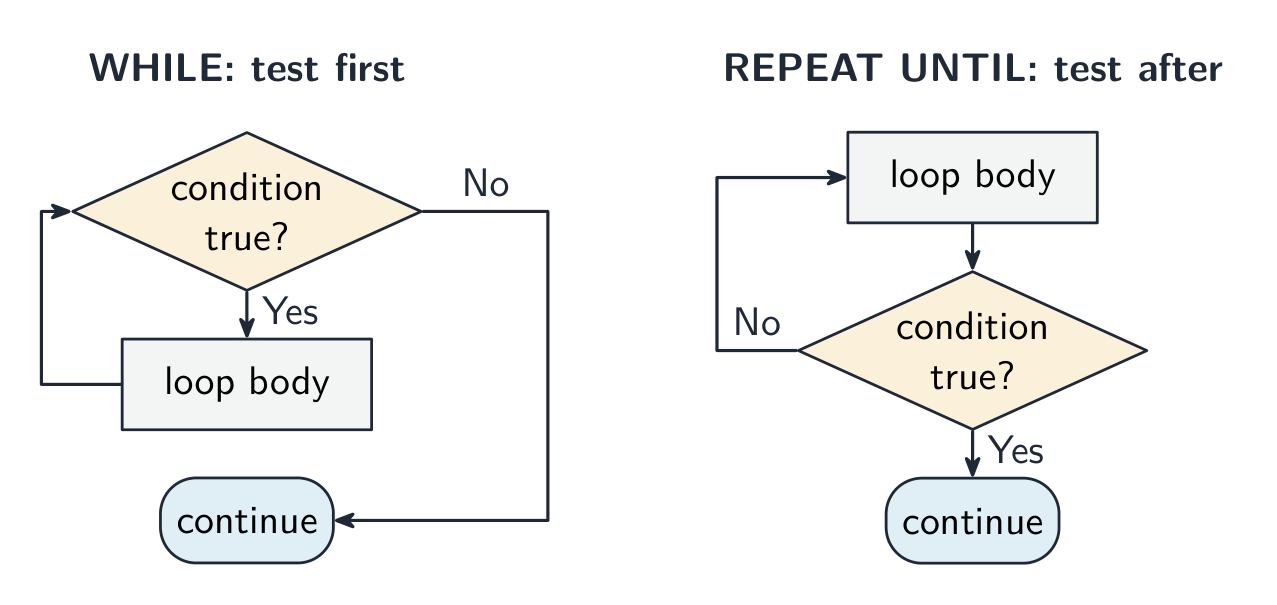
A WHILE loop tests the condition before each pass (may run zero times); a REPEAT...UNTIL loop tests after each pass (always runs at least once).
Choosing the loop is itself a mark: FOR when you know how many times (a count-controlled loop 计数循环); WHILE when the loop might not run at all (a pre-condition loop 前测循环); REPEAT ... UNTIL when it must run at least once, as in validating an input (a post-condition loop 后测循环). A "describe the iteration construct" answer names the construct, says where the condition is tested, and gives the consequence (zero times or at least once).
Common operations
assignment 赋值: x ← 5 (an arrow; = is for comparison).
RAND(100) gives a real number from 0 up to (but not including) 100. INT(RAND(100)) + 1 gives an integer from 1 to 100.
Two habits earn marks on every question: declare every variable you use, with the type from your identifier table, and initialise 初始化 every counter 计数器 and total (Count ← 0, Total ← 0) before the loop that changes it.
Input → Process → Output
Every program follows this shape:
Listing the inputs and outputs first makes the algorithm cleaner.
Worked example. Write pseudocode that inputs 100 integers and outputs how many of them, and the total of those, that lie between 10 and 20 inclusive.
Identifier table: Count : INTEGER (loop counter), Value : INTEGER (the integer just input), InRange : INTEGER (how many were in range), Total : INTEGER (their sum).
If the question then asks you to "identify two constructs and state how each is used", answer in the same shape: iteration, the FOR loop, repeats the input 100 times; selection, the IF statement, adds a value only when it is in range.
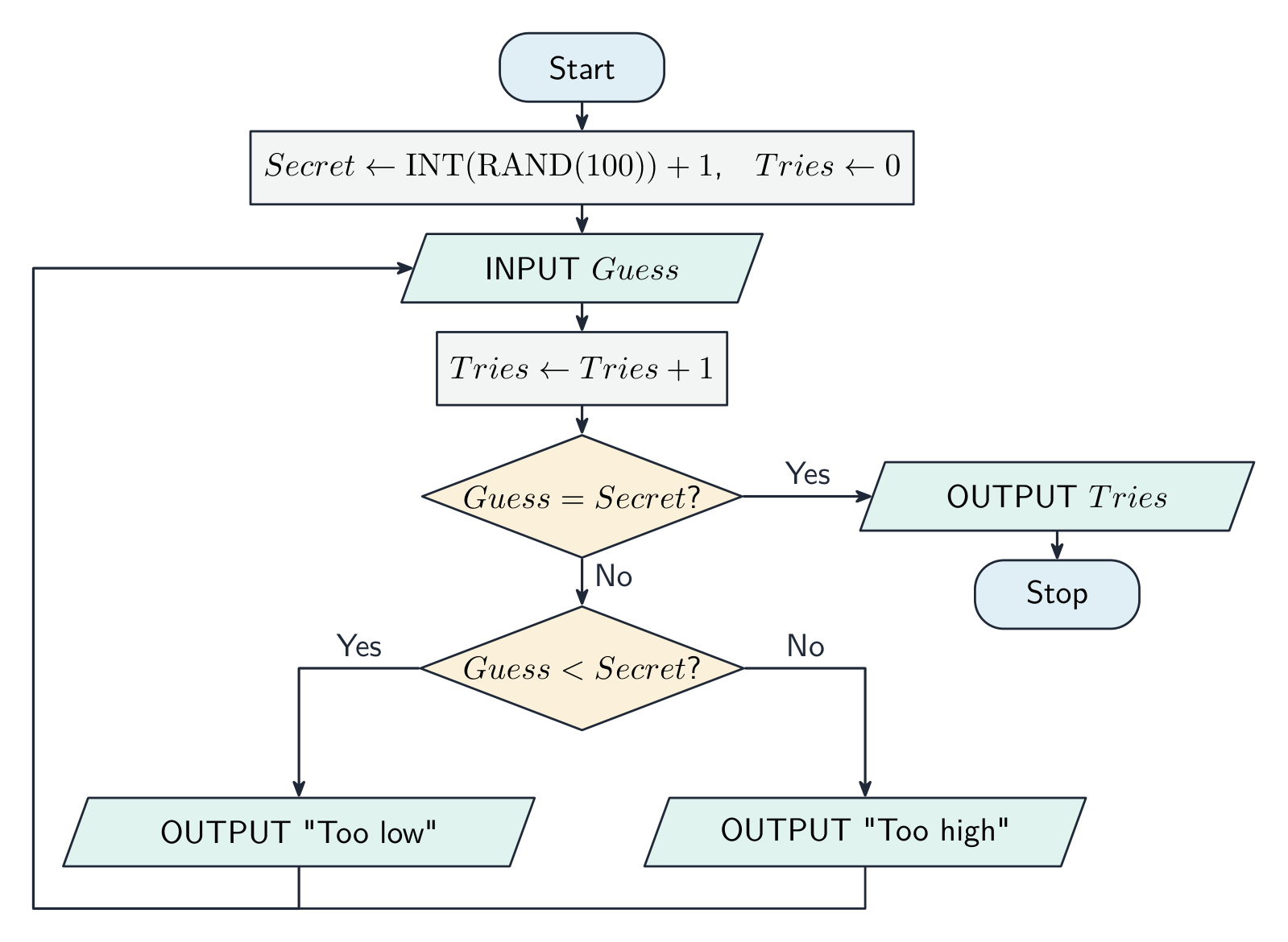
Worked example. A program picks a secret integer from 1 to 100. The user guesses until they are right; after each wrong guess the program says "Too low" or "Too high", and at the end it outputs how many guesses were made.
Identifier table: Secret : INTEGER (the number to guess), Guess : INTEGER (the user's input), Tries : INTEGER (how many guesses so far).
A REPEAT ... UNTIL loop is the right choice because the user must guess at least once. The marks are for: the random number in the right range, a loop that ends on a correct guess, the counter that starts at zero and increases inside the loop, the two messages under the right conditions, and the final output.
Worked example. Output two different random integers, each between $-10$ and $10$ inclusive.
There are 21 possible values, so INT(RAND(21)) gives 0 to 20 and subtracting 10 shifts it to the range $-10$ to $10$. The second number must be generated again until it differs from the first:
ตารางไถ่ชื่อ: Count : INTEGER (ตัวนับรอบลูป), Value : INTEGER (จำนวนเต็มที่เพิ่งรับเข้ามา), InRange : INTEGER (จำนวนที่มีอยู่ในช่วง), Total : INTEGER (ผลรวมของจำนวนเหล่านั้น).
DECLARE Count, Value, InRange, Total : INTEGER
InRange ← 0
Total ← 0
FOR Count ← 1 TO 100
    INPUT Value
    IF Value >= 10 AND Value <= 20 THEN
        InRange ← InRange + 1
        Total ← Total + Value
    ENDIF
NEXT Count
OUTPUT InRange, Total
Stepwise refinement 逐步求精 starts with a high-level outline and expands each step until it is small enough to code. For an average of $n$ numbers:
Level 1:
Level 2:
Each refinement keeps the previous structure and adds detail.
A six-mark "apply stepwise refinement" question gives you a high-level outline and wants each step expanded into the concrete statements a programmer could code. Keep the steps in the same order, name the data each step reads or produces, and stop when every line is a single input, assignment, output, loop or condition. For example, "validate the password" becomes: input the password; check its length is at least 8; check it contains at least one digit; output "accepted" if both checks pass, otherwise output "rejected".
Stepwise refinement: outline to code · การปรับปรุงแบบขั้นตอน: จากแผนภาพไปจนถึงโค้ด
Step down the levels. You start with the whole task in one line and keep expanding each step into smaller ones — until every step is simple enough to code directly. · ลดระดับลงทีละขั้น คุณเริ่มจากโจทย์ทั้งหมดในบรรทัดเดียว และขยายแต่ละขั้นตอนให้อยู่ในระดับย่อยลงไปเรื่อยๆ — จนกว่าแต่ละขั้นตอนจะเล็กและเรียบง่ายพอที่จะเขียนโค้ดได้โดยตรง
9.2
Logic statements · คำสั่งตรรกะ
English
A logic statement 逻辑语句 is a Boolean 布尔 condition that controls branching, built from comparisons (x > 10), connectives (AND, OR, NOT) and brackets. Use it as the condition of IF, WHILE or REPEAT...UNTIL:
Precedence 优先级 (highest to lowest): NOT, then AND, then OR. Use brackets when unsure. Common mistakes:
a = 1 OR 2 is wrong — write a = 1 OR a = 2.
NOT a > 5 means NOT (a > 5), i.e. a <= 5.
NOT (A AND B) is the same as (NOT A) OR (NOT B) (De Morgan's law 德摩根定律) — handy for simplifying conditions.
Turning a sentence into a logic statement is a skill the papers test directly. "A ticket is free for anyone under 5 or over 65" becomes Age < 5 OR Age > 65. "A mark is valid if it is a whole number from 0 to 100" becomes Mark >= 0 AND Mark <= 100. "The loop stops when the file is finished or ten records have been read" becomes UNTIL EOF(File) OR Count = 10. Write each comparison in full: Age > 65 and Age < 5, never Age > 65 OR < 5.
Worked example. Write an identifier table and pseudocode to read 10 numbers and output the largest. The identifier table names each variable with its data type and purpose: Count : INTEGER (loop counter), Num : REAL (the number just read), Max : REAL (largest so far).
The design decision carrying the marks is initialising Max: it must start lower than any possible input - or, safer still, be set to the first number read. Initialise it to 0 and the algorithm wrongly returns 0 for a list of negative numbers, a bug your trace only exposes if the test data include a negative.
NOT a > 5 หมายความว่า NOT (a > 5), นั่นคือ a <= 5.
NOT (A AND B) เหมือนกับ (NOT A) OR (NOT B) (กฎเดมอร์แกน) — มีประโยชน์ในการลดทอนเงื่อนไขให้สั้นลง
การแปลงประโยคเป็นคำสั่งตรรกะเป็นทักษะที่ข้อสอบทดสอบโดยตรง "บัตรเข้าฟรีสำหรับทุกคนที่มีอายุต่ำกว่า 5 ปีหรือมากกว่า 65 ปี" จะกลายเป็น Age < 5 OR Age > 65 "คะแนนมีความถูกต้องหากเป็นจำนวนเต็มตั้งแต่ 0 ถึง 100" จะกลายเป็น Mark >= 0 AND Mark <= 100 "ลูปจะหยุดเมื่อไฟล์读完หรืออ่านข้อมูลครบสิบบรรทัด" จะกลายเป็น UNTIL EOF(File) OR Count = 10. เขียนทุกการเปรียบเทียบให้สมบูรณ์: Age > 65 และ Age < 5, ห้ามใช้ Age > 65 OR < 5.
ตัวอย่างทำแล้ว. เขียนตารางตัวระบุและ伪โค้ดเพื่ออ่านตัวเลข 10 ตัวและแสดงผลใหญ่ที่สุด ตารางตัวระบุ ชื่อบันไดตัวแปรพร้อมชนิดข้อมูลและวัตถุประสงค์: Count : INTEGER (ตัวนับลูป), Num : REAL (ตัวเลขที่เพิ่งอ่าน), Max : REAL (ค่าที่ใหญ่ที่สุดจนถึงตอนนี้).
Max ← -999999
FOR Count ← 1 TO 10
    INPUT Num
    IF Num > Max THEN
        Max ← Num
    ENDIF
NEXT Count
OUTPUT Max
Pick one and the site follows you — notes, papers, videos and practice all open on it. · เลือกหนึ่งตัว และเว็บจะติดตามคุณ — หมายเหตุ, ใบงาน, วิดีโอ และการฝึกฝนจะเปิดอยู่ที่นั้น
Type to search notes, lessons, code, vocabulary and past-paper questions across every subject. · พิมพ์เพื่อค้นหาบันทึก, บทเรียน, โค้ด, คำศัพท์ และคำถามข้อสอบเก่าในทุกวิชา