Skip to content · ⁨ข้ามไปยังเนื้อหา⁩

Communication and internet technologies · ⁨เทคโนโลยีการสื่อสารและอินเทอร์เน็ต⁩

A-Level Computer Science · ⁨Computer Science A-Level⁩ · Topic 14 · ⁨หัวข้อ 14⁩

Video lesson for this topic · ⁨บทเรียนวิดีโอสำหรับหัวข้อนี้⁩ Open the video page · ⁨เปิดหน้าวิดีโอ⁩
11:17

ทำไมต้องมีการกำหนดโปรโตคอล

คอมพิวเตอร์สองเครื่องต้องการสื่อสารกัน แต่เครื่องหนึ่งส่งข้อมูลในทิศทางหนึ่งและอีกเครื่องคาดหวังต่างออกไปมาก ผลลัพธ์คือข้อมูลไร้ความหมาย — เหมือนคนสองคนที่พูด…

English narration · English + 中文 subtitles burned in · ⁨การบรรยายภาษาอังกฤษ · คำบรรยายภาษาอังกฤษ + 中文 ลอยตัวบนภาพ⁩

14.1

Why protocols are needed · ⁨เหตุผลที่ต้องมีโปรโตคอล⁩

Syllabus · ⁨หลักสูตร⁩
English
Candidates should be able to: Notes and guidance
Show understanding of why a protocol is essential for communication between computers
Show understanding of how protocol implementation can be viewed as a stack, where each layer has its own functionality
Show understanding of the TCP/IP protocol suite Four Layers (Application, Transport, Internet, Link) Purpose and function of each layer Application when a message is sent from one host to another on the internet
Show understanding of protocols (HTTP, FTP, POP3, IMAP, SMTP, BitTorrent) and their purposes BitTorrent protocol provides peer-to-peer file sharing
ไทย
ผู้เข้าสอบควรสามารถ: หมายเหตุและคำแนะนำ
แสดงความเข้าใจว่าทำไม protocol จึงจำเป็นสำหรับการสื่อสารระหว่างคอมพิวเตอร์
แสดงความเข้าใจว่า โปรโตคอล (protocol) สามารถถูกมองเป็น สแต็ก (stack) โดยที่แต่ละเลเยอร์มีฟังก์ชันของตัวเอง
แสดงความเข้าใจในชุด โปรโตคอล TCP/IP สี่เลเยอร์ (Application, Transport, Internet, Link) วัตถุประสงค์และหน้าที่ของแต่ละเลเยอร์ การทำงานของแอปพลิเคชันเมื่อส่งข้อความจากโฮสต์หนึ่งไปยังอีกโฮ่งบนอินเทอร์เน็ต
แสดงความเข้าใจใน โปรโตคอล (HTTP, FTP, POP3, IMAP, SMTP, BitTorrent) และวัตถุประสงค์ของโปรโตคอลเหล่านี้ โปรโตคอล BitTorrent ช่วยในการแชร์ไฟล์แบบ peer-to-peer

Source: Cambridge International syllabus · ⁨แหล่งที่มา: หลักสูตร Cambridge International⁩

English

A protocol 协议 is a set of rules for how devices communicate. Both ends must follow the same rules, or one side's signals are meaningless to the other. Protocols define the format of the data (where addresses and payload sit), the order of messages (who speaks first, when to acknowledge), the meaning of each message, the timing (timeouts, retransmits), and what to do on error. Without an agreed protocol, communication fails — like two people speaking different languages with no translator.

"Explain why protocols are essential for communication between computers" (three marks). (1) A protocol is a set of rules agreed by both the sender and the receiver; (2) without it the two computers would interpret the data differently (format, order, meaning of each part), so the message could not be understood; (3) it allows computers of different types and manufacturers to communicate, because everyone implements the same standard. Mention what the rules cover: the format of the data, the order of messages, error detection and recovery, and speed or timing.

ไทย

โปรโตคอล คือ ชุดกฎเกณฑ์ ที่ใช้สำหรับการสื่อสารระหว่างอุปกรณ์ ทั้งสองฝ่ายต้องปฏิบัติตามกฎเดียวกัน มิฉะนั้นสัญญาณจากฝ่ายหนึ่งจะไร้ความหมายต่ออีกฝ่าย โปรโตคอลกำหนด รูปแบบ ของข้อมูล (ตำแหน่งที่อยู่และข้อมูลPayload), ลำดับ ของข้อความ (ใครพูดก่อน, เมื่อไหร่ให้ยืนยัน), ความหมาย ของแต่ละข้อความ, เวลา (การหมดเวลา, การส่งซ้ำ), และ สิ่งที่ต้องทำเมื่อเกิดข้อผิดพลาด หากไม่มีโปรโตคอลที่ตกลงกันไว้ การสื่อสารจะล้มเหลว — เหมือนคนสองคนพูดภาษาต่างกันโดยไม่มีผู้แปล

"อธิบายว่าทำไมโปรโตคอลจึงจำเป็นต่อการสื่อสารระหว่างคอมพิวเตอร์" (3 คะแนน) (1) โปรโตคอลคือ ชุดกฎเกณฑ์ ที่ผู้ส่งและผู้รับตกลงร่วมกัน; (2) หากไม่มีโปรโตคอล คอมพิวเตอร์ทั้งสองจะ ตีความข้อมูลแตกต่างกัน (รูปแบบ, ลำดับ, ความหมายของแต่ละส่วน) ทำให้ไม่สามารถเข้าใจข้อความได้; (3) ช่วยให้คอมพิวเตอร์ที่มี ประเภทและยี่ห้อต่างกัน สามารถสื่อสารกันได้ เพราะทุกคนใช้มาตรฐานเดียวกัน ควรกล่าวถึงสิ่งที่กฎครอบคลุม: รูปแบบของข้อมูล, ลำดับข้อความ, การตรวจจับและกู้คืนข้อผิดพลาด, และความเร็วหรือเวลา

อุปกรณ์สองเครื่องปฏิบัติตามกฎเดียวกัน: รูปแบบ, ลำดับ, เวลา และการจัดการเมื่อเกิดข้อผิดพลาด
โปรโตคอลคือกฎshared: รูปแบบ, ลำดับ, เวลา และข้อผิดพลาด
Vocabulary · ⁨คำศัพท์⁩ Train · ⁨ฝึกฝน⁩
English ไทย
protocol/ˈprəʊtəkɒl/ โปรโตคอล
14.1

Layered protocols · ⁨โปรโตคอลแบบชั้น⁩

English

Networking is complex, so it is split into layers 层, each with one focused job, talking only to the layer above and below. Benefits: modularity 模块化 (replace one layer — say Ethernet with Wi-Fi — without touching the others), standardisation (vendors interoperate), and abstraction 抽象 (you ignore details handled elsewhere). The internet uses the TCP/IP protocol suite 协议栈 (4 layers).

ไทย

เครือข่ายมีความซับซ้อน จึงถูกแบ่งออกเป็น ชั้น แต่ละชั้นมีหน้าที่เฉพาะเจาะจง สื่อสารกับชั้นถัดไปและชั้นก่อนหน้าเท่านั้น ประโยชน์ที่ได้: ความแยกส่วน (เปลี่ยนชั้นใดชั้นหนึ่ง เช่น เปลี่ยนจาก Ethernet เป็น Wi-Fi โดยไม่ต้องยุ่งกับชั้นอื่น), มาตรฐาน (ผู้ผลิตสามารถทำงานร่วมกันได้), และ การนามธรรม (คุณไม่จำเป็นต้องสนใจรายละเอียดที่ถูกจัดการไว้ในที่อื่น) อินเทอร์เน็ตใช้ชุดโปรโตคอล TCP/IP (4 ชั้น)

Vocabulary · ⁨คำศัพท์⁩ Train · ⁨ฝึกฝน⁩
English ไทย
TCP/ˌtiː siː ˈpiː/ TCP
connection-oriented/kəˈnekʃn ˈɔːrɪəntɪd/ แบบมีการเชื่อมต่อ
packets/ˈpækɪts/ แพ็กเก็ต
14.1

TCP/IP protocol suite · ⁨ชุดโปรโตคอล TCP/IP⁩

English
Layer Purpose Examples
Application what the user program does HTTP, FTP, SMTP, IMAP
Transport end-to-end delivery between processes TCP, UDP
Internet routing packets between networks IP
Link sending bits over the physical medium Ethernet, Wi-Fi

The purpose of each layer, as the mark scheme words it. Application layer: provides the protocols that user applications use (HTTP for the web, SMTP for email) and the interface between the application and the network; it produces the data to be sent and passes it to the transport layer. Transport layer: establishes the end-to-end connection, splits the data into packets (segments) and adds port numbers and sequence numbers; on receipt it reassembles the packets in order and requests any that are missing (TCP), or sends without those guarantees (UDP). Internet layer: adds the source and destination IP addresses to form IP packets (datagrams) and routes them across networks via routers; it does not guarantee delivery. Link layer: adds the MAC addresses and error-check bits to form a frame and transmits the bits over the physical local network (Ethernet or Wi-Fi) through the network interface card. "Complete the stack" means these four, in this order, from the top: Application, Transport, Internet, Link.

"Describe how the TCP/IP suite is applied when a message is sent from one host to another" (five marks). At the sender the message passes down the stack: (1) the application layer produces the data using a protocol such as HTTP or SMTP; (2) the transport layer splits it into packets and adds a header with the port numbers and a sequence number; (3) the internet layer adds a header with the source and destination IP addresses and chooses the route; (4) the link layer adds the MAC addresses of the next device and sends the frame over the physical link. Routers along the way read the internet-layer header and forward each packet. At the receiver the frame passes up the stack: each layer removes and acts on its own header, the transport layer reassembles the packets in sequence-number order and asks for any that are missing, and the application layer presents the message. The same protocol at each layer at both ends is what makes the exchange work.

Application layer

The application layer 应用层 gives services to user programs and defines the protocols they speak (HTTP for web, SMTP for email). This is where a programmer most often works.

Transport layer

The transport layer 传输层 delivers data end-to-end between processes, identified by port numbers 端口号. Two protocols:

  • TCP 传输控制协议 — connection-oriented 面向连接: sets up a connection, ensures all data arrives in order, retransmits lost packets 数据包, controls flow. Reliable but with overhead. Used by HTTP, HTTPS, SMTP, FTP.
  • UDP 用户数据报协议 — connectionless 无连接: sends and forgets, with no acknowledgements or ordering. Low overhead, no guarantees. Used for streaming, DNS and gaming, where speed beats reliability.

Internet layer

The internet layer 网络层 carries packets between hosts using IP. Each packet has a source and destination IP address IP地址, and routers 路由器 forward it onward. It does not guarantee delivery — that is TCP's job.

A home router does this job for your house: it reads each packet's destination address and sends it on towards the internet, and back to the right device.

Before the router reaches the wider internet, a modem 调制解调器 connects the home to the internet provider over the provider's cable or phone line. Its lights show the link is up and online.

Link layer

The link layer 链路层 sends bits over one physical link (Ethernet, Wi-Fi). It adds a frame header with MAC addresses MAC地址 and handles medium access (e.g. CSMA/CD 载波侦听多路访问/冲突检测 on Ethernet).

On a wired local network, a switch 交换机 joins many devices together. Each device plugs into a port with an Ethernet cable (an RJ45 plug), and the switch uses the MAC addresses in each frame to send it only to the correct port.

The physical link can be a copper wire, a radio signal (Wi-Fi), or a fibre-optic cable 光纤. In a fibre-optic cable, the bits travel as flashes of light through very thin strands of glass, which is fast and carries data a long way.

A radio link can reach much further. A satellite dish 卫星天线 sends and receives radio signals to and from a satellite, carrying data to places that wired links cannot easily reach.

ไทย
ชั้น วัตถุประสงค์ ตัวอย่าง
แอปพลิเคชัน สิ่งที่โปรแกรมผู้ใช้ทำ HTTP, FTP, SMTP, IMAP
การขนส่ง การส่งจากจุดหนึ่งไปยังอีกจุดหนึ่งระหว่างกระบวนการ TCP, UDP
อินเทอร์เน็ต การส่งแพ็กเก็ตข้ามเครือข่าย IP
ลิงก์ การส่งบิตผ่านสื่อทางกายภาพ Ethernet, Wi-Fi
Stack สี่แถว: แอปพลิเคชัน, การขนส่ง, อินเทอร์เน็ต, ลิงก์ พร้อมการส่งข้อมูลลงทางซ้ายและการรับข้อมูลขึ้นทางขวา และมีตัวอย่างโปรโตคอลในแต่ละชั้น
สี่ชั้นของชุดโปรโตคอล TCP/IP

วัตถุประสงค์ของแต่ละชั้น ตามคำในคู่มือประเมินคะแนน ชั้นแอปพลิเคชัน: จัดหา โปรโตคอลที่แอปพลิเคชันผู้ใช้ใช้งาน (HTTP สำหรับเว็บ, SMTP สำหรับอีเมล) และอินเทอร์เฟซระหว่างแอปพลิเคชันกับเครือข่าย; สร้างข้อมูลที่จะส่งและส่งต่อไปยังชั้นการขนส่ง ชั้นการขนส่ง: สร้าง การเชื่อมต่อจากต้นทางถึงปลายทาง, แยก ข้อมูลออกเป็นแพ็กเก็ต (segments) และเพิ่ม หมายเลขพอร์ต และ หมายเลขลำดับ; เมื่อได้รับจะ ประกอบ แพ็กเก็ตตามลำดับและขอแพ็กเก็ตที่ขาดหายไป (TCP) หรือส่งโดยไม่มีการรับประกันเหล่านั้น (UDP) ชั้นอินเทอร์เน็ต: เพิ่ม ที่อยู่ IP แหล่งกำเนิดและปลายทาง เพื่อสร้างแพ็กเก็ต IP (datagrams) และ จัดเส้นทาง ผ่านเครือข่ายโดยใช้เราเตอร์; ไม่รับประกันการส่ง ชั้นลิงก์: เพิ่ม MAC addresses และบิตตรวจสอบข้อผิดพลาดเพื่อสร้าง เฟรม และส่งบิตผ่าน ทางกายภาพ ในเครือข่ายท้องถิ่น (Ethernet หรือ Wi-Fi) ผ่านการ์ดอินเตอร์เฟซเครือข่าย "เติมเต็ม stack" หมายถึงทั้งสี่ชั้นนี้เรียงตามลำดับจากบนลงล่าง: แอปพลิเคชัน, การขนส่ง, อินเทอร์เน็ต, ลิงก์

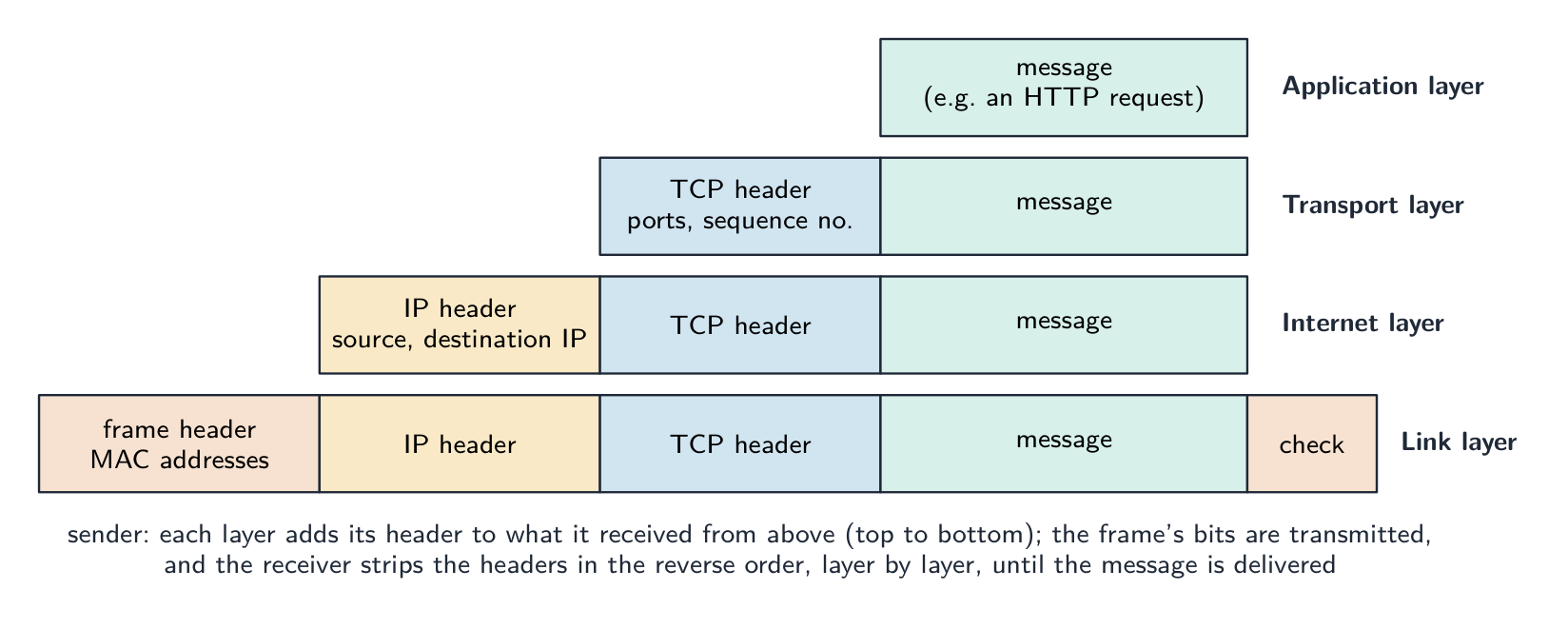
การส่งข้อความลงใน stack TCP/IP: ข้อความจากแอปพลิเคชันจะถูกห่อด้วย TCP header ที่พกพาพอร์ตและหมายเลขลำดับ, จากนั้น则由 IP header ที่พกพาที่อยู่ IP แหล่งกำเนิดและปลายทาง, แล้ว则由 frame header ที่พกพา MAC addresses และช่องตรวจสอบ; ผู้รับจะถอดออกตามลำดับย้อนกลับ
การห่อหุ้ม: แต่ละชั้นเพิ่ม header ของตัวเองลงบนข้อมูลที่รับมาจากชั้นถัดไป ดังนั้นบิตบนสายจึงนำข้อมูลสี่ชุดมาพร้อมกัน; ผู้รับจะถอดออกทีละชั้น

"อธิบายวิธีการประยุกต์ใช้ชุด TCP/IP เมื่อส่งข้อความจากโฮสต์หนึ่งไปยังอีกโฮสต์หนึ่ง" (5 คะแนน) ที่ ผู้ส่ง ข้อความจะไหล ลง ผ่าน stack: (1) ชั้นแอปพลิเคชันสร้างข้อมูลโดยใช้โปรโตคอลเช่น HTTP หรือ SMTP; (2) ชั้นการขนส่งแยกออกเป็นแพ็กเก็ตและเพิ่ม header ที่มีหมายเลขพอร์ตและหมายเลขลำดับ; (3) ชั้นอินเทอร์เน็ตเพิ่ม header ที่มีที่อยู่ IP แหล่งกำเนิดและปลายทางและเลือกเส้นทาง; (4) ชั้นลิงก์เพิ่ม MAC addresses ของอุปกรณ์ถัดไปและส่งเฟรมผ่านลิงก์ทางกายภาพ เราเตอร์ตามเส้นทางจะอ่าน header ชั้นอินเทอร์เน็ตและส่งต่อแต่ละแพ็กเก็ต ที่ ผู้รับ เฟรมจะไหล ขึ้น ผ่าน stack: แต่ละชั้นจะลบและดำเนินการกับ header ของตัวเอง ชั้นการขนส่งจะประกอบแพ็กเก็ตตามลำดับหมายเลขลำดับและขอแพ็กเก็ตที่ขาดหายไป และชั้นแอปพลิเคชันจะแสดงข้อความ出来 Protocol เดียวกันในแต่ละชั้นที่ทั้งสองฝ่ายคือสิ่งที่ทำให้การแลกเปลี่ยนนี้ทำงานได้

ชั้นแอปพลิเคชัน

ชั้นแอปพลิเคชัน ให้บริการแก่โปรแกรมผู้ใช้และกำหนดโปรโตคอลที่พวกเขาสนทนา (HTTP สำหรับเว็บ, SMTP สำหรับอีเมล) นี่คือจุดที่นักพัฒนาซอฟต์แวร์มักทำงานมากที่สุด

ชั้นการขนส่ง

ชั้นการขนส่ง ส่งข้อมูล จากต้นทางถึงปลายทาง ระหว่างกระบวนการ ซึ่งระบุด้วย หมายเลขพอร์ต มีสองโปรโตคอล:

TCP ตั้งการเชื่อมต่อและส่งข้อมูลทั้งหมดตามลำดับ; UDP ส่งแล้วทิ้ง
TCP เชื่อมต่อและส่งตามลำดับ; UDP ส่งแล้วทิ้ง
  • TCP — เน้นการเชื่อมต่อ: ตั้งการเชื่อมต่อ, รับประกันว่า ข้อมูลทั้งหมดมาถึงตามลำดับ, ส่งซ้ำแพ็กเก็ตที่หาย, ควบคุมการไหลเชื่อถือได้แต่มีค่าใช้จ่ายในการประมวลผล ใช้โดย HTTP, HTTPS, SMTP, FTP
  • UDP — ไม่เน้นการเชื่อมต่อ: ส่งแล้วทิ้ง, ไม่มีการยืนยันหรือการจัดลำดับ ค่าใช้จ่ายต่ำ ไม่มีการรับประกัน ใช้สำหรับสตรีมมิ่ง, DNS และการเล่นเกม ซึ่งความเร็วสำคัญกว่าความน่าเชื่อถือ

ชั้นอินเทอร์เน็ต

ชั้นอินเทอร์เน็ต ส่งแพ็กเก็ตระหว่างโฮสต์โดยใช้ IP แต่ละแพ็กเก็ตมี ที่อยู่ IP ของแหล่งกำเนิดและปลายทาง และ เร้าเตอร์ จะส่งต่อไปยังจุดถัดไป ชั้นนี้ไม่รับประกันการรับข้อมูล — นั่นเป็นหน้าที่ของ TCP

เร้าเตอร์ในบ้านทำงานนี้สำหรับบ้านของคุณ: มันอ่านที่อยู่ปลายทางของแต่ละแพ็กเก็ตและส่งไปยังอินเทอร์เน็ต และกลับไปยังอุปกรณ์ที่ถูกต้อง

เร้าเตอร์ Wi-Fi ในบ้านสีดำพร้อมเสาอากาศตั้งตรงสี่ตัวและแถวไฟสถานะด้านหน้า
เร้าเตอร์ Wi-Fi在家中:它将数据包转发到您的设备和互联网之间

ก่อนที่เร้าเตอร์จะเข้าสู่อินเทอร์เน็ตกว้างขึ้น โมเด็ม จะเชื่อมต่อบ้านเข้ากับผู้ให้บริการอินเทอร์เน็ตผ่านสายเคเบิลหรือสายโทรศัพท์ของผู้ให้บริการ ไฟสถานะจะแสดงว่ามีการเชื่อมต่อและเป็นออนไลน์แล้ว

สายเคเบิลโมเด็มสีดำสูงตั้งตรงอยู่บนพื้นหลังเรียบ มีแถบไฟสถานะเรียงลงมาด้านหน้า
โมเด็มสายเคเบิลเชื่อมต่อเครือข่ายในบ้านกับผู้ให้บริการอินเทอร์เน็ต

ชั้นลิงก์

ชั้นลิงก์ ส่งบิตผ่านลิงก์ทางกายภาพหนึ่ง (Ethernet, Wi-Fi) โดยเพิ่มหัวเฟรมที่มี MAC address และจัดการการเข้าถึงสื่อ (เช่น CSMA/CD บน Ethernet)

เฟรม Ethernet ที่แยกออกเป็นส่วนนำ (preamble), จุดเริ่มต้นของเฟรม, ข้อมูล Ethernet และช่องว่างระหว่างแพ็กเก็ต โดยส่วนข้อมูลขยายออกเป็นที่อยู่ MAC ของปลายทางและต้นทาง, ประเภท/ความยาว, ข้อความ payload และลำดับตรวจสอบเฟรม (frame check sequence) พร้อมขนาดเป็นไบต์ของแต่ละส่วน
ส่วนประกอบของเฟรม Ethernet ทั่วไป

บนเครือข่ายท้องถิ่นแบบมีสาย สวิตช์ เชื่อมต่ออุปกรณ์จำนวนมากเข้าด้วยกัน อุปกรณ์แต่ละเครื่องเสียบเข้ากับพอร์ตด้วยสาย Ethernet (ปลั๊ก RJ45) และสวิตช์ใช้ MAC address ในแต่ละเฟรมเพื่อส่งเฉพาะไปยังพอร์ตที่ถูกต้องเท่านั้น

สวิตช์ Gigabit Ethernet สีดำขนาดเล็กรูป 8 พอร์ต บนพื้นหลังเรียบ มีพอร์ต RJ45 ที่มีหมายเลขเรียงเป็นแถวด้านหน้า แต่ละพอร์ตมีไฟแสดงสถานะ
สวิตช์เครือข่ายเชื่อมต่ออุปกรณ์มีสายหลายเครื่องในเครือข่ายท้องถิ่น

ลิงก์ทางกายภาพอาจเป็นสายทองแดง สัญญาณวิทยุ (Wi-Fi) หรือ สายไฟเบอร์ออปติก ในสายไฟเบอร์ออปติก บิตเดินทางเป็นแสงผ่านเส้นใยแก้วบางๆ ซึ่งรวดเร็วและส่งข้อมูลได้ไกล

มัดเส้นใยแก้วนำแสงกระจายออกจากกันบนพื้นหลังสีเข้ม เส้นแก้วบางๆ แต่ละเส้นเรืองแสงด้วยจุดสีฟ้าขาวที่ปลาย
สายไฟเบอร์ออปติก: ข้อมูลเดินทางเป็นแสงผ่านเส้นใยแก้วบาง

ลิงก์วิทยุสามารถครอบคลุมระยะทางไกลกว่ามาก จานดาวเทียม ส่งและรับสัญญาณวิทยุไปยัง/from ดาวเทียม นำข้อมูลไปยังสถานที่ที่ลิงก์แบบมีสายไม่สามารถเข้าถึงได้ง่าย

จานดาวเทียมสำหรับใช้งานในบ้านทรงกลมสีเทา ติดตั้งอยู่บนผนังบ้านข้างหน้าต่าง โดยมีแขนรับสัญญาณยื่นออกไปด้านหน้า
จานดาวเทียมส่งและรับข้อมูลด้วยคลื่นวิทยุในระยะทางไกล
Explore · ⁨สำรวจ⁩

Tap the four layers of the TCP/IP model · ⁨แตะชั้นทั้งสี่ของโมเดล TCP/IP⁩

Explore each layer. Data travels DOWN the stack as it's sent (each layer adds its header) and back UP as it's received — and any layer can be swapped without touching the others. · ⁨สำรวจแต่ละชั้น ข้อมูลจะไหลลงตามสแต็กเมื่อถูกส่ง (แต่ละชั้นเพิ่มหัวข้อมูล) และไหลกลับขึ้นไปเมื่อได้รับ — และชั้นใดก็สามารถเปลี่ยนได้โดยไม่กระทบชั้นอื่น⁩

Vocabulary · ⁨คำศัพท์⁩ Train · ⁨ฝึกฝน⁩
English ไทย
layers/ˈleɪəz/ เลเยอร์
modularity/ˌmɒdjʊˈlærɪti/ โมดูลarity
abstraction/əbˈstrækʃn/ การห่อหุ้ม (abstraction)
protocol suite/ˈprəʊtəkɒl swiːt/ ชุดโปรโตคอล
application layer/ˌæplɪˈkeɪʃn ˈleɪə/ ชั้นแอปพลิเคชัน
transport layer/ˈtrænspɔːt ˈleɪə/ ชั้นการขนส่ง
port numbers/pɔːt ˈnʌmbəz/ หมายเลขพอร์ต
UDP/ˌjuː diː ˈpiː/ UDP
connectionless/kəˈnekʃənləs/ แบบไร้การเชื่อมต่อ
internet layer/ˈɪntənet ˈleɪə/ ชั้นอินเทอร์เน็ต
routers/ˈruːtəz/ เราเตอร์
modem/ˈməʊdem/ โมเด็ม
link layer/lɪŋk ˈleɪə/ ชั้นลิงก์
CSMA/CD/ˌsiː es em ˈeɪ ˌsiː ˈdiː/ ซีเอสเอ็มเอ/ซีดี
switch/swɪtʃ/ สวิตช์
fibre-optic cable/ˈfaɪbə ˈɒptɪk ˈkeɪbl/ สายไฟเบอร์ออปติก
satellite dish/ˈsætəlaɪt dɪʃ/ จานรับสัญญาณดาวเทียม
HTTP/ˌeɪtʃ tiː tiː ˈpiː/ HTTP
FTP/ˌef tiː ˈpiː/ FTP
SMTP/ˌes em tiː ˈpiː/ SMTP
MAC addresses/mæk əˈdresɪz/ ที่อยู่ MAC
bandwidth/ˈbændwɪdθ/ แบนด์วิดธ์
latency/ˈleɪtənsi/ ความหน่วง
header/ˈhedə/ ส่วนหัว
14.1

Common application-layer protocols · ⁨โปรโตคอลชั้นแอปพลิเคชันที่พบบ่อย⁩

English
  • HTTP 超文本传输协议 — browsers fetch web pages from servers (over TCP, port 80). HTTPS is HTTP over TLS — encrypted, port 443.
  • FTP 文件传输协议 — transfer files between client and server.
  • SMTP 简单邮件传输协议 — send email between client and server, and between servers. Receiving uses POP3 or IMAP.
  • POP3 — downloads email and usually deletes it from the server. IMAP — leaves email on the server and syncs across devices, so the same inbox appears everywhere.
  • BitTorrent — a peer-to-peer 对等网络 protocol; a file is split into pieces downloaded from many peers in parallel, so no single server carries all the load.

The purpose of each protocol, in the words that score.

Protocol Purpose (state this)
HTTP transfers web pages (hypertext) between a web server and a browser; HTTPS is the encrypted version
FTP transfers files between a client and a server (uploading to and downloading from a file server)
SMTP sends email from a client to a mail server, and between mail servers (a "push" protocol)
POP3 downloads email from the server to the client, usually deleting it from the server, so it is read on one device
IMAP lets the client read and manage email that stays on the server, so the same mailbox is seen on every device
BitTorrent shares files peer-to-peer: pieces of a file are downloaded from, and uploaded to, many other users at once

Asked for the two email protocols, give SMTP for sending and POP3 or IMAP for receiving; asked to describe IMAP, say that the messages remain on the server and are synchronised across devices, which is the difference from POP3.

"Describe how files are shared using the BitTorrent protocol" (four marks). (1) The file is split into pieces (typically 256 KB each), and a small torrent file describes them (their hashes) and names a tracker 追踪器. (2) A peer wanting the file contacts the tracker, which keeps a list of the peers in the swarm 群 currently sharing that file. (3) The peer downloads different pieces from many peers at the same time, and as soon as it holds a piece it uploads it to others; a peer with the whole file is a seed 种子, one still downloading a leech. (4) When all pieces are in, they are reassembled and checked against the hashes. "Explain what peer-to-peer file sharing means": there is no central server holding the file; every computer is both a client and a server, downloading from and uploading to the others, so the load and the bandwidth are spread across the swarm and the more peers there are, the faster it gets.

ไทย
  • HTTP — บราว์เซอร์ดึงหน้าเว็บจากเซิร์ฟเวอร์ (ผ่าน TCP, พอร์ต 80) HTTPS คือ HTTP ผ่าน TLS — เข้ารหัส, พอร์ต 443
  • FTP — ถ่ายโอนไฟล์ระหว่างไคลเอนต์และเซิร์ฟเวอร์
  • SMTP — ส่ง อีเมลระหว่างไคลเอนต์และเซิร์ฟเวอร์ และระหว่างเซิร์ฟเวอร์ การรับใช้ POP3 หรือ IMAP
  • POP3 — ดาวน์โหลดอีเมลและมักลบออกจากเซิร์ฟเวอร์ IMAP — เก็บอีเมลไว้ที่เซิร์ฟเวอร์และซิงค์ข้ามอุปกรณ์ ทำให้กล่องจดหมายเดียวกันปรากฏทุกที่
  • BitTorrent — โปรโตคอล peer-to-peer; ไฟล์ถูกแบ่งเป็นชิ้นDOWNLOAD จากเพียร์จำนวนมากพร้อมกัน ดังนั้นไม่มีเซิร์ฟเวอร์ใดรับภาระทั้งหมด
ตัวติดตามอยู่ตรงกลางพร้อมเพื่อนร่วมเครือข่ายรอบๆ — Seeds, Leeches และ Peer ใหม่ — กำลังแลกเปลี่ยนชิ้นส่วนไฟล์ พร้อมกุญแจ
BitTorrent: เทรคเกอร์ช่วยให้เพียร์ค้นหาซึ่งกันและกัน จากนั้นพวกเขาแชร์ชิ้นส่วนไฟล์โดยตรง

วัตถุประสงค์ของแต่ละโปรโตคอล ตามคำที่_GET_SCORE

โปรโตคอล วัตถุประสงค์ (ระบุสิ่งนี้)
HTTP ถ่ายโอนหน้าเว็บ (ไฮเปอร์เท็กซ์) ระหว่างเว็บเซิร์ฟเวอร์และบราว์เซอร์; HTTPS เป็นเวอร์ชันที่เข้ารหัส
FTP ถ่ายโอนไฟล์ระหว่างไคลเอนต์และเซิร์ฟเวอร์ (อัปโหลดลงและดาวน์โหลดจากไฟล์เซิร์ฟเวอร์)
SMTP ส่งอีเมลจากไคลเอนต์ไปยังเซิร์ฟเวอร์อีเมล และระหว่างเซิร์ฟเวอร์อีเมล (โปรโตคอล "push")
POP3 ดาวน์โหลดอีเมลจากเซิร์ฟเวอร์ไปยังไคลเอนต์ มัก ลบออกจากเซิร์ฟเวอร์ เพื่อให้อ่านบนอุปกรณ์เดียว
IMAP ให้ไคลเอนต์อ่านและจัดการอีเมลที่คงอยู่ที่เซิร์ฟเวอร์ sehingga mailbox เดียวกันมองเห็นได้ทุกอุปกรณ์
BitTorrent แชร์ไฟล์แบบ peer-to-peer: ชิ้นส่วนไฟล์DOWNLOAD จากและUPLOAD ไปยังผู้ใช้รายอื่นหลายคนพร้อมกัน

เมื่อถามถึงโปรโตคอลอีเมลสองชนิด ให้ตอบ SMTP สำหรับการส่งและ POP3 หรือ IMAP สำหรับการรับ; เมื่ออธิบาย IMAP ให้ระบุว่าข้อความ คงอยู่ในเซิร์ฟเวอร์ และ ซิงค์ ข้ามอุปกรณ์ ซึ่งเป็นความแตกต่างจาก POP3

"อธิบายวิธีการแชร์ไฟล์โดยใช้โปรโตคอล BitTorrent" (4 คะแนน) (1) ไฟล์ถูกแบ่งเป็น ชิ้นส่วน (โดยทั่วไป 256 KB ต่อชิ้น) และมีไฟล์ torrent เล็กน้อยที่อธิบายชิ้นส่วนเหล่านี้ (hash ของพวกมัน) และระบุชื่อ เทรคเกอร์ (2) เพียร์ที่ต้องการไฟล์ติดต่อเทรคเกอร์ ซึ่งเก็บรายการเพียร์ใน ** swarm** ที่กำลังแชร์ไฟล์นั้นอยู่ปัจจุบัน (3) เพียร์ DOWNLOAD ชิ้นส่วนต่าง ๆ จากเพียร์หลายตัวในเวลาเดียวกัน และทันทีที่มีชิ้นส่วนหนึ่งแล้วจะ UPLOAD ให้กับคนอื่น; เพียร์ที่มีไฟล์ครบเป็น seed, ส่วนที่ยัง DOWNLOAD อยู่เรียกว่า leech (4) เมื่อชิ้นส่วนทั้งหมดอยู่ในแล้วจะถูกประกอบใหม่และตรวจสอบกับ hash "อธิบายความหมายของการแชร์ไฟล์แบบ peer-to-peer": ไม่มี เซิร์ฟเวอร์กลาง ที่ถือไฟล์; ทุกคอมพิวเตอร์เป็นทั้ง client และ server, DOWNLOAD จากและ UPLOAD ไปยังอีกฝ่าย ดังนั้นภาระและความกว้างแถบจึงกระจายAcross swarm และยิ่งมีเพียร์มากเท่าไรก็ยิ่งเร็วขึ้น

Explore · ⁨สำรวจ⁩

Network route lab · ⁨ห้องปฏิบัติการเส้นทางเครือข่าย⁩

Follow data from a device through network hardware and protocols. · ⁨ติดตามข้อมูลจากอุปกรณ์ผ่านฮาร์ดแวร์และโปรโตคอลเครือข่าย⁩

Vocabulary · ⁨คำศัพท์⁩ Train · ⁨ฝึกฝน⁩
English ไทย
peer-to-peer/pɪə tə pɪə/ เพียร์-ทู-เพียร์
tracker/ˈtrækə/ ตัวติดตาม
swarm/swɔːm/ ฝูง
seed/siːd/ seed
14.2

Circuit switching vs packet switching · ⁨การสลับวงจร vs การสลับแพ็กเก็ต⁩

Syllabus · ⁨หลักสูตร⁩
English
Candidates should be able to: Notes and guidance
Show understanding of circuit switching Benefits, drawbacks and where it is applicable
Show understanding of packet switching Benefits, drawbacks and where it is applicable Show understanding of the function of a router in packet switching Explain how packet switching is used to pass messages across a network, including the internet
ไทย
ผู้เข้าสอบควรสามารถ: หมายเหตุและคำแนะนำ
แสดงความเข้าใจ关于 การสลับวงจร ข้อดี ข้อเสีย และสถานการณ์ที่เหมาะสมในการใช้งาน
แสดงความเข้าใจ关于 การสลับแพ็กเก็ต ข้อดี ข้อเสีย และสถานการณ์ที่เหมาะสมในการใช้งาน แสดงความเข้าใจเกี่ยวกับหน้าที่ของ เร้าเตอร์ ในระบบ การสลับแพ็กเก็ต อธิบายวิธีการใช้ การสลับแพ็กเก็ต ในการส่งข้อความข้ามเครือข่าย รวมถึงอินเทอร์เน็ต

Source: Cambridge International syllabus · ⁨แหล่งที่มา: หลักสูตร Cambridge International⁩

English

Circuit switching

A dedicated path is set up between the two ends before any data is sent (circuit switching 电路交换), reserved for the whole conversation, then released. It gives reserved bandwidth 带宽 and in-order delivery, but is inefficient during silences and slow to set up. Classic example: the traditional telephone network.

"Describe circuit switching as a method of data transmission" (three marks). (1) A dedicated path (circuit) is set up between the sender and the receiver before any data is sent; (2) the whole message is sent along that path, in order, as one continuous stream; (3) the circuit is reserved for the duration of the communication and released afterwards.

Benefits and drawbacks. Benefits: the full bandwidth of the circuit is available and guaranteed; data arrives in order with no reassembly and no delay once the circuit is up; the route does not change, so timing is predictable (good for real-time voice and video). Drawbacks: time is spent setting up the circuit before anything is sent; the circuit is reserved even while no data is flowing, so bandwidth is wasted and other users cannot share it; both ends must be free at the same time; a failure anywhere on the path breaks the whole call, and there is no automatic alternative route. Where it is appropriate: a telephone call or a live video link, where a steady, uninterrupted stream matters more than efficiency.

Packet switching

The data is split into packets, each sent independently (packet switching 分组交换). Each packet carries the destination address; routers make per-packet decisions, so packets may take different routes and arrive out of order, and the destination reassembles them. It is efficient (one link is multiplexed 多路复用 across many conversations), robust (reroute around a failure), but has variable latency 延迟 and possible loss (TCP handles reliability). Used by the internet.

"Describe how packet switching is used to pass messages across a network" (four marks). (1) The message is split into packets of a fixed maximum size; (2) each packet is given a header containing the source and destination addresses, a sequence number 序号 and an error check; (3) each packet is sent independently and may take a different route, chosen by the routers it meets; (4) at the destination the packets are reassembled in order using the sequence numbers, and any missing packet is requested again. If the question excludes checking and resending, leave out the last clause.

"Describe the function of a router in packet switching" (three marks). A router receives a packet, reads the destination IP address in its header, and consults its routing table 路由表 to decide the best next hop towards that destination, taking account of the traffic (congestion) and failed links; it then forwards the packet onto that link. Packets of the same message may leave by different routes; the router holds packets in a queue when a link is busy.

"Describe two ways packet switching ensures the complete message is received." (1) Each packet carries a sequence number, so the receiver can put the packets in order and can tell that one is missing, and (2) the receiver sends an acknowledgement 确认 for packets that arrive; a packet not acknowledged within a time limit is retransmitted by the sender. A checksum 校验和 in each packet lets the receiver detect a corrupted packet and discard it, which then triggers the resend.

Benefits and drawbacks. Benefits: no circuit to set up; the network's links are shared by many messages, so bandwidth is used efficiently; packets can be rerouted around a failed or congested link, so transmission is robust; a lost or damaged packet means resending only that packet, not the whole message. Drawbacks: packets may arrive out of order and must be reassembled, and some may be lost or delayed; the headers add overhead; the variable delay makes it less suitable for real-time voice and video without extra measures; a heavily loaded network drops packets. Where it is appropriate: email, web pages, file downloads and any "bursty" traffic, and the internet in general.

Aspect Circuit switching Packet switching
Path dedicated, reserved shared, per-packet
Setup time slow none
Bandwidth use inefficient efficient
Order in order may be out of order
Robustness one failure cuts the circuit reroute around failures
Suits constant-rate flows (voice) bursty flows (web, email)

Modern networks use packet switching for its efficiency and resilience.

Four differences, stated as pairs. (1) Circuit switching sets up a dedicated path before sending; packet switching sends without setting up a path. (2) In circuit switching the whole message follows one route; in packet switching the packets may take different routes. (3) Circuit switching delivers the data in order without reassembly; packet switching needs sequence numbers to reassemble it. (4) Circuit switching reserves bandwidth for one conversation even when idle; packet switching shares the links between many messages. (Also acceptable: a failed link breaks a circuit but packets are rerouted; circuit switching suits real-time streams, packet switching suits bursty data.) Write each difference as both halves; one side alone earns nothing.

Describing packet switching in a few sentences

A good exam answer: "The message is broken into small packets. Each packet carries the destination and source addresses and a sequence number. Each packet travels through the network independently, with routers choosing the next hop per packet. Packets may take different paths and arrive out of order. The destination uses the sequence numbers to reassemble the message, and missing packets can be requested again."

Worked example. A phone call and a large file download share a network. Which switching method suits each, and why? A phone call needs a steady stream with low delay, and it would suffer badly if pieces arrived late or out of order - so circuit switching suits it: a dedicated path is set up for the whole call and its capacity is reserved for the duration. A file download does not care about timing or arrival order, because the receiver reassembles it, and it benefits from using whatever capacity happens to be spare - so packet switching suits it: the file is split into packets that travel independently, each carrying source and destination addresses and a sequence number, with routers choosing a next hop per packet. Name the property of the traffic that decides it: reserved capacity and low delay for the call, efficiency and resilience for the download.

ไทย

การสลับวงจร

เส้นทางเฉพาะ (dedicated path) ถูกสร้างขึ้นระหว่างสองปลายก่อนการส่งข้อมูลใดๆ (circuit switching) โดยจองไว้สำหรับการสนทนาทั้งหมด แล้วจึงปลดปล่อย เส้นทางนี้ให้ แบนด์วิดท์ที่จองไว้ และการส่งข้อมูลตามลำดับ แต่มี ประสิทธิภาพต่ำ ในช่วงเงียบและใช้เวลานานในการตั้งค่า ตัวอย่างคลาสสิก: ระบบโทรศัพท์แบบดั้งเดิม

ตารางข่ายของเราเตอร์ระหว่างอุปกรณ์ A และ B โดยมีเส้นทางหนึ่งถูกเน้นและจองไว้จากต้นทางถึงปลายทางสำหรับการโทรทั้งหมด
Circuit switching: เส้นทางเฉพาะเส้นหนึ่งจองไว้จากต้นทางถึงปลายทาง

"อธิบาย circuit switching ในฐานะวิธีการส่งข้อมูล" (3 คะแนน). (1) มี เส้นทางเฉพาะ (วงจร) ที่ ถูกสร้าง ระหว่างผู้ส่งและผู้รับ ก่อน ส่งข้อมูลใดๆ; (2) ข้อความทั้งหมด ถูกส่งไปตามเส้นทางนั้น ตามลำดับ เป็นสตรีมต่อเนื่อง; (3) วงจรถูกจองไว้สำหรับ ระยะเวลา ของการสื่อสารและจะถูกปลดปล่อย afterwards.

ข้อดีและข้อเสีย. ข้อดี: แบนด์วิดท์ เต็มของวงจรมีอยู่จริงและรับประกันได้; ข้อมูลมาถึง ตามลำดับ โดยไม่ต้องประกอบใหม่และไม่มีความล่าช้าเมื่อวงจรพร้อมใช้งาน; เส้นทางไม่เปลี่ยนแปลง ดังนั้นเวลาจึงคาดเดาได้ (เหมาะสำหรับเสียงและวิดีโอแบบเรียลไทม์) ข้อเสีย: ใช้เวลา ตั้งค่า วงจรก่อนส่งอะไรเลย; วงจรถูกจองไว้แม้ในขณะ ไม่มีข้อมูล ไหลผ่าน ทำให้แบนด์วิดท์ถูกสิ้นเปลืองและผู้ใช้รายอื่นไม่สามารถแบ่งปันได้; ทั้งสองฝ่ายต้องว่างพร้อมกัน; ความล้มเหลวที่จุดใด บนเส้นทางจะทำให้การโทรทั้งหมดขาดหาย และไม่มีการเส้นทางสำรองอัตโนมัติ จุดที่เหมาะสม: การโทรเข้าหรือลิงก์วิดีโอสด ที่ซึ่งสตรีมที่สม่ำเสมอและไม่ขาดตอนสำคัญกว่าประสิทธิภาพ

Packet switching

ข้อมูลถูกแยกเป็น แพ็กเก็ต แต่ละตัวถูกส่ง อย่างอิสระ (packet switching) แต่ละแพ็กเก็ตมีที่อยู่ปลายทาง; เราเตอร์ตัดสินใจต่อแพ็กเก็ต ทำให้แพ็กเก็ตอาจใช้เส้นทางต่างกันและมาถึงไม่ตามลำดับ และปลายทางจะประกอบมันขึ้นมา มันมี ประสิทธิภาพ (ลิงค์หนึ่งถูก multiplexed ผ่านหลายการสนทนา), ทนทาน (เปลี่ยนเส้นทางรอบความล้มเหลว) แต่มีความ ล่าช้าแปรผัน และอาจสูญเสียข้อมูล (TCP จัดการความน่าเชื่อถือ) ใช้โดยอินเทอร์เน็ต

ตารางข่ายเราเตอร์เดียวกันโดยแสดงแพ็กเก็ตเป็นสี่เหลี่ยมสีที่มีหมายเลข ใช้เส้นทางต่าง ๆ จากคอมพิวเตอร์ A ไปยังคอมพิวเตอร์ B แล้วถูกประกอบตามลำดับที่ B
Packet switching: แพ็กเก็ตเดินทางอย่างอิสระและอาจใช้เส้นทางต่างกัน
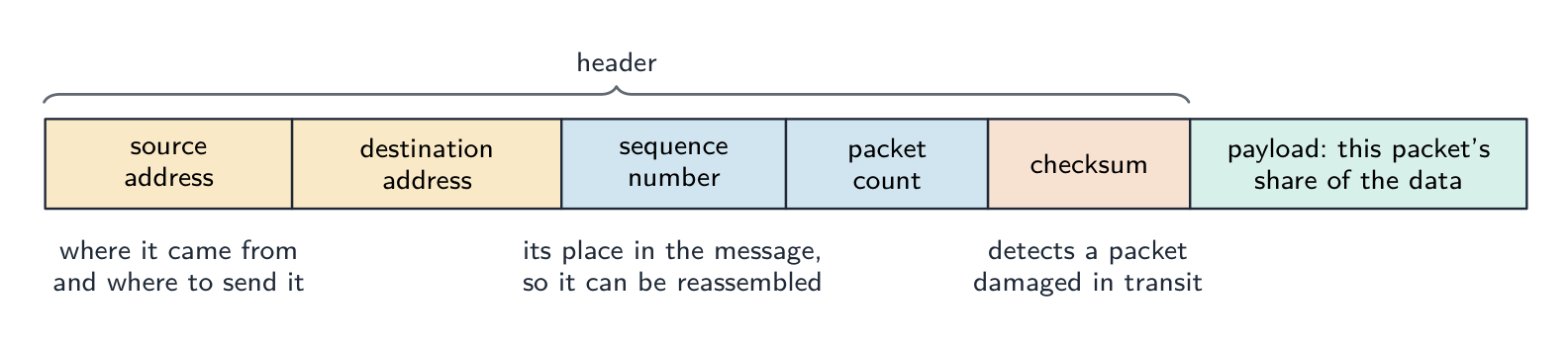
ส่วนประกอบของแพ็กเก็ต: หัว packet (header) ที่เก็บที่อยู่ต้นทางและปลายทาง หมายเลขลำดับ จำนวนแพ็กเก็ต และค่าตรวจสอบความถูกต้อง (checksum) ตามด้วย payload ที่แบกรับส่วนหนึ่งของข้อมูลสำหรับแพ็กเก็ตนี้
สิ่งที่ทำให้แพ็กเก็ตเดินทางได้อย่างอิสระ: ที่อยู่บอกตำแหน่ง, หมายเลขลำดับบอกว่า它是ข้อความส่วนไหน, และ checksum แสดงว่ามันมาถึงโดยไม่เสียหายหรือไม่

"อธิบาย如何使用 packet switching ในการส่งข้อความข้ามเครือข่าย" (4 คะแนน). (1) ข้อความถูก แยกเป็นแพ็กเก็ต ขนาดสูงสุดคงที่; (2) แต่ละแพ็กเก็ตได้รับ หัว packet ที่มี ที่อยู่ต้นทางและปลายทาง, หมายเลขลำดับ และการตรวจสอบข้อผิดพลาด; (3) แต่ละแพ็กเก็ตถูกส่ง อย่างอิสระ และอาจใช้ เส้นทางที่ต่างกัน ที่เลือกโดยเราเตอร์ที่พบเจอ; (4) ที่ปลายทาง แพ็กเก็ตจะถูก ประกอบตามลำดับ โดยใช้หมายเลขลำดับ และหากมีแพ็กเก็ตที่หายไปจะขอส่งใหม่ หากคำถามไม่รวมการตรวจสอบและส่งใหม่ ให้ละเว้นวรรคสุดท้าย

"อธิบายหน้าที่ของเราเตอร์ใน packet switching" (3 คะแนน). เราเตอร์ รับ แพ็กเก็ต, อ่านที่อยู่ IP ปลายทาง ในหัว packet, และตรวจสอบ ตารางนำทาง เพื่อตัดสินใจ จุดต่อไปที่ดีที่สุด สู่จุดหมาย tersebut โดยพิจารณาจากปริมาณการจราจร (ความแออัด) และลิงค์ที่ล้มเหลว; จากนั้นมัน ส่งต่อ แพ็กเก็ตไปยังลิงค์นั้น แพ็กเก็ตของข้อความเดียวกันอาจออกผ่านเส้นทางที่ต่างกัน; เราเตอร์จะเก็บแพ็กเก็ตไว้ในคิวเมื่อลิงค์ยุ่ง

"อธิบายสองวิธีที่ packet switching รับประกันว่าข้อความสมบูรณ์จะถูกส่งถึง" (1) แต่ละแพ็กเก็ตมี หมายเลขลำดับ sehingga ผู้รับสามารถเรียงแพ็กเก็ตตามลำดับและรู้ว่ามีอันไหน หายไป, และ (2) ผู้รับส่ง การยืนยัน สำหรับแพ็กเก็ตที่มาถึง; แพ็กเก็ตที่ไม่ได้รับการยืนยันภายในกำหนดเวลาจะถูก ส่งซ้ำ โดยผู้ส่ง. Checksum ในแต่ละแพ็กเก็ตช่วยให้ผู้รับตรวจจับแพ็กเก็ตที่เสียหายและทิ้งไป ซึ่งจะกระตุ้นการส่งซ้ำ

ข้อดีและข้อเสีย. ข้อดี: ไม่ต้องตั้งค่าวงจร; ลิงค์ของเครือข่ายถูก แบ่งปัน ด้วยข้อความมากมาย ทำให้แบนด์วิดท์ถูกใช้ efficacement; แพ็กเก็ตสามารถ เปลี่ยนเส้นทาง รอบลิงค์ที่ล้มเหลวหรือแออัด ทำให้การส่งข้อมูลทนทาน; แพ็กเก็ตที่หายไปหรือเสียหายหมายถึงการส่งซ้ำเพียง แพ็กเก็ตนั้น ไม่ใช่ข้อความทั้งหมด ข้อเสีย: แพ็กเก็ตอาจมาถึง ไม่ตามลำดับ และต้องประกอบใหม่, และบางตัวอาจ สูญหาย หรือล่าช้า; หัว packet เพิ่มภาระงาน; ความล่าช้าแปรผันทำให้มันไม่เหมาะสำหรับเสียงและวิดีโอแบบเรียลไทม์หากไม่มีการเพิ่มมาตรการ; เครือข่ายที่หนักหน่วงจะทิ้งแพ็กเก็ต จุดที่เหมาะสม: อีเมล, หน้าเว็บ, ดาวน์โหลดไฟล์ และการจราจรแบบ "bursty" อื่นๆ และอินเทอร์เน็ตโดยทั่วไป

Aspect Circuit switching Packet switching
เส้นทาง เฉพาะ, จองไว้ แบ่งปัน, ต่อแพ็กเก็ต
เวลาตั้งค่า ช้า ไม่มี
การใช้แบนด์วิดท์ ไม่มีประสิทธิภาพ มีประสิทธิภาพ
ลำดับ ตามลำดับ อาจไม่ตามลำดับ
ความทนทาน ความล้มเหลวหนึ่งจุดตัดวงจร เปลี่ยนเส้นทางรอบความล้มเหลว
เหมาะกับ กระแสความเร็วคงที่ (เสียง) กระแส bursty (เว็บ, อีเมล)

เครือข่ายสมัยใหม่ใช้ packet switching因其效率和韧性。

ความแตกต่างสี่ข้อที่ระบุเป็นคู่ (1) การสลับวงจร (circuit switching) ตั้ง เส้นทางเฉพาะ ก่อนส่งข้อมูล; การสลับแพ็กเก็ต (packet switching) ส่งข้อมูล โดยไม่มีการตั้งค่าเส้นทาง (2) ในการสลับวงจร ข้อความทั้งหมดจะเดินทางตาม เส้นทางเดียว; ในการสลับแพ็กเก็ต แพ็กเก็ตอาจใช้ เส้นทางที่แตกต่างกัน (3) การสลับวงจรส่งข้อมูล ตามลำดับ โดยไม่ต้องประกอบใหม่; การสลับแพ็กเก็ตต้องใช้ หมายเลขลำดับ เพื่อประกอบข้อมูลกลับ (4) การสลับวงจร จอง แบนด์วิดท์สำหรับการสนทนาหนึ่งครั้งแม้ในช่วงพัก; การสลับแพ็กเก็ต แบ่งปัน เชื่อมต่อระหว่างข้อความหลายรายการ (วิธีอื่นที่ยอมรับได้: เชื่อมต่อที่ล้มเหลวจะทำให้วงจรขาดแต่แพ็กเก็ตจะถูกเปลี่ยนเส้นทาง; การสลับวงจรเหมาะสำหรับสตรีมแบบเรียลไทม์ การสลับแพ็กเก็ตเหมาะสำหรับข้อมูลแบบกระตุก) เขียนความแตกต่างแต่ละข้อให้ครบ ทั้งสอง ส่วน; หากเขียนเพียงด้านเดียวจะไม่ได้รับคะแนน

อธิบายการสลับแพ็กเก็ตในไม่กี่ประโยค

คำตอบสอบที่ดี: "ข้อความถูกแยกออกเป็นแพ็กเก็ตขนาดเล็ก แต่ละแพ็กเก็ตมีที่อยู่ปลายทางและแหล่งกำเนิด รวมถึงหมายเลขลำดับ แต่ละแพ็กเก็ตเดินทางผ่านเครือข่ายอย่างอิสระ โดยเร้าเตอร์เลือกจุดถัดไปสำหรับแต่ละแพ็กเก็ต แพ็กเก็ตอาจใช้เส้นทางต่างกันและมาถึงไม่เรียงลำดับ ปลายทางจะใช้หมายเลขลำดับเพื่อประกอบข้อความ และหากมีแพ็กเก็ตหาย สามารถขอรับซ้ำได้"

ตัวอย่างทำโจทย์ การโทรเข้าและดาวน์โหลดไฟล์ขนาดใหญ่ใช้เครือข่ายร่วมกัน วิธีสลับ哪种哪个适合แต่ละกรณี และทำไม? การโทรเข้า ต้องการกระแสข้อมูลที่ต่อเนื่องและความหน่วงต่ำ และจะเสียหายหนักหากชิ้นส่วนมาถึงช้าหรือไม่เรียงลำดับ - ดังนั้น การสลับวงจร จึงเหมาะ: มีการตั้งเส้นทางเฉพาะสำหรับการโทรทั้งสายและจองความจุไว้ตลอดช่วงเวลา การดาวน์โหลดไฟล์ ไม่ใส่ใจเรื่องเวลาหรือลำดับการมาถึง เพราะผู้รับจะประกอบมันขึ้นใหม่ และได้ประโยชน์จากการใช้ความจุที่มีเหลืออยู่เท่าที่จะเป็นไปได้ - ดังนั้น การสลับแพ็กเก็ต จึงเหมาะ: ไฟล์ถูกแยกเป็นแพ็กเก็ตที่เดินทาง อย่างอิสระ แต่ละแพ็กเก็ตมีที่อยู่แหล่งกำเนิดและปลายทางพร้อม หมายเลขลำดับ โดยเร้าเตอร์เลือกจุดถัดไปสำหรับแต่ละแพ็กเก็ต ชื่อ คุณสมบัติของปริมาณงาน ที่ทำให้เราตัดสินใจได้: ความจุที่จองไว้และความหน่วงต่ำสำหรับการโทร ประสิทธิภาพและความทนทานสำหรับการดาวน์โหลด

Explore · ⁨สำรวจ⁩

A packet's journey across the internet · ⁨การเดินทางของแพ็กเก็ตผ่านอินเทอร์เน็ต⁩

Step through packet switching. The message is split up, each packet finds its own way, and the destination puts them back together — which is why the internet is so efficient and hard to break. · ⁨ขั้นตอนของการสลับแพ็กเก็ต: ข้อความถูกแบ่งออก แต่ละแพ็กเก็ตหาเส้นทางของตัวเอง และปลายทางจะนำกลับมาประกอบใหม่ — นี่คือเหตุผลที่อินเทอร์เน็ตมีประสิทธิภาพและยากต่อการโจมตี⁩

Vocabulary · ⁨คำศัพท์⁩ Train · ⁨ฝึกฝน⁩
English ไทย
circuit switching/ˈsɜːkɪt ˈswɪtʃɪŋ/ การสลับวงจร
reserved bandwidth/rɪˈzɜːvd ˈbændwɪdθ/ แบนด์วิดท์ที่จองไว้
packet switching/ˈpækɪt ˈswɪtʃɪŋ/ การสลับแพ็กเก็ต
multiplexed/ˌmʌltɪˈplekst/ แบบมัลติเพล็กซ์
variable latency/ˈveərɪəbl ˈleɪtənsi/ เวลาหน่วงแปรผัน
sequence number/ˈsiːkwəns ˈnʌmbə/ หมายเลขลำดับ
routing table/ˈraʊtɪŋ ˈteɪbl/ ตารางการส่งต่อ
acknowledgement/əkˈnɒlɪdʒmənt/ การยืนยัน
checksum/ˈtʃeksəm/ ค่าตรวจสอบความถูกต้อง
IP address/ˌaɪ ˈpiː əˈdres/ ที่อยู่ไอพี
14.2

Definitions the examiner accepts · ⁨คำนิยามที่ผู้สอบยอมรับ⁩

English

A definition question is marked against fixed wording. Learn these exactly, and give one answer only.

Term Definition
protocol a set of rules governing how data is transmitted, agreed by sender and receiver so that both interpret it the same way
protocol stack the layers of protocols, each with its own function, that together carry out communication; each layer communicates only with the layers above and below
application layer provides the protocols used by applications to exchange data (HTTP, SMTP, FTP, IMAP, POP3)
transport layer establishes end-to-end communication, splits data into packets with port and sequence numbers, reassembles them and requests missing ones (TCP), or sends without guarantees (UDP)
internet layer adds IP addresses to form packets and routes them between networks via routers
link layer adds MAC addresses to form frames and transmits the bits over the physical local network
router a device that reads a packet's destination address and forwards it along the best available route towards that destination
circuit switching a dedicated communication path is established between the two ends before data is sent and held for the whole transmission
packet switching the message is split into packets, each with a header, sent independently over possibly different routes and reassembled at the destination
packet a unit of data carrying a header (addresses, sequence number, error check) and a payload
peer-to-peer file sharing without a central server, each computer acting as both client and server
ไทย

คำถามคำนิยามจะให้คะแนนตามข้อความที่กำหนดไว้你必须 exact. เรียนรู้ให้ถูกต้องและตอบเพียงคำตอบเดียวเท่านั้น

พจน์ นิยาม
โปรโตคอล ชุดกฎเกณฑ์ที่กำหนดวิธีการส่งข้อมูล ซึ่งตกลงกันโดยผู้ส่งและผู้รับเพื่อให้ทั้งสองฝ่ายตีความเหมือนกัน
สแตกโปรโตคอล ชั้นของโปรโตคอลต่างๆ ที่มีหน้าที่ของตัวเอง ซึ่งทำงานร่วมกันในการสื่อสาร; แต่ละชั้นสื่อสารกับชั้นด้านบนและด้านล่างเท่านั้น
ชั้นแอปพลิเคชัน ให้โปรโตคอลที่แอปพลิเคชันใช้ในการแลกเปลี่ยนข้อมูล (HTTP, SMTP, FTP, IMAP, POP3)
ชั้นการขนส่ง สร้างการสื่อสารแบบปลายถึงปลาย แยกข้อมูลเป็นแพ็กเก็ตพร้อมพอร์ตและหมายเลขลำดับ ประกอบกลับและขอแพ็กเก็ตที่หายไป (TCP) หรือส่งโดยไม่มีการรับประกัน (UDP)
ชั้นอินเทอร์เน็ต เพิ่มที่อยู่ IP เพื่อสร้างแพ็กเก็ตและจัดเส้นทางระหว่างเครือข่ายผ่านเร้าเตอร์
ชั้นลิงก์ เพิ่ม MAC Address เพื่อสร้างเฟรมและส่งบิตผ่านเครือข่ายท้องถิ่นทางกายภาพ
เร้าเตอร์ อุปกรณ์ที่อ่านที่อยู่ปลายทางของแพ็กเก็ตและส่งต่อไปตามเส้นทางที่ดีที่สุดที่มีอยู่ menuju ปลายทางนั้น
การสลับวงจร เส้นทางสื่อสารเฉพาะถูกสร้างขึ้นระหว่างสองฝั่งก่อนส่งข้อมูลและรักษาไว้ตลอดการส่งข้อมูลทั้งหมด
การสลับแพ็กเก็ต ข้อความถูกแยกเป็นแพ็กเก็ต แต่ละแพ็กเก็ตมีเฮดเดอร์ ส่งข้อมูลอย่างอิสระผ่านเส้นทางที่อาจแตกต่างกัน และประกอบกลับที่ปลายทาง
แพ็กเก็ต หน่วยข้อมูลที่มีเฮดเดอร์ (ที่อยู่, หมายเลขลำดับ, ตรวจสอบข้อผิดพลาด) และ Payload
พีเออร์-ทู-พีเออร์ การแชร์ไฟล์โดยไม่ต้องมีเซิร์ฟเวอร์กลาง คอมพิวเตอร์แต่ละเครื่องทำหน้าที่既是 client และ server
14.2

Exam tips · ⁨ข้อแนะนำสำหรับการสอบ⁩

English
  • Why protocols: shared rules, same interpretation, any make of computer. Why layers: each layer has one job and can be changed independently.
  • The four layers in order, top to bottom: Application, Transport, Internet, Link. Give each layer's job in one sentence, and the "message from host to host" answer as a walk down the stack and back up.
  • Protocol purposes are one-liners: HTTP web pages, FTP files, SMTP sending mail, POP3 downloading mail, IMAP mail kept on the server, BitTorrent peer-to-peer pieces from a swarm.
  • Circuit switching: dedicated path first, whole message, held for the duration. Packet switching: split, header with addresses and sequence number, independent routes, reassemble. Benefits and drawbacks come in pairs of opposites.
  • A router reads the destination address, consults its routing table, forwards along the best route; it is the packet-switching question the exam asks most.
  • "Where appropriate": circuit switching for a phone or live video call; packet switching for email, the web and downloads.

Common mistakes

  • Defining a protocol as "a language" or "software"; it is a set of rules.
  • Putting the layers in the wrong order, or giving the OSI seven layers instead of the four of TCP/IP.
  • Describing the transport layer as "routing" or the internet layer as "splitting into packets"; ports and splitting are transport, IP addresses and routing are internet.
  • Confusing POP3 with IMAP, or saying SMTP receives email.
  • Describing packet switching without the header (addresses and sequence number) or without reassembly.
  • Saying a router "sends the packet everywhere"; it chooses one next hop from its routing table.
  • Giving a benefit of packet switching as a drawback of circuit switching without stating the circuit-switching side; each difference needs both halves.
  • Claiming packet switching guarantees delivery by itself; the transport layer's sequence numbers and acknowledgements do that.
ไทย
  • ทำไมต้องมีโปรโตคอล: กฎหมายร่วมกัน การตีความเดียวกัน ใช้ได้กับคอมพิวเตอร์ยี่ห้อใดก็ได้ ทำไมต้องมีชั้น: แต่ละชั้นมีหน้าที่เดียวและสามารถเปลี่ยนแปลงได้อย่างอิสระ
  • สี่ชั้นตามลำดับ จากบนลงล่าง: Application, Transport, Internet, Link ระบุหน้าที่ของแต่ละชั้นในหนึ่งประโยค และตอบคำถาม "ข้อความจากโฮสต์สู่โฮสต์" bằng cáchเดินลงผ่านสแตกและกลับมา
  • วัตถุประสงค์ของโปรโตคอลเป็นประโยคสั้นๆ: HTTP หน้าเว็บ, FTP ไฟล์, SMTP ส่งอีเมล, POP3 ดาวน์โหลดอีเมล, IMAP เก็บอีเมลบนเซิร์ฟเวอร์, BitTorrent พีเออร์-ทู-พีเออร์获取 pieces จาก swarm
  • การสลับวงจร: เส้นทางเฉพาะก่อน, ข้อความทั้งหมด, จองไว้ตลอด duration การสลับแพ็กเก็ต: แยก, เฮดเดอร์พร้อมที่อยู่และหมายเลขลำดับ, เส้นทางอิสระ, ประกอบใหม่ Benefits และ drawbacks มาเป็นคู่ตรงข้ามกัน
  • เร้าเตอร์อ่านที่อยู่ปลายทาง ตรวจสอบตารางการจัดเส้นทาง ส่งไปตามเส้นทางที่ดีที่สุด; นี่คือคำถามเกี่ยวกับการสลับแพ็กเก็ตที่สอบถามบ่อยที่สุด
  • "เมื่อเหมาะสม": การสลับวงจรสำหรับการโทรหรือวิดีโอคอลสด; การสลับแพ็กเก็ตสำหรับอีเมล, เวิลด์ไวด์เว็บ และการดาวน์โหลด

ข้อผิดพลาดที่พบบ่อย

  • การนิยามโปรโตคอลว่าเป็น "ภาษา" หรือ "ซอฟต์แวร์"; มันคือชุดกฎเกณฑ์
  • การวางชั้นผิดลำดับ หรือให้ชั้น OSI เจ็ดชั้นแทนสี่ชั้นของ TCP/IP
  • การอธิบายชั้นการขนส่งว่าเป็น "การจัดเส้นทาง" หรือชั้นอินเทอร์เน็ตว่าเป็น "การแยกเป็นแพ็กเก็ต"; พอร์ตและการแยกเป็น transport, ที่อยู่ IP และการจัด routing เป็น internet
  • สับสนระหว่าง POP3 กับ IMAP หรือบอกว่า SMTP รับอีเมล
  • อธิบายการสลับแพ็กเก็ตโดยไม่提及ヘッダー (ที่อยู่และหมายเลขลำดับ) หรือไม่提及การประกอบใหม่
  • บอกว่าเร้าเตอร์ "ส่งแพ็กเก็ตทุกที่"; มันเลือกจุดถัดไปหนึ่งจุดจากตารางการจัดเส้นทาง
  • ให้ประโยชน์ของการสลับแพ็กเก็ตเป็นข้อเสียของการสลับวงจรโดยไม่提及ด้านของการสลับวงจร; ความแตกต่างแต่ละข้อต้องครบทั้งสองด้าน
  • การอ้างว่า packet switching รับประกันการจัดส่งได้ด้วยตนเองนั้นไม่ถูกต้อง; ตัวเลขลำดับและการยืนยันจากชั้น Transport เป็นสิ่งที่ทำหน้าที่นี้

Interactive lessons on this topic · ⁨บทเรียนเชิงโต้ตอบสำหรับหัวข้อนี้⁩

Work through it step by step, with instant-check exercises. · ⁨ทำทีละขั้นตอน พร้อมแบบฝึกหัดตรวจสอบผลทันที⁩

Past Papers · ⁨ข้อสอบย้อนหลัง⁩

More topics in A-Level Computer Science · ⁨Computer Science A-Level⁩ · ⁨หัวข้อเพิ่มเติมใน A-Level Computer Science · ⁨Computer Science A-Level⁩⁩

Log in or create account · ⁨เข้าสู่ระบบหรือสร้างบัญชี⁩

IGCSE, A-Level & AP