| ผู้เข้าสอบควรสามารถ: | หมายเหตุและคำแนะนำ |
|---|---|
| 1 เข้าใจ program development life cycle ซึ่งจำกัดอยู่ที่: analysis, design, coding และ testing | • รวมถึงการระบุแต่ละขั้นตอนและการดำเนินการงานเหล่านี้สำหรับแต่ละขั้นตอน: – analysis: abstraction, การแยกส่วนปัญหา, การระบุปัญหาและข้อกำหนด – design: การแยกส่วน, แผนภาพโครงสร้าง, flowcharts, pseudocode – coding: การเขียนโค้ดโปรแกรมและการทดสอบแบบ iteratively – testing: การทดสอบโค้ดโปรแกรมโดยใช้ test data |
| 2 (ก) เข้าใจว่าทุกระบบคอมพิวเตอร์ประกอบด้วย sub-systems ซึ่งประกอบด้วย sub-systems อีกที (ข) เข้าใจว่าปัญหาสามารถถูก decomposed เป็นส่วนประกอบต่างๆ ได้ | • รวมถึง: – inputs – processes – outputs – storage |
| (c) ใช้วิธีการต่างๆ ในการออกแบบและสร้างคำตอบสำหรับปัญหา | • รวมถึง: – แผนภาพโครงสร้าง – แผนผังการไหล – รหัสเทียม |
| 3 อธิบายวัตถุประสงค์ของอัลกอริทึมที่กำหนดให้ | • รวมถึง: – การระบุวัตถุประสงค์ของอัลกอริทึม – การอธิบายกระบวนการที่เกี่ยวข้องในอัลกอริทึม |
| 4 เข้าใจ วิธีแก้ปัญหามาตรฐาน | • จำกัดเฉพาะ: – การค้นหาแบบเชิงเส้น – การเรียงลำดับฟองอากาศ – การรวมผล – การนับ – การหาค่าสูงสุด ต่ำสุด และค่าเฉลี่ย |
| 5 (ก) เข้าใจถึงความจำเป็นในการตรวจสอบ validation checks กับข้อมูลเข้าและประเภทต่างๆ ของ validation check | • รวมถึง: – range check – length check – type check – presence check – format check – check digit |
| (b) เข้าใจความจำเป็นของการตรวจสอบความถูกต้องของข้อมูลเข้า และประเภทต่างๆ ของการตรวจสอบความถูกต้อง | • รวมถึง: – การตรวจสอบด้วยสายตา – การกรอกซ้ำสองครั้ง |
| 6 เสนอและใช้ ข้อมูลทดสอบ ที่เหมาะสม | • จำกัดเฉพาะ: – ปกติ – ผิดปกติ – ขอบเขตสุดขั้ว – ขอบเขต • ข้อมูลขอบเขตสุดขั้วคือค่าที่ยอมรับได้มากที่สุด/น้อยที่สุด • ข้อมูลขอบเขตคือค่าที่ยอมรับได้มากที่สุด/น้อยที่สุดและค่าที่ปฏิเสธได้สอดคล้องกันมากที่สุด/น้อยที่สุด |
| 7 เติมตารางติดตามเพื่อบันทึกการทำงานจำลองของอัลกอริทึม | • รวมถึง ในแต่ละขั้นตอนของอัลกอริทึม: – ตัวแปร – ผลลัพธ์ – คำขอจากผู้ใช้ |
| 8 ระบุข้อผิดพลาดในอัลกอริทึมที่กำหนดและเสนอวิธีแก้ไขข้อผิดพลาดเหล่านี้ | |
| 9 เขียนและแก้ไข อัลกอริทึม สำหรับปัญหาหรือสถานการณ์ที่กำหนด โดยใช้: รหัสเทียม โค้ดโปรแกรม และแผนผังการไหล | • ต้องมีความแม่นยำในการเขียนอัลกอริทึม เช่น x > y ยอมรับได้ แต่ x is greater than y ไม่ยอมรับ • ดูส่วนที่ 4 สำหรับสัญลักษณ์ในแผนผังการไหล • ดูส่วนที่ 4 สำหรับรหัสเทียม |
การออกแบบอัลกอริทึมและการแก้ปัญหา
Computer Science IGCSE · หัวข้อ 7
 9:17
รอบชีวิตการพัฒนาโปรแกรม
ทุกแอปในโทรศัพท์ของคุณเขียนโดยบุคคลเช่นนี้ แต่เขาไม่ได้เริ่มด้วยการพิมพ์โค้ด ก่อนบรรทัดแรก ปัญหาถูกศึกษา, ทางออก…
English narration · English and 中文 subtitles you can switch
หลักสูตร
แหล่งที่มา: หลักสูตร Cambridge International
7.1
วงจรการพัฒนาโปรแกรม

English
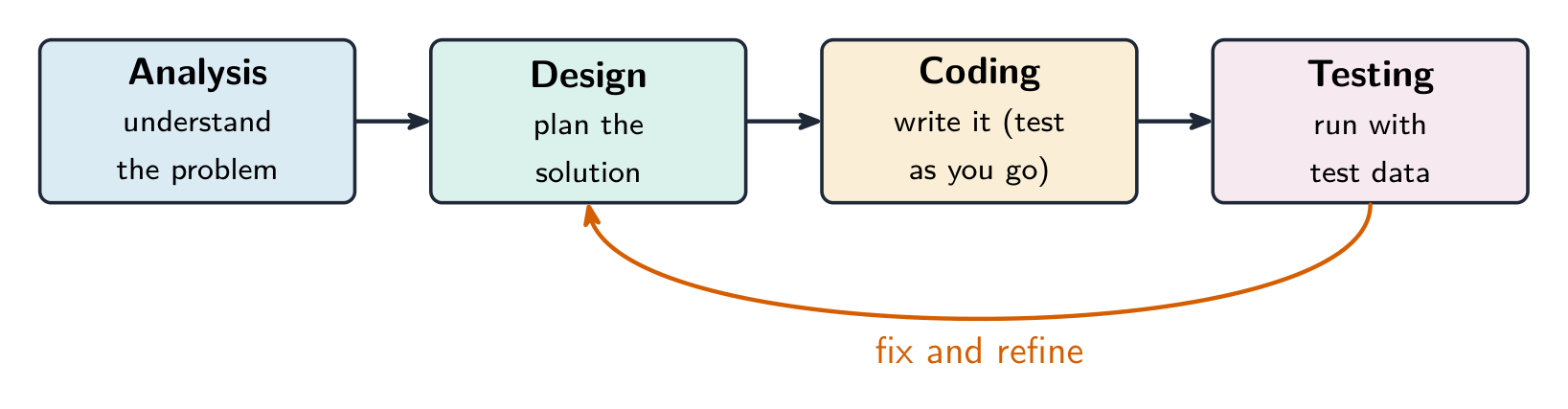
The program development life cycle 程序开发生命周期 is the set of stages used to make a program. There are four stages.
| Stage | What you do |
|---|---|
| analysis 分析 | study the problem and work out what is needed |
| design 设计 | plan how the program will work |
| coding 编码 | write the program code and test it as you go |
| testing 测试 | run the finished program with test data to find errors |
Analysis
In analysis you understand the problem. Two key skills help:
- abstraction 抽象 — keep only the important details and ignore the rest;
- decomposition 分解 — break a big problem into smaller, easier parts.
Design
In design you plan the solution, often using decomposition. You can show the parts as sub-systems 子系统 in a structure diagram 结构图 (a chart that splits a system into smaller boxes).
Worked example. A car park has a payment machine. The driver types in the car's number plate, the machine works out how long the car has stayed and the charge, the driver pays by cash or card, and a receipt is printed. Draw a structure diagram.
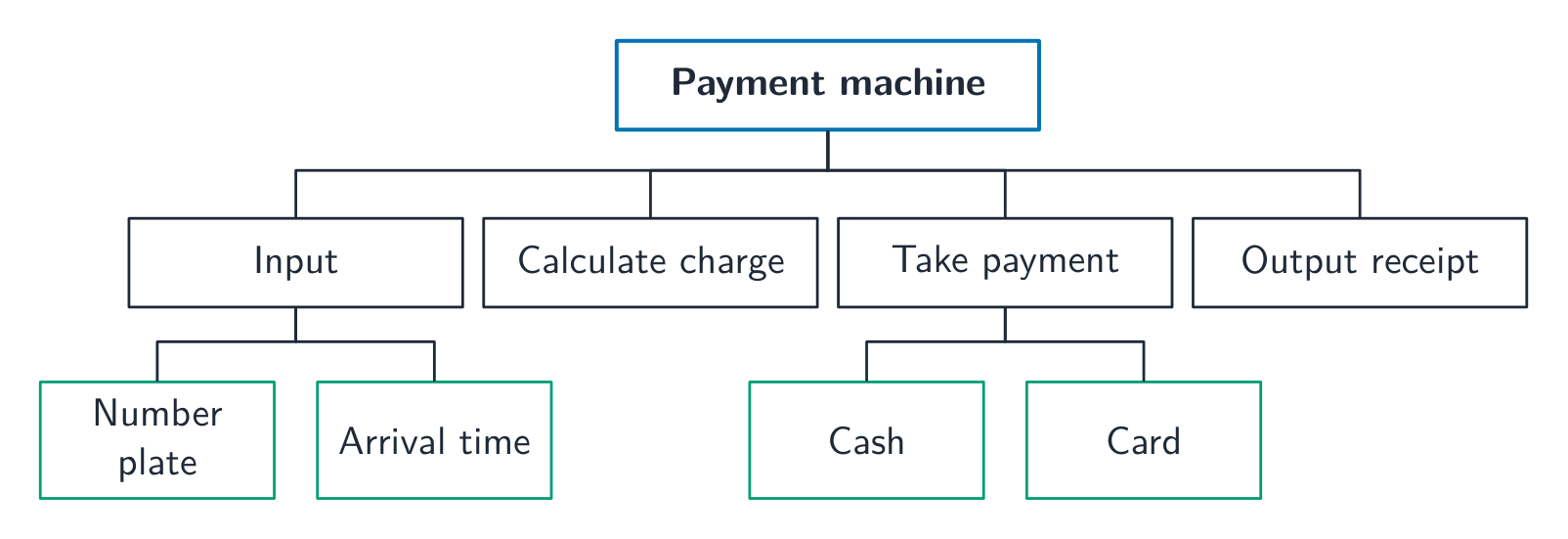
The whole system goes in the top box. Each box on the next level is one job the system does, and a box can be split again (paying splits into cash and card). Read across a level from left to right in the order the jobs happen. A structure diagram shows the parts, not the order of decisions or loops: that is what a flowchart or pseudocode is for.
Coding and testing
In coding you write the program code. You use iterative testing 迭代测试 — test small parts again and again as you build them. In testing you run the whole program with test data 测试数据 to check it works.
คำศัพท์
ฝึกฝน
| English | ไทย |
|---|---|
| program development life cycle/ˈprəʊɡræm dɪˈveləpmənt laɪf ˈsaɪkl/ | วงจรชีวิตการพัฒนาโปรแกรม |
| analysis/əˈnæləsɪs/ | การวิเคราะห์ |
| design/dɪˈzaɪn/ | การออกแบบ |
| coding/ˈkəʊdɪŋ/ | การเขียนโค้ด |
| testing/ˈtestɪŋ/ | การทดสอบ |
| abstraction/əbˈstrækʃn/ | การ abstraction |
| decomposition/ˌdiːkɒmpəˈzɪʃn/ | การแยกส่วน |
| sub-systems/sʌb ˈsɪstəmz/ | 子系统 |
| structure diagram/ˈstrʌktʃə ˈdaɪəɡræm/ | แผนภาพโครงสร้าง |
| iterative testing/ˈɪtərətɪv ˈtestɪŋ/ | การทดสอบแบบวนซ้ำ |
| test data/test ˈdeɪtə/ | ข้อมูลทดสอบ |
7.2
เครื่องมือออกแบบ
English
You can plan a solution in three main ways.
- a structure diagram — shows the parts of a system and how they fit together;
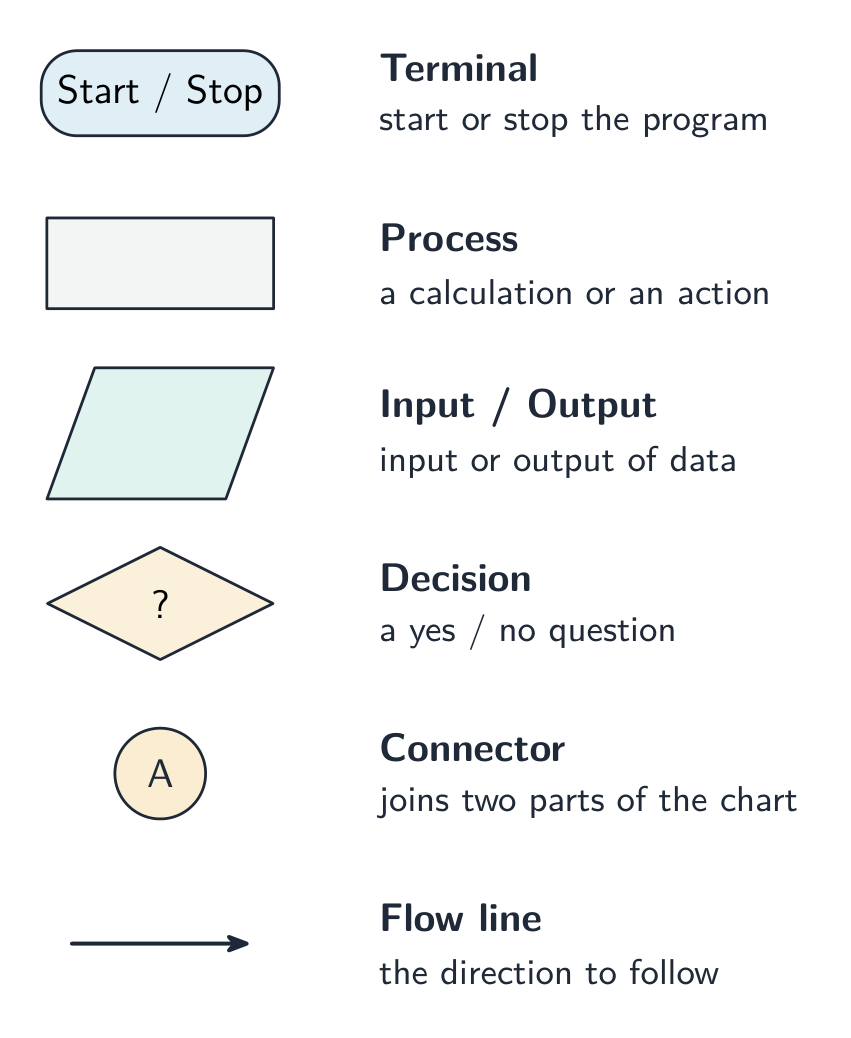
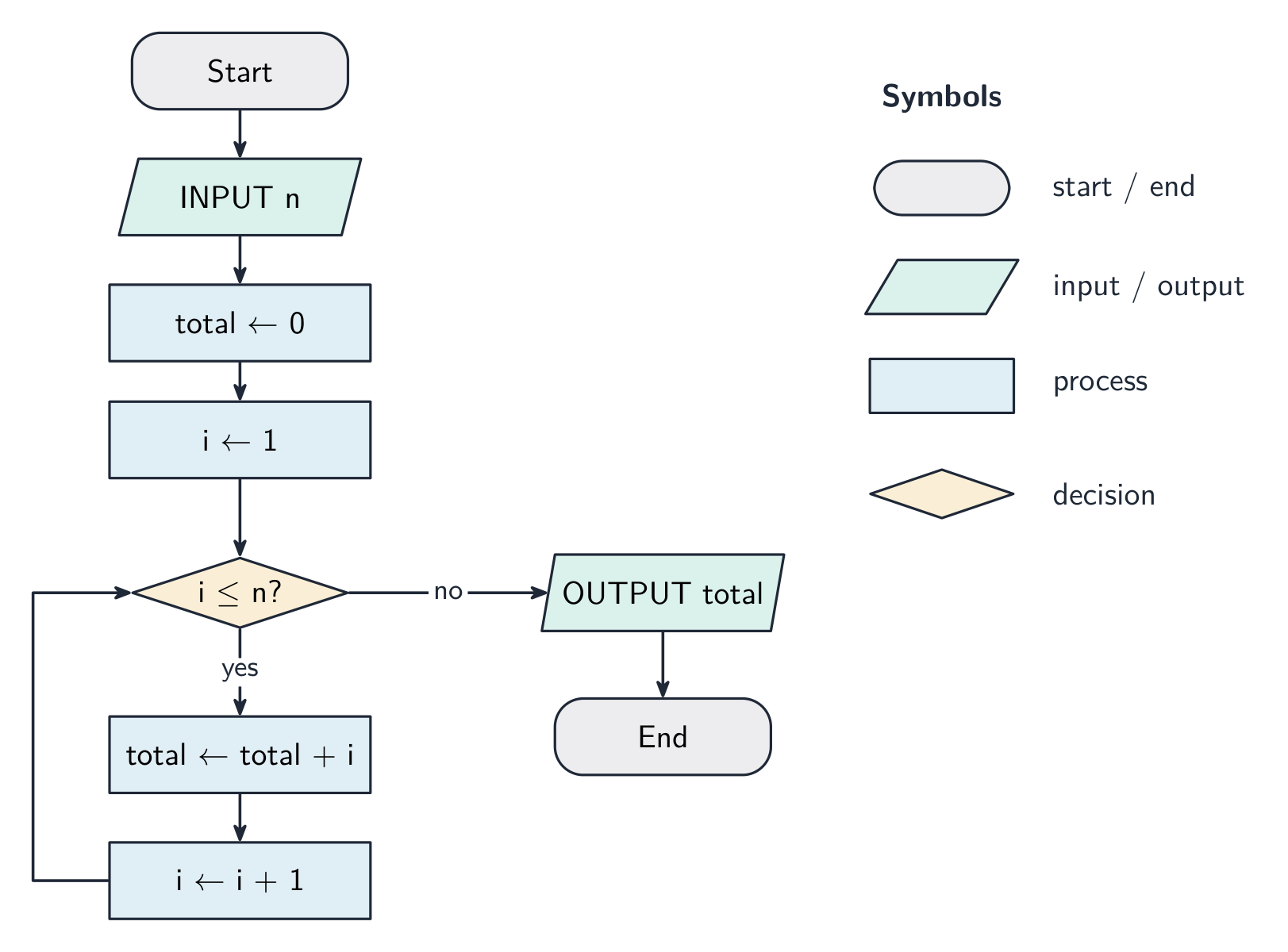
- a flowchart 流程图 — a diagram using boxes and arrows to show the steps in order;
- pseudocode 伪代码 — steps written in simple, code-like English (not a real language).
คำศัพท์
ฝึกฝน
| English | ไทย |
|---|---|
| flowchart/ˈfləʊtʃɑːt/ | แผนภาพไหล |
| pseudocode/ˈsuːdəʊkəʊd/ | 伪代码 (Pseudocode) |
7.3
อัลกอริทึม

English
An algorithm 算法 is a set of steps, in the right order, that solves a problem. Every algorithm can be split into three parts:
- input 输入 — the data that goes in;
- processing 处理 — the work done on the data;
- output 输出 — the result that comes out.
This is called decomposition into inputs, processes and outputs. For example, for “find the average of three marks”: the inputs are the three marks; the processing is adding them and dividing by 3; the output is the average.
คำศัพท์
ฝึกฝน
| English | ไทย |
|---|---|
| algorithm/ˈælɡərɪθəm/ | อัลกอริทึม |
| input/ˈɪnpʊt/ | อินพุต |
| processing/ˈprəʊsesɪŋ/ | การประมวลผล |
| output/ˈaʊtpʊt/ | เอาต์พุต |
7.4
การตรวจสอบความถูกต้องและการยืนยัน
English
When data is entered, you check it to reduce mistakes.
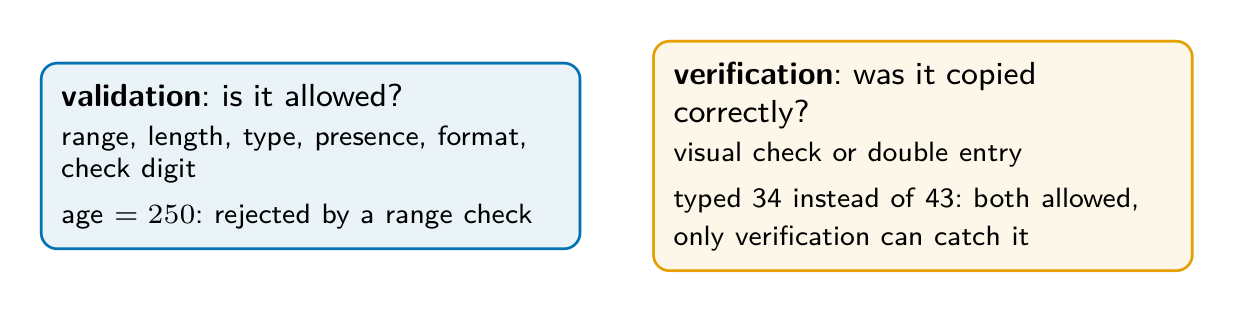
Validation 验证 checks that the data is sensible and follows the rules. It cannot check that the data is true, only that it is allowed.
| Validation check | What it checks |
|---|---|
| range check 范围检查 | the value is between a lowest and highest allowed value |
| length check 长度检查 | the number of characters is allowed (e.g. a password ≥ 8) |
| type check 类型检查 | the data is the right type (e.g. a number, not letters) |
| presence check 存在性检查 | something has actually been entered (not left blank) |
| format check 格式检查 | the data is in the right pattern (e.g. a date as dd/mm/yyyy) |
| check digit 校验码 | an extra calculated digit helps detect errors when a number is entered |
Verification 核实 checks that data was copied or entered correctly (no mistakes while typing it in). Two methods:
- visual check 目视检查 — a person compares the typed data with the original;
- double entry 双重输入 — the data is entered twice and the two copies are compared.
Writing a validation routine
An exam often asks you to write the code for a check. Use a loop that asks again until the input is acceptable, and give the user a message when it is not.
Worked example. Write pseudocode to input a test mark, which must be a whole number from 0 to 100 (a range check), and to keep asking until a valid mark is entered.
DECLARE Mark : INTEGER
REPEAT
    OUTPUT "Enter a mark from 0 to 100"
    INPUT Mark
    IF Mark < 0 OR Mark > 100
      THEN
        OUTPUT "Invalid: the mark must be from 0 to 100"
    ENDIF
UNTIL Mark >= 0 AND Mark <= 100
The UNTIL condition is the accepted range, and the IF condition is its opposite. Notice OR in the IF: a mark cannot be below 0 and above 100 at the same time, so AND there would never be true.
Other checks follow the same pattern, with a different condition:
| Check | Condition for a valid value |
|---|---|
| length check (password of at least 8 characters) | LENGTH(Password) >= 8 |
| presence check (a name must be entered) | Name <> "" |
| range check (age 16 to 65) | Age >= 16 AND Age <= 65 |
A type check is usually done by the language itself, for example when an input is stored in an INTEGER variable.
คำศัพท์
ฝึกฝน
| English | ไทย |
|---|---|
| validation/ˌvælɪˈdeɪʃn/ | การตรวจสอบความถูกต้อง |
| range check/reɪndʒ tʃek/ | การตรวจสอบช่วงค่า |
| length check/leŋθ tʃek/ | การตรวจสอบความยาว |
| type check/taɪp tʃek/ | การตรวจสอบประเภท |
| presence check/ˈprezəns tʃek/ | การตรวจสอบการมีอยู่ |
| format check/ˈfɔːmæt tʃek/ | การตรวจสอบรูปแบบ |
| check digit/tʃek ˈdɪdʒɪt/ | ตัวเลขตรวจสอบ |
| verification/ˌverɪfɪˈkeɪʃn/ | การตรวจสอบความถูกต้อง |
| visual check/ˈvɪʒuːəl tʃek/ | การตรวจสอบด้วยสายตา |
| double entry/ˈdʌbl ˈentri/ | การกรอกข้อมูลซ้ำสองครั้ง |
7.5
ตารางติดตาม
English
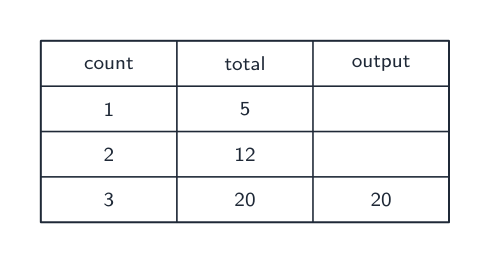
A trace table 追踪表 records the value of each variable as an algorithm runs, step by step. It helps you:
- check that an algorithm works correctly;
- work out what an algorithm does by following it with given data.
Example: trace this algorithm with the input 5.
INPUT N
Total ← 0
FOR I ← 1 TO N
    Total ← Total + I
NEXT I
OUTPUT Total
| i | total | OUTPUT |
|---|---|---|
| 1 | 1 | |
| 2 | 3 | |
| 3 | 6 | |
| 4 | 10 | |
| 5 | 15 | 15 |
The trace shows the algorithm adds up 1 to n. With input 5 the output is 15.
Worked example. Trace this algorithm and give the output.
X ← 20
Count ← 0
WHILE X > 1
    X ← DIV(X, 2)
    Count ← Count + 1
ENDWHILE
OUTPUT Count
DIV gives only the whole-number part of a division. Take one row per pass: x becomes 10 (count 1), then 5 (count 2), then 2 (count 3), then 1 (count 4). Now x > 1 is false, so the loop stops and the output is 4. Two habits protect these marks: test the condition before each pass rather than after, and write a new row for every pass - trying to hold the values in your head is what makes traces go wrong.
Finding and correcting errors
A common question gives an algorithm with errors and asks you to find and correct them. Read it line by line and ask: is every variable given a starting value? Is each loop the right length? Is each comparison the right way round? Is the output in the right place?
Worked example. This algorithm should input 10 numbers and output the largest. Find the three errors and correct them.
Largest ← 1000
FOR Count ← 1 TO 9
    INPUT Number
    IF Number < Largest
      THEN
        Largest ← Number
    ENDIF
    OUTPUT Largest
NEXT Count
- Line 1:
Largest ← 1000starts too high, so no number would replace it. Correction:Largest ← -1000(or input the first number and use it as the start). - Line 2: the loop runs only 9 times. Correction:
FOR Count ← 1 TO 10. - Line 4:
<finds the smallest. Correction:IF Number > Largest.
There is also a problem with the OUTPUT: inside the loop it prints the largest so far after every input. Moving it after NEXT Count prints only the final answer. For each error, give the line, say what is wrong, and write the corrected line in full.
สำรวจ
ตารางติดตาม (Trace table)
เดินผ่านลูปและเติมใน ตารางติดตาม,หนึ่งแถวต่อรอบการทำงาน
คำศัพท์
ฝึกฝน
| English | ไทย |
|---|---|
| trace table/treɪs ˈteɪbl/ | ตารางติดตาม |
7.6
ข้อมูลทดสอบ
English
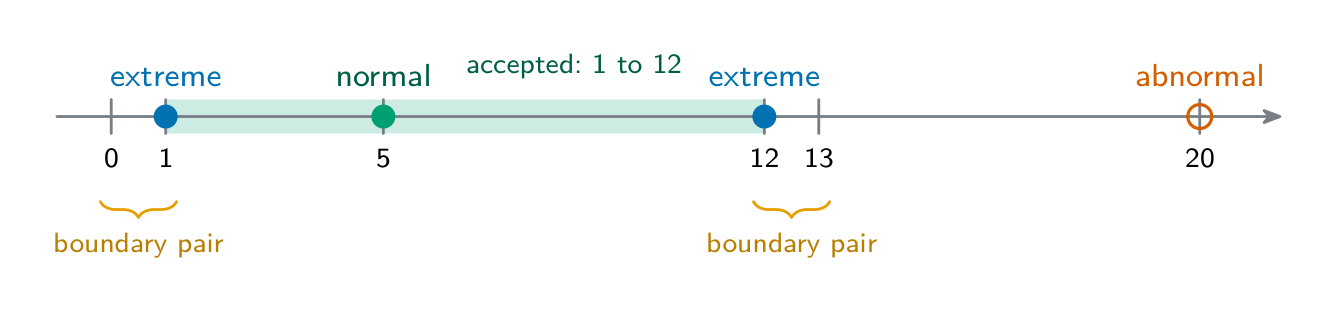
Test data is data you use to test a program. There are four types you must know.
| Type | Meaning | Example (age 0–120 allowed) |
|---|---|---|
| normal 正常数据 | sensible data that should be accepted | 25 |
| abnormal 异常数据 | wrong data that should be rejected | -4 or “cat” |
| extreme 极端数据 | the largest and smallest values still allowed | 0 and 120 |
| boundary 边界数据 | the values on each side of a limit (one allowed, one not) | 120 and 121 |
Worked example. A program accepts the number of people booking a table, from 1 to 12. Give test data of each type, with the expected result.
| Type | Test data | Expected result |
|---|---|---|
| normal | 5 | accepted |
| abnormal | 20 (or “six”) | rejected, with an error message |
| extreme | 1 and 12 | accepted |
| boundary | 12 and 13 (or 0 and 1) | 12 accepted, 13 rejected |
Always give the expected result with the data: a test is only useful if you know what should happen. Extreme data is the edge value itself; boundary data is a pair, one value each side of the limit.
คำศัพท์
ฝึกฝน
| English | ไทย |
|---|---|
| normal/ˈnɔːml/ | ข้อมูลปกติ |
| abnormal/əbˈnɔːml/ | ข้อมูลผิดปกติ |
| extreme/ekˈstriːm/ | ข้อมูลสุดขั้ว |
| boundary/ˈbaʊndəri/ | ข้อมูลขอบเขต |
7.7
วิธีมาตรฐานในการแก้ปัญหา
English
You must know these common algorithms.
Linear search
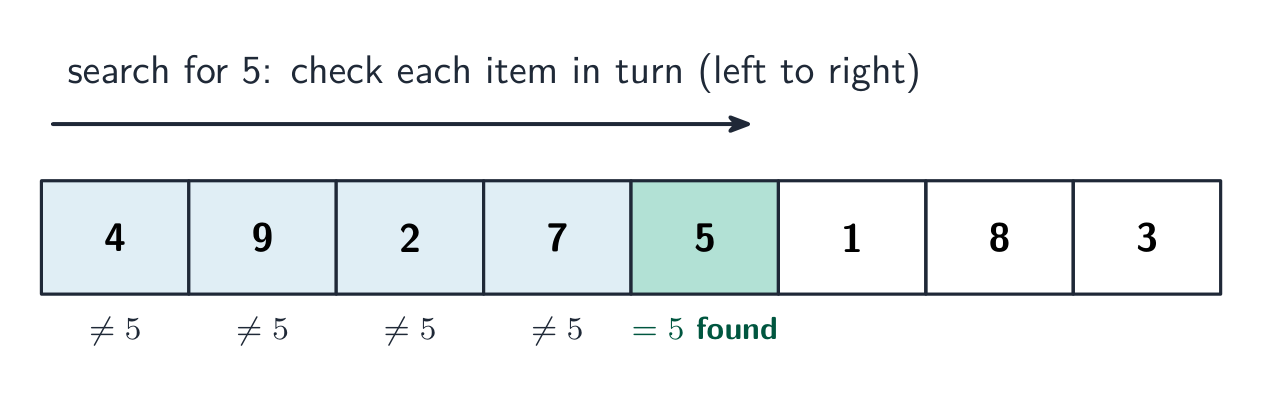
A linear search 线性查找 compares each item with the target, starting at the beginning. Stop when the value is found or the list ends. The list does not need to be sorted. The following example uses positions 1 to 4.
DECLARE List : ARRAY[1:4] OF INTEGER
DECLARE I, SearchValue : INTEGER
DECLARE Found : BOOLEAN
List[1] ← 8
List[2] ← 3
List[3] ← 5
List[4] ← 1
INPUT SearchValue
Found ← FALSE
I ← 1
WHILE I <= 4 AND NOT Found
    IF List[I] = SearchValue
      THEN
        Found ← TRUE
    ENDIF
    I ← I + 1
ENDWHILE
OUTPUT Found
Worked comparison. Searching for 5 compares 8, 3 and then 5: three comparisons, with Found becoming TRUE. The fourth item is not checked. Searching for 9 compares all four values; Found stays FALSE. Stop before trying to read position 5, which is outside this array.
Bubble sort
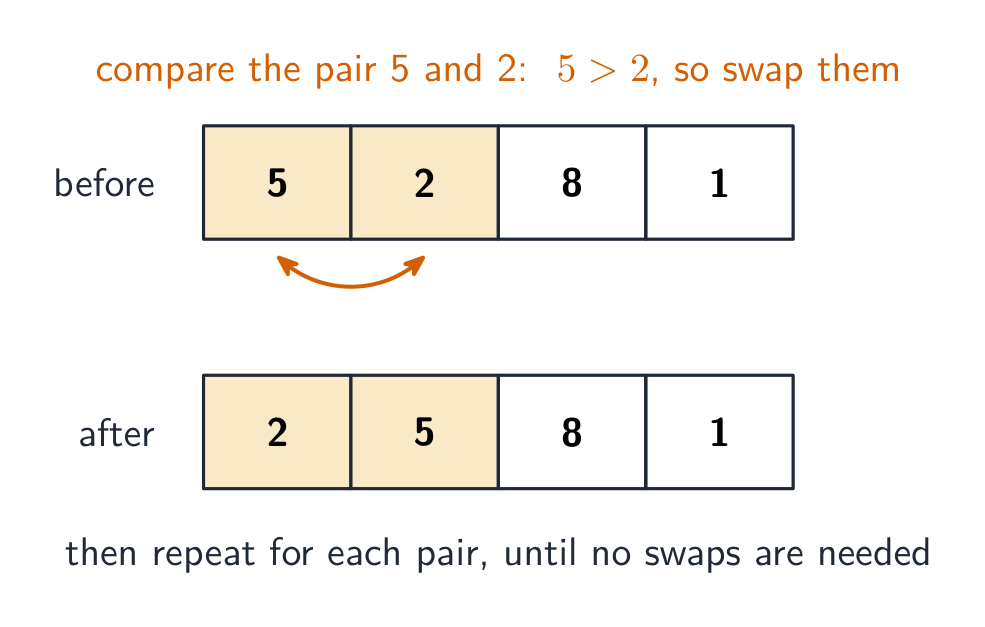
A bubble sort 冒泡排序 puts a list in order. Compare neighbouring values and swap them if the left value is greater. A single pass is not enough in general. This complete version repeats passes until a whole pass makes no swaps.
DECLARE List : ARRAY[1:4] OF INTEGER
DECLARE I, Temp : INTEGER
DECLARE Swapped : BOOLEAN
List[1] ← 8
List[2] ← 3
List[3] ← 5
List[4] ← 1
REPEAT
    Swapped ← FALSE
    FOR I ← 1 TO 3
        IF List[I] > List[I + 1]
          THEN
            Temp ← List[I]
            List[I] ← List[I + 1]
            List[I + 1] ← Temp
            Swapped ← TRUE
        ENDIF
    NEXT I
UNTIL NOT Swapped
OUTPUT List[1], ", ", List[2], ", ", List[3], ", ", List[4]
Worked passes. Start with 8, 3, 5, 1. In the first pass the list becomes 3, 8, 5, 1, then 3, 5, 8, 1, then 3, 5, 1, 8. This puts the largest value last but leaves the rest unsorted. The second pass ends at 3, 1, 5, 8; the third at 1, 3, 5, 8. The fourth makes no swaps and confirms that this version can stop. Reset Swapped to FALSE at the start of every pass; set it to TRUE on any swap.
Totalling and counting
Totalling 求和 adds each required value to a running total: Total ← Total + Value. Counting 计数 adds 1 for each required item: Count ← Count + 1. Initialise both to zero before processing the values.
Worked example. Four attempted inputs are −20, 4, 50 and 6. Accept a value only if it is greater than −20 and less than 50. This example processes four attempts, not four accepted values.
DECLARE I, Count : INTEGER
DECLARE Value, Total : REAL
Total ← 0
Count ← 0
FOR I ← 1 TO 4
    INPUT Value
    IF Value > -20 AND Value < 50
      THEN
        Total ← Total + Value
        Count ← Count + 1
    ENDIF
NEXT I
IF Count > 0
  THEN
    OUTPUT Total, ", ", Count, ", ", Total / Count
  ELSE
    OUTPUT "No accepted values"
ENDIF
| Attempted value | Total after attempt | Count after attempt |
|---|---|---|
| −20 | 0 | 0 |
| 4 | 4 | 1 |
| 50 | 4 | 1 |
| 6 | 10 | 2 |
The strict limits reject −20 and 50. Both updates belong inside the acceptance test, so rejected attempts change neither total nor count. The average of the accepted values is:
$$\text{Average}=\frac{\text{Total}}{\text{Count}}=\frac{10}{2}=5$$
Do not divide by four: only two values were added. If no value is accepted, the count is zero and an average cannot be calculated; output a message instead of dividing by zero.
Transfer to a fixed number of accepted values. If a task asks for 50 accepted values, rather than four attempts, replace the fixed FOR loop with WHILE Count < 50 and close it with ENDWHILE. Keep the same input and acceptance test inside it. Rejected inputs leave Count unchanged, so another input is requested. On completion Count is 50, although the number of attempts may be greater. Output the total and calculate the average as Total / Count.
Maximum, minimum and average
The maximum 最大值 is the largest value and the minimum 最小值 is the smallest. The average 平均值 is the total divided by the number of values. For a non-empty list, initialise both from its first item. For each remaining item, replace the maximum if the new value is larger, and replace the minimum if it is smaller.
Worked example. The list is −8, −3, −12, −5. Starting the maximum at zero would fail: no list item is greater than zero, so the algorithm would output a number that is not in the list. Starting from −8 works without assuming that the data is positive.
| Value just considered | Maximum so far | Minimum so far |
|---|---|---|
| −8 (initialisation) | −8 | −8 |
| −3 | −3 | −8 |
| −12 | −3 | −12 |
| −5 | −3 | −12 |
DECLARE List : ARRAY[1:4] OF INTEGER
DECLARE I, Maximum, Minimum, Total : INTEGER
List[1] ← -8
List[2] ← -3
List[3] ← -12
List[4] ← -5
Maximum ← List[1]
Minimum ← List[1]
Total ← List[1]
FOR I ← 2 TO 4
    IF List[I] > Maximum
      THEN
        Maximum ← List[I]
    ENDIF
    IF List[I] < Minimum
      THEN
        Minimum ← List[I]
    ENDIF
    Total ← Total + List[I]
NEXT I
OUTPUT Maximum, ", ", Minimum, ", ", Total / 4
The maximum is −3 and the minimum is −12. The average uses all four values:
$$\text{Total}=\sum \text{Value}=(-8)+(-3)+(-12)+(-5)=-28$$
$$\text{Average}=\frac{\text{Total}}{\text{Count}}=\frac{-28}{4}=-7$$
The average lies between the minimum and maximum; this is a useful check, not proof that the calculation is correct. Initialising from the first item requires a non-empty list. Handle an empty list separately before trying to read that item.
คำศัพท์
ฝึกฝน
| English | ไทย |
|---|---|
| linear search/ˈlɪnɪə sɜːtʃ/ | การค้นหาแบบเชิงเส้น |
| bubble sort/ˈbʌbl sɔːt/ | การเรียงลำดับแบบฟองอากาศ |
| totalling/ˈtəʊtəlɪŋ/ | การรวมผล |
| counting/ˈkaʊntɪŋ/ | การนับจำนวน |
| maximum/ˈmæksɪməm/ | ค่าสูงสุด |
| minimum/ˈmɪnɪməm/ | ค่าต่ำสุด |
| average/ˈævrɪdʒ/ | ค่าเฉลี่ย |
7.8
เคล็ดลับสำหรับการสอบ
English
- The four life-cycle stages: analysis → design → coding → testing. Abstraction keeps only what matters; decomposition splits a problem into parts.
- Validation checks data is sensible (range, length, type, presence, format checks); verification checks it was copied correctly (a visual check or double entry).
- Learn the four test-data types: normal (accepted), abnormal (rejected), extreme (the largest/smallest still allowed), boundary (either side of a limit).
- A trace table (every variable's value at each step) shows what an algorithm does.
- To write a validation routine, put the input in a
REPEAT … UNTILloop whoseUNTILcondition is the valid data. - When you correct an error, quote the line and write the whole corrected line.
- Know the standard algorithms: linear search (check each item in turn) and bubble sort (swap side-by-side pairs until no swaps are needed).
บทเรียนเชิงโต้ตอบสำหรับหัวข้อนี้
ทำทีละขั้นตอน พร้อมแบบฝึกหัดตรวจสอบผลทันที