You send a photo to a friend on the other side of the world. It does not travel as one lump. It is chopped into hundreds of small packets, each one labelled…
English narration · English + 中文 subtitles burned in
2.1
What is data transmission?
Data transmission 数据传输 means moving data from one place to another — for example from your computer to a website, or from a phone to a printer.
Data often travels along a cable. Two common ones are shown below.
An Ethernet cable with an RJ45 plug, often used to carry data on a wired networkA fibre-optic cable carries data as pulses of light along thin glass fibres
Before it is sent, the data is broken down into small, equal-sized pieces called packets 数据包. Each packet travels separately and they are put back together at the other end.
Using packets has benefits:
if one packet is lost or damaged, only that packet is sent again, not the whole file;
packets can take different routes, so a busy or broken route can be avoided;
many users can share the same connection at the same time.
1 (a) Understand that data is broken down into packets to be transmitted
(b) Describe the structure of a packet
• A packet of data contains a: – packet header – payload – trailer • The packet header includes the: – destination address – packet number – originator’s address
(c) Describe the process of packet switching
• Data is broken down into packets • Each packet could take a different route • A router controls the route a packet takes • Packets may arrive out of order • Once the last packet has arrived, packets are reordered
2 (a) Describe how data is transmitted from one device to another using different methods of data transmission
Packet switching 数据包交换 is the way packets are sent across a network.
Routers forward packets, and different packets can take different routes to the same receiver
Special devices called routers 路由器 read each packet's header and choose the best route for it.
Each packet may take its own path, so packets can travel different ways.
Packets may arrive out of order.
When the last packet has arrived, the packets are reordered using their packet numbers.
Explore
How data travels in packets
Step through packet switching. Splitting a file into addressed packets is why one lost packet only needs resending, and why many users can share the same line.
bits can arrive at slightly different times over long wires
Serial sends one bit after another along a single wire. Parallel sends several bits at the same time along several wires, so it is faster over short distances.
Serial sends one bit at a time down one wire; parallel sends several bits at once down several wires
Simplex, half-duplex and full-duplex
These describe the direction data can travel.
Simplex is one way only; half-duplex is both ways but one at a time; full-duplex is both ways at once
Method
Direction
simplex 单工
one direction only (e.g. computer → printer)
half-duplex 半双工
both directions, but only one at a time (e.g. walkie-talkie)
full-duplex 全双工
both directions at the same time (e.g. phone call)
Choosing a method
The choice depends on the distance, the speed needed, the cost, and whether data must travel both ways at once.
1 Understand the need to check for errors after data transmission and how these errors can occur
• Errors can occur during data transmission due to interference, e.g. data loss, data gain and data change
2 Describe the processes involved in each of the following error detection methods for detecting errors in data after transmission: parity check (odd and even), checksum and echo check
• Including parity byte and parity block check
3 Describe how a check digit is used to detect errors in data entry and identify examples of when a check digit is used, including international standard book numbers (ISBN) and bar codes
4 Describe how an automatic repeat query (ARQ) can be used to establish that data is received without error
• Including the use of: – positive/negative acknowledgements – timeout
Source: Cambridge International syllabus
While data travels, interference 干扰 can change it. Three things can go wrong:
data loss — some bits do not arrive;
data gain — extra bits are added;
data change — some bits are flipped.
So the receiver checks whether the data arrived correctly.
A parity check 奇偶校验 adds one extra bit, the parity bit 奇偶校验位, to each byte. There are two types:
A parity bit is added to make the number of 1s even (or odd)
even parity — the total number of 1s in the byte (including the parity bit) must be even;
odd parity — the total number of 1s must be odd.
Example (even parity): the data 1011001 has four 1s, which is already even, so the parity bit is 0:
parity bit + data
    0        1011001
To find an error: the receiver counts the 1s. If even parity was agreed but a byte arrives with an odd number of 1s, an error has happened during transmission.
A parity check cannot find every error. If two bits flip, the count may still look correct.
Worked example. A single parity bit tells you that an error happened, but not where. A parity block 奇偶校验块 can find the exact bit. Several bytes are sent together, each with a row parity bit, and one extra parity byte 奇偶校验字节 at the bottom holds a parity bit for each column. Even parity is used below, and one bit was flipped during transmission. Find it.
Row byte 3 breaks even parity, and column b3 breaks even parity. The flipped bit is where they cross: byte 3, bit b3. Changing it back from 1 to 0 repairs the data. A single parity bit only says an error happened; a parity block says exactly where, so the receiver can even fix it.
Checksum
A checksum 校验和 is a value worked out from all the data before sending. The receiver works out the checksum again from the data it received. If the two values do not match, an error has occurred and the data is resent.
Echo check
In an echo check 回送校验, the receiver sends the data back to the sender. The sender compares it with the original. If they differ, an error happened. (This needs the data to be sent twice, so it is slow.)
Automatic Repeat reQuest (ARQ)
Automatic Repeat reQuest 自动重传请求 (ARQ) uses messages called acknowledgements 确认.
The syllabus calls this automatic repeat query; automatic repeat request is another name for the same method. The sender starts a timeout 超时 timer when it sends a packet. The receiver uses an error check on the received packet. If the check passes, it sends a positive acknowledgement. If an error is detected, it sends a negative acknowledgement.
Try it — packet 4. In three separate cases, packet 4 (A) passes the receiver's error check, (B) fails the check, or (C) never arrives. For each case, choose the receiver's response and the sender's next action.
Worked trace.
Case
Receiver
Sender
A
Sends a positive reply
Receives it; stops timer; can send next packet
B
Sends a negative reply
Receives it; resends packet 4; restarts timer
C
Has no packet to check
Timeout; resends packet 4; restarts timer
A negative reply can cause a repeat before the timer expires. If no positive acknowledgement arrives before timeout, the sender repeats the transmission. The timer handles silence, including a lost packet or a lost reply.
Transfer — a lost reply. Packet 4 arrives and passes its check. The receiver sends a positive acknowledgement, but this reply is lost. What does the sender do when its timer expires? Does timeout prove that packet 4 was damaged?
Answer. The sender resends packet 4 and restarts its timer. The receiver knows the packet arrived successfully, but the sender has no confirmation. Timeout does not tell the sender whether the packet or the reply was lost or delayed. ARQ requests another transmission; it does not itself repair damaged bits. It uses an error check to decide whether to accept a received packet.
Check digit
A check digit 校验码 is an extra digit placed at the end of a number, worked out from the other digits. It is used to find mistakes when a number is typed in.
When the number is entered, the check digit is calculated again and compared. Depending on the method, it can detect some of these errors; no check digit guarantees that every entry error is found:
an incorrect digit entered,
a transposition error 换位错误 (two digits swapped, e.g. 21 typed as 12),
a digit left out or an extra digit added,
a phonetic error (a digit that sounds similar, e.g. 13 and 30).
Check digits are used in barcodes 条形码 and ISBNs (book numbers).
Explore
Computing concept lab
Classify concrete examples by the computing idea they demonstrate.
1 Understand the need for and purpose of encryption when transmitting data
2 Understand how data is encrypted using symmetric and asymmetric encryption
• Asymmetric encryption includes the use of public and private keys
Source: Cambridge International syllabus
Why we need encryption
Encryption 加密 scrambles data so that it cannot be understood if it is intercepted 拦截 (caught) by the wrong person. The readable data is called plaintext 明文; after encryption it becomes ciphertext 密文.
Encryption does not stop data from being intercepted. It only stops the data from being understood.
Symmetric encryption
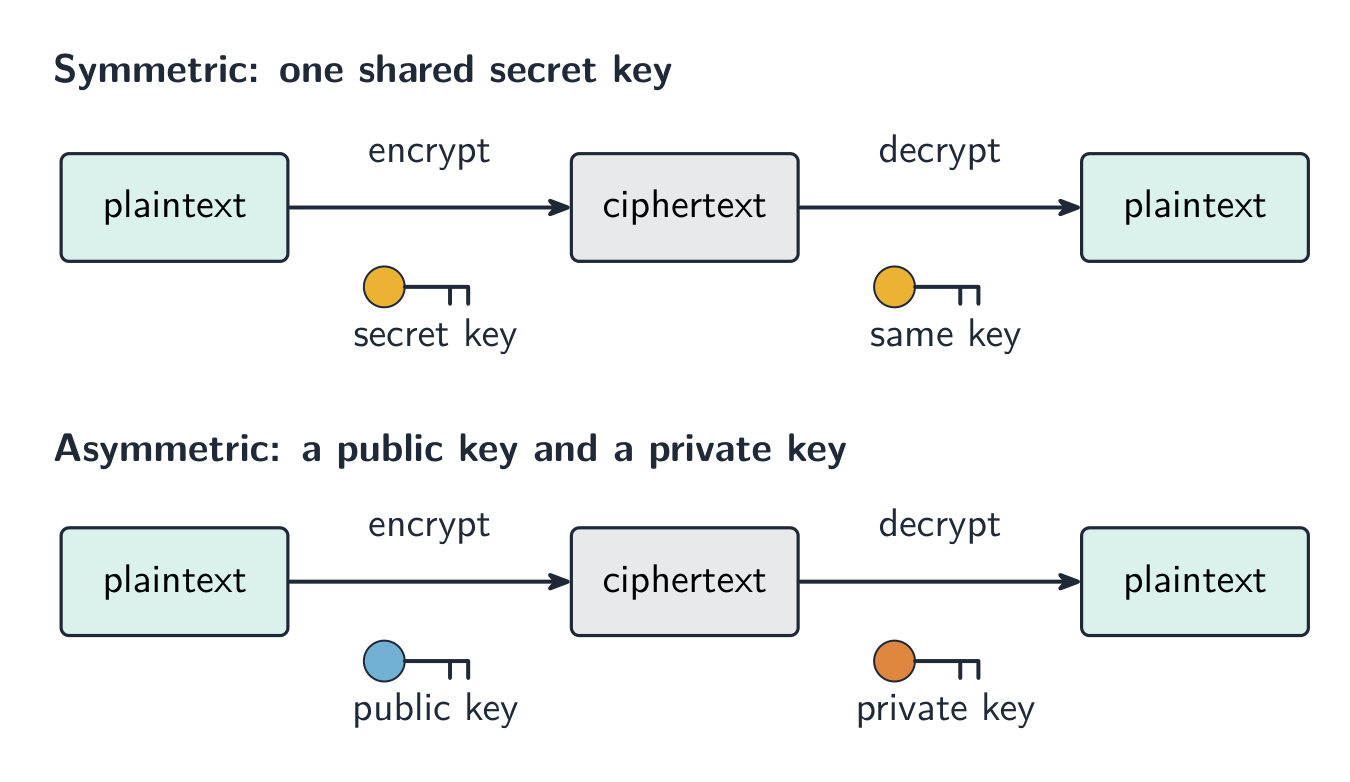
Symmetric encryption 对称加密 uses a single key 密钥 to both encrypt and decrypt the data. The sender and receiver must share this same secret key. The risk is that the key itself could be stolen while being shared.
Asymmetric encryption
Asymmetric encryption 非对称加密 uses two different keys:
a public key 公钥 that anyone can have, used to encrypt;
a private key 私钥 that is kept secret, used to decrypt.
Data encrypted with the public key can only be decrypted with the matching private key, so the key never has to be shared. This is safer than sharing one secret key.
Symmetric uses one shared key; asymmetric uses a public key to encrypt and a private key to decrypt
Explore
The Caesar cipher
Shift each letter to encrypt a message — the simplest idea of a cipher and its key.
Data is sent in packets (a header with the addresses and packet number, a payload, and a trailer). Packets can take different routes and arrive out of order, then are reordered by their packet numbers.
Match the transmission types: serial (one bit at a time, good over long distances) vs parallel (several bits at once, short distances); simplex / half-duplex / full-duplex describe the direction.
A single parity bit only shows that an error happened; a parity block locates the exact wrong bit — the row and the column that both fail.
Learn the error-detection methods and what each does: parity check, checksum, echo check, ARQ, and the check digit (for typed-in numbers).
Symmetric encryption uses one shared key; asymmetric uses a public key to encrypt and a private key to decrypt, so no secret key is ever shared.
Interactive lessons on this topic
Work through it step by step, with instant-check exercises.