IGCSE Computer Science (0478) has ten topics across two papers: data representation, data transmission, hardware, software, the internet, automated and emerging technologies, algorithm design, programming, databases and Boolean logic.
Paper 1 is theory, marked on precise vocabulary — the difference between RAM and ROM, a compiler and an interpreter, validation and verification. These are definition marks, and a paraphrase usually misses them.
Paper 2 is problem-solving and programming, where marks go to a working method: trace tables, pseudocode, and code that would actually run. Secure number bases and binary arithmetic first — they appear on their own and again inside data transmission, logic and hardware.
A computer can only work with two states: on and off. You write these as 1 and 0. A system that uses only two digits 数字 is called binary 二进制 (base 2).
Computers represent all data — numbers, text, sound and images — as binary strings of 0s and 1s
Every kind of data 数据 — numbers, text, sound and images — must be changed into binary before a computer can use it. The computer processes this binary using logic gates 逻辑门, and stores it in registers 寄存器 (small, fast stores inside the processor 处理器).
A microprocessor holds millions of tiny transistors, each a switch that is on (1) or off (0) — the physical basis of binary
1 Understand how and why computers use binary to represent all forms of data
• Any form of data needs to be converted to binary to be processed by a computer • Data is processed using logic gates and stored in registers
2 (a) Understand the denary, binary and hexadecimal number systems (b) Convert between (i) positive denary and positive binary (ii) positive denary and positive hexadecimal (iii) positive hexadecimal and positive binary
• Denary is a base 10 system • Binary is a base 2 system • Hexadecimal is a base 16 system • Values used will be integers only • Conversions in both directions, e.g. denary to binary or binary to denary • Maximum binary number length of 16-bit
3 Understand how and why hexadecimal is used as a beneficial method of data representation
• Areas within computer science that hexadecimal is used should be identified • Hexadecimal is easier for humans to understand than binary, as it is a shorter representation of binary
4 (a) Add two positive 8-bit binary integers (b) Understand the concept of overflow and why it occurs in binary addition
• An overflow error will occur if the value is greater than 255 in an 8-bit register • A computer or a device has a predefined limit that it can represent or store, for example 16-bit • An overflow error occurs when a value outside this limit should be returned
5 Perform a logical binary shift on a positive 8-bit binary integer and understand the effect this has on the positive binary integer
• Perform logical left shifts • Perform logical right shifts • Perform multiple shifts • Bits shifted from the end of the register are lost and zeros are shifted in at the opposite end of the register • The positive binary integer is multiplied or divided according to the shift performed • The most significant bit(s) or least significant bit(s) are lost
6 Use the two’s complement number system to represent positive and negative 8-bit binary integers
• Convert a positive binary or denary integer to a two’s complement 8-bit integer and vice versa • Convert a negative binary or denary integer to a two’s complement 8-bit integer and vice versa
Source: Cambridge International syllabus
Counting in binary: 0 to 15
A number system 数制 is a way of writing numbers using a fixed set of digits. You need three of them.
System
Base
Digits used
Denary
10
0–9
Binary
2
0 and 1
Hexadecimal
16
0–9 then A–F
denary 十进制 is the normal counting system (also called decimal).
binary uses only 0 and 1.
hexadecimal 十六进制 (hex) uses sixteen digits: 0–9, then A, B, C, D, E, F stand for 10, 11, 12, 13, 14, 15.
The base 基数 tells you how many different digits a system uses.
Place value
Each column in a number has a place value 位值. In binary the place values double from right to left. For an 8-bit number they are:
128 64 32 16 8 4 2 1
An 8-bit place-value chart: the 1s sit under the values that add up to 150
One bit 位 is a single 0 or 1. Eight bits make one byte 字节. Four bits (half a byte) is a nibble 半字节.
Converting between number systems
Denary → binary. Write the place values. Put a 1 under each value you need so they add up to your number; put 0 under the rest.
Each hex digit maps to its own 4-bit nibble — F08 = 1111 0000 1000
Binary → hexadecimal. Group the bits into nibbles of 4, starting from the right. Change each nibble to one hex digit.
Denary → hexadecimal. The easy way is to change to binary first, then binary to hex.
This table helps with the hex letters:
Denary
Binary
Hex
10
1010
A
11
1011
B
12
1100
C
13
1101
D
14
1110
E
15
1111
F
Cambridge questions use binary numbers up to 16 bits long.
Worked example. Convert denary 100 to 8-bit binary, then to hexadecimal.
$100 = 64 + 32 + 4$, so the binary is 01100100. Splitting into nibbles, 01100100$= 6$ and $4$, so the hexadecimal is 64.
Why hexadecimal is used
Hex is shorter than binary and easier for people to read and write. One hex digit replaces 4 binary digits, so you make fewer mistakes. The value does not change — hex is just a shorter way to show the same binary.
Computer scientists use hex for:
MAC addresses and IPv6 addresses
colour codes in HTML (for example #FF0000 is red)
memory addresses 内存地址 and error codes
showing the contents of memory (a "memory dump")
Explore
Binary, denary and hex
Type a number and see it in binary, denary and hex — and how the place values build it.
Adding column by column; the carries ripple to the left. 118 + 48 = 166
Overflow
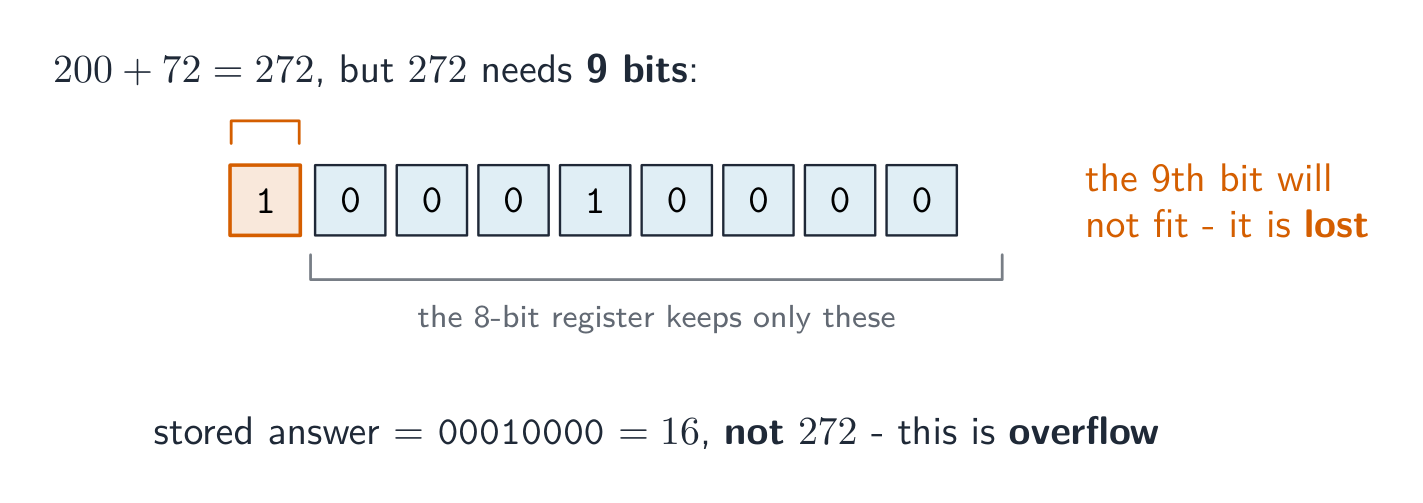
An 8-bit register can hold denary values from 0 to 255 only. If an addition gives a result above 255, the answer needs a 9th bit. The register cannot hold this extra bit, so it is lost. This is called overflow 溢出 (an overflow error). It happens when a value goes outside the limit the register can store.
Example: 11001000 (200) $+$01001000 (72) $= 272$. In binary that is 1 00010000, which needs 9 bits. The leading 1 will not fit in 8 bits, so the stored answer is wrong.
Adding 200 and 72 needs 9 bits, but an 8-bit register drops the ninth, so the answer is wrong
A logical binary shift 逻辑二进制移位 moves all the bits left or right by a number of places.
Bits that move off the end of the register are lost.
Zeros are added at the empty end.
A left shift multiplies the number by 2 for each place moved. A right shift divides it by 2 for each place; the right-most bits (the least significant bit(s) 最低有效位) are lost.
A left shift of 2: every bit moves 2 places left, the top bits are lost and zeros fill the right
The result is 11010100 (212), which is $53 \times 4$. The two left-most bits were lost and two zeros came in on the right. If a 1 is pushed off the end, that information is gone for good.
So far the numbers were positive. Two's complement 补码 lets an 8-bit register hold negative numbers too.
In two's complement, the left-most bit (the most significant bit 最高有效位, or MSB) has a negative place value:
-128 64 32 16 8 4 2 1
If the MSB is 0, the number is positive.
If the MSB is 1, the number is negative.
To make a positive number negative: write the positive binary, flip every bit (0↔1), then add 1.
Example: make $-40$.
$+40$ = 00101000
flip the bits = 11010111
add 1 = 11011000
So $-40$ = 11011000. Check by adding the place values: $-128 + 64 + 16 + 8 = -40$.
The most significant bit is worth −128, so 11011000 = −128 + 64 + 16 + 8 = −40
To read a negative two's complement number, just add the place values (the MSB counts as $-128$). The range of an 8-bit two's complement number is $-128$ to $+127$.
1 Understand how and why a computer represents text and the use of character sets, including American standard code for information interchange (ASCII) and Unicode
• Text is converted to binary to be processed by a computer • Unicode allows for a greater range of characters and symbols than ASCII, including different languages and emojis • Unicode requires more bits per character than ASCII
2 Understand how and why a computer represents sound, including the effects of the sample rate and sample resolution
• A sound wave is sampled for sound to be converted to binary, which is processed by a computer • The sample rate is the number of samples taken in a second • The sample resolution is the number of bits per sample • The accuracy of the recording and the file size increases as the sample rate and resolution increase
3 Understand how and why a computer represents an image, including the effects of the resolution and colour depth
• An image is a series of pixels that are converted to binary, which is processed by a computer • The resolution is the number of pixels in the image • The colour depth is the number of bits used to represent each colour • The file size and quality of the image increase as the resolution and colour depth increase
Source: Cambridge International syllabus
Computers store text by giving every character a number, then storing that number in binary. The set of characters a computer can use, together with their numbers, is a character set 字符集.
ASCII uses 7-bit character codes, giving $N = 2^b = 2^7 = 128$ different codes. It includes English letters, digits and common symbols; not all 128 codes are letters. Unicode represents a much greater range of characters, including different languages and emoji 表情符号.
Try it — encode a short message. This extract from ASCII gives A = 65, B = 66, C = 67 and space = 32. Write the four 7-bit groups for CAB , including its final space. Then decode the groups 1000010 1000001 1000011.
Worked answer. Look up each character, then convert its code to binary:
Character
Code
Seven bits
C
67
1000011
A
65
1000001
B
66
1000010
space
32
0100000
So CAB is 1000011 1000001 1000010 0100000. The second message decodes to BAC. A space has a code too; it is not an absence of stored data. The sender and receiver must use the same character-code mapping to interpret the message correctly.
ASCII has 128 codes. Unicode supports a much greater range; the wider row illustrates the syllabus model.
Why a larger range matters. ASCII cannot directly represent a Chinese name. Unicode includes Chinese characters as well as English characters and many other languages. For the syllabus comparison, explain that a greater range needs more distinct binary codes, requiring more bits per character than the 7-bit ASCII model.
Try it — compare stated storage models. Store the four characters CAB using (A) 7 bits per character and (B) 16 bits per character. Assume the bits are packed with no padding or extra file information. Find the text data size in each model. The 16-bit value is an assumption for this example, not a rule that all Unicode characters take 16 bits.
Worked answer. With the same number of characters, multiply by the stated bits per character:
$$S = n b = 4 \times 7\ \text{bits} = 28\ \text{bits}$$
$$S = n b = 4 \times 16\ \text{bits} = 64\ \text{bits}$$
Model B uses more storage 存储 for this example because its stated code width is larger. Use the width given in an exam question. In real files, the encoding also matters: UTF-8 stores ASCII characters in the same bytes as an ASCII file, so Unicode text does not always occupy more bytes. You do not need the detailed UTF-8 rules for this syllabus comparison.
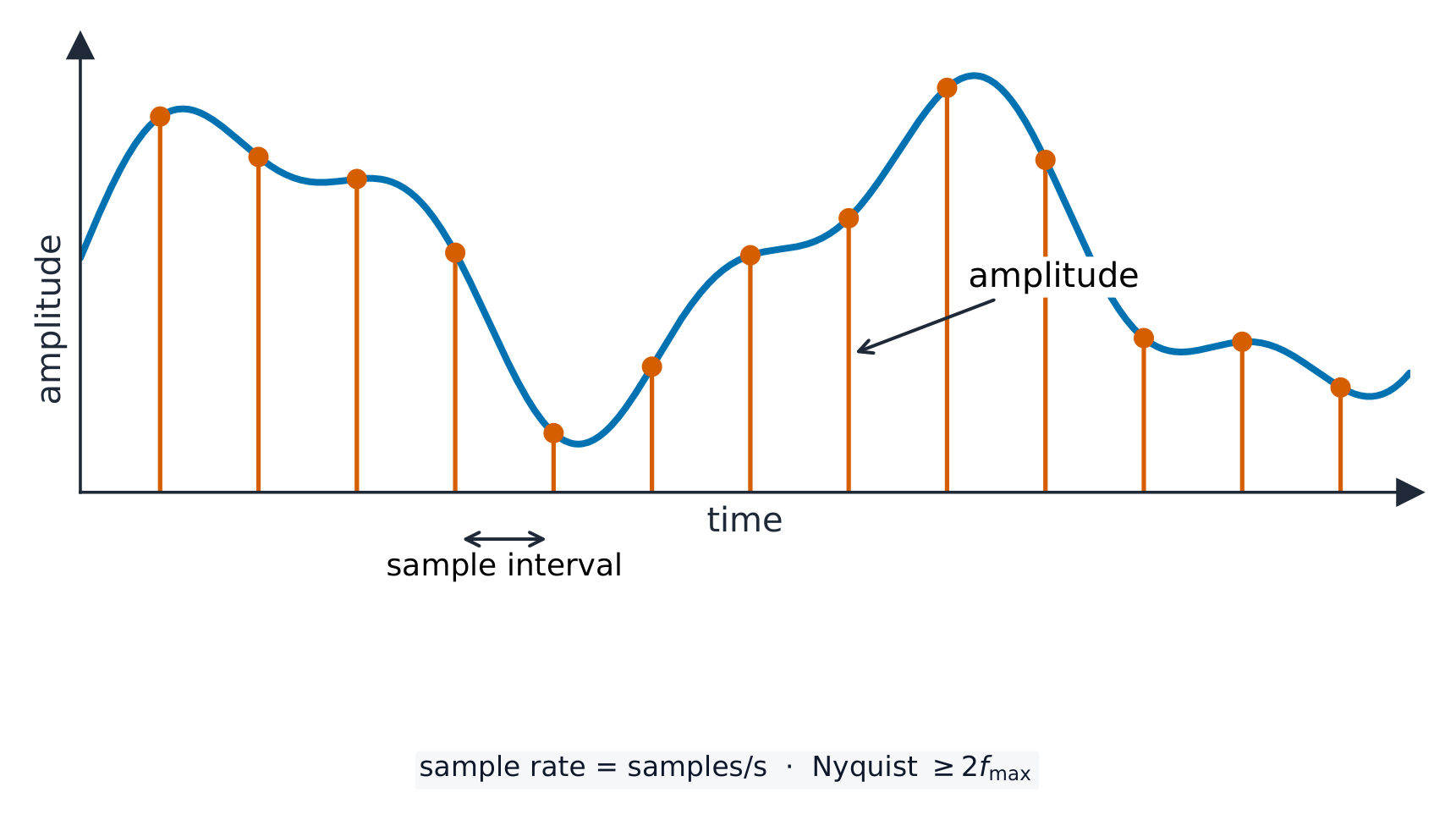
A sound wave 声波 is smooth and always changing. To store it, the computer measures the height of the wave at regular moments. This is called sampling 采样, and each measurement is a sample.
Sampling records the wave's height (amplitude) at regular moments
sample rate 采样率 is the number of samples taken each second (measured in Hz).
sample resolution 采样分辨率 is the number of bits used for each sample. The height of the wave at a sample point is its amplitude 振幅.
A higher sample rate and a higher sample resolution give a more accurate recording, but a larger file.
Explore
Representing sound
y = a sin(bt + c)
Sound is a wave; sampling records its height many times a second.
• Including: – bit – nibble – byte – kibibyte (KiB) – mebibyte (MiB) – gibibyte (GiB) – tebibyte (TiB) – pebibyte (PiB) – exbibyte (EiB) • The amount of the previous denomination present in the data storage size, e.g.: – 8 bits in a byte – 1024 mebibytes in a gibibyte
2 Calculate the file size of an image file and a sound file, using information given
• Answers must be given in the units specified in the question. Calculations must use the measurement of 1024 and not 1000 • Information given may include: – image resolution and colour depth – sound sample rate, resolution and length of track
3 Understand the purpose of and need for data compression
• Compression exists to reduce the size of the file • What the impact of this is, e.g.: – less bandwidth required – less storage space required – shorter transmission time
4 Understand how files are compressed using lossy and lossless compression methods
• Lossy compression reduces the file size by permanently removing data, e.g. reducing resolution or colour depth, reducing sample rate or resolution • Lossless compression reduces the file size without permanent loss of data, e.g. run length encoding (RLE)
Source: Cambridge International syllabus
Data storage is measured in the units below. A nibble is 4 bits and a byte is 8 bits; from the kibibyte upward, each unit is 1024 times the one before it (because $1024 = 2^{10}$, which fits binary).
Unit
Equals
bit
a single 0 or 1
nibble
4 bits
byte
8 bits
kibibyte (KiB)
1024 bytes
mebibyte (MiB)
1024 KiB
gibibyte (GiB)
1024 MiB
tebibyte (TiB)
1024 GiB
pebibyte (PiB)
1024 TiB
exbibyte (EiB)
1024 PiB
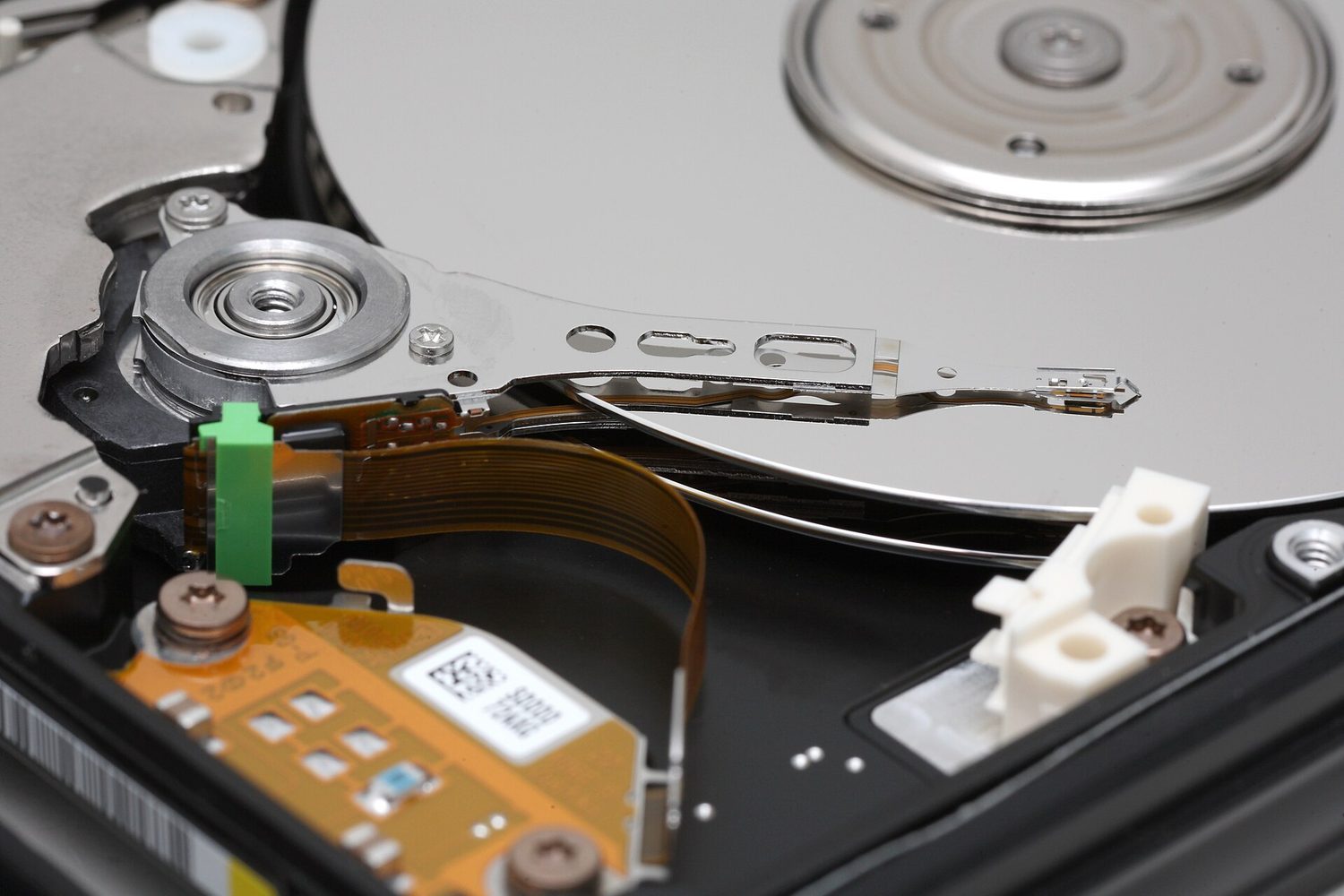
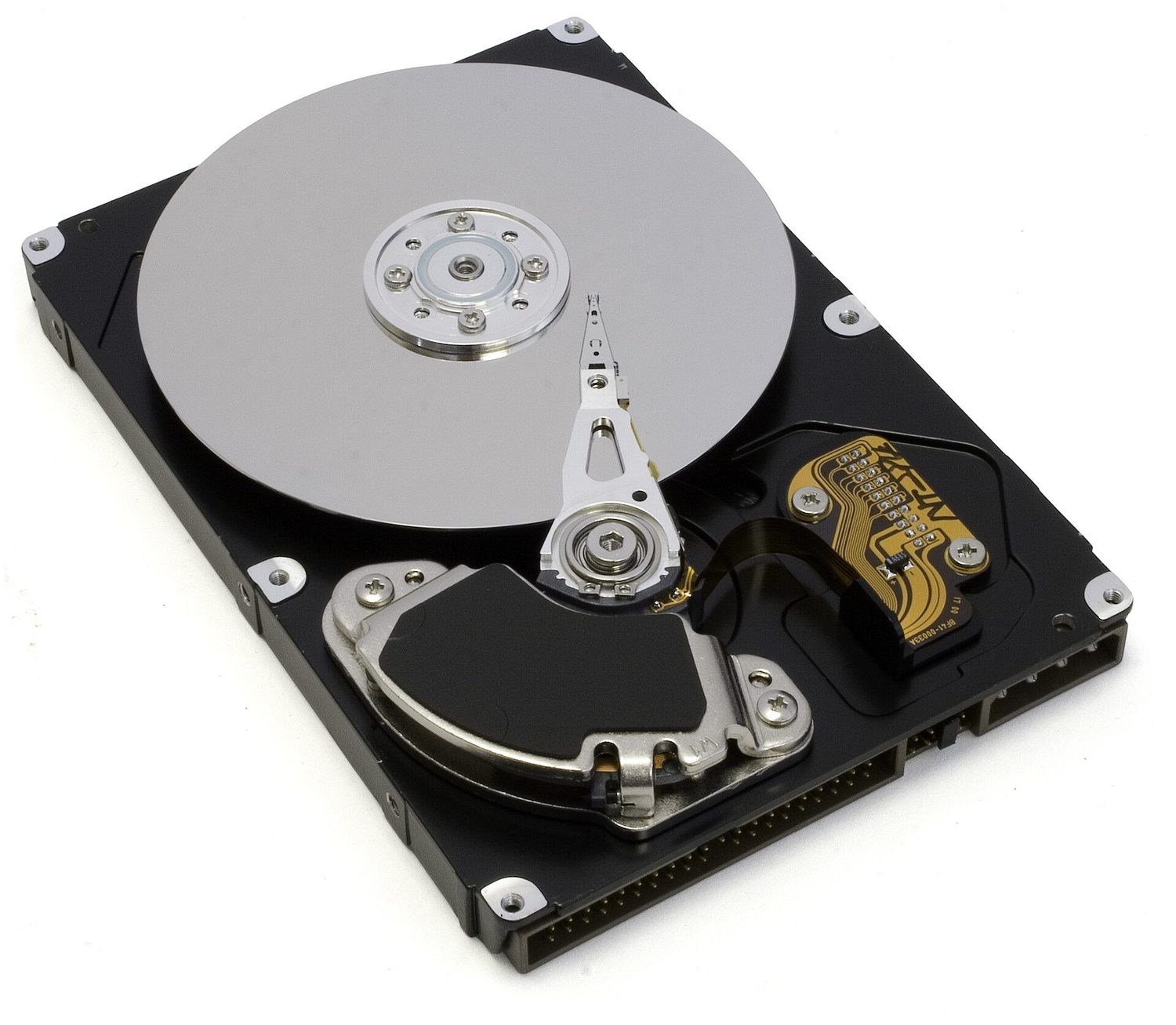
Hard-disk platters: storage is measured in bytes — knowing file size needs width × height × colour depth for images
Sound file size (in bits) $=$ sample rate $\times$ sample resolution $\times$ length in seconds.
Always divide by 1024 (not 1000) to change to KiB, MiB and so on. Give your answer in the unit the question asks for.
Worked example. A sound is recorded for 30 seconds at a sample rate of 8,000 Hz with a sample resolution of 16 bits. Find the file size in kibibytes (KiB).
Compression 压缩 makes a file smaller. A smaller file:
uses less storage space,
needs less bandwidth 带宽 (the amount of data a connection can carry),
takes a shorter time to send (a shorter transmission 传输 time).
There are two types.
Lossless compression
Lossless 无损 compression makes the file smaller with no permanent loss of data. The original file can be rebuilt exactly.
One method is run-length encoding 行程编码 (RLE). It replaces a run of repeated values with one copy of the value and a count of how many times it repeats. For example WWWWWWWW (8 whites) is stored as "8 W". This works well when data has many repeats.
Run-length encoding stores each run once as a count and a value
Lossy compression
Lossy 有损 compression makes the file much smaller by permanently removing some data. The removed data cannot be got back. For example:
reducing the resolution or colour depth of an image,
reducing the sample rate or sample resolution of a sound.
Use lossless when you must keep every detail (text and program files). Use lossy for photos, music and video, where a small loss of quality is worth a much smaller file.
Explore
Run-length encoding
Watch repeated symbols get squashed into a count — simple lossless compression.
Convert denary → binary by subtracting the place values (128, 64, 32 …); binary → denary by adding the place values that hold a 1.
To convert to hex, group the binary into nibbles of 4 bits from the right; each nibble is exactly one hex digit.
Overflow happens when a result needs more bits than the register has (an 8-bit register only holds 0–255), so the extra bit is lost.
File size in bits: for an image, width × height × colour depth; for sound, sample rate × resolution × seconds. Divide by 8 for bytes, then by 1024 for each larger unit.
Lossless compression keeps every bit (text; run-length encoding); lossy permanently removes data (photos, music) for a much smaller file.
Data transmission 数据传输 means moving data from one place to another — for example from your computer to a website, or from a phone to a printer.
Data often travels along a cable. Two common ones are shown below.
An Ethernet cable with an RJ45 plug, often used to carry data on a wired networkA fibre-optic cable carries data as pulses of light along thin glass fibres
Before it is sent, the data is broken down into small, equal-sized pieces called packets 数据包. Each packet travels separately and they are put back together at the other end.
Using packets has benefits:
if one packet is lost or damaged, only that packet is sent again, not the whole file;
packets can take different routes, so a busy or broken route can be avoided;
many users can share the same connection at the same time.
1 (a) Understand that data is broken down into packets to be transmitted
(b) Describe the structure of a packet
• A packet of data contains a: – packet header – payload – trailer • The packet header includes the: – destination address – packet number – originator’s address
(c) Describe the process of packet switching
• Data is broken down into packets • Each packet could take a different route • A router controls the route a packet takes • Packets may arrive out of order • Once the last packet has arrived, packets are reordered
2 (a) Describe how data is transmitted from one device to another using different methods of data transmission
Packet switching 数据包交换 is the way packets are sent across a network.
Routers forward packets, and different packets can take different routes to the same receiver
Special devices called routers 路由器 read each packet's header and choose the best route for it.
Each packet may take its own path, so packets can travel different ways.
Packets may arrive out of order.
When the last packet has arrived, the packets are reordered using their packet numbers.
Explore
How data travels in packets
Step through packet switching. Splitting a file into addressed packets is why one lost packet only needs resending, and why many users can share the same line.
bits can arrive at slightly different times over long wires
Serial sends one bit after another along a single wire. Parallel sends several bits at the same time along several wires, so it is faster over short distances.
Serial sends one bit at a time down one wire; parallel sends several bits at once down several wires
Simplex, half-duplex and full-duplex
These describe the direction data can travel.
Simplex is one way only; half-duplex is both ways but one at a time; full-duplex is both ways at once
Method
Direction
simplex 单工
one direction only (e.g. computer → printer)
half-duplex 半双工
both directions, but only one at a time (e.g. walkie-talkie)
full-duplex 全双工
both directions at the same time (e.g. phone call)
Choosing a method
The choice depends on the distance, the speed needed, the cost, and whether data must travel both ways at once.
1 Understand the need to check for errors after data transmission and how these errors can occur
• Errors can occur during data transmission due to interference, e.g. data loss, data gain and data change
2 Describe the processes involved in each of the following error detection methods for detecting errors in data after transmission: parity check (odd and even), checksum and echo check
• Including parity byte and parity block check
3 Describe how a check digit is used to detect errors in data entry and identify examples of when a check digit is used, including international standard book numbers (ISBN) and bar codes
4 Describe how an automatic repeat query (ARQ) can be used to establish that data is received without error
• Including the use of: – positive/negative acknowledgements – timeout
Source: Cambridge International syllabus
While data travels, interference 干扰 can change it. Three things can go wrong:
data loss — some bits do not arrive;
data gain — extra bits are added;
data change — some bits are flipped.
So the receiver checks whether the data arrived correctly.
A parity check 奇偶校验 adds one extra bit, the parity bit 奇偶校验位, to each byte. There are two types:
A parity bit is added to make the number of 1s even (or odd)
even parity — the total number of 1s in the byte (including the parity bit) must be even;
odd parity — the total number of 1s must be odd.
Example (even parity): the data 1011001 has four 1s, which is already even, so the parity bit is 0:
parity bit + data
    0        1011001
To find an error: the receiver counts the 1s. If even parity was agreed but a byte arrives with an odd number of 1s, an error has happened during transmission.
A parity check cannot find every error. If two bits flip, the count may still look correct.
Worked example. A single parity bit tells you that an error happened, but not where. A parity block 奇偶校验块 can find the exact bit. Several bytes are sent together, each with a row parity bit, and one extra parity byte 奇偶校验字节 at the bottom holds a parity bit for each column. Even parity is used below, and one bit was flipped during transmission. Find it.
Row byte 3 breaks even parity, and column b3 breaks even parity. The flipped bit is where they cross: byte 3, bit b3. Changing it back from 1 to 0 repairs the data. A single parity bit only says an error happened; a parity block says exactly where, so the receiver can even fix it.
Checksum
A checksum 校验和 is a value worked out from all the data before sending. The receiver works out the checksum again from the data it received. If the two values do not match, an error has occurred and the data is resent.
Echo check
In an echo check 回送校验, the receiver sends the data back to the sender. The sender compares it with the original. If they differ, an error happened. (This needs the data to be sent twice, so it is slow.)
Automatic Repeat reQuest (ARQ)
Automatic Repeat reQuest 自动重传请求 (ARQ) uses messages called acknowledgements 确认.
The syllabus calls this automatic repeat query; automatic repeat request is another name for the same method. The sender starts a timeout 超时 timer when it sends a packet. The receiver uses an error check on the received packet. If the check passes, it sends a positive acknowledgement. If an error is detected, it sends a negative acknowledgement.
Try it — packet 4. In three separate cases, packet 4 (A) passes the receiver's error check, (B) fails the check, or (C) never arrives. For each case, choose the receiver's response and the sender's next action.
Worked trace.
Case
Receiver
Sender
A
Sends a positive reply
Receives it; stops timer; can send next packet
B
Sends a negative reply
Receives it; resends packet 4; restarts timer
C
Has no packet to check
Timeout; resends packet 4; restarts timer
A negative reply can cause a repeat before the timer expires. If no positive acknowledgement arrives before timeout, the sender repeats the transmission. The timer handles silence, including a lost packet or a lost reply.
Transfer — a lost reply. Packet 4 arrives and passes its check. The receiver sends a positive acknowledgement, but this reply is lost. What does the sender do when its timer expires? Does timeout prove that packet 4 was damaged?
Answer. The sender resends packet 4 and restarts its timer. The receiver knows the packet arrived successfully, but the sender has no confirmation. Timeout does not tell the sender whether the packet or the reply was lost or delayed. ARQ requests another transmission; it does not itself repair damaged bits. It uses an error check to decide whether to accept a received packet.
Check digit
A check digit 校验码 is an extra digit placed at the end of a number, worked out from the other digits. It is used to find mistakes when a number is typed in.
When the number is entered, the check digit is calculated again and compared. Depending on the method, it can detect some of these errors; no check digit guarantees that every entry error is found:
an incorrect digit entered,
a transposition error 换位错误 (two digits swapped, e.g. 21 typed as 12),
a digit left out or an extra digit added,
a phonetic error (a digit that sounds similar, e.g. 13 and 30).
Check digits are used in barcodes 条形码 and ISBNs (book numbers).
Explore
Computing concept lab
Classify concrete examples by the computing idea they demonstrate.
1 Understand the need for and purpose of encryption when transmitting data
2 Understand how data is encrypted using symmetric and asymmetric encryption
• Asymmetric encryption includes the use of public and private keys
Source: Cambridge International syllabus
Why we need encryption
Encryption 加密 scrambles data so that it cannot be understood if it is intercepted 拦截 (caught) by the wrong person. The readable data is called plaintext 明文; after encryption it becomes ciphertext 密文.
Encryption does not stop data from being intercepted. It only stops the data from being understood.
Symmetric encryption
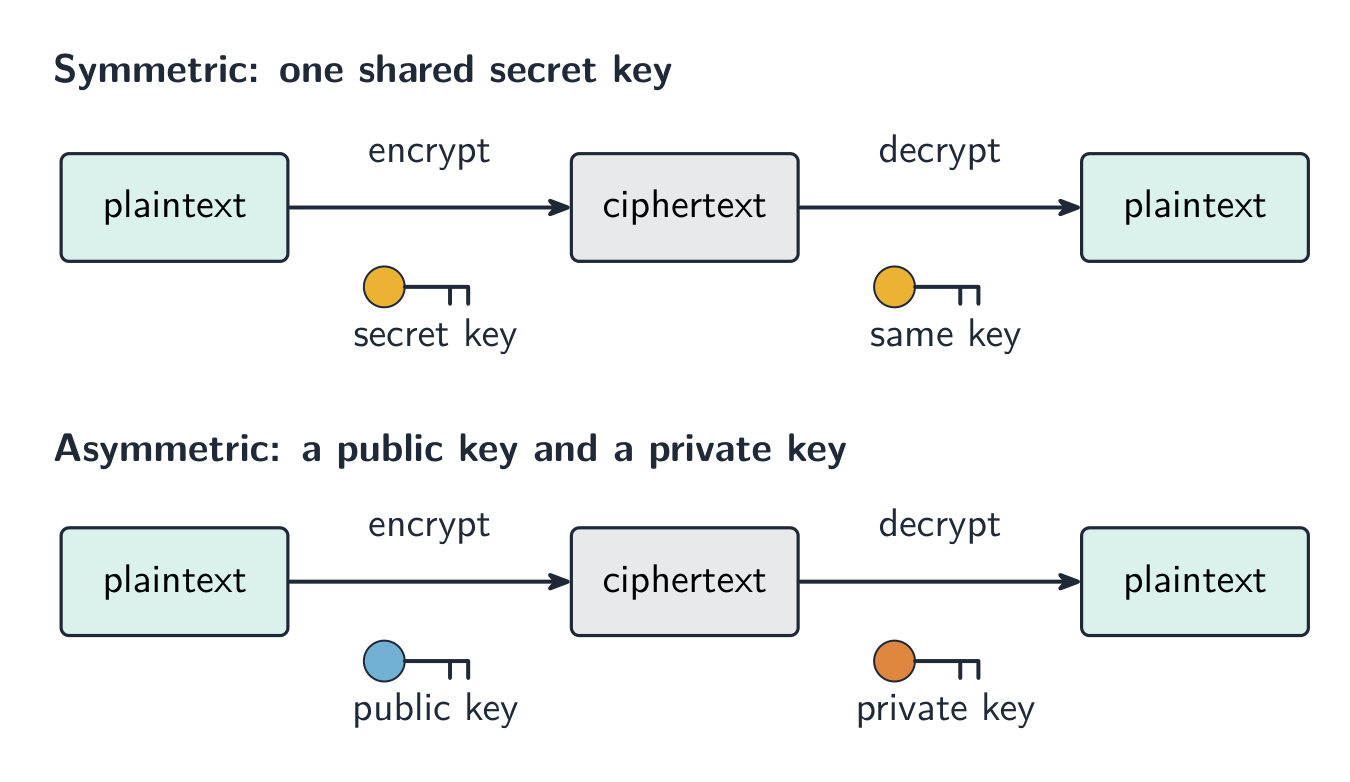
Symmetric encryption 对称加密 uses a single key 密钥 to both encrypt and decrypt the data. The sender and receiver must share this same secret key. The risk is that the key itself could be stolen while being shared.
Asymmetric encryption
Asymmetric encryption 非对称加密 uses two different keys:
a public key 公钥 that anyone can have, used to encrypt;
a private key 私钥 that is kept secret, used to decrypt.
Data encrypted with the public key can only be decrypted with the matching private key, so the key never has to be shared. This is safer than sharing one secret key.
Symmetric uses one shared key; asymmetric uses a public key to encrypt and a private key to decrypt
Explore
The Caesar cipher
Shift each letter to encrypt a message — the simplest idea of a cipher and its key.
Data is sent in packets (a header with the addresses and packet number, a payload, and a trailer). Packets can take different routes and arrive out of order, then are reordered by their packet numbers.
Match the transmission types: serial (one bit at a time, good over long distances) vs parallel (several bits at once, short distances); simplex / half-duplex / full-duplex describe the direction.
A single parity bit only shows that an error happened; a parity block locates the exact wrong bit — the row and the column that both fail.
Learn the error-detection methods and what each does: parity check, checksum, echo check, ARQ, and the check digit (for typed-in numbers).
Symmetric encryption uses one shared key; asymmetric uses a public key to encrypt and a private key to decrypt, so no secret key is ever shared.
1 (a) Understand the role of the central processing unit (CPU) in a computer
• The CPU processes instructions and data that are input into the computer so that the result can be output
(b) Understand what is meant by a microprocessor
• A microprocessor is a type of integrated circuit on a single chip
2 (a) Understand the purpose of the components in a CPU, in a computer that has a Von Neumann architecture
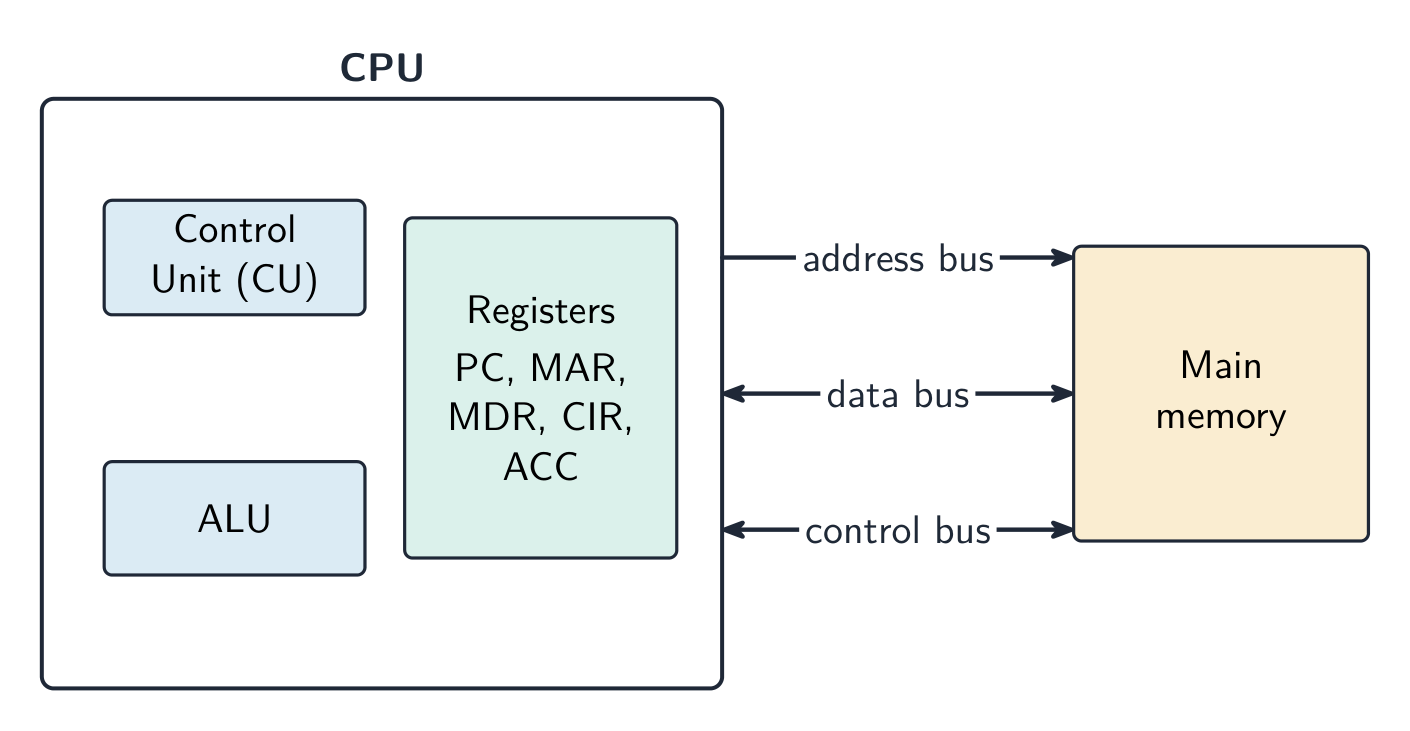
• Including: – units: arithmetic logic unit (ALU) and control unit (CU) – registers: program counter (PC), memory address register (MAR), memory data register (MDR), current instruction register (CIR) and accumulator (ACC) – buses: address bus, data bus and control bus
(b) Describe the process of the fetch–decode–execute (FDE) cycle, including the role of each component in the process
• How instructions and data are fetched from random access memory (RAM) into the CPU, how they are processed using each component and how they are then executed • Storing data and addresses into specific registers • Using buses to transmit data, addresses and signals • Using units to fetch, decode and execute data and instructions
3 Understand what is meant by a core, cache and clock in a CPU and explain how they can affect the performance of a CPU
• The number of cores, size of the cache and speed of the clock can affect the performance of a CPU
4 Understand the purpose and use of an instruction set for a CPU
• An instruction set is a list of all the commands that can be processed by a CPU, and the commands are machine code
5 Describe the purpose and characteristics of an embedded system and identify devices in which they are commonly used
• An embedded system is used to perform a dedicated functions. For example in, domestic appliances, cars, security systems, lighting systems or vending machines. This is different to a general purpose computer that is used to perform many different functions. For example in, a personal computer (PC) or a laptop
Source: Cambridge International syllabus
The fetch-decode-execute cycle
The central processing unit 中央处理器 (CPU) is the part of the computer that processes data and carries out instructions 指令. It runs programs by repeating a cycle, millions of times each second.
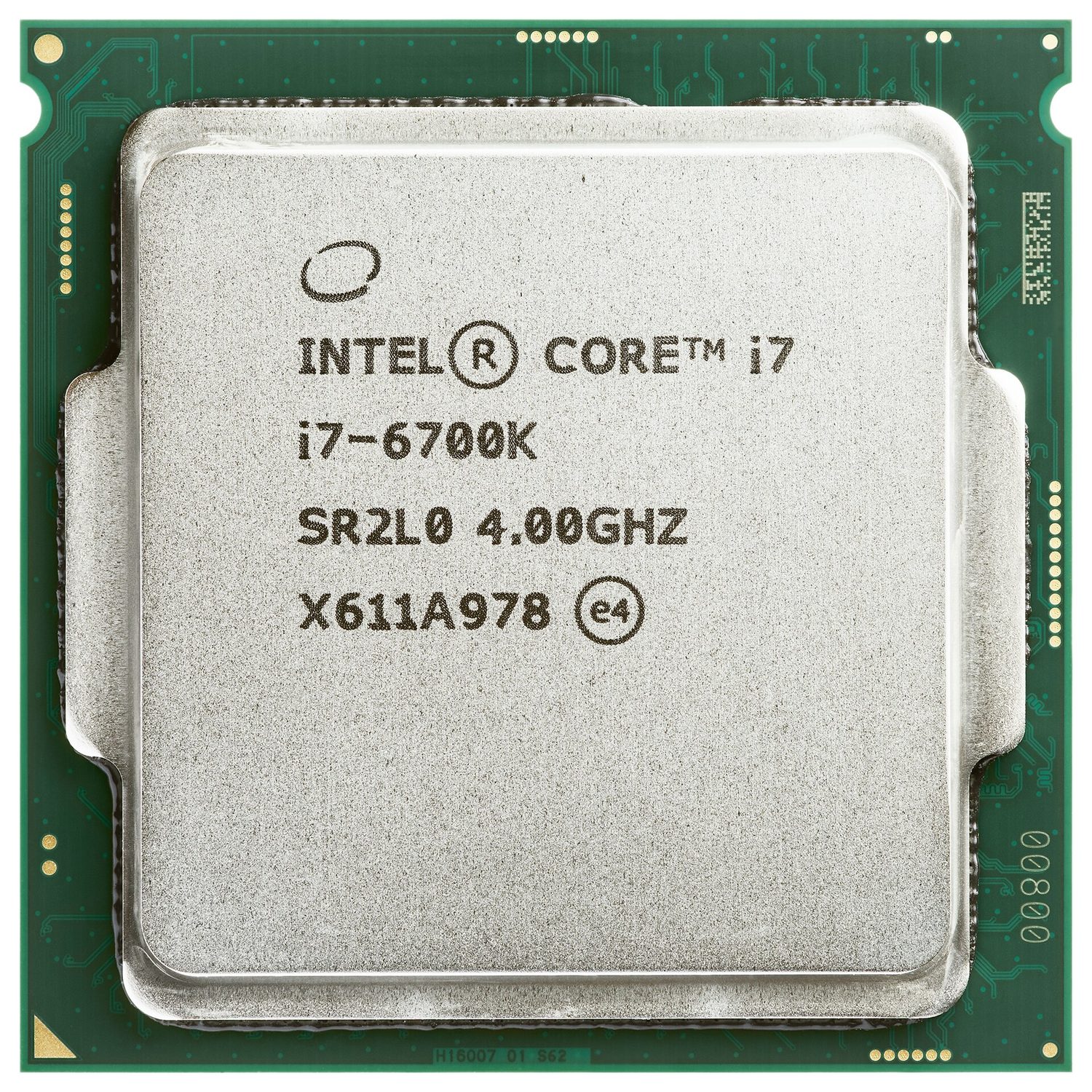
A central processing unit (CPU): the chip that processes data and runs the instructions
Parts of the CPU
Part
What it does
arithmetic logic unit 算术逻辑单元 (ALU)
does calculations (add, subtract) and logical operations (compare)
control unit 控制单元 (CU)
sends control signals to manage all the parts and tell them what to do
registers 寄存器
very small, very fast stores that hold one piece of data at a time
The parts are joined by buses 总线 — sets of wires that carry information:
the address bus 地址总线 carries memory addresses (one direction);
the data bus 数据总线 carries data and instructions (both directions);
the control bus 控制总线 carries control signals.
The CPU holds the control unit, the ALU and the registers; three buses link it to main memory
Special registers
These registers are used during the fetch–execute cycle.
Register
Purpose
program counter 程序计数器 (PC)
holds the address of the next instruction
memory address register 内存地址寄存器 (MAR)
holds the address to read from or write to
memory data register 内存数据寄存器 (MDR)
holds the data or instruction just fetched
current instruction register 当前指令寄存器 (CIR)
holds the instruction now being carried out
accumulator 累加器 (ACC)
holds the result of the ALU's calculations
The fetch–execute cycle
The fetch–execute cycle 取指执行周期 has three stages, repeated again and again:
Fetch — the instruction is copied from memory 内存 into the CPU (using the PC, MAR and MDR). The PC then increases by 1.
Decode — the control unit works out what the instruction means.
Execute — the instruction is carried out (the ALU may do a calculation, with the result going to the accumulator).
The processor repeats three stages: fetch the instruction, decode it, then execute it
Cache memory
Cache 高速缓存 is a small amount of very fast memory inside or close to the CPU. It stores data and instructions that the CPU uses often. The CPU can read from cache much faster than from main memory, so the computer runs faster.
What affects CPU performance
Feature
Effect
number of cores 核心
each core can run instructions on its own, so more cores can do more work at the same time
cache size
a larger cache holds more data ready for the CPU, so it waits less
clock speed 时钟速度
the number of cycles per second; a higher clock speed runs more instructions per second
Worked example. Two computers are identical except that A has a 3.0 GHz single-core CPU with 2 MB of cache, and B has a 2.4 GHz quad-core CPU with 8 MB of cache. Which is better for video editing, and why? Video editing splits into many tasks that can run at the same time, so B's four cores can process several streams in parallel while A can only work on one at a time. B's larger cache also keeps more frequently used data close to the CPU, so it has to fetch from RAM less often. B is the better choice, even though A has the higher clock speed. Never answer on clock speed alone: weigh cores, cache and clock speed together, and tie each one to the job being done.
Embedded systems
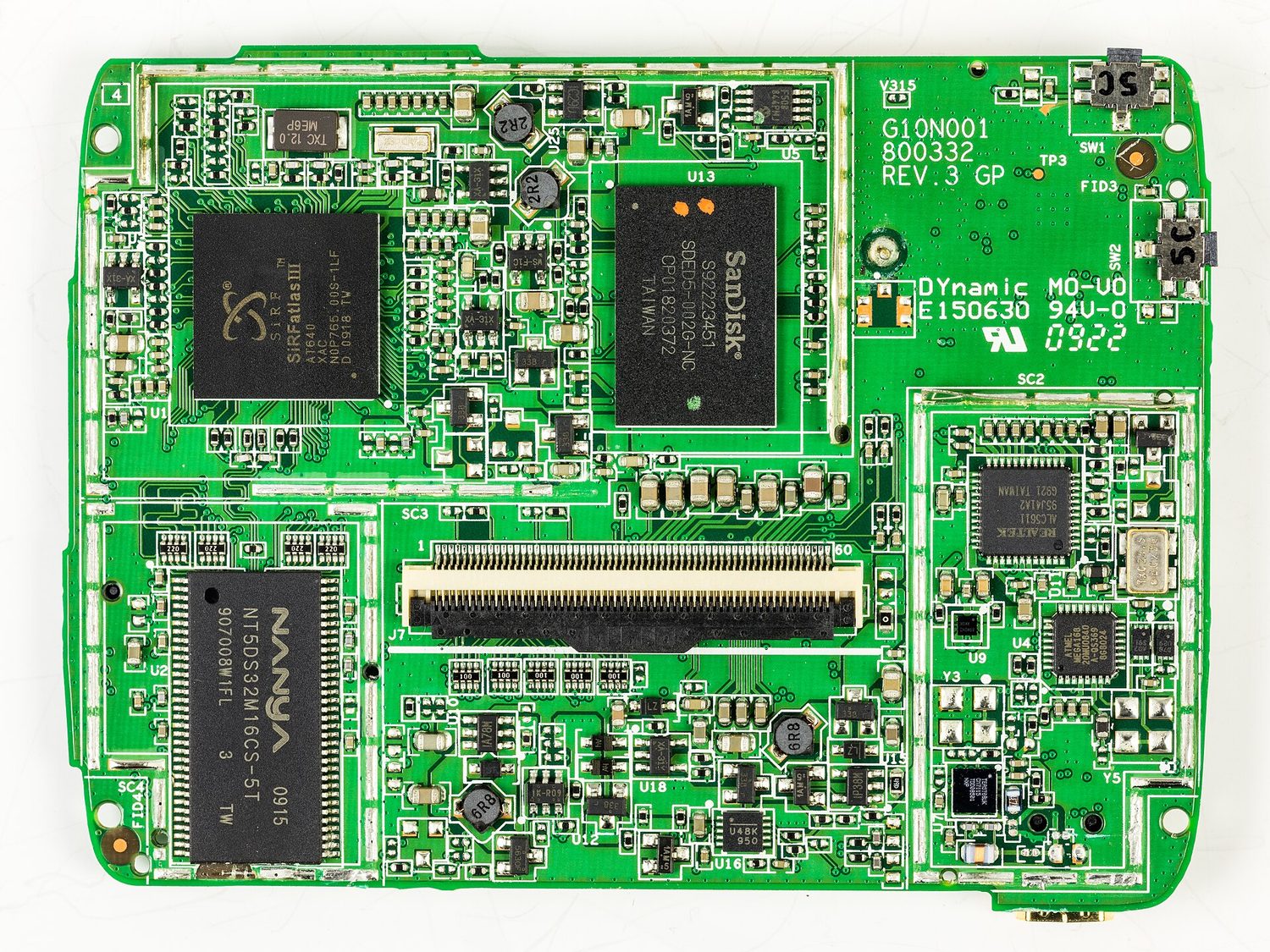
An embedded system 嵌入式系统 is a small computer built inside a larger device to do one fixed job. It is dedicated to that task, is usually small and low-cost, and has no general operating system. Examples: a washing machine, a microwave, a set-top box.
The mainboard from inside a satnav: an embedded system is a small dedicated computer like this, built into a device to do one fixed job
Explore
The fetch-execute cycle
Tap round the loop the CPU repeats billions of times a second — fetch the instruction, decode what it means, execute it, then do it all again.
3 (a) Understand what is meant by a sensor and the purposes of sensors
• Limited to: – acoustic – accelerometer – flow – gas – humidity – infra-red – level – light – magnetic field – moisture – pH – pressure – proximity – temperature
(b) Identify the type of data captured by each sensor and understand when each sensor would be used, including selecting the most suitable sensor for a given context
Source: Cambridge International syllabus
An input device sends data into the computer.
Device
How it works
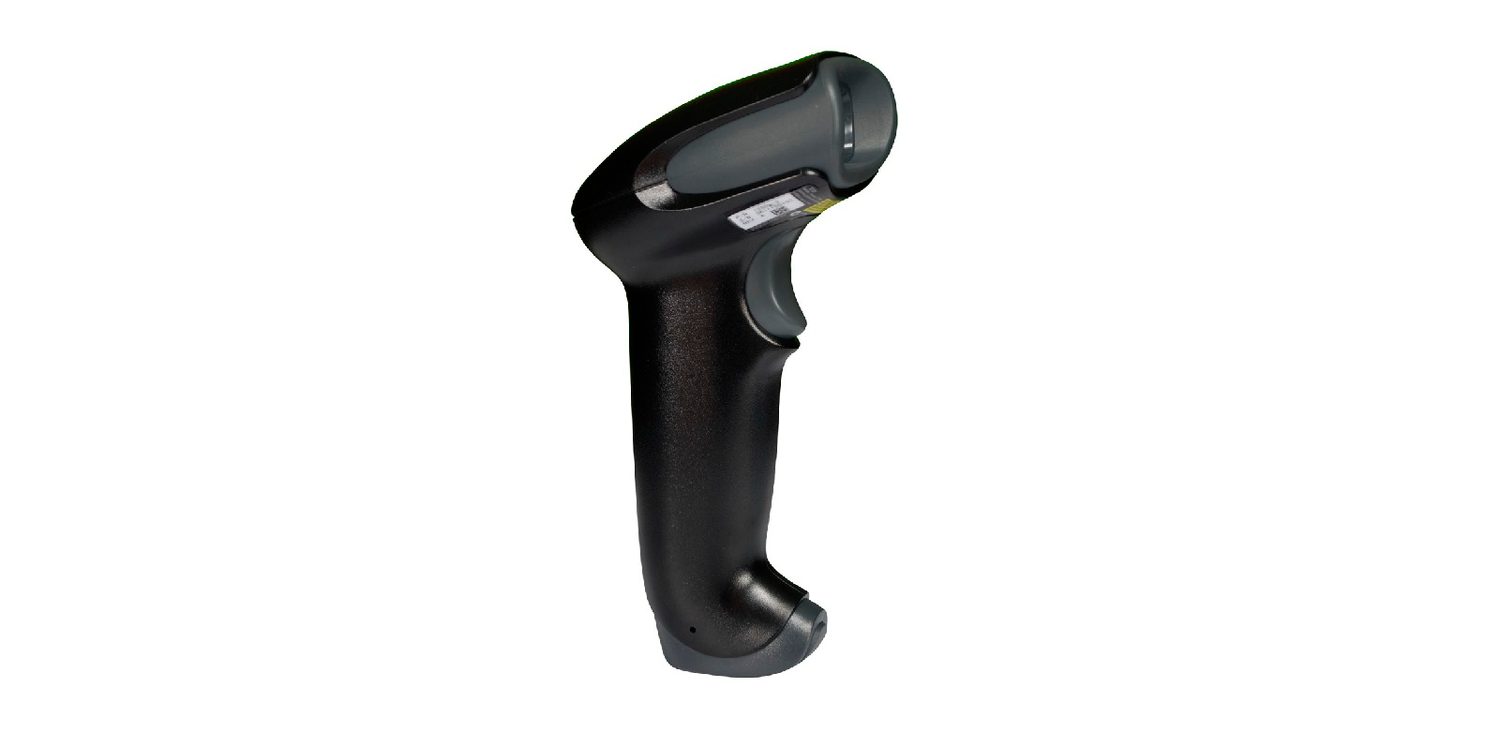
barcode scanner 条形码扫描器
shines light at the bars and reads the pattern reflected back
QR code scanner 二维码扫描器
a camera reads a square pattern of black-and-white blocks
keyboard
pressing a key sends a code for that character
optical mouse 光电鼠标
a light and a sensor track movement across a surface
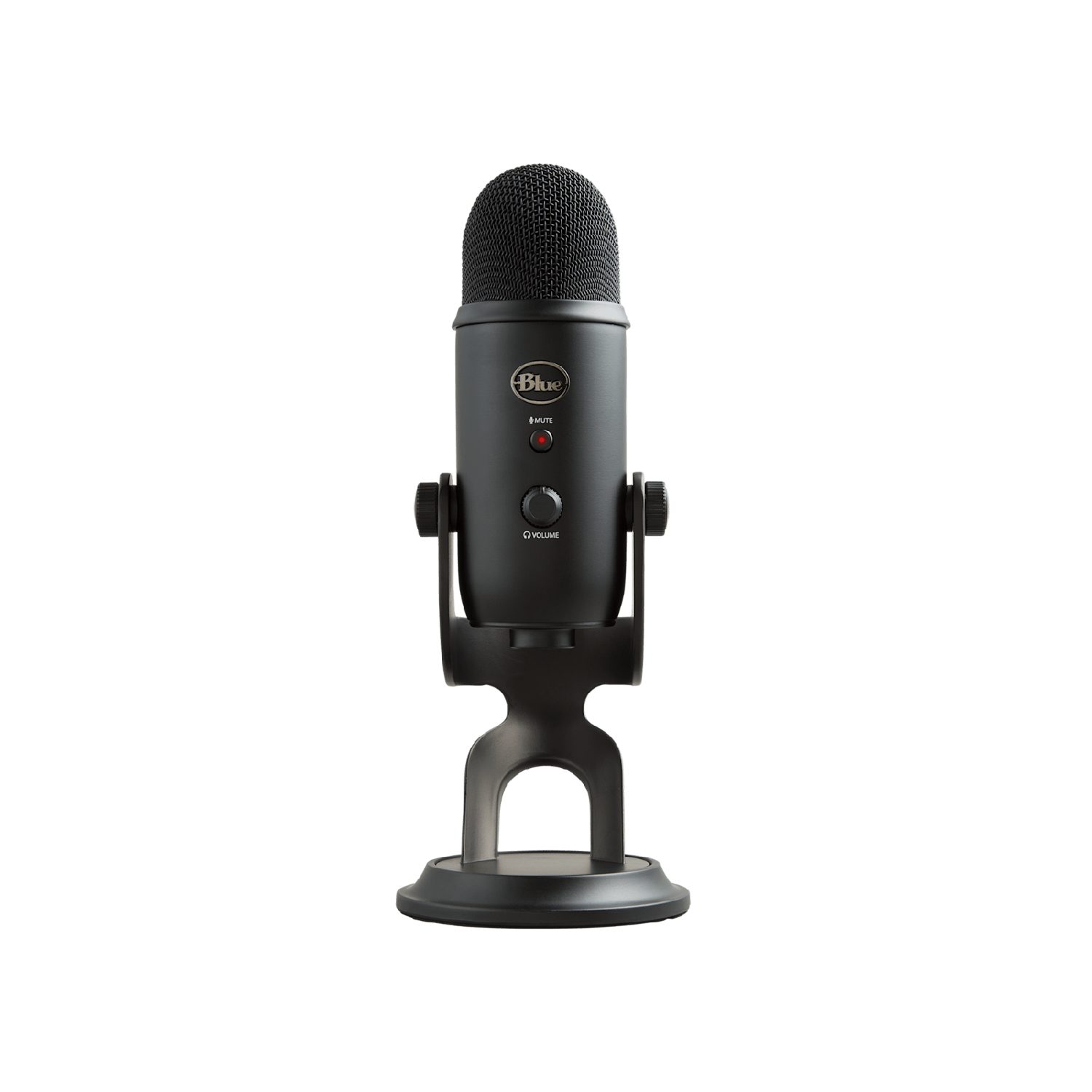
microphone
turns sound waves into an electrical signal
digital camera
a lens focuses light onto a sensor that records pixels
sensors 传感器
measure a physical quantity (such as temperature or light) and send it as data
touch screen 触摸屏
detects where your finger touches the screen
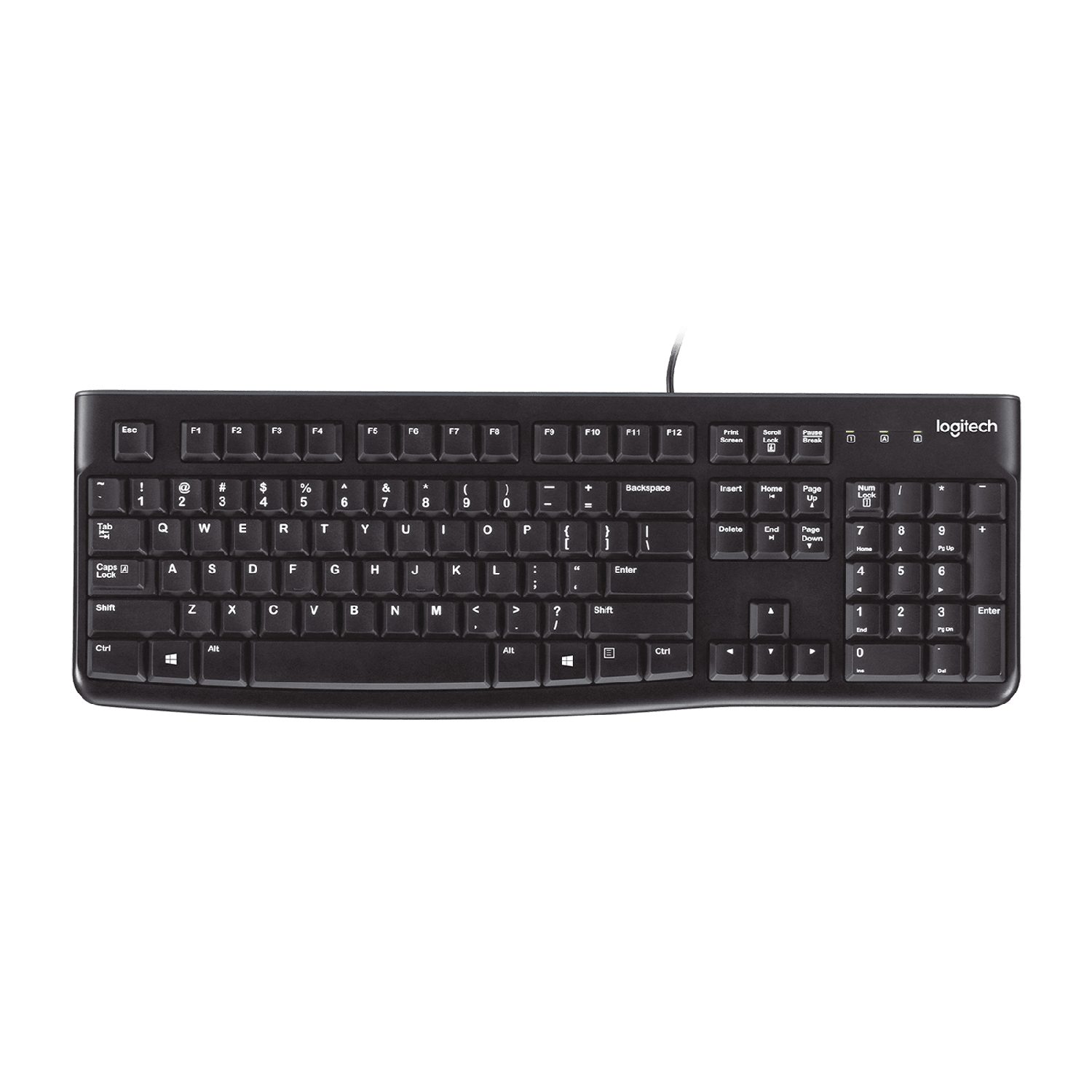
A keyboard: each key press sends a code for that characterAn optical mouse: a light and a sensor track its movement on the deskA flatbed scanner: it shines light across a page to copy it into the computerA barcode scanner reads the pattern of bars and sends it to the computerA digital camera: a lens focuses light onto a sensor that records the pixelsA microphone turns sound waves into an electrical signalA sensor measures a physical quantity (here, temperature) and sends it as data
A touch screen can work in three ways:
resistive 电阻式 — two layers are pressed together where you touch;
capacitive 电容式 — it senses the tiny electric charge of your finger;
infrared 红外线 — your finger breaks a grid of light beams.
A touch screen senses where your finger touches it
Explore
Device and storage lab
Classify computing examples by what job they do in a system.
An output device sends data out of the computer to the user.
Device
How it works
actuator 执行器
turns an electrical signal into movement (e.g. a motor or valve)
LCD/LED screen
shows images using a grid of tiny coloured dots
projector 投影仪
shines an enlarged image onto a wall or screen
inkjet printer 喷墨打印机
sprays tiny drops of ink onto paper
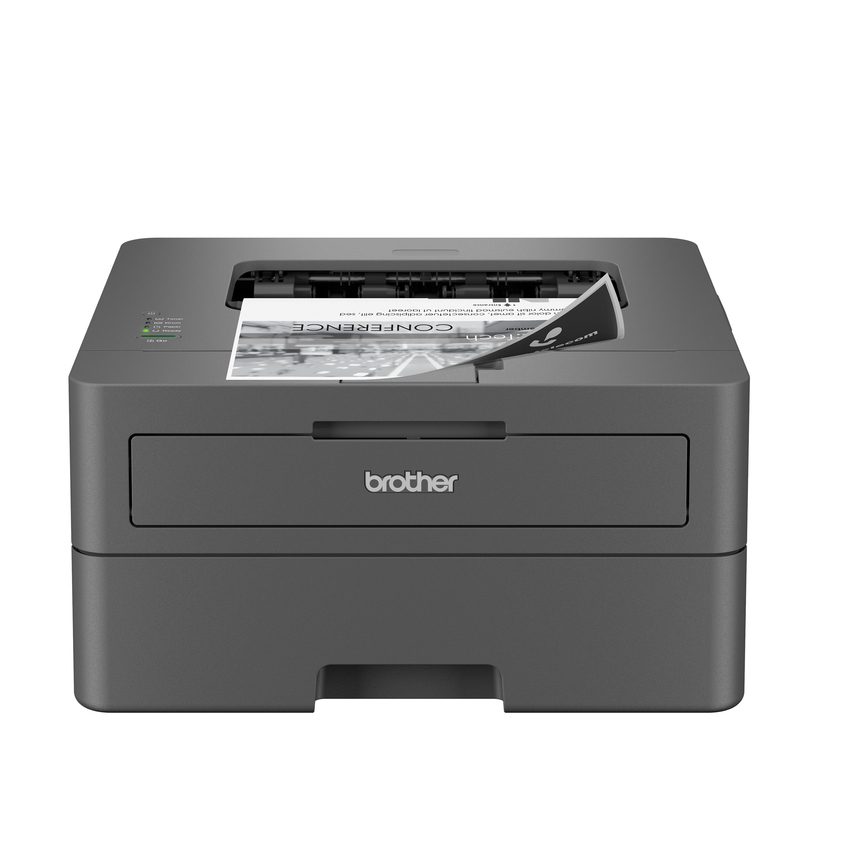
laser printer 激光打印机
uses a laser and powder (toner) fixed onto paper by heat
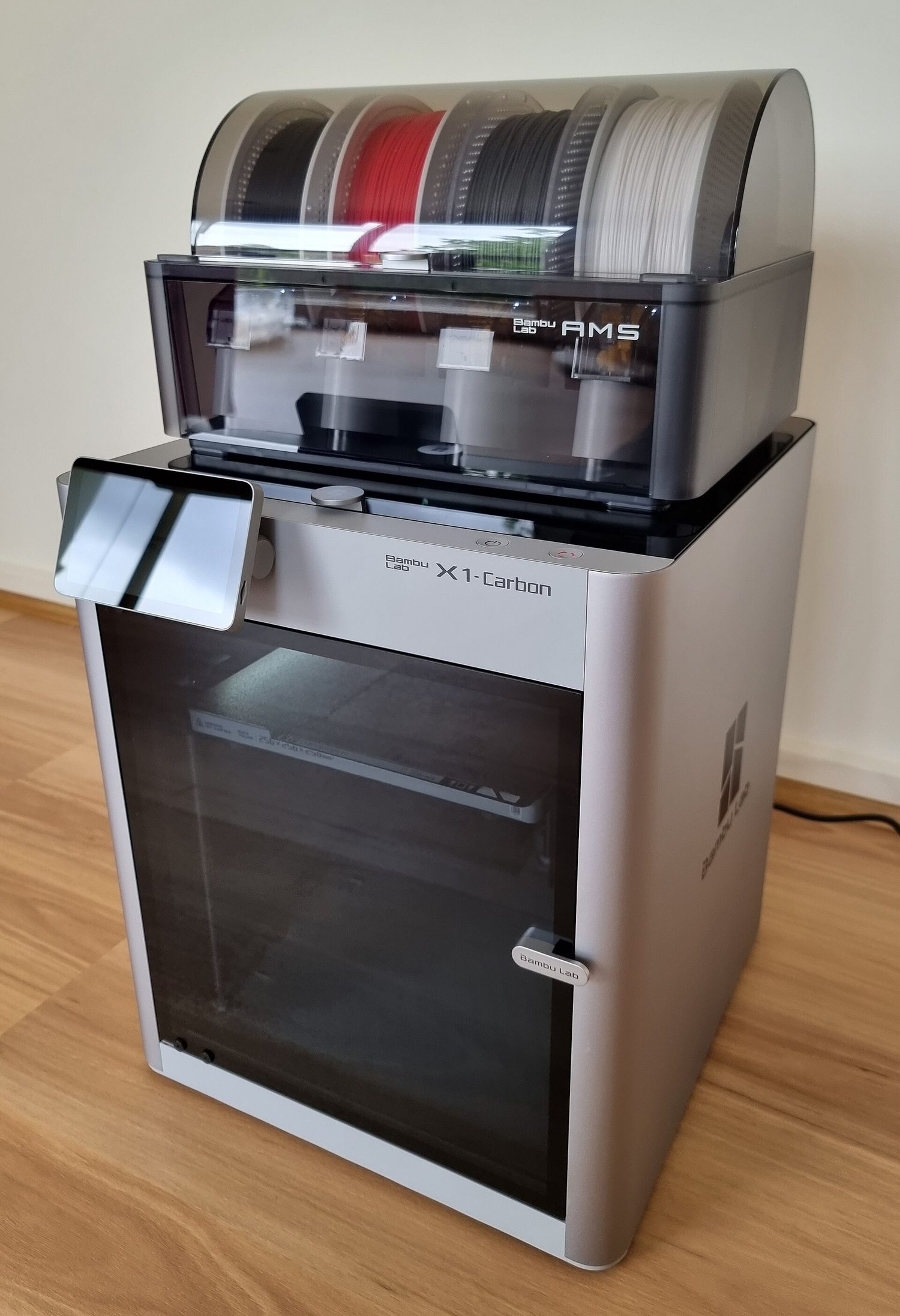
3D printer
builds a solid object layer by layer
speaker 扬声器
turns an electrical signal into sound
An inkjet printer sprays tiny drops of ink onto the paperA laser printer uses a laser and powder (toner) fixed onto paper by heatA 3D printer builds a solid object layer by layerAn LCD/LED monitor shows images using a grid of tiny coloured dotsA speaker turns an electrical signal into soundHeadphones turn an electrical signal into sound for one listenerAn actuator such as a motor turns an electrical signal into movement
• Primary storage is directly accessed by the CPU • Including the role of: – random access memory (RAM) – read only memory (ROM) • Including why a computer needs both RAM and ROM, and the difference between them
2 Understand what is meant by secondary storage
• Secondary storage is not directly accessed by the CPU and is necessary for more permanent storage of data
3 Describe the operation of magnetic, optical and solid-state (flash memory) storage and give examples of each
• Magnetic storage uses platters which are divided into tracks and sectors. Data is read and written using electromagnets. Including hard disk drive (HDD) • Optical storage uses lasers to create and read pits and lands. Including: CD, DVD and Blu-ray • Solid-state (flash memory) uses NAND or NOR technology. Transistors are used as control gates and floating gates. Including: solid-state drive (SSD), SD card and USB drive
4 Describe what is meant by virtual memory, how it is created and used and why it is necessary
• Pages of data are transferred between RAM and virtual memory when needed
5 Understand what is meant by cloud storage
• Cloud storage can be accessed remotely in comparison to storing data locally
6 Explain the advantages and disadvantages of storing data on the cloud in comparison to storing it locally
• Physical servers and storage are needed to store data in cloud storage
Source: Cambridge International syllabus
Primary storage 主存储器 is memory the CPU can use directly. There are two kinds.
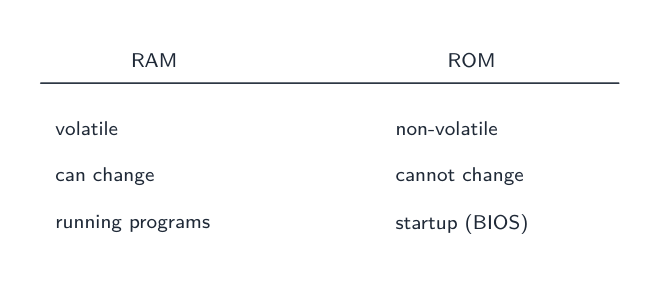
RAM is volatile and holds running programs; ROM is non-volatile and read-only
RAM
ROM
Full name
random access memory 随机存取存储器
read only memory 只读存储器
Read/write
read and write
read only
Keeps data without power?
no — it is volatile 易失性
yes — it is non-volatile 非易失性
Holds
programs and data in use now
start-up instructions (how to boot the computer)
Both are needed: ROM tells the computer how to start, then RAM holds the programs you run.
A stick of RAM (random access memory): it holds the programs and data in use now
Secondary storage 辅助存储器 keeps data permanently, even when the power is off. It is non-volatile and is used for long-term storage. There are three types.
Type
How it stores data
Examples
magnetic storage 磁存储
data is stored as magnetised spots on spinning disks
hard disk drive (HDD), magnetic tape
optical storage 光存储
data is stored as marks read by a laser
CD, DVD, Blu-ray
solid state storage 固态存储
data is stored in flash memory 闪存, with no moving parts
SSD, USB flash drive, memory card
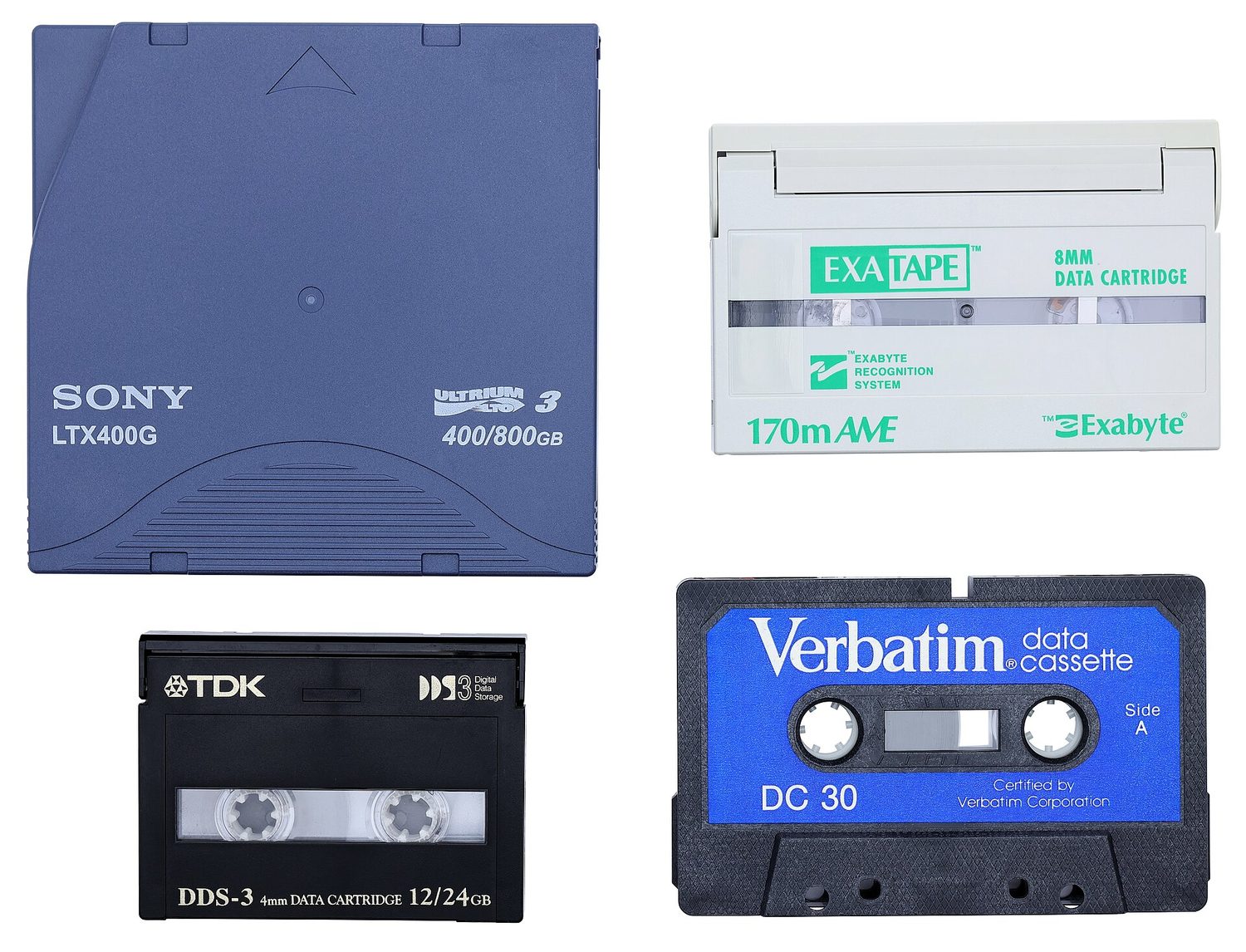
Inside a hard disk drive (HDD): the shiny disk spins and the arm reads the magnetised dataMagnetic tape stores data on a long magnetic strip; it is cheap for large backupsAn optical disc such as a CD or DVD: a laser reads the marks on its shiny surfaceA solid state drive (SSD) stores data in flash memory chips and has no moving partsA USB flash drive stores data in flash memory and has no moving partsStorage forms a hierarchy: registers and cache are fastest but smallest; secondary storage is slowest but largest
Explore
Device and storage lab
Classify computing examples by what job they do in a system.
When the RAM becomes full, the computer can use part of the secondary storage as extra, pretend RAM. This is called virtual memory 虚拟内存.
Data that is not needed right now is moved out of RAM onto the disk, which frees space in RAM for other programs. This lets you run more programs than the RAM alone could hold. It is slower, because secondary storage is much slower than RAM.
When RAM is full, data not in use is moved to the disk to free RAM — slower, but it lets more programs run
• Primary storage is directly accessed by the CPU • Including the role of: – random access memory (RAM) – read only memory (ROM) • Including why a computer needs both RAM and ROM, and the difference between them
2 Understand what is meant by secondary storage
• Secondary storage is not directly accessed by the CPU and is necessary for more permanent storage of data
3 Describe the operation of magnetic, optical and solid-state (flash memory) storage and give examples of each
• Magnetic storage uses platters which are divided into tracks and sectors. Data is read and written using electromagnets. Including hard disk drive (HDD) • Optical storage uses lasers to create and read pits and lands. Including: CD, DVD and Blu-ray • Solid-state (flash memory) uses NAND or NOR technology. Transistors are used as control gates and floating gates. Including: solid-state drive (SSD), SD card and USB drive
4 Describe what is meant by virtual memory, how it is created and used and why it is necessary
• Pages of data are transferred between RAM and virtual memory when needed
5 Understand what is meant by cloud storage
• Cloud storage can be accessed remotely in comparison to storing data locally
6 Explain the advantages and disadvantages of storing data on the cloud in comparison to storing it locally
• Physical servers and storage are needed to store data in cloud storage
Source: Cambridge International syllabus
Cloud storage 云存储 keeps your data on remote physical servers, reached over the internet, instead of on your own device.
Advantages: reach it from anywhere on any device; no local storage hardware to buy or maintain; easy to share files and to back up automatically.
Disadvantages: needs a working internet connection; an ongoing subscription cost; security and privacy depend on the provider; you rely on that provider staying available and in business.
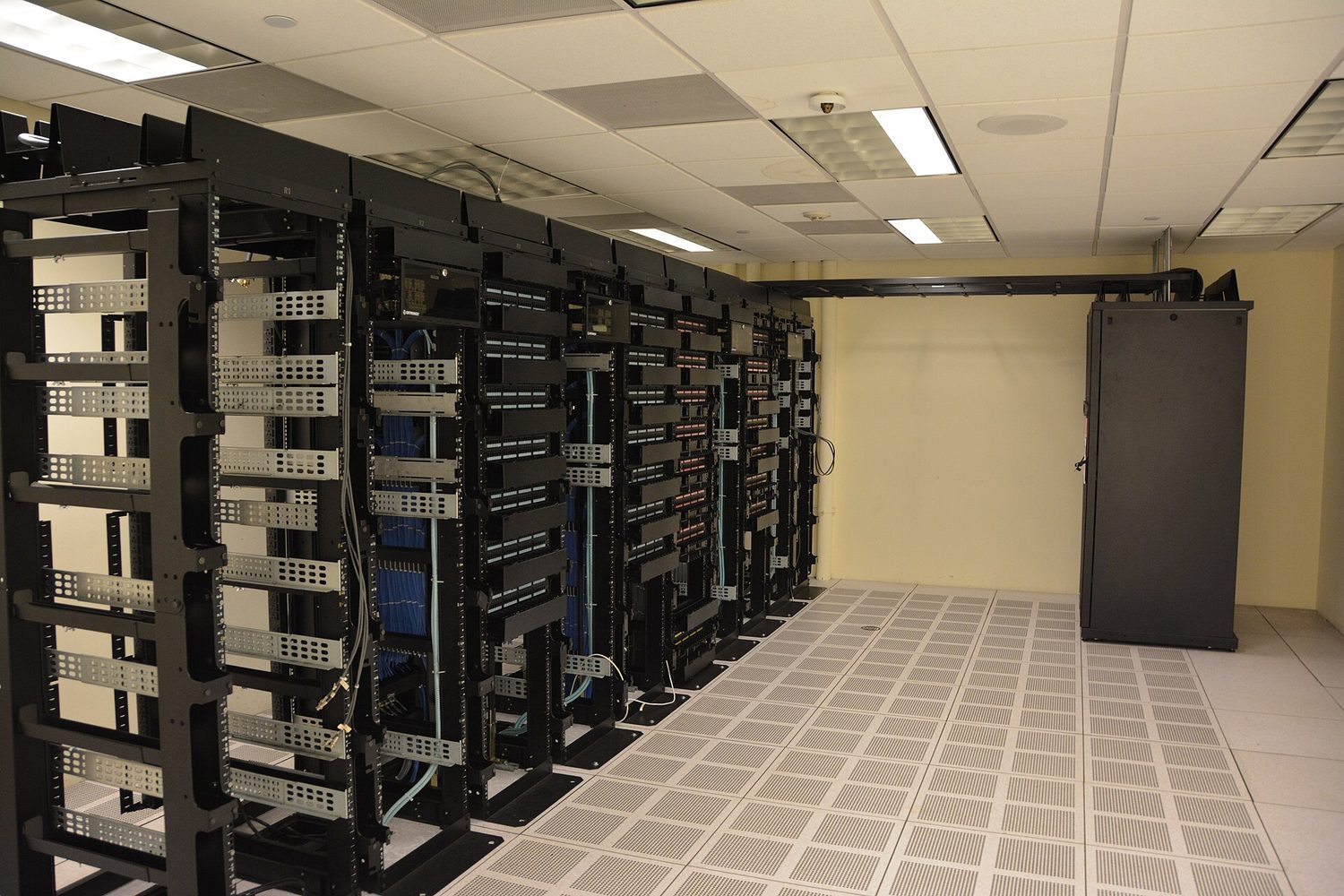
Data-centre server racks: cloud storage keeps your files on remote servers you reach over the network
1 Understand that a computer needs a network interface card (NIC) to access a network
2 Understand what is meant by, and the purpose of, a media access control (MAC) address, including its structure
• A network interface card is given a MAC address at the point of manufacture • MAC addresses are usually written as hexadecimal • MAC addresses are created using the manufacturer code and the serial code
3 (a) Understand what is meant by, and the purpose of, an internet protocol (IP) address (b) Understand that there are different types of IP address
• An IP address is allocated by the network and it can be static or dynamic • Including the characteristics of, and differences between, IPv4 and IPv6
4 Describe the role of a router in a network
• A router sends data to a specific destination on a network • A router can assign IP addresses • A router can connect a local network to the internet
Source: Cambridge International syllabus
Network interface card (NIC)
A network interface card 网络接口卡 (NIC) is the hardware that lets a device join a network and send and receive data. Each NIC has a built-in MAC address.
MAC address and IP address
A MAC address (media access control 介质访问控制 address) is a number that identifies one physical device. The maker sets it, and it does not normally change. It is written in hexadecimal.
An IP address (internet protocol 网际协议 address) is a number that identifies a device on a network. It is given by the network and can change.
So a MAC address stays with the device, while an IP address depends on the network the device is using.
There are two versions of IP address. IPv4 is 32-bit, written as four denary numbers 0–255 (for example 192.168.0.1); the newer IPv6 is 128-bit, written as eight groups of hexadecimal separated by colons, giving vastly more addresses. An address is also either static 静态 (fixed, set by hand and never changing) or dynamic 动态 (handed out by the router/network each time the device connects, so it can change).
Router
A router 路由器 connects different networks together — for example, your home network to the internet. It reads the IP address in each packet and forwards it towards the right network.
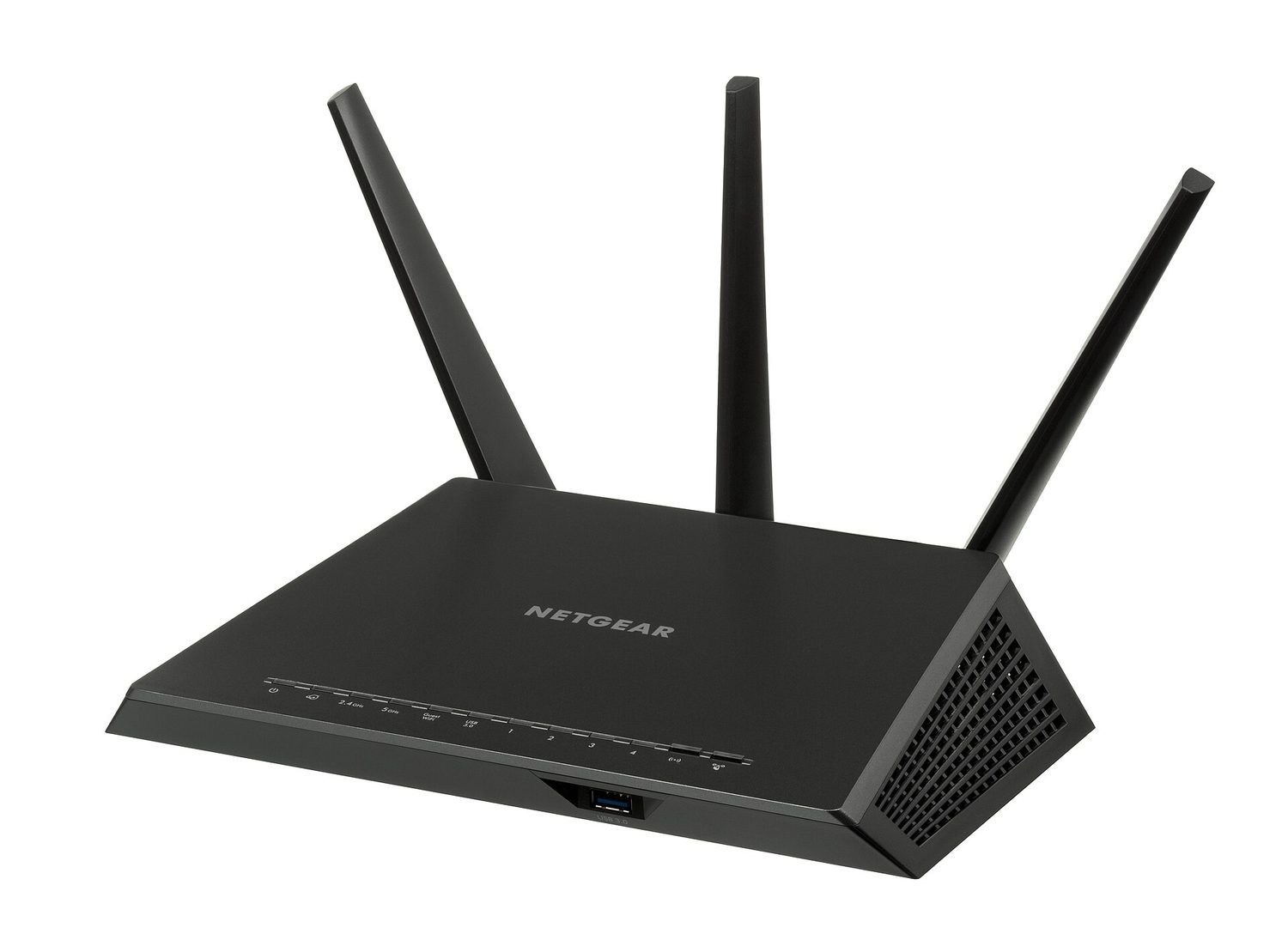
A Wi-Fi router: network hardware forwards packets between devices and the wider Internet
Explore
Network route lab
Follow data from a device through network hardware and protocols.
Learn the fetch–decode–execute cycle and the special registers: the program counter holds the address of the next instruction, the MAR/MDR carry the address/data, and the accumulator holds the ALU's result.
CPU performance improves with more cores, a larger cache, and a higher clock speed.
RAM is volatile (it loses its data with no power) and holds programs in use; ROM is non-volatile and read-only (the start-up instructions).
Match the secondary-storage types: magnetic (HDD, tape), optical (CD/DVD, read by a laser), solid state (SSD, USB, flash — no moving parts).
A MAC address identifies the physical device and does not normally change; an IP address is given by the network and can change.
A computer system is made of two parts that work together.
Hardware is the physical parts; software is the programs
Hardware 硬件 is the physical 物理的 parts of the computer — the parts you can touch. Examples: the CPU, memory, keyboard, screen and hard disk.
Software 软件 is the programs 程序 that control the computer and tell the hardware what to do.
Hardware cannot do anything useful on its own. Software needs hardware to run on. Both are needed.
The motherboard and the parts attached to it are hardware — the physical parts you can touchAn operating system is software — the programs that tell the hardware what to do
1 Describe the difference between system software and application software and provide examples of each
• System software provides the services that the computer requires, including operating system and utility software • Application software provides the services that the user requires
2 Describe the role and basic functions of an operating system
• Including: – managing files – handling interrupts – providing an interface – managing peripherals and drivers – managing memory – managing multitasking – providing a platform for running applications – providing system security – managing user accounts
3 Understand how hardware, firmware and an operating system are required to run applications software
• Applications are run on the operating system • The operating system is run on the firmware • The bootloader (firmware) is run on the hardware
4 Describe the role and operation of interrupts
• Including: – how an interrupt is generated – how it is handled using an interrupt service routine – what happens as a result of the interrupts • Software interrupts include division by zero and two processes trying to access the same memory location • Hardware interrupts include pressing a key on the keyboard and moving the mouse
Source: Cambridge International syllabus
Software is split into two types.
Software divides into system software (runs the computer) and application software (lets the user do a task)
System software
System software 系统软件 controls the computer itself and gives a base for other programs to run on. Examples:
operating system 操作系统 (see below);
compiler 编译器 and linker 链接器 (tools that turn programs into a form the computer can run);
device driver 设备驱动程序 — software that lets the operating system control a piece of hardware;
utility software 实用程序 — small tools that look after the computer (for example anti-virus, backup, disk clean-up).
Below the operating system sits firmware 固件 – software stored permanently on ROM or flash that runs the moment the computer is switched on. The BIOS and the bootloader 引导程序 are firmware: they test the hardware and then load the operating system. So the layers stack up hardware → firmware → operating system → application software, each running on the layer below.
Application software
Application software 应用软件 lets the user do a useful task. Examples:
word processing 文字处理 software (writing documents);
spreadsheet 电子表格 software (working with numbers in a grid);
database management system 数据库管理系统 (storing and searching data);
An operating system (OS) is the main system software. It controls the whole computer and lets the hardware, the application software and the user work together. Without an OS the computer is very hard to use.
The operating system sits between the hardware and the application software and user, letting them work together
The OS has many roles:
managing files — saving, opening, naming, moving and deleting files;
handling interrupts (see below);
providing a user interface 用户界面 so the user can control the computer;
managing memory — deciding what is kept in RAM and where;
managing peripherals 外围设备 and their drivers — controlling devices like printers;
managing multitasking 多任务处理 — letting several programs run at once;
providing a platform 平台 for running application software;
managing security — user accounts, passwords and access rights.
providing a user interface/prəˈvaɪdɪŋ ə ˈjuːzə ˈɪntəfeɪs/
managing peripherals/ˈmænɪdʒɪŋ pəˈrɪfərəlz/
managing multitasking/ˈmænɪdʒɪŋ ˈmʌltitæskɪŋ/
providing a platform/prəˈvaɪdɪŋ ə ˈplætfɔːm/
user interface/ˈjuːzə ˈɪntəfeɪs/
peripherals/pəˈrɪfərəlz/
multitasking/ˈmʌltitæskɪŋ/
platform/ˈplætfɔːm/
4.1
Interrupts
An interrupt 中断 is a signal sent to the processor 处理器 to tell it that something needs attention now.
An interrupt can come from three sources:
hardware — for example a key is pressed, or a printer runs out of paper;
software — for example a program tries to divide by zero;
the user — for example the user presses a "cancel" key.
When an interrupt arrives, the processor stops what it is doing, saves its place, and services (deals with) the interrupt. When that is done, it goes back to what it was doing before. This lets the computer react quickly to important events.
On an interrupt the CPU saves its place, runs the interrupt service routine, then restores its place and carries on
Explore
How the CPU handles an interrupt
Step through an interrupt. The CPU pauses what it's doing, deals with the urgent event, then carries on exactly where it left off — which is how one processor juggles the keyboard, printer and timer at once.
1 Explain what is meant by a high-level language and a low-level language, including the advantages and disadvantages of each
• Advantages and disadvantages include: – ease of reading and writing code, e.g. low-level is hard to read – ease of debugging code – machine independence – direct manipulation of hardware
2 Understand that assembly language is a form of low-level language that uses mnemonics, and that an assembler is needed to translate an assembly language program into machine code
3 Describe the operation of a compiler and an interpreter, including how high-level language is translated by each and how errors are reported
• A compiler translates the whole code at once before executing it, producing an executable file • An interpreter translates and executes the code line-by-line • A compiler provides an error report for the whole code if errors are detected • An interpreter stops execution when an error is found
4 Explain the advantages and disadvantages of a compiler and an interpreter
• Including an understanding that an interpreter is mostly used when developing a program and a compiler is used to translate the final program
5 Explain the role of an IDE in writing program code and the common functions IDEs provide
All computers process data using the central processing unit 中央处理器 (CPU). To make the CPU do work, people write programs in a programming language 编程语言. There are two kinds.
High-level languages
A high-level language 高级语言 is written in words that look a bit like English (for example Python). It is:
easy for people to read, write and fix;
independent of the computer — the same program can run on different types of computer.
Low-level languages
A low-level language 低级语言 is close to what the hardware actually uses. It includes:
machine code 机器码 — instructions written in binary (0s and 1s), which the CPU runs directly;
assembly language 汇编语言 — machine code written with short word codes (mnemonics) instead of binary.
A low-level language relates to the specific 特定的 type of CPU, so a program written for one CPU may not run on another. It is used when the programmer needs full control of the hardware or very fast, small code.
High-level languages are close to human language and run on any computer; low-level languages (assembly and machine code) are close to the hardware and tied to one type of CPU
Explore
Computing concept lab
Classify concrete examples by the computing idea they demonstrate.
The CPU can only run machine code. A high-level program must first be changed into machine code. The software that does this is a translator 翻译程序. There are three types: a compiler and an interpreter (for high-level code), and an assembler (for low-level code).
Compiler
A compiler translates the whole program into machine code before it is run. After translating, the machine code can be run many times without translating again.
translation happens once, in full;
it provides an error report for the whole source, with the translation errors it detects;
the finished program runs fast and does not need the compiler to run.
Interpreter
An interpreter 解释器 translates and runs the program one line at a time.
it stops at the first error it finds, which helps when testing;
the program runs more slowly, because it is translated each time it runs;
the interpreter must be present every time the program runs.
Use a compiler when you want to share a fast, finished program. Use an interpreter when you are writing and testing a program and want to find errors easily.
Worked comparison — when does execution happen?
Try it. Use the syllabus's whole-program compiler and line-by-line interpreter models. Consider this short source description; it is not a program in a particular language.
Line
Source description
1
A valid instruction displays Start
2
An incomplete addition is missing a value after the plus sign
3
A valid instruction displays Done
Line 2 contains a translation error. What is displayed before that error is reported with each translator? Will line 3 execute? Explain the order of translation and execution.
Compiler trace. The whole source is translated before execution. The error in line 2 causes compilation to fail. An error report is provided for the whole source. The new program is not executed, so neither Start nor Done is displayed.
Interpreter trace. Line 1 is translated and executed, displaying Start. The interpreter encounters the error in line 2 and stops execution there. Line 3 is not reached, so Done is not displayed.
These traces illustrate the syllabus model; real language tools can combine approaches. A translator reports errors it can detect, not every mistake in the program's logic.
Transfer — development and release. A team wants to locate errors while testing short sections. Later, customers must run the finished program repeatedly without installing its translator. Choose a translator for each stage and explain why. In the integrated development environment 集成开发环境 (IDE), name one tool for entering source and one for investigating a reported error. Finally, decide whether successful translation proves that a calculated total is correct.
Worked answer. In the syllabus model, an interpreter suits development: line-by-line translation and execution stop at an encountered error, helping the team locate it. A compiler suits release: successful compilation creates an executable file that can be run repeatedly without the compiler. Unchanged source does not need translation again for every run. A code editor 代码编辑器 enters and changes source; error diagnostics 错误诊断 help locate and explain reported errors; the run time environment 运行时环境 lets the team test the program. A wrong total can still result from faulty logic after successful translation. Test with known inputs, compare actual and expected results, and investigate the calculation.
Assembler
An assembler 汇编器 translates a low-level assembly-language program (written in mnemonics such as LDA, ADD) into machine code. Each mnemonic becomes one machine instruction – a direct one-to-one translation, unlike a compiler or interpreter, which work on high-level code.
A compiler translates the whole program once into machine code; an interpreter translates and runs one line at a time
Worked example. A team is writing a program. While developing it they want to find and fix errors quickly; when they ship it they want customers to run it fast without seeing the source code. Which translator suits each stage? While developing, use an interpreter: it translates and runs one line at a time and stops at the first error, so a mistake is easy to locate. To ship, use a compiler: it translates the whole program once into machine code, which then runs quickly with no translator present, and the customer receives only the executable rather than the source. The two are not rivals - name the stage and give the reason, because "a compiler is faster" on its own earns nothing.
Hardware is the physical parts; software is the programs. System software runs the computer (OS, drivers, utilities); application software does a task for the user.
A compiler translates the whole program at once (the finished program runs fast, and all errors are reported at the end); an interpreter translates line by line (it stops at the first error, runs slower, and is needed every time).
High-level languages are close to English and run on any computer; low-level languages (assembly, machine code) are tied to one type of CPU.
An interrupt is a signal that makes the CPU stop, save its place, service the event, then carry on where it left off.
Learn the operating system's roles: managing files, memory, peripherals, multitasking, security and the user interface.
1 Understand the difference between the internet and the world wide web
• The internet is the infrastructure • The world wide web is the collection of websites and web pages accessed using the internet
2 Understand what is meant by a uniform resource locator (URL)
• A URL is a text-based address for a web page; it can contain the protocol, the domain name and the web page/file name
3 Describe the purpose and operation of hypertext transfer protocol (HTTP) and hypertext transfer protocol secure (HTTPS)
4 Explain the purpose and functions of a web browser
• The main purpose of a web browser is to render hypertext markup language (HTML) and display web pages • Functions include: – storing bookmarks and favourites – recording user history – allowing use of multiple tabs – storing cookies – providing navigation tools – providing an address bar
5 Describe how web pages are located, retrieved and displayed on a device when a user enters a URL
• Including the role of: – the web browser – IP addresses – the domain name server (DNS) – the web server – HTML
6 Explain what is meant by cookies and how they are used, including session cookies and persistent cookies
• Cookies are used for functions, including: – saving personal details – tracking user preferences – holding items in an online shopping cart – storing login details
Source: Cambridge International syllabus
People often mix up these two terms, but they are not the same.
The internet 互联网 is the infrastructure 基础设施 — the huge worldwide network of computers and the cables, routers and connections that join them.
The world wide web 万维网 (WWW) is a collection of websites 网站 and web pages that you view using the internet.
So the internet is the network; the web is one of the things you use on that network.
The internet is the worldwide network; the world wide web is one of the things you use on itA router joins your home network to the internet and sends data to the right place
A uniform resource locator 统一资源定位符 (URL) is a text-based address for a web page. You type it into a web browser 网页浏览器 to visit a page, for example https://www.example.com/index.html.
A URL has three parts: the protocol, the domain name, and the path to the page on the server
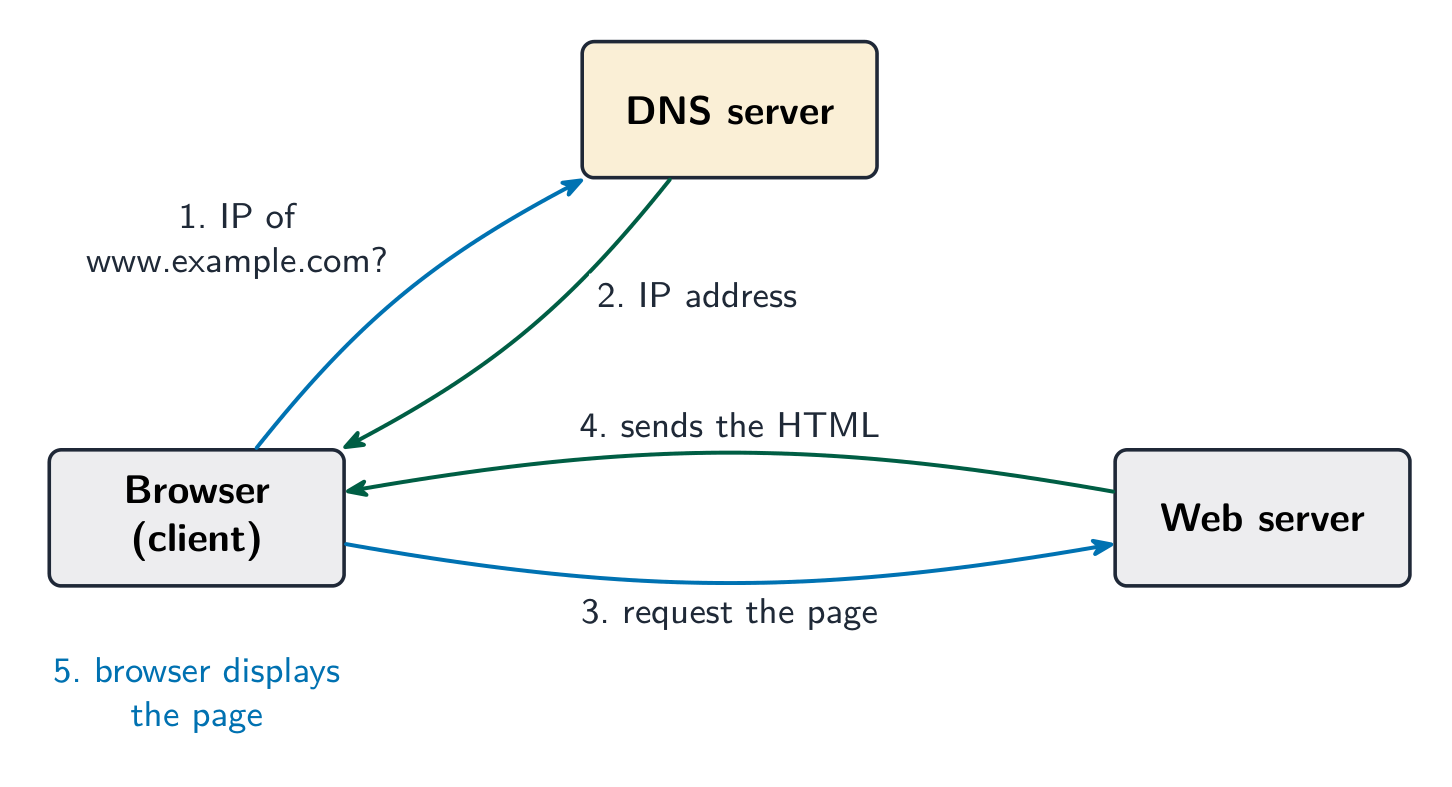
When you type a URL and press enter, several steps happen:
The browser needs the website's IP address 网际协议地址, but a URL uses a name, not a number.
The browser asks a domain name service 域名服务 (DNS) — a system that stores the IP address for each web address.
The DNS finds the matching IP address and sends it back to the browser.
The browser uses the IP address to contact the web server 网页服务器 that stores the page.
The web server sends the page's HTML back to the browser.
The browser turns the HTML into the page and displays it.
The browser asks a DNS for the site's IP address, then requests the page from the web server, which returns the HTML
If the DNS does not have the address, it asks another DNS server until the address is found.
A data centre full of servers: powerful computers that store websites and send them to you
Worked example. Break down the URL https://www.example.com/books/index.html. https is the protocol, the set of rules used to transfer the page (the s means the transfer is encrypted). www.example.com is the domain name, which identifies the web server and which a DNS server turns into an IP address. /books/index.html is the file path and file name of the resource stored on that server. Name each part together with its job: an answer that says "the first bit" and "the last bit" describes the URL without ever explaining it.
Explore
What happens when you load a web page
Step through it. The web address is just a name — DNS turns it into an IP address before the browser can ask the right server for the page.
1 Understand the concept of a digital currency and how digital currencies are used
• A digital currency is one that only exists electronically
2 Understand the process of blockchain and how it is used to track digital currency transactions
• Blockchain, in its basic form, is a digital ledger, that is a time-stamped series of records that cannot be altered
Source: Cambridge International syllabus
A digital currency 数字货币 is money that exists only in electronic form 电子形式. There are no coins or notes. It is stored and moved between people using computers, and can be used to pay for things online.
A problem with digital money is trust: how do you stop someone spending the same money twice, or changing the records? Blockchain solves this.
A blockchain 区块链 is a digital ledger 数字账本 — a shared record of every transaction 交易. The record is copied across many computers, so no single person controls it and it is very hard to change.
The transactions are kept in blocks joined in a chain. Each block holds:
the data of the transaction (who paid whom, and how much);
a timestamp 时间戳 (the date and time);
a hash value 哈希值 — a special code worked out from the block's contents.
Each block also stores the hash of the block before it. If someone changes an old block, its hash changes, so it no longer matches the next block. This breaks the chain and the change is spotted at once. This is how blockchain tracks transactions safely.
Each block stores the previous block's hash, chaining the blocks; changing one block breaks the chain
Explore
Hashing behind a blockchain
A hash is one-way and a tiny change to the input flips much of the output — a blockchain chains these hashes so any tamper is obvious.
1 Describe the processes involved in, and the aim of carrying out, a range of cyber security threats
• Including: – brute-force attack – data interception – distributed denial of service (DDoS) attack – hacking – malware (virus, worm, Trojan horse, spyware, adware, ransomware) – pharming – phishing – social engineering
2 Explain how a range of solutions are used to help keep data safe from security threats
• Including: – access levels – anti-malware, including anti-virus and anti-spyware – authentication (username and password, biometrics, two-step verification) – automating software updates – checking the spelling and tone of communications – checking the URL attached to a link – firewalls – privacy settings – proxy-servers – secure socket layer (SSL) security protocol
Source: Cambridge International syllabus
Cyber security 网络安全 means keeping computers, networks and data safe from attack. You must know these threats.
Threat
What it is
brute force attack 暴力破解
trying many passwords very quickly until the right one is found
data interception 数据拦截
"listening in" to steal data while it travels across a network
distributed denial of service 分布式拒绝服务 (DDoS) attack
flooding a server with so many requests that it cannot respond, so the website goes down
hacking 黑客攻击
gaining access to a computer system without permission
malware 恶意软件
harmful software (see the table below)
pharming 域名欺骗
secret code sends you to a fake website even when you type the correct address
phishing 网络钓鱼
fake emails or messages that trick you into giving away private details
social engineering 社会工程
tricking a person (not a computer) into breaking security, e.g. pretending to be the boss
Types of malware
Malware is any software made to harm a computer. The main types are:
Malware
What it does
virus 病毒
attaches to a file and copies itself when the file is opened; can delete or damage data
worm 蠕虫
copies itself across a network on its own, without needing a file to be opened
Trojan horse 特洛伊木马
pretends to be useful software, but harms the computer once installed
spyware 间谍软件
secretly records what you do, such as the keys you press
adware 广告软件
floods you with unwanted adverts
ransomware 勒索软件
locks your files and demands payment to unlock them
Impact of the threats
These attacks can steal personal data, delete or change files, stop a service from working, cost money, and make users lose trust in a company. For example, a DDoS attack can make an online shop unusable, so it loses sales.
A padlock: cyber security locks data and systems against malware, phishing and unauthorised access
checking the spelling and tone of messages — bad spelling or an odd, urgent tone can show a message is fake (phishing).
checking the URL attached to a link — a wrong or strange web address warns you the link is unsafe.
firewall 防火墙 — checks data going in and out of a network and blocks anything not allowed.
privacy settings 隐私设置 — control who can see your information online.
A firewall sits between the outside internet and your network, checking each connection and blocking any traffic that is not allowed
proxy server 代理服务器 — sits between the user and the internet, hiding the user's IP address and filtering out unsafe content.
Explore
Encryption with a key
Change the shift — that is the key. Each letter slides that many places to make ciphertext, and the same key slides it back. That is symmetric encryption.
The internet is the worldwide network (the infrastructure); the world wide web is the pages you view on it — do not mix the two up.
Learn how a page loads: the browser asks a DNS for the site's IP address, then requests the page from the web server, which returns the HTML.
Match the malware types: virus (attaches to a file), worm (spreads by itself across a network), Trojan horse (pretends to be useful), spyware, ransomware.
Match each threat to a defence: phishing/pharming → check the URL; brute force → strong passwords + two-step verification; interception → encryption; hacking/DDoS → a firewall.
A session cookie is deleted when you close the browser; a persistent cookie is saved to remember you between visits.
1 Describe how sensors, microprocessors and actuators can be used in collaboration to create automated systems
2 Describe the advantages and disadvantages of an automated system used for a given scenario
• Including scenarios from: – industry – transport – agriculture – weather – gaming – lighting – science
Source: Cambridge International syllabus
An automated system 自动化系统 is a mix of software and hardware that senses and responds to data in its environment 环境, with no need for human intervention 人工干预. In other words, it works on its own.
Examples of automated systems:
a central heating 中央供暖 system;
a chemical process 化学过程 in a factory;
a greenhouse 温室 (for growing plants);
a car park barrier 停车场道闸.
Sensors, microprocessors and actuators
Three parts work together in an automated system.
Part
Job
sensor 传感器
measures a physical quantity (such as temperature or light) and sends the data
microprocessor 微处理器
compares the data with stored values and makes decisions
actuator 执行器
receives a signal and causes movement or action (such as opening a valve)
The cycle works like this:
The sensor sends data to the microprocessor.
The microprocessor compares this data with stored values 存储值 and makes a decision.
The microprocessor sends signals to the actuators to take action.
For example, in a greenhouse: a temperature sensor reads the heat; the microprocessor compares it with the wanted value; if it is too hot, the microprocessor signals an actuator to open a window.
A sensor feeds the microprocessor, which compares the reading with a stored value and signals an actuator; the loop then repeats
The syllabus names many sensor types 传感器类型, each reading one physical quantity – for example an accelerometer 加速度计 (movement or tilt), a humidity 湿度 sensor (water in the air), and a proximity 接近 sensor (a nearby object):
Sensor
Measures
Typical use
temperature
heat
ovens, greenhouses, heating
light
brightness
automatic lights, cameras
pressure
force on a surface
alarm floor mats, touchscreens
infra-red / proximity
a nearby object
automatic doors, parking sensors
acoustic (sound)
sound level
noise monitors
humidity / moisture
water in air or soil
greenhouses, irrigation
gas
a gas being present
smoke and CO alarms
pH
acidity
pools, fish tanks
accelerometer
movement or tilt
phones, airbag triggers
magnetic field
magnetism
door contacts, compasses
flow / level
fluid flow or depth
pipes, tanks
To pick a sensor for a scenario, choose the one that reads the right physical quantity: a fish tank needs pH and temperature sensors; an automatic door needs an infra-red / proximity sensor.
Advantages and disadvantages
Automated systems are used in many situations, such as industry, transport, agriculture 农业 (farming), weather (gathering data), gaming and lighting.
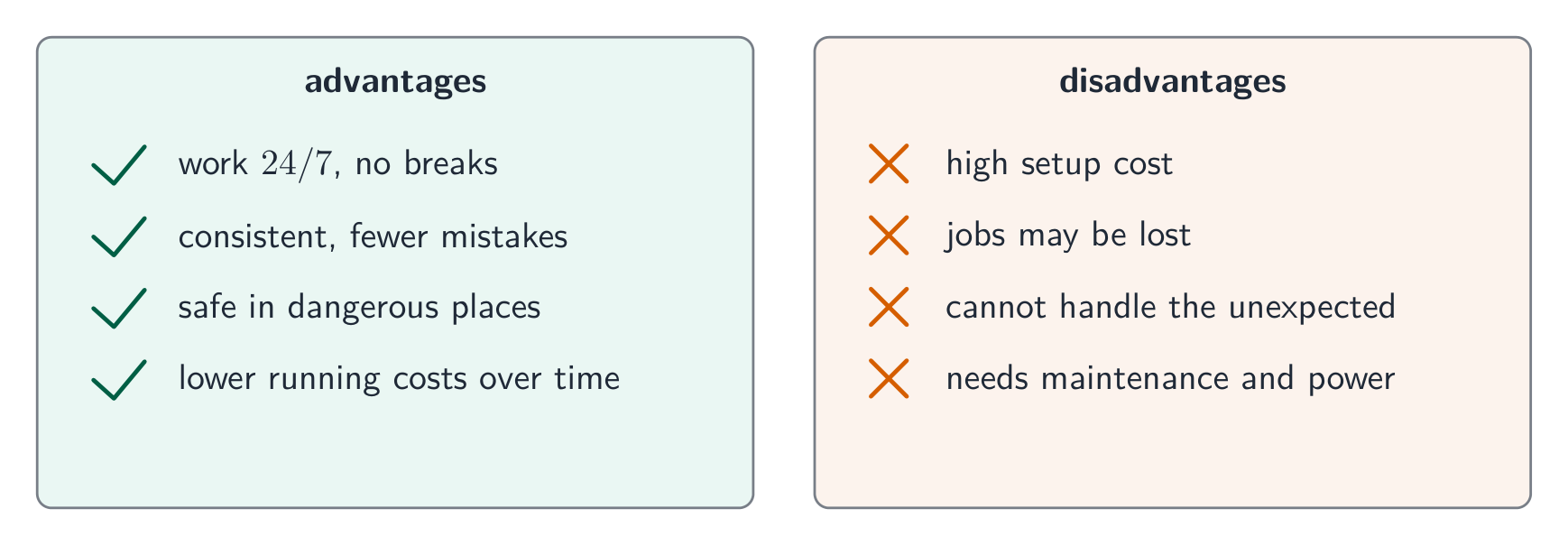
The advantages and disadvantages of automated systemsA camera drone: it can fly itself along a set route to collect data
Advantages
Disadvantages
work all day and night, without rest
cost a lot to buy and set up
faster and more consistent 一致的 than people
can break down and need expert repair
can work in places unsafe for people
may replace people's jobs
fewer human mistakes
cannot easily react to a situation they were not built for
Worked example. Describe how an automatic greenhouse holds the temperature at 25 °C. A temperature sensor continuously measures the temperature and sends its reading, converted to digital by an ADC, to the microprocessor. The microprocessor compares the reading with the stored value of 25 °C. If the temperature is above it, the microprocessor signals an actuator to open a window or switch on a fan; if it is below, it switches on a heater. The whole loop then repeats continuously. Two marks nearly always sit on the words "compares with a stored (pre-set) value" and "the process repeats" - a description that stops at "the sensor tells the computer" leaves them behind.
Explore
An automated control loop
Tap round the loop. An automated system senses, compares against a target, then acts — and because the action changes what it senses, it keeps correcting itself with no human needed.
• Robotics is a branch of computer science that incorporates the design, construction and operation of robots • Examples include factory equipment, domestic robots and drones
2 Describe the characteristics of a robot
• Including: – a mechanical structure or framework – electrical components, such as sensors, microprocessors and actuators – programmable
3 Understand the roles that robots can perform and describe the advantages and disadvantages of their use
• Robots can be used in areas including: – industry – transport – agriculture – medicine – domestic settings – entertainment
Source: Cambridge International syllabus
Robotics 机器人技术 is the branch of technology that deals with the design, building and operation of robots 机器人.
A robot has these characteristics:
a physical structure 物理结构 (a mechanical 机械的 body, such as arms);
electrical components 电子元件 (motors, sensors and wiring);
programmable instructions 可编程指令 — it follows a program that can be changed.
What robots do
Robots can perform many roles, for example:
factory equipment 工厂设备 — building cars, welding, moving heavy parts;
domestic appliances 家用电器 — such as a robotic vacuum cleaner 吸尘器.
An industrial robot arm. It follows a program and can be reprogrammed to do a new job.A robot vacuum cleaner: a home robot that drives itself around to clean the floor
Advantages
Disadvantages
do dull or dangerous jobs
expensive to buy and maintain
work quickly and accurately
can replace human workers
do not get tired or bored
a robot has a lack of independent decision-making 缺乏独立决策 — it only does what it is programmed to do
A key limit of a robot is that it cannot think for itself. It cannot make its own choices when something unexpected happens.
Explore
Computing concept lab
Classify concrete examples by the computing idea they demonstrate.
1 Understand what is meant by artificial intelligence (AI)
• AI is a branch of computer science dealing with the simulation of intelligent behaviours by computers
2 Describe the main characteristics of AI as the collection of data and the rules for using that data, the ability to reason, and it can include the ability to learn and adapt
3 Explain the basic operation and components of AI systems to simulate intelligent behaviour
• Limited to: – expert systems – machine learning • Expert systems have a knowledge base, a rule base, an inference engine and an interface • Machine learning is when a program has the ability to automatically adapt its own processes and/or data
Source: Cambridge International syllabus
Artificial intelligence 人工智能 (AI) is the simulation 模拟 of human intelligence by computer systems. This means a computer doing tasks that normally need human thinking.
Characteristics of AI
AI systems usually have these features:
they collect data and the rules 规则 for using that data;
they have the ability to reason 推理 (work things out using the rules);
they have the ability to draw conclusions 得出结论, which may be approximate 近似的 (a best guess) or definite 确定的 (certain);
they have the ability to learn 学习 from data;
they have the ability to adapt 适应 — to change their behaviour as they get new data.
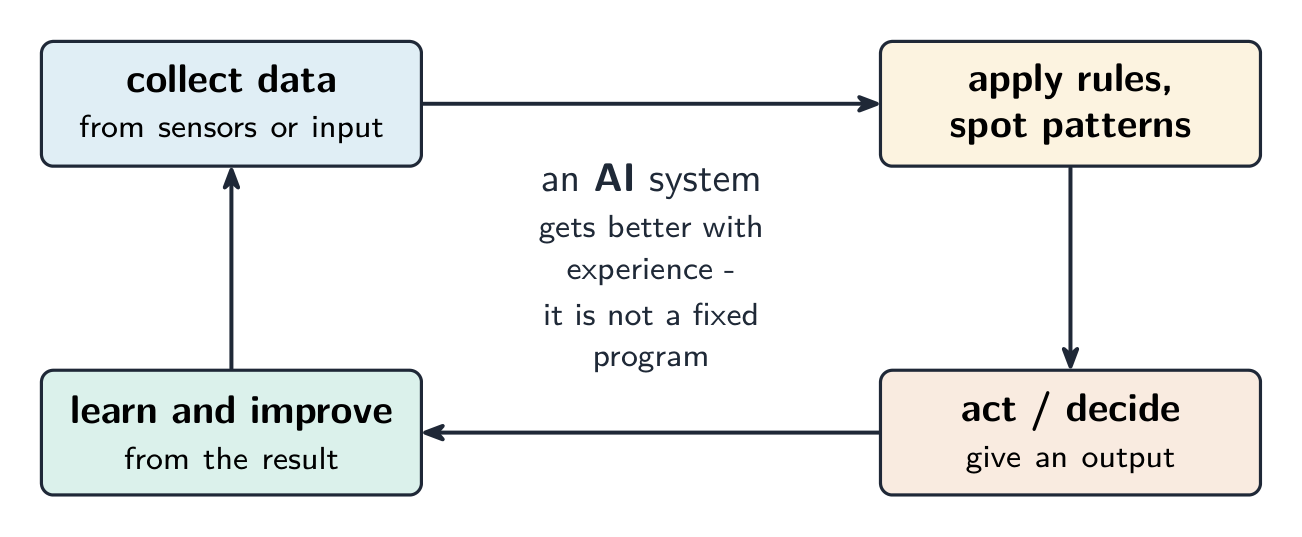
An AI system collects data, applies rules, acts, then learns and improves
Examples of AI
expert systems 专家系统 — software that gives advice like a human expert (for example, helping a doctor with a diagnosis);
natural language processing 自然语言处理 — understanding human speech or text;
self-driving cars 自动驾驶汽车.
A self-driving car: sensors on the car let a computer steer it with no driver
Inside an expert system
An expert system stores human expertise and reasons from it. It has four parts:
a knowledge base 知识库 – the stored facts about the subject;
a rule base 规则库 – the "if… then…" rules a human expert would apply;
an inference engine 推理引擎 – applies the rules to the facts to reach a conclusion;
a user interface 用户界面 – asks the user questions and shows the result.
The interface collects facts from the user; the inference engine runs the rule base against the knowledge base; and the system outputs a diagnosis or a probability – as used to help a doctor diagnose an illness or to find a car fault.
Machine learning
Machine learning 机器学习 is a program that improves its own performance from experience, without being explicitly reprogrammed. It finds patterns in data and adapts: a search engine gets better at ranking results, a voice assistant recognises spoken commands more accurately, and a robot vacuum gradually learns the layout of a room.
Narrow, general and strong AI
Narrow AI does one task (all AI today); general AI could do any human task; strong AI would be self-aware — neither exists yet
Type
What it means
narrow AI 弱人工智能
can do only one task or a small set of tasks (for example, a chess program). All AI today is narrow AI.
general AI 通用人工智能
could do any task a human can do, switching between many different tasks.
strong AI 强人工智能
would think and be aware like a real human mind. This does not exist yet.
Explore
Computing concept lab
Classify concrete examples by the computing idea they demonstrate.
Learn the control loop: a sensor measures a quantity → the microprocessor compares it with a stored value → an actuator takes action; then the loop repeats.
Do not confuse the parts: a sensor sends data in; an actuator causes movement out.
A robot follows programmable instructions and cannot make its own decisions when something unexpected happens.
AI simulates human thinking: it collects data and rules, reasons, draws conclusions, and can learn and adapt.
Know the AI levels: narrow (one task; all AI today), general (any human task), strong (self-aware; does not exist yet).
1 Understand the program development life cycle, limited to: analysis, design, coding and testing
• Including identifying each stage and performing these tasks for each stage: – analysis: abstraction, decomposition of the problem, identification of the problem and requirements – design: decomposition, structure diagrams, flowcharts, pseudocode – coding: writing program code and iterative testing – testing: testing program code with the use of test data
2 (a) Understand that every computer system is made up of sub-systems, which are made up of further sub-systems (b) Understand how a problem can be decomposed into its component parts
• Including: – stating the purpose of an algorithm – describing the processes involved in an algorithm
4 Understand standard methods of solution
• Limited to: – linear search – bubble sort – totalling – counting – finding maximum, minimum and average values
5 (a) Understand the need for validation checks to be made on input data and the different types of validation check
• Including: – range check – length check – type check – presence check – format check – check digit
(b) Understand the need for verification checks to be made on input data and the different types of verification check
• Including: – visual check – double entry check
6 Suggest and apply suitable test data
• Limited to: – normal – abnormal – extreme – boundary • Extreme data is the largest/smallest acceptable value • Boundary data is the largest/smallest acceptable value and the corresponding smallest/largest rejected value
7 Complete a trace table to document a dry-run of an algorithm
• Including, at each step in an algorithm: – variables – outputs – user prompts
8 Identify errors in given algorithms and suggest ways of correcting these errors
9 Write and amend algorithms for given problems or scenarios, using: pseudocode, program code and flowcharts
• Precision is required when writing algorithms, e.g. x > y is acceptable but x is greater than y is not acceptable • See section 4 for flowchart symbols • See section 4 for pseudocode
Source: Cambridge International syllabus
7.1
The program development life cycle
The program development life cycle 程序开发生命周期 is the set of stages used to make a program. There are four stages.
Software is written by programmers, who follow the development life cycle
Stage
What you do
analysis 分析
study the problem and work out what is needed
design 设计
plan how the program will work
coding 编码
write the program code and test it as you go
testing 测试
run the finished program with test data to find errors
The four stages of program development; testing feeds back to fix and refine the designA program flowchart sets out the steps and decisions of a program during the design stage
Analysis
In analysis you understand the problem. Two key skills help:
abstraction 抽象 — keep only the important details and ignore the rest;
decomposition 分解 — break a big problem into smaller, easier parts.
Design
In design you plan the solution, often using decomposition. You can show the parts as sub-systems 子系统 in a structure diagram 结构图 (a chart that splits a system into smaller boxes).
Coding and testing
In coding you write the program code. You use iterative testing 迭代测试 — test small parts again and again as you build them. In testing you run the whole program with test data 测试数据 to check it works.
An algorithm 算法 is a set of steps, in the right order, that solves a problem. Every algorithm can be split into three parts:
input 输入 — the data that goes in;
processing 处理 — the work done on the data;
output 输出 — the result that comes out.
This is called decomposition into inputs, processes and outputs. For example, for "find the average of three marks": the inputs are the three marks; the processing is adding them and dividing by 3; the output is the average.
Every algorithm decomposes into input, processing and output — here, finding the average of three marks
A trace table 追踪表 records the value of each variable as an algorithm runs, step by step. It helps you:
A trace table records each variable's value as the program runs
check that an algorithm works correctly;
work out what an algorithm does by following it with given data.
Example: trace this algorithm with the input 5.
INPUT N
Total ← 0
FOR I ← 1 TO N
    Total ← Total + I
NEXT I
OUTPUT Total
i
total
OUTPUT
1
1
2
3
3
6
4
10
5
15
15
The trace shows the algorithm adds up 1 to n. With input 5 the output is 15.
Worked example. Trace this algorithm and give the output.
X ← 20
Count ← 0
WHILE X > 1
    X ← DIV(X, 2)
    Count ← Count + 1
ENDWHILE
OUTPUT Count
DIV gives only the whole-number part of a division. Take one row per pass: x becomes 10 (count 1), then 5 (count 2), then 2 (count 3), then 1 (count 4). Now x > 1 is false, so the loop stops and the output is 4. Two habits protect these marks: test the condition before each pass rather than after, and write a new row for every pass - trying to hold the values in your head is what makes traces go wrong.
Explore
A trace table
Step through the loop and fill in the trace table, one row per pass.
A linear search 线性查找 compares each item with the target, starting at the beginning. Stop when the value is found or the list ends. The list does not need to be sorted. The following example uses positions 1 to 4.
DECLARE List : ARRAY[1:4] OF INTEGER
DECLARE I, SearchValue : INTEGER
DECLARE Found : BOOLEAN
List[1] ← 8
List[2] ← 3
List[3] ← 5
List[4] ← 1
INPUT SearchValue
Found ← FALSE
I ← 1
WHILE I <= 4 AND NOT Found
    IF List[I] = SearchValue
      THEN
        Found ← TRUE
    ENDIF
    I ← I + 1
ENDWHILE
OUTPUT Found
Worked comparison. Searching for 5 compares 8, 3 and then 5: three comparisons, with Found becoming TRUE. The fourth item is not checked. Searching for 9 compares all four values; Found stays FALSE. Stop before trying to read position 5, which is outside this array.
Another example: linear search checks each item in turn from the start until it finds the value
Bubble sort
A bubble sort 冒泡排序 puts a list in order. Compare neighbouring values and swap them if the left value is greater. A single pass is not enough in general. This complete version repeats passes until a whole pass makes no swaps.
DECLARE List : ARRAY[1:4] OF INTEGER
DECLARE I, Temp : INTEGER
DECLARE Swapped : BOOLEAN
List[1] ← 8
List[2] ← 3
List[3] ← 5
List[4] ← 1
REPEAT
    Swapped ← FALSE
    FOR I ← 1 TO 3
        IF List[I] > List[I + 1]
          THEN
            Temp ← List[I]
            List[I] ← List[I + 1]
            List[I + 1] ← Temp
            Swapped ← TRUE
        ENDIF
    NEXT I
UNTIL NOT Swapped
OUTPUT List[1], ", ", List[2], ", ", List[3], ", ", List[4]
Worked passes. Start with 8, 3, 5, 1. In the first pass the list becomes 3, 8, 5, 1, then 3, 5, 8, 1, then 3, 5, 1, 8. This puts the largest value last but leaves the rest unsorted. The second pass ends at 3, 1, 5, 8; the third at 1, 3, 5, 8. The fourth makes no swaps and confirms that this version can stop. Reset Swapped to FALSE at the start of every pass; set it to TRUE on any swap.
One comparison in another example: bubble sort swaps neighbours that are out of order, then continues through the pass
Totalling and counting
Totalling 求和 adds each required value to a running total: Total ← Total + Value. Counting 计数 adds 1 for each required item: Count ← Count + 1. Initialise both to zero before processing the values.
Worked example. Four attempted inputs are −20, 4, 50 and 6. Accept a value only if it is greater than −20 and less than 50. This example processes four attempts, not four accepted values.
DECLARE I, Count : INTEGER
DECLARE Value, Total : REAL
Total ← 0
Count ← 0
FOR I ← 1 TO 4
    INPUT Value
    IF Value > -20 AND Value < 50
      THEN
        Total ← Total + Value
        Count ← Count + 1
    ENDIF
NEXT I
IF Count > 0
  THEN
    OUTPUT Total, ", ", Count, ", ", Total / Count
  ELSE
    OUTPUT "No accepted values"
ENDIF
Attempted value
Total after attempt
Count after attempt
−20
0
0
4
4
1
50
4
1
6
10
2
The strict limits reject −20 and 50. Both updates belong inside the acceptance test, so rejected attempts change neither total nor count. The average of the accepted values is:
Do not divide by four: only two values were added. If no value is accepted, the count is zero and an average cannot be calculated; output a message instead of dividing by zero.
Transfer to a fixed number of accepted values. If a task asks for 50 accepted values, rather than four attempts, replace the fixed FOR loop with WHILE Count < 50 and close it with ENDWHILE. Keep the same input and acceptance test inside it. Rejected inputs leave Count unchanged, so another input is requested. On completion Count is 50, although the number of attempts may be greater. Output the total and calculate the average as Total / Count.
Maximum, minimum and average
The maximum 最大值 is the largest value and the minimum 最小值 is the smallest. The average 平均值 is the total divided by the number of values. For a non-empty list, initialise both from its first item. For each remaining item, replace the maximum if the new value is larger, and replace the minimum if it is smaller.
Worked example. The list is −8, −3, −12, −5. Starting the maximum at zero would fail: no list item is greater than zero, so the algorithm would output a number that is not in the list. Starting from −8 works without assuming that the data is positive.
Value just considered
Maximum so far
Minimum so far
−8 (initialisation)
−8
−8
−3
−3
−8
−12
−3
−12
−5
−3
−12
DECLARE List : ARRAY[1:4] OF INTEGER
DECLARE I, Maximum, Minimum, Total : INTEGER
List[1] ← -8
List[2] ← -3
List[3] ← -12
List[4] ← -5
Maximum ← List[1]
Minimum ← List[1]
Total ← List[1]
FOR I ← 2 TO 4
    IF List[I] > Maximum
      THEN
        Maximum ← List[I]
    ENDIF
    IF List[I] < Minimum
      THEN
        Minimum ← List[I]
    ENDIF
    Total ← Total + List[I]
NEXT I
OUTPUT Maximum, ", ", Minimum, ", ", Total / 4
The maximum is −3 and the minimum is −12. The average uses all four values:
The average lies between the minimum and maximum; this is a useful check, not proof that the calculation is correct. Initialising from the first item requires a non-empty list. Handle an empty list separately before trying to read that item.
Learn the four life-cycle stages: analysis → design → coding → testing. Abstraction keeps only the important details; decomposition breaks a problem into smaller parts.
Validation checks data is sensible (range, length, type, presence, format checks); verification checks it was copied correctly (a visual check or double entry).
Learn the four test-data types: normal (accepted), abnormal (rejected), extreme (the largest/smallest still allowed), boundary (the values either side of a limit).
To work out what an algorithm does, fill in a trace table — write down every variable's value at each step.
Know the standard algorithms: linear search (check each item in turn) and bubble sort (swap side-by-side pairs until no swaps are needed).
(d) Understand and use the concepts of totalling and counting
(e) Understand and use the concept of string handling
• Including: – length – substring – upper – lower • The first character of the string can be position zero or one
(f) Understand and use arithmetic, relational and logical operators
• Arithmetic, limited to: – + – – – / – * – ^ (raised to power of) – MOD – DIV • Relational, limited to: – = – < – <= – > – >= – <> (not equal to) • Logical, limited to: – AND – OR – NOT
5 Understand and use nested statements
• Including nested selection and iteration • Candidates will not be required to write more than three levels of nested statements
6 (a) Understand what is meant by procedures, functions and parameters (b) Define and use procedures and functions, with or without parameters (c) Understand and use local and global variables
• Procedures and functions may have up to three parameters
7 Understand and use library routines
• Including: – MOD – DIV – ROUND – RANDOM
8 Understand how to create a maintainable program
• Including appropriate use of: – meaningful identifiers – the commenting feature provided by the programming language – procedures and functions – relevant and appropriate commenting of syntax • Use meaningful identifiers for: – variables – constants – arrays – procedures and functions
Source: Cambridge International syllabus
A variable 变量 is a named store that holds a value which can change while the program runs. A constant 常量 is a named store whose value is fixed and does not change.
A variable is a named store whose value can changeVariables and constants are named stores for values, set in the program's code
You should declare 声明 them (say their name and type) before use:
DECLARE Score : INTEGER
DECLARE Name : STRING
CONSTANT Pi ← 3.142
While a program runs, its variables are held in the computer's memory (RAM)
Use a constant for a value that never changes (like Pi), so it is set in one place and is easy to read.
Explore
Variables and assignment
Step through the lines and watch each variable take its new value.
totalling 求和 — keep adding values to a running total: Total ← Total + Value.
counting 计数 — add 1 to a counter each time: Count ← Count + 1.
A counter counts up by 1; a total builds a running sumA trace table follows a totalling and counting loop pass by pass
Total ← 0
FOR I ← 1 TO 10
    INPUT Mark
    Total ← Total + Mark
NEXT I
OUTPUT Total
Worked example. A program must read 5 marks, then output the total and the average.
Total ← 0
FOR I ← 1 TO 5
    INPUT Mark
    Total ← Total + Mark
NEXT I
Average ← Total / 5
OUTPUT Total, Average
Two lines carry the marks. Total ← 0 must sit before the loop: put it inside and the total resets on every pass, so the program outputs only the last mark. And Average ← Total / 5 must sit after the loop, because the total is not complete until every mark has been added. Initialise before, calculate after - that ordering is what the question is really testing.
(The first character may be counted as position 0 or position 1, depending on the language.)
Explore
SUBSTRING: take part of a string
The first character is at position 1. SUBSTRING(Word, Start, Length) takes Length characters beginning at Start — drag the two handles and read the call it builds.
1 Define a single-table database from given data storage requirements
• Including: – fields – records – validation
2 Suggest suitable basic data types
• Including: – text/alphanumeric – character – Boolean – integer – real – date/time
3 Understand the purpose of a primary key and identify a suitable primary key for a given database table
4 Read, understand and complete structured query language (SQL) scripts to query data stored in a single database table
• Limited to: – SELECT – FROM – WHERE – ORDER BY DESCENDING – ORDER BY ASCENDING – SUM – COUNT – AND – OR • Identifying the output given by an SQL statement that will query the given contents of a database table
Source: Cambridge International syllabus
9.1
What is a database?
A database 数据库 is an organised store of data, kept so that it is easy to search, sort and update. At IGCSE you work with a single-table database 单表数据库 — all the data is held in one table.
A library card catalogue is a database on paper — records you can search and sort by indexLarge modern databases are stored on servers in data centres
A primary key 主键 is a field that holds a unique 唯一的 value for every record. No two records can have the same primary key, so it lets you pick out exactly one record.
In the table above, StudentID is a good primary key because every student has a different number. A field like FormClass would be a bad primary key, because many students share the same class.
When data is put into a database, validation 验证 checks make sure it is sensible — for example a range check on an age field, or a presence check so a field is not left empty. (You saw these checks in topic 7.)
A range check accepts sensible values and rejects the rest
Structured Query Language 结构化查询语言 (SQL) is a language used to query 查询 a database — to pick out the records you want. You must understand and complete SQL scripts.
SELECT, FROM and WHERE
SELECT says which fields to show.
FROM says which table to use.
WHERE gives a condition 条件, so only matching records are shown.
SELECT picks fields, FROM names the table, WHERE sets the condition
SELECT FirstName, FormClass
FROM Student
WHERE FeesPaid = TRUE;
This shows the first name and class of every student who has paid the fees.
Use * to select all fields:
SELECT *
FROM Student
WHERE FormClass = '10A';
ORDER BY
ORDER BY sorts the results. Use ASC for ascending 升序 (smallest first, A→Z) or DESC for descending 降序 (largest first, Z→A).
SELECT FirstName, DateOfBirth
FROM Student
ORDER BY DateOfBirth ASC;
AND and OR
Join conditions with AND (both must be true) or OR (at least one must be true).
SELECT FirstName
FROM Student
WHERE FormClass = '10A' AND FeesPaid = FALSE;
SUM and COUNT
SUM adds up the values in a number field.
COUNT counts how many records match.
SELECT COUNT(StudentID)
FROM Student
WHERE FeesPaid = FALSE;
This counts how many students have not paid. SUM works the same way but adds a number field instead of counting rows.
Working out the output
To find the output of an SQL script, read it in this order:
FROM — which table;
WHERE — keep only the records that match the condition;
SELECT — show only the chosen fields;
ORDER BY — put the results in order.
Read an SQL query in this order: FROM (which table), WHERE (which rows), SELECT (which fields), ORDER BY (sort)
Following these steps, you can write down exactly which rows and columns the query returns.
Worked example. A Book table has the fields Title, Author, Price and InStock. Write a query showing the title and price of every book by Orwell that is in stock, cheapest first.
SELECT Title, Price
FROM Book
WHERE Author = 'Orwell' AND InStock = TRUE
ORDER BY Price ASC;
Build it in the reading order: FROM names the table; WHERE keeps only the matching records, and because there are two conditions they need AND; SELECT shows only the two fields asked for; ORDER BY … ASC sorts them. Text values go in quotes, and only the fields the question asks for belong in SELECT - adding Author just because you filtered on it is the commonest way to lose a mark here.
Explore
SELECT … WHERE
Step through a query: WHERE filters rows, SELECT picks columns.
1 Identify and use the standard symbols for logic gates
• See section 4 for logic gate symbols
2 Define and understand the functions of logic gates
• Including: – NOT – AND – OR – NAND – NOR – XOR (EOR) – the binary output produced from all the possible binary inputs • NOT is a single input gate • All other gates are limited to two inputs
3 (a) Use logic gates to create given logic circuits from a: (i) problem statement (ii) logic expression (iii) truth table (b) Complete a truth table from a: (i) problem statement (ii) logic expression (iii) logic circuit
• Circuits must be drawn for the statement given, without simplification • Logic circuits will be limited to a maximum of three inputs and one output • An example truth table with three inputs, for completion: A B C Output | 0 0 0 | 0 0 1 | 0 1 0 | 0 1 1 | 1 0 0 | 1 0 1 | 1 1 0 | 1 1 1
(c) Write a logic expression from a: (i) problem statement (ii) logic circuit (iii) truth table
Source: Cambridge International syllabus
10.1
What is Boolean logic?
Boolean logic 布尔逻辑 works with values that are either true or false. In electronics these are shown as 1 (true) and 0 (false). A logic gate 逻辑门 takes one or more of these inputs and gives one output, following a fixed rule.
A truth table 真值表 lists every possible set of inputs and the output for each. You build it by writing out all the input combinations.
Logic gates are built from electronic circuits like this one, where each gate switches on 1s and 0s
You must know six gates. NOT has one input; all the others have two inputs (A and B).
The six logic gates. A small circle on the output means the result is inverted (NOT, NAND, NOR)A real logic chip: inside are logic gates like the ones on this page
NOT gate
The NOT gate 非门 reverses the input. Output is 1 when the input is 0.
A
Output
0
1
1
0
AND gate
The AND gate 与门 gives output 1 only when both inputs are 1.
AND outputs 1 only when both inputs are 1
A
B
Output
0
0
0
0
1
0
1
0
0
1
1
1
OR gate
The OR gate 或门 gives output 1 when at least one input is 1.
OR outputs 1 when either input is 1
A
B
Output
0
0
0
0
1
1
1
0
1
1
1
1
NAND gate
The NAND gate 与非门 is AND followed by NOT. The output is the opposite of AND.
A
B
Output
0
0
1
0
1
1
1
0
1
1
1
0
NOR gate
The NOR gate 或非门 is OR followed by NOT. The output is the opposite of OR.
A
B
Output
0
0
1
0
1
0
1
0
0
1
1
0
XOR gate
The XOR gate 异或门 (exclusive OR) gives output 1 when the inputs are different.
A
B
Output
0
0
0
0
1
1
1
0
1
1
1
0
Explore
The logic gates
Switch the inputs and pick a gate to see its output — AND, OR, NOT, NAND, NOR, XOR.
A logic circuit 逻辑电路 joins gates together to carry out a task. The output of one gate can become the input of another. At IGCSE a circuit has up to three inputs and one output.
Building the circuit for X = (A AND B) OR C — the AND gate's output feeds the OR gate
You must be able to move between four forms:
a problem statement 问题陈述 (a description in words),
a logic expression,
a logic circuit,
a truth table.
From a problem statement to a circuit
Read the statement and pick out the conditions and the logic words (and, or, not). For example:
An alarm (X) sounds when the door is open (A) AND the system is switched on (B).
This is X = A AND B, so you draw one AND gate with inputs A and B.
Completing a truth table from a circuit or expression
To fill in a truth table:
Write all the input combinations. For three inputs there are 8 rows (000 up to 111).
Work out each gate's output in order, one column at a time.
The last column is the final output.
Three inputs give eight rows: every combination counted in binary
A
B
C
A AND B
(A AND B) OR C
0
0
0
0
0
0
0
1
0
1
0
1
0
0
0
0
1
1
0
1
1
0
0
0
0
1
0
1
0
1
1
1
0
1
1
1
1
1
1
1
Adding a middle "working" column for each gate makes the final output easy to fill in. Always draw the circuit exactly as the statement says, without simplifying it.
Worked example. Complete the truth table for X = (A AND B) OR (NOT C) for the row A = 1, B = 0, C = 0. Work outwards from the brackets, one gate at a time. First A AND B = 1 AND 0 = 0, because AND needs both inputs to be 1. Next NOT C = NOT 0 = 1. Finally OR the two results: 0 OR 1 = 1. So X = 1. Give each intermediate gate its own column rather than trying to do the whole expression in one step: with three inputs there are $2^3 = 8$ rows, and those intermediate columns are where the method marks live even if the final answer slips.