| Candidates should be able to: | Notes and guidance |
|---|---|
| 1 Declare and use variables and constants | |
| 2 Understand and use basic data types | • Including: – integer – real – char – string – Boolean |
| 3 Understand and use input and output | |
| 4 (a) Understand and use the concept of sequence | |
| (b) Understand and use the concept of selection | • Including: – IF statements – CASE statements |
| (c) Understand and use the concept of iteration | • Including: – count-controlled loops – pre-condition loops – post-condition loops |
| (d) Understand and use the concepts of totalling and counting | |
| (e) Understand and use the concept of string handling | • Including: – length – substring – upper – lower • The first character of the string can be position zero or one |
| (f) Understand and use arithmetic, relational and logical operators | • Arithmetic, limited to: – + – – – / – * – ^ (raised to power of) – MOD – DIV • Relational, limited to: – = – < – <= – > – >= – <> (not equal to) • Logical, limited to: – AND – OR – NOT |
| 5 Understand and use nested statements | • Including nested selection and iteration • Candidates will not be required to write more than three levels of nested statements |
| 6 (a) Understand what is meant by procedures, functions and parameters (b) Define and use procedures and functions, with or without parameters (c) Understand and use local and global variables | • Procedures and functions may have up to three parameters |
| 7 Understand and use library routines | • Including: – MOD – DIV – ROUND – RANDOM |
| 8 Understand how to create a maintainable program | • Including appropriate use of: – meaningful identifiers – the commenting feature provided by the programming language – procedures and functions – relevant and appropriate commenting of syntax • Use meaningful identifiers for: – variables – constants – arrays – procedures and functions |
Programming
IGCSE Computer Science · Topic 8
 13:16
13:16
Programming
Here is a short program. It reads five test marks and prints the total. The five marks are eight, nine, seven, six and ten, so the total should be forty. Watch…
English narration · English + 中文 subtitles burned in
8.1
Variables and constants

Syllabus
Source: Cambridge International syllabus
A variable 变量 is a named store that holds a value which can change while the program runs. A constant 常量 is a named store whose value is fixed and does not change.

You should declare 声明 them (say their name and type) before use:
DECLARE Score : INTEGER
DECLARE Name : STRING
CONSTANT Pi ← 3.142

Use a constant for a value that never changes (like Pi), so it is set in one place and is easy to read.
Explore
Variables and assignment
Step through the lines and watch each variable take its new value.
Vocabulary
Train
| English |
|---|
| variable/ˈveərɪəbl/ |
| constant/ˈkɒnstənt/ |
| declare/dɪˈkleə/ |
8.1
Data types

A data type 数据类型 says what kind of value a variable holds. You must know five basic types.
| Type | Holds | Example |
|---|---|---|
| integer 整数 | a whole number | 42, -7 |
| real 实数 | a number with a decimal point | 3.14, -0.5 |
| char 字符 | a single character | 'A', '?' |
| string 字符串 | a sequence of characters | "Hello" |
| Boolean 布尔值 | one of two values | TRUE or FALSE |
Vocabulary
Train
| English |
|---|
| data type/ˈdeɪtə taɪp/ |
| integer/ˈɪntɪdʒə/ |
| real/rɪəl/ |
| char/tʃɑː/ |
| string/strɪŋ/ |
| Boolean/ˈbuːlɪən/ |
8.1
Input and output
Input 输入 reads a value from the user. Output 输出 shows a value on the screen.
OUTPUT "What is your name?"
INPUT Name
OUTPUT "Hello ", Name
Vocabulary
Train
| English |
|---|
| input/ˈɪnpʊt/ |
| output/ˈaʊtpʊt/ |
8.1
The three basic structures

Every program is built from three control structures.
Sequence
Sequence 顺序 means the steps run one after another, in order, from top to bottom.
INPUT Length
INPUT Width
Area ← Length * Width
OUTPUT Area
Selection
Selection 选择 chooses which steps to run, based on a condition. Use an IF statement, or a CASE statement when there are many choices.
IF Score >= 50
  THEN
    OUTPUT "Pass"
  ELSE
    OUTPUT "Fail"
ENDIF
CASE OF Grade
    'A' : OUTPUT "Excellent"
    'B' : OUTPUT "Good"
    OTHERWISE OUTPUT "Keep trying"
ENDCASE
Iteration
Iteration 迭代 (a loop 循环) repeats steps. There are three kinds.
A count-controlled loop 计数循环 repeats a fixed number of times:
FOR I ← 1 TO 5
    OUTPUT "Hello"
NEXT I
A pre-condition loop 前测循环 checks the condition before each repeat, so it may run zero times:
WHILE Answer <> "stop" DO
    INPUT Answer
ENDWHILE
A post-condition loop 后测循环 checks the condition after each repeat, so it always runs at least once:
REPEAT
    INPUT Password
UNTIL Password = "secret"

Explore
How an IF … ELSE IF ladder decides
The conditions are tested top to bottom; the FIRST one that is true runs and the rest are skipped. Slide the score and watch which branch lights up.
Explore
Selection
Change the value and watch which branch runs — selection in action.
Vocabulary
Train
| English |
|---|
| sequence/ˈsiːkwəns/ |
| selection/sɪˈlekʃn/ |
| iteration/ˌɪtəˈreɪʃn/ |
| loop/luːp/ |
| count-controlled loop/kaʊnt kənˈtrəʊld luːp/ |
| pre-condition loop/priː kənˈdɪʃn luːp/ |
| post-condition loop/pəʊst kənˈdɪʃn luːp/ |
8.1
Totalling and counting

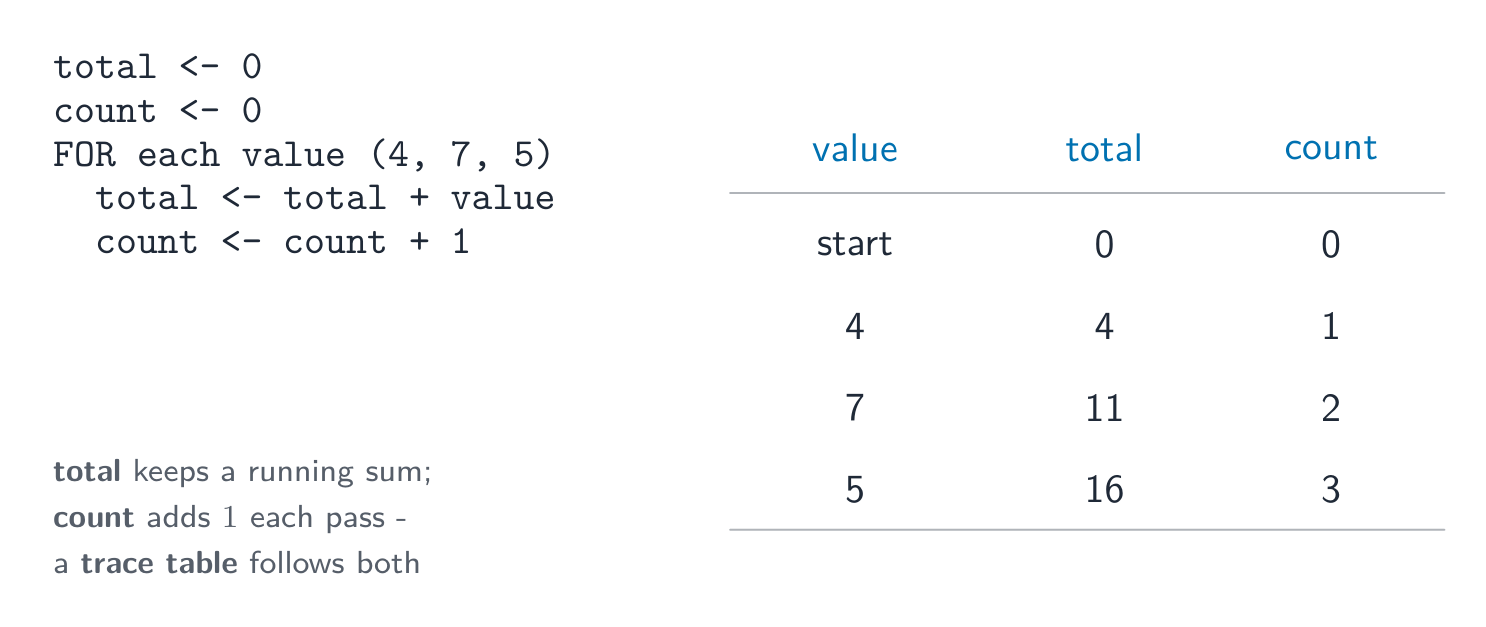
- totalling 求和 — keep adding values to a running total:
Total ← Total + Value. - counting 计数 — add 1 to a counter each time:
Count ← Count + 1.
Total ← 0
FOR I ← 1 TO 10
    INPUT Mark
    Total ← Total + Mark
NEXT I
OUTPUT Total
Worked example. A program must read 5 marks, then output the total and the average.
Total ← 0
FOR I ← 1 TO 5
    INPUT Mark
    Total ← Total + Mark
NEXT I
Average ← Total / 5
OUTPUT Total, Average
Two lines carry the marks. Total ← 0 must sit before the loop: put it inside and the total resets on every pass, so the program outputs only the last mark. And Average ← Total / 5 must sit after the loop, because the total is not complete until every mark has been added. Initialise before, calculate after - that ordering is what the question is really testing.
Vocabulary
Train
| English |
|---|
| totalling/ˈtəʊtəlɪŋ/ |
| counting/ˈkaʊntɪŋ/ |
8.1
Operators
Arithmetic operators
| Operator | Meaning |
|---|---|
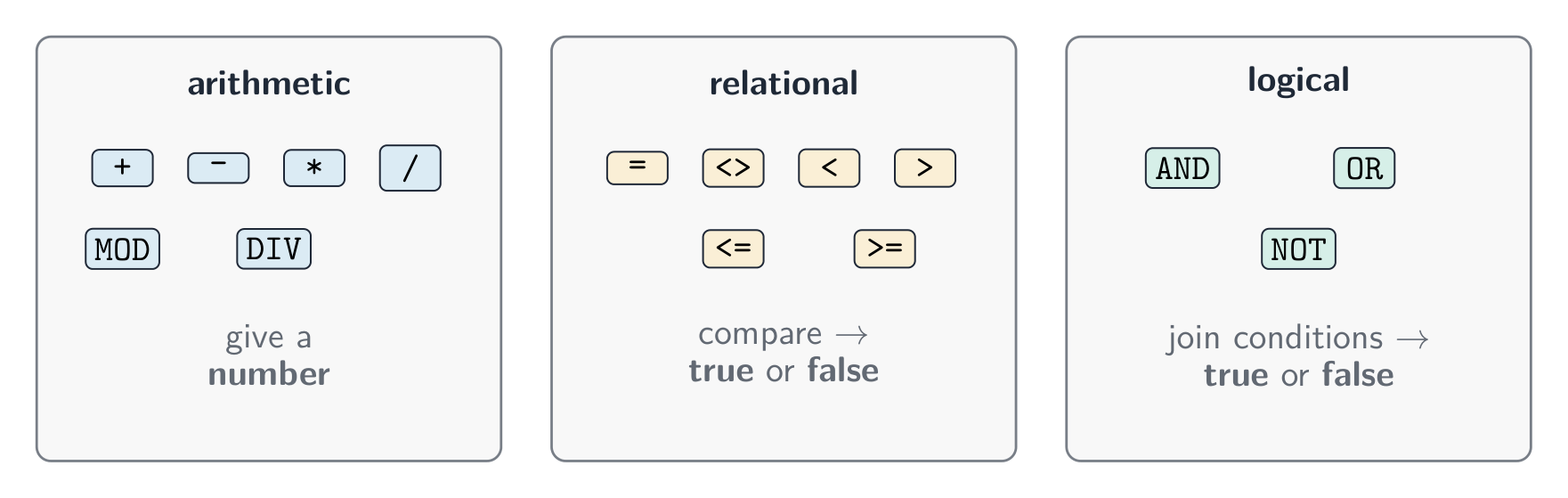
+ - * / |
add, subtract, multiply, divide |
^ |
raised to the power of |
MOD |
the remainder 余数 after division |
DIV |
the whole-number part of a division |
For example, 17 MOD 5 is 2, and 17 DIV 5 is 3.
Relational operators
These compare two values and give a Boolean result: =, <, <=, >, >=, and <> (not equal to).
Logical operators
These join conditions: AND (both must be true), OR (at least one must be true), NOT (reverses true/false).
IF Age >= 13 AND Age <= 19
  THEN
    OUTPUT "Teenager"
ENDIF
Vocabulary
Train
| English |
|---|
| remainder/rɪˈmeɪndə/ |
8.1
String handling
A string is made of characters. Useful operations:
- length 长度 — the number of characters in the string;
- substring 子串 — a smaller part taken from the string;
- upper case 大写 — change letters to capitals;
- lower case 小写 — change letters to small letters.
name ← "Computer"
OUTPUT LENGTH(name)          // 8
OUTPUT SUBSTRING(name, 1, 4) // "Comp"
OUTPUT UCASE(name)           // "COMPUTER"
OUTPUT LCASE(name)           // "computer"
(The first character may be counted as position 0 or position 1, depending on the language.)
Explore
SUBSTRING: take part of a string
The first character is at position 1. SUBSTRING(Word, Start, Length) takes Length characters beginning at Start — drag the two handles and read the call it builds.
Vocabulary
Train
| English |
|---|
| substring/ˈsʌbstrɪŋ/ |
| upper case/ˈʌpə keɪs/ |
| lower case/ˈləʊə keɪs/ |
| length/leŋθ/ |
8.1
Nested statements
A nested statement 嵌套语句 is one control structure placed inside another. You can nest selection and iteration.
FOR I ← 1 TO 3
    IF MOD(I, 2) = 0
      THEN
        OUTPUT I, " is even"
      ELSE
        OUTPUT I, " is odd"
    ENDIF
NEXT I
You will not have to write more than three levels of nesting.
Vocabulary
Train
| English |
|---|
| nested statement/ˈnestɪd ˈsteɪtmənt/ |
8.1
Procedures and functions
To avoid repeating code, you can break a program into named blocks.
- A procedure 过程 is a named block of code that does a task. You run it with
CALL. - A function 函数 is like a procedure, but it returns a value back to where it was called.
A parameter 参数 is a value passed into a procedure or function (up to three parameters).
PROCEDURE Greet(PersonName : STRING)
    OUTPUT "Hello ", PersonName
ENDPROCEDURE

CALL Greet("Sam")
FUNCTION Square(N : INTEGER) RETURNS INTEGER
    RETURN N * N
ENDFUNCTION

Answer ← Square(5)   // answer is 25
Local and global variables
- A local variable 局部变量 is declared inside a procedure or function. It can only be used there.
- A global variable 全局变量 is declared in the main program. It can be used anywhere.
Local variables are safer, because they cannot be changed by mistake from another part of the program.
Vocabulary
Train
| English |
|---|
| procedure/prəˈsiːdʒə/ |
| function/ˈfʌŋkʃn/ |
| parameter/pəˈræmɪtə/ |
| local variable/ˈləʊkl ˈveərɪəbl/ |
| global variable/ˈɡləʊbl ˈveərɪəbl/ |
8.1
Library routines
A library routine 库程序 is a ready-made piece of code you can use. You must know these:
| Routine | What it does |
|---|---|
MOD |
gives the remainder of a division |
DIV |
gives the whole-number part of a division |
ROUND |
rounds a real number to a number of decimal places |
RANDOM |
gives a random number |
Vocabulary
Train
| English |
|---|
| library routine/ˈlaɪbrəri ruːˈtiːn/ |
8.1
Writing a maintainable program
A maintainable 可维护的 program is easy for other people to read and change later. To make one:
- use meaningful identifiers 有意义的标识符 — clear names for variables, constants, arrays, procedures and functions (
totalScore, notx); - add comments 注释 to explain what parts of the code do;
- use procedures and functions to split the work into small blocks.
Vocabulary
Train
| English |
|---|
| maintainable/meɪnˈteɪnəbl/ |
| meaningful identifiers/ˈmiːnɪŋfl aɪˈdentɪfaɪəz/ |
| comments/ˈkɒments/ |
8.2
Arrays

Syllabus
| Candidates should be able to: | Notes and guidance |
|---|---|
| 1 Declare and use one-dimensional (1D) and two-dimensional (2D) arrays | |
| 2 Understand the use of arrays | • Including the use of variables as indexes in arrays |
| 3 Write values into, and read values from, an array using iteration | • The first index can be zero or one • Including nested iteration |
Source: Cambridge International syllabus
An array 数组 is a single variable that holds many values of the same type, found by an index 索引 (a position number).
One-dimensional arrays
A one-dimensional (1D) array 一维数组 is like a single list.
DECLARE Scores : ARRAY[1:5] OF INTEGER
Scores[1] ← 90
Scores[2] ← 75
OUTPUT Scores[1]
You can use a loop to fill or read an array:
FOR I ← 1 TO 5
    INPUT Scores[I]
NEXT I
Two-dimensional arrays
A two-dimensional (2D) array 二维数组 is like a table with rows and columns. It uses two indexes.
DECLARE Grid : ARRAY[1:3, 1:3] OF INTEGER
Grid[1, 1] ← 5
Grid[2, 3] ← 8

You read a 2D array with a loop inside a loop (nested iteration).
Explore
Arrays
Pick a row and a column to read one cell. Cambridge arrays count from 1, and a 2-D element is written with ONE pair of brackets — Grid[2, 3].
Vocabulary
Train
| English |
|---|
| array/əˈreɪ/ |
| index/ˈɪndeks/ |
| one-dimensional (1D) array/wʌn daɪˈmenʃənl əˈreɪ/ |
| two-dimensional (2D) array/tuː daɪˈmenʃənl əˈreɪ/ |
8.3
File handling
Syllabus
| Candidates should be able to: | Notes and guidance |
|---|---|
| 1 Understand the purpose of storing data in a file to be used by a program | |
| 2 Open, close and use a file for reading and writing | • Including: – read and write single items of data – read and write a line of text |
Source: Cambridge International syllabus
A program can store data in a file 文件 so it is kept after the program stops. You must open the file, use it, then close it.
OPENFILE "data.txt" FOR WRITE
WRITEFILE "data.txt", "Hello"
CLOSEFILE "data.txt"

OPENFILE "data.txt" FOR READ
READFILE "data.txt", Line
CLOSEFILE "data.txt"
You can read and write single items of data or a whole line of text. Always close a file when you have finished with it.
Vocabulary
Train
| English |
|---|
| file/faɪl/ |
8.3
Exam tips
- A variable can change while the program runs; a constant is fixed. Learn the five data types: integer, real, char, string, Boolean.
- Every program is built from three structures: sequence, selection (IF / CASE), and iteration (loops).
- A WHILE loop tests before the body, so it may run zero times; a REPEAT … UNTIL loop tests after, so it always runs at least once.
MODgives the remainder andDIVthe whole-number part of a division:17 MOD 5is 2,17 DIV 5is 3.- A function returns a value; a procedure does not. A local variable works only inside its block; a global one works anywhere.
Interactive lessons on this topic
Work through it step by step, with instant-check exercises.