Inside a processor there are billions of tiny switches. Each one can only be on, or off. That is all a computer physically has — no threes, no sevens, no…
English narration · English + 中文 subtitles burned in
1.1
Why computers use binary
A computer can only work with two states: on and off. You write these as 1 and 0. A system that uses only two digits 数字 is called binary 二进制 (base 2).
Computers represent all data — numbers, text, sound and images — as binary strings of 0s and 1s
Every kind of data 数据 — numbers, text, sound and images — must be changed into binary before a computer can use it. The computer processes this binary using logic gates 逻辑门, and stores it in registers 寄存器 (small, fast stores inside the processor 处理器).
A microprocessor holds millions of tiny transistors, each a switch that is on (1) or off (0) — the physical basis of binary
1 Understand how and why computers use binary to represent all forms of data
• Any form of data needs to be converted to binary to be processed by a computer • Data is processed using logic gates and stored in registers
2 (a) Understand the denary, binary and hexadecimal number systems (b) Convert between (i) positive denary and positive binary (ii) positive denary and positive hexadecimal (iii) positive hexadecimal and positive binary
• Denary is a base 10 system • Binary is a base 2 system • Hexadecimal is a base 16 system • Values used will be integers only • Conversions in both directions, e.g. denary to binary or binary to denary • Maximum binary number length of 16-bit
3 Understand how and why hexadecimal is used as a beneficial method of data representation
• Areas within computer science that hexadecimal is used should be identified • Hexadecimal is easier for humans to understand than binary, as it is a shorter representation of binary
4 (a) Add two positive 8-bit binary integers (b) Understand the concept of overflow and why it occurs in binary addition
• An overflow error will occur if the value is greater than 255 in an 8-bit register • A computer or a device has a predefined limit that it can represent or store, for example 16-bit • An overflow error occurs when a value outside this limit should be returned
5 Perform a logical binary shift on a positive 8-bit binary integer and understand the effect this has on the positive binary integer
• Perform logical left shifts • Perform logical right shifts • Perform multiple shifts • Bits shifted from the end of the register are lost and zeros are shifted in at the opposite end of the register • The positive binary integer is multiplied or divided according to the shift performed • The most significant bit(s) or least significant bit(s) are lost
6 Use the two’s complement number system to represent positive and negative 8-bit binary integers
• Convert a positive binary or denary integer to a two’s complement 8-bit integer and vice versa • Convert a negative binary or denary integer to a two’s complement 8-bit integer and vice versa
Source: Cambridge International syllabus
Counting in binary: 0 to 15
A number system 数制 is a way of writing numbers using a fixed set of digits. You need three of them.
System
Base
Digits used
Denary
10
0–9
Binary
2
0 and 1
Hexadecimal
16
0–9 then A–F
denary 十进制 is the normal counting system (also called decimal).
binary uses only 0 and 1.
hexadecimal 十六进制 (hex) uses sixteen digits: 0–9, then A, B, C, D, E, F stand for 10, 11, 12, 13, 14, 15.
The base 基数 tells you how many different digits a system uses.
Place value
Each column in a number has a place value 位值. In binary the place values double from right to left. For an 8-bit number they are:
128 64 32 16 8 4 2 1
An 8-bit place-value chart: the 1s sit under the values that add up to 150
One bit 位 is a single 0 or 1. Eight bits make one byte 字节. Four bits (half a byte) is a nibble 半字节.
Converting between number systems
Denary → binary. Write the place values. Put a 1 under each value you need so they add up to your number; put 0 under the rest.
Each hex digit maps to its own 4-bit nibble — F08 = 1111 0000 1000
Binary → hexadecimal. Group the bits into nibbles of 4, starting from the right. Change each nibble to one hex digit.
Denary → hexadecimal. The easy way is to change to binary first, then binary to hex.
This table helps with the hex letters:
Denary
Binary
Hex
10
1010
A
11
1011
B
12
1100
C
13
1101
D
14
1110
E
15
1111
F
Cambridge questions use binary numbers up to 16 bits long.
Worked example. Convert denary 100 to 8-bit binary, then to hexadecimal.
$100 = 64 + 32 + 4$, so the binary is 01100100. Splitting into nibbles, 01100100$= 6$ and $4$, so the hexadecimal is 64.
Why hexadecimal is used
Hex is shorter than binary and easier for people to read and write. One hex digit replaces 4 binary digits, so you make fewer mistakes. The value does not change — hex is just a shorter way to show the same binary.
Computer scientists use hex for:
MAC addresses and IPv6 addresses
colour codes in HTML (for example #FF0000 is red)
memory addresses 内存地址 and error codes
showing the contents of memory (a "memory dump")
Explore
Binary, denary and hex
Type a number and see it in binary, denary and hex — and how the place values build it.
Adding column by column; the carries ripple to the left. 118 + 48 = 166
Overflow
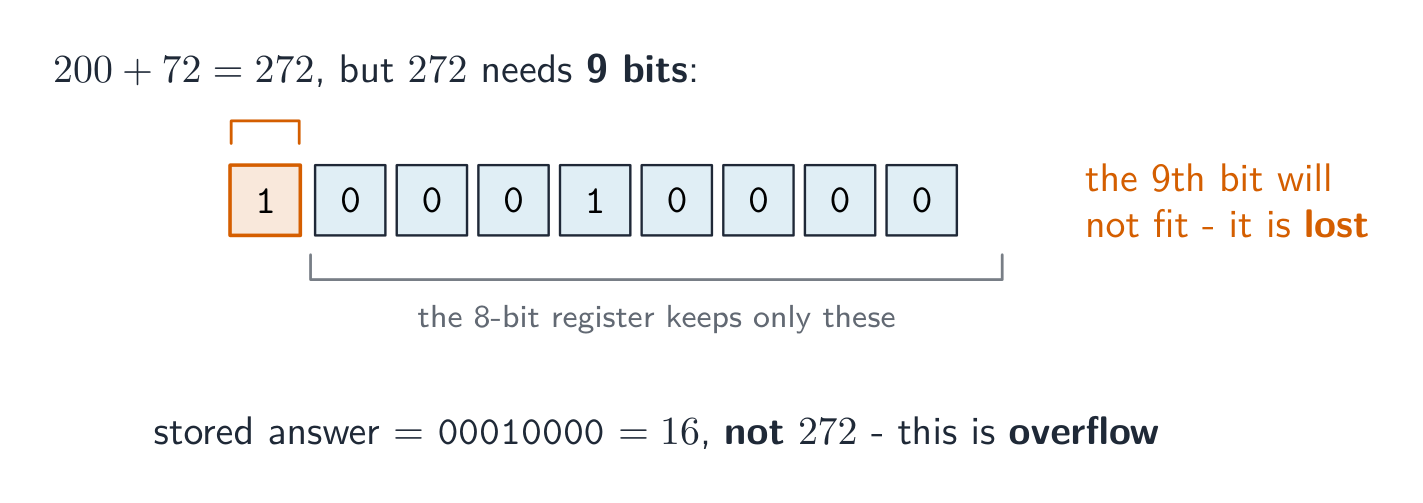
An 8-bit register can hold denary values from 0 to 255 only. If an addition gives a result above 255, the answer needs a 9th bit. The register cannot hold this extra bit, so it is lost. This is called overflow 溢出 (an overflow error). It happens when a value goes outside the limit the register can store.
Example: 11001000 (200) $+$01001000 (72) $= 272$. In binary that is 1 00010000, which needs 9 bits. The leading 1 will not fit in 8 bits, so the stored answer is wrong.
Adding 200 and 72 needs 9 bits, but an 8-bit register drops the ninth, so the answer is wrong
A logical binary shift 逻辑二进制移位 moves all the bits left or right by a number of places.
Bits that move off the end of the register are lost.
Zeros are added at the empty end.
A left shift multiplies the number by 2 for each place moved. A right shift divides it by 2 for each place; the right-most bits (the least significant bit(s) 最低有效位) are lost.
A left shift of 2: every bit moves 2 places left, the top bits are lost and zeros fill the right
The result is 11010100 (212), which is $53 \times 4$. The two left-most bits were lost and two zeros came in on the right. If a 1 is pushed off the end, that information is gone for good.
So far the numbers were positive. Two's complement 补码 lets an 8-bit register hold negative numbers too.
In two's complement, the left-most bit (the most significant bit 最高有效位, or MSB) has a negative place value:
-128 64 32 16 8 4 2 1
If the MSB is 0, the number is positive.
If the MSB is 1, the number is negative.
To make a positive number negative: write the positive binary, flip every bit (0↔1), then add 1.
Example: make $-40$.
$+40$ = 00101000
flip the bits = 11010111
add 1 = 11011000
So $-40$ = 11011000. Check by adding the place values: $-128 + 64 + 16 + 8 = -40$.
The most significant bit is worth −128, so 11011000 = −128 + 64 + 16 + 8 = −40
To read a negative two's complement number, just add the place values (the MSB counts as $-128$). The range of an 8-bit two's complement number is $-128$ to $+127$.
1 Understand how and why a computer represents text and the use of character sets, including American standard code for information interchange (ASCII) and Unicode
• Text is converted to binary to be processed by a computer • Unicode allows for a greater range of characters and symbols than ASCII, including different languages and emojis • Unicode requires more bits per character than ASCII
2 Understand how and why a computer represents sound, including the effects of the sample rate and sample resolution
• A sound wave is sampled for sound to be converted to binary, which is processed by a computer • The sample rate is the number of samples taken in a second • The sample resolution is the number of bits per sample • The accuracy of the recording and the file size increases as the sample rate and resolution increase
3 Understand how and why a computer represents an image, including the effects of the resolution and colour depth
• An image is a series of pixels that are converted to binary, which is processed by a computer • The resolution is the number of pixels in the image • The colour depth is the number of bits used to represent each colour • The file size and quality of the image increase as the resolution and colour depth increase
Source: Cambridge International syllabus
Computers store text by giving every character a number, then storing that number in binary. The set of characters a computer can use, together with their numbers, is a character set 字符集.
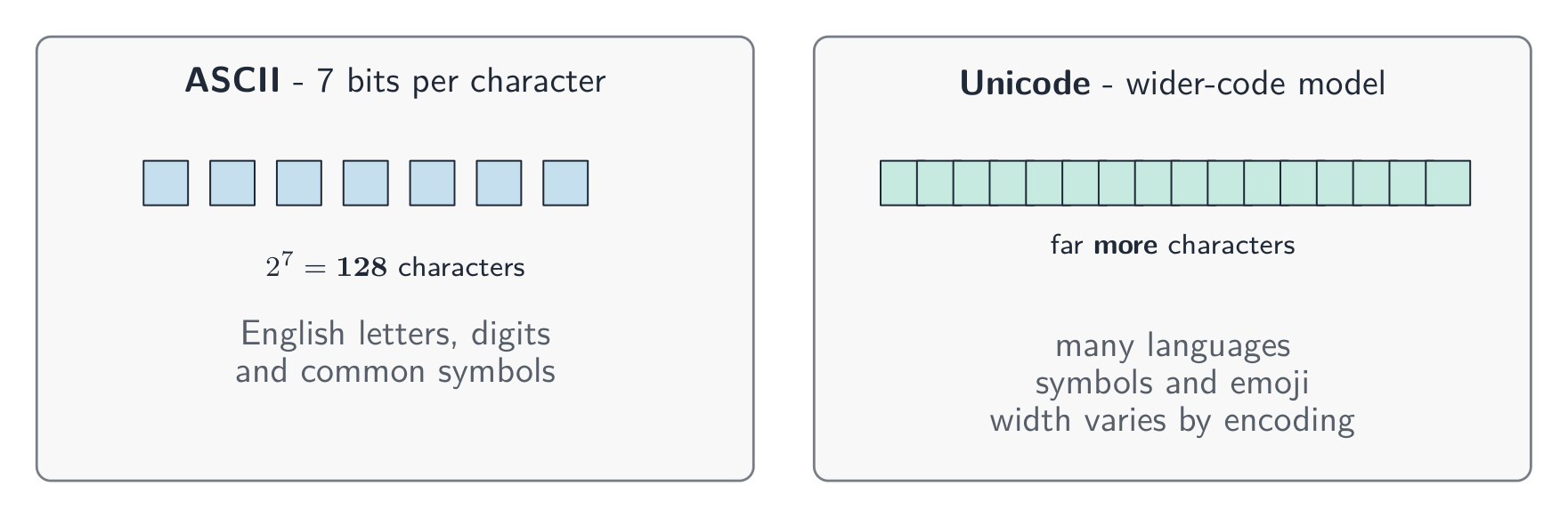
ASCII uses 7-bit character codes, giving $N = 2^b = 2^7 = 128$ different codes. It includes English letters, digits and common symbols; not all 128 codes are letters. Unicode represents a much greater range of characters, including different languages and emoji 表情符号.
Try it — encode a short message. This extract from ASCII gives A = 65, B = 66, C = 67 and space = 32. Write the four 7-bit groups for CAB , including its final space. Then decode the groups 1000010 1000001 1000011.
Worked answer. Look up each character, then convert its code to binary:
Character
Code
Seven bits
C
67
1000011
A
65
1000001
B
66
1000010
space
32
0100000
So CAB is 1000011 1000001 1000010 0100000. The second message decodes to BAC. A space has a code too; it is not an absence of stored data. The sender and receiver must use the same character-code mapping to interpret the message correctly.
ASCII has 128 codes. Unicode supports a much greater range; the wider row illustrates the syllabus model.
Why a larger range matters. ASCII cannot directly represent a Chinese name. Unicode includes Chinese characters as well as English characters and many other languages. For the syllabus comparison, explain that a greater range needs more distinct binary codes, requiring more bits per character than the 7-bit ASCII model.
Try it — compare stated storage models. Store the four characters CAB using (A) 7 bits per character and (B) 16 bits per character. Assume the bits are packed with no padding or extra file information. Find the text data size in each model. The 16-bit value is an assumption for this example, not a rule that all Unicode characters take 16 bits.
Worked answer. With the same number of characters, multiply by the stated bits per character:
$$S = n b = 4 \times 7\ \text{bits} = 28\ \text{bits}$$
$$S = n b = 4 \times 16\ \text{bits} = 64\ \text{bits}$$
Model B uses more storage 存储 for this example because its stated code width is larger. Use the width given in an exam question. In real files, the encoding also matters: UTF-8 stores ASCII characters in the same bytes as an ASCII file, so Unicode text does not always occupy more bytes. You do not need the detailed UTF-8 rules for this syllabus comparison.
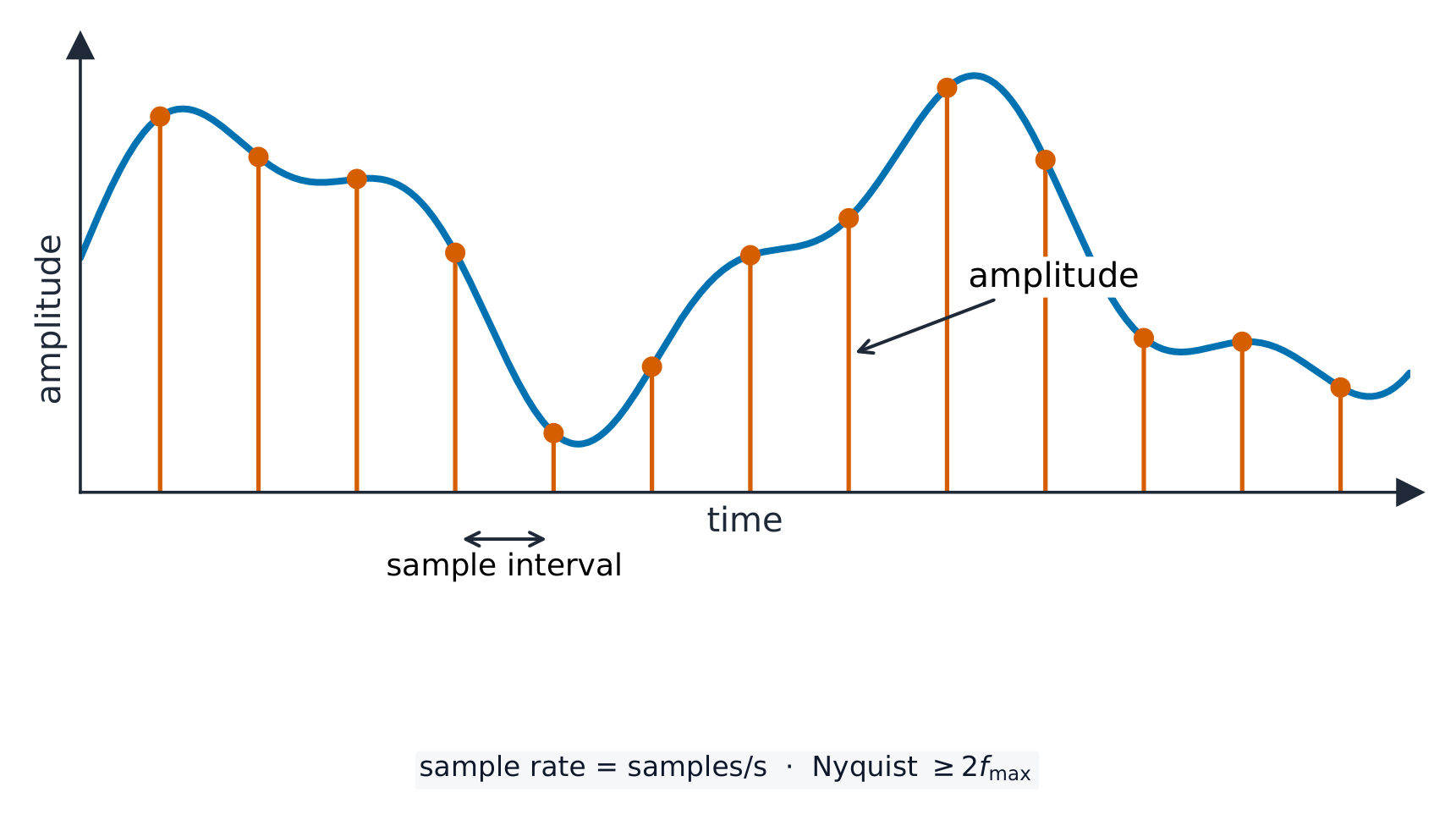
A sound wave 声波 is smooth and always changing. To store it, the computer measures the height of the wave at regular moments. This is called sampling 采样, and each measurement is a sample.
Sampling records the wave's height (amplitude) at regular moments
sample rate 采样率 is the number of samples taken each second (measured in Hz).
sample resolution 采样分辨率 is the number of bits used for each sample. The height of the wave at a sample point is its amplitude 振幅.
A higher sample rate and a higher sample resolution give a more accurate recording, but a larger file.
Explore
Representing sound
y = a sin(bt + c)
Sound is a wave; sampling records its height many times a second.
• Including: – bit – nibble – byte – kibibyte (KiB) – mebibyte (MiB) – gibibyte (GiB) – tebibyte (TiB) – pebibyte (PiB) – exbibyte (EiB) • The amount of the previous denomination present in the data storage size, e.g.: – 8 bits in a byte – 1024 mebibytes in a gibibyte
2 Calculate the file size of an image file and a sound file, using information given
• Answers must be given in the units specified in the question. Calculations must use the measurement of 1024 and not 1000 • Information given may include: – image resolution and colour depth – sound sample rate, resolution and length of track
3 Understand the purpose of and need for data compression
• Compression exists to reduce the size of the file • What the impact of this is, e.g.: – less bandwidth required – less storage space required – shorter transmission time
4 Understand how files are compressed using lossy and lossless compression methods
• Lossy compression reduces the file size by permanently removing data, e.g. reducing resolution or colour depth, reducing sample rate or resolution • Lossless compression reduces the file size without permanent loss of data, e.g. run length encoding (RLE)
Source: Cambridge International syllabus
Data storage is measured in the units below. A nibble is 4 bits and a byte is 8 bits; from the kibibyte upward, each unit is 1024 times the one before it (because $1024 = 2^{10}$, which fits binary).
Unit
Equals
bit
a single 0 or 1
nibble
4 bits
byte
8 bits
kibibyte (KiB)
1024 bytes
mebibyte (MiB)
1024 KiB
gibibyte (GiB)
1024 MiB
tebibyte (TiB)
1024 GiB
pebibyte (PiB)
1024 TiB
exbibyte (EiB)
1024 PiB
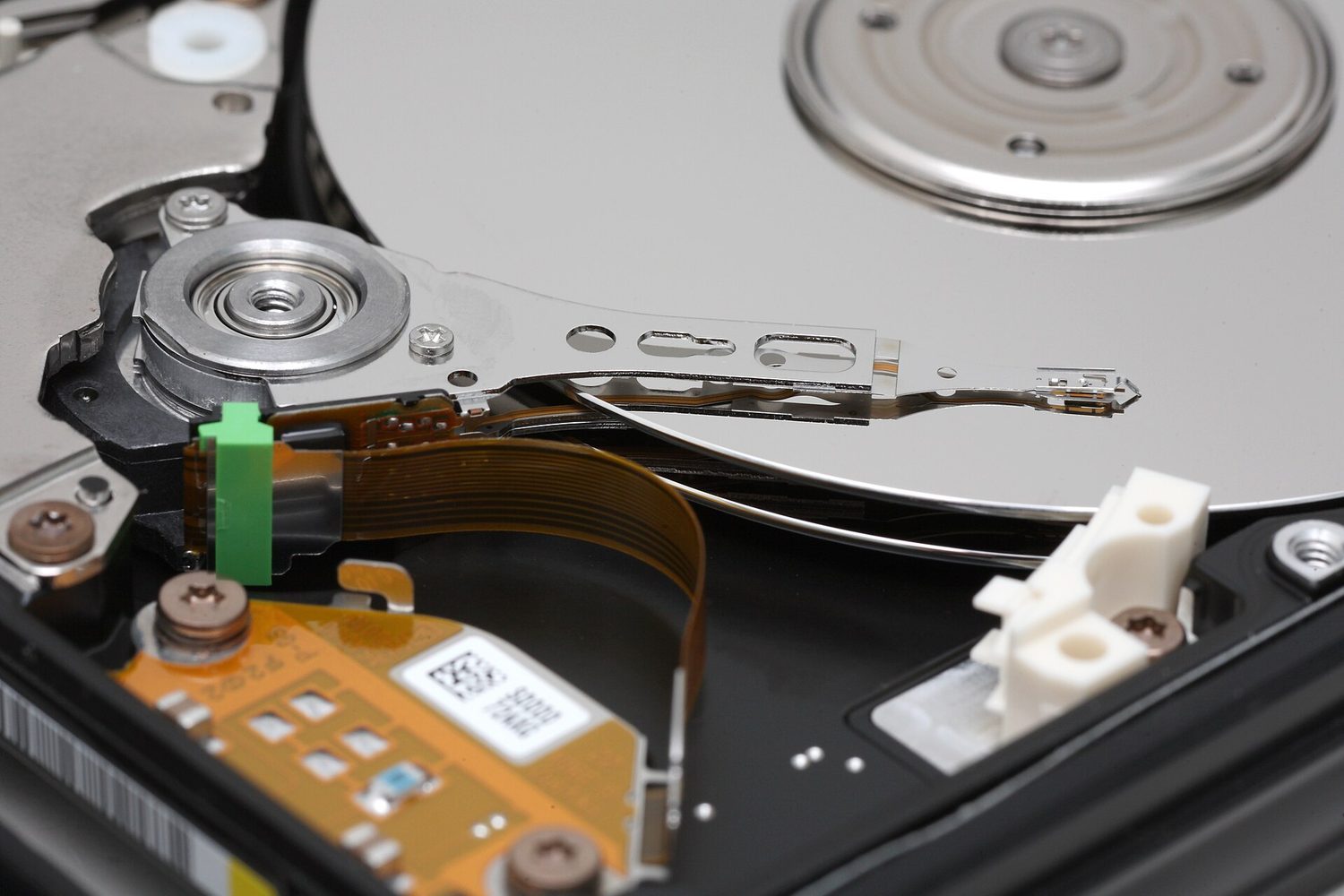
Hard-disk platters: storage is measured in bytes — knowing file size needs width × height × colour depth for images
Sound file size (in bits) $=$ sample rate $\times$ sample resolution $\times$ length in seconds.
Always divide by 1024 (not 1000) to change to KiB, MiB and so on. Give your answer in the unit the question asks for.
Worked example. A sound is recorded for 30 seconds at a sample rate of 8,000 Hz with a sample resolution of 16 bits. Find the file size in kibibytes (KiB).
Compression 压缩 makes a file smaller. A smaller file:
uses less storage space,
needs less bandwidth 带宽 (the amount of data a connection can carry),
takes a shorter time to send (a shorter transmission 传输 time).
There are two types.
Lossless compression
Lossless 无损 compression makes the file smaller with no permanent loss of data. The original file can be rebuilt exactly.
One method is run-length encoding 行程编码 (RLE). It replaces a run of repeated values with one copy of the value and a count of how many times it repeats. For example WWWWWWWW (8 whites) is stored as "8 W". This works well when data has many repeats.
Run-length encoding stores each run once as a count and a value
Lossy compression
Lossy 有损 compression makes the file much smaller by permanently removing some data. The removed data cannot be got back. For example:
reducing the resolution or colour depth of an image,
reducing the sample rate or sample resolution of a sound.
Use lossless when you must keep every detail (text and program files). Use lossy for photos, music and video, where a small loss of quality is worth a much smaller file.
Explore
Run-length encoding
Watch repeated symbols get squashed into a count — simple lossless compression.
Convert denary → binary by subtracting the place values (128, 64, 32 …); binary → denary by adding the place values that hold a 1.
To convert to hex, group the binary into nibbles of 4 bits from the right; each nibble is exactly one hex digit.
Overflow happens when a result needs more bits than the register has (an 8-bit register only holds 0–255), so the extra bit is lost.
File size in bits: for an image, width × height × colour depth; for sound, sample rate × resolution × seconds. Divide by 8 for bytes, then by 1024 for each larger unit.
Lossless compression keeps every bit (text; run-length encoding); lossy permanently removes data (photos, music) for a much smaller file.
Interactive lessons on this topic
Work through it step by step, with instant-check exercises.