| Candidates should be able to: | Notes and guidance |
|---|---|
| 1 Understand the difference between the internet and the world wide web | • The internet is the infrastructure • The world wide web is the collection of websites and web pages accessed using the internet |
| 2 Understand what is meant by a uniform resource locator (URL) | • A URL is a text-based address for a web page; it can contain the protocol, the domain name and the web page/file name |
| 3 Describe the purpose and operation of hypertext transfer protocol (HTTP) and hypertext transfer protocol secure (HTTPS) | |
| 4 Explain the purpose and functions of a web browser | • The main purpose of a web browser is to render hypertext markup language (HTML) and display web pages • Functions include: – storing bookmarks and favourites – recording user history – allowing use of multiple tabs – storing cookies – providing navigation tools – providing an address bar |
| 5 Describe how web pages are located, retrieved and displayed on a device when a user enters a URL | • Including the role of: – the web browser – IP addresses – the domain name server (DNS) – the web server – HTML |
| 6 Explain what is meant by cookies and how they are used, including session cookies and persistent cookies | • Cookies are used for functions, including: – saving personal details – tracking user preferences – holding items in an online shopping cart – storing login details |
The internet and its uses
IGCSE Computer Science · Topic 5
 9:52
9:52
The Internet & the Web
You type a web address and press enter. Less than a second later, a page appears — a page that lives on a computer maybe ten thousand kilometres away. In that…
English narration · English + 中文 subtitles burned in
5.1
The internet and the world wide web

Syllabus
Source: Cambridge International syllabus
People often mix up these two terms, but they are not the same.
- The internet 互联网 is the infrastructure 基础设施 — the huge worldwide network of computers and the cables, routers and connections that join them.
- The world wide web 万维网 (WWW) is a collection of websites 网站 and web pages that you view using the internet.
So the internet is the network; the web is one of the things you use on that network.

Vocabulary
Train
| English |
|---|
| internet/ˈɪntənet/ |
| infrastructure/ˈɪnfrəstrʌktʃə/ |
| world wide web/wɜːld waɪd web/ |
| websites/ˈwebsaɪts/ |
5.1
URL

A uniform resource locator 统一资源定位符 (URL) is a text-based address for a web page. You type it into a web browser 网页浏览器 to visit a page, for example https://www.example.com/index.html.
Vocabulary
Train
| English |
|---|
| uniform resource locator/ˈjuːnɪfɔːm rɪˈzɔːs ləʊˈkeɪtə/ |
| web browser/web ˈbraʊzə/ |
5.1
The web browser
A web browser is the program you use to view web pages. Its role includes:
- rendering 渲染 the hypertext markup language 超文本标记语言 (HTML) — turning the page's code into what you see;
- displaying web pages on the screen;
- managing how a web page is presented — its layout, text and images.
Vocabulary
Train
| English |
|---|
| rendering/ˈrendərɪŋ/ |
| hypertext markup language/ˈhaɪpətekst ˈmɑːkʌp ˈlæŋɡwɪdʒ/ |
5.1
How a web page reaches you
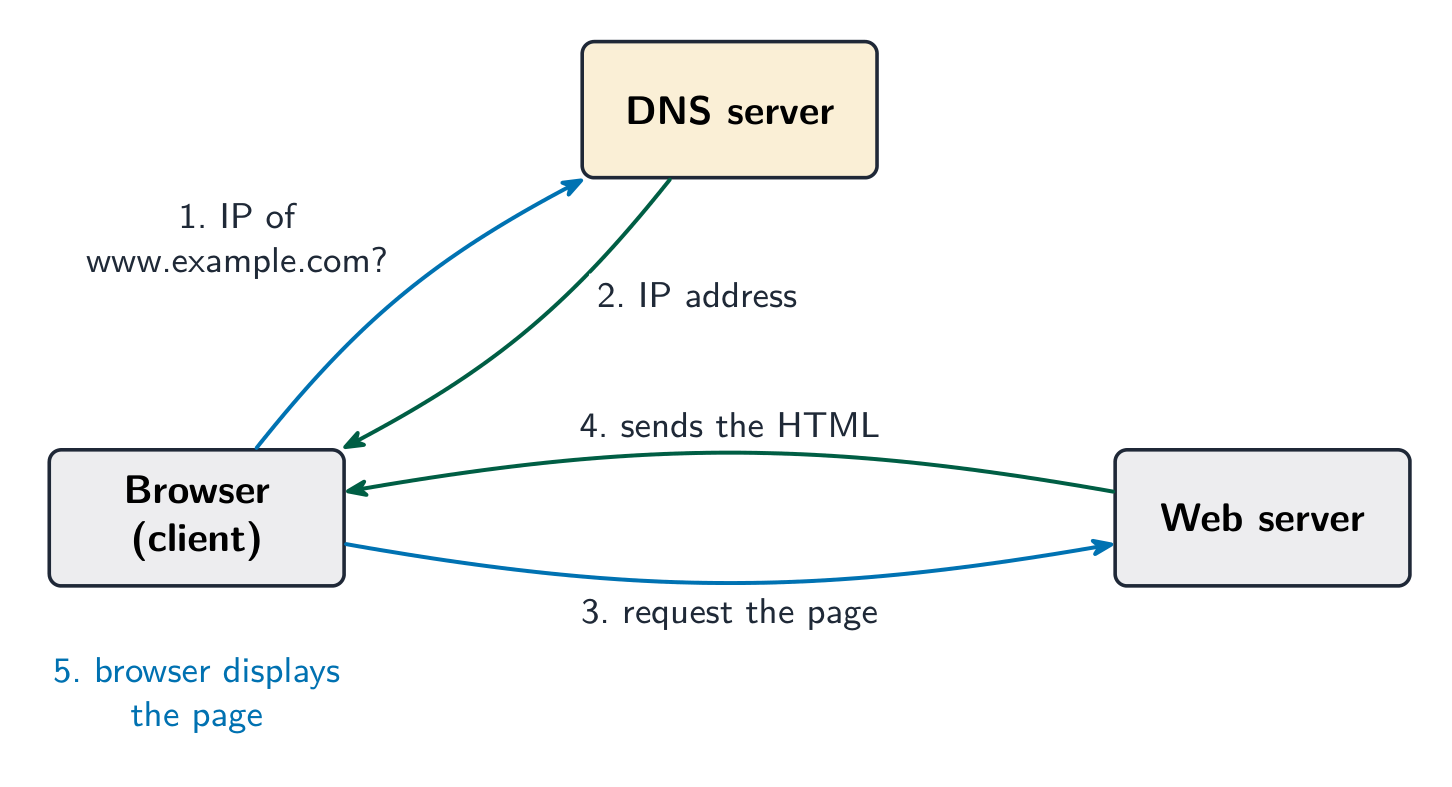
When you type a URL and press enter, several steps happen:
- The browser needs the website's IP address 网际协议地址, but a URL uses a name, not a number.
- The browser asks a domain name service 域名服务 (DNS) — a system that stores the IP address for each web address.
- The DNS finds the matching IP address and sends it back to the browser.
- The browser uses the IP address to contact the web server 网页服务器 that stores the page.
- The web server sends the page's HTML back to the browser.
- The browser turns the HTML into the page and displays it.
If the DNS does not have the address, it asks another DNS server until the address is found.

Worked example. Break down the URL https://www.example.com/books/index.html. https is the protocol, the set of rules used to transfer the page (the s means the transfer is encrypted). www.example.com is the domain name, which identifies the web server and which a DNS server turns into an IP address. /books/index.html is the file path and file name of the resource stored on that server. Name each part together with its job: an answer that says "the first bit" and "the last bit" describes the URL without ever explaining it.
Explore
What happens when you load a web page
Step through it. The web address is just a name — DNS turns it into an IP address before the browser can ask the right server for the page.
Vocabulary
Train
| English |
|---|
| IP address/ˌaɪ ˈpiː əˈdres/ |
| domain name service/dəˈmeɪn neɪm ˈsɜːvɪs/ |
| web server/web ˈsɜːvə/ |
5.1
Cookies

A cookie is a small text file that a website stores on your device. It lets the website remember things about you. There are two types.
| Type | Kept when you close the browser? | Used for |
|---|---|---|
| session 会话 cookie | no — deleted when you close the browser | short-term data, e.g. items in a shopping basket |
| persistent 持久 cookie | yes — saved on the device | remembering you between visits |
Cookies are used to:
- save personal details so you do not type them again (such as login or address);
- track user preferences 用户偏好, such as your language or the things you like, so the site can suggest content.
Vocabulary
Train
| English |
|---|
| session/ˈseʃn/ |
| persistent/pəˈsɪstənt/ |
| user preferences/ˈjuːzə ˈprefrənsɪz/ |
5.2
Digital currency
Syllabus
| Candidates should be able to: | Notes and guidance |
|---|---|
| 1 Understand the concept of a digital currency and how digital currencies are used | • A digital currency is one that only exists electronically |
| 2 Understand the process of blockchain and how it is used to track digital currency transactions | • Blockchain, in its basic form, is a digital ledger, that is a time-stamped series of records that cannot be altered |
Source: Cambridge International syllabus
A digital currency 数字货币 is money that exists only in electronic form 电子形式. There are no coins or notes. It is stored and moved between people using computers, and can be used to pay for things online.
A problem with digital money is trust: how do you stop someone spending the same money twice, or changing the records? Blockchain solves this.
Vocabulary
Train
| English |
|---|
| digital currency/ˈdɪdʒɪtl ˈkʌrənsi/ |
| electronic form/ɪlekˈtrɒnɪk fɔːm/ |
5.2
Blockchain

A blockchain 区块链 is a digital ledger 数字账本 — a shared record of every transaction 交易. The record is copied across many computers, so no single person controls it and it is very hard to change.
The transactions are kept in blocks joined in a chain. Each block holds:
- the data of the transaction (who paid whom, and how much);
- a timestamp 时间戳 (the date and time);
- a hash value 哈希值 — a special code worked out from the block's contents.
Each block also stores the hash of the block before it. If someone changes an old block, its hash changes, so it no longer matches the next block. This breaks the chain and the change is spotted at once. This is how blockchain tracks transactions safely.
Explore
Hashing behind a blockchain
A hash is one-way and a tiny change to the input flips much of the output — a blockchain chains these hashes so any tamper is obvious.
Vocabulary
Train
| English |
|---|
| blockchain/ˈblɒktʃeɪn/ |
| digital ledger/ˈdɪdʒɪtl ˈledʒə/ |
| transaction/trænˈsækʃn/ |
| timestamp/ˈtaɪmstæmp/ |
| hash value/hæʃ ˈvæljuː/ |
5.3
Cyber security threats
Syllabus
| Candidates should be able to: | Notes and guidance |
|---|---|
| 1 Describe the processes involved in, and the aim of carrying out, a range of cyber security threats | • Including: – brute-force attack – data interception – distributed denial of service (DDoS) attack – hacking – malware (virus, worm, Trojan horse, spyware, adware, ransomware) – pharming – phishing – social engineering |
| 2 Explain how a range of solutions are used to help keep data safe from security threats | • Including: – access levels – anti-malware, including anti-virus and anti-spyware – authentication (username and password, biometrics, two-step verification) – automating software updates – checking the spelling and tone of communications – checking the URL attached to a link – firewalls – privacy settings – proxy-servers – secure socket layer (SSL) security protocol |
Source: Cambridge International syllabus
Cyber security 网络安全 means keeping computers, networks and data safe from attack. You must know these threats.
| Threat | What it is |
|---|---|
| brute force attack 暴力破解 | trying many passwords very quickly until the right one is found |
| data interception 数据拦截 | "listening in" to steal data while it travels across a network |
| distributed denial of service 分布式拒绝服务 (DDoS) attack | flooding a server with so many requests that it cannot respond, so the website goes down |
| hacking 黑客攻击 | gaining access to a computer system without permission |
| malware 恶意软件 | harmful software (see the table below) |
| pharming 域名欺骗 | secret code sends you to a fake website even when you type the correct address |
| phishing 网络钓鱼 | fake emails or messages that trick you into giving away private details |
| social engineering 社会工程 | tricking a person (not a computer) into breaking security, e.g. pretending to be the boss |
Types of malware
Malware is any software made to harm a computer. The main types are:
| Malware | What it does |
|---|---|
| virus 病毒 | attaches to a file and copies itself when the file is opened; can delete or damage data |
| worm 蠕虫 | copies itself across a network on its own, without needing a file to be opened |
| Trojan horse 特洛伊木马 | pretends to be useful software, but harms the computer once installed |
| spyware 间谍软件 | secretly records what you do, such as the keys you press |
| adware 广告软件 | floods you with unwanted adverts |
| ransomware 勒索软件 | locks your files and demands payment to unlock them |
Impact of the threats
These attacks can steal personal data, delete or change files, stop a service from working, cost money, and make users lose trust in a company. For example, a DDoS attack can make an online shop unusable, so it loses sales.
Vocabulary
Train
| English |
|---|
| cyber security/ˈsaɪbə sɪˈkjʊərɪti/ |
| brute force attack/bruːt fɔːs əˈtæk/ |
| data interception/ˈdeɪtə ˌɪntəˈsepʃn/ |
| distributed denial of service/ˈdɪstrɪbjuːtɪd dɪˈnaɪəl ɒv ˈsɜːvɪs/ |
| hacking/ˈhækɪŋ/ |
| malware/ˈmælweə/ |
| pharming/ˈfɑːmɪŋ/ |
| phishing/ˈfɪʃɪŋ/ |
| social engineering/ˈsəʊʃl ˌendʒɪˈnɪərɪŋ/ |
| virus/ˈvaɪrəs/ |
| worm/wɜːm/ |
| Trojan horse/ˈtrəʊdʒn hɔːs/ |
| spyware/ˈspaɪweə/ |
| adware/ˈædweə/ |
| ransomware/ˈrænsəmweə/ |
5.3
Keeping data safe

You can protect data using these methods.
- access levels 访问权限 — each user can only see or change the data they need, nothing more.
- anti-malware 反恶意软件 software, including anti-virus 杀毒软件 and anti-spyware 反间谍软件 — scans for and removes harmful software.
- authentication 身份验证 — proving who you are before you get access. Methods include:
- biometrics 生物识别 (fingerprint or face),
- a password 密码,
- two-step verification 两步验证 (a code sent to your phone as well as a password).
- automating software updates — updates fix weak points (bugs) in software automatically.
- checking the spelling and tone of messages — bad spelling or an odd, urgent tone can show a message is fake (phishing).
- checking the URL attached to a link — a wrong or strange web address warns you the link is unsafe.
- firewall 防火墙 — checks data going in and out of a network and blocks anything not allowed.
- privacy settings 隐私设置 — control who can see your information online.
- proxy server 代理服务器 — sits between the user and the internet, hiding the user's IP address and filtering out unsafe content.
Explore
Encryption with a key
Change the shift — that is the key. Each letter slides that many places to make ciphertext, and the same key slides it back. That is symmetric encryption.
Vocabulary
Train
| English |
|---|
| access levels/ˈækses ˈlevlz/ |
| anti-malware/ˈænti ˈmælweə/ |
| anti-virus/ˈænti ˈvaɪrəs/ |
| anti-spyware/ˈænti ˈspaɪweə/ |
| authentication/ɔːˌθentɪˈkeɪʃn/ |
| biometrics/ˌbaɪəʊˈmetrɪks/ |
| password/ˈpæswɜːd/ |
| two-step verification/tuː step ˌverɪfɪˈkeɪʃn/ |
| firewall/ˈfaɪəwɔːl/ |
| privacy settings/ˈprɪvəsi ˈsetɪŋz/ |
| proxy server/ˈprɒksi ˈsɜːvə/ |
5.3
Exam tips
- The internet is the worldwide network (the infrastructure); the world wide web is the pages you view on it — do not mix the two up.
- Learn how a page loads: the browser asks a DNS for the site's IP address, then requests the page from the web server, which returns the HTML.
- Match the malware types: virus (attaches to a file), worm (spreads by itself across a network), Trojan horse (pretends to be useful), spyware, ransomware.
- Match each threat to a defence: phishing/pharming → check the URL; brute force → strong passwords + two-step verification; interception → encryption; hacking/DDoS → a firewall.
- A session cookie is deleted when you close the browser; a persistent cookie is saved to remember you between visits.
Interactive lessons on this topic
Work through it step by step, with instant-check exercises.