Skip to content · ⁨ข้ามไปยังเนื้อหา⁩

Information representation · ⁨การแสดงข้อมูล⁩

A-Level Computer Science · ⁨Computer Science A-Level⁩ · Topic 1 · ⁨หัวข้อ 1⁩

Video lesson for this topic · ⁨บทเรียนวิดีโอสำหรับหัวข้อนี้⁩ Open the video page · ⁨เปิดหน้าวิดีโอ⁩
22:30

ระบบตัวเลข & ข้อมูล

รูปนี้ เพลงนี้ วิดีโอนี้ ชื่อของคุณ ข้อความ ไฟล์ทุกไฟล์บนทุกอุปกรณ์ — ภายในคอมพิวเตอร์ ทั้งหมดนั้นคือเพียงเลขศูนย์และเลขหนึ่ง.…

English narration · English + 中文 subtitles burned in · ⁨การบรรยายภาษาอังกฤษ · คำบรรยายภาษาอังกฤษ + 中文 ลอยตัวบนภาพ⁩

1.1

Number systems · ⁨ระบบตัวเลข⁩

Syllabus · ⁨หลักสูตร⁩
English
Candidates should be able to: Notes and guidance
Show understanding of binary magnitudes and the difference between binary prefixes and decimal prefixes Understand the difference between and use: • kibi and kilo • mebi and mega • gibi and giga • tebi and tera
Show understanding of different number systems Use the binary, denary, hexadecimal number bases and Binary Coded Decimal (BCD) and one’s complement and two’s complement representation for binary numbers
Convert an integer value from one number base/ representation to another
Perform binary addition and subtraction Using positive and negative binary integers
Show understanding of how overflow can occur
Describe practical applications where Binary Coded Decimal (BCD) and Hexadecimal are used
Show understanding of and be able to represent character data in its internal binary form, depending on the character set used Students are expected to be familiar with ASCII (American Standard Code for Information Interchange), extended ASCII and Unicode. Students will not be expected to memorise any particular character codes
ไทย
ผู้เข้าสอบควรสามารถ: หมายเหตุและคำแนะนำ
แสดงความเข้าใจในขนาดสองฐานและการแตกต่างระหว่างพรีфикซ์สองฐานกับพรีфикซ์สิบ进制 ใช้ความแตกต่างและใช้คำเหล่านี้: • kibi และ kilo • mebi และ mega • gibi และ giga • tebi และ tera
แสดงความเข้าใจในระบบเลขต่างๆ ใช้ฐานเลข binary, denary, hexadecimal และ Binary Coded Decimal (BCD)以及 one’s complement และ two’s complement สำหรับการแทนค่าเลขฐานสอง
แปลงค่าจำนวนเต็มจากฐานเลขหรือรูปแบบหนึ่งไปยังอีกฐานหรือรูปแบบหนึ่ง
ทำการบวกและลบเลขฐานสอง โดยใช้จำนวนเต็มสองฐานที่มีค่าบวกและลบ
แสดงความเข้าใจว่า overflow สามารถเกิดขึ้นได้อย่างไร
อธิบายการใช้งานจริงที่ใช้ Binary Coded Decimal (BCD) และ Hexadecimal
แสดงความเข้าใจและสามารถแสดงข้อมูลตัวอักษรในรูปแบบ nhịภายในตามชุดตัวอักษรที่ใช้ นักเรียนควรรู้จัก ASCII (American Standard Code for Information Interchange), extended ASCII และ Unicode นักเรียนจะไม่ถูกคาดหวังให้ท่องจำรหัสตัวอักษรใดๆ โดยเฉพาะ

Source: Cambridge International syllabus · ⁨แหล่งที่มา: หลักสูตร Cambridge International⁩

English
Counting in binary: 0 to 15

The three number systems 数制 you must use:

  • denary 十进制 (decimal, base 10) — uses digits 0–9. Place values are powers of ten.
  • binary 二进制 (base 2) — uses 0 and 1. Place values are powers of two. Every byte 字节 is 8 bits 位.
  • hexadecimal 十六进制 (base 16) — uses 0–9 then A–F for 10–15. Each hex digit 数位 stands for exactly 4 bits.

Conversions

Denary → binary: keep dividing by 2 and record the remainders, read bottom-up. Or subtract the largest place value 位值 (power of 2) that fits.

Example: $558_{10}$: $558 = 512 + 32 + 8 + 4 + 2 = 2^{9} + 2^{5} + 2^{3} + 2^{2} + 2^{1}$. In 12 bits: 0010 0010 1110.

Binary → hex: group the bits into nibbles 半字节 (4 bits) from the right and convert each. 0010 0010 1110 → 2 2 E → 22E.

Hex → binary: replace each hex digit with its 4-bit pattern. Hex → denary: multiply each digit by its place value. 22E $= 2 \times 256 + 2 \times 16 + 14 = 558$.

Worked example. Convert denary 200 to 8-bit binary, then to hexadecimal.

$200 = 128 + 64 + 8$, so the binary is 11001000. In nibbles, 1100 1000 $= 12$ and $8$, i.e. $\text{C}$ and $8$, so the hexadecimal is C8.

How many bits?

Exam questions fix the register width 寄存器宽度 (8, 12 or 16 bits). Pad with leading zeros to that width: $558$ in 12 bits is 0010 0010 1110, never 10 0010 1110.

To find the minimum number of bits that can store a value, ask which place values you need:

  • an unsigned integer from $0$ to $2^{n} - 1$ needs $n$ bits: $200$ needs 8 bits (the top is $255$), $1000$ needs 10 bits (the top is $1023$), $16$ needs 5 bits (4 bits stop at $15$).
  • a signed two's-complement integer from $-2^{n-1}$ to $2^{n-1} - 1$ needs $n$ bits: $-200$ needs 9 bits, because 8 bits stop at $-128$.
  • one hexadecimal digit needs 4 bits, one BCD digit needs 4 bits, and one ASCII character needs 7 bits (8 for extended ASCII).

Binary vs decimal prefixes

Two prefix families look similar but differ — decimal (powers of 10) and binary (powers of 2):

Decimal (SI) Binary (memory)
kilo $= 10^{3}$ kibi (Ki) $= 2^{10} = 1024$
mega $= 10^{6}$ mebi (Mi) $= 2^{20}$
giga $= 10^{9}$ gibi (Gi) $= 2^{30}$
tera $= 10^{12}$ tebi (Ti) $= 2^{40}$

So a tebibyte (TiB) is slightly more than a terabyte (TB). A "1 TB" drive holds $10^{12}$ bytes, but an operating system that reports in TiB shows a smaller number.

ไทย
การนับเลขฐานสอง: 0 ถึง 15

ระบบตัวเลขสามระบบที่คุณต้องรู้:

  • เดนารี่ (ทศนิยม, base 10) — ใช้เลข 0–9 ค่าหลักคือกำลังของสิบ
  • ไบนารี (base 2) — ใช้ 0 และ 1 ค่าหลักคือกำลังของสอง Every byte มี 8 bits
  • เฮกซาเดซิมาล (base 16) — ใช้ 0–9 ตามด้วย A–F สำหรับ 10–15 แต่ละ digit แทน 4 bits พอดี
ลูกปัดบนเครื่องคิดเลขแบบดั้งเดิม
เครื่องคิดเลขแสดงตัวเลขด้วยค่าหลัก — หลักการเดียวกันกับทศนิยม, ไบนารี และเฮกซาเดซิมาล

การแปลงหน่วย

เดนารี่ → ไบนารี: ค่อยๆ หารด้วย 2 และจดเศษมาอ่านจากล่างขึ้นบน หรือลบด้วย ค่าหลัก (กำลังของ 2) ที่ใหญ่ที่สุดที่ยังเหลืออยู่

ตัวอย่าง: $558_{10}$: $558 = 512 + 32 + 8 + 4 + 2 = 2^{9} + 2^{5} + 2^{3} + 2^{2} + 2^{1}$. ใน 12 bits: 0010 0010 1110

ไบนารี → เฮก: กลุ่ม bits เป็น nibbles (4 bits) จากขวาไปซ้ายแล้วแปลงแต่ละกลุ่ม 0010 0010 1110 → 2 2 E → 22E

เฮก → ไบนารี: เปลี่ยนแต่ละ hex digit เป็นรูปแบบ 4-bit เฮก → เดนารี่: คูณแต่ละ digit ด้วยค่าหลัก 22E $= 2 \times 256 + 2 \times 16 + 14 = 558$

ตัวอย่างวิธีทำ. แปลง_denary_ 200 เป็น 8-bit binary แล้วแปลงเป็นเฮกซาเดซิมาล

$200 = 128 + 64 + 8$, ดังนั้นไบนารีคือ 11001000. ใน nibbles, 1100 1000 $= 12$ และ $8$, นั่นคือ $\text{C}$ และ $8$, ดังนั้นเฮกซาเดซิมาลคือ C8

ตารางตำแหน่งเลขฐานสองสำหรับ 200: คอลัมน์ 128, 64, 32, 16, 8, 4, 2, 1 เก็บ bits 1,1,0,0,1,0,0,0; nibble 2-bit ทั้งสอง 4-bit 1100 และ 1000 เปลี่ยนเป็นเลขหลัก hex C และ 8, ดังนั้น 200 = 11001000 = C8 *อ่านค่า 200 จากค่าหลักของมัน แล้วกลุ่ม bits เป็น nibbles เพื่อได้เฮก C8

มีกี่ bit?

ข้อสอบกำหนด ความกว้างของเรจิสเตอร์ (8, 12 หรือ 16 บิต) เติมด้วยเลขศูนย์นำหน้าให้ถึงความ;width นั้น: $558$ ใน 12 บิตคือ 0010 0010 1110, ไม่เคยเป็น 10 0010 1110

เพื่อหา จำนวน minimum ของ bits ที่สามารถเก็บค่าได้ ให้ถามว่าต้องใช้ค่าหลักอะไรบ้าง:

  • จำนวนเต็มไม่มีเครื่องหมายตั้งแต่ $0$ ถึง $2^{n} - 1$ ต้องใช้ $n$ บิต: $200$ ต้องใช้ 8 บิต (ตำแหน่งสูงสุดคือ $255$), $1000$ ต้องใช้ 10 บิต (ตำแหน่งสูงสุดคือ $1023$), $16$ ต้องใช้ 5 บิต (4 บิตจบที่ $15$)
  • signed two's-complement integer จาก $-2^{n-1}$ ถึง $2^{n-1} - 1$ ต้องใช้ $n$ bits: $-200$ ต้องใช้ 9 bits เพราะ 8 bitsStop ที่ $-128$
  • One hexadecimal digit ต้องใช้ 4 bits, one BCD digit ต้องใช้ 4 bits, และ one ASCII character ต้องใช้ 7 bits (8 สำหรับ extended ASCII)

Prefix ไบนารีเทียบกับทศนิยม

สองครอบครัว prefix ดูคล้ายกันแต่ต่างกัน — ทศนิยม (กำลังของ 10) และไบนารี (กำลังของ 2):

ทศนิยม (SI) ไบนารี (หน่วยความจำ)
kilo $= 10^{3}$ kibi (Ki) $= 2^{10} = 1024$
mega $= 10^{6}$ mebi (Mi) $= 2^{20}$
giga $= 10^{9}$ gibi (Gi) $= 2^{30}$
tera $= 10^{12}$ tebi (Ti) $= 2^{40}$

ดังนั้น Tebibyte (TiB) มากกว่า Terabyte (TB) เล็กน้อย. แ-drive "1 TB" มี $10^{12}$ bytes, แต่ OS ที่รายงานเป็น TiB จะแสดงตัวเลขที่น้อยกว่า

Explore · ⁨สำรวจ⁩

Binary, denary and hex · ⁨二进制、十进制和十六进制⁩

Type a number and see it in binary, denary and hexadecimal at once — and how the place values add up. · ⁨输入一个数字并同时以 binary, denary and hexadecimal 形式查看——以及位值如何相加。⁩

Vocabulary · ⁨คำศัพท์⁩ Train · ⁨ฝึกฝน⁩
English ไทย
number system/ˈnʌmbə ˈsɪstəm/ ระบบตัวเลข
binary/ˈbaɪnəri/ แบบไบนารี
denary/ˈdiːnəri/ ฐานสิบ
digit/ˈdɪdʒɪt/ หลักเลข
place value/pleɪs ˈvæljuː/ ตำแหน่งที่มีค่า
byte/baɪt/ ไบต์
bit/bɪt/ บิต (bit)
hexadecimal/ˌheksəˈdesɪml/ ฐานสิบหก
nibble/ˈnɪbl/ นิبل
register width/ˈredʒɪstə wɪtθ/ ความกว้างของรีจิสเตอร์
BCD/ˌbiː siː ˈdiː/ BCD
two's complement/tuːz ˈkɒmplɪmənt/ สองคอมพลีเมนต์
1.1

Binary arithmetic · ⁨การคำนวณไบนารี⁩

English

Binary addition

Add column by column from the right, carrying as in denary:

Bit A Bit B Carry in Sum bit Carry out
0 0 0 0 0
0 0 1 1 0
0 1 0 1 0
0 1 1 0 1
1 1 0 0 1
1 1 1 1 1

Overflow 溢出 happens when the result needs more bits than the register 寄存器 can hold — the carry-out of the leftmost column is the overflow bit.

Worked example. Add the 8-bit unsigned integers $10110101$ and $01101100$, and comment on the result.

$10110101 + 01101100 = 1\,00100001$. The answer needs 9 bits, so it does not fit in an 8-bit register: overflow has occurred. A full answer names the error and says why, using the word size the question gave: "Overflow: the true result ($289$) is larger than the largest value an 8-bit register can hold ($255$), so the carry out of the most significant bit is lost and the stored result ($00100001 = 33$) is wrong."

Binary subtraction

The usual way is two's complement 补码 addition: to do $A - B$, form the two's complement of $B$ (invert every bit and add 1), then add, and discard any final carry-out.

To subtract $00011110$ from $01100100$ (unsigned 8-bit):

  • two's complement of $00011110$: invert → $11100001$, add 1 → $11100010$.
  • add to $01100100$: result $1\,01000110$ (9 bits) — discard the leading 1 → $01000110 = 70_{10}$. Check: $100 - 30 = 70$. ✓

Two's complement signed integers

In an $n$-bit two's-complement number:

  • the most significant bit 最高有效位 (MSB) is the sign bit 符号位: 0 = positive, 1 = negative.
  • to read a negative number: invert every bit, add 1, then negate.

So $11100010$ is negative; invert → $00011101$, add 1 → $00011110 = 30$, so it is $-30$. This is a signed integer 有符号整数 (unlike an unsigned 无符号 one). The range for $n$ bits is $-2^{n-1}$ to $+2^{n-1} - 1$; for 8 bits, $-128$ ($10000000$) to $+127$ ($01111111$).

The same bits mean different numbers depending on the agreed reading. As an unsigned integer every bit is a place value, so 8 bits run from $0$ to $255$; as a signed two's-complement integer the top bit is the sign, so the same 8 bits run from $-128$ to $+127$. The pattern $11111111$ is $255$ read one way and $-1$ read the other — nothing in the bits themselves says which.

The same byte read as unsigned and as signed: only the agreed interpretation tells them apart 8-bit two's complement: the sign bit splits the range into negative ($-128$ to $-1$) and positive ($0$ to $127$)

Worked example. What denary value does the 8-bit two's-complement number $10110100$ represent?

The MSB is 1, so it is negative. Invert → $01001011$, add 1 → $01001100 = 76$, so the value is $-76$. Check with place values: $-128 + 32 + 16 + 4 = -76$.

Worked example. Write $-108$ as a 12-bit two's-complement integer.

Start from $+108$ in 12 bits: $108 = 64 + 32 + 8 + 4$, so 0000 0110 1100. Invert every bit: 1111 1001 0011. Add 1: 1111 1001 0100. Check with place values, where the top bit is worth $-2^{11} = -2048$: $-2048 + 1024 + 512 + 256 + 128 + 16 + 4 = -108$. ✓

For 12 bits the range is $-2048$ (1000 0000 0000) to $+2047$ (0111 1111 1111). Questions that ask for the smallest and largest values want these two patterns, so learn the rule: the most negative number is a 1 followed by zeros; the most positive is a 0 followed by ones.

An arithmetic shift 算术移位 moves every bit left or right but keeps the sign: a shift right by one place halves the value and copies the sign bit into the empty space on the left, so a negative number stays negative (1111 1001 0100 shifted right three places is 1111 1111 0010, which is $-14$: $-108 / 8 = -13.5$, and a shift right rounds down). A shift left doubles the value. Shifts belong to the assembly instruction set in topic 4, but this question is asked with the number work here.

Overflow in signed arithmetic happens when the true result falls outside this range — spotted when the sign bit flips wrongly (two positives giving a negative, or two negatives giving a positive).

One's complement

Before two's complement, an older scheme called one's complement 反码 represented a negative number by simply inverting every bit of the positive — there is no "add 1" step.

  • $+30 = 00011110$, so in one's complement $-30 = 11100001$ (just the inverse).
  • Drawback: it has two zeros — $00000000$ ($+0$) and $11111111$ ($-0$) — which wastes a bit pattern and makes arithmetic awkward.

Two's complement (invert and add 1) removes the negative zero: it has a single zero and lets addition and subtraction use the same circuit. That is why modern computers store signed integers in two's complement, not one's complement.

ไทย

การบวกไบนารี

บวกคอลัมน์ต่อคอลัมน์จากขวาไปซ้าย ทำ Carry เหมือนทศนิยม:

Bit A Bit B Carry in Sum bit Carry out
0 0 0 0 0
0 0 1 1 0
0 1 0 1 0
0 1 1 0 1
1 1 0 0 1
1 1 1 1 1

Overflow เกิดขึ้นเมื่อผลลัพธ์ต้องการ Bits มากกว่าที่ register จะเก็บได้ — Carry-out ของคอลัมน์ซ้ายสุดคือ Overflow bit

ตัวอย่างวิธีทำ. บวก unsigned integers 8-bit $10110101$ และ $01101100$ และอธิบายผลลัพธ์

$10110101 + 01101100 = 1\,00100001$. คำตอบต้องใช้ 9 บิต ดังนั้นจึงไม่พอดีกับรีจิสเตอร์ขนาด 8 บิต: เกิดการล้น (overflow) คำตอบที่สมบูรณ์ต้องระบุชื่อข้อผิดพลาดและอธิบายเหตุผล โดยใช้ขนาดบิตที่โจทย์กำหนดไว้: "ล้น: ผลลัพธ์ที่แท้จริง ($289$) มีค่ามากกว่าค่าสูงสุดที่รีจิสเตอร์ขนาด 8 บิตสามารถเก็บได้ ($255$) ทำให้ carry ที่ออกจากบิตที่มีค่านัยสำคัญสูงสุด (MSB) หายไป และผลลัพธ์ที่บันทึกไว้ ($00100001 = 33$) จึงผิดเพี้ยนไป"

การลบเลขฐานสอง

วิธีทั่วไปคือ การบวกด้วยสองส่วนเสริม (two's complement): เพื่อทำ $A - B$ ให้สร้างสองส่วนเสริมของ $B$ (กลับทุกบิตแล้วบวก 1) จากนั้นทำการบวก และทิ้ง carry ที่เกิดขึ้นในขั้นสุดท้าย

ในการลบ $00011110$ ออกจาก $01100100$ (unsigned 8-bit):

  • สองส่วนเสริมของ $00011110$: กลับ → $11100001$, บวก 1 → $11100010$.
  • บวกเข้ากับ $01100100$: ได้ผลลัพธ์ $1\,01000110$ (9 บิต) — ทิ้งเลข 1 ตัวแรกออก → $01000110 = 70_{10}$. ตรวจสอบ: $100 - 30 = 70$. ✓

จำนวนเต็มมีเครื่องหมายแบบสองส่วนเสริม (Two's complement signed integers)

ในจำนวนสองส่วนเสริมขนาด $n$-บิต:

  • บิตที่มีค่านัยสำคัญสูงสุด (MSB) คือ บิตบอกเครื่องหมาย: 0 = บวก, 1 = ลบ.
  • ในการอ่านค่าลบ: กลับทุกบิต, บวก 1, แล้วเปลี่ยนเครื่องหมายเป็นลบ

ดังนั้น $11100010$ จึงเป็นค่าลบ; กลับ → $00011101$, บวก 1 → $00011110 = 30$, ดังนั้นค่านี้คือ $-30$. นี่คือ จำนวนเต็มมีเครื่องหมาย (ต่างจาก unsigned) ช่วงของค่าสำหรับ $n$ บิต คือ $-2^{n-1}$ ถึง $+2^{n-1} - 1$; สำหรับ 8 บิต คือ $-128$ ($10000000$) ถึง $+127$ ($01111111$).

บิตชุดเดียวกันหมายถึงตัวเลขต่างกันขึ้นอยู่กับวิธีการอ่าน agreed together. ในฐานะ จำนวนเต็มไม่มีเครื่องหมาย ทุกบิตเป็นตำแหน่งค่า, ดังนั้น 8 บิตจึงครอบคลุมตั้งแต่ $0$ ถึง $255$; ในฐานะ จำนวนเต็ม signed แบบ two's complement บิตบนสุดคือเครื่องหมาย, ดังนั้น 8 บิตเดียวกันจึงครอบคลุมตั้งแต่ $-128$ ถึง $+127$. ลวดลาย $11111111$ คือ $255$ เมื่ออ่านทางหนึ่งและ $-1$ เมื่ออ่านอีกทาง — ไม่มีอะไรในบิตเองบอกได้ว่าอันไหน
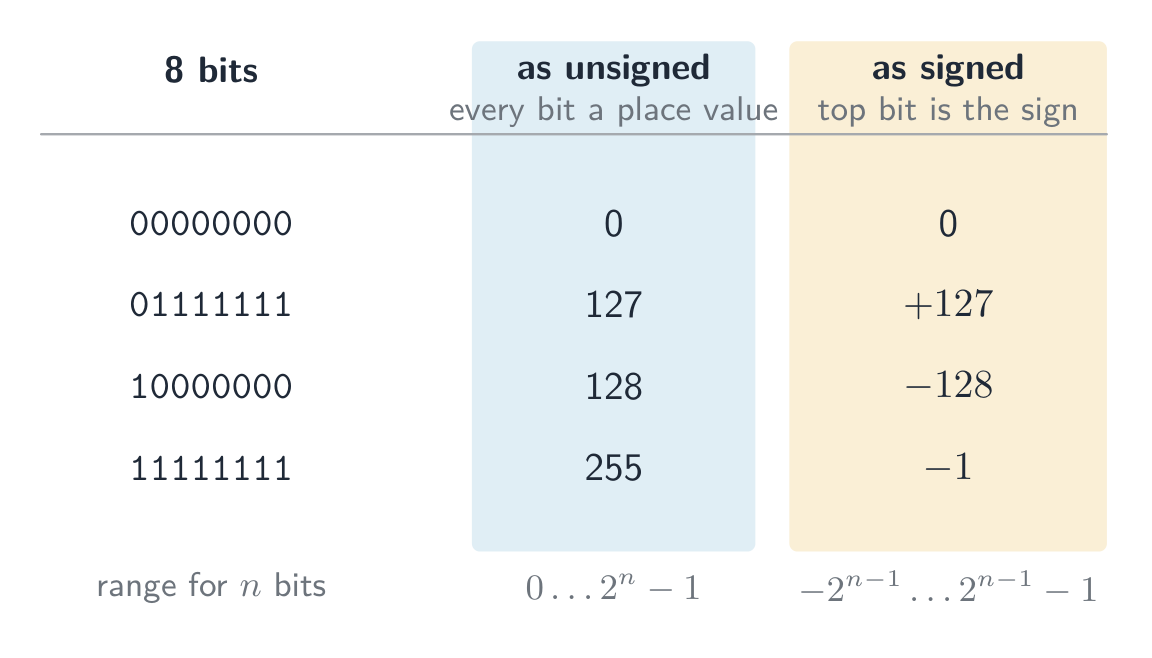
ตารางแสดงรูปแบบ 8 บิต 4 แบบที่อ่านได้สองแบบ: 00000000 คือ 0 ทั้งสองแบบ, 01111111 คือ 127 แบบ unsigned และ +127 แบบ signed, 10000000 คือ 128 แบบ unsigned แต่ -128 แบบ signed, และ 11111111 คือ 255 แบบ(unsigned แต่ -1 แบบ signed byte เดียวกันที่อ่านเป็น unsigned และ signed: การตีความที่ตกลงกันเท่านั้นที่จะแยกแยะได้ เส้นจำนวนสองส่วนเสริม 8 บิตตั้งแต่ -128 (10000000) ถึง +127 (01111111);ตัวเลขที่มีบิตบอกเครื่องหมายเป็น 1 เป็นลบ และที่มีบิตบอกเครื่องหมายเป็น 0 เป็นบวก โดย -1 = 11111111 อยู่ถัดจาก 0 = 00000000 สองส่วนเสริม 8 บิต: บิตบอกเครื่องหมายแบ่งช่วงค่าให้เป็นลบ ($-128$ ถึง $-1$) และบวก ($0$ ถึง $127$)

ตัวอย่างวิธีทำ. ค่าฐานสิบใดที่จำนวนสองส่วนเสริม 8 บิต $10110100$ แทนอยู่?

MSB เป็น 1 ดังนั้นจึงเป็นลบ. กลับ → $01001011$, บวก 1 → $01001100 = 76$, ดังนั้นค่าคือ $-76$. ตรวจสอบด้วยตำแหน่งของค่า: $-128 + 32 + 16 + 4 = -76$.

ตัวอย่างวิธีทำ. เขียน $-108$ เป็นจำนวนเต็มสองส่วนเสริมขนาด 12 บิต

เริ่มต้นจาก $+108$ ใน 12 บิต: $108 = 64 + 32 + 8 + 4$, ดังนั้น 0000 0110 1100. กลับทุกบิต: 1111 1001 0011. บวก 1: 1111 1001 0100. ตรวจสอบด้วยตำแหน่งของค่า ซึ่งบิตบนสุดมีค่าเท่ากับ $-2^{11} = -2048$: $-2048 + 1024 + 512 + 256 + 128 + 16 + 4 = -108$. ✓

สำหรับ 12 บิต ช่วงค่าคือ $-2048$ (1000 0000 0000) ถึง $+2047$ (0111 1111 1111). คำถามที่ถามหาค่าที่น้อยที่สุดและมากที่สุดต้องการรูปแบบเหล่านี้สองรูปแบบ ดังนั้นให้จดจำกฎ: เลขที่น้อยที่สุดคือ 1 ตามด้วยศูนย์; เลขที่สูงที่สุดคือ 0 ตามด้วยหนึ่ง

การเลื่อนเลขคณิต (arithmetic shift) จะเลื่อนทุกบิตไปทางซ้ายหรือขวาแต่คงเครื่องหมายไว้: การเลื่อนไปทางขวาหนึ่งตำแหน่งจะทำให้ค่าลดลงครึ่งหนึ่งและคัดลอกบิตบอกเครื่องหมายเข้าไปในช่องว่างด้านซ้าย ทำให้เลขลบยังคงเป็นลบ (1111 1001 0100 เลื่อนไปทางขวาสามตำแหน่งจะได้ 1111 1111 0010 ซึ่งเป็น $-14$: $-108 / 8 = -13.5$, และการเลื่อนไปทางขวาเป็นการปัดเศษลง) การเลื่อนไปทางซ้ายจะทำให้ค่าเพิ่มขึ้นเป็นสองเท่า การเลื่อนบิตเป็นคำสั่งในภาษาอัสเซมเบิล러ในหัวข้อ 4 แต่คำถามนี้ถูกตั้งขึ้นเพื่อทดสอบความรู้เรื่องการคำนวณตัวเลข

การล้นในการคำนวณเลขคณิตแบบมีเครื่องหมายเกิดขึ้นเมื่อผลลัพธ์จริงตกนอกช่วงนี้ — ตรวจพบได้เมื่อบิตบอกเครื่องหมายเปลี่ยนไปอย่างผิดปกติ (บวกสองตัวให้ผลลบ หรือลบสองตัวให้ผลบวก)

ส่วนเสริมหนึ่ง (One's complement)

ก่อนหน้าสองส่วนเสริม จะมีระบบเก่าที่เรียกว่า ส่วนเสริมหนึ่ง ซึ่งใช้แทนเลขลบด้วยการ กลับทุกบิต ของเลขบวกโดยตรง — ไม่มีขั้นตอน "บวก 1"

  • $+30 = 00011110$, ดังนั้นในส่วนเสริมหนึ่ง $-30 = 11100001$ (แค่กลับค่า)
  • ข้อเสีย: มันมี ศูนย์สองตัว — $00000000$ ($+0$) และ $11111111$ ($-0$) — ซึ่งเปลืองรูปแบบบิตและทำให้การคำนวณยุ่งยาก

สองส่วนเสริม (กลับ และ บวก 1) ช่วยกำจัดศูนย์ลบ: มีเพียงศูนย์เดียวและช่วยให้การบวกและการลบใช้วงจรเดียวกัน นั่นคือเหตุผลว่าทำไมคอมพิวเตอร์สมัยใหม่จึงเก็บจำนวนเต็มมีเครื่องหมายในรูปแบบสองส่วนเสริม ไม่ใช่ส่วนเสริมหนึ่ง

Explore · ⁨สำรวจ⁩

Binary & signed integers · ⁨เลขฐานสอง & จำนวนเต็มที่มีเครื่องหมาย⁩

byte = Σ place values · ⁨byte = ผลรวมของค่าตำแหน่ง⁩

See how an 8-bit pattern maps to a number (and how it would overflow past 255). · ⁨ดูว่ารูปแบบ 8 บิตจับคู่กับตัวเลขอย่างไร (และ会发生溢出เกิน 255 อย่างไร)⁩

Explore · ⁨สำรวจ⁩

Two's complement signed bits · ⁨บิตที่มีเครื่องหมายแบบสองส่วนเสริม (Two's complement)⁩

The leftmost bit carries a negative place value. Flip any bit — or hit Negate (invert every bit, then add 1) — and watch the signed value change. · ⁨บิตทางซ้ายสุดมีตำแหน่งที่มีค่า ลบ พลิกบิตใดๆ — หรือกด Negate (พลิกทุกบิต แล้วบวก 1) — เพื่อดูว่าค่าที่มีเครื่องหมายเปลี่ยนไปอย่างไร⁩

Vocabulary · ⁨คำศัพท์⁩ Train · ⁨ฝึกฝน⁩
English ไทย
register/ˈredʒɪstə/ รีจิสเตอร์ (register)
unsigned/ʌnˈsaɪnd/ ไม่มีเครื่องหมาย
overflow/ˌəʊvəˈfləʊ/ overflow
most significant bit/məʊst sɪɡˈnɪfɪkənt bɪt/ บิตที่มีนัยสำคัญสูงสุด
signed integer/saɪnd ˈɪntɪdʒə/ จำนวนเต็มที่มีเครื่องหมาย
sign bit/saɪn bɪt/ บิตเครื่องหมาย
arithmetic shift/ˌærɪθˈmetɪk ʃɪft/ การเลื่อนเลขคณิต
one's complement/wʌnz ˈkɒmplɪmənt/ หนึ่งคอมพลีเมนต์
7-segment display/ˈsevən ˈseɡmənt dɪˈspleɪ/ จอแสดงผล 7 ส่วน
memory address/ˈmeməri əˈdres/ ที่อยู่หน่วยความจำ
1.1

Binary Coded Decimal (BCD) · ⁨BCD (Binary Coded Decimal)⁩

English

In BCD 二进码十进数, each denary digit is written as its own 4-bit pattern. The number $93$ is 1001 0011 in BCD — not binary 93 ($01011101$). Each nibble uses only 0–9; patterns $1010$–$1111$ are invalid.

BCD reading: 0010 0111 0101 → 2, 7, 5 → 275.

Use: calculators, digital clocks, and devices that show denary digits — each digit drives a 7-segment display 七段显示器. Currency code often uses BCD to avoid the rounding errors of converting fractions like 0.1 to binary.

A "justify" answer must link the use to a property of BCD: each denary digit has its own 4 bits, so a digit can be sent straight to its display, or added digit by digit, with no conversion of the whole number; and a decimal fraction such as $0.10$ is stored exactly, which a binary fraction cannot do.

ไทย

ใน BCD แต่ละหลักฐานสิบจะถูกเขียนเป็นรูปแบบ 4 บิตของตัวเอง. เลข $93$ จะ写成 1001 0011 ใน BCD — ไม่ใช่เลข 93 แบบฐานสอง ($01011101$). แต่ละ nibble ใช้ได้เฉพาะ 0–9; รูปแบบ $1010$–$1111$ ไม่ถูกต้อง

การอ่านค่า BCD: 0010 0111 0101 → 2, 7, 5 → 275.

การใช้งาน: เครื่องคิดเลข, นาฬิกาดิจิทัล, และอุปกรณ์ที่แสดงผลหลักฐานสิบ — แต่ละหลักจะขับเคลื่อน จอแสดงผล 7 สegment. รหัสสกุลเงินมักใช้ BCD เพื่อหลีกเลี่ยงข้อผิดพลาดจากการปัดเศษของการแปลงทศนิยมเช่น 0.1 เป็นฐานสอง

คำตอบเรื่อง "justify" ต้องเชื่อมโยงการใช้งานกับคุณสมบัติของ BCD: แต่ละหลักฐานสิบมี 4 บิตของตัวเอง ดังนั้นหลักนั้นสามารถส่งตรงไปยังจอแสดงผลได้ หรือบวกทีละหลักได้โดยไม่ต้องแปลงทั้งจำนวน; และทศนิยมเช่น $0.10$ จะถูกเก็บรักษาไว้อย่างแม่นยำ ซึ่งทศนิยมแบบฐานสองไม่สามารถทำได้

องค์ประกอบจอแสดงผล LED 7 segment แบบหลักเดียว แสดงแท่งแยก 7 แท่ง
จอแสดงผล 7 segment แสดงหลักฐานสิบหนึ่งหลัก มักถูกขับเคลื่อนด้วย BCD
1.1

Hexadecimal — practical uses · ⁨เฮกซาเดซิมัล - การใช้งานจริง⁩

English

Hex is a compact way to write binary (1 hex digit = 4 bits):

  • memory addresses 内存地址 in low-level programming — 0x7FFE.
  • colour values in HTML/CSS — #FF8800.
  • MAC addresses — AC:DE:48:00:11:22.

Hex does not change the stored data — it just makes binary easier for humans.

ไทย

Hex เป็นวิธีที่กระชับในการเขียนเลขฐานสอง (1 หลัก hex = 4 บิต):

byte ถูกแบ่งเป็นสอง nibbles; แต่ละ nibble คือหนึ่งหลัก hexadecimal
byte เป็นสอง nibbles; แต่ละ nibble คือหนึ่งหลัก hex
  • ที่อยู่หน่วยความจำ ในการเขียนโปรแกรมระดับต่ำ — 0x7FFE.
  • ค่าสี ใน HTML/CSS — #FF8800.
  • ที่อยู่ MAC — AC:DE:48:00:11:22.

ระบบเลขหกซิกซ์ไม่ได้เปลี่ยนข้อมูลที่เก็บไว้ — มันเพียงทำให้ข้อมูลแบบไบนารีเข้าใจง่ายสำหรับมนุษย์มากขึ้นเท่านั้น

1.1

Character codes · ⁨รหัสตัวอักษร⁩

English

Computers store text as numbers; each character has a numeric code point 码点 set by a character set 字符集.

ASCII

  • ASCII uses 7 bits — 128 code points. Basic Latin letters, digits, punctuation, and control codes.
  • Extended ASCII uses 8 bits — 256 code points; the lower 128 match ASCII, the upper 128 vary by region.

Unicode

  • Unicode is a universal character set covering almost every script, plus symbols and emoji.
  • common encodings 编码: UTF-8 (1–4 bytes, ASCII-compatible), UTF-16 (2 or 4 bytes), UTF-32 (fixed 4 bytes).

Why Unicode beats ASCII

  • it represents far more characters (every script, emoji); ASCII covers only basic English.
  • files are portable with no code-page confusion, and allow multilingual text in one document.
  • trade-off: Unicode files are usually larger for English-only text.

When a question asks for differences, give them in pairs with numbers: ASCII uses 7 bits (extended ASCII 8), so 128 (256) characters; Unicode uses up to 32 bits (UTF-8 uses 1 to 4 bytes), so more than a million code points. ASCII covers basic English only; Unicode covers every script, and its first 128 code points are the ASCII ones. In UTF-8 an English letter still takes 1 byte, so a 40-letter English file name is 40 bytes in ASCII and in UTF-8 alike, while a Chinese character takes 3 bytes.

ไทย

คอมพิวเตอร์จัดเก็บข้อความในรูปแบบตัวเลข โดยแต่ละตัวอักษรมี จุดรหัส (code point) ซึ่งเป็นตัวเลขที่กำหนดโดย ชุดตัวอักษร (character set)

ASCII

  • ASCII ใช้ 7 บิต — มี 128 จุดรหัส ครอบคลุมตัวอักษรลาตินพื้นฐาน的数字เครื่องหมายวรรคตอน และรหัสควบคุม
  • Extended ASCII ใช้ 8 บิต — มี 256 จุดรหัส โดย 128 จุดแรกตรงกับ ASCII ส่วนอีก 128 จุดหลังแตกต่างกันไปตามภูมิภาค
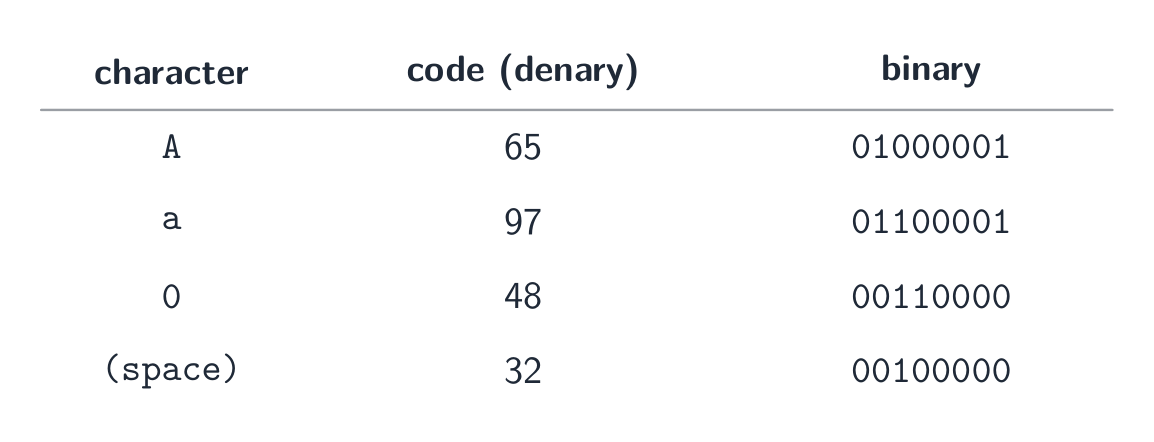
ตาราง ASCII เล็ก: ตัวอักษร A มีรหัส 65 = 01000001, a มีรหัส 97 = 01100001, เลข 0 มีรหัส 48 = 00110000 และช่องว่างมีรหัส 32 = 00100000
แต่ละตัวอักษรถูกจัดเก็บเป็นตัวเลข — ตัวอย่างจุดรหัส ASCII บางส่วนในระบบเลขสิบและไบนารี

Unicode

  • Unicode เป็นชุดตัวอักษรสากลที่ครอบคลุมเกือบทุกสคริปต์ รวมถึงสัญลักษณ์และอีโมจิ
  • การเข้ารหัสทั่วไป: UTF-8 (1–4 ไบต์ เข้ากันได้กับ ASCII), UTF-16 (2 หรือ 4 ไบต์), UTF-32 (คงที่ 4 ไบต์)

ทำไม Unicode จึงดีกว่า ASCII

  • สามารถแสดง ตัวอักษรมากขึ้นมาก (ทุกสคริปต์ อีโมจิ) ในขณะที่ ASCII ครอบคลุมเฉพาะภาษาอังกฤษพื้นฐานเท่านั้น
  • ไฟล์มีความ พกพาได้ โดยไม่เกิดปัญหาความสับสนของหน้าจอรหัส (code-page) และสามารถรองรับข้อความหลายภาษาในเอกสารเดียวได้
  • ข้อเสีย: ไฟล์ Unicode มักจะมี ขนาดใหญ่กว่า สำหรับข้อความภาษาอังกฤษล้วน

เมื่อโจทย์ถามหา ความแตกต่าง ให้ตอบเป็นคู่พร้อมระบุตัวเลข: ASCII ใช้ 7 บิต (Extended ASCII ใช้ 8 บิต) ดังนั้นจึงมี 128 (256) ตัวอักษร; Unicode ใช้สูงสุดถึง 32 บิต (UTF-8 ใช้ 1 ถึง 4 ไบต์) จึงมีจุดรหัสมากกว่าล้านจุด ASCII ครอบคลุมเฉพาะภาษาอังกฤษพื้นฐาน; Unicode ครอบคลุมทุกสคริปต์ และ 128 จุดรหัสแรกของมันคือ ASCII เช่นกัน ใน UTF-8 ตัวอักษรภาษาอังกฤษยังคงใช้ 1 ไบต์ ดังนั้นไฟล์ชื่อภาษาอังกฤษยาว 40 ตัวอักษรจึงมีขนาด 40 ไบต์ ทั้งใน ASCII และ UTF-8都是一样的 แต่ตัวอักษรจีนจะใช้ 3 ไบต์

Explore · ⁨สำรวจ⁩

A character is stored as a number · ⁨ตัวอักษรถูกจัดเก็บในฐานะตัวเลข⁩

Each character has a code number — 'A' is 65. Flip the bits to see that code in binary and hex, exactly how the computer holds it. · ⁨แต่ละตัวอักษรมีรหัสเลข — 'A' คือ 65 พลิกบิตเพื่อดูรหัสนี้ในรูปแบบเลขฐานสองและหกสิบหนึ่ง ตามที่คอมพิวเตอร์จัดเก็บจริง⁩

Vocabulary · ⁨คำศัพท์⁩ Train · ⁨ฝึกฝน⁩
English ไทย
code point/kəʊd pɔɪnt/ จุดโค้ด
character set/ˈkærɪktə set/ ชุดอักขระ
1.2

Bitmap images · ⁨ภาพ Bitmap⁩

Syllabus · ⁨หลักสูตร⁩
English
Candidates should be able to: Notes and guidance
Show understanding of how data for a bitmapped image are encoded Use and understand the terms: pixel, file header, image resolution, screen resolution, colour depth / bit depth
Perform calculations to estimate the file size for a bitmap image
Show understanding of the effects of changing elements of a bitmap image on the image quality and file size Use the terms: image resolution, colour depth / bit depth
Show understanding of how data for a vector graphic are encoded Use the terms: drawing object, property, drawing list
Justify the use of a bitmap image or a vector graphic for a given task
Show understanding of how sound is represented and encoded Use the terms: sampling, sampling rate, sampling resolution, analogue and digital data
Show understanding of the impact of changing the sampling rate and resolution Including the impact on file size and accuracy
ไทย
ผู้เข้าสอบควรสามารถ: หมายเหตุและคำแนะนำ
แสดงความเข้าใจในการเข้ารหัสข้อมูลสำหรับ bitmapped image ใช้และทำความเข้าใจคำศัพท์: pixel, file header, image resolution, screen resolution, colour depth / bit depth
ทำการคำนวณเพื่อประมาณขนาดไฟล์สำหรับ bitmap image
แสดงความเข้าใจถึงผลกระทบของการเปลี่ยนแปลงองค์ประกอบของ bitmap image ต่อคุณภาพภาพและขนาดไฟล์ ใช้คำศัพท์: image resolution, colour depth / bit depth
แสดงความเข้าใจในการเข้ารหัสข้อมูลสำหรับ vector graphic ใช้คำศัพท์: drawing object, property, drawing list
ให้เหตุผลในการเลือกใช้ bitmap image หรือ vector graphic สำหรับงานที่กำหนด
แสดงความเข้าใจในการแสดงผลและการเข้ารหัสเสียง ใช้คำศัพท์: sampling, sampling rate, sampling resolution, analogue และ digital data
แสดงความเข้าใจถึงผลกระทบจากการเปลี่ยนแปลง sampling rate และ resolution รวมถึงผลกระทบต่อขนาดไฟล์และความแม่นยำ

Source: Cambridge International syllabus · ⁨แหล่งที่มา: หลักสูตร Cambridge International⁩

English

A bitmap 位图 image (also called a bitmapped image) stores the colour of every pixel 像素 in a grid. At the start of the file a file header 文件头 records the image's metadata — its width, height and colour depth — so software knows how to read the pixel data that follows.

  • image resolution 图像分辨率: the bitmap's own size, width × height in pixels (e.g. 1920 × 1080).
  • screen resolution 屏幕分辨率: the width × height the display can show. If an image's resolution is larger than the screen it is scaled down to fit; a low-resolution image looks blocky when stretched onto a higher-resolution screen.
  • colour depth 颜色深度 (bit depth 位深度): bits per pixel. 1 bit → black/white; 8 bits → 256 colours; 24 bits → 16.7 million ("true colour").

File size

$$\text{size in bits} = \text{width} \times \text{height} \times \text{bit depth}.$$

Divide by 8 for bytes, by 1024 for KiB, etc. Example: a $3000 \times 2000$ image at 24 bpp is $3000 \times 2000 \times 24 = 1.44 \times 10^{8}$ bits $\approx 17.2\ \text{MiB}$.

State the units you used. The mark scheme accepts $1\ \text{MB} = 10^{6}$ bytes (the SI prefix) or $1\ \text{MiB} = 1024 \times 1024$ bytes (the binary prefix), as long as your working shows which one; the same image is $18.0\ \text{MB}$ or $17.2\ \text{MiB}$. Add the size of the file header if the question gives one.

A video is a sequence of bitmap images, each one a frame 帧. Before compression its size is the size of one frame $\times$ the frame rate 帧率 (frames per second) $\times$ the duration in seconds: 30 frames per second of $1920 \times 1080$ pixels at 24 bits is $30 \times 1920 \times 1080 \times 24 \approx 1.5 \times 10^{9}$ bits, about $187\ \text{MB}$, for every second. That is why video is always compressed.

Changing settings

  • lower resolution → smaller file, less detail (looks blocky when enlarged).
  • lower colour depth → smaller file, but smooth shades show banding.
  • higher of either → larger file, better quality.
ไทย

ภาพ Bitmap (หรือเรียกว่า ภาพ Bitmapped) จัดเก็บสีของแต่ละ พิกเซล (pixel) ในตาราง เมื่อเริ่มไฟล์จะมีย่านหัวไฟล์ (file header) ที่บันทึกข้อมูลเมตาดาตาของภาพ — ความกว้าง ความสูง และความลึกของสี — เพื่อให้ซอฟต์แวร์ทราบวิธีอ่านข้อมูลพิกเซลที่จะตามมา

  • ความละเอียดของภาพ: ขนาดของภาพเอง ความกว้าง × ความสูง เป็นพิกเซล (เช่น 1920 × 1080)
  • ความละเอียดของหน้าจอ: ความกว้าง × ความสูงที่ จอแสดงผล สามารถแสดงได้ หากความละเอียดของภาพสูงกว่าหน้าจอ ภาพจะถูกย่อให้พอดี; ภาพความละเอียดต่ำจะดูเป็นบล็อกเมื่อขยายไปบนหน้าจอที่มีความละเอียดสูงกว่า
  • ความลึกของสี (bit depth): บิตต่อพิกเซล 1 บิต → ดำ/ขาว; 8 บิต → 256 สี; 24 บิต → 16.7 ล้านสี ("true colour")
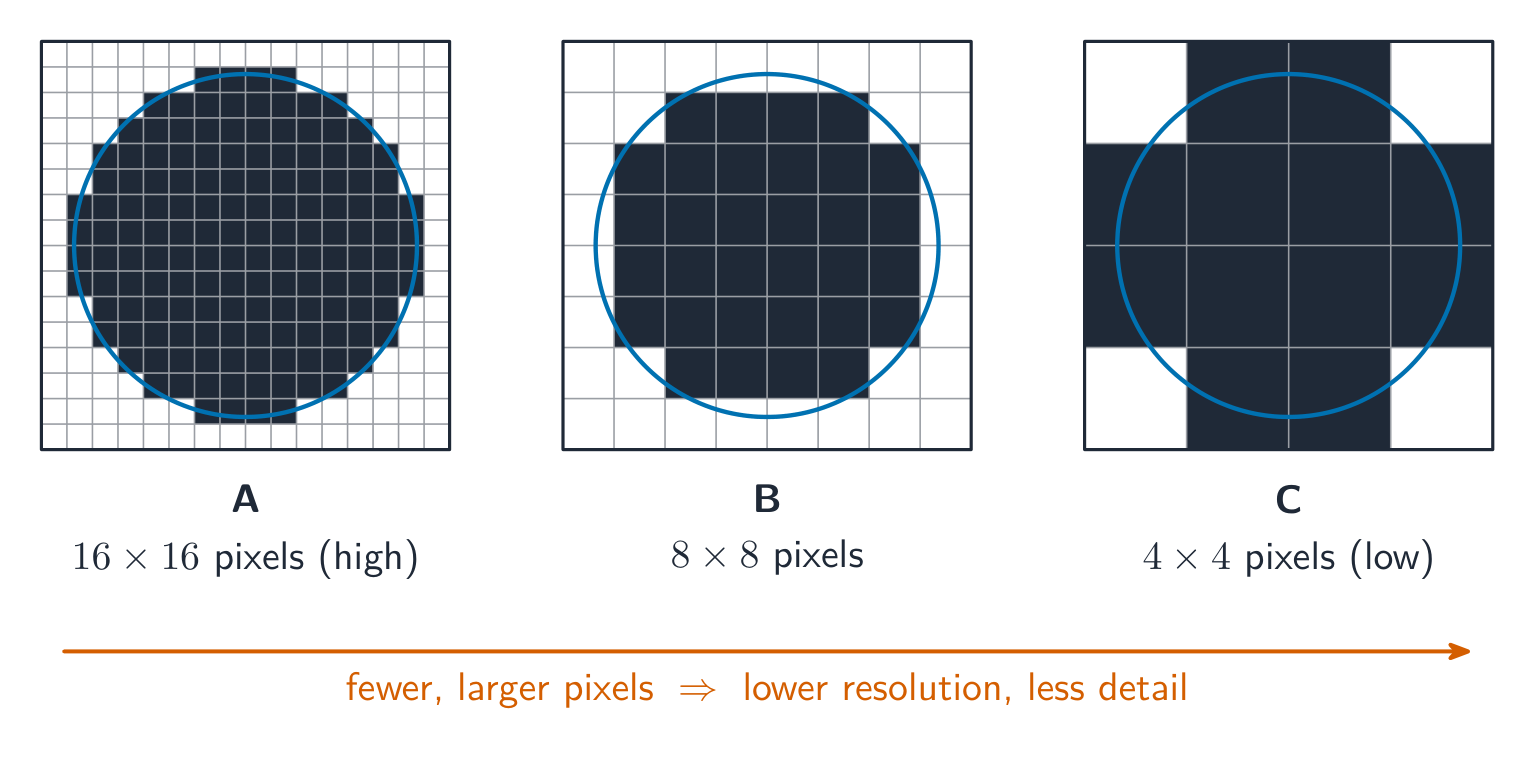
ดิสก์เดียวกันถูกจัดเก็บในตารางพิกเซลสามแบบ A ถึง C ซึ่งดูเป็นบล็อกมากขึ้นเมื่อพิกเซลใหญ่ขึ้นและมีจำนวนน้อยลง
ภาพเดียวกันถูกจัดเก็บด้วยความละเอียดสามระดับ จากสูง (A) ไปยังต่ำ (C): พิกเซลที่น้อยลงและใหญ่ขึ้นส่งผลให้รายละเอียดลดลง

ขนาดไฟล์

$$\text{size in bits} = \text{width} \times \text{height} \times \text{bit depth}.$$

หารด้วย 8 เพื่อแปลงเป็นไบต์ หารด้วย 1024 เพื่อแปลงเป็น KiB เป็นต้น ตัวอย่าง: ภาพ $3000 \times 2000$ ที่มีความลึก 24 bpp จะมีขนาด $3000 \times 2000 \times 24 = 1.44 \times 10^{8}$ บิต $\approx 17.2\ \text{MiB}$

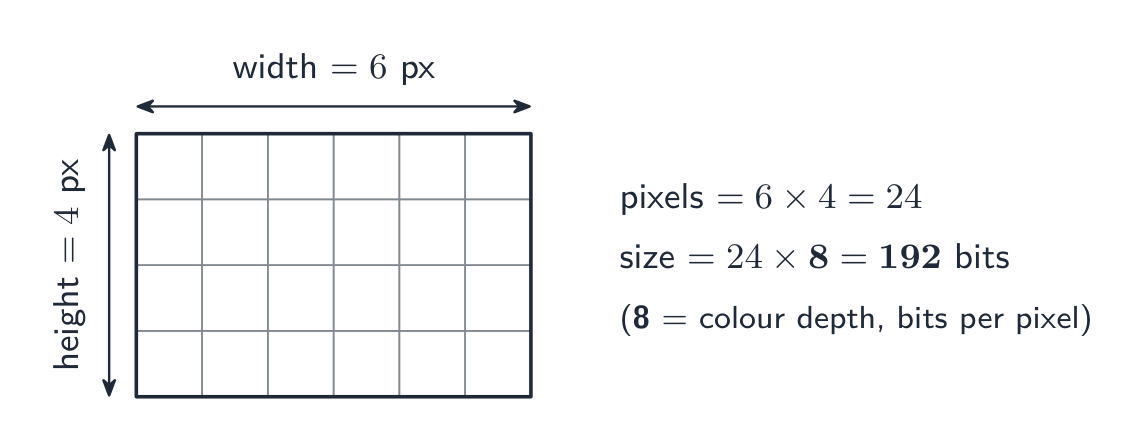
ตารางพิกเซลขนาด 6×4 พร้อมระบุความกว้างและความสูง; พิกเซล = 6 × 4 = 24 และที่ความลึก 8 บิตต่อพิกเซล ขนาด = 24 × 8 = 192 บิต
สูตรเดียวกันกับตัวเลขเล็กๆ: นับจำนวนพิกเซล แล้วคูณกับความลึกของสี

ระบุหน่วยที่คุณใช้ แผนการให้คะแนนยอมรับ $1\ \text{MB} = 10^{6}$ ไบต์ (พรีфикซ์ SI) หรือ $1\ \text{MiB} = 1024 \times 1024$ ไบต์ (พรีфикซ์ไบนารี) ตราบใดที่ขั้นตอนการทำงานของคุณแสดงว่าใช้หน่วยใด ภาพเดียวกันนี้มีขนาด $18.0\ \text{MB}$ หรือ $17.2\ \text{MiB}$ เพิ่มขนาดของ headers ถ้าโจทย์กำหนดมาให้

วิดีโอคือลำดับของภาพ bitmap แต่ละภาพเรียกว่า เฟรม (frame) ก่อนการบีบอัด ขนาดของมันคือขนาดของเฟรมหนึ่ง $\times$ อัตราเฟรม (frame rate – เฟรมต่อวินาที) $\times$ ระยะเวลาเป็นวินาที: 30 เฟรมต่อวินาทีของภาพ $1920 \times 1080$ พิกเซล ที่ความลึก 24 บิต จะมีขนาด $30 \times 1920 \times 1080 \times 24 \approx 1.5 \times 10^{9}$ บิต ประมาณ $187\ \text{MB}$ ต่อวินาที นั่นคือเหตุผลที่วิดีโอต้องถูกบีบอัดเสมอ

การเปลี่ยนการตั้งค่า

  • ลดความละเอียด → ไฟล์เล็กลง รายละเอียดน้อยลง (ดูเป็นบล็อกเมื่อขยาย)
  • ลดความลึกของสี → ไฟล์เล็กลง แต่เฉดสีที่เรียบเนียนจะปรากฏเป็นแถบ (banding)
  • เพิ่ม อย่างใดอย่างหนึ่ง → ไฟล์ใหญ่ขึ้น คุณภาพดีขึ้น
Vocabulary · ⁨คำศัพท์⁩ Train · ⁨ฝึกฝน⁩
English ไทย
bitmap/ˈbɪtmæp/ bitmap
pixel/ˈpɪksl/ พิกเซล
file header/faɪl ˈhedə/ หัวไฟล์
bit depth/bɪt depθ/ ความลึกของบิต
frame/freɪm/ กรอบ
frame rate/freɪm reɪt/ อัตราเฟรม
1.2

Vector graphics · ⁨กราฟิกเวกเตอร์⁩

English

A vector graphic 矢量图形 stores the instructions to draw the image as a drawing list 绘图列表 — an ordered list of drawing objects 绘图对象 (geometric primitives 图元: lines, curves, polygons, circles). Each drawing object has properties 属性 such as colour, fill, line width and position (coordinates). To show it, the program renders 渲染 the drawing list at any resolution needed.

Bitmap vs vector

Task Better choice Why
Photograph Bitmap Complex pixel-level detail can't be described as shapes.
Logo, icon, sign Vector Sharp edges; scales to any size without blur.
Engineering drawing Vector Precise geometry and scaling.
Painting, texture Bitmap Smooth tonal detail per area.

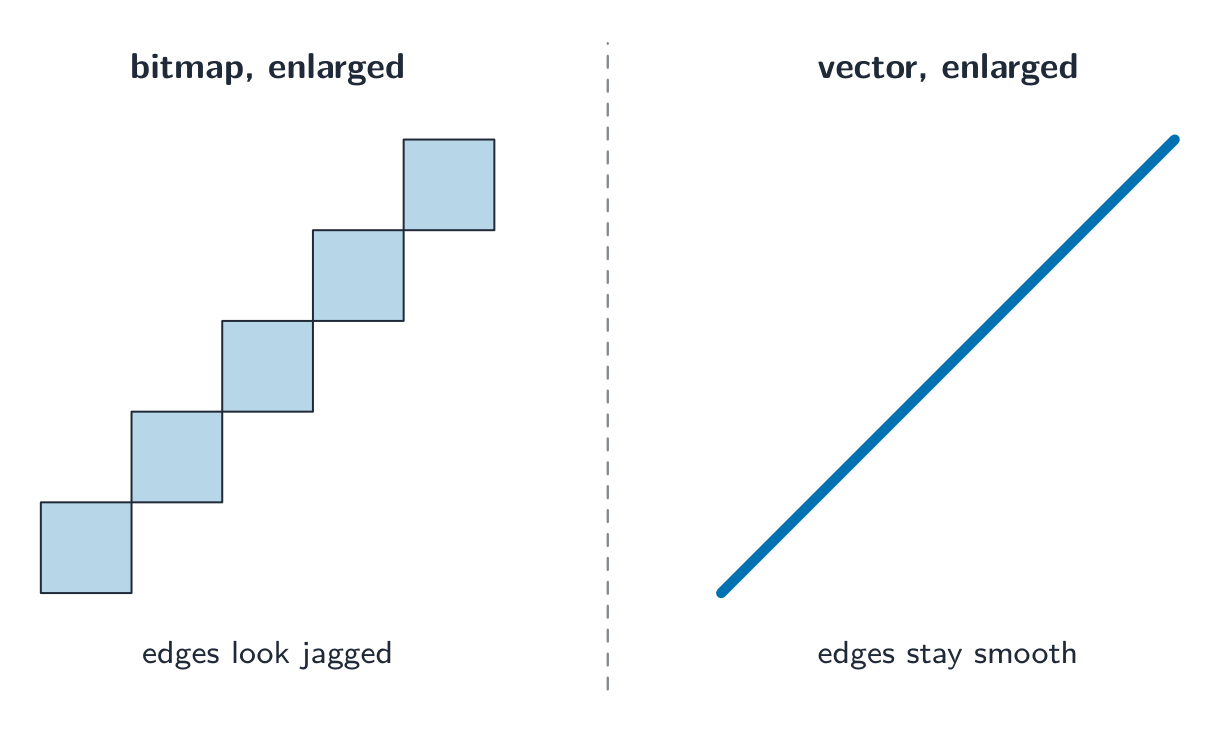
Vector advantage: it scales without losing quality — a vector logo stays sharp at any size, while a bitmap blurs when enlarged. Vector disadvantage: it cannot describe arbitrary pixel detail (photographs).

A "justify" answer links the choice to the task. "The logo must appear on a business card and on a billboard, so it should be a vector graphic: it is stored as drawing objects and is re-rendered sharply at any size, whereas a bitmap would show its pixels when enlarged." For a photograph the argument runs the other way: there are no shapes to describe, so every pixel's colour must be stored.

ไทย

กราฟิกเวกเตอร์ จัดเก็บ คำสั่ง ในการวาดภาพในรูปแบบ รายการวาด (drawing list) — ซึ่งเป็นรายการที่มีลำดับของ วัตถุวาด (drawing objects) (รูปทรงเรขาคณิต เบื้องต้น: เส้นโค้ง โพลี่gone วงกลม) วัตถุวาดแต่ละชนิดมี คุณสมบัติ เช่น สี การเติม ความหนาของเส้น และตำแหน่ง (พิกัด) เมื่อต้องการแสดงผล โปรแกรมจะ เรนเดอร์ (render) รายการวาดนั้นด้วยความละเอียดที่ต้องการ

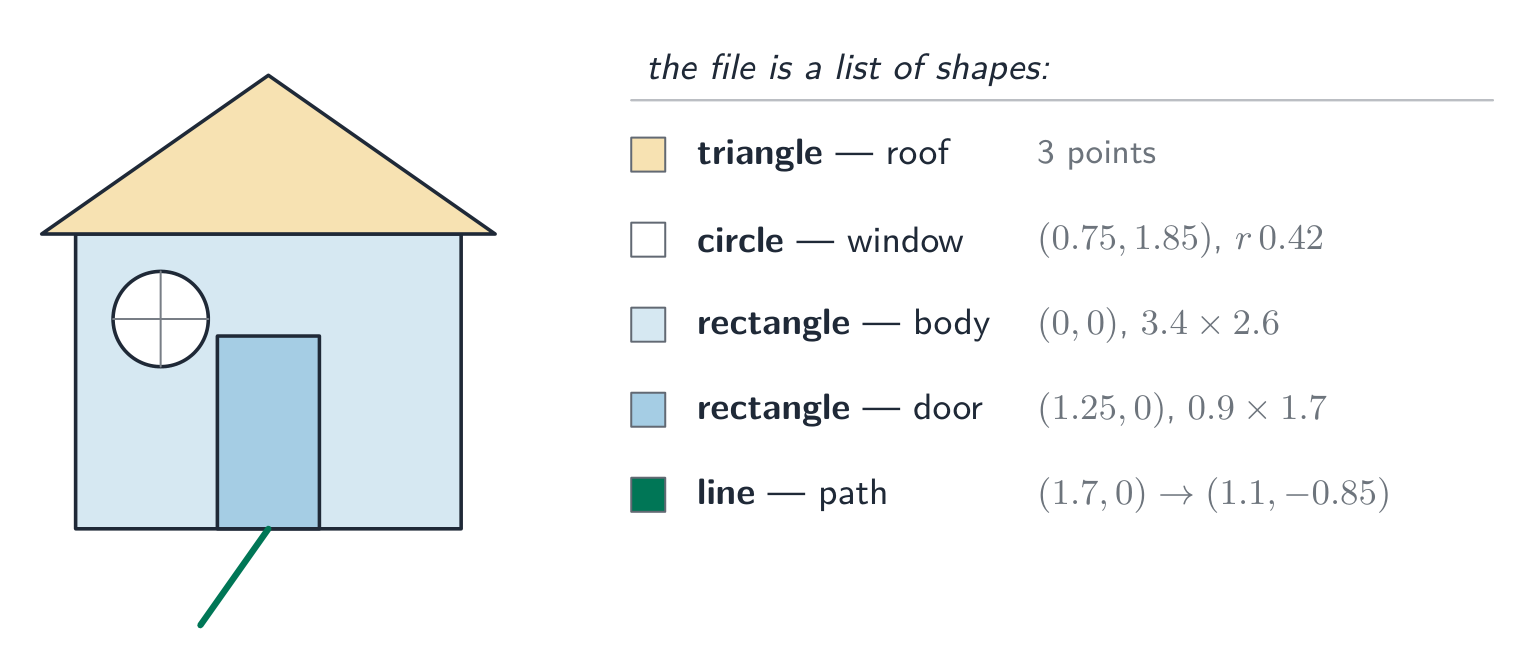
ภาพบ้านง่ายๆ ที่สร้างจากสี่เหลี่ยมผืนผ้า (ตัวบ้าน), สามเหลี่ยม (หลังคา), วงกลม (หน้าต่าง), สี่เหลี่ยมผืนผ้า (ประตู) และเส้นตรง โดยแต่ละส่วนมีป้ายระบุประเภทรูปร่างและคุณสมบัติ
ภาพเวกเตอร์ประกอบด้วยรูปร่างเรขาคณิตที่มีป้ายกำกับ แต่ละรูปร่างมีคุณสมบัติ各自的

Bitmap เทียบกับเวกเตอร์

งาน ทางเลือกที่ดีกว่า เหตุผล
ภาพถ่าย Bitmap รายละเอียดระดับพิกเซลที่ซับซ้อนไม่สามารถอธิบายเป็นรูปทรงได้
โลโก้ ไอคอน ป้าย Vector ขอบคมชัด ขยายได้ทุกรูปแบบโดยไม่เบลอ
แบบแปลนวิศวกรรม Vector เรขาคณิตแม่นยำและการปรับขนาด
จิตรกรรม เนื้อสัมผัส Bitmap รายละเอียดโทนสีที่ลื่นไหลในแต่ละพื้นที่

ข้อดีของเวกเตอร์:它能够 ขยายได้โดยไม่สูญเสียคุณภาพ — โลโก้เวกเตอร์ยังคงคมชัดในทุกขนาด ในขณะที่ Bitmap จะเบลอเมื่อขยาย ข้อเสียของเวกเตอร์: ไม่สามารถอธิบายรายละเอียดพิกเซลแบบสุ่ม (เช่น photographs) ได้

คำตอบแบบ "justify" (ให้เหตุผล) จะเชื่อมโยงตัวเลือกเข้ากับโจทย์: "โลโก้ต้องปรากฏทั้งบนนามบัตรและป้ายโฆษณา ดังนั้นควรเป็นกราฟิกเวกเตอร์: เก็บข้อมูลในรูปแบบวัตถุวาดภาพ และสามารถเรนเดอร์ใหม่ได้อย่างคมชัดทุกขนาด ในขณะที่กราฟิกบิตแมพจะแสดงพิกเซลเมื่อขยายใหญ่ขึ้น" สำหรับภาพถ่าย Arguments จะกลับด้าน: ไม่มีรูปทรงใดให้บรรยาย ดังนั้นสีของแต่ละพิกเซลจึงต้องถูกบันทึกไว้ทั้งหมด

วางข้างกัน ทั้งสองขยายใหญ่: เส้นทแยงมุมของบิตแมพเป็นขั้นบันไดที่ขรุขระของพิกเซล ในขณะที่เส้นทแยงมุมของเวกเตอร์ยังคงเป็นเส้นตรงที่เรียบเนียน
เมื่อขยายใหญ่ขึ้น พิกเซลของบิตแมพจะดูขรุขระ ส่วนเวกเตอร์ยังคงความเรียบเนียนไม่ว่าจะขยาย多大
Explore · ⁨สำรวจ⁩

Computing concept lab · ⁨ห้องปฏิบัติการแนวคิดการคำนวณ⁩

Classify concrete examples by the computing idea they demonstrate. · ⁨จัดกลุ่มตัวอย่างที่เป็นรูปธรรมตาม idea การคำนวณที่แสดงออก⁩

Vocabulary · ⁨คำศัพท์⁩ Train · ⁨ฝึกฝน⁩
English ไทย
vector graphic/ˈvektə ˈɡræfɪk/ กราฟิกเวกเตอร์
drawing list/ˈdrɔːɪŋ lɪst/ drawing list
drawing objects/ˈdrɔːɪŋ ˈɒbdʒekts/ วัตถุการวาด
primitive/ˈprɪmɪtɪv/ พื้นฐาน
properties/ˈprɒpətiz/ คุณสมบัติ
render/ˈrendə/ เรนเดอร์
analogue data/ˈænəlɒɡ ˈdeɪtə/ ข้อมูลอนาล็อก
digital data/ˈdɪdʒɪtl ˈdeɪtə/ ข้อมูลดิจิทัล
1.2

Sound · ⁨เสียง⁩

English

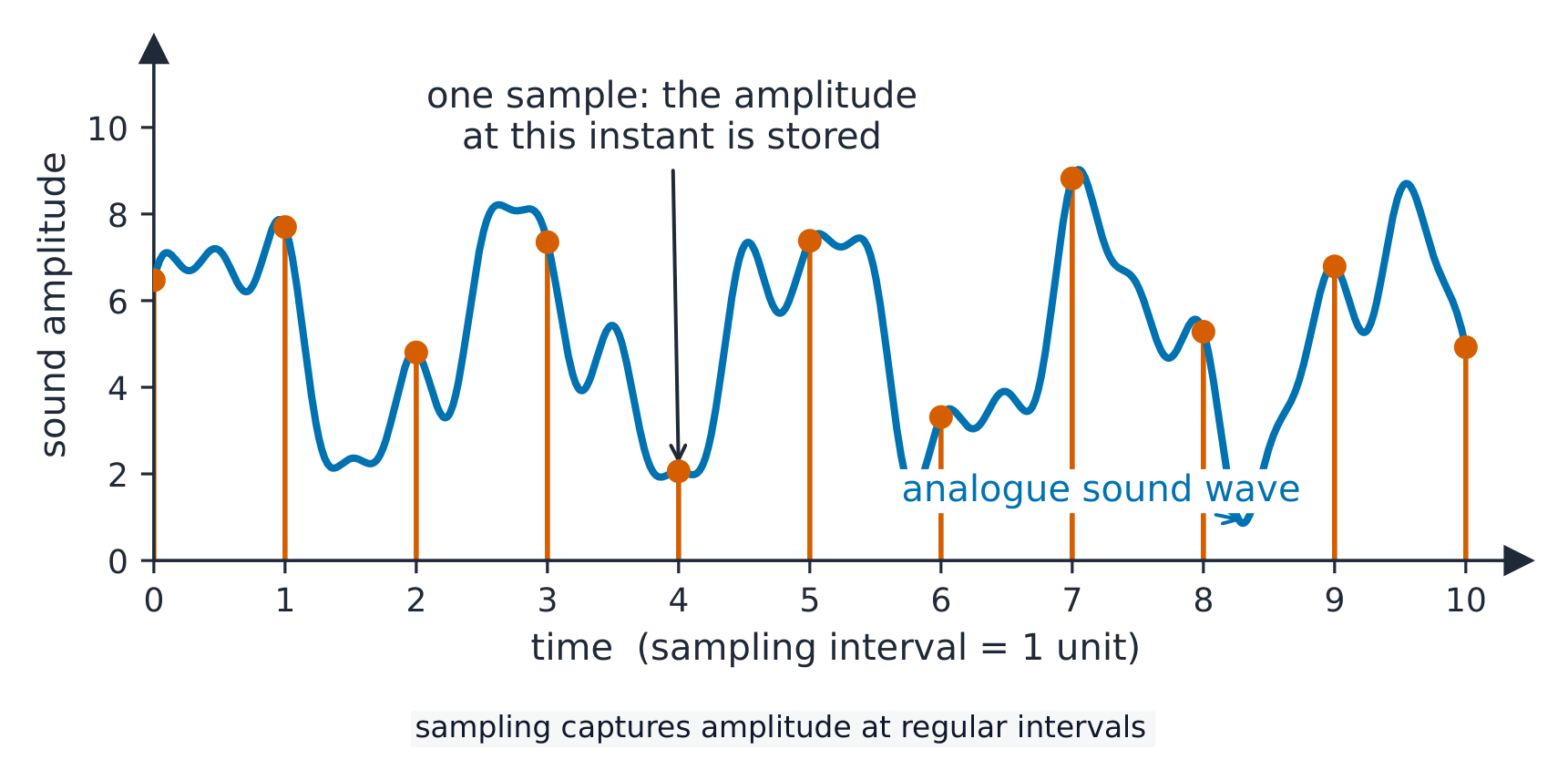
A continuous wave of analogue data 模拟数据 (the sound) is converted into digital data 数字数据 by sampling 采样:

  • sampling rate 采样率 — samples per second (Hz). CD quality is $44.1\ \text{kHz}$.
  • sampling resolution 采样分辨率 (bit depth) — bits per sample's amplitude 振幅. CD quality is 16 bits.

File size

$$\text{size in bits} = \text{sampling rate} \times \text{resolution} \times \text{duration} \times \text{channels}.$$

A 10-second stereo CD clip: $44100 \times 16 \times 10 \times 2 = 14\,112\,000$ bits $\approx 1.68\ \text{MiB}$.

Changing settings

  • higher sampling rate → captures higher pitches, larger file.
  • higher sample resolution → finer amplitude steps, less quantisation 量化 noise, larger file.
  • lower of either → smaller file, clear quality loss.

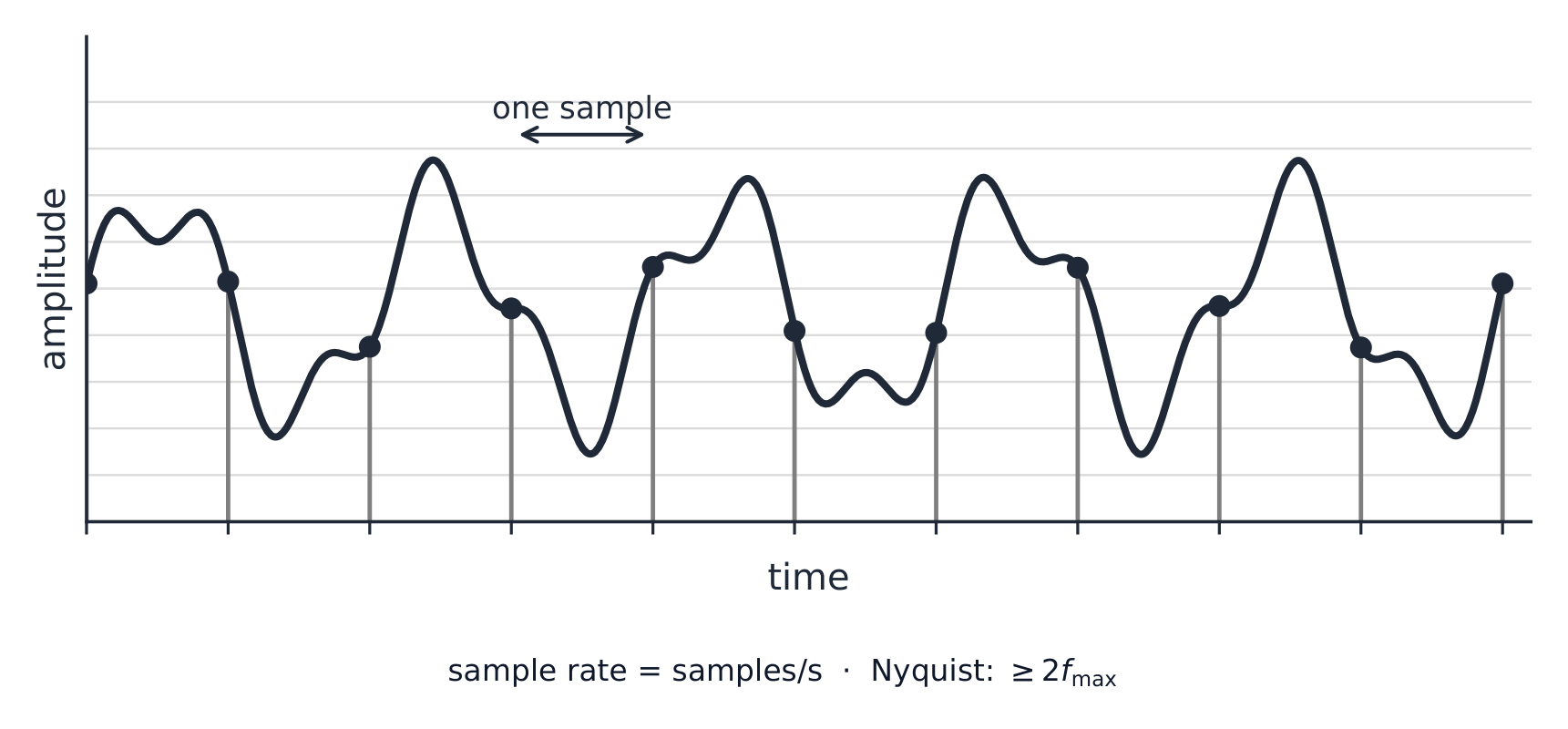
(The sampling rate must be at least twice the highest frequency you want to keep.)

ไทย

คลื่นต่อเนื่องของ ข้อมูลอนาล็อก (เสียง) ถูกแปลงเป็น ข้อมูลดิจิทัล ผ่านกระบวนการ การสุ่มตัวอย่าง (sampling):

  • อัตราการสุ่มตัวอย่าง (sampling rate) — จำนวนตัวอย่างต่อวินาที (Hz). คุณภาพระดับซีดีอยู่ที่ $44.1\ \text{kHz}$.
  • ความละเอียดของการสุ่มตัวอย่าง (sampling resolution หรือ bit depth) — บิตต่อค่า แอมพลิจูด ของแต่ละตัวอย่าง. คุณภาพระดับซีดีคือ 16 บิต.
คลื่นเสียงอนาล็อกที่เรียบเนียนพร้อมแท่งแนวตั้งแสดงจุดสุ่มตัวอย่างตามช่วงเวลาอย่างสม่ำเสมอ โดยแต่ละแท่งอ่านค่าแอมพลิจูดของคลื่น
การสุ่มตัวอย่างคลื่นเสียง: อ่านค่าแอมพลิจูดในช่วงเวลาต่างๆ

ขนาดไฟล์

$$\text{size in bits} = \text{sampling rate} \times \text{resolution} \times \text{duration} \times \text{channels}.$$

คลิปเสียงสเตอริโอซีดีความยาว 10 วินาที: $44100 \times 16 \times 10 \times 2 = 14\,112\,000$ บิต $\approx 1.68\ \text{MiB}$.

การเปลี่ยนการตั้งค่า

  • อัตราการสุ่มตัวอย่างสูงขึ้น → บันทึกเสียงสูงได้มากขึ้น ไฟล์มีขนาดใหญ่ขึ้น.
  • ความละเอียดการสุ่มตัวอย่างสูงขึ้น → ขั้นตอนการวัดแอมพลิจูดละเอียดขึ้น ลด สัญญาณรบกวนจากการตัดทอน (quantisation noise) ไฟล์มีขนาดใหญ่ขึ้น.
  • ค่าต่ำกว่า ของทั้งสองอย่าง → ไฟล์เล็กลง แต่คุณภาพลดลงอย่างชัดเจน.

(อัตราการสุ่มตัวอย่างต้องมีอย่างน้อยเท่ากับการสองเท่าของความถี่สูงสุดที่คุณต้องการเก็บรักษา.)

คลื่นเสียงที่มีเส้นแบ่งจุดสุ่มตัวอย่างเว้นระยะเท่ากัน จุดหนึ่งต่อหนึ่งตัวอย่าง并注明采样率 = samples per second และ Nyquist อย่างน้อยสองเท่าของความถี่สูงสุด
อัตราการสุ่มตัวอย่างคือจำนวนตัวอย่างต่อวินาที; กฎของ Nyquist อธิบายว่าทำไมมันต้องเป็นสองเท่าของความถี่สูงสุดที่ต้องการเก็บรักษา
Explore · ⁨สำรวจ⁩

Sound sampling

y = a sin(bt + c)

Sampling measures a sound wave at regular intervals — a higher rate copies it more truly. · ⁨การสุ่มตัวอย่างวัด คลื่นเสียง ในช่วงเวลาที่เป็นระยะ — อัตราที่สูงขึ้นจะจำลองได้แม่นยำยิ่งขึ้น⁩

Vocabulary · ⁨คำศัพท์⁩ Train · ⁨ฝึกฝน⁩
English ไทย
sampling/ˈsæmplɪŋ/ การสุ่มตัวอย่าง (sampling)
sampling rate/ˈsæmplɪŋ reɪt/ อัตราการสุ่มตัวอย่าง
sampling resolution/ˈsæmplɪŋ ˌrezəˈluːʃn/ ความละเอียดของการสุ่มตัวอย่าง
quantisation/ˌkwɒntaɪˈzeɪʃn/ การ量化
1.3

Compression · ⁨การบีบอัด⁩

Syllabus · ⁨หลักสูตร⁩
English
Candidates should be able to: Notes and guidance
Show understanding of the need for and examples of the use of compression
Show understanding of lossy and lossless compression and justify the use of a method in a given situation
Show understanding of how a text file, bitmap image, vector graphic and sound file can be compressed Including the use of run-length encoding (RLE)
ไทย
ผู้เข้าสอบควรสามารถ: หมายเหตุและคำแนะนำ
แสดงความเข้าใจถึงความจำเป็นและตัวอย่างการใช้ compression
แสดงความเข้าใจ关于 lossy และ lossless compression และให้เหตุผลในการใช้วิธีการหนึ่งในสถานการณ์ที่กำหนด
แสดงความเข้าใจถึงการบีบอัดไฟล์ข้อความ, bitmap image, vector graphic และไฟล์เสียง รวมถึงการใช้ run-length encoding (RLE)

Source: Cambridge International syllabus · ⁨แหล่งที่มา: หลักสูตร Cambridge International⁩

English

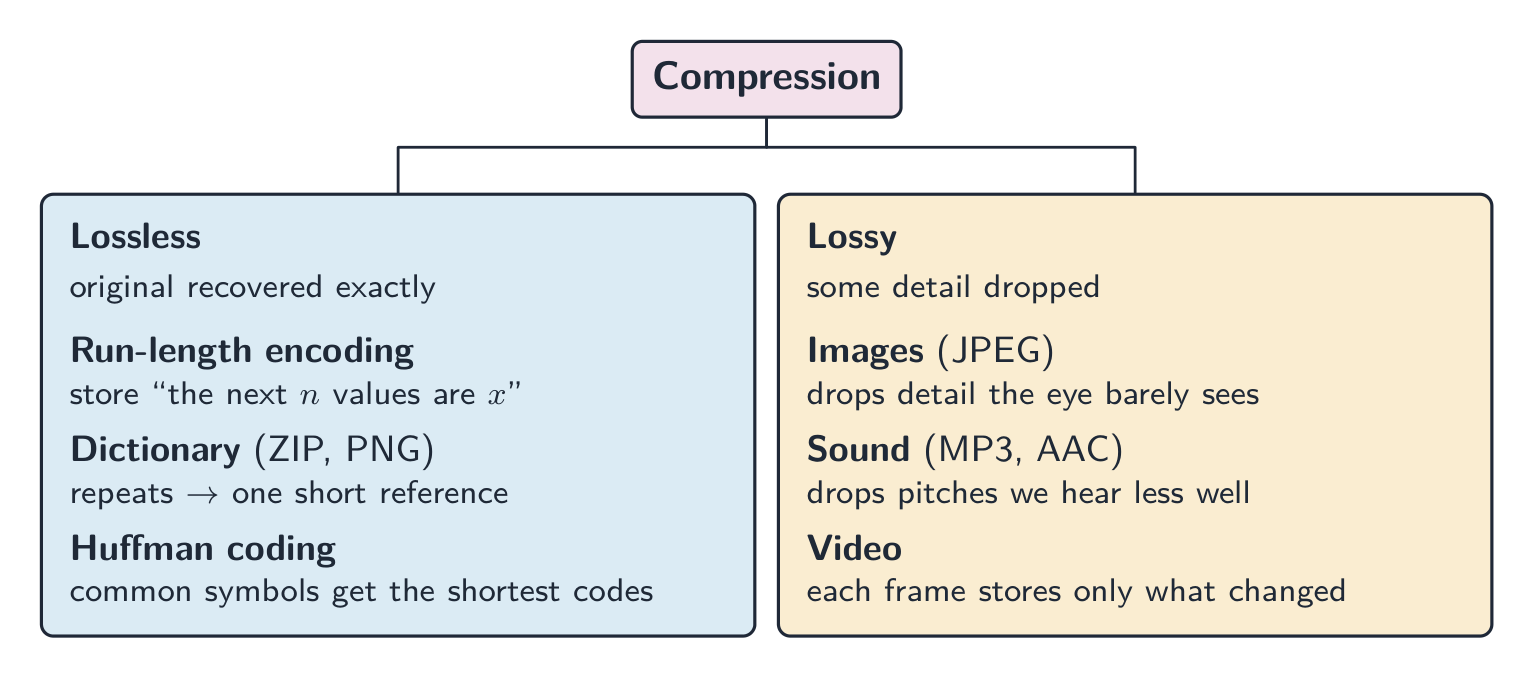
Compression 压缩 reduces file size, saving storage and transmission bandwidth 带宽. Two kinds:

  • lossless 无损 — the original data is recovered exactly (text, programs, ZIP/PNG).
  • lossy 有损 — some detail is dropped for much smaller files (JPEG, MP3, video).

When to use which

  • lossless for documents, source code, medical images — anything needing exact data.
  • lossy for streaming media. Real-time video streaming uses lossy compression because it must send huge amounts of data in real time over limited bandwidth; lossless would not shrink it enough. Raw HD video is gigabytes per minute, so without compression the picture would keep freezing.

A "justify" answer names the method, then the reason from the situation: "Lossless, because the spreadsheet must be restored exactly; a single changed value would make the accounts wrong." Or: "Lossy, because the photographs are viewed on a phone screen where the dropped detail is not visible, and the smaller files upload faster and use less storage."

Lossless methods

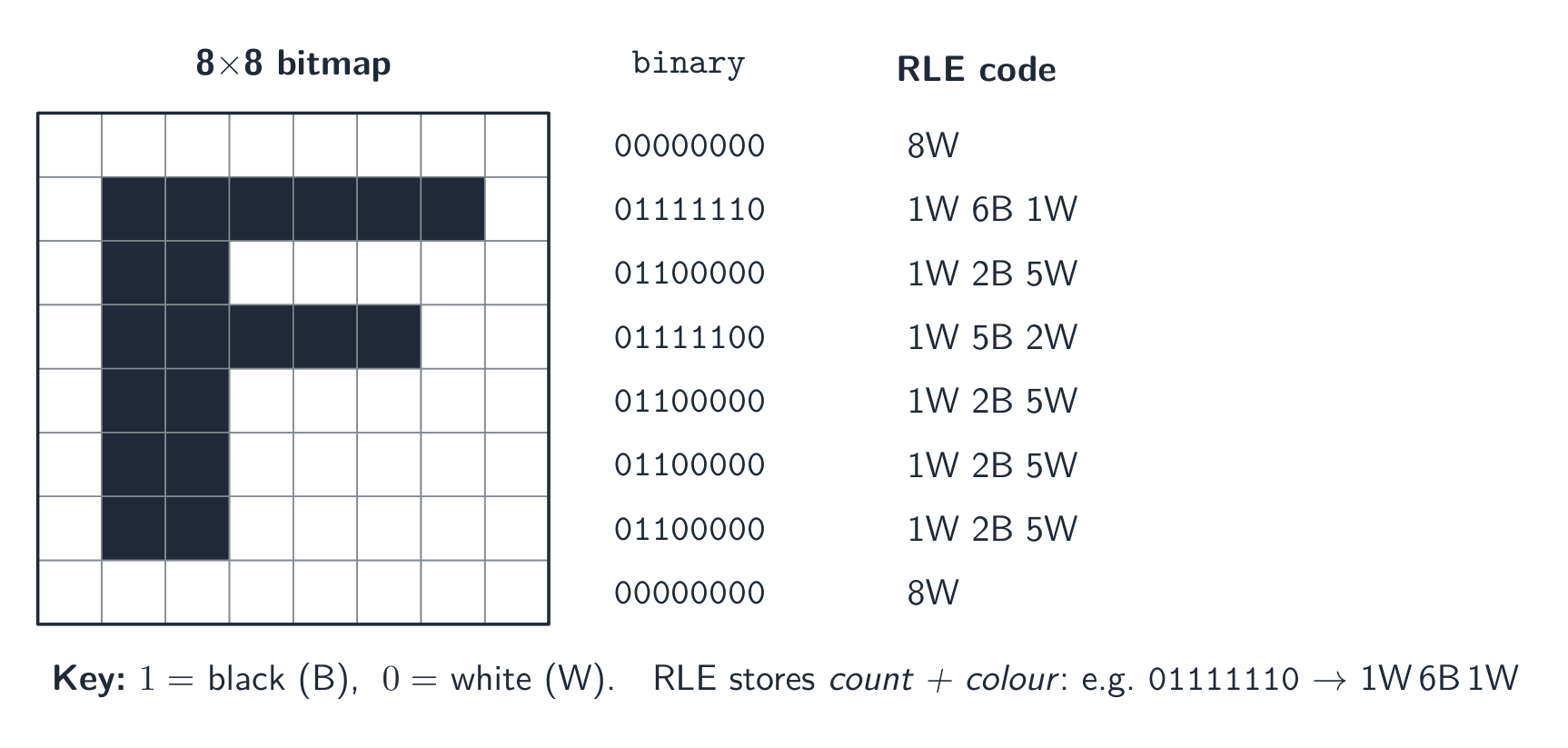
  • run-length encoding 行程编码 (RLE): store "the next $n$ values are $x$" instead of repeating $x$. Great for flat areas; useless for noisy data.
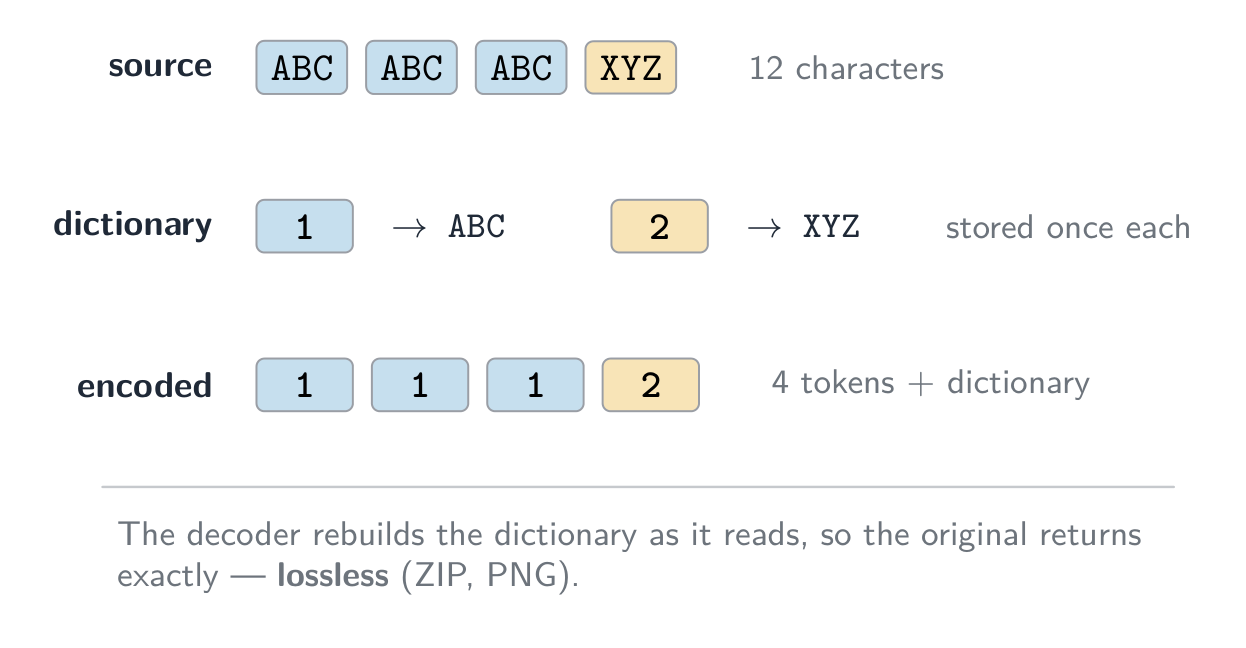
  • dictionary methods 字典编码 (ZIP, PNG): replace repeated byte sequences with a short reference. Good for text and code.
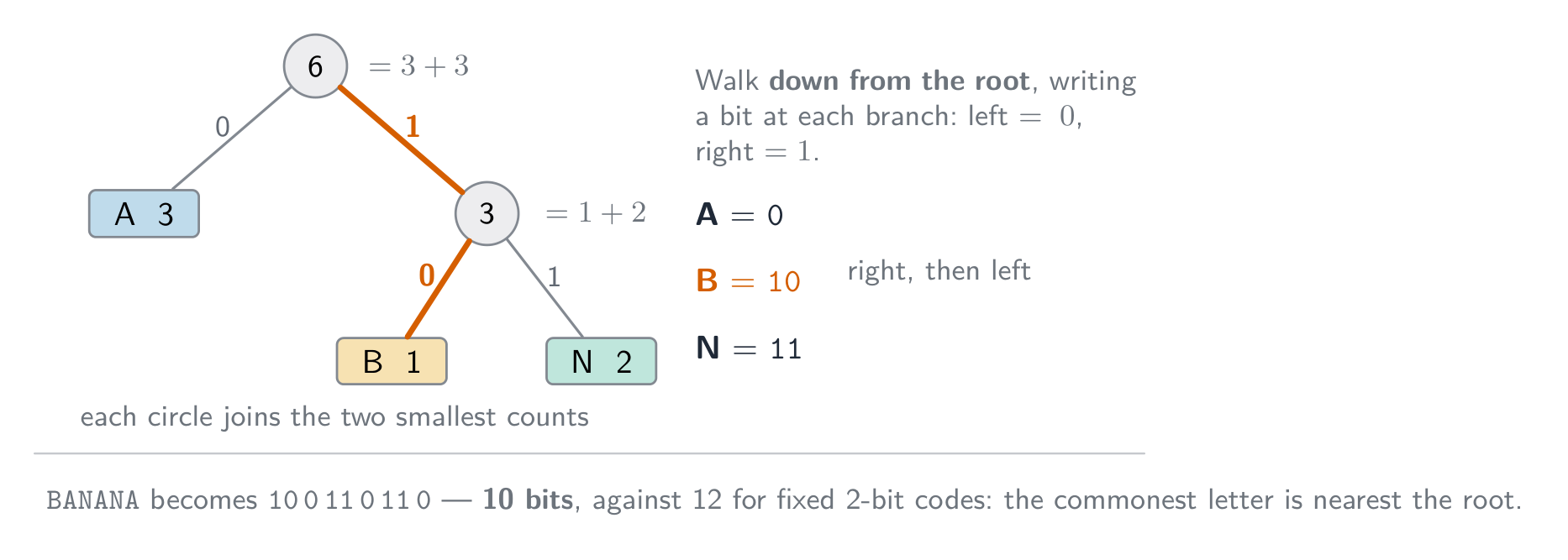
  • Huffman coding 霍夫曼编码: give short codes to common symbols and long codes to rare ones, bringing the average code length near the data's entropy 熵.

How each kind of file is compressed:

  • text file: dictionary methods and Huffman coding turn repeated words and common characters into short codes. Text must stay lossless, because one changed character changes the meaning.
  • bitmap image: RLE for runs of identical pixels (icons, diagrams, black-and-white scans); lossy JPEG for photographs, or a lower colour depth or resolution.
  • vector graphic: the drawing list is already small; remove drawing objects that are not needed, store coordinates to fewer decimal places, or apply a lossless method such as ZIP to the file.
  • sound file: lossy MP3 or AAC removes what the ear cannot hear; a lower sampling rate or resolution is also lossy; lossless formats keep every sample and shrink the file much less.

Lossy methods

  • images (JPEG): drop fine detail and colour differences the eye barely sees.
  • sound (MP3, AAC): drop pitches we hear less well, and quiet sounds hidden by louder ones.
  • video combines spatial 空间 compression (within each frame, like JPEG) with temporal 时间 compression (most frames store only the differences from the previous frame).
ไทย

การบีบอัด (Compression) ลดขนาดไฟล์ ช่วยประหยัดพื้นที่จัดเก็บและ แบนด์วิดท์ (bandwidth) ในการส่งข้อมูล มีสองประเภทหลัก:

  • แบบไม่สูญเสียข้อมูล (lossless) — สามารถกู้คืนข้อมูลต้นฉบับกลับมาได้สมบูรณ์ (เช่น ข้อความ, โปรแกรม, ZIP/PNG).
  • แบบสูญเสียข้อมูล (lossy) — ทิ้งรายละเอียดบางส่วนเพื่อลดขนาดไฟล์อย่างมาก (เช่น JPEG, MP3, วิดีโอ).

การใช้ในกรณีใด

  • แบบไม่สูญเสียข้อมูล เหมาะสำหรับเอกสาร, โค้ดโปรแกรม, ภาพถ่ายทางการแพทย์ — ทุกสิ่งที่ต้องการข้อมูลที่แม่นยำ.
  • แบบสูญเสียข้อมูล เหมาะสำหรับสื่อสตรีมมิ่ง. วิดีโอสตรีมมิ่งแบบเรียลไทม์ ใช้การบีบอัดแบบสูญเสียข้อมูลเพราะจำเป็นต้องส่งปริมาณข้อมูลมหาศาลในเวลาจริงผ่านแบนด์วิดท์จำกัด; แบบไม่สูญเสียข้อมูลจะไม่ลดขนาดได้เพียงพอ วิดีโอ HD ดิบมีขนาดเป็นกิกะไบต์ต่อนาที หากไม่มีการบีบอัด ภาพจะติดขัดหรือหยุดนิ่งตลอดเวลา

คำตอบแบบ "justify" ต้องระบุวิธีการก่อน แล้วตามด้วยเหตุผลจากสถานการณ์: "แบบไม่สูญเสียข้อมูล เพราะสเปรดชีตต้องกู้คืนกลับมาได้พอดี; ค่าที่เปลี่ยนไปเพียงค่าเดียวจะทำให้บัญชีผิดเพี้ยน" หรือ: "แบบสูญเสียข้อมูล เพราะภาพถ่ายถูกดูบนหน้าจอโทรศัพท์ รายละเอียดที่ถูกทิ้งไปไม่มองเห็นได้ และไฟล์ขนาดเล็กอัปโหลดเร็วขึ้นและใช้พื้นที่จัดเก็บน้อยกว่า"

วิธีการแบบไม่สูญเสียข้อมูล

  • การเข้ารหัสความยาวของลำดับ (Run-length encoding - RLE): บันทึกว่า "$n$ ค่าถัดไปคือ $x$" แทนที่จะซ้ำ $x$. เหมาะกับพื้นผิวเรียบ; ไม่有用กับข้อมูลที่มีสัญญาณรบกวน.
  • วิธีการแบบคำศัพท์ (Dictionary methods เช่น ZIP, PNG): เปลี่ยนลำดับไบต์ที่ซ้ำกันด้วยตัวอ้างอิงสั้นๆ. ดีสำหรับข้อความและโค้ด.
  • การเข้ารหัส Huffman: asignate รหัสสั้นให้กับสัญลักษณ์ที่พบบ่อย และรหัสยาวให้กับสัญลักษณ์ที่พบน้อยลง เพื่อทำให้ความยาวรหัสเฉลี่ยเข้าใกล้ เอนโทรปี (entropy) ของข้อมูล.

วิธีการบีบอัดไฟล์แต่ละชนิด:

  • ไฟล์ข้อความ: วิธีการแบบคำศัพท์และการเข้ารหัส Huffman แปลงคำที่ซ้ำและตัวอักษรที่พบบ่อยให้เป็นรหัสสั้น. ข้อความต้องเป็นแบบไม่สูญเสียข้อมูลเสมอ เพราะการเปลี่ยนตัวอักษรเพียงตัวเดียวก็เปลี่ยนความหมายได้.
  • ภาพบิตแมพ: ใช้ RLE สำหรับแถวพิกเซลที่เหมือนกัน (ไอคอน, แผนภูมิ, สแกนขาวดำ); ใช้ JPEG แบบสูญเสียข้อมูลสำหรับภาพถ่าย, หรือลดความลึกของสีหรือความละเอียดลง.
  • กราฟิกเวกเตอร์: รายการวาดภาพมีขนาดเล็กอยู่แล้ว; ลบวัตถุวาดภาพที่ไม่จำเป็นออก, บันทึกพิกัดด้วยทศนิยมตำแหน่งน้อยลง, หรือใช้วิธีไม่สูญเสียข้อมูลเช่น ZIP กับไฟล์.
  • ไฟล์เสียง: MP3 หรือ AAC แบบสูญเสียข้อมูลตัดส่วนที่หูมนุษย์ไม่ได้ยินออก; การลดอัตราการสุ่มตัวอย่างหรือความละเอียดก็เป็นการสูญเสียข้อมูลเช่นกัน; Formats แบบไม่สูญเสียข้อมูลจะเก็บทุกตัวอย่างไว้แต่ลดขนาดไฟล์ได้น้อยกว่ามาก.
แถวพิกเซล 16 ช่อง consisting of 6 ขาว, 4 ดำ และ 6 ขาว; กลุ่ม 3 กลุ่มถูกวงเล็บและติดฉลาก 6W, 4B, 6W ดังนั้น 16 พิกเซลจึงถูกเก็บเป็นกลุ่ม 3 กลุ่ม 6W 4B 6W
การเข้ารหัสความยาวของลำดับในแถวเดียว: 16 พิกเซลกลายเป็น 3 กลุ่ม
ตารางขาวดำขนาด 8×8 แสดงตัวอักษร F พร้อมรูปแบบบิตของแต่ละแถวและรหัสความยาวของลำดับที่สั้นกว่าที่เรียงอยู่ข้างๆ
การเข้ารหัสความยาวของลำดับของตัวอักษร F ในตารางขาวดำขนาด $8\times8$
ตัวอย่างการทำงานของ Dictionary coding: แหล่งข้อมูล ABC ABC ABC XYZ, คำศัพท์ที่ 1 แทน ABC และ 2 แทน XYZ, และสตรีมข้อมูลที่เข้ารหัสแล้วคือ 1 1 1 2
การเข้ารหัสแบบคำศัพท์: แต่ละลำดับที่ซ้ำกันจะถูกบันทึกเพียงครั้งเดียว และทุกครั้งที่ปรากฏจะเป็นดัชนีสั้นๆ
ตัวอย่างการทำงานของ Huffman coding บนคำว่า BANANA:นับจำนวนตัวอักษร A 3, N 2 และ B 1, สร้างต้นไม้รหัสจากจำนวนเหล่านั้น, และรหัสที่ได้คือ A = 0, B = 10, N = 11
การเข้ารหัส Huffman: สัญลักษณ์ที่พบบ่อยที่สุดได้รับรหัสสั้นที่สุด ดังนั้นคำว่า BANANA จึงใช้ 10 บิตแทนที่จะเป็น 12 บิต

วิธีการแบบสูญเสียข้อมูล

  • ภาพ (JPEG): ทิ้งรายละเอียดละเอียดและความแตกต่างของสีที่ตาคนมองแทบไม่เห็น.
  • เสียง (MP3, AAC): ทิ้งเสียงสูงที่เราได้ยินได้ไม่ดี และเสียงเบาที่ถูกกลบด้วยเสียงดัง.
  • วิดีโอ ผสมผสานการบีบอัด เชิงพื้นที่ (spatial compression) (ภายในแต่ละเฟรม เหมือน JPEG) เข้ากับการบีบอัด เชิงเวลา (temporal compression) (เฟรมส่วนใหญ่บันทึกเฉพาะความต่างจากเฟรมก่อนหน้า).
แผนภูมิต้นไม้จัดกลุ่มการบีบอัดเป็นแบบไม่สูญเสียข้อมูล (RLE, dictionary/ZIP/PNG, Huffman) และแบบสูญเสียข้อมูล (JPEG ภาพ, MP3/AAC เสียง, วิดีโอ) พร้อมตัวอย่างภายใต้แต่ละสาขา
วิธีการบีบอัด: แบบไม่สูญเสียข้อมูลเทียบกับแบบสูญเสียข้อมูล พร้อมตัวอย่างทั่วไป
Explore · ⁨สำรวจ⁩

Run-length encoding

Watch a run of repeated symbols get squashed into a count — simple lossless compression. · ⁨观察一串重复符号被压缩成计数——简单的 lossless compression。⁩

Vocabulary · ⁨คำศัพท์⁩ Train · ⁨ฝึกฝน⁩
English ไทย
encoding/enˈkəʊdɪŋ/ การเข้ารหัส
compression/kəmˈpreʃn/ การอัดตัว
bandwidth/ˈbændwɪdθ/ แบนด์วิดธ์
lossless/ˈlɒsləs/ แบบไม่มีการสูญเสียข้อมูล
lossy/ˈlɒsi/ แบบมีการสูญเสียข้อมูล
run-length encoding/rʌn leŋθ enˈkəʊdɪŋ/ การเข้ารหัสแบบ run-length
dictionary methods/ˈdɪkʃənəri ˈmeθədz/ วิธีตารางคำศัพท์
Huffman coding/ˈhʌfmən ˈkəʊdɪŋ/ การเข้ารหัสฮัฟแมน (Huffman coding)
entropy/ˈentrəpi/ entropy
spatial/ˈspeɪʃl/ เชิงพื้นที่
temporal/ˈtempərəl/ เชิงเวลา
Watch lesson · ⁨ดูบทเรียน⁩
1.3

Definitions the examiner accepts · ⁨คำนิยามที่ผู้สอบยอมรับ⁩

English

A definition question is marked against fixed wording. Learn these exactly, and give one answer only.

Term Definition
bit a single binary digit, 0 or 1
byte a group of 8 bits
binary prefix a multiplier that is a power of 2 (kibi = 1024) rather than a power of 10 (kilo = 1000)
two's complement a way of representing signed integers in which the most significant bit has a negative place value
overflow the result of a calculation is too large to be represented in the number of bits available
Binary Coded Decimal each denary digit is stored as its own 4-bit binary pattern
character set the set of characters a computer can represent, each with its own binary code
pixel the smallest element of a bitmap image, storing one colour value
image resolution the number of pixels in an image, given as width by height
screen resolution the number of pixels a display can show, given as width by height
colour depth the number of bits used to store the colour of one pixel
sampling rate the number of samples of the sound taken per second
sampling resolution the number of bits used to store the amplitude of one sample
lossless compression compression from which the original data can be recovered exactly
lossy compression compression that permanently removes some data, so the original cannot be recovered
run-length encoding replacing a run of repeated values with one value and a count
ไทย

คำถามคำนิยามจะให้คะแนนตามข้อความที่กำหนดไว้你必须 exact. เรียนรู้ให้ถูกต้องและตอบเพียงคำตอบเดียวเท่านั้น

พจน์ นิยาม
bit ตัวเลขฐานสองเดียว คือ 0 หรือ 1
byte กลุ่มของบิตจำนวน 8 บิต
Binary prefix ตัวคูณที่เป็นกำลังของ 2 (kibi = 1024) แทนที่จะเป็นกำลังของ 10 (kilo = 1000)
two's complement วิธีแสดงเลขจำนวนเต็มที่มีเครื่องหมาย โดยที่บิตที่มีความสำคัญสูงสุด (MSB) มีค่าตำแหน่งเป็นลบ
overflow ผลลัพธ์ของการคำนวณมีค่าใหญ่เกินกว่าที่จะแสดงได้ด้วยจำนวนบิตที่มีอยู่
Binary Coded Decimal แต่ละหลักฐานสิบจะถูกเก็บเป็นรูปแบบตัวเลขฐานสองขนาด 4 บิตของตัวเอง
character set ชุดตัวอักษรที่คอมพิวเตอร์สามารถแสดงผลได้ แต่ละตัวมีรหัสฐานสองของตัวเอง
pixel ส่วนประกอบเล็กๆ น้อยที่สุดของภาพ bitmap เก็บค่าสีหนึ่งค่า
image resolution จำนวนพิกเซลในภาพ แสดงเป็น ความกว้าง x ความสูง
screen resolution จำนวนพิกเซลที่หน้าจอแสดงผลได้ แสดงเป็น ความกว้าง x ความสูง
colour depth จำนวนบิตที่ใช้เก็บสีของพิกเซลหนึ่งจุด
sampling rate จำนวนตัวอย่างของเสียงที่เก็บต่อวินาที
sampling resolution จำนวนบิตที่ใช้เก็บความแรงของสัญญาณ (amplitude) ของตัวอย่างหนึ่งจุด
lossless compression การบีบอัดที่สามารถกู้คืนข้อมูลต้นฉบับออกมาได้ครบถ้วน
lossy compression การบีบอัดที่กำจัดข้อมูลบางส่วนไปอย่างถาวร ทำให้ไม่สามารถกู้คืนข้อมูลต้นฉบับได้
run-length encoding การแทนที่ชุดค่าซ้ำซ้อนด้วยค่าเดียวและจำนวนครั้ง
Vocabulary · ⁨คำศัพท์⁩ Train · ⁨ฝึกฝน⁩
English ไทย
colour depth/ˈkʌlə depθ/ ความลึกของสี
image resolution/ˈɪmɪdʒ ˌrezəˈluːʃn/ ความละเอียดของภาพ
screen resolution/skriːn ˌrezəˈluːʃn/ ความละเอียดหน้าจอ
amplitude/ˈæmplɪtjuːd/ แอมพลิจูด
sample resolution/ˈsæmpl ˌrezəˈluːʃn/ ความละเอียดของการสุ่มตัวอย่าง
1.3

Exam tips · ⁨ข้อแนะนำสำหรับการสอบ⁩

English
  • Show working for base conversions: denary → binary by place values, binary → hexadecimal in nibbles (groups of 4 bits).
  • For two's complement the MSB is negative; to negate, invert and add 1; watch for overflow when the sign bit flips wrongly.
  • Distinguish bitmap (pixels; file size $=$ width $\times$ height $\times$ colour depth) from vector (drawing commands; scales without loss).
  • Sound file size depends on sample rate $\times$ bit depth $\times$ time — more of each means better quality but a bigger file.
  • Compare lossless vs lossy compression and give a use for each.

Common mistakes

  • Explaining an overflow with "the answer was greater than 255" or "it has 9 bits". State the word size the question gave, then say the result cannot be represented in it.
  • Making a negative number by setting the top bit to 1 and leaving the rest (sign and magnitude). Two's complement means invert every bit of the positive value, then add 1.
  • Forgetting to pad a converted number to the register width the question asks for.
  • Mixing bits and bytes in a file-size calculation. Work in bits, divide by 8 once, and say whether you used 1000 or 1024.
  • Answering "describe" in everyday words ("the picture gets worse"). Use the syllabus terms: fewer colours, banding, lower image resolution, larger pixels.
ไทย
  • แสดงวิธีทำสำหรับการแปลงฐาน: ฐานสิบ → ฐานสอง โดยใช้ค่าตำแหน่ง, ฐานสอง → ฐานหก عشر ใน nibbles (กลุ่มของ 4 บิต).
  • สำหรับ two's complementuting MSB เป็นลบ; เพื่อกลับเครื่องหมาย ให้ สลับทุกบิตแล้วบวก 1; ระวัง overflow เมื่อบิตเครื่องหมายเปลี่ยนผิดทาง.
  • แยกแยะระหว่าง bitmap (พิกเซล; ขนาดไฟล์ $=$ ความกว้าง $\times$ ความสูง $\times$ Colour depth) กับ vector (คำสั่งวาดภาพ; ขยายขนาดได้โดยไม่สูญเสียคุณภาพ).
  • ขนาดไฟล์เสียงขึ้นอยู่กับ sample rate $\times$ bit depth $\times$ เวลา — ยิ่งมากยิ่งดีแต่ไฟล์ก็ใหญ่ขึ้น
  • เปรียบเทียบ lossless vs lossy compression และยกตัวอย่างการใช้งานของแต่ละแบบ

ข้อผิดพลาดที่พบบ่อย

  • อธิบาย overflow ว่า "คำตอบมากกว่า 255" หรือ "มันมี 9 บิต" ต้องระบุขนาดบิต (word size) ที่โจทย์กำหนด แล้วบอกว่าผลลัพธ์ไม่สามารถแสดงได้ในขนาดนั้น
  • สร้างเลขติดลบโดยการตั้งบิตบนสุดเป็น 1 และปล่อยส่วนที่เหลือไว้ (sign and magnitude) Two's complement คือการสลับทุกบิตของค่าบวก แล้วบวก 1
  • ลืมเติมศูนย์นำหน้า (pad) จำนวนที่แปลงให้ตรงกับขนาด register ที่โจทย์ต้องการ
  • ผสมบิตกับไบต์ในการคำนวณขนาดไฟล์ ทำงานด้วยบิต หารด้วย 8 เพียงครั้งเดียว และระบุว่าใช้ 1000 หรือ 1024
  • ตอบคำถาม "describe" ด้วยภาษาทั่วไป (เช่น "ภาพแย่ลง") ใช้ศัพท์หลักสูตร: สีน้อยลง, banding, image resolution ต่ำลง, พิกเซลใหญ่ขึ้น

Interactive lessons on this topic · ⁨บทเรียนเชิงโต้ตอบสำหรับหัวข้อนี้⁩

Work through it step by step, with instant-check exercises. · ⁨ทำทีละขั้นตอน พร้อมแบบฝึกหัดตรวจสอบผลทันที⁩

Past Papers · ⁨ข้อสอบย้อนหลัง⁩

More topics in A-Level Computer Science · ⁨Computer Science A-Level⁩ · ⁨หัวข้อเพิ่มเติมใน A-Level Computer Science · ⁨Computer Science A-Level⁩⁩

Log in or create account · ⁨เข้าสู่ระบบหรือสร้างบัญชี⁩

IGCSE, A-Level & AP