Bitmap and vector graphics
Introduced| English | Meaning |
|---|---|
| bitmap/ˈbɪtmæp/ | An image representation storing information about a grid of individual pixels. |
| vector/ˈvektə/ | A quantity with both magnitude and direction. |
| pixel/ˈpɪksl/ | An individual picture element in a digital image or display. |
| file header/faɪl ˈhedə/ | Information near the start of a file describing its format, contents or how to interpret its data. |
| colour depth/ˈkʌlə depθ/ | The number of bits used to represent a pixel's colour, determining how many encoded colour values are available. |
| image resolution/ˈɪmɪdʒ ˌrezəˈluːʃn/ | The image's own size in pixels, width by height. |
| screen resolution/skriːn ˌrezəˈluːʃn/ | screen resolution |
| frame/freɪm/ | A discrete unit in a sequence or transmission; in video, one complete image, and in networking, a link-layer data unit. |
| frame rate/freɪm reɪt/ | The number of video images displayed or recorded per unit time, usually per second. |
| drawing list/ˈdrɔːɪŋ lɪst/ | A stored collection of objects or instructions describing how to construct a vector image. |
| drawing objects/ˈdrɔːɪŋ ˈɒbdʒekts/ | Separate shapes, text items or other elements that make up an editable drawing. |
| primitives/ˈprɪmɪtɪvz/ | Basic graphical elements, such as lines and circles, from which more complex images are built. |
| properties/ˈprɒpətiz/ | Named characteristics or values belonging to an object, such as its size, position or colour. |
| render/ˈrendə/ | To generate a visible image or page from its underlying data, objects or instructions. |
Why the logo on the billboard is not a photograph
- A company's logo appears on a business card two centimetres wide and on a motorway billboard six metres wide. It is the same file, and it is sharp on both.
- Enlarge a photograph the same way and it turns to blocks. Nothing is wrong with the photograph; the two files answer different questions.
- A photograph stores what colour is at each point. A logo stores what shapes to draw. Enlarging the first spreads a fixed number of dots; enlarging the second redraws the shapes at the new size.
- This lesson is bitmap 位图 and vector 矢量 images, the file-size calculation the exam asks for, and how to justify a choice.
How a bitmap is encoded
- A bitmap (a bitmapped image) stores the colour of every pixel 像素 in a grid, row by row.
- At the start of the file, a file header 文件头 records the metadata the software needs to read the pixels that follow: the width, the height and the colour depth.
- Image resolution 图像分辨率 is the image's own size in pixels, width by height. Screen resolution 屏幕分辨率 is what the display can show. An image larger than the screen is scaled down to fit; a low-resolution image stretched onto a high-resolution screen looks blocky.
- Colour depth 颜色深度 (bit depth) is the number of bits storing one pixel's colour: 1 bit gives black and white, 8 bits give 256 colours, 24 bits give 16.7 million, called true colour.
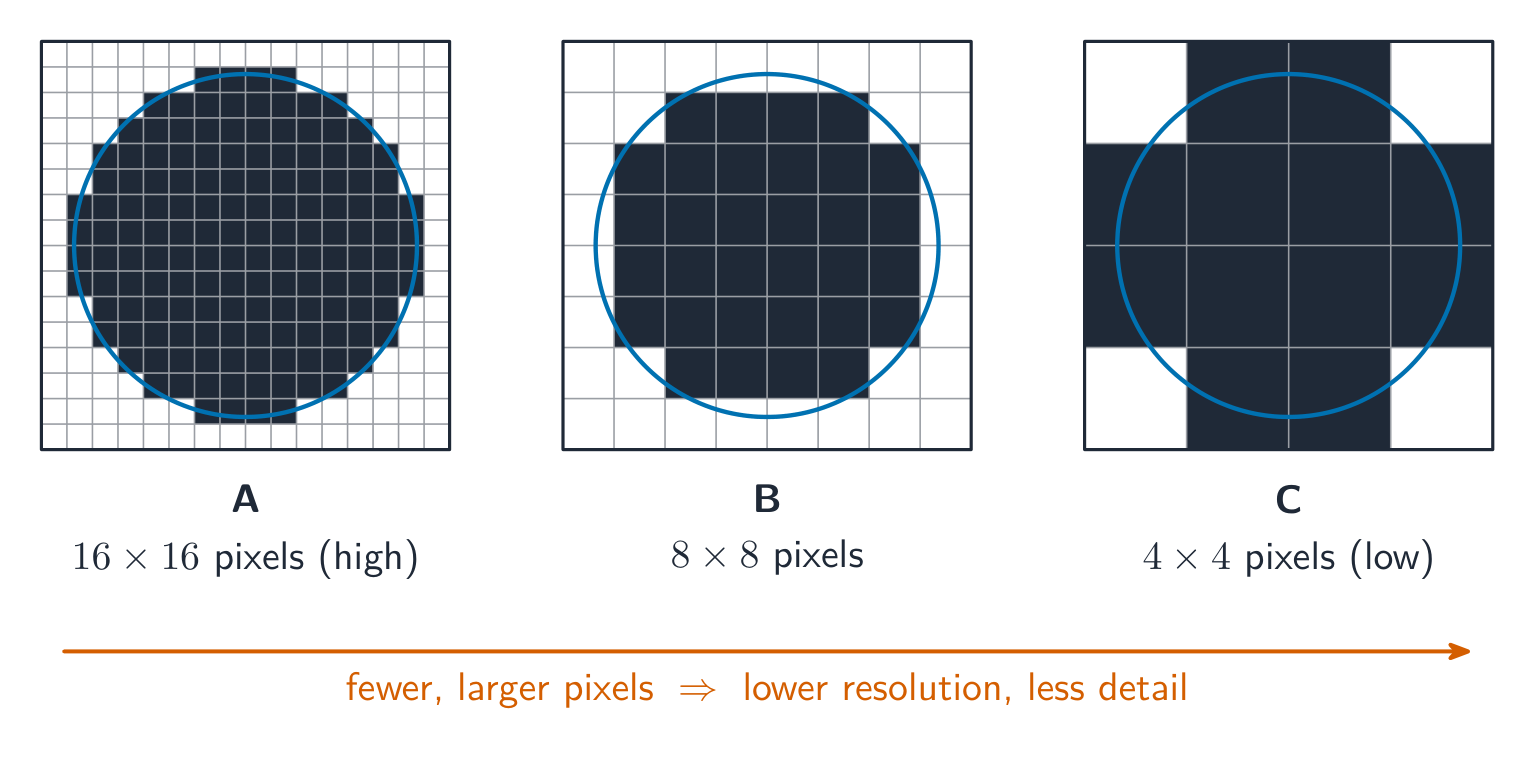
Fewer pixels, bigger blocks
Computing concept lab
Classify concrete examples by the computing idea they demonstrate.
The colour depth (bit depth) of a bitmap image is:
Difficulty 1/5 · 100 coins + a small bonus on first completion today
Colour depth is bits per pixel — more bits means more possible colours (8 bits → 256, 24 bits → 16.7 million).
How many bits of colour depth are needed to store 256 different colours?
Difficulty 2/5 · 140 coins + a small bonus on first completion today
$2^8 = 256$, so 8 bits per pixel give 256 colours.
What does the file header of a bitmap image store?
Difficulty 1/5 · 100 coins + a small bonus on first completion today
The header is metadata: without the width and colour depth the pixel bytes cannot be split into rows and pixels. A drawing list belongs to a vector file.
Bitmap file size
- Divide by 8 for bytes, then by 1000 or 1024 depending on which prefix family you are using, and say which. Add the header if the question gives its size.
- A $3000 \times 2000$ image at 24 bits per pixel is $1.44 \times 10^8$ bits, which is 18.0 MB using decimal prefixes or 17.2 MiB using binary ones. Both are accepted when the working shows which.
A $100 \times 100$ pixel image has a colour depth of 24 bits. What is its file size in bits?
Difficulty 2/5 · 140 coins + a small bonus on first completion today
size $=$ width $\times$ height $\times$ depth $= 100 \times 100 \times 24 = 240\,000$ bits.
Worked example: size a photograph, then a video
- A photograph is $4000 \times 3000$ pixels with a colour depth of 24 bits. Find its file size in MiB.
- $4000 \times 3000 \times 24 = 2.88 \times 10^8$ bits. Divide by 8: $3.6 \times 10^7$ bytes. Divide by $1024^2$: 34.3 MiB.
- A video is a sequence of bitmap frames 帧. Its uncompressed size is one frame $\times$ the frame rate 帧率 $\times$ the duration. At 30 frames per second, $1920 \times 1080$, 24 bits: $30 \times 1920 \times 1080 \times 24 \approx 1.5 \times 10^9$ bits, about 187 MB, per second. That is why video is always compressed.
An uncompressed video is $1920 \times 1080$ pixels, 24-bit colour, $30$ frames per second. How many bits does ONE second need? Give the answer to two significant figures, typed like 1.5e9.
Difficulty 2/5 · 140 coins + a small bonus on first completion today
$1920 \times 1080 \times 24 = 4.98 \times 10^{7}$ bits per frame, times $30$ frames $= 1.5 \times 10^{9}$ bits, about $187\ \text{MB}$ for every second. That is why video is always compressed.
Changing the settings
- Lower image resolution: fewer pixels, so a smaller file, but less detail; enlarged, the picture looks blocky because each pixel covers more of the screen.
- Lower colour depth: fewer bits per pixel, so a smaller file, but smooth shades show banding, visible steps where there should be a gradient.
- Higher of either: a larger file and better quality. Answer in these syllabus terms, not "the picture gets worse".
Match each change to its effect on the image.
Difficulty 2/5 · 140 coins + a small bonus on first completion today
Answer in the syllabus terms, banding and blockiness, not "the picture gets worse".
How a vector graphic is encoded
- A vector graphic stores the instructions to draw the image, as a drawing list 绘图列表: an ordered list of drawing objects 绘图对象, which are geometric primitives 图元 such as lines, curves, rectangles, polygons and circles.
- Each drawing object carries properties 属性: its position or coordinates, line colour and width, fill colour, radius and so on.
- To display it, the program renders 渲染 the drawing list at whatever size is needed, so it scales without any loss of quality. It cannot describe arbitrary pixel detail, so it is no good for a photograph.
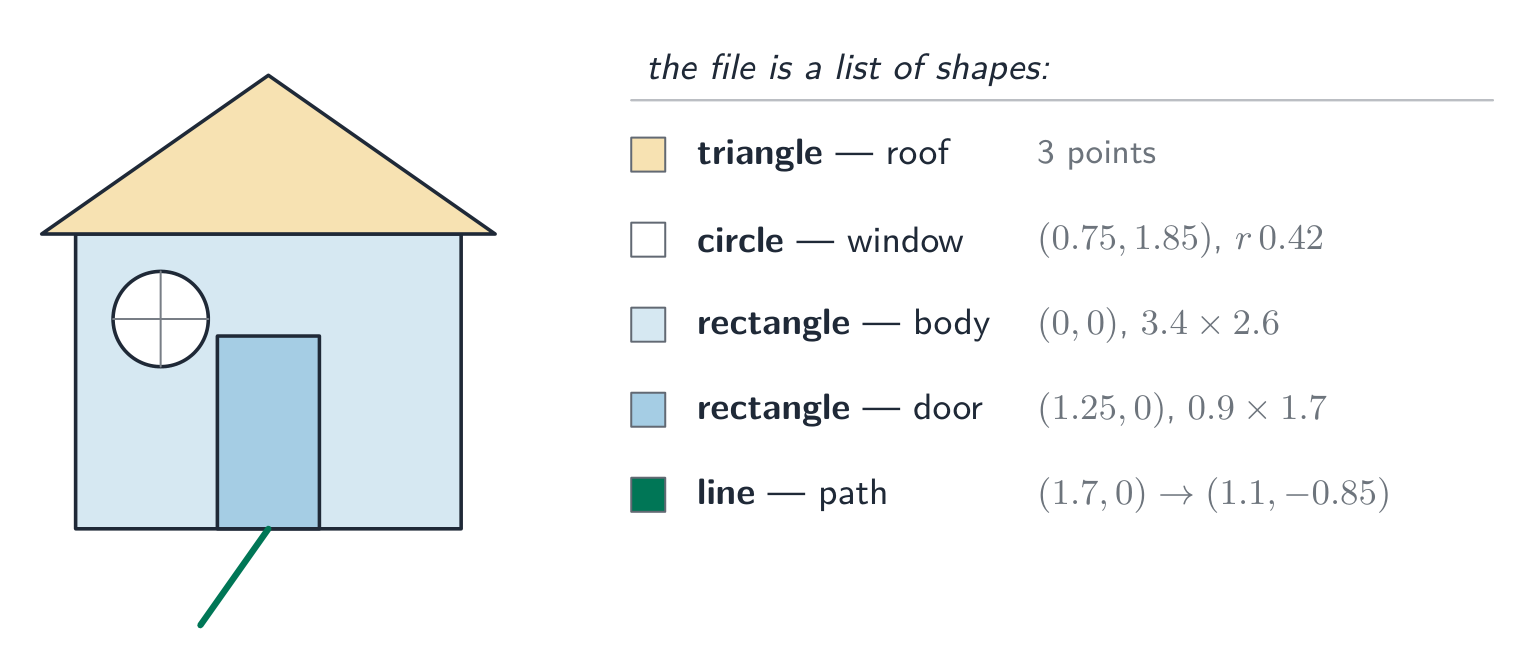
A list of shapes and their properties, not a grid of dots
A vector logo becomes blurry when you enlarge it a lot.
Difficulty 1/5 · 100 coins + a small bonus on first completion today
Vectors are re-rendered from instructions at any size, so they stay sharp. It is bitmaps that blur when enlarged.
The main advantage of a vector graphic is that it:
Difficulty 1/5 · 100 coins + a small bonus on first completion today
Because it is drawn from instructions, a vector scales without blur — ideal for logos and diagrams (but not photos).
Worked example: justify the choice
- A logo must appear on a business card and on a billboard. Which format, and why? [3]
- A vector graphic. It is stored as drawing objects with properties, so the program re-renders it at whatever size is required and the edges stay sharp.
- A bitmap has a fixed number of pixels, so enlarging it to billboard size would make each pixel visible and the logo would look blocky.
- And for a photograph? A bitmap: a photograph has no geometric shapes to describe, so the colour of every pixel must be stored individually.
Which terms describe how a vector graphic is encoded? Select all that apply.
Difficulty 2/5 · 140 coins + a small bonus on first completion today
An ordered drawing list of drawing objects, each with properties. Colour depth is a bitmap term, bits per pixel.
Choosing between them
| Task | Choice | Why |
|---|---|---|
| photograph | bitmap | per-pixel detail cannot be described as shapes |
| logo, icon, road sign | vector | sharp at any size, small file |
| engineering drawing | vector | precise geometry, scales exactly |
| painting, texture | bitmap | smooth tonal detail across an area |
Which format is better for storing a photograph?
Difficulty 1/5 · 100 coins + a small bonus on first completion today
A photo has complex per-pixel detail that cannot be described as shapes, so a bitmap is the right choice.
Marks that slip away
- Work in bits, divide by 8 once, and state whether you used 1000 or 1024. Mixing bits and bytes halfway is the usual lost mark.
- Image resolution is the image's pixels; screen resolution is the display's. The question names one.
- A vector is a drawing list of objects with properties, not "a picture made of lines". Use the three terms.
- A "justify" answer links the format to the task: the billboard, the photograph. A definition alone does not justify anything.
You've got it
- a bitmap stores every pixel's colour after a file header; image resolution is its pixel size, colour depth the bits per pixel
- size in bits = width $\times$ height $\times$ colour depth; a video adds $\times$ frame rate $\times$ duration
- lower resolution means blocky, lower colour depth means banding; both mean a smaller file
- a vector graphic is a drawing list of drawing objects with properties, rendered at any size, so it scales without loss but cannot store a photograph