Compression
Introduced| English | Meaning |
|---|---|
| compression/kəmˈpreʃn/ | Squeezing an object or substance so that its size or volume decreases. |
| lossless/ˈlɒsləs/ | Describing compression from which the original data can be recovered exactly. |
| lossy/ˈlɒsi/ | Describing compression that discards some original information so it cannot be perfectly recovered. |
| bandwidth/ˈbændwɪdθ/ | The frequency range carried by a signal or channel; in networking, often used for its data transfer capacity. |
| run-length encoding/rʌn leŋθ enˈkəʊdɪŋ/ | Lossless compression that stores a repeated value together with the number of repetitions. |
| dictionary coding/ˈdɪkʃənəri ˈkəʊdɪŋ/ | dictionary coding |
| Huffman coding/ˈhʌfmən ˈkəʊdɪŋ/ | Huffman coding |
| spatial/ˈspeɪʃl/ | Relating to space or position; in video compression, spatial methods reduce redundancy within a single frame. |
| temporal/ˈtempərəl/ | Relating to time; in video compression, temporal methods reduce redundancy between successive frames. |
The three letters that made the web possible
- In 1987 a programmer named Phil Katz wrote a compression program and put the file format in the public domain. He called it ZIP. He was 24.
- Nothing about the web works without that idea. A single uncompressed second of HD video is about 187 MB; a two-hour film would be 1.3 terabytes. Streaming it over a home connection is arithmetically impossible.
- The films you watch are perhaps a thousandth of that, and they still look right, because the compression throws away things your eye was never going to notice.
- This lesson is compression 压缩: the two families, the three lossless methods, and how to justify one for a given file.
Lossless and lossy
- Compression reduces a file's size, saving storage space and transmission bandwidth 带宽, and making downloads and streams faster.
- Lossless 无损 compression is compression from which the original data can be recovered exactly. ZIP and PNG are lossless.
- Lossy 有损 compression permanently removes some data, so the original cannot be recovered. JPEG, MP3 and streamed video are lossy.
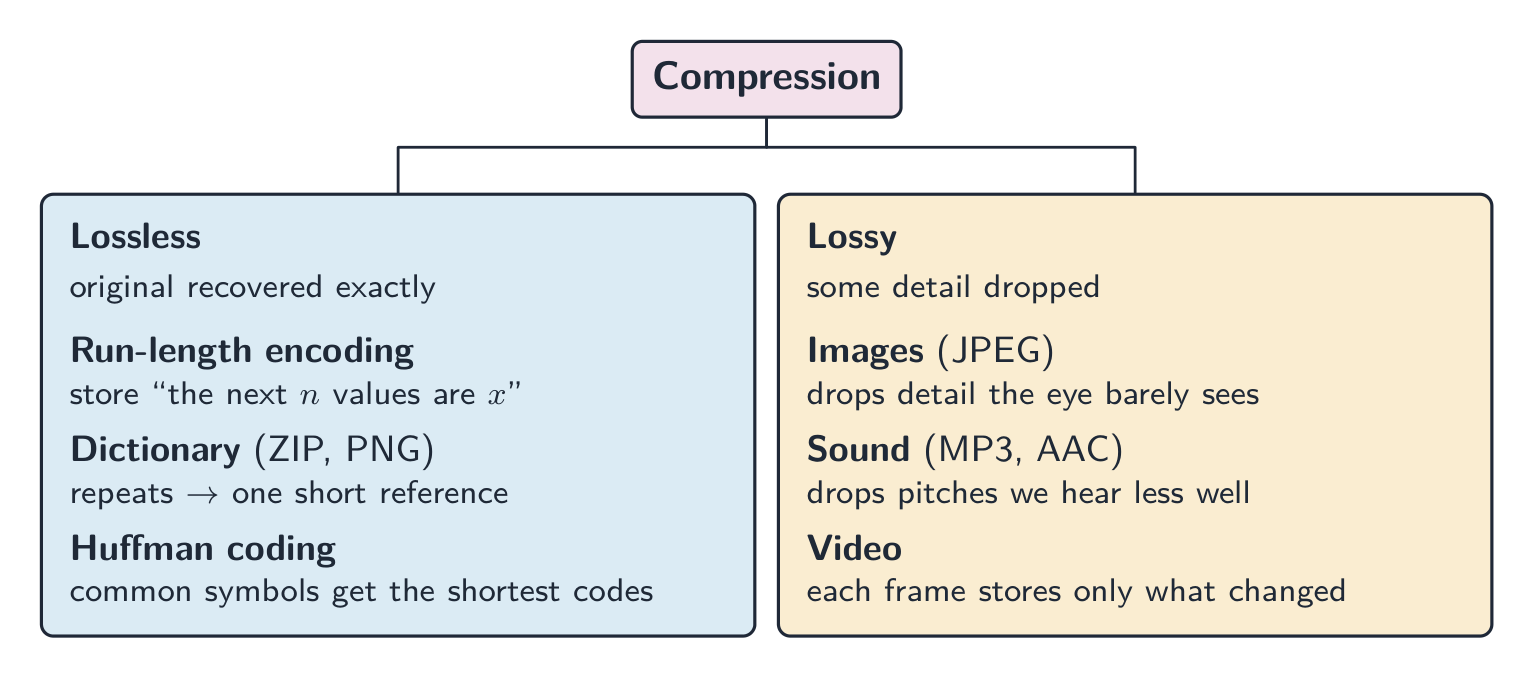
Recover exactly, or shrink much further
Lossless compression means:
Difficulty 1/5 · 100 coins + a small bonus on first completion today
Lossless compression lets you rebuild the original data exactly — essential for text, programs and ZIP/PNG.
Match each compression idea to what it means.
Difficulty 2/5 · 140 coins + a small bonus on first completion today
Lossless keeps every bit (needed for text/code); lossy trades quality for size (photos, audio).
Lossless compression rebuilds the original data exactly (needed for text and programs), while lossy compression permanently removes some data to shrink the file (used for photos and audio).
Difficulty 1/5 · 100 coins + a small bonus on first completion today
That is why a program or a ZIP must be lossless, but a photo or a song can use lossy compression.
Worked example: justify the choice
- A company archives its accounting spreadsheets. Which kind of compression, and why? Lossless, because the spreadsheet must be restored exactly; a single changed value would make the accounts wrong.
- A photographer uploads holiday photographs to a phone gallery. Lossy, because the photographs are viewed on a small screen where the dropped detail is not visible, and the smaller files upload faster and use less storage.
- Name the kind, then give the reason from the situation. "Lossy is smaller" on its own is not a justification.
Which file should be compressed losslessly?
Difficulty 1/5 · 100 coins + a small bonus on first completion today
Source code must be recovered exactly — a single changed character could break it — so it needs lossless compression.
Run-length encoding
- Run-length encoding 行程编码 (RLE) replaces a run of repeated values with one value and a count: instead of eight identical white pixels, store "8, white".
- It is excellent on data with long runs, such as icons, diagrams, black-and-white scans and areas of flat colour.
- It is useless, and can make a file larger, on noisy data such as a photograph, where almost no two neighbouring values are equal.
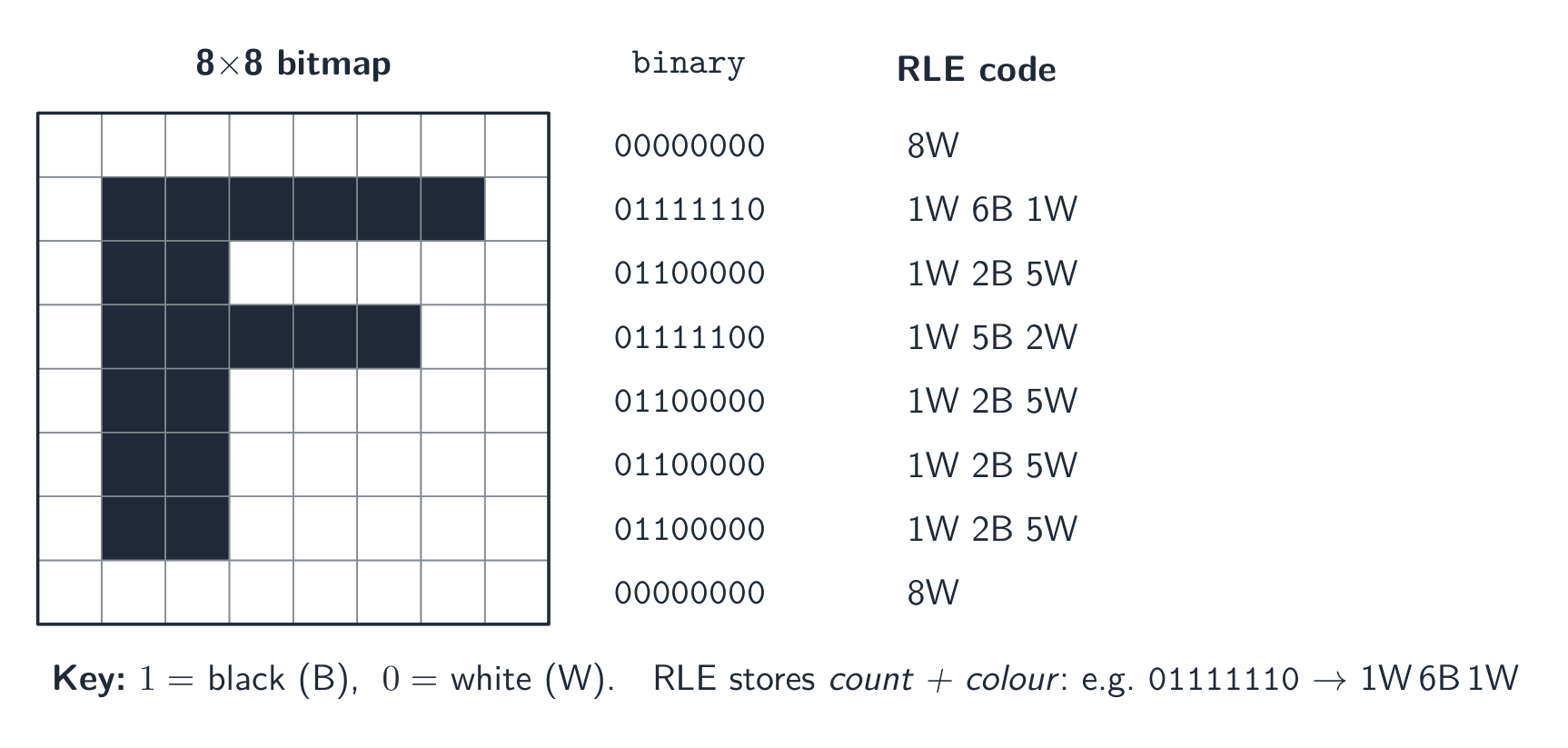
Each row becomes counts and colours
Run-length encoding works best on data that has:
Difficulty 1/5 · 100 coins + a small bonus on first completion today
RLE replaces a run of identical values with a count + value, so it shines on flat areas and is useless on noisy data.
Worked example: encode a row with RLE
- A row of an 8-pixel black-and-white image reads: white white white black black white white white. Encode it with RLE.
- Three white, two black, three white, so
3W 2B 3W, or as pairs,(3, 0) (2, 1) (3, 0)if white is 0. - Eight values became three pairs. Now encode
W B W B W B W B. Eight runs of one:1W 1B 1W 1B 1W 1B 1W 1B, which stores more than the original. That is exactly why RLE is not used on photographs.
Run-length encoding (a lossless method)
Run-length encoding replaces a run of repeated values with one value plus a count. It is lossless — the original rebuilds exactly — but only shrinks data that has long runs.
Encode the pixel row W W W B B W W W with run-length encoding, using the form 3W 2B 3W.
Difficulty 1/5 · 100 coins + a small bonus on first completion today
Three white, two black, three white. Eight values become three pairs, but an alternating row would become eight pairs and grow.
Run-length encoding always makes a file smaller.
Difficulty 1/5 · 100 coins + a small bonus on first completion today
On data with no runs, such as a photograph or an alternating pattern, every run has length one and the encoding stores more than the original.
Dictionary coding and Huffman coding
- Dictionary coding 字典编码, used by ZIP and PNG, builds a dictionary of repeated byte sequences and replaces each occurrence with a short index. It suits text and program code, where words and patterns recur.
- Huffman coding 霍夫曼编码 gives short codes to common symbols and long codes to rare ones, so the average code length falls. In "BANANA" the A is commonest and gets the shortest code.
- Both are lossless: the decoder rebuilds the original byte for byte.
Huffman coding reduces size by:
Difficulty 1/5 · 100 coins + a small bonus on first completion today
Huffman assigns the shortest codes to the most frequent symbols, lowering the average code length.
Match each lossless method to how it works.
Difficulty 2/5 · 140 coins + a small bonus on first completion today
All three are lossless: the decoder rebuilds the original byte for byte.
Lossy methods
- Images (JPEG): fine detail and colour differences the eye barely notices are dropped.
- Sound (MP3, AAC): pitches we hear poorly are removed, along with quiet sounds masked by louder ones at the same moment.
- Video: spatial 空间 compression works within each frame, like JPEG, and temporal 时间 compression stores most frames as only the differences from the previous frame, since consecutive frames are nearly identical.
Temporal compression of video works by:
Difficulty 1/5 · 100 coins + a small bonus on first completion today
Temporal compression stores how each frame differs from the one before, since most of the picture stays the same between frames. (Spatial compression handles within-frame detail.)
Worked example: how each kind of file is compressed
- Text file: dictionary and Huffman coding turn repeated words and common characters into short codes. It must stay lossless, because one changed character changes the meaning.
- Bitmap image: RLE for runs of identical pixels in icons and diagrams; lossy JPEG for photographs; or reduce the colour depth or resolution, which is also lossy.
- Vector graphic: the drawing list is already small. Remove drawing objects that are not needed, store coordinates to fewer decimal places, or apply a lossless method such as ZIP to the file.
- Sound file: lossy MP3 or AAC removes what the ear cannot hear; lowering the sampling rate or resolution is also lossy; lossless formats keep every sample and shrink much less.
How can a vector graphic file be made smaller? Select all that apply.
Difficulty 2/5 · 140 coins + a small bonus on first completion today
A vector file is a drawing list, not pixels, so it has no colour depth. Colour depth belongs to bitmaps.
Why streaming must be lossy
- Raw HD video is gigabytes per minute, and a home connection carries a few megabits per second.
- Lossless compression on video achieves perhaps a factor of two, nowhere near enough, so the picture would keep stopping to buffer.
- Lossy compression achieves a factor of a hundred or more by discarding detail the viewer does not notice at normal speed. The reason names the bandwidth and the data rate, not just "it is smaller".
Why does real-time video streaming use lossy compression?
Difficulty 1/5 · 100 coins + a small bonus on first completion today
Raw HD video is gigabytes per minute; only lossy compression shrinks it enough to stream in real time without freezing.
Marks that slip away
- Lossless means the original is recovered exactly; lossy means it cannot be. "Lossy loses quality" misses the point that the data is gone for good.
- RLE can make a noisy file larger. Say where it works and where it does not.
- Video compression is spatial and temporal; temporal stores the differences between frames.
- A "justify" answer ties the method to the file's use: exactness for accounts and medical images, size for streaming and phone galleries.
You've got it
- compression saves storage and bandwidth; lossless recovers the original exactly, lossy removes data permanently
- lossless methods: RLE (a value and a count, good on runs, bad on noise), dictionary coding (repeated sequences to short indices), Huffman coding (short codes for common symbols)
- lossy methods drop what the eye or ear misses; video adds spatial within a frame and temporal between frames
- justify from the use: exact data means lossless, limited bandwidth for streaming means lossy