전 세계 다른편에 있는 친구에게 사진을 보내는 것 같습니다. 그것은 한 덩어리로 이동하지 않습니다. 수백 개의 작은 패킷으로 잘려져 있으며, 각각…이라는 라벨이 붙어 있습니다.
English narration · English + 中文 subtitles burned in · 영어 내레이션 · 영어 + 중국어 자막 burned-in
2.1
What is data transmission? · 데이터 전송이란?
English
Data transmission 数据传输 means moving data from one place to another — for example from your computer to a website, or from a phone to a printer.
Data often travels along a cable. Two common ones are shown below.
Before it is sent, the data is broken down into small, equal-sized pieces called packets 数据包. Each packet travels separately and they are put back together at the other end.
Using packets has benefits:
if one packet is lost or damaged, only that packet is sent again, not the whole file;
packets can take different routes, so a busy or broken route can be avoided;
many users can share the same connection at the same time.
한국어
데이터 전송은 데이터를 한 위치에서 다른 위치로 이동하는 것을 의미합니다. 예를 들어 컴퓨터에서 웹사이트로, 또는 휴대폰에서 프린터로 데이터를 보낼 때를 들 수 있습니다.
데이터는 종종 케이블을 따라 이동합니다. 아래에 두 가지 일반적인 예가 제시되어 있습니다.
RJ45 플러그가 달린 이더넷 케이블은 유선 네트워크에서 데이터를 전달하는 데 자주 사용됩니다광섬유 케이블은 얇은 유리 섬유를 따라 빛 펄스로 데이터를 전송합니다
전송되기 전에 데이터는 패킷이라는 작고 동일한 크기의 조각들로 분해됩니다. 각 패킷은 개별적으로 이동하며, 다른 쪽에서 다시 합쳐집니다.
패킷을 사용하는 데에는 다음과 같은 이점이 있습니다:
하나의 패킷이 분실되거나 손상되면 해당 패킷만 재전송되며 전체 파일은 재전송되지 않습니다;
패킷은 서로 다른 경로를 선택할 수 있어, 혼잡하거나 고장 난 경로를 회피할 수 있습니다;
여러 사용자가 동시에 같은 연결을 공유할 수 있습니다.
2.1
The structure of a packet · 패킷의 구조
Syllabus
English
Candidates should be able to:
Notes and guidance
1 (a) Understand that data is broken down into packets to be transmitted
(b) Describe the structure of a packet
• A packet of data contains a: – packet header – payload – trailer • The packet header includes the: – destination address – packet number – originator’s address
(c) Describe the process of packet switching
• Data is broken down into packets • Each packet could take a different route • A router controls the route a packet takes • Packets may arrive out of order • Once the last packet has arrived, packets are reordered
2 (a) Describe how data is transmitted from one device to another using different methods of data transmission
(b) Explain the suitability of each method of data transmission, for a given scenario
• Including the advantages and disadvantages of each method
3 Understand the universal serial bus (USB) interface and explain how it is used to transmit data
• Including the benefits and drawbacks of the interface
한국어
응시자가 다음을 수행할 수 있어야 함:
참고 사항 및 가이드라인
1 (a) 데이터가 전송되도록 패킷으로 분할됨을 이해하기
(b) 패킷의 구조를 설명하기
• 데이터 패킷에는 다음이 포함되어 있음: – 패킷 헤더 –payload – 트레일러 • 패킷 헤더에는 다음이 포함됨: – 목적지 주소 – 패킷 번호 – 발신자 주소
(c) 패킷 스위칭 과정을 설명하기
• 데이터는 패킷으로 분할됨 • 각 패킷은 다른 경로를 취할 수 있음 • 라우터가 패킷이 취하는 경로를 제어함 • 패킷이 순서대로 도착하지 않을 수 있음 • 마지막 패킷이 도착하면 패킷들이 재배열됨
2 (a) 서로 다른 데이터 전송 방법을 사용하여 한 장치에서 다른 장치로 데이터가 전송되는 방식을 설명하기
• 다음 포함: – 직렬 – 병렬 – 심플렉스 – 할프듀플렉스 – 풀듀플렉스
(b) 주어진 시나리오에 대해 각 데이터 전송 방법의 적합성을 설명하기
• 각 방법의 장점과 단점 포함
3 범용 직렬 버스(USB) 인터페이스를 이해하고 이를 사용하여 데이터를 전송하는 방법을 설명하기
• 인터페이스의 장점과 단점 포함
Source: Cambridge International syllabus · 출처: Cambridge International syllabus
English
Every packet has three parts.
Part
What it holds
packet header 包头
control information (see below)
payload 有效载荷
the actual data being carried
trailer 尾部
shows where the packet ends, plus an error check
The packet header holds:
the sender's IP address 地址 (where the packet came from),
the receiver's IP address (where it is going),
the packet number (so the packets can be put back in the right order).
한국어
모든 패킷은 세 부분으로 구성됩니다.
*패킷은 헤더, 페로드(데이터), 트레일러로 구성되며, 헤더에는 주소와 패킷 번호가 포함되어 있습니다
부분
포함 내용
패킷 헤더
제어 정보 (아래 참조)
페로드
실제 전달되는 데이터
트레일러
패킷의 끝을 표시하고 오류 검사를 포함
패킷 헤더에는 다음이 포함됩니다:
송신자의 IP 주소(패킷이从哪里来的),
수신자의 IP 주소(패킷이 어디로 가는),
패킷 번호(패킷을 올바른 순서로 재조립하기 위해).
2.1
Packet switching · 패킷 스위칭
English
Packet switching 数据包交换 is the way packets are sent across a network.
Special devices called routers 路由器 read each packet's header and choose the best route for it.
Each packet may take its own path, so packets can travel different ways.
Packets may arrive out of order.
When the last packet has arrived, the packets are reordered using their packet numbers.
한국어
패킷 스위칭은 패킷이 네트워크를 통해 전송되는 방식입니다.
*라우터는 패킷을 전달하며, 서로 다른 패킷이 동일한 수신자에게 도달하는 데 서로 다른 경로를 사용할 수 있습니다
라우터라는 특수 장치가 각 패킷의 헤더를 읽어 가장 좋은 경로를 선택합니다.
각 패킷은 고유한 경로를 가질 수 있으므로 패킷들은 서로 다른 방향으로 이동할 수 있습니다.
패킷은 순서가颠倒되게 도착할 수 있습니다.
마지막 패킷이 도착하면, 패킷 번호를 사용하여 패킷들을 재배열합니다.
Explore · 탐색하기
How data travels in packets · 패킷을 통한 데이터 전송 방식
Step through packet switching. Splitting a file into addressed packets is why one lost packet only needs resending, and why many users can share the same line. · 패킷 스위칭 과정을 설명하십시오. 파일을 주소가 붙은 패킷으로 나누어 전송하는 것은 하나만 분실될 경우 해당 패킷만 재전송하면 되며, 여러 사용자가 동일한 회선을 공유할 수 있는 이유입니다.
bits can arrive at slightly different times over long wires
Serial sends one bit after another along a single wire. Parallel sends several bits at the same time along several wires, so it is faster over short distances.
Simplex, half-duplex and full-duplex
These describe the direction data can travel.
Method
Direction
simplex 单工
one direction only (e.g. computer → printer)
half-duplex 半双工
both directions, but only one at a time (e.g. walkie-talkie)
full-duplex 全双工
both directions at the same time (e.g. phone call)
Choosing a method
The choice depends on the distance, the speed needed, the cost, and whether data must travel both ways at once.
한국어
직렬 및 병렬
직렬
병렬
방식
한 번에 한 비트, 단일 선을 따라
여러 비트를 동시에, 여러 선을 따라
거리
긴 거리에서 적합
짧은 거리에서만 적합
비용
저렴(선 수가 적음)
비쌈(선 수가 많음)
오류
비트가 순서를 유지함
긴 선에서는 비트가 약간 다른 시간에 도착할 수 있음
직렬 전송은 단일 선을 따라 한 비트씩 연이어 전송합니다. 병렬 전송은 여러 선을 따라 여러 비트를 동시에 전송하므로 짧은 거리에서 더 빠릅니다.
*직렬은 한 번에 한 비트를 단일 선을 따라 전송; 병렬은 여러 비트를 동시에 여러 선을 따라 전송
심플렉스, 하프-듀플렉스 및 풀-듀플렉스
이들은 데이터가 이동할 수 있는 방향을 설명합니다.
*심플렉스는 단방향 only; 하프-듀플렉스는 양방향이지만 한 번에 하나; 풀-듀플렉스는 동시에 양방향
방법
방향
심플렉스
단방향 only (예: 컴퓨터 → 프린터)
하프-듀플렉스
양방향, 하지만 한 번에 하나만 (예: 워키토키)
풀-듀플렉스
동시에 양방향 (예: 전화 통화)
방법 선택
선택은 거리, 필요한 속도, 비용, 그리고 데이터가 동시에 양방향으로 이동해야 하는지에 따라 결정됩니다.
The universal serial bus 通用串行总线 (USB) is a common interface 接口 (a connection point) for joining devices to a computer.
Benefits:
the same connector is used by many devices (one standard);
the device is detected automatically and the correct driver is loaded;
it carries power, so it can charge or run a device;
the connector only fits one way, so it is hard to plug in wrongly.
Drawbacks:
the cable can only be a limited length (a few metres);
older USB versions are slower than newer ones;
transfer speeds can be lower than some other connection types.
한국어
범용 직렬 버스(USB)는 기기를 컴퓨터에 연결하기 위한 일반적인 인터페이스(연결 지점)입니다.
장점:
여러 기기가 동일한 커넥터를 사용합니다(하나의 표준);
기기가 자동으로 감지되고 적절한 드라이버가 로드됩니다;
전원을 전달하므로 기기를 충전하거나 구동할 수 있습니다;
커넥터는 한 방향에서만 맞기 때문에 잘못 꽂는 것이 어렵습니다.
단점:
케이블 길이는 제한적일 수 있습니다(몇 미터);
구버전 USB는 신버전보다 느립니다;
전송 속도가 다른 연결 방식보다 낮을 수 있습니다.
USB 커넥터 모양 몇 가지. 모두 동일한 USB 표준을 사용하므로 장치가 자동으로 감지됩니다.
2.2
Why we check for errors · 오류를 확인하는 이유
Syllabus
English
Candidates should be able to:
Notes and guidance
1 Understand the need to check for errors after data transmission and how these errors can occur
• Errors can occur during data transmission due to interference, e.g. data loss, data gain and data change
2 Describe the processes involved in each of the following error detection methods for detecting errors in data after transmission: parity check (odd and even), checksum and echo check
• Including parity byte and parity block check
3 Describe how a check digit is used to detect errors in data entry and identify examples of when a check digit is used, including international standard book numbers (ISBN) and bar codes
4 Describe how an automatic repeat query (ARQ) can be used to establish that data is received without error
• Including the use of: – positive/negative acknowledgements – timeout
한국어
응시자가 다음을 수행할 수 있어야 함:
참고 사항 및 가이드라인
1 데이터 전송 후 오류를 확인해야 하는 이유와 이러한 오류가 발생할 수 있는 방식을 이해하기
• 간섭으로 인해 데이터 전송 중 오류가 발생할 수 있음, 예시: 데이터 분실, 데이터 증가, 데이터 변경
2 전송 후 데이터의 오류를 감지하기 위한 다음 각 오류 감지 방법에 관여하는 과정을 설명하기: 패리티 체크(기수 및 짝수), 체크섬, 에코 체크
• 패리티 바이트 및 패리티 블록 체크 포함
3 체크 디지트가 데이터 입력 오류를 감지하는 데如何使用되고 체크 디지트가 사용되는 예시를 설명하기, 국제 표준 도서 번호(ISBN) 및 바코드 포함
4 **자동 재전송 요청(ARQ)**을 사용하여 데이터가 오류 없이 수신되었음을 확인하는 방법을 설명하기
• 다음 사용 포함: – positive/negative acknowledgements – timeout
Source: Cambridge International syllabus · 출처: Cambridge International syllabus
English
While data travels, interference 干扰 can change it. Three things can go wrong:
data loss — some bits do not arrive;
data gain — extra bits are added;
data change — some bits are flipped.
So the receiver checks whether the data arrived correctly.
한국어
데이터가 이동하는 동안 간섭이 데이터를 변경할 수 있습니다. 세 가지 문제가 발생할 수 있습니다:
A parity check 奇偶校验 adds one extra bit, the parity bit 奇偶校验位, to each byte. There are two types:
even parity — the total number of 1s in the byte (including the parity bit) must be even;
odd parity — the total number of 1s must be odd.
Example (even parity): the data 1011001 has four 1s, which is already even, so the parity bit is 0:
To find an error: the receiver counts the 1s. If even parity was agreed but a byte arrives with an odd number of 1s, an error has happened during transmission.
A parity check cannot find every error. If two bits flip, the count may still look correct.
Worked example. A single parity bit tells you that an error happened, but not where. A parity block 奇偶校验块 can find the exact bit. Several bytes are sent together, each with a row parity bit, and one extra parity byte 奇偶校验字节 at the bottom holds a parity bit for each column. Even parity is used below, and one bit was flipped during transmission. Find it.
Row byte 3 breaks even parity, and column b3 breaks even parity. The flipped bit is where they cross: byte 3, bit b3. Changing it back from 1 to 0 repairs the data. A single parity bit only says an error happened; a parity block says exactly where, so the receiver can even fix it.
Checksum
A checksum 校验和 is a value worked out from all the data before sending. The receiver works out the checksum again from the data it received. If the two values do not match, an error has occurred and the data is resent.
Echo check
In an echo check 回送校验, the receiver sends the data back to the sender. The sender compares it with the original. If they differ, an error happened. (This needs the data to be sent twice, so it is slow.)
Automatic Repeat reQuest (ARQ)
Automatic Repeat reQuest 自动重传请求 (ARQ) uses messages called acknowledgements 确认.
The receiver sends a positive acknowledgement if a packet arrived correctly, or a negative acknowledgement if it did not.
The sender starts a timeout 超时 timer. If no positive acknowledgement comes back in time, the sender sends the packet again.
Check digit
A check digit 校验码 is an extra digit placed at the end of a number, worked out from the other digits. It is used to find mistakes when a number is typed in.
When the number is entered, the check digit is calculated again and compared. It can catch:
an incorrect digit entered,
a transposition error 换位错误 (two digits swapped, e.g. 21 typed as 12),
a digit left out or an extra digit added,
a phonetic error (a digit that sounds similar, e.g. 13 and 30).
Check digits are used in barcodes 条形码 and ISBNs (book numbers).
한국어
패리티 체크
패리티 체크는 각 바이트에 추가 비트인 패리티 비트를 하나 더 추가합니다. 두 가지 유형이 있습니다:
1의 개수가 짝수(또는 홀수)가 되도록 패리티 비트를 추가합니다
짝수 패리티 — 바이트 내 1의 총 개수(패리티 비트 포함)가 짝수여야 합니다;
홀수 패리티 — 1의 총 개수가 홀수여야 합니다.
예시(짝수 패리티): 데이터 1011001에는 이미 네 개의 1이 있어 짝수이므로 패리티 비트는 0입니다:
parity bit + data
    0        1011001
오류 찾기: 수신기는 1의 개수를 세어 봅니다. 짝수 패리티를 합의했으나 홀수 개수의 1이 포함된 바이트가 도착하면 전송 중 오류가 발생했습니다.
패리티 체크는 모든 오류를 찾아내지는 못합니다. 두 비트가 뒤바뀌면 개수는 여전히 정확해 보일 수 있습니다.
작업 예제. 단일 패리티 비트는 오류가 발생했다는 사실만 알려줄 뿐 어디서 발생한지는 알 수 없습니다. 패리티 블록은 정확한 비트 위치를 찾습니다. 여러 바이트를 함께 보내며 각 바이트에 행 패리티 비트를 붙이고, 맨 아래에 열별 패리티 비트를 담는 패리티 바이트 하나를 추가합니다. 아래 예시는 짝수 패리티를 사용하며 전송 중 한 비트가 뒤바뀌었습니다. locating it (그것을 찾으세요).
행 바이트 3이 짝수 패리티를 깨뜨리고, 열 b3도 짝수 패리티를 깨뜨립니다. 뒤바뀐 비트는 이 둘이 교차하는 지점입니다: 바이트 3, 비트 b3. 이를 1에서 0으로 되돌리면 데이터가 복구됩니다. 단일 패리티 비트는 오류 발생 만 알릴 뿐이지만, 패리티 블록은 정확히 어디에 있는지 알려주므로 수신기가 직접 수정할 수도 있습니다.
체크섬
체크섬은 전송 전 모든 데이터로부터 계산된 값입니다. 수신기는 받은 데이터로 다시 체크섬을 계산합니다. 두 값이 일치하지 않으면 오류가 발생하여 데이터를 재보냅니다.
이코 체크
이코 체크에서는 수신기가 데이터를 sender(발신자)에게 다시 보냅니다. 발신자는 이를 원본과 비교합니다. 다르면 오류가 발생한 것입니다. (데이터를 두 번 보내야 하므로 느립니다.)
자동 재전송 요청 (ARQ)
자동 재전송 요청(ARQ)은 확인 메시지라는 메시지를 사용합니다.
수신기는 패킷이 올바르게 도착하면 양성 확인, 그렇지 않으면 부정 확인을 보냅니다.
발신자는 타임아웃 타이머를 시작합니다. 제시간에 양성 확인이 오지 않으면 발신자가 패킷을 다시 보냅니다.
체크 디ジット
체크 디ジット은 숫자末尾에 붙이는 추가 숫자로, 나머지 숫자들을 기반으로 계산됩니다. 숫자를 입력할 때 실수를查找하는 데 사용됩니다.
숫자를 입력하면 체크 디짓이 다시 계산되어 비교됩니다. 다음을 잡을 수 있습니다:
잘못 입력된 숫자,
위치 오류(두 숫자의 위치가 바뀐 경우, 예: 21을 12로 입력),
숫자 누락 또는 추가된 숫자,
음성 오류(소리가 유사한 숫자, 예: 13과 30).
체크 디ジット은 바코드와 ISBN(도서 번호)에 사용됩니다.
Explore · 탐색하기
Computing concept lab · 컴퓨팅 개념 실험실
Classify concrete examples by the computing idea they demonstrate. · 구체적인 예시를 그들이 시연하는 컴퓨팅 개념에 따라 분류하십시오.
1 Understand the need for and purpose of encryption when transmitting data
2 Understand how data is encrypted using symmetric and asymmetric encryption
• Asymmetric encryption includes the use of public and private keys
한국어
응시자가 다음을 수행할 수 있어야 함:
참고 사항 및 가이드라인
1 데이터를 전송할 때 암호화가 필요한 이유와 목적을 이해하기
2 대칭 암호화 및 비대칭 암호화를 사용하여 데이터를 암호화하는 방법을 이해하기
• 비대칭 암호화는 공개 키와 개인 키의 사용을 포함함
Source: Cambridge International syllabus · 출처: Cambridge International syllabus
English
Why we need encryption
Encryption 加密 scrambles data so that it cannot be understood if it is intercepted 拦截 (caught) by the wrong person. The readable data is called plaintext 明文; after encryption it becomes ciphertext 密文.
Encryption does not stop data from being intercepted. It only stops the data from being understood.
Symmetric encryption
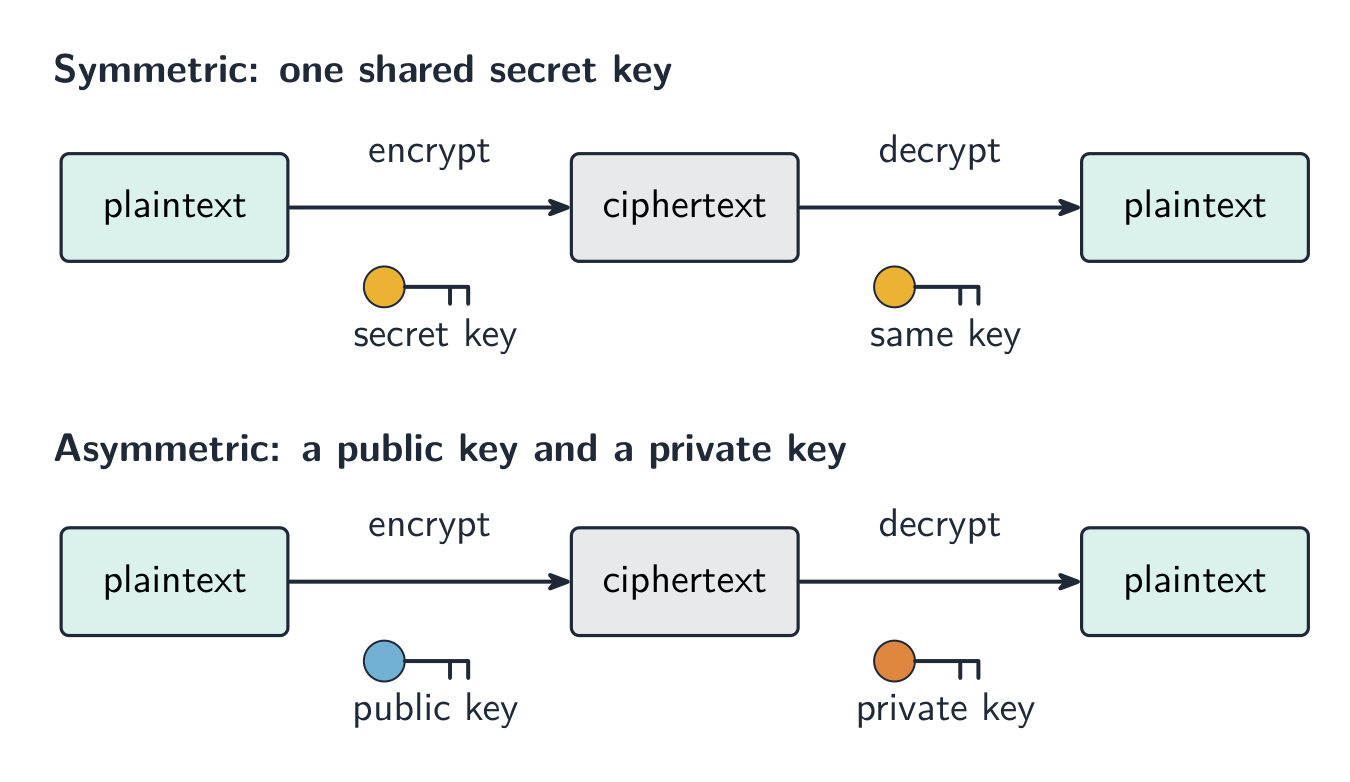
Symmetric encryption 对称加密 uses a single key 密钥 to both encrypt and decrypt the data. The sender and receiver must share this same secret key. The risk is that the key itself could be stolen while being shared.
Asymmetric encryption
Asymmetric encryption 非对称加密 uses two different keys:
a public key 公钥 that anyone can have, used to encrypt;
a private key 私钥 that is kept secret, used to decrypt.
Data encrypted with the public key can only be decrypted with the matching private key, so the key never has to be shared. This is safer than sharing one secret key.
한국어
왜 암호화가 필요한가
암호화는 데이터를 무작위로 섞어 도청당하면(잘못된 사람에게 잡히면) 이해할 수 없게 만듭니다. 읽을 수 있는 데이터는 평문; 암호화 후에는 암호문이 됩니다.
암호화는 도청 자체를 막지는 않습니다. 단지 데이터를 이해하지 못하게 하는 것만 방지합니다.
대칭 암호화
대칭 암호화는 하나의 키를 사용하여 데이터를 암호화하고 복호화합니다. 발신자와 수신자는 같은 비밀 키를 공유해야 합니다. 문제는 이 키 자체가 공유되는 도중에 도난당할 수 있다는 점입니다.
비대칭 암호화
비대칭 암호화는 두 가지 서로 다른 키를 사용합니다:
누구나 가질 수 있는 공钥은 암호화에 사용됩니다;
비공개로 유지되는 사钥은 복호화에 사용됩니다.
공钥으로 암호화된 데이터는 매칭되는 사钥으로만 복호화될 수 있으므로, 키를 공유할 필요가 없습니다. 이는 하나의 비밀 키를 공유하는 것보다 안전합니다.
대칭 암호화는 하나의 공유 키를 사용하며, 비대칭 암호화는 공개 키로 암호화하고 비공개 키로 복호화합니다
Explore · 탐색하기
The Caesar cipher · Caesar 암호
Shift each letter to encrypt a message — the simplest idea of a cipher and its key. · 메시지를 암호화하기 위해 각 문자를 이동합니다 — 이보다 더 간단한 암호와 키의 개념은 없습니다.
Data is sent in packets (a header with the addresses and packet number, a payload, and a trailer). Packets can take different routes and arrive out of order, then are reordered by their packet numbers.
Match the transmission types: serial (one bit at a time, good over long distances) vs parallel (several bits at once, short distances); simplex / half-duplex / full-duplex describe the direction.
A single parity bit only shows that an error happened; a parity block locates the exact wrong bit — the row and the column that both fail.
Learn the error-detection methods and what each does: parity check, checksum, echo check, ARQ, and the check digit (for typed-in numbers).
Symmetric encryption uses one shared key; asymmetric uses a public key to encrypt and a private key to decrypt, so no secret key is ever shared.
한국어
데이터는 패킷(주소와 패킷 번호가 포함된 헤더, 페로드, 트레일러) 단위로 전송됩니다. 패킷은 서로 다른 경로를 통해 전달되며 순서가颠倒되기도 하지만, 패킷 번호에 의해 재배열됩니다.
전송 유형 매칭하기: 직렬 (비트 하나씩, 장거리 적합) vs 병렬 (여러 비트 동시에, 단거리); 심플렉스 / 하프듀플렉스 / 풀듀플렉스는 방향을 설명합니다.
단일 패리티 비트는 오류가 발생했다는事实만 나타냅니다; 패리티 블록은 정확한 잘못된 비트를 locating: 행과 열이 모두 실패하는 지점을 locating합니다.
오류 감지 방법을 배우고 각 방법이 무엇을 하는지 이해하세요: 패리티 체크, 체크섬, 이코 체크, ARQ, 그리고 체크 디ジット(입력된 숫자에 대해).
대칭 암호화는 하나의 공유 키를 사용합니다; 비대칭은 공钥으로 암호화하고 사钥으로 복호화하여, 비밀 키가 절대 공유되지 않습니다.
Interactive lessons on this topic · 이 주제에 대한 인터랙티브 수업
Work through it step by step, with instant-check exercises. · 즉시 체크 기능 exercises를 통해 단계별로 진행하세요.


 *심플렉스는 단방향 only; 하프-듀플렉스는 양방향이지만 한 번에 하나; 풀-듀플렉스는 동시에 양방향