English narration · English + 中文 subtitles burned in · 英語ナレーション・英語+中文字幕 burning-in
14.1
Why protocols are needed · プロトコルが必要な理由
Syllabus · シラバス
English
Candidates should be able to:
Notes and guidance
Show understanding of why a protocol is essential for communication between computers
Show understanding of how protocol implementation can be viewed as a stack, where each layer has its own functionality
Show understanding of the TCP/IPprotocol suite
Four Layers (Application, Transport, Internet, Link) Purpose and function of each layer Application when a message is sent from one host to another on the internet
Show understanding of protocols (HTTP, FTP, POP3, IMAP, SMTP, BitTorrent) and their purposes
Source: Cambridge International syllabus · 出典: Cambridge International シラバス
English
A protocol 协议 is a set of rules for how devices communicate. Both ends must follow the same rules, or one side's signals are meaningless to the other. Protocols define the format of the data (where addresses and payload sit), the order of messages (who speaks first, when to acknowledge), the meaning of each message, the timing (timeouts, retransmits), and what to do on error. Without an agreed protocol, communication fails — like two people speaking different languages with no translator.
"Explain why protocols are essential for communication between computers" (three marks). (1) A protocol is a set of rules agreed by both the sender and the receiver; (2) without it the two computers would interpret the data differently (format, order, meaning of each part), so the message could not be understood; (3) it allows computers of different types and manufacturers to communicate, because everyone implements the same standard. Mention what the rules cover: the format of the data, the order of messages, error detection and recovery, and speed or timing.
Networking is complex, so it is split into layers 层, each with one focused job, talking only to the layer above and below. Benefits: modularity 模块化 (replace one layer — say Ethernet with Wi-Fi — without touching the others), standardisation (vendors interoperate), and abstraction 抽象 (you ignore details handled elsewhere). The internet uses the TCP/IPprotocol suite 协议栈 (4 layers).
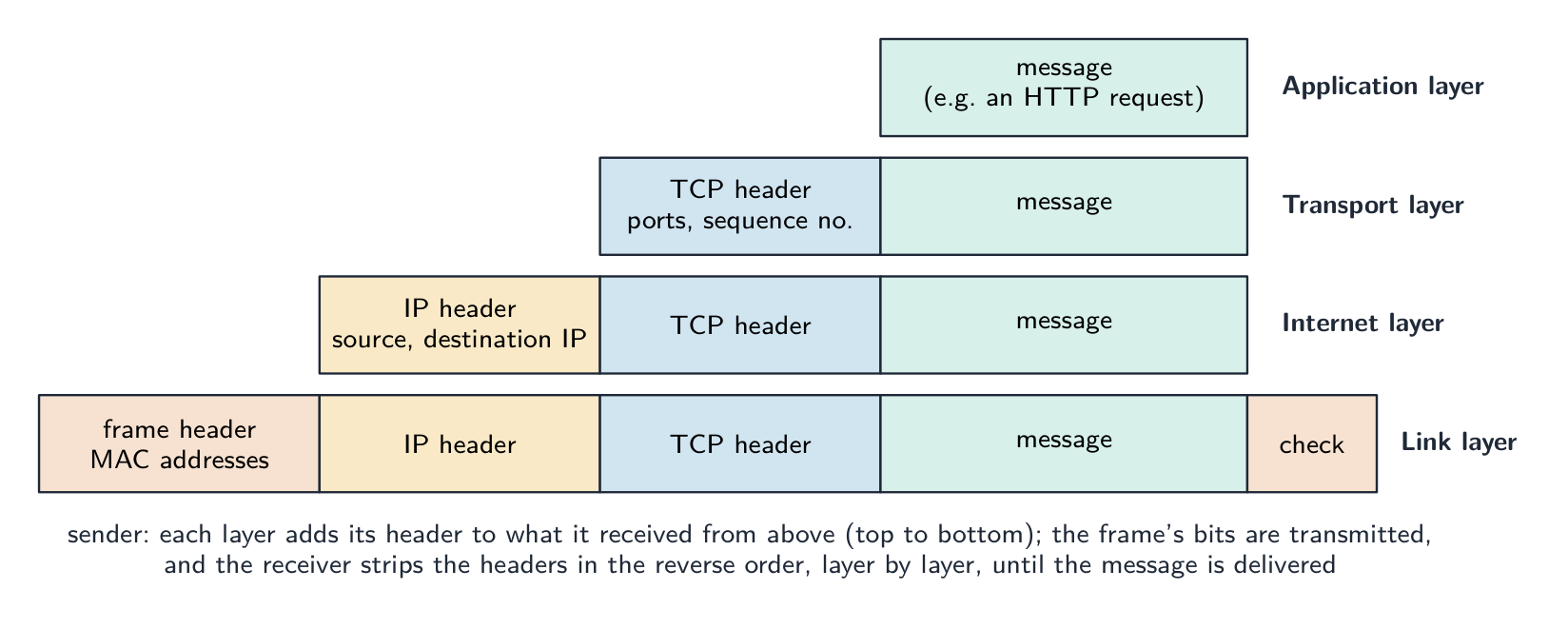
The purpose of each layer, as the mark scheme words it.Application layer: provides the protocols that user applications use (HTTP for the web, SMTP for email) and the interface between the application and the network; it produces the data to be sent and passes it to the transport layer. Transport layer: establishes the end-to-end connection, splits the data into packets (segments) and adds port numbers and sequence numbers; on receipt it reassembles the packets in order and requests any that are missing (TCP), or sends without those guarantees (UDP). Internet layer: adds the source and destination IP addresses to form IP packets (datagrams) and routes them across networks via routers; it does not guarantee delivery. Link layer: adds the MAC addresses and error-check bits to form a frame and transmits the bits over the physical local network (Ethernet or Wi-Fi) through the network interface card. "Complete the stack" means these four, in this order, from the top: Application, Transport, Internet, Link.
"Describe how the TCP/IP suite is applied when a message is sent from one host to another" (five marks). At the sender the message passes down the stack: (1) the application layer produces the data using a protocol such as HTTP or SMTP; (2) the transport layer splits it into packets and adds a header with the port numbers and a sequence number; (3) the internet layer adds a header with the source and destination IP addresses and chooses the route; (4) the link layer adds the MAC addresses of the next device and sends the frame over the physical link. Routers along the way read the internet-layer header and forward each packet. At the receiver the frame passes up the stack: each layer removes and acts on its own header, the transport layer reassembles the packets in sequence-number order and asks for any that are missing, and the application layer presents the message. The same protocol at each layer at both ends is what makes the exchange work.
Application layer
The application layer 应用层 gives services to user programs and defines the protocols they speak (HTTP for web, SMTP for email). This is where a programmer most often works.
Transport layer
The transport layer 传输层 delivers data end-to-end between processes, identified by port numbers 端口号. Two protocols:
TCP 传输控制协议 — connection-oriented 面向连接: sets up a connection, ensures all data arrives in order, retransmits lost packets 数据包, controls flow. Reliable but with overhead. Used by HTTP, HTTPS, SMTP, FTP.
UDP 用户数据报协议 — connectionless 无连接: sends and forgets, with no acknowledgements or ordering. Low overhead, no guarantees. Used for streaming, DNS and gaming, where speed beats reliability.
Internet layer
The internet layer 网络层 carries packets between hosts using IP. Each packet has a source and destination IP address IP地址, and routers 路由器 forward it onward. It does not guarantee delivery — that is TCP's job.
A home router does this job for your house: it reads each packet's destination address and sends it on towards the internet, and back to the right device.
Before the router reaches the wider internet, a modem 调制解调器 connects the home to the internet provider over the provider's cable or phone line. Its lights show the link is up and online.
Link layer
The link layer 链路层 sends bits over one physical link (Ethernet, Wi-Fi). It adds a frame header with MAC addresses MAC地址 and handles medium access (e.g. CSMA/CD 载波侦听多路访问/冲突检测 on Ethernet).
On a wired local network, a switch 交换机 joins many devices together. Each device plugs into a port with an Ethernet cable (an RJ45 plug), and the switch uses the MAC addresses in each frame to send it only to the correct port.
The physical link can be a copper wire, a radio signal (Wi-Fi), or a fibre-optic cable 光纤. In a fibre-optic cable, the bits travel as flashes of light through very thin strands of glass, which is fast and carries data a long way.
A radio link can reach much further. A satellite dish 卫星天线 sends and receives radio signals to and from a satellite, carrying data to places that wired links cannot easily reach.
「メッセージが1台のホストから別のホストへ送信される際、TCP/IPスイートがどのように適用されるかを記述せよ」(5点)。送信側において、メッセージはスタックを下に向かいます:(1) application layerはHTTPやSMTPのようなプロトコルを用いてデータを作成します;(2) transport layerはそれをパケットに分割し、ポート番号とシーケンス番号を含むヘッダーを追加します;(3) internet layerは送信元と宛先IPアドレスを含むヘッダーを追加し、経路を選択します;(4) link layerは次のデバイスのMACアドレスを追加し、物理リンク上でフレームを送信します。途中のルータはinternet layerのヘッダーを読み取り、各パケットを転送します。受信側において、フレームはスタックを上に向かいます:各レイヤーは自身のヘッダーを取り除き、作用します。transport layerはシーケンス番号順にパケットを組み立てて欠落したものを要求し、application layerはメッセージを表示します。両端の各レイヤーで同じプロトコルを使用することが、やり取りを可能にしています。
Tap the four layers of the TCP/IP model · TCP/IPモデルの4つのレイヤーをタップしてください
Explore each layer. Data travels DOWN the stack as it's sent (each layer adds its header) and back UP as it's received — and any layer can be swapped without touching the others. · 各レイヤーを探検してください。データは送信時にスタックを下へ移動し(各レイヤーがヘッダーを追加)、受信時には上へ戻ります。どのレイヤーも他のレイヤーに触れずに交換可能です。
Common application-layer protocols · 一般的なアプリケーション層プロトコル
English
HTTP 超文本传输协议 — browsers fetch web pages from servers (over TCP, port 80). HTTPS is HTTP over TLS — encrypted, port 443.
FTP 文件传输协议 — transfer files between client and server.
SMTP 简单邮件传输协议 — send email between client and server, and between servers. Receiving uses POP3 or IMAP.
POP3 — downloads email and usually deletes it from the server. IMAP — leaves email on the server and syncs across devices, so the same inbox appears everywhere.
BitTorrent — a peer-to-peer 对等网络 protocol; a file is split into pieces downloaded from many peers in parallel, so no single server carries all the load.
The purpose of each protocol, in the words that score.
Protocol
Purpose (state this)
HTTP
transfers web pages (hypertext) between a web server and a browser; HTTPS is the encrypted version
FTP
transfers files between a client and a server (uploading to and downloading from a file server)
SMTP
sends email from a client to a mail server, and between mail servers (a "push" protocol)
POP3
downloads email from the server to the client, usually deleting it from the server, so it is read on one device
IMAP
lets the client read and manage email that stays on the server, so the same mailbox is seen on every device
BitTorrent
shares files peer-to-peer: pieces of a file are downloaded from, and uploaded to, many other users at once
Asked for the two email protocols, give SMTP for sending and POP3 or IMAP for receiving; asked to describe IMAP, say that the messages remain on the server and are synchronised across devices, which is the difference from POP3.
"Describe how files are shared using the BitTorrent protocol" (four marks). (1) The file is split into pieces (typically 256 KB each), and a small torrent file describes them (their hashes) and names a tracker 追踪器. (2) A peer wanting the file contacts the tracker, which keeps a list of the peers in the swarm 群 currently sharing that file. (3) The peer downloads different pieces from many peers at the same time, and as soon as it holds a piece it uploads it to others; a peer with the whole file is a seed 种子, one still downloading a leech. (4) When all pieces are in, they are reassembled and checked against the hashes. "Explain what peer-to-peer file sharing means": there is no central server holding the file; every computer is both a client and a server, downloading from and uploading to the others, so the load and the bandwidth are spread across the swarm and the more peers there are, the faster it gets.
Circuit switching vs packet switching · 回路交換対パケット交換
Syllabus · シラバス
English
Candidates should be able to:
Notes and guidance
Show understanding of circuit switching
Benefits, drawbacks and where it is applicable
Show understanding of packet switching
Benefits, drawbacks and where it is applicable Show understanding of the function of a router in packet switching Explain how packet switching is used to pass messages across a network, including the internet
Source: Cambridge International syllabus · 出典: Cambridge International シラバス
English
Circuit switching
A dedicated path is set up between the two ends before any data is sent (circuit switching 电路交换), reserved for the whole conversation, then released. It gives reserved bandwidth 带宽 and in-order delivery, but is inefficient during silences and slow to set up. Classic example: the traditional telephone network.
"Describe circuit switching as a method of data transmission" (three marks). (1) A dedicated path (circuit) is set up between the sender and the receiver before any data is sent; (2) the whole message is sent along that path, in order, as one continuous stream; (3) the circuit is reserved for the duration of the communication and released afterwards.
Benefits and drawbacks.Benefits: the full bandwidth of the circuit is available and guaranteed; data arrives in order with no reassembly and no delay once the circuit is up; the route does not change, so timing is predictable (good for real-time voice and video). Drawbacks: time is spent setting up the circuit before anything is sent; the circuit is reserved even while no data is flowing, so bandwidth is wasted and other users cannot share it; both ends must be free at the same time; a failure anywhere on the path breaks the whole call, and there is no automatic alternative route. Where it is appropriate: a telephone call or a live video link, where a steady, uninterrupted stream matters more than efficiency.
Packet switching
The data is split into packets, each sent independently (packet switching 分组交换). Each packet carries the destination address; routers make per-packet decisions, so packets may take different routes and arrive out of order, and the destination reassembles them. It is efficient (one link is multiplexed 多路复用 across many conversations), robust (reroute around a failure), but has variable latency 延迟 and possible loss (TCP handles reliability). Used by the internet.
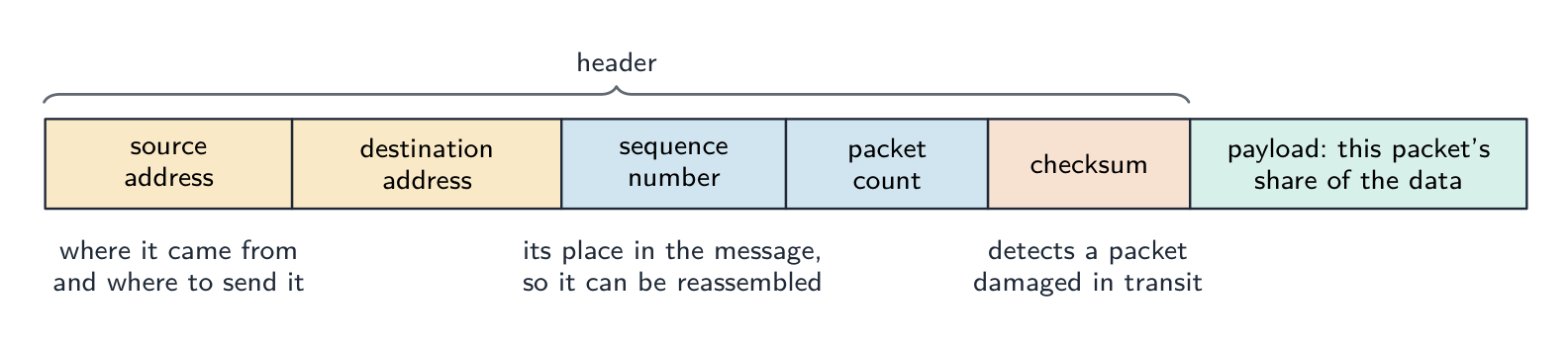
"Describe how packet switching is used to pass messages across a network" (four marks). (1) The message is split into packets of a fixed maximum size; (2) each packet is given a header containing the source and destination addresses, a sequence number 序号 and an error check; (3) each packet is sent independently and may take a different route, chosen by the routers it meets; (4) at the destination the packets are reassembled in order using the sequence numbers, and any missing packet is requested again. If the question excludes checking and resending, leave out the last clause.
"Describe the function of a router in packet switching" (three marks). A router receives a packet, reads the destination IP address in its header, and consults its routing table 路由表 to decide the best next hop towards that destination, taking account of the traffic (congestion) and failed links; it then forwards the packet onto that link. Packets of the same message may leave by different routes; the router holds packets in a queue when a link is busy.
"Describe two ways packet switching ensures the complete message is received." (1) Each packet carries a sequence number, so the receiver can put the packets in order and can tell that one is missing, and (2) the receiver sends an acknowledgement 确认 for packets that arrive; a packet not acknowledged within a time limit is retransmitted by the sender. A checksum 校验和 in each packet lets the receiver detect a corrupted packet and discard it, which then triggers the resend.
Benefits and drawbacks.Benefits: no circuit to set up; the network's links are shared by many messages, so bandwidth is used efficiently; packets can be rerouted around a failed or congested link, so transmission is robust; a lost or damaged packet means resending only that packet, not the whole message. Drawbacks: packets may arrive out of order and must be reassembled, and some may be lost or delayed; the headers add overhead; the variable delay makes it less suitable for real-time voice and video without extra measures; a heavily loaded network drops packets. Where it is appropriate: email, web pages, file downloads and any "bursty" traffic, and the internet in general.
Aspect
Circuit switching
Packet switching
Path
dedicated, reserved
shared, per-packet
Setup time
slow
none
Bandwidth use
inefficient
efficient
Order
in order
may be out of order
Robustness
one failure cuts the circuit
reroute around failures
Suits
constant-rate flows (voice)
bursty flows (web, email)
Modern networks use packet switching for its efficiency and resilience.
Four differences, stated as pairs. (1) Circuit switching sets up a dedicated path before sending; packet switching sends without setting up a path. (2) In circuit switching the whole message follows one route; in packet switching the packets may take different routes. (3) Circuit switching delivers the data in order without reassembly; packet switching needs sequence numbers to reassemble it. (4) Circuit switching reserves bandwidth for one conversation even when idle; packet switching shares the links between many messages. (Also acceptable: a failed link breaks a circuit but packets are rerouted; circuit switching suits real-time streams, packet switching suits bursty data.) Write each difference as both halves; one side alone earns nothing.
Describing packet switching in a few sentences
A good exam answer: "The message is broken into small packets. Each packet carries the destination and source addresses and a sequence number. Each packet travels through the network independently, with routers choosing the next hop per packet. Packets may take different paths and arrive out of order. The destination uses the sequence numbers to reassemble the message, and missing packets can be requested again."
Worked example. A phone call and a large file download share a network. Which switching method suits each, and why? A phone call needs a steady stream with low delay, and it would suffer badly if pieces arrived late or out of order - so circuit switching suits it: a dedicated path is set up for the whole call and its capacity is reserved for the duration. A file download does not care about timing or arrival order, because the receiver reassembles it, and it benefits from using whatever capacity happens to be spare - so packet switching suits it: the file is split into packets that travel independently, each carrying source and destination addresses and a sequence number, with routers choosing a next hop per packet. Name the property of the traffic that decides it: reserved capacity and low delay for the call, efficiency and resilience for the download.
** worked example(解説例)。電話通話と大規模ファイルダウンロードが同一のネットワークを共有しています。それぞれに適したスイッチング方式は何か、またその理由を答えよ。電話通話は低遅延の安定したストリームが必要であり、パケットが到着が遅れたり順序不同着になったりすると深刻な障害を受けるため、回路スイッチングが適しています:通話全体に対して専用パスが設定され、その期間中、容量が予約されるからです。ファイルダウンロードはタイミングや到着順序に関係なく、受信側が再構成するため、利用可能な余剰容量をすべて使用できる benefit を受けることができます:したがってパケットスイッチングが適しています:ファイルはパケットに分割され、独立して移動し、各パケットにはソースと宛先のアドレス、およびシーケンス番号が含まれ、ルーターがパケットごとに次のホップを選択します。これを決定するトラフィックの性質**を名詞で答えること:通話への予約された容量と低遅延、ダウンロードへの効率性と耐性です。
Explore · 探索
A packet's journey across the internet · インターネット上でのパケットの旅
Step through packet switching. The message is split up, each packet finds its own way, and the destination puts them back together — which is why the internet is so efficient and hard to break. · パケット交換の仕組みを順に確認しましょう。メッセージが分割され、各パケットは独自の経路をたどり、最終地点で再統合されます。これが、インターネットが非常に効率的であり、かつ破壊しにくい理由です。
A definition question is marked against fixed wording. Learn these exactly, and give one answer only.
Term
Definition
protocol
a set of rules governing how data is transmitted, agreed by sender and receiver so that both interpret it the same way
protocol stack
the layers of protocols, each with its own function, that together carry out communication; each layer communicates only with the layers above and below
application layer
provides the protocols used by applications to exchange data (HTTP, SMTP, FTP, IMAP, POP3)
transport layer
establishes end-to-end communication, splits data into packets with port and sequence numbers, reassembles them and requests missing ones (TCP), or sends without guarantees (UDP)
internet layer
adds IP addresses to form packets and routes them between networks via routers
link layer
adds MAC addresses to form frames and transmits the bits over the physical local network
router
a device that reads a packet's destination address and forwards it along the best available route towards that destination
circuit switching
a dedicated communication path is established between the two ends before data is sent and held for the whole transmission
packet switching
the message is split into packets, each with a header, sent independently over possibly different routes and reassembled at the destination
packet
a unit of data carrying a header (addresses, sequence number, error check) and a payload
peer-to-peer
file sharing without a central server, each computer acting as both client and server
Why protocols: shared rules, same interpretation, any make of computer. Why layers: each layer has one job and can be changed independently.
The four layers in order, top to bottom: Application, Transport, Internet, Link. Give each layer's job in one sentence, and the "message from host to host" answer as a walk down the stack and back up.
Protocol purposes are one-liners: HTTP web pages, FTP files, SMTP sending mail, POP3 downloading mail, IMAP mail kept on the server, BitTorrent peer-to-peer pieces from a swarm.
Circuit switching: dedicated path first, whole message, held for the duration. Packet switching: split, header with addresses and sequence number, independent routes, reassemble. Benefits and drawbacks come in pairs of opposites.
A router reads the destination address, consults its routing table, forwards along the best route; it is the packet-switching question the exam asks most.
"Where appropriate": circuit switching for a phone or live video call; packet switching for email, the web and downloads.
Common mistakes
Defining a protocol as "a language" or "software"; it is a set of rules.
Putting the layers in the wrong order, or giving the OSI seven layers instead of the four of TCP/IP.
Describing the transport layer as "routing" or the internet layer as "splitting into packets"; ports and splitting are transport, IP addresses and routing are internet.
Confusing POP3 with IMAP, or saying SMTP receives email.
Describing packet switching without the header (addresses and sequence number) or without reassembly.
Saying a router "sends the packet everywhere"; it chooses one next hop from its routing table.
Giving a benefit of packet switching as a drawback of circuit switching without stating the circuit-switching side; each difference needs both halves.
Claiming packet switching guarantees delivery by itself; the transport layer's sequence numbers and acknowledgements do that.
Type to search notes, lessons, code, vocabulary and past-paper questions across every subject. · すべての科目でノートImplemented、Implemented、コード、語彙、過去問問題を検索するために入力してください。