Application-layer protocols
Introduced| English | Meaning |
|---|---|
| application layer/ˌæplɪˈkeɪʃn ˈleɪə/ | The network-protocol layer providing communication services used by applications, such as web or email protocols. |
| peer-to-peer/pɪə tə pɪə/ | A network arrangement in which participating computers can provide services directly to one another rather than relying only on a central server. |
| HTTP/ˌeɪtʃ tiː tiː ˈpiː/ | Hypertext Transfer Protocol: an application-layer request/response protocol used to transfer web resources. |
| HTTPS/ˌeɪtʃ tiː tiː piː ˈes/ | HTTP inside TLS, encrypted, port 443. |
| TLS/ˌtiː el ˈes/ | A protocol that protects data in transit using encryption, integrity checks and peer authentication. |
| FTP/ˌef tiː ˈpiː/ | Transfer whole files to and from a server. |
| SMTP/ˌes em tiː ˈpiː/ | Send mail, client to server and server to server. |
| POP3/pɒp ˈθriː/ | Download mail to one device, usually deleting it from the server. |
| IMAP/ˈaɪmæp/ | The messages stay on the server and the client synchronises with it, so a message read or filed on one device shows as read or filed on the others. |
| BitTorrent/bɪt ˈtɒrənt/ | A peer-to-peer protocol: there is no single server holding the file for everyone. |
Why your inbox looks the same on every device
- Open your email on a laptop, then on a phone. The same messages are there, and the ones you have read are marked read on both.
- That is not obvious. For twenty years the normal thing was for a mail program to download everything and delete it from the server, so whichever device fetched the mail first was the only one that had it.
- Both behaviours are still in use, and choosing between them is choosing between two protocols with the same job and opposite designs.
- This lesson is the application layer 应用层 protocols the syllabus names: web, file transfer, the three mail protocols, and peer-to-peer.
The web: HTTP and HTTPS
- HTTP 超文本传输协议 is how a browser fetches web pages and their resources from a server. It runs over TCP, normally on port 80.
- HTTPS 安全超文本传输协议 is HTTP carried inside TLS 传输层安全, so the traffic is encrypted, on port 443.
- What HTTPS adds: an eavesdropper on the path sees only ciphertext, the server proves its identity with a certificate, and any tampering is detected. Use it whenever the data is private, which today means always.
Network route lab
Follow data from a device through network hardware and protocols.
HTTPS is:
Difficulty 1/5 · 100 coins + a small bonus on first completion today
HTTPS runs HTTP over TLS encryption (port 443), protecting the data in transit.
What does HTTPS add over plain HTTP? Select all that apply.
Difficulty 2/5 · 140 coins + a small bonus on first completion today
TLS supplies confidentiality, authentication and integrity. Compression is a separate feature of HTTP itself.
File transfer: FTP
- FTP 文件传输协议 transfers files between a client and a server: upload, download, list, rename and delete.
- It is designed for whole files, where HTTP is designed for documents and resources a browser renders.
- Plain FTP sends its credentials in the clear, which is why secured variants replaced it for anything sensitive.
Email: SMTP, POP3 and IMAP
- SMTP 简单邮件传输协议 sends mail: from the client to its outgoing server, and from server to server across the internet. It is the push half of email.
- POP3 邮局协议3 downloads mail to one device and usually deletes it from the server. The mail lives on that device.
- IMAP 互联网邮件访问协议 leaves mail on the server and synchronises the state, folders, read flags, deletions, across every device. The mail lives on the server.
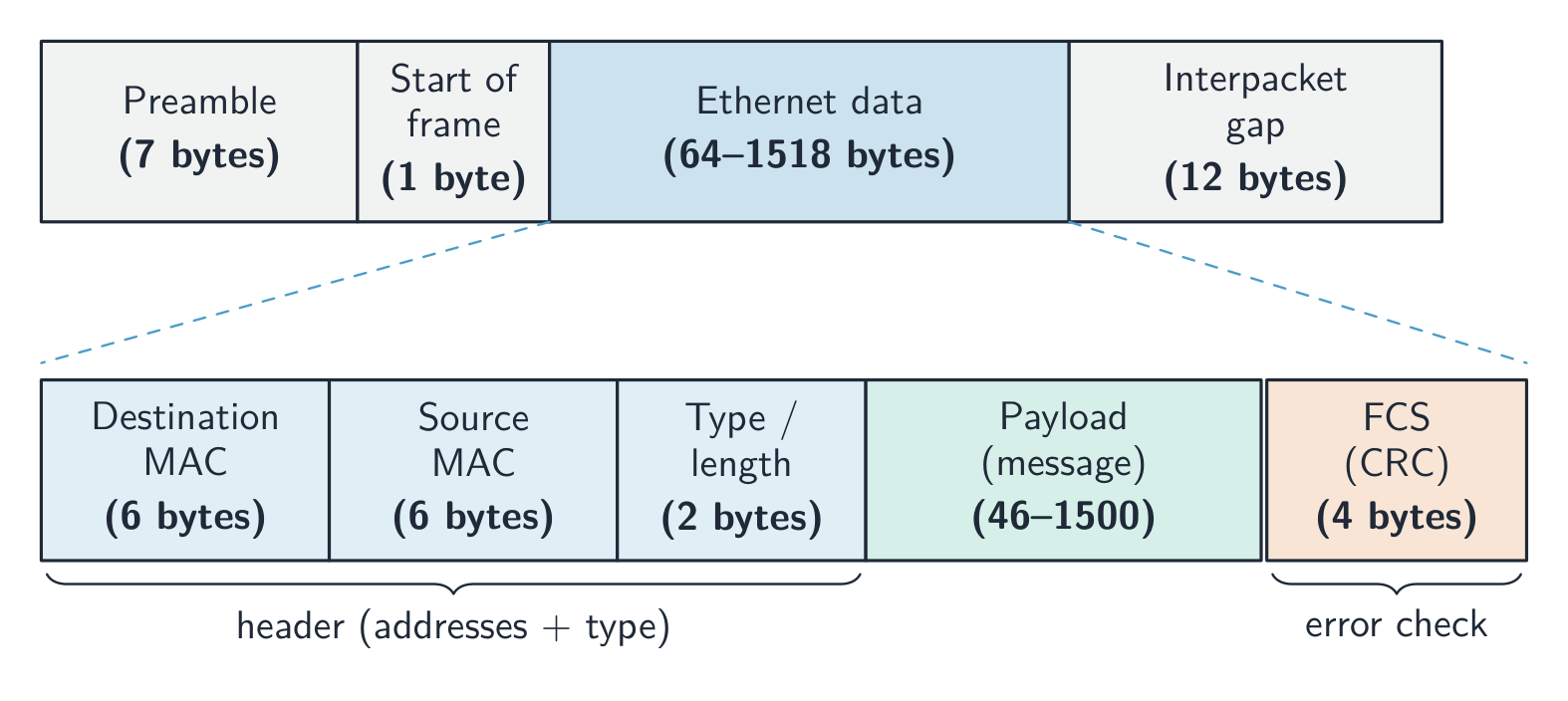
Every one of these protocols ends up inside frames like this one
Which protocol is used to SEND email?
Difficulty 1/5 · 100 coins + a small bonus on first completion today
SMTP sends mail; POP3 and IMAP are used to receive/read it.
IMAP leaves mail on the server and syncs it across all your devices, while POP3 typically downloads the mail and deletes it from the server.
Difficulty 1/5 · 100 coins + a small bonus on first completion today
That is why IMAP shows the same inbox on your phone and laptop, whereas POP3 ties mail to one device.
Worked example: choose a mail protocol
- A user reads mail on a phone, a laptop and a desktop, and wants the same inbox on all three. Which receiving protocol, and why?
- IMAP: the messages stay on the server and the client synchronises with it, so a message read or filed on one device shows as read or filed on the others.
- A second user has one old laptop, a tiny mailbox quota and often no internet. POP3: the mail is downloaded to the laptop and removed from the server, which frees the quota and lets it be read offline.
- The deciding facts are how many devices and where the mail must live. SMTP is not an answer to either: it sends.
A user reads mail on three devices and wants read messages marked read everywhere. Which protocol receives the mail?
Difficulty 1/5 · 100 coins + a small bonus on first completion today
IMAP leaves the mail on the server and synchronises state across devices. POP3 downloads to one device and usually deletes; SMTP sends.
POP3 downloads mail to one device and usually ____ it from the server.
Difficulty 1/5 · 100 coins + a small bonus on first completion today
That frees the mailbox quota and suits a single device used offline, but the mail then exists only on that device.
Peer-to-peer: BitTorrent
- BitTorrent 比特流 is a peer-to-peer 对等网络 protocol: there is no single server holding the file for everyone.
- The file is split into pieces. A tracker helps peers find each other, and each peer then downloads pieces from many other peers in parallel while uploading the pieces it already has.
- The effect: the more popular a file, the more peers there are to serve it, so the load spreads instead of concentrating. A single server would need bandwidth proportional to the number of downloaders.

Every downloader is also an uploader
BitTorrent reduces load on any single server because it:
Difficulty 1/5 · 100 coins + a small bonus on first completion today
As a peer-to-peer protocol, each peer shares pieces, so no single server carries the whole load.
Worked example: why peer-to-peer for a large release
- A free operating system is released as a 4 GB file and a million people download it on the first day. Explain why BitTorrent suits this better than a single web server.
- With HTTP, one server must send 4 GB a million times, so its bandwidth and cost scale with the number of downloaders, and it becomes the bottleneck and a single point of failure.
- With BitTorrent, the file is split into pieces and each peer uploads the pieces it has already received, so capacity grows with the number of downloaders instead of being consumed by them.
- The answer names the load, says where it goes, and says what happens as demand rises.
With BitTorrent, the more people download a file, the more capacity there is to serve it.
Difficulty 1/5 · 100 coins + a small bonus on first completion today
Every peer uploads the pieces it already has, so capacity grows with demand. A single server's bandwidth is consumed by demand instead.
The protocols at a glance
| Protocol | Job |
|---|---|
| HTTP | fetch web pages, port 80 over TCP |
| HTTPS | HTTP inside TLS, encrypted, port 443 |
| FTP | transfer whole files to and from a server |
| SMTP | send mail, client to server and server to server |
| POP3 | download mail to one device, usually deleting it from the server |
| IMAP | leave mail on the server, synchronised across devices |
| BitTorrent | peer-to-peer sharing of file pieces |
Match each protocol to its use.
Difficulty 2/5 · 140 coins + a small bonus on first completion today
HTTP = web, FTP = files, SMTP = sending email (POP3/IMAP receive it).
Marks that slip away
- SMTP sends; POP3 and IMAP receive. A question asking how mail is sent has exactly one answer.
- The IMAP versus POP3 difference is where the mail lives: server and synchronised, or downloaded and deleted.
- HTTPS is not a different protocol from HTTP; it is HTTP over TLS, and TLS is what adds the encryption.
- BitTorrent spreads load because every peer uploads. "It is faster" without that reason earns nothing.
You've got it
- HTTP fetches web pages over TCP; HTTPS is the same protocol inside TLS, encrypted and authenticated; FTP moves whole files
- SMTP sends mail; POP3 downloads and usually deletes it; IMAP leaves it on the server and synchronises every device
- choose a mail protocol from how many devices there are and where the mail must live
- BitTorrent is peer-to-peer: pieces from many peers in parallel, every downloader also uploading, so capacity grows with demand