מחשב אחד רוצה לתקשר עם מחשב אחר, אך הראשון שולח את הנתונים בדרך מסוימת והשני מצפה להם בצורה שונה לחלוטין. התוצאה היא תסמונה – כמו שני אנשים המדברים…
English narration · English + 中文 subtitles burned in · קריאת קול באנגלית · תרגום אנגלי + סינית שרוף בתוך הסרטון
14.1
Why protocols are needed · מדוע נדרשים פרוטוקולים
Syllabus · סיילבוס
English
Candidates should be able to:
Notes and guidance
Show understanding of why a protocol is essential for communication between computers
Show understanding of how protocol implementation can be viewed as a stack, where each layer has its own functionality
Show understanding of the TCP/IPprotocol suite
Four Layers (Application, Transport, Internet, Link) Purpose and function of each layer Application when a message is sent from one host to another on the internet
Show understanding of protocols (HTTP, FTP, POP3, IMAP, SMTP, BitTorrent) and their purposes
Source: Cambridge International syllabus · מקור: הסיילבוס הבינלאומי של קמבריד'ג'
English
A protocol 协议 is a set of rules for how devices communicate. Both ends must follow the same rules, or one side's signals are meaningless to the other. Protocols define the format of the data (where addresses and payload sit), the order of messages (who speaks first, when to acknowledge), the meaning of each message, the timing (timeouts, retransmits), and what to do on error. Without an agreed protocol, communication fails — like two people speaking different languages with no translator.
"Explain why protocols are essential for communication between computers" (three marks). (1) A protocol is a set of rules agreed by both the sender and the receiver; (2) without it the two computers would interpret the data differently (format, order, meaning of each part), so the message could not be understood; (3) it allows computers of different types and manufacturers to communicate, because everyone implements the same standard. Mention what the rules cover: the format of the data, the order of messages, error detection and recovery, and speed or timing.
עברית
פרוטוקול הוא סט כללים לכיצה מכשירים תקשרים. לשני הקצוות יש לנהוג באותם כללים, אחרת אותות הצד האחד יהיו חסרי משמעות עבור הצד השני. פרוטוקולים מגדירים את הפורמט של הנתונים (איפה נמצאות הכתובות והעומס), את הסדר של הודעות (מי מדבר ראשון, מתי לאמת), את המשמעות של כל הודעה, את התזמון (השהיית זמן, משלוח מחודש), ומה לעשות במקרה של שגיאה. ללא פרוטוקול הסכמה, תקשורת תכשל – כמו שני אנשים המדברים שפות שונות ללא מתרגם.
"הסבר מדוע פרוטוקולים חיוניים לתקשורת בין מחשבים" (3 נקודות). (1) פרוטוקול הוא סט כללים שהוסכם על ידי השולח והקולט; (2) ללאו המחשבים היו מפרשים את הנתונים בצורה שונה (פורמט, סדר, משמעות של כל חלק), ולכן ההודעה לא תובן; (3) הוא מאפשר למחשבים של סוגים ויצרנים שונים לתקשרות, כי כולם ממיישמים את אותו סטנדרט. יש לציין מה הכללים מכסים: פורמט הנתונים, סדר ההודעות, זיהוי ושחזור שגיאות, ומהירות או תזמון.
פרוטוקול הוא הכללים המשותפים: פורמט, סדר, תזמון ושגיאות
Networking is complex, so it is split into layers 层, each with one focused job, talking only to the layer above and below. Benefits: modularity 模块化 (replace one layer — say Ethernet with Wi-Fi — without touching the others), standardisation (vendors interoperate), and abstraction 抽象 (you ignore details handled elsewhere). The internet uses the TCP/IPprotocol suite 协议栈 (4 layers).
עברית
רשתות מורכבות, ולכן הן מחולקות לשכבות, כל אחת עם משימה ממוקדת, המדברת רק עם השכבה מעליה ותחתונה. יתרונות: מודולריות (החלפת שכבה אחת – למשל אתרנט עם Wi-Fi – ללא מגע בשאר), סטנדרטיזציה (התאמה הדדית של ספקים), וה abstraction (התעלמות פרטים מטופלים elsewhere). האינטרנט משתמש בחבילת פרוטוקולי TCP/IP (4 שכבות).
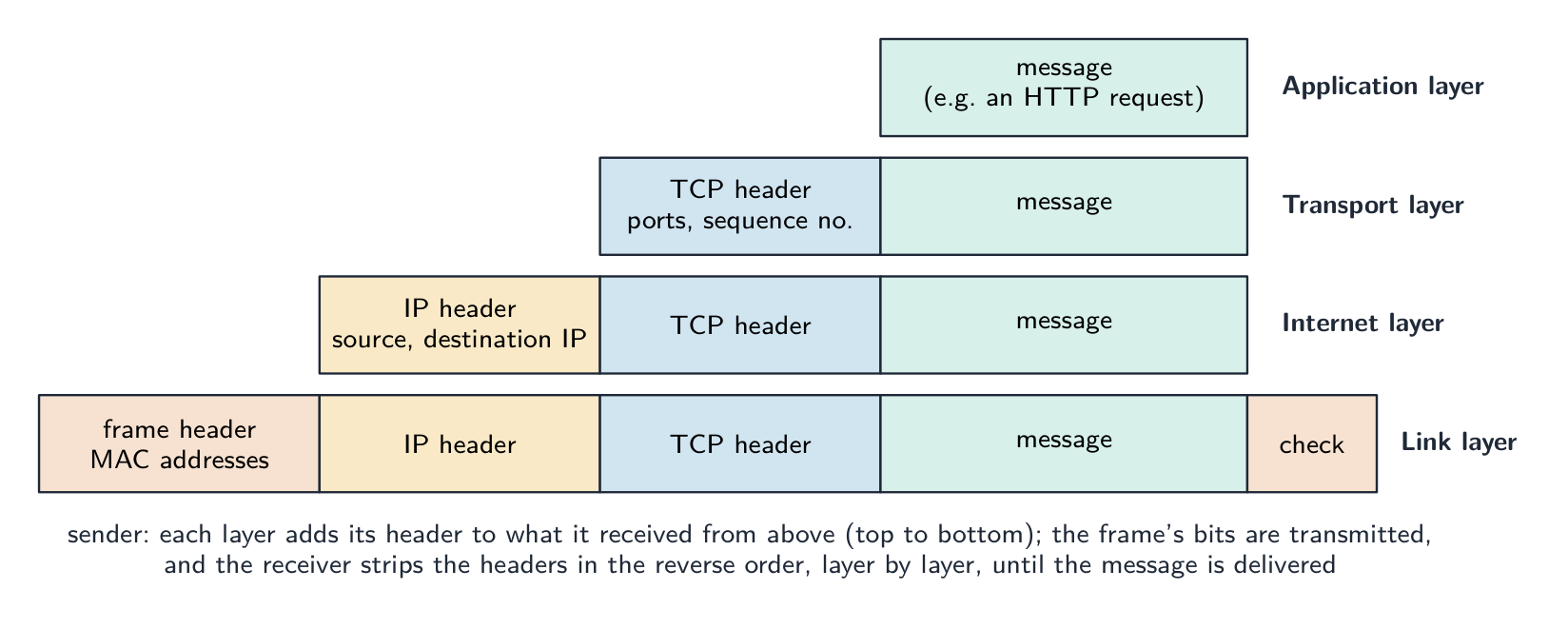
The purpose of each layer, as the mark scheme words it.Application layer: provides the protocols that user applications use (HTTP for the web, SMTP for email) and the interface between the application and the network; it produces the data to be sent and passes it to the transport layer. Transport layer: establishes the end-to-end connection, splits the data into packets (segments) and adds port numbers and sequence numbers; on receipt it reassembles the packets in order and requests any that are missing (TCP), or sends without those guarantees (UDP). Internet layer: adds the source and destination IP addresses to form IP packets (datagrams) and routes them across networks via routers; it does not guarantee delivery. Link layer: adds the MAC addresses and error-check bits to form a frame and transmits the bits over the physical local network (Ethernet or Wi-Fi) through the network interface card. "Complete the stack" means these four, in this order, from the top: Application, Transport, Internet, Link.
"Describe how the TCP/IP suite is applied when a message is sent from one host to another" (five marks). At the sender the message passes down the stack: (1) the application layer produces the data using a protocol such as HTTP or SMTP; (2) the transport layer splits it into packets and adds a header with the port numbers and a sequence number; (3) the internet layer adds a header with the source and destination IP addresses and chooses the route; (4) the link layer adds the MAC addresses of the next device and sends the frame over the physical link. Routers along the way read the internet-layer header and forward each packet. At the receiver the frame passes up the stack: each layer removes and acts on its own header, the transport layer reassembles the packets in sequence-number order and asks for any that are missing, and the application layer presents the message. The same protocol at each layer at both ends is what makes the exchange work.
Application layer
The application layer 应用层 gives services to user programs and defines the protocols they speak (HTTP for web, SMTP for email). This is where a programmer most often works.
Transport layer
The transport layer 传输层 delivers data end-to-end between processes, identified by port numbers 端口号. Two protocols:
TCP 传输控制协议 — connection-oriented 面向连接: sets up a connection, ensures all data arrives in order, retransmits lost packets 数据包, controls flow. Reliable but with overhead. Used by HTTP, HTTPS, SMTP, FTP.
UDP 用户数据报协议 — connectionless 无连接: sends and forgets, with no acknowledgements or ordering. Low overhead, no guarantees. Used for streaming, DNS and gaming, where speed beats reliability.
Internet layer
The internet layer 网络层 carries packets between hosts using IP. Each packet has a source and destination IP address IP地址, and routers 路由器 forward it onward. It does not guarantee delivery — that is TCP's job.
A home router does this job for your house: it reads each packet's destination address and sends it on towards the internet, and back to the right device.
Before the router reaches the wider internet, a modem 调制解调器 connects the home to the internet provider over the provider's cable or phone line. Its lights show the link is up and online.
Link layer
The link layer 链路层 sends bits over one physical link (Ethernet, Wi-Fi). It adds a frame header with MAC addresses MAC地址 and handles medium access (e.g. CSMA/CD 载波侦听多路访问/冲突检测 on Ethernet).
On a wired local network, a switch 交换机 joins many devices together. Each device plugs into a port with an Ethernet cable (an RJ45 plug), and the switch uses the MAC addresses in each frame to send it only to the correct port.
The physical link can be a copper wire, a radio signal (Wi-Fi), or a fibre-optic cable 光纤. In a fibre-optic cable, the bits travel as flashes of light through very thin strands of glass, which is fast and carries data a long way.
A radio link can reach much further. A satellite dish 卫星天线 sends and receives radio signals to and from a satellite, carrying data to places that wired links cannot easily reach.
עברית
שכבה
מטרה
דוגמאות
יישום
מה שעושה תוכנית המשתמש
HTTP, FTP, SMTP, IMAP
העברה
אספקה מקצה לקצה בין תהליכים
TCP, UDP
אינטרנט
העברת חבילות בין רשתות
IP
קישור
שליחת ביטים דרך המדיה הפיזית
Ethernet, Wi-Fi
ארבע השכבות של סדרת הפרוטוקולים TCP/IP
המטרה של כל שכבה, כפי שהיא מנוסחת בתוכנית הבחינה.שכבת יישום: מספקת את הפרוטוקולים שמשתמשים בהם יישומי המשתמש (HTTP עבור האינטרנט, SMTP עבור דוא"ל) ואת הממשק בין היישום לרשת; היא מייצרת את הנתונים לשליחה ומעבירה אותם לשכבת התובלה. שכבת תובלה: מקימה את החיבור מקצה לקצה, מפצלת את הנתונים לחבילות (סיגמנטים) ומוסיפה מספרי פורטים ומספרי תור; בעת הקבלה היא מואחדת את החבילות בסדר ומבקשת כל אחת שלא הגיעה (TCP), או שולחת ללא הבטחות אלו (UDP). שכבת האינטרנט: מוסיפה את כתובות ה-IP של המקור ושל היעד כדי ליצור חבילות IP (datagrams) ומנתבת אותן عبر הרשתות באמצעות נתבים; היא אינה מבטיחה אספקה. שכבת הקישור: מוסיפה את כתובות ה-MAC וביטי בדיקת שגיאות כדי ליצור מסגרת ומעבירה את הביטים דרך הרשת המקומית הפיזית (Ethernet או Wi-Fi) באמצעות כרטיס הממשק ברשת. "השלמת הערימה" מתכוונת לארבע שכבות אלו, בסדר זה, מהמעלה: יישום, תובלה, אינטרנט, קישור.
עיטוף: לכל שכבה יש מוסיף את הראש שלה למה שקיבלה מהשכבה מעליה, כך שהביטים בחוט נושאים ארבעה סוגי מידע; הקבלן מסיר אותם שכבה אחת לאחר השנייה
"תיארו כיצד סדרת הפרוטוקולים TCP/IP מיושמת כאשר הודעה נשלחת מארח אחד לאחר" (חמישה נקודות). בקרב השולח ההודעה עוברת למטה בערימה: (1) שכבת היישום מייצרת את הנתונים באמצעות פרוטוקול כמו HTTP או SMTP; (2) שכבת התובלה מפצלת אותה לחבילות ומוסיפה ראש עם מספרי הפורטים ומספר תור; (3) שכבת האינטרנט מוסיפה ראש עם כתובות ה-IP של המקור ושל היעד ובוחנת את הדרך; (4) שכבת הקישור מוסיפה את כתובות ה-MAC של המכשיר הבא ושולחת את המסגרת דרך הקישור הפיזי. נתבים לאורך הדרך קוראים את ראש שכבת האינטרנט ומעבירים כל חבילה. בקרב הקבלן המסגרת עולה למעלה בערימה: כל שכבה מסירה ופעלת לפי הראש שלה, שכבת התובלה מאחדת את החבילות בסדר מספרי התור ובוקשת כל אחת שלא הגיעה, ושכבת היישום מציגה את ההודעה. אותו פרוטוקול בכל שכבה בשני הקצוות הוא מה שהופך את החילופין לעבודה.
שכבת יישום
השכבת היישום מספקת שירותים לתוכניות משתמש ומגדירה את הפרוטוקולים שהן מדברות (HTTP עבור האינטרנט, SMTP עבור דוא"ל). כאן שומר-תוכנה עובד לרוב.
שכבת תובלה
השכבת התובלה ממשיכה נתונים מקצה לקצה בין תהליכים, המזוהים על ידי מספרי פורטים. שני פרוטוקולים:
TCP מחבר וממשיך בסדר; UDP שולחת ושוכחת
TCP — ממוקד חיבור: מקים חיבור, מבטיח שהכל נתונים מגיעים בסדר, מועיל מחדש חבילות שאבדו, שולט בזרימה. אמין אך עם עלות. משמש על ידי HTTP, HTTPS, SMTP, FTP.
UDP — ללא חיבור: שולחת ושוכחת, ללא אישורים או סדר. עלות נמוכה, ללא הבטחות. משמש לזרימת מדיה, DNS ומשחקים, שבהם מהירות חשובה יותר מאמין.
שכבת אינטרנט
השכבת האינטרנט מעבירה חבילות בין ארחים באמצעות IP. לכל חבילה יש כתובת IP של מקור ושל יעד, ונתבים מעבירים אותה קדימה. היא אינה מבטיחה אספקה — זו משימתו של TCP.
נתב ביתי עושה את המשימה הזו עבור הבית שלך: הוא קורא את כתובת היעד של כל חבילה ושולח אותה קדימה אל האינטרנט, וחזרה למכשיר הנכון.
נתב Wi-Fi לבית: הוא מעביר חבילות בין ההתקנים שלך לאינטרנט
לפני שהנתב מגיע לאינטרנט הרחב, מודם מחבר את הבית לספק האינטרנט דרך הכבל או קו הטלפון שלו. נוריותיו מציינות שהקישור פעיל והמכשיר מקוון.
*מודם כבל מחבר רשת ביתית לספק האינטרנט
שכבת הקישור
שכבת הקישור שולחת ביטים דרך קישור פיזי אחד (Ethernet, Wi-Fi). היא מוסיפה ראש מסגרת עם כתובות MAC ומטפל בגישה לתווך (למשל CSMA/CD ב- Ethernet).
*חלקי מסגרת Ethernet אופיינית
ברשת מקומית חוטית, מתג מחבר מספר התקנים יחד. כל התקן מחובר לפורט באמצעות כבל Ethernet (תקע RJ45), והמתג משתמש בכתובות MAC בכל מסגרת כדי לשלוח אותה רק לפורט הנכון.
*מתג רשת מחבר מספר התקנים חוטיים ברשת מקומית
הקישור הפיזי יכול להיות חוט נחושת, אות רדיו (Wi-Fi) או כבל סיבי אופטי. בכבל סיבי אופטי, הביטים נעים כהבזקי אור דרך סיבי זכוכית דקים מאוד, מה שמאפשר העברה מהירה ונשיאת נתונים למרחק רב.
*כבל סיבי אופטי: הנתונים נעים כאור דרך סיבי זכוכית דקים
קישור רדיו יכול להגיע למרחק רב יותר. צלחת לוויין שולחת ומקבלת אותות רדיו ללוויין ולהחזרה, ומעבירה נתונים למקומות שאליהם קישורים חוטיים אינם מגיעים בקלות.
*צלחת לוויין שולחת ומקבלת נתונים ברדיו במרחק רב
Explore · חקור
Tap the four layers of the TCP/IP model · לחץ על ארבע שכבות דגם ה-TCPIP/IP
Explore each layer. Data travels DOWN the stack as it's sent (each layer adds its header) and back UP as it's received — and any layer can be swapped without touching the others. · חקור את כל השכבה. נתונים נעים מטה בערימה בזמן השליחה (כל שכבה מוסיפה ראש) ועלויה בזמן ההתקבלות — ושכבה כלשהי יכולה להיות מחולפת ללא פגיעה בשאר השכבות.
Common application-layer protocols · פרוטוקולי שכבת יישום נפוצים
English
HTTP 超文本传输协议 — browsers fetch web pages from servers (over TCP, port 80). HTTPS is HTTP over TLS — encrypted, port 443.
FTP 文件传输协议 — transfer files between client and server.
SMTP 简单邮件传输协议 — send email between client and server, and between servers. Receiving uses POP3 or IMAP.
POP3 — downloads email and usually deletes it from the server. IMAP — leaves email on the server and syncs across devices, so the same inbox appears everywhere.
BitTorrent — a peer-to-peer 对等网络 protocol; a file is split into pieces downloaded from many peers in parallel, so no single server carries all the load.
The purpose of each protocol, in the words that score.
Protocol
Purpose (state this)
HTTP
transfers web pages (hypertext) between a web server and a browser; HTTPS is the encrypted version
FTP
transfers files between a client and a server (uploading to and downloading from a file server)
SMTP
sends email from a client to a mail server, and between mail servers (a "push" protocol)
POP3
downloads email from the server to the client, usually deleting it from the server, so it is read on one device
IMAP
lets the client read and manage email that stays on the server, so the same mailbox is seen on every device
BitTorrent
shares files peer-to-peer: pieces of a file are downloaded from, and uploaded to, many other users at once
Asked for the two email protocols, give SMTP for sending and POP3 or IMAP for receiving; asked to describe IMAP, say that the messages remain on the server and are synchronised across devices, which is the difference from POP3.
"Describe how files are shared using the BitTorrent protocol" (four marks). (1) The file is split into pieces (typically 256 KB each), and a small torrent file describes them (their hashes) and names a tracker 追踪器. (2) A peer wanting the file contacts the tracker, which keeps a list of the peers in the swarm 群 currently sharing that file. (3) The peer downloads different pieces from many peers at the same time, and as soon as it holds a piece it uploads it to others; a peer with the whole file is a seed 种子, one still downloading a leech. (4) When all pieces are in, they are reassembled and checked against the hashes. "Explain what peer-to-peer file sharing means": there is no central server holding the file; every computer is both a client and a server, downloading from and uploading to the others, so the load and the bandwidth are spread across the swarm and the more peers there are, the faster it gets.
עברית
HTTP — דפדפנים מושחים דפי אינטרנט ממשרתים (על TCP, פורט 80). HTTPS הוא HTTP על TLS — מוצפן, פורט 443.
FTP — העברת קבצים בין לקוח למשרת.
SMTP — שולח דוא"ל בין לקוח למשרת, ובין משרתים. קבלה נעשית באמצעות POP3 או IMAP.
POP3 — מוריד דוא"ל ומוחק אותו לרוב מהמשרת. IMAP — משאיר את הדוא"ל על המשרת ומסנכרן אותו בין מכשירים, כך שהתיבה הנכנסת זהה בכל מקום.
BitTorrent — פרוטוקול מעמית-לעמית; קובץ מחולק לחלקים המורדים ממספר עמיתים בו-זמנית, כך שאף משרת יחיד לא נושא בעומס כולו.
BitTorrent: מתעקב עוזר לעמיתים למצוא זה את זה, ולאחר מכן הם משתפים חלקי קובץ ישירות
היעד של כל פרוטוקול, במונחים שמיינים נקודות.
פרוטוקול
יעד (ציין זאת)
HTTP
מעבד דפי אינטרנט (היפרטקסט) בין משרת אינטרנט לדפדפן; HTTPS היא הגרסה המוצפנת
FTP
מעבד קבצים בין לקוח למשרת (העלאה למטה והורדה ממשרת קבצים)
SMTP
שולח דוא"ל מלקוח למשרת דוא"ל, ובין משרתי דוא"ל (פרוטוקול "הדחה")
POP3
מוריד דוא"ל מהמשרת ללקוח, לרוב לאחר מחיקתו מהמשרת, כך שהוא נקרא על מכשיר אחד
IMAP
מאפשר ללקוח לקרוא ולנהל דוא"ל שנשאר על המשרת, כך שתיבת הדוא"ל זהה בכל מכשיר
BitTorrent
משתף קבצים מעמית-לעמית: חלקי קובץ מורדים ממנו ומועלים אליו על ידי מספר משתמשים אחרים בו-זמנית
כאשר מבוקשים שני פרוטוקולי הדוא"ל, ציין SMTP לשליחה ו-POP3 או IMAP לקבלה; כאשר מבקשים לתאר את IMAP, אמור שההודעות נשארות על המשרת ומתסנכרנות בין מכשירים, זו ההתנגדות ל-POP3.
"תאר כיצד קבצים משתפים באמצעות פרוטוקול BitTorrent (ארבע נקודות)." (1) הקובץ מחולק לחלקים (בדרך כלל בגודל 256 KB כל אחד), וקובץ טורנט קטן מתאר אותם (את ה-hashes שלהם) ומצין מתעקב. (2) עמית הרוצה בקובץ פונה למתעקב, שמחזיק רשימה של העמיתים בלהקה המשתפים כרגע בקובץ זה. (3) העמית מורידחלקים שונים ממספר עמיתים בו-זמנית, וכך שיש לו חלק הואמעלה אותו לאחרים; עמית שיש לו את כל הקובץ הוא זרע, ואחד שעדיין מוריד הוא תולעת. (4) כשהכל חלקים נמצאים, הם מורכבים מחדש ונבדקים מול ה-hashes. "הסבר מה משמעות שיתוף קבצים מעמית-לעמית": אין משרת מרכזי המחזיק את הקובץ; כל מחשב הוא גם לקוח וגם משרת, מוריד ומעלה לאחרים, כך שהעומס והרוחב הפסגה מפוזרים בלהקה וככל שיש יותר עמיתים, כך זה מהיר יותר.
Explore · חקור
Network route lab · מעבדת נתיבי רשת
Follow data from a device through network hardware and protocols. · עקבו אחרי נתונים ממכשיר דרך ציוד רשת ופרוטוקולים.
Circuit switching vs packet switching · החלפת מעגלים מול החלפת חבילות
Syllabus · סיילבוס
English
Candidates should be able to:
Notes and guidance
Show understanding of circuit switching
Benefits, drawbacks and where it is applicable
Show understanding of packet switching
Benefits, drawbacks and where it is applicable Show understanding of the function of a router in packet switching Explain how packet switching is used to pass messages across a network, including the internet
עברית
המועמדים צריכים להיות מסוגלים:
הערות והנחיות
הצג הבנה של החלפת מעגלים
יתרונות, חסרונות ומקומות בהם הוא רלוונטי
הוכח הבנה של העברת חבילות
יתרונות, חסרונות וייעומו הוכח הבנה של תפקיד נתב בהעברת חבילות הסבר על שימוש בהעברת חבילות להעברת הודעות ברשת, כולל האינטרנט
Source: Cambridge International syllabus · מקור: הסיילבוס הבינלאומי של קמבריד'ג'
English
Circuit switching
A dedicated path is set up between the two ends before any data is sent (circuit switching 电路交换), reserved for the whole conversation, then released. It gives reserved bandwidth 带宽 and in-order delivery, but is inefficient during silences and slow to set up. Classic example: the traditional telephone network.
"Describe circuit switching as a method of data transmission" (three marks). (1) A dedicated path (circuit) is set up between the sender and the receiver before any data is sent; (2) the whole message is sent along that path, in order, as one continuous stream; (3) the circuit is reserved for the duration of the communication and released afterwards.
Benefits and drawbacks.Benefits: the full bandwidth of the circuit is available and guaranteed; data arrives in order with no reassembly and no delay once the circuit is up; the route does not change, so timing is predictable (good for real-time voice and video). Drawbacks: time is spent setting up the circuit before anything is sent; the circuit is reserved even while no data is flowing, so bandwidth is wasted and other users cannot share it; both ends must be free at the same time; a failure anywhere on the path breaks the whole call, and there is no automatic alternative route. Where it is appropriate: a telephone call or a live video link, where a steady, uninterrupted stream matters more than efficiency.
Packet switching
The data is split into packets, each sent independently (packet switching 分组交换). Each packet carries the destination address; routers make per-packet decisions, so packets may take different routes and arrive out of order, and the destination reassembles them. It is efficient (one link is multiplexed 多路复用 across many conversations), robust (reroute around a failure), but has variable latency 延迟 and possible loss (TCP handles reliability). Used by the internet.
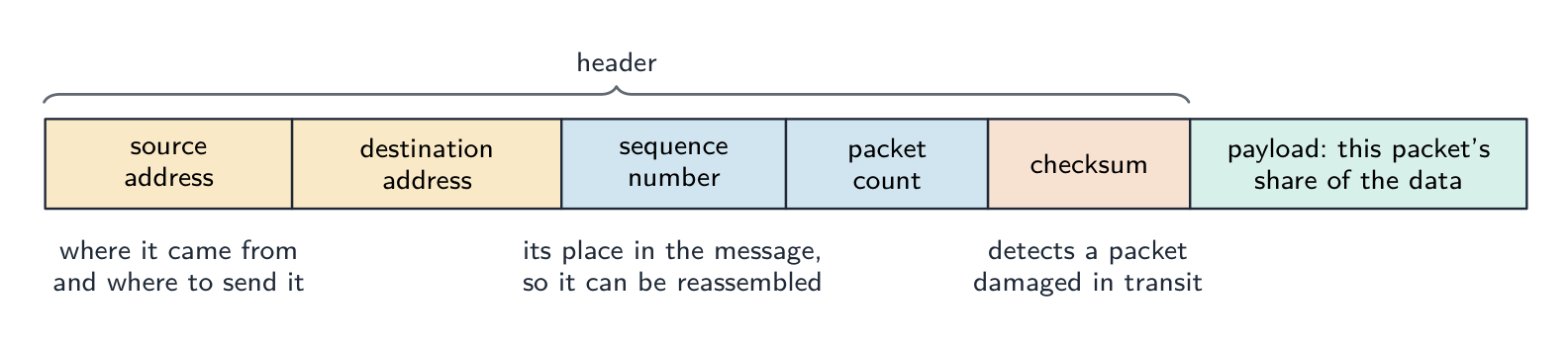
"Describe how packet switching is used to pass messages across a network" (four marks). (1) The message is split into packets of a fixed maximum size; (2) each packet is given a header containing the source and destination addresses, a sequence number 序号 and an error check; (3) each packet is sent independently and may take a different route, chosen by the routers it meets; (4) at the destination the packets are reassembled in order using the sequence numbers, and any missing packet is requested again. If the question excludes checking and resending, leave out the last clause.
"Describe the function of a router in packet switching" (three marks). A router receives a packet, reads the destination IP address in its header, and consults its routing table 路由表 to decide the best next hop towards that destination, taking account of the traffic (congestion) and failed links; it then forwards the packet onto that link. Packets of the same message may leave by different routes; the router holds packets in a queue when a link is busy.
"Describe two ways packet switching ensures the complete message is received." (1) Each packet carries a sequence number, so the receiver can put the packets in order and can tell that one is missing, and (2) the receiver sends an acknowledgement 确认 for packets that arrive; a packet not acknowledged within a time limit is retransmitted by the sender. A checksum 校验和 in each packet lets the receiver detect a corrupted packet and discard it, which then triggers the resend.
Benefits and drawbacks.Benefits: no circuit to set up; the network's links are shared by many messages, so bandwidth is used efficiently; packets can be rerouted around a failed or congested link, so transmission is robust; a lost or damaged packet means resending only that packet, not the whole message. Drawbacks: packets may arrive out of order and must be reassembled, and some may be lost or delayed; the headers add overhead; the variable delay makes it less suitable for real-time voice and video without extra measures; a heavily loaded network drops packets. Where it is appropriate: email, web pages, file downloads and any "bursty" traffic, and the internet in general.
Aspect
Circuit switching
Packet switching
Path
dedicated, reserved
shared, per-packet
Setup time
slow
none
Bandwidth use
inefficient
efficient
Order
in order
may be out of order
Robustness
one failure cuts the circuit
reroute around failures
Suits
constant-rate flows (voice)
bursty flows (web, email)
Modern networks use packet switching for its efficiency and resilience.
Four differences, stated as pairs. (1) Circuit switching sets up a dedicated path before sending; packet switching sends without setting up a path. (2) In circuit switching the whole message follows one route; in packet switching the packets may take different routes. (3) Circuit switching delivers the data in order without reassembly; packet switching needs sequence numbers to reassemble it. (4) Circuit switching reserves bandwidth for one conversation even when idle; packet switching shares the links between many messages. (Also acceptable: a failed link breaks a circuit but packets are rerouted; circuit switching suits real-time streams, packet switching suits bursty data.) Write each difference as both halves; one side alone earns nothing.
Describing packet switching in a few sentences
A good exam answer: "The message is broken into small packets. Each packet carries the destination and source addresses and a sequence number. Each packet travels through the network independently, with routers choosing the next hop per packet. Packets may take different paths and arrive out of order. The destination uses the sequence numbers to reassemble the message, and missing packets can be requested again."
Worked example. A phone call and a large file download share a network. Which switching method suits each, and why? A phone call needs a steady stream with low delay, and it would suffer badly if pieces arrived late or out of order - so circuit switching suits it: a dedicated path is set up for the whole call and its capacity is reserved for the duration. A file download does not care about timing or arrival order, because the receiver reassembles it, and it benefits from using whatever capacity happens to be spare - so packet switching suits it: the file is split into packets that travel independently, each carrying source and destination addresses and a sequence number, with routers choosing a next hop per packet. Name the property of the traffic that decides it: reserved capacity and low delay for the call, efficiency and resilience for the download.
עברית
החלפת מעגלים
נבנה מסלול ייעודי בין שני הקצוות לפני שנתון כל נתון (החלפת מעגלים), שמיועד לכל השיחה, ולאחר מכן משוחרר. זה מספק רוחב פס שמור ומסירה בסדר, אך הוא בלתי יעיל בשקטים ואיטי בהקמה. דוגמה קלאסית: רשת הטלפונים המסורתית.
החלפת מעגלים: מסלול ייעודי אחד שמור מקצה לקצה
"תאר את החלפת מעגלים כשיטת העברת נתונים" (שלוש נקודות). (1) מסלול מיוחד (מעגל) מוקם בין השולח והנעדר לפני שישלח כל נתון; (2) כל ההודעה נשלחת לאורך המסלול, בסדר, כזרם רציף אחד; (3) המעגל שמור למשך הזמן של התקשורת ומשוחרר לאחר מכן.
יתרונות וחסרונות.יתרונות: רוחב הפס המלא של המעגל זמין ומובטח; הנתונים מגיעים בסדר ללא הצרכה מחדש וללא עיכוב ברגע שהמעגל פעיל; המסלול אינו משתנה, ולכן הזמנים צפויים (טוב לקול ואוויר בזמן אמת). חסרונות: זמן מושקע בהקמת המעגל לפני שמשלח כל דבר; המעגל שמור גם כאשר אין נתונים זורמים, ולכן רוחב פס מבוזבז ואין לשאף להשתותף בו; שני הקצוות חייבים להיות פנויים באותו זמן; כשל בכל מקום במסלול מקלקל את כל השיחה, ואין מסלול חלופי אוטומטי. מתי מתאים: שיחת טלפון או קישור אוויר חי, שבה זרם יציב ללא הפסקה חשוב יותר מאשר יעילות.
החלפת חבילות
הנתונים מחולקים ל-חבילות, שכל אחת נשלחת ב-נפרד (החלפת חבילות). לכל חבילה יש כתובת יעד; הנתבים מקבלים החלטות לפי חבילה, ולכן חבילות עשויות לעבור מסלולים שונים ולהגיע בלתי-סדירות, והיעד מבצע את ההצרכה. זה יעיל (קישור אחד מוחלף בין הרבה שיחות), חזק (הסחת מסלול סביב כשל), אך יש לו שהייה משתנה ואפשרות לאובדן (TCP מטפל באמינות). משמש על ידי האינטרנט.
החלפת חבילות: חבילות עוברות בנפרד ועשויות לעבור מסלולים שוניםמה מאפשר לחבילה לעבור לבדה: הכתובות אומרות היכן, מספר הסידור אומר לאילו חלק מההודעה היא שייכת, ובדיקת התקינות מראה אם הגיעה ללא נזק
"תאר כיצד החלפת חבילות משמשת להעברת הודעות ברשת" (ארבע נקודות). (1) ההודעה מתחלקת לחבילות בגודל מקסימלי קבוע; (2) לכל חבילה מוענק ראש המכיל את כתובות המקור והיעד, מספר סידור ובדיקת טעות; (3) כל חבילה נשלחת ב-נפרד ועשויה לעבור מסלול שונה, שנבחר על ידי הנתבים שעובר עליהם; (4) ביעד החבילות מצטרכות בסדר באמצעות מספרי הסידור, וחבילה חסרה מבוקשת שוב. אם השאלה אינה כוללת בדיקה ושליחה מחדש, יש להוציא את המשפט האחרון.
"תאר את תפקיד הנתב בהחלפת חבילות" (שלוש נקודות). נתב מקבל חבילה, קורא את כתובת ה-IP של היעד בראשה, ומתייעץ בטבלת הניווט שלו כדי להחליט את הקפיצה הבאה הטובה ביותר לכיוון היעד, תוך התחשבות בתנועה (עומס) בקישורים שכושלים; הוא אז ממשיך את החבילה אל הקישור הזה. חבילות מאותה הודעה עשויות לצאת במסלולים שונים; הנתב מחזיק חבילות בתור כשהקישור עמוס.
"תאר שתי דרכים שבהן החלפת חבילות מבטיחה קבלת ההודעה בשלמותה." (1) לכל חבילה יש מספר סידור, כך שהנעדר יכול לסדר את החבילות בסדר ולזהות אחת חסרה; (2) הנעדר שולח הודעת אישור עבור חבילות שהגיעו; חבילה שלא קיבלה אישור בתוך זמן מוגדר נשלחת מחדש על ידי השולח. בדיקת תקינות בכל חבילה מאפשרת לנעדר לזהות חבילה פגומה ולדחות אותה, מה שגורם למשדר לשלוח מחדש.
יתרונות וחסרונות.יתרונות: אין צורך להקים מעגל; קישורי הרשת מוחלפים על ידי הרבה הודעות, ולכן רוחב פס מושקע ביעילות; חבילות יכולות להוסת מסלול סביב קישור כושל או עמוס, ולכן השידור חזק; חבילה אבודה או פגומה פירונית רק שליחת החבילה עצמה מחדש, ולא כל ההודעה. חסרונות: חבילות עשויות להגיע בלתי-סדירות וצריך להצטרך אותן, וחלקן עשויות להיאבד או להעיכב; הראשים מוסיפים עומס; השהייה המשתנה הופכת זאת לפחות מתאים לקול ואוויר בזמן אמת ללא צעדים נוספים; רשת עמוסה מורידה חבילות. מתי מתאים: דוא"ל, דפי אתר, הורדת קבצים וכל תנועה "במרוץ", והאינטרנט בכלל.
נקודת מבט
מתגורר מעגל
מתגורר חבילות
מסלול
מיוחד, שמור
משותף, לפי חבילה
זמן הקמה
איטי
אין
שימוש ברוחב פס
לא יעיל
יעיל
סדר
בסדר
עשוי להיות בלתי-סדיר
חוזקות
כשל אחד מקרקע את המעגל
הסחת מסלול סביב כשלים
מתאים
זרמים בקצב קבוע (קול)
זרמים במרוץ (אתר, דוא"ל)
רשתות מודרניות משתמשות בהחלפת חבילות בגלל היעילות והעמידות שלה.
ארבע הבדלים, מוצגים כזוגות. (1) החלפת מעגלים מייצרת מסלול מיוחד לפני השליחה; החלפת חבילות שולחת ללא הקמת מסלול. (2) בהחלפת מעגלים כל ההודעה עוברת במסלול אחד; בהחלפת חבילות החבילות עשויות לעבור מסלולים שונים. (3) החלפת מעגלים מוסרת את הנתונים בסדר ללא הצרכה; החלפת חבילות זקוקה למספרי סידור כדי להצטרך אותה. (4) החלפת מעגלים שומרת רוחב פס לשיחה אחת גם כשהיא שקטה; החלפת חבילות משתתפת בקישורים בין הרבה הודעות. (גם מקובל: קישור כושל מקרקע מעגל אך חבילות מוסחות; החלפת מעגלים מתאימה לזרמים בזמן אמת, החלפת חבילות מתאימה לנתונים במרוץ.) יש לכתוב כל הבדל כ-שני החלקים; צד אחד בלבד לא זוכה לנקודות.
תיאור סריקת חבילות במספר משפטים
תשובה טובה לבחינה: "ההודעה מתפרקת לחבילות קטנות. כל חבילה כולכת את כתובות המקור והיעד ומספר רצף. כל חבילה עוברת דרך הרשת באופן עצמאי, כאשר נתבי הברירה בוחנים את הקפיצה הבאה לכל חבילה. החבילות עשויות לקחת מסלולים שונים ולהגיע בסדר לא נכון. היעד משתמש במספרי הרצף כדי להרכיב מחדש את ההודעה, וחבילות שאינן הגיעו יכולות להתבקש מחדש."
דוגמה מוצגת. שיחת טלפון והורדת קובץ גדול משתפים ברשת. איזו שיטת מעבר מתאימה לכל אחת ולמה? שיחת טלפון זקוקה לזרם יציב עם השהיה נמוכה, והיא תסבל מאוד אם חלקים יגיעו מאוחר או בסדר לא נכון – לכן מעבר מעגלי מתאים לה: מסלול ייעודי נוצר לכל אורך השיחה וקיבולתה שמורה לאורך כל התקופה. הורדת קובץ אינה דואגת לזמן או לסדר ההגעה, מכיוון שהמקבל מרכיב אותו מחדש, והוא נהנה משימוש בקיבולת העומדת פנויה – לכן סריקת חבילות מתאימה לו: הקובץ מחולק לחבילות שעוברות בעצמאות, כל אחת כוללת כתובות מקור ויעד ומספר רצף, כאשר נתבי הברירה בוחרים קפיצה בואה לכל חבילה. ציין את ה-תכונה של התנועה שקובעת זאת: קיבולת שמורה והשהיה נמוכה לשיחה, יעילות ועמידות להורדה.
Explore · חקור
A packet's journey across the internet · מסע החבילה ברחבי האינטרנט
Step through packet switching. The message is split up, each packet finds its own way, and the destination puts them back together — which is why the internet is so efficient and hard to break. · תהליך ההחלפה בחבילות: ההודעה מתפרקת לחבילות, כל חבילה מוצאת את הדרך שלה, ונקודת הקבלה משלבת אותן מחדש — ולכן האינטרנט יעיל מאוד וקשה לשבור.
Definitions the examiner accepts · הגדרות מקובלות בקורס
English
A definition question is marked against fixed wording. Learn these exactly, and give one answer only.
Term
Definition
protocol
a set of rules governing how data is transmitted, agreed by sender and receiver so that both interpret it the same way
protocol stack
the layers of protocols, each with its own function, that together carry out communication; each layer communicates only with the layers above and below
application layer
provides the protocols used by applications to exchange data (HTTP, SMTP, FTP, IMAP, POP3)
transport layer
establishes end-to-end communication, splits data into packets with port and sequence numbers, reassembles them and requests missing ones (TCP), or sends without guarantees (UDP)
internet layer
adds IP addresses to form packets and routes them between networks via routers
link layer
adds MAC addresses to form frames and transmits the bits over the physical local network
router
a device that reads a packet's destination address and forwards it along the best available route towards that destination
circuit switching
a dedicated communication path is established between the two ends before data is sent and held for the whole transmission
packet switching
the message is split into packets, each with a header, sent independently over possibly different routes and reassembled at the destination
packet
a unit of data carrying a header (addresses, sequence number, error check) and a payload
peer-to-peer
file sharing without a central server, each computer acting as both client and server
עברית
שאלת הגדרה מוקדמת לפי טקסט קבוע. לימודן במדויק, ותן תשובה אחת בלבד.
מונח
הגדרה
פרוטוקול
סט של כללים המכוונים כיצד נתונים מועברים, שהוסכמו על ידי השולח והמקבל כך ששניהם יפרש אותם באותו אופן
ערימת פרוטוקולים
שכבות הפרוטוקולים, כל אחת עם פונקציה משלה, שמבצעות יחד את התקשורת; כל שכבה תקשר רק עם השכבות מעל ומתחת לה
שכבת אפליקציה
מספקת את הפרוטוקולים המשמשים אפליקציות להחלפת נתונים (HTTP, SMTP, FTP, IMAP, POP3)
שכבת הובלה
מקימה תקשורת מקום-מקום, מפצלנת נתונים לחבילות עם מספרי פורט ורצף, מרכיבה אותן ומבקשת חבילות חסרות (TCP), או שולחת ללא הבטחות (UDP)
שכבת אינטרנט
מוסיפה כתובות IP ליצירת חבילות ומנתבת אותן בין רשתות באמצעות נתבים
שכבת קישור
מוסיפה כתובות MAC ליצירת פריימים ומעבירה את הביטים ברשת המקומית הפיזית
נתב
התקן שקורא את כתובת היעד של חבילה ומעביר אותה לאורך המסלול הטוב ביותר הזמין לכיוון היעד
מעבר מעגלי
מסלול תקשורת ייעודי נוצר בין שני הקצוות לפני שנתונים נשלחים ונשמר לכל אורך השידור
סריקת חבילות
ההודעה מתפרקת לחבילות, כל אחת עם ראש, שנשלחות בעצמאות לאורך מסלולים שונים אפשריים ומורכבות מחדש ביעד
חבילה
יחידת נתונים הכוללת ראש (כתובות, מספר רצף, בדיקת שגיאה) ומטען
נקודה-לנקודה
שיתוף קבצים ללא שרת מרכזי, כאשר כל מחשב פועל גם כקליינט וגם כשרת
14.2
Exam tips · טיפים לבחינות
English
Why protocols: shared rules, same interpretation, any make of computer. Why layers: each layer has one job and can be changed independently.
The four layers in order, top to bottom: Application, Transport, Internet, Link. Give each layer's job in one sentence, and the "message from host to host" answer as a walk down the stack and back up.
Protocol purposes are one-liners: HTTP web pages, FTP files, SMTP sending mail, POP3 downloading mail, IMAP mail kept on the server, BitTorrent peer-to-peer pieces from a swarm.
Circuit switching: dedicated path first, whole message, held for the duration. Packet switching: split, header with addresses and sequence number, independent routes, reassemble. Benefits and drawbacks come in pairs of opposites.
A router reads the destination address, consults its routing table, forwards along the best route; it is the packet-switching question the exam asks most.
"Where appropriate": circuit switching for a phone or live video call; packet switching for email, the web and downloads.
Common mistakes
Defining a protocol as "a language" or "software"; it is a set of rules.
Putting the layers in the wrong order, or giving the OSI seven layers instead of the four of TCP/IP.
Describing the transport layer as "routing" or the internet layer as "splitting into packets"; ports and splitting are transport, IP addresses and routing are internet.
Confusing POP3 with IMAP, or saying SMTP receives email.
Describing packet switching without the header (addresses and sequence number) or without reassembly.
Saying a router "sends the packet everywhere"; it chooses one next hop from its routing table.
Giving a benefit of packet switching as a drawback of circuit switching without stating the circuit-switching side; each difference needs both halves.
Claiming packet switching guarantees delivery by itself; the transport layer's sequence numbers and acknowledgements do that.
עברית
מדוע פרוטוקולים: כללים משותפים, פרשנות זהה, כל סוג של מחשב. מדוע שכבות: לשכבה יש משימה אחת וניתן לשנות אותה באופן עצמאי.
ארבע השכבות בסדר, למעלה למטה: אפליקציה, הובלה, אינטרנט, קישור. תן משימה אחת בשורה לכל שכבה, ותן תשובת "ההודעה מהמארחת למארחת" כטיול בערימה ובחזרה.
מעבר מעגלי: מסלול ייעודי תחילה, כל ההודעה, שמור לאורך כל התקופה. סריקת חבילות: מתפרק, ראש עם כתובות ומספר רצף, מסלולים עצמאיים, הרכבה מחדש. יתרונות וחסרונות מגיעים בזוגות של ניגודים.
נתב קורא את כתובת היעד, בודק בטבלת הניווט שלו, מעביר לאורך המסלול הטוב ביותר; זו שאלת סריקת החבילות שהבחינה שואלת הכי הרבה.
"כשמתאים": מעבר מעגלי לשיחת טלפון או שיחת וידאו חיה; סריקת חבילות לדוא"ל, האינטרנט ולהורדות.
טעויות נפוצות
הגדרת פרוטוקול כ"שפה" או כ"תוכנה"; מדובר במאגר כללים.
הנחת השכבות בסדר הלא נכון, או הצגת שבע השכבות של OSI במקום ארבע השכבות של TCP/IP.
תיאור שכבת ההעברה כ"ניווט" או שכבת האינטרנט כ"פירוק לחבילות"; פורטים ופירוק הם בתחום ההעברה, בעוד כתובות IP וניווט הם בתחום האינטרנט.
בלבול בין POP3 לבין IMAP, או טענה כי SMTP מקבל דואר אלקטרוני.
תיאור חילוק חבילות ללא הראש (כתובות ומספר סדרה) או ללא הרכבה מחדש.
טענה שהנתב "שולח את החבילה לכל עבר"; הוא בחר יעד הבא אחד מתוך טבלת הניווט שלו.
ציון יתרון של חילוק חבילות כחסר של רכיבת מעגל ללא ציון צד רכיבת המעגל; לכל הבדל יש לשתי הצדדים.
טענה שחילוק חבילות מבטיח אספקה באופן עצמאי; מספרי הסדרה והאישורים בשכבת ההעשה עושים זאת.
Interactive lessons on this topic · שיעורים אינטראקטיביים בנושא זה
Work through it step by step, with instant-check exercises. · לעבור על הדברים צעד אחר צעד, עם תרגילים לבדיקה מיידית.
Pick one and the site follows you — notes, papers, videos and practice all open on it. · בחרו נושא אחד והאתר יעקוב אחריו — הערות, מסמכים, וידאו ותרגולים פתוחים בו.
Type to search notes, lessons, code, vocabulary and past-paper questions across every subject. · הקלד כדי לחפש הערות, שיעורים, קוד, אוצר מילים ושאלות מבחנים בכל הנושאים.




 *מודם כבל מחבר רשת ביתית לספק האינטרנט
 *חלקי מסגרת Ethernet אופיינית
 *מתג רשת מחבר מספר התקנים חוטיים ברשת מקומית
 *כבל סיבי אופטי: הנתונים נעים כאור דרך סיבי זכוכית דקים
 *צלחת לוויין שולחת ומקבלת נתונים ברדיו במרחק רב