Skip to content · ⁨דלג לתוכן⁩

Communication · ⁨תקשורת⁩

A-Level Computer Science · ⁨מדעי המחשב A-Level⁩ · Topic 2 · ⁨נושא 2⁩

Video lesson for this topic · ⁨שיעור וידאו לנושא זה⁩ Open the video page · ⁨פתח את עמוד הוידאו⁩
23:48

רשתות

את לוחץ על שליחה. בתוך פחות משנייה, ההודעה שלך קופצת מהטלפון, רוצה בעיר, צוללת מתחת לאוקיינוס דרך כבל, ומקפיאה ב…

English narration · English + 中文 subtitles burned in · ⁨קריאת קול באנגלית · תרגום אנגלי + סינית שרוף בתוך הסרטון⁩

2.1

Networks: purpose and benefits · ⁨רשתות: מטרה ויתרונות⁩

Syllabus · ⁨סיילבוס⁩
English
Candidates should be able to: Notes and guidance
Show understanding of the purpose and benefits of networking devices
Show understanding of the characteristics of a LAN (local area network) and a WAN (wide area network)
Explain the client-server and peer-to-peer models of networked computers Roles of the different computers within the network and subnetwork models Benefits and drawbacks of each model Justify the use of a model for a given situation
Show understanding of thin-client and thick-client and the differences between them
Show understanding of the bus, star, mesh and hybrid topologies Understand how packets are transmitted between two hosts for a given topology Justify the use of a topology for a given situation
Show understanding of cloud computing Including the use of public and private clouds Benefits and drawbacks of cloud computing
Show understanding of the differences between and implications of the use of wireless and wired networks Describe the characteristics of copper cable, fibre-optic cable, radio waves (including WiFi), microwaves, satellites
Describe the hardware that is used to support a LAN Including switch, server, Network Interface Card (NIC), Wireless Network Interface Card (WNIC), Wireless Access Points (WAP), cables, bridge, repeater
Describe the role and function of a router in a network
Show understanding of Ethernet and how collisions are detected and avoided Including Carrier Sense Multiple Access/Collision Detection (CSMA/CD)
Show understanding of bit streaming Methods of bit streaming, i.e. real-time and on-demand Importance of bit rates broadband speed on bit streaming
Show understanding of the differences between the World Wide Web (WWW) and the internet
Describe the hardware that is used to support the internet Including modems, PSTN (Public Switched Telephone Network), dedicated lines, cell phone network
Explain the use of IP addresses in the transmission of data over the internet Including: • format of an IP address including IPv4 and IPv6 • use of subnetting in a network • how an IP address is associated with a device on a network • difference between a public IP address and a private IP address and the implications for security • difference between a static IP address and a dynamic IP address
Explain how a Uniform Resource Locator (URL) is used to locate a resource on the World Wide Web (WWW) and the role of the Domain Name Service (DNS)
עברית
המועמדים צריכים להיות מסוגלים: הערות והנחיות
הצגת הבנה של המטרות והיתרונות של התקני רשת
הצגת הבנה של מאפייני LAN (רשת מקומית) ו-WAN (רשת אזורית רחבה)
הסבר על מודלים של מחשבים ברשת: Client-Server ו-Peer-to-Peer תפקיד המחשבים השונים בתוך הרשת ובמודלים של תת-רשת יתרונות וחסרונות של כל מודל נימוק לבחירת מודל עבור מצב נתון
הצגת הבנה של Thin-Client ו-Thick-Client וההבדלים ביניהם
הצגת הבנה של טופולוגיות Bus, Star, Mesh ו-Hybrid הבנת אופן העברת חבילות בין שתי קונסולות בטופולוגיה נתונה נימוק לבחירת טופולוגיה עבור מצב נתון
הצגת הבנה של Cloud Computing כולל שימוש בענן ציבורי ופרטי יתרונות וחסרונות של עיבוד ענן
הצגת הבנה להבדלים ולמשמעות השימוש ברשתות אלחוטיות ומחברות תיאור מאפייני כבל נחושת, כבל סיבי אופטי, גלי רדיו (כולל WiFi), מיקרוגלים, לוויינים
תיאור הציוד הקשיח המשמש לתמיכה ב-LAN כולל סוויץ', שרת, כרטיס ממשק רשת (NIC), כרטיס ממשק רשת אלחוטי (WNIC), נקודות גישה אלחוטיות (WAP), כבלים, גשר, מחזר אות
הסבר על תפקיד ופעולה של Router ברשת
הצגת הבנה של Ethernet ואופן זיהוי והימנעות מתנגשויות כולל CSMA/CD (Carrier Sense Multiple Access/Collision Detection)
הצגת הבנה של Bit Streaming שיטות bit streaming, כלומר בזמן אמת ועל פי דרישה חשיבות קצבי ביט מהירות רוחב פס על bit streaming
הצגת הבנה להבדלים בין World Wide Web (WWW) לאינטרנט
תיאור הציוד הקשיח המשמש לתמיכה באינטרנט כולל מודמים, PSTN (רשת טלפונית מופעלת ציבורית), קווים ייעודיים, רשת טלפון נייד
הסבר על שימוש ב-IP Addresses בהעברת נתונים באינטרנט כולל: • פורמט של כתובת IP כולל IPv4 ו-IPv6 • שימוש ב-Subnetting ברשת • כיצד כתובת IP קשורה למכשיר ברשת • ההבדל בין Public IP Address ל-Private IP Address והמשמעויות לבטיחות • ההבדל בין Static IP Address ל-Dynamic IP Address
הסבר על שימוש ב-URL למציאת משאם ב-World Wide Web (WWW) ותפקיד DNS

Source: Cambridge International syllabus · ⁨מקור: הסיילבוס הבינלאומי של קמבריד'ג'⁩

English

A network 网络 is a set of computing devices connected so they can communicate and share resources. Benefits:

  • sharing resources (printers, file servers, internet) — cheaper than equipping each computer.
  • sharing data — many users access the same files.
  • central management — install software, manage users and back up once on a server.
  • communication — email, video calls, messaging.
  • remote access — work from anywhere.
עברית

רשת היא סט של התקני מחשוב המחוברים זה לזה כך שיכול לתקשר ולשתף משאבים. יתרונות:

  • שיתוף משאבים (מדפסות, שרתי קבצים, אינטרנט) – זול מאשר הצידת כל מחשב בנפרד.
  • שיתוף נתונים – מספר רב של משתמשים מציגים את אותם קבצים.
  • ניהול מרכזי – התקנת תוכנה, ניהול משתמשים וגיבוי פעם אחת על שרת.
  • תקשורת – דוא"ל, שיחות וידאו, הודעות.
  • גישה מרחוק – עבודה מכל מקום.
Explore · ⁨חקור⁩

Network route lab · ⁨מעבדת נתיבי רשת⁩

Follow data from a device through network hardware and protocols. · ⁨עקבו אחרי נתונים ממכשיר דרך ציוד רשת ופרוטוקולים.⁩

2.1

LAN vs WAN · ⁨LAN לעומת WAN⁩

English

A local area network 局域网 (LAN) covers a small area — a home, office or school, usually owned by the organisation, with high data rates and low latency 延迟.

A wide area network 广域网 (WAN) covers a large area — a city, country, or the world (the internet is the largest WAN). It uses telecom-company infrastructure — often the Public Switched Telephone Network 公共交换电话网 (PSTN), leased lines or fibre — with lower data rates and higher latency. A WAN connects LANs together.

For "give two characteristics of a LAN": it covers a small geographical area (one site or building); the hardware is owned by the organisation, not leased from a telecom company; it connects through its own switches, cables and access points. For "two ways a WAN is different": it covers a large geographical area; it uses third-party (leased or public) infrastructure; data rates are lower and latency higher; it usually joins several LANs. A school on one site is a LAN; a company with offices in two cities needs a WAN, with a leased line or the internet between the sites. Justify the choice with the area covered and who owns the links.

עברית

רשת מקומית (LAN) מכסה אזור קטן – בית, משרד או בית ספר, בדרך כלל בבעלות הארגון, עם מהירויות נתונים גבוהות ו-השהייה (latency) נמוכה.

רשת אזורית (WAN) מכסה אזור גדול – עיר, מדינה או העולם כולו (האינטרנט הוא ה-WAN הגדול ביותר). היא משתמשת בתשתית חברות הטלקומוניקציה – לעיתים קרובות רשת טלפונית מתחלפת ציבורית (PSTN), קווים שכורים או סיבי אופטי – עם מהירויות נתונים נמוכות והשהייה גבוהה יותר. WAN מחבר LANs זה לזה.

עבור "תן שתי מאפיינים של LAN": היא מכסה אזור גיאוגרפי קטן (אתר אחד או מבנה); הציוד בבעלות הארגון ולא מושכר מחברת טלקומוניקציה; היא מתחברת באמצעות מתגים, כבלים ונקודות גישה משלה. עבור "שתי דרכים שבהן WAN שונה": היא מכסה אזור גיאוגרפי גדול; היא משתמשת בתשתית של צד שלישי (מושכרת או ציבורית); מהירויות הנתונים נמוכות וההשהייה גבוהה יותר; בדרך כלל היא מחברת מספר LANs זה לזה. בית ספר באתר אחד הוא LAN; חברה עם משרדים בשתי ערים זקוקה ל-WAN, עם קו מושכר או אינטרנט בין האתרים. נמק את הבחירה לפי האזור המכוסה ומי בעל הקישורים.

מספר אתרי LAN מפוזרים על פני אזור גדול, כל אחד מהם מחובר דרך ענן WAN של ספק מרכזי, עם קו מושכר ישיר בין שני אתרים מרוחקים
רשת אזורית מקשרת מערכות רבות על פני אזור גדול
Vocabulary · ⁨מילון מונחים⁩ Train · ⁨אימון⁩
English עברית
latency/ˈleɪtənsi/ חריגת זמן (Latency)
wide area network/waɪd ˈeərɪə ˈnetwɜːk/ רשת אזורית רחבה (WAN)
Public Switched Telephone Network/ˈpʌblɪk swɪtʃt ˈtelɪfəʊn ˈnetwɜːk/ רשת טלפונית מנועלת ציבורית (PSTN)
2.1

Client-server and peer-to-peer · ⁨לקוח-שרת ועמית-לעמית⁩

English

Client-server

  • powerful machines act as servers 服务器, providing services (files, web pages, email).
  • other machines are clients 客户端 that request services.
  • central and easy to manage, but the server is a single point of failure unless backed up.

Peer-to-peer (P2P)

  • all machines are equal peers; each can be both client and server (peer-to-peer 对等网络).
  • resources are spread across the peers — no central server. Robust to one failure, but harder to keep secure and consistent.

Choosing a model. Client-server suits a school or a business: files are stored and backed up centrally, a user logs in with one account from any machine, software and security are managed once, and the server can be a powerful machine. The drawbacks are the cost of the server and of a technician, and that the server is a single point of failure. Peer-to-peer suits a few friends sharing files or a game: no server to buy, easy to set up, and each user keeps control of their own machine. The drawbacks the scheme lists: files are spread across many machines, so they are hard to back up and a file is unavailable when its owner's machine is off; each machine must be secured separately; and a peer that serves the others slows down. An online game played through a web browser with other users is the client-server model: the browser is the client, and the game and its shared virtual world run on the company's server, which keeps every player's view consistent.

עברית

לקוח-שרת

  • מכשירים חזקים פועלים כ-שרתים, מספקים שירותים (קבצים, דפי רשת, דוא"ל).
  • מכשירים אחרים הם לקוחות שמבקשים שירותים.
  • ניהול מרכזי וקל, אך השרת הוא נקודת כשל יחיד אלא אם כן יש לו גיבוי.
עמדת שולחן, מחשב נייד וטאבלט שולחים בקשות דרך האינטרנט למשרת מרכזי אחד, שמשיב תגובות בחזרה
ברשת לקוח-משרת, לקוחים מבקשים שירותים ממשרת מרכזי

פייס-לפייס (P2P)

  • כל המחשבים הם צדדים שווים; כל אחד יכול להיות גם לקוח וגם משרת (פייס-לפייס).
  • המשאבים מפוזרים בין הצדדים — אין משרת מרכזי. הרשת עמידה לכשל בנקודה אחת, אך קשה יותר לשמור על אבטחה ועקביות.

בחירת דגם. דגם לקוח-משרת מתאים לבית ספר או לחברה: הקבצים מאוחזים ומגובים במרכז, משתמש נכנס בחשבון אחד מכל מחשב, התוכנה והאבטחה מנוהלים פעם אחת, והמשרת יכול להיות מכשיר חזק. החסרונות הם עלות המשרת ועלות טכנאי, והיותו נקודת כשל יחידה. דגם פייס-לפייס מתאים לקבוצת חברים שמחלקת קבצים או למשחק: אין צורך לקנות משרת, קל להגדיר, וכל משתמש שומר שליטה במכשיר שלו. החסרונות ברשימה זו: הקבצים מפוזרים על פני מחשבים רבים, ולכן קשה לגב אותם; קובץ אינו זמין כאשר מחשב הבעלים שלו כבוי; כל מחשב חייב להיות מוגן בנפרד; ומשרת (צד) שמספק את האחרים מאט את הביצועים. משחק מקוון המופעל דרך דפדפן עם משתמשים אחרים הוא דגם לקוח-משרת: הדפדפן הוא הלקוח, והמשחק והעולם הווירטואלי המשותף מופעלים במשרת של החברה, שמבטיח עקביות בכל תצוגת השחקנים.

שישה מחשבי פייס-לפייס בטבעת, כל אחד מחובר ישירות לכל צד אחר, ללא משרת מרכזי; כל צד הוא גם לקוח וגם משרת
ברשת פייס-לפייס, כל נודה היא גם לקוח וגם משרת
Vocabulary · ⁨מילון מונחים⁩ Train · ⁨אימון⁩
English עברית
server/ˈsɜːvə/ שרת
client/ˈklaɪənt/ לקוח
peer-to-peer/pɪə tə pɪə/ נקודת-אל-נקודה (Peer-to-Peer)
thick client/θɪk ˈklaɪənt/ קליינט כבד
thin client/θɪn ˈklaɪənt/ קליינט דק
2.1

Thin and thick clients · ⁨לקוחות דקים ועבים⁩

English

A thin client 瘦客户端 does little processing locally and relies on a powerful server (web terminals, remote desktops). A thick client 胖客户端 has strong local processing and storage and runs full applications itself (a normal desktop PC).

Feature Thin client Thick client
Local processing minimal substantial
Local storage minimal substantial
Reliance on network high lower
Server load high lower

The roles: in a thin-client model the server does the processing and stores the data, and the client only sends input and shows the output. A cheap terminal is enough, and everything is backed up and updated on the server, but nothing works if the network or the server fails. In a thick-client model the client runs the software and stores files itself, so it can work with no network connection and puts less load on the server, at the cost of more powerful (and more expensive) clients that must each be updated and secured. A school computer room can run thin clients (cheap, centrally managed); a video editor needs a thick client.

עברית

לקוח דק מעבד מעט מקומית ותלוי במשרת חזק (תחנות רשת, שולחנות עבודה מרוחקים). לקוח עבה יש לו עיבוד ואחסון מקומיים חזקים ומפעיל אפליקציות מלאות בעצמו (מחשב אישי שולחני רגיל).

תכונה לקוח דק לקוח עבה
עיבוד מקומי מינימלי משמעותי
אחסון מקומי מינימלי משמעותי
תלות ברשת גבוהה נמוכה יותר
עומס על המשרת גבוה נמוך יותר

התפקידים: בדגם לקוחות דקים, המשרת מבצע את העיבוד ואחסן את הנתונים, והלקוח רק שולח קלט ומציג תוצאה. תחנת עגינה זולה מספיקה, והכל מגובה ומועדכן במשרת, אך אם הרשת או המשרת נכשלים, כלום לא עובד. בדגם לקוחות עבים, הלקוח מפעיל את התוכנה ואחסן קבצים בעצמו, כך שהוא יכול לעבוד ללא חיבור לרשת ומטיל עומס נמוך יותר על המשרת, על חשבון לקוחות חזקים יותר (ומהירים יותר) שחייבים להתעדכן ולהיות מוגנים בנפרד. חדר מחשבים בבית ספר יכול להפעיל לקוחות דקים (זולים, מנוהלים במרכז); עורך וידאו זקוק לקוח עבה.

2.1

Network topologies · ⁨טופולוגיות רשת⁩

English

The topology 拓扑 is how the nodes and links are arranged.

  • bus 总线 — all devices on one shared cable. Cheap; the whole LAN fails if the bus fails; performance drops as more devices share the bandwidth 带宽.
  • star 星形 — every device connects to a central switch. One device failing does not affect others; the switch failing brings all down. Most common today.
  • mesh 网状 — every device links directly to others, with many paths. Very fault-tolerant 容错 (traffic reroutes) but needs lots of cabling.
  • hybrid — a mix (a star in each office, mesh links between offices).

How packets travel in each topology

Bus: the sending device puts the packet on the shared cable; every device sees it, and only the one whose address matches accepts it. Only one device can transmit at a time, so collisions happen (CSMA/CD, below). Star: the sender passes the packet to the central switch, which reads the destination address and forwards it only down the cable to that device; two other devices can talk at the same time. Mesh: the packet is passed from node to node along one of several possible routes until it reaches the destination; if a link fails, another route is used.

To justify a topology: a star for a classroom or an office (a failed cable affects one device; a device is easy to add; with a switch there are no collisions); a mesh where reliability matters most (a hospital, the internet's backbone); a bus only where cost matters and few devices share it. "Draw the star topology" means: the switch in the middle, one line from the switch to each computer, and the server (and the router, if there is one) on their own lines to the switch.

עברית

הטופולוגיה היא האופן שבו הנודות והקישורים מסודרים.

  • בוס — כל ההתקנים מחוברים לכבל משותף אחד. זול; אם הבוס נכשל, כל הרשת המקומית נכשלת; הביצועים יורדים ככל שהתקנים רבים יותר משתפים ב-רוחב הפס.
  • כוכב — כל התקן מחובר למתג מרכזי. כשל בתקן אחד אינו משפיע על האחרים; כשל במתג מוריד את הכל. הנפוצה ביותר כיום.
  • רשת משי — כל מכשיר מחובר ישירות למכשירים אחרים, עם מספר רב של דרכים. עמידה מאוד לתקלות (תנועה מוסחת) אך דורשת כבלות רבות.
  • היברידי — שילוב (כוכב בכל משרד, קישורי משי בין המשרדים).
ששה מחשבים שכל אחד מהם מחובר באמצעות כבל נפילה לכבל גב משותף אחד, עם בלוק סיום בקצוות
מבנה תשתית כלי: כל המכשירים משתפים בכבל אחד עם בלוק סיום בכל קצה
חמישה מחשבים שכל אחד מהם מחובר באמצעות כבל ייעודי משלו לקונסול מרכזי או מתג
מבנה תשתית כוכב: כל מכשיר מחובר לקונסול מרכזי או מתג
ששה מחשבים בטבעת עם כבל ישיר בין כל זוג מכשירים
מבנה תשתית משי: כל מכשיר מחובר ישירות לאחרים

שלושה צבירי כוכבים, כל אחד הוא מתג עם המחשבים שלו, כולם מחוברים באמצעות גב כלי משותף אחד עם בלוק סיום בקצוות *מבנה תשתית היברידי: צבירי כוכבים המחוברים בגב כלי מרכזי

כיצד חבילות עוברות בכל מבנה תשתית

כלי: המכשיר השולח ממקם את החבילה על הכבל המשותף; כל מכשיר רואה אותה, והיחיד שמקבל אותה הוא זה whose כתובת תואמת. רק מכשיר אחד יכול לשדרט בו-זמנית, ולכן מתרחשים התנגשויות (CSMA/CD, להלן). כוכב: השולח מעביר את החבילה למתג המרכזי, שקורא את כתובת היעד ומעביר אותה רק לאורך הכבל אל המכשיר הרלוונטי; שני מכשירים אחרים יכולים לתקשר בו-זמנית. משי: החבילה מועברת מאבן נגד לאבן לאורך אחת מספר הדרך האפשריות עד שהיא מגיעה ליעד; אם קישור נתקע, מועלה דרך אחרת.

להצדק בחירת מבנה תשתית: כוכב לכיתה או למשרד (כבל תקוע משפיע על מכשיר אחד; קל להוסיף מכשיר; עם מתג אין התנגשויות); משי כאשר אמינות היא העיקר (בבית חולים, בגב הרשת); כלי רק כאשר עלות היא העיקר ומעטים משתפים בו. "שרטוט מבנה תשתית כוכב" פירושו: המתג במרכז, קו אחד מהמתג לכל מחשב, והשרת (והנתב, אם יש) בקווים עצמאיים למתג.

Explore · ⁨חקור⁩

Compare the network topologies · ⁨שוו את טופולוגיות הרשת⁩

Tap through the four topologies. Each trades off cost, speed and how well it survives a failure — notice what breaks the whole network in each one. · ⁨עבור דרך ארבע הטופולוגיות. כל אחת עושה פשרה בין עלות, מהירות ויכולת העמידות בפני תקלה — שימו לב למה גורם לקריסת הרשת כולה בכל אחת מהן.⁩

Vocabulary · ⁨מילון מונחים⁩ Train · ⁨אימון⁩
English עברית
topology/təˈpɒlədʒi/ טופולוגיה
bus/bʌs/ שדרה
bandwidth/ˈbændwɪdθ/ רוחב פס
star/stɑː/ כוכב
mesh/meʃ/ רשת מלאה
fault-tolerant/fɒlt ˈtɒlərənt/ עמיד בפני תקלות
CSMA/CD/ˌsiː es em ˈeɪ ˌsiː ˈdiː/ CSMA/CD
2.1

Cloud computing · ⁨מחשוב בענן⁩

English

Cloud computing 云计算 delivers computing services (servers, storage, software) over the internet, hosted by a third party. Benefits: scalability 可扩展性 (pay for what you need), lower cost, access from anywhere, and reliable redundant data centres. Drawbacks: needs internet, your data is held by a third party, and possible vendor lock-in.

For the one-mark definition: cloud computing is on-demand computing services (storage, processing, software) provided over the internet by a third party. A public cloud 公有云 is owned by a provider and shared by many customers over the internet; a private cloud 私有云 is dedicated to one organisation, on its own hardware or hosted for it alone. Benefits the scheme accepts: files are accessible from any device with an internet connection; storage scales up and down as needed; the provider handles the hardware, backups and security updates; there is no local server to buy or maintain. Drawbacks: no access without an internet connection; the data is on a third party's hardware, so security and privacy depend on the provider; an ongoing subscription cost; the provider could fail or be attacked; large files may be slow to transfer. A "why does the company use a public cloud" answer says that they need no hardware of their own, pay only for what they use, and their users can reach it from anywhere.

עברית

מחשוב בענן מספק שירותי מחשוב (שרתים, אחסון, תוכנה) עבור האינטרנט, מאושפד על ידי צד שלישי. יתרונות: הסתגלות (תשלום לפי הצורך), עלות נמוכה, גישה מכל מקום, ודאטה אמינה עם מרכזי נתונים חוזרים. חסרונות: דורש אינטרנט, הדאטה שלך מוחזרת על ידי צד שלישי, וייתכן נעילת ספק.

להגדרה בשאלת נקודה אחת: מחשוב בענן הוא שירותי מחשוב לפי צורך (אחסון, עיבוד, תוכנה) המסופקים על ידי צד שלישי דרך האינטרנט. ענן ציבורי הוא בבעלות ספק ומשותף על ידי לקוחות רבים דרך האינטרנט; ענן פרטי ייעודי לארגון אחד, בחומרה משלו או מאושפד עבורו לבדו. יתרונות שהמערכת מקבלת: קבצים נגישים מכל מכשיר עם חיבור לאינטרנט; האחסון מתרחב וצמוד לפי הצורך; הספק מטפל בחומרה, בגיבויים ובעדכוני אבטחה; אין צורך בשרת מקומי לקנייה או תחזוקה. חסרונות: אין גישה ללא חיבור לאינטרנט; הדאטה נמצאת על חומרת צד שלישי, כך שאבטחה ופרטיות תלויות בספק; עלות מנוי מתמשכת; הספק עלול להפסד או להיות מותקף; קבצים גדולים עשויים להתעכב בהעברה. תשובה ל"מדוע החברה משתמשת בענן ציבורי" אומרת שהם לא צריכים חומרה משלהם, משלמים רק על מה שהם משתמשים, והלקוחות שלהם יכולים לגשת אליה מכל מקום.

2.1

Wired vs wireless · ⁨חוטי מול אלחוטי⁩

English
  • wired (Ethernet 以太网 over twisted-pair 双绞线 or fibre-optic 光纤): higher speed, lower latency, fewer errors, more secure.
  • wireless (Wi-Fi, Bluetooth, cellular): no cables, devices can move, but slower, prone to interference and eavesdropping.

For the same generation, wired wins on speed and reliability; wireless wins on convenience.

Transmission media

Medium Characteristics
copper cable (twisted pair, coaxial) cheap and easy to install; carries an electrical signal; affected by electromagnetic interference; the signal weakens with distance, so repeaters are needed; lower bandwidth than fibre
fibre-optic cable light pulses in a glass core; very high bandwidth; long distances without repeaters; immune to interference; hard to tap, so secure; expensive and needs skilled installation
radio waves (including WiFi) no cable, so devices can move; a range of tens of metres, weakened by walls; a shared frequency, so interference and lower speed; can be intercepted, so needs encryption
microwaves higher-frequency radio for point-to-point links; needs a line of sight; affected by rain and buildings; high bandwidth
satellites reach remote areas and the whole globe; a long delay (latency), because the signal travels to orbit and back; affected by weather; expensive

The exam asks for the comparison in both directions. Wired beats wireless on speed, reliability (no interference), security (a cable must be physically tapped) and consistency; wireless beats wired on mobility, the cost of installation, and adding a device without cabling. Allowing both lets students move around with laptops and phones while the fixed desktops keep the faster, more secure connection, and a device with no network port can still connect. Satellite instead of copper reaches places no cable can, but with more delay, weather interference and higher cost.

עברית
  • חוטי (אתרנט דרך כבל זוג מפותל או סיב אופטי): מהירות גבוהה יותר, השהיה נמוכה יותר, פחות טעויות, בטוח יותר.
  • אלחוטי (Wi-Fi, Bluetooth, תאית): ללא כבלים, מכשירים יכולים לנוע, אך איטיים יותר, רגישים להפרעות ולהקשבה.

לאותה דור, החוטי מנצח במהירות ובאמינות; האלחוטי מנצח בנוחות.

תווכים למעבר

תווך מאפיינים
כבל נחושת (זוג סרוג, קואקסיאלי) זול וקל להתקנה; מעביר אות חשמלי; מושפע בהפרעות אלקטרומגנטיות; האות מתחלש עם המרחק ולכן נדרשים חוזרים; רוחב פס נמוך יותר לעומת סיבי אופטי
כבל סיבי אופטי פעמי אור בליבה מזכוכית; רוחב פס גבוה מאוד; טווח ארוך ללא צורך בחוזרים; חסין להפרעות; קשה לחקירה, ולכן בטוח; יקר ודורש התקנה על ידי אנשי מקצוע
גלי רדיו (כולל WiFi) אין כבל, כך שמכשירים יכולים לנוע; טווח של עשרות מטרים, מוחלש על ידי קירות; תדר משותף, ולכן הפרעות ומהירות נמוכה; ניתן לקחת בחקירה, ולכן דורש הצפנה
גלי מיקרו רדיו בתדר גבוה יותר לקישורים נקודה-נקודה; דורש קו ראיה ישיר; מושפע מגשם ובניינים; רוחב פס גבוה
לוויינים מגיעים לאזורים מרוחקים ולכל העולם; השהייה ארוכה (Latency), מכיוון שהאות עובר לכיוון המסלול וחוזר; מושפעים מזווים; יקרים

המבחן דורש השוואה בשני הכיוונים. חישוב קווי עולה על אלחוטי מבחינת מהירות, אמינות (ללא הפרעות), אבטחה (כבל חייב להיות מנותק פיזית) ועקביות; אלחוטי עולה על קווי מבחינת ניידות, עלות ההתקנה והוספת מכשיר ללא התקנת כבלים. איפשר שניהם מאפשר לסטודנטים לנוע עם מחשבים ניידים וטלפונים בעוד שמתקיני שולחן הקבועים שומרים על החיבור המהיר והבטוח יותר, ומכשיר ללא יציאת רשת עדיין יכול להתחבר. שימוש בלוויינים במקום נחושת מגיע למקומות שאין כבל יכול להגיע אליהם, אך עם השהייה גדולה, הפרעות מזווים ועלות גבוהה יותר.

2.1

LAN hardware · ⁨חומרת LAN⁩

English
  • network interface card 网络接口卡 (NIC) — lets a device send and receive on the network; has a unique MAC address MAC地址 (a 48-bit hardware address). A wireless device uses a wireless network interface card 无线网络接口卡 (WNIC).
  • switch 交换机 — forwards Ethernet frames only to the port for the destination MAC address.
  • hub 集线器 — a simpler device that copies traffic to all ports (now obsolete).
  • wireless access point 无线接入点 (WAP) — lets wireless clients join a wired LAN.
  • cabling — twisted-pair for short runs; fibre-optic for longer, faster runs.
  • server — a computer that provides a service to the other devices: files, printing, web pages, email storage.
  • bridge 网桥 — joins two LAN segments into one network, passing traffic between them.
  • repeater 中继器 — receives a weakened signal and retransmits it at full strength, to extend a cable's reach.

A WNIC's functions, for a four-mark describe: it converts the data into radio signals and back; it carries the device's unique MAC address; it connects the device to a wireless access point and follows the wireless protocol (which channel and frequency to use); and it decodes the incoming signals for the device. Two devices that can physically connect thirty computers with NICs: a switch, or a hub.

עברית
  • כרטיס ממשק רשת (NIC) — מאפשר למכשיר לשלוח ולה接收 ברשת; יש לו כתובת MAC ייחודית (כתובת חומרה של 48 ביט). מכשיר אלחוטי משתמש ב-כרטיס ממשק רשת אלחוטי (WNIC).
  • מתג — מעביר מסגרות אתרינט רק ליציאה המתאימה לכתובת MAC היעד.
  • קונקטור (Hub) — מכשיר פשוט יותר שמעתיק תנועה לכל היציאות (כיום יצא משימוש).
  • נקודת גישה אלחוטית (WAP) — מאפשרת ללקוחות אלחוטיים להצטרף ל-LAN קווי.
  • התקבלות — זוג סרוג למרחקים קצרים; סיבי אופטי למרחקים ארוכים ומהירים יותר.
  • שרת — מחשב שמספק שירות למכשירים האחרים: קבצים, הדפסה, דפי אינטרנט, אחסון מייל.
  • גשר — מחבר שני מקטעי LAN לרשת אחת, ומעביר תנועה ביניהם.
  • חוזר — מקבל אות מתחלש ומשדר אותו מחדש בעוצמה מלאה, כדי להרחיב את הטווח של הכבל.

פונקציות WNIC, עבור שאלה בארבע נקודות: היא ממירה נתונים לגלי רדיו ולהפך; היא מכילה את כתובת ה-MAC הייחודית של המכשיר; היא מחברת את המכשיר לנקודת גישה אלחוטית ועוקבת אחרי הפרוטוקול האלחוטי (איזה ערוץ ותדר להשתמש); והיא מפענחת את הגלים הנכנסים עבור המכשיר. שני מכשירים שיכולים לחבר פיזית שלושים מחשבים עם NICs: מתג או קונקטור.

מתג אתרינט גיגה-ביט עם 5 יציאות על רקע לבן, עם 5 יציאות RJ-45 מסומנות לאורך החזית ואור הפעלה
מתג רשת: כבל של כל מכשיר מחובר ליציאה אחת ממנו
כבל פאץ' אתרנט שחור על רקע לבן, עם תקע RJ-45 בכל קצה המראה מגעים מתכתיים זהביים וקליפ נעילה
תקע RJ-45 בכבל אתרנט זוגי מפותל
מסגרת המופנית למחשב C מגיעה למתג, שמעביר אותה יוצאת רק בדלת המיועדת ל-C, ומשאירה את הכבלים אל A, B ו-D ללא שימוש
מתג שולח כל מסגרת רק לדלת הייעוד שלה
Vocabulary · ⁨מילון מונחים⁩ Train · ⁨אימון⁩
English עברית
network/ˈnetwɜːk/ רשת
switch/swɪtʃ/ מתג
hub/hʌb/ חאב
packet/ˈpækɪt/ חבילה
ethernet/ˈiːθənet/ אתרנט
twisted-pair/ˈtwɪstɪd peə/ כבל זיגזגי
fibre-optic/ˈfaɪbə ˈɒptɪk/ סיב אופטי
repeater/rɪˈpiːtə/ מחזר אותות
network interface card/ˈnetwɜːk ˈɪntəfeɪs kɑːd/ כרטיס ממשק רשת
MAC address/mæk əˈdres/ כתובת MAC
wireless network interface card/ˈwaɪələs ˈnetwɜːk ˈɪntəfeɪs kɑːd/ כרטיס ממשק רשת אלחוטי
wireless access point/ˈwaɪələs ˈækses pɔɪnt/ נקודת גישה אלחוטית
bridge/brɪdʒ/ גשר
2.1

Routers · ⁨נתבים⁩

English

A router 路由器 connects different networks and forwards data between them — usually at the boundary of a LAN and the internet. It does:

  • forwarding — reads each packet 数据包's destination IP address IP地址 and sends it out the right port, using a routing table 路由表.
  • network address translation 网络地址转换 (NAT) — lets many private LAN addresses share one public IP.
  • DHCP 动态主机配置协议 — hands out private IP addresses to LAN devices.
  • firewall 防火墙 — blocks unwanted incoming traffic.

In packet switching 分组交换 a message is split into packets that are sent independently. Each router reads a packet's destination IP address, looks up the next hop in its routing table and forwards it, so the packets of one message may take different routes and are reassembled in order at the destination. A router does receive packets, forward them between networks and hand out IP addresses; it does not find the IP address for a URL (DNS does that) and it does not store web pages. A home router also contains the modem and the wireless access point, so one box connects the LAN to the internet.

עברית

נתב מחבר רשתות שונות ומעביר ביניהן נתונים — בדרך כלל בגבול בין רשת מקומית (LAN) לאינטרנט. הוא מבצע:

  • העברה — קורא את כתובת ה-IP היעד של כל חבילה ושולח אותה דרך הדלת הנכונה, באמצעות טבלת ניתוב.
  • המרת כתובות רשת (NAT) — מאפשר לרבים מכתובות פרטיות ברשת מקומית להשתמש בכתובת IP ציבורית אחת.
  • DHCP — מפיק כתובות IP פרטיות למכשירים ברשת מקומית.
  • חומת אש — חוסם תנועה נכנסת שאינה רצויה.

בערבוב חבילות, הודעה מחולקת לחבילות שנשלחות באופן עצמאי. כל נתב קורא את כתובת ה-IP היעד של החבילה, מחפש את הקפיצה הבאה בטבלת הניתוב שלו ומעביר אותה, כך שחבילות של הודעה אחת עשויות לקחת מסלולים שונים ולהתאחד בסדר ביעד. נתב מקבל חבילות, מעביר אותן בין רשתות ומפיק כתובות IP; הוא אינו מוצא את כתובת ה-IP עבור כתובת URL (DNS עושה זאת), ואינו אוגר דפי אינטרנט. נתב ביתי מכיל גם מודם ונקודת גישה אלחוטית, ולכן תיבה אחת מחברת את הרשת המקומית לאינטרנט.

רשת מקומית של שלושה מחשבים ושרת המחוברים למתג, שמחבר דרך נתב גם לאינטרנט וגם לרשת מקומית או רחבה אחרת
נתב מחבר רשת מקומית לאינטרנט או לרשת אחרת
Vocabulary · ⁨מילון מונחים⁩ Train · ⁨אימון⁩
English עברית
internet/ˈɪntənet/ אינטרנט
local area network/ˈləʊkl ˈeərɪə ˈnetwɜːk/ רשת מקומית (LAN)
router/ˈruːtə/ נתב
cloud computing/klaʊd kəmˈpjuːtɪŋ/ חישוב בענן
scalability/ˌskeɪləˈbɪlɪti/ התרחבות
public cloud/ˈpʌblɪk klaʊd/ ענן ציבורי
private cloud/ˈpraɪvət klaʊd/ ענן פרטי
DHCP/ˌdiː eɪtʃ siː ˈpiː/ DHCP
firewall/ˈfaɪəwɔːl/ חומת אש
packet switching/ˈpækɪt ˈswɪtʃɪŋ/ החלפת חבילות
URL/ˌjuː ɑː ˈel/ כתובת URL
modem/ˈməʊdem/ מודם
2.1

Ethernet and CSMA/CD · ⁨אתרנט ו-CSMA/CD⁩

English

Ethernet is the standard (protocol) for wired LANs: devices are joined by twisted-pair or fibre cable, data is sent in frames that carry the source and destination MAC addresses, and a shared medium uses CSMA/CD to deal with collisions. On shared media a collision 冲突 can happen when two devices send at once. The protocol is CSMA/CD 载波侦听多路访问/冲突检测 (Carrier Sense Multiple Access with Collision Detection):

  1. carrier sense — listen before sending; wait if the cable is busy.
  2. multiple access — many devices share the medium.
  3. collision detection — keep listening while sending; a clash is a collision.
  4. on a collision, both stop, send a brief "jam" signal, then wait a random backoff time before retrying.

The three tasks, in the scheme's words: the device listens (senses the carrier) before transmitting; it keeps checking for a collision while it transmits; on a collision it stops, sends a jam signal, waits a random time and retransmits.

Modern switched Ethernet uses full-duplex 全双工 point-to-point links, so collisions no longer happen.

עברית

אתרנט הוא הסטנדרט (פרוטוקול) לרשתות מקומיות חוטי: מכשירים מחוברים באמצעות כבל זוגי מפותל או סיב אופטי, הנתונים נשלחים במסגרות שנושאות את כתובות ה-MAC של השולח והייעוד, ובאמצע משותף משתמשים ב-CSMA/CD להתמודדות עם התנגשויות. באמצע משותף התנגשות יכולה לקרות כאשר שני מכשירים שולחים בו-זמנית. הפרוטוקול הוא CSMA/CD (Carrier Sense Multiple Access with Collision Detection):

  1. זיהוי נשיאה — האזן לפני שליחה; המתן אם הכבל עמוס.
  2. גישה משותפת — מכשירים רבים משתפים באמצע.
  3. זיהוי התנגשות — המשך בהאזנה בזמן שליחה; התנגשות היא התנגשות.
  4. בהתנגשות, שני הצדדים מפסיקים, שולחים אות "הפרעה" קצר, ואז ממתינים זמן המתנה אקראי לפני ניסיון חוזר.

שלושת המשימות, לפי הגדרת התוכנית: המכשיר מאזין (מזהה נשיא) לפני השידור; הוא בודק רציפות ההתנגשות בזמן השידור; בהתנגשות הוא מפסיק, שולח אות הפרעה, ממתין זמן אקראי ומשדר מחדש.

איתרנט מודרני משתמש בקישורים נקודה-נקודה דו-כיווניים (full-duplex), ולכן התנגשויות אינן מתרחשות עוד.

תרשים זרימה של תהליך CSMA/CD: הרכבת מסגרת, בדיקה שהקו ריק, שליחה, זיהוי התנגשויות, שליחת אות הפרעה, המתנה וניסיון חוזר עד למקסימום מספר הפעמים
תהליך CSMA/CD לטיפול בהתנגשויות על מדיה משותפת
Vocabulary · ⁨מילון מונחים⁩ Train · ⁨אימון⁩
English עברית
collision/kəˈlɪʒn/ התנגשות
full-duplex/fʊl ˈdjuːpleks/ דו-כיווני מלא
2.1

Bit streaming · ⁨הזרמת ביטים⁩

English

Bit streaming 流式传输 sends multimedia as a continuous stream that the receiver plays as it arrives, instead of downloading the whole file first.

  • real-time (live): captured and streamed as it happens (live sport, video calls). You cannot rewind; low latency is vital.
  • on-demand: pre-recorded on a server (YouTube, Netflix). You can pause and rewind; the server can buffer 缓冲 ahead.

Real-time streaming works as a short pipeline:

  1. capture and sample the source (a camera or microphone).
  2. encode it, using compression 压缩 to shrink the data.
  3. send it across the network as packets.
  4. the receiver buffers a little, then plays it live — dropping any packet that arrives late, because a live stream cannot wait for it.

Lossy 有损 compression is used here: moving pictures hide small losses, and the stream must be small enough to fit the bandwidth.

Why a video is compressed before real-time streaming: the uncompressed stream would need more bandwidth than the connection has, so frames would arrive late and the playback would stall. Compression cuts the number of bits, so the bit rate 比特率 stays below the broadband speed, the delay stays small, and less storage and cost are needed at both ends. The bit rate must be lower than the connection's speed: a higher bit rate gives better quality but needs a faster connection, and if the data arrives more slowly than it is played, the buffer empties and the video freezes. On-demand streaming can buffer more of the file ahead, so it copes with a slower connection; real-time streaming cannot.

עברית

הזרמת ביטים שולחת מולטימדיה כזרם רציף שצד הקבלן מפעיל בזמן אמת כשהוא מגיע, במקום להוריד את הקובץ כולו תחילה.

  • בזמן אמת (חי): מצולם ומזורם בזמן אמת (ספורט חי, שיחות וידאו). אין אפשרות לחזור לאחור; חוסר השהייה נמוך הוא קריטי.
  • בהתאמה אישית: מקודם מראש על שרת (YouTube, Netflix). ניתן לעצור ולהחזיר אחורה; השרת יכול לבצע באפר (buffer) קדימה.

הזרמת בזמן אמת פועלת כצינור קצר:

  1. צילום ודגימה של המקור (מצלמה או מיקרופון).
  2. קידוד באמצעות דחיסה כדי לצמצם את גודל הנתונים.
  3. שליחה דרך הרשת כחבילות נתונים.
  4. צד הקבלן מבצע באפר מעט, ולאחר מכן מפעיל את הסרט חי — השלכת כל חבילה שמגיעה מאוחר, מכיוון שהזרם החי לא יכול לחכות עליה.

נעשה כאשימוש בדחיסה לא אובדנית: תנועות בסרט מסתירות אובדנים קטנים, והזרם חייב להיות קטן מספיק כדי להתאים לרוחב הפס.

מדוע סרט נדחס לפני הזרמת בזמן אמת: הזרם ללא דחיסה ידרוש רוחב פס גדול יותר מהקישור מספק, ולכן הפריימים יגיעו מאוחר וההפעלה תתעכב. הדחיסה מצמצמת את מספר הביטים, כך שהקצב הביטים נשאר מתחת למהירות האינטרנט, העיכוב נשאר קטן, ונדרשת פחות אחסון ועלות בשני הקצוות. קצב הביטים חייב להיות נמוך ממהירות הקישור: קצב ביטים גבוה יותר מספק איכות טובה יותר אך דורש קישור מהיר יותר, ואם הנתונים מגיעים לאט יותר מהשהם מופעלים, הבאפר מתרוקש והוידאו נתקע. הזרמה בהתאמה אישית יכולה לבצע באפר יותר מהקובץ קדימה, ולכן היא עמידה לקישור איטי; הזרמת בזמן אמת אינה יכולה לעשות זאת.

נתונים זורמים מהשרת המקור לתוך בופר שממלא בין סימן תחתון לסימן עליון, והנגן מדיה קורא מהבופר
נתouns זורמים מהשרת לתוך באפר לפני שהנגן המדיה קורא אותם
Vocabulary · ⁨מילון מונחים⁩ Train · ⁨אימון⁩
English עברית
bit streaming/bɪt ˈstriːmɪŋ/ זרימת ביטים
buffer/ˈbʌfə/ מגן (Buffer)
compression/kəmˈpreʃn/ דחיסה
lossy/ˈlɒsi/ עם אובדן
bit rate/bɪt reɪt/ קצב ביטים
World Wide Web/wɜːld waɪd web/ World Wide Web
dedicated line/ˈdedɪkeɪtɪd laɪn/ קו ייעודי
2.1

The internet and the World Wide Web · ⁨האינטרנט והאינטרנט⁩

English

The internet 互联网 is a global network of networks using a common protocol 协议 suite (TCP/IP). The World Wide Web 万维网 (WWW) is a service that runs over it: hyperlinked documents identified by URLs, viewed in browsers via HTTP/HTTPS. Email and file transfer are other internet services that are not part of the WWW.

Webmail uses both: the WWW, because the mailbox is a web page reached through a URL in a browser over HTTP; and the internet, because the email itself travels across the network of networks (email is a separate internet service from the web).

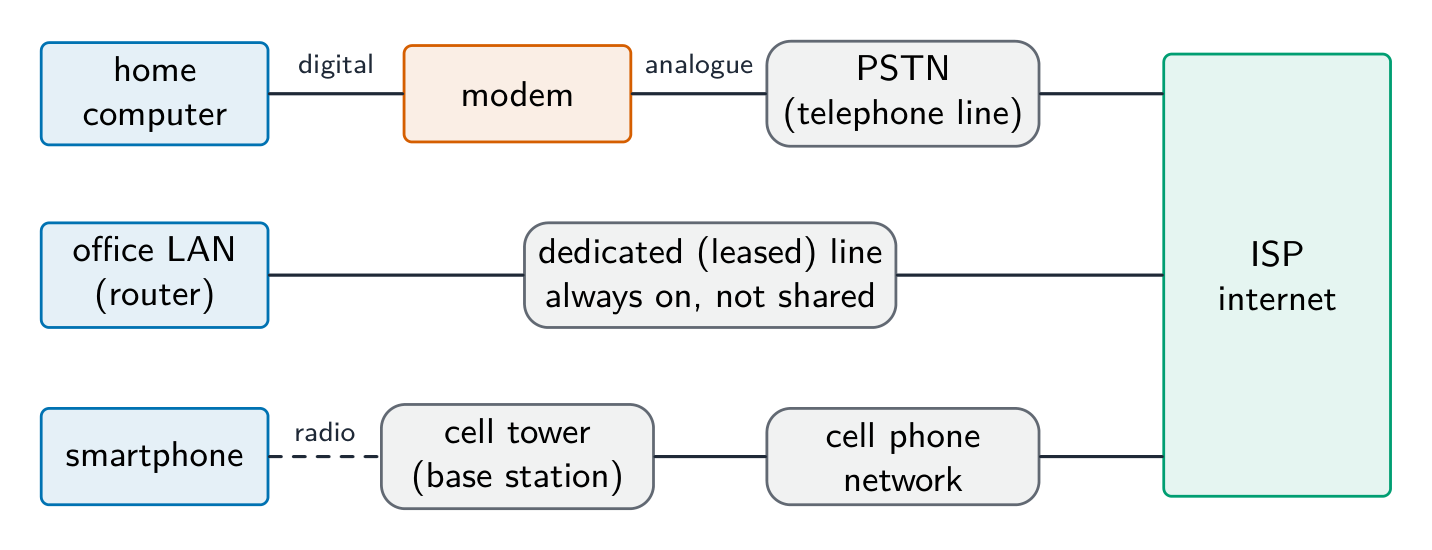
Hardware that supports the internet

  • modem 调制解调器 — converts the computer's digital signal into an analogue signal for a telephone line, and back again at the other end (modulation and demodulation).
  • PSTN — the public telephone network of exchanges and lines; a dial-up or DSL connection carries internet data over it.
  • dedicated line 专线 — a leased line between an organisation and its ISP: always on, with a fixed bandwidth that is not shared, so faster and more reliable, but expensive.
  • cell phone network 蜂窝网络 — the phone sends data by radio to the nearest cell tower (base station); the towers are linked to the phone company's network, which routes the data to the internet; as the phone moves, it is handed over from one cell to the next.
עברית

ה-אינטרנט הוא רשת של רשתות עולמית המשתמשת במכלול פרוטוקולים אחד (TCP/IP). האינטרנט (WWW) הוא שירות הפועל מעליו: מסמכים מקוונים המזהה על ידי כתובות URL, הנצפים בדפדפנים באמצעות HTTP/HTTPS. מייל אלקטרוני והעברת קבצים הם שירותי אינטרנט נוספים שאינם חלק מה-WWW.

Webmail משתמש ב-שניהם: ב-WWW, מכיוון שתיבת הדואר היא דף אינטרנט שנמסר דרך כתובת URL בדפדפן באמצעות HTTP; ובאינטרנט, מכיוון שהמייל עצמו עובר דרך רשת הרשתות (מייל אלקטרוני הוא שירות אינטרנט נפרד מהאינטרנט).

רשת העולם המרחבת היא שירות אחד הפועל מעל האינטרנט
האינטרנט הוא שירות אחד הפועל מעל האינטרנט

ציוד תומך באינטרנט

  • מודם — ממיר את האות הדיגיטלי של המחשב לאות אנלוגי לקו טלפון, ולהפך בקצה השני (מודולציה ודמודולציה).
  • PSTN — רשת הטלפונית הציבורית המורכבת ממתגים וקווים; חיבור דיא-אפ או DSL מעביר נתוני אינטרנט דרכה.
  • קו ייעודי — קו נשכר בין ארגון לספק שירותי אינטרנט שלו: פועל ברציפות, עם רוחב פס קבוע שאינו משותף, ולכן מהיר ואמין יותר, אך יקר.
  • רשת טלפון נייד — הטלפון שולח נתונים באמצעות רדיו לעמדת הבסיס הקרובה ביותר; העמדות מחוברות לרשת חברת הטלפונים, המנתבת את הנתונים לאינטרנט; כשהטלפון זז, התקשרות עוברת מעמדה אחת לשנייה.
שלושה מסלולים, כל אחד בדרך להגעה לאינטרנט: מחשב ביתי דרך מודם ורשת הטלפונית הציבורית; LAN משרדי דרך קו ייעודי נשכר; סמארטפון באמצעות רדיו לעמדת בסיס ודרכ רשת הטלפונים הניידים; כל שלושתם מגיעים לספק שירותי אינטרנט
שלוש דרכים להגיע לאינטרנט: מודם ו-PSTN, קו ייעודי, ורשת טלפונים ניידים
2.1

IP addresses · ⁨כתובות IP⁩

English

An IP address uniquely identifies a device.

  • IPv4 — 32-bit, four denary numbers 0–255 (192.168.1.10); about $4.3 \times 10^{9}$ addresses (now exhausted).
  • IPv6 — 128-bit, eight groups of four hex digits; about $3.4 \times 10^{38}$ addresses.

IPv4 is written as four groups of denary numbers separated by dots; each group is an 8-bit number, so it runs from 0 to 255. IPv6 is written as eight groups of four hexadecimal digits separated by colons, 2001:0db8:0000:0000:0000:ff00:0042:8329, and a run of zero groups can be shortened to ::. So 192.168.3.2 is not IPv6: it has four groups, not eight, separated by dots rather than colons, and its groups are denary, not hexadecimal. 256.0.0.A is not a valid address of either kind: an IPv4 group cannot exceed 255 and cannot be a letter, and IPv6 would need colons and eight groups.

Subnetting

A network can be split into subnets 子网. The IP address splits into a network part and a host part, given by a subnet mask 子网掩码 (e.g. 255.255.255.0 = first 24 bits are network). Subnetting improves management, cuts broadcast traffic, and improves security.

The two parts of an address in a subnetwork: the network ID (the first bits, the same for every device in that subnet, given by the ones in the mask) and the host ID (the remaining bits, unique to each device). Benefits of subnetting, for "describe two benefits": less traffic on each part, because broadcasts stay inside their subnet; better security, because one department's traffic is kept from the others; easier management and fault-finding; more efficient use of the addresses. Two devices with the mask 255.255.255.0 are in different subnets when their first three groups differ.

Public vs private addresses

  • private addresses are used within a LAN and are not routable on the internet (e.g. 192.168.0.0/16).
  • a public IP address is globally unique and routable, assigned by an ISP 互联网服务提供商.

Devices behind NAT with private addresses are not directly reachable from the internet, giving some protection.

The descriptions the tables want: a public address is visible on the internet and unique across it, allocated by the ISP; a private address is visible only inside the LAN, is reused by many LANs, and needs NAT to reach the internet. A static address never changes (set by hand or reserved, as a server needs); a dynamic address is allocated by DHCP each time the device connects and may change.

Static vs dynamic

  • a static IP address is fixed; used for servers that must be found at a known address.
  • a dynamic IP address is assigned by DHCP and may change; easier for client devices and uses a limited address pool efficiently.

Worked example. A host has IP address 192.168.10.130 with subnet mask 255.255.255.192. Which network is it on, and is 192.168.10.200 on the same one? The mask's last octet, 192, is 11000000 in binary, so the first 26 bits are the network part and the last 6 bits address the host. That makes the subnets step in blocks of $256 - 192 = 64$: .0, .64, .128, .192. The address 130 falls in the block starting at .128, so the host is on network 192.168.10.128/26, whose usable hosts run .129 to .190 (.191 is the broadcast address). 200 falls in the next block (.192), so it is on a different subnet and traffic between the two must pass through a router. Get the block size from the mask first ($256$ minus the mask octet) - guessing from the first three octets is what makes these go wrong.

עברית

כתובת IP מזהה במייחוד מכשיר כלשהו.

  • IPv4 — 32 ביט, ארבעה מספרים עשרוניים 0–255 (192.168.1.10); כ-{$4.3 \times 10^{9}$} כתובות (עכשיו נגזרו).
  • IPv6 — 128 ביט, שמונה קבוצות של ארבעה ספרות hexadecimal; כ-{$3.4 \times 10^{38}$} כתובות.

IPv4 נכתב כ-ארבע קבוצות של מספרים עשרוניים המופרדים על ידי נקודות; כל קבוצה היא מספר 8-ביט, ולכן הטווח שלה הוא 0 עד 255. IPv6 נכתב כ-שמונה קבוצות של ארבע ספרות hexadecimal המופרדות על ידי נקודתי-פסק, ⟨2001:0db8:0000:0000:0000:ff00:0042:8329⟩, וסדרה של קבוצות אפס יכולה להתקצר ל::. לכן ⟨192.168.3.2⟩ אינו IPv6: יש לו ארבע קבוצות ולא שמונה, המופרדות על נקודות ולא נקודתי-פסק, והקבוצות הן עשרוניות ולא hexadecimale. ⟨256.0.0.A⟩ אינו כתובת תקפה משני הסוגים: קבוצת IPv4 לא יכולה לעלות על 255 ולא יכולה להיות אות, ו-IPv6 דורש נקודתי-פסק ושמונה קבוצות.

חלוקת רשתות (Subnetting)

רשת יכולה להתחלק ל-תת-רשתות. כתובת IP מתחלקת לחלק רשת וחלק מארח, המוגדר על ידי מסכת תת-רשת (למשל ⟨255.255.255.0⟩ = 24 הביטים הראשונים הם הרשת). חלוקת תת-רשת משפרת את הניהול, מקטינה תנועת播 broadcast ומשפרת את הביטחון.

שני חלקי הכתובת בתת-רשת: מזהה הרשת (הביטים הראשונים, זהים לכל מכשיר בתת-רשת זו, בהתאם לאחדים במסכה) ומזהה המארח (הביטים הנותרים, ייחודיים לכל מכשיר). יתרונות חלוקת תת-רשת עבור "תאר שני יתרונות": תנועה מופחתת בכל חלק, כי播 נשארת בתוך תת-רשתה; ביטחון טוב יותר, כי תנועת חלק אחד מבודדת משנייה; ניהול ופיתוח תקלות קלים יותר; שימוש יעיל יותר בכתובות. שני מכשירים עם המסכה ⟨255.255.255.0⟩ נמצאים בתת-רשתות שונות כאשר שלוש הקבוצות הראשונות שלהם שונות.

שש תת-רשתות של מחלקות, כל אחת עם מזהה רשת /24 משלה, כולן מחוברות דרך נתב מרכזי אחד שמגיע גם לאינטרנט
חלוקת רשת לתת-רשתות, מזהה רשת אחד לכל מחלקה

כתובות ציבוריות מול פרטיות

  • כתובות פרטיות משמשות בתוך LAN ואינן ניתנות לניווט באינטרנט (למשל ⟨192.168.0.0/16⟩).
  • כתובת IP ציבורית היא ייחודית גלובלית וניתנת לניווט, המוקצאת על ידי ספק שירותי אינטרנט (ISP).

מכשירים מאחורי NAT עם כתובות פרטיות אינם נגישים ישירות מהאינטרנט, מה שמספק רמת הגנה מסוימת.

התיאורים הנדרשים בטבלאות: כתובת ציבורית נראית באינטרנט וייחודית בכלל, ומיועדת על ידי ספק השירות; כתובת פרטית נראית רק בתוך הרשת המקומית, משמשת למספר רשתות מקומיות רבות ודורשת NAT כדי לגשת לאינטרנט. כתובת סטטית לעולם אינה משתנה (קבועה ביד או שמורה, כפי שנדרש למשמר); כתובת דינמית מוקצאת על ידי DHCP בכל פעם שהמכשיר מתחבר ועשויה להשתנות.

סטטי מול דינמי

  • כתובת IP סטטית היא קבועה; משמשת למשרים חובה שיכולים להיות מוצאים בכתובת ידועה.
  • כתובת IP דינמית מוקצאת על ידי DHCP ועשויה להשתנות; נוחה יותר למכשירי לקוח ותופסת את בריכת הכתובות המוגבלת בצורה יעילה.

דוגמה פותרת. מחשב בעל כתובת IP 192.168.10.130 עם מסכת תת-רשת 255.255.255.192. באיזה רשת הוא נמצא, והאם 192.168.10.200 נמצאת באותה רשת? האוקטט האחרון של המסכה, 192, הוא 11000000 במערכת הספרות הדיזימלית, ולכן 26 הבתים הראשונים הם חלק מהרשת וה-6 בתים האחרונים מתייחסים למכשיר. הדבר גורם לתת-רשתות לזחול בקבוצות בגודל $256 - 192 = 64$: .0, .64, .128, .192. הכתובת 130 נופלת בקבוצה שמתחילה ב-.128, ולכן המחשב נמצא ברשת 192.168.10.128/26, שבה מכשירים שימושיים נעים בין .129 ל-.190 (.191 היא כתובת השידור). 200 נופלת בקבוצה הבאה (.192), ולכן היא ברשת תת-רשת שונה והתנועה ביניהן חייבת לעבור דרך נתב. קבלו את גודל הקבוצה מהמסכה תחילה ($256$ פחות אוקטט המסכה) - ניחוש מבוסס על שלושת האוקטטים הראשונים הוא מה שגורם לכישלונות כאן.

Vocabulary · ⁨מילון מונחים⁩ Train · ⁨אימון⁩
English עברית
ISP/ˌaɪ es ˈpiː/ ISP
cell phone network/sel fəʊn ˈnetwɜːk/ רשת טלפון נייד
subnets/ˈsʌbnets/ רשתות משנה
subnet mask/ˈsʌbnet mæsk/ מסכת תת-רשת
2.1

URL and DNS · ⁨URL ו-DNS⁩

English

A URL 统一资源定位符 (Uniform Resource Locator) locates a resource on the WWW:

  • protocol: http, https, etc.
  • domain name 域名: a readable server address.
  • path: the resource on that server.

The Domain Name System 域名系统 (DNS, also called the Domain Name Service) is a distributed set of servers that turns domain names into IP addresses. When you type a URL, the browser asks a DNS resolver for the IP, which queries DNS servers (root → top-level → authoritative) until it finds it; the browser then connects to that IP and requests the path. DNS saves humans from memorising IP addresses and lets a site change server without changing its name.

For "explain how the browser uses the URL": the browser splits the URL into the protocol, the domain name and the path; it sends the domain name to a DNS server, which returns the matching IP address (a cache on the computer or at the ISP may answer first); it opens a connection to that IP address using the protocol (HTTPS on port 443); it sends a request for the path; and the web server returns the page, which the browser renders. If the DNS lookup fails, the browser reports that the server cannot be found.

עברית

כתובת URL (Uniform Resource Locator) ממוקמת משאם ב-WWW:

https://www.example.com/about/contact.html
protocol     domain name        path
  • פרוטוקול: http, https וכו'.
  • שם התחום: כתובת שרת קריאה.
  • מסלול: המשאם בשרת זה.

מערכת שמות התחומים (DNS, המכונה גם שירות שמות התחומים) היא מערכת מבוזרת של שרתים הממירים שמות תחום לכתובות IP. כאשר אתם כותבים URL, הדפדפן מבקש ממפתר DNS את הכתובת, שהוא שואל שרתים DNS (שור → תחום עליון → מוסמך) עד למציאתה; לאחר מכן הדפדפן מתחבר לכתובת זו ובקש את המסלול. DNS חוסך מאנשים זיכרון של כתובות IP ומאפשר לאתר לשנות שרת ללא שינוי בשמו.

ל"הסבר כיצד הדפדפן משתמש ב-URL": הדפדפן מפצל את ה-URL לפרוטוקול, שם התחום והמסלול; הוא שולח את שם התחום לשרת DNS, שמחזיר את כתובת ה-IP המתאימה (מאגר זמין במחשב או אצל ספק השירות עשוי להשיב תחילה); הוא פותח חיבור לכתובת ה-IP הזו באמצעות הפרוטוקול (HTTPS בפורט 443); הוא שולח בקשה עבור המסלול; ושרת האינטרנט מחזיר את העמוד, אותו הדפדפן מציג. אם חיפוש ה-DNS נכשל, הדפדפן מדווח שאי אפשר למצוא את השרת.

ממוספר 1 עד 5: המחשב מבקש ממפתר DNS את ה-IP, המפתר שואל שרת DNS אחר, ה-IP מוחזר למפתר ולאחר מכן למחשב, והדפדפן מתחבר לשרת האתר
כיצה ה-DNS מוצא את כתובת ה-IP של אתר לפני שהדפדפן מתחבר אליו
Explore · ⁨חקור⁩

How DNS finds a website · ⁨כיצד DNS מוצא אתר אינטרנט⁩

Step through a DNS lookup. The network routes by IP, not by name — so before anything loads, DNS must turn the domain name into an IP address. · ⁨שלב-בשלב בחיפוש DNS. הרשת מתנהלת לפי כתובת IP ולא לפי שם — ולכן לפני שהכל נטען, DNS חייב להמיר את שם הדומיין לכתובת IP.⁩

Vocabulary · ⁨מילון מונחים⁩ Train · ⁨אימון⁩
English עברית
protocol/ˈprəʊtəkɒl/ פרוטוקול
IP address/ˌaɪ ˈpiː əˈdres/ כתובת IP
routing table/ˈraʊtɪŋ ˈteɪbl/ טבלת ניווט
network address translation/ˈnetwɜːk əˈdres trænˈsleɪʃn/ תרגום כתובת רשת
domain name/dəˈmeɪn neɪm/ שם תחום
Domain Name System/dəˈmeɪn neɪm ˈsɪstəm/ מערכת שם התחום
2.1

Definitions the examiner accepts · ⁨הגדרות מקובלות בקורס⁩

English

A definition question is marked against fixed wording. Learn these exactly.

Term Definition
LAN a network covering a small geographical area, usually one site, whose hardware is owned by the organisation
WAN a network covering a large geographical area, joining LANs through third-party (leased or public) links
client-server a model in which client computers request services from a central, more powerful server that provides them
peer-to-peer a model in which every computer is equal and can act as both client and server, with no central server
thin client a client that does little processing or storage itself and depends on the server for both
thick client a client that does its own processing and storage and can work without the server
mesh topology a topology in which each device is connected directly to many others, giving more than one route between two devices
cloud computing on-demand computing services (storage, processing, software) provided over the internet by a third party
Ethernet the standard protocol for wired LANs, sending data in frames and using CSMA/CD on a shared medium
switch a device that forwards each frame only to the port of its destination MAC address, within a LAN
router a device that connects networks and forwards packets between them by their destination IP address
bit streaming sending a continuous stream of bits so that the receiver plays the media as it arrives, without downloading the whole file first
internet the global network of networks that uses the TCP/IP protocols
World Wide Web the collection of hyperlinked web pages, identified by URLs and accessed over the internet through a browser
URL the address that locates a resource on the web: protocol, domain name and path
DNS the service that translates a domain name into the IP address of the server that holds the resource
עברית

שאלה המגדירה מוערכת לפי נוסח קבוע. לימוד אלו בדיוק.

מונח הגדרה
LAN רשת המכסה אזור גיאוגרפי קטן, בדרך כלל אתר אחד, שציוד שלה בבעלות הארגון
WAN רשת המכסה אזור גיאוגרפי גדול, המ联接 LANs דרך קשרים של צד שלישי (שכורים או ציבוריים)
client-server מודל שבו מחשבי לקוח מבקשים שירותים ממשרת מרכזי וחזק יותר המספק אותם
שיתוף מקובץ-מקובץ מודל שבו למחשב ישנה מעמד שווה ואינו יכול לשמש גם כקלינט וגם כסרבר, ללא סרבר מרכזי
קלינט דק קלינט שמבצע מעט עיבוד או אחסון עצמי ותלוי בסרבר עבור שניהם
קלינט עבה קלינט המבצע את העיבוד והאחסון שלו ויכול לעבוד ללא הסרבר
טופולוגיית רשת טופולוגיה שבה כל מכשיר מחובר ישירות למכשירים רבים אחרים, מה שמספק יותר מנתיב אחד בין שני מכשירים
מחשוב בענן שירותי מחשוב לפי צורך (אחסון, עיבוד, תוכנה) המסופקים באינטרנט על ידי צד שלישי
אתריינת' הפרוטוקול הסטנדרטי ל-LAN חוטי, המשדר נתונים במסגרות ומשתמש ב-CSMA/CD על גבי מדיה משותפת
מתג מכשיר שמעביר כל מסגרת רק לפורט של כתובת ה-MAC הייעוד, בתוך LAN
נתב מכשיר המחבר רשתות ומעביר חבילות ביניהן בהתבסס על כתובת ה-IP הייעוד
זרימת ביטים שידור של זרם רציף של ביטים כך שהמקלט ינגן את המדיה כשהיא מגיעה, ללא הורדת הקובץ כולו תחילה
האינטרנט הרשת הגלובלית של רשתות המשתמש בפרוטוקולי TCP/IP
האינטרנט העולמי סדרת דפי אינטרנט הקשורים זה לזה, המזוהים על ידי כתובות URL ומוצגים באינטרנט באמצעות דפדפן
כתובת URL הכתובת הממוקמת משאם ברשת: פרוטוקול, שם תחום ומסלול
DNS השירות המתרגם שם תחום לכתובת IP של הסרבר המארח את המשאם
2.1

Exam tips · ⁨טיפים לבחינות⁩

English
  • Distinguish LAN vs WAN and client-server vs peer-to-peer by who stores and controls the resources.
  • Match each topology (bus, star, mesh) to its advantages and drawbacks (cost, reliability, collisions).
  • Know the job of each device: a switch directs within a LAN by MAC address, a router routes between networks by IP.
  • Explain bit streaming and why buffering is needed (data arrives at a different rate from playback).
  • Distinguish IPv4 vs IPv6 and public vs private addresses; DNS turns a URL into an IP address.

Common mistakes

  • Saying a switch works by IP address. A switch forwards by MAC address inside the LAN; the router forwards by IP address between networks.
  • Treating the internet and the World Wide Web as the same thing. The web is one service that runs over the internet; email and file transfer are others.
  • Giving "faster" as the whole comparison of wired and wireless. Say faster and more reliable and more secure, and give the wireless side (mobility, no cabling) when the question asks for a comparison.
  • Writing that a router finds the IP address for a URL. DNS does that; the router forwards packets to it.
  • Describing IPv6 with dots and denary groups. Eight groups of four hexadecimal digits, separated by colons.
  • Drawing a star topology as a ring or a chain. Every device has its own line to the switch in the middle.
עברית
  • הבדל בין LAN לבין WAN ובין קלינט-סרבר לבין שיתוף מקובץ-מקובץ בהתבסס על מי מאחסן ושולט במשאמים.
  • התאם כל טופולוגיה (סירה, כוכב, רשת) ליתרונותיה ולחסרונותיה (עלות, אמינות, התנגשויות).
  • לדעת את תפקידו של כל מכשיר: מתג מכוון בתוך LAN לפי כתובת MAC, נתב מנתב בין רשתות לפי כתובת IP.
  • להסביר זרימת ביטים ולמה נדרש גיבוי (הנתונים מגיעים בקצב שונה מזה של ההשמעה).
  • הבדל בין IPv4 לבין IPv6 וכתובות ציבוריות פרטיות; DNS ממיר כתובת URL לכתובת IP.

טעויות נפוצות

  • טענה שמתג עובד לפי כתובת IP. מתג מעביר לפי כתובת MAC בתוך LAN; הנתב מעביר לפי כתובת IP בין רשתות.
  • יחס לאינטרנט ולאינטרנט העולמי כדבר אחד. האינטרנט העולמי הוא שירות אחד הפועל על גבי האינטרנט; דוא"ל והעברת קבצים הם אחרים.
  • לתת "מהיר יותר" כהשוואה מלאה בין רשתות חוט ואלחוטיות. יש לציין מהירות וגם אמינות גבוהה יותר ובטיחות משופרת, ולספק את היתרונות של הרשת האלחוטית (ניידות, אי-צורך בחיווט) כאשר השאלה דורשת השוואה.
  • לכתוב שהנתב מחפש את כתובת ה-IP עבור כתובת URL. תפקיד זה נעשה על ידי DNS; הנתב פונה את החבילות אליו.
  • לתאר IPv6 באמצעות נקודות וחלוקה לקבוצות עשרוניות. שמונה קבוצות של ארבע ספרות Hexadecimal, המופרדות בנקודת-פסיק.
  • לצייר טופולוגיית כוכב בצורת טבעת או שרשרת. לכל התקן יש קו ייעודי למתג במרכז.

Interactive lessons on this topic · ⁨שיעורים אינטראקטיביים בנושא זה⁩

Work through it step by step, with instant-check exercises. · ⁨לעבור על הדברים צעד אחר צעד, עם תרגילים לבדיקה מיידית.⁩

Past Papers · ⁨מבחני עבר⁩

More topics in A-Level Computer Science · ⁨מדעי המחשב A-Level⁩ · ⁨נושאים נוספים בA-Level Computer Science · ⁨מדעי המחשב A-Level⁩⁩

Log in or create account · ⁨היכנס או צור חשבון⁩

IGCSE, A-Level & AP