כעת, בשנייה זו בדיוק, המכשירים שלך חשופים להתקפות. לא על ידי אדם שרוכן מעל מקלדת — אלא על ידי צבאות של בוטים אוטומטיים, הסורקים ללא הפסק את…
English narration · English + 中文 subtitles burned in · קריאת קול באנגלית · תרגום אנגלי + סינית שרוף בתוך הסרטון
6.1
Security, privacy and integrity — three different ideas · אבטחה, פרטיות ושלמות — שלושה מושגים שונים
Syllabus · סיילבוס
English
Candidates should be able to:
Notes and guidance
Explain the difference between the terms security, privacy and integrity of data
Show appreciation of the need for both the security of data and the security of the computer system
Describe security measures designed to protect computer systems, ranging from the stand-alone PC to a network of computers
Including user accounts, passwords, authentication techniques such as digital signatures and biometrics, firewall, anti-virus software, anti-spyware, encryption
Show understanding of the threats to computer and data security posed by networks and the internet
Including malware (virus, spyware), hackers, phishing, pharming
Describe methods that can be used to restrict the risks posed by threats
Describe security methods designed to protect the security of data
Including encryption, access rights
עברית
המועמדים צריכים להיות מסוגלים:
הערות והנחיות
הסבר ההבדל בין המושגים אבטחה, פרטיות ושלמות של מידע
הדגשת החשיבות של האבטחה גם של מידע וגם של מערכת המחשב
תיאור אמצעי אבטחה המיועדים להגן על מערכות מחשב, החל ממחשב אישי עצמאי ועד רשת מחשבים
כולל חسابי משתמש, סיסמאות, טכניקות זיהוי כגון חתימות דיגיטליות וביומטריה, חומת מגן, תוכנת אנטי-וירוס, אנטי-ספייוויר, הצפנה
הצגת הבנה של האיומים לאבטחת המחשב ולמידע שנובעים מרשתות ואינטרנט
כולל תוכנות זדוניות (וירוסים, ספייוויר), מתפרצים, דייג, פורמינג
תיאור שיטות שעשויות לשמש לצמצום הסיכונים שנובעים מאיומים
תיאור שיטות אבטחה המיועדות להגן על אבטחת המידע
כולל הצפנה, זכויות גישה
Source: Cambridge International syllabus · מקור: הסיילבוס הבינלאומי של קמבריד'ג'
English
These sound alike but mean different things:
security 安全 — protecting data from unauthorised 未授权 access, change or destruction.
privacy 隐私 — an individual's right to control who sees their personal data, with consent and a clear purpose.
integrity 完整性 — the data being accurate and complete — not corrupted or accidentally changed.
A file can be secure (only the right people can open it) but lack integrity (a typo corrupted it); or accurate but not private (anyone can read it). All three are needed.
The differences the scheme wants, one sentence each: security is keeping the data safe from loss and from unauthorised access; privacy is keeping the data confidential, so that only those with the right to see it can; integrity is the data being correct, consistent and complete. So "the difference between security and privacy": security is about protecting the data from being accessed, changed or lost by people who should not; privacy is about the individual's right to decide who may see their personal data. "The difference between security and integrity": security protects the data from unauthorised access; integrity is about the data being accurate and up to date, which validation and verification protect.
עברית
אלה נשמעים דומה אך פועלים בצורה שונה:
אבטחה — הגנת נתונים מגישה לא מורשית, שינוי או הרס.
פרטיות — הזכות של יחיד לבחור מי רואה את הנתונים הפרטיים שלו, בהסכמה ומטרות ברורות.
שלמות — הנתונים הם מדויקים ומלאים — לא מעוכרים או שונוי באופן מקרי.
קובץ יכול להיות בטוח (רק אנשים מורשים יכולים לפתוח אותו) אך להفتק שלמות (טעות הקלדה העכתרה אותו); או מדויק אך לא פרטי (כל אחד יכול לקרוא אותו). כל שלושה נדרשים.
ההבדלים שהתוכנית מחפש, משפט אחד לכל אחד: אבטחה היא שמירת הנתונים בטוחים מפני אובדן וגישה לא מורשית; פרטיות היא שמירת הנתונים בחיסיון, כך שרק אלו עם הזכות לראות אותם יכולים לעשות זאת; שלמות היא הנתונים being נכונים, עקביים ומלאים. לכן "ההבדל בין אבטחה לפרטיות": אבטחה עוסקת בהגנת הנתונים מנגישה, שינוי או אובדן על ידי אנשים שאינם אמורים; פרטיות עוסקת בזכות היחיד לקבוע מי רואה את הנתונים הפרטיים שלו. "ההבדל בין אבטחה לשלמות": אבטחה מגנה על הנתונים מגישה לא מורשית; שלמות עוסקת בנתונים being מדויקים ועדכניים, שאת זה מגנים תקף ואישור.
Explore · חקור
Risk and responsibility lab · מעבדת סיכון ואחריות
Sort examples by the rule, risk or protection involved. · סדר את הדוגמאות לפי הכלל, הסיכון או ההגנה הרלוונטיים.
6.1
Why security matters · מדוע אבטחה חשובה
English
Two things to protect: the data itself (keep it confidential, intact and available) and the computer system (a compromised system can attack others, steal credentials, or be held to ransom).
"Why does the school need to keep both secure?" Data: it is personal and confidential, so it must not be read, changed or deleted by an unauthorised person, and its loss would stop the school working. System: an intruder who reaches the computer system can install malware, use it to attack other systems, damage the hardware or software, or lock it with ransomware; a secure system is the first line of defence for the data on it.
עברית
שני דברים שצריך להגן עליהם: ה-נתונים עצמם (שמירתם בחיסיון, שלמות וזמינות) וה-מערכת המחשב (מערכת שהתפרצה יכולה לתקוף אחרים, לגנוב פרטיי זיהוי או להינצל לחוטף).
"מדוע על בית הספר לשמור על השני בטוחים?" נתונים: הם פרטיים וחסויים, ולכן אין לקרוא, לשנות או למחוק אותם על ידי אדם לא מורשה, ואובדנם יעצור את פעילות בית הספר. מערכת: חודר שהגיע למערכת המחשב יכול להתקין תוכנות זדוניות, להשתמש בה לתקוף מערכות אחרות, לפגוע בציוד או בתוכנה, או לנעול אותה עם תוכנת רansomware; מערכת בטוחה היא קו ההגנה הראשון לנתונים שמאחסנת.
6.1
Threats from networks and the internet · איומים מרשתות ואינטרנט
virus 病毒 — self-copying code that attaches to other programs and spreads when they run.
worm 蠕虫 — self-copying code that spreads over networks 网络 with no user action.
Trojan horse 木马 — looks useful but hides malicious code.
spyware 间谍软件 — secretly collects information (keystrokes, passwords).
ransomware 勒索软件 — encrypts your files and demands payment.
adware 广告软件 — pushes unwanted adverts.
2. Tricking people (social attacks):
phishing 网络钓鱼 — fake emails/sites that trick users into giving credentials.
pharming 域名欺骗 — redirects a user to a fake site even when they type the correct address.
social engineering 社会工程 — tricking people into giving up information.
The scheme's descriptions of the four named threats: a virus is malicious software that replicates (copies itself), attaches itself to other files and deletes or corrupts data; spyware is malicious software that records the user's key presses and actions and sends them to a third party, to obtain passwords and personal data; a phishing email pretends to come from a legitimate organisation and contains a link to a fake website where the user is asked for personal or bank details; pharming is malicious code installed on the user's computer or on a web server that redirects the user to a fake website even though they typed the correct address. Similarities of spyware and a virus: both are malware, both are installed without the user's knowledge, both can send data to a third party or damage the system; the difference is that a virus replicates itself while spyware records and transmits information. Phishing and pharming both lead the user to a fake website that collects their data; phishing needs the user to click a link in an email, pharming works through code on the computer or the DNS server and needs no email.
3. Attacks on the network:
hacking 黑客入侵 by hackers 黑客 — unauthorised access, often via weak passwords or software flaws.
denial of service 拒绝服务 (DoS/DDoS) — floods a server so real users cannot reach it.
eavesdropping 窃听 — capturing data in transit (a risk on open Wi-Fi).
man-in-the-middle 中间人攻击 — an attacker secretly relays or alters messages between two parties.
Worked example. Identify and describe two threats to the data on a school network, and give a different prevention method for each.
Threat 1, malware: a virus copied onto a computer from an email attachment or a download replicates itself and corrupts or deletes files; prevention: anti-virus software that scans files and is kept up to date. Threat 2, hacking: an unauthorised person gains access to the network, for example by guessing a weak password, and reads or changes the data; prevention: a firewall that blocks unauthorised connections, or strong passwords with two-factor authentication. A third pair, phishing: an email leads a user to a fake site that collects their login; prevention: training users to check the sender and the URL, and filtering email. The measure must match the threat: encryption does not stop a virus, and anti-virus software does not stop phishing.
עברית
האיומים מחולקים לשלוש קבוצות.
מתקף במרכז יושב בין שני הצדדים
תוכנות זדוניות (malware) — תוכניות מזיקות:
וירוס — קוד המכפיל את עצמו ומתחבר לתוכניות אחרות ונפוץ כשהן מופעלות.
זחל — קוד המכפיל את עצמו ונפוץ ברשתות ללא פעולת משתמש.
סוס טרויה — נראה שימושי אך מחביא קוד זדוני.
תוכנת ריגול (spyware) — אוסעת סתרים מידע (הקשות מקלדת, סיסמאות).
תוכנת פדיעה (ransomware) — מצפרת את הקבצים שלך ותורשת תשלום.
תוכנת פרסום (adware) — מציגה פרסומים בלתי רצויים.
2. הונאת אנשים (התקפות חברתיות):
פישינג (phishing) — דוא"ל/אתרים מזויפים שמטרידים משתמשים למסירת נתוני הזדהות.
פרמינג (pharming) — מפנה משתמש לאתר מזויף גם כאשר הוא מכניס את הכתובת הנכונה.
הנדסה חברתית (social engineering) — הונאת אנשים למסירת מידע.
תיאורי התוכנית של ארבעה איומים ממונים: וירוס הוא תוכנה זדונית שמכפילה את עצמה, מתחבר לקבצים אחרים ומחקרת או פוגעת בנתונים; תוכנת ריגול היא תוכנה זדונית שמקליטה הקשות מקלדת ופעולות משתמש ושולחת אותן לצד שלישי כדי להשיג סיסמאות ומידע אישי; מייל פישינג מתחזה כי הוא מארגון חוקי ומכיל קישור לאתר מזויף בו מבוקש מהמשתמש מידע אישי או בנקאי; פרמינג הוא קוד זדוני שהותקן במחשב המשתמש או בשרת האתר ומפנה אותו לאתר מזויף גם אם כתב את הכתובת הנכונה. דמיונות בין תוכנת ריגול לוירוס: שניהם תוכנות זדוניות, שניהם מותקנים ללא ידיעת המשתמש, שניהם יכולים לשלוח מידע לצד שלישי או לפגוע במערכת; ההבדל הוא שהוירוס מכפיל את עצמו בעוד שתוכנת הריגול מקליטה ועוברת מידע. פישינג ופרמינג מובילים את המשתמש לאתר מזויף שאוסף את נתוניו; פישינג דורש מהמשתמש ללחוץ על קישור במייל, פרמינג עובד באמצעות קוד במחשב או בשרת DNS ואינו דורש מייל.
3. התקבות על הרשת:
התקנות (hacking) על ידי מתקינים (hackers) — גישה בלתי מורשית, לעיתים קרובות דרך סיסמאות חלשות או פגמים בתוכנה.
פגיעה בשירות (DoS/DDoS) — ממלא שרת כך שמשתמשים אמיתיים לא יכולים לגשת אליו.
הקשבה (eavesdropping) — לכידת מידע בזמן העברה (סיכון ברשת Wi-Fi פתוחה).
מרכז (man-in-the-middle) — מתקף שמעביר או משנה סתרים הודעות בין שני צדדים.
דוגמה מפורטת. זיהוי ותיאור של שני איומים לנתונים ברשת בית ספר, והצעת שיטה מניעה שונה לכל אחד.
איום 1, תוכנות רעות: וירוס שמעתיק למחשב מארשי email או הורדה מריב את עצמו וגורם נזק לקובצים או מחק אותם; מניעה: תוכנת אנטי-וירוס הסורקת קובצים ומתעדכנת באופן שגרתי. איום 2, פריצות: אדם בלתי מורשה מקבל גישה לרשת, לדוגמה על ידי ניחוש סיסמת מעבר חלשה, וקורא או משנה נתונים; מניעה: חומת מגן החוסמת חיבורים בלתי מורשים, או סיסמאות חזקות עם אימות דו-שלבי. זוג שלישי הוא פישिंग: email המוביל משתמש לאתר מזויף שאוסף נתוני התחברות שלו; מניעה: הכשרת משתמשים לבדוק את שולח המסר ואת כתובת האתר (URL), סינון email. הצורך להתאים את ההגנה לאיום: הצפנה לא עוצרת וירוס, ותוכנת אנטי-וירוס לא עוצרת פישिंग.
תוכנות רעות לפי התנהגות: הפצה עצמית (וירוס, וורם) לעומת נסתר/מתעלף (טרויאן, spyware, ransomware, adware)
Measures protect both the security of data (against loss, theft or corruption) and the security of the computer system (its hardware, software and network).
A standalone PC
a strong password; antivirus kept up to date; prompt software updates; backup 备份 to separate media; full-disk encryption 加密; a locked screen.
A networked PC
All the above, plus a firewall 防火墙, per-user permissions (admin rights only for admins), central management of user accounts 用户账户, and audit logs 审计日志 (who logged in, what they touched).
How the measures work, in the wording the scheme awards:
firewall: examines every incoming and outgoing transmission and compares it with set criteria (a whitelist or blacklist of addresses, ports and protocols); blocks any that do not meet the criteria; can prevent access to certain sites and warn of unauthorised access attempts.
encryption: the data is scrambled (encoded) with a key into ciphertext, so an intercepted copy cannot be understood without the key; the receiver uses a key to decrypt it. It protects data in transmission and in storage, but it does not stop the data being intercepted or deleted.
passwords and user accounts: only a user who knows the password can log in; a strong password (long, mixed characters, changed regularly) cannot be guessed; accounts lock after repeated failures; each account carries its own access rights.
anti-virus and anti-spyware software: scans files and programs against a database of known malware signatures, checks behaviour, quarantines or deletes what it finds, and must be updated so that new malware is recognised.
access rights: each user (or group) is given permissions for each file or table, such as read-only or read and write, so a user cannot see or change data that is not theirs; a database can also present each user with a view containing only the fields they need.
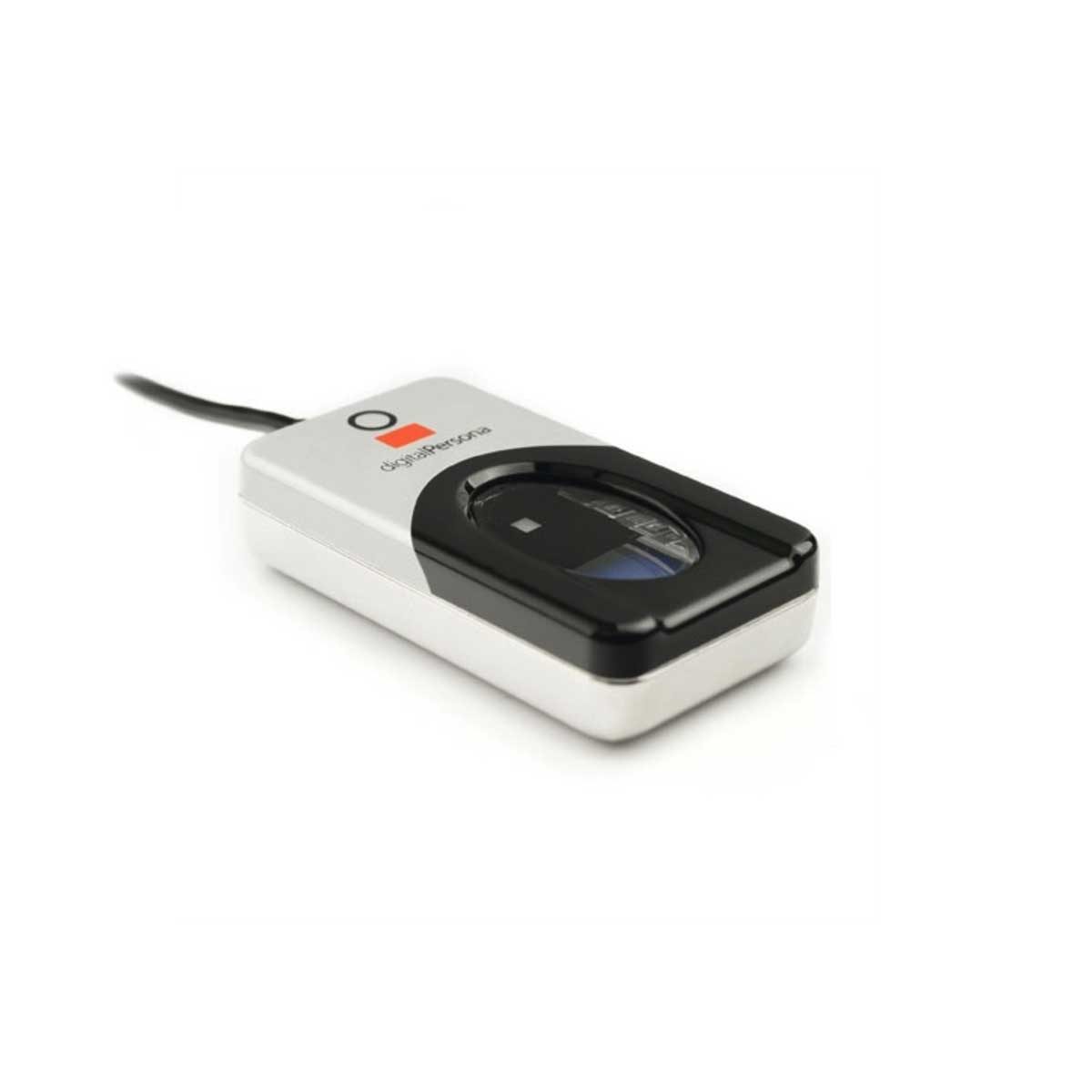
biometrics: the device captures an image of the face, fingerprint or iris, converts it to digital data, compares it with the stored data for that user and allows access only on a match; it cannot be forgotten, lent or guessed like a password.
backups: a copy of the data on separate media, kept off-site, so that lost or corrupted data can be restored.
To restrict the risks of malware, in three marks: install anti-malware software and keep it updated; use a firewall; do not open attachments or download files from unknown sources; keep the operating system and applications patched; and train users.
Across the internet
VPN 虚拟专用网 — encrypts traffic between the user and the corporate gateway.
HTTPS / TLS — encrypt web traffic.
digital signatures 数字签名 — prove who sent a message and that it was not altered in transit.
intrusion detection — watches traffic for known attack patterns.
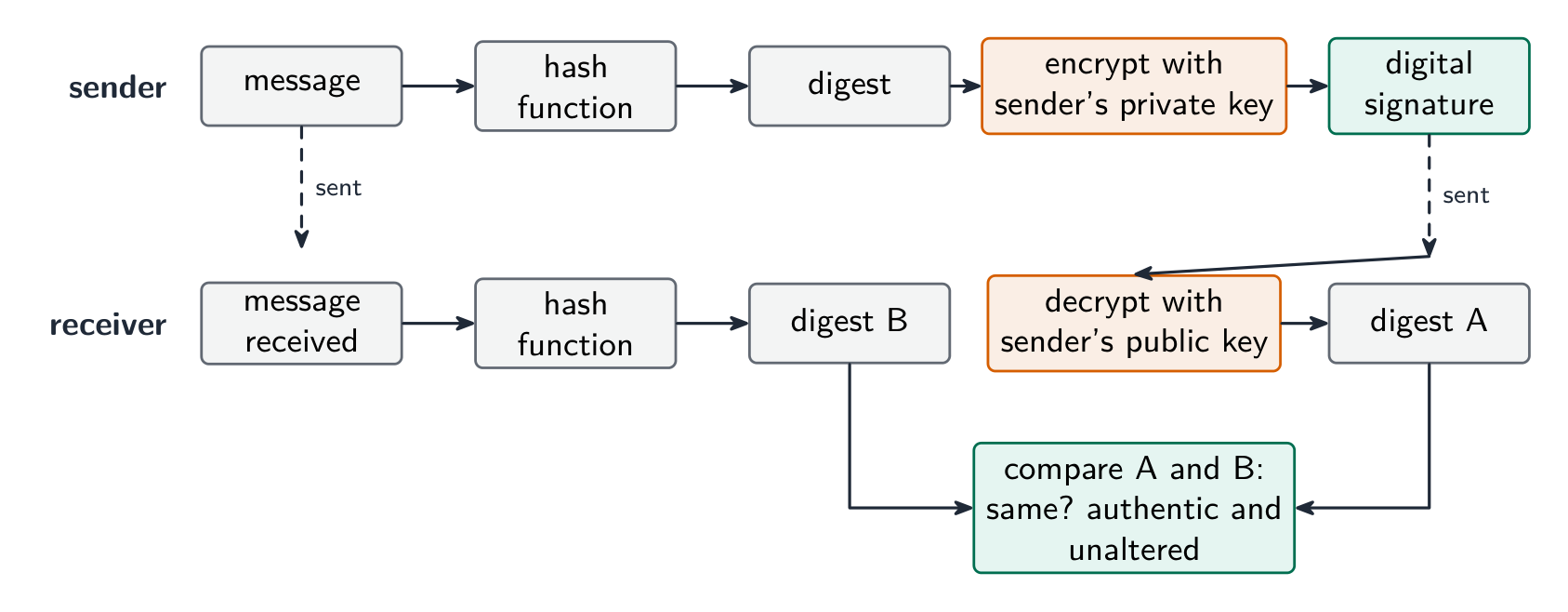
How a digital signature authenticates a document (five marks): the sender puts the message through a hash function to produce a digest; the sender encrypts the digest with their private key, and that encrypted digest is the digital signature; the message and the signature are sent together; the receiver decrypts the signature with the sender's public key to recover the digest; the receiver hashes the received message and compares the two digests; if they match, the message came from the sender (only they hold the private key) and was not altered in transmission. A signature proves who sent the message and that it is intact; it does not hide the contents, which is what encryption of the message is for.
עברית
צעדים אלו מגנים גם על ביטחון הנתונים (נגד אובדן, גניבה או השחתה) וגם על ביטחון מערכת המחשב (החומרה, התוכנה והרשת שלה).
מחשב אישי עצמאי
סיסמת מעבר חזקה; אנטי-וירוס מתעדכן באופן שגרתי; עדכוני תוכנה מיידיות; גיבוי על מדיה נפרדת; הצפנה של כל הדיסק; מסך נעול.
מחשב אישי מחובר לרשת
כל מה שקודם, בנוסף לחומת מגן, הרשאות לפי משתמש (זכויות מנהל רק למנהלים), ניהול מרכזי של חسابי משתמשים, ויומי ביקורת (מי התחבר, מה ערך).
כיצד הצעדים פועלים, במילים שהמבחן מעניק עליהן:
חומת מגן: בודקת כל שידור נכנס ויוצא ומשווה אותו לקריטריונים固定的ים (רשימת לבן או שחורה של כתובות, יציאות ופרוטוקולים); חוסמת כל אחד שלא עומד בקריטריונים; יכולה למנוע גישה לאתרים מסוימים ולהזהיר על ניסיונות גישה בלתי מורשים.
הצפנה: הנתונים מעורבלים (מוצפנים) באמצעות מפתח לצורות טקסט מצופה, כך שהעתק שנחשף לא ניתן להבין ללא המפתח; המקבל משתמש במפתח לפתוח את ההצפנה. היא מגנה על נתונים במהלך העברה ובאחסון, אך היא אינה עוצרת את חשיפת הנתונים או מחיקתם.
סיסמאות וחשבונות משתמשים: רק משתמש היודע את הסיסמה יכול להתחבר; סיסמה חזקה (ארוכה, עם תווים מעורבים, משתנה באופן שגרתי) לא ניתן לנחש; חשבונות נעולים לאחר כשלים חוזרים; לחשבון יש זכויות גישה משלו.
תוכנת אנטי-וירוס ואנטי-spyware: סורקת קובצים ותוכניות נגד בסיס נתונים של חתימות תוכנות רעות ידועות, בודק התנהגות, מבודד או מחק מה שמצאו, ועליה להתעדכן כדי שזיהוי תוכנות רעות חדשות יהיה אפשרי.
זכויות גישה: לכל משתמש (או קבוצה) מוענקות הרשאות עבור כל קובץ או טבלה, כגון לקריאה בלבד או לקריאה וכתיבה, כך שמשתמש לא יכול לראות או לשנות נתונים שאינם שלו; מסד נתונים יכול גם להציג למשתמש כל view המכיל רק את השדות שהוא זקוק להם.
ביומטריה: המכשיר תופס תמונה של הפנים, טביעת אצבע או איris, ממיר אותה לנתונים דיגיטליים, משווה אותה לנתונים האחסונים עבור משתמש זה ומאפשר גישה רק במקרה של התאמה; היא לא ניתן לשכוח, להעביר או לנחש כמו סיסמה.
גיבויים: העתק של הנתונים על מדיה נפרדת, מאוחז מחוץ למקום, כך שנתונים אבודים או פגומים ניתנים לשחזור.
להגביל את הסיכונים של תוכנות רעות, בשלוש נקודות: התקנת תוכנת אנטי-תוכנות רעות ושדרוגה באופן שגרתי; שימוש בחומת מגן; פתיחת ארשי email או הורדת קבצים ממקורות לא מוכרים; עדכון מערכת ההפעלה והאפליקציות; והכשרת משתמשים.
חומת מגן ממוקמת בין מחשב המשתמש לבין האינטרנט
ברחבי האינטרנט
VPN — מכווץ תנועה בין המשתמש לבין השער החברתי.
HTTPS / TLS — מכווץ תנועת רשת.
חתימות דיגיטליות — מעידות על זהות שולח ההודעה ועל כך שלא שינתה במהלך העברה.
זיהוי התקפות — צופה בתנועה מחפשים דפוסי התקפה ידועים.
כיצד חתימה דיגיטלית מאמת מסמך (חמישה נקודות): השולח עובר את ההודעה דרך פונקציית גזירה כדי לייצר תמצית; השולח מכווץ את התמצית באמצעות מפתח פרטי שלו, והתמצית המכווצת הזו היא החתימה הדיגיטלית; ההודעה והחתימה נשלחות יחד; המקבל פתח את החתימה באמצעות מפתח ציבורי של השולח כדי לשחזר את התמצית; המקבל מבצע גזירה על ההודעה שהתקבלה ומשווה את שתי התמציות; אם הן תואמות, ההודעה הגיעה מהשולח (רק הוא מחזיק במפתח הפרטי) ולא שינתה בהעברה. חתימה מעידה על מי שלח את ההודעה ועל כך she intact; היא אינה מסתירה תוכן, וזהו בדיוק מה שמצופה ממכוון ההודעה.
חתימה דיגיטלית: גזירה של ההודעה, מכווצת עם מפתח פרטי של השולח, הנבדקת על ידי המקבל מול גזירה חדשה
Matching measures to threats · התאמת אמצעי הגנה לאיומים
English
interception in transit → encrypt the data (HTTPS, VPN). Intercepted ciphertext is useless without the key.
unauthorised access → strong authentication 身份验证 (long passwords; two-factor authentication 双因素认证 with a phone code or key); user authorisation 授权; lock-out after failed logins.
malware → anti-virus software and anti-spyware 反间谍软件 with real-time scanning; patching; avoid untrusted downloads.
phishing → user training; email filtering; check the URL before entering credentials.
internal threats → the least-privilege 最小权限 principle (give each user only what they need); auditing.
DDoS → rate limiting and traffic filtering.
For confidential data crossing the internet, the scheme's method is encryption: the data is encoded with a key into ciphertext, so that an unauthorised person who intercepts it cannot read it, and only the intended receiver, who has the key, can decode it. For a program file sent by email for testing, the same answer applies (encrypt the file, or send it over an encrypted connection), together with a password on the file itself.
עברית
התקלקלות בהעברה → מכווץ את הנתונים (HTTPS, VPN). טקסט מכווץ שנשלב ללא המפתח הוא חסר ערך.
גישה בלתי מורשת → אישור זהות חזק (סיסמאות ארוכות; אישור זהות דו-שלבתי עם קוד טלפוני או מפתח); הרשאת משתמש; נעילה לאחר כישלונות כניסה.
תוכנות רע → תוכנת אנטי-וירוס ואנטי-ספייware עם סריקה בזמן אמת; התקנת תיקונים; הימנעות מהורדות ממקורות לא אמינים.
איומים פנימיים → עקרון הרשאות מינימליות (לתת למשתמש רק מה שהוא צריך); ביקורת.
DDoS → הגבלת קצב וסינון תנועה.
לנתונים סודיים החוצים את האינטרנט, השיטה של התוכנית היא מכוון: הנתונים ממוכנים באמצעות מפתח לטקסט מכווץ, כך שאדם בלתי מורשה שישלב אותם לא יכול לקרוא אותם, ורק המקבל הרצוי, המחזיק במפתח, יכול לפתוח אותם. עבור קובץ תוכנה שנשלח בדוא"ל לבדיקה, אותו תשובה חלה (מכווץ את הקובץ, או שלח אותו בערוץ מכווץ), יחד עם סיסמה בקובץ עצמו.
6.1
Protecting the data itself · הגנה על הנתונים עצמם
English
encryption — turn plaintext 明文 into ciphertext 密文 with a key. Symmetric encryption 对称加密 (AES) uses one shared key; asymmetric encryption 非对称加密 (RSA) uses a public key 公钥 and a private key 私钥. Protects data at rest and in transit.
access control 访问控制 — file permissions (read/write/execute) and access rights 访问权限, enforced by the OS.
authentication — authentication techniques verify the user: something you know (password), have (token, phone), or are (biometrics 生物识别 — fingerprint, face, iris); strongest combined.
backups — keep copies (some off-site) so loss or corruption is recoverable.
physical security — locked server rooms, cable locks.
Access rights in a database, described for three marks: each user is given an account with a username and password; the database administrator assigns each account permissions for each table, such as read-only, read and write, or no access; users see only the tables and fields they are allowed to, so a customer cannot open the staff table and a clerk can read but not change the prices. The DBMS enforces this with its access rights and with views, and it can encrypt the stored data as well.
עברית
מכוון — הפכת טקסט גלוי לטקסט מכווץ באמצעות מפתח. מכוון סימטרי (AES) משתמש במפתח משותף אחד; מכוון א-סימטרי (RSA) משתמש במפתח ציבורי ובמפתח פרטי. מגן על נתונים בשקט ובמהלך העברה.
בקרת גישה — הרשאות קובץ (קריאה/כתיבה/ביצוע) וזכויות גישה, המופעלות על ידי מערכת ההפעלה.
אישור זהות — טכניקות אישור זהות מאמתות את המשתמש: משהו שהוא יודע (סיסמה), משהו שהוא מחזיק (טוקן, טלפון), או משהו שהוא (ביומטריה — טביעת אצבע, פנים, איש); החזק ביותר בשילוב.
גיבויים — שמור עותקים (חלקם מרחוק) כדי שניתן יהיה לשקם במקרה של אובדן או פגיעה בנתונים.
אבטחה פיזית — חדרים עם שרתים נעולים, מנעולי כבלים.
זכויות גישה במאגר נתונים, המתוארות לשלוש נקודות: לכל משתמש מוקצה חשבון עם שם משתמש וסיסמה; מנהל המאגר מגדיר לכל חשבון רישיונות לגבי כל טבלה, כמו קריאה בלבד, קריאה וכתיבה, או ללא גישה; משתמשים רואים רק את הטבלאות והשדות המותרים להם, כך שלקוח לא יכול לפתוח את טבלת העובדים וקלירק יכול לקרוא אך לא לשנות מחירים. ה-DBMS מאכף זאת באמצעות זכויות הגישה שלו ובאמצעות תצוגות (views), והוא יכול גם לקודד את הנתונים האחסון.
הצפנה סימטרית משתמשת במפתח משותף אחד; הצפנה א-סימטרית משתמשת במפתח ציבורי להצפנה ובמפתח פרטי לפיענוחטוקן אבטחה מציג קוד משתנה לאישור זהות דו-שלבי ("דבר שיש לך")קורא טביעות אצבע בודק "דבר שאתה" — תכונה אישית, ולא סיסמה
Explore · חקור
Encrypt with a Caesar cipher · הצפנה באמצעות צפרור קיסר
Change the shift — that is the key. Each letter slides that many places along the alphabet to make the ciphertext, and the same key slides it back. That shared key is symmetric encryption in miniature. · שינוי ההזזה — זהו המפתח. כל אות עובר מספר כזה מקומות לאורך האלפבית ליצירת הטקסט המוצפן, והאותו מפתח מחזיר אותו בחזרה. מפתח משותף זה הוא הצפנה סימטרית בקטנה.
Describe how data validation and data verification help protect the integrity of data
Describe and use methods of data validation
Including range check, format check, length check, presence check, existence check, limit check, check digit
Describe and use methods of data verification during data entry and data transfer
During data entry including visual check, double entry During data transfer including parity check (byte and block), checksum
עברית
המועמדים צריכים להיות מסוגלים:
הערות והנחיות
תיאור כיצד התאמת נתונים ובדיקת נתונים עוזרים לשמור על שלמות המידע
תיאור ושימוש בשיטות התאמת נתונים
כולל בדיקת טווח, בדיקת פורמט, בדיקת אורך, בדיקת נוכחות, בדיקת קיום, בדיקת גבול, ספרת ביקורת
תיאור ושימוש בשיטות בדיקת נתונים במהלך הכנסת נתונים והעברת נתונים
במהלך הכנסת נתונים כולל בדיקה ויזואלית, הקלדה כפולה במהלך העברת נתונים כולל בדיקת זוגיות (בייט ובבלוק), סכום ביקורת
Source: Cambridge International syllabus · מקור: הסיילבוס הבינלאומי של קמבריד'ג'
English
Data has integrity when it is accurate and complete. Two techniques: data validation (catch bad data before storing) and data verification (confirm data was entered or transferred correctly).
Validation — does the data make sense?
Validation 验证 checks data against sensible rules, automatically:
range check — within limits (a month is 1–12).
limit check — on the correct side of a single limit (e.g. age ≥ 18).
existence check — the referenced item exists (e.g. a product code is in the table).
length check — the right number of characters.
type / character check — the right kind of data (a phone field allows only digits).
format check — matches a pattern (an email must contain @).
presence check — required fields are not empty.
check digit 校验位 — an extra digit computed from the others (ISBN, card numbers) that spots transcription errors.
Worked example. In a simple check-digit scheme the check digit is the remainder when the sum of the digits is divided by $10$, appended to the number. The number $4162$ has digit sum $13$, so it is stored as $41623$. A user types $14623$: the first two digits are swapped, but the sum is still $13$, so the check digit still matches and the error is not caught. A user who types $41523$ is caught, because $4 + 1 + 5 + 2 = 12$ gives check digit $2$. A scheme that catches swapped digits weights each position differently, as the ISBN-13 check does (weights $1, 3, 1, 3, \ldots$, then the digit that makes the total a multiple of $10$). A check digit is validation: it tests the number against a rule at the moment it is entered.
lookup check and consistency check (e.g. delivery date ≥ order date).
Validation catches data that is wrongly formatted, but not data that is the right format yet factually wrong ("Bob" for "Bib").
Worked example. Identify the validation check each piece of pseudocode performs.
Pseudocode
Check
IF x < 0 OR x > 10 THEN OUTPUT "Invalid"
range check: the value must lie between two limits
IF x = "" THEN OUTPUT "Invalid"
presence check: the field must not be empty
IF NOT(x = "Red" OR x = "Yellow" OR x = "Blue") THEN OUTPUT "Invalid"
lookup (existence) check: the value must be one of a list
IF LENGTH(x) <> 6 THEN OUTPUT "Invalid"
length check: the right number of characters
IF MID(x, 1, 1) < "A" OR MID(x, 1, 1) > "Z" THEN OUTPUT "Invalid"
format check: a particular character must be a letter
To validate a car registration number that must be one letter, three digits and two letters: a format check tests each position against its pattern, and a length check confirms six characters. To validate a date of birth: a format check (DD/MM/YYYY), a range check (the month is $1$ to $12$, the year is not in the future) and a presence check (it is not left blank). A mark between $0$ and the maximum for the test needs a type check (an integer) and a range check, with the upper limit read from the test's own record: that is how validation protects integrity, by refusing data that could not be correct.
Verification — was the data entered or transferred correctly?
Verification 核对 checks the data was not changed in moving from one place to another.
During entry: double entry (type it twice and compare, as for a new password) or visual check.
In the scheme's words, double entry is entering the data twice, by the same person or by two people, and having the computer compare the two versions and report any difference; a visual check is the person comparing what is on the screen with the original source document and correcting any difference before saving. Both protect integrity by making sure the stored data matches the source. Even after validation and verification the data can still be wrong: it can be sensible and match the source, yet the source itself was wrong, or the user typed a different but valid value from the one intended.
During transfer (bits can flip):
parity check 奇偶校验 — an extra bit makes the number of 1s even (even parity) or odd. The receiver re-counts. Catches single-bit errors.
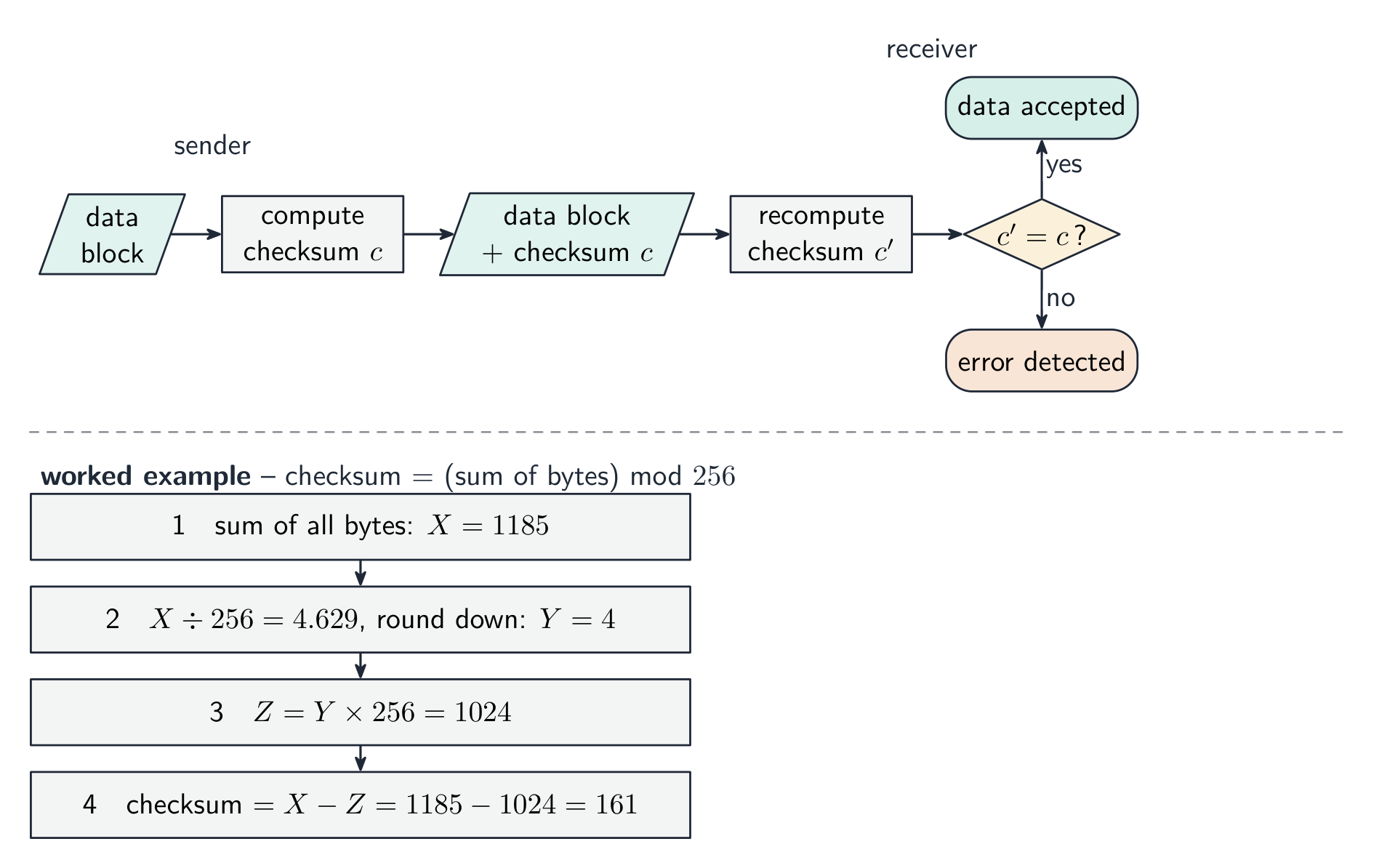
checksum 校验和 — the sender sends a summary value of the data; the receiver recomputes it and compares.
cyclic redundancy check 循环冗余校验 (CRC) — a stronger checksum using polynomial division, catching many more error types.
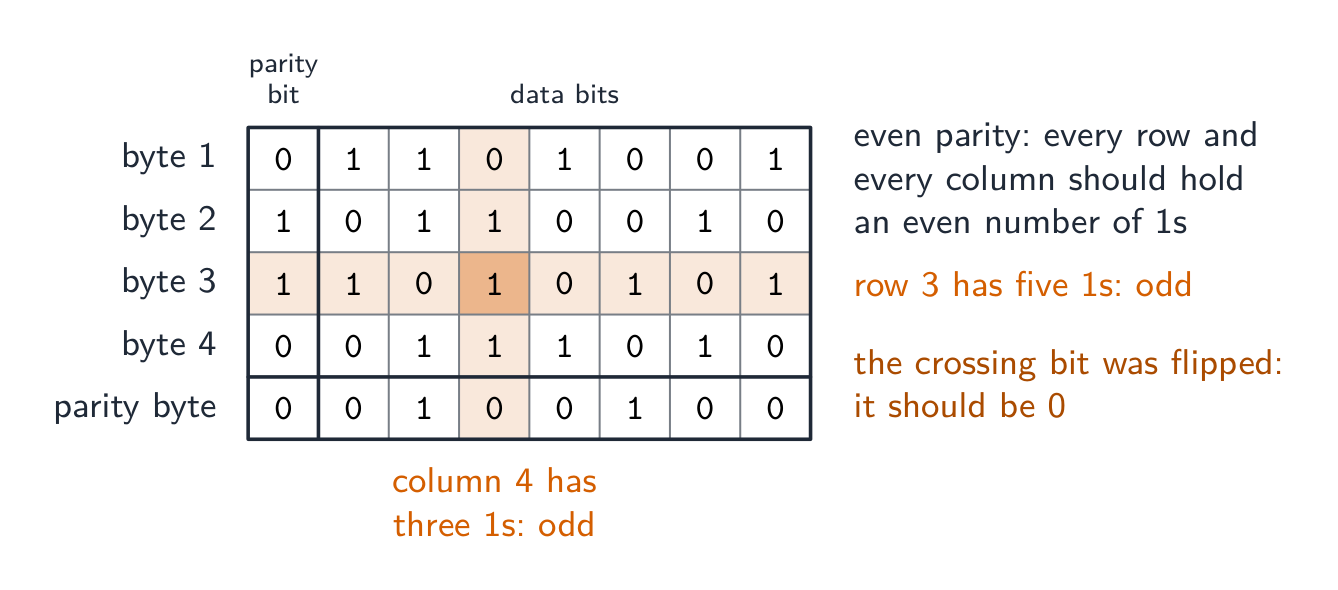
A parity block check 奇偶块校验 goes further and locates the error. Arrange the bytes in a grid: give each byte a row parity bit, then compute one extra parity byte whose bits are the column parity of the bytes above. A single flipped bit now fails one row and one column – their intersection pinpoints exactly which bit changed, so it can even be corrected.
Worked example. Four bytes are sent with even parity, followed by a parity byte. Find the bit that was corrupted.
Count the 1s in each row and each column. Every row and column should have an even number; byte 3 has five and column 4 has three. The bit where that row and that column cross is the one that changed, so it is reset from 1 to 0. A parity check on its own detects an error in a byte but cannot say which bit; two errors in the same byte cancel and pass unnoticed. A checksum, explained for three marks: the sender puts the block of data through an algorithm that produces a checksum value; the data and the checksum are sent together; the receiver runs the same algorithm on the data it received; if the two checksums match, the data is accepted, and if not, it is rejected and sent again.
Verification only proves what arrived matches what was sent — not that the data is correct, and not against deliberate tampering. Validation asks "is this sensible?"; verification asks "was this copied correctly?" — use both.
The table questions sort the methods by when they are used: during data entry, double entry and a visual check; during data transfer, a parity check (byte or block) and a checksum. Transferring video files from a camera to a server uses a checksum: the camera computes it, the server recomputes it, a mismatch means retransmit.
Worked example. A user types their date of birth as 31/02/2009, and types their email address twice. Which check catches which error, and what is the difference? Validation asks "is this data sensible?" - the computer tests it against a rule, and a format or range check rejects 31/02/2009 because February never has 31 days. Verification asks "was this data entered correctly?" - typing the email twice is double entry, and comparing the two copies catches a typing slip. The limit is what makes this a favourite question: validation can never tell you the data is right, only that it is possible - 01/02/2009 passes every validation rule even if the user was actually born on a different day. Say what each check can and cannot catch.
עברית
לנתונים יש שלמות כאשר הם מדויקים ומלאים. שתי טכניקות: אימות נתונים (לכידת נתונים לקויים לפני השמירה) ו-בדיקת נתונים (לאמת שהנתונים הוזנו או הועברו נכון).
אימות — האם הנתונים הגיוניים?
אימות בודק נתונים מול כללים הגיוניים, אוטומטית:
בדיקת טווח — בתוך הגבולות (חודש הוא 1–12).
בדיקת גבול — בצד הנכון של גבול יחיד (למשל גיל ≥ 18).
בדיקת קיום — הפריט המצוטט קיים (למשל, קוד מוצר נמצא בטבלה).
בדיקת אורך — מספר התווים המתאים.
בדיקת סוג / תווים — סוג הנתונים הנכון (שדה טלפון מאפשר רק ספרות).
ספרת בדיקה — ספרה נוספת המוחשבת מתוך שאר הספרות (מספרי ISBN, מספרי כרטיסים) שמזהה טעויות העתקה.
דוגמה מפורטת. במנגנון פשוט לספרת בדיקה, ספרת הבדיקה היא השארית מהחלוקה של סכום הספרות ב$10$, והיא מצורפת למספר. למספר $4162$ סכום הספרות הוא $13$, ולכן הוא מאוחסן כ$41623$. משתמש מקליד $14623$: שתי הספרות הראשונות הופקו, אך הסכום עדיין נותר $13$, ולכן ספרת הבדיקה עדיין תואמת והטעות אינה נתפסת. משתמש המקליד $41523$ נתפס, כי $4 + 1 + 5 + 2 = 12$ מניב ספרת בדיקה $2$. מנגנון התופס ספרות מופקות משקל כל מיקום אחרת, כמו בבדיקת ISBN-13 (משקלים $1, 3, 1, 3, \ldots$, ולאחר מכן הספרה שהופכת את הסך למכפלת $10$). ספרת בדיקה היא אימות: היא בודקת את המספר מול חוק ברגע הכניסה.
אימות תופס נתונים שפורמטם שגוי, אך לא נתונים שפורמטם נכון אך הם שגויים עובדתית ("בוב" במקום "ביב").
דוגמה מפורטת. זיהו את בדיקת האימות שבוצעת כל חלק בקוד הפסאודו.
Pseudocode
Bדיקה
IF x < 0 OR x > 10 THEN OUTPUT "Invalid"
בדיקת טווח: הערך חייב להיות בין שני גבולות
IF x = "" THEN OUTPUT "Invalid"
בדיקת נוכחות: השדה לא יכול להיות ריק
IF NOT(x = "Red" OR x = "Yellow" OR x = "Blue") THEN OUTPUT "Invalid"
בדיקת רשימה (קיום): הערך חייב להיות אחד מרשימה
IF LENGTH(x) <> 6 THEN OUTPUT "Invalid"
בדיקת אורך: מספר האותיות הנכון
IF MID(x, 1, 1) < "A" OR MID(x, 1, 1) > "Z" THEN OUTPUT "Invalid"
בדיקת פורמט: אות מסוים חייב להיות אות
לאמת מספר רישום רכב שחייב להכיל אות אחת, שלוש ספרות ושתי אותיות: בדיקת פורמט בודקת כל מיקום מול הדגם שלו, ובדיקת אורך מאשרת שישנן שש אותיות. לאמת תאריך לידה: בדיקת פורמט (DD/MM/YYYY), בדיקת טווח (החודש הוא בין $1$ ל$12$, השנה אינה בעתיד) ובדיקת נוכחות (הוא אינו נותר ריק). ציון בין $0$ לבין המקסימום לבחינה דורש בדיקת סוג (שלם) ובדיקת טווח, כאשר הגבול העליון נקרא מהרשומה של הבחינה עצמה: כך האימות מגן על שלמות הנתונים, על ידי סירוב לקבלת נתונים שלא יכלו להיות נכונים.
בדיקת נכונות — האם הנתונים הוזנו או הועברו נכון?
בדיקת נכונות בודקת שהנתונים לא שונו במהלך מעבר ממקום למקום.
במהלך ההזנה: הקלדה כפולה (להקליד פעמיים ולהשוות, כמו בהגדרת סיסמה חדשה) או בדיקה ויזואלית.
בהגדרת המנגנון, הקלדה כפולה היא הזנת הנתונים פעמיים, על ידי אותו אדם או על ידי שני אנשים, והמחשב משווה את שתי הגרסאות ומדווח על כל הבדל; בדיקה ויזואלית היא האדם משווה מה מופיע במסך עם מקור המסמך המקורי ומתקן כל הבדל לפני השמירה. שתיהן מגנות על שלמות הנתונים על ידי ודאות שהנתונים המאוחסנים תואמים למקור. גם לאחר אימות ובדיקת נכונות, הנתונים עדיין יכולים להיות שגויים: הם יכולים להיות הגיוניים ותואמים למקור, אך המקור עצמו היה שגוי, או שהמשתמש הקליד ערך שונה אך תקין מהערכים הרצוי.
במהלך ההעברה (ייתכן שביטים מתהפכים):
בדיקת זוגיות — ביט נוסף הופך את מספר ה-1s לזוגי (זוגיות זוגית) או אי-זוגי. המקבל סופר מחדש. תופס טעויות בביט בודד.
סכום בדיקה — השולחן שולח ערך סיכום של הנתונים; המקבל מחשב מחדש ומשווה.
בדיקת עודף מחזורי (CRC) — סכום בדיקה חזק יותר המשמש בחלוקה פולינומית, תופס הרבה יותר סוגי טעויות.
בדיקת בלוק זוגיות הולכת ועוברת וממקמת את הטעות. מסדרים את הבייטים ברשת: מעניקים לכל בייט ביט שורה זוגיות, ולאחר מכן מחשבים בייט זוגיות נוסף אחד שביטיו הם עמודת הזוגיות של הבייטים למעלה. ביט בודד שהתהפך כעת משליך שורה אחת ועמודה אחת – החיתוך שלהם מצביע בדיוק על איזה ביט השתנה, כך שהוא אף ניתן לתקון.
דוגמה פתורה. נשלחו ארבע בייטים עם זוגיות זוגית, ולאחריהם בייט זוגיות. מצאו את הביט שבוטל.
ספור את 1 בכל שורה ובכל עמודה. כל שורה ועמודה צריכות להיות בעלות מספר זוגי; byte 3 ישנם חמישה ועמודה 4 ישנם שלושה. הביט שבו השורה והעמודה החוצות נפגשות הוא זה שעבר שינוי, ולכן הוא מושב מ-1 ל-0. בדיקת פריות לבדה בודדת שגיאה בביט אך אינה יכולה לומר איזה ביט; שתי שגיאות באותו ביט מבטלות זו את זו ועוברות בלתי מורגשות. צ'קסום, המוסבר לשלוש נקודות: השולח מעביר את בלוק הנתונים דרך אלגוריתם המפיק ערך צ'קסום; הנתונים והצ'קסום נשלחים יחד; המקבל מריץ את אותה אלגוריתם על הנתונים שקיבל; אם שני הצ'קסומים תואמים, הנתונים מתקבלים, ואם לא, הם נדחים ונשלחים שוב.
ביט הזוגיות מוגדר כדי שהמספר של 1s יהיה זוגי או אי-זוגיחישוב צ'קסום עבור בלוק נתונים
אישור (Verification) מוכיח רק מה שהגיע תואם מה שנשלח — ולא שהנתונים נכונים, ולא בפני התערבות מזדירה. אימות שואל "האם זה הגיוני?"; אישור שואל "האם זה הועתק נכון?" — השתמשו בשניהם.
שאלות הטבלה ממיינות את השיטות לפי מתי הן משמשות: במהלך הכנסת נתונים, הכנסה כפולה ובדיקה ויזואלית; במהלך העברת נתונים, בדיקת זוגיות (בייט או בלוק) וצ'קסום. העברת קבצי וידאו ממצלמה למשרת משתמשים בצ'קסום: המצלמה מחשבת אותו, המשרת מחשב אותו מחדש, אי-התאמה מצריכה שידור מחדש.
אימות בודק שהנתונים עשויים הגיון; אישור בודק שהועתק ללא שינוי
דוגמה מוצעת. משתמש מקליד את תאריך הלידה שלו כ31/02/2009, ומקליד את כתובת הדוא"ל שלו פעמיים. איזה בדיקה תופסת איזה שגיאה, מה ההבדל? התקפה (Validation) שואלת "האם נתונים אלו סבירים?" - המחשב בודק אותם מול כלל, ובדיקת פורמט או טווח דוחה 31/02/2009 כי פברואר לעולם אינו מכיל 31 ימים. אישור (Verification) שואל "האם נתונים אלו הוקלטו נכון?" - הקלדת הדוא"ל פעמיים היא הקלדה כפולה, והשוואת שתי העותקות תופסת טעות הקלדה. הגבול הוא מה שהופך את זה לשאלה מועדפת: התקפה לעולם לא תוכל לספר לך שהנתונים נכונים, רק שהם אפשריים - 01/02/2009 עובר את כל כללי ההתקפה גם אם המשתמש נולד למעשה ביום אחר. אמור מה כל בדיקה יכולה ואינה יכולה לתפוס.
Explore · חקור
Computing concept lab · מעבדת מושגי מחשוב
Classify concrete examples by the computing idea they demonstrate. · סווג דוגמאות מلموسة לפי הרעיון המחשובי שהן מדגימות.
Keep the three ideas separate: security (keeping data safe), privacy (who may see it), integrity (keeping it correct).
Match each threat (malware, hacking, phishing, interception) to a measure (firewall, encryption, authentication, access rights).
Encryption protects confidentiality, not integrity — use a checksum, parity or check digit for integrity.
Distinguish a virus, worm and Trojan and how each spreads.
Common mistakes
Giving the same measure for two threats, or a measure that does not fit the threat. Each threat in the table needs a different prevention that actually stops it.
Naming a measure without saying how it works. "Firewall" scores when it is followed by "compares traffic with set criteria and blocks what fails".
Calling validation a check that the data is correct. Validation checks that data is reasonable; verification checks that it matches the source. Neither proves it is true.
Saying a digital signature encrypts the message. It encrypts a hash of the message with the private key; the receiver decrypts it with the public key and compares hashes.
Describing a check digit as verification, or a parity check as validation. The check digit is a validation rule on entry; parity and checksums verify a transfer.
Writing that a virus "sends data to a third party" and spyware "replicates". The replicating one is the virus; the recording one is spyware.
עברית
לשמור על שלושה רעיונות נפרדים: ביטחון (שמירה על נתונים בטוחים), פרטיות (מי רשאי לראות אותם), שלמות (שמירה על דיוקם).
הצפנה מגנה על סודיות ולא על שלמות — יש להשתמש בסך ביקורת, בדיקת זוגיות או ספרת ביקורת בשביל שלמות.
להבחין בין וירוס, תולעת וטרויאן וכיצד כל אחד מהם מתפשט.
טעויות נפוצות
מתן אותו סעיף הגנה לשני איומים שונים, או סעיף הגנה שאינו מתאים לאיום. לכל איום בטבלה יש צורך במניעה שונה שתעצור אותו בפועל.
ציון של סעיף הגנה מבלי לציין כיצד הוא פועל. "חומת מגן" מקבל ציון רק אם נכתב אחר כך "בוחנת תנועה מול קריטריונים מוגדרים וחוסמת כאלו שלא עומדים בהם".
הטענה שבתקופת נתונים היא בדיקה שהנתונים נכונים. תקופת נתונים בודקת שהנתונים סבירים; אימות בודק שהם תואמים למקור. שום אחד מהם לא מוכיח שהנתונים אמת.
הטענה שחתימה דיגיטלית מצפנת את ההודעה. היא מצפנת גישור של ההודעה עם המפתח הפרטי; המקבע מפענח אותה עם המפתח הציבורי ומשווה גישורים.
תיאור של ספרת ביקורת כאימות, או של בדיקת זוגיות כתקופת נתונים. ספרת ביקורת היא כלל תקופת נתונים בזמן הזנת נתונים; בדיקת זוגיות וסכי ביקורת מאמתים העברה.
כתיבה שווירוס "שולח נתונים לצד שלישי" וספיוואר "מכפיל עצמו". המכפיל את עצמו הוא הוירוס; הרקורדן הוא הספיוואר.
Interactive lessons on this topic · שיעורים אינטראקטיביים בנושא זה
Work through it step by step, with instant-check exercises. · לעבור על הדברים צעד אחר צעד, עם תרגילים לבדיקה מיידית.
Pick one and the site follows you — notes, papers, videos and practice all open on it. · בחרו נושא אחד והאתר יעקוב אחריו — הערות, מסמכים, וידאו ותרגולים פתוחים בו.
Type to search notes, lessons, code, vocabulary and past-paper questions across every subject. · הקלד כדי לחפש הערות, שיעורים, קוד, אוצר מילים ושאלות מבחנים בכל הנושאים.