מעולם לא ראיתם זאת, ולא תראו לעולם — אך היא תמיד קיימת. מאחורי כל אפליקציה שתפתחו, כל קובץ שתשמרו, כל לחיצה על המסך, נמצא דבר בלתי נראה…
English narration · English + 中文 subtitles burned in · קריאת קול באנגלית · תרגום אנגלי + סינית שרוף בתוך הסרטון
5.1
Operating systems · מערכות הפעלה
Syllabus · סיילבוס
English
Candidates should be able to:
Notes and guidance
Explain why a computer system requires an Operating System (OS)
Explain the key management tasks carried out by the Operating System
Including memory management, file management, security management, hardware management (input/output/peripherals), process management
Show understanding of the need for typical utility software provided with an Operating System
Including disk formatter, virus checker, defragmentation software, disk contents analysis / disk repair software, file compression, back-up software
Show understanding of program libraries
Including: • software under development is often constructed using existing code from program libraries • the benefits to the developer of software constructed using library files, including Dynamic Link Library (DLL) files
עברית
המועמדים צריכים להיות מסוגלים:
הערות והנחיות
הסבר מדוע מערכת מחשב דורשת מערכת הפעלה (OS)
הסבר על משימות הניהול המרכזיות הנבצעות על ידי מערכת ההפעלה
כולל ניהול זיכרון, ניהול קבצים, ניהול אבטחה, ניהול חומרה (כניסה/יציאה/מכשירים), ניהול תהליכים
הצגת הבנה לגבי צורך בתוכנות שימושיות טיפיות המסופקות עם מערכת הפעלה
כולל פורמט דיסק, בדיקת וירוסים, תוכנת פירוק פצירות, ניתוח תוכן דיסק / תוכנת תיקון דיסק, דחיסת קבצים, תוכנת גיבוי
הצגת הבנה לגבי ספריאות תוכנה
כולל: • תוכנת התפתחות נבנית לעיתים קרובות באמצעות קוד קיים מספריות תוכנה • היתרונות למפתח תוכנה שנבנתה באמצעות קבצי ספריה, כולל Dynamic Link Library (DLL)
Source: Cambridge International syllabus · מקור: הסיילבוס הבינלאומי של קמבריד'ג'
English
Why a computer needs an OS
Hardware on its own can only fetch and run instructions — it knows nothing about files, programs, networks or users. The operating system 操作系统 (OS) is the software layer that:
manages the hardware (processor 处理器, memory, I/O, storage) for the running programs.
provides services (file system, network, user accounts) through a clear interface, so programs need not talk to the hardware directly.
provides a user interface (command line, GUI, touch).
lets several programs share the hardware safely — each gets fair CPU time and is kept out of the others' memory.
Without an OS, every program would need its own drivers, and only one program could safely run at a time.
"Describe the purpose of an OS" — the five-mark list. The OS (1) provides an interface between the user and the hardware; (2) hides the complexity of the hardware from the user and from application programs; (3) manages the hardware resources — processor time, memory, storage and input/output devices — and shares them between programs; (4) loads application software into memory and runs it, giving every program the same platform to run on; (5) lets several programs run at once (multitasking 多任务处理) while keeping them, and the users' data, secure. Give five different points; "it runs the computer" or "it manages resources" alone earns nothing.
Key management tasks
The syllabus names five. Each point below is one thing the OS actually does, which is what a "describe" question wants.
memory management 内存管理 — allocates memory to each program when it is loaded, keeps every program's memory separate (memory protection 内存保护) so one cannot overwrite another, frees the memory when a program ends, and swaps pages between RAM 随机存取存储器 and secondary storage 辅助存储器 (the disk) (virtual memory 虚拟内存 / paging 分页) so more programs can be open than physical memory allows.
process management 进程管理 — a running program is a process 进程. The OS creates and ends processes, decides which process gets the CPU next (scheduling 调度) and for how long (a time slice 时间片), switches between them, resolves conflicts when two want the same resource, and can kill one that stops responding.
hardware management (input/output and peripherals) — talks to each device through its device driver 设备驱动, queues and buffers data going to slow devices such as a printer, responds to interrupts 中断 from devices, and shares one device between several programs.
file management — creates, names, copies, moves and deletes files and folders, keeps the directory 目录 structure and a record of where each file is stored on the disk, allocates disk space to files, and enforces access rights 访问权限 (read / write / execute) for each user.
security management — user accounts and passwords (authentication 身份验证), access rights, encryption of stored data, a firewall, automatic security updates, and a log of who did what.
How memory and process management support multitasking (a four-mark favourite). Memory management loads several programs into memory at the same time, each in its own protected area, and keeps track of which addresses belong to which; process management shares the processor between them — each process runs for a time slice, the OS saves its state and switches to the next, and the switching is so fast that all the programs appear to run together. Interrupts let the OS take the processor back from a process whenever a device needs attention.
Interrupts. A hardware interrupt 硬件中断 comes from a device: a key pressed, a mouse click, a printer out of paper, a disk finishing a transfer, a power failure. A software interrupt 软件中断 comes from a program: division by zero, an invalid instruction, an attempt to use memory it does not own, or a request for an OS service. The OS's interrupt handler 中断处理程序 saves the state of the running process, deals with the interrupt, then restores the process (topic 4 covers the fetch–execute detail).
Utility software
Utility programs 实用程序 are system software that maintain, repair or optimise the computer rather than doing a user's task; the examiner accepts "performs a specific maintenance task that improves performance or security". Most OSes bundle these:
disk formatter — prepares a new disk (or wipes an old one) for use: sets up its file system and partitions, deleting any existing data.
virus checker (antivirus 杀毒软件) — scans files and memory, compares code against a database of known virus signatures 签名 and watches for suspicious behaviour, then quarantines or deletes what it finds; runs on a schedule and on every download, and needs updating as new viruses appear.
defragmentation software (disk defragmenter 碎片整理) — a hard disk stores a file in whatever free blocks it finds, so after many saves and deletes a file is scattered (fragmented 碎片化) across the platter and the read/write head must jump between the pieces. The defragmenter moves the pieces of each file next to each other and gathers the free space into one region, so files load faster and new files are not fragmented. Not needed on an SSD, which has no moving head.
disk contents analysis / disk repair software — shows what is using the disk space (large, duplicate or temporary files) so they can be removed; finds and repairs bad sectors, lost clusters and file-system errors.
file compression (compression 压缩) — shrinks files so they need less storage and transfer faster; archiving bundles many files into one.
back-up software (backup 备份) — copies files to another medium (external disk, network, cloud) on a schedule so data can be restored after loss, corruption or a ransomware attack; a full copy is followed by incremental backups 增量备份 of only what changed.
a firewall 防火墙 (filters network traffic by rules) and encryption tools, for security; a system monitor and automatic updates.
Bundling these with the OS saves the user installing each one.
Which utility does what.Performance: defragmentation (faster file access), disk repair (a disk with errors is slow or fails), disk contents analysis (free space by deleting junk), compression (more fits on the disk). Security: virus checker, firewall, encryption, and backup (the only recovery from ransomware). A "draw one line" question pairs each utility with exactly one purpose — learn the pairs above and use the syllabus names.
Worked example. Explain how defragmentation can improve the performance of a computer (3 marks).
Over time a file is stored in blocks scattered across the hard disk, so reading it needs many movements of the read/write head. The defragmenter rearranges the blocks so each file is stored contiguously and the free space is together. Files are then read with fewer head movements, so they load faster, and new files can be written into one continuous space.
עברית
למה למחשב צריכה מערכת הפעלה
חומרה לבדה יכולה רק למשוך ולהפעיל הוראות — היא אינה יודעת דבר על קבצים, תוכנות, רשתות או משתמשים. מערכת ההפעלה (OS) היא שכבת התוכנה שמ:
מנהלת את החומרה (מעבד, זיכרון, I/O, אחסון) עבור התוכניות הרצה.
ספקת שירותים (מערכת קבצים, רשת, חשבונות משתמש) דרך ממשק ברור, כך שתוכניות אינן צריכות לתקשר ישירות עם החומרה.
מספק ממשק למשתמש (שורת פקודות, GUI, מגע).
מאפשר לכמה תוכניות לשתף בציוד בחינה — כל אחת מקבלת זמן מעבד הוגן ומוגנת מזיכרון של האחרות.
ללא מערכת הפעלה, לכל תוכנית היה צורך במדריכים משלו, ובזמן נתון יכלה להפעיל רק תוכנית אחת בבטחה.
"תיאר את מטרת מערכת ההפעלה" – רשימת חמישה נקודות. למערכת ההפעלה (1) מספקת ממשק בין המשתמש לציוד; (2) מסתירה את המורכבות של הציוד מהמשתמש ומתוכניות אפליקציה; (3) מנהלת משאבי הציוד — זמן מעבד, זיכרון, אחסון והתקני כניסה/יציאה — ומחלקת אותם בין התוכניות; (4) טוענת תוכנות אפליקציה לזיכרון ומפעילה אותן, תוך מתן לכל תוכנית אותה פלטפורמה להפעלה עליה; (5) מאפשרת לכמה תוכניות להפעיל בו-זמנית (רב-משימתיות) תוך שמירה על בטיחותן ועל הנתונים של המשתמשים. ניתן לתת חמישה נקודות שונות; "היא מפעילה את המחשב" או "היא מנהלת משאבים" לבדם לא יעניין ניקוד.
מערכת הפעלה שולחנית מנהלת את המסך, הקבצים והתוכניות עבור המשתמשמכונה ניידת זקוקה אליה באותו מידה: זוהי מערכת הפעלה ניידת, אנדרואיד
משימות ניהול מרכזיות
התוכנית לימודים מפרטת חמש. כל נקודה להלן היא דבר אחד שמערכת ההפעלה עושה בפועל, והוא מה שנדרש בשאלת "תיאר".
ניהול זיכרון — הקצאת זיכרון לכל תוכנית בעת הטעינה, שמירת הפרדה בין הזיכרון של כל תוכנית (הגנת זיכרון) כך שאחת לא תחליף את השנייה, שחרור הזיכרון בעת סיום תוכנית, והחלפת דפים בין RAM לבין אחסון משני (הדיסק) (זיכרון וירטואלי / חלוקת דפים) כדי לאפשר פתיחת יותר תוכניות מאשר הזיכרון הפיזי מאפשר.
ניהול תהליכים — תוכנית הפועלת היא תהליך. מערכת ההפעלה יוצרת ומסיימת תהליכים, מחליטה איזה תהליך יקבל את המעבד הבא (תזמון) ולמשך כמה זמן (פרק זמן), מתחלפת ביניהם, פותרת סכסוכים כאשר שניים דורשים אותו משאב, ועלולה לסגור תהליך שהפסיק להגיב.
ניהול ציוד (כניסה/יציאה והתקנים נוספים) — תקשורת עם כל התקן דרך מדריך התקן, הישגה ואגירת נתונים הולכים להתקנים איטיים כמו מדפסת, מענה להפרעות מהתקנים, ושיתוף התקן אחד בין כמה תוכניות.
ניהול קבצים — יצירה, קישוט, העתקה, הזזה ומחיקה של קבצים ותיקיות, שמירת מבנה התיקיות ורישום של מיקום אחסון כל קובץ בדיסק, הקצאת מקום בדיסק לקבצים, והטלת זכויות גישה (קריאה / כתיבה / הרצה) עבור כל משתמש.
ניהול אבטחה — חשבונות משתמשים וסיסמאות (אישור), זכויות גישה, הצפנת נתונים מאוחסנים, חומת מגן, עדכונים ביטחוניים אוטומטיים, ויומן של מי עשה מה.
המשימות המרכזיות שמערכת ההפעלה מנהלתהגנת זיכרון שומרת על כל אפליקציה בבלוק זיכרון עצמאי שלה
כיצד ניהול זיכרון וניהול תהליכים תומכים ברב-משימתיות (שאלה אהובה בערך ארבע נקודות). ניהול זיכרון טוען כמה תוכניות לזיכרון בו-זמנית, כל אחת באזור מוגן משלה, ועוקבת אחר הכתובות השייכות לאיזו תוכנית; ניהול תהליכים מחלק את המעבד ביניהן — כל תהליך פועל לפרק זמן, מערכת ההפעלה שומרת את מצבו ומתחלפת לתהליך הבא, וההחלפה היא כה מהירה שכל התוכניות נראות כאילו פועלות יחד. הפרעות מאפשרות למערכת ההפעלה לקחת בחזרה את המעבד מתהליך בכל עת שבו התקן דורש תשומת לב.
הפרעות (Interrupts).הפרעה חומרתית נובעת מכשיר: לחיצת מקשי, לחיצת עכבר, סיום מלאכת הדפס, סיום העברת נתונים מהדיסק או הפסקת חשמל. הפרעה תוכנתית נובעת מתוכנית: חלוקה באפס, הוראה לא תקינה, ניסיון לגשת לזיכרון שאינו שייך לתוכנית או בקשה לשירות מערכת הפעלה. מטפל ההפרעות של מערכת ההפעלה שומר את מצב התהליך הרץ, מטפל בהפרעה ואחרי כך משחזר את התהליך (נושא 4 מכסה את פרטי השלב לקיחה-ביצוע).
תוכניות שימושיות
תוכניות שימושיות הן תוכנת מערכת שמחזיקות, תיקנו או מיטביות את המחשב במקום לבצע משימה של המשתמש; בוחן מקבל גם "מבצעת משימת תחזוקה ספציפית המשפרת ביצועים או אבטחה". רוב מערכות ההפעלה כוללות אותן:
תוכניות שימושיות: אנטי-וירוס, גיבוי, דחיסה וניקוי פגמים
מעצב דיסק — מכין דיסק חדש (או מנקה ישן) לשימוש: יוצר את מערכת הקבצים והחלקות שלו, ומחק כל נתון קיים.
בודק וירוסים (אנטי-וירוס) — סורק קבצים וזיכרון, משווה קוד למאגר חתימות וירוסים ידועות ועוקב אחרי התנהגות חשודה, ואז מבודד או מחק מה שנמצא; פועלת על פי לוח זמנים ובכל הורדה, וצריכה עדכון עם פרוטו-וירוסים חדשים.
תוכנת ניקוי פגמים (מארגן דיסק) — דיסק קשיח מאחסן קובץ בכל בלוקים חופשיים שהוא מוצא, ולכן לאחר הרבה שמירות ומחיקות הקובץ מתפצל (מופרק) על פני צלחת הדיסק והראש לקריאה/כתיבה צריך לקפוץ בין החלקים. המארגן מזיז את חלקי הקובץ זה לצד זה ומרכז את המקום החופשי באזור אחד, כך שקבצים נטענים מהר יותר וקבצים חדשים אינם מפרקים. אין צורך בכך ב-SSD, שאין לו ראש נע.
תוכנית ניתוח / תיקון תכולת דיסק — מראה מה תופס מקום בדיסק (קבצים גדולים, כפולים או זמניים) כדי שניתן יהיה להסירם; מזהה ותוקן סקטורים פגומים, קלאסטרים אבודים ושגיאות במערכת הקבצים.
דחיסת קבצים (דחיסה) — מקטרת קבצים כך שהם ידרשו פחות מקום אחסון ויעברו מהר יותר; ארכיון אוסף מספר קבצים לקובץ אחד.
תוכנת גיבוי (גיבוי) — מעתיקה קבצים למדיום אחר (דיסק חיצוני, רשת, ענן) לפי לוח זמנים כך שהנתונים יוכלו לשחזור לאחר אובדן, פגיעה או תקפת רansomware; גיבוי מלא מלווה ב-גיבויים אינקרמנטליים של מה שעבר שינוי בלבד.
חומת מגן (סינון תנועת רשת לפי כללים) וכלי הצפנה, למטרות אבטחה; ניטור מערכת ו-עדכוניות אוטומטיות.
הכללתם של כל אלו עם מערכת ההפעלה חוסכת מהמשתף התקנת כל אחד בנפרד.
מה עושה כל תוכנית שימושית.ביצועים: ניקוי פגמים (גישה מהירה יותר לקבצים), תיקון דיסק (דיסק עם שגיאות הוא איטי או מתפרץ), ניתוח תכולת דיסק (שחרור מקום על ידי מחיקת אבק), דחיסה (יותר מתאים לדיסק). אבטחה: בודק וירוסים, חומת מגן, הצפנה וגיבוי (הגיבוי היחיד להתאוששות מ-ransomware). שאלת "משוך קו" זוגת כל תוכנית שימושית למטרה מדויקת אחת — לימוד הזוגות לעיל והשתמש בשמות הסילבוס.
דוגמה פתורה. הסבר כיצד ניקוי פגמים יכול לשפר את הביצועים של מחשב (3 נקודות).
לאורך זמן קובץ מאוחסן בבלוקים מפוזרים על פני הדיסק הקשיח, ולכן קריאתו דורשת תנועות רבות של הראש לקריאה/כתיבה. המארגן מסדר מחדש את הבלוקים כך שכל קובץ מאוחסן ברצף והמקום החופשי יחד. קבצים נקראים אחר כך בפחות תנועות ראש, ולכן הם נטענים מהר יותר, וקבצים חדשים יכולים להיכתב בחלל רציף אחד.
Explore · חקור
Where the operating system sits · איפה מערכת ההפעלה ממוקמת
Tap each layer. The OS is the middle layer — it sits between your applications and the hardware, sharing the machine safely so programs never touch the hardware directly. · לחצו בכל שכבה. מערכת ההפעלה היא השכבה האמצעית — היא נמצאת בין האפליקציות שלכם לבין ה-hardware, ומשתתפת במכונה בבטחה כך שתוכניות לעולם לא יגיעו ישירות ל-hardware.
A program library 程序库 is pre-written code (subroutines 子程序, classes, modules) that programs reuse instead of writing it themselves — e.g. a maths library, a network library, a graphics library.
Benefits: saves time (off-the-shelf code), reliable (well-tested, widely used), and standardised (consistent behaviour).
The examiner's benefit list, for the developer. The library routines 库例程 are already written and tested, so development is faster and cheaper; they are reliable and, being used by many programs, largely error-free; the developer needs no expertise in that area (graphics, compression, encryption, path-finding); the program is easier to maintain because common code lives in one place; and a whole team can use the same routines, giving consistent results. Drawbacks: a routine may not do exactly what you need and you cannot change it; your program depends on the library being available, correct and secure — a bug or a security hole in the library is a bug in your program; and you must learn how to call it.
a static library 静态库 is copied into the executable at compile time (stands alone, but larger and needs rebuilding to update).
a dynamic library 动态库 (DLL, Dynamic Link Library; .so) is loaded at run time (smaller executables, shared by many programs, updated once for all).
Dynamic Link Library (DLL) files. A DLL is a library that is loaded into memory only when a program calls it, at run time, and stays as a separate file rather than being copied into the executable. Benefits: the executable is smaller; several running programs share one copy of the DLL in memory; a DLL can be updated (bug fix, new device) without recompiling the programs that use it; and memory is used only while the routine is needed. Drawbacks: the program will not run if the DLL is missing, moved or the wrong version; an updated DLL can break a program that relied on the old behaviour; and a fake DLL put in its place runs with the program's rights.
Worked example. A team writing the software for a restaurant robot uses a program library that includes a routine to find the shortest path between tables. Explain two benefits and one drawback to the team.
Benefits: the routine is already written and tested, so the team saves time and can trust the result; the team need not understand path-finding algorithms themselves and can spend the time on the robot's own features. Drawback: the routine may not handle the restaurant's exact needs (moving chairs, one-way aisles) and the team cannot alter it, so they may have to work around its limits.
עברית
ספריית תוכנות היא קוד כתוב מראש (תת-תוכניות, מחלקות, מודולים) שתוכניות משתמשות בו במקום לכתוב אותו עצמן — לדוגמה, ספריית מתמטיקה, ספריית רשת, ספריית גרפיקה.
תוכנית חדשה משתמשת בתוכניות מוכנות מספריות
יתרונות: חוסך זמן (קוד מוכן), אמין (נבדק היטב, משמש רבות) וסטנדרטי (התנהגות עקבית).
רשימת היתרונות לבוחן, עבור המפתח.פרוצדורות הספרייה נכתבו ובוצעו בהן בדיקות מראש, ולכן הפיתוח מהיר וזול יותר; הן אמינות ואף שיש בהן שגיאות, מכיוון שהן משמשות תוכניות רבות הן לרוב חסרות שגיאות; המפתח אינו צריך מומחיות בתחום זה (גרפיקה, דחיסה, הצפנה, מציאת מסלול); התוכנית קלה לתחזוקה יותר מכיוון שקוד משותף נמצא במקום אחד; ומספר אנשים בצוות יכולים להשתמש באותן פרוצדורות, מה שמבטיח תוצאות עקביות. חסרונות: פרוצדורה עשויה לא לבצע בדיוק את מה שאתה צריך ולא ניתן לשנות אותה; התוכנית שלך תלויה בכך שהספרייה תהיה זמינה, נכונה ומאובטחת — שגיאה או חור אבטחה בספרייה הם שגיאה בתוכנית שלך; ועליך ללמוד כיצד לקרוא אליה.
ספרייה סטטית מועתקת לתוך הקובץ המבוצע בזמן הה-compilation (פעילה לבד, אך גדולה יותר ודורשת בנייה מחדש כדי להתעדכן).
ספרייה דינמית (DLL, Dynamic Link Library; .so) נטענת בזמן הביצוע (קבצים מבוצעים קטנים יותר, משותפים בין תוכניות רבות, מתעדכנים פעם אחת לכל).
סטטית: הספרייה מועתקת לתוך הקובץ המבוצע. דינמית: קובץ ספרייה משותף נטען בזמן הביצוע
קבצי Dynamic Link Library (DLL). DLL היא ספרייה שנטענת לזיכרון רק כאשר תוכנית קוראת אליה, בזמן הביצוע, ונשארת כקובץ נפרד במקום להיות מועתקת לתוך הקובץ המבוצע. יתרונות: הקובץ המבוצע קטן יותר; מספר תוכניות הפועלות בשעה זו משתפות גרסה אחת של ה-DLL בזיכרון; ניתן לעדכן את ה-DLL (תיקון שגיאה, התקן חדש) ללא הצורך בה-compilation מחדש של התוכניות המשתמשות בה; וזיכרון משמש רק בזמן שהפרוצדורה נדרשת. חסרונות: התוכנית לא תופעל אם חסרה ה-DLL, הועברה או הגרסה שלה שגויה; עדכון של ה-DLL עלול לשבור תוכנית שהסתמכה על ההתנהגות הישנה; ו-DLL מזויפת שהוחלפה במקומה תופעל עם הזכויות של התוכנית.
דוגמה מפורטת. צוות שכותב תוכנה לכוכב רסטורן משתמש בספריית תוכנה הכוללת פרוצדורה למציאת המסלול הקצר ביותר בין שולחנות. הסבר שני יתרונות וחסר one לצוות.
יתרונות: הפרוצדורה נכתבה ובוצעו בה בדיקות מראש, ולכן הצוות חוסך זמן ויכול לסמוך על התוצאה; הצוות אינו צריך להבין אלגוריתמי מציאת מסלול בעצמו ויכול להקדיש את הזמן לתכונות העצמיות של הכוכב. חסרone: הפרוצדורה עשויה לא להתמודד בצורה מדויקת עם צרכי הרסטורן (הזזת כיסאות, מעברים חד-כיווניים) והצוות אינו יכול לשנות אותה, ולכן ייתכן שיצטרכו להתגלגל סביב הגבולות שלה.
Explore · חקור
Computing concept lab · מעבדת מושגי מחשוב
Classify concrete examples by the computing idea they demonstrate. · סווג דוגמאות מلموسة לפי הרעיון המחשובי שהן מדגימות.
5.2
Language translators · מתרגמי שפות
Syllabus · סיילבוס
English
Candidates should be able to:
Notes and guidance
Show understanding of the need for: • assembler software for the translation of an assembly language program • a compiler for the translation of a high-level language program • an interpreter for translation and execution of a high-level language program
Explain the benefits and drawbacks of using either a compiler or interpreter and justify the use of each
Show awareness that high-level language programs may be partially compiled and partially interpreted, such as Java (console mode)
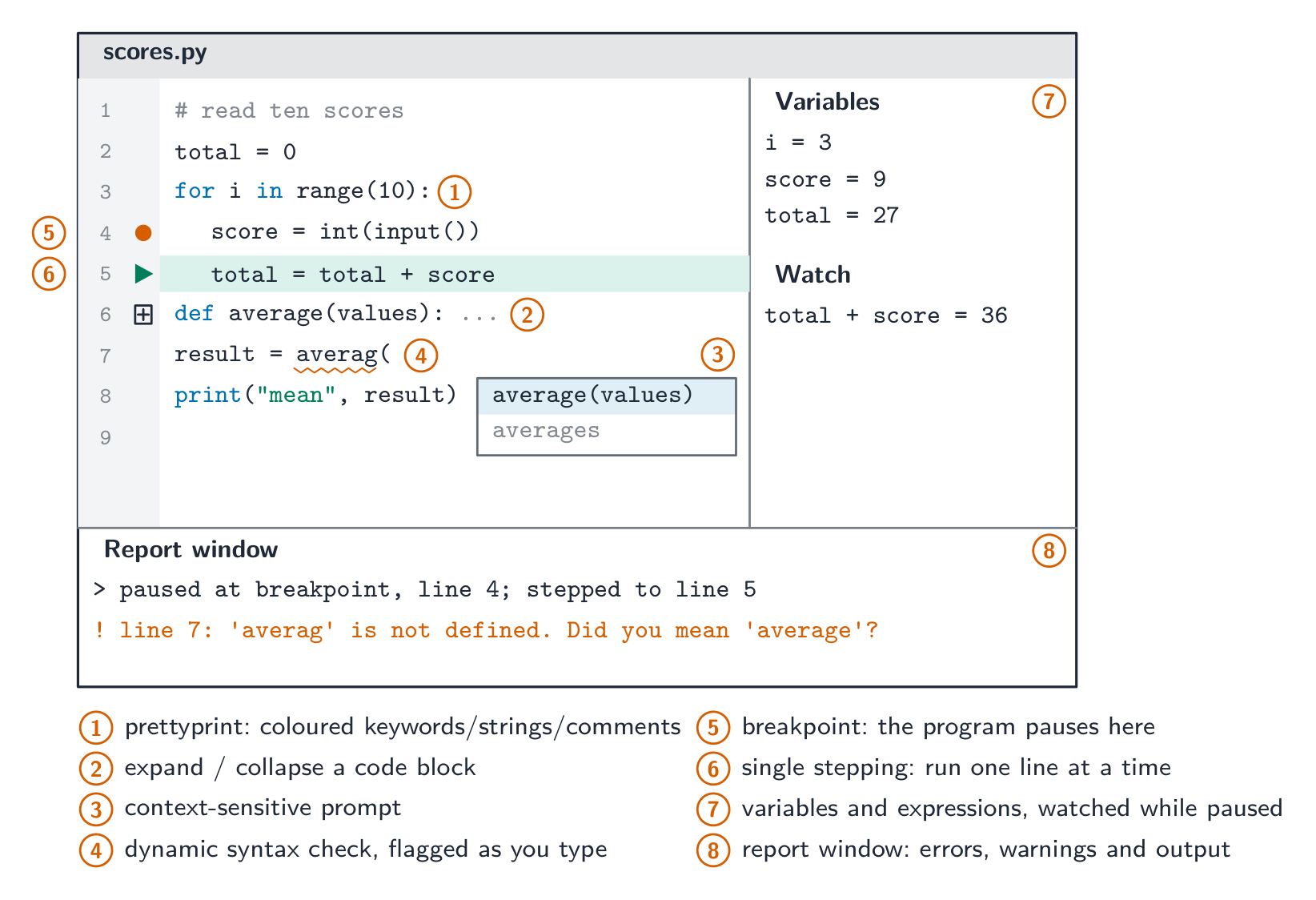
Describe features found in a typical Integrated Development Environment (IDE)
Including: • for coding, including context-sensitive prompts • for initial error detection, including dynamic syntax checks • for presentation, including prettyprint, expand and collapse code blocks • for debugging, including single stepping, breakpoints, i.e. variables, expressions, report window
עברית
המועמדים צריכים להיות מסוגלים:
הערות והנחיות
הצגת הבנה לצורך ב: • תוכנת אסמבלר לתרגום תוכנת שפת אסמבלר • מתרגם לתרגום תוכנת שפה בגובה גבוה • מתפקח לתרגום ולביצוע תוכנת שפה בגובה גבוה
הסבר היתרונות והחסרונות של השימוש במתרגם או מתפקח והצדקת השימוש בכל אחד מהם
הצגת מודעות לכך שתיקוני תוכנה בשפות ברמה גבוהה עשויים להיות חלקית מוטרמים וחלקית מתורגמים, כגון Java (במצב קונסולה)
תיאור מאפיינים הנמצאים בסביבת פיתוח משולבת (IDE) טיפוסית
כולל: • לקידוד, כולל הודעות הקשריות • לגילוי שגיאות ראשוני, כולל בדיקות סינטקס דינמי • להצגה, כולל פורמט נאה, הרחבה וקיפול בלוקי קוד • לדיבוג, כולל צעד אחד, נקודות עצירה, כלומר משתנים, ביטויים, חלון דוחות
Source: Cambridge International syllabus · מקור: הסיילבוס הבינלאומי של קמבריד'ג'
English
You write source code; the computer runs machine code 机器码. A translator 翻译器 converts between them.
Assembler
An assembler 汇编器 translates assembly language 汇编语言 into machine code: each mnemonic instruction (LDD, ADD, JMP) becomes exactly one machine-code instruction, and symbolic addresses and labels are replaced by real addresses. It is needed because the processor executes only machine code, and assembly is used where the programmer needs direct control of the hardware (embedded systems, device drivers).
Compiler
A compiler 编译器 translates a high-level program into machine code once, before it runs.
it reports all errors at compile time; once clean, it produces a stand-alone executable 可执行文件 that runs without the compiler installed and can be run many times.
generally faster at run time (no translation while running), but tied to one CPU/OS — recompile for each platform.
The two-mark description: a compiler translates the whole high-level program into machine code (object code 目标代码) before it is run, produces an executable file, and reports all the syntax errors together as a list at the end of translation. It does not run the program.
Interpreter
An interpreter 解释器 translates and runs a high-level program one line at a time, producing no executable.
it reports an error when it reaches that line, then stops; you can fix it and continue — good for development.
the interpreter must be installed to run the program; generally slower (each run re-translates), but easy to port across platforms.
The two-mark description: an interpreter translates one statement of the high-level program at a time and executes it immediately before moving to the next; no executable file is produced; it stops at the first error it meets and reports it. Both the source code and the interpreter must be present every time the program runs.
Choosing between them
Use a compiler when:
Use an interpreter when:
run-time speed matters
you want fast edit–run cycles
distributing to users without dev tools
writing cross-platform scripts
the program runs many times
the program is small or run once
teaching beginners
Benefits and drawbacks, as the mark scheme lists them.
compiler
interpreter
execution speed
fast — already machine code
slower — translated on every run
what the user needs
only the executable; no translator, and the source code stays private
the source code and the interpreter
finding errors
all errors listed at once, after the whole program is translated
each error reported at the line where it occurs, as you develop
changing the code
recompile the whole program after every change
edit and run again immediately
portability
machine code runs on one platform only; recompile for each
the same source runs wherever an interpreter exists
Worked example. A developer uses an interpreter while writing a program and a compiler when it is finished. Explain how each is used (4 marks).
During development the interpreter runs the partly written program at once, without waiting for a complete translation; when it meets an error it reports the line, so the developer fixes it and runs again immediately — a fast edit–run cycle that is easier for debugging. When the program is finished, the compiler translates the whole program into an executable that runs faster, needs no translator on the user's computer, and does not reveal the source code, so it can be sold to the public.
Hybrid: Java
Java is compiled into bytecode 字节码 (a platform-independent intermediate form), which a virtual machine 虚拟机 (the JVM) then interprets — or uses just-in-time compilation 即时编译 to turn hot parts into native code. So errors are caught early, the bytecode runs anywhere with a JVM ("write once, run anywhere"), and long-running programs reach near-native speed. C# and Python use similar designs.
The syllabus phrase is "partially compiled and partially interpreted": the compiler stage catches syntax errors and produces compact, portable 可移植的 bytecode; the interpreting stage lets that one bytecode file run on any machine that has a virtual machine, at the cost of some speed. Java in console mode (a text program run from the command line) is the syllabus's example.
Worked example. Java source is compiled to bytecode, which a JVM then interprets. Why use both, instead of compiling straight to machine code? A compiler produces machine code for one processor and operating system, so a program compiled on one machine will not run on another. Java's compiler instead targets a virtual machine, so the bytecode it produces is identical everywhere; each platform then supplies its own JVM to interpret that bytecode into its own native instructions. One compiled file therefore runs anywhere a JVM exists - "write once, run anywhere". The price is speed: interpreting bytecode is slower than running native code, which is why a real JVM also uses JIT compilation to turn frequently-run bytecode into native code while the program runs. Name both sides - the marks are for portability bought at the cost of speed.
עברית
אתה כותב קוד מקור; המחשב מפעיל קוד מכונה. מתרגם ממיר ביניהם.
אסמבלר
אסמבלר ממיר שפת אסמבל לקוד מכונה: כל הוראת מימונית (LDD, ADD, JMP) הופכת בדיוק להוראת קוד מכונה אחת, וכיתובים סמליים וכיתובים מחליפים כתובים אמיתיים. הוא נדרש מכיוון שהמעבד מבצע רק קוד מכונה, ושפת אסמבל משמשת כאשר המפתח זקוק לשליטה ישירה בחומרה (מערכות embedded, דרייברי התקנים).
קומפילר
קומפילר ממיר תוכנה ברמת גבוהה לקוד מכונה פעם אחת, לפני הביצוע. - הוא מדווח על כל השגיאות בזמן הה-compilation; לאחר שנקי, הוא מייצר קובץ מבוצע עצמאי שפועל ללא התקנת הקומפילר וניתן להפעיל אותו מספר פעמים. - בדרך כלל מהיר יותר בזמן הביצוע (אין תהליך המרה בזמן הפעולה), אך קשור למעבד/מערכת הפעלה אחד — יש לה recompile עבור כל פלטפורמה. התיאור בשתי הנקודות: קומפילר ממיר את כל התוכנה ברמת גבוהה לקוד מכונה (קוד אובייקט) לפני הביצוע, מייצר קובץ מבוצע, ומדווח על כל שגיאות הסינטקס יחד כרשימה בסוף ההמרה. הוא לא מפעיל את התוכנית.
הוא מדווח את כל השגיאות בזמן הה compilation; לאחר שנקי, הוא מפיק ביצועי עצמאי שמפעיל ללא התקנת המחבר וניתן להריץ אותו מספר פעמים.
בדרך כלל מהיר יותר בזמן הרצה (ללא תרגום בזמן הרצה), אך קשור למעבד/מערכת הפעלה אחד — יש לה recompile עבור כל פלטפורמה.
תיאור בעל ערך שני: מחבר מתרגם את כל התוכנית ברמה הגבוהה לקוד מכונה (קוד אובייקט) לפני שהיא מופעלת, מפיק קובץ ביצועי ומדווח את כל שגיאות הסינטקס יחד כרשימת סיום בתוך תהליך התרגום. הוא אינו מפעיל את התוכנית.
מחבר (Interpreter)
מחבר מתרגם ומפעיל תוכנית ברמה גבוהה שורה אחת בכל פעם, ולא מייצר קובץ ביצועי.
הוא מדווח על שגיאה כשמוגיע לקו זה, ואז עצור; ניתן לתקן ולהמשיך — מתאים לפיתוח.
המפרש חייב להיות מותקן כדי להריץ את התוכנה; לרוב איטי יותר (כל הרצה דורש תרגום מחודש), אך קל להעברה בין פלטפורמות.
תיאור בשני נקודות: המפרש תורגם ביטוי אחד מתוך התוכנית ברמה גבוהה בכל פעם ומבצע אותו מיד לפני מעבר לבא; לא נוצר קובץ ביצוע; הוא עצור בשגיאה הראשונה שנפגש בה ומדווח עליה. גם קוד המקור וגם המפרש חייבים להיות נוכחים בכל פעם שהתוכנה מורצת.
*קונפילר תורגם פעם אחת לתוכנית עצמאית; מפרש תורגם שורה שורה, בכל הרצה
בחירה ביניהם
השתמש בקונפילר כאשר:
השתמש במפרש כאשר:
מהירות בזמן ריצה חשובה
אתה רוצה מחזור עריכה–הרצה מהיר
חלוקה למשתמשים ללא כלי פיתוח
כתיבת סקריפטים צול-פלטפורמיים
התוכנית מורצת מספר פעמים
התוכנית קטנה או מורצת פעם אחת
לימודי מתחילים
יתרונות וחסרונות, כפי שרשומים בתשובות הנקודות.
קומפילר
אינטרפרטר
מהירות ביצוע
מהירה – כבר קוד מכונה
איטית – מתורגמת בכל הרצה
מה שדורש מהמשתמש
רק קובץ ביצוע; אין צורך במתרגם, וקוד המקור נשאר פרטי
קוד המקור והמפרש
מציאת שגיאות
כל השגיאות מצוינות יחד, לאחר תרגום כל התוכנית
כל שגיאה מדווחת בקו בו היא מתרחשת, במהלך הפיתוח
שינוי הקוד
לבצע קונפילציה מחדש של כל התוכנית לאחר כל שינוי
לערוך ולהריץ מחדש מיידית
ניידות
קוד מכונה רץ בפלטפורמה אחת בלבד; יש לבצע קונפילציה מחדש לכל אחת
אותה מקור רץ בכל מקום שבו קיים מפרש
דוגמה פותרת. מפתח משתמש במפרש בעת כתיבת תוכנה ובקונפילר כאשר הסיום. הסבר כיצד כל אחד משמש (4 נקודות).
במהלך הפיתוח, המפרש מרץ את התוכנית החלקית שמסתיימת, ללא המתנה לתרגום מלא; כאשר הוא נתקל בשגיאה הוא מדווח על הקו, כך שהמפתח מתקן אותה ומרץ מחדש מיידית – מחזור עריכה–הרצה מהיר שקל יותר לדיבוג. כאשר התוכנה מוגמרת, הקונפילר תורגם את כל התוכנה לקובץ ביצוע שמרץ מהר יותר, אינו דורש מתרגם במחשב המשתמש, ואינו חושף את קוד המקור, ולכן ניתן למכור אותו לציבור.
היברידי: Java
Java מתורגם ל-bytecode (פורמט ביניים תלוי-פלטפורמה), שמכונה מכונה וירטואלית (JVM) מבצעת פרשנות — או משתמש בהרכבה בזמן אמת כדי להפוך חלקים נחמצים לקוד מקומי. לכן שגיאות נתפסות מוקדם, ה-bytecode רץ בכל מקום עם JVM ("כתוב פעם אחת, רץ בכל מקום"), ותוכניות ארוכות-ממשך מגיעות למהירות קרובה למקומית. C# ו-Python משתמשות בעיצובים דומים.
הביטוי בתוכנית הלימודים הוא "מתורגם בחלקו ומבוצע בחלקו: שלב ההרכבה תופס שגיאות סינטקס ומייצר bytecode נייד; שלב הפרשנות מאפשר לקובץ bytecode אחד לרץ על כל מכונה שיש לה מכונה וירטואלית, על מחיר של מעט מהירות. Java ב-מצב קונסולה (תוכנת טקסט המופעלת משורת הפקודה) היא הדוגמה בתוכנית הלימודים.
Java מתורגם ל-bytecode נייד שכל JVM מבצעת — כתוב פעם אחת, רץ בכל מקום
דוגמה מפורטת. קוד מקור של Java מתורגם ל-bytecode, שמכונה JVM מבצעת פרשנות. מדוע להשתמש בשניהם, במקום להרכיב ישירות לקוד מכונה? הרכבה מייצרת קוד מכונה עבור מעבד ואחד ושיטת הפעלה, ולכן תוכנית שהורכבה במכונה אחת לא תפעל במכונה אחרת. הרכבת Java מכוונת במקום זאת אל מכונה וירטואלית, ולכן ה-bytecode שמייצרת זהה בכל מקום; כל פלטפורמה מספקת את ה-JVM הייעודי שלה לפרש את ה-bytecode להוראות מקומיות משלה. קובץ מורכב אחד לכן רץ בכל מקום שיש JVM - "כתוב פעם אחת, רץ בכל מקום". המחיר הוא מהירות: פרשנות byte code איטית יותר מריצה של קוד מקומי, ולכן JVM אמיתית גם משתמשת בJIT (הרכבה בזמן אמת) להפוך byte code שנרץ לעיתים קרובות לקוד מקומי בזמן ביצוע התוכנית. ציין שתי הצדדים - הנקודות הן עבור ניידות שהושגה על מחיר של מהירות.
Explore · חקור
The compiler route: source to running program · הדרך של המתרגם: מקור לתוכנית הפועלת
Step through how a compiler works — translating the whole program once, before it runs. Contrast it with an interpreter, which translates and runs one line at a time. · עבור שלב אחר של איך מתרגם עובד — מתרגם את כל התוכנית פעם אחת, לפני שהיא פועלת. השווה זאת למתנס (interpreter), שמתרגם ומבצע שורה אחת בכל פעם.
Integrated Development Environment (IDE) · סביבת פיתוח משולבת (IDE)
English
An integrated development environment 集成开发环境 (IDE) brings the tools to write, test and debug code into one application:
The syllabus groups the features into four kinds. Learn which feature belongs to which, because questions ask you to sort them and to describe one from each group.
For coding:context-sensitive prompts 上下文相关提示 — as you type, the IDE pops up the identifiers, keywords or parameters that fit at that point in the code; auto-complete 自动补全 finishes the name for you; automatic indentation and bracket matching keep the layout right as you type.
For initial error detection:dynamic syntax checks 动态语法检查 — the editor checks the syntax as you type and underlines or highlights a mistake immediately, before the program is translated; after translation, error messages with line numbers.
For presentation:prettyprint 代码美化 — keywords, identifiers, strings and comments shown in different colours or fonts (syntax highlighting 语法高亮) with consistent indentation, so the structure is visible at a glance; expand and collapse code blocks — hide the body of a loop, an IF or a subroutine so you see the outline.
For debugging:breakpoints 断点 — the program pauses when it reaches a marked line; single stepping 单步执行 — from the pause, run one line at a time; a window that shows the current values of variables and expressions as they change; and a report window 报告窗口 that lists errors, warnings and output.
Other features: translator integration (compile or run with one key, errors shown inline), a debugger 调试器 that drives the debugging features above, version control 版本控制 integration (git), project management, a help system, refactoring 重构 tools (safe renaming) and unit test 单元测试 integration.
An IDE speeds development by putting writing → running → debugging → fixing behind one interface. Common IDEs: Visual Studio, PyCharm, Eclipse, VS Code.
Worked example. A function Calculate() returns an unexpected value when the program runs. Describe how the debugging features of a typical IDE help find the cause (4 marks).
Set a breakpoint on the first line of Calculate(), so the program pauses there instead of running through. Then single-step through the function one line at a time. After each step read the values of the variables and of any expression you have asked the IDE to watch, and compare them with the values you expected; the first line after which a value is wrong is where the logic error is. The report window shows any run-time error message and the output produced so far.
Worked example. Put each feature in its syllabus group: prettyprint, context-sensitive prompt, dynamic syntax check, breakpoint, expand/collapse code blocks, report window.
סביבת פיתוח משולבת (IDE) מאגדת את הכלים לכתיבה, בדיקה ותיקון באגים בקוד לתוך יישום אחד:
*IDE מאגדת עורך, כפתור הרצה ומבקר באגים
תוכנית הלימודים ממיינת את התכונות לארבעה סוגים. למד איזה תכונה שייכת לאיזו קבוצה, כי שאלות מבקשות ממך לסדר אותן ולהגדיר אחת מכל קבוצה.
לכתיבת קוד:הנחיות בהקשר — בזמן הכתיבה, ה-IDE מציגה זיהויים, מילות מפתח או פרמטרים המתאימים לנקודה זו בקוד; השלמה אוטומטית גומרת את השם עבורך; הזזה אוטומטית והתאמת סוגריים שומרות על הסידור הנכון בזמן הכתיבה.
לזיהוי שגיאות ראשוני:בדיקות סינטקס דינמיות — העורך בודק את הסינטקס בזמן הכתיבה ומדגיש או מדגיש שגיאה מיד, לפני תרגום התוכנית; לאחר התרגום, הודעות שגיאה עם מספרי שורות.
לתצוגה:הדפסה מעוצבת (prettyprint) — מילות מפתח, זיהויים, מחרוזות והערות מוצגות בצבעים או גופנים שונים (הדגשת סינטקס) עם הזזה אחידה, כך שהמבנה נראה לעין מיד; הרחבה וכיווץ בלוקי קוד — הסתרת גוף של לולאה, IF או תת-תוכנית כך שתראה את הקוטר.
לבדיקת באגים:נקודות עצירה — התוכנית נעצרת כאשר מגיעה לשורה מסומנת; צעד בודד — מהעצירה, לבצע שורה אחת באחת; חלון המציג ערכים נוכחיים של משתנים וביטויים כפי שהם משתנים; וחלון דוח המפרט שגיאות, אזהרות ופלט.
תכונות נוספות: אינטגרציה עם מתרגם (הרכבה או הרצה בכפתור אחד, שגיאות מוצגות בשורה), מבקר באגים המפעיל את תכונות הבדיקה למעלה, בקרת גרסאות (git), ניהול פרויקטים, מערכת עזרה, כלים לשינוי מבנה (rename בטוח) ואינטגרציה עם בדיקות יחיד.
ה-IDE מציגה את התכונות ששם תוכנית הלימודים, במקומות בהם היית רואה אותן במסך
ה-IDE מזרזת את הפיתוח על ידי הנחת כתיבה → הרצה → בדיקת באגים → תיקון מאחורי ממשק אחד. IDEs נפוצות: Visual Studio, PyCharm, Eclipse, VS Code.
מבקר באגים: הגדר נקודת עצירה, הרץ, ולאחר מכן עצור כדי לבדוק משתנים ועבור דרך הקוד צעד אחר צעד
דוגמה מופרזת. פונקציה Calculate() מחזירה ערך בלתי צפוי כאשר התוכנית רצה. תאר כיצד תכונות הדיבאג (הניקוי) של IDE סטנדרטי עוזרות למצוא את הסיבה (4 נקודות).
שחץ נקודת עצירה על השורה הראשונה של Calculate(), כך שהתוכנית תעצור שם במקום לרוץ לאורך כל הקוד. לאחר מכן צעד אחד-אחד דרך הפונקציה שורה אחת בכל פעם. לאחר כל צעד קרא את הערכים של המשתנים ושל ביטויים כלשהם שביקשת מה-IDE לצפות בהם, והשווה אותם לערכים שציינת; השורה הראשונה שלאחריו ערך הוא שגוי היא המקום בו טעות הלוגית נמצאת. חלון הדוחות מציג כל הודעת שגיאה בזמן הרצה והתוצאות שנוצרו עד כה.
דוגמה מופרזת. הכנס כל תכונה לקבוצת הלימודים שלה: prettyprint, context-sensitive prompt, dynamic syntax check, breakpoint, expand/collapse code blocks, report window.
כתיבת קוד: context-sensitive prompt. זיהוי שגיאות ראשוני: dynamic syntax check. הצגה: prettyprint, expand/collapse code blocks. ניקוי (Debugging): breakpoint, report window.
List the OS's jobs by their syllabus names (memory, process, hardware, file and security management) and say what each does — "manages resources" alone is too vague.
Compare compiler vs interpreter vs assembler: what each translates, when it translates it, and how errors are reported.
Explain what an IDE provides using the syllabus groups: coding, initial error detection, presentation, debugging.
A "benefit to the developer" answer names the developer's saving: time, cost, expertise, reliability or maintenance. A "drawback" names a dependence: availability, version, fit, security.
For "describe the operation of" a translator, give three things: what is translated (whole program or one statement), when (before running or while running), and how errors are reported (all at once or at the first error).
Common mistakes
Writing "the OS controls the computer" or "manages resources" with no example task. Each mark is one named task with what it does.
Saying an interpreter "compiles line by line". An interpreter translates and executes each statement; it never produces an executable.
Saying a compiler runs the program. It only translates; the executable runs later, without the compiler.
Putting a DLL "inside" the executable. That is a static library; a DLL stays a separate file loaded at run time.
Saying defragmentation "deletes" or "compresses" files, or is needed on an SSD. It only moves blocks so each file is stored contiguously.
Filing prettyprint or collapsing blocks under "debugging". They are presentation features; debugging is breakpoints, single stepping, watching variables and the report window.
עברית
פרט את משימות מערכת ההפעלה לפי שמותיהם בלימודים (ניהול זיכרון, ניהול תהליכים, ניהול חומרה, ניהול קבצים ואבטחה) וסבר מה כל אחת עושה — "מנהל משאבים" לבד הוא לא מספיק ספציפי.
השווה מקומפילר מול אינטרפרטר מול אסמבלר: מה כל אחד מתרגם, מתי הוא מתרגם אותו, וכיצד שגיאות מדווחות.
הסבר מה ה-IDE מספק באמצעות קבוצות הלימודים: כתיבת קוד, זיהוי שגיאות ראשוני, הצגה, ניקוי.
תשובה "יתרון למפתח" מציינת את החיסכון של המפתח: זמן, עלות, מומחיות, אמינות או תחזוקה. "חיסרון" מציין תלות: זמינות, גרסה, התאמה, אבטחה.
עבור "תיאר את הפעולתו" של מתרגם, נסו שלושה דברים: מה מתורגם (התוכנית כולה או הודעה אחת), מתי (לפני ההפעלה או בזמן ההפעלה), וכיצד שגיאות מדווחות (כולן יחד או בשגיאה הראשונה).
טעויות נפוצות
הכתיבה "מערכת ההפעלה שולטת במחשב" או "מנהלת משאבים" ללא דוגמת משימה. כל נקודה היא משימה שמכונה עם מה שהיא עושה.
אמירה כי מתפרש "מקדם קו אחר קו". מתפרש מתרגם וגם מבצע כל הודעה; הוא לעולם אינו מייצר קובץ ניתן לביצוע.
אמירה כי מקדם מפעיל את התוכנית. הוא רק מתרגם; הקובץ הניתן לביצוע מופעל מאוחר יותר, ללא המקדם.
הנחת DLL "בתוך" הקובץ הניתן לביצוע. זהו ספרייה סטטית; DLL נשארת קובץ נפרד שנטען בזמן הרצה.
אמירה כי פירוק פירוקים "מוחק" או "מדחס" קבצים, או נדרשת ב-SSD. היא רק מזיזה בלוקים כך שכל קובץ מאוחסן ברצף.
רישום prettyprint או קיפול בלוקים תחת "דיבוג". הם תכונות הצגה; דיבוג הוא נקודות עצירה, צעד אחד אחר אחד, ניטור משתנים וחלון הדיווחים.
Interactive lessons on this topic · שיעורים אינטראקטיביים בנושא זה
Work through it step by step, with instant-check exercises. · לעבור על הדברים צעד אחר צעד, עם תרגילים לבדיקה מיידית.
Pick one and the site follows you — notes, papers, videos and practice all open on it. · בחרו נושא אחד והאתר יעקוב אחריו — הערות, מסמכים, וידאו ותרגולים פתוחים בו.
Type to search notes, lessons, code, vocabulary and past-paper questions across every subject. · הקלד כדי לחפש הערות, שיעורים, קוד, אוצר מילים ושאלות מבחנים בכל הנושאים.