| 考生应能: | 注释与指导 |
|---|---|
| 展示对二进制数量级以及二进制前缀与十进制前缀之间区别的理解 | 理解并正确使用以下术语的区别: • kibi 和 kilo • mebi 和 mega • gibi 和 giga • tebi 和 tera |
| 展示对不同数制的理解 | 使用二进制、十进制、十六进制数制,以及用于二进制数的二进制编码十进制(BCD)、反码和补码表示法 |
| 将一个整数值从一种数制/表示法转换为另一种数制/表示法 | |
| 执行二进制加减运算 | 使用正负二进制整数进行运算 |
| 展示对溢出如何发生的理解 | |
| 描述二进制编码十进制(BCD)和十六进制的实际应用场景 | |
| 展示对字符数据的内部二进制形式及其表示方法的理解,具体取决于所使用的字符集 | 学生应熟悉ASCII(美国信息交换标准代码)、扩展ASCII和Unicode。不要求学生记忆特定的字符编码 |
信息表示
A-Level 计算机科学 · 知识点 1
 22:30
22:30
数制与数据
这张照片。这首歌。这段视频。你的名字,你的信息,每台设备上的每个文件——在计算机内部,所有这些只是一系列零和一。……
英语旁白 · 英中内嵌字幕
1.1
数据表示

教学大纲
来源:Cambridge International 教学大纲
你必须掌握的三种数制:
- 十进制 (decimal, base 10) — 使用数字0–9。位值是10的幂。
- 二进制 (base 2) — 使用0和1。位值是2的幂。每个字节是8个位。
- 十六进制 (base 16) — 使用0–9以及A–F代表10–15。每个十六进制数位恰好代表4个位。
转换
十进制转二进制:不断除以2并记录余数,自下而上读取。或者减去能容纳在内的最大位值(2的幂)。
示例:$558_{10}$: $558 = 512 + 32 + 8 + 4 + 2 = 2^{9} + 2^{5} + 2^{3} + 2^{2} + 2^{1}$。在12位中:0010 0010 1110。
二进制转十六进制:从右向左将位分组为半字节(4位)并逐一转换。0010 0010 1110 → 2 2 E → 22E。
十六进制转二进制:将每个十六进制数位替换为其4位模式。十六进制转十进制:将每个数位乘以其位值。22E $= 2 \times 256 + 2 \times 16 + 14 = 558$。
例题。 将十进制200转换为8位二进制,再转换为十六进制。
$200 = 128 + 64 + 8$,因此二进制是11001000。在半字节分组中,1100 1000 $= 12$ 和 $8$,即$\text{C}$ 和$8$,所以十六进制是C8。

需要多少位?
考试题目会固定寄存器宽度(8、12或16位)。用前导零填充至该宽度:$558$在12位中是0010 0010 1110,绝不能是10 0010 1110。
要找到能存储某值的最小位数,询问你需要哪些位值:
- 一个无符号整数从$0$到$2^{n} - 1$需要$n$位:$200$需要8位(最高位是$255$),$1000$需要10位(最高位是$1023$),$16$需要5位(4位最多到$15$)。
- 一个有符号补码整数从$-2^{n-1}$到$2^{n-1} - 1$需要$n$位:$-200$需要9位,因为8位最多到$-128$。
- 一个十六进制数位需要4位,一个BCD数位需要4位,一个ASCII字符需要7位(扩展ASCII为8位)。
二进制与十进制前缀
两组外观相似的前缀实则不同——十进制(10的幂)和二进制(2的幂):
| 十进制 (SI) | 二进制 (内存) |
|---|---|
| 千 $= 10^{3}$ | kibi (Ki) $= 2^{10} = 1024$ |
| 兆 $= 10^{6}$ | mebi (Mi) $= 2^{20}$ |
| 吉 $= 10^{9}$ | gibi (Gi) $= 2^{30}$ |
| 太 $= 10^{12}$ | tebi (Ti) $= 2^{40}$ |
因此,一太字节(TiB)略大于一太字节(TB)。“1 TB”驱动器包含$10^{12}$字节,但以TiB显示的操作系统会显示较小的数值。
探索
二进制、十进制和十六进制
输入一个数字,同时查看其二进制、十进制和十六进制表示——以及位值是如何相加的。
词汇
训练
| English | 中文 | 拼音 |
|---|---|---|
| number system/ˈnʌmbə ˈsɪstəm/ | 数制 | shù zhì |
| binary/ˈbaɪnəri/ | 二进制 | èr jìn zhì |
| denary/ˈdiːnəri/ | 十进制 | shí jìn zhì |
| digit/ˈdɪdʒɪt/ | 数位 | shù wèi |
| place value/pleɪs ˈvæljuː/ | 位值 | wèi zhí |
| BCD/ˌbiː siː ˈdiː/ | 二进码十进数 | èr jìn mǎ shí jìn shù |
| overflow/ˌəʊvəˈfləʊ/ | 溢出 | yì chū |
| most significant bit/məʊst sɪɡˈnɪfɪkənt bɪt/ | 最高有效位 | zuì gāo yǒu xiào wèi |
| two's complement/tuːz ˈkɒmplɪmənt/ | 补码 | bǔ mǎ |
| signed integer/saɪnd ˈɪntɪdʒə/ | 有符号整数 | yǒu fú hào zhěng shù |
| sign bit/saɪn bɪt/ | 符号位 | fú hào wèi |
| arithmetic shift/ˌærɪθˈmetɪk ʃɪft/ | 算术移位 | suàn shù yí wèi |
| one's complement/wʌnz ˈkɒmplɪmənt/ | 反码 | fǎn mǎ |
1.1
二进制运算
二进制加法
从右向左逐列相加,进位方式同十进制:
| 位A | 位B | 进位输入 | 求和位 | 进位输出 |
|---|---|---|---|---|
| 0 | 0 | 0 | 0 | 0 |
| 0 | 0 | 1 | 1 | 0 |
| 0 | 1 | 0 | 1 | 0 |
| 0 | 1 | 1 | 0 | 1 |
| 1 | 1 | 0 | 0 | 1 |
| 1 | 1 | 1 | 1 | 1 |
溢出发生在结果所需位数超过寄存器所能容纳时——最左列的进位输出即为溢出位。
例题。 将8位无符号整数$10110101$和$01101100$相加,并对结果加以评论。
$10110101 + 01101100 = 1\,00100001$。答案需要9位,无法放入8位寄存器:发生了溢出。完整答案应指出错误并说明原因,使用题目给定的字长:“溢出:真实结果($289$)大于8位寄存器能容纳的最大值($255$),因此最高位的进位丢失,存储的结果($00100001 = 33$)是错误的。”
二进制减法
通常采用补码加法:计算$A - B$时,先求$B$的补码(按位取反后加1),然后相加,丢弃最终进位输出。
从$00011110$中减去$01100100$(无符号8位):
- $00011110$的二进制补码:按位取反→$11100001$,加1→$11100010$。
- 加到$01100100$:结果$1\,01000110$(9位)— 丢弃首位1 → $01000110 = 70_{10}$。验算:$100 - 30 = 70$。✓
补码有符号整数
在一个$n$位的补码数中:
- 最高有效位 (MSB) 是符号位:0表示正数,1表示负数。
- 读取负数:按位取反,加1,然后变号。
因此$11100010$是负数;取反→$00011101$,加1→$00011110 = 30$,所以它是$-30$。这是一个有符号整数(不同于无符号整数)。$n$位的范围是$-2^{n-1}$到$+2^{n-1} - 1$;8位的范围是$-128$ ($10000000$) 到$+127$ ($01111111$)。
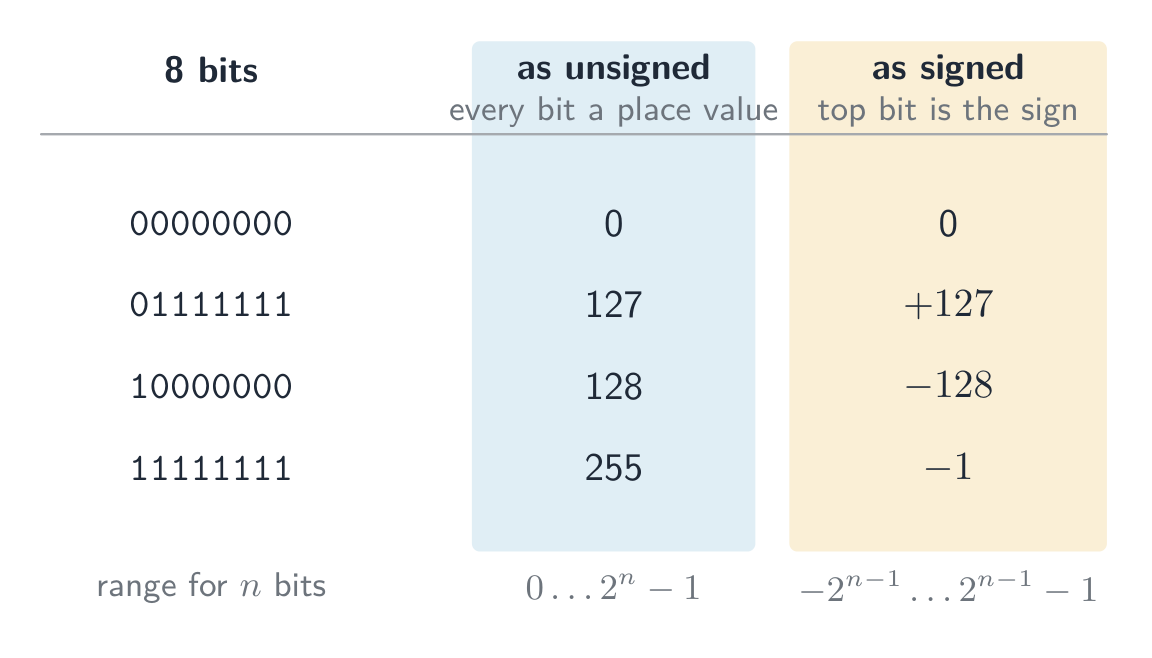
相同的位在不同约定下代表不同数值。作为无符号整数,每位都是位值,因此8位范围从$0$到$255$;作为有符号补码整数,最高位是符号位,因此同样的8位范围从$-128$到$+127$。模式$11111111$按一种方式读是$255$,按另一种方式读是$-1$——位本身不包含任何指示信息。
同一字节按无符号和有符号解读:仅靠既定解释才能区分它们
 8位二进制补码:符号位将范围分为负数($-128$至$-1$)和正数($0$至$127$)
例题。 8位补码数$10110100$代表什么十进制值?
最高位是1,所以是负数。取反→$01001011$,加1→$01001100 = 76$,所以值为$-76$。用位值验算:$-128 + 32 + 16 + 4 = -76$。
例题。 将$-108$写为12位补码整数。
从12位中的$+108$开始:$108 = 64 + 32 + 8 + 4$,故0000 0110 1100。按位取反:1111 1001 0011。加1:1111 1001 0100。用位值验算,其中最高位值为$-2^{11} = -2048$:$-2048 + 1024 + 512 + 256 + 128 + 16 + 4 = -108$。✓
对于12位,范围是$-2048$ (1000 0000 0000) 到$+2047$ (0111 1111 1111)。询问最小和最大值的问题即指这两个模式,请牢记规则:最负的数是1后跟零;最正的数是0后跟一。
算术移位 将每一位左移或右移,但保持符号不变:右移一位相当于除以二,并将符号位复制到左侧空位,从而使负数仍为负数(1111 1001 0100右移三位得到1111 1111 0010,即$-14$:$-108 / 8 = -13.5$,且右移向下舍入)。左移则乘以二。移位属于主题4中的汇编指令集,但本题结合本处的数值运算提出。
有符号算术中的溢出发生在真实结果超出此范围时——当符号位错误翻转时可察觉(两个正数得负数,或两个负数得正数)。
反码
在补码之前,一种较旧的方案称为反码,它通过简单地对正数按位取反来表示负数——没有“加1”步骤。
- $+30 = 00011110$,因此在反码中$-30 = 11100001$(仅为反码)。
- 缺点:它有两个零——$00000000$ ($+0$) 和$11111111$ ($-0$)——这浪费了一个位模式并使算术运算变得繁琐。
补码(取反且加1)消除了负零:它只有一个零,并允许加减法共用同一电路。这就是现代计算机使用补码而非反码存储有符号整数的原因。
探索
二进制与有符号整数
字节 = Σ 位值
看一个 8 位模式如何映射到一个数字(以及它如何会溢出超过 255)。
探索
二进制补码(有符号位)
最左边的位带有一个负的位值。翻转任意一位——或点击取负(每一位取反,然后加 1)——看有符号值如何变化。
词汇
训练
| English | 中文 | 拼音 |
|---|---|---|
| unsigned/ʌnˈsaɪnd/ | 无符号 | wú fú hào |
1.1
二进制编码的十进制(BCD)

在BCD中,每个十进制数位都写成独立的4位模式。数$93$在BCD中是1001 0011——而非二进制93 ($01011101$)。每个半字节仅使用0–9;模式$1010$–$1111$无效。
BCD读取:0010 0111 0101 → 2, 7, 5 → 275。
用途:计算器、数字时钟及显示十进制数字的设备——每位数字驱动一个七段显示器 7-segment display。货币代码常使用BCD以避免将0.1等分数转换为二进制时的舍入误差。
“适用性”答案必须将用途与BCD的特性联系起来:每个十进制数位拥有独立的4位,因此数位可直接发送至其显示器,或逐位相加,无需转换整个数值;且如$0.10$这样的十进制小数可精确存储,而二进制小数无法做到这一点。
词汇
训练
| English | 中文 | 拼音 |
|---|---|---|
| 7-segment display/ˈsevən ˈseɡmənt dɪˈspleɪ/ | 七段显示器 | qī duàn xiǎn shì qì |
| memory address/ˈmeməri əˈdres/ | 内存地址 | nèi cún dì zhǐ |
| code point/kəʊd pɔɪnt/ | 码点 | mǎ diǎn |
| character set/ˈkærɪktə set/ | 字符集 | zì fú jí |
| encoding/enˈkəʊdɪŋ/ | 编码 | biān mǎ |
1.1
十六进制 —— 实际用途

十六进制是书写二进制的一种紧凑方式(1个十六进制数位 = 4位):
- 低级编程中的内存地址 —
0x7FFE。 - HTML/CSS中的颜色值 —
#FF8800。 - MAC地址 —
AC:DE:48:00:11:22。
十六进制不改变存储数据——它只是让二进制对人类更易读。
1.1
字符编码
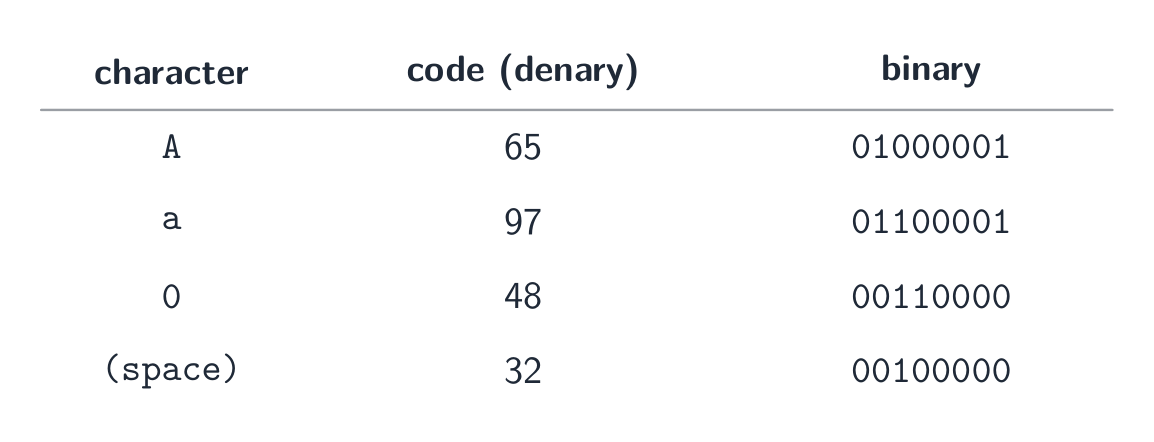
计算机将文本存储为数字;每个字符都有一个由字符集设定的数值码点。
ASCII
- ASCII 使用7位 — 128个码点。基本拉丁字母、数字、标点符号和控制代码。
- 扩展ASCII 使用8位——256个码点;低128位与标准ASCII一致,高128位因地区而异。
Unicode
- Unicode 是一种通用字符集,涵盖几乎所有书写系统,以及符号和表情符号。
- 常见编码方式:UTF-8(1–4字节,兼容ASCII)、UTF-16(2或4字节)、UTF-32(固定4字节)。
Unicode优于ASCII的原因
- 它能表示更多字符(所有书写系统、表情符号);ASCII仅覆盖基础英文。
- 文件具有可移植性,不会出现代码页混淆问题,并允许在同一文档中包含多语言文本。
- 权衡:对于纯英文文本,Unicode文件大小通常更大。
当问题要求列出差异时,请以成对形式并附上数字作答:ASCII使用7位(扩展ASCII使用8位),因此有128(256)个字符;Unicode最多使用32位(UTF-8使用1至4字节),因此超过一百万个码点。ASCII仅涵盖基础英文;Unicode涵盖所有文字系统,且其前128个码点即为ASCII字符。在UTF-8编码中,一个英文字母仍占1字节,因此一个40个字母的英文文件名在ASCII和UTF-8中均为40字节,而一个中文字符占3字节。
探索
一个字符被存为一个数
每个字符都有一个代码数字——'A' 是 65。翻转这些位,看那个代码的二进制和十六进制,正是计算机保存它的方式。
1.2
多媒体
教学大纲
| 考生应能: | 注释与指导 |
|---|---|
| 展示对位图图像数据编码方式的理解 | 使用并理解以下术语:像素、文件头、图像分辨率、屏幕分辨率、颜色深度 / 位深度 |
| 执行计算以估算位图图像的文件大小 | |
| 展示对更改位图图像元素如何影响图像质量和文件大小的理解 | 使用以下术语:图像分辨率、颜色深度 / 位深度 |
| 展示对矢量图形数据编码方式的理解 | 使用以下术语:绘图对象、属性、绘图列表 |
| 论证为特定任务选择位图图像或矢量图形的合理性 | |
| 展示对声音表示和编码方式的理解 | 使用以下术语:采样、采样率、采样分辨率、模拟和数字数据 |
| 展示对更改采样率和分辨率影响的 understanding | 包括对文件大小和精度的影响 |
来源:Cambridge International 教学大纲
位图 图像(也称为位映射图像)将网格中每个像素的颜色信息存储起来。文件开头包含一个文件头,记录图像的元数据——宽度、高度和颜色深度——以便软件能够正确读取后续像素数据。
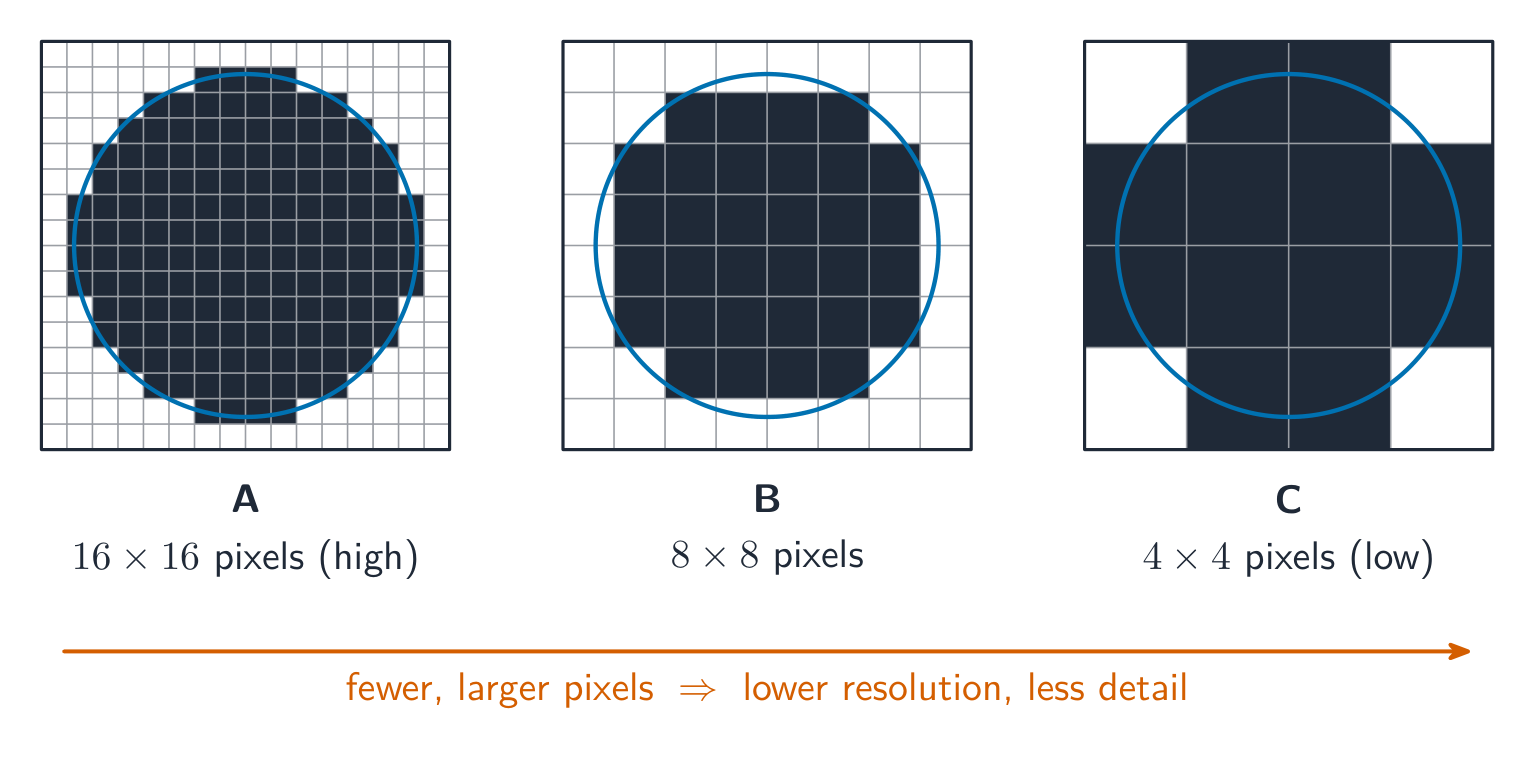
- 图像分辨率:位图自身的尺寸,即像素宽×高(例如1920 × 1080)。
- 屏幕分辨率:显示器能显示的最大宽×高。若图像分辨率大于屏幕,则会被缩放以适应;低分辨率图像在高分辨率屏幕上拉伸时会显得锯齿状。
- colour depth 颜色深度 (bit depth 位深度): 每像素位数。1位 → 黑/白;8位 → 256种颜色;24位 → 16.7百万("真彩色")。
文件大小
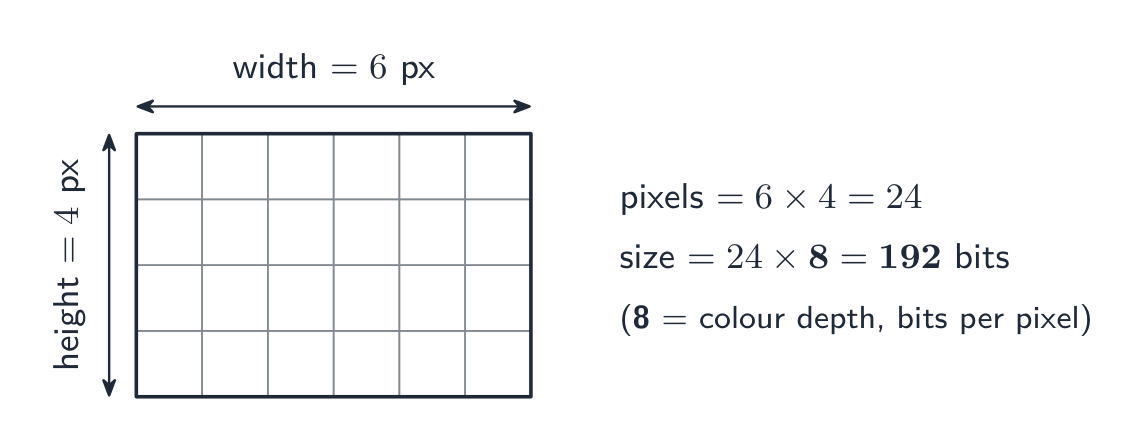
$$\text{size in bits} = \text{width} \times \text{height} \times \text{bit depth}.$$
除以8得字节,除以1024得KiB等。示例:一幅$3000 \times 2000$图像在24 bpp下为$3000 \times 2000 \times 24 = 1.44 \times 10^{8}$位$\approx 17.2\ \text{MiB}$。
注明所使用的单位。评分标准接受 $1\ \text{MB} = 10^{6}$ 字节(SI前缀)或 $1\ \text{MiB} = 1024 \times 1024$ 字节(二进制前缀),只要演算过程表明使用了哪一个即可;同一图像的大小分别为 $18.0\ \text{MB}$ 或 $17.2\ \text{MiB}$。如果题目给出了文件头大小,请将其加入总大小中。
视频是一系列位图图像的序列,每一张都是帧。压缩前其大小为一帧的大小 $\times$ 帧率 (每秒帧数) $\times$ 持续时间(秒):每秒30帧 $1920 \times 1080$ 像素在24位下是 $30 \times 1920 \times 1080 \times 24 \approx 1.5 \times 10^{9}$ 位,约 $187\ \text{MB}$,对于每一秒而言。这就是为什么视频总是被压缩的原因。
调整设置
- 降低分辨率 → 文件变小,细节减少(放大后呈块状)。
- 降低颜色深度 → 文件变小,但平滑渐变会出现色彩断层。
- 提高任一参数 → 文件变大,画质更好。
词汇
训练
| English | 中文 | 拼音 |
|---|---|---|
| bit/bɪt/ | 位 | wèi |
| hexadecimal/ˌheksəˈdesɪml/ | 十六进制 | shí liù jìn zhì |
| nibble/ˈnɪbl/ | 半字节 | bàn zì jié |
| register width/ˈredʒɪstə wɪtθ/ | 寄存器宽度 | jì cún qì kuān dù |
| register/ˈredʒɪstə/ | 寄存器 | jì cún qì |
| bitmap/ˈbɪtmæp/ | 位图 | wèi tú |
| pixel/ˈpɪksl/ | 像素 | xiàng sù |
| file header/faɪl ˈhedə/ | 文件头 | wén jiàn tóu |
| colour depth/ˈkʌlə depθ/ | 颜色深度 | yán sè shēn dù |
| image resolution/ˈɪmɪdʒ ˌrezəˈluːʃn/ | 图像分辨率 | tú xiàng fēn biàn lǜ |
| screen resolution/skriːn ˌrezəˈluːʃn/ | 屏幕分辨率 | píng mù fēn biàn lǜ |
| bit depth/bɪt depθ/ | 位深度 | wèi shēn dù |
| frame/freɪm/ | 帧 | zhēn |
1.2
矢量图形
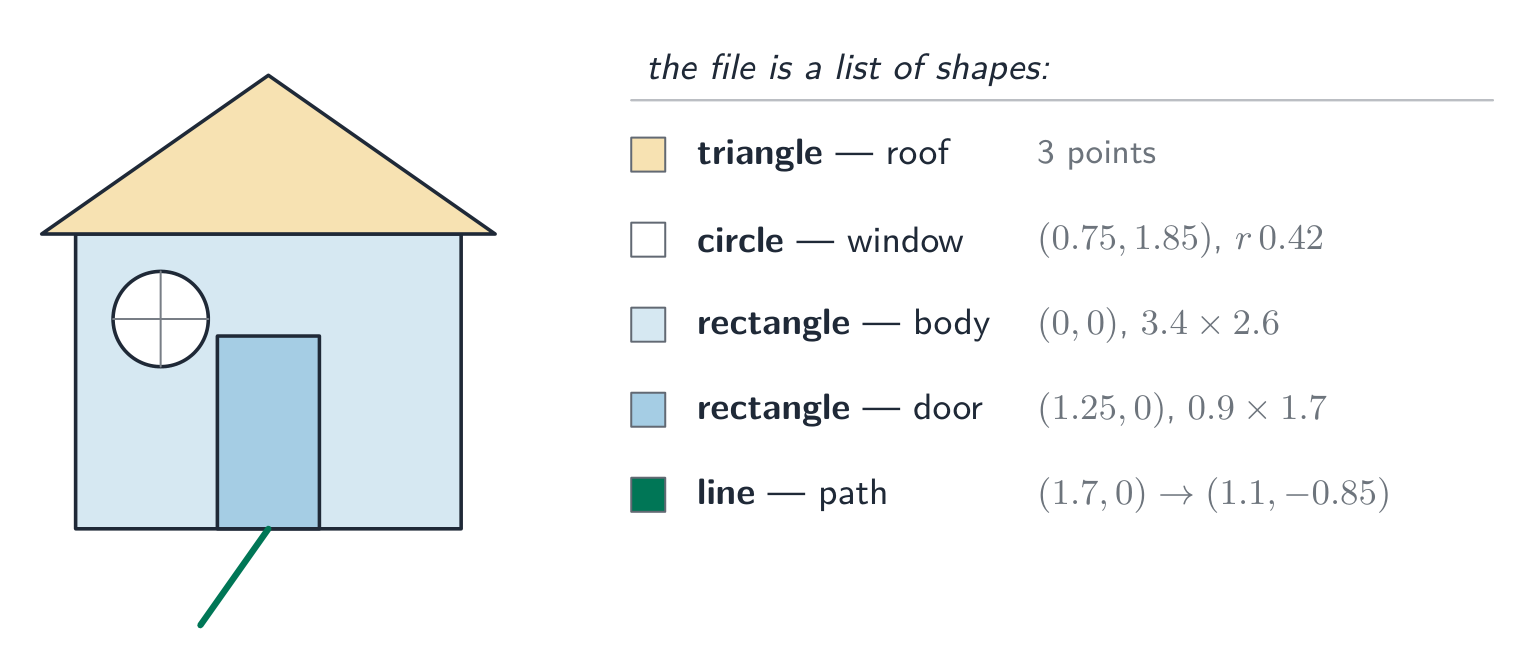
矢量图形 将绘制图像的指令作为绘图列表存储——这是一个有序的绘图对象列表(几何图元:直线、曲线、多边形、圆形)。每个绘图对象具有属性,如颜色、填充、线宽和位置(坐标)。程序可根据所需分辨率对绘图列表进行渲染以显示图像。
位图与矢量图对比
| 任务 | 更佳选择 | 原因 |
|---|---|---|
| 照片 | 位图 | 复杂的像素级细节无法用形状描述。 |
| 标志、图标、标牌 | 矢量 | 边缘锐利;可缩放到任意尺寸而不模糊。 |
| 工程图纸 | 矢量 | 几何精确且支持缩放。 |
| 绘画、纹理 | 位图 | 区域色调过渡平滑细腻。 |
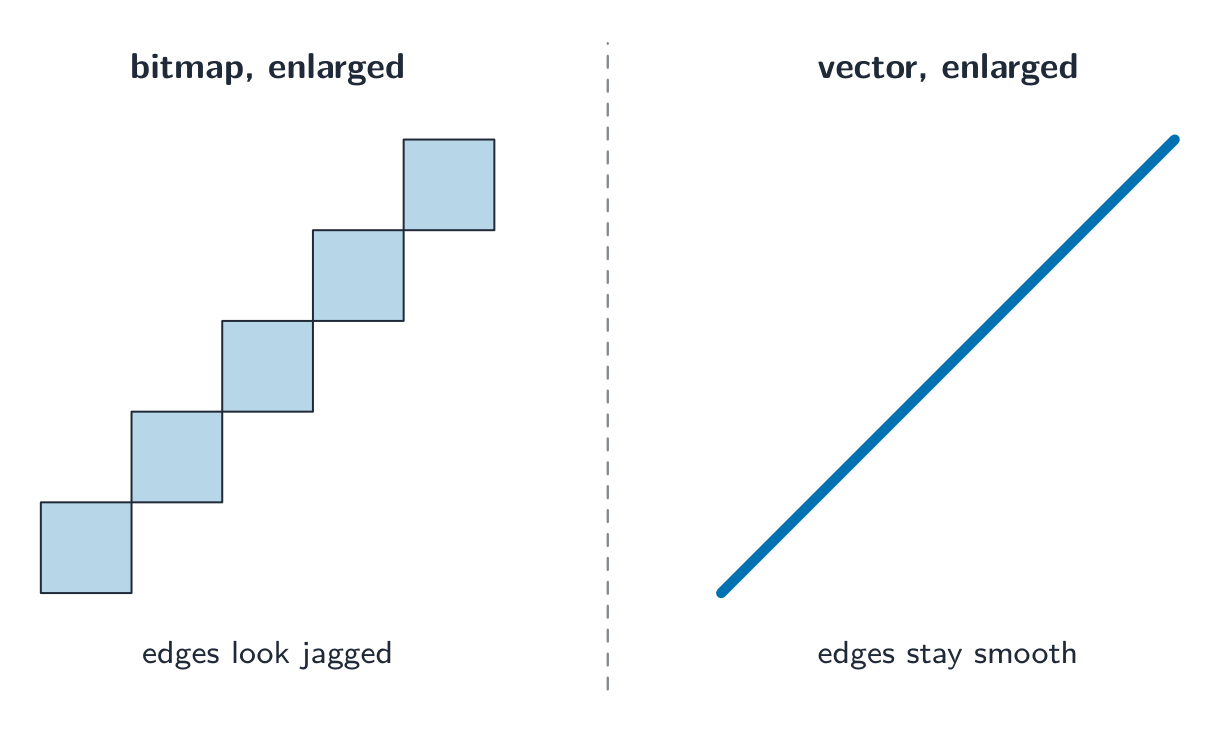
矢量优势:它缩放不失真——矢量标志在任何尺寸下都保持清晰,而位图放大后会模糊。矢量劣势:它无法描述任意的像素细节(如照片)。
“论证型”答案需将选择与任务联系起来。“该标志需出现在名片和广告牌上,因此应选用矢量图形:它以绘图对象形式存储,可在任意尺寸下重新渲染并保持清晰,而位图放大后会暴露像素。” 对于照片则反之:没有形状可供描述,因此必须存储每个像素的颜色。
探索
计算概念实验
根据它们所演示的计算概念对具体示例进行分类。
词汇
训练
| English | 中文 | 拼音 |
|---|---|---|
| vector graphic/ˈvektə ˈɡræfɪk/ | 矢量图形 | shǐ liàng tú xíng |
| drawing list/ˈdrɔːɪŋ lɪst/ | 绘图列表 | huì tú liè biǎo |
| drawing objects/ˈdrɔːɪŋ ˈɒbdʒekts/ | 绘图对象 | huì tú duì xiàng |
| primitive/ˈprɪmɪtɪv/ | 图元 | tú yuán |
| properties/ˈprɒpətiz/ | 属性 | shǔ xìng |
| render/ˈrendə/ | 渲染 | xuàn rǎn |
| analogue data/ˈænəlɒɡ ˈdeɪtə/ | 模拟数据 | mó nǐ shù jù |
| digital data/ˈdɪdʒɪtl ˈdeɪtə/ | 数字数据 | shù zì shù jù |
1.2
声音
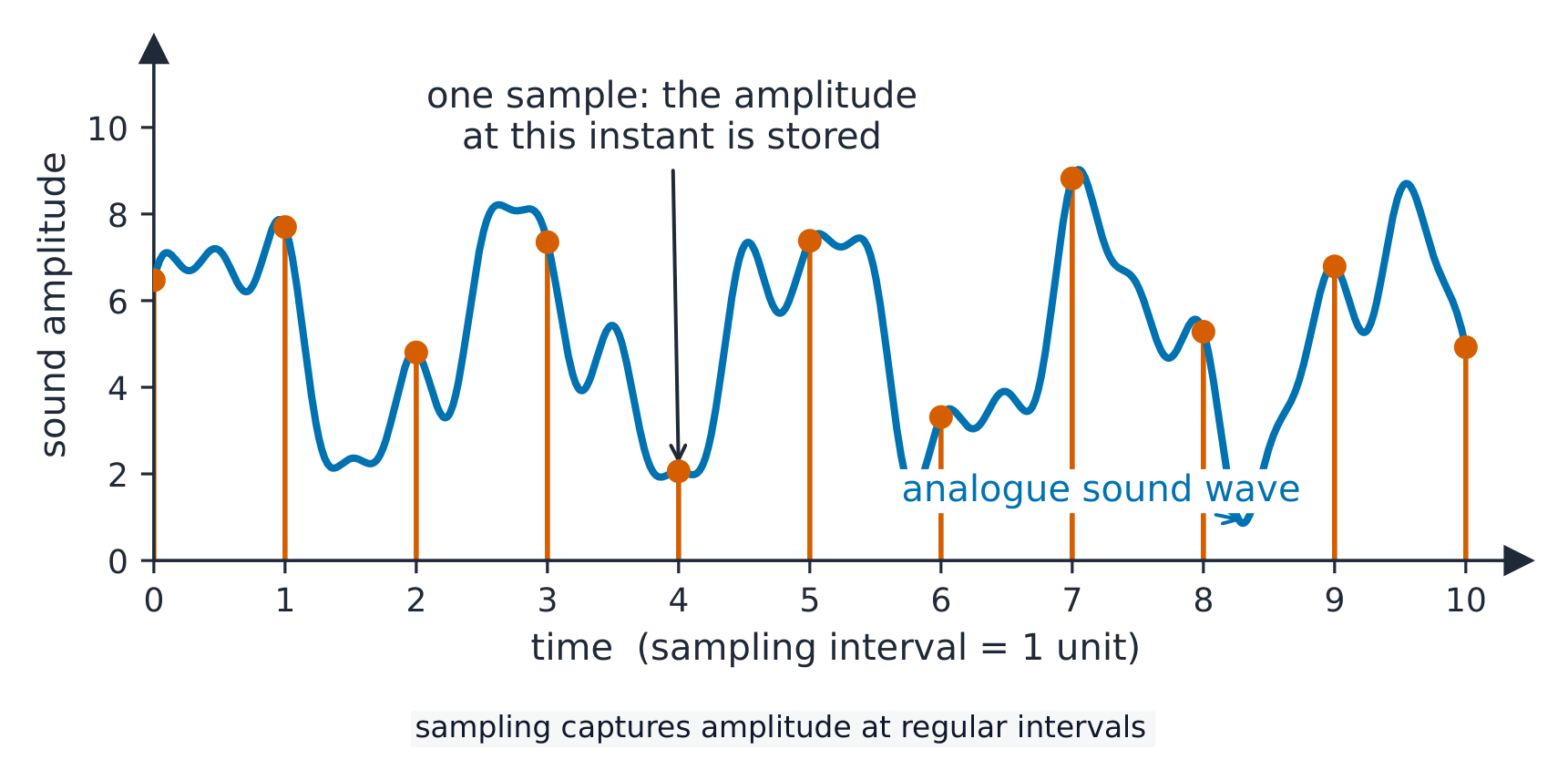
连续的模拟数据(声音)通过采样转换为数字数据:
- 采样率 — 每秒采样次数(Hz)。CD音质为 $44.1\ \text{kHz}$。
- 采样分辨率(位深度)— 每次采样的振幅位数。CD音质为16位。
文件大小
$$\text{size in bits} = \text{sampling rate} \times \text{resolution} \times \text{duration} \times \text{channels}.$$
一段10秒立体声CD片段:$44100 \times 16 \times 10 \times 2 = 14\,112\,000$ 位 $\approx 1.68\ \text{MiB}$。
调整设置
- 提高采样率 → 捕捉更高音调,文件变大。
- 提高采样分辨率 → 振幅步长更精细,量化噪声更少,文件变大。
- 降低任一参数 → 文件变小,音质明显下降。
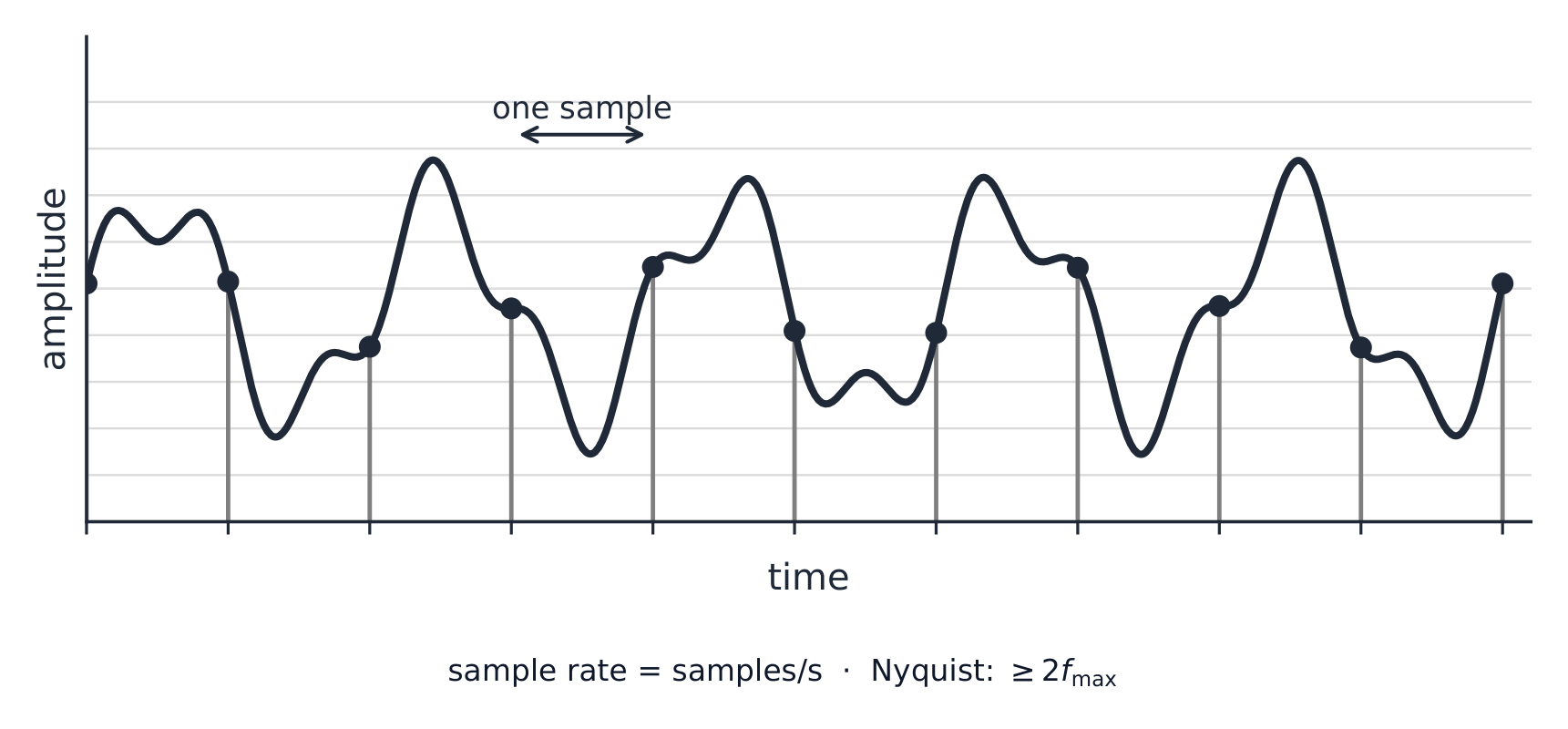
(采样率必须至少是你希望保留的最高频率的两倍。)
探索
声音采样
y = a sin(bt + c)
采样在规则的间隔测量一个声波——一个更高的率更真实地复制它。
词汇
训练
| English | 中文 | 拼音 |
|---|---|---|
| sampling/ˈsæmplɪŋ/ | 采样 | cǎi yàng |
| sampling rate/ˈsæmplɪŋ reɪt/ | 采样率 | cǎi yàng lǜ |
| sampling resolution/ˈsæmplɪŋ ˌrezəˈluːʃn/ | 采样分辨率 | cǎi yàng fēn biàn lǜ |
| amplitude/ˈæmplɪtjuːd/ | 振幅 | zhèn fú |
| sample resolution/ˈsæmpl ˌrezəˈluːʃn/ | 采样分辨率 | cǎi yàng fēn biàn lǜ |
| quantisation/ˌkwɒntaɪˈzeɪʃn/ | 量化 | liàng huà |
| bandwidth/ˈbændwɪdθ/ | 带宽 | dài kuān |
| lossless/ˈlɒsləs/ | 无损 | wú sǔn |
| lossy/ˈlɒsi/ | 有损 | yǒu sǔn |
| run-length encoding/rʌn leŋθ enˈkəʊdɪŋ/ | 行程编码 | xíng chéng biān mǎ |
| dictionary methods/ˈdɪkʃənəri ˈmeθədz/ | 字典编码 | zì diǎn biān mǎ |
1.3
压缩

教学大纲
| 考生应能够: | 说明与指导 |
|---|---|
| 展示对压缩的必要性及其使用示例的理解 | |
| 展示对有损压缩和无损压缩的理解,并能在给定情境中论证选择某种方法的合理性 | |
| 展示对文本文件、位图图像、矢量图形和声音文件如何被压缩的理解 | 包括使用行程长度编码(RLE) |
来源:Cambridge International 教学大纲
压缩 可减少文件大小,节省存储空间和传输带宽。主要有两种类型:
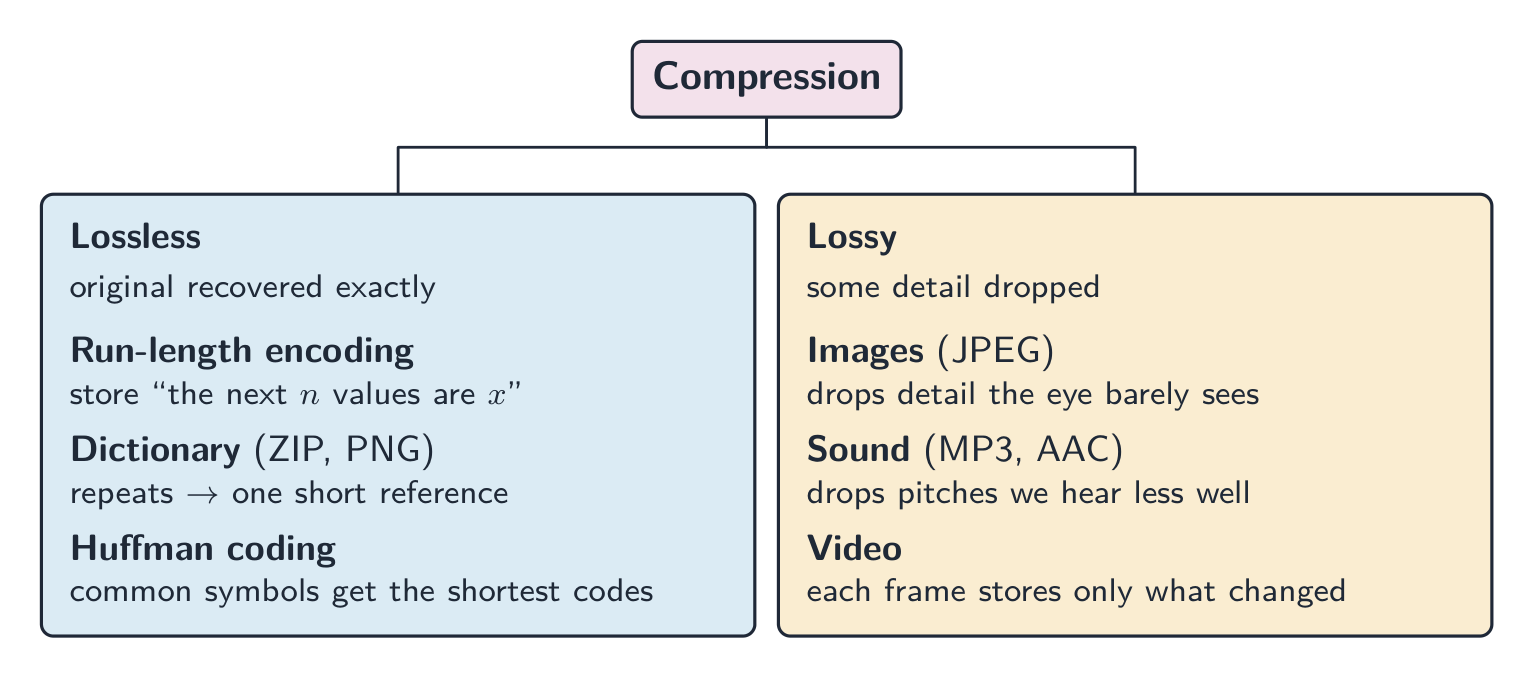
- 无损 — 原始数据可完全恢复(文本、程序、ZIP/PNG)。
- 有损 — 丢弃部分细节以换取更小的文件(JPEG、MP3、视频)。
何时使用哪种方法
- 无损适用于文档、源代码、医学图像等需要精确数据的场景。
- 有损适用于流媒体。实时视频流采用有损压缩,因为它必须在有限带宽下实时传输海量数据;无损压缩无法达到足够的缩减比例。原始高清视频每分钟达千兆字节级别,若不压缩画面将持续卡顿。
“论证型”答案应先指出方法,再结合情境说明理由:“采用无损压缩,因为电子表格必须精确还原;单个数值改变就会导致账目错误。” 或者:“采用有损压缩,因为照片在手机屏幕上观看时丢失的细节不可见,且较小文件上传更快、占用存储空间更少。”
无损压缩方法
- 行程编码 (RLE):用“接下来的$n$个值为$x$”代替重复记录$x$。适合纯色区域;不适用于噪声数据。
- 字典编码 (ZIP, PNG):用简短引用替换重复的字节序列。适合文本和代码。
- 霍夫曼编码:给常用符号分配短码,给罕见符号分配长码,使平均码长接近数据的熵。
各类文件的压缩方式如下:
- 文本文件:字典编码和霍夫曼编码将重复单词和常用字符转换为短码。文本必须保持无损,因为一个字符的改变会改变含义。
- 位图图像:RLE用于连续相同像素(图标、图表、黑白扫描);照片使用有损JPEG,或降低颜色深度/分辨率。
- 矢量图形:绘图列表本身已很小;移除不需要的绘图对象,减少坐标小数位数,或对文件应用ZIP等无损方法。
- 音频文件:有损MP3或AAC去除人耳听不见的声音;降低采样率或分辨率也属于有损压缩;无损格式保留所有采样,但文件体积缩减较少。
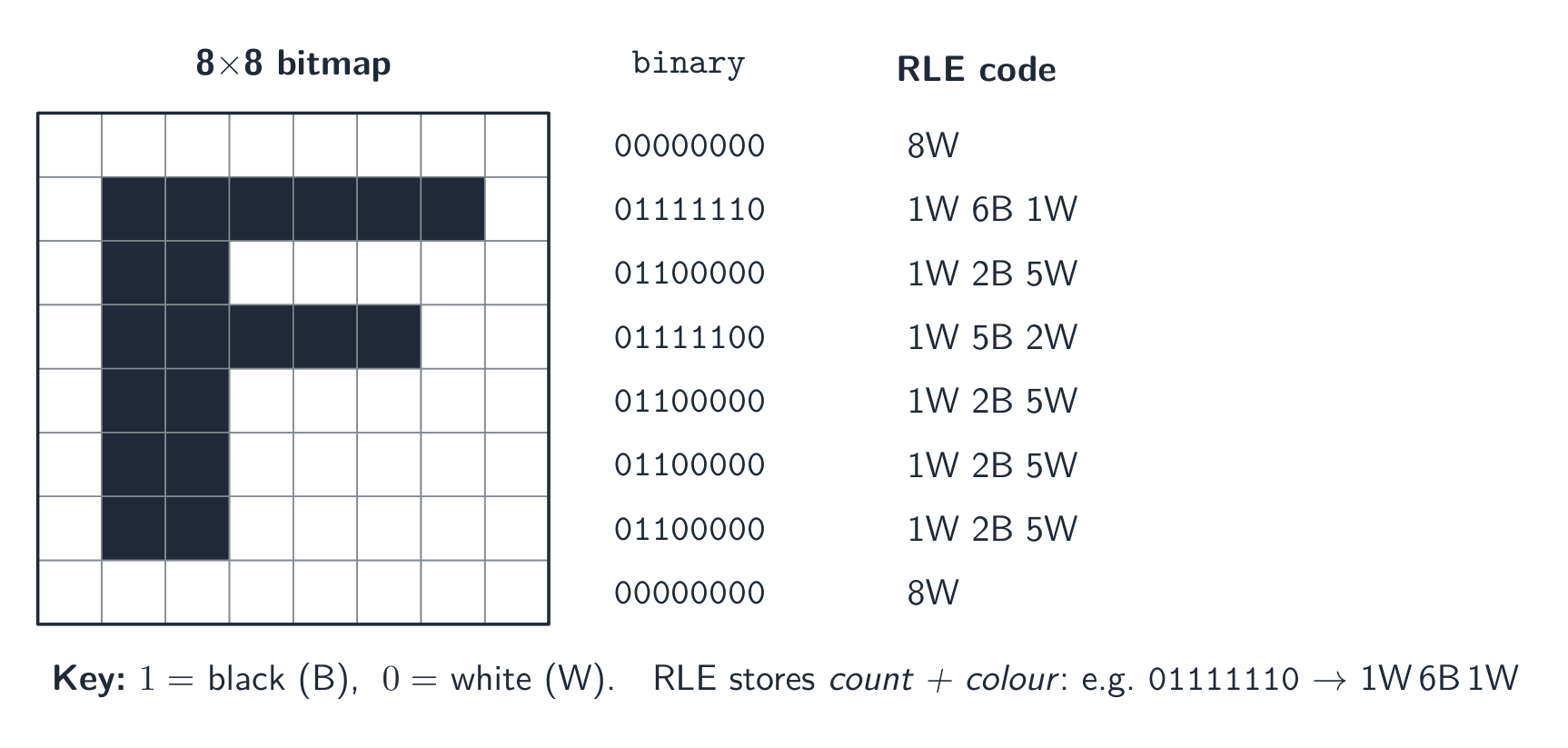 *$8\times8$ 黑白网格中字母F的行程编码
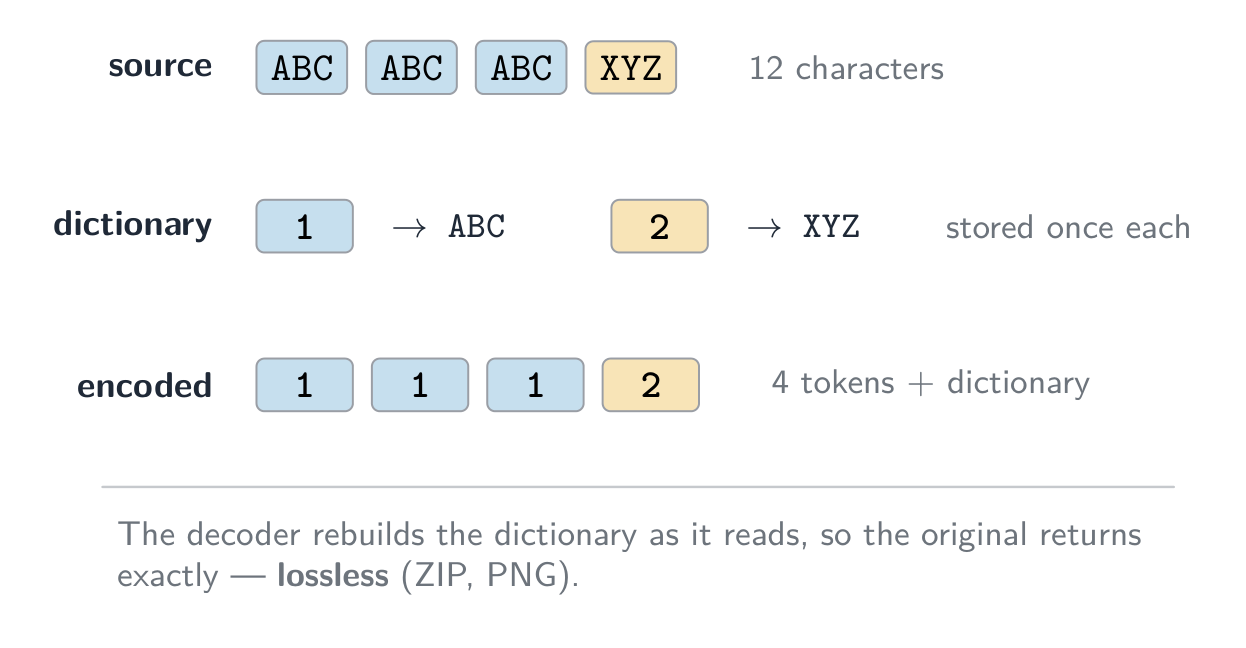
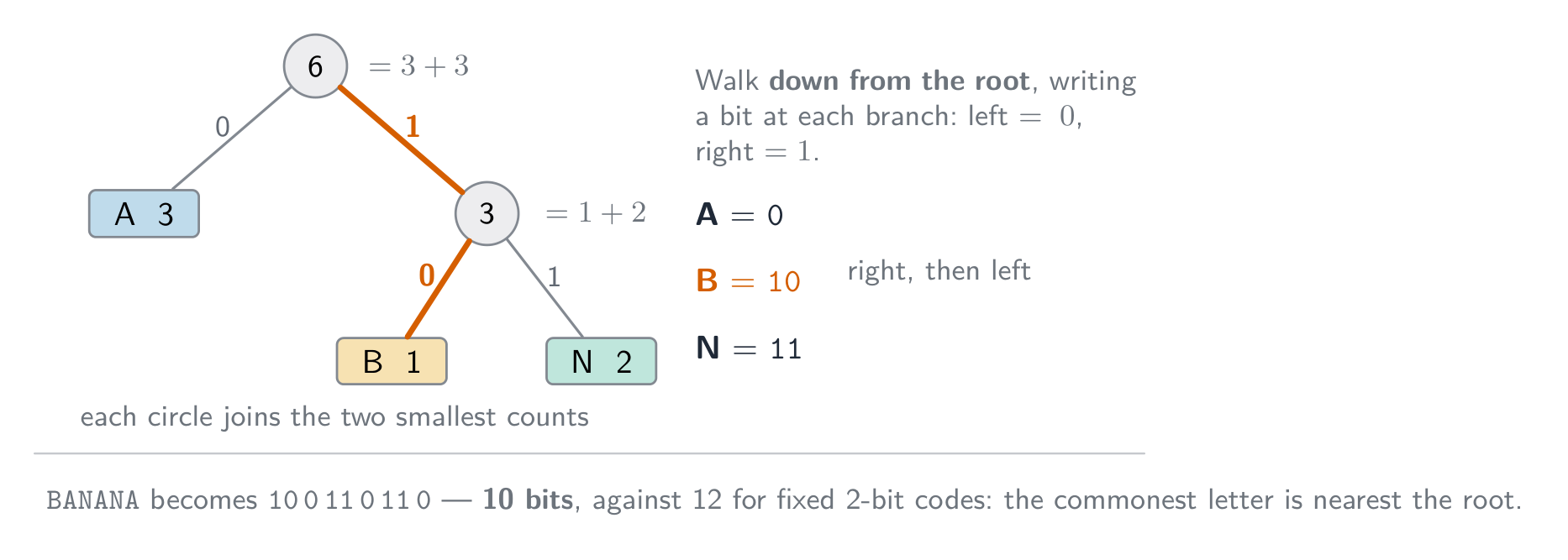
有损压缩方法
- 图像 (JPEG):丢弃肉眼难以察觉的细微细节和色彩差异。
- 音频 (MP3, AAC):丢弃人耳敏感度较低的音调,以及被 louder 声音掩盖的微弱声音。
- 视频结合了空间压缩(单帧内,类似JPEG)与时间压缩(多数帧仅存储与前帧的差异)。
逻辑移位与算术移位;IP地址长度
逻辑移位移动位模式并用0填充空出的位置。对补码整数进行右算术移位时,符号位会被复制到新的最左侧位置。对于八位11110100(−12),逻辑右移两位得到00111101(61);算术右移两位得到11111101(−3)。被丢弃的位将丢失;溢出和舍入可能导致移位结果无法精确等同于乘法或除法运算。
IPv4地址包含32位,通常以四个八位十进制组的形式显示。IPv6地址包含128位,通常以八个四位十六进制数字组的形式显示,之后才允许缩写。这些指的是地址的长度,而非打印地址中的字符数量。
探索
行程长度编码
观察一系列重复符号被压缩为一个计数——简单的无损压缩。
词汇
训练
| English | 中文 | 拼音 |
|---|---|---|
| compression/kəmˈpreʃn/ | 压缩 | yā suō |
| frame rate/freɪm reɪt/ | 帧率 | zhēn lǜ |
| Huffman coding/ˈhʌfmən ˈkəʊdɪŋ/ | 霍夫曼编码 | huò fū màn biān mǎ |
| entropy/ˈentrəpi/ | 熵 | shāng |
| spatial/ˈspeɪʃl/ | 空间 | kōng jiān |
| temporal/ˈtempərəl/ | 时间 | shí jiān |
1.3
考官认可的定义
定义题按固定的表述给分。把这些记准确,并且只写一个答案。
| 术语 | 定义 |
|---|---|
| bit | 单个二进制位,0或1 |
| byte | 一组8个bit |
| 二进制前缀 | 乘数为2的幂次(kibi = 1024),而非10的幂次(kilo = 1000) |
| 补码 | 一种表示带符号整数的方法,其中最高有效位具有负权值 |
| 溢出 | 计算结果过大,无法用可用位数表示 |
| 二进制编码十进制数 | 每个十进制数字作为独立的4位二进制模式存储 |
| 字符集 | 计算机能表示的字符集合,每个字符都有自己唯一的二进制编码 |
| 像素 | 位图图像的最小组成单元,存储一个颜色值 |
| 图像分辨率 | 图像中像素的数量,表示为宽×高 |
| 屏幕分辨率 | 显示器能显示的像素数量,表示为宽×高 |
| 颜色深度 | 存储一个像素颜色所使用的位数 |
| 采样率 | 每秒采集的声音样本数量 |
| 采样精度 | 存储单个样本振幅所使用的位数 |
| 无损压缩 | 可以精确还原原始数据的压缩方式 |
| 有损压缩 | 永久删除部分数据,导致原始数据无法恢复的压缩方式 |
| 行程长度编码 | 用单个值和计数替代连续重复的值序列 |
词汇
训练
| English | 中文 | 拼音 |
|---|---|---|
| byte/baɪt/ | 字节 | zì jié |
1.3
考试技巧
- 展示进位转换的计算过程:十进制转二进制按位权展开,二进制转十六进制以半字节(4位一组)为单位。
- 补码中最高有效位代表负号;取反操作是取反加1;注意当符号位错误翻转时会出现溢出。
- 区分位图(像素;文件大小 $=$ 宽 $\times$ 高 $\times$ 颜色深度)与矢量图(绘图指令;缩放不失真)。
- 声音文件大小取决于采样率 $\times$ 比特深度 $\times$ 时间——各项数值越大,音质越好但文件也越大。
- 比较无损与有损压缩并给出各自的应用场景。
常见错误
- 解释溢出时用“答案大于255”或“它有9位”。先说明题目给定的字长,再指出结果无法在该范围内表示。
- 将最高位置1其余保持不变来构造负数(符号-幅值法)。补码则是将正数的每一位取反后加1。
- 忘记将转换后的数字填充至题目要求的寄存器宽度。
- 在文件大小计算中混淆位和字节。统一以位为单位运算,最后除以8,并注明使用的是1000还是1024作为换算基数。
- 用日常语言回答“描述”类问题(如“图片变差了”)。应使用课标术语:颜色减少、色带效应、图像分辨率降低、像素变大。
该知识点的互动课程
逐步完成,配合即时检查练习。