Skip to content · ⁨ข้ามไปยังเนื้อหา⁩

Software Development · ⁨การพัฒนาซอฟต์แวร์⁩

A-Level Computer Science · ⁨Computer Science A-Level⁩ · Topic 12 · ⁨หัวข้อ 12⁩

Video lesson for this topic · ⁨บทเรียนวิดีโอสำหรับหัวข้อนี้⁩ Open the video page · ⁨เปิดหน้าวิดีโอ⁩
19:27

รอบชีวิตการพัฒนาโปรแกรม

บั๊กเล็กๆ หากหลุดออกไปจนถึงเวอร์ชันReleased อาจต้องใช้เงินมหาศาลในการแก้ไข — มากกว่ามากที่จะจับมันได้ตั้งแต่ต้น นั่นคือเหตุผลที่เราไม่เพียงแค่มารอพิมพ์โค้ด เราทำตาม…

English narration · English + 中文 subtitles burned in · ⁨การบรรยายภาษาอังกฤษ · คำบรรยายภาษาอังกฤษ + 中文 ลอยตัวบนภาพ⁩

12.1

Program development life cycle · ⁨วัฏจักรการพัฒนาโปรแกรม⁩

Syllabus · ⁨หลักสูตร⁩
English
Candidates should be able to: Notes and guidance
Show understanding of the purpose of a development life cycle
Show understanding of the need for different development life cycles depending on the program being developed Including: waterfall, iterative, rapid application development (RAD)
Describe the principles, benefits and drawbacks of each type of life cycle
Show understanding of the analysis, design, coding, testing and maintenance stages in the program development life cycle
ไทย
ผู้เข้าสอบควรสามารถ: หมายเหตุและคำแนะนำ
แสดงความเข้าใจในวัตถุประสงค์ของ วงจรชีวิตการพัฒนา
แสดงความเข้าใจถึงความจำเป็นของ วงจรชีวิตการพัฒนา ที่แตกต่างกันขึ้นอยู่กับโปรแกรมที่กำลังพัฒนา รวมถึง: waterfall, iterative, rapid application development (RAD)
อธิบายหลักการ ข้อดี และข้อเสียของแต่ละประเภทของ วงจรชีวิต
แสดงความเข้าใจในขั้นตอน การวิเคราะห์, การออกแบบ, การเขียนโค้ด, การทดสอบ และ การบำรุงรักษา ใน วงจรชีวิตการพัฒนาโปรแกรม

Source: Cambridge International syllabus · ⁨แหล่งที่มา: หลักสูตร Cambridge International⁩

English

A development life cycle 开发生命周期 is the set of stages from idea to finished, maintained software. It exists to plan, manage and control a project — to build the right product, on time, with good quality.

Why a life cycle is needed

The examiner's list for "the purpose of a development life cycle": it breaks a large project into stages that can be planned and managed; it makes sure the requirements are found and agreed before design and coding begin; it builds in testing and documentation rather than leaving them to the end; it lets the team track progress against milestones and manage risk; and it gives the customer defined points at which to review the work. Without one, a team codes first and discovers late that it built the wrong thing.

Why there are different ones

No single life cycle fits every project, so several development life cycles exist. The choice depends on the size and complexity, how clear the requirements 需求 are at the start, how much change is expected, the risk level, the team, and the deadline.

Common models

  • Waterfall 瀑布模型 — a linear sequence (Analysis → Design → Coding → Testing → Maintenance), each stage finished before the next. Clear and well-documented; good for stable requirements, but poor at coping with mid-project change, and the customer sees nothing working until the end.
  • Iterative model 迭代模型 — repeated passes, each producing a partial version that is reviewed and refined. Catches problems earlier; good when requirements are discovered over time, but harder to estimate.
  • Rapid Application Development 快速应用开发 (RAD) — heavy use of a prototype 原型 and user feedback. Very fast first delivery; good for changing requirements, but depends on user availability and suits smaller systems.
  • Agile 敏捷 — short iterations ("sprints"), constant collaboration and testing. Flexible and adaptive, but needs a committed customer and a skilled team.

Principles, benefits and drawbacks — as the mark scheme lists them.

Model Principle Benefits Drawbacks
waterfall the stages run in a fixed order, each completed and signed off before the next starts; going back means restarting the sequence simple to manage; every stage is fully documented; requirements are fixed early, so costs and dates can be estimated inflexible once a stage is finished; no working software until late; a mistake in analysis is expensive to fix later; the customer cannot see progress
iterative a small working version is built first, then repeatedly improved through further versions until complete working software early and often; problems found in early versions; the customer's feedback shapes each version; requirements can change hard to estimate the total time and cost; repeated testing costs effort; needs the customer to be available; can drift if versions are not planned
RAD prototypes of parts of the system are built quickly and refined with the user until accepted, often in parallel by several teams very fast delivery of a first version; the user is involved throughout, so the product fits their needs; changes are easy to absorb needs skilled developers and committed users; documentation is weak; less suited to large or safety-critical systems

Worked example. A company must be the first to launch a website for a new games console, and the design will change as the console's features are announced. Name the most suitable life cycle and justify it.

RAD. A prototype of the site can be built and shown to the users within days, and refined as the requirements change; the site is small enough for a prototype-driven approach, and speed of delivery is the main requirement. Waterfall would fix the requirements before any page was built and deliver nothing until the end.

The standard stages

Each stage has a purpose, an output and typical activities — a "describe the … stage" question wants two or three of these.

  • analysis — find out what the program must do. Activities: interviews, questionnaires and observation of the current system; a feasibility study; agreeing the requirements specification, which every later stage is checked against.
  • design — decide how it will do it. Outputs: the structure chart (modules and parameters), flowcharts or pseudocode for each module, identifier tables and data structures, screen and file layouts, and the test plan written now, from the specification, before any code exists.
  • coding (implementation 实现) — write the program in a high-level language, module by module, following the design; each module is tested as it is written.
  • testing — run the program against the test plan (normal, abnormal, extreme and boundary data) and correct the errors found; integration, alpha, beta and acceptance testing follow.
  • maintenance 维护 — after release, correct faults, adapt the program to new hardware, software or law, and improve it (see below).

Worked example. Complete the waterfall diagram Analysis → ? → ? → ? → Maintenance and describe what happens at the design stage.

The missing stages are Design, Coding, Testing. At the design stage the requirements are turned into a plan for the program: the problem is decomposed into modules (a structure chart), the algorithm for each module is written as pseudocode or a flowchart, the data structures and identifiers are chosen, the screens and files are laid out, and the test plan is written from the specification.

ไทย

วัฏจักรการพัฒนา คือชุดขั้นตอนตั้งแต่ไอเดียไปจนถึงซอฟต์แวร์สำเร็จรูปและได้รับการบำรุงรักษา มีอยู่เพื่อ วางแผน จัดการ และควบคุม โครงการ — เพื่อสร้างผลิตภัณฑ์ที่ถูกต้อง Within เวลาที่กำหนด และมีคุณภาพดี

ทีมพัฒนาซอฟต์แวร์กำลังร่วมมือกันรอบโต๊ะ
ซอฟต์แวร์ถูกสร้างโดยทีมที่ปฏิบัติตามวัฏจักรการพัฒนาเพื่อรักษาความสอดคล้อง

แผนภาพไหลที่มีตัวกำหนดขอบเขต กล่องกระบวนการ และเพชรตัดสินใจ *แผนภาพไหลวางแผนตรรกะของโปรแกรมในช่วงออกแบบของวัฏจักร

ทำไมถึงต้องใช้วัฏจักร

รายการของกรรมการสอบสำหรับ "วัตถุประสงค์ของวัฏจักรการพัฒนา":它แบ่งโครงการขนาดใหญ่ออกเป็น ขั้นตอน ที่สามารถวางแผนและจัดการได้; มันมั่นใจว่า ข้อกำหนด ถูกค้นพบและตกลงกันก่อนเริ่มออกแบบและเขียนโค้ด; มันฝัง การทดสอบ และ เอกสารประกอบ เข้าไปในกระบวนการแทนที่จะทิ้งไว้จนท้ายที่สุด; มันทำให้ทีมสามารถติดตามความคืบหน้าตาม จุดสำคัญ (milestones) และจัดการความเสี่ยง; และมันมอบจุดตรวจสอบที่ชัดเจนให้กับลูกค้า หากไม่มีวัฏจักรนี้ ทีมจะเขียนโค้ดก่อนแล้วจึงพบว่าในภายหลังว่าสร้างสิ่งที่ไม่ถูกต้อง

ทำไมจึงมีหลายรูปแบบ

ไม่มีวัฏจักรเดียวที่เหมาะสมกับทุกโครงการ ดังนั้นจึงมี วัฏจักรการพัฒนา หลายแบบ การเลือกขึ้นอยู่กับขนาดและความซับซ้อน, ความชัดเจนของ ข้อกำหนด ในช่วงเริ่มต้น, ปริมาณการเปลี่ยนแปลงที่คาดหวัง, ระดับความเสี่ยง, ทีมงาน และกำหนดเวลา

รูปแบบทั่วไป

  • Waterfall (น้ำตก) — ลำดับเชิงเส้น (วิเคราะห์ → ออกแบบ → เขียนโค้ด → ทดสอบ → บำรุงรักษา) ขั้นตอนแต่ละขั้นเสร็จสิ้นก่อนขั้นถัดไป เริ่มชัดเจนและมีเอกสารครบถ้วน; เหมาะกับ ข้อกำหนดที่คงที่, แต่จัดการกับการเปลี่ยนแปลงกลางโครงการได้ไม่ดี และลูกค้าจะไม่เห็นสิ่งที่ใช้งานได้จนจบ
  • รูปแบบซ้ำ (Iterative model) — การทำซ้ำหลายรอบ โดยแต่ละรอบผลิตเวอร์ชันย่อยที่ถูกทบทวนและปรับปรุง จับปัญหาได้เร็วขึ้น; ดีเมื่อ ข้อกำหนดถูกค้นพบตามเวลา, แต่ยากต่อการประมาณการมากขึ้น
  • Rapid Application Development (RAD) — การใช้ ต้นแบบ (prototype) และการตอบรับของผู้ใช้มาก特别 Fast Delivery of first version; Good for changing requirements but depends on user availability and suits smaller systems.
  • Agile — รอบสั้น ("sprints"), การร่วมมือและการทดสอบอย่างต่อเนื่อง ยืดหยุ่นและปรับตัวได้ดี แต่ต้องการลูกค้าที่มีความมุ่งมั่นและทีมงานที่มีทักษะ
กล่องห้าอัน (วิเคราะห์, ออกแบบ, เขียนโค้ด, ทดสอบ, บำรุงรักษา) เรียงcascade ลงมา, แต่ละอันนำไปสู่下一步
รูปแบบ Waterfall: ขั้นตอนที่แต่ละขั้นเสร็จสิ้นก่อนขั้นถัดไปเริ่ม

วงจรออกแบบ-สร้าง-ทดสอบ-ทบทวน พร้อมวงลูปซ้ำกลับไปที่ออกแบบ, และแถบเวอร์ชันสูงขึ้นเรื่อยๆ直至.stringify *รูปแบบ Iterative: การทำซ้ำหลายรอบช่วยปรับปรุงโปรแกรม

สามส่วนถูกสร้างพร้อมกันเป็นต้นแบบที่ปรับปรุงด้วยการตอบรับของผู้ใช้, แล้วรวมเข้าด้วยกันเป็นระบบสุดท้าย *Rapid application development: ทีมงานทำงานบนส่วนต่างๆ พร้อมกัน
หลักการ ประโยชน์ และข้อเสีย — ตามที่แผนการให้คะแนนระบุไว้

รูปแบบ หลักการ ประโยชน์ ข้อเสีย
waterfall ขั้นตอนดำเนินการตามลำดับที่ตายตัว, เสร็จสิ้นและอนุมัติก่อนขั้นถัดไปเริ่ม; การย้อนกลับหมายถึงการเริ่มลำดับใหม่ ง่ายต่อการจัดการ;每一步都有完整的文档; requirements are fixed early, so costs and dates can be estimated inflexible once a stage is finished; no working software until late; a mistake in analysis is expensive to fix later; the customer cannot see progress
iterative สร้างเวอร์ชันที่ใช้งานได้ขนาดเล็กก่อน, จากนั้นปรับปรุงซ้ำผ่านเวอร์ชันต่อไปจนสมบูรณ์ software working early and often; problems found in early versions; the customer's feedback shapes each version; requirements can change hard to estimate the total time and cost; repeated testing costs effort; needs the customer to be available; can drift if versions are not planned
RAD สร้างต้นแบบของส่วนต่างๆ ของระบบอย่างรวดเร็วและปรับปรุงด้วยผู้ใช้จนได้รับ的认可, มักจะทำพร้อมกันโดยหลายทีม very fast delivery of a first version; the user is involved throughout, so the product fits their needs; changes are easy to absorb needs skilled developers and committed users; documentation is weak; less suited to large or safety-critical systems

ตัวอย่างวิธีทำ. บริษัทต้องเป็นรายแรกที่เปิดตัวเว็บไซต์สำหรับเครื่องเกมคอนโซลใหม่, และการออกแบบจะเปลี่ยนแปลงตามคุณสมบัติของคอนโซลที่ถูกประกาศออก ชื่อวัฏจักรที่เหมาะสมที่สุดและอธิบายเหตุผล

RAD. สามารถสร้างต้นแบบของเว็บไซต์และแสดงให้ผู้ใช้งานภายในไม่กี่วัน, และปรับปรุงได้ตามการเปลี่ยนแปลงของข้อกำหนด; เว็บไซต์มีขนาดเล็กพอสำหรับการ pendekatan แบบ driven by prototype, และความเร็วในการส่งมอบเป็นความต้องการหลัก. Waterfall จะกำหนด requirements ก่อนสร้างหน้าเว็บแม้แต่หน้าเดียวและไม่ส่งมอบอะไรuntil the end.

ขั้นตอนมาตรฐาน

แต่ละขั้นตอนมีวัตถุประสงค์, ผลลัพธ์และกิจกรรมทั่วไป — คำถาม "อธิบาย...ขั้นตอน" ต้องการสองหรือสามอย่างเหล่านี้

  • การวิเคราะห์ — ค้นหาว่า อะไรคือสิ่งที่โปรแกรมต้องทำ กิจกรรม: การสัมภาษณ์ แบบสอบถาม และการสังเกตระบบปัจจุบัน; การศึกษาความเป็นไปได้; การตกลงใน เอกสารกำหนดความต้องการ ซึ่งทุกขั้นตอนถัดไปจะถูกตรวจสอบตามนั้น
  • การออกแบบ — ตัดสินใจว่า อย่างไรจะดำเนินการ Outputs: แผนภูมิโครงสร้าง (โมดูลและพารามิเตอร์), แผนภูมิโฟว์ หรือ 伪代码 สำหรับแต่ละโมดูล, ตารางตัวระบุ และโครงสร้างข้อมูล, เล้าเอาต์หน้าจอและไฟล์, และ แผนทดสอบ ที่เขียน ตอนนี้ จากเอกสารกำหนดความต้องการ ก่อนที่จะมีโค้ดใดๆ
  • การเขียนโค้ด (การนำไปใช้) — เขียนโปรแกรมเป็นภาษาสูง โดยแบ่งเป็นโมดูลๆ ตามการออกแบบ; แต่ละโมดูลจะถูกทดสอบทันทีที่เขียนเสร็จ
  • การทดสอบ — รันโปรแกรมตามแผนทดสอบ (ข้อมูลปกติ ปกติผิดปกติ ขอบเขต และค่าสุดขั้ว) และแก้ไขข้อผิดพลาดที่พบ; การทดสอบแบบบูรณาการ การทดสอบอัลฟา การทดสอบเบต้า และการทดสอบยอมรับ จะตามมา
  • การบำรุงรักษา — หลังการปล่อยใช้งาน แก้ไขข้อบกพร่อง ปรับโปรแกรมให้เข้ากับฮาร์ดแวร์ ซอฟต์แวร์ หรือกฎหมายใหม่ และปรับปรุงประสิทธิภาพ (ดูด้านล่าง)

ตัวอย่างวิธีทำ เติมแผนภูมิ Waterfall ให้สมบูรณ์ การวิเคราะห์ → ? → ? → ? → การบำรุงรักษา และอธิบายสิ่งที่จะเกิดขึ้นในช่วงการออกแบบ

ขั้นตอนที่หายไปคือ การออกแบบ, การเขียนโค้ด, การทดสอบ ในช่วงการ设计要求将需求转化为程序计划:问题被分解为模块(结构图),每个模块的算法以伪代码或流程图形式编写,选择数据结构和标识符,规划屏幕和文件布局,并根据规范编写测试计划。

Explore · ⁨สำรวจ⁩

The program development life cycle · ⁨วงจรการพัฒนาโปรแกรม⁩

Step through the stages every project passes through. Getting the requirements right in analysis matters most — a mistake caught in testing is far costlier to fix than one caught early. · ⁨ผ่านขั้นตอนแต่ละขั้นตอนที่โครงการแต่ละแห่งผ่านมา การได้มาซึ่ง requirements ที่ถูกต้องในช่วง analysis สำคัญที่สุด — ความผิดพลาดที่พบในการทดสอบมีค่าใช้จ่ายในการแก้ไขสูงกว่ามากเมื่อเทียบกับข้อผิดพลาดที่พบเร็ว⁩

Explore · ⁨สำรวจ⁩

Software process lab · ⁨ห้องปฏิบัติการกระบวนการซอฟต์แวร์⁩

Classify development examples by the stage or tool they belong to. · ⁨จำแนกตัวอย่างการพัฒนาตามขั้นตอนหรือเครื่องมือที่เกี่ยวข้อง⁩

Vocabulary · ⁨คำศัพท์⁩ Train · ⁨ฝึกฝน⁩
English ไทย
development life cycle/dɪˈveləpmənt laɪf ˈsaɪkl/ วงจรชีวิตการพัฒนา
requirements/rɪˈkwaɪəmənts/ ข้อกำหนด
waterfall/ˈwɔːtəfɔːl/ น้ำตก
iterative model/ˈɪtərətɪv ˈmɒdl/ รุ่นวนซ้ำ
Rapid Application Development/ˈræpɪd ˌæplɪˈkeɪʃn dɪˈveləpmənt/ การพัฒนาแอปพลิเคชันอย่างรวดเร็ว
prototype/ˈprəʊtəʊtaɪp/ ต้นแบบ
Agile/ˈædʒaɪl/ Agile
12.2

Program design tools · ⁨เครื่องมือออกแบบโปรแกรม⁩

Syllabus · ⁨หลักสูตร⁩
English
Candidates should be able to: Notes and guidance
Use a structure chart to decompose a problem into sub-tasks and express the parameters passed between the various modules/procedures/functions which are part of the algorithm design Describe the purpose of a structure chart Construct a structure chart for a given problem Derive equivalent pseudocode from a structure chart
Show understanding of the purpose of state-transition diagrams to document an algorithm
ไทย
ผู้เข้าสอบควรสามารถ: หมายเหตุและคำแนะนำ
ใช้ structure chart เพื่อแยกปัญหาย่อยๆ ออกเป็นงานย่อย และแสดง parameters ที่ส่งผ่านระหว่างโมดูล/procdures/functions ต่างๆ ซึ่งเป็นส่วนหนึ่งของการออกแบบอัลกอริทึม อธิบายวัตถุประสงค์ของ structure chart สร้าง structure chart จากโจทย์ที่กำหนดให้ ดึง 伪代码 ที่เทียบเท่ามาจาก structure chart
แสดงความเข้าใจในวัตถุประสงค์ของ state-transition diagrams ในการบันทึกอัลกอริทึม

Source: Cambridge International syllabus · ⁨แหล่งที่มา: หลักสูตร Cambridge International⁩

English

Structure chart

A structure chart 结构图 shows the hierarchical decomposition 分解 of a program into modules (subroutines 子程序) and the parameters 参数 passed between them. Each module is a rectangle; lines link caller (above) to callee (below); small arrows show data going down and results coming back up. The design can then be turned into equivalent pseudocode 伪代码.

It is a design-stage tool, and you can read the procedure signatures off it.

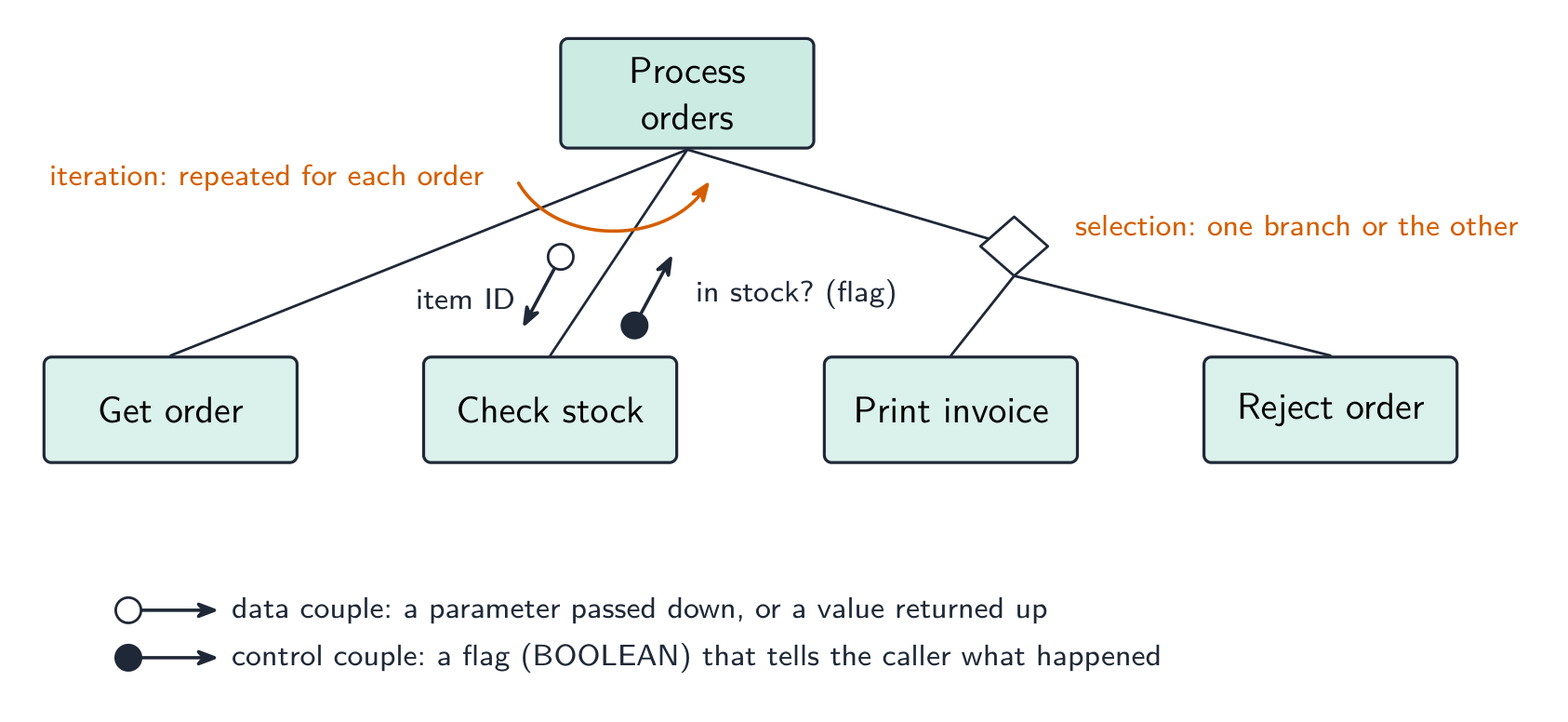
The symbols the examiner asks about. A box is a module; a line links a caller (above) to the modules it calls (below), read left to right in the order they are called. A small arrow with an open circle at its tail is a data couple — a parameter passed down into a module or a value returned up; an arrow with a filled circle is a control couple, a flag (usually BOOLEAN) that tells the caller what happened. A diamond at a branch means selection: only one of the modules below it is called, depending on a condition. A curved arrow sweeping across the links means iteration: the modules under it are called repeatedly in a loop.

Worked example. Four modules are defined as PROCEDURE Main(), PROCEDURE ReadData(BYREF Count : INTEGER), FUNCTION IsValid(Value : INTEGER) RETURNS BOOLEAN and PROCEDURE Report(Total : INTEGER, Count : INTEGER). Main calls ReadData, then calls IsValid once for each value read, then calls Report. Describe the structure chart.

Main at the top; ReadData, IsValid and Report in a row beneath it, left to right in calling order. On the ReadData link an upward data couple Count (a BYREF parameter comes back). On the IsValid link a downward data couple Value and an upward control couple (the BOOLEAN result), with a curved iteration arrow across that link because it is called for each value. On the Report link two downward data couples, Total and Count. Reading the other way, a function is any module that returns a value — its header needs RETURNS and the returned type.

State-transition diagram

A state-transition diagram 状态转换图 shows the states 状态 a system can be in and the events that move it between them — good for vending machines, traffic lights, user interfaces. State-transition diagrams are used to document the behaviour of an algorithm or system. Each state is a circle; each transition is an arrow labelled with the event.

It makes missing transitions easy to spot ("what if a second coin is inserted while awaiting selection?").

Reading and drawing one. Each transition is labelled input | output (or condition | action): what happened, then what the system does as it changes state. A question gives a table of current state, input, output, next state and asks for the diagram, or the reverse — every row of the table is exactly one arrow. Check that every state has an arrow leaving it for every input that can occur, including the ones that leave the state unchanged (an arrow that loops back to the same state).

Worked example. A pump controller has states pump off and pump on. In pump off, the input low level detected produces the output activate pump and moves to pump on; in pump on, normal level detected produces deactivate pump and moves to pump off. Any other input leaves the state unchanged. Draw the table.

Current state Input Output Next state
pump off low level detected activate pump pump on
pump off normal level detected — pump off
pump on normal level detected deactivate pump pump off
pump on low level detected — pump on

The two "no change" rows become loop arrows on the diagram; leaving them out loses the mark for completeness.

ไทย

แผนภูมิโครงสร้าง

แผนภูมิโครงสร้าง แสดงถึง การแยกย่อยเชิงลำดับชั้น ของโปรแกรมออกเป็นโมดูล (** subroutine**) และ พารามิเตอร์ ที่ส่งผ่านระหว่างกัน โมดูลแต่ละตัวเป็นสี่เหลี่ยมผืนผ้า เส้นเชื่อมผู้เรียก (ด้านบน) กับผู้ถูกเรียก (ด้านล่าง);ลูกศรเล็กๆ แสดงข้อมูลที่ไหลลง และผลลัพธ์ที่ไหลขึ้น การออกแบบสามารถเปลี่ยนเป็น 伪代码 ที่เทียบเท่าได้

                CalculatePay
            /        |         \
       GetEmployee  CalculateBonus  CalculateTax
       Returns:     Takes: sales    Takes: gross
       employeeID   Returns: bonus  Returns: tax

เป็นเครื่องมือในช่วงการออกแบบ และคุณสามารถอ่านลายเซ็นของกระบวนการได้จากแผนภูมินี้

แผนภูมิโครงสร้างที่มี Convert temperature อยู่ด้านบน และมี INPUT, Convert to Celsius และ OUTPUT โมดูลอยู่ด้านล่าง พร้อมพารามิเตอร์อุณหภูมิบนเส้นเชื่อม
แผนภูมิโครงสร้าง: โมดูลพร้อมพารามิเตอร์ที่ถูกส่งผ่านระหว่างกัน

สัญลักษณ์ที่ผู้สอบถามถึง กล่องคือโมดูล; เส้นเชื่อมผู้เรียก (ด้านบน) กับโมดูลที่มันเรียก (ด้านล่าง) อ่านจากซ้ายไปขวาตามลำดับการเรียก ลูกศรเล็กที่มี วงกลมเปิด ที่หางคือ คู่ข้อมูล — พารามิเตอร์ที่ส่ง ลง ไปในโมดูลหรือค่าที่ส่ง กลับ ขึ้นมา; ลูกศรที่มี วงกลมเต็ม คือ คู่ควบคุม ซึ่งเป็นแฟล็ก (มักจะเป็น BOOLEAN) ที่บอกผู้เรียก发生了什么 A รูปเพชร ที่ทางแยกหมายถึง การเลือก: มีเพียงโมดูลเดียวภายใต้รูปเพชร就会被调用،ขึ้นอยู่กับเงื่อนไข ลูกศรโค้งที่ Sweep Across Links หมายถึง การทำซ้ำ: โมดูลที่อยู่ใต้ลูกศรนี้จะถูกเรียกซ้ำในลูป

แผนภูมิโครงสร้างแสดงสัญลักษณ์ทั้งหมด: กล่องโมดูล, เส้นเรียก, คู่ข้อมูลวงกลมเปิดที่พก item ID ลงไป, คู่ควบคุมวงกลมเต็มที่ย้อน flag in-stock ขึ้นไป, รูปเพชรที่เลือกระหว่าง Print invoice และ Reject order, และลูกศรโค้งที่เครื่องหมายโมดูลที่ซ้ำสำหรับแต่ละคำสั่งซื้อ
สัญลักษณ์แผนภูมิโครงสร้าง: คู่ข้อมูลและคู่ควบคุม, รูปเพชรสำหรับการเลือก และลูกศรการทำซ้ำ

ตัวอย่างวิธีทำ กำหนดโมดูลสี่ตัวเป็น PROCEDURE Main(), PROCEDURE ReadData(BYREF Count : INTEGER), FUNCTION IsValid(Value : INTEGER) RETURNS BOOLEAN และ PROCEDURE Report(Total : INTEGER, Count : INTEGER) Main เรียก ReadData, จากนั้นเรียก IsValid ครั้งละหนึ่งครั้งสำหรับแต่ละค่าที่อ่าน, แล้วเรียก Report อธิบายแผนภูมิโครงสร้าง

Main อยู่ด้านบน; ReadData, IsValid และ Report อยู่ในแถวเดียวกันด้านล่างจากซ้ายไปขวาตามลำดับการเรียก บนเส้นเชื่อม ReadData มีคู่ข้อมูลขึ้น Count (พารามิเตอร์ BYREF กลับกลับมา) บนเส้นเชื่อมIsValid มีคู่ข้อมูลลง Value และคู่ควบคุมขึ้น (ผลลัพธ์ BOOLEAN) พร้อมลูกศรทำซ้ำโค้ง横跨那个链接เพราะ它为每个值调用。On the Report link two downward data couples, Total and Count. Reading the other way, a function is any module that returns a value — its header needs RETURNS and the returned type.

แผนภูมิสถานะ-การเปลี่ยนแปลง

แผนภูมิสถานะ-การเปลี่ยนแปลง แสดงถึง สถานะ ที่ระบบสามารถอยู่ในนั้นและ เหตุการณ์ ที่ทำให้ระบบเปลี่ยนระหว่างสถานะ — เหมาะสำหรับเครื่องขายอัตโนมัติ ไฟสัญญาณจราจร อินเทอร์เฟซผู้ใช้ แผนภูมิสถานะ-การเปลี่ยนแปลง ใช้เพื่อบันทึกพฤติกรรมของอัลกอริทึมหรือระบบ แต่ละสถานะเป็นวงกลม; แต่ละการเปลี่ยนแปลงเป็นลูกศรที่ติดฉลากด้วยเหตุการณ์

   coin inserted               item selected
[Idle] --------------→ [Awaiting selection] ----------→ [Dispensing]

ช่วยให้เห็นการเปลี่ยนแปลงที่ขาดหายได้ง่าย ("ถ้าใส่เหรียญสองเหรียญขณะรอการเลือก会发生什么?")

แผนภูมิสถานะ: Locked ไปยัง Waiting for second digit ไปยัง Waiting for third digit ไปยัง Unlocked, พร้อมการเปลี่ยนแปลง correct-digit และ wrong-digit
แผนภูมิสถานะ-การเปลี่ยนแปลงสำหรับล็อคประตูรหัส 259

การอ่านและการวาด ทุกการเปลี่ยนแปลงติดฉลาก input | output (หรือ condition | action): เกิดอะไรขึ้น แล้วระบบทำอะไรเมื่อเปลี่ยนสถานะคำถามให้ตาราง current state, input, output, next state และขอแผนภูมิ, หรือในทางกลับ—ทุกบรรทัดของตารางคือลูกศรหนึ่งเส้น ตรวจสอบว่าแต่ละสถานะมีลูกศรออกจากมันสำหรับทุกอินพุตที่อาจเกิดขึ้น รวมถึง那些使状态不变的(一个循环回到同一状态的箭头)。

ตัวอย่างวิธีทำ ตัวควบคุมปั๊มมีสถานะ pump off และ pump on ใน pump off, อินพุต low level detected ผลิตเอาต์พุต activate pump และเปลี่ยนไปยัง pump on; ใน pump on, normal level detected ผลิต deactivate pump และเปลี่ยนไปยัง pump off อินพุตอื่นๆ ทำให้สถานะไม่เปลี่ยนแปลง วาดตาราง

สถานะปัจจุบัน อินพุต เอาต์พุต สถานะถัดไป
pump off low level detected activate pump pump on
พัดลมปิด ตรวจจับระดับปกติ — พัดลมปิด
พัดลมเปิด ตรวจจับระดับปกติ ปิดพัดลม พัดลมปิด
พัดลมเปิด ตรวจจับระดับต่ำ — พัดลมเปิด

แถว "ไม่มีการเปลี่ยนแปลง" ทั้งสองบรรทัดจะกลายเป็นลูกศรวนซ้ำบนแผนภาพ; หากตัดออกจะเสียคะแนนความครบถ้วน

Explore · ⁨สำรวจ⁩

Software process lab · ⁨ห้องปฏิบัติการกระบวนการซอฟต์แวร์⁩

Classify development examples by the stage or tool they belong to. · ⁨จำแนกตัวอย่างการพัฒนาตามขั้นตอนหรือเครื่องมือที่เกี่ยวข้อง⁩

Vocabulary · ⁨คำศัพท์⁩ Train · ⁨ฝึกฝน⁩
English ไทย
structure chart/ˈstrʌktʃə tʃɑːt/ แผนภูมิโครงสร้าง
parameters/pəˈræmɪtəz/ parameters
pseudocode/ˈsuːdəʊkəʊd/ โค้ดเทียม (pseudocode)
12.3

Errors · ⁨ข้อผิดพลาด⁩

Syllabus · ⁨หลักสูตร⁩
English
Candidates should be able to: Notes and guidance
Show understanding of ways of exposing and avoiding faults in programs
Locate and identify the different types of errors • syntax errors • logic errors • run-time errors
Correct identified errors
Show understanding of the methods of testing available and select appropriate data for a given method Including dry run, walkthrough, white-box, black-box, integration, alpha, beta, acceptance, stub
Show understanding of the need for a test strategy and test plan and their likely contents
Choose appropriate test data for a test plan Including normal, abnormal and extreme/boundary
Show understanding of the need for continuing maintenance of a system and the differences between each type of maintenance Including perfective, adaptive, corrective
Analyse an existing program and make amendments to enhance functionality
ไทย
ผู้เข้าสอบควรสามารถ: หมายเหตุและคำแนะนำ
แสดงความเข้าใจถึงวิธีการตรวจจับและหลีกเลี่ยงข้อผิดพลาดในโปรแกรม
หาตำแหน่งและระบุประเภทของข้อผิดพลาดต่างๆ • syntax errors • logic errors • run-time errors
แก้ไขข้อผิดพลาดที่ระบุไว้
แสดงความเข้าใจถึงวิธีการทดสอบที่มีอยู่และเลือกข้อมูลที่เหมาะสมสำหรับแต่ละวิธี รวมถึง dry run, walkthrough, white-box, black-box, integration, alpha, beta, acceptance, stub
แสดงความเข้าใจถึงความจำเป็นของกลยุทธ์การทดสอบและแผนการทดสอบรวมถึงเนื้อหาที่เป็นไปได้
เลือกข้อมูลทดสอบที่เหมาะสมสำหรับแผนการทดสอบ รวมถึง normal, abnormal และ extreme/boundary
แสดงความเข้าใจถึงความจำเป็นในการบำรุงรักษาระบบอย่างต่อเนื่องและความแตกต่างระหว่างประเภทของการบำรุงรักษาแต่ละชนิด รวมถึง perfective, adaptive, corrective
วิเคราะห์โปรแกรมที่มีอยู่เดิมและแก้ไขเพื่อเพิ่มประสิทธิภาพการทำงาน

Source: Cambridge International syllabus · ⁨แหล่งที่มา: หลักสูตร Cambridge International⁩

English
  • syntax error 语法错误 — breaks the language's grammar (missing bracket, misspelled keyword). Caught at translation time; the program won't run until fixed.
  • run-time error 运行时错误 — happens while running (divide by zero, file not found, array index out of range). The program crashes or raises an exception; fix by adding checks.
  • logic error 逻辑错误 — the program runs but gives wrong results (using + for -, an off-by-one loop, conditions in the wrong order). The hardest to find; the only sign is wrong output, so use careful testing and tracing.

Exposing and avoiding faults. Faults are exposed by testing against a test plan, by a dry run or trace table, by a walkthrough with colleagues, and by the IDE's debugger (breakpoints, single stepping, watching variables). They are avoided by designing before coding (structure chart, pseudocode), by modular code with meaningful identifiers and comments, by validation of every input, by handling exceptions rather than letting a run-time error crash the program, and by the IDE's dynamic syntax checks as you type.

Worked example. State the type of error in each case and how it shows itself. (a) Result <- STR_TO_NUM(x) / STR_TO_NUM(y) is run with y = "0". (b) The same line is run with x = "12a". (c) A loop written as FOR i <- 1 TO 9 processes a ten-element array. (d) OUTPUT "Total: " Total is missing a comma.

(a) Run-time error — division by zero; the program crashes when this line is executed with that data. (b) Run-time error — the string cannot be converted to a number. (c) Logic error — the program runs but the tenth element is never processed, so the output is wrong. (d) Syntax error — the statement breaks the language's rules and is reported by the translator before the program runs.

Worked example. Correct the errors in this pseudocode, which should output the average of ten marks.

The division should be by 10, not 9 (a logic error); the output line needs a comma or an & between the string and the value (a syntax error); and Average is never declared as REAL (a syntax or run-time error, depending on the language). Say which line and what the corrected line is: Average <- Total / 10.

ไทย
  • ข้อผิดพลาดทางไวยากรณ์ (syntax error) — ขาดกฎภาษา (เช่น หายวงเล็บ, พิมพ์คำสำคัญผิด) ตรวจพบในช่วงการแปล; โปรแกรมจะไม่ทำงานจนกว่าจะแก้ไขให้ถูกต้อง
  • ข้อผิดพลาดขณะรัน (run-time error) — เกิดขึ้นระหว่างการทำงาน (เช่น หารด้วยศูนย์, ไม่พบไฟล์, ดัชนีอาเรย์เกินขอบเขต) โปรแกรมจะหยุดทำงานหรือเกิดข้อยกเว้น; แก้ไขได้โดยการเพิ่มการตรวจสอบ
  • ข้อผิดพลาดทางตรรกะ (logic error) — โปรแกรมทำงานได้แต่ให้ ผลลัพธ์ที่ผิด (เช่น ใช้ + แทน -, ลูปที่มีจำนวนรอบคลาดเคลื่อน, เงื่อนไขเรียงลำดับผิด) เป็นข้อที่ยากที่สุดในการหา; สัญญาณเดียวคือผลลัพธ์ที่ผิดปกติ ดังนั้นต้องใช้การทดสอบและติดตามอย่างละเอียด
กระบวนการตั้งแต่เขียนโค้ด แปลง รัน ไปยังผลลัพธ์: ข้อผิดพลาดทางไวยากรณ์จะหยุดที่ขั้นตอนการแปล, ข้อผิดพลาดขณะรันจะทำให้โปรแกรมล่มระหว่างรัน, และข้อผิดพลาดทางตรรกะจะรันได้แต่ให้ผลลัพธ์ที่ผิด
ช่วงเวลาที่เกิดของข้อผิดพลาดแต่ละประเภท: ไวยากรณ์ที่การแปล, ขณะรันระหว่างการรัน, ทางตรรกะที่ผลลัพธ์

การเปิดเผยและหลีกเลี่ยงข้อบกพร่อง ข้อบกพร่องจะถูก เปิดเผย ผ่านการทดสอบตามแผนการทดสอบ, การ试运行 (dry run) หรือตารางติดตาม (trace table), การทบทวนโค้ดร่วมกับเพื่อนร่วมงาน และการใช้ไดบักเกอร์ใน IDE (จุดหยุด, รันทีละบรรทัด, ดูค่าตัวแปร) จะถูก หลีกเลี่ยง ได้ด้วยการออกแบบก่อนเขียนโค้ด (แผนภาพโครงสร้าง, โค้ดลวง), การเขียนโค้ดแบบโมดูลพร้อมชื่อตัวแปรและความหมายที่ชัดเจนพร้อม_heading, การตรวจสอบความถูกต้อง (validation) ของข้อมูลเข้าทุกชนิด, การจัดการกับข้อยกเว้นแทนที่จะปล่อยให้ข้อผิดพลาดขณะรันทำให้โปรแกรมล่ม และการตรวจสอบไวยากรณ์แบบไดนามิกของ IDE ขณะพิมพ์

ตัวอย่างมีคำตอบ ระบุประเภทของข้อผิดพลาดในแต่ละกรณีและวิธีที่มันแสดงออก (a) Result <- STR_TO_NUM(x) / STR_TO_NUM(y) ถูกรันด้วย y = "0" (b) บรรทัดเดียวกันถูกรันด้วย x = "12a" (c) ลูปที่เขียนเป็น FOR i <- 1 TO 9 ประมวลผลอาเรย์ขนาดสิบ عنصر (d) OUTPUT "Total: " Total หายเครื่องหมายคั่น

(a) ข้อผิดพลาดขณะรัน — หารด้วยศูนย์; โปรแกรมล่มเมื่อบรรทัดนี้被执行ด้วยข้อมูลนั้น (b) ข้อผิดพลาดขณะรัน — สตรีงไม่สามารถแปลงเป็นตัวเลขได้ (c) ข้อผิดพลาดทางตรรกะ — โปรแกรมรันได้แต่ عنصرที่สิบไม่ถูกประมวลผล ทำให้ผลลัพธ์ผิด (d) ข้อผิดพลาดทางไวยากรณ์ — คำสั่งละเมิดกฎภาษาและถูกรายงานโดยตัวแปลก่อนที่โปรแกรมจะรัน

ตัวอย่างมีคำตอบ แก้ไขข้อผิดพลาดในโค้ดลวงนี้ซึ่งควรแสดงผลเฉลี่ยของคะแนนสิบรายการ

Total <- 0
FOR i <- 1 TO 10
    INPUT Mark
    Total <- Total + Mark
NEXT i
Average <- Total / 9
OUTPUT "Average" Average

การหารควรเป็นด้วย 10 ไม่ใช่ 9 (ข้อผิดพลาดทางตรรกะ); บรรทัดผลลัพธ์ต้องมีเครื่องหมายคั่นหรือ & ระหว่างสत्रीงกับค่า (ข้อผิดพลาดทางไวยากรณ์); และ Average ไม่เคยถูกประกาศเป็น REAL (ข้อผิดพลาดทางไวยากรณ์หรือขณะรัน ขึ้นอยู่กับภาษา) ระบุบรรทัดใดและบรรทัดที่แก้ไขแล้วคือ: Average <- Total / 10

Vocabulary · ⁨คำศัพท์⁩ Train · ⁨ฝึกฝน⁩
English ไทย
syntax error/ˈsɪntæks ˈerə/ ข้อผิดพลาดด้านไวยากรณ์
run-time error/rʌn taɪm ˈerə/ ข้อผิดพลาดขณะรันโปรแกรม
logic error/ˈlɒdʒɪk ˈerə/ ข้อผิดพลาดด้านตรรกะ
dry run/draɪ rʌn/ 试运行 (dry run)
trace table/treɪs ˈteɪbl/ ตารางติดตาม
12.3

Testing methods · ⁨วิธีการทดสอบ⁩

English
  • dry run 手工跟踪 — trace the code on paper, writing each variable's value in a table.
  • walkthrough 走查 — a team review of the code.
  • white-box testing 白盒测试 — designed from the code's internal structure, covering every statement, branch and loop.
  • black-box testing 黑盒测试 — designed from the specification only: feed inputs, check outputs.
  • integration testing 集成测试 — combine modules and test the interfaces between them.
  • alpha testing α测试 — by the developers/in-house before release; beta testing β测试 — by a limited group of real users in their own environment.
  • acceptance testing 验收测试 — by the customer, to decide if the product is fit for purpose.
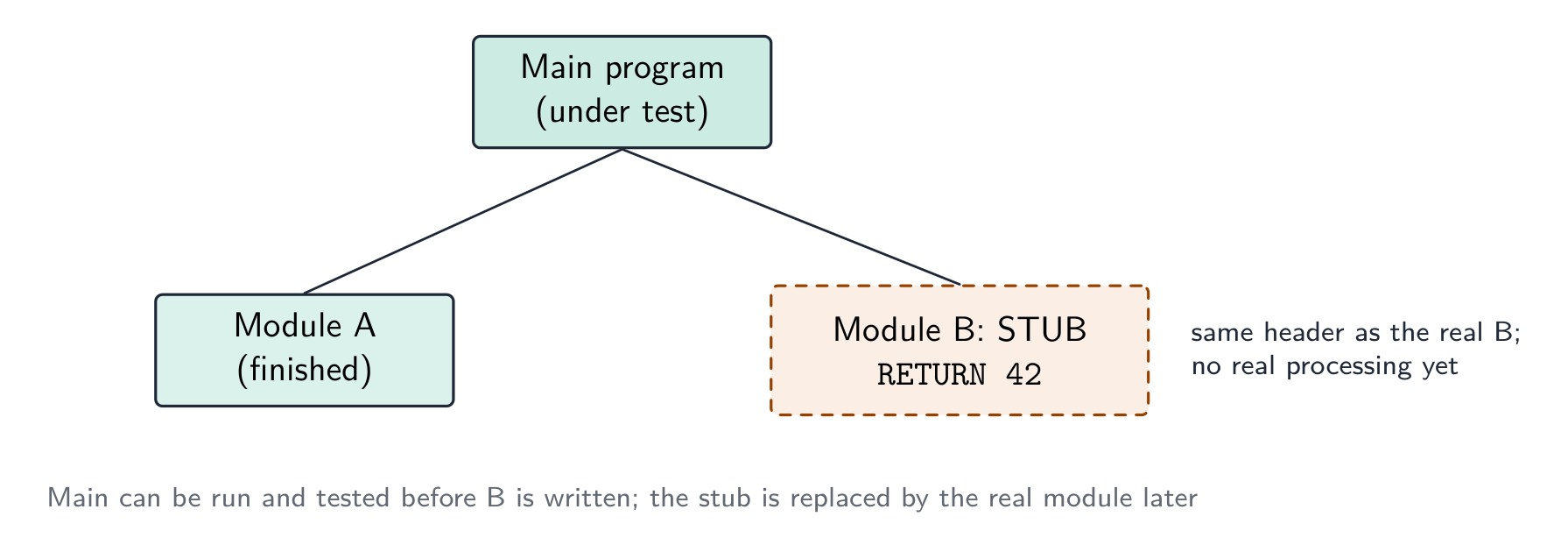
  • stub 桩 — a placeholder for a module that does not exist yet, so the structure can be tested top-down.

Which method, when. A dry run and a walkthrough need no computer — the dry run is you, tracing the algorithm with a trace table 跟踪表; the walkthrough is a meeting in which the author explains the code line by line and colleagues look for faults, so it also spreads knowledge of the code through the team and checks it against the design. White-box tests are written by someone who can see the code and aims to exercise every path; black-box tests are written from the specification and check only inputs against expected outputs, so a user or a separate tester can do them. Integration testing follows module testing: modules that pass alone can still fail when the data passed between them is the wrong type or in the wrong order. Alpha testing is in-house; beta testing gives a release candidate to a sample of real users, who report faults from real use; acceptance testing is the customer checking the finished product against the requirements before paying for it. A stub lets top-down testing start before every module exists.

Worked example. After the program passed its in-house tests it was given to a group of users to try before release. Name this type of testing, and state what happens next.

Beta testing — real users in their own environment, reporting faults the developers did not find. The faults are corrected, then the customer carries out acceptance testing against the requirements and the program is released; faults found in live use are then handled by corrective maintenance.

Worked example. Give three benefits of testing a program by walkthrough.

Errors are found by people who did not write the code and so read it without assumptions; the logic is checked against the design and specification, not only against test data; several people learn how the code works, which helps later maintenance; and no test data or working computer is needed, so it can be done early.

ไทย
  • 试运行 (dry run) — ติดตามโค้ดบนกระดาษ โดยเขียนค่าของแต่ละตัวแปรลงในตาราง
  • การทบทวนโค้ด (walkthrough) — การตรวจสอบโค้ดร่วมกันเป็นทีม
  • การทดสอบกล่องขาว (white-box testing) — ออกแบบจากโครงสร้างภายในของโค้ด ครอบคลุมทุกคำสั่ง ทุกสาขา และทุกลูป
  • การทดสอบกล่องดำ (black-box testing) — ออกแบบจากเอกสารสเปกIFICATIONS เท่านั้น: ใส่ข้อมูลเข้า ตรวจสอบผลลัพธ์
  • การทดสอบการบูรณาการ (integration testing) — รวมโมดูลเข้าด้วยกันและทดสอบอินเทอร์เฟซระหว่างกัน
  • การทดสอบอัลฟา (alpha testing) α — ทำโดยนักพัฒนา/ภายในองค์กรก่อนปล่อย; การทดสอบเบตา (beta testing) β — ทำโดยกลุ่มผู้ใช้จริงจำนวนจำกัดในสภาพแวดล้อมของตนเอง
  • การทดสอบยอมรับ (acceptance testing) — ทำโดยลูกค้า เพื่อตัดสินว่าผลิตภัณฑ์เหมาะสมกับวัตถุประสงค์หรือไม่
  • สตับ (stub) — ตัวแทนสำหรับโมดูลที่ยังไม่มีอยู่ เพื่อให้สามารถทดสอบโครงสร้างจากบนลงล่างได้

การทดสอบกล่องดำทำงานจากสเปกIFICATIONS; การทดสอบกล่องขาวทดสอบเส้นทางภายในของโค้ด *การทดสอบกล่องดำทดสอบสเปกIFICATIONS; การทดสอบกล่องขาวทดสอบเส้นทางของโค้ด

วิธีการใด เมื่อไหร่ 试运行 (dry run) และ การทบทวนโค้ด (walkthrough) ไม่ต้องใช้คอมพิวเตอร์ — การ试运行คือการที่คุณเองติดตามอัลกอริทึมด้วย ตารางติดตาม; การทบทวนโค้ดคือการประชุมที่ผู้เขียนอธิบายโค้ดบรรทัดต่อบรรทัดและเพื่อนร่วมงานมองหาข้อบกพร่อง ซึ่งยังช่วยกระจายความรู้เกี่ยวกับโค้ดผ่านทีมและตรวจสอบกับแบบแผนด้วย การทดสอบกล่องขาว เขียนโดยคนที่เห็นโค้ดและมุ่งเน้นการใช้ทุกเส้นทาง; การทดสอบกล่องดำ เขียนจากสเปกIFICATIONS และตรวจสอบเฉพาะข้อมูลเข้าเทียบกับผลลัพธ์ที่คาดหวัง ดังนั้นผู้ใช้หรือผู้ทดสอบแยกต่างหากสามารถทำได้ การทดสอบการบูรณาการ ตามหลังการทดสอบโมดูล: โมดูลที่ผ่านการทดสอบเดี่ยวอาจล้มเหลวเมื่อข้อมูลส่งระหว่างกันมีประเภทหรือลำดับไม่ถูกต้อง การทดสอบอัลฟา ทำภายในองค์กร; การทดสอบเบตา ให้เวอร์ชันที่พร้อมปล่อยให้กับกลุ่มตัวอย่างของผู้ใช้จริง ผู้ซึ่งรายงานข้อบกพร่องจากการใช้งานจริง; การทดสอบยอมรับ คือการที่ลูกค้าตรวจสอบผลิตภัณฑ์สำเร็จรูปเทียบกับข้อกำหนดก่อนชำระเงิน สตับ ช่วยให้การทดสอบจากบนลงล่างเริ่มต้นได้แม้โมดูลยังไม่ครบทุกส่วน

การทดสอบด้วยสตับ: โปรแกรมหลักที่ถูกทดสอบเรียก Module A ที่สมบูรณ์แล้ว และสตับที่ทำหน้าที่แทน Module B ที่ยังไม่ได้เขียน ซึ่งมีหัวไฟล์จริงแต่กลับค่าคงที่เท่านั้น *สตับทำหน้าที่แทนโมดูลที่ยังไม่ได้เขียน เพื่อให้โมดูลที่อยู่ด้านบนสามารถทดสอบได้ทันที

ตัวอย่างมีคำตอบ หลังจากโปรแกรมผ่านการทดสอบภายในองค์กรแล้ว ถูกมอบให้กลุ่มผู้ใช้ลองใช้ก่อนปล่อย ระบุชื่อประเภทของการทดสอบนี้และสิ่งที่เกิดขึ้นต่อไป

การทดสอบเบตา — ผู้ใช้จริงในสภาพแวดล้อมของตนเอง รายงานข้อบกพร่องที่นักพัฒนาไม่พบ ข้อบกพร่องเหล่านี้จะถูกแก้ไข จากนั้นลูกค้าจะดำเนินการ การทดสอบยอมรับ เทียบกับข้อกำหนดและโปรแกรมจะถูกปล่อย; ข้อบกพร่องที่พบการใช้งานจริงจะถูกจัดการด้วยการบำรุงรักษาเพื่อแก้ไข

ตัวอย่างมีคำตอบ ระบุประโยชน์สามประการของการทดสอบโปรแกรมด้วยการทบทวนโค้ด

ข้อผิดพลาดถูกค้นพบโดยบุคคลที่ไม่ได้เขียนโค้ดเองและอ่านโค้ดโดยไม่ตั้งสมมติฐาน; Logic ถูกตรวจสอบเทียบกับออกแบบและสเปก ไม่ใช่แค่เทียบกับข้อมูลทดสอบ; คนหลายท่านเรียนรู้วิธีการทำงานของโค้ด ซึ่งช่วยในการบำรุงรักษาในอนาคต; และไม่จำเป็นต้องมีข้อมูลทดสอบหรือคอมพิวเตอร์ที่ใช้งานอยู่ สามารถทำได้ตั้งแต่ต้น

Vocabulary · ⁨คำศัพท์⁩ Train · ⁨ฝึกฝน⁩
English ไทย
acceptance testing/əkˈseptəns ˈtestɪŋ/ การทดสอบรับมอบหมาย (acceptance testing)
hierarchical decomposition/haɪəˈrɑːkɪkl ˌdiːkɒmpəˈzɪʃn/ การแยกส่วนแบบเชิงลำดับชั้น
decomposition/ˌdiːkɒmpəˈzɪʃn/ การสลายตัว
subroutines/ˈsʌbruːtiːnz/ subroutines
state-transition diagram/steɪt trænˈsɪʃn ˈdaɪəɡræm/ แผนภาพเปลี่ยนสถานะ
states/steɪts/ ระบุว่า
walkthrough/ˈwɔːkθruː/ การทบทวน
white-box testing/waɪt bɒks ˈtestɪŋ/ การทดสอบกล่องขาว
black-box testing/blæk bɒks ˈtestɪŋ/ การทดสอบกล่องดำ
integration testing/ˌɪntɪˈɡreɪʃn ˈtestɪŋ/ การทดสอบบูรณาการ (integration testing)
alpha testing/ˈælfə ˈtestɪŋ/ การทดสอบอัลฟา
beta testing/ˈbiːtə ˈtestɪŋ/ การทดสอบเบตา (beta testing)
stub/stʌb/ สตับ
12.3

Test strategy and test plan · ⁨กลยุทธ์การทดสอบและแผนการทดสอบ⁩

English

A test strategy 测试策略 is the high-level approach — which kinds of testing, who does them, when, and the criteria to move on. A test plan 测试计划 is the detailed list of tests — each with input data, expected output, and a column for the actual output.

What each contains. A test strategy states which testing methods will be used at which stage (module testing by the programmer, then integration, alpha, beta, acceptance), who is responsible for each, what test data is required, and the criteria for passing to the next stage. A test plan lists the individual tests: for each, the module or feature under test, the input data, the reason the data was chosen (normal, abnormal, extreme, boundary), the expected result, a space for the actual result, and what to do if they differ. The plan is written at the design stage, from the specification, so that it tests what the program should do rather than what it happens to do.

Choosing test data

For each field or condition, include three kinds:

  • normal data 正常数据 — typical values inside the valid range (for marks 0–100: 50, 75).
  • abnormal data 异常数据 — values that should be rejected (-10, 200, "abc").
  • extreme data 极端数据 — the largest and smallest values still accepted (0 and 100).
  • boundary data 边界数据 — values at the edges, where off-by-one errors hide (each accepted extreme and the rejected value just outside it: 0/-1, 100/101).

Worked example. A field accepts an exam mark from 0 to 100. Give test data of each kind with its expected result. Normal: 50 - accepted, a typical value inside the range. Abnormal: -10, 200, "abc" - all rejected, being out of range or the wrong data type. Extreme: 0 and 100 - the largest and smallest values that are still accepted. Boundary: the pairs straddling each edge - -1 rejected alongside 0 accepted, and 100 accepted alongside 101 rejected. Every value must carry its expected result, or the test plan proves nothing. Extreme and boundary are the pair most often confused: an extreme value sits inside and is accepted, while a boundary test is always a pair either side of the edge - which is exactly where off-by-one errors hide.

Worked example. A component passes if its weight, measured to the nearest gram, is within 3 g of the target of 50 g, i.e. from 47 g to 53 g inclusive. Draw up the test-plan rows for the check.

Test data Type Reason Expected result
50 normal a typical value well inside the range accepted
47, 53 extreme (boundary) the smallest and largest values that must still be accepted accepted
46, 54 boundary the values just outside the range, where an off-by-one error would accept them rejected
20, 90 abnormal values far outside the range rejected
"abc", −5 abnormal the wrong type, a negative weight rejected

Each row must say why the value was chosen and what should happen; a bare list of numbers earns nothing.

ไทย

กลยุทธ์การทดสอบ (Test strategy) คือ แนวทางระดับสูง — jenis testing อะไรบ้าง, ใครเป็นผู้ทำ,何时, และเกณฑ์เพื่อผ่านไปยังขั้นตอนถัดไป. แผนการทดสอบ (Test plan) คือ รายการละเอียดของการทดสอบ — แต่ละข้อมีข้อมูลเข้า, ผลลัพธ์ที่คาดหวัง, และคอลัมน์สำหรับผลลัพธ์จริง

สิ่งที่แต่ละส่วนประกอบด้วย. Test strategy ระบุว่าวิธีการทดสอบอะไรจะถูกใช้ในช่วงไหน (module testing โดยนักพัฒนา, จากนั้น integration, alpha, beta, acceptance), ใครรับผิดชอบแต่ละส่วน, ต้องการข้อมูลทดสอบอะไรบ้าง, และเกณฑ์สำหรับการผ่านไปยังขั้นต่อไป. Test plan รายชื่อการทดสอบรายย่อย: สำหรับแต่ละข้อ, โมดูลหรือฟีเจอร์ที่กำลังทดสอบ, ข้อมูลเข้า, เหตุผลที่เลือกข้อมูลนั้น (ปกติ, ผิดปกติ, ขอบเขตสุด, ขอบเขต), ผลลัพธ์ที่คาดหวัง, ช่องว่างสำหรับ ผลลัพธ์จริง, และสิ่งที่ต้องทำหากทั้งสองต่างกัน. แผนนี้เขียนในช่วง design จาก specification, เพื่อให้ทดสอบสิ่งที่โปรแกรม ควร ทำ แทนที่จะเป็นสิ่งที่มัน กำลัง ทำอยู่

การเลือกข้อมูลทดสอบ

สำหรับแต่ละฟิลด์หรือเงื่อนไข, ควรรวมสามประเภท:

  • ข้อมูลปกติ (normal data) — ค่าทั่วไปในช่วงที่ยอมรับได้ (สำหรับคะแนน 0–100: 50, 75).
  • ข้อมูลผิดปกติ — ค่าที่ควรถูกปฏิเสธ (-10, 200, "abc")
  • ค่าสุดขั้ว — ค่าที่ใหญ่ที่สุดและเล็กที่สุดที่ยังคง รับได้ (0 และ 100)
  • ค่าขอบเขต — ค่าที่อยู่ตามขอบเขต ซึ่งซ่อนข้อผิดพลาดในการนับเกินหนึ่ง (แต่ละค่าสุดขั้วที่ยอมรับได้และค่าที่ถูกปฏิเสธที่อยู่นอกขอบเขตนั้น: 0/-1, 100/101)
เส้นจำนวนสำหรับช่องคะแนน 0 ถึง 100: ค่าปกติ 50 และ 75 อยู่ภายใน, ค่าสุดขั้ว 0 และ 100 อยู่ที่ขอบเขตที่ยอมรับได้, และค่าผิดปกติ -1, 101, -10 และ 200 ถูกปฏิเสธภายนอก
ข้อมูลทดสอบสำหรับช่อง 0–100: ค่าปกติอยู่ภายใน, ค่าสุดขั้วอยู่ที่ขอบเขต, ค่าผิดปกติอยู่ภายนอก

ตัวอย่างวิธีทำ. ช่องนี้รับคะแนนการสอบตั้งแต่ 0 ถึง 100 ให้เขียนข้อมูลทดสอบแต่ละประเภทพร้อมผลลัพธ์ที่คาดหวัง ค่าปกติ: 50 - รับได้, เป็นค่าทั่วไปอยู่ในช่วง ค่าผิดปกติ: -10, 200, "abc" - ถูกปฏิเสธทั้งหมด เนื่องจากนอกช่วงหรือเป็นประเภทข้อมูลผิด ค่าสุดขั้ว: 0 และ 100 - ค่าที่ใหญ่ที่สุดและเล็กที่สุดที่ยังคง รับได้ ค่าขอบเขต: คู่ที่พาดผ่านแต่ละขอบเขต - -1 ถูกปฏิเสธคู่กับ 0 ที่รับได้, และ 100 ที่รับได้คู่กับ 101 ที่ถูกปฏิเสธ ทุกค่าต้องมี ผลลัพธ์ที่คาดหวัง, มิฉะนั้นแผนทดสอบจะไร้ความหมาย ค่าสุดขั้วและค่าขอบเขตมักถูกสับสนกันมากที่สุด: ค่าสุดขั้วอยู่ ภายใน并接受, แต่การทดสอบค่าขอบเขตต้องเป็น คู่ ข้างๆ ขอบเขตเสมอ — ซึ่งเป็นจุดที่ข้อผิดพลาด off-by-one ซ่อนตัวอยู่

ตัวอย่างวิธีทำ. ส่วนประกอบจะผ่านการตรวจสอบหากน้ำหนักที่วัดได้ใกล้กรัมที่สุดอยู่ในช่วง 3 กรัม ของเป้าหมายที่ 50 กรัม, คือตั้งแต่ 47 กรัมถึง 53 กรัม (รวม) จงร่างแถวแผนทดสอบสำหรับการตรวจสอบนี้

ข้อมูลทดสอบ ประเภท เหตุผล ผลลัพธ์ที่คาดหวัง
50 ปกติ เป็นค่าทั่วไปซึ่งอยู่ลึกภายในช่วง รับได้
47, 53 สุดขั้ว (ขอบเขต) ค่าที่เล็กที่สุดและใหญ่ที่สุดที่ยังต้องรับได้ รับได้
46, 54 ขอบเขต ค่าที่อยู่นอกช่วงเล็กน้อย ซึ่งอาจทำให้ข้อผิดพลาด off-by-one ยอมรับค่าเหล่านี้ไว้ ปฏิเสธ
20, 90 ปกติ ค่าที่อยู่นอกช่วงอย่างชัดเจน ปฏิเสธ
"abc", −5 ปกติ ประเภทไม่ถูกต้อง, น้ำหนักติดลบ ปฏิเสธ

แต่ละแถวต้องระบุ เหตุผล ที่เลือกค่านั้นและ สิ่งที่ควรเกิดขึ้น; การให้เพียงรายการตัวเลขเปล่าจะไม่ได้รับคะแนน

Vocabulary · ⁨คำศัพท์⁩ Train · ⁨ฝึกฝน⁩
English ไทย
test plan/test plæn/ แผนการทดสอบ
implementation/ˌɪmplɪmənˈteɪʃn/ การนำไปใช้
boundary data/ˈbaʊndəri ˈdeɪtə/ ข้อมูลขอบเขต
test strategy/test ˈstrætədʒi/ กลยุทธ์การทดสอบ
normal data/ˈnɔːml ˈdeɪtə/ ข้อมูลปกติ
abnormal data/əbˈnɔːml ˈdeɪtə/ ข้อมูลผิดปกติ
extreme data/ekˈstriːm ˈdeɪtə/ ข้อมูลสุดขั้ว
perfective maintenance/pəˈfektɪv ˈmeɪntənəns/ การบำรุงรักษาเพื่อประสิทธิภาพ
adaptive maintenance/əˈdæptɪv ˈmeɪntənəns/ adaptive maintenance
regression testing/rɪˈɡreʃn ˈtestɪŋ/ การทดสอบการถอยหลัง
12.3

Maintenance · ⁨การบำรุงรักษา⁩

English

Most of a program's lifetime cost is in maintenance. Three kinds:

  • perfective maintenance 完善性维护 — improving performance or features even though it works (a faster query, a new option).
  • adaptive maintenance 适应性维护 — keeping it working in a changing environment (a new OS, a new API, a legal change).
  • corrective maintenance 纠正性维护 — fixing bugs found in use.

A program may need all three throughout its life.

Why each is needed — the reasons the mark scheme lists. Corrective: a fault is reported by a user after release, or an incorrect output is noticed in particular circumstances that testing did not cover. Adaptive: the operating system, hardware or browser is upgraded; a law or company rule changes (tax rates, data-protection requirements); the program must work with a new external system or file format. Perfective: users ask for extra features or a better interface; the program is made faster or made to use less memory; the code is tidied to make future changes easier.

Worked example. (a) A released program outputs a wrong value under certain circumstances. (b) The hardware that runs a program is replaced. (c) Customers ask for the coffee-shop loyalty program to send a message on a customer's birthday. Name the maintenance type in each case.

(a) Corrective — a fault in the delivered program is being fixed. (b) Adaptive — the program is changed to run in its new environment. (c) Perfective — a feature is added to a program that already works.

ไทย

ค่าใช้จ่ายส่วนใหญ่ของโปรแกรมอยู่ในระยะการบำรุงรักษา มีสามประเภท:

สามประเภทของการบำรุงรักษา: การปรับปรุงประสิทธิภาพ, การปรับให้เข้ากับสภาพแวดล้อม และการแก้ไขข้อบกพร่อง *สามประเภทของการบำรุงรักษา: การปรับปรุงประสิทธิภาพ, การปรับให้เข้ากับสภาพแวดล้อม และการแก้ไขข้อบกพร่อง

  • การบำรุงรักษาแบบปรับปรุงประสิทธิภาพ — การเพิ่มประสิทธิภาพหรือฟีเจอร์แม้ว่าโปรแกรมจะทำงานอยู่แล้ว (เช่น การค้นหาที่เร็วขึ้น, ตัวเลือกใหม่)
  • การบำรุงรักษาแบบปรับให้เข้ากับสภาพแวดล้อม — การรักษาการทำงานให้อยู่ในสภาพแวดล้อมที่เปลี่ยนแปลงไป (ระบบปฏิบัติการใหม่, API ใหม่, การเปลี่ยนแปลงทางกฎหมาย)
  • การบำรุงรักษาเพื่อแก้ไข (corrective maintenance) — การแก้ไขบั๊กที่พบขณะใช้งานจริง

โปรแกรมอาจต้องการทั้งสามประเภทตลอดอายุการใช้งาน

เหตุผลที่ต้องใช้แต่ละประเภท — สิ่งที่เกณฑ์ให้คะแนนระบุไว้ การแก้ไข: มีข้อผิดพลาดรายงานโดยผู้ใช้หลังปล่อยใช้งาน, หรือตรวจพบผลลัพธ์ที่ผิดในสถานการณ์เฉพาะที่การทดสอบไม่ครอบคลุม การปรับ: ระบบปฏิบัติการ ฮาร์ดแวร์ หรือเบราว์เซอร์ถูกอัปเกรด; กฎหมายหรือระเบียบบริษัทเปลี่ยนแปลง (อัตราภาษี, ข้อกำหนดการปกป้องข้อมูล); โปรแกรมต้องทำงานร่วมกับระบบภายนอกหรือรูปแบบไฟล์ใหม่ การพัฒนา: ผู้ใช้ขอฟีเจอร์เพิ่มเติมหรืออินเทอร์เฟซที่ดีขึ้น; ทำให้โปรแกรมเร็วขึ้นหรือใช้หน่วยความจำน้อยลง; จัดระเบียบโค้ดเพื่อให้การแก้ไขในอนาคตง่ายขึ้น

ตัวอย่างที่มีคำตอบ (a) โปรแกรมที่ถูกปล่อยออกมาแสดงค่าที่ผิดในบางสถานการณ์ (b) ฮาร์ดแวร์ที่ใช้รันโปรแกรมถูกเปลี่ยนแทน (c) ลูกค้าขอให้โปรแกรม_OCC program ของร้านกาแฟส่งข้อความในวันเกิดของลูกค้า จงระบุชนิดของการบำรุงรักษาในแต่ละกรณี

(a) การแก้ไข — กำลังแก้ไขข้อผิดพลาดในโปรแกรมที่ส่งมอบแล้ว (b) การปรับ — เปลี่ยนแปลงโปรแกรมให้รันได้ในสภาพแวดล้อมใหม่ (c) การพัฒนา — เพิ่มฟีเจอร์ลงในโปรแกรมที่ทำอยู่แล้ว

Vocabulary · ⁨คำศัพท์⁩ Train · ⁨ฝึกฝน⁩
English ไทย
maintenance/ˈmeɪntənəns/ maintenance
corrective maintenance/kəˈrektɪv ˈmeɪntənəns/ corrective maintenance
12.3

Amending an existing program · ⁨การแก้ไขโปรแกรมที่มีอยู่⁩

English

When asked to add a feature or fix a bug:

  1. read the existing code until you understand the algorithm and data flow.
  2. find where the change goes — which subroutine, which lines.
  3. make the change as small as possible — don't rewrite working code.
  4. update related parts — every caller of a changed parameter list, every routine using a changed data structure.
  5. test the new behaviour and the old (regression testing 回归测试 — check you broke nothing).
  6. document the change.

Clear comments, meaningful names, decomposed subroutines and a structure chart make a program much easier to amend — which is why the design tools matter even after the first release.

Analysing a program you did not write. Start from the identifier table and the module headers: they tell you what each module receives and returns before you read a line of its body. Then trace the algorithm with a trace table for one small input, noting where each output value comes from. Only then decide where the enhancement goes — usually a new module called from the existing one, so the working code is disturbed as little as possible — and write the pseudocode for the change and the test data that proves it.

ไทย

เมื่อถูกถามให้เพิ่มฟีเจอร์หรือแก้บั๊ก:

  1. อ่านโค้ดที่มีอยู่ จนเข้าใจอัลกอริทึมและการไหลของข้อมูล
  2. หาจุดที่ต้องการแก้ไข — รูนินใด บรรทัดไหน
  3. ทำให้การเปลี่ยนแปลงมีน้อยที่สุด — อย่าเขียนโค้ดที่ทำงานอยู่แล้วใหม่ทั้งหมด
  4. อัปเดตส่วนที่เกี่ยวข้อง — ทุกตำแหน่งที่เรียกใช้รายการพารามิเตอร์ที่ถูกเปลี่ยน และทุกฟังก์ชันที่ใช้โครงสร้างข้อมูลที่ถูกเปลี่ยน
  5. ทดสอบ พฤติกรรมใหม่ และ พฤติกรรมเก่า (การทดสอบย้อนกลับ — ตรวจสอบว่าไม่ได้ทำลายการทำงานเดิม),
  6. จดบันทึก การเปลี่ยนแปลง

คอมเมนต์ที่ชัดเจน, ชื่อตัวแปรที่มีความหมาย, ฟังก์ชันย่อยที่แยกย่อยอย่างชัดเจน และแผนภูมิโครงสร้าง ทำให้โปรแกรมแก้ไขได้ยากขึ้นมาก — นี่คือเหตุผลว่าทำไมเครื่องมือออกแบบจึงสำคัญแม้หลังจากเวอร์ชันแรกจะถูกปล่อยออกมาแล้ว

วิเคราะห์โปรแกรมที่คุณไม่ได้เขียนเอง เริ่มต้นจากตารางชื่อตัวแปร (identifier table) และหัวข้อโมดูล: พวกเขาบอกคุณว่าแต่ละโมดูลรับและส่งอะไรออกมาก่อนที่จะอ่านบรรทัดแรกของบอดี้โมดูล จากนั้นติดตามอัลกอริทึมด้วยตารางติดตามสำหรับอินพุตขนาดเล็กหนึ่งชุด หมายเหตุว่าค่าผลลัพธ์แต่ละค่ามาจากไหน แล้วจึงตัดสินใจว่าควรเพิ่มฟีเจอร์ตรงจุดใด — โดยปกติจะเป็นโมดูลใหม่ที่ถูกเรียกจากโมดูลเดิม เพื่อให้โค้ดที่ทำงานอยู่ถูกรบกวนน้อยที่สุด — และเขียน伪代码สำหรับการเปลี่ยนแปลงและชุดข้อมูลทดสอบที่ยืนยันว่าถูกต้อง

12.3

Definitions the examiner accepts · ⁨คำนิยามที่ผู้สอบยอมรับ⁩

English

A definition question is marked against fixed wording. Learn these exactly, and give one answer only.

Term Definition
development life cycle the sequence of stages, from analysis to maintenance, followed to produce and support a program
waterfall model a life cycle in which the stages are carried out in a fixed order, each completed before the next begins
iterative model a life cycle in which a working version is produced and then repeatedly refined until it is complete
rapid application development a life cycle that builds prototypes quickly, refining them with user feedback until they are accepted
structure chart a diagram that shows how a program is decomposed into modules, the order in which they are called and the parameters passed between them
state-transition diagram a diagram that shows the states a system can be in and the inputs that cause it to move between them
syntax error an error in the way a statement is written, so it breaks the rules of the language and cannot be translated
logic error an error in the algorithm, so the program runs but produces the wrong result
run-time error an error that occurs while the program is running, such as division by zero, and stops it
dry run working through the algorithm by hand, recording the values of the variables in a trace table
walkthrough a review in which the author steps through the code with colleagues who look for errors
stub a placeholder module with the correct header that returns a fixed value, used so the modules that call it can be tested
test plan a list of the tests to be carried out, each with its test data, the reason for the data and the expected result
boundary data values at each edge of the valid range, both the last value accepted and the first value rejected
corrective / adaptive / perfective maintenance fixing faults found in use / changing the program to suit a changed environment / improving a program that already works
ไทย

คำถามคำนิยามจะให้คะแนนตามข้อความที่กำหนดไว้你必须 exact. เรียนรู้ให้ถูกต้องและตอบเพียงคำตอบเดียวเท่านั้น

พจน์ นิยาม
วัฏจักรการพัฒนาซอฟต์แวร์ ลำดับขั้นตอนตั้งแต่การวิเคราะห์ไปจนถึงการบำรุงรักษา ที่ต้องดำเนินการเพื่อสร้างและสนับสนุนโปรแกรม
โมเดลน้ำตก วัฏจักรที่ขั้นตอนต่างๆ ดำเนินไปตามลำดับที่กำหนดไว้ Each step must be completed before the next begins
โมเดลแบบวนซ้ำ วัฏจักรที่ผลิตเวอร์ชันที่ใช้งานได้ก่อน แล้วปรับปรุงซ้ำๆ จนกว่าจะสมบูรณ์
การพัฒนาแอปพลิเคชันรวดเร็ว วัฏจักรที่สร้างต้นแบบอย่างรวดเร็ว ปรับปรุงด้วยคำติชมจากผู้ใช้จนกว่าจะได้รับการยอมรับ
แผนภูมิโครงสร้าง แผนภูมิที่แสดงว่าโปรแกรมถูกแบ่งย่อยเป็นโมดูลอย่างไร ลำดับการเรียกใช้งาน และพารามิเตอร์ที่ส่งระหว่างโมดูล
แผนภูมิการเปลี่ยนสถานะ แผนภูมิที่แสดงสถานะที่ระบบสามารถอยู่ในได้ และอินพุตที่ทำให้ระบบเปลี่ยนผ่านระหว่างสถานะเหล่านั้น
ข้อผิดพลาดทางไวยากรณ์ ข้อผิดพลาดในการเขียนคำสั่ง ทำให้ผิดกฎของภาษาและไม่สามารถแปลได้
ข้อผิดพลาดทางตรรกะ ข้อผิดพลาดในอัลกอริทึม ทำให้โปรแกรมรันได้แต่ให้ผลลัพธ์ที่ผิด
ข้อผิดพลาดขณะรัน ข้อผิดพลาดที่เกิดขึ้นขณะที่โปรแกรมกำลังทำงาน เช่น การหารด้วยศูนย์ และทำให้โปรแกรมหยุดทำงาน
ทดสอบด้วยมือ ทำงานตามอัลกอริทึมด้วยตนเอง บันทึกค่าของตัวแปรลงในตารางติดตาม
การทบทวนโค้ด การทบทวนที่ผู้เขียน-code walkthrough โค้ดร่วมกับเพื่อนร่วมงานเพื่อค้นหาข้อผิดพลาด
สตั๊บ โมดูลจำลองที่มีหัวข้อถูกต้องและ/valueคงที่ ใช้เพื่อให้โมดูลที่เรียกมันสามารถทดสอบได้
แผนทดสอบ รายการของการทดสอบที่จะดำเนินการ แต่ละรายการมีข้อมูลทดสอบ เหตุผลของการใช้ข้อมูลนั้น และผลลัพธ์ที่คาดหวัง
ข้อมูลขอบเขต ค่าที่อยู่บริเวณขอบเขตของช่วงที่ยอมรับได้ ทั้งค่าสุดท้ายที่ยอมรับได้และค่าแรกที่ถูกปฏิเสธ
การบำรุงรักษาแบบแก้ไข / แบบปรับตัว / แบบปรับปรุง แก้ไขข้อผิดพลาดที่พบขณะใช้งาน / เปลี่ยนโปรแกรมให้เหมาะกับสภาพแวดล้อมที่เปลี่ยนไป / ปรับปรุงโปรแกรมที่ทำอยู่ได้ดีอยู่แล้ว
12.3

Exam tips · ⁨ข้อแนะนำสำหรับการสอบ⁩

English
  • Compare development models (waterfall, iterative, RAD) by principle, benefit, drawback, and know the five stages of the program development life cycle and what each produces.
  • Distinguish syntax, logic and run-time errors by when each shows itself: at translation, in the output, during the run.
  • Choose test data of every kind — normal, abnormal, extreme and boundary — and give each value with its reason and expected result.
  • Distinguish the types of maintenance (corrective, adaptive, perfective) by why the change is being made.
  • On a structure chart, name every symbol: box, calling line, data couple, control couple, selection diamond, iteration arrow. Reading module headers off a chart, remember a function has RETURNS.

Common mistakes

  • Describing a life cycle stage by its name only ("in the design stage the program is designed"). Say what is produced: structure chart, pseudocode, test plan.
  • Calling a wrong output a "run-time error". If the program runs to the end, it is a logic error.
  • Giving boundary data as just the extremes. The mark needs the values on both sides of the edge.
  • Treating alpha and beta testing as the same. Alpha is in-house by the developers; beta is by real users outside.
  • Confusing adaptive and perfective maintenance. Adaptive responds to a change outside the program; perfective improves a program nobody had to change.
  • Drawing a structure chart with the modules in any order. They read left to right in the order they are called, and each parameter needs its arrow.
ไทย
  • เปรียบเทียบโมเดลการพัฒนา (waterfall, iterative, RAD) ตาม หลักการ, ประโยชน์, ข้อเสีย, และรู้จัก 5 ขั้นตอนของ วัฏจักรการพัฒนาโปรแกรม ว่าแต่ละขั้นตอนผลิตอะไรออกมา
  • แยกแยะ ข้อผิดพลาดทางไวยากรณ์, ตรรกะ และขณะรัน โดยใช้ เวลา ที่แต่ละประเภทปรากฏ: ระหว่างการแปล, ในผลลัพธ์, หรือระหว่างการรัน
  • เลือก ข้อมูลทดสอบ ทุกประเภท — ปกติ, ผิดปกติ, ขอบเขตสูง/ต่ำ และขอบเขต — พร้อมระบุเหตุผลและผลลัพธ์ที่คาดหวังของแต่ละค่า
  • แยกแยะประเภทของ การบำรุงรักษา (แก้ไข, ปรับตัว, ปรับปรุง) โดยใช้ เหตุผล ที่มีการเปลี่ยนแปลง
  • บนแผนภูมิโครงสร้าง ระบุชื่อสัญลักษณ์ทุกชนิด: กล่อง, เส้นเรียกใช้, คู่ข้อมูล, คู่ควบคุม, เพดานเลือก, ลูกศรวนซ้ำ การอ่านหัวข้อโมดูลจากแผนภูมิ จำไว้ว่าฟังก์ชันมี RETURNS

ข้อผิดพลาดที่พบบ่อย

  • อธิบายขั้นตอนวัฏจักรเพียง bằngชื่อเท่านั้น (เช่น "ในช่วงออกแบบ โปรแกรมถูกออกแบบ") ต้องระบุว่าผลิตอะไรออกมา: แผนภูมิโครงสร้าง, pseudo-code, แผนทดสอบ
  • เรียกผลลัพธ์ที่ผิดว่าเป็น "ข้อผิดพลาดขณะรัน" หากโปรแกรมรันจบโดยไม่หยุด นั่นคือข้อผิดพลาดทางตรรกะ
  • ให้ข้อมูลขอบเขตเป็นแค่ค่าสูงสุด/ต่ำสุด เฉพาะจุด จะได้รับคะแนนเมื่อระบุค่าบน ทั้งสอง ด้านของขอบเขต
  • มองว่าการทดสอบ alpha และ beta เหมือนกัน Alpha เป็นภายในองค์กรโดยนักพัฒนา; Beta เป็นโดยผู้ใช้จริงภายนอก
  • สับสนระหว่างการบำรุงรักษาแบบปรับตัวและแบบปรับปรุง แบบปรับตัวตอบสนองต่อการเปลี่ยนแปลง ภายนอก โปรแกรม; แบบปรับปรุงปรับปรุงโปรแกรมที่ไม่มีใครต้องเปลี่ยน
  • วาดแผนภูมิโครงสร้างโดยวางโมดูลเรียงตามใจ They read left to right in the order they are called, and each parameter needs its arrow.

Interactive lessons on this topic · ⁨บทเรียนเชิงโต้ตอบสำหรับหัวข้อนี้⁩

Work through it step by step, with instant-check exercises. · ⁨ทำทีละขั้นตอน พร้อมแบบฝึกหัดตรวจสอบผลทันที⁩

Past Papers · ⁨ข้อสอบย้อนหลัง⁩

More topics in A-Level Computer Science · ⁨Computer Science A-Level⁩ · ⁨หัวข้อเพิ่มเติมใน A-Level Computer Science · ⁨Computer Science A-Level⁩⁩

Log in or create account · ⁨เข้าสู่ระบบหรือสร้างบัญชี⁩

IGCSE, A-Level & AP