באג קטן מאוד, אם הוא עובר לפרסום, עלול להעלות אלפי דולרים בתיקון — הרבה יותר מאשר זיהויו מוקדם. לכן איננו מתחילים פשוט להקליד קוד. אלא עוברים לפי…
English narration · English + 中文 subtitles burned in · קריאת קול באנגלית · תרגום אנגלי + סינית שרוף בתוך הסרטון
12.1
Program development life cycle · מחזור פיתוח תוכנה
Syllabus · סיילבוס
English
Candidates should be able to:
Notes and guidance
Show understanding of the purpose of a development life cycle
Show understanding of the need for different development life cycles depending on the program being developed
Including: waterfall, iterative, rapid application development (RAD)
Describe the principles, benefits and drawbacks of each type of life cycle
Show understanding of the analysis, design, coding, testing and maintenance stages in the program development life cycle
עברית
המועמדים צריכים להיות מסוגלים:
הערות והנחיות
הצג הבנת המטרה של מחזור חיי פיתוח
הצג הבנה לצורך במחזורי חיי פיתוח שונים בהתאם לתוכנית הנפתחת
כולל: Waterfall, Iterative, פיתוח אפליקציות מהיר (RAD)
תאר עקרונות, יתרונות וחסרונות של כל סוג של מחזור חיים
הצג הבנה לשלבי ניתוח, עיצוב, כתיבת קוד, בדיקה ותחזוקה במחזור חיי פיתוח התוכנה
Source: Cambridge International syllabus · מקור: הסיילבוס הבינלאומי של קמבריד'ג'
English
A development life cycle 开发生命周期 is the set of stages from idea to finished, maintained software. It exists to plan, manage and control a project — to build the right product, on time, with good quality.
Why a life cycle is needed
The examiner's list for "the purpose of a development life cycle": it breaks a large project into stages that can be planned and managed; it makes sure the requirements are found and agreed before design and coding begin; it builds in testing and documentation rather than leaving them to the end; it lets the team track progress against milestones and manage risk; and it gives the customer defined points at which to review the work. Without one, a team codes first and discovers late that it built the wrong thing.
Why there are different ones
No single life cycle fits every project, so several development life cycles exist. The choice depends on the size and complexity, how clear the requirements 需求 are at the start, how much change is expected, the risk level, the team, and the deadline.
Common models
Waterfall 瀑布模型 — a linear sequence (Analysis → Design → Coding → Testing → Maintenance), each stage finished before the next. Clear and well-documented; good for stable requirements, but poor at coping with mid-project change, and the customer sees nothing working until the end.
Iterative model 迭代模型 — repeated passes, each producing a partial version that is reviewed and refined. Catches problems earlier; good when requirements are discovered over time, but harder to estimate.
Rapid Application Development 快速应用开发 (RAD) — heavy use of a prototype 原型 and user feedback. Very fast first delivery; good for changing requirements, but depends on user availability and suits smaller systems.
Agile 敏捷 — short iterations ("sprints"), constant collaboration and testing. Flexible and adaptive, but needs a committed customer and a skilled team.
Principles, benefits and drawbacks — as the mark scheme lists them.
Model
Principle
Benefits
Drawbacks
waterfall
the stages run in a fixed order, each completed and signed off before the next starts; going back means restarting the sequence
simple to manage; every stage is fully documented; requirements are fixed early, so costs and dates can be estimated
inflexible once a stage is finished; no working software until late; a mistake in analysis is expensive to fix later; the customer cannot see progress
iterative
a small working version is built first, then repeatedly improved through further versions until complete
working software early and often; problems found in early versions; the customer's feedback shapes each version; requirements can change
hard to estimate the total time and cost; repeated testing costs effort; needs the customer to be available; can drift if versions are not planned
RAD
prototypes of parts of the system are built quickly and refined with the user until accepted, often in parallel by several teams
very fast delivery of a first version; the user is involved throughout, so the product fits their needs; changes are easy to absorb
needs skilled developers and committed users; documentation is weak; less suited to large or safety-critical systems
Worked example. A company must be the first to launch a website for a new games console, and the design will change as the console's features are announced. Name the most suitable life cycle and justify it.
RAD. A prototype of the site can be built and shown to the users within days, and refined as the requirements change; the site is small enough for a prototype-driven approach, and speed of delivery is the main requirement. Waterfall would fix the requirements before any page was built and deliver nothing until the end.
The standard stages
Each stage has a purpose, an output and typical activities — a "describe the … stage" question wants two or three of these.
analysis — find out what the program must do. Activities: interviews, questionnaires and observation of the current system; a feasibility study; agreeing the requirements specification, which every later stage is checked against.
design — decide how it will do it. Outputs: the structure chart (modules and parameters), flowcharts or pseudocode for each module, identifier tables and data structures, screen and file layouts, and the test plan written now, from the specification, before any code exists.
coding (implementation 实现) — write the program in a high-level language, module by module, following the design; each module is tested as it is written.
testing — run the program against the test plan (normal, abnormal, extreme and boundary data) and correct the errors found; integration, alpha, beta and acceptance testing follow.
maintenance 维护 — after release, correct faults, adapt the program to new hardware, software or law, and improve it (see below).
Worked example. Complete the waterfall diagram Analysis → ? → ? → ? → Maintenance and describe what happens at the design stage.
The missing stages are Design, Coding, Testing. At the design stage the requirements are turned into a plan for the program: the problem is decomposed into modules (a structure chart), the algorithm for each module is written as pseudocode or a flowchart, the data structures and identifiers are chosen, the screens and files are laid out, and the test plan is written from the specification.
עברית
מחזור פיתוח הוא סדרת שלבים מהרעיון ועד לתוכנה מוגמרת ותתוחזקת. הוא קיים כדי לתכנן, לנהל ולשלוט בפרויקט — לבנות את המוצר הנכון, בזמן, עם איכות טובה.
תוכנה נבנית על ידי צוותים העוקבים במחזור פיתוח כדי לשמור על סנכרוןתרשים זרימה מתכנן את לוגיקת התוכנה בשלב העיצוב במחזור
למה נדרש מחזור חיים
רשימת בוחנים עבור "המטרה של מחזור פיתוח": הוא מפצל פרויקט גדול ל-שלבים שתוכנונית וניתן לנהל אותם; הוא מבטיח שמ-דרישות יזוהו ויתואמו לפני תחילת עיצוב וכתיבת קוד; הוא מכיל בדיקות ו-מסמכים במקום להשאיר אותם לסיום; הוא מאפשר לצוות לעקוב אחר התקדמות מול סימני דרך ולנהל סיכונים; ונותן ללקוח נקודות מוגדרות בהן לבצע ביקורת על העבודה. ללא מחזור כזה, צוות כותב קוד קודם ומגלה מאוחר יותר שבנה את הדבר הלא נכון.
למה ישנם מגוון מחזורים
אין מחזור אחד שמתאים לכל פרויקט, לכן קיימים מספר מחזורי פיתוח. הבחירה תלויה בגודל ובמורכבות, עד כמה ה-דרישות ברורות בהתחלה, כמה שינוי צפויה, רמת הסיכון, הצוות, והמועד הסופי.
מודלים נפוצים
שיטת מפל — רצף ליניארי (ניתוח → עיצוב → כתיבת קוד → בדיקות → תחזוקה), כל שלב נגמר לפני התחלת הבא. ברור ומוסמך היטב; טוב ל-דרישות יציבות, אך פחות יעיל בהתמודדות עם שינויים באמצע הפרויקט, והלקוח רואה מוצר פועל רק בסוף.
מודל איטרטיבי — מעברים חוזרים, כל אחד מהם מייצר גרסה חלקית שעוברת ביקורת ושיפור. מזהה בעיות מוקדם יותר; מתאים כאשר הדרישות מתגלות בהדרגה, אך קשה יותר לאומד.
פיתוח אפליקציה מהיר (RAD) — שימוש נרחב ב-פרוטוטיפ ומשוב משתמשים. אספקה מהירה מאוד של הגרסה הראשונה; מתאים ל-דרישות משתנות, אך תלוי בזמינות המשתמש ומתאים למערכות קטנות יותר.
אג'ייל — איטרציות קצרות ("ספרינטים"), שיתוף פעולה וביצוע בדיקות מתמיד. גמיש ואדפטיבי, אך דורש לקוח מחויב וצוות מיומן.
המודל המימוני: כל שלב מסתיים לפני שהשלב הבא מתחיל
*המודל האיטרטיבי: מעברים חוזרים משפרים את התוכנה
*פיתוח אפליקציה מהיר: צוותים עובדים על חלקים במקביל
עקרונות, יתרונות וחסרונות — כפי שרשימת הציונים מפרטת אותם.
מודל
עיקרון
יתרונות
חסרונות
מימוני
השלבים פועלים בסדר קבוע, כל שלב מושלם ומאושר לפני שמתחילים בשלב הבא; חזרה אחר כך אומרת להתחיל מחדש את הרצף
פשוט לניהול; כל שלב תיעד במלואו; הדרישות קבועות מוקדם, כך שניתן לאמוד עלויות ותאריכים
אינו גמיש לאחר סיום שלב; אין תוכנה עובדת עד מאוחר; טעות באנליזה היא יקרה לתקון בהמשך; הלקוח לא יכול לראות התקדמות
איטרטיבי
גרסה עובדת קטנה נבנית תחילה, ואז משופרת שוב ושוב דרך גרסאות נוספות עד להשלמה
תוכנה עובדת מוקדם ובאופן תדיר; בעיות נתגלות בגרסאות מוקדמות; המשוב של הלקוח מעצב כל גרסה; ניתן לשנות דרישות
קשה לאמוד על הזמן והעלות הכוללים; בדיקות חוזרות דורשות מאמץ; דורש זמינות הלקוח; עשוי לסט אם הגרסאות לא מתוכננות היטב
RAD
פרוטוטיפים של חלקים מהמערכת נבונים במהירות ומשופרים עם המשתמש עד לקבלה, לעיתים קרובות במקביל על ידי כמה צוותים
אספקה מהירה מאוד של גרסה ראשונה; המשתמש מעורב לאורך כל הדרך, כך שהמוצר עונה על צרכיו; שינויים קלים לספוג
דורש מפתחים מיומנים ומשתמשים מחויבים; תיעוד חלש; פחות מתאים למערכות גדולות או קריטיות לבטיחות
דוגמה מוצעת. חברה חייבת להיות הראשונה להשק את אתר אינטרנט לקונסולת משחקים חדשה, והעיצוב ישתנה ככל שהתכונות של הקונסולה מתגלות. ציין את מחזור החיים המתאים ביותר והסבר את בחירתך.
RAD. ניתן לבנות פרוטוטיפ של האתר ולהציגו למשתמשים תוך ימים, ולשפר אותו ככל שהדרישות משתנות; האתר קטן מספיק לגישת מובילה בפרוטוטיפ, והמהירות באספקה היא הדרישה המרכזית. המודל המימוני היה קובע את הדרישות לפני בניית דף אחד ומספק כלום עד הסוף.
השלבים הסטנדרטיים
לכל שלב יש מטרה, תפוקה ופעילויות אופייניות — שאלת "מתאר את … שלב" דורשת שתי או שלוש מהנקודות הללו.
ניתוח — גילוי מה התוכנה חייבת לעשות. פעילויות: ריאיונות, שאלונים ותצפית במערכת הנוכחית; עסקאות אפשרות; הסכמה על מפרט הדרישות, שהוא הנקודה מנגד אליה נבדק כל שלב מאוחר יותר.
עיצוב — החלטה איך הוא יעשה זאת. תפוקות: תרשים מבנה (מודולים ופרמטרים), תרשימי זרימה או סיאודוקוד לכל מודול, טבלאות מזהים ומבני נתונים, עיצוב מסך וקבצים, ותוכנית בדיקה שנכתבת כעת, ממפרט הדרישות, לפני קיים קוד כלשהו.
קידוד (יישום) — כתיבת התוכנה בשפת תכנות גבוהה, מודול אחד אחר לפי העיצוב; כל מודול נבדק ברגע כתיבתו.
בדיקה — הרצת התוכנה לפי תוכנית הבדיקה (נתונים רגילים, חריגים, קיצוניים וגבוליים) ותיקון השגיאות שנמצאו; לאחר מכן מתבצעות בדיקות אינטגרציה, אלפא, בטא ומקבלות.
תחזוקה — לאחר השחרור, תיקון תקלות, הסתגלות התוכנה לציוד חדש, תוכנה חדשה או חוקים, ושדרוגה (ראה להלן).
דוגמה פתורה. השלם את דיאגרמת המערכת ניתוח → ? → ? → ? → תחזוקה וסבר מה קורה בשלב העיצוב.
השלבים החסרים הם עיצוב, קידוד, בדיקה. בשלב העיצוב הדרישות הופכות לתוכנית לתוכנה: הבעיה פוצלת למודולים (טבלת מבנה), האלגוריתם עבור כל מודול נכתב כ伪代码 או כתרשים זרימה, נבחרו מבני הנתונים והמזהים, עוצבו מסכים וקבצים, ונכתבה תוכנית הבדיקה על פי המפרט.
Explore · חקור
The program development life cycle · מחזור פיתוח התוכנה
Step through the stages every project passes through. Getting the requirements right in analysis matters most — a mistake caught in testing is far costlier to fix than one caught early. · עבורו בשלבים שעובר כל פרויקט. קבלת הדרישות הנכונה במחקר היא הקריטית ביותר — טעות שנמצאת בבדיקה יקרה הרבה יותר לתקון מאשר זו שנמצאת מוקדם.
Explore · חקור
Software process lab · מעבדת תהליך תוכנה
Classify development examples by the stage or tool they belong to. · סווגו דוגמאות פיתוח לפי השלב או הכלי שבהם הן שייכות.
פיתוח אפליקציות מהיר (Rapid Application Development)
prototype/ˈprəʊtəʊtaɪp/
מודל ראשוני
Agile/ˈædʒaɪl/
אג'ייל (Agile)
12.2
Program design tools · כלי עיצוב תוכנה
Syllabus · סיילבוס
English
Candidates should be able to:
Notes and guidance
Use a structure chart to decompose a problem into sub-tasks and express the parameters passed between the various modules/procedures/functions which are part of the algorithm design
Describe the purpose of a structure chart Construct a structure chart for a given problem Derive equivalent pseudocode from a structure chart
Show understanding of the purpose of state-transition diagrams to document an algorithm
עברית
המועמדים צריכים להיות מסוגלים:
הערות והנחיות
השתמש בטבלת מבנה לפיצול בעיה לתת-משימות ולהבעת הפרמטרים העוברים בין מודולים/פרוצדורות/פונקציות שונות החלקים מעיצוב האלגוריתם
תאר את מטרת טבלת המבנה בנה טבלת מבנה לבעיה נתונה נגזר 伪代码 מקביל מטבלת מבנה
הצג הבנה למטרת תרשימי מעבר מצבים לתיעוד אלגוריתם
Source: Cambridge International syllabus · מקור: הסיילבוס הבינלאומי של קמבריד'ג'
English
Structure chart
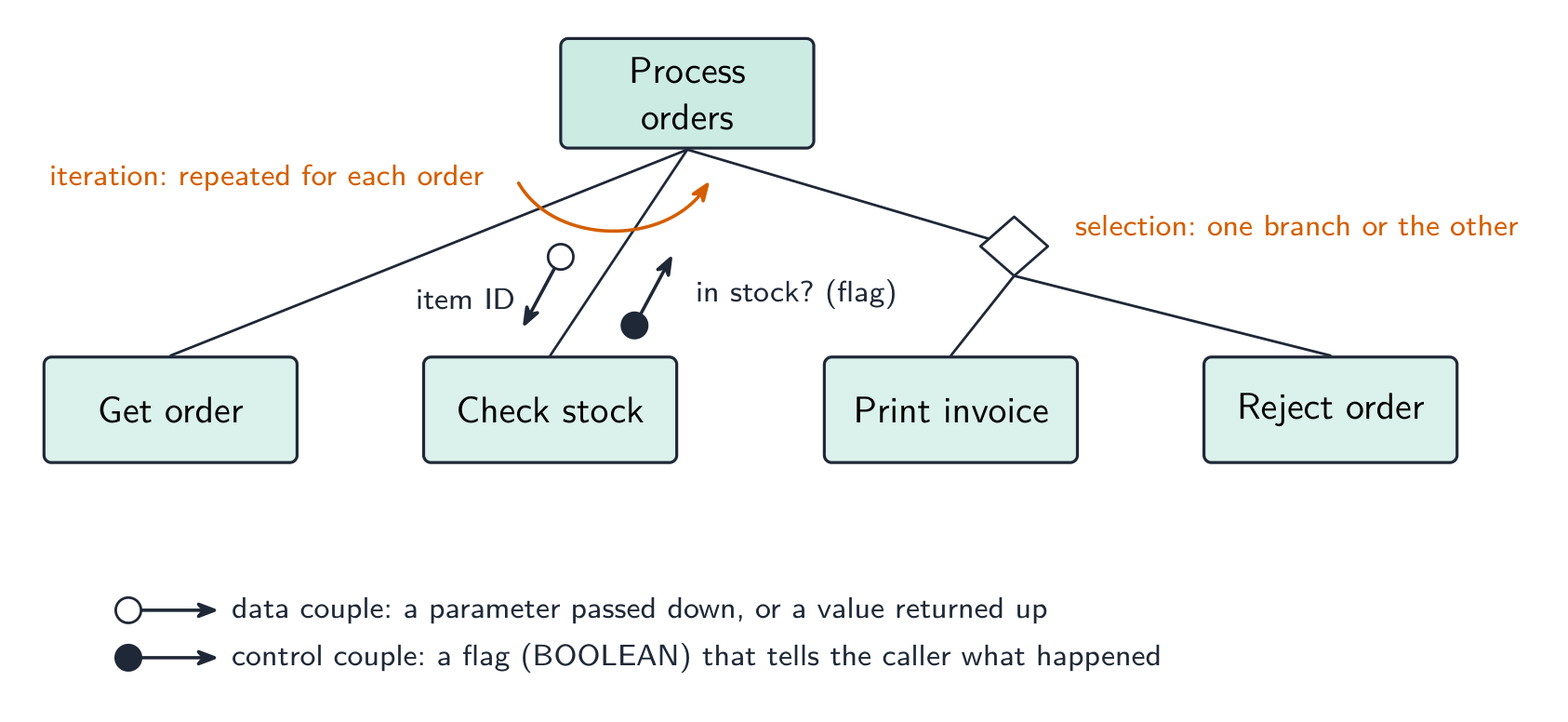
A structure chart 结构图 shows the hierarchical decomposition 分解 of a program into modules (subroutines 子程序) and the parameters 参数 passed between them. Each module is a rectangle; lines link caller (above) to callee (below); small arrows show data going down and results coming back up. The design can then be turned into equivalent pseudocode 伪代码.
It is a design-stage tool, and you can read the procedure signatures off it.
The symbols the examiner asks about. A box is a module; a line links a caller (above) to the modules it calls (below), read left to right in the order they are called. A small arrow with an open circle at its tail is a data couple — a parameter passed down into a module or a value returned up; an arrow with a filled circle is a control couple, a flag (usually BOOLEAN) that tells the caller what happened. A diamond at a branch means selection: only one of the modules below it is called, depending on a condition. A curved arrow sweeping across the links means iteration: the modules under it are called repeatedly in a loop.
Worked example. Four modules are defined as PROCEDURE Main(), PROCEDURE ReadData(BYREF Count : INTEGER), FUNCTION IsValid(Value : INTEGER) RETURNS BOOLEAN and PROCEDURE Report(Total : INTEGER, Count : INTEGER). Main calls ReadData, then calls IsValid once for each value read, then calls Report. Describe the structure chart.
Main at the top; ReadData, IsValid and Report in a row beneath it, left to right in calling order. On the ReadData link an upward data couple Count (a BYREF parameter comes back). On the IsValid link a downward data couple Value and an upward control couple (the BOOLEAN result), with a curved iteration arrow across that link because it is called for each value. On the Report link two downward data couples, Total and Count. Reading the other way, a function is any module that returns a value — its header needs RETURNS and the returned type.
State-transition diagram
A state-transition diagram 状态转换图 shows the states 状态 a system can be in and the events that move it between them — good for vending machines, traffic lights, user interfaces. State-transition diagrams are used to document the behaviour of an algorithm or system. Each state is a circle; each transition is an arrow labelled with the event.
It makes missing transitions easy to spot ("what if a second coin is inserted while awaiting selection?").
Reading and drawing one. Each transition is labelled input | output (or condition | action): what happened, then what the system does as it changes state. A question gives a table of current state, input, output, next state and asks for the diagram, or the reverse — every row of the table is exactly one arrow. Check that every state has an arrow leaving it for every input that can occur, including the ones that leave the state unchanged (an arrow that loops back to the same state).
Worked example. A pump controller has states pump off and pump on. In pump off, the input low level detected produces the output activate pump and moves to pump on; in pump on, normal level detected produces deactivate pump and moves to pump off. Any other input leaves the state unchanged. Draw the table.
Current state
Input
Output
Next state
pump off
low level detected
activate pump
pump on
pump off
normal level detected
—
pump off
pump on
normal level detected
deactivate pump
pump off
pump on
low level detected
—
pump on
The two "no change" rows become loop arrows on the diagram; leaving them out loses the mark for completeness.
עברית
טבלת מבנה
טבלת מבנה מראה את הפצלת ההיררכיה של התוכנה למודולים (תת-תוכניות) ואת הפרמטרים המועברים ביניהן. כל מודול הוא מלבן; קווים מקשרים בין קורא (מעלה) לקורא (מתחת); חצים קטנים מראים נתונים הולכים מטה ותוצאות חוזרות למעלה. לעיצוב ניתן להפוך לאחר מכן ל伪代码 שווה ערך.
זו כלי בשלב העיצוב, ועליך יכול לקרוא ממנו את חתימות הפונקציות.
טבלת מבנה: מודולים עם הפרמטרים המועברים ביניהם
הסימנים שהבוחן שואל עליהם. תיבה היא מודול; קו מקשר קורא (מעלה) למודולים שהוא קורא (מתחת), נקרא משמאל לימין בסדר הקריאה. חץ קטן עם עיגול פתוח בקצהו הוא זוג נתונים — פרמטר המועבר מטה לתוך מודול או ערך המוחזר מעלה; חץ עם עיגול מלא הוא זוג שליטה, דגל (בדרך כלל BOOLEAN) שמספר לקורא מה קרה. יהלום בענף מצביע על בחירה: רק אחד מהמודולים בתחתיתו נקרא, בהתאם לתנאי. חץ מעוגל המעגן את הקישורים מצביע על איטרציה: המודולים שמתחתיו נקראים שוב ושוב בתוך לולאה.
סימני טבלת המבנה: זוגות נתונים ושליטה, יהלום בחירה וחץ איטרציה
דוגמה פתורה. ארבעה מודולים מוגדרים כPROCEDURE Main(), PROCEDURE ReadData(BYREF Count : INTEGER), FUNCTION IsValid(Value : INTEGER) RETURNS BOOLEAN וPROCEDURE Report(Total : INTEGER, Count : INTEGER). Main קורא לReadData, ואז קורא לIsValid פעם אחת עבור כל ערך שקרא, ואז קורא לReport. סבר את טבלת המבנה.
Main בחלק העליון; ReadData, IsValid ו-Report בשורה מתחתיה, משמאל לימין בסדר ההקרא. על הקשר ReadData זוג נתונים עולה Count (פרמטר BYREF חוזר). על הקשר IsValid זוג נתונים יורד Value וזוג שליטה עולה (התוצאה BOOLEAN), עם חץ איטרציה מעוגל על הקשר הזה כי הוא נקרא עבור כל ערך. על הקשר Report שני זוגות נתונים יורדים, Total וCount. קריאה בכיוון השני, פונקציה היא כל מודול שמחזיר ערך – הכותרת שלה צריכה להכיל RETURNS ואת סוג החזרה.
דיאגרמת מעבר מצבים
דיאגרמת מעבר מצבים מראה את המצבים שבהם מערכת יכולה להיות ואת האירועים המעבירים אותה ביניהם — מתאים למכונות מכירה, אורות תנועה וממשקי משתמש. דיאגרמות מעבר מצבים משמשות לתיעוד התנהגות של אלגוריתם או מערכת. כל מצב הוא עיגול; כל מעבר הוא חץ שתווה הוא האירוע.
זה הופך לחושף מעבר חסר בקלות ("מה אם מטבע שני מוכנס בזמן המתנה לבחירה?").
תרשימעבר מצבים לסגירת דלת עם קוד 259
קריאה ושרטוט אחד. כל מעבר מסומן כניסה | יציאה (או תנאי | פעולה): מה קרה, ולאחר מכן מה המעשה של המערכת בעת שינוי המצב. שאלה נותנת טבלה של מצב נוכחי, כניסה, יציאה, מצב הבא ושואלת אודות התרשים, או ההפך — כל שורה בטבלה היא בדיוק חץ אחד. ודאו שכל מצב יש לו חץ יוצא לכל כניסה שתוכל להתרחש, כולל אלו שהשאירו את המצב ללא שינוי (חץ שמחזור אחורית למצב אותו).
דוגמה פותרת. בוקר משאבה יש מצבים משאבה כבויה ומשאבה דלקה. במצב משאבה כבויה, הכניסה רמת נמוכה זיהוי מייצרת את הפלט הפעל משאבה ועוברת למשאבה דלקה; במצב משאבה דלקה, רמה רגילה זיהוי מייצרת ביטול משאבה ועוברת למשאבה כבויה. כל כניסה אחרת משארת את המצב ללא שינוי. שרטטו את הטבלה.
מצב נוכחי
כניסה
פלט
מצב הבא
משאבה כבויה
רמת נמוכה זיהוי
הפעל משאבה
משאבה דלקה
משאבה כבויה
רמה רגילה זיהוי
—
משאבה כבויה
משאבה דלקה
רמה רגילה זיהוי
ביטול משאבה
משאבה כבויה
משאבה דלקה
רמת נמוכה זיהוי
—
משאבה דלקה
שתי השורות "ללא שינוי" הופכות לחצים מחזוריים בתרשים; השמדתן מאבדת את הנקודה על עמידה in completeness.
Explore · חקור
Software process lab · מעבדת תהליך תוכנה
Classify development examples by the stage or tool they belong to. · סווגו דוגמאות פיתוח לפי השלב או הכלי שבהם הן שייכות.
הצג הבנה לצורך באסטרטגיית בדיקה ובתוכנית בדיקה ובתכולתן המשוער
בחר נתוני בדיקה מתאימים לתוכנית בדיקה
כולל רגילים, לא רגילים וקיצוניים/גבוליים
הצג הבנה לצורך בתחזוקה מתמשכת של מערכת והבדלים בין כל סוג של תחזוקה
כולל מושלמת, מותאמת, תיקון
ניתוח תוכנית קיימת ביצוע שינויים כדי לשפר את הפונקציונליות
Source: Cambridge International syllabus · מקור: הסיילבוס הבינלאומי של קמבריד'ג'
English
syntax error 语法错误 — breaks the language's grammar (missing bracket, misspelled keyword). Caught at translation time; the program won't run until fixed.
run-time error 运行时错误 — happens while running (divide by zero, file not found, array index out of range). The program crashes or raises an exception; fix by adding checks.
logic error 逻辑错误 — the program runs but gives wrong results (using + for -, an off-by-one loop, conditions in the wrong order). The hardest to find; the only sign is wrong output, so use careful testing and tracing.
Exposing and avoiding faults. Faults are exposed by testing against a test plan, by a dry run or trace table, by a walkthrough with colleagues, and by the IDE's debugger (breakpoints, single stepping, watching variables). They are avoided by designing before coding (structure chart, pseudocode), by modular code with meaningful identifiers and comments, by validation of every input, by handling exceptions rather than letting a run-time error crash the program, and by the IDE's dynamic syntax checks as you type.
Worked example. State the type of error in each case and how it shows itself. (a) Result <- STR_TO_NUM(x) / STR_TO_NUM(y) is run with y = "0". (b) The same line is run with x = "12a". (c) A loop written as FOR i <- 1 TO 9 processes a ten-element array. (d) OUTPUT "Total: " Total is missing a comma.
(a) Run-time error — division by zero; the program crashes when this line is executed with that data. (b) Run-time error — the string cannot be converted to a number. (c) Logic error — the program runs but the tenth element is never processed, so the output is wrong. (d) Syntax error — the statement breaks the language's rules and is reported by the translator before the program runs.
Worked example. Correct the errors in this pseudocode, which should output the average of ten marks.
The division should be by 10, not 9 (a logic error); the output line needs a comma or an & between the string and the value (a syntax error); and Average is never declared as REAL (a syntax or run-time error, depending on the language). Say which line and what the corrected line is: Average <- Total / 10.
עברית
שגיאת סינטקס — שוברת את הדקדוק של השפה (סוגריים חסרים, מילות מפתח כתובות לא נכון). נתפסת בזמן תרגום; התוכנית לא תפעל עד לתקון.
שגיאת ריצה — מתרחשת בזמן הרצה (חלוקה באפס, קובץ לא נמצא, אינדקס מעבר גבול). התוכנית קורסת או מזריקה חריגה; תיקון על ידי הוספת בדיקות.
שגיאת לוגיקה — התוכנית רצה אך נותנת תוצאות שגויות (שימוש ב+ במקום -, לולאה שגויה בשלב, תנאים בסדר הלא נכון). הקשה ביותר למצוא; הסימן היחיד הוא פלט שגוי, לכן השתמשו בבדיקה זהירה ומעקב.
מתי כל שגיאה מופיעה: סינטקס בתרגום, ריצה במהלך ההרצה, לוגיקה בפלט
חשיפה והימנעות מפגעים. פגעים נחשפים על ידי בדיקה מול תוכנית בדיקה, על ידי ריצה יבשה או טבלת מעקב, על ידי סקירה עם עמיתים, ועל ידי מבקר ה-IDE (נקודות עצירה, צעד בודד, צפייה במשתנים). הם נמנעים על ידי תכנון לפני כתיבת קוד (תרשים מבנה, פסודוקוד), על ידי קוד מודולרי עם מזהים ומערכות משמעותיים, על ידי אימות של כל כניסה, על ידי טיפול בחריגות במקום להשאיר שגיאת ריצה לקרוס את התוכנית, ועל ידי בדיקות סינטקס דינמיות של ה-IDE בזמן הכתיבה.
דוגמה פותרת. ציינו את סוג השגיאה בכל מקרה ואופן בה הוא מופיע. (א) Result <- STR_TO_NUM(x) / STR_TO_NUM(y) מופעל עם y = "0". (ב) אותו שורה מופעל עם x = "12a". (ג) לולאה שנכתבה כFOR i <- 1 TO 9 מעבירה מערך בעל עשרה אלמנטים. (ד) OUTPUT "Total: " Total חסר פסיק.
(א) שגיאת ריצה — חלוקה באפס; התוכנית קורסת כאשר שורה זו מופעלת עם הנתונים האלה. (ב) שגיאת ריצה — המחרוזת לא יכולה להיות מומרת למספר. (ג) שגיאת לוגיקה — התוכנית רצה אך אלמנט העשירי לעולם לא מעובד, ולכן הפלט שגוי. (ד) שגיאת סינטקס — ההצהרה שוברת את הכללים של השפה ודוחה על ידי המתרגם לפני התוכנית רצה.
דוגמה פותרת. תקנו את השגיאות בפסודוקוד זה, שצריך להפיק את הממוצע של עשר ציונים.
Total <- 0
FOR i <- 1 TO 10
    INPUT Mark
    Total <- Total + Mark
NEXT i
Average <- Total / 9
OUTPUT "Average" Average
החלוקה צריכה להיות ב-10, לא ב-9 (שגיאת לוגיקה); שורת הפלט צריכה פסיק או & בין המחרוזת לערך (שגיאת סינטקס); וAverage לעולם לא הוכרז כREAL (שגיאת סינטקס או ריצה, תלוי בשפה). אמרו איזה שורה ומהי השורה המ corrected : Average <- Total / 10.
dry run 手工跟踪 — trace the code on paper, writing each variable's value in a table.
walkthrough 走查 — a team review of the code.
white-box testing 白盒测试 — designed from the code's internal structure, covering every statement, branch and loop.
black-box testing 黑盒测试 — designed from the specification only: feed inputs, check outputs.
integration testing 集成测试 — combine modules and test the interfaces between them.
alpha testing α测试 — by the developers/in-house before release; beta testing β测试 — by a limited group of real users in their own environment.
acceptance testing 验收测试 — by the customer, to decide if the product is fit for purpose.
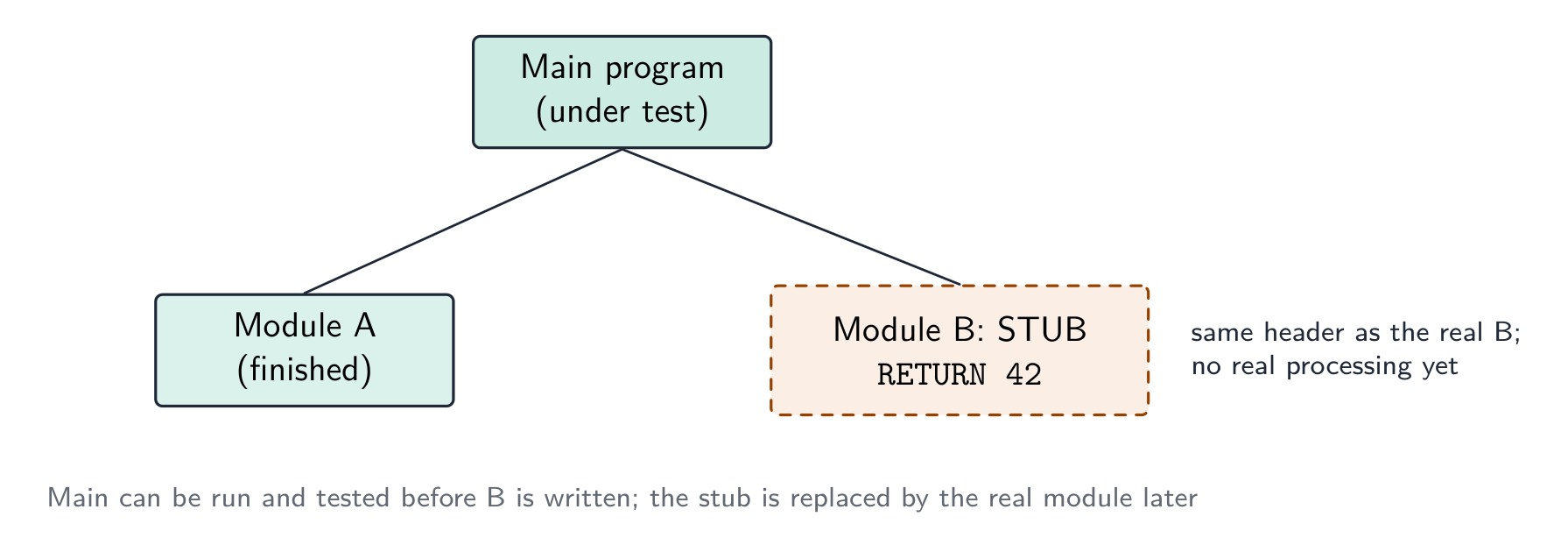
stub 桩 — a placeholder for a module that does not exist yet, so the structure can be tested top-down.
Which method, when. A dry run and a walkthrough need no computer — the dry run is you, tracing the algorithm with a trace table 跟踪表; the walkthrough is a meeting in which the author explains the code line by line and colleagues look for faults, so it also spreads knowledge of the code through the team and checks it against the design. White-box tests are written by someone who can see the code and aims to exercise every path; black-box tests are written from the specification and check only inputs against expected outputs, so a user or a separate tester can do them. Integration testing follows module testing: modules that pass alone can still fail when the data passed between them is the wrong type or in the wrong order. Alpha testing is in-house; beta testing gives a release candidate to a sample of real users, who report faults from real use; acceptance testing is the customer checking the finished product against the requirements before paying for it. A stub lets top-down testing start before every module exists.
Worked example. After the program passed its in-house tests it was given to a group of users to try before release. Name this type of testing, and state what happens next.
Beta testing — real users in their own environment, reporting faults the developers did not find. The faults are corrected, then the customer carries out acceptance testing against the requirements and the program is released; faults found in live use are then handled by corrective maintenance.
Worked example. Give three benefits of testing a program by walkthrough.
Errors are found by people who did not write the code and so read it without assumptions; the logic is checked against the design and specification, not only against test data; several people learn how the code works, which helps later maintenance; and no test data or working computer is needed, so it can be done early.
עברית
ריצה יבשה — מעקב אחר הקוד על נייר, כתיבת ערך כל משתנה בטבלה.
סיור בקוד — ביקורת צוותית של הקוד.
בדיקת קופסה לבנה — מתוכננת על בסיס המבנה הפנימי של הקוד, מכסה כל פקודה, ענף ולולאה.
בדיקת קופסה שחורה — מתוכננת על בסיס התמסורת בלבד: הזנת קלט, בדיקת תפוקה.
בדיקת אינטגרציה — שילוב מודולים ובדיקת הממשקים ביניהם.
בדיקה אלפא α — על ידי המפתחים/בתוך הארגון לפני השחרור; בדיקה בטה β — על ידי קבוצה מוגבלת של משתמשים אמיתיים בסביבה שלהם.
בדיקת קבלה — על ידי הלקוח, כדי לקבוע האם המוצר מתאים למטרותיו.
סטאב — מקום חלופי למודול שלא קיים עוד, כך שמבנית הבדיקה תוכל להתבצע מלמעלה למטה.
איזו שיטה, ומתי. ריצה יבשה וסיור בקוד אינם דורשים מחשב – הריצה היבשה היא שלך, מעקב אחר האלגוריתם עם טבלת מעקב; הסיור בקוד הוא פגישה בה מוסר המחבר את הקוד שורה שורה וחברים בצוות מחפשים תקלות, ולכן הוא גם מפזר ידע על הקוד בתוך הצוות ובוחן אותו מול העיצוב. בדיקות קופסה לבונה נכתבות על ידי מי שרואה את הקוד ושואף לאמן כל מסלול; בדיקות קופסה שחורה נכתבות מהתמסורת ובוחנות רק קלט מול תפוקות מצופות, ולכן יכול לעשות אותן משתמש או בודק נפרד. בדיקת אינטגרציה באה לאחר בדיקת מודולים: מודולים שעברו לבדם עשויים להיכשל כאשר הנתונים העוברים ביניהם הם מהסוג הלא נכון או בסדר הלא נכון. בדיקה אלפא היא בתוך הארגון; בדיקה בטה נותנת מועמד לשחרור לדוגמה של משתמשים אמיתיים, שמדווחים על תקלות מתוך שימוש אמיתי; בדיקת קבלה היא הלקוח בודק את המוצר הגמור מול הדרישות לפני התשלום עבורו. סטאב מאפשר לבדיקה מלמעלה למטה להתחיל לפני שכל המודולים קיימים.
סטאב מצויד במקום מודול שלא נכתב עדיין, כך שמודולים המעליהם יכולים להיות נבדקים כעת
דוגמה פותרת. לאחר שהתוכנית עברה את בדיקותיה בתוך הארגון, הועברה לקבוצת משתמשים לנסות לפני השחרור. קרא לסוג זה של בדיקה, ופרט מה יקרה לאחר מכן.
בדיקה בטה – משתמשים אמיתיים בסביבה שלהם, מדווחים על תקלות שהמפתחים לא גילו. התקלות מתוקנות, ולאחר מכן הלקוח מבצע בדיקת קבלה מול הדרישות והתוכנית משוחררת; תקלות שנמצאו בשימוש פעיל מטופלות לאחר מכן על ידי תחזוקה תיקונית.
דוגמה פותרת. נתן שלושה יתרונות של בדיקת תוכנית באמצעות סיור בקוד.
שגיאות נמצאות על ידי אנשים שלא כתבו את הקוד ולכן קוראים אותו ללא הנחות; הלוגיקה נבדקת מול העיצוב והתמסורת, לא רק מול נתוני הבדיקה; מספר אנשים לומדים כיצד הקוד עובד, מה שמסייע בתחזוקה בעתיד; ואין צורך בנתוני בדיקה או במחשב עובד, ולכן ניתן לבצע זאת מוקדם.
Test strategy and test plan · אסטרטגיית בדיקה ותוכנית בדיקה
English
A test strategy 测试策略 is the high-level approach — which kinds of testing, who does them, when, and the criteria to move on. A test plan 测试计划 is the detailed list of tests — each with input data, expected output, and a column for the actual output.
What each contains. A test strategy states which testing methods will be used at which stage (module testing by the programmer, then integration, alpha, beta, acceptance), who is responsible for each, what test data is required, and the criteria for passing to the next stage. A test plan lists the individual tests: for each, the module or feature under test, the input data, the reason the data was chosen (normal, abnormal, extreme, boundary), the expected result, a space for the actual result, and what to do if they differ. The plan is written at the design stage, from the specification, so that it tests what the program should do rather than what it happens to do.
Choosing test data
For each field or condition, include three kinds:
normal data 正常数据 — typical values inside the valid range (for marks 0–100: 50, 75).
abnormal data 异常数据 — values that should be rejected (-10, 200, "abc").
extreme data 极端数据 — the largest and smallest values still accepted (0 and 100).
boundary data 边界数据 — values at the edges, where off-by-one errors hide (each accepted extreme and the rejected value just outside it: 0/-1, 100/101).
Worked example. A field accepts an exam mark from 0 to 100. Give test data of each kind with its expected result. Normal: 50 - accepted, a typical value inside the range. Abnormal: -10, 200, "abc" - all rejected, being out of range or the wrong data type. Extreme: 0 and 100 - the largest and smallest values that are still accepted. Boundary: the pairs straddling each edge - -1 rejected alongside 0 accepted, and 100 accepted alongside 101 rejected. Every value must carry its expected result, or the test plan proves nothing. Extreme and boundary are the pair most often confused: an extreme value sits inside and is accepted, while a boundary test is always a pair either side of the edge - which is exactly where off-by-one errors hide.
Worked example. A component passes if its weight, measured to the nearest gram, is within 3 g of the target of 50 g, i.e. from 47 g to 53 g inclusive. Draw up the test-plan rows for the check.
Test data
Type
Reason
Expected result
50
normal
a typical value well inside the range
accepted
47, 53
extreme (boundary)
the smallest and largest values that must still be accepted
accepted
46, 54
boundary
the values just outside the range, where an off-by-one error would accept them
rejected
20, 90
abnormal
values far outside the range
rejected
"abc", −5
abnormal
the wrong type, a negative weight
rejected
Each row must say why the value was chosen and what should happen; a bare list of numbers earns nothing.
עברית
אסטרטגיית בדיקה היא הגישה ברמת הגובה – איזה סוגי בדיקות, מי מבצע אותן, מתי, ומהם הקריטריונים להתקדם. תוכנית בדיקה היא רשימה מפורטת של בדיקות – כל אחת עם נתוני קלט, תפוקה מצופה ועמודה לתפוקה בפועל.
מה שכל אחד מכיל. אסטרטגיית בדיקה מציינת אילו שיטות בדיקה יבוצעו בכל שלב (בדיקת מודול על ידי המתכנן, ולאחר מכן אינטגרציה, אלפא, בטא, קבלה), מי אחראי על כל שלב, מהי הנתונים הנדרשים לבדיקה, ומהם הקריטריונים לעברת השלב הבא. תוכנית בדיקה מפרטת את הבדיקות הבודדות: עבור כל אחת, המודול או התכונה הנבדקים, נתוני הכניסה, הסיבה לבחירת הנתונים (רגיל, לא רגיל, קיצוני, גבולי), התתוצאה הצפויה, מקום לתוצאה המעשית, ומה לעשות אם הם שונים. התוכנית נכתבת בשלב העיצוב, מתוך המפרט, כך שהיא תבדוק מה שהתוכנה צריכה לעשות ולא מה שהיא באופן מקרי עושה.
בחירת נתוני בדיקה
עבור כל שדה או תנאי, יש לכלול שלושה סוגים:
נתונים רגילים — ערכים טיפוסיים בתוך הטווח המקובל (לציונים 0–100: 50, 75).
נתונים לא רגילים — ערכים שמצוינים לסירוב (-10, 200, "abc").
נתונים קיצוניים — הערכים הגדולים והקטנים ביותר שנותרים מתקבלים (0 ו100).
נתונים גבוליים — ערכים בקצוות, שם טעויות "מאחד יותר/פחות" נסתרות (כל קצה מקובל וערך המדויק מחוצה לו: 0/-1, 100/101).
נתוני בדיקה לשדה 0–100: רגילים בתוך הטווח, קיצוניים בגבולות, לא רגילים מחוצה
דוגמה פועלת. שדה מקבל ציון מבחן מ-0 עד 100. ספק נתוני בדיקה מכל סוג עם התוצאה הצפויה. רגיל: 50 - מתקבל, ערך טיפוסי בתוך הטווח. לא רגיל: -10, 200, "abc" - כולם נדחים, משום שהם מחוץ לטווח או בסוג נתונים שגוי. קיצוני: 0 ו100 - הערכים הגדולים והקטנים ביותר שנותרים מתקבלים. גבולי: הזוגות החוצנים כל קצה - -1 נדחה לצד 0 מתקבל, ו100 מתקבל לצד 101 נדחה. לכל ערך חייב להיות תוצאה צפויה, אחרת תוכנית הבדיקה אינה מוכיחה דבר. קיצוני וגבולי הם הזוג הרבים ביותר במבלבלים: ערך קיצוני יושב בתוך הטווח ומתקבל, בעוד שבדיקה גבולית היא תמיד זוג משני צדי הקצה - שם בדיוק נסתרות טעויות "מאחד יותר/פחות".
דוגמה פועלת. רכיב עובר בדיקה אם המשקל שלו, שנמדד לגרם הקרוב ביותר, הוא בטווח של 3 גרם ממטרה של 50 גרם, כלומר מ-47 גרם עד 53 גרם כולל. הרכב את שורות תוכנית הבדיקה לבדיקה זו.
נתוני בדיקה
סוג
סיבה
תוצאה צפויה
50
רגיל
ערך טיפוסי הרחק בתוך הטווח
מתקבל
47, 53
קיצוני (גבולי)
הערכים הקטן והגדול ביותר שצריכים להישאר מתקבלים
מתקבל
46, 54
גבולי
הערכים המדויק מחוץ לטווח, שם טעות "מאחד יותר/פחות" תקבל אותם
נדחה
20, 90
לא רגיל
ערכים רחוק מחוץ לטווח
נדחה
"abc", −5
לא רגיל
סוג שגוי, משקל שלילי
נדחה
לכל שורה חייב להיות כתוב למה הערך נבחר ומה אמור לקרות; רשימה חופשית של מספרים אינה זוכה נקודות.
12.3
Maintenance · תחזוקה
English
Most of a program's lifetime cost is in maintenance. Three kinds:
perfective maintenance 完善性维护 — improving performance or features even though it works (a faster query, a new option).
adaptive maintenance 适应性维护 — keeping it working in a changing environment (a new OS, a new API, a legal change).
corrective maintenance 纠正性维护 — fixing bugs found in use.
A program may need all three throughout its life.
Why each is needed — the reasons the mark scheme lists.Corrective: a fault is reported by a user after release, or an incorrect output is noticed in particular circumstances that testing did not cover. Adaptive: the operating system, hardware or browser is upgraded; a law or company rule changes (tax rates, data-protection requirements); the program must work with a new external system or file format. Perfective: users ask for extra features or a better interface; the program is made faster or made to use less memory; the code is tidied to make future changes easier.
Worked example. (a) A released program outputs a wrong value under certain circumstances. (b) The hardware that runs a program is replaced. (c) Customers ask for the coffee-shop loyalty program to send a message on a customer's birthday. Name the maintenance type in each case.
(a) Corrective — a fault in the delivered program is being fixed. (b) Adaptive — the program is changed to run in its new environment. (c) Perfective — a feature is added to a program that already works.
עברית
רוב עלות מחזור החיים של תוכנה נמצאת בתחזוקה. שלושה סוגים:
שלושה סוגי תחזוקה: מושלמת, אדפטיבית ותיקונית
תחזוקה מושלמת — שיפור ביצועים או תכונות גם כאשר התוכנה פועלת כראוי (שאלה מהירה יותר, אפשרות חדשה).
תחזוקה אדפטיבית — שמירה על פעילות בתוכנה בסבישת עבודה משתנה (מערכת הפעלה חדשה, ממשק API חדש, שינוי חוקי).
תחזוקה תיקונית — תיקון באגים שנמצאו במהלך השימוש.
תוכנה עשויה לדרוש את כל שלושת הסוגים לאורך מחזור החיים שלה.
מדוע כל אחד נדרש — הסיבות שרשימת הציונים מציין.תיקונית: דווח על תקלה על ידי משתמש לאחר השחרור, או שנתפסה תוצאה שגויה בתנאים מסוימים שלא נבדקו בבדיקות. אדפטיבית: מערכת ההפעלה, הציוד או הדפדפן משודרגים; חוק או תקנות חברתיות משתנים (שיעורי מס, דרישות הגנת נתונים); התוכנה צריכה לעבוד עם מערכת חיצונית חדשה או פורמט קובץ חדש. מושלמת: משתמשים מבקשים תכונות נוספות או ממשק טוב יותר; התוכנה הופכת למהירה יותר או צורכת זיכרון פחות; הקוד מסודר כדי להקל על שינויים בעתיד.
דוגמה מופרדת. (א) תוכנה שהושחררה מציגה ערך שגוי בתנאים מסוימים. (ב) הציוד הרץ את התוכנה הוחלף. (ג) לקוחות מבקשים שתוכנית הנאמנות של בית הקפה תשלח הודעה ביום ההולדת של לקוח. ציין את סוג התחזוקה בכל מקרה.
(א) תיקונית — מתוקנת תקלה בתוכנה שהומצאה. (ב) אדפטיבית — התוכנה משונה כדי לפעול בסביבתה החדשה. (ג) מושלמת — תכונה נוספת לתוכנה שפועלת כבר.
Amending an existing program · שינוי תוכנה קיימת
English
When asked to add a feature or fix a bug:
read the existing code until you understand the algorithm and data flow.
find where the change goes — which subroutine, which lines.
make the change as small as possible — don't rewrite working code.
update related parts — every caller of a changed parameter list, every routine using a changed data structure.
test the new behaviour and the old (regression testing 回归测试 — check you broke nothing).
document the change.
Clear comments, meaningful names, decomposed subroutines and a structure chart make a program much easier to amend — which is why the design tools matter even after the first release.
Analysing a program you did not write. Start from the identifier table and the module headers: they tell you what each module receives and returns before you read a line of its body. Then trace the algorithm with a trace table for one small input, noting where each output value comes from. Only then decide where the enhancement goes — usually a new module called from the existing one, so the working code is disturbed as little as possible — and write the pseudocode for the change and the test data that proves it.
עברית
כאשר נדרש להוסיף תכונה או לתקן באג:
קרא את הקוד הקיים עד שתבין את האלגוריתם והזרימת הנתונים.
מצא היכן השינוי צריך להיכנס — איזה פונקציה, אילו שורות.
בצע את השינוי כמינימלי ככל האפשר — אל תעביר מחדש קוד שעובד.
עדוף חלקים קשורים — כל קורא של רשימת פרמטרים משתנת, כל רoutine המשמשת מבנה נתונים משתנה.
בצע בדיקה של ההתנהגות החדשה וגם של הישנה (בדיקות רגרסיה — ודא שאין לך שום דבר שבור).
תיעד את השינוי.
תגיות ברורות, שמות משמעותיים, פונקציות מפוצלות ותרשים מבנה הופכים תוכנה להרבה יותר קלה לשינוי — ולכן כלי העיצוב חשובים גם לאחר השחרור הראשון.
ניתוח תוכנה שלא כתבת. התחל בטבלת המזהים ובכותרות המודולים: הם אומרים לך מה כל מודול מקבל ומחזיר לפני שקורא שורה אחת בגוף שלו. אז עקוב אחרי האלגוריתם עם טבלת מעקב עבור קלט קטן אחד, ועיין מאיפה מגיעה כל ערך תפוקה. רק אז החלט היכן ההרחבה תיכנס — בדרך כלל מודול חדש הנקרא מהמודול הקיים, כך שהקוד העובד יופרע כמינימום — וכתוב את הפסאודוקוד לשינוי ואת נתוני הבדיקה שמאשרים אותו.
12.3
Definitions the examiner accepts · הגדרות מקובלות בקורס
English
A definition question is marked against fixed wording. Learn these exactly, and give one answer only.
Term
Definition
development life cycle
the sequence of stages, from analysis to maintenance, followed to produce and support a program
waterfall model
a life cycle in which the stages are carried out in a fixed order, each completed before the next begins
iterative model
a life cycle in which a working version is produced and then repeatedly refined until it is complete
rapid application development
a life cycle that builds prototypes quickly, refining them with user feedback until they are accepted
structure chart
a diagram that shows how a program is decomposed into modules, the order in which they are called and the parameters passed between them
state-transition diagram
a diagram that shows the states a system can be in and the inputs that cause it to move between them
syntax error
an error in the way a statement is written, so it breaks the rules of the language and cannot be translated
logic error
an error in the algorithm, so the program runs but produces the wrong result
run-time error
an error that occurs while the program is running, such as division by zero, and stops it
dry run
working through the algorithm by hand, recording the values of the variables in a trace table
walkthrough
a review in which the author steps through the code with colleagues who look for errors
stub
a placeholder module with the correct header that returns a fixed value, used so the modules that call it can be tested
test plan
a list of the tests to be carried out, each with its test data, the reason for the data and the expected result
boundary data
values at each edge of the valid range, both the last value accepted and the first value rejected
corrective / adaptive / perfective maintenance
fixing faults found in use / changing the program to suit a changed environment / improving a program that already works
עברית
שאלת הגדרה מוקדמת לפי טקסט קבוע. לימודן במדויק, ותן תשובה אחת בלבד.
מונח
הגדרה
מחזור חיים של פיתוח
רצף השלבים, מניתוח ועד תחזוקה, הנעשה כדי ליצור ולתמך בתוכנה
דגם מפלל המים
מחזור חיים שבו השלבים מתבצעים בסדר קבוע, כל שלב מושלם לפני שמתחיל הבא
דגם איטרטיבי
מחזור חיים שבו מוצר גרסה עובדת ואז משופרת שוב ושוב עד שהיא מושלמת
פיתוח אפליקציות מהיר
מחזור חיים שבונה פרוטוטיפים במהירות ומשפר אותם באמצעות משוב משתמשים עד שהם מתקבלים
טבלת מבנה
תרשים המראה כיצד תוכנית פורקת למודולים, את הסדר שבו הם נקראים והפרמטרים העוברים ביניהם
טבלת מעבר מצבים
תרשים המראה את המצבים בהם מערכת יכולה להיות ואת הקלטות הגורמות לה לעבור ביניהן
שגיאת סינטקס
שגיאה בכתיבת ההצהרה כך היא לוקה בחוקי השפה ואינה ניתנת לתרגום
שגיאת לוגיקה
שגיאה באלגוריתם כך התוכנית רצה אך מייצרת תוצאה שגויה
שגיאת ריצה
שגיאה המתרחשת בזמן ריצת התוכנית, כגון חלוקה באפס, ועוצרת אותה
ריצה יבשה
עבודה על האלגוריתם ביד, רישום ערכי המשתנים בטבלת מעקב
סקירה
בדיקה שבה המחבר עובר על הקוד עם עמיתים החוקרים שגיאות
קוצץ
מודול מקום-החלפה בעל הכותרת הנכונה שמחזיר ערך קבוע, משמש כדי שאפשר יהיה לבצע בדיקות על המודולים הקוראים אותו
תוכנית בדיקה
רשימת הבדיקות שנבצע, לכל אחת מהן נתוני הבדיקה, הסיבה לנתונים והתוצאה הצפויה
נתוני גבול
ערכים בקצוות הטווח תקף, גם הערך האחרון המקובל וגם הערך הראשון המדוחה
תחזוקה תיקונית / אדפטבית / משכללת
תיקון תקלות שנמצאו בשימוש / שינוי התוכנית כדי להתאים לסביבה משתנה / שיפור תוכנית שעובדת כבר
12.3
Exam tips · טיפים לבחינות
English
Compare development models (waterfall, iterative, RAD) by principle, benefit, drawback, and know the five stages of the program development life cycle and what each produces.
Distinguish syntax, logic and run-time errors by when each shows itself: at translation, in the output, during the run.
Choose test data of every kind — normal, abnormal, extreme and boundary — and give each value with its reason and expected result.
Distinguish the types of maintenance (corrective, adaptive, perfective) by why the change is being made.
On a structure chart, name every symbol: box, calling line, data couple, control couple, selection diamond, iteration arrow. Reading module headers off a chart, remember a function has RETURNS.
Common mistakes
Describing a life cycle stage by its name only ("in the design stage the program is designed"). Say what is produced: structure chart, pseudocode, test plan.
Calling a wrong output a "run-time error". If the program runs to the end, it is a logic error.
Giving boundary data as just the extremes. The mark needs the values on both sides of the edge.
Treating alpha and beta testing as the same. Alpha is in-house by the developers; beta is by real users outside.
Confusing adaptive and perfective maintenance. Adaptive responds to a change outside the program; perfective improves a program nobody had to change.
Drawing a structure chart with the modules in any order. They read left to right in the order they are called, and each parameter needs its arrow.
עברית
השוו בין דגמי פיתוח (מפלל המים, איטרטיבי, RAD) לפי עיקרון, יתרון, חיסרון, ותדע את חמישת שלבי מחזור חיים של פיתוח תוכנה ומה שכל אחד מייצר.
הבדל בין שגיאות סינטקס, לוגיקה וריצה לפי מתי כל אחת מתבטאת: בתרגום, בפלט, במהלך הריצה.
בחר נתוני בדיקה מכל סוג — רגילים, חריגים, קיצוניים וגבוליים — ותן לכל ערך את הסיבה והתוצאה הצפויה.
הבדל בין סוגי ה-תחזוקה (תיקונית, אדפטבית, משכללת) לפי מדוע השינוי נעשה.
בטבלת מבנה, קרא כל סמל: תיבה, קו קריאה, זוג נתונים, זוג שליטה, יהלום בחירה, חץ איטרציה. בקריאת כותרות מודול מטבלה, זכור שפונקציה יש RETURNS.
טעויות נפוצות
תאר שלב במחזור חיים רק לפי שמו ("בשלב העיצוב התוכנית מעוצבת"). אמור מה מיוצר: טבלת מבנה, פסאודוקוד, תוכנית בדיקה.
קריאת תוצאה שגויה כ"שגיאת ריצה". אם התוכנית נסתיימה לרצה עד סופה, זו שגיאת לוגיקה.
מתן נתוני גבול רק כקצוות. נקודות הדרוש ערכים בשני צדי הגבול.
יחסה של בדיקות אלפא ובטא כזהות. בדיקות אלפא מבוצעות בפנים על ידי המפתחים; בדיקות בטא על ידי משתמשים אמיתיים מחוץ לארגון.
בלבול בין תחזוקה אדפטבית (הסתגלנית) ומשתפרת. תחזוקה אדפטבת מגיבה לשינוי חוץ מהתוכנית; תחזוקה משתפרת משפרת תוכנית שאין צורך לשנות אותה.
איור טבלת מבנה עם המודולים בכל סדר. הם נקראים משמאל לימין לפי הסדר שבו נקראו, וכל פרמטר זקוק לחץ.
Interactive lessons on this topic · שיעורים אינטראקטיביים בנושא זה
Work through it step by step, with instant-check exercises. · לעבור על הדברים צעד אחר צעד, עם תרגילים לבדיקה מיידית.
Pick one and the site follows you — notes, papers, videos and practice all open on it. · בחרו נושא אחד והאתר יעקוב אחריו — הערות, מסמכים, וידאו ותרגולים פתוחים בו.
Type to search notes, lessons, code, vocabulary and past-paper questions across every subject. · הקלד כדי לחפש הערות, שיעורים, קוד, אוצר מילים ושאלות מבחנים בכל הנושאים.


 *המודל האיטרטיבי: מעברים חוזרים משפרים את התוכנה
 *פיתוח אפליקציה מהיר: צוותים עובדים על חלקים במקביל