תוכנית חייבת לבקש סיסמה, ולבקש שוב ושוב עד שהיא נכונה. פשוט — אך איזה לולאה משתמשים? תוכניות מקבלות החלטות ומחזירות על עצמן עבודה, ובחירת…
English narration · English + 中文 subtitles burned in · קריאת קול באנגלית · תרגום אנגלי + סינית שרוף בתוך הסרטון
11.1
Programming basics · בסיסי תכנות
Syllabus · סיילבוס
English
Candidates should be able to:
Notes and guidance
Implement and write pseudocode from a given design presented as either a program flowchart or structured English
Write pseudocode statements for: • the declaration and initialisation of constants • the declaration of variables • the assignment of values to variables • expressions involving any of the arithmetic or logical operators input from the keyboard and output to the console
Use built-in functions and library routines
Any functions not given in the pseudocode guide will be provided String manipulation functions will always be given
עברית
המועמדים צריכים להיות מסוגלים:
הערות והנחיות
יישם וכתוב פסאודו-קוד מתוך עיצוב נתון המוצג כתרשים זרימת תוכנה או כאנגלית מבנית
כתוב פסקאות פסאודו-קוד עבור: • ההצהרה והתחלת ערך של קבועים • ההצהרה של משתנים • הקצאת ערכים ל-משתנים • ביטויים המשתמשים בכל סוגי הפעולות החשבוניות או הלוגיות, קלט מהמקלדת ופלט לקונסולה
השתמש בפונקציות מובנות ובשגרות ספרייה
כל פונקציה שאינה מופיעה במדריך הפסאודו-קוד תסופק; פונקציות לעיבוד מחרוזות יוספקו תמיד
Source: Cambridge International syllabus · מקור: הסיילבוס הבינלאומי של קמבריד'ג'
English
From design to code
You should be able to turn a design — a flowchart 流程图 (program flowchart) or structured English 结构化英语 — into pseudocode 伪代码, and then into a real language:
find the variables 变量 and their data types 数据类型.
turn input/output boxes into INPUT / OUTPUT.
turn decision diamonds into IF...ELSE...ENDIF (or CASE).
turn loop arrows into WHILE, REPEAT...UNTIL, or FOR.
turn process boxes into assignments or calculations.
check by tracing a small input.
Constants and variables
A constant 常量 holds a value that never changes; a variable holds one that may change. Declare them with a type:
Use constants for fixed values that recur (Pi, MaxScore); they make code clearer and easy to change in one place.
In the exam, a constant is the answer to "identify a more appropriate way of representing" a fixed value, such as a tax rate or a maximum score, that appears at several places in the pseudocode. The benefits the scheme lists: the value is set once and cannot be changed accidentally by the program; a change is made in one place and reaches every statement that uses it; the identifier gives the value a meaning (MaxScore rather than 100), so the code is easier to read and to check; and there is less risk of a typing error in a long value such as 3.14159. A "state a value that could be replaced by a constant" question wants the literal from the pseudocode (0.2, 40), not a new name.
Every variable is declared once, with an identifier 标识符 (its name) and a data type, before it is used. The six types in the 9618 pseudocode guide:
Type
Holds
Written in the code as
Typical use
INTEGER
whole numbers
42, -3
a count, an array index, a loop counter
REAL
numbers with a fractional part
3.75
a price, an average
CHAR
one character
'A' (single quotes)
a grade letter, a menu key
STRING
a sequence of characters
"Hello" (double quotes)
a name, a postcode
BOOLEAN
TRUE or FALSE
TRUE
a flag such as Found
DATE
a calendar date
12/05/2026
a date of birth
A "give the appropriate data type" question is answered from how the variable is used in the pseudocode: a value with a decimal point is REAL; something set to TRUE or FALSE is BOOLEAN; a value in single quotes is CHAR; a value used as an array index, or with DIV and MOD, is INTEGER. Write the type in capitals, spelled as the guide spells it.
Worked example. State the appropriate data type for each variable.
Found is BOOLEAN (it holds FALSE); Initial is CHAR (one character in single quotes); Price is REAL (a decimal value); Count is INTEGER (a counter that goes up by one); Name is STRING (text in double quotes).
Assignment and expressions
Use ← for assignment 赋值:
Expressions use operators 运算符:
arithmetic + - * /, plus DIV (integer division) and MOD (remainder): 7 DIV 2 = 3; 7 MOD 2 = 1.
comparisons =, <>, <, >, <=, >=.
logic AND, OR, NOT.
Precedence 优先级 (highest to lowest): NOT → * / DIV MOD → + - → comparisons → AND → OR. Use brackets when unsure.
Input and output
Built-in functions and library routines
Many tasks have ready-made library routines 库例程, so you need not write them. The Paper 2 insert 附页 lists the ones you may use, with their exact names, parameters and return types; any other function a question needs is given in the question. The names below are the insert's names. VAL and STR are IGCSE names and appear in neither 9618 document, so they earn nothing. UCASE and LCASE are a different case: they are 9618, defined in the Pseudocode Guide, but they take a single CHAR, and the insert does not list them at all — for a whole string on Paper 2 the routine is TO_UPPER.
A program library 程序库 holds routines that have already been written, compiled and tested; a program calls them instead of writing its own. The benefits the scheme accepts, for a "state three benefits" question: the routines are already tested, so they are less likely to contain errors; they save development time; they may do things the programmer could not write (complex statistics, graphics); they are written by experts and reused across many programs; and a routine with a fixed interface can be called from anywhere in the program.
Routine
Returns
Example
LENGTH(s)
the number of characters in s
LENGTH("Hello") = 5
LEFT(s, n) / RIGHT(s, n)
the first / last n characters
RIGHT("Hello", 2) = "lo"
MID(s, start, n)
n characters from position start (positions count from 1)
MID("Hello", 2, 3) = "ell"
TO_UPPER(s) / TO_LOWER(s)
s in capitals / in small letters
TO_UPPER("ab1") = "AB1"
NUM_TO_STR(x) / STR_TO_NUM(s)
a number as a string / a string as a number
STR_TO_NUM("3.5") = 3.5
IS_NUM(s)
TRUE if s is a valid number
IS_NUM("12a") = FALSE
ASC(c) / CHR(n)
the character code of c / the character with code n
ASC('A') = 65, CHR(66) = 'B'
INT(x)
the whole-number part of x
INT(7.9) = 7
RAND(n)
a random real number from 0 up to, but not including, n
INT(RAND(6)) + 1 is a dice roll
DAY(d), MONTH(d), YEAR(d)
the parts of a DATE
YEAR(TODAY())
DAYINDEX(d), SETDATE(d, m, y), TODAY()
the day of the week (1 = Sunday); a date built from three integers; today's date
EOF(f)
TRUE when the file f has no more lines to read
WHILE NOT EOF("data.txt")
Strings are joined with & (concatenation 连接): "A" & "BC" is "ABC". Use the exact names from the insert, with the parameters in its order.
Dates and random numbers come up as one-line statements. SETDATE(17, 11, 2007) builds 17 November 2007; 12 - MONTH(MyDOB) is the number of months from the month of birth to the end of the year; IF DAYINDEX(MyDOB) = 5 THEN tests for a Thursday, because Sunday is day 1. RAND(n) returns a real number from 0 up to, but not including, n, so a random integer from Low to High inclusive is INT(RAND(High - Low + 1)) + Low: INT(RAND(21)) - 10 gives a value from -10 to 10.
Worked example. Evaluate each expression, given Word ← "Program", Code ← 'Q' and N ← 7.
Expression
Value
Why
LENGTH(Word)
7
seven characters
MID(Word, 4, 2)
"gr"
two characters, starting at position 4
LEFT(Word, 3) & "!"
"Pro!"
joined with &
TO_UPPER(RIGHT(Word, 2))
"AM"
the inner function runs first
ASC(Code) - ASC('A')
16
'Q' is 81 and 'A' is 65
N DIV 2 + N MOD 2
4
3 + 1
NUM_TO_STR(N) & "th"
"7th"
the number becomes a string first
INT(N / 2)
3
3.5 cut to its whole part
Work from the inside out, and keep the quotes: "7" is a string and 7 is a number.
Worked example. Each statement may contain an error in its use of a function or operator. Describe the error, or write NO ERROR. (Assume every variable has the correct type.)
Statement
Error
Result ← 2 & 4
& joins strings; 2 and 4 are integers, so + is needed
SubString ← MID("pseudocode", 4, 1)
NO ERROR: one character from position 4, "u"
IF x = 3 OR 4 THEN
OR needs a Boolean on each side: IF x = 3 OR x = 4 THEN
Result ← Status AND INT(x / 2)
AND needs two Booleans; INT(x / 2) is an integer
Message ← "Done" + LENGTH(MyString)
+ cannot add a string to an integer: "Done" & NUM_TO_STR(LENGTH(MyString))
Every operator works on particular types: & on strings, + - * / DIV MOD on numbers, AND OR NOT on Booleans, and = <> on two values of the same type. An "evaluate each expression, or write ERROR" table is marked the same way: LENGTH(42) and "A" + 1 are ERROR, because the type does not match the function or the operator.
Worked example. With Points ← 100, Active ← TRUE and Exempt ← FALSE, evaluate each expression.
Expression
Value
Why
(Points > 99) OR Active
TRUE
both sides are true; one would do
(Points MOD 2 = 0) OR Exempt
TRUE
100 MOD 2 is 0
(Points <= 75) AND (Active OR Exempt)
FALSE
the first side is false, and AND needs both
(Active OR NOT Active) AND NOT Exempt
TRUE
Active OR NOT Active is always true
The last expression simplifies: X OR NOT X is TRUE whatever X is, so the whole expression is just NOT Exempt. Evaluate the brackets first, then NOT, then AND, then OR.
עברית
תכנות ממיר עיצוב להוראות הכתובות כקודמתכנת כותב את הקוד ובוחן אותו בהמשך
מעיצוב לקוד
עליך להספיק להמיר עיצוב — תרשים זרימה (flowchart) או אנגלית מבנית — ל-קוד מדומה, ולאחר מכן לשפה אמיתית:
מצא את ה-משתנים ואת סוגי הנתונים שלהם.
המר תיבות קלט/פלט ל-INPUT / OUTPUT.
המר יהלומי החלטה ל-IF...ELSE...ENDIF (או CASE).
המר חצים של לולאה ל-WHILE, REPEAT...UNTIL או FOR.
המר תיבות פעולה לאסיגנות או חישובים.
בדוק על ידי מעקב אחר קלט קטן.
*כל סמל בתרשים זרימה הופך למילה מפתח בקוד מדומה
קבועים ומשתנים
קבוע שומר ערך שאינו מתחלף לעולם; משתנה שומר על ערך שעשוי להשתנות. הכרז אותם עם סוג:
*ערך משתנה יכול להשתנות; קבוע נשאר קבוע
CONSTANT Pi = 3.14159
DECLARE Radius : REAL
DECLARE Area : REAL

Radius ← 5
Area ← Pi * Radius * Radius
השתמש בקבועים לערכים קבועים שנשנים (Pi, MaxScore); הם הופכים את הקוד ברור וקל לשינוי במקום אחד.
במבחן, קבוע הוא התשובה לשאלה "זהה דרך מתאימה יותר לייצוג" ערך קבוע, כמו אחוז מס או נקודות מקסימום, שמופיע במספר מקומות בקוד המדומה. היתרונות שהמערכת מונה: הערך מוגדר פעם אחת ואינו ניתן לשינוי מקרי על ידי התוכנה; שינוי נעשה במקום אחד ומגיע לכל פקודה המשמשת אותו; המזהה נותן לערך משמעות (MaxScore במקום 100), כך שקוד קריא וניתן לבדיקה; ויש פחות סיכון לחטיאת הקלדה בערך ארוך כמו 3.14159. שאלה "צין ערך שניתן להחליפו בקבוע" דורשת את האותיות מהקוד המדומה (0.2, 40), ולא שם חדש.
כל משתנה מוכרז פעם אחת, עם מזהה (שמו) וסוג נתונים, לפני השימוש בו. ששת הסוגים במדריך הקוד המדומה 9618:
Type
Holds
Written in the code as
Typical use
INTEGER
מספרים שלמים
42, -3
מונה, אינדקס של מערך, ספן לולאה
REAL
מספרים עם חלק שברוני
3.75
מחיר, ממוצע
CHAR
תווית אחת
'A' (סימני ציטוט יחידים)
אות ציון, מקש בתפריט
STRING
סדרה של תוויות
"Hello" (סימני ציטוט כפולים)
שם, קוד דואר
BOOLEAN
TRUE או FALSE
TRUE
פלאג כמו Found
DATE
תאריך לוח שנה
12/05/2026
תאריך לידה
שאלת "נתו את סוג המשתנה המתאים" נענית לפי אופן השימוש במשתנה בפסאודוקוד: ערך עם נקודה עשרונית הוא REAL; משהו שהוגדר ל-TRUE או FALSE הוא BOOLEAN; ערך בתוך סימני ציטוט יחידים הוא CHAR; ערך המשמש כמדד למערך, או בשימוש עם DIV ו-MOD, הוא INTEGER. כתוב את הסוג באותיות גדולות, בדיוק כפי שמופיע במדריך.
דוגמה פותרת. ציין את סוג המשתנה המתאים לכל משתנה.
Found ← FALSE
Initial ← 'K'
Price ← 12.99
Count ← Count + 1
Name ← "Li Wei"
Found היא BOOLEAN (היא מכילה FALSE); Initial היא CHAR (תווית אחת בתוך סימני ציטוט יחידים); Price היא REAL (ערך עשרוני); Count היא INTEGER (ונה שמתעלה ב-1); Name היא STRING (טקסט בתוך סימני ציטוט כפולים).
הקצאה ביטויים
השתמש ב-← עבור הקצאה:
Total ← Total + 1
Average ← Sum / Count
ביטויים משתמשים ב-אופרטורים:
אריתמטי + - * /, פלוס DIV (חלוקה שלמה) וחילוק MOD (שארית): 7 DIV 2 = 3; 7 MOD 2 = 1.
השוואות =, <>, <, >, <=, >=.
לוגיקה AND, OR, NOT.
סדר עדיפות (מהגבוה לנמוך): NOT → * / DIV MOD → + - → השוואות → AND → OR. השתמשו בסוגריים כאשר אינכם בטוחים.
כניסה ויציאה
OUTPUT "Enter your name:"
INPUT Name
OUTPUT "Hello, ", Name
פונקציות מובנות ותת-תוכניות ספרייה
לרוב המשימות ישנם תת-תוכניות ספרייה מוכנים, ולכן אין צורך לכתוב אותן. רשימת ההכנסה בבחן 2 מציינת את אלו שתוכל להשתמש בהן, יחד עם שמותיהם המדויקים, הפרמטרים והסוגים המוחזרים; כל פונקציה אחרת שנדרשת בשאלה מופיעה בה. השמות למטה הם השמות ברשימת ההכנסה. VAL ו-STR הם שמות IGCSE ואינם מופיעים באף אחד ממסמכי 9618, ולכן אינם מניבים נקודות. UCASE ו-LCASE הם מקרה שונה: הם **חלק מ-**9618, מוגדרים במדריך הפסאודוקוד, אך הם מקבלים פרמטר CHAR בודד, ורשימת ההכנסה אינה מציגה אותם כלל — עבור מחרוזת טקסט שלמה בבחן 2 התת-תוכנית היא TO_UPPER.
ספריית תוכנות מכילה תת-תוכניות שנכתבו, הורכבו ונבדקו כבר; תוכנה קוראת אותן במקום לכתוב משל עצמה. היתרונות שהמערכת מקבלת בשאלת "פרט שלושה יתרונות": התת-תוכניות נבדקו כבר, ולכן פחות סביר שיכללו שגיאות; הן חוסכות זמן פיתוח; הן יכולות לבצע פעולות שאי אפשר לכתוב (סטטיסטיקה מורכבת, גרפיקה); הן נכתבות על ידי מומחים ומוחזרות לשימוש בתוכנות רבות; ותת-תוכנית בעלת ממשק קבועה ניתן לקרוא ממקום כלשהו בתוכנה.
תת-תוכנית
מחזירה
דוגמה
LENGTH(s)
מספר התווים ב-s
LENGTH("Hello") = 5
LEFT(s, n) / RIGHT(s, n)
ה-n תווים הראשונים / האחרונים
RIGHT("Hello", 2) = "lo"
MID(s, start, n)
n תווים החל ממיקום start (המיקומים סופרים מ-1)
MID("Hello", 2, 3) = "ell"
TO_UPPER(s) / TO_LOWER(s)
s באותיות גדולות / באותיות קטנות
TO_UPPER("ab1") = "AB1"
NUM_TO_STR(x) / STR_TO_NUM(s)
המרת מספר למסר טקסטואלי / המרת מסר טקסטואלי למספר
STR_TO_NUM("3.5") = 3.5
IS_NUM(s)
TRUE אם s הוא מספר תקף
IS_NUM("12a") = FALSE
ASC(c) / CHR(n)
קוד האות של c / האות בעלת הקוד n
ASC('A') = 65, CHR(66) = 'B'
INT(x)
החלק השלם של x
INT(7.9) = 7
RAND(n)
מספר עשרוני אקראי מ-0 ועד (לא כולל) n
INT(RAND(6)) + 1 הוא הברעת קוביה
DAY(d), MONTH(d), YEAR(d)
חלקיו של DATE
YEAR(TODAY())
DAYINDEX(d), SETDATE(d, m, y), TODAY()
יום בשבוע (1 = ראשון); תאריך שנבנה משלושה שלמים; תאריך היום
EOF(f)
TRUE כאשר הקובץ f אינו מכיל עוד שורות לקריאה
WHILE NOT EOF("data.txt")
מסרים מתחברים באמצעות & (הצמדה): "A" & "BC" הוא "ABC". השתמשו בשמות המדויקים מההכנסה, עם הפרמטרים בסדרם.
תאריכים ומספרים אקראיים מופיעים כהצהרות בשורה אחת. SETDATE(17, 11, 2007) בונה 17 נובמבר 2007; 12 - MONTH(MyDOB) הוא מספר החודשים מהחודש שנולד בו ועד סוף השנה; IF DAYINDEX(MyDOB) = 5 THEN בודק האם זה יום חמישי, כי ראשון הוא יום 1. RAND(n) מחזיר מספר אמיתי מ0 ועד, אך לא כולל, n, לכן מספר שלם אקראי מLow עד High כולל הוא INT(RAND(High - Low + 1)) + Low: INT(RAND(21)) - 10 נותן ערך מ-10 עד 10.
הפרוצדורות הנפוצות על מסרים הפועלות על s = "COMPUTER" (מיקומים 1–8)
דוגמה מפורטת. חשבו כל ביטוי, נתון כי Word ← "Program", Code ← 'Q' ו-N ← 7.
ביטוי
ערך
סיבה
LENGTH(Word)
7
שבעה תווים
MID(Word, 4, 2)
"gr"
שני תווים, החל ממיקום 4
LEFT(Word, 3) & "!"
"Pro!"
מחובר ל &
TO_UPPER(RIGHT(Word, 2))
"AM"
הפונקציה הפנימית פועלת תחילה
ASC(Code) - ASC('A')
16
'Q' הוא 81 ו-'A' הוא 65
N DIV 2 + N MOD 2
4
3 + 1
NUM_TO_STR(N) & "th"
"7th"
המספר הופך לטקסט תחילה
INT(N / 2)
3
3.5 חתוך לחלק השלם שלו
עבודו מהפנים החוצה, ושמרו על התווים: "7" הוא טקסט ו-7 הוא מספר.
דוגמה מפורטת. כל הצהרה עשויה להכיל שגיאה בשימוש בפונקציה או באופרטור. תארו את השגיאה, או כתבו NO ERROR. (הניחו שכל משתנה הוא בסוג הנכון.)
הצהרה
שגיאה
Result ← 2 & 4
& מאחד טקסטים; 2 ו-4 הם שלמים, ולכן נדרש +
SubString ← MID("pseudocode", 4, 1)
NO ERROR: אות אחד ממיקום 4, "u"
IF x = 3 OR 4 THEN
OR דורש בוליאן משני צדדים: IF x = 3 OR x = 4 THEN
Result ← Status AND INT(x / 2)
AND דורש שני בוליאנים; INT(x / 2) הוא שלם
Message ← "Done" + LENGTH(MyString)
+ אינו יכול להוסיף טקסט למספר שלם: "Done" & NUM_TO_STR(LENGTH(MyString))
כל אופרטור פועל על סוגים מסוימים: & על טקסטים, + - * / DIV MOD על מספרים, AND OR NOT על בוליאנים, ו-= <> על שני ערכים מסוג אותו סוג. טבלת "העריכו כל ביטוי, או כתבו ERROR" מסומנת באותו אופן: LENGTH(42) ו-"A" + 1 הם ERROR, מכיוון שהסוג אינו תואם לפונקציה או לאופרטור.
דוגמה מפורטת. עם Points ← 100, Active ← TRUE ו-Exempt ← FALSE, העריכו כל ביטוי.
ביטוי
ערך
סיבה
(Points > 99) OR Active
TRUE
שני הצדדים אמת; אחד היה מספיק
(Points MOD 2 = 0) OR Exempt
TRUE
100 MOD 2 הוא 0
(Points <= 75) AND (Active OR Exempt)
FALSE
הצד הראשון כזב, ו-AND דורש את שניהם
(Active OR NOT Active) AND NOT Exempt
TRUE
Active OR NOT Active תמיד אמת
הביטוי האחרון מצטמצם: X OR NOT X הוא TRUE ללא תלות בX, ולכן הביטוי כולו הוא פשוט NOT Exempt. חשבו תחילה את הסוגריים, ואז NOT, ואז AND, ואז OR.
Explore · חקור
A variable is a labelled box · משתנה הוא קופסה עם תווית
Each assignment stores one value in a named box; reassigning the same name overwrites it. Step through the program and watch each box take its current value. · כל הקצה מאחסן ערך אחד בקופסה בעלת שם; חזרה לקצב אותה שם מוחק את הערך הקודם. עברו על התוכנית וצפו בכל קופסה לקבלת הערך הנוכחי שלה.
Use pseudocode to write: • an ‘IF’ statement including the ‘ELSE’ clause and nested IF statements • a ‘CASE’ structure • a ‘count-controlled’ loop: • a ‘post-condition’ loop • a ‘pre-condition’ loop
Justify why one loop structure may be better suited to solve a problem than the others
עברית
המועמדים צריכים להיות מסוגלים:
הערות והנחיות
השתמש בפסאודוקוד כדי לכתוב: • הוראת 'IF' הכוללת את סעיף 'ELSE' והוראות IF מושתלות • מבנה 'CASE' • לולאה המופעלת על ידי ספירה: • לולאה עם תנאי לאחר • לולאה עם תנאי לפני
הסבר מדוע מבנה לולאה אחד עשוי להתאים יותר לפתרון בעיה מאשר האחרים
Source: Cambridge International syllabus · מקור: הסיילבוס הבינלאומי של קמבריד'ג'
English
Selection 选择 chooses which steps run.
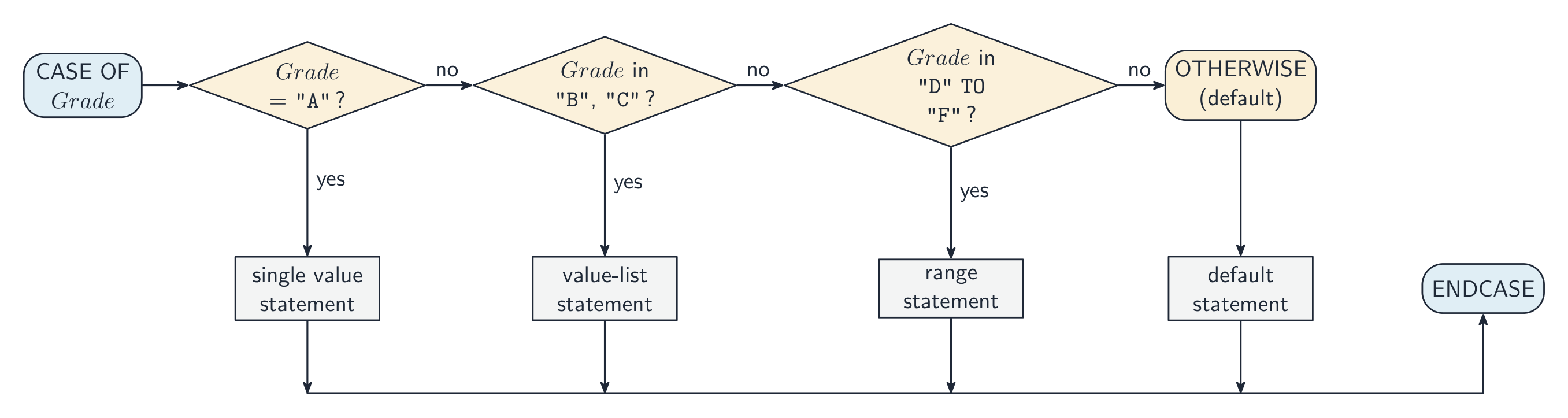
For more than two cases you can use a nested 嵌套 IF, but deep nesting is hard to read — a CASE is cleaner when testing one value against several options:
Cambridge CASE allows single values, value lists (1, 2, 3:), and ranges (1 TO 5:).
A nested IF is an IF inside a branch of another IF. Each IF needs its own ENDIF, and the examiner checks that every construct is closed:
Boundaries are where marks are lost. "A mark of 50 or more passes" is Mark >= 50, not Mark > 50; the last CASE branch, for "anything else", is written OTHERWISE, not a condition such as > 200. A wrong comparison here is a logic error 逻辑错误: the program runs, but gives the wrong output for some inputs — and a trace table with a boundary value such as 50 is how you find it.
Worked example. Rewrite this with the same functionality, without using a CASE structure.
Each value becomes a branch of a chain of IFs, and OTHERWISE becomes the last ELSE:
Two clauses that assign the same value are merged into one clause with a value list: 1, 2: ThisChar ← 'a'. The guards are tested in order: with ranges such as 1 TO 50: followed by 40 TO 60:, a value of 45 takes the first branch that matches, so an assignment in a later branch may never be performed — and when the earlier branches already cover every possible value, the OTHERWISE branch is never reached either.
Going the other way, nested IFs that test several Booleans are clearer as one condition per outcome: IF A AND B AND C THEN CALL Sub1(), then IF A AND B AND NOT C THEN CALL Sub2(), and so on. Joining tests with AND and OR removes the nesting, and IF A THEN is accepted in place of IF A = TRUE THEN.
עברית
בחירה קובעת אילו שלבים יופעלו.
IF age >= 18 THEN
    OUTPUT "Adult"
ELSE
    OUTPUT "Minor"
ENDIF
היכלות IF...ELSE בודקת תנאי פעם אחת, ואז מפעילה בדיוק ветב אחד
ליותר משני מקרים ניתן להשתמש ב-IF פנימי (nested), אך היכלות עמוקה קשה לקרוא — CASE נקי יותר כאשר בודקים ערך נגד מספר אפשרויות:
CASE OF Grade
    "A": OUTPUT "Excellent"
    "B": OUTPUT "Good"
    OTHERWISE: OUTPUT "Try again"
ENDCASE
Cambridge CASE מאפשר ערכים יחידים, רשימות ערכים (1, 2, 3:), וטווחים (1 TO 5:).
IF פנימי הוא IF בתוך ветב של IF אחר. כל IF דורש את ה-ENDIF שלו, ובוחן בוודא שכל מבנה סגור:
IF Mark >= 50 THEN
    IF Mark >= 80 THEN
        OUTPUT "Distinction"
    ELSE
        OUTPUT "Pass"
    ENDIF
ELSE
    OUTPUT "Fail"
ENDIF
גבולות הם מקומות בהם מאבדים נקודות. "ציון של 50 או יותר עובר" הוא Mark >= 50, לא Mark > 50; ה-CASE האחרון, עבור "הכל שאינו כזה", נכתב OTHERWISE, ולא תנאי כמו > 200. השוואה שגויה כאן היא שגיאת לוגיקה: התוכנית פועלת, אך מייצרת תוצאה שגויה עבור כניסות מסוימות — וטבלת מעקב עם ערך גבול כמו 50 היא הדרך למצוא זאת.
פקודת CASE מפעילה את ה-ветב המתאים לערך
דוגמא פתורה. חזור כתוב את זה באותה פונקציונליות, ללא שימוש במבנה CASE.
CASE OF MySwitch
    1: ThisChar ← 'a'
    2: ThisChar ← 'y'
    3: ThisChar ← '7'
    OTHERWISE: ThisChar ← '*'
ENDCASE
כל ערך הופך ל-ветב של שרשרת IFs, וה-OTHERWISE הופך ל-ELSE האחרון:
IF MySwitch = 1 THEN
    ThisChar ← 'a'
ELSE
    IF MySwitch = 2 THEN
        ThisChar ← 'y'
    ELSE
        IF MySwitch = 3 THEN
            ThisChar ← '7'
        ELSE
            ThisChar ← '*'
        ENDIF
    ENDIF
ENDIF
שתי פסקאות המכנסות אותו ערך משולבות לפסקה אחת עם רשימת ערכים: 1, 2: ThisChar ← 'a'. השומרים (guards) נבדקים סדרתי: עם טווחים כמו 1 TO 50: שלאחריו 40 TO 60:, ערך של 45 ילך ל-ветב הראשון שמתאים, ולכן הכנסה ב-ветב מאוחר יותר עשויה לעולם לא להתבצע — וכאשר ה-ветבים הקודמים כבר מכסים את כל הערכים האפשריים, גם ה-OTHERWISE לעולם לא יושג.
הליכה לכיוון ההפוך, IFs פנימיים הבוחנים מספר Booleans ברורים יותר כתנאי אחד לתוצאה: IF A AND B AND C THEN CALL Sub1(), ואז IF A AND B AND NOT C THEN CALL Sub2(), וכו'. חיבור בדיקות עם AND וOR מסיר את ההיכלות, וה-IF A THEN מתקבל במקום ה-IF A = TRUE THEN.
Explore · חקור
Selection (IF / ELSE) · בחירה (IF / ELSE)
Change the input and see which branch runs — the essence of selection. · שנה את הקלט והצפה איזה ערוץ יופעל – ליבת הבחירה.
Iteration 迭代 repeats a block. Three loops differ in how many times the body runs.
Count-controlled (FOR) loop
A count-controlled loop 计数循环 — use it when you know how many times to repeat:
A STEP can change the count (e.g. FOR i ← 10 TO 1 STEP -1). Best for a fixed number of repeats or processing each element of an array 数组.
Pre-condition (WHILE) loop
A pre-condition loop 前测循环 tests the condition before each pass, so it may run zero times:
Post-condition (REPEAT...UNTIL) loop
A post-condition loop 后测循环 tests the condition after each pass, so it always runs at least once:
Choosing the right loop
count known up front → FOR.
may need zero passes → WHILE.
always at least one pass → REPEAT...UNTIL.
Justify your choice by whether the count is known and whether the body must run at least once. A typical question gives a scenario ("ask for a password until correct, but always ask at least once") and asks which loop fits.
The two marks are for the name of the loop and the reason, in the scheme's words: count-controlled, because the number of iterations is known before the loop starts; post-condition, because the loop body must be executed at least once; pre-condition, because the loop may not need to execute at all. A loop over the four elements of an array that has been written as a WHILE with a counter is "not the most appropriate": the count, four, is known, so a FOR loop fits.
Worked example. Which loop suits each task? (a) print the 12 times table; (b) keep reading numbers until the user enters 0; (c) ask for a password until it is correct. Choose by asking how many times the body runs and when the test happens. (a) The count is known in advance (12), so use a FOR loop. (b) The count is unknown, and the very first input might already be 0 - so the test must come before the body: a WHILE loop, which runs zero or more times. (c) The count is unknown, but you must always ask at least once before there is anything to test - so the test comes after the body: a REPEAT...UNTIL, which runs one or more times. The deciding question is whether the body must run at least once: WHILE may run zero times, REPEAT always runs once.
Dry running with a trace table
A trace table 跟踪表 records the value of each variable as you dry run 手工跟踪 (work through by hand) an algorithm. It is how you test a loop on paper, and a six-mark question on most Paper 2s.
Count
Total
Total < 10
OUTPUT
1
0
TRUE
2
2
TRUE
3
6
TRUE
4
12
FALSE
4, 12
Rules that earn the marks: one column per variable, in the order the question gives; write a value only when it changes; start a new row each time the loop repeats; evaluate the condition with the current values, and stop the moment it is FALSE; put the output in its own column, exactly as it would appear. Trace the algorithm as written, not the one you think was intended — if it never stops, say so.
Worked example. Which constructs does each line use — selection, iteration or a subroutine call?
Pseudocode
Selection
Iteration
Subroutine
IF Ready = TRUE THEN
ENDIF
| FOR I ← 1 TO 20 ... NEXT I | | yes | |
| WHILE NOT IsFull() ... ENDWHILE | | yes | yes |
| CASE OF Key ... OTHERWISE ... ENDCASE | yes | | |
IF and CASE are selection; FOR, WHILE and REPEAT are iteration; a name followed by brackets — Start(), IsFull() — is a call to a procedure or a function, wherever it appears, including inside a condition.
עברית
איטרציה מחזירה על בלוק. שלושה סוגי לופים שונים בכמה פעמים הגוף יופעל.
לופ מבוקר ספירה (FOR)
לופ מבוקר ספירה — השתמש בו כשאתה יודע כמה פעמים לחזור:
FOR i ← 1 TO 10
    OUTPUT i
NEXT i
ה-STEP יכול לשנות את הספירה (למשל FOR i ← 10 TO 1 STEP -1). הטוב ביותר לספירת חזרות קבועה או לעיבוד כל אלמנט ב-array.
לופ תנאי מקדים (WHILE)
לולאת תנאי מקדים בודקת את התנאי לפני כל עבר, ולכן ייתכן שתפעיל אפס פעמים:
WHILE total < 100 DO
    INPUT n
    total ← total + n
ENDWHILE
לולאת תנאי מאחורי (REPEAT...UNTIL)
לולאת תנאי מאחורי בודקת את התנאי אחרי כל עבר, ולכן היא תפעיל למינום אחת:
REPEAT
    INPUT password
UNTIL password = correctPassword
בחירת הלולאה המתאימה
השלוש לולאות שונות במקום בו נבדק התנאי — לפני הגוף (WHILE), לאחריו (REPEAT), או מספר קבוע של פעמים (FOR)
הספידה ידועה מראש → FOR.
ייתכן שמצויה צורך באפס עברים → WHILE.
תמיד לפחות עבר אחד → REPEAT...UNTIL.
הסבר את הבחירה שלך בהתבסס על כך אם הספידה ידועה ועל כך אם הגוף חייב לפעיל לפחות פעם אחת. שאלה טיפית נותנת תרחיש ("בקש סיסמה עד שהיא תהיה נכונה, אך תמיד בקש לפחות פעם אחת") ושואה איזה לולאה מתאימה.
שתי הניקודים הם עבור שם הלולאה והסיבה, במילים של מפת ההערכה: ממונה-שלטון, כי מספר האיטרציות ידוע לפני שמתחילה הלולאה; תנאי מאחורי, כי גוף הלולאה חייב להתבצע לפחות פעם אחת; תנאי מקדם, כי הלולאה עשויה לא להצטרך להתבצע כלל. לולאה שעוברת על ארבע אלמנטים של מערך שנכתב כWHILE עם מונה "אינה המתאימה ביותר": הספידה, ארבע, ידועה, ולכן לולאת FOR מתאימה.
דוגמה פותרת. איזה לולאה מתאימה לכל משימה? (א) הדפסת טבלת הכפלה של 12; (ב) המשך לקרוא מספרים עד שהמשתמש מזין 0; (ג) בקש סיסמה עד שהיא תהיה נכונה. בחר על ידי שאלה כמה פעמים הגוף מפעיל ובמתי הבדיקה מתרחשת. (א) הספידה ידועה מראש (12), לכן השתמש בלולאת FOR. (ב) הספידה אינה ידועה, והכניסה הראשונה עשויה להיות כבר 0 - ולכן הבדיקה חייבת לבוא לפני הגוף: לולאת WHILE, which runs zero or more times. (ג) הספידה אינה ידועה, אך עליך תמיד לבקש לפחות פעם אחת לפני שיש דבר לבדוק - ולכן הבדיקה מגיעה אחרי הגוף: REPEAT...UNTIL, which runs one or more times. השאלה המכריעה היא האם הגוף חייב לפעיל לפחות פעם אחת: WHILE עשויה לפעיל אפס פעמים, REPEAT תמיד תפעיל פעם אחת.
ריצה יבשה עם טבלת סימון
טבלת סימון מציינת את ערך כל משתנה בזמן שאתה רץ יבשה (עובר על האלגוריתם ידנית). זוהי הדרך שבה בודקים לולאה על נייר, ושאלה בעלת שישה נקודות ברוב מבחני Paper 2.
DECLARE Count, Total : INTEGER
Count ← 1
Total ← 0
WHILE Total < 10
    Total ← Total + Count * 2
    Count ← Count + 1
ENDWHILE
OUTPUT Count, Total
ספידה
סכום
סכום < 10
פלט
1
0
TRUE
2
2
TRUE
3
6
TRUE
4
12
FALSE
4, 12
כללים שמביאים נקודות: עמודה אחת למשתנה, בסדר שבו השאלה נותן; כתוב ערך רק כאשר הוא משתנה; התחל שורה חדשה בכל פעם שהלולאה חוזרת; הערך את התנאי עם הערכים הנוכחיים, עצור ברגע שהוא FALSE; שים את הפלט בעמודה משלו, בדיוק כפי שהוא יופיע. סמן את האלגוריתם כפי שהוא נכתב, לא זה שאתה חושב שהתכוויו: אם הוא לעולם לא עצור, אמור זאת.
דוגמה מפורטת. אילו מבנים משתמשות כל שורה — בחירה, איטרציה או קריאת תת-תוכנית?
פסאודוקוד
בחירה
איטרציה
תת-תוכנית
IF Ready = TRUE THEN
CALL Start()
סוף-אם
| FOR I ← 1 TO 20 ... NEXT I | | yes | |
| WHILE NOT IsFull() ... ENDWHILE | | yes | yes |
| CASE OF Key ... OTHERWISE ... ENDCASE | yes | | |
IF וCASE הם בחירה; FOR, WHILE וREPEAT הם איטרציה; שם שלאחריו סוגריים — Start(), IsFull() — הם קריאה לתת-תוכנית או לפונקציה, בכל מקום שבו היא מופיעה, כולל בתוך תנאי.
Explore · חקור
Trace a loop, pass by pass · עקוב אחר מחזור, מעבר לעומת מעבר
A trace table records each variable after every pass of the loop. Watch the counter i climb while the running total builds up — exactly what an exam trace question asks you to fill in. · טבלת עקיבה מקלדת את כל המשתנים לאחר כל מעבר במחזור. השים לב למניף i העולה בזמן שהסכום הנצבר נבנה — בדיוק מה ששאלת עקיבה במבחן מבקשת ממך למלא.
Explore · חקור
Tracing a loop · מעקב אחרי לולאה
Step through the loop and watch the variables change each pass — exactly what a trace table records. · עבור על הלולאה והצפה את המשתנים משתנים בכל עבירה – בדיוק מה שמדד טרייס מתעד.
Explain where in the construction of an algorithm it would be appropriate to use a procedure
Use parameters
A procedure may have none, one or more parameters A parameter can be passed by reference or by value
Define and use a function
Explain where in the construction of an algorithm it is appropriate to use a function
A function is used in an expression, e.g. the return value replaces the call
Use the terminology associated with procedures and functions
including procedure/function header, procedure/function interface, parameter, argument, return value
Write efficient pseudocode
עברית
המועמדים צריכים להיות מסוגלים:
הערות והנחיות
הגדר והשתמש בפרוצדורה
הסבר באיזה שלב בבניית אלגוריתם יהיה מתאים להשתמש בפרוצדורה
השתמש בפרמטרים
פרוצדורה עשויה להיות ללא פרמטרים, עם פרמטר אחד או יותר; פרמטר יכול להיות מעבר בערך או בהפניה
הגדר והשתמש בפונקציה
הסבר באיזה שלב בבניית אלגוריתם מתאים להשתמש בפונקציה
פונקציה משמשת בביטוי, לדוגמה: הערך המוחזר מחליף את הקריאה
השתמש במונחים הקשורים ל-פרוצדורות ופונקציות
כולל: כותרת פרוצדורה/פונקציה, ממשק פרוצדורה/פונקציה, פרמטר, ארגומנט, ערך מוחזר
כתוב 伪代码 יעיל
Source: Cambridge International syllabus · מקור: הסיילבוס הבינלאומי של קמבריד'ג'
English
Structured programming 结构化编程 builds a program from small named subroutines 子程序, each with one job.
Procedure
A procedure 过程 is a named block that does an action; it may take parameters 参数 but does not return a value.
Function
A function 函数 is like a procedure but it returns a value that becomes part of an expression.
Use a procedure when the subroutine performs an action; use a function when it computes a value for the caller.
The syllabus asks where in the construction of an algorithm each is appropriate. A procedure is appropriate where the same group of steps is needed at several points (validate an input, print a menu, swap two values): the steps are written once and CALLed by name. A function is appropriate where a single value must be calculated and then used in an expression — a total, a TRUE/FALSE result, the larger of two numbers — because the return value 返回值 replaces the call: IF IsValid(Code) THEN.
Parameters
A parameter is a variable a subroutine declares to receive input; the values the caller supplies are arguments 实参. Two ways to pass them:
pass by value 传值 — the routine gets a copy; changes inside it do not affect the caller. Use for inputs it only reads.
pass by reference 传引用 — the routine gets a reference to the caller's variable; changes do affect the caller. Use when it must update a parameter.
Cambridge pseudocode writes the mode in the header, BYVAL or BYREF, before each parameter. If neither is written, BYVAL is assumed, so a routine that must change the caller's variable — Swap, or a procedure that updates a running total — needs BYREF in its header.
Worked example. What is output?
X is a reference to A, so A becomes 8. Y is a copy of B, so doubling Y leaves B at 3. The output is 8, 3. Had the header said BYVAL X, A would still be 5.
Local vs global variables
A local variable 局部变量 is declared inside a subroutine and exists only while it runs. A global variable 全局变量 is declared outside and is visible everywhere. Prefer locals and parameters — heavy use of globals makes code hard to follow and test. (The region where a name is visible is its scope 作用域.)
The one-line difference: a global variable can be accessed from anywhere in the program, a local variable only inside the subroutine that declares it. Benefits of local variables the scheme accepts: the same identifier can be used in another subroutine without a clash; the value cannot be changed accidentally by other parts of the program; the memory is released when the subroutine ends; and the subroutine is self-contained, so it can be tested on its own and reused in another program.
A local variable is created each time the subroutine is called and destroyed when it returns, so it cannot carry a value from one call to the next. A procedure that builds up a string over repeated calls therefore needs that string to be global (or passed BYREF). If MyString is changed from a global to a local declared inside MyOutput(), every call starts with a new, empty MyString, the text added by earlier calls is lost, and the procedure "does not work as expected".
When to use a subroutine
Use a subroutine when:
the same logic appears in more than one place — write it once, call it many times.
a block has a clear named purpose — the name documents what it does.
the program is complex — break it into parts (decomposition 分解).
you want to test a piece in isolation.
Don't make them so tiny that the call costs more than the work inside.
Terminology
definition — the PROCEDURE ... ENDPROCEDURE (or function) block.
call — where it is invoked. argument — a value passed in. parameter — the variable that receives it.
return value — what a function passes back.
procedure/function header — the first line giving the name and parameters (PROCEDURE Name(params) or FUNCTION Name(params) RETURNS type).
procedure/function interface / signature 签名 — name + parameters + return type: what a caller must know to use it.
Worked example. Describe each term used in the header FUNCTION Pass2(Count : INTEGER) RETURNS BOOLEAN.
Term
Meaning
FUNCTION
a subroutine that returns a value
Pass2
the identifier used to call it
Count
the parameter: the identifier that receives the argument passed in
INTEGER
the data type of the parameter
RETURNS BOOLEAN
the data type of the value the function returns
The two identifiers in PROCEDURE MyProc(Count : INTEGER, Message : STRING) are parameters: they receive the values passed in when the procedure is called, and are used inside it like local variables.
To convert a procedure into a function: change PROCEDURE to FUNCTION and add RETURNS <type>; replace the OUTPUT (or the BYREF parameter that carried the result out) with a RETURN statement; and change every call so that the returned value is used, Result ← Unpack(Text) instead of CALL Unpack(Text, Result). For a "write the header" question, write the whole line: FUNCTION Calculate(Expression : STRING) RETURNS INTEGER. An array parameter is passed by reference, so a procedure that writes into an array changes the caller's array.
When a program gains a new module, the interface is what is agreed first: the name, the parameters (how many, in what order, of what type) and the return type, plus any global data the module reads or writes. A module that sends a reminder before a due date needs the record (or its index) as a parameter and returns nothing, so it is a procedure; the main program calls it once per record.
Writing a module for Paper 2
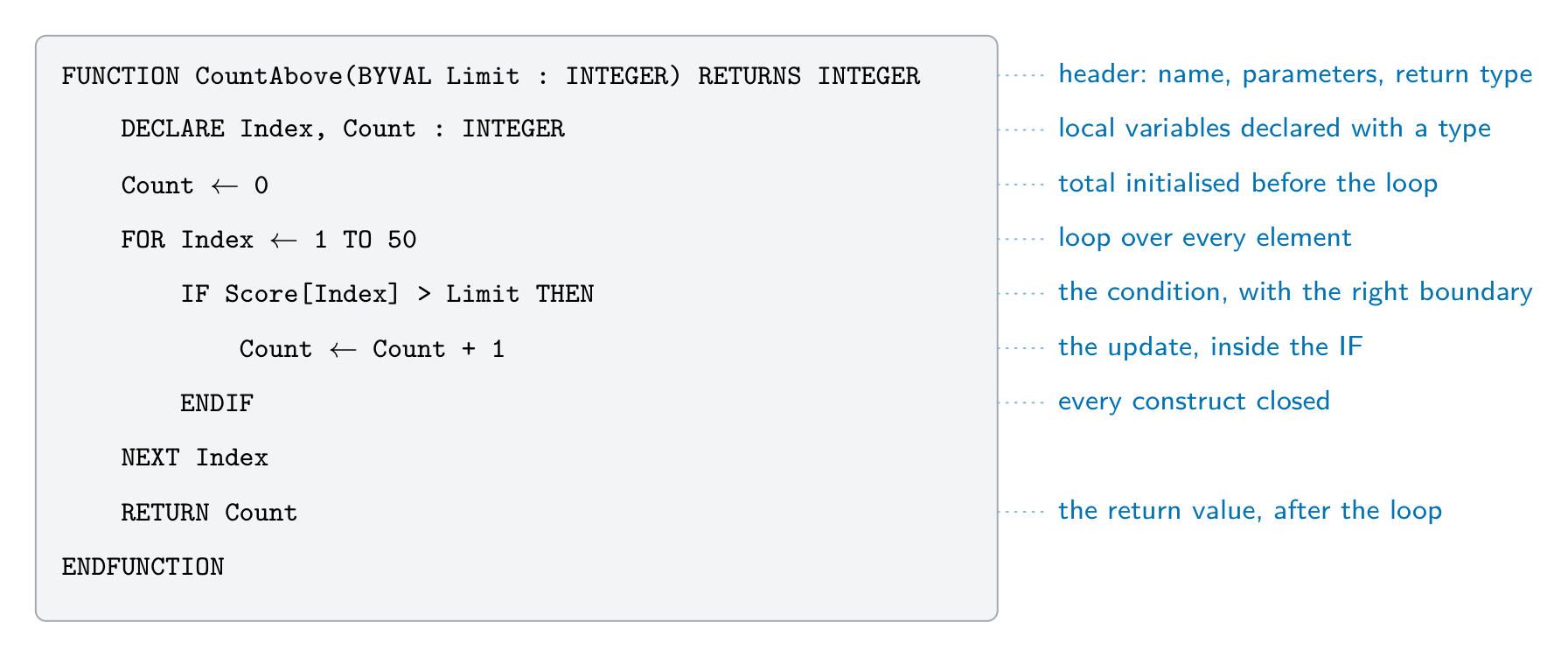
Half of Paper 2 is "write pseudocode for module X". The scheme awards a mark per feature, so a module that is not finished still scores for every correct part. The parts the examiner looks for:
The header, as the question describes it: PROCEDURE Name(Param : TYPE) or FUNCTION Name(Param : TYPE) RETURNS TYPE, with BYREF where the routine must change the argument.
Local declarations: DECLARE every local variable with its type, and initialise counters and totals (Count ← 0).
The loop that visits every element: FOR Index ← 1 TO 50 for an array whose size is given; WHILE NOT EOF(...) for a file.
The condition, with the right comparison and boundary, on the right item: IF Score[Index] > Limit THEN.
The update inside the branch: the count increased, the value stored, or the message output.
The end: RETURN once, after the loop, in a function; ENDFUNCTION or ENDPROCEDURE; and every IF, FOR and WHILE closed.
Worked example. A global array Score : ARRAY[1:50] OF INTEGER holds test scores. Write a function CountAbove(Limit : INTEGER) that returns how many scores are greater than Limit.
Marks: the header with its parameter and RETURNS INTEGER; Count declared and set to 0; a loop over all 50 elements; the comparison > Limit (not >=); the count updated inside the IF; RETURN Count after the loop. The main program uses the return value in an expression or an output: OUTPUT "Above 70: ", CountAbove(70).
Worked example. Write a function IsValid(Code : STRING) that returns TRUE when Code is two capital letters followed by four digits — the format 格式AB1234 — and FALSE otherwise.
The length check comes first, so MID is never asked for a position that does not exist. Validation 验证 like this returns a BOOLEAN so the caller can write IF IsValid(Entry) THEN ... ELSE OUTPUT "Invalid code" ENDIF: a message to the user is output by the caller, not by the function — a function calculates, a procedure acts.
Worked example. Write a function IsPalindrome(Word : STRING) that returns TRUE when Word reads the same backwards, such as "RACECAR".
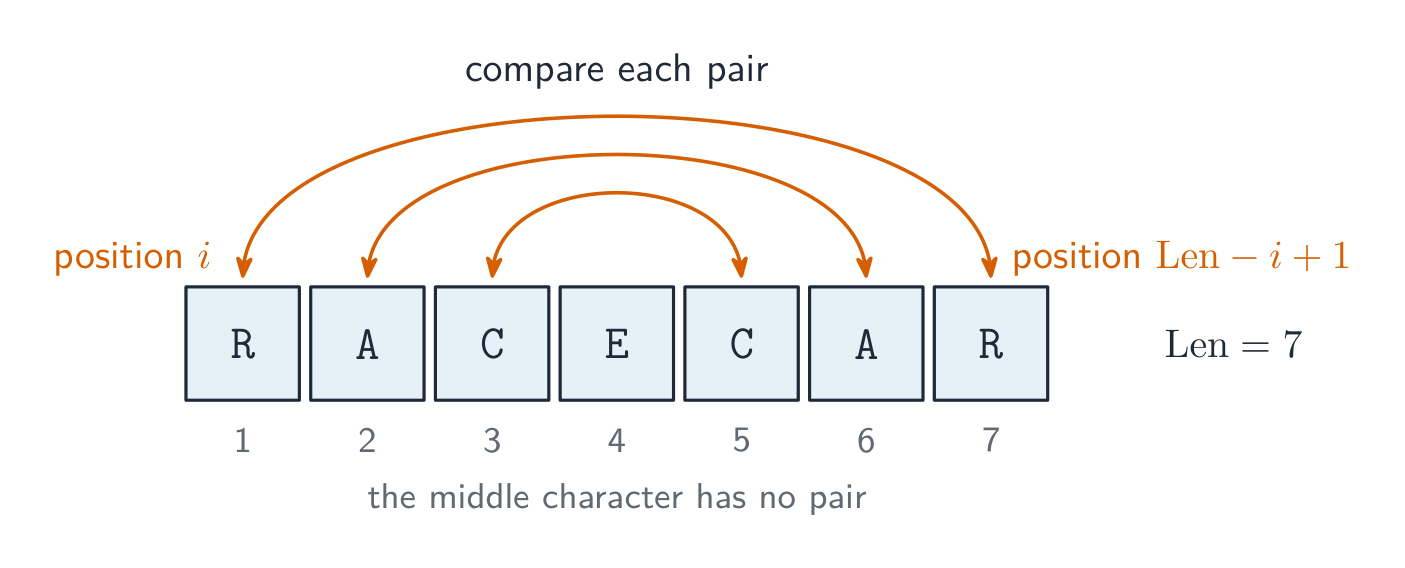
Compare the characters from the two ends, moving inwards: position Index is paired with position Len - Index + 1, and only the first half needs testing.
The same three tools — a FOR over the positions, MID(s, i, 1) to read one character, and & to build a new string — answer most string modules on Paper 2: counting how often a character occurs (IF MID(s, i, 1) = Ch THEN Count ← Count + 1), replacing every instance of a character (add either NewChar or the original character to NewString at each position), hiding all but the last four digits of a card number (add '*' for every position up to Len - 4), or writing your own MID() by joining the characters from Start to Start + Length - 1. Asking MID for a position past the end of the string is a run-time error, so check LENGTH first.
Files. Values in variables disappear when the program ends, so a module that must keep data for the next run writes it to a file: OPENFILE "scores.txt" FOR WRITE, one WRITEFILE "scores.txt", NUM_TO_STR(Score[Index]) per line inside the loop, and CLOSEFILE "scores.txt" once, after the loop; reading back uses FOR READ, READFILE and WHILE NOT EOF("scores.txt"). Topic 10 has the full file section; here the marks are for opening in the right mode, the read or write inside the loop, and closing once after it.
עברית
תכנות מובנה בונה תוכנית מתת-תוכניות קטנות וממוענות שם, כאשר לכל אחת מהן יש משימה אחת.
תהליך
תהליך הוא חוסמת ממוענת שם שמבצעת פעולה; עשוי לקבל פרמטרים אך אינו מחזיר ערך.
פונקציה דומה לתהליך אך היא מחזירה ערך הופך לחלק מביטוי.
FUNCTION Square(x : INTEGER) RETURNS INTEGER
    RETURN x * x
ENDFUNCTION

result ← Square(5) + 1     // result = 26
השתמש ב-תהליך כאשר התת-תוכנית מבצעת פעולה; השתמש ב-פונקציה כאשר היא מחשבת ערך עבור הקורא.
הסיילבוס דורש איפה בבניית האלגוריתם כל אחד מהם מתאים. תהליך מתאים כאשר נדרשת אותה סדרת שלבים מספר פעמים (לאמת כניסה, הדפיס תפריט, להחליף שני ערכים): השלבים נכתבים פעם אחת ו-CALLים על ידי שם. פונקציה מתאימה כאשר יש לחשב ערך יחיד ולאחר מכן להשתמש בו בביטוי — סכום, תוצאת TRUE/FALSE, הערך הגדול ביותר משני מספרים — מכיוון שהערך המוחזר מחליף את הקריאה: IF IsValid(Code) THEN.
תהליך מבצע פעולה ואינו מחזיר דבר; פונקציה מחזירה ערך שמשתמשים בו בביטוי
פרמטרים
פרמטר הוא משתנה שתת-תוכנית מגדירה כדי לקבל כניסה; הערכים שהקורא מספק הם ארגומנטים. שתי דרכים למסור אותם:
pass by value — הפונקציה מקבלת עתיקה; שינויים בתוכה אינם משפיעים על הקורא. השתמש עבור קלט שרק נקרא.
pass by reference — הפונקציה מקבלת יחוס למשתנה של הקורא; שינויים כן משפיעים על הקורא. השתמש כאשר יש צורך עדכן פרמטר.
העברה בערך מעתיקה את הערך לתיבה חדשה; העברה ביחוס מאפשרת לפונקציה לשנות את המשתנה של הקורא,
PROCEDURE Swap(BYREF a : INTEGER, BYREF b : INTEGER)
    DECLARE temp : INTEGER
    temp ← a
    a ← b
    b ← temp
ENDPROCEDURE
Cambridge pseudocode כותב את סוג ההעברה בכותרת, BYVAL או BYREF, לפני כל פרמטר. אם לא נכתב שום דבר, מופרש BYVAL, ולכן פונקציה שצריכה לשנות את המשתנה של הקורא — Swap, או פרוצדורה שעודכנת סך נצברים — זקוקה לBYREF בכותרת שלה.
דוגמה עבודה. מהו התוצאה?
PROCEDURE Adjust(BYREF X : INTEGER, BYVAL Y : INTEGER)
    X ← X + Y
    Y ← Y * 2
ENDPROCEDURE

A ← 5
B ← 3
CALL Adjust(A, B)
OUTPUT A, B
X היא התייחסות לA, לכן A הופכת ל8. Y היא העתקה של B, לכן הכפל בY משאיר את B ב3. הפלט הוא 8, 3. אם הכותרת הייתה מכילה BYVAL X, הA עדיין היה 5.
משתנים מקומיים לעומת משתנים גלובליים
משתנה מקומי מוגדר בתוך פרוצדורה וקיים רק בזמן הרצה שלו. משתנה גלובלי מוגדר מחוץ ונראה בכל מקום. העדיפו משתנים מקומיים ופרמטרים — שימוש מוגזם במשתנים גלובליים הופך את הקוד לקשה להבנה ולבדיקה. (האזור בו שם מזהה נראה הוא ה-scope שלו.)
ההבדל בשורה אחת: משתנה גלובלי ניתן לגישה מכל מקום בתוכנית, משתנה מקומי רק בתוך הפרוצדורה שמגדירה אותו. יתרונות המשתנים המקומיים שאתר זה מקבל: אותה תווית מזהה יכולה לשמש בפרוצדורה אחרת ללא התנגשות; הערך לא יכול להשתנות בטעות על ידי חלקים אחרים בתוכנית; הזיכרון משוחרר כאשר הפרוצדורה מסתיימת; והפרוצדורה היא מושלמת בעצמה, כך שניתן לבדוק אותה לבדה ולהשתמש בה בתוכנית אחרת.
משתנה מקומי נוצר כל פעם שהתת-תוכנית נקראת ומושמדת כאשר היא חוזרת, ולכן הוא לא יכול לשאת ערך ממקרא אחת למבוקרת הבאה. תת-תוכנית שאוספת מחרוזת לאורך מבוקרות חוזרות צריכה שהמחרוזת תהיה גלובלית (או תועבר BYREF). אם MyString משתנה מגלובלי למקומי שמוגדר בתוך MyOutput(), כל מבוקרת מתחילה עם MyString חדשה וריקה, הטקסט שנוסף על ידי מבוקרות קודמות אבוד, והתת-תוכנית "לא עובדת כפי שמצופה".
משתנה מקומי הוא תיבה חדשה וריקה בכל כריאה; רק משתנה גלובלי (או פרמטר BYREF) שומר ערך בין כריאותמשתנה גלובלי נראה בכל מקום; משתנה מקומי קיים רק בתוך הפרוצדורה שלו
מתי להשתמש בפרוצדורה
השתמש בפרוצדורה כאשר:
אותו לוגיקה מופיעה ביותר ממקום אחד — כתוב אותו פעם אחת, קרא אותו פעמים רבות.
בלוק יש לו מטרה נקובה — השם מסמך מה שהוא עושה.
התוכנית מורכבת — פצל אותה לחלקים (decomposition).
אתה רוצה לבדוק קטע קוד בבידוד.
אל תגרום להם להיות קטנים מדי עד שהעלות של הקריאה גבוהה מהעבודה שבפנים.
מונחולוגיה
הגדרה — בלוק הPROCEDURE ... ENDPROCEDURE (או הפונקציה).
קריאה — המקום שבו היא נקראת. ארגומנט — ערך המועבר לתוך הבloq. פרמטר — המשתנה שמקבל אותו.
ערך חזרה — מה שהפונקציה מחזירה.
כותרת פרוצ'ורה/פונקציה — השורה הראשונה המציגה את השם והפרמטרים (PROCEDURE Name(params) או FUNCTION Name(params) RETURNS type).
ממשק פרוצ'ורה/פונקציה / חתימה — שם + פרמטרים + סוג החזרה: מה שנקרא צריך לדעת כדי להשתמש בה.
דוגמה מופרדת. הסבר כל מונח המשמש בכותרת FUNCTION Pass2(Count : INTEGER) RETURNS BOOLEAN.
מונח
משמעות
FUNCTION
תת-תוכנית שמחזירה ערך
Pass2
המזהה המשמש לקריאה בו
Count
הפרמטר: המזהה שמקבל את הארגומנט המועבר
INTEGER
סוג הנתונים של הפרמטר
RETURNS BOOLEAN
סוג הנתונים של הערך שמחזירה הפונקציה
שני המזהים בPROCEDURE MyProc(Count : INTEGER, Message : STRING) הם פרמטרים: הם מקבלים את הערכים המועברים כאשר נקראת הפרוצ'ורה, ושימשים בתוכה כמו משתנים מקומיים.
להמיר פרוצ'ורה לפונקציה: שנה PROCEDURE לFUNCTION והוסף RETURNS <type>; החלף את הOUTPUT (או את הBYREF פרמטר שעבר את התוצאה החוצה) עם פקודת RETURN; ושנה כל קריאה כך שערך החזרה ייستخدم, Result ← Unpack(Text) במקום CALL Unpack(Text, Result). לשאלת "כתוב כותרת", כתוב את השורה כולה: FUNCTION Calculate(Expression : STRING) RETURNS INTEGER. פרמטר מערך מועבר בערך, ולכן פרוצ'ורה שכותבת במערך משנה את המערך של הנקרא.
כשהתוכנה מקבלת מודול חדש, הממשק הוא מה שנבנה תחילה: השם, הפרמטרים (כמה, באיזה סדר, של איזה סוג) וסוג החזרה, onClick כל נתון גלובלי שהמודול קורא או כותב. מודול ששולח תזכורת לפני תאריך אחריות זקוק לרשומה (או למדד שלה) כפרמטר ואינו מחזיר דבר, ולכן זוהי פרוצ'ורה; התוכנה הראשית קוראת אותה פעם אחת לכל רשומה.
כתיבת מודול לבחינת נייר 2
חצי מנייר 2 הוא "כתוב פסאודוקוד למודול X". מפת ההערכה מעניקה נקודה על כל מאפיין, ולכן מודול שלא הושלם עדיין זוכה לנקודות על כל חלק נכון. החלקים שהמבקר מחפש:
*כל חלק בתשובה למודול מקבל את הנקודות שלו, לכן כתוב את כולם גם כאשר אינך בטוח
הכותרת, כפי שהשאלה מתארת אותה: PROCEDURE Name(Param : TYPE) או FUNCTION Name(Param : TYPE) RETURNS TYPE, עם BYREF כאשר הרutine צריך לשנות את הארגומנט.
הצהרות מקומיות: DECLARE כל משתנה מקומי עם סוגו, והגדרת סופרים וסכומים (Count ← 0).
הלולאה שביקרת בכל אלמנט: FOR Index ← 1 TO 50 למערך whose גודל נתון; WHILE NOT EOF(...) לקובץ.
התנאי, עם ההשוואה והגבול הנכון, על הפריט הימני: IF Score[Index] > Limit THEN.
העדכון בתוך הענף: הספירה הועלתה, הערך אוחסן, או ההודעה הוצגה.
הסיום: RETURN פעם אחת, אחרי הלולאה, בפונקציה; ENDFUNCTION או ENDPROCEDURE; וכל IF, FOR ו-WHILE סגורים.
דוגמה פתורה. מערך גלובלי Score : ARRAY[1:50] OF INTEGER מחזיק ציוני מבחן. כתוב פונקציה CountAbove(Limit : INTEGER) שמחזירה כמה ציונים גדולים מ-Limit.
FUNCTION CountAbove(BYVAL Limit : INTEGER) RETURNS INTEGER
    DECLARE Index, Count : INTEGER
    Count ← 0
    FOR Index ← 1 TO 50
        IF Score[Index] > Limit THEN
            Count ← Count + 1
        ENDIF
    NEXT Index
    RETURN Count
ENDFUNCTION
נקודות: הכותרת עם הפרמטר וה-RETURNS INTEGER; Count מוגדר ומכוון ל-0; לולאה על כל 50 האלמנטים; ההשוואה > Limit (לא >=); הספירה מעודכנת בתוך ה-IF; RETURN Count אחרי הלולאה. התוכנית הראשית משתמשת בערך ההחזר בביטוי או בהוצאה: OUTPUT "Above 70: ", CountAbove(70).
דוגמה פתורה. כתוב פונקציה IsValid(Code : STRING) שמחזירה TRUE כאשר Code הוא שתי אותיות גדולות followed by ארבעה ספרות — ה-פורמטAB1234 — ו-FALSE אחרת.
FUNCTION IsValid(BYVAL Code : STRING) RETURNS BOOLEAN
    DECLARE Index : INTEGER
    DECLARE Ch : STRING
    IF LENGTH(Code) <> 6 THEN
        RETURN FALSE
    ENDIF
    FOR Index ← 1 TO 6
        Ch ← MID(Code, Index, 1)
        IF Index <= 2 THEN
            IF Ch < "A" OR Ch > "Z" THEN
                RETURN FALSE
            ENDIF
        ELSE
            IF Ch < "0" OR Ch > "9" THEN
                RETURN FALSE
            ENDIF
        ENDIF
    NEXT Index
    RETURN TRUE
ENDFUNCTION
בדיקת האורך מגיעה קודם, כך ש-MID לעולם לא יתבקש על מיקום שלא קיים. תוקף כזה מחזיר a BOOLEAN כדי שהקורא יכול לכתוב IF IsValid(Entry) THEN ... ELSE OUTPUT "Invalid code" ENDIF: הודעה למשתמש מוצגת על ידי הקורא, לא על ידי הפונקציה — פונקציה מחשבת, procedure פועל.
דוגמה פתורה. כתוב פונקציה IsPalindrome(Word : STRING) שמחזירה TRUE כאשר Word נקרא אותו דבר הפוך, כמו "RACECAR".
השווה את האותיות מהשניים קצוות, זז פנימה: מיקום Index מצמד עם מיקום Len - Index + 1, ורק החצי הראשון צריך לבדיקה.
בדיקת palindrome מצמדת מיקום i עם מיקום Len - i + 1 ועוצרת באמצע
FUNCTION IsPalindrome(BYVAL Word : STRING) RETURNS BOOLEAN
    DECLARE Len, Index : INTEGER
    Len ← LENGTH(Word)
    FOR Index ← 1 TO Len DIV 2
        IF MID(Word, Index, 1) <> MID(Word, Len - Index + 1, 1) THEN
            RETURN FALSE
        ENDIF
    NEXT Index
    RETURN TRUE
ENDFUNCTION
אותם שלושה כלים — a FOR על המיקומים, MID(s, i, 1) לקרוא אות אחת, ו-& לבנות מחרוזת חדשה — עונים על רוב מודולי המחרוזות בPaper 2: ספירה כמה פעמים אות מופיעה (IF MID(s, i, 1) = Ch THEN Count ← Count + 1), החלפת כל instance של אות (הוסף או NewChar או האות המקורי ל-NewString בכל מיקום), הסתרת הכל למעט ארבעת הספרות האחרונות של מספר כרטיס (הוסף '*' לכל מיקום עד Len - 4), או כתיבה שלך own MID() על ידי חיבור האותיות מ-Start ל-Start + Length - 1. בקשה MID על מיקום מעבר לסוף המחרוזת היא run-time error, לכן בדוק LENGTH קודם.
קובצים. ערכים במשתנים נעלמים כאשר התוכנית נגמרת, לכן module שצריך לשמור נתונים לריצה הבאה כותב them to a file: OPENFILE "scores.txt" FOR WRITE, one WRITEFILE "scores.txt", NUM_TO_STR(Score[Index]) per line inside the loop, and CLOSEFILE "scores.txt" פעם אחת, אחרי הלולאה; קריאה back משתמש ב-FOR READ, READFILE ו-WHILE NOT EOF("scores.txt"). Topic 10 יש את הקובץ section; כאן הנקודות הם לפתיחה in the right mode, the read or write inside the loop, ו-sleeping once after it.
Explore · חקור
The call stack: push on call, pop on return · מטרת הקריאה: דחיפה בעת קריאה, הסרה בעת החזרה
Calling a subroutine pushes a new frame on top; returning pops it and hands a value back to the caller. The call that is running is always the frame on top. · קריאה לתת-תוכנית דוחפת מסגרת חדשה בראש; החזרה מורידה אותה ומחזירה ערך לקורא. הקריאה המתבצעת כרגע היא תמיד המסגרת בראש.
Three features that make pseudocode easier to understand — the answer to a "state three features" question — are meaningful identifiers (Total, not t), indentation of the statements inside each construct, and comments (// ...) that explain the purpose; keywords in capitals, one statement per line and blank lines between sections are also accepted. Efficient pseudocode goes further:
move invariants out of loops — if a value (an invariant 不变量) does not change with the loop counter, compute it once before the loop.
exit a loop early when the answer is found (stop a linear search 线性查找 as soon as the target appears).
avoid redundant work — store a result and reuse it instead of recomputing.
choose the right data structure — an array beats many separate variables when the items belong together.
replace deep nested IFs with CASE when testing one value against many.
comment the intent, not the mechanics (// validate the postcode, not // loop 6 times).
use meaningful names (numberOfPupils, not n) and initialise variables before use.
עברית
שלושה מאפיינים שהופכים פסאודוקוד קל יותר להבנה — התשובה לשאלה "cite three features" — הם מזהים משמעותיים (Total, לא t), התאבקות של ההצהרות בתוך כל construct, ו-הערות (// ...) שמסבירות את המטרה; מילות מפתח באותיות גדולות, statement אחת בכל שורה ורווחים בין sections also are accepted. פסאודוקוד יעיל הולך further:
הזז אי-שינויים מחוץ למחלקות — אם ערך (אי-שינוי) אינו משתנה עם מדד המחלקה, חשב אותו פעם אחת לפני תחילת המחלקה.
צא ממחלקה מוקדם כשהתשובה נמצאת (עצור חיפוש ליניארי ברגע שהמטרה מופיעה).
הימנע מעבודה מיותרת — אחסן תוצאה והשתמש בה שוב במקום לחשב מחדש.
בחר במבנת נתונים מתאימה — מערך טוב יותר מרבים של משתנים נפרדים כאשר הפריטים קשורים זה לזה.
החלף IF מקוננים בעומק ב-CASE כאשר בודקים ערך אחד מול רבים.
הער את הכוונה, לא את המנגנון (// validate the postcode, לא // loop 6 times).
השתמש בשמות משמעותיים (numberOfPupils, לא n) והתחל משתנים לפני השימוש.
הזז עבודה שאינה משתנה החוצה מהמחלקה כך שתוצאה פעם אחת
11.3
Testing and errors · בדיקה ושגיאות
English
Three kinds of error, each found in a different way:
Error
What it is
Example
Found by
syntax error 语法错误
a statement that breaks the rules of the language
a missing ENDIF; OUTPT "Hi"
the translator, before the program runs
run-time error 运行时错误
the program runs, but a statement cannot be carried out
division by zero; an array index of 0 or 51; a function called with an invalid parameter; a loop that never ends, so the program "freezes"
while running: the program stops or hangs
logic error
the program runs to the end, but the output is wrong
> where >= was needed; a total never set to 0
testing with a trace table and chosen test data
An IDE 集成开发环境 helps find the last two: a breakpoint 断点 stops the program at a chosen line; single stepping 单步执行 then runs one statement at a time; and the report (or watch) window shows the value of each variable at that moment, so the line where a value goes wrong is seen directly. Test methods and test data are in topic 12.
עברית
שלושה סוגי שגיאות, כל אחד נמצא באופן שונה:
שגיאה
מה היא
דוגמה
נמצאת על ידי
שגיאת סינטקס
הצהרה ששוברת את חוקי השפה
חסר ENDIF; OUTPT "Hi"
המתרגם, לפני שהתוכנית פועלת
שגיאת ריצה
התכנית פועלת, אך הוראה אינה יכולה להתבצע
חלוקה באפס; אינדקס מערך של 0 או 51; פונקציה שנקראה עם פרמטר לא תקין; מחלקה שלא נגמרת לעולם, כך שהתכנית "מתקפאת"
בזמן הרצה: התכנית עצורה או נתקעת
שגיאת לוגיקה
התוכנית פועלת עד הסוף, אך הפלט שגוי
> במקום שהיית נדרשת >=; סכום מעולם לא הוגדר ל0
בדיקה עם טבלת עקיבה ובחירת נתוני מבחן
IDE עוזר למצוא את שתי האחרונות: נקודת עצירה עצרת את התכנית בקו נבחר; צעד יחיד מריץ אחר כך הוראה אחת; וחלון הדוח (או הצפייה) מראה את ערך כל משתנה ברגע זה, כך שקו בו הערך משתנה בצורה שגויה נראה ישירות. שיטות בדיקה ונתוני בדיקה נושא 12.
11.3
Definitions the examiner accepts · הגדרות מקובלות בקורס
English
A definition question is marked against fixed wording. Learn these exactly.
Term
Definition
procedure
a subroutine that carries out a task (a sequence of steps) and does not return a value; it is called with CALL
function
a subroutine that returns a single value to the point where it was called, so it can be used in an expression
parameter
the identifier in a subroutine header that receives a value or a reference when the subroutine is called
argument
the value (or variable) supplied in the call, matched to a parameter
passing by value
a copy of the argument's value is given to the subroutine, so changes inside it do not affect the original variable
passing by reference
the address of the variable is given to the subroutine, so changes inside it change the original variable
header
the first line of a subroutine definition: its name, its parameters and, for a function, its return type
interface
what a calling program must know to use a subroutine: its name, its parameters (number, order, type) and its return type
return value
the value a function passes back to the expression that called it
local variable
declared inside a subroutine; it exists only while the subroutine runs and can be used only inside it
global variable
declared outside every subroutine; it can be used anywhere in the program
count-controlled loop
repeats a fixed number of times, controlled by a counter (FOR ... NEXT)
pre-condition loop
tests its condition before each iteration, so the body may never run (WHILE ... ENDWHILE)
post-condition loop
tests its condition after each iteration, so the body runs at least once (REPEAT ... UNTIL)
constant
a named value that cannot change while the program runs
subroutine
a self-contained block of code that performs a task and is called by name: a procedure or a function
library routine
a subroutine that has already been written and tested, and is available to be called from a program
עברית
שאלה המגדירה מוערכת לפי נוסח קבוע. לימוד אלו בדיוק.
מונח
הגדרה
תת-תוכנית
תת-תוכנית שמבצעת משימה (סדרת שלבים) ולא מחזירה ערך; היא נקראת עם CALL
פונקציה
תת-תוכנית שמחזירה ערך יחיד לנקודה שבה נקראה, כך שניתן להשתמש בה בביטוי
פרמטר
המזהה בחתימת תת-תוכנית המקבל ערך או רכיב כשהתת-תוכנית נקראת
ארגומנט
הערך (או המשתנה) שסופק בקריאה, המקוון לפארמטר
העברת ערך
העתק של ערך הארגון מועבר לתת-התוכנית, ולכן שינויים בתוכה אינם משפיעים על המשתנה המקורי
העברת כיוונית (רפרנס)
הכיוונית למשתנה מועברת לתת-התוכנית, ולכן שינויים בתוכה משנים את המשתנה המקורי
ראשית
השורה הראשונה בהגדרת תת-תוכנית: שמה, הפרמטרים שלה, ועבור פונקציה, סוג ההחזרה שלה
ממשק
מה שיש לדעת לתוכנית הקוראת כדי להשתמש בתת-תוכנית: שמה, פרמטריה (מספר, סדר, סוג) וסוג ההחזרה שלה
ערך החזרה
הערך שמעבירה הפונקציה חזרה לביטוי שהקריא אותה
משתנה מקומי
מוגדר בתוך תת-תוכנית; קיים רק בזמן ריצת התת-תוכנית וניתן להשתמש בו רק בתוכה
משתנה גלובלי
מוגדר מחוץ לכל תת-תוכנית; ניתן להשתמש בו בכל מקום בתוכנה
לולאה הנשלטת בספירה
חוזרת מספר פעמים קבוע, נשלטת על ידי נגד (FOR ... NEXT)
לולאת תנאי מקדימה
בודקת את התנאי לפני כל איטרציה, ולכן הגוף עשוי לא להירץ מעולם (WHILE ... ENDWHILE)
לולאת תנאי אחורית
בודקת את התנאי לאחר כל איטרציה, ולכן הגוף ירוץ לפחות פעם אחת (REPEAT ... UNTIL)
קבוע
ערך בעל שם שאינו יכול להשתנות בזמן ריצת התוכנה
תת-תוכנית
בלוק קוד עצמאי המבצע משימה ונקרא לפי שמו: פרוצ'ורה או פונקציה
פונקציית ספרייה
תת-תוכנית שנכתבה ובוצעה כבר, וזמינה לקריאה מתוכנה
11.3
Exam tips · טיפים לבחינות
English
Distinguish a procedure (no return value) from a function (returns a value); know pass by value vs by reference.
Choose the right loop: count-controlled (FOR) when the number of repeats is known, condition-controlled (WHILE/REPEAT) otherwise.
Distinguish local vs global variables and scope; prefer local variables in reusable modules.
Use the insert's exact routine names and parameter order. VAL and STR are IGCSE names and score nothing; UCASE and LCASE are real 9618 routines from the Pseudocode Guide but act on one character, so on Paper 2 a whole string takes TO_UPPER or TO_LOWER.
In a "write pseudocode" answer the header, the declarations, the loop, the condition, the update and the RETURN each carry a mark: write all six parts, even if one is uncertain.
Common mistakes
Calling a function and not using what it returns. Assign the result, or use it in the expression or output: Sorted ← BubbleSort(MyArray, 7).
Passing a length one out: 6 for a seven-element array, or the last index where the length was wanted. Decide whether the parameter is a length or an index, and check that the last element is visited.
Closing a file inside the loop that reads it. Open once, close once, after the loop.
Using the input as a filename directly. Add the extension the question gave: FileName ← Choice & ".txt".
Leaving constructs open. Every IF needs its ENDIF, every FOR its NEXT, every WHILE its ENDWHILE, and every function its RETURN; the scheme has a mark for it.
Wrong boundaries: > for "at least" (which is >=), or a FOR that starts at 0 for an array declared [1:50].
A counter or total that is never set to 0 before the loop.
In a trace table, rewriting every variable on every row, or changing a value before the statement that changes it has run.
Half a condition: IF x = 3 OR 4 — each side of OR and AND must be a complete comparison. And + does not join strings; & does.
Declaring as local a value that must survive between calls. A running total or a string built up over several calls is global or BYREF.
עברית
להבין הבדלים בין פרוצ'ורה (ללא ערך החזרה) לבין פונקציה (מחזירה ערך); לשלוט בהעברת ערך לעומת העברת כיוונית.
לבחור את הלולאה המתאימה: לולאת נגד (FOR) כאשר מספר החזרות ידוע, לולאת תנאי (WHILE/REPEAT) במקרים אחרים.
להבין הבדלים בין משתנים מקומיים לגלובליים ותחום תוקף; להעדיף משתנים מקומיים במודולים הניתנים לשימוש חוזר.
להשתמש בשמות פונקציות ומסדר פרמטרים מדויקים. VAL וSTR הם שמות IGCSE ואינם מניחים נקודות; UCASE וLCASE הן פונקציות אמיתיות 9618 ממדריך הפסאודוקוד אך פועלות על תווית אחת, ולכן במבחן 2 מחרוזת טקסט שלמה דורשת TO_UPPER או TO_LOWER.
בתשובה "כתיבת פסאודוקוד" יש לכתוב את הראשית, ההצהרות, הלולאה, התנאי, העדכון והRETURN – כל אחד מהם זוכה בנקודה: יש לכתוב את כל ששת החלקים, גם אם חלק אחד הוא חסר.
טעויות נפוצות
קריאת פונקציה ולא שימוש בערך שהוחזר. יש להקליד את התוצאה, להשתמש בה בביטוי או בפלט: Sorted ← BubbleSort(MyArray, 7).
העברת אורך של 1: 6 למערך בעל שבעה אלמנטים, או האינדקס האחרון שבו האורך נדרש. יש להחליט האם הפרמטר הוא אורך או אינדקס, ולבדוק שהאלמנט האחרון ייבקר.
סגירת קובץ בתוך מחזור הקורא אותו. לפתוח פעם אחת, לסגור פעם אחת, לאחר המחזור.
שימוש בשקלט יש作为 שם קובץ. הוספת ההרחבה שהשאלה נתנה: FileName ← Choice & ".txt".
השארת מבנים פתוחים. כל IF זקוק ל-ENDIF, כל FOR ל-NEXT, כל WHILE ל-ENDWHILE, וכל פונקציה ל-RETURN; לקטע זה תעודת ציון.
גבולות שגויים: > עבור "לפחות" (שהוא >=), או מתייחס ל-FOR שמתחיל ב-0 למערך המוגדר כ-[1:50].
נגדן או סכום שאינם מוגדרים ל-0 לפני תחילת המחזור.
בטבלת עקבות, חידוש כל משתנה בכל שורה, או שינוי ערך לפני שההצהרה המשנה אותו רצה.
חצי מתנאי: IF x = 3 OR 4 — כל צד של OR ו-AND חייב להיות השוואה מלאה. וה-+ אינו מחבר מחרוזות; ה-& כן.
הכרזה כמשתנה מקומי של ערך שצריך להישמר בין קריאות. סכום מצטבר או מחרוזת שנבנית לאורך מספר קריאות היא גלובלית או BYREF.
Interactive lessons on this topic · שיעורים אינטראקטיביים בנושא זה
Work through it step by step, with instant-check exercises. · לעבור על הדברים צעד אחר צעד, עם תרגילים לבדיקה מיידית.
Pick one and the site follows you — notes, papers, videos and practice all open on it. · בחרו נושא אחד והאתר יעקוב אחריו — הערות, מסמכים, וידאו ותרגולים פתוחים בו.
Type to search notes, lessons, code, vocabulary and past-paper questions across every subject. · הקלד כדי לחפש הערות, שיעורים, קוד, אוצר מילים ושאלות מבחנים בכל הנושאים.


 *כל סמל בתרשים זרימה הופך למילה מפתח בקוד מדומה
 *ערך משתנה יכול להשתנות; קבוע נשאר קבוע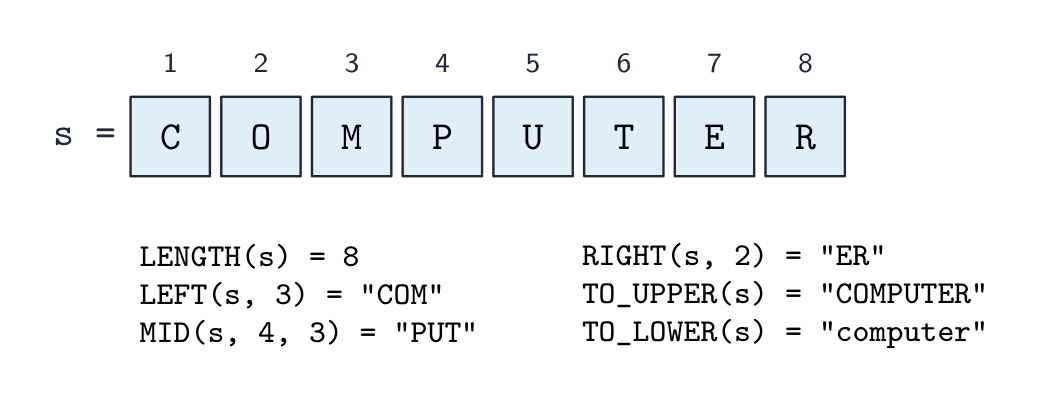



 העברה בערך מעתיקה את הערך לתיבה חדשה; העברה ביחוס מאפשרת לפונקציה לשנות את המשתנה של הקורא,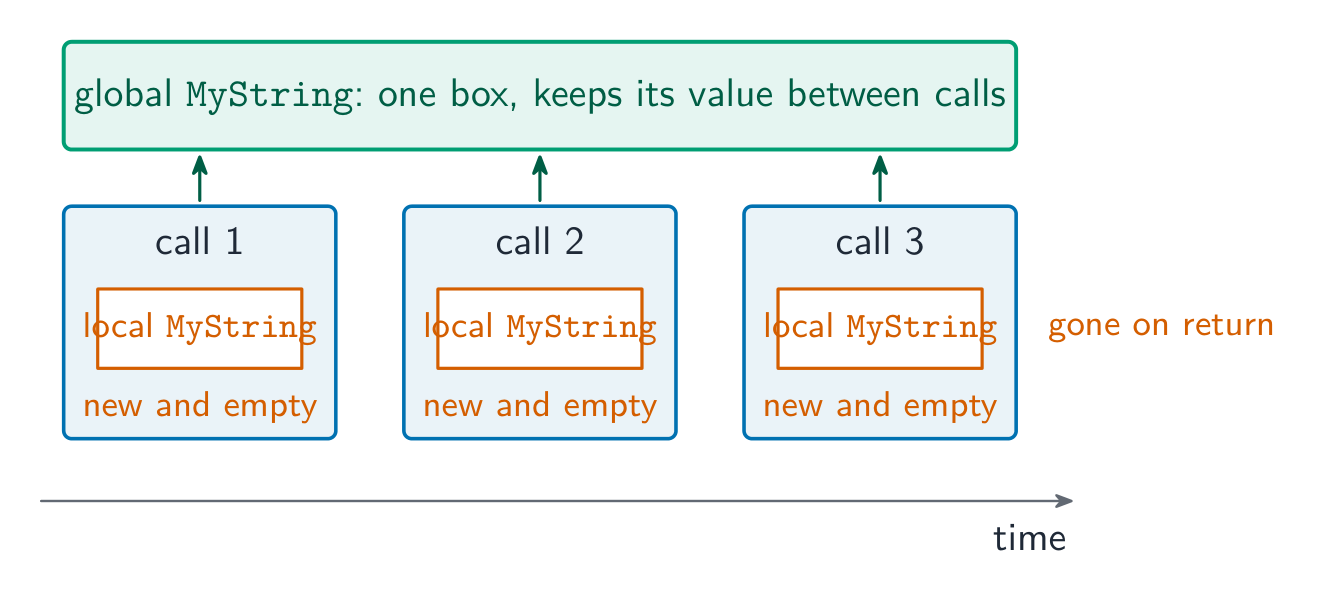

 *כל חלק בתשובה למודול מקבל את הנקודות שלו, לכן כתוב את כולם גם כאשר אינך בטוח