يجب أن يطلب البرنامج كلمة مرور، ويستمر في الطلب حتى تكون صحيحة. بسيط — ولكن أي حلقة تكرار تستخدم؟ البرامج تتخذ قرارات وتكرر العمل، واختيار…
English narration · English + 中文 subtitles burned in · سرد باللغة الإنجليزية · ترجمة مدمجة بالإنجليزية + الصينية
11.1
Programming basics · أساسيات البرمجة
Syllabus · المنهج
English
Candidates should be able to:
Notes and guidance
Implement and write pseudocode from a given design presented as either a program flowchart or structured English
Write pseudocode statements for: • the declaration and initialisation of constants • the declaration of variables • the assignment of values to variables • expressions involving any of the arithmetic or logical operators input from the keyboard and output to the console
Use built-in functions and library routines
Any functions not given in the pseudocode guide will be provided String manipulation functions will always be given
العربية
يجب أن يكون المرشحون قادرين على:
ملاحظات وإرشادات
تنفيذ وكتابة الشيفرة الوهمية من تصميم معروض إما كـ مخطط انسيابي للبرنامج أو إنجليزية منظمة
اكتب أوامر كود زائف لـ: • الإعلان عن ثوابت وتعيين قيم ابتدائية لها • الإعلان عن متغيرات • تعيين قيم إلى متغيرات • تعبيرات تتضمن أي من العمليات الحسابية أو المنطقية المدخلة من لوحة المفاتيح والمخرجة إلى الشاشة
استخدم الدوال المدمجة وروتينات المكتبة
أي دوال غير مذكورة في دليل الكود الزائف سيتم توفيرها. دوال معالجة النصوص ستُعطى دائمًا
Source: Cambridge International syllabus · المصدر: منهج كامبريدج الدولي
English
From design to code
You should be able to turn a design — a flowchart 流程图 (program flowchart) or structured English 结构化英语 — into pseudocode 伪代码, and then into a real language:
find the variables 变量 and their data types 数据类型.
turn input/output boxes into INPUT / OUTPUT.
turn decision diamonds into IF...ELSE...ENDIF (or CASE).
turn loop arrows into WHILE, REPEAT...UNTIL, or FOR.
turn process boxes into assignments or calculations.
check by tracing a small input.
Constants and variables
A constant 常量 holds a value that never changes; a variable holds one that may change. Declare them with a type:
Use constants for fixed values that recur (Pi, MaxScore); they make code clearer and easy to change in one place.
In the exam, a constant is the answer to "identify a more appropriate way of representing" a fixed value, such as a tax rate or a maximum score, that appears at several places in the pseudocode. The benefits the scheme lists: the value is set once and cannot be changed accidentally by the program; a change is made in one place and reaches every statement that uses it; the identifier gives the value a meaning (MaxScore rather than 100), so the code is easier to read and to check; and there is less risk of a typing error in a long value such as 3.14159. A "state a value that could be replaced by a constant" question wants the literal from the pseudocode (0.2, 40), not a new name.
Every variable is declared once, with an identifier 标识符 (its name) and a data type, before it is used. The six types in the 9618 pseudocode guide:
Type
Holds
Written in the code as
Typical use
INTEGER
whole numbers
42, -3
a count, an array index, a loop counter
REAL
numbers with a fractional part
3.75
a price, an average
CHAR
one character
'A' (single quotes)
a grade letter, a menu key
STRING
a sequence of characters
"Hello" (double quotes)
a name, a postcode
BOOLEAN
TRUE or FALSE
TRUE
a flag such as Found
DATE
a calendar date
12/05/2026
a date of birth
A "give the appropriate data type" question is answered from how the variable is used in the pseudocode: a value with a decimal point is REAL; something set to TRUE or FALSE is BOOLEAN; a value in single quotes is CHAR; a value used as an array index, or with DIV and MOD, is INTEGER. Write the type in capitals, spelled as the guide spells it.
Worked example. State the appropriate data type for each variable.
Found is BOOLEAN (it holds FALSE); Initial is CHAR (one character in single quotes); Price is REAL (a decimal value); Count is INTEGER (a counter that goes up by one); Name is STRING (text in double quotes).
Assignment and expressions
Use ← for assignment 赋值:
Expressions use operators 运算符:
arithmetic + - * /, plus DIV (integer division) and MOD (remainder): 7 DIV 2 = 3; 7 MOD 2 = 1.
comparisons =, <>, <, >, <=, >=.
logic AND, OR, NOT.
Precedence 优先级 (highest to lowest): NOT → * / DIV MOD → + - → comparisons → AND → OR. Use brackets when unsure.
Input and output
Built-in functions and library routines
Many tasks have ready-made library routines 库例程, so you need not write them. The Paper 2 insert 附页 lists the ones you may use, with their exact names, parameters and return types; any other function a question needs is given in the question. The names below are the insert's names. VAL and STR are IGCSE names and appear in neither 9618 document, so they earn nothing. UCASE and LCASE are a different case: they are 9618, defined in the Pseudocode Guide, but they take a single CHAR, and the insert does not list them at all — for a whole string on Paper 2 the routine is TO_UPPER.
A program library 程序库 holds routines that have already been written, compiled and tested; a program calls them instead of writing its own. The benefits the scheme accepts, for a "state three benefits" question: the routines are already tested, so they are less likely to contain errors; they save development time; they may do things the programmer could not write (complex statistics, graphics); they are written by experts and reused across many programs; and a routine with a fixed interface can be called from anywhere in the program.
Routine
Returns
Example
LENGTH(s)
the number of characters in s
LENGTH("Hello") = 5
LEFT(s, n) / RIGHT(s, n)
the first / last n characters
RIGHT("Hello", 2) = "lo"
MID(s, start, n)
n characters from position start (positions count from 1)
MID("Hello", 2, 3) = "ell"
TO_UPPER(s) / TO_LOWER(s)
s in capitals / in small letters
TO_UPPER("ab1") = "AB1"
NUM_TO_STR(x) / STR_TO_NUM(s)
a number as a string / a string as a number
STR_TO_NUM("3.5") = 3.5
IS_NUM(s)
TRUE if s is a valid number
IS_NUM("12a") = FALSE
ASC(c) / CHR(n)
the character code of c / the character with code n
ASC('A') = 65, CHR(66) = 'B'
INT(x)
the whole-number part of x
INT(7.9) = 7
RAND(n)
a random real number from 0 up to, but not including, n
INT(RAND(6)) + 1 is a dice roll
DAY(d), MONTH(d), YEAR(d)
the parts of a DATE
YEAR(TODAY())
DAYINDEX(d), SETDATE(d, m, y), TODAY()
the day of the week (1 = Sunday); a date built from three integers; today's date
EOF(f)
TRUE when the file f has no more lines to read
WHILE NOT EOF("data.txt")
Strings are joined with & (concatenation 连接): "A" & "BC" is "ABC". Use the exact names from the insert, with the parameters in its order.
Dates and random numbers come up as one-line statements. SETDATE(17, 11, 2007) builds 17 November 2007; 12 - MONTH(MyDOB) is the number of months from the month of birth to the end of the year; IF DAYINDEX(MyDOB) = 5 THEN tests for a Thursday, because Sunday is day 1. RAND(n) returns a real number from 0 up to, but not including, n, so a random integer from Low to High inclusive is INT(RAND(High - Low + 1)) + Low: INT(RAND(21)) - 10 gives a value from -10 to 10.
Worked example. Evaluate each expression, given Word ← "Program", Code ← 'Q' and N ← 7.
Expression
Value
Why
LENGTH(Word)
7
seven characters
MID(Word, 4, 2)
"gr"
two characters, starting at position 4
LEFT(Word, 3) & "!"
"Pro!"
joined with &
TO_UPPER(RIGHT(Word, 2))
"AM"
the inner function runs first
ASC(Code) - ASC('A')
16
'Q' is 81 and 'A' is 65
N DIV 2 + N MOD 2
4
3 + 1
NUM_TO_STR(N) & "th"
"7th"
the number becomes a string first
INT(N / 2)
3
3.5 cut to its whole part
Work from the inside out, and keep the quotes: "7" is a string and 7 is a number.
Worked example. Each statement may contain an error in its use of a function or operator. Describe the error, or write NO ERROR. (Assume every variable has the correct type.)
Statement
Error
Result ← 2 & 4
& joins strings; 2 and 4 are integers, so + is needed
SubString ← MID("pseudocode", 4, 1)
NO ERROR: one character from position 4, "u"
IF x = 3 OR 4 THEN
OR needs a Boolean on each side: IF x = 3 OR x = 4 THEN
Result ← Status AND INT(x / 2)
AND needs two Booleans; INT(x / 2) is an integer
Message ← "Done" + LENGTH(MyString)
+ cannot add a string to an integer: "Done" & NUM_TO_STR(LENGTH(MyString))
Every operator works on particular types: & on strings, + - * / DIV MOD on numbers, AND OR NOT on Booleans, and = <> on two values of the same type. An "evaluate each expression, or write ERROR" table is marked the same way: LENGTH(42) and "A" + 1 are ERROR, because the type does not match the function or the operator.
Worked example. With Points ← 100, Active ← TRUE and Exempt ← FALSE, evaluate each expression.
Expression
Value
Why
(Points > 99) OR Active
TRUE
both sides are true; one would do
(Points MOD 2 = 0) OR Exempt
TRUE
100 MOD 2 is 0
(Points <= 75) AND (Active OR Exempt)
FALSE
the first side is false, and AND needs both
(Active OR NOT Active) AND NOT Exempt
TRUE
Active OR NOT Active is always true
The last expression simplifies: X OR NOT X is TRUE whatever X is, so the whole expression is just NOT Exempt. Evaluate the brackets first, then NOT, then AND, then OR.
العربية
تحويل البرمجة التصميم إلى تعليمات تُكتب على شكل كوديكتب المبرمج الكود ويختبره أثناء العمل
من التصميم إلى الكود
يجب أن تكون قادراً على تحويل تصميم — مخطط انسيابي (مخطط انسيابي للبرنامج) أو إنجليزية منظمة — إلى كود زائف، ثم إلى لغة حقيقية:
حدد المتغيرات وأنواعها البيانية.
حوّل صناديق الإدخال/الإخراج إلى INPUT / OUTPUT.
حوّل المعينيات القرارية إلى IF...ELSE...ENDIF (أو CASE).
حوّل أسهم الحلقات إلى WHILE، REPEAT...UNTIL، أو FOR.
حوّل صناديق العمليات إلى إسنادات أو حسابات.
تحقق عن طريق تتبع مدخل صغير.
*كل رمز في المخطط الانسيابي يصبح كلمة مفتاحية في الكود الزائف
الثوابت والمتغيرات
الثابت يحمل قيمة لا تتغير أبداً؛ المتغير يحمل واحدة قد تتغير. أعلن them مع نوع:
*قيمة المتغير يمكن أن تتغير؛ ثابت يبقى ثابتاً
CONSTANT Pi = 3.14159
DECLARE Radius : REAL
DECLARE Area : REAL

Radius ← 5
Area ← Pi * Radius * Radius
استخدم ثوابت للقيم الثابتة المتكررة (Pi، MaxScore)؛ فهي تجعل الكود أكثر وضوحاً وسهلة التغيير في مكان واحد.
في الامتحان، الثابت هو إجابة سؤال "حدد طريقة أكثر ملاءمة لتمثيل" قيمة ثابتة، مثل معدل ضريبي أو حد أقصى للنقاط، تظهر في عدة أماكن في الكود الزائف. المنفعة التي يذكرها المقيّم: القيمة تُضع مرة واحدة ولا يمكن تغييرها بالخطأ بواسطة البرنامج؛ التغيير يتم في مكان واحد ويصل إلى كل تعليمة تستخدمها؛ المعرف يعطي القيمة معنى (MaxScore بدلاً من 100)، لذا الكود أسهل في القراءة والتحقق؛ وهناك خطر أقل لحدوث خطأ إملائي في قيمة طويلة مثل 3.14159. السؤال "اذكر قيمة يمكن استبدالها بثابت" يطلب الحرفي من الكود الزائف (0.2، 40)، وليس اسماً جديداً.
يُعلن كل متغير مرة واحدة، مع معرف (اسمه) ونوع بياني، قبل استخدامه. الأنواع الستة في دليل الكود الزائف 9618:
النوع
يحمل
يُكتب في الكود كـ
الاستخدام النموذجي
INTEGER
أعداد صحيحة
42، -3
عداد، فهرس مصفوفة، عداد حلقة تكرار
REAL
أعداد بكسر عشري
3.75
سعر، متوسط
CHAR
حرف واحد
'A' (علامات اقتباس مفردة)
حرف درجة، مفتاح قائمة
STRING
تسلسل من الأحرف
"Hello" (علامات اقتباس مزدوجة)
اسم، رمز بريدي
BOOLEAN
TRUE أو FALSE
TRUE
علم مثل Found
DATE
تاريخ تقويمي
12/05/2026
تاريخ ميلاد
إجابة سؤال "أعطِ النوع البياني المناسب" تعتمد على كيفية استخدام المتغير في الكود الزائف: قيمة بها فاصلة عشرية هي REAL؛ شيء مُعيّن في TRUE أو FALSE هو BOOLEAN؛ قيمة داخل علامات اقتباس مفردة هي CHAR؛ قيمة تُستخدم كفهرس مصفوفة، أو مع DIV وMOD، هي INTEGER. اكتب النوع بحروف كبيرة، ومُصاغة كما يصفها الدليل.
مثال محلول. حدد النوع البياني المناسب لكل متغير.
Found ← FALSE
Initial ← 'K'
Price ← 12.99
Count ← Count + 1
Name ← "Li Wei"
Found هو BOOLEAN (يحمل FALSE)؛ Initial هو CHAR (حرف واحد في علامات اقتباس مفردة)؛ Price هو REAL (قيمة عشرية)؛ Count هو INTEGER (عداد يزيد بمقدار واحد)؛ Name هو STRING (نص في علامات اقتباس مزدوجة).
الإسناد والتعبيرات
استخدم ← لـ الإسناد:
Total ← Total + 1
Average ← Sum / Count
التعبيرات تستخدم المعاملات:
حسابية + - * /، زائد DIV (القسمة الصحيحة) وMOD (الباقي): 7 DIV 2 = 3؛ 7 MOD 2 = 1.
مقارنات =، <>، <، >، <=، >=.
منطق AND، OR، NOT.
السبقية (من الأعلى إلى الأدنى): NOT → * / DIV MOD → + - → المقارنات → AND → OR. استخدم الأقواس عند الشك.
الإدخال والإخراج
OUTPUT "Enter your name:"
INPUT Name
OUTPUT "Hello, ", Name
الدوال المدمجة والروتينات المكتبية
العديد من المهام تحتوي على وحدات مكتبة جاهزة، لذا لا حاجة لكتابتها. يحتوي الإدراج الخاص بالورقة 2 على القائمة بالتسميات الدقيقة والمعاملات وأنواع الإرجاع للوحدات المسموح باستخدامها؛ وأي دالة أخرى تحتاجها المسألة تُعطى في نص المسألة بحد ذاته. الأسماء أدناه هي التسميات الموجودة في الإدراج. VAL وSTR هما اسمان خاصان بـ IGCSE ويظهران في كلتا وثيقتي 9618، لذا لا يمنحان أي نقاط. أما UCASE وLCASE فهما حالة مختلفة: فهما موجودان فعليًا في 9618 ومُعرَّفان في دليل الكود الوهمي، لكنهما يأخذان مُعاملًا واحدًا فقط وهو CHAR، ولا يُدرَج它们在 الإدراج على الإطلاق — بالنسبة لسلسلة نصية كاملة في الورقة 2، الوحدة المناسبة هي TO_UPPER.
تحتوي مكتبة البرامج على وحدات تمت كتابتها وترجمتها واختبارها مسبقًا؛ يستدعي البرنامج هذه الوحدات بدلاً من كتابة كود خاص به. الفوائد التي يقبلها النظام للإجابة عن سؤال "اذكر ثلاث فوائد" (state three benefits): الوحدات تم اختبارها بالفعل، لذا فهي أقل عرضة لاحتوائها على أخطاء؛ توفر وقت التطوير؛ قد تقوم بأعمال لا يستطيع المبرمج كتابتها (إحصاءات معقدة، رسوم بيانية)؛ كُتبت بواسطة خبراء وتُعاد استخدامها عبر برامج متعددة؛ كما يمكن استدعاء وحدة ذات واجهة ثابتة من أي مكان داخل البرنامج.
الوحدة
الإرجاع
مثال
LENGTH(s)
عدد الأحرف في s
LENGTH("Hello") = 5
LEFT(s, n) / RIGHT(s, n)
أول / آخر n أحرف
RIGHT("Hello", 2) = "lo"
MID(s, start, n)
n أحرف بدءًا من الموقع start (تبدأ العدادات من 1)
MID("Hello", 2, 3) = "ell"
TO_UPPER(s) / TO_LOWER(s)
s بحروف كبيرة / بحروف صغيرة
TO_UPPER("ab1") = "AB1"
NUM_TO_STR(x) / STR_TO_NUM(s)
رقم كنص / نص كرقم
STR_TO_NUM("3.5") = 3.5
IS_NUM(s)
TRUE إذا كان s رقماً صحيحاً
IS_NUM("12a") = FALSE
ASC(c) / CHR(n)
كود الحرف لـ c / الحرف الذي يحمل الكود n
ASC('A') = 65, CHR(66) = 'B'
INT(x)
الجزء الصحيح من x
INT(7.9) = 7
RAND(n)
رقم عشري حقيقي من 0 إلى ما دون n
INT(RAND(6)) + 1 يمثل رمي نرد
DAY(d), MONTH(d), YEAR(d)
أجزاء DATE
YEAR(TODAY())
DAYINDEX(d), SETDATE(d, m, y), TODAY()
يوم الأسبوع (1 = الأحد)؛ تاريخ مكوّن من ثلاثة أعداد صحيحة؛ تاريخ اليوم
EOF(f)
TRUE عندما لا يتبقى أكثر أسطر لقراءتها في الملف f
WHILE NOT EOF("data.txt")
تُربط السلاسل النصية باستخدام & (الدمج/التوصيل): "A" & "BC" هو "ABC". استخدم التسميات الدقيقة من الإدراج، مع المعاملات بنفس ترتيبها.
التواريخ والأرقام العشوائية تظهر كتعليمات سطر واحد. SETDATE(17, 11, 2007) يبني تاريخ 17 نوفمبر 2007؛ 12 - MONTH(MyDOB) هو عدد الأشهر من شهر الميلاد حتى نهاية السنة؛ IF DAYINDEX(MyDOB) = 5 THEN يختبر هل هو يوم الخميس، لأن الأحد هو اليوم 1. يُرجع RAND(n) رقماً حقيقياً من 0 إلى ما دون n، لذا فإن العدد الصحيح العشوائي من Low إلى High (شاملاً الطرفين) هو INT(RAND(High - Low + 1)) + Low: يعطي INT(RAND(21)) - 10 قيمة من -10 إلى 10.
وحدات النصوص الشائعة المؤثرة على s = "COMPUTER" (المواقع 1–8)
مثال محلول. قيّم كل تعبير، بافتراض أن Word ← "Program"، Code ← 'Q'، وN ← 7.
التعبير
القيمة
السبب
LENGTH(Word)
7
سبعة أحرف
MID(Word, 4, 2)
"gr"
حرفان، بدءًا من الموقع 4
LEFT(Word, 3) & "!"
"Pro!"
مدموج مع &
TO_UPPER(RIGHT(Word, 2))
"AM"
الدالة الداخلية تعمل أولاً
ASC(Code) - ASC('A')
16
'Q' تساوي 81 و'A' تساوي 65
N DIV 2 + N MOD 2
4
3 + 1
NUM_TO_STR(N) & "th"
"7th"
الرقم يتحول إلى نص أولاً
INT(N / 2)
3
3.5 مقصوص إلى جزئه الصحيح
اعمل من الداخل إلى الخارج، واحتفظ بعلامات الاقتباس: "7" هو نص و7 هو رقم.
مثال محلول. قد تحتوي كل تعليمة على خطأ في استخدام دالة أو عامل. صف الخطأ، أو اكتب NO ERROR. (افترض أن كل متغير له النوع الصحيح.)
التعليمة
الخطأ
Result ← 2 & 4
& يجمع النصوص؛ 2 و4 أعداد صحيحة، لذا يلزم استخدام +
SubString ← MID("pseudocode", 4, 1)
NO ERROR: حرف واحد من الموقع 4، "u"
IF x = 3 OR 4 THEN
OR يتطلب قيمة منطقية (Boolean) على كل جانب: IF x = 3 OR x = 4 THEN
Result ← Status AND INT(x / 2)
AND يتطلب قيمتين منطقيتين؛ INT(x / 2) عدد صحيح
Message ← "Done" + LENGTH(MyString)
+ لا يمكنه جمع نص مع عدد صحيح: "Done" & NUM_TO_STR(LENGTH(MyString))
كل عامل يعمل على أنواع محددة: & على النصوص، + - * / DIV MOD على الأعداد، AND OR NOT على القيم المنطقية، و= <> على قيمتين من نفس النوع. جدول "قيّم كل تعبير، أو اكتب ERROR" يُصحح بنفس الطريقة: LENGTH(42) و"A" + 1 يعتبران ERROR، لأن النوع لا يطابق الدالة أو العامل.
مثال محلول. باستخدام Points ← 100، Active ← TRUE، وExempt ← FALSE، قيّم كل تعبير.
التعبير
القيمة
السبب
(Points > 99) OR Active
TRUE
كلا الجانبين صحيح؛ يكفي أحد
(Points MOD 2 = 0) OR Exempt
TRUE
100 MOD 2 هي 0
(Points <= 75) AND (Active OR Exempt)
FALSE
الجانب الأول خاطئ، وAND تتطلب الاثنين
(Active OR NOT Active) AND NOT Exempt
TRUE
Active OR NOT Active دائماً صحيحة
التعبير الأخير يُبسط: X OR NOT X هي TRUE بغض النظر عن قيمة X، لذا يكون التعبير بأكمله مجرد NOT Exempt. قيّم الأقواس أولاً، ثم NOT، ثم AND، ثم OR.
Explore · استكشف
A variable is a labelled box · المتغير هو صندوق معنون
Each assignment stores one value in a named box; reassigning the same name overwrites it. Step through the program and watch each box take its current value. · كل عملية إسناد تخزن قيمة واحدة في صندوق معنّى؛ إعادة التسمية لنفس الاسم تحل محلها. تتبع البرنامج وشاهد كل صندوق يأخذ قيمته الحالية.
Use pseudocode to write: • an ‘IF’ statement including the ‘ELSE’ clause and nested IF statements • a ‘CASE’ structure • a ‘count-controlled’ loop: • a ‘post-condition’ loop • a ‘pre-condition’ loop
Justify why one loop structure may be better suited to solve a problem than the others
العربية
يجب أن يكون المرشحون قادرين على:
ملاحظات وإرشادات
استخدم الكود الزائف لكتابة: • جملة 'IF' بما في ذلك بند 'ELSE' وجمل 'IF' المتداخلة • هيكل 'CASE' • حلقة 'مُتحكَم بالعد': • حلقة 'شرط ما بعد التنفيذ' • حلقة 'شرط ما قبل التنفيذ'
برر لماذا قد تكون بنية حلقة معينة أكثر ملاءمة لحل مشكلة مقارنة بالأخرى
Source: Cambridge International syllabus · المصدر: منهج كامبريدج الدولي
English
Selection 选择 chooses which steps run.
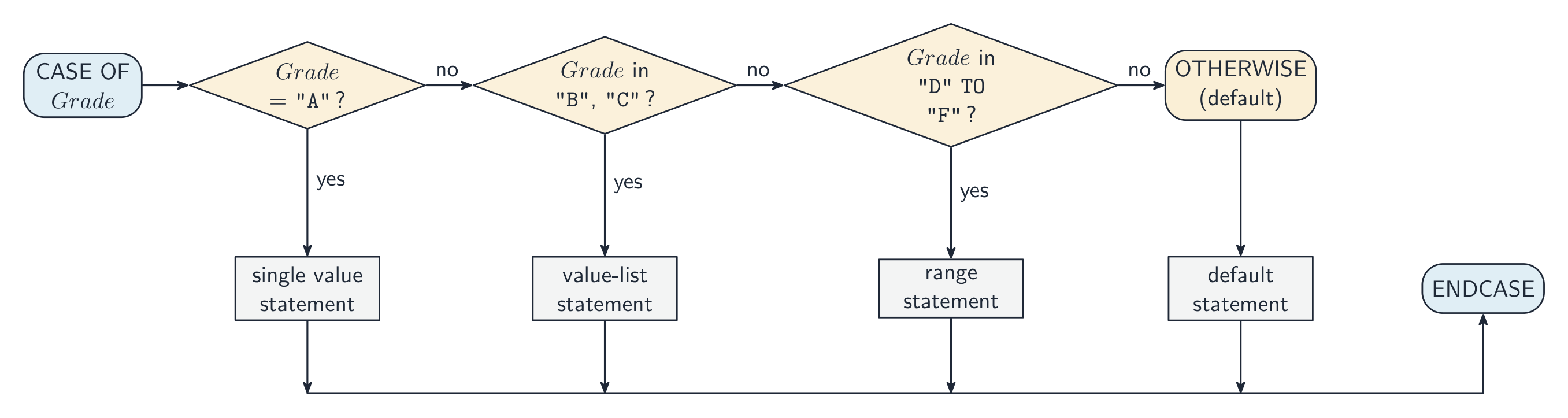
For more than two cases you can use a nested 嵌套 IF, but deep nesting is hard to read — a CASE is cleaner when testing one value against several options:
Cambridge CASE allows single values, value lists (1, 2, 3:), and ranges (1 TO 5:).
A nested IF is an IF inside a branch of another IF. Each IF needs its own ENDIF, and the examiner checks that every construct is closed:
Boundaries are where marks are lost. "A mark of 50 or more passes" is Mark >= 50, not Mark > 50; the last CASE branch, for "anything else", is written OTHERWISE, not a condition such as > 200. A wrong comparison here is a logic error 逻辑错误: the program runs, but gives the wrong output for some inputs — and a trace table with a boundary value such as 50 is how you find it.
Worked example. Rewrite this with the same functionality, without using a CASE structure.
Each value becomes a branch of a chain of IFs, and OTHERWISE becomes the last ELSE:
Two clauses that assign the same value are merged into one clause with a value list: 1, 2: ThisChar ← 'a'. The guards are tested in order: with ranges such as 1 TO 50: followed by 40 TO 60:, a value of 45 takes the first branch that matches, so an assignment in a later branch may never be performed — and when the earlier branches already cover every possible value, the OTHERWISE branch is never reached either.
Going the other way, nested IFs that test several Booleans are clearer as one condition per outcome: IF A AND B AND C THEN CALL Sub1(), then IF A AND B AND NOT C THEN CALL Sub2(), and so on. Joining tests with AND and OR removes the nesting, and IF A THEN is accepted in place of IF A = TRUE THEN.
العربية
الاختيار يحدد أي الخطوات ستُنفَّذ.
IF age >= 18 THEN
    OUTPUT "Adult"
ELSE
    OUTPUT "Minor"
ENDIF
يعمل IF...ELSE على الشرط مرة واحدة، ثم ينفذ فرعاً واحداً فقط
لأكثر من حالتين يمكنك استخدام IF متداخل (nested)، لكن التشابك العميق يصعب قراءته — حيث أن CASE أكثر وضوحاً عند اختبار قيمة واحدة مقابل عدة خيارات:
CASE OF Grade
    "A": OUTPUT "Excellent"
    "B": OUTPUT "Good"
    OTHERWISE: OUTPUT "Try again"
ENDCASE
يسمح Cambridge CASE بقيم مفردة، وقوائم قيم (1, 2, 3:)، ونطاقات (1 TO 5:).
الـ IF المتداخل هو عبارة عن IF داخل فرع من IF آخر. كل IF يحتاج إلى ENDIF خاص به، ويحقق الممتحن أن كل بنية مغلقة:
IF Mark >= 50 THEN
    IF Mark >= 80 THEN
        OUTPUT "Distinction"
    ELSE
        OUTPUT "Pass"
    ENDIF
ELSE
    OUTPUT "Fail"
ENDIF
الحدود هي locations تُفقد فيها العلامات. "علامة 50 أو أكثر تعني النجاح" هي Mark >= 50، وليست Mark > 50؛ الفرع الأخير لـ CASE، الخاص بـ "أي شيء آخر"، يُكتب OTHERWISE، وليس شرطاً مثل > 200. الخطأ في المقارنة هنا هو خطأ منطقي: البرنامج يعمل، لكنه يعطي مخرجات خاطئة لبعض المدخلات — وجدول التتبع مع قيمة حدية مثل 50 هو الطريقة التي تجد بها ذلك.
جملة CASE تنفذ الفرع الذي يطابق القيمة
مثال محلول. أعد كتابة هذا بنفس الوظيفة، دون استخدام بنية CASE.
CASE OF MySwitch
    1: ThisChar ← 'a'
    2: ThisChar ← 'y'
    3: ThisChar ← '7'
    OTHERWISE: ThisChar ← '*'
ENDCASE
كل قيمة تصبح فرعاً لسلسلة من IFs، وتصبح OTHERWISE الفرع الأخير لـ ELSE:
IF MySwitch = 1 THEN
    ThisChar ← 'a'
ELSE
    IF MySwitch = 2 THEN
        ThisChar ← 'y'
    ELSE
        IF MySwitch = 3 THEN
            ThisChar ← '7'
        ELSE
            ThisChar ← '*'
        ENDIF
    ENDIF
ENDIF
يتم دمج بناديين يخصصان نفس القيمة في بند واحد بقائمة قيم: 1, 2: ThisChar ← 'a'. يتم اختبار الحراس بالترتيب: مع النطاقات مثل 1 TO 50: متبوعة بـ 40 TO 60:، تأخذ القيمة 45 الفرع الأول المطابق، لذا قد لا يتم تنفيذ تعيين في فرع لاحق أبداً — وعندما تغطي الفروع السابقة بالفعل كل القيم الممكنة، فإن فرع OTHERWISE لن يتم الوصول إليه أيضاً.
وبالعكس، فإن الـ IFs المتداخلة التي تختبر عدة Booleans تكون أوضح إذا كانت هناك شرط واحد لكل نتيجة: IF A AND B AND C THEN CALL Sub1()، ثم IF A AND B AND NOT C THEN CALL Sub2()، وهكذا. ربط الاختبارات باستخدام AND وOR يلغي التداخل، ويتم قبول IF A THEN بدلاً من IF A = TRUE THEN.
Explore · استكشف
Selection (IF / ELSE) · الاختيار (IF / ELSE)
Change the input and see which branch runs — the essence of selection. · غيّر المدخلات وراقب أي فرع يتم تشغيله — جوهر الاختيار.
Iteration 迭代 repeats a block. Three loops differ in how many times the body runs.
Count-controlled (FOR) loop
A count-controlled loop 计数循环 — use it when you know how many times to repeat:
A STEP can change the count (e.g. FOR i ← 10 TO 1 STEP -1). Best for a fixed number of repeats or processing each element of an array 数组.
Pre-condition (WHILE) loop
A pre-condition loop 前测循环 tests the condition before each pass, so it may run zero times:
Post-condition (REPEAT...UNTIL) loop
A post-condition loop 后测循环 tests the condition after each pass, so it always runs at least once:
Choosing the right loop
count known up front → FOR.
may need zero passes → WHILE.
always at least one pass → REPEAT...UNTIL.
Justify your choice by whether the count is known and whether the body must run at least once. A typical question gives a scenario ("ask for a password until correct, but always ask at least once") and asks which loop fits.
The two marks are for the name of the loop and the reason, in the scheme's words: count-controlled, because the number of iterations is known before the loop starts; post-condition, because the loop body must be executed at least once; pre-condition, because the loop may not need to execute at all. A loop over the four elements of an array that has been written as a WHILE with a counter is "not the most appropriate": the count, four, is known, so a FOR loop fits.
Worked example. Which loop suits each task? (a) print the 12 times table; (b) keep reading numbers until the user enters 0; (c) ask for a password until it is correct. Choose by asking how many times the body runs and when the test happens. (a) The count is known in advance (12), so use a FOR loop. (b) The count is unknown, and the very first input might already be 0 - so the test must come before the body: a WHILE loop, which runs zero or more times. (c) The count is unknown, but you must always ask at least once before there is anything to test - so the test comes after the body: a REPEAT...UNTIL, which runs one or more times. The deciding question is whether the body must run at least once: WHILE may run zero times, REPEAT always runs once.
Dry running with a trace table
A trace table 跟踪表 records the value of each variable as you dry run 手工跟踪 (work through by hand) an algorithm. It is how you test a loop on paper, and a six-mark question on most Paper 2s.
Count
Total
Total < 10
OUTPUT
1
0
TRUE
2
2
TRUE
3
6
TRUE
4
12
FALSE
4, 12
Rules that earn the marks: one column per variable, in the order the question gives; write a value only when it changes; start a new row each time the loop repeats; evaluate the condition with the current values, and stop the moment it is FALSE; put the output in its own column, exactly as it would appear. Trace the algorithm as written, not the one you think was intended — if it never stops, say so.
Worked example. Which constructs does each line use — selection, iteration or a subroutine call?
Pseudocode
Selection
Iteration
Subroutine
IF Ready = TRUE THEN
ENDIF
| FOR I ← 1 TO 20 ... NEXT I | | yes | |
| WHILE NOT IsFull() ... ENDWHILE | | yes | yes |
| CASE OF Key ... OTHERWISE ... ENDCASE | yes | | |
IF and CASE are selection; FOR, WHILE and REPEAT are iteration; a name followed by brackets — Start(), IsFull() — is a call to a procedure or a function, wherever it appears, including inside a condition.
العربية
التكرار يعيد تنفيذ كتلة. ثلاث حلقات تختلف في عدد مرات تشغيل الجسم.
حلقة التحكم بالعداد (FOR)
حلقة التحكم بالعداد — استخدمها عندما تعرف كم مرة يجب التكرار:
FOR i ← 1 TO 10
    OUTPUT i
NEXT i
يمكن لـ STEP تغيير العداد (مثل FOR i ← 10 TO 1 STEP -1). الأفضل لعدد ثابت من التكرارات أو معالجة كل عنصر في مصفوفة.
حلقة الشرط المسبق (WHILE)
حلقة الشرط المسبق تختبر الشرط قبل كل مرور، لذا قد تعمل صفر مرات:
WHILE total < 100 DO
    INPUT n
    total ← total + n
ENDWHILE
حلقة الشرط اللاحق (REPEAT...UNTIL)
حلقة الشرط اللاحق تختبر الشرط بعد كل مرور، لذا تعمل دائماً مرة واحدة على الأقل:
REPEAT
    INPUT password
UNTIL password = correctPassword
اختيار الحلقة المناسبة
تختلف الحلقات الثلاث في مكان اختبار الشرط — قبل الجسم (WHILE)، بعده (REPEAT)، أو عدد محدد من المرات (FOR)
العداد معروف مسبقاً → FOR.
قد تحتاج إلى صفر مرور → WHILE.
دائماً مرة واحدة على الأقل → REPEAT...UNTIL.
برر اختيارك بناءً على ما إذا كان العداد معروفاً وما إذا كان يجب أن يعمل الجسم مرة واحدة على الأقل. السؤال النموذجي يعطي سيناريو ("اطلب كلمة مرور حتى تكون صحيحة، لكن اطلبها مرة واحدة على الأقل") ويسأل أي حلقة تناسب.
العلاقتان هما لـ اسم الحلقة والسبب، بكلمات المخطط: محكومة بالعداد، لأن عدد التكرارات معروف قبل بدء الحلقة؛ شرط لاحق، لأن جسم الحلقة يجب تنفيذه مرة واحدة على الأقل؛ شرط مسبق، لأن الحلقة قد لا تحتاج للتنفيذ على الإطلاق. حلقة تمر على العناصر الأربعة لمصفوفة كُتبت كـ WHILE مع عداد هي "ليست الأنسب": العداد، أربعة، معروف، لذا حلقة FOR تناسب.
مثال محلول. أي حلقة تناسب كل مهمة؟ (أ) اطبع جدول ضرب 12؛ (ب) استمر في قراءة الأرقام حتى يدخل المستخدم 0؛ (ج) اطلب كلمة مرور حتى تكون صحيحة. اختر عن طريق طرح سؤال كم مرة يعمل الجسم ومتى يحدث الاختبار. (أ) العداد معروف مسبقاً (12)، لذا استخدم حلقة FOR. (ب) العداد غير معروف، والمدخل الأول قد يكون 0 بالفعل - لذا يجب أن يأتي الاختبار قبل الجسم: حلقة WHILE، والتي تعمل صفر أو أكثر من المرات. (ج) العداد غير معروف،但你 يجب أن تطلب مرة واحدة على الأقل قبل وجود أي شيء لاختباره - لذا يأتي الاختبار بعد الجسم: حلقة REPEAT...UNTIL، والتي تعمل واحدة أو أكثر من المرات. السؤال المحوري هو ما إذا كان يجب أن يعمل الجسم مرة واحدة على الأقل: WHILE قد تعمل صفر مرات، REPEAT تعمل دائماً مرة واحدة.
التشغيل الجاف باستخدام جدول التتبع
يسجل جدول التتبع قيمة كل متغير أثناء التشغيل الجاف (العمل يدوياً) خوارزمية. إنه كيفية اختبار حلقة على الورق، وسؤال بـ 6 علامات في معظم أوراق Paper 2.
DECLARE Count, Total : INTEGER
Count ← 1
Total ← 0
WHILE Total < 10
    Total ← Total + Count * 2
    Count ← Count + 1
ENDWHILE
OUTPUT Count, Total
العداد
المجموع
المجموع < 10
المخرجات
1
0
TRUE
2
2
TRUE
3
6
TRUE
4
12
FALSE
4, 12
القواعد التي تحصل عليها عليها العلامات: عمود واحد لكل متغير، بالترتيب الذي تعطيك إياه الأسئلة؛ اكتب قيمة فقط عندما تتغير؛ ابدأ صفًا جديداً في كل مرة تتكرر فيها الحلقة؛ قيّم الشرط بالقيم الحالية، وتوقف لحظة أن يصبح FALSE؛ ضع المخرجات في عمود خاص بها، تماماً كما سيظهر. تتبع الخوارزمية كما هي مكتوبة، وليس تلك التي تعتقد أنها مقصودة — إذا لم تتوقف أبداً، قل ذلك.
مثال محلول. أي البنى تستخدمه كل سطر — التحديد، التكرار أو استدعاء الإجراء?
الكود الوهمي
التحديد
التكرار
الإجراء
IF Ready = TRUE THEN
CALL Start()
ENDIF
| FOR I ← 1 TO 20 ... NEXT I | | yes | |
| WHILE NOT IsFull() ... ENDWHILE | | yes | yes |
| CASE OF Key ... OTHERWISE ... ENDCASE | yes | | |
IF وCASE هما انتقائية؛ FOR، WHILE وREPEAT هي تكرار؛ الاسم المتبوع بأقواس — Start()، IsFull() — هو استدعاء لإجراء أو دالة، أينما ظهر بما في ذلك داخل شرط.
Explore · استكشف
Trace a loop, pass by pass · تتبع حلقة تكرار، دورة بدورة
A trace table records each variable after every pass of the loop. Watch the counter i climb while the running total builds up — exactly what an exam trace question asks you to fill in. · جدول التتبع يسجل كل متغير بعد كل دورة من الحلقة. شاهد العداد i يتصاعد بينما يتجمع المجموع الجاري — تماماً ما يطلبه سؤال تتبع الامتحان ملؤه.
Explore · استكشف
Tracing a loop · تتبع حلقة
Step through the loop and watch the variables change each pass — exactly what a trace table records. · مرر عبر الحلقة وراقب تغير المتغيرات في كل دورة — بالضبط ما تسجله جدول التتبع.
11.3
Procedures and functions · الإجراءات والدوال
Syllabus · المنهج
English
Candidates should be able to:
Notes and guidance
Define and use a procedure
Explain where in the construction of an algorithm it would be appropriate to use a procedure
Use parameters
A procedure may have none, one or more parameters A parameter can be passed by reference or by value
Define and use a function
Explain where in the construction of an algorithm it is appropriate to use a function
A function is used in an expression, e.g. the return value replaces the call
Use the terminology associated with procedures and functions
including procedure/function header, procedure/function interface, parameter, argument, return value
Write efficient pseudocode
العربية
يجب أن يكون المرشحون قادرين على:
ملاحظات وإرشادات
عرّف واستخدم إجراءً
اشرح أين في بناء خوارزمية يكون استخدام الإجراء مناسبًا
استخدم المعاملات
قد لا يحتوي الإجراء على معلمات، أو معلمة واحدة، أو أكثر. يمكن تمرير المعلمة عبر المرجع أو عبر القيمة
عرّف واستخدم دالةً
اشرح أين في بناء خوارزمية يكون استخدام الدالة مناسبًا
تُستخدم الدالة في تعبير، مثلاً: القيمة المُرجعة تحل محل الاستدعاء
استخدم المصطلحات المتعلقة بـ الإجراءات والدوال
بما في ذلك رأس الإجراء/الدالة، واجهة الإجراء/الدالة، المعلمة، الحجة، القيمة المُرجعة
اكتب كوداً زائفاً فعالاً
Source: Cambridge International syllabus · المصدر: منهج كامبريدج الدولي
English
Structured programming 结构化编程 builds a program from small named subroutines 子程序, each with one job.
Procedure
A procedure 过程 is a named block that does an action; it may take parameters 参数 but does not return a value.
Function
A function 函数 is like a procedure but it returns a value that becomes part of an expression.
Use a procedure when the subroutine performs an action; use a function when it computes a value for the caller.
The syllabus asks where in the construction of an algorithm each is appropriate. A procedure is appropriate where the same group of steps is needed at several points (validate an input, print a menu, swap two values): the steps are written once and CALLed by name. A function is appropriate where a single value must be calculated and then used in an expression — a total, a TRUE/FALSE result, the larger of two numbers — because the return value 返回值 replaces the call: IF IsValid(Code) THEN.
Parameters
A parameter is a variable a subroutine declares to receive input; the values the caller supplies are arguments 实参. Two ways to pass them:
pass by value 传值 — the routine gets a copy; changes inside it do not affect the caller. Use for inputs it only reads.
pass by reference 传引用 — the routine gets a reference to the caller's variable; changes do affect the caller. Use when it must update a parameter.
Cambridge pseudocode writes the mode in the header, BYVAL or BYREF, before each parameter. If neither is written, BYVAL is assumed, so a routine that must change the caller's variable — Swap, or a procedure that updates a running total — needs BYREF in its header.
Worked example. What is output?
X is a reference to A, so A becomes 8. Y is a copy of B, so doubling Y leaves B at 3. The output is 8, 3. Had the header said BYVAL X, A would still be 5.
Local vs global variables
A local variable 局部变量 is declared inside a subroutine and exists only while it runs. A global variable 全局变量 is declared outside and is visible everywhere. Prefer locals and parameters — heavy use of globals makes code hard to follow and test. (The region where a name is visible is its scope 作用域.)
The one-line difference: a global variable can be accessed from anywhere in the program, a local variable only inside the subroutine that declares it. Benefits of local variables the scheme accepts: the same identifier can be used in another subroutine without a clash; the value cannot be changed accidentally by other parts of the program; the memory is released when the subroutine ends; and the subroutine is self-contained, so it can be tested on its own and reused in another program.
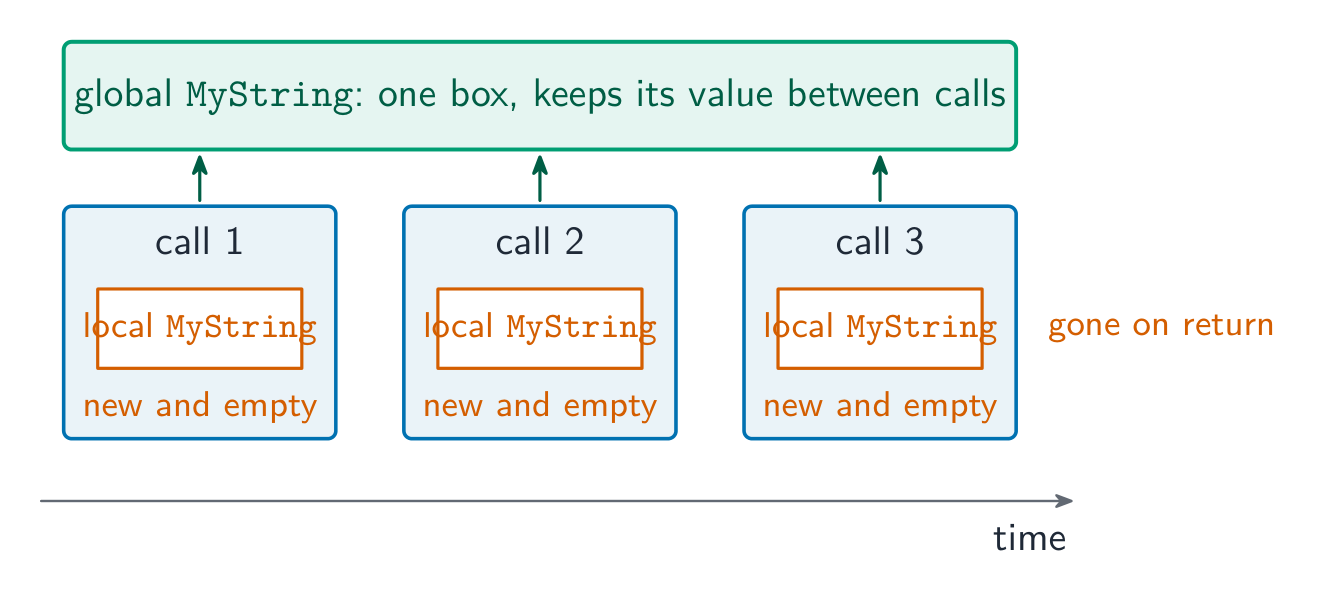
A local variable is created each time the subroutine is called and destroyed when it returns, so it cannot carry a value from one call to the next. A procedure that builds up a string over repeated calls therefore needs that string to be global (or passed BYREF). If MyString is changed from a global to a local declared inside MyOutput(), every call starts with a new, empty MyString, the text added by earlier calls is lost, and the procedure "does not work as expected".
When to use a subroutine
Use a subroutine when:
the same logic appears in more than one place — write it once, call it many times.
a block has a clear named purpose — the name documents what it does.
the program is complex — break it into parts (decomposition 分解).
you want to test a piece in isolation.
Don't make them so tiny that the call costs more than the work inside.
Terminology
definition — the PROCEDURE ... ENDPROCEDURE (or function) block.
call — where it is invoked. argument — a value passed in. parameter — the variable that receives it.
return value — what a function passes back.
procedure/function header — the first line giving the name and parameters (PROCEDURE Name(params) or FUNCTION Name(params) RETURNS type).
procedure/function interface / signature 签名 — name + parameters + return type: what a caller must know to use it.
Worked example. Describe each term used in the header FUNCTION Pass2(Count : INTEGER) RETURNS BOOLEAN.
Term
Meaning
FUNCTION
a subroutine that returns a value
Pass2
the identifier used to call it
Count
the parameter: the identifier that receives the argument passed in
INTEGER
the data type of the parameter
RETURNS BOOLEAN
the data type of the value the function returns
The two identifiers in PROCEDURE MyProc(Count : INTEGER, Message : STRING) are parameters: they receive the values passed in when the procedure is called, and are used inside it like local variables.
To convert a procedure into a function: change PROCEDURE to FUNCTION and add RETURNS <type>; replace the OUTPUT (or the BYREF parameter that carried the result out) with a RETURN statement; and change every call so that the returned value is used, Result ← Unpack(Text) instead of CALL Unpack(Text, Result). For a "write the header" question, write the whole line: FUNCTION Calculate(Expression : STRING) RETURNS INTEGER. An array parameter is passed by reference, so a procedure that writes into an array changes the caller's array.
When a program gains a new module, the interface is what is agreed first: the name, the parameters (how many, in what order, of what type) and the return type, plus any global data the module reads or writes. A module that sends a reminder before a due date needs the record (or its index) as a parameter and returns nothing, so it is a procedure; the main program calls it once per record.
Writing a module for Paper 2
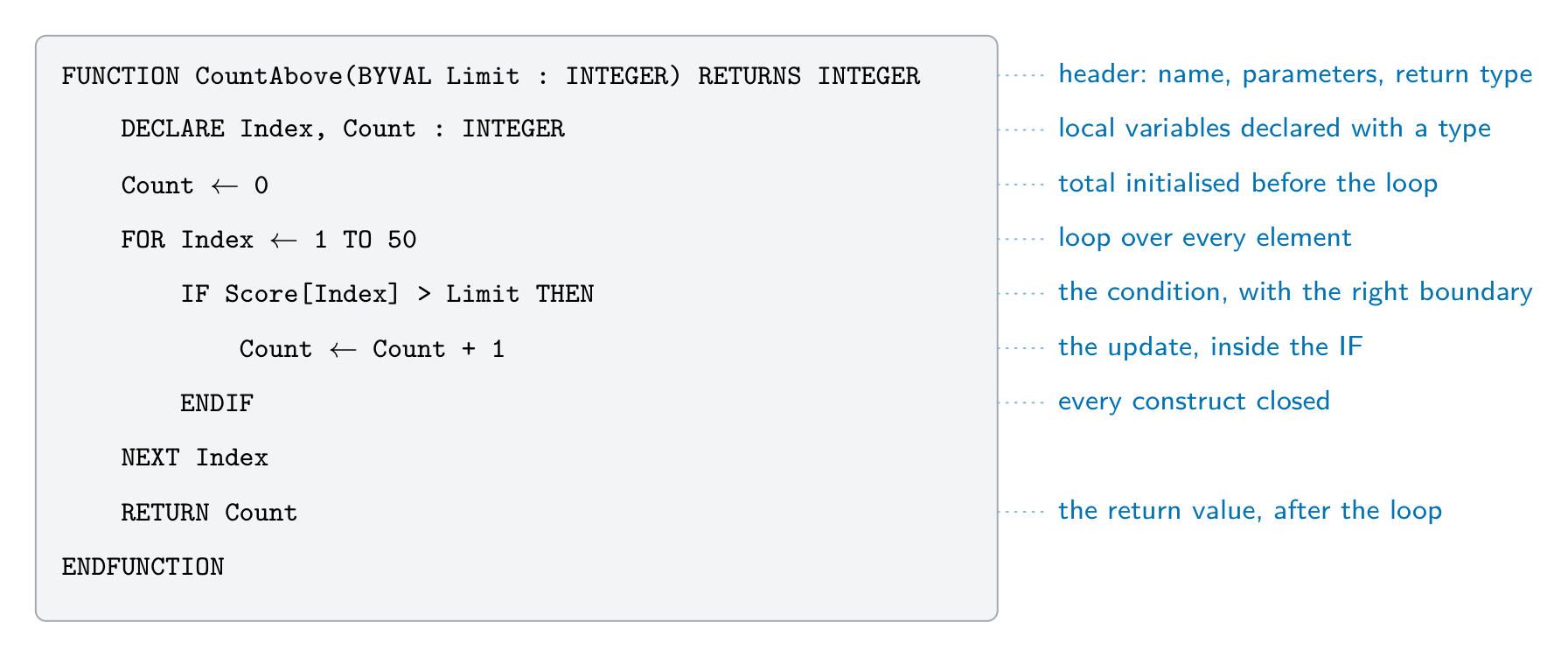
Half of Paper 2 is "write pseudocode for module X". The scheme awards a mark per feature, so a module that is not finished still scores for every correct part. The parts the examiner looks for:
The header, as the question describes it: PROCEDURE Name(Param : TYPE) or FUNCTION Name(Param : TYPE) RETURNS TYPE, with BYREF where the routine must change the argument.
Local declarations: DECLARE every local variable with its type, and initialise counters and totals (Count ← 0).
The loop that visits every element: FOR Index ← 1 TO 50 for an array whose size is given; WHILE NOT EOF(...) for a file.
The condition, with the right comparison and boundary, on the right item: IF Score[Index] > Limit THEN.
The update inside the branch: the count increased, the value stored, or the message output.
The end: RETURN once, after the loop, in a function; ENDFUNCTION or ENDPROCEDURE; and every IF, FOR and WHILE closed.
Worked example. A global array Score : ARRAY[1:50] OF INTEGER holds test scores. Write a function CountAbove(Limit : INTEGER) that returns how many scores are greater than Limit.
Marks: the header with its parameter and RETURNS INTEGER; Count declared and set to 0; a loop over all 50 elements; the comparison > Limit (not >=); the count updated inside the IF; RETURN Count after the loop. The main program uses the return value in an expression or an output: OUTPUT "Above 70: ", CountAbove(70).
Worked example. Write a function IsValid(Code : STRING) that returns TRUE when Code is two capital letters followed by four digits — the format 格式AB1234 — and FALSE otherwise.
The length check comes first, so MID is never asked for a position that does not exist. Validation 验证 like this returns a BOOLEAN so the caller can write IF IsValid(Entry) THEN ... ELSE OUTPUT "Invalid code" ENDIF: a message to the user is output by the caller, not by the function — a function calculates, a procedure acts.
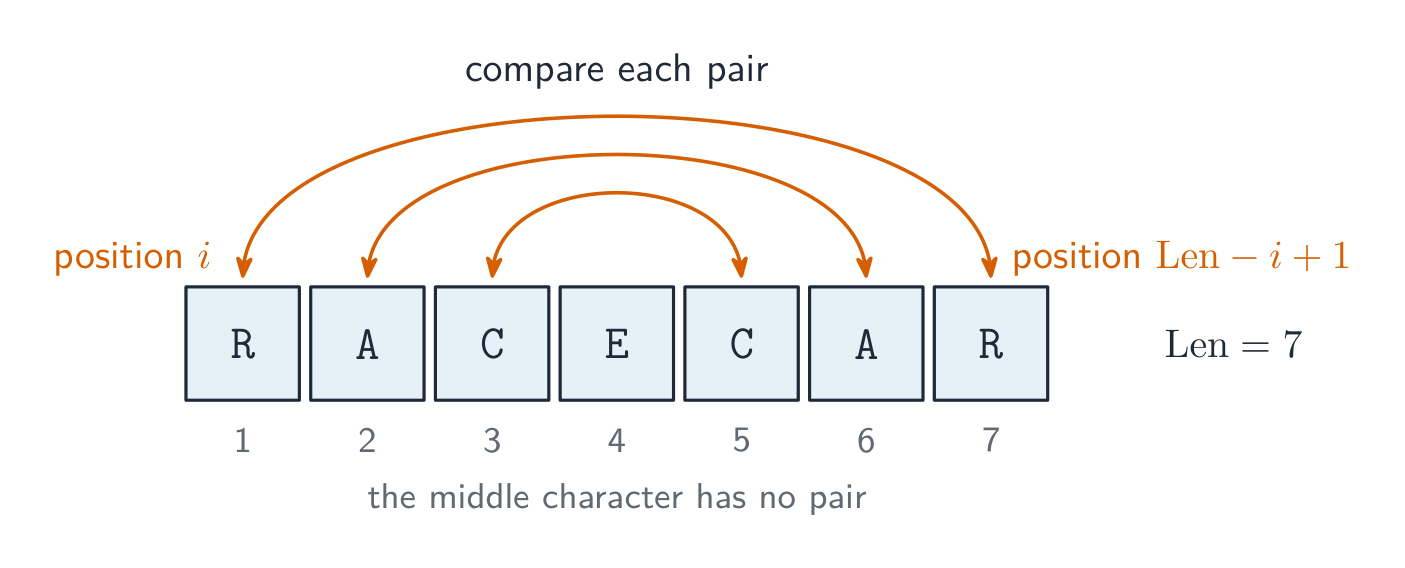
Worked example. Write a function IsPalindrome(Word : STRING) that returns TRUE when Word reads the same backwards, such as "RACECAR".
Compare the characters from the two ends, moving inwards: position Index is paired with position Len - Index + 1, and only the first half needs testing.
The same three tools — a FOR over the positions, MID(s, i, 1) to read one character, and & to build a new string — answer most string modules on Paper 2: counting how often a character occurs (IF MID(s, i, 1) = Ch THEN Count ← Count + 1), replacing every instance of a character (add either NewChar or the original character to NewString at each position), hiding all but the last four digits of a card number (add '*' for every position up to Len - 4), or writing your own MID() by joining the characters from Start to Start + Length - 1. Asking MID for a position past the end of the string is a run-time error, so check LENGTH first.
Files. Values in variables disappear when the program ends, so a module that must keep data for the next run writes it to a file: OPENFILE "scores.txt" FOR WRITE, one WRITEFILE "scores.txt", NUM_TO_STR(Score[Index]) per line inside the loop, and CLOSEFILE "scores.txt" once, after the loop; reading back uses FOR READ, READFILE and WHILE NOT EOF("scores.txt"). Topic 10 has the full file section; here the marks are for opening in the right mode, the read or write inside the loop, and closing once after it.
العربية
البرمجة المنهجية تبني البرنامج من وحدات فرعية صغيرة ذات أسماء، كل منها يؤدي مهمة واحدة.
الإجراء
الإجراء هو كتلة مسماة تقوم بإجراء؛ قد تأخذ معاملات لكنها لا تُرجع قيمة.
الدالة تشبه الإجراء لكنها ترجع قيمة تصبح جزءًا من تعبير.
FUNCTION Square(x : INTEGER) RETURNS INTEGER
    RETURN x * x
ENDFUNCTION

result ← Square(5) + 1     // result = 26
استخدم إجراءً عندما تقوم الوحدة الفرعية بإجراء؛ استخدم دالةً عندما تحسب قيمة للمُطلِق.
يتطلب المنهج أين في بناء الخوارزمية يكون كل منهما مناسباً. الإجراء مناسب حيث تكون نفس مجموعة الخطوات مطلوبة في نقاط متعددة (التحقق من إدخال، طباعة قائمة، تبديل قيمتين): تُكتب الخطوات مرة واحدة وتُستدعى بالاسم CALL. الدالة مناسبة حيث يجب حساب قيمة واحدة ثم استخدامها في تعبير — مجموع، نتيجة TRUE/FALSE، الأكبر بين عددين — لأن القيمة المُرجعة تستبدل الاستدعاء: IF IsValid(Code) THEN.
الإجراء يقوم بإجراء ولا يُرجع شيئاً؛ الدالة تُرجع قيمة تستخدمها في تعبير
المعاملات
المعامل هو متغير تعلنه الوحدة الفرعية لاستقبال الإدخال؛ القيم التي يزود بها المُطلَق هي الحجج. طريقتان لنقلهما:
النقل بالقيمة — تحصل الرoutine على نسخة؛ التغييرات بداخلها لا تؤثر على المُطلِق. استخدمه للإدخالات التي تقرأها فقط.
النقل بالمعنى — تحصل الرoutine على إشارة إلى متغير المُطلِق؛ التغييرات تؤثر على المُطلِق. استخدمه عندما يجب أن تُحدّث المعامل.
*النقل بالقيمة ينسخ القيمة إلى مربع جديد؛ النقل بالمعنى يسمح للروتين بتغيير متغير المُطلَق نفسه
PROCEDURE Swap(BYREF a : INTEGER, BYREF b : INTEGER)
    DECLARE temp : INTEGER
    temp ← a
    a ← b
    b ← temp
ENDPROCEDURE
تكتب كامبردج طريقة النقل في الترويسة، BYVAL أو BYREF، قبل كل معامل. إذا لم يُكتب أيٌّ منهما، يُفترض BYVAL، لذا فإن روتيناً يجب أن يُغيّر متغير المُطلَق — Swap، أو إجراءً يُحدّث المجموع الكلي — يحتاج BYREF في ترويته.
مثال محلول. ما هو المخرجات؟
PROCEDURE Adjust(BYREF X : INTEGER, BYVAL Y : INTEGER)
    X ← X + Y
    Y ← Y * 2
ENDPROCEDURE

A ← 5
B ← 3
CALL Adjust(A, B)
OUTPUT A, B
X هو مرجع إلى A، لذلك يصبح A مساوياً لـ 8. Y هي نسخة من B، لذا فإن مضاعفة Y تترك B عند 3. المخرجات هي 8, 3. لو كان الترويسة تقول BYVAL X، لكان A لا يزال 5.
المتغيرات المحلية والعالمية
المتغير المحلي يُعلن داخل وحدة فرعية ويوجد فقط أثناء تشغيلها. المتغير العالمي يُعلن خارجها وهو مرئي في كل مكان. يفضل استخدام المتغيرات المحلية والمعاملات — الاستخدام المكثف للمتغيرات العالمية يجعل الكود صعب المتابعة والاختبار. (المنطقة التي يكون فيها الاسم مرئياً هي نطاقه.)
الفرق في سطر واحد: يمكن الوصول للمتغير العالمي من أي مكان في البرنامج، بينما يمكن الوصول للمتغير المحلي فقط داخل الوحدة الفرعية التي تعلنه. فوائد المتغيرات المحلية التي يقبلها المنهج: يمكن استخدام نفس المعرف في وحدة فرعية أخرى دون تصادم؛ لا يمكن تغيير قيمته عن طريق الخطأ بواسطة أجزاء أخرى من البرنامج؛ يتم تحرير الذاكرة عند انتهاء الوحدة الفرعية؛ والوحدة الفرعية مستقلة، لذا يمكن اختبارها بشكل منفرد وإعادة استخدامها في برنامج آخر.
يتم إنشاء المتغير المحلي كل مرة يُستدعى فيها الروتين ويتم تدميره عند إرجاعه، لذا لا يمكنه حمل قيمة من استدعاء إلى الآخر. لذلك، الإجراء الذي يبني نصاً عبر استدعاءات متكررة يحتاج إلى أن يكون هذا النص عالمياً (أو يُمرر BYREF). إذا تم تغيير MyString من متغير عالمي إلى متغير محلي مُعلن داخل MyOutput()، تبدأ كل استدعاء بـ MyString جديد فارغ، يُفقَد النص المضاف بواسطة الاستدعاءات السابقة، ويُصبح الإجراء "لا يعمل كما هو متوقع".
*المتغير المحلي مربع جديد فارغ في كل استدعاء؛ فقط المتغير العالمي (أو المعامل BYREF) يحافظ على قيمة بين الاستدعاءات
*المتغير العالمي مرئي في كل مكان؛ المتغير المحلي يوجد فقط داخل إجرائه الخاص
متى تستخدم وحدة فرعية
استخدم وحدة فرعية عندما:
تظهر نفس المنطق في أكثر من مكان — اكتبه مرة واحدة، استدعه مرات عديدة.
للكتلة غرض مسماة واضح — يسجل الاسم ما تفعله.
البرنامج معقد — قسّمه إلى أجزاء (تحليل تقسيم).
تريد اختبار جزء بمعزل عنه.
لا تجعلها صغيرة جداً بحيث تتجاوز تكلفة الاستدعاء العمل الموجود بداخلها.
المصطلحات
تعريف — كتلة PROCEDURE ... ENDPROCEDURE (أو دالة).
استدعاء — حيث يُنطَق بها. حجة — قيمة تُمرَّر. معامل — المتغير الذي يستقبلها.
القيمة المُرجعة — ما تمرره الدالة.
ترويسة إجراء/دالة — السطر الأول الذي يعطي الاسم والمعاملات (PROCEDURE Name(params) أو FUNCTION Name(params) RETURNS type).
واجهة الإجراء/الدالة / التوقيع — الاسم + المعاملات + نوع الإرجاع: ما يجب أن يعرفه المُدعِي لاستخدامها.
مثال محلول. صف كل مصطلح مستخدم في الترويسة FUNCTION Pass2(Count : INTEGER) RETURNS BOOLEAN.
المصطلح
المعنى
FUNCTION
دالة جزئية تُرجع قيمة
Pass2
المعرّف المستخدم لدعايتها
Count
المعامل: المعرّف الذي يستقبل الحجة الممررة إليه
INTEGER
النوع البياني للمعامل
RETURNS BOOLEAN
النوع البياني للقيمة التي تُرجعها الدالة
المعرّفان في PROCEDURE MyProc(Count : INTEGER, Message : STRING) هما معاملات: يستقبلان القيم الممررة عند استدعاء الإجراء، ويُستخدمان بداخله كمتغيرات محلية.
لتحويل إجراء إلى دالة: غيّر PROCEDURE إلى FUNCTION وأضف RETURNS <type>؛ استبدل الـ OUTPUT (أو المعامل BYREF الذي حمل النتيجة للخارج) بعبارة RETURN؛ وغير كل استدعاء بحيث تُستخدم القيمة المُرجعة، Result ← Unpack(Text) بدلاً من CALL Unpack(Text, Result). بالنسبة لسؤال "اكتب الترويسة"، اكتب السطر كاملاً: FUNCTION Calculate(Expression : STRING) RETURNS INTEGER. يتم تمرير معامل المصفوفة بالمرجع، لذا فإن الإجراء الذي يكتب في مصفوفة يغير مصفوفة المُنَادِي.
عندما يكتسب برنامج وحدة جديدة، فإن الواجهة هي ما يتم الاتفاق عليه أولاً: الاسم، المعاملات (عددهم، ترتيبهم، أنواعهم) ونوع الإرجاع، بالإضافة إلى أي بيانات عالمية تقرأها الوحدة أو تكتبها. تتطلب الوحدة التي ترسل تذكيراً قبل الموعد النهائي سجل (أو فهارسه) كمعامل ولا تُرجع شيئاً، لذا فهي إجراء؛ ويدعي البرنامج الرئيسيها مرة واحدة لكل سجل.
كتابة وحدة لورقة امتحان 2
نصف ورقة امتحان 2 هو "اكتب خوارزمية زائفة لوحدة X". يمنح المخطط درجة لكل ميزة، لذا فإن الوحدة غير المكتملة لا تزال تحصل على درجات عن كل جزء صحيح. الأجزاء التي يبحث عنها المصحح:
يحمل كل جزء من إجابة الوحدة درجته الخاصة، فاكتب كل الأجزاء حتى لو كان أحدها غير مؤكد
الترويسة، كما تصفها السؤال: PROCEDURE Name(Param : TYPE) أو FUNCTION Name(Param : TYPE) RETURNS TYPE، مع BYREF حيث يجب أن يغير الروتين الحجة.
الإعلانات المحلية: DECLARE كل متغير محلي مع نوعه، وتهيئة العدادات والإجماليات (Count ← 0).
الحلقة التي تزور كل عنصر: FOR Index ← 1 TO 50 لمصفوفة حجمها مُعطى؛ WHILE NOT EOF(...) لملف.
الشرط، مع المقارنة والحد الصحيحين، على العنصر المناسب: IF Score[Index] > Limit THEN.
التحديث داخل الفرع: زيادة العداد، تخزين القيمة، أو إخراج الرسالة.
النهاية: RETURN مرة واحدة، بعد الحلقة، في دالة؛ ENDFUNCTION أو ENDPROCEDURE؛ وإغلاق كل IF وFOR وWHILE.
مثال محلول. مصفوفة عالمية Score : ARRAY[1:50] OF INTEGER تحتوي على درجات الاختبار. اكتب دالة CountAbove(Limit : INTEGER) تُرجع عدد الدرجات الأكبر من Limit.
FUNCTION CountAbove(BYVAL Limit : INTEGER) RETURNS INTEGER
    DECLARE Index, Count : INTEGER
    Count ← 0
    FOR Index ← 1 TO 50
        IF Score[Index] > Limit THEN
            Count ← Count + 1
        ENDIF
    NEXT Index
    RETURN Count
ENDFUNCTION
الدرجات: الترويسة مع معاملها وRETURNS INTEGER؛ Count مُعلَن ومُعدّل إلى 0؛ حلقة تمر على جميع عناصر 50؛ المقارنة > Limit (وليس >=)؛ تحديث العداد داخل IF؛ RETURN Count بعد الحلقة. يستخدم البرنامج الرئيسي قيمة الإرجاع في تعبير أو إخراج: OUTPUT "Above 70: ", CountAbove(70).
مثال محلول. اكتب دالة IsValid(Code : STRING) تُرجع TRUE عندما يكون Code حرفين كبيرين متتاليين يليهما أربعة أرقام — وهو النموذجAB1234 — وتُرجع FALSE بخلاف ذلك.
FUNCTION IsValid(BYVAL Code : STRING) RETURNS BOOLEAN
    DECLARE Index : INTEGER
    DECLARE Ch : STRING
    IF LENGTH(Code) <> 6 THEN
        RETURN FALSE
    ENDIF
    FOR Index ← 1 TO 6
        Ch ← MID(Code, Index, 1)
        IF Index <= 2 THEN
            IF Ch < "A" OR Ch > "Z" THEN
                RETURN FALSE
            ENDIF
        ELSE
            IF Ch < "0" OR Ch > "9" THEN
                RETURN FALSE
            ENDIF
        ENDIF
    NEXT Index
    RETURN TRUE
ENDFUNCTION
يأتي فحص الطول أولاً، لذا لن يُطلب أبداً من MID وضع غير موجود. التحقق مثل هذا يُرجع BOOLEAN حتى يتمكن المُنَادِي من كتابة IF IsValid(Entry) THEN ... ELSE OUTPUT "Invalid code" ENDIF: رسالة للمستخدم يتم إخراجها بواسطة المُنَادِي، وليس بواسطة الدالة — الدالة تحسب، والإجراء يعمل.
مثال محلول. اكتب دالة IsPalindrome(Word : STRING) تُرجع TRUE عندما يُقرأ Word بنفس الطريقة من الخلف، مثل "RACECAR".
قارن الأحرف من الطرفين المتقابلين، متجهًا نحو الداخل: الموضع Index يُقارَن بالموضع Len - Index + 1، ويجب اختبار النصف الأول فقط.
تحقق من الكلمة العكسية يقارن الموقع i بالموقع Len - i + 1 ويتوقف عند المنتصف
FUNCTION IsPalindrome(BYVAL Word : STRING) RETURNS BOOLEAN
    DECLARE Len, Index : INTEGER
    Len ← LENGTH(Word)
    FOR Index ← 1 TO Len DIV 2
        IF MID(Word, Index, 1) <> MID(Word, Len - Index + 1, 1) THEN
            RETURN FALSE
        ENDIF
    NEXT Index
    RETURN TRUE
ENDFUNCTION
نفس الأدوات الثلاث — حلقة FOR عبر المواقع، MID(s, i, 1) لقراءة حرف واحد، و& لبناء سلسلة جديدة — تجيب عن معظم وحدات السلاسل في الورقة 2: عدّ تكرار حرف معين (IF MID(s, i, 1) = Ch THEN Count ← Count + 1)، استبدال كل ظهور لحرف (إضافة إما NewChar أو الحرف الأصلي إلى NewString في كل موقع)، إخفاء كل الأرقام باستثناء آخر أربعة أرقام من رقم البطاقة (إضافة '*' لكل موقع حتى Len - 4)، أو كتابة MID() خاص بك بدمج الأحرف من Start إلى Start + Length - 1. طلب MID لموقع خارج نهاية السلسلة هو خطأ وقت التشغيل، لذا تحقق من LENGTH أولاً.
الملفات. تتلاشى القيم في المتغيرات عند انتهاء البرنامج، لذا فإن الوحدة التي يجب أن تحتفظ بالبيانات للتشغيل التالي تكتبها في ملف: OPENFILE "scores.txt" FOR WRITE، سطر WRITEFILE "scores.txt", NUM_TO_STR(Score[Index]) واحد داخل الحلقة، وCLOSEFILE "scores.txt" مرة واحدة، بعد الحلقة؛ القراءة الخلفية تستخدم FOR READ، READFILE وWHILE NOT EOF("scores.txt"). الموضوع 10 يحتوي على القسم الكامل للملفات؛ هنا الدرجات للفتح بالنموذج الصحيح، والقراءة أو الكتابة داخل الحلقة، والإغلاق مرة واحدة بعد ذلك.
Explore · استكشف
The call stack: push on call, pop on return · مكدس الاستدعاء: دفع عند الاستدعاء، سحب عند الإرجاع
Calling a subroutine pushes a new frame on top; returning pops it and hands a value back to the caller. The call that is running is always the frame on top. · استدعاء الدالة الفرعية يضيف إطاراً جديداً في الأعلى؛ والإرجاع يحذفه ويعيد قيمة إلى المُنشئ. الإجراء الجاري تشغيله هو دائماً الإطار الموجود في الأعلى.
Three features that make pseudocode easier to understand — the answer to a "state three features" question — are meaningful identifiers (Total, not t), indentation of the statements inside each construct, and comments (// ...) that explain the purpose; keywords in capitals, one statement per line and blank lines between sections are also accepted. Efficient pseudocode goes further:
move invariants out of loops — if a value (an invariant 不变量) does not change with the loop counter, compute it once before the loop.
exit a loop early when the answer is found (stop a linear search 线性查找 as soon as the target appears).
avoid redundant work — store a result and reuse it instead of recomputing.
choose the right data structure — an array beats many separate variables when the items belong together.
replace deep nested IFs with CASE when testing one value against many.
comment the intent, not the mechanics (// validate the postcode, not // loop 6 times).
use meaningful names (numberOfPupils, not n) and initialise variables before use.
العربية
ثلاث ميزات تجعل الكود الوهمي أسهل في الفهم — إجابة سؤال "اذكر ثلاث ميزات" — هي المعرفات ذات المعنى (Total، وليس t)، والتنسيق المساحي للعبارات داخل كل بنية، والتعليقات (// ...) التي تشرح الغرض؛ تُقبل أيضًا الكلمات المفتاحية بحروف كبيرة، وعبارة واحدة في كل سطر، وأسطر فارغة بين الأقسام. الكود الوهمي الفعال يتجاوز ذلك:
نقل الثوابت خارج الحلقات — إذا كانت قيمة (ثابت) لا تتغير مع عداد الحلقة، فاحسبها مرة واحدة قبل الحلقة.
الخروج من الحلقة مبكراً عند العثور على الإجابة (إيقاف البحث الخطي بمجرد ظهور الهدف).
تجنب العمل الزائد — احفظ النتيجة وأعد استخدامها بدلاً من إعادة الحساب.
اختيار البنية المناسبة للبيانات — المصفوفة تفوق المتغيرات المنفصلة العديدة عندما تنتمي العناصر معاً.
استبدال الشروط المتداخلة العميقة بـ CASE عند اختبار قيمة واحدة مقابل متعددة.
تعليق النية، وليس الآليات (// validate the postcode، وليس // loop 6 times).
استخدام أسماء ذات معنى (numberOfPupils، وليس n) وتهيئة المتغيرات قبل الاستخدام.
نقل العمل غير المتغير خارج الحلقة ليتم تشغيله مرة واحدة
11.3
Testing and errors · الاختبار والأخطاء
English
Three kinds of error, each found in a different way:
Error
What it is
Example
Found by
syntax error 语法错误
a statement that breaks the rules of the language
a missing ENDIF; OUTPT "Hi"
the translator, before the program runs
run-time error 运行时错误
the program runs, but a statement cannot be carried out
division by zero; an array index of 0 or 51; a function called with an invalid parameter; a loop that never ends, so the program "freezes"
while running: the program stops or hangs
logic error
the program runs to the end, but the output is wrong
> where >= was needed; a total never set to 0
testing with a trace table and chosen test data
An IDE 集成开发环境 helps find the last two: a breakpoint 断点 stops the program at a chosen line; single stepping 单步执行 then runs one statement at a time; and the report (or watch) window shows the value of each variable at that moment, so the line where a value goes wrong is seen directly. Test methods and test data are in topic 12.
العربية
ثلاثة أنواع من الأخطاء، يُكتشف كل منها بطريقة مختلفة:
الخطأ
ماهيته
مثال
يُكتشف بواسطة
خطأ في الصياغة
عبارة تخالف قواعد اللغة
غياب ENDIF؛ OUTPT "Hi"
المترجم، قبل تشغيل البرنامج
خطأ وقت التشغيل
يعمل البرنامج، لكن لا يمكن تنفيذ عبارة ما
القسمة على صفر؛ فهرس مصفوفة يساوي 0 أو 51؛ استدعاء دالة بمعامل غير صالح؛ حلقة لا تنتهي أبداً، مما يجعل البرنامج "يتجمد"
أثناء التشغيل: يتوقف البرنامج أو يتعلّق
خطأ منطقي
يعمل البرنامج حتى النهاية، لكن المخرجات خاطئة
> حيث كان مطلوباً >=؛ مجموع لم يُضبط على 0
الاختبار باستخدام جدول التتبع والبيانات التجريبية المختارة
يساعد بيئة التطوير المتكاملة في اكتشاف النوعين الأخيرين: نقطة التوقف توقف البرنامج عند سطر مختار؛ التنفيذ خطوة بخطوة يشغل بعد ذلك عبارة واحدة في كل مرة؛ وعرض التقرير (أو المراقبة) يوضح قيمة كل متغير في تلك اللحظة، مما يسمح برؤية السطر الذي تتغير فيه القيمة بشكل مباشر. طرق الاختبار والبيانات التجريبية موجودة في الموضوع 12.
11.3
Definitions the examiner accepts · التعريفات التي يقبلها المصحح
English
A definition question is marked against fixed wording. Learn these exactly.
Term
Definition
procedure
a subroutine that carries out a task (a sequence of steps) and does not return a value; it is called with CALL
function
a subroutine that returns a single value to the point where it was called, so it can be used in an expression
parameter
the identifier in a subroutine header that receives a value or a reference when the subroutine is called
argument
the value (or variable) supplied in the call, matched to a parameter
passing by value
a copy of the argument's value is given to the subroutine, so changes inside it do not affect the original variable
passing by reference
the address of the variable is given to the subroutine, so changes inside it change the original variable
header
the first line of a subroutine definition: its name, its parameters and, for a function, its return type
interface
what a calling program must know to use a subroutine: its name, its parameters (number, order, type) and its return type
return value
the value a function passes back to the expression that called it
local variable
declared inside a subroutine; it exists only while the subroutine runs and can be used only inside it
global variable
declared outside every subroutine; it can be used anywhere in the program
count-controlled loop
repeats a fixed number of times, controlled by a counter (FOR ... NEXT)
pre-condition loop
tests its condition before each iteration, so the body may never run (WHILE ... ENDWHILE)
post-condition loop
tests its condition after each iteration, so the body runs at least once (REPEAT ... UNTIL)
constant
a named value that cannot change while the program runs
subroutine
a self-contained block of code that performs a task and is called by name: a procedure or a function
library routine
a subroutine that has already been written and tested, and is available to be called from a program
العربية
السؤال التعريفي يتم تقييمه بناءً على صياغة ثابتة. احفظها بدقة.
مصطلح
تعريف
إجراء فرعي
برنامج جزئي يؤدي مهمة (تسلسل خطوات) ولا يعيد قيمة؛ يُستدعى بـ CALL
دالة
برنامج جزئي يعيد قيمة واحدة إلى نقطة استدعائها، لذا يمكن استخدامه في تعبير
معامل
المعرف في ترويسة البرنامج الجزئي يستقبل قيمة أو مرجعاً عند استدعاء البرنامج الجزئي
حجة
القيمة (أو المتغير) المقدمة في الاستدعاء، والمطابقة للمعامل
تمرير بالقيمة
تُعطى نسخة من قيمة الحجة للبرنامج الجزئي، لذا فإن التغييرات بداخله لا تؤثر على المتغير الأصلي
تمرير بالمرجع
يُعطى عنوان المتغير للبرنامج الجزئي، لذا فإن التغييرات بداخله تغير المتغير الأصلي
ترويسة
السطر الأول من تعريف البرنامج الجزئي: اسمه، ومعاملاته، ونوع الإرجاع بالنسبة للدالة
واجهة
ما يجب أن يعرفه البرنامج المُدعِم لاستخدام برنامج جزئي: اسمه، ومعاملاته (عددهم، ترتيبهم، أنواعهم) ونوع الإرجاع
قيمة إرجاع
القيمة التي تعيدها الدالة إلى التعبير الذي استدعاها
متغير محلي
مُصنّف داخل برنامج جزئي؛ يوجد فقط أثناء تشغيل البرنامج الجزئي ويمكن استخدامه فقط بداخله
متغير عالمي
مُصنّف خارج جميع البرامج الجزئية؛ يمكن استخدامه في أي مكان في البرنامج
حلقة مسبوقة العداد
تكرار عدد ثابت من المرات، يُتحكم بها عبر عداد (FOR ... NEXT)
حلقة شرط مسبق
تختبر شرطها قبل كل دورة، لذا قد لا يُنفذ الجسم أبداً (WHILE ... ENDWHILE)
حلقة شرط لاحق
تختبر شرطها بعد كل دورة، لذا يُنفذ الجسم مرة واحدة على الأقل (REPEAT ... UNTIL)
ثابت
قيمة مُسمّاة لا يمكن تغييرها أثناء تشغيل البرنامج
برنامج جزئي
كتلة مستقلة من الكود تقوم بمهمة ويُستدعى باسمها: إجراء فرعي أو دالة
روتين مكتبة
برنامج جزئي كُتب ومُختبر بالفعل ومتاح للاستدعاء من برنامج
11.3
Exam tips · نصائح للامتحان
English
Distinguish a procedure (no return value) from a function (returns a value); know pass by value vs by reference.
Choose the right loop: count-controlled (FOR) when the number of repeats is known, condition-controlled (WHILE/REPEAT) otherwise.
Distinguish local vs global variables and scope; prefer local variables in reusable modules.
Use the insert's exact routine names and parameter order. VAL and STR are IGCSE names and score nothing; UCASE and LCASE are real 9618 routines from the Pseudocode Guide but act on one character, so on Paper 2 a whole string takes TO_UPPER or TO_LOWER.
In a "write pseudocode" answer the header, the declarations, the loop, the condition, the update and the RETURN each carry a mark: write all six parts, even if one is uncertain.
Common mistakes
Calling a function and not using what it returns. Assign the result, or use it in the expression or output: Sorted ← BubbleSort(MyArray, 7).
Passing a length one out: 6 for a seven-element array, or the last index where the length was wanted. Decide whether the parameter is a length or an index, and check that the last element is visited.
Closing a file inside the loop that reads it. Open once, close once, after the loop.
Using the input as a filename directly. Add the extension the question gave: FileName ← Choice & ".txt".
Leaving constructs open. Every IF needs its ENDIF, every FOR its NEXT, every WHILE its ENDWHILE, and every function its RETURN; the scheme has a mark for it.
Wrong boundaries: > for "at least" (which is >=), or a FOR that starts at 0 for an array declared [1:50].
A counter or total that is never set to 0 before the loop.
In a trace table, rewriting every variable on every row, or changing a value before the statement that changes it has run.
Half a condition: IF x = 3 OR 4 — each side of OR and AND must be a complete comparison. And + does not join strings; & does.
Declaring as local a value that must survive between calls. A running total or a string built up over several calls is global or BYREF.
العربية
التمييز بين الإجراء الفرعي (بدون قيمة إرجاع) والدالة (تعيد قيمة)؛ معرفة التمرير بالقيمة مقابل المرجع.
اختيار الحلقة المناسبة: مسبوقة العداد (FOR) عندما يكون عدد التكرارات معلوماً، مشروطة (WHILE/REPEAT) في الحالات الأخرى.
التمييز بين المتغيرات المحلية والعالمية والنطاق؛ تفضيل المتغيرات المحلية في الوحدات القابلة لإعادة الاستخدام.
استخدام أسماء الروتين وترتيب المعاملات بدقة كما ورد في الإضافة. VAL وSTR هي أسماء IGCSE ولا تحصل على درجات؛ UCASE وLCASE هي روتينات حقيقية 9618 من دليل الكود الوهمي لكنها تعمل على حرف واحد، لذا في ورقة 2 تستغرق السلسلة الكاملة TO_UPPER أو TO_LOWER.
في إجابة "اكتب الكود الوهمي" يحمل الترويسة، والإعلانات، والحلقة، والشرط، والتحديث، وRETURN كلٌ درجة: اكتب جميع الأجزاء الستة، حتى لو كان أحدها غير مؤكد.
أخطاء شائعة
استدعاء دالة وعدم استخدام ما تعيده. قم بتعيين النتيجة، أو استخدمها في التعبير أو المخرجات: Sorted ← BubbleSort(MyArray, 7).
تمرير طول بمقدار واحد: 6 لمصفوفة ذات سبع عناصر، أو آخر فهرس كان المطلوب هو الطول. حدد ما إذا كان المعامل طولاً أم فهرساً، وتأكد من زيارة العنصر الأخير.
إغلاق ملف داخل الحلقة التي تقرأه. افتح مرة واحدة، أغلق مرة واحدة، بعد الحلقة.
استخدام المدخلات مباشرة كاسم ملف. أضف الامتداد الذي قدمته السؤال: FileName ← Choice & ".txt".
ترك التراكيب مفتوحة. كل IF يحتاج إلى ENDIF، وكل FOR إلى NEXT، وكل WHILE إلى ENDWHILE، وكل دالة إلى RETURN؛ المخطط يحتوي على علامة لذلك.
حدود خاطئة: > لـ "على الأقل" (والذي يعني >=)، أو FOR يبدأ من 0 لمصفوفة مُعلَنة [1:50].
عداد أو مجموع لا يتم تعيينه إلى 0 قبل الحلقة.
في جدول التتبع، إعادة كتابة كل متغير في كل صف، أو تغيير قيمة قبل تنفيذ التعليق الذي يغيرها.
نصف شرط: IF x = 3 OR 4 — يجب أن يكون كل طرف من OR وAND مقارنة كاملة. و+ لا يربط النصوص؛ بينما & يفعل ذلك.
الإعلان عن قيمة محلياً يجب أن تستمر بين الاستدعاءات. المجموع المتراكم أو النص المبني عبر عدة استدعاءات هو عالمي أو BYREF.
Interactive lessons on this topic · دروس تفاعلية حول هذا الموضوع
Work through it step by step, with instant-check exercises. · ا-working عليه خطوة بخطوة، مع تمارين تحقق فوري.
Pick one and the site follows you — notes, papers, videos and practice all open on it. · اختر واحدًا وسيتبعك الموقع — الملاحظات، الأوراق، الفيديوهات والتدريب جميعها تفتح عليه.
Type to search notes, lessons, code, vocabulary and past-paper questions across every subject. · اكتب للبحث عن ملاحظات، دروس، أكواد، مفردات وأسئلة امتحانات سابقة عبر جميع المواد.


 *كل رمز في المخطط الانسيابي يصبح كلمة مفتاحية في الكود الزائف
 *قيمة المتغير يمكن أن تتغير؛ ثابت يبقى ثابتاً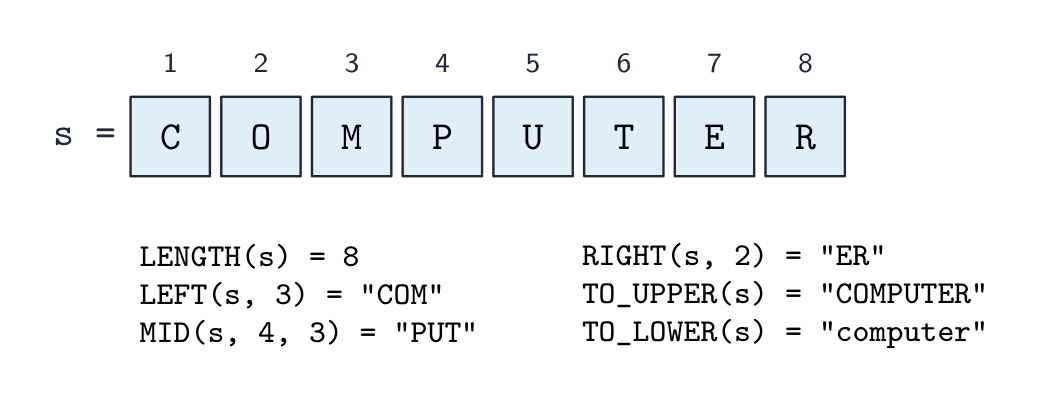



 *النقل بالقيمة ينسخ القيمة إلى مربع جديد؛ النقل بالمعنى يسمح للروتين بتغيير متغير المُطلَق نفسه
 *المتغير المحلي مربع جديد فارغ في كل استدعاء؛ فقط المتغير العالمي (أو المعامل BYREF) يحافظ على قيمة بين الاستدعاءات
 *المتغير العالمي مرئي في كل مكان؛ المتغير المحلي يوجد فقط داخل إجرائه الخاص