| 考生应能: | 注释与指导 |
|---|---|
| 解释计算机系统为何需要操作系统(OS) | |
| 解释操作系统执行的关键管理任务 | 包括内存管理、文件管理、安全管理、硬件管理(输入/输出/外设)、进程管理 |
| 展示对操作系统附带的典型实用软件需求的理解 | 包括磁盘格式化程序、病毒查杀工具、磁盘碎片整理软件、磁盘内容分析/磁盘修复软件、文件压缩、备份软件 |
| 展示对程序库的理解 | 包括:• 开发中的软件通常利用程序库中的现有代码构建 • 开发者使用库文件构建软件的优势,包括动态链接库(DLL)文件 |
系统软件
A-Level 计算机科学 · 知识点 5
 20:46
20:46
操作系统
你从未见过它,也永远不会看到它——但它始终存在。在你打开的每一个应用背后,保存的每一个文件中,屏幕上的每一次点击下,都有一个看不见的……
英语旁白 · 英中内嵌字幕
5.1
操作系统

教学大纲
来源:Cambridge International 教学大纲
为什么一台计算机需要一个操作系统
硬件本身只能取指令并运行它们——它对文件、程序、网络或用户一无所知。操作系统(operating system,OS)是这样一个软件层,它:
- 为运行中的程序管理硬件(处理器(processor)、内存、I/O、存储)。
- 通过一个清晰的接口提供服务(文件系统、网络、用户账户),所以程序不必直接与硬件对话。
- 提供一个用户界面(命令行、GUI、触控)。
- 让几个程序安全地共享硬件——每个获得公平的 CPU 时间并被挡在其他程序的内存之外。
没有操作系统,每个程序都需要它自己的驱动,而且一次只能安全地运行一个程序。
"描述操作系统的用途"——五分清单。 操作系统(1)在用户与硬件之间提供一个接口;(2)向用户和应用程序隐藏硬件的复杂性;(3)管理硬件资源——处理器时间、内存、存储和输入/输出设备——并在程序之间分配它们;(4)把应用软件加载到内存并运行它,给每个程序同样的运行平台;(5)让几个程序同时运行(多任务处理(multitasking)),同时保证它们和用户数据的安全。给出五个不同的要点;只说"它运行计算机"或"它管理资源"不得分。

关键的管理任务
大纲列出五项。下面每个要点都是操作系统实际做的一件事,这正是"描述"题想要的。
- 内存管理(memory management)——在程序加载时给它分配内存,使每个程序的内存彼此分开(内存保护(memory protection)),让一个程序不能覆盖另一个;程序结束时释放内存;并在 RAM(随机存取存储器)与辅助存储器(secondary storage,即磁盘)之间交换页面(虚拟内存(virtual memory)/分页(paging)),使打开的程序可以多于物理内存所能容纳的。
- 进程管理(process management)——运行中的程序是一个进程(process)。操作系统创建和结束进程,决定下一个由哪个进程使用 CPU(调度(scheduling))以及用多久(一个时间片(time slice)),在它们之间切换,在两个进程争用同一资源时解决冲突,并能终止一个停止响应的进程。
- 硬件管理(输入/输出与外围设备)——通过每个设备的设备驱动(device driver)与之通信,把发往打印机等慢速设备的数据排队和缓冲,响应来自设备的中断(interrupts),并让几个程序共用一台设备。
- 文件管理——创建、命名、复制、移动和删除文件与文件夹,维护目录(directory)结构并记录每个文件存放在磁盘的哪里,给文件分配磁盘空间,并对每个用户执行访问权限(access rights)(读 / 写 / 执行)。
- 安全管理——用户账户和密码(身份验证(authentication))、访问权限、存储数据的加密、防火墙、自动安全更新,以及谁做了什么的日志。


内存管理与进程管理如何支持多任务处理(常见的四分题)。内存管理把几个程序同时加载到内存中,各在自己受保护的区域,并记录哪些地址属于哪个程序;进程管理在它们之间分配处理器——每个进程运行一个时间片,操作系统保存它的状态并切换到下一个,切换快到所有程序看起来在同时运行。中断让操作系统在设备需要处理时随时从进程手中收回处理器。
中断。 硬件中断(hardware interrupt)来自设备:按下一个键、点击鼠标、打印机缺纸、磁盘完成一次传输、电源故障。软件中断(software interrupt)来自程序:除以零、无效指令、试图使用不属于它的内存,或请求一项操作系统服务。操作系统的中断处理程序(interrupt handler)保存正在运行的进程的状态,处理中断,然后恢复该进程(专题 4 讲取指-执行的细节)。
实用软件
实用程序(utility programs)是维护、修复或优化计算机而不是完成用户任务的系统软件;考官接受"执行一项特定的维护任务,改善性能或安全"。大多数操作系统捆绑这些:

- 磁盘格式化程序——为一个新磁盘(或抹掉一个旧磁盘)做好使用准备:建立它的文件系统和分区,删除任何已有数据。
- 病毒检查器(杀毒软件(antivirus))——扫描文件和内存,把代码与已知病毒签名(signatures)的数据库比对并监视可疑行为,然后隔离或删除发现的东西;按计划运行、每次下载时运行,并且需要随新病毒出现而更新。
- 碎片整理软件(磁盘碎片整理(disk defragmenter))——硬盘把文件存放在它找到的任何空闲块中,所以经过多次保存和删除后,一个文件分散(碎片化(fragmented))在盘片各处,读写头必须在各碎片之间跳来跳去。碎片整理程序把每个文件的各部分挪到一起,并把空闲空间集中到一个区域,于是文件加载更快,新文件也不会碎片化。SSD 没有移动的磁头,不需要它。
- 磁盘内容分析 / 磁盘修复软件——显示什么占用了磁盘空间(大文件、重复文件或临时文件),以便删除;找到并修复坏扇区、丢失簇和文件系统错误。
- 文件压缩(压缩(compression))——缩小文件,使它们占用更少存储并更快传输;归档把许多文件打包成一个。
- 备份软件(备份(backup))——按计划把文件复制到另一个介质(外部磁盘、网络、云端),使数据在丢失、损坏或勒索软件攻击后可以恢复;一次完整备份之后是只备份变化部分的增量备份(incremental backups)。
- 防火墙(firewall)(按规则过滤网络流量)和加密工具,用于安全;一个系统监视器和自动更新。
把这些与操作系统捆绑,省去用户安装每一个。
哪个实用程序做什么。 *性能:*碎片整理(更快的文件访问)、磁盘修复(有错误的磁盘会变慢或失效)、磁盘内容分析(删除垃圾释放空间)、压缩(磁盘能装更多)。*安全:*病毒检查器、防火墙、加密,以及备份(勒索软件之后唯一的恢复手段)。"连线"题把每个实用程序与恰好一个用途配对——记住上面的配对,并使用大纲的名称。
例题。 解释碎片整理如何改善计算机的性能(3 分)。
随着时间推移,一个文件被存放在分散于硬盘各处的块中,所以读取它需要读写头多次移动。碎片整理程序重新排列这些块,使每个文件连续存放,空闲空间集中在一起。此后读取文件的磁头移动更少,加载更快,新文件也能写入一段连续的空间。
探索
操作系统位于何处
点击每一层。操作系统是中间层——它位于你的应用和硬件之间,安全地共享机器,所以程序从不直接接触硬件。
词汇
训练
| English | 中文 | 拼音 |
|---|---|---|
| operating system/ˈɒpəreɪtɪŋ ˈsɪstəm/ | 操作系统 | cāo zuò xì tǒng |
| processor/ˈprəʊsesə/ | 处理器 | chǔ lǐ qì |
| multitasking/ˈmʌltitæskɪŋ/ | 多任务处理 | duō rèn wù chǔ lǐ |
| memory management/ˈmeməri ˈmænɪdʒmənt/ | 内存管理 | nèi cún guǎn lǐ |
| memory protection/ˈmeməri prəˈtekʃn/ | 内存保护 | nèi cún bǎo hù |
| RAM/ræm/ | 随机存取存储器 | suí jī cún qǔ cún chǔ qì |
| secondary storage/ˈsekəndəri ˈstɔːrɪdʒ/ | 辅助存储器 | fǔ zhù cún chǔ qì |
| virtual memory/ˈvɜːtʃuːəl ˈmeməri/ | 虚拟内存 | xū nǐ nèi cún |
| paging/ˈpeɪdʒɪŋ/ | 分页 | fēn yè |
| process management/ˈprəʊses ˈmænɪdʒmənt/ | 进程管理 | jìn chéng guǎn lǐ |
| process/ˈprəʊses/ | 进程 | jìn chéng |
| scheduling/ˈʃedjuːlɪŋ/ | 调度 | diào dù |
| time slice/taɪm slaɪs/ | 时间片 | shí jiān piàn |
| device driver/dɪˈvaɪs ˈdraɪvə/ | 设备驱动 | shè bèi qū dòng |
| interrupts/ˈɪntərʌpts/ | 中断 | zhōng duàn |
| directory/daɪˈrektəri/ | 目录 | mù lù |
| access rights/ˈækses raɪts/ | 访问权限 | fǎng wèn quán xiàn |
| authentication/ɔːˌθentɪˈkeɪʃn/ | 身份验证 | shēn fèn yàn zhèng |
| firewall/ˈfaɪəwɔːl/ | 防火墙 | fáng huǒ qiáng |
| hardware interrupt/ˈhɑːdweə ˈɪntərʌpt/ | 硬件中断 | yìng jiàn zhōng duàn |
| software interrupt/ˈsɒftweə ˈɪntərʌpt/ | 软件中断 | ruǎn jiàn zhōng duàn |
| interrupt handler/ˈɪntərʌpt ˈhændlə/ | 中断处理程序 | zhōng duàn chǔ lǐ chéng xù |
| utility program/juːˈtɪlɪti ˈprəʊɡræm/ | 实用程序 | shí yòng chéng xù |
| antivirus/ˌæntɪˈvaɪrəs/ | 杀毒软件 | shā dú ruǎn jiàn |
| backup/ˈbækʌp/ | 备份 | bèi fèn |
| compression/kəmˈpreʃn/ | 压缩 | yā suō |
| disk defragmenter/dɪsk ˌdiːˈfræɡmentə/ | 碎片整理 | suì piàn zhěng lǐ |
| signatures/ˈsɪɡnɪtʃəz/ | 签名 | qiān míng |
| fragmented/fræɡˈmentɪd/ | 碎片化 | suì piàn huà |
| incremental backups/ˌɪŋkrɪˈmentl ˈbækʌps/ | 增量备份 | zēng liàng bèi fèn |
5.1
程序库

一个程序库(program library)是预先写好的代码(子程序(subroutines)、类、模块),程序重用它而不是自己写——例如一个数学库、一个网络库、一个图形库。
好处:节省时间(现成的代码)、可靠(经过充分测试、广泛使用),以及标准化(一致的行为)。
考官的好处清单,针对开发者。 库例程(library routines)已经写好并测试过,所以开发更快、更便宜;它们可靠,而且被许多程序使用,基本没有错误;开发者不需要该领域的专长(图形、压缩、加密、路径搜索);程序更容易维护,因为公共代码只在一处;整个团队可以用同样的例程,得到一致的结果。**缺点:**例程可能不完全符合你的需要而你又无法修改它;你的程序依赖于库的可用、正确和安全——库中的一个错误或安全漏洞就是你程序中的错误;而且你必须学会如何调用它。
- 一个静态库(static library)在编译时被复制到可执行文件中(独立,但更大且需要重建来更新)。
- 一个动态库(dynamic library,DLL,动态链接库;
.so)在运行时被加载(可执行文件更小、被许多程序共享、一次更新惠及所有)。

动态链接库(DLL)文件。 DLL 是一种只在程序调用它时才于运行时加载到内存的库,它保持为一个独立文件,而不是被复制进可执行文件。*好处:*可执行文件更小;几个运行中的程序共享内存中的一份 DLL;DLL 可以更新(修复错误、支持新设备)而不必重新编译使用它的程序;内存只在需要该例程时才被占用。*缺点:*如果 DLL 缺失、被移动或版本不对,程序就无法运行;更新后的 DLL 可能破坏依赖旧行为的程序;被替换成假的 DLL 会以程序的权限运行。
例题。 一个团队为餐厅机器人编写软件,使用了一个包含"寻找餐桌之间最短路径"例程的程序库。解释对团队的两个好处和一个缺点。
*好处:*例程已经写好并测试过,团队节省时间并可以信任结果;团队不必自己理解路径搜索算法,可以把时间花在机器人自身的功能上。*缺点:*例程可能无法处理餐厅的具体需求(移动的椅子、单行通道),而团队无法修改它,因此可能不得不绕开它的限制。
探索
计算概念实验
根据它们所演示的计算概念对具体示例进行分类。
词汇
训练
| English | 中文 | 拼音 |
|---|---|---|
| program library/ˈprəʊɡræm ˈlaɪbrəri/ | 程序库 | chéng xù kù |
| subroutines/ˈsʌbruːtiːnz/ | 子程序 | zi chéng xù |
| library routines/ˈlaɪbrəri ruːˈtiːnz/ | 库例程 | kù lì chéng |
| static library/ˈstætɪk ˈlaɪbrəri/ | 静态库 | jìng tài kù |
| dynamic library/daɪˈnæmɪk ˈlaɪbrəri/ | 动态库 | dòng tài kù |
5.2
语言翻译程序

教学大纲
| 考生应能: | 注释与指导 |
|---|---|
| 展示对以下需求的理解:• 用于将汇编语言程序转换为机器码的汇编器软件 • 用于将高级语言程序转换为机器码的编译器 • 用于转换并执行高级语言程序的解释器 | |
| 解释使用编译器或解释器的优缺点,并为各自的使用提供理由 | |
| 了解某些高级语言程序可能采用部分编译、部分解释的方式,例如 Java(控制台模式) | |
| 描述典型的集成开发环境 (IDE) 中的功能特性 | 包括: • 代码编写方面,如上下文敏感提示 • 初始错误检测方面,如动态语法检查 • 代码呈现方面,如美化打印、展开和折叠代码块 • 调试方面,如单步执行、断点、变量/表达式查看、报告窗口等 |
来源:Cambridge International 教学大纲
你写源代码;计算机运行机器码(machine code)。一个翻译器(translator)在它们之间转换。
汇编器
一个汇编器(assembler)把汇编语言(assembly language)翻译成机器码:每条助记符指令(LDD、ADD、JMP)恰好变成一条机器码指令,符号地址和标号被替换成真实地址。需要它是因为处理器只执行机器码;在程序员需要直接控制硬件的地方(嵌入式系统、设备驱动)使用汇编。
编译器
一个编译器(compiler)在运行之前一次性把一个高级程序翻译成机器码。
- 它在编译时报告所有错误;一旦干净,它产生一个独立的可执行文件(executable),它在没有安装编译器的情况下运行,并能运行许多次。
- 通常运行时更快(运行时没有翻译),但绑定到一个 CPU/OS——为每个平台重新编译。
两分的描述:*编译器在运行之前把整个高级语言程序翻译成机器码(目标代码(object code)),生成一个可执行文件,并在翻译结束时把所有语法错误一起列出。*它不运行程序。
解释器
一个解释器(interpreter)一次一行地翻译并运行一个高级程序,不产生可执行文件。
- 它在到达那一行时报告一个错误,然后停止;你可以修正它并继续——对开发很好。
- 必须安装解释器才能运行程序;通常更慢(每次运行都重新翻译),但容易跨平台移植(port)。
两分的描述:*解释器一次翻译高级语言程序的一条语句并立即执行它,再处理下一条;不生成可执行文件;遇到第一个错误就停下并报告。*每次运行程序时,源代码和解释器都必须在场。
在它们之间选择
| 用编译器当: | 用解释器当: |
|---|---|
| 运行时速度重要 | 你想要快速的编辑-运行循环 |
| 分发给没有开发工具的用户 | 编写跨平台脚本 |
| 程序运行许多次 | 程序小或只运行一次 |
| 教初学者 |
好处与缺点,按标准答案的列法。
| 编译器 | 解释器 | |
|---|---|---|
| 执行速度 | 快——已经是机器码 | 较慢——每次运行都要翻译 |
| 用户需要什么 | 只要可执行文件;不需要翻译器,源代码保持私密 | 源代码和解释器 |
| 发现错误 | 整个程序翻译完后一次列出所有错误 | 每个错误在出现的那一行报告,边开发边发现 |
| 修改代码 | 每次修改后重新编译整个程序 | 编辑后立即再运行 |
| 可移植性 | 机器码只能在一个平台运行;每个平台重新编译 | 同样的源代码在任何有解释器的地方运行 |
例题。 一个开发者在编写程序时使用解释器,在完成后使用编译器。解释每一个是如何使用的(4 分)。
开发期间,解释器立刻运行写了一部分的程序,不必等待完整翻译;遇到错误时它报告所在行,开发者修正后立即再运行——一个快速的编辑-运行循环,更便于调试。程序完成后,编译器把整个程序翻译成一个可执行文件,它运行更快、用户电脑上不需要翻译器、也不暴露源代码,因此可以卖给公众。
混合:Java
Java 被编译成字节码(bytecode,一种平台无关的中间形式),一个虚拟机(virtual machine,JVM)随即解释它——或使用即时编译(just-in-time compilation)把热点部分变成本地代码。所以错误被及早捕获、字节码在任何有 JVM 的地方运行("一次编写,到处运行"),并且长时间运行的程序达到接近本地的速度。C# 和 Python 用类似的设计。
大纲的说法是"部分编译、部分解释":编译阶段捕捉语法错误并生成紧凑、可移植(portable)的字节码;解释阶段让这一个字节码文件在任何装有虚拟机的机器上运行,代价是损失一些速度。控制台模式(从命令行运行的文本程序)下的 Java 是大纲的例子。

例题。 Java 源代码被编译成字节码,再由 JVM 解释执行。为什么两者都用,而不直接编译成机器码?编译器生成的是针对某一种处理器和操作系统的机器码,所以在一台机器上编译的程序无法在另一台上运行。而 Java 的编译器面向的是一台虚拟机器,所以它产生的字节码在哪里都完全相同;各个平台再各自提供自己的 JVM,把这些字节码解释成本平台的原生指令。因此一个编译好的文件可以在任何有 JVM 的地方运行 - "一次编写,到处运行"。代价是速度:解释字节码比运行原生代码慢,这正是真实的 JVM 还会用 JIT 编译在运行时把频繁执行的字节码转成原生代码的原因。要把两面都说出来 - 得分点是用速度换来的可移植性。
探索
编译器路线:从源代码到运行中的程序
逐步走过一个编译器如何工作——在程序运行前把整个程序翻译一次。把它与一个解释器对比,后者一次一行地翻译并运行。
词汇
训练
| English | 中文 | 拼音 |
|---|---|---|
| executable/ɪɡˈzekjʊtəbl/ | 可执行文件 | kě zhí xíng wén jiàn |
| translator/trænˈsleɪtə/ | 翻译器 | fān yì qì |
| machine code/məˈʃiːn kəʊd/ | 机器码 | jī qì mǎ |
| assembler/əˈsemblə/ | 汇编器 | huì biān qì |
| assembly language/əˈsemblɪ ˈlæŋɡwɪdʒ/ | 汇编语言 | huì biān yǔ yán |
| compiler/kəmˈpaɪlə/ | 编译器 | biān yì qì |
| object code/ˈɒbdʒekt kəʊd/ | 目标代码 | mù biāo dài mǎ |
| interpreter/ɪnˈtɜːprɪtə/ | 解释器 | jiě shì qì |
| bytecode/ˈbaɪtkəʊd/ | 字节码 | zì jié mǎ |
| virtual machine/ˈvɜːtʃuːəl məˈʃiːn/ | 虚拟机 | xū nǐ jī |
| just-in-time compilation/dʒʌst ɪn taɪm ˌkɒmpɪˈleɪʃn/ | 即时编译 | jí shí biān yì |
| portable/ˈpɔːtəbl/ | 可移植的 | kě yí zhí de |
5.2
集成开发环境(IDE)

一个集成开发环境(integrated development environment,IDE)把写、测试和调试代码的工具带进一个应用程序:
大纲把这些功能分成四类。记住每个功能属于哪一类,因为题目会要求你归类,并从每一类中描述一个。
- 用于编码: 上下文相关提示(context-sensitive prompts)——在你输入时,IDE 弹出适合代码当前位置的标识符、关键字或参数;自动补全(auto-complete)替你补完名称;自动缩进和括号匹配在你输入时保持版面正确。
- 用于初步错误检测: 动态语法检查(dynamic syntax checks)——编辑器在你输入时检查语法,并在程序翻译之前立即给错误加下划线或高亮;翻译之后,带行号的错误信息。
- 用于呈现: 代码美化(prettyprint)——关键字、标识符、字符串和注释用不同的颜色或字体显示(语法高亮(syntax highlighting)),并保持一致的缩进,使结构一目了然;展开和折叠代码块——隐藏一个循环、一个 IF 或一个子程序的主体,只看轮廓。
- 用于调试: 断点(breakpoints)——程序到达标记的行时暂停;单步执行(single stepping)——从暂停处一次运行一行;一个显示变量和表达式当前值及其变化的窗口;以及一个列出错误、警告和输出的报告窗口(report window)。
其他功能:翻译器集成(一键编译或运行,错误内联显示)、驱动上述调试功能的调试器(debugger)、版本控制(version control)集成(git)、项目管理、帮助系统、重构(refactoring)工具(安全重命名)和单元测试(unit test)集成。
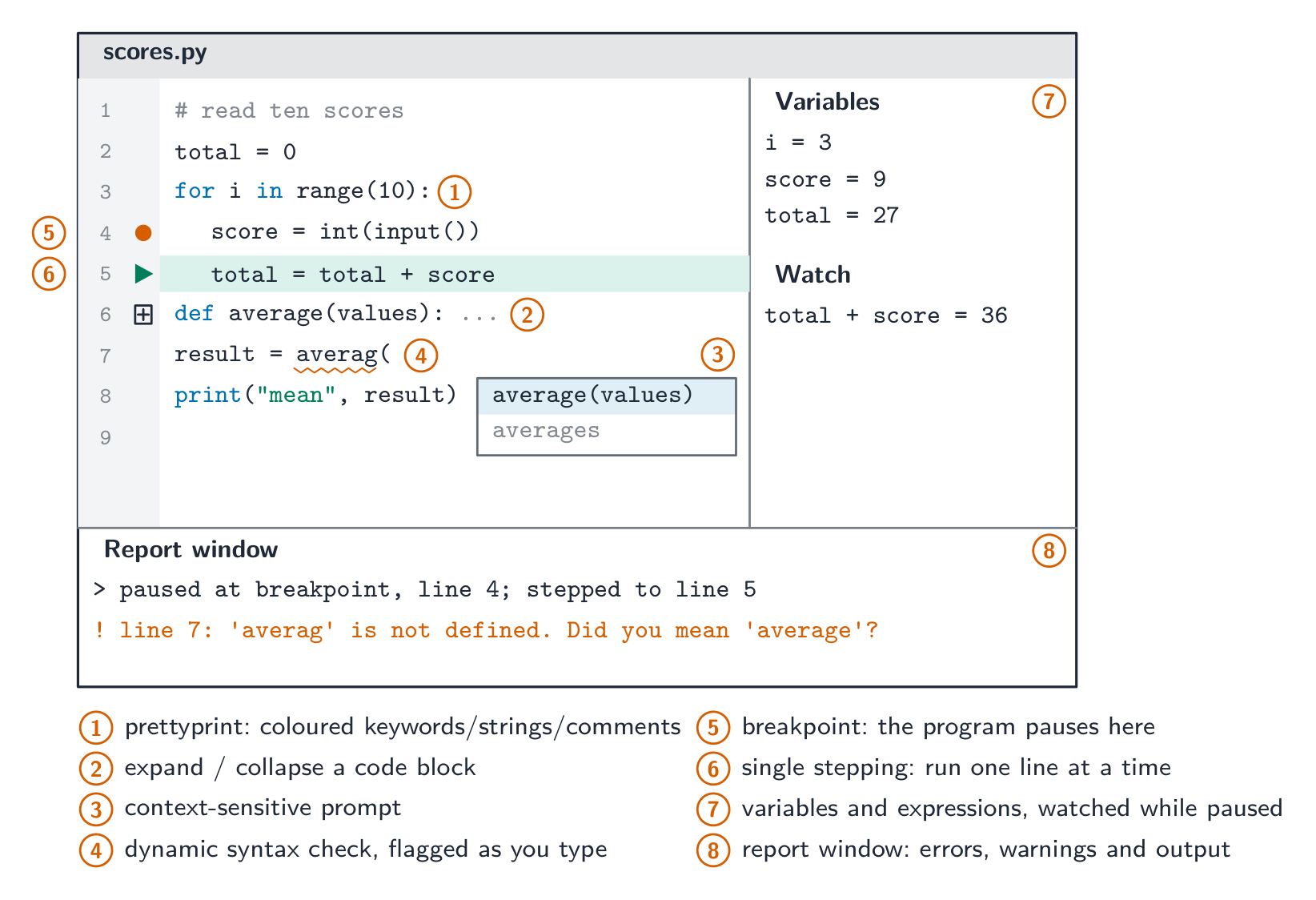
一个 IDE 通过把写 → 运行 → 调试 → 修正放在一个接口后面来加速开发。常见的 IDE:Visual Studio、PyCharm、Eclipse、VS Code。

例题。 程序运行时,函数 Calculate() 返回一个意外的值。描述典型 IDE 的调试功能如何帮助找出原因(4 分)。
在 Calculate() 的第一行设置一个断点,程序会在那里暂停而不是一直跑完。然后在函数中单步执行,一次一行。每一步之后读取变量的值以及你让 IDE 监视的任何表达式的值,与你预期的值比较;第一个使某个值出错的行之后就是逻辑错误所在。报告窗口显示任何运行时错误信息和到目前为止产生的输出。
例题。 把每个功能归入它的大纲类别:代码美化、上下文相关提示、动态语法检查、断点、展开/折叠代码块、报告窗口。
编码:上下文相关提示。初步错误检测:动态语法检查。呈现:代码美化、展开/折叠代码块。调试:断点、报告窗口。
代码翻译或分发时使用的软件许可证
软件许可证规定了受版权作品的使用、复制、修改和再分发的许可范围。自由软件关注运行、学习、修改和分享软件的自由;它可以出售。开源许可证允许获取源代码并进行授权修改/分发。免费软件可能无需付费,但可能保留源代码和修改权。针对再分发问题,需识别实际许可证的条件;参见主题7了解对比及有依据的选择。
词汇
训练
| English | 中文 | 拼音 |
|---|---|---|
| integrated development environment/ˈɪntɪɡreɪtɪd dɪˈveləpmənt enˈvaɪrənmənt/ | 集成开发环境 | jí chéng kāi fā huán jìng |
| debugger/ˈdiːbʌɡə/ | 调试器 | tiáo shì qì |
| context-sensitive prompts/ˈkɒntekst ˈsensɪtɪv prɒmpts/ | 上下文相关提示 | shàng xià wén xiāng guān tí shì |
| auto-complete/ˈɔːtəʊ kəmˈpliːt/ | 自动补全 | zì dòng bǔ quán |
| dynamic syntax checks/daɪˈnæmɪk ˈsɪntæks tʃeks/ | 动态语法检查 | dòng tài yǔ fǎ jiǎn chá |
| prettyprint/ˈpretɪprɪnt/ | 代码美化 | dài mǎ měi huà |
| syntax highlighting/ˈsɪntæks ˈhaɪlaɪtɪŋ/ | 语法高亮 | yǔ fǎ gāo liàng |
| breakpoints/ˈbreɪkpɔɪnts/ | 断点 | duàn diǎn |
| single stepping/ˈsɪŋɡl ˈstepɪŋ/ | 单步执行 | dān bù zhí xíng |
| report window/rɪˈpɔːt ˈwɪndəʊ/ | 报告窗口 | bào gào chuāng kǒu |
| version control/ˈvɜːʃn kənˈtrəʊl/ | 版本控制 | bǎn běn kòng zhì |
| refactoring/rɪˈfæktərɪŋ/ | 重构 | chóng gòu |
| unit test/ˈjuːnɪt test/ | 单元测试 | dān yuán cè shì |
5.2
考官认可的定义
定义题按固定的表述给分。把这些记准确,并且只写一个答案。
| 术语 | 定义 |
|---|---|
| 操作系统 | 管理计算机硬件和资源,并在用户、应用程序与硬件之间提供接口的软件 |
| 实用软件 | 执行一项特定任务以维护、优化或保护计算机的系统软件,例如病毒检查器或碎片整理程序 |
| 程序库 | 一组预先写好并测试过的例程(子程序、类、模块),程序可以使用它们而不必自己编写 |
| 动态链接库(DLL) | 其例程只在程序调用时于运行时加载到内存、并在程序之间共享的程序库 |
| 汇编器 | 把汇编语言程序转换成机器码的翻译器,每条指令对应一条 |
| 编译器 | 在运行之前把整个高级语言程序转换成机器码、生成可执行文件的翻译器 |
| 解释器 | 一次翻译并执行高级语言程序一条语句的翻译器 |
| 集成开发环境 | 提供编写、翻译、运行和调试程序所需工具的单一应用程序 |
| 上下文相关提示 | 建议适合代码当前位置的标识符、关键字或参数的弹出框 |
| 动态语法检查 | 在输入时检查代码的语法,并在程序翻译之前标出错误 |
| 代码美化 | 用不同的颜色或字体显示关键字、标识符和注释,并保持一致的缩进 |
| 断点 | 一个标记的行,运行中的程序在此暂停以便检查变量 |
| 单步执行 | 在程序员控制下,让暂停的程序一次运行一条语句 |
5.2
考试技巧
- 用大纲名称列出操作系统的工作(内存、进程、硬件、文件和安全管理),并说出每项做什么——单说"管理资源"太含糊。
- 比较编译器对解释器对汇编器:每个翻译什么、何时翻译,以及如何报告错误。
- 用大纲的分类解释一个 IDE 提供什么:编码、初步错误检测、呈现、调试。
- "对开发者的好处"要点出开发者省下的东西:时间、成本、专长、可靠性或维护。"缺点"要点出一种依赖:可用性、版本、契合度、安全。
- "描述某翻译器的工作方式"要给出三件事:翻译什么(整个程序还是一条语句)、何时翻译(运行前还是运行中)、如何报告错误(一次全部还是在第一个错误处)。
常见错误
- 写"操作系统控制计算机"或"管理资源"而没有任何具体任务。每一分都是一项有名称的任务加上它做什么。
- 说解释器"逐行编译"。解释器翻译并执行每条语句;它从不生成可执行文件。
- 说编译器运行程序。它只翻译;可执行文件稍后在没有编译器的情况下运行。
- 把 DLL 放"在"可执行文件里。那是静态库;DLL 保持为运行时加载的独立文件。
- 说碎片整理"删除"或"压缩"文件,或者 SSD 需要它。它只是移动块,使每个文件连续存放。
- 把代码美化或折叠代码块归入"调试"。它们是呈现功能;调试是断点、单步执行、监视变量和报告窗口。
该知识点的互动课程
逐步完成,配合即时检查练习。