Skip to content · ⁨ข้ามไปยังเนื้อหา⁩

Programming · ⁨การเขียนโปรแกรม⁩

IGCSE Computer Science · ⁨Computer Science IGCSE⁩ · Topic 8 · ⁨หัวข้อ 8⁩

Video lesson for this topic · ⁨บทเรียนวิดีโอสำหรับหัวข้อนี้⁩ Open the video page · ⁨เปิดหน้าวิดีโอ⁩
13:16

การเขียนโปรแกรม

นี่คือโปรแกรมสั้นๆ อ่านคะแนนทดสอบห้าตัวและพิมพ์ผลรวม คะแนนทั้งห้าคือแปด, เก้า, เจ็ด, หก และสิบ ดังนั้นผลรวมควรจะเป็นสี่สิบ ดูเลย…

English narration · English + 中文 subtitles burned in · ⁨การบรรยายภาษาอังกฤษ · คำบรรยายภาษาอังกฤษ + 中文 ลอยตัวบนภาพ⁩

8.1

Variables and constants · ⁨ตัวแปรและค่าคงที่⁩

Syllabus · ⁨หลักสูตร⁩
English
Candidates should be able to: Notes and guidance
1 Declare and use variables and constants
2 Understand and use basic data types • Including: – integer – real – char – string – Boolean
3 Understand and use input and output
4 (a) Understand and use the concept of sequence
(b) Understand and use the concept of selection • Including: – IF statements – CASE statements
(c) Understand and use the concept of iteration • Including: – count-controlled loops – pre-condition loops – post-condition loops
(d) Understand and use the concepts of totalling and counting
(e) Understand and use the concept of string handling • Including: – length – substring – upper – lower • The first character of the string can be position zero or one
(f) Understand and use arithmetic, relational and logical operators • Arithmetic, limited to: – + – – – / – * – ^ (raised to power of) – MOD – DIV • Relational, limited to: – = – < – <= – > – >= – <> (not equal to) • Logical, limited to: – AND – OR – NOT
5 Understand and use nested statements • Including nested selection and iteration • Candidates will not be required to write more than three levels of nested statements
6 (a) Understand what is meant by procedures, functions and parameters (b) Define and use procedures and functions, with or without parameters (c) Understand and use local and global variables • Procedures and functions may have up to three parameters
7 Understand and use library routines • Including: – MOD – DIV – ROUND – RANDOM
8 Understand how to create a maintainable program • Including appropriate use of: – meaningful identifiers – the commenting feature provided by the programming language – procedures and functions – relevant and appropriate commenting of syntax • Use meaningful identifiers for: – variables – constants – arrays – procedures and functions
ไทย
ผู้เข้าสอบควรสามารถ: หมายเหตุและคำแนะนำ
1 ประกาศและใช้ ตัวแปร และ ค่าคงที่
2 เข้าใจและใช้ ชนิดข้อมูลพื้นฐาน • รวมถึง: – จำนวนเต็ม – จำนวนจริง – ตัวอักษร – สตริง – บูลีน
3 เข้าใจและใช้ ข้อมูลเข้า และ ข้อมูลออก
4 (a) เข้าใจและใช้แนวคิด关于 ลำดับ
(b) เข้าใจและใช้แนวคิด关于 การเลือก • รวมถึง: – คำสั่ง IF – คำสั่ง CASE
(c) เข้าใจและใช้แนวคิด关于 การทำซ้ำ • รวมถึง: – ลูปควบคุมด้วยตัวนับ – ลูปก่อนเงื่อนไข – ลูปหลังเงื่อนไข
(d) เข้าใจและใช้แนวคิด关于 การรวมผล และ การนับ
(e) เข้าใจและใช้แนวคิด关于 การจัดการสตริง • รวมถึง: – ความยาว – สubrstring – ตัวพิมพ์ใหญ่ – ตัวพิมพ์เล็ก • ตัวอักษรแรกของสตริงอาจอยู่ในตำแหน่งศูนย์หรือหนึ่ง
(f) เข้าใจและใช้ ตัวดำเนินการทางคณิตศาสตร์, ความสัมพันธ์ และ ตรรกะ • คณิตศาสตร์, จำกัดเฉพาะ: – + – – / – * – ^ (ยกกำลัง) – MOD – DIV • ความสัมพันธ์, จำกัดเฉพาะ: – = – < – <= – > – >= – <> (ไม่เท่ากับ) • ตรรกะ, จำกัดเฉพาะ: – AND – OR – NOT
5 เข้าใจและใช้ คำสั่งซ้อนกัน • รวมถึง การเลือกซ้อนกันและการทำซ้ำซ้อนกัน • ผู้เข้าสอบจะไม่จำเป็นต้องเขียนคำสั่งซ้อนกันมากกว่าสามระดับ
6 (a) เข้าใจความหมายของ ** процедуры**, ฟังก์ชัน และ พารามิเตอร์ (b) นิยามและใช้ procedures และ functions, พร้อมหรือไม่พร้อมพารามิเตอร์ (c) เข้าใจและใช้ตัวแปรท้องถิ่นและตัวแปรโลก • Procedures และ functions อาจมีพารามิเตอร์ได้สูงสุดสามตัว
7 เข้าใจและใช้ روتินจากไลบรารี • รวมถึง: – MOD – DIV – ROUND – RANDOM
8 เข้าใจวิธีการสร้าง โปรแกรมที่บำรุงรักษาได้ • รวมถึงการใช้ที่เหมาะสมของ: – ตัวระบุความหมาย – คุณสมบัติการคอมเมนต์ที่ภาษาโปรแกรมมิ่งให้มา – กระบวนการและฟังก์ชัน – การคอมเมนต์_syntax ที่เกี่ยวข้องและเหมาะสม • ใช้ตัวระบุความหมายสำหรับ: – ตัวแปร – ค่าคงที่ – อาร์เรย์ – กระบวนการและฟังก์ชัน

Source: Cambridge International syllabus · ⁨แหล่งที่มา: หลักสูตร Cambridge International⁩

English

A variable 变量 is a named store that holds a value which can change while the program runs. A constant 常量 is a named store whose value is fixed and does not change.

You should declare 声明 them (say their name and type) before use:

Use a constant for a value that never changes (like Pi), so it is set in one place and is easy to read.

ไทย

ตัวแปร (variable) คือที่เก็บที่มีชื่อซึ่งเก็บค่าที่ สามารถเปลี่ยนแปลง ได้ในขณะที่โปรแกรมทำงาน ค่าคงที่ (constant) คือที่เก็บที่มีชื่อซึ่งค่าของมัน ถูกกำหนดไว้ และไม่เปลี่ยนแปลง

ตัวแปรชื่อ age ที่เก็บค่า 16
ตัวแปรคือที่เก็บที่มีชื่อซึ่งค่าสามารถเปลี่ยนแปลงได้
บรรทัดโค้ดโปรแกรมบนหน้าจอ
ตัวแปรและค่าคงที่เป็นที่เก็บที่มีชื่อสำหรับค่า ซึ่งตั้งค่าไว้ในโค้ดของโปรแกรม

คุณควร **ประกาศ (declare)**它们的名称和类型 before use:

DECLARE Score : INTEGER
DECLARE Name : STRING
CONSTANT Pi ← 3.142
โมดูลหน่วยความจำ RAM สองชิ้น
while a program runs, its variables are held in the computer's memory (RAM)

ใช้ค่าคงที่สำหรับค่าที่ไม่เปลี่ยนแปลง (เช่น Pi) เพื่อให้ตั้งไว้ในที่เดียวและอ่านง่าย

Explore · ⁨สำรวจ⁩

Variables and assignment

Step through the lines and watch each variable take its new value.

Vocabulary · ⁨คำศัพท์⁩ Train · ⁨ฝึกฝน⁩
English ไทย
variable/ˈveərɪəbl/ ตัวแปร
constant/ˈkɒnstənt/ คงที่
declare/dɪˈkleə/ ประกาศ
integer/ˈɪntɪdʒə/ integer
string/strɪŋ/ สตริง (String)
8.1

Data types · ⁨ประเภทข้อมูล⁩

English

A data type 数据类型 says what kind of value a variable holds. You must know five basic types.

Type Holds Example
integer 整数 a whole number 42, -7
real 实数 a number with a decimal point 3.14, -0.5
char 字符 a single character 'A', '?'
string 字符串 a sequence of characters "Hello"
Boolean 布尔值 one of two values TRUE or FALSE
ไทย

ประเภทข้อมูล (data type) บอกลักษณะของค่าที่ตัวแปรเก็บ คุณต้องรู้พื้นฐานห้าประเภท

ประเภทข้อมูล: integer (7), real (3.5), char ('A'), string ("hello"), boolean (true/false)
ชนิดข้อมูลพื้นฐาน: integer, real, char, string และ boolean
ประเภท เก็บ ตัวอย่าง
integer จำนวนเต็ม 42, -7
real 的数字带有小数点 3.14, -0.5
char ตัวอักษรเดียว 'A', '?'
สตริง ลำดับของตัวอักษร "Hello"
บูลีน หนึ่งจากสองค่าที่อาจมีได้ TRUE หรือ FALSE
Vocabulary · ⁨คำศัพท์⁩ Train · ⁨ฝึกฝน⁩
English ไทย
data type/ˈdeɪtə taɪp/ ชนิดของข้อมูล
real/rɪəl/ จริง
char/tʃɑː/ char
Boolean/ˈbuːlɪən/ Boolean
8.1

Input and output · ⁨การรับเข้าและการแสดงออก⁩

English

Input 输入 reads a value from the user. Output 输出 shows a value on the screen.

ไทย

การรับเข้า (Input) อ่านค่าจากผู้ใช้ การแสดงออก (Output) แสดงค่าบนหน้าจอ

OUTPUT "What is your name?"
INPUT Name
OUTPUT "Hello ", Name
Vocabulary · ⁨คำศัพท์⁩ Train · ⁨ฝึกฝน⁩
English ไทย
input/ˈɪnpʊt/ input (อินพุต)
output/ˈaʊtpʊt/ ผลผลิต
8.1

The three basic structures · ⁨โครงสร้างพื้นฐานสามแบบ⁩

English

Every program is built from three control structures.

Sequence

Sequence 顺序 means the steps run one after another, in order, from top to bottom.

Selection

Selection 选择 chooses which steps to run, based on a condition. Use an IF statement, or a CASE statement when there are many choices.

Iteration

Iteration 迭代 (a loop 循环) repeats steps. There are three kinds.

A count-controlled loop 计数循环 repeats a fixed number of times:

A pre-condition loop 前测循环 checks the condition before each repeat, so it may run zero times:

A post-condition loop 后测循环 checks the condition after each repeat, so it always runs at least once:

ไทย

โปรแกรมทุกตัวสร้างขึ้นจากโครงสร้างควบคุมสามแบบ

แผนภาพไหล (flowchart) ขนาดเล็กสามอัน: ลำดับ (กล่องเรียงเป็นแถว), การเลือก (การทดสอบแยกทางสองทาง), และการซ้ำ (การทดสอบที่มีส่วนเนื้อหาและวนกลับ)
โครงสร้างควบคุมสามแบบ: ลำดับรันขั้นตอนตามลำดับ, การเลือกเลือกเส้นทาง, และการซ้ำทำซ้ำส่วนเนื้อหา

ลำดับ

ลำดับ หมายความว่าขั้นตอนจะรันทีละขั้นตอน ตามลำดับ จากบนลงล่าง

INPUT Length
INPUT Width
Area ← Length * Width
OUTPUT Area

การเลือก

การเลือก เลือกที่จะรันขั้นตอนใด โดยพิจารณาจากเงื่อนไข ใช้คำสั่ง IF หรือใช้คำสั่ง CASE เมื่อมีตัวเลือกมากมาย

IF Score >= 50
  THEN
    OUTPUT "Pass"
  ELSE
    OUTPUT "Fail"
ENDIF
CASE OF Grade
    'A' : OUTPUT "Excellent"
    'B' : OUTPUT "Good"
    OTHERWISE OUTPUT "Keep trying"
ENDCASE

การซ้ำ

การซ้ำ (ลูป) ทำซ้ำขั้นตอน มีสามประเภท

ลูปควบคุมด้วยจำนวน (count-controlled loop) จะทำซ้ำจำนวนครั้งที่กำหนดไว้:

FOR I ← 1 TO 5
    OUTPUT "Hello"
NEXT I

ลูปก่อนเงื่อนไข (pre-condition loop) ตรวจสอบเงื่อนไข ก่อน การทำซ้ำแต่ละครั้ง ดังนั้นอาจไม่รันเลย:

WHILE Answer <> "stop" DO
    INPUT Answer
ENDWHILE

ลูปหลังเงื่อนไข (post-condition loop) ตรวจสอบเงื่อนไข หลัง การทำซ้ำแต่ละครั้ง ดังนั้นจะรันอย่างน้อยหนึ่งครั้งเสมอ:

REPEAT
    INPUT Password
UNTIL Password = "secret"
แผนภาพไหลของลูปสองแบบ: WHILE ตรวจสอบเงื่อนไขก่อนส่วนเนื้อหา; REPEAT รันส่วนเนื้อหาก่อนแล้วตรวจสอบ afterwards
ลูปก่อนเงื่อนไข (WHILE) ตรวจสอบก่อนส่วนเนื้อหา ดังนั้นอาจรันศูนย์ครั้ง; ลูปหลังเงื่อนไข (REPEAT) ตรวจสอบหลังจากนั้น ดังนั้นรันอย่างน้อยหนึ่งครั้ง
Explore · ⁨สำรวจ⁩

How an IF … ELSE IF ladder decides

The conditions are tested top to bottom; the FIRST one that is true runs and the rest are skipped. Slide the score and watch which branch lights up.

Explore · ⁨สำรวจ⁩

Selection

Change the value and watch which branch runs — selection in action.

Vocabulary · ⁨คำศัพท์⁩ Train · ⁨ฝึกฝน⁩
English ไทย
loop/luːp/ ลูป
count-controlled loop/kaʊnt kənˈtrəʊld luːp/ ลูปควบคุมด้วยการนับ
pre-condition loop/priː kənˈdɪʃn luːp/ ลูปก่อนเงื่อนไข
post-condition loop/pəʊst kənˈdɪʃn luːp/ ลูปหลังเงื่อนไข
length/leŋθ/ ความยาว
8.1

Totalling and counting · ⁨การรวมผลและนับจำนวน⁩

English
  • totalling 求和 — keep adding values to a running total: Total ← Total + Value.
  • counting 计数 — add 1 to a counter each time: Count ← Count + 1.

Worked example. A program must read 5 marks, then output the total and the average.

Two lines carry the marks. Total ← 0 must sit before the loop: put it inside and the total resets on every pass, so the program outputs only the last mark. And Average ← Total / 5 must sit after the loop, because the total is not complete until every mark has been added. Initialise before, calculate after - that ordering is what the question is really testing.

ไทย
  • การรวมผล (totalling) — เพิ่มค่าเข้าไปในผลรวมสะสม: Total ← Total + Value.
  • การนับจำนวน (counting) — เพิ่ม 1 เข้าไปในตัวนับทุกครั้ง: Count ← Count + 1.
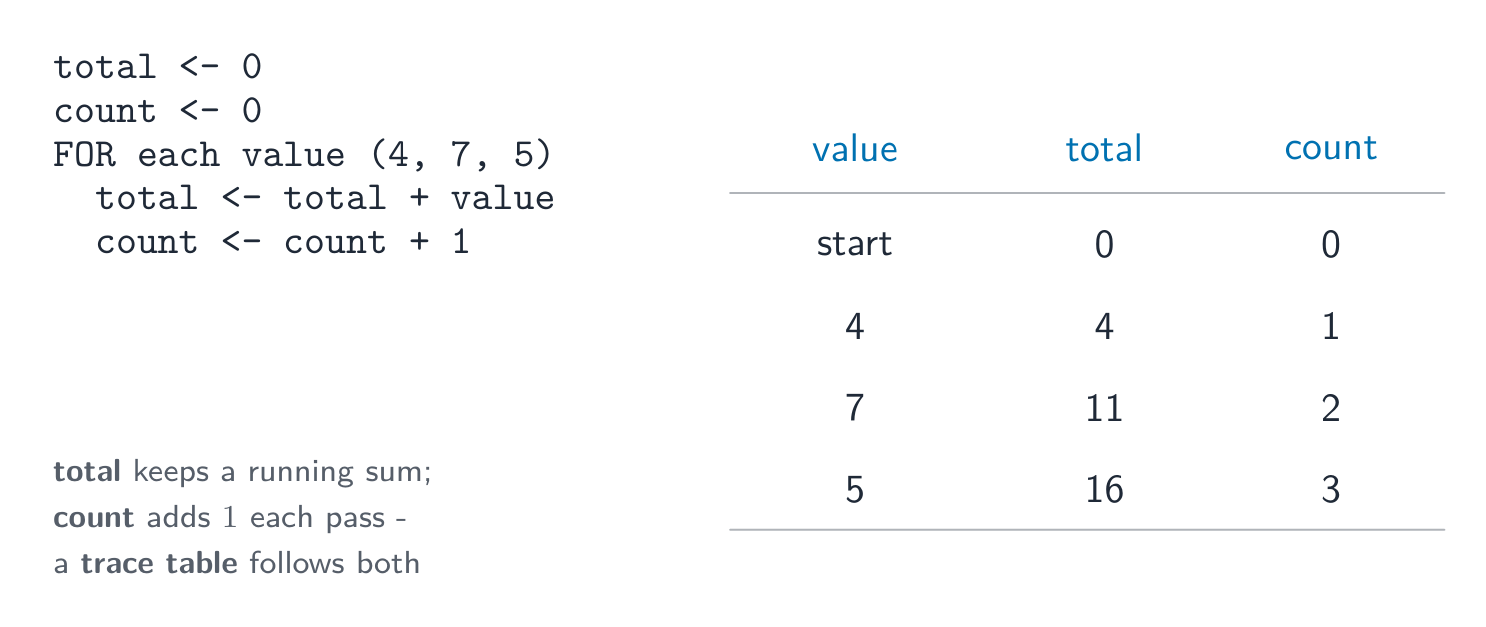
count = count + 1 นับเพิ่มขึ้นทีละ 1; total = total + value เพิ่มลงในผลรวมสะสม
Counter นับเพิ่มขึ้นทีละ 1; Total สร้างผลรวมสะสม
ตารางติดตาม (trace table) ที่ตามลูปสำหรับค่า 4, 7 และ 5: total เป็น 0, 4, 11, 16 ในขณะที่ count เป็น 0, 1, 2, 3
ตารางติดตามจะตามลูปรวมผลและนับจำนวนทีละรอบ
Total ← 0
FOR I ← 1 TO 10
    INPUT Mark
    Total ← Total + Mark
NEXT I
OUTPUT Total

ตัวอย่างวิธีทำ. โปรแกรมต้องอ่านคะแนน 5 ค่า แล้วแสดงผลรวมและค่าเฉลี่ย

Total ← 0
FOR I ← 1 TO 5
    INPUT Mark
    Total ← Total + Mark
NEXT I
Average ← Total / 5
OUTPUT Total, Average

สองบรรทัดใช้สำหรับเก็บคะแนน Total ← 0 ต้องวางอยู่ ก่อน ลูป: ถ้าวางข้างใน ผลรวมจะรีเซ็ตในทุกๆ รอบ ทำให้โปรแกรมแสดงเฉพาะคะแนนล่าสุดเท่านั้น และ Average ← Total / 5 ต้องวางอยู่ หลัง ลูป เพราะผลรวมจะสมบูรณ์ก็ต่อเมื่อเพิ่มคะแนนทั้งหมดแล้ว จัดการเริ่มต้นก่อน คำนวณหลัง - การจัดลำดับนี้คือสิ่งที่โจทย์ต้องการทดสอบจริงๆ

Vocabulary · ⁨คำศัพท์⁩ Train · ⁨ฝึกฝน⁩
English ไทย
totalling/ˈtəʊtəlɪŋ/ การรวมยอด
counting/ˈkaʊntɪŋ/ นับจำนวน
remainder/rɪˈmeɪndə/ เศษ
8.1

Operators · ⁨ตัวดำเนินการ⁩

English

Arithmetic operators

Operator Meaning
+ - * / add, subtract, multiply, divide
^ raised to the power of
MOD the remainder 余数 after division
DIV the whole-number part of a division

For example, 17 MOD 5 is 2, and 17 DIV 5 is 3.

Relational operators

These compare two values and give a Boolean result: =, <, <=, >, >=, and <> (not equal to).

Logical operators

These join conditions: AND (both must be true), OR (at least one must be true), NOT (reverses true/false).

ไทย

ตัวดำเนินการทางคณิตศาสตร์

ตัวดำเนินการ ความหมาย
+ - * / บวก ลบ คูณ หาร
^ ยกกำลัง
MOD ส่วนเหลือจากการหาร
DIV ส่วนจำนวนเต็มของการหาร

เช่น 17 MOD 5 คือ 2 และ 17 DIV 5 คือ 3

ตัวดำเนินการเปรียบเทียบ

ตัวเหล่านี้เปรียบเทียบสองค่าและให้ผลลัพธ์แบบบูลีน: =, <, <=, >, >= และ <> (ไม่เท่ากับ)

ตัวดำเนินการตรรกะ

ตัวเหล่านี้เชื่อมเงื่อนไข: AND (ทั้งสองต้องเป็นจริง), OR (อย่างใดอย่างหนึ่งต้องเป็นจริง), NOT (สลับจริง/เท็จ)

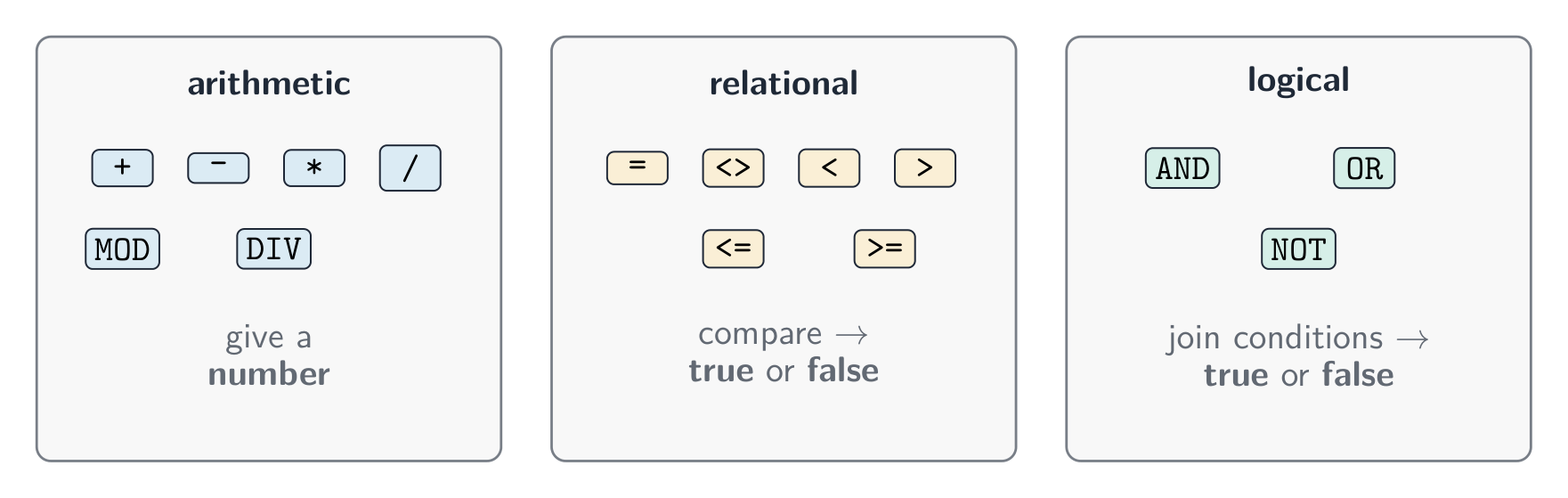
ครอบครัวของตัวดำเนินการสามกลุ่ม: ตัวดำเนินการทางคณิตศาสตร์เช่นบวกและคูณให้ตัวเลข, ตัวดำเนินการเปรียบเทียบเช่นน้อยกว่าเปรียบเทียบและให้จริงหรือเท็จ, ตัวดำเนินการตรรกะ AND OR NOT เชื่อมเงื่อนไข *ครอบครัวของตัวดำเนินการสามกลุ่ม: ทางคณิตศาสตร์, เปรียบเทียบ และ ตรรกะ

IF Age >= 13 AND Age <= 19
  THEN
    OUTPUT "Teenager"
ENDIF
8.1

String handling · ⁨การจัดการสตริง⁩

English

A string is made of characters. Useful operations:

  • length 长度 — the number of characters in the string;
  • substring 子串 — a smaller part taken from the string;
  • upper case 大写 — change letters to capitals;
  • lower case 小写 — change letters to small letters.

(The first character may be counted as position 0 or position 1, depending on the language.)

ไทย

สตริงประกอบด้วยตัวอักษร การดำเนินการที่เป็นประโยชน์:

  • ความยาว (length) — จำนวนตัวอักษรในสตริง;
  • ** substring** — ส่วนย่อยที่ดึงมาจากสตริง;
  • ตัวพิมพ์ใหญ่ (upper case) — เปลี่ยนตัวอักษรเป็นตัวพิมพ์ใหญ่;
  • ตัวพิมพ์เล็ก (lower case) — เปลี่ยนตัวอักษรเป็นตัวพิมพ์เล็ก
name ← "Computer"
OUTPUT LENGTH(name)          // 8
OUTPUT SUBSTRING(name, 1, 4) // "Comp"
OUTPUT UCASE(name)           // "COMPUTER"
OUTPUT LCASE(name)           // "computer"

(ตัวอักษรแรกอาจนับเป็นตำแหน่ง 0 หรือตำแหน่ง 1 ขึ้นอยู่กับภาษา)

Explore · ⁨สำรวจ⁩

SUBSTRING: take part of a string

The first character is at position 1. SUBSTRING(Word, Start, Length) takes Length characters beginning at Start — drag the two handles and read the call it builds.

Vocabulary · ⁨คำศัพท์⁩ Train · ⁨ฝึกฝน⁩
English ไทย
substring/ˈsʌbstrɪŋ/ สตริงย่อย (substring)
upper case/ˈʌpə keɪs/ ตัวอักษรพิมพ์ใหญ่
lower case/ˈləʊə keɪs/ ตัวอักษรพิมพ์เล็ก
8.1

Nested statements · ⁨คำสั่งซ้อนกัน⁩

English

A nested statement 嵌套语句 is one control structure placed inside another. You can nest selection and iteration.

You will not have to write more than three levels of nesting.

ไทย

คำสั่งซ้อนกัน (nested statement) คือโครงสร้างควบคุมหนึ่งวางอยู่ภายในอีกโครงสร้างหนึ่ง สามารถซ้อนการเลือกและการซ้ำได้

FOR I ← 1 TO 3
    IF MOD(I, 2) = 0
      THEN
        OUTPUT I, " is even"
      ELSE
        OUTPUT I, " is odd"
    ENDIF
NEXT I

คุณจะไม่จำเป็นต้องเขียนการซ้อนกันเกินสามระดับ

Vocabulary · ⁨คำศัพท์⁩ Train · ⁨ฝึกฝน⁩
English ไทย
nested statement/ˈnestɪd ˈsteɪtmənt/ คำสั่งซ้อน
8.1

Procedures and functions · ⁨กระบวนการและฟังก์ชัน⁩

English

To avoid repeating code, you can break a program into named blocks.

  • A procedure 过程 is a named block of code that does a task. You run it with CALL.
  • A function 函数 is like a procedure, but it returns a value back to where it was called.

A parameter 参数 is a value passed into a procedure or function (up to three parameters).

Local and global variables

  • A local variable 局部变量 is declared inside a procedure or function. It can only be used there.
  • A global variable 全局变量 is declared in the main program. It can be used anywhere.

Local variables are safer, because they cannot be changed by mistake from another part of the program.

ไทย

เพื่อหลีกเลี่ยงการซ้ำโค้ด คุณสามารถแบ่งโปรแกรมออกเป็นบล็อกที่มีชื่อ

  • procedure คือบล็อกโค้ดที่มีชื่อซึ่งทำหน้าที่บางอย่าง คุณเรียกใช้งานมันด้วย CALL
  • function เหมือนกับ procedure แต่จะ ส่งค่ากลับ ไปยังจุดที่ถูกเรียก

parameter คือค่าที่ถูกส่งเข้าไปใน procedure หรือ function (สูงสุดสามพารามิเตอร์)

PROCEDURE Greet(PersonName : STRING)
    OUTPUT "Hello ", PersonName
ENDPROCEDURE

CALL Greet("Sam")
FUNCTION Square(N : INTEGER) RETURNS INTEGER
    RETURN N * N
ENDFUNCTION

Answer ← Square(5)   // answer is 25

ตัวแปรท้องถิ่นและตัวแปร globale

  • ตัวแปรท้องถิ่น (local variable) ถูกประกาศภายใน procedure หรือ function สามารถใช้ได้เฉพาะในที่นั้นเท่านั้น
  • ตัวแปร global (global variable) ถูกประกาศในโปรแกรมหลัก สามารถใช้ได้ทุกที่

ตัวแปรท้องถิ่นปลอดภัยกว่า เพราะไม่สามารถถูกเปลี่ยนโดยผิดพลาดจากส่วนอื่นของโปรแกรม

Vocabulary · ⁨คำศัพท์⁩ Train · ⁨ฝึกฝน⁩
English ไทย
procedure/prəˈsiːdʒə/ ขั้นตอนวิธี
function/ˈfʌŋkʃn/ function
parameter/pəˈræmɪtə/ พารามิเตอร์
local variable/ˈləʊkl ˈveərɪəbl/ ตัวแปรท้องถิ่น
global variable/ˈɡləʊbl ˈveərɪəbl/ ตัวแปร globale
8.1

Library routines · ⁨ฟังก์ชันในไลบรารี⁩

English

A library routine 库程序 is a ready-made piece of code you can use. You must know these:

Routine What it does
MOD gives the remainder of a division
DIV gives the whole-number part of a division
ROUND rounds a real number to a number of decimal places
RANDOM gives a random number
ไทย

ฟังก์ชันในไลบรารี (library routine) คือชิ้นส่วนของโค้ดสำเร็จรูปที่คุณสามารถใช้งานได้ คุณต้องรู้สิ่งเหล่านี้:

Routine สิ่งที่ทำ
MOD ให้ส่วนเหลือจากการหาร
DIV ให้ส่วนจำนวนเต็มของการหาร
ROUND ปัดเศษจำนวนทศนิยมให้เป็นจำนวนตามจำนวนตำแหน่งทศนิยมที่กำหนด
RANDOM ให้ตัวเลขสุ่ม
Vocabulary · ⁨คำศัพท์⁩ Train · ⁨ฝึกฝน⁩
English ไทย
library routine/ˈlaɪbrəri ruːˈtiːn/ روتีนlibrary
8.1

Writing a maintainable program · ⁨การเขียนโปรแกรมที่บำรุงรักษาง่าย⁩

English

A maintainable 可维护的 program is easy for other people to read and change later. To make one:

  • use meaningful identifiers 有意义的标识符 — clear names for variables, constants, arrays, procedures and functions (totalScore, not x);
  • add comments 注释 to explain what parts of the code do;
  • use procedures and functions to split the work into small blocks.
ไทย

โปรแกรมที่บำรุงรักษาง่าย (maintainable program) เป็นโปรแกรมที่คนอื่นอ่านและแก้ไขได้ง่ายในอนาคต เพื่อทำให้เป็นไปได้นี้:

  • ใช้ ชื่อที่สื่อความหมาย (meaningful identifiers) — ชื่อที่ชัดเจนสำหรับตัวแปร ค่าคงที่ อาร์เรย์ procedure และ functions (totalScore, ไม่ใช่ x);
  • เพิ่ม คอมเมนต์ เพื่ออธิบายว่าส่วนไหนของโค้ดทำอะไร;
  • ใช้ procedure และ function เพื่อแบ่งงานออกเป็นบล็อกเล็กๆ
Vocabulary · ⁨คำศัพท์⁩ Train · ⁨ฝึกฝน⁩
English ไทย
maintainable/meɪnˈteɪnəbl/ บำรุงรักษาได้
meaningful identifiers/ˈmiːnɪŋfl aɪˈdentɪfaɪəz/ ชื่อที่มีความหมาย
comments/ˈkɒments/ ความคิดเห็น
8.2

Arrays · ⁨อาร์เรย์⁩

Syllabus · ⁨หลักสูตร⁩
English
Candidates should be able to: Notes and guidance
1 Declare and use one-dimensional (1D) and two-dimensional (2D) arrays
2 Understand the use of arrays • Including the use of variables as indexes in arrays
3 Write values into, and read values from, an array using iteration • The first index can be zero or one • Including nested iteration
ไทย
ผู้เข้าสอบควรสามารถ: หมายเหตุและคำแนะนำ
1 ประกาศและใช้ อาร์เรย์แบบหนึ่งมิติ (1D) และ อาร์เรย์แบบสองมิติ (2D)
2 เข้าใจการใช้งานอาร์เรย์ • รวมถึงการใช้ตัวแปรเป็นดัชนีในอาร์เรย์
3 เขียนค่าลงในและอ่านค่าจากอาร์เรย์โดยใช้การทำซ้ำ • ดัชนีแรกอาจเป็นศูนย์หรือหนึ่ง • รวมถึงการทำซ้ำซ้อน

Source: Cambridge International syllabus · ⁨แหล่งที่มา: หลักสูตร Cambridge International⁩

English

An array 数组 is a single variable that holds many values of the same type, found by an index 索引 (a position number).

One-dimensional arrays

A one-dimensional (1D) array 一维数组 is like a single list.

You can use a loop to fill or read an array:

Two-dimensional arrays

A two-dimensional (2D) array 二维数组 is like a table with rows and columns. It uses two indexes.

You read a 2D array with a loop inside a loop (nested iteration).

ไทย

อาร์เรย์ (array) คือตัวแปรเดียวที่เก็บ หลายค่า ของชนิดเดียวกัน ซึ่งระบุตำแหน่งได้ด้วย index (หมายเลขตำแหน่ง)

อาร์เรย์หนึ่งมิติ

อาร์เรย์หนึ่งมิติ (1D array) คล้ายกับรายการเดียว

DECLARE Scores : ARRAY[1:5] OF INTEGER
Scores[1] ← 90
Scores[2] ← 75
OUTPUT Scores[1]

กล่องห้าใบเรียงกันพร้อมติดฉลากด้วยดัชนี 1 ถึง 5 เก็บค่าต่างๆ โดยค่าที่ดัชนี 2 ถูกเน้นเป็น 75 *-array 1D เก็บหลายค่าในตัวแปรหนึ่ง; แต่ละค่าหาได้จากดัชนี (index) ของมัน

คุณสามารถใช้ลูปเพื่อเติมหรืออ่านข้อมูลใน array ได้:

FOR I ← 1 TO 5
    INPUT Scores[I]
NEXT I

Array สองมิติ

array สองมิติ (2D) มีลักษณะคล้ายตารางที่มีแถวและหลัก ใช้ดัชนีสองตัว

DECLARE Grid : ARRAY[1:3, 1:3] OF INTEGER
Grid[1, 1] ← 5
Grid[2, 3] ← 8
ตารางขนาด 3x3 ที่มีหมายเลขระบุแถวและหลัก; เซลล์ที่แถว 2 หลัก 3 ถูกเน้นและมีฉลากว่า grid row 2 column 3
array 2D คือตาราง; ค่าแต่ละค่าหาได้ด้วยสองดัชนี, [แถว, คอลัมน์]

การอ่านข้อมูลจาก array 2D ต้องใช้ลูปภายในลูป (nested iteration).

Explore · ⁨สำรวจ⁩

Arrays

Pick a row and a column to read one cell. Cambridge arrays count from 1, and a 2-D element is written with ONE pair of brackets — Grid[2, 3].

Vocabulary · ⁨คำศัพท์⁩ Train · ⁨ฝึกฝน⁩
English ไทย
iteration/ˌɪtəˈreɪʃn/ การวนซ้ำ
array/əˈreɪ/ อาร์เรย์
index/ˈɪndeks/ ดัชนี
one-dimensional (1D) array/wʌn daɪˈmenʃənl əˈreɪ/ array แบบหนึ่งมิติ (1D)
two-dimensional (2D) array/tuː daɪˈmenʃənl əˈreɪ/ array สองมิติ (2D)
8.3

File handling · ⁨การจัดการไฟล์⁩

Syllabus · ⁨หลักสูตร⁩
English
Candidates should be able to: Notes and guidance
1 Understand the purpose of storing data in a file to be used by a program
2 Open, close and use a file for reading and writing • Including: – read and write single items of data – read and write a line of text
ไทย
ผู้เข้าสอบควรสามารถ: หมายเหตุและคำแนะนำ
1 เข้าใจวัตถุประสงค์ของการจัดเก็บข้อมูลใน ไฟล์ เพื่อใช้งานโดยโปรแกรม
2 เปิด ปิด และใช้ไฟล์สำหรับการอ่านและเขียน • รวมถึง: – อ่านและเขียนรายการข้อมูลเดี่ยว – อ่านและเขียนบรรทัดข้อความ

Source: Cambridge International syllabus · ⁨แหล่งที่มา: หลักสูตร Cambridge International⁩

English

A program can store data in a file 文件 so it is kept after the program stops. You must open the file, use it, then close it.

You can read and write single items of data or a whole line of text. Always close a file when you have finished with it.

ไทย

โปรแกรมสามารถจัดเก็บข้อมูลใน ไฟล์ เพื่อให้คงอยู่หลังจากที่โปรแกรมหยุดทำงาน คุณต้อง เปิด ไฟล์ ใช้งาน แล้ว ปิด ไฟล์

OPENFILE "data.txt" FOR WRITE
WRITEFILE "data.txt", "Hello"
CLOSEFILE "data.txt"

OPENFILE "data.txt" FOR READ
READFILE "data.txt", Line
CLOSEFILE "data.txt"

คุณสามารถอ่านและเขียนข้อมูลทีละรายการหรือทั้งบรรทัดข้อความได้ ควรปิดไฟล์เมื่อใช้งานเสร็จสิ้น

Vocabulary · ⁨คำศัพท์⁩ Train · ⁨ฝึกฝน⁩
English ไทย
file/faɪl/ ไฟล์
8.3

Exam tips · ⁨ข้อแนะนำสำหรับการสอบ⁩

English
  • A variable can change while the program runs; a constant is fixed. Learn the five data types: integer, real, char, string, Boolean.
  • Every program is built from three structures: sequence, selection (IF / CASE), and iteration (loops).
  • A WHILE loop tests before the body, so it may run zero times; a REPEAT … UNTIL loop tests after, so it always runs at least once.
  • MOD gives the remainder and DIV the whole-number part of a division: 17 MOD 5 is 2, 17 DIV 5 is 3.
  • A function returns a value; a procedure does not. A local variable works only inside its block; a global one works anywhere.
ไทย
  • ตัวแปร สามารถเปลี่ยนแปลงขณะโปรแกรมทำงาน แต่ ค่าคงที่ จะไม่เปลี่ยน เรียนรู้ประเภทข้อมูลทั้งห้า: integer, real, char, string, Boolean.
  • โปรแกรมทุกชิ้นสร้างจากโครงสร้างสามอย่าง: ลำดับ (sequence), การเลือก (selection - IF / CASE), และ การทำซ้ำ (iteration - loops).
  • ลูป WHILE ตรวจสอบ ก่อน ตัวลูป จึงอาจไม่ทำงานเลย; ลูป REPEAT … UNTIL ตรวจสอบ หลัง ตัวลูป จึงทำงานอย่างน้อยหนึ่งครั้งเสมอ
  • MOD ให้ผลหารเหลือ และ DIV ให้ส่วนจำนวนเต็มของการหาร: 17 MOD 5 คือ 2, 17 DIV 5 คือ 3.
  • function/value จะคืนค่ากลับ แต่ procedure ไม่ทำ local variable ใช้งานได้เฉพาะใน block ของมันเท่านั้น ส่วน global variable ใช้งานได้ทุกที่
Vocabulary · ⁨คำศัพท์⁩ Train · ⁨ฝึกฝน⁩
English ไทย
sequence/ˈsiːkwəns/ ลำดับขั้นตอน (sequence)
selection/sɪˈlekʃn/ การคัดเลือก

Interactive lessons on this topic · ⁨บทเรียนเชิงโต้ตอบสำหรับหัวข้อนี้⁩

Work through it step by step, with instant-check exercises. · ⁨ทำทีละขั้นตอน พร้อมแบบฝึกหัดตรวจสอบผลทันที⁩

Past Papers · ⁨ข้อสอบย้อนหลัง⁩

More topics in IGCSE Computer Science · ⁨Computer Science IGCSE⁩ · ⁨หัวข้อเพิ่มเติมใน IGCSE Computer Science · ⁨Computer Science IGCSE⁩⁩

Log in or create account · ⁨เข้าสู่ระบบหรือสร้างบัญชี⁩

IGCSE, A-Level & AP