Skip to content · ⁨ข้ามไปยังเนื้อหา⁩
Subjects · ⁨รายวิชา⁩

IGCSE Computer Science · ⁨Computer Science IGCSE⁩

Tips · ⁨เคล็ดลับ⁩

วิทยาการคอมพิวเตอร์ IGCSE (0478) มีสิบหัวข้อในสองกระดาษ: การแสดงข้อมูล, การส่งข้อมูล, ฮาร์ดแวร์, ซอฟต์แวร์, อินเทอร์เน็ต, เทคโนโลยีอัตโนมัติและเทคโนโลยีใหม่ emerging technologies, การออกแบบอัลกอริทึม, การเขียนโปรแกรม, ฐานข้อมูล และ ตรรกะ Boolean.

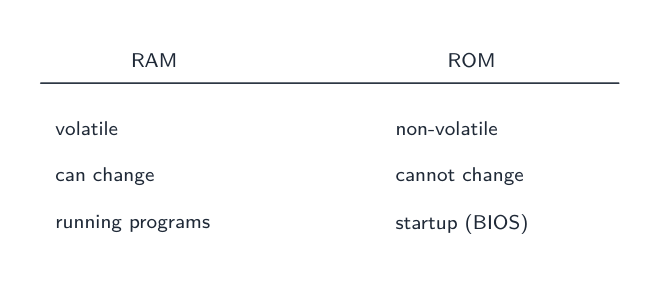
กระดาษ 1 เป็นทฤษฎี được đánh giáตาม คำศัพท์ที่แม่นยำ — ความแตกต่างระหว่าง RAM และ ROM, คอมไพเลอร์และ интерпрيتер, การตรวจสอบ และ การยืนยัน. These are definition marks, and a paraphrase usually misses them.

Paper 2 is problem-solving and programming, where marks go to a working method: trace tables, pseudocode, and code that would actually run. Secure number bases and binary arithmetic first — they appear on their own and again inside data transmission, logic and hardware.

  • 1

    Data representation

    Watch lesson · ⁨ดูบทเรียน⁩
    1.1

    Why computers use binary · ⁨ทำไมคอมพิวเตอร์ใช้เลขฐานสอง⁩

    English

    A computer can only work with two states: on and off. You write these as 1 and 0. A system that uses only two digits 数字 is called binary 二进制 (base 2).

    Every kind of data 数据 — numbers, text, sound and images — must be changed into binary before a computer can use it. The computer processes this binary using logic gates 逻辑门, and stores it in registers 寄存器 (small, fast stores inside the processor 处理器).

    ไทย

    คอมพิวเตอร์ทำงานได้เพียงสองสถานะ: เปิด และ ปิด เขียนเป็นเลข 1 และ 0 ระบบที่ใช้ตัวเลขเพียงสองหลักเรียกว่า ระบบทวิฐาน (ฐาน 2)

    สนามของตัวเลขทวิฐานสีน้ำเงิน 0 และ 1
    คอมพิวเตอร์แสดงข้อมูลทั้งหมด — ตัวเลข ข้อความ เสียง และภาพ — เป็นลำดับบิตทวิฐานของ 0 และ 1

    ข้อมูลทุกประเภท — ตัวเลข ข้อความ เสียง และภาพ — ต้องถูกแปลงเป็นทวิฐานก่อนที่คอมพิวเตอร์จะนำไปใช้ คอมพิวเตอร์ประมวลผลทวิฐานนี้โดยใช้ เกตตรรกะ และจัดเก็บใน รีจิสเตอร์ (หน่วยความจำขนาดเล็กและเร็วภายในโปรเซสเซอร์)

    ชิปซิลิกอนของไมโครโปรเซสเซอร์ภายใต้การขยาย
    ไมโครโปรเซสเซอร์มีทรานซิสเตอร์ขนาดเล็กนับล้านตัว แต่ละตัวเป็นสวิตช์ที่เปิด (1) หรือปิด (0) — ซึ่งเป็นพื้นฐานทางกายภาพของระบบทวิฐาน
    Vocabulary · ⁨คำศัพท์⁩ Train · ⁨ฝึกฝน⁩
    English ไทย
    digit/ˈdɪdʒɪt/ หลักเลข
    binary/ˈbaɪnəri/ แบบไบนารี
    data/ˈdeɪtə/ ข้อมูล (data)
    logic gate/ˈlɒdʒɪk ɡeɪt/ เกตลอจิก
    processor/ˈprəʊsesə/ หน่วยประมวลผล
    register/ˈredʒɪstə/ รีจิสเตอร์ (register)
    number system/ˈnʌmbə ˈsɪstəm/ ระบบตัวเลข
    denary/ˈdiːnəri/ ฐานสิบ
    hexadecimal/ˌheksəˈdesɪml/ ฐานสิบหก
    base/beɪs/ ฐาน
    1.1

    Number systems · ⁨ระบบตัวเลข⁩

    Syllabus · ⁨หลักสูตร⁩
    Candidates should be able to: Notes and guidance
    1 Understand how and why computers use binary to represent all forms of data • Any form of data needs to be converted to binary to be processed by a computer • Data is processed using logic gates and stored in registers
    2 (a) Understand the denary, binary and hexadecimal number systems (b) Convert between (i) positive denary and positive binary (ii) positive denary and positive hexadecimal (iii) positive hexadecimal and positive binary • Denary is a base 10 system • Binary is a base 2 system • Hexadecimal is a base 16 system • Values used will be integers only • Conversions in both directions, e.g. denary to binary or binary to denary • Maximum binary number length of 16-bit
    3 Understand how and why hexadecimal is used as a beneficial method of data representation • Areas within computer science that hexadecimal is used should be identified • Hexadecimal is easier for humans to understand than binary, as it is a shorter representation of binary
    4 (a) Add two positive 8-bit binary integers (b) Understand the concept of overflow and why it occurs in binary addition • An overflow error will occur if the value is greater than 255 in an 8-bit register • A computer or a device has a predefined limit that it can represent or store, for example 16-bit • An overflow error occurs when a value outside this limit should be returned
    5 Perform a logical binary shift on a positive 8-bit binary integer and understand the effect this has on the positive binary integer • Perform logical left shifts • Perform logical right shifts • Perform multiple shifts • Bits shifted from the end of the register are lost and zeros are shifted in at the opposite end of the register • The positive binary integer is multiplied or divided according to the shift performed • The most significant bit(s) or least significant bit(s) are lost
    6 Use the two’s complement number system to represent positive and negative 8-bit binary integers • Convert a positive binary or denary integer to a two’s complement 8-bit integer and vice versa • Convert a negative binary or denary integer to a two’s complement 8-bit integer and vice versa

    Source: Cambridge International syllabus · ⁨แหล่งที่มา: หลักสูตร Cambridge International⁩

    English
    Counting in binary: 0 to 15

    A number system 数制 is a way of writing numbers using a fixed set of digits. You need three of them.

    System Base Digits used
    Denary 10 0–9
    Binary 2 0 and 1
    Hexadecimal 16 0–9 then A–F
    • denary 十进制 is the normal counting system (also called decimal).
    • binary uses only 0 and 1.
    • hexadecimal 十六进制 (hex) uses sixteen digits: 0–9, then A, B, C, D, E, F stand for 10, 11, 12, 13, 14, 15.

    The base 基数 tells you how many different digits a system uses.

    Place value

    Each column in a number has a place value 位值. In binary the place values double from right to left. For an 8-bit number they are:

    One bit 位 is a single 0 or 1. Eight bits make one byte 字节. Four bits (half a byte) is a nibble 半字节.

    Converting between number systems

    Denary → binary. Write the place values. Put a 1 under each value you need so they add up to your number; put 0 under the rest.

    Example: change denary 150 to binary. $150 = 128 + 16 + 4 + 2$.

    So $150$ = 10010110.

    Binary → denary. Add the place values where there is a 1. 10010110 $= 128 + 16 + 4 + 2 = 150$.

    Hexadecimal → binary. Change each hex digit into its own 4-bit group (a nibble).

    Example: hex F08. $F = 1111$, $0 = 0000$, $8 = 1000$, so F08 = 1111 0000 1000.

    Binary → hexadecimal. Group the bits into nibbles of 4, starting from the right. Change each nibble to one hex digit.

    Denary → hexadecimal. The easy way is to change to binary first, then binary to hex.

    This table helps with the hex letters:

    Denary Binary Hex
    10 1010 A
    11 1011 B
    12 1100 C
    13 1101 D
    14 1110 E
    15 1111 F

    Cambridge questions use binary numbers up to 16 bits long.

    Worked example. Convert denary 100 to 8-bit binary, then to hexadecimal.

    $100 = 64 + 32 + 4$, so the binary is 01100100. Splitting into nibbles, 0110 0100 $= 6$ and $4$, so the hexadecimal is 64.

    Why hexadecimal is used

    Hex is shorter than binary and easier for people to read and write. One hex digit replaces 4 binary digits, so you make fewer mistakes. The value does not change — hex is just a shorter way to show the same binary.

    Computer scientists use hex for:

    • MAC addresses and IPv6 addresses
    • colour codes in HTML (for example #FF0000 is red)
    • memory addresses 内存地址 and error codes
    • showing the contents of memory (a "memory dump")
    ไทย
    การนับเลขฐานสอง: 0 ถึง 15

    ระบบจำนวน คือวิธีการเขียนตัวเลขโดยใช้ชุดตัวเลขที่กำหนดไว้ คุณจำเป็นต้องรู้สามอย่างนี้

    ระบบ ฐาน ตัวเลขที่ใช้
    ระบบสิบ进制 10 0–9
    ระบบทวิภาค 2 0 และ 1
    ระบบหก عشر进制 16 0–9 ตามด้วย A–F
    • ระบบสิบ เป็นระบบนับทั่วไป (หรือเรียกว่าทศฐาน)
    • ระบบทวิฐาน ใช้เฉพาะ 0 และ 1
    • ระบบหก عشر (เฮก) ใช้ตัวเลขสิบหกตัว: 0–9 ตามด้วย A, B, C, D, E, F แทนค่า 10, 11, 12, 13, 14, 15

    ฐาน บอกจำนวนตัวเลขที่แตกต่างกันที่ระบบนั้นใช้

    ตำแหน่งที่มีค่าน้ำหนัก

    แต่ละหลักในตัวเลขมี ตำแหน่งที่มีค่าน้ำหนัก ในระบบทวิฐาน ค่าตามตำแหน่งจะคูณสองจากขวาไปซ้าย สำหรับตัวเลขขนาด 8 บิต จะมีค่าดังนี้:

    128  64  32  16  8  4  2  1
    
    ตารางตำแหน่งที่มีค่าน้ำหนักแบบ 8 บิต มีค่าตั้งแต่ 128 ลงมาจนถึง 1 และมีบิตของ 150 วางอยู่ใต้หลักที่รวมกันได้ 150
    ตารางตำแหน่งที่มีค่าน้ำหนักแบบ 8 บิต: ตัวเลข 1 อยู่ใต้ค่าที่บวกกันได้ 150

    หนึ่ง บิต คือ 0 หรือ 1 เดียวกัน แปดบิตสร้างเป็นหนึ่ง ไบต์ สี่บิต (ครึ่งไบต์) เรียกว่า นิบบล

    การแปลงระหว่างระบบจำนวน

    ระบบสิบ → ทวิฐาน เขียนตำแหน่งที่มีค่าน้ำหนัก วาง 1 ใต้ค่าที่ต้องการเพื่อให้รวมกันได้เท่ากับตัวเลขของคุณ วาง 0 ใต้ค่าที่เหลือ

    ตัวอย่าง: เปลี่ยนระบบสิบ 150 เป็นทวิฐาน $150 = 128 + 16 + 4 + 2$

    128 64 32 16 8 4 2 1
      1  0  0  1 0 1 1 0
    

    ดังนั้น $150$ = 10010110

    ทวิฐาน → ระบบสิบ รวมตำแหน่งที่มีค่าน้ำหนักที่มีเลข 1 10010110 $= 128 + 16 + 4 + 2 = 150$

    ระบบหก عشر → ทวิฐาน เปลี่ยนแต่ละตัวเลขหก عشرให้เป็นกลุ่มบิต 4 บิตของตัวเอง (นิบบล)

    ตัวอย่าง: เฮก F08 $F = 1111$, $0 = 0000$, $8 = 1000$ ดังนั้น F08 = 1111 0000 1000

    ตัวเลขหก عشرสามตัว F, 0 และ 8 แต่ละตัวมีลูกศรชี้ลงสู่กลุ่มบิตสี่บิตของตัวเอง
    แต่ละตัวเลขหก عشرจับคู่กับนิบบลบิต 4 ตัวของตัวเอง — F08 = 1111 0000 1000

    ทวิฐาน → ระบบหก عشر จัดกลุ่มบิตเป็นนิบบลละ 4 บิต เริ่มจากทางขวา เปลี่ยนแต่ละนิบบลให้เป็นตัวเลขหก عشرหนึ่งตัว

    ระบบสิบ → ระบบหก عشر วิธีง่ายคือแปลงเป็นทวิฐานก่อน แล้วจากทวิฐานเป็นเฮก

    ตารางนี้ช่วยในการจดจำตัวอักษรเฮก:

    เดนารี่ ไบนารี เฮก
    10 1010 A
    11 1011 B
    12 1100 C
    13 1101 D
    14 1110 E
    15 1111 F

    คำถามของ Cambridge ใช้ตัวเลขทวิฐานยาวถึง 16 บิต

    ตัวอย่างวิธีทำ แปลงระบบสิบ 100 เป็นทวิฐาน 8 บิต จากนั้นเป็นระบบหก عشر

    $100 = 64 + 32 + 4$ ดังนั้นทวิฐานคือ 01100100 เมื่อแบ่งเป็นนิบบล จะได้ 0110 0100 $= 6$ และ $4$ ดังนั้นระบบหก عشرคือ 64

    เหตุผลที่ใช้ระบบหก عشر

    เฮกสั้นกว่าทวิฐานและอ่าน-เขียนง่ายสำหรับมนุษย์ ตัวเลขเฮกหนึ่งตัวแทนบิตทวิฐาน 4 ตัว จึงลดโอกาสเกิดข้อผิดพลาด ค่าไม่เปลี่ยนแปลง — เฮกเป็นเพียงวิธีแสดงทวิฐานเดียวกันแต่สั้นกว่าเท่านั้น

    นักวิทยาศาสตร์คอมพิวเตอร์ใช้เฮกเพื่อ:

    • MAC addresses และ IPv6 addresses
    • รหัสสีใน HTML (เช่น #FF0000 คือสีแดง)
    • ที่อยู่หน่วยความจำ และรหัสข้อผิดพลาด
    • แสดงเนื้อหาภายในหน่วยความจำ ("memory dump")
    Explore · ⁨สำรวจ⁩

    Binary, denary and hex · ⁨二进制、十进制和十六进制⁩

    Type a number and see it in binary, denary and hex — and how the place values build it. · ⁨พิมพ์ตัวเลขและเห็น它在 binary, denary and hex — และวิธีที่ตำแหน่งสร้างมันขึ้นมา⁩

    Vocabulary · ⁨คำศัพท์⁩ Train · ⁨ฝึกฝน⁩
    English ไทย
    place value/pleɪs ˈvæljuː/ ตำแหน่งที่มีค่า
    nibble/ˈnɪbl/ นิبل
    memory address/ˈmeməri əˈdres/ ที่อยู่หน่วยความจำ
    1.1

    Binary addition · ⁨การบวกทวิฐาน⁩

    English

    You can add two 8-bit binary numbers, column by column from the right, just like denary. The rules for one column are:

    A B Result bit Carry
    0 0 0 0
    0 1 1 0
    1 0 1 0
    1 1 0 1

    When a carry also comes in, $1 + 1 + 1 = 1$ with a carry of 1.

    Example: add 01110110 (118) and 00110000 (48).

    Overflow

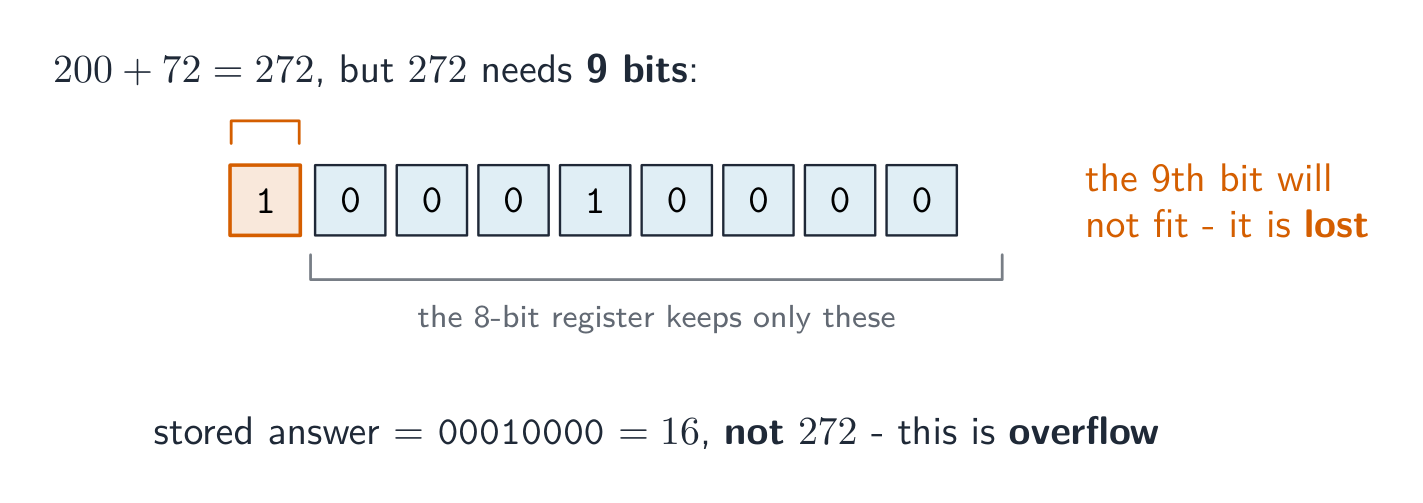
    An 8-bit register can hold denary values from 0 to 255 only. If an addition gives a result above 255, the answer needs a 9th bit. The register cannot hold this extra bit, so it is lost. This is called overflow 溢出 (an overflow error). It happens when a value goes outside the limit the register can store.

    Example: 11001000 (200) $+$ 01001000 (72) $= 272$. In binary that is 1 00010000, which needs 9 bits. The leading 1 will not fit in 8 bits, so the stored answer is wrong.

    ไทย

    คุณสามารถบวกตัวเลขทวิฐาน 8 บิตสองจำนวนเข้าด้วยกัน หลักต่อหลักจากทางขวา เหมือนกับการบวกทศฐาน กฎสำหรับหนึ่งหลักคือ:

    A B บิตผลลัพธ์ คัดโอน
    0 0 0 0
    0 1 1 0
    1 0 1 0
    1 1 0 1

    เมื่อมีการคัดโอนเข้ามาด้วย $1 + 1 + 1 = 1$ พร้อมการคัดโอน 1

    ตัวอย่าง: บวก 01110110 (118) และ 00110000 (48)

      0 1 1 1 0 1 1 0    (118)
    + 0 0 1 1 0 0 0 0    (48)
    -------------------
      1 0 1 0 0 1 1 0    (166)
    
    การบวกทวิฐาน 8 บิตของ 118 และ 48 พร้อมแสดงบิตคัดโอนเป็นสีแดงเหนือหลักทางซ้าย ได้ผลลัพธ์ 166
    บวกหลักต่อหลัก; การคัดโอนกระจายไปทางซ้าย 118 + 48 = 166

    การเกินขอบเขต (Overflow)

    รีจิสเตอร์ 8 บิตสามารถเก็บค่าทศฐานได้ตั้งแต่ 0 ถึง 255 เท่านั้น หากผลบวกมีค่ามากกว่า 255 คำตอบต้องใช้บิตที่ 9 รีจิสเตอร์ไม่สามารถเก็บบิตเพิ่มนี้ได้ ดังนั้นบิตนี้จะหายไป สิ่งนี้เรียกว่า การเกินขอบเขต (overflow error) เกิดขึ้นเมื่อค่าทะลุ出去จากขีดจำกัดที่รีจิสเตอร์สามารถเก็บได้

    ตัวอย่าง: 11001000 (200) + $+$ + 01001000 (72) = $= 272$ ในทวิฐานคือ 1 00010000 ซึ่งต้องใช้ 9 บิต ตัวเลขนำหน้า 1 จะไม่พอดีกับ 8 บิต ดังนั้นคำตอบที่บันทึกจึงผิด

    การบวก 200 และ 72 ได้ 272 ซึ่งในทวิฐานต้องใช้เก้าบิต; รีจิสเตอร์ 8 บิตเก็บเฉพาะแปดบิตล่างและเสียบิตที่เก้า ทำให้คำตอบที่บันทึกเป็น 16 ไม่ใช่ 272 *การบวก 200 และ 72 ต้องใช้ 9 บิต แต่รีจิสเตอร์ 8 บิตตัดบิตที่เก้าทิ้ง ทำให้คำตอบผิด

    Vocabulary · ⁨คำศัพท์⁩ Train · ⁨ฝึกฝน⁩
    English ไทย
    overflow/ˌəʊvəˈfləʊ/ overflow
    logical binary shift/ˈlɒdʒɪkl ˈbaɪnəri ʃɪft/ การเลื่อนบิตแบบลอจิก
    1.1

    Logical binary shift · ⁨การเลื่อนบิตเชิงตรรกะ (Logical binary shift)⁩

    English

    A logical binary shift 逻辑二进制移位 moves all the bits left or right by a number of places.

    • Bits that move off the end of the register are lost.
    • Zeros are added at the empty end.

    A left shift multiplies the number by 2 for each place moved. A right shift divides it by 2 for each place; the right-most bits (the least significant bit(s) 最低有效位) are lost.

    Example: left shift 00110101 (53) by 2 places.

    The result is 11010100 (212), which is $53 \times 4$. The two left-most bits were lost and two zeros came in on the right. If a 1 is pushed off the end, that information is gone for good.

    ไทย

    การเลื่อนบิตเชิงตรรกะ ขยับบิตทั้งหมดไปทางซ้ายหรือขวาจำนวนตำแหน่งที่กำหนด

    • บิตที่เลื่อนออกจากปลายรีจิสเตอร์จะถูก สูญเสีย
    • ศูนย์ จะถูกเติมที่ปลายว่าง

    การเลื่อนไปทางซ้าย (left shift) คูณตัวเลขด้วย 2 สำหรับแต่ละตำแหน่งที่เลื่อน การเลื่อนไปทางขวา (right shift) หารด้วย 2 สำหรับแต่ละตำแหน่ง; บิตทางขวาสุด (least significant bit(s)) จะถูกสูญเสีย

    ตัวอย่าง: เลื่อนไปทางซ้าย 00110101 (53) จำนวน 2 ตำแหน่ง

    start:         0 0 1 1 0 1 0 1
    left shift 2:  1 1 0 1 0 1 0 0
    
    การเลื่อนไปทางซ้ายเชิงตรรกะ 2 ตำแหน่ง: ลูกศรย้ายบิตแต่ละตัวไปทางซ้าย 2 หลัก บิตทางซ้ายสุด 2 ตัวถูกลบออกและมีศูนย์ 2 ตัวแทรกเข้ามาทางขวา
    การเลื่อนไปทางซ้าย 2 ตำแหน่ง: บิตทุกตัวจะเคลื่อนที่ไปทางซ้าย 2 ตำแหน่ง บิตที่อยู่ด้านบนสุดจะถูกตัดออก และตำแหน่งด้านขวาจะถูกเติมด้วยเลขศูนย์

    ผลลัพธ์คือ 11010100 (212), ซึ่งเท่ากับ $53 \times 4$. บิตสองตัวทางซ้ายสุดถูกตัดออก และมีเลขศูนย์เข้ามาแทนที่ทางขวาสองตัว หากมีเลข 1 ถูกดันออกไปจากปลายข้อมูล ข้อมูลนั้นจะหายไปตลอดกาล

    Vocabulary · ⁨คำศัพท์⁩ Train · ⁨ฝึกฝน⁩
    English ไทย
    bit/bɪt/ บิต (bit)
    least significant bit/liːst sɪɡˈnɪfɪkənt bɪt/ บิตที่มีนัยสำคัญน้อยที่สุด
    two's complement/tuːz ˈkɒmplɪmənt/ สองคอมพลีเมนต์
    1.1

    Two's complement · ⁨การแทนค่าด้วย complement แบบสอง⁩

    English

    So far the numbers were positive. Two's complement 补码 lets an 8-bit register hold negative numbers too.

    In two's complement, the left-most bit (the most significant bit 最高有效位, or MSB) has a negative place value:

    • If the MSB is 0, the number is positive.
    • If the MSB is 1, the number is negative.

    To make a positive number negative: write the positive binary, flip every bit (0↔1), then add 1.

    Example: make $-40$.

    • $+40$ = 00101000
    • flip the bits = 11010111
    • add 1 = 11011000

    So $-40$ = 11011000. Check by adding the place values: $-128 + 64 + 16 + 8 = -40$.

    To read a negative two's complement number, just add the place values (the MSB counts as $-128$). The range of an 8-bit two's complement number is $-128$ to $+127$.

    ไทย

    จนถึงตอนนี้ตัวเลขทั้งหมดเป็นบวก การแทนค่าด้วย complement แบบสอง ทำให้รีจิสเตอร์ขนาด 8 บิตสามารถเก็บตัวเลขลบได้ด้วย

    ในการแทนค่าด้วย complement แบบสอง บิตทางซ้ายสุด (most significant bit หรือ MSB) จะมีค่าน้ำหนักในเชิง ลบ:

    -128  64  32  16  8  4  2  1
    
    • ถ้า MSB เป็น 0 ตัวเลขนั้นจะเป็นบวก
    • ถ้า MSB เป็น 1 ตัวเลขนั้นจะเป็นลบ

    การแปลงตัวเลขบวกให้เป็นลบ: เขียนเลขทศนิยมที่เป็นบวก, สลับทุกบิต (0↔1), แล้วบวก 1

    ตัวอย่าง: แปลง $-40$ ให้เป็นลบ

    • $+40$ = 00101000
    • สลับบิต = 11010111
    • บวก 1 = 11011000

    So $-40$ = 11011000. Check by adding the place values: $-128 + 64 + 16 + 8 = -40$.

    แผนภูมิ complement แบบสองขนาด 8 บิต โดย most significant bit มีค่าน้อยกว่า -128, เน้นสี 11011000 เพื่อแสดงค่า -40
    บิตที่มีนัยสำคัญที่สุดมีค่า −128 ดังนั้น 11011000 = −128 + 64 + 16 + 8 = −40

    ในการอ่านตัวเลข complement แบบสองลบ เพียงแค่บวกค่าน้ำหนัก (โดย MSB นับเป็น $-128$). ช่วงของตัวเลข complement แบบสองขนาด 8 บิตคือ $-128$ ถึง $+127$

    Vocabulary · ⁨คำศัพท์⁩ Train · ⁨ฝึกฝน⁩
    English ไทย
    most significant bit/məʊst sɪɡˈnɪfɪkənt bɪt/ บิตที่มีนัยสำคัญสูงสุด
    character set/ˈkærɪktə set/ ชุดอักขระ
    1.2

    Representing text · ⁨การแทนค่าข้อความ⁩

    Syllabus · ⁨หลักสูตร⁩
    English
    Candidates should be able to: Notes and guidance
    1 Understand how and why a computer represents text and the use of character sets, including American standard code for information interchange (ASCII) and Unicode • Text is converted to binary to be processed by a computer • Unicode allows for a greater range of characters and symbols than ASCII, including different languages and emojis • Unicode requires more bits per character than ASCII
    2 Understand how and why a computer represents sound, including the effects of the sample rate and sample resolution • A sound wave is sampled for sound to be converted to binary, which is processed by a computer • The sample rate is the number of samples taken in a second • The sample resolution is the number of bits per sample • The accuracy of the recording and the file size increases as the sample rate and resolution increase
    3 Understand how and why a computer represents an image, including the effects of the resolution and colour depth • An image is a series of pixels that are converted to binary, which is processed by a computer • The resolution is the number of pixels in the image • The colour depth is the number of bits used to represent each colour • The file size and quality of the image increase as the resolution and colour depth increase
    ไทย
    ผู้เข้าสอบควรสามารถ: หมายเหตุและคำแนะนำ
    1 เข้าใจวิธีและเหตุผลที่คอมพิวเตอร์แสดงข้อความและการใช้ ชุดอักขระ (character sets) รวมถึงรหัสมาตรฐานอเมริกันสำหรับการแลกเปลี่ยนข้อมูล (ASCII) และ ยูนิโค้ด (Unicode) • ข้อความจะถูกแปลงเป็นเลขฐานสองเพื่อประมวลผลโดยคอมพิวเตอร์ • ยูนิโค้ดอนุญาตให้มีช่วงของอักขระและสัญลักษณ์ที่หลากหลายมากกว่า ASCII รวมถึงภาษาต่างๆ และอีโมจิ • ยูนิโค้ดต้องการบิตต่ออักขระมากกว่า ASCII
    2 เข้าใจวิธีและเหตุผลที่คอมพิวเตอร์แสดงเสียง รวมถึงผลกระทบจาก อัตราการสุ่มตัวอย่าง (sample rate) และ ความละเอียดของการสุ่มตัวอย่าง (sample resolution) • คลื่นเสียงจะถูกสุ่มตัวอย่างเพื่อให้เสียงถูกแปลงเป็นเลขฐานสอง ซึ่งจะถูกประมวลผลโดยคอมพิวเตอร์ • อัตราการสุ่มตัวอย่างคือจำนวนตัวอย่างที่ lấyในหนึ่งวินาที • ความละเอียดของการสุ่มตัวอย่างคือจำนวนบิตต่อหนึ่งตัวอย่าง • ความแม่นยำของการบันทึกและขนาดไฟล์จะเพิ่มขึ้นเมื่ออัตราการสุ่มตัวอย่างและความละเอียดสูงขึ้น
    3 เข้าใจวิธีการและเหตุผลที่คอมพิวเตอร์แสดงภาพ รวมถึงผลกระทบของ ความละเอียด และ ความลึกของสี • ภาพคือชุดของพิกเซลที่ถูกแปลงเป็นไบนารี ซึ่งจะถูกประมวลผลโดยคอมพิวเตอร์ • ความละเอียดคือจำนวนพิกเซลในภาพ • ความลึกของสีคือจำนวนบิตที่ใช้แทนแต่ละสี • ขนาดไฟล์และคุณภาพของภาพจะเพิ่มขึ้นเมื่อความละเอียดและความลึกของสีเพิ่มขึ้น

    Source: Cambridge International syllabus · ⁨แหล่งที่มา: หลักสูตร Cambridge International⁩

    English

    Computers store text by giving every character a number, then storing that number in binary. The set of characters a computer can use, together with their numbers, is a character set 字符集.

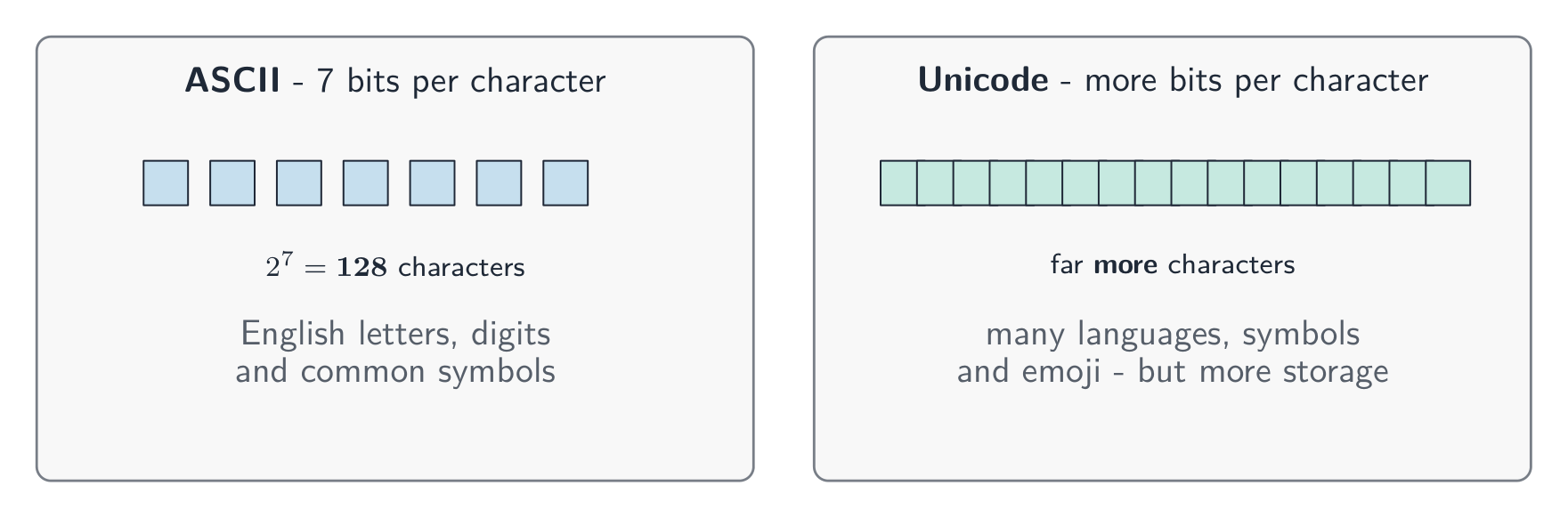
    • ASCII uses 7 bits per character, so it has 128 different characters. This is enough for English letters, digits and common symbols.
    • Unicode uses more bits per character. It can represent far more characters — many languages, plus symbols and emoji 表情符号.

    Because Unicode has more characters, it needs more bits per character than ASCII, so the same text takes more storage 存储.

    ไทย

    คอมพิวเตอร์จัดเก็บข้อความโดยการกำหนดหมายเลขให้กับแต่ละตัวอักษร แล้วจัดเก็บเลขนั้นในรูปแบบทศนิยม เซตของตัวอักษรที่คอมพิวเตอร์ใช้ได้连同หมายเลขที่เกี่ยวข้อง เรียกว่า ชุดตัวอักษร

    • ASCII ใช้ 7 บิตต่อตัวอักษร จึงมีได้ 128 ตัวอักษรต่างกัน เพียงพอสำหรับตัวอักษรอังกฤษ的数字และสัญลักษณ์ทั่วไป
    • Unicode ใช้จำนวนบิตมากกว่าต่อตัวอักษร สามารถแทนค่าตัวอักษรได้มากกว่ามาก — หลายภาษา连同สัญลักษณ์และ emoji

    เนื่องจาก Unicode มีตัวอักษรมากกว่า จึงต้องใช้บิตมากกว่าต่อตัวอักษรเมื่อเทียบกับ ASCII ทำให้ข้อความเดียวกันใช้พื้นที่จัดเก็บมากขึ้น

    ASCII ใช้เจ็ดบิตต่อตัวอักษรสำหรับ 128 ตัวอักษร เพียงพอสำหรับภาษาอังกฤษ; Unicode ใช้บิตมากกว่าสำหรับตัวอักษรมากมายรวมถึงหลายภาษาและ emoji แต่ใช้พื้นที่จัดเก็บมากขึ้น *ASCII ใช้ 7 บิตสำหรับ 128 ตัวอักษร; Unicode ใช้บิตมากกว่าสำหรับตัวอักษรมากแต่ใช้พื้นที่จัดเก็บมากขึ้น

    Vocabulary · ⁨คำศัพท์⁩ Train · ⁨ฝึกฝน⁩
    English ไทย
    emoji/ɪˈməʊdʒi/ อีโมจิ
    1.2

    Representing sound · ⁨การแทนค่าเสียง⁩

    English

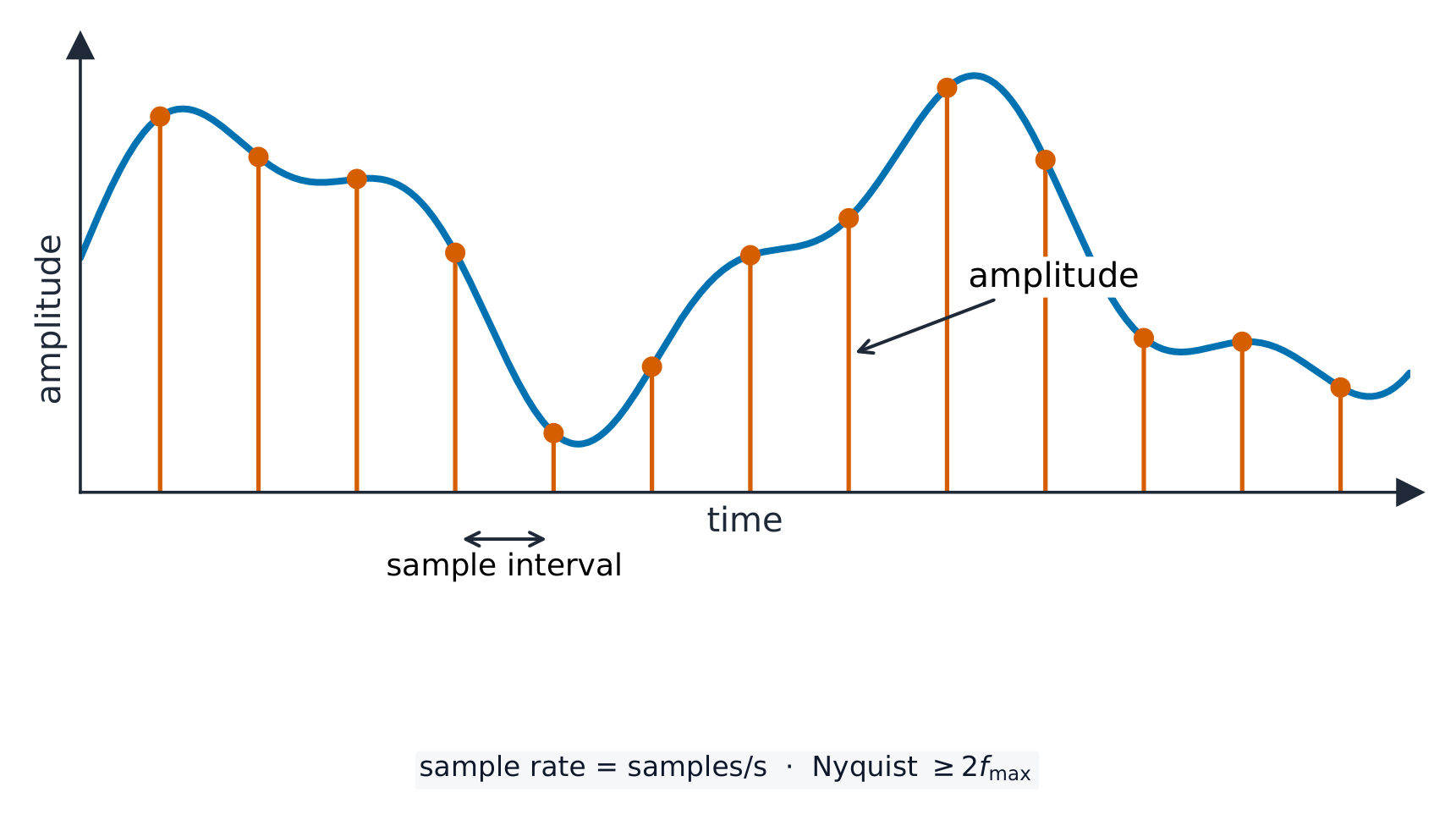
    A sound wave 声波 is smooth and always changing. To store it, the computer measures the height of the wave at regular moments. This is called sampling 采样, and each measurement is a sample.

    • sample rate 采样率 is the number of samples taken each second (measured in Hz).
    • sample resolution 采样分辨率 is the number of bits used for each sample. The height of the wave at a sample point is its amplitude 振幅.

    A higher sample rate and a higher sample resolution give a more accurate recording, but a larger file.

    ไทย

    คลื่นเสียงมีความเรียบลื่นและเปลี่ยนแปลงตลอดเวลา ในการจัดเก็บมัน คอมพิวเตอร์จะวัดความสูงของคลื่นในช่วงเวลาปกติ การนี้เรียกว่า การสุ่มตัวอย่าง (sampling) และแต่ละการวัดคือตัวอย่างหนึ่ง

    คลื่นเสียงเรียบลื่นพร้อมเส้นตั้งฉากที่ช่วงเวลาปกติเพื่อวัดความสูง之它,ระบุช่วงการสุ่มตัวอย่างและความสูงของคลื่น *การสุ่มตัวอย่างบันทึกความสูงของคลื่น (amplitude) ในช่วงเวลาปกติ

    • sample rate คือจำนวนตัวอย่างที่ถูกเก็บต่อวินาที (วัดเป็น Hz)
    • sample resolution คือจำนวนบิตที่ใช้สำหรับแต่ละตัวอย่าง ความสูงของคลื่นที่จุดตัวอย่างคือ amplitude ของมัน

    sample rate ที่สูงขึ้นและ sample resolution ที่สูงขึ้นให้บันทึกที่แม่นยำขึ้น แต่ไฟล์จะมีขนาดใหญ่ขึ้น

    Explore · ⁨สำรวจ⁩

    Representing sound · ⁨การแทนเสียง⁩

    y = a sin(bt + c)

    Sound is a wave; sampling records its height many times a second. · ⁨เสียงคือ คลื่น; การสุ่มตัวอย่างบันทึกความสูงของมันหลายครั้งต่อวินาที⁩

    Vocabulary · ⁨คำศัพท์⁩ Train · ⁨ฝึกฝน⁩
    English ไทย
    sampling/ˈsæmplɪŋ/ การสุ่มตัวอย่าง (sampling)
    sample rate/ˈsæmpl reɪt/ อัตราการสุ่มตัวอย่าง
    sample resolution/ˈsæmpl ˌrezəˈluːʃn/ ความละเอียดของการสุ่มตัวอย่าง
    amplitude/ˈæmplɪtjuːd/ แอมพลิจูด
    resolution/ˌrezəˈluːʃn/ ความละเอียด
    1.2

    Representing images · ⁨การแทนค่าภาพ⁩

    English

    A computer image is made of a grid of small dots called pixels 像素.

    • resolution 分辨率 is the number of pixels in the image (for example $1920 \times 1080$).
    • colour depth 颜色深度 is the number of bits used to store the colour of each pixel.

    A higher resolution and a higher colour depth give a better-quality image, but a larger file.

    ไทย

    ภาพบนคอมพิวเตอร์ประกอบด้วยตารางของจุดเล็กๆที่เรียกว่า พิกเซล (pixels)

    ตาราง 8×8 ของพิกเซลสร้างภาพสีเรียบง่าย โดยมีสี่เหลี่ยมหนึ่งถูกติดป้ายว่าเป็นพิกเซลหนึ่ง
    A bitmap is a grid of pixels; the resolution is how many pixels it has
    • resolution คือจำนวนพิกเซลในภาพ (เช่น $1920 \times 1080$)
    • colour depth คือจำนวนบิตที่ใช้จัดเก็บสีของแต่ละพิกเซล

    ความละเอียดที่สูงและ colour depth ที่สูงกว่าให้คุณภาพภาพที่ดีขึ้น แต่ไฟล์จะมีขนาดใหญ่ขึ้น

    Vocabulary · ⁨คำศัพท์⁩ Train · ⁨ฝึกฝน⁩
    English ไทย
    pixel/ˈpɪksl/ พิกเซล
    colour depth/ˈkʌlə depθ/ ความลึกของสี
    1.3

    Measuring data storage · ⁨การวัดการจัดเก็บข้อมูล⁩

    Syllabus · ⁨หลักสูตร⁩
    Candidates should be able to: Notes and guidance
    1 Understand how data storage is measured • Including: – bit – nibble – byte – kibibyte (KiB) – mebibyte (MiB) – gibibyte (GiB) – tebibyte (TiB) – pebibyte (PiB) – exbibyte (EiB) • The amount of the previous denomination present in the data storage size, e.g.: – 8 bits in a byte – 1024 mebibytes in a gibibyte
    2 Calculate the file size of an image file and a sound file, using information given • Answers must be given in the units specified in the question. Calculations must use the measurement of 1024 and not 1000 • Information given may include: – image resolution and colour depth – sound sample rate, resolution and length of track
    3 Understand the purpose of and need for data compression • Compression exists to reduce the size of the file • What the impact of this is, e.g.: – less bandwidth required – less storage space required – shorter transmission time
    4 Understand how files are compressed using lossy and lossless compression methods • Lossy compression reduces the file size by permanently removing data, e.g. reducing resolution or colour depth, reducing sample rate or resolution • Lossless compression reduces the file size without permanent loss of data, e.g. run length encoding (RLE)

    Source: Cambridge International syllabus · ⁨แหล่งที่มา: หลักสูตร Cambridge International⁩

    English

    Data storage is measured in the units below. A nibble is 4 bits and a byte is 8 bits; from the kibibyte upward, each unit is 1024 times the one before it (because $1024 = 2^{10}$, which fits binary).

    Unit Equals
    bit a single 0 or 1
    nibble 4 bits
    byte 8 bits
    kibibyte (KiB) 1024 bytes
    mebibyte (MiB) 1024 KiB
    gibibyte (GiB) 1024 MiB
    tebibyte (TiB) 1024 GiB
    pebibyte (PiB) 1024 TiB
    exbibyte (EiB) 1024 PiB
    ไทย

    การจัดเก็บข้อมูลวัดได้ในหน่วยด้านล่าง nibble มี 4 บิตและ byte มี 8 บิต; ตั้งแต่ kibibyte ขึ้นไป ทุกหน่วยมีค่าเป็น 1024 เท่าของหน่วยก่อนหน้า (เพราะ $1024 = 2^{10}$ ซึ่งเข้ากับระบบทศนิยม)

    หน่วย เท่ากับ
    bit 0 หรือ 1 เดี่ยวๆ
    nibble 4 บิต
    byte 8 บิต
    kibibyte (KiB) 1024 bytes
    mebibyte (MiB) 1024 KiB
    gibibyte (GiB) 1024 MiB
    tebibyte (TiB) 1024 GiB
    pebibyte (PiB) 1024 TiB
    exbibyte (EiB) 1024 PiB

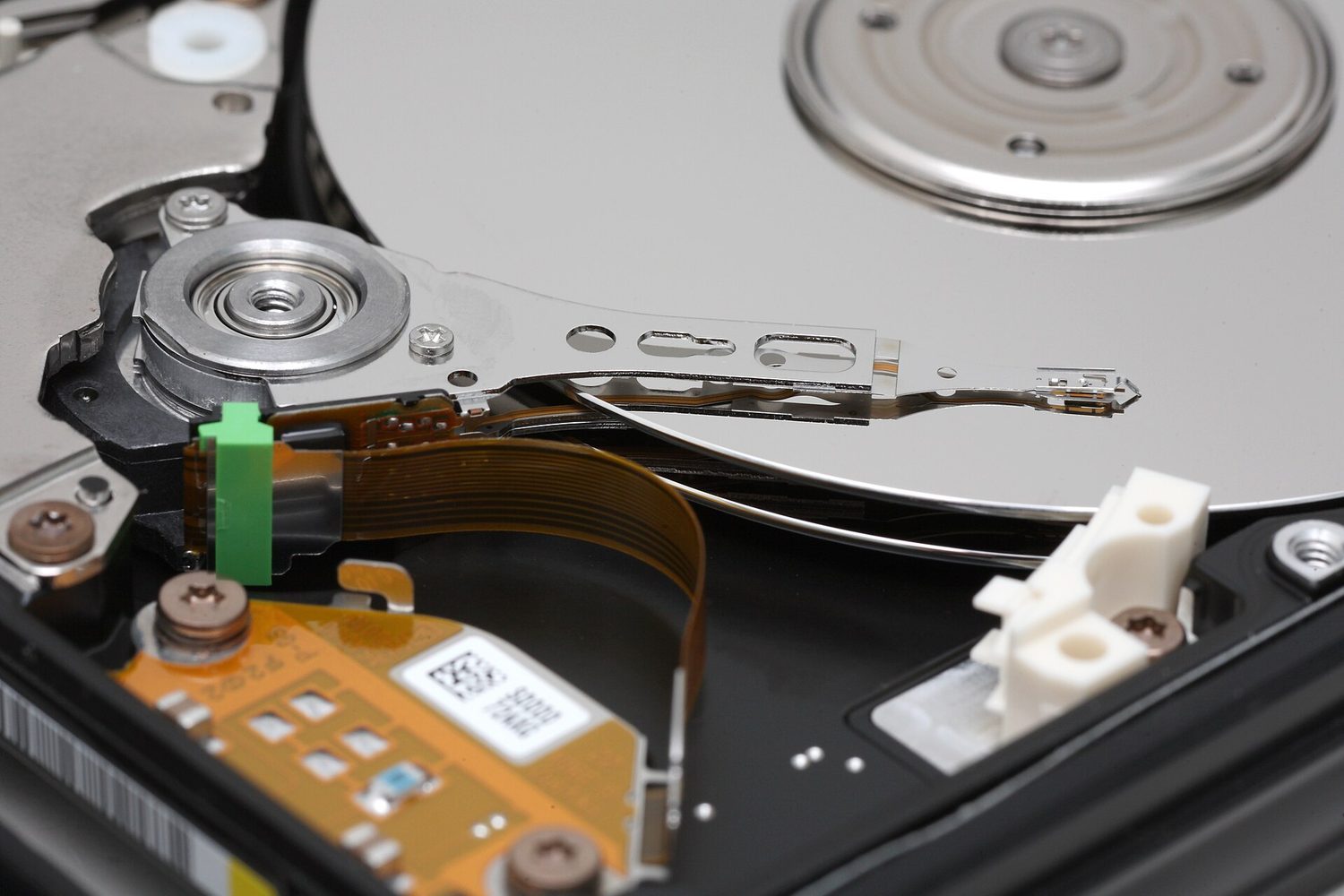
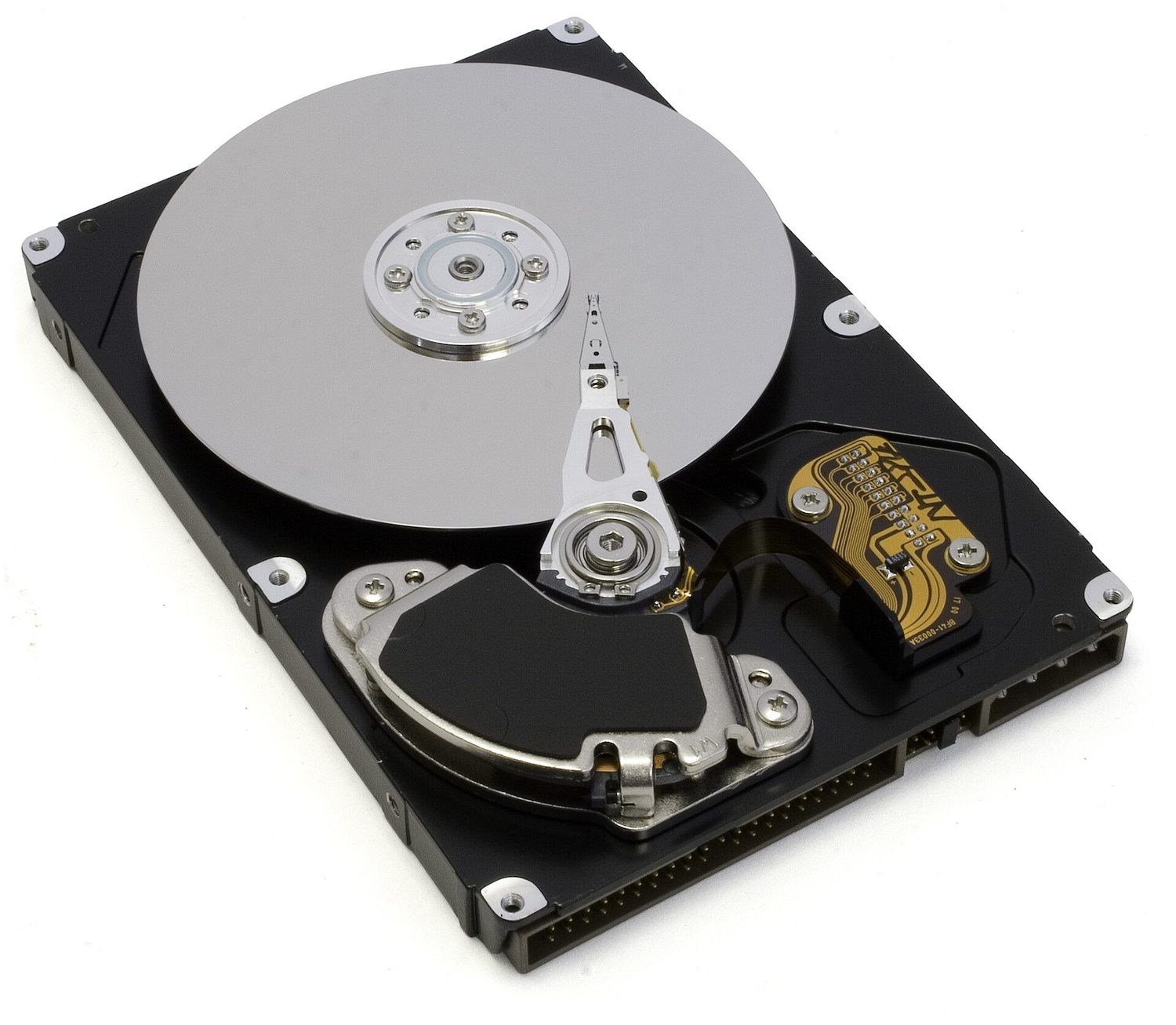
    จานดิสก์แข็ง: การจัดเก็บข้อมูลวัดในหน่วย byte — การรู้ขนาดไฟล์ต้องการความกว้าง × ความสูง × colour depth สำหรับภาพ *จานดิสก์แข็ง: การจัดเก็บข้อมูลวัดในหน่วย byte — การรู้ขนาดไฟล์ต้องการความกว้าง × ความสูง × colour depth สำหรับภาพ

    Vocabulary · ⁨คำศัพท์⁩ Train · ⁨ฝึกฝน⁩
    English ไทย
    byte/baɪt/ ไบต์
    storage/ˈstɔːrɪdʒ/ หน่วยจัดเก็บข้อมูล
    sound wave/saʊnd weɪv/ คลื่นเสียง
    Watch lesson · ⁨ดูบทเรียน⁩
    1.3

    Calculating file size · ⁨คำนวณขนาดไฟล์⁩

    English

    Image file size (in bits) $=$ resolution $\times$ colour depth $=$ width $\times$ height $\times$ colour depth.

    Example: an image is $1024 \times 1024$ pixels with a colour depth of 2 bytes ($= 16$ bits).

    • bits $= 1024 \times 1024 \times 16 = 16\,777\,216$ bits
    • bytes $= \div 8 = 2\,097\,152$ bytes
    • KiB $= \div 1024 = 2048$ KiB
    • MiB $= \div 1024 = 2$ MiB

    Sound file size (in bits) $=$ sample rate $\times$ sample resolution $\times$ length in seconds.

    Always divide by 1024 (not 1000) to change to KiB, MiB and so on. Give your answer in the unit the question asks for.

    Worked example. A sound is recorded for 30 seconds at a sample rate of 8,000 Hz with a sample resolution of 16 bits. Find the file size in kibibytes (KiB).

    • bits $= 8\,000 \times 16 \times 30 = 3\,840\,000$ bits
    • bytes $= 3\,840\,000 \div 8 = 480\,000$ bytes
    • KiB $= 480\,000 \div 1024 \approx 469$ KiB
    ไทย

    ขนาดไฟล์ภาพ (ในหน่วยบิต) $=$ resolution $\times$ colour depth $=$ width $\times$ height $\times$ colour depth

    ตัวอย่าง: ภาพมีขนาด $1024 \times 1024$ พิกเซล ด้วย colour depth 2 байต์ ($= 16$ บิต)

    • บิต $= 1024 \times 1024 \times 16 = 16\,777\,216$ บิต
    • байต์ $= \div 8 = 2\,097\,152$ байต์
    • KiB $= \div 1024 = 2048$ KiB
    • MiB $= \div 1024 = 2$ MiB

    ขนาดไฟล์เสียง (ในหน่วยบิต) $=$ sample rate $\times$ sample resolution $\times$ ความยาวเป็นวินาที

    หารด้วย 1024 เสมอ (ไม่ใช่ 1000) เพื่อแปลงเป็น KiB, MiB เป็นต้น ให้ตอบในหน่วยที่โจทย์ถาม

    ตัวอย่างแบบฝึกหัด. เสียงถูกบันทึกเป็นเวลา 30 วินาที ด้วย sample rate 8,000 Hz และ sample resolution 16 บิต หาขนาดไฟล์เป็น kibibytes (KiB)

    • บิต $= 8\,000 \times 16 \times 30 = 3\,840\,000$ บิต
    • байต์ $= 3\,840\,000 \div 8 = 480\,000$ байต์
    • KiB $= 480\,000 \div 1024 \approx 469$ KiB
    1.3

    Compression · ⁨การบีบอัด⁩

    English

    Compression 压缩 makes a file smaller. A smaller file:

    • uses less storage space,
    • needs less bandwidth 带宽 (the amount of data a connection can carry),
    • takes a shorter time to send (a shorter transmission 传输 time).

    There are two types.

    Lossless compression

    Lossless 无损 compression makes the file smaller with no permanent loss of data. The original file can be rebuilt exactly.

    One method is run-length encoding 行程编码 (RLE). It replaces a run of repeated values with one copy of the value and a count of how many times it repeats. For example WWWWWWWW (8 whites) is stored as "8 W". This works well when data has many repeats.

    Lossy compression

    Lossy 有损 compression makes the file much smaller by permanently removing some data. The removed data cannot be got back. For example:

    • reducing the resolution or colour depth of an image,
    • reducing the sample rate or sample resolution of a sound.

    Use lossless when you must keep every detail (text and program files). Use lossy for photos, music and video, where a small loss of quality is worth a much smaller file.

    ไทย

    การบีบอัดข้อมูลทำให้ไฟล์เล็กลง ไฟล์ที่เล็กลง:

    • ใช้พื้นที่จัดเก็บน้อยลง,
    • ต้องการ bandwidth น้อยลง (ปริมาณข้อมูลที่ช่องสัญญาณรับส่งได้),
    • ใช้เวลาส่งสั้นลง (ระยะเวลา transmission สั้นลง)

    มีสองประเภท

    การบีบอัดแบบไม่สูญเสียข้อมูล

    Lossless compression ทำให้ไฟล์เล็กลงโดย ไม่มีการสูญเสียข้อมูลถาวร ไฟล์ต้นฉบับสามารถสร้างกลับมาได้เหมือนเดิม

    วิธีหนึ่งคือ run-length encoding (RLE) แทนกลุ่มของค่าซ้ำกันด้วยสำเนาของค่าหนึ่งและนับจำนวนครั้งที่มันซ้ำ ตัวอย่าง WWWWWWWW (8 สีขาว) จัดเก็บเป็น "8 W" วิธีนี้ทำงานได้ดีเมื่อข้อมูลมีการซ้ำกันมาก

    แถบสี่เหลี่ยมสีขาว 8 ตัวตามด้วยสีแดง 4 ตัว ถูกบีบอัดเป็นคู่ 8 W และ 4 R
    การเข้ารหัสความยาวช่วง (Run-length encoding) เก็บแต่ละช่วงไว้เพียงครั้งเดียวโดยระบุจำนวนและค่า

    การบีบอัดแบบสูญเสียข้อมูล

    การบีบอัดแบบสูญเสียข้อมูล ทำให้ไฟล์เล็กลงอย่างมากโดยการ กำจัดข้อมูลบางส่วนออกอย่างถาวร ข้อมูลที่ถูกกำจัดไปจะไม่สามารถกู้คืนได้ ตัวอย่างเช่น:

    • ลดความละเอียดหรือความลึกของสีในภาพ,
    • ลดอัตราการสุ่มตัวอย่างหรือความละเอียดของการสุ่มตัวอย่างของเสียง

    ใช้การบีบอัดแบบไม่สูญเสียเมื่อคุณต้องเก็บรายละเอียดทุกประการ (ไฟล์ข้อความและโปรแกรม) ใช้การบีบอัดแบบสูญเสียสำหรับรูปภาพ เพลง และวิดีโอ ซึ่งการสูญเสียคุณภาพเล็กน้อยมีค่าเท่ากับไฟล์ที่เล็กลงอย่างมาก

    Explore · ⁨สำรวจ⁩

    Run-length encoding

    Watch repeated symbols get squashed into a count — simple lossless compression. · ⁨ดูสัญลักษณ์ซ้ำๆ ถูกบีบอัดให้เป็นจำนวน — การบีบอัดแบบ lossless แบบง่าย⁩

    Vocabulary · ⁨คำศัพท์⁩ Train · ⁨ฝึกฝน⁩
    English ไทย
    compression/kəmˈpreʃn/ การอัดตัว
    bandwidth/ˈbændwɪdθ/ แบนด์วิดธ์
    transmission/trænˈsmɪʃn/ การส่งผ่าน
    lossless/ˈlɒsləs/ แบบไม่มีการสูญเสียข้อมูล
    run-length encoding/rʌn leŋθ enˈkəʊdɪŋ/ การเข้ารหัสแบบ run-length
    lossy/ˈlɒsi/ แบบมีการสูญเสียข้อมูล
    1.3

    Exam tips · ⁨ข้อแนะนำสำหรับการสอบ⁩

    English
    • Convert denary → binary by subtracting the place values (128, 64, 32 …); binary → denary by adding the place values that hold a 1.
    • To convert to hex, group the binary into nibbles of 4 bits from the right; each nibble is exactly one hex digit.
    • Overflow happens when a result needs more bits than the register has (an 8-bit register only holds 0–255), so the extra bit is lost.
    • File size in bits: for an image, width × height × colour depth; for sound, sample rate × resolution × seconds. Divide by 8 for bytes, then by 1024 for each larger unit.
    • Lossless compression keeps every bit (text; run-length encoding); lossy permanently removes data (photos, music) for a much smaller file.
    ไทย
    • แปลงเลขฐานสิบ → เลขฐานสองโดยการลบตำแหน่งที่มีค่าน้ำหนัก (128, 64, 32 …); เลขฐานสอง → เลขฐานสิบโดยการบวกตำแหน่งที่มีค่าเป็น 1
    • เพื่อแปลงเป็นเลขฐานสิบหก ให้จัดกลุ่มเลขฐานสองเป็น นิเบิ้ล จำนวน 4 บิตจากทางขวา; แต่ละนิเบิ้ลจะตรงกับหลักเลขฐานสิบหกหนึ่งหลักพอดี
    • การล้น (Overflow) เกิดขึ้นเมื่อผลลัพธ์ต้องการบิตมากกว่าที่รีจิสเตอร์มี (รีจิสเตอร์ขนาด 8 บิตเก็บได้เพียง 0–255) ดังนั้นบิตส่วนเกินจึงหายไป
    • ขนาดไฟล์เป็นบิต: สำหรับภาพ คือ ความกว้าง × ความสูง × ความลึกของสี; สำหรับเสียง คือ อัตราการสุ่มตัวอย่าง × ความละเอียด × วินาที หารด้วย 8 เพื่อเปลี่ยนเป็นไบต์ แล้วหารด้วย 1024 สำหรับหน่วยที่ใหญ่ขึ้นถัดไป
    • การบีบอัดแบบไม่สูญเสีย เก็บทุกบิตไว้ (ข้อความ; การเข้ารหัสความยาวช่วง); การบีบอัดแบบสูญเสีย กำจัดข้อมูลออกอย่างถาวร (รูปภาพ, เพลง) เพื่อให้ไฟล์เล็กลงอย่างมาก
  • 2

    Data transmission · ⁨การส่งผ่านข้อมูล⁩

    Watch lesson · ⁨ดูบทเรียน⁩
    2.1

    What is data transmission? · ⁨การส่งผ่านข้อมูลคืออะไร?⁩

    English

    Data transmission 数据传输 means moving data from one place to another — for example from your computer to a website, or from a phone to a printer.

    Data often travels along a cable. Two common ones are shown below.

    Before it is sent, the data is broken down into small, equal-sized pieces called packets 数据包. Each packet travels separately and they are put back together at the other end.

    Using packets has benefits:

    • if one packet is lost or damaged, only that packet is sent again, not the whole file;
    • packets can take different routes, so a busy or broken route can be avoided;
    • many users can share the same connection at the same time.
    ไทย

    การส่งผ่านข้อมูล หมายถึงการย้ายข้อมูลจากที่หนึ่งไปยังอีกที่หนึ่ง — เช่น จากคอมพิวเตอร์ของคุณไปยังเว็บไซต์ หรือจากโทรศัพท์ไปยังเครื่องพิมพ์

    ข้อมูลมักเดินทางผ่านสายเคเบิล สายสองประเภทที่พบบ่อยแสดงด้านล่างนี้

    ภาพใกล้ๆ ของสายเครือข่ายที่จบลงด้วยปลั๊กพลาสติกใสพร้อมหมุดโลหะสีทอง
    สายเคเบิล Ethernet พร้อมปลั๊ก RJ45 มักใช้ส่งข้อมูลบนเครือข่ายแบบมีสาย
    สายเคเบิลที่เปิดออกเพื่อให้เห็นเส้นใยแก้วนำแสงด้านใน มีไม้บรรทัดประกอบเพื่อเปรียบเทียบขนาด
    สายไฟเบอร์ออปติกส่งข้อมูลในรูปแบบของพัลส์แสงไปตามเส้นใยแก้วบางๆ

    ก่อนจะถูกส่ง ข้อมูลจะถูกแบ่งออกเป็นชิ้นเล็กๆ ที่มีขนาดเท่ากันเรียกว่า แพ็กเก็ต แต่ละแพ็กเก็ตจะเดินทางแยกกันและถูกประกอบกลับเข้าด้วยกันที่ปลายทาง

    การใช้แพ็กเก็ตมีประโยชน์ดังนี้:

    • หากมีแพ็กเก็ตใดสูญหายหรือเสียหาย จะมีการส่งแพ็กเก็ตนั้นใหม่เท่านั้น ไม่ใช่ทั้งไฟล์;
    • แพ็กเก็ตสามารถเลือกเส้นทางที่แตกต่างกันได้ ดังนั้นหากเส้นทางใดแออัดหรือชำรุด ก็สามารถหลีกเลี่ยงไปได้;
    • ผู้ใช้งานหลายคนสามารถใช้ช่องทางการสื่อสารเดียวกันได้พร้อมกัน
    2.1

    The structure of a packet · ⁨โครงสร้างของแพ็กเก็ต⁩

    Syllabus · ⁨หลักสูตร⁩
    English
    Candidates should be able to: Notes and guidance
    1 (a) Understand that data is broken down into packets to be transmitted
    (b) Describe the structure of a packet • A packet of data contains a: – packet header – payload – trailer • The packet header includes the: – destination address – packet number – originator’s address
    (c) Describe the process of packet switching • Data is broken down into packets • Each packet could take a different route • A router controls the route a packet takes • Packets may arrive out of order • Once the last packet has arrived, packets are reordered
    2 (a) Describe how data is transmitted from one device to another using different methods of data transmission • Including: – serial – parallel – simplex – half-duplex – full-duplex
    (b) Explain the suitability of each method of data transmission, for a given scenario • Including the advantages and disadvantages of each method
    3 Understand the universal serial bus (USB) interface and explain how it is used to transmit data • Including the benefits and drawbacks of the interface
    ไทย
    ผู้เข้าสอบควรสามารถ: หมายเหตุและคำแนะนำ
    1 (a) เข้าใจว่าข้อมูลถูกแบ่งออกเป็น แพ็กเก็ต เพื่อส่งผ่าน
    (b) อธิบายโครงสร้างของแพ็กเก็ต • แพ็กเก็ตข้อมูลประกอบด้วย: – ส่วนหัวของแพ็กเก็ต –Names payload – trailer • ส่วนหัวของแพ็กเก็ตรวมถึง: – ที่อยู่ปลายทาง – หมายเลขแพ็กเก็ต – ที่อยู่ของผู้ส่ง
    (c) อธิบายกระบวนการ packet switching • ข้อมูลถูกแบ่งออกเป็นแพ็กเก็ต • แต่ละแพ็กเก็ตอาจใช้เส้นทางที่แตกต่างกัน • Router ควบคุมเส้นทางที่แพ็กเก็ตใช้ • แพ็กเก็ตอาจมาถึงแบบไม่เรียงลำดับ • เมื่อแพ็กเก็ตตัวสุดท้ายมาถึงแล้ว แพ็กเก็ตจะถูกจัดเรียงใหม่
    2 (a) อธิบายวิธีการส่งข้อมูลจากอุปกรณ์หนึ่งไปยังอีกอุปกรณ์หนึ่งโดยใช้วิธีการส่งผ่านข้อมูลที่แตกต่างกัน • รวมถึง: – serial – parallel – simplex – half-duplex – full-duplex
    (b) อธิบายความเหมาะสมของแต่ละวิธีการส่งผ่านข้อมูล สำหรับสถานการณ์ที่กำหนด • รวมถึงข้อดีและข้อเสียของแต่ละวิธีการ
    3 เข้าใจ universal serial bus (USB) interface และอธิบายวิธีการใช้งานเพื่อส่งผ่านข้อมูล • รวมถึงประโยชน์และข้อเสียของ interface นี้

    Source: Cambridge International syllabus · ⁨แหล่งที่มา: หลักสูตร Cambridge International⁩

    English

    Every packet has three parts.

    Part What it holds
    packet header 包头 control information (see below)
    payload 有效载荷 the actual data being carried
    trailer 尾部 shows where the packet ends, plus an error check

    The packet header holds:

    • the sender's IP address 地址 (where the packet came from),
    • the receiver's IP address (where it is going),
    • the packet number (so the packets can be put back in the right order).
    ไทย

    แพ็กเก็ตทุกชิ้นประกอบด้วยสามส่วน

    แพ็กเก็ตที่แสดงเป็นสามบล็อกที่เชื่อมต่อกัน — หัวข้อ部分内容, Payload และท้ายpacket — พร้อมรายการเนื้อหาหัวข้อ部分内容อยู่ด้านล่าง
    แพ็กเก็ตมีหัวข้อ部分内容, Payload (ข้อมูล) และท้ายpacket; หัวข้อ部分内容จะบรรจุที่อยู่และหมายเลขแพ็กเก็ต
    ส่วน สิ่งที่บรรจุอยู่
    หัวpacket ข้อมูลควบคุม (ดูด้านล่าง)
    Payload ข้อมูลจริงที่กำลังถูกขนส่ง
    ท้ายpacket แสดงว่าแพ็กเก็ตสิ้นสุดตรงไหน plus การตรวจสอบความผิดพลาด

    หัวpacket บรรจุ:

    • ที่อยู่ IP ของผู้ส่ง (ที่มาของแพ็กเก็ต),
    • ที่อยู่ IP ของผู้รับ (ที่ไป),
    • หมายเลขแพ็กเก็ต (เพื่อให้สามารถประกอบแพ็กเก็ตเรียงลำดับให้ถูกต้อง)
    Vocabulary · ⁨คำศัพท์⁩ Train · ⁨ฝึกฝน⁩
    English ไทย
    data transmission/ˈdeɪtə trænˈsmɪʃn/ การส่งผ่านข้อมูล
    packets/ˈpækɪts/ แพ็กเก็ต
    packet header/ˈpækɪt ˈhedə/ หัวแพ็กเก็ต
    payload/ˈpeɪləʊd/ ส่วนข้อมูล
    trailer/ˈtreɪlə/ เทรลเลอร์
    address/əˈdres/ ที่อยู่
    2.1

    Packet switching · ⁨การสลับแพ็กเก็ต⁩

    English

    Packet switching 数据包交换 is the way packets are sent across a network.

    • Special devices called routers 路由器 read each packet's header and choose the best route for it.
    • Each packet may take its own path, so packets can travel different ways.
    • Packets may arrive out of order.
    • When the last packet has arrived, the packets are reordered using their packet numbers.
    ไทย

    การสลับแพ็กเก็ต เป็นวิธีการที่แพ็กเก็ตถูกส่งข้ามเครือข่าย

    แพ็กเก็ตสองชิ้นเดินทางจากผู้ส่งไปยังผู้รับ ผ่านเครือข่ายของเร้าเตอร์ โดยแต่ละชิ้นใช้เส้นทางสีต่างกัน *เร้าเตอร์ส่งต่อแพ็กเก็ต และแพ็กเก็ตที่แตกต่างกันสามารถเลือกเส้นทางที่ต่างกัน menuju ผู้รับคนเดียวกันได้

    • อุปกรณ์พิเศษที่เรียกว่า เร้าเตอร์ อ่านหัวpacket ของแต่ละแพ็กเก็ตและเลือกเส้นทางที่ดีที่สุดให้
    • แต่ละแพ็กเก็ตอาจใช้ เส้นทางของตนเอง ดังนั้นแพ็กเก็ตจึงสามารถเดินทางต่างทางกันได้
    • แพ็กเก็ตอาจ มาถึงไม่เรียงลำดับ
    • เมื่อแพ็กเก็ตตัวสุดท้ายมาถึงแล้ว แพ็กเก็ตจะถูก จัดเรียงลำดับใหม่ โดยใช้หมายเลขแพ็กเก็ต
    Explore · ⁨สำรวจ⁩

    How data travels in packets · ⁨วิธีการเดินทางของข้อมูลในแพ็กเก็ต⁩

    Step through packet switching. Splitting a file into addressed packets is why one lost packet only needs resending, and why many users can share the same line. · ⁨ขั้นตอนการทำงานของการสลับแพ็กเก็ต การแบ่งไฟล์ออกเป็นแพ็กเก็ตที่มีที่อยู่คือเหตุผลที่หากแพ็กเก็ตหนึ่งหายไปต้องส่งใหม่เพียงครั้งเดียว และเหตุว่าผู้ใช้หลายคนสามารถแชร์สายเดียวกันได้⁩

    Vocabulary · ⁨คำศัพท์⁩ Train · ⁨ฝึกฝน⁩
    English ไทย
    packet switching/ˈpækɪt ˈswɪtʃɪŋ/ การสลับแพ็กเก็ต
    routers/ˈruːtəz/ เราเตอร์
    2.1

    Methods of data transmission · ⁨วิธีการส่งผ่านข้อมูล⁩

    English

    Serial and parallel

    Serial 串行 Parallel 并行
    How one bit at a time, down one wire several bits at once, down several wires
    Distance good over long distances good over short distances only
    Cost cheaper (fewer wires) more expensive (more wires)
    Errors bits stay in order bits can arrive at slightly different times over long wires

    Serial sends one bit after another along a single wire. Parallel sends several bits at the same time along several wires, so it is faster over short distances.

    Simplex, half-duplex and full-duplex

    These describe the direction data can travel.

    Method Direction
    simplex 单工 one direction only (e.g. computer → printer)
    half-duplex 半双工 both directions, but only one at a time (e.g. walkie-talkie)
    full-duplex 全双工 both directions at the same time (e.g. phone call)

    Choosing a method

    The choice depends on the distance, the speed needed, the cost, and whether data must travel both ways at once.

    ไทย

    แบบอนุกรมและแบบขนาน

    แบบอนุกรม แบบขนาน
    วิธี บิตละหนึ่งบิต ตามสายเดียว หลายบิตพร้อมกัน ตามหลายสาย
    ระยะทาง ดีสำหรับระยะไกล ดีสำหรับระยะสั้นเท่านั้น
    ค่าใช้จ่าย 是被 (สายน้อย) แพงกว่า (สายมาก)
    ความผิดพลาด บิตอยู่ในลำดับที่แน่นอน บิตอาจมาถึงด้วยความล่าช้าแตกต่างกันเล็กน้อยบนสายยาว

    แบบอนุกรม ส่งบิตหนึ่งตามอีกบิตหนึ่งไปตามสายเดียว แบบขนาน ส่งหลายบิตพร้อมกันไปตามหลายสาย ดังนั้นจึงเร็วขึ้นในระยะสั้น

    การส่งแบบอนุกรมแสดงเป็นบิตเรียงกันบนสายเดียว และการส่งแบบขนานแสดงเป็นหลายบิตเดินทางพร้อมกันบนหลายสาย *แบบอนุกรมส่งบิตละหนึ่งบิตตามสายเดียว; แบบขนานส่งหลายบิตพร้อมกันตามหลายสาย

    แบบ simplex, half-duplex และ full-duplex

    สิ่งเหล่านี้อธิบายถึง ทิศทาง ที่ข้อมูลสามารถเดินทางได้

    อุปกรณ์สองเครื่อง A และ B พร้อมลูกศรแสดงการส่งข้อมูลแบบ simplex (ทางเดียว), half-duplex (สองทางแต่ทีละด้าน) และ full-duplex (สองทางพร้อมกัน) *แบบ simplex เป็นทางเดียวเท่านั้น; half-duplex เป็นสองทางแต่ทีละทาง; full-duplex เป็นสองทางพร้อมกัน

    วิธีการ ทิศทาง
    simplex ทางเดียวเท่านั้น (เช่น คอมพิวเตอร์ → เครื่องพิมพ์)
    half-duplex สองทิศทาง แต่เพียงอย่างเดียวทีละทาง (เช่น วิทยุสื่อสาร)
    full-duplex สองทิศทางพร้อมกัน (เช่น การโทร)

    การเลือกวิธีการ

    การขึ้นอยู่กับ ระยะทาง, ความเร็ว ที่ต้องการ, ค่าใช้จ่าย, และการที่ข้อมูลต้องเดินทางสองทางพร้อมกันหรือไม่

    Vocabulary · ⁨คำศัพท์⁩ Train · ⁨ฝึกฝน⁩
    English ไทย
    serial/ˈsɪərɪəl/ แบบอนุกรม (serial)
    parallel/ˈpærəlel/ 并联电路中
    simplex/ˈsɪmpleks/ simplex
    half-duplex/hɑːf ˈdjuːpleks/ half-duplex
    full-duplex/fʊl ˈdjuːpleks/ full-duplex
    universal serial bus/ˌjuːnɪˈvɜːsl ˈsɪərɪəl bʌs/ บัสแบบสากล
    interface/ˈɪntəfeɪs/ อินเทอร์เฟซ
    interference/ˌɪntəˈfɪərəns/ การแทรกแซง
    2.1

    USB

    English

    The universal serial bus 通用串行总线 (USB) is a common interface 接口 (a connection point) for joining devices to a computer.

    Benefits:

    • the same connector is used by many devices (one standard);
    • the device is detected automatically and the correct driver is loaded;
    • it carries power, so it can charge or run a device;
    • the connector only fits one way, so it is hard to plug in wrongly.

    Drawbacks:

    • the cable can only be a limited length (a few metres);
    • older USB versions are slower than newer ones;
    • transfer speeds can be lower than some other connection types.
    ไทย

    บัสแบบอนุกรมสากล (USB) เป็น อินเทอร์เฟซ (จุดเชื่อมต่อ) ที่พบบ่อยสำหรับการเชื่อมต่ออุปกรณ์เข้ากับคอมพิวเตอร์

    ประโยชน์:

    • ใช้ขั้วต่อเดียวกันกับอุปกรณ์จำนวนมาก (มาตรฐานเดียว);
    • ตรวจจับอุปกรณ์อัตโนมัติและโหลดไดรเวอร์ที่ถูกต้อง;
    • ส่งพลังงานไปด้วย จึงสามารถชาร์จหรือจ่ายไฟให้กับอุปกรณ์ได้;
    • ตัวเชื่อมต่อสามารถเสียบได้ทางเดียวเท่านั้น ดังนั้นจึงยากที่จะเสียบผิดทาง

    ข้อเสีย:

    • สายเคเบิลมีความยาวจำกัด (เพียงไม่กี่เมตร);
    • เวอร์ชัน USB เก่ามีความเร็วต่ำกว่าเวอร์ชันใหม่;
    • ความเร็วในการถ่ายโอนข้อมูลอาจต่ำกว่าการเชื่อมต่อแบบอื่นบางประเภท
    รูปทรงปลั๊ก USB ที่แตกต่างกัน 5 แบบเรียงข้างกัน — micro, mini, type-B และ type-A — พร้อมสเกล 5 ซม.
    ตัวอย่างรูปร่างของขั้วต่อ USB บางส่วน ใช้มาตรฐาน USB เดียวกัน ดังนั้นอุปกรณ์จะถูกตรวจจับอัตโนมัติ
    2.2

    Why we check for errors · ⁨ทำไมเราต้องตรวจสอบความผิดพลาด⁩

    Syllabus · ⁨หลักสูตร⁩
    English
    Candidates should be able to: Notes and guidance
    1 Understand the need to check for errors after data transmission and how these errors can occur • Errors can occur during data transmission due to interference, e.g. data loss, data gain and data change
    2 Describe the processes involved in each of the following error detection methods for detecting errors in data after transmission: parity check (odd and even), checksum and echo check • Including parity byte and parity block check
    3 Describe how a check digit is used to detect errors in data entry and identify examples of when a check digit is used, including international standard book numbers (ISBN) and bar codes
    4 Describe how an automatic repeat query (ARQ) can be used to establish that data is received without error • Including the use of: – positive/negative acknowledgements – timeout
    ไทย
    ผู้เข้าสอบควรสามารถ: หมายเหตุและคำแนะนำ
    1 เข้าใจความจำเป็นในการตรวจสอบข้อผิดพลาดหลังจากการส่งผ่านข้อมูลและวิธีที่ข้อผิดพลาดเหล่านี้เกิดขึ้น • ข้อผิดพลาดสามารถเกิดขึ้นระหว่างการส่งผ่านข้อมูลเนื่องจากสัญญาณรบกวน เช่น การสูญเสียข้อมูล การเพิ่มข้อมูล และการเปลี่ยนแปลงข้อมูล
    2 อธิบายกระบวนการที่เกี่ยวข้องในแต่ละวิธีการตรวจจับข้อผิดพลาดต่อไปนี้用于 detect errors in data after transmission: parity check (odd and even), checksum และ echo check • รวมถึง parity byte และ parity block check
    3 อธิบายการใช้ check digit ในการตรวจจับข้อผิดพลาดในการป้อนข้อมูลและระบุตัวอย่างของการใช้ check digit รวมถึง international standard book numbers (ISBN) และ bar codes
    4 อธิบายการใช้ automatic repeat query (ARQ) เพื่อตรวจสอบว่าข้อมูลได้รับโดยไม่มีความผิดพลาด • รวมถึงการใช้: – positive/negative acknowledgements – timeout

    Source: Cambridge International syllabus · ⁨แหล่งที่มา: หลักสูตร Cambridge International⁩

    English

    While data travels, interference 干扰 can change it. Three things can go wrong:

    • data loss — some bits do not arrive;
    • data gain — extra bits are added;
    • data change — some bits are flipped.

    So the receiver checks whether the data arrived correctly.

    ไทย

    ขณะข้อมูลถูกส่ง สัญญาณรบกวน อาจทำให้ข้อมูลเปลี่ยนแปลงได้ มีสามสิ่งที่อาจผิดพลาด:

    • การสูญเสียข้อมูล — บิตบางตัวไม่ถึงปลายทาง;
    • การเพิ่มข้อมูล — มีบิตเพิ่มเติมเข้ามา;
    • การเปลี่ยนแปลงข้อมูล — บิตบางตัวถูกสลับค่า

    ดังนั้น ผู้รับจึงตรวจสอบว่าข้อมูลมาถึงถูกต้องหรือไม่

    Watch lesson · ⁨ดูบทเรียน⁩
    2.2

    Error detection methods · ⁨วิธีตรวจจับความผิดพลาด⁩

    English

    Parity check

    A parity check 奇偶校验 adds one extra bit, the parity bit 奇偶校验位, to each byte. There are two types:

    • even parity — the total number of 1s in the byte (including the parity bit) must be even;
    • odd parity — the total number of 1s must be odd.

    Example (even parity): the data 1011001 has four 1s, which is already even, so the parity bit is 0:

    To find an error: the receiver counts the 1s. If even parity was agreed but a byte arrives with an odd number of 1s, an error has happened during transmission.

    A parity check cannot find every error. If two bits flip, the count may still look correct.

    Worked example. A single parity bit tells you that an error happened, but not where. A parity block 奇偶校验块 can find the exact bit. Several bytes are sent together, each with a row parity bit, and one extra parity byte 奇偶校验字节 at the bottom holds a parity bit for each column. Even parity is used below, and one bit was flipped during transmission. Find it.

    Row byte 3 breaks even parity, and column b3 breaks even parity. The flipped bit is where they cross: byte 3, bit b3. Changing it back from 1 to 0 repairs the data. A single parity bit only says an error happened; a parity block says exactly where, so the receiver can even fix it.

    Checksum

    A checksum 校验和 is a value worked out from all the data before sending. The receiver works out the checksum again from the data it received. If the two values do not match, an error has occurred and the data is resent.

    Echo check

    In an echo check 回送校验, the receiver sends the data back to the sender. The sender compares it with the original. If they differ, an error happened. (This needs the data to be sent twice, so it is slow.)

    Automatic Repeat reQuest (ARQ)

    Automatic Repeat reQuest 自动重传请求 (ARQ) uses messages called acknowledgements 确认.

    • The receiver sends a positive acknowledgement if a packet arrived correctly, or a negative acknowledgement if it did not.
    • The sender starts a timeout 超时 timer. If no positive acknowledgement comes back in time, the sender sends the packet again.

    Check digit

    A check digit 校验码 is an extra digit placed at the end of a number, worked out from the other digits. It is used to find mistakes when a number is typed in.

    When the number is entered, the check digit is calculated again and compared. It can catch:

    • an incorrect digit entered,
    • a transposition error 换位错误 (two digits swapped, e.g. 21 typed as 12),
    • a digit left out or an extra digit added,
    • a phonetic error (a digit that sounds similar, e.g. 13 and 30).

    Check digits are used in barcodes 条形码 and ISBNs (book numbers).

    ไทย

    การตรวจสอบพาริตี้

    การตรวจสอบพาริตี้ เพิ่มบิตหนึ่งตัวที่เรียกว่า บิตพาริตี้ เข้าไปในแต่ละไบต์ มีสองชนิด:

    ข้อมูลที่ประกอบด้วย 1 สี่ตัว (คู่); บิตพาริตี้เป็น 0 เพื่อรักษาความเป็นคู่
    Parity bit ถูกเพิ่มเข้าไปเพื่อให้จำนวนของ 1 เป็นคู่ (หรือคี่)
    • พาริตี้คู่ — จำนวนรวมของ 1 ในไบต์ (รวมถึงบิตพาริตี้) ต้องเป็น คู่;
    • พาริตี้คี่ — จำนวนรวมของ 1 ต้องเป็น คี่.

    ตัวอย่าง (พาริตี้คู่): ข้อมูล 1011001 มี 1 สี่ตัว ซึ่งเป็นคู่อยู่แล้ว ดังนั้นบิตพาริตี้คือ 0:

    parity bit + data
        0        1011001
    

    ในการหาความผิดพลาด: ผู้รับจะนับจำนวน 1 หากตกลงใช้พาริตี้คู่แต่ได้รับไบต์ที่มีจำนวน 1 เป็น คี่ แสดงว่าเกิดความผิดพลาดระหว่างการส่งข้อมูล

    การตรวจสอบพาริตี้ไม่สามารถตรวจจับความผิดพลาดได้ทุกกรณี หากบิตสองตัวถูกสลับ ค่ารวมอาจยังคงดูถูกต้องอยู่

    ตัวอย่างที่แสดงวิธีทำ. บิตพาริตี้ตัวเดียวบอกได้ว่า มี ความผิดพลาดเกิดขึ้น แต่บอกไม่ได้ว่า อยู่ที่ไหน บล็อกพาริตี้ สามารถระบุตำแหน่งบิตที่ผิดพลาดได้โดยชัดเจน มีการส่งไบต์หลายตัวพร้อมกัน โดยแต่ละไบต์จะมีบิตพาริตี้ในแถว และมี ไบต์พาริตี้ เพิ่มเติมหนึ่งตัวด้านล่างซึ่งเก็บบิตพาริตี้สำหรับแต่ละคอลัมน์ ด้านล่างนี้ใช้พาริตี้คู่ และมีการสลับบิตหนึ่งตัวระหว่างการส่ง ให้หา位置和นั้น

              b1 b2 b3 b4 b5 | parity
     byte 1    1  0  1  1  0 |   1
     byte 2    0  1  1  0  1 |   1
     byte 3    1  1  1  1  0 |   1    <- row: odd number of 1s
     byte 4    0  0  1  1  0 |   0
     ------------------------------
     parity    0  0  1  1  1 |   1
                     ^ column b3: odd number of 1s
    

    แถว byte 3 ขาดพาริตี้คู่ และคอลัมน์ b3 ขาดพาริตี้คู่ บิตที่ถูกสลับคือจุดตัดกันระหว่างทั้งสอง: byte 3, bit b3 การเปลี่ยนกลับจาก 1 เป็น 0 จะซ่อมแซมข้อมูลได้ บิตพาริตี้ตัวเดียวบอกเพียงว่ามีข้อผิดพลาดเกิดขึ้น ส่วนบล็อกพาริตี้ระบุว่าerrorsที่ตำแหน่งใดอย่างชัดเจน ทำให้ผู้รับ thậm chíสามารถแก้ไขได้เอง

    Checksum

    Checksum คือค่าที่คำนวณจากข้อมูลทั้งหมดก่อนการส่ง ผู้รับจะคำนวณ checksum ใหม่จากข้อมูลที่รับมา หากค่าทั้งสองไม่ตรงกัน แสดงว่าเกิดความผิดพลาดและข้อมูลจะถูกส่งใหม่

    Echo check

    ใน echo check ผู้รับจะส่งข้อมูลกลับไปยังผู้ส่ง ผู้ส่งจะเปรียบเทียบกับต้นฉบับ หากไม่ตรงกัน แสดงว่าเกิดความผิดพลาด (วิธีการนี้ต้องใช้การส่งข้อมูลสองครั้ง จึงมีความช้า)

    Automatic Repeat reQuest (ARQ)

    Automatic Repeat reQuest (ARQ) ใช้ข้อความที่เรียกว่า การยืนยันการรับ

    • ผู้รับจะส่ง การยืนยันเชิงบวก หากแพ็กเก็ตมาถึงถูกต้อง หรือส่ง การยืนยันเชิงลบ หากไม่ถูกต้อง
    • ผู้ส่งเริ่มจับเวลา timeout หากไม่มีการยืนยันเชิงบวกกลับมาภายในเวลาที่กำหนด ผู้ส่งจะส่งแพ็กเก็ตอีกครั้ง

    Check digit

    Check digit คือตัวเลขเสริมที่วางไว้ท้ายชุดตัวเลข ซึ่งคำนวณจากตัวเลขอื่นๆ ใช้เพื่อตรวจสอบข้อผิดพลาดเมื่อมีการ พิมพ์ตัวเลข

    เมื่อกรอกตัวเลขแล้ว จะคำนวณ check digit ใหม่และเปรียบเทียบกับค่าเดิม สามารถตรวจจับได้:

    • ตัวเลขที่พิมพ์ผิด,
    • ความผิดพลาดจากการสลับตำแหน่ง (ตัวเลขสองตัวสลับที่ เช่น พิมพ์ 21 เป็น 12),
    • ตัวเลขที่ขาดหายไปหรือมีตัวเลขเกินมา,
    • ความผิดพลาดทางการออกเสียง (ตัวเลขที่อ่านเสียงคล้ายกัน เช่น 13 กับ 30).

    Check digit ถูกใช้ใน บาร์โค้ด และ ISBN (เลขหนังสือ)

    Explore · ⁨สำรวจ⁩

    Computing concept lab · ⁨ห้องปฏิบัติการแนวคิดการคำนวณ⁩

    Classify concrete examples by the computing idea they demonstrate. · ⁨จัดกลุ่มตัวอย่างที่เป็นรูปธรรมตาม idea การคำนวณที่แสดงออก⁩

    Vocabulary · ⁨คำศัพท์⁩ Train · ⁨ฝึกฝน⁩
    English ไทย
    parity check/ˈpærɪti tʃek/ parity check
    parity bit/ˈpærɪti bɪt/ บิตพาริตี้
    parity block/ˈpærɪti blɒk/ บล็อกพาริตี้
    parity byte/ˈpærɪti baɪt/ ไบต์พาริตี้
    checksum/ˈtʃeksəm/ ค่าตรวจสอบความถูกต้อง
    echo check/ˈekəʊ tʃek/ การตรวจสอบ回声 echo check
    automatic repeat request/ˌɔːtəˈmætɪk rɪˈpiːt rɪˈkwest/ การขอส่งซ้ำอัตโนมัติ
    acknowledgements/əkˈnɒlɪdʒmənts/ การยืนยัน
    timeout/ˈtaɪmaʊt/ เวลาหมดอายุ
    check digit/tʃek ˈdɪdʒɪt/ ตัวเลขตรวจสอบ
    transposition error/trænspəˈzɪʃn ˈerə/ ข้อผิดพลาดของการเรียงลำดับ
    barcodes/ˈbɑːkəʊdz/ บาร์โค้ด
    2.3

    Encryption · ⁨การเข้ารหัสข้อมูล⁩

    Syllabus · ⁨หลักสูตร⁩
    English
    Candidates should be able to: Notes and guidance
    1 Understand the need for and purpose of encryption when transmitting data
    2 Understand how data is encrypted using symmetric and asymmetric encryption • Asymmetric encryption includes the use of public and private keys
    ไทย
    ผู้เข้าสอบควรสามารถ: หมายเหตุและคำแนะนำ
    1 เข้าใจความจำเป็นและวัตถุประสงค์ของ encryption เมื่อส่งผ่านข้อมูล
    2 เข้าใจวิธีการเข้ารหัสข้อมูลโดยใช้ symmetric และ asymmetric encryption • Asymmetric encryption รวมถึงการใช้ public และ private keys

    Source: Cambridge International syllabus · ⁨แหล่งที่มา: หลักสูตร Cambridge International⁩

    English

    Why we need encryption

    Encryption 加密 scrambles data so that it cannot be understood if it is intercepted 拦截 (caught) by the wrong person. The readable data is called plaintext 明文; after encryption it becomes ciphertext 密文.

    Encryption does not stop data from being intercepted. It only stops the data from being understood.

    Symmetric encryption

    Symmetric encryption 对称加密 uses a single key 密钥 to both encrypt and decrypt the data. The sender and receiver must share this same secret key. The risk is that the key itself could be stolen while being shared.

    Asymmetric encryption

    Asymmetric encryption 非对称加密 uses two different keys:

    • a public key 公钥 that anyone can have, used to encrypt;
    • a private key 私钥 that is kept secret, used to decrypt.

    Data encrypted with the public key can only be decrypted with the matching private key, so the key never has to be shared. This is safer than sharing one secret key.

    ไทย

    ทำไมเราต้องการการเข้ารหัสข้อมูล

    การเข้ารหัสข้อมูล ทำลายรูปแบบข้อมูลให้ไม่สามารถเข้าใจได้หากถูก ** intercepted** (ดักจับ) โดยบุคคลที่ไม่เหมาะสม ข้อมูลที่อ่าน理解的ได้เรียกว่า plaintext; หลังการเข้ารหัสจะกลายเป็น ciphertext

    การเข้ารหัสข้อมูล ไม่ ป้องกันไม่ให้ข้อมูลถูก intercept แต่ป้องกันไม่ให้ข้อมูลถูกเข้าใจ

    การเข้ารหัสแบบสมมาตร

    การเข้ารหัสแบบสมมาตร ใช้ key เดียวกันทั้งในการเข้ารหัสและการถอดรหัส ผู้ส่งและผู้รับต้องแบ่งปัน key ลับเดียวกันนี้ ความเสี่ยงคือ key เองอาจถูกขโมยระหว่างกระบวนการแบ่งปัน

    Asymmetric encryption

    Asymmetric encryption ใช้ key สองตัวต่างกัน:

    • public key ที่ใครก็ได้สามารถมีได้ ใช้สำหรับการเข้ารหัส;
    • private key ที่เก็บเป็นความลับ ใช้สำหรับการถอดรหัส

    ข้อมูลที่ถูกเข้ารหัสด้วย public key สามารถถอดรหัสได้ด้วย private key ที่สอดคล้องกันเท่านั้น ดังนั้น key จึงไม่ต้องถูกแบ่งปัน สิ่งนี้ปลอดภัยกว่าการแบ่งปัน key ลับตัวเดียว

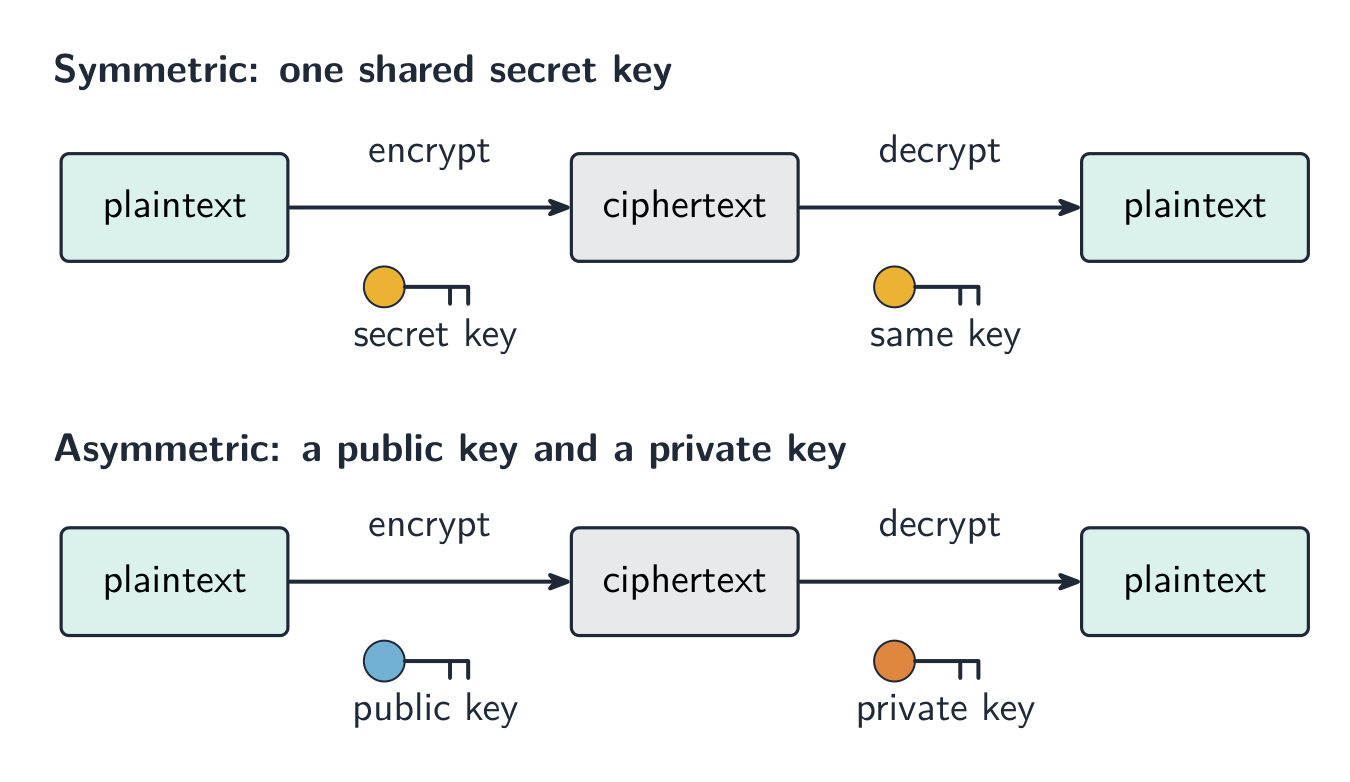
    การเข้ารหัสแบบสมมาตรที่ใช้ key เดียวกันสำหรับทั้งสองขั้นตอน และการเข้ารหัสแบบอสมมาตรที่ใช้ public key สำหรับเข้ารหัสและ private key สำหรับถอดรหัส *แบบสมมาตรใช้กุญแจร่วมเดียว; แบบอสมมาตรใช้กุญแจสาธารณะเพื่อเข้ารหัสและกุญแจส่วนตัวเพื่อถอดรหัส

    Explore · ⁨สำรวจ⁩

    The Caesar cipher · ⁨凯撒密码⁩

    Shift each letter to encrypt a message — the simplest idea of a cipher and its key. · ⁨เลื่อนตัวอักษรแต่ละตัวเพื่อเข้ารหัสข้อความ — ความคิดพื้นฐานที่สุดของรหัสลับและ กุญแจ ของมัน⁩

    Vocabulary · ⁨คำศัพท์⁩ Train · ⁨ฝึกฝน⁩
    English ไทย
    encryption/enˈkrɪpʃn/ การเข้ารหัส
    intercepted/ˌɪntəˈseptɪd/ ถูกดักจับ
    plaintext/ˈpleɪntekst/ plaintext
    ciphertext/ˈsaɪfətekst/ ciphertext
    symmetric encryption/sɪˈmetrɪk enˈkrɪpʃn/ symmetric encryption
    key/kiː/ คีย์
    asymmetric encryption/ˌeɪsɪˈmetrɪk enˈkrɪpʃn/ asymmetric encryption
    public key/ˈpʌblɪk kiː/ public key
    private key/ˈpraɪvət kiː/ กุญแจส่วนตัว
    2.3

    Exam tips · ⁨ข้อแนะนำสำหรับการสอบ⁩

    English
    • Data is sent in packets (a header with the addresses and packet number, a payload, and a trailer). Packets can take different routes and arrive out of order, then are reordered by their packet numbers.
    • Match the transmission types: serial (one bit at a time, good over long distances) vs parallel (several bits at once, short distances); simplex / half-duplex / full-duplex describe the direction.
    • A single parity bit only shows that an error happened; a parity block locates the exact wrong bit — the row and the column that both fail.
    • Learn the error-detection methods and what each does: parity check, checksum, echo check, ARQ, and the check digit (for typed-in numbers).
    • Symmetric encryption uses one shared key; asymmetric uses a public key to encrypt and a private key to decrypt, so no secret key is ever shared.
    ไทย
    • ข้อมูลถูกส่งในรูปแบบ แพ็กเก็ต (ส่วนหัวที่มีที่อยู่และหมายเลขแพ็กเก็ต ส่วนเนื้อหา และส่วนท้าย) แพ็กเก็ตสามารถเดินทางผ่านเส้นทางที่แตกต่างกันและอาจมาถึงตามลำดับที่ผิด จากนั้นจะถูกจัดลำดับใหม่ตามหมายเลขแพ็กเก็ต
    • จับคู่ประเภทการส่งข้อมูล: serial (ส่งทีละบิต เหมาะกับระยะไกล) เทียบกับ parallel (ส่งหลายบิตพร้อมกัน ระยะสั้น); simplex / half-duplex / full-duplex อธิบายทิศทาง
    • บิตพาริตี้ ตัวเดียวบอกได้เพียงว่า มี ข้อผิดพลาดเกิดขึ้น; บล็อกพาริตี้ สามารถระบุตำแหน่งบิตที่ผิดได้อย่างแม่นยำ — ทั้งแถวและคอลัมน์ที่ล้มเหลว
    • เรียนรู้วิธีตรวจจับความผิดพลาดและหน้าที่ของแต่ละวิธี: การตรวจสอบพาริตี้, checksum, echo check, ARQ และ check digit (สำหรับตัวเลขที่พิมพ์เข้า)
    • การเข้ารหัสแบบสมมาตร ใช้ key เดียวกันที่แบ่งปัน; การเข้ารหัสแบบอสมมาตร ใช้ public key สำหรับการเข้ารหัสและ private key สำหรับการถอดรหัส ดังนั้นจึงไม่มี key ลับ nàoถูกแบ่งปัน
  • 3

    Hardware

    Watch lesson · ⁨ดูบทเรียน⁩
    3.1

    The central processing unit (CPU) · ⁨หน่วยประมวลผลกลาง (CPU)⁩

    Syllabus · ⁨หลักสูตร⁩
    English
    Candidates should be able to: Notes and guidance
    1 (a) Understand the role of the central processing unit (CPU) in a computer • The CPU processes instructions and data that are input into the computer so that the result can be output
    (b) Understand what is meant by a microprocessor • A microprocessor is a type of integrated circuit on a single chip
    2 (a) Understand the purpose of the components in a CPU, in a computer that has a Von Neumann architecture • Including: – units: arithmetic logic unit (ALU) and control unit (CU) – registers: program counter (PC), memory address register (MAR), memory data register (MDR), current instruction register (CIR) and accumulator (ACC) – buses: address bus, data bus and control bus
    (b) Describe the process of the fetch–decode–execute (FDE) cycle, including the role of each component in the process • How instructions and data are fetched from random access memory (RAM) into the CPU, how they are processed using each component and how they are then executed • Storing data and addresses into specific registers • Using buses to transmit data, addresses and signals • Using units to fetch, decode and execute data and instructions
    3 Understand what is meant by a core, cache and clock in a CPU and explain how they can affect the performance of a CPU • The number of cores, size of the cache and speed of the clock can affect the performance of a CPU
    4 Understand the purpose and use of an instruction set for a CPU • An instruction set is a list of all the commands that can be processed by a CPU, and the commands are machine code
    5 Describe the purpose and characteristics of an embedded system and identify devices in which they are commonly used • An embedded system is used to perform a dedicated functions. For example in, domestic appliances, cars, security systems, lighting systems or vending machines. This is different to a general purpose computer that is used to perform many different functions. For example in, a personal computer (PC) or a laptop
    ไทย
    ผู้เข้าสอบควรสามารถ: หมายเหตุและคำแนะนำ
    1 (a) เข้าใจบทบาทของ central processing unit (CPU) ในคอมพิวเตอร์ • CPU ประมวลผลคำสั่งและข้อมูลที่ป้อนเข้าในคอมพิวเตอร์เพื่อให้ผลลัพธ์สามารถ output ได้
    (b) เข้าใจความหมายของ microprocessor • Microprocessorคือประเภทหนึ่งของ integrated circuit บนชิปเดียว
    2 (a) เข้าใจวัตถุประสงค์ของส่วนประกอบในหน่วยประมวลผลกลาง (CPU) ในคอมพิวเตอร์ที่มี สถาปัตยกรรม Von Neumann • รวมถึง: – หน่วย: หน่วยคำนวณและตรรกะ (ALU) และหน่วยควบคุม (CU) – รีจิสเตอร์: ตัวนับโปรแกรม (PC), รีจิสเตอร์ที่อยู่หน่วยความจำ (MAR), รีจิสเตอร์ข้อมูลหน่วยความจำ (MDR), รีจิสเตอร์คำสั่งปัจจุบัน (CIR) และแอคเคอมูลเลเตอร์ (ACC) – บัส: บัสที่อยู่, บัสข้อมูล และบัสควบคุม
    (b) อธิบายกระบวนการ fetch–decode–execute (FDE cycle) รวมถึงบทบาทของแต่ละส่วนประกอบในกระบวนการนั้น • วิธีการดึงคำสั่งและข้อมูลจากหน่วยความจำเข้าถึงแบบสุ่ม (RAM) เข้าสู่ CPU, การประมวลผลโดยใช้แต่ละส่วนประกอบ และการดำเนินการตามคำสั่ง • การจัดเก็บข้อมูลและที่อยู่ลงในรีจิสเตอร์เฉพาะ • การใช้บัสในการส่งต่อข้อมูล ที่อยู่ และสัญญาณ • การใช้หน่วยเพื่อดึง คัดลอก และดำเนินการตามคำสั่งและข้อมูล
    3 เข้าใจความหมายของ คอร์, แคช และ นาฬิกา (clock) ใน CPU และอธิบายว่าสามารถส่งผลต่อประสิทธิภาพของ CPUได้อย่างไร • จำนวนคอร์ ขนาดของแคช และความเร็วของนาฬิกา สามารถส่งผลต่อประสิทธิภาพของ CPU ได้
    4 เข้าใจวัตถุประสงค์และการใช้งานของ ชุดคำสั่ง (instruction set) สำหรับ CPU • ชุดคำสั่งคือรายการของคำสั่งทั้งหมดที่ CPU สามารถประมวลผลได้ และคำสั่งเหล่านั้นคือรหัสเครื่อง (machine code)
    5 อธิบายวัตถุประสงค์และลักษณะของ ระบบฝังตัว (embedded system) และระบุอุปกรณ์ที่ใช้ระบบเหล่านี้บ่อยครั้ง • ระบบฝังตัวถูกใช้เพื่อทำหน้าที่เฉพาะเจาะจง ตัวอย่างเช่น ในเครื่องใช้ไฟฟ้าในบ้าน รถยนต์ ระบบรักษาความปลอดภัย ระบบไฟส่องสว่าง หรือเครื่องขายอัตโนมัติ สิ่งนี้แตกต่างจากคอมพิวเตอร์อเนกประสงค์ที่ใช้งานเพื่อทำงานหลากหลายประเภท ตัวอย่างเช่น คอมพิวเตอร์ส่วนบุคคล (PC) หรือแล็ปท็อป

    Source: Cambridge International syllabus · ⁨แหล่งที่มา: หลักสูตร Cambridge International⁩

    English
    The fetch-decode-execute cycle

    The central processing unit 中央处理器 (CPU) is the part of the computer that processes data and carries out instructions 指令. It runs programs by repeating a cycle, millions of times each second.

    Parts of the CPU

    Part What it does
    arithmetic logic unit 算术逻辑单元 (ALU) does calculations (add, subtract) and logical operations (compare)
    control unit 控制单元 (CU) sends control signals to manage all the parts and tell them what to do
    registers 寄存器 very small, very fast stores that hold one piece of data at a time

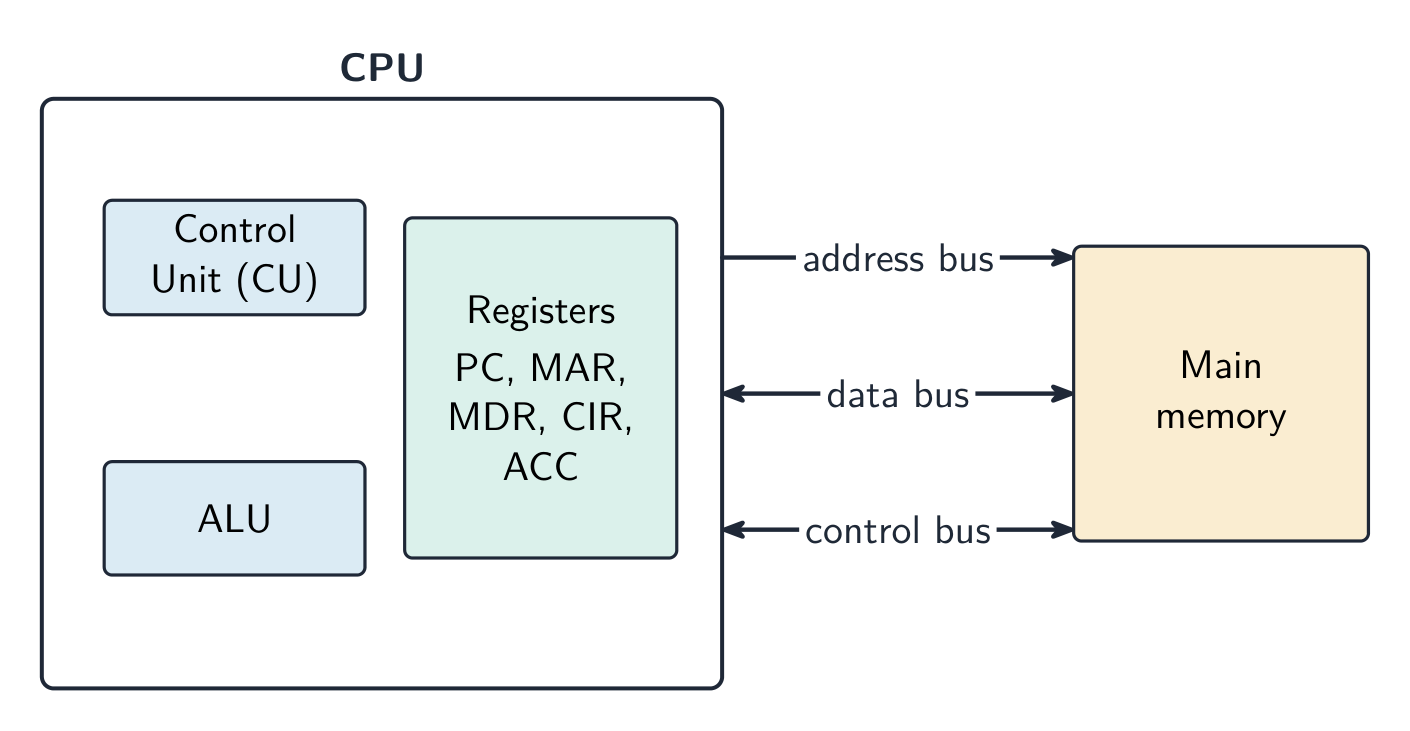
    The parts are joined by buses 总线 — sets of wires that carry information:

    • the address bus 地址总线 carries memory addresses (one direction);
    • the data bus 数据总线 carries data and instructions (both directions);
    • the control bus 控制总线 carries control signals.

    Special registers

    These registers are used during the fetch–execute cycle.

    Register Purpose
    program counter 程序计数器 (PC) holds the address of the next instruction
    memory address register 内存地址寄存器 (MAR) holds the address to read from or write to
    memory data register 内存数据寄存器 (MDR) holds the data or instruction just fetched
    current instruction register 当前指令寄存器 (CIR) holds the instruction now being carried out
    accumulator 累加器 (ACC) holds the result of the ALU's calculations

    The fetch–execute cycle

    The fetch–execute cycle 取指执行周期 has three stages, repeated again and again:

    1. Fetch — the instruction is copied from memory 内存 into the CPU (using the PC, MAR and MDR). The PC then increases by 1.
    2. Decode — the control unit works out what the instruction means.
    3. Execute — the instruction is carried out (the ALU may do a calculation, with the result going to the accumulator).

    Cache memory

    Cache 高速缓存 is a small amount of very fast memory inside or close to the CPU. It stores data and instructions that the CPU uses often. The CPU can read from cache much faster than from main memory, so the computer runs faster.

    What affects CPU performance

    Feature Effect
    number of cores 核心 each core can run instructions on its own, so more cores can do more work at the same time
    cache size a larger cache holds more data ready for the CPU, so it waits less
    clock speed 时钟速度 the number of cycles per second; a higher clock speed runs more instructions per second

    Worked example. Two computers are identical except that A has a 3.0 GHz single-core CPU with 2 MB of cache, and B has a 2.4 GHz quad-core CPU with 8 MB of cache. Which is better for video editing, and why? Video editing splits into many tasks that can run at the same time, so B's four cores can process several streams in parallel while A can only work on one at a time. B's larger cache also keeps more frequently used data close to the CPU, so it has to fetch from RAM less often. B is the better choice, even though A has the higher clock speed. Never answer on clock speed alone: weigh cores, cache and clock speed together, and tie each one to the job being done.

    Embedded systems

    An embedded system 嵌入式系统 is a small computer built inside a larger device to do one fixed job. It is dedicated to that task, is usually small and low-cost, and has no general operating system. Examples: a washing machine, a microwave, a set-top box.

    ไทย
    วัฏจักร fetching-decoding-executing

    หน่วยประมวลผลกลาง (CPU) คือส่วนของคอมพิวเตอร์ที่ประมวลผลข้อมูลและดำเนินการตาม คำสั่ง โดยจะทำงานโปรแกรมด้วยการซ้ำวงจรนั้นหลายล้านครั้งต่อวินาที

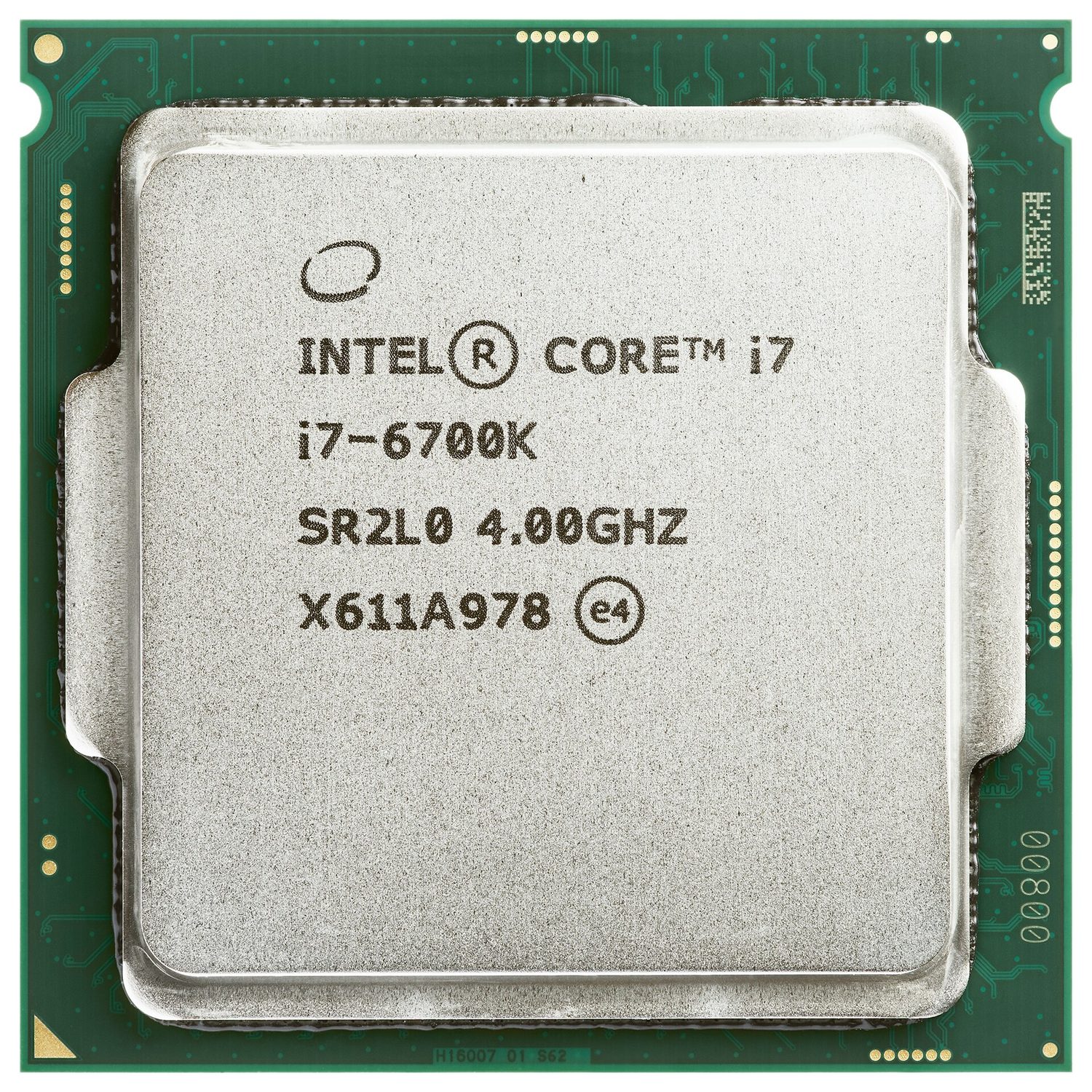
    ชิปคอมพิวเตอร์สี่เหลี่ยมที่มีด้านบนเป็นโลหะเงางามและมีชื่อรุ่นพิมพ์อยู่บนมัน
    หน่วยประมวลผลกลาง (CPU): ชิปที่ทำหน้าที่ประมวลผลข้อมูลและรันคำสั่ง

    ส่วนประกอบของ CPU

    ส่วน ทำหน้าที่อะไร
    หน่วยคำนวณตรรกะ (ALU) ทำการคำนวณ (บวก, ลบ) และการดำเนินการทางตรรกะ (เปรียบเทียบ)
    หน่วยควบคุม (CU) ส่งสัญญาณควบคุมเพื่อจัดการส่วนต่างๆ ทั้งหมดและบอกให้ทำสิ่งที่กำหนด
    รีจิสเตอร์ ที่เก็บข้อมูลขนาดเล็กมากและเร็วมาก ซึ่งสามารถเก็บข้อมูลได้เพียงหนึ่งชิ้นในแต่ละครั้ง

    ส่วนประกอบเหล่านี้เชื่อมต่อกันด้วย บัส — กลุ่มสายไฟที่ใช้ส่งข้อมูล:

    • บัสที่อยู่ ส่งที่อยู่หน่วยความจำ (ทางเดียว);
    • บัสข้อมูล ส่งข้อมูลและคำสั่ง (สองทาง);
    • บัสควบคุม ส่งสัญญาณควบคุม
    แผนภาพบล็อกของ CPU ที่มีหน่วยควบคุม ALU และรีจิสเตอร์ เชื่อมต่อกับหน่วยความจำหลักผ่านบัสที่อยู่ ข้อมูล และควบคุม
    CPU มีหน่วยควบคุม ALU และรีจิสเตอร์; บัสสามเส้นเชื่อมโยงมันเข้ากับหน่วยความจำหลัก

    รีจิสเตอร์พิเศษ

    รีจิสเตอร์เหล่านี้ถูกใช้ในช่วงรอบ fetch–execute

    รีจิสเตอร์ วัตถุประสงค์
    เคาน์เตอร์โปรแกรม (PC) เก็บที่อยู่ของคำสั่งถัดไป
    รีจิสเตอร์ที่อยู่หน่วยความจำ (MAR) เก็บที่อยู่ที่จะอ่านหรือเขียนข้อมูล
    รีจิสเตอร์ข้อมูลหน่วยความจำ (MDR) เก็บข้อมูลหรือคำสั่งที่ดึงมาใหม่ล่าสุด
    รีจิสเตอร์คำสั่งปัจจุบัน (CIR) เก็บคำสั่งที่กำลังดำเนินการอยู่
    แอมพลีฟายเออร์/ตัวสะสม (ACC) เก็บผลลัพธ์จากการคำนวณของ ALU

    รอบ fetch–execute

    รอบ fetch–execute มีสามขั้นตอน ซึ่งจะถูกทำซ้ำอีกครั้งและอีกครั้ง:

    1. Fetch — คัดลอกคำสั่งจากหน่วยความจำเข้าสู่ CPU (โดยใช้ PC, MAR และ MDR) จากนั้น PC จะเพิ่มขึ้น 1
    2. Decode — หน่วยควบคุมวิเคราะห์ว่าคำสั่งนี้มีความหมายอย่างไร
    3. Execute — ดำเนินการตามคำสั่ง (ALU อาจทำการคำนวณ โดยผลลัพธ์จะถูกส่งไปยัง ACC)
    รอบ fetch-decode-execute แสดงเป็นกล่องสามกล่องที่เชื่อมต่อกันในวงกลม
    โปรเซสเซอร์จะวนซ้ำสามขั้นตอน: ดึงคำสั่ง มาถอดรหัส แล้วจึงดำเนินการตามคำสั่ง

    หน่วยความจำแคช

    แคช เป็นหน่วยความจำขนาดเล็กแต่เร็วมาก ที่อยู่ภายในหรือใกล้กับ CPU ใช้สำหรับเก็บข้อมูลที่และคำสั่งที่ CPU มักจะใช้งาน CPU สามารถอ่านข้อมูลจากแคชได้เร็วกว่าหน่วยความจำหลักมาก ทำให้คอมพิวเตอร์ทำงานได้เร็วขึ้น

    ปัจจัยที่มีผลต่อประสิทธิภาพของ CPU

    คุณสมบัติ ผลกระทบ
    จำนวน คอร์ แต่ละคอร์สามารถรันคำสั่งได้ด้วยตนเอง ดังนั้นยิ่งมีคอร์มากก็ยิ่งทำงานได้มากขึ้นในเวลาเดียวกัน
    ขนาดแคช แคชที่ใหญ่กว่าสามารถเก็บข้อมูลได้มากขึ้นพร้อมสำหรับ CPU จึงต้องรอใช้น้อยลง
    ความเร็วนาฬิกา (clock speed) จำนวนรอบต่อวินาที; ความเร็วนาฬิกาที่สูงกว่าสามารถรันคำสั่งได้มากกว่าต่อวินาที

    ตัวอย่างแบบฝึกหัด. คอมพิวเตอร์สองเครื่องเหมือนกันทุกประการยกเว้น A มี CPU แบบคอร์เดียวความเร็ว 3.0 GHz พร้อมแคช 2 MB และ B มี CPU แบบ quad-core ความเร็ว 2.4 GHz พร้อมแคช 8 MB เครื่องใดดีกว่าสำหรับการตัดต่อวิดีโอ และเพราะเหตุใด? การตัดต่อวิดีโอแบ่งออกเป็นงานย่อยจำนวนมากที่รันได้พร้อมกัน ดังนั้น สี่คอร์ ของ B สามารถประมวลผลหลายสตรีมได้แบบขนาน ในขณะที่ A ทำงานได้เพียงอย่างละหนึ่งงานเท่านั้น Additionally แคช ที่ใหญ่กว่าของ B ช่วยเก็บข้อมูลที่นิยมใช้ไว้ใกล้กับ CPU มากขึ้น ทำให้ต้องดึงข้อมูลจาก RAM น้อยลง B จึงเป็นตัวเลือกที่ดีกว่า แม้ว่าจะมีความเร็วนาฬิกาต่ำกว่า A ก็ตาม อย่าตอบโดยอ้างอิงแค่ความเร็วนาฬิกาเพียงอย่างเดียว: ให้พิจารณา คอร์, แคช และความเร็วนาฬิกา together และเชื่อมโยงแต่ละสิ่งเข้ากับงานที่ต้องทำ

    ระบบฝังตัว

    ระบบฝังตัว คือคอมพิวเตอร์ขนาดเล็กที่ถูกสร้างอยู่ในอุปกรณ์ขนาดใหญ่เพื่อทำหน้าที่เฉพาะอย่างหนึ่ง มีความ專注ต่อภารกิจนั้นๆ โดยทั่วไปจะมีขนาดเล็ก ราคาถูก และไม่มีการใช้งานระบบปฏิบัติการทั่วไป ตัวอย่าง: เครื่องซักผ้า เตาไมโครเวฟ กล่องรับสัญญาณทีวี

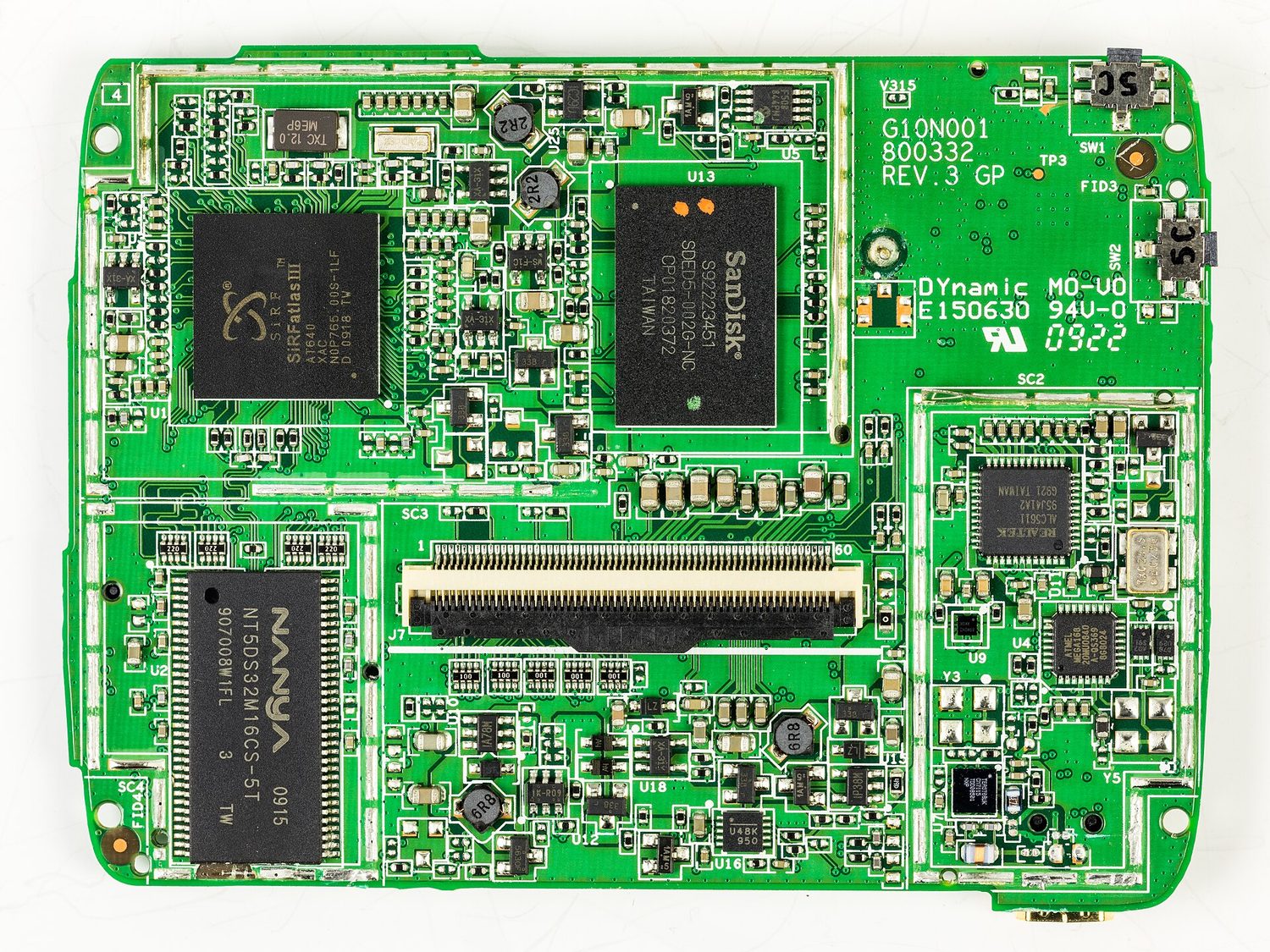
    แผงวงจรสีเขียวที่บรรจุชิป หน่วยความจำ และขั้วต่ออย่างหนาแน่น นำมาจากภายในระบบนำทาง satnav
    เมนบอร์ดภายใน satnav: ระบบฝังตัวคือคอมพิวเตอร์ขนาดเล็กรุ่นเฉพาะเช่นนี้ที่ถูกฝังอยู่ในอุปกรณ์เพื่อทำหน้าที่เฉพาะอย่างหนึ่ง
    Explore · ⁨สำรวจ⁩

    The fetch-execute cycle · ⁨รอบ fetch-execute⁩

    Tap round the loop the CPU repeats billions of times a second — fetch the instruction, decode what it means, execute it, then do it all again. · ⁨วนลูปที่ CPU ทำซ้ำหลายพันล้านครั้งต่อวินาที — ดึงคำสั่ง, ตีความความหมาย, ประมวลผล, แล้วทำทั้งหมดนี้อีกครั้ง⁩

    Vocabulary · ⁨คำศัพท์⁩ Train · ⁨ฝึกฝน⁩
    English ไทย
    embedded system/emˈbedɪd ˈsɪstəm/ ระบบฝังตัว
    Watch lesson · ⁨ดูบทเรียน⁩
    3.2

    Input devices · ⁨อุปกรณ์อินพุต⁩

    Syllabus · ⁨หลักสูตร⁩
    English
    Candidates should be able to: Notes and guidance
    1 Understand what is meant by an input device and why it is required • Including: – barcode scanner – digital camera – keyboard – microphone – optical mouse – QR code scanner – touch screen (resistive, capacitive and infra-red) – two-dimensional (2D) and three-dimensional (3D) scanners
    2 Understand what is meant by an output device and why it is required • Including: – actuator – digital light processing (DLP) projector – inkjet printer – laser printer – light emitting diode (LED) screen – liquid crystal display (LCD) projector – liquid crystal display (LCD) screen – speaker – 3D printer
    3 (a) Understand what is meant by a sensor and the purposes of sensors • Limited to: – acoustic – accelerometer – flow – gas – humidity – infra-red – level – light – magnetic field – moisture – pH – pressure – proximity – temperature
    (b) Identify the type of data captured by each sensor and understand when each sensor would be used, including selecting the most suitable sensor for a given context
    ไทย
    ผู้เข้าสอบควรสามารถ: หมายเหตุและคำแนะนำ
    1 เข้าใจความหมายของ อุปกรณ์อินพุต และเหตุผลที่ต้องมี • รวมถึง: – เครื่องสแกนบาร์โค้ด – กล้องดิจิทัล – คีย์บอร์ด – ไมโครโฟน – เมาส์เชิงแสง – เครื่องสแกน QR Code – จอสัมผัส (แบบต้านทาน, แบบจุลประจุ และอินฟราเรด) – เครื่องสแกนสองมิติ (2D) และสามมิติ (3D)
    2 เข้าใจความหมายของ อุปกรณ์เอาต์พุต และเหตุผลที่ต้องมี • รวมถึง: – แอค추เอเตอร์ – โปรเจคเตอร์ DLP – เครื่องพิมพ์หมึกพ่น – เครื่องพิมพ์เลเซอร์ – หน้าจอ LED – โปรเจคเตอร์ LCD – หน้าจอ LCD – ลำโพง – เครื่องพิมพ์ 3 มิติ
    3 (a) เข้าใจความหมายของ เซนเซอร์ และวัตถุประสงค์ของเซนเซอร์ • จำกัดอยู่เพียง: – เสียง – เอคเซลิโรมิเตอร์ – กระแสไหล – ก๊าซ – ความชื้น – อินฟราเรด – ระดับ – แสง – สนามแม่เหล็ก – ความชุ่มชื้น – ค่า pH – ความดัน – ระยะใกล้ – อุณหภูมิ
    (b) ระบุประเภทข้อมูลที่จับได้โดยเซนเซอร์แต่ละชนิด และเข้าใจเวลาที่เหมาะสมในการใช้เซนเซอร์แต่ละชนิด รวมถึงการเลือกเซนเซอร์ที่เหมาะสมที่สุดสำหรับสถานการณ์ที่กำหนด

    Source: Cambridge International syllabus · ⁨แหล่งที่มา: หลักสูตร Cambridge International⁩

    English

    An input device sends data into the computer.

    Device How it works
    barcode scanner 条形码扫描器 shines light at the bars and reads the pattern reflected back
    QR code scanner 二维码扫描器 a camera reads a square pattern of black-and-white blocks
    keyboard pressing a key sends a code for that character
    optical mouse 光电鼠标 a light and a sensor track movement across a surface
    microphone turns sound waves into an electrical signal
    digital camera a lens focuses light onto a sensor that records pixels
    sensors 传感器 measure a physical quantity (such as temperature or light) and send it as data
    touch screen 触摸屏 detects where your finger touches the screen

    A touch screen can work in three ways:

    • resistive 电阻式 — two layers are pressed together where you touch;
    • capacitive 电容式 — it senses the tiny electric charge of your finger;
    • infrared 红外线 — your finger breaks a grid of light beams.
    ไทย

    อุปกรณ์อินพุตส่งข้อมูล เข้า สู่คอมพิวเตอร์

    อุปกรณ์ วิธีทำงาน
    เครื่องสแกนบาร์โค้ด ส่องแสงไปที่แถบและอ่านรูปแบบที่สะท้อนกลับมา
    เครื่องสแกน QR code กล้องอ่านรูปแบบสี่เหลี่ยมของบล็อกสีดำ-ขาว
    คีย์บอร์ด การกดปุ่มจะส่งรหัสสำหรับตัวอักษรนั้น
    เมาส์ออปติคอล ใช้แสงและเซนเซอร์ติดตามการเคลื่อนที่บนพื้นผิว
    ไมค์ แปลงคลื่นเสียงให้เป็นสัญญาณไฟฟ้า
    กล้องดิจิทัล เลนส์รวมแสง onto เซนเซอร์ที่บันทึกพิกเซล
    เซนเซอร์ วัดปริมาณทางกายภาพ (เช่น อุณหภูมิหรือแสง) และส่งค่าเหล่านั้นเป็นข้อมูล
    จอสัมผัส ตรวจจับตำแหน่งที่นิ้วสัมผัสหน้าจอ
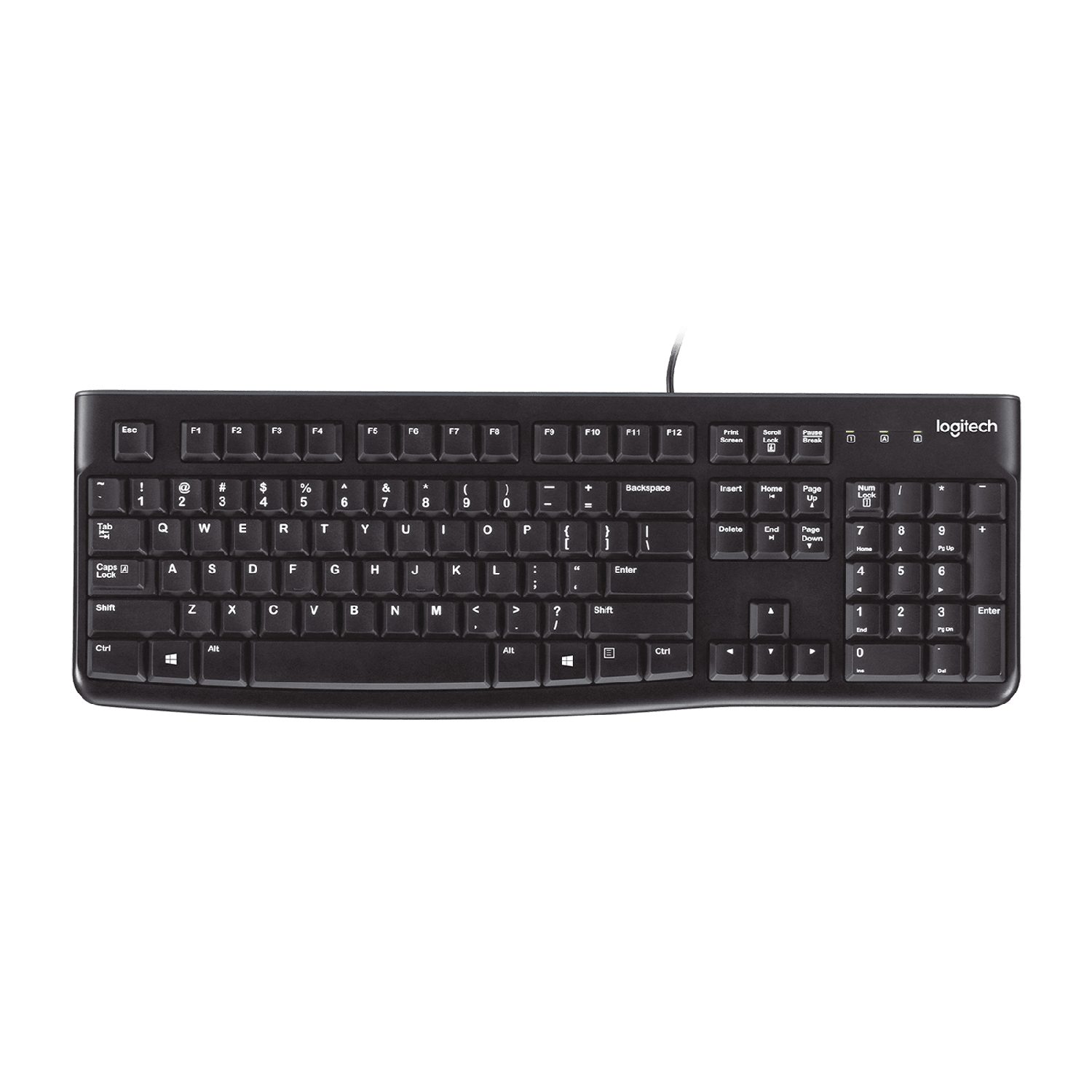
    คีย์บอร์ดคอมพิวเตอร์สีดำแบบ close-up ที่มีปุ่มตัวอักษร QWERTY
    คีย์บอร์ด: ทุกครั้งที่กดปุ่มจะส่งรหัสสำหรับตัวอักษรนั้น
    เมาส์ออปติคอลสีขาวบนโต๊ะ มีแสงออปติคอลส่องอยู่ด้านล่าง
    เมาส์ออปติคอล: แสงและเซนเซอร์ติดตามการเคลื่อนที่บนโต๊ะ
    สแกนเนอร์ทรงกล่องแบนสีขาว ฝาปิดที่ยกขึ้นเพื่อสแกนเอกสาร
    สแกนเนอร์แบบแบน: ส่องแสงข้ามหน้ากระดาษเพื่อคัดลอกเข้าสู่คอมพิวเตอร์
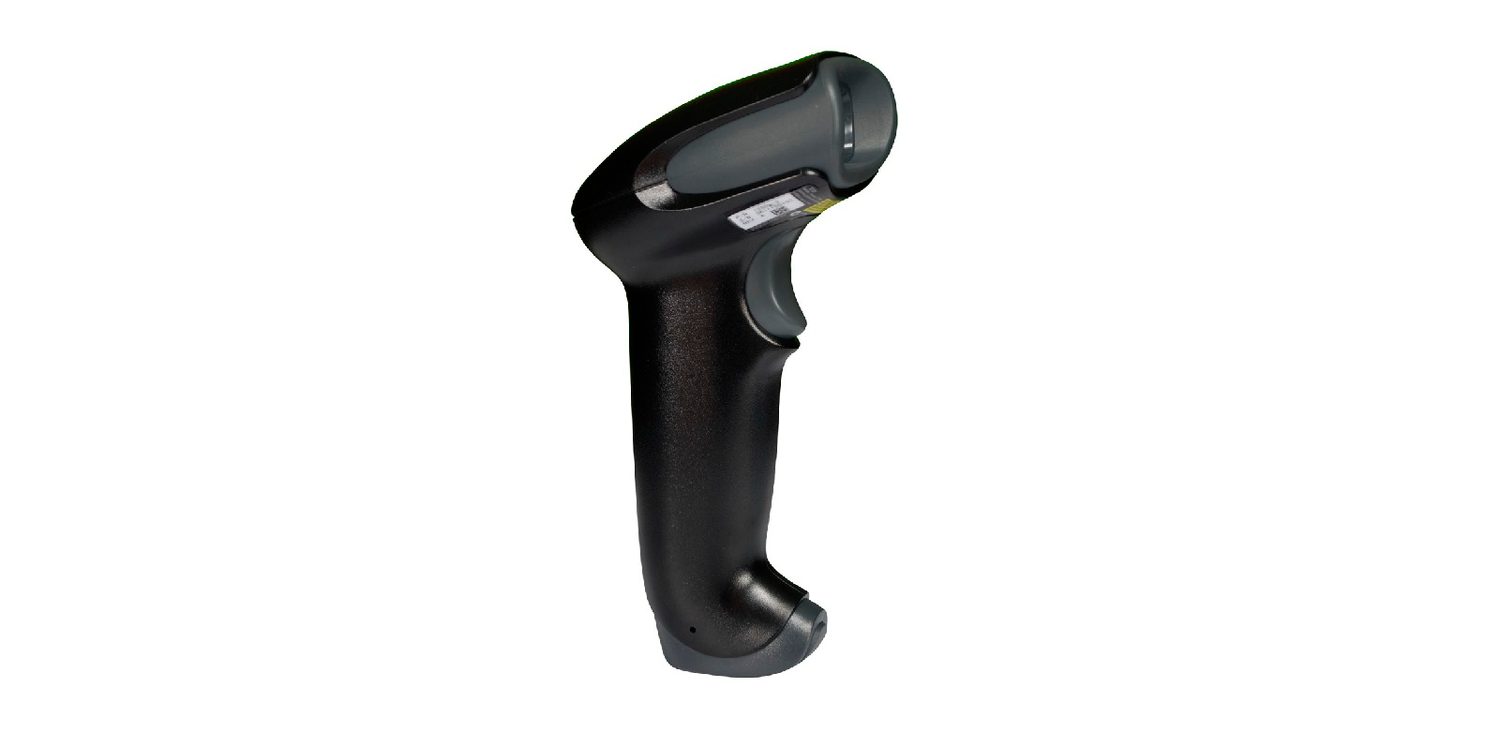
    สแกนเนอร์มือถือตั้งอยู่บนฐาน เชื่อมต่อกับคอมพิวเตอร์ด้วยสาย USB
    เครื่องสแกนบาร์โค้ดอ่านรูปแบบแถบและส่งข้อมูลนั้นไปยังคอมพิวเตอร์
    ด้านหน้าของกล้องดิจิทัลขนาดเล็กสีแดง แสดงเลนส์และแฟลช
    กล้องดิจิทัล: เลนส์รวมแสง onto เซนเซอร์ที่บันทึกพิกเซล
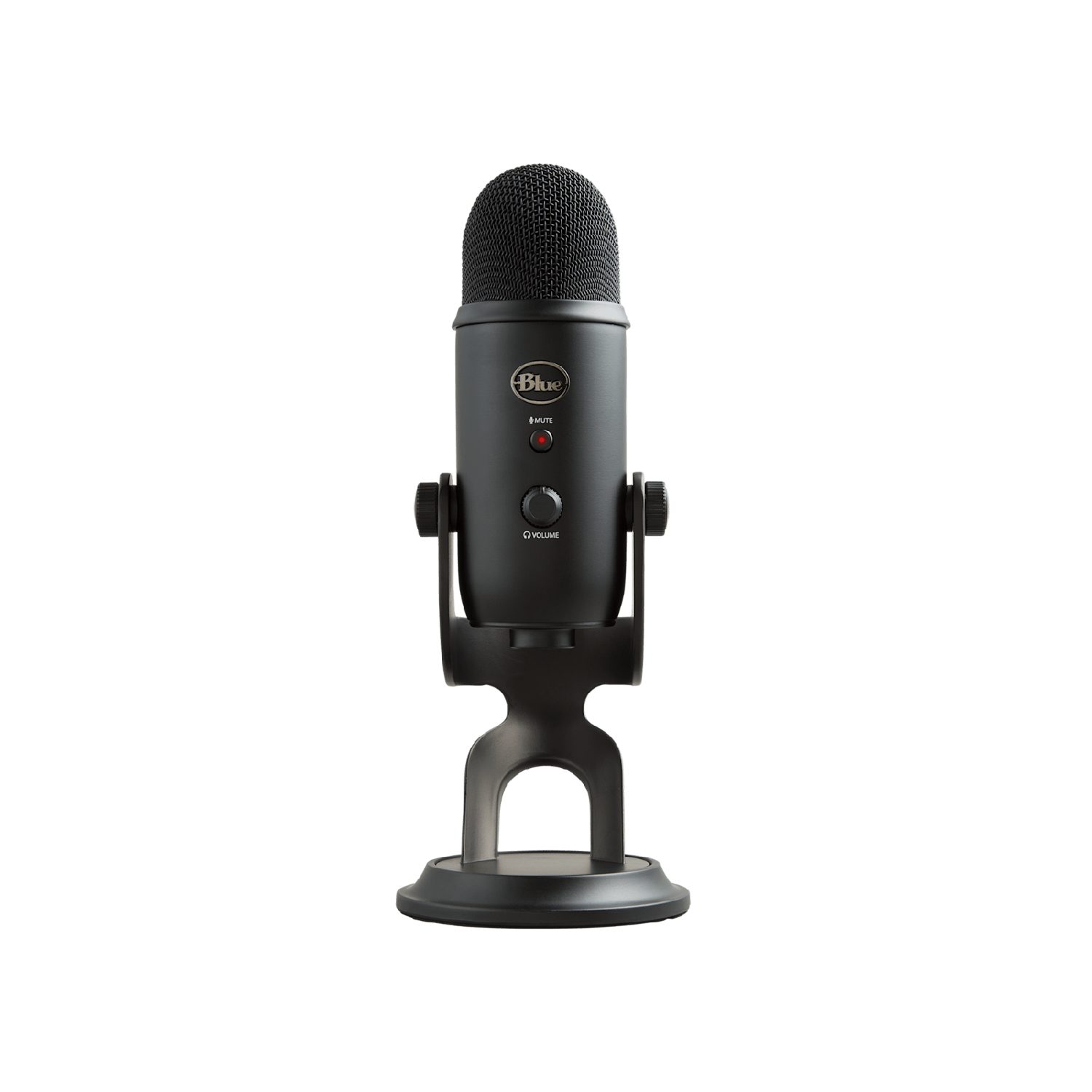
    ไมโครโฟนมือถือที่มีหัวตาข่ายโลหะทรงกลม
    ไมค์แปลงคลื่นเสียงให้เป็นสัญญาณไฟฟ้า
    เซ็นเซอร์วัดอุณหภูมิสีน้ำเงินและดำขนาดเล็กบนแผงวงจรขนาดเล็กที่มีขาสองขา
    เซ็นเซอร์วัดปริมาณทางกายภาพ (ในที่นี้คืออุณหภูมิ) และส่งค่า tersebutเป็นข้อมูล

    หน้าจอสัมผัสสามารถทำงานได้สามรูปแบบ:

    • แบบต้านทาน — มีชั้นสองชั้นที่กดเข้าหากันบริเวณที่คุณสัมผัส;
    • แบบความจุไฟฟ้า —它 detects the微小 electric charge of your finger;
    • อินฟราเรด — นิ้วของคุณจะตัดผ่านกริดของลำแสง
    นิ้วมือสัมผัสหน้าจอสมาร์ทโฟนเพื่อเลื่อนหน้าเว็บ
    หน้าจอสัมผัสตรวจจับตำแหน่งที่คุณสัมผัสนั้น
    Explore · ⁨สำรวจ⁩

    Device and storage lab · ⁨ห้องปฏิบัติการอุปกรณ์และจัดเก็บข้อมูล⁩

    Classify computing examples by what job they do in a system. · ⁨จำแนกตัวอย่างงานคอมพิวเตอร์ตามหน้าที่它们在ระบบ⁩

    Vocabulary · ⁨คำศัพท์⁩ Train · ⁨ฝึกฝน⁩
    English ไทย
    barcode scanner/ˈbɑːkəʊd ˈskænə/ เครื่องสแกนบาร์โค้ด
    QR code scanner/ˌkjuː ˈɑː kəʊd ˈskænə/ เครื่องสแกน QR โค้ด
    sensors/ˈsensəz/ เซนเซอร์
    touch screen/tʌtʃ skriːn/ หน้าจอสัมผัส
    resistive/rɪˈzɪstɪv/ แบบต้านทาน
    capacitive/kəˈpæsɪtɪv/ แบบจุลไฟฟ้า
    infrared/ˌɪnfrəˈred/ อินฟราเรด
    3.2

    Output devices · ⁨อุปกรณ์เอาต์พุต⁩

    English

    An output device sends data out of the computer to the user.

    Device How it works
    actuator 执行器 turns an electrical signal into movement (e.g. a motor or valve)
    LCD/LED screen shows images using a grid of tiny coloured dots
    projector 投影仪 shines an enlarged image onto a wall or screen
    inkjet printer 喷墨打印机 sprays tiny drops of ink onto paper
    laser printer 激光打印机 uses a laser and powder (toner) fixed onto paper by heat
    3D printer builds a solid object layer by layer
    speaker 扬声器 turns an electrical signal into sound
    ไทย

    อุปกรณ์เอาต์พุตส่งข้อมูล ออกจาก คอมพิวเตอร์ไปยังผู้ใช้

    อุปกรณ์ วิธีทำงาน
    แอก추เอเตอร์ เปลี่ยนสัญญาณไฟฟ้าเป็นการเคลื่อนไหว (เช่น มอเตอร์หรือวาล์ว)
    หน้าจอ LCD/LED แสดงภาพโดยใช้ตารางจุดสีเล็กๆ
    โปรเจคเตอร์ ส่องภาพขยายลงบนผนังหรือจอรับภาพ
    เครื่องพิมพ์หมึกพ่น พ่นหยดหมึกขนาดเล็กลงบนกระดาษ
    เครื่องพิมพ์เลเซอร์ ใช้เลเซอร์และผงหมึก (โทเนอร์) ที่ยึดติดกับกระดาษด้วยความร้อน
    เครื่องพิมพ์ 3 มิติ สร้างวัตถุแข็งชั้นต่อชั้น
    ลำโพง เปลี่ยนสัญญาณไฟฟ้าเป็นเสียง
    เครื่องพิมพ์หมึกพ่นตั้งโต๊ะที่มีถาดกระดาษเปิดอยู่ด้านบน
    เครื่องพิมพ์อินค์เจ็ทพ่นหมึกหยดเล็กๆ ลงบนกระดาษ
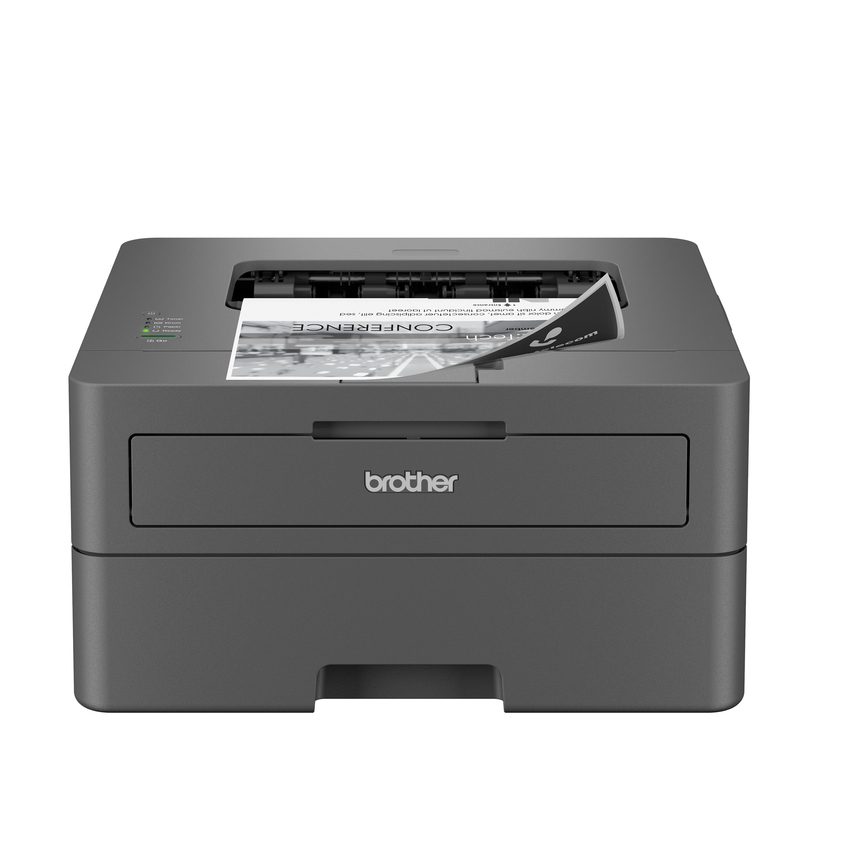
    เครื่องพิมพ์เลเซอร์ตั้งโต๊ะสีขาว-เทาที่มีถาดกระดาษกางออก
    เครื่องพิมพ์เลเซอร์ใช้ลำแสงเลเซอร์และผงหมึก (โทนเนอร์) ที่ถูกยึดติดกับกระดาษด้วยความร้อน
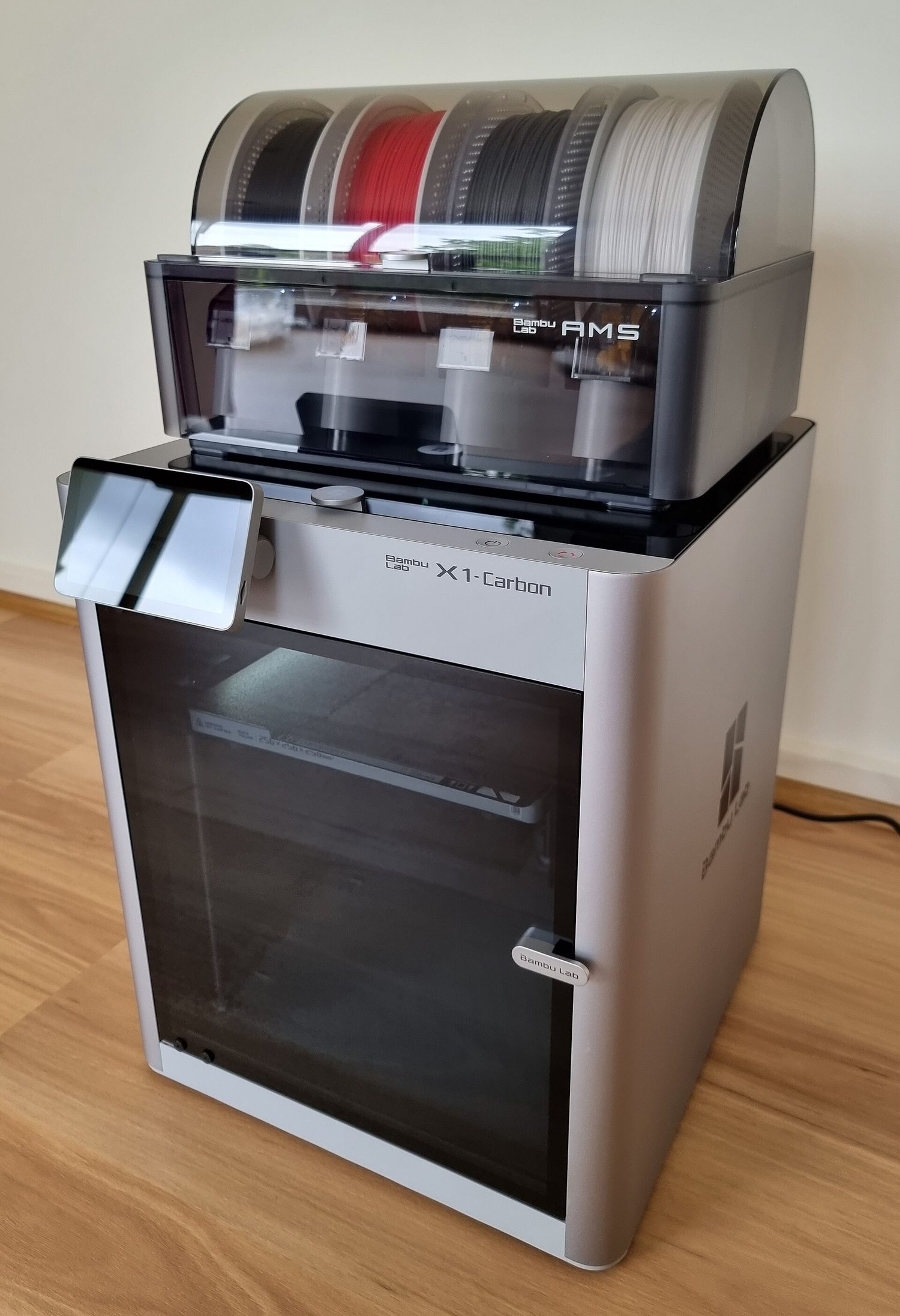
    เครื่องพิมพ์ 3 มิติ: โครงโลหะสีดำที่ยึดฐานพิมพ์แบนและหัวพิมพ์เคลื่อนที่ได้
    เครื่องพิมพ์ 3 มิติสร้างวัตถุแข็งชั้นต่อชั้น
    จอมอนิเตอร์คอมพิวเตอร์จอแบนกว้างตั้งอยู่บนฐานกลม
    จอมอนิเตอร์ LCD/LED แสดงภาพโดยใช้ตารางจุดสีเล็กๆ
    ลำโพงคอมพิวเตอร์สีดำคู่เล็ก ๆ บนโต๊ะทำงาน
    ลำโพงเปลี่ยนสัญญาณไฟฟ้าเป็นเสียง
    หูฟังแบบครอบหูสีฟ้าคู่
    หูฟังเปลี่ยนสัญญาณไฟฟ้าเป็นเสียงสำหรับผู้ฟังคนเดียว
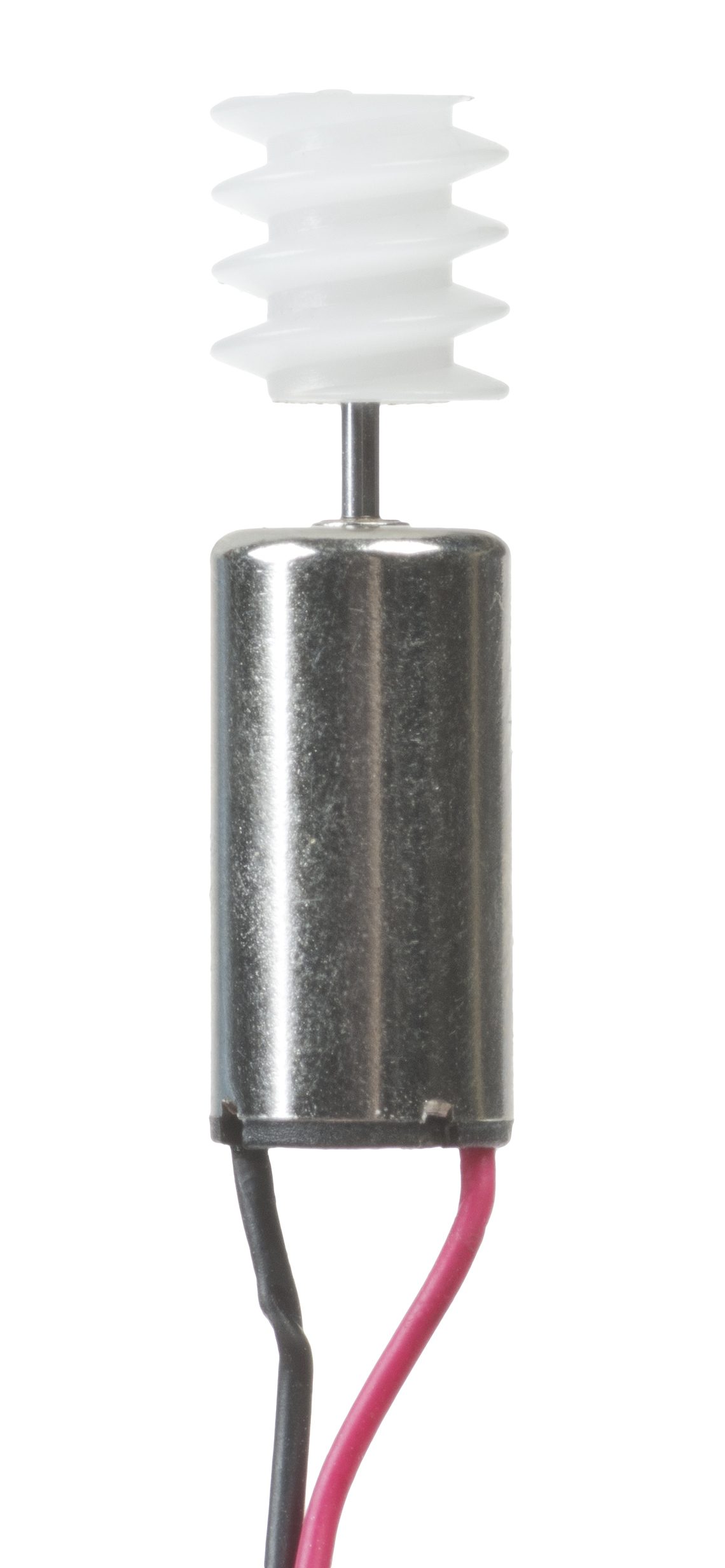
    มอเตอร์ไฟฟ้าหลายขนาดวางข้างแบตเตอรี่ 9 โวลต์เพื่อเปรียบเทียบขนาด
    แอก추เอเตอร์อย่างมอเตอร์เปลี่ยนสัญญาณไฟฟ้าเป็นการเคลื่อนไหว
    Vocabulary · ⁨คำศัพท์⁩ Train · ⁨ฝึกฝน⁩
    English ไทย
    actuator/ˈæktʃuːeɪtə/ actuator
    projector/prəˈdʒektə/ โปรเจคเตอร์
    inkjet printer/ɪŋkˈdʒet ˈprɪntə/ เครื่องพิมพ์อินค์เจ็ท
    laser printer/ˈleɪzə ˈprɪntə/ เครื่องพิมพ์เลเซอร์
    speaker/ˈspiːkə/ ลำโพง
    Primary storage/ˈpraɪməri ˈstɔːrɪdʒ/ หน่วยเก็บข้อมูลหลัก
    random access memory/ˈrændəm ˈækses ˈmeməri/ หน่วยความจำเข้าถึงแบบสุ่ม
    read only memory/riːd ˈəʊnli ˈmeməri/ หน่วยความจำอ่านได้เพียงอย่างเดียว
    volatile/ˈvɒlətaɪl/ ไม่ถาวร ( volatile )
    non-volatile/nɒn ˈvɒlətaɪl/ ไม่หาย ( non-volatile )
    Secondary storage/ˈsekəndəri ˈstɔːrɪdʒ/ การจัดเก็บรอง
    magnetic storage/mæɡˈnetɪk ˈstɔːrɪdʒ/ ที่เก็บข้อมูลแม่เหล็ก
    optical storage/ˈɒptɪkl ˈstɔːrɪdʒ/ ที่เก็บข้อมูลแสง
    solid state storage/ˈsɒlɪd steɪt ˈstɔːrɪdʒ/ ที่เก็บข้อมูลแบบแข็ง
    3.3

    Primary storage: RAM and ROM · ⁨หน่วยความจำหลัก: RAM และ ROM⁩

    Syllabus · ⁨หลักสูตร⁩
    English
    Candidates should be able to: Notes and guidance
    1 Understand what is meant by primary storage • Primary storage is directly accessed by the CPU • Including the role of: – random access memory (RAM) – read only memory (ROM) • Including why a computer needs both RAM and ROM, and the difference between them
    2 Understand what is meant by secondary storage • Secondary storage is not directly accessed by the CPU and is necessary for more permanent storage of data
    3 Describe the operation of magnetic, optical and solid-state (flash memory) storage and give examples of each • Magnetic storage uses platters which are divided into tracks and sectors. Data is read and written using electromagnets. Including hard disk drive (HDD) • Optical storage uses lasers to create and read pits and lands. Including: CD, DVD and Blu-ray • Solid-state (flash memory) uses NAND or NOR technology. Transistors are used as control gates and floating gates. Including: solid-state drive (SSD), SD card and USB drive
    4 Describe what is meant by virtual memory, how it is created and used and why it is necessary • Pages of data are transferred between RAM and virtual memory when needed
    5 Understand what is meant by cloud storage • Cloud storage can be accessed remotely in comparison to storing data locally
    6 Explain the advantages and disadvantages of storing data on the cloud in comparison to storing it locally • Physical servers and storage are needed to store data in cloud storage
    ไทย
    ผู้เข้าสอบควรสามารถ: หมายเหตุและคำแนะนำ
    1 เข้าใจความหมายของ หน่วยความจำหลัก • หน่วยความจำหลักถูกเข้าถึงโดยตรงโดย CPU • รวมถึงบทบาทของ: – หน่วยความจำเข้าถึงแบบสุ่ม (RAM) – หน่วยความจำอ่านเพียงอย่างเดียว (ROM) • รวมถึงเหตุผลที่คอมพิวเตอร์จำเป็นต้องมีทั้ง RAM และ ROM และความแตกต่างระหว่างทั้งสอง
    2 เข้าใจความหมายของ หน่วยความจำรอง • หน่วยความจำรองไม่ถูกเข้าถึงโดยตรงโดย CPU และเป็นสิ่งจำเป็นสำหรับการจัดเก็บข้อมูลอย่างถาวรมากขึ้น
    3 อธิบายการทำงานของสื่อจัดเก็บข้อมูลแบบ แม่เหล็ก, แสง และ โซลิดสเตต (แฟลชเมมโมรี่) พร้อมยกตัวอย่างของแต่ละชนิด • สื่อจัดเก็บข้อมูลแบบแม่เหล็กใช้จานดิสก์ which แบ่งเป็นเทร็กและเซกเตอร์ ข้อมูลถูกอ่านและเขียนด้วยแม่เหล็กไฟฟ้า รวมถึงฮาร์ดไดรฟ์ (HDD) • สื่อจัดเก็บข้อมูลแบบแสงใช้เลเซอร์ในการสร้างและอ่านพิตส์และแลนด์ รวมถึง: CD, DVD และ Blu-ray • โซลิดสเตต (แฟลชเมมโมรี่) ใช้เทคโนโลยี NAND หรือ NOR ทรานซิสเตอร์ถูกใช้เป็นเกตควบคุมและเกตลอย รวมถึง: SSD, การ์ด SD และแฟลชไดรฟ์
    4 อธิบายความหมายของ หน่วยความจำเสมือน (virtual memory), วิธีสร้างและการใช้งาน และเหตุผลที่จำเป็น • หน้าของข้อมูลจะถูกถ่ายโอนระหว่าง RAM และหน่วยความจำเสมือนเมื่อต้องการ
    5 เข้าใจความหมายของ พื้นที่จัดเก็บบนคลาวด์ • พื้นที่จัดเก็บบนคลาวด์สามารถเข้าถึงได้จากทางไกล เมื่อเทียบกับการจัดเก็บข้อมูลในพื้นที่
    6 อธิบายข้อดีและข้อเสียของการจัดเก็บข้อมูลบนคลาวด์เมื่อเทียบกับการจัดเก็บในพื้นที่ • จำเป็นต้องมีเซิร์ฟเวอร์และอุปกรณ์จัดเก็บข้อมูลทางกายภาพเพื่อจัดเก็บข้อมูลบนคลาวด์

    Source: Cambridge International syllabus · ⁨แหล่งที่มา: หลักสูตร Cambridge International⁩

    English

    Primary storage 主存储器 is memory the CPU can use directly. There are two kinds.

    RAM ROM
    Full name random access memory 随机存取存储器 read only memory 只读存储器
    Read/write read and write read only
    Keeps data without power? no — it is volatile 易失性 yes — it is non-volatile 非易失性
    Holds programs and data in use now start-up instructions (how to boot the computer)

    Both are needed: ROM tells the computer how to start, then RAM holds the programs you run.

    ไทย

    หน่วยความจำหลัก คือหน่วยความจำที่ CPU สามารถใช้งานโดยตรงได้ มีสองประเภท

    RAM: ความจำแบบผันแปร, เปลี่ยนแปลงได้, เก็บโปรแกรมที่กำลังทำงาน; ROM: ความจำถาวร, ไม่เปลี่ยนแปลง, เก็บคำสั่งสตาร์ท
    RAM เป็นความจำแบบผันแปรและเก็บโปรแกรมที่กำลังทำงาน; ROM เป็นความจำถาวรและอ่านได้เพียงอย่างเดียว
    RAM ROM
    ชื่อเต็ม หน่วยความจำเข้าถึงสุ่ม หน่วยความจำอ่านได้เพียงอย่างเดียว
    อ่าน/เขียน อ่านและเขียน อ่านได้เพียงอย่างเดียว
    เก็บข้อมูลเมื่อไม่มีไฟ? ไม่ใช่ — เป็น ความจำแบบผันแปร ใช่ — เป็น ความจำถาวร
    เก็บไว้ โปรแกรมและข้อมูลที่ใช้ในปัจจุบัน คำสั่งสตาร์ท (วิธีการบูทคอมพิวเตอร์)

    ทั้งสองจำเป็นต้องใช้: ROM บอกให้คอมพิวเตอร์เริ่มทำงาน จากนั้น RAM จะเก็บโปรแกรมที่คุณใช้งาน

    โมดูล RAM สีเขียวยาวบางๆ ที่มีชิปหน่วยความจำสีดำเรียงกันและขั้วทองคำด้านหนึ่ง
    โมดูล RAM (หน่วยความจำเข้าถึงสุ่ม): เก็บโปรแกรมและข้อมูลที่ใช้ในปัจจุบัน
    3.3

    Secondary storage · ⁨หน่วยความจำรอง⁩

    English

    Secondary storage 辅助存储器 keeps data permanently, even when the power is off. It is non-volatile and is used for long-term storage. There are three types.

    Type How it stores data Examples
    magnetic storage 磁存储 data is stored as magnetised spots on spinning disks hard disk drive (HDD), magnetic tape
    optical storage 光存储 data is stored as marks read by a laser CD, DVD, Blu-ray
    solid state storage 固态存储 data is stored in flash memory 闪存, with no moving parts SSD, USB flash drive, memory card
    ไทย

    หน่วยความจำรอง เก็บข้อมูลไว้อย่างถาวร แม้เมื่อปิดเครื่องก็ตาม เป็นความจำถาวรและใช้สำหรับการจัดเก็บระยะยาว มีสามประเภท

    ประเภท วิธีการเก็บข้อมูล ตัวอย่าง
    ความจำแม่เหล็ก ข้อมูลถูกเก็บในรูปจุดแม่เหล็กบนดิสก์หมุน ฮาร์ดดิสก์ไดรฟ์ (HDD), เทปแม่เหล็ก
    ความจำออปติคอล ข้อมูลถูกเก็บในรูปเครื่องหมายที่อ่านด้วยเลเซอร์ CD, DVD, Blu-ray
    ความจำโซลิดสเตต ข้อมูลถูกเก็บใน แฟลชเมมโมรี่, ไม่มีชิ้นส่วนเคลื่อนที่ SSD, แฟลชไดรฟ์ USB, การ์ดหน่วยความจำ
    ภายในฮาร์ดดิสก์ไดรฟ์ที่เปิดออก แสดงดิสก์วงกลมสีเงิน (พลัตเตอร์) และแขนอ่าน/เขียน resting on it
    ภายในฮาร์ดดิสก์ไดรฟ์ (HDD): จดหมายที่เงางามหมุนอยู่และหัวอ่านอ่านข้อมูลที่ถูกแม่เหล็ก化了
    กล่องเทปแม่เหล็กสี่เหลี่ยมสี่กล่อง แต่ละกล่องมีม้วนเทปแม่เหล็กบางๆ อยู่ภายใน
    เทปแม่เหล็กเก็บข้อมูลบนแถบแม่เหล็กยาว; มีราคาถูกสำหรับการสำรองข้อมูลขนาดใหญ่
    แผ่นดิสก์วงกลมเงางามสะท้อนแสงสีรุ้งจากพื้นผิวข้อมูล
    แผ่นดิสก์ออปติคอลเช่น CD หรือ DVD: เลเซอร์อ่านเครื่องหมายบนพื้นผิวเงางาม
    SSD Samsung ขนาด 2.5 นิ้ว กล่องโลหะสีเทาแบนไร้ชิ้นส่วนเคลื่อนที่ที่มองเห็นได้
    ไดรฟ์สถานะแข็ง (SSD) จัดเก็บข้อมูลในชิปแฟลชเมมโมรี่และไม่มีส่วนเคลื่อนที่
    แฟลชไดรฟ์ USB สีขาวขนาดเล็กพร้อมห่วงสีแดง ระบุขนาด 32 GB
    แฟลชไดรฟ์ USB เก็บข้อมูลใน Flash memory และไม่มีชิ้นส่วนเคลื่อนที่
    พีระมิดที่มีรีจิสเตอร์อยู่ด้านบน ตามด้วยแคช, RAM, และหน่วยความจำรองอยู่ที่ฐาน พร้อมลูกศรชี้จากเร็ว-เล็ก ไปยังช้า-ใหญ่
    หน่วยความจำมีลำดับชั้น: รีจิสเตอร์และแคชเร็วที่สุดแต่เล็กที่สุด; หน่วยความจำรองช้าที่สุดแต่ใหญ่ที่สุด
    Explore · ⁨สำรวจ⁩

    Device and storage lab · ⁨ห้องปฏิบัติการอุปกรณ์และจัดเก็บข้อมูล⁩

    Classify computing examples by what job they do in a system. · ⁨จำแนกตัวอย่างงานคอมพิวเตอร์ตามหน้าที่它们在ระบบ⁩

    Vocabulary · ⁨คำศัพท์⁩ Train · ⁨ฝึกฝน⁩
    English ไทย
    flash memory/flæʃ ˈmeməri/ แฟลชเมมโมรี่
    memory/ˈmeməri/ memory
    optical mouse/ˈɒptɪkl maʊs/ เมาส์ออปติคอล
    3.3

    Virtual memory · ⁨ความจำเสมือน⁩

    English

    When the RAM becomes full, the computer can use part of the secondary storage as extra, pretend RAM. This is called virtual memory 虚拟内存.

    Data that is not needed right now is moved out of RAM onto the disk, which frees space in RAM for other programs. This lets you run more programs than the RAM alone could hold. It is slower, because secondary storage is much slower than RAM.

    ไทย

    เมื่อ RAM เต็ม คอมพิวเตอร์สามารถใช้ส่วนหนึ่งของหน่วยความจำรองเป็น RAM จำลองเพิ่มได้ สิ่งนี้เรียกว่า ความจำเสมือน

    ข้อมูลที่จำเป็นไม่ตอนนี้จะถูกย้ายออกจาก RAM ลงบนดิสก์ เพื่อปล่อยพื้นที่ใน RAM สำหรับโปรแกรมอื่น ทำให้คุณสามารถรันโปรแกรมได้มากกว่าที่ RAM เพียงอย่างเดียวจะรองรับได้ ซึ่งช้ากว่า เพราะหน่วยความจำรองช้ากว่า RAM มาก

    RAM เก็บโปรแกรมสองตัวที่กำลังทำงานและช่องว่างที่ถูกปล่อย出来, พร้อมลูกศรย้ายโปรแกรมที่ไม่ได้ใช้งานออกไปยังดิสก์
    เมื่อ RAM เต็ม ข้อมูลที่ไม่ได้ใช้งานจะถูกย้ายไปดิสก์เพื่อปล่อย RAM — ช้ากว่า แต่ช่วยให้รันโปรแกรมได้มากขึ้น
    Vocabulary · ⁨คำศัพท์⁩ Train · ⁨ฝึกฝน⁩
    English ไทย
    virtual memory/ˈvɜːtʃuːəl ˈmeməri/ หน่วยความจำเสมือน
    Cloud storage/klaʊd ˈstɔːrɪdʒ/ คลาวด์สตอเรจ
    network interface card/ˈnetwɜːk ˈɪntəfeɪs kɑːd/ การ์ดอินเทอร์เฟซเครือข่าย
    3.3

    Cloud storage · ⁨การจัดเก็บข้อมูลบนคลาวด์⁩

    Syllabus · ⁨หลักสูตร⁩
    English
    Candidates should be able to: Notes and guidance
    1 Understand what is meant by primary storage • Primary storage is directly accessed by the CPU • Including the role of: – random access memory (RAM) – read only memory (ROM) • Including why a computer needs both RAM and ROM, and the difference between them
    2 Understand what is meant by secondary storage • Secondary storage is not directly accessed by the CPU and is necessary for more permanent storage of data
    3 Describe the operation of magnetic, optical and solid-state (flash memory) storage and give examples of each • Magnetic storage uses platters which are divided into tracks and sectors. Data is read and written using electromagnets. Including hard disk drive (HDD) • Optical storage uses lasers to create and read pits and lands. Including: CD, DVD and Blu-ray • Solid-state (flash memory) uses NAND or NOR technology. Transistors are used as control gates and floating gates. Including: solid-state drive (SSD), SD card and USB drive
    4 Describe what is meant by virtual memory, how it is created and used and why it is necessary • Pages of data are transferred between RAM and virtual memory when needed
    5 Understand what is meant by cloud storage • Cloud storage can be accessed remotely in comparison to storing data locally
    6 Explain the advantages and disadvantages of storing data on the cloud in comparison to storing it locally • Physical servers and storage are needed to store data in cloud storage
    ไทย
    ผู้เข้าสอบควรสามารถ: หมายเหตุและคำแนะนำ
    1 เข้าใจความหมายของ หน่วยความจำหลัก • หน่วยความจำหลักถูกเข้าถึงโดยตรงโดย CPU • รวมถึงบทบาทของ: – หน่วยความจำเข้าถึงแบบสุ่ม (RAM) – หน่วยความจำอ่านเพียงอย่างเดียว (ROM) • รวมถึงเหตุผลที่คอมพิวเตอร์จำเป็นต้องมีทั้ง RAM และ ROM และความแตกต่างระหว่างทั้งสอง
    2 เข้าใจความหมายของ หน่วยความจำรอง • หน่วยความจำรองไม่ถูกเข้าถึงโดยตรงโดย CPU และเป็นสิ่งจำเป็นสำหรับการจัดเก็บข้อมูลอย่างถาวรมากขึ้น
    3 อธิบายการทำงานของสื่อจัดเก็บข้อมูลแบบ แม่เหล็ก, แสง และ โซลิดสเตต (แฟลชเมมโมรี่) พร้อมยกตัวอย่างของแต่ละชนิด • สื่อจัดเก็บข้อมูลแบบแม่เหล็กใช้จานดิสก์ which แบ่งเป็นเทร็กและเซกเตอร์ ข้อมูลถูกอ่านและเขียนด้วยแม่เหล็กไฟฟ้า รวมถึงฮาร์ดไดรฟ์ (HDD) • สื่อจัดเก็บข้อมูลแบบแสงใช้เลเซอร์ในการสร้างและอ่านพิตส์และแลนด์ รวมถึง: CD, DVD และ Blu-ray • โซลิดสเตต (แฟลชเมมโมรี่) ใช้เทคโนโลยี NAND หรือ NOR ทรานซิสเตอร์ถูกใช้เป็นเกตควบคุมและเกตลอย รวมถึง: SSD, การ์ด SD และแฟลชไดรฟ์
    4 อธิบายความหมายของ หน่วยความจำเสมือน (virtual memory), วิธีสร้างและการใช้งาน และเหตุผลที่จำเป็น • หน้าของข้อมูลจะถูกถ่ายโอนระหว่าง RAM และหน่วยความจำเสมือนเมื่อต้องการ
    5 เข้าใจความหมายของ พื้นที่จัดเก็บบนคลาวด์ • พื้นที่จัดเก็บบนคลาวด์สามารถเข้าถึงได้จากทางไกล เมื่อเทียบกับการจัดเก็บข้อมูลในพื้นที่
    6 อธิบายข้อดีและข้อเสียของการจัดเก็บข้อมูลบนคลาวด์เมื่อเทียบกับการจัดเก็บในพื้นที่ • จำเป็นต้องมีเซิร์ฟเวอร์และอุปกรณ์จัดเก็บข้อมูลทางกายภาพเพื่อจัดเก็บข้อมูลบนคลาวด์

    Source: Cambridge International syllabus · ⁨แหล่งที่มา: หลักสูตร Cambridge International⁩

    English

    Cloud storage 云存储 keeps your data on remote physical servers, reached over the internet, instead of on your own device.

    • Advantages: reach it from anywhere on any device; no local storage hardware to buy or maintain; easy to share files and to back up automatically.
    • Disadvantages: needs a working internet connection; an ongoing subscription cost; security and privacy depend on the provider; you rely on that provider staying available and in business.
    ไทย

    การจัดเก็บข้อมูลบนคลาวด์ เก็บข้อมูลของคุณบนเซิร์ฟเวอร์ฟิสิกส์ระยะไกล เข้าถึงผ่านอินเทอร์เน็ต แทนที่จะอยู่ในอุปกรณ์ของคุณเอง

    • ข้อดี: เข้าถึงได้จากทุกที่บนอุปกรณ์ใดก็ได้; ไม่ต้องซื้อหรือดูแลรักษาฮาร์ดแวร์จัดเก็บข้อมูลในท้องถิ่น; แชร์ไฟล์และสำรองข้อมูลอัตโนมัติได้ง่าย
    • ข้อเสีย: ต้องการการเชื่อมต่ออินเทอร์เน็ตที่ทำงานได้; ค่าสมาชิกต่อเนื่อง; ความปลอดภัยและความเป็นส่วนตัวขึ้นอยู่กับผู้ให้บริการ; คุณพึ่งพาผู้ให้บริการนั้นให้ยังคงเปิดบริการและดำเนินธุรกิจอยู่
    ตู้เซิร์ฟเวอร์ศูนย์ข้อมูล: การจัดเก็บข้อมูลบนคลาวด์เก็บไฟล์ของคุณบนเซิร์ฟเวอร์ระยะไกลที่คุณเข้าถึงผ่านเครือข่าย
    ตู้เซิร์ฟเวอร์ของศูนย์ข้อมูล: คลาวด์สตอเรจเก็บไฟล์ของคุณไว้บนเซิร์ฟเวอร์ระยะไกลที่เข้าถึงผ่านเครือข่าย
    3.4

    Network hardware · ⁨ฮาร์ดแวร์เครือข่าย⁩

    Syllabus · ⁨หลักสูตร⁩
    English
    Candidates should be able to: Notes and guidance
    1 Understand that a computer needs a network interface card (NIC) to access a network
    2 Understand what is meant by, and the purpose of, a media access control (MAC) address, including its structure • A network interface card is given a MAC address at the point of manufacture • MAC addresses are usually written as hexadecimal • MAC addresses are created using the manufacturer code and the serial code
    3 (a) Understand what is meant by, and the purpose of, an internet protocol (IP) address (b) Understand that there are different types of IP address • An IP address is allocated by the network and it can be static or dynamic • Including the characteristics of, and differences between, IPv4 and IPv6
    4 Describe the role of a router in a network • A router sends data to a specific destination on a network • A router can assign IP addresses • A router can connect a local network to the internet
    ไทย
    ผู้เข้าสอบควรสามารถ: หมายเหตุและคำแนะนำ
    1 เข้าใจว่าคอมพิวเตอร์จำเป็นต้องมี การ์ดอินเตอร์เฟซเครือข่าย (NIC) เพื่อเข้าถึงเครือข่าย
    2 เข้าใจความหมายและวัตถุประสงค์ของ MAC address (media access control address) รวมถึงโครงสร้างของมัน • การ์ดอินเตอร์เฟซเครือข่ายจะได้รับ MAC address ที่จุดการผลิต • MAC addresses มักเขียนในรูปแบบเลขหกสิบ进制 • MAC addresses ถูกสร้างโดยใช้รหัสผู้ผลิตและรหัสserial
    3 (a) เข้าใจความหมายและวัตถุประสงค์ของ IP address (internet protocol address) (b) เข้าใจว่ามี IP address ประเภทต่างๆ • IP address ถูกกำหนดโดยเครือข่ายและอาจเป็นแบบคงที่หรือแบบพลวัต • รวมถึงลักษณะและความแตกต่างระหว่าง IPv4 และ IPv6
    4 อธิบายบทบาทของ เราเตอร์ (router) ในเครือข่าย • เราเตอร์ส่งข้อมูลไปยังเป้าหมายเฉพาะในเครือข่าย • เราเตอร์สามารถมอบ IP address ได้ • เราเตอร์สามารถเชื่อมต่อเครือข่ายท้องถิ่นเข้ากับอินเทอร์เน็ต

    Source: Cambridge International syllabus · ⁨แหล่งที่มา: หลักสูตร Cambridge International⁩

    English

    Network interface card (NIC)

    A network interface card 网络接口卡 (NIC) is the hardware that lets a device join a network and send and receive data. Each NIC has a built-in MAC address.

    MAC address and IP address

    • A MAC address (media access control 介质访问控制 address) is a number that identifies one physical device. The maker sets it, and it does not normally change. It is written in hexadecimal.
    • An IP address (internet protocol 网际协议 address) is a number that identifies a device on a network. It is given by the network and can change.

    So a MAC address stays with the device, while an IP address depends on the network the device is using.

    There are two versions of IP address. IPv4 is 32-bit, written as four denary numbers 0–255 (for example 192.168.0.1); the newer IPv6 is 128-bit, written as eight groups of hexadecimal separated by colons, giving vastly more addresses. An address is also either static 静态 (fixed, set by hand and never changing) or dynamic 动态 (handed out by the router/network each time the device connects, so it can change).

    Router

    A router 路由器 connects different networks together — for example, your home network to the internet. It reads the IP address in each packet and forwards it towards the right network.

    ไทย

    บัตรอินเทอร์เฟซเครือข่าย (NIC)

    บัตรอินเทอร์เฟซเครือข่าย (NIC) คือฮาร์ดแวร์ที่ทำให้อุปกรณ์สามารถเชื่อมต่อกับเครือข่ายและส่งและรับข้อมูลได้ แต่ละ NIC จะมี MAC Address ในตัว

    MAC Address และ IP Address

    • MAC Address (Media Access Control Address) คือหมายเลขที่ใช้ระบุอุปกรณ์ทางกายภาพหนึ่งเครื่อง ผู้ผลิตเป็นผู้กำหนดและโดยปกติจะไม่เปลี่ยน เขียนในรูปแบบเฮกซาดิมอล
    • IP Address (Internet Protocol Address) คือหมายเลขที่ใช้ระบุอุปกรณ์บนเครือข่าย ถูกมอบโดยเครือข่ายและสามารถเปลี่ยนแปลงได้

    ดังนั้น MAC Address จะติดอยู่กับอุปกรณ์เสมอ ในขณะที่ IP Address ขึ้นอยู่กับเครือข่ายที่ใช้อุปกรณ์นั้นอยู่

    มี IP Address สองรุ่น IPv4 เป็น 32 บิต เขียนเป็นตัวเลขฐานสิบสี่ตัว 0–255 (เช่น 192.168.0.1); ส่วน IPv6 รุ่นใหม่เป็น 128 บิต เขียนเป็นแปดกลุ่มของเลขเฮกซาดิมอลคั่นด้วยเครื่องหมายจุดสองจุด ทำให้มีที่อยู่ได้มากกว่ามาก ที่อยู่อาจจะเป็นแบบ static (คงที่ ตั้งค่าเองและไม่เปลี่ยน) หรือ dynamic (ROUTER/เครือข่ายมอบให้ทุกครั้งที่อุปกรณ์เชื่อมต่อ จึงอาจเปลี่ยนแปลงได้)

    เราเตอร์

    ROUTER เชื่อมต่อเครือข่ายที่แตกต่างกันเข้าด้วยกัน เช่น เครือข่ายในบ้านกับอินเทอร์เน็ต มันอ่าน IP Address ในแต่ละแพ็กเก็ตแล้วส่งต่อไปยังเครือข่ายที่เหมาะสม

    ROUTER Wi-Fi: ฮาร์ดแวร์เครือข่ายส่งต่อแพ็กเก็ตระหว่างอุปกรณ์และอินเทอร์เน็ตวงกว้าง
    ROUTER Wi-Fi: ฮาร์ดแวร์เครือข่ายส่งต่อแพ็กเก็ตระหว่างอุปกรณ์และอินเทอร์เน็ตวงกว้าง
    Explore · ⁨สำรวจ⁩

    Network route lab · ⁨ห้องปฏิบัติการเส้นทางเครือข่าย⁩

    Follow data from a device through network hardware and protocols. · ⁨ติดตามข้อมูลจากอุปกรณ์ผ่านฮาร์ดแวร์และโปรโตคอลเครือข่าย⁩

    Vocabulary · ⁨คำศัพท์⁩ Train · ⁨ฝึกฝน⁩
    English ไทย
    static/ˈstætɪk/ นิ่ง不動
    dynamic/daɪˈnæmɪk/ ไดนามิก
    router/ˈruːtə/ เราเตอร์
    fetch-execute cycle/fetʃ ˈeksɪkjuːt ˈsaɪkl/ fetch-execute cycle
    media access control/ˈmiːdiːə ˈækses kənˈtrəʊl/ การควบคุมการเข้าถึงสื่อ
    internet protocol/ˈɪntənet ˈprəʊtəkɒl/ โปรโตคอลอินเทอร์เน็ต
    3.4

    Exam tips · ⁨ข้อแนะนำสำหรับการสอบ⁩

    English
    • Learn the fetch–decode–execute cycle and the special registers: the program counter holds the address of the next instruction, the MAR/MDR carry the address/data, and the accumulator holds the ALU's result.
    • CPU performance improves with more cores, a larger cache, and a higher clock speed.
    • RAM is volatile (it loses its data with no power) and holds programs in use; ROM is non-volatile and read-only (the start-up instructions).
    • Match the secondary-storage types: magnetic (HDD, tape), optical (CD/DVD, read by a laser), solid state (SSD, USB, flash — no moving parts).
    • A MAC address identifies the physical device and does not normally change; an IP address is given by the network and can change.
    ไทย
    • เรียนรู้วงจร fetch–decode–execute และรีจิสเตอร์พิเศษ: program counter เก็บที่อยู่ของคำสั่ง ถัดไป, MAR/MDR搬运ที่อยู่/ข้อมูล, และ accumulator เก็บผลลัพธ์ของ ALU
    • ประสิทธิภาพ CPU ดีขึ้นเมื่อมี cores越多, cache越大, และ clock speed越高
    • RAM เป็นข้อมูลชั่วคราว (สูญเสียข้อมูลเมื่อไม่มีไฟ) เก็บโปรแกรมที่กำลังใช้งาน; ROM เป็นข้อมูลถาวรและอ่านได้เท่านั้น (คำสั่งเริ่มต้น)
    • จับคู่ประเภทการเก็บข้อมูลรอง: magnetic (HDD, เทป), optical (CD/DVD, อ่านด้วยเลเซอร์), solid state (SSD, USB, Flash — ไม่มีชิ้นส่วนเคลื่อนที่)
    • MAC Address ระบุอุปกรณ์ทางกายภาพและไม่เปลี่ยน; IP Address มอบโดยเครือข่ายและอาจเปลี่ยนได้
    Vocabulary · ⁨คำศัพท์⁩ Train · ⁨ฝึกฝน⁩
    English ไทย
    central processing unit/ˈsentrəl ˈprəʊsesɪŋ ˈjuːnɪt/ หน่วยประมวลผลกลาง
    instructions/ɪnˈstrʌkʃnz/ คำสั่ง
    arithmetic logic unit/əˈrɪθmətɪk ˈlɒdʒɪk ˈjuːnɪt/ หน่วยตรรกะและคณิตศาสตร์
    control unit/kənˈtrəʊl ˈjuːnɪt/ หน่วยควบคุม
    registers/ˈredʒɪstəz/ รีจิสเตอร์
    buses/ˈbʌsɪz/ บัส
    address bus/əˈdres bʌs/ address bus
    data bus/ˈdeɪtə bʌs/ data bus
    control bus/kənˈtrəʊl bʌs/ control bus
    program counter/ˈprəʊɡræm ˈkaʊntə/ program counter
    memory address register/ˈmeməri əˈdres ˈredʒɪstə/ Register ที่อยู่หน่วยความจำ
    memory data register/ˈmeməri ˈdeɪtə ˈredʒɪstə/ Register ข้อมูลหน่วยความจำ
    current instruction register/ˈkʌrənt ɪnˈstrʌkʃn ˈredʒɪstə/ Register คำสั่งปัจจุบัน
    accumulator/əˈkjuːmjʊleɪtə/ _accumulator
    fetch–execute cycle/fetʃ ˈeksɪkjuːt ˈsaɪkl/ รอบ FETCH–EXECUTE
    Cache/kæʃ/ Cache
    cores/kɔːz/ คอร์
    clock speed/klɒk spiːd/ ความเร็ว clock
  • 4

    Software

    Watch lesson · ⁨ดูบทเรียน⁩
    4.1

    Hardware and software · ⁨ฮาร์ดแวร์และซอฟต์แวร์⁩

    English

    A computer system is made of two parts that work together.

    • Hardware 硬件 is the physical 物理的 parts of the computer — the parts you can touch. Examples: the CPU, memory, keyboard, screen and hard disk.
    • Software 软件 is the programs 程序 that control the computer and tell the hardware what to do.

    Hardware cannot do anything useful on its own. Software needs hardware to run on. Both are needed.

    ไทย

    ระบบคอมพิวเตอร์ประกอบด้วยสองส่วนที่ทำงานร่วมกัน

    ฮาร์ดแวร์คือส่วนประกอบทางกายภาพ (CPU, คีย์บอร์ด); ซอฟต์แวร์คือโปรแกรม (แอป, ระบบปฏิบัติการ)
    ฮาร์ดแวร์คือส่วนประกอบทางกายภาพ; ซอฟต์แวร์คือโปรแกรม
    • ฮาร์ดแวร์ คือส่วนประกอบ ทางกายภาพ ของคอมพิวเตอร์ — ส่วนที่คุณสัมผัสได้ ตัวอย่าง: CPU, หน่วยความจำ, คีย์บอร์ด, จอภาพ และไดรฟ์แข็ง
    • ซอฟต์แวร์ คือ โปรแกรม ที่ควบคุมคอมพิวเตอร์และบอกฮาร์ดแวร์ว่าควรทำอะไร

    ฮาร์ดแวร์ไม่สามารถทำอะไรที่เป็นประโยชน์ได้ด้วยตัวเอง ซอฟต์แวร์ต้องการฮาร์ดแวร์เพื่อรัน ทั้งสองอย่างจำเป็น

    เมนบอร์ดคอมพิวเตอร์พร้อมชิต สล็อต และคอนเนกเตอร์
    เมนบอร์ดและส่วนประกอบที่ติดตั้งอยู่บนมันคือฮาร์ดแวร์ — ส่วนประกอบทางกายภาพที่คุณสัมผัสได้
    ระบบปฏิบัติการเดสก์ท็อปบนหน้าจอ
    ระบบปฏิบัติการคือซอฟต์แวร์ — โปรแกรมที่บอกฮาร์ดแวร์ว่าควรทำอะไร
    Vocabulary · ⁨คำศัพท์⁩ Train · ⁨ฝึกฝน⁩
    English ไทย
    Hardware/ˈhɑːdweə/ Hardware
    physical/ˈfɪzɪkl/ ทางกายภาพ
    Software/ˈsɒftweə/ Software
    programs/ˈprəʊɡræmz/ โปรแกรม
    4.1

    Types of software · ⁨ประเภทของซอฟต์แวร์⁩

    Syllabus · ⁨หลักสูตร⁩
    English
    Candidates should be able to: Notes and guidance
    1 Describe the difference between system software and application software and provide examples of each • System software provides the services that the computer requires, including operating system and utility software • Application software provides the services that the user requires
    2 Describe the role and basic functions of an operating system • Including: – managing files – handling interrupts – providing an interface – managing peripherals and drivers – managing memory – managing multitasking – providing a platform for running applications – providing system security – managing user accounts
    3 Understand how hardware, firmware and an operating system are required to run applications software • Applications are run on the operating system • The operating system is run on the firmware • The bootloader (firmware) is run on the hardware
    4 Describe the role and operation of interrupts • Including: – how an interrupt is generated – how it is handled using an interrupt service routine – what happens as a result of the interrupts • Software interrupts include division by zero and two processes trying to access the same memory location • Hardware interrupts include pressing a key on the keyboard and moving the mouse
    ไทย
    ผู้เข้าสอบควรสามารถ: หมายเหตุและคำแนะนำ
    1 อธิบายความแตกต่างระหว่าง ซอฟต์แวร์ระบบ และ ซอฟต์แวร์แอปพลิเคชัน พร้อมยกตัวอย่างของแต่ละชนิด • ซอฟต์แวร์ระบบให้บริการที่คอมพิวเตอร์ต้องการ รวมถึงระบบปฏิบัติการและซอฟต์แวร์ utility • ซอฟต์แวร์แอปพลิเคชันให้บริการที่ผู้ใช้ต้องการ
    2 อธิบายบทบาทและหน้าที่พื้นฐานของ ระบบปฏิบัติการ • รวมถึง: – การจัดการไฟล์ – การจัดการการรบกวน (interrupts) – การให้อินเตอร์เฟซ – การจัดการอุปกรณ์ต่อพ่วงและไดรเวอร์ – การจัดการหน่วยความจำ – การจัดการการทำงานหลายอย่างพร้อมกัน – การให้เป็นแพลตฟอร์มสำหรับรันแอปพลิเคชัน – การให้ความปลอดภัยให้กับระบบ – การจัดการบัญชีผู้ใช้
    3 เข้าใจว่าฮาร์ดแวร์, ฟIRMWARE และระบบปฏิบัติการ จำเป็นต้องทำงานร่วมกันอย่างไรเพื่อรันซอฟต์แวร์แอปพลิเคชัน • แอปพลิเคชันถูกรันบนระบบปฏิบัติการ • ระบบปฏิบัติการถูก runnable บน firmware • Bootloader (firmware) ถูกรันบนฮาร์ดแวร์
    4 อธิบายบทบาทและการทำงานของ การรบกวน (interrupts) • รวมถึง: – การสร้างการรบกวนเกิดขึ้นได้อย่างไร – การจัดการการรบกวนโดยใช้ service routine ของการรบกวน (ISR) – สิ่งที่เกิดขึ้นเป็นผลมาจากการรบกวน • การรบกวนแบบซอฟต์แวร์รวมถึงการหารด้วยศูนย์ และการพยายามเข้าถึงตำแหน่งหน่วยความจำเดียวกันโดยสองกระบวนการ • การรบกวนแบบฮาร์ดแวร์รวมถึงการกดปุ่มบนคีย์บอร์ดและการขยับเมาส์

    Source: Cambridge International syllabus · ⁨แหล่งที่มา: หลักสูตร Cambridge International⁩

    English

    Software is split into two types.

    System software

    System software 系统软件 controls the computer itself and gives a base for other programs to run on. Examples:

    • operating system 操作系统 (see below);
    • compiler 编译器 and linker 链接器 (tools that turn programs into a form the computer can run);
    • device driver 设备驱动程序 — software that lets the operating system control a piece of hardware;
    • utility software 实用程序 — small tools that look after the computer (for example anti-virus, backup, disk clean-up).

    Below the operating system sits firmware 固件 – software stored permanently on ROM or flash that runs the moment the computer is switched on. The BIOS and the bootloader 引导程序 are firmware: they test the hardware and then load the operating system. So the layers stack up hardware → firmware → operating system → application software, each running on the layer below.

    Application software

    Application software 应用软件 lets the user do a useful task. Examples:

    • word processing 文字处理 software (writing documents);
    • spreadsheet 电子表格 software (working with numbers in a grid);
    • database management system 数据库管理系统 (storing and searching data);
    • web browser 网页浏览器 (viewing web pages).
    System software Application software
    Job runs and manages the computer helps the user do a task
    Used by the computer (in the background) the user (directly)
    Examples operating system, drivers, utilities word processor, browser, games
    ไทย

    ซอฟต์แวร์แบ่งออกเป็นสองประเภท

    แผนภาพแยกซอฟต์แวร์ออกเป็นระบบซอฟต์แวร์ (ระบบปฏิบัติการ, อูทิลิตี้, ไดรเวอร์, คอมไพเลอร์) และซอฟต์แวร์แอปพลิเคชัน (โปรแกรมพิมพ์งาน, สเปรดชีต, ฐานข้อมูล, เบราว์เซอร์)
    ซอฟต์แวร์แบ่งเป็นระบบซอฟต์แวร์ (รันคอมพิวเตอร์) และซอฟต์แวร์แอปพลิเคชัน (ช่วยให้ผู้ใช้ทำงาน)

    ระบบซอฟต์แวร์

    ระบบซอฟต์แวร์ ควบคุมคอมพิวเตอร์เองและเป็นพื้นฐานให้โปรแกรมอื่นรันได้ ตัวอย่าง:

    • operating system (ดูด้านล่าง);
    • compiler และ linker (เครื่องมือที่แปลงโปรแกรมให้อยู่ในรูปที่คอมพิวเตอร์รันได้);
    • device driver — ซอฟต์แวร์ที่ช่วยให้ระบบปฏิบัติการควบคุมฮาร์ดแวร์ชิ้นหนึ่ง;
    • utility software — เครื่องมือขนาดเล็กดูแลคอมพิวเตอร์ (เช่น แอนติไวรัส, การสำรองข้อมูล, ทำความสะอาดดิสก์)

    ใต้ระบบปฏิบัติการมี firmware — ซอฟต์แวร์ที่บันทึกไว้ใน ROM หรือแฟลชอย่างถาวรและรันทันทีเมื่อเปิดเครื่อง BIOS และ bootloader เป็น firmware:它们ทดสอบฮาร์ดแวร์แล้วโหลดระบบปฏิบัติการ ดังนั้นชั้นจะเรียงกันจากล่างขึ้นบน hardware → firmware → operating system → application software, โดยแต่ละชั้นรันบนชั้นที่อยู่ด้านล่าง

    ซอฟต์แวร์แอปพลิเคชัน

    ซอฟต์แวร์แอปพลิเคชัน ช่วยให้ผู้ใช้ทำงานที่มีประโยชน์ ตัวอย่าง:

    • word processing software (เขียนเอกสาร);
    • spreadsheet software (ทำงานกับตัวเลขในตาราง);
    • database management system (จัดเก็บและค้นหาข้อมูล);
    • web browser (ดูหน้าเว็บ)
    ระบบซอฟต์แวร์ ซอฟต์แวร์แอปพลิเคชัน
    งาน รันและจัดการคอมพิวเตอร์ ช่วยผู้ใช้ทำงาน
    ใช้โดย คอมพิวเตอร์ (ในพื้นหลัง) ผู้ใช้ (โดยตรง)
    ตัวอย่าง ระบบปฏิบัติการ, ไดรเวอร์, อูทิลิตี้ โปรแกรมพิมพ์งาน, เบราว์เซอร์, เกม
    Vocabulary · ⁨คำศัพท์⁩ Train · ⁨ฝึกฝน⁩
    English ไทย
    operating system/ˈɒpəreɪtɪŋ ˈsɪstəm/ operating system
    compiler/kəmˈpaɪlə/ compiler
    linker/ˈlɪŋkə/ ลิงเกอร์
    device driver/dɪˈvaɪs ˈdraɪvə/ ไดรเวอร์อุปกรณ์
    utility software/juːˈtɪlɪti ˈsɒftweə/ ซอฟต์แวร์ระบบ
    firmware/ˈfɜːmweə/ เฟิร์มแวร์
    bootloader/ˈbuːtləʊdə/ บูตโหลดเดอร์
    Application software/ˌæplɪˈkeɪʃn ˈsɒftweə/ ซอฟต์แวร์แอปพลิเคชัน
    word processing/wɜːd ˈprəʊsesɪŋ/ การประมวลผลคำ
    spreadsheet/ˈspredʃiːt/ ตารางคำนวณ
    database management system/ˈdeɪtəbeɪs ˈmænɪdʒmənt ˈsɪstəm/ ระบบจัดการฐานข้อมูล
    web browser/web ˈbraʊzə/ เว็บเบราว์เซอร์
    providing a user interface/prəˈvaɪdɪŋ ə ˈjuːzə ˈɪntəfeɪs/ การจัดเตรียมอินเทอร์เฟซผู้ใช้
    managing peripherals/ˈmænɪdʒɪŋ pəˈrɪfərəlz/ การจัดการอุปกรณ์ต่อพ่วง
    managing multitasking/ˈmænɪdʒɪŋ ˈmʌltitæskɪŋ/ การจัดการ_multitasking
    providing a platform/prəˈvaɪdɪŋ ə ˈplætfɔːm/ การจัดเตรียมแพลตฟอร์ม
    4.1

    The operating system · ⁨ระบบปฏิบัติการ⁩

    English

    An operating system (OS) is the main system software. It controls the whole computer and lets the hardware, the application software and the user work together. Without an OS the computer is very hard to use.

    The OS has many roles:

    • managing files — saving, opening, naming, moving and deleting files;
    • handling interrupts (see below);
    • providing a user interface 用户界面 so the user can control the computer;
    • managing memory — deciding what is kept in RAM and where;
    • managing peripherals 外围设备 and their drivers — controlling devices like printers;
    • managing multitasking 多任务处理 — letting several programs run at once;
    • providing a platform 平台 for running application software;
    • managing security — user accounts, passwords and access rights.
    ไทย

    ระบบปฏิบัติการ (OS) เป็นระบบซอฟต์แวร์หลัก ควบคุมคอมพิวเตอร์ทั้งเครื่องและทำให้ฮาร์ดแวร์ ซอฟต์แวร์แอปพลิเคชัน และผู้ใช้ทำงานร่วมกันได้ โดยไม่มี OS การใช้คอมพิวเตอร์จะยากมาก

    สี่ชั้นซ้อนกัน — ผู้ใช้ด้านบน, ตามด้วยซอฟต์แวร์แอปพลิเคชัน, ระบบปฏิบัติการ, และฮาร์ดแวร์ด้านล่างสุด
    ระบบปฏิบัติการอยู่ระหว่างฮาร์ดแวร์และซอฟต์แวร์แอปพลิเคชันและผู้ใช้งาน ให้พวกเขาทำงานร่วมกันได้

    OS มีหลายหน้าที่:

    • การจัดการไฟล์ — บันทึก เปิด ตั้งชื่อ ย้าย และลบไฟล์;
    • การจัดการสัญญาณรบกวน (interrupts) (ดูด้านล่าง)
    • การให้อินเทอร์เฟซผู้ใช้ เพื่อให้ผู้ใช้สามารถควบคุมคอมพิวเตอร์ได้;
    • การจัดการหน่วยความจำ — การตัดสินใจว่าอะไรจะถูกเก็บไว้ใน RAM และอยู่ที่ใด;
    • จัดการอุปกรณ์ต่อพ่วง และไดรเวอร์ของ它們 — ควบคุมอุปกรณ์เช่นเครื่องพิมพ์;
    • จัดการการทำงานหลายอย่างพร้อมกัน — ให้โปรแกรมหลายตัวทำงานได้พร้อมกัน;
    • การให้แพลตฟอร์ม สำหรับรันซอฟต์แวร์แอปพลิเคชัน;
    • การจัดการความปลอดภัย — บัญชีผู้ใช้ รหัสผ่าน และสิทธิ์การเข้าถึง
    Vocabulary · ⁨คำศัพท์⁩ Train · ⁨ฝึกฝน⁩
    English ไทย
    interrupt/ˈɪntərʌpt/ interrupt
    4.1

    Interrupts

    English

    An interrupt 中断 is a signal sent to the processor 处理器 to tell it that something needs attention now.

    An interrupt can come from three sources:

    • hardware — for example a key is pressed, or a printer runs out of paper;
    • software — for example a program tries to divide by zero;
    • the user — for example the user presses a "cancel" key.

    When an interrupt arrives, the processor stops what it is doing, saves its place, and services (deals with) the interrupt. When that is done, it goes back to what it was doing before. This lets the computer react quickly to important events.

    ไทย

    การขัดจังหวะ (interrupt) คือสัญญาณที่ส่งไปยัง หน่วยประมวลผลกลาง (processor) เพื่อบอกว่ามันมีบางสิ่งที่ต้องรับความสนใจทันที

    การขัดจังหวะสามารถมาจากสามแหล่ง:

    • ฮาร์ดแวร์ — ตัวอย่างเช่นมีการกดคีย์ หรือเครื่องพิมพ์หมดกระดาษ;
    • ซอฟต์แวร์ — ตัวอย่างเช่นโปรแกรมพยายามหารด้วยศูนย์;
    • ผู้ใช้ — ตัวอย่างเช่นผู้ใช้อ กดปุ่ม "ยกเลิก"

    เมื่อมีการขัดจังหวะเข้ามา หน่วยประมวลผลกลางจะ หยุด สิ่งที่กำลังทำอยู่ บันทึกตำแหน่งปัจจุบัน และ ดำเนินการ (จัดการ) การขัดจังหวะนั้น เมื่อเสร็จสิ้นแล้ว จะกลับไปทำสิ่งที่กำลังทำอยู่ก่อนหน้า สิ่งนี้ช่วยให้คอมพิวเตอร์ตอบสนองต่อเหตุการณ์สำคัญได้อย่างรวดเร็ว

    วงจร: โปรแกรมหลักกำลังทำงาน จากนั้นเมื่อเกิดการขัดจังหวะ CPU จะบันทึกสถานะ, รัน routine การจัดการขัดจังหวะ, ฟื้นฟูสถานะและดำเนินต่อ
    เมื่อเกิดการขัดจังหวะ CPU จะบันทึกตำแหน่ง, รัน routine การจัดการขัดจังหวะ, แล้วฟื้นฟูตำแหน่งและดำเนินต่อไป
    Explore · ⁨สำรวจ⁩

    How the CPU handles an interrupt · ⁨วิธีที่ CPU จัดการกับอินเทอร์รัปต์⁩

    Step through an interrupt. The CPU pauses what it's doing, deals with the urgent event, then carries on exactly where it left off — which is how one processor juggles the keyboard, printer and timer at once. · ⁨ขั้นตอนการจัดการอินเทอร์รัปต์: CPU หยุดสิ่งที่กำลังทำไว้ชั่วคราว, แก้ไขเหตุการณ์เร่งด่วน, แล้วดำเนินต่อไปจากจุดที่หยุดไว้ — นี่คือวิธีที่โปรเซสเซอร์เดียวจัดการคีย์บอร์ด พริ้นเตอร์ และนาฬิกาไปพร้อมกัน⁩

    Vocabulary · ⁨คำศัพท์⁩ Train · ⁨ฝึกฝน⁩
    English ไทย
    processor/ˈprəʊsesə/ หน่วยประมวลผล
    central processing unit/ˈsentrəl ˈprəʊsesɪŋ ˈjuːnɪt/ หน่วยประมวลผลกลาง
    programming language/ˈprəʊɡræmɪŋ ˈlæŋɡwɪdʒ/ ภาษาโปรแกรม
    high-level language/haɪ ˈlevl ˈlæŋɡwɪdʒ/ ภาษาโปรแกรมระดับสูง
    low-level language/ləʊ ˈlevl ˈlæŋɡwɪdʒ/ ภาษาระดับต่ำ
    4.2

    Programming languages · ⁨ภาษาการเขียนโปรแกรม⁩

    Syllabus · ⁨หลักสูตร⁩
    English
    Candidates should be able to: Notes and guidance
    1 Explain what is meant by a high-level language and a low-level language, including the advantages and disadvantages of each • Advantages and disadvantages include: – ease of reading and writing code, e.g. low-level is hard to read – ease of debugging code – machine independence – direct manipulation of hardware
    2 Understand that assembly language is a form of low-level language that uses mnemonics, and that an assembler is needed to translate an assembly language program into machine code
    3 Describe the operation of a compiler and an interpreter, including how high-level language is translated by each and how errors are reported • A compiler translates the whole code at once before executing it, producing an executable file • An interpreter translates and executes the code line-by-line • A compiler provides an error report for the whole code if errors are detected • An interpreter stops execution when an error is found
    4 Explain the advantages and disadvantages of a compiler and an interpreter • Including an understanding that an interpreter is mostly used when developing a program and a compiler is used to translate the final program
    5 Explain the role of an IDE in writing program code and the common functions IDEs provide • Including: – code editors – run-time environment – translators – error diagnostics – auto-completion – auto-correction – prettyprint
    ไทย
    ผู้เข้าสอบควรสามารถ: หมายเหตุและคำแนะนำ
    1 อธิบายความหมายของ ภาษาสูง (high-level language) และ ภาษาต่ำ (low-level language) รวมถึงข้อดีและข้อเสียของแต่ละภาษา • ข้อดีและข้อเสียประกอบด้วย: – ความง่ายในการอ่านและเขียนโค้ด เช่น ภาษาต่ำอ่านยาก – ความง่ายในการแก้ไขข้อผิดพลาดในโค้ด – การไม่ขึ้นกับเครื่อง – การควบคุมฮาร์ดแวร์โดยตรง
    2 เข้าใจว่า ภาษาแอสsemblี (assembly language) เป็นรูปแบบหนึ่งของภาษาต่ำที่ใช้คำย่อ (mnemonics), และจำเป็นต้องใช้ แอสsembler (assembler) เพื่อแปลงโปรแกรมภาษาแอสsemblีให้เป็น รหัสเครื่อง (machine code)
    3 อธิบายการทำงานของ คอมไพล์ (compiler) และ อินเทอร์พรีเตอร์ (interpreter) รวมถึงวิธีการที่ภาษาสูงถูกแปลงโดยแต่ละตัวและการรายงานข้อผิดพลาด • คอมไพล์จะแปลงโค้ดทั้งหมดก่อนนำไปรัน สร้างไฟล์ที่รันได้ • อินเทอร์พรีเตอร์จะแปลงและรันโค้ดทีละบรรทัด • คอมไพล์จะรายงานรายการข้อผิดพลาดสำหรับโค้ดทั้งหมดหากพบข้อผิดพลาด • อินเทอร์พรีเตอร์จะหยุดการทำงานเมื่อพบข้อผิดพลาด
    4 อธิบายข้อดีและข้อเสียของคอมไพล์และอินเทอร์พรีเตอร์ • รวมถึงความเข้าใจที่ว่าอินเทอร์พรีเตอร์มักใช้ในการพัฒนาโปรแกรม และคอมไพล์用於แปลงโปรแกรมสุดท้าย
    5 อธิบายบทบาทของ IDE ในการเขียนโค้ดโปรแกรมและฟังก์ชันทั่วไปที่ IDE ให้มา • รวมถึง: – เครื่องมือแก้ไขโค้ด – สภาพแวดล้อมรัน-time – ตัวแปลภาษา – การวินิจฉัยข้อผิดพลาด – การเติมคำอัตโนมัติ – การแก้ไขอัตโนมัติ – การจัดรูปแบบโค้ดให้อ่านง่าย (prettyprint)

    Source: Cambridge International syllabus · ⁨แหล่งที่มา: หลักสูตร Cambridge International⁩

    English

    All computers process data using the central processing unit 中央处理器 (CPU). To make the CPU do work, people write programs in a programming language 编程语言. There are two kinds.

    High-level languages

    A high-level language 高级语言 is written in words that look a bit like English (for example Python). It is:

    • easy for people to read, write and fix;
    • independent of the computer — the same program can run on different types of computer.

    Low-level languages

    A low-level language 低级语言 is close to what the hardware actually uses. It includes:

    • machine code 机器码 — instructions written in binary (0s and 1s), which the CPU runs directly;
    • assembly language 汇编语言 — machine code written with short word codes (mnemonics) instead of binary.

    A low-level language relates to the specific 特定的 type of CPU, so a program written for one CPU may not run on another. It is used when the programmer needs full control of the hardware or very fast, small code.

    ไทย

    คอมพิวเตอร์ทั้งหมดประมวลผลข้อมูลโดยใช้ หน่วยประมวลผลกลาง (CPU) เพื่อทำให้ CPU ทำงาน ผู้คนจึงเขียน โปรแกรม ใน ภาษาการเขียนโปรแกรม มีสองประเภท

    ภาษาระดับสูง

    ภาษาระดับสูง เขียนด้วยคำที่ดูคล้ายภาษาอังกฤษ (เช่น Python)具有以下特点:它是:

    • ง่าย สำหรับคนอ่าน เขียน และแก้ไข;
    • ไม่ขึ้นกับคอมพิวเตอร์ — โปรแกรมเดียวกันสามารถรันบนคอมพิวเตอร์ประเภทต่างๆ ได้

    ภาษาระดับต่ำ

    ภาษาระดับต่ำ ใกล้เคียงกับสิ่งที่ฮาร์ดแวร์ใช้งานจริง ประกอบด้วย:

    • รหัสเครื่อง (machine code) — คำสั่งที่เขียนในรูปแบบไบนารี (0 และ 1) ซึ่ง CPU รันโดยตรง;
    • ภาษาแอสsembly (assembly language) — รหัสเครื่องที่เขียนด้วยรหัสคำสั้นๆ (mnemonics) แทนไบนารี

    ภาษาระดับต่ำเกี่ยวข้องกับ ประเภทเฉพาะ ของ CPU ดังนั้นโปรแกรมที่เขียนสำหรับ CPU ตัวหนึ่งอาจไม่รันบนอีกตัวหนึ่ง ใช้เมื่อโปรแกรมเมอร์ต้องการควบคุมฮาร์ดแวร์เต็มรูปแบบหรือต้องการโค้ดที่เร็วและเล็กมาก

    สามชั้นซ้อนกัน: ภาษาระดับสูงอยู่บนสุด, ตามด้วยแอสsembly, และรหัสเครื่องอยู่ล่างสุด
    ภาษาระดับสูงใกล้เคียงกับภาษามนุษย์และรันได้ทุกคอมพิวเตอร์; ภาษาระดับต่ำ (แอสsembly และรหัสเครื่อง) ใกล้เคียงกับฮาร์ดแวร์และผูกติดกับ CPU ประเภทหนึ่ง
    Explore · ⁨สำรวจ⁩

    Computing concept lab · ⁨ห้องปฏิบัติการแนวคิดการคำนวณ⁩

    Classify concrete examples by the computing idea they demonstrate. · ⁨จัดกลุ่มตัวอย่างที่เป็นรูปธรรมตาม idea การคำนวณที่แสดงออก⁩

    Vocabulary · ⁨คำศัพท์⁩ Train · ⁨ฝึกฝน⁩
    English ไทย
    machine code/məˈʃiːn kəʊd/ เครื่องมิกซ์โค้ด (machine code)
    assembly language/əˈsemblɪ ˈlæŋɡwɪdʒ/ Assembly Language
    specific/spəˈsɪfɪk/ เฉพาะเจาะจง
    4.2

    Translators · ⁨โปรแกรมแปลภาษา (Translators)⁩

    English

    The CPU can only run machine code. A high-level program must first be changed into machine code. The software that does this is a translator 翻译程序. There are three types: a compiler and an interpreter (for high-level code), and an assembler (for low-level code).

    Compiler

    A compiler translates the whole program into machine code before it is run. After translating, the machine code can be run many times without translating again.

    • translation happens once, in full;
    • it reports all the errors together, at the end of translating;
    • the finished program runs fast and does not need the compiler to run.

    Interpreter

    An interpreter 解释器 translates and runs the program one line at a time.

    • it stops at the first error it finds, which helps when testing;
    • the program runs more slowly, because it is translated each time it runs;
    • the interpreter must be present every time the program runs.
    Compiler Interpreter
    Translates the whole program at once one line at a time
    Errors all reported at the end stops at the first error
    Speed of finished program faster slower
    Needed to run later? no yes

    Use a compiler when you want to share a fast, finished program. Use an interpreter when you are writing and testing a program and want to find errors easily.

    Assembler

    An assembler 汇编器 translates a low-level assembly-language program (written in mnemonics such as LDA, ADD) into machine code. Each mnemonic becomes one machine instruction – a direct one-to-one translation, unlike a compiler or interpreter, which work on high-level code.

    Worked example. A team is writing a program. While developing it they want to find and fix errors quickly; when they ship it they want customers to run it fast without seeing the source code. Which translator suits each stage? While developing, use an interpreter: it translates and runs one line at a time and stops at the first error, so a mistake is easy to locate. To ship, use a compiler: it translates the whole program once into machine code, which then runs quickly with no translator present, and the customer receives only the executable rather than the source. The two are not rivals - name the stage and give the reason, because "a compiler is faster" on its own earns nothing.

    ไทย

    CPU สามารถรันได้เพียงรหัสเครื่องเท่านั้น โปรแกรมระดับสูงต้องถูกแปลงเป็นรหัสเครื่องก่อน ซอฟต์แวร์ที่ทำสิ่งนี้เรียกว่า โปรแกรมแปลภาษา (translator) มีสามประเภท: คอมไพเลอร์และอินเทอร์interpreter (สำหรับโค้ดระดับสูง) และแอสsembler (สำหรับโค้ดระดับต่ำ)

    Compiler

    คอมไพเลอร์ แปล ทั้ง โปรแกรมเป็นรหัสเครื่อง ก่อน ที่จะรัน หลังจากแปลแล้ว รหัสเครื่องสามารถรันได้หลายครั้งโดยไม่ต้องแปลซ้ำ

    • การแปลเกิดขึ้นครั้งเดียว แบบครบถ้วน;
    • จะรายงานข้อผิดพลาดทั้งหมดรวมไว้ที่จุดสุดท้ายของการแปลโค้ด;
    • โปรแกรมที่แปลแล้วรันได้เร็วและไม่จำเป็นต้องใช้คอมไพเลอร์ในการรัน

    อินเทอร์พรีเตอร์

    อินเทอร์ interpreter แปลและรันโปรแกรม ทีละบรรทัด

    • มันหยุดที่ ข้อผิดพลาดแรก ที่พบ ซึ่งช่วยในการทดสอบ;
    • โปรแกรมรันช้ากว่า เพราะมันถูกแปลทุกครั้งที่รัน;
    • อินเทอร์ interpreter ต้องมีอยู่ทุกครั้งเมื่อโปรแกรมรัน
    คอมไพเลอร์ อินเทอร์พรีเตอร์
    แปลงภาษา ทั้งโปรแกรมพร้อมกัน บรรทัดต่อบรรทัด
    ข้อผิดพลาด รายงานทั้งหมดเมื่อจบ หยุดที่ข้อผิดพลาดแรก
    ความเร็วของโปรแกรมที่แปลแล้ว เร็วกว่า ช้ากว่า
    จำเป็นต้องใช้ในการรันในอนาคต? ไม่ ใช่

    ใช้ คอมไพเลอร์ เมื่อคุณต้องการแบ่งปันโปรแกรมที่แปลแล้วและรันได้เร็ว ใช้ อินเทอร์ interpreter เมื่อคุณกำลังเขียนและทดสอบโปรแกรมและต้องการหาข้อผิดพลาดได้ง่าย

    Assembler

    แอสsembler แปลโปรแกรม ภาษาแอสsembly ระดับต่ำ (เขียนด้วย mnemonics เช่น LDA, ADD) เป็นรหัสเครื่อง Mnemonic แต่ละตัวกลายเป็น คำสั่งเครื่องหนึ่ง — การแปลแบบหนึ่งต่อหนึ่งโดยตรง ต่างจากคอมไพเลอร์หรืออินเทอร์ interpreter ที่ทำงานบนโค้ดระดับสูง

    คอมไพเลอร์แปลทั้งโปรแกรมครั้งเดียวเป็นรหัสเครื่องที่รันได้หลายครั้ง เทียบกับอินเทอร์ interpreter ที่แปลและรันทีละบรรทัด
    คอมไพเลอร์แปลทั้งโปรแกรมครั้งเดียวเป็นรหัสเครื่อง; อินเทอร์ interpreter แปลและรันทีละบรรทัด

    ตัวอย่างที่คำนวณแล้ว. ทีมหนึ่งกำลังเขียนโปรแกรม ขณะพัฒนาพวกเขาต้องการหาและแก้ไขข้อผิดพลาดอย่างรวดเร็ว; เมื่อส่งมอบลูกค้าต้องการรันได้เร็วโดยไม่เห็นโค้ดต้นทาง โปรแกรมแปล nàoเหมาะสำหรับแต่ละขั้นตอน? ระหว่างการพัฒนา ใช้ อินเทอร์ interpreter: มันแปลและรันทีละบรรทัดและหยุดที่ข้อผิดพลาดแรก ทำให้errors Locate ผิดพลาดได้ง่าย ส่งมอบ ใช้ คอมไพเลอร์: มันแปลทั้งโปรแกรมครั้งเดียวเป็นรหัสเครื่องซึ่งรันได้เร็วโดยไม่มีโปรแกรมแปลอยู่ และลูกค้าได้รับเพียงไฟล์ اجرا executable แทนโค้ดต้นทาง ทั้งสองไม่ใช่คู่แข่ง - ระบุ ขั้นตอน และให้เหตุผล เพราะการตอบแค่ว่า "คอมไพเลอร์เร็วกว่า" โดยไม่ระบุขั้นตอนจะไม่ได้รับคะแนน

    Vocabulary · ⁨คำศัพท์⁩ Train · ⁨ฝึกฝน⁩
    English ไทย
    translator/trænˈsleɪtə/ translator
    interpreter/ɪnˈtɜːprɪtə/ interpreter
    assembler/əˈsemblə/ assembler
    integrated development environment/ˈɪntɪɡreɪtɪd dɪˈveləpmənt enˈvaɪrənmənt/ integrated development environment
    4.2

    Integrated development environment (IDE) · ⁨สภาพแวดล้อมการพัฒนาแบบบูรณาการ (IDE)⁩

    English

    An integrated development environment 集成开发环境 (IDE) is software that helps you write programs. It puts many useful tools in one place:

    • a code editor 代码编辑器 — for typing in your program;
    • a run time environment 运行时环境 — for running the program to test it;
    • a translator — a compiler or interpreter to turn your code into machine code;
    • error diagnostics 错误诊断 — messages that help you find and understand mistakes;
    • auto-completion 自动补全 and auto-correction 自动纠错 — the IDE finishes or fixes code as you type;
    • prettyprinting 美化打印 — laying out the code neatly with colour and indentation so it is easy to read.
    ไทย

    สภาพแวดล้อมการพัฒนาแบบบูรณาการ (IDE) คือซอฟต์แวร์ที่ช่วยคุณเขียนโปรแกรม它将许多有用的工具放在一个地方:

    • ตัวแก้ไขโค้ด (code editor) — สำหรับพิมพ์โปรแกรมของคุณ;
    • สภาพแวดล้อมการรัน (run time environment) — สำหรับรันโปรแกรมเพื่อทดสอบ;
    • โปรแกรมแปลภาษา — คอมไพเลอร์หรืออินเทอร์ interpreter เพื่อแปลงโค้ดของคุณเป็นรหัสเครื่อง;
    • การวินิจฉัยข้อผิดพลาด (error diagnostics) — ข้อความที่ช่วยให้คุณค้นหาและเข้าใจความผิดพลาด;
    • การเติมอัตโนมัติ (auto-completion) และ การแก้ไขอัตโนมัติ (auto-correction) — IDE เติมหรือแก้ไขโค้ดขณะคุณพิมพ์;
    • prettyprinting — การจัดรูปแบบโค้ดให้เรียบร้อยด้วยสีและระยะย่อเพื่อให้อ่านง่าย
    ซอร์สโค้ดในโปรแกรมแก้ไข: IDE รวมเครื่องมือแก้ไข, ดีบักเกอร์ และเครื่องมือรันไว้ในที่เดียว
    ซอร์สโค้ดในโปรแกรมแก้ไข: IDE รวมเครื่องมือแก้ไข, ดีบักเกอร์ และเครื่องมือรันไว้ในที่เดียว
    Vocabulary · ⁨คำศัพท์⁩ Train · ⁨ฝึกฝน⁩
    English ไทย
    code editor/kəʊd ˈedɪtə/ ตัวแก้ไขโค้ด
    run time environment/rʌn taɪm enˈvaɪrənmənt/ สภาพแวดล้อมการรัน
    error diagnostics/ˈerə ˌdaɪəɡˈnɒstɪks/ การวินิจฉัยข้อผิดพลาด
    auto-completion/ˈɔːtəʊ kəmˈpliːʃn/ การเติมเต็มอัตโนมัติ
    auto-correction/ˈɔːtəʊ kəˈrekʃn/ การแก้ไขอัตโนมัติ
    prettyprinting/ˈpretɪprɪntɪŋ/ การจัดรูปแบบที่สวยงาม
    user interface/ˈjuːzə ˈɪntəfeɪs/ อินเทอร์เฟซผู้ใช้
    peripherals/pəˈrɪfərəlz/ อุปกรณ์ต่อพ่วง
    multitasking/ˈmʌltitæskɪŋ/ การทำงานหลายอย่างพร้อมกัน
    platform/ˈplætfɔːm/ แพลตฟอร์ม
    4.2

    Exam tips · ⁨ข้อแนะนำสำหรับการสอบ⁩

    English
    • Hardware is the physical parts; software is the programs. System software runs the computer (OS, drivers, utilities); application software does a task for the user.
    • A compiler translates the whole program at once (the finished program runs fast, and all errors are reported at the end); an interpreter translates line by line (it stops at the first error, runs slower, and is needed every time).
    • High-level languages are close to English and run on any computer; low-level languages (assembly, machine code) are tied to one type of CPU.
    • An interrupt is a signal that makes the CPU stop, save its place, service the event, then carry on where it left off.
    • Learn the operating system's roles: managing files, memory, peripherals, multitasking, security and the user interface.
    ไทย
    • Hardware คือส่วนประกอบทางกายภาพ; software คือโปรแกรม System software ทำงานกับคอมพิวเตอร์ (OS, drivers, utilities); application software ทำหน้าที่สำหรับผู้ใช้
    • Compiler แปลงทั้งโปรแกรมพร้อมกัน (โปรแกรมที่เสร็จแล้วทำงานเร็ว และรายงานข้อผิดพลาดทั้งหมดในที่สุด); interpreter แปลงบรรทัดต่อบรรทัด (หยุดเมื่อเจอข้อผิดพลาดแรก ทำงานช้ากว่า และต้องใช้ทุกครั้ง)
    • ภาษา High-level ใกล้เคียงภาษาอังกฤษและรันได้บนทุกคอมพิวเตอร์; low-level languages (assembly, machine code) เชื่อมโยงกับ CPU แบบใดแบบหนึ่งเท่านั้น
    • Interrupt คือสัญญาณที่ทำให้ CPU หยุดบันทึกตำแหน่งปัจจุบัน รับมือกับเหตุการณ์ แล้วดำเนินต่อจากจุดที่ยังไม่จบ
    • เรียนรู้บทบาทของระบบปฏิบัติการ: การจัดการไฟล์ ความจำ อุปกรณ์เสริม การทำงานหลายอย่างพร้อมกัน ความปลอดภัย และอินเทอร์เฟซผู้ใช้
    Vocabulary · ⁨คำศัพท์⁩ Train · ⁨ฝึกฝน⁩
    English ไทย
    System software/ˈsɪstəm ˈsɒftweə/ ซอฟต์แวร์ระบบ
  • 5

    The internet and its uses · ⁨อินเทอร์เน็ตและประโยชน์ใช้สอย⁩

    Watch lesson · ⁨ดูบทเรียน⁩
    5.1

    The internet and the world wide web · ⁨อินเทอร์เน็ตและเวิลด์ไวด์เว็บ⁩

    Syllabus · ⁨หลักสูตร⁩
    English
    Candidates should be able to: Notes and guidance
    1 Understand the difference between the internet and the world wide web • The internet is the infrastructure • The world wide web is the collection of websites and web pages accessed using the internet
    2 Understand what is meant by a uniform resource locator (URL) • A URL is a text-based address for a web page; it can contain the protocol, the domain name and the web page/file name
    3 Describe the purpose and operation of hypertext transfer protocol (HTTP) and hypertext transfer protocol secure (HTTPS)
    4 Explain the purpose and functions of a web browser • The main purpose of a web browser is to render hypertext markup language (HTML) and display web pages • Functions include: – storing bookmarks and favourites – recording user history – allowing use of multiple tabs – storing cookies – providing navigation tools – providing an address bar
    5 Describe how web pages are located, retrieved and displayed on a device when a user enters a URL • Including the role of: – the web browser – IP addresses – the domain name server (DNS) – the web server – HTML
    6 Explain what is meant by cookies and how they are used, including session cookies and persistent cookies • Cookies are used for functions, including: – saving personal details – tracking user preferences – holding items in an online shopping cart – storing login details
    ไทย
    ผู้เข้าสอบควรสามารถ: หมายเหตุและคำแนะนำ
    1 เข้าใจความแตกต่างระหว่าง อินเทอร์เน็ต และ เวิลด์ไวด์เว็บ • อินเทอร์เน็ตคือโครงสร้างพื้นฐาน • เวิลด์ไวด์เว็บคือชุดของเว็บไซต์และหน้าเว็บที่ถูกเข้าถึงผ่านอินเทอร์เน็ต
    2 เข้าใจความหมายของ ** Uniform Resource Locator (URL)** • URL คือที่อยู่แบบข้อความของหน้าเว็บ; สามารถประกอบด้วยโปรโตคอล, ชื่อโดเมน และชื่อหน้าเว็บ/ไฟล์
    3 อธิบายวัตถุประสงค์และการทำงานของ Hypertext Transfer Protocol (HTTP) และ Hypertext Transfer Protocol Secure (HTTPS)
    4 อธิบายวัตถุประสงค์และฟังก์ชันของ เว็บเบราว์เซอร์ • วัตถุประสงค์หลักของเว็บเบราว์เซอร์คือการเรนเดอร์ HTML และแสดงหน้าเว็บ • ฟังก์ชันรวมถึง: – การเก็บ/bookmark และรายการโปรด – การบันทึกประวัติการใช้งานของผู้ใช้ – การอนุญาตให้ใช้แท็บหลายอัน – การเก็บcookies – การให้เครื่องมือนำทาง – การให้แถบที่อยู่ (address bar)
    5 อธิบายวิธีการค้นหา ดึงกลับมา และแสดงหน้าเว็บบนอุปกรณ์เมื่อผู้ใช้กรอก URL • รวมถึงบทบาทของ: – เว็บเบราว์เซอร์ – ที่อยู่ IP – เซิร์ฟเวอร์ชื่อโดเมน (DNS) – เว็บเซิร์ฟเวอร์ – HTML
    6 อธิบายความหมายของ cookies และการใช้งาน их, รวมถึง session cookies และ persistent cookies • Cookies ใช้สำหรับฟังก์ชันต่างๆ รวมถึง: – การบันทึกข้อมูลส่วนบุคคล – การติดตามความชอบของผู้ใช้ – การเก็บสินค้าในตะกร้าช้อปปิ้งออนไลน์ – การเก็บข้อมูลการเข้าสู่ระบบ

    Source: Cambridge International syllabus · ⁨แหล่งที่มา: หลักสูตร Cambridge International⁩

    English

    People often mix up these two terms, but they are not the same.

    • The internet 互联网 is the infrastructure 基础设施 — the huge worldwide network of computers and the cables, routers and connections that join them.
    • The world wide web 万维网 (WWW) is a collection of websites 网站 and web pages that you view using the internet.

    So the internet is the network; the web is one of the things you use on that network.

    ไทย

    คนมักสับสนระหว่างสองคำนี้ แต่ทั้งสองไม่ใช่สิ่งเดียวกัน

    • Internet คือ infrastructure — โครงสร้างพื้นฐาน ซึ่งเป็นเครือข่ายคอมพิวเตอร์ทั่วโลกขนาดใหญ่พร้อมสายเคเบิล เกร้าเตอร์ และการเชื่อมต่อต่างๆ ที่เชื่อมโยงกัน
    • World wide web (WWW) คือกลุ่มของ websites และหน้าเว็บที่คุณดูโดยใช้ Internet

    ดังนั้น Internet คือเครือข่าย ส่วน Web เป็นหนึ่งในสิ่งที่คุณใช้ บน เครือข่ายนั้น

    A large box labelled the Internet containing two smaller boxes: the World Wide Web, and other services such as email
    The internet is the worldwide network; the world wide web is one of the things you use on it
    A black box-shaped router with three tall aerials standing up from it
    เราเตอร์เชื่อมเครือข่ายในบ้านเข้ากับอินเตอร์เน็ตและส่งข้อมูลไปยังที่ถูกต้อง
    Vocabulary · ⁨คำศัพท์⁩ Train · ⁨ฝึกฝน⁩
    English ไทย
    internet/ˈɪntənet/ อินเทอร์เน็ต
    infrastructure/ˈɪnfrəstrʌktʃə/ โครงสร้างพื้นฐาน
    world wide web/wɜːld waɪd web/ เวิลด์ไวด์ไวด์เว็บ
    websites/ˈwebsaɪts/ เว็บไซต์
    5.1

    URL

    English

    A uniform resource locator 统一资源定位符 (URL) is a text-based address for a web page. You type it into a web browser 网页浏览器 to visit a page, for example https://www.example.com/index.html.

    ไทย

    Uniform resource locator (URL) คือที่อยู่แบบข้อความของหน้าเว็บ คุณพิมพ์เข้าไปใน web browser เพื่อเข้าหาหน้าเว็บ เช่น https://www.example.com/index.html

    The URL https://www.example.com/index.html split into three labelled parts: protocol, domain name and path
    A URL has three parts: the protocol, the domain name, and the path to the page on the server
    Vocabulary · ⁨คำศัพท์⁩ Train · ⁨ฝึกฝน⁩
    English ไทย
    uniform resource locator/ˈjuːnɪfɔːm rɪˈzɔːs ləʊˈkeɪtə/ ที่อยู่แหล่งทรัพยากรสม่ำเสมอ
    web browser/web ˈbraʊzə/ เว็บเบราว์เซอร์
    5.1

    The web browser · ⁨เว็บเบราว์เซอร์⁩

    English

    A web browser is the program you use to view web pages. Its role includes:

    • rendering 渲染 the hypertext markup language 超文本标记语言 (HTML) — turning the page's code into what you see;
    • displaying web pages on the screen;
    • managing how a web page is presented — its layout, text and images.
    ไทย

    Web browser คือโปรแกรมที่คุณใช้เพื่อดูหน้าเว็บ บทบาทของมันประกอบด้วย:

    • rendering hypertext markup language (HTML) — แปลงโค้ดของหน้าเว็บให้เป็นสิ่งที่เห็น;
    • displaying web pages บนหน้าจอ;
    • managing how a web page is presented — การจัดวาง ข้อความ และรูปภาพของหน้าเว็บ
    Vocabulary · ⁨คำศัพท์⁩ Train · ⁨ฝึกฝน⁩
    English ไทย
    rendering/ˈrendərɪŋ/ การเรนเดอร์
    hypertext markup language/ˈhaɪpətekst ˈmɑːkʌp ˈlæŋɡwɪdʒ/ ภาษาmarkupข้อความข้ามlinked
    5.1

    How a web page reaches you · ⁨วิธีที่หน้าเว็บถึงคุณ⁩

    English

    When you type a URL and press enter, several steps happen:

    1. The browser needs the website's IP address 网际协议地址, but a URL uses a name, not a number.
    2. The browser asks a domain name service 域名服务 (DNS) — a system that stores the IP address for each web address.
    3. The DNS finds the matching IP address and sends it back to the browser.
    4. The browser uses the IP address to contact the web server 网页服务器 that stores the page.
    5. The web server sends the page's HTML back to the browser.
    6. The browser turns the HTML into the page and displays it.

    If the DNS does not have the address, it asks another DNS server until the address is found.

    Worked example. Break down the URL https://www.example.com/books/index.html. https is the protocol, the set of rules used to transfer the page (the s means the transfer is encrypted). www.example.com is the domain name, which identifies the web server and which a DNS server turns into an IP address. /books/index.html is the file path and file name of the resource stored on that server. Name each part together with its job: an answer that says "the first bit" and "the last bit" describes the URL without ever explaining it.

    ไทย

    เมื่อกะพิมพ์ URL แล้วกด Enter จะเกิดขั้นตอนต่างๆ ดังนี้:

    1. Browser ต้องการ IP address ของเว็บไซต์ แต่ URL ใช้ชื่อแทนตัวเลข
    2. Browser ถาม domain name service (DNS) — ระบบที่เก็บ IP address สำหรับแต่ละที่อยู่เว็บ
    3. DNS หา IP address ที่ตรงกันและส่งกลับไปยัง Browser
    4. Browser ใช้ IP address tersebut ติดต่อ web server ที่เก็บหน้าเว็บ
    5. Web server ส่ง HTML ของหน้าเว็บกลับไปยัง Browser
    6. Browser แปลง HTML ให้เป็นหน้าเว็บและแสดงออกมา
    The browser asking a DNS server for an IP address, then requesting the page from the web server and receiving the HTML back
    The browser asks a DNS for the site's IP address, then requests the page from the web server, which returns the HTML

    หาก DNS ไม่มีที่อยู่ที่ระบุไว้ มันจะถาม DNS Server อื่นจนกว่าจะพบที่อยู่ที่ต้องการ

    Long rows of computer servers in metal racks, lit with blue lights, inside a data centre
    ศูนย์ข้อมูลเต็มไปด้วยเซิร์ฟเวอร์: คอมพิวเตอร์ทรงพลังที่จัดเก็บเว็บไซต์และส่งมอบให้คุณ

    Worked example. แยกส่วนประกอบของ URL https://www.example.com/books/index.html ออกมา https คือ protocol, ชุดกฎเกณฑ์ที่ใช้ส่งข้อมูลหน้าเว็บ (s หมายถึงการส่งข้อมูลมีการเข้ารหัส) www.example.com คือ domain name, ซึ่งระบุ web server และเปลี่ยนโดย DNS Server ให้เป็น IP address /books/index.html คือ file path and file name ของทรัพยากรที่เก็บอยู่บนเซิร์ฟเวอร์นั้น ชี้ชื่อแต่ละส่วนพร้อมกับ job: คำตอบที่บอกว่า "ส่วนแรก" และ "ส่วนสุดท้าย" นั้นอธิบาย URL โดยไม่อธิบายเนื้อหาจริง

    Explore · ⁨สำรวจ⁩

    What happens when you load a web page · ⁨เกิดอะไรขึ้นเมื่อคุณโหลดหน้าเว็บ⁩

    Step through it. The web address is just a name — DNS turns it into an IP address before the browser can ask the right server for the page. · ⁨ให้เดินตามขั้นตอนนั้นๆ ที่อยู่เว็บเป็นเพียงชื่อ — DNS จะแปลงชื่อนั้นเป็นหมายเลข IP ก่อนที่เบราว์เซอร์จะขอหน้าที่ถูกต้องจากเซิร์ฟเวอร์⁩

    Vocabulary · ⁨คำศัพท์⁩ Train · ⁨ฝึกฝน⁩
    English ไทย
    IP address/ˌaɪ ˈpiː əˈdres/ ที่อยู่ไอพี
    domain name service/dəˈmeɪn neɪm ˈsɜːvɪs/ บริการชื่อโดเมน
    web server/web ˈsɜːvə/ เว็บเซิร์ฟเวอร์
    5.1

    Cookies

    English

    A cookie is a small text file that a website stores on your device. It lets the website remember things about you. There are two types.

    Type Kept when you close the browser? Used for
    session 会话 cookie no — deleted when you close the browser short-term data, e.g. items in a shopping basket
    persistent 持久 cookie yes — saved on the device remembering you between visits

    Cookies are used to:

    • save personal details so you do not type them again (such as login or address);
    • track user preferences 用户偏好, such as your language or the things you like, so the site can suggest content.
    ไทย

    Cookie คือไฟล์ข้อความขนาดเล็กที่เว็บไซต์จัดเก็บไว้ในอุปกรณ์ของคุณ ทำให้เว็บไซต์จดจำข้อมูลเกี่ยวกับคุณได้ มีสองประเภท

    คุกกี้คือไฟล์ข้อความขนาดเล็กที่จัดเก็บอยู่ในคอมพิวเตอร์ของคุณ ซึ่งจำการตั้งค่าหรือข้อมูลเข้าสู่ระบบของคุณไว้ได้
    คุกกี้คือไฟล์ข้อความขนาดเล็กที่จัดเก็บในคอมพิวเตอร์ของคุณ
    Type Kept when you close the browser? Used for
    session cookie no — ลบเมื่อปิด Browser ข้อมูลระยะสั้น เช่น รายการในตะกร้าช้อปปิ้ง
    persistent cookie yes — บันทึกไว้ในอุปกรณ์ จำตัวคุณได้ระหว่างการเข้าใช้งานครั้งต่อครั้ง

    Cookies ถูกใช้เพื่อ:

    • save personal details เพื่อให้คุณไม่ต้องพิมพ์ซ้ำ (เช่น การเข้าสู่ระบบหรือที่อยู่);
    • track user preferences เช่น ภาษาหรือสิ่งที่ชอบ เพื่อให้เว็บไซต์เสนอเนื้อหาที่เหมาะสม
    Vocabulary · ⁨คำศัพท์⁩ Train · ⁨ฝึกฝน⁩
    English ไทย
    session/ˈseʃn/ -session
    persistent/pəˈsɪstənt/ persistent
    user preferences/ˈjuːzə ˈprefrənsɪz/ การตั้งค่าผู้ใช้
    5.2

    Digital currency · ⁨เงินดิจิทัล⁩

    Syllabus · ⁨หลักสูตร⁩
    English
    Candidates should be able to: Notes and guidance
    1 Understand the concept of a digital currency and how digital currencies are used • A digital currency is one that only exists electronically
    2 Understand the process of blockchain and how it is used to track digital currency transactions • Blockchain, in its basic form, is a digital ledger, that is a time-stamped series of records that cannot be altered
    ไทย
    ผู้เข้าสอบควรสามารถ: หมายเหตุและคำแนะนำ
    1 เข้าใจแนวคิด关于 เงินดิจิทัล และการใช้งานเงินดิจิทัล • เงินดิจิทัลคือสิ่งที่มีอยู่เพียงในรูปแบบอิเล็กทรอนิกส์เท่านั้น
    2 เข้าใจกระบวนการของ blockchain และการใช้งาน егоในการติดตามธุรกรรมเงินดิจิทัล • Blockchain ในรูปพื้นฐานคือสมุดบัญชีดิจิทัล ซึ่งเป็นลำดับบันทึกที่มี timestamps ที่ไม่สามารถแก้ไขได้

    Source: Cambridge International syllabus · ⁨แหล่งที่มา: หลักสูตร Cambridge International⁩

    English

    A digital currency 数字货币 is money that exists only in electronic form 电子形式. There are no coins or notes. It is stored and moved between people using computers, and can be used to pay for things online.

    A problem with digital money is trust: how do you stop someone spending the same money twice, or changing the records? Blockchain solves this.

    ไทย

    Digital currency คือเงินที่มีอยู่เฉพาะใน electronic form ไม่มีเหรียญหรือธนบัตร เก็บและถ่ายโอนระหว่างบุคคลผ่านคอมพิวเตอร์ และสามารถใช้จ่ายซื้อสินค้าออนไลน์ได้

    ปัญหาหนึ่งของเงินดิจิทัลคือความไว้วางใจ: คุณจะป้องกันไม่ให้ใครนำเงินไปใช้ซ้ำ หรือแก้ไขบันทึกได้อย่างไร Blockchain แก้ไขปัญหานี้

    Vocabulary · ⁨คำศัพท์⁩ Train · ⁨ฝึกฝน⁩
    English ไทย
    digital currency/ˈdɪdʒɪtl ˈkʌrənsi/ เงินดิจิทัล
    electronic form/ɪlekˈtrɒnɪk fɔːm/ แบบฟอร์มอิเล็กทรอนิกส์
    blockchain/ˈblɒktʃeɪn/ บล็อกเชน
    5.2

    Blockchain

    English

    A blockchain 区块链 is a digital ledger 数字账本 — a shared record of every transaction 交易. The record is copied across many computers, so no single person controls it and it is very hard to change.

    The transactions are kept in blocks joined in a chain. Each block holds:

    • the data of the transaction (who paid whom, and how much);
    • a timestamp 时间戳 (the date and time);
    • a hash value 哈希值 — a special code worked out from the block's contents.

    Each block also stores the hash of the block before it. If someone changes an old block, its hash changes, so it no longer matches the next block. This breaks the chain and the change is spotted at once. This is how blockchain tracks transactions safely.

    ไทย

    Blockchain คือ digital ledger — บันทึกshared ของทุก transaction บันทึกนี้ถูกคัดลอกข้ามหลายเครื่อง ทำให้ไม่มีบุคคลใดควบคุมได้เพียงคนเดียวและแก้ไขได้ยากมาก

    Transactions ถูกเก็บไว้ใน blocks ที่เชื่อมต่อกันเป็นchain แต่ละ block มี:

    • data ของ transaction (ใครจ่าย为谁 และจำนวนเงิน)
    • เวลา (วันที่และเวลา);
    • ค่าแฮช — รหัสพิเศษที่คำนวณจากข้อมูลในบล็อกนั้น

    แต่ละบล็อกยังเก็บค่าแฮชของบล็อกก่อนหน้าไว้ด้วย หากมีการแก้ไขบล็อกเก่า ค่าแฮชจะเปลี่ยนไปและไม่ตรงกับบล็อกถัดไป ทำให้สายโซ่ขาด และการเปลี่ยนแปลงจะถูกตรวจจับได้ทันที นี่คือวิธีที่ blockchain ใช้ติดตามธุรกรรมอย่างปลอดภัย

    สามบล็อกในสายโซ่ โดยแต่ละบล็อกมีข้อมูล เวลา และค่าแฮช พร้อมเก็บค่าแฮชของบล็อกก่อนหน้าไว้
    แต่ละบล็อกเก็บค่าแฮชของบล็อกก่อนหน้าไว้ เพื่อเชื่อมต่อกัน; การแก้ไขบล็อกใดบล็อกหนึ่งจะทำให้สายโซ่ขาด
    Explore · ⁨สำรวจ⁩

    Hashing behind a blockchain · ⁨การแฮชเบื้องหลังบล็อกเชน⁩

    A hash is one-way and a tiny change to the input flips much of the output — a blockchain chains these hashes so any tamper is obvious. · ⁨การแฮชเป็นทางเดียวและการเปลี่ยนแปลงเล็กน้อยที่อินพุตจะทำให้เอาต์พุตเปลี่ยนไปมาก — บล็อกเชนเชื่อมโยงแฮชเหล่านี้เข้าด้วยกันเพื่อให้การแทรกแซงใด ๆ เห็นชัดทันที⁩

    Vocabulary · ⁨คำศัพท์⁩ Train · ⁨ฝึกฝน⁩
    English ไทย
    digital ledger/ˈdɪdʒɪtl ˈledʒə/ สมุดบัญชีดิจิทัล
    transaction/trænˈsækʃn/ ธุรกรรม
    timestamp/ˈtaɪmstæmp/ ประทับเวลา
    hash value/hæʃ ˈvæljuː/ ค่าแฮช
    cyber security/ˈsaɪbə sɪˈkjʊərɪti/ ความปลอดภัยทางไซเบอร์
    5.3

    Cyber security threats · ⁨threats ด้านความปลอดภัยทางไซเบอร์⁩

    Syllabus · ⁨หลักสูตร⁩
    English
    Candidates should be able to: Notes and guidance
    1 Describe the processes involved in, and the aim of carrying out, a range of cyber security threats • Including: – brute-force attack – data interception – distributed denial of service (DDoS) attack – hacking – malware (virus, worm, Trojan horse, spyware, adware, ransomware) – pharming – phishing – social engineering
    2 Explain how a range of solutions are used to help keep data safe from security threats • Including: – access levels – anti-malware, including anti-virus and anti-spyware – authentication (username and password, biometrics, two-step verification) – automating software updates – checking the spelling and tone of communications – checking the URL attached to a link – firewalls – privacy settings – proxy-servers – secure socket layer (SSL) security protocol
    ไทย
    ผู้เข้าสอบควรสามารถ: หมายเหตุและคำแนะนำ
    1 อธิบายกระบวนการที่เกี่ยวข้องและเป้าหมายของการกระทำ ภัยคุกคามด้านความปลอดภัยทางไซเบอร์ แบบต่างๆ • รวมถึง: – การโจมตีแบบ brute-force – การดักจับข้อมูล – การโจมตี DDoS – การแฮก – มัลแวร์ (ไวรัส, วอร์ม, Trojans, สไปวาร์, แอดแวร์, รัซซัมแวร์) – Pharming – Phishing – วิศวกรรมสังคม (social engineering)
    2 อธิบายวิธีใช้โซลูชันต่างๆ เพื่อช่วยรักษาความปลอดภัยของข้อมูลจาก ภัยคุกคามด้านความปลอดภัย • รวมถึง: – ระดับการเข้าถึง – โปรแกรมป้องกันมัลแวร์ (รวมถึงแอนติไวรัสและแอนตีสไปวาร์) – การยืนยันตัวตน (ชื่อผู้ใช้และรหัสผ่าน, บิโอมेटริก, การยืนยันสองขั้นตอน) – การอัปเดตซอฟต์แวร์อัตโนมัติ – การตรวจสอบการสะกดและน้ำเสียงของการสื่อสาร – การตรวจสอบ URL ที่ติดมากับลิงก์ – ไฟร์วอลล์ – การตั้งค่าความเป็นส่วนตัว – โปรक्ซีเซิร์ฟเวอร์ – มาตรฐานความปลอดภัย SSL

    Source: Cambridge International syllabus · ⁨แหล่งที่มา: หลักสูตร Cambridge International⁩

    English

    Cyber security 网络安全 means keeping computers, networks and data safe from attack. You must know these threats.

    Threat What it is
    brute force attack 暴力破解 trying many passwords very quickly until the right one is found
    data interception 数据拦截 "listening in" to steal data while it travels across a network
    distributed denial of service 分布式拒绝服务 (DDoS) attack flooding a server with so many requests that it cannot respond, so the website goes down
    hacking 黑客攻击 gaining access to a computer system without permission
    malware 恶意软件 harmful software (see the table below)
    pharming 域名欺骗 secret code sends you to a fake website even when you type the correct address
    phishing 网络钓鱼 fake emails or messages that trick you into giving away private details
    social engineering 社会工程 tricking a person (not a computer) into breaking security, e.g. pretending to be the boss

    Types of malware

    Malware is any software made to harm a computer. The main types are:

    Malware What it does
    virus 病毒 attaches to a file and copies itself when the file is opened; can delete or damage data
    worm 蠕虫 copies itself across a network on its own, without needing a file to be opened
    Trojan horse 特洛伊木马 pretends to be useful software, but harms the computer once installed
    spyware 间谍软件 secretly records what you do, such as the keys you press
    adware 广告软件 floods you with unwanted adverts
    ransomware 勒索软件 locks your files and demands payment to unlock them

    Impact of the threats

    These attacks can steal personal data, delete or change files, stop a service from working, cost money, and make users lose trust in a company. For example, a DDoS attack can make an online shop unusable, so it loses sales.

    ไทย

    ความปลอดภัยทางไซเบอร์ หมายถึงการปกป้องคอมพิวเตอร์ เครือข่าย และข้อมูลจากการโจมตี คุณจำเป็นต้องรู้ถึง threats เหล่านี้

    Threat ความหมาย
    brute force attack การลองใช้รหัสผ่านจำนวนมากอย่างรวดเร็วจนกว่าจะเจอรหัสที่ถูก
    data interception การ "ดักฟัง" เพื่อดึงข้อมูลขณะกำลังส่งผ่านเครือข่าย
    distributed denial of service (DDoS) attack การส่งคำขอจำนวนมากมาที่เซิร์ฟเวอร์จนไม่สามารถตอบรับได้ ทำให้เว็บไซต์ล่ม
    hacking การเข้าถึงระบบคอมพิวเตอร์โดยไม่ได้รับอนุญาต
    malware โปรแกรมอันตราย (ดูตารางด้านล่าง)
    pharming โค้ดลับส่งคุณไปยังเว็บไซต์ปลอมแม้ว่าจะพิมพ์ที่อยู่ที่ถูกต้องก็ตาม
    phishing อีเมลหรือข้อความปลอมที่หลอกลวงให้คุณเปิดเผยข้อมูลส่วนตัว
    social engineering การหลอกลวงบุคคล (ไม่ใช่คอมพิวเตอร์) ให้ละเมิดความปลอดภัย เช่น การ pretending เป็นหัวหน้างาน

    ประเภทของ malware

    Malware คือโปรแกรมทั้งหมดที่ทำลายคอมพิวเตอร์ ประเภทหลักๆ มีดังนี้:

    Malware สิ่งที่ทำ
    virus เชื่อมติดกับไฟล์และคัดลอกตัวเองเมื่อเปิดไฟล์; สามารถลบหรือทำลายข้อมูลได้
    worm คัดลอกตัวเองข้ามเครือข่ายโดยอัตโนมัติโดยไม่ต้องเปิดไฟล์
    Trojan horse Pretends เป็นโปรแกรมที่มีประโยชน์ แต่ทำลายคอมพิวเตอร์เมื่อติดตั้งแล้ว
    spyware บันทึกสิ่งที่คุณทำอย่างลับ เช่น ปุ่มที่คุณกด
    adware ส่งโฆษณาที่ไม่ต้องการมา找你อย่างหนาแน่น
    ransomware ล็อกไฟล์ของคุณและเรียกค่าไถ่เพื่อปลดล็อก

    ผลกระทบของ threats

    การโจมตีเหล่านี้สามารถ ขโมยข้อมูลส่วนบุคคล, ลบหรือแก้ไขไฟล์, หยุดบริการ, ก่อให้เกิดความเสียหายทางการเงิน และทำให้ผู้ใช้สูญเสียความเชื่อมั่นในบริษัท ตัวอย่างเช่น DDoS attack อาจทำให้ร้านค้าออนไลน์ใช้งานไม่ได้ ส่งผลให้ขาดรายได้

    ลูกบิด: ความปลอดภัยทางไซเบอร์ล็อคข้อมูลและระบบป้องกัน malware, phishing และการเข้าถึงโดยไม่ได้รับอนุญาต
    ลูกบิด: ความปลอดภัยทางไซเบอร์ล็อคข้อมูลและระบบป้องกัน malware, phishing และการเข้าถึงโดยไม่ได้รับอนุญาต
    Vocabulary · ⁨คำศัพท์⁩ Train · ⁨ฝึกฝน⁩
    English ไทย
    brute force attack/bruːt fɔːs əˈtæk/ การโจมตีแบบbrute force
    data interception/ˈdeɪtə ˌɪntəˈsepʃn/ การดักจับข้อมูล
    distributed denial of service/ˈdɪstrɪbjuːtɪd dɪˈnaɪəl ɒv ˈsɜːvɪs/ การปฏิเสธบริการแบบกระจาย
    hacking/ˈhækɪŋ/ การแฮก
    malware/ˈmælweə/ มัลแวร์
    pharming/ˈfɑːmɪŋ/ โฟร์มมิ่ง (pharming)
    phishing/ˈfɪʃɪŋ/ ฟิชชิ่ง (phishing)
    social engineering/ˈsəʊʃl ˌendʒɪˈnɪərɪŋ/ social engineering
    virus/ˈvaɪrəs/ virus
    worm/wɜːm/ worm
    Trojan horse/ˈtrəʊdʒn hɔːs/ ม้าTrojan horse
    spyware/ˈspaɪweə/ สไปแวร์ (spyware)
    adware/ˈædweə/ adware
    ransomware/ˈrænsəmweə/ ซอฟต์แวร์เรียกค่าไถ่ (ransomware)
    access levels/ˈækses ˈlevlz/ ระดับการเข้าถึง
    5.3

    Keeping data safe · ⁨การรักษาความปลอดภัยของข้อมูล⁩

    English

    You can protect data using these methods.

    • access levels 访问权限 — each user can only see or change the data they need, nothing more.
    • anti-malware 反恶意软件 software, including anti-virus 杀毒软件 and anti-spyware 反间谍软件 — scans for and removes harmful software.
    • authentication 身份验证 — proving who you are before you get access. Methods include:
      • biometrics 生物识别 (fingerprint or face),
      • a password 密码,
      • two-step verification 两步验证 (a code sent to your phone as well as a password).
    • automating software updates — updates fix weak points (bugs) in software automatically.
    • checking the spelling and tone of messages — bad spelling or an odd, urgent tone can show a message is fake (phishing).
    • checking the URL attached to a link — a wrong or strange web address warns you the link is unsafe.
    • firewall 防火墙 — checks data going in and out of a network and blocks anything not allowed.
    • privacy settings 隐私设置 — control who can see your information online.
    • proxy server 代理服务器 — sits between the user and the internet, hiding the user's IP address and filtering out unsafe content.
    ไทย

    คุณสามารถปกป้องข้อมูลได้ด้วยวิธีการเหล่านี้

    • ระดับการเข้าถึง — ผู้ใช้แต่ละคนสามารถมองเห็นหรือแก้ไขได้เฉพาะข้อมูลที่จำเป็นเท่านั้น ไม่เกินนั้น
    • software anti-malware รวมถึง anti-virus และ anti-spyware — สแกนหาและกำจัดโปรแกรมอันตราย
    • authentication — การพิสูจน์ตัวตนก่อน_entropy_exposure. วิธีการประกอบด้วย:
      • biometrics (ลายนิ้วมือหรือใบหน้า),
      • password,
      • two-step verification (โค้ดที่ส่งไปมือถือพร้อมกับ password).
    • การอัปเดต software อัตโนมัติ — การอัปเดตซ่อมแซมจุดอ่อน (bugs) ใน software โดยอัตโนมัติ
    • การตรวจสอบตัวสะกดและน้ำเสียง ของข้อความ — ตัวสะกดผิดหรือน้ำเสียงแปลกๆ ที่เร่งด่วนอาจบ่งชี้ว่าข้อความนั้นปลอม (phishing)
    • การตรวจสอบ URL ที่แนบมากับลิงก์ — ที่อยู่เว็บที่ผิดหรือแปลกประหลาดเป็นการเตือนว่าลิงก์ไม่ปลอดภัย
    • firewall — ตรวจสอบข้อมูลที่เข้าออกจากร/network และบล็อกสิ่งที่ไม่ได้รับอนุญาต
    • privacy settings — ควบคุมว่าใครสามารถเห็นข้อมูลออนไลน์ของคุณได้บ้าง
    Firewall ระหว่างอินเทอร์เน็ตและ network ส่วนบุคคล อนุญาตให้ connection ที่ได้รับอนุญาตผ่านและบล็อกอีกฝ่าย
    Firewall ตั้งอยู่ระหว่างอินเทอร์เน็ตภายนอกกับเครือข่ายของคุณ ตรวจสอบทุกการเชื่อมต่อและบล็อกการจราจรที่ไม่ได้รับอนุญาต
    • proxy server — ตั้งอยู่ระหว่างผู้ใช้และอินเทอร์เน็ต ซ่อน IP Address ของผู้ใช้และกรองเนื้อหาที่ไม่ปลอดภัยออก
    Explore · ⁨สำรวจ⁩

    Encryption with a key · ⁨การเข้ารหัสด้วยกุญแจ⁩

    Change the shift — that is the key. Each letter slides that many places to make ciphertext, and the same key slides it back. That is symmetric encryption. · ⁨เปลี่ยนค่าการเลื่อน — นั่นคือกุญแจสำคัญ ตัวอักษรแต่ละตัวเลื่อนจำนวนตำแหน่งนั้นเพื่อสร้างข้อความที่เข้ารหัส และกุญแจเดียวกันก็เลื่อนกลับ ทำให้เป็นระบบเข้ารหัสแบบสมมาตร⁩

    Vocabulary · ⁨คำศัพท์⁩ Train · ⁨ฝึกฝน⁩
    English ไทย
    anti-malware/ˈænti ˈmælweə/ โปรแกรมป้องกันมัลแวร์
    anti-virus/ˈænti ˈvaɪrəs/ แอนตี้ไวรัส
    anti-spyware/ˈænti ˈspaɪweə/ anti-spyware
    authentication/ɔːˌθentɪˈkeɪʃn/ authentication
    biometrics/ˌbaɪəʊˈmetrɪks/ ชีวภาพ (biometrics)
    password/ˈpæswɜːd/ รหัสผ่าน
    two-step verification/tuː step ˌverɪfɪˈkeɪʃn/ การยืนยันสองขั้นตอน
    firewall/ˈfaɪəwɔːl/ ไฟวอลล์
    privacy settings/ˈprɪvəsi ˈsetɪŋz/ การตั้งค่าความเป็นส่วนตัว
    proxy server/ˈprɒksi ˈsɜːvə/ เซิร์ฟเวอร์พร็อกซี
    5.3

    Exam tips · ⁨ข้อแนะนำสำหรับการสอบ⁩

    English
    • The internet is the worldwide network (the infrastructure); the world wide web is the pages you view on it — do not mix the two up.
    • Learn how a page loads: the browser asks a DNS for the site's IP address, then requests the page from the web server, which returns the HTML.
    • Match the malware types: virus (attaches to a file), worm (spreads by itself across a network), Trojan horse (pretends to be useful), spyware, ransomware.
    • Match each threat to a defence: phishing/pharming → check the URL; brute force → strong passwords + two-step verification; interception → encryption; hacking/DDoS → a firewall.
    • A session cookie is deleted when you close the browser; a persistent cookie is saved to remember you between visits.
    ไทย
    • internet คือเครือข่ายทั่วโลก (โครงสร้างพื้นฐาน); world wide web คือหน้าเว็บที่คุณดูบนนั้น — อย่าสับสนทั้งสองอย่าง
    • เรียนรู้วิธีการโหลดหน้าเว็บ: Browser จะถาม DNS สำหรับ IP Address ของเว็บไซต์ แล้วขอหน้าเว็บจาก web server ซึ่งส่ง HTML กลับมา
    • จับคู่ประเภท malware: virus (ติดกับไฟล์), worm (แพร่กระจายเองบนเครือข่าย), Trojan horse ( pretending เป็นโปรแกรม有用), spyware, ransomware.
    • จับคู่แต่ละ threat กับการป้องกัน: phishing/pharming → ตรวจสอบ URL; brute force → passwords แข็งแกร่ง + two-step verification; interception → encryption; hacking/DDoS → firewall.
    • session cookie จะถูกลบเมื่อปิด Browser; persistent cookie จะถูกบันทึกไว้เพื่อจำคุณได้ระหว่างครั้งเข้าใช้
  • 6

    Automated and emerging technologies · ⁨เทคโนโลยีอัตโนมัติและเทคโนโลยีที่กำลังพัฒนา⁩

    Watch lesson · ⁨ดูบทเรียน⁩
    6.1

    Automated systems · ⁨ระบบอัตโนมัติ⁩

    Syllabus · ⁨หลักสูตร⁩
    English
    Candidates should be able to: Notes and guidance
    1 Describe how sensors, microprocessors and actuators can be used in collaboration to create automated systems
    2 Describe the advantages and disadvantages of an automated system used for a given scenario • Including scenarios from: – industry – transport – agriculture – weather – gaming – lighting – science
    ไทย
    ผู้เข้าสอบควรสามารถ: หมายเหตุและคำแนะนำ
    1 อธิบายวิธีที่ เซ็นเซอร์, ไมโครโปรเซสเซอร์ และ แอค추เอเตอร์ สามารถทำงานร่วมกันเพื่อสร้าง ระบบอัตโนมัติ
    2 อธิบายข้อดีและข้อเสียของระบบอัตโนมัติที่ใช้ในสถานการณ์ที่กำหนด • รวมถึงสถานการณ์จาก: – อุตสาหกรรม – การขนส่ง – การเกษตร – สภาพอากาศ – เกม – การให้แสงสว่าง – วิทยาศาสตร์

    Source: Cambridge International syllabus · ⁨แหล่งที่มา: หลักสูตร Cambridge International⁩

    English

    An automated system 自动化系统 is a mix of software and hardware that senses and responds to data in its environment 环境, with no need for human intervention 人工干预. In other words, it works on its own.

    Examples of automated systems:

    • a central heating 中央供暖 system;
    • a chemical process 化学过程 in a factory;
    • a greenhouse 温室 (for growing plants);
    • a car park barrier 停车场道闸.

    Sensors, microprocessors and actuators

    Three parts work together in an automated system.

    Part Job
    sensor 传感器 measures a physical quantity (such as temperature or light) and sends the data
    microprocessor 微处理器 compares the data with stored values and makes decisions
    actuator 执行器 receives a signal and causes movement or action (such as opening a valve)

    The cycle works like this:

    1. The sensor sends data to the microprocessor.
    2. The microprocessor compares this data with stored values 存储值 and makes a decision.
    3. The microprocessor sends signals to the actuators to take action.

    For example, in a greenhouse: a temperature sensor reads the heat; the microprocessor compares it with the wanted value; if it is too hot, the microprocessor signals an actuator to open a window.

    The syllabus names many sensor types 传感器类型, each reading one physical quantity – for example an accelerometer 加速度计 (movement or tilt), a humidity 湿度 sensor (water in the air), and a proximity 接近 sensor (a nearby object):

    Sensor Measures Typical use
    temperature heat ovens, greenhouses, heating
    light brightness automatic lights, cameras
    pressure force on a surface alarm floor mats, touchscreens
    infra-red / proximity a nearby object automatic doors, parking sensors
    acoustic (sound) sound level noise monitors
    humidity / moisture water in air or soil greenhouses, irrigation
    gas a gas being present smoke and CO alarms
    pH acidity pools, fish tanks
    accelerometer movement or tilt phones, airbag triggers
    magnetic field magnetism door contacts, compasses
    flow / level fluid flow or depth pipes, tanks

    To pick a sensor for a scenario, choose the one that reads the right physical quantity: a fish tank needs pH and temperature sensors; an automatic door needs an infra-red / proximity sensor.

    Advantages and disadvantages

    Automated systems are used in many situations, such as industry, transport, agriculture 农业 (farming), weather (gathering data), gaming and lighting.

    Advantages Disadvantages
    work all day and night, without rest cost a lot to buy and set up
    faster and more consistent 一致的 than people can break down and need expert repair
    can work in places unsafe for people may replace people's jobs
    fewer human mistakes cannot easily react to a situation they were not built for

    Worked example. Describe how an automatic greenhouse holds the temperature at 25 °C. A temperature sensor continuously measures the temperature and sends its reading, converted to digital by an ADC, to the microprocessor. The microprocessor compares the reading with the stored value of 25 °C. If the temperature is above it, the microprocessor signals an actuator to open a window or switch on a fan; if it is below, it switches on a heater. The whole loop then repeats continuously. Two marks nearly always sit on the words "compares with a stored (pre-set) value" and "the process repeats" - a description that stops at "the sensor tells the computer" leaves them behind.

    ไทย

    Automated system คือชุดรวมของ software และ hardware ที่รับรู้และตอบสนองต่อข้อมูลใน environment ของมัน โดยไม่ต้องมี human intervention. กล่าวคือ มันทำงานได้ด้วยตัวเอง

    ตัวอย่างของระบบอัตโนมัติ:

    • ระบบทำความร้อนกลาง;
    • กระบวนการเคมีในโรงงาน;
    • greenhouse (สำหรับปลูกพืช);
    • car park barrier

    Sensors, microprocessors และ actuators

    สามส่วนนี้ทำงานร่วมกันในระบบอัตโนมัติ

    ส่วน หน้าที่
    sensor วัดปริมาณทางกายภาพ (เช่น อุณหภูมิหรือแสง)และส่งข้อมูล
    microprocessor เปรียบเทียบข้อมูลกับค่าที่เก็บไว้และตัดสินใจ
    actuator รับสัญญาณและทำให้เกิดการเคลื่อนไหวหรือการกระทำ (เช่น เปิดวาล์ว)

    วงจรทำงานดังนี้:

    1. เซ็นเซอร์ส่งข้อมูลไปยังไมโครโปรเซสเซอร์
    2. ไมโครโปรเซสเซอร์เปรียบเทียบข้อมูลนี้กับ ค่าที่เก็บไว้ และตัดสินใจ
    3. ไมโครโปรเซสเซอร์ส่งสัญญาณไปยังแอคชูเอเตอร์เพื่อดำเนินการ

    ตัวอย่างเช่น ในโรงเรือน: เซ็นเซอร์วัดอุณหภูมิ; ไมโครโปรเซสเซอร์เปรียบเทียบกับค่าที่ต้องการ; หากร้อนเกินไป ไมโครโปรเซสเซอร์จะสั่งให้แอคชูเอเตอร์เปิดหน้าต่าง

    วงจรรอบ: เซ็นเซอร์อุณหภูมิส่งข้อมูลเข้าไมโครโปรเซสเซอร์ ซึ่งสั่งให้แอคชูเอเตอร์เปิดหน้าต่าง ทำให้โรงเรือนเย็นลง แล้วเซ็นเซอร์จะวัดอุณหภูมิอีกครั้ง
    เซ็นเซอร์ส่งข้อมูลเข้าไมโครโปรเซสเซอร์ ซึ่งเปรียบเทียบค่าที่อ่านได้กับค่าที่เก็บไว้และสั่งให้แอคชูเอเตอร์ทำงาน; จากนั้นวงจรจะวนซ้ำ

    หลักสูตรระบุชื่อ ประเภทของเซ็นเซอร์ หลายชนิด โดยแต่ละชนิดจะวัดปริมาณทางฟิสิกส์หนึ่งอย่าง – ตัวอย่างเช่น แอกเซลอโรมิเตอร์ (การเคลื่อนที่หรือการเอียง), เซ็นเซอร์ความชื้น (น้ำในอากาศ) และ เซ็นเซอร์ตรวจจับระยะใกล้ (วัตถุใกล้เคียง):

    เซ็นเซอร์ วัด การใช้ทั่วไป
    อุณหภูมิ ความร้อน เตาอบ, โรงเรือน, ระบบทำความร้อน
    แสง ความสว่าง ไฟอัตโนมัติ, กล้องถ่ายรูป
    ความดัน แรงกดทับบนพื้นผิว 铺垫กันลื่น, หน้าจอสัมผัส
    อินฟราเรด / ตรวจจับระยะใกล้ วัตถุใกล้เคียง ประตูอัตโนมัติ, เซ็นเซอร์ถอยรถ
    เสียง (อะคูสติก) ระดับเสียง เครื่องตรวจวัดเสียงรบกวน
    ความชื้น / ความชื้นในดิน น้ำในอากาศหรือดิน โรงเรือน, ระบบชลประทาน
    ก๊าซ การมีอยู่ของก๊าซ เครื่องเตือนควันและ CO
    ค่า pH ความเป็นกรด-ด่าง สระว่ายน้ำ, อ่างเลี้ยงปลา
    แอกเซลอโรมิเตอร์ การเคลื่อนที่หรือการเอียง โทรศัพท์มือถือ, ระบบเป่าถุงลม
    สนามแม่เหล็ก แม่เหล็ก สวิตช์ประตู, เข็มทิศ
    การไหล / ระดับ การไหลของของเหลวหรือความลึก ท่อ, ถังเก็บ

    ในการเลือกเซ็นเซอร์สำหรับสถานการณ์ใด ๆ ให้เลือกชนิดที่วัด ปริมาณทางฟิสิกส์ที่เหมาะสม: อ่างเลี้ยงปลาต้องใช้เซ็นเซอร์ค่า pH และอุณหภูมิ; ประตูอัตโนมัติต้องใช้เซ็นเซอร์อินฟราเรด/ตรวจจับระยะใกล้

    ข้อดีและข้อเสีย

    ระบบอัตโนมัติถูกใช้ในหลายสถานการณ์ เช่น อุตสาหกรรม ขนส่ง การเกษตร (การทำนา) การพยากรณ์อากาศ (การเก็บข้อมูล) เกม และการไฟฟ้านั่ง

    ข้อดีของระบบอัตโนมัติ เช่น การทำงาน 24/7 และความสม่ำเสมอ เมื่อเทียบกับข้อเสีย เช่น ค่าเริ่มต้นสูงและการสูญเสียงาน
    ข้อดีและข้อเสียของระบบอัตโนมัติ
    โดรนสี่ใบพัดสีขาวพร้อมกล้องขนาดเล็ก บินอยู่ในท้องฟ้าเหนือทะเล
    โดรนกล้อง:它可以自己沿着预定路线飞行以收集数据
    ข้อดี ข้อเสีย
    ทำงานได้ทั้งกลางวันและกลางคืนโดยไม่หยุดพัก มีค่าใช้จ่ายสูงในการซื้อและติดตั้ง
    รวดเร็วและ มีความสม่ำเสมอ มากกว่ามนุษย์ อาจเกิดข้อบกพร่องและต้องการการซ่อมแซมจากผู้เชี่ยวชาญ
    สามารถทำงานในพื้นที่ที่ไม่ปลอดภัยสำหรับมนุษย์ อาจแทนที่ตำแหน่งงานของมนุษย์
    มีข้อผิดพลาดจากมนุษย์น้อยกว่า ไม่สามารถตอบสนองต่อสถานการณ์ที่ไม่ได้ออกแบบมาเพื่อจัดการได้ง่าย

    ตัวอย่างวิธีทำ. อธิบายว่าโรงเรือนอัตโนมัติรักษาอุณหภูมิที่ 25 °C ได้อย่างไร เซ็นเซอร์อุณหภูมิ จะวัดอุณหภูมิอย่างต่อเนื่องและส่งค่าที่อ่านได้ซึ่งแปลงเป็นดิจิทัลโดย ADC ไปยัง ไมโครโปรเซสเซอร์ ไมโครโปรเซสเซอร์จะ เปรียบเทียบ ค่าที่อ่านได้กับค่าที่เก็บไว้ที่ 25 °C หากอุณหภูมิสูงกว่านั้น ไมโครโปรเซสเซอร์จะสั่งให้ แอคชูเอเตอร์ เปิดหน้าต่างหรือเปิดพัดลม; หากต่ำกว่าจะเปิดเครื่องทำความร้อน ทั้งวงจรนี้จะ วนซ้ำอย่างต่อเนื่อง คะแนนเกือบสองคะแนนจะอยู่ที่คำว่า "เปรียบเทียบกับค่าที่เก็บไว้ (ตั้งค่าล่วงหน้า)" และ "กระบวนการวนซ้ำ" - คำอธิบายที่หยุดอยู่ที่ "เซ็นเซอร์บอกคอมพิวเตอร์" จะทำให้เสียคะแนนเหล่านี้ไป

    Explore · ⁨สำรวจ⁩

    An automated control loop · ⁨วงจรควบคุมอัตโนมัติ⁩

    Tap round the loop. An automated system senses, compares against a target, then acts — and because the action changes what it senses, it keeps correcting itself with no human needed. · ⁨วนรอบที่ลูป ระบบอัตโนมัติจะรับรู้ เปรียบเทียบกับเป้าหมาย แล้วดำเนินการ — และเนื่องจากกระทำนั้นเปลี่ยนแปลงสิ่งที่มันรับรู้ มันจึงปรับแก้ตัวเองอย่างต่อเนื่องโดยไม่ต้องใช้มนุษย์⁩

    Vocabulary · ⁨คำศัพท์⁩ Train · ⁨ฝึกฝน⁩
    English ไทย
    automated system/ˈɔːtəmeɪtɪd ˈsɪstəm/ ระบบอัตโนมัติ
    environment/enˈvaɪrənmənt/ สิ่งแวดล้อม
    human intervention/ˈhjuːmən ˌɪntəˈvenʃn/ การแทรกแซงของมนุษย์
    greenhouse/ˈɡriːnhaʊs/ เรือนกระจก
    car park barrier/kɑː pɑːk ˈbærɪə/ ประตูรั้วที่จอดรถ
    sensor/ˈsensə/ sensor
    microprocessor/ˌmaɪkrəʊˈprəʊsesə/ microprocessor
    actuator/ˈæktʃuːeɪtə/ actuator
    stored values/stɔːd ˈvæljuːz/ ค่าที่บันทึกไว้
    sensor types/ˈsensə taɪps/ ประเภทเซ็นเซอร์
    accelerometer/əkˌseləˈrɒmɪtə/ akselerometer
    humidity/hjuːˈmɪdɪti/ ความชื้น
    proximity/prɒkˈsɪmɪti/ ความใกล้ชิด (Proximity)
    consistent/kənˈsɪstənt/ สอดคล้องกัน
    Robotics/rəʊˈbɒtɪks/ หุ่นยนต์
    robots/ˈrəʊbɒts/ หุ่นยนต์
    physical structure/ˈfɪzɪkl ˈstrʌktʃə/ โครงสร้างทางกายภาพ
    electrical components/ɪˈlektrɪkl kəmˈpəʊnənts/ ส่วนประกอบไฟฟ้า
    programmable instructions/ˈprəʊɡrəməbl ɪnˈstrʌkʃnz/ คำสั่งที่ปรับแต่งได้
    factory equipment/ˈfæktəri ɪˈkwɪpmənt/ อุปกรณ์โรงงาน
    domestic appliances/dəˈmestɪk əˈplaɪənsɪz/ เครื่องใช้ในบ้าน
    vacuum cleaner/ˈvækjuːm ˈkliːnə/ เครื่องดูดฝุ่น
    lack of independent decision-making/læk ɒv ˌɪndɪˈpendənt dɪˈsɪʒn ˈmeɪkɪŋ/ การขาดการตัดสินใจอย่างอิสระ
    Artificial intelligence/ˌɑːtɪˈfɪʃl ɪnˈtelɪdʒəns/ ปัญญาประดิษฐ์
    simulation/ˌsɪmjʊˈleɪʃn/ การจำลอง
    6.2

    Robotics · ⁨หุ่นยนต์วิทยา⁩

    Syllabus · ⁨หลักสูตร⁩
    English
    Candidates should be able to: Notes and guidance
    1 Understand what is meant by robotics • Robotics is a branch of computer science that incorporates the design, construction and operation of robots • Examples include factory equipment, domestic robots and drones
    2 Describe the characteristics of a robot • Including: – a mechanical structure or framework – electrical components, such as sensors, microprocessors and actuators – programmable
    3 Understand the roles that robots can perform and describe the advantages and disadvantages of their use • Robots can be used in areas including: – industry – transport – agriculture – medicine – domestic settings – entertainment
    ไทย
    ผู้เข้าสอบควรสามารถ: หมายเหตุและคำแนะนำ
    1 เข้าใจความหมายของ หุ่นยนต์ศาสตร์ (robotics) • หุ่นยนต์ศาสตร์เป็นสาขาหนึ่งของวิทยาการคอมพิวเตอร์ที่รวมการออกแบบ การสร้าง และการดำเนินงานของหุ่นยนต์ • ตัวอย่างได้แก่ อุปกรณ์ในโรงงาน หุ่นยนต์สำหรับใช้ในบ้าน และโดรน
    2 อธิบายลักษณะของ หุ่นยนต์ • รวมถึง: – โครงสร้างหรือกรอบทางกล – ส่วนประกอบทางไฟฟ้า เช่น เซนเซอร์ ไมโครโปรเซสเซอร์ และอะกัวเตเตอร์ – สามารถโปรแกรมได้
    3 เข้าใจบทบาทที่หุ่นยนต์สามารถปฏิบัติและอธิบายข้อดีและข้อเสียของการใช้งาน • หุ่นยนต์สามารถใช้ได้ในด้านต่างๆ ได้แก่: – อุตสาหกรรม – การขนส่ง – การเกษตร – การแพทย์ – สภาพแวดล้อมภายในบ้าน – ความบันเทิง

    Source: Cambridge International syllabus · ⁨แหล่งที่มา: หลักสูตร Cambridge International⁩

    English

    Robotics 机器人技术 is the branch of technology that deals with the design, building and operation of robots 机器人.

    A robot has these characteristics:

    • a physical structure 物理结构 (a mechanical 机械的 body, such as arms);
    • electrical components 电子元件 (motors, sensors and wiring);
    • programmable instructions 可编程指令 — it follows a program that can be changed.

    What robots do

    Robots can perform many roles, for example:

    • factory equipment 工厂设备 — building cars, welding, moving heavy parts;
    • domestic appliances 家用电器 — such as a robotic vacuum cleaner 吸尘器.
    Advantages Disadvantages
    do dull or dangerous jobs expensive to buy and maintain
    work quickly and accurately can replace human workers
    do not get tired or bored a robot has a lack of independent decision-making 缺乏独立决策 — it only does what it is programmed to do

    A key limit of a robot is that it cannot think for itself. It cannot make its own choices when something unexpected happens.

    ไทย

    หุ่นยนต์วิทยา เป็นสาขาเทคโนโลยีที่เกี่ยวข้องกับการออกแบบ การสร้างและการดำเนินการของ หุ่นยนต์

    หุ่นยนต์มีลักษณะดังนี้:

    • โครงสร้างทางกายภาพ (ตัวถังกลไก เช่น แขน);
    • ส่วนประกอบไฟฟ้า (มอเตอร์, เซ็นเซอร์ และสายไฟ);
    • คำสั่งที่เขียนโปรแกรมได้ – มันทำตามโปรแกรมที่สามารถเปลี่ยนแปลงได้

    หุ่นยนต์ทำอะไรได้บ้าง

    หุ่นยนต์สามารถทำหน้าที่ต่างๆ ได้หลายอย่าง ตัวอย่างเช่น:

    • อุปกรณ์โรงงาน – การผลิตรถยนต์, การเชื่อม, การย้ายชิ้นส่วนหนัก;
    • เครื่องใช้ในบ้าน – เช่น เครื่องดูดฝุ่นแบบหุ่นยนต์
    แขนหุ่นยนต์สีขาวบนสายการผลิตในโรงงาน พร้อมด้วยสายเคเบิลและโครงโลหะรอบข้าง
    แขนหุ่นยนต์อุตสาหกรรมfollowing a program and can be reprogrammed to do a new job.
    เครื่องดูดฝุ่นหุ่นยนต์ทรงกลมแบนสีเทา viewed from above, with S, M and L buttons on top
    หุ่นยนต์ดูดฝุ่น: หุ่นยนต์ในบ้านที่ขับเคลื่อนเองเพื่อทำความสะอาดพื้น
    ข้อดี ข้อเสีย
    ทำงานงานที่น่าเบื่อหรืออันตรายได้ มีค่าใช้จ่ายสูงในการซื้อและบำรุงรักษา
    ทำงานได้อย่างรวดเร็วและแม่นยำ สามารถแทนที่แรงงานมนุษย์
    ไม่เหนื่อยหรือเบื่อหน่าย หุ่นยนต์มี การขาดการตัดสินใจที่เป็นอิสระ – มันทำได้เฉพาะสิ่งที่ถูกโปรแกรมให้ทำเท่านั้น

    ข้อจำกัดสำคัญของหุ่นยนต์คือมันไม่สามารถคิดได้ด้วยตัวเอง มันไม่สามารถตัดสินใจเองเมื่อเกิดเหตุการณ์ไม่คาดฝัน

    Explore · ⁨สำรวจ⁩

    Computing concept lab · ⁨ห้องปฏิบัติการแนวคิดการคำนวณ⁩

    Classify concrete examples by the computing idea they demonstrate. · ⁨จัดกลุ่มตัวอย่างที่เป็นรูปธรรมตาม idea การคำนวณที่แสดงออก⁩

    6.3

    Artificial intelligence · ⁨ปัญญาประดิษฐ์⁩

    Syllabus · ⁨หลักสูตร⁩
    English
    Candidates should be able to: Notes and guidance
    1 Understand what is meant by artificial intelligence (AI) • AI is a branch of computer science dealing with the simulation of intelligent behaviours by computers
    2 Describe the main characteristics of AI as the collection of data and the rules for using that data, the ability to reason, and it can include the ability to learn and adapt
    3 Explain the basic operation and components of AI systems to simulate intelligent behaviour • Limited to: – expert systems – machine learning • Expert systems have a knowledge base, a rule base, an inference engine and an interface • Machine learning is when a program has the ability to automatically adapt its own processes and/or data
    ไทย
    ผู้เข้าสอบควรสามารถ: หมายเหตุและคำแนะนำ
    1 เข้าใจความหมายของ อัจฉริยะประดิษฐ์ (AI) • อัจฉริยะประดิษฐ์เป็นสาขาหนึ่งของวิทยาการคอมพิวเตอร์ที่เกี่ยวข้องกับการจำลองพฤติกรรมที่มีปัญญาโดยคอมพิวเตอร์
    2 อธิบายลักษณะหลักของ AI ในฐานะชุดข้อมูลและกฎเกณฑ์ในการใช้ข้อมูลนั้น ความสามารถในการให้เหตุผล และสามารถรวมถึงความสามารถในการเรียนรู้และปรับตัว
    3 อธิบายการทำงานพื้นฐานและส่วนประกอบของระบบ AI เพื่อจำลองพฤติกรรมที่มีปัญญา •จำกัดเฉพาะ: – ระบบผู้เชี่ยวชาญ – การเรียนรู้ของเครื่อง • ระบบผู้เชี่ยวชาญมีฐานความรู้ ฐานกฎ เครื่องประมวลผลสรุป และอินเทอร์เฟซ • การเรียนรู้ของเครื่องคือการที่โปรแกรมมีความสามารถในการปรับกระบวนการและ/หรือข้อมูลของตนเองโดยอัตโนมัติ

    Source: Cambridge International syllabus · ⁨แหล่งที่มา: หลักสูตร Cambridge International⁩

    English

    Artificial intelligence 人工智能 (AI) is the simulation 模拟 of human intelligence by computer systems. This means a computer doing tasks that normally need human thinking.

    Characteristics of AI

    AI systems usually have these features:

    • they collect data and the rules 规则 for using that data;
    • they have the ability to reason 推理 (work things out using the rules);
    • they have the ability to draw conclusions 得出结论, which may be approximate 近似的 (a best guess) or definite 确定的 (certain);
    • they have the ability to learn 学习 from data;
    • they have the ability to adapt 适应 — to change their behaviour as they get new data.

    Examples of AI

    • expert systems 专家系统 — software that gives advice like a human expert (for example, helping a doctor with a diagnosis);
    • natural language processing 自然语言处理 — understanding human speech or text;
    • self-driving cars 自动驾驶汽车.

    Inside an expert system

    An expert system stores human expertise and reasons from it. It has four parts:

    • a knowledge base 知识库 – the stored facts about the subject;
    • a rule base 规则库 – the "if… then…" rules a human expert would apply;
    • an inference engine 推理引擎 – applies the rules to the facts to reach a conclusion;
    • a user interface 用户界面 – asks the user questions and shows the result.

    The interface collects facts from the user; the inference engine runs the rule base against the knowledge base; and the system outputs a diagnosis or a probability – as used to help a doctor diagnose an illness or to find a car fault.

    Machine learning

    Machine learning 机器学习 is a program that improves its own performance from experience, without being explicitly reprogrammed. It finds patterns in data and adapts: a search engine gets better at ranking results, a voice assistant recognises spoken commands more accurately, and a robot vacuum gradually learns the layout of a room.

    Narrow, general and strong AI

    Type What it means
    narrow AI 弱人工智能 can do only one task or a small set of tasks (for example, a chess program). All AI today is narrow AI.
    general AI 通用人工智能 could do any task a human can do, switching between many different tasks.
    strong AI 强人工智能 would think and be aware like a real human mind. This does not exist yet.
    ไทย

    ปัญญาประดิษฐ์ (AI) คือการ จำลอง อัจฉริยะของมนุษย์ด้วยระบบคอมพิวเตอร์ นั่นหมายถึงคอมพิวเตอร์ที่ทำหน้าที่通常需要การคิดของมนุษย์

    ลักษณะของ AI

    ระบบ AI มักจะมีคุณสมบัติดังนี้:

    • พวกเขา รวบรวมข้อมูล และ กฎเกณฑ์ ในการใช้ข้อมูลนั้น;
    • They have the ability to reason (work things out using the rules);
    • They have the ability to draw conclusions, which may be approximate (a best guess) or definite (certain);
    • They have the ability to learn from data;
    • They have the ability to adapt — to change their behaviour as they get new data.
    ระบบ AI ในรูปของวงจร: รวบรวมข้อมูล ใช้กฎเกณฑ์ ระบุรูปแบบ ทำตามการตัดสินใจ จากนั้นเรียนรู้และปรับปรุงจากผลลัพธ์ ก่อนที่จะรวบรวมข้อมูลเพิ่มเติม
    ระบบ AI รวบรวมข้อมูล ใช้กฎเกณฑ์ ปฏิบัติการ จากนั้นเรียนรู้และปรับปรุง

    Examples of AI

    • ระบบผู้เชี่ยวชาญ — ซอฟต์แวร์ที่ให้คำแนะนำเหมือนผู้เชี่ยวชาญมนุษย์ (เช่น ช่วยแพทย์ในการวินิจฉัย);
    • การประมวลผลภาษาธรรมชาติ — การเข้าใจภาษาพูดหรือข้อความของมนุษย์;
    • รถยนต์ไร้คนขับ.
    รถไร้คนขับสีขาวคันเล็กบนถนน พร้อมเซ็นเซอร์หมุนอยู่ด้านบน
    รถยนต์ไร้คนขับ: เซนเซอร์บนรถช่วยให้คอมพิวเตอร์ควบคุมพวงมาลัยได้โดยไม่ต้องมีคนขับ

    ภายในระบบผู้เชี่ยวชาญ

    ระบบผู้เชี่ยวชาญ เก็บความรู้ของผู้เชี่ยวชาญและใช้เหตุผลจากข้อมูลนั้น มีสี่ส่วน:

    • ฐานความรู้ – ข้อเท็จจริงที่เก็บไว้เกี่ยวกับหัวข้อนั้น;
    • ฐานกฎ – กฎแบบ "ถ้า… แล้ว…” ที่ผู้เชี่ยวชาญมนุษย์จะใช้;
    • เครื่องยนต์อนุมาน – นำกฎไปใช้กับข้อเท็จจริงเพื่อสรุปผลลัพธ์;
    • อินเทอร์เฟซผู้ใช้ – ถามคำถามผู้ใช้งานและแสดงผลคำตอบ.

    อินเทอร์เฟซจะรวบรวมข้อเท็จจริงจากผู้ใช้; เครื่องยนต์อนุมานจะนำฐานกฎไปเปรียบเทียบกับฐานความรู้; และระบบจะแสดงการวินิจฉัยหรือความน่าจะเป็น – เช่น ใช้ช่วยแพทย์วินิจฉัยโรค หรือหาสาเหตุความผิดปกติในรถยนต์

    การเรียนรู้ของเครื่อง

    การเรียนรู้ของเครื่อง (Machine learning) คือโปรแกรมที่พัฒนาประสิทธิภาพของตนเองจาก ประสบการณ์ โดยไม่ต้องเขียนโค้ดใหม่อย่างชัดเจน มันค้นหาแพทเทิร์นในข้อมูลและปรับตัว:引擎การค้นหาจัดอันดับผลลัพธ์ได้ดีขึ้น, ผู้ช่วยเสียงจดจำคำสั่งพูดได้แม่นยำขึ้น, และหุ่นยนต์ดูดฝุ่นเรียนรู้รูปแบบห้องได้อย่างค่อยเป็นค่อยไป

    อัจฉริยะประดิษฐ์แบบจำกัด, แบบทั่วไป และแบบเข้มแข็ง

    ขั้นบันไดสามขั้น: อัจฉริยะประดิษฐ์เฉพาะด้าน (AI ทั้งหมดในปัจจุบัน), อัจฉริยะประดิษฐ์ทั่วไป, และอัจฉริยะประดิษฐ์ระดับสูง โดยอัจฉริยะประดิษฐ์ทั่วไปและอัจฉริยะประดิษฐ์ระดับสูงถูกกำหนดให้เป็นสิ่งที่ยังไม่มีอยู่จริง
    อัจฉริยะประดิษฐ์แบบจำกัดทำเพียงงานเดียว (อัจฉริยะประดิษฐ์ทั้งหมดในปัจจุบัน); อัจฉริยะประดิษฐ์แบบทั่วไปอาจทำงานใดก็ได้ที่มนุษย์ทำได้; อัจฉริยะประดิษฐ์แบบเข้มแข็งจะมีสติ Awareness – ทั้งสองยังไม่เกิดขึ้น
    ประเภท ความหมาย
    อัจฉริยะประดิษฐ์แบบจำกัด ทำได้เฉพาะงานเดียวหรือกลุ่มงานเล็กๆ (เช่น โปรแกรมหมากรุก) อัจฉริยะประดิษฐ์ทั้งหมดในปัจจุบันคืออัจฉริยะประดิษฐ์แบบจำกัด
    อัจฉริยะประดิษฐ์แบบทั่วไป สามารถทำงานใดก็ได้ที่มนุษย์ทำได้ สลับระหว่างงานที่หลากหลายหลายประเภท
    อัจฉริยะประดิษฐ์แบบเข้มแข็ง จะคิดและมีสติ Awareness เหมือนสมองมนุษย์จริง สิ่งนี้ยังไม่มีอยู่จริง
    Explore · ⁨สำรวจ⁩

    Computing concept lab · ⁨ห้องปฏิบัติการแนวคิดการคำนวณ⁩

    Classify concrete examples by the computing idea they demonstrate. · ⁨จัดกลุ่มตัวอย่างที่เป็นรูปธรรมตาม idea การคำนวณที่แสดงออก⁩

    Vocabulary · ⁨คำศัพท์⁩ Train · ⁨ฝึกฝน⁩
    English ไทย
    rules/ruːlz/ กฎ
    reason/ˈriːzn/ Reason
    draw conclusions/drɔː kənˈkluːʒnz/ สรุปผล
    approximate/əˈprɒksɪmət/ ประมาณค่า
    definite/ˈdefɪnət/ แน่นอน / Definite
    learn/lɜːn/ เรียนรู้
    adapt/əˈdæpt/ ปรับตัว
    expert systems/ˈekspɜːt ˈsɪstəmz/ ระบบผู้เชี่ยวชาญ
    natural language processing/ˈnætʃərəl ˈlæŋɡwɪdʒ ˈprəʊsesɪŋ/ การประมวลผลภาษาธรรมชาติ
    self-driving cars/self ˈdraɪvɪŋ kɑːz/ รถยนต์ไร้คนขับ
    knowledge base/ˈnɒlɪdʒ beɪs/ ฐานความรู้
    rule base/ruːl beɪs/ ฐานกฎ
    inference engine/ˈɪnfərəns ˈendʒɪn/ เครื่องยนต์อนุมาน
    user interface/ˈjuːzə ˈɪntəfeɪs/ อินเทอร์เฟซผู้ใช้
    Machine learning/məˈʃiːn ˈlɜːnɪŋ/ Machine learning
    narrow AI/ˈnærəʊ ˌeɪ ˈaɪ/ narrow AI
    general AI/ˈdʒenərəl ˌeɪ ˈaɪ/ general AI
    strong AI/strɒŋ ˌeɪ ˈaɪ/ strong AI
    central heating/ˈsentrəl ˈhiːtɪŋ/ ระบบทำความร้อนส่วนกลาง
    chemical process/ˈkemɪkl ˈprəʊses/ กระบวนการเคมี
    agriculture/ˈæɡrɪkʌltʃə/ เกษตรกรรม
    mechanical/mɪˈkænɪkl/ พลังงานกล
    6.3

    Exam tips · ⁨ข้อแนะนำสำหรับการสอบ⁩

    English
    • Learn the control loop: a sensor measures a quantity → the microprocessor compares it with a stored value → an actuator takes action; then the loop repeats.
    • Do not confuse the parts: a sensor sends data in; an actuator causes movement out.
    • A robot follows programmable instructions and cannot make its own decisions when something unexpected happens.
    • AI simulates human thinking: it collects data and rules, reasons, draws conclusions, and can learn and adapt.
    • Know the AI levels: narrow (one task; all AI today), general (any human task), strong (self-aware; does not exist yet).
    ไทย
    • เรียนรู้วงจรควบคุม: เซ็นเซอร์ วัดค่าหนึ่ง → ไมโครโปรเซสเซอร์ เปรียบเทียบกับค่าที่บันทึกไว้ → แอคชูเอเตอร์ ดำเนินการ; จากนั้นวนลูปซ้ำ
    • อย่าสับสนกับส่วนประกอบ: เซ็นเซอร์ ส่งข้อมูล เข้า; แอคชูเอเตอร์ ทำให้เกิดการเคลื่อนไหว ออก
    • หุ่นยนต์ปฏิบัติตาม คำสั่งที่เขียนโปรแกรมได้ และไม่สามารถตัดสินใจเองเมื่อเกิดเหตุการณ์ไม่คาดฝัน
    • AI จำลองการคิดของมนุษย์: รวบรวมข้อมูลและกฎ, ใช้เหตุผล, สรุปผล, และสามารถเรียนรู้และปรับตัวได้
    • รู้ระดับของ AI: แบบจำกัด (งานเดียว; อัจฉริยะประดิษฐ์ทั้งหมดในปัจจุบัน), แบบทั่วไป (งานใดก็ได้ที่มนุษย์ทำได้), แบบเข้มแข็ง (มีสติ Awareness; ยังไม่มีอยู่จริง).
  • 7

    Algorithm design and problem-solving · ⁨การออกแบบอัลกอริทึมและการแก้ปัญหา⁩

    Watch lesson · ⁨ดูบทเรียน⁩
    Syllabus · ⁨หลักสูตร⁩
    English
    Candidates should be able to: Notes and guidance
    1 Understand the program development life cycle, limited to: analysis, design, coding and testing • Including identifying each stage and performing these tasks for each stage: – analysis: abstraction, decomposition of the problem, identification of the problem and requirements – design: decomposition, structure diagrams, flowcharts, pseudocode – coding: writing program code and iterative testing – testing: testing program code with the use of test data
    2 (a) Understand that every computer system is made up of sub-systems, which are made up of further sub-systems (b) Understand how a problem can be decomposed into its component parts • Including: – inputs – processes – outputs – storage
    (c) Use different methods to design and construct a solution to a problem • Including: – structure diagrams – flowcharts – pseudocode
    3 Explain the purpose of a given algorithm • Including: – stating the purpose of an algorithm – describing the processes involved in an algorithm
    4 Understand standard methods of solution • Limited to: – linear search – bubble sort – totalling – counting – finding maximum, minimum and average values
    5 (a) Understand the need for validation checks to be made on input data and the different types of validation check • Including: – range check – length check – type check – presence check – format check – check digit
    (b) Understand the need for verification checks to be made on input data and the different types of verification check • Including: – visual check – double entry check
    6 Suggest and apply suitable test data • Limited to: – normal – abnormal – extreme – boundary • Extreme data is the largest/smallest acceptable value • Boundary data is the largest/smallest acceptable value and the corresponding smallest/largest rejected value
    7 Complete a trace table to document a dry-run of an algorithm • Including, at each step in an algorithm: – variables – outputs – user prompts
    8 Identify errors in given algorithms and suggest ways of correcting these errors
    9 Write and amend algorithms for given problems or scenarios, using: pseudocode, program code and flowcharts • Precision is required when writing algorithms, e.g. x > y is acceptable but x is greater than y is not acceptable • See section 4 for flowchart symbols • See section 4 for pseudocode
    ไทย
    ผู้เข้าสอบควรสามารถ: หมายเหตุและคำแนะนำ
    1 เข้าใจ วงจรการพัฒนาโปรแกรม ซึ่งจำกัดอยู่ที่: การวิเคราะห์, การออกแบบ, การเขียนโค้ด และ การทดสอบ • รวมถึงการระบุแต่ละขั้นตอนและดำเนินการตามงานเหล่านี้ในแต่ละขั้นตอน: – การวิเคราะห์: การ추่นาม, การแยกย่อยปัญหา, การระบุปัญหาและข้อกำหนด – การออกแบบ: การแยกย่อย, แผนภาพโครงสร้าง,แผนผังการไหล, รหัสเทียม – การเขียนโค้ด: การเขียนโค้ดโปรแกรมและการทดสอบแบบวนซ้ำ – การทดสอบ: การทดสอบโค้ดโปรแกรมโดยใช้ข้อมูลทดสอบ
    2 (a) เข้าใจว่าระบบคอมพิวเตอร์ทุก系统将ประกอบด้วยระบบย่อยซึ่งประกอบด้วยระบบย่อยต่อไป (b) เข้าใจว่าปัญหาสามารถถูก แยกย่อย ออกเป็นส่วนประกอบต่างๆ ได้อย่างไร • รวมถึง: – ข้อมูลเข้า – กระบวนการ – ข้อมูลออก – การจัดเก็บ
    (c) ใช้วิธีการต่างๆ ในการออกแบบและสร้างคำตอบสำหรับปัญหา • รวมถึง: – แผนภาพโครงสร้าง – แผนผังการไหล – รหัสเทียม
    3 อธิบายวัตถุประสงค์ของอัลกอริทึมที่กำหนดให้ • รวมถึง: – การระบุวัตถุประสงค์ของอัลกอริทึม – การอธิบายกระบวนการที่เกี่ยวข้องในอัลกอริทึม
    4 เข้าใจ วิธีแก้ปัญหามาตรฐาน • จำกัดเฉพาะ: – การค้นหาแบบเชิงเส้น – การเรียงลำดับฟองอากาศ – การรวมผล – การนับ – การหาค่าสูงสุด ต่ำสุด และค่าเฉลี่ย
    5 (a) เข้าใจถึงความจำเป็นของการตรวจสอบ ข้อมูลนำเข้า และการตรวจสอบ不同类型的 validation check • รวมถึง: – การตรวจสอบช่วง – การตรวจสอบความยาว – การตรวจสอบประเภท – การตรวจสอบการมีอยู่ – การตรวจสอบรูปแบบ – ตัวเลขตรวจสอบ
    (b) เข้าใจถึงความจำเป็นของการตรวจสอบ ข้อมูลนำเข้า และการตรวจสอบ不同类型的 verification check • รวมถึง: – การตรวจสอบด้วยสายตา – การตรวจสอบการป้อนข้อมูลสองครั้ง
    6 เสนอและใช้ ข้อมูลทดสอบ ที่เหมาะสม • จำกัดเฉพาะ: – ปกติ – ผิดปกติ – ขอบเขตสุดขั้ว – ขอบเขต • ข้อมูลขอบเขตสุดขั้วคือค่าที่ยอมรับได้มากที่สุด/น้อยที่สุด • ข้อมูลขอบเขตคือค่าที่ยอมรับได้มากที่สุด/น้อยที่สุดและค่าที่ปฏิเสธได้สอดคล้องกันมากที่สุด/น้อยที่สุด
    7 เติม ตารางติดตาม เพื่อบันทึก การ试运行 ของอัลกอริทึม • รวมถึง ในแต่ละขั้นตอนของอัลกอริทึม: – ตัวแปร – ข้อมูลออก – ข้อความกระตุ้นผู้ใช้
    8 ระบุข้อผิดพลาดในอัลกอริทึมที่กำหนดและเสนอวิธีแก้ไขข้อผิดพลาดเหล่านี้
    9 เขียนและแก้ไข อัลกอริทึม สำหรับปัญหาหรือสถานการณ์ที่กำหนด โดยใช้: รหัสเทียม โค้ดโปรแกรม และแผนผังการไหล • ต้องมีความแม่นยำในการเขียนอัลกอริทึม เช่น x > y ยอมรับได้ แต่ x is greater than y ไม่ยอมรับ • ดูส่วนที่ 4 สำหรับสัญลักษณ์ในแผนผังการไหล • ดูส่วนที่ 4 สำหรับรหัสเทียม

    Source: Cambridge International syllabus · ⁨แหล่งที่มา: หลักสูตร Cambridge International⁩

    7.1

    The program development life cycle · ⁨วัฏจักรการพัฒนาโปรแกรม⁩

    English

    The program development life cycle 程序开发生命周期 is the set of stages used to make a program. There are four stages.

    Stage What you do
    analysis 分析 study the problem and work out what is needed
    design 设计 plan how the program will work
    coding 编码 write the program code and test it as you go
    testing 测试 run the finished program with test data to find errors

    Analysis

    In analysis you understand the problem. Two key skills help:

    • abstraction 抽象 — keep only the important details and ignore the rest;
    • decomposition 分解 — break a big problem into smaller, easier parts.

    Design

    In design you plan the solution, often using decomposition. You can show the parts as sub-systems 子系统 in a structure diagram 结构图 (a chart that splits a system into smaller boxes).

    Coding and testing

    In coding you write the program code. You use iterative testing 迭代测试 — test small parts again and again as you build them. In testing you run the whole program with test data 测试数据 to check it works.

    ไทย

    วัฏจักรการพัฒนาโปรแกรม คือชุดขั้นตอนที่ใช้ในการสร้างโปรแกรม มีสี่ขั้นตอน

    นักพัฒนาโปรแกรมกำลังพิมพ์โค้ดที่คอมพิวเตอร์
    ซอฟต์แวร์ถูกเขียนโดยนักพัฒนาโปรแกรม ซึ่งปฏิบัติตามวัฏจักรการพัฒนา
    ขั้นตอน สิ่งที่คุณทำ
    การวิเคราะห์ ศึกษาปัญหาและกำหนดสิ่งที่ต้องการ
    การออกแบบ วางแผนว่าโปรแกรมจะทำงานอย่างไร
    การเขียนโค้ด เขียนโค้ดโปรแกรมและทดสอบไปพร้อมกัน
    การทดสอบ รันโปรแกรมที่เสร็จสมบูรณ์ด้วยข้อมูลทดสอบเพื่อหาข้อผิดพลาด
    สี่ขั้นตอนเรียงต่อกัน — การวิเคราะห์, การออกแบบ, การเขียนโค้ด, การทดสอบ — พร้อมลูกศรย้อนกลับจากการทดสอบไปยังการออกแบบ
    สี่ขั้นตอนของการพัฒนาโปรแกรม; การทดสอบมีการย้อนกลับเพื่อแก้ไขและปรับปรุงการออกแบบ
    แผนผังการทำงานของโปรแกรมที่มีกล่องกระบวนการและเพชรตัดสินใจ
    แผนผังการทำงานของโปรแกรมระบุขั้นตอนและการตัดสินใจของโปรแกรมในช่วงการออกแบบ

    การวิเคราะห์

    ในการวิเคราะห์ คุณต้องเข้าใจปัญหา ทักษะสำคัญสองอย่างช่วยได้:

    • การลดทอนรายละเอียด (abstraction) – เก็บรายละเอียดที่สำคัญไว้เท่านั้นและละเลยสิ่งอื่น;
    • การแยกย่อย (decomposition) – แยกปัญหาใหญ่ให้อยู่ในส่วนย่อยๆ ที่เล็กลงและจัดการง่ายขึ้น

    การออกแบบ

    ในการออกแบบ คุณวางแผนทางออก มักใช้การแยกย่อย คุณสามารถแสดงส่วนประกอบต่างๆ เป็น ระบบย่อย (sub-systems) ใน แผนผังโครงสร้าง (structure diagram) (แผนภูมิที่แบ่งระบบออกเป็นกล่องเล็กๆ)

    การเขียนโค้ดและการทดสอบ

    ในการ เขียนโค้ด คุณเขียนโค้ดโปรแกรม คุณใช้ การทดสอบแบบ迭代 (iterative testing) – ทดสอบส่วนย่อยซ้ำแล้วซ้ำอีกขณะสร้างมัน ใน การทดสอบ คุณรันโปรแกรมทั้งตัวด้วย ข้อมูลทดสอบ (test data) เพื่อตรวจสอบว่ามันทำงานถูกต้องหรือไม่

    Vocabulary · ⁨คำศัพท์⁩ Train · ⁨ฝึกฝน⁩
    English ไทย
    program development life cycle/ˈprəʊɡræm dɪˈveləpmənt laɪf ˈsaɪkl/ วงจรชีวิตการพัฒนาโปรแกรม
    analysis/əˈnæləsɪs/ การวิเคราะห์
    design/dɪˈzaɪn/ design
    coding/ˈkəʊdɪŋ/ coding
    testing/ˈtestɪŋ/ testing
    abstraction/əbˈstrækʃn/ การห่อหุ้ม (abstraction)
    decomposition/ˌdiːkɒmpəˈzɪʃn/ การสลายตัว
    sub-systems/sʌb ˈsɪstəmz/ 子系统
    structure diagram/ˈstrʌktʃə ˈdaɪəɡræm/ แผนผังโครงสร้าง
    iterative testing/ˈɪtərətɪv ˈtestɪŋ/ การทดสอบแบบวนซ้ำ
    test data/test ˈdeɪtə/ ข้อมูลทดสอบ
    flowchart/ˈfləʊtʃɑːt/ แผนภูมิไหล
    7.2

    Design tools · ⁨เครื่องมือสำหรับการออกแบบ⁩

    English

    You can plan a solution in three main ways.

    • a structure diagram — shows the parts of a system and how they fit together;
    • a flowchart 流程图 — a diagram using boxes and arrows to show the steps in order;
    • pseudocode 伪代码 — steps written in simple, code-like English (not a real language).
    ไทย

    คุณสามารถวางแผนทางออกได้สามวิธีหลัก

    • แผนผังโครงสร้าง – แสดงส่วนประกอบของระบบและวิธีการจับคู่กัน;
    • แผนผังการทำงาน – แผนภาพใช้กล่องและลูกศรเพื่อแสดงขั้นตอนตามลำดับ;
    • ไวยากรณ์เทียม (pseudocode) – ขั้นตอนเขียนเป็นภาษาอังกฤษแบบง่ายคล้ายโค้ด (ไม่ใช่ภาษาจริง)
    แผนผังการทำงานสำหรับบวกตัวเลข 1 ถึง n, พร้อมสัญลักษณ์เริ่ม/สิ้นสุด, เข้า/ออก, กระบวนการ และตัดสินใจ รวมถึงคำอธิบายชื่อแต่ละรูปทรง
    แผนผังการทำงานสำหรับอัลกอริทึมผลรวม, ใช้สัญลักษณ์มาตรฐาน (เริ่ม/สิ้นสุด, เข้า/ออก, กระบวนการ, ตัดสินใจ)
    Vocabulary · ⁨คำศัพท์⁩ Train · ⁨ฝึกฝน⁩
    English ไทย
    pseudocode/ˈsuːdəʊkəʊd/ โค้ดเทียม (pseudocode)
    algorithm/ˈælɡərɪθəm/ อัลกอริทึม
    7.3

    Algorithms · ⁨อัลกอริทึม⁩

    English
    Bubble sort, pass by pass

    An algorithm 算法 is a set of steps, in the right order, that solves a problem. Every algorithm can be split into three parts:

    • input 输入 — the data that goes in;
    • processing 处理 — the work done on the data;
    • output 输出 — the result that comes out.

    This is called decomposition into inputs, processes and outputs. For example, for "find the average of three marks": the inputs are the three marks; the processing is adding them and dividing by 3; the output is the average.

    ไทย
    Bubble sort, pas-by-pass

    อัลกอริทึม คือชุดขั้นตอนที่ถูกต้องตามลำดับเพื่อแก้ปัญหา ทุกอัลกอริทึมสามารถแบ่งออกเป็นสามส่วน:

    • อินพุต (input) – ข้อมูลที่ป้อนเข้า;
    • การประมวลผล (processing) – งานที่ทำต่อข้อมูล;
    • เอาต์พุต (output) – ผลลัพธ์ที่ได้ออกมา

    นี่เรียกว่าการแยกย่อยเป็นอินพุต กระบวนการ และเอาต์พุต ตัวอย่างเช่น สำหรับ "หาค่าเฉลี่ยของคะแนนสามข้อ": อินพุตคือคะแนนสามข้อ; การประมวลผลคือการบวกกันและหารด้วย 3; เอาต์พุตคือค่าเฉลี่ย

    สามกล่อง — INPUT (คะแนน 3 ข้อ), PROCESS (บวกกัน หารด้วย 3), OUTPUT (ค่าเฉลี่ย) — เชื่อมต่อกันด้วยลูกศร
    ทุกอัลกอริทึมแยกย่อยเป็นอินพุต, กระบวนการ และเอาต์พุต — ที่นี่คือการหาค่าเฉลี่ยของคะแนนสามข้อ
    Vocabulary · ⁨คำศัพท์⁩ Train · ⁨ฝึกฝน⁩
    English ไทย
    input/ˈɪnpʊt/ input (อินพุต)
    processing/ˈprəʊsesɪŋ/ processing (การประมวลผล)
    output/ˈaʊtpʊt/ ผลผลิต
    bubble sort/ˈbʌbl sɔːt/ bubble sort
    7.4

    Validation and verification · ⁨การตรวจสอบและยืนยัน⁩

    English

    When data is entered, you check it to reduce mistakes.

    Validation 验证 checks that the data is sensible and follows the rules. It cannot check that the data is true, only that it is allowed.

    Validation check What it checks
    range check 范围检查 the value is between a lowest and highest allowed value
    length check 长度检查 the number of characters is allowed (e.g. a password ≥ 8)
    type check 类型检查 the data is the right type (e.g. a number, not letters)
    presence check 存在性检查 something has actually been entered (not left blank)
    format check 格式检查 the data is in the right pattern (e.g. a date as dd/mm/yyyy)
    check digit 校验码 an extra digit confirms a number was entered correctly

    Verification 核实 checks that data was copied or entered correctly (no mistakes while typing it in). Two methods:

    • visual check 目视检查 — a person compares the typed data with the original;
    • double entry 双重输入 — the data is entered twice and the two copies are compared.
    ไทย

    เมื่อป้อนข้อมูลแล้ว คุณควรตรวจสอบเพื่อลดข้อผิดพลาด

    การตรวจสอบความถูกต้อง (Validation) ตรวจสอบว่าข้อมูลมี เหตุผล และปฏิบัติตามกฎเกณฑ์หรือไม่ มันไม่สามารถตรวจสอบว่าข้อมูลนั้นเป็นความจริงได้ แต่จะตรวจสอบเพียงว่าข้อมูลนั้นได้รับอนุญาตให้ใช้หรือไม่

    การตรวจสอบความถูกต้อง สิ่งที่ตรวจสอบ
    การตรวจสอบช่วง (range check) ค่าอยู่ระหว่างค่าต่ำสุดและค่าสูงสุดที่อนุญาต
    การตรวจสอบความยาว (length check) จำนวนตัวอักษรที่ได้รับอนุญาต (เช่น รหัสผ่าน ≥ 8 ตัว)
    การตรวจสอบประเภท (type check) ข้อมูลเป็นประเภทที่ถูกต้อง (เช่น เป็นตัวเลข ไม่ใช่ตัวอักษร)
    การตรวจสอบการกรอกข้อมูล (presence check) มีการป้อนข้อมูลจริง (ไม่เว้นว่าง)
    การตรวจสอบรูปแบบ (format check) ข้อมูลอยู่ในรูปแบบที่ถูกต้อง (เช่น วันที่ dd/mm/yyyy)
    เลขยืนยัน (check digit) หลักเลขเพิ่มเติมเพื่อยืนยันว่าป้อนตัวเลขมาอย่างถูกต้อง

    การตรวจสอบความถูกต้อง (Verification) ตรวจสอบว่าข้อมูลถูก คัดลอกหรือป้อนเข้ามาอย่างถูกต้อง (ไม่มีข้อผิดพลาดขณะพิมพ์) มีสองวิธี:

    • การตรวจสอบด้วยสายตา (visual check) — บุคคลหนึ่งเปรียบเทียบข้อมูลที่พิมพ์เข้ากับต้นฉบับ;
    • การป้อนข้อมูลซ้ำ (double entry) — ป้อนข้อมูลสองครั้งแล้วนำสำเนาทั้งสองมาเปรียบเทียบกัน
    Vocabulary · ⁨คำศัพท์⁩ Train · ⁨ฝึกฝน⁩
    English ไทย
    validation/ˌvælɪˈdeɪʃn/ validation
    range check/reɪndʒ tʃek/ การตรวจสอบช่วง
    length check/leŋθ tʃek/ การตรวจสอบความยาว
    type check/taɪp tʃek/ การตรวจสอบประเภท
    presence check/ˈprezəns tʃek/ การตรวจสอบการมีอยู่
    format check/ˈfɔːmæt tʃek/ การตรวจสอบรูปแบบ
    check digit/tʃek ˈdɪdʒɪt/ ตัวเลขตรวจสอบ
    verification/ˌverɪfɪˈkeɪʃn/ verification
    visual check/ˈvɪʒuːəl tʃek/ visual check
    double entry/ˈdʌbl ˈentri/ double entry
    7.5

    Trace tables · ⁨ตารางติดตาม (Trace tables)⁩

    English

    A trace table 追踪表 records the value of each variable as an algorithm runs, step by step. It helps you:

    • check that an algorithm works correctly;
    • work out what an algorithm does by following it with given data.

    Example: trace this algorithm with the input 5.

    i total OUTPUT
    1 1
    2 3
    3 6
    4 10
    5 15 15

    The trace shows the algorithm adds up 1 to n. With input 5 the output is 15.

    Worked example. Trace this algorithm and give the output.

    DIV gives only the whole-number part of a division. Take one row per pass: x becomes 10 (count 1), then 5 (count 2), then 2 (count 3), then 1 (count 4). Now x > 1 is false, so the loop stops and the output is 4. Two habits protect these marks: test the condition before each pass rather than after, and write a new row for every pass - trying to hold the values in your head is what makes traces go wrong.

    ไทย

    ตารางติดตาม บันทึกค่าของตัวแปรแต่ละตัวเมื่ออัลกอริทึมทำงานไปทีละขั้นตอน ช่วยให้คุณ:

    ตารางติดตามที่มีคอลัมน์ count, total, output
    ตารางติดตามบันทึกค่าของแต่ละตัวแปรขณะที่โปรแกรมทำงาน
    • ตรวจสอบว่าอัลกอริทึมทำงานถูกต้องหรือไม่;
    • คำนวณหาว่า อัลกอริทึมทำอะไร โดยติดตามการทำงานด้วยข้อมูลที่กำหนดให้

    ตัวอย่าง: ติดตามอัลกอริทึมนี้โดยป้อนค่าเริ่มต้นเป็น 5

    INPUT N
    Total ← 0
    FOR I ← 1 TO N
        Total ← Total + I
    NEXT I
    OUTPUT Total
    
    i total OUTPUT
    1 1
    2 3
    3 6
    4 10
    5 15 15

    ตารางติดตามแสดงว่าอัลกอริทึมนี้รวมผลบวกจาก 1 ถึง n เมื่อป้อนค่าเริ่มต้น 5 ผลลัพธ์ที่ได้คือ 15

    ตัวอย่างแบบฝึกหัด ติดตามอัลกอริทึมนี้และระบุผลลัพธ์

    X ← 20
    Count ← 0
    WHILE X > 1
        X ← DIV(X, 2)
        Count ← Count + 1
    ENDWHILE
    OUTPUT Count
    

    DIV ให้เพียงส่วนจำนวนเต็มของการหาร นำแถวหนึ่งต่อรอบ: x จะกลายเป็น 10 (นับ 1), แล้ว 5 (นับ 2), แล้ว 2 (นับ 3), แล้ว 1 (นับ 4). ตอนนี้ x > 1 เป็นเท็จ ดังนั้นลูปจะหยุดลง และผลลัพธ์คือ 4. สองนิสัยที่ช่วยป้องกันความผิดพลาดเหล่านี้: ตรวจสอบเงื่อนไข ก่อน แต่ละรอบแทนที่จะหลัง และเขียนแถวใหม่สำหรับ ทุก รอบ - การพยายามจดค่าไว้ในหัวคือสิ่งที่ทำให้ตารางติดตามผลคลาดเคลื่อน

    Explore · ⁨สำรวจ⁩

    A trace table · ⁨ตารางติดตาม (Trace table)⁩

    Step through the loop and fill in the trace table, one row per pass. · ⁨เดินผ่านลูปและเติมใน ตารางติดตาม,หนึ่งแถวต่อรอบการทำงาน⁩

    Vocabulary · ⁨คำศัพท์⁩ Train · ⁨ฝึกฝน⁩
    English ไทย
    trace table/treɪs ˈteɪbl/ ตารางติดตาม
    7.6

    Test data · ⁨ข้อมูลทดสอบ⁩

    English

    Test data is data you use to test a program. There are four types you must know.

    Type Meaning Example (age 0–120 allowed)
    normal 正常数据 sensible data that should be accepted 25
    abnormal 异常数据 wrong data that should be rejected -4 or "cat"
    extreme 极端数据 the largest and smallest values still allowed 0 and 120
    boundary 边界数据 the values on each side of a limit (one allowed, one not) 120 and 121
    ไทย

    ข้อมูลทดสอบ คือข้อมูลที่คุณใช้เพื่อทดสอบโปรแกรม มีสี่ประเภทที่คุณต้องรู้

    ประเภท ความหมาย ตัวอย่าง (อายุ 0–120接受 allowed)
    ปกติ (normal) ข้อมูลที่มีเหตุผลซึ่งควรจะถูกยอมรับ 25
    ผิดปกติ (abnormal) ข้อมูลที่ผิดพลาดซึ่งควรจะถูกปฏิเสธ -4 หรือ "cat"
    ขอบเขตสุด (extreme) ค่ามากที่สุดและน้อยที่สุดที่ยังได้รับอนุญาต 0 และ 120
    ขอบเขต (boundary) ค่าที่อยู่ด้านข้างของขีดจำกัด (รับได้หนึ่งอย่าง ไม่รับอีกอย่าง) 120 และ 121
    Vocabulary · ⁨คำศัพท์⁩ Train · ⁨ฝึกฝน⁩
    English ไทย
    normal/ˈnɔːml/ เส้นปกติ
    abnormal/əbˈnɔːml/ ผิดปกติ
    extreme/ekˈstriːm/ สุดขั้ว / มากมาย
    boundary/ˈbaʊndəri/ พรมแดน
    7.7

    Standard methods of solution · ⁨วิธีการแก้ปัญหามาตรฐาน⁩

    English

    You must know these common algorithms.

    Linear search

    A linear search 线性查找 checks each item in a list, one by one, until it finds the value it wants or reaches the end.

    Bubble sort

    A bubble sort 冒泡排序 puts a list in order. It compares each pair of side-by-side items and swaps them if they are in the wrong order. It repeats this until no more swaps are needed.

    Totalling and counting

    • totalling 求和 — keep adding values to a running total (Total ← Total + Value).
    • counting 计数 — add 1 to a counter each time something happens (Count ← Count + 1).

    Maximum, minimum and average

    • to find the maximum 最大值: keep the largest value seen so far.
    • to find the minimum 最小值: keep the smallest value seen so far.
    • to find the average 平均值: divide the total by how many values there are.
    ไทย

    คุณต้องรู้ถึงอัลกอริทึมทั่วไปเหล่านี้

    Linear search

    การค้นหาเชิงเส้น (linear search) ตรวจสอบแต่ละรายการในรายการหนึ่งต่อหนึ่ง จนกว่าจะพบค่าที่ต้องการหรือไปถึงท้ายรายการ

    Found ← FALSE
    FOR I ← 0 TO 9
        IF List[I] = SearchValue
          THEN
            Found ← TRUE
        ENDIF
    NEXT I
    OUTPUT Found
    
    รายการตัวเลขแปดตัวกำลังถูกสแกนจากซ้ายไปขวา เพื่อค้นหา 5; สี่รายการแรกไม่ตรงกันและรายการที่ห้าถูกพบ
    การค้นหาเชิงเส้นตรวจสอบแต่ละรายการตามลำดับตั้งแต่ต้นจนกว่าจะพบค่า

    Bubble sort

    การเรียงลำดับฟองสบู่ (bubble sort) จัดลำดับรายการให้อยู่ในระเบียบ它可以它比较每对相邻的项目并在顺序错误时交换它们。它会重复此操作直到不再需要交换为止。

    FOR I ← 0 TO 8
        IF List[I] > List[I + 1]
          THEN
            Temp ← List[I]
            List[I] ← List[I + 1]
            List[I + 1] ← Temp
        ENDIF
    NEXT I
    
    รายการที่คู่แรก 5 และ 2 อยู่ผิดลำดับ แสดงการสลับเป็น 2 และ 5 พร้อมหมายเหตุให้ทำซ้ำสำหรับแต่ละคู่
    การเรียงลำดับฟองสบู่เปรียบเทียบแต่ละคู่ที่อยู่ติดกันและสลับหาก顺序ผิด ทำซ้ำจนกว่าจะเรียงเสร็จ

    การรวมผลและการนับ

    • การรวมผล (totalling) — เพิ่มค่าเข้าไปในผลรวมสะสมต่อเนื่อง (Total ← Total + Value)
    • การนับ (counting) — เพิ่ม 1 เข้ากับตัวนับทุกครั้งที่เกิดเหตุการณ์ (Count ← Count + 1)

    ค่าสูงสุด ค่าต่ำสุด และค่าเฉลี่ย

    • เพื่อหาค่า สูงสุด: เก็บค่าที่ใหญ่ที่สุดที่พบมาจนถึงตอนนี้
    • เพื่อหาค่า ต่ำสุด: เก็บค่าน้อยที่สุดที่พบมาจนถึงตอนนี้
    • เพื่อหาค่า เฉลี่ย: นำผลรวมหารด้วยจำนวนค่าทั้งหมด
    Total ← 0
    FOR I ← 0 TO 9
        Total ← Total + List[I]
    NEXT I
    Average ← Total / 10
    OUTPUT Average
    
    Vocabulary · ⁨คำศัพท์⁩ Train · ⁨ฝึกฝน⁩
    English ไทย
    linear search/ˈlɪnɪə sɜːtʃ/ linear search
    totalling/ˈtəʊtəlɪŋ/ การรวมยอด
    counting/ˈkaʊntɪŋ/ นับจำนวน
    maximum/ˈmæksɪməm/ สูงสุด
    minimum/ˈmɪnɪməm/ ต่ำสุด
    average/ˈævrɪdʒ/ ค่าเฉลี่ย
    7.8

    Exam tips · ⁨ข้อแนะนำสำหรับการสอบ⁩

    English
    • Learn the four life-cycle stages: analysis → design → coding → testing. Abstraction keeps only the important details; decomposition breaks a problem into smaller parts.
    • Validation checks data is sensible (range, length, type, presence, format checks); verification checks it was copied correctly (a visual check or double entry).
    • Learn the four test-data types: normal (accepted), abnormal (rejected), extreme (the largest/smallest still allowed), boundary (the values either side of a limit).
    • To work out what an algorithm does, fill in a trace table — write down every variable's value at each step.
    • Know the standard algorithms: linear search (check each item in turn) and bubble sort (swap side-by-side pairs until no swaps are needed).
    ไทย
    • จำระยะชีวิตสี่ขั้นตอน: การวิเคราะห์ → การออกแบบ → การเขียนโค้ด → การทดสอบ **การลดทอน (Abstraction)**保留重要的细节;**分解 (decomposition)**将问题拆分为更小的部分。
    • การตรวจสอบความถูกต้อง (Validation) ตรวจสอบข้อมูลว่า มีเหตุผล (ตรวจสอบช่วง ความยาว ประเภท การกรอกข้อมูล รูปแบบ); การตรวจสอบความถูกต้อง (verification) ตรวจสอบว่าถูก คัดลอกอย่างถูกต้อง (การตรวจสอบด้วยสายตาหรือการป้อนข้อมูลซ้ำ)
    • จำประเภทข้อมูลทดสอบสี่ชนิด: ปกติ (รับ), ผิดปกติ (ปฏิเสธ), ขอบเขตสุด (ค่ามาก/น้อยที่ยังรับได้), ขอบเขต (ค่าทั้งสองข้างของขีดจำกัด)
    • เพื่อคำนวณหาว่าอัลกอริทึมทำอะไร ให้เติม ตารางติดตาม — เขียนค่าของตัวแปรแต่ละตัวในแต่ละขั้นตอน
    • รู้จักอัลกอริทึมมาตรฐาน: การค้นหาเชิงเส้น (ตรวจสอบแต่ละรายการตามลำดับ) และ การเรียงลำดับฟองสบู่ (สลับคู่ที่อยู่ติดกันจนกว่าจะไม่มีการสลับอีกต่อไป)
  • 8

    Programming · ⁨การเขียนโปรแกรม⁩

    Watch lesson · ⁨ดูบทเรียน⁩
    8.1

    Variables and constants · ⁨ตัวแปรและค่าคงที่⁩

    Syllabus · ⁨หลักสูตร⁩
    English
    Candidates should be able to: Notes and guidance
    1 Declare and use variables and constants
    2 Understand and use basic data types • Including: – integer – real – char – string – Boolean
    3 Understand and use input and output
    4 (a) Understand and use the concept of sequence
    (b) Understand and use the concept of selection • Including: – IF statements – CASE statements
    (c) Understand and use the concept of iteration • Including: – count-controlled loops – pre-condition loops – post-condition loops
    (d) Understand and use the concepts of totalling and counting
    (e) Understand and use the concept of string handling • Including: – length – substring – upper – lower • The first character of the string can be position zero or one
    (f) Understand and use arithmetic, relational and logical operators • Arithmetic, limited to: – + – – – / – * – ^ (raised to power of) – MOD – DIV • Relational, limited to: – = – < – <= – > – >= – <> (not equal to) • Logical, limited to: – AND – OR – NOT
    5 Understand and use nested statements • Including nested selection and iteration • Candidates will not be required to write more than three levels of nested statements
    6 (a) Understand what is meant by procedures, functions and parameters (b) Define and use procedures and functions, with or without parameters (c) Understand and use local and global variables • Procedures and functions may have up to three parameters
    7 Understand and use library routines • Including: – MOD – DIV – ROUND – RANDOM
    8 Understand how to create a maintainable program • Including appropriate use of: – meaningful identifiers – the commenting feature provided by the programming language – procedures and functions – relevant and appropriate commenting of syntax • Use meaningful identifiers for: – variables – constants – arrays – procedures and functions
    ไทย
    ผู้เข้าสอบควรสามารถ: หมายเหตุและคำแนะนำ
    1 ประกาศและใช้ ตัวแปร และ ค่าคงที่
    2 เข้าใจและใช้ ชนิดข้อมูลพื้นฐาน • รวมถึง: – จำนวนเต็ม – จำนวนจริง – ตัวอักษร – สตริง – บูลีน
    3 เข้าใจและใช้ ข้อมูลเข้า และ ข้อมูลออก
    4 (a) เข้าใจและใช้แนวคิด关于 ลำดับ
    (b) เข้าใจและใช้แนวคิด关于 การเลือก • รวมถึง: – คำสั่ง IF – คำสั่ง CASE
    (c) เข้าใจและใช้แนวคิด关于 การทำซ้ำ • รวมถึง: – ลูปควบคุมด้วยตัวนับ – ลูปก่อนเงื่อนไข – ลูปหลังเงื่อนไข
    (d) เข้าใจและใช้แนวคิด关于 การรวมผล และ การนับ
    (e) เข้าใจและใช้แนวคิด关于 การจัดการสตริง • รวมถึง: – ความยาว – สubrstring – ตัวพิมพ์ใหญ่ – ตัวพิมพ์เล็ก • ตัวอักษรแรกของสตริงอาจอยู่ในตำแหน่งศูนย์หรือหนึ่ง
    (f) เข้าใจและใช้ ตัวดำเนินการทางคณิตศาสตร์, ความสัมพันธ์ และ ตรรกะ • คณิตศาสตร์, จำกัดเฉพาะ: – + – – / – * – ^ (ยกกำลัง) – MOD – DIV • ความสัมพันธ์, จำกัดเฉพาะ: – = – < – <= – > – >= – <> (ไม่เท่ากับ) • ตรรกะ, จำกัดเฉพาะ: – AND – OR – NOT
    5 เข้าใจและใช้ คำสั่งซ้อนกัน • รวมถึง การเลือกซ้อนกันและการทำซ้ำซ้อนกัน • ผู้เข้าสอบจะไม่จำเป็นต้องเขียนคำสั่งซ้อนกันมากกว่าสามระดับ
    6 (a) เข้าใจความหมายของ ** процедуры**, ฟังก์ชัน และ พารามิเตอร์ (b) นิยามและใช้ procedures และ functions, พร้อมหรือไม่พร้อมพารามิเตอร์ (c) เข้าใจและใช้ตัวแปรท้องถิ่นและตัวแปรโลก • Procedures และ functions อาจมีพารามิเตอร์ได้สูงสุดสามตัว
    7 เข้าใจและใช้ روتินจากไลบรารี • รวมถึง: – MOD – DIV – ROUND – RANDOM
    8 เข้าใจวิธีการสร้าง โปรแกรมที่บำรุงรักษาได้ • รวมถึงการใช้ที่เหมาะสมของ: – ตัวระบุความหมาย – คุณสมบัติการคอมเมนต์ที่ภาษาโปรแกรมมิ่งให้มา – กระบวนการและฟังก์ชัน – การคอมเมนต์_syntax ที่เกี่ยวข้องและเหมาะสม • ใช้ตัวระบุความหมายสำหรับ: – ตัวแปร – ค่าคงที่ – อาร์เรย์ – กระบวนการและฟังก์ชัน

    Source: Cambridge International syllabus · ⁨แหล่งที่มา: หลักสูตร Cambridge International⁩

    English

    A variable 变量 is a named store that holds a value which can change while the program runs. A constant 常量 is a named store whose value is fixed and does not change.

    You should declare 声明 them (say their name and type) before use:

    Use a constant for a value that never changes (like Pi), so it is set in one place and is easy to read.

    ไทย

    ตัวแปร (variable) คือที่เก็บที่มีชื่อซึ่งเก็บค่าที่ สามารถเปลี่ยนแปลง ได้ในขณะที่โปรแกรมทำงาน ค่าคงที่ (constant) คือที่เก็บที่มีชื่อซึ่งค่าของมัน ถูกกำหนดไว้ และไม่เปลี่ยนแปลง

    ตัวแปรชื่อ age ที่เก็บค่า 16
    ตัวแปรคือที่เก็บที่มีชื่อซึ่งค่าสามารถเปลี่ยนแปลงได้
    บรรทัดโค้ดโปรแกรมบนหน้าจอ
    ตัวแปรและค่าคงที่เป็นที่เก็บที่มีชื่อสำหรับค่า ซึ่งตั้งค่าไว้ในโค้ดของโปรแกรม

    คุณควร **ประกาศ (declare)**它们的名称和类型 before use:

    DECLARE Score : INTEGER
    DECLARE Name : STRING
    CONSTANT Pi ← 3.142
    
    โมดูลหน่วยความจำ RAM สองชิ้น
    while a program runs, its variables are held in the computer's memory (RAM)

    ใช้ค่าคงที่สำหรับค่าที่ไม่เปลี่ยนแปลง (เช่น Pi) เพื่อให้ตั้งไว้ในที่เดียวและอ่านง่าย

    Explore · ⁨สำรวจ⁩

    Variables and assignment

    Step through the lines and watch each variable take its new value.

    Vocabulary · ⁨คำศัพท์⁩ Train · ⁨ฝึกฝน⁩
    English ไทย
    variable/ˈveərɪəbl/ ตัวแปร
    constant/ˈkɒnstənt/ คงที่
    declare/dɪˈkleə/ ประกาศ
    integer/ˈɪntɪdʒə/ integer
    string/strɪŋ/ สตริง (String)
    8.1

    Data types · ⁨ประเภทข้อมูล⁩

    English

    A data type 数据类型 says what kind of value a variable holds. You must know five basic types.

    Type Holds Example
    integer 整数 a whole number 42, -7
    real 实数 a number with a decimal point 3.14, -0.5
    char 字符 a single character 'A', '?'
    string 字符串 a sequence of characters "Hello"
    Boolean 布尔值 one of two values TRUE or FALSE
    ไทย

    ประเภทข้อมูล (data type) บอกลักษณะของค่าที่ตัวแปรเก็บ คุณต้องรู้พื้นฐานห้าประเภท

    ประเภทข้อมูล: integer (7), real (3.5), char ('A'), string ("hello"), boolean (true/false)
    ชนิดข้อมูลพื้นฐาน: integer, real, char, string และ boolean
    ประเภท เก็บ ตัวอย่าง
    integer จำนวนเต็ม 42, -7
    real 的数字带有小数点 3.14, -0.5
    char ตัวอักษรเดียว 'A', '?'
    สตริง ลำดับของตัวอักษร "Hello"
    บูลีน หนึ่งจากสองค่าที่อาจมีได้ TRUE หรือ FALSE
    Vocabulary · ⁨คำศัพท์⁩ Train · ⁨ฝึกฝน⁩
    English ไทย
    data type/ˈdeɪtə taɪp/ ชนิดของข้อมูล
    real/rɪəl/ จริง
    char/tʃɑː/ char
    Boolean/ˈbuːlɪən/ Boolean
    8.1

    Input and output · ⁨การรับเข้าและการแสดงออก⁩

    English

    Input 输入 reads a value from the user. Output 输出 shows a value on the screen.

    ไทย

    การรับเข้า (Input) อ่านค่าจากผู้ใช้ การแสดงออก (Output) แสดงค่าบนหน้าจอ

    OUTPUT "What is your name?"
    INPUT Name
    OUTPUT "Hello ", Name
    
    Vocabulary · ⁨คำศัพท์⁩ Train · ⁨ฝึกฝน⁩
    English ไทย
    input/ˈɪnpʊt/ input (อินพุต)
    output/ˈaʊtpʊt/ ผลผลิต
    8.1

    The three basic structures · ⁨โครงสร้างพื้นฐานสามแบบ⁩

    English

    Every program is built from three control structures.

    Sequence

    Sequence 顺序 means the steps run one after another, in order, from top to bottom.

    Selection

    Selection 选择 chooses which steps to run, based on a condition. Use an IF statement, or a CASE statement when there are many choices.

    Iteration

    Iteration 迭代 (a loop 循环) repeats steps. There are three kinds.

    A count-controlled loop 计数循环 repeats a fixed number of times:

    A pre-condition loop 前测循环 checks the condition before each repeat, so it may run zero times:

    A post-condition loop 后测循环 checks the condition after each repeat, so it always runs at least once:

    ไทย

    โปรแกรมทุกตัวสร้างขึ้นจากโครงสร้างควบคุมสามแบบ

    แผนภาพไหล (flowchart) ขนาดเล็กสามอัน: ลำดับ (กล่องเรียงเป็นแถว), การเลือก (การทดสอบแยกทางสองทาง), และการซ้ำ (การทดสอบที่มีส่วนเนื้อหาและวนกลับ)
    โครงสร้างควบคุมสามแบบ: ลำดับรันขั้นตอนตามลำดับ, การเลือกเลือกเส้นทาง, และการซ้ำทำซ้ำส่วนเนื้อหา

    ลำดับ

    ลำดับ หมายความว่าขั้นตอนจะรันทีละขั้นตอน ตามลำดับ จากบนลงล่าง

    INPUT Length
    INPUT Width
    Area ← Length * Width
    OUTPUT Area
    

    การเลือก

    การเลือก เลือกที่จะรันขั้นตอนใด โดยพิจารณาจากเงื่อนไข ใช้คำสั่ง IF หรือใช้คำสั่ง CASE เมื่อมีตัวเลือกมากมาย

    IF Score >= 50
      THEN
        OUTPUT "Pass"
      ELSE
        OUTPUT "Fail"
    ENDIF
    
    CASE OF Grade
        'A' : OUTPUT "Excellent"
        'B' : OUTPUT "Good"
        OTHERWISE OUTPUT "Keep trying"
    ENDCASE
    

    การซ้ำ

    การซ้ำ (ลูป) ทำซ้ำขั้นตอน มีสามประเภท

    ลูปควบคุมด้วยจำนวน (count-controlled loop) จะทำซ้ำจำนวนครั้งที่กำหนดไว้:

    FOR I ← 1 TO 5
        OUTPUT "Hello"
    NEXT I
    

    ลูปก่อนเงื่อนไข (pre-condition loop) ตรวจสอบเงื่อนไข ก่อน การทำซ้ำแต่ละครั้ง ดังนั้นอาจไม่รันเลย:

    WHILE Answer <> "stop" DO
        INPUT Answer
    ENDWHILE
    

    ลูปหลังเงื่อนไข (post-condition loop) ตรวจสอบเงื่อนไข หลัง การทำซ้ำแต่ละครั้ง ดังนั้นจะรันอย่างน้อยหนึ่งครั้งเสมอ:

    REPEAT
        INPUT Password
    UNTIL Password = "secret"
    
    แผนภาพไหลของลูปสองแบบ: WHILE ตรวจสอบเงื่อนไขก่อนส่วนเนื้อหา; REPEAT รันส่วนเนื้อหาก่อนแล้วตรวจสอบ afterwards
    ลูปก่อนเงื่อนไข (WHILE) ตรวจสอบก่อนส่วนเนื้อหา ดังนั้นอาจรันศูนย์ครั้ง; ลูปหลังเงื่อนไข (REPEAT) ตรวจสอบหลังจากนั้น ดังนั้นรันอย่างน้อยหนึ่งครั้ง
    Explore · ⁨สำรวจ⁩

    How an IF … ELSE IF ladder decides

    The conditions are tested top to bottom; the FIRST one that is true runs and the rest are skipped. Slide the score and watch which branch lights up.

    Explore · ⁨สำรวจ⁩

    Selection

    Change the value and watch which branch runs — selection in action.

    Vocabulary · ⁨คำศัพท์⁩ Train · ⁨ฝึกฝน⁩
    English ไทย
    loop/luːp/ ลูป
    count-controlled loop/kaʊnt kənˈtrəʊld luːp/ ลูปควบคุมด้วยการนับ
    pre-condition loop/priː kənˈdɪʃn luːp/ ลูปก่อนเงื่อนไข
    post-condition loop/pəʊst kənˈdɪʃn luːp/ ลูปหลังเงื่อนไข
    length/leŋθ/ ความยาว
    8.1

    Totalling and counting · ⁨การรวมผลและนับจำนวน⁩

    English
    • totalling 求和 — keep adding values to a running total: Total ← Total + Value.
    • counting 计数 — add 1 to a counter each time: Count ← Count + 1.

    Worked example. A program must read 5 marks, then output the total and the average.

    Two lines carry the marks. Total ← 0 must sit before the loop: put it inside and the total resets on every pass, so the program outputs only the last mark. And Average ← Total / 5 must sit after the loop, because the total is not complete until every mark has been added. Initialise before, calculate after - that ordering is what the question is really testing.

    ไทย
    • การรวมผล (totalling) — เพิ่มค่าเข้าไปในผลรวมสะสม: Total ← Total + Value.
    • การนับจำนวน (counting) — เพิ่ม 1 เข้าไปในตัวนับทุกครั้ง: Count ← Count + 1.
    count = count + 1 นับเพิ่มขึ้นทีละ 1; total = total + value เพิ่มลงในผลรวมสะสม
    Counter นับเพิ่มขึ้นทีละ 1; Total สร้างผลรวมสะสม
    ตารางติดตาม (trace table) ที่ตามลูปสำหรับค่า 4, 7 และ 5: total เป็น 0, 4, 11, 16 ในขณะที่ count เป็น 0, 1, 2, 3
    ตารางติดตามจะตามลูปรวมผลและนับจำนวนทีละรอบ
    Total ← 0
    FOR I ← 1 TO 10
        INPUT Mark
        Total ← Total + Mark
    NEXT I
    OUTPUT Total
    

    ตัวอย่างวิธีทำ. โปรแกรมต้องอ่านคะแนน 5 ค่า แล้วแสดงผลรวมและค่าเฉลี่ย

    Total ← 0
    FOR I ← 1 TO 5
        INPUT Mark
        Total ← Total + Mark
    NEXT I
    Average ← Total / 5
    OUTPUT Total, Average
    

    สองบรรทัดใช้สำหรับเก็บคะแนน Total ← 0 ต้องวางอยู่ ก่อน ลูป: ถ้าวางข้างใน ผลรวมจะรีเซ็ตในทุกๆ รอบ ทำให้โปรแกรมแสดงเฉพาะคะแนนล่าสุดเท่านั้น และ Average ← Total / 5 ต้องวางอยู่ หลัง ลูป เพราะผลรวมจะสมบูรณ์ก็ต่อเมื่อเพิ่มคะแนนทั้งหมดแล้ว จัดการเริ่มต้นก่อน คำนวณหลัง - การจัดลำดับนี้คือสิ่งที่โจทย์ต้องการทดสอบจริงๆ

    Vocabulary · ⁨คำศัพท์⁩ Train · ⁨ฝึกฝน⁩
    English ไทย
    totalling/ˈtəʊtəlɪŋ/ การรวมยอด
    counting/ˈkaʊntɪŋ/ นับจำนวน
    remainder/rɪˈmeɪndə/ เศษ
    8.1

    Operators · ⁨ตัวดำเนินการ⁩

    English

    Arithmetic operators

    Operator Meaning
    + - * / add, subtract, multiply, divide
    ^ raised to the power of
    MOD the remainder 余数 after division
    DIV the whole-number part of a division

    For example, 17 MOD 5 is 2, and 17 DIV 5 is 3.

    Relational operators

    These compare two values and give a Boolean result: =, <, <=, >, >=, and <> (not equal to).

    Logical operators

    These join conditions: AND (both must be true), OR (at least one must be true), NOT (reverses true/false).

    ไทย

    ตัวดำเนินการทางคณิตศาสตร์

    ตัวดำเนินการ ความหมาย
    + - * / บวก ลบ คูณ หาร
    ^ ยกกำลัง
    MOD ส่วนเหลือจากการหาร
    DIV ส่วนจำนวนเต็มของการหาร

    เช่น 17 MOD 5 คือ 2 และ 17 DIV 5 คือ 3

    ตัวดำเนินการเปรียบเทียบ

    ตัวเหล่านี้เปรียบเทียบสองค่าและให้ผลลัพธ์แบบบูลีน: =, <, <=, >, >= และ <> (ไม่เท่ากับ)

    ตัวดำเนินการตรรกะ

    ตัวเหล่านี้เชื่อมเงื่อนไข: AND (ทั้งสองต้องเป็นจริง), OR (อย่างใดอย่างหนึ่งต้องเป็นจริง), NOT (สลับจริง/เท็จ)

    ครอบครัวของตัวดำเนินการสามกลุ่ม: ตัวดำเนินการทางคณิตศาสตร์เช่นบวกและคูณให้ตัวเลข, ตัวดำเนินการเปรียบเทียบเช่นน้อยกว่าเปรียบเทียบและให้จริงหรือเท็จ, ตัวดำเนินการตรรกะ AND OR NOT เชื่อมเงื่อนไข *ครอบครัวของตัวดำเนินการสามกลุ่ม: ทางคณิตศาสตร์, เปรียบเทียบ และ ตรรกะ

    IF Age >= 13 AND Age <= 19
      THEN
        OUTPUT "Teenager"
    ENDIF
    
    8.1

    String handling · ⁨การจัดการสตริง⁩

    English

    A string is made of characters. Useful operations:

    • length 长度 — the number of characters in the string;
    • substring 子串 — a smaller part taken from the string;
    • upper case 大写 — change letters to capitals;
    • lower case 小写 — change letters to small letters.

    (The first character may be counted as position 0 or position 1, depending on the language.)

    ไทย

    สตริงประกอบด้วยตัวอักษร การดำเนินการที่เป็นประโยชน์:

    • ความยาว (length) — จำนวนตัวอักษรในสตริง;
    • ** substring** — ส่วนย่อยที่ดึงมาจากสตริง;
    • ตัวพิมพ์ใหญ่ (upper case) — เปลี่ยนตัวอักษรเป็นตัวพิมพ์ใหญ่;
    • ตัวพิมพ์เล็ก (lower case) — เปลี่ยนตัวอักษรเป็นตัวพิมพ์เล็ก
    name ← "Computer"
    OUTPUT LENGTH(name)          // 8
    OUTPUT SUBSTRING(name, 1, 4) // "Comp"
    OUTPUT UCASE(name)           // "COMPUTER"
    OUTPUT LCASE(name)           // "computer"
    

    (ตัวอักษรแรกอาจนับเป็นตำแหน่ง 0 หรือตำแหน่ง 1 ขึ้นอยู่กับภาษา)

    Explore · ⁨สำรวจ⁩

    SUBSTRING: take part of a string

    The first character is at position 1. SUBSTRING(Word, Start, Length) takes Length characters beginning at Start — drag the two handles and read the call it builds.

    Vocabulary · ⁨คำศัพท์⁩ Train · ⁨ฝึกฝน⁩
    English ไทย
    substring/ˈsʌbstrɪŋ/ สตริงย่อย (substring)
    upper case/ˈʌpə keɪs/ ตัวอักษรพิมพ์ใหญ่
    lower case/ˈləʊə keɪs/ ตัวอักษรพิมพ์เล็ก
    8.1

    Nested statements · ⁨คำสั่งซ้อนกัน⁩

    English

    A nested statement 嵌套语句 is one control structure placed inside another. You can nest selection and iteration.

    You will not have to write more than three levels of nesting.

    ไทย

    คำสั่งซ้อนกัน (nested statement) คือโครงสร้างควบคุมหนึ่งวางอยู่ภายในอีกโครงสร้างหนึ่ง สามารถซ้อนการเลือกและการซ้ำได้

    FOR I ← 1 TO 3
        IF MOD(I, 2) = 0
          THEN
            OUTPUT I, " is even"
          ELSE
            OUTPUT I, " is odd"
        ENDIF
    NEXT I
    

    คุณจะไม่จำเป็นต้องเขียนการซ้อนกันเกินสามระดับ

    Vocabulary · ⁨คำศัพท์⁩ Train · ⁨ฝึกฝน⁩
    English ไทย
    nested statement/ˈnestɪd ˈsteɪtmənt/ คำสั่งซ้อน
    8.1

    Procedures and functions · ⁨กระบวนการและฟังก์ชัน⁩

    English

    To avoid repeating code, you can break a program into named blocks.

    • A procedure 过程 is a named block of code that does a task. You run it with CALL.
    • A function 函数 is like a procedure, but it returns a value back to where it was called.

    A parameter 参数 is a value passed into a procedure or function (up to three parameters).

    Local and global variables

    • A local variable 局部变量 is declared inside a procedure or function. It can only be used there.
    • A global variable 全局变量 is declared in the main program. It can be used anywhere.

    Local variables are safer, because they cannot be changed by mistake from another part of the program.

    ไทย

    เพื่อหลีกเลี่ยงการซ้ำโค้ด คุณสามารถแบ่งโปรแกรมออกเป็นบล็อกที่มีชื่อ

    • procedure คือบล็อกโค้ดที่มีชื่อซึ่งทำหน้าที่บางอย่าง คุณเรียกใช้งานมันด้วย CALL
    • function เหมือนกับ procedure แต่จะ ส่งค่ากลับ ไปยังจุดที่ถูกเรียก

    parameter คือค่าที่ถูกส่งเข้าไปใน procedure หรือ function (สูงสุดสามพารามิเตอร์)

    PROCEDURE Greet(PersonName : STRING)
        OUTPUT "Hello ", PersonName
    ENDPROCEDURE
    
    CALL Greet("Sam")
    
    FUNCTION Square(N : INTEGER) RETURNS INTEGER
        RETURN N * N
    ENDFUNCTION
    
    Answer ← Square(5)   // answer is 25
    

    ตัวแปรท้องถิ่นและตัวแปร globale

    • ตัวแปรท้องถิ่น (local variable) ถูกประกาศภายใน procedure หรือ function สามารถใช้ได้เฉพาะในที่นั้นเท่านั้น
    • ตัวแปร global (global variable) ถูกประกาศในโปรแกรมหลัก สามารถใช้ได้ทุกที่

    ตัวแปรท้องถิ่นปลอดภัยกว่า เพราะไม่สามารถถูกเปลี่ยนโดยผิดพลาดจากส่วนอื่นของโปรแกรม

    Vocabulary · ⁨คำศัพท์⁩ Train · ⁨ฝึกฝน⁩
    English ไทย
    procedure/prəˈsiːdʒə/ ขั้นตอนวิธี
    function/ˈfʌŋkʃn/ function
    parameter/pəˈræmɪtə/ พารามิเตอร์
    local variable/ˈləʊkl ˈveərɪəbl/ ตัวแปรท้องถิ่น
    global variable/ˈɡləʊbl ˈveərɪəbl/ ตัวแปร globale
    8.1

    Library routines · ⁨ฟังก์ชันในไลบรารี⁩

    English

    A library routine 库程序 is a ready-made piece of code you can use. You must know these:

    Routine What it does
    MOD gives the remainder of a division
    DIV gives the whole-number part of a division
    ROUND rounds a real number to a number of decimal places
    RANDOM gives a random number
    ไทย

    ฟังก์ชันในไลบรารี (library routine) คือชิ้นส่วนของโค้ดสำเร็จรูปที่คุณสามารถใช้งานได้ คุณต้องรู้สิ่งเหล่านี้:

    Routine สิ่งที่ทำ
    MOD ให้ส่วนเหลือจากการหาร
    DIV ให้ส่วนจำนวนเต็มของการหาร
    ROUND ปัดเศษจำนวนทศนิยมให้เป็นจำนวนตามจำนวนตำแหน่งทศนิยมที่กำหนด
    RANDOM ให้ตัวเลขสุ่ม
    Vocabulary · ⁨คำศัพท์⁩ Train · ⁨ฝึกฝน⁩
    English ไทย
    library routine/ˈlaɪbrəri ruːˈtiːn/ روتีนlibrary
    8.1

    Writing a maintainable program · ⁨การเขียนโปรแกรมที่บำรุงรักษาง่าย⁩

    English

    A maintainable 可维护的 program is easy for other people to read and change later. To make one:

    • use meaningful identifiers 有意义的标识符 — clear names for variables, constants, arrays, procedures and functions (totalScore, not x);
    • add comments 注释 to explain what parts of the code do;
    • use procedures and functions to split the work into small blocks.
    ไทย

    โปรแกรมที่บำรุงรักษาง่าย (maintainable program) เป็นโปรแกรมที่คนอื่นอ่านและแก้ไขได้ง่ายในอนาคต เพื่อทำให้เป็นไปได้นี้:

    • ใช้ ชื่อที่สื่อความหมาย (meaningful identifiers) — ชื่อที่ชัดเจนสำหรับตัวแปร ค่าคงที่ อาร์เรย์ procedure และ functions (totalScore, ไม่ใช่ x);
    • เพิ่ม คอมเมนต์ เพื่ออธิบายว่าส่วนไหนของโค้ดทำอะไร;
    • ใช้ procedure และ function เพื่อแบ่งงานออกเป็นบล็อกเล็กๆ
    Vocabulary · ⁨คำศัพท์⁩ Train · ⁨ฝึกฝน⁩
    English ไทย
    maintainable/meɪnˈteɪnəbl/ บำรุงรักษาได้
    meaningful identifiers/ˈmiːnɪŋfl aɪˈdentɪfaɪəz/ ชื่อที่มีความหมาย
    comments/ˈkɒments/ ความคิดเห็น
    8.2

    Arrays · ⁨อาร์เรย์⁩

    Syllabus · ⁨หลักสูตร⁩
    English
    Candidates should be able to: Notes and guidance
    1 Declare and use one-dimensional (1D) and two-dimensional (2D) arrays
    2 Understand the use of arrays • Including the use of variables as indexes in arrays
    3 Write values into, and read values from, an array using iteration • The first index can be zero or one • Including nested iteration
    ไทย
    ผู้เข้าสอบควรสามารถ: หมายเหตุและคำแนะนำ
    1 ประกาศและใช้ อาร์เรย์แบบหนึ่งมิติ (1D) และ อาร์เรย์แบบสองมิติ (2D)
    2 เข้าใจการใช้งานอาร์เรย์ • รวมถึงการใช้ตัวแปรเป็นดัชนีในอาร์เรย์
    3 เขียนค่าลงในและอ่านค่าจากอาร์เรย์โดยใช้การทำซ้ำ • ดัชนีแรกอาจเป็นศูนย์หรือหนึ่ง • รวมถึงการทำซ้ำซ้อน

    Source: Cambridge International syllabus · ⁨แหล่งที่มา: หลักสูตร Cambridge International⁩

    English

    An array 数组 is a single variable that holds many values of the same type, found by an index 索引 (a position number).

    One-dimensional arrays

    A one-dimensional (1D) array 一维数组 is like a single list.

    You can use a loop to fill or read an array:

    Two-dimensional arrays

    A two-dimensional (2D) array 二维数组 is like a table with rows and columns. It uses two indexes.

    You read a 2D array with a loop inside a loop (nested iteration).

    ไทย

    อาร์เรย์ (array) คือตัวแปรเดียวที่เก็บ หลายค่า ของชนิดเดียวกัน ซึ่งระบุตำแหน่งได้ด้วย index (หมายเลขตำแหน่ง)

    อาร์เรย์หนึ่งมิติ

    อาร์เรย์หนึ่งมิติ (1D array) คล้ายกับรายการเดียว

    DECLARE Scores : ARRAY[1:5] OF INTEGER
    Scores[1] ← 90
    Scores[2] ← 75
    OUTPUT Scores[1]
    

    กล่องห้าใบเรียงกันพร้อมติดฉลากด้วยดัชนี 1 ถึง 5 เก็บค่าต่างๆ โดยค่าที่ดัชนี 2 ถูกเน้นเป็น 75 *-array 1D เก็บหลายค่าในตัวแปรหนึ่ง; แต่ละค่าหาได้จากดัชนี (index) ของมัน

    คุณสามารถใช้ลูปเพื่อเติมหรืออ่านข้อมูลใน array ได้:

    FOR I ← 1 TO 5
        INPUT Scores[I]
    NEXT I
    

    Array สองมิติ

    array สองมิติ (2D) มีลักษณะคล้ายตารางที่มีแถวและหลัก ใช้ดัชนีสองตัว

    DECLARE Grid : ARRAY[1:3, 1:3] OF INTEGER
    Grid[1, 1] ← 5
    Grid[2, 3] ← 8
    
    ตารางขนาด 3x3 ที่มีหมายเลขระบุแถวและหลัก; เซลล์ที่แถว 2 หลัก 3 ถูกเน้นและมีฉลากว่า grid row 2 column 3
    array 2D คือตาราง; ค่าแต่ละค่าหาได้ด้วยสองดัชนี, [แถว, คอลัมน์]

    การอ่านข้อมูลจาก array 2D ต้องใช้ลูปภายในลูป (nested iteration).

    Explore · ⁨สำรวจ⁩

    Arrays

    Pick a row and a column to read one cell. Cambridge arrays count from 1, and a 2-D element is written with ONE pair of brackets — Grid[2, 3].

    Vocabulary · ⁨คำศัพท์⁩ Train · ⁨ฝึกฝน⁩
    English ไทย
    iteration/ˌɪtəˈreɪʃn/ การวนซ้ำ
    array/əˈreɪ/ อาร์เรย์
    index/ˈɪndeks/ ดัชนี
    one-dimensional (1D) array/wʌn daɪˈmenʃənl əˈreɪ/ array แบบหนึ่งมิติ (1D)
    two-dimensional (2D) array/tuː daɪˈmenʃənl əˈreɪ/ array สองมิติ (2D)
    8.3

    File handling · ⁨การจัดการไฟล์⁩

    Syllabus · ⁨หลักสูตร⁩
    English
    Candidates should be able to: Notes and guidance
    1 Understand the purpose of storing data in a file to be used by a program
    2 Open, close and use a file for reading and writing • Including: – read and write single items of data – read and write a line of text
    ไทย
    ผู้เข้าสอบควรสามารถ: หมายเหตุและคำแนะนำ
    1 เข้าใจวัตถุประสงค์ของการจัดเก็บข้อมูลใน ไฟล์ เพื่อใช้งานโดยโปรแกรม
    2 เปิด ปิด และใช้ไฟล์สำหรับการอ่านและเขียน • รวมถึง: – อ่านและเขียนรายการข้อมูลเดี่ยว – อ่านและเขียนบรรทัดข้อความ

    Source: Cambridge International syllabus · ⁨แหล่งที่มา: หลักสูตร Cambridge International⁩

    English

    A program can store data in a file 文件 so it is kept after the program stops. You must open the file, use it, then close it.

    You can read and write single items of data or a whole line of text. Always close a file when you have finished with it.

    ไทย

    โปรแกรมสามารถจัดเก็บข้อมูลใน ไฟล์ เพื่อให้คงอยู่หลังจากที่โปรแกรมหยุดทำงาน คุณต้อง เปิด ไฟล์ ใช้งาน แล้ว ปิด ไฟล์

    OPENFILE "data.txt" FOR WRITE
    WRITEFILE "data.txt", "Hello"
    CLOSEFILE "data.txt"
    
    OPENFILE "data.txt" FOR READ
    READFILE "data.txt", Line
    CLOSEFILE "data.txt"
    

    คุณสามารถอ่านและเขียนข้อมูลทีละรายการหรือทั้งบรรทัดข้อความได้ ควรปิดไฟล์เมื่อใช้งานเสร็จสิ้น

    Vocabulary · ⁨คำศัพท์⁩ Train · ⁨ฝึกฝน⁩
    English ไทย
    file/faɪl/ ไฟล์
    8.3

    Exam tips · ⁨ข้อแนะนำสำหรับการสอบ⁩

    English
    • A variable can change while the program runs; a constant is fixed. Learn the five data types: integer, real, char, string, Boolean.
    • Every program is built from three structures: sequence, selection (IF / CASE), and iteration (loops).
    • A WHILE loop tests before the body, so it may run zero times; a REPEAT … UNTIL loop tests after, so it always runs at least once.
    • MOD gives the remainder and DIV the whole-number part of a division: 17 MOD 5 is 2, 17 DIV 5 is 3.
    • A function returns a value; a procedure does not. A local variable works only inside its block; a global one works anywhere.
    ไทย
    • ตัวแปร สามารถเปลี่ยนแปลงขณะโปรแกรมทำงาน แต่ ค่าคงที่ จะไม่เปลี่ยน เรียนรู้ประเภทข้อมูลทั้งห้า: integer, real, char, string, Boolean.
    • โปรแกรมทุกชิ้นสร้างจากโครงสร้างสามอย่าง: ลำดับ (sequence), การเลือก (selection - IF / CASE), และ การทำซ้ำ (iteration - loops).
    • ลูป WHILE ตรวจสอบ ก่อน ตัวลูป จึงอาจไม่ทำงานเลย; ลูป REPEAT … UNTIL ตรวจสอบ หลัง ตัวลูป จึงทำงานอย่างน้อยหนึ่งครั้งเสมอ
    • MOD ให้ผลหารเหลือ และ DIV ให้ส่วนจำนวนเต็มของการหาร: 17 MOD 5 คือ 2, 17 DIV 5 คือ 3.
    • function/value จะคืนค่ากลับ แต่ procedure ไม่ทำ local variable ใช้งานได้เฉพาะใน block ของมันเท่านั้น ส่วน global variable ใช้งานได้ทุกที่
    Vocabulary · ⁨คำศัพท์⁩ Train · ⁨ฝึกฝน⁩
    English ไทย
    sequence/ˈsiːkwəns/ ลำดับขั้นตอน (sequence)
    selection/sɪˈlekʃn/ การคัดเลือก
  • 9

    Databases · ⁨ฐานข้อมูล⁩

    Watch lesson · ⁨ดูบทเรียน⁩
    Syllabus · ⁨หลักสูตร⁩
    English
    Candidates should be able to: Notes and guidance
    1 Define a single-table database from given data storage requirements • Including: – fields – records – validation
    2 Suggest suitable basic data types • Including: – text/alphanumeric – character – Boolean – integer – real – date/time
    3 Understand the purpose of a primary key and identify a suitable primary key for a given database table
    4 Read, understand and complete structured query language (SQL) scripts to query data stored in a single database table • Limited to: – SELECT – FROM – WHERE – ORDER BY DESCENDING – ORDER BY ASCENDING – SUM – COUNT – AND – OR • Identifying the output given by an SQL statement that will query the given contents of a database table
    ไทย
    ผู้เข้าสอบควรสามารถ: หมายเหตุและคำแนะนำ
    1 นิยาม ฐานข้อมูลตารางเดียว จากข้อกำหนดการจัดเก็บข้อมูลที่กำหนดให้ • รวมถึง: – ฟیلด์ – บันทึก – การตรวจสอบความถูกต้อง
    2 เสนอ ประเภทข้อมูลพื้นฐาน ที่เหมาะสม • รวมถึง: – ข้อความ/อัลphanumeric – ตัวอักษร – บูลีน – จำนวนเต็ม – จริง – วันที่/เวลา
    3 เข้าใจวัตถุประสงค์ของ คีย์หลัก และระบุคีย์หลักที่เหมาะสมสำหรับตารางฐานข้อมูลที่กำหนดให้
    4 อ่าน ทำความเข้าใจ และเติม สคริปต์ structured query language (SQL) เพื่อค้นหาข้อมูลที่จัดเก็บในตารางฐานข้อมูลเดียว •จำกัดอยู่ที่: – SELECT – FROM – WHERE – ORDER BY DESCENDING – ORDER BY ASCENDING – SUM – COUNT – AND – OR • ระบุผลลัพธ์ที่ได้จากคำสั่ง SQL ที่จะค้นหาเนื้อหาที่กำหนดของตารางฐานข้อมูล

    Source: Cambridge International syllabus · ⁨แหล่งที่มา: หลักสูตร Cambridge International⁩

    9.1

    What is a database? · ⁨ฐานข้อมูลคืออะไร?⁩

    English

    A database 数据库 is an organised store of data, kept so that it is easy to search, sort and update. At IGCSE you work with a single-table database 单表数据库 — all the data is held in one table.

    ไทย

    ฐานข้อมูล เป็นที่เก็บข้อมูลที่จัดระเบียบไว้ เพื่อให้ค้นหา เรียงลำดับ และแก้ไขได้ง่าย ในระดับ IGCSE คุณจะทำงานกับ ฐานข้อมูลแบบตารางเดียว — ข้อมูลทั้งหมดอยู่ในตารางเดียว

    ลิ้นชักขนาดเล็กติดฉลากเรียงกันในบัตรรายการห้องสมุด
    สมุดบัตรสมาชิกห้องสมุดเป็นฐานข้อมูลบนกระดาษ — บันทึกที่คุณสามารถค้นหาและเรียงลำดับตามดัชนีชี้ตำแหน่งได้
    แถวของเซิร์ฟเวอร์ในศูนย์ข้อมูล
    ฐานข้อมูลขนาดใหญ่สมัยใหม่จัดเก็บอยู่บนเซิร์ฟเวอร์ในศูนย์ข้อมูล
    9.2

    Records and fields · ⁨บันทึกและฟิลด์⁩

    English

    A database table is made of records and fields.

    • A record 记录 is one row in the table — all the data about one thing (for example one student).
    • A field 字段 is one column in the table — one piece of data that every record has (for example "First name").
    StudentID FirstName DateOfBirth FormClass FeesPaid
    1 Amy 14/03/2009 10A TRUE
    2 Ben 02/11/2008 10B FALSE

    Here each row is a record, and each column is a field.

    ไทย

    ตารางฐานข้อมูลประกอบด้วยบันทึกและฟิลด์

    • บันทึก คือแถวเดียวในตาราง — ข้อมูลทั้งหมดเกี่ยวกับสิ่งใดสิ่งหนึ่ง (เช่น นักเรียนคนหนึ่ง)
    • ฟิลด์ คือคอลัมน์เดียวในตาราง — ข้อมูลหนึ่งหน่วยที่ทุกบันทึกมี (เช่น "ชื่อ")
    StudentID FirstName DateOfBirth FormClass FeesPaid
    1 Amy 14/03/2009 10A TRUE
    2 Ben 02/11/2008 10B FALSE

    ในที่นี้ แถว แต่ละเส้นคือบันทึก และ คอลัมน์ แต่ละเส้นคือฟิลด์

    ตาราง Student ที่แต่ละแถวติดฉลากว่าเป็นบันทึก คอลัมน์ติดฉลากว่าเป็นฟิลด์ และคอลัมน์ StudentID ถูกเน้นว่าเป็น primary key
    แต่ละแถวคือบันทึกและแต่ละคอลัมน์คือฟิลด์; คีย์หลัก (StudentID) เป็นเอกลักษณ์สำหรับทุกบันทึก
    Vocabulary · ⁨คำศัพท์⁩ Train · ⁨ฝึกฝน⁩
    English ไทย
    primary key/ˈpraɪməri kiː/ คีย์หลัก
    unique/juːˈniːk/ ไม่ซ้ำกัน
    9.3

    Data types for fields · ⁨ประเภทข้อมูลสำหรับฟิลด์⁩

    English

    Each field stores one data type 数据类型. You choose the type that best fits the data.

    Data type Used for Example
    text/alphanumeric 文本 letters, digits and symbols "10A", "Amy"
    character 字符 a single character 'M'
    Boolean 布尔值 one of two values TRUE / FALSE
    integer 整数 a whole number 42
    real 实数 a number with a decimal point 3.5
    date/time 日期时间 a date or a time 14/03/2009
    ไทย

    แต่ละฟิลด์จะเก็บ ประเภทข้อมูล เดียวกัน คุณเลือกประเภทที่เหมาะสมที่สุดกับข้อมูลนั้น

    ประเภทฟิลด์: ข้อความ (ชื่อ), จำนวน (อายุ), วันที่/เวลา (วันเกิด), บูลีน (ใช่/ไม่ใช่)
    ประเภทของช่องข้อมูล: ข้อความ, ตัวเลข, วันที่/เวลา และ布尔
    Data type Used for Example
    text/alphanumeric ตัวอักษร ตัวเลข และสัญลักษณ์ "10A", "Amy"
    character ตัวอักษรเดียว 'M'
    Boolean ค่าใดค่าหนึ่งจากสองค่า TRUE / FALSE
    integer จำนวนเต็ม 42
    real ตัวเลขที่มีทศนิยม 3.5
    date/time วันหรือเวลา 14/03/2009
    Vocabulary · ⁨คำศัพท์⁩ Train · ⁨ฝึกฝน⁩
    English ไทย
    field/fiːld/ ฟิลด์
    data type/ˈdeɪtə taɪp/ ชนิดของข้อมูล
    text/alphanumeric/tekst ˌælfənjuːˈmerɪk/ ข้อความ/อัลphanumeric
    character/ˈkærɪktə/ ตัวละคร / บทร้อยกรอง
    Boolean/ˈbuːlɪən/ Boolean
    integer/ˈɪntɪdʒə/ integer
    real/rɪəl/ จริง
    date/time/deɪt taɪm/ วันที่/เวลา
    9.4

    The primary key · ⁨Primary Key⁩

    English

    A primary key 主键 is a field that holds a unique 唯一的 value for every record. No two records can have the same primary key, so it lets you pick out exactly one record.

    In the table above, StudentID is a good primary key because every student has a different number. A field like FormClass would be a bad primary key, because many students share the same class.

    ไทย

    primary key คือฟิลด์ที่เก็บค่า ไม่ซ้ำ สำหรับทุกบันทึก ไม่มีสองบันทึกใดที่มี primary key เดียวกัน ทำให้คุณสามารถระบุบันทึกได้อย่างชัดเจน

    ในตารางข้างต้น StudentID เหมาะสมที่จะเป็น primary key เพราะนักเรียนทุกคนมีหมายเลขต่างกัน ฟิลด์อย่าง FormClass จะไม่ดีเพราะนักเรียนหลายคนอยู่ในชั้นเดียวกัน

    9.5

    Validation in a database · ⁨การตรวจสอบความถูกต้องในฐานข้อมูล⁩

    English

    When data is put into a database, validation 验证 checks make sure it is sensible — for example a range check on an age field, or a presence check so a field is not left empty. (You saw these checks in topic 7.)

    ไทย

    เมื่อใส่ข้อมูลลงในฐานข้อมูล การ ตรวจสอบความถูกต้อง (validation) จะตรวจสอบว่าข้อมูลสมเหตุสมผลหรือไม่ — เช่น การตรวจสอบช่วง (range check)对于ฟิลด์อายุ หรือการตรวจสอบการมีอยู่ (presence check) เพื่อให้แน่ใจว่าฟิลด์ไม่ว่างเปล่า (คุณเคยเห็นการตรวจสอบเหล่านี้ในหัวข้อ 7.)

    Range check trênฟิลด์อายุที่ยอมรับ 16 แต่ปฏิเสธ 200
    การตรวจสอบช่วงค่า (range check) ยอมรับค่าที่สมเหตุสมผลและปฏิเสธส่วนที่เหลือ
    Vocabulary · ⁨คำศัพท์⁩ Train · ⁨ฝึกฝน⁩
    English ไทย
    validation/ˌvælɪˈdeɪʃn/ validation
    9.6

    Structured Query Language (SQL)

    English

    Structured Query Language 结构化查询语言 (SQL) is a language used to query 查询 a database — to pick out the records you want. You must understand and complete SQL scripts.

    SELECT, FROM and WHERE

    • SELECT says which fields to show.
    • FROM says which table to use.
    • WHERE gives a condition 条件, so only matching records are shown.

    This shows the first name and class of every student who has paid the fees.

    Use * to select all fields:

    ORDER BY

    ORDER BY sorts the results. Use ASC for ascending 升序 (smallest first, A→Z) or DESC for descending 降序 (largest first, Z→A).

    AND and OR

    Join conditions with AND (both must be true) or OR (at least one must be true).

    SUM and COUNT

    • SUM adds up the values in a number field.
    • COUNT counts how many records match.

    This counts how many students have not paid. SUM works the same way but adds a number field instead of counting rows.

    Working out the output

    To find the output of an SQL script, read it in this order:

    1. FROM — which table;
    2. WHERE — keep only the records that match the condition;
    3. SELECT — show only the chosen fields;
    4. ORDER BY — put the results in order.

    Following these steps, you can write down exactly which rows and columns the query returns.

    Worked example. A Book table has the fields Title, Author, Price and InStock. Write a query showing the title and price of every book by Orwell that is in stock, cheapest first.

    Build it in the reading order: FROM names the table; WHERE keeps only the matching records, and because there are two conditions they need AND; SELECT shows only the two fields asked for; ORDER BY … ASC sorts them. Text values go in quotes, and only the fields the question asks for belong in SELECT - adding Author just because you filtered on it is the commonest way to lose a mark here.

    ไทย

    Structured Query Language (SQL) เป็นภาษาที่ใช้ ค้นหา ฐานข้อมูล — เพื่อดึงบันทึกที่ต้องการ你必须理解并执行 SQL scripts。

    SELECT, FROM และ WHERE

    • SELECT บอก ฟิลด์ ใดควรแสดง
    • FROM บอก ตาราง ใดควรใช้
    • WHERE กำหนด เงื่อนไข เพื่อให้แสดงเฉพาะบันทึกที่ตรงเงื่อนไข
    คำสั่ง SQL: SELECT name FROM students WHERE age > 15
    SELECT เลือกฟิลด์, FROM ชื่อบทบาท, WHERE กำหนดเงื่อนไข
    SELECT FirstName, FormClass
    FROM Student
    WHERE FeesPaid = TRUE;
    

    นี่แสดงชื่อและชั้นของนักเรียนทุกคนที่จ่ายค่าเทอมแล้ว

    ใช้ * เพื่อเลือก ทุก ฟิลด์:

    SELECT *
    FROM Student
    WHERE FormClass = '10A';
    

    ORDER BY

    ORDER BY จัดเรียงผลลัพธ์ ใช้ ASC สำหรับ เพิ่ม ascending (เล็กสุดก่อน A→Z) หรือ DESC สำหรับ ลด descending (ใหญ่สุดก่อน Z→A).

    SELECT FirstName, DateOfBirth
    FROM Student
    ORDER BY DateOfBirth ASC;
    

    AND และ OR

    เชื่อมเงื่อนไขด้วย AND (ทั้งสองต้องเป็นจริง) หรือ OR (อย่างน้อยหนึ่งต้องเป็นจริง).

    SELECT FirstName
    FROM Student
    WHERE FormClass = '10A' AND FeesPaid = FALSE;
    

    SUM และ COUNT

    • SUM รวมค่าในฟิลด์ตัวเลข
    • COUNT นับว่ามีกี่บันทึกที่ตรงเงื่อนไข
    SELECT COUNT(StudentID)
    FROM Student
    WHERE FeesPaid = FALSE;
    

    นี่นับว่ามีนักเรียนเท่าไหร่ที่ไม่จ่าย SUM ทำเหมือนกันแต่รวมฟิลด์ตัวเลขแทนการนับแถว

    การคำนวณผลลัพธ์

    ในการหาผลลัพธ์ของสคริปต์ SQL อ่านตามลำดับนี้:

    1. FROM — ตารางใด;
    2. WHERE —保留符合条件的记录;
    3. SELECT — แสดงเฉพาะฟิลด์ที่เลือก;
    4. ORDER BY — จัดเรียงผลลัพธ์
    สี่ขั้นตอนตามลำดับ: FROM (ตารางใด), WHERE (เก็บแถวที่ตรงกัน), SELECT (แสดงฟิลด์ที่เลือก), ORDER BY (เรียงผลลัพธ์)
    อ่านคำสั่ง SQL ตามลำดับนี้: FROM (ตารางใด), WHERE (แถวไหน), SELECT (ฟิลด์ไหน), ORDER BY (เรียง)

    เมื่อทำตามขั้นตอนเหล่านี้ คุณสามารถระบุได้ว่าคำสั่งจะคืนข้อมูลแถวและคอลัมน์อะไรบ้างอย่างชัดเจน

    ตัวอย่างวิธีทำ ตาราง Book มีฟิลด์คือ Title, Author, Price และ InStock เขียนคำสั่งเพื่อแสดงหัวข้อและราคาของหนังสือทุกเล่มโดย Orwell ที่มีในสต็อก โดยเริ่มจากราคาถูกที่สุดก่อน

    SELECT Title, Price
    FROM Book
    WHERE Author = 'Orwell' AND InStock = TRUE
    ORDER BY Price ASC;
    

    สร้างคำสั่งตามลำดับการอ่าน: FROM ชื่อบทความ; WHERE กรองเฉพาะบันทึกที่ตรงเงื่อนไข และเนื่องจากมีสองเงื่อนไขจึงต้องใช้ AND; SELECT แสดงเพียงสองฟิลด์ที่โจทย์ถาม; ORDER BY … ASC เรียงลำดับ ข้อความตัวอักษรต้องใส่ใน เครื่องหมายคำพูด และให้ใส่เฉพาะฟิลด์ที่โจทย์ต้องการลงใน SELECT - การเพิ่ม Author เพียงเพราะคุณใช้มันในการกรองเป็นสาเหตุหลักที่ทำให้เสียคะแนนในข้อนี้

    Explore · ⁨สำรวจ⁩

    SELECT … WHERE

    Step through a query: WHERE filters rows, SELECT picks columns. · ⁨เดินผ่านคำสั่ง: WHERE กรองแถว, SELECT เลือกคอลัมน์⁩

    Vocabulary · ⁨คำศัพท์⁩ Train · ⁨ฝึกฝน⁩
    English ไทย
    structured query language/ˈstrʌktʃəd ˈkwɪərɪ ˈlæŋɡwɪdʒ/ ภาษา query โครงสร้าง
    query/ˈkwɪərɪ/ การค้นหาข้อมูล
    condition/kənˈdɪʃn/ เงื่อนไข
    ascending/əˈsendɪŋ/ เรียงลำดับเพิ่มขึ้น
    descending/dɪˈsendɪŋ/ เรียงลำดับลดลง
    9.7

    Exam tips · ⁨ข้อแนะนำสำหรับการสอบ⁩

    English
    • A record is a row (all the data about one thing); a field is a column (one item that every record has).
    • A primary key must be unique for every record, so it picks out exactly one record (StudentID, not FormClass).
    • Learn the SQL parts: SELECT (which fields), FROM (which table), WHERE (the condition), ORDER BY (sort, ASC or DESC).
    • Read a query in the order FROM → WHERE → SELECT → ORDER BY to work out its output.
    • COUNT counts the matching records; SUM adds up a number field.
    ไทย
    • Record คือแถว (ข้อมูลทั้งหมดเกี่ยวกับสิ่งหนึ่ง); Field คือกอลัมน์ (ข้อมูลหนึ่งรายการที่มีในทุกบรรทัด)
    • Primary key ต้องเป็น ค่าที่ไม่ซ้ำ สำหรับแต่ละบรรทัด เพื่อระบุบรรทัดได้เพียงบรรทัดเดียว (StudentID ไม่ใช่ FormClass)
    • จำส่วนประกอบของ SQL ให้ได้: SELECT (ฟิลด์อะไร), FROM (ตารางอะไร), WHERE (เงื่อนไขอะไร), ORDER BY (การเรียง, ASC หรือ DESC)
    • อ่านคำสั่งตามลำดับ FROM → WHERE → SELECT → ORDER BY เพื่อดูผลลัพธ์ที่จะเกิดขึ้น
    • COUNTนับจำนวนบันทึกที่ตรงเงื่อนไข; SUMรวมผลบวกของฟิลด์ตัวเลข
    Vocabulary · ⁨คำศัพท์⁩ Train · ⁨ฝึกฝน⁩
    English ไทย
    database/ˈdeɪtəbeɪs/ ฐานข้อมูล
    single-table database/ˈsɪŋɡl ˈteɪbl ˈdeɪtəbeɪs/ ฐานข้อมูลตารางเดียว
    record/ˈrekɔːd/ record
  • 10

    Boolean logic · ⁨ตรรกะบูลีน⁩

    Watch lesson · ⁨ดูบทเรียน⁩
    Syllabus · ⁨หลักสูตร⁩
    English
    Candidates should be able to: Notes and guidance
    1 Identify and use the standard symbols for logic gates • See section 4 for logic gate symbols
    2 Define and understand the functions of logic gates • Including: – NOT – AND – OR – NAND – NOR – XOR (EOR) – the binary output produced from all the possible binary inputs • NOT is a single input gate • All other gates are limited to two inputs
    3 (a) Use logic gates to create given logic circuits from a: (i) problem statement (ii) logic expression (iii) truth table (b) Complete a truth table from a: (i) problem statement (ii) logic expression (iii) logic circuit • Circuits must be drawn for the statement given, without simplification • Logic circuits will be limited to a maximum of three inputs and one output • An example truth table with three inputs, for completion: A B C Output | 0 0 0 | 0 0 1 | 0 1 0 | 0 1 1 | 1 0 0 | 1 0 1 | 1 1 0 | 1 1 1
    (c) Write a logic expression from a: (i) problem statement (ii) logic circuit (iii) truth table
    ไทย
    ผู้เข้าสอบควรสามารถ: หมายเหตุและคำแนะนำ
    1 ระบุและใช้สัญลักษณ์มาตรฐานสำหรับ เกตตรรกะ • ดูส่วนที่ 4 สำหรับสัญลักษณ์เกตตรรกะ
    2 นิยามและเข้าใจหน้าที่ของ เกตตรรกะ • รวมถึง: – NOT – AND – OR – NAND – NOR – XOR (EOR) •เอาต์พุตแบบไบนารีที่เกิดขึ้นจากอินพุตแบบไบนerseyที่เป็นไปได้ทั้งหมด • NOT เป็นเกตที่มีอินพุตเดียว • เกตอื่นๆ ถูกจำกัดให้อินพุตได้เพียงสองเท่านั้น
    3 (a) ใช้เกตตรรกะเพื่อสร้าง วงจรตรรกะ ที่กำหนดให้ จาก: (i) บทปัญหา (ii)-expression ตรรกะ (iii) ตารางความจริง (b) เติม ตารางความจริง จาก: (i) บทปัญหา (ii) expression ตรรกะ (iii) วงจรตรรกะ • ต้องวาดวงจรตามบทปัญหาที่กำหนด โดยไม่ทำการลดรูป • วงจรตรรกะจะถูกจำกัดให้อินพุตสูงสุดสามอินพุตและเอาต์พุตหนึ่งเอาต์พุต • ตัวอย่างตารางความจริงที่มีสามอินพุตสำหรับการเติม: A B C Output | 0 0 0 | 0 0 1 | 0 1 0 | 0 1 1 | 1 0 0 | 1 0 1 | 1 1 0 | 1 1 1
    (c) เขียน expression ตรรกะ จาก: (i) บทปัญหา (ii) วงจรตรรกะ (iii) ตารางจริง

    Source: Cambridge International syllabus · ⁨แหล่งที่มา: หลักสูตร Cambridge International⁩

    10.1

    What is Boolean logic? · ⁨บูลีนลอจิกคืออะไร?⁩

    English

    Boolean logic 布尔逻辑 works with values that are either true or false. In electronics these are shown as 1 (true) and 0 (false). A logic gate 逻辑门 takes one or more of these inputs and gives one output, following a fixed rule.

    A truth table 真值表 lists every possible set of inputs and the output for each. You build it by writing out all the input combinations.

    ไทย

    布尔 logic ทำงานกับค่าที่เป็น true หรือ false เท่านั้น ในอิเล็กทรอนิกส์จะแทนด้วย 1 (true) และ 0 (false) Logic gate รับอินพุตหนึ่งหรือมากกว่าแล้วส่งเอาต์พุตออกมาหนึ่งตามกฎที่กำหนดไว้

    Truth table รวบรวมชุดอินพุตที่เป็นไปได้ทั้งหมดพร้อมเอาต์พุตสำหรับแต่ละชุด สร้างได้โดยการเขียนออกมารวมทุกชุดของอินพุต

    วงจรอิเล็กทรอนิกส์ที่สร้างบนบอร์ดทดลอง
    Logic gates ถูกสร้างจากวงจรอิเล็กทรอนิกส์เช่นวงจรรอบนี้ ซึ่งแต่ละ gate จะสวิตช์เปิด 1s และ 0s
    Vocabulary · ⁨คำศัพท์⁩ Train · ⁨ฝึกฝน⁩
    English ไทย
    Boolean logic/ˈbuːlɪən ˈlɒdʒɪk/ ตรรกะบูลีน
    logic gate/ˈlɒdʒɪk ɡeɪt/ เกตลอจิก
    truth table/truːθ ˈteɪbl/ ตารางความจริง
    10.2

    The six logic gates · ⁨Logic gates ทั้งหกชนิด⁩

    English
    A logic circuit in action: the half adder

    You must know six gates. NOT has one input; all the others have two inputs (A and B).

    NOT gate

    The NOT gate 非门 reverses the input. Output is 1 when the input is 0.

    A Output
    0 1
    1 0

    AND gate

    The AND gate 与门 gives output 1 only when both inputs are 1.

    A B Output
    0 0 0
    0 1 0
    1 0 0
    1 1 1

    OR gate

    The OR gate 或门 gives output 1 when at least one input is 1.

    A B Output
    0 0 0
    0 1 1
    1 0 1
    1 1 1

    NAND gate

    The NAND gate 与非门 is AND followed by NOT. The output is the opposite of AND.

    A B Output
    0 0 1
    0 1 1
    1 0 1
    1 1 0

    NOR gate

    The NOR gate 或非门 is OR followed by NOT. The output is the opposite of OR.

    A B Output
    0 0 1
    0 1 0
    1 0 0
    1 1 0

    XOR gate

    The XOR gate 异或门 (exclusive OR) gives output 1 when the inputs are different.

    A B Output
    0 0 0
    0 1 1
    1 0 1
    1 1 0
    ไทย
    วงจรลอจิกกำลังทำงาน: Half adder

    คุณต้องรู้จักประตูลอจิกหกชนิด. NOT มีอินพุตหนึ่งช่อง; ประตูอื่นๆ ทั้งหมดมีอินพุตสองช่อง (A และ B).

    สัญลักษณ์ logic gate ทั้งหก — NOT, AND, OR, NAND, NOR และ XOR — แต่ละอันมีอินพุตที่ระบุชื่อและเอาต์พุตหนึ่ง
    Logic gate ทั้งหก จุดกลมเล็กบนเอาต์พุตหมายถึงผลลัพธ์ถูกกลับด้าน (NOT, NAND, NOR)
    ชิปคอมพิวเตอร์สีดำสามชิ้นพร้อมขารูโลหะเรียงเป็นแถว แต่ละอันพิมพ์รหัสไว้
    ชิปลอจิกจริง: ภายในประกอบด้วยเกตลอจิกเช่นบนหน้า này

    NOT gate

    NOT gate ทำให้อินพุตกลับด้าน เอาต์พุตจะเป็น 1 เมื่ออินพุตเป็น 0

    A Output
    0 1
    1 0

    AND gate

    AND gate จะให้เอาต์พุตเป็น 1 ก็ต่อเมื่ออินพุตทั้งสองเป็น 1 เท่านั้น

    Truth table ของ AND: มีแค่ 1 AND 1 ถึงจะได้ 1
    AND จะให้ผลลัพธ์เป็น 1 เมื่ออินพุตทั้งสองเป็น 1 เท่านั้น
    A B Output
    0 0 0
    0 1 0
    1 0 0
    1 1 1

    OR gate

    OR gate จะให้เอาต์พุตเป็น 1 เมื่อ อย่างน้อยหนึ่ง อินพุตเป็น 1

    Truth table ของ OR: 0 OR 0 ได้ 0 ส่วนที่เหลือได้ 1
    OR ให้ผลลัพธ์ 1 เมื่ออินพุตใดหนึ่งเป็น 1
    A B Output
    0 0 0
    0 1 1
    1 0 1
    1 1 1

    NAND gate

    NAND gate คือ AND ตามด้วย NOT เอาต์พุตจะเป็น ตรงข้าม กับ AND

    A B Output
    0 0 1
    0 1 1
    1 0 1
    1 1 0

    NOR gate

    NOR gate คือ OR ตามด้วย NOT เอาต์พุตจะเป็น ตรงข้าม กับ OR

    A B Output
    0 0 1
    0 1 0
    1 0 0
    1 1 0

    XOR gate

    XOR gate (exclusive OR) จะให้เอาต์พุตเป็น 1 เมื่ออินพุตมีค่า ไม่เหมือนกัน

    A B Output
    0 0 0
    0 1 1
    1 0 1
    1 1 0
    Explore · ⁨สำรวจ⁩

    The logic gates · ⁨ประตูตรรกะ⁩

    Switch the inputs and pick a gate to see its output — AND, OR, NOT, NAND, NOR, XOR. · ⁨สลับอินพุตและเลือกประตูเพื่อดูเอาต์พุต — AND, OR, NOT, NAND, NOR, XOR⁩

    Vocabulary · ⁨คำศัพท์⁩ Train · ⁨ฝึกฝน⁩
    English ไทย
    NOT gate/nɒt ɡeɪt/ NOT gate
    AND gate/ænd ɡeɪt/ AND gate
    OR gate/ɔː ɡeɪt/ OR gate
    NAND gate/nænd ɡeɪt/ NAND gate
    NOR gate/nɔː ɡeɪt/ NOR gate
    XOR gate/ˈeksɔː ɡeɪt/ ประตู XOR
    10.3

    Logic expressions · ⁨Expression ทางลอจิก⁩

    English

    A logic expression 逻辑表达式 writes a circuit using letters and gate words. The usual way to write the gates:

    Gate In words
    NOT A NOT A
    A AND B A AND B
    A OR B A OR B

    For example, the expression (A AND B) OR (NOT C) means: do A AND B, do NOT C, then OR the two results together.

    ไทย

    Logic expression เขียนวงจรโดยใช้ตัวอักษรและคำของ gate วิธีเขียนมาตรฐานของ gate:

    Gate In words
    NOT A NOT A
    A AND B A AND B
    A OR B A OR B

    ตัวอย่างเช่น-expression (A AND B) OR (NOT C) หมายความว่า: ทำ A AND B, ทำ NOT C, แล้วนำผลลัพธ์ทั้งสองมา OR together

    Expression X equals A AND B OR NOT C วาดเป็นวงจร: AND gate รับ A และ B, NOT gate รับ C, และ OR gate รวมสองอย่างนั้นให้เป็นเอาต์พุต X
    Expression X = (A AND B) OR (NOT C) วาดเป็นวงจรลอจิก
    Explore · ⁨สำรวจ⁩

    Truth tables · ⁨ตารางความจริง⁩

    Build the truth table for AND, OR, XOR and NOT — the logic behind every expression. · ⁨สร้างตารางความจริงสำหรับ AND, OR, XOR และ NOT — ตรรกะเบื้องหลังทุกนิพจน์⁩

    Vocabulary · ⁨คำศัพท์⁩ Train · ⁨ฝึกฝน⁩
    English ไทย
    logic expression/ˈlɒdʒɪk ekˈspreʃn/ -expression ลอจิก
    10.4

    Logic circuits · ⁨วงจรตรรกะ⁩

    English

    A logic circuit 逻辑电路 joins gates together to carry out a task. The output of one gate can become the input of another. At IGCSE a circuit has up to three inputs and one output.

    You must be able to move between four forms:

    • a problem statement 问题陈述 (a description in words),
    • a logic expression,
    • a logic circuit,
    • a truth table.

    From a problem statement to a circuit

    Read the statement and pick out the conditions and the logic words (and, or, not). For example:

    An alarm (X) sounds when the door is open (A) AND the system is switched on (B).

    This is X = A AND B, so you draw one AND gate with inputs A and B.

    Completing a truth table from a circuit or expression

    To fill in a truth table:

    1. Write all the input combinations. For three inputs there are 8 rows (000 up to 111).
    2. Work out each gate's output in order, one column at a time.
    3. The last column is the final output.
    A B C A AND B (A AND B) OR C
    0 0 0 0 0
    0 0 1 0 1
    0 1 0 0 0
    0 1 1 0 1
    1 0 0 0 0
    1 0 1 0 1
    1 1 0 1 1
    1 1 1 1 1

    Adding a middle "working" column for each gate makes the final output easy to fill in. Always draw the circuit exactly as the statement says, without simplifying it.

    Worked example. Complete the truth table for X = (A AND B) OR (NOT C) for the row A = 1, B = 0, C = 0. Work outwards from the brackets, one gate at a time. First A AND B = 1 AND 0 = 0, because AND needs both inputs to be 1. Next NOT C = NOT 0 = 1. Finally OR the two results: 0 OR 1 = 1. So X = 1. Give each intermediate gate its own column rather than trying to do the whole expression in one step: with three inputs there are $2^3 = 8$ rows, and those intermediate columns are where the method marks live even if the final answer slips.

    ไทย

    Logic circuit เชื่อมต่อ gate เข้าด้วยกันเพื่อดำเนินงาน ผลลัพธ์ของ one gate สามารถกลายเป็นอินพุตของอีก gate ได้ ที่ IGCSE วงจรจะมีอินพุตสูงสุด สามตัว และ เอาต์พุตหนึ่งตัว

    Logic circuit: AND gate รับอินพุต A และ B ส่งเข้า-INP ของ OR gate ซึ่งมี INP อื่นคือ C ให้เอาต์พุต X
    สร้างวงจรสำหรับ X = (A AND B) OR C — เอาต์พุตของ AND gate ส่งเข้า OR gate

    คุณต้องสามารถเปลี่ยนระหว่างรูปแบบทั้งสี่นี้ได้:

    • Problem statement (คำอธิบายเป็นข้อความ)
    • Logic expression,
    • Logic circuit,
    • Truth table.

    จาก Problem statement ไปยัง Circuit

    อ่านข้อความแล้วดึงเงื่อนไขและคำทางลอจิก (and, or, not) ออกมา ตัวอย่างเช่น:

    Alarm (X) จะดังเมื่อประตูเปิด (A) AND ระบบเปิดอยู่ (B)

    นี่คือ X = A AND B ดังนั้นคุณวาด AND gate ตัวหนึ่งที่มีอินพุต A และ B

    เติมเต็ม Truth table จาก Circuit หรือ Expression

    ในการเติม truth table:

    1. เขียน ทุก ชุดของอินพุต สำหรับสามอินพุตจะมี 8 บรรทัด (000 ถึง 111)
    2. คำนวณเอาต์พุตของแต่ละ gate按照顺序, คอลัมน์ละหนึ่งคอลัมน์
    3. คอลัมน์สุดท้ายคือเอาต์พุตสุดท้าย
    สามอินพุตให้ 2 x 2 x 2 เท่ากับแปดบรรทัด; ชุดข้อมูลแปดชุดเรียงตามการนับแบบไบนารีจาก 000 ถึง 111 โดยคอลัมน์สุดท้ายสลับทุกบรรทัด
    สามอินพุตให้แปดบรรทัด: ทุกชุดข้อมูลที่นับด้วยระบบไบนารี
    A B C A AND B (A AND B) OR C
    0 0 0 0 0
    0 0 1 0 1
    0 1 0 0 0
    0 1 1 0 1
    1 0 0 0 0
    1 0 1 0 1
    1 1 0 1 1
    1 1 1 1 1

    การเพิ่มคอลัมน์ "Working" กลางสำหรับแต่ละ gate จะทำให้การเติมเอาต์พุตสุดท้ายทำได้ง่ายขึ้นเสมอวาดวงจรให้ตรงกับข้อความที่บอกเป๊ะๆ โดยไม่ลดรูป

    ตัวอย่างทำข้อ. เติมตารางความจริงสำหรับ X = (A AND B) OR (NOT C) สำหรับแถว A = 1, B = 0, C = 0. ทำ จากวงเล็บออกไปด้านนอก ก้อนหนึ่งต่อหนึ่ง ก่อนอื่น A AND B = 1 AND 0 = 0 เพราะ AND ต้องมีอินพุตทั้งสองเป็น 1 ต่อมา NOT C = NOT 0 = 1. สุดท้ายนำผลลัพธ์ทั้งสองมา OR กัน: 0 OR 1 = 1. ดังนั้น X = 1. ให้แต่ละ gates ระหว่างกลางมี คอลัมน์ของตัวเอง แทนที่จะพยายามคำนวณทั้ง-expression ในขั้นตอนเดียว: เมื่อมีอินพุตสามตัวจะมี $2^3 = 8$ แถว และคอลัมน์ระหว่างกลางเหล่านั้นคือจุดที่วิธีการทำงานอยู่ แม้คำตอบสุดท้ายจะผิดพลาดก็ตาม

    Vocabulary · ⁨คำศัพท์⁩ Train · ⁨ฝึกฝน⁩
    English ไทย
    logic circuit/ˈlɒdʒɪk ˈsɜːkɪt/ วงจรลอจิก
    problem statement/ˈprɒbləm ˈsteɪtmənt/ คำอธิบายปัญหา
    10.5

    Exam tips · ⁨ข้อแนะนำสำหรับการสอบ⁩

    English
    • Learn all six gates and their truth tables: NOT, AND, OR, NAND (NOT AND), NOR (NOT OR), XOR (output 1 when the inputs are different).
    • Build a truth table with all input rows (2 inputs → 4 rows, 3 inputs → 8), counting up in binary, and add a working column for each gate.
    • Turn a problem statement into a logic expression by picking out the AND / OR / NOT words, then draw it exactly as written — do not simplify it.
    • NAND and NOR give the opposite output to AND and OR; a small circle on a gate's output means the result is inverted.
    ไทย
    • เรียนรู้ gates ทั้งหกและตารางความจริงของพวกมัน: NOT, AND, OR, NAND (NOT AND), NOR (NOT OR), XOR (เอาต์พุตเป็น 1 เมื่ออินพุตต่างกัน)
    • สร้างตารางความจริงด้วย แถว อินพุตทั้งหมด (2 อินพุต → 4 แถว, 3 อินพุต → 8), นับขึ้นแบบเลขฐานสอง และเพิ่มคอลัมน์การคำนวณสำหรับแต่ละ gate
    • แปลงโจทย์ปัญหาให้เป็นนิพจน์ตรรกศาสตร์โดยการดึงคำ AND / OR / NOT ออกมา แล้ววาดออกมาตามต้นฉบับอย่างชัดเจน — ห้ามลดรูป
    • NAND และ NOR ให้เอาต์พุตที่ ตรงกันข้าม กับ AND และ OR; วงกลมเล็กที่เอาต์พุตของ gate หมายความว่าผลลัพธ์ถูกกลับค่า

Log in or create account · ⁨เข้าสู่ระบบหรือสร้างบัญชี⁩

IGCSE, A-Level & AP