Anda ketuk kirim. Dalam kurang dari satu detik, pesan Anda melompat keluar dari ponsel, bergegas melintasi kota Anda, menyelam di bawah lautan melalui kabel, dan muncul di…
English narration · English + 中文 subtitles burned in · Narasi bahasa Inggris · Subtitle bahasa Inggris + 中文 disematkan langsung
2.1
Networks: purpose and benefits · Jaringan: tujuan dan manfaat
Syllabus · Silabus
English
Candidates should be able to:
Notes and guidance
Show understanding of the purpose and benefits of networking devices
Show understanding of the characteristics of a LAN (local area network) and a WAN (wide area network)
Explain the client-server and peer-to-peer models of networked computers
Roles of the different computers within the network and subnetwork models Benefits and drawbacks of each model Justify the use of a model for a given situation
Show understanding of thin-client and thick-client and the differences between them
Show understanding of the bus, star, mesh and hybrid topologies
Understand how packets are transmitted between two hosts for a given topology Justify the use of a topology for a given situation
Show understanding of cloud computing
Including the use of public and private clouds Benefits and drawbacks of cloud computing
Show understanding of the differences between and implications of the use of wireless and wired networks
Describe the characteristics of copper cable, fibre-optic cable, radio waves (including WiFi), microwaves, satellites
Describe the hardware that is used to support a LAN
Explain the use of IP addresses in the transmission of data over the internet
Including: • format of an IP address including IPv4 and IPv6 • use of subnetting in a network • how an IP address is associated with a device on a network • difference between a public IP address and a private IP address and the implications for security • difference between a static IP address and a dynamic IP address
Explain how a Uniform Resource Locator (URL) is used to locate a resource on the World Wide Web (WWW) and the role of the Domain Name Service (DNS)
Bahasa Indonesia
Kandidat harus mampu:
Catatan dan panduan
Tunjukkan pemahaman tentang tujuan dan manfaat perangkat jaringan
Tunjukkan pemahaman tentang karakteristik LAN (local area network) dan WAN (wide area network)
Jelaskan model client-server dan peer-to-peer komputer terjaring
Peran komputer yang berbeda dalam model jaringan dan subnetwork Manfaat dan kekurangan setiap model Justifikasi penggunaan model untuk situasi tertentu
Tunjukkan pemahaman tentang thin-client dan thick-client serta perbedaannya
Tunjukkan pemahaman tentang topologi bus, star, mesh dan hybrid
Pahami bagaimana paket ditransmisikan antara dua host untuk topologi tertentu Justifikasi penggunaan topologi untuk situasi tertentu
Tunjukkan pemahaman tentang cloud computing
Termasuk penggunaan cloud publik dan pribadi Manfaat dan kekurangan cloud computing
Tunjukkan pemahaman tentang perbedaan dan implikasi penggunaan jaringan nirkabel dan berkabel
Jelaskan karakteristik kabel tembaga, kabel serat optik, gelombang radio (termasuk WiFi), microwave, satelit
Deskripsikan hardware yang digunakan untuk mendukung LAN
Deskripsikan peran dan fungsi router dalam jaringan
Tunjukkan pemahaman tentang Ethernet dan bagaimana tabrakan dideteksi dan dihindari
Termasuk Carrier Sense Multiple Access/Collision Detection (CSMA/CD)
Tunjukkan pemahaman tentang bit streaming
Metode bit streaming, yaitu real-time dan on-demand Pentingnya bit rates kecepatan broadband pada bit streaming
Tunjukkan pemahaman tentang perbedaan antara World Wide Web (WWW) dan internet
Deskripsikan hardware yang digunakan untuk mendukung internet
Termasuk modems, PSTN (Public Switched Telephone Network), dedicated lines, jaringan seluler
Jelaskan penggunaan IP addresses dalam transmisi data melalui internet
Termasuk: • format IP address termasuk IPv4 dan IPv6 • penggunaan subnetting dalam jaringan • bagaimana IP address dikaitkan dengan perangkat dalam jaringan • perbedaan antara public IP address dan private IP address dan implikasinya untuk keamanan • perbedaan antara static IP address dan dynamic IP address
Jelaskan bagaimana Uniform Resource Locator (URL) digunakan untuk menemukan sumber daya di World Wide Web (WWW) dan peran Domain Name Service (DNS)
Source: Cambridge International syllabus · Sumber: Silabus Cambridge International
English
A network 网络 is a set of computing devices connected so they can communicate and share resources. Benefits:
sharing resources (printers, file servers, internet) — cheaper than equipping each computer.
sharing data — many users access the same files.
central management — install software, manage users and back up once on a server.
communication — email, video calls, messaging.
remote access — work from anywhere.
Bahasa Indonesia
Sebuah jaringan adalah serangkaian perangkat komputasi yang terhubung agar dapat berkomunikasi dan berbagi sumber daya. Manfaat:
berbagi sumber daya (printer, server file, internet) — lebih murah daripada membekali setiap komputer.
berbagi data — banyak pengguna mengakses file yang sama.
manajemen terpusat — instal software, kelola pengguna, dan buat backup sekali di server.
komunikasi — email, panggilan video, pesan instan.
akses jarak jauh — bekerja dari mana saja.
Explore · Jelajahi
Network route lab · Lab rute jaringan
Follow data from a device through network hardware and protocols. · Ikuti data dari perangkat melalui perangkat keras dan protokol jaringan.
A local area network 局域网 (LAN) covers a small area — a home, office or school, usually owned by the organisation, with high data rates and low latency 延迟.
A wide area network 广域网 (WAN) covers a large area — a city, country, or the world (the internet is the largest WAN). It uses telecom-company infrastructure — often the Public Switched Telephone Network 公共交换电话网 (PSTN), leased lines or fibre — with lower data rates and higher latency. A WAN connects LANs together.
For "give two characteristics of a LAN": it covers a small geographical area (one site or building); the hardware is owned by the organisation, not leased from a telecom company; it connects through its own switches, cables and access points. For "two ways a WAN is different": it covers a large geographical area; it uses third-party (leased or public) infrastructure; data rates are lower and latency higher; it usually joins several LANs. A school on one site is a LAN; a company with offices in two cities needs a WAN, with a leased line or the internet between the sites. Justify the choice with the area covered and who owns the links.
Bahasa Indonesia
Sebuah local area network (LAN) mencakup area kecil — rumah, kantor, atau sekolah, biasanya dimiliki oleh organisasi, dengan laju data tinggi dan latensi rendah.
Sebuah wide area network (WAN) mencakup area besar — kota, negara, atau dunia (internet adalah WAN terbesar). Ia menggunakan infrastruktur perusahaan telekomunikasi — sering kali Public Switched Telephone Network (PSTN), leased line, atau fiber — dengan laju data lebih rendah dan latensi lebih tinggi. WAN menghubungkan LAN bersama-sama.
Untuk "berikan dua karakteristik LAN": mencakup area geografis kecil (satu lokasi atau gedung); perangkat keras dimiliki oleh organisasi, bukan disewa dari perusahaan telekomunikasi; terhubung melalui switch, kabel, dan titik akses miliknya sendiri. Untuk "dua cara WAN berbeda": mencakup area geografis besar; menggunakan infrastruktur pihak ketiga (disewa atau publik); laju data lebih rendah dan latensi lebih tinggi; biasanya menggabungkan beberapa LAN. Sekolah di satu lokasi adalah LAN; perusahaan dengan kantornya di dua kota memerlukan WAN, dengan leased line atau internet di antara kedua lokasi. Justifikasikan pilihan tersebut dengan area yang diliputi dan siapa yang owns link-nya.
Wide-area network menghubungkan banyak sistem melintasi area luas
Public Switched Telephone Network/ˈpʌblɪk swɪtʃt ˈtelɪfəʊn ˈnetwɜːk/
Jaringan Telepon Beralih Publik
switch/swɪtʃ/
saklar
2.1
Client-server and peer-to-peer · Client-server dan peer-to-peer
English
Client-server
powerful machines act as servers 服务器, providing services (files, web pages, email).
other machines are clients 客户端 that request services.
central and easy to manage, but the server is a single point of failure unless backed up.
Peer-to-peer (P2P)
all machines are equal peers; each can be both client and server (peer-to-peer 对等网络).
resources are spread across the peers — no central server. Robust to one failure, but harder to keep secure and consistent.
Choosing a model. Client-server suits a school or a business: files are stored and backed up centrally, a user logs in with one account from any machine, software and security are managed once, and the server can be a powerful machine. The drawbacks are the cost of the server and of a technician, and that the server is a single point of failure. Peer-to-peer suits a few friends sharing files or a game: no server to buy, easy to set up, and each user keeps control of their own machine. The drawbacks the scheme lists: files are spread across many machines, so they are hard to back up and a file is unavailable when its owner's machine is off; each machine must be secured separately; and a peer that serves the others slows down. An online game played through a web browser with other users is the client-server model: the browser is the client, and the game and its shared virtual world run on the company's server, which keeps every player's view consistent.
Bahasa Indonesia
Client-server
mesin kuat bertindak sebagai server, menyediakan layanan (file, halaman web, email).
mesin lain adalah client yang meminta layanan.
Terpusat dan mudah dikelola, tetapi server adalah single point of failure kecuali dibackup.
Dalam jaringan client-server, client meminta layanan dari server pusat
Peer-to-peer (P2P)
semua mesin adalah rekan setara; setiap mesin dapat berfungsi sebagai klien dan server (peer-to-peer).
sumber daya disebar di antara para rekan — tidak ada server pusat. Tahan terhadap satu kegagalan, tetapi lebih sulit dijaga keamanannya dan konsistensinya.
Memilih model. Klien-server cocok untuk sekolah atau bisnis: file disimpan dan dicadangkan secara terpusat, pengguna masuk dengan satu akun dari mesin mana pun, perangkat lunak dan keamanan dikelola sekali, dan server bisa menjadi mesin yang kuat. Kekurangannya adalah biaya server dan teknisi, serta bahwa server merupakan titik kegagalan tunggal. Peer-to-peer cocok untuk beberapa teman yang berbagi file atau permainan: tidak perlu membeli server, mudah diatur, dan setiap pengguna tetap mengendalikan mesinnya sendiri. Kekurangan skema ini: file tersebar di banyak mesin, sehingga sulit dicadangkan dan file tidak tersedia saat mesin pemiliknya mati; setiap mesin harus diamankan terpisah; dan seorang rekan yang melayani rekan lain akan memperlambat kecepatan. Permainan online melalui browser web dengan pengguna lain menggunakan model klien-server: browser adalah klien, dan permainan beserta dunia virtual bersamaannya berjalan di server perusahaan, yang menjaga konsistensi tampilan setiap pemain.
Dalam jaringan peer-to-peer, setiap simpul adalah klien sekaligus server
A thin client 瘦客户端 does little processing locally and relies on a powerful server (web terminals, remote desktops). A thick client 胖客户端 has strong local processing and storage and runs full applications itself (a normal desktop PC).
Feature
Thin client
Thick client
Local processing
minimal
substantial
Local storage
minimal
substantial
Reliance on network
high
lower
Server load
high
lower
The roles: in a thin-client model the server does the processing and stores the data, and the client only sends input and shows the output. A cheap terminal is enough, and everything is backed up and updated on the server, but nothing works if the network or the server fails. In a thick-client model the client runs the software and stores files itself, so it can work with no network connection and puts less load on the server, at the cost of more powerful (and more expensive) clients that must each be updated and secured. A school computer room can run thin clients (cheap, centrally managed); a video editor needs a thick client.
Bahasa Indonesia
Sebuah klien tipis melakukan pemrosesan lokal yang sedikit dan bergantung pada server yang kuat (terminal web, desktop jarak jauh). Sebuah klien tebal memiliki pemrosesan dan penyimpanan lokal yang kuat serta menjalankan aplikasi penuh secara mandiri (PC desktop biasa).
Fitur
Klien tipis
Klien tebal
Pemrosesan lokal
minimal
signifikan
Penyimpanan lokal
minimal
signifikan
Ketergantungan pada jaringan
tinggi
lebih rendah
Beban server
tinggi
lebih rendah
Peran-peran: dalam model klien-tipis, server melakukan pemrosesan dan menyimpan data, sementara klien hanya mengirim input dan menampilkan output. Terminal murah sudah cukup, dan semuanya dicadangkan serta diperbarui di server, namun tidak ada yang bekerja jika jaringan atau server gagal. Dalam model klien-tebal, klien menjalankan perangkat lunak dan menyimpan file sendiri, sehingga dapat bekerja tanpa koneksi jaringan dan memberikan beban lebih ringan pada server, dengan pengorbanan klien yang lebih kuat (dan lebih mahal) yang harus diperbarui dan diamankan secara individual. Ruang komputer sekolah dapat menggunakan klien tipis (murah, dikelola terpusat); seorang editor video memerlukan klien tebal.
2.1
Network topologies · Topologi jaringan
English
The topology 拓扑 is how the nodes and links are arranged.
bus 总线 — all devices on one shared cable. Cheap; the whole LAN fails if the bus fails; performance drops as more devices share the bandwidth 带宽.
star 星形 — every device connects to a central switch. One device failing does not affect others; the switch failing brings all down. Most common today.
mesh 网状 — every device links directly to others, with many paths. Very fault-tolerant 容错 (traffic reroutes) but needs lots of cabling.
hybrid — a mix (a star in each office, mesh links between offices).
How packets travel in each topology
Bus: the sending device puts the packet on the shared cable; every device sees it, and only the one whose address matches accepts it. Only one device can transmit at a time, so collisions happen (CSMA/CD, below). Star: the sender passes the packet to the central switch, which reads the destination address and forwards it only down the cable to that device; two other devices can talk at the same time. Mesh: the packet is passed from node to node along one of several possible routes until it reaches the destination; if a link fails, another route is used.
To justify a topology: a star for a classroom or an office (a failed cable affects one device; a device is easy to add; with a switch there are no collisions); a mesh where reliability matters most (a hospital, the internet's backbone); a bus only where cost matters and few devices share it. "Draw the star topology" means: the switch in the middle, one line from the switch to each computer, and the server (and the router, if there is one) on their own lines to the switch.
Bahasa Indonesia
Topologi adalah cara simpul dan tautan tersusun.
bus — semua perangkat terhubung pada satu kabel bersama. Murah; jika bus gagal, seluruh LAN mati; kinerja menurun semakin banyak perangkat berbagi pita lebar.
bintang — setiap perangkat terhubung ke switch sentral. Kegagalan satu perangkat tidak mempengaruhi yang lain; kegagalan switch membuat semuanya mati. Paling umum digunakan saat ini.
jaring — setiap perangkat terhubung langsung ke perangkat lain, dengan banyak jalur. Sangat tahan terhadap gangguan (lalu lintas dialihkan) tetapi memerlukan banyak kabel.
hibrida — campuran (bintang di setiap kantor, tautan jaring antar kantor).
Topologi Bus: semua perangkat berbagi satu kabel dengan terminator di setiap ujungTopologi Star: setiap perangkat terhubung ke hub atau switch pusat
*Topologi Mesh: setiap perangkat terhubung langsung ke perangkat lainnya
Untuk membenarkan pemilihan topologi: bintang untuk ruang kelas atau kantor (kabel yang gagal hanya mempengaruhi satu perangkat; perangkat mudah ditambahkan; dengan switch tidak ada tabrakan); jaring di mana keandalan paling penting (rumah sakit, tulang punggung internet); bus hanya di mana biaya menjadi pertimbangan dan sedikit perangkat yang membaginya. "Gambarlah topologi bintang" berarti: switch di tengah, satu garis dari switch ke setiap komputer, dan server (dan router, jika ada) pada garis tersendiri ke switch.
Bagaimana paket berjalan di setiap topologi
Komputasi awan menyediakan layanan komputasi (server, penyimpanan, perangkat lunak) melalui internet, dihosting oleh pihak ketiga. Manfaat: skalabilitas (bayar sesuai kebutuhan), biaya lebih rendah, akses dari mana saja, dan pusat data andalan yang redundan. Kekurangan: membutuhkan internet, data Anda disimpan oleh pihak ketiga, dan kemungkinan terkunci pada vendor.
Untuk membenarkan pemilihan topologi: star untuk ruang kelas atau kantor (kabel yang rusak hanya memengaruhi satu perangkat; perangkat mudah ditambahkan; dengan switch tidak ada tabrakan); mesh di mana keandalan adalah prioritas utama (rumah sakit, backbone internet); bus hanya di mana biaya menjadi faktor dan sedikit perangkat yang membaginya. "Gambarlah topologi star" berarti: switch di tengah, satu garis dari switch ke setiap komputer, dan server (dan router, jika ada) pada garis terpisah menuju switch.
Explore · Jelajahi
Compare the network topologies · Bandingkan topologi jaringan
Tap through the four topologies. Each trades off cost, speed and how well it survives a failure — notice what breaks the whole network in each one. · Klik pada keempat topologi. Setiapnya memiliki kompromi antara biaya, kecepatan, dan ketahanan terhadap kegagalan — perhatikan apa yang menyebabkan seluruh jaringan mati pada masing-masing.
Cloud computing 云计算 delivers computing services (servers, storage, software) over the internet, hosted by a third party. Benefits: scalability 可扩展性 (pay for what you need), lower cost, access from anywhere, and reliable redundant data centres. Drawbacks: needs internet, your data is held by a third party, and possible vendor lock-in.
For the one-mark definition: cloud computing is on-demand computing services (storage, processing, software) provided over the internet by a third party. A public cloud 公有云 is owned by a provider and shared by many customers over the internet; a private cloud 私有云 is dedicated to one organisation, on its own hardware or hosted for it alone. Benefits the scheme accepts: files are accessible from any device with an internet connection; storage scales up and down as needed; the provider handles the hardware, backups and security updates; there is no local server to buy or maintain. Drawbacks: no access without an internet connection; the data is on a third party's hardware, so security and privacy depend on the provider; an ongoing subscription cost; the provider could fail or be attacked; large files may be slow to transfer. A "why does the company use a public cloud" answer says that they need no hardware of their own, pay only for what they use, and their users can reach it from anywhere.
Bahasa Indonesia
Komputasi awan menyediakan layanan komputasi (server, penyimpanan, perangkat lunak) melalui internet, yang dihosting oleh pihak ketiga. Manfaat: skalabilitas (bayar sesuai kebutuhan), biaya lebih rendah, akses dari mana saja, dan pusat data andalan yang redundan. Kekurangan: memerlukan internet, data Anda disimpan oleh pihak ketiga, dan kemungkinan ketergantungan vendor.
Untuk definisi bernilai satu: komputasi awan adalah layanan komputasi sesuai permintaan (penyimpanan, pemrosesan, perangkat lunak) yang disediakan oleh pihak ketiga melalui internet. Awan publik dimiliki oleh penyedia dan digunakan bersama oleh banyak pelanggan melalui internet; awan pribadi didedikasikan untuk satu organisasi, pada perangkat kerasnya sendiri atau di-hosting khusus untuknya. Manfaat yang diterima skema ini: file dapat diakses dari perangkat apa pun dengan koneksi internet; penyimpanan dapat disesuaikan naik turun sesuai kebutuhan; penyedia menangani perangkat keras, backup, dan pembaruan keamanan; tidak ada server lokal yang perlu dibeli atau dijaga. Kekurangan: tidak ada akses tanpa koneksi internet; data berada di perangkat keras pihak ketiga, sehingga keamanan dan privasi bergantung pada penyedia; biaya berlangganan berkelanjutan; penyedia bisa gagal atau diserang; file besar mungkin lambat ditransfer. Jawaban "mengapa perusahaan menggunakan awan publik" menyatakan bahwa mereka tidak memerlukan perangkat keras sendiri, hanya membayar untuk apa yang digunakan, dan pengguna mereka dapat menjangkaunya dari mana saja.
2.1
Wired vs wireless · Kabel vs Nirkabel
English
wired (Ethernet 以太网 over twisted-pair 双绞线 or fibre-optic 光纤): higher speed, lower latency, fewer errors, more secure.
wireless (Wi-Fi, Bluetooth, cellular): no cables, devices can move, but slower, prone to interference and eavesdropping.
For the same generation, wired wins on speed and reliability; wireless wins on convenience.
Transmission media
Medium
Characteristics
copper cable (twisted pair, coaxial)
cheap and easy to install; carries an electrical signal; affected by electromagnetic interference; the signal weakens with distance, so repeaters are needed; lower bandwidth than fibre
fibre-optic cable
light pulses in a glass core; very high bandwidth; long distances without repeaters; immune to interference; hard to tap, so secure; expensive and needs skilled installation
radio waves (including WiFi)
no cable, so devices can move; a range of tens of metres, weakened by walls; a shared frequency, so interference and lower speed; can be intercepted, so needs encryption
microwaves
higher-frequency radio for point-to-point links; needs a line of sight; affected by rain and buildings; high bandwidth
satellites
reach remote areas and the whole globe; a long delay (latency), because the signal travels to orbit and back; affected by weather; expensive
The exam asks for the comparison in both directions. Wired beats wireless on speed, reliability (no interference), security (a cable must be physically tapped) and consistency; wireless beats wired on mobility, the cost of installation, and adding a device without cabling. Allowing both lets students move around with laptops and phones while the fixed desktops keep the faster, more secure connection, and a device with no network port can still connect. Satellite instead of copper reaches places no cable can, but with more delay, weather interference and higher cost.
Bahasa Indonesia
kabel (Ethernet melalui twisted-pair atau serat optik): kecepatan lebih tinggi, latensi lebih rendah, lebih sedikit kesalahan, lebih aman.
nirkabel (Wi-Fi, Bluetooth, seluler): tanpa kabel, perangkat dapat bergerak, tetapi lebih lambat, rentan terhadap gangguan dan penyadapan.
Untuk generasi yang sama, kabel unggul dalam kecepatan dan keandalan; nirkabel unggul dalam kenyamanan.
Media Transmisi
Media
Karakteristik
kabel tembaga (twisted pair, koaksial)
murah dan mudah dipasang; membawa sinyal listrik; terpengaruh oleh interferensi elektromagnetik; sinyal melemah seiring jarak, sehingga penguat ulang diperlukan; bandwidth lebih rendah daripada serat optik
kabel serat optik
denyut cahaya dalam inti kaca; bandwidth sangat tinggi; jarak jauh tanpa penguat ulang; kebal terhadap gangguan; sulit disadap, sehingga aman; mahal dan memerlukan instalasi terampil
gelombang radio (termasuk WiFi)
tanpa kabel, sehingga perangkat dapat bergerak; jangkauan puluhan meter, melemah oleh dinding; frekuensi bersama, sehingga terjadi gangguan dan kecepatan lebih rendah; dapat disadap, sehingga memerlukan enkripsi
gelombang mikro
radio berfrekuensi tinggi untuk tautan titik-ke-titik; memerlukan garis pandang; terpengaruh oleh hujan dan bangunan; bandwidth tinggi
satelit
menjangkau daerah terpencil dan seluruh globe; penundaan panjang (latensi), karena sinyal menempuh orbit dan kembali; terpengaruh cuaca; mahal
Ujian meminta perbandingan dalam kedua arah. Kabel mengalahkan nirkabel dalam hal kecepatan, keandalan (tanpa gangguan), keamanan (kabel harus disadap secara fisik) dan konsistensi; nirkabel mengalahkan kabel dalam mobilitas, biaya instalasi, dan penambahan perangkat tanpa kabling. Memungkinkan keduanya memungkinkan siswa bergerak dengan laptop dan ponsel sementara desktop tetap mempertahankan koneksi yang lebih cepat dan aman, serta perangkat tanpa port jaringan masih dapat terhubung. Satelit sebagai pengganti tembaga mencapai tempat yang tidak bisa dijangkau kabel, namun dengan penundaan lebih lama, gangguan cuaca, dan biaya lebih tinggi.
network interface card 网络接口卡 (NIC) — lets a device send and receive on the network; has a unique MAC address MAC地址 (a 48-bit hardware address). A wireless device uses a wireless network interface card 无线网络接口卡 (WNIC).
switch 交换机 — forwards Ethernet frames only to the port for the destination MAC address.
hub 集线器 — a simpler device that copies traffic to all ports (now obsolete).
wireless access point 无线接入点 (WAP) — lets wireless clients join a wired LAN.
cabling — twisted-pair for short runs; fibre-optic for longer, faster runs.
server — a computer that provides a service to the other devices: files, printing, web pages, email storage.
bridge 网桥 — joins two LAN segments into one network, passing traffic between them.
repeater 中继器 — receives a weakened signal and retransmits it at full strength, to extend a cable's reach.
A WNIC's functions, for a four-mark describe: it converts the data into radio signals and back; it carries the device's unique MAC address; it connects the device to a wireless access point and follows the wireless protocol (which channel and frequency to use); and it decodes the incoming signals for the device. Two devices that can physically connect thirty computers with NICs: a switch, or a hub.
Bahasa Indonesia
kartu antarmuka jaringan (NIC) — memungkinkan perangkat mengirim dan menerima di jaringan; memiliki alamat MAC unik (alamat perangkat keras 48-bit). Perangkat nirkabel menggunakan kartu antarmuka jaringan nirkabel (WNIC).
switch — meneruskan bingkai Ethernet hanya ke port untuk alamat MAC tujuan.
hub — perangkat sederhana yang menyalin lalu lintas ke semua port (sekarang usang).
titik akses nirkabel (WAP) — memungkinkan klien nirkabel bergabung dengan LAN berkabel.
kabling — twisted-pair untuk jarak pendek; serat optik untuk jarak lebih panjang dan lebih cepat.
server — komputer yang menyediakan layanan kepada perangkat lainnya: file, pencetakan, halaman web, penyimpanan email.
jembatan (bridge) — menggabungkan dua segmen LAN menjadi satu jaringan, meneruskan lalu lintas di antaranya.
penguat ulang (repeater) — menerima sinyal yang melemah dan mentransmisikannya kembali dengan kekuatan penuh, untuk memperluas jangkauan kabel.
Fungsi WNIC, untuk deskripsi bernilai empat: mengubah data menjadi sinyal radio dan sebaliknya; membawa alamat MAC unik perangkat; menghubungkan perangkat ke titik akses nirkabel dan mengikuti protokol nirkabel (saluran dan frekuensi apa yang digunakan); serta mengkodekan ulang sinyal masuk untuk perangkat. Dua perangkat yang dapat menghubungkan secara fisik tiga puluh komputer dengan NIC: switch, atau hub.
Switch jaringan: kabel setiap perangkat dicolokkan ke salah satu portnyaSteker RJ-45 pada kabel Ethernet twisted-pairSwitch mengirimkan setiap bingkai hanya ke port untuk tujuannya
A router 路由器 connects different networks and forwards data between them — usually at the boundary of a LAN and the internet. It does:
forwarding — reads each packet 数据包's destination IP address IP地址 and sends it out the right port, using a routing table 路由表.
network address translation 网络地址转换 (NAT) — lets many private LAN addresses share one public IP.
DHCP 动态主机配置协议 — hands out private IP addresses to LAN devices.
firewall 防火墙 — blocks unwanted incoming traffic.
In packet switching 分组交换 a message is split into packets that are sent independently. Each router reads a packet's destination IP address, looks up the next hop in its routing table and forwards it, so the packets of one message may take different routes and are reassembled in order at the destination. A router does receive packets, forward them between networks and hand out IP addresses; it does not find the IP address for a URL (DNS does that) and it does not store web pages. A home router also contains the modem and the wireless access point, so one box connects the LAN to the internet.
Bahasa Indonesia
Sebuah router menghubungkan jaringan berbeda dan meneruskan data di antaranya — biasanya di batas LAN dan internet. Router melakukan:
penerusan — membaca alamat IP tujuan setiap paket dan mengirimkannya keluar melalui port yang tepat, menggunakan tabel routing.
terjemahan alamat jaringan (NAT) — memungkinkan banyak alamat LAN privat berbagi satu IP publik.
DHCP — memberikan alamat IP privat ke perangkat LAN.
wallfire — memblokir lalu lintas masuk yang tidak diinginkan.
Dalam packet switching, pesan dibagi menjadi paket-paket yang dikirim secara independen. Setiap router membaca alamat IP tujuan sebuah paket, melihat next hop (penerus) berikutnya dalam tabel rutenya, dan meneruskannya, sehingga paket-paket dari satu pesan mungkin mengambil rute berbeda dan disusun kembali sesuai urutan di tujuan. Router menerima paket, meneruskannya antar jaringan, dan mendistribusikan alamat IP; namun ia tidak mencari alamat IP untuk URL (DNS melakukan itu), dan tidak menyimpan halaman web. Router rumah juga berisi modem dan titik akses nirkabel, sehingga satu perangkat menghubungkan LAN ke internet.
Router menghubungkan LAN ke internet atau jaringan lainnya
Ethernet is the standard (protocol) for wired LANs: devices are joined by twisted-pair or fibre cable, data is sent in frames that carry the source and destination MAC addresses, and a shared medium uses CSMA/CD to deal with collisions. On shared media a collision 冲突 can happen when two devices send at once. The protocol is CSMA/CD 载波侦听多路访问/冲突检测 (Carrier Sense Multiple Access with Collision Detection):
carrier sense — listen before sending; wait if the cable is busy.
multiple access — many devices share the medium.
collision detection — keep listening while sending; a clash is a collision.
on a collision, both stop, send a brief "jam" signal, then wait a random backoff time before retrying.
The three tasks, in the scheme's words: the device listens (senses the carrier) before transmitting; it keeps checking for a collision while it transmits; on a collision it stops, sends a jam signal, waits a random time and retransmits.
Modern switched Ethernet uses full-duplex 全双工 point-to-point links, so collisions no longer happen.
Bahasa Indonesia
Ethernet adalah standar (protokol) untuk LAN berkabel: perangkat dihubungkan oleh kabel twisted-pair atau serat optik, data dikirim dalam bingkai yang membawa alamat MAC sumber dan tujuan, dan media bersama menggunakan CSMA/CD untuk menangani tabrakan. Pada media bersama, tabrakan dapat terjadi ketika dua perangkat mengirim sekaligus. Protokolnya adalah CSMA/CD / (Carrier Sense Multiple Access with Collision Detection):
carrier sense — dengarkan sebelum mengirim; tunggu jika kabel sedang sibuk.
multiple access — banyak perangkat berbagi media tersebut.
collision detection — terus mendengarkan saat mengirim; benturan adalah tabrakan.
pada saat tabrakan, keduanya berhenti, mengirimkan sinyal "jam" singkat, lalu menunggu waktu backoff acak sebelum mencoba lagi.
Tiga tugas ini, menurut istilah skema: perangkat mendengarkan (merasa carrier) sebelum mentransmisikan; terus memeriksa adanya tabrakan saat mentransmisikan; pada tabrakan, ia berhenti, mengirimkan sinyal jam, menunggu waktu acak, dan mengirim ulang.
Ethernet switched modern menggunakan kait full-duplex point-to-point, sehingga tabrakan tidak lagi terjadi.
Proses CSMA/CD untuk menangani tabrakan pada media bersama
Bit streaming 流式传输 sends multimedia as a continuous stream that the receiver plays as it arrives, instead of downloading the whole file first.
real-time (live): captured and streamed as it happens (live sport, video calls). You cannot rewind; low latency is vital.
on-demand: pre-recorded on a server (YouTube, Netflix). You can pause and rewind; the server can buffer 缓冲 ahead.
Real-time streaming works as a short pipeline:
capture and sample the source (a camera or microphone).
encode it, using compression 压缩 to shrink the data.
send it across the network as packets.
the receiver buffers a little, then plays it live — dropping any packet that arrives late, because a live stream cannot wait for it.
Lossy 有损 compression is used here: moving pictures hide small losses, and the stream must be small enough to fit the bandwidth.
Why a video is compressed before real-time streaming: the uncompressed stream would need more bandwidth than the connection has, so frames would arrive late and the playback would stall. Compression cuts the number of bits, so the bit rate 比特率 stays below the broadband speed, the delay stays small, and less storage and cost are needed at both ends. The bit rate must be lower than the connection's speed: a higher bit rate gives better quality but needs a faster connection, and if the data arrives more slowly than it is played, the buffer empties and the video freezes. On-demand streaming can buffer more of the file ahead, so it copes with a slower connection; real-time streaming cannot.
Bahasa Indonesia
Streaming bit mengirim multimedia sebagai aliran berkelanjutan yang diputar penerima saat tiba, bukan mengunduh seluruh file terlebih dahulu.
real-time (langsung): direkam dan disalurkan saat berlangsung (olahraga langsung, panggilan video). Anda tidak bisa memutar mundur; latensi rendah sangat penting.
on-demand: terekam sebelumnya di server (YouTube, Netflix). Anda bisa menjeda dan memutar mundur; server dapat melakukan buffering ke depan.
Streaming real-time bekerja sebagai pipa pendek:
capture and sample (tangkap dan sampelkan) sumber (kamera atau mikrofon).
encode (kodekan) menggunakan compression (kompresi) untuk mengecilkan data.
send (kirim) melintasi jaringan sebagai paket.
penerima menampung sedikit data, lalu memutarnya secara langsung — melempar paket apa pun yang datang terlambat, karena siaran langsung tidak bisa menunggunya.
Kompresi lossy digunakan di sini: gambar bergerak menyembunyikan kerugian kecil, dan aliran harus cukup kecil agar muat dalam bandwidth.
Mengapa video dikompresi sebelum streaming real-time: aliran tanpa kompresi akan membutuhkan lebih banyak bandwidth daripada yang tersedia koneksi, sehingga frame akan datang terlambat dan pemutaran macet. Kompresi mengurangi jumlah bit, sehingga bit rate tetap di bawah kecepatan broadband, penundaan tetap kecil, dan kebutuhan penyimpanan serta biaya di kedua ujung berkurang. Bit rate harus lebih rendah dari kecepatan koneksi: bit rate yang lebih tinggi memberikan kualitas lebih baik tetapi memerlukan koneksi lebih cepat, dan jika data tiba lebih lambat daripada diputar, buffer kosong dan video membeku. Streaming on-demand dapat buffering lebih banyak file ke depan, sehingga mampu mengatasi koneksi lebih lambat; streaming real-time tidak bisa.
Aliran data dari server masuk ke buffer sebelum pemutar media membacanya
The internet and the World Wide Web · Internet dan World Wide Web
English
The internet 互联网 is a global network of networks using a common protocol 协议 suite (TCP/IP). The World Wide Web 万维网 (WWW) is a service that runs over it: hyperlinked documents identified by URLs, viewed in browsers via HTTP/HTTPS. Email and file transfer are other internet services that are not part of the WWW.
Webmail uses both: the WWW, because the mailbox is a web page reached through a URL in a browser over HTTP; and the internet, because the email itself travels across the network of networks (email is a separate internet service from the web).
Hardware that supports the internet
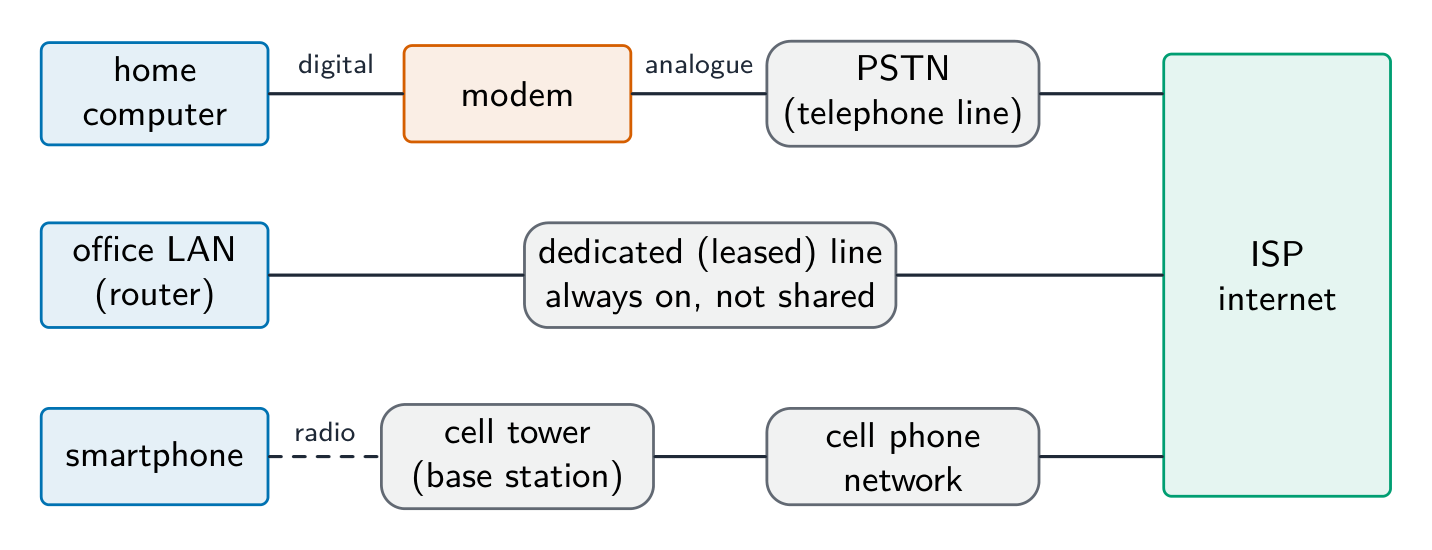
modem 调制解调器 — converts the computer's digital signal into an analogue signal for a telephone line, and back again at the other end (modulation and demodulation).
PSTN — the public telephone network of exchanges and lines; a dial-up or DSL connection carries internet data over it.
dedicated line 专线 — a leased line between an organisation and its ISP: always on, with a fixed bandwidth that is not shared, so faster and more reliable, but expensive.
cell phone network 蜂窝网络 — the phone sends data by radio to the nearest cell tower (base station); the towers are linked to the phone company's network, which routes the data to the internet; as the phone moves, it is handed over from one cell to the next.
Bahasa Indonesia
Internet adalah jaringan dari jaringan global yang menggunakan kumpulan protokol umum (TCP/IP). World Wide Web (WWW) adalah layanan yang berjalan di atasnya: dokumen berhipertaut yang diidentifikasi dengan URL, ditampilkan di browser melalui HTTP/HTTPS. Email dan transfer file adalah layanan internet lain yang bukan bagian dari WWW.
Webmail menggunakan keduanya: WWW, karena kotak surat adalah halaman web yang diakses melalui URL di browser lewat HTTP; dan internet, karena email itu sendiri berpindah lintas jaringan dari jaringan (email adalah layanan internet terpisah dari web).
Web adalah salah satu layanan yang berjalan di atas Internet
Perangkat keras yang mendukung internet
modem — mengkonversi sinyal digital komputer menjadi sinyal analog untuk jalur telepon, dan sebaliknya di ujung lain (modulasi dan demodulasi).
PSTN — jaringan telepon publik dengan pertukaran dan jalur; koneksi dial-up atau DSL membawa data internet di atasnya.
dedicated line (jalur khusus) — jalur sewa antara organisasi dan ISP-nya: selalu aktif, dengan bandwidth tetap yang tidak dibagikan, sehingga lebih cepat dan andal, tetapi mahal.
cell phone network (jaringan seluler) — ponsel mengirim data via radio ke menara sel terdekat (basestation); menara-link ke jaringan perusahaan telepon, yang mengarahkan data ke internet; saat ponsel bergerak, sambungan dipindahkan dari satu sel ke sel berikutnya.
Tiga cara untuk mengakses internet: modem dan PSTN, jalur khusus, dan jaringan telepon seluler
IPv4 — 32-bit, four denary numbers 0–255 (192.168.1.10); about $4.3 \times 10^{9}$ addresses (now exhausted).
IPv6 — 128-bit, eight groups of four hex digits; about $3.4 \times 10^{38}$ addresses.
IPv4 is written as four groups of denary numbers separated by dots; each group is an 8-bit number, so it runs from 0 to 255. IPv6 is written as eight groups of four hexadecimal digits separated by colons, 2001:0db8:0000:0000:0000:ff00:0042:8329, and a run of zero groups can be shortened to ::. So 192.168.3.2 is not IPv6: it has four groups, not eight, separated by dots rather than colons, and its groups are denary, not hexadecimal. 256.0.0.A is not a valid address of either kind: an IPv4 group cannot exceed 255 and cannot be a letter, and IPv6 would need colons and eight groups.
Subnetting
A network can be split into subnets 子网. The IP address splits into a network part and a host part, given by a subnet mask 子网掩码 (e.g. 255.255.255.0 = first 24 bits are network). Subnetting improves management, cuts broadcast traffic, and improves security.
The two parts of an address in a subnetwork: the network ID (the first bits, the same for every device in that subnet, given by the ones in the mask) and the host ID (the remaining bits, unique to each device). Benefits of subnetting, for "describe two benefits": less traffic on each part, because broadcasts stay inside their subnet; better security, because one department's traffic is kept from the others; easier management and fault-finding; more efficient use of the addresses. Two devices with the mask 255.255.255.0 are in different subnets when their first three groups differ.
Public vs private addresses
private addresses are used within a LAN and are not routable on the internet (e.g. 192.168.0.0/16).
a public IP address is globally unique and routable, assigned by an ISP 互联网服务提供商.
Devices behind NAT with private addresses are not directly reachable from the internet, giving some protection.
The descriptions the tables want: a public address is visible on the internet and unique across it, allocated by the ISP; a private address is visible only inside the LAN, is reused by many LANs, and needs NAT to reach the internet. A static address never changes (set by hand or reserved, as a server needs); a dynamic address is allocated by DHCP each time the device connects and may change.
Static vs dynamic
a static IP address is fixed; used for servers that must be found at a known address.
a dynamic IP address is assigned by DHCP and may change; easier for client devices and uses a limited address pool efficiently.
Worked example. A host has IP address 192.168.10.130 with subnet mask 255.255.255.192. Which network is it on, and is 192.168.10.200 on the same one? The mask's last octet, 192, is 11000000 in binary, so the first 26 bits are the network part and the last 6 bits address the host. That makes the subnets step in blocks of $256 - 192 = 64$: .0, .64, .128, .192. The address 130 falls in the block starting at .128, so the host is on network 192.168.10.128/26, whose usable hosts run .129 to .190 (.191 is the broadcast address). 200 falls in the next block (.192), so it is on a different subnet and traffic between the two must pass through a router. Get the block size from the mask first ($256$ minus the mask octet) - guessing from the first three octets is what makes these go wrong.
Bahasa Indonesia
Alamat IP secara unik mengidentifikasi sebuah perangkat.
IPv4 — 32-bit, empat bilangan desimal 0–255 (192.168.1.10); sekitar $4.3 \times 10^{9}$ alamat (sekarang habis).
IPv6 — 128-bit, delapan kelompok empat digit heksadesimal; sekitar $3.4 \times 10^{38}$ alamat.
IPv4 ditulis sebagai empat kelompok bilangan desimal yang dipisahkan oleh titik; setiap kelompok adalah bilangan 8-bit, sehingga berkisar dari 0 hingga 255. IPv6 ditulis sebagai delapan kelompok empat digit heksadesimal yang dipisahkan oleh titik dua, 2001:0db8:0000:0000:0000:ff00:0042:8329, dan deretan nol pada kelompok dapat dipersingkat menjadi ::. Jadi 192.168.3.2 bukan IPv6: ia memiliki empat kelompok, bukan delapan, dipisahkan oleh titik daripada titik dua, dan kelompoknya adalah desimal, bukan heksadesimal. 256.0.0.A bukan alamat yang valid dari kedua jenis: kelompok IPv4 tidak boleh melebihi 255 dan tidak boleh berupa huruf, dan IPv6 memerlukan titik dua serta delapan kelompok.
Subnetting
Sebuah jaringan dapat dibagi menjadi subnet. Alamat IP terbagi menjadi bagian jaringan dan bagian host, ditentukan oleh masker subnet (mis. 255.255.255.0 = 24 bit pertama adalah jaringan). Subnetting meningkatkan manajemen, mengurangi lalu lintas broadcast, dan meningkatkan keamanan.
Dua bagian dari alamat dalam subnetwork: ID jaringan (bit-bit pertama, sama untuk setiap perangkat dalam subnet tersebut, ditentukan oleh angka satu dalam masker) dan ID host (bit-sisa, unik untuk setiap perangkat). Manfaat subnetting, untuk "jelaskan dua manfaat": lebih sedikit lalu lintas di setiap bagian, karena broadcast tetap di dalam subnet-nya; keamanan lebih baik, karena lalu lintas satu departemen dijauhkan dari yang lain; manajemen dan penemuan kesalahan yang lebih mudah; penggunaan alamat yang lebih efisien. Dua perangkat dengan masker 255.255.255.0 berada di subnet berbeda ketika tiga kelompok pertamanya berbeda.
Membagi jaringan menjadi subnet, satu netID per departemen
Alamat publik vs pribadi
alamat pribadi digunakan di dalam LAN dan tidak dapat diarahkan di internet (mis. 192.168.0.0/16).
alamat IP publik bersifat unik global dan dapat diarahkan, diberikan oleh ISP.
Perangkat di belakang NAT dengan alamat pribadi tidak dapat dicapai langsung dari internet, memberikan perlindungan tertentu.
Deskripsi yang diminta tabel: alamat publik terlihat di internet dan unik melaluinya, dialokasikan oleh ISP; alamat pribadi hanya terlihat di dalam LAN, digunakan kembali oleh banyak LAN, dan memerlukan NAT untuk mencapai internet. Alamat statis tidak pernah berubah (ditetapkan secara manual atau dicadangkan, seperti yang dibutuhkan server); alamat dinamis dialokasikan oleh DHCP setiap kali perangkat terhubung dan mungkin berubah.
Statis vs Dinamis
alamat IP statis tetap; digunakan untuk server yang harus ditemukan pada alamat yang diketahui.
alamat IP dinamis ditetapkan oleh DHCP dan mungkin berubah; lebih mudah untuk perangkat klien dan menggunakan kumpulan alamat terbatas secara efisien.
Contoh kerja. Sebuah host memiliki alamat IP 192.168.10.130 dengan masker subnet 255.255.255.192. Jaringan mana yang ia miliki, dan apakah 192.168.10.200 berada di jaringan yang sama? Oktet terakhir dari masker, 192, adalah 11000000 dalam biner, sehingga 26 bit pertama adalah bagian jaringan dan 6 bit terakhir mengalamati host. Ini membuat subnet bertahap dalam blok sebesar $256 - 192 = 64$: .0, .64, .128, .192. Alamat 130 jatuh di blok yang dimulai dari .128, sehingga host berada di jaringan 192.168.10.128/26, yang host yang dapat digunakan berjalan dari .129 hingga .190 (.191 adalah alamat broadcast). 200 jatuh di blok selanjutnya (.192), jadi ia berada di subnet berbeda dan lalu lintas antara keduanya harus melewati router. Dapatkan ukuran blok dari masker terlebih dahulu ($256$ dikurangi oktet masker) - menebak dari tiga oktet pertama adalah penyebab kesalahan ini.
2.1
URL and DNS · URL dan DNS
English
A URL 统一资源定位符 (Uniform Resource Locator) locates a resource on the WWW:
protocol: http, https, etc.
domain name 域名: a readable server address.
path: the resource on that server.
The Domain Name System 域名系统 (DNS, also called the Domain Name Service) is a distributed set of servers that turns domain names into IP addresses. When you type a URL, the browser asks a DNS resolver for the IP, which queries DNS servers (root → top-level → authoritative) until it finds it; the browser then connects to that IP and requests the path. DNS saves humans from memorising IP addresses and lets a site change server without changing its name.
For "explain how the browser uses the URL": the browser splits the URL into the protocol, the domain name and the path; it sends the domain name to a DNS server, which returns the matching IP address (a cache on the computer or at the ISP may answer first); it opens a connection to that IP address using the protocol (HTTPS on port 443); it sends a request for the path; and the web server returns the page, which the browser renders. If the DNS lookup fails, the browser reports that the server cannot be found.
Bahasa Indonesia
URL (Uniform Resource Locator) menemukan sumber daya di WWW:
https://www.example.com/about/contact.html
protocol domain name path
protokol: http, https, dll.
nama domain: alamat server yang mudah dibaca.
path: sumber daya di server tersebut.
Sistem Nama Domain (DNS, juga disebut Layanan Nama Domain) adalah kumpulan server terdistribusi yang mengubah nama domain menjadi alamat IP. Saat Anda mengetik URL, browser meminta IP kepada resolver DNS, yang kemudian querying server DNS (akar → tingkat atas → berwenang) hingga menemukannya; browser kemudian terhubung ke IP tersebut dan requesting path. DNS menghemat manusia dari menghafal alamat IP dan memungkinkan situs mengganti server tanpa mengubah namanya.
Untuk "jelaskan bagaimana browser menggunakan URL": browser memecah URL menjadi protokol, nama domain, dan path; ia mengirim nama domain ke server DNS, yang mengembalikan IP yang sesuai (cache di komputer atau di ISP mungkin menjawab lebih dulu); ia membuka koneksi ke IP tersebut menggunakan protokol (HTTPS pada port 443); ia mengirim permintaan untuk path; dan server web mengembalikan halaman, yang dirender oleh browser. Jika pencarian DNS gagal, browser melaporkan bahwa server tidak dapat ditemukan.
*Bagaimana DNS menemukan alamat IP situs web sebelum browser terhubung
Explore · Jelajahi
How DNS finds a website · Bagaimana DNS menemukan sebuah situs web
Step through a DNS lookup. The network routes by IP, not by name — so before anything loads, DNS must turn the domain name into an IP address. · Ikuti langkah-langkah pencarian DNS. Jaringan dialihkan berdasarkan IP, bukan nama — jadi sebelum apa pun dimuat, DNS harus mengubah nama domain menjadi alamat IP.
Distinguish LAN vs WAN and client-server vs peer-to-peer by who stores and controls the resources.
Match each topology (bus, star, mesh) to its advantages and drawbacks (cost, reliability, collisions).
Know the job of each device: a switch directs within a LAN by MAC address, a router routes between networks by IP.
Explain bit streaming and why buffering is needed (data arrives at a different rate from playback).
Distinguish IPv4 vs IPv6 and public vs private addresses; DNS turns a URL into an IP address.
Common mistakes
Saying a switch works by IP address. A switch forwards by MAC address inside the LAN; the router forwards by IP address between networks.
Treating the internet and the World Wide Web as the same thing. The web is one service that runs over the internet; email and file transfer are others.
Giving "faster" as the whole comparison of wired and wireless. Say faster and more reliable and more secure, and give the wireless side (mobility, no cabling) when the question asks for a comparison.
Writing that a router finds the IP address for a URL. DNS does that; the router forwards packets to it.
Describing IPv6 with dots and denary groups. Eight groups of four hexadecimal digits, separated by colons.
Drawing a star topology as a ring or a chain. Every device has its own line to the switch in the middle.
Bahasa Indonesia
Bedakan LAN vs WAN dan client-server vs peer-to-peer berdasarkan siapa yang menyimpan dan mengontrol sumber daya.
Cocokkan setiap topologi (bus, star, mesh) dengan keunggulan dan kekurangannya (biaya, keandalan, tabrakan).
Ketahui fungsi setiap perangkat: switch mengarahkan di dalam LAN berdasarkan alamat MAC, router merutekan antar jaringan berdasarkan IP.
Jelaskan bit streaming dan mengapa buffering diperlukan (data tiba dengan laju berbeda dari pemutaran).
Bedakan IPv4 vs IPv6 dan alamat publik vs privat; DNS mengubah URL menjadi alamat IP.
Kesalahan umum
Menyatakan bahwa switch bekerja berdasarkan alamat IP. Switch meneruskan berdasarkan alamat MAC di dalam LAN; router meneruskan berdasarkan alamat IP antar jaringan.
Memperlakukan internet dan World Wide Web sebagai hal yang sama. Web adalah salah satu layanan yang berjalan di atas internet; email dan transfer file adalah lainnya.
Memberikan "lebih cepat" sebagai perbandingan menyeluruh antara berkabel dan nirkabel. Katakan lebih cepat dan lebih andal serta lebih aman, dan berikan sisi nirkabel (mobilitas, tanpa kabel) ketika pertanyaan meminta perbandingan.
Menulis bahwa router menemukan alamat IP untuk sebuah URL. DNS yang melakukannya; router meneruskan paket ke sana.
Mendeskripsikan IPv6 dengan titik dan kelompok desimal. Delapan kelompok empat digit heksadesimal, dipisahkan oleh titik dua.
Menggambar topologi bintang sebagai cincin atau rantai. Setiap perangkat memiliki garisnya sendiri menuju switch di tengah.
Interactive lessons on this topic · Pelajaran interaktif untuk topik ini
Work through it step by step, with instant-check exercises. · Kerjakan langkah demi langkah, dengan latihan pengecekan instan.
Pick one and the site follows you — notes, papers, videos and practice all open on it. · Pilih satu dan situs mengikuti Anda — catatan, kertas, video, dan latihan semua terbuka di sana.
Type to search notes, lessons, code, vocabulary and past-paper questions across every subject. · Ketik untuk mencari catatan, pelajaran, kode, kosakata, dan pertanyaan soal lama di setiap mata pelajaran.