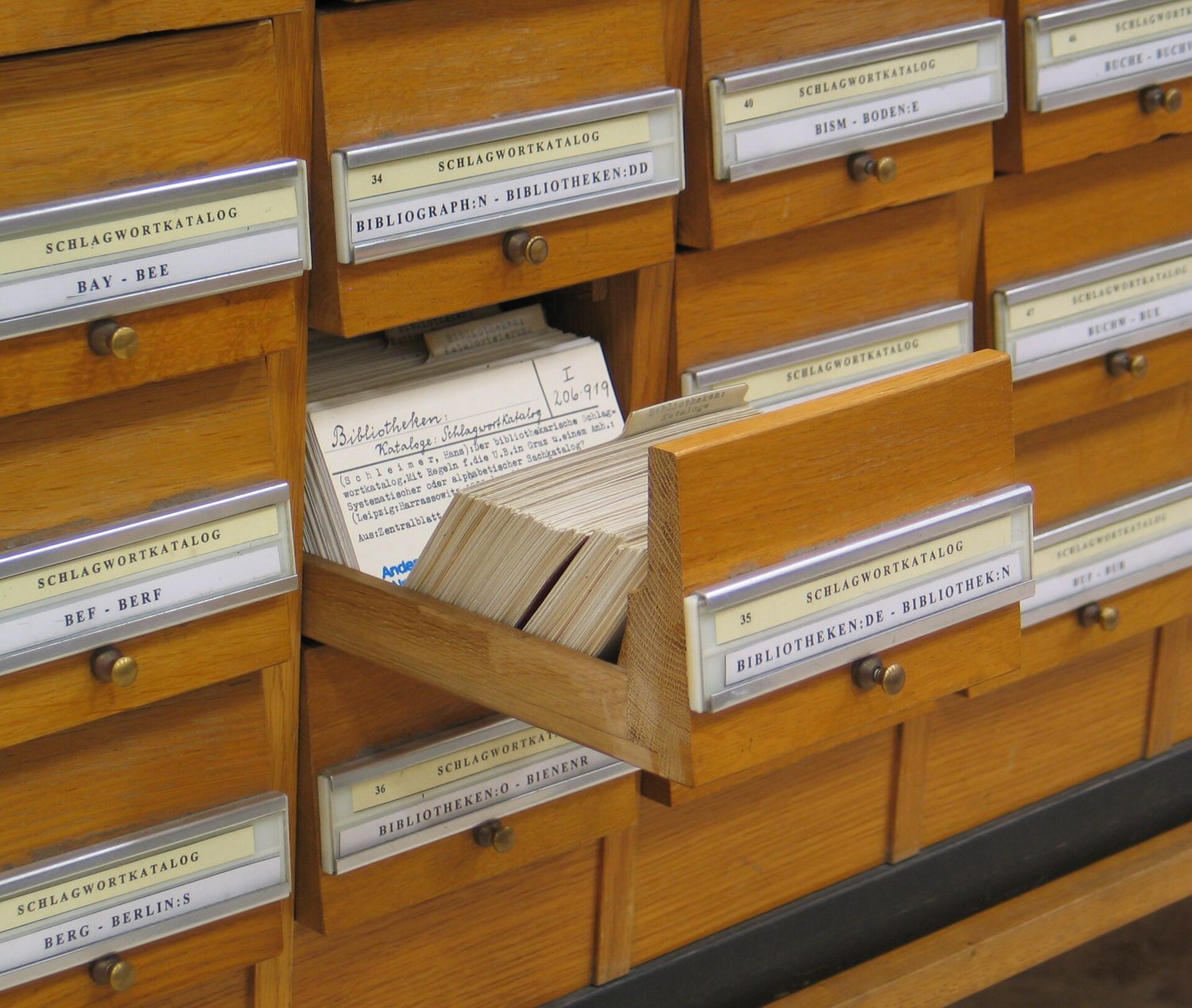
컴퓨터 이전의 도서관은 이런 서랍을 보관했습니다. 책마다 한 장의 카드가 있으며, 각 카드는 동일한 몇 가지 사실을 포함하고 있었으며, 모두 순서대로 보관되어 있어… librarians가 어떤 책을라도 찾을 수 있었습니다.
English narration · English + 中文 subtitles burned in · 영어 내레이션 · 영어 + 중국어 자막 burned-in
Syllabus
English
Candidates should be able to:
Notes and guidance
1 Define a single-table database from given data storage requirements
• Including: – fields – records – validation
2 Suggest suitable basic data types
• Including: – text/alphanumeric – character – Boolean – integer – real – date/time
3 Understand the purpose of a primary key and identify a suitable primary key for a given database table
4 Read, understand and complete structured query language (SQL) scripts to query data stored in a single database table
• Limited to: – SELECT – FROM – WHERE – ORDER BY DESCENDING – ORDER BY ASCENDING – SUM – COUNT – AND – OR • Identifying the output given by an SQL statement that will query the given contents of a database table
한국어
응시자가 다음을 수행할 수 있어야 함:
참고 사항 및 가이드라인
1 주어진 데이터 저장 요구사항으로부터 단일 테이블 데이터베이스 정의하기
• 다음 포함: – 필드 – 레코드 – 검증
2 적절한 기본 데이터 유형 제안하기
• 다음 포함: – 텍스트/알phanumeric – 문자 – 부울리안 – 정수 – 실수 – 날짜/시간
3 **주요 키(primary key)**의 목적을 이해하고, 주어진 데이터베이스 테이블에 적합한 주요 키 식별하기
4 단일 데이터베이스 테이블에 저장된 데이터를 쿼리하기 위해 구조화查询语言(structured query language, SQL) 스크립트를 읽고, 이해하며 완성하기
• 제한 사항: – SELECT – FROM – WHERE – ORDER BY DESCENDING – ORDER BY ASCENDING – SUM – COUNT – AND – OR • 주어진 데이터베이스 테이블의 내용을 쿼리할 SQL 문장이 생성하는 출력物 식별하기
Source: Cambridge International syllabus · 출처: Cambridge International syllabus
9.1
What is a database? · 데이터베이스란 무엇인가?
English
A database 数据库 is an organised store of data, kept so that it is easy to search, sort and update. At IGCSE you work with a single-table database 单表数据库 — all the data is held in one table.
한국어
데이터베이스는 검색, 정렬, 업데이트하기 쉽게 유지되는 조직화된 데이터 저장소입니다. IGCSE에서는 단일 테이블 데이터베이스를 다루며, 모든 데이터는 하나의 테이블에 저장됩니다.
도서관 카탈로그는 종이 기반의 데이터베이스입니다 — 인덱스로 검색하고 정렬할 수 있는 기록들대형 현대적 데이터베이스는 데이터 센터의 서버에 저장됩니다
9.2
Records and fields · 기록과 필드
English
A database table is made of records and fields.
A record 记录 is one row in the table — all the data about one thing (for example one student).
A field 字段 is one column in the table — one piece of data that every record has (for example "First name").
StudentID
FirstName
DateOfBirth
FormClass
FeesPaid
1
Amy
14/03/2009
10A
TRUE
2
Ben
02/11/2008
10B
FALSE
Here each row is a record, and each column is a field.
한국어
데이터베이스 테이블은 기록(record)과 필드(field)로 구성됩니다.
**기록(record)**은 테이블의 한 행 — 한 사물에 대한 모든 데이터(예: 한 학생)입니다.
**필드(field)**는 테이블의 한 열 — 모든 기록이 공유하는 하나의 데이터 항목(예: "First name").
StudentID
FirstName
DateOfBirth
FormClass
FeesPaid
1
Amy
14/03/2009
10A
TRUE
2
Ben
02/11/2008
10B
FALSE
여기서 각 행은 기록이고, 각 열은 필드입니다.
각 행은 기록이고 각 열은 필드이며, 기본 키(StudentID)는 모든 기록마다 고유합니다
A primary key 主键 is a field that holds a unique 唯一的 value for every record. No two records can have the same primary key, so it lets you pick out exactly one record.
In the table above, StudentID is a good primary key because every student has a different number. A field like FormClass would be a bad primary key, because many students share the same class.
한국어
**기본 키(primary key)**는 모든 기록마다 **유니크(unique)**한 값을 저장하는 필드입니다. 두 기록이 동일한 기본 키를 가질 수 없으므로, 특정 기록을 정확히 선택할 수 있게 합니다.
위 테이블에서 StudentID는 각 학생이 다른 번호를 가지므로 좋은 기본 키입니다. FormClass 같은 필드는 많은 학생들이 같은 반에 속하므로 나쁜 기본 키가 됩니다.
When data is put into a database, validation 验证 checks make sure it is sensible — for example a range check on an age field, or a presence check so a field is not left empty. (You saw these checks in topic 7.)
한국어
데이터를 데이터베이스에 입력할 때 검증(validation) 체크는 합리적인지 확인합니다 — 예를 들어 나이 필드의 범위 체크나 필드를 비우지 않도록 하는 존재 체크 등입니다. (이러한 체크는 주제 7에서 보았습니다.)
Structured Query Language (SQL) · 구조화 쿼리 언어(SQL)
English
Structured Query Language 结构化查询语言 (SQL) is a language used to query 查询 a database — to pick out the records you want. You must understand and complete SQL scripts.
SELECT, FROM and WHERE
SELECT says which fields to show.
FROM says which table to use.
WHERE gives a condition 条件, so only matching records are shown.
This shows the first name and class of every student who has paid the fees.
Use * to select all fields:
ORDER BY
ORDER BY sorts the results. Use ASC for ascending 升序 (smallest first, A→Z) or DESC for descending 降序 (largest first, Z→A).
AND and OR
Join conditions with AND (both must be true) or OR (at least one must be true).
SUM and COUNT
SUM adds up the values in a number field.
COUNT counts how many records match.
This counts how many students have not paid. SUM works the same way but adds a number field instead of counting rows.
Working out the output
To find the output of an SQL script, read it in this order:
FROM — which table;
WHERE — keep only the records that match the condition;
SELECT — show only the chosen fields;
ORDER BY — put the results in order.
Following these steps, you can write down exactly which rows and columns the query returns.
Worked example. A Book table has the fields Title, Author, Price and InStock. Write a query showing the title and price of every book by Orwell that is in stock, cheapest first.
Build it in the reading order: FROM names the table; WHERE keeps only the matching records, and because there are two conditions they need AND; SELECT shows only the two fields asked for; ORDER BY … ASC sorts them. Text values go in quotes, and only the fields the question asks for belong in SELECT - adding Author just because you filtered on it is the commonest way to lose a mark here.
한국어
**구조화 쿼리 언어(Structured Query Language, SQL)**는 데이터베이스를 **쿼리(query)**하는 데 사용되는 언어 — 원하는 기록을 추출하는 것. SQL 스크립트를 이해하고 완성해야 합니다.
SELECT, FROM 및 WHERE
SELECT는 어떤 필드를 표시할지 지정합니다.
FROM는 어떤 테이블을 사용할지 지정합니다.
WHERE는 **조건(condition)**을 제공하므로 일치하는 기록만 표시됩니다.
SELECT는 필드를 선택하고, FROM은 테이블명을 명시하며, WHERE는 조건을 설정합니다
SELECT FirstName, FormClass
FROM Student
WHERE FeesPaid = TRUE;
이는 학비를 납부한 모든 학생의 성명과 반을 표시합니다.
모든 필드를 선택하려면 *를 사용하세요:
SELECT *
FROM Student
WHERE FormClass = '10A';
ORDER BY
ORDER BY는 결과를 정렬합니다. 오름차 ascending(작은 값 먼저, A→Z)에는 ASC, 내림차 descending(큰 값 먼저, Z→A)에는 DESC를 사용하세요.
SELECT FirstName, DateOfBirth
FROM Student
ORDER BY DateOfBirth ASC;
AND 및 OR
조건을 AND(둘 다 참이어야 함) 또는 OR(적어도 하나가 참이어야 함)로 연결하세요.
SELECT FirstName
FROM Student
WHERE FormClass = '10A' AND FeesPaid = FALSE;
SUM 및 COUNT
SUM는 숫자 필드의 값들을 합산합니다.
COUNT는 일치하는 기록의 개수를 세어줍니다.
SELECT COUNT(StudentID)
FROM Student
WHERE FeesPaid = FALSE;
학비를 납부하지 않은 학생의 수를 세는 예시입니다. SUM는similar하게 작동하지만 행을 세는 대신 숫자 필드를 더합니다.
출력값 계산하기
SQL 스크립트의 출력을 찾으려면 다음 순서대로 읽으세요:
FROM — 어떤 테이블인지;
WHERE — 조건에 일치하는 기록만 남기고 others를 제거합니다;
SELECT — 택한 필드만 표시합니다;
ORDER BY — 결과를 순서대로 배치합니다.
이 순서대로 SQL 쿼리를 읽으십시오: FROM (어떤 테이블), WHERE (어떤 행), SELECT (어떤 필드), ORDER BY (정렬)
이 단계를 따르면 쿼리가 반환하는 정확한 행과 열을 파악할 수 있습니다.
작업 예시.Book 테이블에는 Title, Author, Price 및 InStock라는 필드가 있습니다. 재고가 있는 올워르의 모든 책 제목과 가격을 가장 저렴한 것부터 보여주는 쿼리를 작성하십시오.
SELECT Title, Price
FROM Book
WHERE Author = 'Orwell' AND InStock = TRUE
ORDER BY Price ASC;
읽는 순서대로 구성하십시오: FROM는 테이블을 지정하고; WHERE는 일치하는 레코드만 유지하며, 조건이 두 가지이므로 AND가 필요합니다; SELECT는 요청한 두 필드만 표시합니다; ORDER BY … ASC는 이를 정렬합니다. 텍스트 값은 인용부호로 감싸야 하며, 질문에서 요구한 필드만 SELECT에 포함해야 합니다. 필터링에 사용했다는 이유로 Author를 추가하는 것이 여기서最常见的失分原因입니다.
Explore · 탐색하기
SELECT … WHERE
Step through a query: WHERE filters rows, SELECT picks columns. · 질문을 단계별로 진행하세요: WHERE는 행을 필터링하고, SELECT는 열을 선택합니다.