Data storage and compression
Introduit| English | Sens |
|---|---|
| compression/kəmˈpreʃn/ | compression |
| kibibyte/ˈkɪbɪbaɪt/ | kibioctet |
| lossless/ˈlɒsləs/ | sans perte |
| run-length encoding/rʌn leŋθ enˈkəʊdɪŋ/ | codage par séquences |
| lossy/ˈlɒsi/ | avec perte |
Squeezing files smaller
- Data storage is measured in units that each step up by 1024.
- We can calculate the size of an image or sound file.
- Compression 压缩 then makes files smaller.
Measuring storage
- bit (one 0/1) · nibble (4 bits) · byte (8 bits).
- Then each unit is 1024× the one before (because $1024 = 2^{10}$): kibibyte 二进制千字节 (KiB) = 1024 bytes, mebibyte (MiB) = 1024 KiB, gibibyte (GiB) = 1024 MiB, tebibyte (TiB) = 1024 GiB.
- Always divide by 1024 (not 1000) to step up a unit.
How many bytes are in 1 kibibyte (KiB)?
Difficulté 2/5 · 140 pièces + un petit bonus lors de la première réussite aujourd'hui
1 KiB = 1024 bytes (each storage unit steps up by 1024 = 2^10).
Match each storage/compression idea to its meaning.
Difficulté 2/5 · 140 pièces + un petit bonus lors de la première réussite aujourd'hui
File size grows with detail; compression shrinks it, losslessly or lossily.
Calculating file size
- Image (bits) $=$ width × height × colour depth.
- Sound (bits) $=$ sample rate × sample resolution × seconds.
- Divide by 8 for bytes, then by 1024 for KiB, again for MiB.
- e.g. $1024 \times 1024$ at 16 bpp $= 16\,777\,216$ bits $= 2$ MiB.
An image is 100 × 100 pixels with a colour depth of 24 bits. What is its size in bits?
Difficulté 2/5 · 140 pièces + un petit bonus lors de la première réussite aujourd'hui
width × height × colour depth = 100 × 100 × 24 = 240 000 bits.
Compression
- Lossless 无损 compression makes a file smaller with no permanent loss — the original can be rebuilt exactly. Run-length encoding 行程编码 (RLE) stores a run of repeats once (e.g.
WWWWWWWW→ "8 W"). - Lossy 有损 compression makes it much smaller by permanently removing data (lower resolution/sample rate).
- Use lossless for text and program files; lossy for photos, music and video.
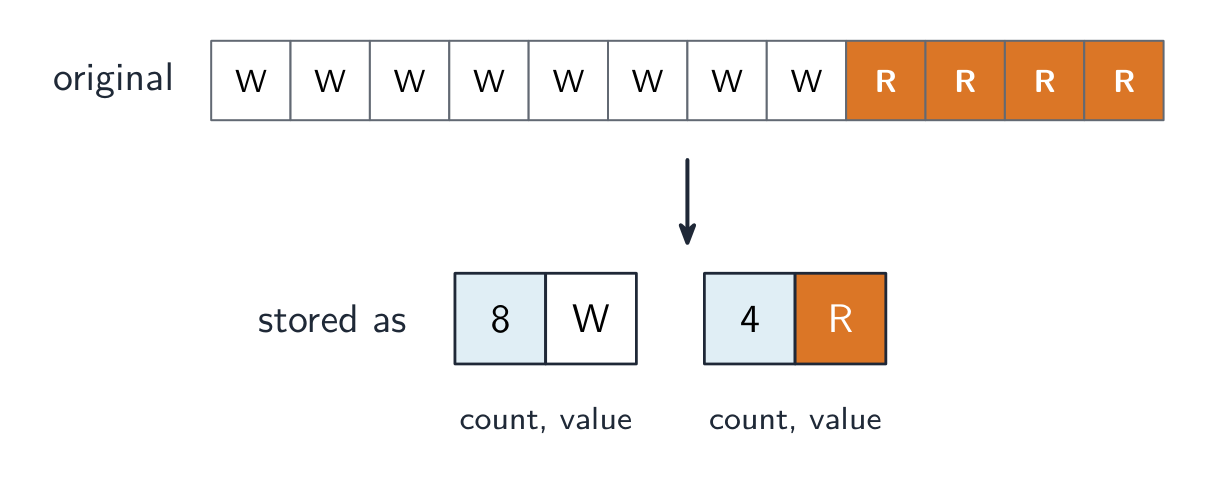
Run-length encoding shrinks repeats
Compression makes a file smaller. Run-length encoding replaces a run of identical values with one value plus a count — lossless, and best when the data has long runs.
Lossless compression:
Difficulté 1/5 · 100 pièces + un petit bonus lors de la première réussite aujourd'hui
Lossless keeps all the data (e.g. RLE); lossy permanently discards some.
Run-length encoding (RLE) compresses data by:
Difficulté 1/5 · 100 pièces + un petit bonus lors de la première réussite aujourd'hui
RLE replaces a run like WWWWWWWW with "8 W" — great when data has many repeats.
Lossy compression is most appropriate for:
Difficulté 1/5 · 100 pièces + un petit bonus lors de la première réussite aujourd'hui
Lossy suits media where a slight quality loss buys a much smaller file; exact data needs lossless.
Worked example: a sound file, then RLE
A 10-second sound is recorded at 8000 Hz with a sample resolution of 16 bits. Find its size in KiB. Then compress the line WWWWWWBBBW with run-length encoding.
- Multiply, then step up the units:
- RLE stores each run as a count and a value: 6W 3B 1W. Ten characters become three pairs, and nothing is lost, so this is lossless compression.
An image is 100 pixels wide and 50 pixels high, with a colour depth of 8 bits. What is its size in bytes?
Difficulté 2/5 · 140 pièces + un petit bonus lors de la première réussite aujourd'hui
$100 \times 50 \times 8 = 40\,000$ bits, and $40\,000 \div 8 = 5000$ bytes.
Which file must be compressed with a lossless method?
Difficulté 1/5 · 100 pièces + un petit bonus lors de la première réussite aujourd'hui
If even one bit of a program changes, it will not run correctly; photos, music and video can lose detail people do not notice.
You've got it
- storage units step up by 1024 (KiB, MiB, GiB, TiB)
- image size = width × height × colour depth (bits); sound = rate × resolution × seconds
- lossless = exact recovery (RLE); lossy = smaller, permanent loss
- lossless for text/programs; lossy for photos/music/video