Skip to content · ⁨ข้ามไปยังเนื้อหา⁩

Creative Development · ⁨การพัฒนาสร้างสรรค์⁩

AP Computer Science Principles · Topic 1 · ⁨หัวข้อ 1⁩

Video lesson for this topic · ⁨บทเรียนวิดีโอสำหรับหัวข้อนี้⁩ Open the video page · ⁨เปิดหน้าวิดีโอ⁩
6:15

การพัฒนาสร้างสรรค์

นี่คือโปรแกรมที่ควรพิมพ์ค่าเฉลี่ยของสองจำนวน. มันทำงาน. มันไม่พัง. มันพิมพ์คำตอบ — และคำตอบนั้นผิด. ให้มันสี่และหก…

English narration · English + 中文 subtitles burned in · ⁨การบรรยายภาษาอังกฤษ · คำบรรยายภาษาอังกฤษ + 中文 ลอยตัวบนภาพ⁩

1.1

Collaboration · ⁨การทำงานร่วมกัน⁩

Syllabus · ⁨หลักสูตร⁩
English

Enduring Understanding (CRD-1): Incorporating multiple perspectives through collaboration improves computing innovations as they are developed.

Learning Objective CRD-1.A: Explain how computing innovations are improved through collaboration. [Skill 1.C]

  • CRD-1.A.1 A computing innovation includes a program as an integral part of its function.
  • CRD-1.A.2 A computing innovation can be physical (e.g., self-driving car), nonphysical computing software (e.g., picture editing software), or a nonphysical computing concept (e.g., e-commerce).
  • CRD-1.A.3 Effective collaboration produces a computing innovation that reflects the diversity of talents and perspectives of those who designed it.
  • CRD-1.A.4 Collaboration that includes diverse perspectives helps avoid bias in the development of computing innovations.
  • CRD-1.A.5 Consultation and communication with users are important aspects of the development of computing innovations.
  • CRD-1.A.6 Information gathered from potential users can be used to understand the purpose of a program from diverse perspectives and to develop a program that fully incorporates these perspectives.

Learning Objective CRD-1.B: Explain how computing innovations are developed by groups of people. [Skill 1.C]

  • CRD-1.B.1 Online tools support collaboration by allowing programmers to share and provide feedback on ideas and documents.
  • CRD-1.B.2 Common models such as pair programming exist to facilitate collaboration.

Learning Objective CRD-1.C: Demonstrate effective interpersonal skills during collaboration. [Skill 1.C]

  • CRD-1.C.1 Effective collaborative teams practice interpersonal skills, including but not limited to:
    • communication
    • consensus building
    • conflict resolution
    • negotiation
ไทย

ความเข้าใจที่ยั่งยืน (CRD-1): การรวมมุมมองที่หลากหลายผ่านการร่วมมือกันช่วยพัฒนานวัตกรรมด้านคอมพิวเตอร์ให้ดีขึ้นขณะกำลังพัฒนา

วัตถุประสงค์การเรียนรู้ CRD-1.A: อธิบายว่านวัตกรรมด้านคอมพิวเตอร์ได้รับการปรับปรุง如何通过 collaboration。 [Skill 1.C]

  • CRD-1.A.1 นวัตกรรมด้านคอมพิวเตอร์รวมถึงโปรแกรมเป็นส่วนสำคัญของฟังก์ชัน
  • CRD-1.A.2 นวัตกรรมด้านคอมพิวเตอร์อาจเป็น physical (เช่น รถขับเคลื่อนอัตโนมัติ), nonphysical computing software (เช่น ซอฟต์แวร์แก้ไขภาพ), หรือ nonphysical computing concept (เช่น การค้าอิเล็กทรอนิกส์)
  • CRD-1.A.3 การร่วมมือกันที่มีประสิทธิภาพผลิตนวัตกรรมด้านคอมพิวเตอร์ที่สะท้อนความหลากหลายของทักษะและมุมมองของผู้ที่ออกแบบมัน
  • CRD-1.A.4 การร่วมมือกันที่รวมมุมมองที่หลากหลายช่วยหลีกเลี่ยง bias ในการพัฒนานวัตกรรมด้านคอมพิวเตอร์
  • CRD-1.A.5 การปรึกษาและสื่อสารกับผู้ใช้เป็นสำคัญ aspects ของการพัฒนา นวัตกรรมด้านคอมพิวเตอร์
  • CRD-1.A.6 ข้อมูลที่เก็บรวบรวมจากผู้ใช้ที่เป็นไปได้สามารถใช้เพื่อเข้าใจวัตถุประสงค์ของโปรแกรมผ่านมุมมองที่หลากหลายและพัฒนาโปรแกรมที่ incorporates มุมมองเหล่านี้อย่างเต็มที่

วัตถุประสงค์การเรียนรู้ CRD-1.B: อธิบายว่านวัตกรรมด้านคอมพิวเตอร์ถูกพัฒนาโดยกลุ่มคน如何。 [Skill 1.C]

  • CRD-1.B.1 เครื่องมือออนไลน์สนับสนุน collaboration bằng cách allowing programmers to share and provide feedback on ideas and documents
  • CRD-1.B.2 Common models such as pair programming มีอยู่เพื่อ facilitate collaboration

วัตถุประสงค์การเรียนรู้ CRD-1.C: แสดง interpersonal skills ที่มีประสิทธิภาพระหว่าง collaboration。 [Skill 1.C]

  • CRD-1.C.1 ทีม collaborative ที่มีประสิทธิภาพ practicing interpersonal skills, بما but not limited to:
    • communication
    • consensus building
    • conflict resolution
    • negotiation

Source: College Board AP Course and Exam Description · ⁨แหล่งที่มา: คำอธิบายหลักสูตรและข้อสอบ College Board AP⁩

English

Computing is a collaborative 协作 activity. Working in a team brings more perspectives, catches more errors, and produces better programs than working alone. Good collaboration uses consensus building, clear communication, and each member's strengths. Pair programming 结对编程 – two people at one computer, one typing and one reviewing – is a common practice. On the exam, you should be able to explain how collaboration improved a program (more ideas, fewer bugs, wider testing).

ไทย
จigsaw กำลังประกอบ: การร่วมมือและการออกแบบแบบโมดูลาร์ประกอบคำตอบเข้าด้วยกัน
jigsaw กำลังประกอบ: การร่วมมือและการออกแบบแบบโมดูลาร์ประกอบคำตอบเข้าด้วยกัน

Computing เป็นกิจกรรมที่ ** collaborative** การทำงานเป็นทีม_selects perspectives มากกว่า จับข้อผิดพลาดมากกว่า และสร้างโปรแกรมที่ดีกว่าการทำงานคนเดียว การ collaborating ที่ดีใช้ consensus building, การสื่อสารที่ชัดเจน, และจุดแข็งของแต่ละสมาชิก Pair programming – คนสองคนต่อคอมพิวเตอร์เครื่องเดียว คนหนึ่งพิมพ์และอีกคนตรวจสอบ – เป็นปฏิบัติทั่วไป ในการสอบคุณควรอธิบายได้ว่า collaboration ช่วยพัฒนาโปรแกรมอย่างไร (ไอเดียมากขึ้น, บั๊กน้อยลง, ทดสอบกว้างขึ้น)

Vocabulary · ⁨คำศัพท์⁩ Train · ⁨ฝึกฝน⁩
English ไทย
collaborative/kəˈlæbrətɪv/ การทำงานร่วมกัน
Pair programming/peə ˈprəʊɡræmɪŋ/ การเขียนโปรแกรมคู่
1.2

Program Function and Purpose · ⁨ฟังก์ชันและวัตถุประสงค์ของโปรแกรม⁩

Syllabus · ⁨หลักสูตร⁩
English

Enduring Understanding (CRD-2): Developers create and innovate using an iterative design process that is user-focused, that incorporates implementation/feedback cycles, and that leaves ample room for experimentation and risk-taking.

Learning Objective CRD-2.A: Describe the purpose of a computing innovation. [Skill 1.A]

  • CRD-2.A.1 The purpose of computing innovations is to solve problems or to pursue interests through creative expression.
  • CRD-2.A.2 An understanding of the purpose of a computing innovation provides developers with an improved ability to develop that computing innovation.

Learning Objective CRD-2.B: Explain how a program or code segment functions. [Skill 4.A]

  • CRD-2.B.1 A program is a collection of program statements that performs a specific task when run by a computer. A program is often referred to as software.
  • CRD-2.B.2 A code segment is a collection of program statements that is part of a program.
  • CRD-2.B.3 A program needs to work for a variety of inputs and situations.
  • CRD-2.B.4 The behavior of a program is how a program functions during execution and is often described by how a user interacts with it.
  • CRD-2.B.5 A program can be described broadly by what it does, or in more detail by both what the program does and how the program statements accomplish this function.

Learning Objective CRD-2.C: Identify input(s) to a program. [Skill 3.A]

  • CRD-2.C.1 Program inputs are data sent to a computer for processing by a program. Input can come in a variety of forms, such as tactile, audio, visual, or text.
  • CRD-2.C.2 An event is associated with an action and supplies input data to a program.
  • CRD-2.C.3 Events can be generated when a key is pressed, a mouse is clicked, a program is started, or any other defined action occurs that affects the flow of execution.
  • CRD-2.C.4 Inputs usually affect the output produced by a program.
  • CRD-2.C.5 In event-driven programming, program statements are executed when triggered rather than through the sequential flow of control.
  • CRD-2.C.6 Input can come from a user or other programs.

Learning Objective CRD-2.D: Identify output(s) produced by a program. [Skill 3.A]

  • CRD-2.D.1 Program outputs are any data sent from a program to a device. Program output can come in a variety of forms, such as tactile, audio, visual, or text.
  • CRD-2.D.2 Program output is usually based on a program's input or prior state (e.g., internal values).
ไทย

ความเข้าใจที่ยั่งยืน (CRD-2): ผู้พัฒนาสร้างและ innovate using an iterative design process that is user-focused, that incorporates implementation/feedback cycles, and that leaves ample room for experimentation and risk-taking

วัตถุประสงค์การเรียนรู้ CRD-2.A: อธิบายวัตถุประสงค์ของนวัตกรรมด้านคอมพิวเตอร์。 [Skill 1.A]

  • CRD-2.A.1 วัตถุประสงค์ของนวัตกรรมด้านคอมพิวเตอร์คือการแก้ปัญหาหรือ pursuit interests through creative expression
  • CRD-2.A.2 ความเข้าใจในวัตถุประสงค์ของนวัตกรรมด้านคอมพิวเตอร์ให้ developer with an improved ability to develop that computing innovation

วัตถุประสงค์การเรียนรู้ CRD-2.B: อธิบายว่าโปรแกรมหรือ code segment ทำงาน如何。 [Skill 4.A]

  • CRD-2.B.1 program คือ collection of program statements that performs a specific task when run by a computer。 A program is often referred to as software
  • CRD-2.B.2 code segment คือ collection of program statements that is part of a program
  • CRD-2.B.3 โปรแกรมต้องทำงานได้สำหรับ inputs และ situations หลายประเภท
  • CRD-2.B.4 behavior ของโปรแกรมคือ how a program functions during execution and is often described by how a user interacts with it
  • CRD-2.B.5 โปรแกรมสามารถอธิบายได้โดยกว้างว่าโปรแกรมทำอะไร หรืออธิบายอย่างละเอียดทั้งสิ่งที่โปรแกรมทำและวิธีการที่คำสั่งในโปรแกรมดำเนินการเพื่อให้บรรลุหน้าที่นั้น

จุดประสงค์การเรียนรู้ CRD-2.C: ระบุอินพุตของโปรแกรม [ทักษะ 3.A]

  • CRD-2.C.1 อินพุตของโปรแกรม คือข้อมูลที่ถูกส่งไปยังคอมพิวเตอร์เพื่อประมวลผลโดยโปรแกรม อินพุตอาจมีหลายรูปแบบ เช่น แบบสัมผัส เสียง ภาพ หรือข้อความ
  • CRD-2.C.2 เหตุการณ์ มีความเกี่ยวข้องกับกระทำหนึ่งๆ และจัดเตรียมข้อมูลอินพุตให้กับโปรแกรม
  • CRD-2.C.3 เหตุการณ์สามารถเกิดขึ้นได้เมื่อกดแป้นพิมพ์ คลิกเมาส์ เริ่มโปรแกรม หรือเกิดกระทำใดๆ ที่กำหนดไว้ซึ่งส่งผลต่อการไหลของการ执行程序
  • CRD-2.C.4 อินพุทมักส่งผลต่อผลลัพธ์ที่โปรแกรมสร้างออกมา
  • CRD-2.C.5 ในการเขียนโปรแกรมแบบขับเคลื่อนด้วยเหตุการณ์ คำสั่งในโปรแกรมจะถูกดำเนินการเมื่อถูกกระตุ้นแทนที่จะเป็นการไหลตามลำดับของควบคุม
  • CRD-2.C.6 อินพุตสามารถมาจากผู้ใช้หรือโปรแกรมอื่น

จุดประสงค์การเรียนรู้ CRD-2.D: ระบุผลลัพธ์ที่โปรแกรมสร้างออกมา [ทักษะ 3.A]

  • CRD-2.D.1 เอาต์พุตของโปรแกรม คือข้อมูลใดๆ ที่ส่งออกจากโปรแกรมไปยังอุปกรณ์ เอาต์พุตของโปรแกรมอาจมีหลายรูปแบบ เช่น แบบสัมผัส เสียง ภาพ หรือข้อความ
  • CRD-2.D.2 เอาต์พุตของโปรแกรมโดยทั่วไปจะขึ้นอยู่กับอินพุตของโปรแกรมหรือสถานะก่อนหน้า (เช่น ค่าภายใน)

Source: College Board AP Course and Exam Description · ⁨แหล่งที่มา: คำอธิบายหลักสูตรและข้อสอบ College Board AP⁩

English

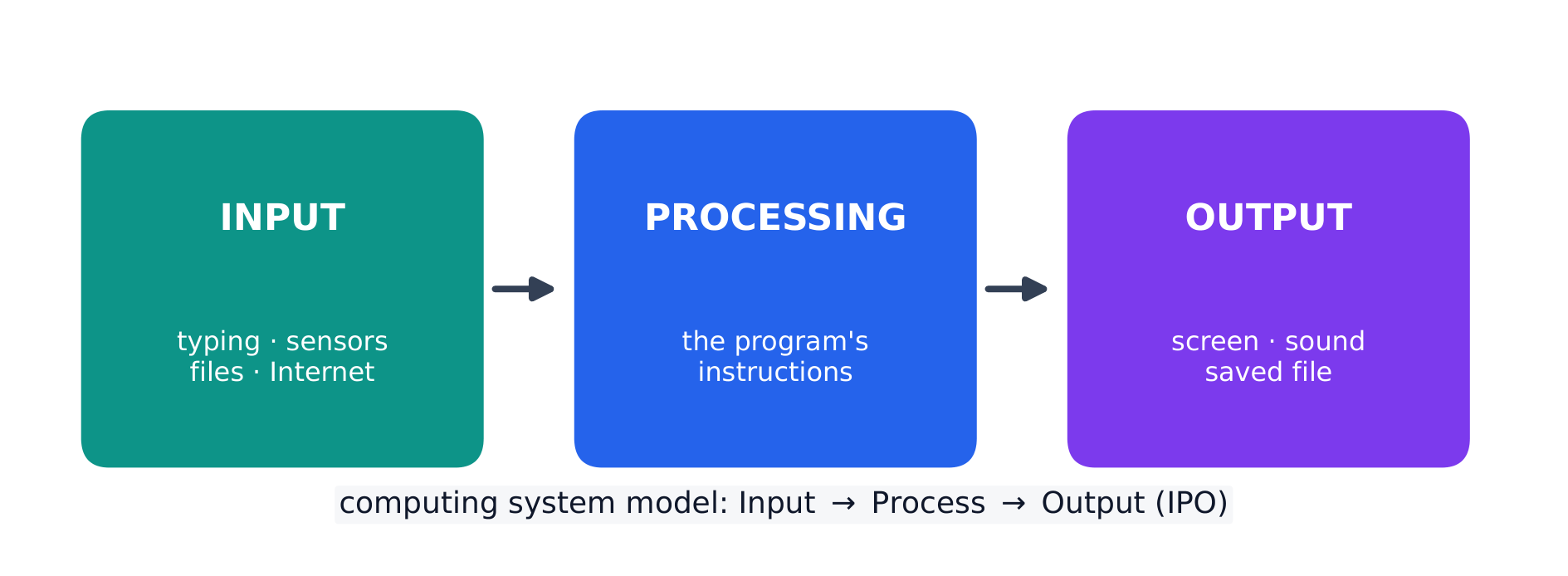
Every program is written for a purpose – it solves a problem or pursues an interest. A program takes input 输入, processes it, and produces output 输出. Inputs can come from a user, a device, a file, or another program; outputs can be visual, audible, textual, or a signal to a device. Being able to state a program's purpose, and describe its inputs and outputs clearly, is a core skill (and part of the Create performance task).

ไทย

ทุกโปรแกรมถูกเขียนเพื่อ ** วัตถุประสงค์** – แก้ไขปัญหาหรือ pursuing ความสนใจ โปรแกรมรับ ** input**, ประมวลผล, และสร้าง ** output** Inputs มาจากผู้ใช้, อุปกรณ์, ไฟล์, หรือโปรแกรมอื่น; Outputs อาจเป็นภาพ, เสียง, ข้อความ, หรือสัญญาณไปยังอุปกรณ์ การระบุวัตถุประสงค์ของโปรแกรม และอธิบาย input และ output อย่างชัดเจนเป็นทักษะพื้นฐาน (และเป็นส่วนหนึ่งของ Create performance task)

โปรแกรมทุกโปรแกรมแบ่งออกเป็น Input, Processing และ Output
Every program decomposes into input, processing, and output
Every program follows the input-processing-output model
Explore · ⁨สำรวจ⁩

Explore the input → processing → output model · ⁨สำรวจโมเดล Input → Processing → Output⁩

Step through the IPO model. Every program takes some input, performs processing on it by following its instructions, then produces output — trace one weather-app example along the pipeline. · ⁨ก้าวผ่าน IPO model โปรแกรมทุกตัวรับ input某some, ทำ processing บนมันโดยทำตามคำสั่ง แล้วผลิต output — ติดตามตัวอย่างแอปฯ พยากรณ์อากาศหนึ่งตามท่อ⁩

Vocabulary · ⁨คำศัพท์⁩ Train · ⁨ฝึกฝน⁩
English ไทย
input/ˈɪnpʊt/ input (อินพุต)
output/ˈaʊtpʊt/ ผลผลิต
iterative/ˈɪtərətɪv/ iterative (แบบวนซ้ำ)
decomposition/ˌdiːkɒmpəˈzɪʃn/ การสลายตัว
Comments/ˈkɒments/ ความคิดเห็น (Comments)
surveys/ˈsɜːveɪz/ แบบสอบถาม
diagrams representing the layout of the user interface แผนภาพแสดงการจัดวางหน้าจอสัมผัสผู้ใช้
event/ɪˈvent/ เหตุการณ์
event handler/ɪˈvent ˈhændlə/ ตัวจัดการเหตุการณ์
debugging/ˈdiːbʌɡɪŋ/ debugging
syntax error/ˈsɪntæks ˈerə/ ข้อผิดพลาดด้านไวยากรณ์
runtime error/ˈrʌntaɪm ˈerə/ runtime error (ข้อผิดพลาดขณะรัน)
logic error/ˈlɒdʒɪk ˈerə/ ข้อผิดพลาดด้านตรรกะ
1.3

Program Design and Development · ⁨การออกแบบและพัฒนาโปรแกรม⁩

Syllabus · ⁨หลักสูตร⁩
English

Enduring Understanding (CRD-2): Developers create and innovate using an iterative design process that is user-focused, that incorporates implementation/feedback cycles, and that leaves ample room for experimentation and risk-taking.

Learning Objective CRD-2.E: Develop a program using a development process. [Skill 1.B]

  • CRD-2.E.1 A development process can be ordered and intentional, or exploratory in nature.
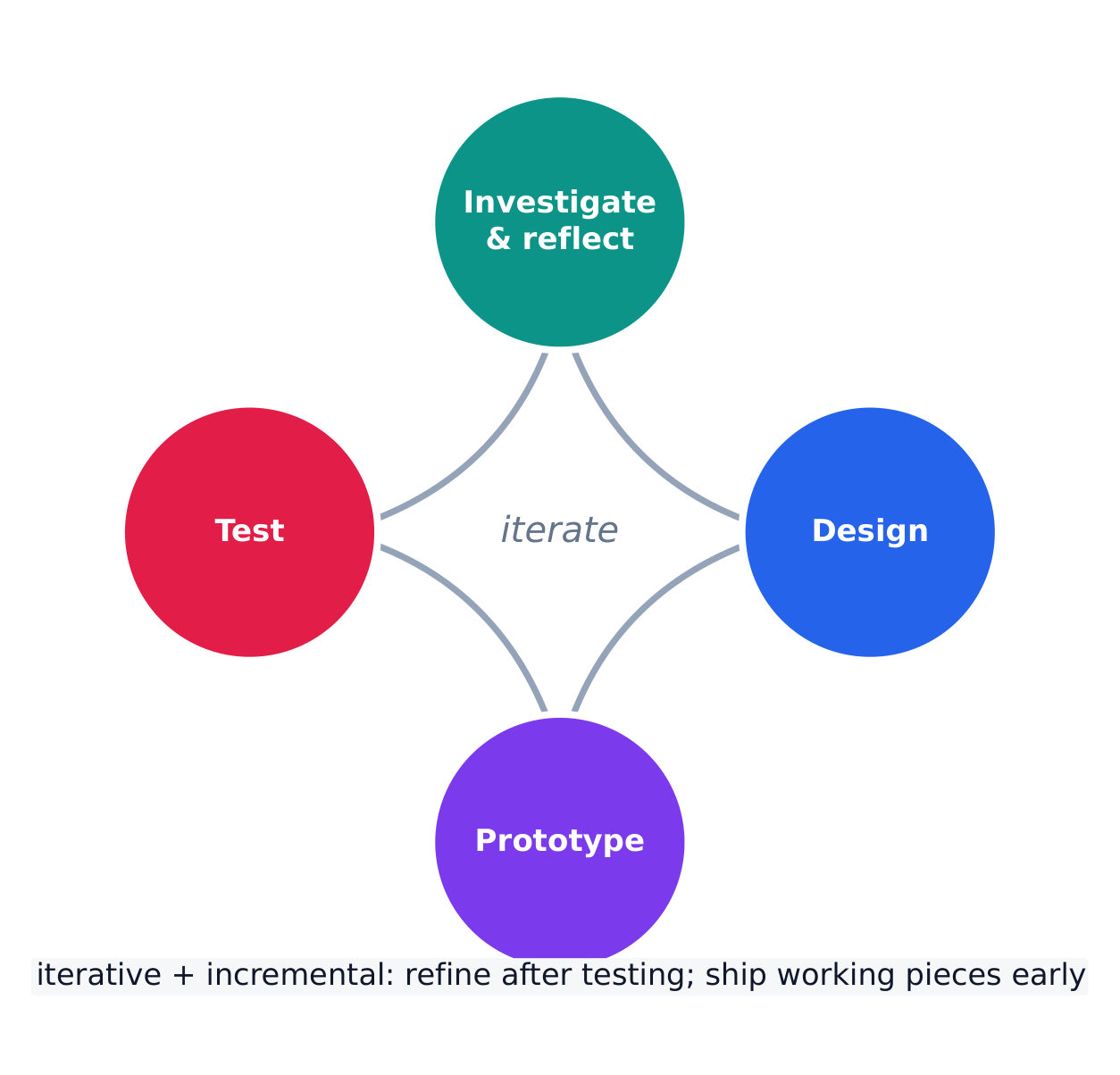
  • CRD-2.E.2 There are multiple development processes. The following phases are commonly used when developing a program:
    • investigating and reflecting
    • designing
    • prototyping
    • testing
  • CRD-2.E.3 A development process that is iterative requires refinement and revision based on feedback, testing, or reflection throughout the process. This may require revisiting earlier phases of the process.
  • CRD-2.E.4 A development process that is incremental is one that breaks the problem into smaller pieces and makes sure each piece works before adding it to the whole.

Learning Objective CRD-2.F: Design a program and its user interface. [Skill 1.B]

  • CRD-2.F.1 The design of a program incorporates investigation to determine its requirements.
  • CRD-2.F.2 Investigation in a development process is useful for understanding and identifying the program constraints, as well as the concerns and interests of the people who will use the program.
  • CRD-2.F.3 Some ways investigation can be performed are as follows:
    • collecting data through surveys
    • user testing
    • interviews
    • direct observations
  • CRD-2.F.4 Program requirements describe how a program functions and may include a description of user interactions that a program must provide.
  • CRD-2.F.5 A program's specification defines the requirements for the program.
  • CRD-2.F.6 In a development process, the design phase outlines how to accomplish a given program specification.
  • CRD-2.F.7 The design phase of a program may include:
    • brainstorming
    • planning and storyboarding
    • organizing the program into modules and functional components
    • creation of diagrams that represent the layouts of the user interface
    • development of a testing strategy for the program

Learning Objective CRD-2.G: Describe the purpose of a code segment or program by writing documentation. [Skill 4.A]

  • CRD-2.G.1 Program documentation is a written description of the function of a code segment, event, procedure, or program and how it was developed.
  • CRD-2.G.2 Comments are a form of program documentation written into the program to be read by people and do not affect how a program runs.
  • CRD-2.G.3 Programmers should document a program throughout its development.
  • CRD-2.G.4 Program documentation helps in developing and maintaining correct programs when working individually or in collaborative programming environments.
  • CRD-2.G.5 Not all programming environments support comments, so other methods of documentation may be required.

Learning Objective CRD-2.H: Acknowledge code segments used from other sources. [Skill 1.C]

  • CRD-2.H.1 It is important to acknowledge any code segments that were developed collaboratively or by another source.
  • CRD-2.H.2 Acknowledgement of a code segment(s) written by someone else and used in a program can be in the program documentation. The acknowledgement should include the origin or original author's name.
ไทย

ความเข้าใจที่ยั่งยืน (CRD-2): ผู้พัฒนาสร้างและ innovate using an iterative design process that is user-focused, that incorporates implementation/feedback cycles, and that leaves ample room for experimentation and risk-taking

จุดประสงค์การเรียนรู้ CRD-2.E: พัฒนาโปรแกรมโดยใช้กระบวนการพัฒนา [ทักษะ 1.B]

  • CRD-2.E.1 กระบวนการพัฒนาอาจเป็นไปตามลำดับและมีเจตนารมณ์ชัดเจน หรืออาจเป็นลักษณะการสำรวจ
  • CRD-2.E.2 มีกระบวนการพัฒนาหลายแบบ ระยะขั้นตอนต่างๆ ที่นิยมใช้ในการพัฒนาโปรแกรม ได้แก่:
    • การสืบค้นและการสะท้อนคิด
    • การออกแบบ
    • การสร้างต้นแบบ
    • การทดสอบ
  • CRD-2.E.3 กระบวนการพัฒนาแบบวนซ้ำต้องการการปรับปรุงและแก้ไขโดยอาศัยข้อมูลย้อนกลับ การทดสอบ หรือการสะท้อนคิดตลอดกระบวนการ ซึ่งอาจจำเป็นต้องกลับไปทำระยะขั้นตอนก่อนหน้าอีกครั้ง
  • CRD-2.E.4 กระบวนการพัฒนาแบบเพิ่มพูนคือกระบวนการที่แบ่งปัญหาออกเป็นชิ้นส่วนเล็กๆ และตรวจสอบให้แน่ใจว่าแต่ละชิ้นส่วนทำงานได้อย่างถูกต้องก่อนนำไปรวมเข้ากับภาพรวมทั้งหมด

จุดประสงค์การเรียนรู้ CRD-2.F: ออกแบบโปรแกรมและอินเทอร์เฟซผู้ใช้ [ทักษะ 1.B]

  • CRD-2.F.1 การออกแบบโปรแกรมรวมถึงการสืบค้นเพื่อกำหนดความต้องการ
  • CRD-2.F.2 การสืบค้นในกระบวนการพัฒนามีประโยชน์ต่อการทำความเข้าใจและระบุข้อจำกัดของโปรแกรม รวมถึงประเด็นและความสนใจของผู้ที่ใช้โปรแกรม
  • CRD-2.F.3 วิธีการสืบค้นบางประการมีดังนี้:
    • การเก็บรวบรวมข้อมูลผ่านแบบสอบถาม
    • การทดสอบโดยผู้ใช้
    • การสัมภาษณ์
    • การสังเกตโดยตรง
  • CRD-2.F.4 ความต้องการของโปรแกรมอธิบายถึงการทำงานของโปรแกรมและอาจรวมถึงคำอธิบายของการมีปฏิสัมพันธ์กับผู้ใช้ที่โปรแกรมต้องให้บริการ
  • CRD-2.F.5 ข้อกำหนดของโปรแกรมกำหนดเงื่อนไขสำหรับโปรแกรม
  • CRD-2.F.6 ในกระบวนการพัฒนา ระยะการออกแบบจะสรุปวิธีดำเนินการเพื่อให้บรรลุข้อกำหนดของโปรแกรมที่กำหนด
  • CRD-2.F.7 ระยะการออกแบบของโปรแกรมอาจประกอบด้วย:
    • การระดมสมอง
    • การวางแผนและ.storyboarding
    • การจัดโครงสร้างโปรแกรมเป็นโมดูลและองค์ประกอบฟังก์ชัน
    • การสร้างแผนภูมิที่แสดงการจัดวางอินเทอร์เฟซผู้ใช้
    • การพัฒนากลยุทธ์การทดสอบสำหรับโปรแกรม

จุดประสงค์การเรียนรู้ CRD-2.G: อธิบายวัตถุประสงค์ของโค้ดหรือโปรแกรมโดยการเขียนเอกสารประกอบ [ทักษะ 4.A]

  • CRD-2.G.1 เอกสารประกอบโปรแกรม คือคำอธิบายเขียนเกี่ยวกับหน้าที่ของโค้ด เหตุการณ์ procedimiento หรือโปรแกรม以及如何พัฒนาขึ้น
  • CRD-2.G.2 คอมเมนต์ เป็นรูปแบบหนึ่งของเอกสารประกอบโปรแกรมที่เขียนลงในโปรแกรมเพื่ออ่านโดยมนุษย์และไม่ส่งผลต่อการ运行的ของโปรแกรม
  • CRD-2.G.3 นักเขียนโปรแกรมควรเขียนเอกสารประกอบโปรแกรมตลอดกระบวนการพัฒนา
  • CRD-2.G.4 เอกสารประกอบโปรแกรมช่วยในการพัฒนาและบำรุงรักษาโปรแกรมที่ถูกต้องเมื่อทำงานคนเดียวหรือในสภาพแวดล้อมการพัฒนาแบบร่วมมือ
  • CRD-2.G.5 ไม่ใช่ทุกสภาพแวดล้อมการเขียนโปรแกรมที่รองรับคอมเมนต์ ดังนั้นอาจต้องใช้วิธีการเขียนเอกสารประกอบอื่นๆ

จุดประสงค์การเรียนรู้ CRD-2.H: ยอมรับโค้ดที่ใช้จากแหล่งอื่น [ทักษะ 1.C]

  • CRD-2.H.1 สิ่งสำคัญคือการยอมรับโค้ดส่วนใดที่พัฒนาแบบร่วมมือกันหรือโดยแหล่งอื่น
  • CRD-2.H.2 การยอมรับโค้ดส่วนที่เขียนโดยผู้อื่นและใช้ในโปรแกรมอาจอยู่ในเอกสารประกอบโปรแกรม การยอมรับควรระบุที่มาหรือชื่อผู้แต่งดั้งเดิม

Source: College Board AP Course and Exam Description · ⁨แหล่งที่มา: คำอธิบายหลักสูตรและข้อสอบ College Board AP⁩

English

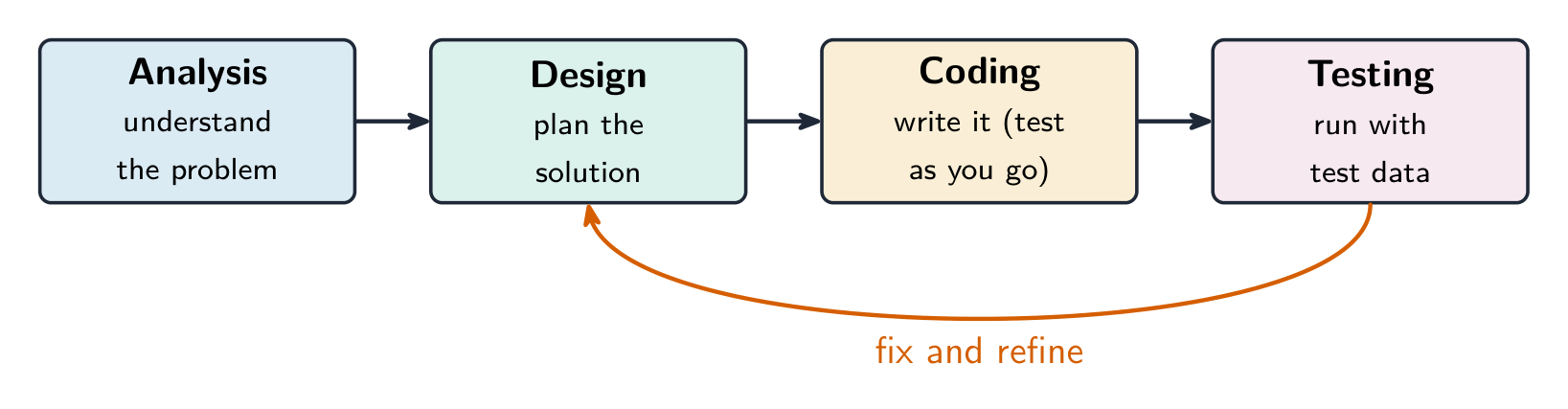
Programs are built through an iterative 迭代 process, not in one straight line: investigate the problem and users, design (often with a diagram or written plan), implement in code, and test – then repeat. A large problem is broken into smaller pieces (decomposition 分解). Comments 注释 and clear naming document the design so others (and your future self) can understand it. Development is incremental – build and test a small piece, then add the next.

Investigating what users actually need

Before any code is written, the developer investigates the problem and the people who will use the program. Three ways to do that:

  • surveys 调查问卷 sent to potential users, which collect data from many people quickly;
  • interviews and direct observation of users doing the task by hand;
  • studying existing solutions to see what already works and what frustrates people.

The findings are turned into a design. Two artefacts do that: a program requirements list saying exactly what the program must do, and diagrams representing the layout of the user interface 用户界面 — sketches showing which controls appear where, and what each one does when used. Designing the interface on paper first is cheaper than discovering after coding that the buttons are in the wrong place.

Events, and programs that wait

Not every program runs straight through from top to bottom. An event 事件 is generated when a key is pressed, a mouse is clicked, a program is started, or any other defined action occurs — and an event changes the flow of execution: the program pauses what it was doing and runs the code attached to that event, called an event handler 事件处理程序.

This is why a program with a graphical interface can appear to be doing nothing: it is waiting for the next event. The order in which those events arrive is decided by the user, not by the programmer, so the same program can run its blocks in a different order each time it is used.

ไทย
นักเขียนโปรแกรมกำลังแก้ดีบักที่สถานีงานหลายจอภาพ — การออกแบบและการทดสอบแบบวนซ้ำ
นักพัฒนาซอฟต์แวร์กำลังแก้ไขข้อผิดพลาดที่สถานีงานหลายจอ — การออกแบบและทดสอบแบบวนซ้ำ

โปรแกรมถูกสร้างผ่านกระบวนการ วนซ้ำ ไม่ใช่เส้นตรงเดียว: สำรวจปัญหาและผู้ใช้งาน ออกแบบ (มักใช้ แผนภาพ หรือแผนเขียน), เขียนโค้ด, และทดสอบ – แล้วทำซ้ำ ปัญหาขนาดใหญ่จะถูกแบ่งเป็นชิ้นเล็กๆ (การแยกส่วน) ความคิดเห็น และการตั้งชื่อที่ชัดเจนช่วยบันทึกการออกแบบเพื่อให้ผู้อื่น (และตัวคุณในอนาคต) เข้าใจได้ การพัฒนาเป็นแบบ เพิ่มพูน – สร้างและทดสอบชิ้นเล็กก่อน แล้วจึงเพิ่มส่วนถัดไป

ขั้นตอนการพัฒนาโปรแกรม พร้อมการทดสอบที่ส่งผลลัพธ์ย้อนกลับเพื่อแก้ไขและปรับปรุง
ซอฟต์แวร์ถูกสร้างด้วยกระบวนการพัฒนาแบบวนซ้ำและเพิ่มพูน

การสำรวจสิ่งที่ผู้ใช้ต้องการจริงๆ

ก่อนเขียนโค้ดใดๆ นักพัฒนาต้องสำรวจปัญหามนุษย์ที่จะใช้โปรแกรม มี 3 วิธี:

  • แบบสอบถาม ส่งให้ผู้ใช้งาน potensial เพื่อเก็บข้อมูลจากผู้คนจำนวนมากอย่างรวดเร็ว;
  • การสัมภาษณ์ และการสังเกตโดยตรงเมื่อผู้ใช้งานทำกิจกรรมด้วยมือ;
  • การศึกษาคำตอบที่มีอยู่เดิม เพื่อดูว่าอะไรทำงานได้ดีอยู่แล้ว และอะไรทำให้คนไม่พอใจ

ผลที่ได้จะถูกเปลี่ยนเป็นการออกแบบ วัตถุ 2 อย่างทำได้ดังนี้: รายการ ข้อกำหนดของโปรแกรม ที่ระบุชัดเจนว่าโปรแกรมต้องทำอะไร, และ แผนภาพแสดงโครงสร้างอินเทอร์เฟซผู้ใช้ – แบบร่างที่แสดงว่าปุ่มหรือควบคุมต่างๆ อยู่ที่ไหน และแต่ละอันทำหน้าที่อย่างไรเมื่อถูกกด การออกแบบอินเทอร์เฟซบนกระดาษก่อนจะประหยัดกว่าการค้นพบว่าปุ่มวางผิดตำแหน่งหลังเขียนโค้ดแล้ว

เหตุการณ์ และโปรแกรมที่รอคอย

ไม่ใช่ทุกโปรแกรมจะรันจากบนลงล่างโดยตรงๆ เหตุการณ์ จะเกิดขึ้นเมื่อกดคีย์ คลิกเมาส์ เปิดโปรแกรม หรือเกิดเหตุการณ์ที่กำหนดไว้อื่นๆ – และเหตุการณ์นี้จะเปลี่ยน ลำดับการทำงาน: โปรแกรมจะหยุดสิ่งที่กำลังทำอยู่ชั่วคราว แล้วรันโค้ดที่ผูกกับเหตุการณ์นั้น ซึ่งเรียกว่า ตัวจัดการเหตุการณ์

นี่คือเหตุผลที่โปรแกรมที่มีอินเทอร์เฟซกราฟิกอาจดูเหมือนไม่ทำอะไรเลย: มันกำลังรอเหตุการณ์ถัดไป ลำดับที่เหตุการณ์เหล่านี้เข้ามาขึ้นอยู่กับผู้ใช้งาน ไม่ใช่ผู้เขียนโปรแกรม ดังนั้นโปรแกรมเดียวกันสามารถรันบล็อคโค้ดในลำดับที่แตกต่างกันได้每一次เมื่อถูกใช้งาน

Explore · ⁨สำรวจ⁩

Loop through the iterative development process · ⁨วนลูปกระบวนการพัฒนาแบบ iteratively⁩

Development is iterative — you repeat the stages, improving the program a little on each pass. Step around the loop and notice it returns to the start rather than ending after one run. · ⁨การพัฒนาเป็น iterative — คุณทำซ้ำขั้นตอนต่างๆ ปรับปรุงโปรแกรมเล็กน้อยในทุกรอบ ก้าวไปรอบๆ และสังเกตว่ามันวนกลับไปที่จุดเริ่มต้นแทนที่จะจบหลังจากรันครั้งเดียว⁩

1.4

Identifying and Correcting Errors · ⁨การระบุและแก้ไขข้อผิดพลาด⁩

Syllabus · ⁨หลักสูตร⁩
English

Enduring Understanding (CRD-2): Developers create and innovate using an iterative design process that is user-focused, that incorporates implementation/feedback cycles, and that leaves ample room for experimentation and risk-taking.

Learning Objective CRD-2.I: For errors in an algorithm or program: a. Identify the error. [Skill 4.C] b. Correct the error. [Skill 4.C]

  • CRD-2.I.1 A logic error is a mistake in the algorithm or program that causes it to behave incorrectly or unexpectedly.
  • CRD-2.I.2 A syntax error is a mistake in the program where the rules of the programming language are not followed.
  • CRD-2.I.3 A run-time error is a mistake in the program that occurs during the execution of a program. Programming languages define their own run-time errors.
  • CRD-2.I.4 An overflow error is an error that occurs when a computer attempts to handle a number that is outside of the defined range of values.
  • CRD-2.I.5 The following are effective ways to find and correct errors:
    • test cases
    • hand tracing
    • visualizations
    • debuggers
    • adding extra output statement(s)

Learning Objective CRD-2.J: Identify inputs and corresponding expected outputs or behaviors that can be used to check the correctness of an algorithm or program. [Skill 4.C]

  • CRD-2.J.1 In the development process, testing uses defined inputs to ensure that an algorithm or program is producing the expected outcomes. Programmers use the results from testing to revise their algorithms or programs.
  • CRD-2.J.2 Defined inputs used to test a program should demonstrate the different expected outcomes that are at or just beyond the extremes (minimum and maximum) of input data.
  • CRD-2.J.3 Program requirements are needed to identify appropriate defined inputs for testing.
ไทย

ความเข้าใจที่ยั่งยืน (CRD-2): ผู้พัฒนาสร้างและ innovate using an iterative design process that is user-focused, that incorporates implementation/feedback cycles, and that leaves ample room for experimentation and risk-taking

จุดประสงค์การเรียนรู้ CRD-2.I: สำหรับข้อผิดพลาดในอัลกอริทึมหรือโปรแกรม: ก. ระบุข้อผิดพลาด [ทักษะ 4.C] ข. แก้ไขข้อผิดพลาด [ทักษะ 4.C]

  • CRD-2.I.1 ข้อผิดพลาดทางตรรกะ คือความผิดพลาดในอัลกอริทึมหรือโปรแกรมที่ทำให้其行为ผิดปกติหรือไม่คาดคิด
  • CRD-2.I.2 ข้อผิดพลาดทางไวยากรณ์ คือความผิดพลาดในโปรแกรมที่ไม่ปฏิบัติตามกฎของภาษาการเขียนโปรแกรม
  • CRD-2.I.3 ข้อผิดพลาดขณะรัน คือความผิดพลาดในโปรแกรมที่เกิดขึ้นระหว่างการ运行的ของโปรแกรม ภาษาการเขียนโปรแกรมกำหนดข้อผิดพลาดขณะรันของตนเอง
  • CRD-2.I.4 ข้อผิดพลาดการล้น คือข้อผิดพลาดที่เกิดขึ้นเมื่อคอมพิวเตอร์พยายามจัดการกับตัวเลขที่อยู่นอกช่วงค่าที่กำหนด
  • CRD-2.I.5 วิธีที่มีประสิทธิภาพในการค้นหาและแก้ไขข้อผิดพลาดมีดังนี้:
    • กรณีทดสอบ
    • การติดตามด้วยมือ
    • การแสดงผลภาพ
    • debugger
    • เพิ่ม statement ผลลัพธ์ (output statement(s)) เพิ่มเติม

วัตถุประสงค์การเรียนรู้ CRD-2.J: ระบุอินพุตและผลลัพธ์หรือพฤติกรรมที่คาดหวังที่เกี่ยวข้อง ซึ่งสามารถใช้ตรวจสอบความถูกต้องของอัลกอริทึมหรือโปรแกรม [ทักษะ 4.C]

  • CRD-2.J.1 ในกระบวนการพัฒนา การทดสอบ ใช้อินพุตที่กำหนดไว้เพื่อให้มั่นใจว่าอัลกอริทึมหรือกำลังสร้างผลลัพธ์ที่คาดหวังอยู่ โปรแกรมเมอร์ใช้ผลการทดสอบเพื่อปรับปรุงอัลกอริทึมหรือโปรแกรมของตน
  • CRD-2.J.2 อินพุตที่กำหนดไว้用于ทดสอบโปรแกรมควรสาธิตผลลัพธ์ที่คาดหวังที่แตกต่างกันที่ระดับหรือใกล้เคียงกับขอบเขต (ค่าต่ำสุดและสูงสุด) ของข้อมูลอินพุต
  • CRD-2.J.3 ความต้องการของโปรแกรมจำเป็นสำหรับการระบุอินพุตที่กำหนดไว้ที่เหมาะสมสำหรับการทดสอบ

Source: College Board AP Course and Exam Description · ⁨แหล่งที่มา: คำอธิบายหลักสูตรและข้อสอบ College Board AP⁩

English

A bug is an error in a program; debugging 调试 is finding and fixing it. Three kinds:

  • a syntax error 语法错误 breaks the language's rules, so the program will not run;
  • a runtime error 运行时错误 crashes the program while it runs (e.g. dividing by zero);
  • a logic error 逻辑错误 lets it run but gives the wrong result.

Find bugs by testing with different inputs, adding print statements to see values, and hand-tracing the code. Choose the test inputs deliberately: they should demonstrate the different expected outcomes at or just beyond the extremes — the minimum and maximum values the program should accept, and a value just outside each of them. A program that works on ordinary data very often fails on an empty list, a zero, or a value one past the end of a range, so those are the inputs worth trying first. Fixing one bug at a time and re-testing is the reliable method.

Exam skill: be able to name the type of an error and describe a testing strategy that would catch it – a recurring multiple-choice and Create-task theme.

Worked example. A program meant to print the average of two numbers instead runs avg = a + b / 2. Tracing the order of operations, / runs before +, so it computes $a+\tfrac{b}{2}$ rather than the average. Add parentheses to fix it: avg = (a + b) / 2. Testing with $a=4,\ b=6$ confirms the fix — the buggy line gives $4+3=7$, the corrected line gives $\tfrac{10}{2}=5$. Testing with known inputs is exactly how you find and confirm a logic error.

ไทย

บั๊ก คือข้อผิดพลาดในโปรแกรม; การดีบัก คือการหาและแก้ไขมัน มี 3 ประเภท:

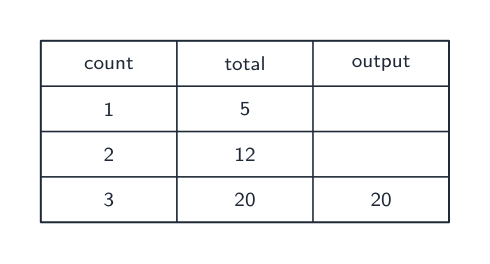
ตารางติดตามบันทึกค่าของตัวแปรแต่ละตัวขณะโปรแกรมรัน เพื่อหาบั๊ก
  • ความผิดพลาดทางไวยากรณ์ ทำให้違反กฎภาษา sehinggaโปรแกรมจะไม่รัน;
  • ความผิดพลาดขณะรัน ทำให้โปรแกรมพังขณะกำลังทำงาน (เช่น หารด้วยศูนย์);
  • ความผิดพลาดทางตรรกะ ให้โปรแกรมรันได้แต่ให้ผลลัพธ์ผิด

หาบั๊กด้วยการ ทดสอบ ด้วยอินพุตต่างๆ เพิ่ม คำสั่งพิมพ์ เพื่อดูค่า, และติดตามโค้ดด้วยมือ เลือกอินพุตทดสอบอย่างมีจุดประสงค์: ควรแสดงผลตาม Expected outcomes ที่คาดหวัง ที่ขอบเขตหรือใกล้ขอบเขตมากสุด – ค่าต่ำสุดและสูงสุดที่โปรแกรมควรรับได้, และค่าที่อยู่ถัดออกไปจากนั้นเล็กน้อย โปรแกรมที่ทำงานกับข้อมูลปกติได้ดีมักล้มเหลวกับรายการว่าง, ศูนย์, หรือค่าที่เกินขอบเขตช่วงหนึ่งไป, ดังนั้น这些都是值得首先尝试的输入。การแก้บั๊กทีละตัวแล้วทดสอบใหม่คือวิธีที่เชื่อถือได้

ทักษะสำหรับการสอบ: สามารถระบุประเภทของความผิดพลาดและอธิบายกลยุทธ์การทดสอบที่จะจับมันได้ – ซึ่งเป็นหัวข้อที่ปรากฏบ่อยในการสอบแบบเลือกคำตอบและการสร้างงาน

สามประเภทของความผิดพลาดในการเขียนโปรแกรม: ไวยากรณ์, ตรรกะ, และขณะรัน

ตัวอย่างฝึกปฏิบัติ. โปรแกรมที่ควรพิมพ์ค่าเฉลี่ยของสองตัวเลข กลับรัน avg = a + b / 2. การติดตามลำดับการดำเนินการ, / รันก่อน +, จึงคำนวณ $a+\tfrac{b}{2}$ แทนค่าเฉลี่ย เพิ่มวงเล็บเพื่อแก้ไข: avg = (a + b) / 2. ทดสอบด้วย $a=4,\ b=6$ ยืนยันการแก้ไข – บรรทัดที่มีบั๊กให้ $4+3=7$, บรรทัดที่แก้ไขให้ $\tfrac{10}{2}=5$. การทดสอบด้วยอินพุตที่ทราบผลลัพธ์ล่วงหน้าคือวิธีการที่คุณพบและยืนยัน ความผิดพลาดทางตรรกะ ได้อย่างแท้จริง

Explore · ⁨สำรวจ⁩

Trace the guessing-game logic and spot a logic error · ⁨ติดตามตรรกะเกมทายเลขและหาข้อผิดพลาดทางตรรกะ⁩

Drag the guess and watch which branch runs. A logic error would send the same guess down the wrong branch — the program still runs, but gives the wrong message. The secret number here is 50. · ⁨ลากค่าเดาไปเพื่อดูว่า สาขา (branch) ใดถูกเรียกใช้งาน ความผิดพลาดด้านตรรกะ จะส่งค่าเดาเดียวกันไปยังสาขาที่ผิด — โปรแกรมยังคงทำงานอยู่ แต่จะแสดงข้อความที่ไม่ถูกต้อง เลขลับในที่นี้คือ 50⁩

1.4

Exam tips · ⁨ข้อแนะนำสำหรับการสอบ⁩

English
  • Much of CSP is assessed through the Create and written performance tasks — explain your reasoning clearly, not just your result.
  • Know the benefits of collaboration and how diverse perspectives reduce bias in a program.
  • Use precise vocabulary (iterative development, program requirements) when you describe a design process.
  • Give and take feedback constructively; credit collaborators and sources.
  • Break a large problem into smaller modules that a team can build in parallel.
ไทย
  • ส่วนใหญ่ของ CSP ถูกประเมินผ่านงาน Create และงานเขียนประสิทธิภาพ – อธิบายเหตุผลของคุณอย่างชัดเจน ไม่ใช่แค่ผลลัพธ์
  • รู้ประโยชน์ของการร่วมมือกันและมุมมองที่หลากหลายช่วยลดอคติในโปรแกรม
  • ใช้คำศัพท์ที่แม่นยำ (การพัฒนาแบบวนซ้ำ, ข้อกำหนดของโปรแกรม) เมื่ออธิบายกระบวนการออกแบบ
  • ให้และรับคำติชมอย่างสร้างสรรค์; ยกย่องผู้ร่วมพัฒนาและแหล่งที่มา
  • แบ่งปัญหาย่อยใหญ่ให้เป็นโมดูลย่อยที่ทีมสามารถสร้างพร้อมกันได้

Interactive lessons on this topic · ⁨บทเรียนเชิงโต้ตอบสำหรับหัวข้อนี้⁩

Work through it step by step, with instant-check exercises. · ⁨ทำทีละขั้นตอน พร้อมแบบฝึกหัดตรวจสอบผลทันที⁩

Past Papers · ⁨ข้อสอบย้อนหลัง⁩

More topics in AP Computer Science Principles · ⁨หัวข้อเพิ่มเติมใน AP Computer Science Principles⁩

Log in or create account · ⁨เข้าสู่ระบบหรือสร้างบัญชี⁩

IGCSE, A-Level & AP