| Enduring Understanding | Learning Objective | Essential Knowledge |
|---|---|---|
DAT-1 | DAT-1.A |
|
DAT-1.B |
| |
DAT-1.C |
|
Data
AP Computer Science Principles · Topic 2
 8:13
8:13
Data
Play a song. What reaches your ear is a wave — smooth, continuous, never jumping from one value to the next. But your phone cannot store a wave. It can only…
English narration · English + 中文 subtitles burned in
2.1
Binary Numbers
Syllabus
Source: College Board AP Course and Exam Description
Computers store everything as bits 位 – each a 0 or 1. A group of 8 bits is a byte 字节. Numbers are stored in binary 二进制 (base 2), where each place is a power of two ($1, 2, 4, 8, 16, \dots$) instead of the powers of ten in decimal 十进制. For example, binary 1011 is $8+2+1=11$.
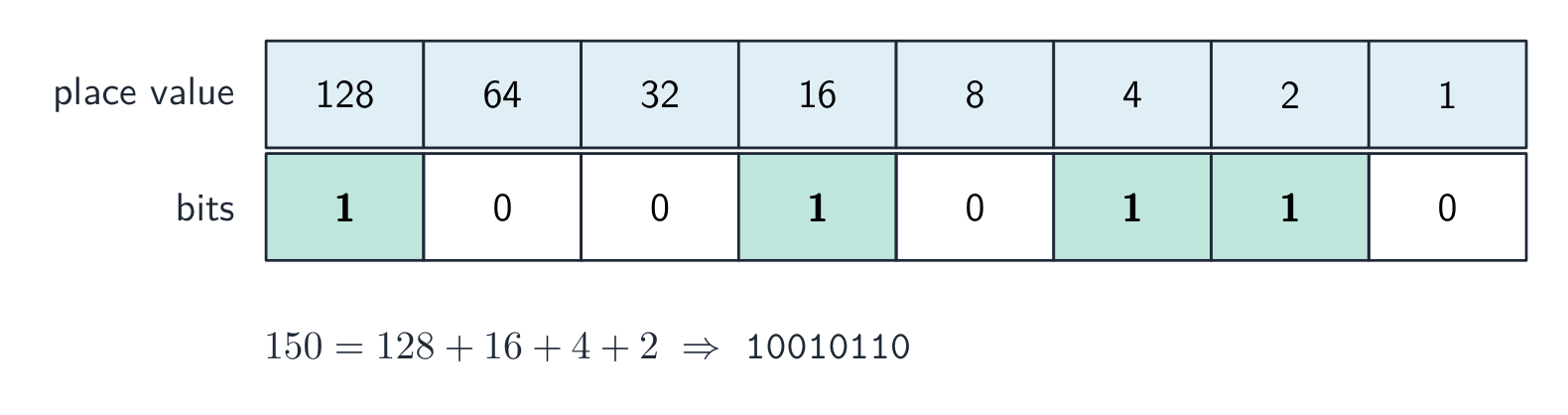
Worked example. To convert binary 1101 to decimal, write the place values 8 4 2 1 under the bits 1 1 0 1 and add the ones that have a 1: $8+4+0+1=13$. Going the other way, convert 19 to binary by subtracting the largest power of two that fits: $19-16=3$, then $3-2=1$, then $1-1=0$, so the bits sit at the 16, 2, and 1 places $\rightarrow$ 10011 (check: $16+2+1=19$).
Because a computer has a finite number of bits, it can represent only a limited range of values. This causes two effects tested on the exam:
- Overflow error 溢出错误: a number too large for the available bits cannot be stored correctly.
- Round-off (rounding) error 舍入错误: numbers with decimals (real numbers) can only be approximated, because infinitely many real values must map onto finitely many bit patterns.
All data – text, images, sound – is ultimately encoded as binary. An image is a grid of pixels 像素, each stored as numbers for its colors; sound is stored as numbers sampled many times per second.
Explore
Convert between binary and decimal
Computers store numbers in binary (base 2). Each bit is a power of two; add the place values of the 1-bits to read the decimal number.
Vocabulary
Train
| English |
|---|
| bits/bɪts/ |
| byte/baɪt/ |
| binary/ˈbaɪnəri/ |
| decimal/ˈdesɪml/ |
| Overflow error/ˌəʊvəˈfləʊ ˈerə/ |
| Round-off (rounding) error/raʊnd ɒf ˈerə/ |
| pixels/ˈpɪkslz/ |
2.2
Data Compression
Syllabus
| Enduring Understanding | Learning Objective | Essential Knowledge |
|---|---|---|
DAT-1 | DAT-1.D |
|
Source: College Board AP Course and Exam Description
Compression 压缩 reduces the number of bits needed to store or send data. Two kinds:

- Lossless compression 无损压缩 lets you restore the exact original data (used for text and programs, where every bit matters).
- Lossy compression 有损压缩 throws away some data to shrink the size further (used for photos, music, video, where a small quality loss is acceptable).
Choosing between them trades size against fidelity: lossless keeps everything but saves less; lossy saves more but loses detail permanently. Prefer lossless when the data must be exact.
Explore
Compress a run of repeats
Run-length encoding is a lossless compression: a long run of the same symbol is replaced by the symbol and a count, shrinking the data with no information lost.
Vocabulary
Train
| English |
|---|
| Compression/kəmˈpreʃn/ |
| Lossless compression/ˈlɒsləs kəmˈpreʃn/ |
| Lossy compression/ˈlɒsi kəmˈpreʃn/ |
2.3
Extracting Information from Data
Syllabus
| Enduring Understanding | Learning Objective | Essential Knowledge |
|---|---|---|
DAT-2 | DAT-2.A |
|
DAT-2.B |
| |
DAT-2.C |
|
Source: College Board AP Course and Exam Description
Data 数据 becomes useful when we extract information 信息 from it – patterns, trends, and answers to questions. Large data sets can reveal correlations a small one cannot, but data must be cleaned (fixing errors and inconsistencies) and often transformed or filtered first. A correlation 相关性 between two things does not prove that one causes the other – a key caution. Metadata 元数据 (data about data, like a photo's date and location) helps organize and search large collections.
Vocabulary
Train
| English |
|---|
| Data/ˈdeɪtə/ |
| information/ˌɪnfəˈmeɪʃn/ |
| correlation/ˌkɒrɪˈleɪʃn/ |
| Metadata/ˌmetəˈdeɪtə/ |
2.4
Using Programs with Data
Syllabus
| Enduring Understanding | Learning Objective | Essential Knowledge |
|---|---|---|
DAT-2 | DAT-2.D |
|
DAT-2.E |
|
Source: College Board AP Course and Exam Description
Programs process data at scales humans cannot. Common operations are filtering 过滤 (keeping only rows that meet a condition), cleaning (removing errors), and visualizing 可视化 (charts and graphs that make patterns visible). Combining data from multiple sources can reveal more, but raises privacy 隐私 concerns. Interactive tools and visualizations let people explore data and draw their own conclusions.
Exam skill: be able to explain how a program helps find information in a large data set, and why correlation shown in the data does not establish causation.
Vocabulary
Train
| English |
|---|
| filtering/ˈfɪltərɪŋ/ |
| visualizing/ˈvɪʒuːəlaɪzɪŋ/ |
| privacy/ˈprɪvəsi/ |
2.4
Exam tips
- Convert confidently between binary, decimal, and (where asked) hexadecimal — practise until it is quick.
- Remember a bit is one binary digit and a byte is 8 bits; $n$ bits represent $2^n$ values.
- Explain that all data — numbers, text, images, sound — is stored as binary, and that finite bits cause overflow and round-off.
- Distinguish lossless from lossy compression and when each is appropriate.
- Show the analog-to-digital idea: sampling turns a continuous signal into discrete values.
Interactive lessons on this topic
Work through it step by step, with instant-check exercises.