본문 바로가기

앱 및 데이터 보안

AP 사이버보안 · 주제 5

이 주제용 영상 수업 영상 페이지 열기
9:47

앱 및 데이터 보안

어느 회사가 방화벽, 잠근 문, 강력한 비밀번호에 막대한 비용을 들였습니다. 그런데 누군가 로그인 상자에 기이한 문자 몇 개를 입력했— 그리고 데이터베이스…

영어 내레이션 · 영어 + 중국어 자막 burned-in

5.1

애플리케이션 및 데이터 취약점 및 공격

Syllabus

학습 목표 5.1.A: 적대자가 응용 프로그램 및 파일 취약점을如何利用하여 손실, 손상, 중단 또는 파괴를 유발하는지 설명하기.

  • 5.1.A.1 적대자가 파일을 저장하는 장치 또는 드라이브에 액세스할 수 있다면, 암호화되지 않은 모든 파일을 읽을 수 있습니다.
  • 5.1.A.2 컴퓨터에는 표준 사용자 및 관리자가 있습니다. 관리자는 시스템 설정을 제어할 수 있으며 일반적으로 시스템의 모든 파일 및 애플리케이션에 접근할 수 있습니다. 일반 사용자에게 관리자 권한이 부여된 상태에서 적대자가 사용자의 계정을 해킹할 경우, 적대자는 시스템에서 elevated privileges(상위 권한)를 얻게 됩니다.
  • 5.1.A.3 접근 제어 설정이 느슨하게 configured(설정)되어 있는 경우, 많은 사용자가 시스템 내 파일을 조회하거나 때로는 편집할 수 있는 permission(권한)을 가지게 됩니다. 적대자는 약한 접근 제어 설정을并利用하여 파일을 도난하거나 파괴하거나 애플리케이션의 작동을 방해할 수 있습니다.
Learning ObjectiveEssential Knowledge

5.1.B
애플리케이션 공격이 취약점을 어떻게是利用하는지 설명하십시오.

  • 5.1.B.1 애플리케이션은 컴퓨터에서 명령어를 행하는 프로그램으로, executable data(실행 가능한 데이터)입니다. 일부 애플리케이션은 사용자의 로컬 컴퓨터에서 실행되지만, 웹 애플리케이션과 같이 서버에서 실행되어 네트워크를 통해 사용자가 접근합니다.
  • 5.1.B.2 많은 애플리케이션은 사용자가 문자(예: 글자, 숫자, 문장 부호)를 입력할 수 있는 open-ended input fields(개방형 입력 필드)를 통해 사용자 입력을 받습니다. 개발자는 사용자가 물품 개수를 요청했을 때 numeric input(숫자 입력)과 같은 사용자 입력 검사를 애플리케이션에 포함시켜, 사용자 입력이 예상되는内容与一致하도록 보장해야 합니다. 애플리케이션은 예상되는 parameters(매개변수) 범위를 벗어난 입력은 거절해야 합니다. 이 과정에서 처리 전에 사용자 입력이 예상되는 criteria(기준)를 충족하는지 검증하는 process는 data validation(데이터 유효성 검사)이라고 합니다. 사용자 입력을 validate하지 못하는 애플리케이션은 injection-type attacks(주입 공격)에 vulnerable(취약)한데, 이는 적대자가 입력 필드에 unexpected character strings(예기치 않은 문자열)을 삽입하여 프로그램의 behavior(동작)를 변경하려는 것입니다.
  • 5.1.B.3 Structured query language (SQL)은 데이터베이스에서 정보를 요청하거나 데이터베이스 또는 데이터베이스 내 레코드에 변경을 가하기 위해 사용하는 computer language(컴퓨터 언어)입니다. 사용자의 unvalidated or unsanitized input(유효성 검사 또는 정제되지 않은 입력)을 사용하여 데이터베이스를 쿼리하는 애플리케이션은 vulnerable(취약)합니다.
  • 5.1.B.4 SQL-injection attack(SQL 주입 공격)은 애플리케이션의 사용자 입력 필드에 SQL 명령어와 control characters(제어 문자)를 insertion(삽입)하여, 애플리케이션이 예상보다 더 많은 information(정보)를 반환하게 함으로써 confidentiality breach(기밀 유출)를 유발하거나, 데이터베이스 내 데이터를 modification(수정)或删除(삭제)함으로써 integrity breach(무결성 침해)를 유발할 수 있습니다.
  • 5.1.B.5 웹사이트는 hypertext markup language (HTML)로 작성되며, 많은 웹사이트가 websites 또는 web applications에서 dynamic content(동적 콘텐츠)를 생성하기 위해 Javascript를 사용합니다. Javascript 명령어는 방문자의 browser(브라우저)에서 실행되므로, usernames(사용자 이름), passwords(비밀번호), cryptographic keys(암호화 키)와 같은 sensitive data(민감한 데이터)에 접근할 수 있습니다.
  • 5.1.B.6 Cross site scripting (XSS) attack(크로스 사이트 스크립팅 공격)은 malicious code(악성 코드)가 Website에 inject(주입)되고, 사용자의 브라우저가 이를 execute(실행)합니다. 악성 코드는 사용자가 클릭하는 link(링크)에 embed(내장)될 수 있으며(Type I 또는 Reflected XSS 공격), comment field(댓글 창), forum post(포럼 게시물), visitor log(방문 기록) 등을 통해 Website에 insert(삽입)될 수도 있습니다(Type II 또는 Stored XSS 공격). 후자의 경우 해당 website를 방문하는 모든 user에게 영향을 미칩니다.
  • 5.1.B.7 애플리케이션이 사용자 입력을 받을 때, 그 입력은 buffer(버퍼)에 저장됩니다. 버퍼는 고정된 크기를 가진 designated section of computer memory(전용 메모리 영역)입니다. 사용자가 enter(입력)하는 데이터 양이 버퍼의 size(크기)를 초과하면, adjacent memory locations(인접 메모리 위치)으로 overflow(오버플로우)되어 컴퓨터 메모리의 다른 부분을 overwrite(덮어쓰기)할 수 있습니다.
  • 5.1.B.8 Buffer overflow attack(버퍼 오버플로우 공격)은 할당된 amount(양)보다 더 많은 data(데이터)를 memory(메모리)에 feeding(공급)하여, 시스템이 crash(충돌/종료)하거나 program의 security policy(보안 정책) scope(범위) 외부의 code(코드)를 execute(실행)하게 만들 수 있습니다. 이는 결과적으로 적대자로 하여금 computer에서 unauthorized actions(허가되지 않은 작업), 예를 들어 파일의 접근, 수정 또는 삭제 등의 행위를 수행할 수 있게 합니다.
  • 5.1.B.9 웹 애플리케이션을 실행하는 files(파일)은 서버 상의 directories(디렉토리)에 저장됩니다. 사용자가 웹 애플리케이션에 access(접근)할 때, their browsers(브라우저)는 hypertext transfer protocol (HTTP)을 사용하여 GET requests(GET 요청)을 전송합니다. GET 요청은 서버의 filesystem(파일 시스템) 내某处(어딘가)의 file(파일)에 접근합니다.
  • 5.1.B.10 Directory traversal attack(디렉토리 트라버설 공격)에서 적대자들은 URLs 및 GET requests를 modify(수정)하여, 서버의 filesystem에 stored(저장된) sensitive data(예: 사용자 이름 및 비밀번호)에 attempt(시도)합니다.
    • Illustrative examples for 5.1.B.10:
      • Web server(웹 서버)가 호스팅하는 웹사이트의 images(이미지)를 /var/www/images/ directory(디렉토리)에 저장하고 있습니다. 적대자는 이미지 요청을 위한 URL을 ../../../etc/passwd로 modify(수정)합니다. ..는 filesystem(파일 시스템) 내에서 한 단계 위 디렉토리로 이동하므로, 세 번 연속된 ..는 루트(root) 경로를 반환하며,そこから 적대자는 passwd 파일을 accessing(접근)하려 합니다. 이 파일은 device(장치)에 autorized usernames(승인된 사용자 이름)의 list(목록)를 returns(반환)합니다.

5.1.C
애플리케이션 및 데이터 취약성에 대한 리스크를 assess(평가)하고 document(문서화)하십시오.

  • 5.1.C.1 Data security risks(데이터 보안 위험)은 unauthorized persons(허가되지 않은 사람)가 sensitive data(민감한 데이터)에 access(접근)하여 confidentiality(기밀성)가 compromise(유해됨)되는 것, data(데이터)가 intended state(원래 상태)로부터 manipulation(조작)되거나 alteration(변경)되어 integrity(무결성)가 침해되는 것, 그리고 data(데이터)가 destroyed(파괴)되거나 encrypted(암호화)되어 others(타인)이 access(접근)할 수 없게 되어 availability(가용성)가 저하되는 것을 포함할 수 있습니다.
  • 5.1.C.2 Data vulnerabilities(데이터 취약점)에 의한 high risks(고위험)은 laws 또는 regulations(법률 또는 규정)에 govern(규율)되는 highly sensitive data(매우 민감한 데이터)가 highly likely exploit(높은 확률의 이용)을 통해 compromise(유해됨)될 수 있는 경우를 자주 포함합니다.
    • Illustrative examples for 5.1.C.2:
      • 공군 기기에 사용될次jet engine(차세대 제트 엔진)을 developing(개발) 중인 company(회사)가 technical specifications(기술 사양)을 unencrypted drive(복호화되지 않은 드라이브)에 storing(저장)하고 있습니다.
  • 5.1.C.3 Data vulnerabilities(데이터 취약점)에 의한 moderate risks(중위험)은 sensitive data(민감한 데이터)가 strong enough encryption(강력한 암호화)이나 strict enough access controls(엄격한 접근 통제)를 갖추지 못한 경우를 주로 포함합니다.
    • Illustrative examples for 5.1.C.3:
      • A company(회사가) customers’ PII(고객 개인정보)를 spreadsheet(스프레드시트)에 storing(저장)하고 있으며, 해당 spreadsheet는 small key(작은 키)를 사용하여 encrypt(암호화)되어 있습니다.
  • 5.1.C.4 데이터 취약성으로 인한 낮은 위험은 민감도가 낮은 정보가 짧은 키로 암호화되거나 접근 통제가 충분히 엄격하지 않은 경우에 주로 포함됩니다.
    • 5.1.C.4에 대한 예시:
      • 한 조직의 CEO가 임원 직원들을 위한 개인 메모를 암호화가 되어 있지 않고 접근 통제가 없는 회사 공유 드라이브에 저장합니다.

출처: College Board AP Course and Exam Description

SQL 인젝션

애플리케이션은 컴퓨터에서 실행되는 프로그램이고, 데이터는 그들이 처리하는 정보입니다 - 둘 다 주요 표적이 됩니다. 파일이 암호화되지 않고 저장되어 있다면 드라이브 접근 권한이 있는任何人都能读取它们。如果普通用户被授予管理员权限,窃取该账户的敌对者将获得广泛权力。

가장 큰 애플리케이션 위험은 나쁜 사용자 입력입니다. 프로그램이 사용자가 입력한内容进行检查时,敌对者可以插入命令——这是注入攻击。 데이터 검증(Data Validation) (입력이预期的规则是否满足)是防御手段。主要攻击类型:

  • SQL 인젝션: 입력 필드에 SQL 명령어를 삽입하여 데이터를 읽거나 변경합니다.
  • 크로스 사이트 스크립팅(XSS): 다른 사용자의 브라우저에서 실행되는网站上注入恶意脚本。

SQL 인젝션의 실제 모습

SQL은 데이터베이스를 조회하는 언어이며, 그 제어어는 항상 대문자로 표기합니다—SELECT, FROM, WHERE, IN, OR, AND. 로그인 양식은 일반적으로 사용자가 입력한 내용을 붙여넣어 쿼리를 생성합니다:

SELECT * FROM users WHERE name = 'alice' AND password = 'secret'

공격자는 이름 대신 필드에 SQL을 입력합니다. 두 가지 기법이 대부분의 피해를 입힙니다:

  • 항상 참인 조건. ' OR '1'='1를 입력하면 모든 행에 대해 WHERE 구절이 참이 되므로, 데이터베이스는 모든 사용자 정보를 반환합니다.
  • **이중_dash,在SQL中开始注释。输入admin' --结束名称字符串并注释掉整行其余部分,包括密码检查,因此查询变为… WHERE name = 'admin',攻击者无需密码即可以管理员身份登录。

防御措施不是过滤单词SELECT。而是完全阻止输入被当作代码处理:使用参数化查询(也称为预编译语句),将查询和值分别提供给数据库且永不混合,并添加输入验证以拒绝字段没有理由包含的字符。

  • 버퍼 오버플로우 - 메모리 버퍼가 수용할 수 있는 것보다 많은 데이터를 전송하여 Nearby内存溢出并可能运行敌对者的代码。
  • ディレクトリ Traverse - URL에서../ 시퀀스를 사용하여 intended文件夹外的文件访问,例如/etc/passwd。

우리는 민감도에 따라 데이터 위험도를 평가합니다: 암호화되지 않은 군사 계획은 높음 위험도; 약한 키가 포함된 고객 데이터는 중간 위험도; 짧은 키가 있는 저가치 데이터는 낮음 위험도입니다.

English 한국어
Data validation/ˈdeɪtə ˌvælɪˈdeɪʃn/ 데이터 검증
Cross-site scripting (XSS)/krɒs saɪt ˈskrɪptɪŋ/ 크로스 사이트 스크립팅 (XSS)
parameterised queries/ˌpærəˈmetəraɪzd ˈkwɪərɪz/ 파라미터ized 쿼리
Buffer overflow/ˈbʌfə ˌəʊvəˈfləʊ/ 버퍼 오버플로우
buffer/ˈbʌfə/ 완충액(buffer)
Directory traversal/daɪˈrektəri træˈvɜːsl/ 디렉토리 트래버설
SQL injection/ˌes kjuː ˈel ɪnˈdʒekʃn/ SQL 주입攻击(SQL injection)
수업 보기
5.2

애플리케이션 및 데이터 보호: 관리 통제 및 접근 통제

Syllabus
Learning ObjectiveEssential Knowledge

5.2.A
Explain how the state or classification of data impacts the type and degree of security applied to that data.

  • 5.2.A.1 Organizations implement specific security controls to comply with legal requirements based on the types of data they collect, store, process, and transmit.
  • 5.2.A.2 Data can be classified by their state.
    • Data at rest are stored on a drive. It is important to protect the physical drive storing the data from destruction or theft. Data at rest can also be encrypted so that if an adversary steals it, they can’t immediately read the data.
    • Data in transit are being sent from one device to another. If the data are being transferred over physical media (e.g., cables) it is important to protect the media. Data in transit can also be encrypted so that if an adversary intercepts it, they can’t immediately read the data.
    • Data in use are being processed by software or a person. Access controls can be used to limit who or what has the ability to use data in different ways (e.g., view or edit). Data must be unencrypted to be used.
  • 5.2.A.3 Organizations often categorize data according to their sensitivity and prioritize a higher degree of security for more sensitive information.
  • 5.2.A.4 Laws and regulations can require certain types of data to be stored, transmitted, and handled according to specific rules.
    • Personally identifiable information (PII) is any data that allows someone to be identified and includes (but is not limited to): name, signature, phone number, address, biometric data (e.g., fingerprints), social security number, date of birth, and email address. The protection of this data is covered by many laws but most notably The Privacy Act of 1974 and for children under the age of 13 the Children’s Online Privacy Protection Act of 1998.
    • Protected health information (PHI) is any data related to an individual’s health, treatment, payment for healthcare at any time and includes (but is not limited to): test results, treatment records, hospital records, doctor visit notes, and health provider payment records. The protection of PHI is included in the Health Insurance Portability and Accountability Act of 1996.
    • Payment card information (PCI) is the data collected by organizations to process payments via cards (e.g., credit cards) and includes the following: name, account number, expiration date, address, and CVV code. The protection of this data is regulated by the Payment Card Industry Data Security Standard (PCI-DSS).
  • 5.2.A.5 Organizations that collect regulated data will label them and have policies that comply with the legal or regulatory requirements for the safe storage, transmission, and handling of these data.

5.2.B
Identify managerial controls related to application and data security.

  • 5.2.B.1 A cryptography policy will describe the acceptable encryption protocols and key parameters for an organization and may include:
    • A list of encryption algorithms approved for specific uses
    • Minimum or maximum key lengths
    • Cryptographic key-generation requirements and parameters
    • Cryptographic key-storage requirements
  • 5.2.B.2 A web application security policy will outline the requirements and parameters for testing and mitigating web application vulnerabilities in an organization, and it may include:
    • Parameters for when an application is subject to a security assessment
    • Timelines for remediating vulnerabilities based on level of risk
    • Parameters for how an application security assessment is to be carried out (e.g., using specific tools or according to specific frameworks)

5.2.C
Determine an appropriate access control model to protect applications and data.

  • 5.2.C.1 Access control enforces which users or applications (called subjects) can access, modify, add, or remove (called operations) which files or applications (called objects). Access control models describe how to determine which subjects have what type of access to which objects.
  • 5.2.C.2 Role-based access control (RBAC) assigns every subject to a role and defines which roles have which types of access to which objects.
    • Illustrative examples for 5.2.C.2:
      • An example of a role at a company might be “accountant,” and one type of object could be the payroll software. Role-based access could be used to ensure that only subjects who are assigned to the role of “accountant” have access to the payroll software object.
  • 5.2.C.3 Rule-based access control (RuBAC) checks a set of rules to determine what type of access a subject should have for a specific object and then allows or denies types of access based on the rules. This access control model is typically layered on top of another access control model.
    • Illustrative examples for 5.2.C.3:
      • There is a rule that prohibits subjects (even those who would normally have access) from accessing a certain database (the object) outside of local working hours. When a subject attempts to access the database, even if they are authorized to access it, they will be denied access if it is outside the time designated by the rule.
  • 5.2.C.4 Discretionary access control (DAC) gives individual subjects the ability to set the type of access that other subjects have on objects they own. In DAC models some subjects are designated as administrators or super users, and they have the ability to override the access controls established by other subjects.
    • Illustrative examples for 5.2.C.4:
      • Bob creates a file (an object) and decides to give Alice permission to edit the file, to give Frank permission to view the file only, and to deny everyone else access to the file altogether.
  • 5.2.C.5 Mandatory access control (MAC) follows strict rules for which types of access each subject level has for objects that are above their level, at their level, or below their level. Subject and object levels are assigned by an external administrator.
  • 5.2.C.6 The Bell-LaPadula model is a MAC model that is often used by governments and military organizations to control the security of information. This model has the following two important properties:
    • i. The Simple Security Property states that subjects may not read objects that are above their level.
    • ii. The * (Star) Security Property states that subjects may not write to objects below their level.
    • These rules taken together are often summarized as “write up, read down” (WURD).
  • 5.2.C.7 The principle of least privilege is the idea that entities should be given exactly as much access as they need to perform their function and no more.

5.2.D
Configure access control settings on a Linux-based system.

  • 5.2.D.1 Authorization is when an entity is granted permission to have a certain type of access to a resource. Access controls are put in place to control which users have what types of access to which data.
  • 5.2.D.2 There are three types of access to a file in Linux that can be set, and they always come in the following order:
    • i. Read access allows a user to view the contents of a file.
    • ii. Write access allows a user to make changes to a file.
    • iii. Execute access allows a user to run a binary file such as a program.
    • These are abbreviated rwx, respectively. If a user only has read and execute permissions (not write), then it would display as r-x. The - symbol indicates the absence of that permission.
  • 5.2.D.3 There are three default entities for which permissions are set and always in this order: (1) the file owner, (2) the file group, and (3) all other users. The three sets are displayed with no spaces (e.g., rwxrwxrwx).
  • 5.2.D.4 To view the current permission settings for a file, use the command ls -l, which will show the current settings for the default entities. If there is a + symbol at the end of the permissions, this means that other permissions have been set for that file and it can be viewed with the getfacl command.
  • 5.2.D.5 To modify the permission settings for a file, use the chmod command. This command can be used with the numeric method or the symbolic method.
  • 5.2.D.6 To use chmod in the numeric method the syntax is chmod ### filename. Each of the three ### represents one of the three entities mentioned above (the owner, the group, other nongroup users).
    • The first # = the owner
    • The second # = the group
    • The third # = other nongroup users
    • The permission for each entity is determined by adding up the values for the types of access to be granted:
    • 0 = no permissions
    • 1 = execute
    • 2 = write
    • 4 = read
    • Therefore 3 sets permission to write and execute, 5 sets permission to read and execute, 6 sets permission to read and write, and 7 sets permission to read, write, and execute.
    • Illustrative examples for 5.2.D.6:
      • The command chmod 750 test would set the permissions for the owner to read, write, and execute, for the group to read and execute, and for everyone else to no access at all.
      • The command chmod 543 test would set the permissions for the owner to read and execute, for the group to read only, and for everyone else to write and execute.
      • The command chmod 777 test would set the permissions for all three entities to read, write, and execute for the file test.
  • 5.2.D.7 To use chmod in the symbolic method the syntax is chmod entity +(or –) permission filename. The entities are the user owner, the group, and other nongroup users. Each entity is represented with a single letter.
    • u = user owner
    • g = group
    • o = others
    • a = all
    • Permission can be either added or removed to any combination of entities.
      • = add the permission
    • – = remove the permission
    • The permissions that can be set are read, write, and execute.
    • r = read
    • w = write
    • x = execute
    • Entities and permissions can be combined in a single command. To add the read and execute permissions for the group and user owner for a file called testfile, the command would be chmod ug+rx testfile.

출처: College Board AP Course and Exam Description

데이터는 상태에 따라 분류됩니다 - 저장 상태(at rest) (드라이브에 저장됨), 전송 중(in transit) (장치 간 이동 중), 사용 중(in use) (처리 중). 저장 상태와 전송 중의 데이터는 도난당한 사람이 읽지 못하도록 암호화할 수 있습니다. 사용中的数据必须解密,因此通过**접근 통제(access controls)**来保护它。

일부 데이터 유형은 규제-regulated 대상입니다 - 법은它们在存储、传输和处理时的方式作出规定 - 因此组织必须通过使其控制措施符合规则来实现合规性-compliance。考试要求你将每种数据类型与其管辖法律配对:

규제 대상 데이터 내용 관할 법률
개인 식별 정보 (PII) 개인을 식별할 수 있는 모든 정보: 이름, 주소, 사회보장번호(SSN), 생체 정보, 출생일 《프라이버시법》(1974); 13세 미만 대상 COPPA
보호 건강 정보 (PHI) 건강, 진료 및 의료비 결제 기록 HIPAA (1996)
결제 카드 정보 (PCI) 카드 번호, 만료일, CVV, 카드소유자 이름 PCI-DSS

규제 데이터를 수집하는 조직은 해당 데이터를 표기(label) 하고, 저장, 전송 및 처리가 규정을 준수하도록 하는 정책(policies) 을 마련해야 합니다. 데이터의 민감도가 높을수록 필요한 보안 수준도 높아집니다.

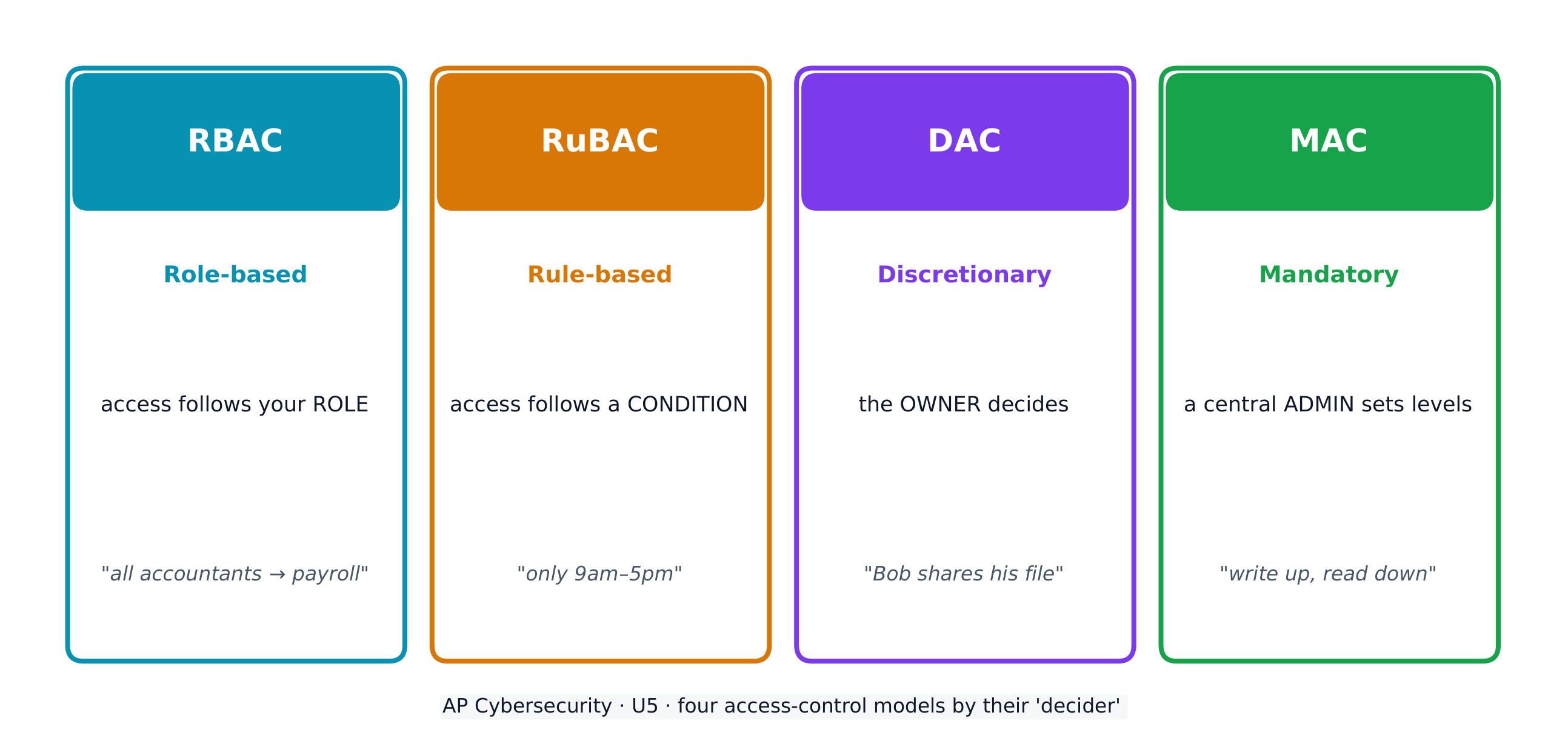
접근 제어(access control) 는 어떤 주체(subjects)(사용자) 가 어떤 작업(operations) 을 어떤 대상(objects)(파일) 에 수행할 수 있는지 결정합니다. 네 가지 모델이 있습니다:

  • 역할 기반(RBAC) - 접근 권한은 사용자의 역할(role) 에 따라 부여됩니다(예: 모든 '회계사'는 급여 관리 소프트웨어에 접근 가능).
  • 규칙 기반(RuBAC) - 조건(conditions) 에 따라 접근이 허용됩니다(예: 영업 시간 중에만 허용). 다른 모델 위에 계층적으로 적용됩니다.
  • 재량적(DAC) - 파일의 소유자(owner) 가 다른 사용자가 해당 파일을 사용할 수 있는지 결정합니다.
  • 강제적(MAC) - 중앙 관리자에서 엄격한 수준을 설정하며, 이를 Bell-LaPadula 모델은 "쓰기는 위쪽(up)으로, 읽기는 아래쪽(down)으로"로 요약합니다.
네 가지 접근 제어 모델이 누구에게 어떤 대상을 어떻게 접근하게 하는지 결정함

모든 모델에 공통된 핵심 개념은 최소 특권 원칙(principle of least privilege) 입니다. 각 엔티티에게 필요한 최소한의 접근 권한만 부여하고 그 이상은 주지 않습니다.

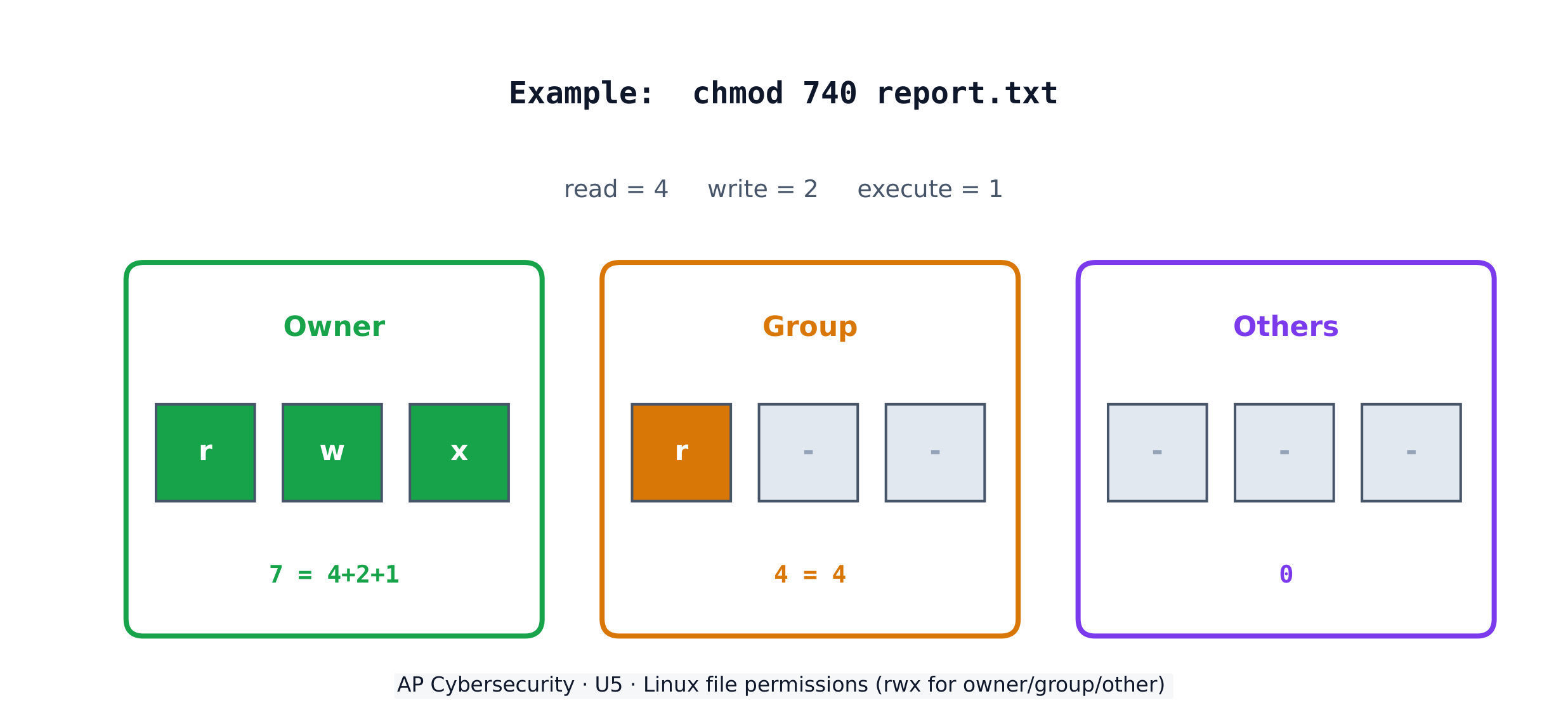
Linux 시스템에서 각 파일에는 세 가지 그룹( 소유자(owner), 그룹(group), 기타(others) )에 대해 세 가지 권한인 읽기(read r), 쓰기(write w), 실행(execute x) 이 존재합니다. chmod 명령어는 숫자로 이 권한을 설정하며, 읽기(4) + 쓰기(2) + 실행(1)을 더합니다. 따라서 chmod 640은 소유자에게 읽기+쓰기(6), 그룹에게 읽기(4), 기타에게는 없음(0)을 의미합니다.

Linux 파일 권한: 소유자, 그룹, 기타에 대한 읽기/쓰기/실행权限

worked example. 주체가 자신만이 파일을 읽기 및 편집할 수 있도록 하고, 직원이 속한 그룹은 읽기만 할 수 있게 하며, 나머지는 접근하지 못하게 하려 합니다. 읽기+쓰기 = 4+2 = 6 (소유자), 읽기 = 4 (그룹), 없음 = 0 (기타)이므로 chmod 640 file이 됩니다. 출력 결과에서는 -rw-r-----을 볼 수 있습니다. 또한 소유자가 파일을 프로그램으로 실행할 수 있도록 하려면 실행 권한을 추가하여 7(=4+2+1)을 만들어야 하므로, 결과는 chmod 740이 됩니다.

탐색하기

어떤 접근 통제 모델이 이 규칙에 적합합니까?

각 접근 통제 모델에는 다른 결정권자가 있습니다: RBAC는 역할에 의해, RuBAC는 조건에 의해, DAC는 파일 소유자에 의해, MAC은 중앙 관리자의 수준에 의해 결정됩니다.

English 한국어
at rest/æt rest/ 정지 상태임
in transit/ɪn ˈtrænsɪt/ 전송 중(in transit)
in use/ɪn juːs/ 사용 중(in use)
regulated/ˈreɡjʊleɪtɪd/ 규제 대상
compliance/kəmˈplaɪəns/ 준수
personally identifiable information (PII)/ˈpɜːsənəli aɪˈdentɪfaɪəbl ˌɪnfəˈmeɪʃn/ 개인 식별 정보 (PII)
protected health information (PHI)/prəˈtektɪd helθ ˌɪnfəˈmeɪʃn/ 보호 건강 정보 (PHI)
payment card information (PCI)/ˈpeɪmənt kɑːd ˌɪnfəˈmeɪʃn/ 결제 카드 정보 (PCI)
Role-based (RBAC)/rəʊl beɪst/ 役할 기반 (RBAC)
Rule-based (RuBAC)/ruːl beɪst/ Rule기반 (RuBAC)
Discretionary (DAC)/dɪˈskreʃənəri/ 재량적 (DAC)
Mandatory (MAC)/ˈmændətəri/ 강제적 (MAC)
principle of least privilege/ˈprɪnsɪpl ɒv liːst ˈprɪvɪlɪdʒ/ 최소 권한의 원칙(principle of least privilege)
5.3

암호학을 이용한 저장 데이터 보호

Syllabus
Learning ObjectiveEssential Knowledge

5.3.A
Explain how encryption can be used to protect files.

  • 5.3.A.1 The purpose of cryptography is to hide information. A cryptographic algorithm defines a process for encrypting and decrypting information. Encryption is the process of hiding the information, and decryption is the process of reversing the encryption to retrieve the original information.
  • 5.3.A.2 An encryption algorithm defines a process for combining the information to be encrypted with a predefined key. The information to be encrypted is called the plaintext. The output of the encryption algorithm is called the ciphertext.
  • 5.3.A.3 The number of possible keys that can be used in an encryption algorithm is called the keyspace. The larger the keyspace, the longer it will take an adversary to discover the correct key by random chance.
  • 5.3.A.4 Cryptographic algorithms are classified by whether they use one key or two keys.
    • Symmetric encryption algorithms use the same key to encrypt and decrypt information.
    • Asymmetric encryption algorithms use two different keys—one to encrypt information and the other to decrypt information.
  • 5.3.A.5 Cryptographic algorithms are also classified by whether they process information one bit at a time or in fixed-size chunks of bits.
    • Block encryption handles information in fixed-size chunks called blocks, producing an output block for each input block.
    • Stream encryption handles input information continuously, producing output one element at a time.

5.3.B
Apply symmetric encryption algorithms to encrypt and decrypt data.

  • 5.3.B.1 Computer-based encryption algorithms operate on binary data. The most common symmetric encryption algorithm is the Advanced Encryption Standard (AES). AES encryption is used to secure Wi-Fi transmissions, internet browsing, file encryption on disks, and hardware-level encryption on processors.
  • 5.3.B.2 AES is a symmetric key block cipher that encrypts data in 128-bit blocks (16 bytes). AES can operate with keys of varying lengths. Longer keys produce more secure encryption but require more time to encrypt and decrypt.
  • 5.3.B.3 Symmetric encryption and decryption can be performed using the command line, specialized software, or web-based tools.
    • On a command line interface, users can encrypt or decrypt with OpenSSL.
    • Specialized software like AES Crypt is an open source tool that can encrypt and decrypt files.
    • There are many web-based tools for encrypting and decrypting files.
  • 5.3.B.4 Using OpenSSL in a CLI, a user can encrypt and decrypt a file using the following commands (note that the encryption key is derived from the password provided):
    • To encrypt a file named test with AES using a 128-bit key, use the command: openssl enc -aes-128-cbc -e -in test -k password -out test.enc
    • To decrypt the encrypted file using the same key, use the command: openssl enc -aes-128-cbc -d -in test.enc -k password -out text

출처: College Board AP Course and Exam Description

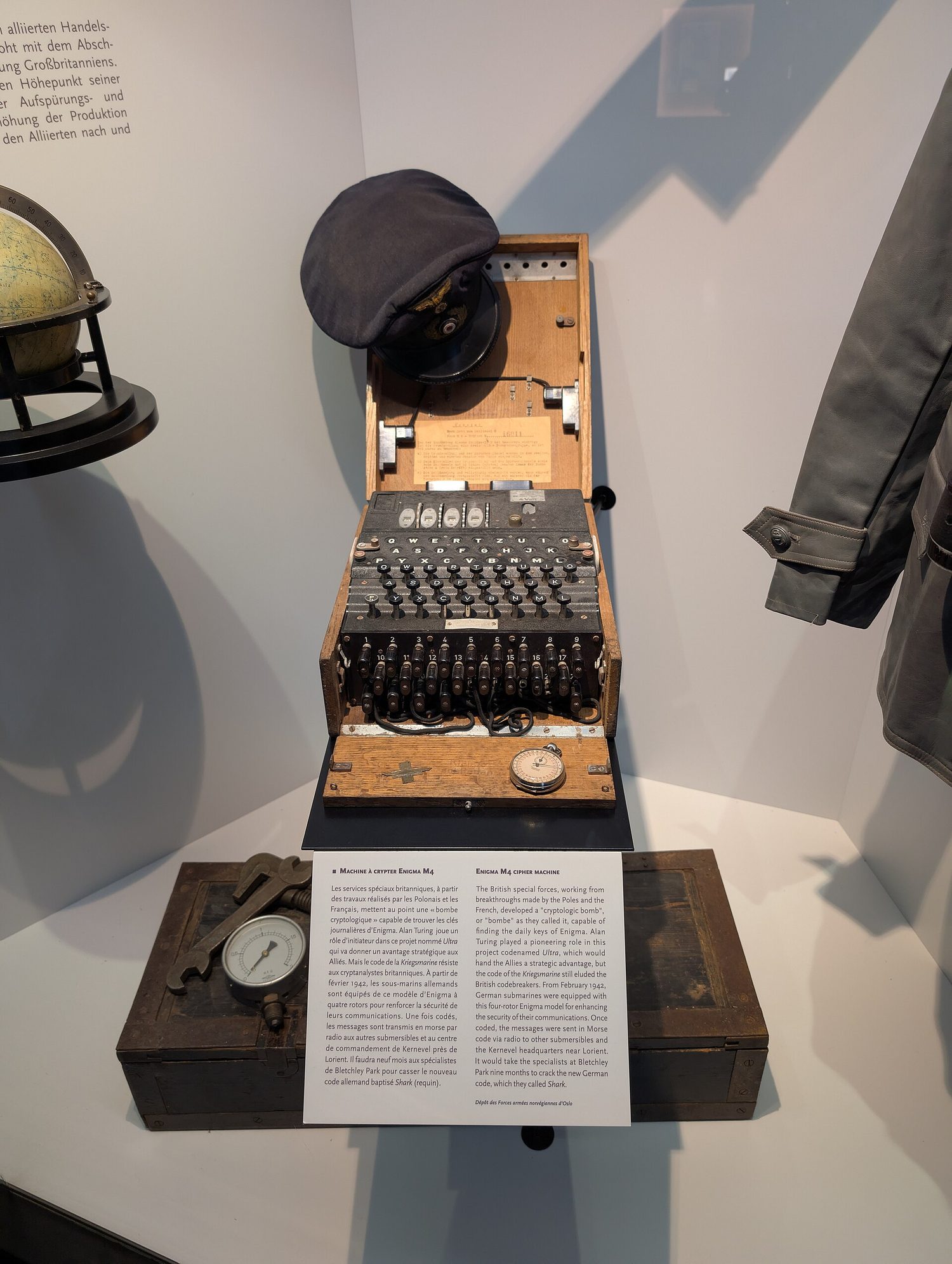
엔마 기계: 암호학은 저장되고 전송되는 데이터를 도청자로부터 보호함
대칭 암호화 vs 비대칭 암호화
해싱과 산 avalanche 효과

암호학(cryptography) 은 정보를 숨깁니다. 암호화(encryption) 알고리즘은 평문(plaintext) 과 키(key) 를 결합하여 암호문(ciphertext) 을 생성하고, 복호화(decryption) 는 이를 다시 원래 상태로 되돌립니다. 키 공간(keyspace) 은 가능한 키의 총 개수를 말하며, 이 값이 클수록 적대자가 추측하는 데 더 긴 시간이 필요합니다. n-bit 키는 $2^n$개의 키 공간을 가집니다.

대칭 암호화(symmetric encryption) 는 암호화와 복호화에 같은 키(same key) 를 사용합니다. 표준은 AES이며, 이는 128-bit 블록 단위로 작동하는 블록 러(block cipher) 로, Wi-Fi, 웹 서핑, 저장된 파일 등을 보호합니다. 양쪽 모두 동일한 비밀 키가 필요하므로, 이 키를 안전하게 공유하는 것이 핵심 과제입니다.

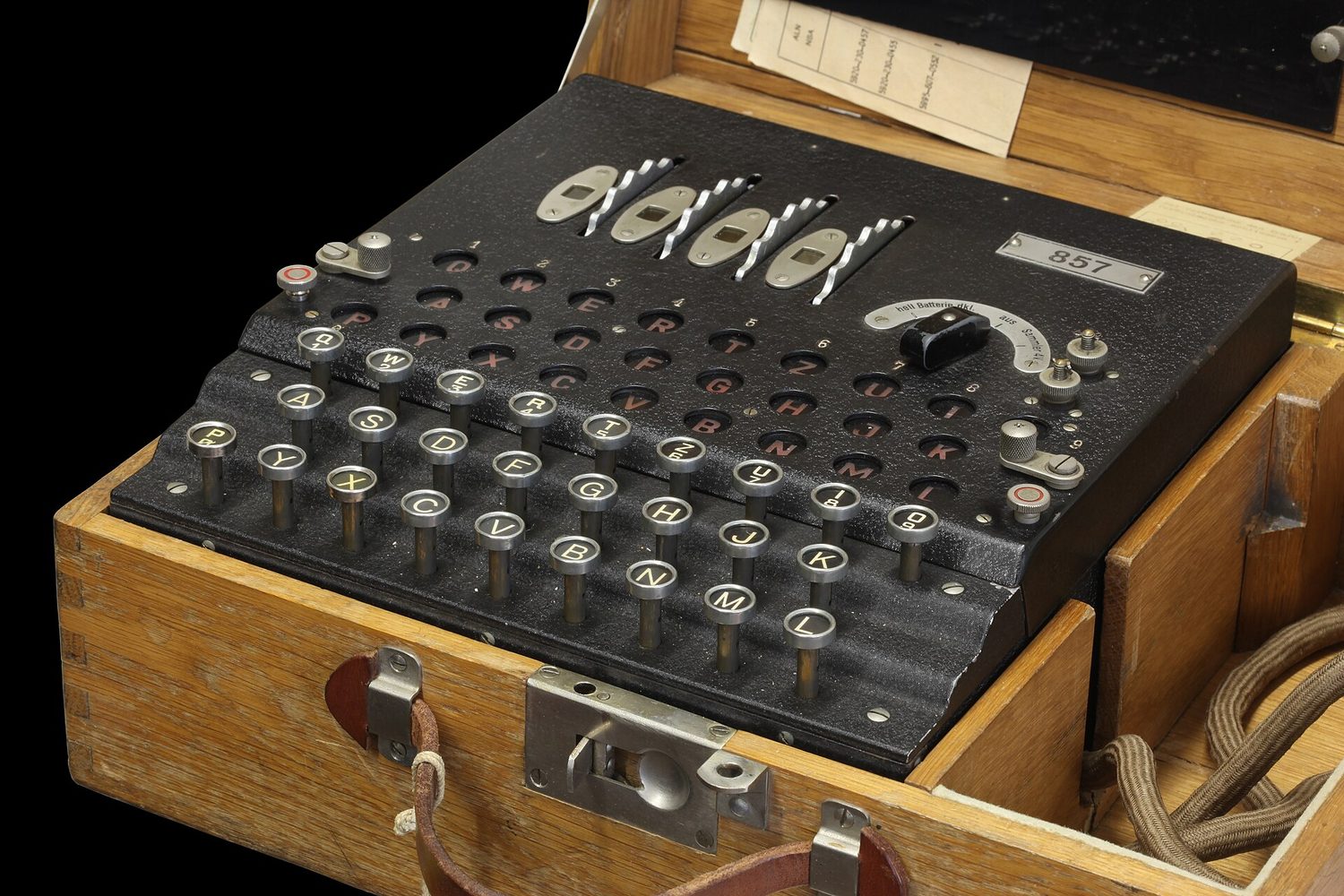
A World War II Enigma cipher machine with keys and rotors
엔마 기계는 로터를 사용하여 메시지를 섞었는데, 이는 초기에 쉽게 깨진 암호화의 예입니다.
탐색하기

문자를 이동시켜 메시지를 암호화

암호화는 평문을 키와 결합하여 서명문을 만듭니다. 이 간단한 치환에서는 키가 이동량이며, 이동량을 아는 사람만이 메시지를 복호화할 수 있습니다.

English 한국어
Cryptography/krɪpˈtɒɡrəfi/ 암호학
plaintext/ˈpleɪntekst/ 평문
key/kiː/ 검색 기준
ciphertext/ˈsaɪfətekst/ 암호문
keyspace/ˈkiːspeɪs/ 키 공간(keyspace)
Symmetric encryption/sɪˈmetrɪk enˈkrɪpʃn/ 대칭 암호화(Symmetric encryption)
AES/ˌeɪ iː ˈes/ AES
block cipher/blɒk ˈsaɪfə/ 블록 암호(block cipher)
수업 보기
5.4

비대칭 암호학

Syllabus

학습 목표 5.4.A: 암호화된 데이터를 전송하거나 수신할 때 사용할 적절한 비대칭 키를 결정합니다.

  • 5.4.A.1 비대칭 암호화는 사전에 공유된 비밀 키를 설정하지 않고도 사용자가 안전하게 통신할 수 있게 합니다.
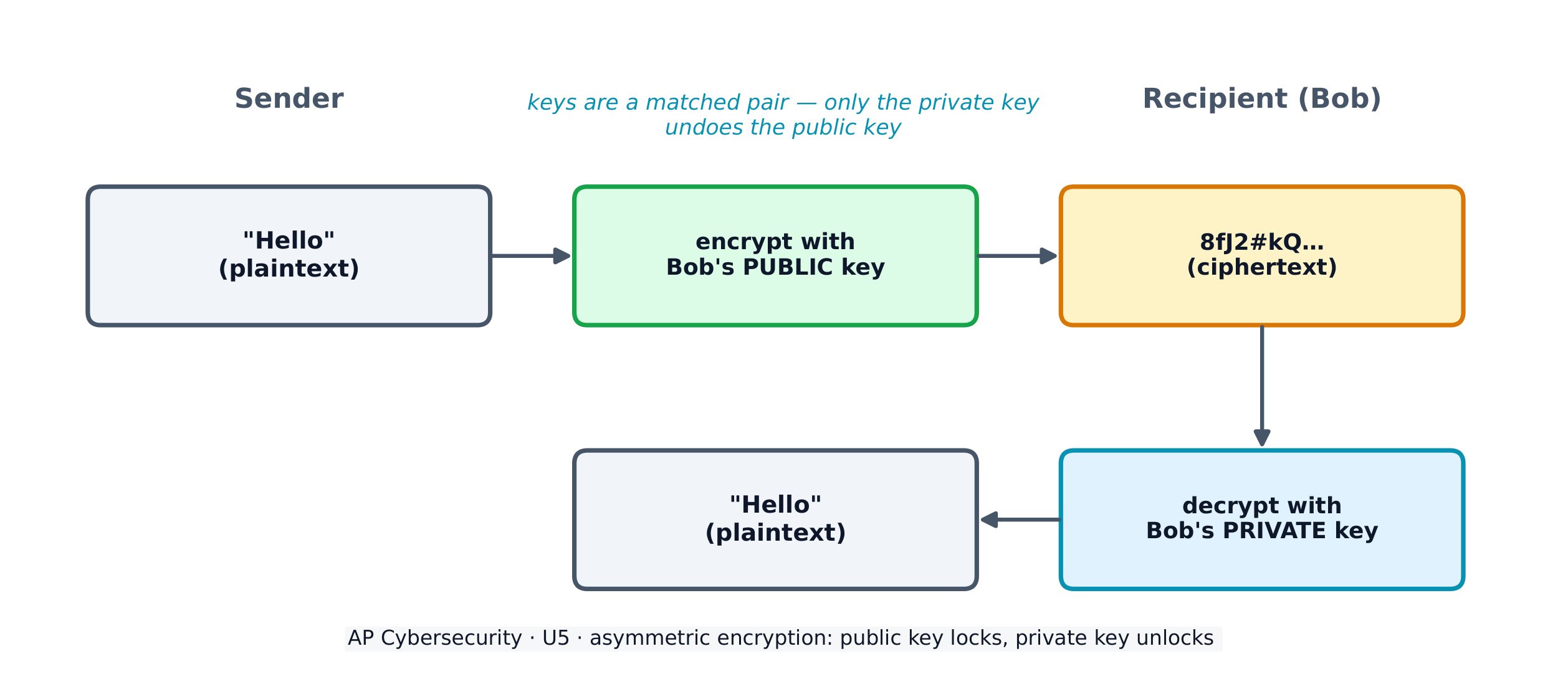
  • 5.4.A.2 비대칭 암호화를 사용할 때, 데이터를 수신할 각 엔티티는 먼저 키 쌍을 생성해야 합니다. 키 쌍은 수학적인 과정을 통해 동시에 생성되는 동일한 길이의 이진 문자열입니다. 하나의 키는 공개 키로, 다른 하나는 개인 키로 지정됩니다. 두 키는 서로 수학적 역수 관계이며, 각 키는 상대편의 키를 반전시킵니다. 어떤 키를 사용하여 정보를 암호화하더라도, 키 쌍의 다른 키만이 이를 복호화할 수 있습니다.
  • 5.4.A.3 수신자가 키 쌍을 생성한 후, 개인 키는 안전하게 보관되어야 합니다. 개인 키가 노출되거나 공유되어 도난당하고, 변조되거나 유출되면 암호화 알고리즘의 보안을 유지하기 위해 키 쌍을 삭제하고 새로운 키 쌍을 생성해야 합니다. 공개 키는 누구나 보고 사용할 수 있도록 공개됩니다.
  • 5.4.A.4某人에게 정보를 안전하게 전송하려면, 송신자는 수신자의 공개 키를 사용하여 데이터를 암호화하여 전송합니다. 개인 키를 보유한 수신자만이 해당 정보를 복호화하고 읽을 수 있습니다.

학습 목표 5.4.B: 키 길이가 암호화된 데이터의 보안성에 미치는 영향을 설명합니다.

  • 5.4.B.1 긴 키는 더 큰 키 공간을 생성합니다. 이진 키의 경우, n비트 길이의 키는 $2^n$ 크기의 키 공간을 가집니다.
  • 5.4.B.2 n비트 길이의 암호화 키를 무작위로 추측하는 애플리케이션을 사용하면, 평균적으로 공격자는 $2^n \div 2$(또는 $2^{n-1}$)번의 추측으로 올바른 키를 맞출 수 있습니다.
  • 5.4.B.3 키가 길수록 보안성이 높아지지만, 메시지 암호화와 복호화에 더 많은 시간이 소요됩니다.
  • 5.4.B.4 컴퓨팅 처리 능력과 효율성이 지속적으로 향상됨에 따라 소프트웨어가 키를 더 빠르게 추측할 수 있게 되었습니다. 처리 능력 증가를 반영하기 위해 대칭 및 비대칭 암호화 알고리즘 모두에 대한 키 길이 권장치는 주기적으로 상향 조정됩니다.
  • 5.4.B.5 키 길이 비교는 동일한 암호화 알고리즘에 대한 키 간에만 유효합니다.
    • 5.4.B.5 관련 예시:
      • AES 256-비트 키는 AES 128-비트 키보다 안전합니다.
      • RSA 4096-비트 키는 RSA 2048-비트 키보다 안전합니다.
      • RSA와 AES 키는 보안 수준의 결정 시 서로 직접 비교할 수 없습니다.

학습 목표 5.4.C: 비대칭 암호화 알고리즘을 적용하여 데이터를 암호화 및 복호화합니다.

  • 5.4.C.1 일반적인 비대칭 암호화 알고리즘으로는 RSA와 타원 곡선 암호학(ECC)이 있습니다. 비대칭 알고리즘은 디지털 서명 및 디지털 인증서 등 다양한 애플리케이션에 사용됩니다.
  • 5.4.C.2 대칭 암호화와 마찬가지로, 비대칭 암호화와 복호화는 명령 줄, 전담 소프트웨어 또는 웹 기반 도구를 통해 수행할 수 있습니다.
    • 커맨드 라인 인터페이스에서 사용자는 OpenSSL을 사용하여 암호화 또는 복호화가 가능합니다.
    • RSA 암호화 도구와 같은 전문 소프트웨어는 파일을 암호화 및 복호화할 수 있는 오픈소스 도구입니다.
    • 파일을 암호화 및 복호화하기 위해 여러 웹 기반 도구가 존재합니다.
  • 5.4.C.3 CLI에서 사용자는 필요한 시점에 비대칭 키 쌍을 생성하고 파일을 암호화하거나 복호화할 수 있습니다.
    • 2048비트 RSA 키 쌍을 생성하여 rsa.pem이라는 파일에 저장하려면 다음 명령어를 사용합니다: openssl genrsa -out rsa.pem 2048
    • rsa.pem에서 공钥을 추출하여 public.pem이라는 파일에 저장하려면 다음 명령어를 사용합니다: openssl rsa -pubout -in rsa.pem -outform PEM -out public.pem
    • test 파일을 RSA 암호화와 public.pem 키 파일을 사용하여 암호화하려면 다음 명령어를 사용합니다: openssl pkeyutl -encrypt -pubin -inkey public.pem -in test -out test.enc
    • test.enc 파일을 rsa.pem 파일을 사용하여 복호화하려면 다음 명령어를 실행합니다: openssl pkeyutl -decrypt -inkey rsa.pem -in test.enc -out test

출처: College Board AP Course and Exam Description

비대칭 암호화(asymmetric encryption) 은 키 쌍(key pair) 을 통해 키 공유 문제를 해결합니다. 이는 누구나 볼 수 있는 공용 키(public key) 와 비밀로 유지하는 비밀 키(private key) 로 구성됩니다. 두 키는 수학적으로 역수 관계입니다: 한 쪽으로 잠근 것은 다른 쪽으로만 열 수 있습니다. 당신에게 비밀을 보내려면 나는 당신의 공용 키로 암호화하고, 오직 당신의 비밀 키만이 이를 복호화할 수 있습니다. 즉, 사전에 비밀을 공유할 필요가 없습니다.

비대칭 암호: 공개키로 암호화하고, 비공개키로 복호화함
비대칭 암호화: 공용 키로 암호화하고, 비밀 키로 복호화함

키 길이가 길어질수록 키 공간이 커져 보안이 강화되지만, 암호화 속도는 느려집니다. 일반적인 비대칭 알고리즘으로는 디지털 서명 및 인증서에 사용되는 RSA와 타원 곡선 암호학(ECC) 이 있습니다. 주의할 점은 키 길이는 동일한 알고리즘 내에서만 비교할 수 있다는 것입니다. RSA 4096-bit 키는 AES 256-bit 키와 직접 비교할 수 없습니다.

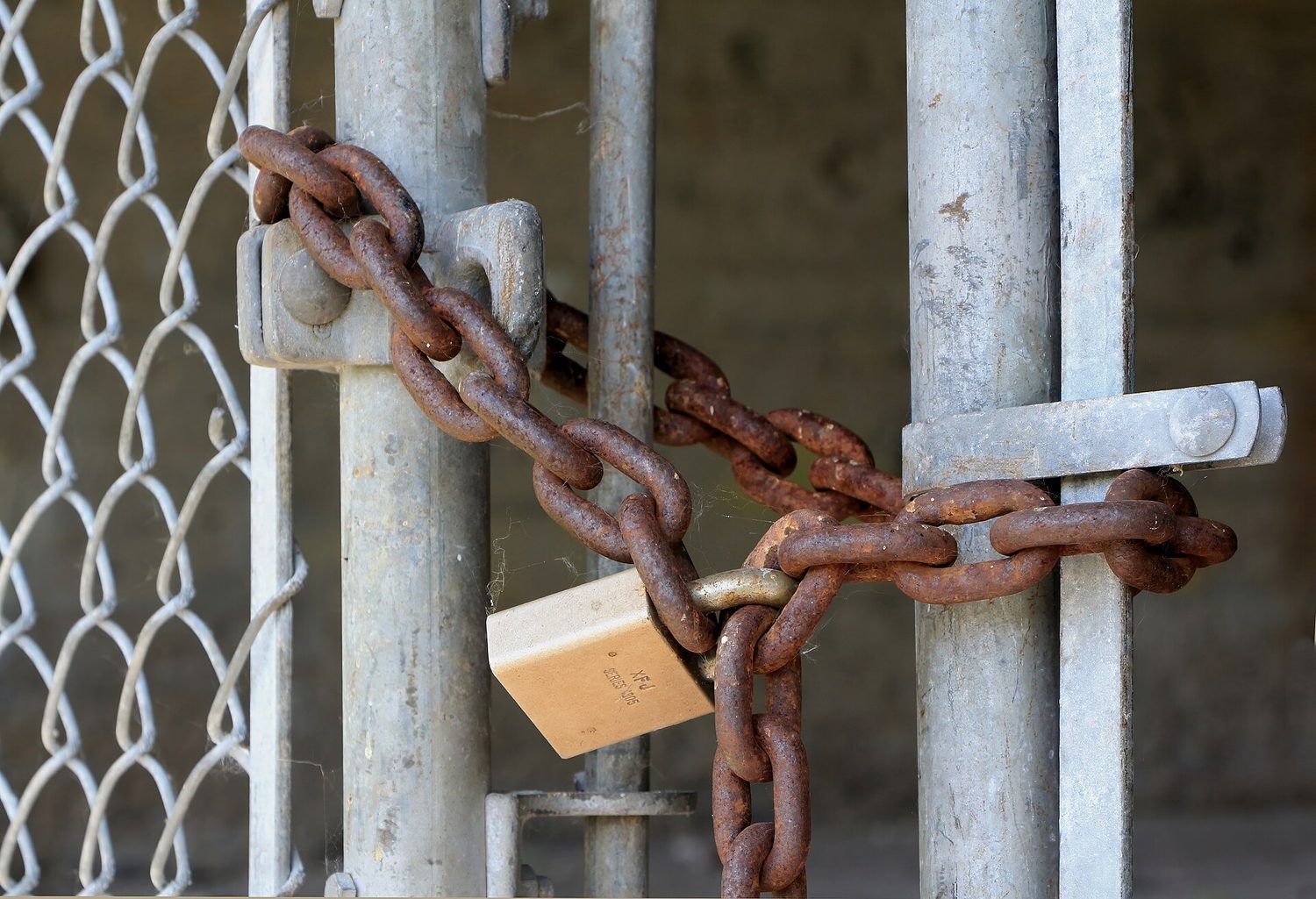
자물쇠: 암호학이 데이터를 잠그어 해당 키를 가진 사람만이 열 수 있게 함
자물쇠: 암호학은 데이터를 잠그어 일치하는 키를 가진 사람만이 열 수 있게 함
English 한국어
Asymmetric encryption/ˌeɪsɪˈmetrɪk enˈkrɪpʃn/ 비대칭 암호화(Asymmetric encryption)
key pair/kiː peə/ 키 쌍
public key/ˈpʌblɪk kiː/ 公开 키
private key/ˈpraɪvət kiː/ 개인키
elliptic curve cryptography (ECC)/ɪˈlɪptɪk kɜːv krɪpˈtɒɡrəfi/ 타원 곡선 암호학 (ECC)
수업 보기
5.5

애플리케이션 보호

Syllabus

학습 목표 5.5.A: 'Secure by Design'과 'Security by Default'의 애플리케이션 보안 원칙 식별하기

  • 5.5.A.1 Secure by Design는 설계 단계를 포함한 제품 개발 전 과정에 보안을 포함하도록 기업들을 장려하는 Initiative입니다. 조직이 Secure by Design를 구현하면 보안은 단순한 기술적 기능이 아닌 설계 원칙이 됩니다.
  • 5.5.A.2 Secure by Design에는 세 가지 설계 원칙이 포함됩니다:
    • i. 기업은 고객 보안 결과에 대한 책임을 가져야 합니다. 기업은 고객의 보안 요구 사항을 충족하는 제품을 구축해야 합니다.
    • ii. 기업은 과감한 투명성과 책임성을 수용해야 합니다. 관련 보안 정보와 업데이트를 신속하게 공유하면 모두의 보안을 크게 향상시킵니다.
    • iii. 기업은 Secure by Design를 실현하기 위한 조직 구조와 리더십을 구축해야 합니다. 기업에는 보안을 중시하고security-first 태도를 갖춘 리더가 필요합니다.
  • 5.5.A.3 Secure by Design에는 Security by Default 개념이 포함되어 있으며, 이는 소프트웨어 및 장치의 보안 기능이 기본적으로 활성화되어야 한다는 의미입니다. 장치와 소프트웨어는 초기 설정 단계에서 이미 보안 기능이 활성화되어 있어 안전하게 사용할 수 있어야 합니다.

학습 목표 5.5.B: 사용자 입력 정제가 애플리케이션을 어떻게 보호하는지 설명하기

  • 5.5.B.1 사용자가 애플리케이션에 입력을 입력하면 애플리케이션은 일반적으로 이를 처리하기 위해 special characters로 감쌉니다. 사용자 입력을 감싸는 이러한 문자는 control character라고 하며, 단일 따옴표, 이중 따옴표, 세미콜론 등을 포함합니다.
  • 5.5.B.2 사용자 입력을 받는 프로그램을 작성할 때 프로그래머는 사용자의 입력이 예상 기준에 부합하고 시스템을 조작하는 데 사용될 수 있는 control character가 포함되어 있지 않음을 확인하는 함수를 사용해야 합니다. 이 검증 함수는 잠재적으로 악성인 문자를 제거하여 사용자 입력을 정제(sanitize)하거나, 오류 메시지를 표시하여 다른 입력을 강제할 수 있습니다. 이로 인해 다음과 같은 많은 애플리케이션 공격으로부터 보호할 수 있습니다:
    • SQL 인젝션 공격
    • XSS 공격
    • 디렉토리 트레버설 공격

출처: College Board AP Course and Exam Description

두 가지 설계 원칙이 초기부터 애플리케이션을 안전하게 지킵니다. 디자인 시 보안(Secure by design) 은 개발 전 과정에 보안을 내재화하여 사후적인 고려 사항으로 두지 않습니다. 기본 보안(Secure by default) 은 제품이 출시될 때 이미 보안 기능이 활성화(enabled) 되어 있어 박스에서 바로 안전하게 사용할 수 있음을 의미합니다.

디자인 시 보안은 기업이 채택해야 하는 세 가지 원칙에 기반합니다: (1) 사용자에게 책임을 전가하기보다 고객의 보안 결과를 스스로 책임(take ownership) 으로 여기고, (2) 격렬한 투명성과 책임성(radical transparency and accountability) 을 수용하여 보안 관련 소식과 업데이트를 신속히 공유하여 모두가 더 안전하게 만들며, (3) 보안을 최우선 목표로 만드는 조직 구조와 리더십을 구축합니다.

주입 공격(injection attacks)에 대한 핵심 방어 전략은 입력 정제(input sanitization) 입니다. 단일 따옴표, 이중 따옴표, 세미콜론과 같은 특정 특수 문자(special characters) 는 시스템을 조작하는 데 사용될 수 있으므로, 좋은 프로그램은 처리 전에 이를 제거하거나 거부합니다. 이러한 정제는 SQL 주입, XSS, 디렉토리 트라버스 공격을 모두 방지합니다.

English 한국어
Applications/ˌæplɪˈkeɪʃnz/ 적용
administrative/ədˈmɪnɪstrətɪv/ 행정적
injection attack/ɪnˈdʒekʃn əˈtæk/ 주입 공격(injection attack)
Secure by design/sɪˈkjʊə baɪ dɪˈzaɪn/ 디자인으로 안전
Secure by default/sɪˈkjʊə baɪ dɪˈfɒlt/ 기본값으로 안전
input sanitization/ˈɪnpʊt ˌsænɪtaɪˈzeɪʃn/ 입력 정제
special characters/ˈspeʃl ˈkærɪktəz/ 특수 문자
accounting/əˈkaʊntɪŋ/ 회계/accounting
honeypot/ˈhʌnɪpɒt/ honeypot (꿀통)
data loss prevention (DLP)/ˈdeɪtə lɒs prɪˈvenʃn/ 데이터 분실 방지 (DLP)
5.6

데이터 및 애플리케이션 공격 탐지

Syllabus
Learning ObjectiveEssential Knowledge

5.6.A
Explain how to detect attacks on data.

  • 5.6.A.1 Devices track and log when data are accessed and by whom. The process of recording and monitoring user activities is called accounting. Analysis of these logs can reveal malicious activity when an adversary attempts to access, copy, move, or delete data. Suspicious activity can include:
    • Accessing files that aren’t typically accessed
    • Accessing files or applications outside of a user’s normal patterns (including time of day, location, and device type)
    • Attempts to delete or copy sensitive files
  • 5.6.A.2 A honeypot is a file that appears as if it contains valuable data (e.g., credit card information, PII, passwords), but the data in the file are fake. A system can alert defenders if someone attempts to access the honeypot. Since the honeypot is a fake file, there is no legitimate reason to be accessing it, and any attempted access would be an indicator of malicious activity.
  • 5.6.A.3 Cryptographic hash functions can generate a digest for data and can reveal if data have been altered. If a file has changed unexpectedly, this can be a sign of malicious activity.

5.6.B
Determine controls for detecting attacks against applications or data.

  • 5.6.B.1 Cost is a criterion in determining detective controls. Detective controls like honeypots and using hash values to check data integrity are inexpensive. Some organizations invest in third-party data loss prevention (DLP) services, which monitor data access, usage, and transmission by users throughout the organization to detect suspicious activity; DLP services provide strong detection capabilities at a higher cost.
  • 5.6.B.2 Sensitivity or criticality of data or applications is a criterion in determining detective controls. More sensitive or critical data or applications are more likely targets of an adversary and should be monitored more closely.
  • 5.6.B.3 Classification of data is a criterion in determining detective controls. Data that have been classified as private, educational, healthcare, or financial often have legal or regulatory detection and monitoring requirements.

5.6.C
Evaluate the impact of a method for detecting attacks against an application or data.

  • 5.6.C.1 To operate at an effective speed, log analysis needs to be augmented with some automation. Honeypots offer near instantaneous detection capabilities.
  • 5.6.C.2 Some DLP tools, honeypots, and realtime automated log analysis provide alerts as an attack is happening. These tools allow for a prompt response that can stop an attack before it does more harm. Retrospective log analysis and the use of cryptographic hashes to verify data integrity identify attacks after they have occurred.
  • 5.6.C.3 False negatives can occur in applications and data attack detection. Cryptographic hash functions only detect if data have been altered. An adversary could view and steal data without altering it, and a cryptographic hash function would not detect this. Honeypots cannot detect adversaries that do not attempt to access them.

5.6.D
Identify whether a file has been altered by verifying its hash.

  • 5.6.D.1 Cryptographic hash functions can help identify changes in a file because they are repeatable: the same input always produces the same output for a given hash function.
  • 5.6.D.2 Hashes can be calculated using the command line on a computer, a website, or specialized software.
    • In Windows Powershell, if a user wanted to generate the SHA256 hash for a file named testfile, they would use the command: Get-FileHash testfile -Algorithm SHA256
    • In BASH the same could be accomplished with the command: sha256sum testfile
    • In zsh, the common command line terminal on Apple computers, this could be accomplished with the command: shasum -a 256 testfile
  • 5.6.D.3 A file can be hashed and its hash output recorded. Then it can be hashed again later, and the second hash output can be compared to the previous hash output for the same file. If a file’s hash changes, then the file was altered between when the first and second hashes were generated.

5.6.E
Apply detection techniques to identify and report indicators of application attacks by analyzing log files.

  • 5.6.E.1 SQL injection attacks can be detected by reviewing application and server logs of user input for SQL control words and symbols such as:
    • A single (') or double (") quote character
    • Boolean conditions like OR 1=1
    • A double dash (which indicates a comment in SQL): --
    • SQL control words (always in capital letters) like WHERE, IN, FROM
  • 5.6.E.2 XSS attacks can be detected by reviewing user input for suspicious tags, particularly the tag.
  • 5.6.E.3 For web applications, buffer overflows can be detected by checking the amount of data the user is sending to the web application in their request. The fields commonly checked are the URL length, cookie length, query string length, and total request length. Long strings in any of these fields can be an indicator of an attempted buffer overflow attack.
  • 5.6.E.4 Directory traversal attacks can be detected by reviewing application and server logs. HTTP GET requests that include paths with sequences of ../ are indicators of an adversary attempting a directory traversal.

출처: College Board AP Course and Exam Description

데이터 공격을 탐지하기 위해 시스템은 계정 기록을 수행하여, 누가, 무엇을, 언제 접근했かを 로그에 기록합니다. 그러나 로그는 방대하므로, 유용한 속도로 실행되도록 로그 분석이 자동화되어야 합니다. 사람이 원본 로그를 직접 읽는 것은 훨씬 너무 느립니다.helper로 활용 가능한 유능한 보완 수단은 허니팟입니다. 이는有价值해 보이는 가짜 파일이며, 아무도 이를 열어야 할 실제 이유가 없으므로, 어떤 접근 시도라도 명확하고 거의 즉각적인 공격 징후가 됩니다. 특히 민감한 파일을 삭제하거나 복사하려는 시도를 주의 깊게 감시해야 합니다. 또한 암호 해시도 도움이 됩니다: 파일을 다시 해싱하여 비교하면 - 디지스트가 변경된 경우, 파일이 변조되었음을 의미합니다.

감시 통제를 선택할 때는 데이터의 민감도에 비해 비용 (혼니팟은 저렴하지만, 데이터 분실 방지(DLP) 서비스는 강력하지만 비쌈)을 고려해야 합니다. 로그에서 특정 공격을 식별하려면 서명(signature)을 확인하세요: SQL 인젝션은 OR 1=1와 --이 나타납니다; XSS는 <script> 태그가 포함됩니다; 디렉토리 트러버설은 ../ 시퀀스를 보입니다; 버퍼 오버플로는 비정상적으로 긴 입력 문자열을 생성합니다.

파일이 변조되지 않았는지 확인하기

암호 해시는 임의 크기의 파일을 짧은 고정 길이 값으로 변환합니다. 파일의 한 바이트만 변경해도 해시는 완전히 달라지므로, 다운로드한 파일의 해시를发布者(발행자)가 명시한 해시와 비교하여 파일이 무사히 도착했음을 입증할 수 있습니다. 이 작업은 명령 줄에서 다음과 같이 수행합니다:

쉘 명령어
BASH (리눅스 및 대부분의 서버) sha256sum testfile
zsh, 애플 컴퓨터의 일반 터미널 shasum -a 256 testfile

두 명령 모두 testfile의 SHA-256 해시를 출력합니다. 출력이 공개된 값과 한 자라도 다르면 파일이 변조되었음을 의미합니다—전송 중 손상이 발생했거나, 공격자가 파일을 교체했을 가능성이 있습니다.

⚠️ 해시는 **무결성(integrity)**을 증명할 뿐 **진위(authenticity)**을 증명하지는 않습니다. 웹 페이지 상의 파일을 교체할 수 있는 공격자는 해당 옆에 공개된 해시도 대체할 수 있으므로, 서명된 해시나 다른 신뢰할 수 있는 채널을 통해 가져온 해시가 더 강력한 증거가 되는 이유입니다.

5.6

시험 팁

  • 각 애플리케이션 공격을 로그 내 증거와 매칭하십시오: OR 1=1 / -- = SQL 인젝션; <script> = XSS; ../ = 디렉터리 트래버설; 매우 긴 입력 = 버퍼 오버플로우.
  • 4가지 접근 통제 모델을 **결정권자(decider)**를 기준으로 학습하십시오: RBAC = 사용자의 역할, RuBAC = 조건, DAC = 파일 소유자, MAC = 중앙 관리자. 모든 모델의 기반은 **최소 권한原则(least privilege)**입니다.
  • 리눅스 권한을 그룹별로 4+2+1을 더하여 읽으십시오: chmod 750 =所有者(owner) rwx (7), 그룹 group r-x (5), 기타 others none (0). 양방향 변환을 연습하십시오.
  • 대칭 암호(Symmetric) = 공유 키 하나 사용 (빠름, AES); 비대칭 암호(asymmetric) = 공개/개인 키 쌍 사용 (키 공유 문제 해결, RSA/ECC). 수신자의 공개키로 암호화를 수행합니다.
  • **입력 정제(input sanitization)**는 인젝션 공격을 방지하기 위한 가장 유일한 최선의 답변입니다. 허니팟은 고전적인 저렴한 탐지 제어 수단입니다.

이 주제에 대한 인터랙티브 수업

즉시 체크 기능 exercises를 통해 단계별로 진행하세요.

과거 시험지

AP 사이버보안 내 추가 주제

로그인 또는 계정 만들기

IGCSE, A-Level & AP