Skip to content

Securing Spaces

AP Cybersecurity · Topic 2

Train
2.1

Cyber Foundations

Syllabus
Learning ObjectiveEssential Knowledge

2.1.A
Identify social engineering attacks.

  • 2.1.A.1 Social engineers use psychological tactics to manipulate targets into taking a desired action.
  • 2.1.A.2 Pretexting is when adversaries create a believable reason to contact a target.
  • 2.1.A.3 Authority is when adversaries impersonate someone with power over a target or pretend to relay instructions from that person.
  • 2.1.A.4 Intimidation is when adversaries state negative consequences if demands aren’t met.
  • 2.1.A.5 Consensus is when adversaries create social pressure by making a target believe everyone else is doing a desired action.
  • 2.1.A.6 Scarcity is when adversaries create a sense of limited availability.
  • 2.1.A.7 Familiarity is when adversaries pretend to be or know someone close to a target to establish trust.
  • 2.1.A.8 Urgency is when adversaries create a deadline that requires quick action by a target to avert negative consequences.

2.1.B
Identify types of adversaries.

  • 2.1.B.1 Script kiddies are low-skilled adversaries who use tools developed by others without understanding how the tools work. They are often motivated by greed or a desire for recognition.
  • 2.1.B.2 Hacktivists are motivated by social, political, or personal causes. They compromise computers and networks to support their cause or stop perceived harm, believing their goals justify their illegal methods.
  • 2.1.B.3 Insider adversaries are unique threats because they have legitimate credentials and access to systems and data. They can be recruited by malicious third parties and can be motivated by greed or revenge.
  • 2.1.B.4 Cyberterrorists are motivated by politics or beliefs and seek to disrupt entire communities, regions, or nations through cyberattacks (e.g., attacking a power grid, water treatment plant, or other civil infrastructure). They can act independently or on behalf of governments or criminal organizations.
  • 2.1.B.5 Transnational criminal organizations seek financial gain primarily by deploying ransomware and stealing corporate intellectual property (IP) to sell in illegal markets.

2.1.C
Describe the phases of a cyberattack.

  • 2.1.C.1 Cyberattacks aim to disrupt, harm, steal, or destroy devices, networks, or data. Adversaries work in phases, which may not all be used in every attack. The phases are:
    • i. Reconnaissance
    • ii. Initial access
    • iii. Persistence
    • iv. Lateral movement
    • v. Taking action
    • vi. Evading detection
  • 2.1.C.2 In the reconnaissance phase of an attack, adversaries gather as much information as possible about their target, often using open source intelligence (OSINT), which is freely available information.
  • 2.1.C.3 In the initial-access phase of an attack, adversaries establish a foothold on the target’s computer, often through social engineering or compromised or weak credentials.
  • 2.1.C.4 After gaining access during an attack, adversaries establish persistence to maintain access without needing to regain it. They may use a command and control (C2) protocol to send commands to the device and receive output, often through malware like a remote access trojan (RAT) or rootkit.
  • 2.1.C.5 In the lateral-movement phase of an attack, adversaries try to escalate their privileges by accessing computers and user accounts with elevated permissions to services and data.
  • 2.1.C.6 In the taking-action phase of an attack, adversaries act on their objectives by collecting targeted data, exfiltrating it, and disrupting services or destroying data.
  • 2.1.C.7 In the final phase of an attack, many adversaries try to evade detection by removing or editing log files and erasing other files they may have planted on devices (e.g., malware).

2.1.D
Describe the risk assessment process.

  • 2.1.D.1 Risk occurs when a threat can exploit a vulnerability to compromise an asset.
  • 2.1.D.2 An asset is anything valuable. Assets include financial resources, intellectual property, data, digital infrastructure, physical property, and reputation.
  • 2.1.D.3 Risk assessment considers two factors:
    • The likelihood of an attack against a specific vulnerability
    • The severity of the projected damage from an attack against a specific vulnerability
  • 2.1.D.4 The likelihood of a vulnerability being exploited depends on many factors, including:
    • The value of the target: Adversaries are more likely to attack targets they perceive as valuable.
    • The level of skill required to exploit the vulnerability (i.e., the difficulty): Vulnerabilities with well-documented exploits often require less skill and can be carried out by more adversaries.
    • The motivation and capabilities of likely adversaries: Highly motivated and skilled adversaries are more likely to be able to perform more complex exploits.
  • 2.1.D.5 The severity of an attack is often measured by financial cost, which can also include reputational and operational impacts.
    • Illustrative examples for 2.1.D.5:
      • A hacktivist is passionate about illegal fishing practices supported by a local food production company. The main webpage of this food production company would be a high-value target for this hacktivist; defacing the webpage to expose the company’s support of illegal fishing would provide no financial gain to the adversary, but would allow them to raise awareness about an issue that motivates them.
  • 2.1.D.6 The result of a risk assessment can be quantitative or qualitative.
    • Quantitative risk assessment assigns a numeric value to a vulnerability based on a numeric scale (e.g., 1–10) or quantifiable impact, which could be financial (e.g., a $10,000 annual risk).
    • Illustrative examples for 2.1.D.6:
      • Low, medium, high, severe
      • Unlikely low impact, likely low impact, unlikely high impact, likely high impact
  • 2.1.D.7 Risk assessment documentation should include:
    • Vulnerable assets and their value
    • Descriptions of likely threats to the assets
    • Details of specific vulnerabilities for specific assets and how they would be exploited
    • An explanation of the severity of damage (financial, operational, reputational, etc.) if a specific asset were compromised, and the likelihood of that compromise occurring
    • A final rating, quantitative or qualitative, for each risk identified
    • Illustrative examples for 2.1.D.7:
      • Scaled score (e.g., 1–10)
      • Monetary value (e.g., a $10,000 risk vs. a$100,000 risk)

2.1.E
Identify strategies for managing risk.

  • 2.1.E.1 Once a risk has been identified and assessed, an organization has four options for managing that risk:
    • i. Avoid
    • ii. Transfer
    • iii. Mitigate
    • iv. Accept
  • 2.1.E.2 Risk avoidance stops the activity that is generating the risk. If the activity is a critical part of an organization’s mission or purpose, then avoidance is not possible.
  • 2.1.E.3 Risk transference places the burden of the risk on another entity, such as an insurance company, a government, or consumers.
  • 2.1.E.4 Risk mitigation implements security controls to reduce the likelihood or impact of a risk.
  • 2.1.E.5 Residual risk is the risk that remains after an organization has gone through avoidance, transference, and mitigation. The residual risk is the level of risk that an organization is willing to accept. Risk acceptance acknowledges the fact that absolute security is unattainable.
  • 2.1.E.6 To conserve financial resources and employee capacity, an organization will often favor solutions that are cost effective and easy to implement and maintain. Cost-effective solutions cost less to install and maintain than the expected loss from an attack.

2.1.F
Identify types of security controls.

  • 2.1.F.1 Security controls address at least one of the following principles:
    • Confidentiality ensures that only authorized individuals, systems, or processes can access data. Systems lacking confidentiality are vulnerable to data theft or destruction.
    • Integrity ensures data are accurate and trustworthy. Systems lacking integrity are vulnerable to data manipulation.
    • Availability ensures data and services are accessible to authorized individuals when needed. Systems lacking availability may experience unexpected downtime.
  • 2.1.F.2 Security controls can be classified by type.
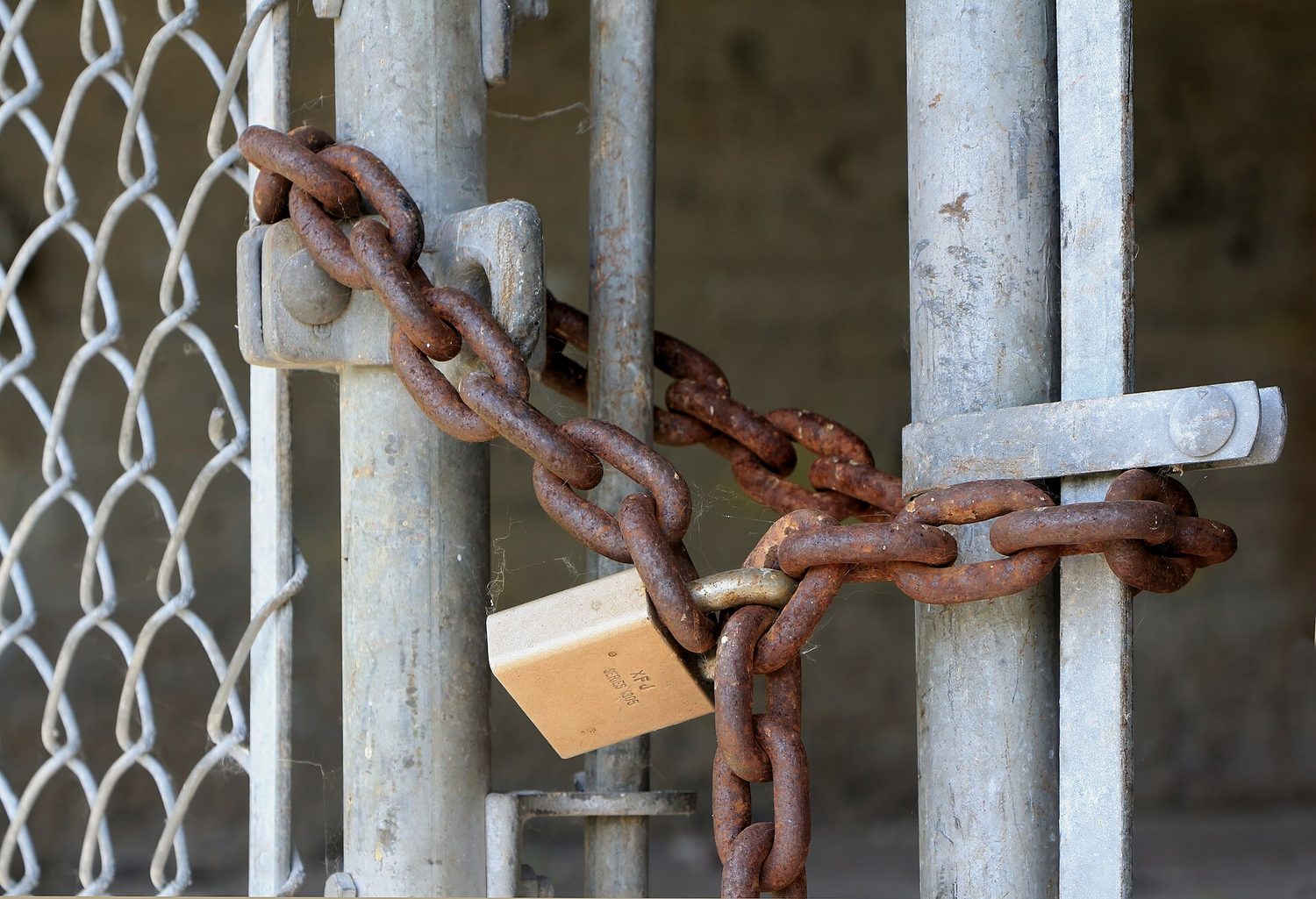
    • Physical controls provide security in the physical space and include locks, fences, and cameras, bollards, and security guards.
    • Technical controls provide security in the digital space and include firewalls, anti-malware software, and encryption.
    • Managerial controls provide rules, guidelines, policies, and procedures that specify what security should be in place and include password policies, regular access reviews, and incident response plans (IRPs).
  • 2.1.F.3 Security controls can be classified by function.
    • Preventative controls address potential vulnerabilities with the goal of stopping an adversary from attacking and include locks and encryption.
    • Detective controls help identify attacks when they occur and include intrusion detection systems (IDSs), cameras, and security incident and event management (SIEM) systems.
    • Corrective controls fix problems and help restore systems to an operational state and include vulnerability patching, repairing a broken card reader, and intrusion prevention systems (IPSs).

2.1.G
Explain why a defense-in-depth security strategy is necessary to optimally protect an organization.

  • 2.1.G.1 A defense-in-depth strategy, or layered defense, uses multiple types of security controls to protect sensitive data and systems.
  • 2.1.G.2 A defense-in-depth strategy allows an organization to address different types of threats, each with a security control most suited to mitigate it.
  • 2.1.G.3 A defense-in-depth strategy allows for resilience in data protection so when one security control is bypassed by an adversary, another security control may still prevent access to the data or system or limit the damage done to the data or system.
  • 2.1.G.4 Layers in a defense-in-depth strategy can include human, physical, network, device, application, and data.

Source: College Board AP Course and Exam Description

Before defending a system, you need a shared language. This section builds it.

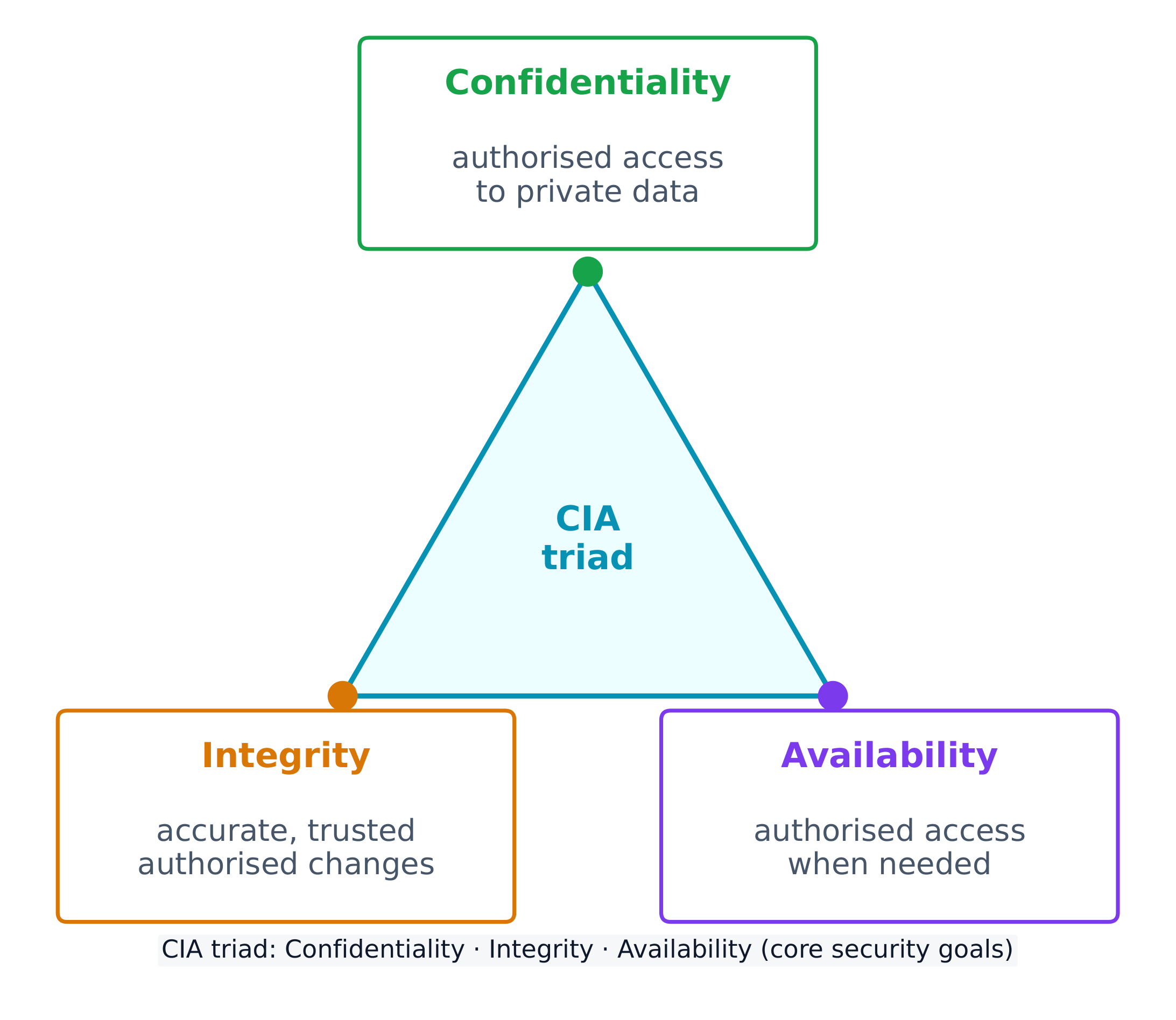
Every security control protects at least one part of the CIA triad 中央情报三要素 - the three goals of security:

  • Confidentiality 保密性 - only authorised people can read the data.
  • Integrity 完整性 - the data is accurate and unaltered.
  • Availability 可用性 - the data and services are there when needed.

The CIA triad: the three goals every security control supports The CIA triad: the three goals every security control supports

Attacks come from different adversaries, classified by their goals. A script kiddie 脚本小子 reuses tools built by others for greed or recognition; a hacktivist 黑客活动分子 acts for a political, social, or personal cause; an insider 内部人员 already holds legitimate access and may act from revenge or greed; a cyberterrorist 网络恐怖分子 disrupts critical infrastructure like a power grid or water plant; and transnational criminal organisations 跨国犯罪组织 chase money through ransomware and stolen data.

Most attacks unfold in phases 阶段: reconnaissance 侦察 (gathering information, often from public OSINT 公开来源情报 sources), initial access, persistence, lateral movement 横向移动 (spreading to more systems by escalating privileges), taking action on the goal, and evading detection. Naming the phase an attacker has reached helps a defender choose the right response.

Social engineering: the eight tactics

Most attacks begin not with code but with social engineering 社会工程学 - psychological tricks that manipulate a person into doing what the adversary wants. The exam names eight tactics, and expects you to identify which one a scenario shows:

Tactic The trick
Pretexting 借口 inventing a believable reason to make contact ("I'm from IT, verifying your account")
Authority 权威 posing as someone powerful, or relaying "the boss's" instructions
Intimidation 恐吓 threatening negative consequences if a demand is not met
Consensus 从众 claiming everyone else is already doing it, to create social pressure
Scarcity 稀缺 inventing limited availability ("only 2 left")
Familiarity 熟悉 pretending to be, or to know, someone close to the target
Urgency 紧迫感 imposing a tight deadline so the target acts before thinking

The common thread is that all eight bypass a target's judgement by triggering an automatic emotional response - fear, trust, haste, or the wish to fit in. The defence is the same each time: verify through a separate, trusted channel before acting.

A risk 风险 appears when a threat 威胁 can exploit a vulnerability 漏洞 to compromise an asset 资产 (anything valuable - data, money, hardware, reputation). We assess risk by weighing two things: the likelihood 可能性 of an attack and the severity 严重性 of the damage.

Likelihood itself depends on the value of the target (adversaries chase what looks worth stealing), the skill needed to exploit the vulnerability (a well-documented exploit needs little skill, so more adversaries can use it), and the motivation and capability of likely adversaries. Severity is usually measured in financial cost, but includes reputational and operational damage too.

The final rating can be written two ways, and the exam wants you to tell them apart:

  • quantitative 定量 - a number: a score on a scale (e.g. 1-10), or a money value (e.g. "a $10,000 annual risk").
  • qualitative 定性 - a label: low / medium / high / severe, or a grid such as likely-high-impact vs unlikely-low-impact.

A written risk assessment 风险评估 should record, for each risk: the vulnerable asset and its value, the likely threats, how the specific vulnerability would be exploited, the severity if it were compromised, and a final quantitative or qualitative rating.

Once a risk is measured, an organisation has four ways to manage it:

  • Avoid 规避 - stop the risky activity (only possible if it isn't essential).
  • Transfer 转移 - shift the burden to someone else, such as an insurer.
  • Mitigate 缓解 - add controls to lower the likelihood or impact.
  • Accept 接受 - live with the leftover residual risk 剩余风险, because perfect security is impossible.

Security controls are grouped two ways. By type: physical 物理 (locks, fences, guards), technical 技术 (firewalls, anti-malware, encryption), and managerial 管理 (policies and procedures). By function: preventative 预防性 (stop an attack, like a lock), detective 检测性 (spot an attack, like a camera), and corrective 纠正性 (fix and restore, like patching).

Worked example. A hospital stores patient records on an unencrypted server in an unlocked room. Rate the risk: the asset is highly sensitive (patient data, protected by law) and the vulnerability is easy to exploit (no encryption, no access control), so this is a high risk. Now classify one fix - a door lock: by type it is a physical control, and by function it is preventative (it stops entry before an attack even begins).

The best strategy layers many controls - a defense-in-depth 纵深防御 approach. If an adversary bypasses one layer, another still stands. Layers include human, physical, network, device, application, and data.
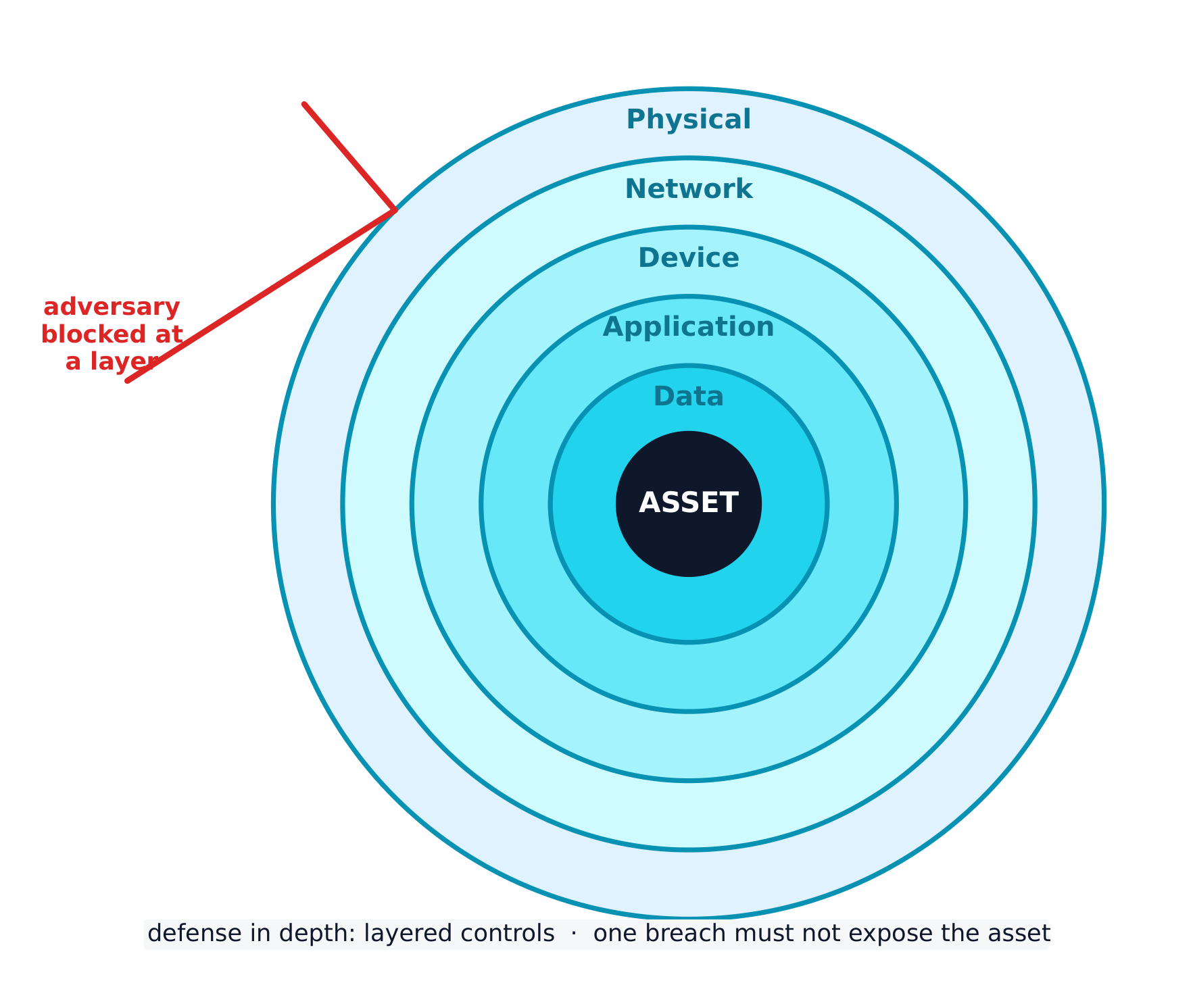
Defense in depth: many layers so one breach does not expose the asset Defense in depth: many layers so one breach does not expose the asset

Explore

Classify each security control by function

A preventative control stops an attack, a detective control spots one in progress, and a corrective control fixes the damage and restores the system.

Explore

Classify each security control by type

A physical control guards the physical space, a technical control works in the digital space, and a managerial control is a rule, policy, or procedure.

Vocabulary Train
English Chinese Pinyin
CIA triad 中央情报三要素 zhōng yāng qíng bào sān yào sù
Confidentiality 保密性 bǎo mì xìng
Integrity 完整性 wán zhěng xìng
Availability 可用性 kě yòng xìng
script kiddie 脚本小子 jiǎo běn xiǎo zi
hacktivist 黑客活动分子 hēi kè huó dòng fèn zǐ
insider 内部人员 nèi bù rén yuán
cyberterrorist 网络恐怖分子 wǎng luò kǒng bù fèn zi
transnational criminal organisations 跨国犯罪组织 kuà guó fàn zuì zǔ zhī
phases 阶段 jiē duàn
reconnaissance 侦察 zhēn chá
OSINT 公开来源情报 gōng kāi lái yuán qíng bào
lateral movement 横向移动 héng xiàng yí dòng
social engineering 社会工程学 shè huì gōng chéng xué
Pretexting 借口 jiè kǒu
Authority 权威 quán wēi
Intimidation 恐吓 kǒng hè
Consensus 从众 cóng zhòng
Scarcity 稀缺 xī quē
Familiarity 熟悉 shú xī
Urgency 紧迫感 jǐn pò gǎn
risk 风险 fēng xiǎn
threat 威胁 wēi xié
vulnerability 漏洞 lòu dòng
asset 资产 zī chǎn
likelihood 可能性 kě néng xìng
severity 严重性 yán zhòng xìng
quantitative 定量 dìng liàng
qualitative 定性 dìng xìng
risk assessment 风险评估 fēng xiǎn píng gū
Avoid 规避 guī bì
Transfer 转移 zhuǎn yí
Mitigate 缓解 huǎn jiě
Accept 接受 jiē shòu
residual risk 剩余风险 shèng yú fēng xiǎn
physical 物理 wù lǐ
technical 技术 jì shù
managerial 管理 guǎn lǐ
preventative 预防性 yù fáng xìng
detective 检测性 jiǎn cè xìng
corrective 纠正性 jiū zhèng xìng
defense-in-depth 纵深防御 zòng shēn fáng yù
2.2

Physical Vulnerabilities and Attacks
Syllabus
Learning ObjectiveEssential Knowledge

2.2.A
Identify common physical attacks.

  • 2.2.A.1 Adversaries often use social engineering when conducting a physical attack.
  • 2.2.A.2 Piggybacking is the name for an attack where an adversary uses social engineering to manipulate an authorized individual to grant the adversary access to a restricted area. Common piggybacking tactics include carrying something large to entice an authorized person to hold the door open, pretending to be an authorized person who has forgotten their access token, or pretending to be a maintenance person who needs to get into a certain area to perform an inspection or repair.
  • 2.2.A.3 Tailgating is the name for an attack where an adversary gains unauthorized access to a restricted area by following close behind an authorized individual without that individual’s awareness or knowledge.
  • 2.2.A.4 Shoulder surfing is the name for an attack where an adversary watches as a user accesses sensitive information so the adversary can use it later. Sometimes adversaries use a camera to record the target accessing the sensitive information for later analysis.
  • 2.2.A.5 Dumpster diving is the name for an attack where an adversary goes through a target’s physical trash to look for information that could be used to help the adversary reach their goal.
  • 2.2.A.6 Card cloning is the name for an attack where an adversary makes a copy of an authorized user’s access card so they can gain access to all the resources the user is authorized to access.

2.2.B
Explain how threats can exploit common physical vulnerabilities to cause loss, damage, disruption, or destruction to assets.

  • 2.2.B.1 Threats include human adversaries seeking to cause harm or disruption as well as natural disasters. Natural disasters can cause physical damage or destruction to computers and data as well as disruption of digital services provided by computers.
  • 2.2.B.2 Vulnerabilities are weaknesses or flaws that could allow an asset to be compromised. Common compromises include:
    • Unauthorized access to sensitive data or restricted physical spaces
    • Disruption of services
    • Theft or destruction of digital or physical resources
    • Unauthorized modification of data
  • 2.2.B.3 When adversaries disrupt power to a device, the device and any services it provides become unavailable. To disrupt power, adversaries may damage fuses or breakers in an electrical box, unplug or cut electrical wiring, or damage power distribution systems like substations and transformers.
  • 2.2.B.4 When adversaries gain access to an area with sensitive information, they can steal or copy sensitive information.
  • 2.2.B.5 When adversaries gain physical access to a device and its ports, they can plug in a keylogger or external drive containing malware, which could allow them to collect data from a user or possibly even to gain control of the device. With direct physical access adversaries can also physically destroy a device, making the device itself, any data stored on it, and any services it provides unavailable.

2.2.C
Assess and document risks from physical vulnerabilities.

  • 2.2.C.1 Physical access to devices can allow adversaries to bypass many technical controls and layers of security.
  • 2.2.C.2 High risks from physical vulnerabilities arise when sensitive information or systems are exposed in physical spaces without sufficiently restricted and controlled access.
    • Illustrative examples for 2.2.C.2:
      • A server that stores customer data is in a room with no lock which is accessed via an unmonitored hallway.
  • 2.2.C.3 Moderate risks from physical vulnerabilities arise when a noncritical or nonsensitive part of an organization is left unprotected in a way that it could act as a foothold for an adversary to gain initial access to other resources.
    • Illustrative examples for 2.2.C.3:
      • An office has a reception area beyond which access is controlled; the receptionist has a computer that connects to the office’s internal wireless network and the computer has exposed USB ports.
  • 2.2.C.4 Low risks from physical vulnerabilities arise when a vulnerable asset is of low value and the vulnerability is unlikely to be exploited.
    • Illustrative examples for 2.2.C.4:
      • Employees in an office that requires badge access have laptop computers that they leave on their desks unattended when they all go to lunch together. The computers do not contain any sensitive information, but there are no cables securing the devices to the desks.

Source: College Board AP Course and Exam Description

Digital security means nothing if an adversary can simply walk in. Common physical attacks 物理攻击 often begin with social engineering:

  • Piggybacking 尾随获许可) - tricking an authorised person into holding a door open (for example, by carrying a heavy box).
  • Tailgating 尾随未察觉) - slipping through a secured door behind someone without their knowledge.
  • Shoulder surfing 肩窥 - watching someone type a password or read sensitive information.
  • Dumpster diving 翻垃圾搜集情报 - searching a target's trash for useful information.
  • Card cloning 门禁卡复制 - copying an access card to enter restricted areas.

With physical access, an adversary can cut power, steal or copy data, or plug in a keylogger 键盘记录器. We rate physical risk as high when sensitive systems sit in a space without controlled access, moderate when an unimportant area could act as a foothold 立足点 to reach other resources, and low when the asset is worthless and unlikely to be attacked.

Vocabulary Train
English Chinese Pinyin
physical attacks 物理攻击 wù lǐ gōng jī
Piggybacking 尾随(获许可) wěi suí ( huò xǔ kě )
Tailgating 尾随(未察觉) wěi suí ( wèi chá jué )
Shoulder surfing 肩窥 jiān kuī
Dumpster diving 翻垃圾搜集情报 fān lā jī sōu jí qíng bào
Card cloning 门禁卡复制 mén jìn kǎ fù zhì
keylogger 键盘记录器 jiàn pán jì lù qì
foothold 立足点 lì zú diǎn
2.3

Protecting Physical Spaces

Syllabus
Learning ObjectiveEssential Knowledge

2.3.A
Identify managerial controls related to physical security.

  • 2.3.A.1 Organizations should conduct employee security awareness training to educate employees about how they can contribute to the organization’s security by:
    • Detecting social engineering attempts like phishing
    • Not badging other people into restricted areas
    • Preventing device theft
  • 2.3.A.2 Organizations should have a workstation security policy that outlines the measures necessary to protect a physical workplace. The policy may have tiers of workstation security based on the type of data handled at a workstation. Workstation policies often require:
    • Locking devices before leaving workstations unattended to prevent unauthorized access
    • Clearing sensitive documents off workstations before leaving them unattended (sometimes called a clean desk policy)
    • Using a privacy screen filter or other physical barrier to prevent others from viewing information on the screen
    • Connecting devices to surge protectors or uninterruptible power supplies (UPS)

2.3.B
Determine mitigation strategies for risks from physical vulnerabilities.

  • 2.3.B.1 To determine a relevant control, a cyber defender considers how an adversary could take advantage of a vulnerability to attack a system and how to prevent, detect, or correct the attack.
  • 2.3.B.2 Installing physical controls like fencing, gates, and bollards around a building can deter adversaries from trying to physically access an organization’s buildings.
  • 2.3.B.3 Locks on doors, server cabinets, and computers can prevent devices from being accessed or stolen.
  • 2.3.B.4 Card readers can record which employee badges are being used to access different entries at specific times and deny access to unauthorized badges.
  • 2.3.B.5 Access control vestibules and turnstiles can prevent an authorized person from intentionally or accidentally admitting an unauthorized person into a restricted area.
  • 2.3.B.6 Organizations can disable USB ports to prevent external drives from loading malware onto a computer.
  • 2.3.B.7 An uninterruptible power supply (UPS) provides a backup power source for a device in the event of a power outage. Organizations can also use power generators to provide power at a larger scale to a building or set of critical devices.
  • 2.3.B.8 Organizations prioritize risk mitigations based on the severity of the risks and the cost of the recommended mitigations.

Source: College Board AP Course and Exam Description

Managerial controls come first: security-awareness training teaches staff not to badge strangers in, and a workstation security policy requires locking devices, clearing desks (a clean desk policy 清桌政策), and using privacy screens.

Physical controls then harden the building: fences, gates, and bollards 防撞柱 deter access; locks protect doors and cabinets; card readers 读卡器 log and restrict entry; an access control vestibule 门禁前室 (a two-door airlock) stops piggybacking; disabling USB ports blocks malware drives; and an uninterruptible power supply (UPS) 不间断电源 keeps devices running through an outage. Organisations prioritise these by matching the cost of a control to the severity of the risk.

Vocabulary Train
English Chinese Pinyin
clean desk policy 清桌政策 qīng zhuō zhèng cè
bollards 防撞柱 fáng zhuàng zhù
card readers 读卡器 dú kǎ qì
access control vestibule 门禁前室 mén jìn qián shì
uninterruptible power supply (UPS) 不间断电源 bù jiàn duàn diàn yuán
2.4

Detecting Physical Attacks

Syllabus
Learning ObjectiveEssential Knowledge

2.4.A
Identify ways security controls can detect physical attacks.

  • 2.4.A.1 Cameras can capture a visual record of an adversary’s malicious activity. The feed from a camera should be recorded and monitored for maximum effect. Recordings can be especially helpful in after-incident investigations.
  • 2.4.A.2 Security guards can monitor activity in an area and respond to suspicious activity once detected.
  • 2.4.A.3 Motion sensors can alert security to movement in an area.
  • 2.4.A.4 Employees that work in a physical space are often the first to notice the presence of an unauthorized person and can alert security.

2.4.B
Determine effective placement of security controls for detecting physical attacks.

  • 2.4.B.1 When placing cameras, consideration should be given to visual coverage, angle, and the ability to be tampered with by an adversary. Consideration should also be given to what a camera in a specific area could capture an adversary doing and how that information would be helpful. Points of ingress and egress are often monitored by camera.
  • 2.4.B.2 Motion sensors should be placed in areas where traffic is unexpected, like server rooms, or areas where sensitive materials are stored and few people have access. Motion sensors in high-traffic areas create many false alarms, making the alarms less likely to be taken seriously when there is a real security event.
  • 2.4.B.3 Locks should be placed on all entries to areas containing sensitive information or systems. For areas with particularly sensitive information or systems, an organization could use an access control vestibule at the entry point to prevent piggybacking or tailgating.
  • 2.4.B.4 Security guards can be stationary or patrolling. Stationary guards can provide constant protection for a specific area, entrance, or high-value item. Patrolling guards are more difficult for an adversary to plan around and can create time pressure for an adversary. Placing stationary guards at places that funnel traffic (e.g., entry gates, main entrances or lobbies, and entrances to more secure access areas) can be highly effective, while patrolling guards are better suited for perimeters and exterior areas.

2.4.C
Apply detection techniques to identify physical attacks.

  • 2.4.C.1 Cameras provide visual monitoring and a visual record of activity within a designated space. Cameras can be paired with facial recognition software that can provide alerts when unauthorized individuals enter controlled areas. Once a physical breach has been detected, defenders can use live and recorded camera footage to track an adversary’s path and actions.
  • 2.4.C.2 Motion detectors work best when paired with cameras. When a security alert is raised because a motion detector has been activated, defenders can use cameras to check the space visually and verify a physical security breach.
  • 2.4.C.3 When employees are required to use an electronic badge to unlock a door to a restricted area, a sensor can record how long the door was open. In reviewing entry logs for the door, potential piggybacking or tailgating can be detected by doors being open for longer than normal lengths of time.

Source: College Board AP Course and Exam Description

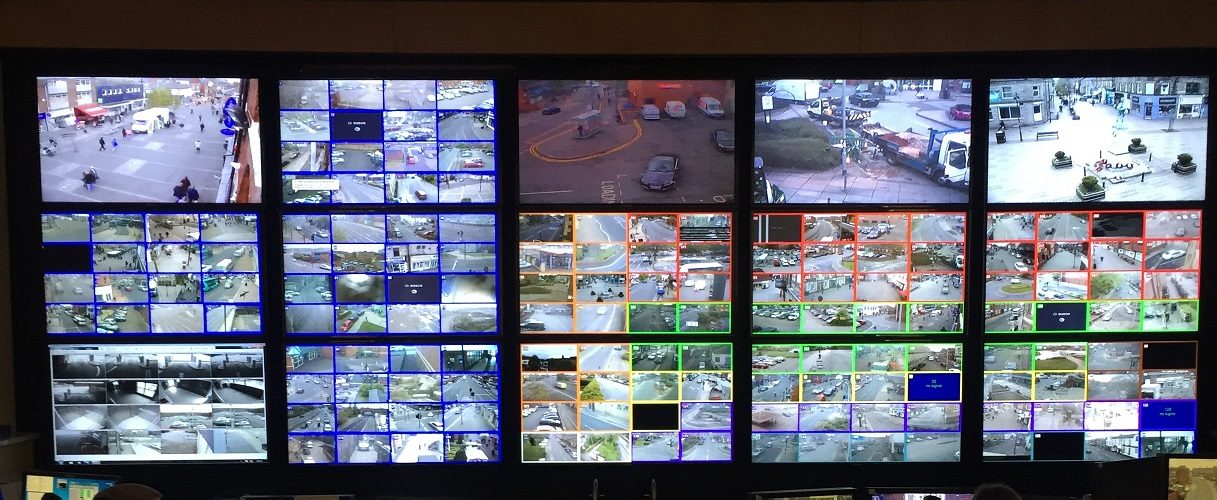
Some controls detect attacks rather than prevent them. Cameras record activity and help after-incident investigations; security guards respond to what they see; motion sensors 运动传感器 alert staff to movement; and employees themselves often notice an intruder first.

Placement matters. Cameras belong at points of ingress and egress 出入口 (entrances and exits). Motion sensors work best in low-traffic areas like server rooms - put them in a busy hallway and constant false alarms make everyone ignore them. Stationary guards protect a fixed high-value point, while patrolling guards are harder for an adversary to plan around. Reviewing door-open times in entry logs can even reveal piggybacking, because a door held open too long is suspicious.

Vocabulary Train
English Chinese Pinyin
motion sensors 运动传感器 yùn dòng chuán gǎn qì
points of ingress and egress 出入口 chū rù kǒu
2.4

Exam tips

  • Memorise the CIA triad and be ready to say which goal a control protects - encryption serves confidentiality, a hash checks integrity, a backup restores availability.
  • Know the four risk responses (avoid, transfer, mitigate, accept) and the two ways to classify controls (by type: physical/technical/managerial; by function: preventative/detective/corrective).
  • Distinguish piggybacking (with consent, tricked) from tailgating (without the person's knowledge) - exam questions test this exact pair.
  • For risk-rating questions, high risk needs both high value AND easy exploitation; a "foothold to other systems" is the classic moderate risk.
  • Defense in depth is the model answer whenever a question asks why one control is not enough.

Log in or create account

IGCSE & A-Level