Skip to content

Securing Devices

AP Cybersecurity · Topic 4

Train
4.1

Device Vulnerabilities and Attacks

Syllabus
Learning ObjectiveEssential Knowledge

4.1.A
Identify types of computing devices.

  • 4.1.A.1 Server computers are devices that provide one or more services to other computers (e.g., DNS, DHCP, FTP). Any computer can be a server, and in an enterprise environment servers typically have more processing power and storage than a personal computer.
  • 4.1.A.2 Personal computers are devices that are designed to be used by one person for work or recreational purposes (e.g., word processing, graphic design, web browsing, and media production or viewing). These include desktop, laptop, and notebook computers.
  • 4.1.A.3 Handheld computers (also called mobile computers or information appliances) are smaller than personal computers and run on battery power. These include tablets, smartphones, and wearable technology like smart watches.
  • 4.1.A.4 Embedded computers are devices that are part of a machine. Embedded devices have specific instruction sets for interfacing with the specialized components of the machine they’re embedded in. Embedded computers tend to be slower and cheaper than other computers and have minimal storage.
  • 4.1.A.5 Everyday devices with embedded computers are often called Internet of Things (IoT) devices. Embedded computers are found in transportation (e.g., cars, trains, and airplanes), devices that operate critical infrastructure (e.g., operating circuit breakers at electrical substations and pumps at water treatment plants), medical equipment (e.g., IV pumps, MRI scanners, pacemakers, and insulin pumps), and everyday devices like washing machines, coffee makers, and thermostats.

4.1.B
Identify the type of malware used in a cyberattack.

  • 4.1.B.1 Malware is malicious software that can damage or destroy a device or network, or allow an adversary access to a device and the data on the device.
  • 4.1.B.2 Malware is often used as a tool to accomplish part of an adversary’s plan to achieve their ultimate goal(s). There are many types of malware, such as:
    • Viruses are malware that must be activated by a user executing or opening a file.
    • Worms spread from one computer to another without human interaction.
    • Trojans are malware embedded in other software that seems harmless. Remote access trojans (RATs) provide an adversary with remote access to the target system.
    • Ransomware encrypts a device’s files, preventing the user from accessing files on the device. The ransomware typically presents the user with a screen demanding payment and promising to give the user a decryption key for their files if the user pays within a fixed amount of time.
    • Spyware tracks a user’s actions on a computer and sends information back to an adversary.
    • A keylogger is software or hardware that logs the users keystrokes and sends the information back to the adversary. Adversaries can often extract usernames and passwords from keylogger data.
    • Logic bombs are set to trigger their effect only when a specific set of conditions are met; the conditions can include time and date, specific type or version of the operating system, character set the computer is using, etc.
    • A rootkit is sophisticated malware that gets into the target computer’s operating system and can control nearly every aspect of the system, including making the rootkit itself invisible to detection.
  • 4.1.B.3 While most malware is a file or a collection of files, fileless malware is malicious code that lives in RAM and uses legitimate programs already installed on a device to compromise it.

4.1.C
Explain how adversaries can exploit common device vulnerabilities to cause loss, damage, disruption, or destruction.

  • 4.1.C.1 Adversaries can develop exploits for known vulnerabilities in software (including operating systems). Devices with unpatched software are vulnerable to these exploits, which could allow an adversary to crash a system, view user actions, enable or disable various services or components on the device (e.g., turning on a webcam or microphone), or even take control of the device to issue their own commands including commands to steal or destroy information on the device.
  • 4.1.C.2 Adversaries can take advantage of weak authentication requirements by guessing a user’s password or using social engineering to get a user to divulge their password.
  • 4.1.C.3 When systems don’t have a password on the basic input output system (BIOS) or unified extensible firmware interface (UEFI), an adversary can boot a computer into a special mode (e.g., “recovery mode”) that gives them higher-level privileges. Without BIOS or UEFI protection, adversaries can load their own operating system onto a device from an external drive and use specialized tools to alter or create user profiles, including changing user passwords.
  • 4.1.C.4 Adversaries can load malware onto an external drive, and if autorun is enabled, then a device will run the malware when the external drive is inserted.
  • 4.1.C.5 Adversaries can leverage open ports to connect to a device.
  • 4.1.C.6 Adversaries can send malicious data to devices to disrupt them or attempt to take control of them. Devices that have no firewall (or a misconfigured firewall) cannot filter out this malicious data.
  • 4.1.C.7 Adversaries often attempt to install malware on a device to disrupt or control it. Devices lacking anti-malware software are more vulnerable to this type of attack.

4.1.D
Assess and document risks from device vulnerabilities.

  • 4.1.D.1 Risk from device vulnerabilities can come from unauthorized access or malware that allow an adversary to impersonate an authorized user, remotely control a device, encrypt a device’s drive to ransom the data, or wipe a device’s memory, destroying data or rendering the device inoperable. The level of risk varies depending on the criticality of the device or the services the device provides or data it stores.
  • 4.1.D.2 High risks from device vulnerabilities involve potentially compromising sensitive data or critical operations.
    • Illustrative examples for 4.1.D.2:
      • An organization has not installed the most recent update for their email server which included a patch for a known critical vulnerability.
  • 4.1.D.3 Moderate risks from device vulnerabilities can arise from weak authentication requirements or from vulnerabilities that would be less likely to be exploited.
    • Illustrative examples for 4.1.D.3:
      • A water treatment plant has embedded systems controlling pumps. The pumps can be remotely accessed via username and password for remote management for the plant, but the devices do not require multi-factor authentication (MFA).
  • 4.1.D.4 Low risks from device vulnerabilities are typically related to vulnerabilities that, if exploited, would have little impact.
    • Illustrative examples for 4.1.D.4:
      • An employee’s laptop has telnet port 23 open.

Source: College Board AP Course and Exam Description

A device is any computer - a server, a personal laptop, a smartphone, or an embedded computer 嵌入式计算机 built into a machine. Everyday devices with embedded computers are called Internet of Things (IoT) 物联网 devices, and they run everything from water pumps to washing machines.

The main threat to a device is malware 恶意软件 - malicious software. Learn the types:

  • Virus 病毒 - must be activated by a user opening a file.
  • Worm 蠕虫 - spreads by itself, with no human action.
  • Trojan 木马 - hides inside software that looks safe; a remote access trojan (RAT) 远程访问木马 gives the adversary remote control.
  • Ransomware 勒索软件 - encrypts your files and demands payment for the key.
  • Spyware 间谍软件 - secretly tracks what you do.
  • Keylogger 键盘记录器 - records every keystroke to steal passwords.
  • Logic bomb 逻辑炸弹 - triggers only when a condition is met (a date, a version).
  • Rootkit - deeply hides in the operating system and can even make itself invisible.

Most malware is a file, but fileless malware 无文件恶意软件 is different: it lives only in RAM 内存 and abuses legitimate programs already on the device, leaving no file for a scanner to find.

Adversaries exploit unpatched software 未打补丁的软件, weak passwords, unprotected BIOS/UEFI startup settings, and open ports. We rate device risk by the value and criticality of the device - a hospital's unpatched email server is high risk, while an employee's laptop with one unused open port is low.

Explore

Name the malware from its behaviour

Each kind of malware has one defining trait: a worm self-spreads, a virus needs a user to run it, ransomware encrypts for money, and a rootkit hides deep in the OS.

Vocabulary Train
English Chinese Pinyin
embedded computer 嵌入式计算机 qiàn rù shì jì suàn jī
Internet of Things (IoT) 物联网 wù lián wǎng
malware 恶意软件 è yì ruǎn jiàn
Virus 病毒 bìng dú
Worm 蠕虫 rú chóng
Trojan 木马 mù mǎ
remote access trojan (RAT) 远程访问木马 yuǎn chéng fǎng wèn mù mǎ
Ransomware 勒索软件 lè suǒ ruǎn jiàn
Spyware 间谍软件 jiàn dié ruǎn jiàn
Keylogger 键盘记录器 jiàn pán jì lù qì
Logic bomb 逻辑炸弹 luó jí zhà dàn
fileless malware 无文件恶意软件 wú wén jiàn è yì ruǎn jiàn
RAM 内存 nèi cún
unpatched software 未打补丁的软件 wèi dǎ bǔ dīng de ruǎn jiàn
4.2

Authentication

Syllabus
Learning ObjectiveEssential Knowledge

4.2.A
Explain why hashes (also called hash outputs, checksums, message digests, or digests) are used to store passwords.

  • 4.2.A.1 A cryptographic hash function (also called a message digest function) is a mathematical algorithm that takes binary data of an arbitrary length, processes it according to a set of instructions, and outputs a fixed-length binary string called the hash (or checksum or message digest). Well known cryptographic hashes include:
    • MD5
    • SHA-1, SHA-256, SHA-512 (SHA stands for Secure Hash Algorithm)
    • NTHash
    • RIPEMD-160
  • 4.2.A.2 An n-bit hash has $2^n$ possible outputs. The number of inputs is infinite, and so inevitably two different inputs will produce the same hash. This is called a collision.
  • 4.2.A.3 Cryptographic hash functions have the following properties:
    • Hashes are collision resistant; it is difficult to find two different inputs to the same hash function that produce the same output.
    • Hashes have pre-image resistance; given a hash, it is infeasible to figure out the input that generated the hash.
    • Hashes are repeatable; the same input will always produce the same hash.
    • Hashes have a fixed length; the length in bits of the hash for a specific hash function is constant regardless of the size of the input.
  • 4.2.A.4 Adversaries try to compromise hashing functions by forcing collisions in their output. If an efficient algorithm exists to force a collision for a specific hash function, then that hash function will be deprecated (no longer used in secure settings). MD5 and SHA1 are examples of deprecated hash functions.
  • 4.2.A.5 Password-based authentication services shouldn’t store passwords in plaintext, so that if an adversary gains access to the user:password directory they won’t immediately know the passwords for all users. Instead, user passwords should be hashed and the hash stored in a database. When a user enters their password, it is hashed, and the hash is compared to the hash stored on file. If the hashes match, then the user is authenticated.
  • 4.2.A.6 If two users had the same password, then their passwords would have identical hashes in the user:password directory. To prevent this, a few random bits (called salt) are hashed with a user’s password to generate the hash. Each user’s salt is unique, so even if two users have the same password they will have a different password hash because they have different salt.

4.2.B
Explain how password attacks exploit vulnerabilities.

  • 4.2.B.1 If an adversary can compromise the password of a legitimate user, and that user’s organization has not enabled MFA or other authentication protections, then the adversary can act within that organization with all the access and rights available to the user.
  • 4.2.B.2 Password attacks can be classified as online or offline.
    • Online password attacks attempt user:password combinations in an active authentication portal.
    • Offline password attacks have captured a user:password database and can run password attacks against the database on their own computer. This method bypasses any account lock out protections that may be in place.
  • 4.2.B.3 Many users reuse the same passwords (or variations of the same password) for all the services and accounts they have, despite warnings not to. When an organization’s user database is stolen, the usernames, emails, and passwords are sold to adversaries or posted online. Adversaries often begin an attempt to compromise an account by trying stolen or leaked credentials for a target individual.
  • 4.2.B.4 Many users set passwords that are easy to guess, and adversaries will attempt to guess common passwords for a user’s account. Password spraying is an attack where an adversary attempts a common password against many different user accounts.
  • 4.2.B.5 Some services and devices (e.g., switches, routers, and IoT devices) are preconfigured with a default administrative user and password. Credential stuffing is an attack where an adversary attempts to gain access to these services or devices using common default credentials or account credentials that have been stolen.
  • 4.2.B.6 Offline password attacks use automated hash-cracking tools to hash possible passwords and compare them against a captured hash. Although hashes can’t be reversed, an adversary can use these tools to hash many potential passwords and compare them to the target hash. If an adversary finds a hash that matches, they can use the password that generated the hash to login to the user’s account. Offline attacks include:
    • Brute force attacks, where an adversary uses an automated tool to test all the potential passwords that a user could have
    • Dictionary attacks, where an adversary uses an automated tool to test a list of common passwords
  • 4.2.B.7 A rainbow table attack uses a list of common passwords to generate a rainbow table. A rainbow table is a table that contains each potential password and its hash. The table is then sorted by the hashes, and the adversary uses an automated tool to search the list of hashes for the captured hash. If the hashes match, then the adversary has found a password that generates the same hash, and the password will allow the adversary to login to the user’s account.

4.2.C
Determine the type of authentication used to verify the identity of a user.

  • 4.2.C.1 Authentication mechanisms are technical controls that verify the identity of a user to ensure that only authorized users access a system. The proof the user provides to identify themselves is called a factor. Common authentication factors include:
    • Something the user knows (knowledge factor)
    • Something the user has (possession factor)
    • Something the user is (biometric factor)
    • Somewhere the user is (location factor)
  • 4.2.C.2 Knowledge factors can be passwords, PINs, or answers to preselected challenge questions. For a knowledge factor to be effective it needs to be something an adversary can’t easily guess; however, knowledge factors that are difficult for an adversary to figure out can also be harder for a user to remember.
  • 4.2.C.3 A possession factor is an object a user has that is unique to them, such as an access card, a bank card, a cell phone, or an authentication token. The more difficult it is for an adversary to obtain the object (or a copy of it), the more secure the possession factor is.
  • 4.2.C.4 Biometric factors measure features of the human body and can include fingerprints, palm prints, facial recognition, iris or retina scans, or voice identification. Biometric factors are difficult for an adversary to duplicate because they are unique to an individual.
  • 4.2.C.5 Location factors use information about Wi-Fi signals, GPS data, time zone settings, and even IP address information to make determinations about location. Rules can be established for allowing or denying access based on a location factor.
  • 4.2.C.6 Multifactor authentication (MFA) is when a system uses more than one factor to authenticate a user. MFA is more secure than single-factor authentication because it requires the user to provide at least two separate factors of authentication.

4.2.D
Configure login settings to make a device more secure.

  • 4.2.D.1 Requiring complexity in passwords is a login setting that can be configured. When enabled, users setting a new password must include at least one character from each character set. Passwords with characters from each character set are significantly harder for an adversary to crack than passwords that use characters from only one or two character sets. The main character sets often required are:
    • Uppercase letters (A–Z)
    • Lowercase letters (a–z)
    • Numeric digits (0–9)
    • Special characters (!”#$%&’()*+,-./:;<=>?@ [ \ ] ^_`{|}~)
  • 4.2.D.2 Requiring a minimum password length is a login setting that can be configured. This means that users must have at least a certain number of characters in their password. The longer and more complex a password is, the longer it will take a digital tool to crack the password.
  • 4.2.D.3 Requiring a maximum password age is a login setting that can be configured. When configured, users will receive a prompt to change their password a certain number of days after their last password change, usually every 90 or 120 days. If a user’s password has been compromised, changing it could prevent an adversary from gaining access to the user’s account. However, some national standards recommend that organizations not require users to change their passwords on predefined intervals to discourage users from developing password patterns (e.g., PasswordFall2028).
  • 4.2.D.4 Requiring the system to store a certain number of previous user passwords is a login setting that can be configured. This prevents a user from reusing a password. Many organizations store users’ previous 5–10 password hashes to prevent reuse.
  • 4.2.D.5 Requiring a lockout period after a certain number of invalid login attempts is a login setting that can be configured. This prevents an adversary from continuously randomly attempting wrong passwords. Many organizations lock a user’s account after 3–5 invalid login attempts. The period of the lockout varies.

Source: College Board AP Course and Exam Description

Multi-factor authentication

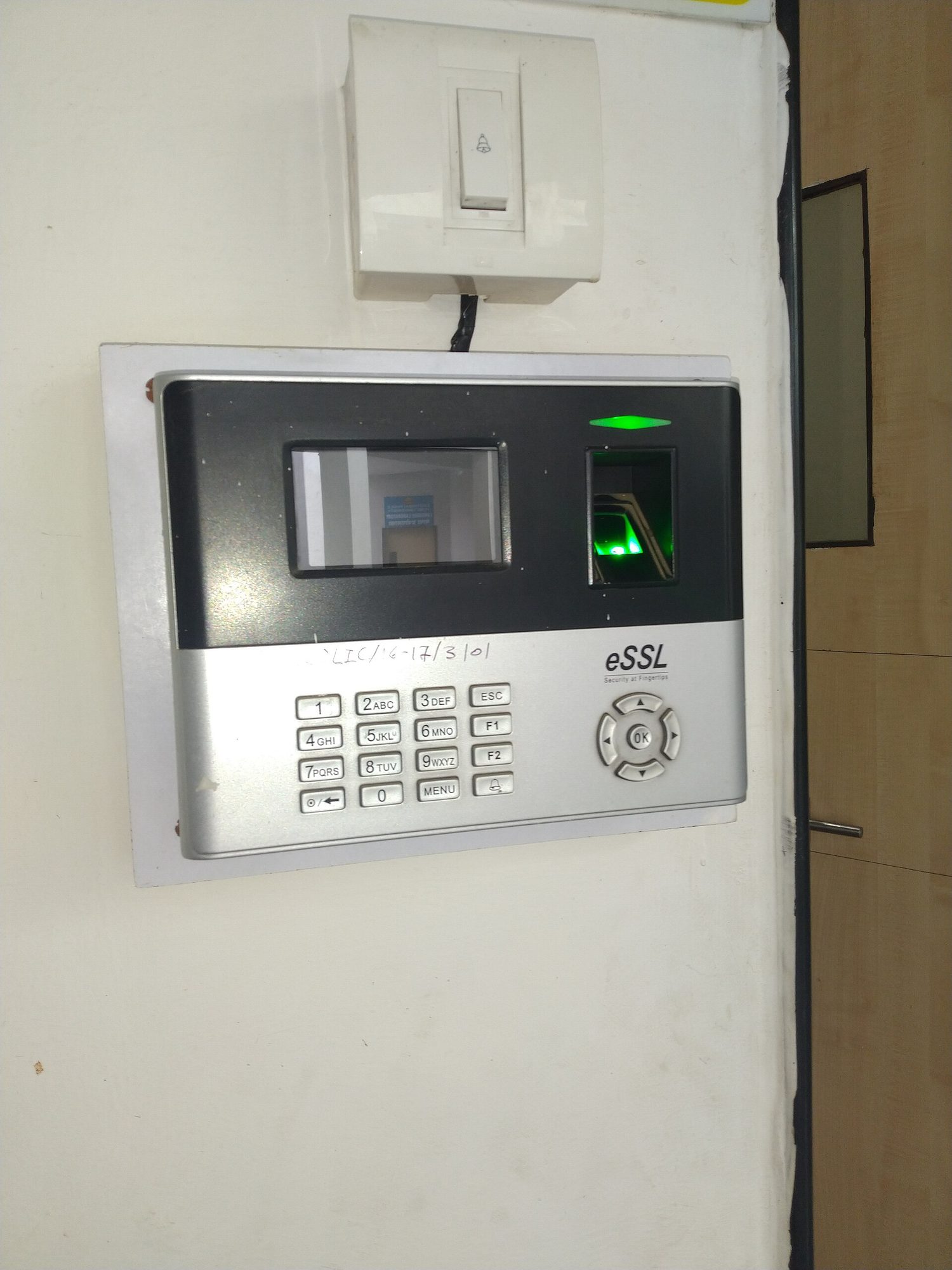
A person pressing a fingertip onto a small optical fingerprint scanner A fingerprint scanner: biometric authentication checks something you ARE, which is much harder for an attacker to steal or guess than a password

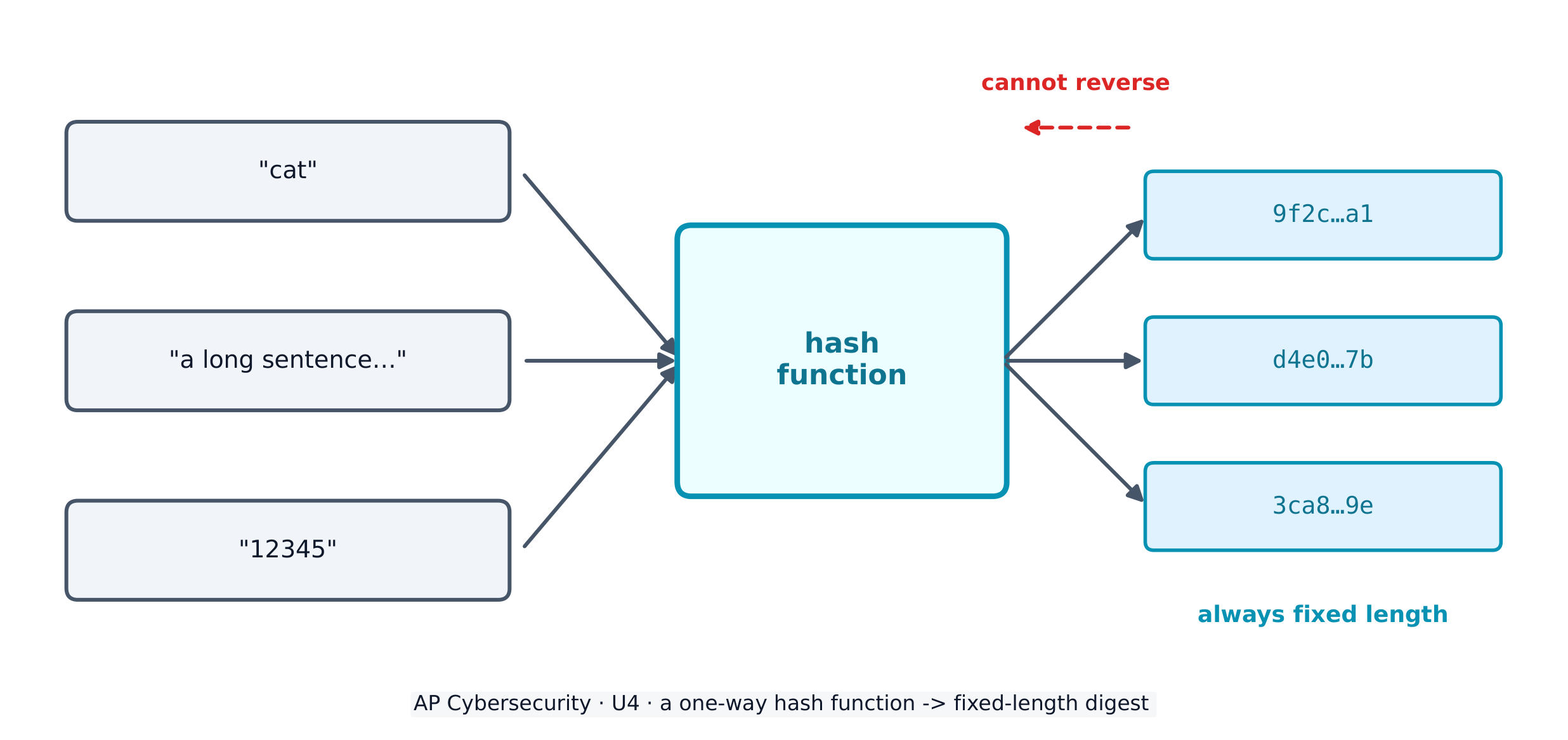
To store passwords safely, systems use a cryptographic hash function 密码散列函数 - a one-way maths algorithm that turns any input into a fixed-length string called a hash 散列值 (or digest). Hashes have three vital properties: they are collision resistant 抗碰撞 (hard to find two inputs with the same output), have pre-image resistance 抗原像 (you cannot work backwards to the input), and are repeatable (the same input always gives the same hash).

A hash function turns any input into a fixed-length digest, and cannot be reversed A hash function turns any input into a fixed-length digest, and cannot be reversed

Real hash functions have names. The Secure Hash Algorithm (SHA) family – SHA-256 and SHA-512 – is today's standard. Adversaries attack a hash function by trying to force a collision (two different inputs with the same hash); once an efficient collision attack exists, that function is deprecated 弃用 (retired from secure use). MD5 and SHA-1 are the classic deprecated examples – never rely on them to protect data today.

A service never stores your plaintext password. It stores the hash; when you log in, it hashes what you typed and compares. To stop two identical passwords producing identical hashes, a few random bits called salt 盐值 are added before hashing, so every stored hash is unique.

Worked example. Two users both choose the password sunshine. Without salt, both stored hashes would be identical, so cracking one instantly cracks the other. Give each user a unique salt - say x7 and q2 - and the service hashes sunshinex7 and sunshineq2 instead. The two stored hashes now look completely different, so the adversary must attack each account separately. This is why a stolen hash database is far less dangerous when the hashes are salted.

Adversaries fight back with password attacks. Online attacks guess against a live login; offline attacks steal the hash database and crack it on their own machine (which bypasses any account-lockout protection). Techniques include:

  • brute force 暴力破解 - an automated tool tries every possible password in turn; guaranteed to work eventually, but slow, and it grows explosively with password length.
  • a dictionary attack 字典攻击 - the tool tries a list of common words and known passwords first, because most people pick guessable ones.
  • password spraying 密码喷洒 - one common password against many accounts (this dodges lockout, which counts failures per account).
  • credential stuffing 撞库 - reusing stolen or default credentials, exploiting that people reuse passwords across sites.
  • a rainbow table 彩虹表 - a precomputed table of passwords and their hashes, sorted by hash, so a captured hash can be looked up instead of recomputed.

Password policy settings

An administrator hardens accounts by configuring login settings - and the exam expects you to name them and say what each defends against:

Setting What it does The attack it slows
complexity 复杂度 require a character from each set (upper, lower, digit, special) brute force / dictionary
minimum length 最小长度 require N characters - length matters more than anything brute force (grows exponentially)
maximum age 最长有效期 force a change every ~90-120 days limits how long a stolen password is useful
password history 密码历史 store the last 5-10 hashes, block reuse stops recycling an old (possibly leaked) password
lockout 锁定 lock the account after 3-5 wrong tries brute force / online guessing

One subtlety worth a mark: some national standards now advise against forced expiry, because regular changes push users into predictable patterns like PasswordFall2028. A password manager 密码管理器 solves the real problem - it generates and stores a long, unique password per site, so none is ever reused or guessable.

Authentication factors prove who you are, and fall into categories: something you know (a password), something you have (a token or phone), something you are (a biometric 生物特征 like a fingerprint or retina scan), and somewhere you are (a location factor). Using two or more is multifactor authentication (MFA) 多因素身份验证 - far stronger than a password alone.
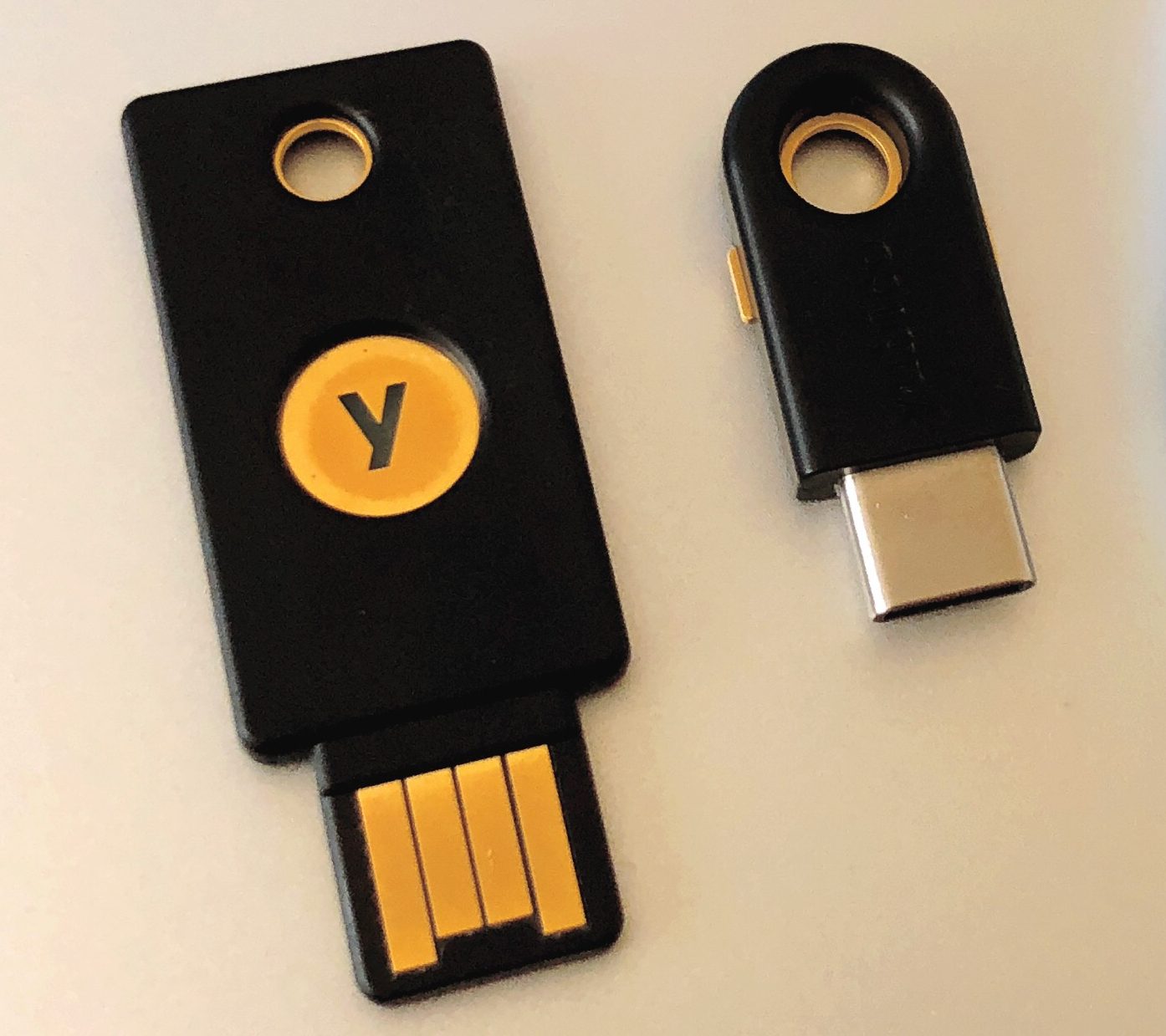
Two small USB hardware security keys A hardware security key proves who you are with something you physically hold — a strong second factor

Explore

How a hash maps any input to a fixed slot

A hash function sends every input to a fixed-length output. The same input always lands in the same place (repeatable), and you cannot work backwards from the slot to the input.

Vocabulary Train
English Chinese Pinyin
cryptographic hash function 密码散列函数 mì mǎ sàn liè hán shù
hash 散列值 sàn liè zhí
collision resistant 抗碰撞 kàng pèng zhuàng
pre-image resistance 抗原像 kàng yuán xiàng
deprecated 弃用 qì yòng
salt 盐值 yán zhí
brute force 暴力破解 bào lì pò jiě
dictionary attack 字典攻击 zì diǎn gōng jī
password spraying 密码喷洒 mì mǎ pēn sǎ
credential stuffing 撞库 zhuàng kù
rainbow table 彩虹表 cǎi hóng biǎo
complexity 复杂度 fù zá dù
minimum length 最小长度 zuì xiǎo cháng dù
maximum age 最长有效期 zuì zhǎng yǒu xiào qī
password history 密码历史 mì mǎ lì shǐ
lockout 锁定 suǒ dìng
password manager 密码管理器 mì mǎ guǎn lǐ qì
biometric 生物特征 shēng wù tè zhēng
multifactor authentication (MFA) 多因素身份验证 duō yīn sù shēn fèn yàn zhèng
4.3

Protecting Devices

Syllabus
Learning ObjectiveEssential Knowledge

4.3.A
Identify managerial controls related to device security.

  • 4.3.A.1 An acceptable use policy will describe the range of activities that are permissible, prohibited, or required by users on devices owned by an organization and may include:
    • Prohibiting users from accessing specific websites or types of websites (e.g., social media or gaming)
    • Requiring users to keep software updated
    • Allowing users to connect peripheral devices
    • Prohibiting users from connecting external drives or media
  • 4.3.A.2 A password policy will detail the requirements for user passwords within an organization and may include:
    • A minimum or maximum password length
    • A minimum or maximum amount of time a user may keep the same password
    • A prohibition of password reuse
    • Rules for password construction (e.g., no dictionary words and character set requirements)
    • A suggestion to use secure password management tools instead of writing passwords down
  • 4.3.A.3 A software installation policy will describe what (if any) software users are allowed to install on their devices and usually also a process for users to request specialized software they may need to perform their role, and it may include:
    • A prohibition against users installing software on their devices
    • A process for users to request new software needed for their role
    • A list of approved software for users

4.3.B
Explain how anti-malware software can make a device more secure.

  • 4.3.B.1 Anti-malware software (sometimes called antivirus software) has tools to quarantine and remove malware that can corrupt, spy on, or destroy a system. Malware contains indicators that make it detectable; these indicators are called signatures.
  • 4.3.B.2 Anti-malware software has a database of malware signatures. It periodically scans the files on a device and checks to see if any of the files match any of the signatures in its database. If there is a match, the software quarantines and removes the malicious files.

4.3.C
Explain why keeping a device’s operating system and software updated makes it more secure.

  • 4.3.C.1 When vulnerabilities in operating systems and software are found, the vendor or organization that maintains the operating system software will fix it and send an update. A small update is called a patch.
  • 4.3.C.2 Ensuring that a computer’s operating system and software applications are updated to the most recent version prevents adversaries from taking advantage of a known vulnerability.

4.3.D
Configure a host-based firewall.

  • 4.3.D.1 Host-based firewalls allow or deny traffic into or out of a single device. This provides an extra layer of security in case a host is connected to a compromised network.
  • 4.3.D.2 A host-based firewall is software that runs on a device and follows a set of rules (an ACL) like a network-based firewall. Firewall rules are implemented in order, applying the first rule that matches.
  • 4.3.D.3 A host-based firewall can also block specified types of outbound traffic. Host-based firewalls should always block ports or services not needed for a given device.
    • Illustrative examples for 4.3.D.3:
      • A host-based firewall is configured to block outbound FTP traffic. This prevents an adversary with remote access to the host from using FTP to exfiltrate a file to the adversary’s server.
  • 4.3.D.4 The rules for a host-based firewall can allow or deny traffic based on source or destination port or IP address, service, protocol, or application.

Source: College Board AP Course and Exam Description

Managerial controls set the rules: an acceptable use policy 可接受使用政策 lists what users may and may not do, a password policy sets length and reuse rules, and a software installation policy controls what can be installed.

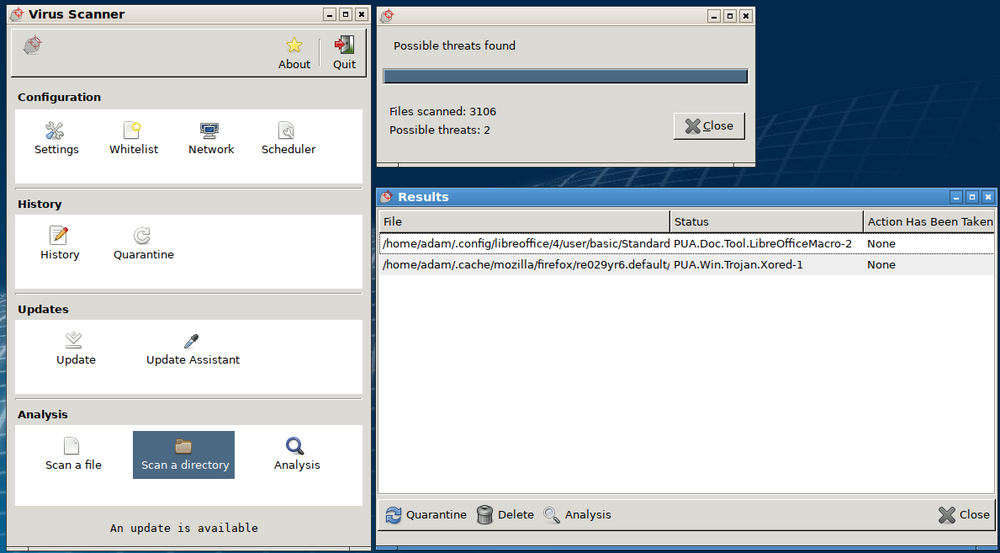
Technical controls do the work. Anti-malware software 反恶意软件 keeps a database of malware signatures and quarantines any file that matches. Keeping the operating system and applications updated - installing each patch 补丁 - closes known holes before adversaries can use them. A host-based firewall 主机防火墙 controls traffic in and out of one single device, blocking ports and services it does not need.

An anti-malware scanner window: 3106 files scanned, two threats found, with quarantine and update controls Anti-malware software scans files against a signature database and quarantines any matches — this scan has flagged two threats

Vocabulary Train
English Chinese Pinyin
acceptable use policy 可接受使用政策 kě jiē shòu shǐ yòng zhèng cè
Anti-malware software 反恶意软件 fǎn è yì ruǎn jiàn
patch 补丁 bǔ dīng
host-based firewall 主机防火墙 zhǔ jī fáng huǒ qiáng
4.4

Detecting Attacks on Devices

Syllabus
Learning ObjectiveEssential Knowledge

4.4.A
Explain how to detect attacks against devices.

  • 4.4.A.1 System processes and settings, login attempts, file download attempts, and user actions are logged by computing systems. These logs can be used to reconstruct circumstances leading up to and during a cyber incident.
  • 4.4.A.2 An indicator of compromise (IoC) is evidence that an adversary has compromised a device or network.
  • 4.4.A.3 Authentication logs (or auth logs) record every attempted login on a system. Analysis of authentication logs can reveal attempted attacks.
  • 4.4.A.4 Host-based IoCs are discovered when analyzing logs and configuration settings. Indicators, such as the following, can be found in authentication logs, user activity logs, and system configuration files:
    • Unusual files being created or modified
    • Unexpected processes or services
    • Unauthorized changes to system configuration settings
    • Unauthorized software installation or update
  • 4.4.A.5 File-based IoCs are discovered when analyzing files on a device. Indicators are usually found in executable files and can include:
    • Files whose hash matches known malware
    • File names that are known to be created by a certain piece of malware
    • File paths that are associated with malicious activity
  • 4.4.A.6 Behavior-based IoCs are discovered when analyzing logs. Indicators can be found in authentication logs and access logs and can include:
    • Multiple failed login attempts
    • Unusual login times or locations
    • Unauthorized attempts to access sensitive data
    • Attempts to elevate user privileges on a system

4.4.B
Determine controls for detecting attacks against a device.

  • 4.4.B.1 Performance is a criterion for determining a detection method. Detection tools use system memory and processing power and can impact the performance of a device. Anomaly-based detection tools use more system resources than signature-based tools. Signature-based detection is a better option for devices with less powerful system resources. Many embedded devices do not have enough system resources to run any detection tools on the device.
  • 4.4.B.2 Cost is a criterion for determining a detection method. Organizations that purchase detection software need to consider the cost of purchasing enough software licenses for the number of devices they need to monitor. Some organizations purchase an endpoint detection and response (EDR) service from a third-party vendor. Although these services are expensive, they provide a holistic, unified approach to threat detection for an organization’s devices; they typically include a centralized alert platform for monitoring possible attacks on devices.
  • 4.4.B.3 Sensitivity or criticality of the device is a criterion for determining a detection method. Devices that store or process sensitive information or provide critical services are more likely to be targeted by adversaries and benefit from a hybrid-detection model to offer maximum protection, when possible.

4.4.C
Evaluate the impact of a device detection method.

  • 4.4.C.1 Speed and performance are factors in evaluating the impact of a detection method. Signature-based detection is faster than anomaly-based detection in general, and that effect is compounded on devices, which often lack the processing power to effectively run anomaly-based detection tools. Implementing resource-intensive detection tools on devices can degrade device performance.
  • 4.4.C.2 Phase of the attack is a factor in evaluating the impact of a detection method. To carry out actions on a device, adversaries must first bypass a combination of physical- or network-layer protective, deterrent, and detective security controls. Detecting and stopping an attack at the device level can prevent adversaries from accessing sensitive data or disrupting critical services.
  • 4.4.C.3 False positives versus ease of bypassing detection is a factor in evaluating the impact of a detection method. Most device-level detection tools are signature-based, and signature-based detection has a low rate of false positives. However, signature-based detection is easier for adversaries to bypass.

4.4.D
Apply detection techniques to identify indicators of password attacks by analyzing log files.

  • 4.4.D.1 Online password attacks can be detected in authentication logs. A single user attempting many wrong passwords is an indicator of an online password attack. If a user:password hash database has been compromised, all the user passwords in the database should be considered insecure and all users should be forced to reset their passwords.
  • 4.4.D.2 If an authorized user is logging in from a different location or IP address than expected, or at a different time than normal, this can be an indicator that the user’s password has been compromised.
  • 4.4.D.3 An indicator of password spraying is many users trying to log in within seconds of each other from one IP address or from unusual IP addresses.
  • 4.4.D.4 An indicator of credential stuffing is a series of default user:password combinations being attempted on a device in quick succession, often from the same IP address.
  • 4.4.D.5 Offline password attacks can’t be detected, because the attack takes place on the adversary’s computer.

Source: College Board AP Course and Exam Description

Devices log logins, file changes, and processes, and these logs reveal an indicator of compromise (IoC) 入侵指标 - evidence that an adversary got in. Host-based IoCs show up as unexpected processes or changed settings; file-based IoCs are files whose hash matches known malware; behaviour-based IoCs are things like many failed logins or unusual login times.

Choosing a detection method means weighing performance (signature-based is lighter, better for weak devices), cost (an endpoint detection and response (EDR) 端点检测与响应 service is powerful but expensive), and how sensitive the device is. Reading authentication logs exposes password attacks: many wrong passwords for one user signals a guessing attack; many users failing from one IP signals password spraying; a burst of default credentials signals credential stuffing. Offline attacks, though, cannot be detected - they happen on the adversary's own computer.

Vocabulary Train
English Chinese Pinyin
indicator of compromise (IoC) 入侵指标 rù qīn zhǐ biāo
endpoint detection and response (EDR) 端点检测与响应 duān diǎn jiǎn cè yǔ xiǎng yìng
4.4

Exam tips

  • Know each malware type by its defining trait: a worm self-spreads, a virus needs a user, ransomware encrypts for money, a RAT gives remote control, a rootkit hides.
  • A hash is one-way and fixed-length; salt makes identical passwords hash differently. Never say a service "stores the password" - it stores the salted hash.
  • Name real algorithms: SHA-256/SHA-512 are current; MD5 and SHA-1 are deprecated because efficient collision attacks exist.
  • Match the password attack to its log signature: one user + many wrong passwords = guessing; many users + one IP = spraying; default credentials = stuffing.
  • Sort authentication factors into know / have / are / where, and remember MFA combines two or more - a fingerprint plus a password, not two passwords.
  • Offline password attacks cannot be detected because the cracking happens on the adversary's machine - a favourite exam "gotcha".

Log in or create account

IGCSE & A-Level