| English | 意味 |
|---|---|
| bitmap/ˈbɪtmæp/ | ビットマップ |
| vector/ˈvektə/ | ベクトル |
| pixel/ˈpɪksl/ | ピクセル |
| file header/faɪl ˈhedə/ | ファイルヘッダ |
| colour depth/ˈkʌlə depθ/ | 色深 |
| image resolution/ˈɪmɪdʒ ˌrezəˈluːʃn/ | 画像解像度 |
| screen resolution/skriːn ˌrezəˈluːʃn/ | 画面解像度 |
| frame/freɪm/ | フレーム |
| frame rate/freɪm reɪt/ | フレームレート |
| drawing list/ˈdrɔːɪŋ lɪst/ | 描画リスト |
| drawing objects/ˈdrɔːɪŋ ˈɒbdʒekts/ | 描画オブジェクト |
| primitives/ˈprɪmɪtɪvz/ | プリミティブ |
| properties/ˈprɒpətiz/ | プロパティ |
| render/ˈrendə/ | レンダリング |
Why the logo on the billboard is not a photograph
- A company's logo appears on a business card two centimetres wide and on a motorway billboard six metres wide. It is the same file, and it is sharp on both.
- Enlarge a photograph the same way and it turns to blocks. Nothing is wrong with the photograph; the two files answer different questions.
- A photograph stores what colour is at each point. A logo stores what shapes to draw. Enlarging the first spreads a fixed number of dots; enlarging the second redraws the shapes at the new size.
- This lesson is bitmap 位图 and vector 矢量 images, the file-size calculation the exam asks for, and how to justify a choice.
How a bitmap is encoded
- A bitmap (a bitmapped image) stores the colour of every pixel 像素 in a grid, row by row.
- At the start of the file, a file header 文件头 records the metadata the software needs to read the pixels that follow: the width, the height and the colour depth.
- Image resolution 图像分辨率 is the image's own size in pixels, width by height. Screen resolution 屏幕分辨率 is what the display can show. An image larger than the screen is scaled down to fit; a low-resolution image stretched onto a high-resolution screen looks blocky.
- Colour depth 颜色深度 (bit depth) is the number of bits storing one pixel's colour: 1 bit gives black and white, 8 bits give 256 colours, 24 bits give 16.7 million, called true colour.
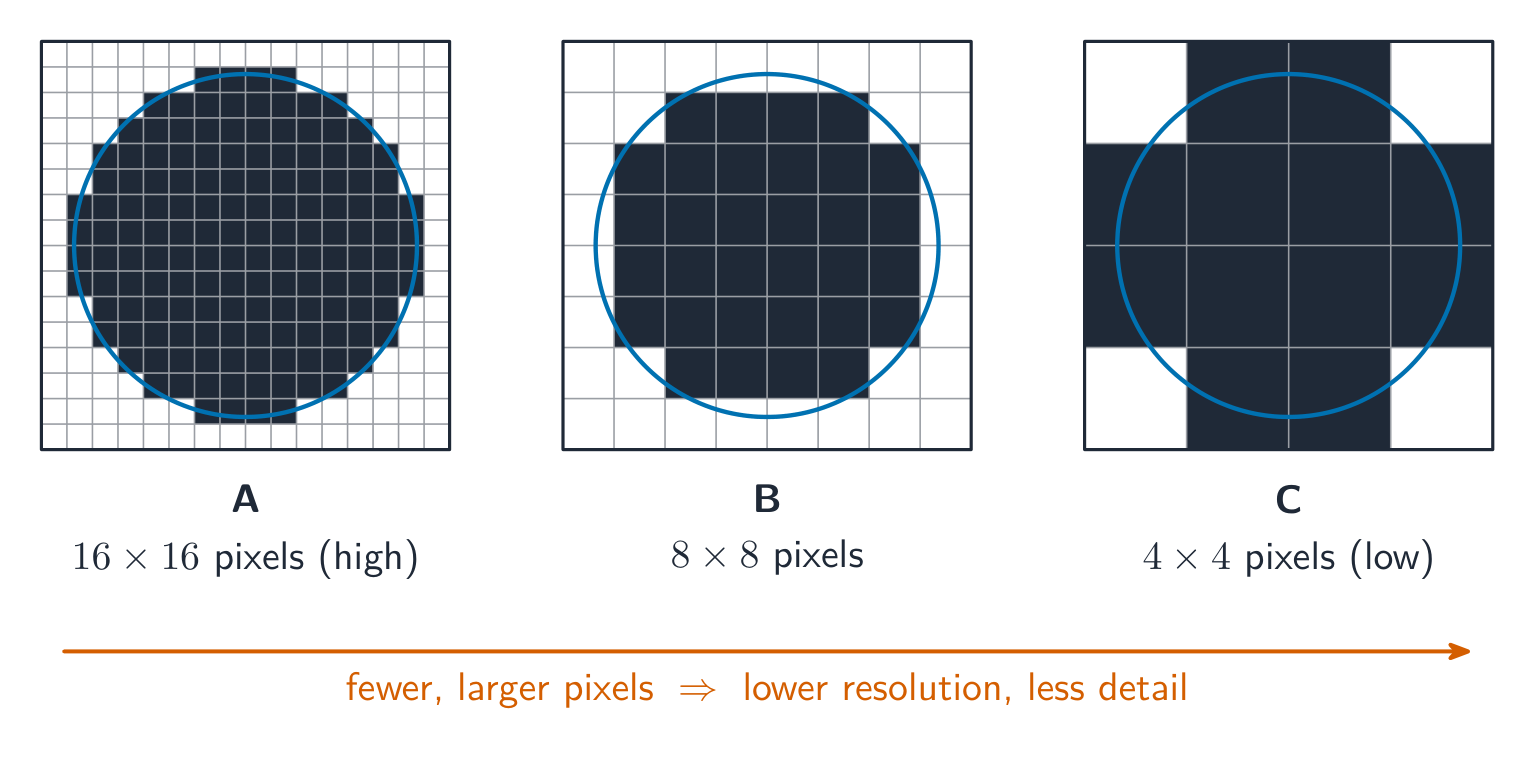
Fewer pixels, bigger blocks
コンピューティング概念ラボ
具体的な例を、それが示すコンピューティングのアイデアに基づいて分類せよ。
ビットマップ画像のカラーディPTH(ビット深度)とは:
難易度 1/5 · 100 コイン + 今日初回完了時に小ボーナス付与
カラー深度はピクセルあたりのビット数です。ビット数が多いほど表現可能な色が増えます(8 ビット → 256、24 ビット → 16.7 百万)。
256色の異なる色を格納するには、カラーディPTHにいくつのビットが必要か?
難易度 2/5 · 140 コイン + 今日初回完了時に小ボーナス付与
$2^8 = 256$、したがってピクセルあたり8ビットで256色が得られる。
ビットマップ画像のファイルヘッダーには何が格納されているか?
難易度 1/5 · 100 コイン + 今日初回完了時に小ボーナス付与
ヘッダーはメタデータである。幅とカラーディPTHがないと、ピクセルのバイト列を行とピクセルに分割できない。描画リストはベクターファイルに属する。
Bitmap file size
- Divide by 8 for bytes, then by 1000 or 1024 depending on which prefix family you are using, and say which. Add the header if the question gives its size.
- A $3000 \times 2000$ image at 24 bits per pixel is $1.44 \times 10^8$ bits, which is 18.0 MB using decimal prefixes or 17.2 MiB using binary ones. Both are accepted when the working shows which.
一幅 $100 \times 100$ ピクセルの画像があり、カラーディPTHは24ビットである。このファイルのサイズ(ビット単位)はいくつか?
難易度 2/5 · 140 コイン + 今日初回完了時に小ボーナス付与
size $=$ width $\times$ height $\times$ depth $= 100 \times 100 \times 24 = 240\,000$ bits.
Worked example: size a photograph, then a video
- A photograph is $4000 \times 3000$ pixels with a colour depth of 24 bits. Find its file size in MiB.
- $4000 \times 3000 \times 24 = 2.88 \times 10^8$ bits. Divide by 8: $3.6 \times 10^7$ bytes. Divide by $1024^2$: 34.3 MiB.
- A video is a sequence of bitmap frames 帧. Its uncompressed size is one frame $\times$ the frame rate 帧率 $\times$ the duration. At 30 frames per second, $1920 \times 1080$, 24 bits: $30 \times 1920 \times 1080 \times 24 \approx 1.5 \times 10^9$ bits, about 187 MB, per second. That is why video is always compressed.
非圧縮動画が1920 x 1080ピクセル、24ビットカラー、秒間30フレームである。1秒分にはいくつのビットが必要か?10の累乗形式で有効数字2桁で答えよ。例: 1.5e9。
難易度 2/5 · 140 コイン + 今日初回完了時に小ボーナス付与
1920 x 1080 x 24 = 4.98e7 ビット/フレーム、これに30 フレームをかけると1.5e9 ビットとなり、秒あたり約187 MBになります。これが動画が常に圧縮される理由です。
Changing the settings
- Lower image resolution: fewer pixels, so a smaller file, but less detail; enlarged, the picture looks blocky because each pixel covers more of the screen.
- Lower colour depth: fewer bits per pixel, so a smaller file, but smooth shades show banding, visible steps where there should be a gradient.
- Higher of either: a larger file and better quality. Answer in these syllabus terms, not "the picture gets worse".
各変更とそれによる画像への影響を結びつけよ。
難易度 2/5 · 140 コイン + 今日初回完了時に小ボーナス付与
"画像が粗くなる"ではなく、カリキュラム用語である「バンドング」と「ブロック状」で答えよ。
How a vector graphic is encoded
- A vector graphic stores the instructions to draw the image, as a drawing list 绘图列表: an ordered list of drawing objects 绘图对象, which are geometric primitives 图元 such as lines, curves, rectangles, polygons and circles.
- Each drawing object carries properties 属性: its position or coordinates, line colour and width, fill colour, radius and so on.
- To display it, the program renders 渲染 the drawing list at whatever size is needed, so it scales without any loss of quality. It cannot describe arbitrary pixel detail, so it is no good for a photograph.
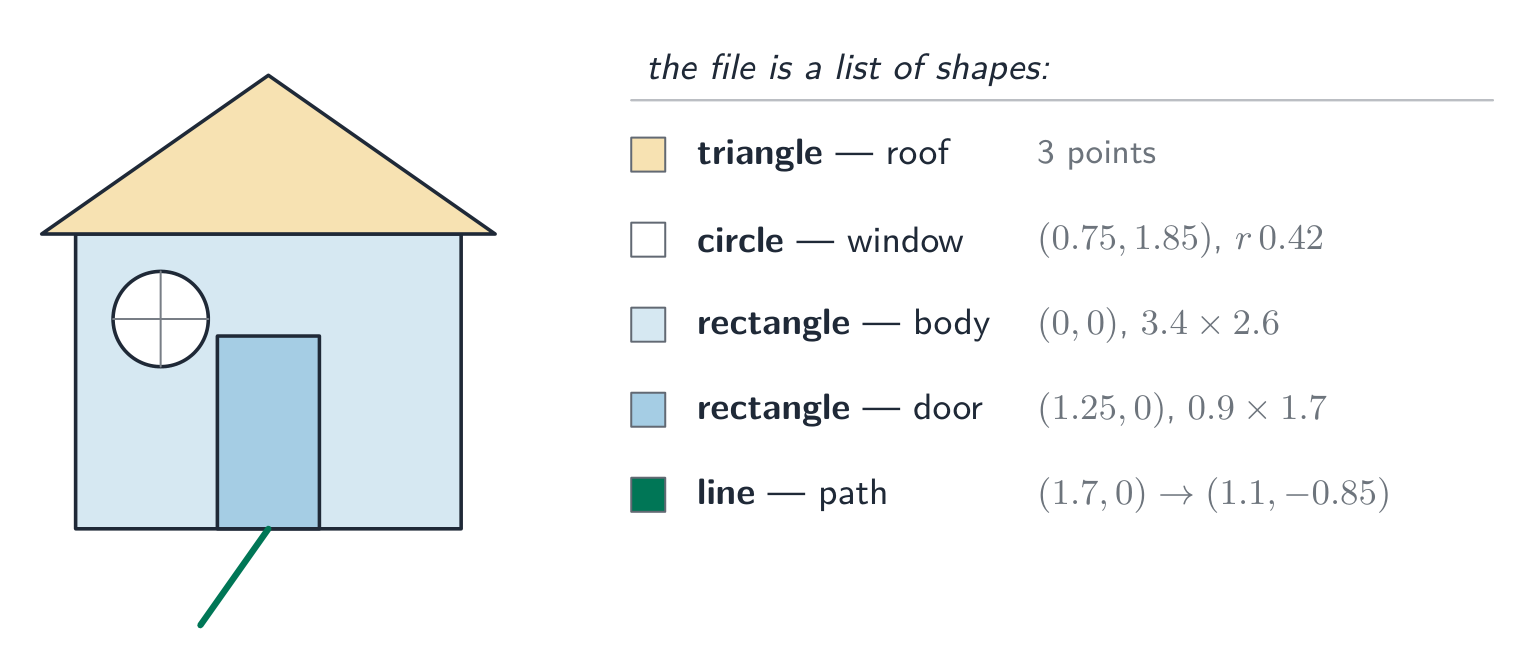
A list of shapes and their properties, not a grid of dots
ベクターロゴを大きく拡大するとぼやける。
難易度 1/5 · 100 コイン + 今日初回完了時に小ボーナス付与
ベクターは指令から任意のサイズで再レンダリングされるため、シャープさを保つ。拡大時にぼやけるのはビットマップである。
ベクターグラフィックスの主な利点は以下のどれか?
難易度 1/5 · 100 コイン + 今日初回完了時に小ボーナス付与
指令に基づいて描かれるため、ベクターはぼやけずにスケールでき、ロゴや図表に最適である(ただし写真には向かない)。
Worked example: justify the choice
- A logo must appear on a business card and on a billboard. Which format, and why? [3]
- A vector graphic. It is stored as drawing objects with properties, so the program re-renders it at whatever size is required and the edges stay sharp.
- A bitmap has a fixed number of pixels, so enlarging it to billboard size would make each pixel visible and the logo would look blocky.
- And for a photograph? A bitmap: a photograph has no geometric shapes to describe, so the colour of every pixel must be stored individually.
ベクターグラフィックスの符号化方法を説明する用語はどれか?すべて選択せよ。
難易度 2/5 · 140 コイン + 今日初回完了時に小ボーナス付与
プロパティを持つ描画オブジェクトの並べ替えられた描画リストである。カラーディPTHとピクセルあたりのビット数はビットマップの用語である。
Choosing between them
| Task | Choice | Why |
|---|---|---|
| photograph | bitmap | per-pixel detail cannot be described as shapes |
| logo, icon, road sign | vector | sharp at any size, small file |
| engineering drawing | vector | precise geometry, scales exactly |
| painting, texture | bitmap | smooth tonal detail across an area |
写真を格納するのにどのフォーマットが適しているか?
難易度 1/5 · 100 コイン + 今日初回完了時に小ボーナス付与
写真には形状として説明できない複雑なピクセル単位の詳細が含まれるため、ビットマップが適切な選択肢である。
Marks that slip away
- Work in bits, divide by 8 once, and state whether you used 1000 or 1024. Mixing bits and bytes halfway is the usual lost mark.
- Image resolution is the image's pixels; screen resolution is the display's. The question names one.
- A vector is a drawing list of objects with properties, not "a picture made of lines". Use the three terms.
- A "justify" answer links the format to the task: the billboard, the photograph. A definition alone does not justify anything.
You've got it
- a bitmap stores every pixel's colour after a file header; image resolution is its pixel size, colour depth the bits per pixel
- size in bits = width $\times$ height $\times$ colour depth; a video adds $\times$ frame rate $\times$ duration
- lower resolution means blocky, lower colour depth means banding; both mean a smaller file
- a vector graphic is a drawing list of drawing objects with properties, rendered at any size, so it scales without loss but cannot store a photograph