Skip to content · ⁨コンテンツへスキップ⁩

Securing Applications and Data · ⁨アプリケーションとデータの保護⁩

AP Cybersecurity · ⁨AP サイバーセキュリティ⁩ · Topic 5 · ⁨トピック 5⁩

View Slides · ⁨查看幻灯片⁩ Train · ⁨練習する⁩
Video lesson for this topic · ⁨このトピックのビデオレッスン⁩ Open the video page · ⁨動画ページを開く⁩
9:47

アプリケーションとデータの保護

ある企業は莫大な費用をかけてファイアウォール、錠前、強力なパスワードを用意しました。しかし、誰かがログインボックスにいくつかの奇妙な文字を入力すると、データベースは…

English narration · English + 中文 subtitles burned in · ⁨英語ナレーション・英語+中文字幕 burning-in⁩

5.1

Application and Data Vulnerabilities and Attacks · ⁨アプリケーションおよびデータ脆弱性と攻撃⁩

Syllabus · ⁨シラバス⁩
English

Learning Objective 5.1.A: Explain how adversaries can exploit application and file vulnerabilities to cause loss, damage, disruption, or destruction.

  • 5.1.A.1 An adversary can read any unencrypted files if they have access to the device or drive storing the files.
  • 5.1.A.2 Computers have standard users and administrative users. Administrative users have access to control system settings and can typically access any files or applications on a system. If regular users are given administrative privileges on a computer, and an adversary can compromise a user’s account, then the adversary will have elevated privileges on the system.
  • 5.1.A.3 When access control settings are weakly configured, many users often have permission to view and sometimes even edit files on a system. Adversaries can take advantage of weak access control settings to steal or destroy files or disrupt an application.

Learning Objective 5.1.B: Explain how application attacks exploit vulnerabilities.

  • 5.1.B.1 Applications are programs that run instructions on computers; they are executable data. Some applications run locally on a user’s computer, while other applications, like web applications, run on a server and are accessed by users through a network.
  • 5.1.B.2 Many applications take user input through open-ended input fields where users can type characters (e.g., letters, numbers, punctuation). Developers should include user input checks in their application, such as numeric input when asked for a number of items, to ensure that the user input matches what is expected; the application should reject input outside of the expected parameters. This process of verifying that user input meets expected criteria before processing it is called data validation. Applications that fail to validate user input are vulnerable to injection-type attacks, where adversaries insert unexpected character strings in input fields to alter the behavior of a program.
  • 5.1.B.3 Structured query language (SQL) is a computer language used to request information from databases and make changes to databases or entries in databases. Applications that query a database using unvalidated or unsanitized input from users are vulnerable.
  • 5.1.B.4 An SQL-injection attack places SQL commands and control characters into a user-input field in an application, which can lead to a breach of confidentiality by causing the application to return more information than it should, or a breach of integrity by modifying or deleting data in the database.
  • 5.1.B.5 Websites are written using hypertext markup language (HTML), and many websites use Javascript to create dynamic content on websites or web applications. Because Javascript commands run in the browser of the user visiting the website, those commands can access sensitive data stored in the browser like usernames, passwords, and cryptographic keys.
  • 5.1.B.6 A cross site scripting (XSS) attack injects malicious code into a website that a user’s browser then executes. The malicious code can be embedded in a link the user clicks (a Type I or Reflected XSS attack) or it can be inserted onto a website through a comment field, forum post, or visitor log, which would affect any user visiting that website (a Type II or Stored XSS attack).
  • 5.1.B.7 When applications take user input, that input is written to a buffer. A buffer is a designated section of computer memory with a fixed size. If the amount of data the user enters exceeds the size of the buffer, it can overflow into adjacent memory locations and overwrite other parts of the computer’s memory.
  • 5.1.B.8 A buffer overflow attack feeds more data into memory than was allotted, which can cause a system to crash or to execute code outside the scope of a program’s security policy, effectively allowing the adversary to perform unauthorized actions on a computer, such as accessing, modifying, or deleting files.
  • 5.1.B.9 The files that run web applications are stored in directories on servers. When users access web applications, their browsers send GET requests using hypertext transfer protocol (HTTP). A GET request accesses a file somewhere in the filesystem of the server.
  • 5.1.B.10 In a directory traversal attack, adversaries modify URLs and GET requests to attempt to access sensitive data (e.g., usernames and passwords) on a server’s file system.
    • Illustrative examples for 5.1.B.10:
      • A web server stores images for a website it hosts in the /var/www/images/ directory. An adversary modifies a URL requesting an image to ../../../etc/passwd. The .. moves one directory up in the file system; so the three consecutive .. returns the path to the root, and from there the adversary is attempting to access the passwd file that would return a list of all the authorized usernames on the device.

Learning Objective 5.1.C: Assess and document risks from application and data vulnerabilities.

  • 5.1.C.1 Data security risks can involve a compromise of confidentiality when unauthorized persons can access sensitive data, integrity when data can be manipulated or altered from its intended state, and availability when data can be destroyed or encrypted to prevent others from accessing it.
  • 5.1.C.2 High risks from data vulnerabilities often involve highly sensitive data (e.g., data that is governed by laws or regulations) that could be compromised through a highly likely exploit.
    • Illustrative examples for 5.1.C.2:
      • The company developing the next jet engine that will be used by the Air Force in its planes is storing the technical specifications for the engine on an unencrypted drive.
  • 5.1.C.3 Moderate risks from data vulnerabilities often involve sensitive data not having strong enough encryption or strict enough access controls.
    • Illustrative examples for 5.1.C.3:
      • A company stores its customers’ PII in a spreadsheet, and the spreadsheet is encrypted using a small key.
  • 5.1.C.4 Low risks from data vulnerabilities often involve less sensitive information being encrypted with shorter keys or having access controls that are not strict enough.
    • Illustrative examples for 5.1.C.4:
      • An organization’s CEO stores his private memos to his executive staff on a company share drive that is unencrypted and has no access controls.
日本語

学習目標 5.1.A: 攻撃者がアプリケーションおよびファイルの脆弱性をどのように利用して、損失、損傷、妨害、または破壊を引き起こすかを説明する。

  • 5.1.A.1 攻撃者がファイルが格納されているデバイスまたはドライブにアクセスできる場合、暗号化されていないファイルはすべて読み取られることができる。
  • 5.1.A.2 コンピュータには標準ユーザーと管理者ユーザーがあります。管理者ユーザーはシステム設定の制御にアクセスでき、通常、システム上のすべてのファイルやアプリケーションにアクセスできます。標準ユーザーに管理者権限が与えられており、攻撃者がユーザーのアカウントを乗っ取った場合、攻撃者はシステム上で elevated privileges( comented privileges )を獲得することになります。
  • 5.1.A.3 アクセス制御設定が緩く設定されている場合、多くのユーザーがシステム上のファイルの表示、さらには編集へのアクセス権限を持つことがあります。攻撃者はこれらの弱いアクセス制御設定を利用し、ファイルを盗み出したり破棄したり、アプリケーションを妨害したりすることがあります。

学習目標 5.1.B: アプリケーション攻撃が脆弱性をどのように利用するかを説明する。

  • 5.1.B.1 アプリケーションはコンピューターで命令を実行するプログラムであり、実行可能なデータです。一部のアプリケーションはユーザーのコンピューター上でローカルに動作しますが、Webアプリケーションなどの他のアプリケーションはサーバー上で動作し、ユーザーがネットワークを通じてアクセスします。
  • 5.1.B.2 多くのアプリケーションは、ユーザーが文字(例:アルファベット、数字、記号)を入力できるオープンエンドの入力フィールドを通じてユーザー入力を取得します。開発者は、アイテム数を問われた際に数値入力を行うようにするなどの、ユーザー入力の検証をアプリケーションに含めるべきです。これにより、ユーザー入力が期待される内容と一致していることを確認でき、期待されるパラメータ外の入力は拒否されます。このように、処理前にユーザー入力が期待される基準を満たしているかを検証するプロセスは「データバリデーション」と呼ばれます。ユーザー入力を検証しないアプリケーションは、攻撃者が入力フィールドに予期せぬ文字列を挿入してプログラムの動作を変更する注入型攻撃に対して脆弱となります。
  • 5.1.B.3 スtructured query language (SQL) は、データベースから情報を要求したり、データベースやそのエントリの変更を行ったりするために使用されるコンピューター言語です。ユーザーからの検証されていないまたは清浄化されていない入力でデータベースを照会するアプリケーションは脆弱性があります。
  • 5.1.B.4 SQLインジェクション攻撃では、SQLコマンドや制御文字がアプリケーションの入力フィールドに配置され、これが機密性の侵害(アプリケーションが返すべき以上の情報を返すこと)、または整合性の侵害(データベース内のデータの修改や削除)を引き起こすことがあります。
  • 5.1.B.5 ウェブサイトはhypertext markup language (HTML) で記述されており、多くのウェブサイトではdynamic content(動的コンテンツ)を作成するためにJavascriptを使用しています。 Javascriptコマンドは訪問者のブラウザ内で実行されるため、それらのコマンドはブラウザ内に格納されたユーザー名、パスワード、暗号鍵などの敏感なデータにアクセスできます。
  • 5.1.B.6 A cross site scripting (XSS) attack(クロスサイトスクリプティング攻撃)では、悪意のあるコードがウェブサイトへ注入され、ユーザーのブラウザによって実行されます。悪意のあるコードは、ユーザーがクリックするリンクに埋め込まれている場合(Type I または Reflected XSS 攻撃)や、コメント欄、フォーラム投稿、访客日志(visitor log)を介してサイトに挿入され、そのサイトを訪問するすべてのユーザーに影響を与える場合(Type II または Stored XSS 攻撃)があります。
  • 5.1.B.7 アプリケーションがユーザー入力を取得すると、その入力はバッファに書き込まれます。バッファとは、固定サイズを持つコンピューターメモリの指定された領域です。ユーザーが入力したデータ量がバッファのサイズを超えると、隣接するメモリ領域にオーバーフローし、コンピューターのメモリの他の部分を上書きすることがあります。
  • 5.1.B.8 バッファオーバーフロー攻撃では、割り当てられた量よりも多くのデータをメモリに供給することで、システムがクラッシュしたり、プログラムのセキュリティポリシーの範囲外でコードを実行したりすることがあり、結果として攻撃者にファイルのアクセス、修改、または削除など、コンピューター上での不正操作を許可することになります。
  • 5.1.B.9 Webアプリケーションを実行するファイルは、サーバー上のディレクトリに保存されています。ユーザーがWebアプリケーションにアクセスすると、そのブラウザはhypertext transfer protocol (HTTP) を用いてGETリクエストを送信します。GETリクエストはサーバーのファイルシステム内のどこかのファイルにアクセスします。
  • 5.1.B.10 ディレクトリトラバーサル攻撃では、攻撃者はURLやGETリクエストを改変し、サーバーのファイルシステム上の敏感なデータ(例:ユーザー名とパスワード)にアクセスしようと試みます。
    • 5.1.B.10 の具体例:
      • 某ウェブサーバーがホストするサイトの画像を /var/www/images/ デレクトリに格納しています。攻撃者は画像を要求するURLを ../../../etc/passwd に変更します。 .. はファイルシステム内で1つ上のディレクトリを示すため、3つの連続する .. はルートパスを指し示し、そこから攻撃者は passwd ファイルにアクセスしようとし、これはデバイス上のすべての承認済みユーザー名のリストを返します。

学習目標 5.1.C: アプリケーションおよびデータの脆弱性からのリスクを評価・文書化する。

  • 5.1.C.1 データセキュリティリスクには、未授权者(unauthorized persons )が敏感なデータにアクセスできることで機密性が侵害されること、データが意図した状態から操作・修改されることで整合性が侵害されること、データが破壊または暗号化されて他者がアクセスできなくなることで可用性が侵害されることが含まれます。
  • 5.1.C.2 データ脆弱性による高リスクは、法律や規制で管理されるような非常に敏感なデータ(例:法的保護対象データ)が、発生可能性の高いエプロイトによって侵害される場合に該当します。
    • 5.1.C.2 の具体例:
      • 空軍の飛行機で使用される次世代ジェットエンジンを開発している企業は、技術仕様書を非暗号化ドライブ上に格納しています。
  • 5.1.C.3 データ脆弱性による中程度リスクは、敏感なデータの暗号化が十分でない、またはアクセス制御が厳しくない場合に該当します。
    • 5.1.C.3 の具体例:
      • 某企業が顧客のPIIをスプレッドシートに格納しており、そのスプレッドシートは小さなキーを用いて暗号化されています。
  • 5.1.C.4 データの脆弱性による低リスクは、通常、より機密性の低い情報が短い暗号鍵で暗号化されたり、アクセス制御が十分でない状態であったりすることに関連しています。
    • 5.1.C.4 の例:
      • 組織のCEOが、暗号化されておらずアクセス制御も設定されていない会社共用ドライブに、役員への私人メモを保管している。

Source: College Board AP Course and Exam Description · ⁨出典: College Board AP コースおよび試験説明書⁩

English
SQL injection

Applications 应用程序 are the programs that run on computers, and data is what they process - both are prime targets. If files are stored unencrypted, anyone with access to the drive can read them. If a normal user is given administrative 管理性 privileges, an adversary who steals that account gains sweeping power.

The biggest application danger is bad user input. When a program does not check what a user types, an adversary can slip in commands - an injection attack 注入攻击. Data validation 数据验证 (checking input meets expected rules) is the defense. Key attacks:

  • SQL injection SQL注入 - inserting SQL commands into an input field to read or change a database.
  • Cross-site scripting (XSS) 跨站脚本 - injecting malicious script into a website that runs in another user's browser.

What a SQL injection actually looks like

SQL is a language for querying a database, and its control words are always written in capital letters — SELECT, FROM, WHERE, IN, OR, AND. A login form usually builds a query by pasting what you typed into one:

An attacker types SQL into the field instead of a name. Two tricks do most of the damage:

  • A condition that is always true. Entering ' OR '1'='1 makes the WHERE clause true for every row, so the database returns every user.
  • A double dash, which begins a comment in SQL. Entering admin' -- ends the name string and comments out the whole rest of the line, including the password check, so the query becomes … WHERE name = 'admin' and the attacker is logged in as the administrator without a password.

The defence is not to filter for the word SELECT. It is to stop the input being treated as code at all: use parameterised queries 参数化查询 (also called prepared statements), where the database is given the query and the values separately and never mixes them, and add input validation to reject characters the field has no reason to contain.

  • Buffer overflow 缓冲区溢出 - sending more data than a memory buffer 缓冲区 can hold, so it overflows into nearby memory and may run the adversary's code.
  • Directory traversal 目录遍历 - using ../ sequences in a URL to reach files outside the intended folder, such as /etc/passwd.

We rate data risk by sensitivity: unencrypted military plans are high risk; customer data with a weak key is moderate; low-value data with short keys is low.

日本語
SQLインジェクション

アプリケーションはコンピュータ上で動作するプログラムであり、データはその処理対象 - どちらも主要な標的となる。ファイルが暗号化されていない状態で保存されている場合、ドライブへのアクセス権限を持つ誰しもがそれらを読むことができる。通常のユーザーに管理者権限が与えられ、攻撃者がそのアカウントを盗まれた場合、広範な権限を握られることになる。

最大のアプリケーション危険性は不適切なユーザー入力にある。プログラムがユーザーの入力を検証しない場合、攻撃者はコマンドを仕込むことができ、これがインジェクション攻撃となる。データ検証(入力が期待されるルールに従っているかを確認すること)が防御手段となる。主要な攻撃:

  • SQLインジェクション:入力フィールドにSQLコマンドを挿入してデータベースの読み出しや変更を行うこと。
  • クロスサイトスクリプティング(XSS):別のユーザーのブラウザ内で実行されるウェブサイトへ悪意のあるスクリプトを注入すること。

SQLインジェクションの実際の外観

SQLはデータベースを照会するための言語であり、その制御語はすべて大文字で書かれる - SELECT, FROM, WHERE, IN, OR, AND。ログインフォームは通常、あなたが入力したものを貼り付けてクエリを構築する。

SELECT * FROM users WHERE name = 'alice' AND password = 'secret'

攻撃者は名前ではなくSQLを入力する。2つのテクニックが大部分の被害をもたらす:

  • 常に真となる条件。' OR '1'='1を入力すると、WHERE節が各行について真となり、データベースはすべてのユーザーを返す。
  • ダブルダッシュ(--)、これはSQLにおいてコメントの開始を表す。admin' --を入力すると名前文字列が終了し、残りの行全体(パスワードチェックを含む)がコメントアウトされる。そのためクエリは… WHERE name = 'admin'となり、攻撃者はパスワードなしで管理者としてログインする。

防御はSELECTという単語をフィルタリングすることではない。入力をコードとして扱わないようにすることだ:パラメータ化クエリ(プレステートメントとも呼ばれる)を使用し、データベースにクエリと値を別々に提供して混在させず、フィールドに存在する理由のない文字を拒否するために入力検証を追加する。

  • バッファオーバーフロー:メモリバッファが保持できる以上のデータを送信し、近傍のメモリに溢れて攻撃者のコードを実行させる可能性があること。
  • ディレクトリトラバース:URL内で../シーケンスを使用して、意図されたフォルダ外のファイル(例:/etc/passwdなど)にアクセスすること。

データのリスクを感度に基づいて評価する:暗号化されていない軍事計画は高リスク、弱い鍵を持つ顧客データは中リスク、短い鍵を持つ低価値データは低リスクである。

Vocabulary · ⁨語彙⁩ Train · ⁨練習する⁩
English 日本語
SQL injection/ˌes kjuː ˈel ɪnˈdʒekʃn/ SQLインジェクション
Watch lesson · ⁨レッスンを視聴⁩
5.2

Protecting Applications and Data: Managerial Controls and Access Controls · ⁨アプリケーションおよびデータの保護:管理統制およびアクセス統制⁩

Syllabus · ⁨シラバス⁩
Learning ObjectiveEssential Knowledge

5.2.A
Explain how the state or classification of data impacts the type and degree of security applied to that data.

  • 5.2.A.1 Organizations implement specific security controls to comply with legal requirements based on the types of data they collect, store, process, and transmit.
  • 5.2.A.2 Data can be classified by their state.
    • Data at rest are stored on a drive. It is important to protect the physical drive storing the data from destruction or theft. Data at rest can also be encrypted so that if an adversary steals it, they can’t immediately read the data.
    • Data in transit are being sent from one device to another. If the data are being transferred over physical media (e.g., cables) it is important to protect the media. Data in transit can also be encrypted so that if an adversary intercepts it, they can’t immediately read the data.
    • Data in use are being processed by software or a person. Access controls can be used to limit who or what has the ability to use data in different ways (e.g., view or edit). Data must be unencrypted to be used.
  • 5.2.A.3 Organizations often categorize data according to their sensitivity and prioritize a higher degree of security for more sensitive information.
  • 5.2.A.4 Laws and regulations can require certain types of data to be stored, transmitted, and handled according to specific rules.
    • Personally identifiable information (PII) is any data that allows someone to be identified and includes (but is not limited to): name, signature, phone number, address, biometric data (e.g., fingerprints), social security number, date of birth, and email address. The protection of this data is covered by many laws but most notably The Privacy Act of 1974 and for children under the age of 13 the Children’s Online Privacy Protection Act of 1998.
    • Protected health information (PHI) is any data related to an individual’s health, treatment, payment for healthcare at any time and includes (but is not limited to): test results, treatment records, hospital records, doctor visit notes, and health provider payment records. The protection of PHI is included in the Health Insurance Portability and Accountability Act of 1996.
    • Payment card information (PCI) is the data collected by organizations to process payments via cards (e.g., credit cards) and includes the following: name, account number, expiration date, address, and CVV code. The protection of this data is regulated by the Payment Card Industry Data Security Standard (PCI-DSS).
  • 5.2.A.5 Organizations that collect regulated data will label them and have policies that comply with the legal or regulatory requirements for the safe storage, transmission, and handling of these data.

5.2.B
Identify managerial controls related to application and data security.

  • 5.2.B.1 A cryptography policy will describe the acceptable encryption protocols and key parameters for an organization and may include:
    • A list of encryption algorithms approved for specific uses
    • Minimum or maximum key lengths
    • Cryptographic key-generation requirements and parameters
    • Cryptographic key-storage requirements
  • 5.2.B.2 A web application security policy will outline the requirements and parameters for testing and mitigating web application vulnerabilities in an organization, and it may include:
    • Parameters for when an application is subject to a security assessment
    • Timelines for remediating vulnerabilities based on level of risk
    • Parameters for how an application security assessment is to be carried out (e.g., using specific tools or according to specific frameworks)

5.2.C
Determine an appropriate access control model to protect applications and data.

  • 5.2.C.1 Access control enforces which users or applications (called subjects) can access, modify, add, or remove (called operations) which files or applications (called objects). Access control models describe how to determine which subjects have what type of access to which objects.
  • 5.2.C.2 Role-based access control (RBAC) assigns every subject to a role and defines which roles have which types of access to which objects.
    • Illustrative examples for 5.2.C.2:
      • An example of a role at a company might be “accountant,” and one type of object could be the payroll software. Role-based access could be used to ensure that only subjects who are assigned to the role of “accountant” have access to the payroll software object.
  • 5.2.C.3 Rule-based access control (RuBAC) checks a set of rules to determine what type of access a subject should have for a specific object and then allows or denies types of access based on the rules. This access control model is typically layered on top of another access control model.
    • Illustrative examples for 5.2.C.3:
      • There is a rule that prohibits subjects (even those who would normally have access) from accessing a certain database (the object) outside of local working hours. When a subject attempts to access the database, even if they are authorized to access it, they will be denied access if it is outside the time designated by the rule.
  • 5.2.C.4 Discretionary access control (DAC) gives individual subjects the ability to set the type of access that other subjects have on objects they own. In DAC models some subjects are designated as administrators or super users, and they have the ability to override the access controls established by other subjects.
    • Illustrative examples for 5.2.C.4:
      • Bob creates a file (an object) and decides to give Alice permission to edit the file, to give Frank permission to view the file only, and to deny everyone else access to the file altogether.
  • 5.2.C.5 Mandatory access control (MAC) follows strict rules for which types of access each subject level has for objects that are above their level, at their level, or below their level. Subject and object levels are assigned by an external administrator.
  • 5.2.C.6 The Bell-LaPadula model is a MAC model that is often used by governments and military organizations to control the security of information. This model has the following two important properties:
    • i. The Simple Security Property states that subjects may not read objects that are above their level.
    • ii. The * (Star) Security Property states that subjects may not write to objects below their level.
    • These rules taken together are often summarized as “write up, read down” (WURD).
  • 5.2.C.7 The principle of least privilege is the idea that entities should be given exactly as much access as they need to perform their function and no more.

5.2.D
Configure access control settings on a Linux-based system.

  • 5.2.D.1 Authorization is when an entity is granted permission to have a certain type of access to a resource. Access controls are put in place to control which users have what types of access to which data.
  • 5.2.D.2 There are three types of access to a file in Linux that can be set, and they always come in the following order:
    • i. Read access allows a user to view the contents of a file.
    • ii. Write access allows a user to make changes to a file.
    • iii. Execute access allows a user to run a binary file such as a program.
    • These are abbreviated rwx, respectively. If a user only has read and execute permissions (not write), then it would display as r-x. The - symbol indicates the absence of that permission.
  • 5.2.D.3 There are three default entities for which permissions are set and always in this order: (1) the file owner, (2) the file group, and (3) all other users. The three sets are displayed with no spaces (e.g., rwxrwxrwx).
  • 5.2.D.4 To view the current permission settings for a file, use the command ls -l, which will show the current settings for the default entities. If there is a + symbol at the end of the permissions, this means that other permissions have been set for that file and it can be viewed with the getfacl command.
  • 5.2.D.5 To modify the permission settings for a file, use the chmod command. This command can be used with the numeric method or the symbolic method.
  • 5.2.D.6 To use chmod in the numeric method the syntax is chmod ### filename. Each of the three ### represents one of the three entities mentioned above (the owner, the group, other nongroup users).
    • The first # = the owner
    • The second # = the group
    • The third # = other nongroup users
    • The permission for each entity is determined by adding up the values for the types of access to be granted:
    • 0 = no permissions
    • 1 = execute
    • 2 = write
    • 4 = read
    • Therefore 3 sets permission to write and execute, 5 sets permission to read and execute, 6 sets permission to read and write, and 7 sets permission to read, write, and execute.
    • Illustrative examples for 5.2.D.6:
      • The command chmod 750 test would set the permissions for the owner to read, write, and execute, for the group to read and execute, and for everyone else to no access at all.
      • The command chmod 543 test would set the permissions for the owner to read and execute, for the group to read only, and for everyone else to write and execute.
      • The command chmod 777 test would set the permissions for all three entities to read, write, and execute for the file test.
  • 5.2.D.7 To use chmod in the symbolic method the syntax is chmod entity +(or –) permission filename. The entities are the user owner, the group, and other nongroup users. Each entity is represented with a single letter.
    • u = user owner
    • g = group
    • o = others
    • a = all
    • Permission can be either added or removed to any combination of entities.
      • = add the permission
    • – = remove the permission
    • The permissions that can be set are read, write, and execute.
    • r = read
    • w = write
    • x = execute
    • Entities and permissions can be combined in a single command. To add the read and execute permissions for the group and user owner for a file called testfile, the command would be chmod ug+rx testfile.

Source: College Board AP Course and Exam Description · ⁨出典: College Board AP コースおよび試験説明書⁩

English

Data is classified by its state - at rest 静态数据 (stored on a drive), in transit 传输中数据 (moving between devices), and in use 使用中数据 (being processed). Data at rest and in transit can be encrypted so a thief cannot read it; data in use must be decrypted, so access controls guard it instead.

Some data types are regulated 受监管 - the law dictates how they must be stored, transmitted and handled - so an organisation must achieve compliance 合规 by matching its controls to the rules. The exam expects you to pair each data type with its governing law:

Regulated data What it is Governing law
personally identifiable information (PII) 个人身份信息 anything identifying a person: name, address, SSN, biometrics, date of birth The Privacy Act (1974); COPPA for under-13s
protected health information (PHI) 受保护健康信息 health, treatment and healthcare-payment records HIPAA (1996)
payment card information (PCI) 支付卡信息 card number, expiry, CVV, cardholder name PCI-DSS

An organisation that collects regulated data must label it and hold policies that keep its storage, transmission and handling compliant - the higher the sensitivity, the higher the required degree of security.

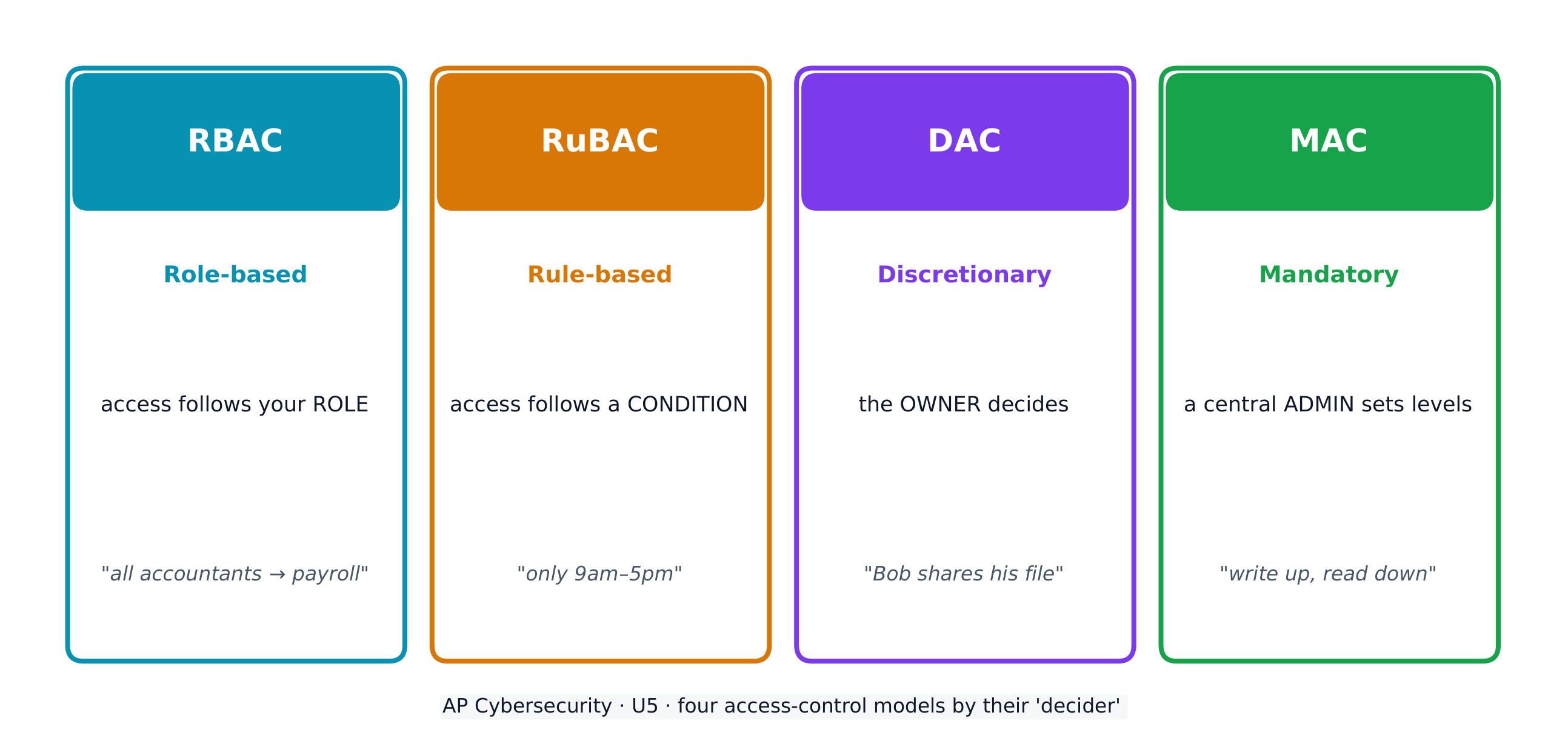
Access control decides which subjects (users) may perform which operations on which objects (files). Four models:

  • Role-based (RBAC) 基于角色的访问控制 - access follows your role (all "accountants" reach the payroll software).
  • Rule-based (RuBAC) 基于规则的访问控制 - access follows conditions (only during business hours), layered on another model.
  • Discretionary (DAC) 自主访问控制 - the owner of a file decides who else may use it.
  • Mandatory (MAC) 强制访问控制 - a central administrator sets strict levels; the Bell-LaPadula model summarises it as "write up, read down".

A guiding idea across all models is the principle of least privilege 最小权限原则 - give each entity exactly the access it needs and no more.

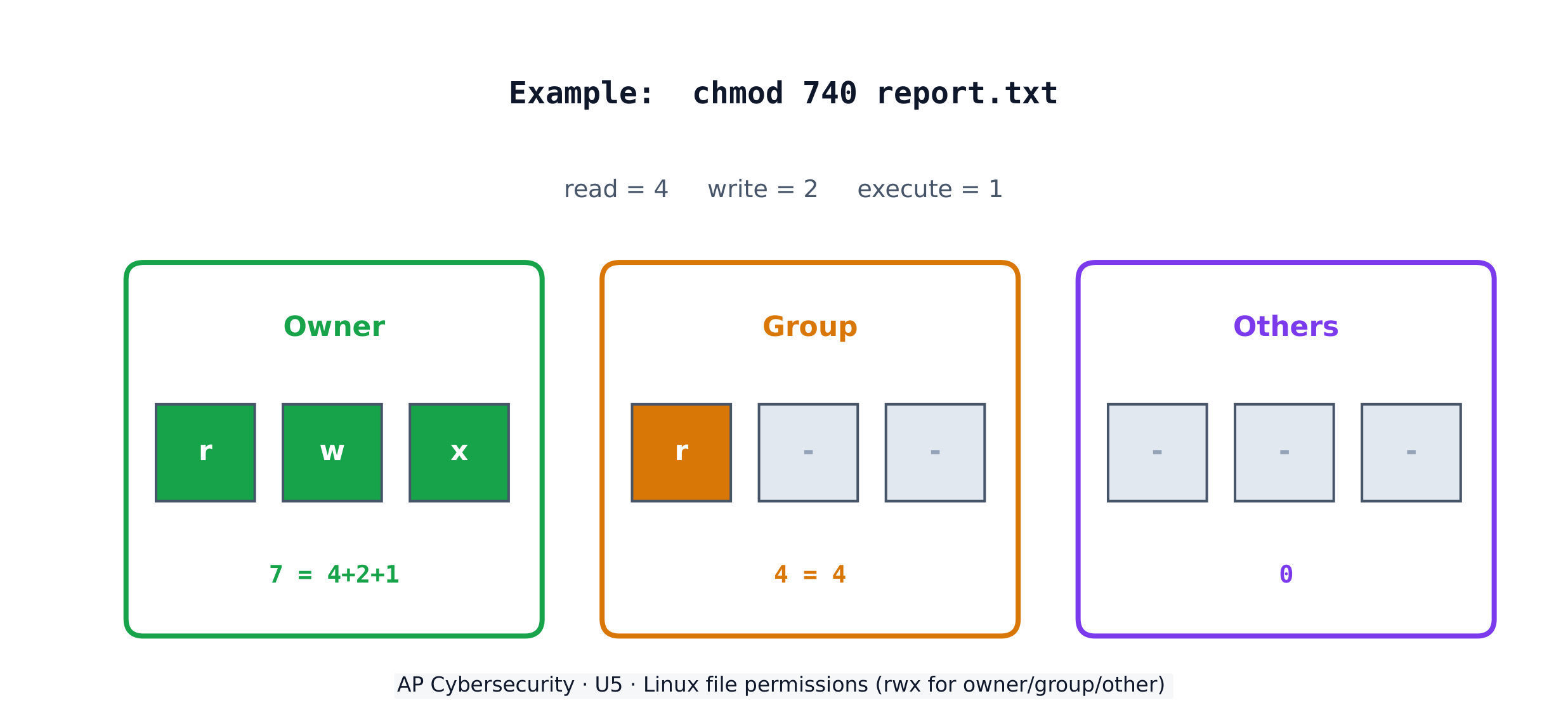
On a Linux system, each file has three permissions - read (r), write (w), execute (x) - for three groups: the owner, the group, and others. The chmod command sets them with numbers, adding 4 (read) + 2 (write) + 1 (execute). So chmod 640 means owner read+write (6), group read (4), others nothing (0).

Worked example. A principal wants only herself to read and edit a file, her staff group to read it, and no one else to touch it. Read+write = 4+2 = 6 for the owner, read = 4 for the group, nothing = 0 for others, giving chmod 640 file. The listing then shows -rw-r-----. To also let the owner run the file as a program you would add execute (7 = 4+2+1), giving chmod 740.

日本語

データは状態によって分類される - 静止中(ドライブに保存中)、転送中(デバイス間で移動中)、使用中(処理中)。静止中および転送中のデータは暗号化されており、泥棒が読むことができないようにし、使用中のデータは復号化される必要があるため、代わりにアクセス統制がそれを守る。

一部のデータ種別は規制対象である - 法律がその保管、送信、取扱い方法を規定している - 因此組織は统制をルールに合わせることでコンプライアンスを達成しなければならない。試験では各データ種別を管轄する法律とペアにすることを期待している:

規制対象データ 内容 管轄法
PII(個人識別情報) 個人を特定できる情報:氏名、住所、SSN、生体情報、生年月日 プライバシー法(1974年);COPPA(13歳未満向け)
PHI(保護医療情報) 健康、治療、医療費請求の記録 HIPAA(1996年)
PCI(決済カード情報) カード番号、有効期限、CVV、カードホルダー名 PCI-DSS

規制対象データを収集する組織は、それをラベル付けし、保存、送信、処理がコンプライアンスに準拠するためのポリシーを保持する必要があります。敏感性の高いデータほど、必要なセキュリティレベルも高くなります。

アクセス制御は、どの主体(ユーザー)がどのオブジェクト(ファイル)に対してどの操作を行うかを決定します。主なモデルは4つあります:

  • ロールベース(RBAC) - アクセス権限は役割に基づきます(「会計担当者」全員が給与計算ソフトにアクセス可能)。
  • ルールベース(RuBAC) - アクセス権限は条件(営業時間中のみなど)に従い、他のモデルの上に重ねて適用されます。
  • 裁量式(DAC) - ファイルの所有者が、誰がそのファイルを使用できるかを決めます。
  • 強制式(MAC) - 中央管理者が厳格なレベルを設定します。Bell-LaPadulaモデルではこれを「書き上げ、読み下」(write up, read down)と要約できます。
4つのアクセス制御モデルが、どの主体がどのオブジェクトにアクセスできるか、およびその方法を示しています

すべてのモデル共通の指導原則として最小特権の原則があります。各エンティティには、必要以上のアクセス権限を与えず、必要な分だけ付与します。

Linuxシステムでは、各ファイルに対して3つのグループ(所有者、グループ、その他)に対し、3つの権限(読取 (r)、書込み (w)、実行 (x))が設定されます。chmod コマンドは数字を使ってこれらの権限を設定し、数値は読取(4)+書込み(2)+実行(1)で計算されます。したがって、chmod 640 は所有者が読取+書込み(6)、グループが読取(4)、その他がなし(0)を意味します。

Linuxファイル権限:所有者、グループ、その他に対する読取・書込み・実行の表示

** worked example(実例解説)。ある校長が、自身だけがファイルを読取して編集でき、所属スタッフグループが読取でき、他者は一切アクセスできないようにしたいとします。読取+書込み=4+2=6(所有者)、読取=4(グループ)、なし=0(その他)なので、chmod 640 file となります。リスト表示では -rw-r----- が表示されます。さらに所有者にファイルをプログラムとして実行させる場合、実行権限を追加して7 = 4+2+1 とし、chmod 740 となります。

Explore · ⁨探索⁩

Which access-control model fits the rule?

Each access-control model has a different decider: RBAC by your role, RuBAC by a condition, DAC by the file's owner, and MAC by a central administrator's levels.

5.3

Protecting Stored Data with Cryptography · ⁨暗号学による保存データの保護⁩

Syllabus · ⁨シラバス⁩
English

Learning Objective 5.3.A: Explain how encryption can be used to protect files.

  • 5.3.A.1 The purpose of cryptography is to hide information. A cryptographic algorithm defines a process for encrypting and decrypting information. Encryption is the process of hiding the information, and decryption is the process of reversing the encryption to retrieve the original information.
  • 5.3.A.2 An encryption algorithm defines a process for combining the information to be encrypted with a predefined key. The information to be encrypted is called the plaintext. The output of the encryption algorithm is called the ciphertext.
  • 5.3.A.3 The number of possible keys that can be used in an encryption algorithm is called the keyspace. The larger the keyspace, the longer it will take an adversary to discover the correct key by random chance.
  • 5.3.A.4 Cryptographic algorithms are classified by whether they use one key or two keys.
    • Symmetric encryption algorithms use the same key to encrypt and decrypt information.
    • Asymmetric encryption algorithms use two different keys—one to encrypt information and the other to decrypt information.
  • 5.3.A.5 Cryptographic algorithms are also classified by whether they process information one bit at a time or in fixed-size chunks of bits.
    • Block encryption handles information in fixed-size chunks called blocks, producing an output block for each input block.
    • Stream encryption handles input information continuously, producing output one element at a time.

Learning Objective 5.3.B: Apply symmetric encryption algorithms to encrypt and decrypt data.

  • 5.3.B.1 Computer-based encryption algorithms operate on binary data. The most common symmetric encryption algorithm is the Advanced Encryption Standard (AES). AES encryption is used to secure Wi-Fi transmissions, internet browsing, file encryption on disks, and hardware-level encryption on processors.
  • 5.3.B.2 AES is a symmetric key block cipher that encrypts data in 128-bit blocks (16 bytes). AES can operate with keys of varying lengths. Longer keys produce more secure encryption but require more time to encrypt and decrypt.
  • 5.3.B.3 Symmetric encryption and decryption can be performed using the command line, specialized software, or web-based tools.
    • On a command line interface, users can encrypt or decrypt with OpenSSL.
    • Specialized software like AES Crypt is an open source tool that can encrypt and decrypt files.
    • There are many web-based tools for encrypting and decrypting files.
  • 5.3.B.4 Using OpenSSL in a CLI, a user can encrypt and decrypt a file using the following commands (note that the encryption key is derived from the password provided):
    • To encrypt a file named test with AES using a 128-bit key, use the command: openssl enc -aes-128-cbc -e -in test -k password -out test.enc
    • To decrypt the encrypted file using the same key, use the command: openssl enc -aes-128-cbc -d -in test.enc -k password -out text
日本語

学習目標 5.3.A: 暗号化を用いてファイルを保護する方法を説明する。

  • 5.3.A.1 暗号学の目的は情報を隠すことです。暗号アルゴリズムは、情報を暗号化および復号化するプロセスを定義します。暗号化は情報を隠すプロセスであり、復号化は暗号化を逆転させて元の情報を取得するプロセスです。
  • 5.3.A.2 暗号化アルゴリズムは、暗号化する情報と事前に定義された鍵を組み合わせるプロセスを定義する。暗号化する情報は平文(plaintext)と呼ばれる。暗号化アルゴリズムの出力は暗号文(ciphertext)と呼ばれる。
  • 5.3.A.3 暗号化アルゴリズムで使用可能な鍵の数のことをキー空間(keyspace)という。キー空間が大きいほど、攻撃者が偶然に正しい鍵を見つけるのにより長い時間がかかる。
  • 5.3.A.4 暗号アルゴリズムは、単一鍵を使用するか、二重鍵を使用するかによって分類される。
    • 対称暗号アルゴリズムは、情報の暗号化と復号に同じ鍵を使用する。
    • 非対称暗号アルゴリズムは、異なる2つの鍵を使用する—oneは情報の暗号化に使用し、もう一方は復号に使用する。
  • 5.3.A.5 暗号アルゴリズムは、情報を1ビットずつ処理するか、固定サイズのビット塊として処理するかによって分類される。
    • ブロック暗号は、ブロックと呼ばれる固定サイズの塊で情報を処理し、各入力ブロックに対して出力ブロックを生成する。
    • ストリーム暗号は、入力情報を連続的に処理し、出力を1要素ずつ生成する。

学習目標 5.3.B: 対称暗号アルゴリズムを用いてデータを暗号化および復号する。

  • 5.3.B.1 コンピュータベースの暗号化アルゴリズムはバイナリデータに対して動作します。最も一般的な対称暗号化アルゴリズムは高度暗号標準 (AES) です。AES暗号化は、Wi-Fi通信の保護、インターネット閲覧、ディスク上のファイル暗号化、プロセッサレベルでのハードウェア暗号化に使用されています。
  • 5.3.B.2 AESは対称鍵ブロック暗号であり、128ビットブロック(16バイト)単位でデータを暗号化する。AESは多様な長さの鍵で動作できる。長い鍵はより安全な暗号化を実現するが、暗号化および復号に要する時間も増える。
  • 5.3.B.3 対称暗号化と復号は、コマンドライン、専用ソフトウェア、またはWebベースのツールを使用して実行できる。
    • コマンドラインインターフェースでは、OpenSSLを使用して暗号化や復号を行うことができる。
    • AES Cryptのような専用ソフトウェアは、ファイルを暗号化・復号できるオープンソースツールである。
    • ファイルの暗号化および復号化には、多くのWebツールが存在します。
  • 5.3.B.4 CLIでOpenSSLを使用する場合、以下のコマンドを使用してファイルの暗号化・復号を行うことができる(注:暗号鍵は提供されたパスワードから導出される)。
    • 128ビット鍵を使用してAESで「test」という名前のファイルを暗号化する場合、以下のコマンドを使用する:openssl enc -aes-128-cbc -e -in test -k password -out test.enc
    • 同じ鍵を使用して暗号化ファイルを復号する場合、以下のコマンドを使用する:openssl enc -aes-128-cbc -d -in test.enc -k password -out text

Source: College Board AP Course and Exam Description · ⁨出典: College Board AP コースおよび試験説明書⁩

English
Symmetric vs asymmetric encryption
Hashing and the avalanche effect

Cryptography 密码学 hides information. An encryption algorithm combines the plaintext 明文 with a key 密钥 to produce ciphertext 密文; decryption reverses it. The keyspace 密钥空间 is the number of possible keys - the bigger it is, the longer an adversary needs to guess. An n-bit key has a keyspace of $2^n$.

Symmetric encryption 对称加密 uses the same key to encrypt and decrypt. The standard is AES 高级加密标准, a block cipher 分组密码 that works on 128-bit blocks and secures Wi-Fi, browsing, and stored files. Because both sides need the same secret key, sharing that key safely is the challenge.

日本語
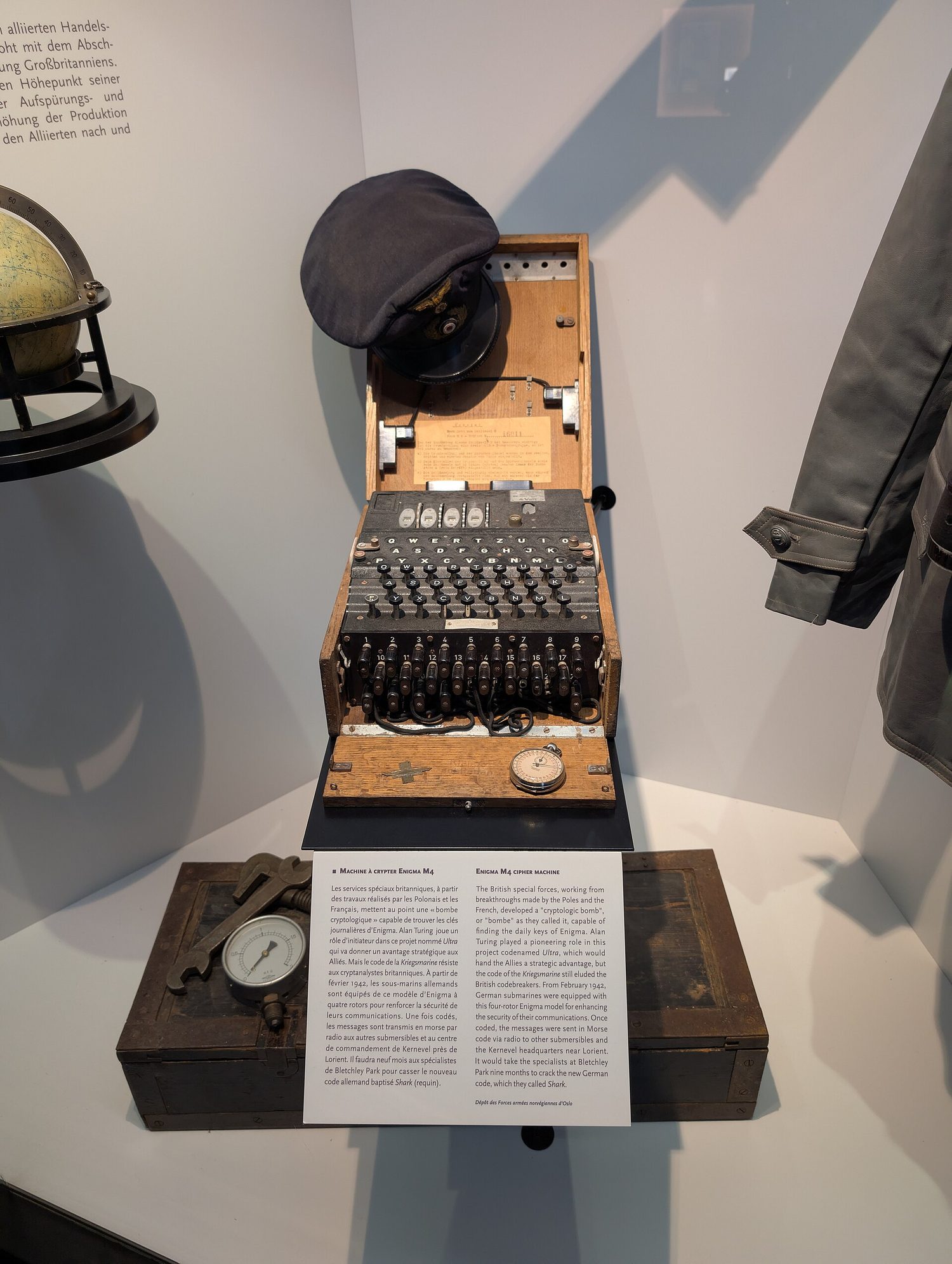
エニグマ機械:暗号学は保存中および通信中のデータを盗聴者から守ります
対称鍵暗号化と非対称鍵暗号化
ハッシュ関数と雪崩効果

暗号学は情報を隠蔽します。暗号化アルゴリズムは平文と鍵を組み合わせて密文を生成し、復号はその逆を行います。キー空間は利用可能な鍵の総数を指し、大きいほど攻撃者が推測するのに時間がかかります。nビット鍵のキー空間は $2^n$ です。

対称鍵暗号化は、暗号化と復号に同じ鍵を使用します。標準規格はAESであり、ブロック暗号の一種で128ビットブロックで動作し、Wi-Fi、ブラウザ、保存ファイルなどを保護します。両側が同じ秘密鍵を共有するため、その鍵を安全に共有することが課題となります。

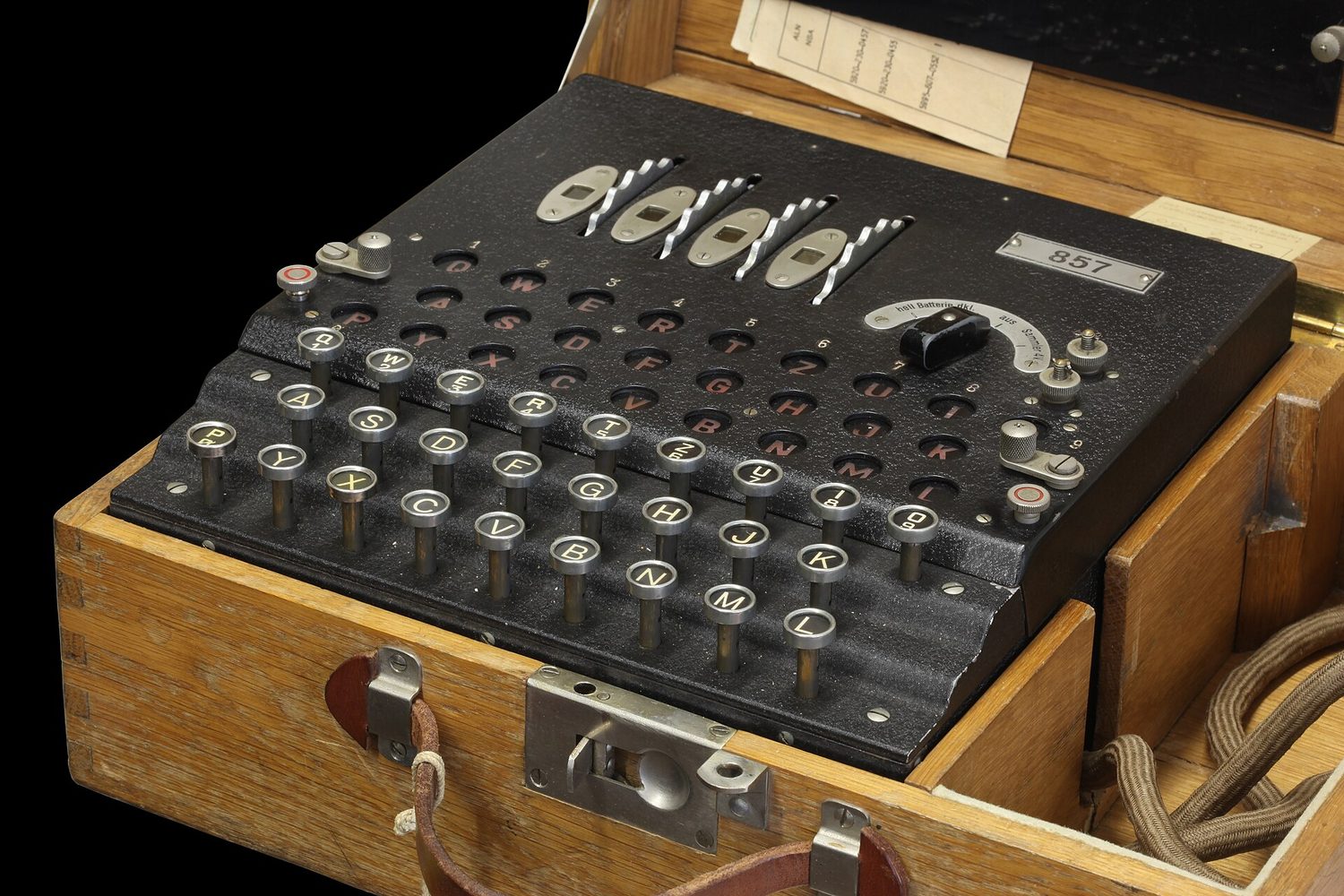
第二次世界大戦時代のエニグ暗号機:鍵とローター
エニグマ機械はローターでメッセージを乱すことで暗号化しましたが、これは早期の脆弱な暗号化の例です
Explore · ⁨探索⁩

Encrypt a message by shifting letters

Encryption combines plaintext with a key to make ciphertext. In this simple cipher the key is the shift amount; only someone who knows the shift can decrypt the message back.

Vocabulary · ⁨語彙⁩ Train · ⁨練習する⁩
English 日本語
Applications/ˌæplɪˈkeɪʃnz/ 応用
administrative/ədˈmɪnɪstrətɪv/ 行政的
injection attack/ɪnˈdʒekʃn əˈtæk/ インジェクション攻撃
Data validation/ˈdeɪtə ˌvælɪˈdeɪʃn/ データ検証
Cross-site scripting (XSS)/krɒs saɪt ˈskrɪptɪŋ/ 跨サイトスクリプト (XSS)
parameterised queries/ˌpærəˈmetəraɪzd ˈkwɪərɪz/ パラメータ化クエリ
Buffer overflow/ˈbʌfə ˌəʊvəˈfləʊ/ バッファオーバーフロー
buffer/ˈbʌfə/ バッファー
Directory traversal/daɪˈrektəri træˈvɜːsl/ ディレクトリトラバーサル
at rest/æt rest/ 静止している
in transit/ɪn ˈtrænsɪt/ 移行中
in use/ɪn juːs/ 使用中
regulated/ˈreɡjʊleɪtɪd/ 規制対象
compliance/kəmˈplaɪəns/ コンプライアンス
personally identifiable information (PII)/ˈpɜːsənəli aɪˈdentɪfaɪəbl ˌɪnfəˈmeɪʃn/ 個人識別情報 (PII)
protected health information (PHI)/prəˈtektɪd helθ ˌɪnfəˈmeɪʃn/ 保護医療情報 (PHI)
payment card information (PCI)/ˈpeɪmənt kɑːd ˌɪnfəˈmeɪʃn/ 決済カード情報 (PCI)
Role-based (RBAC)/rəʊl beɪst/ ロールベース (RBAC)
Rule-based (RuBAC)/ruːl beɪst/ ルールベース (RuBAC)
Discretionary (DAC)/dɪˈskreʃənəri/ 裁量制 (DAC)
Mandatory (MAC)/ˈmændətəri/ 強制制 (MAC)
principle of least privilege/ˈprɪnsɪpl ɒv liːst ˈprɪvɪlɪdʒ/ principle of least privilege(最小特権の原則)
Cryptography/krɪpˈtɒɡrəfi/ 暗号学
plaintext/ˈpleɪntekst/ 平明文
key/kiː/ キー
ciphertext/ˈsaɪfətekst/ 暗号文
keyspace/ˈkiːspeɪs/ キースペース
Symmetric encryption/sɪˈmetrɪk enˈkrɪpʃn/ 対称暗号化
AES/ˌeɪ iː ˈes/ AES
block cipher/blɒk ˈsaɪfə/ ブロック暗号
Asymmetric encryption/ˌeɪsɪˈmetrɪk enˈkrɪpʃn/ 非対称暗号化
key pair/kiː peə/ 鍵ペア
public key/ˈpʌblɪk kiː/ 公開鍵
private key/ˈpraɪvət kiː/ 秘密鍵
elliptic curve cryptography (ECC)/ɪˈlɪptɪk kɜːv krɪpˈtɒɡrəfi/ 楕円曲線暗号 (ECC)
Watch lesson · ⁨レッスンを視聴⁩
5.4

Asymmetric Cryptography · ⁨非対称暗号学⁩

Syllabus · ⁨シラバス⁩
English

Learning Objective 5.4.A: Determine the appropriate asymmetric key to use when sending or receiving encrypted data.

  • 5.4.A.1 Asymmetric encryption allows users to communicate securely without prearranging a shared secret key.
  • 5.4.A.2 When using asymmetric encryption, each entity that will be receiving data must first generate a key pair. Key pairs are binary strings of equal length that are generated at the same time through a mathematical process. One key is designated as the public key and the other as the private key. The keys are mathematical inverses of each other— each key reverses its partner. Either key can be used to encrypt information, but only the other key in the key pair will then be able to decrypt it.
  • 5.4.A.3 Once the receiver generates the key pair, the private key must be stored securely. If the private key is exposed, shared, stolen, corrupted, or compromised the key pair must be deleted and a new key pair must be generated, because the security of the encryption algorithm rests on the security of the private key. The public key is published for anyone to view and use.
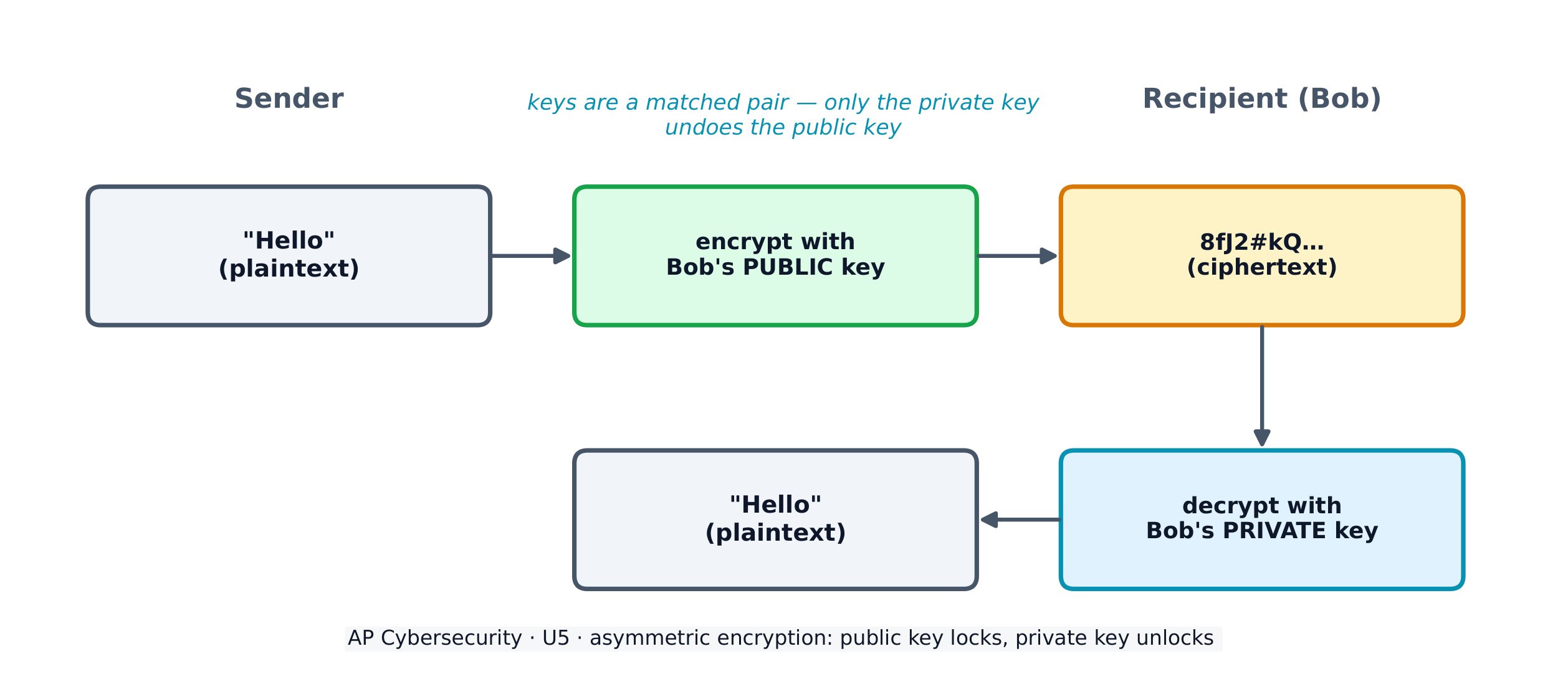
  • 5.4.A.4 To send information securely to someone, the sender will use the receiver’s public key to encrypt the data and send it. Only the receiver who has the private key will be able to decrypt and read the information.

Learning Objective 5.4.B: Explain why the length of a key impacts the security of encrypted data.

  • 5.4.B.1 Longer keys result in larger keyspaces. For binary keys, an n-bit length key has a keyspace of $2^n$.
  • 5.4.B.2 Using an application to randomly guess an n-bit length encryption key means that on average an adversary will be able to guess the correct key in $2^n \div 2$ (or $2^{n-1}$) guesses.
  • 5.4.B.3 Although longer keys are more secure, they also require more time to encrypt and decrypt messages.
  • 5.4.B.4 Computational processing power and efficiency continue to improve, allowing software to guess keys faster. Key-length recommendations for both symmetric and asymmetric encryption algorithms are periodically increased to account for increased processing power.
  • 5.4.B.5 Key-length comparison is only valid when comparing keys for the same cryptographic algorithm.
    • Illustrative examples for 5.4.B.5:
      • An AES 256-bit key is more secure than an AES 128-bit key.
      • An RSA 4096-bit key is more secure than an RSA 2048-bit key.
      • RSA and AES keys cannot be directly compared to one another in determining the level of security.

Learning Objective 5.4.C: Apply asymmetric encryption algorithms to encrypt and decrypt data.

  • 5.4.C.1 Common asymmetric encryption algorithms include RSA and elliptic curve cryptography (ECC). Asymmetric algorithms are used in many applications, including digital signatures and digital certificates.
  • 5.4.C.2 As with symmetric encryption, asymmetric encryption and decryption can be performed using the command line, specialized software, or web-based tools.
    • On a command line interface, users can encrypt or decrypt with OpenSSL.
    • Specialized software like RSA Encryption Tool is an open source tool that can encrypt and decrypt files.
    • There are many web-based tools for encrypting and decrypting files.
  • 5.4.C.3 In a CLI, a user can generate an asymmetric key pair and encrypt or decrypt files as necessary.
    • To generate a 2048-bit RSA key pair and save the key to a file named rsa.pem use the command: openssl genrsa -out rsa.pem 2048
    • To extract the public key from rsa.pem into a file named public.pem, use the command: openssl rsa -pubout -in rsa.pem -outform PEM -out public.pem
    • To encrypt the file test using RSA encryption and the key file public.pem, use the command: openssl pkeyutl -encrypt -pubin -inkey public.pem -in test -out test.enc
    • To decrypt the test.enc file using the rsa.pem file, run the command: openssl pkeyutl -decrypt -inkey rsa.pem -in test.enc -out test
日本語

学習目標 5.4.A: 暗号化データの送信または受信時に適切な非対称鍵を選択する。

  • 5.4.A.1 非対称暗号化は、事前の合意による共有秘密鍵なしにユーザーが安全に通信することを可能にする。
  • 5.4.A.2 非対称暗号化を使用する場合、データを受信する各エンティティはまず鍵ペアを生成する必要があります。鍵ペアは同じ数学的プロセスによって同時に生成される等長のバイナリ文字列です。一方の鍵は公開鍵として、もう一方は秘密鍵として指定されます。これらの鍵は互いに数学的に逆の性質を持ち—oneの鍵が相手の鍵を逆転させます。どちらの鍵でも情報を暗号化できますが、暗号化した後には鍵ペアのもう片方の鍵のみで復号できます。
  • 5.4.A.3 受信者が鍵ペアを生成した後、秘密鍵は安全に保管されなければならない。もし秘密鍵が漏洩、共有、盗難、破損、または侵害された場合、暗号アルゴリズムの安全性は秘密鍵の安全性に依存するため、その鍵ペアは削除され、新しい鍵ペアが生成されなければならない。公開鍵は誰でも表示して使用できるように公開される。
  • 5.4.A.4 情報を安全に誰かに送る場合、送信者は受信者の公開鍵を使用してデータを暗号化して送信する。秘密鍵を持つ受信者だけが、その情報を復号して読み取ることができる。

学習目標 5.4.B: 鍵の長さが暗号化データのセキュリティに影響を与える理由を説明する。

  • 5.4.B.1 長い鍵ほど大きな鍵空間となります。バイナリ鍵の場合、nビット長键の鍵空間は $2^n$ となります。
  • 5.4.B.2 アプリケーションを使用してnビット長の暗号鍵をランダムに推測する場合、平均して攻撃者が正しい鍵を $2^n \div 2$ (または $2^{n-1}$ )回の試行で当てることになる。
  • 5.4.B.3 長い鍵はより安全だが、メッセージの暗号化・復号にもより時間がかかる。
  • 5.4.B.4 計算処理能力と効率性は向上を続けており、ソフトウェアがより速く鍵を推測できるようになっている。対称暗号および非対称暗号アルゴリズムの鍵長推奨値は、処理能力の向上を考慮して定期的に引き上げられている。
  • 5.4.B.5 鍵長の比較は、同じ暗号アルゴリズムの鍵同士を比較する場合にのみ有効である。
    • 5.4.B.5 の例示:
      • AES 256ビット鍵は、AES 128ビット鍵よりも安全である。
      • RSA 4096ビット鍵は、RSA 2048ビット鍵よりも安全である。
      • RSA鍵とAES鍵は、セキュリティレベルを決定するために直接比較することはできない。

学習目標 5.4.C: 非対称暗号アルゴリズムを用いてデータを暗号化および復号する。

  • 5.4.C.1 一般的な非対称暗号アルゴリズムには、RSAと楕円曲線暗号(ECC)が含まれる。非対称アルゴリズムは、デジタル署名やデジタル証明書など、多くのアプリケーションで使用される。
  • 5.4.C.2 対称暗号と同様に、非対称暗号化と復号は、コマンドライン、専用ソフトウェア、またはWebベースのツールを使用して実行できる。
    • コマンドラインインターフェースでは、OpenSSLを使用して暗号化や復号を行うことができる。
    • RSA暗号化ツールなどの専用ソフトウェアはオープンソースツールであり、ファイルの暗号化と復号が可能です。
    • ファイルの暗号化および復号化には、多くのWebツールが存在します。
  • 5.4.C.3 コマンドラインインターフェース(CLI)では、ユーザーは必要に応じて非対称鍵ペアを生成し、ファイルを暗号化または復号化できます。
    • 2048ビットのRSA鍵ペアを生成し、rsa.pemという名前のファイルに保存するには、以下のコマンドを使用します:openssl genrsa -out rsa.pem 2048
    • rsa.pemから公開鍵を抽出してpublic.pemという名前のファイルに保存するには、以下のコマンドを使用します:openssl rsa -pubout -in rsa.pem -outform PEM -out public.pem
    • testファイルにRSA暗号化を用いて暗号化し、公開鍵ファイルpublic.pemを使用するには、以下のコマンドを使用します:openssl pkeyutl -encrypt -pubin -inkey public.pem -in test -out test.enc
    • test.encファイルをrsa.pemファイルを使用して復号化するには、以下のコマンドを実行します:openssl pkeyutl -decrypt -inkey rsa.pem -in test.enc -out test

Source: College Board AP Course and Exam Description · ⁨出典: College Board AP コースおよび試験説明書⁩

English

Asymmetric encryption 非对称加密 solves the key-sharing problem with a key pair 密钥对 - a public key 公钥 anyone may see and a private key 私钥 kept secret. The keys are mathematical inverses: whatever one locks, only the other unlocks. To send you a secret, I encrypt with your public key, and only your private key can decrypt it - so we never had to share a secret in advance.

Longer keys mean larger keyspaces and more security, but slower encryption. Common asymmetric algorithms are RSA and elliptic curve cryptography (ECC) 椭圆曲线密码学, used in digital signatures and certificates. Remember: you can only compare key lengths within the same algorithm - an RSA 4096-bit key is not directly comparable to an AES 256-bit key.

日本語

非対称暗号化は、鍵ペアを用いて鍵の共有問題を解決する。これは、誰が見てもよい公開鍵と、秘密に kept される秘密鍵の組み合わせである。これらの鍵は数学的な逆数関係にあるため、片方の鍵でロックした情報は、もう片方の鍵しか開けられない。あなたに秘密を送る際、私はあなたの公開鍵で暗号化を行うため、あなたの秘密鍵のみで復号可能となり、事前に秘密を共有する必要がない。

非対称暗号化:公開鍵で暗号化し、秘密鍵で復号する様子

長い鍵は大きなキー空間と高いセキュリティを提供しますが、暗号化速度は遅くなります。一般的な非対称アルゴリズムには、デジタルサインや証明書に使用されるRSAと楕円曲線暗号(ECC) があります。なお、鍵の長さの比較は同じアルゴリズム内でのみ可能です。RSA 4096ビット鍵とAES 256ビット鍵を直接比較することはできません。

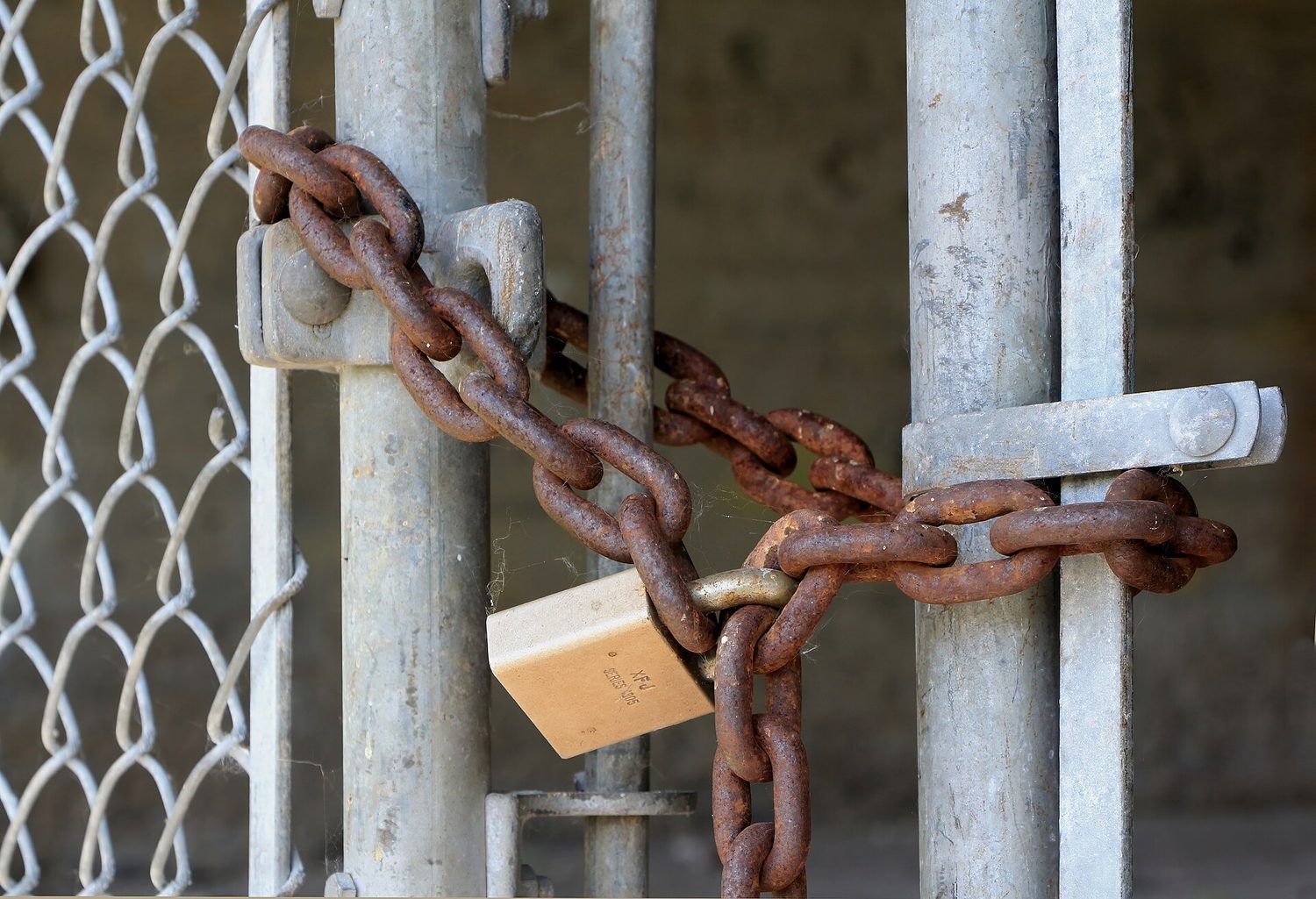
パッドロック:暗号化によりデータがロックされ、対応する鍵を持つ者のみが開くことができます
Watch lesson · ⁨レッスンを視聴⁩
5.5

Protecting Applications · ⁨アプリケーションの保護⁩

Syllabus · ⁨シラバス⁩
English

Learning Objective 5.5.A: Identify the application security principles of secure by design and security by default.

  • 5.5.A.1 Secure by design is an initiative that encourages companies to include security in all phases of product development including design. When organizations implement secure by design, security is a design principle not just a technical feature.
  • 5.5.A.2 Secure by design includes three design principles:
    • i. Companies should take ownership of customer security outcomes. Companies should build products that meet the security needs of their customers.
    • ii. Companies should embrace radical transparency and accountability. Sharing relevant security-related product news and updates quickly increases security for everyone.
    • iii. Companies should build organizational structure and leadership to implement secure by design. Companies need leaders who are focused on security and have a security-first posture.
  • 5.5.A.3 Secure by design includes the concept of secure by default, which is the idea that security features for software and devices should be enabled by default. Devices and software should be secure to use out of the box, with security features already enabled.

Learning Objective 5.5.B: Explain how user input sanitization protects applications.

  • 5.5.B.1 When users enter input into an application, the application typically encases that input in special characters to process it. The characters that encase the user input are called control characters and include the single quote, the double quote, and the semicolon.
  • 5.5.B.2 When creating a program that takes user input, programmers should use a function to verify that user input meets their expected criteria and does not include any control characters that could be used to manipulate the system. This verification function can sanitize user input by removing potentially malicious characters, or it can give the user an error and force the user to provide different input. This can protect against many application attacks, including:
    • SQL injection attacks
    • XSS attacks
    • Directory traversal attacks
日本語

学習目標 5.5.A: デザイン時のセキュリティとデフォルトでのセキュリティというアプリケーションセキュリティの原則を特定する。

  • 5.5.A.1 デザイン時のセキュリティとは、設計を含む製品開発のすべてのフェーズでセキュリティを組み込むことを推奨するイニシアチブです。組織がデザイン時のセキュリティを導入する場合、セキュリティは単なる技術的機能ではなく、設計原則となります。
  • 5.5.A.2 デザイン時のセキュリティには3つの設計原則が含まれます:
    • i. 企業は顧客のセキュリティ成果に対して責任を持つべきです。企業は顧客のセキュリティニーズを満たす製品を構築すべきです。
    • ii. 企業は過激な透明性と説明責任を受け入れるべきです。関連するセキュリティに関する製品ニュースやアップデートを迅速に共有することで、すべての人のセキュリティ向上につながります。
    • iii. 企業は、デザイン時のセキュリティを実現するための組織体制とリーダーシップを構築すべきです。企業には、セキュリティに注力し、セキュリティファーストの姿勢を持つリーダーが必要です。
  • 5.5.A.3 デザイン時のセキュリティには、デフォルトでのセキュリティという概念も含まれており、これはソフトウェアやデバイスのセキュリティ機能がデフォルトで有効になっているべきであるという考えです。デバイスやソフトウェアは、箱を開けた状態ですぐに使用でき、セキュリティ機能がすでに有効化された状態で安全に使えるべきです。

学習目標 5.5.B: ユーザー入力サンitizedization(正則化)がアプリケーションをどのように保護するかを説明する。

  • 5.5.B.1 ユーザーが入力をアプリケーションに入力すると、アプリケーションはその入力を処理するために通常、特殊文字で囲みます。ユーザー入力を囲むこれらの文字を制御文字と呼び、単一引用符、二重引用符、セミコロンが含まれます。
  • 5.5.B.2 ーザー入力を扱うプログラムを作成する際、プログラマーは関数を使用して、ユーザー入力が期待される基準を満たしており、システムを操作するために使用される可能性のある制御文字が含まれていないことを確認する必要があります。この検証関数は、潜在的に悪質な文字を除去してユーザー入力を正則化できるか、あるいはエラーを返してユーザーに別の入力を強制することができます。これにより、次のような多くのアプリケーション攻撃から守ることができます:
    • SQLインジェクション攻撃
    • XSS攻撃
    • ディレクトリトラバーサル攻撃

Source: College Board AP Course and Exam Description · ⁨出典: College Board AP コースおよび試験説明書⁩

English

Two design principles keep applications safe from the start. Secure by design 安全设计 builds security into every phase of development, not as an afterthought. Secure by default 默认安全 means the product ships with its security features already enabled - safe straight out of the box.

Secure by design rests on three principles a company must adopt: (1) take ownership of its customers' security outcomes rather than shifting blame onto users, (2) embrace radical transparency and accountability – sharing security-relevant news and updates quickly so everyone becomes safer, and (3) build the organisational structure and leadership that makes security a first-class goal.

The key defense against injection attacks is input sanitization 输入清理. Certain special characters 特殊字符 - the single quote, double quote, and semicolon - can be used to manipulate a system, so a good program removes or rejects them before processing. Sanitization protects against SQL injection, XSS, and directory-traversal attacks alike.

日本語

アプリケーションを最初から安全にするための2つの設計原則があります。Secure by design(設計段階からのセキュリティ) は、セキュリティを後付けではなく開発の各フェーズに組み込むことです。Secure by default(デフォルトでのセキュリティ有効化) は、製品出荷時にすでにセキュリティ機能が有効化されており、箱を開けた瞬間から安全であることを意味します。

Secure by design は企業が採用すべき3つの原則に基づいています。(1) ユーザーへの責任転嫁ではなく、顧客のセキュリティ成果に対する自身の所有権を担うこと、(2) 極端な透明性と説明責任を擁護し、セキュリティ関連のニュースやアップデートを迅速に共有することで皆をより安全にすること、(3) セキュリティを最優先事項とするための組織体制とリーダーシップを構築すること。

インジェクション攻撃に対する最大の防御手段は入力サンプリザイゼーションです。単引号、二重引用符、セミコロンなどの特定の特殊文字はシステムを操作するために利用される可能性があるため、適切なプログラムは処理前にそれらを除去または拒否します。サンプリザイゼーションはSQLインジェクション、XSS、ディレクトリトラバーサル攻撃などから保護します。

Vocabulary · ⁨語彙⁩ Train · ⁨練習する⁩
English 日本語
Secure by design/sɪˈkjʊə baɪ dɪˈzaɪn/ 設計による安全性
Secure by default/sɪˈkjʊə baɪ dɪˈfɒlt/ デフォルトでの安全性
input sanitization/ˈɪnpʊt ˌsænɪtaɪˈzeɪʃn/ 入力Sanitization
special characters/ˈspeʃl ˈkærɪktəz/ 特殊文字
accounting/əˈkaʊntɪŋ/ 会計
honeypot/ˈhʌnɪpɒt/ ハニーポット
data loss prevention (DLP)/ˈdeɪtə lɒs prɪˈvenʃn/ データ紛失防止 (DLP)
5.6

Detecting Attacks on Data and Applications · ⁨データおよびアプリケーションに対する攻撃の検出⁩

Syllabus · ⁨シラバス⁩
Learning ObjectiveEssential Knowledge

5.6.A
Explain how to detect attacks on data.

  • 5.6.A.1 Devices track and log when data are accessed and by whom. The process of recording and monitoring user activities is called accounting. Analysis of these logs can reveal malicious activity when an adversary attempts to access, copy, move, or delete data. Suspicious activity can include:
    • Accessing files that aren’t typically accessed
    • Accessing files or applications outside of a user’s normal patterns (including time of day, location, and device type)
    • Attempts to delete or copy sensitive files
  • 5.6.A.2 A honeypot is a file that appears as if it contains valuable data (e.g., credit card information, PII, passwords), but the data in the file are fake. A system can alert defenders if someone attempts to access the honeypot. Since the honeypot is a fake file, there is no legitimate reason to be accessing it, and any attempted access would be an indicator of malicious activity.
  • 5.6.A.3 Cryptographic hash functions can generate a digest for data and can reveal if data have been altered. If a file has changed unexpectedly, this can be a sign of malicious activity.

5.6.B
Determine controls for detecting attacks against applications or data.

  • 5.6.B.1 Cost is a criterion in determining detective controls. Detective controls like honeypots and using hash values to check data integrity are inexpensive. Some organizations invest in third-party data loss prevention (DLP) services, which monitor data access, usage, and transmission by users throughout the organization to detect suspicious activity; DLP services provide strong detection capabilities at a higher cost.
  • 5.6.B.2 Sensitivity or criticality of data or applications is a criterion in determining detective controls. More sensitive or critical data or applications are more likely targets of an adversary and should be monitored more closely.
  • 5.6.B.3 Classification of data is a criterion in determining detective controls. Data that have been classified as private, educational, healthcare, or financial often have legal or regulatory detection and monitoring requirements.

5.6.C
Evaluate the impact of a method for detecting attacks against an application or data.

  • 5.6.C.1 To operate at an effective speed, log analysis needs to be augmented with some automation. Honeypots offer near instantaneous detection capabilities.
  • 5.6.C.2 Some DLP tools, honeypots, and realtime automated log analysis provide alerts as an attack is happening. These tools allow for a prompt response that can stop an attack before it does more harm. Retrospective log analysis and the use of cryptographic hashes to verify data integrity identify attacks after they have occurred.
  • 5.6.C.3 False negatives can occur in applications and data attack detection. Cryptographic hash functions only detect if data have been altered. An adversary could view and steal data without altering it, and a cryptographic hash function would not detect this. Honeypots cannot detect adversaries that do not attempt to access them.

5.6.D
Identify whether a file has been altered by verifying its hash.

  • 5.6.D.1 Cryptographic hash functions can help identify changes in a file because they are repeatable: the same input always produces the same output for a given hash function.
  • 5.6.D.2 Hashes can be calculated using the command line on a computer, a website, or specialized software.
    • In Windows Powershell, if a user wanted to generate the SHA256 hash for a file named testfile, they would use the command: Get-FileHash testfile -Algorithm SHA256
    • In BASH the same could be accomplished with the command: sha256sum testfile
    • In zsh, the common command line terminal on Apple computers, this could be accomplished with the command: shasum -a 256 testfile
  • 5.6.D.3 A file can be hashed and its hash output recorded. Then it can be hashed again later, and the second hash output can be compared to the previous hash output for the same file. If a file’s hash changes, then the file was altered between when the first and second hashes were generated.

5.6.E
Apply detection techniques to identify and report indicators of application attacks by analyzing log files.

  • 5.6.E.1 SQL injection attacks can be detected by reviewing application and server logs of user input for SQL control words and symbols such as:
    • A single (') or double (") quote character
    • Boolean conditions like OR 1=1
    • A double dash (which indicates a comment in SQL): --
    • SQL control words (always in capital letters) like WHERE, IN, FROM
  • 5.6.E.2 XSS attacks can be detected by reviewing user input for suspicious tags, particularly the tag.
  • 5.6.E.3 For web applications, buffer overflows can be detected by checking the amount of data the user is sending to the web application in their request. The fields commonly checked are the URL length, cookie length, query string length, and total request length. Long strings in any of these fields can be an indicator of an attempted buffer overflow attack.
  • 5.6.E.4 Directory traversal attacks can be detected by reviewing application and server logs. HTTP GET requests that include paths with sequences of ../ are indicators of an adversary attempting a directory traversal.

Source: College Board AP Course and Exam Description · ⁨出典: College Board AP コースおよび試験説明書⁩

English

To detect data attacks, systems perform accounting 审计记录 - logging who accessed what and when. But logs are huge, so log analysis must be automated to run at a useful speed; a human reading raw logs is far too slow. A clever complement is a honeypot 蜜罐 - a fake file that looks valuable; since no one has a real reason to open it, any access is a clear, near-instantaneous sign of an attack. Watch especially for attempts to delete or copy sensitive files. Cryptographic hashes also help: re-hash a file and compare - if the digest changed, the file was altered.

Choosing detective controls means weighing cost (honeypots are cheap; a data loss prevention (DLP) 数据泄露防护 service is powerful but pricey) against the sensitivity of the data. To read a specific attack from logs, look for its signature: SQL injection shows OR 1=1 and --; XSS shows <script> tags; directory traversal shows ../ sequences; a buffer overflow shows unusually long input strings.

Checking that a file has not been altered

A cryptographic hash turns a file of any size into a short fixed-length value. Change one byte of the file and the hash changes completely, so comparing a downloaded file's hash with the one the publisher lists proves the file arrived intact. You do this at the command line:

Shell Command
BASH (Linux, and most servers) sha256sum testfile
zsh, the usual terminal on Apple computers shasum -a 256 testfile

Both print the SHA-256 hash of testfile. If it differs from the published value by even one character, the file has been altered — by corruption in transit, or by an attacker who replaced it.

⚠️ A hash proves integrity, not authenticity. An attacker who can replace the file on a web page can usually replace the published hash beside it too; that is why a signed hash, or one fetched over a separate trusted channel, is stronger evidence.

日本語

データ攻撃を検出するため、システムは会計処理(ログ記録)を実行し、誰が・何を・いつアクセスしたかを記録します。しかしログは膨大な量であるため、実用的な速度で実行するためにログ分析を自動化する必要があります。人間が生ログを直接読み解くのは非常に時間がかかります。賢明な補完手段としてハニーポットがあります。これは価値があるように見える架空のファイルであり、実際に開く理由がないため、アクセスがあればそれは明確でほぼ瞬時に攻撃の兆候となります。特に機密ファイルの削除またはコピーを試みる行為に注意してください。暗号化ハッシュも役立ちます。ファイルを再ハッシュして比較すると、ダイジェストが変わっていればファイルが改ざんされたことを示します。

探偵的統制手段を選ぶ際は、コスト(ハニーポットは安価ですが、データ漏洩防止(DLP)サービスは強力だが高価)とデータの感度のバランスを考えます。特定の攻撃をログから読み取るには、そのシグネチャを探します。SQLインジェクションはOR 1=1と--を示し、XSSは<script>タグを示し、ディレクトリトラバーサルは../シーケンスを示し、バッファオーバーフローは異常に長い入力文字列を示します。

ファイルが改ざんされていないことの確認

暗号化ハッシュは、いかなるサイズのファイルも短い固定長の値に変換します。ファイルの1バイトを変更するとハッシュも完全に変わります。したがって、ダウンロードしたファイルのハッシュと出版者が記載しているものを比較することで、ファイルが損傷なく到着したことを証明できます。これはコマンドラインで行います:

シェル コマンド
BASH (Linux、およびほとんどのサーバー) sha256sum testfile
zsh (Appleコンピュータの標準ターミナル) shasum -a 256 testfile

両方ともtestfileのSHA-256ハッシュを表示します。公開された値と1文字でも異なれば、ファイルは改ざんされています——転送中の破損によるものか、攻撃者が置き換えたものかです。

⚠️ ハッシュは完全性を証明しますが、真正性を証明するものではありません。Webページ上のファイルを置き換えられる攻撃者は、隣にある公開ハッシュも通常置き換えられます。そのため、署名付きハッシュや、信頼できる別チャネル経由で取得したハッシュの方が、より強力な証拠となります。

5.6

Exam tips · ⁨試験対策⁩

English
  • Match each application attack to its evidence in a log: OR 1=1 / -- = SQL injection; <script> = XSS; ../ = directory traversal; very long input = buffer overflow.
  • Learn the four access-control models by their decider: RBAC = your role, RuBAC = a condition, DAC = the file's owner, MAC = a central admin. Least privilege underlies them all.
  • Read Linux permissions by adding 4+2+1 per group - chmod 750 = owner rwx (7), group r-x (5), others none (0). Practice converting both ways.
  • Symmetric = one shared key (fast, AES); asymmetric = a public/private key pair (solves key sharing, RSA/ECC). Encrypt with the recipient's public key.
  • Input sanitization is the single best answer for preventing injection attacks; a honeypot is the classic cheap detective control.
日本語
  • 各アプリケーション攻撃をログ内の証拠と一致させます:OR 1=1 / -- = SQLインジェクション;<script> = XSS;../ = ディレクトリトラバーサル;非常に長い入力 = バッファオーバーフロー。
  • 4つのアクセス制御モデルを決定者に基づいて学びます:RBAC = ユーザの役割、RuBAC = 条件、DAC = ファイル所有者、MAC = 中央管理者。最小権限がそのすべてreadcrumbにあります。
  • Linuxの権限はグループごとに4+2+1を加算して読み取ります——chmod 750 = owner rwx (7)、group r-x (5)、others none (0)。両方向への変換を練習してください。
  • 対称鍵暗号 = 共通鍵1つ(高速、AES);非対称鍵暗号 = パブリック/プライベート鍵ペア(鍵共有問題を解決、RSA/ECC)。受信者のパブリックキーで暗号化します。
  • 入力サンプリティゼーションは注入攻撃を防ぐための最良の回答です。ハニーポットは古典的な安価な探偵的統制手段です。

Interactive lessons on this topic · ⁨このトピックのインタラクティブ授業⁩

Work through it step by step, with instant-check exercises. · ⁨一歩ずつ進め、即時チェック付きの問題で学習します。⁩

Past Papers · ⁨過去問⁩

More topics in AP Cybersecurity · ⁨AP サイバーセキュリティ⁩ · ⁨AP Cybersecurity · ⁨AP サイバーセキュリティ⁩ の他のトピック⁩

Log in or create account · ⁨ログインまたはアカウント作成⁩

IGCSE, A-Level & AP