Skip to content · ⁨דלג לתוכן⁩

Programming · ⁨תכנות מחשב⁩

IGCSE Computer Science · ⁨מדעי המחשב IGCSE⁩ · Topic 8 · ⁨נושא 8⁩

Video lesson for this topic · ⁨שיעור וידאו לנושא זה⁩ Open the video page · ⁨פתח את עמוד הוידאו⁩
13:16

תכנות מחשב

הנה תוכנית קצרה. היא קוראת חמש ציוני מבחן והדפיסה את הסכום הכולל. החמש ציונים הם שמונה, תשע, שבע, שש ועשר, ולכן הסכום הכולל אמור להיות ארבעים. הצפו…

English narration · English + 中文 subtitles burned in · ⁨קריאת קול באנגלית · תרגום אנגלי + סינית שרוף בתוך הסרטון⁩

8.1

Variables and constants · ⁨משתנים וקבועים⁩

Syllabus · ⁨סיילבוס⁩
English
Candidates should be able to: Notes and guidance
1 Declare and use variables and constants
2 Understand and use basic data types • Including: – integer – real – char – string – Boolean
3 Understand and use input and output
4 (a) Understand and use the concept of sequence
(b) Understand and use the concept of selection • Including: – IF statements – CASE statements
(c) Understand and use the concept of iteration • Including: – count-controlled loops – pre-condition loops – post-condition loops
(d) Understand and use the concepts of totalling and counting
(e) Understand and use the concept of string handling • Including: – length – substring – upper – lower • The first character of the string can be position zero or one
(f) Understand and use arithmetic, relational and logical operators • Arithmetic, limited to: – + – – – / – * – ^ (raised to power of) – MOD – DIV • Relational, limited to: – = – < – <= – > – >= – <> (not equal to) • Logical, limited to: – AND – OR – NOT
5 Understand and use nested statements • Including nested selection and iteration • Candidates will not be required to write more than three levels of nested statements
6 (a) Understand what is meant by procedures, functions and parameters (b) Define and use procedures and functions, with or without parameters (c) Understand and use local and global variables • Procedures and functions may have up to three parameters
7 Understand and use library routines • Including: – MOD – DIV – ROUND – RANDOM
8 Understand how to create a maintainable program • Including appropriate use of: – meaningful identifiers – the commenting feature provided by the programming language – procedures and functions – relevant and appropriate commenting of syntax • Use meaningful identifiers for: – variables – constants – arrays – procedures and functions
עברית
המועמדים צריכים להיות מסוגלים: הערות והנחיות
1 הכרזה ושימוש במשתנים וקבועים
2 הבנה ושימוש בסוגי נתונים בסיסיים • כולל: – שלם – אמיתי – character – מחרוזת – בוליאני
3 הבנה ושימוש בקלט ופלט
4 (א) הבנה ושימוש במושג רצף
(ב) הבנה ושימוש במושג בחירה • כולל: – הודעות IF – הודעות CASE
(c) הבנה ושימוש במונח איטרציה • כולל: – לולאות המבוססות על ספירה – לולאות עם תנאי מקדים – לולאות עם תנאי מאוחר
(d) הבנה ושימוש במושגי סיכום וספירה
(e) הבנה ושימוש במושג טיפול במחרוזות • כולל: – אורך – תת-מחרוזת – האותיות הגדולות – האותיות הקטנות • התווית הראשונה של המחרוזת עשויה להיות מיקום אפס או אחד
(f) הבנה ושימוש באופרטורים אריתמטיים, יחסיים ולוגיים • אריתמטיים, מוגבל ל: – + – – – / – * – ^ (העלאה לחזקה) – MOD – DIV • יחסיים, מוגבל ל: – = – < – <= – > – >= – <> (אי-שוויון) • לוגיים, מוגבל ל: – AND – OR – NOT
5 הבנה ושימוש בפקודות משולבות • כולל בחירות ומחזוריות משולבים • מועמדים לא ידרשו לכתוב יותר משלושה רמות של פקודות משולבות
6 (א) הבנת המשמעות של פרוצדורות, פונקציות ופרמטרים (ב) הגדרה ושימוש בפרוצדורות ובפונקציות, עם או ללא פרמטרים (ג) הבנה ושימוש במשתנים מקומיים וגלובליים • לפרוצדורות ולפונקציות יכולים להיות עד שלושה פרמטרים
7 הבנה ושימוש בתוכניות ספרייה • כולל: – MOD – DIV – ROUND – RANDOM
8 הבנת אופן יצירת תוכנית נתונה לתחזוקה • כולל שימוש מתאים ב: – זיהויים משמעותיים – מאפיין ההערות המסופק על ידי שפת התכנות – פרוצדורות ופונקציות – הערות רלוונטיות ומתאימות לסנטקס • השתמש בזיהויים משמעותיים עבור: – משתנים – קבועים – מערכים – פרוצדורות ופונקציות

Source: Cambridge International syllabus · ⁨מקור: הסיילבוס הבינלאומי של קמבריד'ג'⁩

English

A variable 变量 is a named store that holds a value which can change while the program runs. A constant 常量 is a named store whose value is fixed and does not change.

You should declare 声明 them (say their name and type) before use:

Use a constant for a value that never changes (like Pi), so it is set in one place and is easy to read.

עברית

משתנה הוא מקום אחסון בעל שם המכיל ערך שיכול להשתנות בזמן הרצת התוכנית. קבוע הוא מקום אחסון בעל שם שערכו קבוע ואינו משתנה.

משתנה בשם age המכיל את הערך 16
משתנה הוא אחסון בעל שם שערכו יכול להשתנות
שורות קוד תוכנה על מסך
משתנים וקבועים הם מקומות אחסון בעלי שם לערכים, מוגדרים בקוד התוכנית

יש להצהיר אותם (לומר את שמם וסוגם) לפני השימוש:

DECLARE Score : INTEGER
DECLARE Name : STRING
CONSTANT Pi ← 3.142
שני מודולי זיכרון RAM
בזמן רצת התוכנית, המשתנים שלה מאוחזים בזיכרון המחשב (RAM)

השתמש בקבוע לערך שאינו משתנה (כמו Pi), כך שהוא מוגדר במקום אחד וקל לקריאה.

Explore · ⁨חקור⁩

Variables and assignment

Step through the lines and watch each variable take its new value.

Vocabulary · ⁨מילון מונחים⁩ Train · ⁨אימון⁩
English עברית
variable/ˈveərɪəbl/ משתנה
constant/ˈkɒnstənt/ קבוע
declare/dɪˈkleə/ הצהרה
integer/ˈɪntɪdʒə/ מספר שלם
string/strɪŋ/ מחרוזת
8.1

Data types · ⁨סוגי נתונים⁩

English

A data type 数据类型 says what kind of value a variable holds. You must know five basic types.

Type Holds Example
integer 整数 a whole number 42, -7
real 实数 a number with a decimal point 3.14, -0.5
char 字符 a single character 'A', '?'
string 字符串 a sequence of characters "Hello"
Boolean 布尔值 one of two values TRUE or FALSE
עברית

סוג נתונים אומר איזה סוג של ערך משתנה מכיל. יש לדעת חמישה סוגים בסיסיים.

סוגי נתונים: שלם (7), ממשי (3.5), תווית ('A'), מחרוזת ("hello"), בוליאני (true/false)
הסוגים הבסיסיים לנתונים: שלם, ממשי, קרואקטר, מחרוזת ובוליאני
סוג אחסון דוגמה
integer מספר שלם 42, -7
real מספר עם נקודה עשרונית 3.14, -0.5
char תווית בודדת 'A', '?'
string רצף של תוויות "Hello"
Boolean אחד משני הערכים TRUE או FALSE
Vocabulary · ⁨מילון מונחים⁩ Train · ⁨אימון⁩
English עברית
data type/ˈdeɪtə taɪp/ סוג נתונים
real/rɪəl/ ממשי
char/tʃɑː/ תווית (char)
Boolean/ˈbuːlɪən/ בוליאני
8.1

Input and output · ⁨כניסה ויציאה⁩

English

Input 输入 reads a value from the user. Output 输出 shows a value on the screen.

עברית

כניסה קוראת ערך מהמשתמש. יציאה מציגה ערך על המסך.

OUTPUT "What is your name?"
INPUT Name
OUTPUT "Hello ", Name
Vocabulary · ⁨מילון מונחים⁩ Train · ⁨אימון⁩
English עברית
input/ˈɪnpʊt/ כניסה
output/ˈaʊtpʊt/ תפוקה
sequence/ˈsiːkwəns/ רצף
selection/sɪˈlekʃn/ בחירה
iteration/ˌɪtəˈreɪʃn/ איטרציה
8.1

The three basic structures · ⁨השלושה מבנים הבסיסיים⁩

English

Every program is built from three control structures.

Sequence

Sequence 顺序 means the steps run one after another, in order, from top to bottom.

Selection

Selection 选择 chooses which steps to run, based on a condition. Use an IF statement, or a CASE statement when there are many choices.

Iteration

Iteration 迭代 (a loop 循环) repeats steps. There are three kinds.

A count-controlled loop 计数循环 repeats a fixed number of times:

A pre-condition loop 前测循环 checks the condition before each repeat, so it may run zero times:

A post-condition loop 后测循环 checks the condition after each repeat, so it always runs at least once:

עברית

כל תוכנית בנויה משלושה מבני בקרה.

שלושה דיאגרמת זרימה קטנות: סדר (תיבות בשורה), בחירה (בדיקה המתענפת לשני כיוונים), ואיטרציה (בדיקה עם גוף החוזר לאחור)
השלושה מבני בקרה: סדר מפעיל שלבים בסדר, בחירה בוחרת ветвь, איטרציה חוזרת על גוף.

סדר

סדר פירונו שהשלבים מתבצעים אחד אחרי השני, בסדר, מלמעלה למטה.

INPUT Length
INPUT Width
Area ← Length * Width
OUTPUT Area

בחירה

בחירה קובעת אילו שלבים יופעלו, בהתבסס על תנאי. השתמש בפסקת IF, או בפסקת CASE כאשר ישנם הרבה אפשרויות.

IF Score >= 50
  THEN
    OUTPUT "Pass"
  ELSE
    OUTPUT "Fail"
ENDIF
CASE OF Grade
    'A' : OUTPUT "Excellent"
    'B' : OUTPUT "Good"
    OTHERWISE OUTPUT "Keep trying"
ENDCASE

איטרציה

איטרציה (לולאה) חוזרת על שלבים. ישנם שלושה סוגים.

לולאה בקרת-ספן חוזרת מספר קבוע של פעמים:

FOR I ← 1 TO 5
    OUTPUT "Hello"
NEXT I

לולאת תנאי-קדום בודקת את התנאי לפני כל חזרה, ולכן ייתכן שתופעל אפס פעמים:

WHILE Answer <> "stop" DO
    INPUT Answer
ENDWHILE

לולאת תנאי אחרון בודקת את התנאי אחרי כל חזרה, ולכן היא תמיד רצה לפחות פעם אחת:

REPEAT
    INPUT Password
UNTIL Password = "secret"
שני גרפי זרימה של לולאות: WHILE בודק את התנאי לפני הגוף; REPEAT מייצרת את הגוף קודם ובוצעת בדיקה לאחר
לולאת תנאי מקדים (WHILE) בודקת לפני הגוף, ולכן ייתכן שתרוץ אפס פעמים; לולאת תנאי אחרון (REPEAT) בודקת לאחר, ולכן רצה לפחות פעם אחת
Explore · ⁨חקור⁩

How an IF … ELSE IF ladder decides

The conditions are tested top to bottom; the FIRST one that is true runs and the rest are skipped. Slide the score and watch which branch lights up.

Explore · ⁨חקור⁩

Selection

Change the value and watch which branch runs — selection in action.

Vocabulary · ⁨מילון מונחים⁩ Train · ⁨אימון⁩
English עברית
loop/luːp/ לולאה
count-controlled loop/kaʊnt kənˈtrəʊld luːp/ לולאת מניין-שלטונה
pre-condition loop/priː kənˈdɪʃn luːp/ לולאת תנאי מקדים
post-condition loop/pəʊst kənˈdɪʃn luːp/ לולאת תנאי בוגר
length/leŋθ/ אורך
8.1

Totalling and counting · ⁨סיכום וספירה⁩

English
  • totalling 求和 — keep adding values to a running total: Total ← Total + Value.
  • counting 计数 — add 1 to a counter each time: Count ← Count + 1.

Worked example. A program must read 5 marks, then output the total and the average.

Two lines carry the marks. Total ← 0 must sit before the loop: put it inside and the total resets on every pass, so the program outputs only the last mark. And Average ← Total / 5 must sit after the loop, because the total is not complete until every mark has been added. Initialise before, calculate after - that ordering is what the question is really testing.

עברית
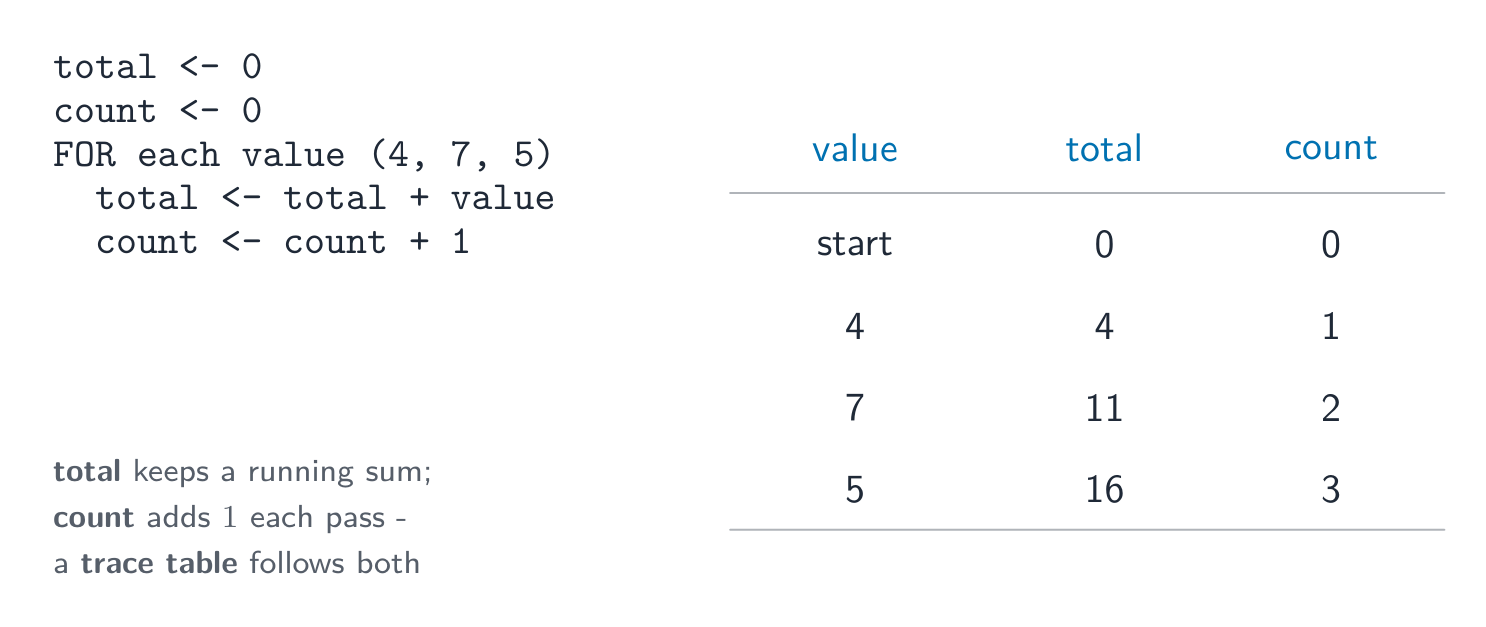
  • סיכום — להוסיף ערכים לסיכום נוכחי: Total ← Total + Value.
  • ספירה — להוסיף 1 למונה בכל פעם: Count ← Count + 1.
count = count + 1 סופר בעלייה של 1; total = total + value מוסיף לסיכום נוכחי
מדד סופר פונה כלפי מעלה ב-1; סכום מצטבר בונה סכום רצף
טבלת מעקב המציגה לולאה על הערכים 4, 7 ו-5: total עובר 0, 4, 11, 16 בעוד ש-count עובר 0, 1, 2, 3
טבלת מעקב עוקבת אחר לולאת סיכום וספירה צעד אחר צעד
Total ← 0
FOR I ← 1 TO 10
    INPUT Mark
    Total ← Total + Mark
NEXT I
OUTPUT Total

דוגמה פותרת. תוכנית חובה לקרוא 5 ציונים, ולאחר מכן להציג את הסכום והממוצע.

Total ← 0
FOR I ← 1 TO 5
    INPUT Mark
    Total ← Total + Mark
NEXT I
Average ← Total / 5
OUTPUT Total, Average

שתי שורות נושאות את הציונים. Total ← 0 חובה להיות לפני הלולאה: אם נשים אותה בתוך הלולאה, הסיכום יתאפס בכל מעבר, ולכן התוכנית תציג רק את הציון האחרון. וAverage ← Total / 5 חובה להיות אחרי הלולאה, משום שהסיכום אינו מלא עד שכל הציונים הוספו. אתחול לפני, חישוב אחרי – סדר זה הוא מה שהשאלה באמת בוחנת.

Vocabulary · ⁨מילון מונחים⁩ Train · ⁨אימון⁩
English עברית
totalling/ˈtəʊtəlɪŋ/ סיכום
counting/ˈkaʊntɪŋ/ ספירה
remainder/rɪˈmeɪndə/ שארית
nested statement/ˈnestɪd ˈsteɪtmənt/ הצהרה מובנית
8.1

Operators · ⁨מפעילים⁩

English

Arithmetic operators

Operator Meaning
+ - * / add, subtract, multiply, divide
^ raised to the power of
MOD the remainder 余数 after division
DIV the whole-number part of a division

For example, 17 MOD 5 is 2, and 17 DIV 5 is 3.

Relational operators

These compare two values and give a Boolean result: =, <, <=, >, >=, and <> (not equal to).

Logical operators

These join conditions: AND (both must be true), OR (at least one must be true), NOT (reverses true/false).

עברית

מפעילי אריתמטיקה

מפעיל משמעות
+ - * / חיבור, חיסור, כפל, חלוקה
^ בהעלאה לחזקה
MOD השארית לאחר חלוקה
DIV החלק השלם של חלוקה

למשל, 17 MOD 5 הוא 2, ו17 DIV 5 הוא 3.

מפעילי יחס

משווים שני ערכים ומחזירים תוצאה בולית: =, <, <=, >, >= ו-<> (שאינו שווה).

מופעים לוגיים

מחברים תנאים: AND (שניהם חייבים להיות נכונים), OR (אחד מהם לפחות חייב להיות נכון), NOT (הופך נכון/לא נכון).

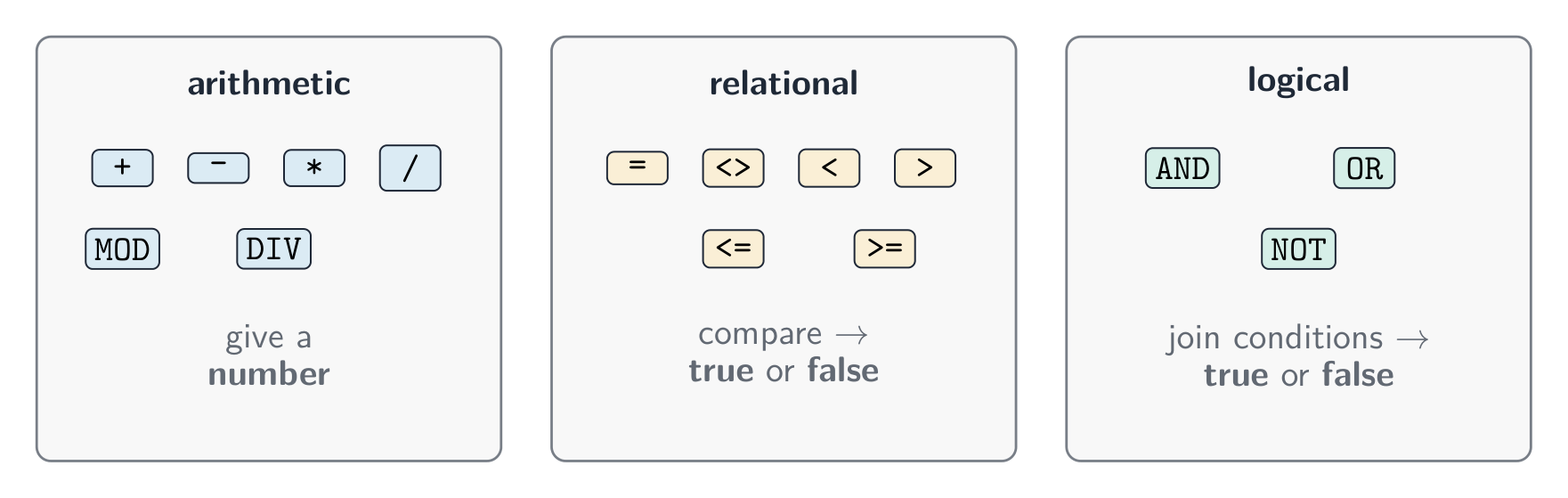
שלושה משפחות של מופעים: מופעים אריתמטיים כמו פלוס וכפול מחזירים מספר, מופעים יחסים כמו קטן-מ Comparing and giving true or false, logical operators AND OR NOT join conditions
שלושת משפחות המופעים: אריתמטיים, יחסים ולוגיים
IF Age >= 13 AND Age <= 19
  THEN
    OUTPUT "Teenager"
ENDIF
8.1

String handling · ⁨טיפול במחרוזות⁩

English

A string is made of characters. Useful operations:

  • length 长度 — the number of characters in the string;
  • substring 子串 — a smaller part taken from the string;
  • upper case 大写 — change letters to capitals;
  • lower case 小写 — change letters to small letters.

(The first character may be counted as position 0 or position 1, depending on the language.)

עברית

מחרוזת מורכבת מאותיות. פעולות שימושיות:

  • length — מספר האותיות במחרוזת;
  • substring — חלק קטן יותר הנתון מהמחרוזת;
  • upper case — שינוי אותיות לאותיות גדולות;
  • lower case — שינוי אותיות לאותיות קטנות.
name ← "Computer"
OUTPUT LENGTH(name)          // 8
OUTPUT SUBSTRING(name, 1, 4) // "Comp"
OUTPUT UCASE(name)           // "COMPUTER"
OUTPUT LCASE(name)           // "computer"

(האות הראשונה עשויה להיספר כמיקום 0 או כמיקום 1, בהתאם לשפה.)

Explore · ⁨חקור⁩

SUBSTRING: take part of a string

The first character is at position 1. SUBSTRING(Word, Start, Length) takes Length characters beginning at Start — drag the two handles and read the call it builds.

Vocabulary · ⁨מילון מונחים⁩ Train · ⁨אימון⁩
English עברית
substring/ˈsʌbstrɪŋ/ תת-מחרוזת
upper case/ˈʌpə keɪs/ אותיות גדולות
lower case/ˈləʊə keɪs/ אותיות קטנות
8.1

Nested statements · ⁨הודעות מזדווגות⁩

English

A nested statement 嵌套语句 is one control structure placed inside another. You can nest selection and iteration.

You will not have to write more than three levels of nesting.

עברית

הודעה מזדוגת היא מבנה בקרה אחד הממוקם בתוך אחר. ניתן לבצע הזדווגות של בחירה וחזרה.

FOR I ← 1 TO 3
    IF MOD(I, 2) = 0
      THEN
        OUTPUT I, " is even"
      ELSE
        OUTPUT I, " is odd"
    ENDIF
NEXT I

לא יהיה עליכם לכתוב יותר משלוש רמות של הזדווגות.

8.1

Procedures and functions · ⁨תהליכים ופונקציות⁩

English

To avoid repeating code, you can break a program into named blocks.

  • A procedure 过程 is a named block of code that does a task. You run it with CALL.
  • A function 函数 is like a procedure, but it returns a value back to where it was called.

A parameter 参数 is a value passed into a procedure or function (up to three parameters).

Local and global variables

  • A local variable 局部变量 is declared inside a procedure or function. It can only be used there.
  • A global variable 全局变量 is declared in the main program. It can be used anywhere.

Local variables are safer, because they cannot be changed by mistake from another part of the program.

עברית

כדי למנוע חזרת כתיבה, ניתן לחלק את התוכנית לחסיכות בעלות שמות.

  • procedure היא חסיכת קוד בעלת שם שעושה משימה. רצים אותה עם CALL.
  • function דומה ל-procedure, אך היא מחזירה ערך חזרה לנקודה שבה נקראה.

parameter הוא ערך העובר לתוך procedure או function (עד שלושה פרמטרים).

PROCEDURE Greet(PersonName : STRING)
    OUTPUT "Hello ", PersonName
ENDPROCEDURE

CALL Greet("Sam")
FUNCTION Square(N : INTEGER) RETURNS INTEGER
    RETURN N * N
ENDFUNCTION

Answer ← Square(5)   // answer is 25

משתנים מקומיים וגלובליים

  • משתנה מקומי מוגדר בתוך פרוצדורה או פונקציה. ניתן להשתמש בו רק במקום זה.
  • משתנה גלובלי מוגדר בתוכנית הראשית. ניתן להשתמש בו בכל מקום.

משתנים מקומיים הם בטוחים יותר, שכן אינם יכולים להשתנות בטעות מחלק אחר של התוכנית.

Vocabulary · ⁨מילון מונחים⁩ Train · ⁨אימון⁩
English עברית
procedure/prəˈsiːdʒə/ פרוצדורה
function/ˈfʌŋkʃn/ פונקציה
parameter/pəˈræmɪtə/ פרמטר
local variable/ˈləʊkl ˈveərɪəbl/ משתנה מקומי
global variable/ˈɡləʊbl ˈveərɪəbl/ משתנה גלובלית
library routine/ˈlaɪbrəri ruːˈtiːn/ שגרת ספרייה
maintainable/meɪnˈteɪnəbl/ תחזוקתי
meaningful identifiers/ˈmiːnɪŋfl aɪˈdentɪfaɪəz/ מזהים משמעותיים
comments/ˈkɒments/ תגובות
8.1

Library routines · ⁨רutinות ספרייה⁩

English

A library routine 库程序 is a ready-made piece of code you can use. You must know these:

Routine What it does
MOD gives the remainder of a division
DIV gives the whole-number part of a division
ROUND rounds a real number to a number of decimal places
RANDOM gives a random number
עברית

rutina בספרייה היא חתיכת קוד מוכנה שתוכלו להשתמש בה. עליכם לדעת את אלו:

Rutina מה היא עושה
MOD מחזירה שארית בחילוק
DIV מחזירה את החלק השלם של בחילוק
ROUND מעגלת מספר אמיתי למספר מסוים של ספרות אחרי הנקודה
RANDOM מחזירה מספר אקראי
8.1

Writing a maintainable program · ⁨כתיבת תוכנית תחזוקתית⁩

English

A maintainable 可维护的 program is easy for other people to read and change later. To make one:

  • use meaningful identifiers 有意义的标识符 — clear names for variables, constants, arrays, procedures and functions (totalScore, not x);
  • add comments 注释 to explain what parts of the code do;
  • use procedures and functions to split the work into small blocks.
עברית

תוכנית תחזוקתית קלה לקריאה ולשינוי על ידי אנשים אחרים בעתיד. כדי ליצור אחת כזו:

  • השתמשו במזהה משמעותי — שמות ברורים למשתנים, קבועים, מערכים, פרוצדורות ופונקציות (totalScore, ולא x);
  • הוסיפו הערות כדי להסביר מה כל חלק בקוד עושה;
  • השתמשו בפרוצדורות ובפונקציות כדי לחלק את העבודה לחלקים קטנים.
8.2

Arrays · ⁨מערכים⁩

Syllabus · ⁨סיילבוס⁩
English
Candidates should be able to: Notes and guidance
1 Declare and use one-dimensional (1D) and two-dimensional (2D) arrays
2 Understand the use of arrays • Including the use of variables as indexes in arrays
3 Write values into, and read values from, an array using iteration • The first index can be zero or one • Including nested iteration
עברית
המועמדים צריכים להיות מסוגלים: הערות והנחיות
1 הכרזה ושימוש במערכים חד-ממדיים (1D) ודו-ממדיים (2D)
2 הבנת השימוש במערכים • כולל שימוש במשתנים כמדדים במערכים
3 כתיבת ערכים לתוך קריאת ערכים ממערך באמצעות מחזוריות • המדד הראשון יכול להיות אפס או אחד • כולל מחזוריות משולבת

Source: Cambridge International syllabus · ⁨מקור: הסיילבוס הבינלאומי של קמבריד'ג'⁩

English

An array 数组 is a single variable that holds many values of the same type, found by an index 索引 (a position number).

One-dimensional arrays

A one-dimensional (1D) array 一维数组 is like a single list.

You can use a loop to fill or read an array:

Two-dimensional arrays

A two-dimensional (2D) array 二维数组 is like a table with rows and columns. It uses two indexes.

You read a 2D array with a loop inside a loop (nested iteration).

עברית

מערך הוא משתנה יחיד המכיל ערכים רבים מאותו סוג, שנמצאים באמצעות מדד (מספר מיקום).

מערכים חד-ממדיים

מערך חד-ממדי (1D) דומה לרשימה אחת.

DECLARE Scores : ARRAY[1:5] OF INTEGER
Scores[1] ← 90
Scores[2] ← 75
OUTPUT Scores[1]
חמישה קופסאות בשורה עם מדדים מ-1 עד 5, המכילים ערכים, כאשר הערך במדד 2 מודגש כ-75
מערך 1D מכיל ערכים רבים במשתנה אחד; כל אחד מהם נמצא לפי המדד שלו

ניתן להשתמש בלולאה למילוי או לקריאת מערך:

FOR I ← 1 TO 5
    INPUT Scores[I]
NEXT I

מערכים דו-ממדיים

מערך דו-ממדי (2D) הוא כמו טבלה עם שורות ועמודות. הוא משתמש בשני אינדקסים.

DECLARE Grid : ARRAY[1:3, 1:3] OF INTEGER
Grid[1, 1] ← 5
Grid[2, 3] ← 8
רשת בגודל 3x3 עם שורות ועמודות ממוספרות; התא בשורה 2, עמודה 3 מסומן ומוצג כשורה 2, עמודה 3 ברשת
מערך 2D הוא טבלה; כל ערך נמצא באמצעות שני אינדקסים, [שורה, עמודה]

קוראים מערך 2D באמצעות לולאה בתוך לולאה (איטרציה מקוננת).

Explore · ⁨חקור⁩

Arrays

Pick a row and a column to read one cell. Cambridge arrays count from 1, and a 2-D element is written with ONE pair of brackets — Grid[2, 3].

Vocabulary · ⁨מילון מונחים⁩ Train · ⁨אימון⁩
English עברית
array/əˈreɪ/ מערך
index/ˈɪndeks/ מדד
one-dimensional (1D) array/wʌn daɪˈmenʃənl əˈreɪ/ מערך חד-ממדי (1D)
two-dimensional (2D) array/tuː daɪˈmenʃənl əˈreɪ/ מערך דו-ממדי (2D)
8.3

File handling · ⁨טיפול בקבצים⁩

Syllabus · ⁨סיילבוס⁩
English
Candidates should be able to: Notes and guidance
1 Understand the purpose of storing data in a file to be used by a program
2 Open, close and use a file for reading and writing • Including: – read and write single items of data – read and write a line of text
עברית
המועמדים צריכים להיות מסוגלים: הערות והנחיות
1 הבנת מטרת אחסון נתונים בקובץ להשתמש בו על ידי תוכנית
2 פתיחה, סגירה ושימוש בקובץ לקריאה וכתיבה • כולל: – קריאה וכתיבת פריטי נתונים בודדים – קריאה וכתיבת שורת טקסט

Source: Cambridge International syllabus · ⁨מקור: הסיילבוס הבינלאומי של קמבריד'ג'⁩

English

A program can store data in a file 文件 so it is kept after the program stops. You must open the file, use it, then close it.

You can read and write single items of data or a whole line of text. Always close a file when you have finished with it.

עברית

תוכנית יכולה לאחסן נתונים ב-קובץ כדי שהם יישמרו לאחר סיום התוכנית. יש לפתוח את הקובץ, להשתמש בו ואז לסגור אותו.

OPENFILE "data.txt" FOR WRITE
WRITEFILE "data.txt", "Hello"
CLOSEFILE "data.txt"

OPENFILE "data.txt" FOR READ
READFILE "data.txt", Line
CLOSEFILE "data.txt"

ניתן לקרוא ולכתוב פריטי נתונים יחידים או שורת טקסט שלמה. תמיד יש לסגור קובץ לאחר שימוש בו.

Vocabulary · ⁨מילון מונחים⁩ Train · ⁨אימון⁩
English עברית
file/faɪl/ קובץ
8.3

Exam tips · ⁨טיפים לבחינות⁩

English
  • A variable can change while the program runs; a constant is fixed. Learn the five data types: integer, real, char, string, Boolean.
  • Every program is built from three structures: sequence, selection (IF / CASE), and iteration (loops).
  • A WHILE loop tests before the body, so it may run zero times; a REPEAT … UNTIL loop tests after, so it always runs at least once.
  • MOD gives the remainder and DIV the whole-number part of a division: 17 MOD 5 is 2, 17 DIV 5 is 3.
  • A function returns a value; a procedure does not. A local variable works only inside its block; a global one works anywhere.
עברית
  • משתנה יכול להשתנות במהלך ריצת התוכנית; קבוע הוא קבוע. לימוד חמישה סוגי נתונים: שלם, אמיתי, תווית, מחרוזת, בוליאני.
  • כל תוכנית בנויה משלושה מבנים: רצף, בחירה (IF / CASE), ואיטרציה (לולאות).
  • לולאת WHILE בודקת לפני הגוף, ולכן ייתכן שתפעיל אפס פעמים; לולאת REPEAT … UNTIL בודקת אחרי, ולכן היא תפעיל לפחות פעם אחת.
  • MOD מחזיר שארית וחלוקה DIV החלק השלם: 17 MOD 5 הוא 2, 17 DIV 5 הוא 3.
  • פונקציה מחזירה ערך; פרוצדורה לא מחזירה. משתנה מקומי עובד רק בתוך הבלוק שלו; גלובלי עובד בכל מקום.

Interactive lessons on this topic · ⁨שיעורים אינטראקטיביים בנושא זה⁩

Work through it step by step, with instant-check exercises. · ⁨לעבור על הדברים צעד אחר צעד, עם תרגילים לבדיקה מיידית.⁩

Past Papers · ⁨מבחני עבר⁩

More topics in IGCSE Computer Science · ⁨מדעי המחשב IGCSE⁩ · ⁨נושאים נוספים בIGCSE Computer Science · ⁨מדעי המחשב IGCSE⁩⁩

Log in or create account · ⁨היכנס או צור חשבון⁩

IGCSE, A-Level & AP